Add/Remove Services
Using Add/Remove Services tool, you can install the necessary products or remove already installed ones, such as, Consul, Cloud-utility product, among others.
To install services:
Login to the ESA CLI Manager.
Navigate to Administration > Installations and Patches > Add/Remove Services.
Enter the root password to execute the install operation and select OK.
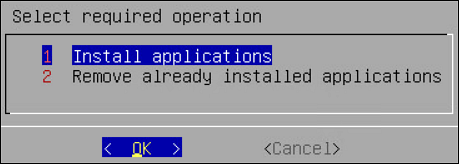
Select Install applications and select OK.
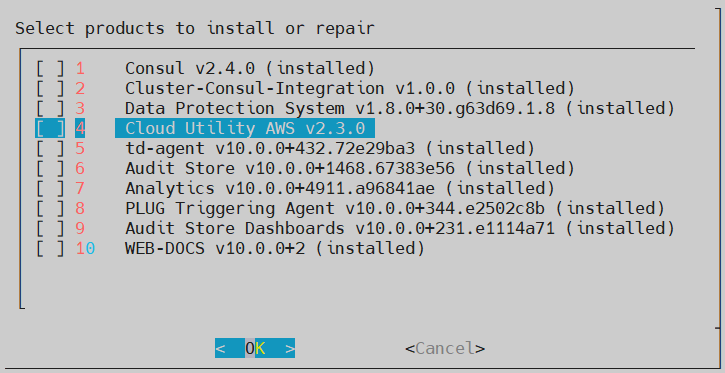
Select products to install and select OK.
- If a new product is selected, the installation process starts.
- If the product is already installed, then refer to step 6.
Select an already installed product to upgrade, uninstall, or reinstall, and select OK.
The Package is already installed screen appears. This step is not applicable for the DSG appliance.
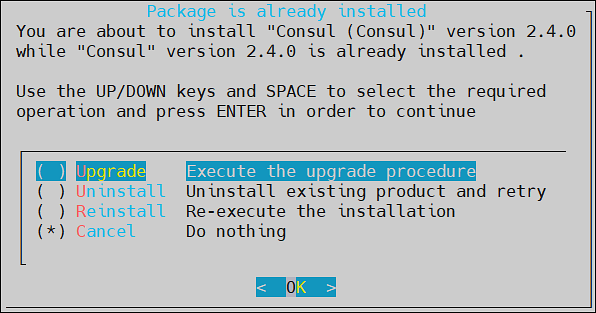
Select any one of the following options:
Option Description Upgrade Installs a newer version of the selected product. Uninstall Removes the selected product. Reinstall Removes and installs the product again. Cancel Returns to the Administration menu. Select OK.
Feedback
Was this page helpful?