Sending logs to an external security information and event management (SIEM)
This is an optional step.
The following options are available for forwarding logs from the Protector:
- The default setup, that is, ESA.
- Sending logs to the ESA and a SIEM.
In addition to the ESA or the ESA and a SIEM, logs can be sent to the Amazon CloudWatch. For more information about configuring Amazon CloudWatch, refer to Working with CloudWatch Console.
In the default setup, the logs are sent from the protectors directly to the Audit Store on the ESA using the Log Forwarder on the protector.
For more information about the default flow, refer Logging architecture.
To forward logs to the ESA and the external SIEM, the td-agent is configured to listen for protector logs. The protectors are configured to send the logs to the td-agent on the ESA. Finally, the td-agent is configured to forward the logs to the required locations.
Ensure that the logs are sent to the ESA and the external SIEM using the steps provided in this section. The logs sent to the ESA are required by Protegrity support for troubleshooting the system in case of any issues. Also, ensure that the ESA hostname specified in the configuration files are updated when the hostname of the ESA is changed.
An overview architecture diagram for sending logs to Insight and the external SIEM is shown in the following figure.
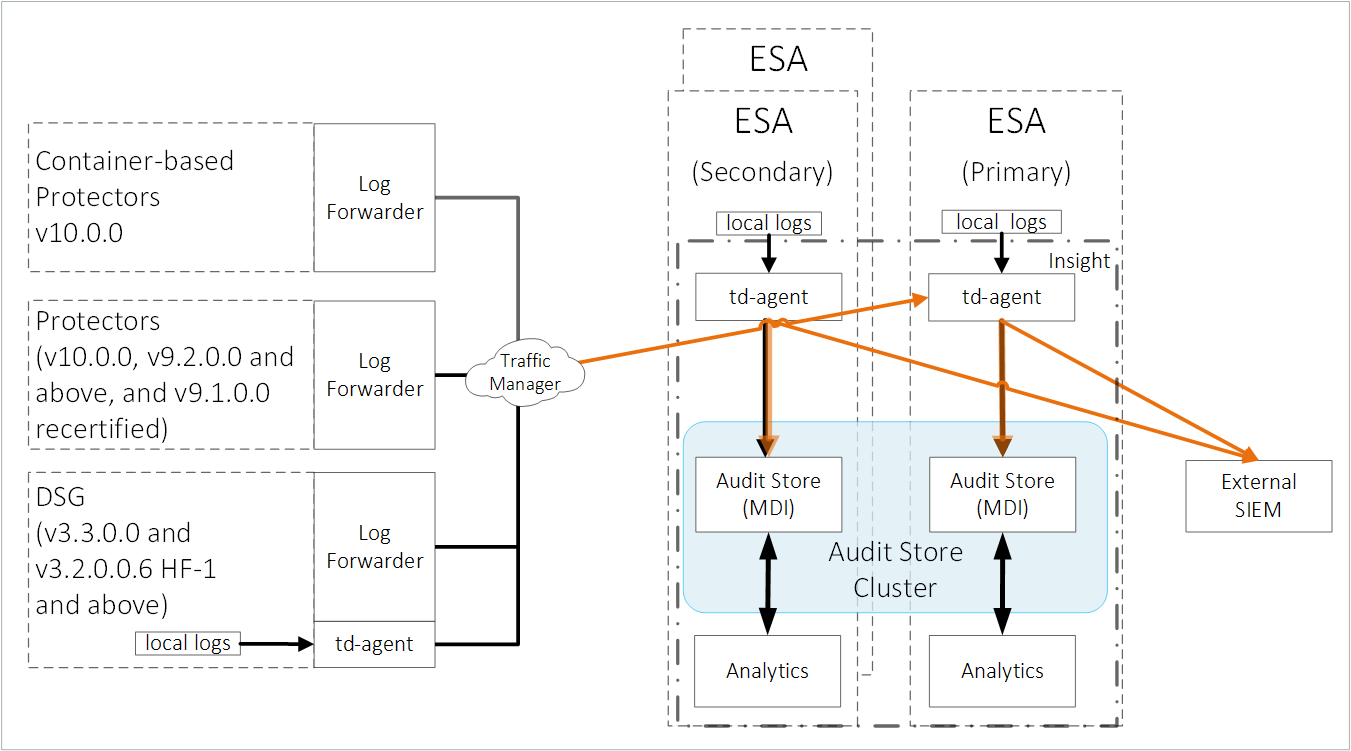
The ESA v10.0.1 only supports protectors having the PEP server version 1.2.2+42 and later.
Forward the logs generated on the protector to Insight and the external SIEM using the following steps. Ensure that all the steps are completed in the order specified.
Set up td-agent to receive protector logs.
Send the protector logs to the td-agent.
Configure td-agent to forward logs to the external endpoint.
1. Setting up td-agent to receive protector logs
Configure the td-agent to listen to logs from the protectors and to forward the logs received to Insight.
To configure td-agent:
Add the port 24284 to the rule list on the ESA. This port is configured for the ESA to receives the protector logs over a secure connection.
For more information about adding rules, refer Adding a New Rule with the Predefined List of Functionality.
Log in to the CLI Manager of the Primary ESA.
Navigate to Networking > Network Firewall.
Enter the password for the root user.
Select Add New Rule and select Choose.
Select Accept and select Next.
Select Manually.
Select TCP and select Next.
Specify 24284 for the port and select Next.
Select Any and select Next.
Select Any and select Next.
Specify a description for the rule and select Confirm.
Select OK.
Open the OS Console on the Primary ESA.
Log in to the CLI Manager of the Primary ESA.
Navigate to Administration > OS Console.
Enter the root password and select OK.
Enable td-agent to receive logs from the protector.
Navigate to the config.d directory using the following command.
cd /opt/protegrity/td-agent/config.dEnable the INPUT_forward_external.conf file using the following command. Ensure that the certificates exist in the directory that is specified in the INPUT_forward_external.conf file. If an IP address or host name is specified for the bind parameter in the file, then ensure that the certificates are updated to match the host name or IP address specified.
mv INPUT_forward_external.conf.disabled INPUT_forward_external.conf
Optional: Update the configuration settings to improve the SSL/TLS server configuration on the system.
Navigate to the config.d directory using the following command.
cd /opt/protegrity/td-agent/config.dOpen the INPUT_forward_external.conf file using a text editor.
Add the list of ciphers to the file. Update and use the ciphers that are required. Enter the entire line of code on a single line and retain the formatting of the file.
<source>
  @type forward
  bind <Hostname of the Primary ESA>
  port 24284
  <transport tls>
    ca_path           /mnt/ramdisk/certificates/mng/CA.pem
    cert_path         /mnt/ramdisk/certificates/mng/server.pem
    private_key_path  /mnt/ramdisk/certificates/mng/server.key
    ciphers "ALL:!aNULL:!eNULL:!SSLv2:!SSLv3:!DHE:!AES256-SHA:!CAMELLIA256-SHA:!AES128-SHA:!CAMELLIA128-SHA:!TLS_RSA_WITH_RC4_128_MD5:!TLS_RSA_WITH_RC4_128_SHA:!TLS_RSA_WITH_3DES_EDE_CBC_SHA:!TLS_DHE_RSA_WITH_3DES_EDE_CBC_SHA:!TLS_RSA_WITH_SEED_CBC_SHA:!TLS_DHE_RSA_WITH_SEED_CBC_SHA:!TLS_ECDHE_RSA_WITH_RC4_128_SHA:!TLS_ECDHE_RSA_WITH_3DES_EDE_CBC_SHA"
  </transport>
</source>
Save and close the file.
Restart the td-agent service.
Log in to the ESA Web UI.
Navigate to System > Services > Misc > td-agent.
Restart the td-agent service.
Repeat the steps on all the ESAs in the Audit Store cluster.
2. Sending the protector logs to the td-agent
Configure the protector to send the logs to the td-agent on the ESA or appliance. The td-agent forwards the logs received to Insight and the external location.
To configure the protector:
Log in and open a CLI on the protector machine.
Back up the existing files.
Navigate to the config.d directory using the following command.
cd /opt/protegrity/logforwarder/data/config.dBack up the existing out.conf file using the following command.
cp out.conf out.conf_backupBack up the existing upstream.cfg file using the following command.
cp upstream.cfg upstream.cfg_backup
Update the out.conf file for specifying the logs that must be forwarded to the ESA.
Navigate to the /opt/protegrity/logforwarder/data/config.d directory.
Open the out.conf file using a text editor.
Update the file contents with the following code.
Update the code blocks for all the options with the following information:
Update the Name parameter from opensearch to forward.
Delete the following Index, Type, and Time_Key parameters:
    Index pty_insight_audit
    Type  _doc
    Time_Key ingest_time_utc
Delete the Supress_Type_Name and Buffer_Size parameters:
    Suppress_Type_Name on
    Buffer_Size false
The updated extract of the code is shown here.
[OUTPUT]
 Name forward
 Match logdata
 Retry_Limit False
 Upstream /opt/protegrity/logforwarder/data/config.d/upstream.cfg
 storage.total_limit_size 256M
 net.max_worker_connections 1
 net.keepalive off
 Workers 1

[OUTPUT]
 Name forward
 Match flulog
 Retry_Limit no_retries
 Upstream /opt/protegrity/logforwarder/data/config.d/upstream.cfg
 storage.total_limit_size 256M
 net.max_worker_connections 1
 net.keepalive off
 Workers 1
Ensure that the file does not have any trailing spaces or line breaks at the end of the file.
Save and close the file.
Update the upstream.cfg file for forwarding the logs to the ESA.
Navigate to the /opt/protegrity/logforwarder/data/config.d directory.
Open the upstream.cfg file using a text editor.
Update the file contents with the following code.
Update the code blocks for all the nodes with the following information:
Update the Port to 24284.
Delete the Pipeline parameter:
Pipeline logs_pipeline
The updated extract of the code is shown here.
[UPSTREAM]
    Name       pty-insight-balancing

[NODE]
    Name       node-1
    Host       <IP address of the ESA>
    Port       24284
    tls        on
    tls.verify off
The code shows information updated for one node. For multiple nodes, update the information for all the nodes.
Ensure that there are no trailing spaces or line breaks at the end of the file.
If the IP address of the ESA is updated, then update the Host value in the upstream.cfg file.
Save and close the file.
Restart logforwarder on the protector using the following commands.
/opt/protegrity/logforwarder/bin/logforwarderctrl stop
/opt/protegrity/logforwarder/bin/logforwarderctrl start
If required, complete the configurations on the remaining protector machines.
Update the td-agent configuration to send logs to the external location.
Log in and open a CLI on the protector machine.
Back up the existing files.
Navigate to the config.d directory using the following command.
cd /opt/protegrity/fluent-bit/data/config.dBack up the existing out.conf file using the following command.
cp out.conf out.conf_backupBack up the existing upstream.cfg file using the following command.
cp upstream.cfg upstream.cfg_backup
Update the out.conf file for specifying the logs that must be forwarded to the ESA.
Navigate to the /opt/protegrity/fluent-bit/data/config.d directory.
Open the out.conf file using a text editor.
Update the file contents with the following code.
Update the code blocks for all the options with the following information:
Update the Name parameter from opensearch to forward.
Delete the following Index, Type, and Time_Key parameters:
    Index pty_insight_audit
    Type  _doc
    Time_Key ingest_time_utc
Delete the Supress_Type_Name parameter:
Suppress_Type_Name on
The updated extract of the code is shown here.
[OUTPUT]
    Name forward
    Match logdata
    Retry_Limit False
    Upstream /opt/protegrity/fluent-bit/data/config.d/upstream.cfg
    storage.total_limit_size 256M

[OUTPUT]
    Name forward
    Match flulog
    Retry_Limit 1
    Upstream /opt/protegrity/fluent-bit/data/config.d/upstream.cfg
    storage.total_limit_size 256M

[OUTPUT]
    Name forward
    Match errorlog
    Retry_Limit 1
    Upstream /opt/protegrity/fluent-bit/data/config.d/upstream.cfg
    storage.total_limit_size 256M
Ensure that the file does not have any trailing spaces or line breaks at the end of the file.
Save and close the file.
Update the upstream.cfg file for forwarding the logs to the ESA.
Navigate to the /opt/protegrity/fluent-bit/data/config.d directory.
Open the upstream.cfg file using a text editor.
Update the file contents with the following code.
Update the code blocks for all the nodes with the following information:
Update the Port to 24284.
Delete the Pipeline parameter:
Pipeline logs_pipeline
The updated extract of the code is shown here.
[UPSTREAM]
    Name       pty-insight-balancing

[NODE]
    Name       node-1
    Host       <IP address of the ESA>
    Port       24284
    tls        on
    tls.verify off
The code shows information updated for one node. For multiple nodes, update the information for all the nodes.
Ensure that there are no trailing spaces or line breaks at the end of the file.
If the IP address of the ESA is updated, then update the Host value in the upstream.cfg file.
Save and close the file.
Restart logforwarder on the protector using the following commands.
/opt/protegrity/fluent-bit/bin/logforwarderctrl stop
/opt/protegrity/fluent-bit/bin/logforwarderctrl start
If required, complete the configurations on the remaining protector machines.
Update the td-agent configuration to send logs to the external location.
3. Configuring td-agent to forward logs to the external endpoint
As per the setup and requirements, the logs forwarded can be formatted using the syslog-related fields and sent over TLS to the SIEM. Alternatively, send the logs without any formatting over a non-TLS connection to the SIEM, such as, syslog.
The ESA has logs generated by the appliances and the protectors connected to the ESA. Forward these logs to the syslog server and use the log data for further analysis as per requirements.
For a complete list of plugins for forwarding logs, refer to https://www.fluentd.org/plugins/all.
Before you begin: Ensure that the external syslog server is available and running.
The following options are available, select any one of the options based on the requirements:
Option 1: Forwarding Logs to a Syslog Server
To forward logs to the external SIEM:
Open the CLI Manager on the Primary ESA.
Log in to the CLI Manager of the Primary ESA where the td-agent was configured in Setting Up td-agent to Receive Protector Logs.
Navigate to Administration > OS Console.
Enter the root password and select OK.
Navigate to the /products/uploads directory using the following command.
cd /products/uploadsObtain the required plugins files using one of the following commands based on the setup.
If the appliance has Internet access, then run the following commands.
wget https://rubygems.org/downloads/syslog_protocol-0.9.2.gemwget https://rubygems.org/downloads/remote_syslog_sender-1.2.2.gemwget https://rubygems.org/downloads/fluent-plugin-remote_syslog-1.0.0.gemIf the appliance does not have Internet access, then complete the following steps.
- Download the following setup files from a system that has Internet and copy them to the appliance in the /products/uploads directory.
- Ensure that the files downloaded have the execute permission.
Prepare the required plugins files using the following commands.
Assign the required ownership permissions to the software using the following command.
chown td-agent *.gemAssign the required permissions to the software installed using the following command.
chmod -R 755 /opt/td-agent/lib/ruby/gems/3.2.0/Assign ownership of the .gem files to the td-agent user using the following command.
chown -R td-agent:plug /opt/td-agent/lib/ruby/gems/3.2.0/
Install the required plugins files using one of the following commands based on the setup.
If the appliance has Internet access, then run the following commands.
sudo -u td-agent /opt/td-agent/bin/fluent-gem install syslog_protocolsudo -u td-agent /opt/td-agent/bin/fluent-gem install remote_syslog_sendersudo -u td-agent /opt/td-agent/bin/fluent-gem install fluent-plugin-remote_syslogIf the appliance does not have Internet access, then run the following commands.
sudo -u td-agent /opt/td-agent/bin/fluent-gem install --local /products/uploads/syslog_protocol-0.9.2.gemsudo -u td-agent /opt/td-agent/bin/fluent-gem install install --local /products/uploads/remote_syslog_sender-1.2.2.gemsudo -u td-agent /opt/td-agent/bin/fluent-gem install --local /products/uploads/fluent-plugin-remote_syslog-1.0.0.gem
Update the configuration files using the following steps.
Navigate to the config.d directory using the following command.
cd /opt/protegrity/td-agent/config.dBack up the existing output file using the following command.
cp OUTPUT.conf OUTPUT.conf_backupOpen the OUTPUT.conf file using a text editor.
Update the following contents in the OUTPUT.conf file.
Update the match tag in the file to <match *.*.* logdata flulog>.
Add the following code in the match tag in the file:
  <store>
    @type relabel
    @label @syslog
  </store>
The final OUTPUT.conf file with the updated content is shown here:
<filter **>
  @type elasticsearch_genid
  # to avoid duplicate logs
  # https://github.com/uken/fluent-plugin-elasticsearch#generate-hash-id
  hash_id_key _id    # storing generated hash id key (default is _hash)
</filter>

<match *.*.* logdata flulog>
  @type copy

  <store>
      @type opensearch
      hosts <Hostname of the ESA>
      port 9200
      index_name pty_insight_audit
      type_name _doc
      pipeline logs_pipeline
      # adds new data - if the data already exists (based on its id), the op is skipped.
      # https://github.com/uken/fluent-plugin-elasticsearch#write_operation
      write_operation create
      # By default, all records inserted into Elasticsearch get a random _id. This option allows to use a field in the record as an identifier.
      # https://github.com/uken/fluent-plugin-elasticsearch#id_key
      id_key _id
      scheme https
      ssl_verify true
      ssl_version TLSv1_2
      ca_file /etc/ksa/certificates/plug/CA.pem
      client_cert /etc/ksa/certificates/plug/client.pem
      client_key /etc/ksa/certificates/plug/client.key
      request_timeout 300s # defaults to 5s https://github.com/uken/fluent-plugin-elasticsearch#request_timeout
      <buffer>
        @type file
        path /opt/protegrity/td-agent/es_buffer
        retry_forever true           # Set 'true' for infinite retry loops.
        flush_mode interval
        flush_interval 60s
        flush_thread_count 8  # parallelize outputs https://docs.fluentd.org/deployment/performance-tuning-single-process#use-flush_thread_count-parameter
        retry_type periodic
        retry_wait 10s
      </buffer>
  </store>

  <store>
      @type relabel
      @label @triggering_agent
  </store>

<store>
    @type relabel
    @label @syslog
  </store>
</match>
Ensure that there are no trailing spaces or line breaks at the end of the file.
Save and close the file.
Create and open the OUTPUT_syslog.conf file using a text editor.
Perform the steps from one of the following solution as per the requirement.
Solution 1: Forward all logs to the external syslog server:
Add the following contents to the OUTPUT_syslog.conf file.
<label @syslog>

    <filter *.*.* logdata flulog>
      @type record_transformer
      enable_ruby true
      <record>
        origin ${record["origin"]["time_utc"] = record["origin"]["time_utc"].is_a?(Integer) ? Time.at(record["origin"]["time_utc"]).utc.strftime("%Y-%m-%dT%H:%M:%S.%LZ") : record["origin"]["time_utc"] ;  record["origin"]}
      </record>
    </filter>

    <match *.*.* logdata flulog>
    @type copy
    <store>
        @type remote_syslog
        host <IP_of_the_syslog_server_host>
        port 514
        <format>
            @type json
        </format>
        protocol udp
        <buffer>
            @type file
            path /opt/protegrity/td-agent/syslog_tags_buffer
            retry_forever true # Set 'true' for infinite retry loops.
            flush_mode interval
            flush_interval 60s
            flush_thread_count 8 # parallelize outputs https://docs.fluentd.org/deployment/performance-tuning-single-process#use-flush_thread_count-parameter
            retry_type periodic
            retry_wait 10s
        </buffer>
        </store>
    </match>
</label>
Ensure that there are no trailing spaces or line breaks at the end of the file.
Solution 2: Forward only the protection logs to the external syslog server:
Add the following contents to the OUTPUT_syslog.conf file.
<label @syslog>

    <filter *.*.* logdata>
      @type record_transformer
      enable_ruby true
      <record>
        origin ${record["origin"]["time_utc"] = record["origin"]["time_utc"].is_a?(Integer) ? Time.at(record["origin"]["time_utc"]).utc.strftime("%Y-%m-%dT%H:%M:%S.%LZ") : record["origin"]["time_utc"] ;  record["origin"]}
      </record>
    </filter>

    <match logdata>
    @type copy
    <store>
        @type remote_syslog
        host <IP_of_the_syslog_server_host>
        port 514
        <format>
            @type json
        </format>
        protocol udp
        <buffer>
            @type file
            path /opt/protegrity/td-agent/syslog_tags_buffer
            retry_forever true # Set 'true' for infinite retry loops.
            flush_mode interval
            flush_interval 60s
            flush_thread_count 8 # parallelize outputs https://docs.fluentd.org/deployment/performance-tuning-single-process#use-flush_thread_count-parameter
            retry_type periodic
            retry_wait 10s
        </buffer>
        </store>
    </match>
</label>
Ensure that there are no trailing spaces or line breaks at the end of the file. Ensure that the <IP_of_the_syslog_server_host> is specified in the file.
To use a TCP connection, update the protocol to tcp. In addition, specify the port that is opened for TCP communication.
For more information about the formatting the output, navigate to https://docs.fluentd.org/configuration/format-section.
Save and close the file.
Update the permissions for the file using the following commands.
chown td-agent:td-agent OUTPUT_syslog.conf
chmod 700 OUTPUT_syslog.conf
Navigate to the config.d directory using the following command.
cd /opt/protegrity/td-agent/config.dBack up the existing output file using the following command.
cp OUTPUT.conf OUTPUT.conf_backupOpen the OUTPUT.conf file using a text editor.
Update the following contents in the OUTPUT.conf file.
Update the match tag in the file to <match *.*.* logdata flulog errorlog>.
Add the following code in the match tag in the file:
  <store>
    @type relabel
    @label @syslog
  </store>
The final OUTPUT.conf file with the updated content is shown here:
<filter **>
  @type elasticsearch_genid
  # to avoid duplicate logs
  # https://github.com/uken/fluent-plugin-elasticsearch#generate-hash-id
  hash_id_key _id    # storing generated hash id key (default is _hash)
</filter>

<match *.*.* logdata flulog errorlog>
  @type copy

  <store>
      @type opensearch
      hosts <Hostname of the ESA>
      port 9200
      index_name pty_insight_audit
      type_name _doc
      pipeline logs_pipeline
      # adds new data - if the data already exists (based on its id), the op is skipped.
      # https://github.com/uken/fluent-plugin-elasticsearch#write_operation
      write_operation create
      # By default, all records inserted into Elasticsearch get a random _id. This option allows to use a field in the record as an identifier.
      # https://github.com/uken/fluent-plugin-elasticsearch#id_key
      id_key _id
      scheme https
      ssl_verify true
      ssl_version TLSv1_2
      ca_file /etc/ksa/certificates/plug/CA.pem
      client_cert /etc/ksa/certificates/plug/client.pem
      client_key /etc/ksa/certificates/plug/client.key
      request_timeout 300s # defaults to 5s https://github.com/uken/fluent-plugin-elasticsearch#request_timeout
      <buffer>
        @type file
        path /opt/protegrity/td-agent/es_buffer
        retry_forever true           # Set 'true' for infinite retry loops.
        flush_mode interval
        flush_interval 60s
        flush_thread_count 8  # parallelize outputs https://docs.fluentd.org/deployment/performance-tuning-single-process#use-flush_thread_count-parameter
        retry_type periodic
        retry_wait 10s
      </buffer>
  </store>

  <store>
      @type relabel
      @label @triggering_agent
  </store>

<store>
    @type relabel
    @label @syslog
  </store>
</match>
Ensure that there are no trailing spaces or line breaks at the end of the file.
Save and close the file.
Create and open the OUTPUT_syslog.conf file using a text editor.
Perform the steps from one of the following solution as per the requirement.
Solution 1: Forward all logs to the external syslog server:
Add the following contents to the OUTPUT_syslog.conf file.
<label @syslog>

    <filter *.*.* logdata flulog errorlog>
      @type record_transformer
      enable_ruby true
      <record>
        origin ${record["origin"]["time_utc"] = record["origin"]["time_utc"].is_a?(Integer) ? Time.at(record["origin"]["time_utc"]).utc.strftime("%Y-%m-%dT%H:%M:%S.%LZ") : record["origin"]["time_utc"] ;  record["origin"]}
      </record>
    </filter>

    <match *.*.* logdata flulog errorlog>
    @type copy
    <store>
        @type remote_syslog
        host <IP_of_the_syslog_server_host>
        port 514
        <format>
            @type json
        </format>
        protocol udp
        <buffer>
            @type file
            path /opt/protegrity/td-agent/syslog_tags_buffer
            retry_forever true # Set 'true' for infinite retry loops.
            flush_mode interval
            flush_interval 60s
            flush_thread_count 8 # parallelize outputs https://docs.fluentd.org/deployment/performance-tuning-single-process#use-flush_thread_count-parameter
            retry_type periodic
            retry_wait 10s
        </buffer>
        </store>
    </match>
</label>
Ensure that there are no trailing spaces or line breaks at the end of the file.
Solution 2: Forward only the protection logs to the external syslog server:
Add the following contents to the OUTPUT_syslog.conf file.
<label @syslog>

    <filter *.*.* logdata>
      @type record_transformer
      enable_ruby true
      <record>
        origin ${record["origin"]["time_utc"] = record["origin"]["time_utc"].is_a?(Integer) ? Time.at(record["origin"]["time_utc"]).utc.strftime("%Y-%m-%dT%H:%M:%S.%LZ") : record["origin"]["time_utc"] ;  record["origin"]}
      </record>
    </filter>

    <match logdata>
    @type copy
    <store>
        @type remote_syslog
        host <IP_of_the_syslog_server_host>
        port 514
        <format>
            @type json
        </format>
        protocol udp
        <buffer>
            @type file
            path /opt/protegrity/td-agent/syslog_tags_buffer
            retry_forever true # Set 'true' for infinite retry loops.
            flush_mode interval
            flush_interval 60s
            flush_thread_count 8 # parallelize outputs https://docs.fluentd.org/deployment/performance-tuning-single-process#use-flush_thread_count-parameter
            retry_type periodic
            retry_wait 10s
        </buffer>
        </store>
    </match>
</label>
Ensure that there are no trailing spaces or line breaks at the end of the file. Ensure that the <IP_of_the_syslog_server_host> is specified in the file.
To use a TCP connection, update the protocol to tcp. In addition, specify the port that is opened for TCP communication.
For more information about the formatting the output, navigate to https://docs.fluentd.org/configuration/format-section.
Save and close the file.
Update the permissions for the file using the following commands.
chown td-agent:td-agent OUTPUT_syslog.conf
chmod 700 OUTPUT_syslog.conf
Restart the td-agent service.
Log in to the ESA Web UI.
Navigate to System > Services > Misc > td-agent,
Restart the td-agent service.
Repeat the steps on all the ESAs in the Audit Store cluster.
Check the status and restart the rsyslog server on the remote SIEM system using the following commands.
systemctl status rsyslog
systemctl restart rsyslog
The logs are now sent to Insight on the ESA and the external SIEM.
Option 2: Forwarding Logs to a Syslog Server Over TLS
To forward logs to the external SIEM:
Open the CLI Manager on the Primary ESA.
Log in to the CLI Manager of the Primary ESA where the td-agent was configured in Setting Up td-agent to Receive Protector Logs.
Navigate to Administration > OS Console.
Enter the root password and select OK.
Navigate to the /products/uploads directory using the following command.
cd /products/uploadsObtain the required plugin file using one of the following commands based on the setup.
If the appliance has Internet access, then run the following command.
wget https://rubygems.org/downloads/fluent-plugin-syslog-tls-2.0.0.gemIf the appliance does not have Internet access, then complete the following steps.
- Download the fluent-plugin-syslog-tls-2.0.0.gem set up file from a system that has Internet and copy it to the appliance in the /products/uploads directory.
- Ensure that the file downloaded has the execute permission.
Prepare the required plugin file using the following commands.
Assign the required ownership permissions to the installer using the following command.
chown td-agent *.gemAssign the required permissions to the software installation directory using the following command.
chmod -R 755 /opt/td-agent/lib/ruby/gems/3.2.0/Assign ownership of the software installation directory to the required users using the following command.
chown -R td-agent:plug /opt/td-agent/lib/ruby/gems/3.2.0/
Install the required plugin file using one of the following commands based on the setup.
If the appliance has Internet access, then run the following command.
sudo -u td-agent /opt/td-agent/bin/fluent-gem install fluent-plugin-syslog-tlsIf the appliance does not have Internet access, then run the following command.
sudo -u td-agent /opt/td-agent/bin/fluent-gem install --local /products/uploads/fluent-plugin-syslog-tls-2.0.0.gem
Copy the required certificates on the ESA or the appliance.
Log in to the ESA or the appliance and open the CLI Manager.
Create a directory for the certificates using the following command.
mkdir -p /opt/protegrity/td-agent/new_certsUpdate the ownership of the directory using the following command.
chown -R td-agent:plug /opt/protegrity/td-agent/new_certsLog in to the remote SIEM system.
Using a command prompt, navigate to the directory where the certificates are located. For example,
cd /etc/pki/tls/certs.Connect to the ESA or appliance using a file transfer manager. For example,
sftp root@ESA_IP.Copy the CA and client certificates to the /opt/Protegrity/td-agent/new_certs directory using the following command.
put CA.pem /opt/protegrity/td-agent/new_certs
put client.* /opt/protegrity/td-agent/new_certs
Update the permissions of the certificates using the following command.
chmod -r 744 /opt/protegrity/td-agent/new_certs/CA.pem
chmod -r 744 /opt/protegrity/td-agent/new_certs/client.pem
chmod -r 744 /opt/protegrity/td-agent/new_certs/client.key
Update the configuration files using the following steps.
Navigate to the config.d directory using the following command.
cd /opt/protegrity/td-agent/config.dBack up the existing output file using the following command.
cp OUTPUT.conf OUTPUT.conf_backupOpen the OUTPUT.conf file using a text editor.
Update the following contents in the OUTPUT.conf file.
Update the match tag in the file to <match *.*.* logdata flulog>.
Add the following code in the match tag in the file:
  <store>
    @type relabel
    @label @syslogtls
  </store>
The final OUTPUT.conf file with the updated content is shown here:
<filter **>
  @type elasticsearch_genid
  # to avoid duplicate logs
  # https://github.com/uken/fluent-plugin-elasticsearch#generate-hash-id
  hash_id_key _id    # storing generated hash id key (default is _hash)
</filter>

<match *.*.* logdata flulog>
  @type copy

  <store>
      @type opensearch
      hosts <Hostname of the ESA>
      port 9200
      index_name pty_insight_audit
      type_name _doc
      pipeline logs_pipeline
      # adds new data - if the data already exists (based on its id), the op is skipped.
      # https://github.com/uken/fluent-plugin-elasticsearch#write_operation
      write_operation create
      # By default, all records inserted into Elasticsearch get a random _id. This option allows to use a field in the record as an identifier.
      # https://github.com/uken/fluent-plugin-elasticsearch#id_key
      id_key _id
      scheme https
      ssl_verify true
      ssl_version TLSv1_2
      ca_file /etc/ksa/certificates/plug/CA.pem
      client_cert /etc/ksa/certificates/plug/client.pem
      client_key /etc/ksa/certificates/plug/client.key
      request_timeout 300s # defaults to 5s https://github.com/uken/fluent-plugin-elasticsearch#request_timeout
      <buffer>
        @type file
        path /opt/protegrity/td-agent/es_buffer
        retry_forever true           # Set 'true' for infinite retry loops.
        flush_mode interval
        flush_interval 60s
        flush_thread_count 8  # parallelize outputs https://docs.fluentd.org/deployment/performance-tuning-single-process#use-flush_thread_count-parameter
        retry_type periodic
        retry_wait 10s
      </buffer>
  </store>

  <store>
      @type relabel
      @label @triggering_agent
  </store>

<store>
    @type relabel
    @label @syslogtls
  </store>
</match>
Ensure that there are no trailing spaces or line breaks at the end of the file.
Save and close the file.
Create and open the OUTPUT_syslogTLS.conf file using a text editor.
Perform the steps from one of the following solution as per the requirement.
Solution 1: Forward all logs to the external syslog server:
Add the following contents to the OUTPUT_syslogTLS.conf file.
<label @syslogtls>

  <filter *.*.* logdata flulog>
      @type record_transformer
      enable_ruby true
      <record>
        origin ${record["origin"]["time_utc"] = record["origin"]["time_utc"].is_a?(Integer) ? Time.at(record["origin"]["time_utc"]).utc.strftime("%Y-%m-%dT%H:%M:%S.%LZ") : record["origin"]["time_utc"] ;  record["origin"]}
      </record>
  </filter>

  <filter *.*.* logdata flulog>
    @type record_transformer
    enable_ruby true
    <record>
    severity "${
          case record['level']
          when 'Error'
            'err'
          when 'ERROR'
            'err'
          else
            'info'
           end
         }"

    #local0 -Protection
    #local1 -Application
    #local2 -System
    #local3 -Kernel
    #local4 -Policy
    #local5 -User Defined
    #local6 -User Defined
    #local7 -Others
    #local5 and local6 can be defined as per the requirement

    facility "${
          case record['logtype']
          when 'Protection'
            'local0'
          when 'Application'
            'local1'
          when 'System'
             'local2'
          when 'Kernel'
             'local3'
          when 'Policy'
             'local4'
          else
             'local7'
          end
               }"

    #noHostName - can be changed by customer
    hostname ${record["origin"] ? (record["origin"]["hostname"] ? record["origin"]["hostname"] : "noHostName") : "noHostName" }
    </record>
  </filter>

  <match *.*.* logdata flulog>
    @type copy
    <store>
      @type syslog_tls
      host <IP_of_the_rsyslog_server_host>
      port 601
      client_cert /opt/protegrity/td-agent/new_certs/client.pem
      client_key /opt/protegrity/td-agent/new_certs/client.key
      ca_cert /opt/protegrity/td-agent/new_certs/CA.pem
      verify_cert_name true
      severity_key severity
      facility_key facility
      hostname_key hostname
      <format>
      @type json
      </format>
    </store>
  </match>
</label>
Ensure that there are no trailing spaces or line breaks at the end of the file.
Solution 2: Forward only the protection logs to the external syslog server:
Add the following contents to the OUTPUT_syslogTLS.conf file.
<label @syslogtls>

  <filter *.*.* logdata>
      @type record_transformer
      enable_ruby true
      <record>
        origin ${record["origin"]["time_utc"] = record["origin"]["time_utc"].is_a?(Integer) ? Time.at(record["origin"]["time_utc"]).utc.strftime("%Y-%m-%dT%H:%M:%S.%LZ") : record["origin"]["time_utc"] ;  record["origin"]}
      </record>
  </filter>

  <filter logdata>
    @type record_transformer
    enable_ruby true
    <record>
    severity "${
          case record['level']
          when 'Error'
            'err'
          when 'ERROR'
            'err'
          else
            'info'
           end
         }"

    #local0 -Protection
    #local1 -Application
    #local2 -System
    #local3 -Kernel
    #local4 -Policy
    #local5 -User Defined
    #local6 -User Defined
    #local7 -Others
    #local5 and local6 can be defined as per the requirement

    facility "${
          case record['logtype']
          when 'Protection'
            'local0'
          when 'Application'
            'local1'
          when 'System'
             'local2'
          when 'Kernel'
             'local3'
          when 'Policy'
             'local4'
          else
             'local7'
          end
               }"

    #noHostName - can be changed by customer
    hostname ${record["origin"] ? (record["origin"]["hostname"] ? record["origin"]["hostname"] : "noHostName") : "noHostName" }
    </record>
  </filter>

  <match logdata>
    @type copy
    <store>
      @type syslog_tls
      host <IP_of_the_rsyslog_server_host>
      port 601
      client_cert /opt/protegrity/td-agent/new_certs/client.pem
      client_key /opt/protegrity/td-agent/new_certs/client.key
      ca_cert /opt/protegrity/td-agent/new_certs/CA.pem
      verify_cert_name true
      severity_key severity
      facility_key facility
      hostname_key hostname
      <format>
      @type json
      </format>
    </store>
  </match>
</label>
Ensure that the <IP_of_the_rsyslog_server_host> is specified in the file.
For more information about the formatting the output, navigate to https://docs.fluentd.org/configuration/format-section.
The logs are formatted using the rfc 3164 format that is commonly used.
For more information about the rfc format, navigate to https://datatracker.ietf.org/doc/html/rfc3164.
Ensure that there are no trailing spaces or line breaks at the end of the file.
Save and close the file.
Update the permissions for the file using the following commands.
chown td-agent:td-agent OUTPUT_syslogTLS.conf
chmod 700 OUTPUT_syslogTLS.conf
Navigate to the config.d directory using the following command.
cd /opt/protegrity/td-agent/config.dBack up the existing output file using the following command.
cp OUTPUT.conf OUTPUT.conf_backupOpen the OUTPUT.conf file using a text editor.
Update the following contents in the OUTPUT.conf file.
Update the match tag in the file to <match *.*.* logdata flulog errorlog>.
Add the following code in the match tag in the file:
  <store>
    @type relabel
    @label @syslogtls
  </store>
The final OUTPUT.conf file with the updated content is shown here:
<filter **>
  @type elasticsearch_genid
  # to avoid duplicate logs
  # https://github.com/uken/fluent-plugin-elasticsearch#generate-hash-id
  hash_id_key _id    # storing generated hash id key (default is _hash)
</filter>

<match *.*.* logdata flulog errorlog>
  @type copy

  <store>
      @type opensearch
      hosts <Hostname of the ESA>
      port 9200
      index_name pty_insight_audit
      type_name _doc
      pipeline logs_pipeline
      # adds new data - if the data already exists (based on its id), the op is skipped.
      # https://github.com/uken/fluent-plugin-elasticsearch#write_operation
      write_operation create
      # By default, all records inserted into Elasticsearch get a random _id. This option allows to use a field in the record as an identifier.
      # https://github.com/uken/fluent-plugin-elasticsearch#id_key
      id_key _id
      scheme https
      ssl_verify true
      ssl_version TLSv1_2
      ca_file /etc/ksa/certificates/plug/CA.pem
      client_cert /etc/ksa/certificates/plug/client.pem
      client_key /etc/ksa/certificates/plug/client.key
      request_timeout 300s # defaults to 5s https://github.com/uken/fluent-plugin-elasticsearch#request_timeout
      <buffer>
        @type file
        path /opt/protegrity/td-agent/es_buffer
        retry_forever true           # Set 'true' for infinite retry loops.
        flush_mode interval
        flush_interval 60s
        flush_thread_count 8  # parallelize outputs https://docs.fluentd.org/deployment/performance-tuning-single-process#use-flush_thread_count-parameter
        retry_type periodic
        retry_wait 10s
      </buffer>
  </store>

  <store>
      @type relabel
      @label @triggering_agent
  </store>

<store>
    @type relabel
    @label @syslogtls
  </store>
</match>
Ensure that there are no trailing spaces or line breaks at the end of the file.
Save and close the file.
Create and open the OUTPUT_syslogTLS.conf file using a text editor.
Perform the steps from one of the following solution as per the requirement.
Solution 1: Forward all logs to the external syslog server:
Add the following contents to the OUTPUT_syslogTLS.conf file.
<label @syslogtls>

  <filter *.*.* logdata flulog errorlog>
      @type record_transformer
      enable_ruby true
      <record>
        origin ${record["origin"]["time_utc"] = record["origin"]["time_utc"].is_a?(Integer) ? Time.at(record["origin"]["time_utc"]).utc.strftime("%Y-%m-%dT%H:%M:%S.%LZ") : record["origin"]["time_utc"] ;  record["origin"]}
      </record>
  </filter>

  <filter *.*.* logdata flulog errorlog>
    @type record_transformer
    enable_ruby true
    <record>
    severity "${
          case record['level']
          when 'Error'
            'err'
          when 'ERROR'
            'err'
          else
            'info'
           end
         }"

    #local0 -Protection
    #local1 -Application
    #local2 -System
    #local3 -Kernel
    #local4 -Policy
    #local5 -User Defined
    #local6 -User Defined
    #local7 -Others
    #local5 and local6 can be defined as per the requirement

    facility "${
          case record['logtype']
          when 'Protection'
            'local0'
          when 'Application'
            'local1'
          when 'System'
             'local2'
          when 'Kernel'
             'local3'
          when 'Policy'
             'local4'
          else
             'local7'
          end
               }"

    #noHostName - can be changed by customer
    hostname ${record["origin"] ? (record["origin"]["hostname"] ? record["origin"]["hostname"] : "noHostName") : "noHostName" }
    </record>
  </filter>

  <match *.*.* logdata flulog errorlog>
    @type copy
    <store>
      @type syslog_tls
      host <IP_of_the_rsyslog_server_host>
      port 601
      client_cert /opt/protegrity/td-agent/new_certs/client.pem
      client_key /opt/protegrity/td-agent/new_certs/client.key
      ca_cert /opt/protegrity/td-agent/new_certs/CA.pem
      verify_cert_name true
      severity_key severity
      facility_key facility
      hostname_key hostname
      <format>
      @type json
      </format>
    </store>
  </match>
</label>
Ensure that there are no trailing spaces or line breaks at the end of the file.
Solution 2: Forward only the protection logs to the external syslog server:
Add the following contents to the OUTPUT_syslogTLS.conf file.
<label @syslogtls>

  <filter *.*.* logdata>
      @type record_transformer
      enable_ruby true
      <record>
        origin ${record["origin"]["time_utc"] = record["origin"]["time_utc"].is_a?(Integer) ? Time.at(record["origin"]["time_utc"]).utc.strftime("%Y-%m-%dT%H:%M:%S.%LZ") : record["origin"]["time_utc"] ;  record["origin"]}
      </record>
  </filter>

  <filter logdata>
    @type record_transformer
    enable_ruby true
    <record>
    severity "${
          case record['level']
          when 'Error'
            'err'
          when 'ERROR'
            'err'
          else
            'info'
           end
         }"

    #local0 -Protection
    #local1 -Application
    #local2 -System
    #local3 -Kernel
    #local4 -Policy
    #local5 -User Defined
    #local6 -User Defined
    #local7 -Others
    #local5 and local6 can be defined as per the requirement

    facility "${
          case record['logtype']
          when 'Protection'
            'local0'
          when 'Application'
            'local1'
          when 'System'
             'local2'
          when 'Kernel'
             'local3'
          when 'Policy'
             'local4'
          else
             'local7'
          end
               }"

    #noHostName - can be changed by customer
    hostname ${record["origin"] ? (record["origin"]["hostname"] ? record["origin"]["hostname"] : "noHostName") : "noHostName" }
    </record>
  </filter>

  <match logdata>
    @type copy
    <store>
      @type syslog_tls
      host <IP_of_the_rsyslog_server_host>
      port 601
      client_cert /opt/protegrity/td-agent/new_certs/client.pem
      client_key /opt/protegrity/td-agent/new_certs/client.key
      ca_cert /opt/protegrity/td-agent/new_certs/CA.pem
      verify_cert_name true
      severity_key severity
      facility_key facility
      hostname_key hostname
      <format>
      @type json
      </format>
    </store>
  </match>
</label>
Ensure that the <IP_of_the_rsyslog_server_host> is specified in the file.
For more information about the formatting the output, navigate to https://docs.fluentd.org/configuration/format-section.
The logs are formatted using the rfc 3164 format that is commonly used.
For more information about the rfc format, navigate to https://datatracker.ietf.org/doc/html/rfc3164.
Ensure that there are no trailing spaces or line breaks at the end of the file.
Save and close the file.
Update the permissions for the file using the following commands.
chown td-agent:td-agent OUTPUT_syslogTLS.conf
chmod 700 OUTPUT_syslogTLS.conf
Restart the td-agent service.
Log in to the ESA Web UI.
Navigate to System > Services > Misc > td-agent,
Restart the td-agent service.
Repeat the steps on all the ESAs in the Audit Store cluster.
Check the status and restart the rsyslog server on the remote SIEM system using the following commands.
```
systemctl status rsyslog
systemctl restart rsyslog
```
The logs are now sent to Insight on the ESA and the external SIEM over TLS.
Feedback
Was this page helpful?