Package Deployment
Starting with version 10.0.x artifacts such as the Data Security Policy or the DSG CoP rulesets, are distributed to Protectors through Packages. Packages in the ESA are resilient. Protectors store the resilient Packages using dynamic memory allocation, allowing for high scalability and performance.
A Data Security Policy is deployed in the ESA either using the ESA Web UI or the Policy Management API. A deployed policy indicates that it is ready to be distributed to the Protectors. If multiple policies exist in one data store, then the policies are merged on deployment. A deployed policy can be distributed to the Protectors using one of the following methods:
- Dynamic distribution - Protectors send requests to the ESA to receive the latest Policies and other artifacts, and related metadata.
- DevOps-based distribution - The Resilient Package API is used to export an encrypted resilient package to a secure location. The encrypted resilient package can then be used by Immutable Resilient Protectors.
For more information about deploying Policies in the ESA, refer to Deploying Policies.
For more information about the DSG CoP Ruleset, refer to Ruleset reference.
The following image illustrates the dynamic distribution of resilient packages. It shows how the Data Security Policy that is defined in the ESA reaches the protectors as part of a package. A Data Security Policy is created and deployed in the ESA either using the ESA Web UI or the Policy Management API. When the protector sends a request to the ESA, the ESA creates a package containing the policy. The protector then pulls the package and the related metadata. If a change is made to any of the policies that are part of the package, the protector pulls the updated package from the ESA. There can be multiple scenarios when any change in policy is made.
Important: The deployment scenario explained in this section applies to 10.0.x protectors and later.
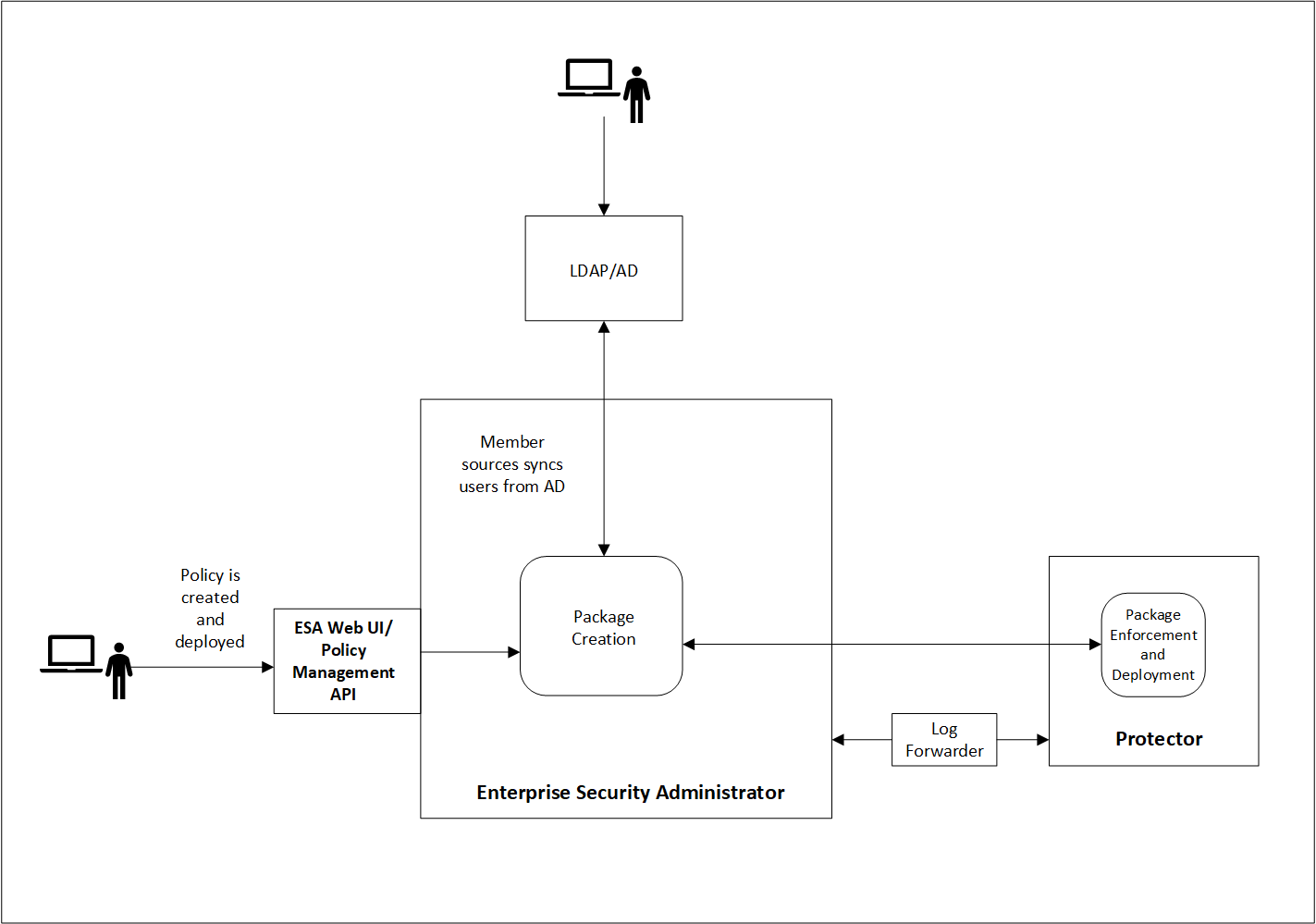
Resilient Package Deployment
A number of components participate in the Package distribution process from the ESA to Protectors. The ESA and Protector-based components communicate with each other using Time To Live (TTL) as the main metric to verify that their stored Packages are up to date.
The following table provides descriptions of each component:
| Abbreviation | Name | Description | TTL | Host |
|---|---|---|---|---|
| RPP | Resilient Package Proxy | A forward proxy that caches the Resilient Packages. | 60s | ESA |
| RPA | Resilient Package Agent | A component that connects to the ESA or the RPP to determine if a new Package exists for the data store. If a new Package exists, it is pulled by the RPA. | 60s | Protector |
| RPS API | Resilient Package REST API | An API used to pull packages from the ESA that can be used within DevOps pipelines. | N/A | ESA |
Resilient Package Deployment Architecture
The following diagram shows three sample use cases for downloading the resilient package from the ESA or an upstream server to the protectors.
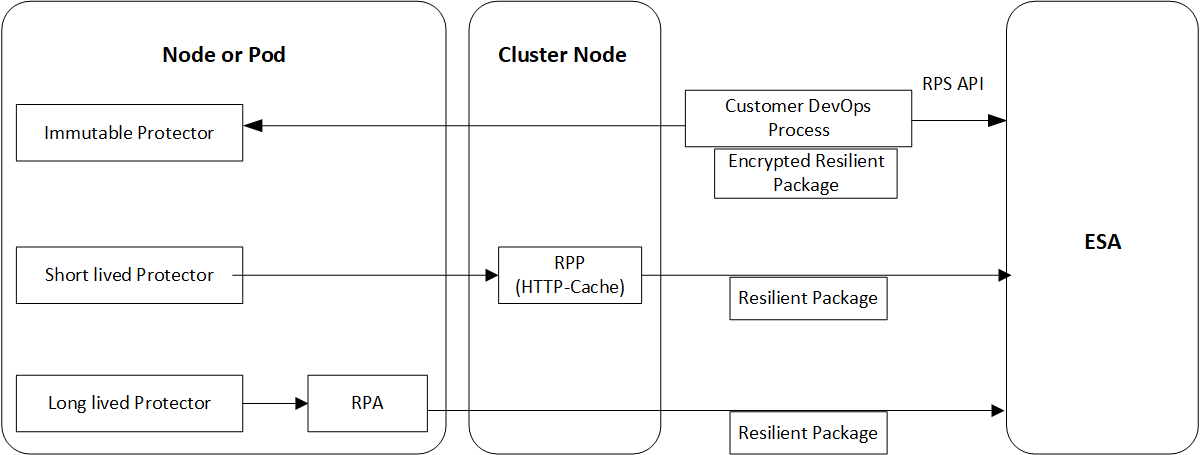
Package Deployment Approaches for Standard Protectors
The various package deployment approaches are explained with a model architecture diagram for Standard Protectors. For more information about package deployment approaches for Standard protectors, refer to Standard Protectors.
Use Case 1: Static Approach
In the first use case, the users create a DevOps process that uses the RPS API to export the resilient package from the ESA to the Immutable protector.
For more information and example of using the DevOps process in Application Protectors, refer to DevOps Approach for Application Protector.
Use Case 2: Dynamic Approach using RPP
In the second use case, a Resilient Package Proxy (RPP) is used to download the resilient package from the ESA. An RPP is an HTTP Cache that retrieves the resilient package from the ESA and stores it in its cache. The short lived protector or node then connects to the RPP instead of the ESA to download the resilient package. If the policy is updated in the ESA, then the RPP connects to the ESA to download the updated package.
For more information and example of using the RPP in Protegrity REST Container, refer to Architecture and Components using Dynamic-based Deployment.
Use Case 3: Dynamic Approach using RPA
In the third use case, the Resilient Package Agent (RPA) is installed on the Protector node or pod. The RPA connects to the ESA and downloads the resilient package.
For more information and example of using the RP Agent in CDP-PVC-Base, refer to Understanding the architecture.
For more information and example of using the RP Agent in Application Protector, refer to Understanding the architecture.
Important: The preferred use case depends on the type of protector that you are using. Refer to the corresponding Protector documentation for more details.