Description and Example
This is the multi-page printable view of this section. Click here to print.
Troubleshooting
General information and guidance for troubleshooting the appliance.
- 1: Known issues for the Audit Store
- 2: ESA Error Handling
- 2.1: Common ESA Logs
- 2.2: Common ESA Errors
- 2.3: Understanding the Insight indexes
- 2.4: Understanding the index field values
- 2.5: Index entries
- 2.6: Policy audit codes
- 2.7: Additional log information
- 3: Known Issues for the td-agent
- 4: Known Issues for Protegrity Analytics
- 5: Known Issues for the Log Forwarder
- 6: Common Issues for Protector
- 7: Log return codes for Protectors
- 8: Deprecations
1 - Known issues for the Audit Store
A list of known issues with their solution or workaround are provided here. The steps provided to resolve the known issues ensure that your product does not display errors or crash.
Known Issue: The Audit Store node security remains uninitialized and the message Audit Store Security is not initialized. appears on the Audit Store Cluster Management page.
Resolution:
Run the following steps to resolve the issue.
- From the ESA Web UI, navigate to System > Services > Audit Store.
- Ensure that the Audit Store Repository service is running.
- Open the ESA CLI.
- Navigate to Tools.
- Run Apply Audit Store Security Configs.
Known Issue: Logs sent to the Audit Store do not get saved and errors might be displayed.
Issue:
The Audit Store cannot receive and store logs when the disk space available on the ESA is low. In this case, errors or warnings similar to high disk watermark [90%] exceeded are displayed in the logs.
Resolution:
Perform one of the following steps to resolve the issue:
- Delete old indices that are not required using ILM in Analytics.
- Increase the disk space on all nodes.
- Add new nodes to the cluster.
Known Issue: The Audit Store Repository fails to start after updating the IP address, host name, or domain name.
Issue:
After updating the IP address, host name, or domain name, the Audit Store Repository service fails to start.
Resolution:
After updating the IP address, complete the steps provided in Updating the IP address of the ESA.
After updating the host name or domain name, complete the steps provided in Updating the host name or domain name of the ESA.
Known Issue: The Upgrade cannot continue as the cluster health status is red. Check out the Troubleshooting Guide for info on how to proceed. error message appears.
Issue: A cluster status in red color means that at least one primary shard and its replicas are not allocated to a node, that is, there are indices with the index health status in red color in the Audit Store cluster.
Workaround
Complete the following steps to resolve the cluster health with the red status.
From the Web UI of the Appliance, navigate to System > Services > Audit Store.
Ensure that the Audit Store Repository service is running.
Log in to the CLI Manager of the Appliance.
Navigate to Administration > OS Console.
Identify the indices with the health status as red using the following command.
wget -q --ca-cert=<Path_to_CA_certificate>/CA.pem --certificate=<Path_to_client_certificate>/client.pem --private-key=<Path_to_client_key>/client.key -O - https://<Appliance_IP>:9200/_cat/indices | grep redEnsure that you update the variables before running the command. An example of the command is provided here.
wget -q --ca-cert=/etc/ksa/certificates/as_cluster/CA.pem --certificate=/etc/ksa/certificates/as_cluster/client.pem --private-key=/etc/ksa/certificates/as_cluster/client.key -O - https://localhost:9200/_cat/indices | grep redA list of indices containing the health status as red appears as shown in the following example.
red open pty_insight_audit_vx.x-xxxx.xx.xx-000014 dxmEWom8RheqOhnaFeM3sw 1 1In the example, pty_insight_audit_vx.x-xxxx.xx.xx-000014 is the index having a red index health status where the index’s primary shard and replicas are not available or allocated to any node in the cluster.
Identify the reason for unassigned shards using the following command.
wget -q --ca-cert=<Path_to_CA_certificate>/CA.pem --certificate=<Path_to_client_certificate>/client.pem --private-key=<Path_to_client_key>/client.key -O - https://<Appliance_IP>:9200/_cat/shards?h=index,shard,prirep,state,unassigned.reason | grep UNASSIGNEDEnsure that you update the variables before running the command. An example of the command is provided here.
wget -q --ca-cert=/etc/ksa/certificates/as_cluster/CA.pem --certificate=/etc/ksa/certificates/as_cluster/client.pem --private-key=/etc/ksa/certificates/as_cluster/client.key -O - https://localhost:9200/_cat/shards?h=index,shard,prirep,state,unassigned.reason | grep UNASSIGNEDThe reasons for the shards being unassigned appear. This example shows one of the reasons for the unassigned shard.
    `pty_insight_audit_vx.x-xxxx.xx.xx-000014             0 p UNASSIGNED NODE_LEFT`

    `pty_insight_audit_vx.x-xxxx.xx.xx-000014             0 r UNASSIGNED NODE_LEFT`
In the example, the 0th p and r shards of the pty_insight_audit_vx.x-xxxx.xx.xx-000014 index are unassigned due to the NODE_LEFT reason, that is, because the node left the Audit Store cluster. The p indicates a primary shard and the r indicates a replica shard.
Retrieve the details for the shard being unassigned using the following command.
wget -q --ca-cert=<Path_to_CA_certificate>/CA.pem --certificate=<Path_to_client_certificate>/client.pem --private-key=<Path_to_client_key>/client.key --header='Content-Type:application/json' --method=GET --body-data='{ "index": "<Index_name>", "shard": <Shard_ID>, "primary":<true or false> }' -O - https://<Appliance_IP>:9200/_cluster/allocation/explain?prettyEnsure that you update the variables before running the command. An example of the command with the index name as pty_insight_audit_vx.x-xxxx.xx.xx-000014, shard ID as 0, and primary shard as true is provided here.
wget -q --ca-cert=/etc/ksa/certificates/as_cluster/CA.pem --certificate=/etc/ksa/certificates/as_cluster/client.pem --private-key=/etc/ksa/certificates/as_cluster/client.key --header='Content-Type:application/json' --method=GET --body-data='{ "index": "pty_insight_audit_vx.x-xxxx.xx.xx-000014", "shard": 0, "primary": true }' -O - https://localhost:9200/_cluster/allocation/explain?prettyThe details of the unassigned shard appears. This example shows one of the reasons for the unassigned shard.
{
        "index": "pty_insight_audit_vx.x-xxxx.xx.xx-000014",
        "shard": 0,
        "primary": true,
        "current_state": "unassigned",
        "unassigned_info": {
            "reason": "NODE_LEFT",
            "at": "2022-03-28T05:05:25.631Z",
            "details": "node_left [gJ38FzlDSEmTAPcP0yw57w]",
            "last_allocation_status": "no_valid_shard_copy"
        },
        "can_allocate": "no_valid_shard_copy",
        **"allocate\_explanation": "cannot allocate because all found copies of the shard are either stale or corrupt",**
        "node_allocation_decisions": [
            {
                "node_id": "3KXS1w9HTOeMH1KbDShGIQ",
                "node_name": "ESA1",
                "transport_address": "xx.xx.xx.xx:9300",
                "node_attributes": {
                    "shard_indexing_pressure_enabled": "true"
                },
                "node_decision": "no",
                "store": {
                    "in_sync": false,
                    "allocation_id": "HraOWSZlT3KNXxOHDhZL5Q"
                }
            }
        ]
    }
In this example, the shard is not allocated because all found copies of the shard are either stale or corrupt. There are no valid shard copies that can be allocated for this index. This is a data loss scenario, where the data is unavailable because the node or nodes that had the data have disconnected from the cluster. In such a scenario, if the disconnected nodes are brought back in the cluster, then the cluster can reconstruct itself and become healthy again. If bringing the nodes back is not possible, then deleting indices with the red index health status is the only way to fix a red cluster health status.
Complete one of the following two steps to stabilize the cluster.
Troubleshoot the cluster:
- Verify that the Audit Store services are running. Restart any Audit Store service that is in the stopped state.
- Ensure that the disconnected nodes are running.
- Try to add any disconnected nodes back to the cluster.
- Restart the system or restore the system from a backup.
Delete the index:
Delete the indices with the index health status as red using the following command. Execute the command from any one node of Audit Store node which is running.
wget -q --ca-cert=<Path_to_CA_certificate>/CA.pem --certificate=<Path_to_client_certificate>/client.pem --private-key=<Path_to_client_key>/client.key --header='Content-Type:application/json' --method=DELETE -O - https://<Appliance_IP>:9200/<Index_name>Ensure that you update the variables before running the command. An example of the command to delete the pty_insight_audit_vx.x-xxxx.xx.xx-000014 index is provided here.
wget -q --ca-cert=/etc/ksa/certificates/as_cluster/CA.pem --certificate=/etc/ksa/certificates/as_cluster/client.pem --private-key=/etc/ksa/certificates/as_cluster/client.key --header='Content-Type:application/json' --method=DELETE -O - https://localhost:9200/pty_insight_audit_vx.x-xxxx.xx.xx-000014CAUTION:
This command deletes the index and must be used carefully.
Known Issue: The Authentication failure for the user during JWT token generation while downloading ssh key from node error appears while performing any Audit Store cluster-related operation.
Issue: The Can create JWT token permission is required for a role to perform Audit Store cluster-related operations. The error appears if the permission is not assigned to the user.
Workaround
Use a user with the appropriate permissions for performing Audit Store cluster-related operations. Alternatively, verify and add the Can create JWT token permission. To verify and add the Can Create JWT Token permission, from the ESA Web UI, navigate to Settings > Users > Roles.
2 - ESA Error Handling
The common errors encountered while working with ESA.
ESA appliance collects all logs that come from different Protegrity Servers. The following section explains the logs that you may find and the errors that you may encounter on the ESA.
2.1 - Common ESA Logs
A list common logs found while working with the ESA.
| Log type | Details | Logs Description |
|---|---|---|
Appliance logs ESA Web Interface, | Here you can view appliance system logs. These logs are saved for two weeks, and then they are automatically deleted. | The ESA appliance logs the appliance-specific system
events:
|
| Data Management Server (DMS) logs ESA Web Interface, | Here you can view DMS system related logs:
| System logs related to monitoring and maintenance of the Logging Repository (DMS). |
2.2 - Common ESA Errors
A list common error found while working with the ESA.
Patch Signing
From v10.0.x, all the packages, including the Protegrity developed packages, are signed by Protegrity. This ensures the integrity of the software being installed.
The following errors may occur while uploading the patch using Web UI or CLI Manager.
#The patch is signed by Protegrity signing key and the verification key is expired
Issue: This issue occurs if the verification key is expired, the following error message appears:Error: Patch signature(s) expired. Would you like to continue installation?
Workaround:
- Click Yes to install the patch. The patch gets installed successfully.
- Click No. The patch installation gets terminated.
For more information about the Protegrity signed patch, contact Protegrity Support.
#The patch is not signed by Protegrity signing key
Issue: This issue occurs if the patch is not signed by Protegrity signing key.Error: Signatures not found. Aborting
Workaround: Click Exit to terminate the installation process.It is recommended to use a Protegrity signed patch.
For more information about the Protegrity signed patch, contact Protegrity Support.
Disk Space
#Insufficient disk space in the /var/log directory
Issue: This issue occurs if the disk space in the /var/log directory is insufficient.Error: Unable to install the patch. The required disk space is insufficient for the following partition: /var/log/
Workaround: Ensure that at least 20% disk space in the /var/log directory is available to install the patch successfully.
#Insufficient disk space in the /opt/ directory
Issue: This issue occurs if the disk space in the /opt directory is insufficient.Error: Unable to install the patch. The required disk space is insufficient for the following partition: /opt/
Workaround: Ensure that the available disk space in the /opt/tmp directory is at least twice the patch size.
#Insufficient disk space in the /OS directory
Issue: This issue occurs if the disk space in the /OS directory is insufficient.
Workaround: Ensure that at least 40% disk space in the /OS directory is available to install the patch successfully.
The space used in the OS(/) partition should not be more than 60%. If the space used is more than 60%, then you must clean up the OS(/) partition before proceeding with the patch installation process. For more information about cleaning up the OS(/) partition, refer to the documentation available at the following link.https://my.protegrity.com/knowledge/ka04W000000nSxJQAU/
Miscellaneous
Unable to export the information while executing the cluster task using the IP address of the node.
Issue: This might occur if the task is executed using the IP address of the cluster task instead of the Hostname.
Workaround: To resolve this issue, ensure that the IP address of the cluster node is replaced with the Hostname in the task.
For more information about executing the cluster task, refer Scheduling Configuration Export to Cluster Tasks.
Basic Authentication
If you try to perform operations, such as, joining a cluster, exporting data/ configuration to a remote appliance, and so on , the operation fails with the following error:Errorcode: 403
Issue: This issue occurs if the Basic Authentication is disabled, and you try to perform any of the following operations.
- Joining an existing cluster
- Establishing set ESA Communication
- Exporting data/configuration to a remote appliance
- Work with RADIUS authentication
Workaround: Ensure that the Can Create JWT Token permission is assigned to the role. If the Can Create JWT Token permission is not assigned to the role of the required user, then the operation fails.
To verify the Can Create JWT Token permission, from the ESA Web UI navigate to Settings > Users > Roles.
2.3 - Understanding the Insight indexes
The contents of the various logs that are generated by the Protegrity products describe the working of the system. It helps understand the health of the system, identify issues, and help in troubleshooting.
All the Appliances and Protectors send logs to Insight. The logs from the Audit Store are displayed on the Discover screen of the Audit Store Dashboards. Here, you can view the different fields logged. In addition to viewing the data, these logs serve as input for Insight to analyze the health of the system and to monitor the system for providing security. These logs are stored in the Audit index with the name, such as, pty_insight_analytics_audit_9.2-*. To refer to old and new audit indexes, the alias pty_insight_*audit_* is used.
The /var/log/asdashboards.log file is empty. The init.d logs for the Audit Store Dashboards are available in /var/log/syslog. The container-related logs are available in /var/log/docker/auditstore_dashboards.log.
You can view the Discover screen by logging into the ESA and navigating to Audit Store > Dashboard > Open in new tab, select Discover from the menu, and select a time period such as Last 30 days. The Discover screen appears.
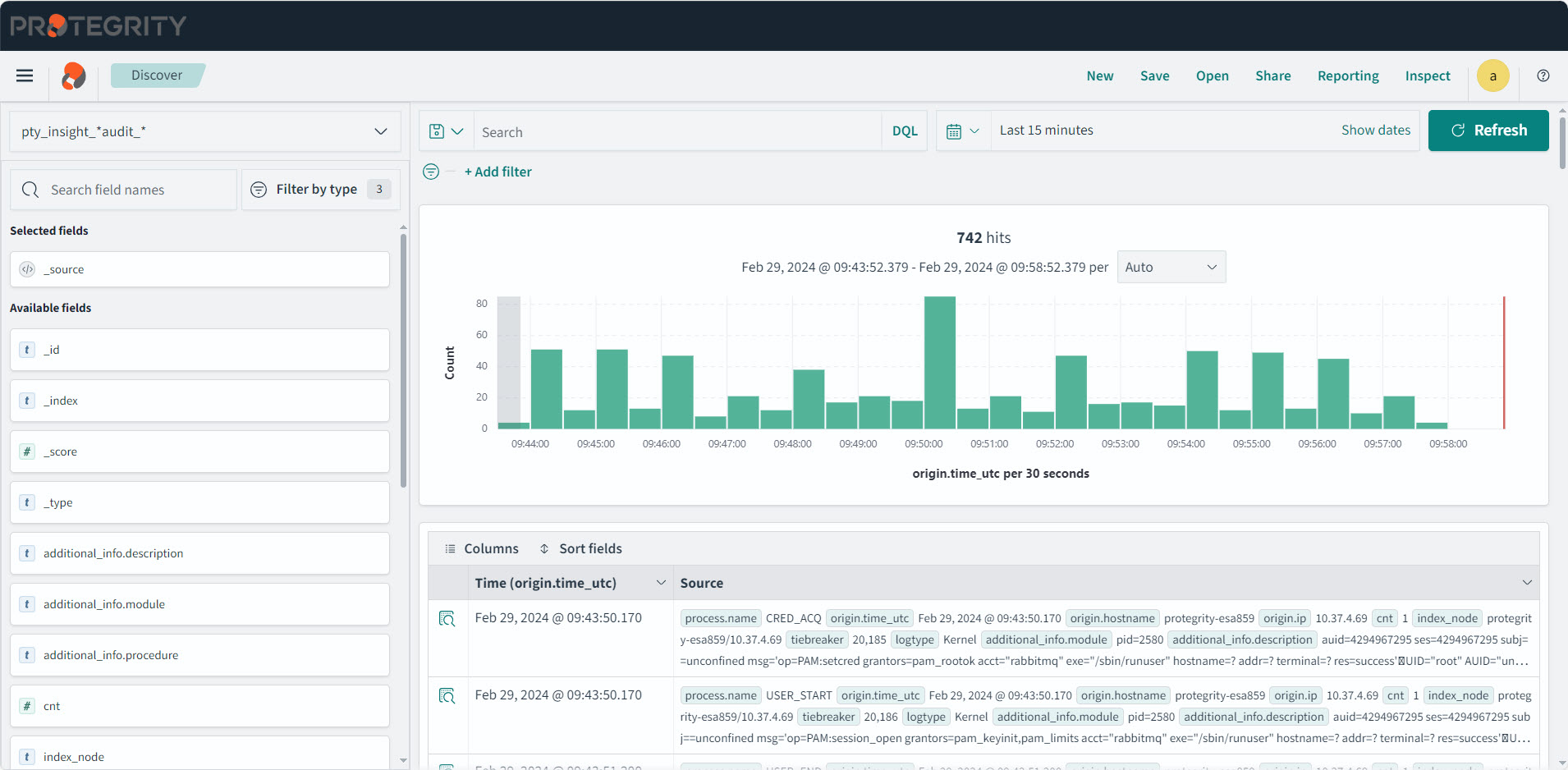
The following table lists the various indexes and information about the data contained in the index. You can view the index list by logging into the ESA, and navigating to Audit Store > Cluster Management > Overview > Indices. Indexes can be created or deleted. However, deleting an index will lead to a permanent loss of data in the index. If the index was not backed up earlier, then the logs from the index deleted cannot be recreated or retrieved.
| Index Name | Origin | Description |
|---|---|---|
| .kibana_1 | Audit Store | This is a system index created by the Audit Store. This hold information about the dashboards. |
| .opendistro_security | Audit Store | This is a system index created by the Audit Store. This hold information about the security, roles, mapping, and so on. |
| .opendistro-job-scheduler-lock | Audit Store | This is a system index created by the Audit Store. |
| .opensearch-notifications-config | Audit Store | This is a system index created by the Audit Store. |
| .opensearch-observability | Audit Store | This is a system index created by the Audit Store. |
| .plugins-ml-config | Audit Store | This is a system index created by the Audit Store. |
| .ql-datasources | Audit Store | This is a system index created by the Audit Store. |
| pty_auditstore_cluster_config | ESA | This index logs logs information about the Audit Store cluster. |
| pty_insight_analytics_audit | ESA | This index logs the audit data for all the URP operations and the DSG appliance logs. It also captures all logs with the log type protection, metering, audit, and security. |
| pty_insight_analytics_autosuggestion | ESA | This index holds the autocomplete information for querying logs in Insight. The index was used in earlier versions of ESA. |
| pty_insight_analytics_crons | ESA | This index logs information about the cron scheduler jobs. |
| pty_insight_analytics_crons_logs | ESA | This index logs for the cron scheduler when the jobs are executed. |
| pty_insight_analytics_dsg_error_metrics | DSG | This index logs the DSG error information. |
| pty_insight_analytics_dsg_transaction_metrics | DSG | This index logs the DSG transaction information. |
| pty_insight_analytics_dsg_usage_metrics | DSG | This index logs the DSG usage information. |
| pty_insight_analytics_encryption_store | ESA | This index encrypts and stores the password specified for the jobs. |
| pty_insight_analytics_forensics_custom_queries | ESA | This index stores the custom queries created for forensics. The index was used in earlier versions of ESA. |
| pty_insight_analytics_ilm_export_jobs | ESA | This index logs information about the running ILM export jobs. |
| pty_insight_analytics_ilm_status | ESA | This index logs the information about the running ILM import and delete jobs. |
| pty_insight_analytics_kvs | ESA | This is an internal index for storing the key-value type information. |
| pty_insight_analytics_miscellaneous | ESA | This index logs entries that are not categorized in the other index files. |
| pty_insight_analytics_policy | ESA | This index logs information about the ESA policy. It is a system index created by the ESA. |
| pty_insight_analytics_policy_log | ESA | This index logs for the ESA policy when the jobs are executed. |
| pty_insight_analytics_policy_status_dashboard | ESA | The index holds information about the policy of the protectors for the dashboard. |
| pty_insight_analytics_protector_status_dashboard | ESA | This index holds information about the 10.0.x protectors for the dashboard. |
| pty_insight_analytics_protectors_status | Protectors | This index holds the status logs of version 10.0.x protectors. |
| pty_insight_analytics_report | ESA | This index holds information for the reports created. The index was used in earlier version of ESA. |
| pty_insight_analytics_signature_verification_jobs | ESA | This index logs information about the signature verification jobs. |
| pty_insight_analytics_signature_verification_running_jobs | ESA | This index logs information about the signature verification jobs that are currently running. |
| pty_insight_analytics_troubleshooting | ESA | This index logs the log type application, kernel, system, and verification. |
2.4 - Understanding the index field values
This section lists information about the various fields logged for the Protection, Policy, Application, Audit, Kernel, Security, and Verification logs. It helps you understand the information that is contained in the logs and is useful for troubleshooting the system.
Common Logging Information
These logging fields are common with the different log types generated by Protegrity products.
Note: These common fields are used across all log types.
| Field | Data Type | Description | Source | Example |
|---|---|---|---|---|
| cnt | Integer | The aggregated count for a specific log. | Protector | 5 |
| logtype | String | The type of log. For example, Protection, Policy, Application, Audit, Kernel, System, or Verification.For more examples about the log types, refer here. | Protector | Protection |
| level | String | The level of severity. For example, SUCCESS, WARNING, ERROR, or INFO. These are the results of the logging operation.For more information about the log levels, refer here. | Protector | SUCCESS |
| starttime | Date | This is an unused field. | Protector | |
| endtime | Date | This is an unused field. | Protector | |
| index_time_utc | Date | The time the log was inserted into the Audit Store. | Audit Store | Sep 8, 2024 @ 12:55:24.733 |
| ingest_time_utc | Date | The time the Log Forwarder processed the logs. | Log Forwarder | Sep 8, 2024 @ 12:56:22.027 |
| uri | String | The URI for the log. This is an unused field. | ||
| correlationid | String | A unique ID that is generated when the policy is deployed. | Hubcontroller | clo5nyx470bi59p22fdrsr7k3 |
| filetype | String | This is the file type, such as, regular file, directory, or device, when operations are performed on the file. This displays the value ISREG for files and ISDIR for directories. This is only used in File Protector. | File Protector | ISDIR |
| index_node | String | The index node that ingested the log. | Audit Store | protegrity-esa746/192.168.2.20 |
| operation | String | This is an unused field. | ||
| path | String | This field is provided for Protector-related data. | File Protector | /hmount/source_dir/postmark_dir/postmark/1 |
| system_nano_time | Long | This displays the time in nano seconds for the Signature Verification job. | Signature Verification | 255073580723571 |
| tiebreaker | Long | This is an internal field that is used with the index time to make a record unique across nodes for sorting. | Protector, Signature Verification | 2590230 |
| _id | String | This is the entry id for the record stored in the Audit Store. | Log Forwarder, td-agent | NDgyNzAwMDItZDI5Yi00NjU1LWJhN2UtNzJhNWRkOWYwOGY3 |
| _index | String | This is the index name of the Audit Store where the log is stored. | Log Forwarder, td-agent | pty_insight_analytics_audits_10.0-2024.08.30-000001 |
Additional_Info
These descriptions are used for all types of logs.
| Field | Data Type | Description | Source | Example |
|---|---|---|---|---|
| description | String | Description about the log generated. | All modules | Data protect operation was successful, Executing attempt_rollover for |
| module | String | The module that generated the log. | All modules | .signature.job_runner |
| procedure | String | The method in the module that generated the log. | All modules | create_job |
| title | String | The title for the audit log. | DSG | DSG’s Rule Name INFO : DSG Patch Installation - User has chosen to reboot system later., Cloud Gateway service restart, and so on.# |
Process
This section describes the properties of the process that created the log. For example, the protector or the rputils.
| Field | Data Type | Description | Source | Example |
|---|---|---|---|---|
| thread_id | String | The thread_id of the process that generated the log. | PEP Server | 3382487360 |
| id | String | The id of the process that generated the log. | PEP Server | 41710 |
| user | String | The user that runs the program that generated the log. | All modules | service_admin |
| version | String | The version of the program or Protector that generated the log. | All modules | 1.2.2+49.g126b2.1.2 |
| platform | String | The platform that the program that generated the log is running on. | PEP Server | Linux_x64 |
| module | String | The module that generated the log. | ESA, Protector | rpstatus |
| name | String | The name of the process that generated the log. | All modules | Protegrity PEP Server |
| pcc_version | String | The core pcc version. | PEP Server | 3.4.0.20 |
Origin
This section describes the origin of the log, that is, from where the log came from and when it was generated.
| Field | Data Type | Description | Source | Example |
|---|---|---|---|---|
| time_utc | Date | The time in the Coordinated Universal Time (UTC) format when the log was generated. | All modules | Sep 8, 2024 @ 12:56:29.000 |
| hostname | String | The hostname of the machine where the log was generated. | All modules | ip-192-16-1-20.protegrity.com |
| ip | IP | The IP of the machine where the log was generated. | All modules | 192.168.1.20 |
Protector
This section describes the Protector that generated the log. For example, the vendor and the version of the Protector.
Note: For more information about the Protector vendor, family, and version, refer here.
| Field | Data Type | Description | Source | Example |
|---|---|---|---|---|
| vendor | String | The vendor of the Protector that generated the log. This is specified by the Protector. | Protector | DSG |
| family | String | The Protector family of the Protector that generated the logs. This is specified by the Protector. For more information about the family, refer here. | Protector | gwp |
| version | String | The version of the Protector that generated the logs. This is specified by the Protector. | Protector | 1.2.2+49.g126b2.1.2 |
| core_version | String | This is the Core component version of the product. | Protector | 1.2.2+49.g126b2.1.2 |
| pcc_version | String | This is the PCC version. | Protector | 3.4.0.20 |
Protection
This section describes the protection that was done, what was done, the result of the operation, where it was done, and so on.
| Field | Data Type | Description | Source | Example |
|---|---|---|---|---|
| policy | String | The name of the policy. This is only used in File Protector. | Protector | aes1-rcwd |
| role | String | This field is not used and will be deprecated. | Protector | |
| datastore | String | The name of the datastore used for the security operation. | Protector | Testdatastore |
| audit_code | Integer | The return code for the operation. For more information about the return codes, refer here. | Protector | 6 |
| session_id | String | The identifier for the session. | Protector | |
| request_id | String | The ID of the request that generated the log. | Protector | |
| old_dataelement | String | The old dataelement value before the reprotect to a new dataelement. | Protector | AES128 |
| mask_setting | String | The mask setting used to protect data. | Protector | Mask Left:4 Mask Right:4 Mark Character: |
| dataelement | String | The dataelement used when protecting or unprotecting data. This is passed by the Protector performing the operation. | Protector | PTY_DE_CCN |
| operation | String | The operation, for example Protect, Unprotect, or Reprotect. This is passed in by the Protector performing the operation. | Protector | Protect |
| policy_user | String | The policy user for which the operation is being performed. This is passed in by the Protector performing the operation. | Protector | exampleuser1 |
| devicepath | String | The path to the device. This is only used in File Protector. | Protector | /hmount/fuse_mount |
| filetype | String | The type of file that was protected or unprotected. This displays the value ISREG for files and ISDIR for directories. This is only used in File Protector. | Protector | ISREG |
| path | String | The path to the file protected or unprotected by the File Protector. This is only used in File Protector. | Protector | /testdata/src/ez/audit_log(13).csv |
Client
This section describes from where the log came from.
| Field | Data Type | Description | Source | Example |
|---|---|---|---|---|
| ip | String | The IP of the client that generated the log. | DSG | 192.168.2.10 |
| username | String | The username that ran the Protector or Server on the client that created the log. | Hubcontroller | johndoe |
Policy
This section describes the information about the policy.
| Field | Data Type | Description | Source | Example |
|---|---|---|---|---|
| audit_code | Integer | This is the policy audit code for the policy log. | PEP Server | 198 |
| policy_name | String | This is the policy name for the policy log. | PEP Server | AutomationPolicy |
| severity | String | This is the severity level for the policy log entry. | PEP Server | Low |
| username | String | This is the user who modified the policy. | PEP Server | johndoe |
Metering
This section describes the metering log information.
Note: These fields are applicable for Protectors up to v7.2.1. If you upgraded your ESA from v7.2.1 to v9.1.0.0 and migrated the metering audits, then these fields contain data.
Metering is not supported for Protectors v8.0.0.0 and above and these are fields will be blank.
| Field | Data Type | Description | Source | Example |
|---|---|---|---|---|
| meteringmode | String | This is the mode for metering logs, such as, delta or total. | PEP Server | total |
| origin | String | This is the IP from where metering data originated. | PEP Server | 192.168.0.10 |
| protection_count | Double | This is the number of protect operations metered. | PEP Server | 10 |
| reprotection_count | Double | This is the number of reprotect operations metered. | PEP Server | 5 |
| timestamp | Date | This is the UTC timestamp when the metering log entry was generated. | PEP Server | Sep 8, 2020 @ 12:56:29.000 |
| uid | String | This is the unique ID of the metering source that generated the log. | PEP Server | Q2XJPGHZZIYKBPDX5K0KEISIV9AX9V |
| unprotection_count | Double | This is the number of unprotect operations metered. | PEP Server | 10 |
Signature
This section handles the signing of the log. The key that was used to sign the log and the actual checksum that was generated.
| Field | Data Type | Description | Source | Example |
|---|---|---|---|---|
| key_id | String | The key ID of the signingkey that signed the log record. | Protector | cc93c930-2ba5-47e1-9341-56a8d67d55d4 |
| checksum | String | The checksum that was the result of signing the log. | Protector | 438FE13078719ACD4B8853AE215488ACF701ECDA2882A043791CDF99576DC0A0 |
| counter | Double | This is the chain of custody value. It helps maintain the integrity of the log data. | Protector | 50321 |
Verification
This section describes the log information generated for a failed signature verification job.
| Field | Data Type | Description | Source | Example |
|---|---|---|---|---|
| doc_id | String | This is the document ID for the audit log where the signature verification failed. | Signature Verification | N2U2N2JkM2QtMDhmYy00OGJmLTkyOGYtNmRhYzhhMGExMTFh |
| index_name | String | This is the index name where the log signature verification failed. | Signature Verification | pty_insight_analytics_audits_10.0-2024.08.30-000001 |
| job_id | String | This is the job ID of the signature verification job. | Signature Verification | 1T2RaosBEEC_iPz-zPjl |
| job_name | String | This is the job name of the signature verification job. | Signature Verification | System Job |
| reason | String | This is the audit log specifying the reason of the signature verification failure. | Signature Verification | INVALID_CHECKSUM | INVALID_KEY_ID | NO_KEY_AND_DOC_UPDATED |
2.5 - Index entries
The index configuration, samples, and entry descriptions describe help identify and analyze the log entries in the indexes.
Audit index
The log types of protection, metering, audit, and security are stored in the audit index. These log are generated during security operations. The logs generated by protectors are stored in the audit index with the name as shown in the following table for the respective version.
| ESA version | Index pattern | Description | Example |
|---|---|---|---|
| ESA v10.0.x | pty_insight_analytics_*audits* | Use in the Audit Store Dashboards for viewing v10.0.x logs on the dashboard. | pty_insight_analytics_audits_10.0-2024.08.30-000001 |
| v9.2.0.0 and earlier | pty_insight_*audit_* | Use in the Audit Store Dashboards for viewing older release logs on the dashboard. | pty_insight_analytics_audit_9.2-2024.08.07-000001, pty_insight_audit_v9.1-2028.02.10-000019, pty_insight_audit_v2.0-2022.02.19-000006, pty_insight_audit_v1.1-2021.02.17-000001, pty_insight_audit_v1-2020.12.21-000001 |
| v8.0.0.0 and above | pty_insight_*audit* | Use in the Audit Store Dashboards for viewing all logs. | pty_insight_analytics_audits_10.0-2024.08.30-000001, pty_insight_analytics_audit_9.2-2024.08.07-000001, pty_insight_audit_v9.1-2028.02.10-000019, pty_insight_audit_v2.0-2022.02.19-000006, pty_insight_audit_v1.1-2021.02.17-000001, pty_insight_audit_v1-2020.12.21-000001 |
For more information about the default index configuration, refer to Index configuration parameters.
Protection logs
These logs are generated by protectors during protecting, unprotecting, and reprotecting data operations. These logs are generated by protectors, such as, DSG.
Use the following query in Discover to view these logs.
logtype:protection
A sample log is shown here:
 {
    "process": {
      "thread_id": "1227749696",
      "module": "coreprovider",
      "name": "java",
      "pcc_version": "3.6.0.1",
      "id": "4190",
      "user": "user4",
      "version": "10.0.0-alpha+13.gef09.10.0",
      "core_version": "2.1.0+17.gca723.2.1",
      "platform": "Linux_x64"
    },
    "level": "SUCCESS",
    "signature": {
      "key_id": "11a8b7d9-1621-4711-ace7-7d71e8adaf7c",
      "checksum": "43B6A4684810383C9EC1C01FF2C5CED570863A7DE609AE5A78C729A2EF7AB93A"
    },
    "origin": {
      "time_utc": "2024-09-02T13:55:17.000Z",
      "hostname": "hostname1234",
      "ip": "10.39.3.156"
    },
    "cnt": 1,
    "protector": {
      "vendor": "Java",
      "pcc_version": "3.6.0.1",
      "family": "sdk",
      "version": "10.0.0-alpha+13.gef09.10.0",
      "core_version": "2.1.0+17.gca723.2.1"
    },
    "protection": {
      "dataelement": "TE_A_S13_L1R2_Y",
      "datastore": "DataStore",
      "audit_code": 6,
      "operation": "Protect",
      "policy_user": "user1"
    },
    "index_node": "protegrity-esa399/10.39.1.23",
    "tiebreaker": 210,
    "logtype": "Protection",
    "additional_info": {
      "description": "Data protect operation was successful"
    },
    "index_time_utc": "2024-09-02T13:55:24.766355224Z",
    "ingest_time_utc": "2024-09-02T13:55:17.678Z",
    "client": {},
    "correlationid": "cm0f1jlq700gbzb19cq65miqt"
  },
  "fields": {
    "origin.time_utc": [
      "2024-09-02T13:55:17.000Z"
    ],
    "index_time_utc": [
      "2024-09-02T13:55:24.766Z"
    ],
    "ingest_time_utc": [
      "2024-09-02T13:55:17.678Z"
    ]
  },
  "sort": [
    1725285317000
  ]
The above example contains the following information:
- additional_info
- origin
- protector
- protection
- process
- client
- protector
- signature
For more information about the various fields, refer here.
Metering logs
These logs are generated by protectors of prior to 8.0.0.0. These logs are not generated by latest protectors.
Use the following query in Discover to view these logs.
logtype:metering
For more information about the various fields, refer here.
Audit logs
These logs are generated when the rule set of the DSG protector gets updated.
Use the following query in Discover to view these logs.
logtype:audit
A sample log is shown here:
 {
   "additional_info.description": "User admin modified default_80 tunnel successfully ",
   "additional_info.title": "Gateway : Tunnels : Tunnel 'default_80' Modified",
   "client.ip": "192.168.2.20",
   "cnt": 1,
   "index_node": "protegrity-esa746/192.168.1.10",
   "index_time_utc": "2024-01-24T13:30:17.171646Z",
   "ingest_time_utc": "2024-01-24T13:29:35.000000000Z",
   "level": "Normal",
   "logtype": "Audit",
   "origin.hostname": "protegrity-cg406",
   "origin.ip": "192.168.2.20",
   "origin.time_utc": "2024-01-24T13:29:35.000Z",
   "process.name": "CGP",
   "process.user": "admin",
   "tiebreaker": 2260067,
   "_id": "ZTdhNzFmMTUtMWZlOC00MmY4LWJmYTItMjcwZjMwMmY4OGZh",
   "_index": "pty_insight_audit_v9.1-2024.01.23-000006"
 }
This example includes data from each of the following groups defined in the index:
- additional_info
- client
- origin
- process
For more information about the various fields, refer here.
Security logs
These logs are generated by security events of the system.
Use the following query in Discover to view these logs.
logtype:security
For more information about the various fields, refer here.
Troubleshooting index
The log types of application, kernel, system, and verification logs are stored in the troubleshooting index. These logs helps you understand the working of the system. The logs stored in this index are essential when the system is down or has issues. This is the pty_insight_analytics_troubleshooting index. The index pattern for viewing these logs in Discover is pty_insight_*troubleshooting_*.
For more information about the default index configuration, refer to Index configuration parameters.
Application Logs
These logs are generated by Protegrity servers and Protegrity applications.
Use the following query in Discover to view these logs.
logtype:application
A sample log is shown here:
{
    "process": {
      "name": "hubcontroller"
    },
    "level": "INFO",
    "origin": {
      "time_utc": "2024-09-03T10:02:34.597000000Z",
      "hostname": "protegrity-esa503",
      "ip": "10.37.4.12"
    },
    "cnt": 1,
    "index_node": "protegrity-esa503/10.37.4.12",
    "tiebreaker": 16916,
    "logtype": "Application",
    "additional_info": {
      "description": "GET /dps/v1/deployment/datastores | 304 | 127.0.0.1 | Protegrity Client | 8ms | "
    },
    "index_time_utc": "2024-09-03T10:02:37.314521452Z",
    "ingest_time_utc": "2024-09-03T10:02:36.262628342Z",
    "correlationid": "cm0m9gjq500ig1h03zwdv6kok"
  },
  "fields": {
    "origin.time_utc": [
      "2024-09-03T10:02:34.597Z"
    ],
    "index_time_utc": [
      "2024-09-03T10:02:37.314Z"
    ],
    "ingest_time_utc": [
      "2024-09-03T10:02:36.262Z"
    ]
  },
  "highlight": {
    "logtype": [
      "@opensearch-dashboards-highlighted-field@Application@/opensearch-dashboards-highlighted-field@"
    ]
  },
  "sort": [
    1725357754597
  ]
The above example contains the following information:
- additional_info
- origin
- process
For more information about the various fields, refer here.
Kernel logs
These logs are generated by the kernel and help you analyze the working of the internal system. Some of the modules that generate these logs are CRED_DISP, KERNEL, USER_CMD, and so on.
Use the following query in Discover to view these logs.
logtype:Kernel
For more information and description about the components that can generate kernel logs, refer here.
For a list of components and modules and the type of logs they generate, refer here.
A sample log is shown here:
{
    "process": {
      "name": "CRED_DISP"
    },
    "origin": {
      "time_utc": "2024-09-03T10:02:55.059999942Z",
      "hostname": "protegrity-esa503",
      "ip": "10.37.4.12"
    },
    "cnt": "1",
    "index_node": "protegrity-esa503/10.37.4.12",
    "tiebreaker": 16964,
    "logtype": "Kernel",
    "additional_info": {
      "module": "pid=38236",
      "description": "auid=4294967295 ses=4294967295 subj=unconfined msg='op=PAM:setcred grantors=pam_rootok acct=\"rabbitmq\" exe=\"/usr/sbin/runuser\" hostname=? addr=? terminal=? res=success'\u001dUID=\"root\" AUID=\"unset\"",
      "procedure": "uid=0"
    },
    "index_time_utc": "2024-09-03T10:02:59.315734771Z",
    "ingest_time_utc": "2024-09-03T10:02:55.062254541Z"
  },
  "fields": {
    "origin.time_utc": [
      "2024-09-03T10:02:55.059Z"
    ],
    "index_time_utc": [
      "2024-09-03T10:02:59.315Z"
    ],
    "ingest_time_utc": [
      "2024-09-03T10:02:55.062Z"
    ]
  },
  "highlight": {
    "logtype": [
      "@opensearch-dashboards-highlighted-field@Kernel@/opensearch-dashboards-highlighted-field@"
    ]
  },
  "sort": [
    1725357775059
  ]
This example includes data from each of the following groups defined in the index:
- additional_info
- origin
- process
For more information about the various fields, refer here.
System logs
These logs are generated by the operating system and help you analyze and troubleshoot the system when errors are found.
Use the following query in Discover to view these logs.
logtype:System
For a list of components and modules and the type of logs they generate, refer here.
A sample log is shown here:
 {
    "process": {
      "name": "ESAPAP",
      "version": "10.0.1+2441",
      "user": "admin"
    },
    "level": "Low",
    "origin": {
      "time_utc": "2024-09-03T10:00:34.000Z",
      "hostname": "protegrity-esa503",
      "ip": "10.37.4.12"
    },
    "cnt": "1",
    "index_node": "protegrity-esa503/10.37.4.12",
    "tiebreaker": 16860,
    "logtype": "System",
    "additional_info": {
      "description": "License is due to expire in 30 days. The validity of license has been acknowledged by the user. (web-user 'admin' , IP: '10.87.2.32')",
      "title": "Appliance Info : License is due to expire in 30 days. The validity of license has been acknowledged by the user. (web-user 'admin' , IP: '10.87.2.32')"
    },
    "index_time_utc": "2024-09-03T10:01:10.113708469Z",
    "client": {
      "ip": "10.37.4.12"
    },
    "ingest_time_utc": "2024-09-03T10:00:34.000000000Z"
  },
  "fields": {
    "origin.time_utc": [
      "2024-09-03T10:00:34.000Z"
    ],
    "index_time_utc": [
      "2024-09-03T10:01:10.113Z"
    ],
    "ingest_time_utc": [
      "2024-09-03T10:00:34.000Z"
    ]
  },
  "highlight": {
    "logtype": [
      "@opensearch-dashboards-highlighted-field@System@/opensearch-dashboards-highlighted-field@"
    ]
  },
  "sort": [
    1725357634000
  ]
This example includes data from each of the following groups defined in the index:
- additional_info
- origin
- process
For more information about the various fields, refer here.
Verification logs
These log are generated by Insight on the ESA when a signature verification fails.
Use the following query in Discover to view these logs.
logtype:Verification
For a list of components and modules and the type of logs they generate, refer here.
A sample log is shown here:
{
    "process": {
      "name": "insight.pyc",
      "id": 45277
    },
    "level": "Info",
    "origin": {
      "time_utc": "2024-09-03T10:14:03.120342Z",
      "hostname": "protegrity-esa503",
      "ip": "10.37.4.12"
    },
    "cnt": 1,
    "index_node": "protegrity-esa503/10.37.4.12",
    "tiebreaker": 17774,
    "logtype": "Verification",
    "additional_info": {
      "module": ".signature.job_executor",
      "description": "",
      "procedure": "__log_failure"
    },
    "index_time_utc": "2024-09-03T10:14:03.128435514Z",
    "ingest_time_utc": "2024-09-03T10:14:03.120376Z",
    "verification": {
      "reason": "SV_VERIFY_RESPONSES.INVALID_CHECKSUM",
      "job_name": "System Job",
      "job_id": "9Vq1opEBYpV14mHXU9hW",
      "index_name": "pty_insight_analytics_audits_10.0-2024.08.30-000001",
      "doc_id": "JI5bt5EBMqY4Eog-YY7C"
    }
  },
  "fields": {
    "origin.time_utc": [
      "2024-09-03T10:14:03.120Z"
    ],
    "index_time_utc": [
      "2024-09-03T10:14:03.128Z"
    ],
    "ingest_time_utc": [
      "2024-09-03T10:14:03.120Z"
    ]
  },
  "highlight": {
    "logtype": [
      "@opensearch-dashboards-highlighted-field@Verification@/opensearch-dashboards-highlighted-field@"
    ]
  },
  "sort": [
    1725358443120
  ]
This example includes data from each of the following groups defined in the index:
- additional_info
- process
- origin
- verification
For more information about the various fields, refer here.
Policy log index
The log type of policy is stored in the policy log index. They include logs for the policy-related operations, such as, when the policy is updated. The index pattern for viewing these logs in Discover is pty_insight_*policy_log_*.
For more information about the default index configuration, refer to Index configuration parameters.
Use the following query in Discover to view these logs.
logtype:policyLog
For a list of components and modules and the type of logs they generate, refer here.
A sample log is shown here:
{
    "process": {
      "name": "hubcontroller",
      "user": "service_admin",
      "version": "1.8.0+6.g5e62d8.1.8"
    },
    "level": "Low",
    "origin": {
      "time_utc": "2024-09-03T08:29:14.000000000Z",
      "hostname": "protegrity-esa503",
      "ip": "10.37.4.12"
    },
    "cnt": 1,
    "index_node": "protegrity-esa503/10.37.4.12",
    "tiebreaker": 10703,
    "logtype": "Policy",
    "additional_info": {
      "description": "Data element created. (Data Element 'TE_LASCII_L2R1_Y' created)"
    },
    "index_time_utc": "2024-09-03T08:30:31.358367506Z",
    "client": {
      "ip": "10.87.2.32",
      "username": "admin"
    },
    "ingest_time_utc": "2024-09-03T08:29:30.017906235Z",
    "correlationid": "cm0m64iap009r1h0399ey6rl8",
    "policy": {
      "severity": "Low",
      "audit_code": 150
    }
  },
  "fields": {
    "origin.time_utc": [
      "2024-09-03T08:29:14.000Z"
    ],
    "index_time_utc": [
      "2024-09-03T08:30:31.358Z"
    ],
    "ingest_time_utc": [
      "2024-09-03T08:29:30.017Z"
    ]
  },
  "highlight": {
    "additional_info.description": [
      "(Data Element '@opensearch-dashboards-highlighted-field@DE@/opensearch-dashboards-highlighted-field@' created)"
    ]
  },
  "sort": [
    1725352154000
  ]
The example contains the following information:
- additional_info
- origin
- policy
- process
For more information about the various fields, refer here.
Policy Status Dashboard index
The policy status dashboard index contains information for the Policy Status Dashboard. It holds the policy and trusted application deployment status information. The index pattern for viewing these logs in Discover is pty_insight_analytics*policy_status_dashboard_*.
{
    "logtype": "Status",
    "process": {
      "thread_id": "2458884416",
      "module": "rpstatus",
      "name": "java",
      "pcc_version": "3.6.0.1",
      "id": "2852",
      "user": "root",
      "version": "10.0.0-alpha+13.gef09.10.0",
      "core_version": "2.1.0+17.gca723.2.1",
      "platform": "Linux_x64"
    },
    "origin": {
      "time_utc": "2024-09-03T10:24:19.000Z",
      "hostname": "ip-10-49-2-49.ec2.internal",
      "ip": "10.49.2.49"
    },
    "cnt": 1,
    "protector": {
      "vendor": "Java",
      "datastore": "DataStore",
      "family": "sdk",
      "version": "10.0.0-alpha+13.gef09.10.0"
    },
    "ingest_time_utc": "2024-09-03T10:24:19.510Z",
    "status": {
      "core_correlationid": "cm0f1jlq700gbzb19cq65miqt",
      "package_correlationid": "cm0m1tv5k0019te89e48tgdug"
    },
    "policystatus": {
      "type": "TRUSTED_APP",
      "application_name": "APJava_sample",
      "deployment_or_auth_time": "2024-09-03T10:24:19.000Z",
      "status": "WARNING"
    }
  },
  "fields": {
    "policystatus.deployment_or_auth_time": [
      "2024-09-03T10:24:19.000Z"
    ],
    "origin.time_utc": [
      "2024-09-03T10:24:19.000Z"
    ],
    "ingest_time_utc": [
      "2024-09-03T10:24:19.510Z"
    ]
  },
  "sort": [
    1725359059000
  ]
The example contains the following information:
- additional_info
- origin
- protector
- policystatus
- policy
- process
Protectors status index
The protector status logs generated by protectors of v10.0.x are stored in this index. The index pattern for viewing these logs in Discover is pty_insight_analytics_protectors_status_*.
For more information about the default index configuration, refer to Index configuration parameters.
Use the following query in Discover to view these logs.
logtype:status
A sample log is shown here:
{
   "logtype":"Status",
   "process":{
      "thread_id":"2559813952",
      "module":"rpstatus",
      "name":"java",
      "pcc_version":"3.6.0.1",
      "id":"1991",
      "user":"root",
      "version":"10.0.0.2.91.5ec4b8b",
      "core_version":"2.1.0-alpha+24.g7fc71.2.1",
      "platform":"Linux_x64"
   },
   "origin":{
      "time_utc":"2024-07-30T07:22:41.000Z",
      "hostname":"ip-10-39-3-218.ec2.internal",
      "ip":"10.39.3.218"
   },
   "cnt":1,
   "protector":{
      "vendor":"Java",
      "datastore":"ESA-10.39.2.7",
      "family":"sdk",
      "version":"10.0.0.2.91.5ec4b8b"
   },
   "ingest_time_utc":"2024-07-30T07:22:41.745Z",
   "status":{
      "core_correlationid":"clz79lc2o004jmb29neneto8k",
      "package_correlationid":"clz82ijw00037k790oxlnjalu"
   }
}
The example contains the following information:
- additional_info
- origin
- policy
- protector
Protector Status Dashboard index
The protector status dashboard index contains information for the Protector Status Dashboard. It holds the protector status information. The index pattern for viewing these logs in Discover is pty_insight_analytics*protector_status_dashboard_.
A sample log is shown here:
{
    "logtype": "Status",
    "process": {
      "thread_id": "2458884416",
      "module": "rpstatus",
      "name": "java",
      "pcc_version": "3.6.0.1",
      "id": "2852",
      "user": "root",
      "version": "10.0.0-alpha+13.gef09.10.0",
      "core_version": "2.1.0+17.gca723.2.1",
      "platform": "Linux_x64"
    },
    "origin": {
      "time_utc": "2024-09-03T10:24:19.000Z",
      "hostname": "ip-10-49-2-49.ec2.internal",
      "ip": "10.49.2.49"
    },
    "cnt": 1,
    "protector": {
      "vendor": "Java",
      "datastore": "DataStore",
      "family": "sdk",
      "version": "10.0.0-alpha+13.gef09.10.0"
    },
    "ingest_time_utc": "2024-09-03T10:24:19.510Z",
    "status": {
      "core_correlationid": "cm0f1jlq700gbzb19cq65miqt",
      "package_correlationid": "cm0m1tv5k0019te89e48tgdug"
    },
    "protector_status": "Warning"
  },
  "fields": {
    "origin.time_utc": [
      "2024-09-03T10:24:19.000Z"
    ],
    "ingest_time_utc": [
      "2024-09-03T10:24:19.510Z"
    ]
  },
  "sort": [
    1725359059000
  ]
The example contains the following information:
- additional_info
- origin
- protector
- process
DSG transaction metrics
The table in this section lists the details for the various parameters generated by DSG transactions. The DSG transaction logs are stored in the pty_insight_analytics_dsg_transaction_metrics_9.2 index file. The index pattern for viewing these logs in Discover is pty_insight_analytics_dsg_transaction_metrics_*.
For more information about the default index configuration, refer to Index configuration parameters.
This index stores the following fields.
* -The origin_time_utc and logtype parameters will only be displayed on the Audit Store Dashboards.
For more information about the transaction metric logs, refer to the section Transaction Metrics Logging in the Protegrity Data Security Gateway User Guide 3.2.0.0.
Scheduled tasks are available for deleting this index. You can configure and enable the scheduled task to free up the space used by old index files that you do not require.
For more information about scheduled tasks, refer here.
DSG usage metrics
This section describes the codes associated with the following DSG usage metrics:
- Tunnels usage data (Version 0)
- Service usage data (Version 0)
- Profile usage data (Version 0)
- Rules usage data (Version 0)
The table in this sub sections lists the details for the various parameters generated while using the DSG. The DSG usage metrics logs are stored in the pty_insight_analytics_dsg_usage_metrics_9.2 index file. The index pattern for viewing these logs in Discover is pty_insight_analytics_dsg_usage_metrics_*.
For more information about the default index configuration, refer to Index configuration parameters.
For more information about the usage metrics, refer to the Protegrity Data Security Gateway User Guide 3.2.0.0.
Scheduled tasks are available for deleting this index. You can configure and enable the scheduled task to free up the space used by old index files that you do not require.
For more information about scheduled tasks, refer here.
Tunnels usage data
The table in this section describes the usage metric for Tunnels.
| Position | Name | Data Type | Description |
|---|---|---|---|
| 0 | metrics type | integer | 0 for Tunnels |
| 1 | metrics version | integer | 0 |
| 2 | tunnel-type | string | the tunnel type CIFS, HTTP, NFS, S3, SFTP, SMTP |
| 3 | timestamp | string | time usage is reported |
| 4 | tunnel-id | string | address of tunnel instance will be unique id generated when tunnel is created. |
| 5 | uptime | float | time in seconds since the tunnel loaded |
| 6 | bytes-processed | integer | frontend and backend bytes the tunnel processed since the last time usage was reported |
| 7 | frontend-bytes-processed | integer | frontend bytes the tunnel has processed since the last time usage was reported |
| 8 | backend-bytes-processed | integer | backend bytes the tunnel has processed since the last time usage was reported |
| 9 | total-bytes-processed | integer | total number of frontend and backend bytes the tunnel has processed during the time the tunnel has been loaded |
| 10 | frontend-bytes-processed | integer | total number of frontend bytes the tunnel has processed during the time the tunnel has been loaded |
| 11 | backend-bytes-processed | integer | total number of backend bytes the tunnel has processed during the time the tunnel has been loaded |
| 12 | message-count | integer | number of requests the tunnel received since the last time usage was reported |
| 13 | total-message-count | integer | total number of requests the tunnel received during the time the tunnel has been loaded |
| 14 | ingest_time_utc | string | Time in UTC at which this log is ingested |
| 15 | logtype | string | Value to identify type of metric –> dsg_metrics_usage_tunnel |
A sample is provided here:
{"metrics_type":"Tunnel","version":0,"tunnel_type":"HTTP","cnt":1,"logtype":"Application","origin":{"time_utc":"2023-04-13T12:28:18Z"},"previous_timestamp":"2023-04-13T12:28:08Z","tunnel_id":"140361619513360","checksum":"4139677074","uptime":620.8048927783966,"bytes_processed":401,"frontend_bytes_processed":401,"backend_bytes_processed":0,"previous_bytes_processed":401,"previous_frontend_bytes_processed":401,"previous_backend_bytes_processed":0,"total_bytes_processed":1203,"total_frontend_bytes_processed":1203,"total_backend_bytes_processed":0,"message_count":1,"previouse_message_count":1,"total_message_count":3}
Services usage data
The table in this section describes the usage metric for Services.
| Position | Name | Data Type | Description |
|---|---|---|---|
| 0 | metrics type | integer | 1 for Services |
| 1 | metrics version | integer | 0 |
| 2 | service-type | string | the service type HTTP-GW, MOUNTED-OOB, REST-API, S3-OOB, SMTP-GW, SFTP-GW, WS-GW |
| 3 | timestamp | string | time usage is reported |
| 4 | service-id | string | UUID of service name |
| 5 | tunnel-id | string | UUID of tunnel name |
| 6 | calls | integer | number of times service processed frontend and backend requests since the time usage was last reported |
| 7 | frontend-calls | integer | number of times service processed frontend requests since the time usage was last reported |
| 8 | backend-calls | integer | number of times service processed backend requests since the time usage was last reported |
| 9 | total-calls | integer | total number number of times service processed frontend and backend requests since the service has been loaded |
| 10 | total-frontend-calls | integer | total number number of times service processed frontend and backend requests since the service has been loaded |
| 11 | total-backend-calls | integer | total number number of times service processed frontend and backend requests since the service has been loaded |
| 12 | bytes-processed | integer | frontend and backend bytes the service processed since the last time usage was reported |
| 13 | frontend-bytes-processed | integer | frontend bytes the tunnel processed since the last time usage was reported |
| 14 | backend-bytes-processed | integer | backend bytes the tunnel processed since the last time usage was reported |
| 15 | total-bytes-processed | integer | total number of frontend and backend bytes the service has processed during the time the service has been loaded |
| 16 | total-frontend-bytes-processed | integer | total number of frontend bytes the tunnel has processed during the time the tunnel has been loaded |
| 17 | total-backend-bytes-processed | integer | total number of backend bytes the tunnel has processed during the time the tunnel has been loaded |
| 18 | ingest_time_utc | string | Time in UTC at which this log is ingested |
| 19 | logtype | string | Value to identify type of metric –> dsg_metrics_usage_service |
A sample is provided here:
{"metrics_type":"Service","version":0,"service_type":"REST-API","cnt":1,"logtype":"Application","origin":{"time_utc":"2023-04-13T12:28:18Z"}, "previous_timestamp":"2023-04-13T12:28:08Z", "service_id":"140361548704016","checksum":"3100121694","tunnel_checksum":"4139677074","calls":401,"frontend_calls":401,"backend_calls":0,"previous_calls":401,"previous_frontend_calls":401,"previous_backend_calls":0,"total_calls":1203,"total_frontend_calls":1203,"total_backend_calls":0,"bytes_processed":2,"frontend_bytes_processed":1,"backend_bytes_processed":1,"previous_bytes_processed":2,"previous_frontend_bytes_processed":1,"previous_backend_bytes_processed":1,"total_bytes_processed":6,"total_frontend_bytes_processed":3,"total_backend_bytes_processed":3}
Profile usage data
The table in this section describes the usage metric for Profile.
| Position | Name | Data Type | Description |
|---|---|---|---|
| 0 | metrics type | integer | 2 for Profile |
| 1 | metrics version | integer | 0 |
| 2 | timestamp | string | time usage is reported |
| 3 | prev-timestamp | string | the previous time usage was reported |
| 4 | profile-id | string | address of profile instance will be unique id generated when profile is created |
| 5 | parent-id | string | checksum of profile or service calling this profile |
| 6 | calls | integer | number of times the profile processed a request since the time usage was last reported |
| 7 | total-calls | integer | total number of times the profile processed a request since profile has been loaded |
| 8 | profile-ref-count | integer | the number of times this profile has been called via a profile reference since the time usage was last reported |
| 9 | prev-profile-ref-count | integer | the number of times this profile has been called via a profile reference the last time usage was last reported |
| 10 | total-profile-ref-count | integer | total number of times this profile has been called via a profile reference since the profile has been loade |
| 11 | bytes-processed | integer | bytes the profile processed since the last time usage was reported |
| 12 | total-bytes-processed | integer | total bytes the profile processed since the profile has been loaded |
| 13 | elapsed-time-sample-count | integer | the number of times the profile was sampled since the last time usage was reported |
| 14 | elapsed-time-mean | integer | the average amount of time in nano-seconds it took to process a request based on elapsed-time-sample-count |
| 15 | total-elapsed-time-sample-count | integer | the number of times the profile was sampled since the profile has been loaded |
| 16 | total-elapsed-time-sample-mean | integer | the average amount of time in nano-seconds it took to process a request based on total-elapsed-time-sample-count |
| 17 | ingest_time_utc | string | Time in UTC at which this log is ingested |
| 18 | logtype | string | Value to identify type of metric –> dsg_metrics_usage_profile |
A sample is provided here:
{"metrics_type":"Profile","version":0,"cnt":1,"logtype":"Application","origin":{"time_utc":"2023-04-13T12:28:18Z"},"previous_timestamp":"2023-04-13T12:28:08Z","profile_id":"140361548999248","checksum":"3504922421","parent_checksum":"3100121694","calls":2,"previous_calls":2,"total_calls":6,"profile_reference_count":0,"previous_profile_reference_count":0,"total_profile_reference_count":0,"bytes_processed":802,"previous_bytes_processed":802,"total_bytes_processed":2406,"elapsed_time_sample_count":2,"elapsed_time_average":221078.5,"total_elapsed_time_sample_count":6,"total_elapsed_time_sample_average":245797.0}
Rules usage data
The table in this section describes the usage metric for Rules.
| Position | Name | Data Type | Description |
|---|---|---|---|
| 0 | metrics type | integer | 3 for Rules |
| 1 | metrics version | integer | 0 |
| 2 | rule-type | string | rule is one of Dynamice Injection, Error, Exit, Extract, Log, Profile Reference, Set Context Variable, Set User Identity, Transform |
| 3 | codec | string | only applies to Extract |
| 4 | timestamp | string | time usage is reported |
| 5 | flag | boolean | Broken rule or is domain name rewrite |
| 6 | rule-id | string | address of rule instance will be unique id generated when rule is created. |
| 7 | parent-id | string | checksum of rule or profile calling this rule |
| 8 | calls | integer | number of times the rule processed a request since the time usage was last reported |
| 9 | total-calls | integer | total number of times the rule processed a request since rule has been loaded |
| 10 | profile-ref-count | integer | the number of times this rule has been called via a profile reference since the time usage was last reported |
| 11 | prev-profile-ref-count | integer | the number of times this rule has been called via a profile reference the last time usage was last reported |
| 12 | total-profle-ref-count | integer | total number of times this rule has been called via a profile reference since the rule has been loaded |
| 13 | bytes-processed | integer | bytes the rule processed since the last time usage was reported |
| 14 | total-bytes-processed | integer | total bytes the rule processed since the rule has been loaded |
| 15 | elapsed-time-sample-count | integer | the number of times the rule was sampled since the last time usage was reported |
| 16 | elapsed-time-sample-mean | integer | the average amount of time in nano-seconds it took to process a data based on elapsed-time-sample-count |
| 17 | total-elapsed-time-sample-count | integer | the number of times the rule was sampled since the rule has been loaded |
| 18 | total-elapsed-time-sample-mean | integer | the average amount of time in nano-seconds it took to process a data based on total-elapsed-time-sample-count |
| 19 | ingest_time_utc | string | Time in UTC at which this log is ingested |
| 20 | logtype | string | Value to identify type of metric –> dsg_metrics_usage_rule |
A sample is provided here:
{"metric_type":"Rule","version":0,"rule_type":"Extract","codec":"Set User Identity","cnt":1,"logtype":"Application","origin":{"time_utc":"2023-04-13T12:28:18Z"},"previous_timestamp":"2023-04-13T12:28:08Z","broken":false,"domain_name_rewrite":false,"rule_id":"140361553016464","rule_checksum":"932129179","parent_checksum":"3504922421","calls":1,"previous_calls":1,"total_calls":3,"profile_reference_count":0,"previous_profile_reference_count":0,"total_profile_reference_count":0,"bytes_processed":1,"previous_bytes_processed":1,"total_bytes_processed":3,"elapsed_time_sample_count":1,"elapsed_time_sample_average":406842.0,"total_elapsed_time_sample_count":3,"total_elapsed_time_sample_average":451163.6666666667}
DSG error metrics
The table in this section lists the details for the various parameters generated for the DSG Error Metrics. The DSG Error Metrics logs are stored in the pty_insight_analytics_dsg_error_metrics_9.2 index file. The index pattern for viewing these logs in Discover is pty_insight_analytics_dsg_error_metrics_*.
For more information about the default index configuration, refer to Index configuration parameters.
This index stores the following fields.
* -The origin_time_utc and logtype parameters will only be displayed on the Audit Store Dashboards.
For more information about the error metric logs, refer to the Protegrity Data Security Gateway User Guide 3.2.0.0.
Scheduled tasks are available for deleting this index. You can configure and enable the scheduled task to free up the space used by old index files that you do not require.
For more information about scheduled tasks, refer here.
Miscellaneous index
The logs that are not added to the other indexes are captured and stored in the miscellaneous index. The index pattern for viewing these logs in Discover is pty_insight_analytics_miscellaneous_*.
This index should not contain any logs. If any logs are visible in this index, then kindly contact Protegrity support.
For more information about the default index configuration, refer to Index configuration parameters.
Use the following query in Discover to view these logs.
logtype:miscellaneous;
Scheduled tasks are available for deleting this index. You can configure and enable the scheduled task to free up the space used by old index files that you do not require.
For more information about scheduled tasks, refer here.
2.6 - Policy audit codes
The following table explains the policy audit codes generated for policy-related operations. These logs are sent to ESA, and can be viewed in Discover, by logging into the ESA and navigating to Audit Store > Dashboard > Open in new tab, select Discover from the menu, and select a time period such as Last 30 days.
| Log Code | Log Description | Description of the event |
|---|---|---|
| 50 | Policy created | Generated when a new policy was created in Policy management in ESA. |
| 51 | Policy updated | Generated when a new policy was updated in Policy management in ESA. |
| 52 | Policy deleted | Generated when an existing policy was deleted from Policy management in ESA. |
| 56 | Policy role created | Generated when a new policy role was created in Policy management in ESA. |
| 57 | Unprotect access revoked for users having mask conflict | Generated when mask conflict occurs. |
| 71 | Policy deployed | Generated when a policy was sent for deployment to a PEP Server. |
| 75 | Policy added to datastore | Generated when a new data store was added to a policy. |
| 76 | Policy changed state | Generated when a policy has changed its state to Ready to Deploy, or Deployed. |
| 78 | Key created | Generated when new key was created for the Data Element. |
| 80 | Policy deploy failed | Generated when a policy failed to be deployed. |
| 83 | Token deploy failed | Generated when the token failed to be deployed. |
| 84 | Token deployed successfully | Generated when the token deployed successfully. |
| 85 | Data Element Key(s) exported | Generated when export keys API executes successfully. Lists each Data Element that was successfully exported. |
| 86 | Policy deploy warning | Generated when the Policy deploy operation fails. |
| 100 | Password changed | Generated when the password of the admin user was changed. |
| 101 | Data store created | Generated when a new data store was created. |
| 102 | Data store updated | Generated when a new data store was updated. |
| 103 | Data store deleted | Generated when a data store was deleted. |
| 107 | Mask created | Generated when a new mask was created. |
| 108 | Mask deleted | Generated when any mask was deleted. |
| 109 | Security coordinate deleted | Generated when an existing security coordinate was deleted. |
| 110 | Security coordinate created | Generated when a new security coordinate is created. |
| 111 | Role created | Generated when a new role is created in Policy management in ESA. |
| 112 | Role deleted | Generated when any role was deleted from Policy management in ESA. |
| 113 | Member source created | Generated when a new external source is created in Policy management in ESA. |
| 114 | Member source updated | Generated when a new member source is updated in Policy management in ESA. |
| 115 | Member source deleted | Generated when any external source was deleted from Policy management in ESA. |
| 116 | All roles resolved | Generated when the members in the automatic roles are synchronized. |
| 117 | Role resolved | Generated when it has fetched all members from a certain role into the policy. |
| 118 | Role group member resolved | Generated when it has fetched all group members from a role into the policy. |
| 119 | Trusted application created | Generated when a new trusted application is created in Policy management in ESA. |
| 120 | Trusted application deleted | Generated when a new trusted application is deleted in Policy management in ESA. |
| 121 | Trusted application updated | Generated when a new trusted application is updated in Policy management in ESA. |
| 126 | Mask updated | Generated when a mask is updated in Policy management in ESA. |
| 127 | Role updated | Generated when a role is updated in Policy management in ESA. |
| 129 | Node registered | Generated when a node is registered with ESA. |
| 130 | Node updated | Generated when a node is updated. |
| 131 | Node unregistered | Generated when a node is not registered with ESA. |
| 141 | Alphabet created | Generated when an alphabet is created. |
| 142 | Alphabet deleted | Generated when an alphabet is deleted. |
| 149 | Data element key updated | Generated when a data element with a key is updated in Policy management in ESA. |
| 150 | Data element key created | Generated when a new data element with a key is created in Policy management in ESA. |
| 151 | Data element key deleted | Generated when a data element (and its key) was deleted from Policy management in ESA. |
| 152 | Too many keys created | Generated when the number of data element key IDs has reached its maximum. |
| 153 | License expire warning | Generated once per day and upon HubController restart when less than 30 days are left before license expiration. |
| 154 | License has expired | Generated when the license becomes expired. |
| 155 | License is invalid | Generated when the license becomes invalid. |
| 156 | Policy is compromised | Generated when integrity of pepserver.db has been compromised. |
| 157 | Failed to import some users | Generated when users having names longer than 255 characters were not fetched from an external source. |
| 158 | Policy successfully imported | Generated when the policy is successfully retrieved from the pepserver.imp file (configured in pepserver.cfg), imported and decrypted. |
| 159 | Failed to import policy | Generated when the policy fails to be imported from the pepserver.imp file (configured in pepserver.cfg). |
| 170 | Data store key exported | Generated when the Data store key is exported. |
| 171 | Key updated | Generated when the key rotation is successful. |
| 172 | Key deleted | Generated when the key is deleted. |
| 173 | Datastore key has expired | Generated when the Data store key expires. |
| 174 | Datastore key expire warning | Generated when the Data store key is about to expire. |
| 176 | Datastore key rotated | Generated when the Data store key is rotated. |
| 177 | Master key has expired | Generated when the Master key expires. |
| 178 | Master key expire warning | Generated when the Master key is about to expire. |
| 179 | Master key rotated | Generated when the Master key is rotated. |
| 180 | New HSM Configured | Generated when a new HSM configuration is created. |
| 181 | Repository key has expired. | Generated when the Repository Key has expired. |
| 182 | Repository key expiry warning. | Generated when the Repository Key is on the verge of expiry. The warning message mentions the number of days left for the Repository Key expiry. |
| 183 | Repository key rotated. | Generated when the Repository Key has been rotated. |
| 184 | Metering created | Generated when metering data is created. |
| 185 | Metering updated | Generated when metering data is updated. |
| 186 | Metering deleted | Generated when metering data is deleted. |
| 187 | Integrity created | Generated when an integrity check is created. |
| 188 | Integrity updated | Generated when the integrity check is updated. |
| 189 | Integrity deleted | Generated when an integrity check is deleted. |
| 195 | Signing key has expired | Generated when the signing key has expired. |
| 196 | Signing key expire warning | Generated for the signing key expiry warning. |
| 197 | Signing key rotated | Generated when the signing key is rotated. |
| 198 | Signing key exported | Generated when the signing key is exported. |
| 199 | Case sensitive data element created | Generated when a case sensitive data element is created. |
| 210 | Data Element key has expired | Generated when the data element key has expired. |
| 211 | Data Element key expire warning | Generated for the data element key expiry warning. |
| 212 | Conflicting policy users found | Generated when conflicting policy users are found. |
| 213 | Key state changed | Generated when the key state is changed. |
| 220 | Data Element deprecated | Generated when the data element is deprecated. |
2.7 - Additional log information
The descriptions for the details diaplayed in logs helps identify the type and reason for raising the log entry.
These are values for understanding the values that are displayed in the log records.
Log levels
Most events on the system generate logs. The level of the log helps you understand whether the log is just an information message or denotes some issue with the system. The log message and the log level allows you to understand more about the working of the system and also helps you identify and troubleshoot any system issues.
Protection logs: These logs are generated for Unprotect, Reprotect, and Protect (URP) operations.
- SUCCESS: This log is generated for a successful URP operation.
- WARNING: This log is generated if a user does not have access and the operation is unprotect.
- EXCEPTION: This log is generated if a user does not have access, the operation is unprotect, and the return exception property is set.
- ERROR: This log is generated for all other issues.
Application logs: These logs are generated by the application. The log level denotes the severity level of the log, however, levels 1 and 6 are used for the log configuration.
- 1: OFF. This level is used to turn logging off.
- 2: SEVERE. This level indicates a serious failure that prevents normal program execution.
- 3: WARNING. This level indicates a potential problem or an issue with the system.
- 4: INFO. This level is used to display information messages about the application.
- 5: CONFIG. This level is used to display static configuration information that is useful during debugging.
- 6: ALL. This level is used to log all messages.
Policy logs: These logs are used for the policy logs.
- LOWEST
- LOW
- NORMAL
- HIGH
- CRITICAL
- N/A
Protector information
The information displayed in the Protector-related fields of the audit log are listed in the table.
| protector.family | protector.vendor | protector.version |
|---|---|---|
| DATA SECURITY GATEWAY | ||
| gwp | DSG | 3.3.0.0.x |
| APPLICATION PROTECTORS | ||
| sdk | C | 9.1.0.0.x |
| sdk | Java | 10.0.0+x, 9.1.0.0.x |
| sdk | Python | 10.0.0+x, 9.1.0.0.x |
| sdk | Go | 9.1.0.0.x |
| sdk | NodeJS | 9.1.0.0.x |
| sdk | DotNet | 9.1.0.0.x |
| TRUSTED APPLICATION LOGS IN APPLICATION PROTECTORS | ||
| <process.name> | C | 9.1.0.0.x |
| <process.name> | Java | 9.1.0.0.x |
| <process.name> | Python | 9.1.0.0.x |
| <process.name> | Go | 9.1.0.0.x |
| <process.name> | NodeJS | 9.1.0.0.x |
| <process.name> | DotNet | 9.1.0.0.x |
| DATABASE PROTECTOR | ||
| dbp | SqlServer | 9.1.0.0.x |
| dbp | Oracle | 9.1.0.0.x |
| dbp | Db2 | 9.1.0.0.x |
| dwp | Teradata | 10.0.0+x, 9.1.0.0.x |
| dwp | Exadata | 9.1.0.0.x |
| BIG DATA PROTECTOR | ||
| bdp | Impala | 9.2.0.0.x, 9.1.0.0.x |
| bdp | Mapreduce | 9.2.0.0.x, 9.1.0.0.x |
| bdp | Pig | 9.2.0.0.x, 9.1.0.0.x |
| bdp | HBase | 9.2.0.0.x, 9.1.0.0.x |
| bdp | Hive | 9.2.0.0.x, 9.1.0.0.x |
| bdp | Spark | 9.2.0.0.x, 9.1.0.0.x |
| bdp | SparkSQL | 9.2.0.0.x, 9.1.0.0.x |
Protectors having CORE version 1.2.2+42.g01eb3.1.2 and higher are compatible with ESA v10.0.x. For more version-related information, refer to the Product Compatibility on My.Protegrity. The protector family might display the process.name for some protectors. This will be fixed in a later release.
Modules and components and the log type
Some of the components and modules and the logtype that they generate are provided in the following table.
| Module / Component | Protection | Policy | Application | Audit | Kernel | System | Verification |
|---|---|---|---|---|---|---|---|
| as_image_management.pyc | ✓ | ||||||
| as_memory_management.pyc | ✓ | ||||||
| asmanagement.pyc | ✓ | ||||||
| buffer_watch.pyc | ✓ | ||||||
| devops | ✓ | ||||||
| DSGPAP | ✓ | ||||||
| ESAPAP | ✓ | ||||||
| fluentbit | ✓ | ||||||
| hubcontroller | ✓ | ||||||
| imps | ✓ | ||||||
| insight.pyc | ✓ | ||||||
| insight_cron_executor.pyc | ✓ | ||||||
| insight_cron_job_method_executor.pyc | ✓ | ||||||
| kmgw_external | ✓ | ||||||
| kmgw_internal | ✓ | ||||||
| logfacade | ✓ | ||||||
| membersource | ✓ | ||||||
| meteringfacade | ✓ | ||||||
| PIM_Cluster | ✓ | ||||||
| Protegrity PEP Server | ✓ | ||||||
| TRIGGERING_AGENT_policy_deploy.pyc | ✓ |
For more information and description about the components that can generate kernel logs, refer here.
Kernel logs
This section lists the various kernel logs that are generated.
Note: This list is compiled using information from https://pmhahn.github.io/audit/.
User and group account management:
- ADD_USER: A user-space user account is added.
- USER_MGMT: The user-space management data.
- USER_CHAUTHTOK: A user account attribute is modified.
- DEL_USER: A user-space user is deleted.
- ADD_GROUP: A user-space group is added.
- GRP_MGMT: The user-space group management data.
- GRP_CHAUTHTOK: A group account attribute is modified.
- DEL_GROUP: A user-space group is deleted.
User login live cycle events:
- CRYPTO_KEY_USER: The cryptographic key identifier used for cryptographic purposes.
- CRYPTO_SESSION: The parameters set during a TLS session establishment.
- USER_AUTH: A user-space authentication attempt is detected.
- LOGIN: The user log in to access the system.
- USER_CMD: A user-space shell command is executed.
- GRP_AUTH: The group password is used to authenticate against a user-space group.
- CHUSER_ID: A user-space user ID is changed.
- CHGRP_ID: A user-space group ID is changed.
- Pluggable Authentication Modules (PAM) Authentication:
- USER_LOGIN: A user logs in.
- USER_LOGOUT: A user logs out.
- PAM account:
- USER_ERR: A user account state error is detected.
- USER_ACCT: A user-space user account is modified.
- ACCT_LOCK: A user-space user account is locked by the administrator.
- ACCT_UNLOCK: A user-space user account is unlocked by the administrator.
- PAM session:
- USER_START: A user-space session is started.
- USER_END: A user-space session is terminated.
- Credentials:
- CRED_ACQ: A user acquires user-space credentials.
- CRED_REFR: A user refreshes their user-space credentials.
- CRED_DISP: A user disposes of user-space credentials.
Linux Security Model events:
- DAC_CHECK: The record discretionary access control (DAC) check results.
- MAC_CHECK: The user space Mandatory Access Control (MAC) decision is made.
- USER_AVC: A user-space AVC message is generated.
- USER_MAC_CONFIG_CHANGE:
- SELinux Mandatory Access Control:
- AVC_PATH: dentry and vfsmount pair when an SELinux permission check.
- AVC: SELinux permission check.
- FS_RELABEL: file system relabel operation is detected.
- LABEL_LEVEL_CHANGE: object’s level label is modified.
- LABEL_OVERRIDE: administrator overrides an object’s level label.
- MAC_CONFIG_CHANGE: SELinux Boolean value is changed.
- MAC_STATUS: SELinux mode (enforcing, permissive, off) is changed.
- MAC_POLICY_LOAD: SELinux policy file is loaded.
- ROLE_ASSIGN: administrator assigns a user to an SELinux role.
- ROLE_MODIFY: administrator modifies an SELinux role.
- ROLE_REMOVE: administrator removes a user from an SELinux role.
- SELINUX_ERR: internal SELinux error is detected.
- USER_LABELED_EXPORT: object is exported with an SELinux label.
- USER_MAC_POLICY_LOAD: user-space daemon loads an SELinux policy.
- USER_ROLE_CHANGE: user’s SELinux role is changed.
- USER_SELINUX_ERR: user-space SELinux error is detected.
- USER_UNLABELED_EXPORT: object is exported without SELinux label.
- AppArmor Mandatory Access Control:
- APPARMOR_ALLOWED
- APPARMOR_AUDIT
- APPARMOR_DENIED
- APPARMOR_ERROR
- APPARMOR_HINT
- APPARMOR_STATUS APPARMOR
Audit framework events:
- KERNEL: Record the initialization of the Audit system.
- CONFIG_CHANGE: The Audit system configuration is modified.
- DAEMON_ABORT: An Audit daemon is stopped due to an error.
- DAEMON_ACCEPT: The auditd daemon accepts a remote connection.
- DAEMON_CLOSE: The auditd daemon closes a remote connection.
- DAEMON_CONFIG: An Audit daemon configuration change is detected.
- DAEMON_END: The Audit daemon is successfully stopped.
- DAEMON_ERR: An auditd daemon internal error is detected.
- DAEMON_RESUME: The auditd daemon resumes logging.
- DAEMON_ROTATE: The auditd daemon rotates the Audit log files.
- DAEMON_START: The auditd daemon is started.
- FEATURE_CHANGE: An Audit feature changed value.
Networking related:
- IPSec:
- MAC_IPSEC_ADDSA
- MAC_IPSEC_ADDSPD
- MAC_IPSEC_DELSA
- MAC_IPSEC_DELSPD
- MAC_IPSEC_EVENT: The IPSec event, when one is detected, or when the IPSec configuration changes.
- NetLabel:
- MAC_CALIPSO_ADD: The NetLabel CALIPSO DoI entry is added.
- MAC_CALIPSO_DEL: The NetLabel CALIPSO DoI entry is deleted.
- MAC_MAP_ADD: A new Linux Security Module (LSM) domain mapping is added.
- MAC_MAP_DEL: An existing LSM domain mapping is added.
- MAC_UNLBL_ALLOW: An unlabeled traffic is allowed.
- MAC_UNLBL_STCADD: A static label is added.
- MAC_UNLBL_STCDEL: A static label is deleted.
- Message Queue:
- MQ_GETSETATTR: The mq_getattr and mq_setattr message queue attributes.
- MQ_NOTIFY: The arguments of the mq_notify system call.
- MQ_OPEN: The arguments of the mq_open system call.
- MQ_SENDRECV: The arguments of the mq_send and mq_receive system calls.
- Netfilter firewall:
- NETFILTER_CFG: The Netfilter chain modifications are detected.
- NETFILTER_PKT: The packets traversing Netfilter chains.
- Commercial Internet Protocol Security Option:
- MAC_CIPSOV4_ADD: A user adds a new Domain of Interpretation (DoI).
- MAC_CIPSOV4_DEL: A user deletes an existing DoI.
Linux Cryptography:
- CRYPTO_FAILURE_USER: A decrypt, encrypt, or randomize cryptographic operation fails.
- CRYPTO_IKE_SA: The Internet Key Exchange Security Association is established.
- CRYPTO_IPSEC_SA: The Internet Protocol Security Association is established.
- CRYPTO_LOGIN: A cryptographic officer login attempt is detected.
- CRYPTO_LOGOUT: A cryptographic officer logout attempt is detected.
- CRYPTO_PARAM_CHANGE_USER: A change in a cryptographic parameter is detected.
- CRYPTO_REPLAY_USER: A replay attack is detected.
- CRYPTO_TEST_USER: The cryptographic test results as required by the FIPS-140 standard.
Process:
- BPRM_FCAPS: A user executes a program with a file system capability.
- CAPSET: Any changes in process-based capabilities.
- CWD: The current working directory.
- EXECVE; The arguments of the execve system call.
- OBJ_PID: The information about a process to which a signal is sent.
- PATH: The file name path information.
- PROCTITLE: The full command-line of the command that was used to invoke the analyzed process.
- SECCOMP: A Secure Computing event is detected.
- SYSCALL: A system call to the kernel.
Special system calls:
- FD_PAIR: The use of the pipe and socketpair system calls.
- IPC_SET_PERM: The information about new values set by an IPC_SET control operation on an Inter-Process Communication (IPC) object.
- IPC: The information about a IPC object referenced by a system call.
- MMAP: The file descriptor and flags of the mmap system call.
- SOCKADDR: Record a socket address.
- SOCKETCALL: Record arguments of the sys_socketcall system call (used to multiplex many socket-related system calls).
Systemd:
- SERVICE_START: A service is started.
- SERVICE_STOP: A service is stopped.
- SYSTEM_BOOT: The system is booted up.
- SYSTEM_RUNLEVEL: The system’s run level is changed.
- SYSTEM_SHUTDOWN: The system is shut down.
Virtual Machines and Container:
- VIRT_CONTROL: The virtual machine is started, paused, or stopped.
- VIRT_MACHINE_ID: The binding of a label to a virtual machine.
- VIRT_RESOURCE: The resource assignment of a virtual machine.
Device management:
- DEV_ALLOC: A device is allocated.
- DEV_DEALLOC: A device is deallocated.
Trusted Computing Integrity Measurement Architecture:
- INTEGRITY_DATA: The data integrity verification event run by the kernel.
- INTEGRITY_EVM_XATTR: The EVM-covered extended attribute is modified.
- INTEGRITY_HASH: The hash type integrity verification event run by the kernel.
- INTEGRITY_METADATA: The metadata integrity verification event run by the kernel.
- INTEGRITY_PCR: The Platform Configuration Register (PCR) invalidation messages.
- INTEGRITY_RULE: A policy rule.
- INTEGRITY_STATUS: The status of integrity verification.
Intrusion Prevention System:
- Anomaly detected:
- ANOM_ABEND
- ANOM_ACCESS_FS
- ANOM_ADD_ACCT
- ANOM_AMTU_FAIL
- ANOM_CRYPTO_FAIL
- ANOM_DEL_ACCT
- ANOM_EXEC
- ANOM_LINK
- ANOM_LOGIN_ACCT
- ANOM_LOGIN_FAILURES
- ANOM_LOGIN_LOCATION
- ANOM_LOGIN_SESSIONS
- ANOM_LOGIN_TIME
- ANOM_MAX_DAC
- ANOM_MAX_MAC
- ANOM_MK_EXEC
- ANOM_MOD_ACCT
- ANOM_PROMISCUOUS
- ANOM_RBAC_FAIL
- ANOM_RBAC_INTEGRITY_FAIL
- ANOM_ROOT_TRANS
- Responses:
- RESP_ACCT_LOCK_TIMED
- RESP_ACCT_LOCK
- RESP_ACCT_REMOTE
- RESP_ACCT_UNLOCK_TIMED
- RESP_ALERT
- RESP_ANOMALY
- RESP_EXEC
- RESP_HALT
- RESP_KILL_PROC
- RESP_SEBOOL
- RESP_SINGLE
- RESP_TERM_ACCESS
- RESP_TERM_LOCK
Miscellaneous:
- ALL: Matches all types.
- KERNEL_OTHER: The record information from third-party kernel modules.
- EOE: An end of a multi-record event.
- TEST: The success value of a test message.
- TRUSTED_APP: The record of this type can be used by third-party application that require auditing.
- TTY: The TTY input that was sent to an administrative process.
- USER_TTY: An explanatory message about TTY input to an administrative process that is sent from the user-space.
- USER: The user details.
- USYS_CONFIG: A user-space system configuration change is detected.
- TIME_ADJNTPVAL: The system clock is modified.
- TIME_INJOFFSET: A Timekeeping offset is injected to the system clock.
3 - Known Issues for the td-agent
A list of known issues with their solution or workaround are provided here. The steps provided to resolve the known issues ensure that your product does not display errors or crash.
Known Issue: The Buffer overflow error appears in the /var/log/td-agent/td-agent.log file.
Description: When the total size of the files in td-agent buffer /opt/protegrity/td-agent/es_buffer directory reaches the default maximum limit of 64 GB, then the Buffer overflow error appears.
Resolution:
Add the total_limit_size parameter to increase the buffer limit in the OUTPUT.conf file using the following steps.
Log in to the ESA Web UI.
Navigate to System > Services.
Under Misc, stop the td-agent service.
Log in to the CLI Manager of the ESA node.
Navigate to Administration > OS Console.
Navigate to the
/opt/protegrity/td-agent/config.ddirectory.Open the
OUTPUT.conffile.Add the total_limit_size parameter in the buffer section of the
OUTPUT.conffile.In this example, the total_limit_size is doubled to 128 GB.


Save the file.
Log in to the ESA Web UI.
Navigate to System > Services.
Under Misc, start the td-agent service.
Known Issue: The Too many open files error appears in the /var/log/td-agent/td-agent.log file.
Description: When the total number of files in the td-agent buffer /opt/protegrity/td-agent/es_buffer directory reaches the maximum limit, then the Too many open files error appears.
Resolution:
Change the limit for the maximum number of open files for the td-agent service in the /etc/init.d/td-agent file using the following steps.
Log in to the ESA Web UI.
Navigate to System > Services.
Under Misc, stop the td-agent service.
Log in to the CLI Manager of the ESA node.
Navigate to Administration > OS Console.
Navigate to the
/etc/init.ddirectory.Open the
td-agentfile.Change the ulimit.
In this example, the ulimit is increased to 120000.
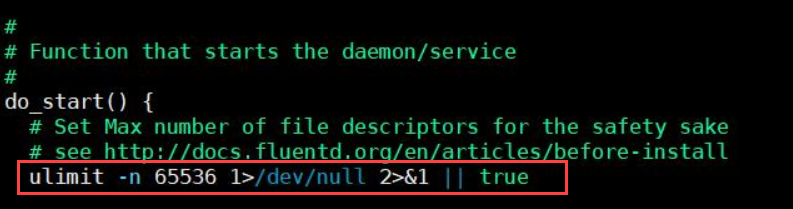
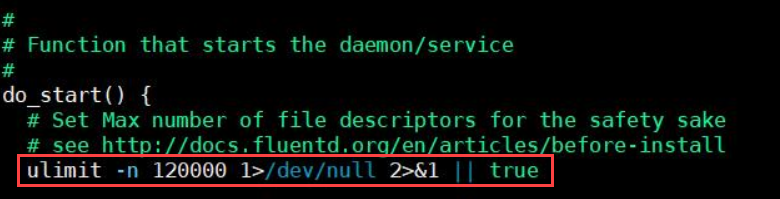
Save the file.
Log in to the ESA Web UI.
Navigate to System > Services.
Under Misc, start the td-agent service.
4 - Known Issues for Protegrity Analytics
A list of known issues with their solution or workaround is provided here. The steps provided to resolve the known issues ensure that your product does not throw errors or crash.
Known Issue: Client side validation is missing on the Join an existing Audit Store Cluster page.
Issue:
Log in to the ESA Web UI and navigate to the Audit Store > Cluster Management > Overview page >Join Cluster. When you specify an invalid IP, enter a username or password more than the 36-character limit that is accepted on the Appliance, and click Join Cluster, then no errors are displayed and the request is processed.
Observation:
The Join an existing Audit Store Cluster page request is processed without any client-side validation, hence, an invalid IP address or a username or password more than 36 characters does not display any error.
Known Issue: High memory usage on the ESA.
Issue:
When using the Audit Store, the memory usage is high on the ESA.
Workaround:
Reduce the memory usage by updating the memory allocated to the Audit Store on the ESA to 4 GB using the Set Audit Store Repository Total Memory CLI option.
For more information about the Set Audit Store Repository Total Memory CLI option, refer here.
Known Issue: In Analytics, on the Index Lifecycle Management page, after exporting, importing, or deleting an index one of the following scenarios occurs:
- The index operation performed does not appear in the other operation lists. For example, an exported index does not appear in the import index list.
- Performing the same operation on the same index again displays an error message.
- If the index appears in another operation list, performing the operation displays an error message. For example, an exported index appears in the delete index list and deleting the index displays an error.
Issue: After performing an operation, the index list for the export, import, and delete operations does not refresh automatically.
Workaround: Refresh the Index Lifecycle Management page after performing an export, import, or delete operation.
5 - Known Issues for the Log Forwarder
A list of known issues with their solution or workaround are provided here. The steps provided to resolve the known issues ensure that your product does not display errors or stops responding.
Known Issue: The Protector is unable to reconnect to a Log Forwarder after it is restarted.
Description: This issue occurs whenever you have a Proxy server between a Protector and a Log Forwarder. When the Log Forwarder is stopped, the connection between the Protector and the Proxy server is still open, even though the connection between the Proxy server and the Log Forwarder is closed. As a result, the Protector continues sending audit files to the Proxy server. This results in loss of the audit files. Whenever the Log Forwarder is restarted, the Protector is unable to reconnect to the Log Forwarder.
This issue is applicable to all the Protectors where the Log Forwarder is not running on the local host machine. For example, this issue is applicable to AIX or z/OS protectors because the Log Forwarder is not running on the same machine where the Protectors have been installed. This issue also occurs if you have a Load Balancer or a Firewall between the Protector and the Log Forwarder, instead of a Proxy server.
Resolution: Remove the Proxy server or ensure that you configure the Proxy server in a way that the connection between the Protector and the Proxy server is stopped as soon as the Log Forwarder is stopped. This ensures that whenever the Log Forwarder is restarted, the Protector reconnects with the Log Forwarder and continues to send the audits to the Log Forwarder without any data loss.
For more information about configuring the Proxy server, contact your IT administrator.
6 - Common Issues for Protector
A list of known issues with their description is provided here.
Known Issue: Audits for protect, unprotect, and re-protect operations failing with “Failed to send logs, connection refused” errors may show incorrect severity and description in the Audit Store.
Description: This issue occurs when the Protectors log mode configuration is changed from “drop” to “error” mode. The Log Forwarder is not accepting connections. It may cause audits for protect, unprotect, and re-protect operations to show incorrect severity and descriptions.
7 - Log return codes for Protectors
The log codes and the descriptions help you understand the reason for the code and is useful during troubleshooting.
| Return Code | Description |
|---|---|
| 0 | Error code for no logging |
| 1 | The username could not be found in the policy |
| 2 | The data element could not be found in the policy |
| 3 | The user does not have the appropriate permissions to perform the requested operation |
| 4 | Tweak is null |
| 5 | Integrity check failed |
| 6 | Data protect operation was successful |
| 7 | Data protect operation failed |
| 8 | Data unprotect operation was successful |
| 9 | Data unprotect operation failed |
| 10 | The user has appropriate permissions to perform the requested operation but no data has been protected/unprotected |
| 11 | Data unprotect operation was successful with use of an inactive keyid |
| 12 | Input is null or not within allowed limits |
| 13 | Internal error occurring in a function call after the provider has been opened |
| 14 | Failed to load data encryption key |
| 15 | Tweak input is too long |
| 19 | Unsupported tweak action for the specified fpe data element |
| 20 | Failed to allocate memory |
| 21 | Input or output buffer is too small |
| 22 | Data is too short to be protected/unprotected |
| 23 | Data is too long to be protected/unprotected |
| 26 | Unsupported algorithm or unsupported action for the specific data element |
| 27 | Application has been authorized |
| 28 | Application has not been authorized |
| 31 | Policy not available |
| 44 | The content of the input data is not valid |
| 49 | Unsupported input encoding for the specific data element |
| 50 | Data reprotect operation was successful |
| 51 | Failed to send logs, connection refused |
8 - Deprecations
The following features and capabilities are marked for deprecation.
Deprecated Functions
Extract KeyID from Data getCurrentKeyId getDefaultDataElement Byte API
Database Protector
- native database access control
Deprecated Products
- Protection Server
- File Protector Gateway
- File Protector: Linux Kernel Implementation
- File Protector: Windows Bases Volume Encryption
- File Protector for AIX
- XC Client, XC Server, XC Lite
- Solaris operating system on all the Protectors
- HAWQ Big Data Component
- Linux Based Volume Encryption
Deprecated Capabilities
- HDFS FP
- ESA OS Based High Availability
- Samba
- Protegrity Storage Unit (PSU)
- Change in Insight behavior (from v9.0.0.0)
- Jasper Reporting
- Metering
- MapReduce
- HMAC API in BDP
- Gate in Upgrade
Deprecated Data Elements
Deprecated data elements can still be used. However, users will be unable to create these data elements using the GUI. Users can use the DevOps APIs to create these data elements. In this case, the system triggers a warning and create a log entry. This is to indicate that the data element is deprecated. In addition, the system triggers a notification if the policy contains any of the deprecated datatypes. The system triggers this notification while the hubcontroller service starts.
- Printable Characters Tokenization
- Unicode Gen 1 Tokenization
- Date Tokenization
- DTP 2 Encryption
- 3DES Encryption
- CUSP 3DES Encryption
- SHA1 Hashing
- Date tokens (DATE-YYYY-MM-DD, DATE-DD/MM/YYYY, DATE-MM/DD/YYYY )
- UNICODE tokens
- PRINTABLE tokens
- UNICODE-Base 64 tokens
- SHA1
- 3DES
Removed Data Elements
The support for the Format Preserving Encryption (FPE) data element was started in the ESA v7.2.x.
If the FPE left/right data element is created in any version of the ESA, from 7.2.x to 9.2.x, then there is a risk of data loss.
The data encoding can have an effect on the resulting token when the Left and Right properties are in use. This means that FPE tokens with this property cannot always be moved “as-is” to other systems where the encoding of the data changes.
In ESA v10.0.x,
- The upgrade is blocked if the FPE left/right data element is created.
- A new solution is created to support the FPE left/right data element. This solution works only when the protectors of version 10.0.x or newer are used.