Known Issues for the td-agent
Known Issue: The Buffer overflow error appears in the /var/log/td-agent/td-agent.log file.
Description: When the total size of the files in td-agent buffer /opt/protegrity/td-agent/es_buffer directory reaches the default maximum limit of 64 GB, then the Buffer overflow error appears.
Resolution:
Add the total_limit_size parameter to increase the buffer limit in the OUTPUT.conf file using the following steps.
Log in to the ESA Web UI.
Navigate to System > Services.
Under Misc, stop the td-agent service.
Log in to the CLI Manager of the ESA node.
Navigate to Administration > OS Console.
Navigate to the
/opt/protegrity/td-agent/config.ddirectory.Open the
OUTPUT.conffile.Add the total_limit_size parameter in the buffer section of the
OUTPUT.conffile.In this example, the total_limit_size is doubled to 128 GB.


Save the file.
Log in to the ESA Web UI.
Navigate to System > Services.
Under Misc, start the td-agent service.
Known Issue: The Too many open files error appears in the /var/log/td-agent/td-agent.log file.
Description: When the total number of files in the td-agent buffer /opt/protegrity/td-agent/es_buffer directory reaches the maximum limit, then the Too many open files error appears.
Resolution:
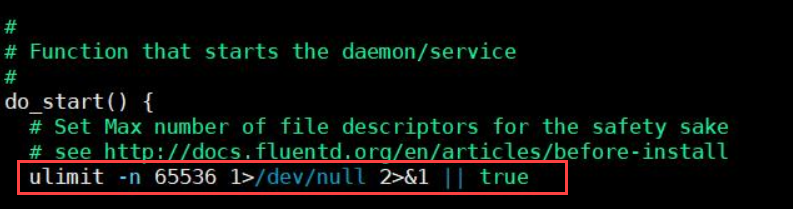
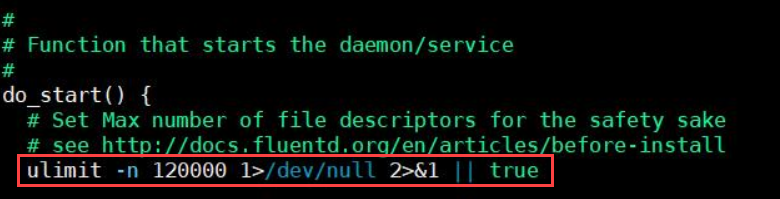
Change the limit for the maximum number of open files for the td-agent service in the /etc/init.d/td-agent file using the following steps.
Log in to the ESA Web UI.
Navigate to System > Services.
Under Misc, stop the td-agent service.
Log in to the CLI Manager of the ESA node.
Navigate to Administration > OS Console.
Navigate to the
/etc/init.ddirectory.Open the
td-agentfile.Change the ulimit.
In this example, the ulimit is increased to 120000.
Save the file.
Log in to the ESA Web UI.
Navigate to System > Services.
Under Misc, start the td-agent service.
Feedback
Was this page helpful?