Azure Databricks
Big Data Protector on Azure Databricks
The Protegrity Big Data Protector for Azure Databricks delivers end‑to‑end data protection. Organizations deploying the Big Data Protector rely on modern, supported storage options such as Workspace storage, Unity Catalog Volumes, and cloud object storage like ADLS Gen2 or Azure Blob Storage.
Designed to secure sensitive data across analytics pipelines, the Big Data Protector applies advanced tokenization and encryption during Spark execution and enforces centralized, policy‑driven controls. Whether installed via Unity Catalog Volumes for init script and .tgz delivery, the Protector ensures resilient execution across Azure Databricks clusters.
By embracing cloud‑native storage paths, this approach ensures long‑term compatibility with Databricks platform changes while maintaining Protegrity’s standard of seamless and transparent protection. Organizations can continue to process high‑value datasets on Azure Databricks with confidence knowing that sensitive information is secured across its lifecycle, even as the underlying platform evolves.
The Protegrity Big Data Protector for Azure Databricks empowers organizations to secure sensitive data across their analytics pipelines by combining high‑performance protection mechanisms with flexible deployment models tailored for modern cloud architectures. Central to this capability are two approaches; Application Protector REST (AP REST) and Cloud Protector approach. Each approach is designed to address different customer requirements around scalability, infrastructure usage, and cost optimization.
Application Protector REST Approach
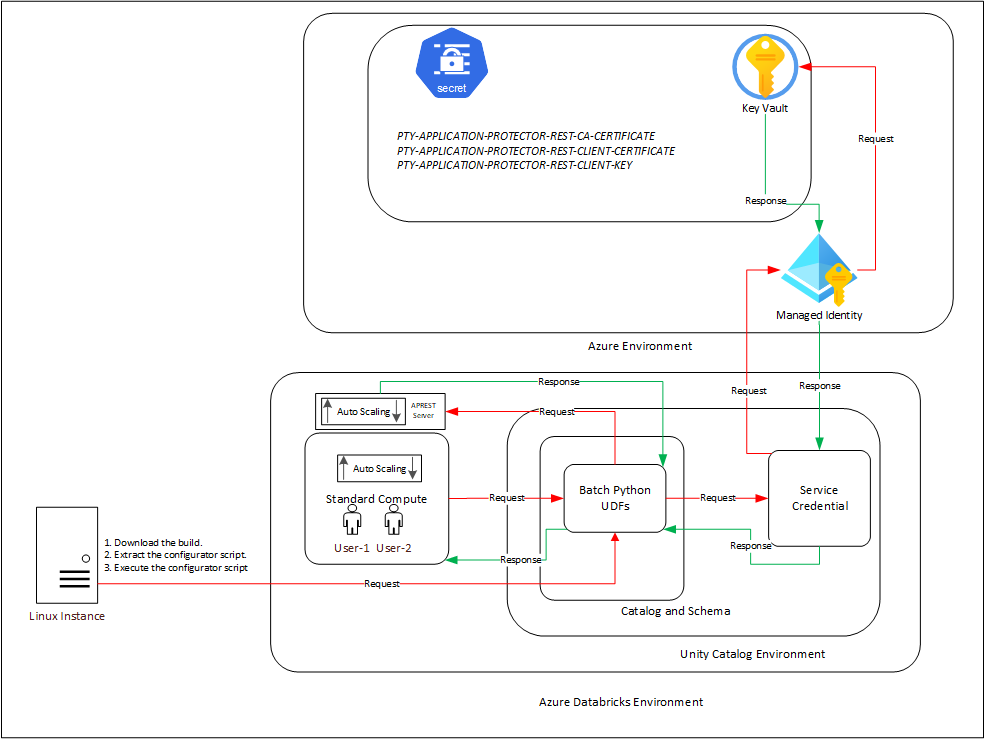
The AP REST model enables data protection directly within the Databricks cluster itself, eliminating the need for a separate Cloud API infrastructure. This approach is particularly suitable for customers who want to avoid maintaining additional cloud-native services for protection operations.
With AP REST, protection workflows are executed through REST endpoints running on the cluster, allowing seamless scaling along with Databricks’ auto-scaling compute. This ensures that sensitive data remains protected throughout processing while also adapting automatically to dynamically assigned IPs in auto-scaling environments. This results in an operationally efficient fit for Spark-driven workloads on Azure.
For the Application Protector REST Approach, the following cluster types are supported:
- Databricks Dedicated Compute
- Databricks Standard Compute
For the Application Protector REST approach, the following sections are applicable:
Cloud Protector Approach
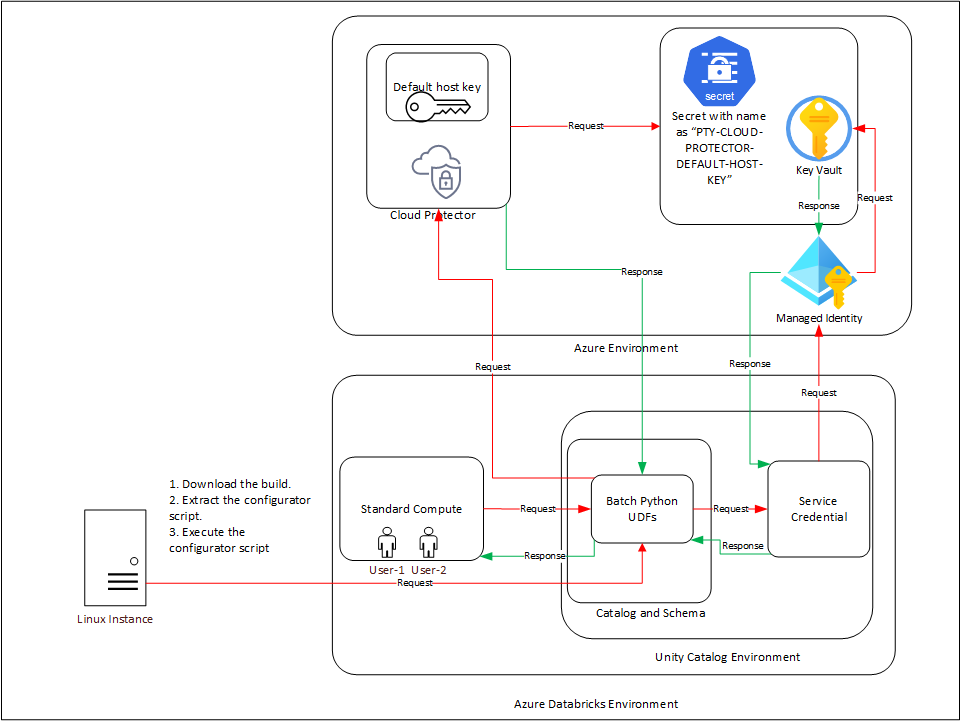
The Cloud Protector approach extends protection capabilities by offering centralized, cloud-hosted security services for environments that require externally managed protection layers. It enables highly scalable, policy-driven tokenization and encryption without requiring protection logic to reside inside the Databricks compute itself.
In contexts where Cloud Protector is integrated with the Big Data Protector, organizations benefit from lifecycle-wide protection that spans storage, compute, and inter-system data transfers. Cloud Protector provides the foundation for UDF-driven protections (including Spark and Unity Catalog–level enforcement), ensuring centralized governance across distributed analytics ecosystems.
For the Cloud Protector approach, the following cluster types are supported:
- Databricks Dedicated Compute
- Databricks Standard Compute
- Databricks SQL Warehouse
For the Cloud Protector approach, the following sections are applicable:
Conclusion
Together, these two approaches provide enterprises the flexibility to choose a data protection strategy aligned with their architectural, cost, and compliance requirements whether fully cluster-local using AP REST, centrally managed via Cloud Protector, or in hybrid deployments. This dual-path model ensures that Azure Databricks customers can achieve seamless, transparent, policy-based data protection while continuing to extract high-value insights from their data securely and efficiently.
7.1 - Unity Catalog Batch Python UDFs
The UDFs in this section is applicable only to install and configure the Big Data Protector in the Databricks environment.
This version of the build only supports Unity Catalog Batch Python UDFs that use the Cloud Protect APIs. The Hive and Spark UDFs and APIs that provide native protection within the cluster nodes are not packaged in this build. To use those features, please use the 9.1.0.0 builds.
pty_who_am_i()
This UDF returns the current user.
Signature:
Parameters:
| Name | Data Type | Description |
|---|
input | STRING | Specifies any random string value to be passed to fetch the current user. |
Result:
- The UDF returns the current user.
pty_get_version()
This UDF returns the current version of the protector.
Signature:
Parameters:
| Name | Data Type | Description |
|---|
input | STRING | Specifies any random string value to be passed to fetch the current version. |
Result:
- The UDF returns the current version of the protector.
Example:
select pty_get_version();
pty_get_version_extended()
This UDF returns the extended version information of the protector.
Signature:
pty_get_version_extended();
Parameters:
| Name | Data Type | Description |
|---|
input | STRING | Specifies any random string value to be passed to fetch the extended version details. |
Result:
The UDF returns a String in the following format:
BDP: <1>; JcoreLite: <2>; CORE: <3>;
where:
- is the current version of the Protector
- is the Jcorelite library version
- is the Core library version
Example:
select pty_get_version_extended();
pty_protect_binary()
This UDF protects the BINARY format data, which is provided as input.
Signature:
pty_protect_binary (input BINARY, data_element STRING)
Parameters:
| Name | Description |
|---|
input | Specifies the column that contains data in BINARY format, which needs to be protected. |
data_element | Specifies the data element used to protect the BINARY format data. |
Returns:
This UDF returns the BINARY format data, which is protected.
Example:
SELECT pty_protect_binary(<column_with_binary_data>, "<binary_data_element>");
pty_unprotect_binary()
This UDF unprotects the protected BINARY data, which is provided as an input.
Signature:
pty_unprotect_binary (input BINARY, data_element STRING)
Parameters:
| Name | Description |
|---|
input | Specifies the column that contains data in BINARY format, which needs to be unprotected. |
data_element | Specifies the data element used to unprotect the BINARY format data. |
Returns:
This UDF returns the BINARY format data, which is unprotected.
Example:
SELECT pty_unprotect_binary(<column_with_protected_binary_data>, "<binary_data_element>");
pty_protect_date()
This UDF protects the DATE format data, which is provided as input.
Signature:
pty_protect_date (input DATE, data_element STRING)
The supported DATE format is YYYY-MM-DD.
Parameters:
| Name | Description |
|---|
input | Specifies the column that contains data in DATE format, which needs to be protected. |
data_element | Specifies the data element used to protect the DATE format data. |
Returns:
This UDF returns the DATE format data, which is protected.
Example:
SELECT pty_protect_date(<column_with_date_data>, "de_date");
pty_unprotect_date()
This UDF unprotects the protected DATE data, which is provided as an input.
Signature:
pty_unprotect_date (input DATE, data_element STRING)
The supported DATE format is YYYY-MM-DD.
Parameters:
| Name | Description |
|---|
input | Specifies the column that contains data in DATE format, which needs to be unprotected. |
data_element | Specifies the data element used to unprotect the DATE format data. |
Returns:
This UDF returns the DATE format data, which is unprotected.
Example:
SELECT pty_unprotect_date(<column_with_protected_date_data>, "de_date");
pty_protect_int()
This UDF protects the INT format data, which is provided as input.
Signature:
pty_protect_int (input INT, data_element STRING)
Parameters:
| Name | Description |
|---|
input | Specifies the column that contains data in INT format, which needs to be protected. |
data_element | Specifies the data element used to protect the INT format data. |
Returns:
This UDF returns the INT format data, which is protected.
Example:
SELECT pty_protect_int(<column_with_int_data>, "de_int4");
pty_unprotect_int()
This UDF unprotects the protected INT data, which is provided as an input.
Signature:
pty_unprotect_int (input INT, data_element STRING)
Parameters:
| Name | Description |
|---|
input | Specifies the column that contains data in INT format, which needs to be unprotected. |
data_element | Specifies the data element used to unprotect the INT format data. |
Returns:
This UDF returns the INT format data, which is unprotected.
Example:
SELECT pty_unprotect_int(<column_with_protected_int_data>, "de_int4");
pty_protect_smallint()
This UDF protects the SMALLINT format data, which is provided as input.
Signature:
pty_protect_smallint (input SMALLINT, data_element STRING)
Parameters:
| Name | Description |
|---|
input | Specifies the column that contains data in SMALLINT format, which needs to be protected. |
data_element | Specifies the data element used to protect the SMALLINT format data. |
Returns:
This UDF returns the SMALLINT format data, which is protected.
Example:
SELECT pty_protect_smallint(<column_with_smallint_data>, "de_int2");
pty_unprotect_smallint()
This UDF unprotects the protected SMALLINT data, which is provided as an input.
Signature:
pty_unprotect_smallint (input SMALLINT, data_element STRING)
Parameters:
| Name | Description |
|---|
input | Specifies the column that contains data in SMALLINT format, which needs to be unprotected. |
data_element | Specifies the data element used to unprotect the SMALLINT format data. |
Returns:
This UDF returns the SMALLINT format data, which is unprotected.
Example:
SELECT pty_unprotect_smallint(<column_with_protected_smallint_data>, "de_int2");
pty_protect_string()
This UDF protects the STRING format data, which is provided as input.
For BIGINT, DATETIME, DECIMAL, DOUBLE, and FLOAT data types, it is recommended to use the pty_protect_string() UDF.
For example:
SELECT pty_protect_string(CAST(<column_with_input_data> AS STRING), "<data_element>");
It is recommended to use the following data elements corresponding to their input data type:
- For
BIGINT input, use an integer data element.SELECT pty_protect_string(CAST(<column_with_bigint_data> AS STRING), "de_int8");
- For DATETIME input, use a date or date time data element.
SELECT pty_protect_string(CAST(<column_with_datetime_data> AS STRING), "de_datetime");
SELECT pty_protect_string(CAST(<column_with_datetime_data> AS STRING), "de_date");
- For
DECIMAL input, use a decimal data element.SELECT pty_protect_string(CAST(<column_with_decimal_data> AS STRING), "de_decimal");
- For
DOUBLE input, either use a decimal, numeric, or a no encryption data element.SELECT pty_protect_string(CAST(<column_with_double_data> AS STRING), "de_decimal");
SELECT pty_protect_string(CAST(<column_with_double_data> AS STRING), "de_numeric");
- For
FLOAT input, either use a decimal, numeric, or a no encryption data element.SELECT pty_protect_string(CAST(<column_with_float_data> AS STRING), "de_decimal");
SELECT pty_protect_string(CAST(<column_with_float_data> AS STRING), "de_numeric");
Signature:
pty_protect_string (input STRING, data_element STRING)
Note: The UDF accepts a maximum input length of 4081 characters.
Parameters:
| Name | Description |
|---|
input | Specifies the column that contains data in STRING format, which needs to be protected. |
data_element | Specifies the data element used to protect the STRING format data. |
Returns:
This UDF returns the STRING format data, which is protected.
Example:
SELECT pty_protect_string(<column_with_string_data>, "de_alphanum");
pty_unprotect_string()
This UDF unprotects the STRING format data, which is provided as input.
For BIGINT, DATETIME, DECIMAL, DOUBLE, and FLOAT data types, it is recommended to use the pty_unprotect_string() UDF.
For example:
SELECT pty_unprotect_string(CAST(<column_with_protected_data> AS STRING), "<data_element>");
It is recommended to use the following data elements corresponding to their input data type:
- For
BIGINT input, use an integer data element.SELECT pty_unprotect_string(CAST(<column_with_protected_bigint_data> AS STRING), "de_int8");
- For DATETIME input, use a date or date time data element.
SELECT pty_unprotect_string(CAST(<column_with_protected_datetime_data> AS STRING), "de_datetime");
SELECT pty_unprotect_string(CAST(<column_with_protected_datetime_data> AS STRING), "de_date");
- For
DECIMAL input, use a decimal data element.SELECT pty_unprotect_string(CAST(<column_with_protected_decimal_data> AS STRING), "de_decimal");
- For
DOUBLE input, either use a decimal, numeric, or a no encryption data element.SELECT pty_unprotect_string(CAST(<column_with_protected_double_data> AS STRING), "de_decimal");
SELECT pty_unprotect_string(CAST(<column_with_protected_double_data> AS STRING), "de_numeric");
- For
FLOAT input, either use a decimal, numeric, or a no encryption data element.SELECT pty_unprotect_string(CAST(<column_with_protected_float_data> AS STRING), "de_decimal");
SELECT pty_unprotect_string(CAST(<column_with_protected_float_data> AS STRING), "de_numeric");
Signature:
pty_unprotect_string (input STRING, data_element STRING)
Parameters:
| Name | Description |
|---|
input | Specifies the column that contains data in STRING format, which needs to be unprotected. |
data_element | Specifies the data element used to unprotect the STRING format data. |
Returns:
This UDF returns the STRING format data, which is unprotected.
Example:
SELECT pty_unprotect_string(<column_with_protected_string_data>, "de_alphanum");
pty_encrypt_string()
This UDF encrypts STRING format data, which is provided as input.
Signature:
pty_encrypt_string (input STRING, data_element STRING)
Parameters:
| Name | Description |
|---|
input | Specifies the column that contains data in STRING format, which needs to be encrypted. |
data_element | Specifies the data element used to encrypt the STRING format data. |
Returns:
This UDF returns the BINARY format data, which is encrypted.
Example:
SELECT pty_encrypt_string(<column_with_string_data>, "<encryption_data_element>");
pty_decrypt_string()
This UDF decrypts the encrypted BINARY data, which is provided as an input.
Signature:
pty_decrypt_string (input BINARY, data_element STRING)
Parameters:
| Name | Description |
|---|
input | Specifies the column that contains the data in the BINARY format, which needs to be decrypted. |
data_element | Specifies the data element used to decrypt the BINARY format data. |
Returns:
This UDF returns the STRING format data, which is decrypted.
Example:
SELECT pty_decrypt_string(<column_with_encrypted_string_data>, "<encryption_data_element>");
pty_protect_string_fpe()
This UDF protects the STRING format data, which is provided as input.
Note: This UDF is compatible only with the Application Protector REST approach.
Signature:
pty_protect_string_fpe (input STRING, data_element STRING, encoding STRING)
Note: The UDF accepts a maximum input length of 4081 characters.
Parameters:
| Name | Description |
|---|
input | Specifies the column that contains the data in the STRING format, which needs to be protected. |
data_element | Specifies the data element used to protect the STRING format data. |
encoding | Specifies the encoding to be used for data protection. |
Returns:
This UDF returns the STRING format data, which is protected.
Example:
SELECT pty_protect_string_fpe(<column_with_string_data>, "de_alphanum", "utf_8");
Note: For more information about the supported encoding formats, refer https://docs.python.org/3/library/codecs.html#standard-encodings
pty_unprotect_string_fpe()
This UDF unprotects the protected STRING format data, which is provided as input.
Note: This UDF is compatible only with the Application Protector REST approach.
Signature:
pty_unprotect_string_fpe (input STRING, data_element STRING, encoding STRING)
Parameters:
| Name | Description |
|---|
input | Specifies the column that contains the data in the STRING format, which needs to be unprotected. |
data_element | Specifies the data element used to unprotect the STRING format data. |
encoding | Specifies the encoding to be used for data protection. |
Returns:
This UDF returns the STRING format data, which is unprotected.
Example:
SELECT pty_unprotect_string_fpe(<column_with_protected_string_data>, "de_alphanum", "utf_8");
Note: For more information about the supported encoding formats, refer https://docs.python.org/3/library/codecs.html#standard-encodings