Insight is a comprehensive system designed to store and manage logs in the Audit Store, which is a repository for all audit data and logs. The Audit Store cluster is scalable and supports multiple nodes. Insight provides various functionalities, including accessing dashboards, viewing logs, and creating visualizations. It also offers tools for analyzing data, monitoring system health, and ensuring secure communication between components.
This is the multi-page printable view of this section. Click here to print.
Working with Insight
About the Insight feature.
- 1: Overview of the dashboards
- 2: Working with Discover
- 2.1: Understanding the Insight indexes
- 2.2: Understanding the index field values
- 2.3: Index entries
- 2.4: Log return codes
- 2.5: Protectors security log codes
- 2.6: Additional log information
- 3: Viewing the dashboards
- 4: Viewing visualizations
- 5: Index State Management (ISM)
- 6: Backing up and restoring indexes
- 7: Working with alerts
1 - Overview of the dashboards
Use the Insight Dashboard to visualize the data present in the logs. The dashboards provide various charts and graphs for displaying data. Use the predefined graphs or customize and view graphs.
Viewing the graphs provides an easier and faster method for reading the log information. This helps understand the working of the system and also take decisions faster, such as, understanding the processing load on the cluster and accordingly expanding the cluster by adding nodes, if required.
For more information about the dashboards, refer to OpenSearch Dashboards.
Accessing the Insight Dashboard
The Insight Dashboard appears after logging in. Complete the steps provided here to view the Insight Dashboard.
Complete the steps from Login to PPC.
Navigate to the PPC FQDN using a web browser.
Log in with the username and password.
The Insight Dashboard is displayed.
Note: If the Protegrity Agent is installed, then the Protegrity Agent dashboard is displayed. Click Insight to open the Insight Dashboard. For more information about the Protegrity Agent, refer to Using Protegrity Agent.
The data and time are displayed using the UTC format. To update the format, from the Menu, click Dashboards Management > Advanced settings, locate dateFormat:tz (Timezone for date formatting), click Edit, select the required format, and click Save. The appropriate format helps to set the time for scheduled tasks.
Accessing the help
The Insight Dashboard helps visualize log data and information. Use the help documentation provided by Insight to configure and create visualizations.
To access the help:
Open the Insight Dashboard.
Click the Help icon from the upper-right corner of the screen.
Click Documentation.
Alternatively, refer to OpenSearch Dashboards.
2 - Working with Discover
View the logs that are stored in the Audit Store using Discover. The basics of the Discover and an overview of running queries on the Discover screen is provided here.
For more information about Discover, refer to OpenSearch Dashboards.
Viewing logs
The logs aggregated and collected are sent to Insight. Insight stores the logs in the Audit Store. The logs from the Audit Store are displayed on the Insight Dashboard. Here, the different fields and the data logged is visible. In addition to viewing the data, these logs serve as input for Analytics to analyze the health of the system and to monitor the system for providing security.
View the logs by logging into the system and from the menu, select Discover, and select a time period such as Last 30 days.
Use the default index pty_insight_analytics*audits_* to view the log data. This default index pattern uses wildcard charaters for referencing all indexes. Alternatively, select an index pattern or alias for the entries to view the data from a different index.
After an index is deleted, the data associated with it is permanently removed, and without a backup, there is no way to recover it. For more information about indexes, refer to Managing indexes and OpenSearch Dashboards. For more information about managing Audit Store indexes, refer to Index state management (ISM).
Saved queries
Run a query and customize the log details displayed. Save the query and the settings for running a query, such as, the columns, row count, tail, and indexes for the query. The saved queries created are user-specific.
From Discover, click Open to use the following saved queries to view information:
- Policy search: This query is available to view policy logs. A policy log is a created during the the policy creation, policy deployment, policy enforcement, and during the collection, storage, forwarding, and analysis of logs.
- Security search: This query is available to view security operation logs. A security log is created during various security operations performed by protectors, such as, performing protect, unprotect, and reprotect operations.
- Signature Verification Search: This query is available to view signature verification information.
- Unsuccessful Security Operations: This query is available to view unsuccessful security operation-related logs. Unsuccessful Security Operations logs are created when security operations fail due to errors, warnings, or exceptions.
Log in to the Insight Dashboard using a web browser.
Select Discover from the menu, and optionally select a time period such as Last 30 days..
Select the index for running the query.
Enter the query in the Search field.
Optionally, select the required fields.
Click the See saved queries icon to save the query.
The Saved Queries list appears.
Click Save current query.
The Save query dialog box appears.
Specify a name for the query.
Click Save to save the query information, including the configurations specified, such as, the columns, row count, tail, indexes, and query.
The query is saved.
Click the See saved queries icon to view the saved queries.
2.1 - Understanding the Insight indexes
The contents of the various logs that are generated by the Protegrity products describe the working of the system. It helps understand the health of the system, identify issues, and help in troubleshooting.
All the features and Protectors send logs to Insight. The logs from the Audit Store are displayed on the Discover screen of the Insight Dashboard. Here, you can view the different fields logged. In addition to viewing the data, these logs serve as input for Insight to analyze the health of the system and to monitor the system for providing security. These logs are stored in the Audit index with the name, such as, pty_insight_analytics_audits_1.0*.
You can view the Discover screen by logging into the Insight Dashboard, selecting Discover from the menu, and selecting a time period such as Last 30 days.
The following table lists the various indexes and information about the data contained in the index. You can view the index list for PPC, by logging into the Insight Dashboard, and navigating to Index Management > State management policies. To view all the indexes, select Indexes. Indexes can be created or deleted. However, deleting an index will lead to a permanent loss of data in the index. If the index was not backed up earlier, then the logs from the index deleted cannot be recreated or retrieved.
| Index Name | Description |
|---|---|
| .kibana_1 | This is a system index created by the Audit Store. This hold information about the dashboards. |
| .opendistro-job-scheduler-lock | This is a system index created by the Audit Store. This hold information about the security, roles, mapping, and so on. |
| .opendistro_security | This is a system index created by the Audit Store. It contains information about the security configurations, users, roles, and permissions. |
| .plugins-ml-config | This is a system index created by the Audit Store |
| .ql-datasources | This is a system index created by the Audit Store. |
| pty_insight_analytics_anonymization_dashboard_1.0- | This index logs Data Anonymization dashboard and process tracking information. |
| pty_insight_analytics_audits_1.0- | This index logs the audit data for all the URP operations and the cluster logs. It also captures all logs with the log type protection, metering, audit, and security. |
| pty_insight_analytics_crons_1.0 | This index logs information about the cron scheduler jobs. |
| pty_insight_analytics_crons_logs_1.0 | This index logs for the cron scheduler when the jobs are executed. |
| pty_insight_analytics_discovery_dashboard_1.0- | This index logs Data Discovery dashboard and metadata information. |
| pty_insight_analytics_encryption_store_1.0 | This index encrypts and stores the password specified for the jobs. |
| pty_insight_analytics_kvs_1.0 | This is an internal index for storing the key-value type information. |
| pty_insight_analytics_miscellaneous_1.0- | This index logs entries that are not categorized in the other index files. |
| pty_insight_analytics_policy_1.0 | This index logs information about the PPC policy. It is a system index created by the PPC. |
| pty_insight_analytics_policy_log_1.0- | This index logs for the PPC policy when the jobs are executed. |
| pty_insight_analytics_policy_status_dashboard_1.0-index | The index holds information about the policy of the protectors for the dashboard. |
| pty_insight_analytics_protector_status_dashboard_1.0-index | This index holds information about protectors for the dashboard. |
| pty_insight_analytics_protectors_status_1.0- | This index holds the status logs of protectors. |
| pty_insight_analytics_report_1.0 | This index holds information for the reports created. |
| pty_insight_analytics_signature_verification_jobs_1.0 | This index logs information about the signature verification jobs. |
| pty_insight_analytics_signature_verification_running_jobs_1.0 | This index logs information about the signature verification jobs that are currently running. |
| pty_insight_analytics_troubleshooting_1.0- | This index logs the log type application, kernel, system, and verification. |
| top_queries- | This index logs the top and most frequent search queries and query analytics data. |
2.2 - Understanding the index field values
This section lists information about the various fields logged for the Protection, Policy, Application, Audit, Kernel, Security, and Verification logs. It helps you understand the information that is contained in the logs and is useful for troubleshooting the system.
Common Logging Information
These logging fields are common with the different log types generated by Protegrity products.
Note: These common fields are used across all log types.
| Field | Data Type | Description | Source | Example |
|---|---|---|---|---|
| cnt | Integer | The aggregated count for a specific log. | Protector | 5 |
| logtype | String | The type of log. For example, Protection, Policy, Application, Audit, Kernel, System, or Verification. For more examples about the log types, refer here. | Protector | Protection |
| level | String | The level of severity. For example, SUCCESS, WARNING, ERROR, or INFO. These are the results of the logging operation. For more information about the log levels, refer here. | Protector | SUCCESS |
| starttime | Date | This is an unused field. | Protector | |
| endtime | Date | This is an unused field. | Protector | |
| index_time_utc | Date | The time the log was inserted into the Audit Store. | Audit Store | Mar 8, 2025 @ 12:55:24.733 |
| ingest_time_utc | Date | The time the Log Forwarder processed the logs. | Log Forwarder | Mar 8, 2025 @ 12:56:22.027 |
| uri | String | The URI for the log. This is an unused field. | ||
| correlationid | String | A unique ID that is generated when the policy is deployed. | Hubcontroller | clo5nyx470bi59p22fdrsr7k3 |
| filetype | String | This is the file type, such as, regular file, directory, or device, when operations are performed on the file. This displays the value ISREG for files and ISDIR for directories. This is only used in File Protector. | File Protector | ISDIR |
| index_node | String | The index node that ingested the log. | Audit Store | protegrity-ppc746/192.168.2.20 |
| operation | String | This is an unused field. | ||
| path | String | This field is provided for Protector-related data. | File Protector | /hmount/source_dir/postmark_dir/postmark/1 |
| system_nano_time | Long | This displays the time in nano seconds for the Signature Verification job. | Signature Verification | 255073580723571 |
| tiebreaker | Long | This is an internal field that is used with the index time to make a record unique across nodes for sorting. | Protector, Signature Verification | 2590230 |
| _id | String | This is the entry id for the record stored in the Audit Store. | Log Forwarder, td-agent | NDgyNzAwMDItZDI5Yi00NjU1LWJhN2UtNzJhNWRkOWYwOGY3 |
| _index | String | This is the index name of the Audit Store where the log is stored. | Log Forwarder, td-agent | pty_insight_analytics_audits_10.0-2026.08.30-000001 |
Additional_Info
These descriptions are used for all types of logs.
| Field | Data Type | Description | Source | Example |
|---|---|---|---|---|
| description | String | Description about the log generated. | All modules | Data protect operation was successful, Executing attempt_rollover for |
| module | String | The module that generated the log. | All modules | .signature.job_runner |
| procedure | String | The method in the module that generated the log. | All modules | create_job |
| title | String | The title for the audit log. | Feature |
Process
This section describes the properties of the process that created the log. For example, the protector or the rputils.
| Field | Data Type | Description | Source | Example |
|---|---|---|---|---|
| thread_id | String | The thread_id of the process that generated the log. | PEP Server | 3382487360 |
| id | String | The id of the process that generated the log. | PEP Server | 41710 |
| user | String | The user that runs the program that generated the log. | All modules | service_admin |
| version | String | The version of the program or Protector that generated the log. | All modules | 1.2.2+49.g126b2.1.2 |
| platform | String | The platform that the program that generated the log is running on. | PEP Server | Linux_x64 |
| module | String | The module that generated the log. | PPC, Protector | rpstatus |
| name | String | The name of the process that generated the log. | All modules | Protegrity PEP Server |
| pcc_version | String | The core pcc version. | PEP Server | 3.4.0.20 |
Origin
This section describes the origin of the log, that is, from where the log came from and when it was generated.
| Field | Data Type | Description | Source | Example |
|---|---|---|---|---|
| time_utc | Date | The time in the Coordinated Universal Time (UTC) format when the log was generated. | All modules | Mar 8, 2026 @ 12:56:29.000 |
| hostname | String | The hostname of the machine where the log was generated. | All modules | ip-192-16-1-20.protegrity.com |
| ip | IP | The IP of the machine where the log was generated. | All modules | 192.168.1.20 |
Protector
This section describes the Protector that generated the log. For example, the vendor and the version of the Protector.
Note: For more information about the Protector vendor, family, and version, refer here.
| Field | Data Type | Description | Source | Example |
|---|---|---|---|---|
| vendor | String | The vendor of the Protector that generated the log. This is specified by the Protector. | Protector | |
| family | String | The Protector family of the Protector that generated the logs. This is specified by the Protector. For more information about the family, refer here. | Protector | gwp |
| version | String | The version of the Protector that generated the logs. This is specified by the Protector. | Protector | 1.2.2+49.g126b2.1.2 |
| core_version | String | This is the Core component version of the product. | Protector | 1.2.2+49.g126b2.1.2 |
| pcc_version | String | This is the PCC version. | Protector | 3.4.0.20 |
Protection
This section describes the protection that was done, what was done, the result of the operation, where it was done, and so on.
| Field | Data Type | Description | Source | Example |
|---|---|---|---|---|
| policy | String | The name of the policy. This is only used in File Protector. | Protector | aes1-rcwd |
| role | String | This field is not used and will be deprecated. | Protector | |
| datastore | String | The name of the datastore used for the security operation. | Protector | Testdatastore |
| audit_code | Integer | The return code for the operation. For more information about the return codes, refer to Log return codes. | Protector | 6 |
| session_id | String | The identifier for the session. | Protector | |
| request_id | String | The ID of the request that generated the log. | Protector | |
| old_dataelement | String | The old dataelement value before the reprotect to a new dataelement. | Protector | AES128 |
| mask_setting | String | The mask setting used to protect data. | Protector | Mask Left:4 Mask Right:4 Mark Character: |
| dataelement | String | The dataelement used when protecting or unprotecting data. This is passed by the Protector performing the operation. | Protector | PTY_DE_CCN |
| operation | String | The operation, for example Protect, Unprotect, or Reprotect. This is passed in by the Protector performing the operation. | Protector | Protect |
| policy_user | String | The policy user for which the operation is being performed. This is passed in by the Protector performing the operation. | Protector | exampleuser1 |
| devicepath | String | The path to the device. This is only used in File Protector. | Protector | /hmount/fuse_mount |
| filetype | String | The type of file that was protected or unprotected. This displays the value ISREG for files and ISDIR for directories. This is only used in File Protector. | Protector | ISREG |
| path | String | The path to the file protected or unprotected by the File Protector. This is only used in File Protector. | Protector | /testdata/src/ez/audit_log(13).csv |
Client
This section describes from where the log came from.
| Field | Data Type | Description | Source | Example |
|---|---|---|---|---|
| ip | String | The IP of the client that generated the log. | Protector | 192.168.2.10 |
| username | String | The username that ran the Protector or Server on the client that created the log. | Hubcontroller | johndoe |
Policy
This section describes the information about the policy.
| Field | Data Type | Description | Source | Example |
|---|---|---|---|---|
| audit_code | Integer | This is the policy audit code for the policy log. | PEP Server | 198 |
| policy_name | String | This is the policy name for the policy log. | PEP Server | AutomationPolicy |
| severity | String | This is the severity level for the policy log entry. | PEP Server | Low |
| username | String | This is the user who modified the policy. | PEP Server | johndoe |
Signature
This section handles the signing of the log. The key that was used to sign the log and the actual checksum that was generated.
| Field | Data Type | Description | Source | Example |
|---|---|---|---|---|
| key_id | String | The key ID of the signingkey that signed the log record. | Protector | cc93c930-2ba5-47e1-9341-56a8d67d55d4 |
| checksum | String | The checksum that was the result of signing the log. | Protector | 438FE13078719ACD4B8853AE215488ACF701ECDA2882A043791CDF99576DC0A0 |
| counter | Double | This is the chain of custody value. It helps maintain the integrity of the log data. | Protector | 50321 |
Verification
This section describes the log information generated for a failed signature verification job.
| Field | Data Type | Description | Source | Example |
|---|---|---|---|---|
| doc_id | String | This is the document ID for the audit log where the signature verification failed. | Signature Verification | N2U2N2JkM2QtMDhmYy00OGJmLTkyOGYtNmRhYzhhMGExMTFh |
| index_name | String | This is the index name where the log signature verification failed. | Signature Verification | pty_insight_analytics_audits_10.0-2026.08.30-000001 |
| job_id | String | This is the job ID of the signature verification job. | Signature Verification | 1T2RaosBEEC_iPz-zPjl |
| job_name | String | This is the job name of the signature verification job. | Signature Verification | System Job |
| reason | String | This is the audit log specifying the reason of the signature verification failure. | Signature Verification | INVALID_CHECKSUM | INVALID_KEY_ID | NO_KEY_AND_DOC_UPDATED |
2.3 - Index entries
The index configuration, samples, and entry descriptions describe help identify and analyze the log entries in the indexes.
Audit index
The log types of protection, metering, audit, and security are stored in the audit index. These log are generated during security operations. The logs generated by protectors are stored in the pty_insight_analytics_*audits* audit index.
Protection logs
These logs are generated by protectors during protecting, unprotecting, and reprotecting data operations. These logs are generated by protectors.
Use the following query in Discover to view these logs.
logtype:protection
A sample log is shown here:
 {
    "process": {
      "thread_id": "1227749696",
      "module": "coreprovider",
      "name": "java",
      "pcc_version": "3.6.0.1",
      "id": "4190",
      "user": "user4",
      "version": "10.0.0-alpha+13.gef09.10.0",
      "core_version": "2.1.0+17.gca723.2.1",
      "platform": "Linux_x64"
    },
    "level": "SUCCESS",
    "signature": {
      "key_id": "11a8b7d9-1621-4711-ace7-7d71e8adaf7c",
      "checksum": "43B6A4684810383C9EC1C01FF2C5CED570863A7DE609AE5A78C729A2EF7AB93A"
    },
    "origin": {
      "time_utc": "2024-09-02T13:55:17.000Z",
      "hostname": "hostname1234",
      "ip": "10.39.3.156"
    },
    "cnt": 1,
    "protector": {
      "vendor": "Java",
      "pcc_version": "3.6.0.1",
      "family": "sdk",
      "version": "10.0.0-alpha+13.gef09.10.0",
      "core_version": "2.1.0+17.gca723.2.1"
    },
    "protection": {
      "dataelement": "TE_A_S13_L1R2_Y",
      "datastore": "DataStore",
      "audit_code": 6,
      "operation": "Protect",
      "policy_user": "user1"
    },
    "index_node": "protegrity-ppc399/10.39.1.23",
    "tiebreaker": 210,
    "logtype": "Protection",
    "additional_info": {
      "description": "Data protect operation was successful"
    },
    "index_time_utc": "2024-09-02T13:55:24.766355224Z",
    "ingest_time_utc": "2024-09-02T13:55:17.678Z",
    "client": {},
    "correlationid": "cm0f1jlq700gbzb19cq65miqt"
  },
  "fields": {
    "origin.time_utc": [
      "2024-09-02T13:55:17.000Z"
    ],
    "index_time_utc": [
      "2024-09-02T13:55:24.766Z"
    ],
    "ingest_time_utc": [
      "2024-09-02T13:55:17.678Z"
    ]
  },
  "sort": [
    1725285317000
  ]
The above example contains the following information:
- additional_info
- origin
- protector
- protection
- process
- client
- protector
- signature
For more information about the various fields, refer here.
Metering logs
These logs are generated by protectors of prior to 8.0.0.0. These logs are not generated by latest protectors.
Use the following query in Discover to view these logs.
logtype:metering
For more information about the various fields, refer here.
Audit logs
These logs are generated when the rule set of the protector gets updated.
Use the following query in Discover to view these logs.
logtype:audit
A sample log is shown here:
 {
   "additional_info.description": "User admin modified default_80 tunnel successfully ",
   "additional_info.title": "Gateway : Tunnels : Tunnel 'default_80' Modified",
   "client.ip": "192.168.2.20",
   "cnt": 1,
   "index_node": "protegrity-ppc746/192.168.1.10",
   "index_time_utc": "2024-01-24T13:30:17.171646Z",
   "ingest_time_utc": "2024-01-24T13:29:35.000000000Z",
   "level": "Normal",
   "logtype": "Audit",
   "origin.hostname": "protegrity-cg406",
   "origin.ip": "192.168.2.20",
   "origin.time_utc": "2024-01-24T13:29:35.000Z",
   "process.name": "CGP",
   "process.user": "admin",
   "tiebreaker": 2260067,
   "_id": "ZTdhNzFmMTUtMWZlOC00MmY4LWJmYTItMjcwZjMwMmY4OGZh",
   "_index": "pty_insight_audit_v9.1-2024.01.23-000006"
 }
This example includes data from each of the following groups defined in the index:
- additional_info
- client
- origin
- process
For more information about the various fields, refer here.
Security logs
These logs are generated by security events of the system.
Use the following query in Discover to view these logs.
logtype:security
For more information about the various fields, refer here.
Troubleshooting index
The log types of application, kernel, system, and verification logs are stored in the troubleshooting index. These logs helps you understand the working of the system. The logs stored in this index are essential when the system is down or has issues. This is the pty_insight_analytics_troubleshooting index. The index pattern for viewing these logs in Discover is pty_insight_analytics_*troubleshooting_*.
Application Logs
These logs are generated by Protegrity servers and Protegrity applications.
Use the following query in Discover to view these logs.
logtype:application
A sample log is shown here:
{
    "process": {
      "name": "hubcontroller"
    },
    "level": "INFO",
    "origin": {
      "time_utc": "2024-09-03T10:02:34.597000000Z",
      "hostname": "protegrity-ppc503",
      "ip": "10.37.4.12"
    },
    "cnt": 1,
    "index_node": "protegrity-ppc503/10.37.4.12",
    "tiebreaker": 16916,
    "logtype": "Application",
    "additional_info": {
      "description": "GET /dps/v1/deployment/datastores | 304 | 127.0.0.1 | Protegrity Client | 8ms | "
    },
    "index_time_utc": "2024-09-03T10:02:37.314521452Z",
    "ingest_time_utc": "2024-09-03T10:02:36.262628342Z",
    "correlationid": "cm0m9gjq500ig1h03zwdv6kok"
  },
  "fields": {
    "origin.time_utc": [
      "2024-09-03T10:02:34.597Z"
    ],
    "index_time_utc": [
      "2024-09-03T10:02:37.314Z"
    ],
    "ingest_time_utc": [
      "2024-09-03T10:02:36.262Z"
    ]
  },
  "highlight": {
    "logtype": [
      "@opensearch-dashboards-highlighted-field@Application@/opensearch-dashboards-highlighted-field@"
    ]
  },
  "sort": [
    1725357754597
  ]
The above example contains the following information:
- additional_info
- origin
- process
For more information about the various fields, refer here.
Kernel logs
These logs are generated by the kernel and help you analyze the working of the internal system. Some of the modules that generate these logs are CRED_DISP, KERNEL, USER_CMD, and so on.
Use the following query in Discover to view these logs.
logtype:Kernel
For more information and description about the components that can generate kernel logs, refer here.
For a list of components and modules and the type of logs they generate, refer here.
A sample log is shown here:
{
    "process": {
      "name": "CRED_DISP"
    },
    "origin": {
      "time_utc": "2024-09-03T10:02:55.059999942Z",
      "hostname": "protegrity-ppc503",
      "ip": "10.37.4.12"
    },
    "cnt": "1",
    "index_node": "protegrity-ppc503/10.37.4.12",
    "tiebreaker": 16964,
    "logtype": "Kernel",
    "additional_info": {
      "module": "pid=38236",
      "description": "auid=4294967295 ses=4294967295 subj=unconfined msg='op=PAM:setcred grantors=pam_rootok acct=\"rabbitmq\" exe=\"/usr/sbin/runuser\" hostname=? addr=? terminal=? res=success'\u001dUID=\"root\" AUID=\"unset\"",
      "procedure": "uid=0"
    },
    "index_time_utc": "2024-09-03T10:02:59.315734771Z",
    "ingest_time_utc": "2024-09-03T10:02:55.062254541Z"
  },
  "fields": {
    "origin.time_utc": [
      "2024-09-03T10:02:55.059Z"
    ],
    "index_time_utc": [
      "2024-09-03T10:02:59.315Z"
    ],
    "ingest_time_utc": [
      "2024-09-03T10:02:55.062Z"
    ]
  },
  "highlight": {
    "logtype": [
      "@opensearch-dashboards-highlighted-field@Kernel@/opensearch-dashboards-highlighted-field@"
    ]
  },
  "sort": [
    1725357775059
  ]
This example includes data from each of the following groups defined in the index:
- additional_info
- origin
- process
For more information about the various fields, refer here.
System logs
These logs are generated by the operating system and help you analyze and troubleshoot the system when errors are found.
Use the following query in Discover to view these logs.
logtype:System
For a list of components and modules and the type of logs they generate, refer here.
A sample log is shown here:
 {
    "process": {
      "name": "PPCPAP",
      "version": "10.0.0+2412",
      "user": "admin"
    },
    "level": "Low",
    "origin": {
      "time_utc": "2024-09-03T10:00:34.000Z",
      "hostname": "protegrity-ppc503",
      "ip": "10.37.4.12"
    },
    "cnt": "1",
    "index_node": "protegrity-ppc503/10.37.4.12",
    "tiebreaker": 16860,
    "logtype": "System",
    "additional_info": {
      "description": "License is due to expire in 30 days. The validity of license has been acknowledged by the user. (web-user 'admin' , IP: '10.87.2.32')",
      "title": "Appliance Info : License is due to expire in 30 days. The validity of license has been acknowledged by the user. (web-user 'admin' , IP: '10.87.2.32')"
    },
    "index_time_utc": "2024-09-03T10:01:10.113708469Z",
    "client": {
      "ip": "10.37.4.12"
    },
    "ingest_time_utc": "2024-09-03T10:00:34.000000000Z"
  },
  "fields": {
    "origin.time_utc": [
      "2024-09-03T10:00:34.000Z"
    ],
    "index_time_utc": [
      "2024-09-03T10:01:10.113Z"
    ],
    "ingest_time_utc": [
      "2024-09-03T10:00:34.000Z"
    ]
  },
  "highlight": {
    "logtype": [
      "@opensearch-dashboards-highlighted-field@System@/opensearch-dashboards-highlighted-field@"
    ]
  },
  "sort": [
    1725357634000
  ]
This example includes data from each of the following groups defined in the index:
- additional_info
- origin
- process
For more information about the various fields, refer here.
Verification logs
These log are generated by Insight on when a signature verification fails.
Use the following query in Discover to view these logs.
logtype:Verification
For a list of components and modules and the type of logs they generate, refer here.
A sample log is shown here:
{
    "process": {
      "name": "insight.pyc",
      "id": 45277
    },
    "level": "Info",
    "origin": {
      "time_utc": "2024-09-03T10:14:03.120342Z",
      "hostname": "protegrity-ppc503",
      "ip": "10.37.4.12"
    },
    "cnt": 1,
    "index_node": "protegrity-ppc503/10.37.4.12",
    "tiebreaker": 17774,
    "logtype": "Verification",
    "additional_info": {
      "module": ".signature.job_executor",
      "description": "",
      "procedure": "__log_failure"
    },
    "index_time_utc": "2024-09-03T10:14:03.128435514Z",
    "ingest_time_utc": "2024-09-03T10:14:03.120376Z",
    "verification": {
      "reason": "SV_VERIFY_RESPONSES.INVALID_CHECKSUM",
      "job_name": "System Job",
      "job_id": "9Vq1opEBYpV14mHXU9hW",
      "index_name": "pty_insight_analytics_audits_10.0-2024.08.30-000001",
      "doc_id": "JI5bt5EBMqY4Eog-YY7C"
    }
  },
  "fields": {
    "origin.time_utc": [
      "2024-09-03T10:14:03.120Z"
    ],
    "index_time_utc": [
      "2024-09-03T10:14:03.128Z"
    ],
    "ingest_time_utc": [
      "2024-09-03T10:14:03.120Z"
    ]
  },
  "highlight": {
    "logtype": [
      "@opensearch-dashboards-highlighted-field@Verification@/opensearch-dashboards-highlighted-field@"
    ]
  },
  "sort": [
    1725358443120
  ]
This example includes data from each of the following groups defined in the index:
- additional_info
- process
- origin
- verification
For more information about the various fields, refer here.
Policy log index
The log type of policy is stored in the policy log index. They include logs for the policy-related operations, such as, when the policy is updated. The index pattern for viewing these logs in Discover is pty_insight_analytics_*policy_log_*.
Use the following query in Discover to view these logs.
logtype:policyLog
For a list of components and modules and the type of logs they generate, refer here.
A sample log is shown here:
{
    "process": {
      "name": "hubcontroller",
      "user": "service_admin",
      "version": "1.8.0+6.g5e62d8.1.8"
    },
    "level": "Low",
    "origin": {
      "time_utc": "2024-09-03T08:29:14.000000000Z",
      "hostname": "protegrity-ppc503",
      "ip": "10.37.4.12"
    },
    "cnt": 1,
    "index_node": "protegrity-ppc503/10.37.4.12",
    "tiebreaker": 10703,
    "logtype": "Policy",
    "additional_info": {
      "description": "Data element created. (Data Element 'TE_LASCII_L2R1_Y' created)"
    },
    "index_time_utc": "2024-09-03T08:30:31.358367506Z",
    "client": {
      "ip": "10.87.2.32",
      "username": "admin"
    },
    "ingest_time_utc": "2024-09-03T08:29:30.017906235Z",
    "correlationid": "cm0m64iap009r1h0399ey6rl8",
    "policy": {
      "severity": "Low",
      "audit_code": 150
    }
  },
  "fields": {
    "origin.time_utc": [
      "2024-09-03T08:29:14.000Z"
    ],
    "index_time_utc": [
      "2024-09-03T08:30:31.358Z"
    ],
    "ingest_time_utc": [
      "2024-09-03T08:29:30.017Z"
    ]
  },
  "highlight": {
    "additional_info.description": [
      "(Data Element '@opensearch-dashboards-highlighted-field@DE@/opensearch-dashboards-highlighted-field@' created)"
    ]
  },
  "sort": [
    1725352154000
  ]
The example contains the following information:
- additional_info
- origin
- policy
- process
For more information about the various fields, refer here.
Policy Status Dashboard index
The policy status dashboard index contains information for the Policy Status Dashboard. It holds the policy and trusted application deployment status information. The index pattern for viewing these logs in Discover is pty_insight_analytics*policy_status_dashboard_*.
{
    "logtype": "Status",
    "process": {
      "thread_id": "2458884416",
      "module": "rpstatus",
      "name": "java",
      "pcc_version": "3.6.0.1",
      "id": "2852",
      "user": "root",
      "version": "10.0.0-alpha+13.gef09.10.0",
      "core_version": "2.1.0+17.gca723.2.1",
      "platform": "Linux_x64"
    },
    "origin": {
      "time_utc": "2024-09-03T10:24:19.000Z",
      "hostname": "ip-10-49-2-49.ec2.internal",
      "ip": "10.49.2.49"
    },
    "cnt": 1,
    "protector": {
      "vendor": "Java",
      "datastore": "DataStore",
      "family": "sdk",
      "version": "10.0.0-alpha+13.gef09.10.0"
    },
    "ingest_time_utc": "2024-09-03T10:24:19.510Z",
    "status": {
      "core_correlationid": "cm0f1jlq700gbzb19cq65miqt",
      "package_correlationid": "cm0m1tv5k0019te89e48tgdug"
    },
    "policystatus": {
      "type": "TRUSTED_APP",
      "application_name": "APJava_sample",
      "deployment_or_auth_time": "2024-09-03T10:24:19.000Z",
      "status": "WARNING"
    }
  },
  "fields": {
    "policystatus.deployment_or_auth_time": [
      "2024-09-03T10:24:19.000Z"
    ],
    "origin.time_utc": [
      "2024-09-03T10:24:19.000Z"
    ],
    "ingest_time_utc": [
      "2024-09-03T10:24:19.510Z"
    ]
  },
  "sort": [
    1725359059000
  ]
The example contains the following information:
- additional_info
- origin
- protector
- policystatus
- policy
- process
Protectors status index
The protector status logs generated by protectors are stored in this index. The index pattern for viewing these logs in Discover is pty_insight_analytics_protectors_status_*.
Use the following query in Discover to view these logs.
logtype:status
A sample log is shown here:
{
   "logtype":"Status",
   "process":{
      "thread_id":"2559813952",
      "module":"rpstatus",
      "name":"java",
      "pcc_version":"3.6.0.1",
      "id":"1991",
      "user":"root",
      "version":"10.0.0.2.91.5ec4b8b",
      "core_version":"2.1.0-alpha+24.g7fc71.2.1",
      "platform":"Linux_x64"
   },
   "origin":{
      "time_utc":"2024-07-30T07:22:41.000Z",
      "hostname":"ip-10-39-3-218.ec2.internal",
      "ip":"10.39.3.218"
   },
   "cnt":1,
   "protector":{
      "vendor":"Java",
      "datastore":"PPC-10.39.2.7",
      "family":"sdk",
      "version":"10.0.0.2.91.5ec4b8b"
   },
   "ingest_time_utc":"2024-07-30T07:22:41.745Z",
   "status":{
      "core_correlationid":"clz79lc2o004jmb29neneto8k",
      "package_correlationid":"clz82ijw00037k790oxlnjalu"
   }
}
The example contains the following information:
- additional_info
- origin
- policy
- protector
Protector Status Dashboard index
The protector status dashboard index contains information for the Protector Status Dashboard. It holds the protector status information. The index pattern for viewing these logs in Discover is pty_insight_analytics*protector_status_dashboard_.
A sample log is shown here:
{
    "logtype": "Status",
    "process": {
      "thread_id": "2458884416",
      "module": "rpstatus",
      "name": "java",
      "pcc_version": "3.6.0.1",
      "id": "2852",
      "user": "root",
      "version": "10.0.0-alpha+13.gef09.10.0",
      "core_version": "2.1.0+17.gca723.2.1",
      "platform": "Linux_x64"
    },
    "origin": {
      "time_utc": "2024-09-03T10:24:19.000Z",
      "hostname": "ip-10-49-2-49.ec2.internal",
      "ip": "10.49.2.49"
    },
    "cnt": 1,
    "protector": {
      "vendor": "Java",
      "datastore": "DataStore",
      "family": "sdk",
      "version": "10.0.0-alpha+13.gef09.10.0"
    },
    "ingest_time_utc": "2024-09-03T10:24:19.510Z",
    "status": {
      "core_correlationid": "cm0f1jlq700gbzb19cq65miqt",
      "package_correlationid": "cm0m1tv5k0019te89e48tgdug"
    },
    "protector_status": "Warning"
  },
  "fields": {
    "origin.time_utc": [
      "2024-09-03T10:24:19.000Z"
    ],
    "ingest_time_utc": [
      "2024-09-03T10:24:19.510Z"
    ]
  },
  "sort": [
    1725359059000
  ]
The example contains the following information:
- additional_info
- origin
- protector
- process
Miscellaneous index
The logs that are not added to the other indexes are captured and stored in the miscellaneous index. The index pattern for viewing these logs in Discover is pty_insight_analytics_miscellaneous_*.
This index should not contain any logs. If any logs are visible in this index, then kindly contact Protegrity support.
Use the following query in Discover to view these logs.
logtype:miscellaneous;
2.4 - Log return codes
The log codes and the descriptions help you understand the reason for the code and is useful during troubleshooting.
| Return Code | Description |
|---|---|
| 0 | Error code for no logging |
| 1 | The username could not be found in the policy |
| 2 | The data element could not be found in the policy |
| 3 | The user does not have the appropriate permissions to perform the requested operation |
| 4 | Tweak is null |
| 5 | Integrity check failed |
| 6 | Data protect operation was successful |
| 7 | Data protect operation failed |
| 8 | Data unprotect operation was successful |
| 9 | Data unprotect operation failed |
| 10 | The user has appropriate permissions to perform the requested operation but no data has been protected/unprotected |
| 11 | Data unprotect operation was successful with use of an inactive keyid |
| 12 | Input is null or not within allowed limits |
| 13 | Internal error occurring in a function call after the provider has been opened |
| 14 | Failed to load data encryption key |
| 15 | Tweak input is too long |
| 16 | The user does not have the appropriate permissions to perform the unprotect operation |
| 17 | Failed to initialize the PEP: this is a fatal error |
| 19 | Unsupported tweak action for the specified fpe data element |
| 20 | Failed to allocate memory |
| 21 | Input or output buffer is too small |
| 22 | Data is too short to be protected/unprotected |
| 23 | Data is too long to be protected/unprotected |
| 24 | The user does not have the appropriate permissions to perform the protect operation |
| 25 | Username too long |
| 26 | Unsupported algorithm or unsupported action for the specific data element |
| 27 | Application has been authorized |
| 28 | Application has not been authorized |
| 29 | The user does not have the appropriate permissions to perform the reprotect operation |
| 30 | Not used |
| 31 | Policy not available |
| 32 | Delete operation was successful |
| 33 | Delete operation failed |
| 34 | Create operation was successful |
| 35 | Create operation failed |
| 36 | Manage protection operation was successful |
| 37 | Manage protection operation failed |
| 38 | Not used |
| 39 | Not used |
| 40 | No valid license or current date is beyond the license expiration date |
| 41 | The use of the protection method is restricted by license |
| 42 | Invalid license or time is before license start |
| 43 | Not used |
| 44 | The content of the input data is not valid |
| 45 | Not used |
| 46 | Used for z/OS query default data element when policy name is not found |
| 47 | Access key security groups not found |
| 48 | Not used |
| 49 | Unsupported input encoding for the specific data element |
| 50 | Data reprotect operation was successful |
| 51 | Failed to send logs, connection refused |
| 52 | Return code used by bulkhandling in pepproviderauditor |
2.5 - Protectors security log codes
The log codes and the descriptions for all protectors. This log information helps analyze the results of the protection operations.
The security logging level can be configured when a data security policy is created in the Policy management in PPC. If logging level is set to audit successful and audit failed, then both successful and failed Unprotect/Protect/Reprotect/Delete operations will be logged.
You can define the server where these security audit logs will be sent to. You can do that by modifying the Log Server configuration section in pepserver.cfg file.
If you configure to send protector security logs to the PPC, you will be able view them in Discover, by logging into the Insight Dashboard, selecting Discover from the menu, and selecting a time period such as Last 30 days. The following table displays the logs sent by protectors.
| Log Code | Severity | Description | Error Message | DB / AP Operations | MSSQL | Teradata | Oracle | DB2 | XC API Definitions | Recovery Actions |
|---|---|---|---|---|---|---|---|---|---|---|
| 0 | S | Internal ID when audit record should not be generated. | - | - | - | - | - | - | XC_LOG_NONE | No action is required. |
| 1 | W | The username could not be found in the policy in shared memory. | No such user | URPD | 1 | 01H01 or U0001 | 20101 | 38821 | XC_LOG_USER_NOT_FOUND | Verify that the user that calls a PTY function is in the policy. Ensure that your policy is synchronized across all Teradata nodes. Make sure that the PPC connectivity information is correct in the pepserver.cfg file. |
| 2 | W | The data element could not be found in the policy in shared memory. | No such data element | URPD | 2 | U0002 | 20102 | 38822 | XC_LOG_DATA_ELEMENT_NOT_FOUND | Verify that you are calling a PTY function with data element that exists in the policy. |
| 3 | W | The data element was found, but the user does not have the appropriate permissions to perform the requested operation. | Permission denied | URPD | 3 | 01H03 or U0003 | 20103 | 38823 | XC_LOG_PERMISSION_DENIED | Verify that you are calling a PTY function with a user having access permissions to perform this operation according to the policy. |
| 4 | E | Tweak is null. | Tweak null | URPD | 4 | 01H04 or U0004 | 20104 | 38824 | XC_LOG_TWEAK_NULL | Ensure that the tweak is not a null value. |
| 5 | W | The data integrity check failed when decrypting using a Data Element with CRC enabled. | Integrity check failed | U— | 5 | U0005 | 20105 | 38825 | XC_LOG_INTEGRITY_CHECK_FAILED | Check that you use the correct data element to decrypt. Check that your data was not corrupted, restore data from the backup. |
| 6 | S | The data element was found, and the user has the appropriate permissions for the operation. Data protection was successful. | -RP- | 6 | U0006 | 20106 | 38826 | XC_LOG_PROTECT_SUCCESS | No action is required. | |
| 7 | W | The data element was found, and the user has the appropriate permissions for the operation. Data protection was NOT successful. | -RP- | 7 | U0007 | 20107 | 38827 | XC_LOG_PROTECT_FAILED | Failed to create Key ID crypto context. Verify that your data is not corrupted and you use valid combination of input data and data element to encrypt. | |
| 8 | S | The data element was found, and the user has the appropriate permissions for the operation. Data unprotect operation was successful. If mask was applied to the DE, then the appropriate record is added to the audit log description. | U— | 8 | U0008 | 20108 | 38828 | XC_LOG_UNPROTECT_SUCCESS | No action is required. | |
| 9 | W | The data element was found, and the user has the appropriate permissions for the operation. Data unprotect operation was NOT successful. | U— | 9 | U0009 | 20109 | 38829 | XC_LOG_UNPROTECT_FAILED | Failure to decrypt data with Key ID by data element without Key ID. Verify that your data is not corrupted and you use valid combination of input data and data element to decrypt. | |
| 10 | S | Policy check OK. The data element was found, and the user has the appropriate permissions for the operation. NO protection operation is done. | —D | 10 | U0010 | 20110 | 38830 | XC_LOG_OK_ACCESS | No action is required. Successful DELETE operation was performed. | |
| 11 | W | The data element was found, and the user has the appropriate permissions for the operation. Data unprotect operation was successful with use of an inactive key ID. | U— | 11 | U0011 | 20111 | 38831 | XC_LOG_INACTIVE_KEYID_USED | No action is required. Successful UNPROTECT operation was performed. | |
| 12 | E | Input parameters are either NULL or not within allowed limits. | URPD | 12 | U0012 | 20112 | 38832 | XC_LOG_INVALID_PARAM | Verify the input parameters are correct. | |
| 13 | E | Internal error occurring in a function call after the PEP Provider has been opened. For instance: - failed to get mutex/semaphore, - unexpected null parameter in internal (private) functions, - uninitialized provider, etc. | URPD | 13 | U0013 | 20113 | 38833 | XC_LOG_INTERNAL_ERROR | Restart PEP Server and re-deploy the policy. | |
| 14 | W | A key for a data element could not be loaded from shared memory into the crypto engine. | Failed to load data encryption key - Cache is full, or Failed to load data encryption key - No such key, or Failed to load data encryption key - Internal error. | URP- | 14 | U0014 | 20114 | 38834 | XC_LOG_LOAD_KEY_FAILED | If return message is ‘Cache is full’, then logoff and logon again, clear the session and cache. For all other return messages restart PEP Server and re-deploy the policy. |
| 15 | Tweak input is too long. | |||||||||
| 16 | The user does not have the appropriate permissions to perform the unprotect operation. | |||||||||
| 17 | E | A fatal error was encountered when initializing the PEP. | URPD | 17 | U0017 | 20117 | 38837 | XC_LOG_INIT_FAILED | Re-install the protector, re-deploy policy. | |
| 19 | Unsupported tweak action for the specified fpe data element. | |||||||||
| 20 | E | Failed to allocate memory. | URPD | 20 | U0020 | 20120 | 38840 | XC_LOG_OUT_OF_MEMORY | Check what uses the memory on the server. | |
| 21 | W | Supplied input or output buffer is too small. | Buffer too small | URPD | 21 | U0021 | 20121 | 38841 | XC_LOG_BUFFER_TOO_SMALL | Token specific error about supplied buffers. Data expands too much, using non-length preserving Token element. Check return message for specific error, and verify you use correct combination of data type (encoding), and token element. Verify supported data types according to Protegrity Protection Methods Reference 7.2.1. |
| 22 | W | Data is too short to be protected or unprotected. E.g. Too few characters were provided when tokenizing with a length-preserving token element. | Input too short | URPD | 22 | U0022 | 20122 | 38842 | XC_LOG_INPUT_TOO_SHORT | Provide the longer input data. |
| 23 | W | Data is too long to be protected or unprotected. E.g. Too many characters were provided. | Input too long | URPD | 23 | U0023 | 20123 | 38843 | XC_LOG_INPUT_TOO_LONG | Provide the shorter input data. |
| 24 | The user does not have the appropriate permissions to perform the protect operation. | |||||||||
| 25 | W | Unauthorized Username too long. | Username too long. | UPRD | - | U0025 | - | - | Run query by user with Username up to 255 characters long. | |
| 26 | E | Unsupported algorithm or unsupported action for the specific data element or unsupported policy version. For example, unprotect using HMAC data element. | URPD | 26 | U0026 | 20126 | 38846 | XC_LOG_UNSUPPORTED | Check the data elements used for the crypto operation. Note that HMAC data elements cannot be used for decrypt and re-encrypt operations. | |
| 27 | Application has been authorized. | |||||||||
| 28 | Application has not been authorized. | |||||||||
| 29 | The JSON type is not serializable. | |||||||||
| 30 | W | Failed to save audit record in shared memory. | Failed to save audit record | URPD | 30 | U0030 | 20130 | 38850 | XC_LOG_AUDITING_FAILED | Check if PEP Server is started. |
| 31 | E | The policy shared memory is empty. | Policy not available | URPD | 31 | U0031 | 20131 | 38851 | XC_LOG_EMPTY_POLICY | No policy is deployed on PEP Server. |
| 32 | Delete operation was successful. | |||||||||
| 33 | Delete operation failed. | |||||||||
| 34 | Create operation was successful. | |||||||||
| 35 | Create operation failed. | |||||||||
| 36 | Manage protection operation was successful. | |||||||||
| 37 | Manage protection operation failed. | |||||||||
| 39 | E | The policy in shared memory is locked. This is the result of a disk full alert. | Policy locked | URPD | 39 | U0039 | 20139 | 38859 | XC_LOG_POLICY_LOCKED | Fix the disk space and restart the PEP Server. |
| 40 | E | No valid license or current date is beyond the license expiration date. | License expired | -RP- | 40 | U0040 | 20140 | 38860 | XC_LOG_LICENSE_EXPIRED | PPC System Administrator should request and obtain a new license. Re-deploy policy with renewed license. |
| 41 | E | The use of the protection method is restricted by the license. | Protection method restricted by license. | URPD | 41 | U0041 | 20141 | 38861 | XC_LOG_METHOD_RESTRICTED | Perform the protection operation with the protection method that is not restricted by the license. Request license with desired protection method enabled. |
| 42 | E | Invalid license or time is before license start time. | License is invalid. | URPD | 42 | U0042 | 20142 | 38862 | XC_LOG_LICENSE_INVALID | PPC System Administrator should request and obtain a new license. Re-deploy policy with renewed license. |
| 44 | W | Content of the input data to protect is not valid (e.g. for Tokenization). E.g. Input is alphabetic when it is supposed to be numeric. | Invalid format | -RP- | 44 | U0044 | 20144 | 38864 | XC_LOG_INVALID_FORMAT | Verify the input data is of the supported alphabet for specified type of token element. |
| 46 | E | Used for z/OS Query Default Data element when policy name is not found. | No policy. Cannot Continue. | 46 | n/a | n/a | n/a | XC_LOG_INVALID_POLICY | Specify the valid policy. Policy name is case sensitive. | |
| 47 | Access Key security groups not found. | |||||||||
| 48 | Rule Set not found. | |||||||||
| 49 | Unsupported input encoding for the specific data element. | |||||||||
| 50 | S | The data element was found, and the user has the appropriate permissions for the operation. The data Reprotect operation is successful. | -R- | n/a | n/a | n/a | n/a | No action is required. Successful REPROTECT operation was performed. | ||
| 51 | Failed to send logs, connection refused! |
2.6 - Additional log information
The descriptions for the details diaplayed in logs helps identify the type and reason for raising the log entry.
These are values for understanding the values that are displayed in the log records.
Log levels
Most events on the system generate logs. The level of the log helps you understand whether the log is just an information message or denotes some issue with the system. The log message and the log level allows you to understand more about the working of the system and also helps you identify and troubleshoot any system issues.
Protection logs: These logs are generated for Unprotect, Reprotect, and Protect (URP) operations.
- SUCCESS: This log is generated for a successful URP operation.
- WARNING: This log is generated if a user does not have access and the operation is unprotect.
- EXCEPTION: This log is generated if a user does not have access, the operation is unprotect, and the return exception property is set.
- ERROR: This log is generated for all other issues.
Application logs: These logs are generated by the application. The log level denotes the severity level of the log, however, levels 1 and 6 are used for the log configuration.
- 1: OFF. This level is used to turn logging off.
- 2: SEVERE. This level indicates a serious failure that prevents normal program execution.
- 3: WARNING. This level indicates a potential problem or an issue with the system.
- 4: INFO. This level is used to display information messages about the application.
- 5: CONFIG. This level is used to display static configuration information that is useful during debugging.
- 6: ALL. This level is used to log all messages.
Policy logs: These logs are used for the policy logs.
- LOWEST
- LOW
- NORMAL
- HIGH
- CRITICAL
- N/A
Protector information
The information displayed in the Protector-related fields of the audit log are listed in the table.
| protector.family | protector.vendor | protector.version |
|---|---|---|
| APPLICATION PROTECTORS | ||
| sdk | C | 9.1.0.0.x |
| sdk | Java | 10.0.0+x, 9.1.0.0.x |
| sdk | Python | 9.1.0.0.x |
| sdk | Go | 9.1.0.0.x |
| sdk | NodeJS | 9.1.0.0.x |
| sdk | DotNet | 9.1.0.0.x |
| TRUSTED APPLICATION LOGS IN APPLICATION PROTECTORS | ||
| <process.name> | C | 9.1.0.0.x |
| <process.name> | Java | 9.1.0.0.x |
| <process.name> | Python | 9.1.0.0.x |
| <process.name> | Go | 9.1.0.0.x |
| <process.name> | NodeJS | 9.1.0.0.x |
| <process.name> | DotNet | 9.1.0.0.x |
| DATABASE PROTECTOR | ||
| dbp | SqlServer | 9.1.0.0.x |
| dbp | Oracle | 9.1.0.0.x |
| dbp | Db2 | 9.1.0.0.x |
| dwp | Teradata | 10.0.0+x, 9.1.0.0.x |
| dwp | Exadata | 9.1.0.0.x |
| BIG DATA PROTECTOR | ||
| bdp | Impala | 9.2.0.0.x, 9.1.0.0.x |
| bdp | Mapreduce | 9.2.0.0.x, 9.1.0.0.x |
| bdp | Pig | 9.2.0.0.x, 9.1.0.0.x |
| bdp | HBase | 9.2.0.0.x, 9.1.0.0.x |
| bdp | Hive | 9.2.0.0.x, 9.1.0.0.x |
| bdp | Spark | 9.2.0.0.x, 9.1.0.0.x |
| bdp | SparkSQL | 9.2.0.0.x, 9.1.0.0.x |
All Protectors displayed here may not be compatible with this release. Refer to your contract for compatible products.
Modules and components and the log type
Some of the components and modules and the logtype that they generate are provided in the following table.
| Module / Component | Protection | Policy | Application | Audit | Kernel | System | Verification |
|---|---|---|---|---|---|---|---|
| as_image_management.pyc | ✓ | ||||||
| as_memory_management.pyc | ✓ | ||||||
| asmanagement.pyc | ✓ | ||||||
| buffer_watch.pyc | ✓ | ||||||
| devops | ✓ | ||||||
| PPCPAP | ✓ | ||||||
| fluentbit | ✓ | ||||||
| hubcontroller | ✓ | ||||||
| imps | ✓ | ||||||
| insight.pyc | ✓ | ||||||
| insight_cron_executor.pyc | ✓ | ||||||
| insight_cron_job_method_executor.pyc | ✓ | ||||||
| kmgw_external | ✓ | ||||||
| kmgw_internal | ✓ | ||||||
| logfacade | ✓ | ||||||
| membersource | ✓ | ||||||
| meteringfacade | ✓ | ||||||
| PIM_Cluster | ✓ | ||||||
| Protegrity PEP Server | ✓ | ||||||
| TRIGGERING_AGENT_policy_deploy.pyc | ✓ |
For more information and description about the components that can generate kernel logs, refer here.
Kernel logs
This section lists the various kernel logs that are generated.
Note: This list is compiled using information from https://pmhahn.github.io/audit/.
User and group account management:
- ADD_USER: A user-space user account is added.
- USER_MGMT: The user-space management data.
- USER_CHAUTHTOK: A user account attribute is modified.
- DEL_USER: A user-space user is deleted.
- ADD_GROUP: A user-space group is added.
- GRP_MGMT: The user-space group management data.
- GRP_CHAUTHTOK: A group account attribute is modified.
- DEL_GROUP: A user-space group is deleted.
User login live cycle events:
- CRYPTO_KEY_USER: The cryptographic key identifier used for cryptographic purposes.
- CRYPTO_SESSION: The parameters set during a TLS session establishment.
- USER_AUTH: A user-space authentication attempt is detected.
- LOGIN: The user log in to access the system.
- USER_CMD: A user-space shell command is executed.
- GRP_AUTH: The group password is used to authenticate against a user-space group.
- CHUSER_ID: A user-space user ID is changed.
- CHGRP_ID: A user-space group ID is changed.
- Pluggable Authentication Modules (PAM) Authentication:
- USER_LOGIN: A user logs in.
- USER_LOGOUT: A user logs out.
- PAM account:
- USER_ERR: A user account state error is detected.
- USER_ACCT: A user-space user account is modified.
- ACCT_LOCK: A user-space user account is locked by the administrator.
- ACCT_UNLOCK: A user-space user account is unlocked by the administrator.
- PAM session:
- USER_START: A user-space session is started.
- USER_END: A user-space session is terminated.
- Credentials:
- CRED_ACQ: A user acquires user-space credentials.
- CRED_REFR: A user refreshes their user-space credentials.
- CRED_DISP: A user disposes of user-space credentials.
Linux Security Model events:
- DAC_CHECK: The record discretionary access control (DAC) check results.
- MAC_CHECK: The user space Mandatory Access Control (MAC) decision is made.
- USER_AVC: A user-space AVC message is generated.
- USER_MAC_CONFIG_CHANGE:
- SELinux Mandatory Access Control:
- AVC_PATH: dentry and vfsmount pair when an SELinux permission check.
- AVC: SELinux permission check.
- FS_RELABEL: file system relabel operation is detected.
- LABEL_LEVEL_CHANGE: object’s level label is modified.
- LABEL_OVERRIDE: administrator overrides an object’s level label.
- MAC_CONFIG_CHANGE: SELinux Boolean value is changed.
- MAC_STATUS: SELinux mode (enforcing, permissive, off) is changed.
- MAC_POLICY_LOAD: SELinux policy file is loaded.
- ROLE_ASSIGN: administrator assigns a user to an SELinux role.
- ROLE_MODIFY: administrator modifies an SELinux role.
- ROLE_REMOVE: administrator removes a user from an SELinux role.
- SELINUX_ERR: internal SELinux error is detected.
- USER_LABELED_EXPORT: object is exported with an SELinux label.
- USER_MAC_POLICY_LOAD: user-space daemon loads an SELinux policy.
- USER_ROLE_CHANGE: user’s SELinux role is changed.
- USER_SELINUX_ERR: user-space SELinux error is detected.
- USER_UNLABELED_EXPORT: object is exported without SELinux label.
- AppArmor Mandatory Access Control:
- APPARMOR_ALLOWED
- APPARMOR_AUDIT
- APPARMOR_DENIED
- APPARMOR_ERROR
- APPARMOR_HINT
- APPARMOR_STATUS APPARMOR
Audit framework events:
- KERNEL: Record the initialization of the Audit system.
- CONFIG_CHANGE: The Audit system configuration is modified.
- DAEMON_ABORT: An Audit daemon is stopped due to an error.
- DAEMON_ACCEPT: The auditd daemon accepts a remote connection.
- DAEMON_CLOSE: The auditd daemon closes a remote connection.
- DAEMON_CONFIG: An Audit daemon configuration change is detected.
- DAEMON_END: The Audit daemon is successfully stopped.
- DAEMON_ERR: An auditd daemon internal error is detected.
- DAEMON_RESUME: The auditd daemon resumes logging.
- DAEMON_ROTATE: The auditd daemon rotates the Audit log files.
- DAEMON_START: The auditd daemon is started.
- FEATURE_CHANGE: An Audit feature changed value.
Networking related:
- IPSec:
- MAC_IPSEC_ADDSA
- MAC_IPSEC_ADDSPD
- MAC_IPSEC_DELSA
- MAC_IPSEC_DELSPD
- MAC_IPSEC_EVENT: The IPSec event, when one is detected, or when the IPSec configuration changes.
- NetLabel:
- MAC_CALIPSO_ADD: The NetLabel CALIPSO DoI entry is added.
- MAC_CALIPSO_DEL: The NetLabel CALIPSO DoI entry is deleted.
- MAC_MAP_ADD: A new Linux Security Module (LSM) domain mapping is added.
- MAC_MAP_DEL: An existing LSM domain mapping is added.
- MAC_UNLBL_ALLOW: An unlabeled traffic is allowed.
- MAC_UNLBL_STCADD: A static label is added.
- MAC_UNLBL_STCDEL: A static label is deleted.
- Message Queue:
- MQ_GETSETATTR: The mq_getattr and mq_setattr message queue attributes.
- MQ_NOTIFY: The arguments of the mq_notify system call.
- MQ_OPEN: The arguments of the mq_open system call.
- MQ_SENDRECV: The arguments of the mq_send and mq_receive system calls.
- Netfilter firewall:
- NETFILTER_CFG: The Netfilter chain modifications are detected.
- NETFILTER_PKT: The packets traversing Netfilter chains.
- Commercial Internet Protocol Security Option:
- MAC_CIPSOV4_ADD: A user adds a new Domain of Interpretation (DoI).
- MAC_CIPSOV4_DEL: A user deletes an existing DoI.
Linux Cryptography:
- CRYPTO_FAILURE_USER: A decrypt, encrypt, or randomize cryptographic operation fails.
- CRYPTO_IKE_SA: The Internet Key Exchange Security Association is established.
- CRYPTO_IPSEC_SA: The Internet Protocol Security Association is established.
- CRYPTO_LOGIN: A cryptographic officer login attempt is detected.
- CRYPTO_LOGOUT: A cryptographic officer logout attempt is detected.
- CRYPTO_PARAM_CHANGE_USER: A change in a cryptographic parameter is detected.
- CRYPTO_REPLAY_USER: A replay attack is detected.
- CRYPTO_TEST_USER: The cryptographic test results as required by the FIPS-140 standard.
Process:
- BPRM_FCAPS: A user executes a program with a file system capability.
- CAPSET: Any changes in process-based capabilities.
- CWD: The current working directory.
- EXECVE; The arguments of the execve system call.
- OBJ_PID: The information about a process to which a signal is sent.
- PATH: The file name path information.
- PROCTITLE: The full command-line of the command that was used to invoke the analyzed process.
- SECCOMP: A Secure Computing event is detected.
- SYSCALL: A system call to the kernel.
Special system calls:
- FD_PAIR: The use of the pipe and socketpair system calls.
- IPC_SET_PERM: The information about new values set by an IPC_SET control operation on an Inter-Process Communication (IPC) object.
- IPC: The information about a IPC object referenced by a system call.
- MMAP: The file descriptor and flags of the mmap system call.
- SOCKADDR: Record a socket address.
- SOCKETCALL: Record arguments of the sys_socketcall system call (used to multiplex many socket-related system calls).
Systemd:
- SERVICE_START: A service is started.
- SERVICE_STOP: A service is stopped.
- SYSTEM_BOOT: The system is booted up.
- SYSTEM_RUNLEVEL: The system’s run level is changed.
- SYSTEM_SHUTDOWN: The system is shut down.
Virtual Machines and Container:
- VIRT_CONTROL: The virtual machine is started, paused, or stopped.
- VIRT_MACHINE_ID: The binding of a label to a virtual machine.
- VIRT_RESOURCE: The resource assignment of a virtual machine.
Device management:
- DEV_ALLOC: A device is allocated.
- DEV_DEALLOC: A device is deallocated.
Trusted Computing Integrity Measurement Architecture:
- INTEGRITY_DATA: The data integrity verification event run by the kernel.
- INTEGRITY_EVM_XATTR: The EVM-covered extended attribute is modified.
- INTEGRITY_HASH: The hash type integrity verification event run by the kernel.
- INTEGRITY_METADATA: The metadata integrity verification event run by the kernel.
- INTEGRITY_PCR: The Platform Configuration Register (PCR) invalidation messages.
- INTEGRITY_RULE: A policy rule.
- INTEGRITY_STATUS: The status of integrity verification.
Intrusion Prevention System:
- Anomaly detected:
- ANOM_ABEND
- ANOM_ACCESS_FS
- ANOM_ADD_ACCT
- ANOM_AMTU_FAIL
- ANOM_CRYPTO_FAIL
- ANOM_DEL_ACCT
- ANOM_EXEC
- ANOM_LINK
- ANOM_LOGIN_ACCT
- ANOM_LOGIN_FAILURES
- ANOM_LOGIN_LOCATION
- ANOM_LOGIN_SESSIONS
- ANOM_LOGIN_TIME
- ANOM_MAX_DAC
- ANOM_MAX_MAC
- ANOM_MK_EXEC
- ANOM_MOD_ACCT
- ANOM_PROMISCUOUS
- ANOM_RBAC_FAIL
- ANOM_RBAC_INTEGRITY_FAIL
- ANOM_ROOT_TRANS
- Responses:
- RESP_ACCT_LOCK_TIMED
- RESP_ACCT_LOCK
- RESP_ACCT_REMOTE
- RESP_ACCT_UNLOCK_TIMED
- RESP_ALERT
- RESP_ANOMALY
- RESP_EXEC
- RESP_HALT
- RESP_KILL_PROC
- RESP_SEBOOL
- RESP_SINGLE
- RESP_TERM_ACCESS
- RESP_TERM_LOCK
Miscellaneous:
- ALL: Matches all types.
- KERNEL_OTHER: The record information from third-party kernel modules.
- EOE: An end of a multi-record event.
- TEST: The success value of a test message.
- TRUSTED_APP: The record of this type can be used by third-party application that require auditing.
- TTY: The TTY input that was sent to an administrative process.
- USER_TTY: An explanatory message about TTY input to an administrative process that is sent from the user-space.
- USER: The user details.
- USYS_CONFIG: A user-space system configuration change is detected.
- TIME_ADJNTPVAL: The system clock is modified.
- TIME_INJOFFSET: A Timekeeping offset is injected to the system clock.
3 - Viewing the dashboards
Protegrity provides Insight Dashboard that help analyze data and operations performed. Use the graphs and heat maps to visualize the logs in the Audit Store.
The dashboards are build using visualization. Use the information from Viewing visualizations to customize and build dashboards.
Note: Do not clone, delete, or modify the configuration or details of the dashboards that are provided by Protegrity. To create a customized dashboard, first clone and customize the required visualizations, then create a dashboard, and place the customized visualizations on the dashboard.
To view a dashboard:
Log in to the Insight Dashboard.
From the navigation panel, click Dashboards.
Click the dashboard.
Viewing the Security Operation Dashboard
The security operation dashboard displays the counts of individual and total number of security operations for successful and unsuccessful operations. The Security Operation Dashboard has a table and pie charts that summarizes the security operations performed by a specific data store, protector family, and protector vendor. This dashboard shows different visualizations for the Successful Security Operations, Security Operations, Reprotect Counts, Successful Security Operation Counts, Security Operation Counts, Security Operation Table, and Unsuccessful Security Operations.
Note: This dashboard must not be deleted.
The dashboard has the following panels:
- Total Security Operations: Displays pie charts for for the successful and unsuccessful security operations:
- Successful: Total number of security operations that succeeded.
- Unsuccessful: Total number of security operations that was unsuccessful.
- Successful Security Operations: Displays pie chart for the following security operation:
- Protect: Total number of protect operations.
- Unprotect: Total number of unprotect operations.
- Reprotect: Total number of reprotect operations.
- Unsuccessful Security Operations: Displays pie chart for the following security operation:
- Error: Total number of operations that were unsuccessful due to an error.
- Warning: Total number of operations that were unsuccessful due to a warning.
- Exception: Total number of operations that were unsuccessful due to an exception.
- Total Security Operation Values: Displays the following information
- Successful - Count: Total number of security operations that succeeded.
- Unsuccessful - Count: Total number of security operations that were unsuccessful.
- Successful Security Operation Values: Displays the following information:
- Protect - Count: Total number of protect operations.
- Unprotect - Count: Total number of unprotect operations.
- Reprotect - Count: Total number of reprotect operations.
- Unsuccessful Security Operation Values: Displays the following information:
- ERROR - Count: Total number of error logs.
- WARNING - Count: Total number of warning logs.
- EXCEPTION - Count: Total number of exception logs.
- Security Operation Table: Displays the number of security operations done for a data store, protector family, protector vendor, and protector version.
- Unsuccessful Security Operations: Displays a list of unsuccessful security operations with details, such as, time, data store, protector family, protector vendor, protector version, IP, hostname, level, count, description, and source.
Viewing the Feature Usage Dashboard
The dashboard displays information about the Anonymization and Data Discovery features.
Note: This dashboard must not be deleted.
The dashboard has the following panels:
- Anonymization Information: Displays the job id, job status, total data processed in MB, and the data anonymized in MB.
- Data Discovery Information: Displays the status code, number of operations performed, and the sensitive data identified in MB.
Viewing the Protector Inventory Dashboard
The protector inventory dashboard displays protector details connected to the cluster through pie charts and tables. This dashboard has the Protector Details, Protector Families, Protector Vendor, Protector Version, Protector Core Version, and Protector Pcc Version visualizations. It is useful for understanding information about the installed Protectors.
Only protectors that perform security operations show up on the dashboard.
Note: This dashboard must not be deleted.
The dashboard has the following panels:
- Protector Details: Displays the list of protectors installed with information, such as, Protector Family, Protector Vendor, Protector Version, PCC Version, Protector Core Version, and Deployment count. The Deployment count is based on the number of unique IPs. Updating the IP address of the Protector will consider both the old and new entries for the protector.
- Protector Families: Displays pie chart with protector family information.
- Protector Vendor: Displays pie chart with protector vendor information.
- Protector Version: Displays pie chart with protector version information.
- Protector Core Version: Displays pie chart with protector core version information.
- Protector Pcc Version: Displays pie chart with protector Pcc version information.
Viewing the Protector Operation Dashboard
The protector operation dashboard displays protector details connected to the cluster through tables. This dashboard has the Protector Count and Protector List tables. It is useful for understanding information about the operations performed by the Protectors.
Only protectors that perform security operations show up on the dashboard. Updating the IP address or the hostname of the Protector shows the old and new entry for the protector.
Note: This dashboard must not be deleted.
The dashboard has the following panels:
- Protector Count: Displays the deployment count and operations performed for each Protector Family and Protector Vendor combination.
- Protector List: Displays the list of protection operations with information, such as, Protector Vendor, Protector Family, Protector Version, Protector IP, Hostname, Core Version, Pcc Version, and URP operations performed.
Viewing the Protector Status Dashboard
The protector status dashboard displays the protector connectivity status through a pie chart and a table visualization. This information is available only for v10.0.0 and later protectors. Logs from earlier protector versions are not available for the dashboards due to differences between the log formats. It is useful for understanding information about the installed v10.0.0 protectors. This dashboard uses status logs sent by the protector, so the protector which performed at least one security operation shows up on this dashboard. A protector is shown in one of the following states on the dashboard:
- OK: The latest logs are sent from the protector to the Audit Store within the last 15 minutes.
- Warning: The latest logs sent from the protector to the Audit Store in the last 15 and 60 minutes.
- Error: The latest logs sent from the protector to the Audit Store are more than 60 minutes.
Updating the IP address or the hostname of the protector shows the old and new entry for the protector.
Note: This dashboard shows the v10.0.0 protectors that are connected to the cluster. This dashboard must not be deleted.
The dashboard has the following panels:
- Connectivity Status: Displays a pie chart of the different states with the number of protectors that are in each state.
- Protector Status: Displays the list of protectors connectivity status with information, such as, Datastore, Node IP, Hostname, Protector Platform, Core Version, Protector Vendor, Protector Family, Protector Version, Status, and Last Seen.
Viewing the Policy Status Dashboard
The policy status dashboard displays the Policy and Trusted Application connectivity status with respective to a DataStore. The status information, on this dashboard, is updated every 10 minutes. It is useful to understand deployment of the DataStore on all protector nodes. This dashboard displays the Policy deploy Status, Trusted Application deploy status, Policy Deploy details, and Trusted Application details visualizations. This information is available only for v10.0.0 and later protectors.
The policy status logs are sent to Insight. These logs are stored in the policy status index that is pty_insight_analytics_policy. The policy status index is analyzed using the correlation ID to identify the unique policies received by the Audit Store. The time duration and the correlation ID are then analyzed for determining the policy status.
The dashboard uses status logs sent by the protectors about the deployed policy, so the Policy or Trusted Application used for at least one security operation shows up on this dashboard. A Policy and Trusted Application can be shown in one of the following states on the dashboard:
- OK: The latest correlation value of the logs sent for the Policy or Trusted Application to the Audit Store are within the last 15 minutes.
- Warning: The latest correlation value of the logs sent for the Policy or Trusted Application to the Audit Store are more than 15 minutes.
Note: This dashboard must not be deleted.
The dashboard has the following panels:
- Policy Deploy Status: Displays a pie chart of the different states with the number of policies that are in each state.
- Trusted Application Status: Displays a pie chart of the different states with the number of trusted applications that are in each state.
- Policy Deploy Details: Displays the list of policies and details, such as, Datastore Name, Node IP, Hostname, Last Seen, Policy Status, Process Name, Process Id, Platform, Core Version, PCC Version, Vendor, Family, Version, Deployment Time, and Policy Count.
- Trusted Application Details: Displays the list of policies for Trusted Applications and details, such as, Datastore Name, Node IP, Hostname, Last Seen, Policy Status, Process Name, Process Id, Platform, Core Version, PCC Version, Vendor, Family, Version, Authorize Time, and Policy Count.
Data Element Usage Dashboard
The dashboard shows the security operation performed by users according to data elements. It displays the top 10 data elements used for the top five users.
The following visualizations are displayed on the dashboard:
- Data Element Usage Intensity Of Users Per Protect operation
- Data Element Usage Intensity Of Users Per Unprotect operation
- Data Element Usage Intensity Of Users Per Reprotect operation
Sensitive Activity Dashboard
The dashboard shows the daily count of security events by data elements for specific time period.
The following visualization is displayed on the dashboard:
- Sensitive Activity By Date
Server Activity Dashboard
The dashboard shows the daily count of all events by servers for specific time period. The older Audit index entries are not displayed on a new installation.
The following visualizations are displayed on the dashboard:
- Server Activity of Troubleshooting Index By Date
- Server Activity of Policy Logs Index By Date
- Server Activity of Audit Index By Date
High & Critical Events Dashboard
The dashboard shows the daily count of system events of high and critical severity for selected time period. The older Audit index entries are not displayed on a new installation.
The following visualizations are displayed on the dashboard:
- System Report - High & Critical Events of Troubleshooting Index
- System Report - High & Critical Events of Policy Logs Index
- System Report - High & Critical Events of Older Audit Indices
The System Report - High & Critical Events of Older Audit Indices graph is for legacy protectors.
Signature Verification Dashboard
Logs are generated on the protectors. The log is then processed using the signature key and a hash value, and a checksum is generated for the log entry. The hash and the checksum is sent to Insight for storage and further processing. When the log entry is received by Insight, a check can be performed when the signature verification job is executed to verify the integrity of the logs.
The log entries having checksums are identified. These entries are then processed using the signature key and the checksum received in the log entry from the protector is checked. If both the checksum values match, then the log entry has not been tampered with. If a mismatch is found, then it might be possible that the log entry was tampered or there is an issue receiving logs from a protector. These can be viewed on the Discover screen by using the logtype:verification search criteria.
When the signature verification for an audit log fails, the failure logs are logged in Insight.
The following information is displayed on the dashboard:
- Time: Displays the date and time.
- Name: Displays the unique name for the signature verification job.
- Indexes: Displays the list of indexes on which the signature verification job runs.
- Query: Displays the signature verification query.
- Pending: Displays the number of logs pending for signature verification.
- Processed: Displays the current number of logs processed.
- Not-Verified: Displays the number of logs that could not be verified. Only protection logs are verified.
- Success: Displays the number of verifiable logs where signature verification succeeded.
- Failed: Displays the number of verifiable logs where signature verification failed.
- State: Displays the job status.
Support Logs Dashboard
The dashboard shows support logs required by support for troubleshooting. Filter the logs displayed using the Level, Pod, Container, and Namespace list.
Unauthorized Access Dashboard
The dashboard shows the cumulative counts of unauthorized access and activity by users into Protegrity appliances and protectors.
The following visualization is displayed on the dashboard:
- Unauthorized Access By Username
User Activity Dashboard
The dashboard shows the cumulative transactions performed by users over a date range.
The following visualization is displayed on the dashboard:
- User Activity Across Date Range
4 - Viewing visualizations
Protegrity provides out-of-the-box visualization for viewing the data. The configuration used for the visualization are provided here. This helps better understand and interpret the data shown on the various graphs and charts.
Note: Do not delete or modify the configuration or details of the visualizations provided by Protegrity. To customize the visualization, create a copy of the visualization and perform the customization on the copy of the visualization.
To view visualizations:
Log in to the Insight Dashboard.
From the navigation panel, click Visualize.
Create and view visualizations from here.
Click a visualization to view it.
Anonymization Information
Description: The usage information for the Anonymization feature.
- Type: Date Table
- Configuration:
- Index: pty_insight_analytics*anonymization_dashboard_*
- Metrics:
- Aggregation: Sum
- Field: metrics.anon_bytes
- Custom label: Data Anonymized
- Buckets:
- Split rows
- Aggregation: Terms
- Field: request.id.keyword
- Order by: Metric: Data Anonymized
- Order: Descending
- Size: 9999
- Custom label: Job Id
- Split rows
- Aggregation: Terms
- Field: metrics.source_bytes
- Order by: Metric: Data Anonymized
- Order: Descending
- Size: 9999
- Custom label: Total Data
- Split rows
Data Discovery Information
Description: The usage information for the Data Discovery feature.
- Type: Date Table
- Configuration:
- Index: pty_insight_analytics*discovery_dashboard_*
- Metrics:
- Aggregation: Count
- Custom label: Operations Performed
- Metrics:
- Aggregation: Sum
- Field: metrics.classified_bytes
- Custom label: Sensitive Data Identified
User Activity Across Date Range
Description: The user activity during the date range specified.
- Type: Heat Map
- Filter: Audit Index Logtypes
- Configuration:
- Index: pty_insight_analytics*audits_*
- Metrics:
- Value: Sum
- Field: cnt
- Buckets:
- X-axis
- Aggregation: Date Histogram
- Field: origin.time_utc
- Minimum interval: Day
- Y-axis
- Sub aggregation: Terms
- Field: protection.policy_user.keyword
- Order by: Metric:Sum of cnt
- Order: Descending
- Size: 10
- Custom label: Policy Users
- X-axis
Sensitive Activity by Date
Description: The data element usage on a daily basis.
- Type: Line
- Filter: Audit Index Logtypes
- Configuration:
- Index: pty_insight_analytics*audits_*
- Metrics: Y-axis
- Aggregation: Sum
- Field: cnt
- Buckets:
- X-axis
- Aggregation: Date Histogram
- Field: origin.time_utc
- Minimum interval: Day
- Custom label: Date
- Split series
- Sub aggregation: Terms
- Field: protection.dataelement.keyword
- Order by: Metric:Sum of cnt
- Order: Descending
- Size: 10
- Custom label: Operation Count
- X-axis
Unauthorized Access By Username
Description: Top 10 Unauthorized Protect and Unprotect operation counts per user.
- Type: Line
- Filter 1: Audit Index Logtypes
- Filter 2: protection.audit_code: is one of 1,3
- Configuration:
- Index: pty_insight_analytics*audits_*
- Metrics: Y-axis:
- Aggregation: Sum
- Field: cnt
- Buckets:
- X-axis
- Aggregation: Terms
- Field: protection.policy_user.keyword
- Order by: Metric:Sum of cnt
- Order: Descending
- Size: 10
- Custom label: Top 10 Policy Users
- Split series
- Sub aggregation: Filters
- Filter 1-Protect: level=‘Error’
- Filter 2-Unprotect: level=‘WARNING’
- X-axis
System Report - High & Critical Events of Audit Indices
Description: The chart reporting high and critical events from the Audit index.
- Type: Vertical Bar
- Filter: Severity Level : (High & Critical)
- Configuration:
- Index: pty_insight_analytics*audits_*
- Metrics: Y-axis:
- Aggregation: Sum
- Field: cnt
- Buckets:
- X-axis
- Aggregation: Date Histogram
- Field: origin.time_utc
- Minimum Interval: Auto
- Custom label: Date
- Split series
- Sub aggregation: Terms
- Field: level.keyword
- Order by: Metric:Sum of cnt
- Order: Descending
- Size: 10
- Split series
- Sub aggregation: Terms
- Field: origin.hostname.keyword
- Order by: Metric:Sum of cnt
- Order: Descending
- Size: 50
- Custom label: Server
- X-axis
System Report - High & Critical Events of Policy Logs Index
Description: The chart reporting high and critical events from the Policy index.
- Type: Vertical Bar
- Filter: Severity Level : (High & Critical)
- Configuration:
- Index: pty_insight_analytics*policy_log_*
- Metrics: Y-axis:
- Aggregation: Sum
- Field: cnt
- Buckets:
- X-axis
- Aggregation: Date Histogram
- Field: origin.time_utc
- Minimum Interval: Auto
- Custom label: Date
- Split series
- Sub aggregation: Terms
- Field: level.keyword
- Order by: Metric:Sum of cnt
- Order: Descending
- Size: 20
- Split series
- Sub aggregation: Terms
- Field: origin.hostname.keyword
- Order by: Metric:Sum of cnt
- Order: Descending
- Size: 50
- Custom label: Server
- X-axis
System Report - High & Critical Events of Troubleshooting Index
Description: The chart reporting high and critical events from the Troubleshooting index.
- Type: Vertical Bar
- Filter: Severity Level : (High & Critical)
- Configuration:
- Index: pty_insight_analytics*troubleshooting_*
- Metrics: Y-axis:
- Aggregation: Sum
- Field: cnt
- Buckets:
- X-axis
- Aggregation: Date Histogram
- Field: origin.time_utc
- Minimum Interval: Auto
- Custom label: Date
- Split series
- Sub aggregation: Terms
- Field: level.keyword
- Order by: Metric:Sum of cnt
- Order: Descending
- Size: 10
- Split series
- Sub aggregation: Terms
- Field: origin.hostname.keyword
- Order by: Metric:Sum of cnt
- Order: Descending
- Size: 50
- Custom label: Server
- X-axis
Data Element Usage Intensity Of Users per Protect operation
Description: The chart shows the data element usage intensity of users per protect operation. It displays the top 10 data elements used by the top five users.
- Type: Heat Map
- Filter 1: protection.operation.keyword: Protect
- Filter 2: Audit Index Logtypes
- Configuration:
- Index: pty_insight_analytics*audits_*
- Metrics: Y-axis:
- Aggregation: Sum
- Field: cnt
- Buckets:
- X-axis
- Aggregation: Terms
- Field: protection.policy_user.keyword
- Order by: Metric: Sum of cnt
- Order: Descending
- Size: 5
- Y-axis
- Sub aggregation: Terms
- Field: protection.dataelement.keyword
- Order by: Metric:Sum of cnt
- Order: Descending
- Size: 10
- X-axis
Data Element Usage Intensity Of Users per Reprotect operation
Description: The chart shows the data element usage intensity of users per reprotect operation. It displays the top 10 data elements used by the top five users.
- Type: Heat Map
- Filter 1: protection.operation.keyword: Reprotect
- Filter 2: Audit Index Logtypes
- Configuration:
- Index: pty_insight_analytics*audits_*
- Metrics: Y-axis:
- Aggregation: Sum
- Field: cnt
- Buckets:
- X-axis
- Aggregation: Terms
- Field: protection.policy_user.keyword
- Order by: Metric: Sum of cnt
- Order: Descending
- Size: 5
- Y-axis
- Sub aggregation: Terms
- Field: protection.dataelement.keyword
- Order by: Metric:Sum of cnt
- Order: Descending
- Size: 10
- X-axis
Data Element Usage Intensity Of Users per Unprotect operation
Description: The chart shows the data element usage intensity of users per unprotect operation. It displays the top 10 data elements used by the top five users.
- Type: Heat Map
- Filter 1: protection.operation.keyword: Unprotect
- Filter 2: Audit Index Logtypes
- Configuration:
- Index: pty_insight_analytics*audits_*
- Metrics: Y-axis:
- Aggregation: Sum
- Field: cnt
- Buckets:
- X-axis
- Aggregation: Terms
- Field: protection.policy_user.keyword
- Order by: Metric: Sum of cnt
- Order: Descending
- Size: 5
- Y-axis
- Sub aggregation: Terms
- Field: protection.dataelement.keyword
- Order by: Metric:Sum of cnt
- Order: Descending
- Size: 10
- X-axis
Server Activity of Audit Index By Date
Description: The chart shows the daily count of all events by servers for specific time period from the audit index.
- Type: Line
- Configuration:
- Index: pty_insight_analytics*audits_*
- Metrics: Y-axis:
- Aggregation: Sum
- Field: cnt
- Buckets:
- X-axis
- Aggregation: Date Histogram
- Field: origin.time_utc
- Minimum interval: Day
- Split series
- Sub aggregation: Terms
- Field: origin.hostname.keyword
- Order by: Metric:Sum of cnt
- Order: Descending
- Size: 10
- X-axis
Server Activity of Policy Log Index By Date
Description: The chart shows the daily count of all events by servers for specific time period from the policy index.
- Type: Line
- Configuration:
- Index: pty_insight_analytics*policy_log_*
- Metrics: Y-axis:
- Aggregation: Sum
- Field: cnt
- Buckets:
- X-axis
- Aggregation: Date Histogram
- Field: origin.time_utc
- Minimum interval: Day
- Split series
- Sub aggregation: Terms
- Field: origin.hostname.keyword
- Order by: Metric:Sum of cnt
- Order: Descending
- Size: 10
- X-axis
Server Activity of Troubleshooting Index By Date
Description: The chart shows the daily count of all events by servers for specific time period from the troubleshooting index.
- Type: Line
- Configuration:
- Index: pty_insight_analytics*troubleshooting_*
- Metrics: Y-axis:
- Aggregation: Sum
- Field: cnt
- Buckets:
- X-axis
- Aggregation: Date Histogram
- Field: origin.time_utc
- Minimum interval: Day
- Split series
- Sub aggregation: Terms
- Field: origin.hostname.keyword
- Order by: Metric:Sum of cnt
- Order: Descending
- Size: 10
- X-axis
Connectivity status
Description: This pie chart display connectivity status for the protectors.
- Type: Pie
- Configuration:
- Index: pty_insight_analytics*protector_status_dashboard_*
- Metrics:
- Slice size
- Aggregation: Unique Count
- Field: origin.ip
- Custom label: Number
- Slice size
- Buckets:
- Split slices
- Aggregation: Terms
- Field: protector_status.keyword
- Order by: Metric:Number
- Order: Descending
- Size: 10000
- Split slices
Policy_Deploy_Status_Chart
Description: This pie chart displays the deployment status of the policy.
- Type: Pie
- Filter: policystatus.type.keyword: POLICY
- Configuration:
- Index: pty_insight_analytics*policy_status_dashboard_*
- Metrics:
- Slice size
- Aggregation: Unique Count
- Field: _id
- Slice size
- Buckets:
- Split slices
- Aggregation: Terms
- Field: policystatus.status.keyword
- Order by: Metric:Unique Count of _id
- Order: Descending
- Size: 50
- Custom label: Policy Status
- Split slices
Policy_Deploy_Status_Table
Description: This table displays the policy deployment status and uniquely identified information for the data store, protector, process, platform, node, and so on.
- Type: Data Table
- Filter: policystatus.type.keyword: POLICY
- Configuration:
- Index: pty_insight_analytics*policy_status_dashboard_*
- Metrics:
- Aggregation: Count
- Custom label: Metrics Count
- Buckets:
- Split rows
- Aggregation: Terms
- Field: protector.datastore.keyword
- Order by: Metric: Metrics Count
- Order: Descending
- Size: 50
- Custom label: Data Store Name
- Split rows
- Aggregation: Terms
- Field: origin.ip
- Order by: Metric: Metrics Count
- Order: Descending
- Size: 50
- Custom label: Node IP
- Split rows
- Aggregation: Terms
- Field: origin.hostname.keyword
- Order by: Metric: Metrics Count
- Order: Descending
- Size: 50
- Custom label: Host Name
- Split rows
- Aggregation: Terms
- Field: policystatus.status.keyword
- Order by: Metric: Metrics Count
- Order: Descending
- Size: 50
- Custom label: Status
- Split rows
- Aggregation: Terms
- Field: origin.time_utc
- Order by: Metric: Metrics Count
- Order: Descending
- Size: 50
- Custom label: Last Seen
- Split rows
- Aggregation: Terms
- Field: process.name.keyword
- Order by: Metric: Metrics Count
- Order: Descending
- Size: 50
- Custom label: Process Name
- Split rows
- Aggregation: Terms
- Field: process.id.keyword
- Order by: Metric: Metrics Count
- Order: Descending
- Size: 50
- Custom label: Process Id
- Split rows
- Aggregation: Terms
- Field: process.platform.keyword
- Order by: Metric: Metrics Count
- Order: Descending
- Size: 50
- Custom label: Platform
- Split rows
- Aggregation: Terms
- Field: process.core_version.keyword
- Order by: Metric: Metrics Count
- Order: Descending
- Size: 50
- Custom label: Core Version
- Split rows
- Aggregation: Terms
- Field: process.pcc_version.keyword
- Order by: Metric: Metrics Count
- Order: Descending
- Size: 50
- Custom label: PCC Version
- Split rows
- Aggregation: Terms
- Field: protector.version.keyword
- Order by: Metric: Metrics Count
- Order: Descending
- Size: 50
- Custom label: Protector Version
- Split rows
- Aggregation: Terms
- Field: protector.vendor.keyword
- Order by: Metric: Metrics Count
- Order: Descending
- Size: 50
- Custom label: Vendor
- Split rows
- Aggregation: Terms
- Field: protector.family.keyword
- Order by: Metric: Metrics Count
- Order: Descending
- Size: 50
- Custom label: Family
- Split rows
- Aggregation: Terms
- Field: policystatus.deployment_or_auth_time
- Order by: Metric: Metrics Count
- Order: Descending
- Size: 50
- Custom label: Deployment Time
- Split rows
Protector Core Version
Description: This pie chart displays the counts of protectors installed for each protector core version.
- Type: Pie
- Configuration:
- Index: pty_insight_analytics*audits_*
- Metrics: Slice size
- Aggregation: Unique Count
- Field: origin.ip
- Buckets:
- Split slices
- Aggregation: Terms
- Field: protector.core_version.keyword
- Order by: Metric:Unique count of origin.ip
- Order: Descending
- Size: 1000
- Custom label:CoreVersion
- Split slices
Protector Count
Description: This table displays the number of protector for each family, vendor, and version.
- Type: Data Table
- Filter: NOT protection.audit_code: is one of 27,28
- Configuration:
- Index: pty_insight_analytics*audits_*
- Metrics:
- Metric:
- Aggregation: Unique Count
- Field: origin.ip
- Custom label: Deployment Count
- Metric:
- Aggregation: Sum
- Field: cnt
- Custom label: URP
- Metric:
- Buckets:
- Split rows
- Aggregation: Terms
- Field: protector.family.keyword
- Order by: Metric: Deployment Count
- Order: Descending
- Size: 10000
- Custom label: Protector Family
- Split rows
- Aggregation: Terms
- Field: protector.vendor.keyword
- Order by: Metric: Metrics Count
- Order: Descending
- Size: 10000
- Custom label: Protector Vendor
- Split rows
- Aggregation: Terms
- Field: protector.version.keyword
- Order by: Metric: Deployment Count
- Order: Descending
- Size: 10000
- Custom label: Protector Version
- Split rows
Protector Details
Description: This table displays the number of protector for each family, vendor, version, pcc version, and core version.
- Type: Data Table
- Configuration:
- Index: pty_insight_analytics*audits_*
- Metrics:
- Metric:
- Aggregation: Unique Count
- Field: origin.ip
- Custom label: Deployment Count
- Metric:
- Aggregation: Sum
- Field: cnt
- Custom label: URP
- Metric:
- Buckets:
- Split rows
- Aggregation: Terms
- Field: protector.family.keyword
- Order by: Metric: Deployment Count
- Order: Descending
- Size: 10000
- Custom label: Protector Family
- Split rows
- Aggregation: Terms
- Field: protector.vendor.keyword
- Order by: Metric: Metrics Count
- Order: Descending
- Size: 10000
- Custom label: Protector Vendor
- Split rows
- Aggregation: Terms
- Field: protector.version.keyword
- Order by: Metric: Deployment Count
- Order: Descending
- Size: 10000
- Custom label: Protector Version
- Split rows
- Aggregation: Terms
- Field: protector.pcc_version.keyword
- Order by: Metric: Deployment Count
- Order: Descending
- Size: 10000
- Custom label: Protector Pcc Version
- Split rows
- Aggregation: Terms
- Field: protector.core_version.keyword
- Order by: Metric: Deployment Count
- Order: Descending
- Size: 10000
- Custom label: Protector Core Version
- Split rows
Protector Families
Description: This pie chart displays the counts of protectors installed for each protector family.
- Type: Pie
- Configuration:
- Index: pty_insight_analytics*audits_*
- Metrics: Slice size
- Aggregation: Unique Count
- Field: origin.ip
- Buckets:
- Split slices
- Aggregation: Terms
- Field: protector.family.keyword
- Order by: Metric:Unique count of origin.ip
- Order: Descending
- Size: 1000
- Custom label:Protector Family
- Split slices
Protector List
Description: This table displays details of the protector.
- Type: Data Table
- Filter: NOT protection.audit_code: is one of 27, 28
- Configuration:
- Index: pty_insight_analytics*audits_*
- Metrics:
- Aggregation: Sum
- Field: cnt
- Custom label: URP
- Buckets:
- Split rows
- Aggregation: Terms
- Field: protector.vendor.keyword
- Order by: Metric:URP
- Order: Descending
- Size: 10000
- Custom label: Protector Vendor
- Split rows
- Aggregation: Terms
- Field: protector.family.keyword
- Order by: Metric:URP
- Order: Descending
- Size: 10000
- Custom label: Protector Family
- Split rows
- Aggregation: Terms
- Field: protector.version.keyword
- Order by: Metric:URP
- Order: Descending
- Size: 10000
- Custom label: Protector Version
- Split rows
- Aggregation: Terms
- Field: origin.ip
- Order by: Metric:URP
- Order: Descending
- Size: 10000
- Custom label: Protector IP
- Split rows
- Aggregation: Terms
- Field: origin.hostname.keyword
- Order by: Metric:URP
- Order: Descending
- Size: 10000
- Custom label: Hostname
- Split rows
- Aggregation: Terms
- Field: protector.core_version.keyword
- Order by: Metric:URP
- Order: Descending
- Size: 10000
- Custom label: Core Version
- Split rows
- Aggregation: Terms
- Field: protector.pcc_version.keyword
- Order by: Metric:URP
- Order: Descending
- Size: 10000
- Custom label: Pcc Version
- Split rows
Protector Pcc Version
Description: This pie chart displays the counts of protectors installed for each protector pcc version.
- Type: Pie
- Configuration:
- Index: pty_insight_analytics*audits_*
- Metrics: Slice size
- Aggregation: Unique Count
- Field: origin.ip
- Buckets:
- Split slices
- Aggregation: Terms
- Field: protector.pcc_version.keyword
- Order by: Metric:Unique count of origin.ip
- Order: Descending
- Size: 999
- Custom label:PccVersion
- Split slices
Protector Status
Description: This table display protector status information.
- Type: Data Table
- Configuration:
- Index: pty_insight_analytics*protector_status_dashboard_*
- Metrics:
- Aggregation: Top Hit
- Field: origin.time_utc
- Aggregate with: Concatenate
- Size: 100
- Sort on: origin.time_utc
- Order: Descending
- Custom label: last seen
- Buckets:
- Split rows
- Aggregation: Terms
- Field: protector.datastore.keyword
- Order by: Alphabetically
- Order: Descending
- Size: 10000
- Custom label: Datastore
- Split rows
- Aggregation: Terms
- Field: origin.ip
- Order by: Alphabetically
- Order: Descending
- Size: 10000
- Custom label: Node IP
- Split rows
- Aggregation: Terms
- Field: origin.hostname.keyword
- Order by: Alphabetically
- Order: Descending
- Size: 10000
- Custom label: Hostname
- Split rows
- Aggregation: Terms
- Field: process.platform.keyword
- Order by: Alphabetically
- Order: Descending
- Size: 10000
- Custom label: Protector Platform
- Split rows
- Aggregation: Terms
- Field: process.core_version.keyword
- Order by: Alphabetically
- Order: Descending
- Size: 10000
- Custom label: Core Version
- Split rows
- Aggregation: Terms
- Field: protector.vendor.keyword
- Order by: Alphabetically
- Order: Descending
- Size: 10000
- Custom label: Protector Vendor
- Split rows
- Aggregation: Terms
- Field: protector.family.keyword
- Order by: Alphabetically
- Order: Descending
- Size: 10000
- Custom label: Protector Family
- Split rows
- Aggregation: Terms
- Field: protector.version.keyword
- Order by: Alphabetically
- Order: Descending
- Size: 10000
- Custom label: Protector Version
- Split rows
- Aggregation: Terms
- Field: protector_status.keyword
- Order by: Alphabetically
- Order: Descending
- Size: 10000
- Custom label: Protector Status
- Split rows
Protector Vendor
Description: This pie chart displays the counts of protectors installed for each protector vendor.
- Type: Pie
- Configuration:
- Index: pty_insight_analytics*audits_*
- Metrics: Slice size
- Aggregation: Unique Count
- Field: origin.ip
- Buckets:
- Split slices
- Aggregation: Terms
- Field: protector.vendor.keyword
- Order by: Metric:Unique count of origin.ip
- Order: Descending
- Size: 1000
- Custom label:Vendor
- Split slices
Protector Version
Description: This pie chart displays the protector count for each protector version.
- Type: Pie
- Configuration:
- Index: pty_insight_analytics*audits_*
- Metrics: Slice size
- Aggregation: Unique Count
- Field: origin.ip
- Buckets:
- Split slices
- Aggregation: Terms
- Field: protector.version.keyword
- Order by: Metric:Unique count of origin.ip
- Order: Descending
- Size: 1000
- Custom label: Version
- Split slices
Security Operation Table
Description: The table displays the number of security operations grouped by data stores, protector vendors, and protector families.
- Type: Data Table
- Filter: NOT protection.audit_code: is one of 27 , 28
- Configuration:
- Index: pty_insight_analytics*audits_*
- Metrics:
- Aggregation: Sum
- Field: cnt
- Custom label: Security Operations Count
- Buckets:
- Split rows
- Aggregation: Terms
- Field: protection.datastore.keyword
- Order by: Metric:Security Operation Count
- Order: Descending
- Size: 10000
- Custom label: Data Store Name
- Split rows
- Aggregation: Terms
- Field: protector.family.keyword
- Order by: Metric:Security Operation Count
- Order: Descending
- Size: 10000
- Custom label: Protector Family
- Split rows
- Aggregation: Terms
- Field: protector.vendor.keyword
- Order by: Metric:Security Operation Count
- Order: Descending
- Size: 10000
- Custom label: Protector Vendor
- Split rows
- Aggregation: Terms
- Field: protector.version.keyword
- Order by: Metric:Security Operation Count
- Order: Descending
- Size: 10000
- Custom label: Protector Version
- Split rows
Successful Security Operation Values
Description: The visualization displays only successful protect, unprotect, and reprotect operation counts.
- Type: Metric
- Configuration:
- Index: pty_insight_analytics*audits_*
- Metrics:
- Aggregation: Sum
- Field: cnt
- Custom label: Count
- Buckets:
- Split group
- Aggregation: Filters
- Filter 1-Protect: protection.operation: protect and level: success
- Filter 2-Unprotect: protection.operation: unprotect and level: success
- Filter 3-Reprotect: protection.operation: reprotect and level: success
- Split group
Successful Security Operations
Description: The pie chart displays only successful protect, unprotect, and reprotect operations.
- Type: Pie
- Configuration:
- Index: pty_insight_analytics*audits_*
- Metrics:
- Aggregation: Sum
- Field: cnt
- Custom label: URP
- Buckets:
- Split slices
- Aggregation: Filters
- Filter 1-Protect: protection.operation: protect and level: Success
- Filter 2-Unprotect: protection.operation: unprotect and level: Success
- Filter 3-Reprotect: protection.operation: reprotect and level: Success
- Split slices
Support Logs - Controls
Description: The visualization specifies the filters for the Support Logs data table.
- Type: Controls
- Configuration:
- Level:
- Control Label: Level
- Index Pattern: pty_insight_analytics*troubleshooting_*
- Field: level.keyword
- Multiselect: True
- Dynamic Options: True
- Pod:
- Control Label: Pod
- Index Pattern: pty_insight_analytics*troubleshooting_*
- Field: origin.pod_name.keyword
- Multiselect: True
- Dynamic Options: True
- Container:
- Control Label: Container
- Index Pattern: pty_insight_analytics*troubleshooting_*
- Field: origin.container_name.keyword
- Multiselect: True
- Dynamic Options: True
- Namespace:
- Control Label: Namespace
- Index Pattern: pty_insight_analytics*troubleshooting_*
- Field: origin.namespace_name.keyword
- Multiselect: True
- Dynamic Options: True
- Level:
Support Logs Data Table
Description: The table displays the filtered data for support logs.
- Type: Data Table
- Configuration:
- Index: pty_insight_analytics*troubleshooting_*
- Metrics:
- Aggregation: Unique Count
- Field: _id
- Custom label: COUNT
- Buckets:
- Split rows
- Aggregation: Terms
- Field: origin.time_utc
- Order by: Alphabetically
- Order: Descending
- Size: 200
- Custom label: ORIGIN TIME
- Split rows
- Buckets:
- Split rows
- Aggregation: Terms
- Field: level.keyword
- Order by: Alphabetically
- Order: Descending
- Size: 200
- Custom label: LEVEL
- Split rows
- Aggregation: Terms
- Field: additional_info.description.keyword
- Order by: Alphabetically
- Order: Descending
- Size: 200
- Custom label: DESCRIPTION
- Split rows
- Aggregation: Terms
- Field: origin.pod_name.keyword
- Order by: Alphabetically
- Order: Descending
- Size: 998
- Custom label: POD NAME
- Split rows
- Aggregation: Terms
- Field: origin.container_name.keyword
- Order by: Alphabetically
- Order: Descending
- Size: 200
- Custom label: CONTAINER NAME
- Split rows
- Aggregation: Terms
- Field: origin.namespace_name.keyword
- Order by: Alphabetically
- Order: Descending
- Size: 200
- Custom label: NAMESPACE
- Split rows
- Aggregation: Terms
- Field: logtype.keyword
- Order by: Metric:COUNT
- Order: Descending
- Size: 200
- Custom label: LOGTYPE
- Split rows
- Aggregation: Terms
- Field: index_time_utc
- Order by: Metric:COUNT
- Order: Descending
- Size: 98
- Custom label: INDEX TIME
- Split rows
- Aggregation: Terms
- Field: origin.ip
- Order by: Metric:COUNT
- Order: Descending
- Size: 200
- Custom label: ORIGIN IP
- Split rows
- Aggregation: Terms
- Field: origin.pod_id.keyword
- Order by: Metric:COUNT
- Order: Descending
- Size: 200
- Custom label: POD ID
- Split rows
- Sub Aggregation: Terms
- Field: _id
- Order by: Metric:COUNT
- Order: Descending
- Size: 200
- Custom label: DOC ID
- Split rows
Total Security Operation Values
Description: The visualization displays successful and unsuccessful security operation counts.
- Type: Metric
- Configuration:
- Index: pty_insight_analytics*audits_*
- Metrics:
- Aggregation: Sum
- Field: cnt
- Custom label: Count
- Buckets:
- Split group
- Aggregation: Filters
- Filter 1-Successful: logtype:protection and level: Success and not protection.audit_code: 27
- Filter 2-Unsuccessful: logtype:protection and not level: Success and not protection.audit_code: 28
- Split group
Total Security Operations
Description: The pie chart displays successful and unsuccessful security operations.
- Type: Pie
- Configuration:
- Index: pty_insight_analytics*audits_*
- Metrics: Slice size
- Aggregation: Sum
- Field: cnt
- Custom label: URP
- Buckets:
- Split slices
- Aggregation: Filters
- Filter 1-Successful: logtype:protection and level: Success and not protection.audit_code: 27
- Filter 2-Unsuccessful: logtype:protection and not level: Success and not protection.audit_code: 28
- Split slices
Trusted_App_Status_Chart
Description: The pie chart displays the trusted application deployment status.
- Type: Pie
- Filter: policystatus.type.keyword: TRUSTED_APP
- Configuration:
- Index: pty_insight_analytics*policy_status_dashboard_*
- Metrics:
- Slice size:
- Aggregation: Unique Count
- Field: _id
- Custom label: Trusted App
- Slice size:
- Buckets:
- Split slices
- Aggregation: Terms
- Field: policystatus.status.keyword
- Order by: Metric: Trusted App
- Order: Descending
- Size: 100
- Custom label: Trusted App Status
- Split slices
Trusted_App_Status_Table
Description: The trusted application deployment status that is displayed on the dashboard. This table uniquely identifies the data store, protector, process, platform, node, and so on.
- Type: Data Table
- Filter: policystatus.type.keyword: TRUSTED_APP
- Configuration:
- Index: pty_insight_analytics*policy_status_dashboard_*
- Metrics:
- Aggregation: Count
- Custom label: Metrics Count
- Buckets:
- Split rows
- Aggregation: Terms
- Field: policystatus.application_name.keyword
- Order by: Metric: Metric:Count
- Order: Descending
- Size: 50
- Custom label: Application Name
- Split rows
- Aggregation: Terms
- Field: protector.datastore.keyword
- Order by: Metric: Metric:Count
- Order: Descending
- Size: 50
- Custom label: Data Store Name
- Split rows
- Aggregation: Terms
- Field: origin.ip
- Order by: Metric: Metric:Count
- Order: Descending
- Size: 50
- Custom label: Node IP
- Split rows
- Aggregation: Terms
- Field: origin.hostname.keyword
- Order by: Metric: Metric:Count
- Order: Descending
- Size: 50
- Custom label: Host Name
- Split rows
- Aggregation: Terms
- Field: policystatus.status.keyword
- Order by: Metric: Metric:Count
- Order: Descending
- Size: 50
- Custom label: Status
- Split rows
- Aggregation: Terms
- Field: origin.time_utc
- Order by: Metric: Metric:Count
- Order: Descending
- Size: 50
- Custom label: Last Seen
- Split rows
- Aggregation: Terms
- Field: process.name.keyword
- Order by: Metric: Metric:Count
- Order: Descending
- Size: 50
- Custom label: Process Name
- Split rows
- Aggregation: Terms
- Field: process.id.keyword
- Order by: Metric: Metric:Count
- Order: Descending
- Size: 50
- Custom label: Process Id
- Split rows
- Aggregation: Terms
- Field: process.platform.keyword
- Order by: Metric: Metric:Count
- Order: Descending
- Size: 50
- Custom label: Platform
- Split rows
- Aggregation: Terms
- Field: process.core_version.keyword
- Order by: Metric: Metric:Count
- Order: Descending
- Size: 50
- Custom label: Core Version
- Split rows
- Aggregation: Terms
- Field: process.pcc_version.keyword
- Order by: Metric: Metric:Count
- Order: Descending
- Size: 50
- Custom label: PCC Version
- Split rows
- Aggregation: Terms
- Field: protector.version.keyword
- Order by: Metric: Metric:Count
- Order: Descending
- Size: 50
- Custom label: Protector Version
- Split rows
- Aggregation: Terms
- Field: protector.vendor.keyword
- Order by: Metric: Metric:Count
- Order: Descending
- Size: 50
- Custom label: Vendor
- Split rows
- Aggregation: Terms
- Field: protector.family.keyword
- Order by: Metric: Metric:Count
- Order: Descending
- Size: 50
- Custom label: Family
- Split rows
- Aggregation: Terms
- Field: policystatus.deployment_or_auth_time
- Order by: Metric: Metric:Count
- Order: Descending
- Size: 50
- Custom label: Authorize Time
- Split rows
- Split rows
- Aggregation: Terms
- Field: protector.datastore.keyword
- Order by: Metric: Metric:Count
- Order: Descending
- Size: 50
- Custom label: Data Store Name
Unsuccessful Security Operation Values
Description: The metric displays unsuccessful security operation counts.
- Type: Metric
- Filter 1: logtype: Protection
- Filter 2: NOT level: success
- Filter 3: NOT protection.audit_code: 28
- Configuration:
- Index: pty_insight_analytics*audits_*
- Metrics:
- Aggregation: Sum
- Field: cnt
- Custom label: Count
- Buckets: - Split group - Aggregation: Terms - Field: level.keyword - Order by: Metric:Count - Order: Descending - Size: 10000
Unsuccessful Security Operations
Description: The pie chart displays unsuccessful security operations.
- Type: Pie
- Filter 1: logtype: protection
- Filter 2: NOT level: success
- Filter 3: NOT protection.audit_code: 28
- Configuration:
- Index: pty_insight_analytics*audits_*
- Metrics:
- Slice size:
- Aggregation: Sum
- Field: cnt
- Custom label: Counts
- Slice size:
- Buckets:
- Split slices
- Aggregation: Terms
- Field: level.keyword
- Order by: Metric: Counts
- Order: Descending
- Size: 10000
- Split slices
5 - Index State Management (ISM)
Information about managing indexes.
The Protegrity Data Security Platform enforces security policies at many protection points throughout an enterprise and sends logs to the PPC. The logs are stored in a log repository, in this case the Audit Store. Manage the log repository using ISM in Insight Dashboard.
The following figure shows the components and the workflow of the ISM system.
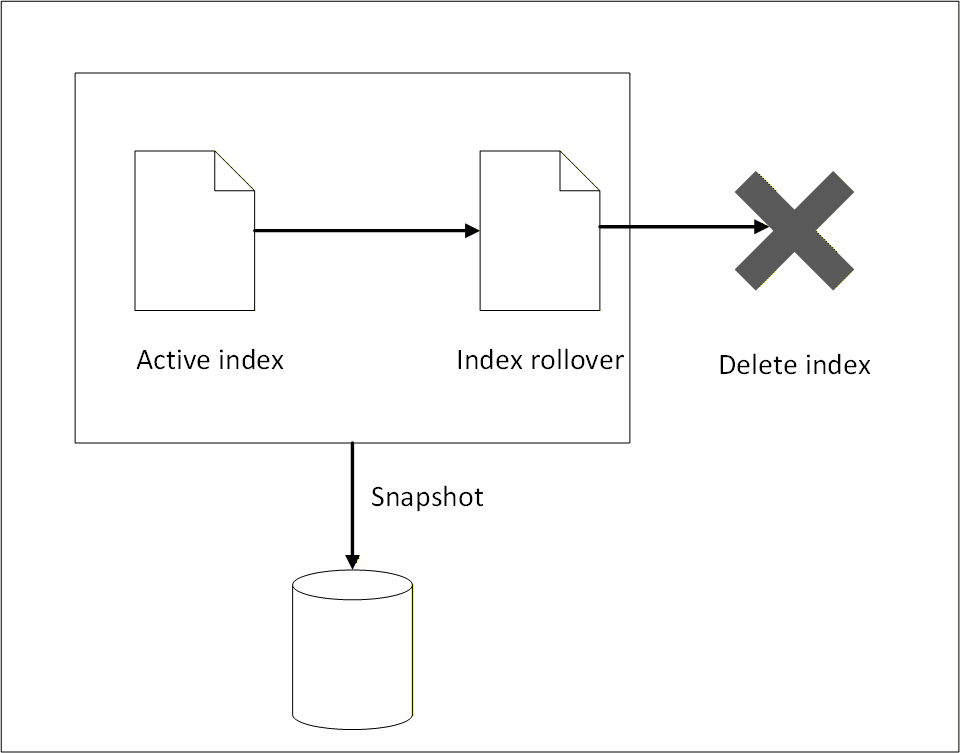
The ISM log repository consists of the following parts:
- Active logs that may be required for immediate reporting and are accessed regularly for high‑frequency analysis.
- Logs that are rolled over to a backup index using index rollover.
- Logs that are moved to external storage using snapshot backup.
- Logs that are deleted when they are no longer required.
To manage growing log data efficiently and ensure optimal performance of the Audit Store cluster, index rollover and index delete policy configurations are implemented. Index rollover allows the automatic creation of new indexes based on the size, age, or document count thresholds. The index delete policies must be defined by lifecycle actions such as rollover, delete, or transition to warm or cold storage. This setup is essential for maintaining healthy cluster performance and managing storage costs.
ISM does not take a snapshot automatically, logs must be manually backed up before the logs are deleted. ISM only performs index rollover and index delete operations.
Index rollover
This task performs an index rollover of the indexes when any of the specified conditions are fulfilled. The next index holds recent logs, making it faster to query and obtain current log information for monitoring and reporting. The earlier logs are available in the older indexes. Ensure that the older indexes are archived to an external storage before the delete policy permanently removes the older indexes. Alternatively, create a snapshot for backing up the logs. For more information about snapshots, refer to Backing up and restoring indexes.
The index rollover is applicable for the following indexes:
- pty_insight_analytics_troubleshooting_0.9*
- pty_insight_analytics_protectors_status_0.9*
- pty_insight_analytics_policy_log_0.9*
- pty_insight_analytics_miscellaneous_0.9*
- pty_insight_analytics_audits_0.9*
The index rollover is initiated when any one of the following criteria is fulfilled:
- rollover_min_index_age=“30d”
- rollover_min_doc_count=200000000
- rollover_min_size=“5gb”
Index delete
The index rollover creates a new index for entries. However, these indexes still reside on the same system and take up disk space. To reduce the disk space consumed, a rule is in place to delete rolled over indexes. Ensure that the older indexes are backed up to an external storage before the delete policy permanently removes the older indexes.
The following policy is defined for deleting indexes after rollover:
- delete_min_index_age=“90d”
Modifying index configurations
The index policies are set using industry standards and must not be changed. However, they can be modified based on company policies and requirements.
- Log in to the Insight Dashboard.
- From the menu, select Index Management.
- Click State management policies.
- Select the check box for the policy.
- Click Edit.
- Select JSON editor.
- Click Continue.
- Update the values in Define policy.
- Click Update.
Note: After policy modification, the new configuration will effect future indexes only. These new modifications are not applied to existing indexes.
6 - Backing up and restoring indexes
Steps to back up and restore.
Backing up and restoring Audit Store indexes is essential for maintaining the reliability of Protegrity AI Team Edition. The Audit Store holds critical operational and audit data used for monitoring, troubleshooting, and compliance. Regular backups protect this data from loss due to failures, upgrades, or misconfiguration, while restore capabilities enable quick recovery and minimal downtime. A well-defined backup and restore strategy helps ensure data durability and platform stability.
Note: Use a dedicated backup bucket per cluster to prevent data corruption. Only snapshots backed up using the daily-insight-snapshots policy are restored during disaster management. Do not delete this policy.
Understanding the snapshot policy
Policies are defined for backing up Audit Store indexes regularly. This ensures that data is available for restoring the indexes and logs in case of data corruption or data deletion. This policy is different from the Index Statement Management (ISM) for rolling over indexes and deleting indexes for maintenance and ensuring the system works fast and smooth. For more information about ISM, refer to Index State Management (ISM). Indexes deleted by ISM can be recreated using the backup created. The state of the indexes are tracked and backed up when the policy is run. Any updated made to the index during the snapshot creation are not backed up during the current run. They will be backed up when the policy is run again as per the schedule set.
The following criteria is specified for creating backups:
- Policy settings
- Policy name:
daily-insight-snapshots - Indices:
*, -*-restored, -*_restored, -restored_* - Repository:
insight-snapshots - Include cluster state:
true - Ignore unavailable indices:
true - Allow partial snapshots:
false
- Policy name:
- Snapshot schedule
- Frequency:
Daily - Cron schedule:
3:00 am UTC (UTC)
- Frequency:
- Snapshot retention period
- Maximum age of snapshots:
60d - Minimum of snapshots retained:
1 - Maximum of snapshots retained:
undefined - Frequency:
Daily - Cron schedule:
4:00 am UTC (UTC)
- Maximum age of snapshots:
- Notification
- Notify on snapshot activities:
creation, deletion, failure
- Notify on snapshot activities:
Managing the backup policy
The default policy provides a Recovery Point Objective (RPO) of 24 hours. Update the snapshot schedule to modify the backup policy based on the required RPO and Recovery Time Objective (RTO).
View and update the policy using the following steps.
- Log in to the Insight Dashboard.
- Select the main menu.
- Navigatie to Management > Snapshot Management > Snapshot policies.
- Click the daily-insight-snapshots policy.
- Click Edit.
- Update the required parameters, such as, the snapshot schedule.
- Select the retention period and number of snapshots to be retained.
- Select the deletion frequency for the snapshot. This is the scheduled task run for deleting snapshots that no longer need to be retained.
- Select the required Notifications check boxes for receiving notifications.
- Click Update.
The new backup policy settings are used for creating the restore points.
For disaster management, to restore the system and the indexes, refer to restoring. A snapshot needs to be available before it can be restored.
7 - Working with alerts
Use alerting to keep track of the different activities that take place on the system. The alerting ecosystem consists of the monitor, trigger, action, and channels.
Viewing alerts
Generated alerts are displayed on the Insight Dashboard. View and acknowledge the alerts from the alerting dashboard by navigating to OpenSearch Plugins > Alerting > Alerts.
For more information about working with Monitors, Alerts, and Notifications, refer to Monitors in OpenSearch Dashboards.
Creating notifications
Create notification channels to receive alerts as per individual requirements. The alerts are sent to the destination specified in the channel.
Creating a custom webhook notification
A webhook notification sends the alerts generated by a monitor to a destination, such as, a web page.
Perform the following steps to configure the notification channel for generating webhook alerts:
Log in to the Web UI.
From the menu, navigate to Management > Notifications > Channels.
Click Create channel.
Specify the following information under Name and Description:
- Name: Http_webhook
- Description: For generating http webhook alerts.
Specify the following information under Configurations:
- Channel type: Custom webhook
- Method: POST
- Define endpoints by: Webhook URL
- Webhook URL: Specify the URL that receives the alert. For example
https://webhook.site/9385a259-3b82-4e99-ad1e-1eb875f00734. - Webhook headers: Specify the key value pairs for the webhook.
Click Send test message to send a message to the email recipients.
Click Create to create the channel.
The webhook is set up successfully.
Create a monitor and attach the channel created using the steps from the section Creating the monitor.
Creating email alerts using custom webhook
An email notification sends alerts generated by a monitor to an email address. It is also possible to configure the SMTP channel for sending an email alert. The email alerts can be encrypted or non-encrypted. Accordingly, the required SMTP settings for email notifications must be configured.
Ensure that the following is configured as per the requirement:
Ensure that the following prerequisites are met.
- Outbound SMTP access is enabled.
- Required SMTP port is open, for example, 587 for STARTTLS.
- Firewall and routing configurations allow SMTP traffic.
Log in to the CLI to configure the email service. For more information about using the CLI commands, refer to Administrator Command Line Interface (CLI) Reference.
Verify if any email service is already configured.
admin get email
- Configure the email service.
admin set email -h "email_provider" -p <port> --use-tls -u "<username>" -w "<password>"
- Send a test email message.
admin test email -f "<senders_email>" -t "<receivers_email>" -s "Test" -b "This is a test."
Log in to the Web UI.
From the menu, navigate to OpenSearch Plugins > Notifications > Channels.
Click Create channel.
Specify the following information under Name and Description:
- Name: send_email_with_certs_alerts
- Description: For secure SMTP alerts.
Specify the following information under Configurations:
-   **Channel type**: **Custom webhook**
-   **Webhook URL**: `http://pty-smtp-service.email-service.svc.cluster.local:8000/api/v1/email/send`
- Under Webhook headers, click Add header and specify the following information:
-   **Key**: **Pty-Username**
-   **Value**: `%internal_scheduler;`
- Under Webhook headers, click Add header and specify the following information:
-   **Key**: **Pty-Roles**
-   **Value**: **auditstore_admin**
Click Create to save the channel configuration.
Caution: Do not click Send test message because the configuration for the channel is not complete.
The success message appears and the channel is created. The webhook for the email alerts is set up successfully.
Create a monitor and attach the channel created using the steps from the section Creating the monitor.
Forwarding alerts to a local file
Complete the configuration provided in this section to send the logs to the alerting module. The logs are saved in the \fluentd\log directory.
- Log in to the jumpbox.
- Navigate to a directory for working with configuration files.
- Run the following command to update the
fluent.conffile.
kubectl get configmap standalone-fluentd-config -n pty-insight -o jsonpath='{.data.fluent\.conf}' > fluent.conf
- Update the following code at the start of the file.
<source>
    @type http
    bind "0.0.0.0"
    port 24284
    <parse>
        @type "json"
    </parse>
</source>
- Locate the following code.
<match *.*.* logdata flulog>
- Replace the text identified in the earlier step with the following code to process all the data.
<match **>
- Add the following code before the closing
</match>tag to output the content to a file.
<store>
@type "file"
path "/fluentd/log/buffer"
append true
<buffer time>
    path "/fluentd/log/buffer"
</buffer>
</store>
- Run the following command to load the new configuration.
kubectl create configmap standalone-fluentd-config -n pty-insight --from-file=fluent.conf --dry-run=client -o yaml > standalone-fluentd-config-new.yaml
- Run the following command to load the configuration.
kubectl replace -f standalone-fluentd-config-new.yaml -n pty-insight
- Run the following command to generate the
standalone-fluentd-deployment.yamlfile.
kubectl get deployment standalone-fluentd -n pty-insight -o yaml > standalone-fluentd-deployment.yaml
- Open the
standalone-fluentd-deployment.yamlfile. - Locate the following code.
spec:
  containers:
  - args:
    - |
    export GEM_HOME="$HOME/.local/gems" && \
    export PATH="$GEM_HOME/bin:$PATH" && \
    gem install fluent-plugin-opensearch --no-document --user-install && \
    fluentd -c /fluentd/etc/fluent.conf -v
- Add the following
fluent-plugin-httpfile in the code to install the required.gemfile.
spec:
  containers:
  - args:
    - |
    export GEM_HOME="$HOME/.local/gems" && \
    export PATH="$GEM_HOME/bin:$PATH" && \
    gem install fluent-plugin-opensearch fluent-plugin-http --no-document --user-install && \
    fluentd -c /fluentd/etc/fluent.conf -v
- Add the following code to the
volumeMounts:parameter. Append the mount path at the end retaining the current volume mounts.
        volumeMounts:
        - mountPath: /fluentd/etc/
          name: standalone-fluentd-config
- Locate the following code.
     volumes:
      - configMap:
          defaultMode: 420
          name: standalone-fluentd-config
        name: standalone-fluentd-config
      - name: tls-for-insight-key-pair
        secret:
          defaultMode: 420
          secretName: tls-for-insight-key-pair
- Update the code to add the directory details to the configuration file.
     volumes:
      - configMap:
          defaultMode: 420
          name: standalone-fluentd-config
        name: standalone-fluentd-config
      - name: tls-for-insight-key-pair
        secret:
          defaultMode: 420
          secretName: tls-for-insight-key-pair
      - emptyDir: {}
        name: fluentd-log
- Apply the configurations using the following command.
kubectl apply -f standalone-fluentd-deployment.yaml
- Process the configurations using the following command.
kubectl rollout restart deployment standalone-fluentd -n pty-insight
- Verify that the pods are running.
kubectl get pods -n pty-insight
- Proceed to create a monitor using the steps from Creating the monitor.
Creating the monitor
A monitor tracks the system and sends an alert when a trigger is activated. Triggers cause actions to occur when certain criteria are met. Those criteria are set when a trigger is created. For more information about monitors, actions, and triggers, refer to Alerting.
Perform the following steps to create a monitor. The configuration specified here is just an example. For real use, create whatever configuration is needed per individual requirements:
Ensure that a notification is created using the steps from Creating notifications.
From the menu, navigate to OpenSearch Plugins > Alerting > Monitors.
Click Create Monitor.
Specify a name for the monitor.
For the Monitor defining method, select Extraction query editor.
For the Schedule, select 30 Minutes.
For the Index, select the required index.
Specify the following query for the monitor. Modify the query as per the requirement.
{
    "size": 0,
    "query": {
        "match_all": {
            "boost": 1
        }
    }
}
Click Add trigger and specify the information provided here.
Specify a trigger name.
Specify a severity level.
Specify the following code for the trigger condition:
ctx.results[0].hits.total.value > 0
Click Add action.
From the Channels list, select the required channel.
Add the following code in the Message field. The default message displayed might not be formatted properly. Update the message by replacing the Line spaces with the n escape code. The message value is a JSON value. Use escape characters to structure the email properly using valid JSON syntax.
```
{
"message": "Please investigate the issue.\n  - Trigger: {{ctx.trigger.name}}\n  - Severity: {{ctx.trigger.severity}}\n  - Period start: {{ctx.periodStart}}\n  - Period end: {{ctx.periodEnd}}",
"subject": "Monitor {{ctx.monitor.name}} just entered alert status"
}
```
>	**Note:** The **message** value is a JSON value. Be sure to use escape characters to structure the email properly using valid JSON syntax. The default message displayed might not be formatted properly. Update the message by replacing the Line spaces with the **\\n** escape code.
- Select the Preview message check box to view the formatted email message.
- Click Send test message and verify the recipient’s inbox for the message.
- Click Save to update the configuration.