Index State Management (ISM)
The Protegrity Data Security Platform enforces security policies at many protection points throughout an enterprise and sends logs to the PPC. The logs are stored in a log repository, in this case the Audit Store. Manage the log repository using ISM in Insight Dashboard.
The following figure shows the components and the workflow of the ISM system.
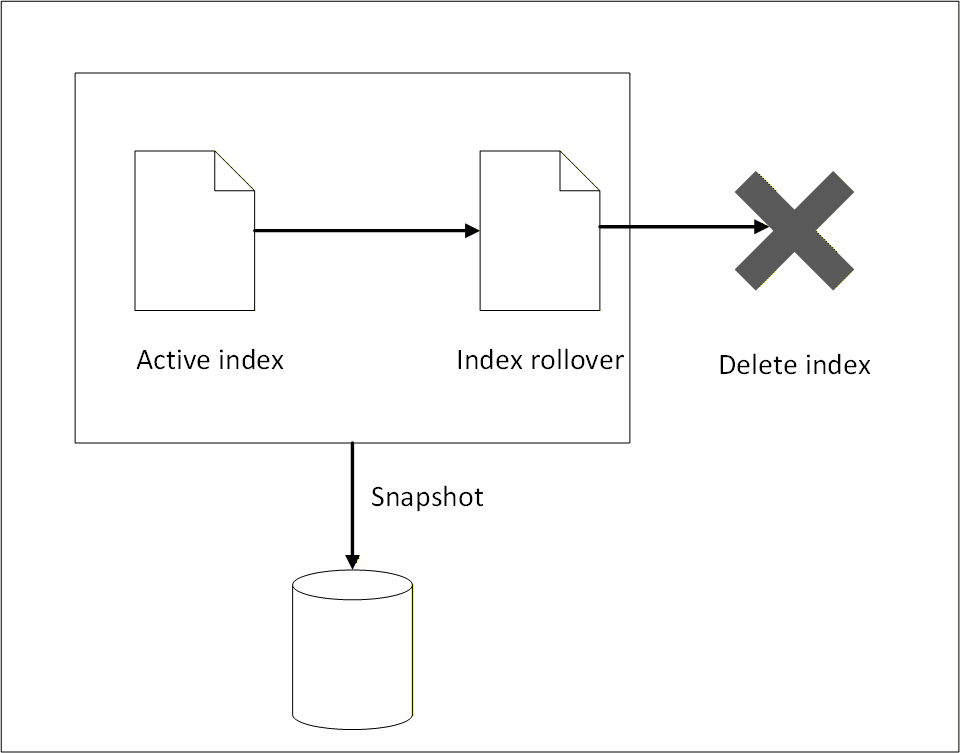
The ISM log repository consists of the following parts:
- Active logs that may be required for immediate reporting and are accessed regularly for high‑frequency analysis.
- Logs that are rolled over to a backup index using index rollover.
- Logs that are moved to external storage using snapshot backup.
- Logs that are deleted when they are no longer required.
To manage growing log data efficiently and ensure optimal performance of the Audit Store cluster, index rollover and index delete policy configurations are implemented. Index rollover allows the automatic creation of new indexes based on the size, age, or document count thresholds. The index delete policies must be defined by lifecycle actions such as rollover, delete, or transition to warm or cold storage. This setup is essential for maintaining healthy cluster performance and managing storage costs.
ISM does not take a snapshot automatically, logs must be manually backed up before the logs are deleted. ISM only performs index rollover and index delete operations.
Index rollover
This task performs an index rollover of the indexes when any of the specified conditions are fulfilled. The next index holds recent logs, making it faster to query and obtain current log information for monitoring and reporting. The earlier logs are available in the older indexes. Ensure that the older indexes are archived to an external storage before the delete policy permanently removes the older indexes. Alternatively, create a snapshot for backing up the logs. For more information about snapshots, refer to Backing up and restoring indexes.
The index rollover is applicable for the following indexes:
- pty_insight_analytics_troubleshooting_0.9*
- pty_insight_analytics_protectors_status_0.9*
- pty_insight_analytics_policy_log_0.9*
- pty_insight_analytics_miscellaneous_0.9*
- pty_insight_analytics_audits_0.9*
The index rollover is initiated when any one of the following criteria is fulfilled:
- rollover_min_index_age=“30d”
- rollover_min_doc_count=200000000
- rollover_min_size=“5gb”
Index delete
The index rollover creates a new index for entries. However, these indexes still reside on the same system and take up disk space. To reduce the disk space consumed, a rule is in place to delete rolled over indexes. Ensure that the older indexes are backed up to an external storage before the delete policy permanently removes the older indexes.
The following policy is defined for deleting indexes after rollover:
- delete_min_index_age=“90d”
Modifying index configurations
The index policies are set using industry standards and must not be changed. However, they can be modified based on company policies and requirements.
- Log in to the Insight Dashboard.
- From the menu, select Index Management.
- Click State management policies.
- Select the check box for the policy.
- Click Edit.
- Select JSON editor.
- Click Continue.
- Update the values in Define policy.
- Click Update.
Note: After policy modification, the new configuration will effect future indexes only. These new modifications are not applied to existing indexes.
Feedback
Was this page helpful?