Architecture
The following diagram illustrates the various components of the Discover architecture and how they work together.
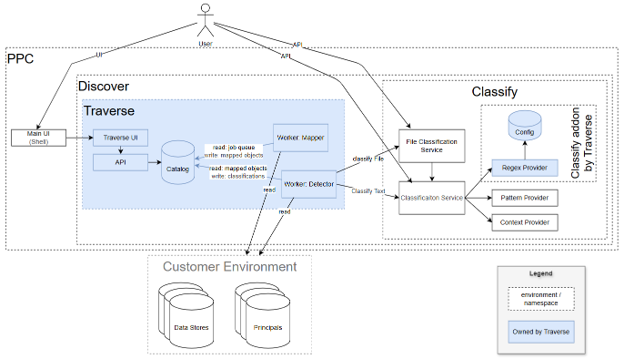
The following are the important components in Discover:
Web UI: A unified user interface that hosts all product components, including Discover, and gives users one place to access and navigate the products they are licensed to use.
Traverse UI: The Discover interface in the Shell, where users manage scans, review the catalog, configure connections to their systems, and monitor results.
Catalog: The central repository for results, containing a map of the customer’s data such as databases, tables, and files along with the sensitive-data classifications identified during scans.
Worker Mapper: A component in the Traverse architecture that maps data from one format to another.
Worker Detector: A component in the Traverse architecture that detects sensitive data and sends the results to the Classification service.
Regex Dictionary Provider (RDP): A classification provider built by the DDX team that adds regex and dictionary-based detection to Discover. Ships as a separate Helm chart.
Classification Service (CS): The primary Classify entry point for text-based content, including plain text, tabular data, XML, and JSON. It analyzes content and returns any sensitive data it detects, with its capabilities extended by the providers listed here.
File Classification Service (FCS): The Classify entry point for files. It accepts files of various formats and returns the classifications of their contents by using the Classification Service.
Pattern Provider and Context Provider: The two built-in classification providers. They analyze the content and return a detailed list of the sensitive data found based on data patterns and surrounding context.
Customer Environment: The customer’s own environment, containing the databases, files, and identity providers (principals) that need to be scanned for sensitive data.
Feedback
Was this page helpful?