This is the multi-page printable view of this section. Click here to print.
Additional Information
- 1: Best practices when using Protegrity Anonymization
- 2: Protegrity Anonymization Risk Metrics
- 3: AWS Checklist
- 4: Working with Certificates
- 5: values.yaml
- 6: Setting up logging for the Protegrity Anonymization API
- 7: Enabling Custom Certificates from SDK
- 8: Creating a DNS entry for the ELB hostname in Route53
1 - Best practices when using Protegrity Anonymization
Ensure that the source file is clean based on the following checks:
- A column contains correct data values. For example, a field with numbers, such as, salary, must not contain text values.
- Appropriate text as per the coding selected is present in the files. Special characters or characters that cannot be processed must not be present in the source file.
Move the anonymized data file and the logs generated to a different system before deleting your environment.
The maximum dataframe size that can attach to an anonymization job is 100MB.
For processing a larger dataset size, users can use the different cloud storages available.
Run a maximum of 5 anonymization jobs in Protegrity Anonymization: A maximum of 5 jobs can be put on the Protegrity Anonymization queue for adequate utilization of resources. If more jobs are raised, then the job after the initial 5 jobs are rejected and are not processed. If required, increase the maximum limit for the JOB_QUEUE_SIZE parameter in the config.yaml file. For Docker, update the config-docker.yaml file.
Protegrity Anonymization accepts a maximum of 60 requests per minute: Protegrity Anonymizationcan accept a maximum of 60 request per minute. If more than 60 requests are raised, then the excess requests are rejected and are not processed. If required, increase the maximum limit for the DEFAULT_API_RATE_LIMIT parameter in the config.yaml file. For Docker, update the config-docker.yaml file.
2 - Protegrity Anonymization Risk Metrics
Definitions
The following definitions are used for risk calculations:
- Data Provider or Custodian: The custodian of the data, responsible for controlling the process of sharing by anonymizing the data as well as putting in place other controls which prevents data from being misused and or re-identified.
- Data Recipient: Person or institution who receives the data from the data provider.
- Dataset: The collection of all records containing the data on subjects.
- Adversary: Data recipient who has the motives to attempt and means to succeed the re-identification of the data and intends to use the data in ways which may be harmful to individuals contained in the dataset.
- Target: Person whose details are in the dataset who has been selected by the adversary to focus the re-identification attempt on.
Types of risks
Protegrity Anonymizationuses the Prosecutor, Journalist and Marketer risk models to access probability of re-identification attacks. A description of these risks are provided here.
- Prosecutor Risk: If the adversary can know that the target is in the dataset, then it is called Prosecutor Risk. The fact that target is part of dataset increases the risk of successful re-identification.
- Journalist Risk: When the adversary doesn’t know for certain that the target is in the dataset then it is called Journalist Risk.
- Marketer Risk: Under Marketer Risk, the adversary attempts to re-identify as many subjects in the dataset as possible. If the risk of re-identifying an individual subject is possible, then the risk of multiple subjects being re-identified is also possible.
Relationship between the three risks
Prosecutor Risk >= Journalist Risk >= Marketer Risk
If the dataset is protected against the prosecutor and the journalist risk, depending on the adversary’s knowledge of target’s participation, then by default it is also protected against the marketer risk.
Measuring Risks
This section details the strategy used by Protegrity Anonymization to calculate risks.
For calculating risks, the population is the entire pool from which the sample dataset is drawn. In the current calculation of risk metrics, the population considered is the same as the sample. In case of journalist calculation, it is good to consider the population from a larger dataset from which the sample is drawn.
The following annotations are used in the calculations:
- Ra is the proportion of records with risk above the threshold which is at highest risk.
- Rb is the maximum probability of re-identification which is at maximum risk.
- Rc is the proportion of records that can be re-identified on an average which is the success rate of re-identification.
As part of the risk calculations, anonymization API calculates the following metrics:
- pRa is the highest prosecutor risk.
- pRb is the maximum prosecutor risk.
- pRc is the success rate of prosecutor risk.
- jRa is the highest journalist risk.
- jRb is the maximum journalist risk.
- jRc is the success rate of journalist risk.
- mRc is the success rate of marketer risk.
Risk Type | Equation | Notes |
|---|---|---|
Prosecutor | pRa = 1/n pRc = |J| / n |
|
Journalist | jRa = 1/n jRc = max ( |J| / |
|
Marketer | mRc = 1/n |
|
Measuring Journalist Risk
For Journalist Risk to be applied, the published dataset should be a specific sample.
There are two general types of re-identification attacks under journalist risk:
- The adversary is targeting a specific individual.
- The adversary is targeting any individual.
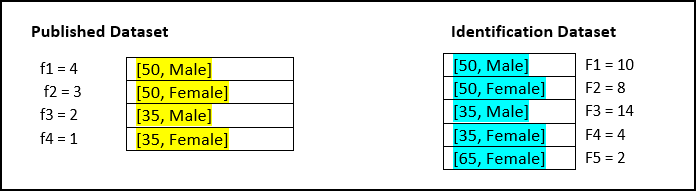
In case of journalist attack, the adversary will match the published dataset with another identification dataset, such as, voter registry, all patient data in hospital, and so on.
Identification of the dataset represents the population of which the published dataset is a sample.
For example, the sample published dataset is drawn from the identification dataset.
| Derived Risk Metrics | Equation | Risk Value |
|---|---|---|
| jRa | 1/n 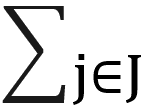 fj x l(1 / FJ > T) fj x l(1 / FJ > T) | 0 |
| jRb | 1 / min(FJ) | 0.25 |
| jRc | max ( |J| /  FJ) , 1 /n fj / FJ) FJ) , 1 /n fj / FJ) | 0.13 |
Calculation of jRa:
- T value is 0.33. Size of equivalence classes in the identity dataset are 10, 8, 14, 4, 2.
- Identity function returns 0 when value 1/F is less than τ value else 1.
- Identify function returns 0, 0, 0, 0, 1.
- Equivalence sizes in samples are 4, 3, 2, 1.
- Values of equivalence size / number of records are 0.4, 0.3, 0.2, 0.1.
- Product of above value with identity function values are 0, 0, 0, 0.
- Value of jRa is 0.
Calculation of jRb:
- Minimum of equivalence size of identification dataset is 4
- Value of jRb is 0.25.
Calculation of jRc:
- Number of equivalence classes in 5 in identification dataset.
- Total records in identification dataset 38.
- Number of equivalence classes / total records = 5/38 = 0.131.
- Equivalence classes in sample / equivalence classes in identification dataset are 0.4, 0.375, 0/142857, 0/25.
- Total of above values 1.16.
- Above value / total records in sample = 1/16 / 10 = 0.116.
- Max (0.131, 0.116) = 0.131.
Measuring Marketer Risk
The use case for deriving the marketer risk is shown here.
| Derived Risk Metrics | Equation | Risk Value |
|---|---|---|
| mRc | 1/n fj /FJ | 0.116 |
Calculation of mRc:
- Equivalence classes in sample / equivalence classes in identification dataset are 0.4, 0.375, 0/142857, 0/25.
- Total of above values 1.16.
- Above value / total records in sample = 1/16 / 10 = 0.116.
- Value of marketer risk is 0.116.
3 - AWS Checklist
Update the table using from your AWS account to configure the Protegrity Anonymization API.
Table: CLI Installation
| Variable | Value | Obtain from |
|---|---|---|
| AWS Access Key ID | AWS > IAM > Users > <user_name> > Security credentials > Access key ID | |
| AWS Secret Access Key | https://aws.amazon.com/blogs/security/how-to-find-updateaccess-keys-password-mfa-awsmanagement-console/ | |
| Default region name | AWS > EC2 > Region name from the upper-right corner | |
| Default output format | json | |
| metadata | AWS > EC2 > Region name from the upper-right corner | |
| name | Specify a name | |
| region | ||
| vpc | ||
| id | AWS > EC2 > Instance_Id > Networking > VPC ID | |
| cidr | AWS > EC2 > Instance_Id > VPC_Id > IPv4 CIDR | |
| subnets | ||
| private | ||
| us-east-1a | AWS > VPC > Subnets > Subnet > Availability Zone | |
| id | AWS > VPC > Subnets > Subnet > Subnet ID | |
| cidr | AWS > VPC > Subnets > Subnet > IPv4 CIDR | |
| us-east-1b | AWS > VPC > Subnets > Subnet > Availability Zone | |
| id | AWS > VPC > Subnets > Subnet > Subnet ID | |
| cidr | AWS > VPC > Subnets > Subnet > IPv4 CIDR | |
| nodeGroups | ||
| securityGroups | ||
| attachIDs | AWS > VPC > Security Groups > security_group > Security group ID |
4 - Working with Certificates
Use the commands provided in this section to work with and troubleshoot any certificate-related issues.
Verify the certificate and view the certificate information.
openssl verify -verbose -CAfile cacert.pem server.crtCheck a certificate and view information about the certificate, such as, signing authority, expiration date, and other certificate-related information.
openssl x509 -in server.crt -text -nooutCheck the SSL key and verify the key for consistency.
openssl rsa -in server.key -checkVerify the CSR and view the CSR data that was entered when generating the certificate.
openssl req -text -noout -verify -in server.csrVerify that the certificate and corresponding key matches by displaying the md5 checksums of the certificate and key. The checksums can then be compared to verify that the certificate and key match.
openssl x509 -noout -modulus -in server.crt| openssl md5
openssl rsa -noout -modulus -in server.key| openssl md5
5 - values.yaml
The values.yaml file contains the configuration for setting up the Protegrity Anonymization API. Use
the template provided with the Protegrity Anonymization API or copy the following code to a .yaml file
and modify it as per your requirements before running it.
## PREREQUISITES
## Create separate namespace. Eg: kubectl create ns anon-ns. Update your namespace name in values.yaml.

## Running all pods in the namespace specific for Protegrity Anonymization API
namespace:
  name: anon-ns                           # Update the namespace if required.

## Prerequisite for setting up Database and Minio Pod.
## This is to handle any new DB pod getting created that uses the same persistence storage in case the running Database pod gets disrupted.
## This persistence also helps persist Anon-storage data.
persistence:
  ## 1. Get the list of nodes in the cluster. CMD: kubectl get nodes
  ## 2. Get the node name which is running in the same zone where the external-storage is created. CMD: kubectl describe nodes
  nodename: "<Node_name>"                    # Update the Node name

  ## Fetch the zone in which the node is running using the `kubectl describe node/nodename` command or the following command.
  ## CMD: ` kubectl describe node/<nodename> | grep topology.kubernetes.io/zone | grep -oP 'topology.kubernetes.io/zone=\K[^ ]+' `
  zone: "<Zone in which above Node is running>"

  ## For EKS cluster, supply the volumeID of the aws-ebs
  ## For AKS cluster, supply the subscriptionID of the azure-disk
  dbstorageId: "<Provide dbstorage ID>"           # To persist database schemas.
  anonstorageId: "<Provide anonstorage ID>"       # To persist Anonymized data.
  notebookstorageId: "<Provide Notebookstorage ID>" # To persist User created notebooks.

  fsType: ext4

anonstorage:
  ## Refer the following command for creating your own secret.
  ## CMD: kubectl create secret generic my-minio-secret --from-literal=rootUser=foobarbaz --from-literal=rootPassword=foobarbazqux
  existingSecret: ""                # Supply your secret Name for ignoring below default credentials.
  bucket_name: "anonstorage"        # Default bucket name for minio
  secret:
    name: "storage-creds"           # Secret to access minio-server
    access_key: "anonuser"          # Access key for minio-server
    secret_key: "protegrity"        # Secret key for minio-server

## This section is required if the image is getting pulled from the Azure Container Registry
## create image pull secrets and specify the name here.
## remove the [] after 'imagePullSecrets:' once you specify the secrets
#imagePullSecrets: []
#  - name: regcred

image:
  minio_repo: quay.io/minio/minio                    # Public repo path for Minio Image.
  minio_tag: RELEASE.2022-10-29T06-21-33Z            # Tag name for Minio image.

  repository: <Repo_path>                            # Repo path for the Container Registry in Azure, GCP, AWS.
  anonapi_tag: <AnonImage_tag>                       # Tag name of the ANON-API Image.
  anonworkstation_tag: <WorkstationImage_tag>        # Tag name of the ANON-Workstation Image.
  syndataapi_tag: <SyntheticDataImage_tag>           # Tag name for synthetic Image.
  mlflow_tag: <MlflowImage_tag>                       # Tag name for Mlflow Image.

  pullPolicy: Always

## Refer to the section in the documentation for setting up and configuring NGINX-INGRESS before deploying the application.
ingress:
  ## Add the host section with the hostname used as CN while creating server certificates.
  ## While creating the certificates you can use *.protegrity.com as CN and SAN as used in the below example
  anonhost: anon.protegrity.com                  # Update the host according to your server certificates.
  sdatahost: syndata.protegrity.com

  ## To terminate TLS on the Ingress Controller Load Balancer.
  ## K8s TLS Secret containing the certificate and key must be provided.
  secret: anon-protegrity-tls                # Update the secretName according to your secretName.

  ## To validate the client certificate with the above server certificate
  ## Create the secret of the CA certificate used to sign both the server and client certificate as shown in the example below
  ca_secret: ca-protegrity                    # Update the ca-secretName according to your secretName.

  ingress_class: nginx-anon
  ## IP Address of Ingress Server
  ## CMD: kubectl get service -n nginx
  ingressIP: <IP Address of Ingress Server>       # Specify the external IP address obtained from above command.
  ## ingress connection timeout (connect/read/send time out interval)
  timeout: 600
## Typically the deployment includes checksums of secrets/config,
## So that when these change on a subsequent helm install, the deployment/statefulset
## is restarted, so set to "true" to disable this behaviour.
ignoreChartChecksums: false

####################### WORKER CONFIGURATIONS #########################
## Increase the number of worker pods as per your requirement
workers:
  hpa: anon-worker-hpa
  labels:
    app: dask-worker
  replicaCount: 1

## Resources defined for the worker pod
  worker_resources:
    requests:
      cpu: 2
      memory: 6Gi
    limits:
      cpu: 2
      memory: 6Gi

## Specs with which worker container should start
  containerSpecs:
    memLimit: "6G"
    nthreads: 2

## Worker pod env to read values from configMap manifest.
## A config Map(wrkr-specs) is used to set these values.
  workerPodEnv:
    - name: worker_mem_limit
      valueFrom:
        configMapKeyRef:
          name: wrkr-specs
          key: worker-mem-limit
    - name: num_threads
      valueFrom:
        configMapKeyRef:
          name: wrkr-specs
          key: num-threads

  autoscaling:
    minReplicas: 1                        # Min number of worker pods which will be running when the cluster starts.
    maxReplicas: 3                        # Max number of worker pods which will autoscale in the cluster.
    targetMemoryThreshold: 4Gi            # Threshold memory-load beyond which worker pods will autoscale.

## FOR MORE INFO ABOUT PROCESSING LARGE DATASETS REFER TO THE DOCUMENTATION
########################################################################

## Create the volumes and specify the names here.
## remove the [] after 'volumes:' once you specify volumes
volumes: []
  #- name: gcs-secret             ##This secret is used when user wants to read and write data to a Google cloud storage Refer DOC.
    #secret:
      #secretName: adc-gcs-creds

## Create the volumeMounts and specify the names here.
## remove the [] after 'volumeMounts:' once you specify volumeMounts
volumeMounts: []
  #- name: gcs-secret
    #mountPath: /home/anonuser/gcs

## Creating a service account for Anonymization
serviceaccount:
  name: anon-service-account

## Setting the pod security context
podSecurityContext:
  runAsNonRoot: true
  runAsUser: 1000
  fsGroup: 1000

# Configure the delays for Liveness Probe here
livenessProbe:
  initialDelaySeconds: 50
  periodSeconds: 40

#Configure the delays for Readiness Probe here
readinessProbe:
  initialDelaySeconds: 15
  periodSeconds: 20

## MLFLOW-APP ##
mlflow:
  name: mlflow-depl
  service:
    name: mlflow-svc
    mlflowPort: 8200
    labels:
      appname: mlflow

## SYNDATA-APP ##
syndataapp:
  name: syndata-app-depl
  service:
    name: syndata-app-svc
    syndataPort: 8095
    labels:
      appname: syndataapp

## ANON-APP ##
anonapp:
  name: anon-app-depl
  service:
    name: anon-app-svc
    anonPort: 8090
    labels:
      appname: anonapp
  loglevel: INFO                            # To get logs at DEBUG: Set loglevel to DEBUG and do helm upgrade

## ANON-DATABASE ##
database:
  name: anon-db-depl
  labels:
    app: anon-db
  service:
    name: anon-db-svc
    dbport: 5432
  persistence:    ## Persistence Volume size
    pvName: anon-db-pv
    pvcName: anon-db-pvc
    accessMode: ReadWriteOnce
    storageDB:
      size: 20Gi

## ANON-WORKSTATION ##
anonlab:
  name: anon-workstation-depl
  labels:
    app: anon-lab
  service:
    name: anon-lab-svc
    labport: 8888
  persistence:
    pvName: anon-nb-pv
    pvcName: anon-nb-pvc
    accessMode: ReadWriteOnce
    size: 2Gi

## ANON-DASK ##
dask:
  scheduler:
    name: anon-scheduler-depl
  worker:
    name: anon-worker-depl
  service:
    name: anon-dask-svc
    daskMasterPort: 8786
    daskUiPort: 8787
    labels:
      appname: dask

## ANON-STORAGE ##
storage:
  persistence:
    ## Path where PV would be mounted on the MinIO Pod
    mountPath: "/data"
    volumeName: "anon-storage-pv"
    claimName: "anon-storage-pvc"
    accessMode: ReadWriteOnce
    size: 20Gi
  service:
    name: anon-minio-svc
    port: 8100
  securityContext:
    runAsUser: 1000
    runAsGroup: 1000
    fsGroup: 1000
    fsGroupChangePolicy: "OnRootMismatch"
  resources:
    requests:
      memory: 2Gi
      cpu: 1
  certsPath: "/etc/minio/certs/"
  configPathmc: "/etc/minio/mc/"
6 - Setting up logging for the Protegrity Anonymization API
Logging is helpful to know the tasks being performed on the system. It is especially helpful to trace and resolve errors in the configuration and to see that a software is processing a request and is not stalled. You need to set up logging for the Protegrity Anonymization API if you require it. In logging, Protegrity Anonymization API captures the internal processing and saves it in a log file that you can view for further analysis. Update and use the script files provided here for logging as per your requirements.
Note: This is an alternative way for obtaining logs.
Navigate to the machine where the Protegrity Anonymization API is set up.
Use the
Anon_logs.shscript to pull the logs for the task being performed in the Protegrity Anonymization API pod.Assign the appropriate permissions and run the
Anon_logs.shscript.chmod +x Anon_logs.sh ./<path_to_script>/Anon_logs.sh
7 - Enabling Custom Certificates from SDK
Protegrity Anonymization API uses certificates for secure communication with the client. You can use the certificates provided by Protegrity or use your own certificates. Complete the configurations provided in this section to use your custom certificates with the SDK.
Before you begin
Ensure that the certificates and keys are in the .pem format.
Note: If you want to use the default Protegrity certificates for the Protegrity Anonymization API, then skip the steps to set up the certificates provided in this section.
Complete the configuration on the machine where the Protegrity Anonymization API SDK will be used.
a. Create a directory that is named .pty_anon in the directory from where the SDK will run.
b. Create certs in the.pty_anondirectory.
c. Create generated-certs in thecertsdirectory.
d. Create ca-cert in thegenerated-certsdirectory.
e. Create cert in thegenerated-certsdirectory.
f. Create key in thegenerated-certsdirectory.
g. Copy the client certificates and key to the respective directories in the.pty_anon/certs/ generated-certsdirectory.
The directory structure will be as follows:.pty_anon/certs/generated-certs/ca-cert/CA-xyz-cert.pem .pty_anon/certs/generated-certs/key/xyz-key.pem .pty_anon/certs/generated-certs/cert/xyz-cert.pemMake sure that you are using valid certificates. Users can validate the certificates using the commands provided in the section Working with certificates.
h. Create a
config.yamlfile in the.pty_anondirectory with the following Ingress Endpoint defined underCLUSTER_ENDPOINT. TheBUCKET_NAME,ACCESS_KEY, andSECRET_KEYare the default details that are used to communicate with the MinIO container for reading and writing files from SDK.STORAGE: CLUSTER_ENDPOINT: https://anon.protegrity.com/ BUCKET_NAME: 'anonstorage' ACCESS_KEY: 'anonuser' SECRET_KEY: 'protegrity'Note: Ensure that you replace anon.protegrity.com with your host name specified in values.yaml. Also, ensure that you update the default credentials if you have used your own secret.
Updating the hosts file.
a. Login to the machine where the Protegrity Anonymization API SDK will be used.
b. Update the hosts file with the following code according to your setup.For Kubernetes:
<LB-IP of Ingress> <host defined for ingress in values.yaml>For Docker:
<LB-IP of Ingress> <server_name defined in nginx.conf>For example,
XX.XX.XX.XX anon.protegrity.com
The URL can now be used while creating the Connection Object in the SDK, such as, conn = anonsdk.Connection(“https://anon.protegrity.com/").
8 - Creating a DNS entry for the ELB hostname in Route53
values.yaml file.This section describes the steps to configure hostnames specified in the values.yaml file of the Helm chart for resolving the hostname of the Elastic Load Balancer (ELB) that is created by the NGINX Ingress Controller.
Configure Route53 for DNS resolution.
- Create a private hosted zone in the Route53 service.
- In our case, the domain name for the hosted zone is protegrity.com.
- Select the VPC where the Kubernetes cluster is created.
Create a hostname for the ELB in the private hosted zone created in step 1.
- Create a Record Set with type A - Ipv4 address
- Select Alias as yes
- Specify the Alias Target to the ELB created by the Nginx Ingress Controller
Save the record Create Inbound endpoint for DNS queries from a network to the hosted VPC used in Kubernetes.
- Select Configure endpoints in the Route53 Resolver service.
- Select Inbound Only endpoint.
- Give a name to the endpoint.
- Select the VPC used in the Kubernetes cluster and Route53 private hosted zone.
- Select the availability zone as per the subnet.
- Review and create the endpoint.
- Note the IP addresses from the Inbound endpoint page.
- Send CURL request to the hostname created using the Route 53 service
For more information about Amazon Route53, refer to Amazon Route53 Documentation.