This is the multi-page printable view of this section. Click here to print.
Using Protegrity Anonymization
1 - Creating Protegrity Anonymization requests
A general overview of the process you need to follow to anonymize the data is shown in the following figure:

- Identify the dataset that needs to be anonymized.
- Analyze and classify the various fields available in the dataset. The following classifications are available:
- Direct Identifiers
- Quasi-Identifier
- Sensitive Attributes
- Non-Sensitive Attributes
- Determine the use case by specifying the data that is required for further analysis.
- Specify the quasi-identifiers and other fields that are not required in the dataset
- Specify the required anonymization methods for the data. Some commonly used methods are as follows:
- Generalization
- Micro-Aggregation
- Specify and measure the acceptable statistics and risk levels for the data fields for measuring the statistic before running the anonymization job.
Note: For more information about different risk levels for the data fields, refer to Anonymization models.
- Verify that the anonymized data satisfies the acceptable risk threshold level.
- Measure the quality of the anonymized data by comparing it with the original data. If the quality does not meet standards, then work on the data or drop the output.
- Save the anonymized data to an output file.
The anonymized data can now be used for further analysis and as input for machine learning softwares.
2 - Working with Protegrity Anonymization APIs
For Protegrity Anonymization Python SDK, import the anonsdk module to install and use it. The AnonElement is an essential part of the Protegrity Anonymization Python SDK. For more information about the AnonElement object, refer to Understanding the AnonElement object.
The following table shows the list of REST APIs and Python SDK requests:
| List of APIs | REST APIs | Python SDK |
|---|---|---|
| Anonymization Functions | ||
| Anonymize | Yes | Yes |
| Apply Anonymize | Yes | Yes |
| Measure | Yes | Yes |
| Task Monitoring APIs | ||
| Get Job IDs | Yes | Yes |
| Get Job Status | Yes | Yes |
| Get Metadata | Yes | Yes |
| Abort | Yes | Yes |
| Delete | Yes | Yes |
| Statistics APIs | ||
| Get Exploratory Statistics | Yes | Yes |
| Get Risk Metric | Yes | Yes |
| Get Utility Statistics | Yes | Yes |
| Detection APIs | ||
| Get Data Domains | Yes | No*1 |
| Detect Anonymization Information | Yes | No*1 |
| Detect Classification | Yes | No*1 |
| Detect Hierarchy | Yes | No*1 |
*1 - It is not applicable for Protegrity Anonymization Python SDK.
2.1 - Understanding Protegrity Anonymization REST APIs
Before running the anonymization jobs mentioned in the Protegrity Anonymization REST APIs section below, the following pre-requisites must be completed:
- Ensure that Anonymization machine is set up and is configured as “https://anon.protegrity.com/".
For more information about setting up and configuring an Anonymization machine for AWS and Azure, refer to AWS and Azure. - Ensure that the disk is not full and enough free space is available for saving the destination file.
- Verify the destination file is not in use. Set the required permissions for creating and modifying the destination file.
- Verify that the anonymization job exists.
You can use different sample requests to build and run the anonymization APIs. For more information about the sample requests for REST APIs, refer to Sample Requests for Protegrity Anonymization.
Anonymization Functions
The Anonymization Functions APIs are used to run the anonymization job.
Anonymize
The Anonymize API is used to start an anonymize operation.
For more information about the anonymize API, refer to Submit a new anonymization job.
Note: When you run the job, an empty destination file is created. This file is created during processing for verifying the necessary destination permissions. Avoid using this file till the anonymization job is complete.
Ensure that the anonymized data file and the logs generated are moved to a different system before deleting your environment.
If the source file is larger than the maximum limit that is allowed on the Cloud environment, then run the anonymization request with “additional_properties”: { “single_file”: “no” }.
Apply Anonymize
The Apply Anonymize API is used as a template to anonymize additional entries. Using this API you can use the existing configuration to process additional data. This is especially useful in machine learning for training the system to anonymize new data points.
Note:In this API, privacy model parameters are ignored while performing the anonymization for the new entry.
For more information about the apply anonymize API, refer to Apply anonymization config to a given dataset.
Measure
The Measure API is used to measure or obtain anonymization result statics for different configurations before the actual anonymization job.
For more information about the anonymize API, refer to Submit a new anonymization Measure job.
Task Monitoring APIs
The Task Monitoring APIs are used to monitor the anonymization job. Use these APIs to obtain the job status, retrieve a job, and abort a job.
Get Job IDs
The Get Job ID API is used to get the job IDs of the last 20 anonymization operations that are running, in queue, or completed. You can then use the required job ID with the other APIs to work with the anonymization job.
For more information about the job ID API, refer to Obtain job ids.
Get Job Status
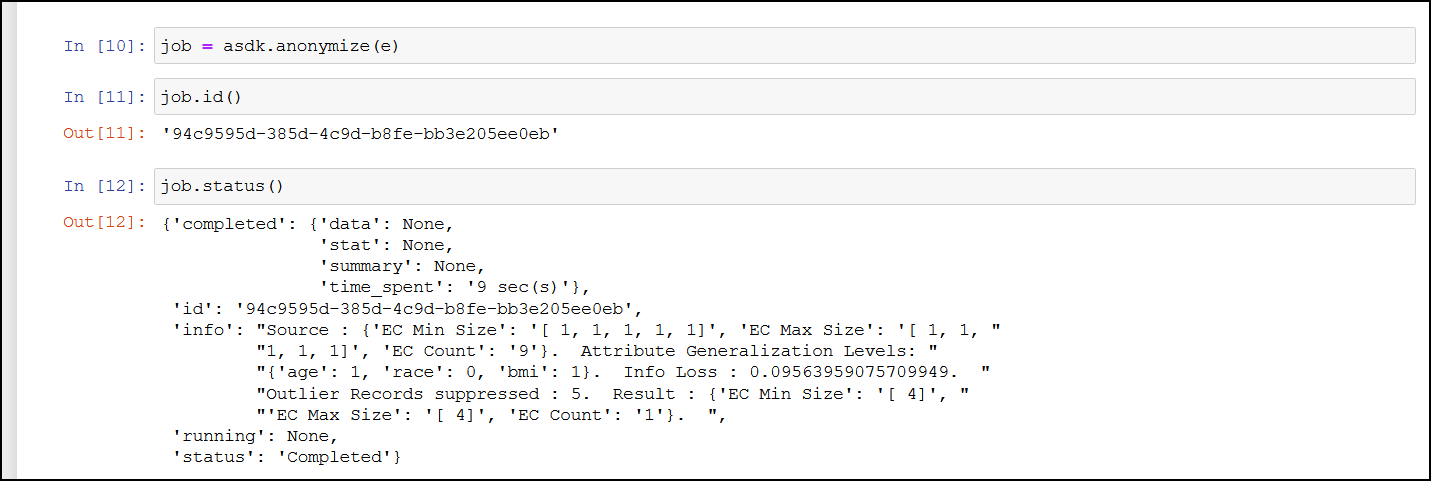
The Get Job Status API is used to get the status of an anonymize operation that is running, in queue, or complete. It shows the percentage of job completed. Use the information provided here to monitor if a job is running or stalled.
For more information about the job status API, refer to Obtain job status.
Get Job Status API Parameters
Use this API to get the status of an anonymize operation that is running. It shows the percentage of job completed. Use the information provided here to monitor if a job is running or stalled.
| Monitor Job Information | Description |
|---|---|
| Function | status() |
| Parameters | None |
| Return Type | A string with the status information in the JSON format. completed: This is information about the job, such as, data, statistics, summary, and time spent. id: This is the job ID. info: This is information about the job being processed, such as, the source and attributes for the job. running: This is the completion status of the jobs being processed. It shows the percentage of the job completed. status: This is the status of the job, such as, running or completed. Note: This API displays all the status of the job. To obtain the ID of a job, use job.id(). |
| Sample Request | job.status() |
Get Metadata
The Get Metadata API is used to retrieve the metadata for the existing job. This API is useful when you need to view the configuration available for a job. It displays the fields, configuration, and the data that is used to run the anonymization job.
For more information about the metadata API, refer to Obtain job metadata.
Retrieve Anonymized Data API Parameters
Use this API to retrieve the results of an anonymized job.
| Retrieve Job Information | Description |
|---|---|
| Function | result() |
| Parameters | None |
| Return Type | Returns the AnonResult element, which provides the DataFrame for the anon data. Note: The result.df will be None if you have overridden the resultstore as part of anonymize method. |
| Sample Request | job.result() Note: This is a blocking API and will stall processing till the job is complete. |

Abort
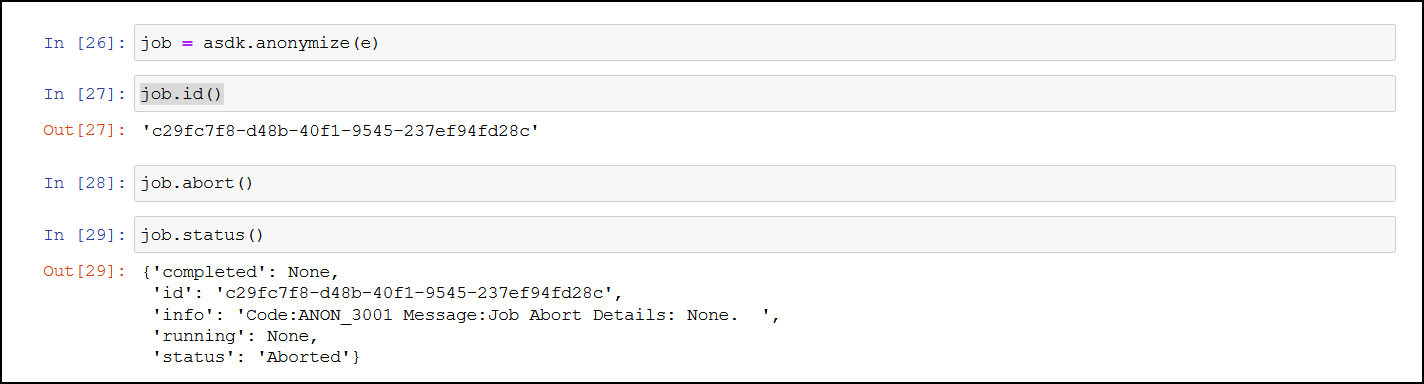
The Abort API is used to abort a running anonymization job. You can abort jobs if you need to modify the parameters or if the job is stalled or taking too much time or resources to process.
For more information about the abort API, refer to Abort a running anonymization job.
Note: After aborting the task, it might take time before all the running processes are stopped.
Abort API Parameters
Use this API to abort a running anonymize operation. You can abort jobs if you need to modify the parameters or if the job is stalled or taking too much time or resources to process.
| Abort Job Information | Description |
|---|---|
| Function | abort() |
| Parameters | None |
| Return Type | A string with the status of the abort request. |
| Sample Request | job.abort() |
Delete
The Delete API is used to delete an existing job that is no longer required.
For more information about the delete API, refer to Delete a job.
Statistics APIs
The Statistics APIs are used to obtain information about the anonymization data. Use these APIs to obtain the risk and utility information about the anonymization. The user needs to access these APIs to measure the utility benefits and risk of publishing the anonymized data. If these configurations are not satisfactory, then the user can re-submit the anonymization job after modifying some parameters based on these results.
Get Exploratory Statistics
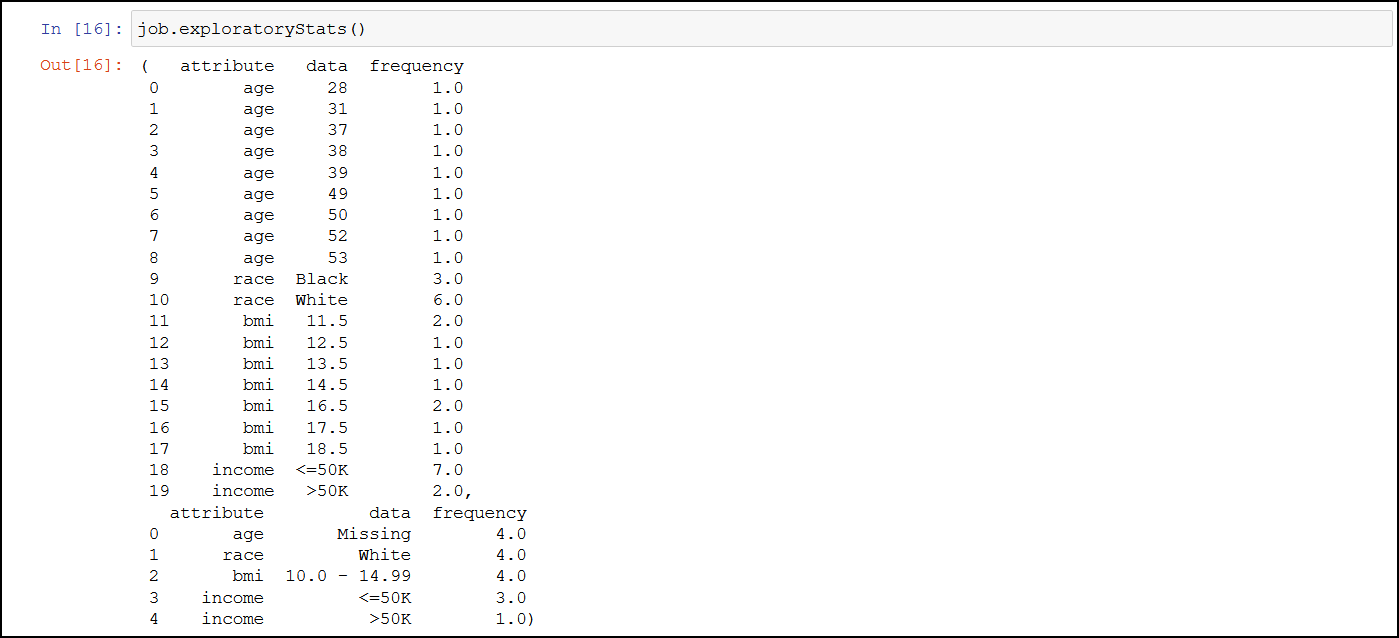
The Get Exploratory Statistics API is used to obtain data distribution statistics about a completed anonymization job.
For more information about the exploratory statistic API, refer to Obtain the exploratory statistics.
Get Exploratory Statistics API Parameters
It provides information about both, the source and the target data distribution statistics.
| Exploratory Statistics Information | Description |
|---|---|
| Function | exploratoryStats() |
| Parameters | None |
| Return Type | A Pandas dataframe with the exploratory information of the source data and the anonymized data. |
| Sample Request | job.exploratoryStats() |
This provides the data distribution of the attribute, which is all unique values of an attribute and its occurrence count. This can be used to build data histogram of all attributes in the dataset. .The following values appear for the source and result set:
Get Risk Metric
The Get Risk Metric API is used to ascertain the risk of the source data and the anonymized data.
For more information about the risk metric API, refer to Obtain the risk statistics.
Get Risk Metric API Parameters
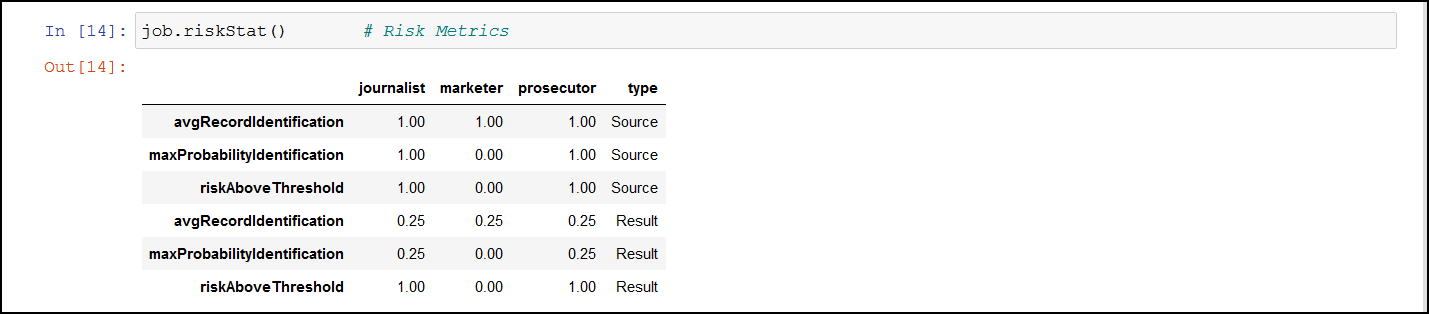
It shows the risk of the data against attacks such as journalist, marketer, and prosecutor.
| Risk Metric Information | Description |
|---|---|
| Function | riskStat() |
| Parameters | None |
| Return Type | A Pandas dataframe with the source data and the anonymized data privacy risk information. Note: You can customize the riskThreashold as part of AnonElement configuration. |
| Sample Request | job.riskStat() |
The following values appear for the source and result set:
| Values for Source and Result Set | Description |
|---|---|
| avgRecordIdentification | This value displays the average probability for identifying a record in the anonymized dataset. The risk is higher when the value is closer to the value 1. |
| maxProbabilityIdentification | This displays the maximum probability value that a record can be identified from the dataset. The risk is higher when the value is closer to the value 1. |
| riskAboveThreshold | This value displays the number of records that are at a risk above the risk threshold. The default threshold is 10%. The threshold is the maximum value set as a boundary. Any values beyond the threshold are a risk and might be easy to identify. For this result, the value 0 is preferred. |
Get Utility Statistics
The Get Utility Statistics API is used to check the usability of the anonymized data.
For more information about the utility statistics API, refer to Obtain the anonymization data utility statistics.
Get Utility Statistics API Parameters
It shows the information that was lost to gain privacy protection.
| Risk Metric Information | Description |
|---|---|
| Function | utilityStat() |
| Parameters | None |
| Return Type | A Pandas dataframe with the source and anonymized data utility information. |
| Sample Request | job.utilityStat() |
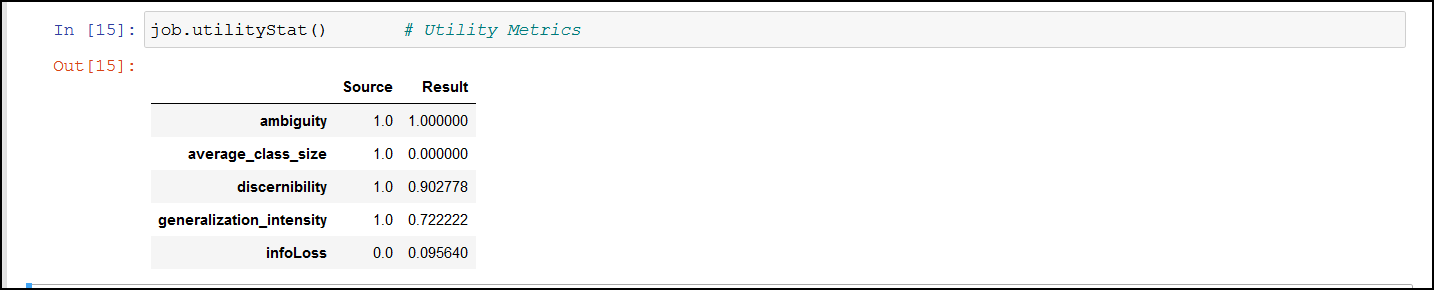
The following values appear for the source and result set:
| Values for Source and Result Set | Description |
|---|---|
| ambiguity | This value displays how well a record is hidden in all the records. This captures the ambiguity of records. |
| average_class_size | This measures the average size of groups of indistinguishable records. A smaller class size is more favourable for retaining the quality of the information. A larger class size increases anonymity at the cost of quality. |
| discernibility | This measures the size of groups of indistinguishable records with penalty for records which have been completely suppressed. Discernibility metrics measures the cardinality of the equivalent class. Discernibility metrics considers only the number of records in the equivalent class and does not capture information loss caused by generalization. |
| generalization_intensity | Data transformation from the original records to anonymity is performed using generalization and suppression. This measures the concentration of generalization and suppression on attribute values. |
| infoLoss | This value displays the probability of information lost with the data transformation from the original records. Larger the value, lesser the quality for further analysis. |
Detection APIs
The Detection APIs are used to analyze and classify data in the Protegrity Anonymization.
Get Data Domains
The Get Data Domains API is used to obtain a list of data domains supported.
For more information about obtaining the data domains API, refer to Get the supported data domains.
Detect Anonymization Information
The Detect Anonymization Information API is used to detect the data domain, classification type, hierarchy, and privacy models for the dataset.
For more information about the detect anonymization information API, refer to Data domain, Classification type, Hierarchy, and Privacy Models detection from a dataset.
Detect Classification
The Detect Classification API is used to detect the classification that will be used for the anonymization operation. Accordingly, you can modify the classification to match your requirements.
For more information about the detect classification API, refer to Classification type detection from a dataset.
Detect Hierarchy
The Detect Hierarchy API is used to detect the hierarchy type that will be used for the anonymization operation.
For more information about the detect hierarchy API, refer to Hierarchy Type detection from a dataset.
2.2 - Understanding Protegrity Anonymization Python SDK Requests
Before running the anonymization jobs mentioned in the Protegrity Anonymization SDK section below, the following pre-requisites must be completed:
- Ensure that Anonymization machine is set up and is configured as “https://anon.protegrity.com/".
For more information about setting up and configuring an Anonymization machine for AWS and Azure, refer to AWS and Azure. - Ensure that the disk is not full and enough free space is available for saving the destination file.
- Verify the destination file is not in use. Set the required permissions for creating and modifying the destination file.
- Verify that the anonymization job exists.
- Verify the import of the Pythonic SDK. For example, import
anonsdkasasdk.
You can use different sample requests to build and run the anonymization APIs. For more information about the sample requests for Python SDK, refer to Sample Requests for Protegrity Anonymization.
Understanding the AnonElement object
The AnonElement is an essential part of the Protegrity Anonymization SDK. It holds all information that is required for processing the anonymization request. The AnonElement is a part of the anonsdk package.
Protegrity Anonymization SDK processes a Pandas dataframe to anonymize data using the Protegrity Anonymization REST API. It is the AnonElement that accepts the parameters and passes the information to the REST API. The AnonElement accepts the connection to the REST API, the pandas dataframe with the data that must be processed, and the optionally the source location for processing the request.
Anonymization Functions
The Anonymization Functions APIs are used to run the anonymization job.
Anonymize
The Anonymize API is used to start an anonymize operation.
For more information about the anonymize API, refer to Submit a new anonymization job.
Note: When you run the job, an empty destination file is created. This file is created during processing for verifying the necessary destination permissions. Avoid using this file till the anonymization job is complete.
Ensure that the anonymized data file and the logs generated are moved to a different system before deleting your environment.
If the source file is larger than the maximum limit that is allowed on the Cloud environment, then run the anonymization request with “additional_properties”: { “single_file”: “no” }.
Apply Anonymize
The Apply Anonymize API is used as a template to anonymize additional entries. Using this API you can use the existing configuration to process additional data. This is especially useful in machine learning for training the system to anonymize new data points.
Note: In this API, privacy model parameters are ignored while performing the anonymization for the new entry.
For more information about the apply anonymize API, refer to Apply anonymization config to a given dataset.
Apply Anonymize API Parameters
Use this API to start an anonymize operation.
| Apply Anonymize Job Information | Description |
|---|---|
| Function | anonymize(anon_object, target_datastore, force, mode) |
| Parameters | anon_object: The object with the configuration for performing the anonymization request. target_datastore: The location to store the anonymized result. force: The boolean value to force the operation. Acceptable values: True and False. Set this flag to true to resubmit the same anonymized job without any modification. mode: The value to enable auto anonymization. Acceptable value: auto. Do not include this parameter to skip auto anonymization. |
| Return Type | A job object with which the task monitoring and task statistics can be obtained. |
| Sample Request | Without auto anonymization: job = asdk.anonymize(anon_object,target_datastore ,force=True) With auto anonymization: job = asdk.anonymize(anon_object,target_datastore ,force=True,mode=“auto”) Note: When you run the job, an empty destination file is created. This file is created during processing for verifying the necessary destination permissions. Avoid using this file till the anonymization job is complete. |
For more information about using the Auto Anonymization, refer to Using the Auto Anonymizer.
Ensure that the anonymized data file and the logs generated are moved to a different system before deleting your environment.
If the source file is larger than the maximum limit that is allowed on the Cloud environment, then run the anonymization request with “additional_properties”: { “single_file”: “no” }.
If you want to bypass the Anon-Storage, then you can disable the pods by setting the pyt_storage flag to False.
For example, use the following code to run the anonymization request without using the storage pods
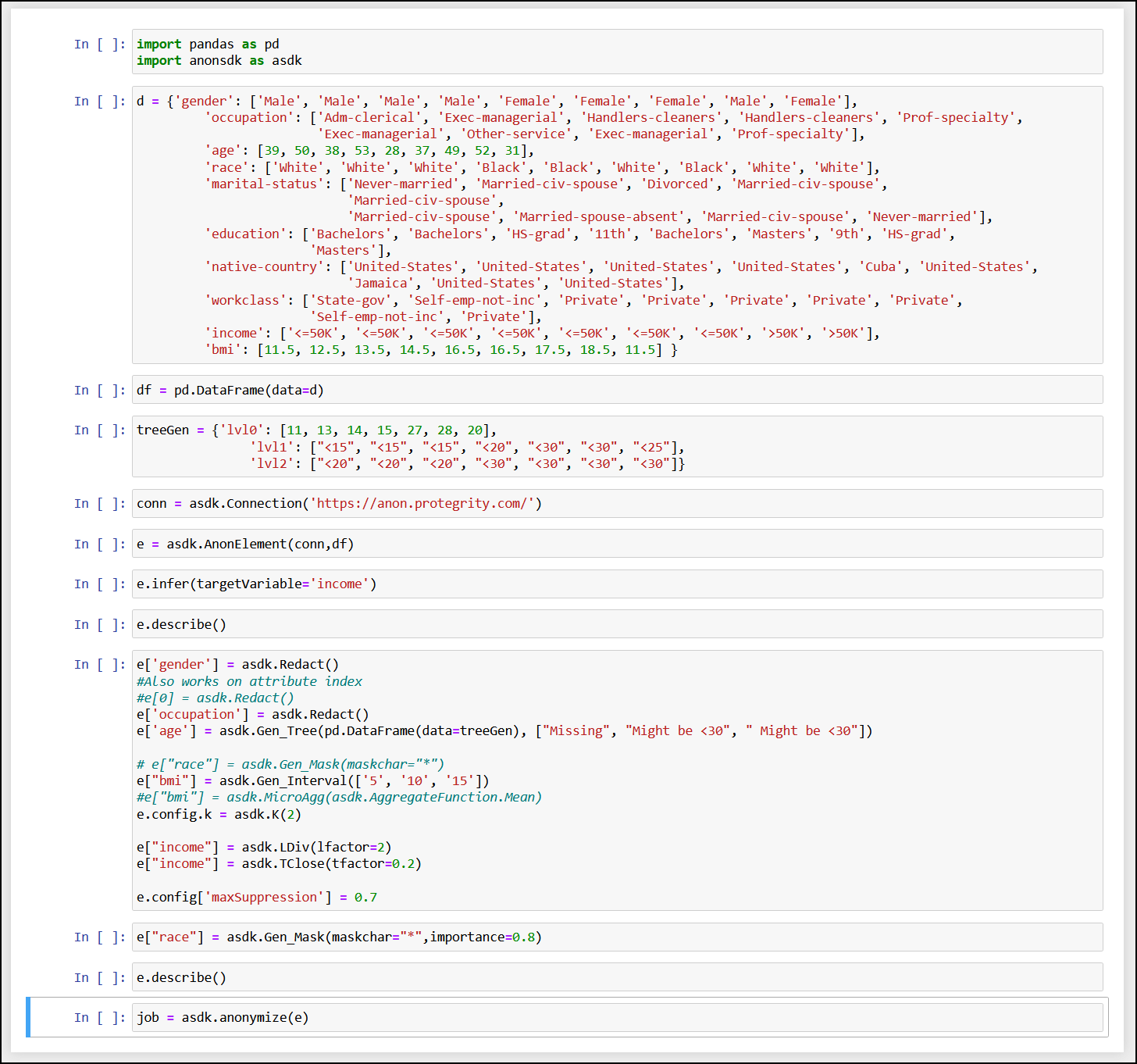
job=asdk.anonymize(anon_object, pty_storage=False)
Measure
The Measure API is used to measure or obtain anonymization result statics for different configurations before the actual anonymization job.
For more information about the anonymize measure job API, refer to Submit a new anonymization Measure job.
Using Infer to Anonymize API Parameters
Use the Infer API to start auto-detecting the data-domain, classification type, hierarchies, and anonymization configuration in Protegrity Anonymization. Any user-defined configuration, such as, QI attribute assignments, hierarchy, and K value, are retained and considered while performing the auto anonymization.
| Using Infer to Anonymize Information | Description |
|---|---|
| Function | infer(targetVariable) |
| Parameters | targetVariable: The field specified here is used as a focus point for performing the anonymization. |
| Return Type | It returns an anon element with all the detected classifications and hierarchies generated. |
| Sample Request | e.infer(targetVariable=‘income’) Note: You can use e.measure() to modify the request and view different outcomes of the result set. |
For more information about the anonymize measure job API, refer to Using Infer to Anonymize.
Task Monitoring APIs
The Task Monitoring APIs are used to monitor the anonymization job. Use these APIs to obtain the job status, retrieve a job, and abort a job.
Get Job IDs
The Get Job ID API is used to get the job IDs of the last 20 anonymization operations that are running, in queue, or completed. You can then use the required job ID with the other APIs to work with the anonymization job.
For more information about the job ID API, refer to Obtain job ids.
Get Job Status
The Get Job Status API is used to get the status of an anonymize operation that is running, in queue, or complete. It shows the percentage of job completed. Use the information provided here to monitor if a job is running or stalled.
For more information about the job status API, refer to Obtain job status.
Get Job Status API Parameters
Use this API to get the status of an anonymize operation that is running. It shows the percentage of job completed. Use the information provided here to monitor if a job is running or stalled.
| Monitor Job Information | Description |
|---|---|
| Function | status() |
| Parameters | None |
| Return Type | A string with the status information in the JSON format. completed: This is information about the job, such as, data, statistics, summary, and time spent. id: This is the job ID. info: This is information about the job being processed, such as, the source and attributes for the job. running: This is the completion status of the jobs being processed. It shows the percentage of the job completed. status: This is the status of the job, such as, running or completed. Note: This API displays all the status of the job. To obtain the ID of a job, use job.id(). |
| Sample Request | job.status() |
Get Metadata
The Get Metadata API is used to retrieve the metadata for the existing job. This API is useful when you need to view the configuration available for a job. It displays the fields, configuration, and the data that is used to run the anonymization job.
For more information about the metadata API, refer to Obtain job metadata.
Retrieve Anonymized Data API Parameters
Use this API to retrieve the results of an anonymized job.
| Retrieve Job Information | Description |
|---|---|
| Function | result() |
| Parameters | None |
| Return Type | Returns the AnonResult element, which provides the DataFrame for the anon data. Note: The result.df will be None if you have overridden the resultstore as part of anonymize method. |
| Sample Request | job.result() Note: This is a blocking API and will stall processing till the job is complete. |
Abort
The Abort API is used to abort a running anonymization job. You can abort jobs if you need to modify the parameters or if the job is stalled or taking too much time or resources to process.
For more information about the abort API, refer to Abort a running anonymization job.
Note: After aborting the task, it might take time before all the running processes are stopped.
Abort API Parameters
Use this API to abort a running anonymize operation. You can abort jobs if you need to modify the parameters or if the job is stalled or taking too much time or resources to process.
| Abort Job Information | Description |
|---|---|
| Function | abort() |
| Parameters | None |
| Return Type | A string with the status of the abort request. |
| Sample Request | job.abort() |
Delete
The Delete API is used to delete an existing job that is no longer required.
For more information about the delete API, refer to Delete a job.
Statistics APIs
The Statistics APIs are used to obtain information about the anonymization data. Use these APIs to obtain the risk and utility information about the anonymization. The user needs to access these APIs to measure the utility benefits and risk of publishing the anonymized data. If these configurations are not satisfactory, then the user can re-submit the anonymization job after modifying some parameters based on these results.
Get Exploratory Statistics
The Get Exploratory Statistics API is used to obtain data distribution statistics about a completed anonymization job. The information includes information about both, the source and the target distribution.
For more information about the exploratory statistic API, refer to Obtain the exploratory statistics.
Get Risk Metric
The Get Risk Metric API is used to ascertain the risk of the anonymized data. It shows the risk of the data against attacks such as journalist, marketer, and prosecutor.
For more information about the risk metric API, refer to Obtain the risk statistics.
Get Utility Statistics
The Get Utility Statistics API is used to check the usability of the anonymized data.
For more information about the utility statistics API, refer to Obtain the anonymization data utility statistics.