This is the multi-page printable view of this section. Click here to print.
Overview
1 - Protegrity Browser Protector – Chrome
Solution Overview
Protegrity Webapp Protectors secure web applications using low-code/no-code methods, avoiding major code changes required by Application Protectors.
The Browser Protector is deployed on end user client endpoints, including desktops and laptops, through standard deployment methodologies. It leverages existing authentication mechanisms so application end users can interact with applications secured by Protegrity data protection.
The Browser Protector is designed to enhance data security by dynamically revealing tokenized text in real-time when it is displayed in a web browser. This approach ensures that sensitive data remains protected throughout its lifecycle until it is actively rendered and visible to the end user.
Key Features
End-to-End Security: By maintaining tokenization until user authorization and keeping cryptographic operations server-side, the extension minimizes the risk of data exposure throughout its lifecycle.
Protegrity ESA Integration: The extension relies on the Enterprise Security Appliance (ESA) for defining and managing cryptographic properties and security policies. All tokenization and cryptographic operations are performed server-side, ensuring sensitive data is never exposed during client-side processing.
Azure Entra ID Integration for SSO User Authentication: The extension supports integration with Azure Entra ID for Single Sign-On (SSO) user authentication, utilizing the OAuth 2.0 authorization flow to ensure secure and efficient user access. This process leverages JWT token-based authentication, allowing users to log in via their organization’s centralized identity management system without exposing sensitive credentials. Furthermore, the extension communicates securely with the backend through encrypted channels, ensuring the safe exchange of authentication tokens and maintaining compliance with enterprise security standards.
Support For Windows/MacOS Operating Systems: End user devices must run Chrome browser. Supported operating systems are Windows 10 and higher and MacOS 15 Sequoia or higher.
User-Controlled Data Rendering: The extension allows users to explicitly select which tokenized text should be revealed and converted back into its original form. This ensures that sensitive data is only decrypted and displayed when explicitly authorized by the user.
Immediate Rendering: Once authorized by the user, the extension dynamically resolves tokenized text back into its original form and displays it securely in the browser.
2 - Architecture
The main layers of the Protegrity Browser Protector product are as follows:
- Management Layer: The management layer enables centralized control through Mobile Device Management (MDM) platforms such as Microsoft Intune or Kandji.
- Service Layer: The service layer is the backbone of the browser extension, enabling secure communication, user authentication, and data tokenization.
Centralized Management with MDM Tools
Utilization of MDM tools allows administrators to deploy, configure, and manage the browser extension across multiple devices and users within an organization from a single platform.
By leveraging MDM tools, organizations can ensure consistent and secure use of Protegrity Browser Protector across their environment while minimizing administrative overhead.
The following figure shows the key components of the management layer.
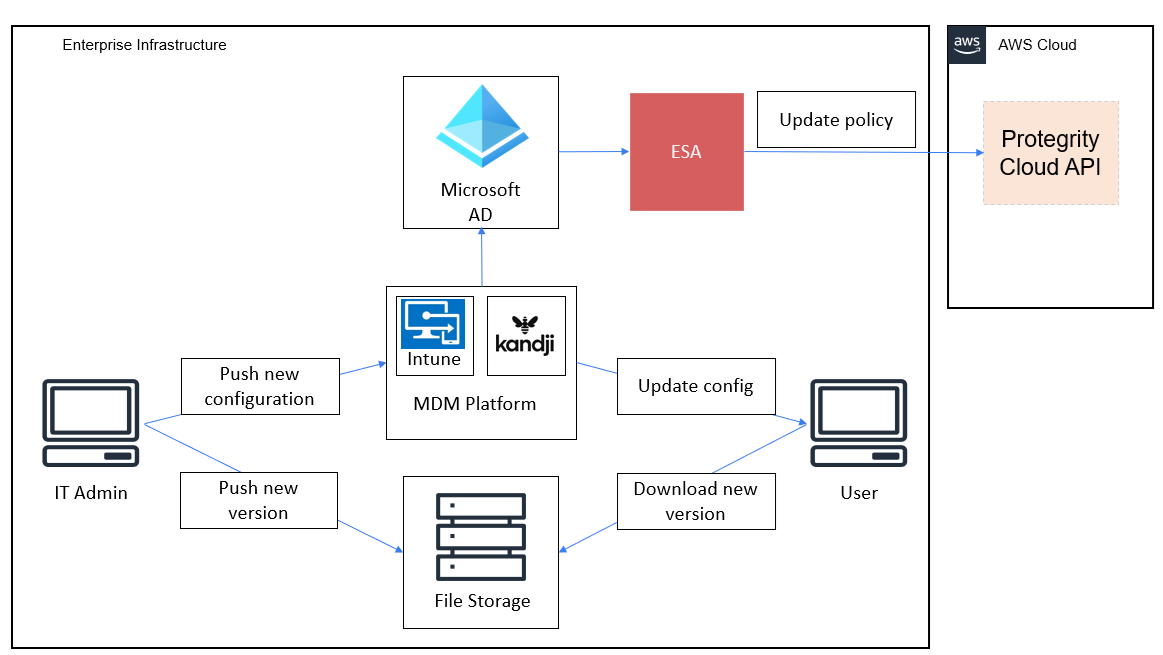
The management layer integrates an MDM platform with Azure Active Directory (Azure AD) to facilitate secure and centralized management of the browser extension across end-user devices. The core components of the Management Layer are as follows:
MDM Platform: Serves as the central system for managing and distributing the browser extension. It ensures that the extension is installed, updated, and configured consistently across all enrolled devices.
Azure AD: Provides identity and access management for users and devices. It ensures that only authorized users and devices can access the browser extension and its features, while enabling centralized control through conditional access policies.
Protegrity ESA: Acts as the central system for defining and managing cryptographic policies for the browser extension, particularly for backend systems such as the Cloud API Protector. ESA administrators define sensitive data elements, like tokenized fields, and user access policies, ensuring that cryptographic operations are governed by enterprise security standards. The ESA policies are used to safeguard sensitive information and enforce access controls.
- Integration with the Browser Configuration File: The list of data elements defined in the ESA must be configured by IT administrators in the browser extension’s configuration file. This configuration file is then distributed to end-user devices through the MDM platform, ensuring that the extension adheres to the cryptographic policies defined in the ESA.
- Seamless Policy Enforcement: By linking the ESA with the extension management layer, the organization ensures that cryptographic policies are consistently enforced across all devices, enhancing security and regulatory compliance.
File Storage Server: Hosts the browser extension code and related resources in a secure and centralized repository. This component allows IT personnel to upload new versions of the extension and push updates to end-user devices seamlessly. By integrating with the MDM platform, file storage enables efficient, automatic updates without manual intervention, minimizing disruption and ensuring operational consistency.
By combining these components, the management layer ensures that the browser extension is securely and consistently deployed, configured, and maintained across all end-user devices, while aligning with enterprise security and compliance standards.
Service Layer Components
The service layer integrates Azure Entra ID and Protegrity Cloud API to deliver secure, scalable authentication and tokenization while ensuring compliance and a seamless user experience.
The following figure shows the key components of the service layer.
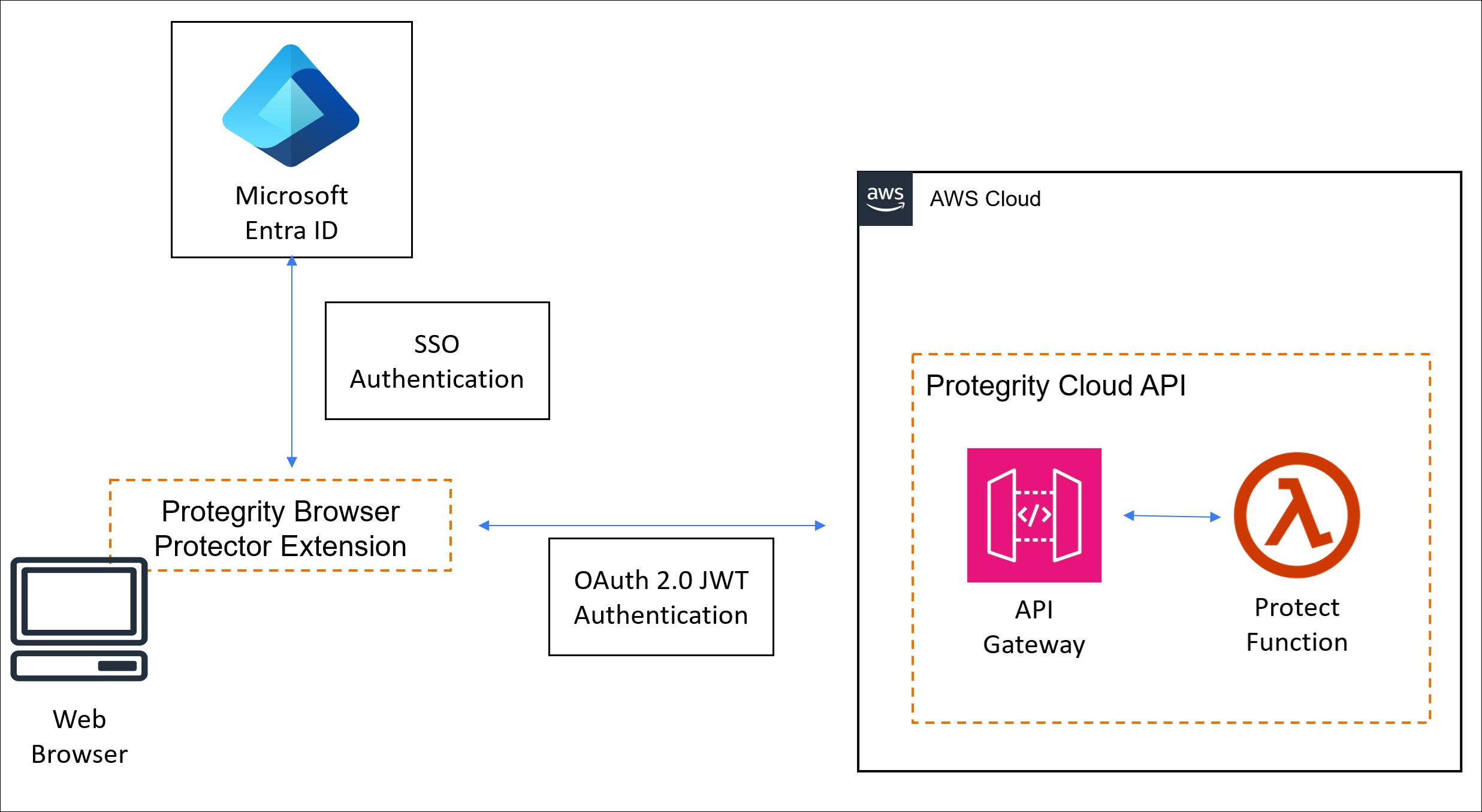
Cloud API Protector
- Performs all tokenization and cryptographic operations on the server, ensuring sensitive data remains protected before being delivered to the browser.
- Tokenized data is delivered to the browser via the web application, ensuring only non-sensitive placeholders are exposed to the client.
Browser Extension
- Enables the user to select specific tokenized text for decryption and rendering.
- Once selected, the extension requests the original data for the chosen tokens from the server, relying on ESA-managed security policies to process the data securely.
Secure Communication
- The extension uses encrypted communication channels, like HTTPS or WebSockets, to interact with the tokenization service and ESA securely.
- All sensitive data remains on the server, with the browser receiving decrypted data only for the user-selected content.