This is the multi-page printable view of this section. Click here to print.

Return to the regular view of this page.

AWS

Protegrity products for AWS.

1 - Cloud API

Protector with a REST API on AWS.

This section describes the high-level architecture of Protegrity Cloud API, installation procedures, and performance guidance. This section focuses on Protegrity specific aspects and should be consumed in conjunction with the corresponding AWS documentation.

This guide may also be used with the Protegrity Enterprise Security Administrator Guide, which explains the mechanism for managing the data security policy.

1.1 - Overview

Solution overview and features.

    Solution Overview

    Cloud API Protector on AWS is a cloud-native, serverless product for fine-grained data protection. This enables the invocation of Protegrity data protection cryptographic methods in cloud-native serverless technology. The benefits of serverless include rapid auto-scaling, performance, low administrative overhead, and reduced infrastructure costs compared to a server-based solution.

    This product provides a data protection API end-point for clients. The product is designed to scale elastically and yield reliable query performance under extremely high concurrent loads. During idle use, the serverless product will scale completely down, providing significant savings in Cloud compute fees.

    Protegrity utilizes a data security policy maintained by an Enterprise Security Administrator (ESA), similar to other Protegrity products. Using a simple REST API interface, authorized users can perform both de-identification (protect) and re-identification (unprotect) operations on data. A user’s individual capabilities are subject to privileges and policies defined by the Enterprise Security Administrator.

    Analytics on Protected Data

    Protegrity’s format and length preserving tokenization scheme make it possible to perform analytics directly on protected data. Tokens are join-preserving so protected data can be joined across datasets. Often statistical analytics and machine learning training can be performed without the need to re-identify protected data. However, a user or service account with authorized security policy privileges may re-identify subsets of data using the Cloud API Protector on AWS service.

    Features

    Cloud API Protector on AWS incorporates Protegrity’s patent-pending vaultless tokenization capabilities into cloud-native serverless technology. Combined with an ESA security policy, the protector provides the following features:

    • Role-based access control (RBAC) to protect and unprotect (re-identify) data depending on the user privileges.
    • Policy enforcement features of other Protegrity application protectors.

    For more information about the available protection options, such as, data types, Tokenization or Encryption types, or length preserving and non-preserving tokens, refer to Protection Methods Reference.

    1.2 - Architecture

    Deployment architecture and connectivity

      Protector Deployment Architecture

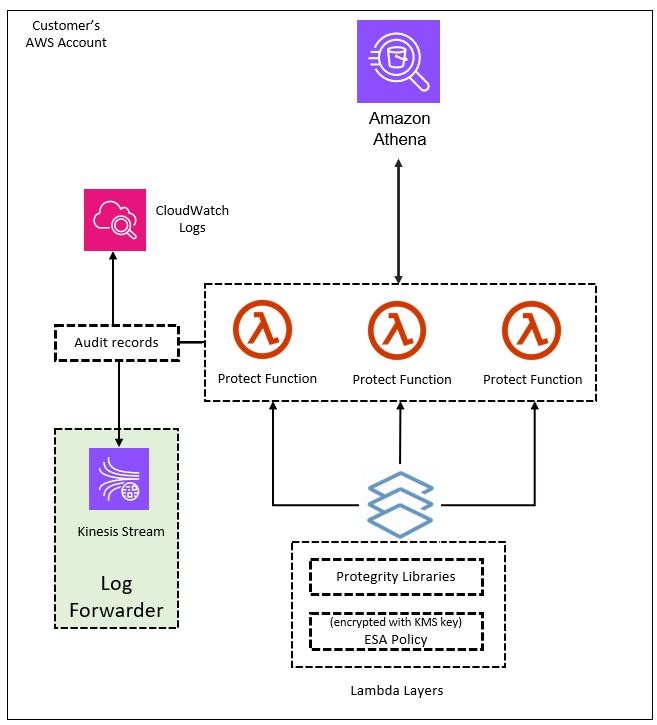
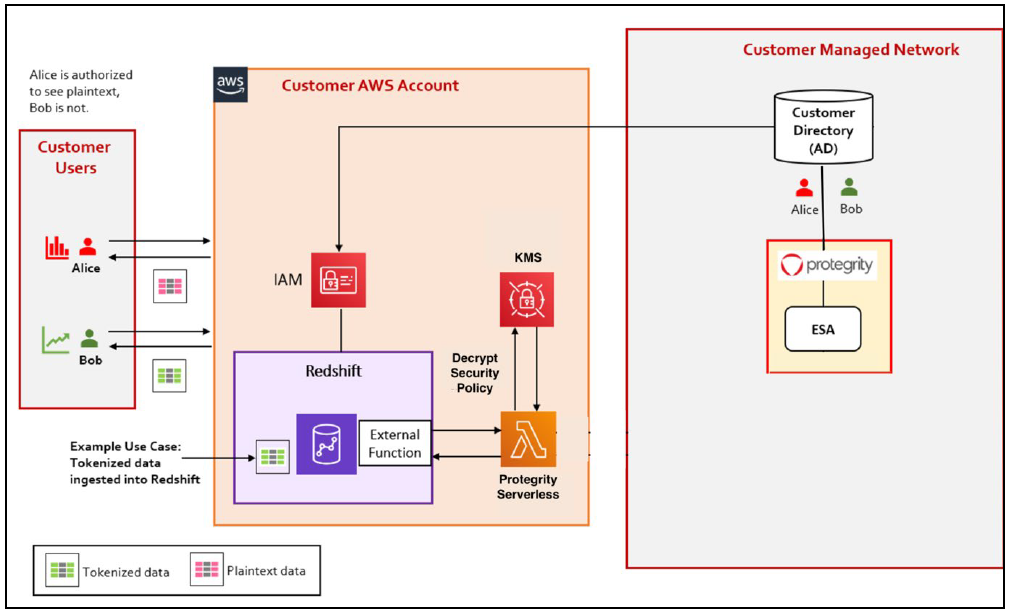
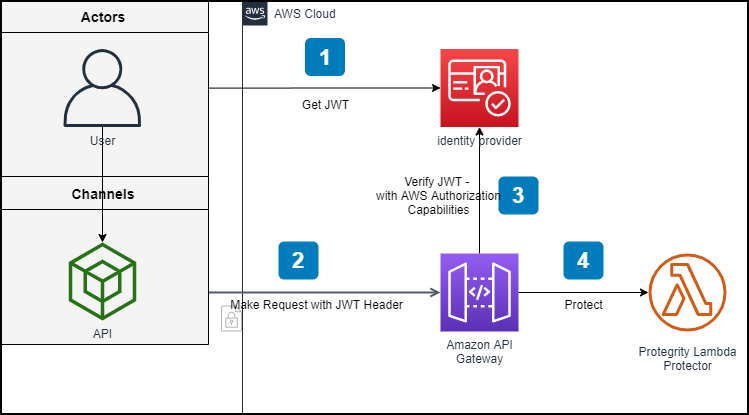
      The product will be deployed in the Customer’s AWS account. The product incorporates Protegrity’s vaultless tokenization engine within an AWS Lambda Function. The encrypted data security policy from an ESA is deployed as a static resource through an Amazon Lambda Layer. The policy is decrypted in memory at runtime within the Lambda. This architecture allows Protegrity Serverless to be highly available and scale very quickly without direct dependency on any other Protegrity services.

      The product exposes a remote data protection service. Each REST request includes a micro-batch of data to process and the data element type. The function applies the data security policy including user authorization and returns a corresponding response.

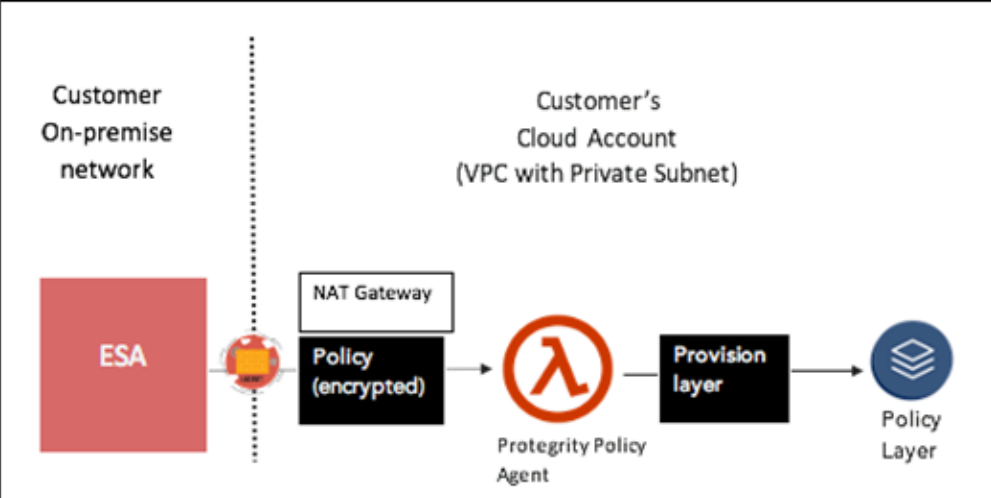
      When used with an Enterprise Security Administrator (ESA) application, the security policy is synchronized through another serverless component called the Protegrity Policy Agent. The agent operates on a configurable schedule, fetches the policy from the ESA, performs additional envelope encryption using Amazon KMS, and deploys the policy into the Lambda Layer used by the serverless product. This solution can be configured to automatically provision the static policy or the final step can be performed on-demand by an administrator. The policy takes effect immediately for all new requests. There is no downtime for users during this process.

      The following diagram shows the high-level architecture described above.
      The following diagram shows a reference architecture for synchronizing the security policy from ESA.
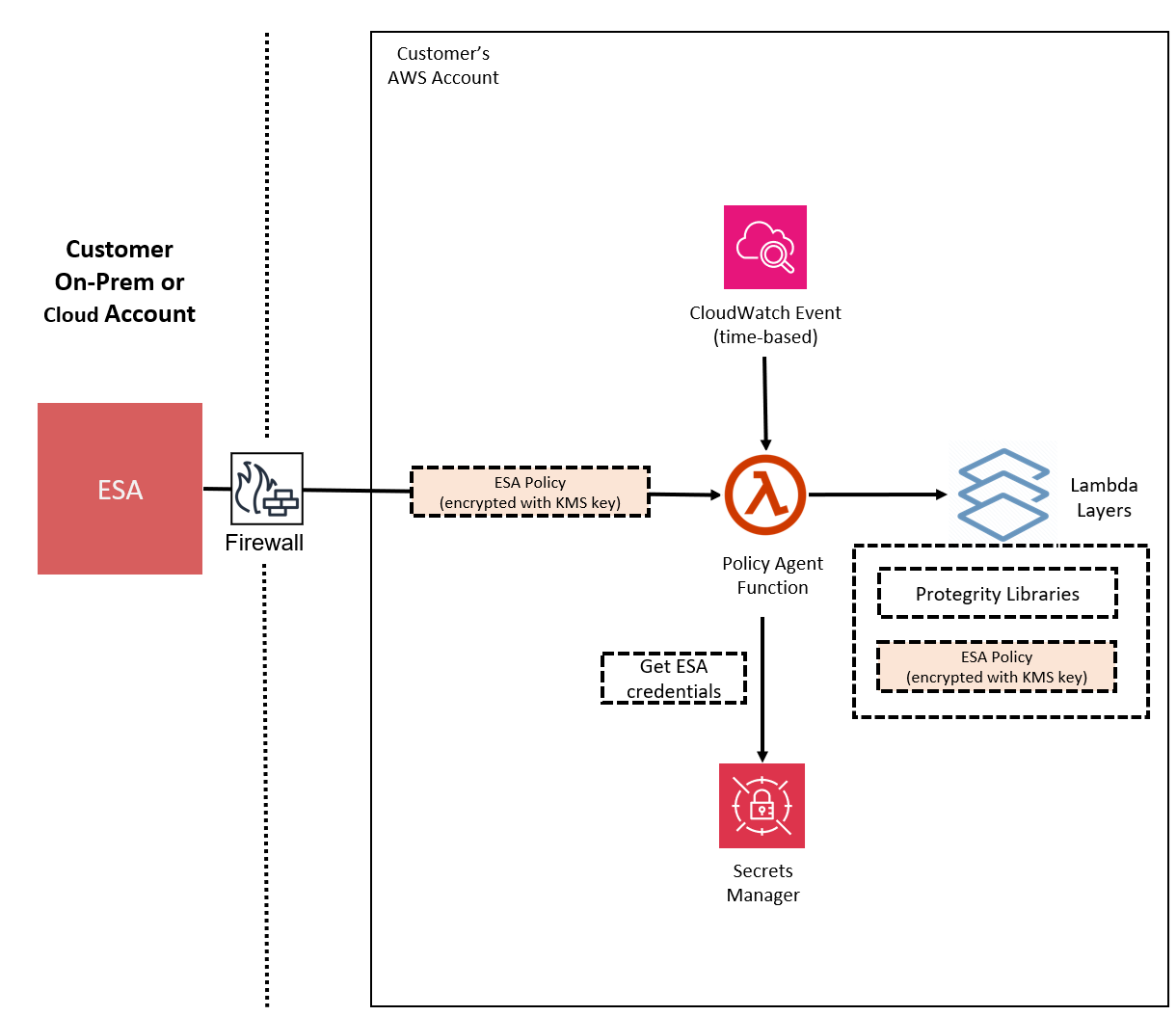
      The Protegrity Policy Agent requires network access to an Enterprise Security Administrator (ESA). Most organizations install the ESA on-premise. Therefore, it is recommended that the Policy Agent is installed into a private subnet with a Cloud VPC using a NAT Gateway to enable this communication through a corporate firewall.

      The ESA is a soft appliance that must be pre-installed on a separate server. It is used to create and manage security policies.

      For more information about installing the ESA, and creating and managing policies, refer the Policy Management Guide.

      Log Forwarding Architecture

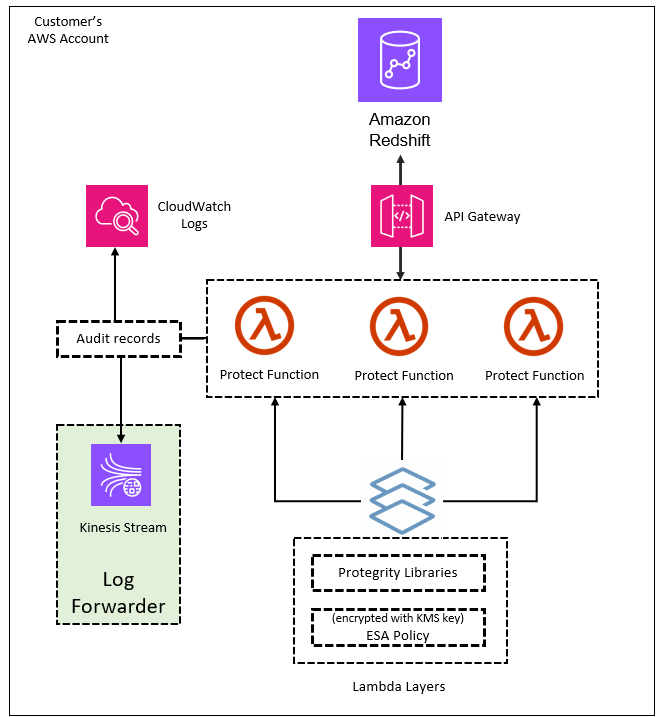
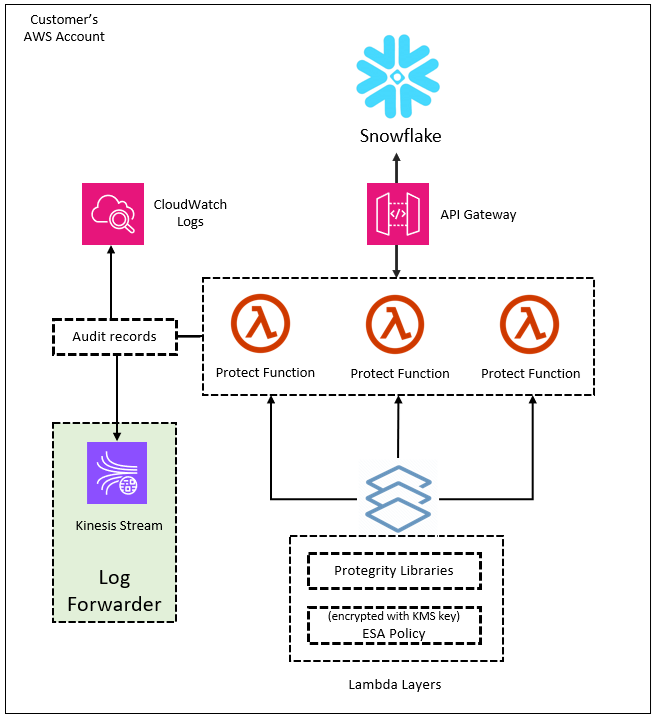
      Audit logs are by default sent to CloudWatch as long as the function’s execution role has the necessary permissions. The Protegrity Product can also be configured to send audit logs to ESA. Such configuration requires deploying Log Forwarder component which is available as part of Protegrity Product deployment bundle. The diagram below shows additional resources deployed with Log Forwarder component.
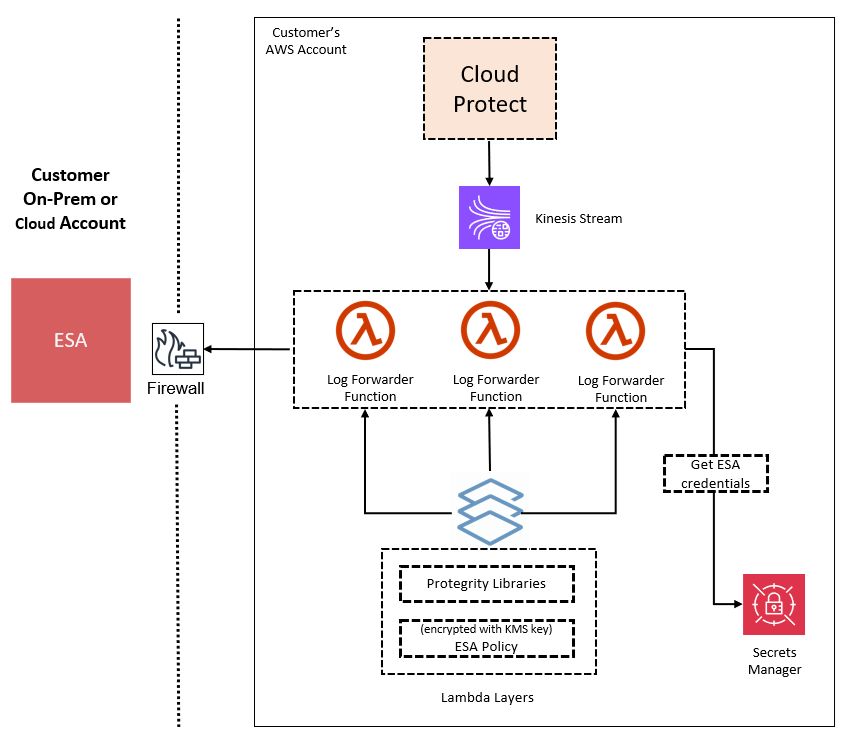
      The log forwarder component includes Amazon Kinesis data stream and the forwarder Lambda function. Amazon Kinesis stream is used to batch audit records before sending them to forwarder function, where similar audit logs are aggregated before sending to ESA. Aggregation rules are described in the Protegrity Log Forwarding guide. When the protector function is configured to send audit logs to log forwarder, audit logs are aggregated on the protector function before sending to Amazon Kinesis. Due to specifics of the Lambda runtime lifecycle, audit logs may take up to 15 minutes before being sent to Amazon Kinesis. Protector function exposes configuration to minimize this time which is described in the protector function installation section.

      The security of audit logs is ensured by using HTTPS connection on each link of the communication between protector function and ESA. Integrity and authenticity of audit logs is additionally checked on log forwarder which verifies individual logs signature. The signature verification is done upon arrival from Amazon Kinesis before applying aggregation. If signature cannot be verified, the log is forwarded as is to ESA where additional signature verification can be configured. Log forwarder function uses client certificate to authenticate calls to ESA.

      To learn more about individual audit log entry structure and purpose of audit logs, refer to Audit Logging section in this document. Installation instructions can be found in Audit Log Forwarder installation.

      The audit log forwarding requires network access from the cloud to the ESA. Most organizations install the ESA on-premise. Therefore, it is recommended that the Log Forwarder Function is installed into a private subnet with a Cloud VPC using a NAT Gateway to enable this communication through a corporate firewall.

      Access Control

      The following mechanisms are available for controlling and restricting access to the endpoint:

      • IAM policy: The IAM resource policy controls which IAM users or services may invoke Protect operations. IAM policies can be applied to the API Gateway and/or the Lambda directly depending on allowable access patterns and the client.
      • JWT tokens: The Lambda can be configured to use JSON Web Tokens (JWT) with optional verification. JSON Web Tokens (JWT) are an open, industry-standard RFC 7519 method for representing claims securely between two parties. JWT provides a mechanism for implementing custom authentication or integrating with AWS Cognito.

      AWS Resources

      Access and authorization between various AWS services involved in this architecture are achieved through IAM resource policies. For instance, the Amazon Lambda resource-based policy can restrict requests to the Amazon API Gateway or optionally allow direct invocation to the Lambda function itself. The installation steps provide a default recommended configuration. Alternative IAM role configurations are shown in the appendices in this document.

      REST API Authentication

      AWS API Gateway supports multiple mechanisms for controlling and managing access to the product.

      In standard solutions, AWS API Gateway will authorize access tokens generated in the identity provider. When setting up an AWS API Gateway method to require an authorization, customers can leverage AWS Signature Version 4 or Lambda authorizers to support their organization’s bearer token auth strategy.

      https://docs.aws.amazon.com/apigateway/latest/developerguide/apigateway-control-access-to-api.html

      REST API Authorization

      Once the request is authenticated and authorized in the API Gateway, Protegrity Lambda Protector validates the user received in the authorization header of JWT, and the data element and security operations (protect or unprotect) from the payload with Protegrity Security Policy.
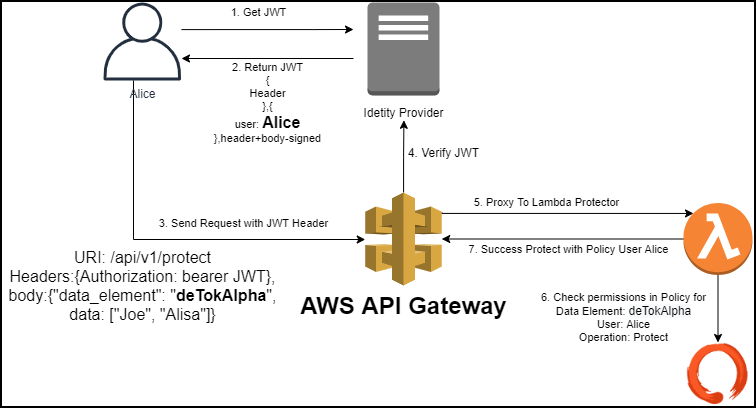
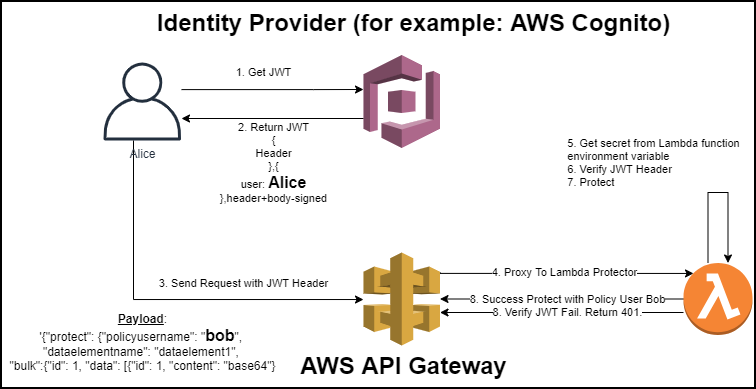
      If the API Gateway is not used or configured to verify JWT tokens, the product can be configured to perform the JWT verification in the Lambda function itself.
      1.3 - Installation

      Instructions for installing Protect Service, Policy Agent, and Log Forwarder.

      1.3.1 - Prerequisites

      Requirements before installing the protector.

        AWS Services

        The following table describes the AWS services that may be a part of your Protegrity installation.

        Service

        Description

        Lambda

        Provides serverless compute for Protegrity protection operations and the ESA integration to fetch policy updates or deliver audit logs.

        API Gateway

        Provides the endpoint and access control.

        KMS

        Provides secrets for envelope policy encryption/decryption for Protegrity.

        Secrets Manager

        Provides secrets management for the ESA credentials .

        S3

        Intermediate storage location for the encrypted ESA policy layer.

        Kinesis

        Required if Log Forwarder is to be deployed. Amazon Kinesis is used to batch audit logs sent from protector function to ESA.

        VPC & NAT Gateway

        Optional. Provides a private subnet to communicate with an on-prem ESA.

        CloudWatch

        Application and audit logs, performance monitoring, and alerts. Scheduling for the policy agent.

        ESA Version Requirements

        The Protector and Log Forwarder functions require a security policy from a compatible ESA version.

        The table below shows compatibility between different Protector and ESA versions.

        Protector VersionESA Version
        8.x9.09.1 & 9.210.0
        2.xNoYes*No
        3.0.x & 3.1.xNoNoYesNo
        3.2.xNoNoYes*
        4.0.xNoNoNoYes

        Legend

        Yes

        Protector was designed to work with this ESA version

        No

        Protector will not work with this ESA version

        *

        Backward compatible policy download supported:

        • Data elements and features which are common between this and previous ESA versions will be downloaded
        • Data elements and features which are new to this ESA version and do not exist in previous ESA version will not be downloaded

        Prerequisites

        Requirement

        Detail

        Protegrity distribution and installation scripts

        These artifacts are provided by Protegrity

        Protegrity ESA 10.0+

        The Cloud VPC must be able to obtain network access to the ESA

        AWS Account

        Recommend creating a new sub-account for Protegrity Serverless

        Required Skills and Abilities

        Role / Skillset

        Description

        AWS Account Administrator

        To run CloudFormation (or perform steps manually), create/configure a VPC and IAM permissions.

        Protegrity Administrator

        The ESA credentials required to extract the policy for the Policy Agent

        Network Administrator

        To open firewall to access ESA and evaluate AWS network setup

        Cheat Sheet Recommendation

        AWS Account ID: ___________________

        AWS Region (AwsRegion): ___________________

        S3 Bucket name (ArtifactS3Bucket): ___________________

        KMS Key ARN (AWS_KMS_KEY_ID): ___________________

        ProtectLambdaPolicyName: __________________

        Role ARN (LambdaExecutionRoleArn): ___________________

        ApiGatewayId: ________________________________

        ProtectFunctionName: __________________________

        ProtectLayerName: _____________________________

        ESA IP address: ___________________

        VPC name: ___________________

        Subnet name: ___________________

        Policy Agent Security Group Id: ___________________

        ESA Credentials Secret Name: ___________________

        Policy Name: ___________________

        Agent Lambda IAM Execution Role Name: ___________________

        What’s Next

        1.3.2 - Pre-Configuration

        Configuration steps before installing the protector.

          Provide AWS sub-account

          Identify or create an AWS account where the Protegrity solution will be installed. It is recommended that a new AWS sub-account be created. This can provide greater security controls and help avoid conflicts with other applications that might impact regional account limits. An individual with the Cloud Administrator role will be required for some subsequent installation steps.

          AWS Account ID: ___________________

          AWS Region (AwsRegion): ___________________

          Create S3 bucket for Installing Artifacts

          This S3 bucket will be used for the artifacts required by the CloudFormation installation steps. This S3 bucket must be created in the region that is defined in Provide AWS sub-account

          1. Sign in to the AWS Management Console and open the Amazon S3 console.

          2. Change region to the one determined in Provide AWS sub-account

          3. Click Create Bucket.

          4. Enter a unique bucket name:

            For example, protegrity-install.us-west-2.example.com

          5. Upload the installation artifacts to this bucket. Protegrity will provide the following three artifacts:

            • protegrity-protect-<version>.zip
            • protegrity-agent-<version>.zip
            • protegrity-external-extension-<version>.zip
            • protegrity-sample-policy-<version>.zip

            S3 Bucket name (ArtifactS3Bucket): ___________________

          Create KMS Key

          The Amazon Key Management Service (KMS) provides the ability for the Protegrity Serverless solution to encrypt and decrypt the Protegrity Security Policy.

          To create KMS key:

          1. In the AWS sub-account where the KMS key will reside, select the region.

          2. Navigate to Key Management Service > Create Key.
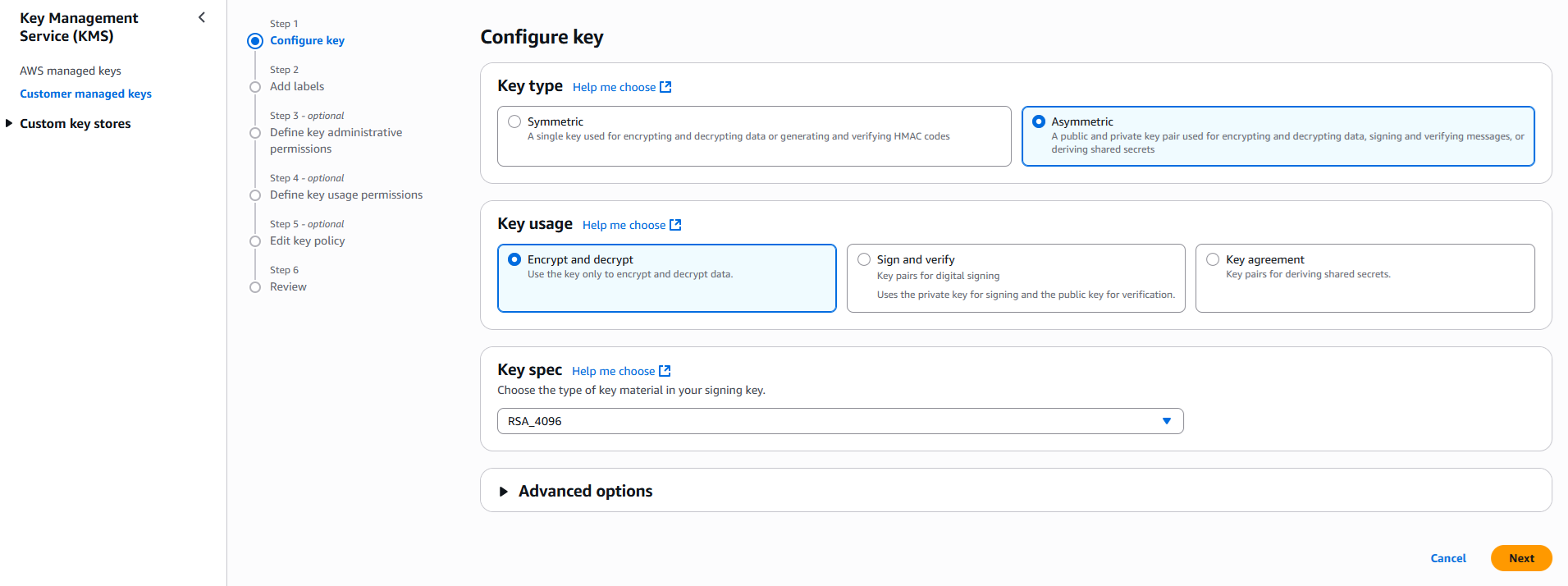
          3. Configure the key settings:

            • Key type: Asymmetric
            • Key usage: Encrypt and decrypt
            • Key spec: RSA_4096
            • Click Next
          4. Create alias and optional description, such as, Protegrity-Serverless and click Next.

          5. Define key administrative permissions, the IAM user who will administrate the key.

          6. Click Next.

          7. Define the key usage permissions.

          8. In Other AWS accounts, enter the AWS account id used for the Protegrity Serverless installation.

          9. Continue on to create the key. If there is a concern this permission is overly broad, then you can return later to restrict access to the role of two Protegrity Serverless Lambda as principals. Click to open the key in the list and record the ARN.

            KMS Key ARN (AWS_KMS_KEY_ID): ___________________

          10. Download the public key from the KMS key. Navigate to the key in KMS console, select the Public key tab, and click Download. Save the PEM file. This public key will be added to the ESA data store as an export key. Refer to Exporting Keys to Datastore for instructions on adding the public key to the data store.

            KMS Public Key PEM file: ___________________

          What’s Next

          1.3.3 - Protect Service Installation

          Install the protect service.

            Protect Service Installation

            The following sections install the Cloud Protect serverless Lambda function.

            Preparation

            Ensure that all the steps in Pre-Configuration are performed.

            1. Login to the AWS sub-account console where Protegrity will be installed.

            2. Ensure that the required CloudFormation templates provided by Protegrity are available on your local computer.

            Create Protect Lambda IAM Execution Policy

            This task defines a policy used by the Protegrity Lambda function to write CloudWatch logs and access the KMS encryption key to decrypt the policy.

            Perform the following steps to create the Lambda execution role and required policies:

            1. From the AWS IAM console, select Policies > Create Policy.

            2. Select the JSON tab and copy the following sample policy.

              {
                "Version": "2012-10-17",
                "Statement": [
                  {
                    "Sid": "CloudWatchWriteLogs",
                    "Effect": "Allow",
                    "Action": [
                      "logs:CreateLogGroup",
                      "logs:CreateLogStream",
                      "logs:PutLogEvents"
                    ],
                    "Resource": "*"
                  },
                  {
                    "Sid": "KmsDecrypt",
                    "Effect": "Allow",
                    "Action": [
                      "kms:Decrypt"
                    ],
                    "Resource": [
                      "arn:aws:kms:*:*:key/*"
                    ]
                  }
                ]
              }
              
            3. For the KMS policy, replace the Resource with the ARN for the KMS key created in a previous step.

            4. Select Next, type in a policy name, for example, ProtegrityProtectLambdaPolicy and Create Policy. Record the policy name:

              ProtectLambdaPolicyName:__________________

            Create Protect Lambda IAM Role

            The following steps create the role to utilize the policy defined in Create Protect Lambda IAM Execution Policy.

            To create protect lambda IAM execution role:

            1. From the AWS IAM console, select Roles > Create Role.

            2. Select AWS Service > Lambda > Next.

            3. In the list, search and select the policy created in Create Protect Lambda IAM Execution Policy.

            4. Click Next

            5. Type the role name, for example, ProtegrityProtectRole

            6. Click Create role

            7. Record the role ARN.

              Role ARN (LambdaExecutionRoleArn): ___________________

            Install through CloudFormation

            The following steps describe the deployment of the Lambda function.

            1. Access CloudFormation and select the target AWS Region in the console.

            2. Click Create Stack and choose With new resources.

            3. Specify the template.

            4. Select Upload a template file.

            5. Upload the Protegrity-provided CloudFormation template called pty_protect_api_cf.json and click Next.

            6. Specify the stack details. Enter a stack name.

            7. Enter the required parameters. All the values were generated in the pre-configuration steps.

              Parameter

              Description

              Default Value

              ArtifactS3Bucket

              The name of S3 bucket created during the pre-configuration steps


              LambdaExecutionRoleArn

              The ARN of Lambda role created in the prior step


              MinLogLevel

              The minimum log level for the protect function.

              Supported values: [off, severe, warning, info, config, all]

              severe

              AllowAssumeUser (Optional)

              If 0 is set, the user in the request body will be ignored and the REST API authenticated user will be the acting user.

              Supported values: [0, 1]

              0

              LambdaAuthorization (Optional)

              If “jwt” is set, then Authorization header for JWT will be required in the AWS Protect Lambda request. Any other value is ignored and effective policy user is taken from request payload.

              Supported values: [“jwt”, “”]

              ""

              jwtUsernameClaim (Optional)

              The JWT claim with username.

              Common claims: name, preferred_username, cognito:username

              Also accepts ordered list of claim names in JSON array format, e.g. [“username”, “email”]

              cognito:username

              jwtVerify (Optional)

              If 1 is set, then jwtSecretBase64 is required. Only applicable when LambdaAuthorization is set to “jwt”. Supported JWT algorithms are: RS256, RS384, RS512. While algorithms HS256, HS384, HS512 are supported, they are not recommended for use.

              0

              jwtSecretBase64 (Optional)

              Required when jwtVerify is set to 1 and Authorization is set to “jwt”. The secret must be provided in base64 encoding. It is recommended to only use public key (asymmetric algorithm).

              ""

            8. The log forwarder parameters can be provided later after log forwarder is deployed. If you are not planning to deploy log forwarder you can skip this step.

              ParameterDescription
              KinesisLogStreamArnThe ARN of the AWS Kinesis stream where audit logs will be sent for aggregation
              AuditLogFlushIntervalTime interval in seconds used to accumulate audit logs before sending to Kinesis. Default value: 30. See Log Forwarder Performance section for more details.
            9. Click Next with defaults to complete CloudFormation.

            10. After CloudFormation is completed, select the Outputstab in the stack.

            11. Record the following values:

              ApiGatewayId: ________________________________

              ProtectFunctionName: __________________________

              ProtectFunctionProductionAlias: __________________________

              ProtectLayerName: _____________________________

            Test Connectivity

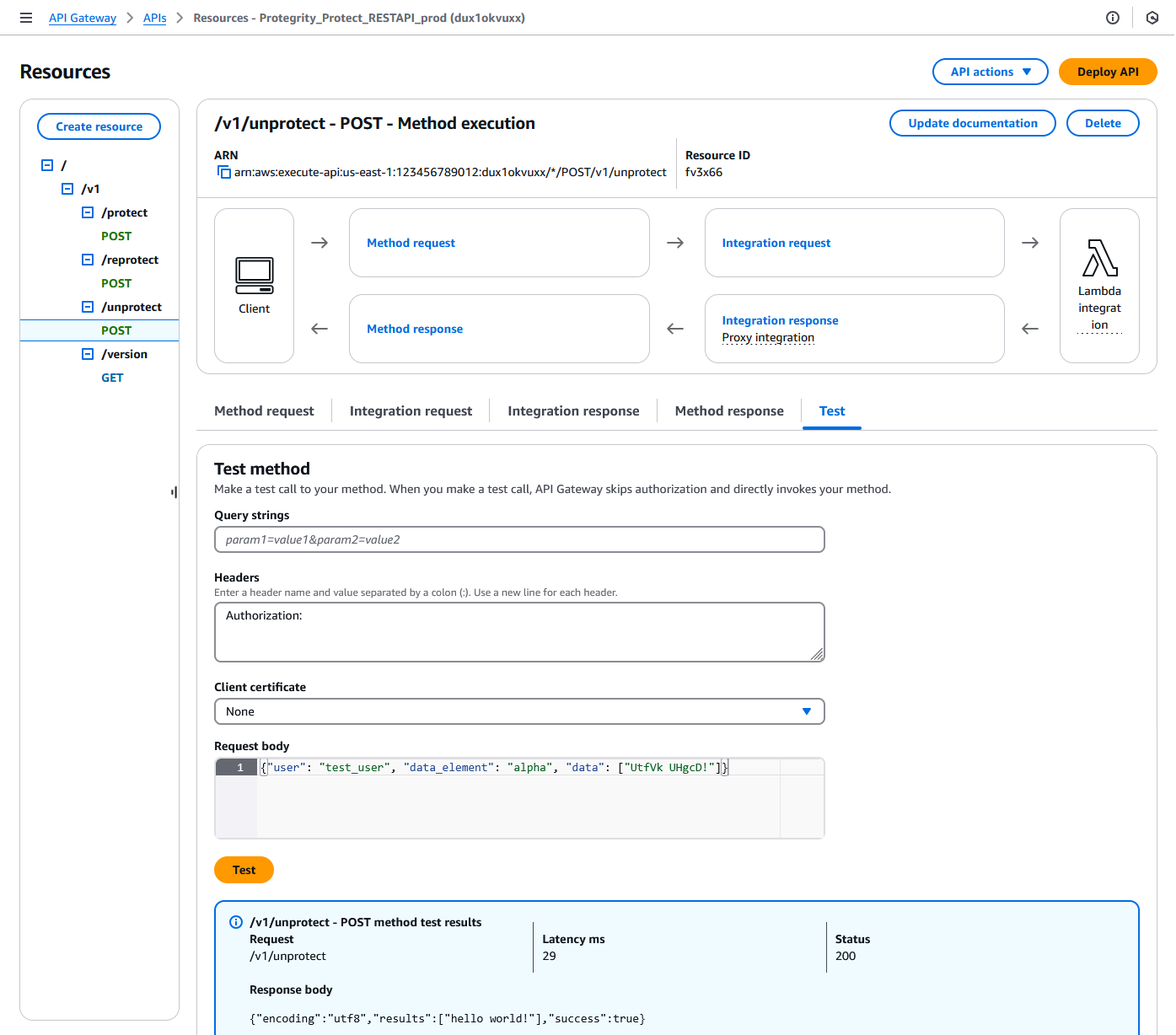
            Perform the following steps to verify if the API Gateway is working correctly with the Protegrity product.

              1. In the AWS console Access API Gateway.
            1. Search for API (CloudFormation output ApiGatewayId value).

            2. Select Resources > /v1/unprotect POST.

            3. Click on Test tab.

            4. Provide the following input in Headers.

              Authorization:
              
            5. Provide the following input in Request body.

              {"user": "test_user", "data_element": "alpha", "data": ["UtfVk UHgcD!"]}
              
            6. Click Test.

            7. Verify the response Status is 200 and the Response Body is as follows:

              {"encoding": "utf8", "results": ["hello world!"], "success": true}
              

              For example:

            Troubleshooting

            Error

            Action

            5xx error

            1. Try running the Lambda directly. Open the Lambda function and create the following test case:
            {
                "body": "{\"user\":\"test_user\",\"data_element\": \"alpha\", \"data\": [\"UtfVk UHgcD!\"]}",
                "path": "/unprotect",
                "headers": {
                    "Authorization": ""
                }
            }
            

            If this step fails, then check the console for the meaningful error.

            Setting up Authentication

            This step describes how to setup an AWS API Gateway Authorization.

            By default, the API Gateway is configured to use AWS_IAM Authorization.

            1. From AWS console access API Gateway.
            2. If you are using AWS API Gateway Authorizer, ensure that the Authorizer is configured in Authorizers.
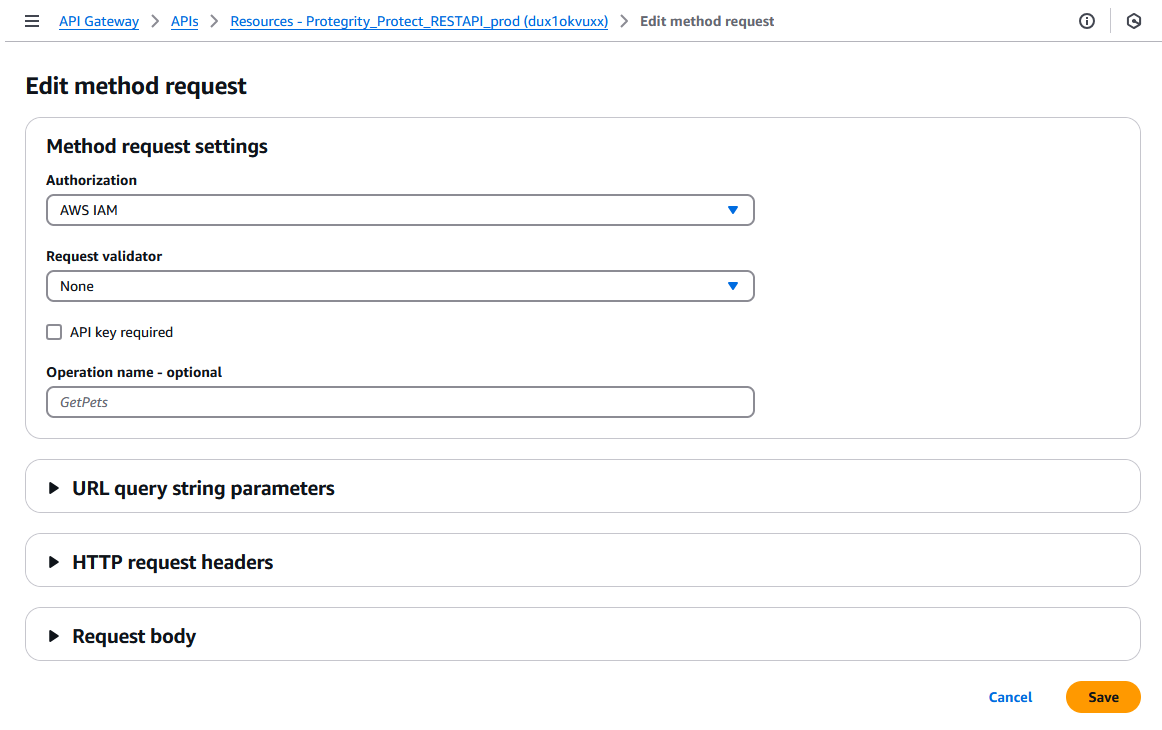
            3. Go to Resources > /v1/protect POST > Method Request tab > Click Edit button
            4. Select from Authorization. dropdown.
            5. Click Save button.
            6. Click Deploy API button to deploy to pty stage.
            Protect Lambda Configuration

            After Cloud Formation stack is deployed, Protector Lambda can be reconfigured based on the authentication selected in previous stage. From your AWS console navigate to lambda and select following lambda: Protegrity_Protect_RESTAPI_<STACK_NAME>. Scroll down to Environment variables section, select Edit and replace the entries based on the following information.

            Environment Variable

            Description

            Notes

            authorization

            If “jwt” is set, Authorization header with JWT will be required in the AWS Protect Lambda request. Any other value is ignored and effective policy user is taken from request payload.

            Supported Values: [“jwt”, “”]

            If “jwt” is set, any request without valid JWT in the Authorization header, will result in error from API Gateway: 502 Bad Gateway.

            Default Value: ""

            allow_assume_user

            If 0 is set, API Gateway user will not be used, and the effective user is the JWT user.

            Supported Values: [0, 1]

            Applicable when authorization is set to “jwt”.

            Default Value: 0

            jwt_user_claim

            The JWT claim with username. Common claims: name, preferred_username, cognito:username

            Applicable when authorization is set to “jwt”

            Default Value: cognito:username

            jwt_verify

            If 1 is set, jwt_secret_base64 is required. Only applicable when authorization is set to “jwt”. Supported JWT algorithm RS256, RS384, RS512. While algorithms HS256, HS384, HS512 are supported, they are not recommended for use.

            Applicable when authorization is set to “jwt”

            jwt_secret_base64

            Required when jwt_verify is set to 1 and Authorization is set to “jwt”. The secret must be provided in base64 encoding. It is recommended to only use public key (asymmetric algorithm).

            Applicable when authorization is set to “jwt” and jwt_verify is set to 1

            service_user

            If set, it will be used as effective policy user.

            service_user should be used when the Cloud API should always run as single service user or account no matter what user is in the request. service_user will always take priority over users in the payload and in the JWT header.

            USERNAME_REGEX

            If set, the effective policy user will be extracted from the user in the request using supplied regular expression.

            See Configuring Regular Expression to Extract Policy Username to learn how to extract username from the request

            What’s Next

            1.3.4 - Policy Agent Installation

            Install the policy agent.

              The following sections will install the Policy Agent. The Policy Agent polls the ESA and deploys the policy to Protegrity Serverless as a static resource. Some of the installation steps are not required for the operation of the software but recommended for establishing a secure environment. Contact Protegrity Professional Services for further guidance on configuration alternatives in the Cloud.

              ESA Server

              Policy Agent Lambda requires ESA server running and accessible on TCP port 443.

              Note down ESA IP address:

              ESA IP Address (EsaIpAddress): ___________________

              Certificates on ESA

              Whether your ESA is configured with default self-signed certificate or your corporate CA certificate, Policy Agent can validate authenticity of ESA connection using CA certificate. The process for both scenarios is the same:

              • Obtain CA certificate
              • Convert CA certificate to a value accepted by Policy Agent
              • Provide converted CA certificate value to Policy Agent

              To obtain self-signed CA certificate from ESA:

              1. Log in to ESA Web UI.

              2. Select Settings > Network > Manage Certificates.

              3. Hover over Server Certificate and click on download icon to download the CA certificate.

              4. To convert downloaded CA certificate to a value accepted by Policy Agent, open the downloaded PEM file in text editor and replace all new lines with escaped new line: \n.

                To escape new lines from command line, use one of the following commands depending on your operating system:

                Linux Bash:

                awk 'NF {printf "%s\\n",$0;}' ProtegrityCA.pem > output.txt
                

                Windows PowerShell:

                (Get-Content '.\ProtegrityCA.pem') -join '\n' | Set-Content 'output.txt'
                
              5. Record the certificate content with new lines escaped.

                ESA CA Server Certificate (EsaCaCert): ___________________

                This value will be used to set PTY_ESA_CA_SERVER_CERT or PTY_ESA_CA_SERVER_CERT_SECRET Lambda variable in section Policy Agent Lambda Configuration

              For more information about ESA certificate management refer to Certificate Management Guide in ESA documentation.

              Identify or Create a new VPC

              Establish a VPC where the Policy Agent will be hosted. This VPC will need connectivity to the ESA. The VPC should be in the same account and region established in Pre-Configuration.

              VPC name: ___________________

              VPC Subnet Configuration

              Identify or create a new subnet in the VPC where tha Lambda function will be connected to. It is recommended to use a private subnet.

              Subnet name: ___________________

              NAT Gateway For ESA Hosted Outside AWS Network

              If ESA server is hosted outside of the AWS Cloud network, the VPC configured for Lambda function must ensure additional network configuration is available to allow connectivity with ESA. For instance if ESA has a public IP, the Lambda function VPC must have public subnet with a NAT server to allow routing traffic outside of the AWS network. A Routing Table and Network ACL may need to be configured for outbound access to the ESA as well.

              VPC Endpoints Configuration

              If an internal VPC was created, then add VPC Endpoints, which will be used by the Policy Agent to access AWS services. Policy Agent needs access to the following AWS services:

              Type

              Service name

              Interface

              com.amazonaws.{REGION}.secretsmanager

              Interface

              com.amazonaws.{REGION}.kms

              Gateway

              com.amazonaws.{REGION}.s3

              Interface

              com.amazonaws.{REGION}.lambda

              Identify or Create Security Groups

              Policy Agent and cloud-based ESA appliance use AWS security groups to control traffic that is allowed to leave and reach them. Policy Agent runs on schedule and is mostly concerned with allowing traffic out of itself to ESA and AWS services it depends on. ESA runs most of the time and it must allow Policy Agent to connect to it.

              Policy Agent security group must allow outbound traffic using rules described in the table below. To edit security group navigate:

              From VPC > Security Groups > Policy Agent Security Group configuration.

              TypeProtocolPort RangeDestinationReason
              Custom TCPTCP443Policy Agent Lambda SGESA Communication
              HTTPSTCP443AnyAWS Services

              Record Policy Agent security group ID:

              Policy Agent Security Group Id: ___________________

              Policy Agent will reach out to ESA on port 443. Create following inbound security group rule for cloud-based ESA appliance to allow connections from Policy Agent:

              TypeProtocolPort RangeSource
              Custom TCPTCP443Policy Agent Lambda SG

              Creating ESA Credentials

              Policy Agent Lambda requires ESA credentials to be provided as one of the three options.

              Option 1: Secrets Manager

              Creating secrets manager secret with ESA username and password.

              1. From the AWS Secrets Manager Console, select Store New Secret.

              2. Select Other Type of Secrets.

              3. Specify the username and password key value pair.
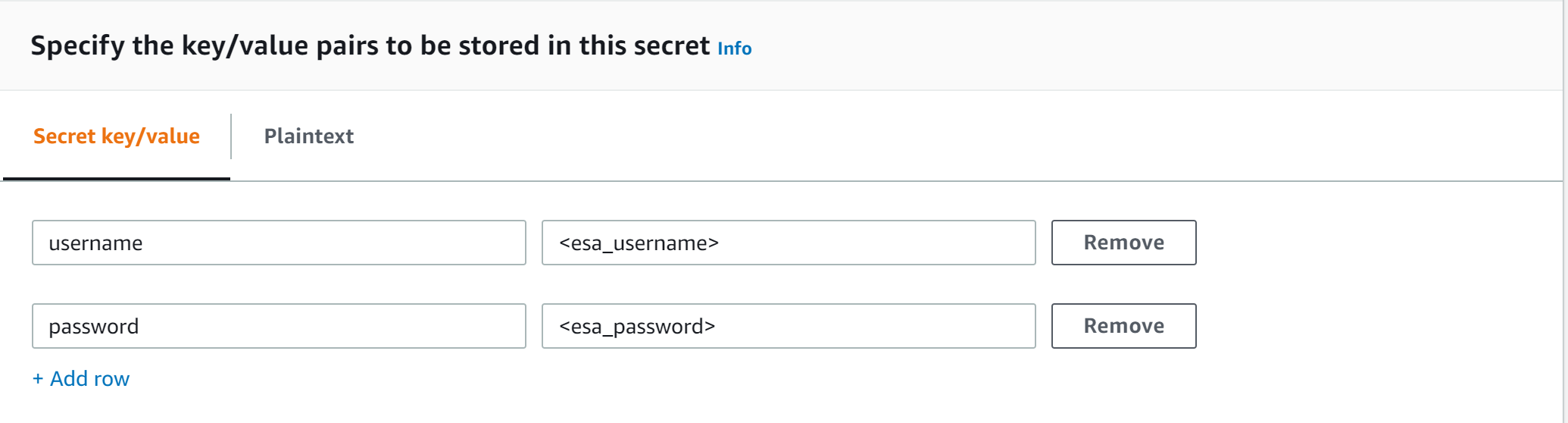
              4. Select the encryption key or leave default AWS managed key.

              5. Specify the Secret Name and record it.

                ESA Credentials Secret Name: __________________

              Option 2: KMS Encrypted Password

              ESA password is encrypted with AWS KMS symmetric key.

              1. Create AWS KMS symmetric key which will be used to encrypt ESA password. See Create KMS Key for instructions on how to create KMS symmetric key using AWS console.

              2. Record KMS Key ARN.

                ESA PASSWORD KMS KEY ARN: __________________

              3. Run AWS CLI command to encrypt ESA password. Below you can find sample Linux aws cli command. Replace <key_arn> with KMS symmetric key ARN.

                aws kms encrypt --key-id <key_arn> --plaintext $(echo '<esa_password>' | base64 )
                
              4. Sample output.

                {
                  "CiphertextBlob": "esa_encrypted_password",
                  "KeyId": "arn:aws:kms:region:aws_account:key/key_id ",
                  "EncryptionAlgorithm": "SYMMETRIC_DEFAULT"
                }
                
              5. Record ESA username and encrypted password.

                ESA USERNAME: __________________

                ESA ENCRYPTED PASSWORD: __________________

              Option 3: Custom AWS Lambda function

              With this option ESA username and password are returned by a custom AWS Lambda function. This method may be used to get the username and password from external vaults.

              1. Create AWS Lambda in any AWS supported runtime.

                1. There is no input needed.

                2. The Lambda function must return the following response schema.

                  response:
                  type: object
                    properties:
                      username: string
                      password: string
                  

                  For example,

                  example output: {"username": "admin", "password": "Password1234"}
                  
                3. Sample AWS Lambda function in Python:

                  import json
                  
                  def lambda_handler(event, context):
                  
                      return {"username": "admin", "password": "password1234"}
                  
              2. Record the Lambda name:

                Custom AWS lambda for ESA credentials: _______________

              Create Agent Lambda IAM Policy

              Follow the steps below to create Lambda execution policies.

              Create Agent Lambda IAM policy

              1. From AWS IAM console, select Policies > Create Policy.

              2. Select JSON tab and copy the following snippet.

                {
                  "Version": "2012-10-17",
                  "Statement": [
                    {
                      "Sid": "EC2ModifyNetworkInterfaces",
                      "Effect": "Allow",
                      "Action": [
                        "ec2:CreateNetworkInterface",
                        "ec2:DescribeNetworkInterfaces",
                        "ec2:DeleteNetworkInterface"
                      ],
                      "Resource": "*"
                    },
                    {
                      "Sid": "CloudWatchWriteLogs",
                      "Effect": "Allow",
                      "Action": [
                        "logs:CreateLogGroup",
                        "logs:CreateLogStream",
                        "logs:PutLogEvents"
                      ],
                      "Resource": "*"
                    },
                    {
                      "Sid": "LambdaUpdateFunction",
                      "Effect": "Allow",
                      "Action": [
                        "lambda:UpdateFunctionConfiguration"
                      ],
                      "Resource": [
                        "arn:aws:lambda:*:*:function:*"
                      ]
                    },
                    {
                      "Sid": "LambdaReadLayerVersion",
                      "Effect": "Allow",
                      "Action": [
                        "lambda:GetLayerVersion",
                        "lambda:ListLayerVersions"
                      ],
                      "Resource": "*"
                    },
                    {
                      "Sid": "LambdaDeleteLayerVersion",
                      "Effect": "Allow",
                      "Action": "lambda:DeleteLayerVersion",
                      "Resource": "arn:aws:lambda:*:*:layer:*:*"
                    },
                    {
                      "Sid": "LambdaPublishLayerVersion",
                      "Effect": "Allow",
                      "Action": "lambda:PublishLayerVersion",
                      "Resource": "arn:aws:lambda:*:*:layer:*"
                    },
                    {
                      "Sid": "S3GetObject",
                      "Effect": "Allow",
                      "Action": [
                        "s3:GetObject"
                      ],
                      "Resource": "arn:aws:s3:::*/*"
                    },
                    {
                      "Sid": "S3PutObject",
                      "Effect": "Allow",
                      "Action": [
                        "s3:PutObject"
                      ],
                      "Resource": "arn:aws:s3:::*/*"
                    },
                    {
                      "Sid": "KmsEncrypt",
                      "Effect": "Allow",
                      "Action": [
                        "kms:GetPublicKey"
                      ],
                      "Resource": [
                        "arn:aws:kms:*:*:key/*"
                      ]
                    },
                    {
                      "Sid": "SecretsManagerGetSecret",
                      "Effect": "Allow",
                      "Action": [
                        "secretsmanager:GetSecretValue"
                      ],
                      "Resource": [
                        "arn:aws:secretsmanager:*:*:secret:*"
                      ]
                    },
                    {
                      "Sid": "LambdaGetConfiguration",
                      "Effect": "Allow",
                      "Action": [
                          "lambda:GetFunctionConfiguration"
                      ],
                      "Resource": [
                          "arn:aws:lambda:*:*:function:*"
                      ]
                    }
                  ]
                }
                
              3. Replace wildcard * with the region, account, and resource name information where required.

              4. This step is required if KMS is used to encrypt ESA password.

                Add policy entry below. Replace ESA PASSWORD KMS KEY ARN with the value recorded in Option 2: KMS Encrypted Password.

                
                  {
                    "Sid": "KmsDecryptEsaPassword",
                    "Effect": "Allow",
                    "Action": [
                      "kms:Decrypt"
                    ],
                    "Resource": [
                      "**ESA PASSWORD KMS KEY ARN**"
                    ]
                  }
                
              5. Select Next type in the policy name and Create Policy. Record policy name:

                Policy Name: ___________________

              Create Agent Lambda IAM Role

              Perform the following steps to create Agent Lambda execution IAM role.

              To create agent Lambda IAM role:

              1. From AWS IAM console, select Roles > Create Role.

              2. Select AWS Service > Lambda > Next.

              3. Select the policy created in Create Agent Lambda IAM policy.

              4. Proceed to Name, Review and Create.

              5. Type the role name, for example, ProtegrityAgentRole and click Confirm.

              6. Select Create role.

              7. Record the role ARN.

                Agent Lambda IAM Execution Role Name: ___________________

              Corporate Firewall Configuration

              If an on-premise firewall is used, then the firewall must allow access from the NAT Gateway to an ESA. The firewall must allow access from the NAT Gateway IP to ESA via port 443 and 443.

              CloudFormation Installation

              Create the Policy Agent in the VPC using the CloudFormation script provided by Protegrity.

              1. Access the CloudFormation service.

              2. Select the target installation region.

              3. Create a stack with new resources.

              4. Upload the Policy Agent CloudFormation template (file name: pty_agent_cf.json).

              5. Specify the following parameters for Cloud Formation:

                ParameterDescriptionNote
                VPCVPC where the Policy Agent will be hostedIdentify or Create a new VPC
                SubnetSubnet where the Policy Agent will be hostedVPC Subnet Configuration
                PolicyAgentSecurityGroupIdSecurity Group Id, which allows communication between the Policy Agent and the ESAIdentify or Create Security Groups
                LambdaExecutionRoleArnAgent Lambda IAM execution role ARN allowing access to the S3 bucket, KMS encryption Key, Lambda and Lambda LayerCreate Agent Lambda IAM Role
                ArtifactS3BucketS3 bucket name with deployment package for the Policy AgentUse S3 Bucket name recorded in Create S3 bucket for Installing Artifacts
                CreateCRONJobSet to True to create a CloudWatch schedule for the agent to run.Default: False

              Policy Agent Lambda Configuration

              After the CloudFormation stack is deployed, the Policy Agent Lambda must be configured with parameters recorded in earlier steps. From your AWS Console, navigate to lambda and select the following Lambda.

              Protegrity_Agent<STACK_NAME>_

              Select Configuration tab and scroll down to the Environment variables section. Select Editand replace all entries with the actual values.

              Parameter

              Description

              Notes

              PTY_ESA_IP

              ESA IP address or hostname

              ESA Server

              PTY_ESA_CA_SERVER_CERT

              ESA self-signed CA certificate or your corporate CA certificate used by policy Agent Lambda to ensure ESA is the trusted server.

              Recorded in step Certificates on ESA

              In case ESA is configured with publicly signed certificates, the PTY_ESA_CA_SERVER_CERT configuration will be ignored.

              PTY_ESA_CA_SERVER_CERT_SECRET

              This configuration option fulfills the same function as PTY_ESA_CA_SERVER_CERT but supports larger configuration values, making it the recommended choice. The value should specify the name of the AWS Secrets Manager secret containing the ESA self-signed CA certificate. The secret value should be set to the json with “PTY_ESA_CA_SERVER_CERT” key and PEM formated CA certificate content value as shown below.

              {
                "PTY_ESA_CA_SERVER_CERT":"-----BEGIN CERTIFICATE----- MIIF..."
              }
              

              Recorded in step Certificates on ESA

              In case ESA is configured with publicly signed certificates, the PTY_ESA_CA_SERVER_CERT_SECRET configuration will be ignored. When both PTY_ESA_CA_SERVER_CERT and PTY_ESA_CA_SERVER_CERT_SECRET are configured the PTY_ESA_CA_SERVER_CERT_SECRET takes precedence.

              PTY_ESA_CREDENTIALS_SECRET

              ESA username and password (encrypted value by AWS Secrets Manager)

              Option 1: Secrets Manager

              PTY_DATASTORE_KEY

              ESA policy datastore public key fingerprint (64 char long) e.g. 123bff642f621123d845f006c6bfff27737b21299e8a2ef6380aa642e76e89e5.

              The export key is the public part of an asymmetric key pair created in a Create KMS Key. A user with Security Officer permissions adds the public key to the data store in ESA via Policy Management > Data Stores > Export Keys. The fingerprint can then be copied using the Copy Fingerprint icon next to the key. Refer to Exporting Keys to Datastore for details.

              AWS_KMS_KEY_ID

              KMS key id or full ARN e.g. arn:aws:kms:us-west-2:112233445566:key/bfb6c4fb-509a-43ac-b0aa-82f1ca0b52d3

              Create KMS Key

              AWS_POLICY_S3_BUCKET

              S3 bucket where the encrypted policy will be written

              S3 bucket of your choice

              AWS_POLICY_S3_FILENAME

              Filename of the encrypted policy stored in S3 bucket

              Default: protegrity-policy.zip

              AWS_PROTECT_FN_NAME

              Comma separated list of Protect function names or ARNs

              ProtectFunctionName(s), recorded in CloudFormation Installation

              DISABLE_DEPLOY

              This flag can be either 1 or 0. If set to 1, then the agent will not update PTY_PROTECT lambda with the newest policy. Else, the policy will be saved in the S3 bucket and deployed to the Lambda Layer

              Default: 0

              AWS_POLICY_LAYER_NAME

              Lambda layer used to store the Protegrity policy used by the PTY_PROTECT function


              POLICY_LAYER_RETAIN

              Number of policy versions to retain as backup. (e.g. 2 will retain the latest 2 policies and remove older ones). -1 retains all.

              Default: 2

              POLICY_PULL_TIMEOUT

              Time in seconds to wait for the ESA to send the full policy

              Default: 20s

              ESA_CONNECTION_TIMEOUT

              Time in seconds to wait for the ESA response

              Default: 5s

              LOG_LEVEL

              Application and audit logs verbiage level

              Default: INFO

              Allowed values: DEBUG – the most verbose, INFO, WARNING, ERROR – the least verbose

              PTY_CORE_EMPTYSTRING

              Override default behavior. Empty string response values are returned as null values. For instance:

              (un)protect(’’) -> null

              (un)protect(’’) -> ''

              Default: empty

              Allowed values:

              null

              empty

              PTY_CORE_CASESENSITIVE

              Specifies whether policy usernames should be case sensitive

              Default: no

              Allowed values:

              yes

              no

              PTY_ADDIPADDRESSHEADER

              When enabled, agent will send its source IP address in the request header. This configuration works in conjunction with ESA hubcontroller configuration ASSIGN_DATASTORE_USING_NODE_IP (default=false). See Associating ESA Data Store With Cloud Protect Agent for more information.

              Default: yes

              Allowed values:

              yes

              no

              PTY_ESA_USERNAME

              Plaintext ESA username which is used together with PTY_ESA_ENCRYPTED_PASSWORD as an optional ESA credentials

              Option 2: KMS Encrypted Password

              Presence of this parameter will cause PTY_ESA_CREDENTIALS_SECRET to be ignored

              PTY_ESA_ENCRYPTED_PASSWORD

              ESA password encrypted with KMS symmetric key.

              Example AWS cli command to generate the value:

              aws kms encrypt --key-id <your key ARN> --plaintext '<your-esa-password-base64>'

              Option 2: KMS Encrypted Password

              Presence of this parameter will cause PTY_ESA_CREDENTIALS_SECRET to be ignored

              Value must be base64 encoded

              EMPTY_POLICY_S3

              This flag can be either 1 or 0. If set to 1, then the agent will remove the content of the policy file in S3 bucket, but will keep the checksum in the metadata. Else, the policy will be saved in the S3 bucket and not removed.

              Default: 0

              PTY_ESA_CREDENTIALS_LAMBDA

              Lambda function to return ESA credentials

              Recorded in step Option 3: Custom AWS Lambda function LAMBDA FOR ESA CREDENTIALS. Presence of PTY_ESA_USERNAME, or PTY_ESA_CREDENTIALS_SECRET will cause this value to be ignored.

              The Policy Agent Lambda must have network access and IAM permissions to invoke the custom ESA Credentials Lambda you have created in Option 3: Custom AWS Lambda function.

              Test Installation

              Open the Lambda and configure Test to execute the lambda and specify the default test event. Wait for around 20 seconds for the Lambda to complete. If policy is downloaded successfully, then a success message appears.

              Navigate to the AWS_POLICY_S3_BUCKET bucket and verify that the AWS_POLICY_S3_FILENAME file was created.

              Troubleshooting

              Lambda Error

              Example Error

              Action

              Task timed out after x seconds

              2020-10-06T23:40:54.121Z 2dc84942-b5cc-4be9-aa4c-965f322307e4 Task timed out after 90.09 seconds
              
              1. Ensure that there is network connectivity between the Lambda and ESA. Check the Security groups and/or Network firewall configuration
              2. When using internal VPC, AWS Lambda needs to have access to AWS Network. The Policy Agent Lambda can start using Secrets Manager with Amazon VPC endpoints by creating an Amazon VPC endpoint for Secrets Manager.

              ESA connection error. Failed to download certificates

              Policy Pull takes a long time

              {
                "errorMessage": "Timeout! Unable to download policy in 20 seconds.",
                "errorType": "Exception",
                "stackTrace": [...]
              }
              
              1. Increase POLICY_PULL_TIMEOUT.
              2. Ensure that there is at least 1 policy with datastore matching the Lambda Policy Agent. Other considerations:
                1. Policy has default datastore.
                2. Policy has datastores matching AWS lambda IP range (check the subnet IP Range).
                3. Lambda function has static IP, and at least one Data store has matching IP.

              ESA connection error. Failed to download certificates. HTTP response code: 401

              {
                "errorMessage": "ESA connection error. Failed to download certificates. HTTP response code: 401.",
                "errorType": "ConnectionError",
                "stackTrace": [...]
              }
              

              Ensure that the PTY_ESA_CREDENTIALS_SECRET has correct ESA username and password

              An error occurred (AccessDeniedException) when calling xyz operation

              xyz Access Denied: Exception
              Traceback (most recent call last):
                … Exception: xyz Access Denied
              

              Ensure that the Lambda execution role has permission to call the xyz operation

              Access Denied to Secret Manager.

              Secrets Manager Access Denied: Exception
              Traceback (most recent call last):
                … Exception: Secrets Manager Access Denied
              
              1. Ensure that the Lambda execution role has permissions to get the Secret Manager secret name.
              2. Ensure that the Lambda execution role has permission to get the Secret Manager secret Encryption Key.

              Master Key xyz unable to generate data key

              Ensure that the Lambda can access xyz CMK key

              The S3 bucket server-side encryption is enabled, the encryption key type is SSE-KMS but the Policy Agent execution IAM role doesn’t have permissions to encrypt using the KMS key .

              [ERROR] PolicyAgentException: An error occurred (AccessDenied) when calling the PutObject operation: Access Denied
              

              Add the following permissions to the Policy Agent excution role.

              kms:Decrypt
              kms:GenerateDatakey
              

              The S3 bucket has bucket policy to only allow access from within the VPC.

              An error occurred (AccessDeniedException) when calling the PublishLayerVersion operation: Your access has been denied by S3,
              please make sure your request credentials have permission to GetObject for BUCKET_NAME/FILENAME. S3 Error Code: AccessDenied. S3 Error Message: Access Denied
              

              The Policy Agent publishes a new Lambda Layer version, and the Lambda Layer service uploads the policy file from the s3 bucket and the upload request is originated from the AWS service outside the Policy Agent Lambda VPC. Update the S3 bucket resource policy to allow access from AWS Service. Sample security policy to lock down access to the vpc:

              {
                "Version": "2012-10-17",
                "Statement": [
                  {
                    "Sid": "VpcRestrictions",
                    "Effect": "Deny",
                    "Principal": {
                      "AWS": "*"
                    },
                    "Action": "s3:*Object",
                    "Resource": [
                      "arn:aws:s3:::<s3_bucket_name>/*",
                      "arn:aws:s3:::<s3_bucket_name>"
                    ],
                    "Condition": {
                      "Bool": {
                        "aws:ViaAWSService": "false"
                      },
                      "StringNotEquals": {
                        "aws:sourceVpc": "<vpc_id>"
                      }
                    }
                  }
                ]
              }
              

              Additional Configuration

              Strengthen the KMS IAM policy by granting access only to the required Lambda function(s).

              Finalize the IAM policy for the Lambda Execution Role. Ensure to replace wildcard * with the region, account, and resource name information where required.

              For example,

              "arn:aws:lambda:*:*:function:*" -> "arn:aws:lambda:us-east-1:account:function:function_name"
              

              Policy Agent Schedule

              If specified in CloudFormation Installation, the agent installation created a CloudWatch event rule, which checks for policy update on an hourly schedule. This schedule can be altered to the required frequency.

              Under CloudWatch > Events > Rules, find Protegrity_Agent_{stack_name}. Click Action > Edit Set the cron expression. A cron expression can easily be defined using CronMaker, a free online tool. Refer to http://www.cronmaker.com.

              What’s Next

              1.3.5 - Audit Log Forwarder Installation

              Install the audit log forwarder.

                The following sections show steps how to install Audit Log Forwarder component in the AWS Cloud. The Log Forwarder deployment allows for the audit logs generated by Protector to be delivered to ESA for auditing and governance purposes. Log Forwarder component is optional and is not required for the Protector Service to work properly. See Log Forwarding Architecture section in this document for more information. Some of the installation steps are not required for the operation of the software but recommended for establishing a secure environment. C ontact Protegrity for further guidance on configuration alternatives in the Cloud.

                ESA Audit Store Configuration

                ESA server is required as the recipient of audit logs. Verify the information below to ensure ESA is accessible and configured properly.

                1. ESA server running and accessible on TCP port 9200 (Audit Store) or 24284 (td-agent).

                2. Audit Store service is configured and running on ESA. Applies when audit logs are output to Audit Store directly or through td-agent. For information related to ESA Audit Store configuration, refer to Audit Store Guide.

                3. (Optional) td-agent is configured for external input. For more information related to td-agent configuration, refer to ESA guide Sending logs to an external security information and event management (SIEM).

                Certificates on ESA

                By default, ESA is configured with self-signed certificates, which can optionally be validated using a self-signed CA certificate supplied in the Log Forwarder configuration. If no CA certificate is provided, the Log Forwarder will skip server certificate validation.

                If ESA is configured with publicly signed certificates, this section can be skipped since the forwarder Lambda will use the public CA to validate ESA certificates.

                To obtain the self-signed CA certificate from ESA:

                1. Download ESA CA certificate from the /etc/ksa/certificates/plug directory of the ESA

                2. After certificate is downloaded, open the PEM file in text editor and replace all new lines with escaped new line: \n.

                  To escape new lines from command line, use one of the following commands depending on your operating system:

                  Linux Bash:

                  awk 'NF {printf "%s\\n",$0;}' ProtegrityCA.pem > output.txt
                  

                  Windows PowerShell:

                  (Get-Content '.\ProtegrityCA.pem') -join '\n' | Set-Content 'output.txt'
                  
                3. Record the certificate content with new lines escaped.

                  ESA CA Server Certificate (EsaCaCert): ___________________

                  This value will be used to set PtyEsaCaServerCert cloudformation parameter in section Install through CloudFormation

                For more information about ESA certificate management refer to Certificate Management Guide in ESA documentation.

                AWS VPC Configuration

                Log forwarder Lambda function requires network connectivity to ESA, similar to Policy Agent Lambda function. Therefore, it can be hosted in the same VPC as Policy Agent.

                Separate VPC can be used, as long as it provides network connectivity to ESA.

                VPC Name: ___________________

                VPC Subnet Configuration

                Log Forwarder can be connected to the same subnet as Policy Agent or separate one as long as it provides connectivity to ESA.

                Subnet Name: ___________________

                NAT Gateway For ESA Hosted Outside AWS Network

                If ESA server is hosted outside of the AWS Cloud network, the VPC configured for Lambda function must ensure additional network configuration is available to allow connectivity with ESA. For instance if ESA has a public IP, the Lambda function VPC must have public subnet with a NAT server to allow routing traffic outside of the AWS network. A Routing Table and Network ACL may need to be configured for outbound access to the ESA as well.

                VPC Endpoint Configuration

                Log Forwarder Lambda function requires connectivity to Secrets Manager AWS service. If the VPC identified in the steps before has no connectivity to public internet through the NAT Gateway, then the following service endpoint must be configured:

                • com.amazonaws.{REGION}.cloudwatch
                • com.amazonaws.{REGION}.secretsmanager
                • com.amazonaws.{REGION}.kms

                Security Group Configuration

                Security groups restrict communication between Log Forwarder Lambda function and the ESA appliance. The following rules must be in place for ESA and Log Forwarder Lambda function.

                From VPC > Security Groups > Log Forwarder Security Group configuration.

                TypeProtocolPort RangeDestinationReason
                Custom TCPTCP9200Log Forwarder Lambda SGESA Communication

                Record the name of Log Forwarder security group name.

                Log Forwarder Security Group Id: ___________________

                The following port must be open for the ESA. If the ESA is running in the Cloud, then create the following security.

                ESA Security Group configuration

                TypeProtocolPort RangeSource
                Custom TCPTCP9200Log Forwarder Lambda SG

                Configure ESA Audit Store Credentials

                Audit Log Forwarder can optionally authenticate with ESA using certificate-based authentication with a client certificate and certificate key. If used, both the certificate and certificate key will be stored in AWS Secrets Manager.

                Download the following certificates from the /etc/ksa/certificates/plug directory of the ESA:

                • client.key
                • client.pem

                After certificates are downloaded, open each PEM file in text editor and replace all new lines with escaped new line: \n. To escape new lines from command line, use one of the commands below depending on your operating system.

                Linux Bash:

                awk 'NF {printf "%s\\n",$0;}' client.key > private_key.txt
                awk 'NF {printf "%s\\n",$0;}' client.pem > public_key.txt
                

                Windows PowerShell:

                (Get-Content '.\client.key') -join '\n' | Set-Content 'private_key.pem'
                (Get-Content '.\client.pem') -join '\n' | Set-Content 'public_key.pem'
                

                For more information on how to configure client certificate authentication for Audit Store on ESA refer to Audit Store Guide.

                To create secret with ESA client certificate/key pair in AWS Secrets Manager.

                1. From the AWS Secrets Manager Console, select Store New Secret.

                2. Select Other Type of Secrets.

                3. Specify the private_key and public_key value pair.
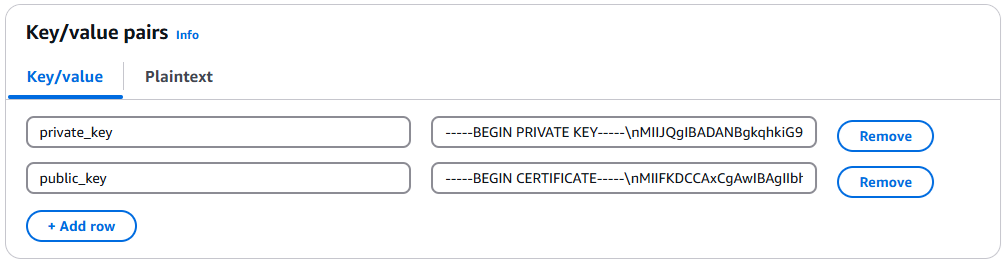
                4. Select the encryption key or leave default AWS managed key.

                5. Specify the Secret Name and record it below.

                  ESA Client Certificate/Key Pair Secret Name: ___________________

                  This value will be used to set PtyEsaClientCertificatesSecretId cloudformation parameter in section Install through CloudFormation

                Create Audit Log Forwarder IAM Execution Policy

                This task defines a policy used by the Protegrity Log Forwarder Lambda function to write CloudWatch logs, access the KMS encryption key to decrypt the policy and access Secrets Manager for log forwarder user credentials.

                Perform the following steps to create the Lambda execution role and required policies:

                1. From the AWS IAM console, select Policies > Create Policy.

                2. Select the JSON tab and copy the following sample policy.

                  {
                    "Version": "2012-10-17",
                    "Statement": [
                      {
                        "Sid": "EC2ModifyNetworkInterfaces",
                        "Effect": "Allow",
                        "Action": [
                          "ec2:CreateNetworkInterface",
                          "ec2:DescribeNetworkInterfaces",
                          "ec2:DeleteNetworkInterface"
                        ],
                        "Resource": "*"
                      },
                      {
                        "Sid": "CloudWatchWriteLogs",
                        "Effect": "Allow",
                        "Action": [
                          "logs:CreateLogGroup",
                          "logs:CreateLogStream",
                          "logs:PutLogEvents"
                        ],
                        "Resource": "*"
                      },
                      {
                        "Sid": "KmsDecrypt",
                        "Effect": "Allow",
                        "Action": [
                          "kms:Decrypt"
                        ],
                        "Resource": [
                          "arn:aws:kms:*:*:key/*"
                        ]
                      },
                      {
                          "Sid": "KinesisStreamRead",
                          "Effect": "Allow",
                          "Action": [
                              "kinesis:GetRecords",
                              "kinesis:GetShardIterator",
                              "kinesis:DescribeStream",
                              "kinesis:DescribeStreamSummary",
                              "kinesis:ListShards",
                              "kinesis:ListStreams"
                          ],
                          "Resource": "*"
                      },
                      {
                        "Sid": "SecretsManagerGetSecret",
                        "Effect": "Allow",
                        "Action": [
                          "secretsmanager:GetSecretValue"
                        ],
                        "Resource": [
                          "arn:aws:secretsmanager:*:*:secret:*"
                        ]
                      }
                    ]
                  }
                  
                3. For the KMS policy, replace the Resource with the ARN for the KMS key created in a previous step.

                4. Select Review policy, type in a policy name, for example, ProtegrityLogForwarderLambdaPolicy and Confirm. Record the policy name:

                  LogForwarderLambdaPolicyName:__________________

                Create Log Forwarder IAM Role

                Perform the following steps to create Log Forwarder execution IAM role.

                To create Log Forwarder IAM role:

                1. From AWS IAM console, select Roles > Create Role.

                2. Select AWS Service > Lambda > Next.

                3. Select the policy created in Create Audit Log Forwarder IAM Execution Policy.

                4. Proceed to Name, Review and Create.

                5. Type the role name, for example, ProtegrityForwarderRole and click Confirm.

                6. Record the role ARN.

                  Log Forwarder IAM Execution Role Name: ___________________

                Installation Artifacts

                Audit Log Forwarder installation artifacts are part of the same deployment package as the one used for protect and policy agent services. Follow the steps below to ensure the right artifacts are available for log forwarder installation.

                1. Verify that the Protegrity deployment package is available on your local system, if not, you can download it from the Protegrity portal.

                2. Extract the pty_log_forwarder_cf.json cloud formation file from the deployment package.

                3. Check the S3 deployment bucket identified in section Create S3 bucket for Installing Artifacts. Make sure that all Protegrity deployment zip files are uploaded to the S3 bucket.

                Install through CloudFormation

                The following steps describe the deployment of the Audit Log Forwarder AWS cloud components.

                1. Access CloudFormation and select the target AWS Region in the console.

                2. Click Create Stack and choose With new resources.

                3. Specify the template.

                4. Select Upload a template file.

                5. Upload the Protegrity-provided CloudFormation template called pty_log_forwarder_cf.json and click Next.

                6. Specify the stack details. Enter a stack name.

                7. Enter the required parameters. All the values were generated in the pre-configuration steps.

                Parameter

                Description

                Default Value

                Required

                LogForwarderSubnets

                Subnets where the Log Forwarder will be hosted.


                LogForwarderSecurityGroups

                Security Groups, which allow communication between the Log Forwarder and ESA.


                X

                LambdaExecutionRoleArn

                The ARN of Lambda role created in the prior step.


                X

                ArtifactS3Bucket

                Name of S3 bucket created in the pre-configuration step.


                X

                LogDestinationEsaIp

                IP or FQDN of the ESA instance or cluster.


                X

                AuditLogOutput

                Audit log processor to target on ESA. Allowed values: audit-store, td-agent

                audit-store

                X

                PtyEsaClientCertificatesSecretId

                AWS Secrets Manager secret id containing client certificates used for authentication with ESA Audit Store. It is expected that the public key will be stored in a field public_key and the private key in a field named private_key.

                This parameter is optional. If not provided, Log Forwarder will connect to ESA without client certificate authentication.

                EsaTlsDisableCertVerify

                Disable certificate verification when connecting to ESA if set to 1. This is only for dev purposes, do not disable in production environment.

                0

                X

                PtyEsaCaServerCert

                ESA self-signed CA certificate used by log forwarder Lambda to ensure ESA is the trusted server.

                Recorded in step Certificates on ESA

                In case ESA is configured with publicly signed certificates, the PtyEsaCaServerCert configuration will be ignored.


                EsaConnectTimeout

                Time in seconds to wait for the ESA response. Minimum value: 1.

                5

                X

                EsaVirtualHost

                ESA virtual hostname. This configuration is optional and it can be used when proxy server is present and supports TLS SNI extension.


                KinesisLogStreamRetentionPeriodHours

                The number of hours for the log records to be stored in Kinesis Stream in case log destination server is not available. Minimum value: 24. See Log Forwarder Performance section for more details.

                24

                X

                KinesisLogStreamShardCount

                The number of shards that the Kinesis log stream uses. For greater provisioned throughput, increase the number of shards. Minimum value: 1. See Log Forwarder Performance section for more details.

                10

                X

                MinLogLevel

                Minimum log level for protect function. Allowed Values: off, severe, warning, info, config, all

                severe

                X

                1. Click Next with defaults to complete CloudFormation.

                2. After CloudFormation is completed, select the Outputstab in the stack.

                3. Record the following values

                  KinesisLogStreamArn: ________________________________

                Add Kinesis Put Record permission to the Protect Function IAM Role

                1. Login to the AWS account that hosts the Protect Lambda Function.

                2. Search for Protect Lambda Function IAM Execution Role Name created in Create Protect Lambda IAM role.

                3. Under Permissions policies, select Add Permissions > Create inline policy.

                4. In Specify permissions view, switch to JSON.

                5. Copy the policy json from below replacing the placeholder value indicated in the following snippet as <Audit Log Kinesis Stream ARN> with the value recorded in the previous step.

                  {
                  	"Version": "2012-10-17",
                  	"Statement": [
                  		{
                  			"Sid": "KinesisPutRecords",
                  			"Effect": "Allow",
                  			"Action": "kinesis:PutRecords",
                  			"Resource": "<Audit Log Kinesis Stream ARN>"
                  		}
                  	]
                  }
                  
                6. When you are finished, choose Next.

                7. On the Review and create page, type a Name, then choose Create policy.

                Test Log Forwarder Installation

                Testing in this section validates the connectivity between Log Forwarder and ESA. The sample policy included with the initial installation and test event below are not based on your ESA policy. Any logs forwarded to ESA which are not signed with a policy generated by your ESA will not be added to the audit store.

                Install Log Forwarder and configure according to previous sections. Log Forwarder configuration MinLogLevel must be at least info level.

                1. Navigate to the log forwarder lambda function.

                2. Select the Test tab.

                3. Copy the json test event into the Event JSON pane.

                  {
                      "Records": [
                          {
                              "kinesis": {
                                  "kinesisSchemaVersion": "1.0",
                                  "partitionKey": "041e96d78c778677ce43f50076a8ae3e",
                                  "sequenceNumber": "49620336010289430959432297775520367512250709822916263938",
                                  "data": "eyJpbmdlc3RfdGltZV91dGMiOiIyMDI2LTAzLTI3VDEzOjIzOjEyLjkwNFoiLCJhZGRpdGlvbmFsX2luZm8iOnsiZGVzY3JpcHRpb24iOiJEYXRhIHVucHJvdGVjdCBvcGVyYXRpb24gd2FzIHN1Y2Nlc3NmdWwuIn0sImNsaWVudCI6e30sImNudCI6NCwiY29ycmVsYXRpb25pZCI6InJzLXF1ZXJ5LWlkOjEyMzQiLCJsZXZlbCI6IlNVQ0NFU1MiLCJsb2d0eXBlIjoiUHJvdGVjdGlvbiIsIm9yaWdpbiI6eyJob3N0bmFtZSI6IlBSTy1VUy1QRjNSSEdGOSIsImlwIjoiMTAuMTAuMTAuMTAiLCJ0aW1lX3V0YyI6MTcxMTU1OTEwMH0sInByb2Nlc3MiOnsiaWQiOjJ9LCJwcm90ZWN0aW9uIjp7ImF1ZGl0X2NvZGUiOjgsImRhdGFlbGVtZW50IjoiYWxwaGEiLCJkYXRhc3RvcmUiOiJTQU1QTEVfUE9MSUNZIiwibWFza19zZXR0aW5nIjoiIiwib2xkX2RhdGFlbGVtZW50IjpudWxsLCJvcGVyYXRpb24iOiJVbnByb3RlY3QiLCJwb2xpY3lfdXNlciI6IlBUWURFViJ9LCJwcm90ZWN0b3IiOnsiY29yZV92ZXJzaW9uIjoiMS4yLjErNTUuZzU5MGZlLkhFQUQiLCJmYW1pbHkiOiJjcCIsInBjY192ZXJzaW9uIjoiMy40LjAuMTQiLCJ2ZW5kb3IiOiJyZWRzaGlmdCIsInZlcnNpb24iOiIwLjAuMS1kZXYifSwic2lnbmF0dXJlIjp7ImNoZWNrc3VtIjoiN0VCMkEzN0FDNzQ5MDM1NjQwMzBBNUUxNENCMTA5QzE0OEJGODYwRjE3NEVCMjMxMTAyMEI3RkE1QTY4MjdGQyIsImtleV9pZCI6ImM0MjQ0MzZhLTExMmYtNGMzZi1iMmRiLTEwYmFhOGI1NjJhNyJ9fQ==",
                                  "approximateArrivalTimestamp": 1626878559.213
                              },
                              "eventSource": "aws:kinesis",
                              "eventVersion": "1.0",
                              "eventID": "shardId-000000000000:49620336010289430959432297775520367512250709822916261234",
                              "eventName": "aws:kinesis:record",
                              "invokeIdentityArn": "arn:aws:iam::555555555555:role/service-role/TestRole",
                              "awsRegion": "us-east-1",
                              "eventSourceARN": "arn:aws:kinesis:us-east-1:555555555555:stream/CloudProtectEventStream"
                          }
                      ]
                  }
                  
                4. Select Test to execute the test event.

                5. Test is successful if the Log Output of test results contains the following log:

                  [INFO] [kinesis-log-aggregation-format.cpp:77] Aggregated 1 records into 0 aggregated, 1 forwarded and 0 failed records
                  

                  If the log is not present, please consult the Troubleshooting section for common errors and solutions.

                Update Protector With Kinesis Log Stream

                In this section, Kinesis log stream ARN will be provided to the Protect Function installation.

                1. Navigate to the Protector CloudFormation stack created in the protector installation section.

                2. Select Update.

                3. Choose Use existing template > Next.

                4. Set parameter KinesisLogStreamArn to the output value recorded in Install through CloudFormation.

                5. Proceed with Next and Submit the changes.

                6. Continue to the next section once stack status indicates UPDATE_COMPLETE.

                Update Policy Agent With Log Forwarder Function Target

                Log Forwarder Lambda function requires a policy layer which is in sync with the Protegrity Protector. This section will describe the steps to update the policy agent to include updating Log Forwarder Lambda function.

                1. Navigate to the Policy Agent Function created in Policy Agent Installation

                2. Select Configuration > Environment variables > Edit

                3. Edit the value for environment variable AWS_PROTECT_FN_NAME to include the log forwarder function name/arn in the comma separated list of Lambda functions.

                4. Save the changes and continue when update completes

                5. Navigate to Test tab

                6. Add an event {} and select Test to run the Policy Agent function

                7. Verify Log forwarder function was updated to use the policy layer by inspecting the log output. Logs should include the following:

                  
                  [INFO] 2024-07-09 18:58:04,793.793Z 622d374b-1f73-4123-9a38-abc61973adef iap_agent.policy_deployer:Updating lambda [Protegrity_LogForwarder_<stack ID>] to use layer version [arn:aws:lambda:<aws region>:<aws account number>:layer:Protegrity_Layer_<layer name>:<layer version>]
                  

                Test Full Log Forwarder Installation

                Install and configure Protegrity Agent, Protector, and Log Forwarder components.

                1. Send a protect operation to the protector using a data element or user which will result in audit log generation

                2. Navigate to the CloudWatch log group for the Protect function

                3. Select the log stream for the test operation and scroll to the latest logs

                4. Expect to see a log similar to the below:

                  
                  [2024-07-09T19:28:23.158] [INFO] [kinesis-external-sink.cpp:51] Sending 2 logs to Kinesis ...
                  [2024-07-09T19:28:23.218] [INFO] [aws-utils.cpp:206] Kinesis send time: 0.060s
                  
                5. Navigate to the CloudWatch log group for the Log Forwarder function

                6. Expect to see a new log stream - it may take several minutes for the stream to start

                7. Select the new stream and scroll to the most recent logs in the stream

                8. Expect to see a log similar to the below:

                  
                  [2024-07-09T19:32:31.648] [INFO] [kinesis-log-aggregation-format.cpp:77] Aggregated 1 records into 0 aggregated, 1 forwarded and 0 failed records
                  

                Troubleshooting

                Error

                Action

                Log forwarder log contains severe level secrets permissions error:

                [SEVERE] User: <arn> is not authorized to perform: secretsmanager:
                GetSecretValue on resource: <secret name> because no identity-based
                policy allows the secretsmanager:GetSecretValue action
                
                1. Verify the permission policy/role attached to the log forwarder function has secretsmanager:GetSecretValue permission for the insights esa user credentials secret.
                2. Consult sections Configure ESA Audit Store Credentials and Create Audit Log Forwarder IAM Execution Policy

                When testing log forwarder as described in Test Log Forwarder Installation, response contains policy decryption error:

                
                {
                  "error_msg": "Failed to decrypt the policy. Please verify
                    that the function has access to the key service and the key.",
                  "success": false
                }
                
                1. Verify the permission policy/role attached to the log forwarder function has kms:Decrypt permission for KMS key used to encrypt the Protegrity security policy.
                2. Consult section Create Audit Log Forwarder IAM Execution Policy

                Cloudformation stack creation fails with error:

                
                The provided execution role does not have permissions to call
                [CreateNetworkInterface|DescribeNetworkInterfaces|DeleteNetworkInterface]
                on EC2 (Service: Lambda, Status Code: 400, Request ID: <request id>)"
                (RequestToken: <request token>, HandlerErrorCode: InvalidRequest)
                
                1. Verify the permission policy/role attached to the log forwarder function has ec2:CreateNetworkInterface, ec2:DescribeNetworkInterfaces, ec2:DeleteNetworkInterface permissions
                2. Consult section Create Audit Log Forwarder IAM Execution Policy

                Severe level kinesis permissions log message in protector function:

                
                [SEVERE] Kinesis stream client returned 400 error with error message:
                User: <function arn> is not authorized to perform: kinesis:PutRecords
                on resource: <kinesis stream arn> because no identity-based policy
                allows the kinesis:PutRecords action
                
                1. Verify the permission policy/role attached to the protector function has kinesis:PutRecords permission
                2. Consult section Add Kinesis Put Record permission to the Protect Function IAM Role

                TLS errors reported in log forwarder function logs:

                
                [error] [tls] <error message>
                
                1. If ESA is using self-signed certificate, verify the correct ESA certificate has been given in the format described in Certificates on ESA

                1.3.6 -

                Cheat Sheet Recommendation

                AWS Account ID: ___________________

                AWS Region (AwsRegion): ___________________

                S3 Bucket name (ArtifactS3Bucket): ___________________

                KMS Key ARN (AWS_KMS_KEY_ID): ___________________

                ProtectLambdaPolicyName: __________________

                Role ARN (LambdaExecutionRoleArn): ___________________

                ApiGatewayId: ________________________________

                ProtectFunctionName: __________________________

                ProtectLayerName: _____________________________

                ESA IP address: ___________________

                VPC name: ___________________

                Subnet name: ___________________

                Policy Agent Security Group Id: ___________________

                ESA Credentials Secret Name: ___________________

                Policy Name: ___________________

                Agent Lambda IAM Execution Role Name: ___________________

                1.3.7 -

                Prerequisites

                Requirement

                Detail

                Protegrity distribution and installation scripts

                These artifacts are provided by Protegrity

                Protegrity ESA 10.0+

                The Cloud VPC must be able to obtain network access to the ESA

                AWS Account

                Recommend creating a new sub-account for Protegrity Serverless

                1.3.8 -

                AWS Services

                The following table describes the AWS services that may be a part of your Protegrity installation.

                Service

                Description

                Lambda

                Provides serverless compute for Protegrity protection operations and the ESA integration to fetch policy updates or deliver audit logs.

                API Gateway

                Provides the endpoint and access control.

                KMS

                Provides secrets for envelope policy encryption/decryption for Protegrity.

                Secrets Manager

                Provides secrets management for the ESA credentials .

                S3

                Intermediate storage location for the encrypted ESA policy layer.

                Kinesis

                Required if Log Forwarder is to be deployed. Amazon Kinesis is used to batch audit logs sent from protector function to ESA.

                VPC & NAT Gateway

                Optional. Provides a private subnet to communicate with an on-prem ESA.

                CloudWatch

                Application and audit logs, performance monitoring, and alerts. Scheduling for the policy agent.

                1.3.9 -

                Required Skills and Abilities

                Role / Skillset

                Description

                AWS Account Administrator

                To run CloudFormation (or perform steps manually), create/configure a VPC and IAM permissions.

                Protegrity Administrator

                The ESA credentials required to extract the policy for the Policy Agent

                Network Administrator

                To open firewall to access ESA and evaluate AWS network setup

                1.4 - REST API

                Reference for Cloud API authorization and specification

                The following sections describe the key concepts in understanding the REST API.

                Base URL:

                https://{ApiGatewayId}.execute-api.{Region}.amazonaws.com/pty/v1
                

                Once Protegrity Serverless REST API is installed, you can export the OpenAPI documentation file from API Gateway Export API, located in the AWS API Gateway Control Service.

                https://docs.aws.amazon.com/apigateway/latest/developerguide/api-gateway-export-api.html

                For testing the REST API, we recommend using tools, such as, Postman.

                1.4.1 - Authorization

                Describes the available authorization methods

                  Policy Users

                  Protegrity Policy roles defines the unique data access privileges for every member. The Protegrity Lambda protects the data with the username sent in either the JWT-formatted authorization header or the request body.

                  The lambda behavior can be set in the Lambda environment variables as described in Protect Lambda Configuration

                  Authorization/allow_assume_user01
                  EmptyUser from the request body. / (Throw an error).User from the request body.
                  JWTUser from JWT payloadUser from request body. If not found user from JWT payload.

                  JWT Verification

                  To ensure the integrity of the user, the lambda protect can verify the JWT.

                  1. From your AWS console, navigate to lambda and select the following Lambda: Protegrity_Protect_RESTAPI_<STACK_NAME>
                  2. Scroll down to the Environment variables section, select Edit to replace the entries.

                  Parameter

                  Value

                  Notes

                  authorization

                  JWT

                  jwt_verify

                  1


                  jwt_secret_base64

                  Secret in base64 encoding. For example, the value of the public key is as follows.

                  -----BEGIN PUBLIC KEY-----
                  MIGfMA0GCSqGSIb3DQEBAQUAA4GNADCBiQKBgQC4fkg/JYyN3Skr6RYLiAd/Yhl0
                  2TE3/HzHSNPnCaRdUakGp9og7oXBMcoadFDjnoSq1sz+gUHnpoO7s2fwkD5Q4OnC
                  BGD3oKP2A4PlOOWD2B2cVmMqX/vf1nAA/343496jsbfgkh1Q7LTzR0IXfdii0o1U
                  CbvrVCuaBoyiv4TxWQIDAQAB
                  -----END PUBLIC KEY-----
                  

                  This public key will be stored as follows.

                  LS0tLS1CRUdJTiBQVUJMSUMgS0VZLS0tL
                  S0KTUlHZk1BMEdDU3FHU0liM0RRRUJBUV
                  VBQTRHTkFEQ0JpUUtCZ1FDNGZrZy9KWXl
                  OM1NrcjZSWUxpQWQvWWhsMAoyVEUzL0h6
                  SFNOUG5DYVJkVWFrR3A5b2c3b1hCTWNvY
                  WRGRGpub1NxMXN6K2dVSG5wb083czJmd2
                  tENVE0T25DCkJHRDNvS1AyQTRQbE9PV0Q
                  yQjJjVm1NcVgvdmYxbkFBLzM0MzQ5Nmpz
                  YmZna2gxUTdMVHpSMElYZmRpaTBvMVUKQ
                  2J2clZDdWFCb3lpdjRUeFdRSURBUUFCCi
                  0tLS0tRU5EIFBVQkxJQyBLRVktLS0tLQ==
                  

                  The secret must be in base64. We recommend using RSA public certificates, it is not recommended to keep Hash (symmetric) secrets in the clear.

                  1.4.2 - HTTP Status Codes

                  Describes the Status Codes returned by Cloud API

                  The following table explains the different HTTP Status Codes with their corresponding response.

                  Status Codes

                  Response

                  Description

                  200

                  {"results":["<string>","<string>"],
                   "success": true, "encoding":[hex|utf8]}
                  

                  Success protected data is in results, and success attribute is true

                  400

                  {
                      "error_msg": "<string>",
                      "success": false
                  }
                  

                  There was an issue in the request, success is false, check error_msg attribute. For more information check AWS Lambda’s CloudWatch logs.

                  For example, the following error appears.

                  Authorization header was not found.
                  
                  1. Required attribute is missing /user, when env authorization is None or empty.
                  2. User is missing, check JWT payload for user attribute
                  3. Malformed authorization header
                  4. Basic Not supported in header: authorization

                  403

                  {
                      "error_msg": "token expired",
                      "success": false
                  }
                  
                  {
                      "error_msg": "invalid signature",
                      "success": false
                  }
                  {
                      "error_msg": " unknown algorithm error",
                      "success": false
                  }
                  
                  1. JWT is invalid because secret is wrong or expired.
                  2. Get A new JWT or check the base64 secret in AWS Lambda environment variable.
                  3. Secret doesn’t match the algorithm type in the JWT header. Secret is symmetric but Algorithm is asymmetric.

                  500

                  {
                      "error_msg": "Invalid json array in jwt_user_claim",
                      "success": false
                  }
                  
                  {    "error_msg": "jwt secret is missing ",
                      "success": false
                  }
                  
                  1. Configuration error in AWS Lambda.

                  Authorization is to JWT and jwt _user_claim is not a valid json array. Example valid input: [“username”, “firstname”].

                  1. JWT is set to verify and jwt_secret_base64 is missing.

                  1.4.3 - Payload Encoding

                  Describes the request/response payload encoding

                  Payload Encoding

                  The following encoding formats are supported in the REST API.

                  For every encoding, the resultant protected data is returned in the same encoding. For example, if request is hex-encoded, the response is also hex-encoded.

                  For more information about the encoding formats, refer to the Protection Methods Reference.

                  Encoding

                  Supported by data elements

                  Notes

                  utf8

                  All except binary data elements.

                  Default encoding if encoding is not specified.

                  hex

                  All

                  Default encoding for binary data elements.

                  base64

                  All

                  base64_mime

                  All

                  • Uses RFC 2045 Alphabet.
                  • Accepts input on multiple lines.
                  • Lines can be separated by any combination of CR and LF characters.
                  • Lines must not be longer than 76 characters long.
                  • Response lines are separated by CRLF characters.
                  • Optional padding.
                  • Does not accept any non-base64 characters.

                  base64_pem

                  All

                  • Uses RFC 1421 Alphabet.
                  • Accepts input on multiple lines.
                  • Lines can be separated by any combination of CR and LF characters.
                  • Lines must not be longer than 64 characters long.
                  • Response lines are separated by CRLF characters.
                  • Optional padding.
                  • Does not accept any non-base64 characters.

                  base64_url

                  All

                  The following sections provide the payload schema and its examples.

                  1.4.4 - TLS Mutual Authentication

                  Describes the TLS Mutual Authentication setup for AWS API Gateway

                  By default, AWS API Gateway supports HTTPS endpoint and doesn’t allow HTTP protocol.

                  For an additional layer of security, you can configure AWS API Gateway TLS Mutual Authentication.

                  AWS API Gateway will ensure that the clients with a valid certificate only can call the REST API. Protegrity recommends to setup TLS Mutual Authentication in AWS API Gateway. For more information on how to set AWS API Gateway Mutual TLS go to the following link.

                  https://docs.aws.amazon.com/apigateway/latest/developerguide/rest-api-mutual-tls.html

                  1.4.5 - v1 Specification

                  Describes the v1 REST API specification

                  AWS Lambda service limits maximum size of payload to 6 MB. Client applications of Protegrity Cloud API must ensure their payload size is within this limit. This applies to all types of requests described below.

                  Request

                  AWS Lambda service limits maximum size of payload to 6 MB. Client applications of Protegrity Cloud API must ensure their payload size is within this limit. This applies to all types of requests described below.

                  Performs a policy operation such as protect, unprotect, or reprotect.

                  • URI

                    /v1/protect or /v1/unprotect or /v1/reprotect

                  • Method

                    POST

                  • Parameters

                    data: Input data to the policy operation.

                    data_element: Data element to use for the policy operation.

                    encoding: Optional, encoding of the data. One of: base64, base64_mime, base64_pem, base64_url, hex, or utf8. Defaults to hex for binary data elements, otherwise defaults to utf8.

                    external_iv: Optional, external initialization vector.

                    old_data_element: (reprotect) Data element for unprotecting the input.

                    old_external_iv: (reprotect) Optional, external initialization vector for the input.

                    query_id: Optional, identifier for the request.

                    user: User performing the operation.

                  • Result

                    Returns the output of the policy operation.

                  Example 1 - without external IV

                  {
                    "encoding": "utf8",
                    "query_id": "1",
                    "user": "user1",
                    "data_element": "Alphanum",
                    "data":[<data1>,<data2>]
                  }
                  

                  Example 2 - with external IV

                  {
                    "encoding": "utf8",
                    "query_id": "1",
                    "user": "user1",
                    "data_element": "Alphanum",
                    "external_iv": "abc123",
                    "data":[<data1>,<data2>]
                  }
                  

                  Example 3 - reprotect

                  {
                    "encoding": "utf8",
                    "query_id": "1",
                    "user": "user1",
                    "data_element": "deName",
                    "old_data_element": "Alphanum",
                    "data":[<data1>,<data2>]
                  }
                  

                  Performs policy operations using different data elements for each data set.

                  • URI

                    /v1/protect or /v1/unprotect or /v1/reprotect

                  • Method

                    POST

                  • Parameters

                    encoding: Optional, encoding of the data. One of: base64, base64_mime, base64_pem, base64_url, hex, or utf8. Defaults to hex for binary data elements, otherwise defaults to utf8.

                    query_id: Optional, prefix for the request identifier.

                    user: User performing the operation.

                    arguments[].data: Input data to the policy operation.

                    arguments[].data_element: Data element to use for the policy operation.

                    arguments[].external_iv: Optional, external initialization vector.

                    arguments[].id: Optional, request identifier.

                    arguments[].old_data_element: (reprotect) Data element for unprotecting the input.

                    arguments[].old_external_iv: (reprotect) Optional, external initialization vector for the input.

                  Example 4 - multiple data elements support payload

                  {
                    "encoding": "utf8",
                    "query_id": "query1234", 
                    "user": <policy_user>, 
                    "arguments": [
                      {
                        "id": "1", 
                        "external_iv": "<external iv>", 
                        "data_element": "<data element name>", 
                        "data":["<data1>","<data2>"]
                      }, 
                      {
                        "data_element": <data element name>, 
                        "data":["<data1>","<data2>"]
                      }
                    ]
                  }
                  
                  • External IV

                    The External IV feature provides an additional level of security by allowing different tokenized results across protectors for the same input data and token element, depending on the External IV set on each protector. External IVs must adhere to certain guardrails and not all data elements support External IV. To read more about the Tokenization model with External IV, refer to the External Initialization Vector (IV) chapter in the Protection Methods Reference.

                  Response

                  responsePayloadV1:
                  type: object
                    properties:
                      success:
                        type: bool
                      error_msg:
                        type: string
                        description: When success is false, error_msg is included
                      results:
                        type: array
                        items:
                          type: string
                  

                  Example success:

                  {
                    "encoding": "utf8", 
                    "results":["str1","str2"], 
                    "success": true
                  }
                  

                  If the request was successful, the success flag will always be true.

                  Example failure:

                  {
                    "error_msg": "token expired", 
                    "success": false
                  }
                  

                  If the request fails, the success flag will always be false.

                  Multi Data Elements Support Payload

                  responsePayloadV2:
                  type: object
                    properties:
                      success:
                        type: boolean
                      results:
                        type: array
                          items:
                            type: object
                            properties:
                              success:
                                type: bool
                              error_msg:
                                type: string
                                description: When success is false, error_msg is included
                              id:
                                type: string
                                description: When id is sent in the request payload, id is included in the response
                              results:
                                type: array
                                items:
                                  type: string
                  

                  Example success:

                  {
                    "encoding": "utf8", 
                    "results":[
                      {
                        "encoding": "utf8", 
                        "results":["str1","str2"], 
                        "success": true
                      }, 
                      {
                        "encoding": "utf8", 
                        "results":["str1","str2"], 
                        "success": true
                      }
                    ], 
                    "success": true
                  }
                  

                  If the all the subrequests were successful, the success flag will be true.

                  Example failure:

                  {
                    "results": [
                      {
                        "error_msg": 
                        "Protect failed. Data element not found. Refer to audit log for details", 
                        "success": false
                      }, 
                      {
                        "encoding": "utf8", 
                        "results":["str1","str2"], 
                        "success": true
                      }
                    ], 
                    "success": false
                  }
                  

                  It is possible to have a mix of successful and unsuccessful results. In this case, the global success flag will be false.

                  1.4.6 - Legacy Specification

                  Describes the Legacy REST API specification

                  Protegrity has multiple products with REST API capabilities, such as Protection Server (out of support), DSG, and the latest product - IAP REST. Each one has its use case. To help you move to cloud-native implementation, Cloud Product REST API supports legacy payload.

                  Legacy documentation can be downloaded from AWS console, API, Models, prefix Legacy.
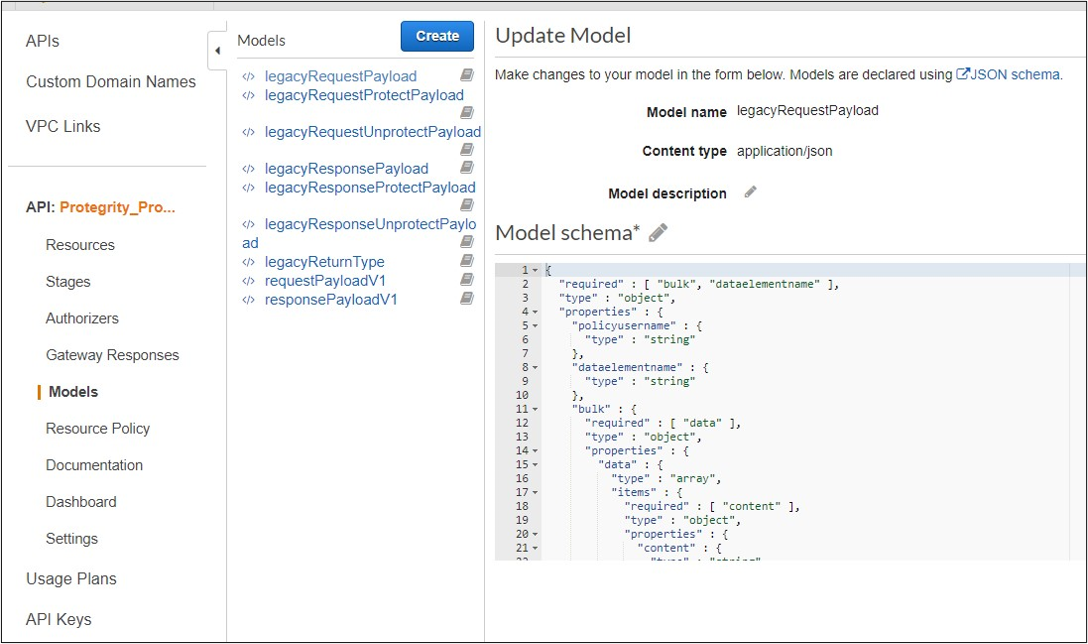
                  Request

                  Performs a policy operation such as protect, unprotect, or reprotect.

                  • Method

                    POST

                  • Parameters

                    dataelementname: (protect/unprotect) Data element to use for the policy operation.

                    externaliv: (protect/unprotect) Optional, external initialization vector.

                    newdataelementname: (reprotect) Data element to use for the output.

                    newexternaliv: (reprotect) Optional, external initialization vector for the output.

                    olddataelementname: (reprotect) Data element to use for the input.

                    oldexternaliv: (reprotect) Optional, external initialization vector for the input.

                    policyusername: User performing the operation.

                    bulk.id: Optional, identifier for the request.

                    bulk.data[].content: Input data to the policy operation.

                  • Result

                    Returns the output of the policy operation.

                  Example 1 - protect without external IV

                  {
                    "protect": {
                      "policyusername": "user1",
                      "dataelementname": "Alphanum",
                      "bulk": {
                        "id": "1",
                        "data": [
                          {
                            "content": <Data encoded in base64>
                          }
                        ]
                      }
                    }
                  }
                  

                  Example 2 - protect with external IV

                  {
                    "protect": {
                      "policyusername": "user1",
                      "dataelementname": "Alphanum",
                      "externaliv": "abc123",
                      "bulk": {
                        "id": "1",
                        "data": [
                          {
                            "content": <Data encoded in base64>
                          }
                        ]
                      }
                    }
                  }
                  

                  Example 3 - unprotect

                  {
                    "unprotect": {
                      "policyusername": "user1",
                      "dataelementname": "Alphanum",
                      "bulk": {
                        "id": "1",
                        "data": [
                          {
                            "content": <Data encoded in base64>
                          }
                        ]
                      }
                    }
                  }
                  

                  Example 4 - reprotect

                  {
                    "reprotect": {
                      "policyusername": "user1",
                      "newdataelementname": "deName",
                      "olddataelementname": "Alphanum",
                      "bulk": {
                        "id": "1",
                        "data": [
                          {
                            "content": <Data encoded in base64>
                          }
                        ]
                      }
                    }
                  }
                  

                  Response

                  Example:

                  {"protect":{"bulk":{"returntype":"success","data":[{"returntype":"success","message":"Data
                   protection was successful.","content":"RGZBUFR4ODAzejFwNjQ5TWg0TEFpcFNqbA=="},{"returntype":"success",
                  "message":"Data protection was successful.","content":"aHNnVVB5QWFDYw=="}]}}}
                  

                  1.5 - Performance

                  Benchmarks and performance tuning

                    Performance Considerations

                    The following factors may cause variation in real performance versus benchmarks:

                    1. Cold startup: The Lambda spends additional time on the initial invocation to decrypt and load the policy into memory. This time can vary between 400 ms and 1200 ms depending on the policy size. Once the Lambda is initialized, subsequent “warm executions” should process quickly.
                    2. Noisy neighbors: There are many multi-tenant components in the Cloud. The same request may differ by 50% between runs regardless of Protegrity. A single execution may not be the best predictor of average performance.
                    3. Size of policy: The size of the policy impacts cold start performance. Larger policies take more time to initialize.
                    4. Lambda memory: AWS provides more virtual cores based on the memory configuration. The initial configuration of 1728MB provides a good tradeoff between performance and cost with the benchmarked policy. Memory can be increased to optimize for your individual case.
                    5. Number of protect, unprotect and reprotect security operations.
                    6. Lambda Concurrent and Burst quotas: AWS limits the number of concurrent executions and how quickly lambda can scale to meet demand. This is discussed in an upcoming section of the document.
                    7. Size of data element. Operations on larger text may take more time.
                    8. API Gateway Authentication. API Gateway support different authorizers and authentication method, which may differ.

                    Lambda Tuning

                    AWS maintains quotas for Lambda concurrent execution. Two of these quotas impact concurrency and compete with other Lambdas in the same account and region.
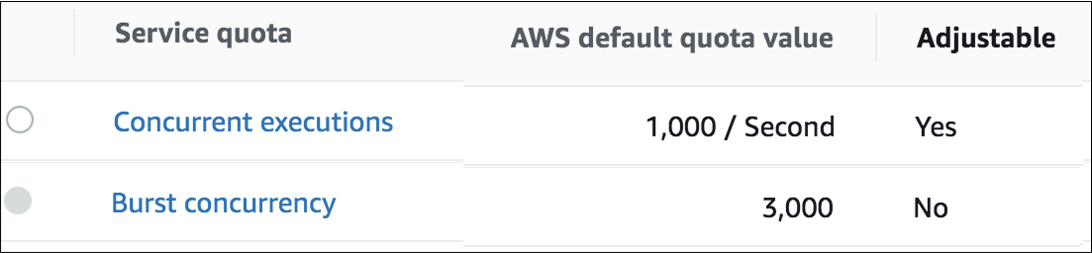
                    The concurrent executions quota cap is the maximum number of Lambda instances that can serve requests for an account and region. The default AWS quota may be inadequate based on peak concurrency based on the table in the previous section. This quota can be increased with an AWS support ticket.

                    The Burst concurrency quota limits the rate at which Lambda will scale to accommodate demand. This quota is also per account and region. The burst quota cannot be adjusted. AWS will quickly scale until the burst limit is reached. After the burst limit is reached, functions will scale at a reduced rate per minute (e.g. 500). If no Lambda instances can serve a request, the request will fail with a 429 Too Many Requests response.

                    The burst limit is a fixed value and varies significantly by AWS region. The highest burst (3,000) is currently available in the following regions: US West (Oregon), US East (N.Virginia), and Europe (Ireland). Other regions can burst between 500 and 1,000. It is recommended to select an AWS region with the highest burst limits.

                    API Gateway Tuning

                    AWS maintains a Throttle quota for the API Gateway. By default, API Gateway limits concurrent requests to 10,000 requests per second and throttles subsequent traffic with a 429 Too Many Requests error response. This quota applies across all APIs in an account and region.

                    The API Gateway default quota may need to be increased based on the Concurrency table. Keep in mind that hitting quota limits effectively throttles any other API services in the region.

                    The API Gateway also limits burst. Burst is the maximum number of concurrent requests that API Gateway can fulfill at any instant without returning 429 Too Many Requests error responses. This limit can be increased by AWS, but is not adjustable.

                    Enable CloudWatch metrics within the API Gateway to monitor max concurrency and investigate throttling errors. See the Concurrency Troubleshooting section on interpreting CloudWatch metrics.

                    Quotas adjustments are applied for region and account. Throttling is also enabled by default in the API Gateway stage used by the Protegrity Lambda function. The stage configuration throttling must be adjusted if the quota is modified. Stage throttling is shown in the following image.
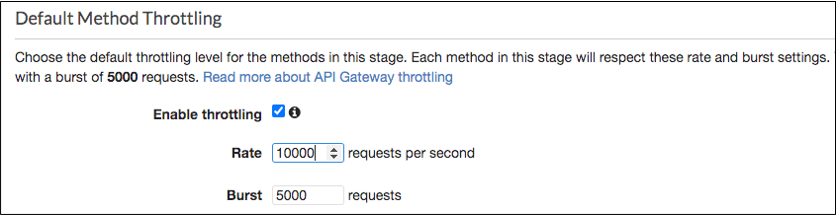
                    For example, the REST Client makes over 20,000 requests/sec to execute the given query. Using API Gateway’s default settings, the requests exceeding 10,000 requests/sec will be throttled. Therefore, this query may fail intermittently due to a high number of throttling errors.

                    Concurrency Troubleshooting

                    Hitting up against quota limits may indicate that quota adjustments are required. Exceeding quota limits may cause a client query to fail or reduce performance. In the worst case, significant throttling can impact the performance of all your API Gateway or Lambda services in the region.

                    CloudWatch Metrics can be manually enabled on the API Gateway to reveal if quotas are being reached. Metrics aggregate errors into two buckets that are 4xx and 5xx. CloudWatch logs can be used to access the actual error code. The following table describes how to interpret the CloudWatch metrics.

                    Error TypePossible issueRemedy
                    4xx errorsAPI Gateway burst or throttle quota exceededRequest an increase to the API Gateway throttle quota.
                    5xx errorsLambda concurrent requests or burst quota exceeded. Verify 4xx errors in Lambda Metrics.Request an increase the Lambda concurrent request quota

                    The following screenshot shows an example of searching CloudWatch Logs using Log Insights:
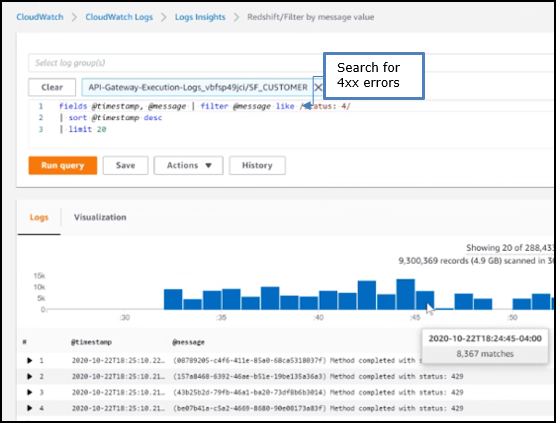
                    Cold-Start Performance

                    Cold-start vs warm execution refers to the state of the Lambda when a request is received. A cold-start undergoes additional initialization, such as, loading the security policy. Warm execution applies to all subsequent requests served by the Lambda.

                    The following table shows an example how these states impact latency and performance:

                    Execution stateAvg. Execution DurationAvg. Total (w/ network latency)
                    Cold execution438 ms522 ms
                    Warm execution< 2ms84 ms

                    Log Forwarder Performance

                    Log forwarder architecture is optimized to minimize the amount of connections and reduce the overall network bandwidth required to send audit logs to ESA. This is achieved with batching and aggregation taking place on two levels. The first level is in protect function instances, where audit logs from consecutive requests to an instance are batched and aggregated. The second level of batching takes place in Amazon Kinesis Stream where log records from different protect function instances are additionally batched and sent to log forwarder function where they are aggregated. This section shows how to configure the deployment to accommodate different patterns of anticipated audit log stream. It also shows how to monitor deployment resources to detect problems before audit records are lost.


                    • Protector Cloud Formation Parameters

                      • AuditLogFlushInterval: Determines the minimum amount of time required for the audit log to be sent to Amazon Kinesis. Changing flush interval may affect the level of aggregation, which in turn may result in different number of connections and different data rates to Amazon Kinesis. Default value is 30 seconds.

                        Increasing the flush interval may result in higher aggregation of audit logs, in fewer connections to Amazon Kinesis, in higher latency of audit logs arriving to ESA and in higher data throughput.

                        Lowering the flush interval may result in lower aggregation of audit logs, in more connections to Amazon Kinesis, in lower latency of audit logs arriving to ESA and in lower data throughput.

                        It is not recommended to reduce the flush interval from default value in production environment as it may overload the Amazon Kinesis service. However, it may be beneficial to reduce flush interval during testing to make audit records appear on ESA faster.


                    • Log Forwarder Cloud Formation Parameters

                      • Amazon KinesisLogStreamShardCount: The number of shards represents the level of parallel streams in the Amazon Kinesis and it is proportional to the throughput capacity of the stream. If the number of shards is too low and the volume of audit logs is too high, Amazon Kinesis service may be overloaded and some audit records sent from protect function may be lost.

                        Default value is 10, however you are advised to test with a production-like load to determine whether this is sufficient or not.

                      • Amazon KinesisLogStreamRetentionPeriodHours: The time for the audit records to be retained in Amazon Kinesis log stream in cases where log forwarder function is unable to read records from the Kinesis stream or send records to ESA, for example due to a connectivity outage. Amazon Kinesis will retain failed audit records and retry periodically until connectivity with ESA is restored or retention period expires.

                        Default value is 24 hours, however you are advised to review this value to align it with your Recovery Time Objective and Recovery Point Objective SLAs.


                    • Monitoring Log Forwarder Resources

                      • Amazon Kinesis Stream Metrics: Any positive value in Amazon Kinesis PutRecords throttled records metric indicates that audit logs rate from protect function is too high. The recommended action is to increase the Amazon KinesisLogStreamShardCount or optionally increase the AuditLogFlushInterval.

                      • Log Forwarder Function CloudWatch Logs: If log forwarder function is unable to send logs to ESA, it will log the following message:

                        [SEVERE] Dropped records: x.
                        
                      • Protect Function CloudWatch Logs: If protect function is unable to send logs to Amazon Kinesis, it will log the following message:

                        [SEVERE] Amazon Kinesis error, retrying in x ms (retry: y/z) ..."
                        

                        Any dropped audit log records will be reported with the following log message:

                        [SEVERE] Failed to send x/y audit logs to Amazon Kinesis.
                        

                    1.6 - Audit Logging

                    Audit log description/formatting

                      Audit Logging

                      Audit records and application logs stream to Amazon CloudWatch Logs or optionally be sent to ESA. Cloud Protect uses a JSON format for audit records that is described in the following sections.

                      You can analyze and alert on audit records using Protegrity ESA or Amazon CloudWatch. Third-party solutions may be used if they are supported by Amazon Cloudwatch or AWS Lambda logging extensions. For more information about forwarding your audit records to ESA, contact Protegrity. For more information about Amazon CloudWatch, refer to the Amazon CloudWatch User Guide.

                      For more information about audit records, refer to the Protegrity Analytics Guide.

                      Audit record fields

                      The audit record format has been altered in version 3.1 of the protector to provide more information.

                      FieldDescription
                      additional_info.deployment_idThe deployment_id contains the name of the Protect Function. It is automatically set based on the cloud-specific environment variables assigned to the Protect Function. This allows identifying the Cloud Protect deployment responsible for generating audit log.
                      additional_info.cluster(Optional) Redshift cluster ARN
                      additional_info.descriptionA human-readable message describing the operation
                      additional_info.query_id(Optional) Identifies the query that triggered the operation
                      additional_info.request_id(Optional) AWS Lambda request identifier
                      cntNumber of operations, may be aggregated
                      correlationid(Deprecated) Use additional_info instead
                      levelLog severity, one of: SUCCESS, WARNING, ERROR, EXCEPTION
                      logtypeAlways “Protection”
                      origin.ipThe private IP address of the compute resource that operates the Protect Function and is responsible for generating the log entry.
                      origin.hostnameHostname of the system that generated the log entry
                      origin.time_utcUTC timestamp when the log entry was generated
                      protection.audit_codeAudit code of the protect operation; see the log return codes table in the Protegrity Troubleshooting Guide
                      protection.dataelementData element used for the policy operation
                      protection.datastoreName of the data store corresponding to the deployed policy
                      protection.mask_setting(Optional) Mask setting from policy management
                      protection.operationOperation type, one of: Protect, Unprotect, Reprotect
                      protection.policy_userUser that performed the operation
                      protector.core_versionInternal core component version
                      protector.familyAlways “cp” for Cloud Protect
                      protector.lambda_versionProtector Lambda application version.
                      protector.pcc_versionInternal pcc component version
                      protector.vendorIdentifies the cloud vendor and the database vendor
                      protector.versionProtector version number
                      signature.checksumHash value of the signature key ID used to sign the log message when the log is generated
                      signature.key_idKey used to sign the log message when the log is generated

                      Example Audit Records

                      The following are sample audit messages:

                      Protect Success:

                      {
                            "additional_info": {
                              "deployment_id": "Protegrity-Protect-function-deployment-id",
                              "description": "Data protect operation was successful.",
                              "query_id": "sf-query-id:01978dbc-0582-d7e4-0000-002a3603a20d",
                              "request_id": "8476a536-e9f4-11e8-9739-2dfe598c3fcd"
                            },
                            "cnt": 4000,
                            "correlationid": "sf-query-id:01978dbc-0582-d7e4-0000-002a3603a20d",
                            "logtype": "Protection",
                            "level": "SUCESS",
                            "origin": {
                              "hostname": "localhost",
                              "ip": "127.0.0.1",
                              "time_utc": 1635363966
                            },
                            "protection": {
                              "dataelement": "deAddress",
                              "operation": "Protect",
                              "audit_code": 6,
                              "datastore": "SAMPLE_POLICY",
                              "policy_user": "test_user"
                            },
                            process":{
                              "name":"protect",
                              "id":"13",
                              "module":"coreprovider",
                              "thread_id":"573580544",
                              "user":"sbx_user1051",
                              "platform":"\"Linux_x64\"",
                              "version":"UNKNOWN"
                            },
                            "client": {
                              "ip":"169.254.62.117"
                            },
                            "protector": {
                              "family": "cp",
                              "version": "4.0.0.102",
                              "vendor": "aws.snowflake",
                              "datastore":"SAMPLE_POLICY",
                              "pcc_version": "4.0.0.9",
                              "core_version": "2.1.4+0.g93016.2.1",
                              "lambda_version":"4.0.1"
                            },
                            "signature": {
                              "key_id": "95f5a194-b0a4-4351-a",
                              "checksum": "B324AF7C56944D91C47847A77C0367C594C0B948E7E75654B889571BD4F60A71"
                            }
                          }
                      

                      User permission denied:

                      {
                            "additional_info": {
                              "deployment_id": "Protegrity-Protect-function-deployment-id",
                              "description": "The user does not have the appropriate permissions to perform the requested operation.",
                              "query_id": "sf-query-id:01978dbc-0582-d7e4-0000-002a3603a20d",
                              "request_id": "8476a536-e9f4-11e8-9739-2dfe598c3fcd"
                            },
                            "cnt": 4000,
                            "correlationid": "sf-query-id:01978dbc-0582-d7e4-0000-002a3603a20d",
                            "logtype": "Protection",
                            "level": "ERROR",
                            "origin": {
                              "hostname": "localhost",
                              "ip": "127.0.0.1",
                              "time_utc": 1635363966
                            },
                            "protection": {
                              "dataelement": "deAddress",
                              "operation": "Protect",
                              "audit_code": 3,
                              "datastore": "SAMPLE_POLICY",
                              "policy_user": "test_user"
                            },
                            process":{
                              "name":"protect",
                              "id":"13",
                              "module":"coreprovider",
                              "thread_id":"573580544",
                              "user":"sbx_user1051",
                              "platform":"\"Linux_x64\"",
                              "version":"UNKNOWN"
                            },
                            "client": {
                              "ip":"169.254.62.117"
                            },
                            "protector": {
                              "family": "cp",
                              "version": "4.0.0.102",
                              "vendor": "aws.snowflake",
                              "datastore":"SAMPLE_POLICY",
                              "pcc_version": "4.0.0.9",
                              "core_version": "2.1.4+0.g93016.2.1",
                              "lambda_version":"4.0.1"
                            },
                            "signature": {
                              "key_id": "95f5a194-b0a4-4351-a",
                              "checksum": "A216797C56944D91C47847A77C0367C594C0B948E7E75654B889571BD4F60A71"
                            }
                          }
                      

                      Data element not found:

                      {
                            "additional_info": {
                              "deployment_id": "Protegrity-Protect-function-deployment-id",
                              "description": "The data element could not be found in the policy.",
                              "query_id": "sf-query-id:01978dbc-0582-d7e4-0000-002a3603a20d",
                              "request_id": "8476a536-e9f4-11e8-9739-2dfe598c3fcd"
                            },
                            "cnt": 4000,
                            "correlationid": "sf-query-id:01978dbc-0582-d7e4-0000-002a3603a20d",
                            "logtype": "Protection",
                            "level": "ERROR",
                            "origin": {
                              "hostname": "localhost",
                              "ip": "127.0.0.1",
                              "time_utc": 1635363966
                            },
                            "protection": {
                              "dataelement": "deAddress",
                              "operation": "Protect",
                              "audit_code": 2,
                              "datastore": "SAMPLE_POLICY",
                              "policy_user": "test_user"
                            },
                            process":{
                              "name":"protect",
                              "id":"13",
                              "module":"coreprovider",
                              "thread_id":"573580544",
                              "user":"sbx_user1051",
                              "platform":"\"Linux_x64\"",
                              "version":"UNKNOWN"
                            },
                            "client": {
                              "ip":"169.254.62.117"
                            },
                            "protector": {
                              "family": "cp",
                              "version": "4.0.0.102",
                              "vendor": "aws.snowflake",
                              "datastore":"SAMPLE_POLICY",
                              "pcc_version": "4.0.0.9",
                              "core_version": "2.1.4+0.g93016.2.1",
                              "lambda_version":"4.0.1"
                            },
                            "signature": {
                              "key_id": "95f5a194-b0a4-4351-a",
                              "checksum": "AF09217C56944D91C47847A77C0367C594C0B948E7E75654B889571BD4F60A71"
                            }
                          }
                      

                      1.7 - No Access Behavior

                      Describes the result of various policy configurations with no access operations

                      No Access Behavior

                      The security policy maintains a No Access Operation, configured in an ESA, which determines the response for unauthorized unprotect requests.
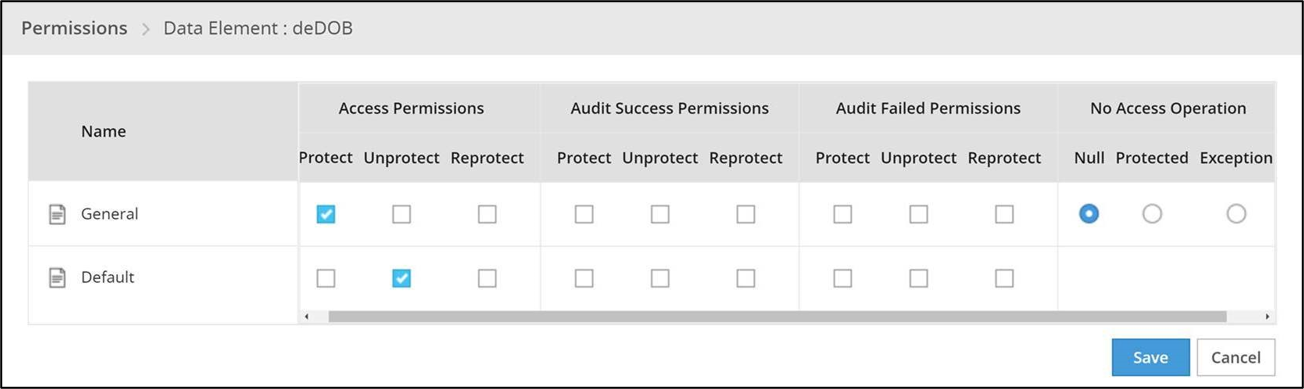
                      The following table describes the result returned in the response for the various no access unprotect permissions.

                      No Access OperationData Returned
                      Nullnull
                      Protected(protected value)
                      ExceptionQuery will fail with an exception

                      1.8 - Known Limitations

                      Known product limitations.

                      Known Limitations

                      Known product limitations:

                      • FPE is supported only for ASCII values.

                      1.9 - Upgrading To The Latest Version

                      Instructions for upgrading the protector.

                        Download the Latest Version

                        You can download the latest version of the deployment package from https://my.protegrity.com. Navigate to Data Protection > Cloud Protect to download the latest version.

                        After downloading the deployment package from the Protegrity Portal, unzip the package to extract the artifact files. In the AWS Console, navigate to the S3 bucket that was previously created to upload deployment artifacts (see: Create S3 bucket for Installing Artifacts).

                        Upload the following artifacts to the S3 bucket:

                        - -
                        • protegrity-protect-<version>.zip
                        • protegrity-agent-<version>.zip
                        • protegrity-external-extension-<version>.zip
                        • protegrity-sample-policy-<version>.zip
                        • protegrity-protect-<version>.zip
                        • protegrity-agent-<version>.zip
                        • protegrity-external-extension-<version>.zip
                        • protegrity-sample-policy-<version>.zip
                        • protegrity-protect-<version>.zip
                        • protegrity-agent-<version>.zip
                        • protegrity-external-extension-<version>.zip
                        • protegrity-sample-policy-<version>.zip
                        • protegrity-athena-protect-udfs-<version>.jar
                        • protegrity-external-extension-<version>.zip
                        • protegrity-agent-<version>.zip
                        • protegrity-sample-policy-<version>.zip

                        If the release version matches your existing deployment, you don’t need to upload it again. Save the following artifacts on your local system so that you have them available during the next steps:

                        - -
                        • pty_protect_cf.json
                        • pty_agent_cf.json
                        • pty_protect_cf.json
                        • pty_agent_cf.json
                        • pty_protect_api_cf.json
                        • pty_agent_cf.json
                        • pty_log_forwarder_cf.json
                        • pty_athena_protect_cf.json
                        • pty_agent_cf.json

                        Perform the following steps to upgrade the Agent Lambda and Protect Lambda separately.

                        Disable Protegrity Agent Function CloudWatch Event Rule

                        Cloud Watch Event Rule is used to periodically run Protegrity Agent Function to synchronize policy from ESA. This functionality is optional when deploying Protegrity Serverless Solution. If the Event Rule is enabled, it must be disabled temporarily for the time of the upgrade process.

                        Follow the steps below to determine if your deployment uses Event Rule and disable it.

                        1. Go to AWS Cloud Formation and select existing Protegrity deployment stack.

                        2. Select Resources tab from the top portion of the screen.

                        3. Check if there is a resource with ScheduledRule LogicalID. If there is no such resource you can skip to Upgrading Policy Agent Lambda section. If the scheduled rule is there, continue with the next steps in this section.

                        4. Click on the Physical ID link in the ScheduledRule row. The link opens Policy Agent Event Rule configuration.

                        5. Select Disable from the top-right portion of the screen. This will disable the rule. You will re-enable it after the upgrade process is complete.

                        Upgrading Policy Agent Lambda

                        1. Go to AWS Lambda console and select existing Protegrity Agent Lambda.

                        2. Click Actions in top right portion of the screen. Select Publish new version. Click Publish. The version of Agent Lambda you just created will serve as restore point in the case you needed to rollback the upgrade.

                        3. Go to Lambda Configuration > Environment variables.

                        4. Record environment variables values. You will use them later to configure upgraded Lambda Function. You can use the aws cli command below to save the function variables into the local json file:

                          aws lambda get-function-configuration --function-name \
                          arn:aws:lambda:<aws_region>:<aws_account>:function:<function_name> \
                          --query Environment > <function_name>_env_config.json
                          
                        5. Go to AWS Cloud Formation and select existing Protegrity Agent deployment stack.

                        6. Select Update. Check Replace current template > Upload a template file.

                        7. Upload pty_agent_cf.json file and select Next.

                        8. Click Next until Review window and then select Update stack.

                        9. Wait for the Cloud Formation to complete.

                        10. Navigate back to Agent Lambda Function.

                        1. Go to Configuration > Environment variables. Replace placeholder values with values recorded in previous step. Alternatively, you can run the following aws cli command to update function configuration using json file saved in the previous steps:

                          aws lambda update-function-configuration --function-name \
                          arn:aws:lambda:<aws_region>:<aws_account>:function:<function_name> \
                          --environment file://./<function_name>_env_config.json
                          
                        2. If you are upgrading from versions prior to v3.0, backup and remove existing policy from the bucket defined by AWS_POLICY_S3_BUCKET property, so that the policy can be re-downloaded and re-encrypted with new ‘key commitment’ feature.

                        3. If you are upgrading from version prior to 1.6.1 please follow the steps below, otherwise the upgrade process is completed.

                        4. From AWS Console, navigate to IAM > Policies

                        5. Search for the Agent Lambda IAM Policy created in Create Agent Lambda IAM policy

                        6. Click on the policy, then select Edit Policy. Select JSON tab.

                        7. Add the following statement to the list of policy statements.

                          
                          {
                            "Sid": "LambdaGetConfiguration",
                            "Effect": "Allow",
                            "Action": [
                                "lambda:GetFunctionConfiguration"
                            ],
                            "Resource": [
                                "arn:aws:lambda:*:*:function:*"
                            ]
                          }
                          
                        8. Click Review Policy, then Save Changes. Wait for the changes to save.

                        Upgrading Log Forwarder Lambda

                        • Publish Log Forwarder Lambda Version

                          Publishing a version of the Log Forwarder Lambda allows to roll-back to pre-existing version if upgrade fails

                          1. Go to AWS Lambda console and select existing Protegrity Log Forwarder Lambda.

                          2. Click Actions in top right portion of the screen. Select Publish new version. Click Publish.

                          3. Record the Lambda version number. It will be displayed at the top of the screen. You can also retrieve it from the Lambda function view, under Versions tab.

                            Log Forwarder Lambda version number for roll-backs: ___________________

                        • Disable Kinesis Trigger

                          Disabling Kinesis trigger ensures there are no unprocessed or re-processed events while function is upgraded.

                          1. Go to AWS Lambda console and select existing Protegrity Log Forwarder Lambda.
                          2. Select Configuration tab > Triggers
                          3. Check Kinesis trigger and click Edit button
                          4. Uncheck Activate trigger and click Save
                          5. Wait for function to stop processing events by monitoring function in Monitor tab
                        • Upgrade Forwarder Lambda Version

                          Upgrade Log Forwarder function with new code

                          1. Go to AWS Cloud Formation and select existing Protegrity Log Forwarder deployment stack.
                          2. Select Update Stack > Make a direct update.
                          3. Select Replace existing template > Upload a template file.
                          4. Upload pty_log_forwarder_cf file and select Next.
                          5. Click Next until Review window and then select Update stack.
                          6. Wait for the Cloud Formation to complete.
                        • Enable Kinesis Trigger

                          1. Go to AWS Lambda console and select existing Protegrity Log Forwarder Lambda.
                          2. Select Configuration tab > Triggers
                          3. Check Kinesis trigger and click Edit button
                          4. Check Activate trigger and click Save Log Forwarder function will now start processing events from where it left off when Kinesis trigger was disabled.
                        • Monitor and roll-back

                          Monitor Log Forwarder function for errors in its CloudWatch logs and in Montior tab. To roll back function to the previous version if any errors occur follow these steps:

                          1. Go to AWS Lambda console and select existing Protegrity Log Forwarder Lambda.

                          2. Select Configuration tab > Triggers

                          3. Expand Details section of Kinesis trigger and record UUID value

                          4. Execute the following AWS CLI command to move Kinesis trigger to previous version of Log Forwarder Lambda that was created earlier and recorded as Log Forwarder Lambda version number for roll-backs. Substitute kinesis-mapping-uuid, log-forwarder-function-name, version-for-roll-backs with your values:

                            
                            aws lambda update-event-source-mapping --uuid <kinesis-mapping-uuid> --function-name <log-forwarder-function-name>:<version-for-roll-backs>
                            
                          5. Find Kinesis trigger attached to previous version of Log Forwarder Lambda by navigating Versions tab > Version number link in the Versions column Kinesis trigger is now moved to previous version of Log Forwarder Lambda function.

                        Upgrading Protect Lambda

                        Diagram below illustrates upgrade steps.
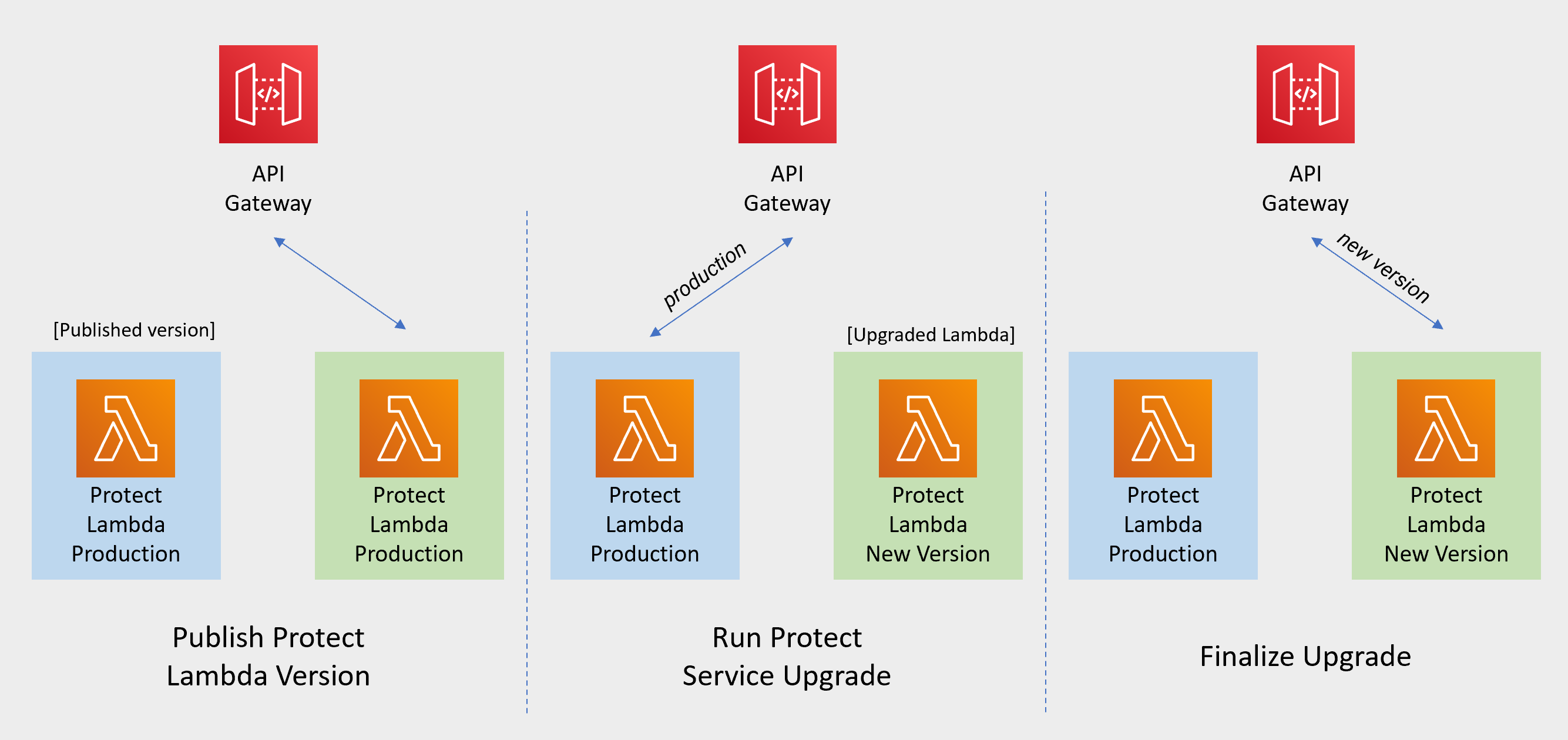
                        Snowflake Function Upgrade Steps

                        Redshift Function Upgrade Steps

                        Cloud API Function Upgrade Steps

                        Athena Function Upgrade Steps

                        • Publish Protect Lambda Version

                          Publishing a version of the Protect Lambda allows updating it without interruptions to the existing traffic.

                          1. Go to AWS Lambda console and select existing Protegrity Protect Lambda.

                          2. Go to Lambda Configuration > Environment variables.

                          3. Record environment variables values. You will use them later to configure upgraded Lambda Function. You can use the aws cli command below to save the function variables into the local json file:

                            aws lambda get-function-configuration --function-name \
                            arn:aws:lambda:<aws_region>:<aws_account>:function:<function_name> \
                            --query Environment > <function_name>_env_config.json
                            
                          4. Click Actions in top right portion of the screen. Select Publish new version. Click Publish.

                          5. Record the Lambda version number. It will be displayed at the top of the screen. You can also retrieve it from the Lambda function view, under Versions tab.

                            Protect Lambda version number: ___________________

                          6. If you are upgrading a Cloud Protect Redshift version 1.x to 2.x/3x, you must recreate your Redshift external function definitions with Protect Lambda Function version appended to the Lambda Function name. See example below.

                            CREATE OR REPLACE EXTERNAL FUNCTION PTY_PROTECT_TEST ( val varchar )
                                RETURNS varchar
                                VOLATILE lambda
                                'Protegrity_Protect_test:<protect_lambda_version_number>' iam_role
                                'arn:aws:iam::123456789212:role/example_role';
                            
                        • Run protect service upgrade

                          In this step, the Protect service including Lambda $LATEST version will be updated using Cloud Formation template. The Lambda version created in previous step will be used to serve existing traffic during the upgrade process.

                          1. Go to AWS Cloud Formation and select existing Protegrity deployment stack.

                          2. Select Update. Check Replace current template > Upload a template file.

                          3. Upload pty_protect_cf.json file and select Next.

                          4. Update ProtectFunctionProductionVersion parameter with Protect Lambda version number recorded in step 3.

                          5. Click Next until Review window and then select Update stack.

                          6. Wait for the Cloud Formation to complete.

                          7. Go back to Lambda console and select Protect Lambda.

                          8. Go to Configuration > Environment variables. Replace placeholder values with values recorded in previous step. Alternatively, you can run the following aws cli command to update function configuration using json file saved in the previous steps:

                            aws lambda update-function-configuration --function-name \
                            arn:aws:lambda:<aws_region>:<aws_account>:function:<function_name> \
                            --environment file://./<function_name>_env_config.json
                            
                          9. Navigate to Aliases tab. Verify that Production alias points to the lambda version you specified in the cloud formation template.

                          10. The upgraded Protect Lambda is configured with a sample policy. Run Agent Lambda Function before continuing with next steps.

                        • Finalize upgrade

                          In this step, the Protect Lambda will be configured to serve traffic using $LATEST version upgraded in the previous step.

                          1. Go back to Protegrity AWS Cloud Formation deployment stack.

                          2. Select Update. Check Use Current template.

                          3. Update ProtectFunctionProductionVersion parameter with the following value: $LATEST.

                          4. Click Next until Review window and then select Update stack.

                          5. Go back to Lambda console and select Protect Lambda.

                          6. From the Lambda console, verify that Latest alias points to $LATEST version.

                          7. Test your function to make sure it works as expected.

                          8. If you are upgrading a Cloud Protect Redshift version 1.x to 2.x/3x, you must recreate your Redshift external function definitions with Protect Lambda Function version appended to the Lambda Function name. See example below.

                            CREATE OR REPLACE EXTERNAL FUNCTION PTY_PROTECT_TEST ( val varchar )
                                RETURNS varchar
                                VOLATILE lambda
                                'Protegrity_Protect_test:Production' iam_role
                                'arn:aws:iam::123456789212:role/example_role';
                            
                          9. If you need to rollback to older version of Protect Lambda, you can re-run the cloud formation with ProtectFunctionProductionVersion parameter set to the previous version of Protect Lambda.

                        Re-enable Protegrity Agent Function CloudWatch Event Rule

                        If the Event Rule was disabled at the beginning of the upgrade process, you must re-enabled it. Follow the steps below to re-enable Policy Agent Event rule.

                        1. Go to the Protegrity Agent Cloud Formation Stack.

                        2. Select Resources tab from the top portion of the screen.

                        3. Click on the Physical ID link in the ScheduledRule row. The link opens Policy Agent Event Rule configuration.

                        4. Select Enable from the top-right portion of the screen. This will enable the rule. You will re-enable it after the upgrade process is complete.

                        1.10 - Appendices

                        Additional references for the protector.

                        1.10.1 - ADFS Federation using AWS Cognito User Pools

                        Reference for integrating ADFS with API Gateway

                        ADFS Federation using AWS Cognito User Pools

                        Common use case for Protegrity Policy Member source integrates with customer’s Active Directory. The AWS API Gateway can integrate with ADFS using AWS Cognito. The following article describes the procedure.

                        https://aws.amazon.com/blogs/mobile/building-adfs-federation-for-your-web-app-using-amazon-cognito-user-pools/

                        1.10.2 - Installing the Policy Agent and Protector in Different AWS Accounts

                        Example steps to install Agent in a different AWS account than the Protector

                          The Policy Agent Lambda function and Protect Lambda functions can be installed in separate AWS accounts. However, additional configuration is required to authorize the Policy Agent to provision the security policy to a remote Protect Lambda function.

                          Create Agent Lambda IAM policy

                          1. Login to the AWS account that hosts the Protect Lambda function.

                          2. From the AWS IAM console, select Policies > Create Policy.

                          3. Select the JSON tab and copy the following snippet.

                            {
                              "Version": "2012-10-17",
                              "Statement": [
                                {
                                  "Sid": "LambdaUpdateFunction",
                                  "Effect": "Allow",
                                  "Action": [
                                    "lambda:UpdateFunctionConfiguration"
                                  ],
                                  "Resource": [
                                    "arn:aws:lambda:*:*:function:*"
                                  ]
                                },
                                {
                                  "Sid": "LambdaReadLayerVersion",
                                  "Effect": "Allow",
                                  "Action": [
                                    "lambda:GetLayerVersion",
                                    "lambda:ListLayerVersions"
                                  ],
                                  "Resource": "*"
                                },
                                {
                                  "Sid": "LambdaDeleteLayerVersion",
                                  "Effect": "Allow",
                                  "Action": "lambda:DeleteLayerVersion",
                                  "Resource": "arn:aws:lambda:*:*:layer:*:*"
                                },
                                {
                                  "Sid": "LambdaPublishLayerVersion",
                                  "Effect": "Allow",
                                  "Action": "lambda:PublishLayerVersion",
                                  "Resource": "arn:aws:lambda:*:*:layer:*"
                                },
                                {
                                  "Sid": "S3GetObject",
                                  "Effect": "Allow",
                                  "Action": [
                                    "s3:GetObject"
                                  ],
                                  "Resource": "arn:aws:s3:::*/*"
                                },
                                {
                                  "Sid": "S3PutObject",
                                  "Effect": "Allow",
                                  "Action": [
                                    "s3:PutObject"
                                  ],
                                  "Resource": "arn:aws:s3:::*/*"
                                },
                                {
                                  "Sid": "LambdaGetConfiguration",
                                  "Effect": "Allow",
                                  "Action": [
                                      "lambda:GetFunctionConfiguration"
                                  ],
                                  "Resource": [
                                      "arn:aws:lambda:*:*:function:*"
                                  ]
                                }
                              ]
                            }
                            
                          4. Replace the wildcards (*) with the region, account, and resource name information where required.

                          5. Select Review policy, type in the policy name, and confirm. Record policy name:

                            Agent Lambda Cross Account Policy Name: ___________________

                          Create Policy Agent cross-account IAM Role

                          1. Login to the AWS account that hosts the Protect Lambda function.

                          2. From the AWS IAM console, select Roles > Create Role

                          3. Select AWS Service > Lambda . Proceed to Permissions.

                          4. Select Policy created in the step above. Proceed to Tags.

                          5. Specify Tag, proceed to the final screen. Type in policy name and confirm. Record the name.

                            Policy Agent Cross Account IAM Role Name: ___________________

                          Allow the Policy Agent Cross-Account Role to be Assumed by the Policy Agent IAM Role

                          1. Login to the AWS account that hosts the Protect Lambda function.

                          2. Navigate to the previously created IAM Role (Agent Lambda Cross-Account IAM Role Name).

                          3. Navigate to Trust Relationships > Edit Trust Relationships.

                          4. Modify the Policy Document, replacing the placeholder value indicated in the following snippet as <Agent Lambda IAM Execution Role ARN> with ARN of Agent Lambda IAM Role that was created in Agent Installation.

                            {
                              "Version": "2012-10-17",
                              "Statement": [
                                {
                                  "Effect": "Allow",
                            
                               "Principal": {
                            
                                        "AWS": "<Agent Lambda IAM Execution Role Name>"
                            
                                  },
                                  "Action": "sts:AssumeRole"
                                }
                              ]
                            }
                            
                          5. Click Update Trust Policy.

                          Add Assume Role to the Policy Agent Execution IAM Role

                          1. Login to the AWS account that hosts the Policy Agent.

                          2. Navigate to the Agent Lambda IAM Execution Role that was created in Agent Installation.

                            {
                              "Version": "2012-10-17",
                              "Statement": [
                                {
                                  "Effect": "Allow",
                            
                               "Principal": {
                            
                                        "AWS": "<Agent Lambda IAM Execution Role Name>"
                            
                                  },
                                  "Action": "sts:AssumeRole"
                                }
                              ]
                            }
                            
                          3. Add Inline Policy.

                          4. Modify the Policy Document, replacing the placeholder value indicated in the following snippet as <Agent Lambda Cross-Account IAM ARN> with the value recorded in Create Policy Agent cross-account IAM Role.

                            {
                              "Version": "2012-10-17",
                              "Statement": [
                                {
                                  "Effect": "Allow",
                                  "Action": [
                                    "sts:AssumeRole"
                                  ],
                                  "Resource": "<Agent Lambda Cross-Account IAM  ARN>."
                                }
                              ]
                            }
                            
                          5. When you are finished, choose Review Policy.

                          6. On the Review policy page, type a Name, then choose Create Policy.

                          Update the Policy Agent Lambda Configuration

                          1. From the AWS console, navigate to Lambda, and select the Policy Agent Lambda function.

                          2. Select Configuration tab | Environment variables.

                          3. Select Edit and add the following environment variables with the value from Agent Lambda Cross-Account IAM ARN:

                            ParameterValue
                            AWS_ASSUME_ROLEAgent Lambda Cross-Account IAM ARN
                          4. Ensure the values in the Parameters AWS_POLICY_S3_BUCKET, AWS_PROTECT_FN_NAME and AWS_POLICY_LAYER_NAME are all in the Protect Lambda Function AWS Account.

                          5. In case custom VPC hostname configuration is used, you will need to set the ENDPOINT_URL. Refer to Policy Agent - Custom VPC Endpoint Hostname Configuration.

                            AWS_VPC_ENDPOINT_URL

                            <AWS_VPC_ENDPOINT>

                          6. Click Save and Run the Lambda. The Lambda will now assume the Role in Protect Lambda Function AWS Account and update the policy cross accounts.

                          1.10.3 - Integrating Cloud Protect with PPC (Protegrity Provisioned Cluster)

                          Concepts for integrating with PPC (Protegrity Provisioned Cluster)

                          This guide describes how to configure the Protegrity Policy Agent and Log Forwarder to connect to a Protegrity Provisioned Cluster (PPC), highlighting the differences from connecting to ESA.

                          Key Differences: PPC vs ESA

                          FeatureESA 10.2PPC (this guide)
                          Datastore Key FingerprintOptional/RecommendedRequired
                          CA Certificate on AgentOptional/RecommendedOptional/Recommended
                          CA Certificate on Log ForwarderOptional/RecommendedNot supported
                          Client Certificate Authentication from Log ForwarderOptional/RecommendedNot supported
                          IP AddressESA IP addressPPC address

                          Prerequisites

                          • Access to PPC and required credentials.
                          • Tools: curl, kubectl installed.

                          Policy Agent Setup with PPC

                          Follow these instructions as a guide for understanding specific inputs for Policy Agent integrating with PPC:

                          1. Obtain the Datastore Key Fingerprint

                            To retrieve the fingerprint for your Policy Agent:

                            curl -k -H "Authorization: Bearer ${TOKEN}" -X POST https://${HOST}/pty/v2/pim/datastores/1/export/keys  -H "Content-Type: application/json" --data '{
                              "algorithm": "RSA-OAEP-256",
                              "description": "example-key-from-kms",
                              "pem": "-----BEGIN PUBLIC KEY-----\nABC123... ...890XYZ\n-----END PUBLIC KEY-----"
                            }'
                            

                            Sample Output:

                            {"uid":"1","algorithm":"RSA-OAEP-256","fingerprint":"4c:46:d8:05:35:2e:eb:39:4d:39:8e:6f:28:c3:ab:d3:bc:9e:7a:cb:95:cb:b1:8e:b5:90:21:0f:d3:2c:0b:27","description":"example-key-from-kms"}
                            

                            Record the fingerprint value and configure it as the PTY_DATASTORE_KEY for the Policy Agent.

                          2. Retrieve the PPC CA Certificate

                            To obtain the CA certificate from PPC:

                            kubectl -n api-gateway get secret ingress-certificate-secret -o jsonpath='{.data.ca\.crt}' | base64 -d > CA.pem
                            

                            Use the CA.pem that was returned as described in Policy Agent Installation.

                          3. Configure the PPC Address

                            Use the PPC address in place of the ESA IP address wherever required in your configuration.

                          Log Forwarder Setup with PPC

                          • The Log Forwarder will proceed without certificates and will print a warning if PtyEsaCaServerCert and PtyEsaClientCertificatesSecretId are not provided.
                          • No additional certificate or CA configuration is needed for PPC.

                          Troubleshooting

                          Protector Lambda fails with “AWS KMS Decrypt failed”

                          Symptom:

                          After a successful Policy Agent run and layer update, the Protector Lambda returns:

                          {
                            "body": "{\"error_msg\":\"Failed to open decoder: rpdecode decrypt failure: dek callback failed: AWS KMS Decrypt failed: \",\"success\":false}",
                            "isBase64Encoded": false,
                            "statusCode": 400
                          }
                          

                          The Protector Lambda logs show:

                          [SEVERE] [utils.cpp:185] AWS KMS Decrypt failed:
                          

                          Cause:

                          The public key configured in the PPC/ESA datastore does not match the KMS key pair used by the Policy Agent. The policy package is encrypted with the public key stored in the datastore. If that key does not correspond to the KMS key pair whose private key is used for decryption, the Protector Lambda will fail to decrypt the policy.

                          Resolution:

                          1. Identify the KMS key pair used by the Policy Agent (the key ARN configured during pre-configuration).
                          2. Export the public key from that KMS key pair.
                          3. In PPC/ESA, ensure the datastore’s export key is configured with the public key from that same KMS key pair. See Obtain the Datastore Key Fingerprint above.
                          4. Re-run the Policy Agent to generate a new policy package encrypted with the correct key.
                          5. Test the Protector Lambda again.

                          Additional Notes

                            1.10.4 - Invoke Lambda Directly

                            Invoke protector lambda function directly (without API Gateway)

                            AWS Lambda can be invoked directly, such as from AWS SDK. This section contains information about request and response payloads with examples demonstrating direct invocation using AWS CLI and Python SDK (Boto3).

                            Request Payload

                            Lambda request payload for the direct invocation is defined as following

                            {
                              "body": "<rest-api-request-payload>",
                              "path": "/v1/<operation>",
                              "headers": {}
                            }
                            
                            • body - JSON string. Request schemas defined in Rest API Request.
                            • path - can be either ‘/v1/protect’ or ‘/v1/unprotect’.
                            • headers - can be used to pass authorization headers. See example below.

                            Example request:

                            {
                              "body": "{\"query_id\": \"3\",\"user\": \"user1\",\"data_element\": \"deAlpha\",\"data\": [\"data1\", \"data2\"]}",
                              "path": "/v1/protect",
                              "headers": {}
                            }
                            

                            Example Request with JWT authorization:

                            {
                              "body": "{\"query_id\": \"3\",\"user\": \"user1\",\"data_element\": \"deAlpha\",\"data\": [\"data1\", \"data2\"]}",
                              "path": "/v1/protect",
                              "headers": {
                                "authorization": "bearer eyJhbGciOiJSUzI1NiIsInR5cCI6IkpXVCJ9.eyJpYXQiOjE2MTM4NjIzNzEsImlkIjoiYS1iLWMtZC1lLWYtMS0yLTMiLCJ1c2VybmFtZSI6IlBhdWwgQXRyZWlkZXMifQ.R1NcJ43540HKdhEBOK9WaMMpjBOYSJetckQKrcPQdz0z6sx1EDwHXYngBP9DtHgUM-6Vf1VNjtFh_Nqfeepp1BavmigIXoe3ZbrxRI3DFKi2UuLmgn--EYrSGlWsQjnmjaz5qUkID9iY2MtsRunKSuolSvG9UsD1G32kv0KZYX0"
                              }
                            }
                            

                            Response Payload

                            Lambda response payload has the following structure

                            {
                              "body": "<rest-api-response-payload>"
                              "isBase64Encoded": false,
                              "statusCode": <http-status-code>,
                            }
                            
                            • body - JSON string. Response schemas defined in Rest API Response.
                            • isBase64Encoded - always set to false.
                            • statusCode - HTTP status code integer.

                            Success Response Payload Example:

                            {
                              "body": "{\"encoding\":\"utf8\",\"results\":[\"xcgd\", \"migs\"],\"success\":true}", 
                              "isBase64Encoded": false, 
                              "statusCode": 200
                            }
                            

                            Error Response

                            Cloud API Lambda returns following error responses depending on the error type

                            Cloud API Protection Operation Error
                                  Returned when invalid data element is used or user has insufficient permissions to execute security operation.

                            {
                              "body": "{\"error_msg\":\"Unprotect failed. Data element not found. Refer to audit log for details.\",\"success\":false}", 
                              "isBase64Encoded": false, 
                              "statusCode": 400
                            }
                            

                            Cloud API Invalid Request Error
                                  Missing fields in the incoming request or malformed request JSON.

                            {
                              "body": "Request format is not supported", 
                              "isBase64Encoded": false, 
                              "statusCode": 400
                            }
                            

                            Cloud API Unexpected Lambda Exception Error
                                  Caused by Lambda runtime exception, for instance due to too short timeout or not enough memory.

                            {
                              "errorMessage": "2023-01-18T16:42:19.593Z d0cf62d0-9eaf-427b-8ca5-1bdd8bd0b082 Task timed out after 10.25 seconds"
                            }
                            

                            Examples

                            Prerequisites:

                            • AWS SDK or Command Line
                            • AWS Access Key ID and AWS Access Key

                            See Request Payload for request payload examples.

                            AWS CLI command to invoke Cloud API Lambda function:

                            aws lambda invoke --function-name Protegrity_Protect_RESTAPI_{stackname} --payload
                                fileb://request_payload.json --log-type Tail output


                            Sample Python code demonstrating Cloud API Direct Lambda Calls

                            import json
                            import logging
                            import boto3
                            lambda_client = boto3.client("lambda")
                            logging.basicConfig(format="%(message)s")
                            logger = logging.getLogger('pty_cloud_api_sample')
                            logger.setLevel(logging.DEBUG)
                            
                            
                            class ProtectClient(object):
                              """ 
                                Sample client demonstrating how to invoke Protegrity Cloud API Lambda
                            
                                  protect_fn: str - Name of the Cloud API Lambda (for example, Protegrity_Protect_RESTAPI_my_deployment)
                              """
                            
                              def __init__(self, protect_fn):
                                self.protect_fn = protect_fn
                            
                              def invoke_protect(self, values, data_element, operation, user, query_id,
                                          column_info=""):
                                """ 
                                Invokes Protegrity Cloud API Lambda to execute protect or unprotect operation
                            
                                  values: list[str] - List of values to be protected/unprotected
                                  data_element: str - Name of the policy data element to use with protect/unprotect operation
                                  operation: str - Either 'protect' or 'unprotect'
                                  user: str - Policy user
                                  query_id: str - Query id will be present in the audit log
                                  column_info: - Used for troubleshooting, for instance, when protecting values/rows from multiple database columns
                                """
                            
                                # Set authorization header here if JWT authorization is 
                                # enabled in Cloud API Function configuration
                                headers = {"Authorization": ""}
                                request_body = {
                                  "user": user,
                                  "data_element": data_element,
                                  "data": values,
                                  "query_id": query_id
                                }
                                payload = json.dumps({"body": json.dumps(request_body), "path": f"/v1/{operation}",
                                              "headers": headers})
                                logger.debug(f"Request payload: {payload}")
                                response = lambda_client.invoke(FunctionName=self.protect_fn, Payload=payload)
                                lambda_response_payload = json.loads(response["Payload"].read().decode())
                                logger.debug(f"Response payload: {lambda_response_payload}")
                                response_status_code = lambda_response_payload.get("statusCode")
                                response_body_string = lambda_response_payload.get("body")
                                if response_status_code == None or response_body_string == None:
                                  raise Exception(f"Unexpected Cloud API Lambda error: [{lambda_response_payload}]")
                                try:
                                  body_json = json.loads(response_body_string)
                                  if response_status_code == 200:
                                    return body_json.get("results", [])
                                  elif body_json.get("error_msg"):
                                    raise Exception(f"Cloud API Lambda error: [{response_status_code} - {body_json.get('error_msg')}]")
                                  raise Exception(f"Unexpected Cloud API Lambda error: [{lambda_response_payload}]")
                                except json.decoder.JSONDecodeError:
                                  # Cloud API may return error in the response body
                                  # For example, {"statusCode": 400, "body":"Error message"}
                                  raise Exception(f"Cloud API Lambda error: [{response_status_code} - {response_body_string}]")
                            
                            # Replace cloud-api-lambda-name with the name of the Cloud API Lambda
                            # For example, Protegrity_Protect_RESTAPI_my_deployment
                            protect_client = ProtectClient('cloud-api-lambda-name')
                            protected_data = ["UtfVk UHgcD!"]
                            logger.info(f"Protected data: {protected_data}")
                            unprotected_data = protect_client.invoke_protect(
                              values=protected_data, 
                              data_element='alpha', 
                              operation='unprrotect', 
                              user='test-user', 
                              query_id='1234')
                            logger.info(f"Unprotected data: {unprotected_data}")
                            

                            1.10.5 - Policy Agent - Custom VPC Endpoint Hostname Configuration

                            Custom vpc endpoint hostname configuration

                            The Policy Agent uses default endpoint hostnames to communicate with other AWS services (for example, secretsmanager.amazonaws.com). This configuration will only work in VPCs where Amazon-provided DNS is available (default VPC configuration with private DNS option enabled for the endpoint). If your VPC uses custom DNS, follow the instructions below to configure the Policy Agent Lambda to use custom endpoint hostnames.

                            Identify DNS Hostnames

                            To identify DNS hostnames:

                            1. From AWS console, select VPC > Endpoints.

                            2. Select Secrets Manager endpoint from the list of endpoints.

                            3. Under Details > DNS Names, note the private endpoint DNS names adding https:// at the beginning of the endpoint name.

                              For example, https://vpce-1234-4pzomrye.kms.us-west-1.vpce.amazonaws.com

                            4. Note down DNS names for the KMS and Lambda endpoints:

                              AWS_SECRETSMANAGER_ENDPOINT: https://_________________

                              AWS_KMS_ENDPOINT: https://_________________

                              AWS_LAMBDA_ENDPOINT: https://_________________

                            Update the Policy Agent Lambda configuration

                            To update policy agent lambda configuration:

                            1. From the AWS console, navigate to Lambda, and select the Policy Agent Lambda function.

                            2. Select the Configuration section and choose Environment variables.

                            3. Select Edit and add the following environment variables with the corresponding endpoint URLs recorded in steps 3-4:

                              ParametersValue
                              AWS_SECRETSMANAGER_ENDPOINT_URL<AWS_SECRETS_ENDPOINT>
                              AWS_KMS_ENDPOINT_URL<AWS KMS ENDPOINT>
                              AWS_LAMBDA_ENDPOINT_URL<AWS LAMBDA ENDPOINT>
                            4. Click Save and Run the Lambda. The Lambda will now use endpoints you have just configured.

                            1.10.6 - Protection Methods

                            Cloud API supported protection methods

                            Protection Methods

                            For more information about the protection methods supported by Protegrity, refer to the Protection Methods Reference.

                            Tokenization Type

                            Supported Input Data Types

                            Notes

                            Numeric

                            Credit Card

                            Alpha

                            Upper-case Alpha

                            Alpha-Numeric

                            Upper Alpha-Numeric

                            Lower ASCII

                            Printable

                            Decimal

                            Unicode

                            Unicode Base64

                            Unicode Gen2

                            Email

                            STRING

                            NULL

                            Integer

                            NUMBER

                            NULL

                            Date

                            Datetime

                            STRING

                            NULL

                            For information about supported formats, refer to the Protection Methods Reference.

                            Binary

                            STRING

                            NULL

                            Must be hex encoded unless a different encoding is specified. Another supported encoding is base64.

                            Protection Method

                            Supported Input Data Types

                            Notes

                            No Encryption

                            STRING

                            NUMBER

                            NULL

                            Encryption Algorithm

                            Supported Input Data Types

                            Notes

                            3DES

                            AES-128

                            AES-256

                            CUSP 3DES

                            CUSP AES-128

                            CUSP AES-256

                            STRING

                            Must be hex encoded unless a different encoding is specified. Another supported encoding is base64.

                            1.10.7 - Configuring Regular Expression to Extract Policy Username

                            Extract the policy username from the AWS identity.

                            Configuring Regular Expression to Extract Policy Username

                            Cloud Protect Lambda Function exposes USERNAME_REGEX configuration to allow extraction of policy username from user in the request.

                            • USERNAME_REGEX Lambda Environment configuration

                              The USERNAME_REGEX configuration can be used to extract policy username from user in the request. The following are allowed values for USERNAME_REGEX:

                              • 1 - Default build-in regular expression is used:

                                ^arn:aws:(?:iam|sts)::[0-9]{12}:(?:role|user|group|assumed\-role|federated\-user)\/([\w\/+=,.\-]{1,1024}|[\w\/+=,.\-@]{1,1024})(?:@[a-zA-Z0-9\-]{1,320}(?:\.\w+)+)?$
                                
                              • ^User regex$ - Custom regex with one capturing group. This group is used to extract the username. Examples below show different regular expression values and the resulting policy user.

                            USERNAME_REGEX

                            User in the request

                            Effective Policy User

                            Not Set

                            arn:aws:iam::123456789012:user/juliet.snow

                            arn:aws:iam::123456789012:user/juliet.snow

                            arn:aws:sts::123456789012:assumed-role/TestSaml

                            arn:aws:sts::123456789012:assumed-role/TestSaml

                            1

                            arn:aws:iam::123456789012:user/juliet.snow

                            juliet.snow

                            arn:aws:sts::123456789012:assumed-role/TestSaml

                            TestSaml

                            ^arn:aws:(?:iam|sts)::[0-9]{12}:((?:role|user|group|assumed-role|federated-user).*)$
                            

                            arn:aws:iam::123456789012:user/juliet.snow

                            user/juliet.snow

                            arn:aws:sts::123456789012:assumed-role/TestSaml

                            assumed-role/TestSaml

                            1.10.8 - Associating ESA Data Store With Cloud Protect Agent

                            Configure ESA data store for Policy Agent.

                            Associating ESA Data Store With Cloud Protect Agent

                            ESA controls which policy is deployed to protector using concept of data store. A data store may contain a list of IP addresses identifying servers allowed to pull the policy associated with that specific data store. Data store may also be defined as default data store, which allows any server to pull the policy, provided it does not belong to any other data stores. Node registration occurs when the policy server (in this case the policy agent) makes a policy request to ESA, where the agent’s IP address is identified by ESA.

                            Policy agent lambda source IP address used for node registration on ESA depends on ESA hubcontroller configuration ASSIGN_DATASTORE_USING_NODE_IP and the PTY_ADDIPADDRESSHEADER configuration exposed by the agent lambda.

                            The Lambda service uses multiple network interfaces, internal network interface with ephemeral IP range of 169.254.x.x and external network interface with IP range of the VPC subnet the Lambda is associated with. By default, when agent lambda is contacting ESA to register node for policy download, ESA uses agent Lambda VPC IP address. This default behavior is caused by the default ESA hubcontroller configuration ASSIGN_DATASTORE_USING_NODE_IP=false and agent default configuration PTY_ADDIPADDRESSHEADER=yes.

                            In some cases, when there is a proxy server between the ESA and agent lambda, the desirable ESA configuration is ASSIGN_DATASTORE_USING_NODE_IP=true. and PTY_ADDIPADDRESSHEADER=no which will cause the ESA to use proxy server IP address.

                            The table below shows how the hubcontroller and agent settings will affect node IP registration on ESA.

                            Agent source IPAgent VPC subnet IPProxy IPESA config - ASSIGN_DATASTORE_USING_NODE_IPAgent lambda config - PTY_ADDIPADDRESSHEADERAgent node registration IP
                            169.254.144.8110.1.2.173No Proxytrueyes169.254.144.81
                            trueno10.1.2.173
                            falseyes
                            falseno
                            169.254.144.8110.1.2.17334.230.42.110trueyes169.254.144.81
                            trueno34.230.42.110
                            falseyes
                            falseno

                            2 - Athena

                            Protector with Athena on AWS.

                            This section describes the high-level architecture of Athena, installation procedures, and performance guidance. This section focuses on Protegrity specific aspects and should be consumed in conjunction with the corresponding AWS documentation.

                            This guide may also be used with the Protegrity Enterprise Security Administrator Guide, which explains the mechanism for managing the data security policy.

                            2.1 - Overview

                            Solution overview and features.

                              Solution Overview

                              Athena Protector on AWS is a cloud native, serverless product for fine-grained data protection with Amazon Athena. It enables invocation of Protegrity data protection operations from Amazon Athena SQL.

                              The product provides data protection services invoked by External User Defined Functions (UDFs) within Amazon Athena. The UDFs act as a client transmitting micro-batches of data to a remote Protegrity Athena Protector. The protector runs inside a serverless AWS Lambda function. User queries from Amazon Athena may generate hundreds or thousands of parallel requests to perform security operations. Protegrity’s serverless solution is designed to scale and yield reliable query performance under such load.

                              The Amazon Athena Protector utilizes a data security policy from an Enterprise Security Administrator (ESA), similar to other Protegrity products.

                              Analytics on Protected Data

                              Protegrity’s format and length preserving tokenization scheme make it possible to perform analytics directly on protected data. Tokens are join-preserving so protected data can be joined across datasets. Often statistical analytics and machine learning training can be performed without the need to re-identify protected data. However, a user or service account with authorized security policy privileges may re-identify subsets of data using the Athena Protector on AWS service.

                              Features

                              Athena Protector on AWS incorporates Protegrity’s patent-pending vaultless tokenization capabilities into cloud-native serverless technology. Combined with an ESA security policy, the protector provides the following features:

                              • Role-based access control (RBAC) to protect and unprotect (re-identify) data depending on the user privileges.
                              • Policy enforcement features of other Protegrity application protectors.

                              For more information about the available protection options, such as, data types, Tokenization or Encryption types, or length preserving and non-preserving tokens, refer to Protection Methods Reference.

                              2.2 - Architecture

                              Deployment architecture and Athena connectivity.

                                Deployment Architecture

                                The Amazon Athena Protector should be deployed in the customer’s AWS account. The product incorporates Protegrity’s vaultless tokenizationengine within an AWS Lambda Function. The data security policy from an ESA is provisioned periodically as a static, encrypted resource through an AWS Lambda Layer. The policy is decrypted in memory at runtime within the Lambda. This architecture allows Protegrity to be highly available and scale very quickly without direct dependency on other Protegrity services.

                                The product exposes a remote data protection service invoked from external User Defined Functions (UDFs), a native feature of Amazon Athena.The UDFs is invoked by users through SQL queries. The Amazon Athena execution engine makes remote calls to the Protegrity product to perform protect and unprotect data operations. Each network request includes a micro-batch of data to process and a secure payload including the federated user (if available) and the data element type. The product applies the ESA security policy including user authorization and returns a corresponding response.

                                When used with an Enterprise Security Administrator (ESA) application, the security policy is synchronized through another serverless component called the Protegrity Policy Agent. The agent operates on a configurable schedule, fetches the policy from the ESA, performs additional envelope encryption using Amazon KMS, and deploys the policy into the Lambda Layer used by the serverless product. This solution can be configured to automatically provision the static policy or the final step can be performed on-demand by an administrator. The policy takes effect immediately for all new requests. There is no downtime for users during this process.

                                The following diagram shows the high-level architecture described above.

                                The following diagram shows a reference architecture for synchronizing the security policy from the ESA to the product.

                                The Protegrity Policy Agent requires network access to an Enterprise Security Administrator (ESA). Most organizations install the ESA on-premise. Therefore, it is recommended that the Policy Agent is installed into a private subnet with a Cloud VPC using a NAT Gateway to enable this communication through a corporate firewall.

                                The ESA is a soft appliance that must be pre-installed on a separate server. It is used to create and manage security policies.

                                For more information about installing the ESA, and creating and managing policies, refer the Policy Management Guide.

                                Log Forwarding Architecture

                                Audit logs are by default sent to CloudWatch as long as the function’s execution role has the necessary permissions. The Protegrity Product can also be configured to send audit logs to ESA. Such configuration requires deploying Log Forwarder component which is available as part of Protegrity Product deployment bundle. The diagram below shows additional resources deployed with Log Forwarder component.

                                The log forwarder component includes Amazon Kinesis data stream and the forwarder Lambda function. Amazon Kinesis stream is used to batch audit records before sending them to forwarder function, where similar audit logs are aggregated before sending to ESA. Aggregation rules are described in the Protegrity Log Forwarding guide. When the protector function is configured to send audit logs to log forwarder, audit logs are aggregated on the protector function before sending to Amazon Kinesis. Due to specifics of the Lambda runtime lifecycle, audit logs may take up to 15 minutes before being sent to Amazon Kinesis. Protector function exposes configuration to minimize this time which is described in the protector function installation section.

                                The security of audit logs is ensured by using HTTPS connection on each link of the communication between protector function and ESA. Integrity and authenticity of audit logs is additionally checked on log forwarder which verifies individual logs signature. The signature verification is done upon arrival from Amazon Kinesis before applying aggregation. If signature cannot be verified, the log is forwarded as is to ESA where additional signature verification can be configured. Log forwarder function uses client certificate to authenticate calls to ESA.

                                To learn more about individual audit log entry structure and purpose of audit logs, refer to Audit Logging section in this document. Installation instructions can be found in Audit Log Forwarder installation.

                                The audit log forwarding requires network access from the cloud to the ESA. Most organizations install the ESA on-premise. Therefore, it is recommended that the Log Forwarder Function is installed into a private subnet with a Cloud VPC using a NAT Gateway to enable this communication through a corporate firewall.

                                Athena Connectivity

                                Amazon Athena is an interactive, serverless query service that makes it easy to analyze data in Amazo n S3 using standard SQL. Athena is serverless, so there is no infrastructure to manage, and you pay only for the queries that you run.

                                Athena’s external UDF makes remote invocations to the Protegrity protector, a serverless Lambda function incorporating Protegrity libraries and the Athena Query Federation SDK.

                                Access and authorization between various AWS services involved in this architecture is achieved throu gh Identity Access Management (IAM). For instance, the IAM principal running the query must be allowed to invoke the protect Lambda. Various IAM role configuration settings are shown in the appen dices of this document.

                                The following figure illustrates the Protegrity Athena Integration architecture.

                                2.3 - Installation

                                Instructions for installing Protect Service, Policy Agent, and Log Forwarder.

                                2.3.1 - Prerequisites

                                Requirements before installing the protector.

                                  AWS Service Dependencies

                                  The following table describes the AWS services that may be a part of your Protegrity installation.

                                  Service

                                  Description

                                  Lambda

                                  Provides serverless compute for Protegrity protection operations and the ESA integration to fetch policy updates or deliver audit logs.

                                  KMS

                                  Provides secrets for envelope policy encryption/decryption for Protegrity.

                                  Secrets Manager

                                  Provides secrets management for the ESA credentials.

                                  S3

                                  Intermediate storage location for the encrypted ESA policy layer.

                                  Kinesis

                                  Required if Log Forwarder is to be deployed. Amazon Kinesis is used to batch audit logs sent from protector function to ESA.

                                  VPC & NAT Gateway

                                  Optional. Provides a private subnet to communicate with an on-prem ESA.

                                  CloudWatch

                                  Application and audit logs, performance monitoring, and alerts. Scheduling for the policy agent.

                                  ESA Version Requirements

                                  The Protector and Log Forwarder functions require a security policy from a compatible ESA version.

                                  The table below shows compatibility between different Protector and ESA versions.

                                  Protector VersionESA Version
                                  8.x9.09.1 & 9.210.0
                                  2.xNoYes*No
                                  3.0.x & 3.1.xNoNoYesNo
                                  3.2.xNoNoYes*
                                  4.0.xNoNoNoYes

                                  Legend

                                  Yes

                                  Protector was designed to work with this ESA version

                                  No

                                  Protector will not work with this ESA version

                                  *

                                  Backward compatible policy download supported:

                                  • Data elements and features which are common between this and previous ESA versions will be downloaded
                                  • Data elements and features which are new to this ESA version and do not exist in previous ESA version will not be downloaded

                                  Prerequisites

                                  RequirementDetail
                                  Protegrity distribution and installation scriptsThese artifacts are provided by Protegrity
                                  Protegrity ESA 10.0+The Cloud VPC must be able to obtain network access to the ESA
                                  AWS AccountRecommend creating a new sub-account for Protegrity Serverless
                                  Athena Engine Version 3Only Athena engine version 3 is supported. The product may work in Athena engine version 2, but it is deprecated and all users are encouraged to upgrade.

                                  Required Skills and Abilities

                                  Role / Skillset

                                  Description

                                  AWS Account Administrator

                                  To run CloudFormation (or perform steps manually), create/configure a VPC and IAM permissions.

                                  Protegrity Administrator

                                  The ESA credentials required to extract the policy for the Policy Agent

                                  Network Administrator

                                  To open firewall to access ESA and evaluate AWS network setup

                                  What’s Next

                                  2.3.2 - Pre-Configuration

                                  Configuration steps before installing the protector.

                                    Provide AWS sub-account

                                    Identify or create an AWS account where the Protegrity solution will be installed. It is recommended that a new AWS sub-account be created. This can provide greater security controls and help avoid conflicts with other applications that might impact regional account limits. An individual with the Cloud Administrator role will be required for some subsequent installation steps.

                                    AWS Account ID: ___________________

                                    AWS Region (AwsRegion): ___________________

                                    Create S3 bucket for Installing Artifacts

                                    This S3 bucket will be used for the artifacts required by the CloudFormation installation steps. This S3 bucket must be created in the region that is defined in Determine AWS Region.

                                    To create S3 bucket for installing artifacts:

                                    1. Access the AWS S3 Management Console.

                                    2. Change region to the one determined in Determine AWS Region

                                    3. Click Create Bucket.

                                    4. Enter a unique bucket name:

                                      For example, protegrity-install.us-west-2.example.com.

                                    5. Click Create Bucket.

                                    6. Upload the installation artifacts to this bucket. Protegrity will provide the following three artifacts.

                                      • protegrity-athena-protect-udfs-<version>.jar
                                      • protegrity-agent-<version>.zip
                                      • protegrity-sample-policy-<version>.zip
                                      • protegrity-external-extension-<version>.zip

                                      S3 Bucket name (ArtifactS3Bucket): ___________________

                                    Create KMS Key

                                    The Amazon Key Management Service (KMS) provides the ability for the Protegrity Serverless solution to encrypt and decrypt the Protegrity Security Policy.

                                    To create KMS key:

                                    1. In the AWS sub-account where the KMS key will reside, select the region.

                                    2. Navigate to Key Management Service > Create Key.

                                    3. Configure the key settings:

                                      • Key type: Asymmetric
                                      • Key usage: Encrypt and decrypt
                                      • Key spec: RSA_4096
                                      • Click Next
                                    4. Create alias and optional description, such as, Protegrity-Serverless and click Next.

                                    5. Define key administrative permissions, the IAM user who will administrate the key.

                                    6. Click Next.

                                    7. Define the key usage permissions.

                                    8. In Other AWS accounts, enter the AWS account id used for the Protegrity Serverless installation.

                                    9. Continue on to create the key. If there is a concern this permission is overly broad, then you can return later to restrict access to the role of two Protegrity Serverless Lambda as principals. Click to open the key in the list and record the ARN.

                                      KMS Key ARN (AWS_KMS_KEY_ID): ___________________

                                    10. Download the public key from the KMS key. Navigate to the key in KMS console, select the Public key tab, and click Download. Save the PEM file. This public key will be added to the ESA data store as an export key. Refer to Exporting Keys to Datastore for instructions on adding the public key to the data store.

                                      KMS Public Key PEM file: ___________________

                                    What’s Next

                                    2.3.2.1 -

                                    Determine AWS Region

                                    Determine the AWS region where the Amazon Athena Workgroup is running. This is the region in where the Protegrity solution must be installed.

                                    AWS Region (AccountRegion): ___________________

                                    2.3.3 - Protect Service Installation

                                    Install the protect service.

                                      Protect Service Installation

                                      The following sections install the Cloud Protect serverless Lambda function.

                                      Preparation

                                      Ensure that all the steps in Pre-Configuration are performed.

                                      1. Login to the AWS account console where Protegrity Serverless will be installed.

                                      2. Ensure that the required CloudFormation templates provided by Protegrity are available on your local computer.

                                      Create Protect Lambda IAM Execution Policy

                                      This task defines a policy used by the Protegrity Lambda function to write CloudWatch logs and access the KMS encryption key to decrypt the policy.

                                      Perform the following steps to create the Lambda execution role and required policies:

                                      1. From the AWS IAM console, select Policies > Create Policy.

                                      2. Select the JSON tab and copy the following sample policy.

                                        {
                                          "Version": "2012-10-17",
                                          "Statement": [
                                            {
                                              "Sid": "CloudWatchWriteLogs",
                                              "Effect": "Allow",
                                              "Action": [
                                                "logs:CreateLogGroup",
                                                "logs:CreateLogStream",
                                                "logs:PutLogEvents"
                                              ],
                                              "Resource": "*"
                                            },
                                            {
                                              "Sid": "KmsDecrypt",
                                              "Effect": "Allow",
                                              "Action": [
                                                "kms:Decrypt"
                                              ],
                                              "Resource": [
                                                "arn:aws:kms:*:*:key/*"
                                              ]
                                            }
                                          ]
                                        }
                                        
                                      3. For the KMS policy, replace the Resource with the ARN for the KMS key created in a previous step.

                                      4. Select Next, type in a policy name, for example, ProtegrityProtectLambdaPolicy and Create Policy. Record the policy name:

                                        ProtectLambdaPolicyName:__________________

                                      Create Protect Lambda IAM Role

                                      The following steps create the role to utilize the policy defined in Create Protect Lambda IAM Execution Policy.

                                      To create protect lambda IAM execution role:

                                      1. From the AWS IAM console, select Roles > Create Role.

                                      2. Select AWS Service > Lambda > Next.

                                      3. In the list, search and select the policy created in Create Protect Lambda IAM Execution Policy.

                                      4. Click Next

                                      5. Type the role name, for example, ProtegrityProtectRole

                                      6. Click Create role

                                      7. Record the role ARN.

                                        Role ARN (LambdaExecutionRoleArn): ___________________

                                      Install using CloudFormation

                                      The following steps describe the deployment of the Lambda function.

                                      • Access CloudFormation and select the target AWS Region in the console.

                                      • Click Create Stack and choose With new resources.

                                      • In Specify template section select Upload a template file.

                                      • Click Choose file to upload the Protegrity-provided CloudFormation template called pty_athena_protect_cf.json and click Next.

                                      • Specify stack details. Enter stack name.

                                      • Enter the required parameters. All the values were generated in the pre-configuration steps.

                                        Parameter

                                        Description

                                        ArtifactS3Bucket

                                        Name of S3 bucket created in the pre-configuration step

                                        LambdaExecutionRoleArn

                                        The ARN of Lambda role created in the prior step

                                        PolicyUser

                                        Name of the Policy User that will be passed as an environment variable to the lambda function. With protegrity-sample-policy-<version>.zip, you can set this value to policyuser.

                                        PolicyUserConfig

                                        The settings for POLICY_USER_CONFIG. Default Value: 0, Values: [0,1,2].

                                        UsernameRegex

                                        The settings for USERNAME_REGEX. Default Value: Not Set, Values: “1” or regex expression.

                                        MinLogLevel

                                        Minimum log level for protect function. Allowed Values: off, severe, warning, info, config, all

                                      • The log forwarder parameters can be provided later after log forwarder is deployed. If you are not planning to deploy log forwarder you can skip this step.

                                        Log Forwarder ParametersDescription
                                        KinesisLogStreamArnThe ARN of the AWS Kinesis stream where audit logs will be sent for aggregation
                                        AuditLogFlushIntervalTime interval used to accumulate audit logs before sending to Kinesis
                                      • Proceed to the last step of the Create Stack wizard with defaults and click Submit to create CloudFormation stack.

                                      • After CloudFormation is completed, select the Outputs tab in the stack. Record the following values:

                                        ProtectFunctionName: __________________________

                                        ProtectFunctionProductionAlias: __________________________

                                        ProtectLayerName: _____________________________

                                      Test Connectivity

                                      Perform the following steps to verify Athena is working correctly with Protegrity.

                                      • Access the Athena console.

                                      • Copy and paste the following snippet into a worksheet.

                                        USING EXTERNAL FUNCTION unprotect(val varchar, el varchar) RETURNS varchar 
                                             LAMBDA '<replace_with_athena_protect_function_name>:Production'
                                        SELECT unprotect('UtfVk UHgcD!', 'alpha')
                                        
                                      • Replace the placeholder value with the lambda function name

                                      • Run the above Query

                                      • Verify that the string hello world! is returned.

                                      Troubleshooting Tips

                                      Error

                                      Action

                                      User: <USER_ARN> is not authorized to perform: glue:GetDatabases on resource: arn:aws:glue:<AWS_REGION>:<AWS_ACCOUNT>:catalog (Service: AmazonDataCatalog; Status Code: 400; Error Code: AccessDeniedException; Request ID: <REQUEST_ID>; Proxy: null)

                                      Verify user has Glue permission GetDatabases

                                      User: <USER_ARN> is not authorized to perform: glue:GetTables on resource: arn:aws:glue: <AWS_REGION>:<AWS_ACCOUNT>:catalog (Service: AmazonDataCatalog; Status Code: 400; Error Code: AccessDeniedException; Request ID: <REQUEST_ID>; Proxy: null)

                                      Verify user has Glue permission GetTables

                                      Insufficient permissions to execute the query

                                      Verify user has InvokeFunction permission for the protect lambda function

                                      Access denied when writing output to url: s3://<BUCKET_NAME>/Unsaved/<YEAR>/<MONTH>/<DAY>/<QUERY_ID>.csv Please ensure you are allowed to access the S3 bucket. If you are encrypting query results with KMS key, please ensure you are allowed to access your KMS key

                                      Verify user has S3 permission PutObject for the query result location bucket. If using KMS encryption, verify the required KMS permissions.

                                      You do not seem to have access to the S3 location of your query results. Please confirm your account has access to the S3 location where your query results are saved and try again. If you are using KMS to encrypt query results, please ensure you have permission to access your KMS key.

                                      Verify user has S3 permission GetObject for the query result location bucket. If using KMS encryption, verify the required KMS decrypt permissions.

                                      User: <USER_ARN>is not authorized to perform: athena:<ACTION> on resource: arn:aws:athena:<AWS_REGION>:<ACCOUNT>:workgroup/<WORKGROUP> (Service: AmazonAthena; Status Code: 400; Error Code: AccessDeniedException; Request ID: <REQUEST_ID>; Proxy: null)

                                      Verify user has the permissions: StartQueryExecution GetQueryResults GetWorkGroup StopQueryExecution GetQueryExecution

                                      java.lang.RuntimeException: Failed to initialize MemoryUtil. Was Java started with `–add-opens=java.base/java.nio=ALL-UNNAMED`? (See https://arrow.apache.org/docs/java/install.html)

                                      Verify that the environment variable JAVA_TOOL_OPTIONS=--add-opens=java.base/java.nio=ALL-UNNAMED has been added to the protect function.

                                      What’s Next

                                      2.3.4 - Policy Agent Installation

                                      Install the policy agent.

                                        The following sections will install the Policy Agent. The Policy Agent polls the ESA and deploys the policy to Protegrity Serverless as a static resource. Some of the installation steps are not required for the operation of the software but recommended for establishing a secure environment. Contact Protegrity Professional Services for further guidance on configuration alternatives in the Cloud.

                                        ESA Server

                                        Policy Agent Lambda requires ESA server running and accessible on TCP port 443.

                                        Note down ESA IP address:

                                        ESA IP Address (EsaIpAddress): ___________________

                                        Certificates on ESA

                                        Whether your ESA is configured with default self-signed certificate or your corporate CA certificate, Policy Agent can validate authenticity of ESA connection using CA certificate. The process for both scenarios is the same:

                                        • Obtain CA certificate
                                        • Convert CA certificate to a value accepted by Policy Agent
                                        • Provide converted CA certificate value to Policy Agent

                                        To obtain self-signed CA certificate from ESA:

                                        1. Log in to ESA Web UI.

                                        2. Select Settings > Network > Manage Certificates.

                                        3. Hover over Server Certificate and click on download icon to download the CA certificate.

                                        4. To convert downloaded CA certificate to a value accepted by Policy Agent, open the downloaded PEM file in text editor and replace all new lines with escaped new line: \n.

                                          To escape new lines from command line, use one of the following commands depending on your operating system:

                                          Linux Bash:

                                          awk 'NF {printf "%s\\n",$0;}' ProtegrityCA.pem > output.txt
                                          

                                          Windows PowerShell:

                                          (Get-Content '.\ProtegrityCA.pem') -join '\n' | Set-Content 'output.txt'
                                          
                                        5. Record the certificate content with new lines escaped.

                                          ESA CA Server Certificate (EsaCaCert): ___________________

                                          This value will be used to set PTY_ESA_CA_SERVER_CERT or PTY_ESA_CA_SERVER_CERT_SECRET Lambda variable in section Policy Agent Lambda Configuration

                                        For more information about ESA certificate management refer to Certificate Management Guide in ESA documentation.

                                        Identify or Create a new VPC

                                        Establish a VPC where the Policy Agent will be hosted. This VPC will need connectivity to the ESA. The VPC should be in the same account and region established in Pre-Configuration.

                                        VPC name: ___________________

                                        VPC Subnet Configuration

                                        Identify or create a new subnet in the VPC where tha Lambda function will be connected to. It is recommended to use a private subnet.

                                        Subnet name: ___________________

                                        NAT Gateway For ESA Hosted Outside AWS Network

                                        If ESA server is hosted outside of the AWS Cloud network, the VPC configured for Lambda function must ensure additional network configuration is available to allow connectivity with ESA. For instance if ESA has a public IP, the Lambda function VPC must have public subnet with a NAT server to allow routing traffic outside of the AWS network. A Routing Table and Network ACL may need to be configured for outbound access to the ESA as well.

                                        VPC Endpoints Configuration

                                        If an internal VPC was created, then add VPC Endpoints, which will be used by the Policy Agent to access AWS services. Policy Agent needs access to the following AWS services:

                                        Type

                                        Service name

                                        Interface

                                        com.amazonaws.{REGION}.secretsmanager

                                        Interface

                                        com.amazonaws.{REGION}.kms

                                        Gateway

                                        com.amazonaws.{REGION}.s3

                                        Interface

                                        com.amazonaws.{REGION}.lambda

                                        Identify or Create Security Groups

                                        Policy Agent and cloud-based ESA appliance use AWS security groups to control traffic that is allowed to leave and reach them. Policy Agent runs on schedule and is mostly concerned with allowing traffic out of itself to ESA and AWS services it depends on. ESA runs most of the time and it must allow Policy Agent to connect to it.

                                        Policy Agent security group must allow outbound traffic using rules described in the table below. To edit security group navigate:

                                        From VPC > Security Groups > Policy Agent Security Group configuration.

                                        TypeProtocolPort RangeDestinationReason
                                        Custom TCPTCP443Policy Agent Lambda SGESA Communication
                                        HTTPSTCP443AnyAWS Services

                                        Record Policy Agent security group ID:

                                        Policy Agent Security Group Id: ___________________

                                        Policy Agent will reach out to ESA on port 443. Create following inbound security group rule for cloud-based ESA appliance to allow connections from Policy Agent:

                                        TypeProtocolPort RangeSource
                                        Custom TCPTCP443Policy Agent Lambda SG

                                        Creating ESA Credentials

                                        Policy Agent Lambda requires ESA credentials to be provided as one of the three options.

                                        Option 1: Secrets Manager

                                        Creating secrets manager secret with ESA username and password.

                                        1. From the AWS Secrets Manager Console, select Store New Secret.

                                        2. Select Other Type of Secrets.

                                        3. Specify the username and password key value pair.

                                        4. Select the encryption key or leave default AWS managed key.

                                        5. Specify the Secret Name and record it.

                                          ESA Credentials Secret Name: __________________

                                        Option 2: KMS Encrypted Password

                                        ESA password is encrypted with AWS KMS symmetric key.

                                        1. Create AWS KMS symmetric key which will be used to encrypt ESA password. See Create KMS Key for instructions on how to create KMS symmetric key using AWS console.

                                        2. Record KMS Key ARN.

                                          ESA PASSWORD KMS KEY ARN: __________________

                                        3. Run AWS CLI command to encrypt ESA password. Below you can find sample Linux aws cli command. Replace <key_arn> with KMS symmetric key ARN.

                                          aws kms encrypt --key-id <key_arn> --plaintext $(echo '<esa_password>' | base64 )
                                          
                                        4. Sample output.

                                          {
                                            "CiphertextBlob": "esa_encrypted_password",
                                            "KeyId": "arn:aws:kms:region:aws_account:key/key_id ",
                                            "EncryptionAlgorithm": "SYMMETRIC_DEFAULT"
                                          }
                                          
                                        5. Record ESA username and encrypted password.

                                          ESA USERNAME: __________________

                                          ESA ENCRYPTED PASSWORD: __________________

                                        Option 3: Custom AWS Lambda function

                                        With this option ESA username and password are returned by a custom AWS Lambda function. This method may be used to get the username and password from external vaults.

                                        1. Create AWS Lambda in any AWS supported runtime.

                                          1. There is no input needed.

                                          2. The Lambda function must return the following response schema.

                                            response:
                                            type: object
                                              properties:
                                                username: string
                                                password: string
                                            

                                            For example,

                                            example output: {"username": "admin", "password": "Password1234"}
                                            
                                          3. Sample AWS Lambda function in Python:

                                            import json
                                            
                                            def lambda_handler(event, context):
                                            
                                                return {"username": "admin", "password": "password1234"}
                                            
                                        2. Record the Lambda name:

                                          Custom AWS lambda for ESA credentials: _______________

                                        Create Agent Lambda IAM Policy

                                        Follow the steps below to create Lambda execution policies.

                                        Create Agent Lambda IAM policy

                                        1. From AWS IAM console, select Policies > Create Policy.

                                        2. Select JSON tab and copy the following snippet.

                                          {
                                            "Version": "2012-10-17",
                                            "Statement": [
                                              {
                                                "Sid": "EC2ModifyNetworkInterfaces",
                                                "Effect": "Allow",
                                                "Action": [
                                                  "ec2:CreateNetworkInterface",
                                                  "ec2:DescribeNetworkInterfaces",
                                                  "ec2:DeleteNetworkInterface"
                                                ],
                                                "Resource": "*"
                                              },
                                              {
                                                "Sid": "CloudWatchWriteLogs",
                                                "Effect": "Allow",
                                                "Action": [
                                                  "logs:CreateLogGroup",
                                                  "logs:CreateLogStream",
                                                  "logs:PutLogEvents"
                                                ],
                                                "Resource": "*"
                                              },
                                              {
                                                "Sid": "LambdaUpdateFunction",
                                                "Effect": "Allow",
                                                "Action": [
                                                  "lambda:UpdateFunctionConfiguration"
                                                ],
                                                "Resource": [
                                                  "arn:aws:lambda:*:*:function:*"
                                                ]
                                              },
                                              {
                                                "Sid": "LambdaReadLayerVersion",
                                                "Effect": "Allow",
                                                "Action": [
                                                  "lambda:GetLayerVersion",
                                                  "lambda:ListLayerVersions"
                                                ],
                                                "Resource": "*"
                                              },
                                              {
                                                "Sid": "LambdaDeleteLayerVersion",
                                                "Effect": "Allow",
                                                "Action": "lambda:DeleteLayerVersion",
                                                "Resource": "arn:aws:lambda:*:*:layer:*:*"
                                              },
                                              {
                                                "Sid": "LambdaPublishLayerVersion",
                                                "Effect": "Allow",
                                                "Action": "lambda:PublishLayerVersion",
                                                "Resource": "arn:aws:lambda:*:*:layer:*"
                                              },
                                              {
                                                "Sid": "S3GetObject",
                                                "Effect": "Allow",
                                                "Action": [
                                                  "s3:GetObject"
                                                ],
                                                "Resource": "arn:aws:s3:::*/*"
                                              },
                                              {
                                                "Sid": "S3PutObject",
                                                "Effect": "Allow",
                                                "Action": [
                                                  "s3:PutObject"
                                                ],
                                                "Resource": "arn:aws:s3:::*/*"
                                              },
                                              {
                                                "Sid": "KmsEncrypt",
                                                "Effect": "Allow",
                                                "Action": [
                                                  "kms:GetPublicKey"
                                                ],
                                                "Resource": [
                                                  "arn:aws:kms:*:*:key/*"
                                                ]
                                              },
                                              {
                                                "Sid": "SecretsManagerGetSecret",
                                                "Effect": "Allow",
                                                "Action": [
                                                  "secretsmanager:GetSecretValue"
                                                ],
                                                "Resource": [
                                                  "arn:aws:secretsmanager:*:*:secret:*"
                                                ]
                                              },
                                              {
                                                "Sid": "LambdaGetConfiguration",
                                                "Effect": "Allow",
                                                "Action": [
                                                    "lambda:GetFunctionConfiguration"
                                                ],
                                                "Resource": [
                                                    "arn:aws:lambda:*:*:function:*"
                                                ]
                                              }
                                            ]
                                          }
                                          
                                        3. Replace wildcard * with the region, account, and resource name information where required.

                                        4. This step is required if KMS is used to encrypt ESA password.

                                          Add policy entry below. Replace ESA PASSWORD KMS KEY ARN with the value recorded in Option 2: KMS Encrypted Password.

                                          
                                            {
                                              "Sid": "KmsDecryptEsaPassword",
                                              "Effect": "Allow",
                                              "Action": [
                                                "kms:Decrypt"
                                              ],
                                              "Resource": [
                                                "**ESA PASSWORD KMS KEY ARN**"
                                              ]
                                            }
                                          
                                        5. Select Next type in the policy name and Create Policy. Record policy name:

                                          Policy Name: ___________________

                                        Create Agent Lambda IAM Role

                                        Perform the following steps to create Agent Lambda execution IAM role.

                                        To create agent Lambda IAM role:

                                        1. From AWS IAM console, select Roles > Create Role.

                                        2. Select AWS Service > Lambda > Next.

                                        3. Select the policy created in Create Agent Lambda IAM policy.

                                        4. Proceed to Name, Review and Create.

                                        5. Type the role name, for example, ProtegrityAgentRole and click Confirm.

                                        6. Select Create role.

                                        7. Record the role ARN.

                                          Agent Lambda IAM Execution Role Name: ___________________

                                        Corporate Firewall Configuration

                                        If an on-premise firewall is used, then the firewall must allow access from the NAT Gateway to an ESA. The firewall must allow access from the NAT Gateway IP to ESA via port 443 and 443.

                                        CloudFormation Installation

                                        Create the Policy Agent in the VPC using the CloudFormation script provided by Protegrity.

                                        1. Access the CloudFormation service.

                                        2. Select the target installation region.

                                        3. Create a stack with new resources.

                                        4. Upload the Policy Agent CloudFormation template (file name: pty_agent_cf.json).

                                        5. Specify the following parameters for Cloud Formation:

                                          ParameterDescriptionNote
                                          VPCVPC where the Policy Agent will be hostedIdentify or Create a new VPC
                                          SubnetSubnet where the Policy Agent will be hostedVPC Subnet Configuration
                                          PolicyAgentSecurityGroupIdSecurity Group Id, which allows communication between the Policy Agent and the ESAIdentify or Create Security Groups
                                          LambdaExecutionRoleArnAgent Lambda IAM execution role ARN allowing access to the S3 bucket, KMS encryption Key, Lambda and Lambda LayerCreate Agent Lambda IAM Role
                                          ArtifactS3BucketS3 bucket name with deployment package for the Policy AgentUse S3 Bucket name recorded in Create S3 bucket for Installing Artifacts
                                          CreateCRONJobSet to True to create a CloudWatch schedule for the agent to run.Default: False

                                        Policy Agent Lambda Configuration

                                        After the CloudFormation stack is deployed, the Policy Agent Lambda must be configured with parameters recorded in earlier steps. From your AWS Console, navigate to lambda and select the following Lambda.

                                        Protegrity_Agent<STACK_NAME>_

                                        Select Configuration tab and scroll down to the Environment variables section. Select Editand replace all entries with the actual values.

                                        Parameter

                                        Description

                                        Notes

                                        PTY_ESA_IP

                                        ESA IP address or hostname

                                        ESA Server

                                        PTY_ESA_CA_SERVER_CERT

                                        ESA self-signed CA certificate or your corporate CA certificate used by policy Agent Lambda to ensure ESA is the trusted server.

                                        Recorded in step Certificates on ESA

                                        In case ESA is configured with publicly signed certificates, the PTY_ESA_CA_SERVER_CERT configuration will be ignored.

                                        PTY_ESA_CA_SERVER_CERT_SECRET

                                        This configuration option fulfills the same function as PTY_ESA_CA_SERVER_CERT but supports larger configuration values, making it the recommended choice. The value should specify the name of the AWS Secrets Manager secret containing the ESA self-signed CA certificate. The secret value should be set to the json with “PTY_ESA_CA_SERVER_CERT” key and PEM formated CA certificate content value as shown below.

                                        {
                                          "PTY_ESA_CA_SERVER_CERT":"-----BEGIN CERTIFICATE----- MIIF..."
                                        }
                                        

                                        Recorded in step Certificates on ESA

                                        In case ESA is configured with publicly signed certificates, the PTY_ESA_CA_SERVER_CERT_SECRET configuration will be ignored. When both PTY_ESA_CA_SERVER_CERT and PTY_ESA_CA_SERVER_CERT_SECRET are configured the PTY_ESA_CA_SERVER_CERT_SECRET takes precedence.

                                        PTY_ESA_CREDENTIALS_SECRET

                                        ESA username and password (encrypted value by AWS Secrets Manager)

                                        Option 1: Secrets Manager

                                        PTY_DATASTORE_KEY

                                        ESA policy datastore public key fingerprint (64 char long) e.g. 123bff642f621123d845f006c6bfff27737b21299e8a2ef6380aa642e76e89e5.

                                        The export key is the public part of an asymmetric key pair created in a Create KMS Key. A user with Security Officer permissions adds the public key to the data store in ESA via Policy Management > Data Stores > Export Keys. The fingerprint can then be copied using the Copy Fingerprint icon next to the key. Refer to Exporting Keys to Datastore for details.

                                        AWS_KMS_KEY_ID

                                        KMS key id or full ARN e.g. arn:aws:kms:us-west-2:112233445566:key/bfb6c4fb-509a-43ac-b0aa-82f1ca0b52d3

                                        Create KMS Key

                                        AWS_POLICY_S3_BUCKET

                                        S3 bucket where the encrypted policy will be written

                                        S3 bucket of your choice

                                        AWS_POLICY_S3_FILENAME

                                        Filename of the encrypted policy stored in S3 bucket

                                        Default: protegrity-policy.zip

                                        AWS_PROTECT_FN_NAME

                                        Comma separated list of Protect function names or ARNs

                                        ProtectFunctionName(s), recorded in CloudFormation Installation

                                        DISABLE_DEPLOY

                                        This flag can be either 1 or 0. If set to 1, then the agent will not update PTY_PROTECT lambda with the newest policy. Else, the policy will be saved in the S3 bucket and deployed to the Lambda Layer

                                        Default: 0

                                        AWS_POLICY_LAYER_NAME

                                        Lambda layer used to store the Protegrity policy used by the PTY_PROTECT function


                                        POLICY_LAYER_RETAIN

                                        Number of policy versions to retain as backup. (e.g. 2 will retain the latest 2 policies and remove older ones). -1 retains all.

                                        Default: 2

                                        POLICY_PULL_TIMEOUT

                                        Time in seconds to wait for the ESA to send the full policy

                                        Default: 20s

                                        ESA_CONNECTION_TIMEOUT

                                        Time in seconds to wait for the ESA response

                                        Default: 5s

                                        LOG_LEVEL

                                        Application and audit logs verbiage level

                                        Default: INFO

                                        Allowed values: DEBUG – the most verbose, INFO, WARNING, ERROR – the least verbose

                                        PTY_CORE_EMPTYSTRING

                                        Override default behavior. Empty string response values are returned as null values. For instance:

                                        (un)protect(’’) -> null

                                        (un)protect(’’) -> ''

                                        Default: empty

                                        Allowed values:

                                        null

                                        empty

                                        PTY_CORE_CASESENSITIVE

                                        Specifies whether policy usernames should be case sensitive

                                        Default: no

                                        Allowed values:

                                        yes

                                        no

                                        PTY_ADDIPADDRESSHEADER

                                        When enabled, agent will send its source IP address in the request header. This configuration works in conjunction with ESA hubcontroller configuration ASSIGN_DATASTORE_USING_NODE_IP (default=false). See Associating ESA Data Store With Cloud Protect Agent for more information.

                                        Default: yes

                                        Allowed values:

                                        yes

                                        no

                                        PTY_ESA_USERNAME

                                        Plaintext ESA username which is used together with PTY_ESA_ENCRYPTED_PASSWORD as an optional ESA credentials

                                        Option 2: KMS Encrypted Password

                                        Presence of this parameter will cause PTY_ESA_CREDENTIALS_SECRET to be ignored

                                        PTY_ESA_ENCRYPTED_PASSWORD

                                        ESA password encrypted with KMS symmetric key.

                                        Example AWS cli command to generate the value:

                                        aws kms encrypt --key-id <your key ARN> --plaintext '<your-esa-password-base64>'

                                        Option 2: KMS Encrypted Password

                                        Presence of this parameter will cause PTY_ESA_CREDENTIALS_SECRET to be ignored

                                        Value must be base64 encoded

                                        EMPTY_POLICY_S3

                                        This flag can be either 1 or 0. If set to 1, then the agent will remove the content of the policy file in S3 bucket, but will keep the checksum in the metadata. Else, the policy will be saved in the S3 bucket and not removed.

                                        Default: 0

                                        PTY_ESA_CREDENTIALS_LAMBDA

                                        Lambda function to return ESA credentials

                                        Recorded in step Option 3: Custom AWS Lambda function LAMBDA FOR ESA CREDENTIALS. Presence of PTY_ESA_USERNAME, or PTY_ESA_CREDENTIALS_SECRET will cause this value to be ignored.

                                        The Policy Agent Lambda must have network access and IAM permissions to invoke the custom ESA Credentials Lambda you have created in Option 3: Custom AWS Lambda function.

                                        Test Installation

                                        Open the Lambda and configure Test to execute the lambda and specify the default test event. Wait for around 20 seconds for the Lambda to complete. If policy is downloaded successfully, then a success message appears.

                                        Navigate to the AWS_POLICY_S3_BUCKET bucket and verify that the AWS_POLICY_S3_FILENAME file was created.

                                        Troubleshooting

                                        Lambda Error

                                        Example Error

                                        Action

                                        Task timed out after x seconds

                                        2020-10-06T23:40:54.121Z 2dc84942-b5cc-4be9-aa4c-965f322307e4 Task timed out after 90.09 seconds
                                        
                                        1. Ensure that there is network connectivity between the Lambda and ESA. Check the Security groups and/or Network firewall configuration
                                        2. When using internal VPC, AWS Lambda needs to have access to AWS Network. The Policy Agent Lambda can start using Secrets Manager with Amazon VPC endpoints by creating an Amazon VPC endpoint for Secrets Manager.

                                        ESA connection error. Failed to download certificates

                                        Policy Pull takes a long time

                                        {
                                          "errorMessage": "Timeout! Unable to download policy in 20 seconds.",
                                          "errorType": "Exception",
                                          "stackTrace": [...]
                                        }
                                        
                                        1. Increase POLICY_PULL_TIMEOUT.
                                        2. Ensure that there is at least 1 policy with datastore matching the Lambda Policy Agent. Other considerations:
                                          1. Policy has default datastore.
                                          2. Policy has datastores matching AWS lambda IP range (check the subnet IP Range).
                                          3. Lambda function has static IP, and at least one Data store has matching IP.

                                        ESA connection error. Failed to download certificates. HTTP response code: 401

                                        {
                                          "errorMessage": "ESA connection error. Failed to download certificates. HTTP response code: 401.",
                                          "errorType": "ConnectionError",
                                          "stackTrace": [...]
                                        }
                                        

                                        Ensure that the PTY_ESA_CREDENTIALS_SECRET has correct ESA username and password

                                        An error occurred (AccessDeniedException) when calling xyz operation

                                        xyz Access Denied: Exception
                                        Traceback (most recent call last):
                                          … Exception: xyz Access Denied
                                        

                                        Ensure that the Lambda execution role has permission to call the xyz operation

                                        Access Denied to Secret Manager.

                                        Secrets Manager Access Denied: Exception
                                        Traceback (most recent call last):
                                          … Exception: Secrets Manager Access Denied
                                        
                                        1. Ensure that the Lambda execution role has permissions to get the Secret Manager secret name.
                                        2. Ensure that the Lambda execution role has permission to get the Secret Manager secret Encryption Key.

                                        Master Key xyz unable to generate data key

                                        Ensure that the Lambda can access xyz CMK key

                                        The S3 bucket server-side encryption is enabled, the encryption key type is SSE-KMS but the Policy Agent execution IAM role doesn’t have permissions to encrypt using the KMS key .

                                        [ERROR] PolicyAgentException: An error occurred (AccessDenied) when calling the PutObject operation: Access Denied
                                        

                                        Add the following permissions to the Policy Agent excution role.

                                        kms:Decrypt
                                        kms:GenerateDatakey
                                        

                                        The S3 bucket has bucket policy to only allow access from within the VPC.

                                        An error occurred (AccessDeniedException) when calling the PublishLayerVersion operation: Your access has been denied by S3,
                                        please make sure your request credentials have permission to GetObject for BUCKET_NAME/FILENAME. S3 Error Code: AccessDenied. S3 Error Message: Access Denied
                                        

                                        The Policy Agent publishes a new Lambda Layer version, and the Lambda Layer service uploads the policy file from the s3 bucket and the upload request is originated from the AWS service outside the Policy Agent Lambda VPC. Update the S3 bucket resource policy to allow access from AWS Service. Sample security policy to lock down access to the vpc:

                                        {
                                          "Version": "2012-10-17",
                                          "Statement": [
                                            {
                                              "Sid": "VpcRestrictions",
                                              "Effect": "Deny",
                                              "Principal": {
                                                "AWS": "*"
                                              },
                                              "Action": "s3:*Object",
                                              "Resource": [
                                                "arn:aws:s3:::<s3_bucket_name>/*",
                                                "arn:aws:s3:::<s3_bucket_name>"
                                              ],
                                              "Condition": {
                                                "Bool": {
                                                  "aws:ViaAWSService": "false"
                                                },
                                                "StringNotEquals": {
                                                  "aws:sourceVpc": "<vpc_id>"
                                                }
                                              }
                                            }
                                          ]
                                        }
                                        

                                        Additional Configuration

                                        Strengthen the KMS IAM policy by granting access only to the required Lambda function(s).

                                        Finalize the IAM policy for the Lambda Execution Role. Ensure to replace wildcard * with the region, account, and resource name information where required.

                                        For example,

                                        "arn:aws:lambda:*:*:function:*" -> "arn:aws:lambda:us-east-1:account:function:function_name"
                                        

                                        Policy Agent Schedule

                                        If specified in CloudFormation Installation, the agent installation created a CloudWatch event rule, which checks for policy update on an hourly schedule. This schedule can be altered to the required frequency.

                                        Under CloudWatch > Events > Rules, find Protegrity_Agent_{stack_name}. Click Action > Edit Set the cron expression. A cron expression can easily be defined using CronMaker, a free online tool. Refer to http://www.cronmaker.com.

                                        What’s Next

                                        2.3.5 - Audit Log Forwarder Installation

                                        Install the audit log forwarder.

                                          The following sections show steps how to install Audit Log Forwarder component in the AWS Cloud. The Log Forwarder deployment allows for the audit logs generated by Protector to be delivered to ESA for auditing and governance purposes. Log Forwarder component is optional and is not required for the Protector Service to work properly. See Log Forwarding Architecture section in this document for more information. Some of the installation steps are not required for the operation of the software but recommended for establishing a secure environment. C ontact Protegrity for further guidance on configuration alternatives in the Cloud.

                                          ESA Audit Store Configuration

                                          ESA server is required as the recipient of audit logs. Verify the information below to ensure ESA is accessible and configured properly.

                                          1. ESA server running and accessible on TCP port 9200 (Audit Store) or 24284 (td-agent).

                                          2. Audit Store service is configured and running on ESA. Applies when audit logs are output to Audit Store directly or through td-agent. For information related to ESA Audit Store configuration, refer to Audit Store Guide.

                                          3. (Optional) td-agent is configured for external input. For more information related to td-agent configuration, refer to ESA guide Sending logs to an external security information and event management (SIEM).

                                          Certificates on ESA

                                          By default, ESA is configured with self-signed certificates, which can optionally be validated using a self-signed CA certificate supplied in the Log Forwarder configuration. If no CA certificate is provided, the Log Forwarder will skip server certificate validation.

                                          If ESA is configured with publicly signed certificates, this section can be skipped since the forwarder Lambda will use the public CA to validate ESA certificates.

                                          To obtain the self-signed CA certificate from ESA:

                                          1. Download ESA CA certificate from the /etc/ksa/certificates/plug directory of the ESA

                                          2. After certificate is downloaded, open the PEM file in text editor and replace all new lines with escaped new line: \n.

                                            To escape new lines from command line, use one of the following commands depending on your operating system:

                                            Linux Bash:

                                            awk 'NF {printf "%s\\n",$0;}' ProtegrityCA.pem > output.txt
                                            

                                            Windows PowerShell:

                                            (Get-Content '.\ProtegrityCA.pem') -join '\n' | Set-Content 'output.txt'
                                            
                                          3. Record the certificate content with new lines escaped.

                                            ESA CA Server Certificate (EsaCaCert): ___________________

                                            This value will be used to set PtyEsaCaServerCert cloudformation parameter in section Install through CloudFormation

                                          For more information about ESA certificate management refer to Certificate Management Guide in ESA documentation.

                                          AWS VPC Configuration

                                          Log forwarder Lambda function requires network connectivity to ESA, similar to Policy Agent Lambda function. Therefore, it can be hosted in the same VPC as Policy Agent.

                                          Separate VPC can be used, as long as it provides network connectivity to ESA.

                                          VPC Name: ___________________

                                          VPC Subnet Configuration

                                          Log Forwarder can be connected to the same subnet as Policy Agent or separate one as long as it provides connectivity to ESA.

                                          Subnet Name: ___________________

                                          NAT Gateway For ESA Hosted Outside AWS Network

                                          If ESA server is hosted outside of the AWS Cloud network, the VPC configured for Lambda function must ensure additional network configuration is available to allow connectivity with ESA. For instance if ESA has a public IP, the Lambda function VPC must have public subnet with a NAT server to allow routing traffic outside of the AWS network. A Routing Table and Network ACL may need to be configured for outbound access to the ESA as well.

                                          VPC Endpoint Configuration

                                          Log Forwarder Lambda function requires connectivity to Secrets Manager AWS service. If the VPC identified in the steps before has no connectivity to public internet through the NAT Gateway, then the following service endpoint must be configured:

                                          • com.amazonaws.{REGION}.cloudwatch
                                          • com.amazonaws.{REGION}.secretsmanager
                                          • com.amazonaws.{REGION}.kms

                                          Security Group Configuration

                                          Security groups restrict communication between Log Forwarder Lambda function and the ESA appliance. The following rules must be in place for ESA and Log Forwarder Lambda function.

                                          From VPC > Security Groups > Log Forwarder Security Group configuration.

                                          TypeProtocolPort RangeDestinationReason
                                          Custom TCPTCP9200Log Forwarder Lambda SGESA Communication

                                          Record the name of Log Forwarder security group name.

                                          Log Forwarder Security Group Id: ___________________

                                          The following port must be open for the ESA. If the ESA is running in the Cloud, then create the following security.

                                          ESA Security Group configuration

                                          TypeProtocolPort RangeSource
                                          Custom TCPTCP9200Log Forwarder Lambda SG

                                          Configure ESA Audit Store Credentials

                                          Audit Log Forwarder can optionally authenticate with ESA using certificate-based authentication with a client certificate and certificate key. If used, both the certificate and certificate key will be stored in AWS Secrets Manager.

                                          Download the following certificates from the /etc/ksa/certificates/plug directory of the ESA:

                                          • client.key
                                          • client.pem

                                          After certificates are downloaded, open each PEM file in text editor and replace all new lines with escaped new line: \n. To escape new lines from command line, use one of the commands below depending on your operating system.

                                          Linux Bash:

                                          awk 'NF {printf "%s\\n",$0;}' client.key > private_key.txt
                                          awk 'NF {printf "%s\\n",$0;}' client.pem > public_key.txt
                                          

                                          Windows PowerShell:

                                          (Get-Content '.\client.key') -join '\n' | Set-Content 'private_key.pem'
                                          (Get-Content '.\client.pem') -join '\n' | Set-Content 'public_key.pem'
                                          

                                          For more information on how to configure client certificate authentication for Audit Store on ESA refer to Audit Store Guide.

                                          To create secret with ESA client certificate/key pair in AWS Secrets Manager.

                                          1. From the AWS Secrets Manager Console, select Store New Secret.

                                          2. Select Other Type of Secrets.

                                          3. Specify the private_key and public_key value pair.

                                          4. Select the encryption key or leave default AWS managed key.

                                          5. Specify the Secret Name and record it below.

                                            ESA Client Certificate/Key Pair Secret Name: ___________________

                                            This value will be used to set PtyEsaClientCertificatesSecretId cloudformation parameter in section Install through CloudFormation

                                          Create Audit Log Forwarder IAM Execution Policy

                                          This task defines a policy used by the Protegrity Log Forwarder Lambda function to write CloudWatch logs, access the KMS encryption key to decrypt the policy and access Secrets Manager for log forwarder user credentials.

                                          Perform the following steps to create the Lambda execution role and required policies:

                                          1. From the AWS IAM console, select Policies > Create Policy.

                                          2. Select the JSON tab and copy the following sample policy.

                                            {
                                              "Version": "2012-10-17",
                                              "Statement": [
                                                {
                                                  "Sid": "EC2ModifyNetworkInterfaces",
                                                  "Effect": "Allow",
                                                  "Action": [
                                                    "ec2:CreateNetworkInterface",
                                                    "ec2:DescribeNetworkInterfaces",
                                                    "ec2:DeleteNetworkInterface"
                                                  ],
                                                  "Resource": "*"
                                                },
                                                {
                                                  "Sid": "CloudWatchWriteLogs",
                                                  "Effect": "Allow",
                                                  "Action": [
                                                    "logs:CreateLogGroup",
                                                    "logs:CreateLogStream",
                                                    "logs:PutLogEvents"
                                                  ],
                                                  "Resource": "*"
                                                },
                                                {
                                                  "Sid": "KmsDecrypt",
                                                  "Effect": "Allow",
                                                  "Action": [
                                                    "kms:Decrypt"
                                                  ],
                                                  "Resource": [
                                                    "arn:aws:kms:*:*:key/*"
                                                  ]
                                                },
                                                {
                                                    "Sid": "KinesisStreamRead",
                                                    "Effect": "Allow",
                                                    "Action": [
                                                        "kinesis:GetRecords",
                                                        "kinesis:GetShardIterator",
                                                        "kinesis:DescribeStream",
                                                        "kinesis:DescribeStreamSummary",
                                                        "kinesis:ListShards",
                                                        "kinesis:ListStreams"
                                                    ],
                                                    "Resource": "*"
                                                },
                                                {
                                                  "Sid": "SecretsManagerGetSecret",
                                                  "Effect": "Allow",
                                                  "Action": [
                                                    "secretsmanager:GetSecretValue"
                                                  ],
                                                  "Resource": [
                                                    "arn:aws:secretsmanager:*:*:secret:*"
                                                  ]
                                                }
                                              ]
                                            }
                                            
                                          3. For the KMS policy, replace the Resource with the ARN for the KMS key created in a previous step.

                                          4. Select Review policy, type in a policy name, for example, ProtegrityLogForwarderLambdaPolicy and Confirm. Record the policy name:

                                            LogForwarderLambdaPolicyName:__________________

                                          Create Log Forwarder IAM Role

                                          Perform the following steps to create Log Forwarder execution IAM role.

                                          To create Log Forwarder IAM role:

                                          1. From AWS IAM console, select Roles > Create Role.

                                          2. Select AWS Service > Lambda > Next.

                                          3. Select the policy created in Create Audit Log Forwarder IAM Execution Policy.

                                          4. Proceed to Name, Review and Create.

                                          5. Type the role name, for example, ProtegrityForwarderRole and click Confirm.

                                          6. Record the role ARN.

                                            Log Forwarder IAM Execution Role Name: ___________________

                                          Installation Artifacts

                                          Audit Log Forwarder installation artifacts are part of the same deployment package as the one used for protect and policy agent services. Follow the steps below to ensure the right artifacts are available for log forwarder installation.

                                          1. Verify that the Protegrity deployment package is available on your local system, if not, you can download it from the Protegrity portal.

                                          2. Extract the pty_log_forwarder_cf.json cloud formation file from the deployment package.

                                          3. Check the S3 deployment bucket identified in section Create S3 bucket for Installing Artifacts. Make sure that all Protegrity deployment zip files are uploaded to the S3 bucket.

                                          Install through CloudFormation

                                          The following steps describe the deployment of the Audit Log Forwarder AWS cloud components.

                                          1. Access CloudFormation and select the target AWS Region in the console.

                                          2. Click Create Stack and choose With new resources.

                                          3. Specify the template.

                                          4. Select Upload a template file.

                                          5. Upload the Protegrity-provided CloudFormation template called pty_log_forwarder_cf.json and click Next.

                                          6. Specify the stack details. Enter a stack name.

                                          7. Enter the required parameters. All the values were generated in the pre-configuration steps.

                                          Parameter

                                          Description

                                          Default Value

                                          Required

                                          LogForwarderSubnets

                                          Subnets where the Log Forwarder will be hosted.


                                          LogForwarderSecurityGroups

                                          Security Groups, which allow communication between the Log Forwarder and ESA.


                                          X

                                          LambdaExecutionRoleArn

                                          The ARN of Lambda role created in the prior step.


                                          X

                                          ArtifactS3Bucket

                                          Name of S3 bucket created in the pre-configuration step.


                                          X

                                          LogDestinationEsaIp

                                          IP or FQDN of the ESA instance or cluster.


                                          X

                                          AuditLogOutput

                                          Audit log processor to target on ESA. Allowed values: audit-store, td-agent

                                          audit-store

                                          X

                                          PtyEsaClientCertificatesSecretId

                                          AWS Secrets Manager secret id containing client certificates used for authentication with ESA Audit Store. It is expected that the public key will be stored in a field public_key and the private key in a field named private_key.

                                          This parameter is optional. If not provided, Log Forwarder will connect to ESA without client certificate authentication.

                                          EsaTlsDisableCertVerify

                                          Disable certificate verification when connecting to ESA if set to 1. This is only for dev purposes, do not disable in production environment.

                                          0

                                          X

                                          PtyEsaCaServerCert

                                          ESA self-signed CA certificate used by log forwarder Lambda to ensure ESA is the trusted server.

                                          Recorded in step Certificates on ESA

                                          In case ESA is configured with publicly signed certificates, the PtyEsaCaServerCert configuration will be ignored.


                                          EsaConnectTimeout

                                          Time in seconds to wait for the ESA response. Minimum value: 1.

                                          5

                                          X

                                          EsaVirtualHost

                                          ESA virtual hostname. This configuration is optional and it can be used when proxy server is present and supports TLS SNI extension.


                                          KinesisLogStreamRetentionPeriodHours

                                          The number of hours for the log records to be stored in Kinesis Stream in case log destination server is not available. Minimum value: 24. See Log Forwarder Performance section for more details.

                                          24

                                          X

                                          KinesisLogStreamShardCount

                                          The number of shards that the Kinesis log stream uses. For greater provisioned throughput, increase the number of shards. Minimum value: 1. See Log Forwarder Performance section for more details.

                                          10

                                          X

                                          MinLogLevel

                                          Minimum log level for protect function. Allowed Values: off, severe, warning, info, config, all

                                          severe

                                          X

                                          1. Click Next with defaults to complete CloudFormation.

                                          2. After CloudFormation is completed, select the Outputstab in the stack.

                                          3. Record the following values

                                            KinesisLogStreamArn: ________________________________

                                          Add Kinesis Put Record permission to the Protect Function IAM Role

                                          1. Login to the AWS account that hosts the Protect Lambda Function.

                                          2. Search for Protect Lambda Function IAM Execution Role Name created in Create Protect Lambda IAM role.

                                          3. Under Permissions policies, select Add Permissions > Create inline policy.

                                          4. In Specify permissions view, switch to JSON.

                                          5. Copy the policy json from below replacing the placeholder value indicated in the following snippet as <Audit Log Kinesis Stream ARN> with the value recorded in the previous step.

                                            {
                                            	"Version": "2012-10-17",
                                            	"Statement": [
                                            		{
                                            			"Sid": "KinesisPutRecords",
                                            			"Effect": "Allow",
                                            			"Action": "kinesis:PutRecords",
                                            			"Resource": "<Audit Log Kinesis Stream ARN>"
                                            		}
                                            	]
                                            }
                                            
                                          6. When you are finished, choose Next.

                                          7. On the Review and create page, type a Name, then choose Create policy.

                                          Test Log Forwarder Installation

                                          Testing in this section validates the connectivity between Log Forwarder and ESA. The sample policy included with the initial installation and test event below are not based on your ESA policy. Any logs forwarded to ESA which are not signed with a policy generated by your ESA will not be added to the audit store.

                                          Install Log Forwarder and configure according to previous sections. Log Forwarder configuration MinLogLevel must be at least info level.

                                          1. Navigate to the log forwarder lambda function.

                                          2. Select the Test tab.

                                          3. Copy the json test event into the Event JSON pane.

                                            {
                                                "Records": [
                                                    {
                                                        "kinesis": {
                                                            "kinesisSchemaVersion": "1.0",
                                                            "partitionKey": "041e96d78c778677ce43f50076a8ae3e",
                                                            "sequenceNumber": "49620336010289430959432297775520367512250709822916263938",
                                                            "data": "eyJpbmdlc3RfdGltZV91dGMiOiIyMDI2LTAzLTI3VDEzOjIzOjEyLjkwNFoiLCJhZGRpdGlvbmFsX2luZm8iOnsiZGVzY3JpcHRpb24iOiJEYXRhIHVucHJvdGVjdCBvcGVyYXRpb24gd2FzIHN1Y2Nlc3NmdWwuIn0sImNsaWVudCI6e30sImNudCI6NCwiY29ycmVsYXRpb25pZCI6InJzLXF1ZXJ5LWlkOjEyMzQiLCJsZXZlbCI6IlNVQ0NFU1MiLCJsb2d0eXBlIjoiUHJvdGVjdGlvbiIsIm9yaWdpbiI6eyJob3N0bmFtZSI6IlBSTy1VUy1QRjNSSEdGOSIsImlwIjoiMTAuMTAuMTAuMTAiLCJ0aW1lX3V0YyI6MTcxMTU1OTEwMH0sInByb2Nlc3MiOnsiaWQiOjJ9LCJwcm90ZWN0aW9uIjp7ImF1ZGl0X2NvZGUiOjgsImRhdGFlbGVtZW50IjoiYWxwaGEiLCJkYXRhc3RvcmUiOiJTQU1QTEVfUE9MSUNZIiwibWFza19zZXR0aW5nIjoiIiwib2xkX2RhdGFlbGVtZW50IjpudWxsLCJvcGVyYXRpb24iOiJVbnByb3RlY3QiLCJwb2xpY3lfdXNlciI6IlBUWURFViJ9LCJwcm90ZWN0b3IiOnsiY29yZV92ZXJzaW9uIjoiMS4yLjErNTUuZzU5MGZlLkhFQUQiLCJmYW1pbHkiOiJjcCIsInBjY192ZXJzaW9uIjoiMy40LjAuMTQiLCJ2ZW5kb3IiOiJyZWRzaGlmdCIsInZlcnNpb24iOiIwLjAuMS1kZXYifSwic2lnbmF0dXJlIjp7ImNoZWNrc3VtIjoiN0VCMkEzN0FDNzQ5MDM1NjQwMzBBNUUxNENCMTA5QzE0OEJGODYwRjE3NEVCMjMxMTAyMEI3RkE1QTY4MjdGQyIsImtleV9pZCI6ImM0MjQ0MzZhLTExMmYtNGMzZi1iMmRiLTEwYmFhOGI1NjJhNyJ9fQ==",
                                                            "approximateArrivalTimestamp": 1626878559.213
                                                        },
                                                        "eventSource": "aws:kinesis",
                                                        "eventVersion": "1.0",
                                                        "eventID": "shardId-000000000000:49620336010289430959432297775520367512250709822916261234",
                                                        "eventName": "aws:kinesis:record",
                                                        "invokeIdentityArn": "arn:aws:iam::555555555555:role/service-role/TestRole",
                                                        "awsRegion": "us-east-1",
                                                        "eventSourceARN": "arn:aws:kinesis:us-east-1:555555555555:stream/CloudProtectEventStream"
                                                    }
                                                ]
                                            }
                                            
                                          4. Select Test to execute the test event.

                                          5. Test is successful if the Log Output of test results contains the following log:

                                            [INFO] [kinesis-log-aggregation-format.cpp:77] Aggregated 1 records into 0 aggregated, 1 forwarded and 0 failed records
                                            

                                            If the log is not present, please consult the Troubleshooting section for common errors and solutions.

                                          Update Protector With Kinesis Log Stream

                                          In this section, Kinesis log stream ARN will be provided to the Protect Function installation.

                                          1. Navigate to the Protector CloudFormation stack created in the protector installation section.

                                          2. Select Update.

                                          3. Choose Use existing template > Next.

                                          4. Set parameter KinesisLogStreamArn to the output value recorded in Install through CloudFormation.

                                          5. Proceed with Next and Submit the changes.

                                          6. Continue to the next section once stack status indicates UPDATE_COMPLETE.

                                          Update Policy Agent With Log Forwarder Function Target

                                          Log Forwarder Lambda function requires a policy layer which is in sync with the Protegrity Protector. This section will describe the steps to update the policy agent to include updating Log Forwarder Lambda function.

                                          1. Navigate to the Policy Agent Function created in Policy Agent Installation

                                          2. Select Configuration > Environment variables > Edit

                                          3. Edit the value for environment variable AWS_PROTECT_FN_NAME to include the log forwarder function name/arn in the comma separated list of Lambda functions.

                                          4. Save the changes and continue when update completes

                                          5. Navigate to Test tab

                                          6. Add an event {} and select Test to run the Policy Agent function

                                          7. Verify Log forwarder function was updated to use the policy layer by inspecting the log output. Logs should include the following:

                                            
                                            [INFO] 2024-07-09 18:58:04,793.793Z 622d374b-1f73-4123-9a38-abc61973adef iap_agent.policy_deployer:Updating lambda [Protegrity_LogForwarder_<stack ID>] to use layer version [arn:aws:lambda:<aws region>:<aws account number>:layer:Protegrity_Layer_<layer name>:<layer version>]
                                            

                                          Test Full Log Forwarder Installation

                                          Install and configure Protegrity Agent, Protector, and Log Forwarder components.

                                          1. Send a protect operation to the protector using a data element or user which will result in audit log generation

                                          2. Navigate to the CloudWatch log group for the Protect function

                                          3. Select the log stream for the test operation and scroll to the latest logs

                                          4. Expect to see a log similar to the below:

                                            
                                            [2024-07-09T19:28:23.158] [INFO] [kinesis-external-sink.cpp:51] Sending 2 logs to Kinesis ...
                                            [2024-07-09T19:28:23.218] [INFO] [aws-utils.cpp:206] Kinesis send time: 0.060s
                                            
                                          5. Navigate to the CloudWatch log group for the Log Forwarder function

                                          6. Expect to see a new log stream - it may take several minutes for the stream to start

                                          7. Select the new stream and scroll to the most recent logs in the stream

                                          8. Expect to see a log similar to the below:

                                            
                                            [2024-07-09T19:32:31.648] [INFO] [kinesis-log-aggregation-format.cpp:77] Aggregated 1 records into 0 aggregated, 1 forwarded and 0 failed records
                                            

                                          Troubleshooting

                                          Error

                                          Action

                                          Log forwarder log contains severe level secrets permissions error:

                                          [SEVERE] User: <arn> is not authorized to perform: secretsmanager:
                                          GetSecretValue on resource: <secret name> because no identity-based
                                          policy allows the secretsmanager:GetSecretValue action
                                          
                                          1. Verify the permission policy/role attached to the log forwarder function has secretsmanager:GetSecretValue permission for the insights esa user credentials secret.
                                          2. Consult sections Configure ESA Audit Store Credentials and Create Audit Log Forwarder IAM Execution Policy

                                          When testing log forwarder as described in Test Log Forwarder Installation, response contains policy decryption error:

                                          
                                          {
                                            "error_msg": "Failed to decrypt the policy. Please verify
                                              that the function has access to the key service and the key.",
                                            "success": false
                                          }
                                          
                                          1. Verify the permission policy/role attached to the log forwarder function has kms:Decrypt permission for KMS key used to encrypt the Protegrity security policy.
                                          2. Consult section Create Audit Log Forwarder IAM Execution Policy

                                          Cloudformation stack creation fails with error:

                                          
                                          The provided execution role does not have permissions to call
                                          [CreateNetworkInterface|DescribeNetworkInterfaces|DeleteNetworkInterface]
                                          on EC2 (Service: Lambda, Status Code: 400, Request ID: <request id>)"
                                          (RequestToken: <request token>, HandlerErrorCode: InvalidRequest)
                                          
                                          1. Verify the permission policy/role attached to the log forwarder function has ec2:CreateNetworkInterface, ec2:DescribeNetworkInterfaces, ec2:DeleteNetworkInterface permissions
                                          2. Consult section Create Audit Log Forwarder IAM Execution Policy

                                          Severe level kinesis permissions log message in protector function:

                                          
                                          [SEVERE] Kinesis stream client returned 400 error with error message:
                                          User: <function arn> is not authorized to perform: kinesis:PutRecords
                                          on resource: <kinesis stream arn> because no identity-based policy
                                          allows the kinesis:PutRecords action
                                          
                                          1. Verify the permission policy/role attached to the protector function has kinesis:PutRecords permission
                                          2. Consult section Add Kinesis Put Record permission to the Protect Function IAM Role

                                          TLS errors reported in log forwarder function logs:

                                          
                                          [error] [tls] <error message>
                                          
                                          1. If ESA is using self-signed certificate, verify the correct ESA certificate has been given in the format described in Certificates on ESA

                                          2.3.6 -

                                          Configuring Regular Expression to Extract Policy Username

                                          Cloud Protect Lambda Function exposes USERNAME_REGEX configuration to allow extraction of policy username from user in the request.

                                          • USERNAME_REGEX Lambda Environment configuration

                                            The USERNAME_REGEX configuration can be used to extract policy username from user in the request. The following are allowed values for USERNAME_REGEX:

                                            • 1 - Default build-in regular expression is used:

                                              ^arn:aws:(?:iam|sts)::[0-9]{12}:(?:role|user|group|assumed\-role|federated\-user)\/([\w\/+=,.\-]{1,1024}|[\w\/+=,.\-@]{1,1024})(?:@[a-zA-Z0-9\-]{1,320}(?:\.\w+)+)?$
                                              
                                            • ^User regex$ - Custom regex with one capturing group. This group is used to extract the username. Examples below show different regular expression values and the resulting policy user.

                                          USERNAME_REGEX

                                          User in the request

                                          Effective Policy User

                                          Not Set

                                          arn:aws:iam::123456789012:user/juliet.snow

                                          arn:aws:iam::123456789012:user/juliet.snow

                                          arn:aws:sts::123456789012:assumed-role/TestSaml

                                          arn:aws:sts::123456789012:assumed-role/TestSaml

                                          1

                                          arn:aws:iam::123456789012:user/juliet.snow

                                          juliet.snow

                                          arn:aws:sts::123456789012:assumed-role/TestSaml

                                          TestSaml

                                          ^arn:aws:(?:iam|sts)::[0-9]{12}:((?:role|user|group|assumed-role|federated-user).*)$
                                          

                                          arn:aws:iam::123456789012:user/juliet.snow

                                          user/juliet.snow

                                          arn:aws:sts::123456789012:assumed-role/TestSaml

                                          assumed-role/TestSaml

                                          2.3.7 -

                                          Create Protect Lambda IAM Execution Policy

                                          This task defines a policy used by the Protegrity Lambda function to write CloudWatch logs and access the KMS encryption key to decrypt the policy.

                                          Perform the following steps to create the Lambda execution role and required policies.

                                          To create protect lambda IAM execution policy:

                                          1. From the AWS IAM console, select Policies > Create Policy.

                                          2. Select the JSON tab and copy the following sample policy.

                                            {
                                              "Version": "2012-10-17",
                                              "Statement": [
                                                {
                                                  "Sid": "CloudWatchWriteLogs",
                                                  "Effect": "Allow",
                                                  "Action": [
                                                    "logs:CreateLogGroup",
                                                    "logs:CreateLogStream",
                                                    "logs:PutLogEvents"
                                                  ],
                                                  "Resource": "*"
                                                },
                                                {
                                                  "Sid": "KmsDecrypt",
                                                  "Effect": "Allow",
                                                  "Action": [
                                                    "kms:Decrypt"
                                                  ],
                                                  "Resource": [
                                                    "arn:aws:kms:*:*:key/*"
                                                  ]
                                                }
                                              ]
                                            }
                                            
                                          3. For the KMS policy, replace the Resource with the ARN for the KMS key created in a previous step.

                                          4. Select Next, type in a policy name, for example, ProtegrityProtectLambdaPolicy and Create Policy. Record the policy name:

                                            ProtectLambdaPolicyName:__________________

                                          2.3.8 -

                                          Granting access to use the Cloud Protect UDF

                                          The ability to use the Cloud Protect UDF from Athena is controlled through IAM permissions. The Athena user/role must have the InvokeFunction permission to the Cloud Protect Lambda function as shown in the following example:

                                          { 
                                              "Version": "2012-10-17", 
                                              "Statement": [ 
                                                { 
                                                      "Sid": "ProtectLambdaFunction", 
                                                      "Effect": "Allow", 
                                                      "Action": "lambda:InvokeFunction", 
                                                      "Resource": "<PROTECT_FUNCTION_ARN>" 
                                                 } 
                                              ] 
                                          }
                                          

                                          The policy above would be used in addition to any other IAM policies required to use Amazon Athena. Refer to the AWS Athena example policy for a typical IAM policy.

                                          2.3.9 -

                                          Policy User

                                          Policy user for protect and unprotect operations can be provided from either Lambda environment variable or federated identity.

                                          • POLICY_USER Environment Variable in the Athena Protect Lambda

                                            The Lambda environment variable POLICY_USER, may be set with a default user in the security policy or as a service user.

                                          • Federated Identity

                                            When the request contains the federated identity, the policy user maybe the IAM ARN of the user running the SQL query. For example:

                                          User

                                          arn:aws:iam::123456789012:user/juliet.snow

                                          Role

                                          arn:aws:sts::123456789012:assumed-role/TestSaml

                                          To control which Policy User is used, Athena Protect Lambda has the Environment Variable: POLICY_USER_CONFIG.

                                          Value

                                          description

                                          0

                                          (Default) The Federated Identity is used when provided by Amazon Athena, if the Federated Identity is not provided, the user defaults to the POLICY_USER.

                                          1

                                          The Federated Identity will only be used. If The Federated Identity is not provided the Athena Protect Lambda will fail the query.

                                          2

                                          The POLICY_USER will always be used, regardless if the Federated Identity is provided or not. POLICY_USER is required. If it is empty or missing the Protect Lambda will fail the query.

                                          2.3.10 -

                                          Prerequisites

                                          RequirementDetail
                                          Protegrity distribution and installation scriptsThese artifacts are provided by Protegrity
                                          Protegrity ESA 10.0+The Cloud VPC must be able to obtain network access to the ESA
                                          AWS AccountRecommend creating a new sub-account for Protegrity Serverless
                                          Athena Engine Version 3Only Athena engine version 3 is supported. The product may work in Athena engine version 2, but it is deprecated and all users are encouraged to upgrade.

                                          2.3.11 -

                                          AWS Service Dependencies

                                          The following table describes the AWS services that may be a part of your Protegrity installation.

                                          Service

                                          Description

                                          Lambda

                                          Provides serverless compute for Protegrity protection operations and the ESA integration to fetch policy updates or deliver audit logs.

                                          KMS

                                          Provides secrets for envelope policy encryption/decryption for Protegrity.

                                          Secrets Manager

                                          Provides secrets management for the ESA credentials.

                                          S3

                                          Intermediate storage location for the encrypted ESA policy layer.

                                          Kinesis

                                          Required if Log Forwarder is to be deployed. Amazon Kinesis is used to batch audit logs sent from protector function to ESA.

                                          VPC & NAT Gateway

                                          Optional. Provides a private subnet to communicate with an on-prem ESA.

                                          CloudWatch

                                          Application and audit logs, performance monitoring, and alerts. Scheduling for the policy agent.

                                          2.3.12 -

                                          Required Skills and Abilities

                                          Role / Skillset

                                          Description

                                          AWS Account Administrator

                                          To run CloudFormation (or perform steps manually), create/configure a VPC and IAM permissions.

                                          Protegrity Administrator

                                          The ESA credentials required to extract the policy for the Policy Agent

                                          Network Administrator

                                          To open firewall to access ESA and evaluate AWS network setup

                                          2.4 - Understanding Athena Objects

                                          Key concepts in understanding Protegrity Serverless with Athena.

                                          Understanding Athena Objects

                                          The following sections describe key concepts in understanding Protegrity Serverless with Athena.

                                          2.4.1 -

                                          User Defined Functions

                                          User Defined Functions (UDF) in Amazon Athena allow users to invoke protect and unprotect operations on data using Athena SQL.

                                          To use a UDF in Athena, you must declare the USING EXTERNAL FUNCTION clause before the SELECT statement in a SQL query. For example, the following query would perform an unprotect on first_name and last_name fields using the deName element policy:

                                          USING EXTERNAL FUNCTION unprotect(val varchar, el varchar) RETURNS varchar      LAMBDA '<replace_with_athena_protect_function_name>:Production'
                                          SELECT unprotect(first_name, 'deName'), unprotect(last_name, 'deName')
                                          FROM customers;
                                          

                                          Parent topic:Understanding Athena Objects

                                          2.5 - Performance

                                          Benchmarks and performance tuning

                                          Performance

                                          Performance Considerations

                                          The following factors may cause variation in real performance versus benchmarks:

                                          1. Cold startup: The Lambda spends additional time on the initial invocation to decrypt and load the policy into memory. This time can vary between 400 ms and 1200 ms depending on the policy size. Once the Lambda is initialized, subsequent “warm executions” should process quickly.
                                          2. Size of policy: The size of the policy impacts cold start performance. Larger policies take more time to initialize.
                                          3. Lambda memory: AWS provides more virtual cores based on the memory configuration. The initial configuration of 1728 MB provides a good tradeoff between performance and cost with the benchmarked policy. Memory can be increased to optimize for your individual cases.
                                          4. Number of security operations (protect or unprotect).
                                          5. Lambda concurrency and burst quotas: AWS limits the number of concurrent executions and how quickly lambda can scale to meet demand. This is discussed in an upcoming section of the document.
                                          6. Size of data element: Operations on larger text consume time.

                                          Sample Benchmarks

                                          The following benchmarks were performed against CSV files from an S3 bucket.

                                          Benchmark (rows x columns):

                                          Operations1M * 6 cols10M * 6 cols100M * 6 cols
                                          Athena Protector (Athena v3 Engine)8.5s17.9s2m 12s

                                          Estimated AWS costs:

                                          Type/#Ops5B ops/mo.50B ops/mo.500B ops/mo.1T ops/mo.
                                          Athena Protector$8$80$800$1,600

                                          Performance Tuning

                                          • Lambda Tuning
                                            AWS maintains quotas for Lambda concurrent execution. Two of these quotas impact concurrency and compete with other Lambdas in the same account and region.
                                          • Concurrency Troubleshooting
                                            Hitting up against quota limits may indicate that quota adjustments are required. Exceeding quota limits may cause a client query to fail or reduce performance. In the worst case, significant throttling can impact the performance of all your API Gateway or Lambda services in the region.
                                          • Cold-Start Performance
                                            Cold-start vs warm execution refers to the state of the Lambda when a request is received. A cold-start undergoes additional initialization, such as, loading the security policy. Warm execution applies to all subsequent requests served by the Lambda.

                                          Lambda Tuning

                                          AWS maintains quotas for Lambda concurrent execution. Two of these quotas impact concurrency and compete with other Lambdas in the same account and region.

                                          The concurrent executionsquota cap is the maximum number of lambda instances that can serve requests for an account and region. The default AWS quota may be inadequate based on peak concurrency based on the table in the previous section. This quota can be increased with an AWS support ticket.

                                          The burst concurrency quota limits the rate at which Lambda will scale to accommodate demand. This quota is also per account and region. The burst quota cannot be adjusted. AWS will quickly scale until the burst limit is reached. Once the burst limit is reached, functions will scale at a reduced rate per minute (e.g. 500). If no Lambda instances can serve a request, the request will fail with a 429 Too Many Requests response. Athena will generally retry until all requests succeed but may abort if a high percentage of failed responses occur.

                                          The burst limit is a fixed value and varies significantly by AWS region. The highest burst (3,000) is currently available in the following regions: US West (Oregon), US East (N.Virginia), and Europe (Ireland). Other regions can burst between 500 and 1,000. It is recommended selecting a Athena AWS region with the highest burst limits.

                                          Concurrency Troubleshooting

                                          Exceeding your quota limits may indicate quota adjustments are required. Exceeding quota limits may cause a query to fail or reduce performance. Worst case, significant throttling can impact the performance of all your Lambda functions in the region.

                                          Athena is tolerant of a certain ratio of failed requests and automatically retries. If a high percentage of requests fail, the query may abort.

                                          CloudWatch Metrics can be observed on Lambda to reveal if quotas are being reached. CloudWatch logs can be used to access the actual error code.

                                          Cold-Start Performance

                                          Cold-start vs warm execution refers to the state of the Lambda function when a request is received. A cold-start undergoes additional initialization such as loading the security policy. Warm execution applies to all subsequent requests served by the Lambda. The following table shows an example how these states impact latency and performance:

                                          Execution stateAvg. Execution Duration
                                          Cold execution438 ms
                                          Warm execution< 2ms

                                          Log Forwarder Performance

                                          Log forwarder architecture is optimized to minimize the amount of connections and reduce the overall network bandwidth required to send audit logs to ESA. This is achieved with batching and aggregation taking place on two levels. The first level is in protect function instances, where audit logs from consecutive requests to an instance are batched and aggregated. The second level of batching takes place in Amazon Kinesis Stream where log records from different protect function instances are additionally batched and sent to log forwarder function where they are aggregated. This section shows how to configure the deployment to accommodate different patterns of anticipated audit log stream. It also shows how to monitor deployment resources to detect problems before audit records are lost.


                                          • Protector Cloud Formation Parameters

                                            • AuditLogFlushInterval: Determines the minimum amount of time required for the audit log to be sent to Amazon Kinesis. Changing flush interval may affect the level of aggregation, which in turn may result in different number of connections and different data rates to Amazon Kinesis. Default value is 30 seconds.

                                              Increasing the flush interval may result in higher aggregation of audit logs, in fewer connections to Amazon Kinesis, in higher latency of audit logs arriving to ESA and in higher data throughput.

                                              Lowering the flush interval may result in lower aggregation of audit logs, in more connections to Amazon Kinesis, in lower latency of audit logs arriving to ESA and in lower data throughput.

                                              It is not recommended to reduce the flush interval from default value in production environment as it may overload the Amazon Kinesis service. However, it may be beneficial to reduce flush interval during testing to make audit records appear on ESA faster.


                                          • Log Forwarder Cloud Formation Parameters

                                            • Amazon KinesisLogStreamShardCount: The number of shards represents the level of parallel streams in the Amazon Kinesis and it is proportional to the throughput capacity of the stream. If the number of shards is too low and the volume of audit logs is too high, Amazon Kinesis service may be overloaded and some audit records sent from protect function may be lost.

                                              Default value is 10, however you are advised to test with a production-like load to determine whether this is sufficient or not.

                                            • Amazon KinesisLogStreamRetentionPeriodHours: The time for the audit records to be retained in Amazon Kinesis log stream in cases where log forwarder function is unable to read records from the Kinesis stream or send records to ESA, for example due to a connectivity outage. Amazon Kinesis will retain failed audit records and retry periodically until connectivity with ESA is restored or retention period expires.

                                              Default value is 24 hours, however you are advised to review this value to align it with your Recovery Time Objective and Recovery Point Objective SLAs.


                                          • Monitoring Log Forwarder Resources

                                            • Amazon Kinesis Stream Metrics: Any positive value in Amazon Kinesis PutRecords throttled records metric indicates that audit logs rate from protect function is too high. The recommended action is to increase the Amazon KinesisLogStreamShardCount or optionally increase the AuditLogFlushInterval.

                                            • Log Forwarder Function CloudWatch Logs: If log forwarder function is unable to send logs to ESA, it will log the following message:

                                              [SEVERE] Dropped records: x.
                                              
                                            • Protect Function CloudWatch Logs: If protect function is unable to send logs to Amazon Kinesis, it will log the following message:

                                              [SEVERE] Amazon Kinesis error, retrying in x ms (retry: y/z) ..."
                                              

                                              Any dropped audit log records will be reported with the following log message:

                                              [SEVERE] Failed to send x/y audit logs to Amazon Kinesis.
                                              

                                          2.6 - Audit Logging

                                          Audit log description/formatting

                                            Audit Logging

                                            Audit records and application logs stream to Amazon CloudWatch Logs or optionally be sent to ESA. Cloud Protect uses a JSON format for audit records that is described in the following sections.

                                            You can analyze and alert on audit records using Protegrity ESA or Amazon CloudWatch. Third-party solutions may be used if they are supported by Amazon Cloudwatch or AWS Lambda logging extensions. For more information about forwarding your audit records to ESA, contact Protegrity. For more information about Amazon CloudWatch, refer to the Amazon CloudWatch User Guide.

                                            For more information about audit records, refer to the Protegrity Analytics Guide.

                                            Audit record fields

                                            The audit record format has been altered in version 3.1 of the protector to provide more information.

                                            FieldDescription
                                            additional_info.deployment_idThe deployment_id contains the name of the Protect Function. It is automatically set based on the cloud-specific environment variables assigned to the Protect Function. This allows identifying the Cloud Protect deployment responsible for generating audit log.
                                            additional_info.cluster(Optional) Redshift cluster ARN
                                            additional_info.descriptionA human-readable message describing the operation
                                            additional_info.query_id(Optional) Identifies the query that triggered the operation
                                            additional_info.request_id(Optional) AWS Lambda request identifier
                                            cntNumber of operations, may be aggregated
                                            correlationid(Deprecated) Use additional_info instead
                                            levelLog severity, one of: SUCCESS, WARNING, ERROR, EXCEPTION
                                            logtypeAlways “Protection”
                                            origin.ipThe private IP address of the compute resource that operates the Protect Function and is responsible for generating the log entry.
                                            origin.hostnameHostname of the system that generated the log entry
                                            origin.time_utcUTC timestamp when the log entry was generated
                                            protection.audit_codeAudit code of the protect operation; see the log return codes table in the Protegrity Troubleshooting Guide
                                            protection.dataelementData element used for the policy operation
                                            protection.datastoreName of the data store corresponding to the deployed policy
                                            protection.mask_setting(Optional) Mask setting from policy management
                                            protection.operationOperation type, one of: Protect, Unprotect, Reprotect
                                            protection.policy_userUser that performed the operation
                                            protector.core_versionInternal core component version
                                            protector.familyAlways “cp” for Cloud Protect
                                            protector.lambda_versionProtector Lambda application version.
                                            protector.pcc_versionInternal pcc component version
                                            protector.vendorIdentifies the cloud vendor and the database vendor
                                            protector.versionProtector version number
                                            signature.checksumHash value of the signature key ID used to sign the log message when the log is generated
                                            signature.key_idKey used to sign the log message when the log is generated

                                            Example Audit Records

                                            The following are sample audit messages:

                                            Protect Success:

                                            {
                                                  "additional_info": {
                                                    "deployment_id": "Protegrity-Protect-function-deployment-id",
                                                    "description": "Data protect operation was successful.",
                                                    "query_id": "sf-query-id:01978dbc-0582-d7e4-0000-002a3603a20d",
                                                    "request_id": "8476a536-e9f4-11e8-9739-2dfe598c3fcd"
                                                  },
                                                  "cnt": 4000,
                                                  "correlationid": "sf-query-id:01978dbc-0582-d7e4-0000-002a3603a20d",
                                                  "logtype": "Protection",
                                                  "level": "SUCESS",
                                                  "origin": {
                                                    "hostname": "localhost",
                                                    "ip": "127.0.0.1",
                                                    "time_utc": 1635363966
                                                  },
                                                  "protection": {
                                                    "dataelement": "deAddress",
                                                    "operation": "Protect",
                                                    "audit_code": 6,
                                                    "datastore": "SAMPLE_POLICY",
                                                    "policy_user": "test_user"
                                                  },
                                                  process":{
                                                    "name":"protect",
                                                    "id":"13",
                                                    "module":"coreprovider",
                                                    "thread_id":"573580544",
                                                    "user":"sbx_user1051",
                                                    "platform":"\"Linux_x64\"",
                                                    "version":"UNKNOWN"
                                                  },
                                                  "client": {
                                                    "ip":"169.254.62.117"
                                                  },
                                                  "protector": {
                                                    "family": "cp",
                                                    "version": "4.0.0.102",
                                                    "vendor": "aws.snowflake",
                                                    "datastore":"SAMPLE_POLICY",
                                                    "pcc_version": "4.0.0.9",
                                                    "core_version": "2.1.4+0.g93016.2.1",
                                                    "lambda_version":"4.0.1"
                                                  },
                                                  "signature": {
                                                    "key_id": "95f5a194-b0a4-4351-a",
                                                    "checksum": "B324AF7C56944D91C47847A77C0367C594C0B948E7E75654B889571BD4F60A71"
                                                  }
                                                }
                                            

                                            User permission denied:

                                            {
                                                  "additional_info": {
                                                    "deployment_id": "Protegrity-Protect-function-deployment-id",
                                                    "description": "The user does not have the appropriate permissions to perform the requested operation.",
                                                    "query_id": "sf-query-id:01978dbc-0582-d7e4-0000-002a3603a20d",
                                                    "request_id": "8476a536-e9f4-11e8-9739-2dfe598c3fcd"
                                                  },
                                                  "cnt": 4000,
                                                  "correlationid": "sf-query-id:01978dbc-0582-d7e4-0000-002a3603a20d",
                                                  "logtype": "Protection",
                                                  "level": "ERROR",
                                                  "origin": {
                                                    "hostname": "localhost",
                                                    "ip": "127.0.0.1",
                                                    "time_utc": 1635363966
                                                  },
                                                  "protection": {
                                                    "dataelement": "deAddress",
                                                    "operation": "Protect",
                                                    "audit_code": 3,
                                                    "datastore": "SAMPLE_POLICY",
                                                    "policy_user": "test_user"
                                                  },
                                                  process":{
                                                    "name":"protect",
                                                    "id":"13",
                                                    "module":"coreprovider",
                                                    "thread_id":"573580544",
                                                    "user":"sbx_user1051",
                                                    "platform":"\"Linux_x64\"",
                                                    "version":"UNKNOWN"
                                                  },
                                                  "client": {
                                                    "ip":"169.254.62.117"
                                                  },
                                                  "protector": {
                                                    "family": "cp",
                                                    "version": "4.0.0.102",
                                                    "vendor": "aws.snowflake",
                                                    "datastore":"SAMPLE_POLICY",
                                                    "pcc_version": "4.0.0.9",
                                                    "core_version": "2.1.4+0.g93016.2.1",
                                                    "lambda_version":"4.0.1"
                                                  },
                                                  "signature": {
                                                    "key_id": "95f5a194-b0a4-4351-a",
                                                    "checksum": "A216797C56944D91C47847A77C0367C594C0B948E7E75654B889571BD4F60A71"
                                                  }
                                                }
                                            

                                            Data element not found:

                                            {
                                                  "additional_info": {
                                                    "deployment_id": "Protegrity-Protect-function-deployment-id",
                                                    "description": "The data element could not be found in the policy.",
                                                    "query_id": "sf-query-id:01978dbc-0582-d7e4-0000-002a3603a20d",
                                                    "request_id": "8476a536-e9f4-11e8-9739-2dfe598c3fcd"
                                                  },
                                                  "cnt": 4000,
                                                  "correlationid": "sf-query-id:01978dbc-0582-d7e4-0000-002a3603a20d",
                                                  "logtype": "Protection",
                                                  "level": "ERROR",
                                                  "origin": {
                                                    "hostname": "localhost",
                                                    "ip": "127.0.0.1",
                                                    "time_utc": 1635363966
                                                  },
                                                  "protection": {
                                                    "dataelement": "deAddress",
                                                    "operation": "Protect",
                                                    "audit_code": 2,
                                                    "datastore": "SAMPLE_POLICY",
                                                    "policy_user": "test_user"
                                                  },
                                                  process":{
                                                    "name":"protect",
                                                    "id":"13",
                                                    "module":"coreprovider",
                                                    "thread_id":"573580544",
                                                    "user":"sbx_user1051",
                                                    "platform":"\"Linux_x64\"",
                                                    "version":"UNKNOWN"
                                                  },
                                                  "client": {
                                                    "ip":"169.254.62.117"
                                                  },
                                                  "protector": {
                                                    "family": "cp",
                                                    "version": "4.0.0.102",
                                                    "vendor": "aws.snowflake",
                                                    "datastore":"SAMPLE_POLICY",
                                                    "pcc_version": "4.0.0.9",
                                                    "core_version": "2.1.4+0.g93016.2.1",
                                                    "lambda_version":"4.0.1"
                                                  },
                                                  "signature": {
                                                    "key_id": "95f5a194-b0a4-4351-a",
                                                    "checksum": "AF09217C56944D91C47847A77C0367C594C0B948E7E75654B889571BD4F60A71"
                                                  }
                                                }
                                            

                                            2.7 - No Access Behavior

                                            Describes the result of various policy configurations with no access operations

                                            No Access Behavior

                                            The security policy maintains a No Access Operation, configured in an ESA, which determines the response for unauthorized unprotect requests.

                                            The following table describes the result returned in the response for the various no access unprotect permissions.

                                            No Access OperationData Returned
                                            Nullnull
                                            Protected(protected value)
                                            ExceptionQuery will fail with an exception

                                            2.8 - Known Limitations

                                            Known product limitations.
                                            • FPE is supported only for ASCII values.
                                            • Only the protect and unprotect operations are supported. The reprotect operation is not currently supported.
                                            • Binary data types not supported.

                                            2.9 - Upgrading To The Latest Version

                                            Instructions for upgrading the protector.

                                              Download the Latest Version

                                              You can download the latest version of the deployment package from https://my.protegrity.com. Navigate to Data Protection > Cloud Protect to download the latest version.

                                              After downloading the deployment package from the Protegrity Portal, unzip the package to extract the artifact files. In the AWS Console, navigate to the S3 bucket that was previously created to upload deployment artifacts (see: Create S3 bucket for Installing Artifacts).

                                              Upload the following artifacts to the S3 bucket:

                                              - -
                                              • protegrity-protect-<version>.zip
                                              • protegrity-agent-<version>.zip
                                              • protegrity-external-extension-<version>.zip
                                              • protegrity-sample-policy-<version>.zip
                                              • protegrity-protect-<version>.zip
                                              • protegrity-agent-<version>.zip
                                              • protegrity-external-extension-<version>.zip
                                              • protegrity-sample-policy-<version>.zip
                                              • protegrity-protect-<version>.zip
                                              • protegrity-agent-<version>.zip
                                              • protegrity-external-extension-<version>.zip
                                              • protegrity-sample-policy-<version>.zip
                                              • protegrity-athena-protect-udfs-<version>.jar
                                              • protegrity-external-extension-<version>.zip
                                              • protegrity-agent-<version>.zip
                                              • protegrity-sample-policy-<version>.zip

                                              If the release version matches your existing deployment, you don’t need to upload it again. Save the following artifacts on your local system so that you have them available during the next steps:

                                              - -
                                              • pty_protect_cf.json
                                              • pty_agent_cf.json
                                              • pty_protect_cf.json
                                              • pty_agent_cf.json
                                              • pty_protect_api_cf.json
                                              • pty_agent_cf.json
                                              • pty_log_forwarder_cf.json
                                              • pty_athena_protect_cf.json
                                              • pty_agent_cf.json

                                              Perform the following steps to upgrade the Agent Lambda and Protect Lambda separately.

                                              Disable Protegrity Agent Function CloudWatch Event Rule

                                              Cloud Watch Event Rule is used to periodically run Protegrity Agent Function to synchronize policy from ESA. This functionality is optional when deploying Protegrity Serverless Solution. If the Event Rule is enabled, it must be disabled temporarily for the time of the upgrade process.

                                              Follow the steps below to determine if your deployment uses Event Rule and disable it.

                                              1. Go to AWS Cloud Formation and select existing Protegrity deployment stack.

                                              2. Select Resources tab from the top portion of the screen.

                                              3. Check if there is a resource with ScheduledRule LogicalID. If there is no such resource you can skip to Upgrading Policy Agent Lambda section. If the scheduled rule is there, continue with the next steps in this section.

                                              4. Click on the Physical ID link in the ScheduledRule row. The link opens Policy Agent Event Rule configuration.

                                              5. Select Disable from the top-right portion of the screen. This will disable the rule. You will re-enable it after the upgrade process is complete.

                                              Upgrading Policy Agent Lambda

                                              1. Go to AWS Lambda console and select existing Protegrity Agent Lambda.

                                              2. Click Actions in top right portion of the screen. Select Publish new version. Click Publish. The version of Agent Lambda you just created will serve as restore point in the case you needed to rollback the upgrade.

                                              3. Go to Lambda Configuration > Environment variables.

                                              4. Record environment variables values. You will use them later to configure upgraded Lambda Function. You can use the aws cli command below to save the function variables into the local json file:

                                                aws lambda get-function-configuration --function-name \
                                                arn:aws:lambda:<aws_region>:<aws_account>:function:<function_name> \
                                                --query Environment > <function_name>_env_config.json
                                                
                                              5. Go to AWS Cloud Formation and select existing Protegrity Agent deployment stack.

                                              6. Select Update. Check Replace current template > Upload a template file.

                                              7. Upload pty_agent_cf.json file and select Next.

                                              8. Click Next until Review window and then select Update stack.

                                              9. Wait for the Cloud Formation to complete.

                                              10. Navigate back to Agent Lambda Function.

                                              1. Go to Configuration > Environment variables. Replace placeholder values with values recorded in previous step. Alternatively, you can run the following aws cli command to update function configuration using json file saved in the previous steps:

                                                aws lambda update-function-configuration --function-name \
                                                arn:aws:lambda:<aws_region>:<aws_account>:function:<function_name> \
                                                --environment file://./<function_name>_env_config.json
                                                
                                              2. If you are upgrading from versions prior to v3.0, backup and remove existing policy from the bucket defined by AWS_POLICY_S3_BUCKET property, so that the policy can be re-downloaded and re-encrypted with new ‘key commitment’ feature.

                                              3. If you are upgrading from version prior to 1.6.1 please follow the steps below, otherwise the upgrade process is completed.

                                              4. From AWS Console, navigate to IAM > Policies

                                              5. Search for the Agent Lambda IAM Policy created in Create Agent Lambda IAM policy

                                              6. Click on the policy, then select Edit Policy. Select JSON tab.

                                              7. Add the following statement to the list of policy statements.

                                                
                                                {
                                                  "Sid": "LambdaGetConfiguration",
                                                  "Effect": "Allow",
                                                  "Action": [
                                                      "lambda:GetFunctionConfiguration"
                                                  ],
                                                  "Resource": [
                                                      "arn:aws:lambda:*:*:function:*"
                                                  ]
                                                }
                                                
                                              8. Click Review Policy, then Save Changes. Wait for the changes to save.

                                              Upgrading Log Forwarder Lambda

                                              • Publish Log Forwarder Lambda Version

                                                Publishing a version of the Log Forwarder Lambda allows to roll-back to pre-existing version if upgrade fails

                                                1. Go to AWS Lambda console and select existing Protegrity Log Forwarder Lambda.

                                                2. Click Actions in top right portion of the screen. Select Publish new version. Click Publish.

                                                3. Record the Lambda version number. It will be displayed at the top of the screen. You can also retrieve it from the Lambda function view, under Versions tab.

                                                  Log Forwarder Lambda version number for roll-backs: ___________________

                                              • Disable Kinesis Trigger

                                                Disabling Kinesis trigger ensures there are no unprocessed or re-processed events while function is upgraded.

                                                1. Go to AWS Lambda console and select existing Protegrity Log Forwarder Lambda.
                                                2. Select Configuration tab > Triggers
                                                3. Check Kinesis trigger and click Edit button
                                                4. Uncheck Activate trigger and click Save
                                                5. Wait for function to stop processing events by monitoring function in Monitor tab
                                              • Upgrade Forwarder Lambda Version

                                                Upgrade Log Forwarder function with new code

                                                1. Go to AWS Cloud Formation and select existing Protegrity Log Forwarder deployment stack.
                                                2. Select Update Stack > Make a direct update.
                                                3. Select Replace existing template > Upload a template file.
                                                4. Upload pty_log_forwarder_cf file and select Next.
                                                5. Click Next until Review window and then select Update stack.
                                                6. Wait for the Cloud Formation to complete.
                                              • Enable Kinesis Trigger

                                                1. Go to AWS Lambda console and select existing Protegrity Log Forwarder Lambda.
                                                2. Select Configuration tab > Triggers
                                                3. Check Kinesis trigger and click Edit button
                                                4. Check Activate trigger and click Save Log Forwarder function will now start processing events from where it left off when Kinesis trigger was disabled.
                                              • Monitor and roll-back

                                                Monitor Log Forwarder function for errors in its CloudWatch logs and in Montior tab. To roll back function to the previous version if any errors occur follow these steps:

                                                1. Go to AWS Lambda console and select existing Protegrity Log Forwarder Lambda.

                                                2. Select Configuration tab > Triggers

                                                3. Expand Details section of Kinesis trigger and record UUID value

                                                4. Execute the following AWS CLI command to move Kinesis trigger to previous version of Log Forwarder Lambda that was created earlier and recorded as Log Forwarder Lambda version number for roll-backs. Substitute kinesis-mapping-uuid, log-forwarder-function-name, version-for-roll-backs with your values:

                                                  
                                                  aws lambda update-event-source-mapping --uuid <kinesis-mapping-uuid> --function-name <log-forwarder-function-name>:<version-for-roll-backs>
                                                  
                                                5. Find Kinesis trigger attached to previous version of Log Forwarder Lambda by navigating Versions tab > Version number link in the Versions column Kinesis trigger is now moved to previous version of Log Forwarder Lambda function.

                                              Upgrading Protect Lambda

                                              Diagram below illustrates upgrade steps.

                                              Snowflake Function Upgrade Steps

                                              Redshift Function Upgrade Steps

                                              Cloud API Function Upgrade Steps

                                              Athena Function Upgrade Steps

                                              • Publish Protect Lambda Version

                                                Publishing a version of the Protect Lambda allows updating it without interruptions to the existing traffic.

                                                1. Go to AWS Lambda console and select existing Protegrity Protect Lambda.

                                                2. Go to Lambda Configuration > Environment variables.

                                                3. Record environment variables values. You will use them later to configure upgraded Lambda Function. You can use the aws cli command below to save the function variables into the local json file:

                                                  aws lambda get-function-configuration --function-name \
                                                  arn:aws:lambda:<aws_region>:<aws_account>:function:<function_name> \
                                                  --query Environment > <function_name>_env_config.json
                                                  
                                                4. Click Actions in top right portion of the screen. Select Publish new version. Click Publish.

                                                5. Record the Lambda version number. It will be displayed at the top of the screen. You can also retrieve it from the Lambda function view, under Versions tab.

                                                  Protect Lambda version number: ___________________

                                                6. If you are upgrading a Cloud Protect Redshift version 1.x to 2.x/3x, you must recreate your Redshift external function definitions with Protect Lambda Function version appended to the Lambda Function name. See example below.

                                                  CREATE OR REPLACE EXTERNAL FUNCTION PTY_PROTECT_TEST ( val varchar )
                                                      RETURNS varchar
                                                      VOLATILE lambda
                                                      'Protegrity_Protect_test:<protect_lambda_version_number>' iam_role
                                                      'arn:aws:iam::123456789212:role/example_role';
                                                  
                                              • Run protect service upgrade

                                                In this step, the Protect service including Lambda $LATEST version will be updated using Cloud Formation template. The Lambda version created in previous step will be used to serve existing traffic during the upgrade process.

                                                1. Go to AWS Cloud Formation and select existing Protegrity deployment stack.

                                                2. Select Update. Check Replace current template > Upload a template file.

                                                3. Upload pty_protect_cf.json file and select Next.

                                                4. Update ProtectFunctionProductionVersion parameter with Protect Lambda version number recorded in step 3.

                                                5. Click Next until Review window and then select Update stack.

                                                6. Wait for the Cloud Formation to complete.

                                                7. Go back to Lambda console and select Protect Lambda.

                                                8. Go to Configuration > Environment variables. Replace placeholder values with values recorded in previous step. Alternatively, you can run the following aws cli command to update function configuration using json file saved in the previous steps:

                                                  aws lambda update-function-configuration --function-name \
                                                  arn:aws:lambda:<aws_region>:<aws_account>:function:<function_name> \
                                                  --environment file://./<function_name>_env_config.json
                                                  
                                                9. Navigate to Aliases tab. Verify that Production alias points to the lambda version you specified in the cloud formation template.

                                                10. The upgraded Protect Lambda is configured with a sample policy. Run Agent Lambda Function before continuing with next steps.

                                              • Finalize upgrade

                                                In this step, the Protect Lambda will be configured to serve traffic using $LATEST version upgraded in the previous step.

                                                1. Go back to Protegrity AWS Cloud Formation deployment stack.

                                                2. Select Update. Check Use Current template.

                                                3. Update ProtectFunctionProductionVersion parameter with the following value: $LATEST.

                                                4. Click Next until Review window and then select Update stack.

                                                5. Go back to Lambda console and select Protect Lambda.

                                                6. From the Lambda console, verify that Latest alias points to $LATEST version.

                                                7. Test your function to make sure it works as expected.

                                                8. If you are upgrading a Cloud Protect Redshift version 1.x to 2.x/3x, you must recreate your Redshift external function definitions with Protect Lambda Function version appended to the Lambda Function name. See example below.

                                                  CREATE OR REPLACE EXTERNAL FUNCTION PTY_PROTECT_TEST ( val varchar )
                                                      RETURNS varchar
                                                      VOLATILE lambda
                                                      'Protegrity_Protect_test:Production' iam_role
                                                      'arn:aws:iam::123456789212:role/example_role';
                                                  
                                                9. If you need to rollback to older version of Protect Lambda, you can re-run the cloud formation with ProtectFunctionProductionVersion parameter set to the previous version of Protect Lambda.

                                              Re-enable Protegrity Agent Function CloudWatch Event Rule

                                              If the Event Rule was disabled at the beginning of the upgrade process, you must re-enabled it. Follow the steps below to re-enable Policy Agent Event rule.

                                              1. Go to the Protegrity Agent Cloud Formation Stack.

                                              2. Select Resources tab from the top portion of the screen.

                                              3. Click on the Physical ID link in the ScheduledRule row. The link opens Policy Agent Event Rule configuration.

                                              4. Select Enable from the top-right portion of the screen. This will enable the rule. You will re-enable it after the upgrade process is complete.

                                              2.10 - Appendices

                                              Additional references for the protector.

                                              2.10.1 - Sample Athena External Functions

                                              Sample Athena External Functions

                                              Method: Tokenization

                                              Type: ALPHA


                                              Athena Data Types

                                              Athena Max Size

                                              Protegrity Max Size

                                              VARCHAR

                                              65K (65,535 bytes)

                                              4K (4,096 bytes)


                                              External Function Sample Definitions:

                                              USING EXTERNAL FUNCTION protect(val varchar, el varchar) RETURNS varchar
                                                   LAMBDA '<replace_with_athena_protect_function_name>:Production'
                                              SELECT protect('hello world!', 'deAlpha'); 
                                              
                                              USING EXTERNAL FUNCTION unprotect(val varchar, el varchar) RETURNS varchar
                                                   LAMBDA '<replace_with_athena_protect_function_name>:Production'
                                              SELECT unprotect('UtfVk UHgcD!', 'deAlpha'); 


                                              Method: Tokenization

                                              Type: NUMERIC


                                              Athena Data Types

                                              Athena Max Size

                                              Protegrity Max Size

                                              DECIMAL

                                              4K (4,096 bytes)

                                              4K (4,096 bytes)

                                              INTEGER

                                              BIGINT

                                              DOUBLE


                                              External Function Sample Definitions:

                                              USING EXTERNAL FUNCTION protect(val INTEGER, el varchar) RETURNS INTEGER 
                                                   LAMBDA '<replace_with_athena_protect_function_name>:Production'
                                              SELECT protect(1234, 'deInt4') as protected_int;
                                              
                                              USING EXTERNAL FUNCTION unprotect(val INTEGER, el varchar) RETURNS INTEGER 
                                                   LAMBDA '<replace_with_athena_protect_function_name>:Production'
                                              SELECT unprotect(1626684183, 'deInt4') as clear_int;
                                              
                                              USING EXTERNAL FUNCTION protect(val BIGINT, el varchar) RETURNS BIGINT 
                                                   LAMBDA '<replace_with_athena_protect_function_name>:Production'
                                              SELECT protect(2147483648, 'deInt8') as protected_int8;
                                              
                                              USING EXTERNAL FUNCTION unprotect(val BIGINT, el varchar) RETURNS BIGINT 
                                                   LAMBDA '<replace_with_athena_protect_function_name>:Production'
                                              SELECT unprotect(-5629842771706374842, 'deInt8') as clear_int8;
                                              
                                              USING EXTERNAL FUNCTION protect(val decimal(3,2), el varchar) RETURNS decimal(3,2)
                                                   LAMBDA '<replace_with_athena_protect_function_name>:Production'
                                              SELECT protect(decimal '1.23', 'deDecimal') as protected_decimal;
                                              
                                              USING EXTERNAL FUNCTION unprotect(val decimal(3,2), el varchar) RETURNS decimal(3,2)
                                                   LAMBDA '<replace_with_athena_protect_function_name>:Production'
                                              SELECT unprotect(decimal '6.16', 'deDecimal') as clear_decimal;
                                              

                                              Method: Tokenization

                                              Type: Date YYYY-MM-DD


                                              Athena Data Types

                                              Athena Max Size

                                              Protegrity Max Size

                                              DATE (any supported format)

                                              10 bytes

                                              10 bytes


                                              External Function Sample Definitions:

                                              USING EXTERNAL FUNCTION protect(val DATE, el varchar) RETURNS DATE 
                                                   LAMBDA '<replace_with_athena_protect_function_name>:Production'
                                              SELECT protect(DATE('2020-11-09'), 'deDate') as protected_date;
                                              
                                              USING EXTERNAL FUNCTION unprotect(val DATE, el varchar) RETURNS DATE 
                                                   LAMBDA '<replace_with_athena_protect_function_name>:Production'
                                              SELECT unprotect(DATE('1283-09-22'), 'deDate') as clear_date;


                                              Method: Tokenization

                                              Type: DATETIME YYYY-MM-DD HH:mm:ss


                                              Athena Data Types

                                              Athena Max Size

                                              Protegrity Max Size

                                              TIMESTAMP

                                              29 bytes

                                              29 bytes

                                              External Function Sample Definitions:

                                              USING EXTERNAL FUNCTION protect(val TIMESTAMP, el varchar) RETURNS TIMESTAMP 
                                                   LAMBDA '<replace_with_athena_protect_function_name>:Production'
                                              SELECT protect(timestamp '2020-11-09 02:02:03.123', 'deDOB') as protected_time; 
                                              
                                              USING EXTERNAL FUNCTION unprotect(val TIMESTAMP, el varchar) RETURNS TIMESTAMP 
                                                   LAMBDA '<replace_with_athena_protect_function_name>:Production'
                                              SELECT unprotect(timestamp '1283-09-22 02:02:03.123', 'deDOB') as clear_time;


                                              Method: Encryption

                                              Type: AES


                                              Athena Data Types

                                              Athena Max Size

                                              Protegrity Max Size

                                              VARBINARY


                                              External Function Sample Definitions:

                                              USING EXTERNAL FUNCTION protect(val varbinary, el varchar) RETURNS varbinary 
                                                   LAMBDA '<replace_with_athena_protect_function_name>:Production'
                                              SELECT protect(CAST('protegrity' as varbinary), 'aes256'); 
                                              
                                              USING EXTERNAL FUNCTION unprotect(val varbinary, el varchar) RETURNS varbinary 
                                                   LAMBDA '<replace_with_athena_protect_function_name>:Production'
                                              SELECT unprotect(from_hex('a79fa1c1a21f84e0d00acd8b20cf020c'), 'aes256');


                                              2.10.2 - Installing the Policy Agent and Protector in Different AWS Accounts

                                              Example steps to install Agent in a different AWS account than the Protector

                                                The Policy Agent Lambda function and Protect Lambda functions can be installed in separate AWS accounts. However, additional configuration is required to authorize the Policy Agent to provision the security policy to a remote Protect Lambda function.

                                                Create Agent Lambda IAM policy

                                                1. Login to the AWS account that hosts the Protect Lambda function.

                                                2. From the AWS IAM console, select Policies > Create Policy.

                                                3. Select the JSON tab and copy the following snippet.

                                                  {
                                                    "Version": "2012-10-17",
                                                    "Statement": [
                                                      {
                                                        "Sid": "LambdaUpdateFunction",
                                                        "Effect": "Allow",
                                                        "Action": [
                                                          "lambda:UpdateFunctionConfiguration"
                                                        ],
                                                        "Resource": [
                                                          "arn:aws:lambda:*:*:function:*"
                                                        ]
                                                      },
                                                      {
                                                        "Sid": "LambdaReadLayerVersion",
                                                        "Effect": "Allow",
                                                        "Action": [
                                                          "lambda:GetLayerVersion",
                                                          "lambda:ListLayerVersions"
                                                        ],
                                                        "Resource": "*"
                                                      },
                                                      {
                                                        "Sid": "LambdaDeleteLayerVersion",
                                                        "Effect": "Allow",
                                                        "Action": "lambda:DeleteLayerVersion",
                                                        "Resource": "arn:aws:lambda:*:*:layer:*:*"
                                                      },
                                                      {
                                                        "Sid": "LambdaPublishLayerVersion",
                                                        "Effect": "Allow",
                                                        "Action": "lambda:PublishLayerVersion",
                                                        "Resource": "arn:aws:lambda:*:*:layer:*"
                                                      },
                                                      {
                                                        "Sid": "S3GetObject",
                                                        "Effect": "Allow",
                                                        "Action": [
                                                          "s3:GetObject"
                                                        ],
                                                        "Resource": "arn:aws:s3:::*/*"
                                                      },
                                                      {
                                                        "Sid": "S3PutObject",
                                                        "Effect": "Allow",
                                                        "Action": [
                                                          "s3:PutObject"
                                                        ],
                                                        "Resource": "arn:aws:s3:::*/*"
                                                      },
                                                      {
                                                        "Sid": "LambdaGetConfiguration",
                                                        "Effect": "Allow",
                                                        "Action": [
                                                            "lambda:GetFunctionConfiguration"
                                                        ],
                                                        "Resource": [
                                                            "arn:aws:lambda:*:*:function:*"
                                                        ]
                                                      }
                                                    ]
                                                  }
                                                  
                                                4. Replace the wildcards (*) with the region, account, and resource name information where required.

                                                5. Select Review policy, type in the policy name, and confirm. Record policy name:

                                                  Agent Lambda Cross Account Policy Name: ___________________

                                                Create Policy Agent cross-account IAM Role

                                                1. Login to the AWS account that hosts the Protect Lambda function.

                                                2. From the AWS IAM console, select Roles > Create Role

                                                3. Select AWS Service > Lambda . Proceed to Permissions.

                                                4. Select Policy created in the step above. Proceed to Tags.

                                                5. Specify Tag, proceed to the final screen. Type in policy name and confirm. Record the name.

                                                  Policy Agent Cross Account IAM Role Name: ___________________

                                                Allow the Policy Agent Cross-Account Role to be Assumed by the Policy Agent IAM Role

                                                1. Login to the AWS account that hosts the Protect Lambda function.

                                                2. Navigate to the previously created IAM Role (Agent Lambda Cross-Account IAM Role Name).

                                                3. Navigate to Trust Relationships > Edit Trust Relationships.

                                                4. Modify the Policy Document, replacing the placeholder value indicated in the following snippet as <Agent Lambda IAM Execution Role ARN> with ARN of Agent Lambda IAM Role that was created in Agent Installation.

                                                  {
                                                    "Version": "2012-10-17",
                                                    "Statement": [
                                                      {
                                                        "Effect": "Allow",
                                                  
                                                     "Principal": {
                                                  
                                                              "AWS": "<Agent Lambda IAM Execution Role Name>"
                                                  
                                                        },
                                                        "Action": "sts:AssumeRole"
                                                      }
                                                    ]
                                                  }
                                                  
                                                5. Click Update Trust Policy.

                                                Add Assume Role to the Policy Agent Execution IAM Role

                                                1. Login to the AWS account that hosts the Policy Agent.

                                                2. Navigate to the Agent Lambda IAM Execution Role that was created in Agent Installation.

                                                  {
                                                    "Version": "2012-10-17",
                                                    "Statement": [
                                                      {
                                                        "Effect": "Allow",
                                                  
                                                     "Principal": {
                                                  
                                                              "AWS": "<Agent Lambda IAM Execution Role Name>"
                                                  
                                                        },
                                                        "Action": "sts:AssumeRole"
                                                      }
                                                    ]
                                                  }
                                                  
                                                3. Add Inline Policy.

                                                4. Modify the Policy Document, replacing the placeholder value indicated in the following snippet as <Agent Lambda Cross-Account IAM ARN> with the value recorded in Create Policy Agent cross-account IAM Role.

                                                  {
                                                    "Version": "2012-10-17",
                                                    "Statement": [
                                                      {
                                                        "Effect": "Allow",
                                                        "Action": [
                                                          "sts:AssumeRole"
                                                        ],
                                                        "Resource": "<Agent Lambda Cross-Account IAM  ARN>."
                                                      }
                                                    ]
                                                  }
                                                  
                                                5. When you are finished, choose Review Policy.

                                                6. On the Review policy page, type a Name, then choose Create Policy.

                                                Update the Policy Agent Lambda Configuration

                                                1. From the AWS console, navigate to Lambda, and select the Policy Agent Lambda function.

                                                2. Select Configuration tab | Environment variables.

                                                3. Select Edit and add the following environment variables with the value from Agent Lambda Cross-Account IAM ARN:

                                                  ParameterValue
                                                  AWS_ASSUME_ROLEAgent Lambda Cross-Account IAM ARN
                                                4. Ensure the values in the Parameters AWS_POLICY_S3_BUCKET, AWS_PROTECT_FN_NAME and AWS_POLICY_LAYER_NAME are all in the Protect Lambda Function AWS Account.

                                                5. In case custom VPC hostname configuration is used, you will need to set the ENDPOINT_URL. Refer to Policy Agent - Custom VPC Endpoint Hostname Configuration.

                                                  AWS_VPC_ENDPOINT_URL

                                                  <AWS_VPC_ENDPOINT>

                                                6. Click Save and Run the Lambda. The Lambda will now assume the Role in Protect Lambda Function AWS Account and update the policy cross accounts.

                                                2.10.3 - Integrating Cloud Protect with PPC (Protegrity Provisioned Cluster)

                                                Concepts for integrating with PPC (Protegrity Provisioned Cluster)

                                                This guide describes how to configure the Protegrity Policy Agent and Log Forwarder to connect to a Protegrity Provisioned Cluster (PPC), highlighting the differences from connecting to ESA.

                                                Key Differences: PPC vs ESA

                                                FeatureESA 10.2PPC (this guide)
                                                Datastore Key FingerprintOptional/RecommendedRequired
                                                CA Certificate on AgentOptional/RecommendedOptional/Recommended
                                                CA Certificate on Log ForwarderOptional/RecommendedNot supported
                                                Client Certificate Authentication from Log ForwarderOptional/RecommendedNot supported
                                                IP AddressESA IP addressPPC address

                                                Prerequisites

                                                • Access to PPC and required credentials.
                                                • Tools: curl, kubectl installed.

                                                Policy Agent Setup with PPC

                                                Follow these instructions as a guide for understanding specific inputs for Policy Agent integrating with PPC:

                                                1. Obtain the Datastore Key Fingerprint

                                                  To retrieve the fingerprint for your Policy Agent:

                                                  curl -k -H "Authorization: Bearer ${TOKEN}" -X POST https://${HOST}/pty/v2/pim/datastores/1/export/keys  -H "Content-Type: application/json" --data '{
                                                    "algorithm": "RSA-OAEP-256",
                                                    "description": "example-key-from-kms",
                                                    "pem": "-----BEGIN PUBLIC KEY-----\nABC123... ...890XYZ\n-----END PUBLIC KEY-----"
                                                  }'
                                                  

                                                  Sample Output:

                                                  {"uid":"1","algorithm":"RSA-OAEP-256","fingerprint":"4c:46:d8:05:35:2e:eb:39:4d:39:8e:6f:28:c3:ab:d3:bc:9e:7a:cb:95:cb:b1:8e:b5:90:21:0f:d3:2c:0b:27","description":"example-key-from-kms"}
                                                  

                                                  Record the fingerprint value and configure it as the PTY_DATASTORE_KEY for the Policy Agent.

                                                2. Retrieve the PPC CA Certificate

                                                  To obtain the CA certificate from PPC:

                                                  kubectl -n api-gateway get secret ingress-certificate-secret -o jsonpath='{.data.ca\.crt}' | base64 -d > CA.pem
                                                  

                                                  Use the CA.pem that was returned as described in Policy Agent Installation.

                                                3. Configure the PPC Address

                                                  Use the PPC address in place of the ESA IP address wherever required in your configuration.

                                                Log Forwarder Setup with PPC

                                                • The Log Forwarder will proceed without certificates and will print a warning if PtyEsaCaServerCert and PtyEsaClientCertificatesSecretId are not provided.
                                                • No additional certificate or CA configuration is needed for PPC.

                                                Troubleshooting

                                                Protector Lambda fails with “AWS KMS Decrypt failed”

                                                Symptom:

                                                After a successful Policy Agent run and layer update, the Protector Lambda returns:

                                                {
                                                  "body": "{\"error_msg\":\"Failed to open decoder: rpdecode decrypt failure: dek callback failed: AWS KMS Decrypt failed: \",\"success\":false}",
                                                  "isBase64Encoded": false,
                                                  "statusCode": 400
                                                }
                                                

                                                The Protector Lambda logs show:

                                                [SEVERE] [utils.cpp:185] AWS KMS Decrypt failed:
                                                

                                                Cause:

                                                The public key configured in the PPC/ESA datastore does not match the KMS key pair used by the Policy Agent. The policy package is encrypted with the public key stored in the datastore. If that key does not correspond to the KMS key pair whose private key is used for decryption, the Protector Lambda will fail to decrypt the policy.

                                                Resolution:

                                                1. Identify the KMS key pair used by the Policy Agent (the key ARN configured during pre-configuration).
                                                2. Export the public key from that KMS key pair.
                                                3. In PPC/ESA, ensure the datastore’s export key is configured with the public key from that same KMS key pair. See Obtain the Datastore Key Fingerprint above.
                                                4. Re-run the Policy Agent to generate a new policy package encrypted with the correct key.
                                                5. Test the Protector Lambda again.

                                                Additional Notes

                                                  2.10.4 - Security Recommendations

                                                    The following section provides recommendations on configuring Amazon Athena for querying PII Data protected by Protegrity Athena Protector.

                                                    Security is a shared responsibility between AWS and you. When using PII Data in Amazon Athena, it is essential to understand the best practices and keep your Data always protected. In this section, we summarize the configuration needed when using Amazon Athena.

                                                    To read more on Amazon Shared responsibility on Amazon Athena, visit Amazon Athena Security - Amazon Athena

                                                    Logging and Monitoring

                                                    Enable AWS CloudTrail to audit all calls made to Athena API.

                                                    For more information, visit Logging Amazon Athena API Calls with AWS CloudTrail - Amazon Athena .

                                                    Encryption at rest

                                                    AWS S3 buckets

                                                    Amazon Athena lets you run queries on encrypted data stored in Amazon S3 repositories in the same region. Make sure you enable Amazon S3 encryption options supported by Amazon Athena.

                                                    For more information, visit Creating Tables Based on Encrypted Datasets in Amazon S3 - Amazon Athena .

                                                    Query Results and Query History

                                                    Amazon Athena saves the query history in an S3 bucket. If you unprotect data using Amazon Athena Protector, Amazon Athena saves the results (the unprotected data) in an S3 bucket. The query history is viewable by anyone with IAM permissions on the bucket. To remediate, we suggest the following configurations.

                                                    Setting Amazon Athena Workgroup

                                                    You should set up the Amazon Athena Workgroup S3 staging directory and overwrite Client-side settings. It ensures all users comply with the S3 staging directory and encryption setting for the results. Restrict the IAM access to the bucket to the minimum required for Amazon Athena to work.

                                                    Amazon S3 lifecycle policy

                                                    Amazon Athena’s defaults configuration is to store the results for 45 days, and we suggest reducing it to the minimum (1 day) using the Amazon S3 lifecycle policy.

                                                    For more infromation, visit Working with Query Results, Output Files, and Query History - Amazon Athena

                                                    Encrypt Glue Catalog

                                                    Amazon Athena has integration with AWS Glue Data Catalog. If you use it, you can enable encryption in the AWS Glue Data Catalog. It doesn’t encrypt the data, only the Athena table definition. It provides another layer of security on where your data exists and what it includes.

                                                    For more information, visit Encrypting Your Data Catalog. Access from Athena to Encrypted Metadata in the AWS Glue Data Catalog - Amazon Athena.

                                                    Encryption in transit

                                                    To allow only encrypted connections with HTTPS (TLS), you can apply the aws:SecureTransport condition on S3 buckets IAM policies.

                                                    Access Control

                                                    Resources

                                                    Make sure you provide the least privilege access control to Amazon Athena workgroup, S3 buckets, Protegrity Protect Lambda function, AWS KMS (If used for data encryption at rest).

                                                    For more information, visit Identity and Access Management in Athena - Amazon Athena .

                                                    Granting access to use the Cloud Protect UDF

                                                    The ability to use the Cloud Protect UDF from Athena is controlled through IAM permissions. The Athena user/role must have the InvokeFunction permission to the Cloud Protect Lambda function as shown in the following example:

                                                    { 
                                                        "Version": "2012-10-17", 
                                                        "Statement": [ 
                                                          { 
                                                                "Sid": "ProtectLambdaFunction", 
                                                                "Effect": "Allow", 
                                                                "Action": "lambda:InvokeFunction", 
                                                                "Resource": "<PROTECT_FUNCTION_ARN>" 
                                                           } 
                                                        ] 
                                                    }
                                                    

                                                    The policy above would be used in addition to any other IAM policies required to use Amazon Athena. Refer to the AWS Athena example policy for a typical IAM policy.

                                                    Separate Workgroups

                                                    Create separate Workgroups based on the privacy controls. It provides more control on who can see the Query History and access unprotected data stored there.

                                                    For more information, visit Using Workgroups to Control Query Access and Costs - Amazon Athena .

                                                    AWS Lake Formation

                                                    Amazon Athena can benefit from AWS Lake Formation table and column access policies. It is another layer of security before Protegrity Protect Function and reduces unauthorized requests.

                                                    For more information, visit Using Athena to Query Data Registered With AWS Lake Formation - Amazon Athena .

                                                    2.10.5 - Policy Agent - Custom VPC Endpoint Hostname Configuration

                                                    Custom vpc endpoint hostname configuration

                                                    The Policy Agent uses default endpoint hostnames to communicate with other AWS services (for example, secretsmanager.amazonaws.com). This configuration will only work in VPCs where Amazon-provided DNS is available (default VPC configuration with private DNS option enabled for the endpoint). If your VPC uses custom DNS, follow the instructions below to configure the Policy Agent Lambda to use custom endpoint hostnames.

                                                    Identify DNS Hostnames

                                                    To identify DNS hostnames:

                                                    1. From AWS console, select VPC > Endpoints.

                                                    2. Select Secrets Manager endpoint from the list of endpoints.

                                                    3. Under Details > DNS Names, note the private endpoint DNS names adding https:// at the beginning of the endpoint name.

                                                      For example, https://vpce-1234-4pzomrye.kms.us-west-1.vpce.amazonaws.com

                                                    4. Note down DNS names for the KMS and Lambda endpoints:

                                                      AWS_SECRETSMANAGER_ENDPOINT: https://_________________

                                                      AWS_KMS_ENDPOINT: https://_________________

                                                      AWS_LAMBDA_ENDPOINT: https://_________________

                                                    Update the Policy Agent Lambda configuration

                                                    To update policy agent lambda configuration:

                                                    1. From the AWS console, navigate to Lambda, and select the Policy Agent Lambda function.

                                                    2. Select the Configuration section and choose Environment variables.

                                                    3. Select Edit and add the following environment variables with the corresponding endpoint URLs recorded in steps 3-4:

                                                      ParametersValue
                                                      AWS_SECRETSMANAGER_ENDPOINT_URL<AWS_SECRETS_ENDPOINT>
                                                      AWS_KMS_ENDPOINT_URL<AWS KMS ENDPOINT>
                                                      AWS_LAMBDA_ENDPOINT_URL<AWS LAMBDA ENDPOINT>
                                                    4. Click Save and Run the Lambda. The Lambda will now use endpoints you have just configured.

                                                    2.10.6 - Protection Methods

                                                    Cloud API supported protection methods

                                                    Protection Methods

                                                    For more information about the protection methods supported by Protegrity, refer to the Protection Methods Reference.

                                                    Tokenization Type

                                                    Supported Input Data Types

                                                    Notes

                                                    Numeric

                                                    Credit Card

                                                    Alpha

                                                    Upper-case Alpha

                                                    Alpha-Numeric

                                                    Upper Alpha-Numeric

                                                    Lower ASCII

                                                    Printable

                                                    Decimal

                                                    Unicode

                                                    Unicode Base64

                                                    Unicode Gen2

                                                    Email

                                                    STRING

                                                    NULL

                                                    Integer

                                                    NUMBER

                                                    NULL

                                                    Date

                                                    Datetime

                                                    STRING

                                                    NULL

                                                    For information about supported formats, refer to the Protection Methods Reference.

                                                    Binary

                                                    STRING

                                                    NULL

                                                    Must be hex encoded unless a different encoding is specified. Another supported encoding is base64.

                                                    Protection Method

                                                    Supported Input Data Types

                                                    Notes

                                                    No Encryption

                                                    STRING

                                                    NUMBER

                                                    NULL

                                                    Encryption Algorithm

                                                    Supported Input Data Types

                                                    Notes

                                                    3DES

                                                    AES-128

                                                    AES-256

                                                    CUSP 3DES

                                                    CUSP AES-128

                                                    CUSP AES-256

                                                    STRING

                                                    Must be hex encoded unless a different encoding is specified. Another supported encoding is base64.

                                                    2.10.7 - Configuring Regular Expression to Extract Policy Username

                                                    Extract the policy username from the AWS identity.

                                                    Configuring Regular Expression to Extract Policy Username

                                                    Cloud Protect Lambda Function exposes USERNAME_REGEX configuration to allow extraction of policy username from user in the request.

                                                    • USERNAME_REGEX Lambda Environment configuration

                                                      The USERNAME_REGEX configuration can be used to extract policy username from user in the request. The following are allowed values for USERNAME_REGEX:

                                                      • 1 - Default build-in regular expression is used:

                                                        ^arn:aws:(?:iam|sts)::[0-9]{12}:(?:role|user|group|assumed\-role|federated\-user)\/([\w\/+=,.\-]{1,1024}|[\w\/+=,.\-@]{1,1024})(?:@[a-zA-Z0-9\-]{1,320}(?:\.\w+)+)?$
                                                        
                                                      • ^User regex$ - Custom regex with one capturing group. This group is used to extract the username. Examples below show different regular expression values and the resulting policy user.

                                                    USERNAME_REGEX

                                                    User in the request

                                                    Effective Policy User

                                                    Not Set

                                                    arn:aws:iam::123456789012:user/juliet.snow

                                                    arn:aws:iam::123456789012:user/juliet.snow

                                                    arn:aws:sts::123456789012:assumed-role/TestSaml

                                                    arn:aws:sts::123456789012:assumed-role/TestSaml

                                                    1

                                                    arn:aws:iam::123456789012:user/juliet.snow

                                                    juliet.snow

                                                    arn:aws:sts::123456789012:assumed-role/TestSaml

                                                    TestSaml

                                                    ^arn:aws:(?:iam|sts)::[0-9]{12}:((?:role|user|group|assumed-role|federated-user).*)$
                                                    

                                                    arn:aws:iam::123456789012:user/juliet.snow

                                                    user/juliet.snow

                                                    arn:aws:sts::123456789012:assumed-role/TestSaml

                                                    assumed-role/TestSaml

                                                    2.10.8 - Associating ESA Data Store With Cloud Protect Agent

                                                    Configure ESA data store for Policy Agent.

                                                    Associating ESA Data Store With Cloud Protect Agent

                                                    ESA controls which policy is deployed to protector using concept of data store. A data store may contain a list of IP addresses identifying servers allowed to pull the policy associated with that specific data store. Data store may also be defined as default data store, which allows any server to pull the policy, provided it does not belong to any other data stores. Node registration occurs when the policy server (in this case the policy agent) makes a policy request to ESA, where the agent’s IP address is identified by ESA.

                                                    Policy agent lambda source IP address used for node registration on ESA depends on ESA hubcontroller configuration ASSIGN_DATASTORE_USING_NODE_IP and the PTY_ADDIPADDRESSHEADER configuration exposed by the agent lambda.

                                                    The Lambda service uses multiple network interfaces, internal network interface with ephemeral IP range of 169.254.x.x and external network interface with IP range of the VPC subnet the Lambda is associated with. By default, when agent lambda is contacting ESA to register node for policy download, ESA uses agent Lambda VPC IP address. This default behavior is caused by the default ESA hubcontroller configuration ASSIGN_DATASTORE_USING_NODE_IP=false and agent default configuration PTY_ADDIPADDRESSHEADER=yes.

                                                    In some cases, when there is a proxy server between the ESA and agent lambda, the desirable ESA configuration is ASSIGN_DATASTORE_USING_NODE_IP=true. and PTY_ADDIPADDRESSHEADER=no which will cause the ESA to use proxy server IP address.

                                                    The table below shows how the hubcontroller and agent settings will affect node IP registration on ESA.

                                                    Agent source IPAgent VPC subnet IPProxy IPESA config - ASSIGN_DATASTORE_USING_NODE_IPAgent lambda config - PTY_ADDIPADDRESSHEADERAgent node registration IP
                                                    169.254.144.8110.1.2.173No Proxytrueyes169.254.144.81
                                                    trueno10.1.2.173
                                                    falseyes
                                                    falseno
                                                    169.254.144.8110.1.2.17334.230.42.110trueyes169.254.144.81
                                                    trueno34.230.42.110
                                                    falseyes
                                                    falseno

                                                    3 - Redshift

                                                    Protector for Amazon Redshift.

                                                    This section describes the high-level architecture of the product on AWS for integration with Amazon Redshift, the installation procedures, and provides guidance on performance. This section focuses on Protegrity-specific aspects and should be consumed with corresponding Redshift documentation.

                                                    This guide may also be used with the Protegrity Enterprise Security Administrator Guide, which explains the mechanism for managing the data security policy.

                                                    3.1 - Overview

                                                    Solution overview and features.

                                                      Solution Overview

                                                      Amazon Redshift Protector is a cloud native, serverless product for fine-grained data protection with Redshift™, a managed Cloud data warehouse. This enables invocation of the Protegrity data protection cryptographic methods from the Redshift SQL execution context. The benefits of serverless include rapid auto-scaling, performance, low administrative overhead, and reduced infrastructure costs compared to a server-based solution.

                                                      This product provides data protection services invoked by External User Defined Functions (UDFs) within Amazon Redshift. The UDFs act as a client transmitting micro-batches of data to the serverless Protegrity Lambda function. User queries may generate hundreds or thousands of parallel requests to perform security operations. Protegrity’s serverless function is designed to scale and yield reliable query performance under such load.

                                                      Amazon Redshift Protector utilizes a data security policy maintained by an Enterprise Security Administrator (ESA), similar to other Protegrity products. Using regular SQL database queries or tools, such as, Tableau™, authorized users can perform de-identification (protect) and re-identification (unprotect) operations on data within the managed Cloud data warehouse. A user’s individual capabilities are subject to privileges and policies defined by the Enterprise Security Administrator.

                                                      The following data ingestion patterns are available with your managed Cloud data warehouse:

                                                      • Data protection at source applications: In this case, sensitive data is already de-identified (protected) across the enterprise wherever it resides, including the managed data warehouse. Protected data can be ingested directly into your managed Cloud data warehouse. Depending on usage patterns, this ensures that your managed data warehouse is not brought into scope for PCI, PII, GDPR, HIPPA, and other compliance policies.
                                                      • Data protection using the Extract-Transform-Load (ETL) pattern: In this case, sensitive data may be transformed with a Protegrity protector either on-premise or in the Cloud before it is ingested into Redshift.
                                                      • Data protection using the Extract-Load-Transform (ELT) pattern: In this case, sensitive data is protected after it lands into the target system typically through a temporary landing table. It uses the native data warehouse’s compute engine with Protegrity to protect incoming data at very high throughput rates. After the data is protected, the intermediate loading tables are dropped as part of the ingestion workflow.

                                                      Analytics on Protected Data

                                                      Protegrity’s format and length preserving tokenization scheme make it possible to perform analytics directly on protected data. Tokens are join-preserving so protected data can be joined across datasets. Often statistical analytics and machine learning training can be performed without the need to re-identify protected data. However, a user or service account with authorized security policy privileges may re-identify subsets of data using the Redshift Protector on AWS service.

                                                      Features

                                                      Amazon Redshift Protector incorporates Protegrity’s patent-pending vaultless tokenization capabilities into cloud-native serverless technology. Combined with an ESA security policy, Protegrity provides the following features:

                                                      • Fine grained field-level protection in the managed Cloud data warehouse
                                                      • Role-based access control (RBAC) to protect and unprotect (re-identify) data depending on the user privileges
                                                      • Policy enforcement features of other Protegrity application protectors.

                                                      For more information about the available protection options, such as, data types, Tokenization or Encryption types, or length preserving and non-preserving tokens, refer to Protection Methods Reference.

                                                      3.2 - Architecture

                                                      Deployment architecture and connectivity

                                                        Protector Deployment Architecture

                                                        The Protegrity product should be deployed in the customer’s Cloud account within the same AWS region as the Redshift cluster. The product incorporates Protegrity’s vaultless tokenization engine within an AWS Lambda Function. The encrypted data security policy from an ESA is deployed periodically as a static resource through an AWS Lambda Layer. The policy is decrypted in memory at runtime within the Lambda. This architecture allows Protegrity to be highly available and scale very quickly without direct dependency on any other Protegrity services.

                                                        The product exposes a remote data protection service invoked from external User Defined Functions (UDFs), a native feature of specific Cloud databases. The UDFs can be invoked through direct SQL queries or database views. The external UDF makes parallel calls to the serverless Protegrity Lambda function to perform protect and unprotect data operations. Each network REST request includes a micro-batch of data to process and a secure context header generated by the database with the username and a Protegrity context header with the data element type, and operation to perform. The product applies the ESA security policy including user authorization and returns a corresponding response.

                                                        The security policy is synchronized through another serverless component called the Protegrity Policy Agent. The agent operates on a configurable schedule, fetches the policy from the ESA, performs additional envelope encryption using Amazon KMS, and deploys the policy into the Lambda Layer used by the serverless product. This solution can be configured to automatically provision the static policy or the final step can be performed on-demand by an administrator. The policy takes effect immediately for all new requests. There is no downtime for users during this process.

                                                        The following diagram shows the high-level architecture described above.

                                                        The following diagram shows a reference architecture for synchronizing the security policy from ESA.

                                                        The Protegrity Policy Agent requires network access to an Enterprise Security Administrator (ESA). Most organizations install the ESA on-premise. Therefore, it is recommended that the Policy Agent is installed into a private subnet with a Cloud VPC using a NAT Gateway to enable this communication through a corporate firewall.

                                                        The ESA is a soft appliance that must be pre-installed on a separate server. It is used to create and manage security policies.

                                                        For more information about installing the ESA, and creating and managing policies, refer the Policy Management Guide.

                                                        Log Forwarding Architecture

                                                        Audit logs are by default sent to CloudWatch as long as the function’s execution role has the necessary permissions. The Protegrity Product can also be configured to send audit logs to ESA. Such configuration requires deploying Log Forwarder component which is available as part of Protegrity Product deployment bundle. The diagram below shows additional resources deployed with Log Forwarder component.

                                                        The log forwarder component includes Amazon Kinesis data stream and the forwarder Lambda function. Amazon Kinesis stream is used to batch audit records before sending them to forwarder function, where similar audit logs are aggregated before sending to ESA. Aggregation rules are described in the Protegrity Log Forwarding guide. When the protector function is configured to send audit logs to log forwarder, audit logs are aggregated on the protector function before sending to Amazon Kinesis. Due to specifics of the Lambda runtime lifecycle, audit logs may take up to 15 minutes before being sent to Amazon Kinesis. Protector function exposes configuration to minimize this time which is described in the protector function installation section.

                                                        The security of audit logs is ensured by using HTTPS connection on each link of the communication between protector function and ESA. Integrity and authenticity of audit logs is additionally checked on log forwarder which verifies individual logs signature. The signature verification is done upon arrival from Amazon Kinesis before applying aggregation. If signature cannot be verified, the log is forwarded as is to ESA where additional signature verification can be configured. Log forwarder function uses client certificate to authenticate calls to ESA.

                                                        To learn more about individual audit log entry structure and purpose of audit logs, refer to Audit Logging section in this document. Installation instructions can be found in Audit Log Forwarder installation.

                                                        The audit log forwarding requires network access from the cloud to the ESA. Most organizations install the ESA on-premise. Therefore, it is recommended that the Log Forwarder Function is installed into a private subnet with a Cloud VPC using a NAT Gateway to enable this communication through a corporate firewall.

                                                        Redshift Connectivity

                                                        The AWS Redshift system is a cloud data warehouse Platform-as-a-Service (PaaS) from AWS. Unlike traditional (on-prem or customer-managed) data warehouses and RDBMS systems, Redshift is a fully managed, multi-tenant PaaS service, where the customers do not have the ability to install 3rd party software within the Redshift infrastructure.

                                                        Currently, the Redshift architecture does not allow installing Protegrity data protection UDFs and policy enforcement point (PEP) agents inside the Redshift infrastructure. Therefore, a remote-coupling integration mechanism where Redshift invokes RESTful APIs exposed by the Protegrity product is used.

                                                        Redshift supports remote invocations to the Protegrity infrastructure through External Functions, which in turn calls AWS Lambda.

                                                        Access and authorization between various AWS services involved in this architecture is achieved through Identity Access Management (IAM). For instance, Redshift is given an IAM role to call Lambda, Lambda is given an IAM role to call Secrets Manager, etc. Various IAM role configuration settings are shown in the appendices of this document.

                                                        The following figure illustrates the Protegrity Redshift Integration architecture.

                                                        3.2.1 -

                                                        Redshift Connectivity

                                                        The AWS Redshift system is a cloud data warehouse Platform-as-a-Service (PaaS) from AWS. Unlike traditional (on-prem or customer-managed) data warehouses and RDBMS systems, Redshift is a fully managed, multi-tenant PaaS service, where the customers do not have the ability to install 3rd party software within the Redshift infrastructure.

                                                        Currently, the Redshift architecture does not allow installing Protegrity data protection UDFs and policy enforcement point (PEP) agents inside the Redshift infrastructure. Therefore, a remote-coupling integration mechanism where Redshift invokes RESTful APIs exposed by the Protegrity product is used.

                                                        Redshift supports remote invocations to the Protegrity infrastructure through External Functions, which in turn calls AWS Lambda.

                                                        Access and authorization between various AWS services involved in this architecture is achieved through Identity Access Management (IAM). For instance, Redshift is given an IAM role to call Lambda, Lambda is given an IAM role to call Secrets Manager, etc. Various IAM role configuration settings are shown in the appendices of this document.

                                                        The following figure illustrates the Protegrity Redshift Integration architecture.

                                                        3.3 - Installation

                                                        Instructions for installing Protect Service, Policy Agent, and Log Forwarder.

                                                        3.3.1 - Prerequisites

                                                        Requirements before installing the protector.

                                                          AWS Services

                                                          The following table describes the AWS services that may be a part of your Protegrity installation.

                                                          Service

                                                          Description

                                                          Lambda

                                                          Provides serverless compute for Protegrity protection operations and the ESA integration to fetch policy updates or deliver audit logs.

                                                          KMS

                                                          Provides secrets for envelope policy encryption/decryption for Protegrity.

                                                          Secrets Manager

                                                          Provides secrets management for the ESA credentials.

                                                          S3

                                                          Intermediate storage location for the encrypted ESA policy layer.

                                                          Kinesis

                                                          Required if Log Forwarder is to be deployed. Amazon Kinesis is used to batch audit logs sent from protector function to ESA.

                                                          VPC & NAT Gateway

                                                          Optional. Provides a private subnet to communicate with an on-prem ESA.

                                                          CloudWatch

                                                          Application and audit logs, performance monitoring, and alerts. Scheduling for the policy agent.

                                                          ESA Version Requirements

                                                          The Protector and Log Forwarder functions require a security policy from a compatible ESA version.

                                                          The table below shows compatibility between different Protector and ESA versions.

                                                          Protector VersionESA Version
                                                          8.x9.09.1 & 9.210.0
                                                          2.xNoYes*No
                                                          3.0.x & 3.1.xNoNoYesNo
                                                          3.2.xNoNoYes*
                                                          4.0.xNoNoNoYes

                                                          Legend

                                                          Yes

                                                          Protector was designed to work with this ESA version

                                                          No

                                                          Protector will not work with this ESA version

                                                          *

                                                          Backward compatible policy download supported:

                                                          • Data elements and features which are common between this and previous ESA versions will be downloaded
                                                          • Data elements and features which are new to this ESA version and do not exist in previous ESA version will not be downloaded

                                                          Prerequisites

                                                          RequirementsDescription
                                                          Protegrity distribution and installation scriptsThese artifacts are provided by Protegrity
                                                          Protegrity ESA 10.0+The Cloud VPC must be able to obtain network access to the ESA
                                                          AWS AccountRecommend creating a new sub-account for Protegrity Serverless
                                                          Redshift cluster (Enterprise Edition)Must be in the same region as Protegrity Protect Lambda

                                                          Required Skills and Abilities

                                                          RequirementsDescription
                                                          AWS Account AdministratorTo run CloudFormation (or perform steps manually), create/configure a VPC and IAM permissions.
                                                          Protegrity AdministratorThe ESA credentials required to extract the policy for the Policy Agent
                                                          Redshift AdministratorAccount Admin access required to setup access
                                                          Network AdministratorTo open firewall to access ESA and evaluate AWS network setup

                                                          What’s Next

                                                          3.3.2 - Pre-Configuration

                                                          Configuration steps before installing the protector.

                                                            Provide AWS sub-account

                                                            Identify or create an AWS account where the Protegrity solution will be installed. It is recommended that a new AWS sub-account be created. This can provide greater security controls and help avoid conflicts with other applications that might impact regional account limits. An individual with the Cloud Administrator role will be required for some subsequent installation steps.

                                                            AWS Account ID: ___________________

                                                            AWS Region (AwsRegion): ___________________

                                                            Determine AWS Region

                                                            Determine the AWS region where the Amazon Redshift cluster is running. This is the region in where the Protegrity solution must be installed.

                                                            AWS Region (AccountRegion): ___________________

                                                            Create S3 bucket for Installing Artifacts

                                                            This S3 bucket will be used for the artifacts required by the CloudFormation installation steps. This S3 bucket must be created in the region that is defined in Provide AWS sub-account

                                                            1. Sign in to the AWS Management Console and open the Amazon S3 console.

                                                            2. Change region to the one determined in Provide AWS sub-account

                                                            3. Click Create Bucket.

                                                            4. Enter a unique bucket name:

                                                              For example, protegrity-install.us-west-2.example.com

                                                            5. Upload the installation artifacts to this bucket. Protegrity will provide the following three artifacts:

                                                              • protegrity-protect-<version>.zip
                                                              • protegrity-agent-<version>.zip
                                                              • protegrity-external-extension-<version>.zip
                                                              • protegrity-sample-policy-<version>.zip

                                                              S3 Bucket name (ArtifactS3Bucket): ___________________

                                                            Create KMS Key

                                                            The Amazon Key Management Service (KMS) provides the ability for the Protegrity Serverless solution to encrypt and decrypt the Protegrity Security Policy.

                                                            To create KMS key:

                                                            1. In the AWS sub-account where the KMS key will reside, select the region.

                                                            2. Navigate to Key Management Service > Create Key.

                                                            3. Configure the key settings:

                                                              • Key type: Asymmetric
                                                              • Key usage: Encrypt and decrypt
                                                              • Key spec: RSA_4096
                                                              • Click Next
                                                            4. Create alias and optional description, such as, Protegrity-Serverless and click Next.

                                                            5. Define key administrative permissions, the IAM user who will administrate the key.

                                                            6. Click Next.

                                                            7. Define the key usage permissions.

                                                            8. In Other AWS accounts, enter the AWS account id used for the Protegrity Serverless installation.

                                                            9. Continue on to create the key. If there is a concern this permission is overly broad, then you can return later to restrict access to the role of two Protegrity Serverless Lambda as principals. Click to open the key in the list and record the ARN.

                                                              KMS Key ARN (AWS_KMS_KEY_ID): ___________________

                                                            10. Download the public key from the KMS key. Navigate to the key in KMS console, select the Public key tab, and click Download. Save the PEM file. This public key will be added to the ESA data store as an export key. Refer to Exporting Keys to Datastore for instructions on adding the public key to the data store.

                                                              KMS Public Key PEM file: ___________________

                                                            Create IAM Account Role

                                                            An IAM role is used to authorize Redshift to access the future Protect Lambda resource.

                                                            To create IAM account role:

                                                            1. From the AWS console, access IAM, select Roles and then Create Role.

                                                            2. In Trusted entity type section, select AWS service

                                                            3. In Use case section, for Service or use case, select Redshift.

                                                            4. For Use case, select Redshift – Customizable.

                                                            5. Click Next to advance to Add Permissions step.

                                                            6. Click Next to skip Add Permissions step.

                                                            7. Enter a Role name, for example, RedshiftProtegrity.

                                                            8. Click Create role.

                                                            9. After the role is created, click on the role. Record the following information:

                                                              • Role Name (DBRoleName): ____________________
                                                              • Role ARN (DBRoleARN): ____________________

                                                            What’s Next

                                                            3.3.3 - Protect Service Installation

                                                            Install the protect service.

                                                              Preparation

                                                              1. Ensure that all the steps in Pre-Configuration are performed.

                                                              2. Login to the AWS account console where Amazon Redshift Protector will be installed.

                                                              3. Ensure that the required CloudFormation templates provided by Protegrity are available on your local computer.

                                                              Create Protect Lambda IAM Execution Policy

                                                              This task defines a policy used by the Protegrity Lambda function to write CloudWatch logs and access the KMS encryption key to decrypt the policy.

                                                              Perform the following steps to create the Lambda execution role and required policies:

                                                              1. From the AWS IAM console, select Policies > Create Policy.

                                                              2. Select the JSON tab and copy the following sample policy.

                                                                {
                                                                  "Version": "2012-10-17",
                                                                  "Statement": [
                                                                    {
                                                                      "Sid": "CloudWatchWriteLogs",
                                                                      "Effect": "Allow",
                                                                      "Action": [
                                                                        "logs:CreateLogGroup",
                                                                        "logs:CreateLogStream",
                                                                        "logs:PutLogEvents"
                                                                      ],
                                                                      "Resource": "*"
                                                                    },
                                                                    {
                                                                      "Sid": "KmsDecrypt",
                                                                      "Effect": "Allow",
                                                                      "Action": [
                                                                        "kms:Decrypt"
                                                                      ],
                                                                      "Resource": [
                                                                        "arn:aws:kms:*:*:key/*"
                                                                      ]
                                                                    }
                                                                  ]
                                                                }
                                                                
                                                              3. For the KMS policy, replace the Resource with the ARN for the KMS key created in a previous step.

                                                              4. Select Next, type in a policy name, for example, ProtegrityProtectLambdaPolicy and Create Policy. Record the policy name:

                                                                ProtectLambdaPolicyName:__________________

                                                              Create Protect Lambda IAM Role

                                                              The following steps create the role to utilize the policy defined in Create Protect Lambda IAM Execution Policy.

                                                              To create protect lambda IAM execution role:

                                                              1. From the AWS IAM console, select Roles > Create Role.

                                                              2. Select AWS Service > Lambda > Next.

                                                              3. In the list, search and select the policy created in Create Protect Lambda IAM Execution Policy.

                                                              4. Click Next

                                                              5. Type the role name, for example, ProtegrityProtectRole

                                                              6. Click Create role

                                                              7. Record the role ARN.

                                                                Role ARN (LambdaExecutionRoleArn): ___________________

                                                              Install through CloudFormation

                                                              The following steps describe the deployment of the Lambda function.

                                                              To install through CloudFormation:

                                                              1. Access CloudFormation and select the target AWS Region in the console.

                                                              2. Click Create Stack and choose With new resources.

                                                              3. Specify the template.

                                                              4. Select Upload a template file.

                                                              5. Upload the Protegrity-provided CloudFormation template called pty_protect_cf.json and click Next.

                                                              6. Specify the stack details. Enter a stack name.

                                                              7. Enter the required parameters. All the values were generated in the pre-configuration steps.

                                                                Parameter

                                                                Description

                                                                DBRoleName

                                                                Name of the account role created in the pre-configuration step

                                                                ArtifactS3Bucket

                                                                Name of S3 bucket created in the pre-configuration step

                                                                LambdaExecutionRoleArn

                                                                The ARN of Lambda role created in the prior step

                                                                MinLogLevel

                                                                Minimum log level for protect function. Allowed Values: off, severe, warning, info, config, all

                                                                UsernameRegex

                                                                If set, the effective policy user will be extracted from the user in the request.

                                                              8. If you are not planning to deploy log forwarder you can skip this step. The log forwarder parameters can be provided later after log forwarder is deployed.

                                                                Log Forwarder ParametersDescription
                                                                KinesisLogStreamArnThe ARN of the AWS Kinesis stream where audit logs will be sent for aggregation
                                                                AuditLogFlushIntervalTime interval in seconds used to accumulate audit logs before sending to Kinesis. Default value: 30. See Log Forwarder Performance section for more details.
                                                              9. Proceed to the last step of the Create Stack wizard with defaults and click Submit to create CloudFormation stack.

                                                              10. Select Outputs tab of the stack after stack is created.

                                                              11. Record the following values:

                                                                ProtectFunctionName: __________________________

                                                                ProtectFunctionProductionAlias: __________________________

                                                                ProtectLayerName: _____________________________

                                                              Protect Lambda Configuration

                                                              After CloudFormation stack is deployed, the Protect Lambda default configuration can be changed using Lambda environment configuration. See below for list of available configuration and instructions how to update it.

                                                              • List of Protect Lambda Environment Variables

                                                                Variable Name

                                                                Description

                                                                Notes

                                                                LOG_REDSHIFT_CLUSTER_ARN

                                                                When enabled, Redshift cluster ARN is recorded in CloudWatch audit log.

                                                                Set LOG_REDSHIFT_CLUSTER_ARN = 1 to enable.

                                                                See Audit Logging for audit log examples.

                                                              • Updating Lambda Configuration

                                                                From your AWS console, navigate to Lambda and select the following Lambda:

                                                                Protegrity_Protect_<STACK_NAME>

                                                                Select Configuration tab and scroll down to the Environment variables section. Select Edit then Add environment variable. For the list of allowed variables and corresponding values refer to the table above.

                                                              Delete API Gateway (Optional)

                                                              CloudFormation created an API Gateway that makes this product compatible with Snowflake. However, this service is not required for Amazon Redshift so it may be optionally removed.

                                                              To delete API Gateway:

                                                              1. From Services, access API Gateway.

                                                              2. Select the API Gateway service that is created.

                                                              3. Click Actions > Delete.

                                                              Add Lambda Protect IAM Permissions to Role

                                                              To add inline Lambda Protect IAM permissions to role:

                                                              1. Select the role created in section Create IAM Account Role (DBRoleName).

                                                              2. In the Permissions tab, click Add inline policy.

                                                              3. Select the JSON tab and copy the following sample policy.

                                                                {
                                                                  "Version": "2012-10-17",
                                                                  "Statement": [
                                                                    {
                                                                      "Sid": "ProtegrityProtectInvokePermission",
                                                                      "Effect": "Allow",
                                                                      "Action": "lambda:InvokeFunction",
                                                                      "Resource": "arn:aws:lambda:*:*:function:*"
                                                                    }
                                                                  ]
                                                                }
                                                                
                                                              4. Edit the Resource value in the snippet with the ARN of the Protect Lambda function to further restrict privileges.

                                                              Attach IAM Account Role to Redshift

                                                              Perform the following steps to allow Redshift to invoke the Protect Lambda function.

                                                              Attach the IAM role (DBRoleName) created in Create IAM Account Role to the Redshift cluster.

                                                              To attach IAM account role to Redshift:

                                                              1. From the AWS console, access Amazon Redshift and click on the cluster.

                                                              2. Select Actions > Manage IAM Roles.

                                                              3. Under Available IAM roles, select Enter ARN.

                                                              4. Enter the Role ARN recorded in Create Protect Lambda IAM Role.

                                                              5. Click Add IAM role.

                                                              Test Connectivity

                                                              Perform the following steps to verify if Redshift is working correctly with the Protegrity product.

                                                              To test the connectivity:

                                                              1. Access the Redshift SQL console.

                                                              2. Copy and paste the following snippet into a worksheet.

                                                                CREATE OR REPLACE EXTERNAL FUNCTION pty_unprotect_alpha(varchar) RETURNS varchar
                                                                VOLATILE lambda '<replace_with_protect_function_name>:Production' iam_role 'arn:aws:iam::<you-awsaccount-
                                                                number>:role/<role-name>
                                                                
                                                              3. Replace the placeholder values with the lambda function name and role created in earlier steps.

                                                              4. Run the following command in the console:

                                                                select pty_unprotect_alpha('UtfVk UHgcD!')
                                                                
                                                              5. Verify that the string hello world! is returned.

                                                              Troubleshooting Tips

                                                              Error

                                                              Action

                                                              Empty result or Invalid operation error

                                                              1. If a permission exception occurred, please make sure the Redshift cluster was not in modification status when performing the step in the prior step. Try again.

                                                              2. Try running the Lambda directly. Open the Lambda function and create the following test case.

                                                                {
                                                                  "user": "test",
                                                                  "arguments": [
                                                                    [
                                                                      "UtfVk UHgcD!"
                                                                    ]
                                                                  ],
                                                                  "query_id": 0,
                                                                  "external_function": "pty_unprotect_alpha"
                                                                }
                                                                
                                                              3. If this step fails, please check the console for meaningful error. If the step succeeds, the installation is correct.

                                                              4. Please recheck all the IAM configuration steps above.

                                                              What’s Next

                                                              3.3.4 - Policy Agent Installation

                                                              Install the policy agent.

                                                                The following sections will install the Policy Agent. The Policy Agent polls the ESA and deploys the policy to Protegrity Serverless as a static resource. Some of the installation steps are not required for the operation of the software but recommended for establishing a secure environment. Contact Protegrity Professional Services for further guidance on configuration alternatives in the Cloud.

                                                                ESA Server

                                                                Policy Agent Lambda requires ESA server running and accessible on TCP port 443.

                                                                Note down ESA IP address:

                                                                ESA IP Address (EsaIpAddress): ___________________

                                                                Certificates on ESA

                                                                Whether your ESA is configured with default self-signed certificate or your corporate CA certificate, Policy Agent can validate authenticity of ESA connection using CA certificate. The process for both scenarios is the same:

                                                                • Obtain CA certificate
                                                                • Convert CA certificate to a value accepted by Policy Agent
                                                                • Provide converted CA certificate value to Policy Agent

                                                                To obtain self-signed CA certificate from ESA:

                                                                1. Log in to ESA Web UI.

                                                                2. Select Settings > Network > Manage Certificates.

                                                                3. Hover over Server Certificate and click on download icon to download the CA certificate.

                                                                4. To convert downloaded CA certificate to a value accepted by Policy Agent, open the downloaded PEM file in text editor and replace all new lines with escaped new line: \n.

                                                                  To escape new lines from command line, use one of the following commands depending on your operating system:

                                                                  Linux Bash:

                                                                  awk 'NF {printf "%s\\n",$0;}' ProtegrityCA.pem > output.txt
                                                                  

                                                                  Windows PowerShell:

                                                                  (Get-Content '.\ProtegrityCA.pem') -join '\n' | Set-Content 'output.txt'
                                                                  
                                                                5. Record the certificate content with new lines escaped.

                                                                  ESA CA Server Certificate (EsaCaCert): ___________________

                                                                  This value will be used to set PTY_ESA_CA_SERVER_CERT or PTY_ESA_CA_SERVER_CERT_SECRET Lambda variable in section Policy Agent Lambda Configuration

                                                                For more information about ESA certificate management refer to Certificate Management Guide in ESA documentation.

                                                                Identify or Create a new VPC

                                                                Establish a VPC where the Policy Agent will be hosted. This VPC will need connectivity to the ESA. The VPC should be in the same account and region established in Pre-Configuration.

                                                                VPC name: ___________________

                                                                VPC Subnet Configuration

                                                                Identify or create a new subnet in the VPC where tha Lambda function will be connected to. It is recommended to use a private subnet.

                                                                Subnet name: ___________________

                                                                NAT Gateway For ESA Hosted Outside AWS Network

                                                                If ESA server is hosted outside of the AWS Cloud network, the VPC configured for Lambda function must ensure additional network configuration is available to allow connectivity with ESA. For instance if ESA has a public IP, the Lambda function VPC must have public subnet with a NAT server to allow routing traffic outside of the AWS network. A Routing Table and Network ACL may need to be configured for outbound access to the ESA as well.

                                                                VPC Endpoints Configuration

                                                                If an internal VPC was created, then add VPC Endpoints, which will be used by the Policy Agent to access AWS services. Policy Agent needs access to the following AWS services:

                                                                Type

                                                                Service name

                                                                Interface

                                                                com.amazonaws.{REGION}.secretsmanager

                                                                Interface

                                                                com.amazonaws.{REGION}.kms

                                                                Gateway

                                                                com.amazonaws.{REGION}.s3

                                                                Interface

                                                                com.amazonaws.{REGION}.lambda

                                                                Identify or Create Security Groups

                                                                Policy Agent and cloud-based ESA appliance use AWS security groups to control traffic that is allowed to leave and reach them. Policy Agent runs on schedule and is mostly concerned with allowing traffic out of itself to ESA and AWS services it depends on. ESA runs most of the time and it must allow Policy Agent to connect to it.

                                                                Policy Agent security group must allow outbound traffic using rules described in the table below. To edit security group navigate:

                                                                From VPC > Security Groups > Policy Agent Security Group configuration.

                                                                TypeProtocolPort RangeDestinationReason
                                                                Custom TCPTCP443Policy Agent Lambda SGESA Communication
                                                                HTTPSTCP443AnyAWS Services

                                                                Record Policy Agent security group ID:

                                                                Policy Agent Security Group Id: ___________________

                                                                Policy Agent will reach out to ESA on port 443. Create following inbound security group rule for cloud-based ESA appliance to allow connections from Policy Agent:

                                                                TypeProtocolPort RangeSource
                                                                Custom TCPTCP443Policy Agent Lambda SG

                                                                Creating ESA Credentials

                                                                Policy Agent Lambda requires ESA credentials to be provided as one of the three options.

                                                                Option 1: Secrets Manager

                                                                Creating secrets manager secret with ESA username and password.

                                                                1. From the AWS Secrets Manager Console, select Store New Secret.

                                                                2. Select Other Type of Secrets.

                                                                3. Specify the username and password key value pair.

                                                                4. Select the encryption key or leave default AWS managed key.

                                                                5. Specify the Secret Name and record it.

                                                                  ESA Credentials Secret Name: __________________

                                                                Option 2: KMS Encrypted Password

                                                                ESA password is encrypted with AWS KMS symmetric key.

                                                                1. Create AWS KMS symmetric key which will be used to encrypt ESA password. See Create KMS Key for instructions on how to create KMS symmetric key using AWS console.

                                                                2. Record KMS Key ARN.

                                                                  ESA PASSWORD KMS KEY ARN: __________________

                                                                3. Run AWS CLI command to encrypt ESA password. Below you can find sample Linux aws cli command. Replace <key_arn> with KMS symmetric key ARN.

                                                                  aws kms encrypt --key-id <key_arn> --plaintext $(echo '<esa_password>' | base64 )
                                                                  
                                                                4. Sample output.

                                                                  {
                                                                    "CiphertextBlob": "esa_encrypted_password",
                                                                    "KeyId": "arn:aws:kms:region:aws_account:key/key_id ",
                                                                    "EncryptionAlgorithm": "SYMMETRIC_DEFAULT"
                                                                  }
                                                                  
                                                                5. Record ESA username and encrypted password.

                                                                  ESA USERNAME: __________________

                                                                  ESA ENCRYPTED PASSWORD: __________________

                                                                Option 3: Custom AWS Lambda function

                                                                With this option ESA username and password are returned by a custom AWS Lambda function. This method may be used to get the username and password from external vaults.

                                                                1. Create AWS Lambda in any AWS supported runtime.

                                                                  1. There is no input needed.

                                                                  2. The Lambda function must return the following response schema.

                                                                    response:
                                                                    type: object
                                                                      properties:
                                                                        username: string
                                                                        password: string
                                                                    

                                                                    For example,

                                                                    example output: {"username": "admin", "password": "Password1234"}
                                                                    
                                                                  3. Sample AWS Lambda function in Python:

                                                                    import json
                                                                    
                                                                    def lambda_handler(event, context):
                                                                    
                                                                        return {"username": "admin", "password": "password1234"}
                                                                    
                                                                2. Record the Lambda name:

                                                                  Custom AWS lambda for ESA credentials: _______________

                                                                Create Agent Lambda IAM Policy

                                                                Follow the steps below to create Lambda execution policies.

                                                                Create Agent Lambda IAM policy

                                                                1. From AWS IAM console, select Policies > Create Policy.

                                                                2. Select JSON tab and copy the following snippet.

                                                                  {
                                                                    "Version": "2012-10-17",
                                                                    "Statement": [
                                                                      {
                                                                        "Sid": "EC2ModifyNetworkInterfaces",
                                                                        "Effect": "Allow",
                                                                        "Action": [
                                                                          "ec2:CreateNetworkInterface",
                                                                          "ec2:DescribeNetworkInterfaces",
                                                                          "ec2:DeleteNetworkInterface"
                                                                        ],
                                                                        "Resource": "*"
                                                                      },
                                                                      {
                                                                        "Sid": "CloudWatchWriteLogs",
                                                                        "Effect": "Allow",
                                                                        "Action": [
                                                                          "logs:CreateLogGroup",
                                                                          "logs:CreateLogStream",
                                                                          "logs:PutLogEvents"
                                                                        ],
                                                                        "Resource": "*"
                                                                      },
                                                                      {
                                                                        "Sid": "LambdaUpdateFunction",
                                                                        "Effect": "Allow",
                                                                        "Action": [
                                                                          "lambda:UpdateFunctionConfiguration"
                                                                        ],
                                                                        "Resource": [
                                                                          "arn:aws:lambda:*:*:function:*"
                                                                        ]
                                                                      },
                                                                      {
                                                                        "Sid": "LambdaReadLayerVersion",
                                                                        "Effect": "Allow",
                                                                        "Action": [
                                                                          "lambda:GetLayerVersion",
                                                                          "lambda:ListLayerVersions"
                                                                        ],
                                                                        "Resource": "*"
                                                                      },
                                                                      {
                                                                        "Sid": "LambdaDeleteLayerVersion",
                                                                        "Effect": "Allow",
                                                                        "Action": "lambda:DeleteLayerVersion",
                                                                        "Resource": "arn:aws:lambda:*:*:layer:*:*"
                                                                      },
                                                                      {
                                                                        "Sid": "LambdaPublishLayerVersion",
                                                                        "Effect": "Allow",
                                                                        "Action": "lambda:PublishLayerVersion",
                                                                        "Resource": "arn:aws:lambda:*:*:layer:*"
                                                                      },
                                                                      {
                                                                        "Sid": "S3GetObject",
                                                                        "Effect": "Allow",
                                                                        "Action": [
                                                                          "s3:GetObject"
                                                                        ],
                                                                        "Resource": "arn:aws:s3:::*/*"
                                                                      },
                                                                      {
                                                                        "Sid": "S3PutObject",
                                                                        "Effect": "Allow",
                                                                        "Action": [
                                                                          "s3:PutObject"
                                                                        ],
                                                                        "Resource": "arn:aws:s3:::*/*"
                                                                      },
                                                                      {
                                                                        "Sid": "KmsEncrypt",
                                                                        "Effect": "Allow",
                                                                        "Action": [
                                                                          "kms:GetPublicKey"
                                                                        ],
                                                                        "Resource": [
                                                                          "arn:aws:kms:*:*:key/*"
                                                                        ]
                                                                      },
                                                                      {
                                                                        "Sid": "SecretsManagerGetSecret",
                                                                        "Effect": "Allow",
                                                                        "Action": [
                                                                          "secretsmanager:GetSecretValue"
                                                                        ],
                                                                        "Resource": [
                                                                          "arn:aws:secretsmanager:*:*:secret:*"
                                                                        ]
                                                                      },
                                                                      {
                                                                        "Sid": "LambdaGetConfiguration",
                                                                        "Effect": "Allow",
                                                                        "Action": [
                                                                            "lambda:GetFunctionConfiguration"
                                                                        ],
                                                                        "Resource": [
                                                                            "arn:aws:lambda:*:*:function:*"
                                                                        ]
                                                                      }
                                                                    ]
                                                                  }
                                                                  
                                                                3. Replace wildcard * with the region, account, and resource name information where required.

                                                                4. This step is required if KMS is used to encrypt ESA password.

                                                                  Add policy entry below. Replace ESA PASSWORD KMS KEY ARN with the value recorded in Option 2: KMS Encrypted Password.

                                                                  
                                                                    {
                                                                      "Sid": "KmsDecryptEsaPassword",
                                                                      "Effect": "Allow",
                                                                      "Action": [
                                                                        "kms:Decrypt"
                                                                      ],
                                                                      "Resource": [
                                                                        "**ESA PASSWORD KMS KEY ARN**"
                                                                      ]
                                                                    }
                                                                  
                                                                5. Select Next type in the policy name and Create Policy. Record policy name:

                                                                  Policy Name: ___________________

                                                                Create Agent Lambda IAM Role

                                                                Perform the following steps to create Agent Lambda execution IAM role.

                                                                To create agent Lambda IAM role:

                                                                1. From AWS IAM console, select Roles > Create Role.

                                                                2. Select AWS Service > Lambda > Next.

                                                                3. Select the policy created in Create Agent Lambda IAM policy.

                                                                4. Proceed to Name, Review and Create.

                                                                5. Type the role name, for example, ProtegrityAgentRole and click Confirm.

                                                                6. Select Create role.

                                                                7. Record the role ARN.

                                                                  Agent Lambda IAM Execution Role Name: ___________________

                                                                Corporate Firewall Configuration

                                                                If an on-premise firewall is used, then the firewall must allow access from the NAT Gateway to an ESA. The firewall must allow access from the NAT Gateway IP to ESA via port 443 and 443.

                                                                CloudFormation Installation

                                                                Create the Policy Agent in the VPC using the CloudFormation script provided by Protegrity.

                                                                1. Access the CloudFormation service.

                                                                2. Select the target installation region.

                                                                3. Create a stack with new resources.

                                                                4. Upload the Policy Agent CloudFormation template (file name: pty_agent_cf.json).

                                                                5. Specify the following parameters for Cloud Formation:

                                                                  ParameterDescriptionNote
                                                                  VPCVPC where the Policy Agent will be hostedIdentify or Create a new VPC
                                                                  SubnetSubnet where the Policy Agent will be hostedVPC Subnet Configuration
                                                                  PolicyAgentSecurityGroupIdSecurity Group Id, which allows communication between the Policy Agent and the ESAIdentify or Create Security Groups
                                                                  LambdaExecutionRoleArnAgent Lambda IAM execution role ARN allowing access to the S3 bucket, KMS encryption Key, Lambda and Lambda LayerCreate Agent Lambda IAM Role
                                                                  ArtifactS3BucketS3 bucket name with deployment package for the Policy AgentUse S3 Bucket name recorded in Create S3 bucket for Installing Artifacts
                                                                  CreateCRONJobSet to True to create a CloudWatch schedule for the agent to run.Default: False

                                                                Policy Agent Lambda Configuration

                                                                After the CloudFormation stack is deployed, the Policy Agent Lambda must be configured with parameters recorded in earlier steps. From your AWS Console, navigate to lambda and select the following Lambda.

                                                                Protegrity_Agent<STACK_NAME>_

                                                                Select Configuration tab and scroll down to the Environment variables section. Select Editand replace all entries with the actual values.

                                                                Parameter

                                                                Description

                                                                Notes

                                                                PTY_ESA_IP

                                                                ESA IP address or hostname

                                                                ESA Server

                                                                PTY_ESA_CA_SERVER_CERT

                                                                ESA self-signed CA certificate or your corporate CA certificate used by policy Agent Lambda to ensure ESA is the trusted server.

                                                                Recorded in step Certificates on ESA

                                                                In case ESA is configured with publicly signed certificates, the PTY_ESA_CA_SERVER_CERT configuration will be ignored.

                                                                PTY_ESA_CA_SERVER_CERT_SECRET

                                                                This configuration option fulfills the same function as PTY_ESA_CA_SERVER_CERT but supports larger configuration values, making it the recommended choice. The value should specify the name of the AWS Secrets Manager secret containing the ESA self-signed CA certificate. The secret value should be set to the json with “PTY_ESA_CA_SERVER_CERT” key and PEM formated CA certificate content value as shown below.

                                                                {
                                                                  "PTY_ESA_CA_SERVER_CERT":"-----BEGIN CERTIFICATE----- MIIF..."
                                                                }
                                                                

                                                                Recorded in step Certificates on ESA

                                                                In case ESA is configured with publicly signed certificates, the PTY_ESA_CA_SERVER_CERT_SECRET configuration will be ignored. When both PTY_ESA_CA_SERVER_CERT and PTY_ESA_CA_SERVER_CERT_SECRET are configured the PTY_ESA_CA_SERVER_CERT_SECRET takes precedence.

                                                                PTY_ESA_CREDENTIALS_SECRET

                                                                ESA username and password (encrypted value by AWS Secrets Manager)

                                                                Option 1: Secrets Manager

                                                                PTY_DATASTORE_KEY

                                                                ESA policy datastore public key fingerprint (64 char long) e.g. 123bff642f621123d845f006c6bfff27737b21299e8a2ef6380aa642e76e89e5.

                                                                The export key is the public part of an asymmetric key pair created in a Create KMS Key. A user with Security Officer permissions adds the public key to the data store in ESA via Policy Management > Data Stores > Export Keys. The fingerprint can then be copied using the Copy Fingerprint icon next to the key. Refer to Exporting Keys to Datastore for details.

                                                                AWS_KMS_KEY_ID

                                                                KMS key id or full ARN e.g. arn:aws:kms:us-west-2:112233445566:key/bfb6c4fb-509a-43ac-b0aa-82f1ca0b52d3

                                                                Create KMS Key

                                                                AWS_POLICY_S3_BUCKET

                                                                S3 bucket where the encrypted policy will be written

                                                                S3 bucket of your choice

                                                                AWS_POLICY_S3_FILENAME

                                                                Filename of the encrypted policy stored in S3 bucket

                                                                Default: protegrity-policy.zip

                                                                AWS_PROTECT_FN_NAME

                                                                Comma separated list of Protect function names or ARNs

                                                                ProtectFunctionName(s), recorded in CloudFormation Installation

                                                                DISABLE_DEPLOY

                                                                This flag can be either 1 or 0. If set to 1, then the agent will not update PTY_PROTECT lambda with the newest policy. Else, the policy will be saved in the S3 bucket and deployed to the Lambda Layer

                                                                Default: 0

                                                                AWS_POLICY_LAYER_NAME

                                                                Lambda layer used to store the Protegrity policy used by the PTY_PROTECT function


                                                                POLICY_LAYER_RETAIN

                                                                Number of policy versions to retain as backup. (e.g. 2 will retain the latest 2 policies and remove older ones). -1 retains all.

                                                                Default: 2

                                                                POLICY_PULL_TIMEOUT

                                                                Time in seconds to wait for the ESA to send the full policy

                                                                Default: 20s

                                                                ESA_CONNECTION_TIMEOUT

                                                                Time in seconds to wait for the ESA response

                                                                Default: 5s

                                                                LOG_LEVEL

                                                                Application and audit logs verbiage level

                                                                Default: INFO

                                                                Allowed values: DEBUG – the most verbose, INFO, WARNING, ERROR – the least verbose

                                                                PTY_CORE_EMPTYSTRING

                                                                Override default behavior. Empty string response values are returned as null values. For instance:

                                                                (un)protect(’’) -> null

                                                                (un)protect(’’) -> ''

                                                                Default: empty

                                                                Allowed values:

                                                                null

                                                                empty

                                                                PTY_CORE_CASESENSITIVE

                                                                Specifies whether policy usernames should be case sensitive

                                                                Default: no

                                                                Allowed values:

                                                                yes

                                                                no

                                                                PTY_ADDIPADDRESSHEADER

                                                                When enabled, agent will send its source IP address in the request header. This configuration works in conjunction with ESA hubcontroller configuration ASSIGN_DATASTORE_USING_NODE_IP (default=false). See Associating ESA Data Store With Cloud Protect Agent for more information.

                                                                Default: yes

                                                                Allowed values:

                                                                yes

                                                                no

                                                                PTY_ESA_USERNAME

                                                                Plaintext ESA username which is used together with PTY_ESA_ENCRYPTED_PASSWORD as an optional ESA credentials

                                                                Option 2: KMS Encrypted Password

                                                                Presence of this parameter will cause PTY_ESA_CREDENTIALS_SECRET to be ignored

                                                                PTY_ESA_ENCRYPTED_PASSWORD

                                                                ESA password encrypted with KMS symmetric key.

                                                                Example AWS cli command to generate the value:

                                                                aws kms encrypt --key-id <your key ARN> --plaintext '<your-esa-password-base64>'

                                                                Option 2: KMS Encrypted Password

                                                                Presence of this parameter will cause PTY_ESA_CREDENTIALS_SECRET to be ignored

                                                                Value must be base64 encoded

                                                                EMPTY_POLICY_S3

                                                                This flag can be either 1 or 0. If set to 1, then the agent will remove the content of the policy file in S3 bucket, but will keep the checksum in the metadata. Else, the policy will be saved in the S3 bucket and not removed.

                                                                Default: 0

                                                                PTY_ESA_CREDENTIALS_LAMBDA

                                                                Lambda function to return ESA credentials

                                                                Recorded in step Option 3: Custom AWS Lambda function LAMBDA FOR ESA CREDENTIALS. Presence of PTY_ESA_USERNAME, or PTY_ESA_CREDENTIALS_SECRET will cause this value to be ignored.

                                                                The Policy Agent Lambda must have network access and IAM permissions to invoke the custom ESA Credentials Lambda you have created in Option 3: Custom AWS Lambda function.

                                                                Test Installation

                                                                Open the Lambda and configure Test to execute the lambda and specify the default test event. Wait for around 20 seconds for the Lambda to complete. If policy is downloaded successfully, then a success message appears.

                                                                Navigate to the AWS_POLICY_S3_BUCKET bucket and verify that the AWS_POLICY_S3_FILENAME file was created.

                                                                Troubleshooting

                                                                Lambda Error

                                                                Example Error

                                                                Action

                                                                Task timed out after x seconds

                                                                2020-10-06T23:40:54.121Z 2dc84942-b5cc-4be9-aa4c-965f322307e4 Task timed out after 90.09 seconds
                                                                
                                                                1. Ensure that there is network connectivity between the Lambda and ESA. Check the Security groups and/or Network firewall configuration
                                                                2. When using internal VPC, AWS Lambda needs to have access to AWS Network. The Policy Agent Lambda can start using Secrets Manager with Amazon VPC endpoints by creating an Amazon VPC endpoint for Secrets Manager.

                                                                ESA connection error. Failed to download certificates

                                                                Policy Pull takes a long time

                                                                {
                                                                  "errorMessage": "Timeout! Unable to download policy in 20 seconds.",
                                                                  "errorType": "Exception",
                                                                  "stackTrace": [...]
                                                                }
                                                                
                                                                1. Increase POLICY_PULL_TIMEOUT.
                                                                2. Ensure that there is at least 1 policy with datastore matching the Lambda Policy Agent. Other considerations:
                                                                  1. Policy has default datastore.
                                                                  2. Policy has datastores matching AWS lambda IP range (check the subnet IP Range).
                                                                  3. Lambda function has static IP, and at least one Data store has matching IP.

                                                                ESA connection error. Failed to download certificates. HTTP response code: 401

                                                                {
                                                                  "errorMessage": "ESA connection error. Failed to download certificates. HTTP response code: 401.",
                                                                  "errorType": "ConnectionError",
                                                                  "stackTrace": [...]
                                                                }
                                                                

                                                                Ensure that the PTY_ESA_CREDENTIALS_SECRET has correct ESA username and password

                                                                An error occurred (AccessDeniedException) when calling xyz operation

                                                                xyz Access Denied: Exception
                                                                Traceback (most recent call last):
                                                                  … Exception: xyz Access Denied
                                                                

                                                                Ensure that the Lambda execution role has permission to call the xyz operation

                                                                Access Denied to Secret Manager.

                                                                Secrets Manager Access Denied: Exception
                                                                Traceback (most recent call last):
                                                                  … Exception: Secrets Manager Access Denied
                                                                
                                                                1. Ensure that the Lambda execution role has permissions to get the Secret Manager secret name.
                                                                2. Ensure that the Lambda execution role has permission to get the Secret Manager secret Encryption Key.

                                                                Master Key xyz unable to generate data key

                                                                Ensure that the Lambda can access xyz CMK key

                                                                The S3 bucket server-side encryption is enabled, the encryption key type is SSE-KMS but the Policy Agent execution IAM role doesn’t have permissions to encrypt using the KMS key .

                                                                [ERROR] PolicyAgentException: An error occurred (AccessDenied) when calling the PutObject operation: Access Denied
                                                                

                                                                Add the following permissions to the Policy Agent excution role.

                                                                kms:Decrypt
                                                                kms:GenerateDatakey
                                                                

                                                                The S3 bucket has bucket policy to only allow access from within the VPC.

                                                                An error occurred (AccessDeniedException) when calling the PublishLayerVersion operation: Your access has been denied by S3,
                                                                please make sure your request credentials have permission to GetObject for BUCKET_NAME/FILENAME. S3 Error Code: AccessDenied. S3 Error Message: Access Denied
                                                                

                                                                The Policy Agent publishes a new Lambda Layer version, and the Lambda Layer service uploads the policy file from the s3 bucket and the upload request is originated from the AWS service outside the Policy Agent Lambda VPC. Update the S3 bucket resource policy to allow access from AWS Service. Sample security policy to lock down access to the vpc:

                                                                {
                                                                  "Version": "2012-10-17",
                                                                  "Statement": [
                                                                    {
                                                                      "Sid": "VpcRestrictions",
                                                                      "Effect": "Deny",
                                                                      "Principal": {
                                                                        "AWS": "*"
                                                                      },
                                                                      "Action": "s3:*Object",
                                                                      "Resource": [
                                                                        "arn:aws:s3:::<s3_bucket_name>/*",
                                                                        "arn:aws:s3:::<s3_bucket_name>"
                                                                      ],
                                                                      "Condition": {
                                                                        "Bool": {
                                                                          "aws:ViaAWSService": "false"
                                                                        },
                                                                        "StringNotEquals": {
                                                                          "aws:sourceVpc": "<vpc_id>"
                                                                        }
                                                                      }
                                                                    }
                                                                  ]
                                                                }
                                                                

                                                                Additional Configuration

                                                                Strengthen the KMS IAM policy by granting access only to the required Lambda function(s).

                                                                Finalize the IAM policy for the Lambda Execution Role. Ensure to replace wildcard * with the region, account, and resource name information where required.

                                                                For example,

                                                                "arn:aws:lambda:*:*:function:*" -> "arn:aws:lambda:us-east-1:account:function:function_name"
                                                                

                                                                Policy Agent Schedule

                                                                If specified in CloudFormation Installation, the agent installation created a CloudWatch event rule, which checks for policy update on an hourly schedule. This schedule can be altered to the required frequency.

                                                                Under CloudWatch > Events > Rules, find Protegrity_Agent_{stack_name}. Click Action > Edit Set the cron expression. A cron expression can easily be defined using CronMaker, a free online tool. Refer to http://www.cronmaker.com.

                                                                What’s Next

                                                                3.3.5 - Audit Log Forwarder Installation

                                                                Install the audit log forwarder.

                                                                  The following sections show steps how to install Audit Log Forwarder component in the AWS Cloud. The Log Forwarder deployment allows for the audit logs generated by Protector to be delivered to ESA for auditing and governance purposes. Log Forwarder component is optional and is not required for the Protector Service to work properly. See Log Forwarding Architecture section in this document for more information. Some of the installation steps are not required for the operation of the software but recommended for establishing a secure environment. C ontact Protegrity for further guidance on configuration alternatives in the Cloud.

                                                                  ESA Audit Store Configuration

                                                                  ESA server is required as the recipient of audit logs. Verify the information below to ensure ESA is accessible and configured properly.

                                                                  1. ESA server running and accessible on TCP port 9200 (Audit Store) or 24284 (td-agent).

                                                                  2. Audit Store service is configured and running on ESA. Applies when audit logs are output to Audit Store directly or through td-agent. For information related to ESA Audit Store configuration, refer to Audit Store Guide.

                                                                  3. (Optional) td-agent is configured for external input. For more information related to td-agent configuration, refer to ESA guide Sending logs to an external security information and event management (SIEM).

                                                                  Certificates on ESA

                                                                  By default, ESA is configured with self-signed certificates, which can optionally be validated using a self-signed CA certificate supplied in the Log Forwarder configuration. If no CA certificate is provided, the Log Forwarder will skip server certificate validation.

                                                                  If ESA is configured with publicly signed certificates, this section can be skipped since the forwarder Lambda will use the public CA to validate ESA certificates.

                                                                  To obtain the self-signed CA certificate from ESA:

                                                                  1. Download ESA CA certificate from the /etc/ksa/certificates/plug directory of the ESA

                                                                  2. After certificate is downloaded, open the PEM file in text editor and replace all new lines with escaped new line: \n.

                                                                    To escape new lines from command line, use one of the following commands depending on your operating system:

                                                                    Linux Bash:

                                                                    awk 'NF {printf "%s\\n",$0;}' ProtegrityCA.pem > output.txt
                                                                    

                                                                    Windows PowerShell:

                                                                    (Get-Content '.\ProtegrityCA.pem') -join '\n' | Set-Content 'output.txt'
                                                                    
                                                                  3. Record the certificate content with new lines escaped.

                                                                    ESA CA Server Certificate (EsaCaCert): ___________________

                                                                    This value will be used to set PtyEsaCaServerCert cloudformation parameter in section Install through CloudFormation

                                                                  For more information about ESA certificate management refer to Certificate Management Guide in ESA documentation.

                                                                  AWS VPC Configuration

                                                                  Log forwarder Lambda function requires network connectivity to ESA, similar to Policy Agent Lambda function. Therefore, it can be hosted in the same VPC as Policy Agent.

                                                                  Separate VPC can be used, as long as it provides network connectivity to ESA.

                                                                  VPC Name: ___________________

                                                                  VPC Subnet Configuration

                                                                  Log Forwarder can be connected to the same subnet as Policy Agent or separate one as long as it provides connectivity to ESA.

                                                                  Subnet Name: ___________________

                                                                  NAT Gateway For ESA Hosted Outside AWS Network

                                                                  If ESA server is hosted outside of the AWS Cloud network, the VPC configured for Lambda function must ensure additional network configuration is available to allow connectivity with ESA. For instance if ESA has a public IP, the Lambda function VPC must have public subnet with a NAT server to allow routing traffic outside of the AWS network. A Routing Table and Network ACL may need to be configured for outbound access to the ESA as well.

                                                                  VPC Endpoint Configuration

                                                                  Log Forwarder Lambda function requires connectivity to Secrets Manager AWS service. If the VPC identified in the steps before has no connectivity to public internet through the NAT Gateway, then the following service endpoint must be configured:

                                                                  • com.amazonaws.{REGION}.cloudwatch
                                                                  • com.amazonaws.{REGION}.secretsmanager
                                                                  • com.amazonaws.{REGION}.kms

                                                                  Security Group Configuration

                                                                  Security groups restrict communication between Log Forwarder Lambda function and the ESA appliance. The following rules must be in place for ESA and Log Forwarder Lambda function.

                                                                  From VPC > Security Groups > Log Forwarder Security Group configuration.

                                                                  TypeProtocolPort RangeDestinationReason
                                                                  Custom TCPTCP9200Log Forwarder Lambda SGESA Communication

                                                                  Record the name of Log Forwarder security group name.

                                                                  Log Forwarder Security Group Id: ___________________

                                                                  The following port must be open for the ESA. If the ESA is running in the Cloud, then create the following security.

                                                                  ESA Security Group configuration

                                                                  TypeProtocolPort RangeSource
                                                                  Custom TCPTCP9200Log Forwarder Lambda SG

                                                                  Configure ESA Audit Store Credentials

                                                                  Audit Log Forwarder can optionally authenticate with ESA using certificate-based authentication with a client certificate and certificate key. If used, both the certificate and certificate key will be stored in AWS Secrets Manager.

                                                                  Download the following certificates from the /etc/ksa/certificates/plug directory of the ESA:

                                                                  • client.key
                                                                  • client.pem

                                                                  After certificates are downloaded, open each PEM file in text editor and replace all new lines with escaped new line: \n. To escape new lines from command line, use one of the commands below depending on your operating system.

                                                                  Linux Bash:

                                                                  awk 'NF {printf "%s\\n",$0;}' client.key > private_key.txt
                                                                  awk 'NF {printf "%s\\n",$0;}' client.pem > public_key.txt
                                                                  

                                                                  Windows PowerShell:

                                                                  (Get-Content '.\client.key') -join '\n' | Set-Content 'private_key.pem'
                                                                  (Get-Content '.\client.pem') -join '\n' | Set-Content 'public_key.pem'
                                                                  

                                                                  For more information on how to configure client certificate authentication for Audit Store on ESA refer to Audit Store Guide.

                                                                  To create secret with ESA client certificate/key pair in AWS Secrets Manager.

                                                                  1. From the AWS Secrets Manager Console, select Store New Secret.

                                                                  2. Select Other Type of Secrets.

                                                                  3. Specify the private_key and public_key value pair.

                                                                  4. Select the encryption key or leave default AWS managed key.

                                                                  5. Specify the Secret Name and record it below.

                                                                    ESA Client Certificate/Key Pair Secret Name: ___________________

                                                                    This value will be used to set PtyEsaClientCertificatesSecretId cloudformation parameter in section Install through CloudFormation

                                                                  Create Audit Log Forwarder IAM Execution Policy

                                                                  This task defines a policy used by the Protegrity Log Forwarder Lambda function to write CloudWatch logs, access the KMS encryption key to decrypt the policy and access Secrets Manager for log forwarder user credentials.

                                                                  Perform the following steps to create the Lambda execution role and required policies:

                                                                  1. From the AWS IAM console, select Policies > Create Policy.

                                                                  2. Select the JSON tab and copy the following sample policy.

                                                                    {
                                                                      "Version": "2012-10-17",
                                                                      "Statement": [
                                                                        {
                                                                          "Sid": "EC2ModifyNetworkInterfaces",
                                                                          "Effect": "Allow",
                                                                          "Action": [
                                                                            "ec2:CreateNetworkInterface",
                                                                            "ec2:DescribeNetworkInterfaces",
                                                                            "ec2:DeleteNetworkInterface"
                                                                          ],
                                                                          "Resource": "*"
                                                                        },
                                                                        {
                                                                          "Sid": "CloudWatchWriteLogs",
                                                                          "Effect": "Allow",
                                                                          "Action": [
                                                                            "logs:CreateLogGroup",
                                                                            "logs:CreateLogStream",
                                                                            "logs:PutLogEvents"
                                                                          ],
                                                                          "Resource": "*"
                                                                        },
                                                                        {
                                                                          "Sid": "KmsDecrypt",
                                                                          "Effect": "Allow",
                                                                          "Action": [
                                                                            "kms:Decrypt"
                                                                          ],
                                                                          "Resource": [
                                                                            "arn:aws:kms:*:*:key/*"
                                                                          ]
                                                                        },
                                                                        {
                                                                            "Sid": "KinesisStreamRead",
                                                                            "Effect": "Allow",
                                                                            "Action": [
                                                                                "kinesis:GetRecords",
                                                                                "kinesis:GetShardIterator",
                                                                                "kinesis:DescribeStream",
                                                                                "kinesis:DescribeStreamSummary",
                                                                                "kinesis:ListShards",
                                                                                "kinesis:ListStreams"
                                                                            ],
                                                                            "Resource": "*"
                                                                        },
                                                                        {
                                                                          "Sid": "SecretsManagerGetSecret",
                                                                          "Effect": "Allow",
                                                                          "Action": [
                                                                            "secretsmanager:GetSecretValue"
                                                                          ],
                                                                          "Resource": [
                                                                            "arn:aws:secretsmanager:*:*:secret:*"
                                                                          ]
                                                                        }
                                                                      ]
                                                                    }
                                                                    
                                                                  3. For the KMS policy, replace the Resource with the ARN for the KMS key created in a previous step.

                                                                  4. Select Review policy, type in a policy name, for example, ProtegrityLogForwarderLambdaPolicy and Confirm. Record the policy name:

                                                                    LogForwarderLambdaPolicyName:__________________

                                                                  Create Log Forwarder IAM Role

                                                                  Perform the following steps to create Log Forwarder execution IAM role.

                                                                  To create Log Forwarder IAM role:

                                                                  1. From AWS IAM console, select Roles > Create Role.

                                                                  2. Select AWS Service > Lambda > Next.

                                                                  3. Select the policy created in Create Audit Log Forwarder IAM Execution Policy.

                                                                  4. Proceed to Name, Review and Create.

                                                                  5. Type the role name, for example, ProtegrityForwarderRole and click Confirm.

                                                                  6. Record the role ARN.

                                                                    Log Forwarder IAM Execution Role Name: ___________________

                                                                  Installation Artifacts

                                                                  Audit Log Forwarder installation artifacts are part of the same deployment package as the one used for protect and policy agent services. Follow the steps below to ensure the right artifacts are available for log forwarder installation.

                                                                  1. Verify that the Protegrity deployment package is available on your local system, if not, you can download it from the Protegrity portal.

                                                                  2. Extract the pty_log_forwarder_cf.json cloud formation file from the deployment package.

                                                                  3. Check the S3 deployment bucket identified in section Create S3 bucket for Installing Artifacts. Make sure that all Protegrity deployment zip files are uploaded to the S3 bucket.

                                                                  Install through CloudFormation

                                                                  The following steps describe the deployment of the Audit Log Forwarder AWS cloud components.

                                                                  1. Access CloudFormation and select the target AWS Region in the console.

                                                                  2. Click Create Stack and choose With new resources.

                                                                  3. Specify the template.

                                                                  4. Select Upload a template file.

                                                                  5. Upload the Protegrity-provided CloudFormation template called pty_log_forwarder_cf.json and click Next.

                                                                  6. Specify the stack details. Enter a stack name.

                                                                  7. Enter the required parameters. All the values were generated in the pre-configuration steps.

                                                                  Parameter

                                                                  Description

                                                                  Default Value

                                                                  Required

                                                                  LogForwarderSubnets

                                                                  Subnets where the Log Forwarder will be hosted.


                                                                  LogForwarderSecurityGroups

                                                                  Security Groups, which allow communication between the Log Forwarder and ESA.


                                                                  X

                                                                  LambdaExecutionRoleArn

                                                                  The ARN of Lambda role created in the prior step.


                                                                  X

                                                                  ArtifactS3Bucket

                                                                  Name of S3 bucket created in the pre-configuration step.


                                                                  X

                                                                  LogDestinationEsaIp

                                                                  IP or FQDN of the ESA instance or cluster.


                                                                  X

                                                                  AuditLogOutput

                                                                  Audit log processor to target on ESA. Allowed values: audit-store, td-agent

                                                                  audit-store

                                                                  X

                                                                  PtyEsaClientCertificatesSecretId

                                                                  AWS Secrets Manager secret id containing client certificates used for authentication with ESA Audit Store. It is expected that the public key will be stored in a field public_key and the private key in a field named private_key.

                                                                  This parameter is optional. If not provided, Log Forwarder will connect to ESA without client certificate authentication.

                                                                  EsaTlsDisableCertVerify

                                                                  Disable certificate verification when connecting to ESA if set to 1. This is only for dev purposes, do not disable in production environment.

                                                                  0

                                                                  X

                                                                  PtyEsaCaServerCert

                                                                  ESA self-signed CA certificate used by log forwarder Lambda to ensure ESA is the trusted server.

                                                                  Recorded in step Certificates on ESA

                                                                  In case ESA is configured with publicly signed certificates, the PtyEsaCaServerCert configuration will be ignored.


                                                                  EsaConnectTimeout

                                                                  Time in seconds to wait for the ESA response. Minimum value: 1.

                                                                  5

                                                                  X

                                                                  EsaVirtualHost

                                                                  ESA virtual hostname. This configuration is optional and it can be used when proxy server is present and supports TLS SNI extension.


                                                                  KinesisLogStreamRetentionPeriodHours

                                                                  The number of hours for the log records to be stored in Kinesis Stream in case log destination server is not available. Minimum value: 24. See Log Forwarder Performance section for more details.

                                                                  24

                                                                  X

                                                                  KinesisLogStreamShardCount

                                                                  The number of shards that the Kinesis log stream uses. For greater provisioned throughput, increase the number of shards. Minimum value: 1. See Log Forwarder Performance section for more details.

                                                                  10

                                                                  X

                                                                  MinLogLevel

                                                                  Minimum log level for protect function. Allowed Values: off, severe, warning, info, config, all

                                                                  severe

                                                                  X

                                                                  1. Click Next with defaults to complete CloudFormation.

                                                                  2. After CloudFormation is completed, select the Outputstab in the stack.

                                                                  3. Record the following values

                                                                    KinesisLogStreamArn: ________________________________

                                                                  Add Kinesis Put Record permission to the Protect Function IAM Role

                                                                  1. Login to the AWS account that hosts the Protect Lambda Function.

                                                                  2. Search for Protect Lambda Function IAM Execution Role Name created in Create Protect Lambda IAM role.

                                                                  3. Under Permissions policies, select Add Permissions > Create inline policy.

                                                                  4. In Specify permissions view, switch to JSON.

                                                                  5. Copy the policy json from below replacing the placeholder value indicated in the following snippet as <Audit Log Kinesis Stream ARN> with the value recorded in the previous step.

                                                                    {
                                                                    	"Version": "2012-10-17",
                                                                    	"Statement": [
                                                                    		{
                                                                    			"Sid": "KinesisPutRecords",
                                                                    			"Effect": "Allow",
                                                                    			"Action": "kinesis:PutRecords",
                                                                    			"Resource": "<Audit Log Kinesis Stream ARN>"
                                                                    		}
                                                                    	]
                                                                    }
                                                                    
                                                                  6. When you are finished, choose Next.

                                                                  7. On the Review and create page, type a Name, then choose Create policy.

                                                                  Test Log Forwarder Installation

                                                                  Testing in this section validates the connectivity between Log Forwarder and ESA. The sample policy included with the initial installation and test event below are not based on your ESA policy. Any logs forwarded to ESA which are not signed with a policy generated by your ESA will not be added to the audit store.

                                                                  Install Log Forwarder and configure according to previous sections. Log Forwarder configuration MinLogLevel must be at least info level.

                                                                  1. Navigate to the log forwarder lambda function.

                                                                  2. Select the Test tab.

                                                                  3. Copy the json test event into the Event JSON pane.

                                                                    {
                                                                        "Records": [
                                                                            {
                                                                                "kinesis": {
                                                                                    "kinesisSchemaVersion": "1.0",
                                                                                    "partitionKey": "041e96d78c778677ce43f50076a8ae3e",
                                                                                    "sequenceNumber": "49620336010289430959432297775520367512250709822916263938",
                                                                                    "data": "eyJpbmdlc3RfdGltZV91dGMiOiIyMDI2LTAzLTI3VDEzOjIzOjEyLjkwNFoiLCJhZGRpdGlvbmFsX2luZm8iOnsiZGVzY3JpcHRpb24iOiJEYXRhIHVucHJvdGVjdCBvcGVyYXRpb24gd2FzIHN1Y2Nlc3NmdWwuIn0sImNsaWVudCI6e30sImNudCI6NCwiY29ycmVsYXRpb25pZCI6InJzLXF1ZXJ5LWlkOjEyMzQiLCJsZXZlbCI6IlNVQ0NFU1MiLCJsb2d0eXBlIjoiUHJvdGVjdGlvbiIsIm9yaWdpbiI6eyJob3N0bmFtZSI6IlBSTy1VUy1QRjNSSEdGOSIsImlwIjoiMTAuMTAuMTAuMTAiLCJ0aW1lX3V0YyI6MTcxMTU1OTEwMH0sInByb2Nlc3MiOnsiaWQiOjJ9LCJwcm90ZWN0aW9uIjp7ImF1ZGl0X2NvZGUiOjgsImRhdGFlbGVtZW50IjoiYWxwaGEiLCJkYXRhc3RvcmUiOiJTQU1QTEVfUE9MSUNZIiwibWFza19zZXR0aW5nIjoiIiwib2xkX2RhdGFlbGVtZW50IjpudWxsLCJvcGVyYXRpb24iOiJVbnByb3RlY3QiLCJwb2xpY3lfdXNlciI6IlBUWURFViJ9LCJwcm90ZWN0b3IiOnsiY29yZV92ZXJzaW9uIjoiMS4yLjErNTUuZzU5MGZlLkhFQUQiLCJmYW1pbHkiOiJjcCIsInBjY192ZXJzaW9uIjoiMy40LjAuMTQiLCJ2ZW5kb3IiOiJyZWRzaGlmdCIsInZlcnNpb24iOiIwLjAuMS1kZXYifSwic2lnbmF0dXJlIjp7ImNoZWNrc3VtIjoiN0VCMkEzN0FDNzQ5MDM1NjQwMzBBNUUxNENCMTA5QzE0OEJGODYwRjE3NEVCMjMxMTAyMEI3RkE1QTY4MjdGQyIsImtleV9pZCI6ImM0MjQ0MzZhLTExMmYtNGMzZi1iMmRiLTEwYmFhOGI1NjJhNyJ9fQ==",
                                                                                    "approximateArrivalTimestamp": 1626878559.213
                                                                                },
                                                                                "eventSource": "aws:kinesis",
                                                                                "eventVersion": "1.0",
                                                                                "eventID": "shardId-000000000000:49620336010289430959432297775520367512250709822916261234",
                                                                                "eventName": "aws:kinesis:record",
                                                                                "invokeIdentityArn": "arn:aws:iam::555555555555:role/service-role/TestRole",
                                                                                "awsRegion": "us-east-1",
                                                                                "eventSourceARN": "arn:aws:kinesis:us-east-1:555555555555:stream/CloudProtectEventStream"
                                                                            }
                                                                        ]
                                                                    }
                                                                    
                                                                  4. Select Test to execute the test event.

                                                                  5. Test is successful if the Log Output of test results contains the following log:

                                                                    [INFO] [kinesis-log-aggregation-format.cpp:77] Aggregated 1 records into 0 aggregated, 1 forwarded and 0 failed records
                                                                    

                                                                    If the log is not present, please consult the Troubleshooting section for common errors and solutions.

                                                                  Update Protector With Kinesis Log Stream

                                                                  In this section, Kinesis log stream ARN will be provided to the Protect Function installation.

                                                                  1. Navigate to the Protector CloudFormation stack created in the protector installation section.

                                                                  2. Select Update.

                                                                  3. Choose Use existing template > Next.

                                                                  4. Set parameter KinesisLogStreamArn to the output value recorded in Install through CloudFormation.

                                                                  5. Proceed with Next and Submit the changes.

                                                                  6. Continue to the next section once stack status indicates UPDATE_COMPLETE.

                                                                  Update Policy Agent With Log Forwarder Function Target

                                                                  Log Forwarder Lambda function requires a policy layer which is in sync with the Protegrity Protector. This section will describe the steps to update the policy agent to include updating Log Forwarder Lambda function.

                                                                  1. Navigate to the Policy Agent Function created in Policy Agent Installation

                                                                  2. Select Configuration > Environment variables > Edit

                                                                  3. Edit the value for environment variable AWS_PROTECT_FN_NAME to include the log forwarder function name/arn in the comma separated list of Lambda functions.

                                                                  4. Save the changes and continue when update completes

                                                                  5. Navigate to Test tab

                                                                  6. Add an event {} and select Test to run the Policy Agent function

                                                                  7. Verify Log forwarder function was updated to use the policy layer by inspecting the log output. Logs should include the following:

                                                                    
                                                                    [INFO] 2024-07-09 18:58:04,793.793Z 622d374b-1f73-4123-9a38-abc61973adef iap_agent.policy_deployer:Updating lambda [Protegrity_LogForwarder_<stack ID>] to use layer version [arn:aws:lambda:<aws region>:<aws account number>:layer:Protegrity_Layer_<layer name>:<layer version>]
                                                                    

                                                                  Test Full Log Forwarder Installation

                                                                  Install and configure Protegrity Agent, Protector, and Log Forwarder components.

                                                                  1. Send a protect operation to the protector using a data element or user which will result in audit log generation

                                                                  2. Navigate to the CloudWatch log group for the Protect function

                                                                  3. Select the log stream for the test operation and scroll to the latest logs

                                                                  4. Expect to see a log similar to the below:

                                                                    
                                                                    [2024-07-09T19:28:23.158] [INFO] [kinesis-external-sink.cpp:51] Sending 2 logs to Kinesis ...
                                                                    [2024-07-09T19:28:23.218] [INFO] [aws-utils.cpp:206] Kinesis send time: 0.060s
                                                                    
                                                                  5. Navigate to the CloudWatch log group for the Log Forwarder function

                                                                  6. Expect to see a new log stream - it may take several minutes for the stream to start

                                                                  7. Select the new stream and scroll to the most recent logs in the stream

                                                                  8. Expect to see a log similar to the below:

                                                                    
                                                                    [2024-07-09T19:32:31.648] [INFO] [kinesis-log-aggregation-format.cpp:77] Aggregated 1 records into 0 aggregated, 1 forwarded and 0 failed records
                                                                    

                                                                  Troubleshooting

                                                                  Error

                                                                  Action

                                                                  Log forwarder log contains severe level secrets permissions error:

                                                                  [SEVERE] User: <arn> is not authorized to perform: secretsmanager:
                                                                  GetSecretValue on resource: <secret name> because no identity-based
                                                                  policy allows the secretsmanager:GetSecretValue action
                                                                  
                                                                  1. Verify the permission policy/role attached to the log forwarder function has secretsmanager:GetSecretValue permission for the insights esa user credentials secret.
                                                                  2. Consult sections Configure ESA Audit Store Credentials and Create Audit Log Forwarder IAM Execution Policy

                                                                  When testing log forwarder as described in Test Log Forwarder Installation, response contains policy decryption error:

                                                                  
                                                                  {
                                                                    "error_msg": "Failed to decrypt the policy. Please verify
                                                                      that the function has access to the key service and the key.",
                                                                    "success": false
                                                                  }
                                                                  
                                                                  1. Verify the permission policy/role attached to the log forwarder function has kms:Decrypt permission for KMS key used to encrypt the Protegrity security policy.
                                                                  2. Consult section Create Audit Log Forwarder IAM Execution Policy

                                                                  Cloudformation stack creation fails with error:

                                                                  
                                                                  The provided execution role does not have permissions to call
                                                                  [CreateNetworkInterface|DescribeNetworkInterfaces|DeleteNetworkInterface]
                                                                  on EC2 (Service: Lambda, Status Code: 400, Request ID: <request id>)"
                                                                  (RequestToken: <request token>, HandlerErrorCode: InvalidRequest)
                                                                  
                                                                  1. Verify the permission policy/role attached to the log forwarder function has ec2:CreateNetworkInterface, ec2:DescribeNetworkInterfaces, ec2:DeleteNetworkInterface permissions
                                                                  2. Consult section Create Audit Log Forwarder IAM Execution Policy

                                                                  Severe level kinesis permissions log message in protector function:

                                                                  
                                                                  [SEVERE] Kinesis stream client returned 400 error with error message:
                                                                  User: <function arn> is not authorized to perform: kinesis:PutRecords
                                                                  on resource: <kinesis stream arn> because no identity-based policy
                                                                  allows the kinesis:PutRecords action
                                                                  
                                                                  1. Verify the permission policy/role attached to the protector function has kinesis:PutRecords permission
                                                                  2. Consult section Add Kinesis Put Record permission to the Protect Function IAM Role

                                                                  TLS errors reported in log forwarder function logs:

                                                                  
                                                                  [error] [tls] <error message>
                                                                  
                                                                  1. If ESA is using self-signed certificate, verify the correct ESA certificate has been given in the format described in Certificates on ESA

                                                                  3.3.6 -

                                                                  Prerequisites

                                                                  RequirementsDescription
                                                                  Protegrity distribution and installation scriptsThese artifacts are provided by Protegrity
                                                                  Protegrity ESA 10.0+The Cloud VPC must be able to obtain network access to the ESA
                                                                  AWS AccountRecommend creating a new sub-account for Protegrity Serverless
                                                                  Redshift cluster (Enterprise Edition)Must be in the same region as Protegrity Protect Lambda

                                                                  3.3.7 -

                                                                  AWS Services

                                                                  The following table describes the AWS services that may be a part of your Protegrity installation.

                                                                  Service

                                                                  Description

                                                                  Lambda

                                                                  Provides serverless compute for Protegrity protection operations and the ESA integration to fetch policy updates or deliver audit logs.

                                                                  KMS

                                                                  Provides secrets for envelope policy encryption/decryption for Protegrity.

                                                                  Secrets Manager

                                                                  Provides secrets management for the ESA credentials.

                                                                  S3

                                                                  Intermediate storage location for the encrypted ESA policy layer.

                                                                  Kinesis

                                                                  Required if Log Forwarder is to be deployed. Amazon Kinesis is used to batch audit logs sent from protector function to ESA.

                                                                  VPC & NAT Gateway

                                                                  Optional. Provides a private subnet to communicate with an on-prem ESA.

                                                                  CloudWatch

                                                                  Application and audit logs, performance monitoring, and alerts. Scheduling for the policy agent.

                                                                  3.3.8 -

                                                                  Required Skills and Abilities

                                                                  RequirementsDescription
                                                                  AWS Account AdministratorTo run CloudFormation (or perform steps manually), create/configure a VPC and IAM permissions.
                                                                  Protegrity AdministratorThe ESA credentials required to extract the policy for the Policy Agent
                                                                  Redshift AdministratorAccount Admin access required to setup access
                                                                  Network AdministratorTo open firewall to access ESA and evaluate AWS network setup

                                                                  3.4 - Understanding Redshift Objects

                                                                  Key concepts in understanding the Protegrity Cloud Protect with Redshift.

                                                                  External Functions

                                                                  Redshift provides an External Function capability that is used to call out to a process external to Redshift. In this solution, the external service is Protegrity Redshift Protector, an AWS Lambda for re-identification operations.

                                                                  Function Naming Convention

                                                                  The request payload header indicates the current user context making the Protegrity operation through an SQL request. Protegrity also requires the type of operation and the security policy element name. Protegrity Serverless provides a UDF function naming convention to provide this additional context.

                                                                  The function name convention requires the prefix pty, the type of operation (protect or unprotect), and the ESA policy element name. The three tokens are separated by underscores. Additional underscores are interpreted as part of the element name. (e.g. pty_protect_tok_deSSN).

                                                                  The UDF naming convention is as follows.

                                                                  TokenDescriptionValid Options
                                                                  PrefixRequired to indicate this methodpty
                                                                  operationType of operationprotect, unprotect
                                                                  Element nameESA element nameValid ESA element name (can contain additional underscores)

                                                                  For example, the following UDF will perform an unprotect using the alpha element policy.

                                                                  CREATE OR REPLACE EXTERNAL FUNCTION pty_unprotect_alpha(varchar)
                                                                  RETURNS varchar VOLATILE lambda '<replace_with_protect_function_name>:Production' iam_role 'arn:aws:iam::<you-aws-account-number>:role/<role-name>'
                                                                  

                                                                  Mapping File

                                                                  Protegrity Serverless provides an additional method for mapping UDF function names to operations and security policy elements through a JSON mapping file. This method is recommended when either custom naming conventions are needed or element names do not conform to Redshift’s function naming validation rules. Here is an example.

                                                                  The mapping file must be provided in the same S3 bucket as policy export: AWS_POLICY_S3_BUCKET

                                                                  {
                                                                    "myudf_unp_city":
                                                                      {
                                                                        "Operation": "unprotect",
                                                                        "Element": "deCity”
                                                                      },
                                                                    "myudf_pro_dob": {
                                                                        "Operation": "protect",
                                                                        "Element": "deBirthdate"
                                                                      },
                                                                      ...
                                                                  }
                                                                  

                                                                  The example mapping above would cause Protegrity Serverless to perform an unprotect on the deCity security element for the requests made from the myudf_unp_city UDF function within Redshift.

                                                                  3.4.1 -

                                                                  External Functions

                                                                  Redshift provides an External Function capability that is used to call out to a process external to Redshift. In this solution, the external service is Protegrity Redshift Protector, an AWS Lambda for re-identification operations.

                                                                  3.4.2 -

                                                                  Function Naming Convention

                                                                  The request payload header indicates the current user context making the Protegrity operation through an SQL request. Protegrity also requires the type of operation and the security policy element name. Protegrity Serverless provides a UDF function naming convention to provide this additional context.

                                                                  The function name convention requires the prefix pty, the type of operation (protect or unprotect), and the ESA policy element name. The three tokens are separated by underscores. Additional underscores are interpreted as part of the element name. (e.g. pty_protect_tok_deSSN).

                                                                  The UDF naming convention is as follows.

                                                                  TokenDescriptionValid Options
                                                                  PrefixRequired to indicate this methodpty
                                                                  operationType of operationprotect, unprotect
                                                                  Element nameESA element nameValid ESA element name (can contain additional underscores)

                                                                  For example, the following UDF will perform an unprotect using the alpha element policy.

                                                                  CREATE OR REPLACE EXTERNAL FUNCTION pty_unprotect_alpha(varchar)
                                                                  RETURNS varchar VOLATILE lambda '<replace_with_protect_function_name>:Production' iam_role 'arn:aws:iam::<you-aws-account-number>:role/<role-name>'
                                                                  

                                                                  3.4.3 -

                                                                  Mapping File

                                                                  Protegrity Serverless provides an additional method for mapping UDF function names to operations and security policy elements through a JSON mapping file. This method is recommended when either custom naming conventions are needed or element names do not conform to Redshift’s function naming validation rules. Here is an example.

                                                                  The mapping file must be provided in the same S3 bucket as policy export: AWS_POLICY_S3_BUCKET

                                                                  {
                                                                    "myudf_unp_city":
                                                                      {
                                                                        "Operation": "unprotect",
                                                                        "Element": "deCity”
                                                                      },
                                                                    "myudf_pro_dob": {
                                                                        "Operation": "protect",
                                                                        "Element": "deBirthdate"
                                                                      },
                                                                      ...
                                                                  }
                                                                  

                                                                  The example mapping above would cause Protegrity Serverless to perform an unprotect on the deCity security element for the requests made from the myudf_unp_city UDF function within Redshift.

                                                                  3.5 - Performance

                                                                  Benchmarks and performance tuning

                                                                    Performance Considerations

                                                                    The following factors may cause variation in real performance versus benchmarks:

                                                                    • Cold startup: The Lambda spends additional time on the initial invocation to decrypt and load the policy into memory. This time can vary between 400 ms and 1200 ms depending on the policy size. Once the Lambda is initialized, subsequent “warm executions” should process quickly.
                                                                    • Size of policy: The size of the policy impacts cold start performance. Larger policies take more time to initialize.
                                                                    • Lambda memory: AWS provides more virtual cores based on the memory configuration. The initial configuration of 1728 MB provides a good tradeoff between performance and cost with the benchmarked policy. Memory can be increased to optimize for your individual cases.
                                                                    • Cluster size: Cluster size may make a significant difference depending on the workload.
                                                                    • Number of security operations (protect or unprotect).
                                                                    • Lambda concurrency and burst quotas: AWS limits the number of concurrent executions and how quickly lambda can scale to meet demand. This is discussed in an upcoming section of the document.
                                                                    • Size of data element: Operations on larger text consume time.

                                                                    Sample Benchmarks

                                                                    The following benchmarks were performed against different cluster sizes. These are median times of approximately five runs each. The query unprotected six columns per row (first_name, last_name, email, postal_code, ssn, iban):

                                                                    Rows x Cols# Opsdc2.large (24 nodes)ra3.4xl (3 nodes)ra3.4xl (7 nodes)ra3.16xl (7 nodes)
                                                                    1M x 6 cols6M1.61.71.51.2
                                                                    10M x 6 cols60M6.06.32.83.3
                                                                    100M x 6 cols600M44.349.823.415.1

                                                                    Lambda Tuning

                                                                    AWS maintains quotas for Lambda concurrent execution. Two of these quotas impact concurrency and compete with other Lambdas in the same account and region:

                                                                    The Concurrent executions quota cap is the maximum number of Lambda instances that can serve requests for an account and region. The default AWS quota may be inadequate based on peak concurrency based on the table in the previous section. This quota can be increased with an AWS support ticket.

                                                                    The Burst concurrency quota limits the rate at which Lambda will scale to accommodate demand. This quota is also per account and region. The burst quota cannot be adjusted. AWS will quickly scale until the burst limit is reached. After the burst limit is reached, functions will scale at a reduced rate per minute (e.g. 500). If no Lambda instances can serve a request, the request will fail with a 429 Too Many Requests response. Redshift will generally retry until all requests succeed but may abort if a high percentage of failed responses occur.

                                                                    The burst limit is a fixed value and varies significantly by AWS region. The highest burst (3,000) is currently available in the following regions: US West (Oregon), US East (N.Virginia), and Europe (Ireland). Other regions can burst between 500 and 1,000. It is recommended to select a Redshift AWS region with the highest burst limits.

                                                                    Concurrency Troubleshooting

                                                                    Hitting up against quota limits may indicate that quota adjustments are required. Exceeding quota limits may cause a Redshift query to fail or reduce performance. In the worst case, significant throttling can impact the performance of all your Lambda services in the region.

                                                                    Redshift is tolerant of a certain ratio of failed requests and automatically retries. If a high percentage of requests fail, then the query may abort and the last error code will display in the console. For example, 429 Too Many Requests.

                                                                    CloudWatch Metrics can be manually enabled on the Lambda to reveal if quotas are being reached. Metrics aggregate errors into two buckets that are 4xx. CloudWatch logs can be used to access the actual error code.

                                                                    Log Forwarder Performance

                                                                    Log forwarder architecture is optimized to minimize the amount of connections and reduce the overall network bandwidth required to send audit logs to ESA. This is achieved with batching and aggregation taking place on two levels. The first level is in protect function instances, where audit logs from consecutive requests to an instance are batched and aggregated. The second level of batching takes place in Amazon Kinesis Stream where log records from different protect function instances are additionally batched and sent to log forwarder function where they are aggregated. This section shows how to configure the deployment to accommodate different patterns of anticipated audit log stream. It also shows how to monitor deployment resources to detect problems before audit records are lost.


                                                                    • Protector Cloud Formation Parameters

                                                                      • AuditLogFlushInterval: Determines the minimum amount of time required for the audit log to be sent to Amazon Kinesis. Changing flush interval may affect the level of aggregation, which in turn may result in different number of connections and different data rates to Amazon Kinesis. Default value is 30 seconds.

                                                                        Increasing the flush interval may result in higher aggregation of audit logs, in fewer connections to Amazon Kinesis, in higher latency of audit logs arriving to ESA and in higher data throughput.

                                                                        Lowering the flush interval may result in lower aggregation of audit logs, in more connections to Amazon Kinesis, in lower latency of audit logs arriving to ESA and in lower data throughput.

                                                                        It is not recommended to reduce the flush interval from default value in production environment as it may overload the Amazon Kinesis service. However, it may be beneficial to reduce flush interval during testing to make audit records appear on ESA faster.


                                                                    • Log Forwarder Cloud Formation Parameters

                                                                      • Amazon KinesisLogStreamShardCount: The number of shards represents the level of parallel streams in the Amazon Kinesis and it is proportional to the throughput capacity of the stream. If the number of shards is too low and the volume of audit logs is too high, Amazon Kinesis service may be overloaded and some audit records sent from protect function may be lost.

                                                                        Default value is 10, however you are advised to test with a production-like load to determine whether this is sufficient or not.

                                                                      • Amazon KinesisLogStreamRetentionPeriodHours: The time for the audit records to be retained in Amazon Kinesis log stream in cases where log forwarder function is unable to read records from the Kinesis stream or send records to ESA, for example due to a connectivity outage. Amazon Kinesis will retain failed audit records and retry periodically until connectivity with ESA is restored or retention period expires.

                                                                        Default value is 24 hours, however you are advised to review this value to align it with your Recovery Time Objective and Recovery Point Objective SLAs.


                                                                    • Monitoring Log Forwarder Resources

                                                                      • Amazon Kinesis Stream Metrics: Any positive value in Amazon Kinesis PutRecords throttled records metric indicates that audit logs rate from protect function is too high. The recommended action is to increase the Amazon KinesisLogStreamShardCount or optionally increase the AuditLogFlushInterval.

                                                                      • Log Forwarder Function CloudWatch Logs: If log forwarder function is unable to send logs to ESA, it will log the following message:

                                                                        [SEVERE] Dropped records: x.
                                                                        
                                                                      • Protect Function CloudWatch Logs: If protect function is unable to send logs to Amazon Kinesis, it will log the following message:

                                                                        [SEVERE] Amazon Kinesis error, retrying in x ms (retry: y/z) ..."
                                                                        

                                                                        Any dropped audit log records will be reported with the following log message:

                                                                        [SEVERE] Failed to send x/y audit logs to Amazon Kinesis.
                                                                        

                                                                    3.5.1 -

                                                                    Concurrency Troubleshooting

                                                                    Hitting up against quota limits may indicate that quota adjustments are required. Exceeding quota limits may cause a Redshift query to fail or reduce performance. In the worst case, significant throttling can impact the performance of all your Lambda services in the region.

                                                                    Redshift is tolerant of a certain ratio of failed requests and automatically retries. If a high percentage of requests fail, then the query may abort and the last error code will display in the console. For example, 429 Too Many Requests.

                                                                    CloudWatch Metrics can be manually enabled on the Lambda to reveal if quotas are being reached. Metrics aggregate errors into two buckets that are 4xx. CloudWatch logs can be used to access the actual error code.

                                                                    3.5.2 -

                                                                    Lambda Tuning

                                                                    AWS maintains quotas for Lambda concurrent execution. Two of these quotas impact concurrency and compete with other Lambdas in the same account and region:

                                                                    The Concurrent executions quota cap is the maximum number of Lambda instances that can serve requests for an account and region. The default AWS quota may be inadequate based on peak concurrency based on the table in the previous section. This quota can be increased with an AWS support ticket.

                                                                    The Burst concurrency quota limits the rate at which Lambda will scale to accommodate demand. This quota is also per account and region. The burst quota cannot be adjusted. AWS will quickly scale until the burst limit is reached. After the burst limit is reached, functions will scale at a reduced rate per minute (e.g. 500). If no Lambda instances can serve a request, the request will fail with a 429 Too Many Requests response. Redshift will generally retry until all requests succeed but may abort if a high percentage of failed responses occur.

                                                                    The burst limit is a fixed value and varies significantly by AWS region. The highest burst (3,000) is currently available in the following regions: US West (Oregon), US East (N.Virginia), and Europe (Ireland). Other regions can burst between 500 and 1,000. It is recommended to select a Redshift AWS region with the highest burst limits.

                                                                    3.5.3 -

                                                                    Sample Benchmarks

                                                                    The following benchmarks were performed against different cluster sizes. These are median times of approximately five runs each. The query unprotected six columns per row (first_name, last_name, email, postal_code, ssn, iban):

                                                                    Rows x Cols# Opsdc2.large (24 nodes)ra3.4xl (3 nodes)ra3.4xl (7 nodes)ra3.16xl (7 nodes)
                                                                    1M x 6 cols6M1.61.71.51.2
                                                                    10M x 6 cols60M6.06.32.83.3
                                                                    100M x 6 cols600M44.349.823.415.1

                                                                    3.5.4 -

                                                                    Performance Considerations

                                                                    The following factors may cause variation in real performance versus benchmarks:

                                                                    • Cold startup: The Lambda spends additional time on the initial invocation to decrypt and load the policy into memory. This time can vary between 400 ms and 1200 ms depending on the policy size. Once the Lambda is initialized, subsequent “warm executions” should process quickly.
                                                                    • Size of policy: The size of the policy impacts cold start performance. Larger policies take more time to initialize.
                                                                    • Lambda memory: AWS provides more virtual cores based on the memory configuration. The initial configuration of 1728 MB provides a good tradeoff between performance and cost with the benchmarked policy. Memory can be increased to optimize for your individual cases.
                                                                    • Cluster size: Cluster size may make a significant difference depending on the workload.
                                                                    • Number of security operations (protect or unprotect).
                                                                    • Lambda concurrency and burst quotas: AWS limits the number of concurrent executions and how quickly lambda can scale to meet demand. This is discussed in an upcoming section of the document.
                                                                    • Size of data element: Operations on larger text consume time.

                                                                    3.6 - Audit Logging

                                                                    Audit log description/formatting

                                                                      Audit Logging

                                                                      Audit records and application logs stream to Amazon CloudWatch Logs or optionally be sent to ESA. Cloud Protect uses a JSON format for audit records that is described in the following sections.

                                                                      You can analyze and alert on audit records using Protegrity ESA or Amazon CloudWatch. Third-party solutions may be used if they are supported by Amazon Cloudwatch or AWS Lambda logging extensions. For more information about forwarding your audit records to ESA, contact Protegrity. For more information about Amazon CloudWatch, refer to the Amazon CloudWatch User Guide.

                                                                      For more information about audit records, refer to the Protegrity Analytics Guide.

                                                                      Audit record fields

                                                                      The audit record format has been altered in version 3.1 of the protector to provide more information.

                                                                      FieldDescription
                                                                      additional_info.deployment_idThe deployment_id contains the name of the Protect Function. It is automatically set based on the cloud-specific environment variables assigned to the Protect Function. This allows identifying the Cloud Protect deployment responsible for generating audit log.
                                                                      additional_info.cluster(Optional) Redshift cluster ARN
                                                                      additional_info.descriptionA human-readable message describing the operation
                                                                      additional_info.query_id(Optional) Identifies the query that triggered the operation
                                                                      additional_info.request_id(Optional) AWS Lambda request identifier
                                                                      cntNumber of operations, may be aggregated
                                                                      correlationid(Deprecated) Use additional_info instead
                                                                      levelLog severity, one of: SUCCESS, WARNING, ERROR, EXCEPTION
                                                                      logtypeAlways “Protection”
                                                                      origin.ipThe private IP address of the compute resource that operates the Protect Function and is responsible for generating the log entry.
                                                                      origin.hostnameHostname of the system that generated the log entry
                                                                      origin.time_utcUTC timestamp when the log entry was generated
                                                                      protection.audit_codeAudit code of the protect operation; see the log return codes table in the Protegrity Troubleshooting Guide
                                                                      protection.dataelementData element used for the policy operation
                                                                      protection.datastoreName of the data store corresponding to the deployed policy
                                                                      protection.mask_setting(Optional) Mask setting from policy management
                                                                      protection.operationOperation type, one of: Protect, Unprotect, Reprotect
                                                                      protection.policy_userUser that performed the operation
                                                                      protector.core_versionInternal core component version
                                                                      protector.familyAlways “cp” for Cloud Protect
                                                                      protector.lambda_versionProtector Lambda application version.
                                                                      protector.pcc_versionInternal pcc component version
                                                                      protector.vendorIdentifies the cloud vendor and the database vendor
                                                                      protector.versionProtector version number
                                                                      signature.checksumHash value of the signature key ID used to sign the log message when the log is generated
                                                                      signature.key_idKey used to sign the log message when the log is generated

                                                                      Example Audit Records

                                                                      The following are sample audit messages:

                                                                      Protect Success:

                                                                      {
                                                                            "additional_info": {
                                                                              "deployment_id": "Protegrity-Protect-function-deployment-id",
                                                                              "description": "Data protect operation was successful.",
                                                                              "query_id": "sf-query-id:01978dbc-0582-d7e4-0000-002a3603a20d",
                                                                              "request_id": "8476a536-e9f4-11e8-9739-2dfe598c3fcd"
                                                                            },
                                                                            "cnt": 4000,
                                                                            "correlationid": "sf-query-id:01978dbc-0582-d7e4-0000-002a3603a20d",
                                                                            "logtype": "Protection",
                                                                            "level": "SUCESS",
                                                                            "origin": {
                                                                              "hostname": "localhost",
                                                                              "ip": "127.0.0.1",
                                                                              "time_utc": 1635363966
                                                                            },
                                                                            "protection": {
                                                                              "dataelement": "deAddress",
                                                                              "operation": "Protect",
                                                                              "audit_code": 6,
                                                                              "datastore": "SAMPLE_POLICY",
                                                                              "policy_user": "test_user"
                                                                            },
                                                                            process":{
                                                                              "name":"protect",
                                                                              "id":"13",
                                                                              "module":"coreprovider",
                                                                              "thread_id":"573580544",
                                                                              "user":"sbx_user1051",
                                                                              "platform":"\"Linux_x64\"",
                                                                              "version":"UNKNOWN"
                                                                            },
                                                                            "client": {
                                                                              "ip":"169.254.62.117"
                                                                            },
                                                                            "protector": {
                                                                              "family": "cp",
                                                                              "version": "4.0.0.102",
                                                                              "vendor": "aws.snowflake",
                                                                              "datastore":"SAMPLE_POLICY",
                                                                              "pcc_version": "4.0.0.9",
                                                                              "core_version": "2.1.4+0.g93016.2.1",
                                                                              "lambda_version":"4.0.1"
                                                                            },
                                                                            "signature": {
                                                                              "key_id": "95f5a194-b0a4-4351-a",
                                                                              "checksum": "B324AF7C56944D91C47847A77C0367C594C0B948E7E75654B889571BD4F60A71"
                                                                            }
                                                                          }
                                                                      

                                                                      User permission denied:

                                                                      {
                                                                            "additional_info": {
                                                                              "deployment_id": "Protegrity-Protect-function-deployment-id",
                                                                              "description": "The user does not have the appropriate permissions to perform the requested operation.",
                                                                              "query_id": "sf-query-id:01978dbc-0582-d7e4-0000-002a3603a20d",
                                                                              "request_id": "8476a536-e9f4-11e8-9739-2dfe598c3fcd"
                                                                            },
                                                                            "cnt": 4000,
                                                                            "correlationid": "sf-query-id:01978dbc-0582-d7e4-0000-002a3603a20d",
                                                                            "logtype": "Protection",
                                                                            "level": "ERROR",
                                                                            "origin": {
                                                                              "hostname": "localhost",
                                                                              "ip": "127.0.0.1",
                                                                              "time_utc": 1635363966
                                                                            },
                                                                            "protection": {
                                                                              "dataelement": "deAddress",
                                                                              "operation": "Protect",
                                                                              "audit_code": 3,
                                                                              "datastore": "SAMPLE_POLICY",
                                                                              "policy_user": "test_user"
                                                                            },
                                                                            process":{
                                                                              "name":"protect",
                                                                              "id":"13",
                                                                              "module":"coreprovider",
                                                                              "thread_id":"573580544",
                                                                              "user":"sbx_user1051",
                                                                              "platform":"\"Linux_x64\"",
                                                                              "version":"UNKNOWN"
                                                                            },
                                                                            "client": {
                                                                              "ip":"169.254.62.117"
                                                                            },
                                                                            "protector": {
                                                                              "family": "cp",
                                                                              "version": "4.0.0.102",
                                                                              "vendor": "aws.snowflake",
                                                                              "datastore":"SAMPLE_POLICY",
                                                                              "pcc_version": "4.0.0.9",
                                                                              "core_version": "2.1.4+0.g93016.2.1",
                                                                              "lambda_version":"4.0.1"
                                                                            },
                                                                            "signature": {
                                                                              "key_id": "95f5a194-b0a4-4351-a",
                                                                              "checksum": "A216797C56944D91C47847A77C0367C594C0B948E7E75654B889571BD4F60A71"
                                                                            }
                                                                          }
                                                                      

                                                                      Data element not found:

                                                                      {
                                                                            "additional_info": {
                                                                              "deployment_id": "Protegrity-Protect-function-deployment-id",
                                                                              "description": "The data element could not be found in the policy.",
                                                                              "query_id": "sf-query-id:01978dbc-0582-d7e4-0000-002a3603a20d",
                                                                              "request_id": "8476a536-e9f4-11e8-9739-2dfe598c3fcd"
                                                                            },
                                                                            "cnt": 4000,
                                                                            "correlationid": "sf-query-id:01978dbc-0582-d7e4-0000-002a3603a20d",
                                                                            "logtype": "Protection",
                                                                            "level": "ERROR",
                                                                            "origin": {
                                                                              "hostname": "localhost",
                                                                              "ip": "127.0.0.1",
                                                                              "time_utc": 1635363966
                                                                            },
                                                                            "protection": {
                                                                              "dataelement": "deAddress",
                                                                              "operation": "Protect",
                                                                              "audit_code": 2,
                                                                              "datastore": "SAMPLE_POLICY",
                                                                              "policy_user": "test_user"
                                                                            },
                                                                            process":{
                                                                              "name":"protect",
                                                                              "id":"13",
                                                                              "module":"coreprovider",
                                                                              "thread_id":"573580544",
                                                                              "user":"sbx_user1051",
                                                                              "platform":"\"Linux_x64\"",
                                                                              "version":"UNKNOWN"
                                                                            },
                                                                            "client": {
                                                                              "ip":"169.254.62.117"
                                                                            },
                                                                            "protector": {
                                                                              "family": "cp",
                                                                              "version": "4.0.0.102",
                                                                              "vendor": "aws.snowflake",
                                                                              "datastore":"SAMPLE_POLICY",
                                                                              "pcc_version": "4.0.0.9",
                                                                              "core_version": "2.1.4+0.g93016.2.1",
                                                                              "lambda_version":"4.0.1"
                                                                            },
                                                                            "signature": {
                                                                              "key_id": "95f5a194-b0a4-4351-a",
                                                                              "checksum": "AF09217C56944D91C47847A77C0367C594C0B948E7E75654B889571BD4F60A71"
                                                                            }
                                                                          }
                                                                      

                                                                      3.7 - No Access Behavior

                                                                      Describes the result of various policy configurations with no access operations

                                                                      No Access Behavior

                                                                      The security policy maintains a No Access Operation, configured in an ESA, which determines the response for unauthorized unprotect requests.

                                                                      The following table describes the result returned in the response for the various no access unprotect permissions.

                                                                      No Access OperationData Returned
                                                                      Nullnull
                                                                      Protected(protected value)
                                                                      ExceptionQuery will fail with an exception

                                                                      3.8 - Known Limitations

                                                                      Known product limitations.

                                                                      Known Limitations

                                                                      Known product limitations:

                                                                      • FPE is supported only for ASCII values.
                                                                      • Only the protect and unprotect operations are supported. The reprotect operation is not currently supported.
                                                                      • The BIGINT data types are not protected/unprotected accurately. Use String instead.
                                                                      • The FLOAT8 (8-byte float) data type is not supported. Use String instead.
                                                                      • The timestamp data type is not supported.

                                                                      3.9 - Upgrading To The Latest Version

                                                                      Instructions for upgrading the protector.

                                                                        Download the Latest Version

                                                                        You can download the latest version of the deployment package from https://my.protegrity.com. Navigate to Data Protection > Cloud Protect to download the latest version.

                                                                        After downloading the deployment package from the Protegrity Portal, unzip the package to extract the artifact files. In the AWS Console, navigate to the S3 bucket that was previously created to upload deployment artifacts (see: Create S3 bucket for Installing Artifacts).

                                                                        Upload the following artifacts to the S3 bucket:

                                                                        - -
                                                                        • protegrity-protect-<version>.zip
                                                                        • protegrity-agent-<version>.zip
                                                                        • protegrity-external-extension-<version>.zip
                                                                        • protegrity-sample-policy-<version>.zip
                                                                        • protegrity-protect-<version>.zip
                                                                        • protegrity-agent-<version>.zip
                                                                        • protegrity-external-extension-<version>.zip
                                                                        • protegrity-sample-policy-<version>.zip
                                                                        • protegrity-protect-<version>.zip
                                                                        • protegrity-agent-<version>.zip
                                                                        • protegrity-external-extension-<version>.zip
                                                                        • protegrity-sample-policy-<version>.zip
                                                                        • protegrity-athena-protect-udfs-<version>.jar
                                                                        • protegrity-external-extension-<version>.zip
                                                                        • protegrity-agent-<version>.zip
                                                                        • protegrity-sample-policy-<version>.zip

                                                                        If the release version matches your existing deployment, you don’t need to upload it again. Save the following artifacts on your local system so that you have them available during the next steps:

                                                                        - -
                                                                        • pty_protect_cf.json
                                                                        • pty_agent_cf.json
                                                                        • pty_protect_cf.json
                                                                        • pty_agent_cf.json
                                                                        • pty_protect_api_cf.json
                                                                        • pty_agent_cf.json
                                                                        • pty_log_forwarder_cf.json
                                                                        • pty_athena_protect_cf.json
                                                                        • pty_agent_cf.json

                                                                        Perform the following steps to upgrade the Agent Lambda and Protect Lambda separately.

                                                                        Disable Protegrity Agent Function CloudWatch Event Rule

                                                                        Cloud Watch Event Rule is used to periodically run Protegrity Agent Function to synchronize policy from ESA. This functionality is optional when deploying Protegrity Serverless Solution. If the Event Rule is enabled, it must be disabled temporarily for the time of the upgrade process.

                                                                        Follow the steps below to determine if your deployment uses Event Rule and disable it.

                                                                        1. Go to AWS Cloud Formation and select existing Protegrity deployment stack.

                                                                        2. Select Resources tab from the top portion of the screen.

                                                                        3. Check if there is a resource with ScheduledRule LogicalID. If there is no such resource you can skip to Upgrading Policy Agent Lambda section. If the scheduled rule is there, continue with the next steps in this section.

                                                                        4. Click on the Physical ID link in the ScheduledRule row. The link opens Policy Agent Event Rule configuration.

                                                                        5. Select Disable from the top-right portion of the screen. This will disable the rule. You will re-enable it after the upgrade process is complete.

                                                                        Upgrading Policy Agent Lambda

                                                                        1. Go to AWS Lambda console and select existing Protegrity Agent Lambda.

                                                                        2. Click Actions in top right portion of the screen. Select Publish new version. Click Publish. The version of Agent Lambda you just created will serve as restore point in the case you needed to rollback the upgrade.

                                                                        3. Go to Lambda Configuration > Environment variables.

                                                                        4. Record environment variables values. You will use them later to configure upgraded Lambda Function. You can use the aws cli command below to save the function variables into the local json file:

                                                                          aws lambda get-function-configuration --function-name \
                                                                          arn:aws:lambda:<aws_region>:<aws_account>:function:<function_name> \
                                                                          --query Environment > <function_name>_env_config.json
                                                                          
                                                                        5. Go to AWS Cloud Formation and select existing Protegrity Agent deployment stack.

                                                                        6. Select Update. Check Replace current template > Upload a template file.

                                                                        7. Upload pty_agent_cf.json file and select Next.

                                                                        8. Click Next until Review window and then select Update stack.

                                                                        9. Wait for the Cloud Formation to complete.

                                                                        10. Navigate back to Agent Lambda Function.

                                                                        1. Go to Configuration > Environment variables. Replace placeholder values with values recorded in previous step. Alternatively, you can run the following aws cli command to update function configuration using json file saved in the previous steps:

                                                                          aws lambda update-function-configuration --function-name \
                                                                          arn:aws:lambda:<aws_region>:<aws_account>:function:<function_name> \
                                                                          --environment file://./<function_name>_env_config.json
                                                                          
                                                                        2. If you are upgrading from versions prior to v3.0, backup and remove existing policy from the bucket defined by AWS_POLICY_S3_BUCKET property, so that the policy can be re-downloaded and re-encrypted with new ‘key commitment’ feature.

                                                                        3. If you are upgrading from version prior to 1.6.1 please follow the steps below, otherwise the upgrade process is completed.

                                                                        4. From AWS Console, navigate to IAM > Policies

                                                                        5. Search for the Agent Lambda IAM Policy created in Create Agent Lambda IAM policy

                                                                        6. Click on the policy, then select Edit Policy. Select JSON tab.

                                                                        7. Add the following statement to the list of policy statements.

                                                                          
                                                                          {
                                                                            "Sid": "LambdaGetConfiguration",
                                                                            "Effect": "Allow",
                                                                            "Action": [
                                                                                "lambda:GetFunctionConfiguration"
                                                                            ],
                                                                            "Resource": [
                                                                                "arn:aws:lambda:*:*:function:*"
                                                                            ]
                                                                          }
                                                                          
                                                                        8. Click Review Policy, then Save Changes. Wait for the changes to save.

                                                                        Upgrading Log Forwarder Lambda

                                                                        • Publish Log Forwarder Lambda Version

                                                                          Publishing a version of the Log Forwarder Lambda allows to roll-back to pre-existing version if upgrade fails

                                                                          1. Go to AWS Lambda console and select existing Protegrity Log Forwarder Lambda.

                                                                          2. Click Actions in top right portion of the screen. Select Publish new version. Click Publish.

                                                                          3. Record the Lambda version number. It will be displayed at the top of the screen. You can also retrieve it from the Lambda function view, under Versions tab.

                                                                            Log Forwarder Lambda version number for roll-backs: ___________________

                                                                        • Disable Kinesis Trigger

                                                                          Disabling Kinesis trigger ensures there are no unprocessed or re-processed events while function is upgraded.

                                                                          1. Go to AWS Lambda console and select existing Protegrity Log Forwarder Lambda.
                                                                          2. Select Configuration tab > Triggers
                                                                          3. Check Kinesis trigger and click Edit button
                                                                          4. Uncheck Activate trigger and click Save
                                                                          5. Wait for function to stop processing events by monitoring function in Monitor tab
                                                                        • Upgrade Forwarder Lambda Version

                                                                          Upgrade Log Forwarder function with new code

                                                                          1. Go to AWS Cloud Formation and select existing Protegrity Log Forwarder deployment stack.
                                                                          2. Select Update Stack > Make a direct update.
                                                                          3. Select Replace existing template > Upload a template file.
                                                                          4. Upload pty_log_forwarder_cf file and select Next.
                                                                          5. Click Next until Review window and then select Update stack.
                                                                          6. Wait for the Cloud Formation to complete.
                                                                        • Enable Kinesis Trigger

                                                                          1. Go to AWS Lambda console and select existing Protegrity Log Forwarder Lambda.
                                                                          2. Select Configuration tab > Triggers
                                                                          3. Check Kinesis trigger and click Edit button
                                                                          4. Check Activate trigger and click Save Log Forwarder function will now start processing events from where it left off when Kinesis trigger was disabled.
                                                                        • Monitor and roll-back

                                                                          Monitor Log Forwarder function for errors in its CloudWatch logs and in Montior tab. To roll back function to the previous version if any errors occur follow these steps:

                                                                          1. Go to AWS Lambda console and select existing Protegrity Log Forwarder Lambda.

                                                                          2. Select Configuration tab > Triggers

                                                                          3. Expand Details section of Kinesis trigger and record UUID value

                                                                          4. Execute the following AWS CLI command to move Kinesis trigger to previous version of Log Forwarder Lambda that was created earlier and recorded as Log Forwarder Lambda version number for roll-backs. Substitute kinesis-mapping-uuid, log-forwarder-function-name, version-for-roll-backs with your values:

                                                                            
                                                                            aws lambda update-event-source-mapping --uuid <kinesis-mapping-uuid> --function-name <log-forwarder-function-name>:<version-for-roll-backs>
                                                                            
                                                                          5. Find Kinesis trigger attached to previous version of Log Forwarder Lambda by navigating Versions tab > Version number link in the Versions column Kinesis trigger is now moved to previous version of Log Forwarder Lambda function.

                                                                        Upgrading Protect Lambda

                                                                        Diagram below illustrates upgrade steps.
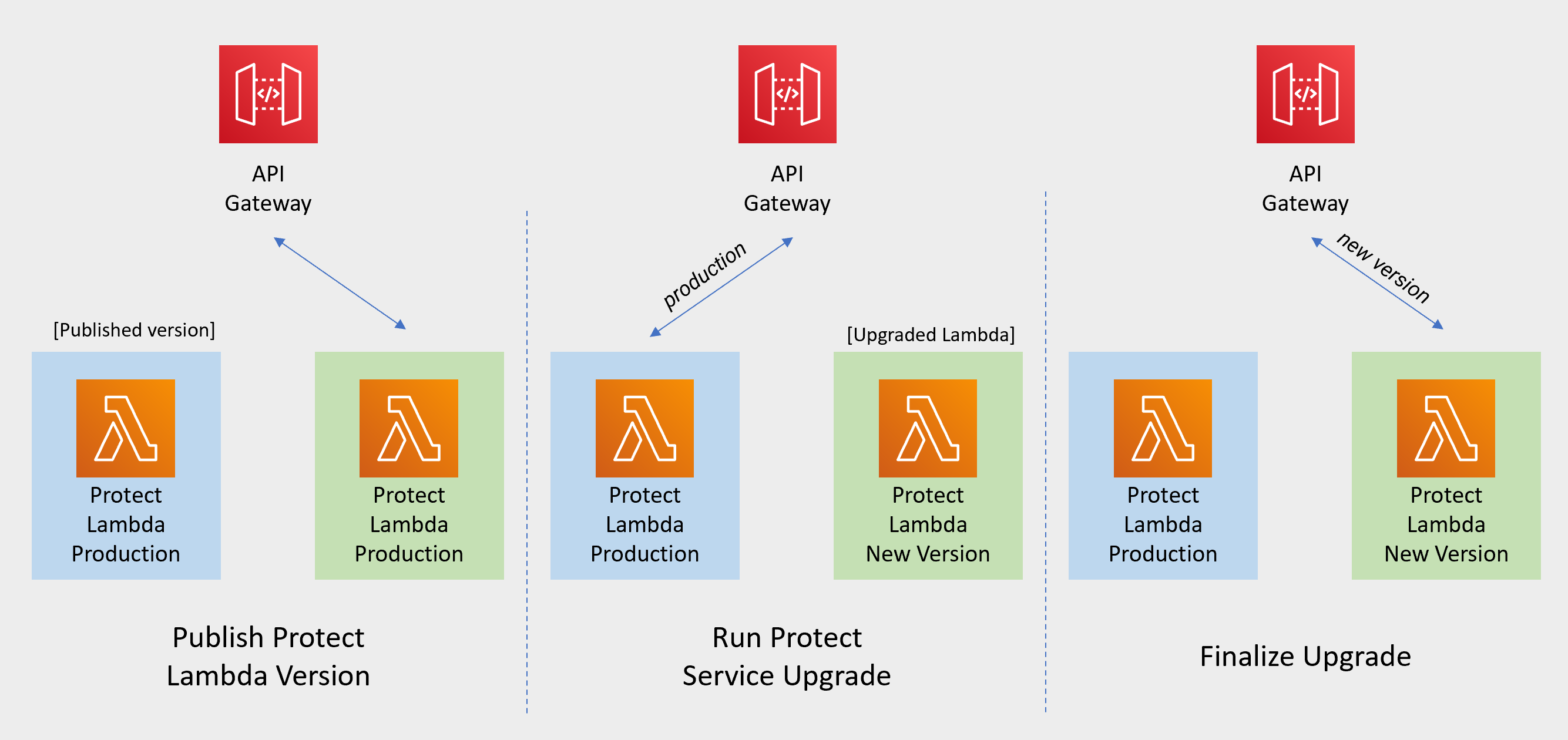
                                                                        Snowflake Function Upgrade Steps

                                                                        Redshift Function Upgrade Steps

                                                                        Cloud API Function Upgrade Steps

                                                                        Athena Function Upgrade Steps

                                                                        • Publish Protect Lambda Version

                                                                          Publishing a version of the Protect Lambda allows updating it without interruptions to the existing traffic.

                                                                          1. Go to AWS Lambda console and select existing Protegrity Protect Lambda.

                                                                          2. Go to Lambda Configuration > Environment variables.

                                                                          3. Record environment variables values. You will use them later to configure upgraded Lambda Function. You can use the aws cli command below to save the function variables into the local json file:

                                                                            aws lambda get-function-configuration --function-name \
                                                                            arn:aws:lambda:<aws_region>:<aws_account>:function:<function_name> \
                                                                            --query Environment > <function_name>_env_config.json
                                                                            
                                                                          4. Click Actions in top right portion of the screen. Select Publish new version. Click Publish.

                                                                          5. Record the Lambda version number. It will be displayed at the top of the screen. You can also retrieve it from the Lambda function view, under Versions tab.

                                                                            Protect Lambda version number: ___________________

                                                                          6. If you are upgrading a Cloud Protect Redshift version 1.x to 2.x/3x, you must recreate your Redshift external function definitions with Protect Lambda Function version appended to the Lambda Function name. See example below.

                                                                            CREATE OR REPLACE EXTERNAL FUNCTION PTY_PROTECT_TEST ( val varchar )
                                                                                RETURNS varchar
                                                                                VOLATILE lambda
                                                                                'Protegrity_Protect_test:<protect_lambda_version_number>' iam_role
                                                                                'arn:aws:iam::123456789212:role/example_role';
                                                                            
                                                                        • Run protect service upgrade

                                                                          In this step, the Protect service including Lambda $LATEST version will be updated using Cloud Formation template. The Lambda version created in previous step will be used to serve existing traffic during the upgrade process.

                                                                          1. Go to AWS Cloud Formation and select existing Protegrity deployment stack.

                                                                          2. Select Update. Check Replace current template > Upload a template file.

                                                                          3. Upload pty_protect_cf.json file and select Next.

                                                                          4. Update ProtectFunctionProductionVersion parameter with Protect Lambda version number recorded in step 3.

                                                                          5. Click Next until Review window and then select Update stack.

                                                                          6. Wait for the Cloud Formation to complete.

                                                                          7. Go back to Lambda console and select Protect Lambda.

                                                                          8. Go to Configuration > Environment variables. Replace placeholder values with values recorded in previous step. Alternatively, you can run the following aws cli command to update function configuration using json file saved in the previous steps:

                                                                            aws lambda update-function-configuration --function-name \
                                                                            arn:aws:lambda:<aws_region>:<aws_account>:function:<function_name> \
                                                                            --environment file://./<function_name>_env_config.json
                                                                            
                                                                          9. Navigate to Aliases tab. Verify that Production alias points to the lambda version you specified in the cloud formation template.

                                                                          10. The upgraded Protect Lambda is configured with a sample policy. Run Agent Lambda Function before continuing with next steps.

                                                                        • Finalize upgrade

                                                                          In this step, the Protect Lambda will be configured to serve traffic using $LATEST version upgraded in the previous step.

                                                                          1. Go back to Protegrity AWS Cloud Formation deployment stack.

                                                                          2. Select Update. Check Use Current template.

                                                                          3. Update ProtectFunctionProductionVersion parameter with the following value: $LATEST.

                                                                          4. Click Next until Review window and then select Update stack.

                                                                          5. Go back to Lambda console and select Protect Lambda.

                                                                          6. From the Lambda console, verify that Latest alias points to $LATEST version.

                                                                          7. Test your function to make sure it works as expected.

                                                                          8. If you are upgrading a Cloud Protect Redshift version 1.x to 2.x/3x, you must recreate your Redshift external function definitions with Protect Lambda Function version appended to the Lambda Function name. See example below.

                                                                            CREATE OR REPLACE EXTERNAL FUNCTION PTY_PROTECT_TEST ( val varchar )
                                                                                RETURNS varchar
                                                                                VOLATILE lambda
                                                                                'Protegrity_Protect_test:Production' iam_role
                                                                                'arn:aws:iam::123456789212:role/example_role';
                                                                            
                                                                          9. If you need to rollback to older version of Protect Lambda, you can re-run the cloud formation with ProtectFunctionProductionVersion parameter set to the previous version of Protect Lambda.

                                                                        Re-enable Protegrity Agent Function CloudWatch Event Rule

                                                                        If the Event Rule was disabled at the beginning of the upgrade process, you must re-enabled it. Follow the steps below to re-enable Policy Agent Event rule.

                                                                        1. Go to the Protegrity Agent Cloud Formation Stack.

                                                                        2. Select Resources tab from the top portion of the screen.

                                                                        3. Click on the Physical ID link in the ScheduledRule row. The link opens Policy Agent Event Rule configuration.

                                                                        4. Select Enable from the top-right portion of the screen. This will enable the rule. You will re-enable it after the upgrade process is complete.

                                                                        3.10 - Appendices

                                                                        Additional references for the protector.

                                                                        3.10.1 - Installing the Policy Agent and Protector in Different AWS Accounts

                                                                        Example steps to install Agent in a different AWS account than the Protector

                                                                          The Policy Agent Lambda function and Protect Lambda functions can be installed in separate AWS accounts. However, additional configuration is required to authorize the Policy Agent to provision the security policy to a remote Protect Lambda function.

                                                                          Create Agent Lambda IAM policy

                                                                          1. Login to the AWS account that hosts the Protect Lambda function.

                                                                          2. From the AWS IAM console, select Policies > Create Policy.

                                                                          3. Select the JSON tab and copy the following snippet.

                                                                            {
                                                                              "Version": "2012-10-17",
                                                                              "Statement": [
                                                                                {
                                                                                  "Sid": "LambdaUpdateFunction",
                                                                                  "Effect": "Allow",
                                                                                  "Action": [
                                                                                    "lambda:UpdateFunctionConfiguration"
                                                                                  ],
                                                                                  "Resource": [
                                                                                    "arn:aws:lambda:*:*:function:*"
                                                                                  ]
                                                                                },
                                                                                {
                                                                                  "Sid": "LambdaReadLayerVersion",
                                                                                  "Effect": "Allow",
                                                                                  "Action": [
                                                                                    "lambda:GetLayerVersion",
                                                                                    "lambda:ListLayerVersions"
                                                                                  ],
                                                                                  "Resource": "*"
                                                                                },
                                                                                {
                                                                                  "Sid": "LambdaDeleteLayerVersion",
                                                                                  "Effect": "Allow",
                                                                                  "Action": "lambda:DeleteLayerVersion",
                                                                                  "Resource": "arn:aws:lambda:*:*:layer:*:*"
                                                                                },
                                                                                {
                                                                                  "Sid": "LambdaPublishLayerVersion",
                                                                                  "Effect": "Allow",
                                                                                  "Action": "lambda:PublishLayerVersion",
                                                                                  "Resource": "arn:aws:lambda:*:*:layer:*"
                                                                                },
                                                                                {
                                                                                  "Sid": "S3GetObject",
                                                                                  "Effect": "Allow",
                                                                                  "Action": [
                                                                                    "s3:GetObject"
                                                                                  ],
                                                                                  "Resource": "arn:aws:s3:::*/*"
                                                                                },
                                                                                {
                                                                                  "Sid": "S3PutObject",
                                                                                  "Effect": "Allow",
                                                                                  "Action": [
                                                                                    "s3:PutObject"
                                                                                  ],
                                                                                  "Resource": "arn:aws:s3:::*/*"
                                                                                },
                                                                                {
                                                                                  "Sid": "LambdaGetConfiguration",
                                                                                  "Effect": "Allow",
                                                                                  "Action": [
                                                                                      "lambda:GetFunctionConfiguration"
                                                                                  ],
                                                                                  "Resource": [
                                                                                      "arn:aws:lambda:*:*:function:*"
                                                                                  ]
                                                                                }
                                                                              ]
                                                                            }
                                                                            
                                                                          4. Replace the wildcards (*) with the region, account, and resource name information where required.

                                                                          5. Select Review policy, type in the policy name, and confirm. Record policy name:

                                                                            Agent Lambda Cross Account Policy Name: ___________________

                                                                          Create Policy Agent cross-account IAM Role

                                                                          1. Login to the AWS account that hosts the Protect Lambda function.

                                                                          2. From the AWS IAM console, select Roles > Create Role

                                                                          3. Select AWS Service > Lambda . Proceed to Permissions.

                                                                          4. Select Policy created in the step above. Proceed to Tags.

                                                                          5. Specify Tag, proceed to the final screen. Type in policy name and confirm. Record the name.

                                                                            Policy Agent Cross Account IAM Role Name: ___________________

                                                                          Allow the Policy Agent Cross-Account Role to be Assumed by the Policy Agent IAM Role

                                                                          1. Login to the AWS account that hosts the Protect Lambda function.

                                                                          2. Navigate to the previously created IAM Role (Agent Lambda Cross-Account IAM Role Name).

                                                                          3. Navigate to Trust Relationships > Edit Trust Relationships.

                                                                          4. Modify the Policy Document, replacing the placeholder value indicated in the following snippet as <Agent Lambda IAM Execution Role ARN> with ARN of Agent Lambda IAM Role that was created in Agent Installation.

                                                                            {
                                                                              "Version": "2012-10-17",
                                                                              "Statement": [
                                                                                {
                                                                                  "Effect": "Allow",
                                                                            
                                                                               "Principal": {
                                                                            
                                                                                        "AWS": "<Agent Lambda IAM Execution Role Name>"
                                                                            
                                                                                  },
                                                                                  "Action": "sts:AssumeRole"
                                                                                }
                                                                              ]
                                                                            }
                                                                            
                                                                          5. Click Update Trust Policy.

                                                                          Add Assume Role to the Policy Agent Execution IAM Role

                                                                          1. Login to the AWS account that hosts the Policy Agent.

                                                                          2. Navigate to the Agent Lambda IAM Execution Role that was created in Agent Installation.

                                                                            {
                                                                              "Version": "2012-10-17",
                                                                              "Statement": [
                                                                                {
                                                                                  "Effect": "Allow",
                                                                            
                                                                               "Principal": {
                                                                            
                                                                                        "AWS": "<Agent Lambda IAM Execution Role Name>"
                                                                            
                                                                                  },
                                                                                  "Action": "sts:AssumeRole"
                                                                                }
                                                                              ]
                                                                            }
                                                                            
                                                                          3. Add Inline Policy.

                                                                          4. Modify the Policy Document, replacing the placeholder value indicated in the following snippet as <Agent Lambda Cross-Account IAM ARN> with the value recorded in Create Policy Agent cross-account IAM Role.

                                                                            {
                                                                              "Version": "2012-10-17",
                                                                              "Statement": [
                                                                                {
                                                                                  "Effect": "Allow",
                                                                                  "Action": [
                                                                                    "sts:AssumeRole"
                                                                                  ],
                                                                                  "Resource": "<Agent Lambda Cross-Account IAM  ARN>."
                                                                                }
                                                                              ]
                                                                            }
                                                                            
                                                                          5. When you are finished, choose Review Policy.

                                                                          6. On the Review policy page, type a Name, then choose Create Policy.

                                                                          Update the Policy Agent Lambda Configuration

                                                                          1. From the AWS console, navigate to Lambda, and select the Policy Agent Lambda function.

                                                                          2. Select Configuration tab | Environment variables.

                                                                          3. Select Edit and add the following environment variables with the value from Agent Lambda Cross-Account IAM ARN:

                                                                            ParameterValue
                                                                            AWS_ASSUME_ROLEAgent Lambda Cross-Account IAM ARN
                                                                          4. Ensure the values in the Parameters AWS_POLICY_S3_BUCKET, AWS_PROTECT_FN_NAME and AWS_POLICY_LAYER_NAME are all in the Protect Lambda Function AWS Account.

                                                                          5. In case custom VPC hostname configuration is used, you will need to set the ENDPOINT_URL. Refer to Policy Agent - Custom VPC Endpoint Hostname Configuration.

                                                                            AWS_VPC_ENDPOINT_URL

                                                                            <AWS_VPC_ENDPOINT>

                                                                          6. Click Save and Run the Lambda. The Lambda will now assume the Role in Protect Lambda Function AWS Account and update the policy cross accounts.

                                                                          3.10.2 - Integrating Cloud Protect with PPC (Protegrity Provisioned Cluster)

                                                                          Concepts for integrating with PPC (Protegrity Provisioned Cluster)

                                                                          This guide describes how to configure the Protegrity Policy Agent and Log Forwarder to connect to a Protegrity Provisioned Cluster (PPC), highlighting the differences from connecting to ESA.

                                                                          Key Differences: PPC vs ESA

                                                                          FeatureESA 10.2PPC (this guide)
                                                                          Datastore Key FingerprintOptional/RecommendedRequired
                                                                          CA Certificate on AgentOptional/RecommendedOptional/Recommended
                                                                          CA Certificate on Log ForwarderOptional/RecommendedNot supported
                                                                          Client Certificate Authentication from Log ForwarderOptional/RecommendedNot supported
                                                                          IP AddressESA IP addressPPC address

                                                                          Prerequisites

                                                                          • Access to PPC and required credentials.
                                                                          • Tools: curl, kubectl installed.

                                                                          Policy Agent Setup with PPC

                                                                          Follow these instructions as a guide for understanding specific inputs for Policy Agent integrating with PPC:

                                                                          1. Obtain the Datastore Key Fingerprint

                                                                            To retrieve the fingerprint for your Policy Agent:

                                                                            curl -k -H "Authorization: Bearer ${TOKEN}" -X POST https://${HOST}/pty/v2/pim/datastores/1/export/keys  -H "Content-Type: application/json" --data '{
                                                                              "algorithm": "RSA-OAEP-256",
                                                                              "description": "example-key-from-kms",
                                                                              "pem": "-----BEGIN PUBLIC KEY-----\nABC123... ...890XYZ\n-----END PUBLIC KEY-----"
                                                                            }'
                                                                            

                                                                            Sample Output:

                                                                            {"uid":"1","algorithm":"RSA-OAEP-256","fingerprint":"4c:46:d8:05:35:2e:eb:39:4d:39:8e:6f:28:c3:ab:d3:bc:9e:7a:cb:95:cb:b1:8e:b5:90:21:0f:d3:2c:0b:27","description":"example-key-from-kms"}
                                                                            

                                                                            Record the fingerprint value and configure it as the PTY_DATASTORE_KEY for the Policy Agent.

                                                                          2. Retrieve the PPC CA Certificate

                                                                            To obtain the CA certificate from PPC:

                                                                            kubectl -n api-gateway get secret ingress-certificate-secret -o jsonpath='{.data.ca\.crt}' | base64 -d > CA.pem
                                                                            

                                                                            Use the CA.pem that was returned as described in Policy Agent Installation.

                                                                          3. Configure the PPC Address

                                                                            Use the PPC address in place of the ESA IP address wherever required in your configuration.

                                                                          Log Forwarder Setup with PPC

                                                                          • The Log Forwarder will proceed without certificates and will print a warning if PtyEsaCaServerCert and PtyEsaClientCertificatesSecretId are not provided.
                                                                          • No additional certificate or CA configuration is needed for PPC.

                                                                          Troubleshooting

                                                                          Protector Lambda fails with “AWS KMS Decrypt failed”

                                                                          Symptom:

                                                                          After a successful Policy Agent run and layer update, the Protector Lambda returns:

                                                                          {
                                                                            "body": "{\"error_msg\":\"Failed to open decoder: rpdecode decrypt failure: dek callback failed: AWS KMS Decrypt failed: \",\"success\":false}",
                                                                            "isBase64Encoded": false,
                                                                            "statusCode": 400
                                                                          }
                                                                          

                                                                          The Protector Lambda logs show:

                                                                          [SEVERE] [utils.cpp:185] AWS KMS Decrypt failed:
                                                                          

                                                                          Cause:

                                                                          The public key configured in the PPC/ESA datastore does not match the KMS key pair used by the Policy Agent. The policy package is encrypted with the public key stored in the datastore. If that key does not correspond to the KMS key pair whose private key is used for decryption, the Protector Lambda will fail to decrypt the policy.

                                                                          Resolution:

                                                                          1. Identify the KMS key pair used by the Policy Agent (the key ARN configured during pre-configuration).
                                                                          2. Export the public key from that KMS key pair.
                                                                          3. In PPC/ESA, ensure the datastore’s export key is configured with the public key from that same KMS key pair. See Obtain the Datastore Key Fingerprint above.
                                                                          4. Re-run the Policy Agent to generate a new policy package encrypted with the correct key.
                                                                          5. Test the Protector Lambda again.

                                                                          Additional Notes

                                                                            3.10.3 - Policy Agent - Custom VPC Endpoint Hostname Configuration

                                                                            Custom vpc endpoint hostname configuration

                                                                            The Policy Agent uses default endpoint hostnames to communicate with other AWS services (for example, secretsmanager.amazonaws.com). This configuration will only work in VPCs where Amazon-provided DNS is available (default VPC configuration with private DNS option enabled for the endpoint). If your VPC uses custom DNS, follow the instructions below to configure the Policy Agent Lambda to use custom endpoint hostnames.

                                                                            Identify DNS Hostnames

                                                                            To identify DNS hostnames:

                                                                            1. From AWS console, select VPC > Endpoints.

                                                                            2. Select Secrets Manager endpoint from the list of endpoints.

                                                                            3. Under Details > DNS Names, note the private endpoint DNS names adding https:// at the beginning of the endpoint name.

                                                                              For example, https://vpce-1234-4pzomrye.kms.us-west-1.vpce.amazonaws.com

                                                                            4. Note down DNS names for the KMS and Lambda endpoints:

                                                                              AWS_SECRETSMANAGER_ENDPOINT: https://_________________

                                                                              AWS_KMS_ENDPOINT: https://_________________

                                                                              AWS_LAMBDA_ENDPOINT: https://_________________

                                                                            Update the Policy Agent Lambda configuration

                                                                            To update policy agent lambda configuration:

                                                                            1. From the AWS console, navigate to Lambda, and select the Policy Agent Lambda function.

                                                                            2. Select the Configuration section and choose Environment variables.

                                                                            3. Select Edit and add the following environment variables with the corresponding endpoint URLs recorded in steps 3-4:

                                                                              ParametersValue
                                                                              AWS_SECRETSMANAGER_ENDPOINT_URL<AWS_SECRETS_ENDPOINT>
                                                                              AWS_KMS_ENDPOINT_URL<AWS KMS ENDPOINT>
                                                                              AWS_LAMBDA_ENDPOINT_URL<AWS LAMBDA ENDPOINT>
                                                                            4. Click Save and Run the Lambda. The Lambda will now use endpoints you have just configured.

                                                                            3.10.4 - Redshift Cross-Account Configuration

                                                                            Configure Cloud Protect in a different account from the Redshift cluster

                                                                            Cross-Account Configuration

                                                                            The following figure illustrates the Protegrity Redshift Integration architecture when Protegrity Solution is installed on separate from Amazon Redshift Cluster Account.

                                                                            Redshift Account IAM Configuration

                                                                            This step creates Redshift IAM role with permissions to assume role in separate account.

                                                                            Create Redshift IAM policy:

                                                                            1. Login to the AWS account that hosts the Amazon Redshift cluster.

                                                                            2. In the AWS console, access Services > IAM and click Policies.

                                                                            3. Click Create Policy.

                                                                            4. Select the JSON tab and paste the following JSON snippet:

                                                                              { "Version": "2012-10-17", "Statement": [ { "Effect": "Allow", "Action": [ "sts:AssumeRole" ], "Resource": "<DBRoleARN>" } ] }
                                                                              
                                                                            5. Replace the resource value with DBRoleARN recorded in Create IAM Account Role

                                                                            6. Click Review policy to continue.

                                                                            7. Enter a name for the policy.

                                                                            8. Click Create Policy.

                                                                            9. Record the policy name.

                                                                              Redshift IAM Policy Name: ___________________

                                                                            Create Redshift IAM Role

                                                                            This step creates Redshift IAM role with permissions to assume role in separate account.

                                                                            Create Redshift IAM Role:

                                                                            1. Login to the AWS account that hosts the Amazon Redshift cluster.

                                                                            2. In the AWS console, access Services > IAM and click Roles.

                                                                            3. Click Create Role.

                                                                            4. Select AWS Service as the trusted entity type, then select Redshift use case from the list of services.

                                                                            5. Select Redshift – Customizable from the use case section.

                                                                            6. Continue by clicking Next:Permissions.

                                                                            7. Filter the list and search for the policy recorded in the step above (Redshift IAM Policy Name).

                                                                            8. Click the Next:Tags button to continue to the next step.

                                                                            9. Click the Next:Review button to continue.

                                                                            10. Enter a role name, such as Redshift2ProtegrityRole.

                                                                            11. Click Create Role.

                                                                            12. Record role ARN:

                                                                              RedshiftIAMRoleARN: ____________________

                                                                            Attach IAM Role to Redshift Cluster

                                                                            This step creates Redshift IAM role with permissions to assume role in separate account.

                                                                            Attach IAM role to the Redshift cluster:

                                                                            1. Login to AWS Console.

                                                                            2. Access Amazon Redshift and select your cluster.

                                                                            3. Select Properties > Cluster Permissions > Manage IAM Roles.

                                                                            4. Select RedshiftIAMRoleARN configured in the step above and click Associate IAM role.

                                                                            5. Save the changes.

                                                                            6. After saving the changes it may take couple of minutes until the cluster IAM role is fully configured.

                                                                            7. You can check configuration status by navigating back to the cluster IAM role settings.

                                                                            8. The status field next to the IAM role will show in-sync once the role is configured.

                                                                            Defining Redshift External Functions

                                                                            The external function for cross-account differs slightly from the reference material in this document. The function requires two roles to be specified. The following is an example of the modified function definition.

                                                                            CREATE OR REPLACE EXTERNAL FUNCTION demo_schema.pty_unprotect_deName(varchar)
                                                                            RETURNS varchar
                                                                            VOLATILE
                                                                            LAMBDA 'ProtectFunctionProductionAlias'
                                                                            IAM_ROLE '<RedshiftIAMRoleARN>,<DBRoleARN>;
                                                                            

                                                                            Replace <ProtectFunctionProductionAlias> with the value recorded in Install through CloudFormation Replace <RedshiftIAMRoleARN> with the value recorded in Create Redshift IAM Role Replace <DBRoleARN> with the value recorded in Create IAM Account Role

                                                                            3.10.5 - Sample Redshift External Function

                                                                            Sample redshift external function definitions

                                                                            Sample Redshift External Function

                                                                            Method: Tokenization

                                                                            Type: ALPHA


                                                                            Redshift Data Types

                                                                            Redshift Max Size

                                                                            Protegrity Max Size

                                                                            VARCHAR

                                                                            4K (4,096 bytes)

                                                                            4K (4,096 bytes)

                                                                            CHAR


                                                                            External Function Sample Definitions:

                                                                            CREATE EXTERNAL FUNCTION PTY_PROTECT_ALPHA ( val varchar )
                                                                            RETURNS varchar
                                                                            VOLATILE lambda
                                                                            '<replace_with_protect_function_name>:Production' iam_role 'arn:aws:iam::<REPLACE_WITH_YOUR_AWS_ACCOUNT>:role/<REPLACE_WITH_IAM_ROLE_NAME>';


                                                                            Sample EF Calls:

                                                                            SELECT PTY_PROTECT_ALPHA ('Hello World');
                                                                            
                                                                            SELECT PTY_UNPROTECT_ALPHA('rfDtw sLMJK');


                                                                            Method: Tokenization

                                                                            Type: NUMERIC


                                                                            Redshift Data Types

                                                                            Redshift Max Size

                                                                            Protegrity Max Size

                                                                            DECIMAL

                                                                            4K (4,096 bytes)

                                                                            4K (4,096 bytes)

                                                                            INTEGER

                                                                            BIGINT


                                                                            External Function Sample Definitions:

                                                                            CREATE OR REPLACE EXTERNAL FUNCTION PTY_PROTECT_NUMERIC ( val int )
                                                                            RETURNS int
                                                                            VOLATILE lambda
                                                                            '<replace_with_protect_function_name>:Production' iam_role 'arn:aws:iam::<REPLACE_WITH_YOUR_AWS_ACCOUNT>:role/<REPLACE_WITH_IAM_ROLE_NAME>';


                                                                            Sample EF Calls:

                                                                            SELECT PTY_PROTECT_NUMERIC (2147483647);
                                                                            
                                                                            SELECT PTY_UNPROTECT_NUMERIC(-12344556564);
                                                                            

                                                                            3.10.6 - Configuring Regular Expression to Extract Policy Username

                                                                            Extract the policy username from the AWS identity.

                                                                            Configuring Regular Expression to Extract Policy Username

                                                                            Cloud Protect Lambda Function exposes USERNAME_REGEX configuration to allow extraction of policy username from user in the request.

                                                                            • USERNAME_REGEX Lambda Environment configuration

                                                                              The USERNAME_REGEX configuration can be used to extract policy username from user in the request. The following are allowed values for USERNAME_REGEX:

                                                                              • 1 - Default build-in regular expression is used:

                                                                                ^arn:aws:(?:iam|sts)::[0-9]{12}:(?:role|user|group|assumed\-role|federated\-user)\/([\w\/+=,.\-]{1,1024}|[\w\/+=,.\-@]{1,1024})(?:@[a-zA-Z0-9\-]{1,320}(?:\.\w+)+)?$
                                                                                
                                                                              • ^User regex$ - Custom regex with one capturing group. This group is used to extract the username. Examples below show different regular expression values and the resulting policy user.

                                                                            USERNAME_REGEX

                                                                            User in the request

                                                                            Effective Policy User

                                                                            Not Set

                                                                            arn:aws:iam::123456789012:user/juliet.snow

                                                                            arn:aws:iam::123456789012:user/juliet.snow

                                                                            arn:aws:sts::123456789012:assumed-role/TestSaml

                                                                            arn:aws:sts::123456789012:assumed-role/TestSaml

                                                                            1

                                                                            arn:aws:iam::123456789012:user/juliet.snow

                                                                            juliet.snow

                                                                            arn:aws:sts::123456789012:assumed-role/TestSaml

                                                                            TestSaml

                                                                            ^arn:aws:(?:iam|sts)::[0-9]{12}:((?:role|user|group|assumed-role|federated-user).*)$
                                                                            

                                                                            arn:aws:iam::123456789012:user/juliet.snow

                                                                            user/juliet.snow

                                                                            arn:aws:sts::123456789012:assumed-role/TestSaml

                                                                            assumed-role/TestSaml

                                                                            3.10.7 - Associating ESA Data Store With Cloud Protect Agent

                                                                            Configure ESA data store for Policy Agent.

                                                                            Associating ESA Data Store With Cloud Protect Agent

                                                                            ESA controls which policy is deployed to protector using concept of data store. A data store may contain a list of IP addresses identifying servers allowed to pull the policy associated with that specific data store. Data store may also be defined as default data store, which allows any server to pull the policy, provided it does not belong to any other data stores. Node registration occurs when the policy server (in this case the policy agent) makes a policy request to ESA, where the agent’s IP address is identified by ESA.

                                                                            Policy agent lambda source IP address used for node registration on ESA depends on ESA hubcontroller configuration ASSIGN_DATASTORE_USING_NODE_IP and the PTY_ADDIPADDRESSHEADER configuration exposed by the agent lambda.

                                                                            The Lambda service uses multiple network interfaces, internal network interface with ephemeral IP range of 169.254.x.x and external network interface with IP range of the VPC subnet the Lambda is associated with. By default, when agent lambda is contacting ESA to register node for policy download, ESA uses agent Lambda VPC IP address. This default behavior is caused by the default ESA hubcontroller configuration ASSIGN_DATASTORE_USING_NODE_IP=false and agent default configuration PTY_ADDIPADDRESSHEADER=yes.

                                                                            In some cases, when there is a proxy server between the ESA and agent lambda, the desirable ESA configuration is ASSIGN_DATASTORE_USING_NODE_IP=true. and PTY_ADDIPADDRESSHEADER=no which will cause the ESA to use proxy server IP address.

                                                                            The table below shows how the hubcontroller and agent settings will affect node IP registration on ESA.

                                                                            Agent source IPAgent VPC subnet IPProxy IPESA config - ASSIGN_DATASTORE_USING_NODE_IPAgent lambda config - PTY_ADDIPADDRESSHEADERAgent node registration IP
                                                                            169.254.144.8110.1.2.173No Proxytrueyes169.254.144.81
                                                                            trueno10.1.2.173
                                                                            falseyes
                                                                            falseno
                                                                            169.254.144.8110.1.2.17334.230.42.110trueyes169.254.144.81
                                                                            trueno34.230.42.110
                                                                            falseyes
                                                                            falseno

                                                                            4 - Snowflake

                                                                            Protector for Snowflake on AWS.

                                                                            This section describes the high-level architecture of the product for integration with Snowflake, the installation procedures, and provides guidance on performance. This section focuses on Protegrity-specific aspects and should be consumed with the corresponding Snowflake documentation.

                                                                            This guide may also be used with the Protegrity Enterprise Security Administrator Guide, which explains the mechanism for managing the data security policy.

                                                                            4.1 - Overview

                                                                            Solution overview and features.

                                                                              Solution Overview

                                                                              Snowflake Protector on AWS is a cloud native, serverless product for fine-grained data protection with Snowflake™, a managed Cloud data warehouse. This enables invocation of the Protegrity data protection cryptographic methods from the Snowflake SQL execution context. The benefits of serverless include rapid auto-scaling, performance, low administrative overhead, and reduced infrastructure costs compared to a server-based solution.

                                                                              This product provides data protection services invoked by External User Defined Functions (UDFs) within Snowflake. The UDFs act as a client transmitting micro-batches of data to the serverless Protegrity Lambda function. User queries may generate hundreds or thousands of parallel requests to perform security operations. Protegrity’s serverless function is designed to scale and yield reliable query performance under such load.

                                                                              Snowflake Protector on AWS utilizes a data security policy maintained by an Enterprise Security Administrator (ESA), similar to other Protegrity products. Using regular SQL database queries or tools, such as, Tableau™, authorized users can perform de-identification (protect) and re-identification (unprotect) operations on data within the managed Cloud data warehouse. A user’s individual capabilities are subject to privileges and policies defined by the Enterprise Security Administrator.

                                                                              The following data ingestion patterns are available with your managed Cloud data warehouse:

                                                                              • Data protection at source applications: In this case, sensitive data is already de-identified (protected) across the enterprise wherever it resides, including the managed data warehouse. Protected data can be ingested directly into your managed Cloud data warehouse. Depending on usage patterns, this ensures that your managed data warehouse is not brought into scope for PCI, PII, GDPR, HIPPA, and other compliance policies.
                                                                              • Data protection using the Extract-Transform-Load (ETL) pattern: In this case, sensitive data may be transformed with a Protegrity protector either on-premise or in the Cloud before it is ingested into Snowflake.
                                                                              • Data protection using the Extract-Load-Transform (ELT) pattern: In this case, sensitive data is protected after it lands into the target system typically through a temporary landing table. It uses the native data warehouse’s compute engine with Protegrity to protect incoming data at very high throughput rates. After the data is protected, the intermediate loading tables are dropped as part of the ingestion workflow.

                                                                              Analytics on Protected Data

                                                                              Protegrity’s format and length preserving tokenization scheme make it possible to perform analytics directly on protected data. Tokens are join-preserving so protected data can be joined across datasets. Often statistical analytics and machine learning training can be performed without the need to re-identify protected data. However, a user or service account with authorized security policy privileges may re-identify subsets of data using the Snowflake Protector on AWS service.

                                                                              Features

                                                                              Snowflake Protector on AWS incorporates Protegrity’s patent-pending vaultless tokenization capabilities into cloud-native serverless technology. Combined with an ESA security policy, the protector provides the following features:

                                                                              • Role-based access control (RBAC) to protect and unprotect (re-identify) data depending on the user privileges.
                                                                              • Policy enforcement features of other Protegrity application protectors.

                                                                              For more information about the available protection options, such as, data types, Tokenization or Encryption types, or length preserving and non-preserving tokens, refer to Protection Methods Reference.

                                                                              Deployment Architecture

                                                                              The Protegrity product should be deployed in the customer’s Cloud account within the same AWS region as the Snowflake cluster. The product incorporates Protegrity’s vaultless tokenization engine within an AWS Lambda Function. The encrypted data security policy from an ESA is deployed periodically as a static resource through an AWS Lambda Layer. The policy is decrypted in memory at runtime within the Lambda. This architecture allows Protegrity to be highly available and scale very quickly without direct dependency on any other Protegrity services.

                                                                              The product exposes a remote data protection service invoked from external User Defined Functions (UDFs), a native feature of specific Cloud databases. The UDFs can be invoked through direct SQL queries or database views. The external UDF makes parallel API calls to the serverless Protegrity Lambda function via the AWS API Gateway to perform protect and unprotect data operations. Each network REST request includes a micro-batch of data to process and a secure context header generated by the database with the username and a Protegrity context header with the data element type, and operation to perform. The product applies the ESA security policy including user authorization and returns a corresponding response. Security operations on sensitive data performed by protector can be audited. The product can be configured to send audit logs to ESA for reporting and alerting purposes via optional component called Log Forwarder explained in details in the next section of this guide.

                                                                              The security policy is synchronized through another serverless component called the Protegrity Policy Agent. The agent operates on a configurable schedule, fetches the policy from the ESA, performs additional envelope encryption using Amazon KMS, and deploys the policy into the Lambda Layer used by the serverless product. This solution can be configured to automatically provision the static policy or the final step can be performed on-demand by an administrator. The policy takes effect immediately for all new requests. There is no downtime for users during this process.

                                                                              The following diagram shows the high-level architecture described above.

                                                                              The following diagram shows a reference architecture for synchronizing the security policy from ESA.

                                                                              The Protegrity Policy Agent requires network access to an Enterprise Security Administrator (ESA). Most organizations install the ESA on-premise. Therefore, it is recommended that the Policy Agent is installed into a private subnet with a Cloud VPC using a NAT Gateway to enable this communication through a corporate firewall.

                                                                              The ESA is a soft appliance that must be pre-installed on a separate server. It is used to create and manage security policies.

                                                                              For more information about installing the ESA, and creating and managing policies, refer the Policy Management Guide.

                                                                              Log Forwarding Architecture

                                                                              Audit logs are by default sent to CloudWatch as long as the function’s execution role has the necessary permissions. The Protegrity Product can also be configured to send audit logs to ESA. Such configuration requires deploying Log Forwarder component which is available as part of Protegrity Product deployment bundle. The diagram below shows additional resources deployed with Log Forwarder component.

                                                                              The log forwarder component includes Amazon Kinesis data stream and the forwarder Lambda function. Amazon Kinesis stream is used to batch audit records before sending them to forwarder function, where similar audit logs are aggregated before sending to ESA. Aggregation rules are described in the Protegrity Log Forwarding guide. When the protector function is configured to send audit logs to log forwarder, audit logs are aggregated on the protector function before sending to Amazon Kinesis. Due to specifics of the Lambda runtime lifecycle, audit logs may take up to 15 minutes before being sent to Amazon Kinesis. Protector function exposes configuration to minimize this time which is described in the protector function installation section.

                                                                              The security of audit logs is ensured by using HTTPS connection on each link of the communication between protector function and ESA. Integrity and authenticity of audit logs is additionally checked on log forwarder which verifies individual logs signature. The signature verification is done upon arrival from Amazon Kinesis before applying aggregation. If signature cannot be verified, the log is forwarded as is to ESA where additional signature verification can be configured. Log forwarder function uses client certificate to authenticate calls to ESA.

                                                                              To learn more about individual audit log entry structure and purpose of audit logs, refer to Audit Logging section in this document. Installation instructions can be found in Audit Log Forwarder installation.

                                                                              The audit log forwarding requires network access from the cloud to the ESA. Most organizations install the ESA on-premise. Therefore, it is recommended that the Log Forwarder Function is installed into a private subnet with a Cloud VPC using a NAT Gateway to enable this communication through a corporate firewall.

                                                                              Snowflake Connectivity

                                                                              Request authorization between Snowflake’s AWS VPC to the customer’s AWS API-Gateway occurs using a Snowflake integration enabled by an AWS cross-account IAM role created within the customer’s AWS account. The API Gateway authorizes each request, limiting access to the Snowflake AWS IAM user and external ID established through a Snowflake API Integration object. The following figure illustrates the Protegrity Snowflake Integration architecture.

                                                                              Snowflake’s API Integration Object

                                                                              The Snowflake API Integration Object provides a connection between your Snowflake VPC and your AWS account where the Protegrity product is hosted. Creating this connection requires setting up the API Gateway and the IAM shared account role. These steps are provided in the installation.

                                                                              The following figure shows how trust is established between Snowflake and the product.

                                                                              4.2 - Installation

                                                                              Product Installation Guide.

                                                                              4.2.1 - Pre-Configuration

                                                                              Configuration steps prior product installation.

                                                                                Determine AWS Region

                                                                                Query the AWS region where the Snowflake cluster is running. This is the region in which Protegrity Serverless must be installed.

                                                                                To determine AWS region:

                                                                                1. Login to Snowflake

                                                                                2. In the SQL console, run the following query.

                                                                                  select current_region();
                                                                                  
                                                                                3. Record the AWS region (e.g. us-east-1).

                                                                                  AWS Region: ___________________

                                                                                Provide AWS sub-account

                                                                                Identify or create an AWS account where the Protegrity solution will be installed. It is recommended that a new AWS sub-account be created. This can provide greater security controls and help avoid conflicts with other applications that might impact regional account limits. An individual with the Cloud Administrator role will be required for some subsequent installation steps.

                                                                                AWS Account ID: ___________________

                                                                                AWS Region (AwsRegion): ___________________

                                                                                Create S3 bucket for Installing Artifacts

                                                                                This S3 bucket will be used for the artifacts required by the CloudFormation installation steps. This S3 bucket must be created in the region that is defined in Provide AWS sub-account

                                                                                1. Sign in to the AWS Management Console and open the Amazon S3 console.

                                                                                2. Change region to the one determined in Provide AWS sub-account

                                                                                3. Click Create Bucket.

                                                                                4. Enter a unique bucket name:

                                                                                  For example, protegrity-install.us-west-2.example.com

                                                                                5. Upload the installation artifacts to this bucket. Protegrity will provide the following three artifacts:

                                                                                  • protegrity-protect-<version>.zip
                                                                                  • protegrity-agent-<version>.zip
                                                                                  • protegrity-external-extension-<version>.zip
                                                                                  • protegrity-sample-policy-<version>.zip

                                                                                  S3 Bucket name (ArtifactS3Bucket): ___________________

                                                                                Create KMS Key

                                                                                The Amazon Key Management Service (KMS) provides the ability for the Protegrity Serverless solution to encrypt and decrypt the Protegrity Security Policy.

                                                                                To create KMS key:

                                                                                1. In the AWS sub-account where the KMS key will reside, select the region.

                                                                                2. Navigate to Key Management Service > Create Key.

                                                                                3. Configure the key settings:

                                                                                  • Key type: Asymmetric
                                                                                  • Key usage: Encrypt and decrypt
                                                                                  • Key spec: RSA_4096
                                                                                  • Click Next
                                                                                4. Create alias and optional description, such as, Protegrity-Serverless and click Next.

                                                                                5. Define key administrative permissions, the IAM user who will administrate the key.

                                                                                6. Click Next.

                                                                                7. Define the key usage permissions.

                                                                                8. In Other AWS accounts, enter the AWS account id used for the Protegrity Serverless installation.

                                                                                9. Continue on to create the key. If there is a concern this permission is overly broad, then you can return later to restrict access to the role of two Protegrity Serverless Lambda as principals. Click to open the key in the list and record the ARN.

                                                                                  KMS Key ARN (AWS_KMS_KEY_ID): ___________________

                                                                                10. Download the public key from the KMS key. Navigate to the key in KMS console, select the Public key tab, and click Download. Save the PEM file. This public key will be added to the ESA data store as an export key. Refer to Exporting Keys to Datastore for instructions on adding the public key to the data store.

                                                                                  KMS Public Key PEM file: ___________________

                                                                                Create IAM Account Role

                                                                                An IAM role is used to authorize Snowflake to access the future Protect Lambda resource.

                                                                                To create IAM account role:

                                                                                1. From the AWS console, login to the AWS sub-account where Protegrity will be hosted.

                                                                                2. Access IAM, select roles and then Create Role.

                                                                                3. Select AWS account from the list of trusted entities types.

                                                                                4. Select your AWS Account Id as a placeholder value. You will update this field later when configuring Snowflake access.

                                                                                5. Select Require external ID and enter the following placeholder value.

                                                                                  REPLACE_ME_WITH_EXTERNAL_ID

                                                                                6. Click Next.

                                                                                7. Continue and click Next

                                                                                8. Enter a Role name, for example, Snowflake.

                                                                                9. After the role is created, click on the role. Record the following information:

                                                                                  • Role Name (DBRoleName): ____________________
                                                                                  • Role ARN: ____________________

                                                                                4.2.2 - Prerequisites

                                                                                Requirements before installing the protector.

                                                                                  AWS Services

                                                                                  The following table describes the AWS services that may be a part of your Protegrity installation.

                                                                                  Service

                                                                                  Description

                                                                                  Lambda

                                                                                  Provides serverless compute for Protegrity protection operations and the ESA integration to fetch policy updates or deliver audit logs.

                                                                                  API Gateway

                                                                                  Provides the endpoint and access control.

                                                                                  KMS

                                                                                  Provides secrets for envelope policy encryption/decryption for Protegrity.

                                                                                  Secrets Manager

                                                                                  Provides secrets management for the ESA credentials .

                                                                                  S3

                                                                                  Intermediate storage location for the encrypted ESA policy layer.

                                                                                  Kinesis

                                                                                  Required if Log Forwarder is to be deployed. Amazon Kinesis is used to batch audit logs sent from protector function to ESA.

                                                                                  VPC & NAT Gateway

                                                                                  Optional. Provides a private subnet to communicate with an on-prem ESA.

                                                                                  CloudWatch

                                                                                  Application and audit logs, performance monitoring, and alerts. Scheduling for the policy agent.

                                                                                  ESA Version Requirements

                                                                                  The Protector and Log Forwarder functions require a security policy from a compatible ESA version.

                                                                                  The table below shows compatibility between different Protector and ESA versions.

                                                                                  Protector VersionESA Version
                                                                                  8.x9.09.1 & 9.210.0
                                                                                  2.xNoYes*No
                                                                                  3.0.x & 3.1.xNoNoYesNo
                                                                                  3.2.xNoNoYes*
                                                                                  4.0.xNoNoNoYes

                                                                                  Legend

                                                                                  Yes

                                                                                  Protector was designed to work with this ESA version

                                                                                  No

                                                                                  Protector will not work with this ESA version

                                                                                  *

                                                                                  Backward compatible policy download supported:

                                                                                  • Data elements and features which are common between this and previous ESA versions will be downloaded
                                                                                  • Data elements and features which are new to this ESA version and do not exist in previous ESA version will not be downloaded

                                                                                  Prerequisites

                                                                                  Requirement

                                                                                  Detail

                                                                                  Protegrity distribution and installation scripts

                                                                                  These artifacts are provided by Protegrity

                                                                                  Protegrity ESA 10.0+

                                                                                  The Cloud VPC must be able to obtain network access to the ESA

                                                                                  AWS AccountRecommend creating a new sub-account for Protegrity Serverless
                                                                                  Snowflake cluster (Enterprise Edition)

                                                                                  Required Skills and Abilities

                                                                                  Role / Skillset

                                                                                  Description

                                                                                  AWS Account Administrator

                                                                                  To run CloudFormation (or perform steps manually), create/configure a VPC and IAM permissions.

                                                                                  Protegrity Administrator

                                                                                  The ESA credentials required to extract the policy for the Policy Agent

                                                                                  Network AdministratorTo open firewall to access ESA and evaluate AWS network setup
                                                                                  Snowflake AdministratorAccount Admin access required to setup access

                                                                                  4.2.3 - Protect Service Installation

                                                                                  Product Installation Guide.

                                                                                    Preparation

                                                                                    1. Ensure that all the steps in Pre-Configuration are performed.

                                                                                    2. Login to the AWS account console where - Snowflake Protector on AWS will be installed.

                                                                                    3. Ensure that the required CloudFormation templates provided by Protegrity are available on your local computer.

                                                                                    Create Protect Lambda IAM Execution Policy

                                                                                    This task defines a policy used by the Protegrity Lambda function to write CloudWatch logs and access the KMS encryption key to decrypt the policy.

                                                                                    Perform the following steps to create the Lambda execution role and required policies:

                                                                                    1. From the AWS IAM console, select Policies > Create Policy.

                                                                                    2. Select the JSON tab and copy the following sample policy.

                                                                                      {
                                                                                        "Version": "2012-10-17",
                                                                                        "Statement": [
                                                                                          {
                                                                                            "Sid": "CloudWatchWriteLogs",
                                                                                            "Effect": "Allow",
                                                                                            "Action": [
                                                                                              "logs:CreateLogGroup",
                                                                                              "logs:CreateLogStream",
                                                                                              "logs:PutLogEvents"
                                                                                            ],
                                                                                            "Resource": "*"
                                                                                          },
                                                                                          {
                                                                                            "Sid": "KmsDecrypt",
                                                                                            "Effect": "Allow",
                                                                                            "Action": [
                                                                                              "kms:Decrypt"
                                                                                            ],
                                                                                            "Resource": [
                                                                                              "arn:aws:kms:*:*:key/*"
                                                                                            ]
                                                                                          }
                                                                                        ]
                                                                                      }
                                                                                      
                                                                                    3. For the KMS policy, replace the Resource with the ARN for the KMS key created in a previous step.

                                                                                    4. Select Next, type in a policy name, for example, ProtegrityProtectLambdaPolicy and Create Policy. Record the policy name:

                                                                                      ProtectLambdaPolicyName:__________________

                                                                                    Create Protect Lambda IAM Role

                                                                                    The following steps create the role to utilize the policy defined in Create Protect Lambda IAM Execution Policy.

                                                                                    To create protect lambda IAM execution role:

                                                                                    1. From the AWS IAM console, select Roles > Create Role.

                                                                                    2. Select AWS Service > Lambda > Next.

                                                                                    3. In the list, search and select the policy created in Create Protect Lambda IAM Execution Policy.

                                                                                    4. Click Next

                                                                                    5. Type the role name, for example, ProtegrityProtectRole

                                                                                    6. Click Create role

                                                                                    7. Record the role ARN.

                                                                                      Role ARN (LambdaExecutionRoleArn): ___________________

                                                                                    Installing through CloudFormation

                                                                                    The following steps describe the deployment of the Lambda function.

                                                                                    To install through CloudFormation:

                                                                                    1. Access CloudFormation and select the target AWS Region.

                                                                                    2. Click Create Stack and choose With new resources.

                                                                                    3. Specify the template.

                                                                                    4. Select Upload a template file.

                                                                                    5. Upload the Protegrity-provided CloudFormation template called pty_protect_cf.json and click Next.

                                                                                    6. Specify the stack details. Enter a stack name.

                                                                                    7. Enter the required parameters. All the values were generated in Pre-Configuration.

                                                                                      ParameterDescription
                                                                                      DBRoleNameName of the account role created in the pre-configuration step
                                                                                      ArtifactS3BucketName of S3 bucket created in the pre-configuration step
                                                                                      LambdaExecutionRoleArnThe ARN of Lambda role created in the prior step
                                                                                      MinLogLevelMinimum log level for protect function. Allowed Values: off, severe, warning, info, config, all
                                                                                    8. The log forwarder parameters can be provided later after log forwarder is deployed. If you are not planning to deploy log forwarder you can skip this step.

                                                                                      ParameterDescription
                                                                                      KinesisLogStreamArnThe ARN of the AWS Kinesis stream where audit logs will be sent for aggregation
                                                                                      AuditLogFlushIntervalTime interval in seconds used to accumulate audit logs before sending to Kinesis. Default value: 30. See Log Forwarder Performance section for more details.
                                                                                    9. Click Next with defaults to complete CloudFormation.

                                                                                    10. After CloudFormation is completed, select the Outputs tab in the stack.

                                                                                    11. Record the following values:

                                                                                      • ApiGatewayId: ________________________________
                                                                                      • ProtectFunctionName: __________________________
                                                                                      • ProtectFunctionProductionAlias: __________________________
                                                                                      • ProtectLayerName: _____________________________
                                                                                      • SnowflakeApiAllowedPrefixes: ____________________
                                                                                      • SnowflakeApiAwsRoleARN: _______________________

                                                                                    Snowflake Configuration

                                                                                    The following sections will configure Snowflake to access the API Gateway. The CloudFormation installation installed a sample policy that can be used to smoke test the installation.

                                                                                    Login to Snowflake as ACCOUNTADMIN

                                                                                    Ensure that the current user can assume the Account Administrator role. This role must be created.

                                                                                    Create the Snowflake API Integration Object

                                                                                    1. From the Snowflake console worksheet, select the role ACCOUNTADMIN.

                                                                                    2. Paste the following text and replace the two parameters <SnowflakeApiAwsRoleARN> and <SnowflakeApiAllowedPrefixes> with values recorded in the last installation step of Installing through CloudFormation, then run the following Data Definition Language (DDL) in the console to create API integration object:

                                                                                      create or replace api integration protegrity_api 
                                                                                      api_provider = aws_api_gateway api_aws_role_arn = '<SnowflakeApiAwsRoleARN>' 
                                                                                      enabled = true 
                                                                                      api_allowed_prefixes = ('<SnowflakeApiAllowedPrefixes>');
                                                                                      

                                                                                    Describe the API Integration Object

                                                                                    We require values generated by the Snowflake integration object to complete configuring the API Gateway resource policy.

                                                                                    To describe API integration objects:

                                                                                    1. Run the following query in the console.

                                                                                      DESCRIBE API INTEGRATION protegrity_api;
                                                                                      
                                                                                    2. Record the following output values from the resulting query:

                                                                                      • API_AWS_IAM_USER_ARN: ___________________
                                                                                      • API_AWS_EXTERNAL_ID: ___________________

                                                                                    Update IAM Access Role Policy

                                                                                    This step allows the Snowflake IAM account to assume the role required to invoke the API Gateway resource.

                                                                                    To update API Integration Objects:

                                                                                    1. Return to theAWS Console > IAM > Roles and find the IAM role created earlier. For example, Snowflake.

                                                                                    2. Navigate to Trust Relationships > Edit trust policy.

                                                                                    3. Modify the Policy Document replacing the placeholder values indicated in the following snippet as API_AWS_IAM_USER_ARN and API_AWS_EXTERNAL_ID with the values recorded from the Snowflake integration object in Describe the API Integration Object.

                                                                                      {
                                                                                        "Version": "2012-10-17",
                                                                                        "Statement": [
                                                                                          {
                                                                                            "Effect": "Allow",
                                                                                            "Principal": {
                                                                                              "AWS": "<API_AWS_IAM_USER_ARN>"
                                                                                            },
                                                                                            "Action": "sts:AssumeRole",
                                                                                            "Condition": {
                                                                                              "StringEquals": {
                                                                                                "sts:ExternalId": "<API_AWS_EXTERNAL_ID>"
                                                                                              }
                                                                                            }
                                                                                          }
                                                                                        ]
                                                                                      }
                                                                                      

                                                                                    Test Connectivity

                                                                                    Perform the following steps to verify if Snowflake is working correctly with the Protegrity product.

                                                                                    1. Access the Snowflake SQL console.

                                                                                    2. Copy and paste the following snippet into a worksheet.

                                                                                      CREATE OR REPLACE SECURE EXTERNAL FUNCTION PTY_UNPROTECT_SAMPLE_POLICY(VAL VARCHAR)
                                                                                          RETURNS VARCHAR(16777216)
                                                                                          IMMUTABLE
                                                                                          API_INTEGRATION = PROTEGRITY_API
                                                                                          HEADERS = (
                                                                                            'X-Protegrity-HCoP-Rules'=
                                                                                            '{"jsonpaths":[{"op_type":"unprotect","data_element":"alpha"}]}'
                                                                                          )
                                                                                          CONTEXT_HEADERS = (CURRENT_USER,CURRENT_TIMESTAMP,CURRENT_ACCOUNT)
                                                                                          COMMENT='Unprotects text using an alpha token type.'
                                                                                          AS '<SnowflakeApiAllowedPrefixes>';
                                                                                      
                                                                                    3. Replace the placeholder value indicated substituting your API Gateway URL captured in the stack outputs (SnowflakeApiAllowedPrefixes).

                                                                                    4. Run the following protect in the console:

                                                                                      select pty_unprotect_sample_policy('UtfVk UHgcD!');
                                                                                      
                                                                                    5. Verify that the string hello world! is returned.

                                                                                    Troubleshooting

                                                                                    Error

                                                                                    Action

                                                                                    Snowflake: 403 unauthorized

                                                                                    1. Ensure that the resource policy on the API Gateway is correct
                                                                                    2. Ensure that the IAM role Trust is accurate
                                                                                    3. Ensure that the API Gateway is deployed (or try deploying it again)

                                                                                    Snowflake: 5xx error

                                                                                    Try running the Lambda directly. Open the Lambda function and create the following test case:``` { “body”: “{ "data":[ [0," ‘UtfVk UHgcD!’"] ] }”, “headers”: { “sf-context-current-user”: “test”, “sf-custom-x-protegrity-hcop-rules”: “{"jsonpaths":[{"op_type":"unprotect","data_element":"alpha"}]}”, “sf-external-function-current-query-id”: “test-id” } }

                                                                                    
                                                                                    If this step fails, then check the console for the meaningful error.
                                                                                    
                                                                                    </td></tr></tbody>
                                                                                    </table>
                                                                                    

                                                                                    4.2.4 - Policy Agent Installation

                                                                                    Install the policy agent.

                                                                                      The following sections will install the Policy Agent. The Policy Agent polls the ESA and deploys the policy to Protegrity Serverless as a static resource. Some of the installation steps are not required for the operation of the software but recommended for establishing a secure environment. Contact Protegrity Professional Services for further guidance on configuration alternatives in the Cloud.

                                                                                      ESA Server

                                                                                      Policy Agent Lambda requires ESA server running and accessible on TCP port 443.

                                                                                      Note down ESA IP address:

                                                                                      ESA IP Address (EsaIpAddress): ___________________

                                                                                      Certificates on ESA

                                                                                      Whether your ESA is configured with default self-signed certificate or your corporate CA certificate, Policy Agent can validate authenticity of ESA connection using CA certificate. The process for both scenarios is the same:

                                                                                      • Obtain CA certificate
                                                                                      • Convert CA certificate to a value accepted by Policy Agent
                                                                                      • Provide converted CA certificate value to Policy Agent

                                                                                      To obtain self-signed CA certificate from ESA:

                                                                                      1. Log in to ESA Web UI.

                                                                                      2. Select Settings > Network > Manage Certificates.

                                                                                      3. Hover over Server Certificate and click on download icon to download the CA certificate.

                                                                                      4. To convert downloaded CA certificate to a value accepted by Policy Agent, open the downloaded PEM file in text editor and replace all new lines with escaped new line: \n.

                                                                                        To escape new lines from command line, use one of the following commands depending on your operating system:

                                                                                        Linux Bash:

                                                                                        awk 'NF {printf "%s\\n",$0;}' ProtegrityCA.pem > output.txt
                                                                                        

                                                                                        Windows PowerShell:

                                                                                        (Get-Content '.\ProtegrityCA.pem') -join '\n' | Set-Content 'output.txt'
                                                                                        
                                                                                      5. Record the certificate content with new lines escaped.

                                                                                        ESA CA Server Certificate (EsaCaCert): ___________________

                                                                                        This value will be used to set PTY_ESA_CA_SERVER_CERT or PTY_ESA_CA_SERVER_CERT_SECRET Lambda variable in section Policy Agent Lambda Configuration

                                                                                      For more information about ESA certificate management refer to Certificate Management Guide in ESA documentation.

                                                                                      Identify or Create a new VPC

                                                                                      Establish a VPC where the Policy Agent will be hosted. This VPC will need connectivity to the ESA. The VPC should be in the same account and region established in Pre-Configuration.

                                                                                      VPC name: ___________________

                                                                                      VPC Subnet Configuration

                                                                                      Identify or create a new subnet in the VPC where tha Lambda function will be connected to. It is recommended to use a private subnet.

                                                                                      Subnet name: ___________________

                                                                                      NAT Gateway For ESA Hosted Outside AWS Network

                                                                                      If ESA server is hosted outside of the AWS Cloud network, the VPC configured for Lambda function must ensure additional network configuration is available to allow connectivity with ESA. For instance if ESA has a public IP, the Lambda function VPC must have public subnet with a NAT server to allow routing traffic outside of the AWS network. A Routing Table and Network ACL may need to be configured for outbound access to the ESA as well.

                                                                                      VPC Endpoints Configuration

                                                                                      If an internal VPC was created, then add VPC Endpoints, which will be used by the Policy Agent to access AWS services. Policy Agent needs access to the following AWS services:

                                                                                      Type

                                                                                      Service name

                                                                                      Interface

                                                                                      com.amazonaws.{REGION}.secretsmanager

                                                                                      Interface

                                                                                      com.amazonaws.{REGION}.kms

                                                                                      Gateway

                                                                                      com.amazonaws.{REGION}.s3

                                                                                      Interface

                                                                                      com.amazonaws.{REGION}.lambda

                                                                                      Identify or Create Security Groups

                                                                                      Policy Agent and cloud-based ESA appliance use AWS security groups to control traffic that is allowed to leave and reach them. Policy Agent runs on schedule and is mostly concerned with allowing traffic out of itself to ESA and AWS services it depends on. ESA runs most of the time and it must allow Policy Agent to connect to it.

                                                                                      Policy Agent security group must allow outbound traffic using rules described in the table below. To edit security group navigate:

                                                                                      From VPC > Security Groups > Policy Agent Security Group configuration.

                                                                                      TypeProtocolPort RangeDestinationReason
                                                                                      Custom TCPTCP443Policy Agent Lambda SGESA Communication
                                                                                      HTTPSTCP443AnyAWS Services

                                                                                      Record Policy Agent security group ID:

                                                                                      Policy Agent Security Group Id: ___________________

                                                                                      Policy Agent will reach out to ESA on port 443. Create following inbound security group rule for cloud-based ESA appliance to allow connections from Policy Agent:

                                                                                      TypeProtocolPort RangeSource
                                                                                      Custom TCPTCP443Policy Agent Lambda SG

                                                                                      Creating ESA Credentials

                                                                                      Policy Agent Lambda requires ESA credentials to be provided as one of the three options.

                                                                                      Option 1: Secrets Manager

                                                                                      Creating secrets manager secret with ESA username and password.

                                                                                      1. From the AWS Secrets Manager Console, select Store New Secret.

                                                                                      2. Select Other Type of Secrets.

                                                                                      3. Specify the username and password key value pair.

                                                                                      4. Select the encryption key or leave default AWS managed key.

                                                                                      5. Specify the Secret Name and record it.

                                                                                        ESA Credentials Secret Name: __________________

                                                                                      Option 2: KMS Encrypted Password

                                                                                      ESA password is encrypted with AWS KMS symmetric key.

                                                                                      1. Create AWS KMS symmetric key which will be used to encrypt ESA password. See Create KMS Key for instructions on how to create KMS symmetric key using AWS console.

                                                                                      2. Record KMS Key ARN.

                                                                                        ESA PASSWORD KMS KEY ARN: __________________

                                                                                      3. Run AWS CLI command to encrypt ESA password. Below you can find sample Linux aws cli command. Replace <key_arn> with KMS symmetric key ARN.

                                                                                        aws kms encrypt --key-id <key_arn> --plaintext $(echo '<esa_password>' | base64 )
                                                                                        
                                                                                      4. Sample output.

                                                                                        {
                                                                                          "CiphertextBlob": "esa_encrypted_password",
                                                                                          "KeyId": "arn:aws:kms:region:aws_account:key/key_id ",
                                                                                          "EncryptionAlgorithm": "SYMMETRIC_DEFAULT"
                                                                                        }
                                                                                        
                                                                                      5. Record ESA username and encrypted password.

                                                                                        ESA USERNAME: __________________

                                                                                        ESA ENCRYPTED PASSWORD: __________________

                                                                                      Option 3: Custom AWS Lambda function

                                                                                      With this option ESA username and password are returned by a custom AWS Lambda function. This method may be used to get the username and password from external vaults.

                                                                                      1. Create AWS Lambda in any AWS supported runtime.

                                                                                        1. There is no input needed.

                                                                                        2. The Lambda function must return the following response schema.

                                                                                          response:
                                                                                          type: object
                                                                                            properties:
                                                                                              username: string
                                                                                              password: string
                                                                                          

                                                                                          For example,

                                                                                          example output: {"username": "admin", "password": "Password1234"}
                                                                                          
                                                                                        3. Sample AWS Lambda function in Python:

                                                                                          import json
                                                                                          
                                                                                          def lambda_handler(event, context):
                                                                                          
                                                                                              return {"username": "admin", "password": "password1234"}
                                                                                          
                                                                                      2. Record the Lambda name:

                                                                                        Custom AWS lambda for ESA credentials: _______________

                                                                                      Create Agent Lambda IAM Policy

                                                                                      Follow the steps below to create Lambda execution policies.

                                                                                      Create Agent Lambda IAM policy

                                                                                      1. From AWS IAM console, select Policies > Create Policy.

                                                                                      2. Select JSON tab and copy the following snippet.

                                                                                        {
                                                                                          "Version": "2012-10-17",
                                                                                          "Statement": [
                                                                                            {
                                                                                              "Sid": "EC2ModifyNetworkInterfaces",
                                                                                              "Effect": "Allow",
                                                                                              "Action": [
                                                                                                "ec2:CreateNetworkInterface",
                                                                                                "ec2:DescribeNetworkInterfaces",
                                                                                                "ec2:DeleteNetworkInterface"
                                                                                              ],
                                                                                              "Resource": "*"
                                                                                            },
                                                                                            {
                                                                                              "Sid": "CloudWatchWriteLogs",
                                                                                              "Effect": "Allow",
                                                                                              "Action": [
                                                                                                "logs:CreateLogGroup",
                                                                                                "logs:CreateLogStream",
                                                                                                "logs:PutLogEvents"
                                                                                              ],
                                                                                              "Resource": "*"
                                                                                            },
                                                                                            {
                                                                                              "Sid": "LambdaUpdateFunction",
                                                                                              "Effect": "Allow",
                                                                                              "Action": [
                                                                                                "lambda:UpdateFunctionConfiguration"
                                                                                              ],
                                                                                              "Resource": [
                                                                                                "arn:aws:lambda:*:*:function:*"
                                                                                              ]
                                                                                            },
                                                                                            {
                                                                                              "Sid": "LambdaReadLayerVersion",
                                                                                              "Effect": "Allow",
                                                                                              "Action": [
                                                                                                "lambda:GetLayerVersion",
                                                                                                "lambda:ListLayerVersions"
                                                                                              ],
                                                                                              "Resource": "*"
                                                                                            },
                                                                                            {
                                                                                              "Sid": "LambdaDeleteLayerVersion",
                                                                                              "Effect": "Allow",
                                                                                              "Action": "lambda:DeleteLayerVersion",
                                                                                              "Resource": "arn:aws:lambda:*:*:layer:*:*"
                                                                                            },
                                                                                            {
                                                                                              "Sid": "LambdaPublishLayerVersion",
                                                                                              "Effect": "Allow",
                                                                                              "Action": "lambda:PublishLayerVersion",
                                                                                              "Resource": "arn:aws:lambda:*:*:layer:*"
                                                                                            },
                                                                                            {
                                                                                              "Sid": "S3GetObject",
                                                                                              "Effect": "Allow",
                                                                                              "Action": [
                                                                                                "s3:GetObject"
                                                                                              ],
                                                                                              "Resource": "arn:aws:s3:::*/*"
                                                                                            },
                                                                                            {
                                                                                              "Sid": "S3PutObject",
                                                                                              "Effect": "Allow",
                                                                                              "Action": [
                                                                                                "s3:PutObject"
                                                                                              ],
                                                                                              "Resource": "arn:aws:s3:::*/*"
                                                                                            },
                                                                                            {
                                                                                              "Sid": "KmsEncrypt",
                                                                                              "Effect": "Allow",
                                                                                              "Action": [
                                                                                                "kms:GetPublicKey"
                                                                                              ],
                                                                                              "Resource": [
                                                                                                "arn:aws:kms:*:*:key/*"
                                                                                              ]
                                                                                            },
                                                                                            {
                                                                                              "Sid": "SecretsManagerGetSecret",
                                                                                              "Effect": "Allow",
                                                                                              "Action": [
                                                                                                "secretsmanager:GetSecretValue"
                                                                                              ],
                                                                                              "Resource": [
                                                                                                "arn:aws:secretsmanager:*:*:secret:*"
                                                                                              ]
                                                                                            },
                                                                                            {
                                                                                              "Sid": "LambdaGetConfiguration",
                                                                                              "Effect": "Allow",
                                                                                              "Action": [
                                                                                                  "lambda:GetFunctionConfiguration"
                                                                                              ],
                                                                                              "Resource": [
                                                                                                  "arn:aws:lambda:*:*:function:*"
                                                                                              ]
                                                                                            }
                                                                                          ]
                                                                                        }
                                                                                        
                                                                                      3. Replace wildcard * with the region, account, and resource name information where required.

                                                                                      4. This step is required if KMS is used to encrypt ESA password.

                                                                                        Add policy entry below. Replace ESA PASSWORD KMS KEY ARN with the value recorded in Option 2: KMS Encrypted Password.

                                                                                        
                                                                                          {
                                                                                            "Sid": "KmsDecryptEsaPassword",
                                                                                            "Effect": "Allow",
                                                                                            "Action": [
                                                                                              "kms:Decrypt"
                                                                                            ],
                                                                                            "Resource": [
                                                                                              "**ESA PASSWORD KMS KEY ARN**"
                                                                                            ]
                                                                                          }
                                                                                        
                                                                                      5. Select Next type in the policy name and Create Policy. Record policy name:

                                                                                        Policy Name: ___________________

                                                                                      Create Agent Lambda IAM Role

                                                                                      Perform the following steps to create Agent Lambda execution IAM role.

                                                                                      To create agent Lambda IAM role:

                                                                                      1. From AWS IAM console, select Roles > Create Role.

                                                                                      2. Select AWS Service > Lambda > Next.

                                                                                      3. Select the policy created in Create Agent Lambda IAM policy.

                                                                                      4. Proceed to Name, Review and Create.

                                                                                      5. Type the role name, for example, ProtegrityAgentRole and click Confirm.

                                                                                      6. Select Create role.

                                                                                      7. Record the role ARN.

                                                                                        Agent Lambda IAM Execution Role Name: ___________________

                                                                                      Corporate Firewall Configuration

                                                                                      If an on-premise firewall is used, then the firewall must allow access from the NAT Gateway to an ESA. The firewall must allow access from the NAT Gateway IP to ESA via port 443 and 443.

                                                                                      CloudFormation Installation

                                                                                      Create the Policy Agent in the VPC using the CloudFormation script provided by Protegrity.

                                                                                      1. Access the CloudFormation service.

                                                                                      2. Select the target installation region.

                                                                                      3. Create a stack with new resources.

                                                                                      4. Upload the Policy Agent CloudFormation template (file name: pty_agent_cf.json).

                                                                                      5. Specify the following parameters for Cloud Formation:

                                                                                        ParameterDescriptionNote
                                                                                        VPCVPC where the Policy Agent will be hostedIdentify or Create a new VPC
                                                                                        SubnetSubnet where the Policy Agent will be hostedVPC Subnet Configuration
                                                                                        PolicyAgentSecurityGroupIdSecurity Group Id, which allows communication between the Policy Agent and the ESAIdentify or Create Security Groups
                                                                                        LambdaExecutionRoleArnAgent Lambda IAM execution role ARN allowing access to the S3 bucket, KMS encryption Key, Lambda and Lambda LayerCreate Agent Lambda IAM Role
                                                                                        ArtifactS3BucketS3 bucket name with deployment package for the Policy AgentUse S3 Bucket name recorded in Create S3 bucket for Installing Artifacts
                                                                                        CreateCRONJobSet to True to create a CloudWatch schedule for the agent to run.Default: False

                                                                                      Policy Agent Lambda Configuration

                                                                                      After the CloudFormation stack is deployed, the Policy Agent Lambda must be configured with parameters recorded in earlier steps. From your AWS Console, navigate to lambda and select the following Lambda.

                                                                                      Protegrity_Agent<STACK_NAME>_

                                                                                      Select Configuration tab and scroll down to the Environment variables section. Select Editand replace all entries with the actual values.

                                                                                      Parameter

                                                                                      Description

                                                                                      Notes

                                                                                      PTY_ESA_IP

                                                                                      ESA IP address or hostname

                                                                                      ESA Server

                                                                                      PTY_ESA_CA_SERVER_CERT

                                                                                      ESA self-signed CA certificate or your corporate CA certificate used by policy Agent Lambda to ensure ESA is the trusted server.

                                                                                      Recorded in step Certificates on ESA

                                                                                      In case ESA is configured with publicly signed certificates, the PTY_ESA_CA_SERVER_CERT configuration will be ignored.

                                                                                      PTY_ESA_CA_SERVER_CERT_SECRET

                                                                                      This configuration option fulfills the same function as PTY_ESA_CA_SERVER_CERT but supports larger configuration values, making it the recommended choice. The value should specify the name of the AWS Secrets Manager secret containing the ESA self-signed CA certificate. The secret value should be set to the json with “PTY_ESA_CA_SERVER_CERT” key and PEM formated CA certificate content value as shown below.

                                                                                      {
                                                                                        "PTY_ESA_CA_SERVER_CERT":"-----BEGIN CERTIFICATE----- MIIF..."
                                                                                      }
                                                                                      

                                                                                      Recorded in step Certificates on ESA

                                                                                      In case ESA is configured with publicly signed certificates, the PTY_ESA_CA_SERVER_CERT_SECRET configuration will be ignored. When both PTY_ESA_CA_SERVER_CERT and PTY_ESA_CA_SERVER_CERT_SECRET are configured the PTY_ESA_CA_SERVER_CERT_SECRET takes precedence.

                                                                                      PTY_ESA_CREDENTIALS_SECRET

                                                                                      ESA username and password (encrypted value by AWS Secrets Manager)

                                                                                      Option 1: Secrets Manager

                                                                                      PTY_DATASTORE_KEY

                                                                                      ESA policy datastore public key fingerprint (64 char long) e.g. 123bff642f621123d845f006c6bfff27737b21299e8a2ef6380aa642e76e89e5.

                                                                                      The export key is the public part of an asymmetric key pair created in a Create KMS Key. A user with Security Officer permissions adds the public key to the data store in ESA via Policy Management > Data Stores > Export Keys. The fingerprint can then be copied using the Copy Fingerprint icon next to the key. Refer to Exporting Keys to Datastore for details.

                                                                                      AWS_KMS_KEY_ID

                                                                                      KMS key id or full ARN e.g. arn:aws:kms:us-west-2:112233445566:key/bfb6c4fb-509a-43ac-b0aa-82f1ca0b52d3

                                                                                      Create KMS Key

                                                                                      AWS_POLICY_S3_BUCKET

                                                                                      S3 bucket where the encrypted policy will be written

                                                                                      S3 bucket of your choice

                                                                                      AWS_POLICY_S3_FILENAME

                                                                                      Filename of the encrypted policy stored in S3 bucket

                                                                                      Default: protegrity-policy.zip

                                                                                      AWS_PROTECT_FN_NAME

                                                                                      Comma separated list of Protect function names or ARNs

                                                                                      ProtectFunctionName(s), recorded in CloudFormation Installation

                                                                                      DISABLE_DEPLOY

                                                                                      This flag can be either 1 or 0. If set to 1, then the agent will not update PTY_PROTECT lambda with the newest policy. Else, the policy will be saved in the S3 bucket and deployed to the Lambda Layer

                                                                                      Default: 0

                                                                                      AWS_POLICY_LAYER_NAME

                                                                                      Lambda layer used to store the Protegrity policy used by the PTY_PROTECT function


                                                                                      POLICY_LAYER_RETAIN

                                                                                      Number of policy versions to retain as backup. (e.g. 2 will retain the latest 2 policies and remove older ones). -1 retains all.

                                                                                      Default: 2

                                                                                      POLICY_PULL_TIMEOUT

                                                                                      Time in seconds to wait for the ESA to send the full policy

                                                                                      Default: 20s

                                                                                      ESA_CONNECTION_TIMEOUT

                                                                                      Time in seconds to wait for the ESA response

                                                                                      Default: 5s

                                                                                      LOG_LEVEL

                                                                                      Application and audit logs verbiage level

                                                                                      Default: INFO

                                                                                      Allowed values: DEBUG – the most verbose, INFO, WARNING, ERROR – the least verbose

                                                                                      PTY_CORE_EMPTYSTRING

                                                                                      Override default behavior. Empty string response values are returned as null values. For instance:

                                                                                      (un)protect(’’) -> null

                                                                                      (un)protect(’’) -> ''

                                                                                      Default: empty

                                                                                      Allowed values:

                                                                                      null

                                                                                      empty

                                                                                      PTY_CORE_CASESENSITIVE

                                                                                      Specifies whether policy usernames should be case sensitive

                                                                                      Default: no

                                                                                      Allowed values:

                                                                                      yes

                                                                                      no

                                                                                      PTY_ADDIPADDRESSHEADER

                                                                                      When enabled, agent will send its source IP address in the request header. This configuration works in conjunction with ESA hubcontroller configuration ASSIGN_DATASTORE_USING_NODE_IP (default=false). See Associating ESA Data Store With Cloud Protect Agent for more information.

                                                                                      Default: yes

                                                                                      Allowed values:

                                                                                      yes

                                                                                      no

                                                                                      PTY_ESA_USERNAME

                                                                                      Plaintext ESA username which is used together with PTY_ESA_ENCRYPTED_PASSWORD as an optional ESA credentials

                                                                                      Option 2: KMS Encrypted Password

                                                                                      Presence of this parameter will cause PTY_ESA_CREDENTIALS_SECRET to be ignored

                                                                                      PTY_ESA_ENCRYPTED_PASSWORD

                                                                                      ESA password encrypted with KMS symmetric key.

                                                                                      Example AWS cli command to generate the value:

                                                                                      aws kms encrypt --key-id <your key ARN> --plaintext '<your-esa-password-base64>'

                                                                                      Option 2: KMS Encrypted Password

                                                                                      Presence of this parameter will cause PTY_ESA_CREDENTIALS_SECRET to be ignored

                                                                                      Value must be base64 encoded

                                                                                      EMPTY_POLICY_S3

                                                                                      This flag can be either 1 or 0. If set to 1, then the agent will remove the content of the policy file in S3 bucket, but will keep the checksum in the metadata. Else, the policy will be saved in the S3 bucket and not removed.

                                                                                      Default: 0

                                                                                      PTY_ESA_CREDENTIALS_LAMBDA

                                                                                      Lambda function to return ESA credentials

                                                                                      Recorded in step Option 3: Custom AWS Lambda function LAMBDA FOR ESA CREDENTIALS. Presence of PTY_ESA_USERNAME, or PTY_ESA_CREDENTIALS_SECRET will cause this value to be ignored.

                                                                                      The Policy Agent Lambda must have network access and IAM permissions to invoke the custom ESA Credentials Lambda you have created in Option 3: Custom AWS Lambda function.

                                                                                      Test Installation

                                                                                      Open the Lambda and configure Test to execute the lambda and specify the default test event. Wait for around 20 seconds for the Lambda to complete. If policy is downloaded successfully, then a success message appears.

                                                                                      Navigate to the AWS_POLICY_S3_BUCKET bucket and verify that the AWS_POLICY_S3_FILENAME file was created.

                                                                                      Troubleshooting

                                                                                      Lambda Error

                                                                                      Example Error

                                                                                      Action

                                                                                      Task timed out after x seconds

                                                                                      2020-10-06T23:40:54.121Z 2dc84942-b5cc-4be9-aa4c-965f322307e4 Task timed out after 90.09 seconds
                                                                                      
                                                                                      1. Ensure that there is network connectivity between the Lambda and ESA. Check the Security groups and/or Network firewall configuration
                                                                                      2. When using internal VPC, AWS Lambda needs to have access to AWS Network. The Policy Agent Lambda can start using Secrets Manager with Amazon VPC endpoints by creating an Amazon VPC endpoint for Secrets Manager.

                                                                                      ESA connection error. Failed to download certificates

                                                                                      Policy Pull takes a long time

                                                                                      {
                                                                                        "errorMessage": "Timeout! Unable to download policy in 20 seconds.",
                                                                                        "errorType": "Exception",
                                                                                        "stackTrace": [...]
                                                                                      }
                                                                                      
                                                                                      1. Increase POLICY_PULL_TIMEOUT.
                                                                                      2. Ensure that there is at least 1 policy with datastore matching the Lambda Policy Agent. Other considerations:
                                                                                        1. Policy has default datastore.
                                                                                        2. Policy has datastores matching AWS lambda IP range (check the subnet IP Range).
                                                                                        3. Lambda function has static IP, and at least one Data store has matching IP.

                                                                                      ESA connection error. Failed to download certificates. HTTP response code: 401

                                                                                      {
                                                                                        "errorMessage": "ESA connection error. Failed to download certificates. HTTP response code: 401.",
                                                                                        "errorType": "ConnectionError",
                                                                                        "stackTrace": [...]
                                                                                      }
                                                                                      

                                                                                      Ensure that the PTY_ESA_CREDENTIALS_SECRET has correct ESA username and password

                                                                                      An error occurred (AccessDeniedException) when calling xyz operation

                                                                                      xyz Access Denied: Exception
                                                                                      Traceback (most recent call last):
                                                                                        … Exception: xyz Access Denied
                                                                                      

                                                                                      Ensure that the Lambda execution role has permission to call the xyz operation

                                                                                      Access Denied to Secret Manager.

                                                                                      Secrets Manager Access Denied: Exception
                                                                                      Traceback (most recent call last):
                                                                                        … Exception: Secrets Manager Access Denied
                                                                                      
                                                                                      1. Ensure that the Lambda execution role has permissions to get the Secret Manager secret name.
                                                                                      2. Ensure that the Lambda execution role has permission to get the Secret Manager secret Encryption Key.

                                                                                      Master Key xyz unable to generate data key

                                                                                      Ensure that the Lambda can access xyz CMK key

                                                                                      The S3 bucket server-side encryption is enabled, the encryption key type is SSE-KMS but the Policy Agent execution IAM role doesn’t have permissions to encrypt using the KMS key .

                                                                                      [ERROR] PolicyAgentException: An error occurred (AccessDenied) when calling the PutObject operation: Access Denied
                                                                                      

                                                                                      Add the following permissions to the Policy Agent excution role.

                                                                                      kms:Decrypt
                                                                                      kms:GenerateDatakey
                                                                                      

                                                                                      The S3 bucket has bucket policy to only allow access from within the VPC.

                                                                                      An error occurred (AccessDeniedException) when calling the PublishLayerVersion operation: Your access has been denied by S3,
                                                                                      please make sure your request credentials have permission to GetObject for BUCKET_NAME/FILENAME. S3 Error Code: AccessDenied. S3 Error Message: Access Denied
                                                                                      

                                                                                      The Policy Agent publishes a new Lambda Layer version, and the Lambda Layer service uploads the policy file from the s3 bucket and the upload request is originated from the AWS service outside the Policy Agent Lambda VPC. Update the S3 bucket resource policy to allow access from AWS Service. Sample security policy to lock down access to the vpc:

                                                                                      {
                                                                                        "Version": "2012-10-17",
                                                                                        "Statement": [
                                                                                          {
                                                                                            "Sid": "VpcRestrictions",
                                                                                            "Effect": "Deny",
                                                                                            "Principal": {
                                                                                              "AWS": "*"
                                                                                            },
                                                                                            "Action": "s3:*Object",
                                                                                            "Resource": [
                                                                                              "arn:aws:s3:::<s3_bucket_name>/*",
                                                                                              "arn:aws:s3:::<s3_bucket_name>"
                                                                                            ],
                                                                                            "Condition": {
                                                                                              "Bool": {
                                                                                                "aws:ViaAWSService": "false"
                                                                                              },
                                                                                              "StringNotEquals": {
                                                                                                "aws:sourceVpc": "<vpc_id>"
                                                                                              }
                                                                                            }
                                                                                          }
                                                                                        ]
                                                                                      }
                                                                                      

                                                                                      Additional Configuration

                                                                                      Strengthen the KMS IAM policy by granting access only to the required Lambda function(s).

                                                                                      Finalize the IAM policy for the Lambda Execution Role. Ensure to replace wildcard * with the region, account, and resource name information where required.

                                                                                      For example,

                                                                                      "arn:aws:lambda:*:*:function:*" -> "arn:aws:lambda:us-east-1:account:function:function_name"
                                                                                      

                                                                                      Policy Agent Schedule

                                                                                      If specified in CloudFormation Installation, the agent installation created a CloudWatch event rule, which checks for policy update on an hourly schedule. This schedule can be altered to the required frequency.

                                                                                      Under CloudWatch > Events > Rules, find Protegrity_Agent_{stack_name}. Click Action > Edit Set the cron expression. A cron expression can easily be defined using CronMaker, a free online tool. Refer to http://www.cronmaker.com.

                                                                                      4.2.5 - Audit Log Forwarder Installation

                                                                                      Install the audit log forwarder.

                                                                                        The following sections show steps how to install Audit Log Forwarder component in the AWS Cloud. The Log Forwarder deployment allows for the audit logs generated by Protector to be delivered to ESA for auditing and governance purposes. Log Forwarder component is optional and is not required for the Protector Service to work properly. See Log Forwarding Architecture section in this document for more information. Some of the installation steps are not required for the operation of the software but recommended for establishing a secure environment. C ontact Protegrity for further guidance on configuration alternatives in the Cloud.

                                                                                        ESA Audit Store Configuration

                                                                                        ESA server is required as the recipient of audit logs. Verify the information below to ensure ESA is accessible and configured properly.

                                                                                        1. ESA server running and accessible on TCP port 9200 (Audit Store) or 24284 (td-agent).

                                                                                        2. Audit Store service is configured and running on ESA. Applies when audit logs are output to Audit Store directly or through td-agent. For information related to ESA Audit Store configuration, refer to Audit Store Guide.

                                                                                        3. (Optional) td-agent is configured for external input. For more information related to td-agent configuration, refer to ESA guide Sending logs to an external security information and event management (SIEM).

                                                                                        Certificates on ESA

                                                                                        By default, ESA is configured with self-signed certificates, which can optionally be validated using a self-signed CA certificate supplied in the Log Forwarder configuration. If no CA certificate is provided, the Log Forwarder will skip server certificate validation.

                                                                                        If ESA is configured with publicly signed certificates, this section can be skipped since the forwarder Lambda will use the public CA to validate ESA certificates.

                                                                                        To obtain the self-signed CA certificate from ESA:

                                                                                        1. Download ESA CA certificate from the /etc/ksa/certificates/plug directory of the ESA

                                                                                        2. After certificate is downloaded, open the PEM file in text editor and replace all new lines with escaped new line: \n.

                                                                                          To escape new lines from command line, use one of the following commands depending on your operating system:

                                                                                          Linux Bash:

                                                                                          awk 'NF {printf "%s\\n",$0;}' ProtegrityCA.pem > output.txt
                                                                                          

                                                                                          Windows PowerShell:

                                                                                          (Get-Content '.\ProtegrityCA.pem') -join '\n' | Set-Content 'output.txt'
                                                                                          
                                                                                        3. Record the certificate content with new lines escaped.

                                                                                          ESA CA Server Certificate (EsaCaCert): ___________________

                                                                                          This value will be used to set PtyEsaCaServerCert cloudformation parameter in section Install through CloudFormation

                                                                                        For more information about ESA certificate management refer to Certificate Management Guide in ESA documentation.

                                                                                        AWS VPC Configuration

                                                                                        Log forwarder Lambda function requires network connectivity to ESA, similar to Policy Agent Lambda function. Therefore, it can be hosted in the same VPC as Policy Agent.

                                                                                        Separate VPC can be used, as long as it provides network connectivity to ESA.

                                                                                        VPC Name: ___________________

                                                                                        VPC Subnet Configuration

                                                                                        Log Forwarder can be connected to the same subnet as Policy Agent or separate one as long as it provides connectivity to ESA.

                                                                                        Subnet Name: ___________________

                                                                                        NAT Gateway For ESA Hosted Outside AWS Network

                                                                                        If ESA server is hosted outside of the AWS Cloud network, the VPC configured for Lambda function must ensure additional network configuration is available to allow connectivity with ESA. For instance if ESA has a public IP, the Lambda function VPC must have public subnet with a NAT server to allow routing traffic outside of the AWS network. A Routing Table and Network ACL may need to be configured for outbound access to the ESA as well.

                                                                                        VPC Endpoint Configuration

                                                                                        Log Forwarder Lambda function requires connectivity to Secrets Manager AWS service. If the VPC identified in the steps before has no connectivity to public internet through the NAT Gateway, then the following service endpoint must be configured:

                                                                                        • com.amazonaws.{REGION}.cloudwatch
                                                                                        • com.amazonaws.{REGION}.secretsmanager
                                                                                        • com.amazonaws.{REGION}.kms

                                                                                        Security Group Configuration

                                                                                        Security groups restrict communication between Log Forwarder Lambda function and the ESA appliance. The following rules must be in place for ESA and Log Forwarder Lambda function.

                                                                                        From VPC > Security Groups > Log Forwarder Security Group configuration.

                                                                                        TypeProtocolPort RangeDestinationReason
                                                                                        Custom TCPTCP9200Log Forwarder Lambda SGESA Communication

                                                                                        Record the name of Log Forwarder security group name.

                                                                                        Log Forwarder Security Group Id: ___________________

                                                                                        The following port must be open for the ESA. If the ESA is running in the Cloud, then create the following security.

                                                                                        ESA Security Group configuration

                                                                                        TypeProtocolPort RangeSource
                                                                                        Custom TCPTCP9200Log Forwarder Lambda SG

                                                                                        Configure ESA Audit Store Credentials

                                                                                        Audit Log Forwarder can optionally authenticate with ESA using certificate-based authentication with a client certificate and certificate key. If used, both the certificate and certificate key will be stored in AWS Secrets Manager.

                                                                                        Download the following certificates from the /etc/ksa/certificates/plug directory of the ESA:

                                                                                        • client.key
                                                                                        • client.pem

                                                                                        After certificates are downloaded, open each PEM file in text editor and replace all new lines with escaped new line: \n. To escape new lines from command line, use one of the commands below depending on your operating system.

                                                                                        Linux Bash:

                                                                                        awk 'NF {printf "%s\\n",$0;}' client.key > private_key.txt
                                                                                        awk 'NF {printf "%s\\n",$0;}' client.pem > public_key.txt
                                                                                        

                                                                                        Windows PowerShell:

                                                                                        (Get-Content '.\client.key') -join '\n' | Set-Content 'private_key.pem'
                                                                                        (Get-Content '.\client.pem') -join '\n' | Set-Content 'public_key.pem'
                                                                                        

                                                                                        For more information on how to configure client certificate authentication for Audit Store on ESA refer to Audit Store Guide.

                                                                                        To create secret with ESA client certificate/key pair in AWS Secrets Manager.

                                                                                        1. From the AWS Secrets Manager Console, select Store New Secret.

                                                                                        2. Select Other Type of Secrets.

                                                                                        3. Specify the private_key and public_key value pair.

                                                                                        4. Select the encryption key or leave default AWS managed key.

                                                                                        5. Specify the Secret Name and record it below.

                                                                                          ESA Client Certificate/Key Pair Secret Name: ___________________

                                                                                          This value will be used to set PtyEsaClientCertificatesSecretId cloudformation parameter in section Install through CloudFormation

                                                                                        Create Audit Log Forwarder IAM Execution Policy

                                                                                        This task defines a policy used by the Protegrity Log Forwarder Lambda function to write CloudWatch logs, access the KMS encryption key to decrypt the policy and access Secrets Manager for log forwarder user credentials.

                                                                                        Perform the following steps to create the Lambda execution role and required policies:

                                                                                        1. From the AWS IAM console, select Policies > Create Policy.

                                                                                        2. Select the JSON tab and copy the following sample policy.

                                                                                          {
                                                                                            "Version": "2012-10-17",
                                                                                            "Statement": [
                                                                                              {
                                                                                                "Sid": "EC2ModifyNetworkInterfaces",
                                                                                                "Effect": "Allow",
                                                                                                "Action": [
                                                                                                  "ec2:CreateNetworkInterface",
                                                                                                  "ec2:DescribeNetworkInterfaces",
                                                                                                  "ec2:DeleteNetworkInterface"
                                                                                                ],
                                                                                                "Resource": "*"
                                                                                              },
                                                                                              {
                                                                                                "Sid": "CloudWatchWriteLogs",
                                                                                                "Effect": "Allow",
                                                                                                "Action": [
                                                                                                  "logs:CreateLogGroup",
                                                                                                  "logs:CreateLogStream",
                                                                                                  "logs:PutLogEvents"
                                                                                                ],
                                                                                                "Resource": "*"
                                                                                              },
                                                                                              {
                                                                                                "Sid": "KmsDecrypt",
                                                                                                "Effect": "Allow",
                                                                                                "Action": [
                                                                                                  "kms:Decrypt"
                                                                                                ],
                                                                                                "Resource": [
                                                                                                  "arn:aws:kms:*:*:key/*"
                                                                                                ]
                                                                                              },
                                                                                              {
                                                                                                  "Sid": "KinesisStreamRead",
                                                                                                  "Effect": "Allow",
                                                                                                  "Action": [
                                                                                                      "kinesis:GetRecords",
                                                                                                      "kinesis:GetShardIterator",
                                                                                                      "kinesis:DescribeStream",
                                                                                                      "kinesis:DescribeStreamSummary",
                                                                                                      "kinesis:ListShards",
                                                                                                      "kinesis:ListStreams"
                                                                                                  ],
                                                                                                  "Resource": "*"
                                                                                              },
                                                                                              {
                                                                                                "Sid": "SecretsManagerGetSecret",
                                                                                                "Effect": "Allow",
                                                                                                "Action": [
                                                                                                  "secretsmanager:GetSecretValue"
                                                                                                ],
                                                                                                "Resource": [
                                                                                                  "arn:aws:secretsmanager:*:*:secret:*"
                                                                                                ]
                                                                                              }
                                                                                            ]
                                                                                          }
                                                                                          
                                                                                        3. For the KMS policy, replace the Resource with the ARN for the KMS key created in a previous step.

                                                                                        4. Select Review policy, type in a policy name, for example, ProtegrityLogForwarderLambdaPolicy and Confirm. Record the policy name:

                                                                                          LogForwarderLambdaPolicyName:__________________

                                                                                        Create Log Forwarder IAM Role

                                                                                        Perform the following steps to create Log Forwarder execution IAM role.

                                                                                        To create Log Forwarder IAM role:

                                                                                        1. From AWS IAM console, select Roles > Create Role.

                                                                                        2. Select AWS Service > Lambda > Next.

                                                                                        3. Select the policy created in Create Audit Log Forwarder IAM Execution Policy.

                                                                                        4. Proceed to Name, Review and Create.

                                                                                        5. Type the role name, for example, ProtegrityForwarderRole and click Confirm.

                                                                                        6. Record the role ARN.

                                                                                          Log Forwarder IAM Execution Role Name: ___________________

                                                                                        Installation Artifacts

                                                                                        Audit Log Forwarder installation artifacts are part of the same deployment package as the one used for protect and policy agent services. Follow the steps below to ensure the right artifacts are available for log forwarder installation.

                                                                                        1. Verify that the Protegrity deployment package is available on your local system, if not, you can download it from the Protegrity portal.

                                                                                        2. Extract the pty_log_forwarder_cf.json cloud formation file from the deployment package.

                                                                                        3. Check the S3 deployment bucket identified in section Create S3 bucket for Installing Artifacts. Make sure that all Protegrity deployment zip files are uploaded to the S3 bucket.

                                                                                        Install through CloudFormation

                                                                                        The following steps describe the deployment of the Audit Log Forwarder AWS cloud components.

                                                                                        1. Access CloudFormation and select the target AWS Region in the console.

                                                                                        2. Click Create Stack and choose With new resources.

                                                                                        3. Specify the template.

                                                                                        4. Select Upload a template file.

                                                                                        5. Upload the Protegrity-provided CloudFormation template called pty_log_forwarder_cf.json and click Next.

                                                                                        6. Specify the stack details. Enter a stack name.

                                                                                        7. Enter the required parameters. All the values were generated in the pre-configuration steps.

                                                                                        Parameter

                                                                                        Description

                                                                                        Default Value

                                                                                        Required

                                                                                        LogForwarderSubnets

                                                                                        Subnets where the Log Forwarder will be hosted.


                                                                                        LogForwarderSecurityGroups

                                                                                        Security Groups, which allow communication between the Log Forwarder and ESA.


                                                                                        X

                                                                                        LambdaExecutionRoleArn

                                                                                        The ARN of Lambda role created in the prior step.


                                                                                        X

                                                                                        ArtifactS3Bucket

                                                                                        Name of S3 bucket created in the pre-configuration step.


                                                                                        X

                                                                                        LogDestinationEsaIp

                                                                                        IP or FQDN of the ESA instance or cluster.


                                                                                        X

                                                                                        AuditLogOutput

                                                                                        Audit log processor to target on ESA. Allowed values: audit-store, td-agent

                                                                                        audit-store

                                                                                        X

                                                                                        PtyEsaClientCertificatesSecretId

                                                                                        AWS Secrets Manager secret id containing client certificates used for authentication with ESA Audit Store. It is expected that the public key will be stored in a field public_key and the private key in a field named private_key.

                                                                                        This parameter is optional. If not provided, Log Forwarder will connect to ESA without client certificate authentication.

                                                                                        EsaTlsDisableCertVerify

                                                                                        Disable certificate verification when connecting to ESA if set to 1. This is only for dev purposes, do not disable in production environment.

                                                                                        0

                                                                                        X

                                                                                        PtyEsaCaServerCert

                                                                                        ESA self-signed CA certificate used by log forwarder Lambda to ensure ESA is the trusted server.

                                                                                        Recorded in step Certificates on ESA

                                                                                        In case ESA is configured with publicly signed certificates, the PtyEsaCaServerCert configuration will be ignored.


                                                                                        EsaConnectTimeout

                                                                                        Time in seconds to wait for the ESA response. Minimum value: 1.

                                                                                        5

                                                                                        X

                                                                                        EsaVirtualHost

                                                                                        ESA virtual hostname. This configuration is optional and it can be used when proxy server is present and supports TLS SNI extension.


                                                                                        KinesisLogStreamRetentionPeriodHours

                                                                                        The number of hours for the log records to be stored in Kinesis Stream in case log destination server is not available. Minimum value: 24. See Log Forwarder Performance section for more details.

                                                                                        24

                                                                                        X

                                                                                        KinesisLogStreamShardCount

                                                                                        The number of shards that the Kinesis log stream uses. For greater provisioned throughput, increase the number of shards. Minimum value: 1. See Log Forwarder Performance section for more details.

                                                                                        10

                                                                                        X

                                                                                        MinLogLevel

                                                                                        Minimum log level for protect function. Allowed Values: off, severe, warning, info, config, all

                                                                                        severe

                                                                                        X

                                                                                        1. Click Next with defaults to complete CloudFormation.

                                                                                        2. After CloudFormation is completed, select the Outputstab in the stack.

                                                                                        3. Record the following values

                                                                                          KinesisLogStreamArn: ________________________________

                                                                                        Add Kinesis Put Record permission to the Protect Function IAM Role

                                                                                        1. Login to the AWS account that hosts the Protect Lambda Function.

                                                                                        2. Search for Protect Lambda Function IAM Execution Role Name created in Create Protect Lambda IAM role.

                                                                                        3. Under Permissions policies, select Add Permissions > Create inline policy.

                                                                                        4. In Specify permissions view, switch to JSON.

                                                                                        5. Copy the policy json from below replacing the placeholder value indicated in the following snippet as <Audit Log Kinesis Stream ARN> with the value recorded in the previous step.

                                                                                          {
                                                                                          	"Version": "2012-10-17",
                                                                                          	"Statement": [
                                                                                          		{
                                                                                          			"Sid": "KinesisPutRecords",
                                                                                          			"Effect": "Allow",
                                                                                          			"Action": "kinesis:PutRecords",
                                                                                          			"Resource": "<Audit Log Kinesis Stream ARN>"
                                                                                          		}
                                                                                          	]
                                                                                          }
                                                                                          
                                                                                        6. When you are finished, choose Next.

                                                                                        7. On the Review and create page, type a Name, then choose Create policy.

                                                                                        Test Log Forwarder Installation

                                                                                        Testing in this section validates the connectivity between Log Forwarder and ESA. The sample policy included with the initial installation and test event below are not based on your ESA policy. Any logs forwarded to ESA which are not signed with a policy generated by your ESA will not be added to the audit store.

                                                                                        Install Log Forwarder and configure according to previous sections. Log Forwarder configuration MinLogLevel must be at least info level.

                                                                                        1. Navigate to the log forwarder lambda function.

                                                                                        2. Select the Test tab.

                                                                                        3. Copy the json test event into the Event JSON pane.

                                                                                          {
                                                                                              "Records": [
                                                                                                  {
                                                                                                      "kinesis": {
                                                                                                          "kinesisSchemaVersion": "1.0",
                                                                                                          "partitionKey": "041e96d78c778677ce43f50076a8ae3e",
                                                                                                          "sequenceNumber": "49620336010289430959432297775520367512250709822916263938",
                                                                                                          "data": "eyJpbmdlc3RfdGltZV91dGMiOiIyMDI2LTAzLTI3VDEzOjIzOjEyLjkwNFoiLCJhZGRpdGlvbmFsX2luZm8iOnsiZGVzY3JpcHRpb24iOiJEYXRhIHVucHJvdGVjdCBvcGVyYXRpb24gd2FzIHN1Y2Nlc3NmdWwuIn0sImNsaWVudCI6e30sImNudCI6NCwiY29ycmVsYXRpb25pZCI6InJzLXF1ZXJ5LWlkOjEyMzQiLCJsZXZlbCI6IlNVQ0NFU1MiLCJsb2d0eXBlIjoiUHJvdGVjdGlvbiIsIm9yaWdpbiI6eyJob3N0bmFtZSI6IlBSTy1VUy1QRjNSSEdGOSIsImlwIjoiMTAuMTAuMTAuMTAiLCJ0aW1lX3V0YyI6MTcxMTU1OTEwMH0sInByb2Nlc3MiOnsiaWQiOjJ9LCJwcm90ZWN0aW9uIjp7ImF1ZGl0X2NvZGUiOjgsImRhdGFlbGVtZW50IjoiYWxwaGEiLCJkYXRhc3RvcmUiOiJTQU1QTEVfUE9MSUNZIiwibWFza19zZXR0aW5nIjoiIiwib2xkX2RhdGFlbGVtZW50IjpudWxsLCJvcGVyYXRpb24iOiJVbnByb3RlY3QiLCJwb2xpY3lfdXNlciI6IlBUWURFViJ9LCJwcm90ZWN0b3IiOnsiY29yZV92ZXJzaW9uIjoiMS4yLjErNTUuZzU5MGZlLkhFQUQiLCJmYW1pbHkiOiJjcCIsInBjY192ZXJzaW9uIjoiMy40LjAuMTQiLCJ2ZW5kb3IiOiJyZWRzaGlmdCIsInZlcnNpb24iOiIwLjAuMS1kZXYifSwic2lnbmF0dXJlIjp7ImNoZWNrc3VtIjoiN0VCMkEzN0FDNzQ5MDM1NjQwMzBBNUUxNENCMTA5QzE0OEJGODYwRjE3NEVCMjMxMTAyMEI3RkE1QTY4MjdGQyIsImtleV9pZCI6ImM0MjQ0MzZhLTExMmYtNGMzZi1iMmRiLTEwYmFhOGI1NjJhNyJ9fQ==",
                                                                                                          "approximateArrivalTimestamp": 1626878559.213
                                                                                                      },
                                                                                                      "eventSource": "aws:kinesis",
                                                                                                      "eventVersion": "1.0",
                                                                                                      "eventID": "shardId-000000000000:49620336010289430959432297775520367512250709822916261234",
                                                                                                      "eventName": "aws:kinesis:record",
                                                                                                      "invokeIdentityArn": "arn:aws:iam::555555555555:role/service-role/TestRole",
                                                                                                      "awsRegion": "us-east-1",
                                                                                                      "eventSourceARN": "arn:aws:kinesis:us-east-1:555555555555:stream/CloudProtectEventStream"
                                                                                                  }
                                                                                              ]
                                                                                          }
                                                                                          
                                                                                        4. Select Test to execute the test event.

                                                                                        5. Test is successful if the Log Output of test results contains the following log:

                                                                                          [INFO] [kinesis-log-aggregation-format.cpp:77] Aggregated 1 records into 0 aggregated, 1 forwarded and 0 failed records
                                                                                          

                                                                                          If the log is not present, please consult the Troubleshooting section for common errors and solutions.

                                                                                        Update Protector With Kinesis Log Stream

                                                                                        In this section, Kinesis log stream ARN will be provided to the Protect Function installation.

                                                                                        1. Navigate to the Protector CloudFormation stack created in the protector installation section.

                                                                                        2. Select Update.

                                                                                        3. Choose Use existing template > Next.

                                                                                        4. Set parameter KinesisLogStreamArn to the output value recorded in Install through CloudFormation.

                                                                                        5. Proceed with Next and Submit the changes.

                                                                                        6. Continue to the next section once stack status indicates UPDATE_COMPLETE.

                                                                                        Update Policy Agent With Log Forwarder Function Target

                                                                                        Log Forwarder Lambda function requires a policy layer which is in sync with the Protegrity Protector. This section will describe the steps to update the policy agent to include updating Log Forwarder Lambda function.

                                                                                        1. Navigate to the Policy Agent Function created in Policy Agent Installation

                                                                                        2. Select Configuration > Environment variables > Edit

                                                                                        3. Edit the value for environment variable AWS_PROTECT_FN_NAME to include the log forwarder function name/arn in the comma separated list of Lambda functions.

                                                                                        4. Save the changes and continue when update completes

                                                                                        5. Navigate to Test tab

                                                                                        6. Add an event {} and select Test to run the Policy Agent function

                                                                                        7. Verify Log forwarder function was updated to use the policy layer by inspecting the log output. Logs should include the following:

                                                                                          
                                                                                          [INFO] 2024-07-09 18:58:04,793.793Z 622d374b-1f73-4123-9a38-abc61973adef iap_agent.policy_deployer:Updating lambda [Protegrity_LogForwarder_<stack ID>] to use layer version [arn:aws:lambda:<aws region>:<aws account number>:layer:Protegrity_Layer_<layer name>:<layer version>]
                                                                                          

                                                                                        Test Full Log Forwarder Installation

                                                                                        Install and configure Protegrity Agent, Protector, and Log Forwarder components.

                                                                                        1. Send a protect operation to the protector using a data element or user which will result in audit log generation

                                                                                        2. Navigate to the CloudWatch log group for the Protect function

                                                                                        3. Select the log stream for the test operation and scroll to the latest logs

                                                                                        4. Expect to see a log similar to the below:

                                                                                          
                                                                                          [2024-07-09T19:28:23.158] [INFO] [kinesis-external-sink.cpp:51] Sending 2 logs to Kinesis ...
                                                                                          [2024-07-09T19:28:23.218] [INFO] [aws-utils.cpp:206] Kinesis send time: 0.060s
                                                                                          
                                                                                        5. Navigate to the CloudWatch log group for the Log Forwarder function

                                                                                        6. Expect to see a new log stream - it may take several minutes for the stream to start

                                                                                        7. Select the new stream and scroll to the most recent logs in the stream

                                                                                        8. Expect to see a log similar to the below:

                                                                                          
                                                                                          [2024-07-09T19:32:31.648] [INFO] [kinesis-log-aggregation-format.cpp:77] Aggregated 1 records into 0 aggregated, 1 forwarded and 0 failed records
                                                                                          

                                                                                        Troubleshooting

                                                                                        Error

                                                                                        Action

                                                                                        Log forwarder log contains severe level secrets permissions error:

                                                                                        [SEVERE] User: <arn> is not authorized to perform: secretsmanager:
                                                                                        GetSecretValue on resource: <secret name> because no identity-based
                                                                                        policy allows the secretsmanager:GetSecretValue action
                                                                                        
                                                                                        1. Verify the permission policy/role attached to the log forwarder function has secretsmanager:GetSecretValue permission for the insights esa user credentials secret.
                                                                                        2. Consult sections Configure ESA Audit Store Credentials and Create Audit Log Forwarder IAM Execution Policy

                                                                                        When testing log forwarder as described in Test Log Forwarder Installation, response contains policy decryption error:

                                                                                        
                                                                                        {
                                                                                          "error_msg": "Failed to decrypt the policy. Please verify
                                                                                            that the function has access to the key service and the key.",
                                                                                          "success": false
                                                                                        }
                                                                                        
                                                                                        1. Verify the permission policy/role attached to the log forwarder function has kms:Decrypt permission for KMS key used to encrypt the Protegrity security policy.
                                                                                        2. Consult section Create Audit Log Forwarder IAM Execution Policy

                                                                                        Cloudformation stack creation fails with error:

                                                                                        
                                                                                        The provided execution role does not have permissions to call
                                                                                        [CreateNetworkInterface|DescribeNetworkInterfaces|DeleteNetworkInterface]
                                                                                        on EC2 (Service: Lambda, Status Code: 400, Request ID: <request id>)"
                                                                                        (RequestToken: <request token>, HandlerErrorCode: InvalidRequest)
                                                                                        
                                                                                        1. Verify the permission policy/role attached to the log forwarder function has ec2:CreateNetworkInterface, ec2:DescribeNetworkInterfaces, ec2:DeleteNetworkInterface permissions
                                                                                        2. Consult section Create Audit Log Forwarder IAM Execution Policy

                                                                                        Severe level kinesis permissions log message in protector function:

                                                                                        
                                                                                        [SEVERE] Kinesis stream client returned 400 error with error message:
                                                                                        User: <function arn> is not authorized to perform: kinesis:PutRecords
                                                                                        on resource: <kinesis stream arn> because no identity-based policy
                                                                                        allows the kinesis:PutRecords action
                                                                                        
                                                                                        1. Verify the permission policy/role attached to the protector function has kinesis:PutRecords permission
                                                                                        2. Consult section Add Kinesis Put Record permission to the Protect Function IAM Role

                                                                                        TLS errors reported in log forwarder function logs:

                                                                                        
                                                                                        [error] [tls] <error message>
                                                                                        
                                                                                        1. If ESA is using self-signed certificate, verify the correct ESA certificate has been given in the format described in Certificates on ESA

                                                                                        4.2.6 -

                                                                                        Prerequisites

                                                                                        Requirement

                                                                                        Detail

                                                                                        Protegrity distribution and installation scripts

                                                                                        These artifacts are provided by Protegrity

                                                                                        Protegrity ESA 10.0+

                                                                                        The Cloud VPC must be able to obtain network access to the ESA

                                                                                        AWS AccountRecommend creating a new sub-account for Protegrity Serverless
                                                                                        Snowflake cluster (Enterprise Edition)

                                                                                        4.2.7 -

                                                                                        Required Skills and Abilities

                                                                                        Role / Skillset

                                                                                        Description

                                                                                        AWS Account Administrator

                                                                                        To run CloudFormation (or perform steps manually), create/configure a VPC and IAM permissions.

                                                                                        Protegrity Administrator

                                                                                        The ESA credentials required to extract the policy for the Policy Agent

                                                                                        Network AdministratorTo open firewall to access ESA and evaluate AWS network setup
                                                                                        Snowflake AdministratorAccount Admin access required to setup access

                                                                                        4.2.8 -

                                                                                        AWS Services

                                                                                        The following table describes the AWS services that may be a part of your Protegrity installation.

                                                                                        Service

                                                                                        Description

                                                                                        Lambda

                                                                                        Provides serverless compute for Protegrity protection operations and the ESA integration to fetch policy updates or deliver audit logs.

                                                                                        API Gateway

                                                                                        Provides the endpoint and access control.

                                                                                        KMS

                                                                                        Provides secrets for envelope policy encryption/decryption for Protegrity.

                                                                                        Secrets Manager

                                                                                        Provides secrets management for the ESA credentials .

                                                                                        S3

                                                                                        Intermediate storage location for the encrypted ESA policy layer.

                                                                                        Kinesis

                                                                                        Required if Log Forwarder is to be deployed. Amazon Kinesis is used to batch audit logs sent from protector function to ESA.

                                                                                        VPC & NAT Gateway

                                                                                        Optional. Provides a private subnet to communicate with an on-prem ESA.

                                                                                        CloudWatch

                                                                                        Application and audit logs, performance monitoring, and alerts. Scheduling for the policy agent.

                                                                                        4.3 - Understanding Snowflake Objects

                                                                                        Key concepts in understanding the Protegrity Serverless with Snowflake.

                                                                                        4.3.1 - External Functions

                                                                                        Call out to a process external to Snowflake through a REST API.

                                                                                        External Functions

                                                                                        Snowflake provides an External Function capability used to call out to a process external to Snowflake through a REST request over TLS encryption. In the Protegrity Serverless for Snowflake solution, this external service is the Protegrity Endpoint for data re-identification operations.

                                                                                        Security Operation Parameters

                                                                                        The following table describes optional and required security operation parameters.

                                                                                        Parameter

                                                                                        Type

                                                                                        Example

                                                                                        Description

                                                                                        op_type

                                                                                        String

                                                                                        “op_type”:“UNPROTECT” “op_type”:“PROTECT”

                                                                                        Required operation name, can be either UNPROTECT or PROTECT

                                                                                        data_element

                                                                                        String

                                                                                        “data_element”:“TOK_ALPHA”

                                                                                        Required data element name defined in Protegrity Security Policy

                                                                                        external_iv

                                                                                        String

                                                                                        “external_iv”:“abc-123”

                                                                                        Optional external intialization vector, which allows for different tokenized results for the same input data and data element of the same security policy. Refer to the External Initialization Vector (IV) in the Protection Methods Reference for more details.

                                                                                        External Function Sample Definition with External IV:

                                                                                        CREATE SECURE EXTERNAL FUNCTION PTY_PROTECT_ALPHA ( val varchar )
                                                                                          RETURNS varchar
                                                                                          NULL
                                                                                          IMMUTABLE
                                                                                          COMMENT = 'Protects using an ALPHA data element using External IV'
                                                                                          API_INTEGRATION = REPLACE_WITH_YOUR_API_INTEGRATION_ID
                                                                                          HEADERS = (
                                                                                            'X-Protegrity-HCoP-Rules'=
                                                                                            '{"jsonpaths":[{"op_type":"PROTECT","data_element":"TOK_ALPHA","external_iv":"abc-123"}]}'
                                                                                          )
                                                                                          CONTEXT_HEADERS = ( current_user, current_timestamp, current_account )
                                                                                          AS '<AWS API GATEWAY URL>/SF_CUSTOMER';


                                                                                        4.3.2 - Snowflake Masking Policies

                                                                                        Optimize REST requests to the Protegrity endpoint.

                                                                                        Masking Policies in the Sample Application are used to optimize REST requests to the Protegrity endpoint and to prevent integration of External Functions into queries.

                                                                                        4.4 - Performance

                                                                                        Performance benchmarks and considerations.

                                                                                        4.4.1 - Performance Considerations

                                                                                        Performance benchmarks and considerations.

                                                                                        Performance Considerations

                                                                                        The following factors may cause variation in real performance versus benchmarks:

                                                                                        • Cold startup: The Lambda spends additional time on the initial invocation to decrypt and load the policy into memory. This time can vary between 400 ms and 1200 ms depending on the policy size. Once the Lambda is initialized, subsequent “warm executions” should process quickly.
                                                                                        • Size of policy: The size of the policy impacts cold start performance. Larger policies take more time to initialize.
                                                                                        • Noisy neighbors: There are many multi-tenant components in the Cloud. The same request may differ by 50% between runs regardless of Protegrity. A single execution may not be the best predictor of average performance.
                                                                                        • Lambda memory: AWS provides more virtual cores based on the memory configuration. The initial configuration of 1728 MB provides a good tradeoff between performance and cost with the benchmarked policy. Memory can be increased to optimize for your individual cases.
                                                                                        • Cluster size: Cluster size may make a significant difference depending on the workload.
                                                                                        • Number of operations Number of protect, unprotect and reprotect security operations.
                                                                                        • Lambda concurrency and burst quotas: AWS limits the number of concurrent executions and how quickly lambda can scale to meet demand. This is discussed in an upcoming section of the document.
                                                                                        • Size of data element: Operations on larger text consume time.

                                                                                        4.4.2 - Sample Benchmarks

                                                                                        Sample benchmarks for different cluster sizes.

                                                                                        Sample Benchmarks

                                                                                        The following benchmarks were performed against different cluster sizes. These are median times of approximately five runs each. The query unprotected six columns per row (first_name, last_name, email, postal_code, ssn, iban):

                                                                                        Rows x Cols# OpsSmallMediumLargeXL2XL
                                                                                        100K x 6 cols600K5.144.24.34.3
                                                                                        1M x 6 cols6M1110111011
                                                                                        10M x 6 cols60M21.521.520.524.529
                                                                                        100M x 6 cols600M--49.556.587

                                                                                        4.4.3 - Concurrency

                                                                                        Guidance on concurrency.

                                                                                        Concurrency

                                                                                        Snowflake provides guidance on the maximum concurrent requests to the Protegrity API. However, reaching this maximum request depends on additional factors, such as, cluster use and available resources. In addition, depending on the query plan, individual batches may be processed serially across different UDFs.

                                                                                        The formula for theoretical maximum Snowflake concurrency is N * C * M * E * P:

                                                                                        • N - # of servers in the cluster (e.g. 2xl = 32, xl = 16)
                                                                                        • C - # of CPUs. This is typically 8, but depends on the hardware.
                                                                                        • M – parallelism multiplier (fixed to 8)
                                                                                        • E - # of external functions invoked
                                                                                        • P - # of queries in running in parallel

                                                                                        The following table shows this calculation for a single query.

                                                                                        Cluster sizePredicted concurrent per query *1 UDF2 UDF5 UDF10 UDF
                                                                                        Medium4 servers x 8 CPU x 8 = 2562565121,2802,560
                                                                                        X-Large16 servers x 8 CPU x 8 = 1,0241,0242,0485,12010,240
                                                                                        2X-Large32 servers x 8 CPU x 8 = 2,0482,0484,09610,24020,480

                                                                                        4.4.4 - Concurrency Tuning

                                                                                        Concurrency tuning considerations.

                                                                                          Lambda Tuning

                                                                                          AWS maintains quotas for Lambda concurrent execution. Two of these quotas impact concurrency and compete with other Lambdas in the same account and region:

                                                                                          The concurrent executions quota cap is the maximum number of Lambda instances that can serve requests for an account and region. The default AWS quota may be inadequate based on peak concurrency based on the table in the previous section. This quota can be increased with an AWS support ticket.

                                                                                          The Burst concurrency quota limits the rate at which Lambda will scale to accommodate demand. This quota is also per account and region. The burst quota cannot be adjusted. AWS will quickly scale until the burst limit is reached. After the burst limit is reached, functions will scale at a reduced rate per minute (e.g. 500). If no Lambda instances can serve a request, the request will fail with a 429 Too Many Requests response. Snowflake will generally retry until all requests succeed but may abort if a high percentage of failed responses occur.

                                                                                          The burst limit is a fixed value and varies significantly by AWS region. The highest burst (3,000) is currently available in the following regions: US West (Oregon), US East (N.Virginia), and Europe (Ireland). Other regions can burst between 500 and 1,000. It is recommended to select a Snowflake AWS region with the highest burst limits.

                                                                                          API Gateway Tuning

                                                                                          AWS maintains a Throttle quota for the API Gateway. By default, API Gateway limits concurrent requests to 10,000 requests per second and throttles subsequent traffic with a 429 Too Many Requests error response. This quota applies across all APIs in an account and region.

                                                                                          The API Gateway default quota may need to be increased based on the Concurrency table in Lambda Tuning. Keep in mind that hitting quota limits effectively throttles any other API services in the region.

                                                                                          The API Gateway also limits burst. Burst is the maximum number of concurrent requests that API Gateway can fulfill at any instant without returning 429 Too Many Requests error responses. This limit can be increased by AWS, but is not normally an adjustable.

                                                                                          Enable CloudWatch metrics within the API Gateway to monitor max concurrency and investigate throttling errors. See the Concurrency Troubleshooting section on interpreting CloudWatch metrics.

                                                                                          Quotas adjustments are applied for region and account. Throttling is also enabled by default in the API Gateway stage used by the Protegrity Lambda function. The stage configuration throttling must be adjusted if the quota is modified. Stage throttling is shown in the following image.

                                                                                          For example, a test query was executed against a 274 million record table on a 2X-Large Snowflake cluster using a query with 10 UDF columns. Using the reference table in the Concurrency table, the cluster would theoretically generate over 20,000 requests/sec to execute the given query. Using API Gateway’s default settings, the requests exceeding 10,000 requests/sec will be throttled. Therefore, this query may fail intermittently due to a high number of throttling errors.

                                                                                          After requesting a quota increase, AWS modified the account’s API Gateway throttling quota from 10,000 to 24,000, this same query succeeded without throttles. In addition, 8 concurrent queries also succeeded. Eight concurrent queries did not generate 8x the concurrent load due to the cluster’s own resource limitations. This indicates the cluster peaked.

                                                                                          Concurrency Troubleshooting

                                                                                          Hitting up against quota limits may indicate that quota adjustments are required. Exceeding quota limits may cause a Snowflake query to fail or reduce performance. In the worst case, significant throttling can impact the performance of all your API Gateway or Lambda services in the region.

                                                                                          Snowflake is tolerant of a certain ratio of failed requests and automatically retries. If a high percentage of requests fail, then the query may abort and the last error code will display in the console. For example, 429 Too Many Requests.

                                                                                          CloudWatch Metrics can be manually enabled on the API Gateway to reveal if quotas are being reached. Metrics aggregate errors into two buckets that are 4xx and 5xx. CloudWatch logs can be used to access the actual error code. The following table describes how to interpret the CloudWatch metrics.

                                                                                          Error typePossible issueRemedy
                                                                                          4xx errorsAPI Gateway burst or throttle quota exceededRequest an increase to the API Gateway throttle quota.
                                                                                          5xx errorsLambda concurrent requests or burst quota exceeded. Verify 4xx errors in Lambda Metrics.Request an increase the Lambda concurrent request quota

                                                                                          The following screenshot shows an example of searching CloudWatch Logs using Log Insights:

                                                                                          Cold-Start Performance

                                                                                          Cold-start vs warm execution refers to the state of the Lambda when a request is received. A cold-start undergoes additional initialization, such as, loading the security policy. Warm execution applies to all subsequent requests served by the Lambda. The following table shows an example how these states impact latency and performance.

                                                                                          Execution stateAvg. Execution DurationAvg. Total (w/ network latency)
                                                                                          Cold execution438 ms522 ms
                                                                                          Warm execution< 2ms84 ms

                                                                                          4.4.5 - Log Forwarder Performance Tuning

                                                                                          Guidance on concurrency.

                                                                                          Log Forwarder Performance

                                                                                          Log forwarder architecture is optimized to minimize the amount of connections and reduce the overall network bandwidth required to send audit logs to ESA. This is achieved with batching and aggregation taking place on two levels. The first level is in protect function instances, where audit logs from consecutive requests to an instance are batched and aggregated. The second level of batching takes place in Amazon Kinesis Stream where log records from different protect function instances are additionally batched and sent to log forwarder function where they are aggregated. This section shows how to configure the deployment to accommodate different patterns of anticipated audit log stream. It also shows how to monitor deployment resources to detect problems before audit records are lost.


                                                                                          • Protector Cloud Formation Parameters

                                                                                            • AuditLogFlushInterval: Determines the minimum amount of time required for the audit log to be sent to Amazon Kinesis. Changing flush interval may affect the level of aggregation, which in turn may result in different number of connections and different data rates to Amazon Kinesis. Default value is 30 seconds.

                                                                                              Increasing the flush interval may result in higher aggregation of audit logs, in fewer connections to Amazon Kinesis, in higher latency of audit logs arriving to ESA and in higher data throughput.

                                                                                              Lowering the flush interval may result in lower aggregation of audit logs, in more connections to Amazon Kinesis, in lower latency of audit logs arriving to ESA and in lower data throughput.

                                                                                              It is not recommended to reduce the flush interval from default value in production environment as it may overload the Amazon Kinesis service. However, it may be beneficial to reduce flush interval during testing to make audit records appear on ESA faster.


                                                                                          • Log Forwarder Cloud Formation Parameters

                                                                                            • Amazon KinesisLogStreamShardCount: The number of shards represents the level of parallel streams in the Amazon Kinesis and it is proportional to the throughput capacity of the stream. If the number of shards is too low and the volume of audit logs is too high, Amazon Kinesis service may be overloaded and some audit records sent from protect function may be lost.

                                                                                              Default value is 10, however you are advised to test with a production-like load to determine whether this is sufficient or not.

                                                                                            • Amazon KinesisLogStreamRetentionPeriodHours: The time for the audit records to be retained in Amazon Kinesis log stream in cases where log forwarder function is unable to read records from the Kinesis stream or send records to ESA, for example due to a connectivity outage. Amazon Kinesis will retain failed audit records and retry periodically until connectivity with ESA is restored or retention period expires.

                                                                                              Default value is 24 hours, however you are advised to review this value to align it with your Recovery Time Objective and Recovery Point Objective SLAs.


                                                                                          • Monitoring Log Forwarder Resources

                                                                                            • Amazon Kinesis Stream Metrics: Any positive value in Amazon Kinesis PutRecords throttled records metric indicates that audit logs rate from protect function is too high. The recommended action is to increase the Amazon KinesisLogStreamShardCount or optionally increase the AuditLogFlushInterval.

                                                                                            • Log Forwarder Function CloudWatch Logs: If log forwarder function is unable to send logs to ESA, it will log the following message:

                                                                                              [SEVERE] Dropped records: x.
                                                                                              
                                                                                            • Protect Function CloudWatch Logs: If protect function is unable to send logs to Amazon Kinesis, it will log the following message:

                                                                                              [SEVERE] Amazon Kinesis error, retrying in x ms (retry: y/z) ..."
                                                                                              

                                                                                              Any dropped audit log records will be reported with the following log message:

                                                                                              [SEVERE] Failed to send x/y audit logs to Amazon Kinesis.
                                                                                              

                                                                                          4.4.6 -

                                                                                          API Gateway Tuning

                                                                                          AWS maintains a Throttle quota for the API Gateway. By default, API Gateway limits concurrent requests to 10,000 requests per second and throttles subsequent traffic with a 429 Too Many Requests error response. This quota applies across all APIs in an account and region.

                                                                                          The API Gateway default quota may need to be increased based on the Concurrency table in Lambda Tuning. Keep in mind that hitting quota limits effectively throttles any other API services in the region.

                                                                                          The API Gateway also limits burst. Burst is the maximum number of concurrent requests that API Gateway can fulfill at any instant without returning 429 Too Many Requests error responses. This limit can be increased by AWS, but is not normally an adjustable.

                                                                                          Enable CloudWatch metrics within the API Gateway to monitor max concurrency and investigate throttling errors. See the Concurrency Troubleshooting section on interpreting CloudWatch metrics.

                                                                                          Quotas adjustments are applied for region and account. Throttling is also enabled by default in the API Gateway stage used by the Protegrity Lambda function. The stage configuration throttling must be adjusted if the quota is modified. Stage throttling is shown in the following image.

                                                                                          For example, a test query was executed against a 274 million record table on a 2X-Large Snowflake cluster using a query with 10 UDF columns. Using the reference table in the Concurrency table, the cluster would theoretically generate over 20,000 requests/sec to execute the given query. Using API Gateway’s default settings, the requests exceeding 10,000 requests/sec will be throttled. Therefore, this query may fail intermittently due to a high number of throttling errors.

                                                                                          After requesting a quota increase, AWS modified the account’s API Gateway throttling quota from 10,000 to 24,000, this same query succeeded without throttles. In addition, 8 concurrent queries also succeeded. Eight concurrent queries did not generate 8x the concurrent load due to the cluster’s own resource limitations. This indicates the cluster peaked.

                                                                                          4.4.7 -

                                                                                          Cold-Start Performance

                                                                                          Cold-start vs warm execution refers to the state of the Lambda when a request is received. A cold-start undergoes additional initialization, such as, loading the security policy. Warm execution applies to all subsequent requests served by the Lambda. The following table shows an example how these states impact latency and performance.

                                                                                          Execution stateAvg. Execution DurationAvg. Total (w/ network latency)
                                                                                          Cold execution438 ms522 ms
                                                                                          Warm execution< 2ms84 ms

                                                                                          4.4.8 -

                                                                                          Concurrency Troubleshooting

                                                                                          Hitting up against quota limits may indicate that quota adjustments are required. Exceeding quota limits may cause a Snowflake query to fail or reduce performance. In the worst case, significant throttling can impact the performance of all your API Gateway or Lambda services in the region.

                                                                                          Snowflake is tolerant of a certain ratio of failed requests and automatically retries. If a high percentage of requests fail, then the query may abort and the last error code will display in the console. For example, 429 Too Many Requests.

                                                                                          CloudWatch Metrics can be manually enabled on the API Gateway to reveal if quotas are being reached. Metrics aggregate errors into two buckets that are 4xx and 5xx. CloudWatch logs can be used to access the actual error code. The following table describes how to interpret the CloudWatch metrics.

                                                                                          Error typePossible issueRemedy
                                                                                          4xx errorsAPI Gateway burst or throttle quota exceededRequest an increase to the API Gateway throttle quota.
                                                                                          5xx errorsLambda concurrent requests or burst quota exceeded. Verify 4xx errors in Lambda Metrics.Request an increase the Lambda concurrent request quota

                                                                                          The following screenshot shows an example of searching CloudWatch Logs using Log Insights:

                                                                                          4.4.9 -

                                                                                          Lambda Tuning

                                                                                          AWS maintains quotas for Lambda concurrent execution. Two of these quotas impact concurrency and compete with other Lambdas in the same account and region:

                                                                                          The concurrent executions quota cap is the maximum number of Lambda instances that can serve requests for an account and region. The default AWS quota may be inadequate based on peak concurrency based on the table in the previous section. This quota can be increased with an AWS support ticket.

                                                                                          The Burst concurrency quota limits the rate at which Lambda will scale to accommodate demand. This quota is also per account and region. The burst quota cannot be adjusted. AWS will quickly scale until the burst limit is reached. After the burst limit is reached, functions will scale at a reduced rate per minute (e.g. 500). If no Lambda instances can serve a request, the request will fail with a 429 Too Many Requests response. Snowflake will generally retry until all requests succeed but may abort if a high percentage of failed responses occur.

                                                                                          The burst limit is a fixed value and varies significantly by AWS region. The highest burst (3,000) is currently available in the following regions: US West (Oregon), US East (N.Virginia), and Europe (Ireland). Other regions can burst between 500 and 1,000. It is recommended to select a Snowflake AWS region with the highest burst limits.

                                                                                          4.5 - Audit Logging

                                                                                          Audit log description/formatting

                                                                                            Audit Logging

                                                                                            Audit records and application logs stream to Amazon CloudWatch Logs or optionally be sent to ESA. Cloud Protect uses a JSON format for audit records that is described in the following sections.

                                                                                            You can analyze and alert on audit records using Protegrity ESA or Amazon CloudWatch. Third-party solutions may be used if they are supported by Amazon Cloudwatch or AWS Lambda logging extensions. For more information about forwarding your audit records to ESA, contact Protegrity. For more information about Amazon CloudWatch, refer to the Amazon CloudWatch User Guide.

                                                                                            For more information about audit records, refer to the Protegrity Analytics Guide.

                                                                                            Audit record fields

                                                                                            The audit record format has been altered in version 3.1 of the protector to provide more information.

                                                                                            FieldDescription
                                                                                            additional_info.deployment_idThe deployment_id contains the name of the Protect Function. It is automatically set based on the cloud-specific environment variables assigned to the Protect Function. This allows identifying the Cloud Protect deployment responsible for generating audit log.
                                                                                            additional_info.cluster(Optional) Redshift cluster ARN
                                                                                            additional_info.descriptionA human-readable message describing the operation
                                                                                            additional_info.query_id(Optional) Identifies the query that triggered the operation
                                                                                            additional_info.request_id(Optional) AWS Lambda request identifier
                                                                                            cntNumber of operations, may be aggregated
                                                                                            correlationid(Deprecated) Use additional_info instead
                                                                                            levelLog severity, one of: SUCCESS, WARNING, ERROR, EXCEPTION
                                                                                            logtypeAlways “Protection”
                                                                                            origin.ipThe private IP address of the compute resource that operates the Protect Function and is responsible for generating the log entry.
                                                                                            origin.hostnameHostname of the system that generated the log entry
                                                                                            origin.time_utcUTC timestamp when the log entry was generated
                                                                                            protection.audit_codeAudit code of the protect operation; see the log return codes table in the Protegrity Troubleshooting Guide
                                                                                            protection.dataelementData element used for the policy operation
                                                                                            protection.datastoreName of the data store corresponding to the deployed policy
                                                                                            protection.mask_setting(Optional) Mask setting from policy management
                                                                                            protection.operationOperation type, one of: Protect, Unprotect, Reprotect
                                                                                            protection.policy_userUser that performed the operation
                                                                                            protector.core_versionInternal core component version
                                                                                            protector.familyAlways “cp” for Cloud Protect
                                                                                            protector.lambda_versionProtector Lambda application version.
                                                                                            protector.pcc_versionInternal pcc component version
                                                                                            protector.vendorIdentifies the cloud vendor and the database vendor
                                                                                            protector.versionProtector version number
                                                                                            signature.checksumHash value of the signature key ID used to sign the log message when the log is generated
                                                                                            signature.key_idKey used to sign the log message when the log is generated

                                                                                            Example Audit Records

                                                                                            The following are sample audit messages:

                                                                                            Protect Success:

                                                                                            {
                                                                                                  "additional_info": {
                                                                                                    "deployment_id": "Protegrity-Protect-function-deployment-id",
                                                                                                    "description": "Data protect operation was successful.",
                                                                                                    "query_id": "sf-query-id:01978dbc-0582-d7e4-0000-002a3603a20d",
                                                                                                    "request_id": "8476a536-e9f4-11e8-9739-2dfe598c3fcd"
                                                                                                  },
                                                                                                  "cnt": 4000,
                                                                                                  "correlationid": "sf-query-id:01978dbc-0582-d7e4-0000-002a3603a20d",
                                                                                                  "logtype": "Protection",
                                                                                                  "level": "SUCESS",
                                                                                                  "origin": {
                                                                                                    "hostname": "localhost",
                                                                                                    "ip": "127.0.0.1",
                                                                                                    "time_utc": 1635363966
                                                                                                  },
                                                                                                  "protection": {
                                                                                                    "dataelement": "deAddress",
                                                                                                    "operation": "Protect",
                                                                                                    "audit_code": 6,
                                                                                                    "datastore": "SAMPLE_POLICY",
                                                                                                    "policy_user": "test_user"
                                                                                                  },
                                                                                                  process":{
                                                                                                    "name":"protect",
                                                                                                    "id":"13",
                                                                                                    "module":"coreprovider",
                                                                                                    "thread_id":"573580544",
                                                                                                    "user":"sbx_user1051",
                                                                                                    "platform":"\"Linux_x64\"",
                                                                                                    "version":"UNKNOWN"
                                                                                                  },
                                                                                                  "client": {
                                                                                                    "ip":"169.254.62.117"
                                                                                                  },
                                                                                                  "protector": {
                                                                                                    "family": "cp",
                                                                                                    "version": "4.0.0.102",
                                                                                                    "vendor": "aws.snowflake",
                                                                                                    "datastore":"SAMPLE_POLICY",
                                                                                                    "pcc_version": "4.0.0.9",
                                                                                                    "core_version": "2.1.4+0.g93016.2.1",
                                                                                                    "lambda_version":"4.0.1"
                                                                                                  },
                                                                                                  "signature": {
                                                                                                    "key_id": "95f5a194-b0a4-4351-a",
                                                                                                    "checksum": "B324AF7C56944D91C47847A77C0367C594C0B948E7E75654B889571BD4F60A71"
                                                                                                  }
                                                                                                }
                                                                                            

                                                                                            User permission denied:

                                                                                            {
                                                                                                  "additional_info": {
                                                                                                    "deployment_id": "Protegrity-Protect-function-deployment-id",
                                                                                                    "description": "The user does not have the appropriate permissions to perform the requested operation.",
                                                                                                    "query_id": "sf-query-id:01978dbc-0582-d7e4-0000-002a3603a20d",
                                                                                                    "request_id": "8476a536-e9f4-11e8-9739-2dfe598c3fcd"
                                                                                                  },
                                                                                                  "cnt": 4000,
                                                                                                  "correlationid": "sf-query-id:01978dbc-0582-d7e4-0000-002a3603a20d",
                                                                                                  "logtype": "Protection",
                                                                                                  "level": "ERROR",
                                                                                                  "origin": {
                                                                                                    "hostname": "localhost",
                                                                                                    "ip": "127.0.0.1",
                                                                                                    "time_utc": 1635363966
                                                                                                  },
                                                                                                  "protection": {
                                                                                                    "dataelement": "deAddress",
                                                                                                    "operation": "Protect",
                                                                                                    "audit_code": 3,
                                                                                                    "datastore": "SAMPLE_POLICY",
                                                                                                    "policy_user": "test_user"
                                                                                                  },
                                                                                                  process":{
                                                                                                    "name":"protect",
                                                                                                    "id":"13",
                                                                                                    "module":"coreprovider",
                                                                                                    "thread_id":"573580544",
                                                                                                    "user":"sbx_user1051",
                                                                                                    "platform":"\"Linux_x64\"",
                                                                                                    "version":"UNKNOWN"
                                                                                                  },
                                                                                                  "client": {
                                                                                                    "ip":"169.254.62.117"
                                                                                                  },
                                                                                                  "protector": {
                                                                                                    "family": "cp",
                                                                                                    "version": "4.0.0.102",
                                                                                                    "vendor": "aws.snowflake",
                                                                                                    "datastore":"SAMPLE_POLICY",
                                                                                                    "pcc_version": "4.0.0.9",
                                                                                                    "core_version": "2.1.4+0.g93016.2.1",
                                                                                                    "lambda_version":"4.0.1"
                                                                                                  },
                                                                                                  "signature": {
                                                                                                    "key_id": "95f5a194-b0a4-4351-a",
                                                                                                    "checksum": "A216797C56944D91C47847A77C0367C594C0B948E7E75654B889571BD4F60A71"
                                                                                                  }
                                                                                                }
                                                                                            

                                                                                            Data element not found:

                                                                                            {
                                                                                                  "additional_info": {
                                                                                                    "deployment_id": "Protegrity-Protect-function-deployment-id",
                                                                                                    "description": "The data element could not be found in the policy.",
                                                                                                    "query_id": "sf-query-id:01978dbc-0582-d7e4-0000-002a3603a20d",
                                                                                                    "request_id": "8476a536-e9f4-11e8-9739-2dfe598c3fcd"
                                                                                                  },
                                                                                                  "cnt": 4000,
                                                                                                  "correlationid": "sf-query-id:01978dbc-0582-d7e4-0000-002a3603a20d",
                                                                                                  "logtype": "Protection",
                                                                                                  "level": "ERROR",
                                                                                                  "origin": {
                                                                                                    "hostname": "localhost",
                                                                                                    "ip": "127.0.0.1",
                                                                                                    "time_utc": 1635363966
                                                                                                  },
                                                                                                  "protection": {
                                                                                                    "dataelement": "deAddress",
                                                                                                    "operation": "Protect",
                                                                                                    "audit_code": 2,
                                                                                                    "datastore": "SAMPLE_POLICY",
                                                                                                    "policy_user": "test_user"
                                                                                                  },
                                                                                                  process":{
                                                                                                    "name":"protect",
                                                                                                    "id":"13",
                                                                                                    "module":"coreprovider",
                                                                                                    "thread_id":"573580544",
                                                                                                    "user":"sbx_user1051",
                                                                                                    "platform":"\"Linux_x64\"",
                                                                                                    "version":"UNKNOWN"
                                                                                                  },
                                                                                                  "client": {
                                                                                                    "ip":"169.254.62.117"
                                                                                                  },
                                                                                                  "protector": {
                                                                                                    "family": "cp",
                                                                                                    "version": "4.0.0.102",
                                                                                                    "vendor": "aws.snowflake",
                                                                                                    "datastore":"SAMPLE_POLICY",
                                                                                                    "pcc_version": "4.0.0.9",
                                                                                                    "core_version": "2.1.4+0.g93016.2.1",
                                                                                                    "lambda_version":"4.0.1"
                                                                                                  },
                                                                                                  "signature": {
                                                                                                    "key_id": "95f5a194-b0a4-4351-a",
                                                                                                    "checksum": "AF09217C56944D91C47847A77C0367C594C0B948E7E75654B889571BD4F60A71"
                                                                                                  }
                                                                                                }
                                                                                            

                                                                                            4.6 - No Access Behavior

                                                                                            Unauthorized unprotect requests behaviour.

                                                                                            No Access Behavior

                                                                                            The security policy maintains a No Access Operation, configured in an ESA, which determines the response for unauthorized unprotect requests.

                                                                                            The following table describes the result returned in the response for the various no access unprotect permissions.

                                                                                            No Access OperationData Returned
                                                                                            Nullnull
                                                                                            Protected(protected value)
                                                                                            ExceptionQuery will fail with an exception

                                                                                            4.7 - Upgrading To The Latest Version

                                                                                            Instructions for upgrading the protector.

                                                                                              Download the Latest Version

                                                                                              You can download the latest version of the deployment package from https://my.protegrity.com. Navigate to Data Protection > Cloud Protect to download the latest version.

                                                                                              After downloading the deployment package from the Protegrity Portal, unzip the package to extract the artifact files. In the AWS Console, navigate to the S3 bucket that was previously created to upload deployment artifacts (see: Create S3 bucket for Installing Artifacts).

                                                                                              Upload the following artifacts to the S3 bucket:

                                                                                              - -
                                                                                              • protegrity-protect-<version>.zip
                                                                                              • protegrity-agent-<version>.zip
                                                                                              • protegrity-external-extension-<version>.zip
                                                                                              • protegrity-sample-policy-<version>.zip
                                                                                              • protegrity-protect-<version>.zip
                                                                                              • protegrity-agent-<version>.zip
                                                                                              • protegrity-external-extension-<version>.zip
                                                                                              • protegrity-sample-policy-<version>.zip
                                                                                              • protegrity-protect-<version>.zip
                                                                                              • protegrity-agent-<version>.zip
                                                                                              • protegrity-external-extension-<version>.zip
                                                                                              • protegrity-sample-policy-<version>.zip
                                                                                              • protegrity-athena-protect-udfs-<version>.jar
                                                                                              • protegrity-external-extension-<version>.zip
                                                                                              • protegrity-agent-<version>.zip
                                                                                              • protegrity-sample-policy-<version>.zip

                                                                                              If the release version matches your existing deployment, you don’t need to upload it again. Save the following artifacts on your local system so that you have them available during the next steps:

                                                                                              - -
                                                                                              • pty_protect_cf.json
                                                                                              • pty_agent_cf.json
                                                                                              • pty_protect_cf.json
                                                                                              • pty_agent_cf.json
                                                                                              • pty_protect_api_cf.json
                                                                                              • pty_agent_cf.json
                                                                                              • pty_log_forwarder_cf.json
                                                                                              • pty_athena_protect_cf.json
                                                                                              • pty_agent_cf.json

                                                                                              Perform the following steps to upgrade the Agent Lambda and Protect Lambda separately.

                                                                                              Disable Protegrity Agent Function CloudWatch Event Rule

                                                                                              Cloud Watch Event Rule is used to periodically run Protegrity Agent Function to synchronize policy from ESA. This functionality is optional when deploying Protegrity Serverless Solution. If the Event Rule is enabled, it must be disabled temporarily for the time of the upgrade process.

                                                                                              Follow the steps below to determine if your deployment uses Event Rule and disable it.

                                                                                              1. Go to AWS Cloud Formation and select existing Protegrity deployment stack.

                                                                                              2. Select Resources tab from the top portion of the screen.

                                                                                              3. Check if there is a resource with ScheduledRule LogicalID. If there is no such resource you can skip to Upgrading Policy Agent Lambda section. If the scheduled rule is there, continue with the next steps in this section.

                                                                                              4. Click on the Physical ID link in the ScheduledRule row. The link opens Policy Agent Event Rule configuration.

                                                                                              5. Select Disable from the top-right portion of the screen. This will disable the rule. You will re-enable it after the upgrade process is complete.

                                                                                              Upgrading Policy Agent Lambda

                                                                                              1. Go to AWS Lambda console and select existing Protegrity Agent Lambda.

                                                                                              2. Click Actions in top right portion of the screen. Select Publish new version. Click Publish. The version of Agent Lambda you just created will serve as restore point in the case you needed to rollback the upgrade.

                                                                                              3. Go to Lambda Configuration > Environment variables.

                                                                                              4. Record environment variables values. You will use them later to configure upgraded Lambda Function. You can use the aws cli command below to save the function variables into the local json file:

                                                                                                aws lambda get-function-configuration --function-name \
                                                                                                arn:aws:lambda:<aws_region>:<aws_account>:function:<function_name> \
                                                                                                --query Environment > <function_name>_env_config.json
                                                                                                
                                                                                              5. Go to AWS Cloud Formation and select existing Protegrity Agent deployment stack.

                                                                                              6. Select Update. Check Replace current template > Upload a template file.

                                                                                              7. Upload pty_agent_cf.json file and select Next.

                                                                                              8. Click Next until Review window and then select Update stack.

                                                                                              9. Wait for the Cloud Formation to complete.

                                                                                              10. Navigate back to Agent Lambda Function.

                                                                                              1. Go to Configuration > Environment variables. Replace placeholder values with values recorded in previous step. Alternatively, you can run the following aws cli command to update function configuration using json file saved in the previous steps:

                                                                                                aws lambda update-function-configuration --function-name \
                                                                                                arn:aws:lambda:<aws_region>:<aws_account>:function:<function_name> \
                                                                                                --environment file://./<function_name>_env_config.json
                                                                                                
                                                                                              2. If you are upgrading from versions prior to v3.0, backup and remove existing policy from the bucket defined by AWS_POLICY_S3_BUCKET property, so that the policy can be re-downloaded and re-encrypted with new ‘key commitment’ feature.

                                                                                              3. If you are upgrading from version prior to 1.6.1 please follow the steps below, otherwise the upgrade process is completed.

                                                                                              4. From AWS Console, navigate to IAM > Policies

                                                                                              5. Search for the Agent Lambda IAM Policy created in Create Agent Lambda IAM policy

                                                                                              6. Click on the policy, then select Edit Policy. Select JSON tab.

                                                                                              7. Add the following statement to the list of policy statements.

                                                                                                
                                                                                                {
                                                                                                  "Sid": "LambdaGetConfiguration",
                                                                                                  "Effect": "Allow",
                                                                                                  "Action": [
                                                                                                      "lambda:GetFunctionConfiguration"
                                                                                                  ],
                                                                                                  "Resource": [
                                                                                                      "arn:aws:lambda:*:*:function:*"
                                                                                                  ]
                                                                                                }
                                                                                                
                                                                                              8. Click Review Policy, then Save Changes. Wait for the changes to save.

                                                                                              Upgrading Log Forwarder Lambda

                                                                                              • Publish Log Forwarder Lambda Version

                                                                                                Publishing a version of the Log Forwarder Lambda allows to roll-back to pre-existing version if upgrade fails

                                                                                                1. Go to AWS Lambda console and select existing Protegrity Log Forwarder Lambda.

                                                                                                2. Click Actions in top right portion of the screen. Select Publish new version. Click Publish.

                                                                                                3. Record the Lambda version number. It will be displayed at the top of the screen. You can also retrieve it from the Lambda function view, under Versions tab.

                                                                                                  Log Forwarder Lambda version number for roll-backs: ___________________

                                                                                              • Disable Kinesis Trigger

                                                                                                Disabling Kinesis trigger ensures there are no unprocessed or re-processed events while function is upgraded.

                                                                                                1. Go to AWS Lambda console and select existing Protegrity Log Forwarder Lambda.
                                                                                                2. Select Configuration tab > Triggers
                                                                                                3. Check Kinesis trigger and click Edit button
                                                                                                4. Uncheck Activate trigger and click Save
                                                                                                5. Wait for function to stop processing events by monitoring function in Monitor tab
                                                                                              • Upgrade Forwarder Lambda Version

                                                                                                Upgrade Log Forwarder function with new code

                                                                                                1. Go to AWS Cloud Formation and select existing Protegrity Log Forwarder deployment stack.
                                                                                                2. Select Update Stack > Make a direct update.
                                                                                                3. Select Replace existing template > Upload a template file.
                                                                                                4. Upload pty_log_forwarder_cf file and select Next.
                                                                                                5. Click Next until Review window and then select Update stack.
                                                                                                6. Wait for the Cloud Formation to complete.
                                                                                              • Enable Kinesis Trigger

                                                                                                1. Go to AWS Lambda console and select existing Protegrity Log Forwarder Lambda.
                                                                                                2. Select Configuration tab > Triggers
                                                                                                3. Check Kinesis trigger and click Edit button
                                                                                                4. Check Activate trigger and click Save Log Forwarder function will now start processing events from where it left off when Kinesis trigger was disabled.
                                                                                              • Monitor and roll-back

                                                                                                Monitor Log Forwarder function for errors in its CloudWatch logs and in Montior tab. To roll back function to the previous version if any errors occur follow these steps:

                                                                                                1. Go to AWS Lambda console and select existing Protegrity Log Forwarder Lambda.

                                                                                                2. Select Configuration tab > Triggers

                                                                                                3. Expand Details section of Kinesis trigger and record UUID value

                                                                                                4. Execute the following AWS CLI command to move Kinesis trigger to previous version of Log Forwarder Lambda that was created earlier and recorded as Log Forwarder Lambda version number for roll-backs. Substitute kinesis-mapping-uuid, log-forwarder-function-name, version-for-roll-backs with your values:

                                                                                                  
                                                                                                  aws lambda update-event-source-mapping --uuid <kinesis-mapping-uuid> --function-name <log-forwarder-function-name>:<version-for-roll-backs>
                                                                                                  
                                                                                                5. Find Kinesis trigger attached to previous version of Log Forwarder Lambda by navigating Versions tab > Version number link in the Versions column Kinesis trigger is now moved to previous version of Log Forwarder Lambda function.

                                                                                              Upgrading Protect Lambda

                                                                                              Diagram below illustrates upgrade steps.
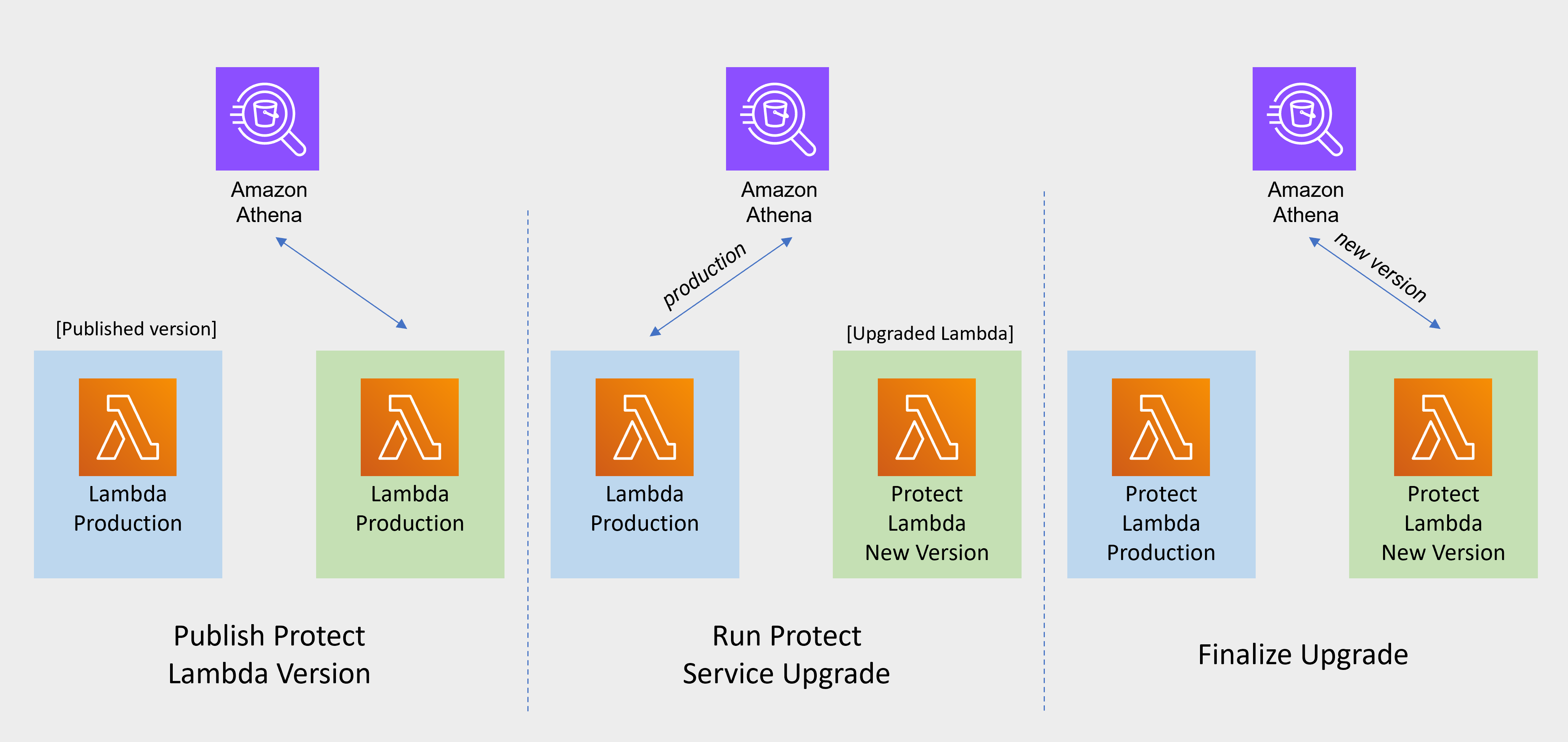
                                                                                              Snowflake Function Upgrade Steps

                                                                                              Redshift Function Upgrade Steps

                                                                                              Cloud API Function Upgrade Steps

                                                                                              Athena Function Upgrade Steps

                                                                                              • Publish Protect Lambda Version

                                                                                                Publishing a version of the Protect Lambda allows updating it without interruptions to the existing traffic.

                                                                                                1. Go to AWS Lambda console and select existing Protegrity Protect Lambda.

                                                                                                2. Go to Lambda Configuration > Environment variables.

                                                                                                3. Record environment variables values. You will use them later to configure upgraded Lambda Function. You can use the aws cli command below to save the function variables into the local json file:

                                                                                                  aws lambda get-function-configuration --function-name \
                                                                                                  arn:aws:lambda:<aws_region>:<aws_account>:function:<function_name> \
                                                                                                  --query Environment > <function_name>_env_config.json
                                                                                                  
                                                                                                4. Click Actions in top right portion of the screen. Select Publish new version. Click Publish.

                                                                                                5. Record the Lambda version number. It will be displayed at the top of the screen. You can also retrieve it from the Lambda function view, under Versions tab.

                                                                                                  Protect Lambda version number: ___________________

                                                                                                6. If you are upgrading a Cloud Protect Redshift version 1.x to 2.x/3x, you must recreate your Redshift external function definitions with Protect Lambda Function version appended to the Lambda Function name. See example below.

                                                                                                  CREATE OR REPLACE EXTERNAL FUNCTION PTY_PROTECT_TEST ( val varchar )
                                                                                                      RETURNS varchar
                                                                                                      VOLATILE lambda
                                                                                                      'Protegrity_Protect_test:<protect_lambda_version_number>' iam_role
                                                                                                      'arn:aws:iam::123456789212:role/example_role';
                                                                                                  
                                                                                              • Run protect service upgrade

                                                                                                In this step, the Protect service including Lambda $LATEST version will be updated using Cloud Formation template. The Lambda version created in previous step will be used to serve existing traffic during the upgrade process.

                                                                                                1. Go to AWS Cloud Formation and select existing Protegrity deployment stack.

                                                                                                2. Select Update. Check Replace current template > Upload a template file.

                                                                                                3. Upload pty_protect_cf.json file and select Next.

                                                                                                4. Update ProtectFunctionProductionVersion parameter with Protect Lambda version number recorded in step 3.

                                                                                                5. Click Next until Review window and then select Update stack.

                                                                                                6. Wait for the Cloud Formation to complete.

                                                                                                7. Go back to Lambda console and select Protect Lambda.

                                                                                                8. Go to Configuration > Environment variables. Replace placeholder values with values recorded in previous step. Alternatively, you can run the following aws cli command to update function configuration using json file saved in the previous steps:

                                                                                                  aws lambda update-function-configuration --function-name \
                                                                                                  arn:aws:lambda:<aws_region>:<aws_account>:function:<function_name> \
                                                                                                  --environment file://./<function_name>_env_config.json
                                                                                                  
                                                                                                9. Navigate to Aliases tab. Verify that Production alias points to the lambda version you specified in the cloud formation template.

                                                                                                10. The upgraded Protect Lambda is configured with a sample policy. Run Agent Lambda Function before continuing with next steps.

                                                                                              • Finalize upgrade

                                                                                                In this step, the Protect Lambda will be configured to serve traffic using $LATEST version upgraded in the previous step.

                                                                                                1. Go back to Protegrity AWS Cloud Formation deployment stack.

                                                                                                2. Select Update. Check Use Current template.

                                                                                                3. Update ProtectFunctionProductionVersion parameter with the following value: $LATEST.

                                                                                                4. Click Next until Review window and then select Update stack.

                                                                                                5. Go back to Lambda console and select Protect Lambda.

                                                                                                6. From the Lambda console, verify that Latest alias points to $LATEST version.

                                                                                                7. Test your function to make sure it works as expected.

                                                                                                8. If you are upgrading a Cloud Protect Redshift version 1.x to 2.x/3x, you must recreate your Redshift external function definitions with Protect Lambda Function version appended to the Lambda Function name. See example below.

                                                                                                  CREATE OR REPLACE EXTERNAL FUNCTION PTY_PROTECT_TEST ( val varchar )
                                                                                                      RETURNS varchar
                                                                                                      VOLATILE lambda
                                                                                                      'Protegrity_Protect_test:Production' iam_role
                                                                                                      'arn:aws:iam::123456789212:role/example_role';
                                                                                                  
                                                                                                9. If you need to rollback to older version of Protect Lambda, you can re-run the cloud formation with ProtectFunctionProductionVersion parameter set to the previous version of Protect Lambda.

                                                                                              Re-enable Protegrity Agent Function CloudWatch Event Rule

                                                                                              If the Event Rule was disabled at the beginning of the upgrade process, you must re-enabled it. Follow the steps below to re-enable Policy Agent Event rule.

                                                                                              1. Go to the Protegrity Agent Cloud Formation Stack.

                                                                                              2. Select Resources tab from the top portion of the screen.

                                                                                              3. Click on the Physical ID link in the ScheduledRule row. The link opens Policy Agent Event Rule configuration.

                                                                                              4. Select Enable from the top-right portion of the screen. This will enable the rule. You will re-enable it after the upgrade process is complete.

                                                                                              4.8 - Known Limitations

                                                                                              Known product limitations.

                                                                                              Known Limitations

                                                                                              Known product limitations:

                                                                                              • FPE is supported only for ASCII values.
                                                                                              • Only the protect and unprotect operations are supported. The reprotect operation is not currently supported.

                                                                                              4.9 - Appendices

                                                                                              Additional references for the protector.

                                                                                              4.9.1 - Sample Snowflake External Function

                                                                                              A collection of sample Snowflake functions.

                                                                                              Sample Snowflake External Function

                                                                                              Method: Tokenization

                                                                                              Type: ALPHA


                                                                                              Snowflake Data Types

                                                                                              Snowflake Max Size

                                                                                              Protegrity Max Size

                                                                                              VARCHAR

                                                                                              16M (16,777,216 bytes)

                                                                                              4K (4,096 bytes)

                                                                                              CHAR

                                                                                              STRING

                                                                                              TEXT


                                                                                              External Function Sample Definitions:

                                                                                              CREATE SECURE EXTERNAL FUNCTION PTY_PROTECT_ALPHA ( val varchar ) 
                                                                                                RETURNS varchar 
                                                                                                NULL 
                                                                                                IMMUTABLE 
                                                                                                COMMENT = 'Protects using an ALPHA data element'  
                                                                                                API_INTEGRATION = REPLACE_WITH_YOUR_API_INTEGRATION_ID 
                                                                                                HEADERS =(  
                                                                                                  'X-Protegrity-HCoP-Rules'=
                                                                                                  '{"jsonpaths":[{"op_type":"PROTECT","data_element":"TOK_ALPHA"}]}'    
                                                                                                ) 
                                                                                                CONTEXT_HEADERS = ( current_user, current_timestamp, current_account ) 
                                                                                                AS '<AWS API GATEWAY URL>/SF_CUSTOMER';
                                                                                              
                                                                                              CREATE SECURE EXTERNAL FUNCTION PTY_UNPROTECT_ALPHA ( val varchar ) 
                                                                                                RETURNS varchar 
                                                                                                NULL 
                                                                                                IMMUTABLE 
                                                                                                COMMENT = 'Unprotects using an ALPHA data element'  
                                                                                                API_INTEGRATION = REPLACE_WITH_YOUR_API_INTEGRATION_ID
                                                                                                HEADERS =(  
                                                                                                  'X-Protegrity-HCoP-Rules'=
                                                                                                  '{"jsonpaths":[{"op_type":"UNPROTECT","data_element":"TOK_ALPHA"}]}'
                                                                                                ) 
                                                                                                CONTEXT_HEADERS = ( current_user, current_timestamp, current_account ) 
                                                                                                AS '<AWS API GATEWAY URL>/SF_CUSTOMER';


                                                                                              Sample EF Calls:

                                                                                              SELECT PTY_PROTECT_ALPHA ('Hello World')
                                                                                              
                                                                                              SELECT PTY_UNPROTECT_ALPHA('rfDtw sLMJK');


                                                                                              Snowflake Masking Policy example:

                                                                                              create or replace masking policy alpha_policy as (val string) returns string -> 
                                                                                               case 
                                                                                               when current_role() in ('ACCOUNTADMIN') then PTY_UNPROTECT_ALPHA(val) 
                                                                                               else val 
                                                                                              end;
                                                                                              
                                                                                              alter table pii_data modify column field01 set masking policy alpha_policy; 
                                                                                              alter table pii_data modify column field01 unset masking policy;
                                                                                              

                                                                                              Method: Tokenization

                                                                                              Type: NUMERIC


                                                                                              Snowflake Data Types

                                                                                              Snowflake Max Size

                                                                                              Protegrity Max Size

                                                                                              NUMBER


                                                                                              DECIMAL

                                                                                              INTEGER

                                                                                              DOUBLE


                                                                                              External Function Sample Definitions:

                                                                                              CREATE SECURE EXTERNAL FUNCTION PTY_PROTECT_NUMERIC ( val number ) 
                                                                                                RETURNS number 
                                                                                                NULL 
                                                                                                IMMUTABLE 
                                                                                                COMMENT = 'Protects using a NUMERIC data element'  
                                                                                                API_INTEGRATION = REPLACE_WITH_YOUR_API_INTEGRATION_ID 
                                                                                                HEADERS =(  
                                                                                                  'X-Protegrity-HCoP-Rules'=
                                                                                                  '{"jsonpaths":[{"op_type":"PROTECT","data_element":"TOK_NUMERIC"}]}'    
                                                                                                ) 
                                                                                                CONTEXT_HEADERS = ( current_user, current_timestamp, current_account ) 
                                                                                                AS '<AWS API GATEWAY URL>/SF_CUSTOMER';
                                                                                              
                                                                                              CREATE SECURE EXTERNAL FUNCTION PTY_UNPROTECT_NUMERIC ( val number) 
                                                                                                RETURNS number 
                                                                                                NULL 
                                                                                                IMMUTABLE 
                                                                                                COMMENT = 'Unprotects using a NUMERIC data element'  
                                                                                                API_INTEGRATION = REPLACE_WITH_YOUR_API_INTEGRATION_ID 
                                                                                                HEADERS =(  
                                                                                                  'X-Protegrity-HCoP-Rules'=
                                                                                                  '{"jsonpaths":[{"op_type":"UNPROTECT","data_element":"TOK_NUMERIC"}]}'
                                                                                                ) 
                                                                                                CONTEXT_HEADERS = ( current_user, current_timestamp, current_account ) 
                                                                                                AS '<AWS API GATEWAY URL>/SF_CUSTOMER';


                                                                                              Sample EF Calls:

                                                                                              SELECT PTY_PROTECT_NUMERIC ('123456789');
                                                                                              
                                                                                              SELECT PTY_UNPROTECT_NUMERIC ('752513497');


                                                                                              Snowflake Masking Policy example:

                                                                                              create or replace masking policy num_policy as (val number) returns number -> 
                                                                                               case 
                                                                                               when current_role() in ('ACCOUNTADMIN') then PTY_UNPROTECT_NUMERIC(val) 
                                                                                               else val 
                                                                                              end;
                                                                                              
                                                                                              alter table pii_data modify column field02 set masking policy num_policy; 
                                                                                              alter table pii_data modify column field02 unset masking policy;
                                                                                              

                                                                                              Method: Tokenization

                                                                                              Type: DATE YYYY-MM-DD


                                                                                              Snowflake Data Types

                                                                                              Snowflake Max Size

                                                                                              Protegrity Max Size

                                                                                              DATE (any supported format)

                                                                                              10 bytes

                                                                                              10 bytes


                                                                                              External Function Sample Definitions:

                                                                                              CREATE SECURE EXTERNAL FUNCTION PTY_PROTECT_DATEYYYYMMDD ( val date ) 
                                                                                                RETURNS date 
                                                                                                NULL 
                                                                                                IMMUTABLE 
                                                                                                COMMENT = 'Protects using a Date data element'  
                                                                                                API_INTEGRATION = REPLACE_WITH_YOUR_API_INTEGRATION_ID 
                                                                                                HEADERS =(  
                                                                                                  'X-Protegrity-HCoP-Rules'=
                                                                                                  '{"jsonpaths":[{"op_type":"PROTECT","data_element":"TOK_DATEYYYYMMDD"}]}'    
                                                                                                ) 
                                                                                                CONTEXT_HEADERS = ( current_user, current_timestamp, current_account ) 
                                                                                                AS '<AWS API GATEWAY URL>/SF_CUSTOMER';
                                                                                              
                                                                                              CREATE SECURE EXTERNAL FUNCTION PTY_UNPROTECT_DATEYYYYMMDD ( val date ) 
                                                                                                RETURNS date 
                                                                                                NULL 
                                                                                                IMMUTABLE 
                                                                                                COMMENT = 'Unprotects using a Date data element'  
                                                                                                API_INTEGRATION = REPLACE_WITH_YOUR_API_INTEGRATION_ID 
                                                                                                HEADERS =(  
                                                                                                  'X-Protegrity-HCoP-Rules'=
                                                                                                  '{"jsonpaths":[{"op_type":"UNPROTECT","data_element":"TOK_DATEYYYYMMDD"}]}'    
                                                                                                ) 
                                                                                                CONTEXT_HEADERS = ( current_user, current_timestamp, current_account ) 
                                                                                                AS '<AWS API GATEWAY URL>/SF_CUSTOMER';
                                                                                              

                                                                                              Sample EF Calls:

                                                                                              SELECT PTY_PROTECT_DATEYYYYMMDD ('2020-12-31');
                                                                                              
                                                                                              SELECT PTY_UNPROTECT_DATEYYYYMMDD('0653-06-01');
                                                                                              
                                                                                              SELECT PTY_PROTECT_DATEYYYYMMDD ('31-DEC-2020');*
                                                                                              
                                                                                              SELECT PTY_UNPROTECT_DATEYYYYMMDD('01-JUN-0653');*
                                                                                              
                                                                                              SELECT PTY_PROTECT_DATEYYYYMMDD('12/31/2020');*
                                                                                              
                                                                                              SELECT PTY_UNPROTECT_DATEYYYYMMDD('06/01/0653');*
                                                                                              
                                                                                              SELECT PTY_PROTECT_DATEYYYYMMDD (current_date);


                                                                                              Snowflake Masking Policy example:

                                                                                              create or replace masking policy date_policy as (val date) returns date -> 
                                                                                               case 
                                                                                               when current_role() in ('ACCOUNTADMIN') then PTY_UNPROTECT_DATEYYYYMMDD (val) 
                                                                                               else val 
                                                                                              end;
                                                                                              
                                                                                              alter table pii_data modify column field11 set masking policy date_policy; 
                                                                                              alter table pii_data modify column field11 unset masking policy;
                                                                                              
                                                                                              **\***: Automatic cast to YYYY-MM-DD, no need to make any conversions. The output is always in the YYYY-MM-DD format

                                                                                              Cutover Dates of the Proleptic Gregorian Calendar: no issues (no conversions performed by Snowflake)

                                                                                              Method: Tokenization

                                                                                              Type: DATETIME


                                                                                              Snowflake Data Types

                                                                                              Snowflake Max Size

                                                                                              Protegrity Max Size

                                                                                              DATE

                                                                                              10 bytes

                                                                                              29 bytes

                                                                                              DATETIME

                                                                                              29 bytes

                                                                                              TIMESTAMPNTZ*

                                                                                              TIMESTAMP_NTZ*

                                                                                              TIMESTAMP WITHOUT TIME ZONE*


                                                                                              External Function Sample Definitions:

                                                                                              CREATE SECURE EXTERNAL FUNCTION PTY_PROTECT_DATETIME ( val timestamp ) 
                                                                                                RETURNS timestamp 
                                                                                                NULL 
                                                                                                IMMUTABLE 
                                                                                                COMMENT = 'Protects using a TIMESTAMP data element'  
                                                                                                API_INTEGRATION = REPLACE_WITH_YOUR_API_INTEGRATION_ID 
                                                                                                HEADERS =(  
                                                                                                  'X-Protegrity-HCoP-Rules'=
                                                                                                  '{"jsonpaths":[{"op_type":"PROTECT","data_element":"TOK_DATETIME"}]}'    
                                                                                                ) 
                                                                                                CONTEXT_HEADERS = ( current_user, current_timestamp, current_account ) 
                                                                                                AS '<AWS API GATEWAY URL>/SF_CUSTOMER';
                                                                                              
                                                                                              CREATE SECURE EXTERNAL FUNCTION PTY_UNPROTECT_DATETIME ( val timestamp ) 
                                                                                                RETURNS timestamp 
                                                                                                NOT NULL 
                                                                                                IMMUTABLE 
                                                                                                COMMENT = 'Unprotects using a TIMESTAMP data element'  
                                                                                                API_INTEGRATION = REPLACE_WITH_YOUR_API_INTEGRATION_ID 
                                                                                                HEADERS =(  
                                                                                                  'X-Protegrity-HCoP-Rules'=
                                                                                                  '{"jsonpaths":[{"op_type":"UNPROTECT","data_element":"TOK_DATETIME"}]}'    
                                                                                                ) 
                                                                                                CONTEXT_HEADERS = ( current_user, current_timestamp, current_account ) 
                                                                                                AS '<AWS API GATEWAY URL>/SF_CUSTOMER';
                                                                                              

                                                                                              Sample EF Calls:

                                                                                              SELECT PTY_PROTECT_DATETIME('2010-10-25');
                                                                                              
                                                                                              SELECT PTY_UNPROTECT_DATETIME('0845-04-04');
                                                                                              
                                                                                              SELECT PTY_PROTECT_DATETIME('2010-10-25 10:45:33');
                                                                                              
                                                                                              SELECT PTY_UNPROTECT_DATETIME('0845-04-04 10:45:33');
                                                                                              
                                                                                              SELECT PTY_PROTECT_DATETIME('2010-10-25 10:45:33.123');
                                                                                              
                                                                                              SELECT PTY_UNPROTECT_DATETIME('0845-04-04 10:45:33.123');
                                                                                              
                                                                                              SELECT PTY_PROTECT_DATETIME(current_date);
                                                                                              
                                                                                              SELECT PTY_PROTECT_DATETIME(cast(current_timestamp as TIMESTAMPNTZ));


                                                                                              Snowflake Masking Policy example:

                                                                                              create or replace masking policy datetime_policy as (val timestampntz) returns timestampntz -> 
                                                                                               case 
                                                                                               when current_role() in ('ACCOUNTADMIN') then PTY_UNPROTECT_DATETIME (val) 
                                                                                               else val 
                                                                                              end;
                                                                                              
                                                                                              alter table pii_data modify column field12 set masking policy datetime_policy; 
                                                                                              alter table pii_data modify column field12 unset masking policy;
                                                                                              
                                                                                              **\***: Default TIMESTAMP in Snowflake includes Time Zone – not supported by Protegrity’s DATETIME data element

                                                                                              Method: Tokenization

                                                                                              Type: DECIMAL


                                                                                              Snowflake Data Types

                                                                                              Snowflake Max Size

                                                                                              Protegrity Max Size

                                                                                              NUMBER(N,M)

                                                                                              38 digits

                                                                                              36 digits

                                                                                              NUMERIC(N,M)*

                                                                                              DECIMAL(N,M)*


                                                                                              External Function Sample Definitions:

                                                                                              CREATE SECURE EXTERNAL FUNCTION PTY_PROTECT_DECIMAL ( val NUMBER(38,6) ) 
                                                                                                RETURNS NUMBER(38,6) 
                                                                                                NULL 
                                                                                                IMMUTABLE 
                                                                                                COMMENT = 'Protects using a DECIMAL data element'  
                                                                                                API_INTEGRATION = REPLACE_WITH_YOUR_API_INTEGRATION_ID 
                                                                                                HEADERS =(  
                                                                                                  'X-Protegrity-HCoP-Rules'=
                                                                                                  '{"jsonpaths":[{"op_type":"PROTECT","data_element":"TOK_DECIMAL"}]}'    
                                                                                                ) 
                                                                                                CONTEXT_HEADERS = ( current_user, current_timestamp, current_account ) 
                                                                                                AS '<AWS API GATEWAY URL>/SF_CUSTOMER';
                                                                                              
                                                                                              CREATE SECURE EXTERNAL FUNCTION PTY_UNPROTECT_DECIMAL ( val NUMBER(38,6) ) 
                                                                                                RETURNS NUMBER(38,6) 
                                                                                                NULL 
                                                                                                IMMUTABLE 
                                                                                                COMMENT = 'Unprotects using a DECIMAL data element'  
                                                                                                API_INTEGRATION = REPLACE_WITH_YOUR_API_INTEGRATION_ID 
                                                                                                HEADERS =(  
                                                                                                  'X-Protegrity-HCoP-Rules'=
                                                                                                  '{"jsonpaths":[{"op_type":"UNPROTECT","data_element":"TOK_DECIMAL"}]}'    
                                                                                                ) 
                                                                                                CONTEXT_HEADERS = ( current_user, current_timestamp, current_account ) 
                                                                                                AS '<AWS API GATEWAY URL>/SF_CUSTOMER';
                                                                                              

                                                                                              Sample EF Calls:

                                                                                              SELECT PTY_PROTECT_DECIMAL (12345678.99);
                                                                                              
                                                                                              SELECT PTY_UNPROTECT_DECIMAL (21872469.760000);


                                                                                              Snowflake Masking Policy example:

                                                                                              create or replace masking policy decimal_policy as (val NUMBER(38,6)) returns NUMBER(38,6)-> 
                                                                                               case 
                                                                                               when current_role() in ('ACCOUNTADMIN') then PTY_UNPROTECT_DECIMAL (val) 
                                                                                               else val 
                                                                                              end;
                                                                                              
                                                                                              alter table pii_data modify column field13 set masking policy decimal_policy; 
                                                                                              alter table pii_data modify column field13 unset masking policy;
                                                                                              
                                                                                              **\***: Synonymous with NUMBER

                                                                                              Method: Tokenization

                                                                                              Type: INTEGER


                                                                                              Snowflake Data Types

                                                                                              Snowflake Max Size

                                                                                              Protegrity Max Size

                                                                                              NUMBER

                                                                                              38 digits

                                                                                              2 bytes

                                                                                              4 bytes

                                                                                              8 bytes

                                                                                              NUMERIC*

                                                                                              INT*

                                                                                              INTEGER*

                                                                                              BIGINT*

                                                                                              SMALLINT*

                                                                                              TINYINT*

                                                                                              BYTEINT*


                                                                                              External Function Sample Definitions:

                                                                                              CREATE SECURE EXTERNAL FUNCTION PTY_PROTECT_INTEGER ( val NUMBER ) 
                                                                                                RETURNS NUMBER
                                                                                                NULL 
                                                                                                IMMUTABLE 
                                                                                                COMMENT = 'Protects using an INTEGER data element'  
                                                                                                API_INTEGRATION = REPLACE_WITH_YOUR_API_INTEGRATION_ID 
                                                                                                HEADERS =(  
                                                                                                  'X-Protegrity-HCoP-Rules'=
                                                                                                  '{"jsonpaths":[{"op_type":"PROTECT","data_element":"TOK_INTEGER"}]}'    
                                                                                                ) 
                                                                                                CONTEXT_HEADERS = ( current_user, current_timestamp, current_account ) 
                                                                                                AS '<AWS API GATEWAY URL>/SF_CUSTOMER';
                                                                                              
                                                                                              CREATE SECURE EXTERNAL FUNCTION PTY_UNPROTECT_INTEGER ( val NUMBER ) 
                                                                                                RETURNS NUMBER 
                                                                                                NOT NULL 
                                                                                                IMMUTABLE 
                                                                                                COMMENT = 'Unprotects using an INTEGER data element'  
                                                                                                API_INTEGRATION = REPLACE_WITH_YOUR_API_INTEGRATION_ID 
                                                                                                HEADERS =(  
                                                                                                  'X-Protegrity-HCoP-Rules'=
                                                                                                  '{"jsonpaths":[{"op_type":"UNPROTECT","data_element":"TOK_INTEGER"}]}'    
                                                                                                ) 
                                                                                                CONTEXT_HEADERS = ( current_user, current_timestamp, current_account ) 
                                                                                                AS '<AWS API GATEWAY URL>/SF_CUSTOMER';


                                                                                              Sample EF Calls:

                                                                                              SELECT PTY_PROTECT_INTEGER (123456789);
                                                                                              
                                                                                              SELECT PTY_UNPROTECT_INTEGER (1104108887);


                                                                                              Snowflake Masking Policy example:

                                                                                              create or replace masking policy int_policy as (val NUMBER ) returns NUMBER -> 
                                                                                               case 
                                                                                               when current_role() in ('ACCOUNTADMIN') then PTY_UNPROTECT_INTEGER (val) 
                                                                                               else val 
                                                                                              end;
                                                                                              
                                                                                              alter table pii_data modify column field14 set masking policy int_policy; 
                                                                                              alter table pii_data modify column field14 unset masking policy;
                                                                                              
                                                                                              **\***: Synonymous with NUMBER, except that precision and scale cannot be specified \(i.e. always defaults to NUMBER\(38, 0\)\)

                                                                                              **Recommended approach for protecting whole numbers fields in Snowflake

                                                                                              When values are…then use the following Data Element:
                                                                                              Between -32768 and 32767INTEGER (2 bytes)
                                                                                              Between -2147483648 and 2147483647INTEGER (4 bytes)
                                                                                              Between -9223372036854775808 and 9223372036854775807INTEGER (8 bytes)
                                                                                              < -9223372036854775808 or > 9223372036854775807DECIMAL

                                                                                              When in doubt, use DECIMAL for any numeric range.

                                                                                              4.9.2 - Installing the Policy Agent and Protector in Different AWS Accounts

                                                                                              Example steps to install Agent in a different AWS account than the Protector

                                                                                                The Policy Agent Lambda function and Protect Lambda functions can be installed in separate AWS accounts. However, additional configuration is required to authorize the Policy Agent to provision the security policy to a remote Protect Lambda function.

                                                                                                Create Agent Lambda IAM policy

                                                                                                1. Login to the AWS account that hosts the Protect Lambda function.

                                                                                                2. From the AWS IAM console, select Policies > Create Policy.

                                                                                                3. Select the JSON tab and copy the following snippet.

                                                                                                  {
                                                                                                    "Version": "2012-10-17",
                                                                                                    "Statement": [
                                                                                                      {
                                                                                                        "Sid": "LambdaUpdateFunction",
                                                                                                        "Effect": "Allow",
                                                                                                        "Action": [
                                                                                                          "lambda:UpdateFunctionConfiguration"
                                                                                                        ],
                                                                                                        "Resource": [
                                                                                                          "arn:aws:lambda:*:*:function:*"
                                                                                                        ]
                                                                                                      },
                                                                                                      {
                                                                                                        "Sid": "LambdaReadLayerVersion",
                                                                                                        "Effect": "Allow",
                                                                                                        "Action": [
                                                                                                          "lambda:GetLayerVersion",
                                                                                                          "lambda:ListLayerVersions"
                                                                                                        ],
                                                                                                        "Resource": "*"
                                                                                                      },
                                                                                                      {
                                                                                                        "Sid": "LambdaDeleteLayerVersion",
                                                                                                        "Effect": "Allow",
                                                                                                        "Action": "lambda:DeleteLayerVersion",
                                                                                                        "Resource": "arn:aws:lambda:*:*:layer:*:*"
                                                                                                      },
                                                                                                      {
                                                                                                        "Sid": "LambdaPublishLayerVersion",
                                                                                                        "Effect": "Allow",
                                                                                                        "Action": "lambda:PublishLayerVersion",
                                                                                                        "Resource": "arn:aws:lambda:*:*:layer:*"
                                                                                                      },
                                                                                                      {
                                                                                                        "Sid": "S3GetObject",
                                                                                                        "Effect": "Allow",
                                                                                                        "Action": [
                                                                                                          "s3:GetObject"
                                                                                                        ],
                                                                                                        "Resource": "arn:aws:s3:::*/*"
                                                                                                      },
                                                                                                      {
                                                                                                        "Sid": "S3PutObject",
                                                                                                        "Effect": "Allow",
                                                                                                        "Action": [
                                                                                                          "s3:PutObject"
                                                                                                        ],
                                                                                                        "Resource": "arn:aws:s3:::*/*"
                                                                                                      },
                                                                                                      {
                                                                                                        "Sid": "LambdaGetConfiguration",
                                                                                                        "Effect": "Allow",
                                                                                                        "Action": [
                                                                                                            "lambda:GetFunctionConfiguration"
                                                                                                        ],
                                                                                                        "Resource": [
                                                                                                            "arn:aws:lambda:*:*:function:*"
                                                                                                        ]
                                                                                                      }
                                                                                                    ]
                                                                                                  }
                                                                                                  
                                                                                                4. Replace the wildcards (*) with the region, account, and resource name information where required.

                                                                                                5. Select Review policy, type in the policy name, and confirm. Record policy name:

                                                                                                  Agent Lambda Cross Account Policy Name: ___________________

                                                                                                Create Policy Agent cross-account IAM Role

                                                                                                1. Login to the AWS account that hosts the Protect Lambda function.

                                                                                                2. From the AWS IAM console, select Roles > Create Role

                                                                                                3. Select AWS Service > Lambda . Proceed to Permissions.

                                                                                                4. Select Policy created in the step above. Proceed to Tags.

                                                                                                5. Specify Tag, proceed to the final screen. Type in policy name and confirm. Record the name.

                                                                                                  Policy Agent Cross Account IAM Role Name: ___________________

                                                                                                Allow the Policy Agent Cross-Account Role to be Assumed by the Policy Agent IAM Role

                                                                                                1. Login to the AWS account that hosts the Protect Lambda function.

                                                                                                2. Navigate to the previously created IAM Role (Agent Lambda Cross-Account IAM Role Name).

                                                                                                3. Navigate to Trust Relationships > Edit Trust Relationships.

                                                                                                4. Modify the Policy Document, replacing the placeholder value indicated in the following snippet as <Agent Lambda IAM Execution Role ARN> with ARN of Agent Lambda IAM Role that was created in Agent Installation.

                                                                                                  {
                                                                                                    "Version": "2012-10-17",
                                                                                                    "Statement": [
                                                                                                      {
                                                                                                        "Effect": "Allow",
                                                                                                  
                                                                                                     "Principal": {
                                                                                                  
                                                                                                              "AWS": "<Agent Lambda IAM Execution Role Name>"
                                                                                                  
                                                                                                        },
                                                                                                        "Action": "sts:AssumeRole"
                                                                                                      }
                                                                                                    ]
                                                                                                  }
                                                                                                  
                                                                                                5. Click Update Trust Policy.

                                                                                                Add Assume Role to the Policy Agent Execution IAM Role

                                                                                                1. Login to the AWS account that hosts the Policy Agent.

                                                                                                2. Navigate to the Agent Lambda IAM Execution Role that was created in Agent Installation.

                                                                                                  {
                                                                                                    "Version": "2012-10-17",
                                                                                                    "Statement": [
                                                                                                      {
                                                                                                        "Effect": "Allow",
                                                                                                  
                                                                                                     "Principal": {
                                                                                                  
                                                                                                              "AWS": "<Agent Lambda IAM Execution Role Name>"
                                                                                                  
                                                                                                        },
                                                                                                        "Action": "sts:AssumeRole"
                                                                                                      }
                                                                                                    ]
                                                                                                  }
                                                                                                  
                                                                                                3. Add Inline Policy.

                                                                                                4. Modify the Policy Document, replacing the placeholder value indicated in the following snippet as <Agent Lambda Cross-Account IAM ARN> with the value recorded in Create Policy Agent cross-account IAM Role.

                                                                                                  {
                                                                                                    "Version": "2012-10-17",
                                                                                                    "Statement": [
                                                                                                      {
                                                                                                        "Effect": "Allow",
                                                                                                        "Action": [
                                                                                                          "sts:AssumeRole"
                                                                                                        ],
                                                                                                        "Resource": "<Agent Lambda Cross-Account IAM  ARN>."
                                                                                                      }
                                                                                                    ]
                                                                                                  }
                                                                                                  
                                                                                                5. When you are finished, choose Review Policy.

                                                                                                6. On the Review policy page, type a Name, then choose Create Policy.

                                                                                                Update the Policy Agent Lambda Configuration

                                                                                                1. From the AWS console, navigate to Lambda, and select the Policy Agent Lambda function.

                                                                                                2. Select Configuration tab | Environment variables.

                                                                                                3. Select Edit and add the following environment variables with the value from Agent Lambda Cross-Account IAM ARN:

                                                                                                  ParameterValue
                                                                                                  AWS_ASSUME_ROLEAgent Lambda Cross-Account IAM ARN
                                                                                                4. Ensure the values in the Parameters AWS_POLICY_S3_BUCKET, AWS_PROTECT_FN_NAME and AWS_POLICY_LAYER_NAME are all in the Protect Lambda Function AWS Account.

                                                                                                5. In case custom VPC hostname configuration is used, you will need to set the ENDPOINT_URL. Refer to Policy Agent - Custom VPC Endpoint Hostname Configuration.

                                                                                                  AWS_VPC_ENDPOINT_URL

                                                                                                  <AWS_VPC_ENDPOINT>

                                                                                                6. Click Save and Run the Lambda. The Lambda will now assume the Role in Protect Lambda Function AWS Account and update the policy cross accounts.

                                                                                                4.9.3 - Integrating Cloud Protect with PPC (Protegrity Provisioned Cluster)

                                                                                                Concepts for integrating with PPC (Protegrity Provisioned Cluster)

                                                                                                This guide describes how to configure the Protegrity Policy Agent and Log Forwarder to connect to a Protegrity Provisioned Cluster (PPC), highlighting the differences from connecting to ESA.

                                                                                                Key Differences: PPC vs ESA

                                                                                                FeatureESA 10.2PPC (this guide)
                                                                                                Datastore Key FingerprintOptional/RecommendedRequired
                                                                                                CA Certificate on AgentOptional/RecommendedOptional/Recommended
                                                                                                CA Certificate on Log ForwarderOptional/RecommendedNot supported
                                                                                                Client Certificate Authentication from Log ForwarderOptional/RecommendedNot supported
                                                                                                IP AddressESA IP addressPPC address

                                                                                                Prerequisites

                                                                                                • Access to PPC and required credentials.
                                                                                                • Tools: curl, kubectl installed.

                                                                                                Policy Agent Setup with PPC

                                                                                                Follow these instructions as a guide for understanding specific inputs for Policy Agent integrating with PPC:

                                                                                                1. Obtain the Datastore Key Fingerprint

                                                                                                  To retrieve the fingerprint for your Policy Agent:

                                                                                                  curl -k -H "Authorization: Bearer ${TOKEN}" -X POST https://${HOST}/pty/v2/pim/datastores/1/export/keys  -H "Content-Type: application/json" --data '{
                                                                                                    "algorithm": "RSA-OAEP-256",
                                                                                                    "description": "example-key-from-kms",
                                                                                                    "pem": "-----BEGIN PUBLIC KEY-----\nABC123... ...890XYZ\n-----END PUBLIC KEY-----"
                                                                                                  }'
                                                                                                  

                                                                                                  Sample Output:

                                                                                                  {"uid":"1","algorithm":"RSA-OAEP-256","fingerprint":"4c:46:d8:05:35:2e:eb:39:4d:39:8e:6f:28:c3:ab:d3:bc:9e:7a:cb:95:cb:b1:8e:b5:90:21:0f:d3:2c:0b:27","description":"example-key-from-kms"}
                                                                                                  

                                                                                                  Record the fingerprint value and configure it as the PTY_DATASTORE_KEY for the Policy Agent.

                                                                                                2. Retrieve the PPC CA Certificate

                                                                                                  To obtain the CA certificate from PPC:

                                                                                                  kubectl -n api-gateway get secret ingress-certificate-secret -o jsonpath='{.data.ca\.crt}' | base64 -d > CA.pem
                                                                                                  

                                                                                                  Use the CA.pem that was returned as described in Policy Agent Installation.

                                                                                                3. Configure the PPC Address

                                                                                                  Use the PPC address in place of the ESA IP address wherever required in your configuration.

                                                                                                Log Forwarder Setup with PPC

                                                                                                • The Log Forwarder will proceed without certificates and will print a warning if PtyEsaCaServerCert and PtyEsaClientCertificatesSecretId are not provided.
                                                                                                • No additional certificate or CA configuration is needed for PPC.

                                                                                                Troubleshooting

                                                                                                Protector Lambda fails with “AWS KMS Decrypt failed”

                                                                                                Symptom:

                                                                                                After a successful Policy Agent run and layer update, the Protector Lambda returns:

                                                                                                {
                                                                                                  "body": "{\"error_msg\":\"Failed to open decoder: rpdecode decrypt failure: dek callback failed: AWS KMS Decrypt failed: \",\"success\":false}",
                                                                                                  "isBase64Encoded": false,
                                                                                                  "statusCode": 400
                                                                                                }
                                                                                                

                                                                                                The Protector Lambda logs show:

                                                                                                [SEVERE] [utils.cpp:185] AWS KMS Decrypt failed:
                                                                                                

                                                                                                Cause:

                                                                                                The public key configured in the PPC/ESA datastore does not match the KMS key pair used by the Policy Agent. The policy package is encrypted with the public key stored in the datastore. If that key does not correspond to the KMS key pair whose private key is used for decryption, the Protector Lambda will fail to decrypt the policy.

                                                                                                Resolution:

                                                                                                1. Identify the KMS key pair used by the Policy Agent (the key ARN configured during pre-configuration).
                                                                                                2. Export the public key from that KMS key pair.
                                                                                                3. In PPC/ESA, ensure the datastore’s export key is configured with the public key from that same KMS key pair. See Obtain the Datastore Key Fingerprint above.
                                                                                                4. Re-run the Policy Agent to generate a new policy package encrypted with the correct key.
                                                                                                5. Test the Protector Lambda again.

                                                                                                Additional Notes

                                                                                                  4.9.4 - Policy Agent - Custom VPC Endpoint Hostname Configuration

                                                                                                  Custom vpc endpoint hostname configuration

                                                                                                  The Policy Agent uses default endpoint hostnames to communicate with other AWS services (for example, secretsmanager.amazonaws.com). This configuration will only work in VPCs where Amazon-provided DNS is available (default VPC configuration with private DNS option enabled for the endpoint). If your VPC uses custom DNS, follow the instructions below to configure the Policy Agent Lambda to use custom endpoint hostnames.

                                                                                                  Identify DNS Hostnames

                                                                                                  To identify DNS hostnames:

                                                                                                  1. From AWS console, select VPC > Endpoints.

                                                                                                  2. Select Secrets Manager endpoint from the list of endpoints.

                                                                                                  3. Under Details > DNS Names, note the private endpoint DNS names adding https:// at the beginning of the endpoint name.

                                                                                                    For example, https://vpce-1234-4pzomrye.kms.us-west-1.vpce.amazonaws.com

                                                                                                  4. Note down DNS names for the KMS and Lambda endpoints:

                                                                                                    AWS_SECRETSMANAGER_ENDPOINT: https://_________________

                                                                                                    AWS_KMS_ENDPOINT: https://_________________

                                                                                                    AWS_LAMBDA_ENDPOINT: https://_________________

                                                                                                  Update the Policy Agent Lambda configuration

                                                                                                  To update policy agent lambda configuration:

                                                                                                  1. From the AWS console, navigate to Lambda, and select the Policy Agent Lambda function.

                                                                                                  2. Select the Configuration section and choose Environment variables.

                                                                                                  3. Select Edit and add the following environment variables with the corresponding endpoint URLs recorded in steps 3-4:

                                                                                                    ParametersValue
                                                                                                    AWS_SECRETSMANAGER_ENDPOINT_URL<AWS_SECRETS_ENDPOINT>
                                                                                                    AWS_KMS_ENDPOINT_URL<AWS KMS ENDPOINT>
                                                                                                    AWS_LAMBDA_ENDPOINT_URL<AWS LAMBDA ENDPOINT>
                                                                                                  4. Click Save and Run the Lambda. The Lambda will now use endpoints you have just configured.

                                                                                                  4.9.5 - Protection Methods

                                                                                                  Cloud API supported protection methods

                                                                                                  Protection Methods

                                                                                                  For more information about the protection methods supported by Protegrity, refer to the Protection Methods Reference.

                                                                                                  Tokenization Type

                                                                                                  Supported Input Data Types

                                                                                                  Notes

                                                                                                  Numeric

                                                                                                  Credit Card

                                                                                                  Alpha

                                                                                                  Upper-case Alpha

                                                                                                  Alpha-Numeric

                                                                                                  Upper Alpha-Numeric

                                                                                                  Lower ASCII

                                                                                                  Printable

                                                                                                  Decimal

                                                                                                  Unicode

                                                                                                  Unicode Base64

                                                                                                  Unicode Gen2

                                                                                                  Email

                                                                                                  STRING

                                                                                                  NULL

                                                                                                  Integer

                                                                                                  NUMBER

                                                                                                  NULL

                                                                                                  Date

                                                                                                  Datetime

                                                                                                  STRING

                                                                                                  NULL

                                                                                                  For information about supported formats, refer to the Protection Methods Reference.

                                                                                                  Binary

                                                                                                  STRING

                                                                                                  NULL

                                                                                                  Must be hex encoded unless a different encoding is specified. Another supported encoding is base64.

                                                                                                  Protection Method

                                                                                                  Supported Input Data Types

                                                                                                  Notes

                                                                                                  No Encryption

                                                                                                  STRING

                                                                                                  NUMBER

                                                                                                  NULL

                                                                                                  Encryption Algorithm

                                                                                                  Supported Input Data Types

                                                                                                  Notes

                                                                                                  3DES

                                                                                                  AES-128

                                                                                                  AES-256

                                                                                                  CUSP 3DES

                                                                                                  CUSP AES-128

                                                                                                  CUSP AES-256

                                                                                                  STRING

                                                                                                  Must be hex encoded unless a different encoding is specified. Another supported encoding is base64.

                                                                                                  4.9.6 - Configuring Regular Expression to Extract Policy Username

                                                                                                  Extract the policy username from the AWS identity.

                                                                                                  Configuring Regular Expression to Extract Policy Username

                                                                                                  Cloud Protect Lambda Function exposes USERNAME_REGEX configuration to allow extraction of policy username from user in the request.

                                                                                                  • USERNAME_REGEX Lambda Environment configuration

                                                                                                    The USERNAME_REGEX configuration can be used to extract policy username from user in the request. The following are allowed values for USERNAME_REGEX:

                                                                                                    • 1 - Default build-in regular expression is used:

                                                                                                      ^arn:aws:(?:iam|sts)::[0-9]{12}:(?:role|user|group|assumed\-role|federated\-user)\/([\w\/+=,.\-]{1,1024}|[\w\/+=,.\-@]{1,1024})(?:@[a-zA-Z0-9\-]{1,320}(?:\.\w+)+)?$
                                                                                                      
                                                                                                    • ^User regex$ - Custom regex with one capturing group. This group is used to extract the username. Examples below show different regular expression values and the resulting policy user.

                                                                                                  USERNAME_REGEX

                                                                                                  User in the request

                                                                                                  Effective Policy User

                                                                                                  Not Set

                                                                                                  arn:aws:iam::123456789012:user/juliet.snow

                                                                                                  arn:aws:iam::123456789012:user/juliet.snow

                                                                                                  arn:aws:sts::123456789012:assumed-role/TestSaml

                                                                                                  arn:aws:sts::123456789012:assumed-role/TestSaml

                                                                                                  1

                                                                                                  arn:aws:iam::123456789012:user/juliet.snow

                                                                                                  juliet.snow

                                                                                                  arn:aws:sts::123456789012:assumed-role/TestSaml

                                                                                                  TestSaml

                                                                                                  ^arn:aws:(?:iam|sts)::[0-9]{12}:((?:role|user|group|assumed-role|federated-user).*)$
                                                                                                  

                                                                                                  arn:aws:iam::123456789012:user/juliet.snow

                                                                                                  user/juliet.snow

                                                                                                  arn:aws:sts::123456789012:assumed-role/TestSaml

                                                                                                  assumed-role/TestSaml

                                                                                                  4.9.7 - Associating ESA Data Store With Cloud Protect Agent

                                                                                                  Configure ESA data store for Policy Agent.

                                                                                                  Associating ESA Data Store With Cloud Protect Agent

                                                                                                  ESA controls which policy is deployed to protector using concept of data store. A data store may contain a list of IP addresses identifying servers allowed to pull the policy associated with that specific data store. Data store may also be defined as default data store, which allows any server to pull the policy, provided it does not belong to any other data stores. Node registration occurs when the policy server (in this case the policy agent) makes a policy request to ESA, where the agent’s IP address is identified by ESA.

                                                                                                  Policy agent lambda source IP address used for node registration on ESA depends on ESA hubcontroller configuration ASSIGN_DATASTORE_USING_NODE_IP and the PTY_ADDIPADDRESSHEADER configuration exposed by the agent lambda.

                                                                                                  The Lambda service uses multiple network interfaces, internal network interface with ephemeral IP range of 169.254.x.x and external network interface with IP range of the VPC subnet the Lambda is associated with. By default, when agent lambda is contacting ESA to register node for policy download, ESA uses agent Lambda VPC IP address. This default behavior is caused by the default ESA hubcontroller configuration ASSIGN_DATASTORE_USING_NODE_IP=false and agent default configuration PTY_ADDIPADDRESSHEADER=yes.

                                                                                                  In some cases, when there is a proxy server between the ESA and agent lambda, the desirable ESA configuration is ASSIGN_DATASTORE_USING_NODE_IP=true. and PTY_ADDIPADDRESSHEADER=no which will cause the ESA to use proxy server IP address.

                                                                                                  The table below shows how the hubcontroller and agent settings will affect node IP registration on ESA.

                                                                                                  Agent source IPAgent VPC subnet IPProxy IPESA config - ASSIGN_DATASTORE_USING_NODE_IPAgent lambda config - PTY_ADDIPADDRESSHEADERAgent node registration IP
                                                                                                  169.254.144.8110.1.2.173No Proxytrueyes169.254.144.81
                                                                                                  trueno10.1.2.173
                                                                                                  falseyes
                                                                                                  falseno
                                                                                                  169.254.144.8110.1.2.17334.230.42.110trueyes169.254.144.81
                                                                                                  trueno34.230.42.110
                                                                                                  falseyes
                                                                                                  falseno

                                                                                                  5 - Amazon S3

                                                                                                  Cloud Storage Protector - Amazon.

                                                                                                  This document describes high-level architecture of the Cloud Storage Protector on AWS, the installation procedures and provides guidance on performance. This document should be used in conjunction with the Cloud API on AWS Protegrity documentation.

                                                                                                  This guide may also be used with the Protegrity Enterprise Security Administrator Guide, which explains the mechanism for managing the data security policy.

                                                                                                  5.1 - Overview

                                                                                                  Solution overview and features.

                                                                                                    Solution Overview

                                                                                                    The S3 Protector provides an automated solution for protecting files on Amazon S3 at-scale. The product integrates with the Amazon S3 Event Notification feature to trigger data protection when new files are created or modified. The notifications are consumed asynchronously by S3 Protector Lambda Function which breaks up files into batches, transmitting them securely to Cloud API Protector on AWS. The Cloud API Protector applies Protegrity cryptographic methods and sends back processed data. Processed file is saved to an output S3 bucket after all batches of the input file are processed. The serverless nature of the S3 protector solution allows scaling up automatically to accommodate for increasing volume of files and scale completely down during idle time, providing significant savings in Cloud compute fees.

                                                                                                    The solution requires installation of Protegrity Cloud Protector, Cloud API. The Cloud API Protector provides an endpoint for performing Protegrity operations within Amazon AWS for integration with Cloud-based ETL workflows.

                                                                                                    Protected files can be used as source for a data lake or downstream database ingestion. For example:

                                                                                                    • Snowflake Snowpipe can be used to automatically ingest protected files as they are written by the S3 Protector.
                                                                                                    • Amazon Redshift provides a mechanism for bulk loading data from Amazon S3 using the COPY INTO command.

                                                                                                    Similar to other Protegrity products, the S3 Protector utilizes data security policy maintained on Enterprise Security Appliance (ESA). The existing ESA policy user must be supplied as part of the S3 Protector configuration. The user acts as a service account user for the S3 Protector deployment. For more information about policy user configuration refer to Enterprise Security Administrator Guide.

                                                                                                    Analytics on Protected Data

                                                                                                    Protegrity’s format and length preserving tokenization scheme make it possible to perform analytics directly on protected data. Tokens are join-preserving so protected data can be joined across datasets. Often statistical analytics and machine learning training can be performed without the need to re-identify protected data. However, a user or service account with authorized security policy privileges may re-identify subsets of data using the Cloud Storage Protector - Amazon S3 service.

                                                                                                    Features

                                                                                                    Protegrity S3 Protector provides the following features:

                                                                                                    • Fine-grained field-level protection for structured data with the following formats supported:

                                                                                                      File FormatSuffix
                                                                                                      CSV.csv
                                                                                                      JSON.json
                                                                                                      Parquet.parquet
                                                                                                      Excel.xlsx
                                                                                                    • Role-based access control (RBAC) to protect and unprotect (re-identify) data depending on user privileges.

                                                                                                    • Policy enforcement features of other Protegrity application protectors.

                                                                                                    For more information about the available protection options, such as data types, Tokenization or Encryption types, or length-preserving and non-preserving tokens, refer to Protection Methods Reference.

                                                                                                    5.2 - Architecture

                                                                                                    Deployment architecture and connectivity

                                                                                                      Deployment Architecture

                                                                                                      The Protegrity S3 solution should be deployed in the customer’s Cloud account within the same AWS region as the Protegrity Cloud Protect API. The Cloud Protect API is required.

                                                                                                      Two S3 Buckets are required for processing data with S3 Protector:

                                                                                                      • Source bucket for collecting data and triggering protection job.
                                                                                                      • Target bucket for processed files.

                                                                                                      The following diagram shows the high-level architecture of the S3 Protector.

                                                                                                      The ruleset for processing a type of input dataset is defined by a metadata file called mapping.json. A dedicated folder with a mapping.json must be created in the S3 input bucket for each distinct file schema. The mapping.json provides:

                                                                                                      • processing instructions for each column of the input data file
                                                                                                      • specification for reading the input data file
                                                                                                      • specification for writing the processed data file

                                                                                                      Input and output data file specifications are passed to Pandas library as arguments, offering flexibility to handle diverse data file structures. Column instructions define the protect operation and data element to apply for each column.

                                                                                                      The Protegrity S3 protector invokes the Cloud Protect API to execute the policy on the data. The processed data is saved to the specified target S3 bucket.

                                                                                                      The target bucket can be the basis of a data lake or a staging area to load databases. For example, Snowflake Snowpipe can be used to automatically ingest the processed (ie. Protected) data into Snowflake. Amazon Redshift provides a similar mechanism for bulk loading data from Amazon S3.

                                                                                                      For more information about installing and managing the Cloud API component, refer to the Cloud API on AWS Protegrity documentation.

                                                                                                      AWS Lambda Timeout

                                                                                                      S3 Protector is an AWS Lambda function. Every AWS Lambda function has a maximum execution time called a ’timeout’. When you install this product with supplied CloudFormation template its timeout is set to 5 minutes. A maximum timeout of 15 minutes may be set. Function timeout puts a restriction on the size of the file that this product may process. If S3 Protector runs out of time while processing a file, it will fail with ‘Status: timeout’, which will appear in the logs similar to the following:

                                                                                                      REPORT RequestId: aaaaaaaa-aaaa-aaaa-aaaa-aaaaaaaaaaaa	Duration: 300000.00 ms	Billed Duration: 300000 ms	Memory Size: 1728 MB	Max Memory Used: 654 MB	Init Duration: 3868.74 ms	Status: timeout
                                                                                                      

                                                                                                      When S3 Protector runs out of time, it does not have an opportunity to mark file upload as completed. Incomplete uploads do not appear in S3 console, however you are still charged for them. Review AWS documentation on how to manage incomplete multi-part file uploads, for example:

                                                                                                      1. AWS CLI Documentation
                                                                                                      2. AWS Knowledge Center blog post

                                                                                                      There is no way to automatically re-start this product from where it has timed out while processing a file. To reduce the likelihood of a timeout error, consider the following:

                                                                                                      1. Increase function timeout to its maximum of 15 minutes
                                                                                                      2. Split large files into multiple smaller ones and let S3 Protector process them individually
                                                                                                      3. Increase ‘MaxBatchSize’ to increase protect operation throughput
                                                                                                      4. Ensure sufficient concurrency of Cloud Protect API functions
                                                                                                      5. Monitor Cloud Protect API and S3 Protect functions for performance and errors

                                                                                                      Parquet Timestamp

                                                                                                      Parquet files define file schema with a data type for each column. S3 Protector uses Pandas library to process data in the source file. Pandas library represents timestamps as 64-bit integers representing microseconds since the UNIX epoch. The supported date range for this representation is between ‘1677-09-21 00:12:43.145224’ and ‘2262-04-11 23:47:16.854775’. To correctly handle timestamps outside of this range, S3 Protector will treat every timestamp column in a source file as a string column. The schema of protected file will differ from the source file, where every protected timestamp column will be converted to a string column.

                                                                                                      5.3 - Installation

                                                                                                      Instructions for installing Cloud Storage Protector Service.

                                                                                                      5.3.1 - Prerequisites

                                                                                                      Requirements before installing the protector.

                                                                                                        AWS Services

                                                                                                        The following table describes the AWS services that may be a part of your Protegrity installation.

                                                                                                        ServiceDescription
                                                                                                        LambdaProvides serverless compute for S3 Protector.
                                                                                                        S3Input and Output data to be processed with S3 Protector.
                                                                                                        CloudWatchApplication and audit logs, performance monitoring, and alerts.

                                                                                                        Prerequisites

                                                                                                        RequirementDetail
                                                                                                        S3 Protector distribution and installation scriptsThese artifacts are provided by Protegrity
                                                                                                        Protegrity Cloud Protect APIThis product is required.
                                                                                                        AWS AccountRecommend using the same AWS account as the Protegrity Cloud API deployment.

                                                                                                        Required Skills and Abilities

                                                                                                        Role / SkillsetDescription
                                                                                                        AWS Account AdministratorTo run CloudFormation (or perform steps manually), create/configure S3, VPC and IAM permissions.
                                                                                                        Protegrity AdministratorThe ESA credentials required to read the policy configuration.

                                                                                                        What’s Next

                                                                                                        5.3.2 - Pre-Configuration

                                                                                                        Configuration steps before installing the protector.

                                                                                                          Provide AWS sub-account

                                                                                                          Identify or create an AWS account where the Protegrity solution will be installed. The installation instructions assume the same AWS account and region are used for Cloud Protect API deployment.

                                                                                                          AWS Account ID: ___________________

                                                                                                          AWS Region: ___________________

                                                                                                          Create S3 bucket for Installing Artifacts

                                                                                                          This S3 bucket will be used for the artifacts required by the CloudFormation installation steps. This S3 bucket must be created in the region that is defined in Provide AWS sub-account.

                                                                                                          To create S3 bucket for installing artifacts:

                                                                                                          1. Sign in to the AWS Management Console and open the Amazon S3 console.

                                                                                                          2. Change region to the one determined in Provide AWS sub-account

                                                                                                          3. Click Create Bucket.

                                                                                                          4. Enter a unique bucket name:

                                                                                                            For example, protegrity-install.us-west-2.example.com.

                                                                                                          5. Upload the installation artifacts to this bucket. Protegrity will provide the following artifacts.

                                                                                                            • protegrity-s3-protector-<version>.zip

                                                                                                            Artifact S3 Bucket Name: ___________________

                                                                                                          Cloud Protect API function

                                                                                                          Protegrity Cloud Protect API on AWS is required for the S3 Protector installation. See the Cloud Protect API on AWS documentation to create a new installation if one is not already available in your account/region. With Cloud Protect API on AWS installed, follow the below instructions to obtain the ARN of the protector lambda function.

                                                                                                          Follow these steps to obtain Cloud API Lambda ARN.

                                                                                                          1. Access the AWS Management Console.

                                                                                                          2. Navigate to the Cloud Protect API function in the AWS Lambda service.

                                                                                                          3. Open the Cloud Protect API function.

                                                                                                          4. From the Lambda view, choose Aliases, then click on Production alias.

                                                                                                          5. At the top right, copy the Lambda function ARN and record it. The Cloud API Production Alias ARN will be used later in this installation guide when creating IAM policy and deploying S3 Protector with Cloud Formation template.

                                                                                                          Cloud Protect API function ARN: ____________________

                                                                                                          S3 Buckets For Input And Output Data

                                                                                                          Two S3 buckets are required. One bucket is used for incoming files. The second bucket is used for files processed by the S3 Protector. The buckets must be different. The S3 buckets should be created in the region that is defined in Provide AWS sub-account.

                                                                                                          Identify existing bucket names or follow the steps below to create new buckets.

                                                                                                          1. Sign in to the AWS Management Console and open the Amazon S3 console.

                                                                                                          2. Change region to the one determined in Provide AWS sub-account

                                                                                                          3. Select Create Bucket.

                                                                                                          4. Enter a globally unique bucket name. For example: in.us-west-2.example.com or out.us-west-2.example.com.

                                                                                                          5. Scroll down and configure S3 bucket security features. It is strongly recommend to keep Block all public access on. It is also recommend to enable server-side encryption.

                                                                                                          6. Record bucket names. They will be required later in this installation guide.

                                                                                                          Input S3 Bucket Name: ____________________

                                                                                                          Output S3 Bucket Name: ____________________

                                                                                                          What’s Next

                                                                                                          5.3.3 - S3 Protector Service Installation

                                                                                                          Install the S3 protector service.

                                                                                                            Preparation

                                                                                                            Ensure that all the steps in Pre-Configuration are performed.

                                                                                                            1. Login to the AWS sub-account console where Protegrity will be installed.

                                                                                                            2. Ensure that the required CloudFormation templates provided by Protegrity are available on your local computer.

                                                                                                            Create S3 Protector Lambda IAM Execution Policy

                                                                                                            The below steps create an IAM policy for use by the Protegrity Lambda function. The policy grants permissions to:

                                                                                                            • Write logs to CloudWatch
                                                                                                            • Read from input S3 bucket
                                                                                                            • Write to output S3 bucket
                                                                                                            • Invoke Cloud Protect API function

                                                                                                            Steps

                                                                                                            1. From the AWS IAM console, select PoliciesCreate Policy.

                                                                                                            2. Select the JSON tab and copy the following sample policy:

                                                                                                            {
                                                                                                              "Version": "2012-10-17",
                                                                                                              "Statement": [
                                                                                                                {
                                                                                                                  "Sid": "CloudWatchWriteLogs",
                                                                                                                  "Effect": "Allow",
                                                                                                                  "Action": [
                                                                                                                    "logs:CreateLogGroup",
                                                                                                                    "logs:CreateLogStream",
                                                                                                                    "logs:PutLogEvents"
                                                                                                                  ],
                                                                                                                  "Resource": "*"
                                                                                                                },
                                                                                                                {
                                                                                                                  "Sid": "ReadS3In",
                                                                                                                  "Effect": "Allow",
                                                                                                                  "Action": [
                                                                                                                    "s3:GetObject",
                                                                                                                    "s3:GetObjectVersion",
                                                                                                                    "s3:GetObjectAcl",
                                                                                                                    "s3:ListBucket",
                                                                                                                    "s3:DeleteObject"
                                                                                                                  ],
                                                                                                                  "Resource": [
                                                                                                                    "arn:aws:s3:::PLACEHOLDER_S3_IN_BUCKET_NAME",
                                                                                                                    "arn:aws:s3:::PLACEHOLDER_S3_IN_BUCKET_NAME/*"
                                                                                                                  ]
                                                                                                                },
                                                                                                                {
                                                                                                                  "Sid": "WriteS3Out",
                                                                                                                  "Effect": "Allow",
                                                                                                                  "Action": [
                                                                                                                    "s3:PutObject",
                                                                                                                    "s3:ListBucket",
                                                                                                                    "s3:PutObjectAcl",
                                                                                                                    "s3:DeleteObject"
                                                                                                                  ],
                                                                                                                  "Resource": [
                                                                                                                    "arn:aws:s3:::PLACEHOLDER_S3_OUT_BUCKET_NAME",
                                                                                                                    "arn:aws:s3:::PLACEHOLDER_S3_OUT_BUCKET_NAME/*"
                                                                                                                  ]
                                                                                                                },
                                                                                                                {
                                                                                                                  "Sid": "InvokeCloudProtectApi",
                                                                                                                  "Effect": "Allow",
                                                                                                                  "Action": [
                                                                                                                    "lambda:InvokeFunction"
                                                                                                                  ],
                                                                                                                  "Resource": [
                                                                                                                    "PLACEHOLDER_CLOUD_PROTECT_API_ARN"
                                                                                                                  ]
                                                                                                                }
                                                                                                              ]
                                                                                                            }
                                                                                                            
                                                                                                            1. Replace the PLACEHOLDER values with the values recorded in earlier steps:

                                                                                                              • Cloud Protect API prerequisites
                                                                                                              • S3 Data Buckets prerequisites
                                                                                                            2. Select Review policy, type in a policy name (e.g., ProtegrityS3ProtectorLambdaPolicy) and Confirm.

                                                                                                            3. Record the policy name.

                                                                                                              S3 Protector Function Policy Name: __________________


                                                                                                            Create S3 Protector Lambda IAM Role

                                                                                                            The following steps create the role to utilize the policy defined in the previous section.

                                                                                                            Steps

                                                                                                            1. From the AWS IAM console, select RoleCreate Role.

                                                                                                            2. Select AWS ServiceLambdaPermissions.

                                                                                                            3. In the list, search and select the policy created in the previous step.

                                                                                                            4. Proceed to Tags.

                                                                                                            5. Proceed to final step of the wizard.

                                                                                                            6. Type the role name (e.g., ProtegrityS3ProtectorLambdaRole) and click Confirm.

                                                                                                            7. Record the role ARN.

                                                                                                              Protegrity S3 Protector Lambda Role ARN: ___________________


                                                                                                            Install through CloudFormation

                                                                                                            The following steps describe deployment of the S3 Protector Lambda Function using CloudFormation.

                                                                                                            1. Access CloudFormation and select the target AWS Region in the console.

                                                                                                            2. Click Create Stack and choose With new resources.

                                                                                                            3. Specify the template.

                                                                                                            4. Select Upload a template file.

                                                                                                            5. Upload the Protegrity-provided CloudFormation template called pty_s3_protector_cf.json and click Next.

                                                                                                            6. Specify the stack details. Enter a stack name.

                                                                                                            7. Enter the required parameters. All the values were generated in the pre-configuration steps.

                                                                                                            CloudFormation Parameters

                                                                                                            ParameterDescriptionDefault Value
                                                                                                            ArtifactS3BucketThe name of the S3 bucket containing deployment package for S3 Protector. Use Artifact S3 Bucket Name recorded in prerequisites.
                                                                                                            Allowed pattern: [a-zA-Z0-9.\-_]+
                                                                                                            CloudApiProtectorLambdaArnThe ARN of the Cloud Protect API Lambda which will be invoked by S3 Protector Lambda. Use Cloud Protect API function ARN recorded in prerequisites.
                                                                                                            Allowed pattern: arn:(aws[a-zA-Z-]*)?:lambda:[a-z]{2}(-gov)?-[a-z]+-\d{1}:\d{12}:function:[a-zA-Z0-9-_\.]+(:(\$LATEST|[a-zA-Z0-9-_]+))?
                                                                                                            DeleteInputFilesDelete the input files after they have been successfully processed.
                                                                                                            Allowed values: [true, false]
                                                                                                            true
                                                                                                            IncludeHeaderAdd header to output data.
                                                                                                            Allowed values: [true, false]
                                                                                                            true
                                                                                                            LambdaExecutionRoleArnS3 Protector Lambda IAM execution role ARN allowing access to CloudWatch logs and S3 bucket. Use Protegrity S3 Protector Lambda Role ARN recorded previously.
                                                                                                            Allowed pattern: arn:(aws[a-zA-Z-]*)?:iam::\d{12}:role/?[a-zA-Z_0-9+=,.@\-_/]+
                                                                                                            MaxBatchSizeThe maximum number of rows to process in single Cloud API invocation.
                                                                                                            Allowed pattern: [0-9]+
                                                                                                            25000
                                                                                                            MinLogLevelMinimum log level for S3 protector function.
                                                                                                            Allowed values: [off, severe, warning, info, config, all]
                                                                                                            severe
                                                                                                            OutputFileCompressionTypeCompression type to apply to processed files in the output s3 bucket.
                                                                                                            Allowed values: [gzip, none]
                                                                                                            gzip
                                                                                                            OutputFileNamePostfixPostfix to append to processed file names in the output s3 bucket.
                                                                                                            Allowed values: [none, timestamp]
                                                                                                            timestamp
                                                                                                            OutputFileFormatFormat of the processed file saved in the output s3 bucket.
                                                                                                            Allowed values: [csv, json, parquet, preserve_input_format, use_mapping_spec, xlsx]
                                                                                                            preserve_input_format
                                                                                                            OutputS3BucketNameThe name of the output S3 bucket where protected files will be saved. Use Output S3 Bucket Name recorded in prerequisites.
                                                                                                            Allowed pattern: [a-zA-Z0-9.\-_]+
                                                                                                            PolicyUserThe name of the authorized user in the Protegrity security policy. This is the user which will be applied to every protect operation.
                                                                                                            LambdaFunctionProductionVersionS3 Protector Lambda version handling service requests.
                                                                                                            Allowed pattern: ([0-9]+|\$LATEST)
                                                                                                            $LATEST
                                                                                                            1. Click Next with defaults to complete CloudFormation.

                                                                                                            2. After CloudFormation is completed, select the Outputs tab in the stack.

                                                                                                            3. Record the S3 Protector Lambda Name and Arn.

                                                                                                              S3 Protector Lambda Name: __________________________

                                                                                                              S3 Protector Lambda Arn: ________________________________


                                                                                                            Test S3 Protector Function Configuration

                                                                                                            Perform the following steps to verify that S3 Protector Function can read files from input S3 bucket, call Cloud API protector and write data to output S3 bucket.

                                                                                                            Before you begin:

                                                                                                            1. Update S3 Protector Cloud Formation stack with temporary settings used for testing:
                                                                                                              • In AWS Cloud Formation console, go to Stacks
                                                                                                              • Select Cloud Formation stack deployed in the installation step
                                                                                                              • In the stack details pane, choose Update
                                                                                                              • Select Use existing template and then choose Next
                                                                                                              • Change the following parameters:
                                                                                                            ParameterValueNote
                                                                                                            DeleteInputFilesfalseFor testing purposes input file will not be deleted after it’s processed.
                                                                                                            MinLogLevelconfigConfig level prints verbose log messages.
                                                                                                            OutputFileCompressionTypenoneFor testing purposes compression is disabled for quicker visual verification of the output file.
                                                                                                            • Select Next and then Submit. Wait until the changes are deployed.
                                                                                                            1. Upload sample data file to S3 input bucket.

                                                                                                            data.csv:

                                                                                                            first name,last name,email
                                                                                                            tusqB,FrjKe,ebMgF.VoiDd@bqclblD.wOt
                                                                                                            JXVVW,acg,BikPa.ufb@UmPxcTD.bLh
                                                                                                            mDNJ,IZWCYkbnrAs,NWXD.GdrzMJwmwJG@fMZsuSE.Qlp
                                                                                                            jIqColWOss,XKfz,NVabzoUSgx.XRHM@BQleCST.Mnb
                                                                                                            muUxYvz,FLZxCHlca,eiNjzCm.UMRNYANwn@isvxpAV.PJk
                                                                                                            
                                                                                                            1. Upload mapping.json to the input S3 bucket next to the input data file. Replace placeholders with data element names configured in your security policy. If your Cloud Protect API Function uses sample policy you can replace “protect” with “unprotect” for operation and use “alpha” as data element.
                                                                                                            {
                                                                                                             "columns":{
                                                                                                                "first name":{
                                                                                                                  "operation":"protect",
                                                                                                                  "data_element":"<data_element_1_name>"
                                                                                                                },
                                                                                                                "last name":{
                                                                                                                  "operation":"protect",
                                                                                                                  "data_element":"<data_element_2_name>"
                                                                                                                },
                                                                                                                "email":{
                                                                                                                  "operation":"protect",
                                                                                                                  "data_element":"<data_element_3_name>"
                                                                                                                }
                                                                                                             }
                                                                                                            }
                                                                                                            

                                                                                                            Execute S3 Protector Function in AWS console:

                                                                                                            With the input data file and mapping file uploaded, follow the steps below to trigger the S3 Protect Function.

                                                                                                            1. Sign in to the AWS Management Console and go to Lambda console.

                                                                                                            2. Select Lambda Function recorded in S3 Protector Lambda Name in Install through CloudFormation section.

                                                                                                            3. On the S3 Protector Function page, choose Test tab.

                                                                                                            4. Copy the json test event into the Event JSON pane - replace bucket name placeholder with your input bucket name.

                                                                                                              {
                                                                                                                "Records": [
                                                                                                                  {
                                                                                                                    "s3": {
                                                                                                                      "bucket": {
                                                                                                                        "name": "<PLACEHOLDER_S3_IN_BUCKET_NAME>"
                                                                                                                      },
                                                                                                                      "object": {
                                                                                                                        "key": "data.csv"
                                                                                                                      }
                                                                                                                    }
                                                                                                                  }
                                                                                                                ]
                                                                                                              }
                                                                                                              
                                                                                                            5. Select Test to execute the test event.

                                                                                                            Verify execution results:

                                                                                                            1. Execution is successful if the output of test contains the following:
                                                                                                            {
                                                                                                              "statusCode": 200,
                                                                                                              "body": {
                                                                                                                "target": "s3://<PLACEHOLDER_S3_OUT_BUCKET_NAME>/data.<timestamp>.csv"
                                                                                                              }
                                                                                                            }
                                                                                                            

                                                                                                            If the expected output is not present, please consult the Troubleshooting section for common errors and solutions.

                                                                                                            1. Download the output file mentioned in the response body in the “target” field. Verify that it was processed according to your mapping.json. If sample policy was used with “unprotect” and “alpha” data element, the output file should contain values below:
                                                                                                            first name,last name,email
                                                                                                            Lorem,Ipsum,lorem.ipsum@example.com
                                                                                                            Dolor,Sit,dolor.sit@example.com
                                                                                                            Amet,Consectetur,amet.consectetur@example.com
                                                                                                            Adipiscing,Elit,adipiscing.elit@example.com
                                                                                                            Vivamus,Elementum,vivamus.elementum@example.com
                                                                                                            

                                                                                                            Restore production configuration:

                                                                                                            After S3 Protector Function configuration has been verified, make sure that the following configuration was restored for production environment:

                                                                                                            • Cloud Formation configuration - restore values changed in pre-configuration steps at the beginning of this section.
                                                                                                            • IAM permissions - remove any additional S3 read/write IAM permissions used to manually upload test datasets to S3.

                                                                                                            Configure S3 Lambda Triggers

                                                                                                            Follow the steps below to configure Amazon S3 event notification on the input bucket. This will allow Amazon S3 to send an event to S3 Protector Lambda function when an object is created or updated.

                                                                                                            Steps to Add S3 Lambda trigger:

                                                                                                            1. Sign in to the AWS Management Console and open the Amazon Lambda console.

                                                                                                            2. Select Lambda Function recorded in S3 Protector Lambda Name in the installation section.

                                                                                                            3. On the S3 Protector Function page, choose Aliases, then click on Production alias.

                                                                                                            4. In the Function overview pane, choose Add trigger.

                                                                                                            5. Select S3.

                                                                                                            6. Under Bucket, select the bucket recorded in Input S3 Bucket Name in prerequisites section.

                                                                                                            7. Under Event types, select All object create events.

                                                                                                            8. Optionally enter a file prefix.

                                                                                                            9. Enter a file suffix, e.g.: .csv. You can find the full list of supported file formats in the Features section.

                                                                                                            10. Under Recursive invocation, select the check box to acknowledge that using the same Amazon S3 bucket for input and output is not recommended.

                                                                                                            11. Choose Add.

                                                                                                            12. Repeat these steps for additional file suffixes supported by S3 Protector.


                                                                                                            Example Usage

                                                                                                            This section describes typical usage of S3 Protector.

                                                                                                            Prepare data for testing:

                                                                                                            Sample datasets and mapping.json files are provided in appendix sections:

                                                                                                            • CSV with no header
                                                                                                            • CSV with pipe delimiter

                                                                                                            Create a new folder in the input S3 bucket:

                                                                                                            A new folder must be created in the S3 input bucket for each distinct file schema. Each folder can have a mapping.json file corresponding to the dataset type expected. It is recommended that input folders use S3 encryption:

                                                                                                            • From the AWS S3 console, search and select the S3 input bucket created earlier for input files
                                                                                                            • Click the Create folder button
                                                                                                            • Provide a descriptive name for the type of dataset, e.g. sales orders
                                                                                                            • In Server-side encryption, select Enable
                                                                                                            • Use the default key type, Amazon S3 key (SSE-S3)
                                                                                                            • Click Create folder

                                                                                                            Upload the mapping.json and dataset to the folder:

                                                                                                            The appropriate mapping.json file must be uploaded to the folder prior to uploading the dataset.

                                                                                                            • Choose one of the sample dataset and mapping.json pairs from the appendix. Replace the data elements in mapping.json with similar data elements from your security policy
                                                                                                            • From the AWS console, navigate to Amazon S3, search and select the S3 input bucket created earlier for incoming files
                                                                                                            • Navigate to the desired folder
                                                                                                            • Click the Upload button
                                                                                                            • Click Add files
                                                                                                            • Upload the mapping.json file
                                                                                                            • Click the Upload button
                                                                                                            • Now repeat the above step for the sample dataset

                                                                                                            Verify output:

                                                                                                            Verify the output file was created:

                                                                                                            • From the AWS console, navigate to Amazon S3, search and select the S3 output or target bucket created earlier for writing processed files
                                                                                                            • Navigate to the corresponding folder
                                                                                                            • There should be a non-zero byte file with protected values
                                                                                                            • Select the file
                                                                                                            • From the menu select Actions | Query with S3 Select
                                                                                                            • Click the Run SQL query
                                                                                                            • Click the Formatted tab of the resultset
                                                                                                            • Verify the data is protected

                                                                                                            Troubleshooting / Logs:

                                                                                                            Logs are written to CloudWatch. This could provide helpful information if the results are not as expected:

                                                                                                            • From the AWS console, navigate to the Lambda service | Functions
                                                                                                            • Select and open the Lambda we created for protecting S3 files
                                                                                                            • At the top of function’s workspace, click the Monitoring tab
                                                                                                            • Click the button View logs in CloudWatch
                                                                                                            • Click the latest log stream
                                                                                                            • Scroll to the bottom of the stream for the latest log entries

                                                                                                            Troubleshooting

                                                                                                            By default S3 Protector is set to log minimal information. It is beneficial to increase S3 Protector log level to either ‘config’ or ‘all’ while troubleshooting any error conditions. Use the CloudFormation installation steps to increase ‘MinLogLevel’ function configuration.

                                                                                                            S3 Protector Error States

                                                                                                            Error StateDescriptionAction
                                                                                                            400 ErrorA configuration error has occurred. The standard log should provide a descriptive error message. File processing has not started. Nothing was written to target bucket.Review the log for descriptive error message. Most likely some configuration parameters will need to be updated before S3 Protector can be re-started for failed file. Use the CloudFormation installation steps to update function configuration.
                                                                                                            500 PermissionErrorS3 Protector does not have enough permissions to access AWS resources.Review S3 Protector IAM Policy
                                                                                                            500 ExceptionAn error has occurred. The log may provide additional details. File processing may have started and a partial file may have been written to the target S3 bucket. While S3 Protector does not write unprotected data to partially processed files, S3 Protector automatically removes these files on error.Review error log for additional information.
                                                                                                            Status: timeoutS3 Protector ran out of time while processing large files.Review S3 Protector Timeout Section
                                                                                                            AWS Lambda crashAny AWS Lambda function may crash due to intermittent failures. If this occurs a partial file may have been written to the target S3 bucket. Due to the crash, S3 will assume this file to be an incomplete multi-part upload. Incomplete uploads do not appear as a standard S3 files, they are not shown in AWS S3 console. You are still charged for incomplete uploads.1. Discover and abort incomplete multi-part uploads for target bucket (e.g. using AWS CLI)
                                                                                                            2. Restart S3 Protector for failed file

                                                                                                            Restarting S3 Protector

                                                                                                            If S3 Protector fails, it is possible to start S3 Protector for existing source file without re-uploading the file again by using AWS Lambda console. With the input data file and mapping file uploaded, follow the steps below to trigger the S3 Protect Function.

                                                                                                            Steps

                                                                                                            1. Sign in to the AWS Management Console and go to Lambda console.

                                                                                                            2. Select Lambda Function recorded in S3 Protector Lambda Name in the CloudFormation installation section.

                                                                                                            3. On the S3 Protector Function page, choose Test tab.

                                                                                                            4. Copy the json test event into the Event JSON pane - replace bucket name placeholder with your input bucket name:

                                                                                                            {
                                                                                                              "Records": [
                                                                                                                {
                                                                                                                  "s3": {
                                                                                                                    "bucket": {
                                                                                                                      "name": "<PLACEHOLDER_S3_IN_BUCKET_NAME>"
                                                                                                                    },
                                                                                                                    "object": {
                                                                                                                      "key": "data.csv"
                                                                                                                    }
                                                                                                                  }
                                                                                                                }
                                                                                                              ]
                                                                                                            }
                                                                                                            
                                                                                                            1. Select Test to execute the test event.

                                                                                                            5.3.4 -

                                                                                                            Prerequisites

                                                                                                            RequirementDetail
                                                                                                            S3 Protector distribution and installation scriptsThese artifacts are provided by Protegrity
                                                                                                            Protegrity Cloud Protect APIThis product is required.
                                                                                                            AWS AccountRecommend using the same AWS account as the Protegrity Cloud API deployment.

                                                                                                            5.3.5 -

                                                                                                            AWS Services

                                                                                                            The following table describes the AWS services that may be a part of your Protegrity installation.

                                                                                                            ServiceDescription
                                                                                                            LambdaProvides serverless compute for S3 Protector.
                                                                                                            S3Input and Output data to be processed with S3 Protector.
                                                                                                            CloudWatchApplication and audit logs, performance monitoring, and alerts.

                                                                                                            5.3.6 -

                                                                                                            Required Skills and Abilities

                                                                                                            Role / SkillsetDescription
                                                                                                            AWS Account AdministratorTo run CloudFormation (or perform steps manually), create/configure S3, VPC and IAM permissions.
                                                                                                            Protegrity AdministratorThe ESA credentials required to read the policy configuration.

                                                                                                            5.4 - Mapping File Configuration

                                                                                                            Key concepts for defining the mapping.json file

                                                                                                            5.4.1 - Mapping File

                                                                                                            The mapping.json is used for configuring how S3 Protector Function transforms the input data. The mapping file must be uploaded to the input S3 bucket before any files can be processed.

                                                                                                            Overview

                                                                                                            At minimum, one mapping.json file must be uploaded to the S3 bucket in the root folder. If multiple folders exist in the S3 bucket then each folder can have it’s own mapping.json. When nested folders exist in the bucket, S3 protector will look for a mapping file starting with the same folder as the data file and moving up the directory tree until root folder is reached.

                                                                                                            Configuration Structure

                                                                                                            The mapping.json file must be formatted in valid JSON with the key-values configuration pairs described below:

                                                                                                            {
                                                                                                              "ignored-columns": [<ignored-col-name-1>,...<ignored-col-name-n>]
                                                                                                              "columns": {
                                                                                                                "<col-name-1>": {
                                                                                                                  "operation": "[protect|unprotect]",
                                                                                                                  "data_element": "<data-element-name>"
                                                                                                                },
                                                                                                                "<col-name-2>": {
                                                                                                                  "operation": "[protect|unprotect]",
                                                                                                                  "data_element": "<data-element-name>"
                                                                                                                },
                                                                                                                ...
                                                                                                              }
                                                                                                              "input": {
                                                                                                                "format": "<file-format>",
                                                                                                                "spec": { <Pandas reader arguments for input format type> }
                                                                                                              },
                                                                                                              "output": {
                                                                                                                "format": "<file-format>",
                                                                                                                "spec": { <Pandas writer arguments for output format type> }
                                                                                                              }
                                                                                                            }
                                                                                                            

                                                                                                            Data Columns Transformation

                                                                                                            Every source file column must appear in either ‘columns’ or ‘ignored-columns’.

                                                                                                            1. “columns” (required) - Maps input data columns to Protegrity security operation such as ‘protect’ or ‘unprotect’. Each operation is applied using provided data element.

                                                                                                            2. “ignored-columns” (optional) - Lists the names of input data columns which do not require any Protegrity security operations applied. Data for these columns will be left unprocessed and will be written to target file as is.

                                                                                                            Input Data Configuration

                                                                                                            The “input” optional configuration contains the following key-values pairs:

                                                                                                            format

                                                                                                            Specifies the format of the input data files. If format is not provided in the mapping json, the format will be inferred from the file extension.

                                                                                                            spec

                                                                                                            Provides additional configuration for input file processing. This allows processing of non-default file formats. For example, pipe delimited files, header-less files, and various JSON record structures.

                                                                                                            The properties within the input spec block correspond with the Python Pandas reader functions arguments. For more information about supported format arguments refer to the Pandas documentation. Below you can find a list of links to Pandas official online documentation for each format supported by S3 Protector:

                                                                                                            • CSV - read_csv

                                                                                                            • Excel - read_excel

                                                                                                            • Parquet - read_parquet

                                                                                                            • JSON - read_json

                                                                                                            Output Data Configuration

                                                                                                            The “output” optional configuration contains the following key-values pairs:

                                                                                                            format

                                                                                                            Specifies the format of the output data files. The format in the mapping json is only used when S3 Protector Function deployment parameter OutputFileFormat is set to use_mapping_spec. See the CloudFormation installation section for the full list of the output format configuration.

                                                                                                            spec

                                                                                                            Provides additional configuration for the output file processing.

                                                                                                            The properties within the output spec block correspond with the Python Pandas DataFrame output function arguments. For more information about supported format arguments refer to the Pandas documentation. Below you can find a list of links to Pandas official online documentation for each format supported by S3 Protector:

                                                                                                            5.4.2 - Column Mapping Rules

                                                                                                            In order to ensure highest level of security, the S3 Protector requires users to define processing rules for all data columns. Every column that appears in a source file must be mentioned in the ‘mapping.json’ file. A column may appear in either ‘columns’ section or ‘ignored-columns’ section, but not both.

                                                                                                            Common Error Conditions

                                                                                                            The table below summaries common error conditions that may occur when creating a ‘mapping.json’ file:

                                                                                                            MappingError Message
                                                                                                            A column name appears in ‘mapping.json’ but does not exist in the source file.Columns [‘column name’] in the mapping file have no matches in the input data columns
                                                                                                            Source file column name appears neither in ‘columns’ nor ‘ignored-columns’ sections.Input file contains data columns which are not defined in the mapping file.
                                                                                                            Source file column name appears in both ‘columns’ and ‘ignored-columns’ sections.Ignored column [‘column-name’] is present in ‘columns’ list. Column must be defined in either ‘columns’ or ‘ignored-columns’, but not both.
                                                                                                            Source file column name appears more than once in either ‘columns’ or ‘ignored-columns’ section.Duplicate column [“column-name”] found in ‘ignored-columns’.

                                                                                                            5.5 - Performance

                                                                                                            Benchmarks and performance tuning

                                                                                                              Performance Considerations

                                                                                                              The following factors may affect S3 Protector performance:

                                                                                                              1. Number of protected columns in a file: Translates to the number of parallel requests to Cloud API. For optimal performance Cloud API should be configured to allow for at least this many parallel requests. Review Performance section in Cloud API on AWS documentation on how to monitor and configure Cloud API for best performance. The more protected columns there are in a file, the longer it will take to process the file.

                                                                                                              2. Maximum batch size: The maximum number of rows to process in a single Cloud API invocation. This value is applied to all columns. The higher the batch size, the higher the Cloud API throughput. This value controls the size of a single request to Cloud API. The request size is limited by AWS Lambda infrastructure to 6 MB. Review AWS Lambda quotas and limitations for latest information. Update maximum batch size using CloudFormation template.

                                                                                                              3. Function timeout: Default S3 Protector execution time is set to 5 minutes. It may be increased to a maximum of 15 minutes, where maximum is imposed by AWS Lambda infrastructure. Execution time puts a restriction on the maximum file size that this product can process. Review Timeout section for more information.

                                                                                                              4. Cloud API performance: S3 Protector uses Cloud API to apply protect operations to data in the file. Performance of Cloud API directly affects the performance of S3 Protector. Review Performance section in Cloud API on AWS documentation.


                                                                                                              Benchmarks

                                                                                                              The following table shows throughput and latency for three different files. Each file has 21 columns, 6 of which were protected by S3 Protector with tokenization data elements. The remaining 15 columns were configured to pass through without applying protection.

                                                                                                              Two of the default S3 Protector settings were updated for this benchmark:

                                                                                                              1. Default function timeout was increased to its maximum of 15 minutes
                                                                                                              2. ‘MaxBatchSize’ was increased from default ‘25000’ to ‘50000’ (via CloudFormation template)

                                                                                                              Performance Results

                                                                                                              Rows x ColumnsProtected ColumnsNumber of Protect OperationsFile Size (MB)Total Duration (s)Throughput (MB/s)Throughput (Operations/s)
                                                                                                              100k x 216600,0002254.34118k/s
                                                                                                              1m x 2166,000,000220504.36119k/s
                                                                                                              10m x 21660,000,0002,2005104.31118k/s

                                                                                                              5.6 - Known Limitations

                                                                                                              Known product limitations.

                                                                                                              Known Limitations

                                                                                                              Known product limitations:

                                                                                                              • JSON files support is limited to one level deep JSON representing tabular data.
                                                                                                              • Legacy Excel format (.xls) is not supported.
                                                                                                              • Excel files support is limited to single worksheet tab.
                                                                                                              • Parquet timestamps are supported for protect/unprotect operations, but the output type of protected/unprotected timestamp will be converted to string.
                                                                                                              • Input file must be processed within the maximum runtime allowed for AWS Lambda Function instance. Consult documentation for performance tuning and timeout considerations.
                                                                                                              • FPE is supported only for ASCII values.
                                                                                                              • Only the protect and unprotect operations are supported. The reprotect operation is not currently supported.

                                                                                                              5.7 - Upgrading To The Latest Version

                                                                                                              Upgrading S3 Protector Lambda

                                                                                                                Upgrade Process Overview

                                                                                                                The diagram below illustrates upgrade steps:
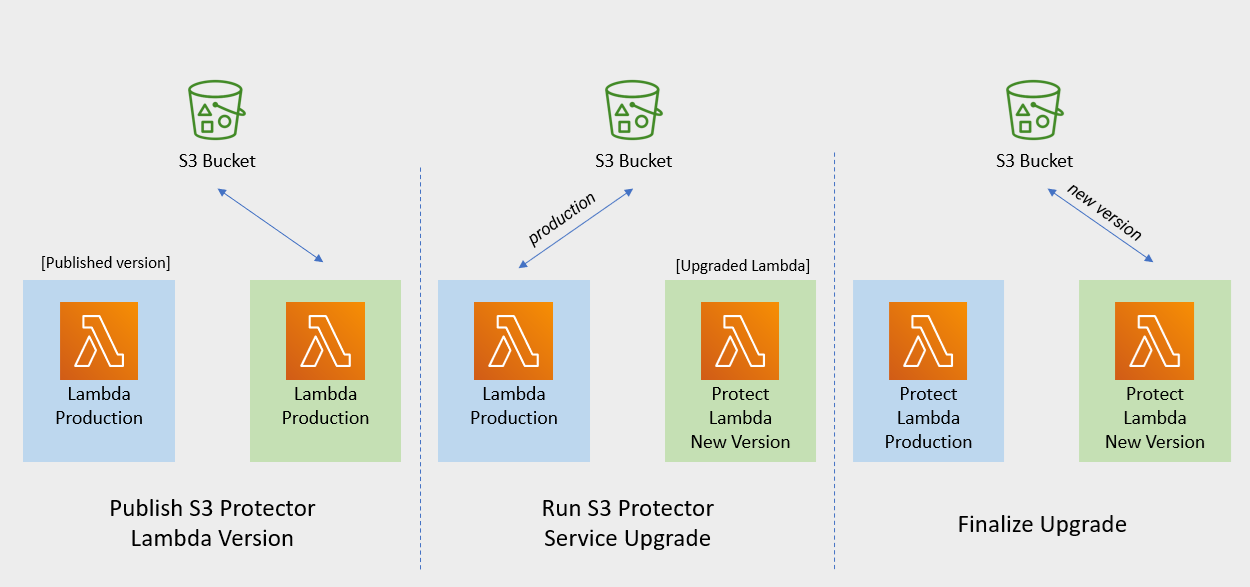

                                                                                                                Publish S3 Protector Lambda Version

                                                                                                                Publishing a version of the S3 Protector Lambda allows updating it without interruptions to the existing traffic.

                                                                                                                Procedure

                                                                                                                1. Go to AWS Lambda console and select existing Protegrity S3 Protector Lambda.

                                                                                                                2. Go to Lambda ConfigurationEnvironment variables.

                                                                                                                3. Record environment variables values. You will use them later to configure upgraded Lambda Function. You can use the aws cli command below to save the function variables into the local json file:

                                                                                                                aws lambda get-function-configuration --function-name \
                                                                                                                arn:aws:lambda:<aws_region>:<aws_account>:function:<function_name> \
                                                                                                                --query Environment > <function_name>_env_config.json
                                                                                                                
                                                                                                                1. Click Actions in top right portion of the screen. Select Publish new version. Click Publish.

                                                                                                                2. Record the Lambda version number. It will be displayed at the top of the screen. You can also retrieve it from the Lambda function view, under Versions tab.

                                                                                                                S3 Protector Lambda version number: ___________________


                                                                                                                Run Protect Service Upgrade

                                                                                                                In this step, the Protect service including Lambda $LATEST version will be updated using Cloud Formation template. The Lambda version created in previous step will be used to serve existing traffic during the upgrade process.

                                                                                                                Procedure

                                                                                                                1. Go to AWS Cloud Formation and select existing Protegrity deployment stack.

                                                                                                                2. Select Update Stack > Make a direct update.

                                                                                                                3. Select Replace existing template > Upload a template file.

                                                                                                                4. Upload pty_s3_protector_cf.json file and select Next.

                                                                                                                5. Update LambdaFunctionProductionVersion parameter with S3 Protector Lambda version number recorded in step 3.

                                                                                                                6. Click Next until Review window and then select Update stack.

                                                                                                                7. Wait for the Cloud Formation to complete.

                                                                                                                8. Go back to Lambda console and select S3 Protector Lambda.

                                                                                                                9. Go to ConfigurationEnvironment variables. Replace placeholder values with values recorded in previous step.

                                                                                                                  Alternatively, you can run the following aws cli command to update function configuration using json file saved in the previous steps:

                                                                                                                aws lambda update-function-configuration --function-name \
                                                                                                                arn:aws:lambda:<aws_region>:<aws_account>:function:<function_name> \
                                                                                                                --environment file://./<function_name>_env_config.json
                                                                                                                
                                                                                                                1. Navigate to Aliases tab. Verify that Production alias points to the lambda version you specified in the cloud formation template.

                                                                                                                2. The upgraded S3 Protector Lambda is configured with a sample policy. Run Agent Lambda Function before continuing with next steps.


                                                                                                                Finalize Upgrade

                                                                                                                In this step, the S3 Protector Lambda will be configured to serve traffic using $LATEST version upgraded in the previous step.

                                                                                                                Procedure

                                                                                                                1. Go back to Protegrity AWS Cloud Formation deployment stack.

                                                                                                                2. Select Update Stack > Make a direct update.

                                                                                                                3. Select Use existing template and then choose Next

                                                                                                                4. Update LambdaFunctionProductionVersion parameter with the following value: $LATEST.

                                                                                                                5. Click Next until Review window and then select Update stack.

                                                                                                                6. Go back to Lambda console and select S3 Protector Lambda.

                                                                                                                7. From the Lambda console, verify that Latest alias points to $LATEST version.

                                                                                                                8. Test your function to make sure it works as expected.

                                                                                                                9. If you need to rollback to older version of S3 Protector Lambda, you can re-run the cloud formation with LambdaFunctionProductionVersion parameter set to the previous version of S3 Protector Lambda.

                                                                                                                5.8 - Appendices

                                                                                                                Additional references for the protector.

                                                                                                                5.8.1 - Sample Configuration

                                                                                                                A dataset snippet and corresponding mapping.json file are provided.

                                                                                                                  CSV Format - No Header

                                                                                                                  Dataset

                                                                                                                  Patricia,Young,Patricia.Young@liu.info,8/25/1975,343494236548351
                                                                                                                  Ronald,Hess,Ronald.Hess@cobb.org,3/22/1977,5289549212515680
                                                                                                                  Anna,Rose,Anna.Rose@robinson.net,8/3/1983,4387393325002340
                                                                                                                  Maureen,Morgan,Maureen.Morgan@whitehead.com,10/23/1975,6011769162504860
                                                                                                                  Ryan,Lee,Ryan.Lee@summers-richards.com,4/6/1975,373509629162404
                                                                                                                  

                                                                                                                  Mapping.json - Header Specified In Input Spec Section

                                                                                                                  {
                                                                                                                  "input": {
                                                                                                                     "format": "csv",
                                                                                                                     "spec": {
                                                                                                                        "names": ["first_name","last_name","email","credit_card","birthdate"]
                                                                                                                     }
                                                                                                                  },
                                                                                                                     "columns":{
                                                                                                                        "first_name":{
                                                                                                                           "operation":"protect",
                                                                                                                           "data_element":"deName"
                                                                                                                        },
                                                                                                                        "last_name":{
                                                                                                                           "operation":"protect",
                                                                                                                           "data_element":"deName"
                                                                                                                        },
                                                                                                                        "email":{
                                                                                                                           "operation":"protect",
                                                                                                                           "data_element":"deEmail"
                                                                                                                        },
                                                                                                                        "credit_card": {
                                                                                                                        "operation":"protect",
                                                                                                                        "data_element":"deCCN"
                                                                                                                        },
                                                                                                                        "birthdate": {
                                                                                                                        "operation":"protect",
                                                                                                                        "data_element":"deDOB"
                                                                                                                        }
                                                                                                                     }
                                                                                                                  }
                                                                                                                  

                                                                                                                  CSV Format - Pipe Delimiter

                                                                                                                  Dataset

                                                                                                                  POLICY_NUM|ACTION_TAKEN_DATE|ACTION_TAKEN_TIME|PERSON_DOB|ADDR_LINE_1|ADDR_LINE_2|ADDR_CITY|ADDR_STATE|ADDR_ZIP|PERSON_NAME|PERSON_SSN
                                                                                                                  sbBksoknql8O|7/8/2011|08.00.07|9/23/1952|123 Maple Street|Apt 2B|Springfield|IL|62704|Abraham Duppstadt|755-30-1679  
                                                                                                                  SdiWx5Egtxrd|7/22/2011|14.53.29|3/5/1957|456 Elm Avenue|Suite 300|Boulder|CO|80302|Christena Macklem|366-99-6352  
                                                                                                                  QGOlnMvcJ50a|7/25/2011|07.14.10|7/20/1962|789 Pine Road|Unit 5|Madison|WI|53703|Ulrike Rehling|011-87-2771  
                                                                                                                  MW5wPE5paWgN|7/29/2011|14.00.29|9/23/1961|321 Oak Lane|Building A|Austin|TX|78701|Summer Mauceri|806-32-5716  
                                                                                                                  QGOlnMvcJ50a|7/29/2011|14.00.29|5/29/1986|654 Cedar Boulevard|Floor 4|Portland|OR|97209|Ora Scharpman|273-48-6482
                                                                                                                  

                                                                                                                  Mapping.json

                                                                                                                  {
                                                                                                                     "input": {
                                                                                                                        "format": "csv",
                                                                                                                        "spec": {
                                                                                                                          "sep": "|",
                                                                                                                          "encoding": "utf-8"
                                                                                                                        }
                                                                                                                     },
                                                                                                                     "output": {
                                                                                                                        "format": "csv",
                                                                                                                        "spec": {
                                                                                                                          "encoding": "utf-8",
                                                                                                                          "compression": "gzip"
                                                                                                                        }
                                                                                                                     },
                                                                                                                     "columns":{
                                                                                                                        "PERSON_NAME":{
                                                                                                                           "operation":"protect",
                                                                                                                           "data_element":"deName"
                                                                                                                        },
                                                                                                                        "PERSON_SSN":{
                                                                                                                           "operation":"protect",
                                                                                                                           "data_element":"deSSN"
                                                                                                                        },
                                                                                                                        "ADDR_LINE_1":{
                                                                                                                           "operation":"protect",
                                                                                                                           "data_element":"deAddress"
                                                                                                                        },
                                                                                                                        "ADDR_LINE_2":{
                                                                                                                           "operation":"protect",
                                                                                                                           "data_element":"deAddress"
                                                                                                                        },
                                                                                                                        "ADDR_CITY":{
                                                                                                                           "operation":"protect",
                                                                                                                           "data_element":"deCity"
                                                                                                                        },
                                                                                                                        "POLICY_NUM":{
                                                                                                                           "operation":"protect",
                                                                                                                           "data_element":"deIBAN"
                                                                                                                        }
                                                                                                                     }
                                                                                                                  }
                                                                                                                  

                                                                                                                  JSON Format

                                                                                                                  Dataset

                                                                                                                  [
                                                                                                                     {
                                                                                                                        "Region": "Region 1",
                                                                                                                        "Order Date": "01/12/2012",
                                                                                                                        "Registration": "2016-01-01 01:01:01.001",
                                                                                                                        "Order ID": 10,
                                                                                                                        "Unit Price": 1.01
                                                                                                                     },
                                                                                                                     {
                                                                                                                        "Region": "Region 2",
                                                                                                                        "Order Date": "27/07/2012",
                                                                                                                        "Registration": "2016-02-03 17:04:03.002",
                                                                                                                        "Order ID": 20,
                                                                                                                        "Unit Price": 456.01
                                                                                                                     },
                                                                                                                     {
                                                                                                                        "Region": "Region 3",
                                                                                                                        "Order Date": "27/07/2012",
                                                                                                                        "Registration": "2016-02-03 01:09:31.003",
                                                                                                                        "Order ID": 30,
                                                                                                                        "Unit Price": 7.99
                                                                                                                     },
                                                                                                                     {
                                                                                                                        "Region": "Region 4",
                                                                                                                        "Order Date": "27/07/2012",
                                                                                                                        "Registration": "2016-02-03 00:36:21.004",
                                                                                                                        "Order ID": 40,
                                                                                                                        "Unit Price": 89.99
                                                                                                                     }
                                                                                                                  ]
                                                                                                                  

                                                                                                                  Mapping.json

                                                                                                                  {
                                                                                                                     "columns": {
                                                                                                                        "Region": {
                                                                                                                           "operation": "protect",
                                                                                                                           "data_element": "deAddress"
                                                                                                                        },
                                                                                                                        "Order Date": {
                                                                                                                           "operation": "protect",
                                                                                                                           "data_element": "deDate2"
                                                                                                                        },
                                                                                                                        "Registration": {
                                                                                                                           "operation": "protect",
                                                                                                                           "data_element": "deDOB"
                                                                                                                        },
                                                                                                                        "Order ID": {
                                                                                                                           "operation": "protect",
                                                                                                                           "data_element": "deNumeric"
                                                                                                                        },
                                                                                                                        "Unit Price": {
                                                                                                                           "operation": "protect",
                                                                                                                           "data_element": "deDecimal"
                                                                                                                        }
                                                                                                                     }
                                                                                                                  }
                                                                                                                  

                                                                                                                  5.8.2 - Amazon S3 Security Best Practices Examples

                                                                                                                  Amazon S3 Security Best Practices Examples

                                                                                                                  Block Public Access to Your Amazon S3 Storage

                                                                                                                  Enabling Block Public Access helps protect your resources by preventing public access from being granted through the resource policies or access control lists (ACLs) that are directly attached to S3 resources.

                                                                                                                  In addition to enabling Block Public Access, carefully inspect the following policies to confirm that they don’t grant public access:

                                                                                                                  • Identity-based policies attached to associated AWS principals (for example, IAM roles)
                                                                                                                  • Resource-based policies attached to S3 bucket (referred to as bucket policies)

                                                                                                                  Review Bucket Access Using IAM Access Analyzer for S3

                                                                                                                  IAM Access Analyzer helps you identify the resources in your organization and accounts, such as Amazon S3 buckets or IAM roles, shared with an external entity. This lets you identify unintended access to your resources and data, which is a security risk.

                                                                                                                  IAM Access Analyzer for S3 is available at no extra cost on the Amazon S3 console. IAM Access Analyzer for S3 is powered by AWS Identity and Access Management (IAM) IAM Access Analyzer. To use IAM Access Analyzer for S3 in the Amazon S3 console, you must visit the IAM console and enable IAM Access Analyzer on a per-Region basis.


                                                                                                                  Enable Server-Side Encryption

                                                                                                                  All Amazon S3 buckets have encryption configured by default, and all new objects that are uploaded to an S3 bucket are automatically encrypted at rest. Server-side encryption with Amazon S3 managed keys (SSE-S3) is the default encryption configuration for every bucket in Amazon S3.

                                                                                                                  Amazon S3 also provides these server-side encryption options:

                                                                                                                  • Server-side encryption with AWS Key Management Service (AWS KMS) keys (SSE-KMS)
                                                                                                                  • Dual-layer server-side encryption with AWS Key Management Service (AWS KMS) keys (DSSE-KMS)
                                                                                                                  • Server-side encryption with customer-provided keys (SSE-C)

                                                                                                                  6 -

                                                                                                                  The following diagram shows a reference architecture for synchronizing the security policy from ESA.

                                                                                                                  The Protegrity Policy Agent requires network access to an Enterprise Security Administrator (ESA). Most organizations install the ESA on-premise. Therefore, it is recommended that the Policy Agent is installed into a private subnet with a Cloud VPC using a NAT Gateway to enable this communication through a corporate firewall.

                                                                                                                  The ESA is a soft appliance that must be pre-installed on a separate server. It is used to create and manage security policies.

                                                                                                                  For more information about installing the ESA, and creating and managing policies, refer the Policy Management Guide.

                                                                                                                  7 -

                                                                                                                  This guide describes how to configure the Protegrity Policy Agent and Log Forwarder to connect to a Protegrity Provisioned Cluster (PPC), highlighting the differences from connecting to ESA.

                                                                                                                  Key Differences: PPC vs ESA

                                                                                                                  FeatureESA 10.2PPC (this guide)
                                                                                                                  Datastore Key FingerprintOptional/RecommendedRequired
                                                                                                                  CA Certificate on AgentOptional/RecommendedOptional/Recommended
                                                                                                                  CA Certificate on Log ForwarderOptional/RecommendedNot supported
                                                                                                                  Client Certificate Authentication from Log ForwarderOptional/RecommendedNot supported
                                                                                                                  IP AddressESA IP addressPPC address

                                                                                                                  Prerequisites

                                                                                                                  • Access to PPC and required credentials.
                                                                                                                  • Tools: curl, kubectl installed.

                                                                                                                  Policy Agent Setup with PPC

                                                                                                                  Follow these instructions as a guide for understanding specific inputs for Policy Agent integrating with PPC:

                                                                                                                  1. Obtain the Datastore Key Fingerprint

                                                                                                                    To retrieve the fingerprint for your Policy Agent:

                                                                                                                    curl -k -H "Authorization: Bearer ${TOKEN}" -X POST https://${HOST}/pty/v2/pim/datastores/1/export/keys  -H "Content-Type: application/json" --data '{
                                                                                                                      "algorithm": "RSA-OAEP-256",
                                                                                                                      "description": "example-key-from-kms",
                                                                                                                      "pem": "-----BEGIN PUBLIC KEY-----\nABC123... ...890XYZ\n-----END PUBLIC KEY-----"
                                                                                                                    }'
                                                                                                                    

                                                                                                                    Sample Output:

                                                                                                                    {"uid":"1","algorithm":"RSA-OAEP-256","fingerprint":"4c:46:d8:05:35:2e:eb:39:4d:39:8e:6f:28:c3:ab:d3:bc:9e:7a:cb:95:cb:b1:8e:b5:90:21:0f:d3:2c:0b:27","description":"example-key-from-kms"}
                                                                                                                    

                                                                                                                    Record the fingerprint value and configure it as the PTY_DATASTORE_KEY for the Policy Agent.

                                                                                                                  2. Retrieve the PPC CA Certificate

                                                                                                                    To obtain the CA certificate from PPC:

                                                                                                                    kubectl -n api-gateway get secret ingress-certificate-secret -o jsonpath='{.data.ca\.crt}' | base64 -d > CA.pem
                                                                                                                    

                                                                                                                    Use the CA.pem that was returned as described in Policy Agent Installation.

                                                                                                                  3. Configure the PPC Address

                                                                                                                    Use the PPC address in place of the ESA IP address wherever required in your configuration.

                                                                                                                  Log Forwarder Setup with PPC

                                                                                                                  • The Log Forwarder will proceed without certificates and will print a warning if PtyEsaCaServerCert and PtyEsaClientCertificatesSecretId are not provided.
                                                                                                                  • No additional certificate or CA configuration is needed for PPC.

                                                                                                                  Troubleshooting

                                                                                                                  Protector Lambda fails with “AWS KMS Decrypt failed”

                                                                                                                  Symptom:

                                                                                                                  After a successful Policy Agent run and layer update, the Protector Lambda returns:

                                                                                                                  {
                                                                                                                    "body": "{\"error_msg\":\"Failed to open decoder: rpdecode decrypt failure: dek callback failed: AWS KMS Decrypt failed: \",\"success\":false}",
                                                                                                                    "isBase64Encoded": false,
                                                                                                                    "statusCode": 400
                                                                                                                  }
                                                                                                                  

                                                                                                                  The Protector Lambda logs show:

                                                                                                                  [SEVERE] [utils.cpp:185] AWS KMS Decrypt failed:
                                                                                                                  

                                                                                                                  Cause:

                                                                                                                  The public key configured in the PPC/ESA datastore does not match the KMS key pair used by the Policy Agent. The policy package is encrypted with the public key stored in the datastore. If that key does not correspond to the KMS key pair whose private key is used for decryption, the Protector Lambda will fail to decrypt the policy.

                                                                                                                  Resolution:

                                                                                                                  1. Identify the KMS key pair used by the Policy Agent (the key ARN configured during pre-configuration).
                                                                                                                  2. Export the public key from that KMS key pair.
                                                                                                                  3. In PPC/ESA, ensure the datastore’s export key is configured with the public key from that same KMS key pair. See Obtain the Datastore Key Fingerprint above.
                                                                                                                  4. Re-run the Policy Agent to generate a new policy package encrypted with the correct key.
                                                                                                                  5. Test the Protector Lambda again.

                                                                                                                  Additional Notes

                                                                                                                  8 -

                                                                                                                  Create Protect Lambda IAM Execution Policy

                                                                                                                  This task defines a policy used by the Protegrity Lambda function to write CloudWatch logs and access the KMS encryption key to decrypt the policy.

                                                                                                                  Perform the following steps to create the Lambda execution role and required policies:

                                                                                                                  1. From the AWS IAM console, select Policies > Create Policy.

                                                                                                                  2. Select the JSON tab and copy the following sample policy.

                                                                                                                    {
                                                                                                                      "Version": "2012-10-17",
                                                                                                                      "Statement": [
                                                                                                                        {
                                                                                                                          "Sid": "CloudWatchWriteLogs",
                                                                                                                          "Effect": "Allow",
                                                                                                                          "Action": [
                                                                                                                            "logs:CreateLogGroup",
                                                                                                                            "logs:CreateLogStream",
                                                                                                                            "logs:PutLogEvents"
                                                                                                                          ],
                                                                                                                          "Resource": "*"
                                                                                                                        },
                                                                                                                        {
                                                                                                                          "Sid": "KmsDecrypt",
                                                                                                                          "Effect": "Allow",
                                                                                                                          "Action": [
                                                                                                                            "kms:Decrypt"
                                                                                                                          ],
                                                                                                                          "Resource": [
                                                                                                                            "arn:aws:kms:*:*:key/*"
                                                                                                                          ]
                                                                                                                        }
                                                                                                                      ]
                                                                                                                    }
                                                                                                                    
                                                                                                                  3. For the KMS policy, replace the Resource with the ARN for the KMS key created in a previous step.

                                                                                                                  4. Select Next, type in a policy name, for example, ProtegrityProtectLambdaPolicy and Create Policy. Record the policy name:

                                                                                                                    ProtectLambdaPolicyName:__________________

                                                                                                                  9 -

                                                                                                                  Create Protect Lambda IAM Role

                                                                                                                  The following steps create the role to utilize the policy defined in Create Protect Lambda IAM Execution Policy.

                                                                                                                  To create protect lambda IAM execution role:

                                                                                                                  1. From the AWS IAM console, select Roles > Create Role.

                                                                                                                  2. Select AWS Service > Lambda > Next.

                                                                                                                  3. In the list, search and select the policy created in Create Protect Lambda IAM Execution Policy.

                                                                                                                  4. Click Next

                                                                                                                  5. Type the role name, for example, ProtegrityProtectRole

                                                                                                                  6. Click Create role

                                                                                                                  7. Record the role ARN.

                                                                                                                    Role ARN (LambdaExecutionRoleArn): ___________________

                                                                                                                  10 -

                                                                                                                  Upgrading Policy Agent Lambda

                                                                                                                  1. Go to AWS Lambda console and select existing Protegrity Agent Lambda.

                                                                                                                  2. Click Actions in top right portion of the screen. Select Publish new version. Click Publish. The version of Agent Lambda you just created will serve as restore point in the case you needed to rollback the upgrade.

                                                                                                                  3. Go to Lambda Configuration > Environment variables.

                                                                                                                  4. Record environment variables values. You will use them later to configure upgraded Lambda Function. You can use the aws cli command below to save the function variables into the local json file:

                                                                                                                    aws lambda get-function-configuration --function-name \
                                                                                                                    arn:aws:lambda:<aws_region>:<aws_account>:function:<function_name> \
                                                                                                                    --query Environment > <function_name>_env_config.json
                                                                                                                    
                                                                                                                  5. Go to AWS Cloud Formation and select existing Protegrity Agent deployment stack.

                                                                                                                  6. Select Update. Check Replace current template > Upload a template file.

                                                                                                                  7. Upload pty_agent_cf.json file and select Next.

                                                                                                                  8. Click Next until Review window and then select Update stack.

                                                                                                                  9. Wait for the Cloud Formation to complete.

                                                                                                                  10. Navigate back to Agent Lambda Function.

                                                                                                                  1. Go to Configuration > Environment variables. Replace placeholder values with values recorded in previous step. Alternatively, you can run the following aws cli command to update function configuration using json file saved in the previous steps:

                                                                                                                    aws lambda update-function-configuration --function-name \
                                                                                                                    arn:aws:lambda:<aws_region>:<aws_account>:function:<function_name> \
                                                                                                                    --environment file://./<function_name>_env_config.json
                                                                                                                    
                                                                                                                  2. If you are upgrading from versions prior to v3.0, backup and remove existing policy from the bucket defined by AWS_POLICY_S3_BUCKET property, so that the policy can be re-downloaded and re-encrypted with new ‘key commitment’ feature.

                                                                                                                  3. If you are upgrading from version prior to 1.6.1 please follow the steps below, otherwise the upgrade process is completed.

                                                                                                                  4. From AWS Console, navigate to IAM > Policies

                                                                                                                  5. Search for the Agent Lambda IAM Policy created in Create Agent Lambda IAM policy

                                                                                                                  6. Click on the policy, then select Edit Policy. Select JSON tab.

                                                                                                                  7. Add the following statement to the list of policy statements.

                                                                                                                    
                                                                                                                    {
                                                                                                                      "Sid": "LambdaGetConfiguration",
                                                                                                                      "Effect": "Allow",
                                                                                                                      "Action": [
                                                                                                                          "lambda:GetFunctionConfiguration"
                                                                                                                      ],
                                                                                                                      "Resource": [
                                                                                                                          "arn:aws:lambda:*:*:function:*"
                                                                                                                      ]
                                                                                                                    }
                                                                                                                    
                                                                                                                  8. Click Review Policy, then Save Changes. Wait for the changes to save.

                                                                                                                  11 -

                                                                                                                  Upgrading Log Forwarder Lambda

                                                                                                                  • Publish Log Forwarder Lambda Version

                                                                                                                    Publishing a version of the Log Forwarder Lambda allows to roll-back to pre-existing version if upgrade fails

                                                                                                                    1. Go to AWS Lambda console and select existing Protegrity Log Forwarder Lambda.

                                                                                                                    2. Click Actions in top right portion of the screen. Select Publish new version. Click Publish.

                                                                                                                    3. Record the Lambda version number. It will be displayed at the top of the screen. You can also retrieve it from the Lambda function view, under Versions tab.

                                                                                                                      Log Forwarder Lambda version number for roll-backs: ___________________

                                                                                                                  • Disable Kinesis Trigger

                                                                                                                    Disabling Kinesis trigger ensures there are no unprocessed or re-processed events while function is upgraded.

                                                                                                                    1. Go to AWS Lambda console and select existing Protegrity Log Forwarder Lambda.
                                                                                                                    2. Select Configuration tab > Triggers
                                                                                                                    3. Check Kinesis trigger and click Edit button
                                                                                                                    4. Uncheck Activate trigger and click Save
                                                                                                                    5. Wait for function to stop processing events by monitoring function in Monitor tab
                                                                                                                  • Upgrade Forwarder Lambda Version

                                                                                                                    Upgrade Log Forwarder function with new code

                                                                                                                    1. Go to AWS Cloud Formation and select existing Protegrity Log Forwarder deployment stack.
                                                                                                                    2. Select Update Stack > Make a direct update.
                                                                                                                    3. Select Replace existing template > Upload a template file.
                                                                                                                    4. Upload pty_log_forwarder_cf file and select Next.
                                                                                                                    5. Click Next until Review window and then select Update stack.
                                                                                                                    6. Wait for the Cloud Formation to complete.
                                                                                                                  • Enable Kinesis Trigger

                                                                                                                    1. Go to AWS Lambda console and select existing Protegrity Log Forwarder Lambda.
                                                                                                                    2. Select Configuration tab > Triggers
                                                                                                                    3. Check Kinesis trigger and click Edit button
                                                                                                                    4. Check Activate trigger and click Save Log Forwarder function will now start processing events from where it left off when Kinesis trigger was disabled.
                                                                                                                  • Monitor and roll-back

                                                                                                                    Monitor Log Forwarder function for errors in its CloudWatch logs and in Montior tab. To roll back function to the previous version if any errors occur follow these steps:

                                                                                                                    1. Go to AWS Lambda console and select existing Protegrity Log Forwarder Lambda.

                                                                                                                    2. Select Configuration tab > Triggers

                                                                                                                    3. Expand Details section of Kinesis trigger and record UUID value

                                                                                                                    4. Execute the following AWS CLI command to move Kinesis trigger to previous version of Log Forwarder Lambda that was created earlier and recorded as Log Forwarder Lambda version number for roll-backs. Substitute kinesis-mapping-uuid, log-forwarder-function-name, version-for-roll-backs with your values:

                                                                                                                      
                                                                                                                      aws lambda update-event-source-mapping --uuid <kinesis-mapping-uuid> --function-name <log-forwarder-function-name>:<version-for-roll-backs>
                                                                                                                      
                                                                                                                    5. Find Kinesis trigger attached to previous version of Log Forwarder Lambda by navigating Versions tab > Version number link in the Versions column Kinesis trigger is now moved to previous version of Log Forwarder Lambda function.

                                                                                                                  12 -

                                                                                                                  Upgrading Protect Lambda

                                                                                                                  Diagram below illustrates upgrade steps.

                                                                                                                  Snowflake Function Upgrade Steps

                                                                                                                  Redshift Function Upgrade Steps

                                                                                                                  Cloud API Function Upgrade Steps

                                                                                                                  Athena Function Upgrade Steps

                                                                                                                  • Publish Protect Lambda Version

                                                                                                                    Publishing a version of the Protect Lambda allows updating it without interruptions to the existing traffic.

                                                                                                                    1. Go to AWS Lambda console and select existing Protegrity Protect Lambda.

                                                                                                                    2. Go to Lambda Configuration > Environment variables.

                                                                                                                    3. Record environment variables values. You will use them later to configure upgraded Lambda Function. You can use the aws cli command below to save the function variables into the local json file:

                                                                                                                      aws lambda get-function-configuration --function-name \
                                                                                                                      arn:aws:lambda:<aws_region>:<aws_account>:function:<function_name> \
                                                                                                                      --query Environment > <function_name>_env_config.json
                                                                                                                      
                                                                                                                    4. Click Actions in top right portion of the screen. Select Publish new version. Click Publish.

                                                                                                                    5. Record the Lambda version number. It will be displayed at the top of the screen. You can also retrieve it from the Lambda function view, under Versions tab.

                                                                                                                      Protect Lambda version number: ___________________

                                                                                                                    6. If you are upgrading a Cloud Protect Redshift version 1.x to 2.x/3x, you must recreate your Redshift external function definitions with Protect Lambda Function version appended to the Lambda Function name. See example below.

                                                                                                                      CREATE OR REPLACE EXTERNAL FUNCTION PTY_PROTECT_TEST ( val varchar )
                                                                                                                          RETURNS varchar
                                                                                                                          VOLATILE lambda
                                                                                                                          'Protegrity_Protect_test:<protect_lambda_version_number>' iam_role
                                                                                                                          'arn:aws:iam::123456789212:role/example_role';
                                                                                                                      
                                                                                                                  • Run protect service upgrade

                                                                                                                    In this step, the Protect service including Lambda $LATEST version will be updated using Cloud Formation template. The Lambda version created in previous step will be used to serve existing traffic during the upgrade process.

                                                                                                                    1. Go to AWS Cloud Formation and select existing Protegrity deployment stack.

                                                                                                                    2. Select Update. Check Replace current template > Upload a template file.

                                                                                                                    3. Upload pty_protect_cf.json file and select Next.

                                                                                                                    4. Update ProtectFunctionProductionVersion parameter with Protect Lambda version number recorded in step 3.

                                                                                                                    5. Click Next until Review window and then select Update stack.

                                                                                                                    6. Wait for the Cloud Formation to complete.

                                                                                                                    7. Go back to Lambda console and select Protect Lambda.

                                                                                                                    8. Go to Configuration > Environment variables. Replace placeholder values with values recorded in previous step. Alternatively, you can run the following aws cli command to update function configuration using json file saved in the previous steps:

                                                                                                                      aws lambda update-function-configuration --function-name \
                                                                                                                      arn:aws:lambda:<aws_region>:<aws_account>:function:<function_name> \
                                                                                                                      --environment file://./<function_name>_env_config.json
                                                                                                                      
                                                                                                                    9. Navigate to Aliases tab. Verify that Production alias points to the lambda version you specified in the cloud formation template.

                                                                                                                    10. The upgraded Protect Lambda is configured with a sample policy. Run Agent Lambda Function before continuing with next steps.

                                                                                                                  • Finalize upgrade

                                                                                                                    In this step, the Protect Lambda will be configured to serve traffic using $LATEST version upgraded in the previous step.

                                                                                                                    1. Go back to Protegrity AWS Cloud Formation deployment stack.

                                                                                                                    2. Select Update. Check Use Current template.

                                                                                                                    3. Update ProtectFunctionProductionVersion parameter with the following value: $LATEST.

                                                                                                                    4. Click Next until Review window and then select Update stack.

                                                                                                                    5. Go back to Lambda console and select Protect Lambda.

                                                                                                                    6. From the Lambda console, verify that Latest alias points to $LATEST version.

                                                                                                                    7. Test your function to make sure it works as expected.

                                                                                                                    8. If you are upgrading a Cloud Protect Redshift version 1.x to 2.x/3x, you must recreate your Redshift external function definitions with Protect Lambda Function version appended to the Lambda Function name. See example below.

                                                                                                                      CREATE OR REPLACE EXTERNAL FUNCTION PTY_PROTECT_TEST ( val varchar )
                                                                                                                          RETURNS varchar
                                                                                                                          VOLATILE lambda
                                                                                                                          'Protegrity_Protect_test:Production' iam_role
                                                                                                                          'arn:aws:iam::123456789212:role/example_role';
                                                                                                                      
                                                                                                                    9. If you need to rollback to older version of Protect Lambda, you can re-run the cloud formation with ProtectFunctionProductionVersion parameter set to the previous version of Protect Lambda.

                                                                                                                  13 -

                                                                                                                  Re-enable Protegrity Agent Function CloudWatch Event Rule

                                                                                                                  If the Event Rule was disabled at the beginning of the upgrade process, you must re-enabled it. Follow the steps below to re-enable Policy Agent Event rule.

                                                                                                                  1. Go to the Protegrity Agent Cloud Formation Stack.

                                                                                                                  2. Select Resources tab from the top portion of the screen.

                                                                                                                  3. Click on the Physical ID link in the ScheduledRule row. The link opens Policy Agent Event Rule configuration.

                                                                                                                  4. Select Enable from the top-right portion of the screen. This will enable the rule. You will re-enable it after the upgrade process is complete.

                                                                                                                  14 -

                                                                                                                  Disable Protegrity Agent Function CloudWatch Event Rule

                                                                                                                  Cloud Watch Event Rule is used to periodically run Protegrity Agent Function to synchronize policy from ESA. This functionality is optional when deploying Protegrity Serverless Solution. If the Event Rule is enabled, it must be disabled temporarily for the time of the upgrade process.

                                                                                                                  Follow the steps below to determine if your deployment uses Event Rule and disable it.

                                                                                                                  1. Go to AWS Cloud Formation and select existing Protegrity deployment stack.

                                                                                                                  2. Select Resources tab from the top portion of the screen.

                                                                                                                  3. Check if there is a resource with ScheduledRule LogicalID. If there is no such resource you can skip to Upgrading Policy Agent Lambda section. If the scheduled rule is there, continue with the next steps in this section.

                                                                                                                  4. Click on the Physical ID link in the ScheduledRule row. The link opens Policy Agent Event Rule configuration.

                                                                                                                  5. Select Disable from the top-right portion of the screen. This will disable the rule. You will re-enable it after the upgrade process is complete.

                                                                                                                  15 -

                                                                                                                  Download the Latest Version

                                                                                                                  You can download the latest version of the deployment package from https://my.protegrity.com. Navigate to Data Protection > Cloud Protect to download the latest version.

                                                                                                                  After downloading the deployment package from the Protegrity Portal, unzip the package to extract the artifact files. In the AWS Console, navigate to the S3 bucket that was previously created to upload deployment artifacts (see: Create S3 bucket for Installing Artifacts).

                                                                                                                  Upload the following artifacts to the S3 bucket:

                                                                                                                  - -
                                                                                                                  • protegrity-protect-<version>.zip
                                                                                                                  • protegrity-agent-<version>.zip
                                                                                                                  • protegrity-external-extension-<version>.zip
                                                                                                                  • protegrity-sample-policy-<version>.zip
                                                                                                                  • protegrity-protect-<version>.zip
                                                                                                                  • protegrity-agent-<version>.zip
                                                                                                                  • protegrity-external-extension-<version>.zip
                                                                                                                  • protegrity-sample-policy-<version>.zip
                                                                                                                  • protegrity-protect-<version>.zip
                                                                                                                  • protegrity-agent-<version>.zip
                                                                                                                  • protegrity-external-extension-<version>.zip
                                                                                                                  • protegrity-sample-policy-<version>.zip
                                                                                                                  • protegrity-athena-protect-udfs-<version>.jar
                                                                                                                  • protegrity-external-extension-<version>.zip
                                                                                                                  • protegrity-agent-<version>.zip
                                                                                                                  • protegrity-sample-policy-<version>.zip

                                                                                                                  If the release version matches your existing deployment, you don’t need to upload it again. Save the following artifacts on your local system so that you have them available during the next steps:

                                                                                                                  - -
                                                                                                                  • pty_protect_cf.json
                                                                                                                  • pty_agent_cf.json
                                                                                                                  • pty_protect_cf.json
                                                                                                                  • pty_agent_cf.json
                                                                                                                  • pty_protect_api_cf.json
                                                                                                                  • pty_agent_cf.json
                                                                                                                  • pty_log_forwarder_cf.json
                                                                                                                  • pty_athena_protect_cf.json
                                                                                                                  • pty_agent_cf.json

                                                                                                                  Perform the following steps to upgrade the Agent Lambda and Protect Lambda separately.

                                                                                                                  © 2026 Protegrity Corporation. All rights reserved.
                                                                                                                  IP Attributions

                                                                                                                  The information provided in this documentation is “as is” with no guarantee of accuracy or completeness.