REST API
Reference for Cloud API authorization and specification
The following sections describe the key concepts in understanding the REST API.
Base URL:
https://{ApiGatewayId}.execute-api.{Region}.amazonaws.com/pty/v1
Once Protegrity Serverless REST API is installed, you can export the OpenAPI documentation file from API Gateway Export API, located in the AWS API Gateway Control Service.
https://docs.aws.amazon.com/apigateway/latest/developerguide/api-gateway-export-api.html
For testing the REST API, we recommend using tools, such as, Postman.
1 - Authorization
Describes the available authorization methods
Policy Users
Protegrity Policy roles defines the unique data access privileges for every member. The Protegrity Lambda protects the data with the username sent in either the JWT-formatted authorization header or the request body.
The lambda behavior can be set in the Lambda environment variables as described in Protect Lambda Configuration
| Authorization/allow_assume_user | 0 | 1 |
|---|
| Empty | User from the request body. / (Throw an error). | User from the request body. |
| JWT | User from JWT payload | User from request body. If not found user from JWT payload. |
JWT Verification
To ensure the integrity of the user, the lambda protect can verify the JWT.
- From your AWS console, navigate to lambda and select the following Lambda: Protegrity_Protect_RESTAPI_<STACK_NAME>
- Scroll down to the Environment variables section, select Edit to replace the entries.
Parameter | Value | Notes |
|---|
authorization | JWT |
jwt_verify | 1 | |
jwt_secret_base64 | Secret in base64 encoding. For example, the value of the public key is as follows. -----BEGIN PUBLIC KEY-----
MIGfMA0GCSqGSIb3DQEBAQUAA4GNADCBiQKBgQC4fkg/JYyN3Skr6RYLiAd/Yhl0
2TE3/HzHSNPnCaRdUakGp9og7oXBMcoadFDjnoSq1sz+gUHnpoO7s2fwkD5Q4OnC
BGD3oKP2A4PlOOWD2B2cVmMqX/vf1nAA/343496jsbfgkh1Q7LTzR0IXfdii0o1U
CbvrVCuaBoyiv4TxWQIDAQAB
-----END PUBLIC KEY-----
This public key will be stored as follows. LS0tLS1CRUdJTiBQVUJMSUMgS0VZLS0tL
S0KTUlHZk1BMEdDU3FHU0liM0RRRUJBUV
VBQTRHTkFEQ0JpUUtCZ1FDNGZrZy9KWXl
OM1NrcjZSWUxpQWQvWWhsMAoyVEUzL0h6
SFNOUG5DYVJkVWFrR3A5b2c3b1hCTWNvY
WRGRGpub1NxMXN6K2dVSG5wb083czJmd2
tENVE0T25DCkJHRDNvS1AyQTRQbE9PV0Q
yQjJjVm1NcVgvdmYxbkFBLzM0MzQ5Nmpz
YmZna2gxUTdMVHpSMElYZmRpaTBvMVUKQ
2J2clZDdWFCb3lpdjRUeFdRSURBUUFCCi
0tLS0tRU5EIFBVQkxJQyBLRVktLS0tLQ==
| The secret must be in base64. We recommend using RSA public certificates, it is not recommended to keep Hash (symmetric) secrets in the clear. |
2 - HTTP Status Codes
Describes the Status Codes returned by Cloud API
The following table explains the different HTTP Status Codes with their corresponding response.
Status Codes | Response | Description |
|---|
200 | {"results":["<string>","<string>"],
"success": true, "encoding":[hex|utf8]}
| Success protected data is in results, and success attribute is true |
400 | {
"error_msg": "<string>",
"success": false
}
| There was an issue in the request, success is false, check error_msg attribute. For more information check AWS Lambda’s CloudWatch logs. For example, the following error appears. Authorization header was not found.
- Required attribute is missing /user, when env authorization is None or empty.
- User is missing, check JWT payload for user attribute
- Malformed authorization header
- Basic Not supported in header: authorization
|
403 | {
"error_msg": "token expired",
"success": false
}
{
"error_msg": "invalid signature",
"success": false
}
{
"error_msg": " unknown algorithm error",
"success": false
}
| - JWT is invalid because secret is wrong or expired.
- Get A new JWT or check the base64 secret in AWS Lambda environment variable.
- Secret doesn’t match the algorithm type in the JWT header. Secret is symmetric but Algorithm is asymmetric.
|
500 | {
"error_msg": "Invalid json array in jwt_user_claim",
"success": false
}
{ "error_msg": "jwt secret is missing ",
"success": false
}
| - Configuration error in AWS Lambda.
Authorization is to JWT and jwt _user_claim is not a valid json array. Example valid input: [“username”, “firstname”]. - JWT is set to verify and jwt_secret_base64 is missing.
|
3 - Payload Encoding
Describes the request/response payload encoding
Payload Encoding
The following encoding formats are supported in the REST API.
For every encoding, the resultant protected data is returned in the same encoding. For example, if request is hex-encoded, the response is also hex-encoded.
For more information about the encoding formats, refer to the Protection Methods Reference.
Encoding | Supported by data elements | Notes |
|---|
utf8 | All except binary data elements. | Default encoding if encoding is not specified. |
hex | All | Default encoding for binary data elements. |
base64 | All | |
base64_mime | All | - Uses RFC 2045 Alphabet.
- Accepts input on multiple lines.
- Lines can be separated by any combination of CR and LF characters.
- Lines must not be longer than 76 characters long.
- Response lines are separated by CRLF characters.
- Optional padding.
- Does not accept any non-base64 characters.
|
base64_pem | All | - Uses RFC 1421 Alphabet.
- Accepts input on multiple lines.
- Lines can be separated by any combination of CR and LF characters.
- Lines must not be longer than 64 characters long.
- Response lines are separated by CRLF characters.
- Optional padding.
- Does not accept any non-base64 characters.
|
base64_url | All | |
The following sections provide the payload schema and its examples.
4 - TLS Mutual Authentication
Describes the TLS Mutual Authentication setup for AWS API Gateway
By default, AWS API Gateway supports HTTPS endpoint and doesn’t allow HTTP protocol.
For an additional layer of security, you can configure AWS API Gateway TLS Mutual Authentication.
AWS API Gateway will ensure that the clients with a valid certificate only can call the REST API. Protegrity recommends to setup TLS Mutual Authentication in AWS API Gateway. For more information on how to set AWS API Gateway Mutual TLS go to the following link.
https://docs.aws.amazon.com/apigateway/latest/developerguide/rest-api-mutual-tls.html
5 - v1 Specification
Describes the v1 REST API specification
AWS Lambda service limits maximum size of payload to 6 MB. Client applications of Protegrity Cloud API must ensure their payload size is within this limit. This applies to all types of requests described below.
Request
AWS Lambda service limits maximum size of payload to 6 MB. Client applications of Protegrity Cloud API must ensure their payload size is within this limit. This applies to all types of requests described below.
Performs a policy operation such as protect, unprotect, or reprotect.
URI
/v1/protect or /v1/unprotect or /v1/reprotect
Method
POST
Parameters
data: Input data to the policy operation.
data_element: Data element to use for the policy operation.
encoding: Optional, encoding of the data. One of: base64, base64_mime, base64_pem, base64_url, hex, or utf8. Defaults to hex for binary data elements, otherwise defaults to utf8.
external_iv: Optional, external initialization vector.
old_data_element: (reprotect) Data element for unprotecting the input.
old_external_iv: (reprotect) Optional, external initialization vector for the input.
query_id: Optional, identifier for the request.
user: User performing the operation.
Result
Returns the output of the policy operation.
Example 1 - without external IV
{
  "encoding": "utf8",
  "query_id": "1",
  "user": "user1",
  "data_element": "Alphanum",
  "data":[<data1>,<data2>]
}
Example 2 - with external IV
{
  "encoding": "utf8",
  "query_id": "1",
  "user": "user1",
  "data_element": "Alphanum",
  "external_iv": "abc123",
  "data":[<data1>,<data2>]
}
Example 3 - reprotect
{
  "encoding": "utf8",
  "query_id": "1",
  "user": "user1",
  "data_element": "deName",
  "old_data_element": "Alphanum",
  "data":[<data1>,<data2>]
}
Performs policy operations using different data elements for each data set.
URI
/v1/protect or /v1/unprotect or /v1/reprotect
Method
POST
Parameters
encoding: Optional, encoding of the data. One of: base64, base64_mime, base64_pem, base64_url, hex, or utf8. Defaults to hex for binary data elements, otherwise defaults to utf8.
query_id: Optional, prefix for the request identifier.
user: User performing the operation.
arguments[].data: Input data to the policy operation.
arguments[].data_element: Data element to use for the policy operation.
arguments[].external_iv: Optional, external initialization vector.
arguments[].id: Optional, request identifier.
arguments[].old_data_element: (reprotect) Data element for unprotecting the input.
arguments[].old_external_iv: (reprotect) Optional, external initialization vector for the input.
Note
When multiple data elements are sent in the payload, the Cloud API generates an audit log per argument. The Cloud API appends the argument id, if it exists, to the query_id. For example: query_id.id:{id}. If an argument id is not provided then the index in the argument array is appended to the query_id. For example: query_id.index:{index}.Example 4 - multiple data elements support payload
{
  "encoding": "utf8",
  "query_id": "query1234",
  "user": <policy_user>,
  "arguments": [
    {
      "id": "1",
      "external_iv": "<external iv>",
      "data_element": "<data element name>",
      "data":["<data1>","<data2>"]
    },
    {
      "data_element": <data element name>,
      "data":["<data1>","<data2>"]
    }
  ]
}
External IV
The External IV feature provides an additional level of security by allowing different tokenized results across protectors for the same input data and token element, depending on the External IV set on each protector. External IVs must adhere to certain guardrails and not all data elements support External IV. To read more about the Tokenization model with External IV, refer to the External Initialization Vector (IV) chapter in the Protection Methods Reference.
Response
responsePayloadV1:
type: object
  properties:
    success:
      type: bool
    error_msg:
      type: string
      description: When success is false, error_msg is included
    results:
      type: array
      items:
        type: string
Example success:
{
  "encoding": "utf8",
  "results":["str1","str2"],
  "success": true
}
If the request was successful, the success flag will always be true.
Example failure:
{
  "error_msg": "token expired",
  "success": false
}
If the request fails, the success flag will always be false.
Multi Data Elements Support Payload
responsePayloadV2:
type: object
  properties:
    success:
      type: boolean
    results:
      type: array
        items:
          type: object
          properties:
            success:
              type: bool
            error_msg:
              type: string
              description: When success is false, error_msg is included
            id:
              type: string
              description: When id is sent in the request payload, id is included in the response
            results:
              type: array
              items:
                type: string
Example success:
{
  "encoding": "utf8",
  "results":[
    {
      "encoding": "utf8",
      "results":["str1","str2"],
      "success": true
    },
    {
      "encoding": "utf8",
      "results":["str1","str2"],
      "success": true
    }
  ],
  "success": true
}
If the all the subrequests were successful, the success flag will be true.
Example failure:
{
  "results": [
    {
      "error_msg":
      "Protect failed. Data element not found. Refer to audit log for details",
      "success": false
    },
    {
      "encoding": "utf8",
      "results":["str1","str2"],
      "success": true
    }
  ],
  "success": false
}
It is possible to have a mix of successful and unsuccessful results. In this case, the global success flag will be false.
6 - Legacy Specification
Describes the Legacy REST API specification
Protegrity has multiple products with REST API capabilities, such as Protection Server (out of support), DSG, and the latest product - IAP REST. Each one has its use case. To help you move to cloud-native implementation, Cloud Product REST API supports legacy payload.
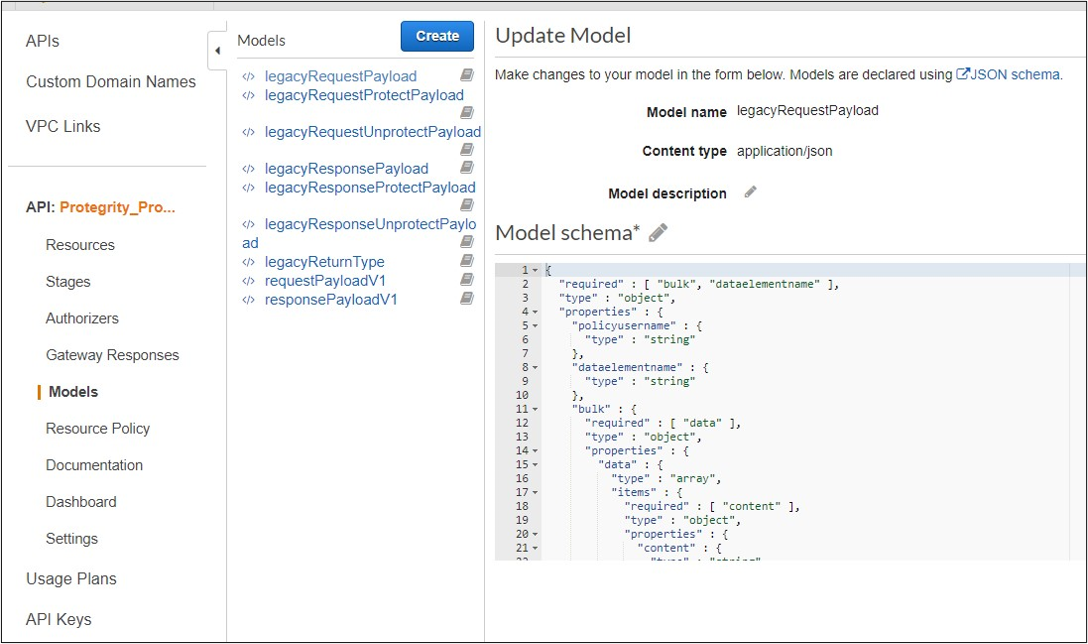
Legacy documentation can be downloaded from AWS console, API, Models, prefix Legacy.
Request
Performs a policy operation such as protect, unprotect, or reprotect.
Method
POST
Parameters
dataelementname: (protect/unprotect) Data element to use for the policy operation.
externaliv: (protect/unprotect) Optional, external initialization vector.
newdataelementname: (reprotect) Data element to use for the output.
newexternaliv: (reprotect) Optional, external initialization vector for the output.
olddataelementname: (reprotect) Data element to use for the input.
oldexternaliv: (reprotect) Optional, external initialization vector for the input.
policyusername: User performing the operation.
bulk.id: Optional, identifier for the request.
bulk.data[].content: Input data to the policy operation.
Result
Returns the output of the policy operation.
Example 1 - protect without external IV
{
  "protect": {
    "policyusername": "user1",
    "dataelementname": "Alphanum",
    "bulk": {
      "id": "1",
      "data": [
        {
          "content": <Data encoded in base64>
        }
      ]
    }
  }
}
Example 2 - protect with external IV
{
  "protect": {
    "policyusername": "user1",
    "dataelementname": "Alphanum",
    "externaliv": "abc123",
    "bulk": {
      "id": "1",
      "data": [
        {
          "content": <Data encoded in base64>
        }
      ]
    }
  }
}
Example 3 - unprotect
{
  "unprotect": {
    "policyusername": "user1",
    "dataelementname": "Alphanum",
    "bulk": {
      "id": "1",
      "data": [
        {
          "content": <Data encoded in base64>
        }
      ]
    }
  }
}
Example 4 - reprotect
{
  "reprotect": {
    "policyusername": "user1",
    "newdataelementname": "deName",
    "olddataelementname": "Alphanum",
    "bulk": {
      "id": "1",
      "data": [
        {
          "content": <Data encoded in base64>
        }
      ]
    }
  }
}
Response
Example:
{"protect":{"bulk":{"returntype":"success","data":[{"returntype":"success","message":"Data
 protection was successful.","content":"RGZBUFR4ODAzejFwNjQ5TWg0TEFpcFNqbA=="},{"returntype":"success",
"message":"Data protection was successful.","content":"aHNnVVB5QWFDYw=="}]}}}