Deployment Architecture
The Protegrity S3 solution should be deployed in the customer’s Cloud account within the same AWS region as the Protegrity Cloud Protect API. The Cloud Protect API is required.
Two S3 Buckets are required for processing data with S3 Protector:
- Source bucket for collecting data and triggering protection job.
- Target bucket for processed files.
The following diagram shows the high-level architecture of the S3 Protector.
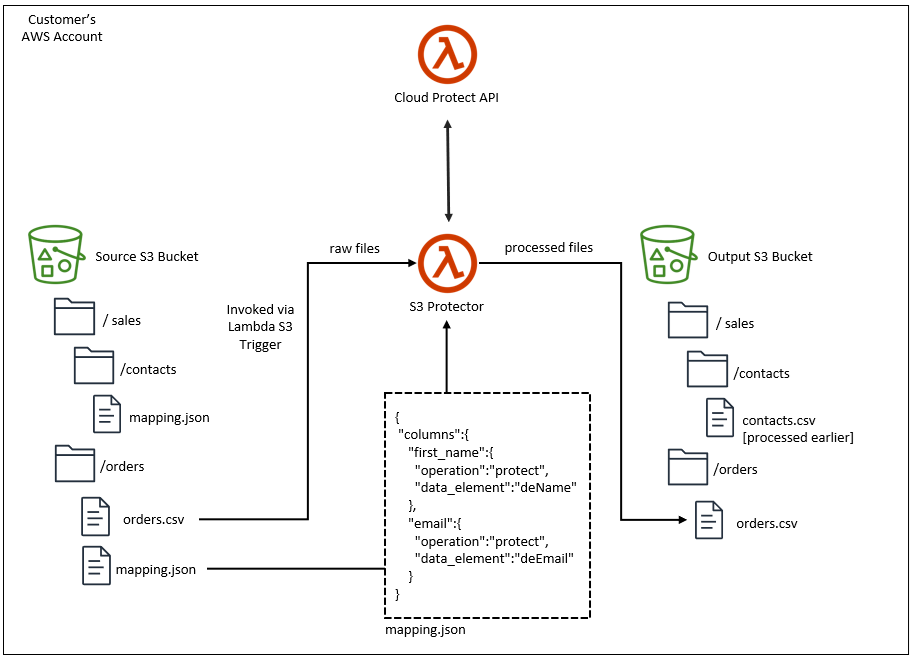
The ruleset for processing a type of input dataset is defined by a metadata file called mapping.json. The mapping.json provides:
- processing instructions for each column of the input data file
- specification for reading the input data file
- specification for writing the processed data file
Input and output data file specifications provide flexibility for common file structures. Column instructions define the protect
operation and data element to apply for each column. The mapping.json can be loaded from multiple locations. Review Mapping File section for details.
The Protegrity S3 protector invokes the Cloud Protect API to execute the policy on the data. The processed data is saved to the specified target S3 bucket.
The target bucket can be the basis of a data lake or a staging area to load databases. For example, Snowflake Snowpipe can be used to automatically ingest the processed (ie. Protected) data into Snowflake. Amazon Redshift provides a similar mechanism for bulk loading data from Amazon S3.
For more information about installing and managing the Cloud API component, refer to the Cloud API on AWS Protegrity documentation.
AWS Lambda Timeout
S3 Protector runs in AWS Lambda. Each Lambda invocation has a maximum execution time called a timeout.
When you install this product with the supplied CloudFormation template, the timeout is set to 15 minutes, the maximum timeout allowed by AWS.
If S3 Protector runs out of time while processing a file, it will fail with Status: timeout, which will appear in the logs similar to the following:
REPORT RequestId: aaaaaaaa-aaaa-aaaa-aaaa-aaaaaaaaaaaa Duration: 300000.00 ms Billed Duration: 300000 ms Memory Size: 1728 MB Max Memory Used: 654 MB Init Duration: 3868.74 ms Status: timeout
When S3 Protector runs out of time, an output upload may remain incomplete. Incomplete uploads do not appear in the S3 console, however you are still charged for them. Review AWS documentation on how to manage incomplete multipart uploads, for example:
There is no way to automatically re-start this product from where it has timed out while processing a file. To reduce the likelihood of a timeout error, consider the following:
- Increase function timeout to its maximum of 15 minutes
- Ensure
LARGE_FILE_DISPATCH_THRESHOLD_BYTESis smaller than the file size to enable file processing in chunks. Files larger than this size will be processed in parallel by multiple S3 Protector instances. - Reduce
LARGE_FILE_CHUNK_SIZE_BYTESto make separate file chunks smaller. - Increase
FILE_CHUNK_SIZEto reduce the number of read/write operations for large files. - Review
MAX_BATCH_SIZEandMAX_PARALLEL_PROTECT_CALLSto balance throughput with Cloud API capacity. - Ensure sufficient concurrency of Cloud Protect API functions.
- Increase memory allocated to the Lambda function, which also increases CPU and network throughput.
Parquet Timestamp
Parquet files define file schema with a data type for each column. S3 Protector uses Pandas library to process data in the source file. Pandas library represents timestamps as 64-bit integers representing microseconds since the UNIX epoch. The supported date range for this representation is between ‘1677-09-21 00:12:43.145224’ and ‘2262-04-11 23:47:16.854775’. To correctly handle timestamps outside of this range, S3 Protector will treat every timestamp column in a source file as a string column. The schema of protected file will differ from the source file, where every protected timestamp column will be converted to a string column.