Concurrency Troubleshooting
Hitting up against quota limits may indicate that quota adjustments are required. Exceeding quota limits may cause a Snowflake query to fail or reduce performance. In the worst case, significant throttling can impact the performance of all your API Gateway or Lambda services in the region.
Snowflake is tolerant of a certain ratio of failed requests and automatically retries. If a high percentage of requests fail, then the query may abort and the last error code will display in the console. For example, 429 Too Many Requests.
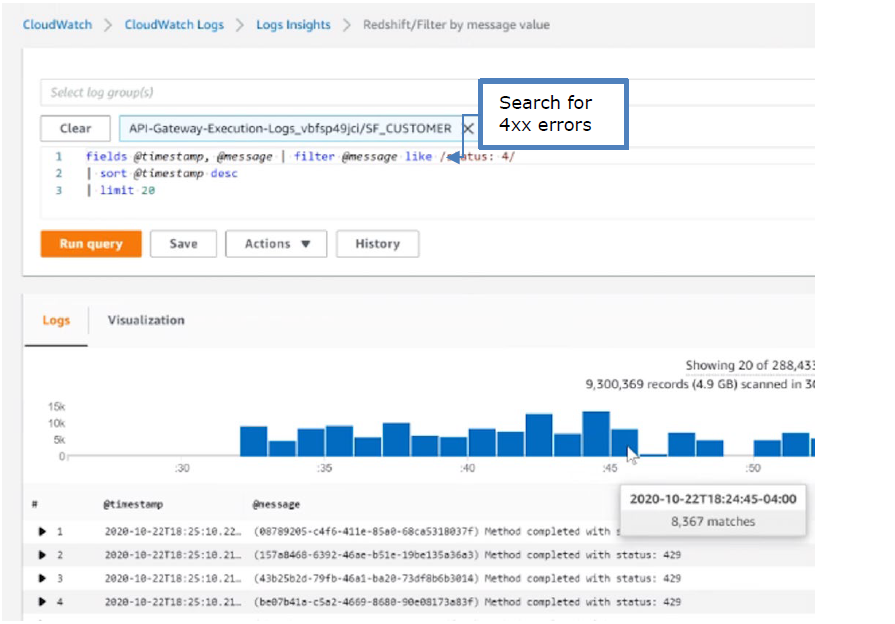
CloudWatch Metrics can be manually enabled on the API Gateway to reveal if quotas are being reached. Metrics aggregate errors into two buckets that are 4xx and 5xx. CloudWatch logs can be used to access the actual error code. The following table describes how to interpret the CloudWatch metrics.
| Error type | Possible issue | Remedy |
|---|---|---|
| 4xx errors | API Gateway burst or throttle quota exceeded | Request an increase to the API Gateway throttle quota. |
| 5xx errors | Lambda concurrent requests or burst quota exceeded. Verify 4xx errors in Lambda Metrics. | Request an increase the Lambda concurrent request quota |
Note
The API Gateway Lambda proxy maps 429 errors from the Lambda service to 500 errors.The following screenshot shows an example of searching CloudWatch Logs using Log Insights:
Feedback
Was this page helpful?