Architecture
Deployment Architecture
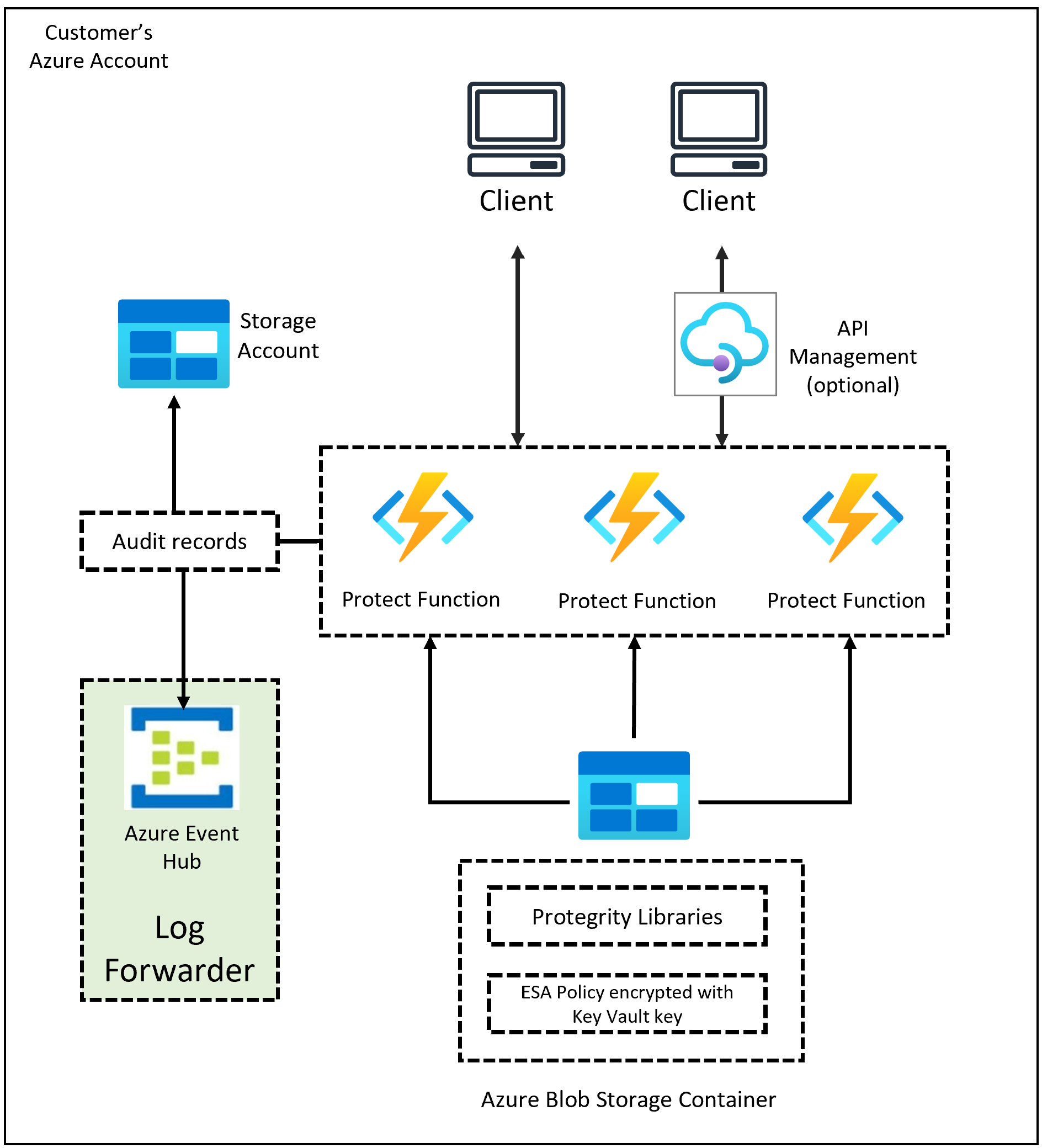
Protegrity’s Cloud API on Azure should be deployed in the Customer’s Cloud account. The product incorporates Protegrity’s vaultless tokenization engine within an Azure Function App. The encrypted data security policy from an ESA is deployed periodically as a static resource through an Azure Blob Storage container. The policy is decrypted in memory at runtime within the Function App. This architecture allows Protegrity Serverless to be highly available and scale very quickly without direct dependency on any other Protegrity services.
The product exposes a remote data protection service. Each REST request includes a micro-batch of data to process and parameters such as operation and data element. The function applies the data security policy including user authorization and returns a corresponding response. Security operations on sensitive data performed by protector can be audited. The product can be configured to send audit logs to ESA via optional component called Log Forwarder.
The security policy is synchronized via another serverless component called the Protegrity Policy Agent. The agent operates on a configurable schedule, fetches policy from ESA, performs envelope encryption using Azure Key Vault, and deploys the policy into the Azure Blob Storage container which is accessed by Protector Function App. This solution can be configured to automatically provision the static policy or the final step can be performed on-demand by an administrator.
The following diagram shows the high-level architecture described above.
The following diagram shows a reference architecture for synchronizing the security policy from ESA.
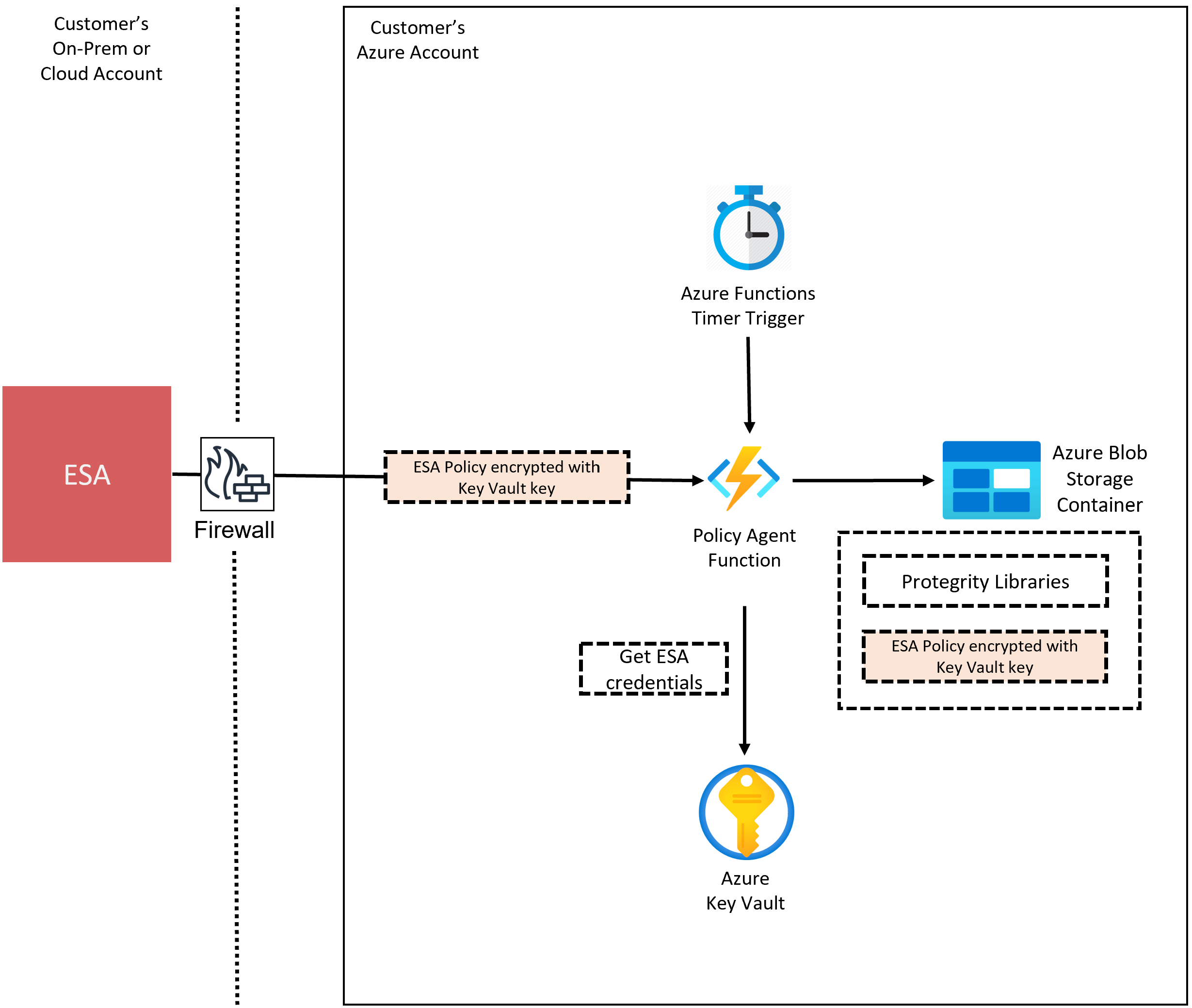
The ESA is a soft appliance that must be pre-installed on a separate server. It is used to create and manage security policies.
For more information about installing the ESA, and creating and managing policies, refer to the Policy Management Section
Audit Log Forwarding Architecture
Audit logs are by default sent to Azure Blob Storage and Application Insights. The Cloud Protect product can also be configured to send audit logs to ESA. Such configuration requires deploying audit Log Forwarder component which is available as part of Cloud Protect deployment bundle. The diagram below shows additional resources deployed with Log Forwarder component.
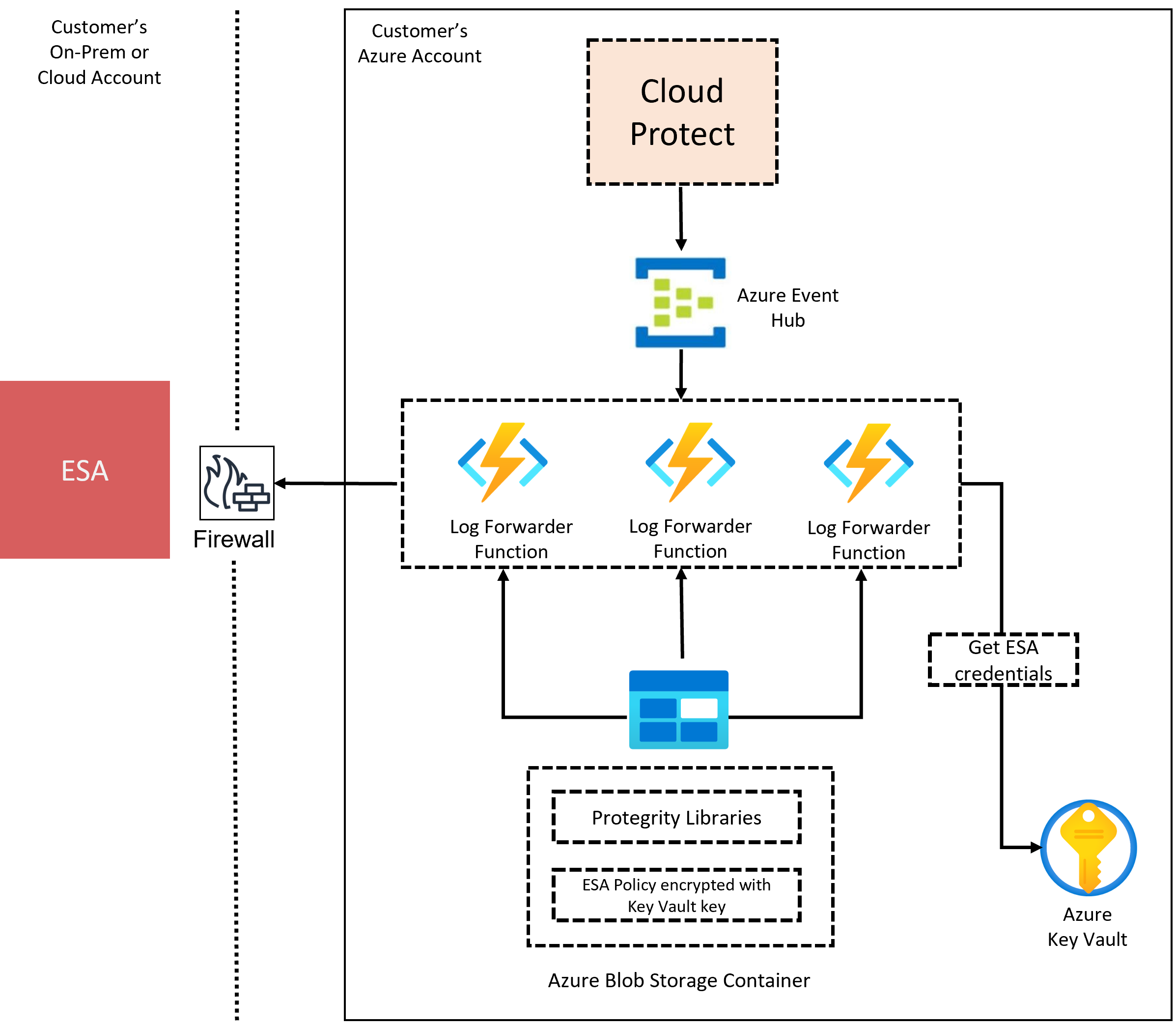
The audit log forwarding solution includes Azure Event Hubs data-streaming service and an Azure Function App deployment called Log Forwarder. Protect function delivers audit logs to Azure Event Hub instance, Event Hub instance batches audit logs and delivers them to Log Forwarder function. Log Forwarder function then delivers audit logs to ESA. Audit log aggregation occurs on both Protect and Log Forwarder functions. Aggregation rules are described in the Understanding the log aggregation section. If Log Forwarder cannot deliver audit logs to ESA due to temporary ESA connection loss, it will send undelivered audit logs to a dead-letter queue Event Hub. Audit logs in dead-letter queue Event Hub can be re-delivered to ESA using another instance of Log Forwarder, which can be configured to run either manually or on schedule.
The security of audit logs is ensured by using HTTPS connection on each link of the communication between protector function and ESA. Integrity and authenticity of audit logs is additionally checked on Log Forwarder function which verifies individual logs signature. The signature verification is done upon arrival from Azure Event Hub before applying aggregation. If signature cannot be verified, the log is forwarded as is to ESA where additional signature verification can be configured. Log Forwarder function uses client certificate to authenticate calls to ESA.
To learn more about individual audit log entry structure and purpose of audit logs, refer to Audit Logging section. Installation instruction can be found in the Audit Log Forwarder Installation.
Forwarding of audit logs requires network access from the cloud to the ESA.
Access Control
The Cloud API utilizes access controls provided by the Azure Function service. The following mechanisms are available for controlling and restricting access to the Cloud API data protection endpoint:
- Azure role-based access control (Azure RBAC).
- Function access keys. Requests must include an API access key in the request.
- OpenID Connect. OpenID is a simple identity layer on top of the OAuth 2.0 protocol. Authorization is performed in the Protegrity Function App code.
For more information on Azure Function security concepts, refer to Azure documentation:
REST API Authentication and Authorization
The Rest API supports built-in authentication and authorization provided by Azure Function app. More information is available in the following Azure documentation:
App Service Authentication/Authorization Overview
REST API Policy Authorization
Once the request is authenticated and authorized by the Azure Function App, the Protegrity Cloud API performs the requested security operation based on the policy data element from the payload and the authenticated user.
Feedback
Was this page helpful?