Recovering Logs in Dead Letter Topic (Recommended)
Protegrity recommends creation of an additional Log Forwarder installation in the case where logs are not delivered to ESA, as described in Log Forwarder Dead Letter Pub/Sub Architecture.
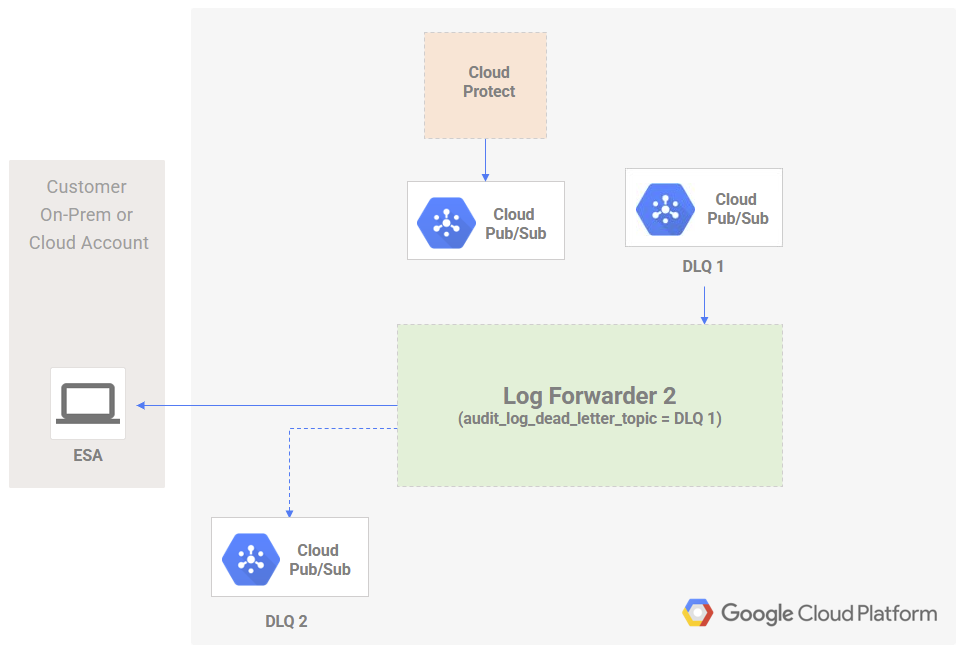
Steps to recover audit logs using new Log Forwarder installation:
Create a second Log Forwarder installation (Log Forwarder 2 in the above diagram) for processing undelivered logs. Value for audit_log_dead_letter_topic in the terraform script should be set to null during installation.
Configure and test newly installed Log Forwarder to verify ESA connectivity. See Install Log Forwarder Function via Terraform Scripts for installation instructions.
Identify the dead letter pub/sub topic (DLQ 1 in the above diagram) resource name by running command
terraform outputfor the Log Forwarder which failed to deliver logs (Log Forwarder as described in Log Forwarder Dead Letter Pub/Sub Architecture). Note the value for audit_log_dlq_topic.
Set audit_log_dead_letter_topic in the new Log Forwarder (Log Forwarder 2 in the above diagram) terraform installation script to the value of audit_log_dlq_topic identified in previous step. Apply the changes with terraform apply.
Monitor the new Log Forwarder function logs for any failures.
Note
Any additional failed logs will be pushed to the dead letter pub/sub topic (DLQ 2 in the above diagram) of the new Log Forwarder.Feedback
Was this page helpful?