Upgrading Protect Function
Protect Function Terraform module contains upgrade functionality with zero downtime release and rollback capabilities.
Diagram below illustrates upgrade process.
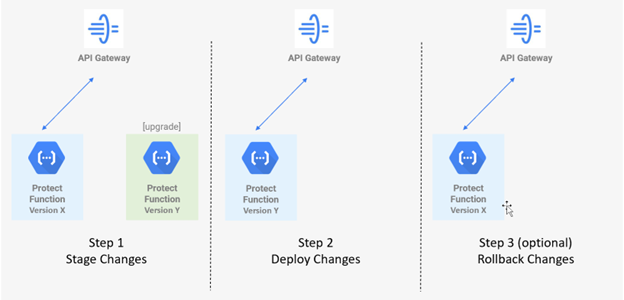
Steps in the upgrade process have the following purpose:
- Stage - The new version is staged as a separate function in parallel with the production function. The new version can be tested before deploying to production.
- Deploy - The new version is deployed to protector function with no interruptions to production traffic.
- Rollback - New version can be optionally rolled back to version before upgrade.
Protect Function Upgrade Prerequisites
Follow the steps below to prepare for upgrade.2nd Generation Protect Function Upgrade Prerequisites
To run Cloud Protect in Gen 2 Cloud Functions, a new instance of Cloud Protect must be created using the included terraform installation scripts. Upgrading a Gen 1 Cloud Function to Gen 2 is not currently supported for Cloud Protect.Stage Protect Function Changes The first step in upgrading Cloud Protect Function is staging the new changes in a separate Cloud Function (Upgrade Protect Function). This is done automatically with Terraform script. Follow the instructions below to update and run Terraform and then test production workloads against Upgrade Protect Function to ensure no unexpected behavior when changes are deployed to production Protect Function.
Deploy Protect Function Changes
After the upgrade is tested, it can be deployed to production Protect Cloud Function. Follow the instructions below to run terraform and deploy the upgrade.Rollback Protect Function Changes
Follow the instructions below to rollback upgrade changes deployed in previous section.Reset Agent environment variable for protect function resource name
Feedback
Was this page helpful?