1 - Authorization
Describes the available authorization methods
Policy Users
Protegrity Policy roles defines the unique data access privileges for every member. The Protegrity Lambda protects the data with the username sent in either the JWT-formatted authorization header or the request body.
The lambda behavior can be set in the Lambda environment variables as described in Protect Lambda Configuration
| Authorization/allow_assume_user | 0 | 1 |
|---|
| Empty | User from the request body. / (Throw an error). | User from the request body. |
| JWT | User from JWT payload | User from request body. If not found user from JWT payload. |
JWT Verification
To ensure the integrity of the user, the lambda protect can verify the JWT.
- From your AWS console, navigate to lambda and select the following Lambda: Protegrity_Protect_RESTAPI_<STACK_NAME>
- Scroll down to the Environment variables section, select Edit to replace the entries.
Parameter | Value | Notes |
|---|
authorization | JWT |
jwt_verify | 1 | |
jwt_secret_base64 | Secret in base64 encoding. For example, the value of the public key is as follows. -----BEGIN PUBLIC KEY-----
MIGfMA0GCSqGSIb3DQEBAQUAA4GNADCBiQKBgQC4fkg/JYyN3Skr6RYLiAd/Yhl0
2TE3/HzHSNPnCaRdUakGp9og7oXBMcoadFDjnoSq1sz+gUHnpoO7s2fwkD5Q4OnC
BGD3oKP2A4PlOOWD2B2cVmMqX/vf1nAA/343496jsbfgkh1Q7LTzR0IXfdii0o1U
CbvrVCuaBoyiv4TxWQIDAQAB
-----END PUBLIC KEY-----
This public key will be stored as follows. LS0tLS1CRUdJTiBQVUJMSUMgS0VZLS0tL
S0KTUlHZk1BMEdDU3FHU0liM0RRRUJBUV
VBQTRHTkFEQ0JpUUtCZ1FDNGZrZy9KWXl
OM1NrcjZSWUxpQWQvWWhsMAoyVEUzL0h6
SFNOUG5DYVJkVWFrR3A5b2c3b1hCTWNvY
WRGRGpub1NxMXN6K2dVSG5wb083czJmd2
tENVE0T25DCkJHRDNvS1AyQTRQbE9PV0Q
yQjJjVm1NcVgvdmYxbkFBLzM0MzQ5Nmpz
YmZna2gxUTdMVHpSMElYZmRpaTBvMVUKQ
2J2clZDdWFCb3lpdjRUeFdRSURBUUFCCi
0tLS0tRU5EIFBVQkxJQyBLRVktLS0tLQ==
| The secret must be in base64. We recommend using RSA public certificates, it is not recommended to keep Hash (symmetric) secrets in the clear. |
3 - Payload Encoding
Describes the request/response payload encoding
Payload Encoding
The following encoding formats are supported in the REST API.
For every encoding, the resultant protected data is returned in the same encoding. For example, if request is hex-encoded, the response is also hex-encoded.
For more information about the encoding formats, refer to the Protection Methods Reference.
Encoding | Supported by data elements | Notes |
|---|
utf8 | All except binary data elements. | Default encoding if encoding is not specified. |
hex | All | Default encoding for binary data elements. |
base64 | All | |
base64_mime | All | - Uses RFC 2045 Alphabet.
- Accepts input on multiple lines.
- Lines can be separated by any combination of CR and LF characters.
- Lines must not be longer than 76 characters long.
- Response lines are separated by CRLF characters.
- Optional padding.
- Does not accept any non-base64 characters.
|
base64_pem | All | - Uses RFC 1421 Alphabet.
- Accepts input on multiple lines.
- Lines can be separated by any combination of CR and LF characters.
- Lines must not be longer than 64 characters long.
- Response lines are separated by CRLF characters.
- Optional padding.
- Does not accept any non-base64 characters.
|
base64_url | All | |
The following sections provide the payload schema and its examples.
4 - TLS Mutual Authentication
Describes the TLS Mutual Authentication setup for AWS API Gateway
By default, AWS API Gateway supports HTTPS endpoint and doesn’t allow HTTP protocol.
For an additional layer of security, you can configure AWS API Gateway TLS Mutual Authentication.
AWS API Gateway will ensure that the clients with a valid certificate only can call the REST API. Protegrity recommends to setup TLS Mutual Authentication in AWS API Gateway. For more information on how to set AWS API Gateway Mutual TLS go to the following link.
https://docs.aws.amazon.com/apigateway/latest/developerguide/rest-api-mutual-tls.html
5 - v4 Specification
Describes the v4 (SecOps) Protegrity Data Protection API specification
The Protegrity Data Protection API v4 is the recommended interface for all new integrations. AWS Lambda service limits the maximum size of a payload to 6 MB. Client applications must ensure their payload size is within this limit.
Overview
The Protegrity Data Protection API v4 (SecOps v4) lets callers protect, unprotect, and reprotect (unprotect with one data element, then protect with another) sensitive data values according to a configured data security policy.
This is the new, canonical JSON API and is the recommended interface for all new integrations. It replaces the older v1 and Legacy REST formats, which are now deprecated.
- Base path:
/pty/api/secops/v4 - Content type:
application/json for both request and response - Method: all operations are HTTP
POST
Note
SecOps v4 is served only at /pty/api/secops/v4/*. Requests on this path are never handled by the v1 or Legacy formats, even if the body looks like a legacy request.Endpoints
| Method | Path | Purpose |
|---|
| POST | /pty/api/secops/v4/protect | Protect data values using a data element. |
| POST | /pty/api/secops/v4/unprotect | Unprotect previously protected values. |
| POST | /pty/api/secops/v4/reprotect | Unprotect with one data element and protect with another. |
Authentication
Authentication uses a JWT bearer token supplied in the Authorization header (the scheme keyword is matched case-insensitively):
Authorization: Bearer <token>
Enforcement is configured at deployment time and controlled by two configuration properties: authorization (set to jwt to enable JWT mode) and jwt_verify (set to 1 to verify the token signature).
When authorization is set to jwt:
- A missing, empty, or malformed
Authorization header returns HTTP 403, regardless of the jwt_verify setting. - Signature and expiry verification runs only when
jwt_verify is 1. A failed verification (bad signature, expired token, and so on) returns HTTP 403. When jwt_verify is not 1, the token is decoded for its claims but the signature is not checked. - The user identity is taken from a JWT claim (configurable with
jwt_user_claim, default cognito:username). See the user field note under Request for how the body user field interacts with this.
Note
A missing required user is an HTTP 400 validation error, not a 403. HTTP 403 is reserved for Authorization header and token problems.Request
protect / unprotect
{
  "user": "alice",
  "payload": [
    {
      "dataElement": "DE_SSN",
      "data": ["675-00-7848", "105-74-8112"],
      "encoding": "utf8",
      "externalIv": "s40de6wf6",
      "externaltweak": "e8wf6s30d",
      "id": "1"
    }
  ]
}
reprotect
The reprotect operation adds the new* fields that describe the target data element.
{
  "user": "alice",
  "payload": [
    {
      "dataElement": "DE_SSN",
      "newDataElement": "DE_SSN_2",
      "data": ["340-75-9971"],
      "externalIv": "s40de6wf6",
      "newExternalIv": "02983hd7sz",
      "externaltweak": "e8wf6s30d",
      "newExternaltweak": "h4egm1hjd"
    }
  ]
}
Field reference
| Field | Location | Type | Required | Notes |
|---|
user | top-level | string | Optional (conditional at runtime — see note below) | Identity performing the operation. |
payload | top-level | array (min 1 item) | Required | One or more work items; each is processed independently. |
dataElement | payload item | string | Required | Policy data element. In reprotect this is the source data element. |
newDataElement | payload item | string | Required for reprotect | Target data element that the values are protected with during reprotect. |
data | payload item | array of string/number (min 1) | Required | Values to process. null entries are allowed. |
encoding | payload item | enum | Optional, default utf8 | One of: utf8, hex, base64, base64_mime, base64_pem, base64_url. |
externalIv | payload item | string | Optional | External initialization vector. In reprotect, the IV for the source data element. |
newExternalIv | payload item | string | Optional (reprotect) | IV for the target data element. |
externaltweak | payload item | string | Optional | External tweak used with FPE. Source-data-element tweak in reprotect. Note the lowercase t. |
newExternaltweak | payload item | string | Optional (reprotect) | Tweak for the target data element. Note the lowercase t. |
id | payload item | string or number | Optional | Client correlation tag, echoed back in the matching result with its JSON type preserved (a number stays a number, a string stays a string). A string id longer than 128 characters is rejected with an HTTP 400 validation error (maxLength: 128), enforced consistently across protect, unprotect, and reprotect. The number form is unconstrained. |
Note
v4 uses camelCase field names (dataElement, externalIv), unlike the snake_case used by the v1 and Legacy formats (data_element, external_iv). The tweak fields externaltweak and newExternaltweak are intentionally all lowercase (not externalTweak).Is the user field required?
The user field is not unconditionally required. Whether it is needed depends on the deployment’s authorization mode:
- No authorization (
authorization unset or not jwt): the body user field is required. The request fails with HTTP 400 if it is missing. - JWT authorization (
authorization=jwt): the user is taken from a JWT claim (jwt_user_claim, default cognito:username). The body user field is honoured only when proxy-user is enabled (allow_assume_user=1); otherwise it is ignored. If no user can be resolved from the token, the request fails with HTTP 400. - Service user (
service_user configured): the body user field is ignored entirely and the configured service user is used.
Empty data array
Each data array must contain at least one value. A missing data array, or an empty data array, is rejected with an HTTP 400 validation error.Response
Success (HTTP 200)
Both full success and partial success return HTTP 200. The response envelope is { errorCount, results }, where the order of results matches the order of the input payload.
{
  "errorCount": 0,
  "results": [
    { "encoding": "utf8", "data": ["340-75-9971", "064-18-7624"], "returnCode": 8 }
  ]
}
Each result is one of two shapes:
- Success result (
resultSuccess): returnCode (the engine’s success code — 6 for protect, 8 for unprotect, 50 for reprotect, or 11 when an inactive key was used), encoding, data[], and optional id. - Failure result (
resultFailure): returnCode (a non-success engine code), message, and optional id.
A partial-success response (one item failed, one succeeded) still returns HTTP 200:
{
  "errorCount": 1,
  "results": [
    { "id": "1", "message": "Input too short", "returnCode": 22 },
    { "id": "2", "encoding": "base64", "data": ["..."], "returnCode": 8 }
  ]
}
Output encoding
When the caller does not set an input encoding (it defaults to utf8), binary data elements are returned as hex and all other data elements are returned as utf8. When the caller supplies an explicit encoding, that same encoding is echoed back in the result.Error responses
| HTTP | When | Body shape |
|---|
200 | Full or partial success. Per-item failures appear in results and are counted by errorCount. | { errorCount, results[] } |
400 | A request-level validation error — for example, a missing or empty payload; a missing dataElement (or newDataElement for reprotect) or data; a missing or unresolvable user; an empty data array; an id string longer than 128 characters; or an invalid data item. The request was not processed. | { "message": "..." } |
403 | An Authorization header or token problem: missing, empty, malformed, or (when jwt_verify=1) a failed signature or expiry verification. | { "message": "..." } |
500 | A server-side fault — a configuration error (for example, signature verification is enabled but no signing secret is configured), the policy being missing or unavailable, or any other unexpected error. | { "message": "..." } |
400 versus 500
The status code is chosen by the kind of failure: an authentication or authorization problem returns 403; a server configuration problem, a missing or unavailable policy, or any other unexpected error returns 500; and a request validation problem returns 400. All three error statuses share the same body shape — a single { "message": "..." } object.Return codes
returnCode is the protection engine’s return code. A success result carries a success code; a failure result carries a failure code together with a descriptive message.
Success codes (on a success result):
returnCode | Meaning |
|---|
6 | Protect succeeded. |
8 | Unprotect succeeded. |
11 | Unprotect succeeded using an inactive key. |
50 | Reprotect succeeded. |
10 | Access OK; no data transformed. |
27 | Application authorized. |
Failure codes (on a failure result):
returnCode | Meaning |
|---|
1 | User not found in the policy. |
2 | Data element not found in the policy. |
3 | User lacks permission for the requested operation. |
4 | Tweak is null. |
5 | Integrity check failed. |
7 | Protect operation failed. |
9 | Unprotect operation failed. |
12 | Input is null or not within allowed limits. |
13 | Internal error (also used when an unexpected internal fault has no other engine code). |
14 | Failed to load the data encryption key. |
15 | Tweak input is too long. |
19 | Unsupported tweak for the data element. |
20 | Out of memory. |
21 | Input or output buffer too small. |
22 | Data is too short to protect or unprotect. |
23 | Data is too long to protect or unprotect. |
26 | Unsupported algorithm or action for the data element. |
28 | Application not authorized. |
31 | Policy not available. |
44 | Input data content is not valid. |
49 | Unsupported input encoding for the data element. |
Examples
protect
Simple protect call with the minimum required input:
{
  "user": "alice",
  "payload": [
    { "data": ["George Washington"], "dataElement": "DE_NAME" }
  ]
}
Response:
{
  "errorCount": 0,
  "results": [
    { "encoding": "utf8", "data": ["EdVz2X i5a2FXNW5jR"], "returnCode": 6 }
  ]
}
Protect using FPE with an external tweak:
{
  "user": "alice",
  "payload": [
    {
      "data": ["675-00-7848", "105-74-8112"],
      "dataElement": "DE_FPE",
      "externaltweak": "e8wf6s30d"
    }
  ]
}
unprotect
Simple unprotect call with the minimum required input:
{
  "user": "alice",
  "payload": [
    { "data": ["EdVz2X i5a2FXNW5jR"], "dataElement": "DE_NAME" }
  ]
}
Response:
{
  "errorCount": 0,
  "results": [
    { "encoding": "utf8", "data": ["George Washington"], "returnCode": 8 }
  ]
}
reprotect
Simple reprotect call (from one data element to another):
{
  "user": "alice",
  "payload": [
    {
      "data": ["EdVz2X i5a2FXNW5jR"],
      "dataElement": "DE_NAME",
      "newDataElement": "DE_NAME_2"
    }
  ]
}
Response:
{
  "errorCount": 0,
  "results": [
    { "encoding": "utf8", "data": ["m9yGNp v2ZiB2YWx1"], "returnCode": 50 }
  ]
}
Error examples
A 400 response for a request-level validation error (for example, a missing payload):
{ "message": "'payload' parameter is missing" }
A 403 response when the authorization token is missing or expired:
{ "message": "Authorization header was not found" }
A 500 response for a configuration error:
{ "message": "JWT secret is missing" }
| Header | Direction | Notes |
|---|
Authorization | request | Bearer <jwt> (when JWT authorization is enabled). |
X-Correlation-ID | request → response (conditional) | Optional request-tracking ID. When the request supplies it, it is echoed back on every response — on full-success, partial-success, and all-failure 200 responses, and on 400, 403, and 500 responses. When the request omits it, no header is returned. |
Migrating from v1 / Legacy
| Aspect | v1 / Legacy | SecOps v4 |
|---|
| Path | Any path except secops | Only /pty/api/secops/v4/* |
| Operation selection | Last segment of the URL path (…/protect, and so on) | Last segment of the URL path (/protect, /unprotect, /reprotect) — same mechanism |
| Format selection | Body must contain the arguments array | Request path must start with /pty/api/secops/v4 |
| Request wrapper | arguments | payload |
| Data element field | data_element / old_data_element | dataElement / newDataElement |
| External IV field | external_iv / old_external_iv | externalIv / newExternalIv |
| FPE tweak | Not present | externaltweak / newExternaltweak |
| Success envelope | { success, results } | { errorCount, results } |
| 400 error body | Success-shaped envelope | { message } object |
Note
The v1 and Legacy formats remain functional but are deprecated and will be removed in a future release. Migrate to the Protegrity Data Protection API v4 at base path /pty/api/secops/v4.6 - v1 Specification
Describes the v1 REST API specification
AWS Lambda service limits maximum size of payload to 6 MB. Client applications of Protegrity Cloud API must ensure their payload size is within this limit. This applies to all types of requests described below.
Request
AWS Lambda service limits maximum size of payload to 6 MB. Client applications of Protegrity Cloud API must ensure their payload size is within this limit. This applies to all types of requests described below.
Performs a policy operation such as protect, unprotect, or reprotect.
URI
/v1/protect or /v1/unprotect or /v1/reprotect
Method
POST
Parameters
data: Input data to the policy operation.
data_element: Data element to use for the policy operation.
encoding: Optional, encoding of the data. One of: base64, base64_mime, base64_pem, base64_url, hex, or utf8. Defaults to hex for binary data elements, otherwise defaults to utf8.
external_iv: Optional, external initialization vector.
old_data_element: (reprotect) Data element for unprotecting the input.
old_external_iv: (reprotect) Optional, external initialization vector for the input.
query_id: Optional, identifier for the request.
user: User performing the operation.
Result
Returns the output of the policy operation.
Example 1 - without external IV
{
  "encoding": "utf8",
  "query_id": "1",
  "user": "user1",
  "data_element": "Alphanum",
  "data":[<data1>,<data2>]
}
Example 2 - with external IV
{
  "encoding": "utf8",
  "query_id": "1",
  "user": "user1",
  "data_element": "Alphanum",
  "external_iv": "abc123",
  "data":[<data1>,<data2>]
}
Example 3 - reprotect
{
  "encoding": "utf8",
  "query_id": "1",
  "user": "user1",
  "data_element": "deName",
  "old_data_element": "Alphanum",
  "data":[<data1>,<data2>]
}
Performs policy operations using different data elements for each data set.
URI
/v1/protect or /v1/unprotect or /v1/reprotect
Method
POST
Parameters
encoding: Optional, encoding of the data. One of: base64, base64_mime, base64_pem, base64_url, hex, or utf8. Defaults to hex for binary data elements, otherwise defaults to utf8.
query_id: Optional, prefix for the request identifier.
user: User performing the operation.
arguments[].data: Input data to the policy operation.
arguments[].data_element: Data element to use for the policy operation.
arguments[].external_iv: Optional, external initialization vector.
arguments[].id: Optional, request identifier.
arguments[].old_data_element: (reprotect) Data element for unprotecting the input.
arguments[].old_external_iv: (reprotect) Optional, external initialization vector for the input.
Note
When multiple data elements are sent in the payload, the Cloud API generates an audit log per argument. The Cloud API appends the argument id, if it exists, to the query_id. For example: query_id.id:{id}. If an argument id is not provided then the index in the argument array is appended to the query_id. For example: query_id.index:{index}.Example 4 - multiple data elements support payload
{
  "encoding": "utf8",
  "query_id": "query1234",
  "user": <policy_user>,
  "arguments": [
    {
      "id": "1",
      "external_iv": "<external iv>",
      "data_element": "<data element name>",
      "data":["<data1>","<data2>"]
    },
    {
      "data_element": <data element name>,
      "data":["<data1>","<data2>"]
    }
  ]
}
External IV
The External IV feature provides an additional level of security by allowing different tokenized results across protectors for the same input data and token element, depending on the External IV set on each protector. External IVs must adhere to certain guardrails and not all data elements support External IV. To read more about the Tokenization model with External IV, refer to the External Initialization Vector (IV) chapter in the Protection Methods Reference.
Response
responsePayloadV1:
type: object
  properties:
    success:
      type: bool
    error_msg:
      type: string
      description: When success is false, error_msg is included
    results:
      type: array
      items:
        type: string
Example success:
{
  "encoding": "utf8",
  "results":["str1","str2"],
  "success": true
}
If the request was successful, the success flag will always be true.
Example failure:
{
  "error_msg": "token expired",
  "success": false
}
If the request fails, the success flag will always be false.
Multi Data Elements Support Payload
responsePayloadV2:
type: object
  properties:
    success:
      type: boolean
    results:
      type: array
        items:
          type: object
          properties:
            success:
              type: bool
            error_msg:
              type: string
              description: When success is false, error_msg is included
            id:
              type: string
              description: When id is sent in the request payload, id is included in the response
            results:
              type: array
              items:
                type: string
Example success:
{
  "encoding": "utf8",
  "results":[
    {
      "encoding": "utf8",
      "results":["str1","str2"],
      "success": true
    },
    {
      "encoding": "utf8",
      "results":["str1","str2"],
      "success": true
    }
  ],
  "success": true
}
If the all the subrequests were successful, the success flag will be true.
Example failure:
{
  "results": [
    {
      "error_msg":
      "Protect failed. Data element not found. Refer to audit log for details",
      "success": false
    },
    {
      "encoding": "utf8",
      "results":["str1","str2"],
      "success": true
    }
  ],
  "success": false
}
It is possible to have a mix of successful and unsuccessful results. In this case, the global success flag will be false.
7 - Legacy Specification
Describes the Legacy REST API specification
Protegrity has multiple products with REST API capabilities, such as Protection Server (out of support), DSG, and the latest product - IAP REST. Each one has its use case. To help you move to cloud-native implementation, Cloud Product REST API supports legacy payload.
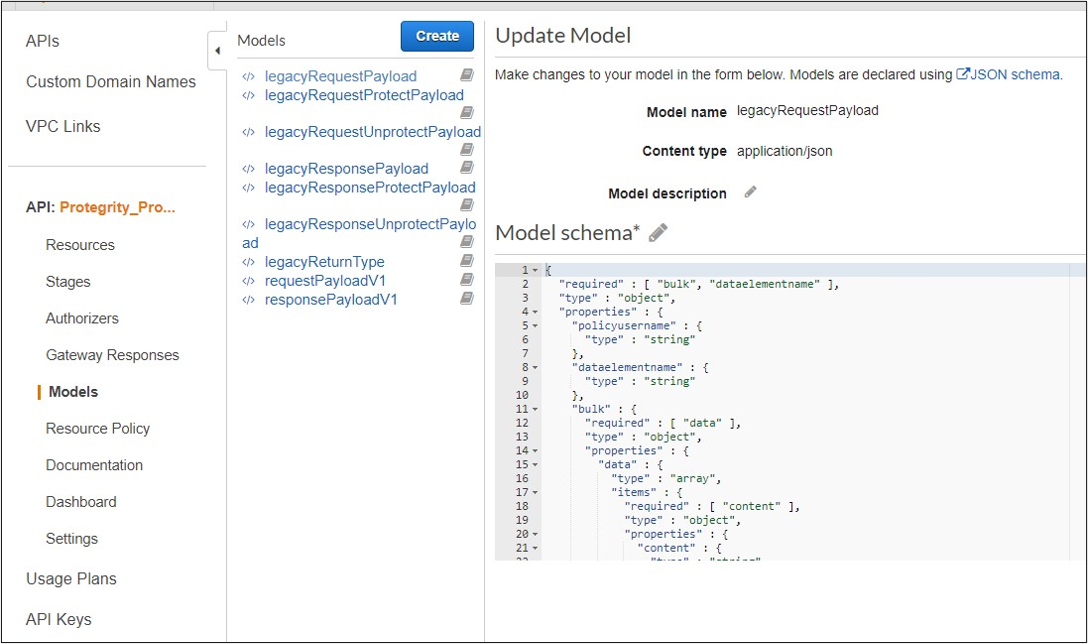
Legacy documentation can be downloaded from AWS console, API, Models, prefix Legacy.
Request
Performs a policy operation such as protect, unprotect, or reprotect.
Method
POST
Parameters
dataelementname: (protect/unprotect) Data element to use for the policy operation.
externaliv: (protect/unprotect) Optional, external initialization vector.
newdataelementname: (reprotect) Data element to use for the output.
newexternaliv: (reprotect) Optional, external initialization vector for the output.
olddataelementname: (reprotect) Data element to use for the input.
oldexternaliv: (reprotect) Optional, external initialization vector for the input.
policyusername: User performing the operation.
bulk.id: Optional, identifier for the request.
bulk.data[].content: Input data to the policy operation.
Result
Returns the output of the policy operation.
Example 1 - protect without external IV
{
  "protect": {
    "policyusername": "user1",
    "dataelementname": "Alphanum",
    "bulk": {
      "id": "1",
      "data": [
        {
          "content": <Data encoded in base64>
        }
      ]
    }
  }
}
Example 2 - protect with external IV
{
  "protect": {
    "policyusername": "user1",
    "dataelementname": "Alphanum",
    "externaliv": "abc123",
    "bulk": {
      "id": "1",
      "data": [
        {
          "content": <Data encoded in base64>
        }
      ]
    }
  }
}
Example 3 - unprotect
{
  "unprotect": {
    "policyusername": "user1",
    "dataelementname": "Alphanum",
    "bulk": {
      "id": "1",
      "data": [
        {
          "content": <Data encoded in base64>
        }
      ]
    }
  }
}
Example 4 - reprotect
{
  "reprotect": {
    "policyusername": "user1",
    "newdataelementname": "deName",
    "olddataelementname": "Alphanum",
    "bulk": {
      "id": "1",
      "data": [
        {
          "content": <Data encoded in base64>
        }
      ]
    }
  }
}
Response
Example:
{"protect":{"bulk":{"returntype":"success","data":[{"returntype":"success","message":"Data
 protection was successful.","content":"RGZBUFR4ODAzejFwNjQ5TWg0TEFpcFNqbA=="},{"returntype":"success",
"message":"Data protection was successful.","content":"aHNnVVB5QWFDYw=="}]}}}