This is the multi-page printable view of this section. Click here to print.
Data Discovery
- 1: Introduction
- 2: What's New
- 3: General Architecture
- 4: API Endpoints
- 4.1: Classify
- 4.1.1: Classify Text API
- 4.1.2: Classify Tabular API
- 4.1.3: Input Validation
- 4.1.4: Harmonization
- 4.1.5: Supported Classification Entities
- 4.2: Transform
- 4.2.1: Label Text API
- 4.2.1.1: Handling Overlapping Conflicts
- 4.2.1.2: Sample Response Default
- 4.2.1.3:
- 4.2.1.4:
- 4.3: Common APIs
- 4.3.1: API Specification
- 4.3.2: Health Probes
- 4.3.2.1: Liveness Probe
- 4.3.2.2: Readiness Probe
- 4.3.2.3: Health Check
- 4.3.3: Log Level API
- 4.3.3.1: Log Level API
- 4.3.3.2: Log Level API
- 4.3.4: Version API
- 4.4:
- 4.5:
- 5: Performance and Accuracy
- 6: Usage Metrics
1 - Introduction
In an era where data privacy is paramount, safeguarding sensitive information in unstructured data has become critical—especially for organizations leveraging AI and machine learning technologies. Data Discovery is a powerful, developer-friendly product designed specifically to address this challenge.
Data Discovery specializes in the detection of Personally Identifiable Information (PII), Protected Health Information (PHI), Payment Card Information (PCI) within free-text (unstructured) and table-based (structured, CSV) inputs. Unlike traditional data tools, it excels in dynamic, unstructured environments such as chatbot conversations, call transcripts, and Generative AI (Gen AI) outputs.
Harnessing a hybrid detection engine that combines machine learning and rule-based algorithms, Data Discovery offers unparalleled accuracy and flexibility. It empowers teams to perform the following:
Automate chatbot redaction to ensure compliance with privacy regulations.
Perform transcript cleanup for customer service, healthcare, and financial industries.
Enhance GenAI applications by proactively mitigating the risks associated with leaking sensitive information.
Built for developers, architects, and privacy engineers, Data Discovery seamlessly integrates into AI/ML pipelines and Gen AI workflows. Deployment is fast and flexible, with support for both Docker containers and AWS EKS clusters, and interaction via robust, intuitive REST APIs.
Whether you’re building next-generation AI applications or enhancing existing systems to meet evolving data privacy standards, Data Discovery equips you with the tools to discover, classify, and protect sensitive information at scale.
2 - What's New
Data Discovery 2.0
Major changes
Standardized API Endpoints
Updated Classify and Transform APIs:
http://{Host Address}/pty/data-discovery/v2/classify/text- Classify Text APIhttp://{Host Address}/pty/data-discovery/v2/classify/tabular- Classify Tabular Data APIhttp://{Host Address}/pty/data-discovery/v2/transform/label- Transform Text API
Added new Endpoints:
http://{Host Address}/pty/data-discovery/doc– Provides the API documentation for the Data Discovery. For more information see API Specification.http://{Host Address}/pty/data-discovery/log– Gets/Sets the log level for the Data Discovery. For more information see Log level API.http://{Host Address}/pty/data-discovery/version– Retrieves the current version of the Data Discovery. For more information see Version API.
Enhancements
- Updated Context Provider AI model for improved contextual accuracy.
- Updated Pattern Provider model for better pattern recognition.
- Updated the default score threshold for the Classify API from 0.0 to 0.7, aligning it with the Transform API which already defaults to 0.7. Low-confidence classifications below the threshold are filtered out. The legacy v1.1 classification endpoint retains a threshold of 0.0 for backward compatibility.
- Added usage metrics logging to the Classification Service for improved analytics and visibility, see Usage Metrics for more details.
- Added per-language accuracy metrics to improve visibility into multilingual performance, see Language Metrics for more details.
- Added PII detection in multiple Markdown dialects.
- Bug Fixes.
3 - General Architecture
The main components of the Protegrity Data Discovery product are as follows:
Classification service: The Classification Service serves as the primary access point for all classification-related interactions. It orchestrates various back-end components known as Providers, which are responsible for executing the actual classification tasks.
Pattern and Context classification providers: The Providers function as specialized modules in identifying and classifying Personally Identifiable Information (PII). They analyze input data to detect, classify, and locate sensitive information.
The Pattern classification provider is a rule-based system that identifies PII using predefined patterns and heuristics. It is fast, customizable, and suitable for structured data with known formats.
The Context classification provider is an LLM based designed within Protegrity. A machine learning model that detects PII using context and semantics. It is flexible, effective with unstructured data, and adapts to varied patterns.
The general architecture is illustrated in the following figure.
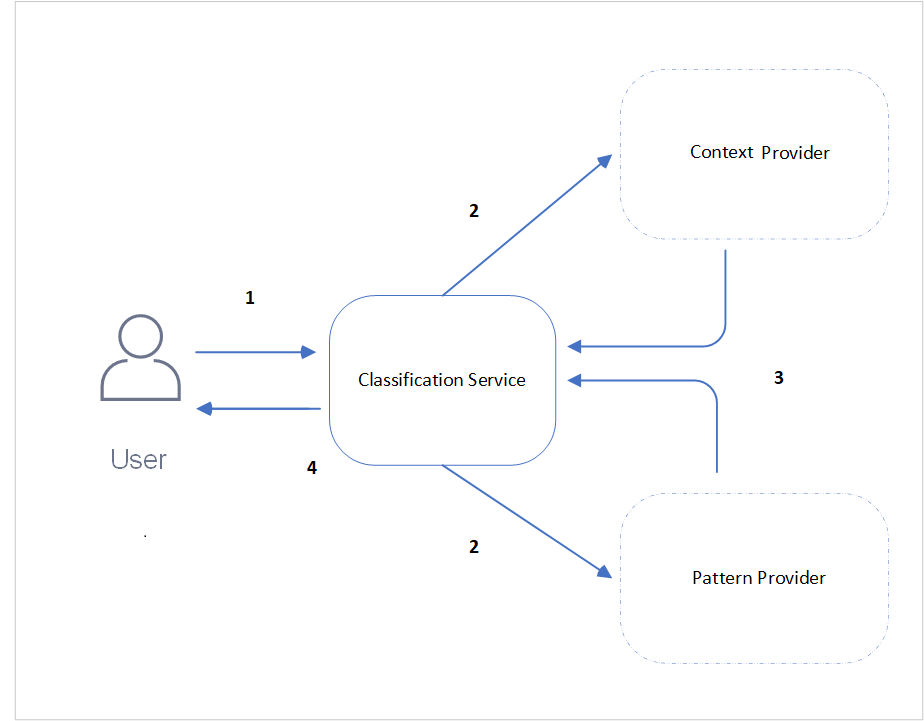
| Callout | Description |
|---|---|
| 1 | The user enters the data to be classified for sensitive data as text body and sends the request to the Classification service. |
| 2 | This Classification service then distributes the request to the Pattern and Context classification service providers to process the data. |
| 3 | The Pattern and Context classification providers process the data based on their logic and classify them in the form of a response to the Classification service. |
| 4 | The Classification service then aggregates the responses from the service providers and sends it to the user. |
4 - API Endpoints
4.1 - Classify
4.1.1 - Classify Text API
Method
POST
URL
http://{Host Address}/pty/data-discovery/v2/classify/text
Query Parameters
score_threshold
- Type:
float - Description: Optional. Exclude results with a score lower than this threshold.
- Values: Minimum 0, Maximum 1.0
- Default:
0.7
Body
Content type must be a plain text and in an UTF-8 format.
Length of the body is limited to 10K Bytes.
Sample Request
curl -X POST "http://<Host_address>/pty/data-discovery/v2/classify/text?score_threshold=0.85" \
          -H "Content-Type: text/plain" \
          --data "You can reach Dave Elliot by phone 203-555-1286"
import requests
url = "http://<Host_address>/pty/data-discovery/v2/classify/text"
params = {"score_threshold": 0.85}
headers = {"Content-Type": "text/plain"}
data = "You can reach Dave Elliot by phone 203-555-1286"
response = requests.post(url, params=params, headers=headers, data=data, verify=False)
print("Status code:", response.status_code)
print("Response JSON:", response.json())URL: POST `http://<Host_address>/pty/data-discovery/v2/classify/text`
Query Parameters:
-score_threshold (optional), float between 0.0 and 1.0, default: 0.
Headers:
-Content-Type: text/plain
Body:
-You can reach Dave Elliot by phone 203-555-1286Sample Response
{
    "providers": [
        {
            "name": "Pattern Classification Provider",
            "version": "...",
            "status": 200,
            "elapsed_time": 0.028261899948120117,
            "config_provider": {
                "name": "Pattern",
                "address": "http://pattern_provider_service:8051",
                "supported_content_types": []
            }
        },
        {
            "name": "Context Classification Provider",
            "version": "...",
            "status": 200,
            "elapsed_time": 0.040960073471069336,
            "config_provider": {
                "name": "Context",
                "address": "http://context_provider_service:8052",
                "supported_content_types": []
            }
        }
    ],
    "classifications": {
        "PERSON": [
            {
                "score": 0.9238499879837037,
                "location": {
                    "start_index": 14,
                    "end_index": 25
                },
                "classifiers": [
                    {
                        "provider_index": 0,
                        "name": "SpacyRecognizer",
                        "score": 0.85,
                        "original_entity": "PERSON",
                        "details": {}
                    },
                    {
                        "provider_index": 1,
                        "name": "context",
                        "score": 0.9976999759674072,
                        "original_entity": "NAME",
                        "details": {}
                    }
                ]
            }
        ],
        "PHONE_NUMBER": [
            {
                "score": 0.9995999932289124,
                "location": {
                    "start_index": 35,
                    "end_index": 47
                },
                "classifiers": [
                    {
                        "provider_index": 1,
                        "name": "context",
                        "score": 0.9995999932289124,
                        "original_entity": "PHONE",
                        "details": {}
                    }
                ]
            }
        ]
    }
}
Response Fields Description
Providers Section
| Name | Example Response | Description |
|---|---|---|
| providers | Array | Array of provider objects that participated in the request, including their respective success or failure codes. |
| providers[n].name | Pattern Classification Provider | Product name of the provider. |
| providers[n].version | 2.0.0 | Version of the provider. |
| providers[n].status | 200 | HTTP response code returned by the provider. |
| providers[n].elapsed_time | 0.028 | Time, in seconds, taken by the provider to process the request. |
| providers[n].config_provider | Object | Object containing configuration details for each provider. |
| providers[n].config_provider.name | Pattern | Internal name of the provider. |
| providers[n].config_provider.address | http://pattern_provider_service:8051 | Network address or endpoint of the provider. |
| providers[n].config_provider.supported_content_types | [] | Array of supported content types. An empty array indicates support for all content types. |
Classifications Section
| Name | Example Response | Description |
|---|---|---|
| classifications | Dictionary | A dictionary mapping entity types (e.g., “PERSON”, “PHONE_NUMBER”) to arrays of occurrence objects. Each key is an entity type, and its value is a list of detected occurrences, each containing location and classifier details. |
| classifications[’entity’][n].score | 0.9238 | The confidence score for the detected entity, aggregated from all contributing classifiers. |
| classifications[’entity’][n].location | Object | An object specifying the location of the entity within the input text. |
| classifications[’entity’][n].location.start_index | 14 | The starting index of the entity in the input text. |
| classifications[’entity’][n].location.end_index | 25 | The ending index of the entity in the input text. |
| classifications[’entity’][n].classifiers | Array | An array of classifier objects that contributed to the entity detection. |
| classifications[’entity’][n].classifiers[m].provider_index | 0 | The index of the provider in the top-level providers array. |
| classifications[’entity’][n].classifiers[m].name | SpacyRecognizer | The name of the classifier. A provider may have multiple classifiers. |
| classifications[’entity’][n].classifiers[m].score | 0.85 | The score assigned by the classifier for the entity detection. |
| classifications[’entity’][n].classifiers[m].original_entity | PERSON | The original entity type detected by the classifier. See Harmonization for details. |
| classifications[’entity’][n].classifiers[m].details | Object | Optional. Additional key-value details provided by the classifier. |
Response Codes
| Response Code | Description |
|---|---|
| 200 | Successful Response. |
| 206 | Partial Content. Only some providers classifed data successfully. |
| 400 | Bad Request. Invalid input parameters or content. |
| 413 | Payload too large. |
| 415 | Unsupported media type. |
| 422 | Untrusted input. For more information, refer to Input Validation |
| 502 | Bad Gateway. All upstream providers failed; no successful data aggregation possible. |
| 598 | Unexpected internal server error. Check server logs. |
| 599 | Internal server error. Check server logs. |
4.1.2 - Classify Tabular API
Method
POST
URL
http://{Host Address}/pty/data-discovery/v2/classify/tabular
Query Parameters
score_threshold
- Type:
float - Description: Optional. Exclude results with a score lower than this threshold.
- Values: Minimum 0, Maximum 1.0
- Default:
0.7
has_headers
- Type:
boolean - Description: Optional. Indicates whether the first row represents the column header.
- Values:
true/false - Default:
true
column_delimiter
- Type:
char - Description: Optional. Delimiter to separate the columns.
- Default:
,
quote_char
- Type:
char - Description: Optional. Character to quote fields containing special characters, such as, the column_delimiter or new-line characters.
- Default:
"
Body
Content type should be
text/csvand in UTF-8 format.Body size is limited to 10K Bytes
Sample Request
curl -X POST "http://<Host_address>/pty/data-discovery/v2/classify/tabular?score_threshold=0.85" \
     --header 'Content-Type: text/csv' \
     --data-raw 'Social Security Number,Credit Card Number,IBAN,Phone Number
     589-25-1068,349384370543801,FR43 9255 4858 47BG 3EBG U4OK O18,(483) 9440301
     636-36-3077,4041594844904,AL50 8947 4215 KAEY GAPM NLYC FNZG,(113) 5143119
     748-82-2375,3558175715821800,AT34 4082 9269 0841 5702,(763) 5136237
     516-62-9861,560221027976015000,FR22 0068 7181 11FB UG8H ECEM 306,(726) 6031636
     121-49-9409,374283320982549,DK37 5687 8459 8060 79,(624) 9205200
     838-73-3299,5558216060144900,CR54 8952 8144 6403 4765 0,(356) 9479541
     439-11-5310,5048376143641900,RS76 6213 4824 0184 8983 74,(544) 5623326
     564-06-8466,3543299511845640,EE51 6882 3443 7863 4703,(702) 6093849
     518-54-5443,3543019452249540,IT65 D000 3874 2801 Z15I LNLL OOX,(584) 8618371'
import requests
url = "http://<Host_address>/pty/data-discovery/v2/classify/tabular"
params = {"score_threshold": 0.85}
headers = {"Content-Type": "text/csv"}
data = """Social Security Number,Credit Card Number,IBAN,Phone Number
589-25-1068,349384370543801,FR43 9255 4858 47BG 3EBG U4OK O18,(483) 9440301
636-36-3077,4041594844904,AL50 8947 4215 KAEY GAPM NLYC FNZG,(113) 5143119
748-82-2375,3558175715821800,AT34 4082 9269 0841 5702,(763) 5136237
516-62-9861,560221027976015000,FR22 0068 7181 11FB UG8H ECEM 306,(726) 6031636
121-49-9409,374283320982549,DK37 5687 8459 8060 79,(624) 9205200
838-73-3299,5558216060144900,CR54 8952 8144 6403 4765 0,(356) 9479541
439-11-5310,5048376143641900,RS76 6213 4824 0184 8983 74,(544) 5623326
564-06-8466,3543299511845640,EE51 6882 3443 7863 4703,(702) 6093849
518-54-5443,3543019452249540,IT65 D000 3874 2801 Z15I LNLL OOX,(584) 8618371
"""
response = requests.post(url, params=params, headers=headers, data=data, verify=False)
print("Status code:", response.status_code)
try:
print("Response JSON:", response.json())
except ValueError:
print("Response Text:", response.text)
URL: POST `http://<Host_address>/pty/data-discovery/v2/classify/tabular`
      Query Parameters:
      -score_threshold (optional), float between 0.0 and 1.0, default: 0.
      -has_headers (optional), Indicates whether the first row represents the column header.
      -column_delimiter (optional), Delimiter to separate the columns.
      -quote_char (optional), Character to quote fields containing special characters, such as, the column_delimiter or new-line characters.
      Headers:
      -Content-Type: text/csv
      Body:
      -Social Security Number,Credit Card Number,IBAN,Phone Number
     589-25-1068,349384370543801,FR43 9255 4858 47BG 3EBG U4OK O18,(483) 9440301
     636-36-3077,4041594844904,AL50 8947 4215 KAEY GAPM NLYC FNZG,(113) 5143119
     748-82-2375,3558175715821800,AT34 4082 9269 0841 5702,(763) 5136237
     516-62-9861,560221027976015000,FR22 0068 7181 11FB UG8H ECEM 306,(726) 6031636
     121-49-9409,374283320982549,DK37 5687 8459 8060 79,(624) 9205200
     838-73-3299,5558216060144900,CR54 8952 8144 6403 4765 0,(356) 9479541
     439-11-5310,5048376143641900,RS76 6213 4824 0184 8983 74,(544) 5623326
     564-06-8466,3543299511845640,EE51 6882 3443 7863 4703,(702) 6093849
     518-54-5443,3543019452249540,IT65 D000 3874 2801 Z15I LNLL OOX,(584) 8618371
Sample Response
{
    "providers": [
        {
            "name": "Pattern Classification Provider",
            "version": "...",
            "status": 200,
            "elapsed_time": 0.31273603439331055,
            "config_provider": {
                "name": "Pattern",
                "address": "http://pattern_provider_service:8051",
                "supported_content_types": []
            }
        },
        {
            "name": "Context Classification Provider",
            "version": "...",
            "status": 200,
            "elapsed_time": 1.1383004188537598,
            "config_provider": {
                "name": "Context",
                "address": "http://context_provider_service:8052",
                "supported_content_types": []
            }
        }
    ],
    "classifications": {
        "SOCIAL_SECURITY_ID": [
            {
                "score": 0.9994888835483127,
                "rows_processed": 9,
                "location": {
                    "column_name": "Social Security Number",
                    "column_index": 0
                },
                "classifiers": [
                    {
                        "provider_index": 1,
                        "name": "context",
                        "rows_with_classification": 9,
                        "total_classifications": 9,
                        "score": 0.9994888835483127,
                        "details": {}
                    }
                ]
            }
        ],
        "CREDIT_CARD": [
            {
                "score": 0.9986333317226834,
                "rows_processed": 9,
                "location": {
                    "column_name": "Credit Card Number",
                    "column_index": 1
                },
                "classifiers": [
                    {
                        "provider_index": 1,
                        "name": "context",
                        "rows_with_classification": 9,
                        "total_classifications": 9,
                        "score": 0.9986333317226834,
                        "details": {}
                    }
                ]
            }
        ],
        "BANK_ACCOUNT": [
            {
                "score": 0.7901234567901234,
                "rows_processed": 9,
                "location": {
                    "column_name": "IBAN",
                    "column_index": 2
                },
                "classifiers": [
                    {
                        "provider_index": 0,
                        "name": "IbanRecognizer",
                        "rows_with_classification": 8,
                        "total_classifications": 8,
                        "score": 0.8888888888888888,
                        "details": {}
                    }
                ]
            }
        ],
        "PHONE_NUMBER": [
            {
                "score": 0.9961333341068692,
                "rows_processed": 9,
                "location": {
                    "column_name": "Phone Number",
                    "column_index": 3
                },
                "classifiers": [
                    {
                        "provider_index": 1,
                        "name": "context",
                        "rows_with_classification": 9,
                        "total_classifications": 9,
                        "score": 0.9961333341068692,
                        "details": {}
                    }
                ]
            }
        ]
    }
}
Response Fields Description
Providers Section
| Name | Example Response | Description |
|---|---|---|
| providers | Array | Array of provider objects that participated in the request, including their respective success or failure codes. |
| providers[n].name | Pattern Classification Provider | Product name of the provider. |
| providers[n].version | 2.0.0 | Version of the provider. |
| providers[n].status | 200 | HTTP response code returned by the provider. |
| providers[n].elapsed_time | 0.028 | Time, in seconds, taken by the provider to process the request. |
| providers[n].config_provider | Object | Object containing configuration details for each provider. |
| providers[n].config_provider.name | Pattern | Internal name of the provider. |
| providers[n].config_provider.address | http://pattern_provider_service:8051 | Network address or endpoint of the provider. |
| providers[n].config_provider.supported_content_types | [] | Array of supported content types. An empty array indicates support for all content types. |
Classifications Section
| Name | Example Response | Description |
|---|---|---|
| classifications | Dictionary | A dictionary mapping entity types (e.g., “SOCIAL_SECURITY_ID”, “CREDIT_CARD”) to arrays of occurrence objects. Each key is an entity type, and its value is a list of detected occurrences, each containing location, classifier, and row details. |
| classifications[’entity’][n].score | 0.9995 | The confidence score for the detected entity, aggregated and calculated from all contributing classifiers and their |
| reported scores. | ||
| classifications[’entity’][n].rows_processed | 9 | The number of rows passed to and processed by the classification request. |
| classifications[’entity’][n].location | Object | An object specifying the location of the entity within the tabular data. |
| classifications[’entity’][n].location.column_name | Social Security Number | The name of the column in which the entity was detected. |
| classifications[’entity’][n].location.column_index | 0 | The index of the column in which the entity was detected. |
| classifications[’entity’][n].classifiers | Array | An array of classifier objects that contributed to the entity detection. |
| classifications[’entity’][n].classifiers[m].provider_index | 1 | The index of the provider in the top-level providers array. |
| classifications[’entity’][n].classifiers[m].name | context | The name of the classifier. A provider may have multiple classifiers. |
| classifications[’entity’][n].classifiers[m].score | 0.9995 | The score assigned by the classifier for the entity detection. |
| classifications[’entity’][n].classifiers[m].rows_with_classification | 9 | The number of rows in which the entity was classified by this classifier. |
| classifications[’entity’][n].classifiers[m].total_classifications | 9 | The total number of classifications made by this classifier in this location. it is possible to find multiple entities within a single column, e.g., date and time, complex address, etc'. |
| classifications[’entity’][n].classifiers[m].details | Object | Optional. Additional key-value details provided by the classifier. |
Response Codes
| Response Code | Description |
|---|---|
| 200 | Successful Response. |
| 206 | Partial Content. Only some providers classifed data successfully. |
| 400 | Bad Request. Invalid input parameters or content. |
| 413 | Payload too large. |
| 415 | Unsupported media type. |
| 422 | Untrusted input. For more information, refer to Input Validation |
| 502 | Bad Gateway. All upstream providers failed; no successful data aggregation possible. |
| 598 | Unexpected internal server error. Check server logs. |
| 599 | Internal server error. Check server logs. |
4.1.3 - Input Validation
The Classification service in Data Discovery offers an input validation security feature that rejects invalid input data. Data that is malformed, non-normalized, containing homoglyphs, hieroglyphs, mixed Unicode variants, or control characters is considered as unsanitized or invalid data. These are rejected and will not be classified.
The following are few examples of data that will be rejected:
- Ⅷ
- 𝓉𝑒𝓍𝓉
- Pep
Before invoking the Classification endpoint, ensure that the input text is normalized. Replace invalid characters by their corresponding normalized plaintext characters. If the input text contains any invalid character, a status code of 422 and a message Untrusted input is returned.
For security purposes, the application rejects unsanitized data by default. It is recommended that this feature remains enabled. However, to override this feature, perform the following steps.
4.1.4 - Harmonization
Based on the detection logic, the Pattern and Context classification providers might classify the same data in different labels. The classification service standardizes provider outputs into a unified response.
Consider the example, You can visit our office located in New York City.
- Context provider might categorize New York City as CITY.
- Pattern provider might categorize New York City as LOCATION.
This can cause an inconsistency in the outputs generated across the providers.
Data Discovery ensures standardization of responses by aggregating similar outputs of the providers under a common classification name. In the example shown, the classification service will categorize New York City under the category LOCATION.
For a complete reference, see the supported classification entities and their harmonization categories.
Harmonization Process
The following pointers illustrate the harmonization process in detail.
Providers Mapping Entities
Each provider is responsible for mapping its identified entities to harmonized classification entities that are consistent with those used by other providers. This ensures that the classification service can accurately aggregate and interpret responses across multiple providers. When a provider’s classification is harmonized, the response must include the originally identified entity alongside the harmonized classification.
The following snippet shows how the Context classification provider initially classified the entity as CITY, which was then harmonized into the category LOCATION.
{
  "providers": "...",
  "classifications": {
    "LOCATION": [
      {
        "score": 0.9222000122070313,
        "location": {
          "start_index": 36,
          "end_index": 49
        },
        "classifiers": [
          {
            "provider_index": 0,
            "name": "SpacyRecognizer",
            "score": 0.85,
            "original_entity": "LOCATION",
            "details": {}
          },
          {
            "provider_index": 1,
            "name": "context",
            "score": 0.9944000244140625,
            "original_entity": "CITY",
            "details": {}
          }
        ]
      }
    ]
  }
}
Grouping by Matching Indexes
The entities are grouped together only if the responses shared by the providers contain the same start_index, end_index, and similar classification entity. If the start_index and end_index differ, the entities will not be grouped together.
As shown in the following snippet, the Context and Pattern providers classify the data as IT_IDENTITY_CARD and ID_CARD respectively. These are then grouped under the NATIONAL_ID category by the classification service.
{
  "providers": ...,
  "classifications": {
    "NATIONAL_ID": [
      {
        "score": 0.9236000061035157,
        "location": {
          "start_index": 14,
          "end_index": 25
        },
        "classifiers": [
          {
            "provider_index": 0,
            "name": "pattern_classification",
            "score": 0.85,
            "original_entity": "IT_IDENTITY_CARD"
          }, {
            "provider_index": 1,
            "name": "context_classification",
            "score": 0.9972000122070312,
            "original_entity": "ID_CARD"
          }
        ]
      }
    ]
  }
}
Non-Matching Indexes
If the responses for start_index and end_index differ, the entities will not be grouped together. However, the entities will appear under a common classification name.
The following table illustrates a common classification name for multiple providers.
| Provider | Original Entity Labels | Common Classification Name |
|---|---|---|
| Pattern Provider | LOCATION | LOCATION |
| Context Provider | CITY, STATE, COUNTRY, COUNTY, ZIP_CODE, STREET, BUILDING, GEO_COORDINATE | LOCATION |
The following snippet illustrates the sample.
{
  "providers": "...",
  "classifications": {
    "LOCATION": [
      {
        "score": 0.9236000061035157,
        "location": {
          "start_index": 0,
          "end_index": 35
        },
        "classifiers": [
          {
            "provider_index": 0,
            "name": "pattern_provider",
            "score": 0.85,
            "original_entity": "LOCATION"
          }
        ]
      },
      {
        "score": 0.9236000061035157,
        "location": {
          "start_index": 0,
          "end_index": 17
        },
        "classifiers": [
          {
            "provider_index": 1,
            "name": "context_provider",
            "score": 0.9972000122070312,
            "original_entity": "STREET"
          }
        ]
      },
      {
        "score": 0.9236000061035157,
        "location": {
          "start_index": 20,
          "end_index": 22
        },
        "classifiers": [
          {
            "provider_index": 1,
            "name": "context_provider",
            "score": 0.9972000122070312,
            "original_entity": "BUILDING"
          }
        ]
      },
      {
        "score": 0.9236000061035157,
        "location": {
          "start_index": 25,
          "end_index": 31
        },
        "classifiers": [
          {
            "provider_index": 1,
            "name": "context_provider",
            "score": 0.9972000122070312,
            "original_entity": "ZIP_CODE"
          }
        ]
      }
    ]
  }
}
4.1.5 - Supported Classification Entities
Supported Entity Types
PII entities supported by Data Discovery with their Harmonized Categories.
| Harmonized Category | Entity Name | Description |
|---|---|---|
| ACCOUNT_NAME | ACCOUNTNAME | Name associated with a financial account. |
| ACCOUNT_NUMBER | ACCOUNTNUMBER | Bank account number used to identify financial accounts. |
| AGE | AGE | Age information used to identify individuals. |
| AMOUNT | AMOUNT | Specific amount of money, which can be linked to financial transactions. |
| BANK_ACCOUNT | BIC | Bank Identifier Code used to identify financial institutions. |
| BANK_ACCOUNT | IBAN | International Bank Account Number used to identify bank accounts globally. |
| BANK_ACCOUNT | IBAN_CODE | International Bank Account Number used to identify bank accounts globally. |
| BANK_ACCOUNT | US_BANK_NUMBER | Bank account number used to identify financial accounts in the United States. |
| BANK_ROUTING_CODE | ABA_ROUTING_NUMBER | It identifies a bank/branch for routing payments, not an individual bank account. |
| BANK_ROUTING_CODE | BIC | SWIFT/BIC is a bank identifier, not an account number. |
| CREDIT_CARD | CCN | Credit card number used for financial transactions. |
| CREDIT_CARD | CREDIT_CARD | Credit card number used for financial transactions. |
| SECURITY_CODE | CREDIT_CARD_CVV | CVVs are security codes for payment authentication, not passwords. |
| CRYPTO_ADDRESS | BITCOINADDRESS | Bitcoin wallet address used for digital transactions. |
| CRYPTO_ADDRESS | CRYPTO | Cryptocurrency wallet address used for digital transactions. |
| CRYPTO_ADDRESS | ETHEREUMADDRESS | Ethereum wallet address used for digital transactions. |
| CRYPTO_ADDRESS | LITECOINADDRESS | Litecoin wallet address used for digital transactions. |
| CURRENCY_CODE | CURRENCYCODE | Code representing currency used in financial transactions. |
| CURRENCY_NAME | CURRENCY | Currency information used in financial transactions. |
| CURRENCY_NAME | CURRENCYNAME | Name of currency used in financial transactions. |
| CURRENCY_SYMBOL | CURRENCYSYMBOL | Symbol representing currency, sometimes linked to financial transactions. |
| DATETIME | DATE | Specific date that can be linked to personal activities. |
| DATETIME | DATE_TIME | Specific date and time that can be linked to personal activities. |
| DATETIME | TIME | Specific time that can be linked to personal activities. |
| DRIVER_LICENSE | DRIVERLICENSE | Driver’s license number used to identify individuals. |
| DRIVER_LICENSE | IT_DRIVER_LICENSE | Driver’s license number used to identify individuals in Italy. |
| DRIVER_LICENSE | US_DRIVER_LICENSE | Driver’s license number used to identify individuals in the United States. |
| EMAIL_ADDRESS | Email address used for communication and identification. | |
| EMAIL_ADDRESS | EMAIL_ADDRESS | Email address used for communication and identification. |
| GENDER | GENDER | Gender information used to identify individuals. |
| HEALTH_CARE_ID | AU_MEDICARE | Medicare number used to identify individuals for healthcare services in Australia. |
| HEALTH_CARE_ID | MEDICAL_LICENSE | License number used to identify medical professionals. |
| HEALTH_CARE_ID | UK_NHS | National Health Service number used to identify individuals for healthcare services in the United Kingdom. |
| IN_VEHICLE_REGISTRATION | IN_VEHICLE_REGISTRATION | Vehicle registration number used to identify vehicles in India. |
| IN_VOTER | IN_VOTER | Voter ID number used to identify registered voters in India. |
| IP_ADDRESS | IP | Internet Protocol address used to identify devices on a network. |
| IP_ADDRESS | IP_ADDRESS | Internet Protocol address used to identify devices on a network. |
| LOCATION | BUILDING | Building information used to identify specific locations. |
| LOCATION | CITY | City information used to identify geographic locations. |
| LOCATION | COUNTRY | Country information used to identify geographic locations. |
| LOCATION | COUNTY | County information used to identify geographic locations. |
| LOCATION | GEOCOORD | Geographic coordinates used to identify specific locations. |
| LOCATION | LOCATION | Specific location or address that can be linked to an individual. |
| LOCATION | ADDRESS | Information used to uniquely identify a physical location. |
| LOCATION | SECADDRESS | Additional address information used to identify locations. |
| LOCATION | SECONDARYADDRESS | Additional address information used to identify locations. |
| LOCATION | STATE | State information used to identify geographic locations. |
| LOCATION | STREET | Street address used to identify specific locations. |
| LOCATION | ZIPCODE | Postal code used to identify specific geographic areas. |
| MAC_ADDRESS | MAC | Media Access Control address used to identify devices on a network. |
| BUSINESS_ID | AU_ACN | ACN is an Australian company identifier, not a personal national ID. |
| BUSINESS_ID | SG_UEN | UEN is a company/entity registration number, not a personal national ID. |
| NATIONAL_ID | ES_NIE | Foreigner Identification Number used to identify non-residents in Spain. |
| NATIONAL_ID | FI_PERSONAL_IDENTITY_CODE | Personal identity code used to identify individuals in Finland. |
| NATIONAL_ID | IDCARD | Identity card number used to identify individuals. |
| NATIONAL_ID | IN_AADHAAR | Unique identification number used to identify residents in India. |
| NATIONAL_ID | IT_IDENTITY_CARD | Identity card number used to identify individuals in Italy. |
| NATIONAL_ID | PL_PESEL | Personal Identification Number used to identify individuals in Poland. |
| NATIONAL_ID | SG_NRIC_FIN | National Registration Identity Card number used to identify residents in Singapore. |
| ORGANIZATION | COMPANYNAME | Name of a company used to identify businesses. |
| PASSWORD | CREDITCARDCVV | Card Verification Value used to secure credit card transactions. |
| PASSWORD | PASSWORD | Password used to secure access to personal accounts. |
| SECURITY_CODE | PIN | PINs are short numeric codes for authentication, not passwords. |
| PASSPORT | IN_PASSPORT | Passport number used to identify individuals in India. |
| PASSPORT | IT_PASSPORT | Passport number used to identify individuals in Italy. |
| PASSPORT | PASSPORT | Passport number used to identify individuals. |
| PASSPORT | US_PASSPORT | Passport number used to identify individuals in the United States. |
| PERSON | NAME | Name or identifier used to identify an individual. |
| PERSON | PERSON | Name or identifier used to identify an individual. |
| PHONE_NUMBER | PHONE | Number used to contact or identify an individual. |
| PHONE_NUMBER | PHONE_NUMBER | Number used to contact or identify an individual. |
| SOCIAL_SECURITY_ID | SSN | Social Security Number used to identify individuals. |
| SOCIAL_SECURITY_ID | UK_NINO | National Insurance Number used to identify individuals in the United Kingdom. |
| SOCIAL_SECURITY_ID | US_SSN | Social Security Number used to identify individuals in the United States. |
| BUSINESS_TAX_ID | AU_ABN | ABN is used for tax and business registration, specific to organizations. |
| BUSINESS_TAX_ID | IT_VAT_CODE | VAT codes are business tax identifiers, not personal tax IDs. |
| TAX_ID | AU_TFN | Tax File Number used to identify taxpayers in Australia. |
| TAX_ID | ES_NIF | Tax Identification Number used to identify taxpayers in Spain. |
| TAX_ID | IN_PAN | Permanent Account Number used to identify taxpayers in India. |
| TAX_ID | IT_FISCAL_CODE | Fiscal code used to identify taxpayers in Italy. |
| TAX_ID | US_ITIN | Individual Taxpayer Identification Number used to identify taxpayers in the United States. |
| TITLE | TITLE | Title or honorific used to identify individuals. |
| URL | URL | Web address that can sometimes contain personal information. |
| USER_NAME | USERNAME | Username used to identify individuals in online systems. |
| KR_RRN | KR_RRN | The Korean Resident Registration Number (RRN) is a 13-digit number issued to all Korean residents. |
| IN_GSTIN | IN_GSTIN | The Indian Goods and Services Tax Identification Number (GSTIN) is a 15-character identifier with state code (01-37), PAN, registration number, ‘Z’, and checksum. |
| DATE_OF_BIRTH | DOB | Date of Birth. Standard personal-identification detail that specifies the exact day, month, and year a person was born. |
| TH_TNIN | TH_TNIN | The Thai National ID Number (TNIN) is a unique 13-digit number issued to all Thai residents. |
| IP_ADDRESS | IPV4 | Internet Protocol address identifies a device on a network and providing its location, enabling proper routing of data |
| IP_ADDRESS | IPV6 | Internet Protocol address identifies a device on a network and providing its location, enabling proper routing of data |
4.2 - Transform
4.2.1 - Label Text API
Method
POST
URL
http://{Host Address}/pty/data-discovery/v2/transform/label
Query Parameters
score_threshold
- Type:
float - Description: Optional. Label results where the score is greater than this threshold.
- Values: Minimum 0, Maximum 1.0
- Default:
0.7
include_providers
- Type:
binary - Description: Optional. Include details of the service providers in the response.
- Values:
Yes/No - Default:
No
include_classification_details
- Type:
binary - Description: Optional. Include classification details in the response.
- Values:
Yes/No - Default:
No
Body
Content type must be
text/plainand in UTF-8 format.Body size is limited to 10K Bytes
Sample Request
curl -X POST "http://<Host_address>/pty/data-discovery/v2/transform/label?score_threshold=0.85" \
          -H "Content-Type: text/plain" \
          --data "Jake lives at 15 Main st, Hamden 06517, Connecticut."
import requests
url = "http://<Host_address>/pty/data-discovery/v2/transform/label"
params = {"score_threshold": 0.85}
headers = {"Content-Type": "text/plain"}
data = "Jake lives at 15 Main st, Hamden 06517, Connecticut."
response = requests.post(url, params=params, headers=headers, data=data, verify=False)
print("Status code:", response.status_code)
print("Response JSON:", response.json())URL: POST `http://<Host_address>/pty/data-discovery/v2/transform/label`
Query Parameters:
-score_threshold (optional), float between 0.0 and 1.0, default: 0.
Headers:
-Content-Type: text/plain
Body:
-Jake lives at 15 Main st, Hamden 06517, Connecticut.Sample Responses
{
    "transform": {
        "text": "[PERSON] lives at [LOCATION] [LOCATION], [LOCATION] [LOCATION], [LOCATION]."
    },
    "providers": [
        {
            "name": "Pattern Classification Provider",
            "version": "...",
            "status": 200,
            "elapsed_time": 0.011328935623168945,
            "config_provider": {
                "name": "Pattern",
                "address": "http://pattern_provider_service:8051",
                "supported_content_types": []
            }
        },
        {
            "name": "Context Classification Provider",
            "version": "...",
            "status": 200,
            "elapsed_time": 0.03895401954650879,
            "config_provider": {
                "name": "Context",
                "address": "http://context_provider_service:8052",
                "supported_content_types": []
            }
        }
    ],
    "classifications": {
        "LOCATION": [
            {
                "score": 0.85,
                "location": {
                    "start_index": 17,
                    "end_index": 24
                },
                "classifiers": [
                    {
                        "provider_index": 0,
                        "name": "SpacyRecognizer",
                        "score": 0.85,
                        "original_entity": "LOCATION",
                        "details": {}
                    }
                ]
            },
            {
                "score": 0.9240000128746033,
                "location": {
                    "start_index": 26,
                    "end_index": 32
                },
                "classifiers": [
                    {
                        "provider_index": 0,
                        "name": "SpacyRecognizer",
                        "score": 0.85,
                        "original_entity": "LOCATION",
                        "details": {}
                    },
                    {
                        "provider_index": 1,
                        "name": "context",
                        "score": 0.9980000257492065,
                        "original_entity": "CITY",
                        "details": {}
                    }
                ]
            },
            {
                "score": 0.9244499981403351,
                "location": {
                    "start_index": 40,
                    "end_index": 51
                },
                "classifiers": [
                    {
                        "provider_index": 0,
                        "name": "SpacyRecognizer",
                        "score": 0.85,
                        "original_entity": "LOCATION",
                        "details": {}
                    },
                    {
                        "provider_index": 1,
                        "name": "context",
                        "score": 0.9988999962806702,
                        "original_entity": "STATE",
                        "details": {}
                    }
                ]
            },
            {
                "score": 0.9958999752998352,
                "location": {
                    "start_index": 14,
                    "end_index": 16
                },
                "classifiers": [
                    {
                        "provider_index": 1,
                        "name": "context",
                        "score": 0.9958999752998352,
                        "original_entity": "BUILDING",
                        "details": {}
                    }
                ]
            },
            {
                "score": 0.9983999729156494,
                "location": {
                    "start_index": 33,
                    "end_index": 38
                },
                "classifiers": [
                    {
                        "provider_index": 1,
                        "name": "context",
                        "score": 0.9983999729156494,
                        "original_entity": "ZIPCODE",
                        "details": {}
                    }
                ]
            }
        ],
        "PERSON": [
            {
                "score": 0.8819000124931335,
                "location": {
                    "start_index": 0,
                    "end_index": 4
                },
                "classifiers": [
                    {
                        "provider_index": 1,
                        "name": "context",
                        "score": 0.8819000124931335,
                        "original_entity": "NAME",
                        "details": {}
                    }
                ]
            }
        ]
    }
}| Name | Example Response | Description |
|---|---|---|
| transform.text | [PERSON] lives at [LOCATION].. | The labed input text with classified entities listed by name in place of the original sensitive data |
| Name | Example Response | Description |
|---|---|---|
| providers | Array | Array of provider objects that participated in the request, including their respective success or failure codes. |
| providers[n].name | Pattern Classification Provider | Product name of the provider. |
| providers[n].version | 2.0.0 | Version of the provider. |
| providers[n].status | 200 | HTTP response code returned by the provider. |
| providers[n].elapsed_time | 0.028 | Time, in seconds, taken by the provider to process the request. |
| providers[n].config_provider | Object | Object containing configuration details for each provider. |
| providers[n].config_provider.name | Pattern | Internal name of the provider. |
| providers[n].config_provider.address | http://pattern_provider_service:8051 | Network address or endpoint of the provider. |
| providers[n].config_provider.supported_content_types | [] | Array of supported content types. An empty array indicates support for all content types. |
| Name | Example Response | Description |
|---|---|---|
| classifications | Dictionary | A dictionary mapping entity types (e.g., “PERSON”, “PHONE_NUMBER”) to arrays of occurrence objects. Each key is an entity type, and its value is a list of detected occurrences, each containing location and classifier details. |
| classifications[’entity’][n].score | 0.9238 | The confidence score for the detected entity, aggregated from all contributing classifiers. |
| classifications[’entity’][n].location | Object | An object specifying the location of the entity within the input text. |
| classifications[’entity’][n].location.start_index | 14 | The starting index of the entity in the input text. |
| classifications[’entity’][n].location.end_index | 25 | The ending index of the entity in the input text. |
| classifications[’entity’][n].classifiers | Array | An array of classifier objects that contributed to the entity detection. |
| classifications[’entity’][n].classifiers[m].provider_index | 0 | The index of the provider in the top-level providers array. |
| classifications[’entity’][n].classifiers[m].name | SpacyRecognizer | The name of the classifier. A provider may have multiple classifiers. |
| classifications[’entity’][n].classifiers[m].score | 0.85 | The score assigned by the classifier for the entity detection. |
| classifications[’entity’][n].classifiers[m].original_entity | PERSON | The original entity type detected by the classifier. See Harmonization for details. |
| classifications[’entity’][n].classifiers[m].details | Object | Optional. Additional key-value details provided by the classifier. |
Response Codes
| Response Code | Description |
|---|---|
| 200 | Successful Response. |
| 206 | Partial Content. Only some providers classifed data successfully. |
| 400 | Bad Request. Invalid input parameters or content. |
| 413 | Payload too large. |
| 415 | Unsupported media type. |
| 422 | Untrusted input. For more information, refer to Input Validation |
| 502 | Bad Gateway. All upstream providers failed; no successful data aggregation possible. |
| 598 | Unexpected internal server error. Check server logs. |
| 599 | Internal server error. Check server logs. |
4.2.1.1 - Handling Overlapping Conflicts
While classifying data, the providers may label an identical text under two different entities. This distinction arises from the detection strategies the classifiers adopt. Data Discovery handles these conflicts by applying certain rules on these conflicting entities.
The rules for handling the conflicting entities are as follows:
No overlap: If the two entities do not conflict, retain the results in the original form.
For example,
Jake Filbert lives in Connecticut. If only Jake Filbert is identified, the result will be labeled as[NAME] lives in Connecticut.Full overlap: If both the entities overlap, the following logic will be applied:
- Select the entity with a higher confidence score.
- If both the entities contain the same confidence score, select the first entity.
For example,
Jake Filbert lives in Connecticut. Here, the name is recognized as [USER] with a score 0.7 and [NAME] with a score 0.9. As [NAME] has a higher score, the result will be labeled as[NAME] lives in Connecticut.One entity contained in other: If one entity is completely contained in the other, select the entity with the longer text.
For example,
jake@email.com. Here, the classifiers may recognize the text as [NAME] and [EMAIL]. As [EMAIL] is the longer text, the result will be labeled as[EMAIL].Partial intersection. If the two entities overlap partially, the result will be a combination of both.
For example,
092-33445. Here, the classifiers may recognize the text as [PHONE_NUMBER] and [SSN]. The result will be labeled as [PHONE_NUMBER&SSN].
4.2.1.2 - Sample Response Default
The fields are described as follows:
| Name | Example Response | Description |
|---|---|---|
| transform.text | [PERSON] lives at [LOCATION].. | The labed input text with classified entities listed by name in place of the original sensitive data |
4.2.1.3 -
| Name | Example Response | Description |
|---|---|---|
| transform.text | [PERSON] lives at [LOCATION].. | The labed input text with classified entities listed by name in place of the original sensitive data |
4.2.1.4 -
4.3 - Common APIs
These endpoints provide operational capabilities such as retrieving the API specification, managing log levels, checking version information, and monitoring service health.
4.3.1 - API Specification
Method
GET
URL
http://{Host Address}/doc
Query Parameters
None
Sample Request
curl -X GET "http://<Host_address>/doc"
import requests

    url = "http://<Host_address>/doc"
    response = requests.get(url, verify=False)

    print("Status code:", response.status_code)
    print("Response YAML:", response.text)
URL: GET `http: //<Host_address>/doc`Sample Response
Returns the OpenAPI specification in YAML format. The following shows a partial example:
openapi: 3.0.3
info:
  title: Protegrity Classification Service API
  version: v2
servers:
- url: /pty/data-discovery/v2
components:
  schemas:
    TextAggregatedResponse:
      allOf:
      # ... (abbreviated)
paths:
  /classify/text:
    post:
      summary: Classify free-form text input.
      tags: [Classify
]
  /classify/tabular:
    post:
      summary: Classify tabular CSV input.
      tags: [Classify
]
  /version:
    get:
      summary: Returns runtime version information.
      tags: [Common
]
  /log:
    get:
      summary: Get current runtime log level.
      tags: [Common
]
  # ... (full specification continues)
Response Codes
| Code | Description |
|---|---|
| 200 | The OpenAPI specification is returned in YAML format. |
4.3.2 - Health Probes
The following are the health probe endpoints that can be used on platforms such as Kubernetes.
| Endpoint | Purpose |
|---|---|
Liveness (/live) | Indicates that the service can handle HTTP requests. |
Readiness (/ready) | Indicates that the service is initialized and ready to serve requests. |
Health (/health) | Indicates that the service is running and all components are functioning properly. |
4.3.2.1 - Liveness Probe
Method
GET
URL
http://{Host Address}/live
Used by Kubernetes as a liveness probe.
Query Parameters
None
Sample Request
curl -X GET "http://<Host_address>/live"
import requests

    url = "http://<Host_address>/live"
    response = requests.get(url, verify=False)

    print("Status code:", response.status_code)
URL: GET `http: //<Host_address>/live`Response Codes
| Code | Description |
|---|---|
| 204 | Service can handle requests. |
4.3.2.2 - Readiness Probe
Method
GET
URL
http://{Host Address}/ready
This is used by Kubernetes as a readiness probe.
Query Parameters
None
Sample Request
curl -X GET "http://<Host_address>/ready"
import requests

    url = "http://<Host_address>/ready"
    response = requests.get(url, verify=False)

    print("Status code:", response.status_code)
URL: GET `http: //<Host_address>/ready`Response Codes
| Code | Description |
|---|---|
| 204 | Service is fully initialized and can handle requests. |
| 503 | Service is not yet ready to serve requests. |
4.3.2.3 - Health Check
Method
GET
URL
http://{Host Address}/health
Returns service health status including individual component-level checks.
Query Parameters
None
Sample Request
curl -X GET "http://<Host_address>/health"
import requests

    url = "http://<Host_address>/health"
    response = requests.get(url, verify=False)

    print("Status code:", response.status_code)
    try:
        print("Response JSON:", response.json())
    except ValueError:
        print("Response Text:", response.text)
URL: GET `http: //<Host_address>/health`Sample Response
{
    "isHealthy": true,
    "checks": [
        {
            "isHealthy": true,
            "output": {
                "isHealthy": true,
                "checks": [
                    {
                        "passed": true,
                        "output": "Pattern Classifier found",
                        "componentType": "engine",
                        "componentName": "Pattern Classifier"
                    },
                    {
                        "passed": true,
                        "output": "Pattern Classifier engine initialized",
                        "componentType": "engine",
                        "componentName": "Pattern Classifier"
                    },
                    {
                        "passed": true,
                        "output": "Dummy classification is responsive",
                        "componentType": "engine",
                        "componentName": "Pattern Classifier"
                    }
                ]
            },
            "componentType": "classification-provider",
            "componentName": "Pattern"
        },
        {
            "isHealthy": true,
            "output": {
                "isHealthy": true,
                "checks": [
                    {
                        "passed": true,
                        "output": "PII Classifier model initialized",
                        "componentType": "model",
                        "componentName": "PII Classifier"
                    },
                    {
                        "passed": true,
                        "output": "Dummy classification is responsive",
                        "componentType": "engine",
                        "componentName": "Context Classifier"
                    }
                ]
            },
            "componentType": "classification-provider",
            "componentName": "Context"
        }
    ]
}
Response Fields Description
| Name | Type | Description |
|---|---|---|
isHealthy | boolean | true if all components are functioning properly. |
checks | array | List of component health checks. |
checks[].isHealthy | boolean | true if this component is healthy. |
checks[].componentType | string | Type of the component (e.g., classification-provider). |
checks[].componentName | string | Name of the component (e.g., Pattern). |
checks[].output | object | Detailed output for this component’s checks. |
checks[].output.isHealthy | boolean | true if all of this component’s internal checks passed. |
checks[].output.checks | array | List of individual sub-checks for this component. |
checks[].output.checks[].passed | boolean | true if this sub-check passed. |
checks[].output.checks[].output | string | Description of the sub-check result. |
checks[].output.checks[].componentType | string | Type of the element checked. |
checks[].output.checks[].componentName | string | Name of the element checked. |
Response Codes
| Code | Description |
|---|---|
| 200 | Service is running normally. |
| 503 | Service is unhealthy. Its components may be initializing or may need a restart. |
4.3.3 - Log Level API
4.3.3.1 - Log Level API
Method
GET
URL
http://{Host Address}/log
Returns the current runtime logging level.
Query Parameters
None
Sample Request
curl -X GET "http://<Host_address>/log"
import requests

    url = "http://<Host_address>/log"
    response = requests.get(url, verify=False)

    print("Status code:", response.status_code)
    try:
        print("Response JSON:", response.json())
    except ValueError:
        print("Response Text:", response.text)
URL: GET `http://<Host_address>/log`Sample Response
{
  "level": "info"
}
Response Fields Description
| Name | Description |
|---|---|
level | The current log level. Possible values: debug, info, warn. |
Response Codes
| Code | Description |
|---|---|
| 200 | Log level information retrieved successfully. |
4.3.3.2 - Log Level API
Method
POST
URL
http://{Host Address}/log
Updates the runtime logging level.
Request Body
| Name | Type | Required | Description |
|---|---|---|---|
| level | string | Yes | The log level to set. Possible values: debug, info, warn. |
Sample Request
curl -X POST "http://<Host_address>/log" \
       -H "Content-Type: application/json" \
       -d '{"level": "debug"}'
import requests

    url = "http://<Host_address>/log"
    payload = {"level": "debug"}
    headers = {"Content-Type": "application/json"}
    response = requests.post(url, json=payload, headers=headers, verify=False)

    print("Status code:", response.status_code)
    try:
        print("Response JSON:", response.json())
    except ValueError:
        print("Response Text:", response.text)
URL: POST `http: //<Host_address>/log`
   Body (JSON): {
       "level": "debug"
   }
Sample Response
{
    "level": "debug"
}
Response Fields Description
| Name | Description |
|---|---|
| level | The updated log level. |
Response Codes
| Code | Description |
|---|---|
| 200 | Log level updated successfully. |
| 500 | An error occurred (e.g., invalid log level specified). |
Note: The service currently returns 500 for invalid log level values. The OpenAPI spec defines 400 for this case — this is a known discrepancy to be addressed in a future release.
4.3.4 - Version API
Method
GET
URL
http://{Host Address}/version
Query Parameters
None
Sample Request
curl -X GET "http://<Host_address>/version"
import requests

    url = "http://<Host_address>/version"
    response = requests.get(url, verify=False)

    print("Status code:", response.status_code)
    try:
        print("Response JSON:", response.json())
    except ValueError:
        print("Response Text:", response.text)
URL: GET `http: //<Host_address>/version`Sample Response
{
  "version": "2.0.0",
  "buildVersion": "2.0.0.374.8047721c"
}
Response Fields Description
| Name | Description |
|---|---|
version | Semantic version of Data Discovery in the MAJOR.MINOR.PATCH format. |
buildVersion | Full build version string in the MAJOR.MINOR.PATCH.BUILD.COMMITHASH format. |
Response Codes
| Code | Description |
|---|---|
| 200 | Version information retrieved successfully. |
4.4 -
| Response Code | Description |
|---|---|
| 200 | Successful Response. |
| 206 | Partial Content. Only some providers classifed data successfully. |
| 400 | Bad Request. Invalid input parameters or content. |
| 413 | Payload too large. |
| 415 | Unsupported media type. |
| 422 | Untrusted input. For more information, refer to Input Validation |
| 502 | Bad Gateway. All upstream providers failed; no successful data aggregation possible. |
| 598 | Unexpected internal server error. Check server logs. |
| 599 | Internal server error. Check server logs. |
4.5 -
| Name | Example Response | Description |
|---|---|---|
| providers | Array | Array of provider objects that participated in the request, including their respective success or failure codes. |
| providers[n].name | Pattern Classification Provider | Product name of the provider. |
| providers[n].version | 2.0.0 | Version of the provider. |
| providers[n].status | 200 | HTTP response code returned by the provider. |
| providers[n].elapsed_time | 0.028 | Time, in seconds, taken by the provider to process the request. |
| providers[n].config_provider | Object | Object containing configuration details for each provider. |
| providers[n].config_provider.name | Pattern | Internal name of the provider. |
| providers[n].config_provider.address | http://pattern_provider_service:8051 | Network address or endpoint of the provider. |
| providers[n].config_provider.supported_content_types | [] | Array of supported content types. An empty array indicates support for all content types. |
5 - Performance and Accuracy
Introduction
Performance and accuracy are critical metrics for data discovery tools. These ensure that large datasets can be processed swiftly and sensitive information is correctly identified. High performance minimizes latency and maximizes productivity, while accuracy reduces the risk of data breaches and ensures compliance with regulatory standards like GDPR and CCPA.
Together, these qualities are essential for maintaining data integrity and security in environments where unstructured data flows through various systems..
Performance Evaluation
The evaluation included Data Discovery deployed on Amazon EKS using a Helm Chart. The primary goal was to validate the application’s scalability and the infrastructure’s ability to handle varying loads under real-world conditions. Nevertheless, performance will vary between applications due to confounding variations in customer use cases. The key findings are as follows:
Scalability: The application and infrastructure configurations can efficiently scale to meet usage demands and support parallel service calls.
Instance Type: The m5.large instance was identified as a well-balanced choice for performance and cost.
- If the priority is faster response times: Splitting messages into smaller chunks and processing them in parallel is more cost-effective with multiple weaker instance types.
- If the priority is maximizing processing efficiency: Merging content into a single, larger request and using more powerful instance types is better for maximizing processing efficiency (characters processed per second).
Optimized CPU Usage: Maintain low CPU reservation for accurate measurement and effective self-regulation via the Horizontal Pod Autoscaler (HPA) that adjusts based on CPU usage percentage, balancing throughput, and idle time.
Detection Accuracy
Protegrity Data Discovery employs sophisticated Machine Learning (ML) and Natural Language Processing (NLP) technologies to achieve high accuracy in identifying sensitive data. The system processes the text inputs, with an NLP model pinpointing text spans within the document that correspond to various PII elements. The output includes text span as a PII entity, along with the entity type, entity position (start and end), and a confidence score. This confidence score reflects the likelihood of the text span being a PII entity, ensuring precise detection.
Dataset
Diverse datasets containing PII data, which differ based on demographic composition (volume and diversity), variations in data characteristics, types of labels, and other influencing factors were utilized. For example, labels such as “PERSON” and “PHONE_NUMBER” are used. The overall accuracy for detecting various PII data combinations in the dataset was measured with detection rate exceeding 96%.
Accuracy
The accuracy of the PII detection system is evaluated using Precision, Recall, and F1 Score. These metrics are standard in information extraction and named entity recognition (NER) tasks and provide a clear and consistent way to measure detection performance.
Ground truth: Evaluation is performed against a labeled dataset where all PII entities are predefined. This labeled data represents the ground truth and is used to determine whether detected entities are correct.
Precision: Precision describes how reliable the system’s detections are. It focuses on the quality of the results. When the system identifies something as PII, Precision tells you how often that decision is correct. If Precision is high, most of the detected PII is valid and there are fewer false alerts.
Recall: Recall describes how complete the system’s detections are. It focuses on coverage. Recall shows how much of the actual PII present in the text was successfully detected. If Recall is high, the system is finding most of the PII and missing very little.
F1 Score: F1 Score combines Precision and Recall into a single value. It reflects the overall effectiveness of the system by balancing:
- Avoiding false detections (Precision)
- Avoiding missed PII (Recall) A high F1 Score means the system is both accurate and thorough, without favoring one at the expense of the other.
Interpretation of Metrics:
- High Precision, Low Recall: The system is conservative and accurate but misses some PII.
- Low Precision, High Recall: The system detects most PII but includes more false positives.
- High F1 Score: The system achieves a good balance between Precision and Recall.
Supported languages Data Discovery provides accurate language detection across multiple supported languages. the F1 score demonstrates the consistency of performance across languages and enable quick comparison of detection quality in multilingual deployments.
Language metrics:
- French / German / Spanish / Italian / Dutch: F1 ≥ 0.90
- English: F1 ≥ 0.95
6 - Usage Metrics
This section outlines the usage metrics generated by Data Discovery for classification requests. These metrics provide visibility into service usage and support scenarios such as internal chargeback across departments, the logs are designed to support monitoring, auditing, and capacity planning.
Overview
When you submit a classification request to Data Discovery, the service generates a usage log entry after the request is processed. A log entry is created for every request, regardless of whether the request succeeds or fails.
The following log entries summarize high-level usage metrics:
- The amount of data classified.
- The outcome of the request (HTTP status code).
- The time at which the request was processed.
The following example shows a typical usage log entry generated by Data Discovery:
{
  "logtype": "datadiscovery_usage_metrics",
  "origin": {
    "time_utc": "2026-02-10T08:00:57.289+00:00"
  },
  "metrics": {
    "classified_bytes": 1379,
    "status": 200
  }
}
The following table describes the fields included in a Data Discovery usage log entry:
| Field | Description |
|---|---|
logtype | Identifies the type of log entry. For Data Discovery usage metrics, this value is always datadiscovery_usage_metrics. |
origin.time_utc | The UTC timestamp indicating when the classification request was processed. |
metrics.classified_bytes | The total number of bytes submitted for classification in the request. |
metrics.status | The HTTP status code returned by the Classification service for the request. For more details, please see the Classify Text API, Classify Tabular API, and Label Text API documentation. |
Note: The
classified_bytesvalue reflects the size of the input data sent in the request body, not the size of the response.