Naming convention
It is recommended to keep the names of rules short but descriptive. Using the description field of rules is highly recommended for the benefit of whomever might be maintaining it in the future. Rule names may appear in logs, therefore choosing an appropriate name will make it easier to find in the Ruleset tree.
Keeping the same host names, addresses and data element names across environment where possible will make it environment agnostic. Keeping the environments configuration in sync is common for testing and diagnosing. This can be done by backing up, exporting and restoring the configuration of one environment to another. The minimum changes needed to be made after an import and restore, the better.
Learn mode
Learn mode is useful for analyzing the payload of an application for creating the appropriate data protection transformation rules, diagnosing a problem, or analyzing performance. It can have an impact on performance due to the disk IO involved in the processand consumes disk space. Some regulations may require certain handling of such log information in a production system, therefore it is recommended to keep Learn mode disabled for the services used in a production system.
Note: The rules displayed in the Learn mode screen and the payload message difference are stored in a separate file in DSG. The default file size limit for this file is 3MB. If the payloads and rules in your configuration are high in volume, you can configure this file size.
In the ESA CLI Manager, navigate to Administration > OS Console. Edit the webuiConfig.json file in the /opt/protegrity/alliance/config/webinterface directory to add the Learn mode file size parameter as follows:
{
"learnMode": {
"MAX_WORKER_THREADS": 5,
"LEARNMODE_FLOW_DUMP_FILESIZE": 10
}
}
Using prefix and suffix
The optional use of prefix and suffix to “mark” protected data makes the Ruleset more generic, optimized, and resilient for potential modifications because the unprotection set of rules are targeting a payload type rather than a specific message. Therefore, the rule will be useful for any new message which the application may generate as long as the new message adheres to the same payload type that the DSG is configured to manage.
To make the use of prefixes and suffixes efficient, apply the data protection on a word-by-word bases rather than a complete sentence. The reason behind this recommendation is that application may use spaces to break down sentences to words and index each word separately. Using prefixes and suffixes on each word individually will maintain the indexed value should the application use this functionality on the backend.
Prefixes and suffixes are also beneficial in their use to distinguish between different types of protected data classification.
Profile reference
Profile references can be used to point at a specific profile as if the rules in the profile existed in place of the reference. A single copy of rule that is repeatedly called can then be maintained and referenced from other profiles without the requirement of making redundant rules with similar functionality.
For example, creating a generic rule to protect an SSN in a certain way might be useful in more than one place. It is recommended to create a separate profile and reference it from where it is needed. That way should protection of SSN ever change in the future, adjustment will be required in one place only.
Note that references can be made across services. One may choose to create a service which is not associated with any tunnel (dormant) and use it as a container for profiles referenced from other services.
Modifying out-of-the-box profiles and rules
The DSG does not block users from updating any of the rules provided out-of-the-box. Customers are however encouraged to avoid such changes in profiles used in production environment because updates that Protegrity may release for these out-of-the-box profiles may conflict with customer modifications. Customer modifications in this case may be overwritten. It is recommended to make a copy of the profile and disable the out-of-the-box profile/branch as a mechanism to avoid such conflict.
Defining services
Services are fundamental containers that further define the rules used for data security operations. When designing DSG implementations, you must ensure that only one service type per protocol-hostname combination is created. You can further divide all applicable rules under this service in form of profiles.
The DSG may not process rules under a second service if multiple services for a protocol-hostname combination are incorrectly implemented.
For example, consider a situation where you want certain payload, such as text, to use tokenization data elements as the chosen form of data security, and a separate payload, such as CSV, to use encryption data elements. You create Service A to use the tokenization elements, and Service B to use the encryption data elements. In the given scenario, if both services are enabled, DSG will execute the first service, Service A.
To avoid this situation, the correct approach would be creating a Profile A that includes subsequent rules to use tokenization data elements, and Profile B that includes rules to use encryption data elements.
Caution: It is recommended that when creating Rulesets for Dynamic CoP, the Profile Reference rule is used for data transformation instead of the Transform rule. The security benefits of using Profile Reference rule are higher than the Transform rule since the requests can be triggered out of the secure network perimeter of an organization.
Default certificates and keys
The DSG generates default admin certificates and keys that are required for internal communication between DSG nodes and ESA.
If any certificates or keys in the DSG expire, then you must note the following points before regenerating them.
It is recommended that you do not use any default certificates in production environments. Ensure that you use custom admin certificates and keys and upload them to the DSG using the ESA Web UI.
For any other non-production environments, if you have used default admin certificates and keys, you must generate them from any machine other than the DSG.
The admin tunnel, which is used by DSG for internal communication between appliances (ESA and DSG), requires the
.pemfiles. Ensure that for default DSG certificates, the.pemfiles are also generated along with the.crtand.keyfiles.
Note: Ensure that the common name is set to
protegrityClientin the openssl command to generate the default certificates.
Ensure that after you generate the default certificates and keys, they are renamed as defined in the gateway.json file. You can access the gateway.json file from the ESA Web UI, by navigating to Settings > System. The following image highlights the names of the certificates, keys, and commonName settings in the gateway.json file.
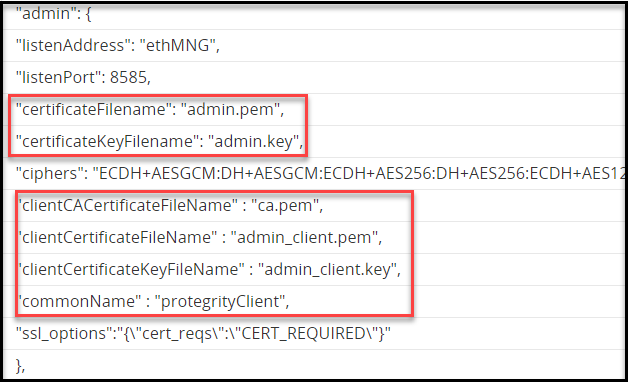
If you have used custom certificates for the admin certificates and keys, then you must ensure that the common name that was used to generate the
.csrfile is set in the gateway.json file.You must edit the gateway.json file to change the commonName parameter as required.
Migration of Data Tokenized by DSG
If you want to migrate any data tokenized by the DSG, then following important points must be considered. The DSG only generates UTF-8 encoded tokens. If the tokens generated by the DSG need to be used in other ecosystems that are configured for an encoding other than UTF-8, a translation is required to the encoding of the target ecosystem.