Global Settings
Configure settings that affect a DSG node globally
The Global Settings page provides the ability to configure debug options, global protocol settings, and Web UI settings that impact the DSG.
The following image illustrates the UI options on the Global Settings tab.
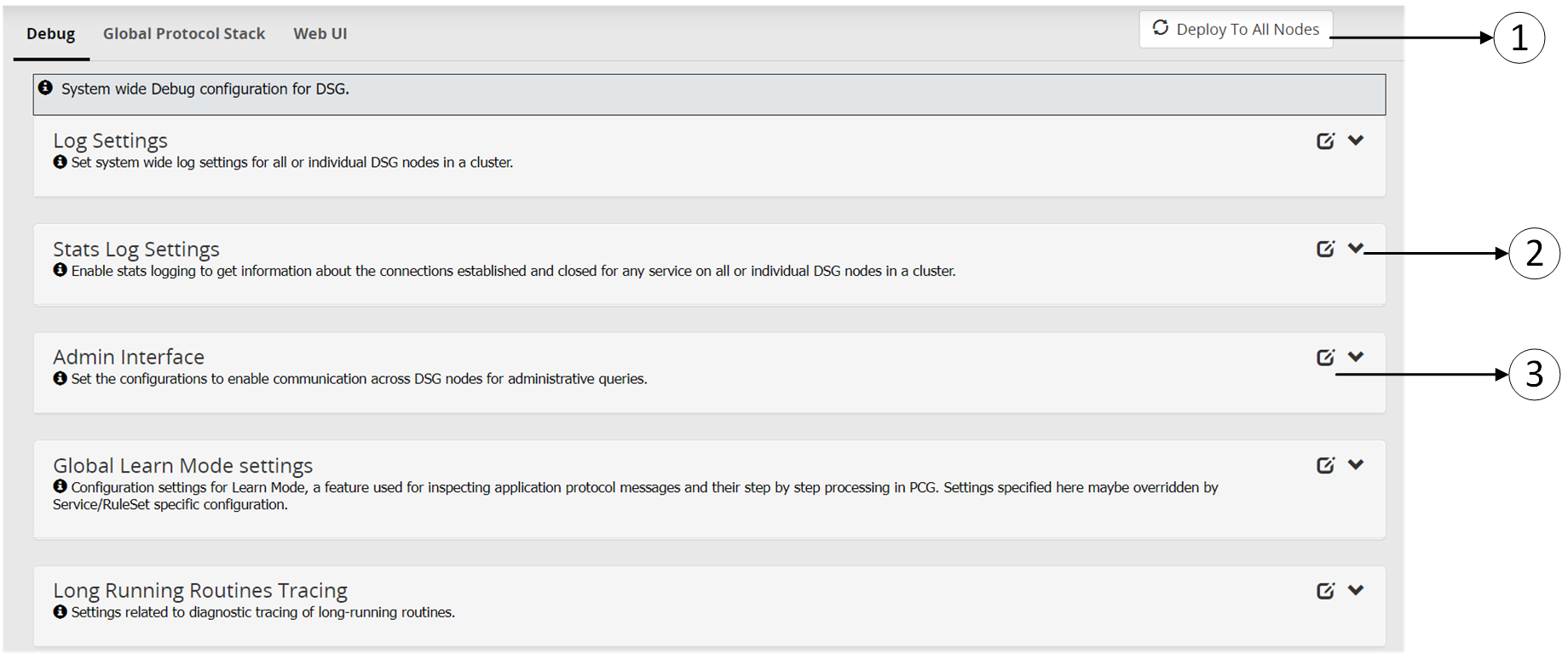
The following table provides the description for each of the available RuleSet options:
| Callout | Icon | Column/Textbox/Button | Description | Notes |
|---|
| 1 | | Deploy to All Nodes | Deploy the configurations to all the DSG nodes in the cluster. Note: Deploy can also be performed from the Cluster tab. | In a scenario where an ESA and two DSG nodes are in a cluster, by using the Selective Tunnel Loading functionality, you can load specific tunnel configurations on specific DSG nodes. Click Deploy to All Nodes to push specific tunnel configurations from an ESA to specific DSG nodes in a cluster. |
| 2 |  | Expand | Expand the subtab and view available options. | |
| 3 |  | Collapse | Collapse the subtab to hide the available options. | |
| 4 |  | Edit | Edit the available options in the subtab. | |
1 - Debug
Configure log settings, Learn mode settings, and set configurations that enable administrative queries.
The following figure illustrates the Debug tab.
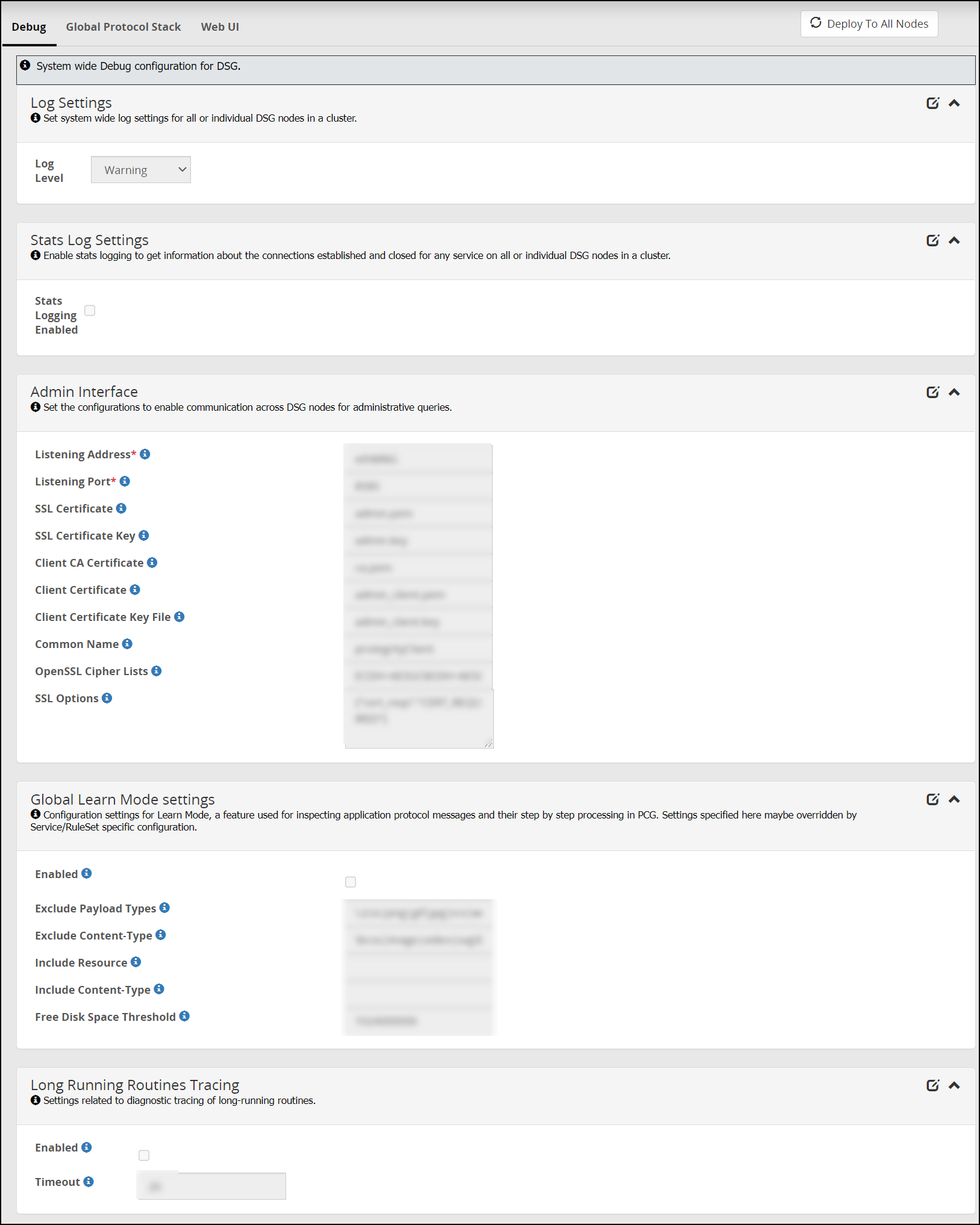
The following table provides information about fields in the Debug tab.
| Sub tab | Fields | Description |
|---|
| Log Settings | Log Level | Set the logging level at the node level. |
| Admin Interface | Listening Address | Listening address for the admin tunnel. The DSG listens for requests such as learn mode settings that are sent through the admin tunnel. |
| Admin tunnel is a system tunnel that lets you send administrative requests to individual DSG nodes. | | |
| | Listening Port | Listening port for the admin tunnel. |
| | SSL Certificate | The DSG admin certificate to authenticate inbound requests. |
| | SSL Certificate Key | Paired DSG admin key used with the admin certificate. |
| | Client CA Certificate | The .pem file against which the client certificate will be validated. |
| | Client Certificate | Client certificate (.pem) file that is required for establishing communication between the ESA-DSG nodes and the DSG-DSG nodes. |
| | Client Certificate Key File | Paired client certificate key. |
| | Common Name | Common name defined in the client certificate. Ensure that the Common Name (CN) defined in the client certificate matches the name defined in this field. |
| | OpenSSL Cipher Lists | Semi-colon separated list of Ciphers. |
| | SSL Options | Options you must set for successful communication between the ESA-DSG nodes and the DSG-DSG nodes. |
| Stats Log Settings | Stats Logging Enabled | Enable stats logging to get information about the connections established and closed for any service on all or individual DSG nodes in a cluster. |
| Global Learn Mode Settings* | Enabled | Select to enable Learn Mode at node level. |
| | Exclude Payload Types | Resources matching this regex patterns are excluded from the Learn Mode logging. |
| | Exclude Content-Type | Protocol messages with Content-type headers are excluded from the Learn Mode logging. |
| | Include Resource | Resources matching this regex pattern are included in the Learn Mode logging. |
| | Include Content-Type | Protocol messages with Content-type headers are included in the Learn Mode logging. |
| | Free Disk Space Threshold | Minimum free disk space required so that Learn Mode feature remains enabled. The feature is automatically disabled, if free disk space falls below this threshold. You must enable this feature manually, if it has been disabled. |
| Long Running Routines Tracing | Enabled | Enable stack trace for processes that exceed the defined timeout. |
| | Timeout | Define value in seconds to log a stack trace of processes that do not process smoothly in a given timeout. The default value is 20 seconds. |
* - Settings provided in these fields can be overwritten by the settings provided at Service/Ruleset level.
2 - Global Protocol Stack
Configure settings that affect all services related to a protocol type
The following figure illustrates the Global Protocol Stack tab.
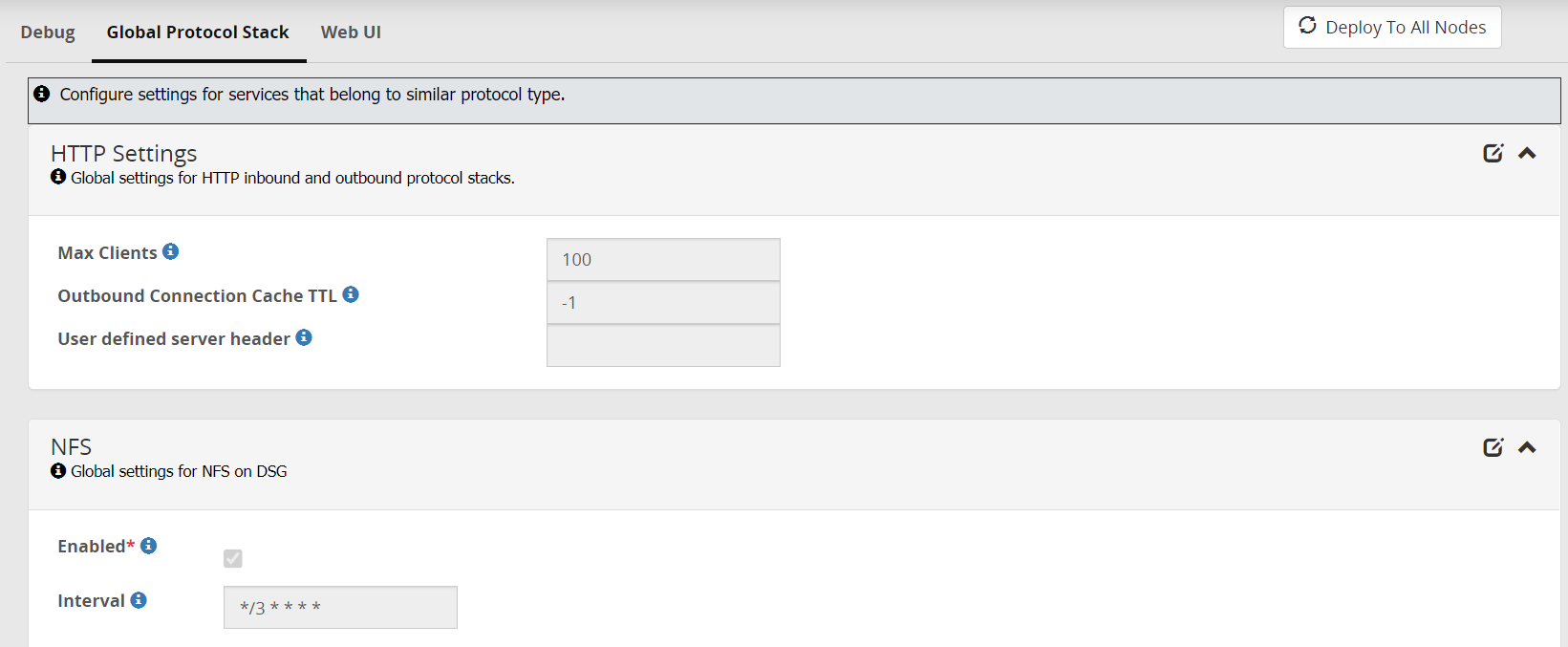
The following table provides information about the fields in the Global Protocol Stack tab.
| Sub tab | Fields | Description | Default | Notes |
|---|
| HTTP | Max Clients | If the user wants to increase the number of simultaneous outbound connections that the DSG can create, to serve the incoming requests, then the user can modify this setting. | The default value for this setting is 100. | |
| | User defined server header | If you want to change the value of the server header in an application response, then you can use this parameter. | | |
| | Outbound Connection Cache TTL | In situations where you want to keep a TCP connection persistent beyond the default limit of inactivity that the firewall allows, you must configure this setting to a timeout value.The timeout value must be defined in seconds. | -1
This value indicates that the feature is disabled. The connection remains active and stored in cache until the DSG node is restarted. | |
| NFS | Enabled | Set as true to enable the NFS tunnel and service. | | |
| | Interval | Time in seconds when the DSG node will poll the NFS server for fetching files. You can also specify a cron job expression. For more information about how to schedule cron jobs, refer to the cron documentation. | | The Cron job format is also supported to schedule jobs. If you use the cron job expression “* * * * *”, then the DSG will poll the NFS server at the minimum interval of one minute. |
3 - Web UI
Configure additional settings that impact how the UI is displayed
The following figure illustrates the Web UI tab.
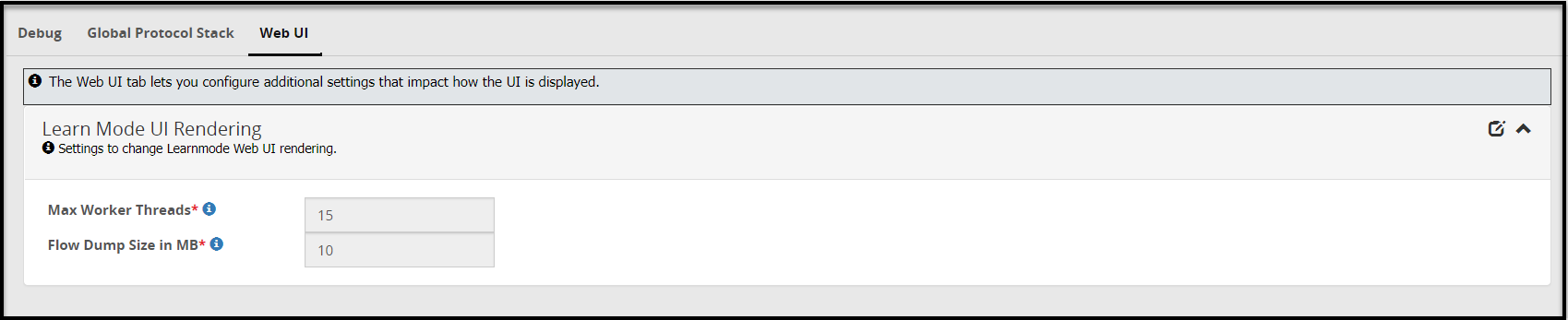
The following table provides information about fields in the Web UI tab.
| Sub tab | Fields | Description | Default |
|---|
| Learn Mode UI Performance Settings | Max Worker Threads | Maximum worker threads that would render learnmode flow dumps on screen. | 15 |
| Flow Dump Filesize | The rules displayed in the Learn mode screen and the payload message difference are stored in a separate file in DSG. If the payloads and rules in your configuration are high in volume, you can configure this file size. | 10 MB | |