NFS/CIFS
The Network File System (NFS) enables users to store and access data from storage points such as disks and directories over a shared network. The Common Internet File System (CIFS) is a file sharing protocol for Windows OS-based systems.
Though the files are accessed remotely, the behavior is same as when files are accessed locally. The NFS file system follows a client/server model, where the server is responsible for authentication and permissions, while the client accesses data through the local disk systems.
A sample NFS/CIFS tunnel configuration is shown in the following figure.
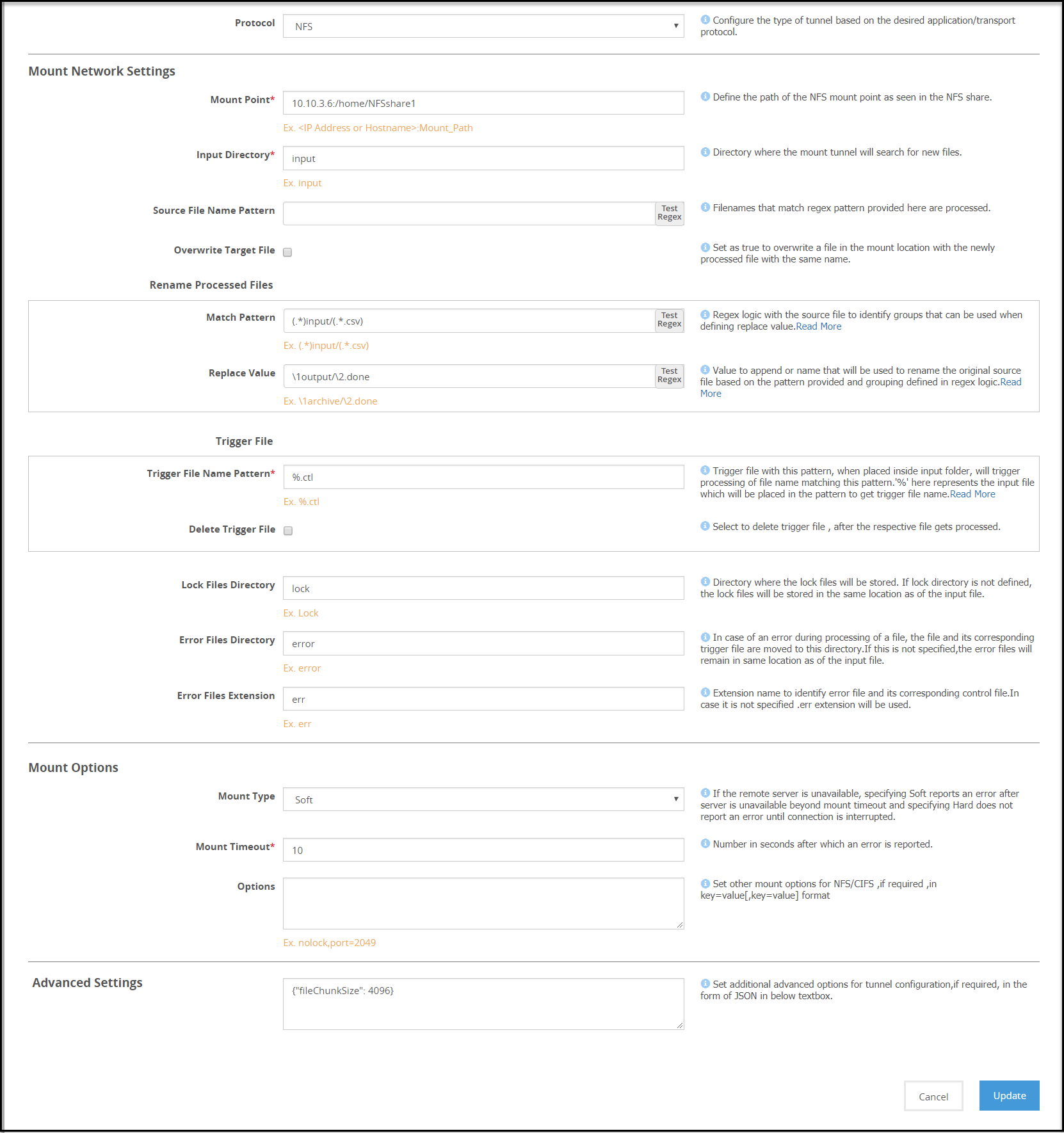
Note: The Address format for an NFS tunnel is <ip address/hostname>:<mount_path> and for a CIFS tunnel is \\<ip address or hostname>\<share_path>.
Consider an example NFS/CIFS server with folder structure that includes folders namely, /input, /output, and /lock. When a client accesses the NFS/CIFS server, the files are stored in the input folder. The Mounted File System Out-of-Band Service is used to perform data security operation on the files in the /input folder. A source file is processed only when a corresponding trigger file is created and found in the /input folder.
Note: Ensure that the trigger file time stamp is greater than or equal to the source file time stamp.
After the rules are executed, the processed files can be stored in a separate folder, such as in this example, /output. When DSG nodes poll NFS/CIFS server for a file uploaded, whichever node accesses the file first places a lock on the file. You can specify if the lock files must be stored in a separate bucket, such as /lock or under the source folder. If the file is locked, the other DSG nodes will stop trying to access the file.
If the data operation on a locked file fails, the lock file can be viewed for detailed log and error information. The lock files are automatically deleted if the processing completes successfully.
1 - NFS/CIFS
The Network File System (NFS) enables users to store and access data from storage points such as disks and directories over a shared network.
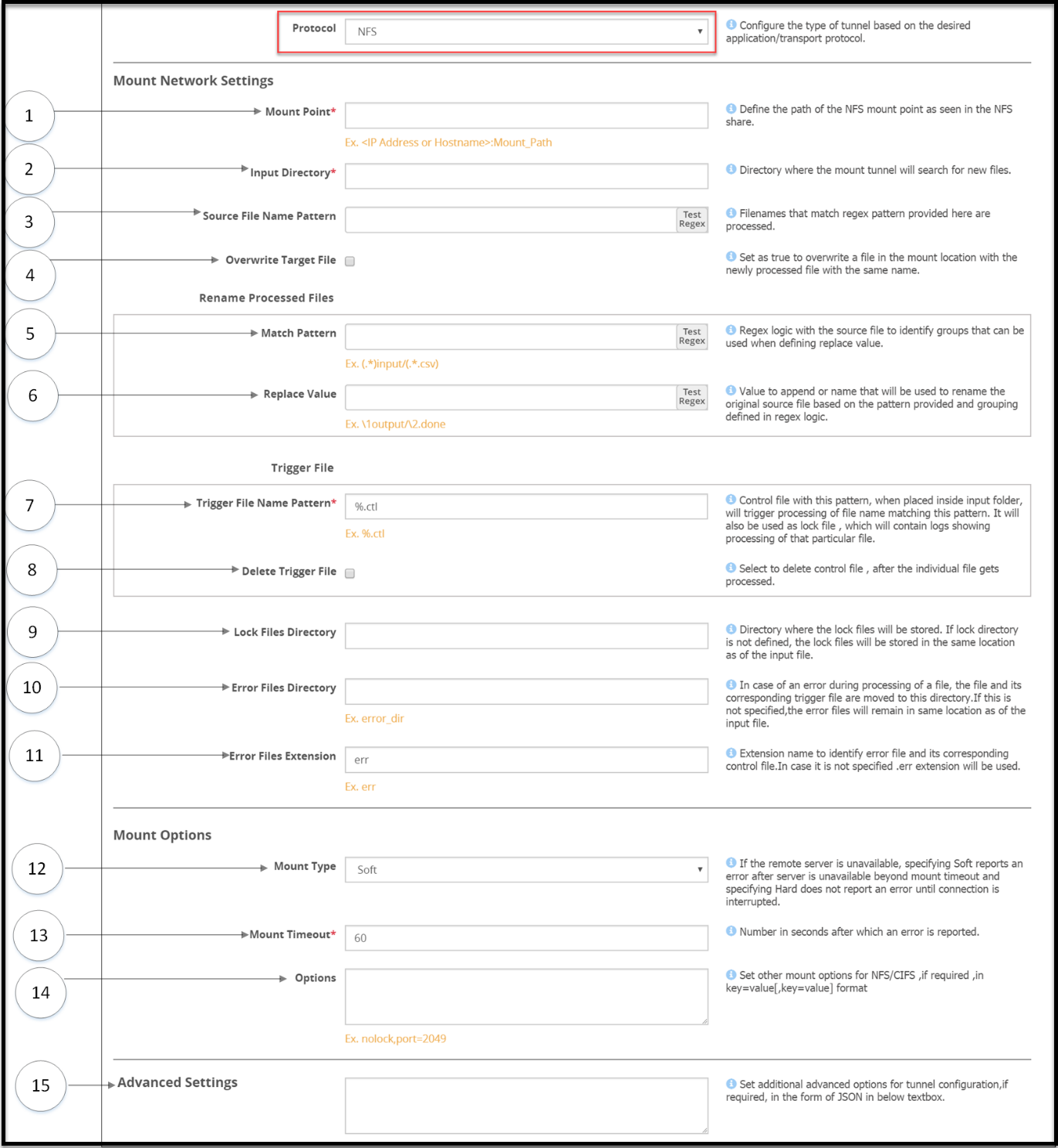
The options for the NFS tunnel as illustrated in the following figure
Mount settings
1 Mount Point - The Address format for an NFS tunnel is <IP address/hostname>:<mount_path>
2 Input Directory - The mount tunnel forwards the files present in this directory for further processing. This directory structure will be defined in the NFS/CIFS share.
3 Source File Name Pattern - Regex logic for identifying the source files that must be processed.
4 Overwrite Target File - Select to overwrite a file in the bucket with the newly processed file with the same name.
Rename processed files
Regex logic for renaming original source files after processed files are generated
5 Match Pattern - Exact pattern to match and filter the file.
6 Replace Value - Value to append or name that will be used to rename the original source file based on the pattern provided and grouping defined in regex logic.
Trigger File
File that triggers the rule. The rule will be triggered, only if this file is found to exist in the input directory. Files in the NFS/CIFS Share directory are not processed until the trigger criteria is met. Ensure that the trigger file is sent only after the files that need to be processed are placed in the source directory. After the trigger file is placed, you must touch the trigger file.
7 Trigger File Name Pattern - Identifier that will be appended to each source file to create a trigger control file. Consider a source file abc.csv, if you define the identifier as %.ctl, you must create a trigger file abc.csv.ctl to ensure that the source file is processed.
It is mandatory to provide a trigger file for each source file to ensure that it is processed. Files without a corresponding trigger file will not be processed.
The *, [, and ] characters are not accepted as part of the trigger file pattern.
8 Delete Trigger File - Enable to delete the trigger file after the source file is processed.
9 Lock Files Directory - Directory where the lock files will be stored. If this value is not provided as per the directory structure in the NFS/CIFS share, then the lock files will be stored in the mount point. Ensure that the lock directory name does not include spaces. The DSG will not process files under the lock directory that includes spaces.
10 Error Files directory - Files that fail to process are moved to this directory. The lock files generated for such files are also moved to this directory.
For example, the file is moved from the /input directory to the /error directory.
11 Error Files Extension - Extension that will be appended to each error file. If you do not specify an extension, then the .err extension will be used.
Mount Options
Parameters that will be used to mount the share.
12 Mount Type - Specify Soft if you want the mount point to report an error, if the server is unreachable after wait time crosses the Mount Timeout value. If you select Hard, ensure that the Interrupt Timeout checkbox is selected.
13 Mount Timeout - Number in seconds after which an error is reported. Default value is 60.
14 Options - Additional NFS options that can be provided as inbound settings. If the lock directory is not defined, then the lock files are automatically placed in the /input directory. For example, {"port":1234, "nolock" "nfsvers": 3}. To enable enhanced security for the mounted share, it is recommended that the following options are set:
where:
- noexec: Disallow execution of executable binaries on the mounted file system.
- nosuid: Disallow creation of set user id files on the file system.
- nodev: Disallow mounting of special devices, such as, USB, printers, etc.
15 Advanced Settings - Set additional advanced options for tunnel configuration, if required, in the form of JSON in the Advanced Settings textbox. For example, {"interval":5, "fileChunkSize": 4096}. In a scenario where an ESA and two DSG nodes are in a cluster, by using the Selective Tunnel Loading functionality, you can load specific tunnel configurations on specific DSG nodes.
Note: Ensure that the NFS share options are configured in the exports configuration file for each mount that the DSG will access. The all_squash option must be set to specify the anonuid and anongid with the user ID and group ID of the non-root user respectively.
This prevents the DSG from changing user and group permissions of the mount directories on the NFS server.