Planning for Gateway Installation
Prerequisites for Gateway Installation
This section provides information about prerequisites that must be met before the DSG installation can be started.
Planning Overview
This section can be used as a guide and a checklist for what needs to be considered before the DSG is installed.
This document has many examples of technical concepts and activities like the ones described in this section that are part of using and configuring the DSG. As a way of facilitating the explanation of these concepts and activities, a fictitious organization called Biloxi Corp is used. The Biloxi Corp has purchased a SaaS called ffcrm.com. The Protegrity DSG is used to protect Biloxi data that is stored in ffcrm.com.
Minimum Hardware Requirements
The performance of the DSG nodes is primarily dependent on the capabilities of the hardware they are installed on. While optimal hardware server specifications are dependent on individual product usage, the minimum hardware specifications recommended for production environments are as follows:
- CPU: 4 Cores
- Disk Size: 320 GB
- RAM: 16 GB
- Network Interfaces: 2
Note: The hardware configuration required might vary based on the actual usage or amount of data and logs expected.
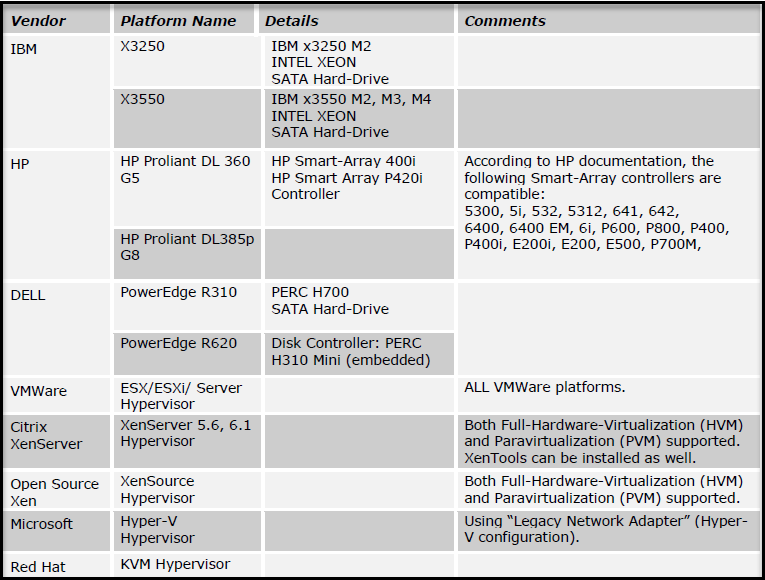
The Protegrity DSG are certified on the following server platforms.
ESA
The Protegrity DSG is a protector that provides the ability to be centrally managed and controlled from the ESA. As with all Protegrity protectors, a prerequisite to the DSG installation isa working instance of the ESA is required.
Note: For information about the ESA version supported by this release of the DSG, refer to the Data Security Gateway v3.2.0.0 Release Notes.
ESA is the centrally managed component that consists of the policy related data, data store, key material, and the DSG configurations, such as, Certificates, Rulesets, Tunnels, Global Settings, and some additional configurations in the gateway.json file. As per design, the ESA is responsible for pushing the DSG configuration to all the DSG nodes in a cluster.
If you create any configuration on a DSG node and the deploy operation is performed on the ESA, then the configuration on the DSG node will be overwritten by the configuration on the ESA and you will lose all the configuration on the DSG node. Thus, it is recommended that if you are creating any DSG configuration, you must create it on the ESA as the same configurations will be pushed to all the DSG nodes in the cluster. This ensures that the configurations available on all the DSG nodes in a cluster are the same.
Ensure that you push the DSG configurations by clicking Deploy or Deploy to Node Groups from the ESA Web UI. You can click the Deploy or Deploy to Node Groups options from the Cluster and Ruleset screens on the ESA Web UI. Clicking the Deploy or Deploy to Node Groups options from either of these screens on the ESA Web UI ensures that all the DSG configurations are pushed from the ESA to the DSG nodes in a cluster.
Forwarding Logs in DSG
The log management mechanism for Protegrity products forwards the logs to the Audit Store on the ESA.
The following services forwards the logs to the Audit Store:
- td-agent : It forwards the appliance logs to the Audit Store on the ESA.
- Log Forwarder: It forwards the data security operations-related logs, such as, protect, unprotect, and reprotect and the PEP server logs to the Audit Store on the ESA.
Ensure that the Analytics is initialized on the ESA. The initialization of Analytics is required for displaying the Audit Store information on the Audit Store Dashboards. Refer to Initializing analytics on the ESA for initializing Analytics. For more information about configuring the DSG to forward appliance logs to the ESA, refer to Forwarding Logs to Audit Store.
Feedback
Was this page helpful?