Services
The DSG supports multiple protocols that are defined as services in the Ruleset hierarchy.
In DSG, the following service types are available:
REST API Service: The DSG acts as a REST API Server, protecting or unprotecting applications in a trusted domain.
Gateway Service: The DSG acts as a gateway to protect sensitive information before it reaches an untrusted domain. The following are the different gateway services:
- REST API
- HTTP
- WebSocket Secure (WSS)
- SMTP
- SFTP
- Amazon s3
- Mounted File System
Gateway service fields
The following figure illustrates all the common fields for the available service types.
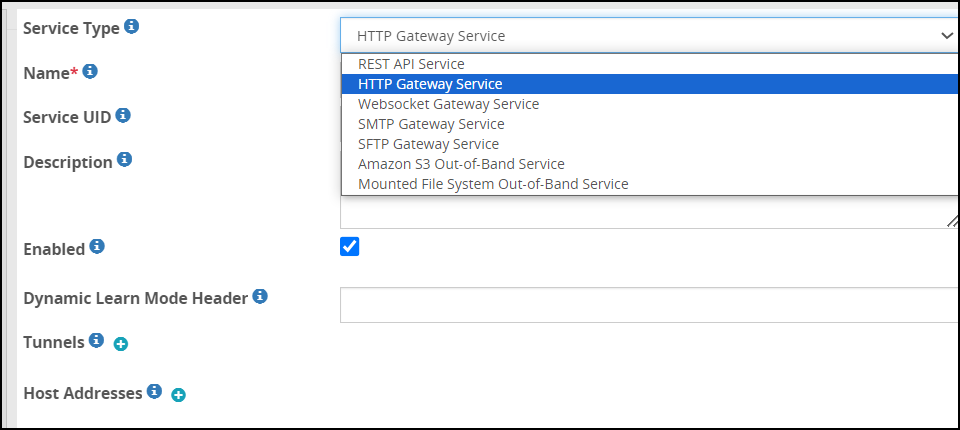
The following table describes all the common fields for the available Service Types.
| Field | Sub field | Description | Notes |
|---|
| Service Type | | Specify the role of this service i.e. whether to act as REST API or act as a gateway for a specific protocol. | |
| Name | | Name for the Service. | |
| Description | | Description for the Service. | |
| Enabled | | Enable or disable the Service. | |
| Tunnels | | List of tunnels lying below the service instance. | |
| Hostnames | | List of hostname to forwarding address mappings | |
| | Hostname | Hostname or the IP address for an inbound request received by the gateway. | |
| | Forwarding Address | Hostname or the IP address for an outbound request forwarded by the gateway. | |
| Password Masking | | List of parameters value to be masked before the output is sent to the log files. | |
| | Pattern | Regular expression to find text to replace in the parameter. | |
| | Resource | Regular expression to look for in the parameter before masking it. | |
| | Mask | The replacement text which acts as a mask for the pattern. | |
| Learn Mode Settings | | Filters for capturing details to be presented in the learn mode. | |
| | Enabled | Enable or disable learn mode settings. | |
| | Exclude Resource | Values in the field are excluded from the Learn Mode logging. | |
| | Exclude Content Type | Content type specified in the field is excluded from the Learn Mode logging. | |
| | Include Resource | Values in the field are included in the Learn Mode logging. | |
| | Include Content-Type | Content type specified in the field is included in the Learn Mode logging. | |
| Transaction Metrics Logging | | Define if you want to log detailed transaction metrics, such as, protect operation performed, length of the data, service used to perform protection, tunnel used, and so on. | |
| | Enabled | Enable or disable transaction metrics to be logged in the log file. | |
| | Log Level | Select from the following logging levels- Warning
- Information
- Verbose
| Ensure that the log level you select is the same or part of a higher log subset that you defined in the gateway log level. |
| Transaction Metrics in HTTP Response Header | | | |
| | HTTP Response Header Reporting Enabled | Enable or disable detailed transaction metrics such as, data security operation performed, length of the data, service used to perform protection, tunnel used, and so on in the HTTP Response Header. | If the HTTP Response Header Reporting Enabled option is selected and streaming is enabled, the transaction metrics data will not be displayed in the HTTP Response Header. |
| | HTTP Response Header Name | Name of the HTTP Response Header carrying the transaction metrics data. The default value for this option is X-Protegrity-Transaction-Metrics. You can change the default value as per your requirements. | The name of the HTTP Response Header must be defined with valid characters. An HTTP Response Header name defined with invalid characters is automatically modified to the default value X-Protegrity-Transaction-Metrics. |
-The Transaction Metrics in HTTP Response Header option is only available for the REST API and HTTP services.
1 - Amazon S3 Out-of-Band Service
About the S3 gateway fields.
The fields for the Amazon S3 Gateway service are as seen in the following figure.
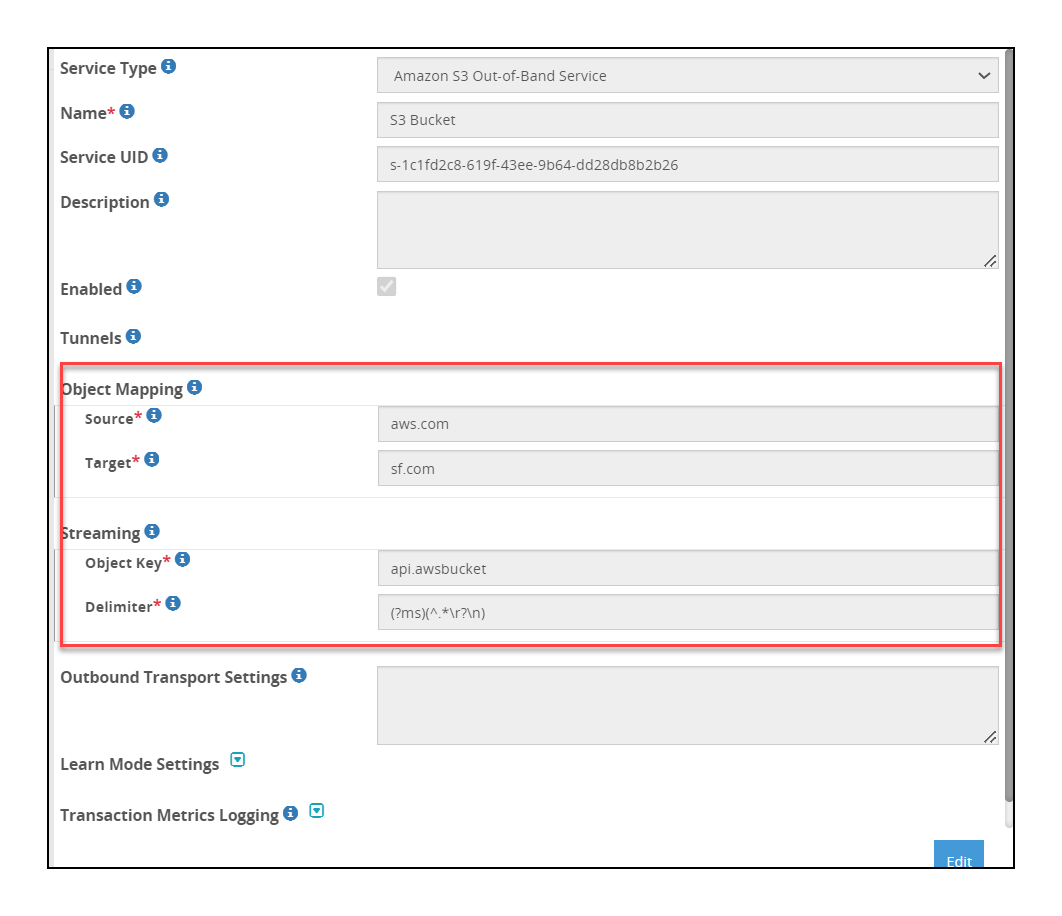
The following table describes the additional fields relevant for the Amazon S3 Gateway service.
| Field | Sub-Field | Description | Notes |
|---|
| Object Mapping | | List of source and target objects that the service will use. | |
| | Source | Bucket path where data that needs to be protected is stored. For example, john.doe/incoming. | The DSG supports four levels of nested folders in an Amazon S3 bucket. |
| | Target | Bucket path where protected data is stored. For example, john.doe/outgoing . | |
| Streaming | | List of file processing delimiters to process file using streaming.Note: The Text, CSV, and Binary payloads are supported. If you want to use XML/JSON payload with HTTP streaming, ensure you use the Text payload for extract rule. | |
| | Filename | Regular Expression to look for in the file’s name and path before applying streaming (e.g. \.csv$) | |
| | Delimiter | Regular Expression used to delimit stream. Rules will be invoked on delimited streams. | If the delimiter value is not matched, then the data will be processed in non-streaming mode. |
| | | |
The options for the Outbound Transport Settings field in the Amazon S3 Gateway are described in the following table.
| Options | Description |
|---|
| SSECustomerAlgorithm | If server-side encryption with a customer-provided encryption key was requested, the response will include this header confirming the encryption algorithm used. |
| SSECustomerKey | Constructs a new customer provided server-side encryption key. |
| SSECustomerKeyMD5 | If server-side encryption with a customer-provided encryption key was requested, the response will include this header to provide round trip message integrity verification of the customer-provided encryption key. |
| ServerSideEncryption | The Server-side encryption algorithm used when storing this object in S3 (e.g., AES256, aws:kms). |
| StorageClass | Specifies constants that define Amazon S3 storage classes. |
| SSEKMSKeyId | Specifies the ID of the AWS Key Management Service (KMS) master encryption key that was used for the object. |
| ACL | Allows controlling the ownership of uploaded objects in an S3 bucket.For example, if ACL or Access Control List is set to “bucket-owner-full-control”, new objects uploaded by other AWS accounts are owned by the bucket owner. By default, the objects uploaded by other AWS accounts are owned by them. |
2 - Mounted File System Out-of-Band Service
About the mounted file system fields.
The additional fields for the mounted file system service are as seen in the following figure.
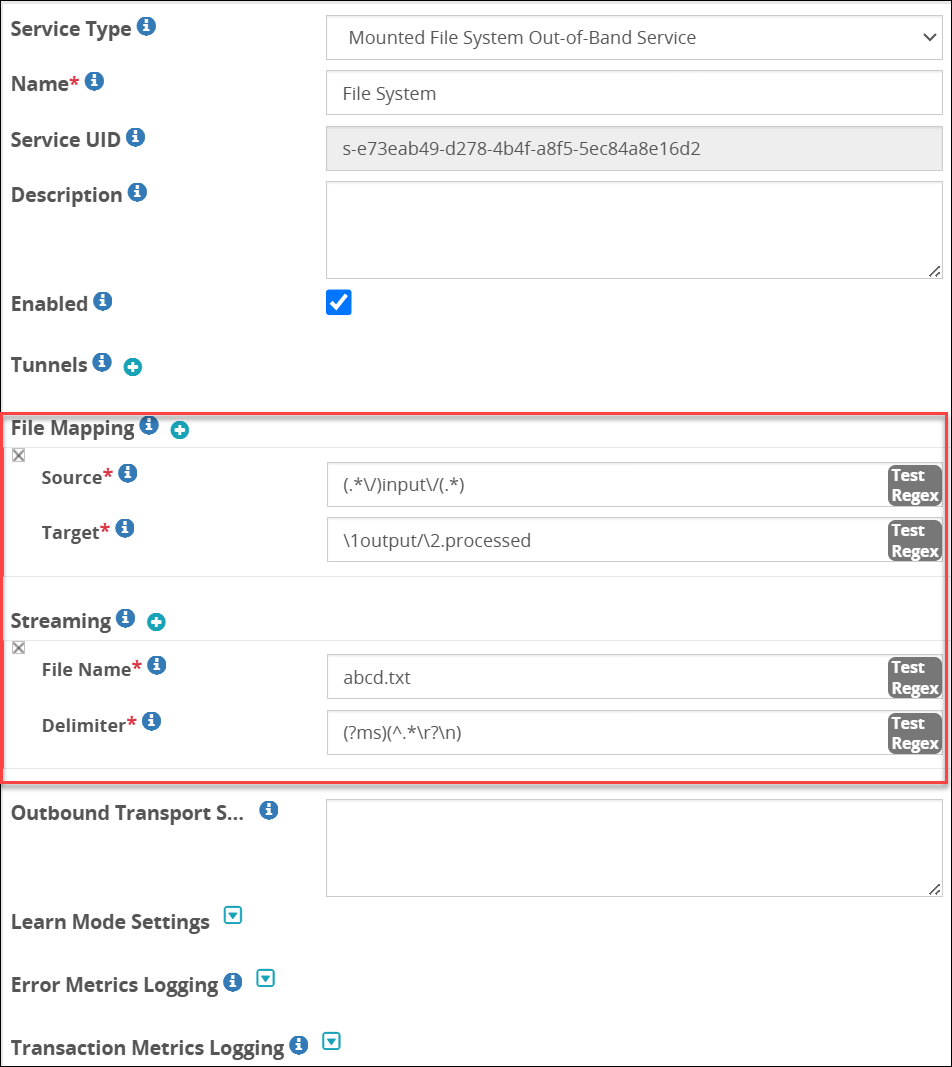
The following table describes the additional fields relevant for the Mounted File System service.
| Field | Sub-Field | Description | Notes |
|---|
| File Mapping | | List of source and target files that the service will process. | |
| | Source | Regex logic that includes the source path where data that needs to be protected is stored along with the filter to identify specific files. For example, if you set (.*\/)input\/(.*) as the value, all the files in the input folder will be selected for processing. | Click Test Regex to verify if the regex expression is valid. |
| | Target | Regex logic that includes the target path where processed data is stored along with other identifiers, such as appending additional tag.For example, if you set \1output/\2.processed as the value, the processed files will move to the I/output folder with .processed appended to them.Click Test Regex to verify if the regex expression is valid. | |
| Streaming | | Enabling streaming lets you process a payload in smaller chunks that are broken based on delimiters defined and processed as they are chunked. Using streaming, you no longer must wait for the entire payload to process, and then transmitted. List of file processing delimiters to process file using streaming. | The Text, CSV, and Binary payloads are supported. If you want to use XML/JSON payload with streaming, ensure you use the Text payload for extract rule. |
| | File Key | Regular Expression to look for in the payload before applying streaming (e.g. \.csv$). Streaming is applied only to requests where File Key matches the regex pattern. | Click Test Regex to verify if the regex expression is valid. |
| | Delimiter | Regular Expression used to delimit stream. Rules will be invoked on delimited streams. | Click Test Regex to verify if the regex expression is valid. If the delimiter value is not matched, then the data will be processed in non-streaming mode. |
| Error Metrics Logging | | Log the metrics for error, such as total number of errors, error offset, reason for the error, and so on. | . |
| | Enabled | Enable or disable error metrics to be logged in the log file. | |
| | Log level | - Warning
- Information
- Verbose
| |
The following example snippet describes the format for the Outbound Transport Settings field for NFS service:
{
  "filePermissions":"770",
"createMissingDirectory":"true"
}
The options for the Outbound Transport Settings field are described in the following table.
| Options | Description | Default (if any) |
|---|
| filePermissions | Set the file permissions.Note: This setting applies only to the NFS service. | n/a |
| createMissingDirectory | Set to true if you want to create lock, error, and output directory automatically. | n/a |
Note: Before you start using the NFS/CIFS Tunnel or Service, ensure that the rpcbind service is running on the NFS/CIFS server.
3 - REST API Service
About the REST fields
The fields for the REST API service are as seen in the following figure.
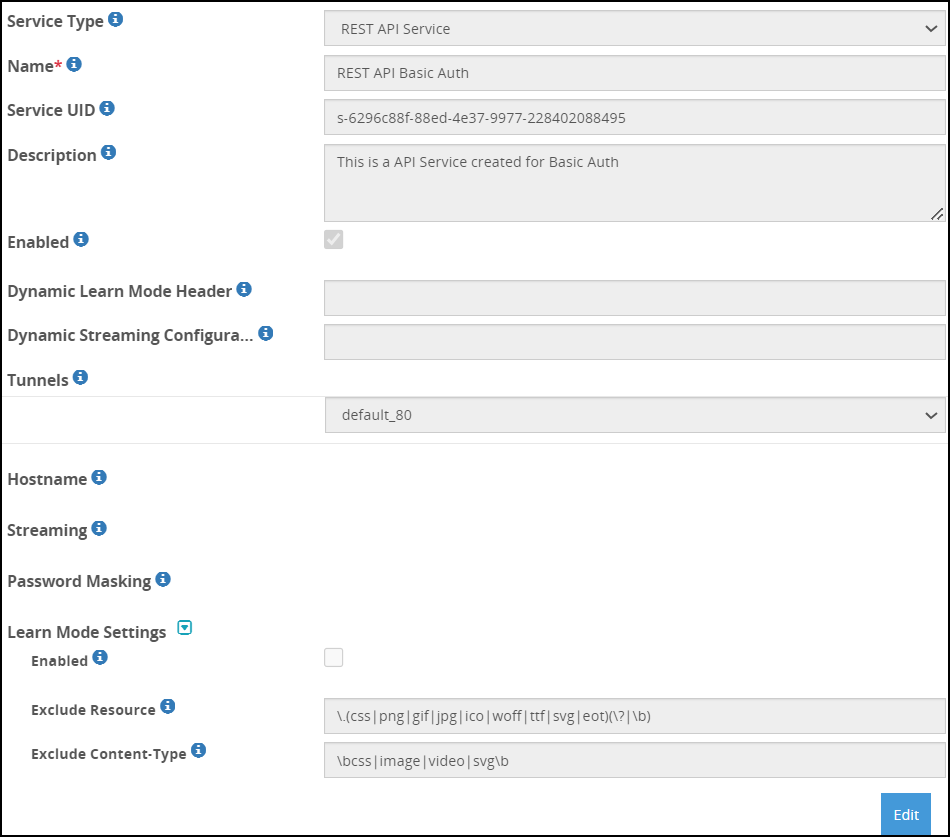
The following table describes the additional fields for the REST API Gateway service.
| Field | Sub-Field | Description | Default (if any) | Notes |
|---|
| Dynamic Learn Mode Header | | The header that will be used to send a request to enable the learn mode for a particular URI. | | |
| Dynamic Streaming Configuration* | | HTTP header that will be used to send a request. | | |
| Streaming | | Enabling streaming lets you process a payload in smaller chunks that are broken based on delimiters defined and processed as they are chunked. Using streaming, you no longer must wait for the entire payload to process, and then transmitted. The chunk size must be entered in bytes.List of file processing delimiters to process file using streaming. | Chunk size - 65536 | The Text, CSV, and Binary payloads are supported. If you want to use XML/JSON payload with streaming, ensure you use the Text payload for extract rule. |
| Authentication Cache Timeout | | Define the amount of time for which the username and password in the REST request is stored in cache. | 900 seconds | |
| Asynchronous Client Configuration | | If streaming is enabled and you plan to use an asynchronous HTTP client, then these settings must be configured. The DSG is optimized to handle asynchronous requests. | | This parameter is applicable only with REST streaming. |
| | HTTP Async Client Enabled | Select to enable when HTTP asynchronous client will send a request to DSG. | False | The HTTP Async Client Header Name header must be sent as part of the HTTP request for DSG to understand that the incoming requests are sent from an asynchronous client. If the header is not sent as part of the request, then the DSG assumes that the request is sent from a synchronous client.
This parameter is applicable only with REST streaming. |
| | HTTP Async Client Header Name | Provide the header name that must be set in an HTTP request in the client such that DSG understands that the request is sent from an asynchronous HTTP client. For example, if the header name is set to X-Protegrity-Async-Client in the service, then when a request is sent to the DSG, the header value must be set to either ‘yes’, ’true’, or ‘1’. | | This parameter is applicable only with REST streaming. |
| Error Metrics Logging | | Log the metrics for error, such as total number of errors, error offset, reason for the error, and so on. | . | |
| | Enabled | Enable or disable error metrics to be logged in the log file. | | |
| | Log level | - Warning
- Information
- Verbose
| | Ensure that the log level you select is the same or part of a higher log subset that you defined in the gateway log level. |
| Error | Set one HTTP status code for the errors that may occur in the file while processing it. Select from the following HTTP status codes:- 200 OK
- 201 Created
- 202 Accepted
- 203 Non-Authoritative Information
- 205 Reset Content
- 206 Partial Content
- 400 Bad Request
- 401 Unauthorized
- 403 Forbidden
- 422 Unprocessable Entity
- 500 Internal Server Error
- 503 Service Unavailable
| | |
* -The dynamic streaming configuration can be explained as follows:
If you want to send dynamic requests to enable streaming on a given URI, you can use this field. Consider an example, where you set this value as X-Protegrity-Rest-Header. When you send an HTTP request with the X-Protegrity-Rest-Header header value, DSG will begin the data protection for that URI based on the parameters provided in the request.
A typical format for the value in the header is as follows:
"{"streaming":{"uri":"/echo","delimiter":"(?ms)(^.*\\r?\\n)", "chunk_size": 5000}}"
| Parameter | Description | Default | Notes |
|---|
| delimiter | Regular Expression used to delimit stream. Rules will be invoked on delimited streams.(?ms)(^.*\\r?\\n) | | If the delimiter value is not matched, then the data will be processed in non-streaming mode. |
| Uri | Regular Expression to look for in the payload before applying streaming (e.g. \.csv$). Streaming is applied only to requests where URI matches the regex pattern. | | |
| chunk_size | Size of the smaller chunks that the data must be broken into. The chunk size must be entered in bytes. | 65536 | |
Note: The delimiter parameter must be sent as part of the HTTP header information. The uri and chunk_size parameters are optional. If uri is not provided, the request URI is considered, while if the chunk_size is not provided, the chunk size defined in HTTP tunnel configuration is considered.
4 - Secure Web socket (WSS)
The WSS protocol provides a bi-directional communication between a client and a server over a single established connection.
In the DSG, the WSS service can be used by configuring the HTTP Tunnel. The WSS service is designed for listening to traffic on HTTP and HTTPS ports 80 and 443 respectively.
Caution: In this release, the DSG uses the WSS service to pass through data as-is without performing any data protection operation such as protect, unprotect, and reprotect. You cannot invoke any child rules using the WSS service.
The fields for the WSS Gateway service are as seen in the following figure.
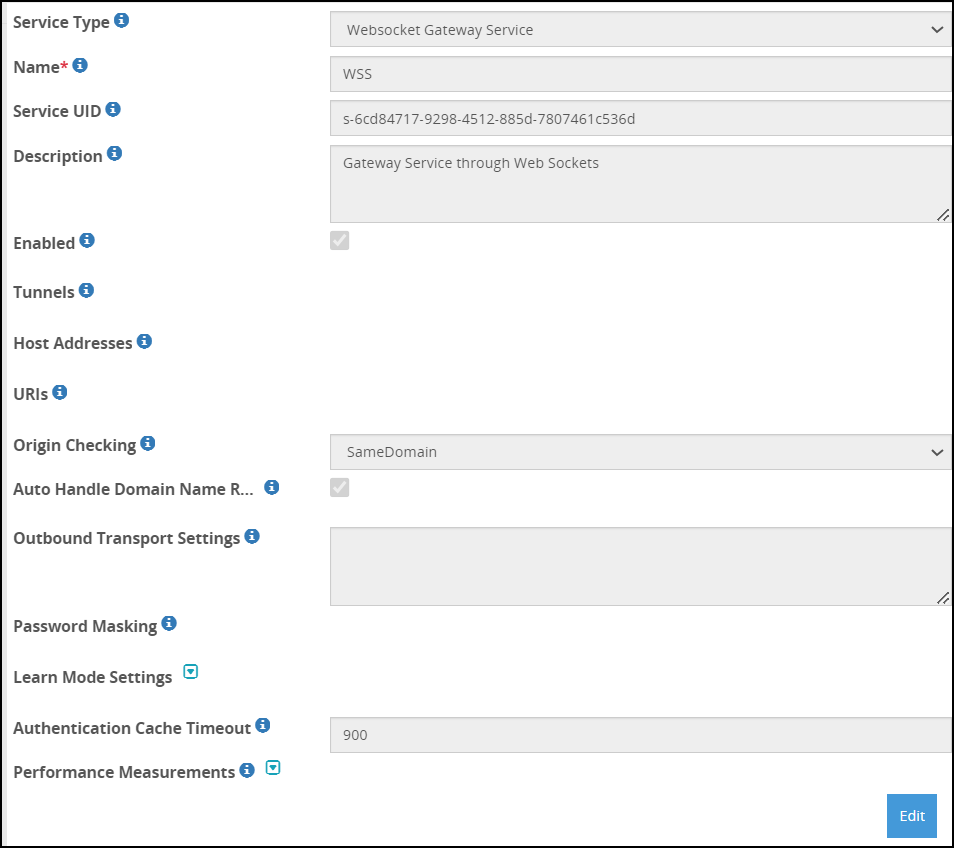
The following table describes the additional fields for the WSS Gateway service.
| Field | Sub-Field | Description | Default (if any) |
|---|
| URI | | List the required URI to receive the request. | |
| Origin Checking | | Checks the websocket handshake origin header. | |
| Auto Handle Domain Name Rewrite | | Adds the domain name, rewrites the filters and the rules that replace the host name in the forwarded requests or responses as per the target or source hostname. | |
| Outbound Transport Settings | | Name-Value pairs used with the outbound transport. | |
| Authentication Cache Timeout | | Define the amount of time for which the username and password in the REST request is stored in cache. | 900 seconds |
5 - SFTP Gateway Service
About the SFTP gateway fields.
The SFTP Gateway service can be implemented with either Password authentication or Public Key exchange authentication.
The fields for the SFTP Gateway service are as seen in the following figure.
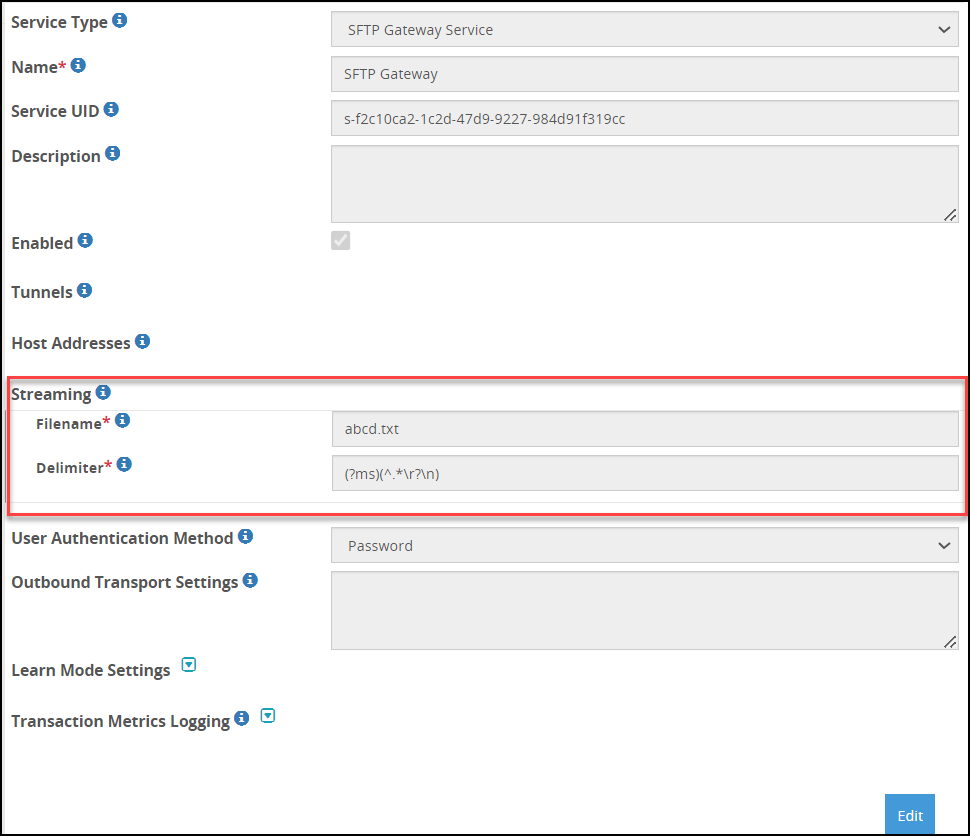
The additional fields for the SFTP Gateway service when authentication method is Public Key are as seen in the following figure.
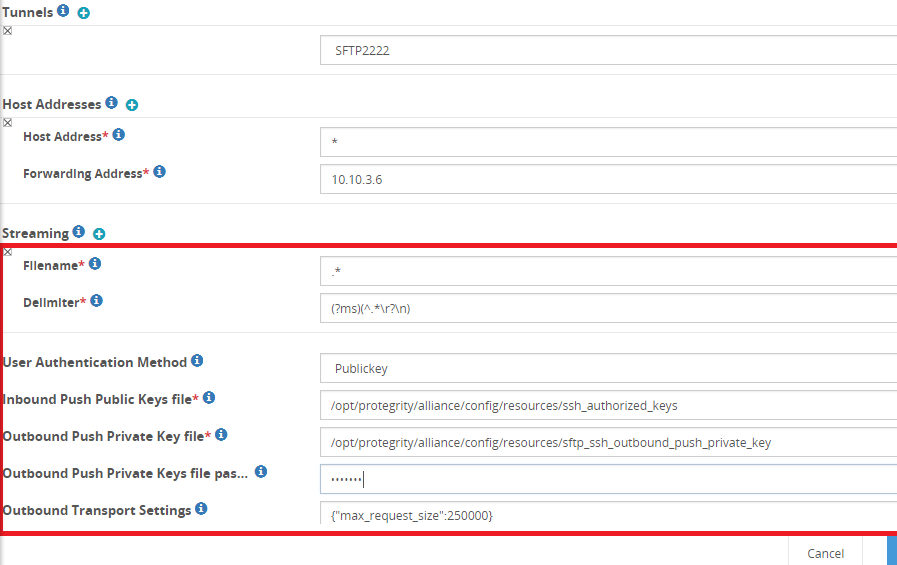
Before you begin
Ensure that the following pre-requisites are complete before you start using the SFTP gateway with Public Key authentication method.
The SFTP client Public Key must be available and uploaded to the Certificates screen in the ESA Web UI.
The DSG Public Key and Private Key must be generated and uploaded to the Certificates screen in the ESA Web UI.
The DSG Public Key must be uploaded to the SFTP server.
Ensure that the DSG Public Key is granted 644 permissions on the SFTP server.
The DSG supports RSA keys. Ensure that only RSA keys are uploaded to the ESA/DSG Web UI.
The following table describes the additional fields relevant for the SFTP Gateway service.
The SFTP tunnel automatically sets the user identity with an authenticated username. Thus, subsequent calls to Protegrity Data Protection transformations actions are done on behalf of the authenticated user.
The following SFTP commands are not supported.
| Field | Sub-Field | Description | Default (if any) | Notes |
|---|
| Streaming | | Enabling streaming lets you process a payload in smaller chunks that are broken based on delimiters defined and processed as they are chunked. Using streaming, you no longer must wait for the entire payload to process, and then transmitted.List of file processing delimiters to process file using streaming. | Chunk size - 64 kBIf you want to change the chunk size, modify the chunk_size parameter in the Inbound Settings for the tunnel. | The Text, CSV, and Binary payloads are supported. If you want to use XML/JSON payload with streaming, ensure you use the Text payload for extract rule. |
| | Filename | Regular Expression to look for in the payload before applying streaming (e.g. \.csv$). Streaming is applied only to requests where URI matches the regex pattern. | | Click Test Regex to verify if the regex expression is valid. |
| | Delimiter | Regular Expression used to delimit stream. Rules will be invoked on delimited streams. | | Click Test Regex to verify if the regex expression is valid.
If the delimiter value is not matched, then the data will be processed in non-streaming mode. |
| User Authentication Method | | SFTP authentication method used to communicate between client and server. | | |
| | Password | Enables password authentication for communication. You must enter password, when prompted, while initiating connection with the SFTP server. | | |
| | Public Key | Enable Public Key method for communication. The SFTP client shares its Public Key with the gateway and the gateway shares its Public Key with the SFTP server. This enables password-less communication between SFTP client and server when gateway is the intermediary.Ensure that the pre-requisites are completed before you start using the SFTP gateway. | | |
| | Inbound Push Public Keys file | Specifies the file name for the SFTP client Public Key. | | |
| | Outbound Push Private Key file | Specifies the file name for the Gateway Private Key. | | |
| | Outbound Push Private Keys file passphrase | Enter the passphrase for DSG Private Key. If no value is entered for encrypting the private key, the passphrase value is null. | | |
| Outbound Transport Settings | | Additional outbound settings that you want to parse during SFTP communication. | | |
The options for the Outbound Transport Settings field in the SFTP Gateway are described in the following table.
| Options | Description | Default (if any) |
|---|
| window_size | SSH Transport window size. The datatype for this option is bytes. | 3145728 |
| use_compression | Toggle SSH transport compression. | TRUE |
| max_request_size | Set the maximum size of the message that is sent during transmission of a file.The maximum limit for servers that accept message size more than the default value is 250 KB. | 32768 |
| enable_setstat | Set to False when using the AWS Transfer for SFTP as the SFTP server. | True |
6 - SMTP Gateway Service
About the SMTP gateway fields.
The SMTP Gateway service provides options that must be configured to define the level of extraction that must be performed on the incoming requests on the DSG. Based on the requirements, data security operations are performed on the extracted sensitive data.
The fields for the SMTP Gateway service are as shown in the following figure.
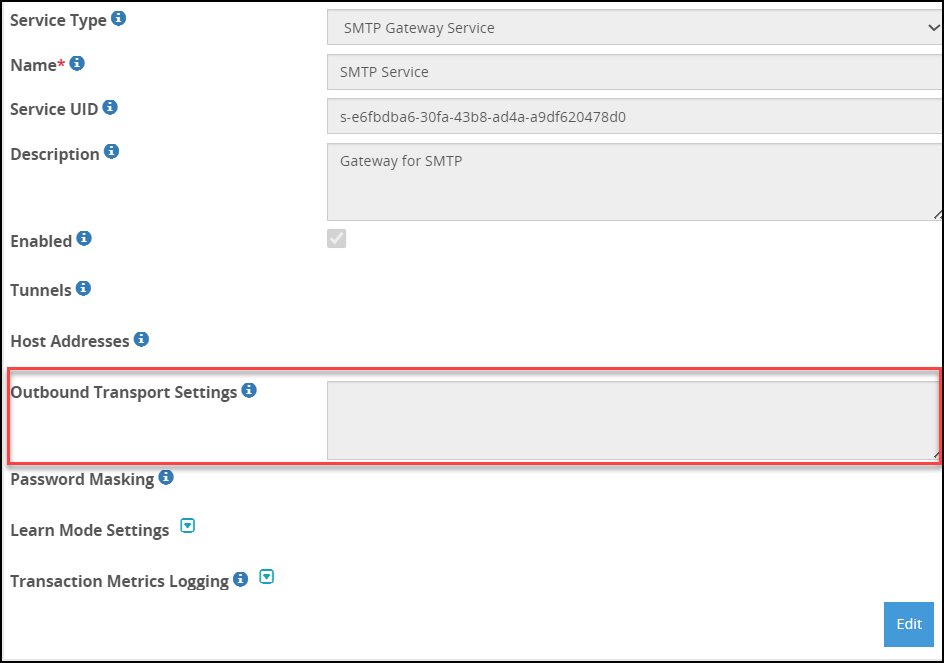
The following table describes the additional fields for the SMTP Gateway service.
| Field | Sub-field | Description |
|---|
| Hostnames | | |
| Host Address | Hostname or the IP address for an inbound request received by the gateway. The service IP of the DSG must be specified. For example, secured-smtp.abc.com. |
| Forwarding Address | Hostname or the IP address for an outbound request forwarded by the gateway. The hostname or IP address of the SMTP server must be specified. For example, smtp.abc.com. |
| Outbound Transport Settings | | Name-Value pairs used with the outbound transport. |
The ssl_options supported for the Outbound Transport Settings in the SMTP Gateway are described in the following table.
| Options | Description | Default |
|---|
| certfile | Path of the certificate stored in the DSG to be sent to the SMTP server. | n/a |
| keyfile | Path of the key stored in the DSG to be sent to the SMTP server. | n/a |
| cert_reqs | Specifies whether a certificate is required for validating the TLS/SSL connection between the DSG and the SMTP server. The following values can be configured:- CERT_NONE: If the parameter is set to CERT_NONE, then the SMTP server certificate is not required for validating the SSL connection between the DSG and the SMTP server.
- CERT_OPTIONAL: If the parameter is set to CERT_OPTIONAL, then the SMTP server certificate is not required for validating the SSL connection between the DSG and the SMTP server. The SMTP server certificate is validated only if it is provided.
- CERT_REQUIRED: If the parameter is set to CERT_REQUIRED, then the SMTP server certificate is required for validating the SSL connection between the DSG and the SMTP server.
| CERT_NONE |
| ssl_version | Specifies the SSL protocol version used for establishing the SSL connection between the DSG and the SMTP server. | PROTOCOL_SSLv23 |
| ciphers | Specifies the list of supported ciphers. | ‘ECDH+AESGCM’,‘DH+AESGCM’,‘ECDH+AES256’,‘DH+AES256’,‘ECDH+AES128’,‘DH+AES’,‘RSA+AESGCM’,‘RSA+AES’ |
| ca_certs | Path where the CA certificates (in PEM format only) are stored. | n/a |
7 - HTTP Gateway Service
About the HTTP Gateway fields
The following table describes the additional fields for the HTTP Gateway service.
| Field | Sub-Field | Description | Default (if any) |
|---|
| Dynamic Learn Mode Header | | The header that will be used to send a request to enable the learn mode for a particular URI. | |
| Auto Handle Domain Name Rewrite | | Adds the domain name, rewrites the filters and the rules that replace the host name in the forwarded requests or responses as per the target or source hostname. | |
| Outbound Transport Settings | | Name-Value pairs used with the outbound transport. | |
| Authentication Cache Timeout | | Define the amount of time for which the username and password in the REST request is stored in cache. | 900 seconds |
| Error Metrics Logging | | Enable if you want to log the detailed error metrics, such as the total number of errors, the offset where the error was encountered, the reasons why the error was encountered, the ruleset details, and so on. | |
| Enabled | Enable or disable error metrics to be logged in the log file. | |
| Log Level | - Warning
- Information
- Verbose
Ensure that the log level you select is the same as, or part of, a higher log subset that you defined in the gateway log level. | |
| Error Code | Set one HTTP status code for the errors that may occur in the file while processing it. Select from the following HTTP status codes:- 200 OK
- 201 Created
- 202 Accepted
- 203 Non-Authoritative Information
- 205 Reset Content
- 206 Partial Content
- 400 Bad Request
- 401 Unauthorized
- 403 Forbidden
- 422 Unprocessable Entity
- 500 Internal Server Error
- 503 Service Unavailable
For more information about the Error Code field, refer to the section Configuring the HTTP Status Codes. | 200 OK |
The options for the Outbound Transport Settings field in the HTTP Gateway are described in the following table.
| Option | Description | Default |
|---|
| auth_mode | Authentication mode digest or basic. | basic |
| auth_username | Username for HTTP authentication. | n/a |
| auth_password | Password for HTTP authentication. | n/a |
| connect_timeout | Timeout for initial connection in seconds. | 300 |
| request_timeout | Timeout for the entire request in seconds. | 180 |
| network_interface | Network interface used for the request. | n/a |
| proxy_host* | HTTP proxy hostname. | n/a |
| proxy_port* | HTTP proxy port. | n/a |
| proxy_username* | HTTP proxy username. | n/a |
| proxy_password* | HTTP proxy password. | n/a |
| validate_cert | Validation required for the server certificate. | n/a |
| ca_certs | Filename of the CA certificates in PEM format only. | n/a |
| client_key | Filename for the client SSL key. | n/a |
| client_cert | Filename for the client SSL certificate. | n/a |
| allow_nonstandard_methods | Flag to allow nonstandard HTTP method constructions such as HTTP PUT method with no body content. | false |
| max_599_retries | Maximum number of retries for the gateway to send a request to the server when a status code of 599 occurs. | 1
Minimum: 1
Maximum: 5 |
| Error Metrics Logging | Enable if you want to log the detailed error metrics, such as the total number of errors, the offset where the error was encountered, the reasons why the error was encountered, the ruleset details, and so on. | |
| Enabled | Enable or disable error metrics to be logged in the log file. | |
| Log Level | - Warning
- Information
- Verbose
| |
| Error Code | Set one HTTP status code for the errors that may occur in the file while processing it. Select from the following HTTP status codes:- 200 OK
- 201 Created
- 202 Accepted
- 203 Non-Authoritative Information
- 205 Reset Content
- 206 Partial Content
- 400 Bad Request
- 401 Unauthorized
- 403 Forbidden
- 422 Unprocessable Entity
- 500 Internal Server Error
- 503 Service Unavailable
For more information about the Error Code field, refer to the section Configuring the HTTP Status Codes. | 200 OK |
Note: If you set the value of max_599_retries less than 1, the value is automatically set to 1. If you set the value of max_599_retries greater than 5, the value is automatically set to 5.
* - The DSG uses the proxy parameters to forward the outgoing requests from DSG through the proxy. The DSG supports any proxy that can handle HTTP CONNECT method for tunnelling HTTPS connections.
The following snippet describes the format for the Outbound Transport Settings field:
{
  "connect\_timeout": 100,
  "request\_timeout": 100,
  "ca\_certs": "/opt/cert.cer",
  "max\_599\_retries": 4
}
In the above example, the connect timeout is set as 100 seconds, the request timeout is set as 100 seconds, and the path for the CA certificate is specified.
The curl is a command-line tool to transfer data between servers. This tool supports protocols such as HTTP, HTTPS, FTP, FTPS, GOPHER, DICT, LDAP, TELNET, FILE, and so on. The features supported by curl include user authentication, proxy support, cookies, HTTP post, FTP upload, file transfer resume, SSL connections, and so on.
The Gateway uses curl stack for outbound HTTP transport. You can use the curl options in the Outbound Transport Settings field.
| Option | Description | Default |
|---|
| RESOLVE | Allows to resolve a request hostname to an IP address. | n/a |
| TCP_NODELAY | Setting this option disables the TCP Nagle algorithm. The field accepts the following values:The Nagle algorithm minimises the number of small packets on the network. | 1 |
The format for the curl options in the Outbound Transport Settings field is shown in the following example.
In this example, the hostname www.protegrity.com resolves to the IP address 2.10.1.4, while the hostname else.domain.com resolves to the IP address 2.10.2.3. The TCP_NODELAY option is set to 1, indicating that the Nagle algorithm is disabled.
{
  "network\_interface": "ethMNG",
  "validate\_cert": false,
  "options": {
    "RESOLVE": [
      "www.protegrity.com:443:2.10.1.4",
      "else.domain.com:443:2.10.2.3"
    ],
    "TCP\_NODELAY": 1
  }
}