The Trusted appliances cluster (TAC) in v3.3.0.1 is markedly different from that of the earlier versions. The following figure illustrates a sample TAC.
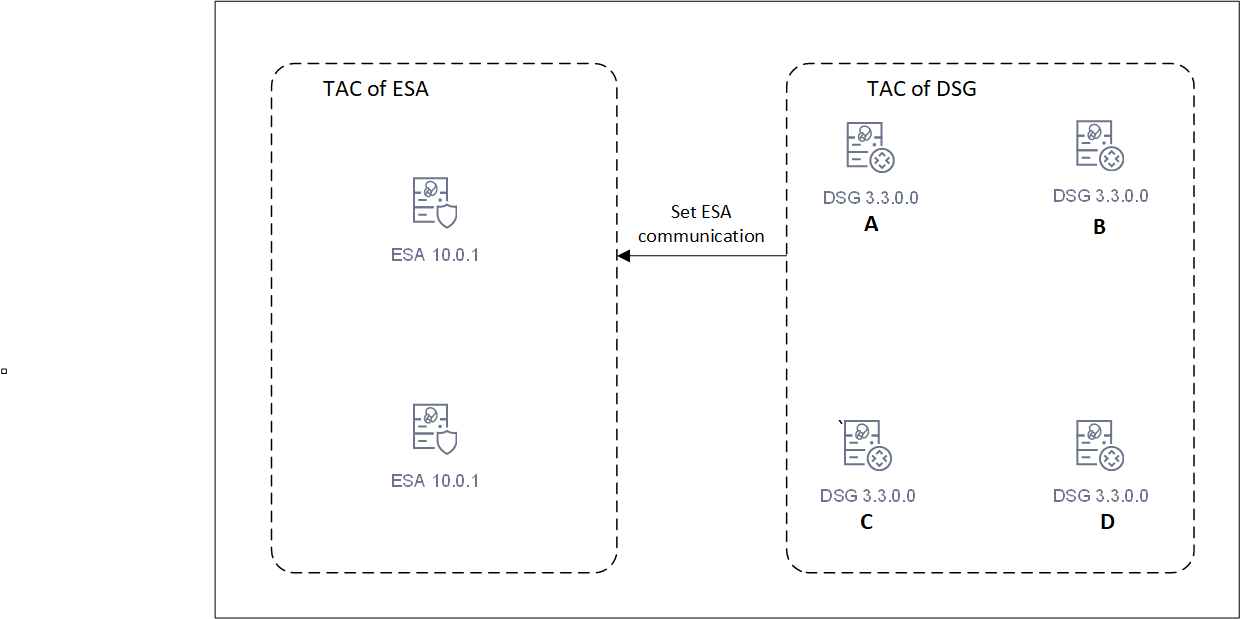
Starting DSG 3.3.0.0, separate cluster for ESAs and DSGs are created. Separate clusters are required for each unique DSG major/minor version. Different major/minor versions of DSGs must not be combined in a single TAC. DSGs and ESAs should not be combined in a TAC. Use the set ESA communication utility to link DSGs to ESA.
While running the install or the upgrade process, add the FQDN of the ESAs and DSGs in the hosts file of every node in the cluster. In the upcoming releases, multiple clusters can be created. Using TAC labels, one can identify to which cluster a node belongs to. A TAC label can be added from the CLI Manager. For more information about adding a TAC label, refer to Updating Cluster Information using the CLI Manager.
The DSG cluster can be viewed from the Cluster screen on the ESA UI. On the UI, go to Cloud Gateway > 3.3.0.1 {build number} > Cluster. The DSG nodes in the cluster are displayed.
This setup of TAC sets a stage for the upcoming releases, where DSGs can communicate with various versions of ESAs.
In a cluster, ESA communicates with a healthy DSG. However, if the DSG is unhealthy or removed from the cluster, the communication might be lost. The ESA must connect to a DSG to deploy the policies and CoP packages. If the connection attempts fails, it tries to reconnect with another healthy DSG in the cluster. The ksa.json file displays the number of attempts ESA can take to establish a connection with the cluster. In this file, configure the retries parameter to set the maximum number of attempts by ESA. Once connected, the communication is established again and configurations can be deployed in the cluster. The default maximum number of retries attempts is 3. It may be adjusted by updating the retry_count value in the ksa.json file.
If DSG is upgraded from versions prior to 3.3.0.0, run the following commands on any one DSG in the cluster. These commands gather and store the details of all DSGs in the cluster. The details are then used to create a cluster of DSGs. This operation must be performed only on DSGs of v3.2.0.1 and lower. This must not be performed on DSG 3.3.0.0
tar zxvfp DSG_PAP-ALL-64_x86-64_3.3.*UP.pty --strip-components=1 -C . installer/alliance_gateway_migration_scripts_v3.9.2.tgztar zxvfp alliance_gateway_migration_scripts_v3.*.tgz ./create_tac_nodes.pycpython create_tac_nodes.pyc --save-dsg-details -f FILE
After the DSGs are upgraded, run the following command.
python create_tac_nodes.pyc --create-dsg-tac -f FILE --max-retries 60 --wait-time 5
Where,
--max-retries: The maximum number of retries for verifying a newly added node on a DSG that is already part of DSG TAC. The default value is 60 and maximum and minimum value can be set to 100 and 12 retries respectively.--wait-time: The maximum duration for sleep time between the retries, The defaults value is 5 seconds and maximum and minimum value can be set to 60 and 1 seconds respectively.
The
create_DSG_TAC.logfile is created that displays the log of the events while creating a TAC.