Post installation/upgrade steps
After the DSG installed or upgraded certain steps must be performed.
The DSG v4.1.0 can be upgraded on on-premise or cloud platforms. It can be upgraded to 4.1.0 from the following versions:
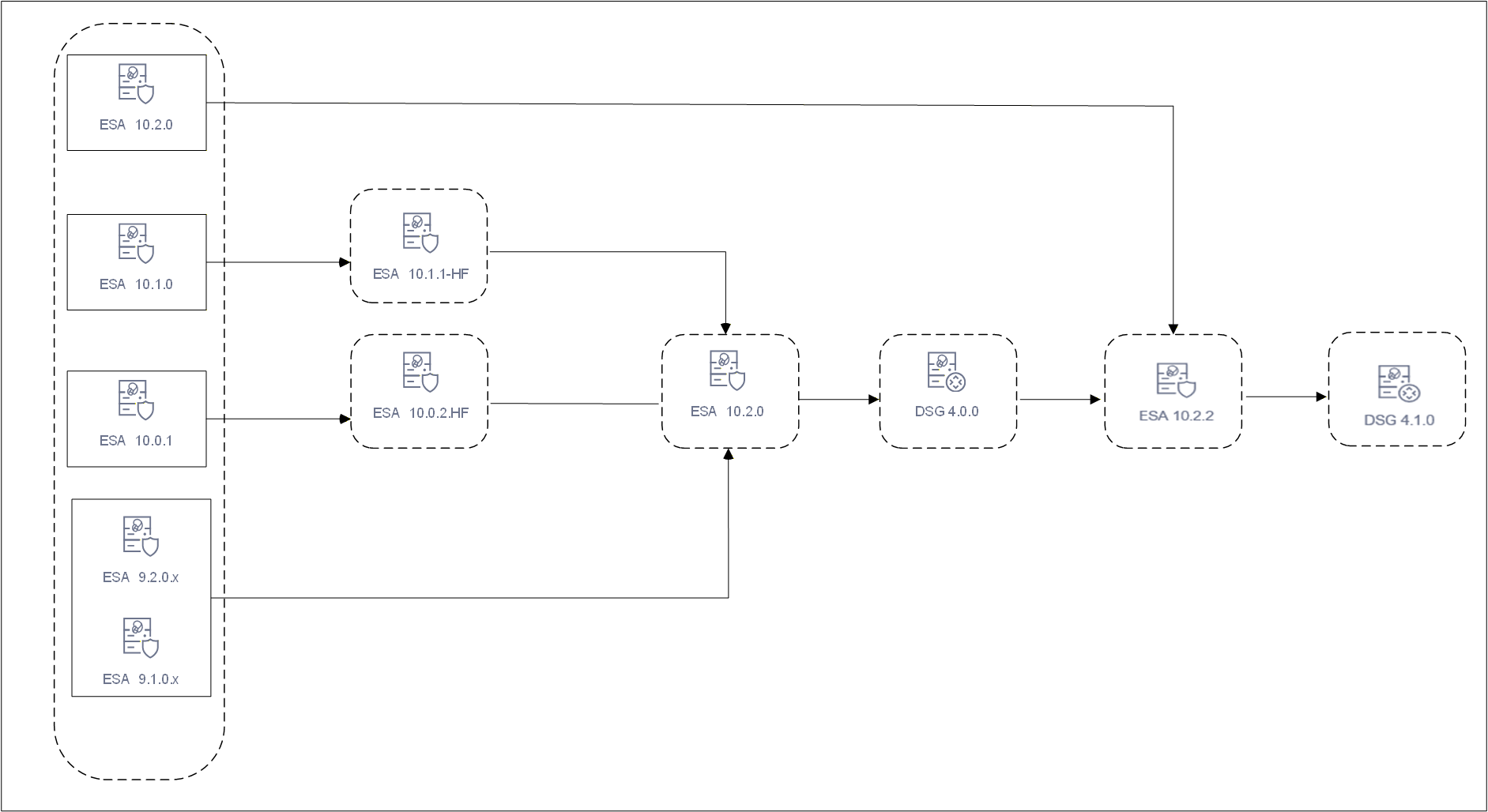
Upgrading the DSG version involves a series of steps that must be performed on ESA and DSG. The DSG patch in ESA is added to extend the DSG functionality on ESA. It allows ESA to deploy configurations to other DSG nodes.
The following figure illustrates DSG component upgrade on ESA.
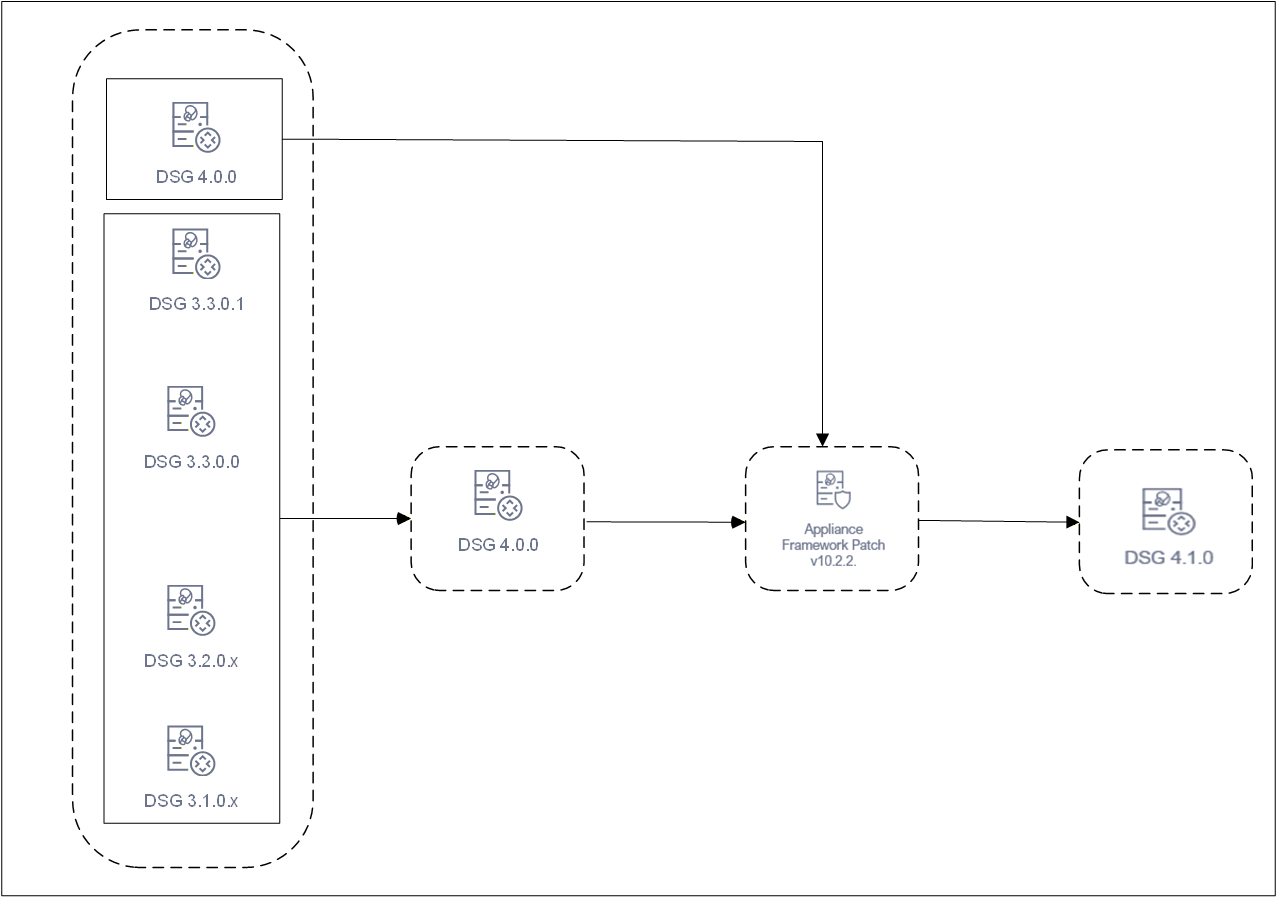
The following figure illustrates the DSG upgrade.
The following points must be addressed before proceeding with the upgrade.
Review the DSG 4.1.0 deprecation list to understand any changes that might affect your deployment. For more information about deprecation list, refer to Deprecations.
Ensure that all Management & Web Services certificates in Settings > Network > Manage Certificates in the ESA and DSG Web UI are removed. Upload and assign a common set of custom certificates containing valid SAN entries for all required hostnames and IP addresses. For more information about managing certificates, refer to Certificate Management in ESA.
Ensure that all clients connecting to DSG and all backend servers that DSG connects to support TLS 1.2 or higher. From DSG 4.0.0 onwards, a minimum TLS version of 1.2 is enforced for both inbound and outbound connections. TLS 1.0 and TLS 1.1 are no longer supported.
Run the following command to verify TLS 1.2 compatibility on each endpoint before upgrading.
openssl s_client -connect <host>:<port> -tls1_2
A successful handshake confirms compatibility. If any backend server supports only TLS 1.0 or 1.1, it must be upgraded before proceeding with the DSG upgrade.
Ensure that DSG and ESA are backed up. For more information about backing up, refer to Backing up from the Web UI. In case of cloud instances, ensure that the snapshot of the instance is taken.
Ensure that communication is established between the ESA and DSG.
Ensure that DSGs and ESA are in a cluster and that the DSGs in the cluster are healthy.
Ensure that the buffer folders in /opt/protegrity/logforwarder/data/buffer/tcp.<n> and /opt/protegrity/td-agent/es_bufferare empty.
If these folders are not empty, check for errors in /var/log/td-agent/td-agent.log or /opt/protegrity/logforwarder/data/logforwarder.log.
Record any configurations added to the /opt/protegrity/alliance/config/features.json file. These configurations will not be retained after the upgrade.
Ensure that the configurations in the alliance_audit.conf are noted. These configurations must be added after the upgrade is completed.
Ensure that the DSG_PAP-ALL-64_x86-64_4.1.0.x.UP.tgz file is available. Extract this file to obtain the Framework and the DSG 4.1.0 patches.
Export/import of DSG configurations and Ruleset configurations to DSG v4.1.0 is supported only from DSG v3.1.0.x and higher. Do not import DSG Ruleset backups (.zip) from older DSG versions into DSG v4.1.0. Navigate to Settings > Backup & Restore to export/import the DSG configurations. For more information about importing configurations, refer to Importing Cloud Gateway Configurations
If Codebook reshuffling is used, back up the following files on each DSG node:
random.dat (BLOB)userpin.bin (User PIN)For backing up the files, create a .tgz file using the following command.
 tar --same-owner -zcpvf /products/uploads/<filename>.tgz \
 /opt/protegrity/defiance_dps/data/random.dat \
 /opt/protegrity/defiance_dps/data/userpin.bin \
Run the following command to set the required permissions for downloading the .tgz package from the DSG Web UI.
chmod 644 /products/uploads/<filename>.tgz
Perform the following steps to download the .tgz package from the DSG Web UI.
The patch can be uploaded from the CLI Manager or the Web UI.
Uploading patch from Web UI.
Uploading patch from CLI Manager
/opt/products_uploads directory using the SFTP or SCP command.Perform the following steps to install the patch from the CLI Manager.
Steps to upgrade to DSG v4.1.0 from v4.0.0:
Ensure that ESA 10.2.0 is available with the DSG v4.0.0 patch applied on it.
Ensure that DSG v4.0.0 is available.
Ensure that the following patches are downloaded:
ESA_PAP-ALL-64_x86-64_10.2.2+MR.xxxxESA_PAP-ALL-64_x86-64_10.2.2+MR.xxxx.DSGUP.4.1.0.xxEnsure that the DSG_PAP-ALL-64_x86-64_4.1.0.xx.UP.tgz file is available. This file contains the
DSG_PAP-ALL-64_x86-64_4.1.0.xx.UP and PAP_PAP-ALL-64_x86-64_10.2.2.xx.UP patch
files.
Install the ESA_PAP-ALL-64_x86-64_10.2.2+MR.xxxx patch.
Install the ESA_PAP-ALL-64_x86-64_10.2.2+MR.xxxx.DSGUP.4.1.0.xx patch.
Install the PAP_PAP-ALL-64_x86-64_10.2.2.xx.UP patch.
Install the DSG_PAP-ALL-64_x86-64_4.1.0.xx.UP patch. During the installation, a prompt appears to reboot the system. Reboot the system to complete the installation.
Steps to upgrade to DSG v4.1.0 from the following version of DSG:
It is pertinent to note that the mentioned version of DSGs are certified for both ESA 10.0.1 and ESA 10.1.0. The following sections describe the process of upgrading DSG to v4.1.0 from both the versions of ESA.
Ensure that ESA 10.1.0 is available with the DSG v3.3.0.x patch applied on it.
Ensure that DSG v3.3.0.x is available.
Ensure that the following patches are downloaded:
ESA_PAP-ALL-64_x86-64_10.1.1+HF.xxxxESA_PAP-ALL-64_x86-64_10.2.0+UP.xxxxESA_PAP-ALL-64_x86-64_10.2.0.xxxx.DSGUP.4.0.0.xxESA_PAP-ALL-64_x86-64_10.2.2+MR.xxxxESA_PAP-ALL-64_x86-64_10.2.2+MR.xxxx.DSGUP.4.1.0.xxDSG_PAP-ALL-64_x86-64_4.0.0.UP.xxEnsure that the DSG_PAP-ALL-64_x86-64_4.1.0.xx.UP.tgz file is available. This file contains the
DSG_PAP-ALL-64_x86-64_4.1.0.xx.UP and PAP_PAP-ALL-64_x86-64_10.2.2.xx.UP patch
files.
Ensure the DSG upgrade is carried out node by node across the cluster.
Install the ESA_PAP-ALL-64_x86-64_10.1.1+HF.xxxx patch.
Install the ESA_PAP-ALL-64_x86-64_10.2.0+UP.xxxx patch.
Install the ESA_PAP-ALL-64_x86-64_10.2.0.xxxx.DSGUP.4.0.0.xx patch.
Install the ESA_PAP-ALL-64_x86-64_10.2.2+MR.xxxx patch.
Install the ESA_PAP-ALL-64_x86-64_10.2.2+MR.xxxx.DSGUP.4.1.0.xx patch.
Install the DSG_PAP-ALL-64_x86-64_4.0.0.UP.xx patch.
Install the PAP_PAP-ALL-64_x86-64_10.2.2.xx.UP patch.
Install the DSG_PAP-ALL-64_x86-64_4.1.0.xx.UP patch. During the installation, a prompt appears to reboot the system. Reboot the system to complete the installation.
Ensure that ESA 10.0.1 is available with the DSG v3.3.0.x patch applied on it.
Ensure that DSG v3.3.0.x is available.
Ensure that the following patches are downloaded:
ESA_PAP-ALL-64_x86-64_10.0.2+HF.xxxxESA_PAP-ALL-64_x86-64_10.2.0+UP.xxxxESA_PAP-ALL-64_x86-64_10.2.0.xxxx.DSGUP.4.0.0.xxESA_PAP-ALL-64_x86-64_10.2.2+MR.xxxxESA_PAP-ALL-64_x86-64_10.2.2+MR.xxxx.DSGUP.4.1.0.xxDSG_PAP-ALL-64_x86-64_4.0.0.UP.xxEnsure that the DSG_PAP-ALL-64_x86-64_4.1.0.xx.UP.tgz file is available. This file contains the
DSG_PAP-ALL-64_x86-64_4.1.0.xx.UP and PAP_PAP-ALL-64_x86-64_10.2.2.xx.UP patch
files.
Ensure the DSG upgrade is carried out node by node across the cluster.
Install the ESA_PAP-ALL-64_x86-64_10.0.2+HF.xxxx patch.
Install the ESA_PAP-ALL-64_x86-64_10.2.0+UP.xxxx patch.
Install the ESA_PAP-ALL-64_x86-64_10.2.0.xxxx.DSGUP.4.0.0.xx patch.
Install the ESA_PAP-ALL-64_x86-64_10.2.2+MR.xxxx patch.
Install the ESA_PAP-ALL-64_x86-64_10.2.2+MR.xxxx.DSGUP.4.1.0.xx patch.
Install the DSG_PAP-ALL-64_x86-64_4.0.0.UP.xx patch.
Install the PAP_PAP-ALL-64_x86-64_10.2.2.xx.UP patch.
Install the DSG_PAP-ALL-64_x86-64_4.1.0.xx.UP patch. During the installation, a prompt appears to reboot the system. Reboot the system to complete the installation.
Ensure that all the required nodes are upgraded to v4.1.0. After installing the patches perform the post upgrade steps.
Steps to upgrade to DSG v4.1.0 from the following versions of DSG.
Ensure that ESA v9.2.0.x with the corresponding DSG v3.2.0.x patch applied on it.
Ensure that DSG v3.2.0.x is available.
Ensure that the following patches are downloaded:
ESA_PAP-ALL-64_x86-64_10.2.0+UP.xxxxESA_PAP-ALL-64_x86-64_10.2.0.xxxx.DSGUP.4.0.0.xxESA_PAP-ALL-64_x86-64_10.2.2+MR.xxxxESA_PAP-ALL-64_x86-64_10.2.2+MR.xxxx.DSGUP.4.1.0.xxDSG_PAP-ALL-64_x86-64_4.0.0.UP.xxEnsure that the DSG_PAP-ALL-64_x86-64_4.1.0.xx.UP.tgz file is available. This file contains the
DSG_PAP-ALL-64_x86-64_4.1.0.xx.UP and PAP_PAP-ALL-64_x86-64_10.2.2.xx.UP patch
files.
Ensure the DSG upgrade is carried out node by node across the cluster.
Install the ESA_PAP-ALL-64_x86-64_10.2.0+UP.xxxx patch.
Install the ESA_PAP-ALL-64_x86-64_10.2.0.xxxx.DSGUP.4.0.0.xx patch.
Install the ESA_PAP-ALL-64_x86-64_10.2.2+MR.xxxx patch.
Install the ESA_PAP-ALL-64_x86-64_10.2.2+MR.xxxx.DSGUP.4.1.0.xx patch.
Install the DSG_PAP-ALL-64_x86-64_4.0.0.UP.xx patch.
Install the PAP_PAP-ALL-64_x86-64_10.2.2.xx.UP patch.
Install the DSG_PAP-ALL-64_x86-64_4.1.0.xx.UP patch. During the installation, a prompt appears to reboot the system. Reboot the system to complete the installation.
Ensure that all the required nodes are upgraded to v4.1.0. After installing the patches perform the post upgrade steps.
Steps to upgrade to DSG v4.1.0 from any of the following DSG versions:
Ensure that ESA v9.1.0.x is available with the corresponding DSG v3.1.0.x patch applied on it.
Ensure that corresponding DSG v3.1.0.x is available.
Ensure that the following patches are downloaded:
ESA_PAP-ALL-64_x86-64_10.2.0+UP.xxxxESA_PAP-ALL-64_x86-64_10.2.0.xxxx.DSGUP.4.0.0.xxESA_PAP-ALL-64_x86-64_10.2.2+MR.xxxxESA_PAP-ALL-64_x86-64_10.2.2+MR.xxxx.DSGUP.4.1.0.xxDSG_PAP-ALL-64_x86-64_4.0.0.UP.xxEnsure that the DSG_PAP-ALL-64_x86-64_4.1.0.xx.UP.tgz file is available. This file contains the
DSG_PAP-ALL-64_x86-64_4.1.0.xx.UP and PAP_PAP-ALL-64_x86-64_10.2.2.xx.UP patch
files.
Install the ESA_PAP-ALL-64_x86-64_10.2.0+UP.xxxx patch.
Install the ESA_PAP-ALL-64_x86-64_10.2.0.xxxx.DSGUP.4.0.0.xx patch.
Install the ESA_PAP-ALL-64_x86-64_10.2.2+MR.xxxx patch.
Install the ESA_PAP-ALL-64_x86-64_10.2.2+MR.xxxx.DSGUP.4.1.0.xx patch.
Install the DSG_PAP-ALL-64_x86-64_4.0.0.xx patch.
Install the PAP_PAP-ALL-64_x86-64_10.2.2.xx.UP patch.
Install the DSG_PAP-ALL-64_x86-64_4.1.0.xx.UP patch. During the installation, a prompt appears to reboot the system. Reboot the system to complete the installation.
Ensure that all the required nodes are upgraded to v4.1.0. After installing the patches perform the post upgrade steps.
The post upgrade steps must be performed only after each DSG node is upgraded to v4.1.0. Run the following steps after the upgrade is completed.
The Log forwarder custom files backed up during upgrade must be restored.
If codebook reshuffling was set up and working before the upgrade, all configurations will migrate automatically. To verify, check if the blob management service is running post‑upgrade. If codebook shuffling is still not working, manually restore the following files.
random.dat (BLOB)userpin.bin (User PIN)For more information about restoring the files, refer to Restore Backed up Files for Codebook Reshuffling.
Scheduled tasks related to DSG on the Audit Store are enabled. The DSG metrics logs that are generated over time can be scheduled for cleanup regularly. Click Audit Store > Analytics > Scheduler, select the Delete DSG Error Indices, Delete DSG Usage Indices, or Delete DSG Transaction Indices. Click Edit to modify the scheduled task that initiates the Indices file cleanup at regular intervals. The scheduled task can be set to n days based on your preference.
If DSG is upgraded from versions prior to 3.3.0.1, the following steps must be performed. Ensure that this operation is only performed on the registered DSG node.
Restore DSG TACs from the primary DSGs that were earlier a part of TAC from a primary DSG.
Choose an upgraded DSG as a primary DSG.
On the CLI Manager, navigate to Tools > Restore DSG-DSG TAC.
Enter the appropriate user credentials and select OK.
All the DSGs that were a part of a TAC and upgraded are now restored.
Perform the Setting up ESA Communication process on all DSG nodes.
Register DSG node on by ESA by performing the Registering the DSG node with ESA process.
The blocked_modules and blocked_methods parameters that were added in the gateway.json file before upgrade, are retained after the DSG is
upgraded. However, it is recommended to use the allowed modules and methods for enhanced security. For more information about blocked and allowed modules, refer to Verifying UDF Rules for Blocked Modules and Methods.
If any changes are made on a DSG node in the cluster, create a scheduler task to replicate policies, configuration, DSG rulesets, and so on. This operation must be carried out on the DSG that contains the changes to ensure they are propagated to the other DSGs in the cluster.
Restore the configurations in the alliance_audit.conf file.
If the DSG configurations were deployed to specific node groups before upgrade, ensure that the configurations are deployed to the respective node groups again after the upgrade is completed. If no specific node groups are available, deploy the configurations to all the nodes.
After the DSG installed or upgraded certain steps must be performed.
Was this page helpful?