Application Protector C APIs
The Protegrity Application Protector (AP) C provides APIs that integrate with the customer application to protect, unprotect, and reprotect sensitive data. A session must be created to run the AP C.
Note:
- The AP C APIs can be invoked by a valid Policy User.
- The AP C supports only the byte data type.
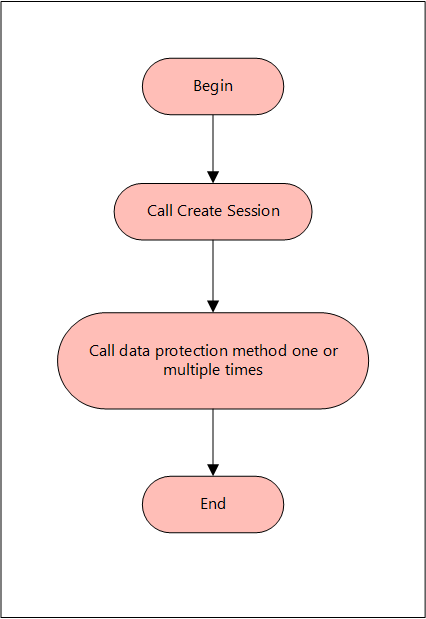
The following diagram represents the basic flow of a session.
The following sections provide detailed information of the various structures and functions used by the Protegrity Application Protector C.
stXC_PARAM_EX
The stXC_PARAM_EX structure is used for the XC APIs that are used by the AP C. This structure contains metadata and information related to protect, unprotect, and reprotect operations.
The following is a sample of the stXC_PARAM_EX structure.
typedef struct stXC_PARAM_EX
{
  XC_CHAR   szVendor[XC_MAX_VENDOR_NAME_SIZE];          /**< It is for internal use, Do not use ! */
  XC_UINT8  ui8ScambledSessionHandle;                   /**< It is for internal use, Do not use ! */
  XC_CHAR   cUserIp[XC_MAX_IP_ADDRESS_SIZE];            /**< It is for internal use, Do not use ! */
  XC_UINT4  ui4Operation;                               /**< It is for internal use, Do not use ! */
  XC_UINT4  ui4DataType;                                /**< It is for internal use, Do not use ! */
  XC_UINT4  ui4CharSet;                                 /**< Character set of the input data (UTF-8/UTF-16/UTF-32). Unknown values are treated as UTF-8. */
  XC_CHAR   cPlainTextEncoding[XC_ENCODING_SIZE];       /**< It is for internal use, Do not use ! */
  XC_BYTE   bOldExternalIV[XC_MAX_IV_SIZE];             /**< It is for internal use, Do not use ! */
  XC_UINT4  ui4OldExternalIVLength;                     /**< It is for internal use, Do not use ! */
  XC_BYTE   bNewExternalIV[XC_MAX_IV_SIZE];             /**< It is for internal use, Do not use ! */
  XC_UINT4  ui4NewExternalIVLength;                     /**< It is for internal use, Do not use ! */
  XC_BYTE   bOldExternalTweak[XC_MAX_TWEAK_SIZE];       /**< Old external tweak for FPE. Used by unprotect and reprotect operations. */
  XC_UINT4  ui4OldExternalTweakLength;                  /**< Length in bytes of bOldExternalTweak. Set to 0 when no tweak is used. */
  XC_BYTE   bNewExternalTweak[XC_MAX_TWEAK_SIZE];       /**< New external tweak for FPE. Used by protect and reprotect operations. */
  XC_UINT4  ui4NewExternalTweakLength;                  /**< Length in bytes of bNewExternalTweak. Set to 0 when no tweak is used. */
} XC_PARAM_EX;
stXC_DATA_ITEM
Note: It is recommended to use stXC_DATA_ITEM_EX structure over stXC_DATA_ITEM structure.
The stXC_DATA_ITEM structure is used as a container to store the protected or unprotected data.
The following is a sample for the stXC_DATA_ITEM structure.
typedef struct stXC_DATA_ITEM
{
  XC_UINT4 ui4Capacity; /* Max number of bytes that can be stored in pvValue  */
  XC_UINT4 ui4Length;   /* Actual number of bytes stored in pvValue           */
  XC_VOID* pvValue;     /* The actual value of the data                       */
} XC_DATA_ITEM;
stXC_DATA_ITEM_EX
The stXC_DATA_ITEM_EX structure is typically used for bulk operations with the various APIs.
typedef struct stXC_DATA_ITEM_EX
{
  XC_UINT4 ui4Capacity;    /**< Max number of bytes that can be stored in pvValue  */
  XC_UINT4 ui4Length;      /**< Actual number of bytes stored in pvValue           */
  XC_VOID* pvValue;        /**< The actual value of the data                       */
  XC_BYTE  bNullIndicator; /**< Used to set if the data is null or not. XC_TRUE = Null. XC_FALSE = not null  */
  XC_UINT4 ui4ErrorCode;   /**< The errorcode for the returning data struct, if an error occured, otherwise it is PEP_LOG_PROTECT_SUCCESS or PEP_LOG_UNPROTECT_SUCCESS */
} XC_DATA_ITEM_EX;
stXC_ACTION_RESULT
For each bulk call, the stXC_ACTION_RESULT structure contains a summary status for the entire batch.
The following is a sample for the stXC_ACTION_RESULT structure.
typedef struct stXC_ACTION_RESULT
{
  XC_UINT4 ui4LogReturnCode; /* This is the returncode of the operation */
  XC_UINT4 ui4LogSeverity;   /* This is the severity,  SUCCESS, SUCCESS WITH WARNING or ERROR */
  XC_UINT4 ui4NoAccessOperation; /* What should we return if we do not have access to unprotect data, NULL, EXCEPTION, PROTECTED VALUE or NOACCESS VALUE */
  XC_UINT4 ui4ProtectionAlgId; /* Algorithm that was used for protecting/unprotecting */
  XC_UINT4 ui4TokenType;       /* Type of data being tokenized */
  XC_UINT4 ui4OutputEncoding;  /* Encoding of output data */
  XC_MASK_SETTINGS stMaskSettings; /* Indicates type of masking used */
} stXC_ACTION_RESULT;
The following parameters are important for the bulk calls:
ui4LogReturnCode contains only the most severe error code in the processed batch. For example, if there is one success with warning entry and one with severe error, the severe error entry will be logged.
ui4LogSeverity reports on the status of the processed batch.
The ui4LogSeverity has three different types. The first type applies to successful operations. The other two states apply to erroneous operations: success with warning and error. Each indicates what went wrong in a batch.
The following table describes the various ui4LogSeverity types.
| ui4LogSeverity Type | ui4LogSeverity Possible Errors | |
|---|---|---|
| Success (operation completed successfully) | Operation completed successfully - no exception | |
| Success With Warning (operation completed successfully but some data failed) | Policy constraints: - User/DE/Time/Access - Load Key (Key ID) - Audit failed | Data constraints: - Integrity Check failed - Invalid format - Length - Token alphabet constraints |
| Error (Major error- batch failed) | System constraints: - RPA not running - Fatal errors | Exceptions: - Policy locked - Policy not available - Unsupported algorithm - Input Parameter missing - Disk full - No access operation = exception (Policy set) - Out of memory |
By turn, each data item in a batch contains its own log return code. It is defined by ui4ErrorCode in the XC_DATA_ITEM_EX structure for the AP C API.
stXC_MASK_SETTINGS
The stXC_MASK_SETTINGS structure holds information about the mask settings applied on the data element for access and audit purposes.
The following is a sample for the stXC_MASK_SETTINGS structure.
typedef struct stXC_MASK_SETTINGS
{
  XC_UINT4 bLeftIsMasked  : 1;
  XC_UINT4 bLeft          : 7;
  XC_UINT4 bRightIsMasked : 1;
  XC_UINT4 bRight         : 7;
  XC_UINT4 bFillerBits    : 16;
  XC_BYTE bMaskCharacter;
} XC_MASK_SETTINGS;
eXC_LOGRETURNTYPE
The eXC_LOGRETURNTYPE enum indicates the type of the log return code depending on the value returned.
The following is a sample for the eXC_LOGRETURNTYPE enum.
typedef enum eXC_LOGRETURNTYPE
{
  XC_LOGRETURNSUCCESS        = 0,  /* Success, no additional test            */
  XC_LOGRETURNSUCCESSWARNING = 1,  /* Success, with additional warning text  */
  XC_LOGRETURNERROR          = 2,  /* Error type of logreturn code           */
  XC_LOGRETURNEXCEPTION      = 3   /* If we want to throw exception if no acceess */
} XC_LOGRETURNTYPE;
eXC_FUNCTION
The eXC_FUNCTION enum indicates the type of algorithm used while protecting the data.
The following is a sample for the eXC_FUNCTION enum.
typedef enum eXC_FUNCTION
{
  XC_ANY_FUNCTION = 0,              /* This is the default - some kind of cipher function */
  XC_HMAC_FUNCTION = 1,             /* Hash message digest - one way cipher function      */
  XC_TYPE_PRESERVING_FUNCTION = 2,  /* Type Preserving, i.e. Token, NoEncryption         */
  XC_CRYPTO_FUNCTION = 3            /* Regular encryption algorithm           */
} XC_FUNCTION;
eXC_DATATYPE
The eXC_DATATYPE enum indicates the type of datatype you want to protect.
The following is a sample for the eXC_DATATYPE enum.
typedef enum eXC_DATATYPE
{
  XC_DATATYPE_BYTE = 0,     /* Byte */
  XC_DATATYPE_CHARACTER,    /* Character data */
  XC_DATATYPE_UNICODE,      /* Unicode data */
  XC_DATATYPE_DATE,         /* Date data */
  XC_DATATYPE_INTEGER,      /* Integer data */
  XC_DATATYPE_OTHER         /* For example real, blob, clob, time, timestamp */
} XC_DATATYPE;
XCInitLib Function
The XCInitLib function initializes the Protegrity AP library. This should be performed once in each application that uses the Protegrity AP API. When the application terminates, it should call the corresponding terminate function.
This function returns XC_SUCCESS on success.
The following is a sample for the XCInitLib function.
XCInitLib( XC_HANDLE* phXCHandle,
           const XC_CHAR* pcParameter );
The following table lists the various parameters used for the XCInitLib function.
| Parameter | Description | Data Type |
|---|---|---|
| phXCHandle | [out] A handle for the library. It should be used for the other functions. | XC_HANDLE* |
| pcParameter | [in] NULL terminated string containing the parameter. CAUTION: This parameter is not used. | const XC_CHAR* |
XCTerminateLib Function
The XCTerminateLib function terminates the Protegrity AP library. This should be performed when the application terminates. No other functions should be invoked after invoking the XCTerminateLib function. It should always be invoked after a call to the XCInitLib function for cleanup purposes.
This function returns XC_SUCCESS on success.
The following is a sample of the XCTerminateLib function.
XCTerminateLib( XC_HANDLE* phXCHandle );
The following table lists the parameter used for the XCTerminateLib function.
| Parameter | Description | Data Type |
|---|---|---|
| phXCHandle | [in/out] A handle for the library that has been initialized. | XC_HANDLE* |
XCGetVersion Function
The XCGetVersion function obtains a null terminated version string for the Protegrity AP.
This function returns XC_SUCCESS on success.
The following is a sample for the XCGetVersion function.
XCGetVersion( XC_CHAR* pszVersion,
              const XC_UINT4 ui4VersionLength );
The following table lists the various parameters used for the XCGetVersion function.
| Parameter | Description | Data Type |
|---|---|---|
| pszVersion | [in/out] The null terminated version string is returned. The buffer needs to be allocated before it is sent to the function. | XC_CHAR* |
| ui4VersionLength | [in] The length of the buffer allocated for the version. | const XC_UINT4 |
XCGetVersionEx Function
The XCGetVersionEx function obtains a null terminated version string for the Protegrity AP. It returns the current version of the AP C and the core version.
The following is a sample for the XCGetVersionEx function.
XCGetVersionEx();
XCGetCoreVersion Function
The XCGetCoreVersion function obtains a null terminated version string for the Protegrity AP.
This function returns XC_SUCCESS on success.
The following is a sample for the XCGetCoreVersion function.
XCGetCoreVersion( XC_CHAR* pszCoreVersion, const XC_UINT4 ui4CoreVerLen );
The following table lists the various parameters used for the XCGetCoreVersion function.
| Parameter | Description | Data Type |
|---|---|---|
| pszCoreVersion | [in/out] The null terminated version string is returned. The buffer needs to be allocated before it is sent to the function. | XC_CHAR* |
| ui4CoreVerLen | [in] The length of the buffer allocated for the version. | const XC_UINT4 |
XCOpenSession Function
The XCOpenSession function opens a session and returns a handle for that session to be used in calls to the XCProtect and XCUnprotect functions. When the session is no longer needed, it should be closed by a call to XCCloseSession function.
This function returns XC_SUCCESS on success.
The following is a sample for the XCOpenSession function.
XCOpenSession( const XC_HANDLE    hXCHandle,
               const XC_CHAR*     pcUser,
               const XC_CHAR*     pcPassword,
               const XC_CHAR*     pcParameter,
               XC_SESSION*        phSession );
The following table lists the various parameters used for the XCOpenSession function.
| Parameter | Description | Data Type |
|---|---|---|
| hXCHandle | [in] A handle for the library that has been initialized. | const XC_HANDLE |
| pcUser | [in] NULL terminated string for the user opening the session. Important: This parameter is only applicable for the AP Lite. | const XC_CHAR* |
| pcPassword | [in] NULL terminated string for the password for that user. Important: This parameter is only applicable for the AP Lite. | const XC_CHAR* |
| pcParameter | [in] NULL terminated string containing the parameter needed to create a session. For AP Client, the required parameter is ipaddress;port;TCP for the PEP server that is configured to handle the AP requests. For AP Lite, the required parameter is the <export_keys_filename>.xml file, which is the key export file from REST API service. For the XCPep.plm file, the parameter 0 needs to be set for the communicationid. | const XC_CHAR* |
| phSession | [out] On success, this will point to the handle for the established session. | XC_SESSION* |
XCCloseSession Function
The XCCloseSession function will terminate an established session and reset the handle for it, after which no calls to XCProtect and XCUnprotect functions will work.
This function returns XC_SUCCESS on success.
The following is a sample for the XCCloseSession function.
XCCloseSession( const XC_HANDLE hXCHandle,
                XC_SESSION* phSession );
The following table lists the various parameters used for the XCCloseSession function.
| Parameter | Description | Data Type |
|---|---|---|
| hXCHandle | [in] Handle for the library that has been initialized. | const XC_HANDLE |
| phSession | [in/out] Session to close. | XC_SESSION* |
XCProtect Function
The XCProtect function will take the supplied plaintext and send a request to the Protegrity AP that will protect the data. It will then read the response from the Protegrity AP and return the cipher text to the caller.
This function returns XC_SUCCESS on success.
Note:
Data protected using encryption data elements with input as integers, long, or short data types and output as bytes is platform-specific. You cannot move such protected data between platforms having different endianness.For example, consider data protected using encryption data elements with input as integers and output as bytes. You cannot move such protected data from the AIX platform to the Linux or Windows platform, and vice-versa.
The ui4CharSet field in XC_PARAM_EX is required when using FPE or Unicode Gen2 data elements with the byte API. It must match the encoding of the input data. The following values are supported:
| Value | Encoding |
|---|---|
| 2 | UTF-8 |
| 4 | UTF-16LE |
| 5 | UTF-16BE |
Warning:
For Date and DateTime type of data elements, the XCProtect API returns an invalid input data error for certain input values. This occurs when the input value falls within the non-existent date range from 05-OCT-1582 to 14-OCT-1582 of the Gregorian Calendar.For more information about the tokenization and de-tokenization of the cutover dates, refer to Datetime Tokenization for Cutover Dates of the Proleptic Gregorian Calendar.
The following is a sample of the XCProtect function.
XCProtect( const XC_HANDLE     hXCHandle,
           const XC_SESSION    hSession,
           const XC_UINT4      ui4EventType,
           const XC_CHAR*      pcPolicyUser,
           const XC_CHAR*      pcDataElement,
           const XC_BYTE*      pcExternalIV,
           const XC_UINT4      ui4ExternalIVLength,
           const XC_BYTE*      pcInputData,
           const XC_UINT4      ui4InputDataLength,
           const XC_BYTE       bNiInputData,
           XC_BYTE*            pcOutputData,
           XC_UINT4*           pui4OutputDataLength,
           XC_BYTE*            pbNiOutputData,
           const XC_PARAM_EX*  pXCParam,
           const XC_UINT4      ui4XCParamSize,
           stXC_ACTION_RESULT* pstActionResult );
The following table lists the various parameters used for the XCProtect function.
| Parameter | Description | Data Type |
|---|---|---|
| hXCHandle | [in] Handle for the library that has been initialized. | const XC_HANDLE |
| hSession | [in] Handle for the established session. | const XC_SESSION |
| ui4EventType | [in] Used to identify whether the call type of the function is First Call or Normal Call. This parameter can be set to one of the following values: - 1: Internally sets the XC event type to XC_EVENT_FIRST_CALL. This identifies the call type as First Call. If the call type is First Call, then data is written to the internal cache, which includes: - SessionID - RequestID - DataElement - UserName - ProductID - VendorID - 0: Identifies the call type as Normal Call. If the call type is Normal Call, then the data is only read from the internal cache. Data is written to the internal cache only if it is different from the one that was written during the First Call. Important: An entry is generated in the pepserver.log file only if any new data is written to the internal cache.Note: If logging is not enabled, but the XC_EVENT_FIRST_CALL parameter is set, then logs are not generated. Similarly, if logging is enabled, but XC_EVENT_FIRST_CALL is not set, then logs are generated only if any new data is written to the cache. | const XC_UINT4 |
| pcPolicyUser | [in] NULL terminated string for the policy user. | const XC_CHAR * |
| pcDataElement | [in] NULL terminated string for the data element. | const XC_CHAR * |
| pcExternalIV | [in] Buffer containing data that will be used as external IV. | const XC_BYTE* |
| ui4ExternalIVLength | [in] Number of bytes provided in the pcExternalIv buffer. The total amount of data to be protected should not exceed 256 bytes. | const XC_UINT4 |
| pcInputData | [in] Buffer containing the plain data to encrypt. | const XC_BYTE * |
| ui4InputDataLength | [in] Number of bytes contained in pcInputData. The total amount of data to be protected should not exceed 2 GB. | const XC_UINT4 |
| bNiInputData | [in] Flag to indicate NULL input. | const XC_BYTE |
| pcOutputData | [out] Buffer that will hold the resulting encrypted data. Needs to be larger than the input buffer. | XC_BYTE * |
| pui4OutputDataLength | [in/out] On input it should specify the max size of the output data buffer. When the function returns, it will contain the actual number of bytes stored in the output. This size needs to be big enough to hold the resulting data as well as the packed request. Consider having an output buffer that is XC_BYTES_OVERHEAD bytes larger than the input buffer for additional overhead. If the value is set to zero as *pui4OutputDataLength = 0;, then the following value is returned. *pui4OutputDataLength = ui4InputDataLength + XC_BYTES_OVERHEAD; | XC_UINT4 * |
| pbNiOutputData | [out] Flag indicating that the output is NULL. | XC_BYTE * |
| pXCParam | [in] Additional information associated with the protection, refer to XC_Param_Ex function. | const XC_PARAM_EX* |
| ui4XCParamSize | [in] Size of the structure passed in the pXCParam parameter. | const XC_UINT4 |
| pstActionResult | [out] Structure containing the result of the operation. For more information refer to the xcdefinitions.h file. | stXC_ACTION_RESULT* |
XCUnprotect Function
The XCUnprotect function will take the supplied ciphered data and send a request to the Protegrity AP that will unprotect the data. It will then read the response from the Protegrity AP and return the plain data to the caller.
This function returns XC_SUCCESS on success.
The ui4CharSet field in XC_PARAM_EX is required when using FPE or Unicode Gen2 data elements with the byte API. It must match the encoding of the input data. The following values are supported:
| Value | Encoding |
|---|---|
| 2 | UTF-8 |
| 4 | UTF-16LE |
| 5 | UTF-16BE |
The following is a sample of the XCUnprotect function.
XCUnprotect( const XC_HANDLE     hXCHandle,
             const XC_SESSION    hSession,
             const XC_UINT4      ui4EventType,
             const XC_CHAR*      pcPolicyUser,
             const XC_CHAR*      pcDataElement,
             const XC_BYTE*      pcExternalIV,
             const XC_UINT4      ui4ExternalIVLength,
             const XC_BYTE*      pcInputData,
             const XC_UINT4      ui4InputDataLength,
             const XC_BYTE       bNiInputData,
             XC_BYTE*            pcOutputData,
             XC_UINT4*           pui4OutputDataLength,
             XC_BYTE*            pbNiOutputData,
             const XC_PARAM_EX*  pXCParam,
             const XC_UINT4      ui4XCParamSize,
             stXC_ACTION_RESULT* pstActionResult );
The following table lists the various parameters used for the XCUnprotect function.
| Parameter | Description | Data Type |
|---|---|---|
| hXCHandle | [in] Handle for the library that has been initialized. | const XC_HANDLE |
| hSession | [in] Handle for the established session. | const XC_SESSION |
| ui4EventType | [in] Used to identify whether the call type of the function is First Call or Normal Call. This parameter can be set to one of the following values: - 1: Internally sets the XC event type to XC_EVENT_FIRST_CALL. This identifies the call type as First Call. If the call type is First Call, then data is written to the internal cache, which includes: - SessionID - RequestID - DataElement - UserName - ProductID - VendorID - 0: Identifies the call type as Normal Call. If the call type is Normal Call, then the data is only read from the internal cache. Data is written to the internal cache only if it is different from the one that was written during the First Call. Important: An entry is generated in the pepserver.log file only if any new data is written to the internal cache.Note: If logging is not enabled, but the XC_EVENT_FIRST_CALL parameter is set, then logs are not generated. Similarly, if logging is enabled, but XC_EVENT_FIRST_CALL is not set, then logs are generated only if any new data is written to the cache. | const XC_UINT4 |
| pcPolicyUser | [in] NULL terminated string for the policy user. | const XC_CHAR * |
| pcDataElement | [in] NULL terminated string for the data element. | const XC_CHAR* |
| pcExternalIV | [in] Buffer containing data that will be used as external IV. | const XC_BYTE* |
| ui4ExternalIVLength | [in] Number of bytes provided in the pcExternalIv buffer. The total amount of data to be unprotected should not exceed 256 bytes. | const XC_UINT4 |
| pcInputData | [in] Buffer containing the data to unprotect. | const XC_BYTE* |
| ui4InputDataLength | [in] Number of bytes contained in pcInputData. The total amount of data to be unprotected should not exceed 2 GB. | const XC_UINT4 |
| bNiInputData | [in] Flag to indicate NULL input. | const XC_BYTE |
| pcOutputData | [out] Buffer that will hold the resulting decrypted data. Needs to be larger than the input buffer. | XC_BYTE* |
| pui4OutputDataLength | [in/out] On input it should specify the max size of the output data buffer. When the function returns, it will contain the actual number of bytes stored in the output. This size needs to be big enough to hold the resulting data as well as the packed request. Consider having an output buffer that is XC_BYTES_OVERHEAD bytes larger than the input buffer for additional overhead. If the value is set to zero as *pui4OutputDataLength = 0;, then the following value is returned. *pui4OutputDataLength = ui4InputDataLength + XC_BYTES_OVERHEAD; | XC_UINT4* |
| pbNiOutputData | [out] Flag indicating that the output is NULL. | XC_BYTE* |
| pXCParam | [in] Additional information associated with the protection, refer to the XC_Param_Ex function. | const XC_PARAM_EX* |
| ui4XCParamSize | [in] Size of the structure passed in the pXCParam parameter. | const XC_UINT4 |
| pstActionResult | [out] Structure containing the result of the operation. For more information refer to the xcdefinitions.h file. | stXC_ACTION_RESULT* |
XCReprotect Function
The XCReprotect function will take the supplied protected data and send a request to the Protegrity AP that will reprotect the data. It will then read the response from the Protegrity AP and return the cipher text to the caller.
This function returns XC_SUCCESS on success.
The following is a sample for the XCReprotect function.
XCReprotect( const XC_HANDLE     hXCHandle,
             const XC_SESSION    hSession,
             const XC_UINT4      ui4EventType,
             const XC_CHAR*      pcPolicyUser,
             const XC_CHAR*      pcOldDataElement,
             const XC_CHAR*      pcNewDataElement,
             const XC_BYTE*      pcOldExternalIV,
             const XC_UINT4      ui4OldExternalIVLength,
             const XC_BYTE*      pcNewExternalIV,
             const XC_UINT4      ui4NewExternalIVLength,
             const XC_BYTE*      pcInputData,
             const XC_UINT4      ui4InputDataLength,
             const XC_BYTE       bNiInputData,
             XC_BYTE*            pcOutputData,
             XC_UINT4*           pui4OutputDataLength,
             XC_BYTE*            pbNiOutputData,
             const XC_PARAM_EX*  pXCParam,
             const XC_UINT4      ui4XCParamSize,
             stXC_ACTION_RESULT* pstActionResult );
The following table lists the various parameters used for the XCReprotect function.
| Parameter | Description | Data Type |
|---|---|---|
| hXCHandle | [in] Handle for the library that has been initialized. | const XC_HANDLE |
| hSession | [in] Handle for the established session. | const XC_SESSION |
| ui4EventType | [in] Used to identify whether the call type of the function is First Call or Normal Call. This parameter can be set to one of the following values: - 1: Internally sets the XC event type to XC_EVENT_FIRST_CALL. This identifies the call type as First Call. If the call type is First Call, then data is written to the internal cache, which includes: - SessionID - RequestID - DataElement - UserName - ProductID - VendorID - 0: Identifies the call type as Normal Call. If the call type is Normal Call, then the data is only read from the internal cache. Data is written to the internal cache only if it is different from the one that was written during the First Call. Important: An entry is generated in the pepserver.log file only if any new data is written to the internal cache.Note: If logging is not enabled, but the XC_EVENT_FIRST_CALL parameter is set, then logs are not generated. | |
| Similarly, if logging is enabled, but XC_EVENT_FIRST_CALL is not set, then logs are generated only if any new data is written to the cache. | const XC_UINT4 | |
| pcPolicyUser | [in] String for the policy user. | const XC_CHAR* |
| pcOldDataElement | [in] String for the old data element. | const XC_CHAR* |
| pcNewDataElement | [in] String for the new data element to be used. | const XC_CHAR* |
| pcOldExternalIV | [in] External IV that was used when data was protected. | const XC_BYTE* |
| ui4OldExternalIVLength | [in] Number of bytes in pcOldExternalIV. The total amount of data to be reprotected should not exceed 256 bytes. | const XC_UINT4 |
| pcNewExternalIV | [in] External IV to use when data is protected with the new data element. | const XC_BYTE* |
| ui4NewExternalIVLength | [in] Number of bytes in pcNewExternalIV. The total amount of data to be reprotected should not exceed 256 bytes. | const XC_UINT4 |
| pcInputData | [in] Buffer containing the data to be re-encrypted. | const XC_BYTE* |
| ui4InputDataLength | [in] Number of bytes contained in pcInputData. The total amount of data to be unprotected should not exceed 2 GB. | const XC_UINT4 |
| bNiInputData | [in] Flag to indicate NULL input. | const XC_BYTE |
| pcOutputData | [out] Buffer that will hold the resulting re-encrypted data. Needs to be larger than the input buffer. | XC_BYTE* |
| pui4OutputDataLength | [in/out] On input it should specify the max size of the output data buffer. When the function returns, it will contain the actual number of bytes stored in the output. This size needs to be big enough to hold the resulting data as well as the packed request. Consider having an output buffer that is XC_BYTES_OVERHEAD bytes larger than the input buffer for additional overhead. If the value is set to zero as *pui4OutputDataLength = 0;, then the following value is returned. *pui4OutputDataLength = ui4InputDataLength + XC_BYTES_OVERHEAD; | XC_UINT4* |
| pbNiOutputData | [out] Flag indicating that the output is NULL. | XC_BYTE* |
| pXCParam | [in] Additional information associated with the protection, refer to the XC_Param_Ex function. | const XC_PARAM_EX* |
| ui4XCParamSize | [in] Size of the structure passed in the pXCParam parameter. | const XC_UINT4 |
| pstActionResult | [out] Structure containing the result of the operation. For more information refer to the xcdefinitions.h file. | stXC_ACTION_RESULT* |
XCBulkProtect Function
The XCBulkProtect function protects the data in bulk. It will take a list of data items and send them in a single request to the Protegrity AP, which will then process them in a batch. It will then read the response from the Protegrity AP and return a list of data items containing the protected data.
This function returns XC_SUCCESS on success.
The ui4CharSet field in XC_PARAM_EX is required when using FPE or Unicode Gen2 data elements with the byte API. It must match the encoding of the input data. The following values are supported:
| Value | Encoding |
|---|---|
| 2 | UTF-8 |
| 4 | UTF-16LE |
| 5 | UTF-16BE |
Warning:
For Date and DateTime type of data elements, the XCBulkProtect API returns an invalid input data error for certain input values. This occurs when the input value falls within the non-existent date range from 05-OCT-1582 to 14-OCT-1582 of the Gregorian Calendar.
For more information about the tokenization and de-tokenization of the cutover dates, refer to Datetime Tokenization for Cutover Dates of the Proleptic Gregorian Calendar.
The following is a sample of the XCBulkProtect function.
XCBulkProtect( const XC_HANDLE        hXCHandle,
               const XC_SESSION       hSession,
               const XC_UINT4         ui4EventType,
               const XC_CHAR*         pcPolicyUser,
               const XC_CHAR*         pcDataElement,
               const XC_BYTE*         pcExternalIV,
               const XC_UINT4         ui4ExternalIVLength,
               const XC_DATA_ITEM_EX* pInDataItems,
               const XC_UINT4         ui4InDataItemCount,
               XC_DATA_ITEM_EX*       pOutDataItems,
               XC_UINT4*              pui4OutDataItemCount,
               XC_INT4*               pi4ErrorIndex,
               const XC_PARAM_EX*     pXCParam,
               const XC_UINT4         ui4XCParamSize,
               stXC_ACTION_RESULT*    pstActionResult );
The following table lists the various parameters used for the XCBulkProtect function.
| Parameter | Description | Data Type |
|---|---|---|
| hXCHandle | [in] Handle for the library that has been initialized. | const XC_HANDLE |
| hSession | [in] Handle for the established session. | const XC_SESSION |
| ui4EventType | [in] Used to identify whether the call type of the function is First Call or Normal Call. This parameter can be set to one of the following values: - 1: Internally sets the XC event type to XC_EVENT_FIRST_CALL. This identifies the call type as First Call. If the call type is First Call, then data is written to the internal cache, which includes: - SessionID - RequestID - DataElement - UserName - ProductID - VendorID - 0: Identifies the call type as Normal Call. If the call type is Normal Call, then the data is only read from the internal cache. Data is written to the internal cache only if it is different from the one that was written during the First Call. Important: An entry is generated in the pepserver.log file only if any new data is written to the internal cache.Note: If logging is not enabled, but the XC_EVENT_FIRST_CALL parameter is set, then logs are not generated. Similarly, if logging is enabled, but XC_EVENT_FIRST_CALL is not set, then logs are generated only if any new data is written to the cache. | const XC_UINT4 |
| pcPolicyUser | [in] NULL terminated string for the policy user. | const XC_CHAR* |
| pcDataElement | [in] NULL terminated string for the data element. | const XC_CHAR* |
| pcExternalIV | [in] Buffer containing data that will be used as external IV. | const XC_BYTE* |
| ui4ExternalIVLength | [in] Number of bytes provided in the pcExternalIv buffer. The total amount of data for bulk protection should not exceed 256 bytes. | const XC_UINT4 |
| pInDataItems | [in] Buffer containing the protected data to unprotect. | const XC_DATA_ITEM_EX* |
| ui4InDataItemCount | [in] Number of items contained in pInDataItems. The maximum number of data items should not exceed 1000 elements. | const XC_UINT4 |
| pOutDataItems | [out] Buffer containing the unprotected data after a successful operation. | XC_DATA_ITEM_EX* |
| pui4OutDataItemCount | [out] Resulting number of items placed in pOutDataItems. | XC_UINT4* |
| pi4ErrorIndex | [out] Zero-based index of first item that failed, if any, otherwise it will be set to XC_ERROR_INDEX_NONE. | XC_INT4* |
| pXCParam | [in] Additional parameters. | const XC_PARAM_EX* |
| ui4XCParamSize | [in] Size of the additional parameters. | const XC_UINT4 |
| pstActionResult | [out] Structure containing the result of the operation. For more information refer to the xcdefinitions.h file. | stXC_ACTION_RESULT* |
XCBulkUnProtect Function
The XCBulkUnProtect function decrypts the data in bulk. It will take a list of data items and send them in a single request to the Protegrity AP, which will then process them in a batch. It will then read the response from the Protegrity AP and return a list of data items containing the plain data.
This function returns XC_SUCCESS on success.
The ui4CharSet field in XC_PARAM_EX is required when using FPE or Unicode Gen2 data elements with the byte API. It must match the encoding of the input data. The following values are supported:
| Value | Encoding |
|---|---|
| 2 | UTF-8 |
| 4 | UTF-16LE |
| 5 | UTF-16BE |
The following is a sample of the XCBulkUnProtect function.
XCBulkUnprotect( const XC_HANDLE          hXCHandle,
                 const XC_SESSION         hSession,
                 const XC_UINT4           ui4EventType,
                 const XC_CHAR*           pcPolicyUser,
                 const XC_CHAR*           pcDataElement,
                 const XC_BYTE*           pcExternalIV,
                 const XC_UINT4           ui4ExternalIVLength,
                 const XC_DATA_ITEM_EX*   pInDataItems,
                 const XC_UINT4           ui4InDataItemCount,
                 XC_DATA_ITEM_EX*         pOutDataItems,
                 XC_UINT4*                pui4OutDataItemCount,
                 XC_INT4*                 pi4ErrorIndex,
                 const XC_PARAM_EX*       pXCParam,
                 const XC_UINT4           ui4XCParamSize,
                 stXC_ACTION_RESULT*      pstActionResult );
The following table lists the various parameters used for the XCBulkUnProtect function.
| Parameter | Description | Data Type |
|---|---|---|
| hXCHandle | [in] Handle for the library that has been initialized. | const XC_HANDLE |
| hSession | [in] Handle for the established session. | const XC_SESSION |
| ui4EventType | [in] Used to identify whether the call type of the function is First Call or Normal Call. This parameter can be set to one of the following values: - 1: Internally sets the XC event type to XC_EVENT_FIRST_CALL. This identifies the call type as First Call. If the call type is First Call, then data is written to the internal cache, which includes: - SessionID - RequestID - DataElement - UserName - ProductID - VendorID - 0: Identifies the call type as Normal Call. If the call type is Normal Call, then the data is only read from the internal cache. Data is written to the internal cache only if it is different from the one that was written during the First Call. Important: An entry is generated in the pepserver.log file only if any new data is written to the internal cache. Note: If logging is not enabled, but the XC_EVENT_FIRST_CALL parameter is set, then logs are not generated. Similarly, if logging is enabled, but XC_EVENT_FIRST_CALL is not set, then logs are generated only if any new data is written to the cache. | const XC_UINT4 |
| pcPolicyUser | [in] NULL terminated string for the policy user. | const XC_CHAR* |
| pcDataElement | [in] NULL terminated string for the data element. | const XC_CHAR* |
| pcExternalIV | [in] Buffer containing data that will be used as external IV. | const XC_BYTE* |
| ui4ExternalIVLength | [in] Number of bytes provided in the pcExternalIv buffer. The total amount of data for bulk protection should not exceed 256 bytes. | const XC_UINT4 |
| pInDataItems | [in] Buffer containing the plain data to protect. | const XC_DATA_ITEM_EX* |
| ui4InDataItemCount | [in] Number of items contained in pInDataItems. The maximum number of data items should not exceed 1000 elements. | const XC_UINT4 |
| pOutDataItems | [out] Buffer containing the protected data after a successful operation. | XC_DATA_ITEM_EX* |
| pui4OutDataItemCount | [in/out] On input the capacity of pOutDataItems which must be the same as ui4InDataItemCount. On return it will contain the number of items placed in pOutDataItems. | XC_UINT4* |
| pi4ErrorIndex | [out] Zero-based index of first item that failed, if any, otherwise it will be set to XC_ERROR_INDEX_NONE. | XC_INT4* |
| pXCParam | [in] Additional parameters. | const XC_PARAM_EX* |
| ui4XCParamSize | [in] Size of the additional parameters. | const XC_UINT4 |
| pstActionResult | [out] Structure containing the result of the operation. For more information refer to the xcdefinitions.h file. | stXC_ACTION_RESULT* |
XCBulkReprotect Function
The XCBulkReprotect function reprotects the data in bulk from one data element to another. It will take a list of data items and send them in a single request to the Protegrity AP, which will then process them in a batch. It will then read the response from the Protegrity AP and return a list of data items containing the reprotected data.
This function returns XC_SUCCESS on success.
The following is a sample of the XCBulkReprotect function.
XCBulkReprotect( const XC_HANDLE          hXCHandle,
                 const XC_SESSION         hSession,
                 const XC_UINT4           ui4EventType,
                 const XC_CHAR*           pcPolicyUser,
                 const XC_CHAR*           pcNewDataElement,
                 const XC_CHAR*           pcOldDataElement,
                 const XC_BYTE*           pcOldExternalIV,
                 const XC_UINT4           ui4OldExternalIVLength,
                 const XC_BYTE*           pcNewExternalIV,
                 const XC_UINT4           ui4NewExternalIVLength,
                 const XC_DATA_ITEM_EX*   pInDataItems,
                 const XC_UINT4           ui4InDataItemCount,
                 XC_DATA_ITEM_EX*         pOutDataItems,
                 XC_UINT4*                pui4OutDataItemCount,
                 XC_INT4*                 pi4ErrorIndex,
                 const XC_PARAM_EX*       pXCParam,
                 const XC_UINT4           ui4XCParamSize,
                 stXC_ACTION_RESULT*      pstActionResult );
The following table lists the various parameters used for the XCBulkReprotect function.
| Parameter | Description | Data Type |
|---|---|---|
| hXCHandle | [in] Handle for the library that has been initialized. | const XC_HANDLE |
| hSession | [in] Handle for the established session. | const XC_SESSION |
| ui4EventType | [in] Event type for logging. | const XC_UINT4 |
| pcPolicyUser | [in] String for the policy user. | const XC_CHAR* |
| pcNewDataElement | [in] String for the new data element. | const XC_CHAR* |
| pcOldDataElement | [in] String for the old data element. | const XC_CHAR* |
| pcOldExternalIV | [in] Buffer containing data that will be used as old external IV. It can be NULL. | const XC_BYTE* |
| ui4OldExternalIVLength | [in] Length of old external IV. | const XC_UINT4 |
| pcNewExternalIV | [in] Buffer containing data that will be used as new external IV. It can be NULL. | const XC_BYTE* |
| ui4NewExternalIVLength | [in] Length of new external IV. | const XC_UINT4 |
| pInDataItems | [in] Array of input data items. | const XC_DATA_ITEM_EX* |
| ui4InDataItemCount | [in] Number of input data items. | const XC_UINT4 |
| pOutDataItems | [out] Array of output data items. | XC_DATA_ITEM_EX* |
| pui4OutDataItemCount | [in/out] Number of output data items. | XC_UINT4* |
| pi4ErrorIndex | [out] Index of the item that caused error. | XC_INT4* |
| pXCParam | [in] Additional parameters. | const XC_PARAM_EX* |
| ui4XCParamSize | [in] Size of the additional parameters. | const XC_UINT4 |
| pstActionResult | [out] Action result structure. | stXC_ACTION_RESULT* |
XCCheckAccess Function
The XCCheckAccess function checks whether a policy user is permitted to perform an operation on a specific Data Element.
This function returns XC_SUCCESS if access is permitted and returns XC_ACCESS_DENIED if no access permitted.
The following is a sample for the XCCheckAccess function.
XCCheckAccess( const XC_HANDLE     hXCHandle,
               const XC_SESSION    hSession,
               const XC_UINT4      ui4Operation,
               const XC_CHAR*      pcPolicyUser,
               const XC_CHAR*      pcDataElement,
               const XC_CHAR*      pcOldDataElement,
               const XC_PARAM_EX*  pXCParam,
               const XC_UINT4      ui4XCParamSize );
The following table lists the various parameters used for the XCCheckAccess function.
| Parameter | Description | Data Type |
|---|---|---|
| hXCHandle | [in] Handle for the initialized library. | const XC_HANDLE |
| hSession | [in] Handle for the established session. | const XC_SESSION |
| ui4Operation | [in] Check operation to perform, one of XC_OPERATION_CHECK_PROTECT, XC_OPERATION_CHECK_UNPROTECT or XC_OPERATION_CHECK_REPROTECT. | const XC_UINT4 |
| pcPolicyUser | [in] String for the policy user. | const XC_CHAR* |
| pcDataElement | [in] String for the data element to check the new data element for reprotect. | const XC_CHAR* |
| pcOldDataElement | [in] String for the old data element, mandatory only for a reprotect check. | const XC_CHAR* |
| pXCParam | [in] Additional parameters. | const XC_PARAM_EX* |
| ui4XCParamSize | [in] Size of the additional parameters. | const XC_UINT4 |
XCGetErrorDescription Function
The XCGetErrorDescription function gets error description when a previous call to a Protegrity AP function fails. To get the required size of the message buffer, you can call the function with pszMessage set to XC_NULL. The required buffer size will then be returned in parameter pui4MessageLength, and the return code set to XC_BUFFER_TOO_SMALL.
This function returns XC_SUCCESS if successful and it returns XC_BUFFER_TOO_SMALL if the pui4MessageLength is not big enough.
The following is a sample of the XCGetErrorDescription function.
XCGetErrorDescription( const XC_HANDLE  hXCHandle,
                       const XC_SESSION hSession,
                       XC_CHAR*         pszMessage,
                       XC_UINT4*        pui4MessageLength );
The following table lists the various parameters used for the XCGetErrorDescription function.
| Parameter | Description | Data Type |
|---|---|---|
| hXCHandle | [in] Handle for the library that has been initialized. | const XC_HANDLE |
| hSession | [in] Handle for the session or NULL if no session exists. For example, when XCOpenSession failed. | const XC_SESSION |
| pszMessage | [in/out] The null terminated message string. | XC_CHAR* |
| pui4MessageLength | [in/out] On input, it should specify the max length of the pszMessage buffer. On return, it will contain the length of the message, not counting null. | XC_UINT4* |
Feedback
Was this page helpful?