Application Protector .Net APIs
A Trusted Application must be added in the datastore for running AP .Net. The AP .Net accesses the information on the Trusted Application from the policy stored in the memory. If the application is trusted, then the user can invoke the protect, unprotect, or reprotect APIs, depending on the requirements.
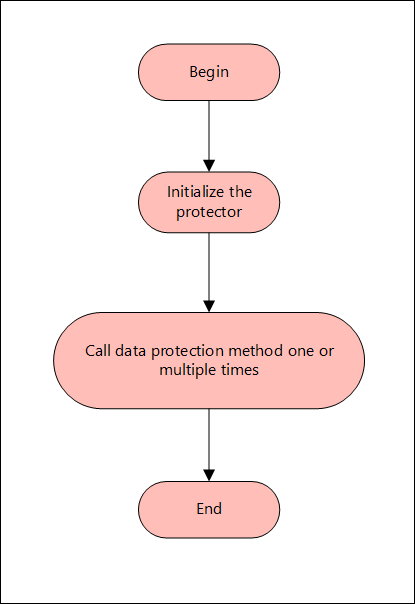
The following diagram represents the basic flow of the AP .Net.
Note:
The AP .Net supports only bytes and string data type.
The following sections provide detailed information for the various functions used by the Protegrity Application Protector .Net.
Using AP .Net in a Production Environment
This section provides a list of the APIs that are supported by AP .Net. It describes the syntax of the AP .Net APIs and provides sample use cases.
GetProtector API
The GetProtector returns the Protector object associated with the AP .Net API.
public static Protector GetProtector
Parameters
None
Returns
- Protector Instance: Object associated with the AP .Net API.
Exception
- ProtectorException: If the configuration is invalid, then an exception is returned.
Example
using Protector protector = Protector.GetProtector();
The Protector class implements the IDisposable interface. This ensures that resources held by the Protector object are released properly when it is no longer needed. The using keyword automatically disposes of objects at the end of their scope. This helps prevent resource leaks and improves application stability.
GetVersion API
The GetVersion API returns the extended version of the AP .Net in use. The extended version consists of the AP .Net version number and Core version.
public string GetVersion()
Parameters
None
Returns
- string: Returns an object with product version of the installed AP .Net and the Core version.
Exception
None
Example
protector.GetVersion();
CheckAccess API
The CheckAccess API returns the access permission status of the user for a specified data element.
public bool CheckAccess(string userName, string dataElement, int accessType=CheckAccessType.PROTECT, string newDataElement = null)
Parameters
| Parameter | Description |
|---|---|
userName | String containing the username defined in the policy. |
dataElement | String containing the name of the data element defined in the policy. |
checkAccess | Type of the access permission of the user for the specified data element. You can specify a value for this parameter from the accessType constants, such as, PROTECT, UNPROTECT, or REPROTECT. |
newDataElement | String containing the name of the data element defined in the policy when we are checking access for reprotect. |
Returns
- boolean: Returns true if the user has the requested access on the data element and false if the user does not have access to the data element.
Exception
- ProtectorException: If the CheckAccess operation is unsuccessful, then an exception is thrown.
Example
To check whether user1 will be able to perform protect operation or not using Alphanum data element:
bool access = protector.CheckAccess("user1", "Alphanum", CheckAccessType.PROTECT);
To check whether user1 will be able to perform unprotect operation or not using Alphanum data element:
bool access = protector.CheckAccess("user1", "Alphanum", CheckAccessType.UNPROTECT);
To check whether user1 will be able to perform reportect operation or not using Alphanum (old) and Alphanum1 (new) data element
bool access = protector.CheckAccess("user1", "Alphanum", CheckAccessType.REPROTECT, "Alphanum1");
Protect - String API
This API protects the data provided as a string using a tokenization or Format Preserving Encryption (FPE) data elements.
public string Protect(string input, string userName, string dataElementName, byte[] externalIv = null, byte[] externalTweak = null)
Parameters
| Parameter | Description |
|---|---|
input | Input data to be protected in string format. |
userName | String containing the user name defined in the policy. |
dataElementName | String containing the data element name defined in the policy. |
externalIV | External IV is an optional argument. It is a buffer containing data that is used as an initialization vector and accepts input in byte format. When the external IV is null, its value is ignored. |
externalTweak | External Tweak is an optional argument that is used only for the FPE data elements. It is a buffer containing data that is used as an external tweak and accepts input in byte format. When the external tweak is empty, its value is ignored. |
Returns
- string: Protected data in string format.
Exception
- ProtectorException: If the protect operation is unsuccessful, then an exception is thrown.
Example
string singleProt = protector.Protect("Protegrity1234", "user1", "AlphaNum", Encoding.UTF8.GetBytes("abcd123"), null);
Protect - Bulk String API
This API protects the data provided as a string array using a tokenization or Format Preserving Encryption (FPE) data elements.
It supports bulk protection. There is no maximum data limit. For more information about input data and data elements, refer to Protection Methods Reference.
public Tuple<string[], int[]> Protect(string[] input, string userName, string dataElementName, byte[] externalIv = null, byte[] externalTweak = null)
Parameters
| Parameter | Description |
|---|---|
input | Input array to be protected in string format. |
userName | String containing the user name defined in the policy. |
dataElementName | String containing the data element name defined in the policy. |
externalIV | External IV is an optional argument. It is a buffer containing data that is used as an initialization vector and accepts input in byte format. When the external IV is null, its value is ignored. |
externalTweak | External Tweak is an optional argument that is used only for the FPE data elements. It is a buffer containing data that is used as an external tweak and accepts input in byte format. When the external tweak is empty, its value is ignored. |
Returns
- Tuple<string[], int[]>: Returns a tuple of the following data:
- String array of the protected data.
- Int array of the return codes.
Exception
- ProtectorException: If the protect operation is unsuccessful, then an exception is thrown. For string array, an exception is not thrown for error codes 22, 23, and 44. Instead, an error list is returned for the individual items in the bulk data.
Example
Tuple<string[], int[]> prot = protector.Protect({"Protegrity1", "Protegrity2", "Protegrity3"}, "user1", "AlphaNum", Encoding.UTF8.GetBytes("abcd123"), null);
Protect - Byte API
This API protects the data provided as bytes using an encryption or a tokenization data element.
public Protect(byte[] input, string userName, string dataElementName, byte[] externalIv = null, byte[] externalTweak = null, int charset = Charset.UTF8)
Parameters
| Parameter | Description |
|---|---|
input | Input data to be protected in byte format. |
userName | String containing the user name defined in the policy. |
dataElementName | String containing the data element name defined in the policy. |
externalIV | External IV is an optional argument. It is a buffer containing data that is used as an initialization vector and accepts input in byte format. When the external IV is null, its value is ignored. |
externalTweak | External Tweak is an optional argument that is used only for the FPE data elements. It is a buffer containing data that is used as an external tweak and accepts input in byte format. When the external tweak is empty, its value is ignored. |
charset | Charset is an optional argument. It indicates the encoding associated with the bytes of the input data. You can specify a value for this argument from the charset constants, such as, UTF8, UTF16LE, or UTF16BE.The default value for the charset argument is UTF8. |
Important:
The charset parameter is mandatory for the data elements created with Unicode Gen2 tokenization method and the FPE encryption method.
The encoding set for the charset parameter must match the encoding of the input data passed.
Note: The charset argument is only applicable for the input data of byte type.
Returns
- byte[]: Protected data in byte format.
Exception
- ProtectorException: If the protect operation is unsuccessful, then an exception is thrown.
Example
byte[] singleByteProt = protector.Protect(Encoding.Unicode.GetBytes("Protegrity123"), "user1", "UnicodeGen2_UTF16LE", Encoding.UTF8.GetBytes("abcd123"), null, charset:Charset.UTF16LE);
Protect - Bulk Byte API
This API protects the data provided as a byte array using an encryption or a tokenization data element.
It supports bulk protection. There is no maximum data limit. For more information about input data and data elements, refer to Protection Methods Reference.
public Tuple<List<byte[]>, int[]> Protect(List<byte[]> input, string userName, string dataElementName, byte[] externalIv = null, byte[] externalTweak = null, int charset = Charset.UTF8)
Parameters
| Parameter | Description |
|---|---|
input | List of byte arrays. |
userName | String containing the user name defined in the policy. |
dataElementName | String containing the data element name defined in the policy. |
externalIV | External IV is an optional argument. It is a buffer containing data that is used as an initialization vector and accepts input in byte format. When the external IV is null, its value is ignored. |
externalTweak | External Tweak is an optional argument that is used only for the FPE data elements. It is a buffer containing data that is used as an external tweak and accepts input in byte format. When the external tweak is empty, its value is ignored. |
charset | Charset is an optional argument. It indicates the encoding associated with the bytes of the input data. You can specify a value for this argument from the charset constants, such as, UTF8, UTF16LE, or UTF16BE.The default value for the charset argument is UTF8. |
Important:
The charset parameter is mandatory for the data elements created with Unicode Gen2 tokenization method and the FPE encryption method.
The encoding set for the charset parameter must match the encoding of the input data passed.
Note: The charset argument is only applicable for the input data of byte type.
Returns
- Tuple<List<byte[]>, int[]>: Returns a tuple of the following data:
- List of byte arrays of the protected data.
- Int array of the return codes.
Exception
- ProtectorException: If the protect operation is unsuccessful, then an exception is thrown. For byte array, an exception is not thrown for error codes 22, 23, and 44. Instead, an error list is returned for the individual items in the bulk data.
Example
Tuple<List<byte[]>, int[]> bProt = protector.Protect({Encoding.BigEndianUnicode.GetBytes("Protegrity123"), Encoding.BigEndianUnicode.GetBytes("Protegrity12345")}, "user1", "UnicodeGen2_UTF16BE", Encoding.UTF8.GetBytes("abcd123"), null, charset:Charset.UTF16BE);
Unprotect - String API
This API unprotects the data provided as a string using a tokenization or Format Preserving Encryption (FPE) data elements.
public string Unprotect(string input, string userName, string dataElementName, byte[] externalIv = null, byte[] externalTweak = null)
Parameters
| Parameter | Description |
|---|---|
input | Input data to be unprotected in string format. |
userName | String containing the user name defined in the policy. |
dataElementName | String containing the data element name defined in the policy. |
externalIV | External IV is an optional argument. It is a buffer containing data that is used as an initialization vector and accepts input in byte format. When the external IV is null, its value is ignored. |
externalTweak | External Tweak is an optional argument that is used only for the FPE data elements. It is a buffer containing data that is used as an external tweak and accepts input in byte format. When the external tweak is empty, its value is ignored. |
Returns
- string: Unprotected data in string format.
Exception
- ProtectorException: If the unprotect operation is unsuccessful, then an exception is thrown.
Example
string singleProt = protector.Protect("Protegrity1234", "user1", "AlphaNum", Encoding.UTF8.GetBytes("abcd123"), null);

string singleUnprot = protector.Unprotect(singleProt, "user1", "AlphaNum", Encoding.UTF8.GetBytes("abcd123"), null);
Unprotect - Bulk String API
This API unprotects the data provided as a string array using a tokenization or Format Preserving Encryption (FPE) data elements.
It supports bulk unprotection. There is no maximum data limit. For more information about input data and data elements, refer to Protection Methods Reference.
public Tuple<string[],int[]> Unprotect(string[] input, string userName, string dataElementName, byte[] externalIv = null, byte[] externalTweak = null)
Parameters
| Parameter | Description |
|---|---|
input | Input array to be unprotected in string format. |
userName | String containing the user name defined in the policy. |
dataElementName | String containing the data element name defined in the policy. |
externalIV | External IV is an optional argument. It is a buffer containing data that is used as an initialization vector and accepts input in byte format. When the external IV is null, its value is ignored. |
externalTweak | External Tweak is an optional argument that is used only for the FPE data elements. It is a buffer containing data that is used as an external tweak and accepts input in byte format. When the external tweak is empty, its value is ignored. |
Returns
- Tuple<string[], int[]>: Returns a tuple of the following data:
- String array of the unprotected data.
- Int array of the return codes.
Exception
- ProtectorException: If the unprotect operation is unsuccessful, then an exception is thrown. For string array, an exception is not thrown for error codes 22, 23, and 44. Instead, an error list is returned for the individual items in the bulk data.
Example
Tuple<string[], int[]> prot = protector.Protect({"Protegrity1", "Protegrity2", "Protegrity3"}, "user1", "AlphaNum", Encoding.UTF8.GetBytes("abcd123"), null);

Tuple<string[], int[]> unprot = protector.Unprotect(prot.Item1, "user1", "AlphaNum", Encoding.UTF8.GetBytes("abcd123"), null);
Unprotect - Byte API
This API unprotects the data provided as bytes using an encryption or a tokenization data element.
public Unprotect(byte[] input, string userName, string dataElementName, byte[] externalIv =
null, byte[] externalTweak = null, int charset = Charset.UTF8)
Parameters
| Parameter | Description |
|---|---|
input | Input data to be unprotected in byte format. |
userName | String containing the user name defined in the policy. |
dataElementName | String containing the data element name defined in the policy. |
externalIV | External IV is an optional argument. It is a buffer containing data that is used as an initialization vector and accepts input in byte format. When the external IV is null, its value is ignored. |
externalTweak | External Tweak is an optional argument that is used only for the FPE data elements. It is a buffer containing data that is used as an external tweak and accepts input in byte format. When the external tweak is empty, its value is ignored. |
charset | Charset is an optional argument. It indicates the encoding associated with the bytes of the input data. You can specify a value for this argument from the charset constants, such as, UTF8, UTF16LE, or UTF16BE.The default value for the charset argument is UTF8. |
Important:
The charset parameter is mandatory for the data elements created with Unicode Gen2 tokenization method and the FPE encryption method.
The encoding set for the charset parameter must match the encoding of the input data passed.
Note: The charset argument is only applicable for the input data of byte type.
Returns
- byte[]: Unprotected data in byte format.
Exception
- ProtectorException: If the unprotect operation is unsuccessful, then an exception is thrown.
Example
byte[] singleByteProt = protector.Protect(Encoding.Unicode.GetBytes("Protegrity123"),
"user1", "UnicodeGen2_UTF16LE", Encoding.UTF8.GetBytes("abcd123"), null, charset: Charset.UTF16LE);

byte[] singleByteUnprot = protector.Unprotect(singleByteProt, "user1", "UnicodeGen2_UTF16LE", Encoding.UTF8.GetBytes("abcd123"), null, charset:Charset.UTF16LE);
Unprotect - Bulk Byte API
This API unprotects the data provided as a byte array using an encryption or a tokenization data element.
It supports bulk unprotection. There is no maximum data limit. For more information about input data and data elements, refer to Protection Methods Reference.
public Tuple<List<byte[]>, int[]> Unprotect(List<byte[]> input, string userName, string dataElementName, byte[] externalIv = null, byte[] externalTweak = null, int charset = Charset.UTF8 )
Parameters
| Parameter | Description |
|---|---|
input | List of byte arrays. |
userName | String containing the user name defined in the policy. |
dataElementName | String containing the data element name defined in the policy. |
externalIV | External IV is an optional argument. It is a buffer containing data that is used as an initialization vector and accepts input in byte format. When the external IV is null, its value is ignored. |
externalTweak | External Tweak is an optional argument that is used only for the FPE data elements. It is a buffer containing data that is used as an external tweak and accepts input in byte format. When the external tweak is empty, its value is ignored. |
charset | Charset is an optional argument. It indicates the encoding associated with the bytes of the input data. You can specify a value for this argument from the charset constants, such as, UTF8, UTF16LE, or UTF16BE.The default value for the charset argument is UTF8. |
Important:
The charset parameter is mandatory for the data elements created with Unicode Gen2 tokenization method and the FPE encryption method.
The encoding set for the charset parameter must match the encoding of the input data passed.
Note: The charset argument is only applicable for the input data of byte type.
Returns
- Tuple<List<byte[]>, int[]>: Returns a tuple of the following data:
- List of byte arrays of the protected data.
- Int array of the return codes.
Exception
- ProtectorException: If the unprotect operation is unsuccessful, then an exception is thrown. For byte array, an exception is not thrown for error codes 22, 23, and 44. Instead, an error list is returned for the individual items in the bulk data.
Example
Tuple<List<byte[]>, int[]> bProt = protector.Protect({Encoding.BigEndianUnicode.GetBytes("Protegrity123"), Encoding.BigEndianUnicode.GetBytes("Protegrity12345")}, "user1", "UnicodeGen2_UTF16BE", Encoding.UTF8.GetBytes("abcd123"), null, charset: Charset.UTF16BE);

Tuple<List<byte[]>, int[]> bUnprot = protector.Unprotect(bProt.Item1, "user1", "UnicodeGen2_UTF16BE", Encoding.UTF8.GetBytes("abcd123"), null, charset:Charset.UTF16BE);
Reprotect - String API
This API reprotects the data provided as a string using a tokenization or Format Preserving Encryption (FPE) data elements.
Warning:
If you are using the reprotect API, then the old data element and the new data element must have the same data type.
For example, if you have used an Alpha-Numeric data element to protect the data, then you must use only Alpha-Numeric data element to reprotect the data.
public string Reprotect(string input, string userName, string oldDataElementName, string newDataElementName, byte[] oldExternalIv = null, byte[] newExternalIv = null, byte[] oldExternalTweak = null, byte[] newExternalTweak = null)
Parameters
| Parameter | Description |
|---|---|
input | Input data to be reprotected in string format. |
userName | String containing the user name defined in the policy. |
oldDataElementName | String containing the old data element name defined in the policy. |
newDataElementName | String containing the new data element name defined in the policy. |
oldExternalIv | Old external IV is an optional argument. It is a buffer containing data that is used as an initialization vector and accepts input in byte format. When the old external IV is null, its value is ignored. |
newExternalIv | New external IV is an optional argument. It is a buffer containing data that is used as an initialization vector and accepts input in byte format. When the new external IV is null, its value is ignored. |
oldExternalTweak | Old external Tweak is an optional argument that is used only for the FPE data elements. It is a buffer containing data that is used as an external tweak and accepts input in byte format. When the old external tweak is empty, its value is ignored. |
newExternalTweak | New external Tweak is an optional argument that is used only for the FPE data elements. It is a buffer containing data that is used as an external tweak and accepts input in byte format. When the new external tweak is empty, its value is ignored. |
Returns
- string: Reprotected data in string format.
Exception
- ProtectorException: If the reprotect operation is unsuccessful, then an exception is thrown.
Example
string singleProt = protector.Protect("Protegrity1234", "user1", "AlphaNum",
Encoding.UTF8.GetBytes("abcd123"), null);

string singleReprot = protector.Reprotect(singleProt, "user1", "AlphaNum", "AlphaNum_1", Encoding.UTF8.GetBytes("abcd123"), Encoding.UTF8.GetBytes("abcd123456"), null, null);
Reprotect - Bulk String API
This API reprotects the data provided as a string array using a tokenization or Format Preserving Encryption (FPE) data elements.
It supports bulk reprotection. There is no maximum data limit. For more information about input data and data elements, refer to Protection Methods Reference.
Warning:
If you are using the reprotect API, then the old data element and the new data element must have the same data type.
For example, if you have used an Alpha-Numeric data element to protect the data, then you must use only Alpha-Numeric data element to reprotect the data.
public Tuple<string[], int[]> Reprotect(string[] input, string userName, string oldDataElementName, string newDataElementName, byte[] oldExternalIv = null, byte[] newExternalIv = null, byte[] oldExternalTweak = null, byte[] newExternalTweak = null)
Parameters
| Parameter | Description |
|---|---|
input | Input array to be reprotected in string format. |
userName | String containing the user name defined in the policy. |
oldDataElementName | String containing the old data element name defined in the policy. |
newDataElementName | String containing the new data element name defined in the policy. |
oldExternalIv | Old external IV is an optional argument. It is a buffer containing data that is used as an initialization vector and accepts input in byte format. When the old external IV is null, its value is ignored. |
newExternalIv | New external IV is an optional argument. It is a buffer containing data that is used as an initialization vector and accepts input in byte format. When the new external IV is null, its value is ignored. |
oldExternalTweak | Old external Tweak is an optional argument that is used only for the FPE data elements. It is a buffer containing data that is used as an external tweak and accepts input in byte format. When the old external tweak is empty, its value is ignored. |
newExternalTweak | New external Tweak is an optional argument that is used only for the FPE data elements. It is a buffer containing data that is used as an external tweak and accepts input in byte format. When the new external tweak is empty, its value is ignored. |
Returns
- Tuple<string[], int[]>: Returns a tuple of the following data:
- String array of the protected data.
- Int array of the return codes.
Exception
- ProtectorException: If the reprotect operation is unsuccessful, then an exception is thrown. For string array, an exception is not thrown for error codes 22, 23, and 44. Instead, an error list is returned for the individual items in the bulk data.
Example
Tuple<string[], int[]> bulkProt = protector.Protect({"Protegrity1", "Protegrity2", "Protegrity3"}, "user1", "AlphaNum", Encoding.UTF8.GetBytes("abcd123"), null);

Tuple<string[], int[]> bulkReprot = protector.Reprotect(bulkProt.Item1, "user1", "AlphaNum", "AlphaNum_1", Encoding.UTF8.GetBytes("abcd123"), Encoding.UTF8.GetBytes("abcd123456"), null, null);
Reprotect - Byte API
This API reprotects the data provided as bytes using an encryption or a tokenization data element.
Warning:
If you are using the reprotect API, then the old data element and the new data element must have the same data type.
For example, if you have used an Alpha-Numeric data element to protect the data, then you must use only Alpha-Numeric data element to reprotect the data.
public Reprotect(byte[] input, string userName, string oldDataElementName, string newDataElementName, byte[] oldExternalIv = null, byte[] newExternalIv = null, byte[] oldExternalTweak = null, byte[] newExternalTweak = null, int charset = Charset.UTF8)
Parameters
| Parameter | Description |
|---|---|
input | Input data to be reprotected in byte format. |
userName | String containing the user name defined in the policy. |
oldDataElementName | String containing the old data element name defined in the policy. |
newDataElementName | String containing the new data element name defined in the policy. |
oldExternalIv | Old external IV is an optional argument. It is a buffer containing data that is used as an initialization vector and accepts input in byte format. When the old external IV is null, its value is ignored. |
newExternalIv | New external IV is an optional argument. It is a buffer containing data that is used as an initialization vector and accepts input in byte format. When the new external IV is null, its value is ignored. |
oldExternalTweak | Old external Tweak is an optional argument that is used only for the FPE data elements. It is a buffer containing data that is used as an external tweak and accepts input in byte format. When the old external tweak is empty, its value is ignored. |
newExternalTweak | New external Tweak is an optional argument that is used only for the FPE data elements. It is a buffer containing data that is used as an external tweak and accepts input in byte format. When the new external tweak is empty, its value is ignored. |
charset | Charset is an optional argument. It indicates the encoding associated with the bytes of the input data. You can specify a value for this argument from the charset constants, such as, UTF8, UTF16LE, or UTF16BE.The default value for the charset argument is UTF8. |
Important:
The charset parameter is mandatory for the data elements created with Unicode Gen2 tokenization method and the FPE encryption method.
The encoding set for the charset parameter must match the encoding of the input data passed.
Note: The charset argument is only applicable for the input data of byte type.
Returns
- byte[]: Reprotected data in byte format.
Exception
- ProtectorException: If the reprotect operation is unsuccessful, then an exception is thrown.
Example
byte[] singleByteProt = protector.Protect(Encoding.Unicode.GetBytes("Protegrity123"), "user1", "UnicodeGen2_UTF16LE", Encoding.UTF8.GetBytes("abcd123"), null, charset: Charset.UTF16LE);

byte[] singleByteReprot = protector.Reprotect(singleByteProt, "user1", "UnicodeGen2_UTF16LE", "UnicodeGen2_UTF16LE_1", Encoding.UTF8.GetBytes("abcd123"), Encoding.UTF8.GetBytes("abcd123456"), null, null, charset:Charset.UTF16LE);
Reprotect - Bulk Byte API
This API reprotects the data provided as a byte array using an encryption or a tokenization data element.
It supports bulk reprotection. There is no maximum data limit. For more information about input data and data elements, refer to Protection Methods Reference.
Warning:
If you are using the reprotect API, then the old data element and the new data element must have the same data type.
For example, if you have used an Alpha-Numeric data element to protect the data, then you must use only Alpha-Numeric data element to reprotect the data.
public Tuple<List<byte[]>, int[]> Reprotect(List<byte[]> input, string userName, string oldDataElementName, string newDataElementName, byte[] oldExternalIv = null, byte[] newExternalIv = null, byte[] oldExternalTweak = null, byte[] newExternalTweak = null, int charset = Charset.UTF8)
Parameters
| Parameter | Description |
|---|---|
input | List of byte arrays. |
userName | String containing the user name defined in the policy. |
oldDataElementName | String containing the old data element name defined in the policy. |
newDataElementName | String containing the new data element name defined in the policy. |
oldExternalIv | Old external IV is an optional argument. It is a buffer containing data that is used as an initialization vector and accepts input in byte format. When the old external IV is null, its value is ignored. |
newExternalIv | New external IV is an optional argument. It is a buffer containing data that is used as an initialization vector and accepts input in byte format. When the new external IV is null, its value is ignored. |
oldExternalTweak | Old external Tweak is an optional argument that is used only for the FPE data elements. It is a buffer containing data that is used as an external tweak and accepts input in byte format. When the old external tweak is empty, its value is ignored. |
newExternalTweak | New external Tweak is an optional argument that is used only for the FPE data elements. It is a buffer containing data that is used as an external tweak and accepts input in byte format. When the new external tweak is empty, its value is ignored. |
charset | Charset is an optional argument. It indicates the encoding associated with the bytes of the input data. You can specify a value for this argument from the charset constants, such as, UTF8, UTF16LE, or UTF16BE.The default value for the charset argument is UTF8. |
Important:
The charset parameter is mandatory for the data elements created with Unicode Gen2 tokenization method and the FPE encryption method.
The encoding set for the charset parameter must match the encoding of the input data passed.
Note: The charset argument is only applicable for the input data of byte type.
Returns
- Tuple<List<byte[]>, int[]>: Returns a tuple of the following data:
- List of byte arrays of the protected data.
- Int array of the return codes.
Exception
- ProtectorException: If the reprotect operation is unsuccessful, then an exception is thrown. For byte array, an exception is not thrown for error codes 22, 23, and 44. Instead, an error list is returned for the individual items in the bulk data.
Example
Tuple<List<byte[]>, int[]> bProt = protector.Protect({Encoding.BigEndianUnicode.GetBytes("Protegrity123"), Encoding.BigEndianUnicode.GetBytes("Protegrity12345")}, "user1", "UnicodeGen2_UTF16BE", Encoding.UTF8.GetBytes("abcd123"), null, charset: Charset.UTF16BE);

Tuple<List<byte[]>, int[]> bReprot = protector.Reprotect(bProt.Item1, "user1", "UnicodeGen2_UTF16BE", "UnicodeGen2_UTF16BE_1", Encoding.UTF8.GetBytes("abcd123"), Encoding.UTF8.GetBytes("abcd123456"), null, null, charset:Charset.UTF16BE);
Using AP .Net Mock in a development environment
The AP .Net Mock can be used in a development environment. This is also known as mock implementation of AP .Net APIs. In this mode, the AP .Net Mock development package provides you with sample users and data elements that can be used to simulate the behavior of the actual APIs in production environment.
Caution: Do not install Mock AP .Net protector in a Production environment. When the AP .Net Mock APIs are used with the sample users and data elements provided with the development package, the output data is only a simulation of the protected or encrypted data. Do not use the AP .Net APIs in the development environment to protect, unprotect, or reprotect sensitive data.
Using Sample Data Elements and Sample Users for Simulating Protect, Unprotect, and Reprotect Scenarios
This section describes how to use the sample data elements and sample users for simulating the protect, unprotect, and reprotect scenarios.
Note: To view the sample project, refer to the following default location: C:\Program Files\Protegrity\sdk\dotnet\sample. This location contains the sample project with the Mock build for running code snippets simulating the protect, unprotect, and reprotect scenarios.
Mock Example - Protecting, Unprotecting, and Reprotecting String
This section describes how to use the protect, unprotect, and reprotect APIs for a string input data.
Example: Input string data
In the following example, the Protegrity1 string is used as the input data, which is protected and unprotected using the SUCCESS_STR data element. It is further reprotected using SUCCESS_REPROTECT_STR data element.
string protectedData = protector.Protect("Protegrity1", MockPolicyUser.ALL_USER, MockDataElement.SUCCESS_STR);
Console.WriteLine($"Protected Data is:    {protectedData}");

string unprotectedData = protector.Unprotect(protectedData, MockPolicyUser.ALL_USER, MockDataElement.SUCCESS_STR);
Console.WriteLine($"Unprotected Data is:  {unprotectedData}");

string reprotectedData = protector.Reprotect(protectedData, MockPolicyUser.ALL_USER, MockDataElement.SUCCESS_STR, MockDataElement.SUCCESS_REPROTECT_STR);
Console.WriteLine($"Reprotected Data is:  {reprotectedData}");
Result
Protected Data is: ESUgkmSlgtq
Unprotected Data is: Protegrity1
Reprotected Data is: 5j4mBnjRmgT
Mock Example - Protecting, Unprotecting, and Reprotecting String Data with External IV
This section describes how to use the protect, unprotect, and reprotect APIs for string input data using external IV.
Note: If you want to pass the external IV to
protect,unprotect, andreprotectAPIs, then you must pass the external IV as bytes to the API.
Example
In the following example, the Protegrity1 string is used as the input data, which is protected and unprotected using the SUCCESS_STR data element, with the help of external IV 1234 that is passed as bytes. It is reprotected using the same SUCCESS_STR data element, but with the help of a different external IV 5678 that is passed as bytes.
string protectedData = protector.Protect("Protegrity1", MockPolicyUser.ALL_USER, MockDataElement.SUCCESS_STR, Encoding.UTF8.GetBytes("1234"));
Console.WriteLine($"Protected Data is:    {protectedData}");

string unprotectedData = protector.Unprotect(protectedData, MockPolicyUser.ALL_USER, MockDataElement.SUCCESS_STR, Encoding.UTF8.GetBytes("1234"));
Console.WriteLine($"Unprotected Data is:  {unprotectedData}");

string reprotectedData = protector.Reprotect(protectedData, MockPolicyUser.ALL_USER, MockDataElement.SUCCESS_STR, MockDataElement.SUCCESS_STR, Encoding.UTF8.GetBytes("1234"), Encoding.UTF8.GetBytes("5678"));
Console.WriteLine($"Reprotected Data is:  {reprotectedData}");
Result
Protected Data is: LEtjnVE8jUy
Unprotected Data is: Protegrity1
Reprotected Data is: d1jhkG1MheU
Mock Example - Protecting, Unprotecting, and Reprotecting String Data with External IV and External Tweak
This section describes how to use the protect, unprotect, and reprotect APIs for string input data using external IV and external tweak.
Note: If you want to pass the external IV and external tweak to
protect,unprotect, andreprotectAPIs, then you must pass the external IV and external tweak as bytes.
Example
In the following example, the Protegrity1 string is used as the input data, which is protected and unprotected using the SUCCESS_STR data element, with the help of external IV 1234 and external tweak abcd passed as bytes. It is reprotected using the same SUCCESS_STR data element, but with the help of a different external IV 5678 and external tweak zyxw passed as bytes.
string protectedData = protector.Protect("Protegrity1", MockPolicyUser.ALL_USER, MockDataElement.SUCCESS_STR, Encoding.UTF8.GetBytes("1234"), Encoding.UTF8.GetBytes("abcd"));
Console.WriteLine($"Protected Data is:    {protectedData}");

string unprotectedData = protector.Unprotect(protectedData, MockPolicyUser.ALL_USER, MockDataElement.SUCCESS_STR, Encoding.UTF8.GetBytes("1234"), Encoding.UTF8.GetBytes("abcd"));
Console.WriteLine($"Unprotected Data is:  {unprotectedData}");

string reprotectedData = protector.Reprotect(protectedData, MockPolicyUser.ALL_USER, MockDataElement.SUCCESS_STR, MockDataElement.SUCCESS_STR, Encoding.UTF8.GetBytes("1234"), Encoding.UTF8.GetBytes("5678"), Encoding.UTF8.GetBytes("abcd"), Encoding.UTF8.GetBytes("zyxw"));
Console.WriteLine($"Reprotected Data is:  {reprotectedData}");
Result
Protected Data is: euDUv6uoUrP
Unprotected Data is: Protegrity1
Reprotected Data is: vmXGROmDGue
Mock Example - Protecting, Unprotecting, and Reprotecting Bulk String Data
This section describes how to use the protect, unprotect, and reprotect APIs for bulk string input data.
Example 1
In the following example, protegrity1234, Protegrity1, and Protegrity56 strings are stored in an array and used as bulk data, which is protected and unprotected using the SUCCESS_STR data element. It is further reprotected using SUCCESS_REPROTECT_STR data element.
string[] bulkInput = { "protegrity1234", "Protegrity1", "Protegrity56" };

Tuple<string[], int[]> bulkProtectedData = protector.Protect(bulkInput, MockPolicyUser.ALL_USER, MockDataElement.SUCCESS_STR);
Console.WriteLine("Protected Data is: ");
for (int i = 0; i < bulkProtectedData.Item1.Length; i++)
{
    Console.WriteLine(bulkProtectedData.Item1[i] + " " + bulkProtectedData.Item2[i]);
}
Console.WriteLine("\n");

Tuple<string[], int[]> bulkUnprotectedData = protector.Unprotect(bulkProtectedData.Item1, MockPolicyUser.ALL_USER, MockDataElement.SUCCESS_STR);
Console.WriteLine("Unprotected Data is: ");
for (int i = 0; i < bulkUnprotectedData.Item1.Length; i++)
{
    Console.WriteLine(bulkUnprotectedData.Item1[i] + " " + bulkUnprotectedData.Item2[i]);
}
Console.WriteLine("\n");

Tuple<string[], int[]> bulkReprotectedData = protector.Reprotect(bulkProtectedData.Item1, MockPolicyUser.ALL_USER, MockDataElement.SUCCESS_STR, MockDataElement.SUCCESS_REPROTECT_STR);
Console.WriteLine("Reprotected Data is: ");
for (int i = 0; i < bulkReprotectedData.Item1.Length; i++)
{
    Console.WriteLine(bulkReprotectedData.Item1[i] + " " + bulkReprotectedData.Item2[i]);
}
Result
Protected Data is:
cSUgkmSlgtqwi8 6
ESUgkmSlgtq 6
ESUgkmSlgtNK 6

Unprotected Data is:
protegrity1234 8
Protegrity1 8
Protegrity56 8

Reprotected Data is:
Oj4mBnjRmgTIlD 50
5j4mBnjRmgT 50
5j4mBnjRmgYh 50
For each element in an array -
- 6 is the success return code for the protect operation.
- 8 is the success return code for the unprotect operation.
- 50 is the success return code for the reprotect operation.
Mock Example - Protecting, Unprotecting, and Reprotecting Bulk String Data with External IV
This section describes how to use the protect, unprotect, and reprotect APIs for bulk string input data using external IV.
Note: If you want to pass the external IV to
protect,unprotect, andreprotectAPIs, then you must pass the external IV as bytes to the API.
Example: Input string data
In the following example, protegrity1234, Protegrity1, and Protegrity56 strings are stored in an array and used as bulk input data, which is protected and unprotected using the SUCCESS_STR data element with the help of external IV 1234 that is passed as bytes. It is reprotected using the same SUCCESS_STR data element, but with the help of a different external IV 5678 that is passed as bytes.
string[] bulkInput = { "protegrity1234", "Protegrity1", "Protegrity56" };

Tuple<string[], int[]> bulkProtectedData = protector.Protect(bulkInput, MockPolicyUser.ALL_USER, MockDataElement.SUCCESS_STR, Encoding.UTF8.GetBytes("1234"));
Console.WriteLine("Protected Data is: ");
for (int i = 0; i < bulkProtectedData.Item1.Length; i++)
{
    Console.WriteLine(bulkProtectedData.Item1[i] + " " + bulkProtectedData.Item2[i]);
}
Console.WriteLine("\n");

Tuple<string[], int[]> bulkUnprotectedData = protector.Unprotect(bulkProtectedData.Item1, MockPolicyUser.ALL_USER, MockDataElement.SUCCESS_STR, Encoding.UTF8.GetBytes("1234"));
Console.WriteLine("Unprotected Data is: ");
for (int i = 0; i < bulkUnprotectedData.Item1.Length; i++)
{
    Console.WriteLine(bulkUnprotectedData.Item1[i] + " " + bulkUnprotectedData.Item2[i]);
}
Console.WriteLine("\n");

Tuple<string[], int[]> bulkReprotectedData = protector.Reprotect(bulkProtectedData.Item1, MockPolicyUser.ALL_USER, MockDataElement.SUCCESS_STR, MockDataElement.SUCCESS_STR, Encoding.UTF8.GetBytes("1234"), Encoding.UTF8.GetBytes("5678"));
Console.WriteLine("Reprotected Data is: ");
for (int i = 0; i < bulkReprotectedData.Item1.Length; i++)
{
    Console.WriteLine(bulkReprotectedData.Item1[i] + " " + bulkReprotectedData.Item2[i]);
}
Result
Protected Data is:
WEtjnVE8jUy2Xr 6
LEtjnVE8jUy 6
LEtjnVE8jUlR 6

Unprotected Data is:
protegrity1234 8
Protegrity1 8
Protegrity56 8

Reprotected Data is:
i1jhkG1MheU26E 50
d1jhkG1MheU 50
d1jhkG1MheZF 50
For each element in an array -
- 6 is the success return code for the protect operation.
- 8 is the success return code for the unprotect operation.
- 50 is the success return code for the reprotect operation.
Mock Example - Protecting, Unprotecting, and Reprotecting Bulk String Data Using External IV and External Tweak
This section describes how to use the protect, unprotect, and reprotect APIs for bulk string input data using external IV and external tweak.
Note: If you want to pass the external IV and external tweak to
protect,unprotect, andreprotectAPIs, then you must pass the external IV and external tweak as bytes.
Example
In the following example, protegrity1234, Protegrity1, and Protegrity56 strings are stored in an array and used as bulk input data. This bulk data is protected and unprotected using the SUCCESS_STR data element, with the help of external IV 1234 and external tweak xyz that are both passed as bytes. It is reprotected using the same SUCCESS_STR data element, but with the help of a different external IV 5678 and external tweak abc passed as bytes.
string[] bulkInput = { "protegrity1234", "Protegrity1", "Protegrity56" };

Tuple<string[], int[]> bulkProtectedData = protector.Protect(bulkInput, MockPolicyUser.ALL_USER, MockDataElement.SUCCESS_STR, Encoding.UTF8.GetBytes("1234"), Encoding.UTF8.GetBytes("abcd"));
Console.WriteLine("Protected Data is: ");
for (int i = 0; i < bulkProtectedData.Item1.Length; i++)
{
    Console.WriteLine(bulkProtectedData.Item1[i] + " " + bulkProtectedData.Item2[i]);
}
Console.WriteLine("\n");

Tuple<string[], int[]> bulkUnprotectedData = protector.Unprotect(bulkProtectedData.Item1, MockPolicyUser.ALL_USER, MockDataElement.SUCCESS_STR, Encoding.UTF8.GetBytes("1234"), Encoding.UTF8.GetBytes("abcd"));
Console.WriteLine("Unprotected Data is: ");
for (int i = 0; i < bulkUnprotectedData.Item1.Length; i++)
{
    Console.WriteLine(bulkUnprotectedData.Item1[i] + " " + bulkUnprotectedData.Item2[i]);
}
Console.WriteLine("\n");

Tuple<string[], int[]> bulkReprotectedData = protector.Reprotect(bulkProtectedData.Item1, MockPolicyUser.ALL_USER, MockDataElement.SUCCESS_STR, MockDataElement.SUCCESS_STR, Encoding.UTF8.GetBytes("1234"), Encoding.UTF8.GetBytes("5678"), Encoding.UTF8.GetBytes("abcd"), Encoding.UTF8.GetBytes("zyxw"));
Console.WriteLine("Reprotected Data is: ");
for (int i = 0; i < bulkReprotectedData.Item1.Length; i++)
{
    Console.WriteLine(bulkReprotectedData.Item1[i] + " " + bulkReprotectedData.Item2[i]);
}
Result
Protected Data is:
huDUv6uoUrPBbk 6
euDUv6uoUrP 6
euDUv6uoUrKO 6

Unprotected Data is:
protegrity1234 8
Protegrity1 8
Protegrity56 8

Reprotected Data is:
HmXGROmDGueMs7 50
vmXGROmDGue 50
vmXGROmDGuEY 50
For each element in an array -
- 6 is the success return code for the protect operation.
- 8 is the success return code for the unprotect operation.
- 50 is the success return code for the reprotect operation.
Mock Example - Protecting, Unprotecting, and Reprotecting Bytes Data
This section describes how to use the protect, unprotect, and reprotect APIs for bytes data.
Example 1
In the following example, Protegrity1 string is first converted to bytes. The bytes data is then protected and unprotected using the SUCCESS_BYTE data element. It is further reprotected using SUCCESS_REPROTECT_BYTE data element.
byte[] inputData = Encoding.UTF8.GetBytes("Protegrity1");
Console.WriteLine("Input Data is: ");
for (int i = 0; i < inputData.Length; i++)
{
    Console.Write(inputData[i]);
}
Console.WriteLine("\n");

byte[] protectedData = protector.Protect(inputData, MockPolicyUser.ALL_USER, MockDataElement.SUCCESS_BYTE);
Console.WriteLine("Protected Data is: ");
for (int i = 0; i < protectedData.Length; i++)
{
    Console.Write(protectedData[i]);
}
Console.WriteLine("\n");

byte[] unprotectedData = protector.Unprotect(protectedData, MockPolicyUser.ALL_USER, MockDataElement.SUCCESS_BYTE);
Console.WriteLine("Unprotected Data is: ");
for (int i = 0; i < unprotectedData.Length; i++)
{
    Console.Write(unprotectedData[i]);
}
Console.WriteLine("\n");

byte[] reprotectedData = protector.Reprotect(protectedData, MockPolicyUser.ALL_USER, MockDataElement.SUCCESS_BYTE, MockDataElement.SUCCESS_REPROTECT_BYTE);
Console.WriteLine("Reprotected Data is: ");
for (int i = 0; i < reprotectedData.Length; i++)
{
    Console.Write(reprotectedData[i]);
}
Result
Input Data is:
8011411111610110311410511612149

Protected Data is:
47682201011125321921025550132517810423224

Unprotected Data is:
8011411111610110311410511612149

Reprotected Data is:
2363619902426812914815513921612420620922714019534172719623784164388416718387142154
Mock Example - Protecting, Unprotecting, and Reprotecting Bulk Bytes Data
This section describes how to use the protect, unprotect, and reprotect APIs for bulk bytes data.
Example
In the following example, protegrity1234, Protegrity1, and Protegrity56 strings are first converted to bytes. The converted byte arrays are stored together in a tuple structure which is protected and unprotected using the SUCCESS_BYTE data element. It is further reprotected using SUCCESS_REPROTECT_BYTE data element.
string[] input = { "protegrity1234", "Protegrity1", "Protegrity56" };
List<byte[]> bulkInput = new List<byte[]>(input.Length);
for (int i = 0; i < input.Length; i++)
{
    bulkInput.Add(Encoding.UTF8.GetBytes(input[i]));
}
Console.WriteLine("Input Data is: ");
for (int i = 0; i < bulkInput.Count; i++)
{
    for (int j = 0; j < bulkInput[i].Length; j++)
    {
        Console.Write(bulkInput[i][j]);
    }
    Console.WriteLine();
}
Console.WriteLine("\n");


Tuple<List<byte[]>, int[]> bulkProtectedData = protector.Protect(bulkInput, MockPolicyUser.ALL_USER, MockDataElement.SUCCESS_BYTE);
Console.WriteLine("Protected Data is: ");
for (int i = 0; i < bulkProtectedData.Item1.Count; i++)
{
    for (int j = 0; j < bulkProtectedData.Item1[i].Length; j++)
    {
        Console.Write(bulkProtectedData.Item1[i][j]);
    }
    Console.WriteLine();
}
Console.WriteLine("\n");

Tuple<List<byte[]>, int[]> bulkUnprotectedData = protector.Unprotect(bulkProtectedData.Item1, MockPolicyUser.ALL_USER, MockDataElement.SUCCESS_BYTE);
Console.WriteLine("Unprotected Data is: ");
for (int i = 0; i < bulkUnprotectedData.Item1.Count; i++)
{
    for (int j = 0; j < bulkUnprotectedData.Item1[i].Length; j++)
    {
        Console.Write(bulkUnprotectedData.Item1[i][j]);
    }
    Console.WriteLine();
}
Console.WriteLine("\n");

Tuple<List<byte[]>, int[]> bulkReprotectedData = protector.Reprotect(bulkProtectedData.Item1, MockPolicyUser.ALL_USER, MockDataElement.SUCCESS_BYTE, MockDataElement.SUCCESS_REPROTECT_BYTE);
Console.WriteLine("Reprotected Data is: ");
for (int i = 0; i < bulkReprotectedData.Item1.Count; i++)
{
    for (int j = 0; j < bulkReprotectedData.Item1[i].Length; j++)
    {
        Console.Write(bulkReprotectedData.Item1[i][j]);
    }
    Console.WriteLine();
}
Result
Input Data is:
11211411111610110311410511612149505152
8011411111610110311410511612149
801141111161011031141051161215354

Protected Data is:
24093431762273117614310419921525514617222667
47682201011125321921025550132517810423224
1226546236412520317611892221391111512195

Unprotected Data is:
11211411111610110311410511612149505152
8011411111610110311410511612149
801141111161011031141051161215354

Reprotected Data is:
1097873234601451681642431861332456611012491206245210191127130232438913019025466141128178
2363619902426812914815513921612420620922714019534172719623784164388416718387142154
172272218917715815199140240911562181962161361652852686202401579322821724417010138
Using Sample Data Elements for Simulating Auxiliary API Scenarios
This section describes how to use the sample data elements and sample users for simulating the following auxiliary API scenarios:
- Get the protector and core version.
- Checking access permissions with success output.
- Checking access permissions with failure output.
Mock Example - GetVersion API
The GetVersion API returns the mock extended version of the AP .Net in use. The mock extended
version consists of the AP .Net version number and sample Core version.
public string GetVersion()
Parameters
None
Returns
- string: Returns an object with product version of the installed AP .Net and sample Core version.
Exception
None
Example
protector.GetVersion();
Result
SDK Version: 10.0.0.x, Core Version: 2.1.1+0.x
Note: The Core Version is for representational purposes only. The actual implementation may vary depending on the customer’s installation.
Mock Example - Success Scenario for Checking Access Permissions
This section lists the success scenario when you check the access permission status of the user for a specified data element.
Example
In the following example, the CheckAccess API returns True when you check the permission of
ALL_USER for unprotecting the data using the SUCCESS_STR data element.
bool access = protector.CheckAccess(MockPolicyUser.ALL_USER,
MockDataElement.SUCCESS_STR, CheckAccessType.UNPROTECT);
Console.WriteLine(access);
Result
True
Mock Example - Failure Scenario for Checking Access Permissions
This section lists the failure scenario when you check the access permission status of the user for a specified data element.
Example
In the following example, the CheckAccess API returns False when you check the permission of NO_PROTECT_USER for protecting the data using the SUCCESS_STR data element.
bool access = protector.CheckAccess(MockPolicyUser.NO_PROTECT_USER,
MockDataElement.SUCCESS_STR, CheckAccessType.PROTECT);
Console.WriteLine(access);
Result
False
Using Sample Data Elements for Simulating Error Scenarios
This section describes how to use the sample data elements for simulating error scenarios while protecting, unprotecting, and reprotecting the data.
Mock Example - Invalid Data Element Exception
This section describes an example scenario where if a data element that is not defined in a policy is used to protect single or bulk data.
Example: Single Data
In the following example, the Protegrity1 string is used as the data, which is being protected using an INVALID data element.
try
{
    protector = Protector.GetProtector();

    protector.Protect("Protegrity1", MockPolicyUser.ALL_USER, "INVALID_DE");
}
catch (ProtectorException e)
{
    Console.WriteLine(e);
}
Result
2, The data element could not be found in the policy.
Mock Example - Input Data Too Short
This section describes an example scenario where if the data to be protected or unprotected is too short.
Example: Single Data
In the following example, the Protegrity1 string is used as the data, which is being protected using the INPUT_TOO_SHORT data element.
try
{
    protector = Protector.GetProtector();

    protector.Protect("Protegrity1", MockPolicyUser.ALL_USER, MockDataElement.INPUT_TOO_SHORT);
}
catch (ProtectorException e)
{
    Console.WriteLine(e);
}
Result
22, Data is too short to be protected/unprotected.
Example: Bulk Data
In the following example, the Protegrity1234, Protegrity1, and Protegrity56 strings are
added in an array and used as input bulk data. The input data is being protected using the
INPUT_TOO_SHORT data element.
string[] bulkInput = { "protegrity1234", "Protegrity1", "Protegrity56" };

Tuple<string[], int[]> protectedData = protector.Protect(bulkInput, MockPolicyUser.ALL_USER, MockDataElement.INPUT_TOO_SHORT);

foreach (int retCode in protectedData.Item2) {
    Console.WriteLine(retCode);
}
Result
22
22
22
Mock Example - Input Data Too Long
This section describes an example scenario where if the data to be protected or unprotected is too long.
Example: Single Data
In the following example, the Protegrity1 string is used as the data, which is being protected using the INPUT_TOO_LONG data element.
try
{
    protector = Protector.GetProtector();

    protector.Protect("Protegrity1", MockPolicyUser.ALL_USER, MockDataElement.INPUT_TOO_LONG);
}
catch (ProtectorException e)
{
    Console.WriteLine(e);
}
Result
23, Data is too long to be protected/unprotected.
Example: Bulk Data
In the following example, the Protegrity1234, Protegrity1, and Protegrity56 strings are
added in an array and used as input bulk data. The input data is being protected using the
INPUT_TOO_LONG data element.
string[] bulkInput = { "protegrity1234", "Protegrity1", "Protegrity56" };

Tuple<string[], int[]> protectedData = protector.Protect(bulkInput, MockPolicyUser.ALL_USER, MockDataElement.INPUT_TOO_LONG);

foreach (int retCode in protectedData.Item2) {
    Console.WriteLine(retCode);
}
Result
23
23
23
Mock Example - Unsupported Algorithm
This section describes an example scenario where if the protection method used to protect the data is not supported by the API.
Example
In the following example, the Protegrity1 string is used as the data, which is being protected using the UNSUPPORTED_ALGORITHM data element.
try
{
    protector = Protector.GetProtector();

    protector.Protect("Protegrity1", MockPolicyUser.ALL_USER, MockDataElement.UNSUPPORTED_ALGORITHM);
}
catch (ProtectorException e)
{
    Console.WriteLine(e);
}
Result
26, Unsupported algorithm or unsupported action for the specific data element.
Mock Example - Empty Policy
This section describes an example scenario where if the data is protected without the policy being present in shared memory.
Example: Single Data
In the following example, the Protegrity1 string is used as the data, which is being protected using the EMPTY_POLICY data element.
try
{
    protector = Protector.GetProtector();

    protector.Protect("Protegrity1", MockPolicyUser.ALL_USER, MockDataElement.EMPTY_POLICY);
}
catch (ProtectorException e)
{
    Console.WriteLine(e);
}
Result
31, Policy not available.
Mock Example - Invalid Input
This section describes an example scenario where if the data to be protected is invalid.
Example: Single Data
In the following example, the Protegrity1 string is used as the data, which is being protected using the INPUT_NOT_VALID data element.
try
{
    protector = Protector.GetProtector();

    protector.Protect("Protegrity1", MockPolicyUser.ALL_USER, MockDataElement.INPUT_NOT_VALID);
}
catch (ProtectorException e)
{
    Console.WriteLine(e);
}
Result
44, The content of the input data is not valid.
Example: Bulk Data
In the following example, the Protegrity1234, Protegrity1, and Protegrity56 strings are
added in an array and used as input bulk data. The input data is being protected using the
INPUT_NOT_VALID data element.
string[] bulkInput = { "protegrity1234", "Protegrity1", "Protegrity56" };

Tuple<string[], int[]> protectedData = protector.Protect(bulkInput, MockPolicyUser.ALL_USER, MockDataElement.INPUT_NOT_VALID);

foreach (int retCode in protectedData.Item2) {
    Console.WriteLine(retCode);
}
Result
44
44
44
Using Sample Users for Simulating Error Scenarios
This section describes how to use sample users for simulating the user-related error scenarios while protecting, unprotecting, and reprotecting the data.
Mock Example - Invalid User Exception
This section describes an example scenario where if a user who is not defined in a policy is used to protect single or bulk data.
Example: Single Data
In the following example, the Protegrity1 string is used as the data, which is being protected using the NO_USER user and SUCCESS_STR data element.
try
{
    protector = Protector.GetProtector();

    protector.Protect("Protegrity1", MockPolicyUser.NO_USER, MockDataElement.SUCCESS_STR);
}
catch (ProtectorException e)
{
    Console.WriteLine(e);
}
Result
1, The username could not be found in the policy.
Mock Example - Long User Name
This section describes an example scenario where if the name of the user, who is protecting or unprotecting the data, is too long. For instance, if the user name is greater than 255 bytes.
Example: Single Data
In the following example, the Protegrity1 string is used as the data, which is being protected using the SUCCESS_STR data element and USER_TOO_LONG user.
try
{
    protector = Protector.GetProtector();

    protector.Protect("Protegrity1", MockPolicyUser.USER_TOO_LONG, MockDataElement.SUCCESS_STR);
}
catch (ProtectorException e)
{
    Console.WriteLine(e);
}
Result
25, Username too long.
Mock Example - No Protect User
This section describes an example scenario where in which a user does not have privileges to protect data.
Example: Single Data
In the following example, the NO_PROTECT_USER user is used to protect the Protegrity1 string using the SUCCESS_STR data element.
try
{
    protector = Protector.GetProtector();

    protector.Protect("Protegrity1", MockPolicyUser.NO_PROTECT_USER, MockDataElement.SUCCESS_STR);
}
catch (ProtectorException e)
{
    Console.WriteLine(e);
}
Result
3, The user does not have the appropriate permissions to perform the requested operation.
Mock Example - No Reprotect User
This section describes an example scenario where in which a user does not have privileges to reprotect data.
Example: Single Data
In the following example, the NO_REPROTECT_USER user is used to try and reprotect the Protegrity1 string using the SUCCESS_REPROTECT_STR data element.
try
{
    protector = Protector.GetProtector();

    protector.Reprotect("Protegrity1", MockPolicyUser.NO_REPROTECT_USER, MockDataElement.SUCCESS_STR, MockDataElement.SUCCESS_REPROTECT_STR);
}
catch (ProtectorException e)
{
    Console.WriteLine(e);
}
Result
3, The user does not have the appropriate permissions to perform the requested operation.
Mock Example - No Unprotect Null User
This section describes an example scenario where in which a user does not have privileges to unprotect data. In this case, if the user tries to unprotect the data, then the unprotect API returns a null value.
Example: Single Data
In the following example, the NO_UNPROTECT_NULL_USER user is first used to protect the Protegrity1 string using the SUCCESS_STR data element. Then, the NO_UNPROTECT_NULL_USER user is used to try and unprotect the protected input data using the same data element. However, the user is unable to unprotect the data and the API returns a null value.
try
{
    protector = Protector.GetProtector();

    string protData = protector.Protect("Protegrity1", MockPolicyUser.NO_UNPROTECT_NULL_USER, MockDataElement.SUCCESS_STR);
    Console.WriteLine(protData);
    string unprotData = protector.Unprotect(protData, MockPolicyUser.NO_UNPROTECT_NULL_USER, MockDataElement.SUCCESS_STR);

    if (unprotData == null)
    {
        Console.WriteLine("The unprotect output is null.");
    }
}
catch (ProtectorException e)
{
    Console.WriteLine(e);
}
Result
ESUgkmSlgtq
The unprotect output is null.
Example: Bulk Data
In the following example, Protegrity1234, Protegrity1, and Protegrity56 strings are added in an array, which is used as the input bulk data. The NO_UNPROTECT_NULL_USER user is first used to protect the input data using the SUCCESS_STR data element. Then, the NO_UNPROTECT_NULL_USER user is used to try and unprotect the protected input data using the same data element.
try
{
    protector = Protector.GetProtector();

    string[] bulkInput = { "protegrity1234", "Protegrity1", "Protegrity56" };

    Tuple<string[], int[]> protectedData = protector.Protect(bulkInput, MockPolicyUser.NO_UNPROTECT_NULL_USER, MockDataElement.SUCCESS_STR);
    Tuple<string[], int[]> unprotectedData = protector.Unprotect(protectedData.Item1, MockPolicyUser.NO_UNPROTECT_NULL_USER, MockDataElement.SUCCESS_STR);

    Console.WriteLine("Return codes:");
    for (int i = 0; i < unprotectedData.Item1.Length; i++)
    {
        Console.WriteLine(unprotectedData.Item2[i]);
        if (unprotectedData.Item1[i] == null)
        {
            Console.WriteLine("The unprotect output is null.");
        }
    }
}
catch (ProtectorException e)
{
    Console.WriteLine(e);
}
Result
Return codes:
3
The unprotect output is null.
3
The unprotect output is null.
3
The unprotect output is null.
Mock Example - No Unprotect Exception User
This section describes an example scenario where in which a user does not have privileges to unprotect data. In this case, if the user tries to unprotect the data, then the unprotect API throws an exception.
Example: Single Data
In the following example, the NO_UNPROTECT_EXC_USER user is first used to protect the Protegrity1 string using the SUCCESS_STR data element. Then, the NO_UNPROTECT_EXC_USER user is used to try and unprotect the protected input data using the same data element. However, the user is unable to unprotect the data and the API throws an exception.
try
{
    protector = Protector.GetProtector();

    string protData = protector.Protect("Protegrity1", MockPolicyUser.NO_UNPROTECT_EXC_USER, MockDataElement.SUCCESS_STR);
    string unprotData = protector.Unprotect(protData, MockPolicyUser.NO_UNPROTECT_EXC_USER, MockDataElement.SUCCESS_STR);
}
catch (ProtectorException e)
{
    Console.WriteLine(e);
}
Result
3, The user does not have the appropriate permissions to perform the requested operation.
Mock Example - No Unprotect Protected User
This section provides an example scenario where in which a user does not have privileges to unprotect data. In this case, if the user tries to unprotect the data, then the unprotect API returns the protected input data.
Example: Single Data
In the following example, the NO_UNPROTECT_PROTECTED_USER user is first used to protect the Protegrity1 string using the SUCCESS_STR data element. Then, the NO_UNPROTECT_PROTECTED_USER user is used to try and unprotect the protected input data using the same data element. However, the user is unable to unprotect the data, and the API returns the protected input data.
try
{
    protector = Protector.GetProtector();

    string protData = protector.Protect("Protegrity1", MockPolicyUser.NO_UNPROTECT_PROTECTED_USER, MockDataElement.SUCCESS_STR);
    Console.WriteLine($"Protected Data is: {protData}");
    string unprotData = protector.Unprotect(protData, MockPolicyUser.NO_UNPROTECT_PROTECTED_USER, MockDataElement.SUCCESS_STR);
    Console.WriteLine($"Unprotected Data is:  {unprotData}");
}
catch (ProtectorException e)
{
    Console.WriteLine(e);
}
Result
Protected Data is: ESUgkmSlgtq
Unprotected Data is: ESUgkmSlgtq
Example: Bulk Data
In the following example, Protegrity1234, Protegrity1, and Protegrity56 strings are added in an array, which is used as the input bulk data. The NO_UNPROTECT_PROTECTED_USER user is first used to protect the input data using the SUCCESS_STR data element. Then, the NO_UNPROTECT_PROTECTED_USER user is used to try and unprotect the protected input data using the same data element.
try
{
    protector = Protector.GetProtector();

    string[] bulkInput = { "protegrity1234", "Protegrity1", "Protegrity56" };

    Tuple<string[], int[]> protData = protector.Protect(bulkInput, MockPolicyUser.NO_UNPROTECT_PROTECTED_USER, MockDataElement.SUCCESS_STR);
    Tuple<string[], int[]> unprotData = protector.Unprotect(protData.Item1, MockPolicyUser.NO_UNPROTECT_PROTECTED_USER, MockDataElement.SUCCESS_STR);

    Console.WriteLine($"Protected Data is:  {string.Join(", ", protData.Item1)}");
    Console.WriteLine($"Unprotected Data is:  {string.Join(", ", unprotData.Item1)}");
}
catch (ProtectorException e)
{
    Console.WriteLine(e);
}
Result
Protected Data is: cSUgkmSlgtqwi8, ESUgkmSlgtq, ESUgkmSlgtNK
Unprotected Data is: cSUgkmSlgtqwi8, ESUgkmSlgtq, ESUgkmSlgtNK
Feedback
Was this page helpful?