DevOps Approach for Application Protector
Note: The DLL file creation is supported only by .NET Core 8.0 and .NET Core 9.0. The .NET application can be run by using any supported versions.
The DevOps approach enables immutable package deployment. It uses a REST API call to download packages from the ESA in an encrypted format.
Note: The RP Agent should not be installed for immutable package deployments using DevOps.
For more information about package deployment approaches, refer to Resilient Package Deployment.
A REST API call is used to download the package on your local machine. Configure the package path in the config.ini file within the DevOps section and the path to decryptor dll file.
If a downloaded path is overwritten, a new package will be reflected in the running application at the set time interval (cadence). This occurs when another package with the same name overwrites the existing one. This changes the protector’s behaviour. The protector no longer functions as an immutable protector. To keep it immutable, set the cadence value in config.ini file to 0.
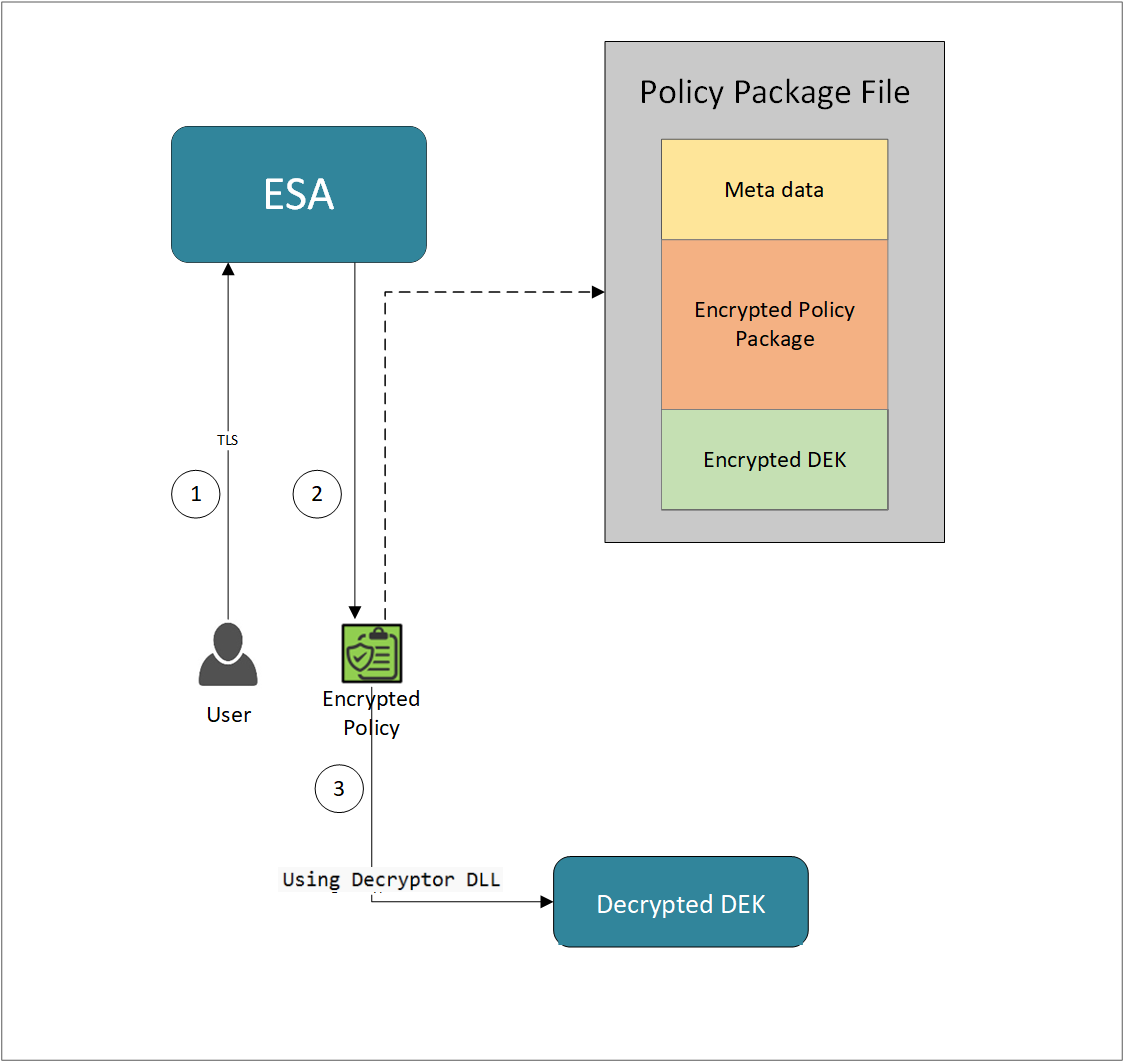
- A REST API call is used to download the policy from the ESA in an envelop encrypted format. A public key is created using a Key Management System (KMS) or Hardware Security Module (HSM). This public key must be passed to the REST API.
- The ESA generates a JSON file for the package with policy.
- The encrypted DEK needs to be decrypted to perform the security operations. A Decryptor class is implemented using the Decryptor interface, to decrypt the Data Encryption Key (DEK) using a private key.
Before you begin
Ensure the following prerequisites are met:
- The installation of the RP Agent is not required for immutable package deployment using the DevOps approach.
- The
decryptorparameter must have a complete path to a decryptor dll file.
A Decryptor class needs to be implemented using the Decryptor interface, which decrypts the Data Encryption Key (DEK) using a private key. It returns the decrypted DEK in bytes.
For more information on the decryptor interface of AP .Net, refer to Configuring the Decryptor interface. - A decryptor dll file needs to be created using the decryptor interface and decryptor class.
- Create a solution project “DotNetDecryptor” where you want to generate the
Decryptor DLLfile.Note: To create
Decryptor DLLfile, we require the IDEKDecryptor.cs, DotNetDecryptor.csproj, Decryptor.cs, and cloud specific decryptor files for AWSKMSDecryptor.cs, AzureKeyVaultDecryptor.cs, and GCPKMSDecryptor.cs. - The data store is properly configured before exporting your Application Protector policy. For ESA 10.0.1 and 10.1.0 versions, define allowed servers for seamless policy deployment and secure access control.
For more information about configuring a data store, refer to - - For ESA version 10.2.0 and higher, export key must be created in the data store for secure access control. For more information refer to Using the Encrypted Resilient Package REST APIs.
AP .Net
Using the DevOps Approach
Perform the following steps to use the DevOps approach for immutable package deployment.
Add the [devops] parameter in the config.ini file.
Ensure the decryptor class has a fully qualified domain name.[devops] package.path = /path/to/policyFile decryptor = /path/to/DotNetDecryptor.dllThe following is an example for adding the
[devops]parameter in theconfig.inifile.[devops] package.path = C:\Users\User1\policies\test.json decryptor = C:\Users\User1\DotNetDecryptor\DotNetDecryptor.dll
Note: For ESA 10.2.0 and later, Application Protector DevOps must use the Encrypted Resilient Package REST APIs using GET method. The legacy Export API using POST method is deprecated and not supported for Teams (PPC). The deprecated API remains supported only for the Enterprise edition for backward compatibility.
For more information about exporting Resilient Package using POST method for 10.0.1 and 10.1.0 ESA, refer to Using the Encrypted Resilient Package REST APIs.
For more information about exporting Resilient Package using GET method for 10.2 ESA, refer to Using the Encrypted Resilient Package REST APIs.
For more information about exporting Resilient Package using GET method for PPC, refer to Using the Encrypted Resilient Package REST APIs.
Sample Code for DevOps Approach for AP .Net
The following sections provide sample code for the DevOps approach for Application Protectors using different cloud platforms.
Configuring the Decryptor Interface
A Decryptor class must implement the IDEKDecryptor interface to decrypt the DEK. This interface includes the decrypt method. The decrypt method provides keyLabel, algorithmId, and encDek parameters. The decrypted DEK must be returned in byte[] format.
The following is the sample code for the decryptor file for using the DevOps Approach with specific cloud platforms.
IDEKDecryptor.cs
The following is a sample code for IDEKDecryptor.cs.
namespace Decryptor
{
    public interface IDEKDecryptor
    {
        byte[] Decrypt(string keyLabel, string algorithmId, byte[] encDEK, out int decryptedDekLength);

    }
}
DotNetDecryptor.csproj
The following is a sample code for DotNetDecryptor.csproj.
<Project Sdk="Microsoft.NET.Sdk">

	<PropertyGroup>
		<TargetFramework>net8.0</TargetFramework>
		<PlatformTarget>AnyCPU</PlatformTarget>
		<PublishAot>true</PublishAot>
		<AllowUnsafeBlocks>true</AllowUnsafeBlocks>
		<EnableDynamicLoading>true</EnableDynamicLoading>
		<RuntimeIdentifier>win-x64</RuntimeIdentifier>
		<UseNativeAot>true</UseNativeAot>
	</PropertyGroup>

</Project>
Decryptor.cs
The following is a sample code for Decryptor.cs.
using System;
using System.Runtime.CompilerServices;
using System.Runtime.InteropServices;

namespace Decryptor
{

    [UnmanagedFunctionPointer(CallingConvention.Cdecl)]
    public delegate IntPtr DecryptDelegate(
       [MarshalAs(UnmanagedType.LPUTF8Str)] string keyLabel,
       [MarshalAs(UnmanagedType.LPUTF8Str)] string algorithmId,
       IntPtr encData,
       int encLen,
       out int outLen);


    public static class DecryptorBridge
    {
        public static IDEKDecryptor Implementation { get; set; }
        static DecryptorBridge()
        {
            Implementation = new RSADecryptor();
        }
        public static IntPtr DecryptEntry(string keyLabel, string algorithmId, IntPtr encData, int encLen, out int outLen)
        {
            if (Implementation == null)
                throw new InvalidOperationException("Decryptor implementation not set.");
            byte[] encryptedDek = new byte[encLen];
            Marshal.Copy(encData, encryptedDek, 0, encLen);
            byte[] result = Implementation.Decrypt(keyLabel, algorithmId, encryptedDek, out outLen);
            IntPtr resultPtr = Marshal.AllocHGlobal(outLen);
            Marshal.Copy(result, 0, resultPtr, outLen);
            return resultPtr;
        }

        [UnmanagedCallersOnly(EntryPoint = "GetDecryptDelegate")]
        public static IntPtr GetDecryptDelegate()
        {
            DecryptDelegate del = DecryptEntry;
            return Marshal.GetFunctionPointerForDelegate(del);
        }

        [UnmanagedCallersOnly(EntryPoint = "FreeBuffer", CallConvs = new[] { typeof(CallConvCdecl) })]
        public static void FreeBuffer(IntPtr ptr) { Marshal.FreeHGlobal(ptr); }


    }

}
Using AWS
For AWS, we require the IDEKDecryptor.cs, DotNetDecryptor.csproj, Decryptor.cs along with AWSKMSDecryptor.cs.
The following is a sample implementation using the private key obtained from AWS KMS for decryption.
using System;
using System.IO;
using System.Security.Cryptography.X509Certificates;
using System.Text;
using System.Threading.Tasks;
using Amazon;
using Amazon.KeyManagementService;
using Amazon.KeyManagementService.Model;
using Decryptor;

namespace DotNetDecryptor
{
    public class AWSKMSDecryptor : IDEKDecryptor
    {
        // Replace with your actual AWS region name (e.g., "us-east-1", "ap-south-1")
        private static readonly RegionEndpoint KMSRegion = RegionEndpoint.GetBySystemName("your-default-region");

        // Replace with your actual KMS Key ID
        private static readonly string KMSKeyId = "your-key-id";
        public byte[] Decrypt(string keyLabel, string algorithmId, byte[] encDek, out int decryptedDekLength)
        {
            Console.WriteLine("Key Label: " + keyLabel);
            Console.WriteLine("AlgorithmID: " + algorithmId);
            Console.WriteLine("Base64 encoded input: " + Convert.ToBase64String(encDek));

            // Initialize the AWS KMS client using the specified region
            var kmsClient = new AmazonKeyManagementServiceClient(KMSRegion);
            // Specify the encryption algorithm used during encryption
            EncryptionAlgorithmSpec algorithm = EncryptionAlgorithmSpec.RSAES_OAEP_SHA_256;
            // Create a decryption request with the encrypted DEK and algorithm
            var decryptRequest = new DecryptRequest
            {
                KeyId = KMSKeyId,
                CiphertextBlob = new MemoryStream(encDek),
                EncryptionAlgorithm = algorithm
            };
            // Send the decryption request to AWS KMS and wait for the response
            var decryptResponse = kmsClient.DecryptAsync(decryptRequest).Result;
            byte[] plaintext = decryptResponse.Plaintext.ToArray();
            decryptedDekLength = plaintext.Length;

            return plaintext;
        }

    }
}
Using Azure
For Azure, we require the IDEKDecryptor.cs, DotNetDecryptor.csproj, Decryptor.cs along with AzureKeyVaultDecryptor.cs.
The following is a sample implementation using the private key obtained from Azure Key Vault for decryption.
using Azure.Identity;
using Azure.Security.KeyVault.Keys;
using Azure.Security.KeyVault.Keys.Cryptography;
using Decryptor;
using System;
using System.Net;
using System.Text;
using System.Threading.Tasks;

namespace Decryptor
{
    public class AzureKeyVaultDecryptor : IDEKDecryptor
    {

        public byte[] Decrypt(string keyLabel, string algorithmId, byte[] encDek, out int decryptedDekLength)
        {
            Console.WriteLine("Key Label:" + keyLabel);
            Console.WriteLine("AlgorithmID:" + algorithmId);
            Console.WriteLine("Base64 encoded input: " + Convert.ToBase64String(encDek));
            var keyVaultUrl = "https://devops-key.vault.azure.net/";
            var keyName = "testkey";
            var credential = new DefaultAzureCredential();
            var keyClient = new KeyClient(new Uri(keyVaultUrl), credential);
            KeyVaultKey key = keyClient.GetKey(keyName);
            CryptographyClient _cryptoClient = new CryptographyClient(key.Id, credential);
            EncryptionAlgorithm algorithm = EncryptionAlgorithm.RsaOaep256;
            DecryptResult result = _cryptoClient.Decrypt(algorithm, encDek);
            decryptedDekLength = result.Plaintext.Length;
            Console.WriteLine("Base64 encoded output: " + Convert.ToBase64String(result.Plaintext));
            return result.Plaintext;
        }
    }
}
Using GCP
For GCP, we require the IDEKDecryptor.cs, DotNetDecryptor.csproj, Decryptor.cs along with GCPKMSDecryptor.cs.
The following is a sample implementation using the private key obtained from Google Cloud KMS for decryption.
using System;
using System.Collections.Generic;
using System.IdentityModel.Tokens.Jwt;
using System.Net.Http;
using System.Reflection.Metadata;
using System.Security.Cryptography;
using System.Text;
using System.Threading.Tasks;
using Decryptor;
using Microsoft.IdentityModel.Tokens;
using Newtonsoft.Json;

namespace DotNetDecryptor
{
    public class GCPKMSDecryptor : IDEKDecryptor
    {
        public byte[] Decrypt(string keyLabel, string algorithmId, byte[] encDEK, out int decryptedDekLength)
        {
            Console.WriteLine("Key Name: " + keyLabel);
            Console.WriteLine("AlgorithmID: " + algorithmId);
            Console.WriteLine("Base64 encoded input: " + Convert.ToBase64String(encDEK));

            // TODO: Replace the below path with the full path to your service account key JSON file
            // Example: @"C:\Path\To\Your\File\your-file-name.json"

            string jsonPath = @"C:\Path\To\Your\File\your-file-name.json";
            var serviceAccount = JsonConvert.DeserializeObject<Dictionary<string, string>>(System.IO.File.ReadAllText(jsonPath));

            string privateKey = serviceAccount["private_key"];
            string clientEmail = serviceAccount["client_email"];
            string tokenUri = serviceAccount["token_uri"];

            var rsa = RSA.Create();
            rsa.ImportFromPem(privateKey.ToCharArray());

            var creds = new SigningCredentials(new RsaSecurityKey(rsa), SecurityAlgorithms.RsaSha256);

            var now = DateTimeOffset.UtcNow;
            var jwtHeader = new JwtHeader(creds);
            var jwtPayload = new JwtPayload
            {
                { "iss", clientEmail },
                { "scope", "https://www.googleapis.com/auth/cloud-platform" },
                { "aud", tokenUri },
                { "iat", now.ToUnixTimeSeconds() },
                { "exp", now.AddMinutes(60).ToUnixTimeSeconds() }
            };

            var jwt = new JwtSecurityToken(jwtHeader, jwtPayload);
            string signedJwt = new JwtSecurityTokenHandler().WriteToken(jwt);

            var httpClient = new HttpClient();
            var tokenResponse = httpClient.PostAsync(tokenUri, new FormUrlEncodedContent(new Dictionary<string, string>
            {
                { "grant_type", "urn:ietf:params:oauth:grant-type:jwt-bearer" },
                { "assertion", signedJwt }
            })).Result;

            var tokenJson = JsonConvert.DeserializeObject<Dictionary<string, string>>(tokenResponse.Content.ReadAsStringAsync().Result);
            string accessToken = tokenJson["access_token"];

            string ciphertext = Convert.ToBase64String(encDEK);

            // TODO: Replace the below URL with your actual Google Cloud KMS key version URL
            // Format: https://cloudkms.googleapis.com/v1/projects/{PROJECT_ID}/locations/{LOCATION}/keyRings/{KEY_RING}/cryptoKeys/{KEY_NAME}/cryptoKeyVersions/{VERSION}:asymmetricDecrypt
            string kmsUrl = "https://cloudkms.googleapis.com/v1/projects/{PROJECT_ID}/locations/{LOCATION}/keyRings/{KEY_RING}/cryptoKeys/{KEY_NAME}/cryptoKeyVersions/{VERSION}:asymmetricDecrypt";

            var payload = new Dictionary<string, string>
            {
                { "ciphertext", ciphertext }
            };

            var kmsRequest = new StringContent(JsonConvert.SerializeObject(payload), Encoding.UTF8, "application/json");

            httpClient.DefaultRequestHeaders.Authorization = new System.Net.Http.Headers.AuthenticationHeaderValue("Bearer", accessToken);

            var kmsResponse = httpClient.PostAsync(kmsUrl, kmsRequest).Result;

            var responseContent = kmsResponse.Content.ReadAsStringAsync().Result;

            if (!kmsResponse.IsSuccessStatusCode)
            {
                Console.WriteLine("KMS API Error:");
                Console.WriteLine(responseContent);
                throw new Exception("KMS decryption failed.");
            }

            var kmsJson = JsonConvert.DeserializeObject<Dictionary<string, string>>(responseContent);
            string plaintextBase64 = kmsJson["plaintext"];

            byte[] plaintext = Convert.FromBase64String(plaintextBase64);

            decryptedDekLength = plaintext.Length;

            return plaintext;
        }
    }
}
Create a DotNetDecryptor.dll File
To create a DLL file:
Open x64 Native Tools Command Prompt for VS.
Navigate to the folder where you have saved the DevOps Approach files using the following command.
cd path\to\your\directoryTo build the Decryptor DLL, run the following command:
dotnet publish -r win-x64 -c ReleaseNavigate to the
bin\x64\Release\net8.0\win-x64\publish\folder.The
DotNetDecryptor.dllis created in the publish folder.Note: It is recommended to move the DotNetDecryptor file to a shorter path location.
Update the decryptor parameter to the
DotNetDecryptor.dllfull path in theconfig.inifile.
- ←Previous: Setting Up AP .Net Mock on Windows in a Development Environment
- Next: Application Protector API Return Codes→
Feedback
Was this page helpful?