Memory Usage of the AP .Net
Using the Sample .Net Application to Test Memory Usage for Policies
This article provides information about memory requirements of the AP .Net. A sample .Net application is provided below. It can be used to test the memory requirements of policies of various sizes. Results of that testing are based on the memory usage of a single instance of a .Net process, excluding LogForwarder and RP Agent.
Sample application
The following is a sample .Net application.
using System;
using System.Collections.Generic;
using System.Text;
using Protegrity.Net;
using Protegrity.PException;

namespace APDotNetTest
{
    /**********************************************************************************************/
    /**
     * @class   Program
     *
     * @brief   A sample program for Application .NET Protector.
     *
     **************************************************************************************************/
    class Program
    {
        private const string dataElementName = "alphanum";
        private const string newDataElementName = "alphanumreprot";
        private const string userName = "policyuser";


        /**********************************************************************************************/
        /**
         * @fn  static void Main(string[] args)
         *
         * @brief   Main entry-point for this application
         *
         * @param   args    An array of command-line argument strings.
         **************************************************************************************************/

        static void Main(string[] args)
        {
            try
            {
                /* Dispose() is a method defined by the IDisposable interface in .NET.
                 * It’s used to release unmanaged resources.
                 * .NET garbage collector only cleans up managed memory. If your class uses unmanaged resources,
                 * you must clean them up manually — and that’s what Dispose() is for.
                 *
                 * ====================
                 * With using
                 * ====================
                 * You're telling the compiler:
                 * "Create this object, and automatically call Dispose() on it
                 * when it goes out of scope."
                 * This is called a using declaration, and it ensures that cleanup happens even if
                 * an exception occurs.
                 *
                 * ======================
                 * Without using
                 * ======================
                 * You have to call dispose manually.
                 */

                using Protector protector = Protector.GetProtector();

                /**
                 * Sample input string data for single operations.
                 */
                string singleInput = "Hello Protegrity";
                byte[] singleByteInput = Encoding.UTF8.GetBytes(singleInput);

                Console.WriteLine("#########################################");
                Console.WriteLine("# Protegrity Application .NET Protector #");
                Console.WriteLine("#########################################\n");

                /**
                 * Calling GetVersion to print APDotNet sdk and Core version.
                 */
                Console.WriteLine(protector.GetVersion() + "\n");
                Console.WriteLine("--------------------------------------");
                Console.WriteLine("-     Single Protect API             -");
                Console.WriteLine("--------------------------------------");
                Console.WriteLine($"Input Data is:        {singleInput}\n");


                /**
                 * Use protector object to call single string Protect API.
                 */
                string protectedData = protector.Protect(singleInput, userName, dataElementName);
                Console.WriteLine("With String Data Type");
                Console.WriteLine("-----------------------");
                Console.WriteLine($"Protected Data is:    {protectedData}");

                /**
                 * Use protector object to call single string Unprotect API
                 */
                string unprotectedData = protector.Unprotect(protectedData, userName, dataElementName);
                Console.WriteLine($"Unprotected Data is:  {unprotectedData}\n");

                /**
                * Use protector object to call single string Reprotect API.
                */
                string reprotectedData = protector.Reprotect(protectedData, userName, dataElementName, newDataElementName);
                Console.WriteLine($"Reprotected Data is:  {reprotectedData}");

                /**
                 * Use protector object to call single string Unprotect API
                 */
                string unprotectReprotectedData = protector.Unprotect(reprotectedData, userName, newDataElementName);
                Console.WriteLine($"Unprotected Data is:  {unprotectReprotectedData}\n");

                /**
                 * Use protector object to call single byte Protect API.
                 */
                byte[] byteProtectedData = protector.Protect(singleByteInput, userName, dataElementName);
                Console.WriteLine("With Byte Data Type");
                Console.WriteLine("----------------------");
                Console.WriteLine($"Protected Byte Data is:    {Encoding.UTF8.GetString(byteProtectedData)}");

                /**
                 * Use protector object to call single byte Unprotect API
                 */
                byte[] byteUnprotectedData = protector.Unprotect(byteProtectedData, userName, dataElementName);
                Console.WriteLine($"Unprotected Byte Data is:  {Encoding.UTF8.GetString(byteUnprotectedData)}\n");

                /**
                 * Use protector object to call single byte Reprotect API.
                 */
                byte[] byteReprotectedData = protector.Reprotect(byteProtectedData, userName, dataElementName, newDataElementName);
                Console.WriteLine($"Reprotected Byte Data is:  {Encoding.UTF8.GetString(byteReprotectedData)}");

                /**
                 * Use protector object to call single byte Unprotect API
                 */
                byte[] byteUnprotectReprotectedData = protector.Unprotect(byteReprotectedData, userName, newDataElementName);
                Console.WriteLine($"Unprotected Byte Data is:  {Encoding.UTF8.GetString(byteUnprotectReprotectedData)}");
                Console.WriteLine("\n");

                /**
                 * Sample bulk string input data
                 */
                string[] bulkInput = { "The Alpha-numeric token type tokenizes all alphabetic symbols (both lowercase and uppercase letters), as well as digits.", "Digits 0 through 9, Lowercase letters a through z, Uppercase letters A through Z", "alphanumeric data 1234567890 !@#$%^&* with special characters", "ALL THE CHARACTERS IN THIS STRING ARE UPPERCASE", "UPPERCASE WITH 1234567890 NUMBERS AND !@#$%^&*() SPECIAL CHARACTERS" };
                List<byte[]> byteBulkInput = new List<byte[]>(bulkInput.Length);

                Console.WriteLine("--------------------------------------");
                Console.WriteLine("-         Bulk Protect API           -");
                Console.WriteLine("--------------------------------------");

                Console.WriteLine("Input Data is:");

                /**
                 * Converting string data to byte data.
                 */
                for (int i = 0; i < bulkInput.Length; i++)
                {
                    Console.WriteLine($"{bulkInput[i]}");
                    byteBulkInput.Add(Encoding.UTF8.GetBytes(bulkInput[i]));
                }

                Console.WriteLine("\n");
                Console.WriteLine("With String Data Type");
                Console.WriteLine("----------------------");

                /**
                 * Use protector object to call bulk string Protect API
                 */
                Tuple<string[], int[]> bulkProtectedData = protector.Protect(bulkInput, userName, dataElementName);
                Console.WriteLine("Protected Data is: ");
                for (int i = 0; i < bulkProtectedData.Item1.Length; i++)
                {
                    Console.WriteLine(bulkProtectedData.Item1[i] + " " + bulkProtectedData.Item2[i]);
                }
                Console.WriteLine("\n");

                /**
                 * Use protector object to call bulk string Unprotect API
                 */
                Tuple<string[], int[]> bulkUnprotectedData = protector.Unprotect(bulkProtectedData.Item1, userName, dataElementName);
                Console.WriteLine("Unprotected Data is: ");
                for (int i = 0; i < bulkUnprotectedData.Item1.Length; i++)
                {
                    Console.WriteLine(bulkUnprotectedData.Item1[i] + " " + bulkUnprotectedData.Item2[i]);
                }
                Console.WriteLine("\n");

                /**
                 * Use protector object to call bulk string Reprotect API
                 */
                Tuple<string[], int[]> bulkReprotectedData = protector.Reprotect(bulkProtectedData.Item1, userName, dataElementName, newDataElementName);
                Console.WriteLine("Reprotected Data is: ");
                for (int i = 0; i < bulkReprotectedData.Item1.Length; i++)
                {
                    Console.WriteLine(bulkReprotectedData.Item1[i] + " " + bulkReprotectedData.Item2[i]);
                }
                Console.WriteLine("\n");

                /**
                * Use protector object to call bulk string Unprotect API
                */
                Tuple<string[], int[]> bulkUnprotectReprotectedData = protector.Unprotect(bulkReprotectedData.Item1, userName, newDataElementName);
                Console.WriteLine("Unprotected Data is: ");
                for (int i = 0; i < bulkUnprotectReprotectedData.Item1.Length; i++)
                {
                    Console.WriteLine(bulkUnprotectReprotectedData.Item1[i] + " " + bulkUnprotectReprotectedData.Item2[i]);
                }
                Console.WriteLine("\n");

                Console.WriteLine("With Byte Data Type");
                Console.WriteLine("----------------------");

                /**
                 * Use protector object to call bulk byte Protect API
                 */
                Tuple<List<byte[]>, int[]> byteBulkProtectedData = protector.Protect(byteBulkInput, userName, dataElementName);
                Console.WriteLine("Protected Data is: ");
                for (int i = 0; i < byteBulkProtectedData.Item1.Count; i++)
                {
                    Console.WriteLine(Encoding.UTF8.GetString(byteBulkProtectedData.Item1[i]) + " " + byteBulkProtectedData.Item2[i]);
                }
                Console.WriteLine("\n");

                /**
                * Use protector object to call bulk byte Unprotect API
                */
                Tuple<List<byte[]>, int[]> byteBulkUnprotectedData = protector.Unprotect(byteBulkProtectedData.Item1, userName, dataElementName);
                Console.WriteLine("Unprotected Data is: ");
                for (int i = 0; i < byteBulkUnprotectedData.Item1.Count; i++)
                {
                    Console.WriteLine(Encoding.UTF8.GetString(byteBulkUnprotectedData.Item1[i]) + " " + byteBulkUnprotectedData.Item2[i]);
                }
                Console.WriteLine("\n");

                /**
                * Use protector object to call bulk byte Reprotect API
                */
                Tuple<List<byte[]>, int[]> byteBulkReprotectedData = protector.Reprotect(byteBulkProtectedData.Item1, userName, dataElementName, newDataElementName);
                Console.WriteLine("Reprotected Data is: ");
                for (int i = 0; i < byteBulkReprotectedData.Item1.Count; i++)
                {
                    Console.WriteLine(Encoding.UTF8.GetString(byteBulkReprotectedData.Item1[i]) + " " + byteBulkReprotectedData.Item2[i]);
                }
                Console.WriteLine("\n");

                /**
                * Use protector object to call bulk byte Unprotect API
                */
                Tuple<List<byte[]>, int[]> byteBulkUnprotectReprotectedData = protector.Unprotect(byteBulkReprotectedData.Item1, userName, newDataElementName);
                Console.WriteLine("Unprotected Data is: ");
                for (int i = 0; i < byteBulkUnprotectReprotectedData.Item1.Count; i++)
                {
                    Console.WriteLine(Encoding.UTF8.GetString(byteBulkUnprotectReprotectedData.Item1[i]) + " " + byteBulkUnprotectReprotectedData.Item2[i]);
                }
                Console.WriteLine("\n");
            }
            catch (ProtectorException e)
            {
                Console.WriteLine(e);
            }
        } /* End scope of main function */

    } /* End scope of class */

} /* closure of namespace */
Expected Memory Usage
The process to find the policy size and expected memory usage for different policy sizes used by the .Net application is described in this section.
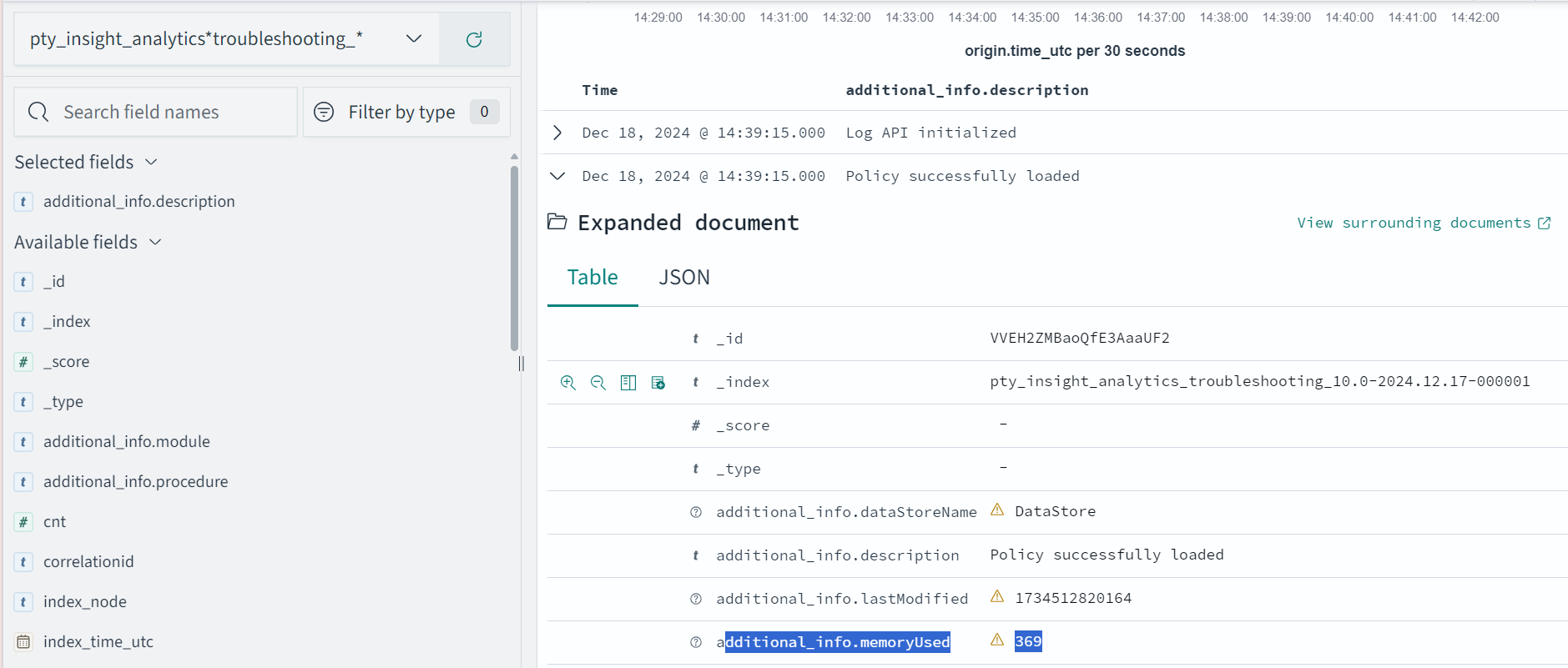
To find the policy size:
- On Insights dashboard, under the Discover section, navigate to the troubleshooting index.
- Search using the
process.module.keyword: coreproviderfilter. - Navigate to the logs with description as Policy successfully loaded.
The
additional_info.memoryUsedfield depicts the policy size.
Dynamic Memory Usage
The following is the expected memory usage for different policy sizes used by the .Net application.
| Policy size | Process memory consumption |
|---|---|
| 171 MB | 223 MB |
| 240 MB | 292 MB |
| 931 MB | 982 MB |
The process memory increases substantially for a few milliseconds when the application is running in the following cases:
- The policy is replaced with another policy
- Changes are made in the current policy
DevOps Memory Usage
If we increase the policy size, the time to load the policy file in the memory increases. For example; for 37 MB, it takes 1 min to load the policy file whereas for 370 MB, it takes approximately an hour to load the policy file.
Feedback
Was this page helpful?