Memory Usage of the AP Java
The memory used for the different policy sizes using a sample HelloWorld java application is described in this section. This is a sample memory usage. You can use this as a reference for memory usage in the AP Java for different policy sizes.
Sample application
The following is a sample HelloWorld.java application.
/* HelloWorld.java
*
* This is sample program demonstrating the usage of Java SDK API
*
* Configure Trusted Application policy in ESA with
* - Application name: lib.HelloWorld
* - Application user: <SYSTEM USER>
*
* Compiled as : javac -cp .:<PATH_TO_INSTALL_DIR>/sdk/java/lib/ApplicationProtectorJava.jar HelloWorld.java
* Run as :
* java -cp .:<PATH_TO_INSTALL_DIR>/sdk/java/lib/ApplicationProtectorJava.jar HelloWorld policyUser dataElement inputData
*
* Use either Token Elements or NoEncryption as dataElement while running this code.
*/

package lib;

import com.protegrity.ap.java.Protector;
import com.protegrity.ap.java.ProtectorException;
import com.protegrity.ap.java.SessionObject;

public class HelloWorld {

  public static void performProtectionOperation(
      String policyUser, String dataElement, String inputData) throws ProtectorException {

    String[] input = {inputData};
    String[] protectedOutput = new String[input.length];
    String[] unprotectedOutput = new String[input.length];

    // Initialize Java SDK Protector
    Protector protector = Protector.getProtector();

    // Create a new protection operation session for policyUser
    SessionObject session = protector.createSession(policyUser);
    // Get Java SDK Version
    System.out.println("Java SDK Version:" + protector.getVersion());

    // Perform Protect Operation
    boolean res = protector.protect(session, dataElement, input, protectedOutput);
    if (!res) {
      System.out.println(protector.getLastError(session));
    } else {
      System.out.println("Protected Data:");
      for (String out : protectedOutput) {
        System.out.print(out + " ");
      }
      System.out.println();
    }

    // Perform Unprotect Operation
    res = protector.unprotect(session, dataElement, protectedOutput, unprotectedOutput);
    if (!res) {
      System.out.println(protector.getLastError(session));
    } else {
      System.out.println("Unprotected Data:");
      for (String out : unprotectedOutput) {
        System.out.print(out + " ");
      }
      System.out.println();
    }
  }

  public static void main(String[] args) throws ProtectorException {

    if (args.length == 3) {
      System.out.println(
          "Testing input data "
              + args[2]
              + " "
              + "with dataElement "
              + args[1]
              + " "
              + "and policyUser "
              + args[0]);

      performProtectionOperation(args[0], args[1], args[2]);

    } else {
      System.out.println(
          " Usage : java -cp .:<PATH_TO_INSTALL_DIR>/sdk/java/lib/ApplicationProtectorJava.jar HelloWorld PolicyUser DataElement Data");
      System.out.println(
          " Example : java -cp .:<PATH_TO_INSTALL_DIR>/sdk/java/lib/ApplicationProtectorJava.jarr HelloWorld user1 TE_AN_SLT13_L0R0_N"
              + " Protegrity");
      System.exit(0);
    }
  }
}
Expected memory usage
The process to find the policy size and expected memory usage for different policy sizes used by the java application is described in this section.
To find the policy size:
- On Insights dashboard, under the Discover section, navigate to the troubleshooting index.
- Search using the
process.module.keyword: coreproviderfilter. - Navigate to the logs with description as Policy successfully loaded.
The
additional_info.memoryUsedfield depicts the policy size.
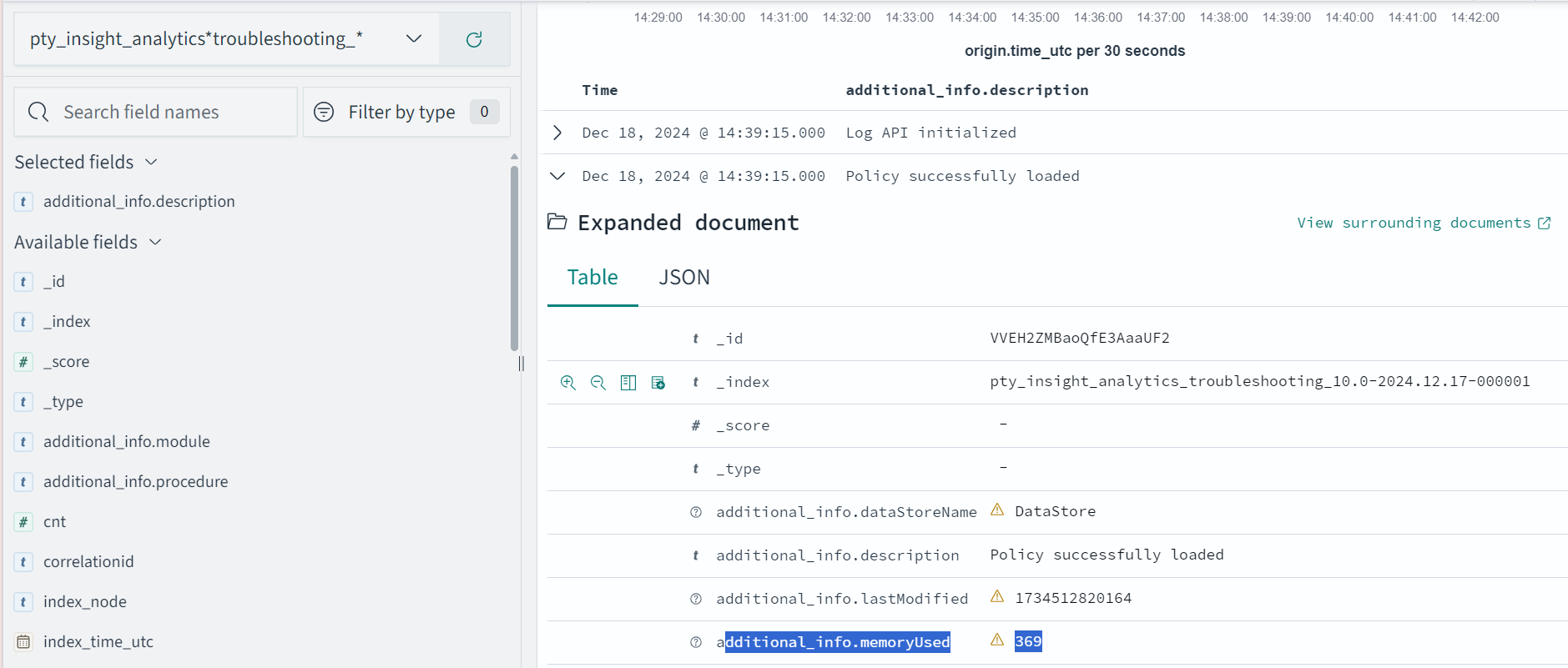
The following is the expected memory usage for different policy sizes used by the HelloWorld java application.
| Policy size | Process memory consumption |
|---|---|
| 13 MB | 36.4 MB |
| 34 MB | 59.4 MB |
| 536 MB | 932.7 MB |
The process memory increases substantially for a few milliseconds when the application is running in the following cases:
- The policy is replaced with another policy
- Changes are made in the current policy
Conclusion
The results for memory required by various policy sizes using the sample HelloWorld.java application can be used to determine the memory requirements of the Java application.
Feedback
Was this page helpful?