For the Application Protector REST Approach
The architecture for installing the AWS Databricks protector using the Application Protector REST approach is depicted in the image below.
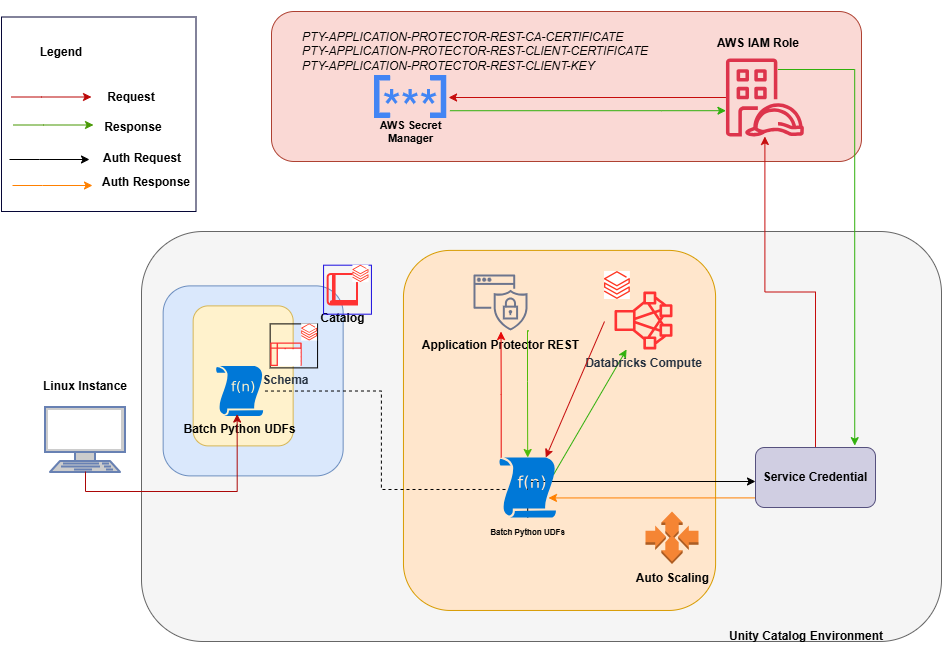
An outline of the steps in the workflow is explained below.
- Download the AWS Databricks build from the customer portal and extract the configurator script.
- Execute the configurator script to retrieve the IP address of the Application Protector REST server.
- Use the IP address to generate the CA, client, and server certificates.
- Store the content of the CA and the client certificates as Secrets in the Secret Manager.
- Create a Databricks Unity Catalog Service Credentials to access the Secrets from the Secret Manager .
- Execute the configurator script to create the Unity Catalog Batch Python UDFs.
- Edit the cluster configuration to include the environment variables and attach the initialization script.
Feedback
Was this page helpful?