For the Cloud Protector Approach
The architecture for installing the AWS Databricks protector using the Cloud Protector approach is depicted in the image below.
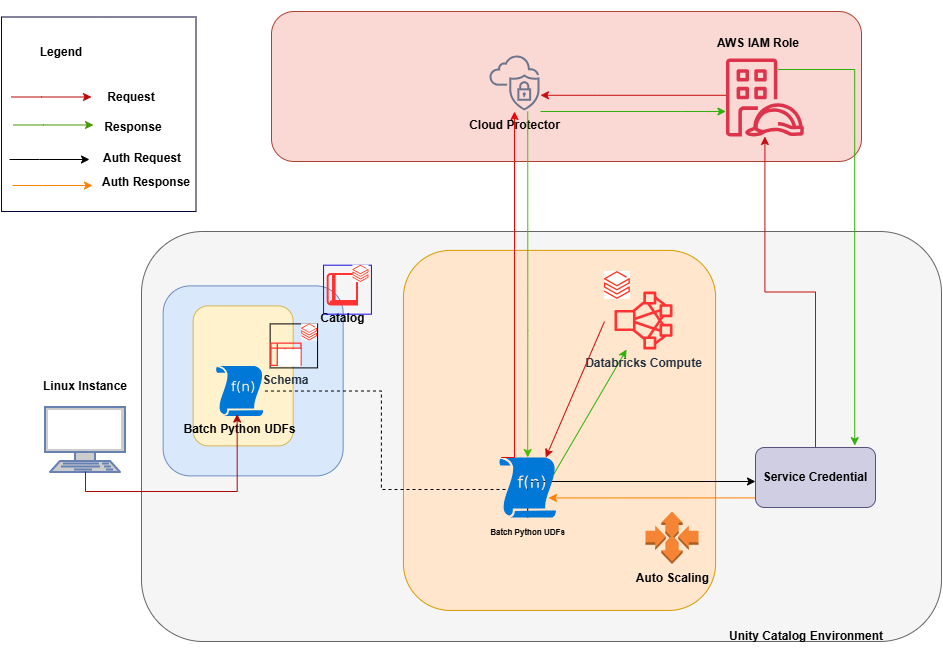
An outline of the steps in the workflow is explained below.
- Install and configure the Cloud Protector.
- Create an AWS Databricks Unity Catalog Service Credential and connect it with the AWS IAM roles.
- Create a Databricks Compute.
- On a Linux staging machine, download and extract the installation package for AWS Databricks from the customer portal, for the Databricks Compute.
- Execute the configurator script to create the Batch Python UDFs at the Unity Catalog level.
- Attach an AWS Databricks Notebook to the Databricks Compute.
- Execute the Unity Catalog Batch Python UDFs to protect and unprotect data.
Feedback
Was this page helpful?