This is the multi-page printable view of this section. Click here to print.
Python Iceberg Protector
- 1: Introduction
- 2: Understanding the Architecture
- 3: Understanding the System Requirements
- 4: Preparing the Environment
- 4.1: For a dynamic policy approach
- 4.1.1: For an On-Prem Environment
- 4.1.2: For a Docker Environment
- 4.1.3: For a Virtual Environment
- 4.2: For a static policy approach
- 4.2.1: For an On-Prem Environment
- 4.2.2: For a Docker Environment
- 4.2.3: For a Virtual Environment
- 5: Installing the Python Iceberg Protector
- 5.1: Using a Static Policy
- 5.1.1: In a Docker Environment
- 5.1.2: In a Virtual Environment
- 5.1.3: In an On-Prem Environment
- 5.2: Using a Dynamic Policy
- 5.2.1: In an On-Prem Environment
- 5.2.2: In a Docker Environment
- 5.2.3: In a Virtual Environment
1 - Introduction
The Python Iceberg Protector enables secure, policy-driven protection of sensitive data processed through Python-native Apache Iceberg workflows. It extends data-centric protection capabilities to Python Iceberg-based pipelines, ensuring that sensitive data remains protected at every stage of the data lifecycle from ingestion and transformation to storage and analytics.
Python Iceberg Protector depends on PyArrow, which is backed by C++, for data operations. It allows applications to read, write, and manage Iceberg tables, while maintaining full compatibility with Iceberg’s table format and metadata model. It operates within a layered Iceberg architecture consisting of catalog, metadata, and storage layers, enabling scalable and ACID-compliant data operations.
The Python Iceberg Protector integrates seamlessly into this architecture by embedding protection directly into Python-based data operations, ensuring that:
- Sensitive data is protected before it is written to Iceberg tables.
- Protection persists at the data layer. For example, within Parquet files.
- Authorized clients can securely access and process protected data without exposing clear-text values unnecessarily.
The protector adopts a data-centric security model, where protection travels with the data regardless of where it is stored or processed. This aligns with modern Lakehouse security principles that enforce fine-grained encryption and policy-based access controls across distributed environments.
Key Capabilities
- Inline Data Protection
- Protects sensitive fields during Python Iceberg write operations.
- Integrates with PyArrow-based data processing pipelines.
- Policy-Driven Enforcement
- Applies protection policies at the column level.
- Enforces role-based decryption and access controls.
- Parquet file format protection
- Works with Iceberg-backed file formats such as Parquet.
- Supports Iceberg-native features such as schema evolution and partitioning.
- Seamless Python Integration.
- Operates within Python Iceberg workflows without requiring changes to Iceberg table definitions.
2 - Understanding the Architecture
The architecture of the Iceberg Protector using Python is depicted in the following diagram:
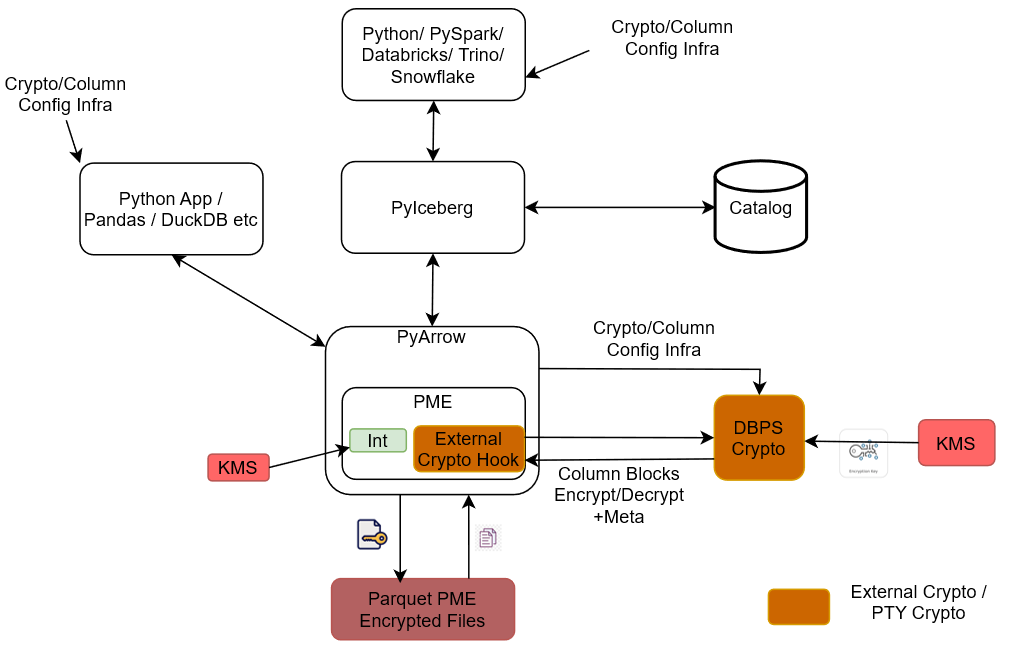
Client Applications Layer: Two entry points access the data.
- Python / PySpark / Databricks / Trino / Snowflake: Query engines and compute frameworks that read/write via Python Iceberg.
- Python App / Pandas / DuckDB, etc.: Lightweight Python-based applications that access data directly through PyArrow.
Python Iceberg: The table-format layer that sits between the query engines and storage. It handles Iceberg table semantics like snapshots, schema, partitions. It also communicates with the Catalog or metadata store to resolve table locations and metadata.
PyArrow: The in-memory columnar data layer used by both Python Iceberg and direct Python apps. It hosts the Parquet Modular Encryption (PME) component, which manages encryption/decryption of Parquet column data in-flight.
Parquet Modular Encryption (PME): Embedded inside PyArrow, it contains:
- Int (Internal crypto): The built-in Parquet encryption path uses a KMS directly for key material.
- External Crypto Hook: A pluggable interface that delegates cryptographic operations to an external provider instead of the internal implementation.
DBPS Crypto (External Crypto / PTY Crypto): The external cryptographic service invoked via the External Crypto Hook. It performs the actual encrypt/decrypt of column blocks plus metadata and retrieves encryption keys from its own KMS.
Crypto / Column Config Infra: A cross-cutting configuration channel that supplies crypto and per-column policy settings to the client apps, PyArrow/PME, and DBPS Crypto, ensuring consistent column-level protection rules across the stack.
Parquet PME Encrypted Files: The physical storage output. Files are written and read as Parquet with PME-encrypted column blocks like data and metadata. This ensures the data remains protected at rest regardless of which client path reads it.
End-to-end flow: The query engines call Python Iceberg → Python Iceberg resolves metadata via the Catalog → data I/O flows through PyArrow → PME intercepts column reads/writes → for external protection, the External Crypto Hook routes column blocks to DBPS Crypto, which uses its KMS → encrypted bytes are written to Parquet PME Encrypted Files. Direct Python apps use the same PyArrow plus PME path, bypassing Python Iceberg/Catalog.
3 - Understanding the System Requirements
Ensure that the following prerequisites are available before installing the Python Iceberg Protector:
- Any of the following supported distributions of the Linux operating system is available:
- CentOS/RHEL 8 or later
- Debian v10 or later
- Fedora v29 or later
- Ubuntu v18.10 or later
- Python version 3.12 is installed on the system. The configurator script requires Python.
- The
pipmodule is installed. - The
unzippackage is installed. - A text editor is installed.
- ESA v10.x is installed, configured, and running.
- The PIM is initialized and a policy is created.
- A user with
sudoprivileges is created. The privileges are required to modify the/etc/hostsfile for the dynamic policy approach. - The logged-in user is the same as the ESA policy user.
- Docker is installed and configured. This is required only for installing the build using a Docker image.
- Virtual environment is available. This is required only for installing the build using a virtual environment.
- Windows Subsystem for Linux is available.
4 - Preparing the Environment
4.1 - For a dynamic policy approach
4.1.1 - For an On-Prem Environment
Setting up the environment
Extract the contents of the installation package to access the configurator script. This script generates the required files to install the Python Iceberg Protector.
To extract the files from the installation package:
- Log in to the Linux machine.
- To create a user account
user1, run the following command:useradd -m -s /bin/bash user1 - To navigate to the
/opt/directory, run the following command:cd /opt/ - To create a folder inside /opt/, run the following command:
mkdir protegrity - To create a separate folder for the Python Iceberg protector within the
/opt/directory, run the following command:mkdir pyiceberg_protector - To change the ownership of the
/opt/protegrity/directory, run the following command:chown -R user1:user1 protegrity/ - To change the ownership of the
pyiceberg_protectordirectory, run the following command:chown -R user1:user1 pyiceberg_protector/
Extracting the package
- To navigate to the
pyiceberg_protectordirectory, run the following command:cd pyiceberg_protector/ - To download the installation package made available by Protegrity, run the following command:
wget <https://artifactory.protegrity.com/artifactory/pyiceberg-protector-generic/Release/<release_version>/<protector_version>/PyIcebergProtector_Linux-ALL-64_<arch_type>_Python-<python_version>_<protector_version>.tgz> - To change the ownership of the installation package, run the following command:
chown -R user1:user1 PyIcebergProtector_Linux-ALL-64_x86-64_Python-3.12-64_<protector_version>.tgz - To switch to the user1 account, run the following command:
su user1 - To extract the files from the installation package, run the following command:
tar -xvf PyIcebergProtector_Linux-ALL-64_x86-64_Python-3.12-64_<protector_version>.tgz - Press ENTER.
The command extracts the signature files from the installation package.PyIcebergProtector_Linux-ALL-64_x86-64_Python-3.12-64_<protector_version>.tgz signatures/ signatures/PyIcebergProtector_Linux-ALL-64_x86-64_Python-3.12-64_<protector_version>.tgz_10.0.sigNote: The package contains a
signatures/folder and an inner archive of the same name. Executing thetar -xvfcommand again on the inner archive extracts the configurator script. - To extract the configurator script from the installation package, run the following command:
tar -xvf PyIcebergProtector_Linux-ALL-64_x86-64_Python-3.12-64_<protector_version>.tgz - Press ENTER.
The command extracts the configurator script from the installation package.PyIcebergProtector-Configurator_Linux-ALL-64_x86-64_Python-3.12-64_<protector_version>.sh
4.1.2 - For a Docker Environment
Setting up the environment
- To execute the container from the latest Ubuntu image, run the following command:
docker run -dit --name pyiceberg-container ubuntu:latest - To login to the Ubuntu container, run the following command:
docker exec -it pyiceberg-container bash - To navigate to the /opt/ directory, run the following command:
cd /opt/ - To create a directory inside the docker container, run the following command:
mkdir protegrity - To add a user, run the following command:
useradd -m -s /bin/bash user1 - To create a separate folder for the Python Iceberg protector within the /opt/ directory, run the following command:
mkdir pyiceberg_protector - To change the ownership of the /opt/protegrity/ directory, run the following command:
chown -R user1:user1 protegrity/ - To change the ownership of the pyiceberg_protector directory, run the following command:
chown -R user1:user1 pyiceberg_protector/ - To verify the permissions, run the following command:
ls -ltrh - Press ENTER.
The list of files and directories with the correct permissions appear:<docker_instance>:/opt# ls -ltrh total 8.0K drwxr-xr-x 2 user1 user1 4.0K Jun 3 11:12 protegrity drwxr-xr-x 2 user1 user1 4.0K Jun 3 11:13 pyiceberg_protector
Extracting the Package
Extract the contents of the installation package to access the configurator script. This script generates the required files to install the Python Iceberg Protector.
- To navigate to the pyiceberg_protector directory, run the following command:
cd pyiceberg_protector/ - To download the installation package made available by Protegrity, run the following command:
wget <https://artifactory.protegrity.com/artifactory/pyiceberg-protector-generic/Release/<release_version>/<protector_version>/PyIcebergProtector_Linux-ALL-64_<arch_type>_Python-<python_version>_<protector_version>.tgz> - To change the ownership of the installation package, run the following command:
chown -R user1:user1 PyIcebergProtector_Linux-ALL-64_x86-64_Python-3.12-64_<protector_version>.tgz - To switch to the user1 account, run the following command:
su user1 - To extract the files from the installation package, run the following command:
tar -xvf PyIcebergProtector_Linux-ALL-64_x86-64_Python-3.12-64_<protector_version>.tgz - Press ENTER.
The command extracts the signature files from the installation package.PyIcebergProtector_Linux-ALL-64_x86-64_Python-3.12-64_<protector_version>.tgz signatures/ signatures/PyIcebergProtector_Linux-ALL-64_x86-64_Python-3.12-64_<protector_version>.tgz_10.0.sigNote: The package contains a
signatures/folder and an inner archive of the same name. Executing thetar -xvfcommand again on the inner archive extracts the configurator script. - To extract the configurator script from the installation package, run the following command:
tar -xvf PyIcebergProtector_Linux-ALL-64_x86-64_Python-3.12-64_<protector_version>.tgz - Press ENTER.
The command extracts the configurator script from the installation package.PyIcebergProtector-Configurator_Linux-ALL-64_x86-64_Python-3.12-64_<protector_version>.sh
4.1.3 - For a Virtual Environment
Setting up the environment
- Log in to the Linux machine.
- To create a folder inside the docker container, run the following command:
mkdir /opt/protegrity - To navigate to the /opt directory, run the following command:
cd /opt - To create a new directory within the /opt/protegrity directory, run the following command:
mkdir pyiceberg_protector - To create a new user, run the following command:
useradd -m -s /bin/bash user1 - To change the ownership of the /opt/protegrity/ directory, run the following command:
chown user1:user1 protegrity - To change the ownership of the pyiceberg_protector directory, run the following command:
chown -R user1:user1 pyiceberg_protector/ - To navigate to the pyiceberg_protector directory, run the following command:
cd pyiceberg_protector/ - To download the installation package made available by Protegrity, run the following command:
wget <https://artifactory.protegrity.com/artifactory/pyiceberg-protector-generic/Release/<release_version>/<protector_version>/PyIcebergProtector_Linux-ALL-64_<arch_type>_Python-<python_version>_<protector_version>.tgz> - To change the ownership of the installation package, run the following command:
chown user1:user1 PyIcebergProtector_Linux-ALL-64_x86-64_Python-3.12-64_<protector_version>.tgz - To switch to the new user, run the following command:
su user1 - To navigate to the protegrity directory, run the following command:
cd /opt/protegrity/ - To create the virtual environment, run the following command:
python3.12 -m venv environment <virtual_environment_name>
Extracting the package
Be sure to execute these commands as user1.
- To navigate to the pyiceberg_protector directory, run the following command:
cd /opt/pyiceberg_protector/ - To extract the files from the installation package, run the following command:
tar -xvf PyIcebergProtector_Linux-ALL-64_x86-64_Python-3.12-64_<protector_version>.tgz - Press ENTER.
The command extracts the signature files from the installation package.PyIcebergProtector_Linux-ALL-64_x86-64_Python-3.12-64_<protector_version>.tgz signatures/ signatures/PyIcebergProtector_Linux-ALL-64_x86-64_Python-3.12-64_<protector_version>.tgz_10.0.sigNote: The package contains a
signatures/folder and an inner archive of the same name. Executing thetar -xvfcommand again on the inner archive extracts the configurator script. - To extract the configurator script from the installation package, run the following command:
tar -xvf PyIcebergProtector_Linux-ALL-64_x86-64_Python-3.12-64_<protector_version>.tgz - Press ENTER.
The command extracts the configurator script from the installation package.PyIcebergProtector-Configurator_Linux-ALL-64_x86-64_Python-3.12-64_<protector_version>.sh
4.2 - For a static policy approach
4.2.1 - For an On-Prem Environment
Setting up the environment
Extract the contents of the installation package to access the configurator script. This script generates the required files to install the Python Iceberg Protector.
To extract the files from the installation package:
- Log in to the Linux machine.
- To create the superuser as static policy only has superuser, run the following command:
useradd -m -s /bin/bash superuser - To switch to /opt/ directory, run the following command:
cd /opt/ - To create a folder inside /opt/, run the following command:
mkdir protegrity - To create a separate folder for the Python Iceberg protector within the /opt/ directory, run the following command:
mkdir pyiceberg_protector - To change the ownership of the /opt/protegrity/ directory, run the following command:
chown -R superuser:superuser protegrity/ - To change the ownership of the pyiceberg_protector directory, run the following command:
chown -R superuser:superuser pyiceberg_protector/
Extracting the package
- To navigate to the pyiceberg_protector directory, run the following command:
cd pyiceberg_protector/ - To download the installation package made available by Protegrity, run the following command:
wget <https://artifactory.protegrity.com/artifactory/pyiceberg-protector-generic/Release/<release_version>/<protector_version>/PyIcebergProtector_Linux-ALL-64_<arch_type>_Python-<python_version>_<protector_version>.tgz> - To change the ownership of the installation package, run the following command:
chown -R superuser:superuser PyIcebergProtector_Linux-ALL-64_x86-64_Python-3.12-64_<protector_version>.tgz - To switch to the superuser account, run the following command:
su superuser - To extract the files from the installation package, run the following command:
tar -xvf PyIcebergProtector_Linux-ALL-64_x86-64_Python-3.12-64_<protector_version>.tgz - Press ENTER.
The command extracts the signature files from the installation package.PyIcebergProtector_Linux-ALL-64_x86-64_Python-3.12-64_<protector_version>.tgz signatures/ signatures/PyIcebergProtector_Linux-ALL-64_x86-64_Python-3.12-64_<protector_version>.tgz_10.0.sigNote: The package contains a
signatures/folder and an inner archive of the same name. Executing thetar -xvfcommand again on the inner archive extracts the configurator script. - To extract the configurator script from the installation package, run the following command:
tar -xvf PyIcebergProtector_Linux-ALL-64_x86-64_Python-3.12-64_<protector_version>.tgz - Press ENTER.
The command extracts the configurator script from the installation package.PyIcebergProtector-Configurator_Linux-ALL-64_x86-64_Python-3.12-64_<protector_version>.sh
4.2.2 - For a Docker Environment
Setting up the environment
- To execute the container from the latest Ubuntu image, run the following command:
docker run -dit --name pyiceberg-container ubuntu:latest - To login to the Ubuntu container, run the following command:
docker exec -it pyiceberg-container bash - To switch to
/opt/directory, run the following command:cd /opt/ - To create a folder inside the docker container, run the following command:
mkdir /opt/protegrity/ - To add a user, run the following command:
useradd -m -s /bin/bash superuser - To create a separate folder for the Python Iceberg protector within the /opt/protegrity/ directory, run the following command:
mkdir pyiceberg_protector - To change the ownership of the
/opt/protegrity/directory, run the following command:chown -R superuser:superuser protegrity/ - To change the ownership of the
pyiceberg_protectordirectory, run the following command:chown -R superuser:superuser pyiceberg_protector/ - To verify the permissions, run the following command:
ls -ltrh - Press ENTER.
The list of files and directories with the correct permissions appear:<docker_instance>:/opt# ls -ltrh total 8.0K drwxr-xr-x 2 superuser superuser 4.0K Jun 3 11:12 protegrity drwxr-xr-x 2 superuser superuser 4.0K Jun 3 11:13 pyiceberg_protector
Extracting the Package
Extract the contents of the installation package to access the configurator script. This script generates the required files to install the Python Iceberg Protector.
- To navigate to the pyiceberg_protector directory, run the following command:
cd pyiceberg_protector/ - To download the installation package made available by Protegrity, run the following command:
wget <https://artifactory.protegrity.com/artifactory/pyiceberg-protector-generic/Release/<release_version>/<protector_version>/PyIcebergProtector_Linux-ALL-64_<arch_type>_Python-<python_version>_<protector_version>.tgz> - To change the ownership of the installation package, run the following command:
chown -R superuser:superuser PyIcebergProtector_Linux-ALL-64_x86-64_Python-3.12-64_<protector_version>.tgz - To switch to the superuser account, run the following command:
su superuser - To extract the files from the installation package, run the following command:
tar -xvf PyIcebergProtector_Linux-ALL-64_x86-64_Python-3.12-64_<protector_version>.tgz - Press ENTER.
The command extracts the signature files from the installation package.PyIcebergProtector_Linux-ALL-64_x86-64_Python-3.12-64_<protector_version>.tgz signatures/ signatures/PyIcebergProtector_Linux-ALL-64_x86-64_Python-3.12-64_<protector_version>.tgz_10.0.sigNote: The package contains a
signatures/folder and an inner archive of the same name. Executing thetar -xvfcommand again on the inner archive extracts the configurator script. - To extract the configurator script from the installation package, run the following command:
tar -xvf PyIcebergProtector_Linux-ALL-64_x86-64_Python-3.12-64_<protector_version>.tgz - Press ENTER.
The command extracts the configurator script from the installation package.PyIcebergProtector-Configurator_Linux-ALL-64_x86-64_Python-3.12-64_<protector_version>.sh
4.2.3 - For a Virtual Environment
Setting up the environment
- Log in to the Linux machine.
- To create a folder on the Linux machine, run the following command:
mkdir /opt/protegrity - To navigate to the /opt directory, run the following command:
cd /opt - To create a new directory within the /opt/ directory, run the following command:
mkdir pyiceberg_protector - To create a new user, run the following command:
useradd -m -s /bin/bash superuser - To change the ownership of the /opt/protegrity/ directory, run the following command:
chown superuser:superuser protegrity - To change the ownership of the pyiceberg_protector directory, run the following command:
chown -R superuser:superuser pyiceberg_protector/ - To navigate to the pyiceberg_protector directory, run the following command:
cd pyiceberg_protector/ - Download the installation package made available by Protegrity.
- To change the ownership of the installation package, run the following command:
chown superuser:superuser PyIcebergProtector_Linux-ALL-64_x86-64_Python-3.12-64_<protector_version>.tgz - To switch to the new user, run the following command:
su superuser - To navigate to the protegrity directory, run the following command:
cd /opt/protegrity/ - To create the virtual environment, run the following command:
python3.12 -m venv <virtual_environment_name>
Extracting the package
Note: Be sure to execute the commands, listed in the section, as
superuser.
- To navigate to the pyiceberg_protector directory, run the following command:
cd /opt/pyiceberg_protector/ - To extract the files from the installation package, run the following command:
tar -xvf PyIcebergProtector_Linux-ALL-64_x86-64_Python-3.12-64_<protector_version>.tgz - Press ENTER.
The command extracts the signature files from the installation package.PyIcebergProtector_Linux-ALL-64_x86-64_Python-3.12-64_<protector_version>.tgz signatures/ signatures/PyIcebergProtector_Linux-ALL-64_x86-64_Python-3.12-64_<protector_version>.tgz_10.0.sigNote: The package contains a
signatures/folder and an inner archive of the same name. Executing thetar -xvfcommand again on the inner archive extracts the configurator script. - To extract the configurator script from the installation package, run the following command:
tar -xvf PyIcebergProtector_Linux-ALL-64_x86-64_Python-3.12-64_<protector_version>.tgz - Press ENTER.
The command extracts the configurator script from the installation package.PyIcebergProtector-Configurator_Linux-ALL-64_x86-64_Python-3.12-64_<protector_version>.sh
5 - Installing the Python Iceberg Protector
The configurator script is used to install the Python Iceberg protector. The script prompts for certain inputs. Based on the inputs, the script:
- Installs and starts the log forwarder.
- Downloads the certificates from ESA.
- Installs and starts the RPAgent.
The script enables installation using two approaches:
5.1 - Using a Static Policy
5.1.1 - In a Docker Environment
Installing the Protector
Be sure to follow the instructions mentioned in the section Preparing the Environment.
To start the container, run the following command:
docker start pyiceberg-containerTo login to the pyiceberg container, run the following command:
docker exec -it pyiceberg-container bashTo switch the user account, run the following command:
su superuserTo navigate to the directory containing the configurator script, run the following command:
cd /opt/pyiceberg_protectorTo execute the configurator script, run the following command:
./PyIcebergProtector-Configurator_Linux-ALL-64_x86-64_Python-3.12-64_<protector_version>.shPress ENTER.
The script lists the prerequisites and the prompt to confirm appears.Prerequisites: 1. Linux system, Virtual Machine, Docker container, WSL, or something similar with: a. x86_64 architecture b. OS >= CentOS/RHEL 8, >= Debian 10, >= Fedora 29, or >= Ubuntu 18.10 c. openssl utility d. unzip utility e. Python 3.12 f. any file editor 2. If you want to use dynamic policy, then make sure that PPC or ESA is accessible and Users, Groups, Roles, Data Elements, Data Stores, Policies, Trusted Applications, etc are created. 3. If you want to use your static policy, then make sure that Users, Groups, Roles, Data Elements, Data Stores, Policies, Trusted Applications, static policy, static policy decryption program, and static policy decryption key (optional) is created. Are these prerequisites met? ("yes" or "no"):To confirm the availability of the prerequisites, type
yes.Press ENTER.
The prompt to specify the installation directory appears.Specify absolute installation directory (default: /opt/protegrity):Enter the location to install the protector.
Press ENTER.
The prompt to specify the ESA policy type appears.Specify ESA policy type (either dynamic or static | default: dynamic):To use a static policy, type
static.Press ENTER.
The prompt to use the default static policy appears.Do you want to use Protegrity's static ESA policy? (either "yes" or "no" | default: "yes"):To use the default policy, type
yes.Press ENTER.
The prompt to specify the Python version appears.Specify Python interpreter (example: python3):Enter the version of Python installed on the system.
Press ENTER.
The script completes the installation. The script also lists the commands to:- Set the variables
- Set the table properties
- Execute the sample script
Installing PyIceberg Protector in /opt/protegrity directory... Installed PyIceberg Protector in /opt/protegrity directory. Export following variables: export LD_LIBRARY_PATH=/opt/protegrity/libs:/opt/protegrity/sdk/c/lib:$LD_LIBRARY_PATH && export PTY_APC_CONFIG=/opt/protegrity/sdk/c/data/config.ini && export PYTHONPATH=/opt/protegrity/pty_pyarrow:/opt/protegrity/pty_pyiceberg:$PYTHONPATH Execute sample client: python3.12 /opt/protegrity/samples/client.py To use External Parquet Modular Encryption (EPME): Simply add encryption properties on the iceberg table properties: For Protegrity (external) encryption: "protegrity.encryption.<column_name>": "EXTERNAL_DBPA_V1", "protegrity.key.<column_name>": "<Data Element Name>" Example: "protegrity.encryption.name": "EXTERNAL_DBPA_V1", "protegrity.key.name": "text" For built-in AES encryption: "encryption.algorithm.<column_name>": "AES_GCM_V1" or "AES_GCM_CTR_V1", "encryption.key.<column_name>": "<Master Key Identifier>", "encryption.footer.key": "<Footer Master Key Identifier>" Example: "encryption.algorithm.real_name": "AES_GCM_V1", "encryption.key.real_name": "real_name-master-key", "encryption.footer.key": "footer-master-key" Execute sample client: python3.12 /opt/protegrity/samples/client.pyTo set the path for the variables, run the following command:
export LD_LIBRARY_PATH=/opt/protegrity/libs:/opt/protegrity/sdk/c/lib:$LD_LIBRARY_PATH && export PTY_APC_CONFIG=/opt/protegrity/sdk/c/data/config.ini && export PYTHONPATH=/opt/protegrity/pty_pyarrow:/opt/protegrity/pty_pyiceberg:$PYTHONPATH
Executing the Sample Script
Note: Be sure to execute the commands, listed in the section, as
superuser.
To set the environment variables, run the following command:
export LD_LIBRARY_PATH=/opt/protegrity/libs:/opt/protegrity/sdk/c/lib:$LD_LIBRARY_PATH && export PTY_APC_CONFIG=/opt/protegrity/sdk/c/data/config.ini && export PYTHONPATH=/opt/protegrity/pty_pyarrow:/opt/protegrity/pty_pyiceberg:$PYTHONPATHTo update the client program and set the table properties, run the following command:
vi /opt/protegrity/samples/client.pyUpdate the table properties as follows:
pyiceberg_table = catalog.create_table( identifier="namespace.table", properties={ "parquet.enable.dictionary": "false", "write.parquet.compression-codec": "zstd", "write.parquet.dict-encoding.enabled": "false" "encrypt_block": "true", "protegrity.encryption.bank-account-number": "EXTERNAL_DBPA_V1", "protegrity.key.bank-account-number": "text", "protegrity.encoding.bank-account-number": "UTF-8" }, schema=pyarrow_table.schema )Where,
parquet.enable.dictionary- Enables or disables the Parquet dictionary encoding for all columns in the written file.write.parquet.compression-codec- Compresses the Parquet column data using the codec for a strong size-vs-speed tradeoff.write.parquet.dict-encoding.enabled- Enables or disables Iceberg’s per-column dictionary encoding when writing Parquet files. This is required for column encryption to work correctly.encrypt_block- Applies the Parquet Modular Encryption (PME) on the configured page when the value is set totrue. Otherwise, the encyrption is applied per row.protegrity.encryption.bank-account-number- Identifies the external crypto profile likeDBPSorEXTERNAL_DBPA_V1used to encrypt or decrypt the target column. Alternatively, internal encryption likeAES_GCM_V1orAES_GCM_CTR_V1can be used.protegrity.key.bank-account-number- Specifies the Protegrity data element whose cryptographic material is used to protect the target column when the external encryption is used. In case of internal encryption, the encryption key is used.protegrity.encoding.bank-account-number- Specifies the character encoding used for the encoded input bytes. The supported encoding types include UTF-8, UTF8, UTF-16LE, UTF16LE, UTF-16BE, and UTF16BE.
To execute the sample client program, run the following command:
python3 /opt/protegrity/samples/client.pyPress ENTER.
The output of the sample program appears.Printing original table... pyarrow.Table bank_account_number: string credit_card_number: string customer_name: string social_security_number: string ---- bank_account_number: [["100284935521","489311027684","773290514438","912046738815"]] credit_card_number: [["2811 9146 9639 4756","8285 9611 4035 3992","8866 0087 1920 1284","9933 9122 2872 5786"]] customer_name: [["Ashley Anderson","Brian Brown","Carol Clark","David Davis"]] social_security_number: [["000-12-3456","000-98-7654","000-55-1212","000-44-8888"]] Printed original table. Writing original table into /opt/protegrity/warehouse/namespace/table/data/*.parquet file... None Written original table into /opt/protegrity/warehouse/namespace/table/data/*.parquet file. Reading /opt/protegrity/warehouse/namespace/table/data/*.parquet file into PyArrow table... /opt/protegrity/pty_pyiceberg/pyiceberg/avro/file.py:175: UserWarning: Falling back to pure Python Avro decoder, missing Cython implementation self.decoder = new_decoder(f.read()) /opt/protegrity/pty_pyiceberg/pyiceberg/avro/file.py:204: UserWarning: Falling back to pure Python Avro decoder, missing Cython implementation self.block = Block(reader=self.reader, block_records=block_records, block_decoder=new_decoder(block_bytes)) pyarrow.Table bank_account_number: string credit_card_number: string customer_name: string social_security_number: string ---- bank_account_number: [["100284935521","489311027684","773290514438","912046738815"]] credit_card_number: [["2811 9146 9639 4756","8285 9611 4035 3992","8866 0087 1920 1284","9933 9122 2872 5786"]] customer_name: [["Ashley Anderson","Brian Brown","Carol Clark","David Davis"]] social_security_number: [["000-12-3456","000-98-7654","000-55-1212","000-44-8888"]] Read /opt/protegrity/warehouse/namespace/table/data/*.parquet file into PyArrow table. Printing snapshots... Operation.APPEND: id=5870174703691215742, schema_id=0 Printed snapshots. Adding "last_transaction" column... Added "last_transaction" column. Printing updated table... pyarrow.Table bank_account_number: string credit_card_number: string customer_name: string last_transaction: float social_security_number: string ---- bank_account_number: [["100284935521","489311027684","773290514438","912046738815"]] credit_card_number: [["2811 9146 9639 4756","8285 9611 4035 3992","8866 0087 1920 1284","9933 9122 2872 5786"]] customer_name: [["Ashley Anderson","Brian Brown","Carol Clark","David Davis"]] last_transaction: [[250.75,1840.5,92.25,5000]] social_security_number: [["000-12-3456","000-98-7654","000-55-1212","000-44-8888"]] Printed updated table. Writing updated table into /opt/protegrity/warehouse/namespace/table/data/*.parquet file... None Written updated table into /opt/protegrity/warehouse/namespace/table/data/*.parquet file. Reading /opt/protegrity/warehouse/namespace/table/data/*.parquet file into PyArrow table... pyarrow.Table bank_account_number: string credit_card_number: string last_transaction: float customer_name: string social_security_number: string ---- bank_account_number: [["100284935521","489311027684","773290514438","912046738815"]] credit_card_number: [["2811 9146 9639 4756","8285 9611 4035 3992","8866 0087 1920 1284","9933 9122 2872 5786"]] last_transaction: [[250.75,1840.5,92.25,5000]] customer_name: [["Ashley Anderson","Brian Brown","Carol Clark","David Davis"]] social_security_number: [["000-12-3456","000-98-7654","000-55-1212","000-44-8888"]] Read /opt/protegrity/warehouse/namespace/table/data/*.parquet file into PyArrow table. Printing snapshots... Operation.APPEND: id=5870174703691215742, schema_id=0 Operation.DELETE: id=2940982637465782181, parent_id=5870174703691215742, schema_id=2 Operation.APPEND: id=4680277589130765230, parent_id=2940982637465782181, schema_id=2 Printed snapshots. Adding "total_transactions" column... Added "total_transactions" column. Printing updated table... pyarrow.Table bank_account_number: string credit_card_number: string customer_name: string last_transaction: float social_security_number: string total_transactions: int64 ---- bank_account_number: [["100284935521","489311027684","773290514438","912046738815"]] credit_card_number: [["2811 9146 9639 4756","8285 9611 4035 3992","8866 0087 1920 1284","9933 9122 2872 5786"]] customer_name: [["Ashley Anderson","Brian Brown","Carol Clark","David Davis"]] last_transaction: [[250.75,1840.5,92.25,5000]] social_security_number: [["000-12-3456","000-98-7654","000-55-1212","000-44-8888"]] total_transactions: [[12,47,3,189]] Printed updated table. Writing updated table into /opt/protegrity/warehouse/namespace/table/data/*.parquet file... None Written updated table into /opt/protegrity/warehouse/namespace/table/data/*.parquet file. Reading /opt/protegrity/warehouse/namespace/table/data/*.parquet file into PyArrow table... pyarrow.Table bank_account_number: string credit_card_number: string last_transaction: float customer_name: string social_security_number: string total_transactions: int64 ---- bank_account_number: [["100284935521","489311027684","773290514438","912046738815"]] credit_card_number: [["2811 9146 9639 4756","8285 9611 4035 3992","8866 0087 1920 1284","9933 9122 2872 5786"]] last_transaction: [[250.75,1840.5,92.25,5000]] customer_name: [["Ashley Anderson","Brian Brown","Carol Clark","David Davis"]] social_security_number: [["000-12-3456","000-98-7654","000-55-1212","000-44-8888"]] total_transactions: [[12,47,3,189]] Read /opt/protegrity/warehouse/namespace/table/data/*.parquet file into PyArrow table. Printing snapshots... Operation.APPEND: id=5870174703691215742, schema_id=0 Operation.DELETE: id=2940982637465782181, parent_id=5870174703691215742, schema_id=2 Operation.APPEND: id=4680277589130765230, parent_id=2940982637465782181, schema_id=2 Operation.DELETE: id=1221333118375237499, parent_id=4680277589130765230, schema_id=3 Operation.APPEND: id=6921156972304738597, parent_id=1221333118375237499, schema_id=3 Printed snapshots. Deleting "last_transaction" column... Deleted "last_transaction" column. Printing updated table... pyarrow.Table bank_account_number: string credit_card_number: string customer_name: string social_security_number: string total_transactions: int64 ---- bank_account_number: [["100284935521","489311027684","773290514438","912046738815"]] credit_card_number: [["2811 9146 9639 4756","8285 9611 4035 3992","8866 0087 1920 1284","9933 9122 2872 5786"]] customer_name: [["Ashley Anderson","Brian Brown","Carol Clark","David Davis"]] social_security_number: [["000-12-3456","000-98-7654","000-55-1212","000-44-8888"]] total_transactions: [[12,47,3,189]] Printed updated table. Writing updated table into /opt/protegrity/warehouse/namespace/table/data/*.parquet file... None Written updated table into /opt/protegrity/warehouse/namespace/table/data/*.parquet file. Reading /opt/protegrity/warehouse/namespace/table/data/*.parquet file into PyArrow table... pyarrow.Table bank_account_number: string credit_card_number: string customer_name: string social_security_number: string total_transactions: int64 ---- bank_account_number: [["100284935521","489311027684","773290514438","912046738815"]] credit_card_number: [["2811 9146 9639 4756","8285 9611 4035 3992","8866 0087 1920 1284","9933 9122 2872 5786"]] customer_name: [["Ashley Anderson","Brian Brown","Carol Clark","David Davis"]] social_security_number: [["000-12-3456","000-98-7654","000-55-1212","000-44-8888"]] total_transactions: [[12,47,3,189]] Read /opt/protegrity/warehouse/namespace/table/data/*.parquet file into PyArrow table. Printing snapshots... Operation.APPEND: id=5870174703691215742, schema_id=0 Operation.DELETE: id=2940982637465782181, parent_id=5870174703691215742, schema_id=2 Operation.APPEND: id=4680277589130765230, parent_id=2940982637465782181, schema_id=2 Operation.DELETE: id=1221333118375237499, parent_id=4680277589130765230, schema_id=3 Operation.APPEND: id=6921156972304738597, parent_id=1221333118375237499, schema_id=3 Operation.DELETE: id=365521407692256407, parent_id=6921156972304738597, schema_id=4 Operation.APPEND: id=4540095448248191384, parent_id=365521407692256407, schema_id=4 Printed snapshots.
5.1.2 - In a Virtual Environment
Installing the Protector
- Be sure to follow the instructions mentioned in the section Preparing the Environment.
- To activate the environment, run the following command:
source /opt/protegrity/<virtual_environment_name>/bin/activate - Navigate to the directory where the installation files are available.
- To execute the configurator script, run the following command:
./PyIcebergProtector-Configurator_Linux-ALL-64_x86-64_Python-3.12-64_<protector_version>.sh - Press ENTER.
The script lists the prerequisites and the prompt to confirm appears.Prerequisites: 1. Linux system, Virtual Machine, Docker container, WSL, or something similar with: a. x86_64 architecture b. OS >= CentOS/RHEL 8, >= Debian 10, >= Fedora 29, or >= Ubuntu 18.10 c. openssl utility d. unzip utility e. Python 3.12 f. any file editor 2. If you want to use dynamic policy, then make sure that PPC or ESA is accessible and Users, Groups, Roles, Data Elements, Data Stores, Policies, Trusted Applications, etc are created. 3. If you want to use your static policy, then make sure that Users, Groups, Roles, Data Elements, Data Stores, Policies, Trusted Applications, static policy, static policy decryption program, and static policy decryption key (optional) is created. Are these prerequisites met? ("yes" or "no"): - To confirm the availability of the prerequisites, type
yes. - Press ENTER.
The prompt to specify the installation directory appears.Specify absolute installation directory (default: /opt/protegrity): - Enter the location to install the protector.
- Press ENTER.
The prompt to specify the ESA policy type appears.Specify ESA policy type (either dynamic or static | default: dynamic): - To use a static policy, type
static. - Press ENTER.
The prompt to use the default static policy appears.Do you want to use Protegrity's static ESA policy? (either "yes" or "no" | default: "yes"): - To use the default policy, type
yes. - Press ENTER.
The prompt to enter the Python version appears.Specify Python interpreter (example: python3): - Enter the version of Python installed on the system.
- Press ENTER.
The script completes the installation. The script also lists the commands to:- Set the variables
- Set the table properties
- Execute the sample script
Installing PyIceberg Protector in /opt/protegrity... Installed PyIceberg Protector in /opt/protegrity. Export following variables: export LD_LIBRARY_PATH=/opt/protegrity/libs:/opt/protegrity/sdk/c/lib:$LD_LIBRARY_PATH && export PTY_APC_CONFIG=/opt/protegrity/sdk/c/data/config.ini && export PYTHONPATH=/opt/protegrity/pty_pyarrow:/opt/protegrity/pty_pyiceberg:$PYTHONPATH Execute sample client: python3 /opt/protegrity/samples/client.py To use External Parquet Modular Encryption (EPME): Simply add encryption properties on the iceberg table properties: For Protegrity (external) encryption: "protegrity.encryption.<column_name>": "EXTERNAL_DBPA_V1", "protegrity.key.<column_name>": "<Data Element Name>" Example: "protegrity.encryption.social_security_number": "EXTERNAL_DBPA_V1", "protegrity.key.social_security_number": "text" For built-in AES encryption: "encryption.algorithm.<column_name>": "AES_GCM_V1" or "AES_GCM_CTR_V1", "encryption.key.<column_name>": "<Master Key Identifier>", "encryption.footer.key": "<Footer Master Key Identifier>" Example: "encryption.algorithm.bank_account_number": "AES_GCM_V1", "encryption.key.bank_account_number": "bank-account-number-master-key", "encryption.footer.key": "footer-master-key" Execute sample client: python3 /opt/protegrity/samples/client.py
Executing the Sample Script
Note: Be sure to execute the commands, listed in the section, as
superuserand that the virtual environment is activated.
To set the environment variables, run the following command:
export LD_LIBRARY_PATH=/opt/protegrity/libs:/opt/protegrity/sdk/c/lib:$LD_LIBRARY_PATH && export PTY_APC_CONFIG=/opt/protegrity/sdk/c/data/config.ini && export PYTHONPATH=/opt/protegrity/pty_pyarrow:/opt/protegrity/pty_pyiceberg:$PYTHONPATHTo update the sample program, run the following command:
vi /opt/protegrity/samples/client.pyUpdate the table properties as follows:
pyiceberg_table = catalog.create_table( identifier="namespace.table", properties={ "parquet.enable.dictionary": "false", "write.parquet.compression-codec": "zstd", "write.parquet.dict-encoding.enabled": "false" "encrypt_block": "true", "protegrity.encryption.bank-account-number": "EXTERNAL_DBPA_V1", "protegrity.key.bank-account-number": "text", "protegrity.encoding.bank-account-number": "UTF-8" }, schema=pyarrow_table.schema )Where,
parquet.enable.dictionary- Enables or disables the Parquet dictionary encoding for all columns in the written file.write.parquet.compression-codec- Compresses the Parquet column data using the codec for a strong size-vs-speed tradeoff.write.parquet.dict-encoding.enabled- Enables or disables Iceberg’s per-column dictionary encoding when writing Parquet files. This is required for column encryption to work correctly.encrypt_block- Applies the Parquet Modular Encryption (PME) on the configured page when the value is set totrue. Otherwise, the encyrption is applied per row.protegrity.encryption.bank-account-number- Identifies the external crypto profile likeDBPSorEXTERNAL_DBPA_V1used to encrypt or decrypt the target column. Alternatively, internal encryption likeAES_GCM_V1orAES_GCM_CTR_V1can be used.protegrity.key.bank-account-number- Specifies the Protegrity data element whose cryptographic material is used to protect the target column when the external encryption is used. In case of internal encryption, the encryption key is used.protegrity.encoding.bank-account-number- Specifies the character encoding used for the encoded input bytes. The supported encoding types include UTF-8, UTF8, UTF-16LE, UTF16LE, UTF-16BE, and UTF16BE.
To execute the sample script, run the following command:
python3 /opt/protegrity/samples/client.pyPress ENTER.
The output of the sample program appears.Printing original table... pyarrow.Table bank_account_number: string credit_card_number: string customer_name: string social_security_number: string ---- bank_account_number: [["100284935521","489311027684","773290514438","912046738815"]] credit_card_number: [["2811 9146 9639 4756","8285 9611 4035 3992","8866 0087 1920 1284","9933 9122 2872 5786"]] customer_name: [["Ashley Anderson","Brian Brown","Carol Clark","David Davis"]] social_security_number: [["000-12-3456","000-98-7654","000-55-1212","000-44-8888"]] Printed original table. Writing original table into /opt/protegrity/warehouse/namespace/table/data/*.parquet file... None Written original table into /opt/protegrity/warehouse/namespace/table/data/*.parquet file. Reading /opt/protegrity/warehouse/namespace/table/data/*.parquet file into PyArrow table... /opt/protegrity/pty_pyiceberg/pyiceberg/avro/file.py:175: UserWarning: Falling back to pure Python Avro decoder, missing Cython implementation self.decoder = new_decoder(f.read()) /opt/protegrity/pty_pyiceberg/pyiceberg/avro/file.py:204: UserWarning: Falling back to pure Python Avro decoder, missing Cython implementation self.block = Block(reader=self.reader, block_records=block_records, block_decoder=new_decoder(block_bytes)) pyarrow.Table bank_account_number: string credit_card_number: string customer_name: string social_security_number: string ---- bank_account_number: [["100284935521","489311027684","773290514438","912046738815"]] credit_card_number: [["2811 9146 9639 4756","8285 9611 4035 3992","8866 0087 1920 1284","9933 9122 2872 5786"]] customer_name: [["Ashley Anderson","Brian Brown","Carol Clark","David Davis"]] social_security_number: [["000-12-3456","000-98-7654","000-55-1212","000-44-8888"]] Read /opt/protegrity/warehouse/namespace/table/data/*.parquet file into PyArrow table. Printing snapshots... Operation.APPEND: id=5870174703691215742, schema_id=0 Printed snapshots. Adding "last_transaction" column... Added "last_transaction" column. Printing updated table... pyarrow.Table bank_account_number: string credit_card_number: string customer_name: string last_transaction: float social_security_number: string ---- bank_account_number: [["100284935521","489311027684","773290514438","912046738815"]] credit_card_number: [["2811 9146 9639 4756","8285 9611 4035 3992","8866 0087 1920 1284","9933 9122 2872 5786"]] customer_name: [["Ashley Anderson","Brian Brown","Carol Clark","David Davis"]] last_transaction: [[250.75,1840.5,92.25,5000]] social_security_number: [["000-12-3456","000-98-7654","000-55-1212","000-44-8888"]] Printed updated table. Writing updated table into /opt/protegrity/warehouse/namespace/table/data/*.parquet file... None Written updated table into /opt/protegrity/warehouse/namespace/table/data/*.parquet file. Reading /opt/protegrity/warehouse/namespace/table/data/*.parquet file into PyArrow table... pyarrow.Table bank_account_number: string credit_card_number: string last_transaction: float customer_name: string social_security_number: string ---- bank_account_number: [["100284935521","489311027684","773290514438","912046738815"]] credit_card_number: [["2811 9146 9639 4756","8285 9611 4035 3992","8866 0087 1920 1284","9933 9122 2872 5786"]] last_transaction: [[250.75,1840.5,92.25,5000]] customer_name: [["Ashley Anderson","Brian Brown","Carol Clark","David Davis"]] social_security_number: [["000-12-3456","000-98-7654","000-55-1212","000-44-8888"]] Read /opt/protegrity/warehouse/namespace/table/data/*.parquet file into PyArrow table. Printing snapshots... Operation.APPEND: id=5870174703691215742, schema_id=0 Operation.DELETE: id=2940982637465782181, parent_id=5870174703691215742, schema_id=2 Operation.APPEND: id=4680277589130765230, parent_id=2940982637465782181, schema_id=2 Printed snapshots. Adding "total_transactions" column... Added "total_transactions" column. Printing updated table... pyarrow.Table bank_account_number: string credit_card_number: string customer_name: string last_transaction: float social_security_number: string total_transactions: int64 ---- bank_account_number: [["100284935521","489311027684","773290514438","912046738815"]] credit_card_number: [["2811 9146 9639 4756","8285 9611 4035 3992","8866 0087 1920 1284","9933 9122 2872 5786"]] customer_name: [["Ashley Anderson","Brian Brown","Carol Clark","David Davis"]] last_transaction: [[250.75,1840.5,92.25,5000]] social_security_number: [["000-12-3456","000-98-7654","000-55-1212","000-44-8888"]] total_transactions: [[12,47,3,189]] Printed updated table. Writing updated table into /opt/protegrity/warehouse/namespace/table/data/*.parquet file... None Written updated table into /opt/protegrity/warehouse/namespace/table/data/*.parquet file. Reading /opt/protegrity/warehouse/namespace/table/data/*.parquet file into PyArrow table... pyarrow.Table bank_account_number: string credit_card_number: string last_transaction: float customer_name: string social_security_number: string total_transactions: int64 ---- bank_account_number: [["100284935521","489311027684","773290514438","912046738815"]] credit_card_number: [["2811 9146 9639 4756","8285 9611 4035 3992","8866 0087 1920 1284","9933 9122 2872 5786"]] last_transaction: [[250.75,1840.5,92.25,5000]] customer_name: [["Ashley Anderson","Brian Brown","Carol Clark","David Davis"]] social_security_number: [["000-12-3456","000-98-7654","000-55-1212","000-44-8888"]] total_transactions: [[12,47,3,189]] Read /opt/protegrity/warehouse/namespace/table/data/*.parquet file into PyArrow table. Printing snapshots... Operation.APPEND: id=5870174703691215742, schema_id=0 Operation.DELETE: id=2940982637465782181, parent_id=5870174703691215742, schema_id=2 Operation.APPEND: id=4680277589130765230, parent_id=2940982637465782181, schema_id=2 Operation.DELETE: id=1221333118375237499, parent_id=4680277589130765230, schema_id=3 Operation.APPEND: id=6921156972304738597, parent_id=1221333118375237499, schema_id=3 Printed snapshots. Deleting "last_transaction" column... Deleted "last_transaction" column. Printing updated table... pyarrow.Table bank_account_number: string credit_card_number: string customer_name: string social_security_number: string total_transactions: int64 ---- bank_account_number: [["100284935521","489311027684","773290514438","912046738815"]] credit_card_number: [["2811 9146 9639 4756","8285 9611 4035 3992","8866 0087 1920 1284","9933 9122 2872 5786"]] customer_name: [["Ashley Anderson","Brian Brown","Carol Clark","David Davis"]] social_security_number: [["000-12-3456","000-98-7654","000-55-1212","000-44-8888"]] total_transactions: [[12,47,3,189]] Printed updated table. Writing updated table into /opt/protegrity/warehouse/namespace/table/data/*.parquet file... None Written updated table into /opt/protegrity/warehouse/namespace/table/data/*.parquet file. Reading /opt/protegrity/warehouse/namespace/table/data/*.parquet file into PyArrow table... pyarrow.Table bank_account_number: string credit_card_number: string customer_name: string social_security_number: string total_transactions: int64 ---- bank_account_number: [["100284935521","489311027684","773290514438","912046738815"]] credit_card_number: [["2811 9146 9639 4756","8285 9611 4035 3992","8866 0087 1920 1284","9933 9122 2872 5786"]] customer_name: [["Ashley Anderson","Brian Brown","Carol Clark","David Davis"]] social_security_number: [["000-12-3456","000-98-7654","000-55-1212","000-44-8888"]] total_transactions: [[12,47,3,189]] Read /opt/protegrity/warehouse/namespace/table/data/*.parquet file into PyArrow table. Printing snapshots... Operation.APPEND: id=5870174703691215742, schema_id=0 Operation.DELETE: id=2940982637465782181, parent_id=5870174703691215742, schema_id=2 Operation.APPEND: id=4680277589130765230, parent_id=2940982637465782181, schema_id=2 Operation.DELETE: id=1221333118375237499, parent_id=4680277589130765230, schema_id=3 Operation.APPEND: id=6921156972304738597, parent_id=1221333118375237499, schema_id=3 Operation.DELETE: id=365521407692256407, parent_id=6921156972304738597, schema_id=4 Operation.APPEND: id=4540095448248191384, parent_id=365521407692256407, schema_id=4 Printed snapshots.
5.1.3 - In an On-Prem Environment
Installing the Protector
- Be sure to follow the instructions mentioned in the section Preparing the Environment.
- Log in to the instance having connectivity to ESA.
- To switch the user account, run the following command:
su superuser - To navigate to the directory containing the configurator script, run the following command:
cd /opt/pyiceberg_protector - To execute the configurator script, run the following command:
./PyIcebergProtector-Configurator_Linux-ALL-64_x86-64_Python-3.12-64_<protector_version>.sh - Press ENTER.
The script lists the prerequisites and the prompt to confirm appears.Prerequisites: 1. Linux system, Virtual Machine, Docker container, WSL, or something similar with: a. x86_64 architecture b. OS >= CentOS/RHEL 8, >= Debian 10, >= Fedora 29, or >= Ubuntu 18.10 c. openssl utility d. unzip utility e. Python 3.12 f. any file editor 2. If you want to use dynamic policy, then make sure that PPC or ESA is accessible and Users, Groups, Roles, Data Elements, Data Stores, Policies, Trusted Applications, etc are created. 3. If you want to use your static policy, then make sure that Users, Groups, Roles, Data Elements, Data Stores, Policies, Trusted Applications, static policy, static policy decryption program, and static policy decryption key (optional) is created. Are these prerequisites met? ("yes" or "no"): - To confirm the availability of the prerequisites, type
yes. - Press ENTER.
The prompt to specify the installation directory appears.Specify absolute installation directory (default: /opt/protegrity): - Enter the location to install the protector.
- Press ENTER.
The prompt to specify the ESA policy type appears.Specify ESA policy's type (either "dynamic" or "static" | default: "dynamic"): - To use a static policy, type
static. - Press ENTER.
The prompt to use the default policy appears.Do you want to use Protegrity's static ESA policy? (either "yes" or "no" | default: "yes"): - To use the default static policy, type
yes. - Press ENTER.
The prompt to specify the Python version appears.Specify Python interpreter (example: python3): - Enter the version of Python installed on the system.
- Press ENTER.
The script completes the installation. The script also lists the commands to:- Set the variables
- Set the table properties
- Execute the sample script
Installing PyIceberg Protector in /opt/protegrity... Installed PyIceberg Protector in /opt/protegrity. Export following variables: export LD_LIBRARY_PATH=/opt/protegrity/libs:/opt/protegrity/sdk/c/lib:$LD_LIBRARY_PATH && export PTY_APC_CONFIG=/opt/protegrity/sdk/c/data/config.ini && export PYTHONPATH=/opt/protegrity/pty_pyarrow:/opt/protegrity/pty_pyiceberg:$PYTHONPATH Execute sample client: python3 /opt/protegrity/samples/client.py To use External Parquet Modular Encryption (EPME): Simply add encryption properties on the iceberg table properties: For Protegrity (external) encryption: "protegrity.encryption.<column_name>": "EXTERNAL_DBPA_V1", "protegrity.key.<column_name>": "<Data Element Name>" Example: "protegrity.encryption.social_security_number": "EXTERNAL_DBPA_V1", "protegrity.key.social_security_number": "text" For built-in AES encryption: "encryption.algorithm.<column_name>": "AES_GCM_V1" or "AES_GCM_CTR_V1", "encryption.key.<column_name>": "<Master Key Identifier>", "encryption.footer.key": "<Footer Master Key Identifier>" Example: "encryption.algorithm.bank_account_number": "AES_GCM_V1", "encryption.key.bank_account_number": "bank-account-number-master-key", "encryption.footer.key": "footer-master-key" Execute sample client: python3 /opt/protegrity/samples/client.py
Executing the Sample Script
Note: Be sure to execute the commands, listed in the section, as
superuser.
To set the environment variable specified during installation, run the following command:
export LD_LIBRARY_PATH=/opt/protegrity/libs:/opt/protegrity/sdk/c/lib:$LD_LIBRARY_PATH && export PTY_APC_CONFIG=/opt/protegrity/sdk/c/data/config.ini && export PYTHONPATH=/opt/protegrity/pty_pyarrow:/opt/protegrity/pty_pyiceberg:$PYTHONPATHTo edit the sample the program, run the following command:
vi /opt/protegrity/samples/client.pyUpdate table properties as follows:
pyiceberg_table = catalog.create_table( identifier="namespace.table", properties={ "parquet.enable.dictionary": "false", "write.parquet.compression-codec": "zstd", "write.parquet.dict-encoding.enabled": "false" "encrypt_block": "true", "protegrity.encryption.bank-account-number": "EXTERNAL_DBPA_V1", "protegrity.key.bank-account-number": "text", "protegrity.encoding.bank-account-number": "UTF-8" }, schema=pyarrow_table.schema )Where,
parquet.enable.dictionary- Enables or disables the Parquet dictionary encoding for all columns in the written file.write.parquet.compression-codec- Compresses the Parquet column data using the codec for a strong size-vs-speed tradeoff.write.parquet.dict-encoding.enabled- Enables or disables Iceberg’s per-column dictionary encoding when writing Parquet files. This is required for column encryption to work correctly.encrypt_block- Applies the Parquet Modular Encryption (PME) on the configured page when the value is set totrue. Otherwise, the encyrption is applied per row.protegrity.encryption.bank-account-number- Identifies the external crypto profile likeDBPSorEXTERNAL_DBPA_V1used to encrypt or decrypt the target column. Alternatively, internal encryption likeAES_GCM_V1orAES_GCM_CTR_V1can be used.protegrity.key.bank-account-number- Specifies the Protegrity data element whose cryptographic material is used to protect the target column when the external encryption is used. In case of internal encryption, the encryption key is used.protegrity.encoding.bank-account-number- Specifies the character encoding used for the encoded input bytes. The supported encoding types include UTF-8, UTF8, UTF-16LE, UTF16LE, UTF-16BE, and UTF16BE.
To execute the sample script, run the following command:
python3 /opt/protegrity/samples/client.pyPress ENTER.
The output of the sample program appears.Printing original table... pyarrow.Table bank_account_number: string credit_card_number: string customer_name: string social_security_number: string ---- bank_account_number: [["100284935521","489311027684","773290514438","912046738815"]] credit_card_number: [["2811 9146 9639 4756","8285 9611 4035 3992","8866 0087 1920 1284","9933 9122 2872 5786"]] customer_name: [["Ashley Anderson","Brian Brown","Carol Clark","David Davis"]] social_security_number: [["000-12-3456","000-98-7654","000-55-1212","000-44-8888"]] Printed original table. Writing original table into /opt/protegrity/warehouse/namespace/table/data/*.parquet file... None Written original table into /opt/protegrity/warehouse/namespace/table/data/*.parquet file. Reading /opt/protegrity/warehouse/namespace/table/data/*.parquet file into PyArrow table... /opt/protegrity/pty_pyiceberg/pyiceberg/avro/file.py:175: UserWarning: Falling back to pure Python Avro decoder, missing Cython implementation self.decoder = new_decoder(f.read()) /opt/protegrity/pty_pyiceberg/pyiceberg/avro/file.py:204: UserWarning: Falling back to pure Python Avro decoder, missing Cython implementation self.block = Block(reader=self.reader, block_records=block_records, block_decoder=new_decoder(block_bytes)) pyarrow.Table bank_account_number: string credit_card_number: string customer_name: string social_security_number: string ---- bank_account_number: [["100284935521","489311027684","773290514438","912046738815"]] credit_card_number: [["2811 9146 9639 4756","8285 9611 4035 3992","8866 0087 1920 1284","9933 9122 2872 5786"]] customer_name: [["Ashley Anderson","Brian Brown","Carol Clark","David Davis"]] social_security_number: [["000-12-3456","000-98-7654","000-55-1212","000-44-8888"]] Read /opt/protegrity/warehouse/namespace/table/data/*.parquet file into PyArrow table. Printing snapshots... Operation.APPEND: id=5870174703691215742, schema_id=0 Printed snapshots. Adding "last_transaction" column... Added "last_transaction" column. Printing updated table... pyarrow.Table bank_account_number: string credit_card_number: string customer_name: string last_transaction: float social_security_number: string ---- bank_account_number: [["100284935521","489311027684","773290514438","912046738815"]] credit_card_number: [["2811 9146 9639 4756","8285 9611 4035 3992","8866 0087 1920 1284","9933 9122 2872 5786"]] customer_name: [["Ashley Anderson","Brian Brown","Carol Clark","David Davis"]] last_transaction: [[250.75,1840.5,92.25,5000]] social_security_number: [["000-12-3456","000-98-7654","000-55-1212","000-44-8888"]] Printed updated table. Writing updated table into /opt/protegrity/warehouse/namespace/table/data/*.parquet file... None Written updated table into /opt/protegrity/warehouse/namespace/table/data/*.parquet file. Reading /opt/protegrity/warehouse/namespace/table/data/*.parquet file into PyArrow table... pyarrow.Table bank_account_number: string credit_card_number: string last_transaction: float customer_name: string social_security_number: string ---- bank_account_number: [["100284935521","489311027684","773290514438","912046738815"]] credit_card_number: [["2811 9146 9639 4756","8285 9611 4035 3992","8866 0087 1920 1284","9933 9122 2872 5786"]] last_transaction: [[250.75,1840.5,92.25,5000]] customer_name: [["Ashley Anderson","Brian Brown","Carol Clark","David Davis"]] social_security_number: [["000-12-3456","000-98-7654","000-55-1212","000-44-8888"]] Read /opt/protegrity/warehouse/namespace/table/data/*.parquet file into PyArrow table. Printing snapshots... Operation.APPEND: id=5870174703691215742, schema_id=0 Operation.DELETE: id=2940982637465782181, parent_id=5870174703691215742, schema_id=2 Operation.APPEND: id=4680277589130765230, parent_id=2940982637465782181, schema_id=2 Printed snapshots. Adding "total_transactions" column... Added "total_transactions" column. Printing updated table... pyarrow.Table bank_account_number: string credit_card_number: string customer_name: string last_transaction: float social_security_number: string total_transactions: int64 ---- bank_account_number: [["100284935521","489311027684","773290514438","912046738815"]] credit_card_number: [["2811 9146 9639 4756","8285 9611 4035 3992","8866 0087 1920 1284","9933 9122 2872 5786"]] customer_name: [["Ashley Anderson","Brian Brown","Carol Clark","David Davis"]] last_transaction: [[250.75,1840.5,92.25,5000]] social_security_number: [["000-12-3456","000-98-7654","000-55-1212","000-44-8888"]] total_transactions: [[12,47,3,189]] Printed updated table. Writing updated table into /opt/protegrity/warehouse/namespace/table/data/*.parquet file... None Written updated table into /opt/protegrity/warehouse/namespace/table/data/*.parquet file. Reading /opt/protegrity/warehouse/namespace/table/data/*.parquet file into PyArrow table... pyarrow.Table bank_account_number: string credit_card_number: string last_transaction: float customer_name: string social_security_number: string total_transactions: int64 ---- bank_account_number: [["100284935521","489311027684","773290514438","912046738815"]] credit_card_number: [["2811 9146 9639 4756","8285 9611 4035 3992","8866 0087 1920 1284","9933 9122 2872 5786"]] last_transaction: [[250.75,1840.5,92.25,5000]] customer_name: [["Ashley Anderson","Brian Brown","Carol Clark","David Davis"]] social_security_number: [["000-12-3456","000-98-7654","000-55-1212","000-44-8888"]] total_transactions: [[12,47,3,189]] Read /opt/protegrity/warehouse/namespace/table/data/*.parquet file into PyArrow table. Printing snapshots... Operation.APPEND: id=5870174703691215742, schema_id=0 Operation.DELETE: id=2940982637465782181, parent_id=5870174703691215742, schema_id=2 Operation.APPEND: id=4680277589130765230, parent_id=2940982637465782181, schema_id=2 Operation.DELETE: id=1221333118375237499, parent_id=4680277589130765230, schema_id=3 Operation.APPEND: id=6921156972304738597, parent_id=1221333118375237499, schema_id=3 Printed snapshots. Deleting "last_transaction" column... Deleted "last_transaction" column. Printing updated table... pyarrow.Table bank_account_number: string credit_card_number: string customer_name: string social_security_number: string total_transactions: int64 ---- bank_account_number: [["100284935521","489311027684","773290514438","912046738815"]] credit_card_number: [["2811 9146 9639 4756","8285 9611 4035 3992","8866 0087 1920 1284","9933 9122 2872 5786"]] customer_name: [["Ashley Anderson","Brian Brown","Carol Clark","David Davis"]] social_security_number: [["000-12-3456","000-98-7654","000-55-1212","000-44-8888"]] total_transactions: [[12,47,3,189]] Printed updated table. Writing updated table into /opt/protegrity/warehouse/namespace/table/data/*.parquet file... None Written updated table into /opt/protegrity/warehouse/namespace/table/data/*.parquet file. Reading /opt/protegrity/warehouse/namespace/table/data/*.parquet file into PyArrow table... pyarrow.Table bank_account_number: string credit_card_number: string customer_name: string social_security_number: string total_transactions: int64 ---- bank_account_number: [["100284935521","489311027684","773290514438","912046738815"]] credit_card_number: [["2811 9146 9639 4756","8285 9611 4035 3992","8866 0087 1920 1284","9933 9122 2872 5786"]] customer_name: [["Ashley Anderson","Brian Brown","Carol Clark","David Davis"]] social_security_number: [["000-12-3456","000-98-7654","000-55-1212","000-44-8888"]] total_transactions: [[12,47,3,189]] Read /opt/protegrity/warehouse/namespace/table/data/*.parquet file into PyArrow table. Printing snapshots... Operation.APPEND: id=5870174703691215742, schema_id=0 Operation.DELETE: id=2940982637465782181, parent_id=5870174703691215742, schema_id=2 Operation.APPEND: id=4680277589130765230, parent_id=2940982637465782181, schema_id=2 Operation.DELETE: id=1221333118375237499, parent_id=4680277589130765230, schema_id=3 Operation.APPEND: id=6921156972304738597, parent_id=1221333118375237499, schema_id=3 Operation.DELETE: id=365521407692256407, parent_id=6921156972304738597, schema_id=4 Operation.APPEND: id=4540095448248191384, parent_id=365521407692256407, schema_id=4 Printed snapshots.
5.2 - Using a Dynamic Policy
5.2.1 - In an On-Prem Environment
Installing the Protector
- Be sure to follow the instructions mentioned in the section Preparing the Environment.
- Log in to the instance having connectivity to ESA.
- To switch the user account, run the following command:
su user1 - To navigate to the directory containing the configurator script, run the following command:
cd /opt/pyiceberg_protector - To execute the configurator script, run the following command:
./PyIcebergProtector-Configurator_Linux-ALL-64_x86-64_Python-3.12-64_<protector_version>.sh - Press ENTER.
The script lists the prerequisites and the prompt to confirm appears.Prerequisites: 1. Linux system, Virtual Machine, Docker container, WSL, or something similar with: a. x86_64 architecture b. OS >= CentOS/RHEL 8, >= Debian 10, >= Fedora 29, or >= Ubuntu 18.10 c. openssl utility d. unzip utility e. Python 3.12 f. any file editor 2. If you want to use dynamic policy, then make sure that PPC or ESA is accessible and Users, Groups, Roles, Data Elements, Data Stores, Policies, Trusted Applications, etc are created. 3. If you want to use your static policy, then make sure that Users, Groups, Roles, Data Elements, Data Stores, Policies, Trusted Applications, static policy, static policy decryption program, and static policy decryption key (optional) is created. Are these prerequisites met? ("yes" or "no"): - To confirm the availability of the prerequisites, type
yes. - Press ENTER.
The prompt to specify the installation directory appears.Specify absolute installation directory (default: /opt/protegrity): - Enter the location to install the protector.
- Press ENTER.
The prompt to specify the ESA policy type appears.Specify ESA policy type (either dynamic or static | default: dynamic): - To use a dynamic policy, type
dynamic. - Press ENTER.
The prompt to specify ESA IP appears.Specify ESA IP: - Enter ESA IP or hostname.
- Press ENTER.
The prompt to specify the ESA port appears.Specify ESA port (default: 8443): - Enter the ESA port.
- Press ENTER.
The prompt to specify ESA administrator username appears.Specify ESA administrator username: - Enter the ESA administrator’s username.
- Press ENTER.
The prompt to specify ESA administrator password appears.Specify ESA administrator password: - Enter the ESA administrator’s password.
- Press ENTER.
The prompt to specify Logforwarder’s endpoint appears.Specify Logforwarder endpoint (default: <IP_Address>:9200): - Enter the Logforwarder’s endpoint.
- Press ENTER.
The prompt to specify the python version appears.Specify Python interpreter (example: python3): - Enter the Python version installed on the system.
- Press ENTER.
The script completes the installation. The script also lists the commands to:- Set the variables
- Set the table properties
- Execute the sample script
Installing PyIceberg Protector in /opt/protegrity... Unpacking... Extracting files... Protegrity Log Forwarder installed in /opt/protegrity/logforwarder. Fluent Bit v4.2.2-1.5.1+0.gdfa6.fb-4.2 * Copyright (C) 2015-2025 The Fluent Bit Authors * Fluent Bit is a CNCF graduated project under the Fluent organization * https://fluentbit.io ______ _ _ ______ _ _ ___ _____ | ___| | | | | ___ (_) | / | / __ \ | |_ | |_ _ ___ _ __ | |_ | |_/ /_| |_ __ __/ /| | `' / /' | _| | | | | |/ _ \ '_ \| __| | ___ \ | __| \ \ / / /_| | / / | | | | |_| | __/ | | | |_ | |_/ / | |_ \ V /\___ |_./ /___ \_| |_|\__,_|\___|_| |_|\__| \____/|_|\__| \_/ |_(_)_____/ Fluent Bit v4.2 Direct Routes Ahead Celebrating 10 Years of Open, Fluent Innovation! [2026/07/09 09:10:34.592850870] [ info] switching to background mode (PID=1819) Log Forwarder started, PID (1819) written to PID file /opt/protegrity/logforwarder/bin/fluent-bit.pid Unpacking... Extracting files... Certificate validation successful. Obtaining token from <ESA_hostname>:8443... Downloading certificates from <ESA_hostname>:8443... % Total % Received % Xferd Average Speed Time Time Time Current Dload Upload Total Spent Left Speed 100 11264 100 11264 0 0 170.8k 0 0 Extracting certificates... tar: CA.pem: time stamp 2026-07-09 09:10:45 is 0.602749615 s in the future tar: cert.pem: time stamp 2026-07-09 09:10:45 is 0.602342073 s in the future tar: cert.key: time stamp 2026-07-09 09:10:45 is 0.601361212 s in the future tar: secret.txt: time stamp 2026-07-09 09:10:45 is 0.601210703 s in the future Certificates successfully downloaded and stored in /opt/protegrity/rpagent/data Protegrity RPAgent installed in /opt/protegrity/rpagent. Starting rpagent Installed PyIceberg Protector in /opt/protegrity. Export following variables: export LD_LIBRARY_PATH=/opt/protegrity/libs:/opt/protegrity/sdk/c/lib:$LD_LIBRARY_PATH && export PTY_APC_CONFIG=/opt/protegrity/sdk/c/data/config.ini && export PYTHONPATH=/opt/protegrity/pty_pyarrow:/opt/protegrity/pty_pyiceberg:$PYTHONPATH Execute sample client: python3 /opt/protegrity/samples/client.py To use External Parquet Modular Encryption (EPME): Simply add encryption properties on the iceberg table properties: For Protegrity (external) encryption: "protegrity.encryption.<column_name>": "EXTERNAL_DBPA_V1", "protegrity.key.<column_name>": "<Data Element Name>" Example: "protegrity.encryption.social_security_number": "EXTERNAL_DBPA_V1", "protegrity.key.social_security_number": "text" For built-in AES encryption: "encryption.algorithm.<column_name>": "AES_GCM_V1" or "AES_GCM_CTR_V1", "encryption.key.<column_name>": "<Master Key Identifier>", "encryption.footer.key": "<Footer Master Key Identifier>" Example: "encryption.algorithm.bank_account_number": "AES_GCM_V1", "encryption.key.bank_account_number": "bank-account-number-master-key", "encryption.footer.key": "footer-master-key" Execute sample client: python3 /opt/protegrity/samples/client.py
Executing the Sample Script
Note: Be sure to execute the steps, listed in the section, as
user1.
To set the environment variables, run the following command:
export LD_LIBRARY_PATH=/opt/protegrity/libs:/opt/protegrity/sdk/c/lib:$LD_LIBRARY_PATH && export PTY_APC_CONFIG=/opt/protegrity/sdk/c/data/config.ini && export PYTHONPATH=/opt/protegrity/pty_pyarrow:/opt/protegrity/pty_pyiceberg:$PYTHONPATHTo update the sample program, run the following command:
vi /opt/protegrity/samples/client.pyUpdate the table properties as follows:
pyiceberg_table = catalog.create_table( identifier="namespace.table", properties={ "parquet.enable.dictionary": "false", "write.parquet.compression-codec": "zstd", "write.parquet.dict-encoding.enabled": "false" "encrypt_block": "true", "protegrity.encryption.bank-account-number": "EXTERNAL_DBPA_V1", "protegrity.key.bank-account-number": "text", "protegrity.encoding.bank-account-number": "UTF-8" }, schema=pyarrow_table.schema )Where,
parquet.enable.dictionary- Enables or disables the Parquet dictionary encoding for all columns in the written file.write.parquet.compression-codec- Compresses the Parquet column data using the codec for a strong size-vs-speed tradeoff.write.parquet.dict-encoding.enabled- Enables or disables Iceberg’s per-column dictionary encoding when writing Parquet files. This is required for column encryption to work correctly.encrypt_block- Applies the Parquet Modular Encryption (PME) on the configured page when the value is set totrue. Otherwise, the encyrption is applied per row.protegrity.encryption.bank-account-number- Identifies the external crypto profile likeDBPSorEXTERNAL_DBPA_V1used to encrypt or decrypt the target column. Alternatively, internal encryption likeAES_GCM_V1orAES_GCM_CTR_V1can be used.protegrity.key.bank-account-number- Specifies the Protegrity data element whose cryptographic material is used to protect the target column when the external encryption is used. In case of internal encryption, the encryption key is used.protegrity.encoding.bank-account-number- Specifies the character encoding used for the encoded input bytes. The supported encoding types include UTF-8, UTF8, UTF-16LE, UTF16LE, UTF-16BE, and UTF16BE.
To execute the sample program, run the following command:
python3 /opt/protegrity/samples/client.pyPress ENTER.
The output of the sample program appears.Printing original table... pyarrow.Table bank_account_number: string credit_card_number: string customer_name: string social_security_number: string ---- bank_account_number: [["100284935521","489311027684","773290514438","912046738815"]] credit_card_number: [["2811 9146 9639 4756","8285 9611 4035 3992","8866 0087 1920 1284","9933 9122 2872 5786"]] customer_name: [["Ashley Anderson","Brian Brown","Carol Clark","David Davis"]] social_security_number: [["000-12-3456","000-98-7654","000-55-1212","000-44-8888"]] Printed original table. Writing original table into /opt/protegrity/warehouse/namespace/table/data/*.parquet file... None Written original table into /opt/protegrity/warehouse/namespace/table/data/*.parquet file. Reading /opt/protegrity/warehouse/namespace/table/data/*.parquet file into PyArrow table... /opt/protegrity/pty_pyiceberg/pyiceberg/avro/file.py:175: UserWarning: Falling back to pure Python Avro decoder, missing Cython implementation self.decoder = new_decoder(f.read()) /opt/protegrity/pty_pyiceberg/pyiceberg/avro/file.py:204: UserWarning: Falling back to pure Python Avro decoder, missing Cython implementation self.block = Block(reader=self.reader, block_records=block_records, block_decoder=new_decoder(block_bytes)) pyarrow.Table bank_account_number: string credit_card_number: string customer_name: string social_security_number: string ---- bank_account_number: [["100284935521","489311027684","773290514438","912046738815"]] credit_card_number: [["2811 9146 9639 4756","8285 9611 4035 3992","8866 0087 1920 1284","9933 9122 2872 5786"]] customer_name: [["Ashley Anderson","Brian Brown","Carol Clark","David Davis"]] social_security_number: [["000-12-3456","000-98-7654","000-55-1212","000-44-8888"]] Read /opt/protegrity/warehouse/namespace/table/data/*.parquet file into PyArrow table. Printing snapshots... Operation.APPEND: id=5402784325781440283, schema_id=0 Printed snapshots. Adding "last_transaction" column... Added "last_transaction" column. Printing updated table... pyarrow.Table bank_account_number: string credit_card_number: string customer_name: string last_transaction: float social_security_number: string ---- bank_account_number: [["100284935521","489311027684","773290514438","912046738815"]] credit_card_number: [["2811 9146 9639 4756","8285 9611 4035 3992","8866 0087 1920 1284","9933 9122 2872 5786"]] customer_name: [["Ashley Anderson","Brian Brown","Carol Clark","David Davis"]] last_transaction: [[250.75,1840.5,92.25,5000]] social_security_number: [["000-12-3456","000-98-7654","000-55-1212","000-44-8888"]] Printed updated table. Writing updated table into /opt/protegrity/warehouse/namespace/table/data/*.parquet file... None Written updated table into /opt/protegrity/warehouse/namespace/table/data/*.parquet file. Reading /opt/protegrity/warehouse/namespace/table/data/*.parquet file into PyArrow table... pyarrow.Table bank_account_number: string credit_card_number: string last_transaction: float customer_name: string social_security_number: string ---- bank_account_number: [["100284935521","489311027684","773290514438","912046738815"]] credit_card_number: [["2811 9146 9639 4756","8285 9611 4035 3992","8866 0087 1920 1284","9933 9122 2872 5786"]] last_transaction: [[250.75,1840.5,92.25,5000]] customer_name: [["Ashley Anderson","Brian Brown","Carol Clark","David Davis"]] social_security_number: [["000-12-3456","000-98-7654","000-55-1212","000-44-8888"]] Read /opt/protegrity/warehouse/namespace/table/data/*.parquet file into PyArrow table. Printing snapshots... Operation.APPEND: id=5402784325781440283, schema_id=0 Operation.DELETE: id=1999752384122765829, parent_id=5402784325781440283, schema_id=2 Operation.APPEND: id=6858796026471941254, parent_id=1999752384122765829, schema_id=2 Printed snapshots. Adding "total_transactions" column... Added "total_transactions" column. Printing updated table... pyarrow.Table bank_account_number: string credit_card_number: string customer_name: string last_transaction: float social_security_number: string total_transactions: int64 ---- bank_account_number: [["100284935521","489311027684","773290514438","912046738815"]] credit_card_number: [["2811 9146 9639 4756","8285 9611 4035 3992","8866 0087 1920 1284","9933 9122 2872 5786"]] customer_name: [["Ashley Anderson","Brian Brown","Carol Clark","David Davis"]] last_transaction: [[250.75,1840.5,92.25,5000]] social_security_number: [["000-12-3456","000-98-7654","000-55-1212","000-44-8888"]] total_transactions: [[12,47,3,189]] Printed updated table. Writing updated table into /opt/protegrity/warehouse/namespace/table/data/*.parquet file... None Written updated table into /opt/protegrity/warehouse/namespace/table/data/*.parquet file. Reading /opt/protegrity/warehouse/namespace/table/data/*.parquet file into PyArrow table... pyarrow.Table bank_account_number: string credit_card_number: string last_transaction: float customer_name: string social_security_number: string total_transactions: int64 ---- bank_account_number: [["100284935521","489311027684","773290514438","912046738815"]] credit_card_number: [["2811 9146 9639 4756","8285 9611 4035 3992","8866 0087 1920 1284","9933 9122 2872 5786"]] last_transaction: [[250.75,1840.5,92.25,5000]] customer_name: [["Ashley Anderson","Brian Brown","Carol Clark","David Davis"]] social_security_number: [["000-12-3456","000-98-7654","000-55-1212","000-44-8888"]] total_transactions: [[12,47,3,189]] Read /opt/protegrity/warehouse/namespace/table/data/*.parquet file into PyArrow table. Printing snapshots... Operation.APPEND: id=5402784325781440283, schema_id=0 Operation.DELETE: id=1999752384122765829, parent_id=5402784325781440283, schema_id=2 Operation.APPEND: id=6858796026471941254, parent_id=1999752384122765829, schema_id=2 Operation.DELETE: id=8876410118855769075, parent_id=6858796026471941254, schema_id=3 Operation.APPEND: id=6729936791791251896, parent_id=8876410118855769075, schema_id=3 Printed snapshots. Deleting "last_transaction" column... Deleted "last_transaction" column. Printing updated table... pyarrow.Table bank_account_number: string credit_card_number: string customer_name: string social_security_number: string total_transactions: int64 ---- bank_account_number: [["100284935521","489311027684","773290514438","912046738815"]] credit_card_number: [["2811 9146 9639 4756","8285 9611 4035 3992","8866 0087 1920 1284","9933 9122 2872 5786"]] customer_name: [["Ashley Anderson","Brian Brown","Carol Clark","David Davis"]] social_security_number: [["000-12-3456","000-98-7654","000-55-1212","000-44-8888"]] total_transactions: [[12,47,3,189]] Printed updated table. Writing updated table into /opt/protegrity/warehouse/namespace/table/data/*.parquet file... None Written updated table into /opt/protegrity/warehouse/namespace/table/data/*.parquet file. Reading /opt/protegrity/warehouse/namespace/table/data/*.parquet file into PyArrow table... pyarrow.Table bank_account_number: string credit_card_number: string customer_name: string social_security_number: string total_transactions: int64 ---- bank_account_number: [["100284935521","489311027684","773290514438","912046738815"]] credit_card_number: [["2811 9146 9639 4756","8285 9611 4035 3992","8866 0087 1920 1284","9933 9122 2872 5786"]] customer_name: [["Ashley Anderson","Brian Brown","Carol Clark","David Davis"]] social_security_number: [["000-12-3456","000-98-7654","000-55-1212","000-44-8888"]] total_transactions: [[12,47,3,189]] Read /opt/protegrity/warehouse/namespace/table/data/*.parquet file into PyArrow table. Printing snapshots... Operation.APPEND: id=5402784325781440283, schema_id=0 Operation.DELETE: id=1999752384122765829, parent_id=5402784325781440283, schema_id=2 Operation.APPEND: id=6858796026471941254, parent_id=1999752384122765829, schema_id=2 Operation.DELETE: id=8876410118855769075, parent_id=6858796026471941254, schema_id=3 Operation.APPEND: id=6729936791791251896, parent_id=8876410118855769075, schema_id=3 Operation.DELETE: id=7856458206333713130, parent_id=6729936791791251896, schema_id=4 Operation.APPEND: id=1333294105944715872, parent_id=7856458206333713130, schema_id=4 Printed snapshots.
5.2.2 - In a Docker Environment
Installing the Protector
- Be sure to follow the instructions mentioned in the section Preparing the Environment.
- To start the container, run the following command:
docker start pyiceberg-container - To login to the pyiceberg container, run the following command:
docker exec -it pyiceberg-container bash - To switch the user account, run the following command:
su user1 - To navigate to the directory containing the configurator script, run the following command:
cd /opt/pyiceberg_protector - To execute the configurator script, run the following command:
./PyIcebergProtector-Configurator_Linux-ALL-64_x86-64_Python-3.12-64_<protector_version>.sh - Press ENTER.
The script lists the prerequisites and the prompt to confirm appears.
Prerequisites: 1. Linux system, Virtual Machine, Docker container, WSL, or something similar with: a. x86_64 architecture b. OS >= CentOS/RHEL 8, >= Debian 10, >= Fedora 29, or >= Ubuntu 18.10 c. openssl utility d. unzip utility e. Python 3.12 f. any file editor 2. If you want to use dynamic policy, then make sure that PPC or ESA is accessible and Users, Groups, Roles, Data Elements, Data Stores, Policies, Trusted Applications, etc are created. 3. If you want to use your static policy, then make sure that Users, Groups, Roles, Data Elements, Data Stores, Policies, Trusted Applications, static policy, static policy decryption program, and static policy decryption key (optional) is created. Are these prerequisites met? ("yes" or "no"): - To confirm the availability of the prerequisites, type
yes. - Press ENTER.
The prompt to specify the installation directory appears.Specify installation directory's absolute path (default: /opt/protegrity): - Enter the location to install the protector.
- Press ENTER.
The prompt to specify the ESA policy type appears.Specify ESA policy's type (either "dynamic" or "static" | default: "dynamic"): - To use a dynamic policy, type
dynamic. - Press ENTER.
The prompt to specify ESA IP appears.Specify ESA's IP: - Enter ESA IP or hostname.
- Press ENTER.
The prompt to specify the ESA port appears.Specify ESA's port (default: 8443): - Enter the ESA port.
- Press ENTER.
The prompt to specify ESA administrator username appears.Specify ESA administrator's username: - Enter the ESA administrator’s username.
- Press ENTER.
The prompt to specify ESA administrator password appears.Specify ESA administrator's password: - Enter the ESA administrator’s password.
- Press ENTER.
The prompt to specify Logforwarder’s endpoint appears.Specify Logforwarder's endpoint (default: <IP_Address>:9200): - Enter the Logforwarder endpoint.
- Press ENTER.
The prompt to specify the python version appears.Specify Python interpreter (example: python3): - Enter the Python version installed on the system.
- Press ENTER.
The script completes the installation. The script also lists the commands to:- Set the variables
- Set the table properties
- Execute the sample script
Installing PyIceberg Protector in /opt/protegrity... Unpacking... Extracting files... Protegrity Log Forwarder installed in /opt/protegrity/logforwarder. Fluent Bit v4.2.2-1.5.1+0.gdfa6.fb-4.2 * Copyright (C) 2015-2025 The Fluent Bit Authors * Fluent Bit is a CNCF graduated project under the Fluent organization * https://fluentbit.io ______ _ _ ______ _ _ ___ _____ | ___| | | | | ___ (_) | / | / __ \ | |_ | |_ _ ___ _ __ | |_ | |_/ /_| |_ __ __/ /| | `' / /' | _| | | | | |/ _ \ '_ \| __| | ___ \ | __| \ \ / / /_| | / / | | | | |_| | __/ | | | |_ | |_/ / | |_ \ V /\___ |_./ /___ \_| |_|\__,_|\___|_| |_|\__| \____/|_|\__| \_/ |_(_)_____/ Fluent Bit v4.2 Direct Routes Ahead Celebrating 10 Years of Open, Fluent Innovation! [2026/07/09 09:10:34.592850870] [ info] switching to background mode (PID=1819) Log Forwarder started, PID (1819) written to PID file /opt/protegrity/logforwarder/bin/fluent-bit.pid Unpacking... Extracting files... Certificate validation successful. Obtaining token from <ESA_hostname>:8443... Downloading certificates from <ESA_hostname>:8443... % Total % Received % Xferd Average Speed Time Time Time Current Dload Upload Total Spent Left Speed 100 11264 100 11264 0 0 170.8k 0 0 Extracting certificates... tar: CA.pem: time stamp 2026-07-09 09:10:45 is 0.602749615 s in the future tar: cert.pem: time stamp 2026-07-09 09:10:45 is 0.602342073 s in the future tar: cert.key: time stamp 2026-07-09 09:10:45 is 0.601361212 s in the future tar: secret.txt: time stamp 2026-07-09 09:10:45 is 0.601210703 s in the future Certificates successfully downloaded and stored in /opt/protegrity/rpagent/data Protegrity RPAgent installed in /opt/protegrity/rpagent. Starting rpagent Installed PyIceberg Protector in /opt/protegrity. Export following variables: export LD_LIBRARY_PATH=/opt/protegrity/libs:/opt/protegrity/sdk/c/lib:$LD_LIBRARY_PATH && export PTY_APC_CONFIG=/opt/protegrity/sdk/c/data/config.ini && export PYTHONPATH=/opt/protegrity/pty_pyarrow:/opt/protegrity/pty_pyiceberg:$PYTHONPATH Execute sample client: python3 /opt/protegrity/samples/client.py To use External Parquet Modular Encryption (EPME): Simply add encryption properties on the iceberg table properties: For Protegrity (external) encryption: "protegrity.encryption.<column_name>": "EXTERNAL_DBPA_V1", "protegrity.key.<column_name>": "<Data Element Name>" Example: "protegrity.encryption.social_security_number": "EXTERNAL_DBPA_V1", "protegrity.key.social_security_number": "text" For built-in AES encryption: "encryption.algorithm.<column_name>": "AES_GCM_V1" or "AES_GCM_CTR_V1", "encryption.key.<column_name>": "<Master Key Identifier>", "encryption.footer.key": "<Footer Master Key Identifier>" Example: "encryption.algorithm.bank_account_number": "AES_GCM_V1", "encryption.key.bank_account_number": "bank-account-number-master-key", "encryption.footer.key": "footer-master-key" Execute sample client: python3 /opt/protegrity/samples/client.py
Executing the Sample Script
Note: Be sure to execute the commands, listed in the section, as
user1.
To set the environment variables, run the following command:
export LD_LIBRARY_PATH=/opt/protegrity/libs:/opt/protegrity/sdk/c/lib:$LD_LIBRARY_PATH && export PTY_APC_CONFIG=/opt/protegrity/sdk/c/data/config.ini && export PYTHONPATH=/opt/protegrity/pty_pyarrow:/opt/protegrity/pty_pyiceberg:$PYTHONPATHTo update the sample program, run the following command:
vi /opt/protegrity/samples/client.pyUpdate the table properties as follows:
pyiceberg_table = catalog.create_table(
    identifier="namespace.table",
    properties={
        "parquet.enable.dictionary": "false",
        "write.parquet.compression-codec": "zstd",
        "write.parquet.dict-encoding.enabled": "false"
        "encrypt_block": "true",
        "protegrity.encryption.bank-account-number": "EXTERNAL_DBPA_V1",
        "protegrity.key.bank-account-number": "text",
        "protegrity.encoding.bank-account-number": "UTF-8"
    },
    schema=pyarrow_table.schema
)
Where,
parquet.enable.dictionary- Enables or disables the Parquet dictionary encoding for all columns in the written file.write.parquet.compression-codec- Compresses the Parquet column data using the codec for a strong size-vs-speed tradeoff.write.parquet.dict-encoding.enabled- Enables or disables Iceberg’s per-column dictionary encoding when writing Parquet files. This is required for column encryption to work correctly.encrypt_block- Applies the Parquet Modular Encryption (PME) on the configured page when the value is set totrue. Otherwise, the encyrption is applied per row.protegrity.encryption.bank-account-number- Identifies the external crypto profile likeDBPSorEXTERNAL_DBPA_V1used to encrypt or decrypt the target column. Alternatively, internal encryption likeAES_GCM_V1orAES_GCM_CTR_V1can be used.protegrity.key.bank-account-number- Specifies the Protegrity data element whose cryptographic material is used to protect the target column when the external encryption is used. In case of internal encryption, the encryption key is used.protegrity.encoding.bank-account-number- Specifies the character encoding used for the encoded input bytes. The supported encoding types include UTF-8, UTF8, UTF-16LE, UTF16LE, UTF-16BE, and UTF16BE.
To execute the sample program, run the following command:
python3 /opt/protegrity/samples/client.pyPress ENTER.
The output of the sample program appears.Printing original table... pyarrow.Table bank_account_number: string credit_card_number: string customer_name: string social_security_number: string ---- bank_account_number: [["100284935521","489311027684","773290514438","912046738815"]] credit_card_number: [["2811 9146 9639 4756","8285 9611 4035 3992","8866 0087 1920 1284","9933 9122 2872 5786"]] customer_name: [["Ashley Anderson","Brian Brown","Carol Clark","David Davis"]] social_security_number: [["000-12-3456","000-98-7654","000-55-1212","000-44-8888"]] Printed original table. Writing original table into /opt/protegrity/warehouse/namespace/table/data/*.parquet file... None Written original table into /opt/protegrity/warehouse/namespace/table/data/*.parquet file. Reading /opt/protegrity/warehouse/namespace/table/data/*.parquet file into PyArrow table... /opt/protegrity/pty_pyiceberg/pyiceberg/avro/file.py:175: UserWarning: Falling back to pure Python Avro decoder, missing Cython implementation self.decoder = new_decoder(f.read()) /opt/protegrity/pty_pyiceberg/pyiceberg/avro/file.py:204: UserWarning: Falling back to pure Python Avro decoder, missing Cython implementation self.block = Block(reader=self.reader, block_records=block_records, block_decoder=new_decoder(block_bytes)) pyarrow.Table bank_account_number: string credit_card_number: string customer_name: string social_security_number: string ---- bank_account_number: [["100284935521","489311027684","773290514438","912046738815"]] credit_card_number: [["2811 9146 9639 4756","8285 9611 4035 3992","8866 0087 1920 1284","9933 9122 2872 5786"]] customer_name: [["Ashley Anderson","Brian Brown","Carol Clark","David Davis"]] social_security_number: [["000-12-3456","000-98-7654","000-55-1212","000-44-8888"]] Read /opt/protegrity/warehouse/namespace/table/data/*.parquet file into PyArrow table. Printing snapshots... Operation.APPEND: id=5402784325781440283, schema_id=0 Printed snapshots. Adding "last_transaction" column... Added "last_transaction" column. Printing updated table... pyarrow.Table bank_account_number: string credit_card_number: string customer_name: string last_transaction: float social_security_number: string ---- bank_account_number: [["100284935521","489311027684","773290514438","912046738815"]] credit_card_number: [["2811 9146 9639 4756","8285 9611 4035 3992","8866 0087 1920 1284","9933 9122 2872 5786"]] customer_name: [["Ashley Anderson","Brian Brown","Carol Clark","David Davis"]] last_transaction: [[250.75,1840.5,92.25,5000]] social_security_number: [["000-12-3456","000-98-7654","000-55-1212","000-44-8888"]] Printed updated table. Writing updated table into /opt/protegrity/warehouse/namespace/table/data/*.parquet file... None Written updated table into /opt/protegrity/warehouse/namespace/table/data/*.parquet file. Reading /opt/protegrity/warehouse/namespace/table/data/*.parquet file into PyArrow table... pyarrow.Table bank_account_number: string credit_card_number: string last_transaction: float customer_name: string social_security_number: string ---- bank_account_number: [["100284935521","489311027684","773290514438","912046738815"]] credit_card_number: [["2811 9146 9639 4756","8285 9611 4035 3992","8866 0087 1920 1284","9933 9122 2872 5786"]] last_transaction: [[250.75,1840.5,92.25,5000]] customer_name: [["Ashley Anderson","Brian Brown","Carol Clark","David Davis"]] social_security_number: [["000-12-3456","000-98-7654","000-55-1212","000-44-8888"]] Read /opt/protegrity/warehouse/namespace/table/data/*.parquet file into PyArrow table. Printing snapshots... Operation.APPEND: id=5402784325781440283, schema_id=0 Operation.DELETE: id=1999752384122765829, parent_id=5402784325781440283, schema_id=2 Operation.APPEND: id=6858796026471941254, parent_id=1999752384122765829, schema_id=2 Printed snapshots. Adding "total_transactions" column... Added "total_transactions" column. Printing updated table... pyarrow.Table bank_account_number: string credit_card_number: string customer_name: string last_transaction: float social_security_number: string total_transactions: int64 ---- bank_account_number: [["100284935521","489311027684","773290514438","912046738815"]] credit_card_number: [["2811 9146 9639 4756","8285 9611 4035 3992","8866 0087 1920 1284","9933 9122 2872 5786"]] customer_name: [["Ashley Anderson","Brian Brown","Carol Clark","David Davis"]] last_transaction: [[250.75,1840.5,92.25,5000]] social_security_number: [["000-12-3456","000-98-7654","000-55-1212","000-44-8888"]] total_transactions: [[12,47,3,189]] Printed updated table. Writing updated table into /opt/protegrity/warehouse/namespace/table/data/*.parquet file... None Written updated table into /opt/protegrity/warehouse/namespace/table/data/*.parquet file. Reading /opt/protegrity/warehouse/namespace/table/data/*.parquet file into PyArrow table... pyarrow.Table bank_account_number: string credit_card_number: string last_transaction: float customer_name: string social_security_number: string total_transactions: int64 ---- bank_account_number: [["100284935521","489311027684","773290514438","912046738815"]] credit_card_number: [["2811 9146 9639 4756","8285 9611 4035 3992","8866 0087 1920 1284","9933 9122 2872 5786"]] last_transaction: [[250.75,1840.5,92.25,5000]] customer_name: [["Ashley Anderson","Brian Brown","Carol Clark","David Davis"]] social_security_number: [["000-12-3456","000-98-7654","000-55-1212","000-44-8888"]] total_transactions: [[12,47,3,189]] Read /opt/protegrity/warehouse/namespace/table/data/*.parquet file into PyArrow table. Printing snapshots... Operation.APPEND: id=5402784325781440283, schema_id=0 Operation.DELETE: id=1999752384122765829, parent_id=5402784325781440283, schema_id=2 Operation.APPEND: id=6858796026471941254, parent_id=1999752384122765829, schema_id=2 Operation.DELETE: id=8876410118855769075, parent_id=6858796026471941254, schema_id=3 Operation.APPEND: id=6729936791791251896, parent_id=8876410118855769075, schema_id=3 Printed snapshots. Deleting "last_transaction" column... Deleted "last_transaction" column. Printing updated table... pyarrow.Table bank_account_number: string credit_card_number: string customer_name: string social_security_number: string total_transactions: int64 ---- bank_account_number: [["100284935521","489311027684","773290514438","912046738815"]] credit_card_number: [["2811 9146 9639 4756","8285 9611 4035 3992","8866 0087 1920 1284","9933 9122 2872 5786"]] customer_name: [["Ashley Anderson","Brian Brown","Carol Clark","David Davis"]] social_security_number: [["000-12-3456","000-98-7654","000-55-1212","000-44-8888"]] total_transactions: [[12,47,3,189]] Printed updated table. Writing updated table into /opt/protegrity/warehouse/namespace/table/data/*.parquet file... None Written updated table into /opt/protegrity/warehouse/namespace/table/data/*.parquet file. Reading /opt/protegrity/warehouse/namespace/table/data/*.parquet file into PyArrow table... pyarrow.Table bank_account_number: string credit_card_number: string customer_name: string social_security_number: string total_transactions: int64 ---- bank_account_number: [["100284935521","489311027684","773290514438","912046738815"]] credit_card_number: [["2811 9146 9639 4756","8285 9611 4035 3992","8866 0087 1920 1284","9933 9122 2872 5786"]] customer_name: [["Ashley Anderson","Brian Brown","Carol Clark","David Davis"]] social_security_number: [["000-12-3456","000-98-7654","000-55-1212","000-44-8888"]] total_transactions: [[12,47,3,189]] Read /opt/protegrity/warehouse/namespace/table/data/*.parquet file into PyArrow table. Printing snapshots... Operation.APPEND: id=5402784325781440283, schema_id=0 Operation.DELETE: id=1999752384122765829, parent_id=5402784325781440283, schema_id=2 Operation.APPEND: id=6858796026471941254, parent_id=1999752384122765829, schema_id=2 Operation.DELETE: id=8876410118855769075, parent_id=6858796026471941254, schema_id=3 Operation.APPEND: id=6729936791791251896, parent_id=8876410118855769075, schema_id=3 Operation.DELETE: id=7856458206333713130, parent_id=6729936791791251896, schema_id=4 Operation.APPEND: id=1333294105944715872, parent_id=7856458206333713130, schema_id=4 Printed snapshots.
5.2.3 - In a Virtual Environment
Installing the Protector
- Be sure to follow the instructions mentioned in the section Preparing the Environment.
- To activate the environment, run the following command:
source /opt/protegrity/<virtual_environment_name>/bin/activate - Navigate to the directory where the installation files are available.
- To execute the configurator script, run the following command:
./PyIcebergProtector-Configurator_Linux-ALL-64_x86-64_Python-3.12-64_<protector_version>.sh - Press ENTER.
The script lists the prerequisites and the prompt to confirm appears.Prerequisites: 1. Linux system, Virtual Machine, Docker container, WSL, or something similar with: a. x86_64 architecture b. OS >= CentOS/RHEL 8, >= Debian 10, >= Fedora 29, or >= Ubuntu 18.10 c. openssl utility d. unzip utility e. Python 3.12 f. any file editor 2. If you want to use dynamic policy, then make sure that PPC or ESA is accessible and Users, Groups, Roles, Data Elements, Data Stores, Policies, Trusted Applications, etc are created. 3. If you want to use your static policy, then make sure that Users, Groups, Roles, Data Elements, Data Stores, Policies, Trusted Applications, static policy, static policy decryption program, and static policy decryption key (optional) is created. Are these prerequisites met? ("yes" or "no"): - To confirm the availability of the prerequisites, type
yes. - Press ENTER.
The prompt to specify the installation directory appears.Specify installation directory's absolute path (default: /opt/protegrity): - Enter the location to install the protector.
- Press ENTER.
The prompt to specify the ESA policy type appears.Specify ESA policy's type (either "dynamic" or "static" | default: "dynamic"): - To use a dynamic policy, type
dynamic. - Press ENTER.
The prompt to specify ESA IP appears.Specify ESA's IP: - Enter ESA IP or hostname.
- Press ENTER.
The prompt to specify the ESA port appears.Specify ESA's port (default: 8443): - Enter the ESA port.
- Press ENTER.
The prompt to specify ESA administrator username appears.Specify ESA administrator's username: - Enter the ESA administrator’s username.
- Press ENTER.
The prompt to specify ESA administrator password appears.Specify ESA administrator's password: - Enter the ESA administrator’s password.
- Press ENTER.
The prompt to specify Logforwarder’s endpoint appears.Specify Logforwarder's endpoint (default: <IP_Address>:9200): - Enter the Logforwarder endpoint.
- Press ENTER.
The prompt to specify the python version appears.Specify Python interpreter (example: python3): - Enter the Python version installed on the system.
- Press ENTER.
The script completes the installation. The script also lists the commands to:- Set the variables
- Set the table properties
- Execute the sample script
Installing PyIceberg Protector in /opt/protegrity... Unpacking... Extracting files... Protegrity Log Forwarder installed in /opt/protegrity/logforwarder. Fluent Bit v4.2.2-1.5.1+0.gdfa6.fb-4.2 * Copyright (C) 2015-2025 The Fluent Bit Authors * Fluent Bit is a CNCF graduated project under the Fluent organization * https://fluentbit.io ______ _ _ ______ _ _ ___ _____ | ___| | | | | ___ (_) | / | / __ \ | |_ | |_ _ ___ _ __ | |_ | |_/ /_| |_ __ __/ /| | `' / /' | _| | | | | |/ _ \ '_ \| __| | ___ \ | __| \ \ / / /_| | / / | | | | |_| | __/ | | | |_ | |_/ / | |_ \ V /\___ |_./ /___ \_| |_|\__,_|\___|_| |_|\__| \____/|_|\__| \_/ |_(_)_____/ Fluent Bit v4.2 Direct Routes Ahead Celebrating 10 Years of Open, Fluent Innovation! [2026/07/09 09:10:34.592850870] [ info] switching to background mode (PID=1819) Log Forwarder started, PID (1819) written to PID file /opt/protegrity/logforwarder/bin/fluent-bit.pid Unpacking... Extracting files... Certificate validation successful. Obtaining token from <ESA_hostname>:8443... Downloading certificates from <ESA_hostname>:8443... % Total % Received % Xferd Average Speed Time Time Time Current Dload Upload Total Spent Left Speed 100 11264 100 11264 0 0 170.8k 0 0 Extracting certificates... tar: CA.pem: time stamp 2026-07-09 09:10:45 is 0.602749615 s in the future tar: cert.pem: time stamp 2026-07-09 09:10:45 is 0.602342073 s in the future tar: cert.key: time stamp 2026-07-09 09:10:45 is 0.601361212 s in the future tar: secret.txt: time stamp 2026-07-09 09:10:45 is 0.601210703 s in the future Certificates successfully downloaded and stored in /opt/protegrity/rpagent/data Protegrity RPAgent installed in /opt/protegrity/rpagent. Starting rpagent Installed PyIceberg Protector in /opt/protegrity. Export following variables: export LD_LIBRARY_PATH=/opt/protegrity/libs:/opt/protegrity/sdk/c/lib:$LD_LIBRARY_PATH && export PTY_APC_CONFIG=/opt/protegrity/sdk/c/data/config.ini && export PYTHONPATH=/opt/protegrity/pty_pyarrow:/opt/protegrity/pty_pyiceberg:$PYTHONPATH Execute sample client: python3 /opt/protegrity/samples/client.py To use External Parquet Modular Encryption (EPME): Simply add encryption properties on the iceberg table properties: For Protegrity (external) encryption: "protegrity.encryption.<column_name>": "EXTERNAL_DBPA_V1", "protegrity.key.<column_name>": "<Data Element Name>" Example: "protegrity.encryption.social_security_number": "EXTERNAL_DBPA_V1", "protegrity.key.social_security_number": "text" For built-in AES encryption: "encryption.algorithm.<column_name>": "AES_GCM_V1" or "AES_GCM_CTR_V1", "encryption.key.<column_name>": "<Master Key Identifier>", "encryption.footer.key": "<Footer Master Key Identifier>" Example: "encryption.algorithm.bank_account_number": "AES_GCM_V1", "encryption.key.bank_account_number": "bank-account-number-master-key", "encryption.footer.key": "footer-master-key" Execute sample client: python3 /opt/protegrity/samples/client.py
Executing the Sample Script
Note: Be sure to execute the commands, listed in the section, as
user1.
To set the environment variables, run the following command:
export LD_LIBRARY_PATH=/opt/protegrity/libs:/opt/protegrity/sdk/c/lib:$LD_LIBRARY_PATH && export PTY_APC_CONFIG=/opt/protegrity/sdk/c/data/config.ini && export PYTHONPATH=/opt/protegrity/pty_pyarrow:/opt/protegrity/pty_pyiceberg:$PYTHONPATHTo update the sample program, run the following command:
vi /opt/protegrity/samples/client.pyUpdate the table properties as follows:
pyiceberg_table = catalog.create_table(
    identifier="namespace.table",
    properties={
        "parquet.enable.dictionary": "false",
        "write.parquet.compression-codec": "zstd",
        "write.parquet.dict-encoding.enabled": "false"
        "encrypt_block": "true",
        "protegrity.encryption.bank-account-number": "EXTERNAL_DBPA_V1",
        "protegrity.key.bank-account-number": "text",
        "protegrity.encoding.bank-account-number": "UTF-8"
    },
    schema=pyarrow_table.schema
)
Where,
parquet.enable.dictionary- Enables or disables the Parquet dictionary encoding for all columns in the written file.write.parquet.compression-codec- Compresses the Parquet column data using the codec for a strong size-vs-speed tradeoff.write.parquet.dict-encoding.enabled- Enables or disables Iceberg’s per-column dictionary encoding when writing Parquet files. This is required for column encryption to work correctly.encrypt_block- Applies the Parquet Modular Encryption (PME) on the configured page when the value is set totrue. Otherwise, the encyrption is applied per row.protegrity.encryption.bank-account-number- Identifies the external crypto profile likeDBPSorEXTERNAL_DBPA_V1used to encrypt or decrypt the target column. Alternatively, internal encryption likeAES_GCM_V1orAES_GCM_CTR_V1can be used.protegrity.key.bank-account-number- Specifies the Protegrity data element whose cryptographic material is used to protect the target column when the external encryption is used. In case of internal encryption, the encryption key is used.protegrity.encoding.bank-account-number- Specifies the character encoding used for the encoded input bytes. The supported encoding types include UTF-8, UTF8, UTF-16LE, UTF16LE, UTF-16BE, and UTF16BE.
To execute the sample program, run the following command:
python3 /opt/protegrity/samples/client.pyPress ENTER.
The output of the sample program appears.Printing original table... pyarrow.Table bank_account_number: string credit_card_number: string customer_name: string social_security_number: string ---- bank_account_number: [["100284935521","489311027684","773290514438","912046738815"]] credit_card_number: [["2811 9146 9639 4756","8285 9611 4035 3992","8866 0087 1920 1284","9933 9122 2872 5786"]] customer_name: [["Ashley Anderson","Brian Brown","Carol Clark","David Davis"]] social_security_number: [["000-12-3456","000-98-7654","000-55-1212","000-44-8888"]] Printed original table. Writing original table into /opt/protegrity/warehouse/namespace/table/data/*.parquet file... None Written original table into /opt/protegrity/warehouse/namespace/table/data/*.parquet file. Reading /opt/protegrity/warehouse/namespace/table/data/*.parquet file into PyArrow table... /opt/protegrity/pty_pyiceberg/pyiceberg/avro/file.py:175: UserWarning: Falling back to pure Python Avro decoder, missing Cython implementation self.decoder = new_decoder(f.read()) /opt/protegrity/pty_pyiceberg/pyiceberg/avro/file.py:204: UserWarning: Falling back to pure Python Avro decoder, missing Cython implementation self.block = Block(reader=self.reader, block_records=block_records, block_decoder=new_decoder(block_bytes)) pyarrow.Table bank_account_number: string credit_card_number: string customer_name: string social_security_number: string ---- bank_account_number: [["100284935521","489311027684","773290514438","912046738815"]] credit_card_number: [["2811 9146 9639 4756","8285 9611 4035 3992","8866 0087 1920 1284","9933 9122 2872 5786"]] customer_name: [["Ashley Anderson","Brian Brown","Carol Clark","David Davis"]] social_security_number: [["000-12-3456","000-98-7654","000-55-1212","000-44-8888"]] Read /opt/protegrity/warehouse/namespace/table/data/*.parquet file into PyArrow table. Printing snapshots... Operation.APPEND: id=5402784325781440283, schema_id=0 Printed snapshots. Adding "last_transaction" column... Added "last_transaction" column. Printing updated table... pyarrow.Table bank_account_number: string credit_card_number: string customer_name: string last_transaction: float social_security_number: string ---- bank_account_number: [["100284935521","489311027684","773290514438","912046738815"]] credit_card_number: [["2811 9146 9639 4756","8285 9611 4035 3992","8866 0087 1920 1284","9933 9122 2872 5786"]] customer_name: [["Ashley Anderson","Brian Brown","Carol Clark","David Davis"]] last_transaction: [[250.75,1840.5,92.25,5000]] social_security_number: [["000-12-3456","000-98-7654","000-55-1212","000-44-8888"]] Printed updated table. Writing updated table into /opt/protegrity/warehouse/namespace/table/data/*.parquet file... None Written updated table into /opt/protegrity/warehouse/namespace/table/data/*.parquet file. Reading /opt/protegrity/warehouse/namespace/table/data/*.parquet file into PyArrow table... pyarrow.Table bank_account_number: string credit_card_number: string last_transaction: float customer_name: string social_security_number: string ---- bank_account_number: [["100284935521","489311027684","773290514438","912046738815"]] credit_card_number: [["2811 9146 9639 4756","8285 9611 4035 3992","8866 0087 1920 1284","9933 9122 2872 5786"]] last_transaction: [[250.75,1840.5,92.25,5000]] customer_name: [["Ashley Anderson","Brian Brown","Carol Clark","David Davis"]] social_security_number: [["000-12-3456","000-98-7654","000-55-1212","000-44-8888"]] Read /opt/protegrity/warehouse/namespace/table/data/*.parquet file into PyArrow table. Printing snapshots... Operation.APPEND: id=5402784325781440283, schema_id=0 Operation.DELETE: id=1999752384122765829, parent_id=5402784325781440283, schema_id=2 Operation.APPEND: id=6858796026471941254, parent_id=1999752384122765829, schema_id=2 Printed snapshots. Adding "total_transactions" column... Added "total_transactions" column. Printing updated table... pyarrow.Table bank_account_number: string credit_card_number: string customer_name: string last_transaction: float social_security_number: string total_transactions: int64 ---- bank_account_number: [["100284935521","489311027684","773290514438","912046738815"]] credit_card_number: [["2811 9146 9639 4756","8285 9611 4035 3992","8866 0087 1920 1284","9933 9122 2872 5786"]] customer_name: [["Ashley Anderson","Brian Brown","Carol Clark","David Davis"]] last_transaction: [[250.75,1840.5,92.25,5000]] social_security_number: [["000-12-3456","000-98-7654","000-55-1212","000-44-8888"]] total_transactions: [[12,47,3,189]] Printed updated table. Writing updated table into /opt/protegrity/warehouse/namespace/table/data/*.parquet file... None Written updated table into /opt/protegrity/warehouse/namespace/table/data/*.parquet file. Reading /opt/protegrity/warehouse/namespace/table/data/*.parquet file into PyArrow table... pyarrow.Table bank_account_number: string credit_card_number: string last_transaction: float customer_name: string social_security_number: string total_transactions: int64 ---- bank_account_number: [["100284935521","489311027684","773290514438","912046738815"]] credit_card_number: [["2811 9146 9639 4756","8285 9611 4035 3992","8866 0087 1920 1284","9933 9122 2872 5786"]] last_transaction: [[250.75,1840.5,92.25,5000]] customer_name: [["Ashley Anderson","Brian Brown","Carol Clark","David Davis"]] social_security_number: [["000-12-3456","000-98-7654","000-55-1212","000-44-8888"]] total_transactions: [[12,47,3,189]] Read /opt/protegrity/warehouse/namespace/table/data/*.parquet file into PyArrow table. Printing snapshots... Operation.APPEND: id=5402784325781440283, schema_id=0 Operation.DELETE: id=1999752384122765829, parent_id=5402784325781440283, schema_id=2 Operation.APPEND: id=6858796026471941254, parent_id=1999752384122765829, schema_id=2 Operation.DELETE: id=8876410118855769075, parent_id=6858796026471941254, schema_id=3 Operation.APPEND: id=6729936791791251896, parent_id=8876410118855769075, schema_id=3 Printed snapshots. Deleting "last_transaction" column... Deleted "last_transaction" column. Printing updated table... pyarrow.Table bank_account_number: string credit_card_number: string customer_name: string social_security_number: string total_transactions: int64 ---- bank_account_number: [["100284935521","489311027684","773290514438","912046738815"]] credit_card_number: [["2811 9146 9639 4756","8285 9611 4035 3992","8866 0087 1920 1284","9933 9122 2872 5786"]] customer_name: [["Ashley Anderson","Brian Brown","Carol Clark","David Davis"]] social_security_number: [["000-12-3456","000-98-7654","000-55-1212","000-44-8888"]] total_transactions: [[12,47,3,189]] Printed updated table. Writing updated table into /opt/protegrity/warehouse/namespace/table/data/*.parquet file... None Written updated table into /opt/protegrity/warehouse/namespace/table/data/*.parquet file. Reading /opt/protegrity/warehouse/namespace/table/data/*.parquet file into PyArrow table... pyarrow.Table bank_account_number: string credit_card_number: string customer_name: string social_security_number: string total_transactions: int64 ---- bank_account_number: [["100284935521","489311027684","773290514438","912046738815"]] credit_card_number: [["2811 9146 9639 4756","8285 9611 4035 3992","8866 0087 1920 1284","9933 9122 2872 5786"]] customer_name: [["Ashley Anderson","Brian Brown","Carol Clark","David Davis"]] social_security_number: [["000-12-3456","000-98-7654","000-55-1212","000-44-8888"]] total_transactions: [[12,47,3,189]] Read /opt/protegrity/warehouse/namespace/table/data/*.parquet file into PyArrow table. Printing snapshots... Operation.APPEND: id=5402784325781440283, schema_id=0 Operation.DELETE: id=1999752384122765829, parent_id=5402784325781440283, schema_id=2 Operation.APPEND: id=6858796026471941254, parent_id=1999752384122765829, schema_id=2 Operation.DELETE: id=8876410118855769075, parent_id=6858796026471941254, schema_id=3 Operation.APPEND: id=6729936791791251896, parent_id=8876410118855769075, schema_id=3 Operation.DELETE: id=7856458206333713130, parent_id=6729936791791251896, schema_id=4 Operation.APPEND: id=1333294105944715872, parent_id=7856458206333713130, schema_id=4 Printed snapshots.