This is the multi-page printable view of this section. Click here to print.
Database Protector
- 1: DB2 Database Protector
- 1.1: Understanding the Architecture
- 1.2: Verifying the System Requirements
- 1.3: Preparing the Environment
- 1.3.1: Extracting the Installation Package
- 1.3.2: Installing the Log Forwarder
- 1.3.3: Installing the RPAgent
- 1.4: Installing the DB2 Database Protector
- 1.4.1: Installing the Policy Enforcement Point (PEP)
- 1.4.2: Creating the User Defined Functions (UDFs)
- 1.5: Configuring the DB2 Database Protector
- 1.6: Uninstalling the DB2 Database Protector
- 1.7: Upgrading the DB2 Database Protector
- 2: MSSQL Database Protector
- 2.1: Understanding the Architecture
- 2.2: System Requirements
- 2.3: Preparing the Environment
- 2.3.1: Extracting the Installation Package
- 2.3.2: Installing the Log Forwarder
- 2.3.3: Installing the RPAgent
- 2.4: Installing the MSSQL Database Protector
- 2.4.1: Installing the Policy Enforcement Point (PEP)
- 2.4.2: Managing Certificate Based Login
- 2.4.2.1: Creating the certificate
- 2.4.2.2: Upgrading the certificate
- 2.4.3: Creating the User Defined Functions
- 2.5: Configuring the MSSQL Database Protector
- 2.6: Upgrading the Database Protector
- 2.6.1: Preparing the System for Upgrade
- 2.6.2: Dropping the UDFs
- 2.6.3: Upgrading the Database Protector
- 2.6.4: Recreating the UDFs
- 2.6.5: Restarting the RPAgent
- 2.7: Uninstalling the MSSQL Database Protector
- 3: Oracle Database Protector
- 3.1: Understanding the Architecture
- 3.2: System Requirements
- 3.3: Preparing the Environment
- 3.3.1: Extracting the Installation Package
- 3.3.2: Installing the Log Forwarder
- 3.3.3: Installing the RPAgent
- 3.4: Installing the Oracle Database Protector
- 3.4.1: Installing the Policy Enforcement Point (PEP)
- 3.4.2: Creating the User Defined Functions (UDFs)
- 3.5: Configuring the Oracle Database Protector
- 3.6: Uninstalling the Oracle Database Protector
- 4: User Defined Functions and APIs
- 4.1: DB2 User Defined Functions and APIs
- 4.1.1: General UDFs
- 4.1.2: Access Check UDFs
- 4.1.3: VarChar UDFs
- 4.1.4: VarChar for Bit Data UDFs
- 4.1.5: Char UDFs
- 4.1.6: Char for Bit Data UDFs
- 4.1.7: Long VarChar UDFs
- 4.1.8: Long VarChar for Bit Data UDFs
- 4.1.9: Date UDFs
- 4.1.10: Timestamp UDFs
- 4.1.11: Time UDFs
- 4.1.12: Integer UDFs
- 4.1.13: SmallInt UDFs
- 4.1.14: BigInt UDFs
- 4.1.15: Real UDFs
- 4.1.16: Double UDFs
- 4.1.17: Blob UDFs
- 4.1.18: Clob UDFs
- 4.2: Oracle User Defined Functions and APIs
- 4.2.1: General UDFs
- 4.2.2: Access Check Procedures
- 4.2.3: Insert Encryption UDFs
- 4.2.4: Insert No-Encryption, Token, and FPE UDFs
- 4.2.5: Multiple Insert Encryption Procedures
- 4.2.6: Select Decryption UDFs
- 4.2.7: Select No-Encryption, Token, and FPE UDFs
- 4.2.8: Update Encryption UDFs
- 4.2.9: Update No-Encryption, Token, and FPE UDFs
- 4.2.10: Multiple Update Encryption Procedures
- 4.2.11: Hash UDFs
- 4.2.12: Blob UDFs
- 4.2.13: Clob UDFs
- 4.2.14: Bulk UDFs
- 4.2.15: Oracle Input Datatype to UDF Mapping
- 4.3: MSSQL User Defined Functions and APIs
- 4.3.1: General Functions
- 4.3.2: Insert Procedures
- 4.3.3: UPDATE Extended Stored Procedures
- 4.3.4: Access Check Procedures
- 4.3.5: Select Functions and Procedures
- 4.3.6: VARCHAR UDFs
- 4.3.7: NVARCHAR UDFs
- 4.3.8: Integer UDFs
- 4.3.9: BLOB UDFs
- 4.3.10: CLOB UDFs
1 - DB2 Database Protector
1.1 - Understanding the Architecture
The architecture for the DB2 Database Protector is depicted in the image below.
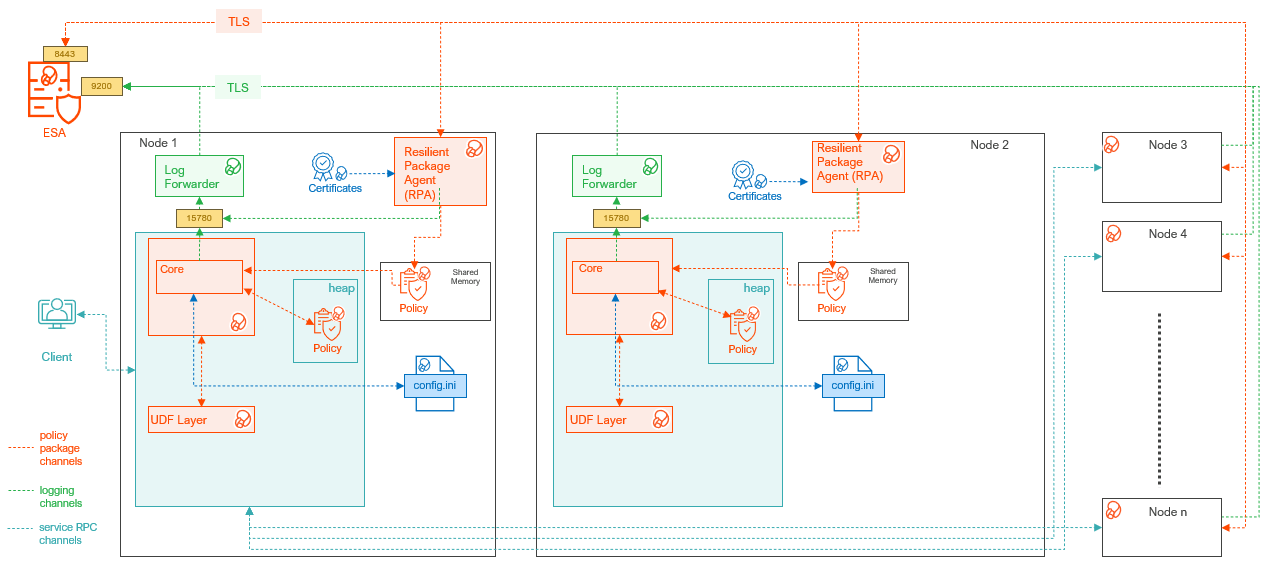
| Component | Description |
|---|---|
| RPAgent | A daemon running on each node that downloads the package from the ESA over a TLS channel using the installed Certificates. |
| Log Forwarder | A daemon running on each node that routes the audit logs and application logs to the ESA/Audit Store. |
| config.ini | A file on each node containing the set of configuration parameters to modify the protector behavior. |
| DBP Layer | Contains the Database Protector UDFs and APIs. |
| Core | The set of various libraries that provide the Protegrity Core functionality. |
1.2 - Verifying the System Requirements
Ensure that the following prerequisites are met:
- The DB2 Database is installed and configured.
- Enterprise Security Administrator (ESA) is installed, configured, and running.
- The IP address or host name of the ESA is noted.
- The Policy Management (PIM) module is initialized on ESA. The initialization of PIM ensures that cryptographic keys for protecting data and the policy repository are created.
- Download and save the DB2 Database Protector,
DatabaseProtector_Linux-ALL-64_x86-64_DB2-ALL-64_<DBP_version>.tgz, made available by Protegrity. - Backup the databases where the DB2 Database Protector and UDFs would be installed.
- Access to the database server as the
sudoaccess user is available. This permission is required to install all the components. - Access to the DB2 database as the database user is available.
- The following permissions are available to the user and group to install and uninstall the UDFs:
- GRANT DBADM ON DATABASE TO USER <user_name>;
- GRANT DBADM ON DATABASE TO GROUP <user_name>;
- GRANT CONNECT ON DATABASE TO USER <user_name>;
- GRANT CREATEIN, ALTERIN, DROPIN ON SCHEMA PTY TO USER <user_name>;
- GRANT ACCESSCTRL ON DATABASE TO USER <user_name>;
1.3 - Preparing the Environment
The steps to prepare the environment to install the DB2 Database Protector are explained in the following sub-sections.
1.3.1 - Extracting the Installation Package
- Log in to the DB2 database server with an account having the required privileges.
- Save the DB2 database protector installation package,
DatabaseProtector_Linux-ALL-64_x86-64_DB2-ALL-64_<DBP_version>.tgz, made available by Protegrity, in any sample directory. For example,/opt/protegrity/. - Navigate to the
/opt/protegrity/directory. - To extract the contents, run the following command:
tar -xvf DatabaseProtector_Linux-ALL-64_x86-64_DB2-ALL-64_<DBP_version>.tgz - Press ENTER.
The command extracts the package and the signature files.DatabaseProtector_Linux-ALL-64_x86-64_DB2-ALL-64_<DBP_version>.tgz signatures/ signatures/DatabaseProtector_Linux-ALL-64_x86-64_DB2-ALL-64_<DBP_version>.tgz_10.0.sig - To extract the contents of the installation package, run the following command:
tar -xvf DatabaseProtector_Linux-ALL-64_x86-64_DB2-ALL-64_<DBP_version>.tgz - Press ENTER.
The command extracts the files from the package.LogforwarderSetup_Linux_x64_<DBP_version>.sh RPAgentSetup_Linux_x64_<DBP_version>.sh PepDB2Setup_Linux_x64_<DBP_version>.sh U.S.Patent.No.6,321,201.Legend.txt
1.3.2 - Installing the Log Forwarder
- Log in to the database server as the user that has the permissions to install the Log Forwarder. Usually, this tends to be the instance owner.
- Navigate to the directory where the installation files are extracted.
- To install the Log Forwarder, run the following command:
./LogforwarderSetup_Linux_x64_<DBP_version>.sh - Press ENTER.
The prompt to enter the audit store endpoint appears.Enter the audit store endpoint (host), alternative (host:port) to use another port than the default port 9200 : - Enter the IP address of the audit store.
- Press ENTER.
The prompt to enter additional endpoint appears.Audit store endpoints: <Audit_store_IP_address>:9200 Do you want to add another audit store endpoint? [y/n]: - To skip adding additional endpoints, type
n. - Press ENTER.
The prompt to continue the installation appears.These audit store endpoints will be added: <Audit_store_IP_address>:9200 Type 'y' to accept or 'n' to abort installation: - To continue the installation, type
y. - Press ENTER.
The script extracts the files and installs the Log Forwarder.Unpacking... Extracting files... Protegrity Log Forwarder installed in /opt/protegrity/logforwarder. - Navigate to the
/opt/protegrity/logforwarder/bindirectory. - To start the Log Forwarder, run the following command:
./logforwarderctrl start
1.3.3 - Installing the RPAgent
Before you begin
Before proceeding with the RPA installation in secure mode, ensure that the required CA certificate is available and trusted on the system.
For ESA
Download the certificate from ESA.
For more information about downloading certificates from ESA, refer to Manage Certificates.
After obtaining the certificate, configure the system environment variable:
| Variable | Value |
|---|---|
| SSL_CERT_FILE | Full path to the certificate file. For example, /<certificate_location>/CA.pem |
Ensure the ESA hostname or IP is present in the ESA TLS certificate (SAN or CN), and it is resolvable from the RPAgent host.
After the CA certificate is available, proceed with the RPAgent installation.
Install the RPAgent
- Log in to the database server as the user that has permissions to install the RPAgent.
- Navigate to the directory where the installation files are extracted.
- To install the RPAgent, run the following command:
./RPAgentSetup_Linux_x64_<DBP_version>.sh - Press ENTER.
The prompt to enter ESA hostname or IP address appears.Please enter upstream host name or IP address[]: - Enter ESA FQDN.
- Press ENTER.
The prompt to enter the username to download the certificates appears.Please enter the user name for downloading certificates[]: - Enter the username to download the certificates from ESA.
- Press ENTER.
The prompt to enter the password to download the certificates appears.Please enter the password for downloading certificates[]: - Enter the password.
- Press ENTER.
The script connects to the ESA, retrieves the JWT token, extracts the certificates, and installs the RPAgent.Unpacking... Extracting files... Certificate validation successful. Obtaining token from <ESA_FQDN>:25400... Downloading certificates from <ESA_FQDN>:25400... % Total % Received % Xferd Average Speed Time Time Time Current Dload Upload Total Spent Left Speed 100 11264 100 11264 0 0 156.6k 0 0 Extracting certificates... Certificates successfully downloaded and stored in /opt/protegrity/rpagent/data Protegrity RPAgent installed in /opt/protegrity/rpagent. - Navigate to the
/opt/protegrity/rpagent/bindirectory. - To start the RPAgent, run the following command:
./rpagentctrl start
1.4 - Installing the DB2 Database Protector
This section describes the procedure to install the DB2 Database Protector and create the required User‑Defined Functions (UDFs). The process includes instructions to install the Policy Enforcement Point (PEP) and creating the UDFs.
1.4.1 - Installing the Policy Enforcement Point (PEP)
- Log in to the node where the installation files are extracted.
- To install the DB2 objects, run the following command:
./PepDB2Setup_Linux_x64_<DBP_version>.sh - Press ENTER.
The prompt to continue appears.***************************************************** Welcome to the Database Protector Setup Wizard ***************************************************** This will install the db2 objects on your computer Do you want to continue? [yes or no] - To continue, type
yes. - Press ENTER.
The prompt to enter the installation directory appears.Enter installation directory. A new directory will be created in the installation directory. [/opt/protegrity]: - Enter the location to install the DB2 objects.
- Press ENTER.
The prompt to specify the database name to install the objects appears.Enter name of database where the UDFs will be installed. [PROTEGRITY]: - Enter the name of the database to install the objects.
Note: In case of a failure to specify the database name, the script will use PROTEGRITY as the default database name to install the UDFs.
- Press ENTER.
The command extracts the files and installs the objects.Unpacking... Extracting files... db2 objects installed in /opt/protegrity/databaseprotector/db2.
1.4.2 - Creating the User Defined Functions (UDFs)
The DB2 Database Protector provides the createobjects.sql script to create or install the UDFs.
Note: Before installing the UDFs, ensure that the RPAgent and Log Forwarder services are installed and running.
To create the UDFs for the DB2 Database Protector:
- Connect to the database as the user with the required privileges to create the UDFs.
- Navigate to the
/opt/protegrity/databaseprotector/db2/sqlscripts/directory. - To install the UDFs, run the following command:
db2 -tvf createobjects.sql - Press ENTER.
The script creates all the user-defined functions.CONNECT TO <database_name> Database Connection Information Database server = DB2/LINUXX8664 11.5.0.0 SQL authorization ID = DB2INST1 Local database alias = <database_name> CREATE FUNCTION pty.ins_enc_varchar(INTEGER, VARCHAR(64), VARCHAR(32672),INTEGER) RETURNS VARCHAR(32672) FOR BIT DATA SPECIFIC pty31 EXTERNAL NAME '/opt/protegrity/databaseprotector/db2/lib/pepdb2.plm!encryptInsertVarchar' LANGUAGE c PARAMETER STYLE DB2SQL NOT DETERMINISTIC NOT FENCED NULL CALL NO SQL NO EXTERNAL ACTION SCRATCHPAD 300 FINAL CALL ALLOW PARALLEL DBINFO DB20000I The SQL command completed successfully. CREATE FUNCTION pty.upd_enc_varchar(INTEGER, VARCHAR(64), VARCHAR(32672),INTEGER) RETURNS VARCHAR(32672) FOR BIT DATA SPECIFIC pty51 EXTERNAL NAME '/opt/protegrity/databaseprotector/db2/lib/pepdb2.plm!encryptUpdateVarchar' LANGUAGE c PARAMETER STYLE DB2SQL NOT DETERMINISTIC NOT FENCED NULL CALL NO SQL NO EXTERNAL ACTION SCRATCHPAD 300 FINAL CALL ALLOW PARALLEL DBINFO DB20000I The SQL command completed successfully. CREATE FUNCTION pty.sel_dec_varchar(INTEGER, VARCHAR(64), VARCHAR(32672) FOR BIT DATA,INTEGER) RETURNS VARCHAR(32672) SPECIFIC pty71 EXTERNAL NAME '/opt/protegrity/databaseprotector/db2/lib/pepdb2.plm!decryptSelectVarchar' LANGUAGE c PARAMETER STYLE DB2SQL NOT DETERMINISTIC NOT FENCED NULL CALL NO SQL NO EXTERNAL ACTION SCRATCHPAD 300 FINAL CALL ALLOW PARALLEL DBINFO DB20000I The SQL command completed successfully. CREATE FUNCTION pty.ins_varchar(INTEGER, VARCHAR(64), VARCHAR(32672), INTEGER ) RETURNS VARCHAR(32672) SPECIFIC pty_ins_vchar EXTERNAL NAME '/opt/protegrity/databaseprotector/db2/lib/pepdb2.plm!insertVarchar' LANGUAGE c PARAMETER STYLE DB2SQL NOT DETERMINISTIC NOT FENCED NULL CALL NO SQL NO EXTERNAL ACTION SCRATCHPAD 300 FINAL CALL ALLOW PARALLEL DBINFO DB20000I The SQL command completed successfully. CREATE FUNCTION pty.upd_varchar(INTEGER, VARCHAR(64), VARCHAR(32672), INTEGER ) RETURNS VARCHAR(32672) SPECIFIC pty_upd_vchar EXTERNAL NAME '/opt/protegrity/databaseprotector/db2/lib/pepdb2.plm!updateVarchar' LANGUAGE c PARAMETER STYLE DB2SQL NOT DETERMINISTIC NOT FENCED NULL CALL NO SQL NO EXTERNAL ACTION SCRATCHPAD 300 FINAL CALL ALLOW PARALLEL DBINFO DB20000I The SQL command completed successfully. CREATE FUNCTION pty.sel_varchar(INTEGER, VARCHAR(64), VARCHAR(32672) , INTEGER ) RETURNS VARCHAR(32672) SPECIFIC pty_sel_vchar EXTERNAL NAME '/opt/protegrity/databaseprotector/db2/lib/pepdb2.plm!selectVarchar' LANGUAGE c PARAMETER STYLE DB2SQL NOT DETERMINISTIC NOT FENCED NULL CALL NO SQL NO EXTERNAL ACTION SCRATCHPAD 300 FINAL CALL ALLOW PARALLEL DBINFO DB20000I The SQL command completed successfully. CREATE FUNCTION pty.ins_hash_varchar(INTEGER, VARCHAR(64), VARCHAR(32672),INTEGER) RETURNS VARCHAR(32672) FOR BIT DATA SPECIFIC pty98 EXTERNAL NAME '/opt/protegrity/databaseprotector/db2/lib/pepdb2.plm!hashInsertVarchar' LANGUAGE c PARAMETER STYLE DB2SQL NOT DETERMINISTIC NOT FENCED NULL CALL NO SQL NO EXTERNAL ACTION SCRATCHPAD 300 FINAL CALL ALLOW PARALLEL DBINFO DB20000I The SQL command completed successfully. CREATE FUNCTION pty.upd_hash_varchar(INTEGER, VARCHAR(64), VARCHAR(32672),INTEGER) RETURNS VARCHAR(32672) FOR BIT DATA SPECIFIC pty99 EXTERNAL NAME '/opt/protegrity/databaseprotector/db2/lib/pepdb2.plm!hashUpdateVarchar' LANGUAGE c PARAMETER STYLE DB2SQL NOT DETERMINISTIC NOT FENCED NULL CALL NO SQL NO EXTERNAL ACTION SCRATCHPAD 300 FINAL CALL ALLOW PARALLEL DBINFO DB20000I The SQL command completed successfully. CREATE FUNCTION pty.ins_enc_varcharfbd(INTEGER, VARCHAR(64), VARCHAR(32672) FOR BIT DATA,INTEGER) RETURNS VARCHAR(32672) FOR BIT DATA SPECIFIC pty32 EXTERNAL NAME '/opt/protegrity/databaseprotector/db2/lib/pepdb2.plm!encryptInsertVarcharFBD' LANGUAGE c PARAMETER STYLE DB2SQL NOT DETERMINISTIC NOT FENCED NULL CALL NO SQL NO EXTERNAL ACTION SCRATCHPAD 300 FINAL CALL ALLOW PARALLEL DBINFO DB20000I The SQL command completed successfully. CREATE FUNCTION pty.upd_enc_varcharfbd(INTEGER, VARCHAR(64), VARCHAR(32672) FOR BIT DATA,INTEGER) RETURNS VARCHAR(32672) FOR BIT DATA SPECIFIC pty52 EXTERNAL NAME '/opt/protegrity/databaseprotector/db2/lib/pepdb2.plm!encryptUpdateVarcharFBD' LANGUAGE c PARAMETER STYLE DB2SQL NOT DETERMINISTIC NOT FENCED NULL CALL NO SQL NO EXTERNAL ACTION SCRATCHPAD 300 FINAL CALL ALLOW PARALLEL DBINFO DB20000I The SQL command completed successfully. CREATE FUNCTION pty.sel_dec_varcharfbd(INTEGER, VARCHAR(64), VARCHAR(32672) FOR BIT DATA,INTEGER) RETURNS VARCHAR(32672) FOR BIT DATA SPECIFIC pty72 EXTERNAL NAME '/opt/protegrity/databaseprotector/db2/lib/pepdb2.plm!decryptSelectVarcharFBD' LANGUAGE c PARAMETER STYLE DB2SQL NOT DETERMINISTIC NOT FENCED NULL CALL NO SQL NO EXTERNAL ACTION SCRATCHPAD 300 FINAL CALL ALLOW PARALLEL DBINFO DB20000I The SQL command completed successfully. CREATE FUNCTION pty.ins_varcharfbd(INTEGER, VARCHAR(64), VARCHAR(32672) FOR BIT DATA, INTEGER ) RETURNS VARCHAR(32672) FOR BIT DATA SPECIFIC pty_ins_vchar_fbd EXTERNAL NAME '/opt/protegrity/databaseprotector/db2/lib/pepdb2.plm!insertVarcharFBD' LANGUAGE c PARAMETER STYLE DB2SQL NOT DETERMINISTIC NOT FENCED NULL CALL NO SQL NO EXTERNAL ACTION SCRATCHPAD 300 FINAL CALL ALLOW PARALLEL DBINFO DB20000I The SQL command completed successfully. CREATE FUNCTION pty.upd_varcharfbd(INTEGER, VARCHAR(64), VARCHAR(32672) FOR BIT DATA, INTEGER ) RETURNS VARCHAR(32672) FOR BIT DATA SPECIFIC pty_upd_vchar_fbd EXTERNAL NAME '/opt/protegrity/databaseprotector/db2/lib/pepdb2.plm!updateVarcharFBD' LANGUAGE c PARAMETER STYLE DB2SQL NOT DETERMINISTIC NOT FENCED NULL CALL NO SQL NO EXTERNAL ACTION SCRATCHPAD 300 FINAL CALL ALLOW PARALLEL DBINFO DB20000I The SQL command completed successfully. CREATE FUNCTION pty.sel_varcharfbd(INTEGER, VARCHAR(64), VARCHAR(32672) FOR BIT DATA, INTEGER ) RETURNS VARCHAR(32672) FOR BIT DATA SPECIFIC pty_sel_vchar_fbd EXTERNAL NAME '/opt/protegrity/databaseprotector/db2/lib/pepdb2.plm!selectVarcharFBD' LANGUAGE c PARAMETER STYLE DB2SQL NOT DETERMINISTIC NOT FENCED NULL CALL NO SQL NO EXTERNAL ACTION SCRATCHPAD 300 FINAL CALL ALLOW PARALLEL DBINFO DB20000I The SQL command completed successfully. CREATE FUNCTION pty.ins_enc_char(INTEGER, VARCHAR(64), VARCHAR(254),INTEGER) RETURNS VARCHAR(290) FOR BIT DATA SPECIFIC pty33 EXTERNAL NAME '/opt/protegrity/databaseprotector/db2/lib/pepdb2.plm!encryptInsertVarchar' LANGUAGE c PARAMETER STYLE DB2SQL NOT DETERMINISTIC NOT FENCED NULL CALL NO SQL NO EXTERNAL ACTION SCRATCHPAD 300 FINAL CALL ALLOW PARALLEL DBINFO DB20000I The SQL command completed successfully. CREATE FUNCTION pty.upd_enc_char(INTEGER, VARCHAR(64), VARCHAR(254),INTEGER) RETURNS VARCHAR(290) FOR BIT DATA SPECIFIC pty53 EXTERNAL NAME '/opt/protegrity/databaseprotector/db2/lib/pepdb2.plm!encryptUpdateVarchar' LANGUAGE c PARAMETER STYLE DB2SQL NOT DETERMINISTIC NOT FENCED NULL CALL NO SQL NO EXTERNAL ACTION SCRATCHPAD 300 FINAL CALL ALLOW PARALLEL DBINFO DB20000I The SQL command completed successfully. CREATE FUNCTION pty.sel_dec_char(INTEGER, VARCHAR(64), VARCHAR(290) FOR BIT DATA,INTEGER) RETURNS VARCHAR(254) SPECIFIC pty73 EXTERNAL NAME '/opt/protegrity/databaseprotector/db2/lib/pepdb2.plm!decryptSelectVarchar' LANGUAGE c PARAMETER STYLE DB2SQL NOT DETERMINISTIC NOT FENCED NULL CALL NO SQL NO EXTERNAL ACTION SCRATCHPAD 300 FINAL CALL ALLOW PARALLEL DBINFO DB20000I The SQL command completed successfully. CREATE FUNCTION pty.ins_char(INTEGER, VARCHAR(64), VARCHAR(254), INTEGER ) RETURNS VARCHAR(305) SPECIFIC pty_ins_char EXTERNAL NAME '/opt/protegrity/databaseprotector/db2/lib/pepdb2.plm!insertVarchar' LANGUAGE c PARAMETER STYLE DB2SQL NOT DETERMINISTIC NOT FENCED NULL CALL NO SQL NO EXTERNAL ACTION SCRATCHPAD 300 FINAL CALL ALLOW PARALLEL DBINFO DB20000I The SQL command completed successfully. CREATE FUNCTION pty.upd_char(INTEGER, VARCHAR(64), VARCHAR(254), INTEGER ) RETURNS VARCHAR(305) SPECIFIC pty_upd_char EXTERNAL NAME '/opt/protegrity/databaseprotector/db2/lib/pepdb2.plm!updateVarchar' LANGUAGE c PARAMETER STYLE DB2SQL NOT DETERMINISTIC NOT FENCED NULL CALL NO SQL NO EXTERNAL ACTION SCRATCHPAD 300 FINAL CALL ALLOW PARALLEL DBINFO DB20000I The SQL command completed successfully. CREATE FUNCTION pty.sel_char(INTEGER, VARCHAR(64), VARCHAR(305), INTEGER ) RETURNS VARCHAR(254) SPECIFIC pty_sel_char EXTERNAL NAME '/opt/protegrity/databaseprotector/db2/lib/pepdb2.plm!selectVarchar' LANGUAGE c PARAMETER STYLE DB2SQL NOT DETERMINISTIC NOT FENCED NULL CALL NO SQL NO EXTERNAL ACTION SCRATCHPAD 300 FINAL CALL ALLOW PARALLEL DBINFO DB20000I The SQL command completed successfully. CREATE FUNCTION pty.ins_unicode_varchar(INTEGER, VARCHAR(64), VARCHAR(32672), INTEGER ) RETURNS VARCHAR(32672) SPECIFIC pty_ins_unicode_vchar EXTERNAL NAME '/opt/protegrity/databaseprotector/db2/lib/pepdb2.plm!insertUnicodeVarchar' LANGUAGE c PARAMETER STYLE DB2SQL NOT DETERMINISTIC NOT FENCED NULL CALL NO SQL NO EXTERNAL ACTION SCRATCHPAD 300 FINAL CALL ALLOW PARALLEL DBINFO DB20000I The SQL command completed successfully. CREATE FUNCTION pty.upd_unicode_varchar(INTEGER, VARCHAR(64), VARCHAR(32672), INTEGER ) RETURNS VARCHAR(32672) SPECIFIC pty_upd_unicode_vchar EXTERNAL NAME '/opt/protegrity/databaseprotector/db2/lib/pepdb2.plm!updateUnicodeVarchar' LANGUAGE c PARAMETER STYLE DB2SQL NOT DETERMINISTIC NOT FENCED NULL CALL NO SQL NO EXTERNAL ACTION SCRATCHPAD 300 FINAL CALL ALLOW PARALLEL DBINFO DB20000I The SQL command completed successfully. CREATE FUNCTION pty.sel_unicode_varchar(INTEGER, VARCHAR(64), VARCHAR(32672) , INTEGER ) RETURNS VARCHAR(32672) SPECIFIC pty_sel_unicode_vchar EXTERNAL NAME '/opt/protegrity/databaseprotector/db2/lib/pepdb2.plm!selectUnicodeVarchar' LANGUAGE c PARAMETER STYLE DB2SQL NOT DETERMINISTIC NOT FENCED NULL CALL NO SQL NO EXTERNAL ACTION SCRATCHPAD 300 FINAL CALL ALLOW PARALLEL DBINFO DB20000I The SQL command completed successfully. CREATE FUNCTION pty.ins_enc_charfbd(INTEGER, VARCHAR(64), VARCHAR(254) FOR BIT DATA,INTEGER) RETURNS VARCHAR(290) FOR BIT DATA SPECIFIC pty34 EXTERNAL NAME '/opt/protegrity/databaseprotector/db2/lib/pepdb2.plm!encryptInsertVarcharFBD' LANGUAGE c PARAMETER STYLE DB2SQL NOT DETERMINISTIC NOT FENCED NULL CALL NO SQL NO EXTERNAL ACTION SCRATCHPAD 300 FINAL CALL ALLOW PARALLEL DBINFO DB20000I The SQL command completed successfully. CREATE FUNCTION pty.upd_enc_charfbd(INTEGER, VARCHAR(64), VARCHAR(254) FOR BIT DATA,INTEGER) RETURNS VARCHAR(290) FOR BIT DATA SPECIFIC pty54 EXTERNAL NAME '/opt/protegrity/databaseprotector/db2/lib/pepdb2.plm!encryptUpdateVarcharFBD' LANGUAGE c PARAMETER STYLE DB2SQL NOT DETERMINISTIC NOT FENCED NULL CALL NO SQL NO EXTERNAL ACTION SCRATCHPAD 300 FINAL CALL ALLOW PARALLEL DBINFO DB20000I The SQL command completed successfully. CREATE FUNCTION pty.sel_dec_charfbd(INTEGER, VARCHAR(64), VARCHAR(290) FOR BIT DATA,INTEGER) RETURNS VARCHAR(254) FOR BIT DATA SPECIFIC pty74 EXTERNAL NAME '/opt/protegrity/databaseprotector/db2/lib/pepdb2.plm!decryptSelectVarcharFBD' LANGUAGE c PARAMETER STYLE DB2SQL NOT DETERMINISTIC NOT FENCED NULL CALL NO SQL NO EXTERNAL ACTION SCRATCHPAD 300 FINAL CALL ALLOW PARALLEL DBINFO DB20000I The SQL command completed successfully. CREATE FUNCTION pty.ins_charfbd(INTEGER, VARCHAR(64), VARCHAR(254) FOR BIT DATA, INTEGER ) RETURNS VARCHAR(254) FOR BIT DATA SPECIFIC pty_ins_char_fbd EXTERNAL NAME '/opt/protegrity/databaseprotector/db2/lib/pepdb2.plm!insertVarcharFBD' LANGUAGE c PARAMETER STYLE DB2SQL NOT DETERMINISTIC NOT FENCED NULL CALL NO SQL NO EXTERNAL ACTION SCRATCHPAD 300 FINAL CALL ALLOW PARALLEL DBINFO DB20000I The SQL command completed successfully. CREATE FUNCTION pty.upd_charfbd(INTEGER, VARCHAR(64), VARCHAR(254) FOR BIT DATA, INTEGER ) RETURNS VARCHAR(254) FOR BIT DATA SPECIFIC pty_upd_char_fbd EXTERNAL NAME '/opt/protegrity/databaseprotector/db2/lib/pepdb2.plm!updateVarcharFBD' LANGUAGE c PARAMETER STYLE DB2SQL NOT DETERMINISTIC NOT FENCED NULL CALL NO SQL NO EXTERNAL ACTION SCRATCHPAD 300 FINAL CALL ALLOW PARALLEL DBINFO DB20000I The SQL command completed successfully. CREATE FUNCTION pty.sel_charfbd(INTEGER, VARCHAR(64), VARCHAR(254) FOR BIT DATA, INTEGER ) RETURNS VARCHAR(254) FOR BIT DATA SPECIFIC pty_sel_char_fbd EXTERNAL NAME '/opt/protegrity/databaseprotector/db2/lib/pepdb2.plm!selectVarcharFBD' LANGUAGE c PARAMETER STYLE DB2SQL NOT DETERMINISTIC NOT FENCED NULL CALL NO SQL NO EXTERNAL ACTION SCRATCHPAD 300 FINAL CALL ALLOW PARALLEL DBINFO DB20000I The SQL command completed successfully. CREATE FUNCTION pty.ins_enc_lvarchar(INTEGER, VARCHAR(64), LONG VARCHAR,INTEGER) RETURNS LONG VARCHAR FOR BIT DATA SPECIFIC pty35 EXTERNAL NAME '/opt/protegrity/databaseprotector/db2/lib/pepdb2.plm!encryptInsertLongvarchar' LANGUAGE c PARAMETER STYLE DB2SQL NOT DETERMINISTIC NOT FENCED NULL CALL NO SQL NO EXTERNAL ACTION SCRATCHPAD 300 FINAL CALL ALLOW PARALLEL DBINFO DB20000I The SQL command completed successfully. CREATE FUNCTION pty.upd_enc_lvarchar(INTEGER, VARCHAR(64), LONG VARCHAR,INTEGER) RETURNS LONG VARCHAR FOR BIT DATA SPECIFIC pty55 EXTERNAL NAME '/opt/protegrity/databaseprotector/db2/lib/pepdb2.plm!encryptUpdateLongvarchar' LANGUAGE c PARAMETER STYLE DB2SQL NOT DETERMINISTIC NOT FENCED NULL CALL NO SQL NO EXTERNAL ACTION SCRATCHPAD 300 FINAL CALL ALLOW PARALLEL DBINFO DB20000I The SQL command completed successfully. CREATE FUNCTION pty.sel_dec_lvarchar(INTEGER, VARCHAR(64), LONG VARCHAR FOR BIT DATA,INTEGER) RETURNS LONG VARCHAR SPECIFIC pty75 EXTERNAL NAME '/opt/protegrity/databaseprotector/db2/lib/pepdb2.plm!decryptSelectLongvarchar' LANGUAGE c PARAMETER STYLE DB2SQL NOT DETERMINISTIC NOT FENCED NULL CALL NO SQL NO EXTERNAL ACTION SCRATCHPAD 300 FINAL CALL ALLOW PARALLEL DBINFO DB20000I The SQL command completed successfully. CREATE FUNCTION pty.ins_lvarchar(INTEGER, VARCHAR(64), LONG VARCHAR, INTEGER ) RETURNS LONG VARCHAR SPECIFIC pty_ins_lvchar EXTERNAL NAME '/opt/protegrity/databaseprotector/db2/lib/pepdb2.plm!insertLongvarchar' LANGUAGE c PARAMETER STYLE DB2SQL NOT DETERMINISTIC NOT FENCED NULL CALL NO SQL NO EXTERNAL ACTION SCRATCHPAD 300 FINAL CALL ALLOW PARALLEL DBINFO DB20000I The SQL command completed successfully. CREATE FUNCTION pty.upd_lvarchar(INTEGER, VARCHAR(64), LONG VARCHAR, INTEGER ) RETURNS LONG VARCHAR SPECIFIC pty_upd_lvchar EXTERNAL NAME '/opt/protegrity/databaseprotector/db2/lib/pepdb2.plm!updateLongvarchar' LANGUAGE c PARAMETER STYLE DB2SQL NOT DETERMINISTIC NOT FENCED NULL CALL NO SQL NO EXTERNAL ACTION SCRATCHPAD 300 FINAL CALL ALLOW PARALLEL DBINFO DB20000I The SQL command completed successfully. CREATE FUNCTION pty.sel_lvarchar(INTEGER, VARCHAR(64), LONG VARCHAR, INTEGER ) RETURNS LONG VARCHAR SPECIFIC pty_sel_lvchar EXTERNAL NAME '/opt/protegrity/databaseprotector/db2/lib/pepdb2.plm!selectLongvarchar' LANGUAGE c PARAMETER STYLE DB2SQL NOT DETERMINISTIC NOT FENCED NULL CALL NO SQL NO EXTERNAL ACTION SCRATCHPAD 300 FINAL CALL ALLOW PARALLEL DBINFO DB20000I The SQL command completed successfully. CREATE FUNCTION pty.ins_enc_lvcfbd(INTEGER, VARCHAR(64), LONG VARCHAR FOR BIT DATA,INTEGER) RETURNS LONG VARCHAR FOR BIT DATA SPECIFIC pty36 EXTERNAL NAME '/opt/protegrity/databaseprotector/db2/lib/pepdb2.plm!encryptInsertLongvarchar' LANGUAGE c PARAMETER STYLE DB2SQL NOT DETERMINISTIC NOT FENCED NULL CALL NO SQL NO EXTERNAL ACTION SCRATCHPAD 300 FINAL CALL ALLOW PARALLEL DBINFO DB20000I The SQL command completed successfully. CREATE FUNCTION pty.upd_enc_lvcfbd(INTEGER, VARCHAR(64), LONG VARCHAR FOR BIT DATA,INTEGER) RETURNS LONG VARCHAR FOR BIT DATA SPECIFIC pty56 EXTERNAL NAME '/opt/protegrity/databaseprotector/db2/lib/pepdb2.plm!encryptUpdateLongvarchar' LANGUAGE c PARAMETER STYLE DB2SQL NOT DETERMINISTIC NOT FENCED NULL CALL NO SQL NO EXTERNAL ACTION SCRATCHPAD 300 FINAL CALL ALLOW PARALLEL DBINFO DB20000I The SQL command completed successfully. CREATE FUNCTION pty.sel_dec_lvcfbd(INTEGER, VARCHAR(64), LONG VARCHAR FOR BIT DATA,INTEGER) RETURNS LONG VARCHAR FOR BIT DATA SPECIFIC pty76 EXTERNAL NAME '/opt/protegrity/databaseprotector/db2/lib/pepdb2.plm!decryptSelectLongvarchar' LANGUAGE c PARAMETER STYLE DB2SQL NOT DETERMINISTIC NOT FENCED NULL CALL NO SQL NO EXTERNAL ACTION SCRATCHPAD 300 FINAL CALL ALLOW PARALLEL DBINFO DB20000I The SQL command completed successfully. CREATE FUNCTION pty.ins_lvcfbd(INTEGER, VARCHAR(64), LONG VARCHAR FOR BIT DATA, INTEGER ) RETURNS LONG VARCHAR FOR BIT DATA SPECIFIC pty_ins_lvchar_fbd EXTERNAL NAME '/opt/protegrity/databaseprotector/db2/lib/pepdb2.plm!insertLongvarchar' LANGUAGE c PARAMETER STYLE DB2SQL NOT DETERMINISTIC NOT FENCED NULL CALL NO SQL NO EXTERNAL ACTION SCRATCHPAD 300 FINAL CALL ALLOW PARALLEL DBINFO DB20000I The SQL command completed successfully. CREATE FUNCTION pty.upd_lvcfbd(INTEGER, VARCHAR(64), LONG VARCHAR FOR BIT DATA, INTEGER ) RETURNS LONG VARCHAR FOR BIT DATA SPECIFIC pty_upd_lvchar_fbd EXTERNAL NAME '/opt/protegrity/databaseprotector/db2/lib/pepdb2.plm!updateLongvarchar' LANGUAGE c PARAMETER STYLE DB2SQL NOT DETERMINISTIC NOT FENCED NULL CALL NO SQL NO EXTERNAL ACTION SCRATCHPAD 300 FINAL CALL ALLOW PARALLEL DBINFO DB20000I The SQL command completed successfully. CREATE FUNCTION pty.sel_lvcfbd(INTEGER, VARCHAR(64), LONG VARCHAR FOR BIT DATA, INTEGER ) RETURNS LONG VARCHAR FOR BIT DATA SPECIFIC pty_sel_lvchar_fbd EXTERNAL NAME '/opt/protegrity/databaseprotector/db2/lib/pepdb2.plm!selectLongvarchar' LANGUAGE c PARAMETER STYLE DB2SQL NOT DETERMINISTIC NOT FENCED NULL CALL NO SQL NO EXTERNAL ACTION SCRATCHPAD 300 FINAL CALL ALLOW PARALLEL DBINFO DB20000I The SQL command completed successfully. CREATE FUNCTION pty.ins_enc_date(INTEGER, VARCHAR(64), DATE,INTEGER) RETURNS VARCHAR(34) FOR BIT DATA SPECIFIC pty37 EXTERNAL NAME '/opt/protegrity/databaseprotector/db2/lib/pepdb2.plm!encryptInsertDate' LANGUAGE c PARAMETER STYLE DB2SQL NOT DETERMINISTIC NOT FENCED NULL CALL NO SQL NO EXTERNAL ACTION SCRATCHPAD 300 FINAL CALL ALLOW PARALLEL DBINFO DB20000I The SQL command completed successfully. CREATE FUNCTION pty.upd_enc_date(INTEGER, VARCHAR(64), DATE,INTEGER) RETURNS VARCHAR(34) FOR BIT DATA SPECIFIC pty57 EXTERNAL NAME '/opt/protegrity/databaseprotector/db2/lib/pepdb2.plm!encryptUpdateDate' LANGUAGE c PARAMETER STYLE DB2SQL NOT DETERMINISTIC NOT FENCED NULL CALL NO SQL NO EXTERNAL ACTION SCRATCHPAD 300 FINAL CALL ALLOW PARALLEL DBINFO DB20000I The SQL command completed successfully. CREATE FUNCTION pty.sel_dec_date(INTEGER, VARCHAR(64), VARCHAR(34) FOR BIT DATA,INTEGER) RETURNS DATE SPECIFIC pty77 EXTERNAL NAME '/opt/protegrity/databaseprotector/db2/lib/pepdb2.plm!decryptSelectDate' LANGUAGE c PARAMETER STYLE DB2SQL NOT DETERMINISTIC NOT FENCED NULL CALL NO SQL NO EXTERNAL ACTION SCRATCHPAD 300 FINAL CALL ALLOW PARALLEL DBINFO DB20000I The SQL command completed successfully. CREATE FUNCTION pty.ins_date(INTEGER, VARCHAR(64), DATE, INTEGER ) RETURNS DATE SPECIFIC pty_ins_date EXTERNAL NAME '/opt/protegrity/databaseprotector/db2/lib/pepdb2.plm!insertDate' LANGUAGE c PARAMETER STYLE DB2SQL NOT DETERMINISTIC NOT FENCED NULL CALL NO SQL NO EXTERNAL ACTION SCRATCHPAD 300 FINAL CALL ALLOW PARALLEL DBINFO DB20000I The SQL command completed successfully. CREATE FUNCTION pty.upd_date(INTEGER, VARCHAR(64), DATE, INTEGER ) RETURNS DATE SPECIFIC pty_upd_date EXTERNAL NAME '/opt/protegrity/databaseprotector/db2/lib/pepdb2.plm!updateDate' LANGUAGE c PARAMETER STYLE DB2SQL NOT DETERMINISTIC NOT FENCED NULL CALL NO SQL NO EXTERNAL ACTION SCRATCHPAD 300 FINAL CALL ALLOW PARALLEL DBINFO DB20000I The SQL command completed successfully. CREATE FUNCTION pty.sel_date(INTEGER, VARCHAR(64), DATE, INTEGER ) RETURNS DATE SPECIFIC pty_sel_date EXTERNAL NAME '/opt/protegrity/databaseprotector/db2/lib/pepdb2.plm!selectDate' LANGUAGE c PARAMETER STYLE DB2SQL NOT DETERMINISTIC NOT FENCED NULL CALL NO SQL NO EXTERNAL ACTION SCRATCHPAD 300 FINAL CALL ALLOW PARALLEL DBINFO DB20000I The SQL command completed successfully. CREATE FUNCTION pty.ins_enc_time(INTEGER, VARCHAR(64), TIME,INTEGER) RETURNS VARCHAR(34) FOR BIT DATA SPECIFIC pty38 EXTERNAL NAME '/opt/protegrity/databaseprotector/db2/lib/pepdb2.plm!encryptInsertTime' LANGUAGE c PARAMETER STYLE DB2SQL NOT DETERMINISTIC NOT FENCED NULL CALL NO SQL NO EXTERNAL ACTION SCRATCHPAD 300 FINAL CALL ALLOW PARALLEL DBINFO DB20000I The SQL command completed successfully. CREATE FUNCTION pty.upd_enc_time(INTEGER, VARCHAR(64), TIME,INTEGER) RETURNS VARCHAR(34) FOR BIT DATA SPECIFIC pty58 EXTERNAL NAME '/opt/protegrity/databaseprotector/db2/lib/pepdb2.plm!encryptUpdateTime' LANGUAGE c PARAMETER STYLE DB2SQL NOT DETERMINISTIC NOT FENCED NULL CALL NO SQL NO EXTERNAL ACTION SCRATCHPAD 300 FINAL CALL ALLOW PARALLEL DBINFO DB20000I The SQL command completed successfully. CREATE FUNCTION pty.sel_dec_time(INTEGER, VARCHAR(64), VARCHAR(34) FOR BIT DATA,INTEGER) RETURNS TIME SPECIFIC pty78 EXTERNAL NAME '/opt/protegrity/databaseprotector/db2/lib/pepdb2.plm!decryptSelectTime' LANGUAGE c PARAMETER STYLE DB2SQL NOT DETERMINISTIC NOT FENCED NULL CALL NO SQL NO EXTERNAL ACTION SCRATCHPAD 300 FINAL CALL ALLOW PARALLEL DBINFO DB20000I The SQL command completed successfully. CREATE FUNCTION pty.ins_time(INTEGER, VARCHAR(64), TIME, INTEGER ) RETURNS TIME SPECIFIC pty_ins_time EXTERNAL NAME '/opt/protegrity/databaseprotector/db2/lib/pepdb2.plm!insertTime' LANGUAGE c PARAMETER STYLE DB2SQL NOT DETERMINISTIC NOT FENCED NULL CALL NO SQL NO EXTERNAL ACTION SCRATCHPAD 300 FINAL CALL ALLOW PARALLEL DBINFO DB20000I The SQL command completed successfully. CREATE FUNCTION pty.upd_time(INTEGER, VARCHAR(64), TIME, INTEGER ) RETURNS TIME SPECIFIC pty_upd_time EXTERNAL NAME '/opt/protegrity/databaseprotector/db2/lib/pepdb2.plm!updateTime' LANGUAGE c PARAMETER STYLE DB2SQL NOT DETERMINISTIC NOT FENCED NULL CALL NO SQL NO EXTERNAL ACTION SCRATCHPAD 300 FINAL CALL ALLOW PARALLEL DBINFO DB20000I The SQL command completed successfully. CREATE FUNCTION pty.sel_time(INTEGER, VARCHAR(64), TIME, INTEGER ) RETURNS TIME SPECIFIC pty_sel_time EXTERNAL NAME '/opt/protegrity/databaseprotector/db2/lib/pepdb2.plm!selectTime' LANGUAGE c PARAMETER STYLE DB2SQL NOT DETERMINISTIC NOT FENCED NULL CALL NO SQL NO EXTERNAL ACTION SCRATCHPAD 300 FINAL CALL ALLOW PARALLEL DBINFO DB20000I The SQL command completed successfully. CREATE FUNCTION pty.ins_enc_timestamp(INTEGER, VARCHAR(64), TIMESTAMP,INTEGER) RETURNS VARCHAR(50) FOR BIT DATA SPECIFIC pty39 EXTERNAL NAME '/opt/protegrity/databaseprotector/db2/lib/pepdb2.plm!encryptInsertTimestamp' LANGUAGE c PARAMETER STYLE DB2SQL NOT DETERMINISTIC NOT FENCED NULL CALL NO SQL NO EXTERNAL ACTION SCRATCHPAD 300 FINAL CALL ALLOW PARALLEL DBINFO DB20000I The SQL command completed successfully. CREATE FUNCTION pty.upd_enc_timestamp(INTEGER, VARCHAR(64), TIMESTAMP,INTEGER) RETURNS VARCHAR(50) FOR BIT DATA SPECIFIC pty59 EXTERNAL NAME '/opt/protegrity/databaseprotector/db2/lib/pepdb2.plm!encryptUpdateTimestamp' LANGUAGE c PARAMETER STYLE DB2SQL NOT DETERMINISTIC NOT FENCED NULL CALL NO SQL NO EXTERNAL ACTION SCRATCHPAD 300 FINAL CALL ALLOW PARALLEL DBINFO DB20000I The SQL command completed successfully. CREATE FUNCTION pty.sel_dec_timestamp(INTEGER, VARCHAR(64), VARCHAR(50) FOR BIT DATA,INTEGER) RETURNS TIMESTAMP SPECIFIC pty79 EXTERNAL NAME '/opt/protegrity/databaseprotector/db2/lib/pepdb2.plm!decryptSelectTimestamp' LANGUAGE c PARAMETER STYLE DB2SQL NOT DETERMINISTIC NOT FENCED NULL CALL NO SQL NO EXTERNAL ACTION SCRATCHPAD 300 FINAL CALL ALLOW PARALLEL DBINFO DB20000I The SQL command completed successfully. CREATE FUNCTION pty.ins_timestamp(INTEGER, VARCHAR(64), TIMESTAMP, INTEGER ) RETURNS TIMESTAMP SPECIFIC pty_ins_timestamp EXTERNAL NAME '/opt/protegrity/databaseprotector/db2/lib/pepdb2.plm!insertTimestamp' LANGUAGE c PARAMETER STYLE DB2SQL NOT DETERMINISTIC NOT FENCED NULL CALL NO SQL NO EXTERNAL ACTION SCRATCHPAD 300 FINAL CALL ALLOW PARALLEL DBINFO DB20000I The SQL command completed successfully. CREATE FUNCTION pty.upd_timestamp(INTEGER, VARCHAR(64), TIMESTAMP, INTEGER ) RETURNS TIMESTAMP SPECIFIC pty_upd_timestamp EXTERNAL NAME '/opt/protegrity/databaseprotector/db2/lib/pepdb2.plm!updateTimestamp' LANGUAGE c PARAMETER STYLE DB2SQL NOT DETERMINISTIC NOT FENCED NULL CALL NO SQL NO EXTERNAL ACTION SCRATCHPAD 300 FINAL CALL ALLOW PARALLEL DBINFO DB20000I The SQL command completed successfully. CREATE FUNCTION pty.sel_timestamp(INTEGER, VARCHAR(64), TIMESTAMP, INTEGER ) RETURNS TIMESTAMP SPECIFIC pty_sel_timestamp EXTERNAL NAME '/opt/protegrity/databaseprotector/db2/lib/pepdb2.plm!selectTimestamp' LANGUAGE c PARAMETER STYLE DB2SQL NOT DETERMINISTIC NOT FENCED NULL CALL NO SQL NO EXTERNAL ACTION SCRATCHPAD 300 FINAL CALL ALLOW PARALLEL DBINFO DB20000I The SQL command completed successfully. CREATE FUNCTION pty.ins_enc_integer(INTEGER, VARCHAR(64), INTEGER,INTEGER) RETURNS VARCHAR(34) FOR BIT DATA SPECIFIC pty40 EXTERNAL NAME '/opt/protegrity/databaseprotector/db2/lib/pepdb2.plm!encryptInsertInteger' LANGUAGE c PARAMETER STYLE DB2SQL NOT DETERMINISTIC NOT FENCED NULL CALL NO SQL NO EXTERNAL ACTION SCRATCHPAD 300 FINAL CALL ALLOW PARALLEL DBINFO DB20000I The SQL command completed successfully. CREATE FUNCTION pty.upd_enc_integer(INTEGER, VARCHAR(64), INTEGER,INTEGER) RETURNS VARCHAR(34) FOR BIT DATA SPECIFIC pty60 EXTERNAL NAME '/opt/protegrity/databaseprotector/db2/lib/pepdb2.plm!encryptUpdateInteger' LANGUAGE c PARAMETER STYLE DB2SQL NOT DETERMINISTIC NOT FENCED NULL CALL NO SQL NO EXTERNAL ACTION SCRATCHPAD 300 FINAL CALL ALLOW PARALLEL DBINFO DB20000I The SQL command completed successfully. CREATE FUNCTION pty.sel_dec_integer(INTEGER, VARCHAR(64), VARCHAR(34) FOR BIT DATA,INTEGER) RETURNS INTEGER SPECIFIC pty80 EXTERNAL NAME '/opt/protegrity/databaseprotector/db2/lib/pepdb2.plm!decryptSelectInteger' LANGUAGE c PARAMETER STYLE DB2SQL NOT DETERMINISTIC NOT FENCED NULL CALL NO SQL NO EXTERNAL ACTION SCRATCHPAD 300 FINAL CALL ALLOW PARALLEL DBINFO DB20000I The SQL command completed successfully. CREATE FUNCTION pty.ins_integer(INTEGER, VARCHAR(64), INTEGER, INTEGER ) RETURNS INTEGER SPECIFIC pty_ins_int EXTERNAL NAME '/opt/protegrity/databaseprotector/db2/lib/pepdb2.plm!insertInteger' LANGUAGE c PARAMETER STYLE DB2SQL NOT DETERMINISTIC NOT FENCED NULL CALL NO SQL NO EXTERNAL ACTION SCRATCHPAD 300 FINAL CALL ALLOW PARALLEL DBINFO DB20000I The SQL command completed successfully. CREATE FUNCTION pty.upd_integer(INTEGER, VARCHAR(64), INTEGER, INTEGER ) RETURNS INTEGER SPECIFIC pty_upd_int EXTERNAL NAME '/opt/protegrity/databaseprotector/db2/lib/pepdb2.plm!updateInteger' LANGUAGE c PARAMETER STYLE DB2SQL NOT DETERMINISTIC NOT FENCED NULL CALL NO SQL NO EXTERNAL ACTION SCRATCHPAD 300 FINAL CALL ALLOW PARALLEL DBINFO DB20000I The SQL command completed successfully. CREATE FUNCTION pty.sel_integer(INTEGER, VARCHAR(64), INTEGER, INTEGER ) RETURNS INTEGER SPECIFIC pty_sel_int EXTERNAL NAME '/opt/protegrity/databaseprotector/db2/lib/pepdb2.plm!selectInteger' LANGUAGE c PARAMETER STYLE DB2SQL NOT DETERMINISTIC NOT FENCED NULL CALL NO SQL NO EXTERNAL ACTION SCRATCHPAD 300 FINAL CALL ALLOW PARALLEL DBINFO DB20000I The SQL command completed successfully. CREATE FUNCTION pty.ins_enc_smallint(INTEGER, VARCHAR(64), SMALLINT,INTEGER) RETURNS VARCHAR(34) FOR BIT DATA SPECIFIC pty41 EXTERNAL NAME '/opt/protegrity/databaseprotector/db2/lib/pepdb2.plm!encryptInsertSmallint' LANGUAGE c PARAMETER STYLE DB2SQL NOT DETERMINISTIC NOT FENCED NULL CALL NO SQL NO EXTERNAL ACTION SCRATCHPAD 300 FINAL CALL ALLOW PARALLEL DBINFO DB20000I The SQL command completed successfully. CREATE FUNCTION pty.upd_enc_smallint(INTEGER, VARCHAR(64), SMALLINT,INTEGER) RETURNS VARCHAR(34) FOR BIT DATA SPECIFIC pty61 EXTERNAL NAME '/opt/protegrity/databaseprotector/db2/lib/pepdb2.plm!encryptUpdateSmallint' LANGUAGE c PARAMETER STYLE DB2SQL NOT DETERMINISTIC NOT FENCED NULL CALL NO SQL NO EXTERNAL ACTION SCRATCHPAD 300 FINAL CALL ALLOW PARALLEL DBINFO DB20000I The SQL command completed successfully. CREATE FUNCTION pty.sel_dec_smallint(INTEGER, VARCHAR(64), VARCHAR(34) FOR BIT DATA,INTEGER) RETURNS SMALLINT SPECIFIC pty81 EXTERNAL NAME '/opt/protegrity/databaseprotector/db2/lib/pepdb2.plm!decryptSelectSmallint' LANGUAGE c PARAMETER STYLE DB2SQL NOT DETERMINISTIC NOT FENCED NULL CALL NO SQL NO EXTERNAL ACTION SCRATCHPAD 300 FINAL CALL ALLOW PARALLEL DBINFO DB20000I The SQL command completed successfully. CREATE FUNCTION pty.ins_smallint(INTEGER, VARCHAR(64), SMALLINT, INTEGER ) RETURNS SMALLINT SPECIFIC pty_ins_smallint EXTERNAL NAME '/opt/protegrity/databaseprotector/db2/lib/pepdb2.plm!insertSmallint' LANGUAGE c PARAMETER STYLE DB2SQL NOT DETERMINISTIC NOT FENCED NULL CALL NO SQL NO EXTERNAL ACTION SCRATCHPAD 300 FINAL CALL ALLOW PARALLEL DBINFO DB20000I The SQL command completed successfully. CREATE FUNCTION pty.upd_smallint(INTEGER, VARCHAR(64), SMALLINT, INTEGER ) RETURNS SMALLINT SPECIFIC pty_upd_smallint EXTERNAL NAME '/opt/protegrity/databaseprotector/db2/lib/pepdb2.plm!updateSmallint' LANGUAGE c PARAMETER STYLE DB2SQL NOT DETERMINISTIC NOT FENCED NULL CALL NO SQL NO EXTERNAL ACTION SCRATCHPAD 300 FINAL CALL ALLOW PARALLEL DBINFO DB20000I The SQL command completed successfully. CREATE FUNCTION pty.sel_smallint(INTEGER, VARCHAR(64), SMALLINT, INTEGER ) RETURNS SMALLINT SPECIFIC pty_sel_smallint EXTERNAL NAME '/opt/protegrity/databaseprotector/db2/lib/pepdb2.plm!selectSmallint' LANGUAGE c PARAMETER STYLE DB2SQL NOT DETERMINISTIC NOT FENCED NULL CALL NO SQL NO EXTERNAL ACTION SCRATCHPAD 300 FINAL CALL ALLOW PARALLEL DBINFO DB20000I The SQL command completed successfully. CREATE FUNCTION pty.ins_enc_bigint(INTEGER, VARCHAR(64), BIGINT,INTEGER) RETURNS VARCHAR(34) FOR BIT DATA SPECIFIC pty42 EXTERNAL NAME '/opt/protegrity/databaseprotector/db2/lib/pepdb2.plm!encryptInsertBigint' LANGUAGE c PARAMETER STYLE DB2SQL NOT DETERMINISTIC NOT FENCED NULL CALL NO SQL NO EXTERNAL ACTION SCRATCHPAD 300 FINAL CALL ALLOW PARALLEL DBINFO DB20000I The SQL command completed successfully. CREATE FUNCTION pty.upd_enc_bigint(INTEGER, VARCHAR(64), BIGINT,INTEGER) RETURNS VARCHAR(34) FOR BIT DATA SPECIFIC pty62 EXTERNAL NAME '/opt/protegrity/databaseprotector/db2/lib/pepdb2.plm!encryptUpdateBigint' LANGUAGE c PARAMETER STYLE DB2SQL NOT DETERMINISTIC NOT FENCED NULL CALL NO SQL NO EXTERNAL ACTION SCRATCHPAD 300 FINAL CALL ALLOW PARALLEL DBINFO DB20000I The SQL command completed successfully. CREATE FUNCTION pty.sel_dec_bigint(INTEGER, VARCHAR(64), VARCHAR(34) FOR BIT DATA,INTEGER) RETURNS BIGINT SPECIFIC pty82 EXTERNAL NAME '/opt/protegrity/databaseprotector/db2/lib/pepdb2.plm!decryptSelectBigint' LANGUAGE c PARAMETER STYLE DB2SQL NOT DETERMINISTIC NOT FENCED NULL CALL NO SQL NO EXTERNAL ACTION SCRATCHPAD 300 FINAL CALL ALLOW PARALLEL DBINFO DB20000I The SQL command completed successfully. CREATE FUNCTION pty.ins_bigint(INTEGER, VARCHAR(64), BIGINT, INTEGER ) RETURNS BIGINT SPECIFIC pty_ins_bigint EXTERNAL NAME '/opt/protegrity/databaseprotector/db2/lib/pepdb2.plm!insertBigint' LANGUAGE c PARAMETER STYLE DB2SQL NOT DETERMINISTIC NOT FENCED NULL CALL NO SQL NO EXTERNAL ACTION SCRATCHPAD 300 FINAL CALL ALLOW PARALLEL DBINFO DB20000I The SQL command completed successfully. CREATE FUNCTION pty.upd_bigint(INTEGER, VARCHAR(64), BIGINT, INTEGER ) RETURNS BIGINT SPECIFIC pty_upd_bigint EXTERNAL NAME '/opt/protegrity/databaseprotector/db2/lib/pepdb2.plm!updateBigint' LANGUAGE c PARAMETER STYLE DB2SQL NOT DETERMINISTIC NOT FENCED NULL CALL NO SQL NO EXTERNAL ACTION SCRATCHPAD 300 FINAL CALL ALLOW PARALLEL DBINFO DB20000I The SQL command completed successfully. CREATE FUNCTION pty.sel_bigint(INTEGER, VARCHAR(64), BIGINT, INTEGER ) RETURNS BIGINT SPECIFIC pty_sel_bigint EXTERNAL NAME '/opt/protegrity/databaseprotector/db2/lib/pepdb2.plm!selectBigint' LANGUAGE c PARAMETER STYLE DB2SQL NOT DETERMINISTIC NOT FENCED NULL CALL NO SQL NO EXTERNAL ACTION SCRATCHPAD 300 FINAL CALL ALLOW PARALLEL DBINFO DB20000I The SQL command completed successfully. CREATE FUNCTION pty.ins_enc_real(INTEGER, VARCHAR(64), REAL,INTEGER) RETURNS VARCHAR(34) FOR BIT DATA SPECIFIC pty43 EXTERNAL NAME '/opt/protegrity/databaseprotector/db2/lib/pepdb2.plm!encryptInsertReal' LANGUAGE c PARAMETER STYLE DB2SQL NOT DETERMINISTIC NOT FENCED NULL CALL NO SQL NO EXTERNAL ACTION SCRATCHPAD 300 FINAL CALL ALLOW PARALLEL DBINFO DB20000I The SQL command completed successfully. CREATE FUNCTION pty.upd_enc_real(INTEGER, VARCHAR(64), REAL,INTEGER) RETURNS VARCHAR(34) FOR BIT DATA SPECIFIC pty63 EXTERNAL NAME '/opt/protegrity/databaseprotector/db2/lib/pepdb2.plm!encryptUpdateReal' LANGUAGE c PARAMETER STYLE DB2SQL NOT DETERMINISTIC NOT FENCED NULL CALL NO SQL NO EXTERNAL ACTION SCRATCHPAD 300 FINAL CALL ALLOW PARALLEL DBINFO DB20000I The SQL command completed successfully. CREATE FUNCTION pty.sel_dec_real(INTEGER, VARCHAR(64), VARCHAR(34) FOR BIT DATA,INTEGER) RETURNS REAL SPECIFIC pty83 EXTERNAL NAME '/opt/protegrity/databaseprotector/db2/lib/pepdb2.plm!decryptSelectReal' LANGUAGE c PARAMETER STYLE DB2SQL NOT DETERMINISTIC NOT FENCED NULL CALL NO SQL NO EXTERNAL ACTION SCRATCHPAD 300 FINAL CALL ALLOW PARALLEL DBINFO DB20000I The SQL command completed successfully. CREATE FUNCTION pty.ins_real(INTEGER, VARCHAR(64), REAL, INTEGER ) RETURNS REAL SPECIFIC pty_ins_real EXTERNAL NAME '/opt/protegrity/databaseprotector/db2/lib/pepdb2.plm!insertReal' LANGUAGE c PARAMETER STYLE DB2SQL NOT DETERMINISTIC NOT FENCED NULL CALL NO SQL NO EXTERNAL ACTION SCRATCHPAD 300 FINAL CALL ALLOW PARALLEL DBINFO DB20000I The SQL command completed successfully. CREATE FUNCTION pty.upd_real(INTEGER, VARCHAR(64), REAL, INTEGER ) RETURNS REAL SPECIFIC pty_upd_real EXTERNAL NAME '/opt/protegrity/databaseprotector/db2/lib/pepdb2.plm!updateReal' LANGUAGE c PARAMETER STYLE DB2SQL NOT DETERMINISTIC NOT FENCED NULL CALL NO SQL NO EXTERNAL ACTION SCRATCHPAD 300 FINAL CALL ALLOW PARALLEL DBINFO DB20000I The SQL command completed successfully. CREATE FUNCTION pty.sel_real(INTEGER, VARCHAR(64), REAL, INTEGER ) RETURNS REAL SPECIFIC pty_sel_real EXTERNAL NAME '/opt/protegrity/databaseprotector/db2/lib/pepdb2.plm!selectReal' LANGUAGE c PARAMETER STYLE DB2SQL NOT DETERMINISTIC NOT FENCED NULL CALL NO SQL NO EXTERNAL ACTION SCRATCHPAD 300 FINAL CALL ALLOW PARALLEL DBINFO DB20000I The SQL command completed successfully. CREATE FUNCTION pty.ins_enc_double(INTEGER, VARCHAR(64), DOUBLE,INTEGER) RETURNS VARCHAR(34) FOR BIT DATA SPECIFIC pty44 EXTERNAL NAME '/opt/protegrity/databaseprotector/db2/lib/pepdb2.plm!encryptInsertDouble' LANGUAGE c PARAMETER STYLE DB2SQL NOT DETERMINISTIC NOT FENCED NULL CALL NO SQL NO EXTERNAL ACTION SCRATCHPAD 300 FINAL CALL ALLOW PARALLEL DBINFO DB20000I The SQL command completed successfully. CREATE FUNCTION pty.upd_enc_double(INTEGER, VARCHAR(64), DOUBLE,INTEGER) RETURNS VARCHAR(34) FOR BIT DATA SPECIFIC pty64 EXTERNAL NAME '/opt/protegrity/databaseprotector/db2/lib/pepdb2.plm!encryptUpdateDouble' LANGUAGE c PARAMETER STYLE DB2SQL NOT DETERMINISTIC NOT FENCED NULL CALL NO SQL NO EXTERNAL ACTION SCRATCHPAD 300 FINAL CALL ALLOW PARALLEL DBINFO DB20000I The SQL command completed successfully. CREATE FUNCTION pty.sel_dec_double(INTEGER, VARCHAR(64), VARCHAR(34) FOR BIT DATA,INTEGER) RETURNS DOUBLE SPECIFIC pty84 EXTERNAL NAME '/opt/protegrity/databaseprotector/db2/lib/pepdb2.plm!decryptSelectDouble' LANGUAGE c PARAMETER STYLE DB2SQL NOT DETERMINISTIC NOT FENCED NULL CALL NO SQL NO EXTERNAL ACTION SCRATCHPAD 300 FINAL CALL ALLOW PARALLEL DBINFO DB20000I The SQL command completed successfully. CREATE FUNCTION pty.ins_double(INTEGER, VARCHAR(64), DOUBLE, INTEGER ) RETURNS DOUBLE SPECIFIC pty_ins_double EXTERNAL NAME '/opt/protegrity/databaseprotector/db2/lib/pepdb2.plm!insertDouble' LANGUAGE c PARAMETER STYLE DB2SQL NOT DETERMINISTIC NOT FENCED NULL CALL NO SQL NO EXTERNAL ACTION SCRATCHPAD 300 FINAL CALL ALLOW PARALLEL DBINFO DB20000I The SQL command completed successfully. CREATE FUNCTION pty.upd_double(INTEGER, VARCHAR(64), DOUBLE, INTEGER ) RETURNS DOUBLE SPECIFIC pty_upd_double EXTERNAL NAME '/opt/protegrity/databaseprotector/db2/lib/pepdb2.plm!updateDouble' LANGUAGE c PARAMETER STYLE DB2SQL NOT DETERMINISTIC NOT FENCED NULL CALL NO SQL NO EXTERNAL ACTION SCRATCHPAD 300 FINAL CALL ALLOW PARALLEL DBINFO DB20000I The SQL command completed successfully. CREATE FUNCTION pty.sel_double(INTEGER, VARCHAR(64), DOUBLE, INTEGER ) RETURNS DOUBLE SPECIFIC pty_sel_double EXTERNAL NAME '/opt/protegrity/databaseprotector/db2/lib/pepdb2.plm!selectDouble' LANGUAGE c PARAMETER STYLE DB2SQL NOT DETERMINISTIC NOT FENCED NULL CALL NO SQL NO EXTERNAL ACTION SCRATCHPAD 300 FINAL CALL ALLOW PARALLEL DBINFO DB20000I The SQL command completed successfully. CREATE FUNCTION pty.ins_enc_blob(INTEGER, VARCHAR(64), BLOB(100K),INTEGER) RETURNS BLOB(102434) SPECIFIC pty01 EXTERNAL NAME '/opt/protegrity/databaseprotector/db2/lib/pepdb2.plm!encryptInsertBlob' LANGUAGE c PARAMETER STYLE DB2SQL NOT DETERMINISTIC NOT FENCED NULL CALL NO SQL NO EXTERNAL ACTION SCRATCHPAD 300 FINAL CALL ALLOW PARALLEL DBINFO DB20000I The SQL command completed successfully. CREATE FUNCTION pty.upd_enc_blob(INTEGER, VARCHAR(64), BLOB(100K),INTEGER) RETURNS BLOB(102434) SPECIFIC pty02 EXTERNAL NAME '/opt/protegrity/databaseprotector/db2/lib/pepdb2.plm!encryptUpdateBlob' LANGUAGE c PARAMETER STYLE DB2SQL NOT DETERMINISTIC NOT FENCED NULL CALL NO SQL NO EXTERNAL ACTION SCRATCHPAD 300 FINAL CALL ALLOW PARALLEL DBINFO DB20000I The SQL command completed successfully. CREATE FUNCTION pty.sel_dec_blob(INTEGER, VARCHAR(64), BLOB(102434),INTEGER) RETURNS BLOB(100K) SPECIFIC pty03 EXTERNAL NAME '/opt/protegrity/databaseprotector/db2/lib/pepdb2.plm!decryptSelectBlob' LANGUAGE c PARAMETER STYLE DB2SQL NOT DETERMINISTIC NOT FENCED NULL CALL NO SQL NO EXTERNAL ACTION SCRATCHPAD 300 FINAL CALL ALLOW PARALLEL DBINFO DB20000I The SQL command completed successfully. CREATE FUNCTION pty.ins_blob(INTEGER, VARCHAR(64), BLOB(100K), INTEGER ) RETURNS BLOB(100K) SPECIFIC pty_ins_blob EXTERNAL NAME '/opt/protegrity/databaseprotector/db2/lib/pepdb2.plm!insertBlob' LANGUAGE c PARAMETER STYLE DB2SQL NOT DETERMINISTIC NOT FENCED NULL CALL NO SQL NO EXTERNAL ACTION SCRATCHPAD 300 FINAL CALL ALLOW PARALLEL DBINFO DB20000I The SQL command completed successfully. CREATE FUNCTION pty.upd_blob(INTEGER, VARCHAR(64), BLOB(100K), INTEGER ) RETURNS BLOB(100K) SPECIFIC pty_upd_blob EXTERNAL NAME '/opt/protegrity/databaseprotector/db2/lib/pepdb2.plm!updateBlob' LANGUAGE c PARAMETER STYLE DB2SQL NOT DETERMINISTIC NOT FENCED NULL CALL NO SQL NO EXTERNAL ACTION SCRATCHPAD 300 FINAL CALL ALLOW PARALLEL DBINFO DB20000I The SQL command completed successfully. CREATE FUNCTION pty.sel_blob(INTEGER, VARCHAR(64), BLOB(100K), INTEGER ) RETURNS BLOB(100K) SPECIFIC pty_sel_blob EXTERNAL NAME '/opt/protegrity/databaseprotector/db2/lib/pepdb2.plm!selectBlob' LANGUAGE c PARAMETER STYLE DB2SQL NOT DETERMINISTIC NOT FENCED NULL CALL NO SQL NO EXTERNAL ACTION SCRATCHPAD 300 FINAL CALL ALLOW PARALLEL DBINFO DB20000I The SQL command completed successfully. CREATE FUNCTION pty.ins_enc_clob(INTEGER, VARCHAR(64), CLOB(5K),INTEGER) RETURNS BLOB(5154) SPECIFIC pty11 EXTERNAL NAME '/opt/protegrity/databaseprotector/db2/lib/pepdb2.plm!encryptInsertClob' LANGUAGE c PARAMETER STYLE DB2SQL NOT DETERMINISTIC NOT FENCED NULL CALL NO SQL NO EXTERNAL ACTION SCRATCHPAD 300 FINAL CALL ALLOW PARALLEL DBINFO DB20000I The SQL command completed successfully. CREATE FUNCTION pty.upd_enc_clob(INTEGER, VARCHAR(64), CLOB(5K),INTEGER) RETURNS BLOB(5154) SPECIFIC pty12 EXTERNAL NAME '/opt/protegrity/databaseprotector/db2/lib/pepdb2.plm!encryptUpdateClob' LANGUAGE c PARAMETER STYLE DB2SQL NOT DETERMINISTIC NOT FENCED NULL CALL NO SQL NO EXTERNAL ACTION SCRATCHPAD 300 FINAL CALL ALLOW PARALLEL DBINFO DB20000I The SQL command completed successfully. CREATE FUNCTION pty.sel_dec_clob(INTEGER, VARCHAR(64), BLOB(5154),INTEGER) RETURNS CLOB(5K) SPECIFIC pty13 EXTERNAL NAME '/opt/protegrity/databaseprotector/db2/lib/pepdb2.plm!decryptSelectClob' LANGUAGE c PARAMETER STYLE DB2SQL NOT DETERMINISTIC NOT FENCED NULL CALL NO SQL NO EXTERNAL ACTION SCRATCHPAD 300 FINAL CALL ALLOW PARALLEL DBINFO DB20000I The SQL command completed successfully. CREATE FUNCTION pty.ins_clob(INTEGER, VARCHAR(64), CLOB(5K), INTEGER ) RETURNS CLOB(5376) SPECIFIC pty_ins_clob EXTERNAL NAME '/opt/protegrity/databaseprotector/db2/lib/pepdb2.plm!insertClob' LANGUAGE c PARAMETER STYLE DB2SQL NOT DETERMINISTIC NOT FENCED NULL CALL NO SQL NO EXTERNAL ACTION SCRATCHPAD 300 FINAL CALL ALLOW PARALLEL DBINFO DB20000I The SQL command completed successfully. CREATE FUNCTION pty.upd_clob(INTEGER, VARCHAR(64), CLOB(5K), INTEGER ) RETURNS CLOB(5376) SPECIFIC pty_upd_clob EXTERNAL NAME '/opt/protegrity/databaseprotector/db2/lib/pepdb2.plm!updateClob' LANGUAGE c PARAMETER STYLE DB2SQL NOT DETERMINISTIC NOT FENCED NULL CALL NO SQL NO EXTERNAL ACTION SCRATCHPAD 300 FINAL CALL ALLOW PARALLEL DBINFO DB20000I The SQL command completed successfully. CREATE FUNCTION pty.sel_clob(INTEGER, VARCHAR(64), CLOB(5376), INTEGER ) RETURNS CLOB(5K) SPECIFIC pty_sel_clob EXTERNAL NAME '/opt/protegrity/databaseprotector/db2/lib/pepdb2.plm!selectClob' LANGUAGE c PARAMETER STYLE DB2SQL NOT DETERMINISTIC NOT FENCED NULL CALL NO SQL NO EXTERNAL ACTION SCRATCHPAD 300 FINAL CALL ALLOW PARALLEL DBINFO DB20000I The SQL command completed successfully. CREATE FUNCTION pty.have_ins_perm(INTEGER, VARCHAR(64)) RETURNS INTEGER SPECIFIC pty93 EXTERNAL NAME '/opt/protegrity/databaseprotector/db2/lib/pepdb2.plm!haveInsertPerm' LANGUAGE c PARAMETER STYLE DB2SQL NOT DETERMINISTIC NOT FENCED NULL CALL NO SQL NO EXTERNAL ACTION SCRATCHPAD 300 FINAL CALL ALLOW PARALLEL DBINFO DB20000I The SQL command completed successfully. CREATE FUNCTION pty.have_upd_perm(INTEGER, VARCHAR(64)) RETURNS INTEGER SPECIFIC pty94 EXTERNAL NAME '/opt/protegrity/databaseprotector/db2/lib/pepdb2.plm!haveUpdatePerm' LANGUAGE c PARAMETER STYLE DB2SQL NOT DETERMINISTIC NOT FENCED NULL CALL NO SQL NO EXTERNAL ACTION SCRATCHPAD 300 FINAL CALL ALLOW PARALLEL DBINFO DB20000I The SQL command completed successfully. CREATE FUNCTION pty.have_sel_perm(INTEGER, VARCHAR(64)) RETURNS INTEGER SPECIFIC pty92 EXTERNAL NAME '/opt/protegrity/databaseprotector/db2/lib/pepdb2.plm!haveSelectPerm' LANGUAGE c PARAMETER STYLE DB2SQL NOT DETERMINISTIC NOT FENCED NULL CALL NO SQL NO EXTERNAL ACTION SCRATCHPAD 300 FINAL CALL ALLOW PARALLEL DBINFO DB20000I The SQL command completed successfully. CREATE FUNCTION pty.toggle_trace(INTEGER) RETURNS INTEGER SPECIFIC pty95 EXTERNAL NAME '/opt/protegrity/databaseprotector/db2/lib/pepdb2.plm!toggleTrace' LANGUAGE c PARAMETER STYLE DB2SQL NOT DETERMINISTIC NOT FENCED NULL CALL NO SQL NO EXTERNAL ACTION SCRATCHPAD 300 FINAL CALL ALLOW PARALLEL DBINFO DB20000I The SQL command completed successfully. CREATE FUNCTION pty.getversion() RETURNS VARCHAR(256) SPECIFIC pty101 EXTERNAL NAME '/opt/protegrity/databaseprotector/db2/lib/pepdb2.plm!getVersion' LANGUAGE c PARAMETER STYLE DB2SQL NOT DETERMINISTIC NOT FENCED NULL CALL NO SQL NO EXTERNAL ACTION SCRATCHPAD 300 FINAL CALL ALLOW PARALLEL DBINFO DB20000I The SQL command completed successfully. CREATE FUNCTION pty.getcoreversion() RETURNS VARCHAR(256) SPECIFIC ptygetcore EXTERNAL NAME '/opt/protegrity/databaseprotector/db2/lib/pepdb2.plm!ptyCore' LANGUAGE c PARAMETER STYLE DB2SQL NOT DETERMINISTIC NOT FENCED NULL CALL NO SQL NO EXTERNAL ACTION SCRATCHPAD 300 FINAL CALL ALLOW PARALLEL DBINFO DB20000I The SQL command completed successfully. CREATE FUNCTION pty.whoami() RETURNS VARCHAR(256) SPECIFIC pty102 EXTERNAL NAME '/opt/protegrity/databaseprotector/db2/lib/pepdb2.plm!whoAmI' LANGUAGE c PARAMETER STYLE DB2SQL NOT DETERMINISTIC NOT FENCED NULL CALL NO SQL NO EXTERNAL ACTION SCRATCHPAD 300 FINAL CALL ALLOW PARALLEL DBINFO DB20000I The SQL command completed successfully. GRANT EXECUTE ON FUNCTION pty.* TO PUBLIC DB20000I The SQL command completed successfully. CONNECT RESET DB20000I The SQL command completed successfully. - To view the list of all the installed UDFs, run the following command:
SELECT FUNCNAME FROM SYSCAT.FUNCTIONS WHERE FUNCSCHEMA = 'PTY'; - To verify the successful installation of the UDFs, execute any one of the following queries:The function returns the name of the user that is logged in to the database.
select pty.whoami() from SYSIBM.SYSDUMMY1;The command returns the protector version.select pty.getversion() from SYSIBM.SYSDUMMY1;
1.5 - Configuring the DB2 Database Protector
The DB2 Database Protector provides the following files that contain different parameters to control the protector behavior:
config.ini- provides parameters to control the protector behavior.rpagent.cfg- provides parameters to control the RPAgent behavior.
Updating the parameters in the config.ini file:
Log in to the node.
Navigate to the
/opt/protegrity/databaseprotector/db2/datadirectory.To open the
config.inifile, run the following command:vi config.iniPress ENTER.
The command opens theconfig.inifile.############################################################################### # Protector configuration ############################################################################### [protector] # Cadence determines how often the protector connects with ESA / proxy to fetch the policy updates in background. # Default is 60 seconds. So by default, every 60 seconds protector tries to fetch the policy updates. # If the cadence is set to "0", then the protector will get the policy only once. # # Default 60. cadence = 60 ############################################################################### # Log Provider Config ############################################################################### [log] # In case that connection to fluent-bit is lost, set how audits/logs are handled # # drop : (default) Protector throws logs away if connection to the fluentbit is lost # error : Protector returns error without protecting/unprotecting # data if connection to the fluentbit is lost mode = drop # Host/IP to fluent-bit where audits/logs will be forwarded from the protector # # Default localhost host = localhostUpdate the parameters, as per the description, in the following table:
Parameter Description cadenceSpecifies the frequency at which the protector retrieves the policy. The default value is 60 seconds. If the cadence is set to “0”, then the protector will get the policy only once. modeSpecifies the approach of handling logs when the connection to the Log Forwarder is lost. Save the changes to the
config.inifile.
Updating the parameters in the rpagent.cfg file:
Log in to the required node.
Navigate to the
/opt/protegrity/rpagent/datadirectory.To open the
rpagent.cfgfile, run the following command:vi rpagent.cfgPress ENTER.
The command opens therpagent.cfgfile.############################################################################### # Resilient Package Sync Config ############################################################################### [sync] # Protocol to use when communicating with the service providing Resilient Packages. # Use 'https' for ESA or 'shmem' for local shared memory. protocol = https # Host/IP to the service providing Resilient Packages host = <IP_address> port = 8443 # Path to CA certificate ca = /opt/protegrity/rpagent/data/CA.pem # Path to client certificate cert = /opt/protegrity/rpagent/data/cert.pem # Path to client certificate key key = /opt/protegrity/rpagent/data/cert.key # Path to a secret file that is used to decrypt the client certificate key. # When using a custom certificate bundle, the 'secretcommand' can instead be # used to execute an external command that obtains the secret. secretfile = /opt/protegrity/rpagent/data/secret.txt ############################################################################### # Log Provider Config ############################################################################### [log] # In case that connection to fluent-bit is lost, set how audits/logs are handled # # drop : (default) Protector throws logs away if connection to the fluentbit is lost # error : Protector returns error without protecting/unprotecting # data if connection to the fluentbit is lost mode = drop # Host/IP to fluent-bit where audits/logs will be forwarded from the protector # # Default localhost host = localhostUpdate the parameters, as per the description, in the following table:
Parameter Description interval Specifies the frequency at which the RPAgent retrieves the policy. The minimum value is 1 second and the maximum value is 86400 seconds. This is an optional parameter and must be included in the Sync section of the rpagent.cfgfile.protocol Specifies the protocol to use when communicating with the service providing Resilient Packages. host Specifies the hostname to the service providing the Resilient packages. port Specifies the port to the service providing the Resilient packages. ca Specifies the path to the CA certificate. cert Specifies the path to the client certificate. key Specifies the path to the client certificate key. secretfile Specifies the path to the secret file that is used to decrypt the client certificate key. mode Specifies the approach of handling logs when the connection to the Log Forwarder is lost. host Specifies the hostname or the IP address to where the Log Forwarder will forward the audit logs from the protector. Save the changes to the
rpagent.cfgfile.
1.6 - Uninstalling the DB2 Database Protector
The process to uninstall the DB2 Database Protector involves the following steps:
- Dropping the User Defined Functions.
- Uninstalling the RPAgent.
- Uninstalling the Log Forwarder.
- Deleting the installation directory.
Dropping the User Defined Functions
- Log in to the DB2 Database server using the same account used to create the UDFs.
- Navigate to the
/opt/protegrity/databaseprotector/db2/sqlscripts/directory. - To drop the UDFs, run the following command:
db2 -tvf dropobjects.sql - Press ENTER.
The script deletes all the user-defined functions.CONNECT TO <database_name> Database Connection Information Database server = DB2/LINUXX8664 11.5.0.0 SQL authorization ID = DB2INST1 Local database alias = <database_name> DROP FUNCTION pty.ins_enc_varchar DB20000I The SQL command completed successfully. DROP FUNCTION pty.upd_enc_varchar DB20000I The SQL command completed successfully. DROP FUNCTION pty.sel_dec_varchar DB20000I The SQL command completed successfully. DROP FUNCTION pty.ins_varchar DB20000I The SQL command completed successfully. DROP FUNCTION pty.upd_varchar DB20000I The SQL command completed successfully. DROP FUNCTION pty.sel_varchar DB20000I The SQL command completed successfully. DROP FUNCTION pty.ins_unicode_varchar DB20000I The SQL command completed successfully. DROP FUNCTION pty.upd_unicode_varchar DB20000I The SQL command completed successfully. DROP FUNCTION pty.sel_unicode_varchar DB20000I The SQL command completed successfully. DROP FUNCTION pty.ins_enc_varcharfbd DB20000I The SQL command completed successfully. DROP FUNCTION pty.upd_enc_varcharfbd DB20000I The SQL command completed successfully. DROP FUNCTION pty.sel_dec_varcharfbd DB20000I The SQL command completed successfully. DROP FUNCTION pty.ins_varcharfbd DB20000I The SQL command completed successfully. DROP FUNCTION pty.upd_varcharfbd DB20000I The SQL command completed successfully. DROP FUNCTION pty.sel_varcharfbd DB20000I The SQL command completed successfully. DROP FUNCTION pty.ins_enc_char DB20000I The SQL command completed successfully. DROP FUNCTION pty.upd_enc_char DB20000I The SQL command completed successfully. DROP FUNCTION pty.sel_dec_char DB20000I The SQL command completed successfully. DROP FUNCTION pty.ins_char DB20000I The SQL command completed successfully. DROP FUNCTION pty.upd_char DB20000I The SQL command completed successfully. DROP FUNCTION pty.sel_char DB20000I The SQL command completed successfully. DROP FUNCTION pty.ins_enc_charfbd DB20000I The SQL command completed successfully. DROP FUNCTION pty.upd_enc_charfbd DB20000I The SQL command completed successfully. DROP FUNCTION pty.sel_dec_charfbd DB20000I The SQL command completed successfully. DROP FUNCTION pty.ins_charfbd DB20000I The SQL command completed successfully. DROP FUNCTION pty.upd_charfbd DB20000I The SQL command completed successfully. DROP FUNCTION pty.sel_charfbd DB20000I The SQL command completed successfully. DROP FUNCTION pty.ins_enc_lvarchar DB20000I The SQL command completed successfully. DROP FUNCTION pty.upd_enc_lvarchar DB20000I The SQL command completed successfully. DROP FUNCTION pty.sel_dec_lvarchar DB20000I The SQL command completed successfully. DROP FUNCTION pty.ins_lvarchar DB20000I The SQL command completed successfully. DROP FUNCTION pty.upd_lvarchar DB20000I The SQL command completed successfully. DROP FUNCTION pty.sel_lvarchar DB20000I The SQL command completed successfully. DROP FUNCTION pty.ins_enc_lvcfbd DB20000I The SQL command completed successfully. DROP FUNCTION pty.upd_enc_lvcfbd DB20000I The SQL command completed successfully. DROP FUNCTION pty.sel_dec_lvcfbd DB20000I The SQL command completed successfully. DROP FUNCTION pty.ins_lvcfbd DB20000I The SQL command completed successfully. DROP FUNCTION pty.upd_lvcfbd DB20000I The SQL command completed successfully. DROP FUNCTION pty.sel_lvcfbd DB20000I The SQL command completed successfully. DROP FUNCTION pty.ins_enc_date DB20000I The SQL command completed successfully. DROP FUNCTION pty.upd_enc_date DB20000I The SQL command completed successfully. DROP FUNCTION pty.sel_dec_date DB20000I The SQL command completed successfully. DROP FUNCTION pty.ins_date DB20000I The SQL command completed successfully. DROP FUNCTION pty.upd_date DB20000I The SQL command completed successfully. DROP FUNCTION pty.sel_date DB20000I The SQL command completed successfully. DROP FUNCTION pty.ins_enc_time DB20000I The SQL command completed successfully. DROP FUNCTION pty.upd_enc_time DB20000I The SQL command completed successfully. DROP FUNCTION pty.sel_dec_time DB20000I The SQL command completed successfully. DROP FUNCTION pty.ins_time DB20000I The SQL command completed successfully. DROP FUNCTION pty.upd_time DB20000I The SQL command completed successfully. DROP FUNCTION pty.sel_time DB20000I The SQL command completed successfully. DROP FUNCTION pty.ins_enc_timestamp DB20000I The SQL command completed successfully. DROP FUNCTION pty.upd_enc_timestamp DB20000I The SQL command completed successfully. DROP FUNCTION pty.sel_dec_timestamp DB20000I The SQL command completed successfully. DROP FUNCTION pty.ins_timestamp DB20000I The SQL command completed successfully. DROP FUNCTION pty.upd_timestamp DB20000I The SQL command completed successfully. DROP FUNCTION pty.sel_timestamp DB20000I The SQL command completed successfully. DROP FUNCTION pty.ins_enc_integer DB20000I The SQL command completed successfully. DROP FUNCTION pty.upd_enc_integer DB20000I The SQL command completed successfully. DROP FUNCTION pty.sel_dec_integer DB20000I The SQL command completed successfully. DROP FUNCTION pty.ins_integer DB20000I The SQL command completed successfully. DROP FUNCTION pty.upd_integer DB20000I The SQL command completed successfully. DROP FUNCTION pty.sel_integer DB20000I The SQL command completed successfully. DROP FUNCTION pty.ins_enc_smallint DB20000I The SQL command completed successfully. DROP FUNCTION pty.upd_enc_smallint DB20000I The SQL command completed successfully. DROP FUNCTION pty.sel_dec_smallint DB20000I The SQL command completed successfully. DROP FUNCTION pty.ins_smallint DB20000I The SQL command completed successfully. DROP FUNCTION pty.upd_smallint DB20000I The SQL command completed successfully. DROP FUNCTION pty.sel_smallint DB20000I The SQL command completed successfully. DROP FUNCTION pty.ins_enc_bigint DB20000I The SQL command completed successfully. DROP FUNCTION pty.upd_enc_bigint DB20000I The SQL command completed successfully. DROP FUNCTION pty.sel_dec_bigint DB20000I The SQL command completed successfully. DROP FUNCTION pty.ins_bigint DB20000I The SQL command completed successfully. DROP FUNCTION pty.upd_bigint DB20000I The SQL command completed successfully. DROP FUNCTION pty.sel_bigint DB20000I The SQL command completed successfully. DROP FUNCTION pty.ins_enc_real DB20000I The SQL command completed successfully. DROP FUNCTION pty.upd_enc_real DB20000I The SQL command completed successfully. DROP FUNCTION pty.sel_dec_real DB20000I The SQL command completed successfully. DROP FUNCTION pty.ins_real DB20000I The SQL command completed successfully. DROP FUNCTION pty.upd_real DB20000I The SQL command completed successfully. DROP FUNCTION pty.sel_real DB20000I The SQL command completed successfully. DROP FUNCTION pty.ins_enc_double DB20000I The SQL command completed successfully. DROP FUNCTION pty.upd_enc_double DB20000I The SQL command completed successfully. DROP FUNCTION pty.sel_dec_double DB20000I The SQL command completed successfully. DROP FUNCTION pty.ins_double DB20000I The SQL command completed successfully. DROP FUNCTION pty.upd_double DB20000I The SQL command completed successfully. DROP FUNCTION pty.sel_double DB20000I The SQL command completed successfully. DROP FUNCTION pty.ins_enc_blob DB20000I The SQL command completed successfully. DROP FUNCTION pty.upd_enc_blob DB20000I The SQL command completed successfully. DROP FUNCTION pty.sel_dec_blob DB20000I The SQL command completed successfully. DROP FUNCTION pty.ins_blob DB20000I The SQL command completed successfully. DROP FUNCTION pty.upd_blob DB20000I The SQL command completed successfully. DROP FUNCTION pty.sel_blob DB20000I The SQL command completed successfully. DROP FUNCTION pty.ins_enc_clob DB20000I The SQL command completed successfully. DROP FUNCTION pty.upd_enc_clob DB20000I The SQL command completed successfully. DROP FUNCTION pty.sel_dec_clob DB20000I The SQL command completed successfully. DROP FUNCTION pty.ins_clob DB20000I The SQL command completed successfully. DROP FUNCTION pty.upd_clob DB20000I The SQL command completed successfully. DROP FUNCTION pty.sel_clob DB20000I The SQL command completed successfully. DROP FUNCTION pty.have_sel_perm DB20000I The SQL command completed successfully. DROP FUNCTION pty.have_ins_perm DB20000I The SQL command completed successfully. DROP FUNCTION pty.have_upd_perm DB20000I The SQL command completed successfully. DROP FUNCTION pty.toggle_trace DB20000I The SQL command completed successfully. DROP FUNCTION pty.ins_hash_varchar DB20000I The SQL command completed successfully. DROP FUNCTION pty.upd_hash_varchar DB20000I The SQL command completed successfully. DROP FUNCTION pty.getversion DB20000I The SQL command completed successfully. DROP FUNCTION pty.getcoreversion DB20000I The SQL command completed successfully. DROP FUNCTION pty.whoami DB20000I The SQL command completed successfully. CONNECT RESET DB20000I The SQL command completed successfully.
Uninstalling the RPAgent
Before uninstalling the RPAgent, Protegrity recommends creating a backup.
- Log in to the DB2 Database server.
- Navigate to the
/opt/protegrity/rpagent/bin/directory. - To stop the RPAgent, run the following command:
rpagentctrl stop - Press ENTER. The command stops the RPAgent service.
- Navigate to the
/opt/protegritydirectory. - Delete the
/opt/protegrity/rpagent/directory.
Uninstalling the Log Forwarder
Before uninstalling the Log Forwarder, Protegrity recommends creating a backup.
- Log in to the DB2 Database server.
- Navigate to the
/opt/protegrity/logforwarder/bin/directory. - To stop the Log Forwarder, run the following command:
logforwarderctrl stop - Press ENTER. The command stops the Log Forwarder.
- Navigate to the
/opt/protegritydirectory. - Delete the
/opt/protegrity/logforwarder/directory.
Deleting the installation directory
To complete the uninstall process, delete the installation directory.
Note: Before deleting the installation directory, ensure the database and all the services are stopped.
- Log in to the DB2 Database server.
- Navigate to the
/opt/protegrity/databaseprotector/directory. - To delete the db2 directory, run the following command:
rm -rf db2
1.7 - Upgrading the DB2 Database Protector
To upgrade the DB2 Database Protector:
- Drop the existing UDFs.
- Uninstall the existing version of the protector.
- Install the new version of the protector.
- Start the RPAgent.
- Create the new user-defined functions.
Dropping the Existing User Defined Functions
- Log in to the DB2 Database server using the same account used to create the UDFs.
- Navigate to the
/opt/protegrity/databaseprotector/db2/sqlscripts/directory. - To drop the UDFs, run the following command:
db2 -tvf dropobjects.sql - Press ENTER.
The script deletes all the user-defined functions.CONNECT TO <database_name> Database Connection Information Database server = DB2/LINUXX8664 11.5.0.0 SQL authorization ID = DB2INST1 Local database alias = <database_name> DROP FUNCTION pty.ins_enc_varchar DB20000I The SQL command completed successfully. DROP FUNCTION pty.upd_enc_varchar DB20000I The SQL command completed successfully. DROP FUNCTION pty.sel_dec_varchar DB20000I The SQL command completed successfully. DROP FUNCTION pty.ins_varchar DB20000I The SQL command completed successfully. DROP FUNCTION pty.upd_varchar DB20000I The SQL command completed successfully. DROP FUNCTION pty.sel_varchar DB20000I The SQL command completed successfully. DROP FUNCTION pty.ins_unicode_varchar DB20000I The SQL command completed successfully. DROP FUNCTION pty.upd_unicode_varchar DB20000I The SQL command completed successfully. DROP FUNCTION pty.sel_unicode_varchar DB20000I The SQL command completed successfully. DROP FUNCTION pty.ins_enc_varcharfbd DB20000I The SQL command completed successfully. DROP FUNCTION pty.upd_enc_varcharfbd DB20000I The SQL command completed successfully. DROP FUNCTION pty.sel_dec_varcharfbd DB20000I The SQL command completed successfully. DROP FUNCTION pty.ins_varcharfbd DB20000I The SQL command completed successfully. DROP FUNCTION pty.upd_varcharfbd DB20000I The SQL command completed successfully. DROP FUNCTION pty.sel_varcharfbd DB20000I The SQL command completed successfully. DROP FUNCTION pty.ins_enc_char DB20000I The SQL command completed successfully. DROP FUNCTION pty.upd_enc_char DB20000I The SQL command completed successfully. DROP FUNCTION pty.sel_dec_char DB20000I The SQL command completed successfully. DROP FUNCTION pty.ins_char DB20000I The SQL command completed successfully. DROP FUNCTION pty.upd_char DB20000I The SQL command completed successfully. DROP FUNCTION pty.sel_char DB20000I The SQL command completed successfully. DROP FUNCTION pty.ins_enc_charfbd DB20000I The SQL command completed successfully. DROP FUNCTION pty.upd_enc_charfbd DB20000I The SQL command completed successfully. DROP FUNCTION pty.sel_dec_charfbd DB20000I The SQL command completed successfully. DROP FUNCTION pty.ins_charfbd DB20000I The SQL command completed successfully. DROP FUNCTION pty.upd_charfbd DB20000I The SQL command completed successfully. DROP FUNCTION pty.sel_charfbd DB20000I The SQL command completed successfully. DROP FUNCTION pty.ins_enc_lvarchar DB20000I The SQL command completed successfully. DROP FUNCTION pty.upd_enc_lvarchar DB20000I The SQL command completed successfully. DROP FUNCTION pty.sel_dec_lvarchar DB20000I The SQL command completed successfully. DROP FUNCTION pty.ins_lvarchar DB20000I The SQL command completed successfully. DROP FUNCTION pty.upd_lvarchar DB20000I The SQL command completed successfully. DROP FUNCTION pty.sel_lvarchar DB20000I The SQL command completed successfully. DROP FUNCTION pty.ins_enc_lvcfbd DB20000I The SQL command completed successfully. DROP FUNCTION pty.upd_enc_lvcfbd DB20000I The SQL command completed successfully. DROP FUNCTION pty.sel_dec_lvcfbd DB20000I The SQL command completed successfully. DROP FUNCTION pty.ins_lvcfbd DB20000I The SQL command completed successfully. DROP FUNCTION pty.upd_lvcfbd DB20000I The SQL command completed successfully. DROP FUNCTION pty.sel_lvcfbd DB20000I The SQL command completed successfully. DROP FUNCTION pty.ins_enc_date DB20000I The SQL command completed successfully. DROP FUNCTION pty.upd_enc_date DB20000I The SQL command completed successfully. DROP FUNCTION pty.sel_dec_date DB20000I The SQL command completed successfully. DROP FUNCTION pty.ins_date DB20000I The SQL command completed successfully. DROP FUNCTION pty.upd_date DB20000I The SQL command completed successfully. DROP FUNCTION pty.sel_date DB20000I The SQL command completed successfully. DROP FUNCTION pty.ins_enc_time DB20000I The SQL command completed successfully. DROP FUNCTION pty.upd_enc_time DB20000I The SQL command completed successfully. DROP FUNCTION pty.sel_dec_time DB20000I The SQL command completed successfully. DROP FUNCTION pty.ins_time DB20000I The SQL command completed successfully. DROP FUNCTION pty.upd_time DB20000I The SQL command completed successfully. DROP FUNCTION pty.sel_time DB20000I The SQL command completed successfully. DROP FUNCTION pty.ins_enc_timestamp DB20000I The SQL command completed successfully. DROP FUNCTION pty.upd_enc_timestamp DB20000I The SQL command completed successfully. DROP FUNCTION pty.sel_dec_timestamp DB20000I The SQL command completed successfully. DROP FUNCTION pty.ins_timestamp DB20000I The SQL command completed successfully. DROP FUNCTION pty.upd_timestamp DB20000I The SQL command completed successfully. DROP FUNCTION pty.sel_timestamp DB20000I The SQL command completed successfully. DROP FUNCTION pty.ins_enc_integer DB20000I The SQL command completed successfully. DROP FUNCTION pty.upd_enc_integer DB20000I The SQL command completed successfully. DROP FUNCTION pty.sel_dec_integer DB20000I The SQL command completed successfully. DROP FUNCTION pty.ins_integer DB20000I The SQL command completed successfully. DROP FUNCTION pty.upd_integer DB20000I The SQL command completed successfully. DROP FUNCTION pty.sel_integer DB20000I The SQL command completed successfully. DROP FUNCTION pty.ins_enc_smallint DB20000I The SQL command completed successfully. DROP FUNCTION pty.upd_enc_smallint DB20000I The SQL command completed successfully. DROP FUNCTION pty.sel_dec_smallint DB20000I The SQL command completed successfully. DROP FUNCTION pty.ins_smallint DB20000I The SQL command completed successfully. DROP FUNCTION pty.upd_smallint DB20000I The SQL command completed successfully. DROP FUNCTION pty.sel_smallint DB20000I The SQL command completed successfully. DROP FUNCTION pty.ins_enc_bigint DB20000I The SQL command completed successfully. DROP FUNCTION pty.upd_enc_bigint DB20000I The SQL command completed successfully. DROP FUNCTION pty.sel_dec_bigint DB20000I The SQL command completed successfully. DROP FUNCTION pty.ins_bigint DB20000I The SQL command completed successfully. DROP FUNCTION pty.upd_bigint DB20000I The SQL command completed successfully. DROP FUNCTION pty.sel_bigint DB20000I The SQL command completed successfully. DROP FUNCTION pty.ins_enc_real DB20000I The SQL command completed successfully. DROP FUNCTION pty.upd_enc_real DB20000I The SQL command completed successfully. DROP FUNCTION pty.sel_dec_real DB20000I The SQL command completed successfully. DROP FUNCTION pty.ins_real DB20000I The SQL command completed successfully. DROP FUNCTION pty.upd_real DB20000I The SQL command completed successfully. DROP FUNCTION pty.sel_real DB20000I The SQL command completed successfully. DROP FUNCTION pty.ins_enc_double DB20000I The SQL command completed successfully. DROP FUNCTION pty.upd_enc_double DB20000I The SQL command completed successfully. DROP FUNCTION pty.sel_dec_double DB20000I The SQL command completed successfully. DROP FUNCTION pty.ins_double DB20000I The SQL command completed successfully. DROP FUNCTION pty.upd_double DB20000I The SQL command completed successfully. DROP FUNCTION pty.sel_double DB20000I The SQL command completed successfully. DROP FUNCTION pty.ins_enc_blob DB20000I The SQL command completed successfully. DROP FUNCTION pty.upd_enc_blob DB20000I The SQL command completed successfully. DROP FUNCTION pty.sel_dec_blob DB20000I The SQL command completed successfully. DROP FUNCTION pty.ins_blob DB20000I The SQL command completed successfully. DROP FUNCTION pty.upd_blob DB20000I The SQL command completed successfully. DROP FUNCTION pty.sel_blob DB20000I The SQL command completed successfully. DROP FUNCTION pty.ins_enc_clob DB20000I The SQL command completed successfully. DROP FUNCTION pty.upd_enc_clob DB20000I The SQL command completed successfully. DROP FUNCTION pty.sel_dec_clob DB20000I The SQL command completed successfully. DROP FUNCTION pty.ins_clob DB20000I The SQL command completed successfully. DROP FUNCTION pty.upd_clob DB20000I The SQL command completed successfully. DROP FUNCTION pty.sel_clob DB20000I The SQL command completed successfully. DROP FUNCTION pty.have_sel_perm DB20000I The SQL command completed successfully. DROP FUNCTION pty.have_ins_perm DB20000I The SQL command completed successfully. DROP FUNCTION pty.have_upd_perm DB20000I The SQL command completed successfully. DROP FUNCTION pty.toggle_trace DB20000I The SQL command completed successfully. DROP FUNCTION pty.ins_hash_varchar DB20000I The SQL command completed successfully. DROP FUNCTION pty.upd_hash_varchar DB20000I The SQL command completed successfully. DROP FUNCTION pty.getversion DB20000I The SQL command completed successfully. DROP FUNCTION pty.getcoreversion DB20000I The SQL command completed successfully. DROP FUNCTION pty.whoami DB20000I The SQL command completed successfully. CONNECT RESET DB20000I The SQL command completed successfully.
Uninstalling the Existing Version of the Protector
To uninstall the existing version of the protector:
- Uninstall the RPAgent.
- Uninstall the Log Forwarder.
Uninstalling the RPAgent
Before uninstalling the RPAgent, Protegrity recommends creating a backup.
- Log in to the DB2 Database server.
- Navigate to the
/opt/protegrity/rpagent/bin/directory. - To stop the RPAgent, run the following command:
rpagentctrl stop - Navigate to the
/opt/protegrity/directory. - Delete the
/opt/protegrity/rpagent/directory.
Uninstalling the Log Forwarder
Before uninstalling the Log Forwarder, Protegrity recommends creating a backup.
- Log in to the DB2 Database server.
- Navigate to the
/opt/protegrity/logforwarder/bindirectory. - To stop the Log Forwarder, run the following command:
logforwarderctrl stop - Navigate to the
/opt/protegrity/directory. - Delete the
/opt/protegrity/logforwarder/directory.
Deleting the Installation Directory
After removing the RPAgent and the Log Forwarder, delete the installation directory.
Note: Before deleting the installation directory, ensure the database and all the services are stopped.
- Log in to the DB2 Database server.
- Navigate to the
/opt/protegrity/databaseprotector/directory. - To delete the db2 directory, run the following command:
rm -rf db2
Installing the New Version of the Protector
After all the services are stopped and components removed, install the latest version of the protector, recreate the UDFs, and restart the RPAgent.
Note: For more information on installing the protector, refer to Installing the DB2 Database Protector.
Creating the User Defined Functions
For more information on creating the UDFs, refer to Creating the User Defined Functions.
Starting the RPAgent
- Log in to the DB2 Database server.
- Navigate to the
/opt/protegrity/rpagent/bindirectory. - To start the RPAgent, run the following command:
rpagentctrl start
2 - MSSQL Database Protector
Protegrity MSSQL Database Protector v10.0 is a database‑native security solution that provides column‑level data protection for Microsoft SQL Server environments. The protector integrates directly with the SQL Server execution layer, enabling secure protect, unprotect, and reprotect operations on sensitive data while minimizing runtime overhead. Managed centrally through the Protegrity Enterprise Security Administrator (ESA), it enforces standardized security policies and key management without requiring changes to existing applications or database schemas.
2.1 - Understanding the Architecture
The following diagram illustrates the architecture of the MSSQL Database Protector:
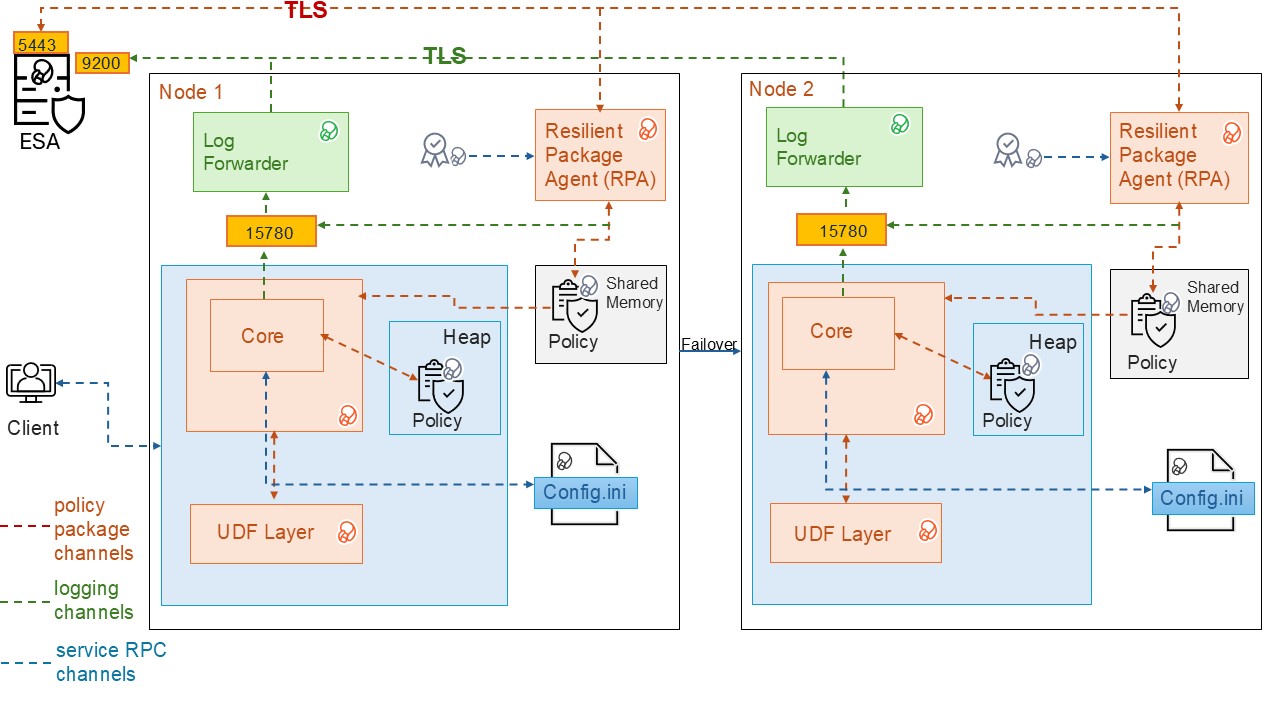
| Component | Description |
|---|---|
| RPAgent | A service on each node that downloads the package from the ESA over a TLS‑secured channel. |
| Log Forwarder | A service running on each node that routes audit logs and application logs to the ESA/Audit Store. |
| config.ini | A configuration file on each node that defines parameters used to control Database Protector behavior. |
| UDF Layer | A set of Database Protector user‑defined functions (UDFs) and APIs. |
| Core | A set of shared libraries that provide the core Protegrity functionality. |
2.2 - System Requirements
This section describes the System Requirements including the hardware, software, and network requirements for installing the MSSQL database protector.
The following are the prerequisites required for installing the MSSQL Database Protector:
- The ESA v10.0 appliance is installed, configured, and running.
- The IP address or host name of the ESA is noted.
- The administrator rights for the operating system are granted.
- The DBA rights to the MSSQL database are granted.
- Before installing the protector, ensure that the Policy Information Management(PIM) is initialized, if you are installing the ESA for the first time. This prerequisite holds true for versions 7.2.0 and later releases.
Note: For more information about initializing the PIM, refer to the section Initializing the Policy Management.
2.3 - Preparing the Environment
The steps to prepare the environment to install the MSSQL Database Protector are explained in the sub-sections mentioned below.
2.3.1 - Extracting the Installation Package
Download the
DatabaseProtector_WIN-ALL-64_x86-64_MSSQL-ALL-64_<version>.zipinstallation package made available by Protegrity.Create a directory to install the protector.
Note: In case of a failure to create the installation directory, the script will use
C:\Program Files\Protegrity\as the default installation directory.To obtain the
signaturefiles, extract the contents of theDatabaseProtector_WIN-ALL-64_x86-64_MSSQL-ALL-64_<version>.zipfile.DatabaseProtector_WIN-ALL-64_x86-64_MSSQL-ALL-64_<version>.zipsignatures\DatabaseProtector_WIN-ALL-64_x86-64_MSSQL-ALL-64_<version>.zip_10.0.sig
To obtain the
installationfiles from the package, extract theDatabaseProtector_WIN-ALL-64_x86-64_MSSQL-ALL-64_<version>.zipfile.The following files are available in the installation package:
LogforwarderSetup_Windows_x64_<version>.exePepSQLServerSetup_Windows_x64_<version>.exeRPAgentSetup_Windows_x64_<version>.exeU.S.Patent.No.6,321,201.Legend.txt
2.3.2 - Installing the Log Forwarder
Log in to the database server as the user that has the permissions to install the Log Forwarder. Usually, this tends to be the instance owner.
Navigate to the directory containing the installation files.
To install the Log Forwarder, double-click the
LogforwarderSetup_Windows_x64_<version>.exefile.The Welcome to the Log Forwarder Setup Wizard dialog box appears.
Caution: It is mandatory to install the Log Forwarder before installing the RPAgent to ensure that the MSSQL Database Protector is configured correctly.
Click Next.
The Audit Store Connectivity Information dialog box appears.
In the Audit Store Connectivity Information dialog box, select the number of audit stores.
Note: The minimum and maximum Audit Store endpoints supported are 1 and 3 respectively.
In the Endpoint 1 box, enter the IP address for the audit store.
Note: The default port number is
9200.Click Next.
The Select Destination location dialog box appears.
To change the default installation directory for the Log Forwarder:
Click Browse.
Select the required installation directory to install the Log Forwarder.
Click OK.
Note: The default installation directory is
C:\Program Files\Protegrity\logforwarder.Click Next.
The Ready to Install dialog box appears.
Click Install.
The installer completes the installation and the Completing the Log Forwarder Setup dialog box appears.
To exit the installer, click Finish.
Note: After the Log Forwarder is installed successfully, to ensure that the Logforwarder sends logs to the ESA, verify that the Log Forwarder service is in the Running state.
To check the logforwarder service state, navigate to Start > Control Panel > System and Security > Administrative Tools > Services.
The Services window appears.
Verify that the Protegrity Log Forwarder service is in the Running state.
2.3.3 - Installing the RPAgent
Before you begin:
Before proceeding with the RPA installation in secure mode, ensure that the required CA certificate is available and trusted on the system.
For ESA
Download the certificate from ESA.
For more information about downloading certificates from ESA, refer to Manage Certificates.
After obtaining the certificate, configure the system environment variable:
| Variable | Value |
|---|---|
| SSL_CERT_FILE | Full path to the certificate file (for example, C:\Program Files\Protegrity\Database Protector\ca.crt) |
Ensure the ESA hostname or IP is present in the ESA TLS certificate (SAN or CN) and it is resolvable from the RPAgent host.
After the CA certificate is available, proceed with the RPA installation.
To install the RPAgent:
Navigate to the directory containing the installation files.
To install the RPAgent, double-click the
RPAgentSetup_Windows_x64_<version>.exefile.The Welcome to Resilient Package Agent Setup Wizard dialog box appears.
Click Next.
The Upstream Connectivity Information dialog box appears.
In the Address box, enter the host name or the IP address of the ESA.
Caution: Ensure that the ESA is up and running with the HubController service. The HubController service must be in the Running state to enable automatic download of certificates.
In the Port box, type the ESA port number.
Note: The default port for ESA is
8443.In the Certificate Download User box, type the ESA username.
In the Certificate Download Password box, type the ESA password.
Click Next.
The Select Destination Location dialog box appears.
To change the default installation directory for the RPAgent:
Click Browse.
Select the required installation directory to install the RPAgent.
Click OK.
Note: The default directory is
C:\Program Files\Protegrity\rpagentwhere the RPAgent is installed.Click Next.
The Ready to Install dialog box appears.
Click Install.
The installer completes the installation and the Completing the Protegrity RPAgent Setup Wizard dialog box appears.
To exit the wizard, click Finish.
To check the Protegrity RPAgent service status, navigate to Start > Control Panel > System and Security > Administrative Tools > Services. The Services window appears.
Verify that the Protegrity RPAgent service is in the Running state.
2.4 - Installing the MSSQL Database Protector
This section describes the procedure to install the MSSQL Database Protector and create the required User‑Defined Functions (UDFs). The process includes instructions to install the Policy Enforcement Point (PEP) for Microsoft SQL Server, optionally managing certificate‑based logins, and creating the UDFs.
Note: Certificate-based login management is only required in case of certificate creation. Depending on the specific requirements, create the User-defined functions (UDFs) with or without the certificates.
2.4.1 - Installing the Policy Enforcement Point (PEP)
The Policy Enforcement Point (PEP) integrates with SQL Server to enforce data protection and security policies at runtime, ensuring controlled access to sensitive data. This section outlines the installation procedure, and key considerations to ensure a successful installation.
To install the PEP:
Navigate to the directory containing the installation files.
To install the PEP for MSSQL server, double-click the
PepSQLServerSetup_Windows_x64_<version>.exefile.The Select Destination Location dialog box appears.
To change the default installation directory:
Click Browse.
Select the required installation directory to install the PEP for MSSQL Server.
Click OK.
Note: The default directory is
C:\Program Files\Protegrity\Database Protector.Click Next.
The Ready to Install dialog box appears.
Click Next.
The Configure SQL Server Database Name dialog box appears.
Note: The default database name is set to
master.Enter the database name in the box.
Click Install.
The installer completes the installation successfully and the Completing the Protegrity Data Security Platform - SQL Server UDF Setup Wizard dialog box appears.
Click Finish.
Note: After creating the UDFs, Protegrity recommends to restart the MSSQL service. For more information, refer to Restarting the SQL server.
Note: After installing Database Protector, configure Certificate-based login or continue with UDF installation without certificate-based authentication.
2.4.2 - Managing Certificate Based Login
Certificate‑based login securely authorizes Protegrity assemblies in SQL Server by using a certificate created from the Protegrity‑signed dll.
This section provides information about creating and upgrading the certificate based login for the MSSQL database protector.
2.4.2.1 - Creating the certificate
Certificate‑based login securely authorizes Protegrity assemblies in SQL Server by using a certificate created from the Protegrity‑signed dll. The certificate is mapped to a login with the UNSAFE ASSEMBLY permission. This permission enables the trusted execution of assemblies and UDFs without enabling the database‑wide TRUSTWORTHY setting.
To create a certificate-based login:
Login to SQL Server Management Studio.
To create a database certificate using a signed
dll. execute the following query.CREATE CERTIFICATE MSSQL_90009_cert FROM EXECUTABLE FILE = 'C:\Program Files\Protegrity\Database Protector\sqlserver\DNPepConnector.dll' GOTo create a certificate‑based login and grant the
UNSAFE ASSEMBLYpermissions, execute the following query.CREATE LOGIN John FROM CERTIFICATE MSSQL_90009_cert GO GRANT UNSAFE ASSEMBLY TO <John>; GOTo verify the certificate, navigate to System Database > Security > Certificates.
Select the appropriate database type to install the UDFs.
To create an assembly:
- Verify whether any assembly exists.
- If the assembly exists, then drop the existing assembly.
- Open the
createassembly.sqlscript. - Set the value of the
TRUSTWORTHYparameter toOFF. - Save the changes to the
createassembly.sqlscript. - Execute the
createassembly.sqlscript.
A sample script is given below.
USE [master] GO sp_configure 'clr enable',1 RECONFIGURE GO alter database [master] set trustworthy OFF GO if exists(SELECT name FROM sys.assemblies WHERE name = 'DNPepConnector') DROP ASSEMBLY [DNPepConnector] GO CREATE ASSEMBLY [DNPepConnector] AUTHORIZATION [dbo] FROM 'C:\Program Files\Protegrity\Database Protector\sqlserver\DNPepConnector.dll' WITH PERMISSION_SET = UNSAFE GOTo verify the user, navigate to the
C:\Program Files\Protegrity\Database Protector\sqlserver.To install the database objects, execute the
CreateObjects.sqlscript.Execute the protect/unprotect operations.
2.4.2.2 - Upgrading the certificate
This section describes the instructions to upgrade certificates for certificate‑based logins. Certificate upgrades are required only when replacing or renewing an existing certificate and are not part of the initial installation. Perform this procedure only if certificate‑based login is already configured.
To upgrade the certificate:
Login to SQL Server Management Studio.
To identify the login mapped to the certificate, execute the following query:
SELECT name FROM sys.server_principals WHERE sid IN ( SELECT sid FROM sys.certificates WHERE name = '<certificate_name>' );Note: Replace the placeholder with actual names.
This query returns the login_name associated with the existing certificate.
To drop the login name, execute the following query:
DROP LOGIN [login_name];Note: Replace the placeholder with actual names.
This command removes the login_name associated with the existing certificate.
To drop the associated objects, execute the following script:
DropObjects.sqlTo drop the user, execute the following query:
DROP USER [user_name];Note: Replace the placeholder with actual names.
This command removes the user_name associated with the existing certificate.
To drop the certificate, execute the following query:
DROP CERTIFICATE <certificate_name>;To re-create the certificate, follow the steps mentioned in Creating a Certificate-Based Login.
2.4.3 - Creating the User Defined Functions
This section describes the instructions install the User Defined Functions (UDFs). Create the UDFs with or without a certificate-based login. For more information about certificate-based login, refer to Managing Certificate-Based Login.
Note: If the
TRUSTWORTHYdatabase property isOFF, create a certificate-based login from the signed.dllfile provided by Protegrity. Create the certificate-based login before creating the UDFs. If theTRUSTWORTHYdatabase property isON, create the UDFs without creating a certificate-based login.
To install the user-defined functions:
Note: In MSSQL Server, the
salogin is disabled by default. Enable thesalogin to connect to the database using thesauser. By default, the database name ismaster.
To connect to the database, login as the privileged user with the CREATE ASSEMBLY permissions.
To run the scripts, navigate to the
C:\Program Files\Protegrity\Database Protector\sqlserver\sqlscriptsdirectory.To execute the registered assembly, execute the
CreateAssembly.sqlscript.Open the
CreateFunctions.sqlfile.Replace the default database name with the database to install the UDFs.
Save the changes to the
CreateFunctions.sqlscript.To create the UDFs, execute the
CreateFunctions.sqlscript.Note: After creating the UDFs, Protegrity recommends to restart the MSSQL service. For more information, refer to Restarting the SQL server.
2.5 - Configuring the MSSQL Database Protector
The installer script implements the required configurations automatically while installing the MSSQL Database Protector. These settings are done automatically by the installation process and do not require manual intervention. The following table describes these settings.
| Settings | Description |
|---|---|
| Communication | Set the Communication ID to 0 in the following registry entry: HKEY_LOCAL_MACHINE > SOFTWARE > Protegrity > Defiance DPS > SQL CLR This becomes the MSSQL Server default setting. |
| Domain Name | Using the LDAP member-source component, update the registry value in: HKEY_LOCAL_MACHINE > SOFTWARE > Protegrity > Defiance DPS > SQL CLR This helps the Administrator include domain names with every user name, making the user name unique. |
Note: Truncating the user names could lead to a security vulnerability and could result in user names, without the domain names, being treated as duplicate.
Note: It is recommended not to truncate the domain name as it is insecure. If the SQL Server instance is configured to perform windows authentication, then the mixed mode authentication should be disabled. A Windows authenticated user must provide the user name with the domain or host name prepended.
Configuring the TRUSTWORTHY Database Property
It is necessary to secure the connection between any client application and a SQL Server instance. The TRUSTWORTHY property for the MSSQL database is used to indicate whether the SQL Server instance trusts the database and its contents.
Earlier, while running the CreateAssembly.sql script during installation of the MSSQL Database Protector, the TRUSTWORTHY property was set to ON in the ALTER DATABASE statement. Keeping the TRUSTWORTHY property set to ON, increases security risk. It is recommended to keep the TRUSTWORTHY property set to OFF to avoid malicious threats when the database is connected to the server. However, if the TRUSTWORTHY database property is set to OFF while running the CreateAssembly.sql script, then the installation fails with the following error:
CREATE ASSEMBLY for assembly 'DNPepConnector' failed because assembly 'DNPepConnector' is not authorized for PERMISSION_SET = UNSAFE.
The assembly is authorized when either of the following is true: the database owner (DBO) has UNSAFE ASSEMBLY permission and the database has the TRUSTWORTHY database property on; or the assembly is signed with a certificate or an asymmetric key that has a corresponding login with UNSAFE ASSEMBLY permission.
Note: It is recommended to avoid changing the
TRUSTWORTHYproperty setting. An alternative method to mitigate this issue is that a certificate can be created for the MSSQL database using the signeddllfrom Protegrity. From this certificate a certificate-based login can be created for the database. An authorized certificate signed by a trusted source can validate the secured connection between the SQL Server instance and the database. A login is created with the certificate to connect the database securely with the server.
For more information about how to create a certificate-based login for the MSSQL database using the signed dll from Protegrity, refer to the section Managing Certificate-Based Login.
For more information about configuring the TRUSTWORTHY** property and creating a certificate, refer to the sections TRUSTWORTHY Database Property and Create a certificate for package signing respectively, in Microsoft’s website.
Updating Parameters in the config.ini File
The MSSQL Database Protector provides the following files that contain different parameters to control the protector behavior:
config.ini- provides parameters to control the protector behavior.rpagent.cfg- provides parameters to control the RPAgent behavior.
To update paramenters in the config.ini file follow the steps below:
Log in to the node.
Navigate to the
C:\Program Files\Protegrity\Database Protector\sqlserver\datadirectory.To open the
config.inifile, run the following command:vi config.iniPress ENTER.
The command opens the
config.inifile.############################################################################### # Protector configuration ############################################################################### [protector] # Cadence determines how often the protector connects with ESA / proxy to fetch the policy updates in background. # Default is 60 seconds. So by default, every 60 seconds protector tries to fetch the policy updates. # If the cadence is set to "0", then the protector will get the policy only once. # # Default 60. cadence = 60 ############################################################################### # Log Provider Config ############################################################################### [log] # In case that connection to fluent-bit is lost, set how audits/logs are handled # # drop : (default) Protector throws logs away if connection to the fluentbit is lost # error : Protector returns error without protecting/unprotecting # data if connection to the fluentbit is lost mode = drop # Host/IP to fluent-bit where audits/logs will be forwarded from the protector # # Default localhost host = localhostUpdate the parameters, as per the description in the table.
Parameter Description cadenceSpecifies the frequency at which the protector retrieves the policy. The default value is 60 seconds. If the cadence is set to “0”, then the protector will get the policy only once. modeSpecifies the approach of handling logs when the connection to the Log Forwarder is lost. Save the changes to the
config.inifile.
Updating the parameters in the rpagent.cfg file
Log in to the required node.
Navigate to the
C:\Program Files\Protegrity\rpagent\datadirectory.To open the
rpagent.cfgfile, run the following command:vi rpagent.cfgPress ENTER.
The command opens the rpagent.cfg file.
############################################################################### # Resilient Package Sync Config ############################################################################### [sync] # Protocol to use when communicating with the service providing Resilient Packages. # Use 'https' for ESA or 'shmem' for local shared memory. protocol = https # Host/IP to the service providing Resilient Packages host = <IP_address> port = 8443 # Path to CA certificate ca = /opt/protegrity/rpagent/data/CA.pem # Path to client certificate cert = /opt/protegrity/rpagent/data/cert.pem # Path to client certificate key key = /opt/protegrity/rpagent/data/cert.key # Path to a secret file that is used to decrypt the client certificate key. # When using a custom certificate bundle, the 'secretcommand' can instead be # used to execute an external command that obtains the secret. secretfile = /opt/protegrity/rpagent/data/secret.txt ############################################################################### # Log Provider Config ############################################################################### [log] # In case that connection to fluent-bit is lost, set how audits/logs are handled # # drop : (default) Protector throws logs away if connection to the fluentbit is lost # error : Protector returns error without protecting/unprotecting # data if connection to the fluentbit is lost mode = drop # Host/IP to fluent-bit where audits/logs will be forwarded from the protector # # Default localhost host = localhostUpdate the parameters, as per the description in the table.
Parameter Description interval Specifies the frequency at which the RPAgent retrieves the policy. The minimum value is 1 second and the maximum value is 86400 seconds. This is an optional parameter and must be included in the Sync section of the rpagent.cfgfile.protocol Specifies the protocol to use when communicating with the service providing Resilient Packages. host Specifies the hostname to the service providing the Resilient packages. port Specifies the port to the service providing the Resilient packages. ca Specifies the path to the CA certificate. cert Specifies the path to the client certificate. key Specifies the path to the client certificate key. secretfile Specifies the path to the secret file that is used to decrypt the client certificate key. mode Specifies the approach of handling logs when the connection to the Log Forwarder is lost. host Specifies the hostname or the IP address to where the Log Forwarder will forward the audit logs from the protector. Save the changes to the
rpagent.cfgfile.
Restarting SQL server to apply configuration changes
Note: After the initial installation using the default path, restart the
MSSQLSERVERservice before executing any queries. If the installation path is modified in later installations, theMSSQLSERVERservice must be restarted again prior to query execution.
If the protector is already installed, restart the SQL Server to apply the config.ini changes.
To restart the SQL Server follow the steps below:
- Open SQL Server Management Studio > SQL Server Configuration Manager.
- In the left pane, select SQL Server Services.
- Identify the SQL Server instance to restart:
- SQL Server
MSSQLSERVERfor the default instance, or - SQL Server
<instance_name>for a named instance.
- SQL Server
- Right-click the selected SQL Server instance.
- Click Restart.
The SQL Server service restarts and the configuration changes are implemented.
2.5.1 - Configuring MSSQL User Access Permissions
A user must be granted access and permissions to the certain tables such that they can query the database for members and groups.
Grant the following privilege rights to the user, defined in the member source configuration on the ESA, for executing the queries:
- Select access to
MASTER.SYSLOGINS - Select access to
SYSUSERS
2.5.2 - Impersonating a User
User impersonation is a security feature that allows one user to temporarily act under the permissions of another user (usually a privileged user) within the same session. This enables controlled execution of privileged actions without permanently granting elevated access, and all actions are audited as performed by the impersonated user.
To impersonate a user:
Login to the server as the proxy user,
USER1.To change the user execution to privileged user, USER2, run the following command:
EXECUTE AS USER = 'USER2'Perform the protect/unprotect functionality on the data using a data element.
Disconnect the current session and initiate the session as
USER1.Similarly, the EXEC AS statement enables impersonation of a privileged user to perform operations according to the user’s assigned privileges.
Note:
- User impersonation settings apply only to the current session.
- If a proxy user impersonates a privileged user and performs any operation, then entries in the Audit logs are displayed as performed by the privileged user, and not the proxy user.
2.6 - Upgrading the Database Protector
To upgrade the MSSQL Database Protector:
Drop the existing UDFs.
Uninstall the existing version of the protector.
Install the new version of the protector.
Start the RPAgent.
Create the new user-defined functions.
2.6.1 - Preparing the System for Upgrade
Before proceeding with an upgrade, stop the required services and create a backup of all the configuration files.
To prepare the system for an upgrade:
Log in to the database server as a user with the required permissions.
In the Windows search box, type Run
Press ENTER.
The Run dialog box appears.
Type
services.msc.Press ENTER.
The Services window appears.
To stop the RPAgent, right-click the Resilient Package Agent service and select Stop.
To stop the Log Forwarder, right-click the Logforwarder service and select Stop.
Note: To preserve the current configuration, copy the
config.inifile to the required location. Theconfig.inifile is available in theC:\Program Files\Protegrity\Database Protector\sqlserver\datadirectory.
2.6.2 - Dropping the UDFs
After stopping the services and creating a backup of the configuration files, drop the existing user defined functions.
To delete the UDFs:
Log in to the database server as the user that has the permissions.
Navigate to the
C:\Program Files\Protegrity\Database Protector\sqlserver\sqlscriptsfolder.Execute the
DropObjects.sqlfile.Create a backup of the
Database Protectordirectory.
2.6.3 - Upgrading the Database Protector
Note: Starting with version 7.2.0, for first‑time ESA installations, initialize Policy Management before installing the protector. For more information about initializing the Policy Management, refer to the section Initializing the Policy Management.
To upgrade the Database Protector, install the newer version of the Database protector. For more information, refer Installing the MSSQL Database Protector.
2.6.4 - Recreating the UDFs
After the upgrade, recreate the required UDFs to restore the Database Protector functionality.
To re-create the UDFs:
Log in to the database server as the user that has the permissions.
Navigate to the
C:\Program Files\Protegrity\Database Protector\sqlserver\sqlscripts directory.To register the assembly, execute the
CreateAssembly.sqlscript.To create the UDFs, execute the
CreateFunctions.sqlscript.
2.6.5 - Restarting the RPAgent
After the upgrade, restart the required services and deploy policies to restore Database Protector operations.
To restart the RPAgent service:
In the Windows search box, type Run.
Press ENTER.
The Run dialog box appears.
Type services.msc.
Press ENTER.
The Services window appears.
To restart the RPAgent service, right-click Resilient Package Agent service and select Restart.
To restart SQL Server, right-click on the SQL Server service and select Restart.
Deploy the policies from the ESA to the Database Protector.
2.7 - Uninstalling the MSSQL Database Protector
The section describes the procedures to uninstall the MSSQL Database Protector and the components.
Before proceeding to uninstall the MSSQL Database protector, stop the MSSQL Service.
To stop the MSSQL Service
Navigate to Start > Control Panel > System and Security > Administrative Tools > Services.
Note: Alternatively, navigate to the Windows > Start > Run. In the Run window, type services.msc and then, click OK.
The Services window appears.
Select MSSQL Server.
To stop the MSSQL Service, select Action > Stop.
2.7.1 - Dropping the Database Protector UDFs
Log in to the MSSQL database with a username that owns the UDF functions.
Note: The
DropObjects.sqlscript must be executed either before or after uninstalling all MSSQL Server Database Protector components.Navigate to the
C:\Program Files\Protegrity\Database Protector\sqlserver\sqlscripts directory.Open the
DropObjects.sqlfile.Replace the default database name with the database name to uninstall the UDFs.
Save the changes to the
DropObjects.sqlfile.To uninstall the UDFs, execute the
DropObjects.sqlscript.
2.7.2 - Uninstalling the RPAgent
Navigate to Start > Control Panel > System and Security > Administrative Tools > Services.
Note: Alternatively, navigate to the Windows > Start > Run. In the Run window, type services.msc and then, click OK.
The Services window appears.
Select Protegrity Resilient Package Agent.
To stop the RPAgent server, select Action > Stop.
To remove the RPAgent component:
From the Windows menu, navigate to Start > Control Panel > Programs > Programs and Features.
From the list of programs, under the Name column, select Protegrity Resilient Package Agent.
Click Uninstall.
Note: Alternatively, go to the
C:\Program Files\Protegrity\rpagentdirectory. To uninstall the RPAgent, select unins000 file and then double-click it.The RPAgent installer deletes the rpagent directory.
2.7.3 - Uninstalling the Log Forwarder
Navigate to Start > Control Panel > System and Security > Administrative Tools > Services.
Note: Alternatively, navigate to the Windows > Start > Run. In the Run window, type services.msc and then, click OK.
The Services window appears.
Select Logforwarder.
To stop the Log Forwarder, select Action > Stop.
To remove the Log Forwarder component:
From the Windows menu, navigate to Start > Control Panel > Programs > Programs and Features.
From the list of programs, under the Name column, select Logforwarder.
Click Uninstall.
Note: Alternatively, go to the
C:\Program Files\Protegrity\logforwarderdirectory. To uninstall the Log Forwarder, select unins000 file and then double-click it.The installer removes the Log Forwarder and deletes the Log Forwarder directory.
2.7.4 - Removing the Database Protector
The section describes the procedures to uninstall the MSSQL Database Protector and the components.
From the Windows menu, navigate to Start > Control Panel > Programs > Programs and Features.
The Programs and Features window appears.
From the list of programs, under the Name column, select Protegrity Data security platform - SQL Server UDF.
Click Uninstall.
Note: Alternatively, go to the
C:\Program Files\Protegrity\Database Protectordirectory. To uninstall the Protegrity Data security platform - SQL Server UDF, select unins000 file and then double-click it.The Protegrity Data security platform - SQL Server UDF is uninstalled and the Database Protector directory is deleted.
3 - Oracle Database Protector
The Oracle Database Protector can be installed by the user with sudoer permissions and the Oracle admin user. This section discusses the installation with a user having the sudoer permissions. Wherever possible, the oracle commands for Oracle admin user would be provided.
To use the Oracle Database Protector, update the environment variables in Oracle.
User Privileges
The Oracle Database Protector installation can be broadly divided into installing the RPAgent and installing the UDFs. The RPAgent installation establishes the connection between the ESA and the Database Protector, while the UDFs use the policies to enforce protection on the data.
User for retrieving users from Oracle Database
For policies to be defined in the ESA, users can be imported from any of the multiple sources such as Active Directory (AD), file, or an Oracle database. To pull users from an Oracle database, a membersource must be created. The following information applies if the users must be pulled from an Oracle database.
To retrieve users from the Member Source Server:
- Either create a functional database user with create session permissions
or
Use an existing user with create session permissions - Grant the following two specific grants:
- Grant select on sys.dba_roles to protegrity
- Grant select on sys.dba_role_privs to protegrity
Where, protegrity is the functional user created.
User for installing UDFs
After the RPAgent is installed, the UDFs can be installed on the Oracle Database server. Create a functional database user with the following privilege rights:
- Grant unlimited tablespace to USER1
- Grant create session to USER1
- Grant select any table to USER1
- Grant create library to USER1
- Grant create procedure to USER1
- Grant drop public synonym to USER1
- Grant create public synonym to USER1
- Grant create table to USER1
- Grant create view to USER1
Where, USER1 is the functional user created.
3.1 - Understanding the Architecture
The architecture for the Oracle Database Protector is depicted in the image below.
| Component | Description |
|---|---|
| RPAgent | A daemon running on each node that downloads the package from the ESA over a TLS channel using the installed Certificates. |
| Log Forwarder | A daemon running on each node that routes the audit logs and application logs to the ESA/Audit Store. |
| config.ini | A file on each node containing the set of configuration parameters to modify the protector behavior. |
| DBP Layer | Contains the Database Protector UDFs and APIs. |
| Core | The set of various libraries that provide the Protegrity Core functionality. |
3.2 - System Requirements
Ensure that the following prerequisites are met:
The Oracle Database is installed and configured.
The Enterprise Security Administrator (ESA) is installed, configured, and running.
The IP address or host name of the ESA is noted.
Ensure that Policy Management (PIM) has been initialized on the ESA. The initialization of PIM ensures that cryptographic keys for protecting data and the policy repository have been created.
Download and save the Oracle Database Protector,
DatabaseProtector_<operating_system>-<arch>_<Oracle_version>-64_<version>.tgz, made available by Protegrity.Even if it is not mandatory, create a backup of the database where the Oracle Database Protector and the UDFs will be installed.
Access to the server, as the oracle instance owner or the user created specifically for Protegrity, is available.
Access to the Oracle database as the
sysdbasuperuser, should be available.
3.3 - Preparing the Environment
The steps to prepare the environment to install the Oracle Databsae Protector are explained in the sub-sections mentioned below.
3.3.1 - Extracting the Installation Package
- Log in to the Oracle database server with an account having the required privileges.
- Save the Oracle database protector installation package,
DatabaseProtector_<operating_system>-<arch>_<Oracle_distribution>-64_<version>.tgz, made available by Protegrity, in any sample directory. For example,/opt/protegrity/ - Navigate to the
/opt/Protegrity/directory. - To extract the contents, run the following command:
tar -xvf DatabaseProtector_Linux-ALL-64_x86-64_Oracle-ALL-64_<DBP_version>.tgz - Press ENTER.
The command extracts the package and the signature files.
DatabaseProtector_Linux-ALL-64_x86-64_Oracle-ALL-64_<DBP_version>.tgz signatures/ signatures/DatabaseProtector_Linux-ALL-64_x86-64_Oracle-ALL-64_<DBP_version>.tgz_10.0.sig - To extract the contents of the installation package, run the following command:
tar -xvf DatabaseProtector_Linux-ALL-64_x86-64_Oracle-ALL-64_<DBP_version>.tgz - Press ENTER.
The command extracts the files from the package.
LogforwarderSetup_Linux_x64_<DBP_version>.sh RPAgentSetup_Linux_x64_<DBP_version>.sh PepOracleSetup_Linux_x64_<DBP_version>.sh U.S.Patent.No.6,321,201.Legend.txt
3.3.2 - Installing the Log Forwarder
- Log in to the database server as the user that has the permissions to install the Log Forwarder. Usually, this tends to be the instance owner.
- Navigate to the directory where the installation files are extracted.
- To install the Log Forwarder, run the following command:
./LogforwarderSetup_Linux_x64_<DBP_version>.sh - Press ENTER.
The prompt to enter the audit store endpoint appears.
Enter the audit store endpoint (host), alternative (host:port) to use another port than the default port 9200 : - Enter the IP address of the audit store.
- Press ENTER.
The prompt to enter additional endpoint appears.
Audit store endpoints: <Audit_store_IP_address>:9200 Do you want to add another audit store endpoint? [y/n]: - To skip adding additional endpoints, type
no. - Press ENTER.
The prompt to continue the installation appears.
These audit store endpoints will be added: <Audit_store_IP_address>:9200 Type 'y' to accept or 'n' to abort installation: - To continue the installation, type
yes. - Press ENTER.
The script extracts the files and installs the Log Forwarder.
Unpacking... Extracting files... Protegrity Log Forwarder installed in /opt/protegrity/logforwarder. - Navigate to the
/opt/protegrity/logforwarder/bindirectory. - To start the Log Forwarder, run the following command:
./logforwarderctrl start
3.3.3 - Installing the RPAgent
- Log in to the database server as the user that has permissions to install the RPAgent.
- Navigate to the directory where the installation files are extracted.
- To install the RPAgent, run the following command:
./RPAgentSetup_Linux_x64_<DBP_version>.sh - Press ENTER.
The prompt to enter ESA host name or IP address appears.
Please enter upstream host name or IP address[]: - Enter the IP address of the ESA.
- Press ENTER.
The prompt to enter the username to download the certificates appears.
Please enter the user name for downloading certificates[]: - Enter the username to download the certificates from ESA.
- Press ENTER.
The prompt to enter the password to download the certificates appears.
Please enter the password for downloading certificates[]: - Enter the password.
- Press ENTER.
The script connects to the ESA, retrives the JWT token, extracts the certificates, and installs the RPAgent.
Unpacking... Extracting files... Obtaining token from <ESA_IP_Address>:25400... Downloading certificates from <ESA_IP_Address>:25400... % Total % Received % Xferd Average Speed Time Time Time Current Dload Upload Total Spent Left Speed 100 11264 100 11264 0 0 136k 0 --:--:-- --:--:-- --:--:-- 137k Extracting certificates... Certificates successfully downloaded and stored in /opt/protegrity/rpagent/data Protegrity RPAgent installed in /opt/protegrity/rpagent. - Navigate to the
/opt/protegrity/rpagent/bindirectory. - To start the RPAgent, run the following command:
./rpagentctrl start
3.4 - Installing the Oracle Database Protector
3.4.1 - Installing the Policy Enforcement Point (PEP)
- Log in to the node where the installation files are extracted.
- To install the Oracle objects, run the following command:
./PepOracleSetup_Linux_x64_<DBP_version>.sh - Press ENTER.
The prompt to continue appears.
***************************************************** Welcome to the Database Protector Setup Wizard ***************************************************** This will install the oracle objects on your computer Do you want to continue? [yes or no] - To continue, type
yes. - Press ENTER.
The prompt to enter the installation directory appears.
Enter installation directory. A new directory will be created in the installation directory. [/opt/protegrity]: - Enter the location to install the Oracle objects.
- Press ENTER.
The command extracts the files and installs the objects.
Unpacking... Extracting files... oracle objects installed in /opt/protegrity/databaseprotector/oracle.
3.4.2 - Creating the User Defined Functions (UDFs)
The Oracle Database Protector provides the createobjects.sql script to create or install the UDFs. Before executing the createobjects.sql script, configure the listener.ora, tnsnames.ora, and the extproc.ora configuration files, depending on the version of the Oracle database.
To install UDFs for the Oracle Database Protector:
Connect to the database as the
oracleuser with the database owner credentials.Navigate to the
/opt/protegrity/databaseprotector/oracle/sqlscripts/directory.To install the UDFs, run the following command:
sqlplus User1/Password1 @createobjects.sqlwhere,
User1andPassword1are the credentials of the database owner. The symbol\is used for Windows and/for UNIX environments.To view the list of all the installed UDFs, run the following command:
select PROCEDURE_NAME from user_procedures order by 1;To verify the successful installation of the UDFs, execute any one of the following queries:
select pty.whoami() from dual;The function returns the name of the user that is logged in to the database.
select pty.getversion() from dual;The function returns the protector version.
3.5 - Configuring the Oracle Database Protector
The Oracle Database Protector provides the following files that contain different parameters to control the protector behavior:
config.ini- provides parameters to control the protector behavior.rpagent.cfg- provides parameters to control the RPAgent behavior.
Updating the parameters in the config.ini file:
Log in to the node.
Navigate to the
/opt/protegrity/databaseprotector/oracle/datadirectory.To open the
config.inifile, run the following command:vi config.iniPress ENTER.
The command opens the
config.inifile.############################################################################### # Protector configuration ############################################################################### [protector] # Cadence determines how often the protector connects with ESA / proxy to fetch the policy updates in background. # Default is 60 seconds. So by default, every 60 seconds protector tries to fetch the policy updates. # If the cadence is set to "0", then the protector will get the policy only once. # # Default 60. cadence = 60 ############################################################################### # Log Provider Config ############################################################################### [log] # In case that connection to fluent-bit is lost, set how audits/logs are handled # # drop : (default) Protector throws logs away if connection to the fluentbit is lost # error : Protector returns error without protecting/unprotecting # data if connection to the fluentbit is lost mode = drop # Host/IP to fluent-bit where audits/logs will be forwarded from the protector # # Default localhost host = localhostUpdate the parameters, as per the description in the table.
Parameter Description cadenceSpecifies the frequency at which the protector retrieves the policy. The default value is 60 seconds. If the cadence is set to “0”, then the protector will get the policy only once. modeSpecifies the approach of handling logs when the connection to the Log Forwarder is lost. Save the changes to the
config.inifile.
Updating the parameters in the rpagent.cfg file:
Log in to the required node.
Navigate to the
/opt/protegrity/rpagent/datadirectory.To open the
rpagent.cfgfile, run the following command:vi rpagent.cfgPress ENTER.
The command opens the rpagent.cfg file.
###############################################################################
# Resilient Package Sync Config
###############################################################################
[sync]

# Protocol to use when communicating with the service providing Resilient Packages.
# Use 'https' for ESA or 'shmem' for local shared memory.
protocol = https

# Host/IP to the service providing Resilient Packages
host = <IP_address>
port = 8443

# Path to CA certificate
ca = /opt/protegrity/rpagent/data/CA.pem

# Path to client certificate
cert = /opt/protegrity/rpagent/data/cert.pem

# Path to client certificate key
key = /opt/protegrity/rpagent/data/cert.key

# Path to a secret file that is used to decrypt the client certificate key.
# When using a custom certificate bundle, the 'secretcommand' can instead be
# used to execute an external command that obtains the secret.
secretfile = /opt/protegrity/rpagent/data/secret.txt

###############################################################################
# Log Provider Config
###############################################################################
[log]

# In case that connection to fluent-bit is lost, set how audits/logs are handled
#
# drop  : (default) Protector throws logs away if connection to the fluentbit is lost
# error : Protector returns error without protecting/unprotecting
#         data if connection to the fluentbit is lost
mode = drop

# Host/IP to fluent-bit where audits/logs will be forwarded from the protector
#
# Default localhost
host = localhost
Update the parameters, as per the description in the table.
Parameter Description interval Specifies the frequency at which the RPAgent retrieves the policy. The minimum value is 1 second and the maximum value is 86400 seconds. This is an optional parameter and must be included in the Sync section of the rpagent.cfgfile.protocol Specifies the protocol to use when communicating with the service providing Resilient Packages. host Specifies the hostname to the service providing the Resilient packages. port Specifies the port to the service providing the Resilient packages. ca Specifies the path to the CA certificate. cert Specifies the path to the client certificate. key Specifies the path to the client certificate key. secretfile Specifies the path to the secret file that is used to decrypt the client certificate key. mode Specifies the approach of handling logs when the connection to the Log Forwarder is lost. host Specifies the hostname or the IP address to where the Log Forwarder will forward the audit logs from the protector. Save the changes to the
rpagent.cfgfile.
3.5.1 - User Impersonation
This section describes how to impersonate a user in the Oracle database protector. The user impersonation feature enables you to perform operations and access resources on behalf of another user. Service users leverage this feature to impersonate individual users. However, to supply user context to execute a query, upper applications provide the CLIENT_IDENTIFIER. Set the impersonation parameter to YES in the config.ini file, to use the CLIENT_IDENTIFIER parameter of the inbuilt USERENV application context SYS_CONTEXT provided by the Oracle database.
To impersonate a user:
Log in to the node where the Oracle database is installed.
Navigate to the
/opt/protegrity/databaseprotector/oracle/data/directory.To open the
config.inifile, run the following command:vi config.iniPress ENTER.
The command opens the
config.inifile.############################################################################### # Protector configuration ############################################################################### [protector] # Cadence determines how often the protector connects with ESA / proxy to fetch the policy updates in background. # Default is 60 seconds. So by default, every 60 seconds protector tries to fetch the policy updates. # If the cadence is set to "0", then the protector will get the policy only once. # # Default 60. cadence = 60 ############################################################################### # Log Provider Config ############################################################################### [log] # In case that connection to fluent-bit is lost, set how audits/logs are handled # # drop : (default) Protector throws logs away if connection to the fluentbit is lost # error : Protector returns error without protecting/unprotecting # data if connection to the fluentbit is lost mode = drop # Host/IP to fluent-bit where audits/logs will be forwarded from the protector # # Default localhost host = localhostTo include the impersonation parameter and set the value to
YES, add the following code:[userimpersonation] impersonation = yes/no or YES/NOThe default value of the impersonation parameter is set to
NOorno.Assign 644 permissions to the
config.inifile. This is required only tf the ownership of theconfig.inifile is not set to theoracleuser and theoinstallgroup.Connect to the database session using the service account. For example,
USER1.To set the
CLIENT_IDENTIFIER, execute the following query:EXEC DBMS_SESSION.SET_IDENTIFIER ('USER2');Press ENTER. The query returns the name of the user for whom you set the
CLIENT_IDENTIFIERparameter.USER2To verify the value that is set for the
CLIENT_IDENTIFIERparameter, execute the following query:SQL> select sys_context('USERENV','CLIENT_IDENTIFIER') from dual; SYS_CONTEXT('USERENV','CLIENT_IDENTIFIER')Press ENTER. The query returns the name of the user for whom you set the
CLIENT_IDENTIFIERparameter.USER2Warning: When you set the value of the
impersonationparameter toyes/YES, then set a value for the theCLIENT_IDENTIFIERparameter. The protect/unprotect UDFs will run only after the value for theCLIENT_IDENTIFIERparameter is set. If you set the value of theimpersonationparameter toyes/YES, and fail to set the value for theCLIENT_IDENTIFIERparameter, then the PTY.WHOAMI() UDF will return the username as <no_user>. This will cause the protect/unprotect operations to fail with theFailed to retrieve usererror message.To verify the user who is logged into the database session, execute the following query:
select pty.whoami() from dual;Press ENTER. The query returns the name of the user that is logged into the current database session.
USER2To clear the value set for the
CLIENT_IDENTIFIERparameter, execute the following query:EXEC DBMS_SESSION.CLEAR_IDENTIFIER;
3.5.2 - Enterprise User Security (EUS) in the Oracle Database
Enterprise User Security (EUS) is an important component of the Oracle database that allows you to centrally manage the database users across the enterprise. Enterprise users are the users that are defined and managed in a directory. Every enterprise user has a unique identity across the enterprise. The Enterprise User Security relies on the Oracle Identity Management infrastructure, which uses an LDAP-compliant directory service to centrally store and manage the users.
Protegrity supports the following authentication methods:
- Password-based authentication
- SSL-based authentication
- Kerberos-based authentication
In the following list, the type of user is followed by the value returned:
- Password-authenticated enterprise user: nickname (same as the login name)
- Password-authenticated database user: the database username (same as the schema name)
- SSL-authenticated enterprise user: the DN in the user’s PKI certificate
- SSL-authenticated external user: the DN in the user’s PKI certificate
- Kerberos-authenticated enterprise user: Kerberos principal name
- Kerberos-authenticated external user: Kerberos principal name, which is the same as the schema name
The Oracle database protector supports the retrieval of the user information using the AUTHENTICATED_IDENTITY parameter that returns the identity used for the authentication.
Using the EUS Feature
The instructions and examples provided in the section use Kerberos-based authentication.
Note:
- Ensure that the username in the ESA policy contains only the username and does not include the domain name. For example, USER1.
- Currently, only one domain name is supported.
To use the EUS feature:
- To create a Kerberos ticket for the enterprise user, run the following command:
okinit <username> - Press ENTER.
The command prompts for the password of the enterprise user.
[oracle@db ~]$ okinit USER1 Kerberos Utilities for Linux: Version 18.0.0.0.0 - Production on 15-DEC-2021 06:07:06 Copyright (c) 1996, 2017 Oracle. All rights reserved. Configuration file : /u01/app/oracle/product/18.0.0/dbhome_1/network/admin/kerberos/krb5.conf. Password for USER1@TESTLAB.COM: - Enter the password.
- Press ENTER.
- To verify whether the authentication ticket is generated successfully, run the following command:
oklist - Press ENTER.
The command displays the authentication ticket details.
[oracle@db ~]$ oklist Kerberos Utilities for Linux: Version 18.0.0.0.0 - Production on 15-DEC-2021 06:07:37 Copyright (c) 1996, 2017 Oracle. All rights reserved. Configuration file : /u01/app/oracle/product/18.0.0/dbhome_1/network/admin/kerberos/ krb5.conf. Ticket cache: FILE:/tmp/krb5cc_54321 Default principal: USER1@TESTLAB.COM Valid starting Expires Service principal 12/15/21 06:07:06 12/15/21 16:07:06 krbtgt/TESTLAB.COM@TESTLAB.COM renew until 12/16/21 06:07:06 [oracle@db ~]$ - To login to the Oracle database, run the following command:
sqlplus /@<database_name> - Press ENTER. The SQL prompt appears.
- To verify the authentication method, run the following command:
select sys_context('USERENV','AUTHENTICATION_METHOD') from dual; - Press ENTER.
The command displays the authentication method.
select sys_context('USERENV','AUTHENTICATION_METHOD') from dual; SYS_CONTEXT('USERENV','AUTHENTICATION_METHOD') -------------------------------------------------------------------------------- KERBEROS - To view the user, run the following command:
select user from dual; - Execute a sample protect operation.
SQL> select pty.ins_encrypt('AES128', 'Original data', 0) from dual; PTY.INS_ENCRYPT('AES128','ORIGINALDATA',0) -------------------------------------------------------------------------------- 3713D5C1E058701568115B28885707CA SQL> - Execute a sample unprotect operation.
SQL> select pty.sel_decrypt('AES128', pty.ins_encrypt('AES128', 'Protegrity', 0) , 0) from dual;
PTY.SEL_DECRYPT('AES128',PTY.INS_ENCRYPT('AES128','PROTEGRITY',0),0)
--------------------------------------------------------------------------------
Protegrity
SQL>
Retrieving User Information
This section describes how to use the AUTHENTICATED_IDENTITY parameter to retrieve the information of an enterprise user.
To fetch the information of an enterprise user, run the following query:
select sys_context( 'userenv', 'AUTHENTICATED_IDENTITY' ) from dual;
Note: The
AUTHENTICATED_IDENTITYparameter contains the information of the enterprise user and returns the identity that is used in the authentication.
3.6 - Uninstalling the Oracle Database Protector
The process to uninstall the Oracle Database Protector involves the following steps:
- Dropping the User Defined Functions.
- Uninstalling the RPAgent.
- Uninstalling the Log Forwarder.
Dropping the User Defined Functions
- Log in to the Oracle Database server using the same account used to create the UDFs.
- Navigate to the
/opt/protegrity/databaseprotector/oracle/sqlscripts/directory. - To drop the UDFs, run the following command:
sqlplus USER1/Password1 @dropobjects.sql
Uninstalling the RPAgent
Before uninstalling the RPAgent, Protegrity recommends creating a backup.
- Log in to the Oracle Database server.
- Navigate to the
/opt/protegrity/rpagent/datadirectory. - To stop the RPAgent, run the following command:
rpagentctrl stop - Delete the
rpagentdirectory.
Uninstalling the Log Forwarder
Before uninstalling the Log Forwarder, Protegrity recommends creating a backup.
- Log in to the Oracle Database server.
- Navigate to the
/opt/protegrity/logforwarder/datadirectory. - To stop the RPAgent, run the following command:
logforwarderctrl stop - Delete the
logforwarderdirectory.
4 - User Defined Functions and APIs
4.1 - DB2 User Defined Functions and APIs
This section provides a detailed list of functions and extended stored procedures for general functions, and protection and unprotection of different data types.
4.1.1 - General UDFs
This section includes list of general UDFs that can be used to retrieve the DB2 Protector version and the current user.
pty.whoami
The UDF returns the name of the user.
Signature:
pty.whoami()
Parameters:
None
Result:
- This UDF returns the name of user logged on to the database as VARCHAR(256).
Example:
SELECT pty.whoami() FROM SYSIBM.SYSDUMMY1;
pty.getversion
The UDF returns the version number of the DB2 protector.
Signature:
pty.getversion()
Parameters:
None
Result:
- The UDF returns the version number of the DB2 protector as VARCHAR(256).
Example:
SELECT pty.getversion() FROM SYSIBM.SYSDUMMY1;
pty.getcoreversion
The UDF returns the core library version, used with the DB2 protector.
Signature:
pty.getcoreversion()
Parameters:
None
Result:
- The UDF returns the core library version, used with the DB2 protector, as VARCHAR(256).
Example:
SELECT pty.getcoreversion() FROM SYSIBM.SYSDUMMY1;
4.1.2 - Access Check UDFs
These UDFs are used to check access permissions. The functions returns 1 if the user has access. Otherwise, it returns a 0 (zero).
pty.have_sel_perm
The UDF verifies whether the user has select or unprotect access to the data element.
Signature:
pty.have_sel_perm(communicationid INTEGER, dataelement VARCHAR)
Parameters:
| Name | Type | Description |
|---|---|---|
communicationid | INTEGER | Specifies the location where the UDF will find the policy. The value must be the same as configured in the config.ini file.Note: This parameter is no longer used and is retained for compatibility purposes only. |
dataelement | VARCHAR(64) | Specifies the name of the data element. |
Result:
- The UDF returns either of the following values:
- 1 - If the user has
selectorunprotectaccess. - 0 - If the user does not have access.
- 1 - If the user has
Exception:
If you configure an exception in the policy and the user does not have access, then the UDF terminates with an error message explaining what went wrong.
Example:
SELECT pty.have_sel_perm(0, 'NoEncryption') FROM SYSIBM.SYSDUMMY1;
pty.have_upd_perm
The UDF verifies whether the user has update or reprotect access to the data element.
Signature:
pty.have_upd_perm(communicationid INTEGER, dataelement VARCHAR)
Parameters:
| Name | Type | Description |
|---|---|---|
communicationid | INTEGER | Specifies the location where the UDF will find the policy. The value must be the same as configured in the config.ini file.Note: This parameter is no longer used and is retained for compatibility purposes only. |
dataelement | VARCHAR(64) | Specifies the name of the data element. |
Result:
- The UDF returns either of the following values:
- 1 - If the user has
updateorreprotectaccess. - 0 - If the user does not have access.
- 1 - If the user has
Exception:
If you configure an exception in the policy and the user does not have access, then the UDF terminates with an error message explaining what went wrong.
Example:
SELECT pty.have_upd_perm(0, 'NoEncryption') FROM SYSIBM.SYSDUMMY1;
pty.have_ins_perm
The UDF verifies whether the user has insert or protect access to the data element.
Signature:
pty.have_ins_perm(communicationid INTEGER, dataelement VARCHAR)
Parameters:
| Name | Type | Description |
|---|---|---|
communicationid | INTEGER | Specifies the location where the UDF will find the policy. The value must be the same as configured in the config.ini file.Note: This parameter is no longer used and is retained for compatibility purposes only. |
dataelement | VARCHAR(64) | Specifies the name of the data element. |
Result:
- The UDF returns either of the following values:
- 1 - If the user has
insertorprotectaccess. - 0 - If the user does not have access.
- 1 - If the user has
Exception:
If you configure an exception in the policy and the user does not have access, then the UDF terminates with an error message explaining what went wrong.
Example:
SELECT pty.have_ins_perm(0, 'NoEncryption') FROM SYSIBM.SYSDUMMY1;
4.1.3 - VarChar UDFs
The UDFs, listed in this section, protect and unprotect VARCHAR data.
pty.ins_enc_varchar
The UDF encrypts the VARCHAR data with an encryption data element.
Signature:
pty.ins_enc_varchar(communicationid INTEGER, dataelement VARCHAR, data VARCHAR, scid INTEGER)
Parameters:
| Name | Type | Description |
|---|---|---|
communicationid | INTEGER | Specifies the location where the UDF will find the policy. The value must be the same as configured in the config.ini file.Note: This parameter is no longer used and is retained for compatibility purposes only. |
dataelement | VARCHAR(64) | Specifies the name of the data element. |
data | VARCHAR(32672) | Specifies the input data. |
scid | INTEGER | Specifies the security coordinate ID. Set the value of the parameter to zero. Note: This parameter is no longer used and is retained for compatibility purposes only. |
Result:
- The UDF returns the encrypted value as VARCHAR(32672) FOR BIT DATA.
Exception:
If you configure an exception in the policy and the user does not have access, then the UDF terminates with an error message explaining what went wrong.
Example:
SELECT pty.ins_enc_varchar(0, 'AES128', 'Protegrity', 0) FROM SYSIBM.SYSDUMMY1;
pty.upd_enc_varchar
The UDF re-encrypts the VARCHAR data that is updated with an encryption data element.
Signature:
pty.upd_enc_varchar(communicationid INTEGER, dataelement VARCHAR, data VARCHAR, scid INTEGER)
Parameters:
| Name | Type | Description |
|---|---|---|
communicationid | INTEGER | Specifies the location where the UDF will find the policy. The value must be the same as configured in the config.ini file.Note: This parameter is no longer used and is retained for compatibility purposes only. |
dataelement | VARCHAR(64) | Specifies the name of the data element. |
data | VARCHAR(32672) | Specifies the input data. |
scid | INTEGER | Specifies the security coordinate ID. Set the value of the parameter to zero. Note: This parameter is no longer used and is retained for compatibility purposes only. |
Result:
- The UDF returns the encrypted value as VARCHAR(32672) FOR BIT DATA.
Exception:
If you configure an exception in the policy and the user does not have access, then the UDF terminates with an error message explaining what went wrong.
Example:
SELECT pty.upd_enc_varchar(0, 'AES128', 'Protegrity', 0) FROM SYSIBM.SYSDUMMY1;
pty.sel_dec_varchar
The UDF decrypts the encrypted VARCHAR data with a data element.
Signature:
pty.sel_dec_varchar(communicationid INTEGER, dataelement VARCHAR, data VARCHAR, scid INTEGER)
Parameters:
| Name | Type | Description |
|---|---|---|
communicationid | INTEGER | Specifies the location where the UDF will find the policy. The value must be the same as configured in the config.ini file.Note: This parameter is no longer used and is retained for compatibility purposes only. |
dataelement | VARCHAR(64) | Specifies the name of the data element. |
data | VARCHAR(32672) FOR BIT DATA | Specifies the input data. |
scid | INTEGER | Specifies the security coordinate ID. Set the value of the parameter to zero. Note: This parameter is no longer used and is retained for compatibility purposes only. |
Result:
- The UDF returns the decrypted value as VARCHAR(32672).
- The UDF returns the unprotected value as
NULLwhen the user has no unprotect access to the data in the policy.
Exception:
If you configure an exception in the policy and the user does not have access, then the UDF terminates with an error message explaining what went wrong.
Example:
SELECT pty.sel_dec_varchar(0, 'AES128', pty.ins_enc_varchar(0, 'AES128', 'Protegrity', 0), 0) FROM SYSIBM.SYSDUMMY1;
pty.ins_varchar
The UDF protects the VARCHAR value using the Tokenization and No Encyrption data elements.
Signature:
pty.ins_varchar(comm_id INTEGER, dataelement VARCHAR, input_data VARCHAR, scid INTEGER)
Parameters:
| Name | Type | Description |
|---|---|---|
communicationid | INTEGER | Specifies the location where the UDF will find the policy. The value must be the same as configured in the config.ini file.Note: This parameter is no longer used and is retained for compatibility purposes only. |
dataelement | VARCHAR(64) | Specifies the name of the data element. |
input_data | VARCHAR(32672) | Specifies the input data. |
scid | INTEGER | Specifies the security coordinate ID. Set the value of the parameter to zero. Note: This parameter is no longer used and is retained for compatibility purposes only. |
Result:
- The UDF returns the data as VARCHAR(32672).
Exception:
If you configure an exception in the policy and the user does not have access, then the UDF terminates with an error message explaining what went wrong.
Example for Tokenization:
SELECT pty.ins_varchar(0, 'TE_A_S13_L1R2_Y', 'Protegrity', 0) FROM SYSIBM.SYSDUMMY1;
pty.upd_varchar
The UDF re-protects the VARCHAR data using Tokenization and NoEncryption data elements.
Signature:
pty.upd_varchar(comm_id INTEGER, dataelement VARCHAR, input_data VARCHAR, scid INTEGER)
Parameters:
| Name | Type | Description |
|---|---|---|
communicationid | INTEGER | Specifies the location where the UDF will find the policy. The value must be the same as configured in the config.ini file.Note: This parameter is no longer used and is retained for compatibility purposes only. |
dataelement | VARCHAR(64) | Specifies the name of the data element. |
input_data | VARCHAR(32672) | Specifies the input data. |
scid | INTEGER | Specifies the security coordinate ID. Set the value of the parameter to zero. Note: This parameter is no longer used and is retained for compatibility purposes only. |
Result:
- The UDF returns the data as VARCHAR(32672).
Exception:
If you configure an exception in the policy and the user does not have access, then the UDF terminates with an error message explaining what went wrong.
Example:
SELECT pty.upd_varchar(0, 'TE_A_S13_L1R2_Y', 'Protegrity', 0) FROM SYSIBM.SYSDUMMY1;
pty.sel_varchar
The UDF unprotects the protected VARCHAR value using Tokenization and NoEncryption data elements.
Signature:
pty.sel_varchar(comm_id INTEGER, dataelement VARCHAR, input_data VARCHAR, scid INTEGER)
Parameters:
| Name | Type | Description |
|---|---|---|
communicationid | INTEGER | Specifies the location where the UDF will find the policy. The value must be the same as configured in the config.ini file.Note: This parameter is no longer used and is retained for compatibility purposes only. |
dataelement | VARCHAR(64) | Specifies the name of the data element. |
input_data | VARCHAR(32672) | Specifies the input data. |
scid | INTEGER | Specifies the security coordinate ID. Set the value of the parameter to zero. Note: This parameter is no longer used and is retained for compatibility purposes only. |
Result:
- The UDF returns the data as VARCHAR(32672).
- The UDF returns the unprotected value as
NULL, when the user has no unprotect access to the data in the policy. - The UDF returns the protected value, if this option is configured in the policy and user does not have unprotect access to the data.
- The UDF returns the unprotected value as
NULL, when the user is not specified in the policy.
Exception:
If you configure an exception in the policy and the user does not have access, then the UDF terminates with an error message explaining what went wrong.
Example for Tokenization:
SELECT pty.sel_varchar(0, 'TE_A_S13_L1R2_Y',pty.ins_varchar(0, 'TE_A_S13_L1R2_Y', 'Protegrity', 0), 0) FROM SYSIBM.SYSDUMMY1;
pty.ins_hash_varchar
The UDF uses the hash function to protect the VARCHAR data with a data element for hashing to return a protected value.
Signature:
pty.ins_hash_varchar(comm_id INTEGER, dataelement VARCHAR, input_data VARCHAR, scid INTEGER)
Parameters:
| Name | Type | Description |
|---|---|---|
communicationid | INTEGER | Specifies the location where the UDF will find the policy. The value must be the same as configured in the config.ini file.Note: This parameter is no longer used and is retained for compatibility purposes only. |
dataelement | VARCHAR(64) | Specifies the name of the data element. |
input_data | VARCHAR(32672) | Specifies the input data. |
scid | INTEGER | Specifies the security coordinate ID. Set the value of the parameter to zero. Note: This parameter is no longer used and is retained for compatibility purposes only. |
Result:
- The UDF returns the hash value as VARCHAR(32672) FOR BIT DATA.
Exception:
If you configure an exception in the policy and the user does not have access, then the UDF terminates with an error message explaining what went wrong.
Example:
SELECT pty.ins_hash_varchar(0, 'HMAC_SHA256', 'Protegrity', 0) FROM SYSIBM.SYSDUMMY1;
pty.upd_hash_varchar
The UDF uses the hash function to protect the VARCHAR data with a data element for hashing to return a protected value.
Signature:
pty.upd_hash_varchar(comm_id INTEGER, dataelement VARCHAR, input_data VARCHAR, scid INTEGER)
Parameters:
| Name | Type | Description |
|---|---|---|
communicationid | INTEGER | Specifies the location where the UDF will find the policy. The value must be the same as configured in the config.ini file.Note: This parameter is no longer used and is retained for compatibility purposes only. |
dataelement | VARCHAR(64) | Specifies the name of the data element. |
input_data | VARCHAR(32672) | Specifies the input data. |
scid | INTEGER | Specifies the security coordinate ID. Set the value of the parameter to zero. Note: This parameter is no longer used and is retained for compatibility purposes only. |
Result:
- The UDF returns the hashed value as VARCHAR(32672) FOR BIT DATA.
Exception:
If you configure an exception in the policy and the user does not have access, then the UDF terminates with an error message explaining what went wrong.
Example:
SELECT pty.upd_hash_varchar(0, 'HMAC_SHA256', 'Protegrity', 0) FROM SYSIBM.SYSDUMMY1;
pty.ins_unicode_varchar
The UDF protects the VARCHAR data with the following data elements:
- Tokenization types such as Unicode Gen2
- Format Preserving Encryption (FPE) with the Plaintext Encoding type as UTF-8
- No Encryption
Signature:
pty.ins_unicode_varchar(comm_id INTEGER, dataelement VARCHAR, input_data VARCHAR, scid INTEGER)
Parameters:
| Name | Type | Description |
|---|---|---|
communicationid | INTEGER | Specifies the location where the UDF will find the policy. The value must be the same as configured in the config.ini file.Note: This parameter is no longer used and is retained for compatibility purposes only. |
dataelement | VARCHAR(64) | Specifies the name of the data element. |
input_data | VARCHAR(32672) | Specifies the input data. |
scid | INTEGER | Specifies the security coordinate ID. Set the value of the parameter to zero. Note: This parameter is no longer used and is retained for compatibility purposes only. |
Result:
- The UDF returns the data as VARCHAR(32672).
Exception:
If you configure an exception in the policy and the user does not have access, then the UDF terminates with an error message explaining what went wrong.
Example for FPE:
SELECT pty.ins_unicode_varchar(0,'FPE_FF1_AES256_UTF8_APIP_AN_L0R0_ASTNE_ML2','ProtegrityIndia',0) FROM SYSIBM.SYSDUMMY1;
Example for Unicode Gen2:
Note: The Unicode Gen2 data elements support the newly introduced SLT_X_1 tokenizer along with the existing SLT_1_3 tokenizer. For more information about the Unicode Gen2 data elements, refer to Unicode Gen2.
SELECT pty.ins_unicode_varchar(0,'TE_UG2_UTF16LE_LL1AN_SLT13_L2R0_ASTYES',N'xyzÀÁÂÃÄÅÆÇÈÉÊ',0) FROM SYSIBM.SYSDUMMY1;
SELECT pty.ins_unicode_varchar(0,'TE_UG2_SLTX1_L2R2_N_IPA_Greek_Coptic_UTF16LE',N'ϠϡϢϣϥϦ',0) FROM SYSIBM.SYSDUMMY1;
pty.upd_unicode_varchar
The UDF reprotects the VARCHAR data with the following data elements:
- Tokenization types such as Unicode Gen2
- No Encryption
Signature:
pty.upd_unicode_varchar(comm_id INTEGER, dataelement VARCHAR, input_data VARCHAR, scid INTEGER)
Parameters:
| Name | Type | Description |
|---|---|---|
communicationid | INTEGER | Specifies the location where the UDF will find the policy. The value must be the same as configured in the config.ini file.Note: This parameter is no longer used and is retained for compatibility purposes only. |
dataelement | VARCHAR(64) | Specifies the name of the data element. |
input_data | VARCHAR(32672) | Specifies the input data. |
scid | INTEGER | Specifies the security coordinate ID. Set the value of the parameter to zero. Note: This parameter is no longer used and is retained for compatibility purposes only. |
Result:
- The UDF returns the data as VARCHAR(32672).
Exception:
If you configure an exception in the policy and the user does not have access, then the UDF terminates with an error message explaining what went wrong.
Example for Unicode Gen2:
SELECT pty.upd_unicode_varchar(0,'TE_UG2_UTF16LE_LL1AN_SLT13_L2R0_ASTYES',N'xyzÀÁÂÃÄÅÆÇÈÉÊ',0) FROM SYSIBM.SYSDUMMY1;
SELECT
pty.upd_unicode_varchar(0,'TE_UG2_SLTX1_L2R2_N_IPA_Greek_Coptic_UTF16LE',N'ϠϡϢϣϥϦ',0) FROM SYSIBM.SYSDUMMY1;
pty.sel_unicode_varchar
The UDF unprotects the protected VARCHAR data with the following data elements:
- Tokenization types such as Unicode Gen2
- No Encryption
Signature:
pty.sel_unicode_varchar(comm_id INTEGER, dataelement VARCHAR, input_data VARCHAR, scid INTEGER)
Parameters:
| Name | Type | Description |
|---|---|---|
communicationid | INTEGER | Specifies the location where the UDF will find the policy. The value must be the same as configured in the config.ini file.Note: This parameter is no longer used and is retained for compatibility purposes only. |
dataelement | VARCHAR(64) | Specifies the name of the data element. |
input_data | VARCHAR(32672) | Specifies the input data. |
scid | INTEGER | Specifies the security coordinate ID. Set the value of the parameter to zero. Note: This parameter is no longer used and is retained for compatibility purposes only. |
Result:
- The UDF returns the data as VARCHAR(32672).
- The UDF returns the unprotected value as
NULL, when the user has no unprotect access to the data in the policy. - The UDF returns the protected value, if this option is configured in the policy and user does not have unprotect access to the data.
- This UDF returns the unprotected value as
NULL, when the user is not specified in the policy.
Exception:
If you configure an exception in the policy and the user does not have access, then the UDF terminates with an error message explaining what went wrong.
Example for FPE:
SELECT pty.sel_unicode_varchar(0, 'FPE_FF1_AES256_APIP_A_L0R0_ASTNI_ML2', 'Protegrity', 0) FROM SYSIBM.SYSDUMMY1;
Example for Unicode Gen2:
Note: The Unicode Gen2 data elements support the newly introduced SLT_X_1 tokenizer along with the existing SLT_1_3 tokenizer. For more information about the Unicode Gen2 data elements, refer to Unicode Gen2.
SELECT pty.sel_unicode_varchar(0, 'TE_UG2_UTF16LE_LL1AN_SLT13_L2R0_ASTYES', N'xyzÀÁÂÃÄÅÆÇÈÉÊ', 0) FROM SYSIBM.SYSDUMMY1;
SELECT pty.sel_unicode_varchar(0, 'TE_UG2_SLTX1_L2R2_N_IPA_Greek_Coptic_UTF16LE', N'ϠϡϢϣϥϦ', 0) FROM SYSIBM.SYSDUMMY1;
4.1.4 - VarChar for Bit Data UDFs
The UDFs, listed in this section, protect and unprotect VARCHAR FOR BIT DATA.
pty.ins_enc_varcharfbd
The UDF encrypts the VARCHAR FOR BIT DATA value with an encryption data element.
Signature:
pty.ins_enc_varcharfbd(comm_id INTEGER, dataelement VARCHAR, input_data VARCHAR, scid INTEGER)
Parameters:
| Name | Type | Description |
|---|---|---|
communicationid | INTEGER | Specifies the location where the UDF will find the policy. The value must be the same as configured in the config.ini file.Note: This parameter is no longer used and is retained for compatibility purposes only. |
dataelement | VARCHAR(64) | Specifies the name of the data element. |
input_data | VARCHAR(32672) FOR BIT DATA | Specifies the input data. |
scid | INTEGER | Specifies the security coordinate ID. Set the value of the parameter to zero. Note: This parameter is no longer used and is retained for compatibility purposes only. |
Result:
- The UDF returns the encrypted value as VARCHAR(32672) FOR BIT DATA.
Exception:
If you configure an exception in the policy and the user does not have access, then the UDF terminates with an error message explaining what went wrong.
Example:
SELECT pty.ins_enc_varcharfbd(0, 'AES128', CAST( 'Protegrity' AS VARCHAR(10) FOR BIT DATA ), 0) FROM SYSIBM.SYSDUMMY1;
pty.upd_enc_varcharfbd
The UDF re-encrypts the VARCHAR FOR BIT DATA value that is updated with an encryption data element.
Signature:
pty.upd_enc_varcharfbd(comm_id INTEGER, dataelement VARCHAR, input_data VARCHAR, scid INTEGER)
Parameters:
| Name | Type | Description |
|---|---|---|
communicationid | INTEGER | Specifies the location where the UDF will find the policy. The value must be the same as configured in the config.ini file.Note: This parameter is no longer used and is retained for compatibility purposes only. |
dataelement | VARCHAR(64) | Specifies the name of the data element. |
input_data | VARCHAR(32672) FOR BIT DATA | Specifies the input data. |
scid | INTEGER | Specifies the security coordinate ID. Set the value of the parameter to zero. Note: This parameter is no longer used and is retained for compatibility purposes only. |
Result:
- The UDF returns the encrypted value as VARCHAR(32672) FOR BIT DATA.
Exception:
If you configure an exception in the policy and the user does not have access, then the UDF terminates with an error message explaining what went wrong.
Example:
SELECT pty.upd_enc_varcharfbd(0, 'AES128', CAST( 'Protegrity' AS VARCHAR(10) FOR BIT DATA ), 0) FROM SYSIBM.SYSDUMMY1;
pty.sel_dec_varcharfbd
The UDF decrypts the VARCHAR FOR BIT DATA value with a data element.
Signature:
pty.sel_dec_varcharfbd(comm_id INTEGER, dataelement VARCHAR, input_data VARCHAR, scid INTEGER)
Parameters:
| Name | Type | Description |
|---|---|---|
communicationid | INTEGER | Specifies the location where the UDF will find the policy. The value must be the same as configured in the config.ini file.Note: This parameter is no longer used and is retained for compatibility purposes only. |
dataelement | VARCHAR(64) | Specifies the name of the data element. |
input_data | VARCHAR(32672) FOR BIT DATA | Specifies the input data. |
scid | INTEGER | Specifies the security coordinate ID. Set the value of the parameter to zero. Note: This parameter is no longer used and is retained for compatibility purposes only. |
Result:
- The UDF returns the decrypted value as VARCHAR(32672) FOR BIT DATA.
Exception:
If you configure an exception in the policy and the user does not have access, then the UDF terminates with an error message explaining what went wrong.
Example:
SELECT pty.sel_dec_varcharfbd(0, 'AES128', pty.ins_enc_varcharfbd(0, 'AES128', CAST('Protegrity' AS VARCHAR(10) FOR BIT DATA), 0), 0) FROM SYSIBM.SYSDUMMY1;
pty.ins_varcharfbd
The UDF protects the VARCHAR FOR BIT DATA value with Tokenization and NoEncryption data elements.
Signature:
pty.ins_varcharfbd(comm_id INTEGER, dataelement VARCHAR, input_data VARCHAR, scid INTEGER)
Parameters:
| Name | Type | Description |
|---|---|---|
communicationid | INTEGER | Specifies the location where the UDF will find the policy. The value must be the same as configured in the config.ini file.Note: This parameter is no longer used and is retained for compatibility purposes only. |
dataelement | VARCHAR(64) | Specifies the name of the data element. |
input_data | VARCHAR(32672) FOR BIT DATA | Specifies the input data. |
scid | INTEGER | Specifies the security coordinate ID. Set the value of the parameter to zero. Note: This parameter is no longer used and is retained for compatibility purposes only. |
Result:
- The UDF returns the data value as VARCHAR(32672) FOR BIT DATA.
Exception:
If you configure an exception in the policy and the user does not have access, then the UDF terminates with an error message explaining what went wrong.
Example:
SELECT pty.ins_varcharfbd(0,'TE_A_S13_L1R2_Y',CAST('Protegrity' AS VARCHAR(10) FOR BIT DATA),0) FROM SYSIBM.SYSDUMMY1;
pty.upd_varcharfbd
The UDF re-protects the VARCHAR FOR BIT DATA value that is updated with a Tokenization and NoEncryption data element.
Signature:
pty.upd_varcharfbd(comm_id INTEGER, dataelement VARCHAR, input_data VARCHAR, scid INTEGER)
Parameters:
| Name | Type | Description |
|---|---|---|
communicationid | INTEGER | Specifies the location where the UDF will find the policy. The value must be the same as configured in the config.ini file.Note: This parameter is no longer used and is retained for compatibility purposes only. |
dataelement | VARCHAR(64) | Specifies the name of the data element. |
input_data | VARCHAR(32672) FOR BIT DATA | Specifies the input data. |
scid | INTEGER | Specifies the security coordinate ID. Set the value of the parameter to zero. Note: This parameter is no longer used and is retained for compatibility purposes only. |
Result:
- The UDF returns the data value as VARCHAR(32672) FOR BIT DATA.
Exception:
If you configure an exception in the policy and the user does not have access, then the UDF terminates with an error message explaining what went wrong.
Example:
SELECT pty.upd_varcharfbd(0,'TE_A_S13_L1R2_Y',CAST('Protegrity' AS VARCHAR(10) FOR BIT DATA),0) FROM SYSIBM.SYSDUMMY1;
pty.sel_varcharfbd
The UDF unprotects the protected VARCHAR FOR BIT DATA value with the following data elements:
- Tokenization
- Format Preserving Encryption(FPE) with the Plaintext Encoding type as ASCII
- NoEncryption
Signature:
pty.sel_varcharfbd(comm_id INTEGER, dataelement VARCHAR, input_data VARCHAR, scid INTEGER)
Parameters:
| Name | Type | Description |
|---|---|---|
communicationid | INTEGER | Specifies the location where the UDF will find the policy. The value must be the same as configured in the config.ini file.Note: This parameter is no longer used and is retained for compatibility purposes only. |
dataelement | VARCHAR(64) | Specifies the name of the data element. |
input_data | VARCHAR(32672) FOR BIT DATA | Specifies the input data. |
scid | INTEGER | Specifies the security coordinate ID. Set the value of the parameter to zero. Note: This parameter is no longer used and is retained for compatibility purposes only. |
Result:
- The UDF returns the data value as VARCHAR(32672) FOR BIT DATA.
- The UDF returns the unprotected value as
NULL, when the user has no unprotect access to the data in the policy. - The UDF returns the protected value, if this option is configured in the policy and the user does not have unprotect access to the data.
- The UDF returns the unprotected value as
NULL, when the user is not specified in the policy.
Exception:
If you configure an exception in the policy and the user does not have access, then the UDF terminates with an error message explaining what went wrong.
Example:
SELECT pty.sel_varcharfbd(0,'TE_A_S13_L1R2_Y',CAST('Protegrity' AS VARCHAR(10) FOR BIT DATA),0) FROM SYSIBM.SYSDUMMY1;
4.1.5 - Char UDFs
The UDFs, listed in this section, protect and unprotect CHAR data.
pty.ins_enc_char
The UDF protects the CHAR data with an encryption data element.
Signature:
pty.ins_enc_char(comm_id INTEGER, dataelement VARCHAR, input_data CHAR, scid INTEGER)
Parameters:
| Name | Type | Description |
|---|---|---|
communicationid | INTEGER | Specifies the location where the UDF will find the policy. The value must be the same as configured in the config.ini file.Note: This parameter is no longer used and is retained for compatibility purposes only. |
dataelement | VARCHAR(64) | Specifies the name of the data element. |
input_data | VARCHAR(254) | Specifies the input data. |
scid | INTEGER | Specifies the security coordinate ID. Set the value of the parameter to zero. Note: This parameter is no longer used and is retained for compatibility purposes only. |
Result:
- The UDF returns the encrypted value as VARCHAR(290) FOR BIT DATA.
Exception:
If you configure an exception in the policy and the user does not have access, then the UDF terminates with an error message explaining what went wrong.
Example:
SELECT pty.ins_enc_char(0,'AES128','Protegrity',0) FROM SYSIBM.SYSDUMMY1;
pty.upd_enc_char
The UDF re-protects the CHAR data that is updated with an encryption data element.
Signature:
pty.upd_enc_char(comm_id INTEGER, dataelement VARCHAR, input_data VARCHAR, scid INTEGER)
Parameters:
| Name | Type | Description |
|---|---|---|
communicationid | INTEGER | Specifies the location where the UDF will find the policy. The value must be the same as configured in the config.ini file.Note: This parameter is no longer used and is retained for compatibility purposes only. |
dataelement | VARCHAR(64) | Specifies the name of the data element. |
input_data | VARCHAR(254) | Specifies the input data. |
scid | INTEGER | Specifies the security coordinate ID. Set the value of the parameter to zero. Note: This parameter is no longer used and is retained for compatibility purposes only. |
Result:
- The UDF returns the encrypted value as VARCHAR(290) FOR BIT DATA.
Exception:
If you configure an exception in the policy and the user does not have access, then the UDF terminates with an error message explaining what went wrong.
Example:
SELECT pty.upd_enc_char(0,'AES128','Protegrity',0) FROM SYSIBM.SYSDUMMY1;
pty.sel_dec_char
The UDF unprotects the protected CHAR data with a data element.
Signature:
pty.sel_dec_char(comm_id INTEGER, dataelement VARCHAR, input_data VARCHAR, scid INTEGER)
Parameters:
| Name | Type | Description |
|---|---|---|
communicationid | INTEGER | Specifies the location where the UDF will find the policy. The value must be the same as configured in the config.ini file.Note: This parameter is no longer used and is retained for compatibility purposes only. |
dataelement | VARCHAR(64) | Specifies the name of the data element. |
input_data | VARCHAR(290) FOR BIT DATA | Specifies the input data. |
scid | INTEGER | Specifies the security coordinate ID. Set the value of the parameter to zero. Note: This parameter is no longer used and is retained for compatibility purposes only. |
Result:
- The UDF returns the data as VARCHAR(254).
Exception:
If you configure an exception in the policy and the user does not have access, then the UDF terminates with an error message explaining what went wrong.
Example:
SELECT pty.sel_dec_char(0,'AES128',pty.ins_enc_char(0,'AES128','Protegrity',0),0) FROM SYSIBM.SYSDUMMY1;
pty.ins_char
The UDF protects the CHAR data with Tokenization and NoEncryption data elements.
Caution: The
pty.ins_charUDF cannot be used for a FPE data element.
Signature:
pty.ins_char(comm_id INTEGER, dataelement VARCHAR, input_data VARCHAR, scid INTEGER)
Parameters:
| Name | Type | Description |
|---|---|---|
communicationid | INTEGER | Specifies the location where the UDF will find the policy. The value must be the same as configured in the config.ini file.Note: This parameter is no longer used and is retained for compatibility purposes only. |
dataelement | VARCHAR(64) | Specifies the name of the data element. |
input_data | VARCHAR(254) | Specifies the input data. |
scid | INTEGER | Specifies the security coordinate ID. Set the value of the parameter to zero. Note: This parameter is no longer used and is retained for compatibility purposes only. |
Result:
- The UDF returns the data as VARCHAR(305).
Exception:
If you configure an exception in the policy and the user does not have access, then the UDF terminates with an error message explaining what went wrong.
Example:
SELECT pty.ins_char(0,'TE_A_S13_L1R2_Y','Protegrity',0) FROM SYSIBM.SYSDUMMY1;
pty.upd_char
The UDF re-protects the CHAR data with Tokenization and NoEncryption data elements.
Caution: The
pty.upd_charUDF cannot be used for a FPE data element.
Signature:
pty.upd_char(comm_id INTEGER, dataelement VARCHAR, input_data VARCHAR, scid INTEGER)
Parameters:
| Name | Type | Description |
|---|---|---|
communicationid | INTEGER | Specifies the location where the UDF will find the policy. The value must be the same as configured in the config.ini file.Note: This parameter is no longer used and is retained for compatibility purposes only. |
dataelement | VARCHAR(64) | Specifies the name of the data element. |
input_data | VARCHAR(254) | Specifies the input data. |
scid | INTEGER | Specifies the security coordinate ID. Set the value of the parameter to zero. Note: This parameter is no longer used and is retained for compatibility purposes only. |
Result:
- The UDF returns the protected or tokenized value as VARCHAR(305).
Exception:
If you configure an exception in the policy and the user does not have access, then the UDF terminates with an error message explaining what went wrong.
Example:
SELECT pty.upd_char(0,'TE_A_S13_L1R2_Y','Protegrity',0) FROM SYSIBM.SYSDUMMY1;
pty.sel_char
The UDF unprotects the protected CHAR data with Tokenization and NoEncryption data elements.
Caution: The
pty.sel_charUDF cannot be used for a FPE data element.
Signature:
pty.sel_char(comm_id INTEGER, dataelement VARCHAR, input_data VARCHAR, scid INTEGER)
Parameters:
| Name | Type | Description |
|---|---|---|
communicationid | INTEGER | Specifies the location where the UDF will find the policy. The value must be the same as configured in the config.ini file.Note: This parameter is no longer used and is retained for compatibility purposes only. |
dataelement | VARCHAR(64) | Specifies the name of the data element. |
input_data | VARCHAR(305) | Specifies the input data. |
scid | INTEGER | Specifies the security coordinate ID. Set the value of the parameter to zero. Note: This parameter is no longer used and is retained for compatibility purposes only. |
Result:
- The UDF returns the data as VARCHAR(254).
- The UDF returns the unprotected value as
NULL, when the user has no unprotect access to the data in the policy. - The UDF returns the protected value, if this option is configured in the policy and user does not have unprotect access to the data.
- The UDF returns the unprotected value as
NULL, when the user is not specified in the policy.
Exception:
If you configure an exception in the policy and the user does not have access, then the UDF terminates with an error message explaining what went wrong.
Example:
SELECT pty.sel_char(0,'TE_A_S13_L1R2_Y','Protegrity',0) FROM SYSIBM.SYSDUMMY1;
4.1.6 - Char for Bit Data UDFs
The UDFs, listed in this section, protect and unprotect CHAR FOR BIT DATA.
pty.ins_enc_charfbd
The UDF encrypts the CHAR FOR BIT DATA value with an encryption data element.
Signature:
pty.ins_enc_charfbd(comm_id INTEGER, dataelement VARCHAR, input_data VARCHAR, scid INTEGER)
Parameters:
| Name | Type | Description |
|---|---|---|
communicationid | INTEGER | Specifies the location where the UDF will find the policy. The value must be the same as configured in the config.ini file.Note: This parameter is no longer used and is retained for compatibility purposes only. |
dataelement | VARCHAR(64) | Specifies the name of the data element. |
input_data | VARCHAR(254) FOR BIT DATA | Specifies the input data. |
scid | INTEGER | Specifies the security coordinate ID. Set the value of the parameter to zero. Note: This parameter is no longer used and is retained for compatibility purposes only. |
Result:
- The UDF returns the encrypted data as VARCHAR(290) FOR BIT DATA.
Exception:
If you configure an exception in the policy and the user does not have access, then the UDF terminates with an error message explaining what went wrong.
Example:
SELECT pty.ins_enc_charfbd(0,'AES128',CAST('Protegrity' AS CHAR(10) FOR BIT DATA),0) FROM SYSIBM.SYSDUMMY1;
pty.upd_enc_charfbd
The UDF re-encrypts the CHAR FOR BIT DATA value that is updated with an encryption data element.
Signature:
pty.upd_enc_charfbd(comm_id INTEGER, dataelement VARCHAR, input_data VARCHAR, scid INTEGER)
Parameters:
| Name | Type | Description |
|---|---|---|
communicationid | INTEGER | Specifies the location where the UDF will find the policy. The value must be the same as configured in the config.ini file.Note: This parameter is no longer used and is retained for compatibility purposes only. |
dataelement | VARCHAR(64) | Specifies the name of the data element. |
input_data | VARCHAR(254) FOR BIT DATA | Specifies the input data. |
scid | INTEGER | Specifies the security coordinate ID. Set the value of the parameter to zero. Note: This parameter is no longer used and is retained for compatibility purposes only. |
Result:
- The UDF returns the encrypted data as VARCHAR(290) FOR BIT DATA.
Exception:
If you configure an exception in the policy and the user does not have access, then the UDF terminates with an error message explaining what went wrong.
Example:
SELECT pty.upd_enc_charfbd(0,'AES128',CAST('Protegrity' AS CHAR(10) FOR BIT DATA),0) FROM SYSIBM.SYSDUMMY1;
pty.sel_dec_charfbd
The UDF decrypts the CHAR FOR BIT DATA value with a data element.
Signature:
pty.sel_dec_charfbd(comm_id INTEGER, dataelement VARCHAR, input_data VARCHAR, scid INTEGER)
Parameters:
| Name | Type | Description |
|---|---|---|
communicationid | INTEGER | Specifies the location where the UDF will find the policy. The value must be the same as configured in the config.ini file.Note: This parameter is no longer used and is retained for compatibility purposes only. |
dataelement | VARCHAR(64) | Specifies the name of the data element. |
input_data | VARCHAR(290) FOR BIT DATA | Specifies the input data. |
scid | INTEGER | Specifies the security coordinate ID. Set the value of the parameter to zero. Note: This parameter is no longer used and is retained for compatibility purposes only. |
Result:
- The UDF returns the decrypted data as VARCHAR(254) FOR BIT DATA.
- The UDF returns the unprotected value as
NULL, when the user has no unprotect access to the data in the policy. - The UDF returns the protected value, if this option is configured in the policy and user does not have unprotect access to the data.
- The UDF returns the unprotected value as
NULL, when the user is not specified in the policy.
Exception:
If you configure an exception in the policy and the user does not have access, then the UDF terminates with an error message explaining what went wrong.
Example:
SELECT pty.sel_dec_charfbd (0, 'AES128', pty.ins_enc_charfbd(0,'AES128',CAST('Protegrity' AS CHAR(10) FOR BIT DATA),0), 0) FROM SYSIBM.SYSDUMMY1;
pty.ins_charfbd
The UDF protects the CHAR FOR BIT DATA value with Tokenization and NoEncryption data elements.
Signature:
pty.ins_charfbd(comm_id INTEGER, dataelement VARCHAR, input_data VARCHAR, scid INTEGER)
Parameters:
| Name | Type | Description |
|---|---|---|
communicationid | INTEGER | Specifies the location where the UDF will find the policy. The value must be the same as configured in the config.ini file.Note: This parameter is no longer used and is retained for compatibility purposes only. |
dataelement | VARCHAR(64) | Specifies the name of the data element. |
input_data | VARCHAR(254) FOR BIT DATA | Specifies the input data. |
scid | INTEGER | Specifies the security coordinate ID. Set the value of the parameter to zero. Note: This parameter is no longer used and is retained for compatibility purposes only. |
Result:
- The UDF returns the data as VARCHAR(254) FOR BIT DATA.
Exception:
If you configure an exception in the policy and the user does not have access, then the UDF terminates with an error message explaining what went wrong.
Example:
SELECT pty.ins_charfbd(0,'TE_A_S13_L1R2_Y',CAST('Protegrity' AS CHAR(10) FOR BIT DATA),0) FROM SYSIBM.SYSDUMMY1;
pty.upd_charfbd
The UDF re-protects the CHAR FOR BIT DATA value with Tokenization and NoEncryption data elements.
Signature:
pty.upd_charfbd(comm_id INTEGER, dataelement VARCHAR, input_data VARCHAR, scid INTEGER)
Parameters:
| Name | Type | Description |
|---|---|---|
communicationid | INTEGER | Specifies the location where the UDF will find the policy. The value must be the same as configured in the config.ini file.Note: This parameter is no longer used and is retained for compatibility purposes only. |
dataelement | VARCHAR(64) | Specifies the name of the data element. |
input_data | VARCHAR(254) FOR BIT DATA | Specifies the input data. |
scid | INTEGER | Specifies the security coordinate ID. Set the value of the parameter to zero. Note: This parameter is no longer used and is retained for compatibility purposes only. |
Result:
- The UDF returns the data as VARCHAR(254) FOR BIT DATA.
Exception:
If you configure an exception in the policy and the user does not have access, then the UDF terminates with an error message explaining what went wrong.
Example:
SELECT pty.upd_charfbd(0,'TE_A_S13_L1R2_Y',CAST('Protegrity' AS CHAR(10) FOR BIT DATA),0) FROM SYSIBM.SYSDUMMY1;
pty.sel_charfbd
The UDF unprotects the protected CHAR FOR BIT DATA value with Tokenization and NoEncryption data elements.
Signature:
pty.sel_charfbd(comm_id INTEGER, dataelement VARCHAR, input_data VARCHAR, scid INTEGER)
Parameters:
| Name | Type | Description |
|---|---|---|
communicationid | INTEGER | Specifies the location where the UDF will find the policy. The value must be the same as configured in the config.ini file.Note: This parameter is no longer used and is retained for compatibility purposes only. |
dataelement | VARCHAR(64) | Specifies the name of the data element. |
input_data | VARCHAR(254) FOR BIT DATA | Specifies the input data. |
scid | INTEGER | Specifies the security coordinate ID. Set the value of the parameter to zero. Note: This parameter is no longer used and is retained for compatibility purposes only. |
Result:
- The UDF returns the data as VARCHAR(254) FOR BIT DATA.
- The UDF returns the unprotected value as
NULL, when the user has no unprotect access to the data in the policy. - The UDF returns the protected value, if this option is configured in the policy and user does not have unprotect access to the data.
- The UDF returns the unprotected value as
NULL, when the user is not specified in the policy.
Exception:
If you configure an exception in the policy and the user does not have access, then the UDF terminates with an error message explaining what went wrong.
Example:
SELECT pty.sel_charfbd(0,'TE_A_S13_L1R2_Y',CAST('Protegrity' AS CHAR(10) FOR BIT DATA),0) FROM SYSIBM.SYSDUMMY1;
4.1.7 - Long VarChar UDFs
The UDFs, listed in this section, protect and unprotect LONG VARCHAR data.
pty.ins_enc_lvarchar
The UDF encrypts the LONG VARCHAR data with an encryption data element.
Signature:
pty.ins_enc_lvarchar(comm_id INTEGER, dataelement VARCHAR, input_data LONG VARCHAR, scid INTEGER)
Parameters:
| Name | Type | Description |
|---|---|---|
communicationid | INTEGER | Specifies the location where the UDF will find the policy. The value must be the same as configured in the config.ini file.Note: This parameter is no longer used and is retained for compatibility purposes only. |
dataelement | VARCHAR(64) | Specifies the name of the data element. |
input_data | LONG VARCHAR | Specifies the input data. |
scid | INTEGER | Specifies the security coordinate ID. Set the value of the parameter to zero. Note: This parameter is no longer used and is retained for compatibility purposes only. |
Result:
- The UDF returns the encrypted data as LONG VARCHAR FOR BIT DATA.
Exception:
If you configure an exception in the policy and the user does not have access, then the UDF terminates with an error message explaining what went wrong.
Example:
SELECT pty.ins_enc_lvarchar(0,'AES128', CAST('Protegrity' AS LONG VARCHAR),0) FROM SYSIBM.SYSDUMMY1;
pty.upd_enc_lvarchar
The UDF re-encrypts the LONG VARCHAR data that is updated with an encryption data element.
Signature:
pty.upd_enc_lvarchar(comm_id INTEGER, dataelement VARCHAR, input_data LONG VARCHAR, scid INTEGER)
Parameters:
| Name | Type | Description |
|---|---|---|
communicationid | INTEGER | Specifies the location where the UDF will find the policy. The value must be the same as configured in the config.ini file.Note: This parameter is no longer used and is retained for compatibility purposes only. |
dataelement | VARCHAR(64) | Specifies the name of the data element. |
input_data | LONG VARCHAR | Specifies the input data. |
scid | INTEGER | Specifies the security coordinate ID. Set the value of the parameter to zero. Note: This parameter is no longer used and is retained for compatibility purposes only. |
Result:
- The UDF returns the encrypted data as LONG VARCHAR FOR BIT DATA.
Exception:
If you configure an exception in the policy and the user does not have access, then the UDF terminates with an error message explaining what went wrong.
Example:
SELECT pty.upd_enc_lvarchar(0,'AES128', CAST('Protegrity' AS LONG VARCHAR),0) FROM SYSIBM.SYSDUMMY1;
pty.sel_dec_lvarchar
The UDF decrypts the LONG VARCHAR data with a data element.
Signature:
pty.sel_dec_lvarchar(comm_id INTEGER, dataelement VARCHAR(64), input_data LONG VARCHAR FOR BIT DATA, scid INTEGER)
Parameters:
| Name | Type | Description |
|---|---|---|
communicationid | INTEGER | Specifies the location where the UDF will find the policy. The value must be the same as configured in the config.ini file.Note: This parameter is no longer used and is retained for compatibility purposes only. |
dataelement | VARCHAR(64) | Specifies the name of the data element. |
input_data | LONG VARCHAR FOR BIT DATA | Specifies the input data. |
scid | INTEGER | Specifies the security coordinate ID. Set the value of the parameter to zero. Note: This parameter is no longer used and is retained for compatibility purposes only. |
Result:
- The UDF returns the data as LONG VARCHAR.
Exception:
If you configure an exception in the policy and the user does not have access, then the UDF terminates with an error message explaining what went wrong.
Example:
SELECT pty.sel_dec_lvarchar(0,'AES128', pty.ins_enc_lvarchar(0,'AES128', CAST('Protegrity' AS LONG VARCHAR),0), 0) FROM SYSIBM.SYSDUMMY1;
pty.ins_lvarchar
The UDF protects the LONG VARCHAR data with Tokenization and NoEncryption data elements.
Signature:
pty.ins_lvarchar(comm_id INTEGER, dataelement VARCHAR, input_data LONG VARCHAR, scid INTEGER)
Parameters:
| Name | Type | Description |
|---|---|---|
communicationid | INTEGER | Specifies the location where the UDF will find the policy. The value must be the same as configured in the config.ini file.Note: This parameter is no longer used and is retained for compatibility purposes only. |
dataelement | VARCHAR(64) | Specifies the name of the data element. |
input_data | LONG VARCHAR | Specifies the input data. |
scid | INTEGER | Specifies the security coordinate ID. Set the value of the parameter to zero. Note: This parameter is no longer used and is retained for compatibility purposes only. |
Result:
- The UDF returns the protected (tokenized) data as LONG VARCHAR.
Exception:
If you configure an exception in the policy and the user does not have access, then the UDF terminates with an error message explaining what went wrong.
Example:
SELECT pty.ins_lvarchar(0,'TE_A_S13_L1R2_Y', CAST('Protegrity' AS LONG VARCHAR),0) FROM SYSIBM.SYSDUMMY1;
pty.upd_lvarchar
The UDF re-protects the LONG VARCHAR data with Tokenization and NoEncryption data elements.
Signature:
pty.upd_lvarchar(comm_id INTEGER, dataelement VARCHAR, input_data LONG VARCHAR, scid INTEGER)
Parameters:
| Name | Type | Description |
|---|---|---|
communicationid | INTEGER | Specifies the location where the UDF will find the policy. The value must be the same as configured in the config.ini file.Note: This parameter is no longer used and is retained for compatibility purposes only. |
dataelement | VARCHAR(64) | Specifies the name of the data element. |
input_data | LONG VARCHAR | Specifies the input data. |
scid | INTEGER | Specifies the security coordinate ID. Set the value of the parameter to zero. Note: This parameter is no longer used and is retained for compatibility purposes only. |
Result:
- The UDF returns the protected (tokenized) data as LONG VARCHAR.
Exception:
If you configure an exception in the policy and the user does not have access, then the UDF terminates with an error message explaining what went wrong.
Example:
SELECT pty.upd_lvarchar(0,'TE_A_S13_L1R2_Y', CAST('Protegrity' AS LONG VARCHAR),0) FROM SYSIBM.SYSDUMMY1;
pty.sel_lvarchar
The UDF unprotects the protected LONG VARCHAR data with Tokenization and NoEncryption data elements.
Signature:
pty.sel_lvarchar(comm_id INTEGER, dataelement VARCHAR, input_data LONG VARCHAR, scid INTEGER)
Parameters:
| Name | Type | Description |
|---|---|---|
communicationid | INTEGER | Specifies the location where the UDF will find the policy. The value must be the same as configured in the config.ini file.Note: This parameter is no longer used and is retained for compatibility purposes only. |
dataelement | VARCHAR(64) | Specifies the name of the data element. |
input_data | LONG VARCHAR | Specifies the input data. |
scid | INTEGER | Specifies the security coordinate ID. Set the value of the parameter to zero. Note: This parameter is no longer used and is retained for compatibility purposes only. |
Result:
- The UDF returns the data as LONG VARCHAR.
- The UDF returns the unprotected value as
NULL, when the user has no unprotect access to the data in the policy. - The UDF returns the protected value, if this option is configured in the policy and the user does not have
unprotectaccess to the data. - The UDF returns the unprotected value as
NULL, when the user is not specified in the policy.
Exception:
If you configure an exception in the policy and the user does not have access, then the UDF terminates with an error message explaining what went wrong.
Example:
SELECT pty.sel_lvarchar(0,'TE_A_S13_L1R2_Y',CAST('Protegrity' AS LONG VARCHAR),0) FROM SYSIBM.SYSDUMMY1;
4.1.8 - Long VarChar for Bit Data UDFs
The UDFs, listed in this section, protect and unprotect LONG VARCHAR FOR BIT DATA.
pty.ins_enc_lvcfbd
The UDF encrypts the LONG VARCHAR FOR BIT DATA value with an encryption data element.
Signature:
pty.ins_enc_lvcfbd(comm_id INTEGER, dataelement VARCHAR, input_data LONG VARCHAR FOR BIT DATA, scid INTEGER)
Parameters:
| Name | Type | Description |
|---|---|---|
communicationid | INTEGER | Specifies the location where the UDF will find the policy. The value must be the same as configured in the config.ini file.Note: This parameter is no longer used and is retained for compatibility purposes only. |
dataelement | VARCHAR(64) | Specifies the name of the data element. |
input_data | LONG VARCHAR FOR BIT DATA | Specifies the input data. |
scid | INTEGER | Specifies the security coordinate ID. Set the value of the parameter to zero. Note: This parameter is no longer used and is retained for compatibility purposes only. |
Result:
- The UDF returns the encrypted data as LONG VARCHAR FOR BIT DATA.
Exception:
If you configure an exception in the policy and the user does not have access, then the UDF terminates with an error message explaining what went wrong.
Example:
SELECT pty.ins_enc_lvcfbd(0,'AES128',CAST('Protegrity' AS LONG VARCHAR FOR BIT DATA),0) FROM SYSIBM.SYSDUMMY1;
pty.upd_enc_lvcfbd
The UDF re-encrypts the LONG VARCHAR FOR BIT DATA value that is updated with an encryption data element.
Signature:
pty.upd_enc_lvcfbd(comm_id INTEGER, dataelement VARCHAR, input_data LONG VARCHAR FOR BIT DATA, scid INTEGER)
Parameters:
| Name | Type | Description |
|---|---|---|
communicationid | INTEGER | Specifies the location where the UDF will find the policy. The value must be the same as configured in the config.ini file.Note: This parameter is no longer used and is retained for compatibility purposes only. |
dataelement | VARCHAR(64) | Specifies the name of the data element. |
input_data | LONG VARCHAR FOR BIT DATA | Specifies the input data. |
scid | INTEGER | Specifies the security coordinate ID. Set the value of the parameter to zero. Note: This parameter is no longer used and is retained for compatibility purposes only. |
Result:
- The UDF returns the encrypted data as LONG VARCHAR FOR BIT DATA.
Exception:
If you configure an exception in the policy and the user does not have access, then the UDF terminates with an error message explaining what went wrong.
Example:
SELECT pty.upd_enc_lvcfbd(0,'AES128',CAST('Protegrity' AS LONG VARCHAR FOR BIT DATA),0) FROM SYSIBM.SYSDUMMY1;
pty.sel_dec_lvcfbd
The UDF decrypts the LONG VARCHAR FOR BIT DATA value with a data element.
Signature:
pty.sel_dec_lvcfbd(comm_id INTEGER, dataelement VARCHAR, input_data LONG VARCHAR FOR BIT DATA, scid INTEGER)
Parameters:
| Name | Type | Description |
|---|---|---|
communicationid | INTEGER | Specifies the location where the UDF will find the policy. The value must be the same as configured in the config.ini file.Note: This parameter is no longer used and is retained for compatibility purposes only. |
dataelement | VARCHAR(64) | Specifies the name of the data element. |
input_data | LONG VARCHAR FOR BIT DATA | Specifies the input data. |
scid | INTEGER | Specifies the security coordinate ID. Set the value of the parameter to zero. Note: This parameter is no longer used and is retained for compatibility purposes only. |
Result:
- The UDF returns the decrypted data as LONG VARCHAR FOR BIT DATA.
Exception:
If you configure an exception in the policy and the user does not have access, then the UDF terminates with an error message explaining what went wrong.
Example:
SELECT pty.sel_dec_lvcfbd(0,'AES128', pty.ins_enc_lvcfbd(0,'AES128',CAST('Protegrity' AS LONG VARCHAR FOR BIT DATA),0),0) FROM SYSIBM.SYSDUMMY1;
pty.ins_lvcfbd
The UDF protects the LONG VARCHAR FOR BIT DATA value with Tokenization and NoEncryption data elements.
Signature:
pty.ins_lvcfbd(comm_id INTEGER, dataelement VARCHAR, input_data LONG VARCHAR FOR BIT DATA, scid INTEGER)
Parameters:
| Name | Type | Description |
|---|---|---|
communicationid | INTEGER | Specifies the location where the UDF will find the policy. The value must be the same as configured in the config.ini file.Note: This parameter is no longer used and is retained for compatibility purposes only. |
dataelement | VARCHAR(64) | Specifies the name of the data element. |
input_data | LONG VARCHAR FOR BIT DATA | Specifies the input data. |
scid | INTEGER | Specifies the security coordinate ID. Set the value of the parameter to zero. Note: This parameter is no longer used and is retained for compatibility purposes only. |
Result:
- The UDF returns the protected/tokenized data as LONG VARCHAR FOR BIT DATA.
Exception:
If you configure an exception in the policy and the user does not have access, then the UDF terminates with an error message explaining what went wrong.
Example:
SELECT pty.ins_lvcfbd(0,'TE_A_S13_L1R2_Y',CAST('Protegrity' AS LONG VARCHAR FOR BIT DATA),0) FROM SYSIBM.SYSDUMMY1;
pty.upd_lvcfbd
The UDF re-protects the LONG VARCHAR FOR BIT DATA value with Tokenization and NoEncryption data elements.
Signature:
pty.upd_lvcfbd(comm_id INTEGER, dataelement VARCHAR, input_data LONG VARCHAR FOR BIT DATA, scid INTEGER)
Parameters:
| Name | Type | Description |
|---|---|---|
communicationid | INTEGER | Specifies the location where the UDF will find the policy. The value must be the same as configured in the config.ini file.Note: This parameter is no longer used and is retained for compatibility purposes only. |
dataelement | VARCHAR(64) | Specifies the name of the data element. |
input_data | LONG VARCHAR FOR BIT DATA | Specifies the input data. |
scid | INTEGER | Specifies the security coordinate ID. Set the value of the parameter to zero. Note: This parameter is no longer used and is retained for compatibility purposes only. |
Result:
- The UDF returns the data as LONG VARCHAR FOR BIT DATA.
Exception:
If you configure an exception in the policy and the user does not have access, then the UDF terminates with an error message explaining what went wrong.
Example:
SELECT pty.upd_lvcfbd(0,'TE_A_S13_L1R2_Y',CAST('Protegrity' AS LONG VARCHAR FOR BIT DATA),0) FROM SYSIBM.SYSDUMMY1;
pty.sel_lvcfbd
The UDF unprotects the protected LONG VARCHAR FOR BIT DATA value with Tokenization and NoEncryption data elements.
Signature:
pty.sel_lvcfbd(comm_id INTEGER, dataelement VARCHAR, input_data LONG VARCHAR FOR BIT DATA, scid INTEGER)
Parameters:
| Name | Type | Description |
|---|---|---|
communicationid | INTEGER | Specifies the location where the UDF will find the policy. The value must be the same as configured in the config.ini file.Note: This parameter is no longer used and is retained for compatibility purposes only. |
dataelement | VARCHAR(64) | Specifies the name of the data element. |
input_data | LONG VARCHAR FOR BIT DATA | Specifies the input data. |
scid | INTEGER | Specifies the security coordinate ID. Set the value of the parameter to zero. Note: This parameter is no longer used and is retained for compatibility purposes only. |
Result:
- The UDF returns the data as LONG VARCHAR FOR BIT DATA.
- The UDF returns the unprotected value as NULL, when the user has no unprotect access to the data in the policy.
- The UDF returns the protected value, if this option is configured in the policy and the user does not have unprotect access to the data.
- The UDF returns the unprotected value as NULL, when the user is not specified in the policy.
Exception:
If you configure an exception in the policy and the user does not have access, then the UDF terminates with an error message explaining what went wrong.
Example:
SELECT pty.sel_lvcfbd(0,'TE_A_S13_L1R2_Y', CAST('Protegrity' AS LONG VARCHAR FOR BIT DATA),0) FROM SYSIBM.SYSDUMMY1;
4.1.9 - Date UDFs
The UDFs, listed in this section, protect and unprotect DATE data.
pty.ins_enc_date
The UDF encrypts a DATE value with an encryption data element.
Signature:
pty.ins_enc_date(comm_id INTEGER, dataelement VARCHAR, input_data DATE, scid INTEGER)
Parameters:
| Name | Type | Description |
|---|---|---|
communicationid | INTEGER | Specifies the location where the UDF will find the policy. The value must be the same as configured in the config.ini file.Note: This parameter is no longer used and is retained for compatibility purposes only. |
dataelement | VARCHAR(64) | Specifies the name of the data element. |
input_data | DATE | Specifies the input data. |
scid | INTEGER | Specifies the security coordinate ID. Set the value of the parameter to zero. Note: This parameter is no longer used and is retained for compatibility purposes only. |
Result:
- The UDF returns the encrypted data as VARCHAR(34) FOR BIT DATA.
Exception:
If you configure an exception in the policy and the user does not have access, then the UDF terminates with an error message explaining what went wrong.
Example:
SELECT pty.ins_enc_date(0,'AES128',current_date,0) FROM SYSIBM.SYSDUMMY1;
pty.upd_enc_date
The UDF re-encrypts the DATE value that is updated with an encryption data element.
Signature:
pty.upd_enc_date(comm_id INTEGER, dataelement VARCHAR, input_data DATE, scid INTEGER)
Parameters:
| Name | Type | Description |
|---|---|---|
communicationid | INTEGER | Specifies the location where the UDF will find the policy. The value must be the same as configured in the config.ini file.Note: This parameter is no longer used and is retained for compatibility purposes only. |
dataelement | VARCHAR(64) | Specifies the name of the data element. |
input_data | DATE | Specifies the input data. |
scid | INTEGER | Specifies the security coordinate ID. Set the value of the parameter to zero. Note: This parameter is no longer used and is retained for compatibility purposes only. |
Result:
- The UDF returns the encrypted data as VARCHAR(34) FOR BIT DATA.
Exception:
If you configure an exception in the policy and the user does not have access, then the UDF terminates with an error message explaining what went wrong.
Example:
SELECT pty.upd_enc_date(0,'AES128',current_date,0) FROM SYSIBM.SYSDUMMY1;
pty.sel_dec_date
The UDF decrypts the DATE value with a data element.
Signature:
pty.sel_dec_date(comm_id INTEGER, dataelement VARCHAR, input_data VARCHAR(34) FOR BIT DATA, scid INTEGER)
Parameters:
| Name | Type | Description |
|---|---|---|
communicationid | INTEGER | Specifies the location where the UDF will find the policy. The value must be the same as configured in the config.ini file.Note: This parameter is no longer used and is retained for compatibility purposes only. |
dataelement | VARCHAR(64) | Specifies the name of the data element. |
input_data | VARCHAR(34) FOR BIT DATA | Specifies the input data. |
scid | INTEGER | Specifies the security coordinate ID. Set the value of the parameter to zero. Note: This parameter is no longer used and is retained for compatibility purposes only. |
Result:
- The UDF returns the decrypted data as DATE.
Exception:
If you configure an exception in the policy and the user does not have access, then the UDF terminates with an error message explaining what went wrong.
Example:
SELECT pty.sel_dec_date(0,'AES128',pty.ins_enc_date(0,'AES128',current_date,0),0) FROM SYSIBM.SYSDUMMY1;
pty.ins_date
The UDF protects the DATE value with Tokenization and NoEncryption data elements.
Signature:
pty.ins_date(comm_id INTEGER, dataelement VARCHAR, input_data DATE, scid INTEGER)
Parameters:
| Name | Type | Description |
|---|---|---|
communicationid | INTEGER | Specifies the location where the UDF will find the policy. The value must be the same as configured in the config.ini file.Note: This parameter is no longer used and is retained for compatibility purposes only. |
dataelement | VARCHAR(64) | Specifies the name of the data element. |
input_data | DATE | Specifies the input data. |
scid | INTEGER | Specifies the security coordinate ID. Set the value of the parameter to zero. Note: This parameter is no longer used and is retained for compatibility purposes only. |
Result:
- The UDF returns the data as DATE.
Exception:
If you configure an exception in the policy and the user does not have access, then the UDF terminates with an error message explaining what went wrong.
Example:
SELECT pty.ins_date(0,'TE_Datetime_TY_DY_N',current_date,0) FROM SYSIBM.SYSDUMMY1;
pty.upd_date
The UDF re-protects the DATE value with Tokenization and NoEncryption data elements.
Signature:
pty.upd_date(comm_id INTEGER, dataelement VARCHAR, input_data DATE, scid INTEGER)
Parameters:
| Name | Type | Description |
|---|---|---|
communicationid | INTEGER | Specifies the location where the UDF will find the policy. The value must be the same as configured in the config.ini file.Note: This parameter is no longer used and is retained for compatibility purposes only. |
dataelement | VARCHAR(64) | Specifies the name of the data element. |
input_data | DATE | Specifies the input data. |
scid | INTEGER | Specifies the security coordinate ID. Set the value of the parameter to zero. Note: This parameter is no longer used and is retained for compatibility purposes only. |
Result:
- The UDF returns the data as DATE.
Exception:
If you configure an exception in the policy and the user does not have access, then the UDF terminates with an error message explaining what went wrong.
Example:
SELECT pty.upd_date(0,'TE_Date_YMD_S13',current_date,0) FROM SYSIBM.SYSDUMMY1;
pty.sel_date
The UDF unprotects the protected DATE value with Tokenization and NoEncryption data elements.
Signature:
pty.sel_date(comm_id INTEGER, dataelement VARCHAR, input_data DATE, scid INTEGER)
Parameters:
| Name | Type | Description |
|---|---|---|
communicationid | INTEGER | Specifies the location where the UDF will find the policy. The value must be the same as configured in the config.ini file.Note: This parameter is no longer used and is retained for compatibility purposes only. |
dataelement | VARCHAR(64) | Specifies the name of the data element. |
input_data | DATE | Specifies the input data. |
scid | INTEGER | Specifies the security coordinate ID. Set the value of the parameter to zero. Note: This parameter is no longer used and is retained for compatibility purposes only. |
Result:
- The UDF returns the data as DATE.
- The UDF returns the unprotected value as
NULL, when the user has no unprotect access to the data in the policy. - The UDF returns the protected value, if this option is configured in the policy and the user does not have
unprotectaccess to the data. - The UDF returns the unprotected value as
NULL, when the user is not specified in the policy.
Exception:
If you configure an exception in the policy and the user does not have access, then the UDF terminates with an error message explaining what went wrong.
Example:
SELECT pty.sel_date(0,'TE_Datetime_TY_DY_N',pty.ins_date(0,'TE_Datetime_TY_DY_N',current_date,0),0) FROM SYSIBM.SYSDUMMY1;
4.1.10 - Timestamp UDFs
The UDFs, listed in this section, protect and unprotect TIMESTAMP data.
pty.ins_enc_timestamp
The UDF encrypts a TIMESTAMP value with an encryption data element.
Signature:
pty.ins_enc_timestamp(comm_id INTEGER, dataelement VARCHAR, input_data TIMESTAMP, scid INTEGER)
Parameters:
| Name | Type | Description |
|---|---|---|
communicationid | INTEGER | Specifies the location where the UDF will find the policy. The value must be the same as configured in the config.ini file.Note: This parameter is no longer used and is retained for compatibility purposes only. |
dataelement | VARCHAR(64) | Specifies the name of the data element. |
input_data | TIMESTAMP | Specifies the input data. |
scid | INTEGER | Specifies the security coordinate ID. Set the value of the parameter to zero. Note: This parameter is no longer used and is retained for compatibility purposes only. |
Result:
- The UDF returns the encrypted data as VARCHAR(50) FOR BIT DATA.
Exception:
If you configure an exception in the policy and the user does not have access, then the UDF terminates with an error message explaining what went wrong.
Example:
SELECT pty.ins_enc_timestamp(0, 'AES128', current_timestamp, 0) FROM SYSIBM.SYSDUMMY1;
pty.upd_enc_timestamp
The UDF re-encrypts a TIMESTAMP value with an encryption data element.
Signature:
pty.upd_enc_timestamp(comm_id INTEGER, dataelement VARCHAR, input_data TIMESTAMP, scid INTEGER)
Parameters:
| Name | Type | Description |
|---|---|---|
communicationid | INTEGER | Specifies the location where the UDF will find the policy. The value must be the same as configured in the config.ini file.Note: This parameter is no longer used and is retained for compatibility purposes only. |
dataelement | VARCHAR(64) | Specifies the name of the data element. |
input_data | TIMESTAMP | Specifies the input data. |
scid | INTEGER | Specifies the security coordinate ID. Set the value of the parameter to zero. Note: This parameter is no longer used and is retained for compatibility purposes only. |
Result:
- The UDF returns the encrypted data as VARCHAR(50) FOR BIT DATA.
Exception:
If you configure an exception in the policy and the user does not have access, then the UDF terminates with an error message explaining what went wrong.
Example:
SELECT pty.upd_enc_timestamp(0, 'AES128', current_timestamp, 0) FROM SYSIBM.SYSDUMMY1;
pty.sel_dec_timestamp
The UDF decrypts the TIMESTAMP value with a data element.
Signature:
pty.sel_dec_timestamp(comm_id INTEGER, dataelement VARCHAR, input_data VARCHAR, scid INTEGER)
Parameters:
| Name | Type | Description |
|---|---|---|
communicationid | INTEGER | Specifies the location where the UDF will find the policy. The value must be the same as configured in the config.ini file.Note: This parameter is no longer used and is retained for compatibility purposes only. |
dataelement | VARCHAR(64) | Specifies the name of the data element. |
input_data | VARCHAR(50) FOR BIT DATA | Specifies the input data. |
scid | INTEGER | Specifies the security coordinate ID. Set the value of the parameter to zero. Note: This parameter is no longer used and is retained for compatibility purposes only. |
Result:
- The UDF returns the decrypted data as TIMESTAMP.
Exception:
If you configure an exception in the policy and the user does not have access, then the UDF terminates with an error message explaining what went wrong.
Example:
SELECT pty.sel_dec_timestamp(0, 'AES128', pty.ins_enc_timestamp(0,'AES128',current_timestamp,0), 0) FROM SYSIBM.SYSDUMMY1;
pty.ins_timestamp
The UDF protects the TIMESTAMP value with Tokenization and NoEncryption data elements.
Signature:
pty.ins_timestamp(comm_id INTEGER, dataelement VARCHAR, input_data TIMESTAMP, scid INTEGER)
Parameters:
| Name | Type | Description |
|---|---|---|
communicationid | INTEGER | Specifies the location where the UDF will find the policy. The value must be the same as configured in the config.ini file.Note: This parameter is no longer used and is retained for compatibility purposes only. |
dataelement | VARCHAR(64) | Specifies the name of the data element. |
input_data | TIMESTAMP | Specifies the input data. |
scid | INTEGER | Specifies the security coordinate ID. Set the value of the parameter to zero. Note: This parameter is no longer used and is retained for compatibility purposes only. |
Result:
- The UDF returns the data as TIMESTAMP.
Exception:
If you configure an exception in the policy and the user does not have access, then the UDF terminates with an error message explaining what went wrong.
Example:
SELECT pty.ins_timestamp(0,'TE_Datetime_TY_DY_N',current_timestamp,0) FROM SYSIBM.SYSDUMMY1;
pty.upd_timestamp
The UDF re-protects the TIMESTAMP value with the No Encryption data element.
Signature:
pty.upd_timestamp(comm_id INTEGER, dataelement VARCHAR, input_data TIMESTAMP, scid INTEGER)
Parameters:
| Name | Type | Description |
|---|---|---|
communicationid | INTEGER | Specifies the location where the UDF will find the policy. The value must be the same as configured in the config.ini file.Note: This parameter is no longer used and is retained for compatibility purposes only. |
dataelement | VARCHAR(64) | Specifies the name of the data element. |
input_data | TIMESTAMP | Specifies the input data. |
scid | INTEGER | Specifies the security coordinate ID. Set the value of the parameter to zero. Note: This parameter is no longer used and is retained for compatibility purposes only. |
Result:
- The UDF returns the data as TIMESTAMP.
Exception:
If you configure an exception in the policy and the user does not have access, then the UDF terminates with an error message explaining what went wrong.
Example:
SELECT pty.upd_timestamp(0, 'NoEncryption', current_timestamp, 0) FROM SYSIBM.SYSDUMMY1;
pty.sel_timestamp
The UDF unprotects the protected TIMESTAMP value with Tokenization and NoEncryption data elements.
Signature:
pty.sel_timestamp(comm_id INTEGER, dataelement VARCHAR, input_data TIMESTAMP, scid INTEGER)
Parameters:
| Name | Type | Description |
|---|---|---|
communicationid | INTEGER | Specifies the location where the UDF will find the policy. The value must be the same as configured in the config.ini file.Note: This parameter is no longer used and is retained for compatibility purposes only. |
dataelement | VARCHAR(64) | Specifies the name of the data element. |
input_data | TIMESTAMP | Specifies the input data. |
scid | INTEGER | Specifies the security coordinate ID. Set the value of the parameter to zero. Note: This parameter is no longer used and is retained for compatibility purposes only. |
Result:
- The UDF returns the data as TIMESTAMP.
- The UDF returns the unprotected value as
NULL, when the user has nounprotectaccess to the data in the policy. - The UDF returns the protected value, if this option is configured in the policy and the user does not have
unprotectaccess to the data. - The UDF returns the unprotected value as
NULL, when the user is not specified in the policy.
Exception:
If you configure an exception in the policy and the user does not have access, then the UDF terminates with an error message explaining what went wrong.
Example:
SELECT pty.sel_timestamp(0,'TE_Datetime_TY_DY_N',pty.ins_timestamp(0,'TE_Datetime_TY_DY_N',current_timestamp,0),0) FROM SYSIBM.SYSDUMMY1;
4.1.11 - Time UDFs
The UDFs, listed in this section, protect and unprotect TIME data.
pty.ins_enc_time
The UDF encrypts TIME value with an encryption data element.
Signature:
pty.ins_enc_time(comm_id INTEGER, dataelement VARCHAR, input_data TIME, scid INTEGER)
Parameters:
| Name | Type | Description |
|---|---|---|
communicationid | INTEGER | Specifies the location where the UDF will find the policy. The value must be the same as configured in the config.ini file.Note: This parameter is no longer used and is retained for compatibility purposes only. |
dataelement | VARCHAR(64) | Specifies the name of the data element. |
input_data | TIME | Specifies the input data. |
scid | INTEGER | Specifies the security coordinate ID. Set the value of the parameter to zero. Note: This parameter is no longer used and is retained for compatibility purposes only. |
Result:
- The UDF returns the encrypted data as VARCHAR(34) FOR BIT DATA.
Exception:
If you configure an exception in the policy and the user does not have access, then the UDF terminates with an error message explaining what went wrong.
Example:
SELECT pty.ins_enc_time(0,'AES128',current_time,0) FROM SYSIBM.SYSDUMMY1;
pty.upd_enc_time
The UDF re-encrypts the TIME value that is updated with an encryption data element.
Signature:
pty.upd_enc_time(comm_id INTEGER, dataelement VARCHAR, input_data TIME, scid INTEGER)
Parameters:
| Name | Type | Description |
|---|---|---|
communicationid | INTEGER | Specifies the location where the UDF will find the policy. The value must be the same as configured in the config.ini file.Note: This parameter is no longer used and is retained for compatibility purposes only. |
dataelement | VARCHAR(64) | Specifies the name of the data element. |
input_data | TIME | Specifies the input data. |
scid | INTEGER | Specifies the security coordinate ID. Set the value of the parameter to zero. Note: This parameter is no longer used and is retained for compatibility purposes only. |
Result:
- The UDF returns the encrypted data as VARCHAR(34) FOR BIT DATA.
Exception:
If you configure an exception in the policy and the user does not have access, then the UDF terminates with an error message explaining what went wrong.
Example:
SELECT pty.upd_enc_time(0,'AES128',current_time,0) FROM SYSIBM.SYSDUMMY1;
pty.sel_dec_time
The UDF decrypts the TIME value with a data element.
Signature:
pty.sel_dec_time(comm_id INTEGER, dataelement VARCHAR, input_data VARCHAR, scid INTEGER)
Parameters:
| Name | Type | Description |
|---|---|---|
communicationid | INTEGER | Specifies the location where the UDF will find the policy. The value must be the same as configured in the config.ini file.Note: This parameter is no longer used and is retained for compatibility purposes only. |
dataelement | VARCHAR(64) | Specifies the name of the data element. |
input_data | VARCHAR(34) FOR BIT DATA | Specifies the input data. |
scid | INTEGER | Specifies the security coordinate ID. Set the value of the parameter to zero. Note: This parameter is no longer used and is retained for compatibility purposes only. |
Result:
- The UDF returns the decrypted data as TIME.
Exception:
If you configure an exception in the policy and the user does not have access, then the UDF terminates with an error message explaining what went wrong.
Example:
SELECT pty.sel_dec_time(0, 'AES128', pty.ins_enc_time(0,'AES128',current_time,0), 0) FROM SYSIBM.SYSDUMMY1;
pty.ins_time
The UDF protects the TIME value with a NoEncryption data element.
Signature:
pty.ins_time(comm_id INTEGER, dataelement VARCHAR, input_data TIME, scid INTEGER)
Parameters:
| Name | Type | Description |
|---|---|---|
communicationid | INTEGER | Specifies the location where the UDF will find the policy. The value must be the same as configured in the config.ini file.Note: This parameter is no longer used and is retained for compatibility purposes only. |
dataelement | VARCHAR(64) | Specifies the name of the data element. |
input_data | TIME | Specifies the input data. |
scid | INTEGER | Specifies the security coordinate ID. Set the value of the parameter to zero. Note: This parameter is no longer used and is retained for compatibility purposes only. |
Result:
- The UDF returns the data as TIME.
Exception:
If you configure an exception in the policy and the user does not have access, then the UDF terminates with an error message explaining what went wrong.
Example:
SELECT pty.ins_time(0,'NoEncryption','09:42:00',0) FROM SYSIBM.SYSDUMMY1;
pty.upd_time
The UDF re-protects the TIME value with a NoEncryption data element.
Signature:
pty.upd_time(comm_id INTEGER, dataelement VARCHAR, input_data TIME, scid INTEGER)
Parameters:
| Name | Type | Description |
|---|---|---|
communicationid | INTEGER | Specifies the location where the UDF will find the policy. The value must be the same as configured in the config.ini file.Note: This parameter is no longer used and is retained for compatibility purposes only. |
dataelement | VARCHAR(64) | Specifies the name of the data element. |
input_data | TIME | Specifies the input data. |
scid | INTEGER | Specifies the security coordinate ID. Set the value of the parameter to zero. Note: This parameter is no longer used and is retained for compatibility purposes only. |
Result:
- The UDF returns the data as TIME.
Exception:
If you configure an exception in the policy and the user does not have access, then the UDF terminates with an error message explaining what went wrong.
Example:
SELECT pty.upd_time(0,'NoEncryption',current_time,0) FROM SYSIBM.SYSDUMMY1;
pty.sel_time
The UDF unprotects the protected TIME value with a NoEncryption data element.
Signature:
pty.sel_time(comm_id INTEGER, dataelement VARCHAR, input_data TIME, scid INTEGER)
Parameters:
| Name | Type | Description |
|---|---|---|
communicationid | INTEGER | Specifies the location where the UDF will find the policy. The value must be the same as configured in the config.ini file.Note: This parameter is no longer used and is retained for compatibility purposes only. |
dataelement | VARCHAR(64) | Specifies the name of the data element. |
input_data | TIME | Specifies the input data. |
scid | INTEGER | Specifies the security coordinate ID. Set the value of the parameter to zero. Note: This parameter is no longer used and is retained for compatibility purposes only. |
Result:
- The UDF returns the data as TIME.
- The UDF returns the unprotected value as
NULL, when the user has no unprotect access to the data in the policy. - The UDF returns the protected value, if this option is configured in the policy and the user does not have
unprotectaccess to the data. - The UDF returns the unprotected value as
NULL, when the user is not specified in the policy.
Exception:
If you configure an exception in the policy and the user does not have access, then the UDF terminates with an error message explaining what went wrong.
Example:
SELECT pty.sel_time(0,'NoEncryption',current_time,0) FROM SYSIBM.SYSDUMMY1;
4.1.12 - Integer UDFs
The UDFs, listed in this section, protect and unprotect INTEGER data.
pty.ins_enc_integer
The UDF protects the INTEGER data with a data element for encryption.
Signature:
pty.ins_enc_integer(comm_id INTEGER, dataelement VARCHAR, input_data INTEGER, scid INTEGER)
Parameters:
| Name | Type | Description |
|---|---|---|
communicationid | INTEGER | Specifies the location where the UDF will find the policy. The value must be the same as configured in the config.ini file.Note: This parameter is no longer used and is retained for compatibility purposes only. |
dataelement | VARCHAR(64) | Specifies the name of the data element. |
input_data | INTEGER | Specifies the input data. |
scid | INTEGER | Specifies the security coordinate ID. Set the value of the parameter to zero. Note: This parameter is no longer used and is retained for compatibility purposes only. |
Result:
- The UDF returns the encrypted data as VARCHAR(34) FOR BIT DATA.
Exception:
If you configure an exception in the policy and the user does not have access, then the UDF terminates with an error message explaining what went wrong.
Example:
SELECT pty.ins_enc_integer(0, 'AES128', CAST(123456 AS INTEGER), 0) FROM SYSIBM.SYSDUMMY1;
pty.upd_enc_integer
The UDF re-encrypts the INTEGER data that is updated with an encryption data element.
Signature:
pty.upd_enc_integer(comm_id INTEGER, dataelement VARCHAR, input_data INTEGER, scid INTEGER)
Parameters:
| Name | Type | Description |
|---|---|---|
communicationid | INTEGER | Specifies the location where the UDF will find the policy. The value must be the same as configured in the config.ini file.Note: This parameter is no longer used and is retained for compatibility purposes only. |
dataelement | VARCHAR(64) | Specifies the name of the data element. |
input_data | INTEGER | Specifies the input data. |
scid | INTEGER | Specifies the security coordinate ID. Set the value of the parameter to zero. Note: This parameter is no longer used and is retained for compatibility purposes only. |
Result:
- The UDF returns the encrypted data as VARCHAR(34) FOR BIT DATA.
Exception:
If you configure an exception in the policy and the user does not have access, then the UDF terminates with an error message explaining what went wrong.
Example:
SELECT pty.upd_enc_integer(0, 'AES128', CAST(123456 AS INTEGER), 0) FROM SYSIBM.SYSDUMMY1;
pty.sel_dec_integer
The UDF decrypts the INTEGER data with a data element.
Signature:
pty.sel_dec_integer(comm_id INTEGER, dataelement VARCHAR, input_data VARCHAR, scid INTEGER)
Parameters:
| Name | Type | Description |
|---|---|---|
communicationid | INTEGER | Specifies the location where the UDF will find the policy. The value must be the same as configured in the config.ini file.Note: This parameter is no longer used and is retained for compatibility purposes only. |
dataelement | VARCHAR(64) | Specifies the name of the data element. |
input_data | VARCHAR(34) FOR BIT DATA | Specifies the input data. |
scid | INTEGER | Specifies the security coordinate ID. Set the value of the parameter to zero. Note: This parameter is no longer used and is retained for compatibility purposes only. |
Result:
- The UDF returns the decrypted data as INTEGER.
Exception:
If you configure an exception in the policy and the user does not have access, then the UDF terminates with an error message explaining what went wrong.
Example:
SELECT pty.sel_dec_integer(0, 'AES128', pty.ins_enc_integer(0, 'AES128', CAST(123456 AS INTEGER), 0), 0) FROM SYSIBM.SYSDUMMY1;
pty.ins_integer
The UDF protects the INTEGER data with Tokenization and NoEncryption data elements.
Signature:
pty.ins_integer(comm_id INTEGER, dataelement VARCHAR, input_data INTEGER, scid INTEGER)
Parameters:
| Name | Type | Description |
|---|---|---|
communicationid | INTEGER | Specifies the location where the UDF will find the policy. The value must be the same as configured in the config.ini file.Note: This parameter is no longer used and is retained for compatibility purposes only. |
dataelement | VARCHAR(64) | Specifies the name of the data element. |
input_data | INTEGER | Specifies the input data. |
scid | INTEGER | Specifies the security coordinate ID. Set the value of the parameter to zero. Note: This parameter is no longer used and is retained for compatibility purposes only. |
Result:
- The UDF returns the data as INTEGER.
Exception:
If you configure an exception in the policy and the user does not have access, then the UDF terminates with an error message explaining what went wrong.
Example for NoEncryption:
SELECT pty.ins_integer(0, 'NoEncryption', CAST(123456 AS INTEGER), 0) FROM SYSIBM.SYSDUMMY1;
Example for Tokenization:
SELECT pty.ins_integer(0, 'TE_INT_4', CAST(123456 AS INTEGER), 0) FROM SYSIBM.SYSDUMMY1;
pty.upd_integer
The UDF re-protects the INTEGER data with Tokenization and NoEncryption data elements.
Signature:
pty.upd_integer(comm_id INTEGER, dataelement VARCHAR, input_data INTEGER, scid INTEGER)
Parameters:
| Name | Type | Description |
|---|---|---|
communicationid | INTEGER | Specifies the location where the UDF will find the policy. The value must be the same as configured in the config.ini file.Note: This parameter is no longer used and is retained for compatibility purposes only. |
dataelement | VARCHAR(64) | Specifies the name of the data element. |
input_data | INTEGER | Specifies the input data. |
scid | INTEGER | Specifies the security coordinate ID. Set the value of the parameter to zero. Note: This parameter is no longer used and is retained for compatibility purposes only. |
Result:
- The UDF returns the data as INTEGER.
Exception:
If you configure an exception in the policy and the user does not have access, then the UDF terminates with an error message explaining what went wrong.
Example for NoEncryption:
SELECT pty.upd_integer(0, 'NoEncryption', CAST(123456 AS INTEGER), 0) FROM SYSIBM.SYSDUMMY1;
Example for Tokenization:
SELECT pty.upd_integer(0, 'TE_INT_4', CAST(123456 AS INTEGER), 0) FROM SYSIBM.SYSDUMMY1;
pty.sel_integer
The UDF unprotects the protected INTEGER data with Tokenization and NoEncryption data elements.
Signature:
pty.sel_integer(comm_id INTEGER, dataelement VARCHAR, input_data INTEGER, scid INTEGER)
Parameters:
| Name | Type | Description |
|---|---|---|
communicationid | INTEGER | Specifies the location where the UDF will find the policy. The value must be the same as configured in the config.ini file.Note: This parameter is no longer used and is retained for compatibility purposes only. |
dataelement | VARCHAR(64) | Specifies the name of the data element. |
input_data | INTEGER | Specifies the input data. |
scid | INTEGER | Specifies the security coordinate ID. Set the value of the parameter to zero. Note: This parameter is no longer used and is retained for compatibility purposes only. |
Result:
- The UDF returns the data as
INTEGER. - The UDF returns the unprotected value as
NULL, when the user has no unprotect access to the data in the policy. - The UDF returns the protected value, if this option is configured in the policy and the user does not have
unprotectaccess to the data. - The UDF returns the unprotected value as
NULL, when the user is not specified in the policy.
Exception:
If you configure an exception in the policy and the user does not have access, then the UDF terminates with an error message explaining what went wrong.
Example for NoEncryption:
SELECT pty.sel_integer(0, 'NoEncryption', CAST(123456 AS INTEGER), 0) FROM SYSIBM.SYSDUMMY1;
Example for Tokenization:
SELECT pty.sel_integer(0, 'TE_INT_4', CAST(123456 AS INTEGER), 0) FROM SYSIBM.SYSDUMMY1;
4.1.13 - SmallInt UDFs
The UDFs, listed in this section, protect and unprotect SMALLINT data.
pty.ins_enc_smallint
The UDF encrypts the SMALL INTEGER data with a data element for encryption.
Signature:
pty.ins_enc_smallint(comm_id INTEGER, dataelement VARCHAR, input_data SMALLINT, scid INTEGER)
Parameters:
| Name | Type | Description |
|---|---|---|
communicationid | INTEGER | Specifies the location where the UDF will find the policy. The value must be the same as configured in the config.ini file.Note: This parameter is no longer used and is retained for compatibility purposes only. |
dataelement | VARCHAR(64) | Specifies the name of the data element. |
input_data | SMALLINT | Specifies the input data. |
scid | INTEGER | Specifies the security coordinate ID. Set the value of the parameter to zero. Note: This parameter is no longer used and is retained for compatibility purposes only. |
Result:
- The UDF returns the encrypted data as VARCHAR(34) FOR BIT DATA.
Exception:
If you configure an exception in the policy and the user does not have access, then the UDF terminates with an error message explaining what went wrong.
Example:
SELECT pty.ins_enc_smallint(0, 'AES128', CAST(1234 AS SMALLINT), 0) FROM SYSIBM.SYSDUMMY1;
pty.upd_enc_smallint
The UDF re-encrypts the SMALL INTEGER data that is updated with a data element for encryption.
Signature:
pty.upd_enc_smallint(comm_id INTEGER, dataelement VARCHAR, input_data SMALLINT, scid INTEGER)
Parameters:
| Name | Type | Description |
|---|---|---|
communicationid | INTEGER | Specifies the location where the UDF will find the policy. The value must be the same as configured in the config.ini file.Note: This parameter is no longer used and is retained for compatibility purposes only. |
dataelement | VARCHAR(64) | Specifies the name of the data element. |
input_data | SMALLINT | Specifies the input data. |
scid | INTEGER | Specifies the security coordinate ID. Set the value of the parameter to zero. Note: This parameter is no longer used and is retained for compatibility purposes only. |
Result:
- The UDF returns the encrypted data as VARCHAR(34) FOR BIT DATA.
Exception:
If you configure an exception in the policy and the user does not have access, then the UDF terminates with an error message explaining what went wrong.
Example:
SELECT pty.upd_enc_smallint(0, 'AES128', CAST(1234 AS SMALLINT), 0) FROM SYSIBM.SYSDUMMY1;
pty.sel_dec_smallint
The UDF decrypts the SMALL INTEGER data with a data element.
Signature:
pty.sel_dec_smallint(comm_id INTEGER, dataelement VARCHAR, input_data VARCHAR, scid INTEGER)
Parameters:
| Name | Type | Description |
|---|---|---|
communicationid | INTEGER | Specifies the location where the UDF will find the policy. The value must be the same as configured in the config.ini file.Note: This parameter is no longer used and is retained for compatibility purposes only. |
dataelement | VARCHAR(64) | Specifies the name of the data element. |
input_data | VARCHAR(34) FOR BIT DATA | Specifies the input data. |
scid | INTEGER | Specifies the security coordinate ID. Set the value of the parameter to zero. Note: This parameter is no longer used and is retained for compatibility purposes only. |
Result:
- The UDF returns the decrypted data as SMALLINT.
Exception:
If you configure an exception in the policy and the user does not have access, then the UDF terminates with an error message explaining what went wrong.
Example:
SELECT pty.sel_dec_smallint(0,'AES128',pty.ins_enc_smallint(0,'AES128',CAST(1234 AS SMALLINT),0),0) FROM SYSIBM.SYSDUMMY1;
pty.ins_smallint
The UDF protects the SMALL INTEGER data with Tokenization and NoEncryption data elements.
Signature:
pty.ins_smallint(comm_id INTEGER, dataelement VARCHAR, input_data SMALLINT, scid INTEGER)
Parameters:
| Name | Type | Description |
|---|---|---|
communicationid | INTEGER | Specifies the location where the UDF will find the policy. The value must be the same as configured in the config.ini file.Note: This parameter is no longer used and is retained for compatibility purposes only. |
dataelement | VARCHAR(64) | Specifies the name of the data element. |
input_data | SMALLINT | Specifies the input data. |
scid | INTEGER | Specifies the security coordinate ID. Set the value of the parameter to zero. Note: This parameter is no longer used and is retained for compatibility purposes only. |
Result:
- The UDF returns the data as SMALLINT.
Exception:
If you configure an exception in the policy and the user does not have access, then the UDF terminates with an error message explaining what went wrong.
Example for Tokenization:
SELECT pty.ins_smallint(0, 'TE_INT_2', CAST(1234 AS SMALLINT), 0) FROM SYSIBM.SYSDUMMY1;
Example for NoEncryption:
SELECT pty.ins_smallint(0, 'NoEncryption', CAST(1234 AS SMALLINT), 0) FROM SYSIBM.SYSDUMMY1;
pty.upd_smallint
The UDF re-protects the SMALL INTEGER data with Tokenization and NoEncryption data elements.
Signature:
pty.upd_smallint(comm_id INTEGER, dataelement VARCHAR, input_data SMALLINT, scid INTEGER)
Parameters:
| Name | Type | Description |
|---|---|---|
communicationid | INTEGER | Specifies the location where the UDF will find the policy. The value must be the same as configured in the config.ini file.Note: This parameter is no longer used and is retained for compatibility purposes only. |
dataelement | VARCHAR(64) | Specifies the name of the data element. |
input_data | SMALLINT | Specifies the input data. |
scid | INTEGER | Specifies the security coordinate ID. Set the value of the parameter to zero. Note: This parameter is no longer used and is retained for compatibility purposes only. |
Result:
- The UDF returns the data as SMALLINT.
Exception:
If you configure an exception in the policy and the user does not have access, then the UDF terminates with an error message explaining what went wrong.
Example for Tokenization:
SELECT pty.upd_smallint(0, 'TE_INT_SLT13_2', CAST(1234 AS SMALLINT), 0) FROM SYSIBM.SYSDUMMY1;
Example for NoEncryption:
SELECT pty.upd_smallint(0, 'NoEncryption', CAST(1234 AS SMALLINT), 0) FROM SYSIBM.SYSDUMMY1;
pty.sel_smallint
The UDF unprotects the protected SMALL INTEGER data with Tokenization and NoEncryption data elements.
Signature:
pty.sel_smallint(comm_id INTEGER, dataelement VARCHAR, input_data SMALLINT, scid INTEGER)
Parameters:
| Name | Type | Description |
|---|---|---|
communicationid | INTEGER | Specifies the location where the UDF will find the policy. The value must be the same as configured in the config.ini file.Note: This parameter is no longer used and is retained for compatibility purposes only. |
dataelement | VARCHAR(64) | Specifies the name of the data element. |
input_data | SMALLINT | Specifies the input data. |
scid | INTEGER | Specifies the security coordinate ID. Set the value of the parameter to zero. Note: This parameter is no longer used and is retained for compatibility purposes only. |
Result:
- The UDF returns the data as SMALLINT.
- The UDF returns the unprotected value as
NULL, when the user has no unprotect access to the data in the policy. - The UDF returns the protected value, if this option is configured in the policy and the user does not have unprotect access to the data.
- The UDF returns the unprotected value as
NULL, when the user is not specified in the policy.
Exception:
If you configure an exception in the policy and the user does not have access, then the UDF terminates with an error message explaining what went wrong.
Example for Tokenization:
SELECT pty.sel_smallint(0, 'TE_INT_2', CAST(1234 AS SMALLINT), 0) FROM SYSIBM.SYSDUMMY1;
Example for NoEncryption:
SELECT pty.sel_smallint(0, 'NoEncryption', CAST(1234 AS SMALLINT), 0) FROM SYSIBM.SYSDUMMY1;
4.1.14 - BigInt UDFs
The UDFs, listed in this section, protect and unprotect BIGINT data.
pty.ins_enc_bigint
The UDF encrypts the BIG INTEGER data with a data element for encryption.
Signature:
pty.ins_enc_bigint(comm_id INTEGER, dataelement VARCHAR, input_data BIGINT, scid INTEGER)
Parameters:
| Name | Type | Description |
|---|---|---|
communicationid | INTEGER | Specifies the location where the UDF will find the policy. The value must be the same as configured in the config.ini file.Note: This parameter is no longer used and is retained for compatibility purposes only. |
dataelement | VARCHAR(64) | Specifies the name of the data element. |
input_data | BIGINT | Specifies the input data. |
scid | INTEGER | Specifies the security coordinate ID. Set the value of the parameter to zero. Note: This parameter is no longer used and is retained for compatibility purposes only. |
Result:
- The UDF returns the encrypted data as VARCHAR(34) FOR BIT DATA.
Exception:
If you configure an exception in the policy and the user does not have access, then the UDF terminates with an error message explaining what went wrong.
Example:
SELECT pty.ins_enc_bigint(0, 'AES128', CAST(12345678 AS BIGINT), 0) FROM SYSIBM.SYSDUMMY1;
pty.upd_enc_bigint
The UDF re-encrypts the BIG INTEGER data that is updated with a data element for encryption.
Signature:
pty.upd_enc_bigint(comm_id INTEGER, dataelement VARCHAR, input_data BIGINT, scid INTEGER)
Parameters:
| Name | Type | Description |
|---|---|---|
communicationid | INTEGER | Specifies the location where the UDF will find the policy. The value must be the same as configured in the config.ini file.Note: This parameter is no longer used and is retained for compatibility purposes only. |
dataelement | VARCHAR(64) | Specifies the name of the data element. |
input_data | BIGINT | Specifies the input data. |
scid | INTEGER | Specifies the security coordinate ID. Set the value of the parameter to zero. Note: This parameter is no longer used and is retained for compatibility purposes only. |
Result:
- The UDF returns the encrypted data as VARCHAR(34) FOR BIT DATA.
Exception:
If you configure an exception in the policy and the user does not have access, then the UDF terminates with an error message explaining what went wrong.
Example:
SELECT pty.upd_enc_bigint(0, 'AES128', CAST(12345678 AS BIGINT), 0) FROM SYSIBM.SYSDUMMY1;
pty.sel_dec_bigint
The UDF decrypts the BIG INTEGER data with a data element.
Signature:
pty.sel_dec_bigint(comm_id INTEGER, dataelement VARCHAR, input_data VARCHAR, scid INTEGER)
Parameters:
| Name | Type | Description |
|---|---|---|
communicationid | INTEGER | Specifies the location where the UDF will find the policy. The value must be the same as configured in the config.ini file.Note: This parameter is no longer used and is retained for compatibility purposes only. |
dataelement | VARCHAR(64) | Specifies the name of the data element. |
input_data | VARCHAR(34) FOR BIT DATA | Specifies the input data. |
scid | INTEGER | Specifies the security coordinate ID. Set the value of the parameter to zero. Note: This parameter is no longer used and is retained for compatibility purposes only. |
Result:
- The UDF returns the decrypted data as BIGINT.
Exception:
If you configure an exception in the policy and the user does not have access, then the UDF terminates with an error message explaining what went wrong.
Example:
SELECT pty.sel_dec_bigint(0, 'AES128', pty.ins_enc_bigint(0, 'AES128', CAST(12345678 AS BIGINT), 0), 0) FROM SYSIBM.SYSDUMMY1;
pty.ins_bigint
The UDF protects the BIG INTEGER data with Tokenization and NoEncryption data elements.
Signature:
pty.ins_bigint(comm_id INTEGER, dataelement VARCHAR, input_data BIGINT, scid INTEGER)
Parameters:
| Name | Type | Description |
|---|---|---|
communicationid | INTEGER | Specifies the location where the UDF will find the policy. The value must be the same as configured in the config.ini file.Note: This parameter is no longer used and is retained for compatibility purposes only. |
dataelement | VARCHAR(64) | Specifies the name of the data element. |
input_data | BIGINT | Specifies the input data. |
scid | INTEGER | Specifies the security coordinate ID. Set the value of the parameter to zero. Note: This parameter is no longer used and is retained for compatibility purposes only. |
Result:
- The UDF returns the data as BIGINT.
Exception:
If you configure an exception in the policy and the user does not have access, then the UDF terminates with an error message explaining what went wrong.
Example for Tokenization:
SELECT pty.ins_bigint(0, 'TE_INT_8_BIGINT', CAST(12345678 AS BIGINT), 0) FROM SYSIBM.SYSDUMMY1;
Example for NoEncryption:
SELECT pty.ins_bigint(0, 'NoEncryption', CAST(12345678 AS BIGINT), 0) FROM SYSIBM.SYSDUMMY1;
pty.upd_bigint
The UDF re-protects the BIG INTEGER data with Tokenization and NoEncryption data elements.
Signature:
pty.upd_bigint(comm_id INTEGER, dataelement VARCHAR, input_data BIGINT, scid INTEGER)
Parameters:
| Name | Type | Description |
|---|---|---|
communicationid | INTEGER | Specifies the location where the UDF will find the policy. The value must be the same as configured in the config.ini file.Note: This parameter is no longer used and is retained for compatibility purposes only. |
dataelement | VARCHAR(64) | Specifies the name of the data element. |
input_data | BIGINT | Specifies the input data. |
scid | INTEGER | Specifies the security coordinate ID. Set the value of the parameter to zero. Note: This parameter is no longer used and is retained for compatibility purposes only. |
Result:
- The UDF returns the data as BIGINT.
Exception:
If you configure an exception in the policy and the user does not have access, then the UDF terminates with an error message explaining what went wrong.
Example for Tokenization:
SELECT pty.upd_bigint(0, 'TE_INT_8', CAST(12345678 AS BIGINT), 0) FROM SYSIBM.SYSDUMMY1;
Example for NoEncryption:
SELECT pty.upd_bigint(0, 'NoEncryption', CAST(12345678 AS BIGINT), 0) FROM SYSIBM.SYSDUMMY1;
pty.sel_bigint
The UDF unprotects the protected BIG INTEGER data with Tokenization and NoEncryption data elements.
Signature:
pty.sel_bigint(comm_id INTEGER, dataelement VARCHAR, input_data BIGINT, scid INTEGER)
Parameters:
| Name | Type | Description |
|---|---|---|
communicationid | INTEGER | Specifies the location where the UDF will find the policy. The value must be the same as configured in the config.ini file.Note: This parameter is no longer used and is retained for compatibility purposes only. |
dataelement | VARCHAR(64) | Specifies the name of the data element. |
input_data | BIGINT | Specifies the input data. |
scid | INTEGER | Specifies the security coordinate ID. Set the value of the parameter to zero. Note: This parameter is no longer used and is retained for compatibility purposes only. |
Result:
- The UDF returns the data as BIGINT.
- The UDF returns the unprotected value as
NULL, when the user has no unprotect access to the data in the policy. - The UDF returns the protected value, if this option is configured in the policy and the user does not have unprotect access to the data.
- The UDF returns the unprotected value as
NULL, when the user is not specified in the policy.
Exception:
If you configure an exception in the policy and the user does not have access, then the UDF terminates with an error message explaining what went wrong.
Example for Tokenization:
SELECT pty.sel_bigint(0, 'TE_INT_8', CAST(12345678 AS BIGINT), 0) FROM SYSIBM.SYSDUMMY1;
Example for NoEncryption:
SELECT pty.sel_bigint(0, 'NoEncryption', CAST(12345678 AS BIGINT), 0) FROM SYSIBM.SYSDUMMY1;
4.1.15 - Real UDFs
The UDFs, listed in this section, protect and unprotect REAL data.
pty.ins_enc_real
The UDF encrypts REAL data with a data element for encryption.
Signature:
pty.ins_enc_real(comm_id INTEGER, dataelement VARCHAR, input_data REAL, scid INTEGER)
Parameters:
| Name | Type | Description |
|---|---|---|
communicationid | INTEGER | Specifies the location where the UDF will find the policy. The value must be the same as configured in the config.ini file.Note: This parameter is no longer used and is retained for compatibility purposes only. |
dataelement | VARCHAR(64) | Specifies the name of the data element. |
input_data | REAL | Specifies the input data. |
scid | INTEGER | Specifies the security coordinate ID. Set the value of the parameter to zero. Note: This parameter is no longer used and is retained for compatibility purposes only. |
Result:
- The UDF returns the encrypted data as VARCHAR(34) FOR BIT DATA.
Exception:
If you configure an exception in the policy and the user does not have access, then the UDF terminates with an error message explaining what went wrong.
Example:
SELECT pty.ins_enc_real(0, 'AES128', CAST(123456 AS REAL), 0) FROM SYSIBM.SYSDUMMY1;
pty.upd_enc_real
The UDF re-encrypts the REAL data that is updated with a data element for encryption.
Signature:
pty.upd_enc_real(comm_id INTEGER, dataelement VARCHAR, input_data REAL, scid INTEGER)
Parameters:
| Name | Type | Description |
|---|---|---|
communicationid | INTEGER | Specifies the location where the UDF will find the policy. The value must be the same as configured in the config.ini file.Note: This parameter is no longer used and is retained for compatibility purposes only. |
dataelement | VARCHAR(64) | Specifies the name of the data element. |
input_data | REAL | Specifies the input data. |
scid | INTEGER | Specifies the security coordinate ID. Set the value of the parameter to zero. Note: This parameter is no longer used and is retained for compatibility purposes only. |
Result:
- The UDF returns the encrypted data as VARCHAR(34) FOR BIT DATA.
Exception:
If you configure an exception in the policy and the user does not have access, then the UDF terminates with an error message explaining what went wrong.
Example:
SELECT pty.upd_enc_real(0, 'AES128', CAST(123456 AS REAL), 0) FROM SYSIBM.SYSDUMMY1;
pty.sel_dec_real
The UDF decrypts the REAL data with a data element.
Signature:
pty.sel_dec_real(comm_id INTEGER, dataelement VARCHAR, input_data VARCHAR, scid INTEGER)
Parameters:
| Name | Type | Description |
|---|---|---|
communicationid | INTEGER | Specifies the location where the UDF will find the policy. The value must be the same as configured in the config.ini file.Note: This parameter is no longer used and is retained for compatibility purposes only. |
dataelement | VARCHAR(64) | Specifies the name of the data element. |
input_data | VARCHAR(34) FOR BIT DATA | Specifies the input data. |
scid | INTEGER | Specifies the security coordinate ID. Set the value of the parameter to zero. Note: This parameter is no longer used and is retained for compatibility purposes only. |
Result:
- The UDF returns the decrypted data as REAL.
Exception:
If you configure an exception in the policy and the user does not have access, then the UDF terminates with an error message explaining what went wrong.
Example:
SELECT pty.sel_dec_real(0, 'AES128', pty.ins_enc_real(0,'AES128',CAST(123456 AS REAL),0), 0) FROM SYSIBM.SYSDUMMY1;
pty.ins_real
The UDF protects the REAL data with a NoEncryption data element.
Signature:
pty.ins_real(comm_id INTEGER, dataelement VARCHAR, input_data REAL, scid INTEGER)
Parameters:
| Name | Type | Description |
|---|---|---|
communicationid | INTEGER | Specifies the location where the UDF will find the policy. The value must be the same as configured in the config.ini file.Note: This parameter is no longer used and is retained for compatibility purposes only. |
dataelement | VARCHAR(64) | Specifies the name of the data element. |
input_data | REAL | Specifies the input data. |
scid | INTEGER | Specifies the security coordinate ID. Set the value of the parameter to zero. Note: This parameter is no longer used and is retained for compatibility purposes only. |
Result:
- The UDF returns the data as REAL.
Exception:
If you configure an exception in the policy and the user does not have access, then the UDF terminates with an error message explaining what went wrong.
Example:
SELECT pty.ins_real(0, 'NoEncryption', CAST(123456 AS REAL), 0) FROM SYSIBM.SYSDUMMY1;
pty.upd_real
The UDF re-protects the REAL data with a NoEncryption data element.
Signature:
pty.upd_real(comm_id INTEGER, dataelement VARCHAR, input_data REAL, scid INTEGER)
Parameters:
| Name | Type | Description |
|---|---|---|
communicationid | INTEGER | Specifies the location where the UDF will find the policy. The value must be the same as configured in the config.ini file.Note: This parameter is no longer used and is retained for compatibility purposes only. |
dataelement | VARCHAR(64) | Specifies the name of the data element. |
input_data | REAL | Specifies the input data. |
scid | INTEGER | Specifies the security coordinate ID. Set the value of the parameter to zero. Note: This parameter is no longer used and is retained for compatibility purposes only. |
Result:
- The UDF returns the data as REAL.
Exception:
If you configure an exception in the policy and the user does not have access, then the UDF terminates with an error message explaining what went wrong.
Example:
SELECT pty.upd_real(0, 'NoEncryption', CAST(123456 AS REAL), 0) FROM SYSIBM.SYSDUMMY1;
pty.sel_real
The UDF unprotects the protected REAL data with a NoEncryption data element.
Signature:
pty.sel_real(comm_id INTEGER, dataelement VARCHAR, input_data REAL, scid INTEGER)
Parameters:
| Name | Type | Description |
|---|---|---|
communicationid | INTEGER | Specifies the location where the UDF will find the policy. The value must be the same as configured in the config.ini file.Note: This parameter is no longer used and is retained for compatibility purposes only. |
dataelement | VARCHAR(64) | Specifies the name of the data element. |
input_data | REAL | Specifies the input data. |
scid | INTEGER | Specifies the security coordinate ID. Set the value of the parameter to zero. Note: This parameter is no longer used and is retained for compatibility purposes only. |
Result:
- The UDF returns the data as REAL.
- The UDF returns the unprotected value as
NULL, when the user has no unprotect access to the data in the policy. - The UDF returns the protected value, if this option is configured in the policy and the user does not have unprotect access to the data.
- The UDF returns the unprotected value as
NULL, when the user is not specified in the policy.
Exception:
If you configure an exception in the policy and the user does not have access, then the UDF terminates with an error message explaining what went wrong.
Example:
SELECT pty.sel_real(0, 'NoEncryption', CAST(123456 AS REAL), 0) FROM SYSIBM.SYSDUMMY1;
4.1.16 - Double UDFs
The UDFs, listed in this section, protect and unprotect DOUBLE data.
pty.ins_enc_double
The UDF encrypts the DOUBLE data with a data element for encryption.
Signature:
pty.ins_enc_double(comm_id INTEGER, dataelement VARCHAR, input_data DOUBLE, scid INTEGER)
Parameters:
| Name | Type | Description |
|---|---|---|
communicationid | INTEGER | Specifies the location where the UDF will find the policy. The value must be the same as configured in the config.ini file.Note: This parameter is no longer used and is retained for compatibility purposes only. |
dataelement | VARCHAR(64) | Specifies the name of the data element. |
input_data | DOUBLE | Specifies the input data. |
scid | INTEGER | Specifies the security coordinate ID. Set the value of the parameter to zero. Note: This parameter is no longer used and is retained for compatibility purposes only. |
Result:
- The UDF returns the encrypted data as VARCHAR(34) FOR BIT DATA.
Exception:
If you configure an exception in the policy and the user does not have access, then the UDF terminates with an error message explaining what went wrong.
Example:
SELECT pty.ins_enc_double(0, 'AES128', CAST(123456 AS DOUBLE), 0) FROM SYSIBM.SYSDUMMY1;
pty.upd_enc_double
The UDF re-encrypts the DOUBLE data that is updated with a data element for encryption.
Signature:
pty.upd_enc_double(comm_id INTEGER, dataelement VARCHAR, input_data DOUBLE, scid INTEGER)
Parameters:
| Name | Type | Description |
|---|---|---|
communicationid | INTEGER | Specifies the location where the UDF will find the policy. The value must be the same as configured in the config.ini file.Note: This parameter is no longer used and is retained for compatibility purposes only. |
dataelement | VARCHAR(64) | Specifies the name of the data element. |
input_data | DOUBLE | Specifies the input data. |
scid | INTEGER | Specifies the security coordinate ID. Set the value of the parameter to zero. Note: This parameter is no longer used and is retained for compatibility purposes only. |
Result:
- The UDF returns the encrypted data as VARCHAR(34) FOR BIT DATA.
Exception:
If you configure an exception in the policy and the user does not have access, then the UDF terminates with an error message explaining what went wrong.
Example:
SELECT pty.upd_enc_double(0, 'AES128', CAST(123456 AS DOUBLE), 0) FROM SYSIBM.SYSDUMMY1;
pty.sel_dec_double
The UDF decrypts the DOUBLE data with a data element.
Signature:
pty.sel_dec_double(comm_id INTEGER, dataelement VARCHAR, input_data VARCHAR, scid INTEGER)
Parameters:
| Name | Type | Description |
|---|---|---|
communicationid | INTEGER | Specifies the location where the UDF will find the policy. The value must be the same as configured in the config.ini file.Note: This parameter is no longer used and is retained for compatibility purposes only. |
dataelement | VARCHAR(64) | Specifies the name of the data element. |
input_data | VARCHAR(34) FOR BIT DATA | Specifies the input data. |
scid | INTEGER | Specifies the security coordinate ID. Set the value of the parameter to zero. Note: This parameter is no longer used and is retained for compatibility purposes only. |
Result:
- The UDF returns the decrypted data as DOUBLE.
Exception:
If you configure an exception in the policy and the user does not have access, then the UDF terminates with an error message explaining what went wrong.
Example:
SELECT pty.sel_dec_double(0, 'AES128', pty.ins_enc_double(0,'AES128',CAST(123456 AS DOUBLE),0), 0) FROM SYSIBM.SYSDUMMY1;
pty.ins_double
The UDF protects the DOUBLE data with a NoEncryption data element.
Signature:
pty.ins_double(comm_id INTEGER, dataelement VARCHAR, input_data DOUBLE, scid INTEGER)
Parameters:
| Name | Type | Description |
|---|---|---|
communicationid | INTEGER | Specifies the location where the UDF will find the policy. The value must be the same as configured in the config.ini file.Note: This parameter is no longer used and is retained for compatibility purposes only. |
dataelement | VARCHAR(64) | Specifies the name of the data element. |
input_data | DOUBLE | Specifies the input data. |
scid | INTEGER | Specifies the security coordinate ID. Set the value of the parameter to zero. Note: This parameter is no longer used and is retained for compatibility purposes only. |
Result:
- The UDF returns the data as DOUBLE.
Exception:
If you configure an exception in the policy and the user does not have access, then the UDF terminates with an error message explaining what went wrong.
Example:
SELECT pty.ins_double(0, 'NoEncryption', CAST(123456 AS DOUBLE), 0) FROM SYSIBM.SYSDUMMY1;
pty.upd_double
The UDF re-protects the DOUBLE data with a NoEncryption data element.
Signature:
pty.upd_double(comm_id INTEGER, dataelement VARCHAR, input_data DOUBLE, scid INTEGER)
Parameters:
| Name | Type | Description |
|---|---|---|
communicationid | INTEGER | Specifies the location where the UDF will find the policy. The value must be the same as configured in the config.ini file.Note: This parameter is no longer used and is retained for compatibility purposes only. |
dataelement | VARCHAR(64) | Specifies the name of the data element. |
input_data | DOUBLE | Specifies the input data. |
scid | INTEGER | Specifies the security coordinate ID. Set the value of the parameter to zero. Note: This parameter is no longer used and is retained for compatibility purposes only. |
Result:
- The UDF returns the data as DOUBLE.
Exception:
If you configure an exception in the policy and the user does not have access, then the UDF terminates with an error message explaining what went wrong.
Example:
SELECT pty.upd_double(0, 'NoEncryption', CAST(123456 AS DOUBLE), 0) FROM SYSIBM.SYSDUMMY1;
pty.sel_double
The UDF unprotects the protected DOUBLE data with a NoEncryption data element.
Signature:
pty.sel_double(comm_id INTEGER, dataelement VARCHAR, input_data DOUBLE, scid INTEGER)
Parameters:
| Name | Type | Description |
|---|---|---|
communicationid | INTEGER | Specifies the location where the UDF will find the policy. The value must be the same as configured in the config.ini file.Note: This parameter is no longer used and is retained for compatibility purposes only. |
dataelement | VARCHAR(64) | Specifies the name of the data element. |
input_data | DOUBLE | Specifies the input data. |
scid | INTEGER | Specifies the security coordinate ID. Set the value of the parameter to zero. Note: This parameter is no longer used and is retained for compatibility purposes only. |
Result:
- The UDF returns the data as DOUBLE.
- The UDF returns the unprotected value as
NULL, when the user has no unprotect access to the data in the policy. - The UDF returns the protected value, if this option is configured in the policy and the user does not have unprotect access to the data.
- The UDF returns the unprotected value as
NULL, when the user is not specified in the policy.
Exception:
If you configure an exception in the policy and the user does not have access, then the UDF terminates with an error message explaining what went wrong.
Example:
SELECT pty.sel_double(0, 'NoEncryption', CAST(123456 AS DOUBLE), 0) FROM SYSIBM.SYSDUMMY1;
4.1.17 - Blob UDFs
The UDFs, listed in this section, protect and unprotect BLOB data.
** Note:** The BLOB UDFs support a maximum input size of 2,147,483,576 bytes, which is approximately 2GB. The the protected output can be up to 2,147,483,610 bytes. Large operations are memory intensive. For example, 2 GB operation can require several gigabytes of memory per member. Ensure the instance is sized adequately. For example, the INSTANCE_MEMORY should be 16 GB or higher. Otherwise, the UDFs may fail with the SQL0930N error.
pty.ins_enc_blob
The UDF encrypts the BLOB data with a data element for encryption.
Signature:
pty.ins_enc_blob(comm_id INTEGER, dataelement VARCHAR, input_data BLOB, scid INTEGER)
Parameters:
| Name | Type | Description |
|---|---|---|
communicationid | INTEGER | Specifies the location where the UDF will find the policy. The value must be the same as configured in the config.ini file.Note: This parameter is no longer used and is retained for compatibility purposes only. |
dataelement | VARCHAR(64) | Specifies the name of the data element. |
input_data | BLOB(2147483576 Bytes) | Specifies the input data. |
scid | INTEGER | Specifies the security coordinate ID. Set the value of the parameter to zero. Note: This parameter is no longer used and is retained for compatibility purposes only. |
Result:
- The UDF returns the encrypted data as BLOB 2147483576 bytes.
Exception:
If you configure an exception in the policy and the user does not have access, then the UDF terminates with an error message explaining what went wrong.
Example:
SELECT pty.ins_enc_blob(0,'AES128', CAST('Protegrity' AS BLOB(1M)), 0) FROM SYSIBM.SYSDUMMY1;
pty.upd_enc_blob
The UDF re-encrypts the BLOB data that is updated with a data element for encryption.
Signature:
pty.upd_enc_blob(comm_id INTEGER, dataelement VARCHAR, input_data BLOB, scid INTEGER)
Parameters:
| Name | Type | Description |
|---|---|---|
communicationid | INTEGER | Specifies the location where the UDF will find the policy. The value must be the same as configured in the config.ini file.Note: This parameter is no longer used and is retained for compatibility purposes only. |
dataelement | VARCHAR(64) | Specifies the name of the data element. |
input_data | BLOB(2147483576 Bytes) | Specifies the input data. |
scid | INTEGER | Specifies the security coordinate ID. Set the value of the parameter to zero. Note: This parameter is no longer used and is retained for compatibility purposes only. |
Result:
- The UDF returns the encrypted data as BLOB (102434) bytes.
Exception:
If you configure an exception in the policy and the user does not have access, then the UDF terminates with an error message explaining what went wrong.
Example:
SELECT pty.upd_enc_blob(0, 'AES128', BLOB('blob_db2.jpg'), 0) FROM SYSIBM.SYSDUMMY1;
pty.sel_dec_blob
The UDF decrypts the BLOB data with a data element.
Signature:
pty.sel_dec_blob(comm_id INTEGER, dataelement VARCHAR, input_data BLOB, scid INTEGER)
Parameters:
| Name | Type | Description |
|---|---|---|
communicationid | INTEGER | Specifies the location where the UDF will find the policy. The value must be the same as configured in the config.ini file.Note: This parameter is no longer used and is retained for compatibility purposes only. |
dataelement | VARCHAR(64) | Specifies the name of the data element. |
input_data | BLOB(2147483576 Bytes) | Specifies the input data. |
scid | INTEGER | Specifies the security coordinate ID. Set the value of the parameter to zero. Note: This parameter is no longer used and is retained for compatibility purposes only. |
Result:
- The UDF returns the decrypted data as BLOB 100K.
Exception:
If you configure an exception in the policy and the user does not have access, then the UDF terminates with an error message explaining what went wrong.
Example:
SELECT pty.sel_dec_blob(0,'AES128',pty.ins_enc_blob(0,'AES128', CAST('Protegrity' AS BLOB(1M)), 0),0) FROM SYSIBM.SYSDUMMY1;
pty.ins_blob
The UDF protects the BLOB data with a NoEncryption data element.
Signature:
pty.ins_blob(comm_id INTEGER, dataelement VARCHAR, input_data BLOB, scid INTEGER)
Parameters:
| Name | Type | Description |
|---|---|---|
communicationid | INTEGER | Specifies the location where the UDF will find the policy. The value must be the same as configured in the config.ini file.Note: This parameter is no longer used and is retained for compatibility purposes only. |
dataelement | VARCHAR(64) | Specifies the name of the data element. |
input_data | BLOB(2147483576 Bytes) | Specifies the input data. |
scid | INTEGER | Specifies the security coordinate ID. Set the value of the parameter to zero. Note: This parameter is no longer used and is retained for compatibility purposes only. |
Result:
- The UDF returns the data as BLOB 2147483576 Bytes.
Exception:
If you configure an exception in the policy and the user does not have access, then the UDF terminates with an error message explaining what went wrong.
Example:
SELECT pty.ins_blob(0,'NoEncryption', CAST('Protegrity' AS BLOB(1M)), 0) FROM SYSIBM.SYSDUMMY1;
pty.upd_blob
The UDF re-protects the BLOB data with a NoEncryption data element.
Signature:
pty.upd_blob(comm_id INTEGER, dataelement VARCHAR, input_data BLOB, scid INTEGER)
Parameters:
| Name | Type | Description |
|---|---|---|
communicationid | INTEGER | Specifies the location where the UDF will find the policy. The value must be the same as configured in the config.ini file.Note: This parameter is no longer used and is retained for compatibility purposes only. |
dataelement | VARCHAR(64) | Specifies the name of the data element. |
input_data | BLOB(2147483576 Bytes) | Specifies the input data. |
scid | INTEGER | Specifies the security coordinate ID. Set the value of the parameter to zero. Note: This parameter is no longer used and is retained for compatibility purposes only. |
Result:
- The UDF returns the data as BLOB 100K.
Exception:
If you configure an exception in the policy and the user does not have access, then the UDF terminates with an error message explaining what went wrong.
Example:
SELECT pty.upd_blob(0, 'NoEncryption', BLOB('blob_db2.jpg'), 0) FROM SYSIBM.SYSDUMMY1;
pty.sel_blob
The UDF unprotects the protected BLOB data with a NoEncryption data element.
Signature:
pty.sel_blob(comm_id INTEGER, dataelement VARCHAR, input_data BLOB, scid INTEGER)
Parameters:
| Name | Type | Description |
|---|---|---|
communicationid | INTEGER | Specifies the location where the UDF will find the policy. The value must be the same as configured in the config.ini file.Note: This parameter is no longer used and is retained for compatibility purposes only. |
dataelement | VARCHAR(64) | Specifies the name of the data element. |
input_data | BLOB(2147483576 Bytes) | Specifies the input data. |
scid | INTEGER | Specifies the security coordinate ID. Set the value of the parameter to zero. Note: This parameter is no longer used and is retained for compatibility purposes only. |
Result:
- The UDF returns the data as BLOB 2147483576 Bytes.
- The UDF returns the unprotected value as
NULL, when the user has no unprotect access to the data in the policy. - The UDF returns the protected value, if this option is configured in the policy and the user does not have unprotect access to the data.
- The UDF returns the unprotected value as
NULL, when the user is not specified in the policy.
Exception:
If you configure an exception in the policy and the user does not have access, then the UDF terminates with an error message explaining what went wrong.
Example:
SELECT pty.sel_blob(0,'NoEncryption',pty.ins_blob(0,'NoEncryption', CAST('Protegrity' AS BLOB(1M)), 0),0) FROM SYSIBM.SYSDUMMY1;
4.1.18 - Clob UDFs
The UDFs, listed in this section, protect and unprotect CLOB data.
Note: The CLOB UDFs support a maximum input size of 2,147,483,576 bytes, which is approximately 2GB. The protected output can be up to 2,147,483,610 bytes. Use the BLOB UDFs for binary data like images, audio, and video. This is because the CLOB codepage conversion can corrupt binary content. Large operations are memory intensive. For example, 2 GB operation can require several gigabytes of memory per member. Ensure the instance is sized adequately. For example, the INSTANCE_MEMORY should be 16 GB or higher. Otherwise, the UDFs may fail with the SQL0930N error.
pty.ins_enc_clob
The UDF encrypts the CLOB data with a data element for encryption.
Signature:
pty.ins_enc_clob(comm_id INTEGER, dataelement VARCHAR, input_data CLOB, scid INTEGER)
Parameters:
| Name | Type | Description |
|---|---|---|
communicationid | INTEGER | Specifies the location where the UDF will find the policy. The value must be the same as configured in the config.ini file.Note: This parameter is no longer used and is retained for compatibility purposes only. |
dataelement | VARCHAR(64) | Specifies the name of the data element. |
input_data | CLOB(2147483576 Bytes) | Specifies the input data. |
scid | INTEGER | Specifies the security coordinate ID. Set the value of the parameter to zero. Note: This parameter is no longer used and is retained for compatibility purposes only. |
Result:
- The UDF returns the encrypted data as BLOB 2147483610 bytes.
Exception:
If you configure an exception in the policy and the user does not have access, then the UDF terminates with an error message explaining what went wrong.
Example:
SELECT pty.ins_enc_clob(0,'AES128', CAST('Protegrity' AS CLOB(1M)), 0) FROM SYSIBM.SYSDUMMY1;
pty.upd_enc_clob
The UDF re-encrypts the CLOB data that is updated with a data element for encryption.
Signature:
pty.upd_enc_clob(comm_id INTEGER, dataelement VARCHAR, input_data CLOB, scid INTEGER)
Parameters:
| Name | Type | Description |
|---|---|---|
communicationid | INTEGER | Specifies the location where the UDF will find the policy. The value must be the same as configured in the config.ini file.Note: This parameter is no longer used and is retained for compatibility purposes only. |
dataelement | VARCHAR(64) | Specifies the name of the data element. |
input_data | CLOB(2147483576 Bytes) | Specifies the input data. |
scid | INTEGER | Specifies the security coordinate ID. Set the value of the parameter to zero. Note: This parameter is no longer used and is retained for compatibility purposes only. |
Result:
- The UDF returns the encrypted data as BLOB 2147483610 bytes.
Exception:
If you configure an exception in the policy and the user does not have access, then the UDF terminates with an error message explaining what went wrong.
Example:
SELECT pty.upd_enc_clob(0, 'AES128', CLOB('clob.txt'), 0) FROM SYSIBM.SYSDUMMY1;
pty.sel_dec_clob
The UDF decrypts the CLOB data with a data element.
Signature:
pty.sel_dec_clob(comm_id INTEGER, dataelement VARCHAR, input_data BLOB, scid INTEGER)
Parameters:
| Name | Type | Description |
|---|---|---|
communicationid | INTEGER | Specifies the location where the UDF will find the policy. The value must be the same as configured in the config.ini file.Note: This parameter is no longer used and is retained for compatibility purposes only. |
dataelement | VARCHAR(64) | Specifies the name of the data element. |
input_data | BLOB(2147483610 Bytes) | Specifies the input data. |
scid | INTEGER | Specifies the security coordinate ID. Set the value of the parameter to zero. Note: This parameter is no longer used and is retained for compatibility purposes only. |
Result:
- The UDF returns the decrypted data as CLOB 2147483576 Bytes.
Exception:
If you configure an exception in the policy and the user does not have access, then the UDF terminates with an error message explaining what went wrong.
Example:
SELECT pty.sel_dec_clob(0,'AES128',pty.ins_enc_clob(0,'AES128', CAST('Protegrity' AS CLOB(1M)), 0),0) FROM SYSIBM.SYSDUMMY1;
pty.ins_clob
The UDF protects the CLOB data with a NoEncryption data element.
Signature:
pty.ins_clob(comm_id INTEGER, dataelement VARCHAR, input_data CLOB, scid INTEGER)
Parameters:
| Name | Type | Description |
|---|---|---|
communicationid | INTEGER | Specifies the location where the UDF will find the policy. The value must be the same as configured in the config.ini file.Note: This parameter is no longer used and is retained for compatibility purposes only. |
dataelement | VARCHAR(64) | Specifies the name of the data element. |
input_data | CLOB(2147483576 Bytes) | Specifies the input data. |
scid | INTEGER | Specifies the security coordinate ID. Set the value of the parameter to zero. Note: This parameter is no longer used and is retained for compatibility purposes only. |
Result:
- The UDF returns the data as CLOB 2147483576 bytes.
Exception:
If you configure an exception in the policy and the user does not have access, then the UDF terminates with an error message explaining what went wrong.
Example:
SELECT pty.ins_clob(0,'NoEncryption', CAST('Protegrity' AS CLOB(1M)), 0) FROM SYSIBM.SYSDUMMY1;
pty.upd_clob
The UDF re-protects the CLOB data with a NoEncryption data element.
Signature:
pty.upd_clob(comm_id INTEGER, dataelement VARCHAR, input_data CLOB, scid INTEGER)
Parameters:
| Name | Type | Description |
|---|---|---|
communicationid | INTEGER | Specifies the location where the UDF will find the policy. The value must be the same as configured in the config.ini file.Note: This parameter is no longer used and is retained for compatibility purposes only. |
dataelement | VARCHAR(64) | Specifies the name of the data element. |
input_data | CLOB(2147483576 Bytes) | Specifies the input data. |
scid | INTEGER | Specifies the security coordinate ID. Set the value of the parameter to zero. Note: This parameter is no longer used and is retained for compatibility purposes only. |
Result:
- The UDF returns the data as CLOB 2147483610 bytes.
Exception:
If you configure an exception in the policy and the user does not have access, then the UDF terminates with an error message explaining what went wrong.
Example:
SELECT pty.upd_clob(0, 'NoEncryption', CLOB('clob.txt'), 0) FROM SYSIBM.SYSDUMMY1;
pty.sel_clob
The UDF unprotects the protected CLOB data with a NoEncryption data element.
Signature:
pty.sel_clob(comm_id INTEGER, dataelement VARCHAR, input_data CLOB, scid INTEGER)
Parameters:
| Name | Type | Description |
|---|---|---|
communicationid | INTEGER | Specifies the location where the UDF will find the policy. The value must be the same as configured in the config.ini file.Note: This parameter is no longer used and is retained for compatibility purposes only. |
dataelement | VARCHAR(64) | Specifies the name of the data element. |
input_data | CLOB(2147483576 Bytes) | Specifies the input data. |
scid | INTEGER | Specifies the security coordinate ID. Set the value of the parameter to zero. Note: This parameter is no longer used and is retained for compatibility purposes only. |
Result:
- The UDF returns the data as CLOB 2147483576 Bytes.
- The UDF returns the unprotected value as
NULL, when the user has no unprotect access to the data in the policy. - The UDF returns the protected value, if this option is configured in the policy and the user does not have unprotect access to the data.
- The UDF returns the unprotected value as
NULL, when the user is not specified in the policy.
Exception:
If you configure an exception in the policy and the user does not have access, then the UDF terminates with an error message explaining what went wrong.
Example:
SELECT pty.sel_clob(0,'NoEncryption',pty.ins_clob(0,'NoEncryption', CAST('Protegrity' AS CLOB(1M)), 0),0) FROM SYSIBM.SYSDUMMY1;
4.2 - Oracle User Defined Functions and APIs
4.2.1 - General UDFs
This section includes the general UDFs that can be used to retrieve the Oracle Protector version and the current user.
pty.whoami
The UDF returns the name of the user who is currently logged in to the database.
Signature:
pty.whoami()
Parameters:
None
Returns:
This UDF returns the name of the user as the VARCHAR2 string.
Exception:
None
Example:
select pty.whoami() ”Test of WhoAmI” from dual;
Test of WhoAmI
---
USER1
pty.getversion
This UDF returns the version of the protector.
Signature:
pty.getversion()
Parameters:
None
Returns:
This UDF returns the version of the protector as the VARCHAR2 string.
Example:
select pty.getversion() ”Test of GetVersion” from dual;

Test of GetVersion
---
x.x.x.x
4.2.2 - Access Check Procedures
The procedures listed here check whether the user is granted access permissions to the data element. The procedures will pass if the user has access. Otherwise, it casts an exception with the reason for failure.
The permissions for protect, unprotect, and reprotect are defined based on the roles assigned to the user. For more information about how to grant these permissions and assign roles, refer to Policy Management.
pty.ins_check
This procedure determines if the user has insert(protect) access to the data element.
Signature:
pty.ins_check(dataelement VARCHAR)
Parameters:
| Name | Type | Description |
|---|---|---|
dataelement | VARCHAR | Specifies the name of the data element. |
Returns:
The procedure returns the value as Success, if the user can insert data.
Example:
declare
begin
  dbms_output.put_line('Test of INSERT check procedure');
  dbms_output.put_line('------------------------------');
  pty.ins_check('DE_AES256');
end;
pty.sel_check
The procedure determines whether the user has select(unprotect) access to a data element.
Signature:
pty.sel_check(dataelement VARCHAR)
Parameters:
| Name | Type | Description |
|---|---|---|
dataelement | VARCHAR | Specifies the name of the data element. |
Returns:
The procedure returns the value as success, if the user has access.
Example:
declare
begin
  dbms_output.put_line('Test of SELECT check procedure');
  dbms_output.put_line('------------------------------');
  pty.sel_check('DE_AES256');
end;
pty.upd_check
This procedure determines if the user has update(reprotect) access to the data element.
Signature:
pty.upd_check(dataelement VARCHAR)
Parameters:
| Name | Type | Description |
|---|---|---|
dataelement | VARCHAR | Specifies the name of the data element. |
Returns:
The procedure returns the value as Success, if the user has update permissions.
Example:
declare
begin
  dbms_output.put_line('Test of UPDATE check procedure');
  dbms_output.put_line('------------------------------');
  pty.upd_check('DE_AES256');
end;
4.2.3 - Insert Encryption UDFs
These UDFs encrypt the data.
Note: The permissions for protect, unprotect, and reprotect are defined based on the roles assigned to the user. For more information about how to grant these permissions and assign roles, refer to Policy Management.
pty.ins_encrypt
This UDF encrypts data with a data element for encryption.
Signature:
pty.ins_encrypt (dataelement CHAR, inval CHAR, scid BINARY_INTEGER)
Parameters:
| Name | Type | Description |
|---|---|---|
dataelement | CHAR | Specifies the name of the data element. |
inval | CHAR | Specifies the input data. |
scid | BINARY_INTEGER | Specifies the security co-ordinate ID. Set the value of the parameter to zero. Note: This parameter is no longer used and is retained for compatibility purposes only. |
Returns:
This UDF returns the encrypted value as RAW data.
Exception:
If the user does not have protect access rights in the policy, then the UDF terminates with an error message explaining what went wrong.
Example:
select pty.ins_encrypt('DE_AES256', 'Original data', 0) "Test of INSERT encrypt func" from dual;
pty.ins_encrypt_char
This UDF encrypts the CHAR data with a data element for encryption.
Signature:
pty.ins_encrypt_char (dataelement CHAR, inval CHAR, scid BINARY_INTEGER)
Parameters:
| Name | Type | Description |
|---|---|---|
dataelement | CHAR | Specifies the name of the data element. |
inval | CHAR | Specifies the input data. |
scid | BINARY_INTEGER | Specifies the security co-ordinate ID. Set the value of the parameter to zero. Note: This parameter is no longer used and is retained for compatibility purposes only. |
Returns:
This UDF returns the encrypted value as RAW data.
Exception:
If the user does not have protect access rights in the policy, then the UDF terminates with an error message explaining what went wrong.
Example:
select pty.ins_encrypt_char('DE_AES256', 'Original data', 0) "Test of INSERT enc CHAR func" from dual;
pty.ins_encrypt_varchar2
This UDF encrypts the VARCHAR2 data with a data element for encryption.
Signature:
pty.ins_encrypt_varchar2(dataelement CHAR, inval VARCHAR2, scid1 BINARY_INTEGER)
Parameters:
| Name | Type | Description |
|---|---|---|
dataelement | CHAR | Specifies the name of the data element. |
inval | VARCHAR2 | Specifies the input data. |
scid | BINARY_INTEGER | Specifies the security co-ordinate ID. Set the value of the parameter to zero. Note: This parameter is no longer used and is retained for compatibility purposes only. |
Returns:
This UDF returns the encrypted values as the LONG RAW data.
Exception:
If the user does not have protect access rights in the policy, then the UDF terminates with an error message explaining what went wrong.
Example:
select pty.ins_encrypt_varchar2('DE_AES256', 'Original data', 0) "Test INSERT enc VARCHAR2 func" from dual;
pty.ins_encrypt_date
This UDF encrypts the DATE data with a data element for encryption.
Note: To protect the Oracle input data type
DATE, use the UDFs as described in Oracle Input Data Type to UDF Mapping to identify the appropriate UDF as per requirements.
Signature:
pty.ins_encrypt_date(dataelement CHAR, inval DATE, scid BINARY_INTEGER)
Parameters:
| Name | Type | Description |
|---|---|---|
dataelement | CHAR | Specifies the name of the data element. |
inval | DATE | Specifies the input data. |
scid | BINARY_INTEGER | Specifies the security co-ordinate ID. Set the value of the parameter to zero. Note: This parameter is no longer used and is retained for compatibility purposes only. |
Returns:
This UDF returns the encrypted values as the RAW data.
Exception:
If the user does not have protect access rights in the policy, then the UDF terminates with an error message explaining what went wrong.
Example:
select pty.ins_encrypt_date('DE_AES256', '23-OCT-14', 0) "Test of INSERT enc DATE func" from dual;
pty.ins_encrypt_integer
This UDF encrypts the INTEGER data with a data element for encryption.
Signature:
pty.ins_encrypt_integer (dataelement CHAR, inval INTEGER, scid BINARY_INTEGER)
Parameters:
| Name | Type | Description |
|---|---|---|
dataelement | CHAR | Specifies the name of the data element. |
inval | INTEGER | Specifies the input data. |
scid | BINARY_INTEGER | Specifies the security co-ordinate ID. Set the value of the parameter to zero. Note: This parameter is no longer used and is retained for compatibility purposes only. |
Returns:
This UDF returns the encrypted values as the RAW data.
Exception:
If the user does not have protect access rights in the policy, then the UDF terminates with an error message explaining what went wrong.
Example:
select PTY.ins_encrypt_integer('DE_AES256', 12345, 0) "Test of INSERT enc INT func" from dual;
pty.ins_encrypt_real
This UDF encrypts the REAL data with a data element for encryption.
Signature:
pty.ins_encrypt_real (dataelement CHAR, inval REAL, scid BINARY_INTEGER)
Parameters:
| Name | Type | Description |
|---|---|---|
dataelement | CHAR | Specifies the name of the data element. |
inval | REAL | Specifies the input data. |
scid | BINARY_INTEGER | Specifies the security co-ordinate ID. Set the value of the parameter to zero. Note: This parameter is no longer used and is retained for compatibility purposes only. |
Returns:
This UDF returns the encrypted values as the RAW data.
Exception:
If the user does not have protect access rights in the policy, then the UDF terminates with an error message explaining what went wrong.
Example:
select pty.ins_encrypt_real('DE_AES256', 1234.1234, 0) "Test of INSERT enc REAL func" from dual;
pty.ins_encrypt_float
This UDF encrypts the FLOAT data with a data element for encryption.
Signature:
pty.ins_encrypt_float (dataelement CHAR, inval FLOAT, scid BINARY_INTEGER)
Parameters:
| Name | Type | Description |
|---|---|---|
dataelement | CHAR | Specifies the name of the data element. |
inval | FLOAT | Specifies the input data. |
scid | BINARY_INTEGER | Specifies the security co-ordinate ID. Set the value of the parameter to zero. Note: This parameter is no longer used and is retained for compatibility purposes only. |
Returns:
This UDF returns the encrypted values as the RAW data.
Exception:
If the user does not have protect access rights in the policy, then the UDF terminates with an error message explaining what went wrong.
Example:
select PTY.ins_encrypt_float('DE_AES256', 1234.1234, 0) "Test of INSERT enc FLOAT func" from dual;
pty.ins_encrypt_number
This UDF encrypts the NUMBER data with a data element for encryption.
Signature:
pty.ins_encrypt_number (dataelement CHAR, inval NUMBER, scid BINARY_INTEGER)
Parameters:
| Name | Type | Description |
|---|---|---|
dataelement | CHAR | Specifies the name of the data element. |
inval | NUMBER | Specifies the input data. |
scid | BINARY_INTEGER | Specifies the security co-ordinate ID. Set the value of the parameter to zero. Note: This parameter is no longer used and is retained for compatibility purposes only. |
Returns:
This UDF returns the encrypted values as the RAW data.
Exception:
If the user does not have protect access rights in the policy, then the UDF terminates with an error message explaining what went wrong.
Example:
select PTY.ins_encrypt_number('DE_AES256', 12345, 0) "Test of INSERT enc NUMBER func" from dual;
pty.ins_encrypt_raw
This UDF encrypts the RAW data, which is variable length binary data of maximum size 2000 bytes, with a data element for encryption.
Signature:
pty.ins_encrypt_raw(dataelement CHAR, inval RAW, scid BINARY_INTEGER)
Parameters:
| Name | Type | Description |
|---|---|---|
dataelement | CHAR | Specifies the name of the data element. |
inval | RAW | Specifies the input data. |
scid | BINARY_INTEGER | Specifies the security co-ordinate ID. Set the value of the parameter to zero. Note: This parameter is no longer used and is retained for compatibility purposes only. |
Returns:
This UDF returns the encrypted values as the RAW data.
Exception:
If the user does not have protect access rights in the policy, then the UDF terminates with an error message explaining what went wrong.
Example:
select PTY.ins_encrypt_raw('DE_AES256', 'FFDD12345', 0) "Test of INSERT enc RAW func" from dual;
4.2.4 - Insert No-Encryption, Token, and FPE UDFs
These UDFs are used with Tokenization, Format Preserving Encryption (FPE) and, No Encryption data elements.
pty.ins_char
This UDF protects the CHAR data with tokenization and No Encryption data elements.
Note: This UDF supports masking.
Signature:
pty.ins_char (dataelement CHAR, inval CHAR, scid BINARY_INTEGER)
Parameters:
| Name | Type | Description |
|---|---|---|
dataelement | CHAR | Specifies the name of the data element. |
inval | CHAR | Specifies the input data. |
scid | BINARY_INTEGER | Specifies the security co-ordinate ID. Set the value of the parameter to zero. Note: This parameter is no longer used and is retained for compatibility purposes only. |
Returns:
This UDF returns the protected value as the CHAR data type.
Exception:
If the user does not have protect access rights in the policy, then the UDF terminates with an error message explaining what went wrong.
Example:
select PTY.ins_char('DE_CHAR', 'Original data', 0) "Test of INSERT CHAR func" from dual;
pty.ins_varchar2
This UDF protects the VARCHAR data with tokenization and No Encryption data elements.
Note: This UDF supports masking.
CAUTION: For Date type of data elements, the
pty.ins_varchar2UDF returns an invalid date format error if the input value falls between the non-existent date range from 05-OCT-1582 to 14-OCT-1582 of the Gregorian Calendar. For more information about the tokenization and de-tokenization of the cutover dates of the Proleptic Gregorian Calendar, refer to the section Date Tokenization for cutover Dates of the Proleptic Gregorian Calendar in Protection Methods Reference.
Signature:
pty.ins_varchar2 (dataelement CHAR, inval VARCHAR2, scid BINARY_INTEGER)
Parameters:
| Name | Type | Description |
|---|---|---|
dataelement | CHAR | Specifies the name of the data element. |
inval | VARCHAR2 | Specifies the input data. |
scid | BINARY_INTEGER | Specifies the security co-ordinate ID. Set the value of the parameter to zero. Note: This parameter is no longer used and is retained for compatibility purposes only. |
Returns:
This UDF returns the protected value as the VARCHAR2 data type.
Exception:
If the user does not have protect access rights in the policy, then the UDF terminates with an error message explaining what went wrong.
Example:
select PTY.ins_varchar2('DE_VARCHAR2', 'Original data', 0) "Test of INSERT VARCHAR2 func" from dual;
pty.ins_unicodenvarchar2
This UDF encrypts data with a data element.
Note: This UDF does not support masking.
Signature:
pty.ins_unicodenvarchar2 (dataelement CHAR, inval CHAR, scid BINARY_INTEGER)
Parameters:
| Name | Type | Description |
|---|---|---|
dataelement | CHAR | Specifies the name of the data element. |
inval | CHAR | Specifies the input data. |
scid | BINARY_INTEGER | Specifies the security co-ordinate ID. Set the value of the parameter to zero. Note: This parameter is no longer used and is retained for compatibility purposes only. |
Returns:
This UDF returns the protected value as the NVARCHAR2 datatype.
Exception:
If the user does not have protect access rights in the policy, then the UDF terminates with an error message that explains what went wrong.
>Note: Ensure to use the supported data element only. Using an unsupported data element might result in successful protection without returning any error, but corruption of data can occur.
Example:
select pty.ins_unicodenvarchar2('fpe_unicode', 'Original data', 0) "Test of INSERT encrypt func" from dual;
pty.ins_unicodevarchar2_tok
This UDF protects the VARCHAR2 data with a Unicode Gen2 data element.
Note: This UDF does not support masking.
Signature:
pty.ins_unicodevarchar2_tok(dataelement IN CHAR, inval IN VARCHAR2, SCID IN BINARY_INTEGER)
Parameters:
| Name | Type | Description |
|---|---|---|
dataelement | CHAR | Specifies the name of the data element. |
inval | VARCHAR2 | Specifies the input data. |
scid | BINARY_INTEGER | Specifies the security co-ordinate ID. Set the value of the parameter to zero. Note: This parameter is no longer used and is retained for compatibility purposes only. |
Returns:
This UDF returns the protected value as the VARCHAR2 datatype.
Exception:
If the user does not have protect access rights in the policy, then the UDF terminates with an error message that explains what went wrong.
>Note: Ensure to use the supported data element only. Using an unsupported data element might result in successful protection without returning any error, but corruption of data can occur.
Example for Unicode Gen2:
```
select pty.ins_unicodevarchar2_tok('TE_UG2_UTF16LE_LL1AN_SLT13_L2R0_ASTYES',N'xyzÀÁÂÃÄÅÆÇÈÉÊ',0) from dual;
```

```
select pty.ins_unicodevarchar2_tok('TE_UG2_SLTX1_L2R2_N_IPA_Greek_Coptic_UTF16LE',N'ϠϡϢϣϥϦ',0) from dual;
```
pty.ins_unicodenvarchar2_tok
This UDF protects the NVARCHAR2 data with a Unicode Gen2 data element.
Note: This UDF does not support masking.
Signature:
pty.ins_unicodenvarchar2_tok(dataelement IN CHAR, inval IN NVARCHAR2, SCID IN BINARY_INTEGER)
Parameters:
| Name | Type | Description |
|---|---|---|
dataelement | CHAR | Specifies the name of the data element. |
inval | NVARCHAR2 | Specifies the input data. |
scid | BINARY_INTEGER | Specifies the security co-ordinate ID. Set the value of the parameter to zero. Note: This parameter is no longer used and is retained for compatibility purposes only. |
Returns:
This UDF returns the protected value as the NVARCHAR2 data type.
Exception:
If the user does not have protect access rights in the policy, then the UDF terminates with an error message that explains what went wrong.
>Note: Ensure to use the supported data element only. Using an unsupported data element might result in successful protection without returning any error, but corruption of data can occur.
Example for Unicode Gen2:select pty.ins_unicodenvarchar2_tok('TE_UG2_UTF16LE_LL1AN_SLT13_L2R0_ASTYES',N'xyzÀÁÂÃÄÅÆÇÈÉÊ',0) from dual;
```
select pty.ins_unicodenvarchar2_tok('TE_UG2_SLTX1_L2R2_N_IPA_Greek_Coptic_UTF16LE',N'ϠϡϢϣϥϦ',0) from dual;
```
pty.ins_date
This UDF protects the DATE data with a tokenization and No Encryption data element.
Signature:
pty.ins_date (dataelement CHAR, inval DATE, scid BINARY_INTEGER)
Parameters:
| Name | Type | Description |
|---|---|---|
dataelement | CHAR | Specifies the name of the data element. |
inval | DATE | Specifies the input data. |
scid | BINARY_INTEGER | Specifies the security co-ordinate ID. Set the value of the parameter to zero. Note: This parameter is no longer used and is retained for compatibility purposes only. |
Returns:
- This UDF returns the unprotected DATE value, when No Encryption data element is used.
- This UDF returns the protected DATE value, when a tokenization data element is used and if the data element date format and the
NLS_DATE_FORMATenvironment variable for an Oracle session is the same as mentioned in the note above.
Exception:
- No Encryption Date Element: If the user does not have protect access rights in the policy, then the UDF terminates with an error message explaining what went wrong.
- Tokenization Date Element: Tokenization fails and the UDF terminates with an error message explaining what went wrong.
Example for No Encryption:
select PTY.ins_date('DE_NoEnc', '10-23-2014', 0) "Test of INSERT DATE func" from dual;
Example for Tokenization:
select PTY.ins_date('DE_DATE', '10-23-2014', 0) "Test of INSERT DATE func" from dual;
pty.ins_integer
This UDF protects the INTEGER data with a tokenization and No Encryption data element.
Signature:
pty.ins_integer(dataelement CHAR, inval INTEGER, scid BINARY_INTEGER)
Parameters:
| Name | Type | Description |
|---|---|---|
dataelement | CHAR | Specifies the name of the data element. |
inval | INTEGER | Specifies the input data. |
scid | BINARY_INTEGER | Specifies the security co-ordinate ID. Set the value of the parameter to zero. Note: This parameter is no longer used and is retained for compatibility purposes only. |
Returns:
This UDF returns the protected value as the INTEGER datatype.
Exception:
If the user does not have protect access rights in the policy, then the UDF terminates with an error message explaining what went wrong.
Example:
select PTY.ins_integer('DE_Integer', 12345, 0) "Test of INSERT INT func" from dual;
pty.ins_real
This UDF protects the REAL data with a No Encryption data element.
Note: Data corruption occurs when the input length exceeds 10 decimal digits in the
REALdatatype.
Signature:
pty.ins_real(dataelement CHAR, inval REAL, scid BINARY_INTEGER)
Parameters:
| Name | Type | Description |
|---|---|---|
dataelement | CHAR | Specifies the name of the data element. |
inval | REAL | Specifies the input data. |
scid | BINARY_INTEGER | Specifies the security co-ordinate ID. Set the value of the parameter to zero. Note: This parameter is no longer used and is retained for compatibility purposes only. |
Returns:
This UDF returns the unprotected value as the REAL datatype.
Exception:
If the user does not have protect access rights in the policy, then the UDF terminates with an error message explaining what went wrong.
>Note: Ensure to use the supported data element only. If an unsupported data element is passed, then the UDF returns the following error:character to number conversion error
Example:
select PTY.ins_real('DE_NoEnc', 1234.1234, 0) "Test of INSERT REAL func" from dual;
pty.ins_float
This UDF protects the FLOAT data with a No Encryption data element.
Signature:
pty.ins_float (dataelement CHAR, inval FLOAT, scid BINARY_INTEGER)
Parameters:
| Name | Type | Description |
|---|---|---|
dataelement | CHAR | Specifies the name of the data element. |
inval | FLOAT | Specifies the input data. |
scid | BINARY_INTEGER | Specifies the security co-ordinate ID. Set the value of the parameter to zero. Note: This parameter is no longer used and is retained for compatibility purposes only. |
Returns:
This UDF returns the unprotected value as the FLOAT datatype.
Exception:
If the user does not have protect access rights in the policy, then the UDF terminates with an error message explaining what went wrong.
>Note: Ensure to use the supported data element only. If an unsupported data element is passed, then the UDF returns the following error:character to number conversion error
Example:
select PTY.ins_float('DE_NoEnc', 1234.1234, 0) "Test of INSERT FLOAT func" from dual;
pty.ins_number
This UDF protects the NUMBER data with tokenization and No Encryption data elements.
Note: Data corruption occurs when the input length exceeds 10 decimal digits in the
NUMBERdatatype.
Signature:
pty.ins_number (dataelement CHAR, inval NUMBER, scid BINARY_INTEGER)
Parameters:
| Name | Type | Description |
|---|---|---|
dataelement | CHAR | Specifies the name of the data element. |
inval | NUMBER | Specifies the input data. |
scid | BINARY_INTEGER | Specifies the security co-ordinate ID. Set the value of the parameter to zero. Note: This parameter is no longer used and is retained for compatibility purposes only. |
Returns:
This UDF returns the unprotected value as the NUMBER datatype.
Exception:
If the user does not have protect access rights in the policy, then the UDF terminates with an error message explaining what went wrong.
>Note: Ensure to use the supported data element only. If an unsupported data element is passed, then the UDF returns the following error:character to number conversion error
Example:
select PTY.ins_number('DE_Integer', 12345, 0) "Test of INSERT NUMBER func" from dual;
pty.ins_raw
This UDF protects the RAW data with a No Encryption data element.
Signature:
pty.ins_raw (dataelement CHAR, inval RAW, scid BINARY_INTEGER\)
Parameters:
| Name | Type | Description |
|---|---|---|
dataelement | CHAR | Specifies the name of the data element. |
inval | RAW | Specifies the input data. |
scid | BINARY_INTEGER | Specifies the security co-ordinate ID. Set the value of the parameter to zero. Note: This parameter is no longer used and is retained for compatibility purposes only. |
Returns:
This UDF returns the unprotected value as RAW data.
Exception:
If the user does not have protect access rights in the policy, then the UDF terminates with an error message explaining what went wrong.
>Note: Ensure to use the supported data element only. If an unsupported data element is passed, then the UDF returns the following error:character to number conversion error
Example:
select PTY.ins_raw('DE_NoEnc', 'FFDD12345', 0) "Test of INSERT RAW func" from dual;
4.2.5 - Multiple Insert Encryption Procedures
These procedures encrypt one to four values of data with one procedure call. The user must be granted Protect access for the data element that will be used to execute these procedures. You can use the ins_check procedure to check whether the user has Protect access.
Note: These UDFs are marked for deprecation and will be removed from the future releases. Protegrity recommends to use the standard Insert or Protect UDFs.
pty.encInsert
This procedure encrypts one value of VARCHAR2 data with one data element for encryption.
Signature:
pty.encInsert(dataelement VARCHAR2, cdata VARCHAR2, rdata RAW, scid BINARY_INTEGER)
Parameters:
| Name | Type | Description |
|---|---|---|
dataelement | VARCHAR2 | Specifies the name of the data element. |
cdata | VARCHAR2 | Specifies the input data |
rdata | RAW | Specifies the encrypted output data |
scid | BINARY_INTEGER | Specifies the security co-ordinate ID. Set the value of the parameter to zero. Note: This parameter is no longer used and is retained for compatibility purposes only. |
Returns:
This procedure returns the encrypted value as RAW data.
Exception:
If you configure an exception in the policy and the user does not have Protect access rights in the policy, then the procedure terminates with an error message explaining what went wrong.
Example:
declare
  raw_out raw(2000);
begin
  dbms_output.put_line('Test of INSERT multi encryption procedure for 1
    COLUMN');
  dbms_output.put_line('----------------------------------------------');
  pty.encInsert('DE_AES256', 'ASFGFGghg5577fFFyu', raw_out, 0);
  DBMS_OUTPUT.PUT_LINE('Encrypted data: ' || raw_out);
end;
pty.ins_encryptx2
This procedure encrypts two values of VARCHAR2 data with two data elements for encryption.
Signature:
pty.ins_encryptx2 (dataelement1 VARCHAR2, cdata1 VARCHAR2, rdata1 RAW, scid1 BINARY_INTEGER, dataelement2 VARCHAR2, cdata2 VARCHAR2, rdata2 RAW, scid2 BINARY_INTEGER)
Parameters:
| Name | Type | Description |
|---|---|---|
dataelement1 | VARCHAR2 | Speicifies the name of the data element. |
cdata1 | VARCHAR2 | Specifies the input data. |
rdata1 | RAW | Specifies the encrypted output data. |
scid1 | BINARY_INTEGER | Specifies the security co-ordinate ID. Set the value of the parameter to zero. Note: This parameter is no longer used and is retained for compatibility purposes only. |
dataelement2 | VARCHAR2 | Speicifies the name of the data element. |
cdata2 | VARCHAR2 | Specifies the input data. |
rdata2 | RAW | Specifies the encrypted output data. |
scid2 | BINARY_INTEGER | Specifies the security co-ordinate ID. Set the value of the parameter to zero. Note: This parameter is no longer used and is retained for compatibility purposes only. |
Returns:
This procedure returns the encrypted values as RAW data.
Exception:
If you configure an exception in the policy and the user does not have Protect access rights in the policy, then the procedure terminates with an error message explaining what went wrong.
Example:
Encrypted values are the output parameters
declare
  raw_out1 raw(2000);
  raw_out2 raw(2000);
begin
  dbms_output.put_line('Test of INSERT multi encryption procedure for 2
    COLUMNS');
  dbms_output.put_line('---------------------------------------------');
  pty.ins_encryptx2('DE_AES256', 'ASFGFGghg5577fFFyu', raw_out1, 0,
    'DE_AES256', 'IyutGGg76hg8h1', raw_out2, 0);
  DBMS_OUTPUT.PUT_LINE('Encrypted data1: ' || raw_out1);
  DBMS_OUTPUT.PUT_LINE('Encrypted data2: ' || raw_out2);
end;
pty.ins_encryptx3
This procedure encrypts three values of VARCHAR2 data with three data elements for encryption.
Signature:
pty.ins_encryptx3(dataelement1 VARCHAR2, cdata1 VARCHAR2, rdata1 RAW, scid1 BINARY_INTEGER, dataelement2 VARCHAR2, cdata2 VARCHAR2, rdata2 RAW, scid2 BINARY_INTEGER, dataelement3 VARCHAR2, cdata3 VARCHAR2, rdata3 RAW, scid3 BINARY_INTEGER)
Parameters:
| Name | Type | Description |
|---|---|---|
dataelement1 | VARCHAR2 | Specifies the name of the data element. |
cdata1 | VARCHAR2 | Specifies the input data |
rdata1 | RAW | Specifies the encrypted output data |
scid1 | BINARY_INTEGER | Specifies the security co-ordinate ID. Set the value of the parameter to zero. Note: This parameter is no longer used and is retained for compatibility purposes only. |
dataelement2 | VARCHAR2 | Specifies the name of the data element. |
cdata2 | VARCHAR2 | Specifies the input data |
rdata2 | RAW | Specifies the encrypted output data |
scid2 | BINARY_INTEGER | Specifies the security co-ordinate ID. Set the value of the parameter to zero. Note: This parameter is no longer used and is retained for compatibility purposes only. |
dataelement3 | VARCHAR3 | Specifies the name of the data element. |
cdata3 | VARCHAR3 | Specifies the input data |
rdata3 | RAW | Specifies the encrypted output data |
scid3 | BINARY_INTEGER | Specifies the security co-ordinate ID. Set the value of the parameter to zero. Note: This parameter is no longer used and is retained for compatibility purposes only. |
Returns:
This procedure returns the encrypted values as RAW data.
Exception:
If you configure an exception in the policy and the user does not have Protect access rights in the policy, then the procedure terminates with an error message explaining what went wrong.
Example:
declare
  raw_out1 raw(2000);
  raw_out2 raw(2000);
  raw_out3 raw(2000);
begin
  dbms_output.put_line('Test of INSERT multi encryption procedure for 3
    COLUMNS');
  dbms_output.put_line('---------------------------------------------');
  pty.ins_encryptx3('DE_AES256', 'ASFGFGghg5577fFFyu', raw_out1, 0,
    'DE_AES256', 'IyutGGg76hg8h1', raw_out2, 0, 'DE_AES256', 'AAaazzZZ1199',
    raw_out3, 0);
  DBMS_OUTPUT.PUT_LINE('Encrypted data1: ' || raw_out1);
  DBMS_OUTPUT.PUT_LINE('Encrypted data2: ' || raw_out2);
  DBMS_OUTPUT.PUT_LINE('Encrypted data3: ' || raw_out3);
end;
pty.ins_encryptx4
This procedure encrypts four values of VARCHAR2 data with four data elements for encryption.
Signature:
pty.ins_encryptx4(dataelement1 VARCHAR2, cdata1 VARCHAR2, rdata1 RAW, scid1 BINARY_INTEGER, dataelement2 VARCHAR2, cdata2 VARCHAR2, rdata2 RAW, scid2 BINARY_INTEGER, dataelement3 VARCHAR2, cdata3 VARCHAR2, rdata3 RAW, scid3 BINARY_INTEGER, dataelement4 VARCHAR2, cdata4 VARCHAR2, rdata4 RAW, scid4 BINARY_INTEGER)
Parameters:
| Name | Type | Description |
|---|---|---|
dataelement1 | VARCHAR2 | Specifies the name of the data element. |
cdata1 | VARCHAR2 | Specifies the input data |
rdata1 | RAW | Specifies the encrypted output data |
scid1 | BINARY_INTEGER | Specifies the security co-ordinate ID. Set the value of the parameter to zero. Note: This parameter is no longer used and is retained for compatibility purposes only. |
dataelement2 | VARCHAR2 | Specifies the name of the data element. |
cdata2 | VARCHAR2 | Specifies the input data |
rdata2 | RAW | Specifies the encrypted output data |
scid2 | BINARY_INTEGER | Specifies the security co-ordinate ID. Set the value of the parameter to zero. Note: This parameter is no longer used and is retained for compatibility purposes only. |
dataelement3 | VARCHAR3 | Specifies the name of the data element. |
cdata3 | VARCHAR3 | Specifies the input data |
rdata3 | RAW | Specifies the encrypted output data |
scid3 | BINARY_INTEGER | Specifies the security co-ordinate ID. Set the value of the parameter to zero. Note: This parameter is no longer used and is retained for compatibility purposes only. |
dataelement4 | VARCHAR2 | Specifies the name of the data element. |
cdata4 | VARCHAR2 | Specifies the input data. |
rdata4 | RAW | Specifies the encrypted output data. |
scid4 | BINARY_INTEGER | Specifies the security co-ordinate ID. Set the value of the parameter to zero. Note: This parameter is no longer used and is retained for compatibility purposes only. |
Returns:
This procedure returns the encrypted value as RAW data.
Exception:
If you configure an exception in the policy and the user does not have Protect access rights in the policy, then the procedure terminates with an error message explaining what went wrong.
Example:
declare
  raw_out1 raw(2000);
  raw_out2 raw(2000);
  raw_out3 raw(2000);
  raw_out4 raw(2000);
begin
  dbms_output.put_line('Test of INSERT multi encryption procedure for 4
    COLUMNS');
  dbms_output.put_line('---------------------------------------------');
  pty.ins_encryptx4('DE_AES256', 'ASFGFGghg5577fFFyu', raw_out1, 0,
    'DE_AES256', 'IyutGGg76hg8h1', raw_out2, 0, 'DE_AES256', 'AAaazzZZ1199',
    raw_out3, 0, 'DE_AES256', 'fhgdADGHSJddeg', raw_out4, 0);
  DBMS_OUTPUT.PUT_LINE('Encrypted data1: ' || raw_out1);
  DBMS_OUTPUT.PUT_LINE('Encrypted data2: ' || raw_out2);
  DBMS_OUTPUT.PUT_LINE('Encrypted data3: ' || raw_out3);
  DBMS_OUTPUT.PUT_LINE('Encrypted data3: ' || raw_out4);
end;
4.2.6 - Select Decryption UDFs
The UDFs in this section decrypt the encrypted data. Unprotect access is required to use these procedures.
pty.sel_decrypt
This UDF decrypts the RAW data with an encryption data element.
Signature:
pty.sel_decrypt(dataelement CHAR, inval RAW, scid BINARY_INTEGER)
Parameters:
| Name | Type | Description |
|---|---|---|
dataelement | CHAR | Specifies the name of the data element. |
inval | RAW | Specifies the input data. |
scid | BINARY_INTEGER | Specifies the security co-ordinate ID. Set the value of the parameter to zero. Note: This parameter is no longer used and is retained for compatibility purposes only. |
Returns:
- This UDF returns the unprotected value as the CHAR2 datatype.
- This UDF returns the unprotected value as the NULL, when the user has no access to data in the policy.
Exception:
If configured in policy and user does not have access, then the UDF terminates with an error message explaining what went wrong.
Example:
select PTY.sel_decrypt('DE_AES256', PTY.ins_encrypt('DE_AES256', 'Original data', 0),0) "Test of SELECT dec func" from dual;
pty.sel_decrypt_char
This UDF decrypts the CHAR data with an encryption data element.
Signature:
pty.sel_decrypt_char(dataelement CHAR, inval RAW, scid BINARY_INTEGER)
Parameters:
| Name | Type | Description |
|---|---|---|
dataelement | CHAR | Specifies the name of the data element. |
inval | RAW | Specifies the input data. |
scid | BINARY_INTEGER | Specifies the security co-ordinate ID. Set the value of the parameter to zero. Note: This parameter is no longer used and is retained for compatibility purposes only. |
Returns:
- This UDF returns the unprotected value as the CHAR2 datatype.
- This UDF returns the unprotected value as the NULL, when the user has no access to data in the policy.
Exception:
If configured in policy and user does not have access, then the UDF terminates with an error message explaining what went wrong.
Example:
select PTY.sel_decrypt_char('AES256', PTY.ins_encrypt_char('AES256', 'Original data', 0),0) "Test of SELECT dec CHAR func" from dual;
pty.sel_decrypt_varchar2
This UDF decrypts the VARCHAR2 data with an encryption data element.
Signature:
pty.sel_decrypt_varchar2(dataelement CHAR, inval RAW, scid BINARY_INTEGER)
Parameters:
| Name | Type | Description |
|---|---|---|
dataelement | CHAR | Specifies the name of the data element. |
inval | RAW | Specifies the input data. |
scid | BINARY_INTEGER | Specifies the security co-ordinate ID. Set the value of the parameter to zero. Note: This parameter is no longer used and is retained for compatibility purposes only. |
Returns:
- This UDF returns the unprotected value as the VARCHAR2 datatype.
- This UDF returns the unprotected value as the NULL, when the user has no access to data in the policy.
Exception:
If configured in policy and user does not have access, then the UDF terminates with an error message explaining what went wrong.
Example:
select PTY.sel_decrypt_varchar2('AES256', PTY.ins_encrypt_varchar2('AES256','Original data', 0),0) "Test of SELECT dec VARCHAR2 func" from dual;
pty.sel_decrypt_date
This UDF decrypts the DATE data with an encryption data element.
Signature:
pty.sel_decrypt_date(dataelement CHAR, inval RAW, scid BINARY_INTEGER)
Parameters:
| Name | Type | Description |
|---|---|---|
dataelement | CHAR | Specifies the name of the data element. |
inval | RAW | Specifies the input data. |
scid | BINARY_INTEGER | Specifies the security co-ordinate ID. Set the value of the parameter to zero. Note: This parameter is no longer used and is retained for compatibility purposes only. |
Returns:
- This UDF returns the unprotected value as the DATE datatype.
- This UDF returns the unprotected value as the NULL, when the user has no access to data in the policy.
Exception:
If configured in policy and user does not have access, then the UDF terminates with an error message explaining what went wrong.
Example:
select PTY.sel_decrypt_date('DE_AES256', PTY.ins_encrypt_date('DE_AES256', '23-OCT-14', 0),0) "Test of SELECT dec DATE func" from dual;
pty.sel_decrypt_integer
This UDF decrypts the INTEGER data with an encryption data element.
Signature:
pty.sel_decrypt_integer(dataelement CHAR, inval RAW, scid BINARY_INTEGER)
Parameters:
| Name | Type | Description |
|---|---|---|
dataelement | CHAR | Specifies the name of the data element. |
inval | RAW | Specifies the input data. |
scid | BINARY_INTEGER | Specifies the security co-ordinate ID. Set the value of the parameter to zero. Note: This parameter is no longer used and is retained for compatibility purposes only. |
Returns:
- This UDF returns the unprotected value as the INTEGER datatype.
- This UDF returns the unprotected value as the NULL, when the user has no access to data in the policy.
Exception:
If configured in policy and user does not have access, then the UDF terminates with an error message explaining what went wrong.
Example:
select PTY.sel_decrypt_integer('DE_AES256', PTY.ins_encrypt_integer('DE_AES256', 12345, 0),0) "Test of SELECT dec INT func" from dual;
pty.sel_decrypt_real
This UDF decrypts the REAL data with an encryption data element.
Signature:
pty.sel_decrypt_real(dataelement CHAR, inval RAW, scid BINARY_INTEGER)
Parameters:
| Name | Type | Description |
|---|---|---|
dataelement | CHAR | Specifies the name of the data element. |
inval | RAW | Specifies the input data. |
scid | BINARY_INTEGER | Specifies the security co-ordinate ID. Set the value of the parameter to zero. Note: This parameter is no longer used and is retained for compatibility purposes only. |
Returns:
- This UDF returns the unprotected value as the REAL datatype.
- This UDF returns the unprotected value as the NULL, when the user has no access to data in the policy.
Exception:
If configured in policy and user does not have access, then the UDF terminates with an error message explaining what went wrong.
Example:
select PTY.sel_decrypt_real('AES256', PTY.ins_encrypt_real('AES256',1234.1234,0),0) “Test of SELECT dec REAL func” from dual;
pty.sel_decrypt_float
This UDF decrypts the FLOAT data with an encryption data element.
Signature:
pty.sel_decrypt_float(dataelement CHAR, inval RAW, scid BINARY_INTEGER)
Parameters:
| Name | Type | Description |
|---|---|---|
dataelement | CHAR | Specifies the name of the data element. |
inval | RAW | Specifies the input data. |
scid | BINARY_INTEGER | Specifies the security co-ordinate ID. Set the value of the parameter to zero. Note: This parameter is no longer used and is retained for compatibility purposes only. |
Returns:
- This UDF returns the unprotected value as the FLOAT datatype.
- This UDF returns the unprotected value as the NULL, when the user has no access to data in the policy.
Exception:
If configured in policy and user does not have access, then the UDF terminates with an error message explaining what went wrong.
Example:
select PTY.sel_decrypt_float('DE_AES256', PTY.ins_encrypt_float('DE_AES256', 1234.1234, 0),0) "Test of SELECT dec FLOAT func" from dual;
pty.sel_decrypt_number
This UDF decrypts the NUMBER data with an encryption data element.
Signature:
pty.sel_decrypt_number(dataelement CHAR, inval RAW, scid BINARY_INTEGER)
Parameters:
| Name | Type | Description |
|---|---|---|
dataelement | CHAR | Specifies the name of the data element. |
inval | RAW | Specifies the input data. |
scid | BINARY_INTEGER | Specifies the security co-ordinate ID. Set the value of the parameter to zero. Note: This parameter is no longer used and is retained for compatibility purposes only. |
Returns:
- This UDF returns the unprotected value as the NUMBER datatype.
- This UDF returns the unprotected value as the NULL, when the user has no access to data in the policy.
Exception:
If configured in policy and user does not have access, then the UDF terminates with an error message explaining what went wrong.
Example:
select PTY.sel_decrypt_number('DE_AES256', PTY.ins_encrypt_number('DE_AES256', 12345, 0),0) "Test of SELECT dec NUMBER func" from dual;
pty.sel_decrypt_raw
This UDF decrypts the RAW data with an encryption data element.
Signature:
pty.sel_decrypt_raw(dataelement CHAR, inval RAW, scid BINARY_INTEGER)
Parameters:
| Name | Type | Description |
|---|---|---|
dataelement | CHAR | Specifies the name of the data element. |
inval | RAW | Specifies the input data. |
scid | BINARY_INTEGER | Specifies the security co-ordinate ID. Set the value of the parameter to zero. Note: This parameter is no longer used and is retained for compatibility purposes only. |
Returns:
- This UDF returns the unprotected value as the RAW data.
- This UDF returns the unprotected value as the NULL, when the user has no access to data in the policy.
Exception:
If configured in policy and user does not have access, then the UDF terminates with an error message explaining what went wrong.
Example:
select PTY.sel_decrypt_raw('AES256', PTY.ins_encrypt_raw('AES256', 'FFDD12345', 0),0) "Test of SELECT dec RAW func" from dual;
4.2.7 - Select No-Encryption, Token, and FPE UDFs
These UDFs unprotect the protected data. Unprotect access is required to use these UDFs.
pty.sel_char
This UDF unprotects the CHAR data with tokenization and No Encryption data elements.
Note: This UDF supports masking.
Signature:
pty.sel_char(dataelement CHAR, inval CHAR, scid BINARY_INTEGER)
Parameters:
| Name | Type | Description |
|---|---|---|
dataelement | CHAR | Specifies the name of the data element. |
inval | CHAR | Specifies the input data. |
scid | BINARY_INTEGER | Specifies the security co-ordinate ID. Set the value of the parameter to zero. Note: This parameter is no longer used and is retained for compatibility purposes only. |
Returns:
- This UDF returns the unprotected value as the CHAR datatype.
- This UDF returns the protected value, if this option is configured in the policy and user does not have access to data.
- This UDF returns the unprotected value as NULL, when the user has no access to data in the policy.
- This UDF returns the unprotected value as NULL, when the user is not specified in the policy.
Exception:
If configured in policy and user does not have unprotect access rights, then the UDF terminates with an error message explaining what went wrong.
Example:
select PTY.sel_char('DE_DTP2_AES256_AN', PTY.ins_char('DE_DTP2_AES256_AN', 'Original data', 0),0) "Test of SELECT CHAR func" from dual;
pty.sel_varchar2
This UDF unprotects the VARCHAR2 data with tokenization and No Encryption data elements.
Note: This UDF supports masking.
Signature:
pty.sel_varchar2(dataelement CHAR, inval VARCHAR2, scid BINARY_INTEGER)
Parameters:
| Name | Type | Description |
|---|---|---|
dataelement | CHAR | Specifies the name of the data element. |
inval | VARCHAR2 | Specifies the input data. |
scid | BINARY_INTEGER | Specifies the security co-ordinate ID. Set the value of the parameter to zero. Note: This parameter is no longer used and is retained for compatibility purposes only. |
Returns:
- This UDF returns the unprotected value as the VARCHAR2 datatype.
- This UDF returns the protected value, if this option is configured in the policy and user does not have access to data.
- This UDF returns the unprotected value as NULL, when the user has no access to data in the policy.
- This UDF returns the unprotected value as NULL, when the user is not specified in the policy.
Exception:
If configured in policy and user does not have unprotect access rights, then the UDF terminates with an error message explaining what went wrong.
Example:
select PTY.sel_varchar2('DE_DTP2_AES256_AN', PTY.ins_varchar2('DE_DTP2_AES256_AN', 'Original data', 0),0) "Test of SELECT VARCHAR2 func" from dual;
pty.sel_unicodenvarchar2
This UDF unprotects the protected NVARCHAR data.
Note: This UDF does not support masking.
Signature:
pty.sel_unicodenvarchar2(dataelement CHAR, inval NVARCHAR2, scid BINARY_INTEGER)
Parameters:
| Name | Type | Description |
|---|---|---|
dataelement | CHAR | Specifies the name of the data element. |
inval | NVARCHAR2 | Specifies the input data. |
scid | BINARY_INTEGER | Specifies the security co-ordinate ID. Set the value of the parameter to zero. Note: This parameter is no longer used and is retained for compatibility purposes only. |
Returns:
- This UDF returns the unprotected value as the NVARCHAR2 datatype.
- This UDF returns the protected value, if this option is configured in the policy and user does not have access to data.
- This UDF returns the unprotected value as NULL, when the user has no access to data in the policy.
- This UDF returns the unprotected value as NULL, when the user is not specified in the policy.
Exception:
If configured in policy and user does not have unprotect access rights, then the UDF terminates with an error message explaining what went wrong.
>Note: Ensure to use the supported data element only. Using an unsupported data element might result in successful unprotection without returning any error, but corruption of data can occur.
Example:
select pty.sel_unicodenvarchar2('fpe_unicode', PTY.ins_unicodenvarchar2('fpe_unicode', 'Original data', 0),0) "Test of SELECT NVARCHAR2 func" from dual;
pty.sel_unicodevarchar2_tok
This UDF unprotects the VARCHAR2 data protected by a Unicode Base64 and Unicode Gen2 data element.
Note: This UDF does not support masking.
Signature:
pty.sel_unicodevarchar2_tok(dataelement IN CHAR, inval IN VARCHAR2, SCID IN BINARY_INTEGER)
Parameters:
| Name | Type | Description |
|---|---|---|
dataelement | CHAR | Specifies the name of the data element. |
inval | VARCHAR2 | Specifies the input data. |
scid | BINARY_INTEGER | Specifies the security co-ordinate ID. Set the value of the parameter to zero. Note: This parameter is no longer used and is retained for compatibility purposes only. |
Returns:
This UDF returns the unprotected value as VARCHAR2.
Exception:
If configured in policy and user does not have unprotect access rights, then the UDF terminates with an error message explaining what went wrong.
>Note: Ensure to use the supported data element only. Using an unsupported data element might result in successful unprotection without returning any error, but corruption of data can occur.
Example for Unicode Base64:
select pty.sel_unicodevarchar2_tok('TE_UNICODE_BASE64_SLT13_ASTYES', pty.ins_unicodevarchar2_tok('TE_UNICODE_BASE64_SLT13_ASTYES', 'Protegrity123',0),0) from dual;
Example for Unicode Gen2:select pty.sel_unicodevarchar2_tok('TE_UG2_UTF16LE_LL1AN_SLT13_L2R0_ASTYES',pty.ins_unicodevarchar2_tok('TE_UG2_UTF16LE_LL1AN_SLT13_L2R0_ASTYES',N'xyzÀÁÂÃÄÅÆÇÈÉÊ',0),0) from dual;
select pty.sel_unicodevarchar2_tok('TE_UG2_SLTX1_L2R2_N_IPA_Greek_Coptic_UTF16LE',pty.ins_unicodevarchar2_tok('TE_UG2_SLTX1_L2R2_N_IPA_Greek_Coptic_UTF16LE',N'ϠϡϢϣϥϦ',0),0) from dual;
pty.sel_unicodenvarchar2_tok
This UDF unprotects the NVARCHAR2 data protected by a Unicode Gen2 data element.
Note: This UDF does not support masking.
Signature:
pty.sel_unicodenvarchar2_tok(dataelement IN CHAR, inval IN NVARCHAR2, SCID IN BINARY_INTEGER)
Parameters:
| Name | Type | Description |
|---|---|---|
dataelement | CHAR | Specifies the name of the data element. |
inval | NVARCHAR2 | Specifies the input data. |
scid | BINARY_INTEGER | Specifies the security co-ordinate ID. Set the value of the parameter to zero. Note: This parameter is no longer used and is retained for compatibility purposes only. |
Returns:
This UDF returns the unprotected value as NVARCHAR2.
Exception:
If configured in policy and user does not have unprotect access rights, then the UDF terminates with an error message explaining what went wrong.
>Note: Ensure to use the supported data element only. Using an unsupported data element might result in successful unprotection without returning any error, but corruption of data can occur.
Example for Unicode Gen2:select pty.sel_unicodenvarchar2_tok('TE_UG2_UTF16LE_LL1AN_SLT13_L2R0_ASTYES',pty.ins_unicodenvarchar2_tok('TE_UG2_UTF16LE_LL1AN_SLT13_L2R0_ASTYES',N'xyzÀÁÂÃÄÅÆÇÈÉÊ',0),0) from dual;
```
select
pty.sel_unicodenvarchar2_tok('TE_UG2_SLTX1_L2R2_N_IPA_Greek_Coptic_UTF16LE',pty.ins_unicodenvarchar2_tok('TE_UG2_SLTX1_L2R2_N_IPA_Greek_Coptic_UTF16LE',N'ϠϡϢϣϥϦ',0),0) from dual;
```
pty.sel_date
This UDF unprotects the DATE data with a No Encryption data element.
Signature:
pty.sel_date(dataelement CHAR, inval DATE, scid BINARY_INTEGER)
Parameters:
| Name | Type | Description |
|---|---|---|
dataelement | CHAR | Specifies the name of the data element. |
inval | DATE | Specifies the input data. |
scid | BINARY_INTEGER | Specifies the security co-ordinate ID. Set the value of the parameter to zero. Note: This parameter is no longer used and is retained for compatibility purposes only. |
Returns:
- This UDF returns the unprotected value as the DATE datatype.
- This UDF returns the unprotected value as NULL, when the user has no access to data in the policy.
- This UDF returns the unprotected value as NULL, when the user is not specified in the policy.
Exception:
If configured in policy and user does not have unprotect access rights, then the UDF terminates with an error message explaining what went wrong.
Example:
select PTY.sel_date('DE_NoEnc', PTY.ins_date('DE_NoEnc', '23-OCT-14', 0),0) "Test of SELECT DATE func" from dual;
pty.sel_integer
This UDF unprotects the INTEGER data with tokenization and No Encryption data elements.
Signature:
pty.sel_integer(dataelement CHAR, inval INTEGER, scid BINARY_INTEGER)
Parameters:
| Name | Type | Description |
|---|---|---|
dataelement | CHAR | Specifies the name of the data element. |
inval | INTEGER | Specifies the input data. |
scid | BINARY_INTEGER | Specifies the security co-ordinate ID. Set the value of the parameter to zero. Note: This parameter is no longer used and is retained for compatibility purposes only. |
Returns:
- This UDF returns the unprotected value as the INTEGER datatype.
- This UDF returns the protected value, if this option is configured in the policy and user does not have access to data.
- This UDF returns the unprotected value as NULL, when the user has no access to data in the policy.
- This UDF returns the unprotected value as NULL, when the user is not specified in the policy.
Exception:
If configured in policy and user does not have unprotect access rights, then the UDF terminates with an error message explaining what went wrong.
Example:
select PTY.sel_integer('Integer4',PTY.ins_integer('integer',12344567,0),0) “Test of SELECT INT func” from dual;
pty.sel_real
This UDF unprotects the REAL data with a No Encryption data element.
Signature:
pty.sel_real(dataelement CHAR, inval REAL, scid BINARY_INTEGER)
Parameters:
| Name | Type | Description |
|---|---|---|
dataelement | CHAR | Specifies the name of the data element. |
inval | REAL | Specifies the input data. |
scid | BINARY_INTEGER | Specifies the security co-ordinate ID. Set the value of the parameter to zero. Note: This parameter is no longer used and is retained for compatibility purposes only. |
Returns:
- This UDF returns the unprotected value as the REAL datatype.
- This UDF returns the unprotected value as NULL, when the user has no access to data in the policy.
- This UDF returns the unprotected value as NULL, when the user is not specified in the policy.
Exception:
If configured in policy and user does not have unprotect access rights, then the UDF terminates with an error message explaining what went wrong.
>Note: Ensure to use the supported data element only. If an unsupported data element is passed, the following error is returned: character to number conversion error.
Example:
select PTY.sel_real('DE_NoEnc', PTY.ins_real('DE_NoEnc', 1234.1234, 0),0) "Test of SELECT REAL func" from dual;
pty.sel_float
This UDF unprotects the FLOAT data with a No Encryption data element.
Signature:
pty.sel_float(dataelement CHAR, inval FLOAT, scid BINARY_INTEGER)
Parameters:
| Name | Type | Description |
|---|---|---|
dataelement | CHAR | Specifies the name of the data element. |
inval | FLOAT | Specifies the input data. |
scid | BINARY_INTEGER | Specifies the security co-ordinate ID. Set the value of the parameter to zero. Note: This parameter is no longer used and is retained for compatibility purposes only. |
Returns:
- This UDF returns the unprotected value as the FLOAT datatype.
- This UDF returns the unprotected value as NULL, when the user has no access to data in the policy.
- This UDF returns the unprotected value as NULL, when the user is not specified in the policy.
Exception:
If configured in policy and user does not have unprotect access rights, then the UDF terminates with an error message explaining what went wrong.
>Note: Ensure to use the supported data element only. If an unsupported data element is passed, the following error is returned: character to number conversion error.
Example:
select PTY.sel_float('DE_NoEnc', PTY.ins_float('DE_NoEnc', 1234.1234, 0),0) "Test of SELECT FLOAT func" from dual;
pty.sel_number
This UDF unprotects the NUMBER data with tokenization and No Encryption data elements.
Signature:
pty.sel_number(dataelement CHAR, inval NUMBER, scid BINARY_INTEGER)
Parameters:
| Name | Type | Description |
|---|---|---|
dataelement | CHAR | Specifies the name of the data element. |
inval | NUMBER | Specifies the input data. |
scid | BINARY_INTEGER | Specifies the security co-ordinate ID. Set the value of the parameter to zero. Note: This parameter is no longer used and is retained for compatibility purposes only. |
Returns:
- This UDF returns the unprotected value as the NUMBER datatype.
- This UDF returns the protected value, if this option is configured in the policy and user does not have access to data.
- This UDF returns the unprotected value as NULL, when the user has no access to data in the policy.
- This UDF returns the unprotected value as NULL, when the user is not specified in the policy.
Exception:
If configured in policy and user does not have unprotect access rights, then the UDF terminates with an error message explaining what went wrong.
>Note: Ensure to use the supported data element only. If an unsupported data element is passed, the following error is returned: character to number conversion error.
Example:
select PTY.sel_number('DE_Integer', PTY.ins_number('DE_Integer', 123455667, 0),0) "Test of SELECT NUMBER func" from dual;
pty.sel_raw
This UDF unprotects the RAW data with a No Encryption data element.
Signature:
pty.sel_raw(dataelement CHAR, inval RAW, scid BINARY_INTEGER)
Parameters:
| Name | Type | Description |
|---|---|---|
dataelement | CHAR | Specifies the name of the data element. |
inval | RAW | Specifies the input data. |
scid | BINARY_INTEGER | Specifies the security co-ordinate ID. Set the value of the parameter to zero. Note: This parameter is no longer used and is retained for compatibility purposes only. |
Returns:
- This UDF returns the unprotected value as the RAW data.
- This UDF returns the unprotected value as NULL, when the user has no access to data in the policy.
- This UDF returns the unprotected value as NULL, when the user is not specified in the policy.
Exception:
If configured in policy and user does not have unprotect access rights, then the UDF terminates with an error message explaining what went wrong.
>Note: Ensure to use the supported data element only. If an unsupported data element is passed, the following error is returned: character to number conversion error.
Example:
select PTY.sel_raw('DE_NoEnc', PTY.ins_raw('DE_NoEnc', 'FFDD12345', 0),0) "Test of SELECT RAW func" from dual;
4.2.8 - Update Encryption UDFs
These UDFs update the data. Protect access is required to use these functions.
Note: These UDFs are marked for deprecation and will be removed from the future releases. Protegrity recommends to use the standard Insert or Protect UDFs.
pty.encUpdate
This procedure updates and encrypts one value of the VARCHAR2 data with one data element for encryption.
Signature:
pty.encUpdate(dataelement VARCHAR2, cdata VARCHAR2, rdata RAW, scid INTEGER)
Parameters:
| Name | Type | Description |
|---|---|---|
dataelement | VARCHAR2 | Specifies the name of the data element. |
cdata | VARCHAR2 | Specifies the input data. |
rdata | RAW | Specifies the encrypted output data. |
scid | INTEGER | Specifies the security co-ordinate ID. Set the value of the parameter to zero. Note: This parameter is no longer used and is retained for compatibility purposes only. |
Returns:
This UDF returns the encrypted value as RAW data.
Exception:
If the user does not have reprotect access rights in the policy, then the procedure terminates with an error message explaining what went wrong.
Example:
declare
  raw_out raw(2000);
begin
  dbms_output.put_line('Test of UPDATE multi encryption procedure for 1
    COLUMN');
  dbms_output.put_line('------------------------------------------------
    ------');
  pty.encUpdate('DE_AES256', 'ASFGFGghg5577fFFyu', raw_out, 0);
  DBMS_OUTPUT.PUT_LINE('Encrypted data: ' || raw_out);
end;
pty.upd_encrypt_char
This UDF re-encrypts the CHAR protected data that has been updated, with a data element for encryption.
Signature:
pty.upd_encrypt_char(dataelement CHAR, inval CHAR, scid INTEGER)
Parameters:
| Name | Type | Description |
|---|---|---|
dataelement | CHAR | Specifies the name of the data element. |
inval | CHAR | Specifies the input data. |
scid | INTEGER | Specifies the security co-ordinate ID. Set the value of the parameter to zero. Note: This parameter is no longer used and is retained for compatibility purposes only. |
Returns:
This UDF returns the encrypted value as RAW data.
Exception:
If the user does not have reprotect access rights in the policy, then the UDF terminates with an error message explaining what went wrong.
Example:
select PTY.upd_encrypt_char('DE_AES256', 'Original data', 0) "Test of UPDATE enc CHAR func" from dual;
pty.upd_encrypt_varchar2
This UDF re-encrypts the VARCHAR2 data that has been updated, with a data element for encryption.
Signature:
pty.upd_encrypt_varchar2(dataelement CHAR, inval VARCHAR2, scid INTEGER)
Parameters:
| Name | Type | Description |
|---|---|---|
dataelement | CHAR | Specifies the name of the data element. |
inval | VARCHAR2 | Specifies the input data. |
scid | INTEGER | Specifies the security co-ordinate ID. Set the value of the parameter to zero. Note: This parameter is no longer used and is retained for compatibility purposes only. |
Returns:
This UDF returns the encrypted value as RAW data.
Exception:
If the user does not have reprotect access rights in the policy, then the UDF terminates with an error message explaining what went wrong.
Example:
select PTY.upd_encrypt_varchar2('DE_AES256', 'Original data', 0) "Test of UPDATE enc VARCHAR2 func" from dual;
pty.upd_encrypt_date
This UDF re-encrypts the DATE data that has been updated, with a data element for encryption.
Note: When you use the
pty.ins_encrypt_dateUDF to protect date, the data is not protected. If you want to protect the Oracle input data typeDATE, you must use the UDFs as described in Oracle Input Data Type to UDF Mapping to identify the appropriate UDF as per your requirement.
Signature:
pty.upd_encrypt_date(dataelement CHAR, inval DATE, scid INTEGER)
Parameters:
| Name | Type | Description |
|---|---|---|
dataelement | CHAR | Specifies the name of the data element. |
inval | DATE | Specifies the input data. |
scid | INTEGER | Specifies the security co-ordinate ID. Set the value of the parameter to zero. Note: This parameter is no longer used and is retained for compatibility purposes only. |
Returns:
This UDF returns the encrypted value as RAW data.
Exception:
If the user does not have reprotect access rights in the policy, then the UDF terminates with an error message explaining what went wrong.
Example:
select PTY.upd_encrypt_date('DE_AES256', '23-OCT-14', 0) "Test of UPDATE enc DATE func" from dual;
pty.upd_encrypt_integer
This UDF re-encrypts the INTEGER data that has been updated, with a data element for encryption.
Signature:
pty.upd_encrypt_integer(dataelement CHAR, inval INTEGER, scid INTEGER)
Parameters:
| Name | Type | Description |
|---|---|---|
dataelement | CHAR | Specifies the name of the data element. |
inval | INTEGER | Specifies the input data. |
scid | INTEGER | Specifies the security co-ordinate ID. Set the value of the parameter to zero. Note: This parameter is no longer used and is retained for compatibility purposes only. |
Returns:
This UDF returns the encrypted value as RAW data.
Exception:
If the user does not have reprotect access rights in the policy, then the UDF terminates with an error message explaining what went wrong.
Example:
select PTY.upd_encrypt_integer('DE_AES256', 12345, 0) "Test of UPDATE enc INT func" from dual;
pty.upd_encrypt_real
This UDF re-encrypts the REAL data that has been updated, with a data element for encryption.
Signature:
pty.upd_encrypt_real(dataelement CHAR, inval REAL, scid INTEGER)
Parameters:
| Name | Type | Description |
|---|---|---|
dataelement | CHAR | Specifies the name of the data element. |
inval | REAL | Specifies the input data. |
scid | INTEGER | Specifies the security co-ordinate ID. Set the value of the parameter to zero. Note: This parameter is no longer used and is retained for compatibility purposes only. |
Returns:
This UDF returns the encrypted value as RAW data.
Exception:
If the user does not have reprotect access rights in the policy, then the UDF terminates with an error message explaining what went wrong.
Example:
select PTY.upd_encrypt_real('DE_AES256', 1234.1234, 0) "Test of UPDATE enc REAL func" from dual;
pty.upd_encrypt_float
This UDF re-encrypts the FLOAT data that has been updated, with a data element for encryption.
Signature:
pty.upd_encrypt_float(dataelement CHAR, inval FLOAT, scid INTEGER)
Parameters:
| Name | Type | Description |
|---|---|---|
dataelement | CHAR | Specifies the name of the data element. |
inval | FLOAT | Specifies the input data. |
scid | INTEGER | Specifies the security co-ordinate ID. Set the value of the parameter to zero. Note: This parameter is no longer used and is retained for compatibility purposes only. |
Returns:
This UDF returns the encrypted value as RAW data.
Exception:
If the user does not have reprotect access rights in the policy, then the UDF terminates with an error message explaining what went wrong.
Example:
select PTY.upd_encrypt_float('DE_AES256', 1234.1234, 0) "Test of UPDATE enc FLOAT func" from dual;
pty.upd_encrypt_number
This UDF re-encrypts the NUMBER data that has been updated, with a data element in encryption.
Signature:
pty.upd_encrypt_number(dataelement CHAR, inval NUMBER, scid INTEGER)
Parameters:
| Name | Type | Description |
|---|---|---|
dataelement | CHAR | Specifies the name of the data element. |
inval | NUMBER | Specifies the input data. |
scid | INTEGER | Specifies the security co-ordinate ID. Set the value of the parameter to zero. Note: This parameter is no longer used and is retained for compatibility purposes only. |
Returns:
This UDF returns the encrypted value as RAW data.
Exception:
If the user does not have reprotect access rights in the policy, then the UDF terminates with an error message explaining what went wrong.
Example:
select PTY.upd_encrypt_number('DE_AES256', 12345, 0) "Test of UPDATE enc NUMBER func" from dual;
pty.upd_encrypt_raw
This UDF re-encrypts the RAW data that has been updated, with a data element for encryption.
Signature:
pty.upd_encrypt_raw(dataelement CHAR, inval RAW, scid INTEGER)
Parameters:
| Name | Type | Description |
|---|---|---|
dataelement | CHAR | Specifies the name of the data element. |
inval | RAW | Specifies the input data. |
scid | INTEGER | Specifies the security co-ordinate ID. Set the value of the parameter to zero. Note: This parameter is no longer used and is retained for compatibility purposes only. |
Returns:
This UDF returns the encrypted value as RAW data.
Exception:
If the user does not have reprotect access rights in the policy, then the UDF terminates with an error message explaining what went wrong.
Example:
select PTY.upd_encrypt_raw('DE_AES256', 'FFDD12345', 0) "Test of UPDATE enc RAW func" from dual;
4.2.9 - Update No-Encryption, Token, and FPE UDFs
These UDFs are used to update the data for tokenization and Format Preserving Encryption (FPE). The user must have Protect access to use these procedures.
Note: For reprotect operations, the Audit logs are generated as Protect Logs instead of Reprotect Logs.
Note: These UDFs are marked for deprecation and will be removed from the future releases. Protegrity recommends to use the standard Insert or Protect UDFs.
pty.upd_char
This UDF re-protects the CHAR data with tokenization and No Encryption data elements.
Signature:
pty.upd_char(dataelement CHAR, inval CHAR, scid BINARY_INTEGER)
Parameters:
| Name | Type | Description |
|---|---|---|
dataelement | CHAR | Specifies the name of the data element. |
inval | CHAR | Specifies the input data. |
scid | BINARY_INTEGER | Specifies the security co-ordinate ID. Set the value of the parameter to zero. Note: This parameter is no longer used and is retained for compatibility purposes only. |
Returns:
This UDF returns the output value as the CHAR datatype.
Exception:
If the user does not have reprotect access rights in the policy, then the UDF terminates with an error message explaining what went wrong.
Example:
select PTY.upd_char('DE_DTP2_AES256_AN', 'Original data', 0) "Test of UPDATE CHAR func" from dual;
pty.upd_varchar2
This UDF reprotects the VARCHAR2 data with tokenization and No Encryption data elements.
Signature:
pty.upd_varchar2(dataelement CHAR, inval VARCHAR2, scid BINARY_INTEGER)
Parameters:
| Name | Type | Description |
|---|---|---|
dataelement | CHAR | Specifies the name of the data element. |
inval | VARCHAR2 | Specifies the input data. |
scid | BINARY_INTEGER | Specifies the security co-ordinate ID. Set the value of the parameter to zero. Note: This parameter is no longer used and is retained for compatibility purposes only. |
Returns:
This UDF returns the output value as the VARCHAR2 datatype.
Exception:
If the user does not have reprotect access rights in the policy, then the UDF terminates with an error message explaining what went wrong.
Example:
select PTY.upd_varchar2('DE_DTP2_AES256_AN', 'Original data', 0) "Test of UPDATE VARCHAR2 func" from dual;
pty.upd_unicodenvarchar2
This UDF re-encrypts the NVARCHAR2 data that has been updated, with a data element.
Signature:
pty.upd_unicodenvarchar2(dataelement CHAR, inval NVARCHAR2, scid BINARY_INTEGER)
Parameters:
| Name | Type | Description |
|---|---|---|
dataelement | CHAR | Specifies the name of the data element. |
inval | NVARCHAR2 | Specifies the input data. |
scid | BINARY_INTEGER | Specifies the security co-ordinate ID. Set the value of the parameter to zero. Note: This parameter is no longer used and is retained for compatibility purposes only. |
Returns:
This UDF returns the encrypted value as the NVARCHAR2 data.
Exception:
If the user does not have reprotect access rights in the policy, then the UDF terminates with an error message explaining what went wrong.
>Note: Ensure to use the supported data element only. Using an unsupported data element might result in successful reprotection without returning any error, but corruption of data can occur.
Example:
select PTY.upd_unicodenvarchar2('fpe_unicode', 'Original data', 0) "Test of UPDATE encrypt NVARCHAR2 func" from dual;
pty.upd_unicodevarchar2_tok
This UDF re-encrypts the VARCHAR2 data that has been updated with a Unicode Base64 and Unicode Gen2 data element.
Signature:
pty.upd_unicodevarchar2_tok (dataelement IN CHAR, inval IN VARCHAR2, SCID IN BINARY_INTEGER)
Parameters:
| Name | Type | Description |
|---|---|---|
dataelement | CHAR | Specifies the name of the data element. |
inval | VARCHAR2 | Specifies the input data. |
scid | BINARY_INTEGER | Specifies the security co-ordinate ID. Set the value of the parameter to zero. Note: This parameter is no longer used and is retained for compatibility purposes only. |
Returns:
This UDF returns the encrypted value as VARCHAR2 data.
Exception:
If the user does not have reprotect access rights in the policy, then the UDF terminates with an error message explaining what went wrong.
>Note: Ensure to use the supported data element only. Using an unsupported data element might result in successful reprotection without returning any error, but corruption of data can occur.
Example:
select pty.upd_unicodevarchar2_tok('TE_UG2_S13_PL_N_BASCYR_AN_UTF8','защита данных',0) from dual;
pty.upd_unicodenvarchar2_tok
This UDF re-encrypts the NVARCHAR2 data that has been updated with a Unicode Base64 and Unicode Gen2 data element.
Signature:
pty.upd_unicodenvarchar2_tok(dataelement IN CHAR, inval IN NVARCHAR2, SCID IN BINARY_INTEGER)
Parameters:
| Name | Type | Description |
|---|---|---|
dataelement | CHAR | Specifies the name of the data element. |
inval | NVARCHAR2 | Specifies the input data. |
scid | BINARY_INTEGER | Specifies the security co-ordinate ID. Set the value of the parameter to zero. Note: This parameter is no longer used and is retained for compatibility purposes only. |
Returns:
This UDF returns an encrypted value as NVARCHAR2 data.
Exception:
If the user does not have reprotect access rights in the policy, then the UDF terminates with an error message explaining what went wrong.
>Note: Ensure to use the supported data element only. Using an unsupported data element might result in successful reprotection without returning any error, but corruption of data can occur.
Example:
select pty.upd_unicodenvarchar2_tok('TE_UG2_S13_PL_N_BASCYR_AN_UTF8','защита данных',0) from dual;
pty.upd_date
This UDF reprotects the DATE data with a No Encryption data element.
Note: When you use the
pty.ins_encrypt_dateUDF to protect date, the data is not protected. If you want to protect the Oracle input data typeDATE, you must use the UDFs as described in Oracle Input Data Type to UDF Mapping to identify the appropriate UDF as per your requirement.
Signature:
pty.upd_date (dataelement CHAR, inval DATE, scid BINARY_INTEGER)
Parameters:
| Name | Type | Description |
|---|---|---|
dataelement | CHAR | Specifies the name of the data element. |
inval | DATE | Specifies the input data. |
scid | BINARY_INTEGER | Specifies the security co-ordinate ID. Set the value of the parameter to zero. Note: This parameter is no longer used and is retained for compatibility purposes only. |
Returns:
The UDF returns the original value as DATE.
Exception:
If the user does not have reprotect access rights in the policy, then the UDF terminates with an error message explaining what went wrong.
Example:
select PTY.upd_date('DE_NoEnc', '23-OCT-14', 0) "Test of UPDATE DATE func" from dual;
pty.upd_integer
This UDF re-protects the INTEGER data with tokenization and No Encryption data elements.
Signature:
pty.upd_integer(dataelement CHAR, inval INTEGER, scid BINARY_INTEGER)
Parameters:
| Name | Type | Description |
|---|---|---|
dataelement | CHAR | Specifies the name of the data element. |
inval | INTEGER | Specifies the input data. |
scid | BINARY_INTEGER | Specifies the security co-ordinate ID. Set the value of the parameter to zero. Note: This parameter is no longer used and is retained for compatibility purposes only. |
Returns:
This UDF returns the original value as the INTEGER datatype.
Exception:
If the user does not have reprotect access rights in the policy, then the UDF terminates with an error message explaining what went wrong.
Example:
select PTY.upd_integer('DE_Integer', 12345, 0) "Test of UPDATE INT func" from dual;
pty.upd_real
This UDF reprotects the REAL data with a No Encryption data element.
Note: Data corruption occurs when the input length exceeds 10 decimal digits in the
REALdatatype.
Signature:
pty.upd_real(dataelement CHAR, inval REAL, scid BINARY_INTEGER)
Parameters:
| Name | Type | Description |
|---|---|---|
dataelement | CHAR | Specifies the name of the data element. |
inval | REAL | Specifies the input data. |
scid | BINARY_INTEGER | Specifies the security co-ordinate ID. Set the value of the parameter to zero. Note: This parameter is no longer used and is retained for compatibility purposes only. |
Returns:
This UDF returns the original value as the REAL datatype.
Exception:
If the user does not have reprotect access rights in the policy, then the UDF terminates with an error message explaining what went wrong.
>Note: Ensure to use the supported data element only. If an unsupported data element is passed, the following error is returned: character to number conversion error.
Example:
select PTY.upd_real('DE_NoEnc', 1234.1234, 0) "Test of UPDATE REAL func" from dual;
pty.upd_float
This UDF reprotects the FLOAT data with a No Encryption data element.
Signature:
pty.upd_float(dataelement CHAR, inval FLOAT, scid BINARY_INTEGER)
Parameters:
| Name | Type | Description |
|---|---|---|
dataelement | CHAR | Specifies the name of the data element. |
inval | FLOAT | Specifies the input data. |
scid | BINARY_INTEGER | Specifies the security co-ordinate ID. Set the value of the parameter to zero. Note: This parameter is no longer used and is retained for compatibility purposes only. |
Returns:
This UDF returns the original value as the FLOAT datatype.
Exception:
If the user does not have reprotect access rights in the policy, then the UDF terminates with an error message explaining what went wrong.
>Note: Ensure that you use the supported data element only. If an unsupported data element is passed, the following error is returned: character to number conversion error.
Example:
select PTY.upd_float('DE_NoEnc', 1234.1234, 0) "Test of UPDATE FLOAT func" from dual;
pty.upd_number
This UDF reprotects the NUMBER data with tokenization and No Encryption data elements.
Note: Data corruption occurs when the input length exceeds 10 decimal digits in the
NUMBERdatatype.
Signature:
pty.upd_number(dataelement CHAR, inval NUMBER, scid BINARY_INTEGER)
Parameters:
| Name | Type | Description |
|---|---|---|
dataelement | CHAR | Specifies the name of the data element. |
inval | NUMBER | Specifies the input data. |
scid | BINARY_INTEGER | Specifies the security co-ordinate ID. Set the value of the parameter to zero. Note: This parameter is no longer used and is retained for compatibility purposes only. |
Returns:
This UDF returns the original value as the NUMBER datatype.
Exception:
If the user does not have reprotect access rights in the policy, then the UDF terminates with an error message explaining what went wrong.
>Note: Ensure that you use the supported data element only. If an unsupported data element is passed, the following error is returned: character to number conversion error.
Example:
select PTY.upd_number('DE_Integer', 12345, 0) "Test of UPDATE NUMBER func" from dual;
pty.upd_raw
This UDF re-protects the RAW data with a No Encryption data element.
Signature:
pty.upd_raw(dataelement CHAR, inval RAW, scid BINARY_INTEGER)
Parameters:
| Name | Type | Description |
|---|---|---|
dataelement | CHAR | Specifies the name of the data element. |
inval | RAW | Specifies the input data. |
scid | BINARY_INTEGER | Specifies the security co-ordinate ID. Set the value of the parameter to zero. Note: This parameter is no longer used and is retained for compatibility purposes only. |
Returns:
This UDF returns the original value as the RAW data.
Exception:
If the user does not have reprotect access rights in the policy, then the UDF terminates with an error message explaining what went wrong.
>Note: Ensure to use the supported data element only. If an unsupported data element is passed, the following error is returned: character to number conversion error.
Example:
select PTY.upd_raw('DE_NoEnc', 'FFDD12345', 0) "Test of UPDATE RAW func" from dual;
4.2.10 - Multiple Update Encryption Procedures
These procedures encrypt one to four values of data with one procedure call. The user must be granted Protect access for the data element that will be used to execute these procedures. You can use the upd_check procedure to check whether the user has Protect access.
Note: These UDFs are marked for deprecation and will be removed from the future releases. Protegrity recommends to use the standard Insert or Protect UDFs.
pty.encUpdate
This procedure updates and encrypts one value of the VARCHAR2 data with one data element for encryption.
Signature:
pty.encUpdate (dataelement VARCHAR2, cdata VARCHAR2, rdata RAW, scid BINARY_INTEGER)
Parameters:
| Name | Type | Description |
|---|---|---|
dataelement | VARCHAR2 | Specifies the name of the data element. |
cdata | VARCHAR2 | Specifies the input data |
rdata | RAW | Specifies the encrypted output data |
scid | BINARY_INTEGER | Specifies the security co-ordinate ID. Set the value of the parameter to zero. Note: This parameter is no longer used and is retained for compatibility purposes only. |
Returns:
This procedure returns the encrypted value as RAW data.
Exception:
If you configure an exception in the policy and the user does not have Protect access rights in the policy, then the procedure terminates with an error message explaining what went wrong.
Example:
declare
  raw_out raw(2000);
begin
  dbms_output.put_line('Test of UPDATE multi encryption procedure for 1
    COLUMN');
  dbms_output.put_line('------------------------------------------------
    ------');
  pty.encUpdate('DE_AES256', 'ASFGFGghg5577fFFyu', raw_out, 0);
  DBMS_OUTPUT.PUT_LINE('Encrypted data: ' || raw_out);
end;
pty.upd_encryptx2
This procedure updates and encrypts two values of VARCHAR2 data with two data elements for encryption.
Signature:
pty.upd_encryptx2(dataelement1 VARCHAR2, cdata1 VARCHAR2, rdata1 RAW, scid1 BINARY_INTEGER, dataelement2 VARCHAR2, cdata2 VARCHAR2, rdata2 RAW, scid2 BINARY_INTEGER)
Parameters:
| Name | Type | Description |
|---|---|---|
dataelement | VARCHAR2 | Specifies the name of the data element. |
cdata | VARCHAR2 | Specifies the input data |
rdata | RAW | Specifies the encrypted output data |
scid | BINARY_INTEGER | Specifies the security co-ordinate ID. Set the value of the parameter to zero. Note: This parameter is no longer used and is retained for compatibility purposes only. |
dataelement2 | VARCHAR2 | Speicifies the name of the data element. |
cdata2 | VARCHAR2 | Specifies the input data. |
rdata2 | RAW | Specifies the encrypted output data. |
scid2 | BINARY_INTEGER | Specifies the security co-ordinate ID. Set the value of the parameter to zero. Note: This parameter is no longer used and is retained for compatibility purposes only. |
Returns:
This procedure returns the encrypted value as RAW data.
Exception:
If you configure an exception in the policy and the user does not have Protect access rights in the policy, then the procedure terminates with an error message explaining what went wrong.
Example:
begin
  dbms_output.put_line('Test of UPDATE multi encryption procedure for 2
    COLUMNS');
  dbms_output.put_line('------------------------------------------------
    -------');
  pty.upd_encryptx2('DE_AES256', 'ASFGFGghg5577fFFyu', raw_out1, 0,
    'DE_AES256', 'IyutGGg76hg8h1', raw_out2, 0);
  DBMS_OUTPUT.PUT_LINE('Encrypted data1: ' || raw_out1);
  DBMS_OUTPUT.PUT_LINE('Encrypted data2: ' || raw_out2);
end;
pty.upd_encryptx3
This procedure updates and encrypts three values of VARCHAR2 data with three data elements for encryption.
Signature:
pty.upd_encryptx3 (dataelement1 VARCHAR2, cdata1 VARCHAR2, rdata1 RAW, scid1 BINARY_INTEGER, dataelement2 VARCHAR2, cdata2 VARCHAR2, rdata2 RAW, scid2 BINARY_INTEGER, dataelement3 VARCHAR2, cdata3 VARCHAR2, rdata3 RAW, scid3 BINARY_INTEGER)
Parameters:
| Name | Type | Description |
|---|---|---|
dataelement1 | VARCHAR2 | Specifies the name of the data element. |
cdata1 | VARCHAR2 | Specifies the input data |
rdata1 | RAW | Specifies the encrypted output data |
scid1 | BINARY_INTEGER | Specifies the security co-ordinate ID. Set the value of the parameter to zero. Note: This parameter is no longer used and is retained for compatibility purposes only. |
dataelement2 | VARCHAR2 | Specifies the name of the data element. |
cdata2 | VARCHAR2 | Specifies the input data |
rdata2 | RAW | Specifies the encrypted output data |
scid2 | BINARY_INTEGER | Specifies the security co-ordinate ID. Set the value of the parameter to zero. Note: This parameter is no longer used and is retained for compatibility purposes only. |
dataelement3 | VARCHAR2 | Specifies the name of the data element. |
cdata3 | VARCHAR2 | Specifies the input data |
rdata3 | RAW | Specifies the encrypted output data |
scid3 | BINARY_INTEGER | Specifies the security co-ordinate ID. Set the value of the parameter to zero. Note: This parameter is no longer used and is retained for compatibility purposes only. |
Returns:
This procedure returns the encrypted value as RAW data.
Exception:
If you configure an exception in the policy and the user does not have Protect access rights in the policy, then the procedure terminates with an error message explaining what went wrong.
Example:
begin
  dbms_output.put_line('Test of UPDATE multi encryption procedure for 3
    COLUMNS');
  dbms_output.put_line('-----------------------------------------------
    --------');
  pty.upd_encryptx3('DE_AES256', 'ASFGFGghg5577fFFyu', raw_out1, 0,
    'DE_AES256', 'IyutGGg76hg8h1', raw_out2, 0, 'DE_AES256', 'AAaazzZZ1199',
    raw_out3, 0);
  DBMS_OUTPUT.PUT_LINE('Encrypted data1: ' || raw_out1);
  DBMS_OUTPUT.PUT_LINE('Encrypted data2: ' || raw_out2);
  DBMS_OUTPUT.PUT_LINE('Encrypted data3: ' || raw_out3);
end;
pty.upd_encryptx4
This procedure updates and encrypts four values of VARCHAR2 data with four data elements for encryption.
Signature:
pty.upd_encryptx4 (dataelement1 VARCHAR2, cdata1 VARCHAR2, rdata1 RAW, scid1 BINARY_INTEGER, dataelement2 VARCHAR2, cdata2 VARCHAR2, rdata2 RAW, scid2 BINARY_INTEGER, dataelement3 VARCHAR2, cdata3 VARCHAR2, rdata3 RAW, scid3 BINARY_INTEGER, dataelement4 VARCHAR2, cdata4 VARCHAR2, rdata4 RAW, scid4 BINARY_INTEGER)
Parameters:
| Name | Type | Description |
|---|---|---|
dataelement1 | VARCHAR2 | Specifies the name of the data element. |
cdata1 | VARCHAR2 | Specifies the input data |
rdata1 | RAW | Specifies the encrypted output data |
scid1 | BINARY_INTEGER | Specifies the security co-ordinate ID. Set the value of the parameter to zero. Note: This parameter is no longer used and is retained for compatibility purposes only. |
dataelement2 | VARCHAR2 | Specifies the name of the data element. |
cdata2 | VARCHAR2 | Specifies the input data |
rdata2 | RAW | Specifies the encrypted output data |
scid2 | BINARY_INTEGER | Specifies the security co-ordinate ID. Set the value of the parameter to zero. Note: This parameter is no longer used and is retained for compatibility purposes only. |
dataelement3 | VARCHAR2 | Specifies the name of the data element. |
cdata3 | VARCHAR2 | Specifies the input data |
rdata3 | RAW | Specifies the encrypted output data |
scid3 | BINARY_INTEGER | Specifies the security co-ordinate ID. Set the value of the parameter to zero. Note: This parameter is no longer used and is retained for compatibility purposes only. |
dataelement4 | VARCHAR2 | Specifies the name of the data element. |
cdata4 | VARCHAR2 | Specifies the input data. |
rdata4 | RAW | Specifies the encrypted output data. |
scid4 | BINARY_INTEGER | Specifies the security co-ordinate ID. Set the value of the parameter to zero. Note: This parameter is no longer used and is retained for compatibility purposes only. |
Returns:
This procedure returns the encrypted value as RAW data.
Exception:
If you configure an exception in the policy and the user does not have Protect access rights in the policy, then the procedure terminates with an error message explaining what went wrong.
Example:
begin
  dbms_output.put_line('Test of UPDATE multi encryption procedure for 4
    COLUMNS');
  dbms_output.put_line('------------------------------------------------
    -------');
  pty.upd_encryptx4('DE_AES256', 'ASFGFGghg5577fFFyu', raw_out1, 0,
    'DE_AES256', 'IyutGGg76hg8h1', raw_out2, 0, 'DE_AES256', 'AAaazzZZ1199',
    raw_out3, 0 , 'DE_AES256', ' ASFGFGghg5577fFFyu; AblnQEWsw0129NGku;
    BINKUcrc8749lLLnx; CAESYwiw0098mMMns; FEORLkjk2323kKKmn;
    LAENILmcm6677kBBop; MOIRNAzlz9876lMMyu;  MUBMIARAR6087kUUmn;
   NIASAlziz2398hTTuv; PATRHXuru9898hFFns; ROYNESgog7802gMMus;
   SIRSHAuna9049kKKjn; TOTALSlol7843mWWqa; TUSFAVopo8080tTTnx;
   TUHSRAknk8108mKKdw; VAENSAJJBJ6712fFFGH; VEPSIMdsd9898kSDnm;
   URDPLAghg7676LLyu; UNBAKERkik2233lLLmu; YANMRAlsl9090fFFyu;
   YASTURhom0123hHHmn; XAOILDghg0987fFFmn; ZABCDEmom5577bHHyy;
  ZOHRASghg5297nNNcd ', raw_out4, 0);
  DBMS_OUTPUT.PUT_LINE('Encrypted data1: ' || raw_out1);
  DBMS_OUTPUT.PUT_LINE('Encrypted data2: ' || raw_out2);
  DBMS_OUTPUT.PUT_LINE('Encrypted data3: ' || raw_out3);
  DBMS_OUTPUT.PUT_LINE('Encrypted data4: ' || raw_out4);
end;
4.2.11 - Hash UDFs
These UDFs protect the data as a hash value.
pty.ins_hash_varchar2
This UDF uses the hash function to protect the VARCHAR data with a data element for hashing to return a protected value.
Signature:
pty.ins_hash_varchar2(dataelement CHAR, cdata VARCHAR2, scid BINARY_INTEGER)
Parameters:
| Name | Type | Description |
|---|---|---|
dataelement | CHAR | Specifies the name of the data element. |
cdata | VARCHAR2 | Specifies the input data. |
scid | BINARY_INTEGER | Specifies the security co-ordinate ID. Set the value of the parameter to zero. Note: This parameter is no longer used and is retained for compatibility purposes only. |
Returns:
- This UDF returns the Hash value as the RAW data.
- This UDF returns the unprotected value as NULL, when the user has no access to data in the policy.
Exception:
If configured in policy and user does not have unprotect access rights, then the UDF terminates with an error message explaining what went wrong.
Example:
SELECT PTY.ins_hash_varchar2('DE_Hash', ' ASertcv2013; CUxdcs3675; ccNNddfF9084; hjMjCS0123',0) "Test of INSERT HASH function" from dual;
pty.upd_hash_varchar2
This UDF uses the hash function to protect the VARCHAR data with a data element for hashing to return a protected value.
Signature:
pty.upd_hash_varchar2(dataelement CHAR, inval VARCHAR2, scid BINARY_INTEGER)
Parameters:
| Name | Type | Description |
|---|---|---|
dataelement | CHAR | Specifies the name of the data element. |
cdata | VARCHAR2 | Specifies the input data. |
scid | BINARY_INTEGER | Specifies the security co-ordinate ID. Set the value of the parameter to zero. Note: This parameter is no longer used and is retained for compatibility purposes only. |
Returns:
- This UDF returns the Hash value as the RAW data.
- This UDF returns the unprotected value as NULL, when the user has no access to data in the policy.
Exception:
If configured in policy and user does not have unprotect access rights, then the UDF terminates with an error message explaining what went wrong.
Example:
SELECT PTY.upd_hash_varchar2('DE_Hash', 'ASertcv2013; CUxdcs3675; ccNNddfF9084; hjMjCS0123;',0) "Test of UPDATE HASH function" from dual;
4.2.12 - Blob UDFs
These UDFs can be used to encrypt and decrypt the data stored in the BLOB data type.
pty.ins_encrypt_blob
This function is used to encrypt the data stored in a BLOB with an encryption data element.
Signature:
pty.ins_encrypt_blob(dataelement CHAR, input_data BLOB , scid INTEGER)
Parameters:
| Name | Type | Description |
|---|---|---|
dataelement | CHAR | Specifies the name of the data element. |
input_data | BLOB | Specifies the input data. |
scid | BINARY_INTEGER | Specifies the security co-ordinate ID. Set the value of the parameter to zero. Note: This parameter is no longer used and is retained for compatibility purposes only. |
Returns:
This UDF returns the encrypted value as the BLOB data.
> Note: If you perform a protect operation with the input data as null or empty, then the output will be an empty_blob.
Exception:
If the user does not have protect privileges in the policy, then the UDF terminates with an error message explaining what went wrong.
Example:
select pty.ins_encrypt_blob('AES256',TO_BLOB('691F89CD2BCBF055EFD4F3B51470AEF6'),0) from dual;
Caution: A maximum of 1.5 GB of input data can be protected using the
pty.ins_encrypt_blobUDF. Thepty.ins_encrypt_blobUDF will return an unexpected behaviour if you exceed the maximum input data limit of 1.5 GB. For example:ORA-28579: network error during callback from external procedure agent.
pty.sel_decrypt_blob
This function is used to decrypt the encrypted data stored in a BLOB with an encryption data element.
Signature:
pty.sel_decrypt_blob (dataelement CHAR, input_data BLOB, scid INTEGER)
Parameters:
| Name | Type | Description |
|---|---|---|
dataelement | CHAR | Specifies the name of the data element. |
input_data | BLOB | Specifies the input data. |
scid | BINARY_INTEGER | Specifies the security co-ordinate ID. Set the value of the parameter to zero. Note: This parameter is no longer used and is retained for compatibility purposes only. |
Returns:
- This UDF returns the decrypted value as the BLOB data.
- This UDF returns the decrypted value as an EMPTY_BLOB, when the user has no access to the database.
Note: If you perform a protect operation with the input data as null or empty, then the output will be an
empty_blob.
Exception:
If the user does not have unprotect access rights in the policy, then the UDF terminates with an error message explaining what went wrong.
Example:
select pty.sel_decrypt_blob('AES256',pty.ins_encrypt_blob('AES256',TO_BLOB('691F89CD2BCBF055EFD4F3B51470AEF6'),0),0) from dual;
4.2.13 - Clob UDFs
These UDFs can be used to encrypt and decrypt the data stored in the CLOB data type.
pty.ins_encrypt_clob
This function is used to encrypt the data stored in a CLOB with an encryption data element.
Signature:
pty.ins_encrypt_clob(dataelement CHAR, input_data CLOB, scid INTEGER)
CAUTION: Ensure that the input data stored in the CLOB data type does not contain multibyte characters. If you pass data containing multibyte characters to the CLOB UDF, then an unexpected behaviour is observed.
For example: An error'ORA-28579: network error during callback from external procedure agent'is returned or the input data is corrupted. For more information about CLOB data type, refer to the Oracle Help Center.
Parameters:
| Name | Type | Description |
|---|---|---|
dataelement | CHAR | Specifies the name of the data element. |
input_data | CLOB | Specifies the input data. |
scid | INTEGER | Specifies the security co-ordinate ID. Set the value of the parameter to zero. Note: This parameter is no longer used and is retained for compatibility purposes only. |
Returns:
This UDF returns the encrypted value as the CLOB data.
>Note: If you perform a protect operation with the input data as null or empty, then the output will be an empty_blob.
Exception:
If the user does not have protect access rights in the policy, then the UDF terminates with an error message explaining what went wrong.
Example:
select pty.ins_encrypt_clob('AES256','John',0) from dual;
Note: A maximum of 500 MB of input data can be protected using the pty.ins_encrypt_clob UDF.
pty.sel_decrypt_clob
This function is used to decrypt the encrypted data stored in a BLOB with an encryption data element.
Signature:
pty.sel_decrypt_clob(dataelement CHAR, input_data BLOB, scid INTEGER)
Parameters:
| Name | Type | Description |
|---|---|---|
dataelement | CHAR | Specifies the name of the data element. |
input_data | BLOB | Specifies the input data. |
scid | INTEGER | Specifies the security co-ordinate ID. Set the value of the parameter to zero. Note: This parameter is no longer used and is retained for compatibility purposes only. |
Returns:
- This UDF returns the decrypted value as the
CLOBdata. - This UDF returns the decrypted value as an
EMPTY_CLOB, when the user has no access to the database.Note: If you perform a unprotect operation with the input data as null or empty, then the output will be an
EMPTY_CLOB.
Exception:
If the user does not have unprotect access rights in the policy, then the UDF terminates with an error message explaining what went wrong.
Example:
select pty.sel_decrypt_clob('AES256',pty.ins_encrypt_clob('AES256','John',0),0) from dual;
4.2.14 - Bulk UDFs
Bulk User-Defined Functions (UDFs) in Oracle are designed to process multiple rows in a single call, rather than operating on one row at a time like scalar UDFs. They are typically used for batch operations such as tokenization, encryption, or transformation of large datasets. In Oracle v10.0.0, bulk UDFs are implemented to improve efficiency when working with large tables or columns containing sensitive data.
The features of the bulk UDFs are listed below.
- Accept table name, source column(s), and data element name as arguments.
- Read multiple records, prepare batches, and process them collectively.
- Return results for all rows in one execution cycle.
The advantages of bulk UDFs over scalar UDFs are listed below.
| Feature | Bulk UDFs | Scalar UDFs |
|---|---|---|
| Processing | Batch processing (multiple rows at once) | Row-by-row |
| Performance | High throughput, reduced overhead | Slower for large datasets |
| Error Handling | Stops on first error | Returns an aggregated error list per batch |
| Maintainability | Centralized logic, easier to maintain | Repetitive calls, harder to audit |
| Network Overhead | Minimal due to fewer function calls | High due to multiple calls |
Note: When ‘NULL’ is passed as a column name, it will be treated a standard SQL term and be processed appropriately. For example, the following query will return
NULLunder the result column.
select * from pty.ins_varchar2_bulk('tbl_tok_varchar_bulk_positive','NULL','cid','TE_A_S13_L0R0_ASTYES',NULL,0);
Note: In case of an error in executing the bulk UDFs, it is observed that failed queries return the audit log count based on the internal batch size. The range for the batch size ranges from a minimum of 1 to a maximum of 1000 entries.
Note: The source and primary key column names in the tables will be processed and executed as per SQL’s standard behavior.
pty.ins_encrypt_varchar2_bulk
This function is used to encrypt a column of VARCHAR2 data in bulk, returning a table of results with the primary key and encrypted value.
Note: The
column_namedata must be in thevarcharformat.
Signature:
pty.ins_encrypt_varchar2_bulk(
    source_table_name IN VARCHAR2,
    column_name IN VARCHAR2,
    pk_column_name IN VARCHAR2,
    dataelement IN CHAR,
    where_clause IN VARCHAR2,
    SCID IN BINARY_INTEGER
)
Parameters:
| Name | Type | Description |
|---|---|---|
source_table_name | VARCHAR2 | Specifies the name of the source table containing the data to encrypt. Quoted identifiers with spaces are supported. |
column_name | VARCHAR2 | Specifies the name of the column to encrypt. Quoted identifiers with spaces are supported. |
pk_column_name | VARCHAR2 | Specifies the name of the primary key column. Quoted identifiers with spaces are supported. |
dataelement | CHAR | Specifies the name of the data element for encryption. |
where_clause | VARCHAR2 | Specifies the clause to filter rows. SQL injection is checked and unsafe clauses are blocked. Note: The WHERE clause is processed and executed as per SQL’s standard behavior. |
SCID | BINARY_INTEGER | Specifies the security co-ordinate ID. Set the value of the parameter to zero. Note: This parameter is no longer used and is retained for compatibility purposes only. |
Returns:
This UDF returns a pipelined table of type raw_4000_table, where each row contains the primary key and the encrypted value for the column. If the input data is null or empty, the output will be NULL.
Example:
SELECT * FROM TABLE(
  pty.ins_encrypt_varchar2_bulk(
    '<table_name>',
    '<input_column>',
    'ID',
    'AES256',
    'WHERE status = ''ACTIVE''',
    0
  )
);
pty.sel_decrypt_varchar2_bulk
This function is used to decrypt a column of RAW (encrypted VARCHAR2) data in bulk, returning a table of results with the primary key and decrypted value.
Note: The source column data must be in the
RAWformat.
Signature:
pty.sel_decrypt_varchar2_bulk(
    source_table_name IN VARCHAR2,
    column_name IN VARCHAR2,
    pk_column_name IN VARCHAR2,
    dataelement IN CHAR,
    where_clause IN VARCHAR2,
    SCID IN BINARY_INTEGER
)
Parameters:
| Name | Type | Description |
|---|---|---|
source_table_name | VARCHAR2 | Specifies the name of the source table containing the data to decrypt. Quoted identifiers with spaces are supported. |
column_name | VARCHAR2 | Specifies the name of the column to decrypt. Quoted identifiers with spaces are supported. |
pk_column_name | VARCHAR2 | Specifies the name of the primary key column. Quoted identifiers with spaces are supported. |
dataelement | CHAR | Specifies the name of the data element for decryption. |
where_clause | VARCHAR2 | Specifies the clause to filter rows. SQL injection is checked and unsafe clauses are blocked. Note: The WHERE clause is processed and executed as per SQL’s standard behavior. |
SCID | BINARY_INTEGER | Specifies the security co-ordinate ID. Set the value of the parameter to zero. Note: This parameter is no longer used and is retained for compatibility purposes only. |
Returns:
This UDF returns a pipelined table of type result_table_type, where each row contains the primary key and the decrypted value for the column. If the input data is null or empty, the output will be NULL.
Example:
SELECT * FROM TABLE(
  pty.sel_decrypt_varchar2_bulk(
    '<table_name>',
    '<input_column>',
    'ID',
    'AES256',
    'WHERE status = ''ACTIVE''',
    0
  )
);
pty.ins_varchar2_bulk
This function is used to tokenize (protect) a column of VARCHAR2 data in bulk, returning a table of results with primary key and tokenized value.
Note: The
column_namedata must be in thevarcharformat.
Signature:
pty.ins_varchar2_bulk(
    source_table_name IN VARCHAR2,
    column_name IN VARCHAR2,
    pk_column_name IN VARCHAR2,
    dataelement IN CHAR,
    where_clause IN VARCHAR2,
    SCID IN BINARY_INTEGER
)
Parameters:
| Name | Type | Description |
|---|---|---|
source_table_name | VARCHAR2 | Specifies the name of the source table containing the data to tokenize. Quoted identifiers with spaces are supported. |
column_name | VARCHAR2 | Specifies the name of the column to tokenize. Quoted identifiers with spaces are supported. |
pk_column_name | VARCHAR2 | Specifies the name of the primary key column. Quoted identifiers with spaces are supported. |
dataelement | CHAR | Specifies the name of the data element for encryption/tokenization. |
where_clause | VARCHAR2 | Specifies the clause to filter rows. SQL injection is checked and unsafe clauses are blocked. Note: The WHERE clause is processed and executed as per SQL’s standard behavior. |
SCID | BINARY_INTEGER | Specifies the security co-ordinate ID. Set the value of the parameter to zero. Note: This parameter is no longer used and is retained for compatibility purposes only. |
Returns:
This UDF returns a pipelined table of type result_table_type, where each row contains the primary key and the tokenized value for the column. If the input data is null or empty, the output will NULL.
Example:
SELECT * FROM TABLE(
  pty.ins_varchar2_bulk(
    '<table_name>',
    '<input_column>',
    'id',
    'TE_A_S13_L1R2_Y',
    'WHERE status = ''ACTIVE''',
    0
  )
);
Example of table to table insert with Bulk UDF:
insert into <target_table>(col1,col2,col3,col4,col5)
select p.pk_value,e.col2,e.col3,e.col4,p.result
from <source_table> e join table(pty.ins_varchar2_bulk('<source_table>','col5','col1','de_TokName',NULL,0))
on e.col1 = p.pk_value;
pty.sel_varchar2_bulk
This function is used to detokenize (unprotect) a column of VARCHAR2 data in bulk, returning a table of results with primary key and detokenized value.
Note: The
column_namedata must be in theVARCHAR2format.
Signature:
pty.sel_varchar2_bulk(
    source_table_name IN VARCHAR2,
    column_name IN VARCHAR2,
    pk_column_name IN VARCHAR2,
    dataelement IN CHAR,
    where_clause IN VARCHAR2,
    SCID IN BINARY_INTEGER
)
Parameters:
| Name | Type | Description |
|---|---|---|
source_table_name | VARCHAR2 | Specifies the name of the source table containing the data to detokenize. Quoted identifiers with spaces are supported. |
column_name | VARCHAR2 | Specifies the name of the column to detokenize. Quoted identifiers with spaces are supported. |
pk_column_name | VARCHAR2 | Specifies the name of the primary key column. Quoted identifiers with spaces are supported. |
dataelement | CHAR | Specifies the name of the data element for decryption/detokenization. |
where_clause | VARCHAR2 | Specifies the clause to filter rows. SQL injection is checked and unsafe clauses are blocked. Note: The WHERE clause is processed and executed as per SQL’s standard behavior. |
SCID | BINARY_INTEGER | Specifies the security co-ordinate ID. Set the value of the parameter to zero. Note: This parameter is no longer used and is retained for compatibility purposes only. |
Returns:
This UDF returns a pipelined table of type result_table_type, where each row contains the primary key and the detokenized value for the column. If the input data is null or empty, the output will NULL.
Example:
SELECT * FROM TABLE(
  pty.sel_varchar2_bulk(
    '<table_name>',
    '<input_column>',
    'id',
    'TE_A_S13_L1R2_Y',
    'WHERE status = ''ACTIVE''',
    0
  )
);
4.2.15 - Oracle Input Datatype to UDF Mapping
This section provides tables with the Oracle input data type to the appropriate UDF mapping. It also provides the data element information that must be considered when creating a policy.
CAUTION: Starting from version 10.0.0, the 3DES, CUSP 3DES, and HMAC-SHA1 protection methods have been deprecated based on NIST recommendations around weak ciphers. It is recommended to use the following protection methods instead of the deprecated methods:
| Deprecated Protection Methods | Recommended Protection Methods |
|---|---|
| 3DES | AES-128 and AES-256 |
| CUSP 3DES | CUSP AES-128 and CUSP AES-256 |
| HMAC-SHA1 | HMAC-SHA256 |
For assistance in switching to a different protection method, contact Protegrity.
CAUTION: Starting from version 10.0.0, the Date YYYY-MM-DD, Date DD/MM/YYYY, Date MM/DD/YYYY, Printable, Unicode, and Unicode Base64 tokenization types have been deprecated. It is recommended to use the following tokenization types instead of the deprecated tokenization types:
| Deprecated Tokenization Types | Recommended Tokenization Types |
|---|---|
| Date YYYY-MM-DD | Datetime (YYYY-MM-DD HH:MM:SS MMM) |
| Date DD/MM/YYYY | Datetime (YYYY-MM-DD HH:MM:SS MMM) |
| Date MM/DD/YYYY | Datetime (YYYY-MM-DD HH:MM:SS MMM) |
| Printable | Unicode Gen2 |
| Unicode | Unicode Gen2 |
| Unicode Base64 | Unicode Gen2 |
For assistance in switching to a different tokenization type, contact Protegrity.
| Oracle UDF - Insert | Oracle UDF - Update | Oracle Input Type | Output Type | Data Element Type |
|---|---|---|---|---|
| pty.ins_encrypt_char/pty.ins_encrypt | pty.upd_encrypt_char/pty.upd_encrypt | CHAR | RAW | 3DES, AES-128, AES-256 |
| pty.ins_encrypt | pty.upd_encrypt | CHAR | RAW | CUSP 3DES, CUSP AES 128, CUSP AES 156 |
| pty.ins_char | pty.upd_char | CHAR | CHAR | TOKENS-Numeric(0-9) |
| pty.ins_char | pty.upd_char | CHAR | CHAR | TOKENS-Alpha(a-z,A-Z) |
| pty.ins_char | pty.upd_char | CHAR | CHAR | TOKENS-Uppercase Alpha(A-Z) |
| pty.ins_char | pty.upd_char | CHAR | CHAR | TOKENS-Alpha(a-z,A-Z) |
| pty.ins_char | pty.upd_char | CHAR | CHAR | TOKENS-Alpha-Numeric (0-9,a-z,A-Z) |
| pty.ins_char | pty.upd_char | CHAR | CHAR | TOKENS-Uppercase Alpha-Numeric(0-9,A-Z) |
| pty.ins_char | pty.upd_char | CHAR | CHAR | TOKENS-Printable |
| pty.ins_char | pty.upd_char | CHAR | CHAR | TOKENS-Credit card(0-9) |
| pty.ins_char | pty.upd_char | CHAR | CHAR | TOKENS-Lower ASCII (lower part of ASCII table) |
| pty.ins_char | pty.upd_char | CHAR | CHAR | TOKENS-Email |
| pty.ins_varchar2 | pty.ins_varchar2 | VARCHAR2 | VARCHAR2 | No Encryption |
| pty.ins_encrypt_varchar2 | pty.upd_encrypt_varchar2 | VARCHAR2 | RAW | 3DES, AES-128, AES-256 |
| pty.ins_encrypt_varchar2 | pty.upd_encrypt_varchar2 | VARCHAR2 | RAW | CUSP 3DES, CUSP AES 128, CUSP AES 156 |
| pty.ins_varchar2 | pty.upd_varchar2 | VARCHAR2 | VARCHAR2 | TOKENS-Numeric(0-9) |
| pty.ins_varchar2 | pty.upd_varchar2 | VARCHAR2 | VARCHAR2 | TOKENS-Alpha(a-z,A-Z) |
| pty.ins_varchar2 | pty.upd_varchar2 | VARCHAR2 | VARCHAR2 | TOKENS-Uppercase Alpha(A-Z) |
| pty.ins_varchar2 | pty.upd_varchar2 | VARCHAR2 | VARCHAR2 | TOKENS-Alpha(a-z,A-Z) |
| pty.ins_varchar2 | pty.upd_varchar2 | VARCHAR2 | VARCHAR2 | TOKENS-Alpha-Numeric (0-9,a-z,A-Z) |
| pty.ins_varchar2 | pty.upd_varchar2 | VARCHAR2 | VARCHAR2 | TOKENS-Uppercase Alpha-Numeric(0-9,A-Z) |
| pty.ins_varchar2 | pty.upd_varchar2 | VARCHAR2 | VARCHAR2 | TOKENS-Printable |
| pty.ins_varchar2 | pty.upd_varchar2 | VARCHAR2 | VARCHAR2 | TOKENS-Credit card(0-9) |
| pty.ins_varchar2 | pty.upd_varchar2 | VARCHAR2 | VARCHAR2 | TOKENS-Lower ASCII (lower part of ASCII table) |
| pty.ins_varchar2 | pty.upd_varchar2 | VARCHAR2 | VARCHAR2 | TOKENS-Email |
| pty.ins_date | pty.upd_date | DATE | DATE | No Encryption |
| pty.ins_encrypt_date | pty.upd_encrypt_date | DATE | RAW | Encryption-AES-256 |
| pty.ins_varchar2 | pty.upd_varchar2 | DATE | DATE | TOKENS-Date(YYYY-MM-DD) |
| pty.ins_varchar2 | pty.upd_varchar2 | DATE | DATE | TOKENS-Date(DD/MM/YYYY) |
| pty.ins_varchar2 | pty.upd_varchar2 | DATE | DATE | TOKENS-Date(MM/DD/YYYY) |
| pty.ins_varchar2 | pty.upd_varchar2 | DATE | DATE | TOKENS-Datetime(YYYY-MM-DD HH:MM:SS MMM) |
| pty.ins_integer | pty.upd_integer | INTEGER | INTEGER | No Encryption |
| pty.ins_encrypt_integer | pty.upd_encrypt_integer | INTEGER | RAW | Encryption-AES-256 |
| pty.ins_integer | pty.upd_integer | INTEGER | INTEGER | TOKENS-INTEGER |
| pty.ins_number | pty.upd_number | NUMBER | NUMBER | No Encryption |
| pty.ins_encrypt_number | pty.upd_encrypt_number | NUMBER | RAW | Encryption-AES-256 |
| pty.ins_number | pty.upd_number | NUMBER | NUMBER | TOKENS-Decimal (numeric with decimal point and sign) |
| pty.ins_real | pty.upd_real | REAL | REAL | No Encryption |
| pty.ins_encrypt_real | pty.upd_encrypt_real | REAL | RAW | Encryption-AES-256 |
| pty.ins_float | pty.upd_float | FLOAT | FLOAT | No Encryption |
| pty.ins_encrypt_float | pty.upd_encrypt_float | FLOAT | RAW | Encryption-AES-256 |
| pty.ins_raw | pty.upd_raw | RAW | RAW | No Encryption |
| pty.ins_encrypt_raw | pty.upd_encrypt_raw | RAW | RAW | Encryption-AES-256 |
| BINARY | Tokenization is not supported for BINARY for ORACLE | |||
| UNICODE | Tokenization is not supported for UNICODE for ORACLE |
| Oracle UDF - Insert | Oracle UDF - Select | Oracle Input Type | Output Type | Data Element Type |
|---|---|---|---|---|
| pty.ins_encrypt_clob | pty.sel_decrypt_clob | CLOB | CLOB | 3DES, AES-128, AES-256 |
4.3 - MSSQL User Defined Functions and APIs
This section provides a detailed list of functions and extended stored procedures for general functions, and protection and unprotection of different data types.
Warning:
Ensure to use the supported data element only. While using an unsupported data element, the decryption will complete successfully without any error. However, this can result in data corruption.
Note:
In the case of MSSQL Database Protector, if a data element greater than 55 characters long is passed to the UDF, then the UDF terminates with the error message:Data element name too long.
4.3.1 - General Functions
pty_getVersion
This function returns the version of the installed protector.
Signature:
pty_getVersion()
Parameters:
None
Returns:
This UDF returns the version number as the NVARCHAR datatype.
Example:
DECLARE
@data NVARCHAR(64)
SELECT @data = <database_name>.dbo.pty_getVersion()
PRINT @data;
pty_whoAmI
This function returns the name of the logged in user.
Signature:
pty_whoAmI()
Parameters:
None
Returns:
This UDF returns the name of the user as the NVARCHAR datatype.
Example:
DECLARE
@data NVARCHAR
SELECT @data = <database_name>.dbo.pty_whoAmI()
PRINT @data
4.3.2 - Insert Procedures
These extended procedures are used while protecting data using Insert queries.
xp_pty_insert
This stored procedure protects the data using an encryption data element.
Signature:
xp_pty_insert(outputdata VARBINARY OUTPUT, data VARCHAR,dataelement VARCHAR, scid INT)
Parameters:
| Name | Type | Description |
|---|---|---|
| outputdata | VARBINARY(8000) | Specifies the result of the protect operation. |
| data | VARCHAR(8000) | Specifies the data to protect. |
| dataelement | VARCHAR(64) | Specifies the name of the data element. |
| scid | INT | Specifies the security coordinate ID. Set the value of the parameter to zero. Note: This parameter is no longer used and is retained for compatibility purposes only. |
Returns:
This UDF returns either of the following values as protected data in the output parameter
| Value | Condition |
|---|---|
| 0 | If the user has insert(protect) access |
| 1 | If the user does not have access or for input error |
Exception:
If a data element or a security operation is configured in the policy and the user does not have access, then the function will terminate with an appropriate error message.
Example:
DECLARE
@result INT,
 @outputdata VARBINARY(8000),
 @data VARCHAR(8000)
SET @data='232432423432'
EXEC @result= <database_name>.dbo.xp_pty_insert @outputdata output,@data, 'AES256', 0
IF @result = 0
 PRINT 'OK'
ELSE
 PRINT 'ERROR'
PRINT @outputdata
In the Example, value=‘AES256’, is the name of the data element.
xp_pty_tpe_unicode_insert
This stored procedure protects the data using the FPE Unicode, and Unicode Gen2 data elements.
Note:
This UDF does not support masking.
Signature:
xp_pty_tpe_unicode_insert(outputdata NVARCHAR OUTPUT, data NVARCHAR, dataelement VARCHAR, scid INT)
Parameters:
| Name | Type | Description |
|---|---|---|
| outputdata | NVARCHAR(4000) | Specifies the result of the protect operation. |
| data | NVARCHAR(4000) | Specifies the data to protect. |
| dataelement | VARCHAR(64) | Specifies the name of the data element. |
| scid | INT | Specifies the security coordinate ID. Set the value of the parameter to zero. Note: This parameter is no longer used and is retained for compatibility purposes only. |
Returns:
This UDF returns either of the following values as protected data in the output parameter:
| Value | Condition |
|---|---|
| 0 | If the user has insert(protect) access. |
| 1 | If the user does not have access or for input error. |
Exception:
If a data element or a security operation is configured in the policy and the user does not have access, then the function will terminate with an appropriate error message.
Example for Unicode Gen2:
DECLARE
 @result INT,
 @outputdata NVARCHAR(4000),
 @data NVARCHAR(4000)
SET @data= N'¢€ÃÂÃÄÅÊËÌÃÃŽÃÃÑÒÓÃÃ'
EXEC @result= <database_name>.dbo.xp_pty_tpe_unicode_insert @outputdata output,@data,
'TE_UG2_SLT13_L2R2_UTF16LE_Latin1_Supplement_ASTYES', 0
IF @result = 0
 PRINT 'OK'
ELSE
 PRINT 'ERROR'
PRINT @outputdata
In the Example, value=‘TE_UG2_SLT13_L2R2_UTF16LE_Latin1_Supplement_ASTYES’, is the name of the data element.
Example for FPE Unicode:
DECLARE
 @result INT,
 @outputdata NVARCHAR(4000),
 @data NVARCHAR(4000)
SET @data= N'232432423432'
EXEC @result= <database_name>.dbo.xp_pty_tpe_unicode_insert @outputdata output,@data,
'fpe_unicode', 0
IF @result = 0
 PRINT 'OK'
ELSE
 PRINT 'ERROR'
PRINT @outputdata
xp_pty_tpe_insert
This stored procedure protects the data using type-preserving data element, such as Tokens and No Encryption for access control.
Signature:
xp_pty_tpe_insert(outputdata VARCHAR OUTPUT, data VARCHAR, dataelement VARCHAR, scid INT)
Parameters:
| Name | Type | Description |
|---|---|---|
| outputdata | VARCHAR(8000) | Specifies the result of the protect operation. |
| data | VARCHAR(8000) | Specifies the data to protect. |
| dataelement | VARCHAR(64) | Specifies the name of the data element. |
| scid | INT | Specifies the security coordinate ID. Set the value of the parameter to zero. Note: This parameter is no longer used and is retained for compatibility purposes only. |
Returns:
This UDF returns either of the following values as protected data in the output parameter:
| Value | Condition |
|---|---|
| 0 | If the user has insert(protect) access. |
| 1 | If the user does not have access or for input error. |
Exception:
If a data element or a security operation is configured in the policy and the user does not have access, then the function will terminate with an appropriate error message.
Example:
DECLARE
 @result INT,
 @outputdata VARCHAR(8000),
 @data VARCHAR(8000)
SET @data='How are you'
EXEC @result= <database_name>.dbo.xp_pty_tpe_insert @outputdata output,@data, 'TE_A_S13_L0R0_Y',
0
IF @result = 0
 PRINT 'OK'
ELSE
 PRINT 'ERROR'
PRINT @outputdata
xp_pty_tpe_int_insert
This stored procedure protects the integer data by using an integer-tokenization data element.
Signature:
xp_pty_tpe_int_insert(outputdata INT OUTPUT, data INT, dataelement VARCHAR, scid INT)
Note: This UDF does not support no-encryption integer-tokenization data element.
Parameters:
| Name | Type | Description |
|---|---|---|
| outputdata | INT | Specifies the result of the protect operation. |
| data | INT | Specifies the data to protect. |
| dataelement | VARCHAR(64) | Specifies the name of the data element. |
| scid | INT | Specifies the security coordinate ID. Set the value of the parameter to zero. Note: This parameter is no longer used and is retained for compatibility purposes only. |
Returns:
This UDF returns either of the following values as protected data in the output parameter:
| Value | Condition |
|---|---|
| 0 | If the user has insert(protect) access. |
| 1 | If the user does not have access or for input error. |
Exception:
If a data element or a security operation is configured in the policy and the user does not have access, then the function will terminate with an appropriate error message.
Example:
DECLARE
 @result INT,
 @outputdata INT,
 @data INT
SET @data='1234'
EXEC @result= <database_name>.dbo.xp_pty_tpe_int_insert @outputdata output,@data, 'Integer', 0
IF @result=0
 PRINT 'OK'
ELSE
 PRINT 'ERROR'
PRINT @outputdata
xp_pty_insert_hash
This stored procedure calculates the hash value of the input data using a HMAC_SHA256 data element.
Note: HMAC_SHA1 is deprecated. Protegrity recommends transitioning to HMAC_SHA256. Starting with v10.0.0, creating new data elements under HMAC_SHA1 is disabled. However, existing data elements under HMAC_SHA1 can be used.
Signature:
xp_pty_insert_hash(hash VARBINARY OUTPUT, data VARCHAR, dataelement VARCHAR, scid INT)
Parameters
| Name | Type | Description |
|---|---|---|
| hash | VARBINARY(8000) | Specifies the protected Output data. |
| data | VARCHAR(8000) | Specifies the data to protect. |
| dataelement | VARCHAR(64) | Specifies the name of the data element. |
| scid | INT | Specifies the security coordinate ID. Set the value of the parameter to zero. Note: This parameter is no longer used and is retained for compatibility purposes only. |
Returns:
This UDF returns either of the following values as a result of the hash operation:
| Value | Condition |
|---|---|
| 0 | If the user has hash operation access |
| 1 | If the user does not have access or for input error. This UDF also returns the hash value as the VARBINARY(8000) datatype. |
Exception:
If a data element or a security operation is configured in the policy and the user does not have access, then the function will terminate with an appropriate error message.
Example:
DECLARE
 @result INT,
 @hash VARBINARY(8000),
 @data VARCHAR(8000)
SET @data='232432423432'
EXEC @result= <database_name>.dbo.xp_pty_insert_hash @hash output, @data, 'HMAC_SHA256', 0
IF @result=0
 PRINT 'OK'
ELSE
 PRINT 'ERROR'
PRINT @hash
In the Example, value=‘HMAC_SHA256’, is the name of the data element.
4.3.3 - UPDATE Extended Stored Procedures
These stored procedures are used while protecting data using Update statements.
xp_pty_update
This stored procedure protects the data using an encryption data element.
Signature:
xp_pty_update(outputdata VARBINARY OUTPUT, data VARCHAR, dataelement VARCHAR, status CHAR, scid INT)
Parameters:
| Name | Type | Description |
|---|---|---|
| outputdata | VARBINARY(8000) | Specifies the result of the protect operation. |
| data | VARCHAR(8000) | Specifies the data to protect. |
| dataelement | VARCHAR(64) | Specifies the name of the data element. |
| status | CHAR(1) | Specifies the status value set to ‘T’. |
| scid | INT | Specifies the security coordinate ID. Set the value of the parameter to zero. Note: This parameter is no longer used and is retained for compatibility purposes only. |
Returns:
This UDF returns either of the following values as protected data in the output parameter:
| Value | Condition |
|---|---|
| 0 | If the user has update access |
| 1 | If the user does not have access or for input error |
Exception:
If a data element or a security operation is configured in the policy and the user does not have access, then the function will terminate with an appropriate error message.
Example:
DECLARE
 @result INT,
 @outputdata VARBINARY(8000),
 @data VARCHAR(8000)
SET @data = '232432423432'
EXEC @result = <database_name>.dbo.xp_pty_update @outputdata output, @data, 'AES256', 'T', 0
IF @result = 0
 PRINT 'OK'
ELSE
 PRINT 'ERROR'
PRINT @outputdata
In the Example, value=‘AES256’, is the name of the data element.
xp_pty_tpe_unicode_update
This stored procedure protects the data using the FPE Unicode data element only.
Note: This UDF does not support masking.
Signature:
xp_pty_tpe_unicode_update(outputdata NVARCHAR OUTPUT, data NVARCHAR, dataelement VARCHAR, status CHAR, scid INT)
Parameters:
| Name | Type | Description |
|---|---|---|
| outputdata | NVARCHAR(4000) | Specifies the result of the protect operation. |
| data | NVARCHAR(4000) | Specifies the data to protect. |
| dataelement | VARCHAR(64) | Specifies the name of the data element. |
| status | CHAR(1) | Specifies the status value set to ‘T’. |
| scid | INT | Specifies the security coordinate ID. Set the value of the parameter to zero. Note: This parameter is no longer used and is retained for compatibility purposes only. |
Returns:
This UDF returns either of the following values as protected data in the output parameter:
| Value | Condition |
|---|---|
| 0 | If the user has update access |
| 1 | If the user does not have access or for input error. This UDF also returns the protected value as the NVARCHAR(4000) datatype. |
Exception:
If a data element or a security operation is configured in the policy and the user does not have access, then the function will terminate with an appropriate error message.
Example:
DECLARE
 @result INT,
 @outputdata NVARCHAR(4000),
 @data NVARCHAR(4000)
SET @data = N'232432423432'
EXEC @result = <database_name>.dbo.xp_pty_tpe_unicode_update @outputdata output, @data,
'fpe_unicode', 'T', 0
IF @result = 0
 PRINT 'OK'
ELSE
 PRINT 'ERROR'
 PRINT @outputdata
xp_pty_tpe_update
This stored procedure protects the data using type-preserving data element, such as Tokens and No Encryption, for access control.
Signature:
xp_pty_tpe_update(outputdata VARCHAR OUTPUT, data VARCHAR, dataelement VARCHAR, status CHAR, scid INT)
Parameters:
| Name | Type | Description |
|---|---|---|
| outputdata | VARCHAR(8000) | Specifies the result of the protect operation. |
| data | VARCHAR(8000) | Specifies the data to protect. |
| dataelement | VARCHAR(64) | Specifies the name of the data element. |
| status | CHAR(1) | Specifies the status value set to ‘T’. |
| scid | INT | Specifies the security coordinate ID. Set the value of the parameter to zero. Note: This parameter is no longer used and is retained for compatibility purposes only. |
Returns:
This UDF returns either of the following values as protected data in the output parameter:
| Value | Condition |
|---|---|
| 0 | If the user has update access |
| 1 | If the user does not have access or for input error. This UDF also returns the protected value as the INT datatype. |
Exception:
If a data element or a security operation is configured in the policy and the user does not have access, then the function will terminate with an appropriate error message.
Example:
DECLARE
 @result INT,
 @outputdata VARCHAR(8000),
 @data VARCHAR(8000)
SET @data = 'How are you'
EXEC @result = <database_name>.dbo.xp_pty_tpe_update @outputdata output, @data,
'TE_A_S13_L0R0_Y', 'T', 0
IF @result = 0
 PRINT 'OK'
ELSE
 PRINT 'ERROR'
PRINT @outputdata
xp_pty_tpe_int_update
This stored procedure protects the input data (integer) using an integer-tokenization data element.
Signature:
xp_pty_tpe_int_update(outputdata INT OUTPUT, data INT, dataelement VARCHAR, scid INT)
Parameters:
| Name | Type | Description |
|---|---|---|
| outputdata | INT | Specifies the result of the protect operation. |
| data | INT | Specifies the data to protect. |
| dataelement | VARCHAR(64) | Specifies the name of the data element. |
| scid | INT | Specifies the security coordinate ID. Set the value of the parameter to zero. Note: This parameter is no longer used and is retained for compatibility purposes only. |
Returns:
This UDF returns either of the following values as protected data in the output parameter:
| Value | Condition |
|---|---|
| 0 | If the user has update access |
| 1 | If the user does not have access or for input error |
Exception:
If a data element or a security operation is configured in the policy and the user does not have access, then the function will terminate with an appropriate error message.
Example:
DECLARE
 @result INT,
 @outputdata INT,
 @data INT
SET @data ='1234'
EXEC @result= <database_name>.dbo.xp_pty_tpe_int_update @outputdata output, @data, 'Integer', 0
IF @result = 0
 PRINT 'OK'
ELSE
 PRINT 'ERROR'
PRINT @outputdata
xp_pty_update_hash
This stored procedure calculates the hash value of the input data using a HMAC_SHA256 data element.
Note:
New data elements under HMAC_SHA1 cannot be created.
Existing data elements under HMAC_SHA1 remain supported and can continue to be used.
*HMAC_SHA1 is deprecated. We recommend transitioning to HMAC_SHA256, which continues to be supported.
Signature:
xp_pty_update_hash(hash VARBINARY OUTPUT, data VARCHAR, dataelement VARCHAR, scid INT)
Parameters:
| Name | Type | Description |
|---|---|---|
| hash | VARBINARY(8000) | Specifies the result of the hash operation. |
| data | VARCHAR(8000) | Specifies the data to protect. |
| dataelement | VARCHAR(64) | Specifies the name of the data element. |
| scid | INT | Specifies the security coordinate ID. Set the value of the parameter to zero. Note: This parameter is no longer used and is retained for compatibility purposes only. |
Returns:
This UDF returns either of the following values as a result of the hash operation:
| Value | Condition |
|---|---|
| 0 | If the user has hash operation access |
| 1 | If the user does not have access or for input error. This UDF also returns the hash value as the VARBINARY(8000) datatype. |
Exception:
If a data element or a security operation is configured in the policy and the user does not have access, then the function will terminate with an appropriate error message.
Example:
DECLARE
 @result INT,
 @hash VARBINARY(64),
 @data VARCHAR(64)
SET @data='232432423432'
EXEC @result= <database_name>.dbo.xp_pty_update_hash @hash output,@data, 'HMAC_SHA256', 0
IF @result=0
 PRINT 'OK'
ELSE
 PRINT 'ERROR'
PRINT @hash
4.3.4 - Access Check Procedures
These functions check access permissions allowed to the user for protecting or unprotecting the data. Depending on the permitted access, a bit value 0 (zero) or 1 is returned.
xp_pty_select_check
This stored procedure determines whether the user has select (unprotect) access to the data element.
Signature:
xp_pty_select_check(dataelement VARCHAR)
Parameters:
| Name | Type | Description |
|---|---|---|
| dataelement | VARCHAR(64) | Specifies the name of the data element. |
Returns:
This UDF returns either of the following values:
| Value | Condition |
|---|---|
| 0 | If the user has select(unprotected) access |
| 1 | If the user does not have access |
Example:
DECLARE
 @result BIT
SELECT @result = master.dbo.xp_pty_select_check ('AES256')
PRINT @result
In the Example, value=‘AES256’, is the name of the data element.
xp_pty_update_check
This stored procedure determines whether the user has update access to the data element.
Signature:
xp_pty_update_check (dataelement VARCHAR)
Parameters:
| Name | Type | Description |
|---|---|---|
| dataelement | VARCHAR(64) | Specifies the name of the data element. |
Returns:
This UDF returns either of the following values:
| Value | Condition |
|---|---|
| 0 | If the user has update access |
| 1 | If the user does not have access |
Example:
DECLARE
 @result BIT
SELECT @result = master.dbo.xp_pty_update_check('AES256')
PRINT @result
In the Example, value=‘AES256’, is the name of the data element.
xp_pty_insert_check
This stored procedure determines whether the user has insert (protect) access to the data element.
Signature:
xp_pty_insert_check(dataelement VARCHAR)
Parameters:
| Name | Type | Description |
|---|---|---|
| dataelement | VARCHAR(64) | Specifies the name of the data element. |
Returns:
This UDF returns either of the following values:
| Value | Condition |
|---|---|
| 0 | If the user has insert(protected) access |
| 1 | If the user does not have access |
Example:
DECLARE
 @result BIT
SELECT @result = master.dbo.xp_pty_insert_check('AES256')
PRINT @result
In the Example, value=‘AES256’, is the name of the data element.
4.3.5 - Select Functions and Procedures
These functions and stored procedures unprotect the data and return the unprotected value.
pty_select
This function unprotects the data that is protected by an encryption data element.
Signature:
pty_select (data VARBINARY, dataelement VARCHAR, def VARCHAR, scid INT)
Parameters:
| Name | Type | Description |
|---|---|---|
| data | VARBINARY(8000) | Specifies the data to unprotect. |
| dataelement | VARCHAR(64) | Specifies the name of the the data element. |
| def | VARCHAR(8000) | Specifies the default value that is returned if user does not have the permission to unprotect. |
| scid | INT | Specifies the security coordinate ID. Set the value of the parameter to zero. Note: This parameter is no longer used and is retained for compatibility purposes only. |
Returns:
This UDF returns the unprotected value as the VARCHAR(8000) datatype.
Attention: If the user does not have access to the data in the policy, this UDF returns ‘NULL’.
Exception:
If a data element or a security operation is configured in the policy and the user does not have access, then the function will terminate with an appropriate error message.
Example:
DECLARE
 @result INT,
 @outputdata VARBINARY(8000),
 @data VARCHAR(64)
SET @data='232432423432'
EXEC @result= <database_name>.dbo.xp_pty_insert @outputdata output,@data, 'AES256',0
IF @result=0
 PRINT 'OK'
ELSE
 PRINT 'ERROR'
PRINT @outputdata
SELECT @data = <database_name>.dbo.pty_select (@outputdata, 'AES256',null,0)
PRINT @data
In the Example, value=‘AES256’, is the name of the data element.
pty_selectunicode
This function unprotects the data that is protected by Unicode Gen2, and FPE Unicode data elements.
Note: This UDF does not support masking.
Signature:
pty_selectunicode (data NVARCHAR, dataelement VARCHAR, def INT, scid INT)
Parameters:
| Name | Type | Description |
|---|---|---|
| data | NVARCHAR(4000) | Specifies the data to unprotect. |
| dataelement | VARCHAR(64) | Specifies the name of the dataelement. |
| def | INT | Specifies the default value that is returned if user does not have the permission to unprotect. |
| scid | INT | Specifies the security coordinate ID. Set the value of the parameter to zero. Note: This parameter is no longer used and is retained for compatibility purposes only. |
Returns:
This UDF returns the unprotect value as the NVARCHAR(4000) datatype.
This UDF returns protected value, if the option is configured in policy and user does not have access to the data.
Attention: If the user does not have access to the data in the policy, this UDF returns ‘NULL’.
Exception:
If a data element or a security operation is configured in the policy and the user does not have access, then the function will terminate with an appropriate error message.
Example for Unicode Gen2:
DECLARE
 @result INT,
 @outputdata NVARCHAR(4000),
 @data NVARCHAR(4000)
SET @data= N'¢€ÃÂÃÄÅÊËÌÃÃŽÃÃÃ'Ã'ÓÃÃ'
EXEC @result= <database_name>.dbo.xp_pty_tpe_unicode_insert @outputdata output,@data,
'TE_UG2_SLT13_L2R2_UTF16LE_Latin1_Supplement_ASTYES',0
IF @result=0
 PRINT 'OK'
ELSE
 PRINT 'ERROR'
PRINT @outputdata
SELECT @data = <database_name>.dbo.pty_selectunicode (@outputdata,
'TE_UG2_SLT13_L2R2_UTF16LE_Latin1_Supplement_ASTYES',null,0)
PRINT @data
Example for FPE Unicode:
DECLARE
 @result INT,
 @outputdata NVARCHAR(4000),
 @data NVARCHAR(4000)
SET @data= N'232432423432'
EXEC @result= <database_name>.dbo.xp_pty_tpe_unicode_insert @outputdata output,@data,
'fpe_unicode',0
IF @result=0
 PRINT 'OK'
ELSE
 PRINT 'ERROR'
PRINT @outputdata
SELECT @data = <database_name>.dbo.pty_selectunicode (@outputdata, 'fpe_unicode',null,0)
PRINT @data
pty_select2
This function unprotects the data that is protected by a type-preserving data element, such as, Tokens and No Encryption, for access control.
Signature:
pty_select2(data VARCHAR, dataelement VARCHAR, def VARCHAR, scid INT)
Parameters:
| Name | Type | Description |
|---|---|---|
| data | VARCHAR(8000) | Specifies the data to unprotect. |
| dataelement | VARCHAR(64) | Specifies the name of the data element. |
| def | VARCHAR(8000) | Specifies the default value that is returned if user does not have the permission to unprotect. |
| scid | INT | Specifies the security coordinate ID. Set the value of the parameter to zero. Note: This parameter is no longer used and is retained for compatibility purposes only. |
Returns:
This UDF returns the unprotected value as the VARCHAR(8000) datatype.
Attention: If the user does not have access to the data in the policy, this UDF returns ‘NULL’.
Exception:
If a data element or a security operation is configured in the policy and the user does not have access, then the function will terminate with an appropriate error message.
Example:
DECLARE
 @result INT,
 @outputdata VARCHAR64,
 @data VARCHAR64
SET @data='232432423432'
EXEC @result= <database_name>.dbo.xp_pty_tpe_insert @outputdata output,@data, 'TE_N_S16_L0R0_Y',0
IF @result=0
 PRINT 'OK'
ELSE
 PRINT 'ERROR'
PRINT @outputdata
SELECT @data = <database_name>.dbo.pty_select2(@outputdata,'TE_N_S16_L0R0_Y',null,0)
PRINT @data
In the Example, value=‘TE_N_S16_L0R0_Y’, is the name of the data element.
pty_selectint
This function unprotects the data that is protected by an integer-tokenization data element.
Signature:
pty_selectint(data INT, dataelement VARCHAR, def INT, scid INT)
Parameters:
| Name | Type | Description |
|---|---|---|
| data | INT | Specifies the data to unprotect. |
| dataelement | VARCHAR(64) | Specifies the name of the data element. |
| def | INT | Specifies the default value that is returned if user does not have the permission to unprotect. |
| scid | INT | Specifies the security coordinate ID. Set the value of the parameter to zero. Note: This parameter is no longer used and is retained for compatibility purposes only. |
Returns:
This UDF returns the unprotected value as the INT datatype.
This UDF returns protected value, if the option is configured in policy and user does not have access to the data.
Attention: If the user does not have access to the data in the policy, this UDF returns ‘NULL’.
Exception:
If a data element or a security operation is configured in the policy and the user does not have access, then the function will terminate with an appropriate error message.
Example:
DECLARE
 @result INT,
 @outputdata VARCHAR(64),
 @data INT
 SET @data= 2324
 EXEC @result= <database_name>.dbo.xp_pty_tpe_insert @outputdata output, @data,
'TE_INT_4', 0
 IF @result = 0
 PRINT 'OK'
 ELSE
 PRINT 'ERROR'
 PRINT @outputdata
 SELECT @data = <database_name>.dbo.pty_selectint(@outputdata,'TE_INT_4',null,0)
 PRINT @data
In the Example, value=‘TE_INT_4’, is the name of the data element.
xp_pty_select
This function unprotects the data that is protected by an encryption data element. It can also be used when the Security Coordinate ID is not defined.
Signature:
xp_pty_select(data VARBINARY, dataelement VARCHAR, def VARCHAR)
Parameters:
| Name | Type | Description |
|---|---|---|
| data | VARBINARY(8000) | Specifies the data to unprotect. |
| dataelement | VARCHAR(64) | Specifies the name of the dataelement. |
| def | VARCHAR(8000) | Specifies the security coordinate ID. Set the value of the parameter to zero. Note: This parameter is no longer used and is retained for compatibility purposes only. |
Returns:
This UDF returns the unprotected value as the VARBINARY(8000) datatype.
Attention: If the user does not have access to the data in the policy, this UDF returns ‘NULL’.
Exception:
If a data element or a security operation is configured in the policy and the user does not have access, then the function will terminate with an appropriate error message.
Example:
DECLARE
@result INT,
@outputdata VARCHAR(64)
@data VARBINARY(8000),
SET data= '232432423432'
EXEC @result = <database_name>.dbo.xp_pty_insert @outputdata output,@data, 'AES256',0
IF @result=0
 PRINT 'OK'
ELSE
 PRINT 'ERROR'
PRINT @outputdata
SELECT @data = <database_name>.dbo.xp_pty_select(@outputdata,'AES256',null)
PRINT @data
In the Example, value=‘AES256’, is the name of the data element.
4.3.6 - VARCHAR UDFs
This section provides a list of VARCHAR UDFs for both, protect and unprotect operations.
pty_varcharins
This UDF protects the VARCHAR data through Tokenization or the No Encryption method.
Signature:
pty_varcharins(data VARCHAR(8000), dataelement VARCHAR(64))
Parameters:
| Name | Type | Description |
|---|---|---|
| data | VARCHAR(8000) | Specifies the data to protect. |
| dataelement | VARCHAR(64) | Specifies the name of the data element. |
Results:
This UDF returns the protected value as the VARCHAR(8000) datatype.
Attention: If the user does not have access to the data in the policy, this UDF returns ‘NULL’.
Exception:
If a data element or security operation is configured in the policy, this UDF terminates with an appropriate error message when the user does not have the required access rights.
Example:
select <database_name>.dbo.pty_varcharins('Protegrity123','TE_AN_L0R0_Y');
In the Example, value=‘TE_AN_L0R0_Y’, is the name of the data element.
pty_varcharsel
This UDF unprotects the protected VARCHAR data through Tokenization or the No Encryption method.
Signature:
pty_varcharsel(data VARCHAR(8000), dataelement VARCHAR(64))
Parameters:
| Name | Type | Description |
|---|---|---|
| data | VARCHAR(8000) | Specifies the data to protect. |
| dataelement | VARCHAR(64) | Specifies the name of the data element. |
Returns:
This UDF returns the unprotected value as the VARCHAR(8000) datatype.
This UDF returns the protected value when the user does not have the required access rights in the policy.
Attention: If the user does not have access to the data in the policy, this UDF returns ‘NULL’.
Exception:
If a data element or security operation is configured in the policy, this UDF terminates with an appropriate error message when the user does not have the required access rights.
Example:
select <database_name>.dbo.pty_varcharsel('m6g2ZC6qb0xSAY','TE_AN_L0R0_Y');
In the Example, value=‘TE_AN_L0R0_Y’, is the name of the data element.
pty_hash_varchar
This UDF protects the VARCHAR data and calculates the hash value.
Note: This function is irreversible, that is, the protected data cannot be unprotected.
Signature:
pty_hash_varchar(data VARCHAR(8000), dataelement VARCHAR(64))
Parameters:
| Name | Type | Description |
|---|---|---|
| data | VARCHAR(8000) | Specifies the data to protect. |
| dataelement | VARCHAR(64) | Specifies the name of the data element. |
Returns:
This UDF returns the hash value as the VARBINARY(8000) datatype.
Attention: If the user does not have access to the data in the policy, this UDF returns ‘NULL’.
Exception:
If a data element or security operation is configured in the policy, this UDF terminates with an appropriate error message when the user does not have the required access rights.
Example:
select <database_name>.dbo.pty_hash_varchar('Protegrityl23','HMAC_SHA256');
In the Example, value=‘HMAC_SHA256’, is the name of the data element.
Note: New data elements under HMAC_SHA1 cannot be created. However, existing data elements under HMAC_SHA1 remain supported and can be used. HMAC_SHA1 is deprecated. Protegrity recommends transitioning to HMAC_SHA256.
pty_varcharenc
This UDF encrypts the VARCHAR data using the encryption data element.
Signature:
pty_varcharenc(data VARCHAR(8000), dataelement VARCHAR(64))
Parameters:
| Name | Type | Description |
|---|---|---|
| data | VARCHAR(8000) | Specifies the data to protect. |
| dataelement | VARCHAR(64) | Specifies the name of the data element. |
Returns:
This UDF returns the encrypted value as the VARBINARY(8000) datatype.
Attention: If the user does not have access to the data in the policy, this UDF returns ‘NULL’.
Exception:
If a data element or security operation is configured in the policy, this UDF terminates with an appropriate error message when the user does not have the required access rights.
Example:
select <database_name>.dbo.pty_varcharenc('Protegrityl23','AES256');
In the Example, value=‘AES256’, is the name of the data element.
pty_varchardec
This UDF decrypts the encrypted data that was encrypted using the pty_varcharenc UDF.
Signature:
pty_varchardec(data VARBINARY(8000), dataelement VARCHAR(64))
Parameters:
| Name | Type | Description |
|---|---|---|
| data | VARCHAR(8000) | Specifies the data to unprotect. |
| dataelement | VARCHAR(64) | Specifies the name of the data element. |
Returns:
This UDF returns the clear or decrypted value as the VARCHAR(8000) datatype.
Attention: If the user does not have access to the data in the policy, this UDF returns ‘NULL’.
Exception:
If a data element or security operation is configured in the policy, this UDF terminates with an appropriate error message when the user does not have the required access rights.
Example:
select
<database_name>.dbo.pty_varchardec(<database_name>.dbo.pty_varcharenc('Protegrityl23','AES256'),'AES256');
In the Example, value=‘AES256’, is the name of the data element.
4.3.7 - NVARCHAR UDFs
This section provides a list of NVARCHAR UDFs for both, protect and unprotect operations.
pty_unicodevarcharins
This UDF protects the NVARCHAR data using the Unicode Gen2, and FPE data elements.
Note: This UDF does not support masking.
Signature:
pty_unicodevarcharins(data NVARCHAR(4000), dataelement VARCHAR(64))
Parameters:
| Name | Type | Description |
|---|---|---|
| data | NVARCHAR(4000) | Specifies the data to protect. |
| dataelement | VARCHAR(64) | Specifies the name of the data element. |
Returns:
This UDF returns the protected value as the NVARCHAR(4000) datatype.
Attention: If the user does not have access to the data in the policy, this UDF returns ‘NULL’.
Exception:
If a data element or a security operation is configured in the policy and the user does not have access, then the function will terminate with an appropriate error message.
Example for Unicode Gen2:
Note: Unicode Gen2 data elements support newly introduced SLT_X_1 tokenizer from Protection Methods Reference along with the existing SLT_1_3 tokenizer. For more information, refer to section Unicode Gen2 in the Protection Methods Reference
select <database_name>.dbo.pty_unicodevarcharins(N'¢€ÃÂÃÄÅÊËÌÃÃŽÃÃÑÒÓÃÃ','TE_UG2_SLT13_L2R2_UTF16LE_Latin1_Supplement_ASTYES');
select <database_name>.dbo.pty_unicodevarcharins(N'▒','TE_UG2_SLTX1_L2R2_N_IPA_Greek_Coptic_UTF16LE');
Example for Unicode FPE:
select <database_name>.dbo.pty_unicodevarcharins('Protegrityl23','FPE_Alpha_Numeric_ASCII_Minlen2_ID_CC_L0R0_ASTNE');
pty_unicodevarcharsel
This UDF unprotects the protected NVARCHAR data using the Unicode Gen2, and FPE data elements.
Note: This UDF does not support masking.
Signature:
pty_unicodevarcharsel (data NVARCHAR(4000), DataElement VARCHAR(64))
Parameters:
| Name | Type | Description |
|---|---|---|
| data | NVARCHAR(4000) | Specifies the data to unprotect. |
| dataelement | VARCHAR(64) | Specifies the name of the data element. |
Returns:
This UDF returns the unprotected value as the NVARCHAR(4000) datatype.
This UDF returns the protected value, if the option is configured in policy and the user does not have access to the data.
Attention: If the user does not have access to the data in the policy, this UDF returns ‘NULL’.
Exception:
If a data element or a security operation is configured in the policy and the user does not have access, then the function will terminate with an appropriate error message.
Example for Unicode Gen2:
Note: Unicode Gen2 data elements supports newly introduced SLT_X_1 tokenizer from Protection Methods Reference along with existing SLT_1_3 tokenizer. For more information, refer to the section Unicode Gen2 in the Protection Methods Reference
select
<database_name>.dbo.pty_unicodevarcharsel(<database_name>.dbo.pty_unicodevarcharins(N'¢€ÃÂÃÄÅ
ÊËÌÃÃŽÃÃÑÒÓÃÃ,'TE_UG2_SLT13_L2R2_UTF16LE_Latin1_Supplement_ASTYES'),'TE_UG2_SLT13_L2R2_UTF16LE_Latin1_Supplement_ASTYES');
select
<database_name>.dbo.pty_unicodevarcharsel(<database_name>.dbo.pty_unicodevarcharins(N'▒',
'TE_UG2_SLTX1_L2R2_N_IPA_Greek_Coptic_UTF16LE'),'TE_UG2_SLTX1_L2R2_N_IPA_Greek_Coptic_UT
F16LE');
Example for Unicode FPE:
select
<database_name>.dbo.pty_unicodevarcharsel('Protegrityl23','FPE_Alpha_Numeric_ASCII_Minlen2_ID_CC_L0R0_ASTNE');
4.3.8 - Integer UDFs
This section provides a list of Integer UDFs for both, protect and unprotect operations.
pty_integerins
This UDF protects the Integer data through the tokenization method.
Signature:
pty_integerins(data Integer, dataelement VARCHAR(64))
Parameters:
| Name | Type | Description |
|---|---|---|
| data | Integer | Specifies the data to protect. |
| dataelement | VARCHAR(64) | Specifies the name of the data element. |
Returns:
This UDF returns the protected value as the Integer datatype.
Attention: If the user does not have access to the data in the policy, this UDF returns ‘NULL’.
Exception:
If a data element or a security operation is configured in the policy and the user does not have access, then the function will terminate with an appropriate error message.
Example:
select <database_name>.dbo.pty_integerins(123456,'TE_INT_4');
pty_integersel
This UDF unprotects the protected Integer data through the tokenization method.
Signature:
pty_integersel(data Integer, dataelement VARCHAR(64))
Parameters:
| Name | Type | Description |
|---|---|---|
| data | Integer | Specifies the data to unprotect. |
| dataelement | VARCHAR(64) | Specifies the name of the data element. |
Returns:
This UDF returns the unprotected value as the Integer datatype.
This UDF returns the protected value, if the option is configured in policy and user does not have access to the data.
Attention: If the user does not have access to the data in the policy, this UDF returns ‘NULL’.
Exception:
If a data element or a security operation is configured in the policy and the user does not have access, then the function will terminate with an appropriate error message.
Example:
select <database_name>.dbo.pty_integersel(<database_name>.dbo.pty_integerins(123456, 'TE_INT_4'),'TE_INT_4');
pty_integerenc
This UDF encrypts the Integer data using an encryption data element.
Signature:
pty_integerenc(data Integer, dataelement VARCHAR(64))
Parameters:
| Name | Type | Description |
|---|---|---|
| data | Integer | Specifies the data to protect. |
| dataelement | VARCHAR(64) | Specifies the name of the data element. |
Returns:
This UDF returns the encrypted value as the VARBINARY(8000) datatype.
Attention: If the user does not have access to the data in the policy, this UDF returns ‘NULL’.
Exception:
If a data element or a security operation is configured in the policy and the user does not have access, then the function will terminate with an appropriate error message.
Example:
select <database_name>.dbo.pty_integerenc(1234,'AES256');
In the Example, value=‘AES256’, is the name of the data element.
pty_integerdec
This UDF decrypts the encrypted data that was encrypted using the pty_integerenc UDF.
Signature:
pty_integerdec(data VARBINARY(8000), dataelement VARCHAR(64))
Parameters:
| Name | Type | Description |
|---|---|---|
| data | VARBINARY(8000) | Specifies the data to unprotect. |
| dataelement | VARCHAR(64) | Specifies the name of the data element. |
Returns:
This UDF returns the clear or decrypted value as the INT datatype.
Attention: If the user does not have access to the data in the policy, this UDF returns ‘NULL’.
Exception:
If a data element or a security operation is configured in the policy and the user does not have access, then the function will terminate with an appropriate error message.
Example:
select <database_name>.dbo.pty_integerdec(<database_name>.dbo.pty_integerenc(1234,'AES256'),'AES256');
In the Example, value=‘AES256’, is the name of the data element.
4.3.9 - BLOB UDFs
This section provides a list of UDFs that can be used for both, encryption and decryption of the data stored as BLOB.
pty_blobenc
This function encrypts the data stored as VARBINARY(max) using any encryption data element.
Warning: This function supports encryption of data up to 1GB. However, exceeding this limit will result in memory issues.
Signature:
pty_blobenc(data VARBINARY(max), dataelement VARCHAR(64))
Parameters:
| Name | Type | Description |
|---|---|---|
| data | VARBINARY (max*) | Specifies the data to protect. |
| dataelement | VARCHAR(64) | Specifies the name of the data element. |
Returns:
This UDF returns the encrypted value as the VARBINARY (max*) datatype.
Attention: If the user does not have access to the data in the policy, this UDF returns ‘NULL’.
Note: The max parameter specifies the maximum length of input and output data, which depends on the specified maximum storage limitation of the VARBINARY data type supported by the MSSQL database.
Exception:
If a data element or security operation is configured in the policy, this UDF terminates with an appropriate error message when the user does not have the required access rights.
Example:
select <database_name>.dbo.pty_blobenc(cast('Protegrity' as varbinary(max)),'AES256');
In the Example, value=‘AES256’, is the name of the data element.
pty_blobdec
This function decrypts the encrypted data stored as VARBINARY(max*) using any encryption data element.
Signature:
pty_blobdec(data VARBINARY(max), dataelement VARCHAR(64))
Parameters:
| Name | Type | Description |
|---|---|---|
| data | VARBINARY (max*) | Specifies the data to unprotect. |
| dataelement | VARCHAR(64) | Specifies the name of the data element. |
Returns:
This UDF returns the clear or decrypted value as the VARBINARY(max*) datatype.
Attention: If the user does not have access to the data in the policy, this UDF returns ‘NULL’.
Note: The max parameter specifies the maximum length of input and output data, which depends on the specified maximum storage limitation of the VARBINARY data type supported by the MSSQL database.
Exception:
If a data element or a security operation is configured in the policy and the user does not have access, then the function will terminate with an appropriate error message.
Example:
select <database_name>.dbo.pty_blobdec(<database_name>.dbo.pty_blobenc(cast('Protegrity' as varbinary(max)),'AES256'),'AES256')
In the Example, value=‘AES256’, is the name of the data element.
4.3.10 - CLOB UDFs
This section provides a list of UDFs that can be used for both, encryption and decryption of the data stored in CLOB.
pty_clobenc
This function encrypts the data stored as VARCHAR(max*) using any encryption data element.
Warning: This function supports encryption of data up to 1GB. However, exceeding this limit will result in memory issues.
Signature:
pty_clobenc(data VARCHAR(max), dataelement VARCHAR(64))
Parameters:
| Name | Type | Description |
|---|---|---|
| data | VARCHAR(max*) | Specifies the data to protect. |
| dataelement | VARCHAR(64) | Specifies the name of the data element. |
Returns:
This UDF returns the encrypted value as the VARBINARY (max*) datatype.
Attention: If the user does not have access to the data in the policy, this UDF returns ‘NULL’.
Note: The max parameter specifies the maximum length of input and output data, which depends on the specified maximum storage limitation of the VARBINARY data type supported by the MSSQL database.
Exception:
If a data element or a security operation is configured in the policy and the user does not have access, then the function will terminate with an appropriate error message.
Example:
select <database_name>.dbo.pty_clobenc('Protegrity','AES256');
In the Example, value=‘AES256’, is the name of the data element.
pty_clobdec
This function decrypts the encrypted data stored as VARBINARY(max*) using any encryption data element.
Signature:
pty_clobdec(data VARBINARY(max), dataelement VARCHAR(64))
Parameters
| Name | Type | Description |
|---|---|---|
| data | VARBINARY(max*) | Specifies the data to protect. |
| dataelement | VARCHAR(64) | Specifies the name of the data element. |
Returns:
This UDF returns the clear or decrypted value as the VARCHAR(max*) datatype.
Attention: If the user does not have access to the data in the policy, this UDF returns ‘NULL’.
Note: The max parameter specifies the maximum length of input and output data, which depends on the specified maximum storage limitation of the VARBINARY data type supported by the MSSQL database.
Exception:
If a data element or a security operation is configured in the policy and the user does not have access, then the function will terminate with an appropriate error message.
Example:
select <database_name>.dbo.pty_clobdec(dbo.pty_clobenc('Protegrity','AES256'),'AES256');
In the Example, value=‘AES256’, is the name of the data element.