Tokenization Properties
The tokenization properties are specified when the data element is created.
Table: Common Tokenization Properties
| Token Property | Description |
|---|
| User configured token properties | |
| Name | Unique name identifying the token element.
Maximum length is 56 characters. |
| Data Type | Type of data to tokenize. Name of the alphabet, which indicates the specific characters to tokenize. |
| Static Lookup Table (SLT) Tokenizers | Mentions the type of SLT tokenizers (SLT_1_3, SLT_1_6, SLT_2_3, SLT_2_6, SLT_6_DECIMAL, SLT_DATETIME, and SLT_X_1). |
| Preserve Case | Whether the case of the alphabets and position of the alphabets and numbers must be preserved when tokenizing the value. This is applicable when using the Alpha-Numeric (0-9, a-z, A-Z) token type and the SLT_2_3 tokenizer only. |
| Preserve Position | Whether the position of the alphabets and numbers must be preserved when tokenizing the value. This is applicable when using the Alpha-Numeric (0-9, a-z, A-Z) token type and the SLT_2_3 tokenizer only. |
| Preserve Length | Whether tokens will be the same length as the input or not. |
| Allow Short Data Tokenization | Whether short tokens will be enabled or not. We have the following options: “Yes”, “No, generate error”, or “No, return input as it is”. |
| From Left | Number of characters from left to keep in clear in tokenized output. |
| From Right | Number of characters from right to keep in clear in tokenized output. |
| Minimum Input Length | Minimum length of the input data that can be tokenized. |
| Maximum Input Length | Maximum length of the input data that can be tokenized. |
| Alphabet | Name of the alphabet, which is configured to enable specific set of characters to use for tokenization. |
| Automatically calculated token properties | |
| Internal Initialization Vector (IV) | Whether internal initialization vector (IV) will be used or not. |
| Other token properties | |
| External Initialization Vector (IV) | Whether external initialization vector (IV) will be used or not. |
The following table shows what properties can be set for the token types.
Table: Tokenization Properties for Token Types
| Tokenization Data Type | Tokenizer | Preserve length | Preserve Case/ Preserve Position | Allow Short Tokens | From Left, From Right | Minimum/ Maximum length | External IV | Internal IV |
|---|
| Numeric | SLT_1_3,
SLT_2_3,
SLT_1_6,
SLT_2_6 | √ | X | √ | √ | X | √ | √ |
| Integer | SLT_1_3 | √ | X | X | X | X | X | X |
| Credit Card | SLT_1_3,
SLT_2_3,
SLT_1_6,
SLT_2_6 | √
(always yes) | X | X | √ | X | √ | √ |
| Alpha | SLT_1_3,
SLT_2_3 | √ | X | √ | √ | X | √ | √ |
| Upper-case Alpha | SLT_1_3,
SLT_2_3 | √ | X | √ | √ | X | √ | √ |
| Alpha-Numeric | SLT_1_3 | √ | X | √ | √ | X | √ | √ |
| SLT_2_3 | √ | √ | √ | √ | X | √ | √ |
| Upper-Case Alpha-Numeric | SLT_1_3,
SLT_2_3 | √ | X | √ | √ | X | √ | √ |
| Lower ASCII | SLT_1_3 | √ | X | √ | √ | X | √ | √ |
| Datetime | SLT_DATETIME | √
(always yes) | X | X | X (Left in clear = 0, Right in clear = 0) | X | X | X |
| Decimal | SLT_6_DECIMAL | X
(always no) | X | X | X (Left in clear = 0, Right in clear = 0) | √ | X | X |
| Unicode Gen2 | SLT_1_3,
SLT_X_1 | √ | X | √ | √ | X | √ | √ |
| Binary | SLT_1_3,
SLT_2_3 | X
(always no) | X | X | √ | X | √ | √ |
| Email | SLT_1_3,
SLT_2_3 | √ | X | √ | X (Left in clear = 0, Right in clear = 0) | X | √ | X |
- X - means that Property is disabled and cannot be specified.
- √ - means that Property is enabled or can be specified.
The following table shows what properties can be set for the deprecated token types.
Table: Tokenization Properties for deprecated Token Types
| Tokenization Data Type | Tokenizer | Preserve length | Preserve Case/ Preserve Position | Allow Short Tokens | From Left, From Right | Minimum/ Maximum length | External IV | Internal IV |
|---|
| Printable | SLT_1_3 | √ | X | √ | √ | X | √ | √ |
| Date (YYYY-MM-DD) | SLT_1_3,
SLT_2_3,
SLT_1_6,
SLT_2_6 | √
(always yes) | X | X | X (Left in clear = 0, Right in clear = 0) | X | X | X |
| Date (DD/MM/YYYY) | SLT_1_3,
SLT_2_3,
SLT_1_6,
SLT_2_6 | √
(always yes) | X | X | X (Left in clear = 0, Right in clear = 0) | X | X | X |
| Date (MM.DD.YYYY) | SLT_1_3,
SLT_2_3,
SLT_1_6,
SLT_2_6 | √
(always yes) | X | X | X (Left in clear = 0, Right in clear = 0) | X | X | X |
| Unicode | SLT_1_3,
SLT_2_3 | X
(always no) | X | √ | X (Left in clear = 0, Right in clear = 0) | X | √ | X |
| Unicode Base64 | SLT_1_3,
SLT_2_3 | X
(always no) | X | √ | X (Left in clear = 0, Right in clear = 0) | X | √ | X |
- X - means that Property is disabled and cannot be specified.
- √ - means that Property is enabled or can be specified.
1 - Data Type and Alphabet
The data type specifies the data that should be tokenized, for instance with the characters to expect as input and the output to generate.
An alphabet contains all characters considered for tokenization, it is derived from the tokenization type. Characters outside the alphabet are considered delimiters.
Note: This is applicable only for Unicode Gen2 token.
Refer to Tokenization Types for the full list of supported token types.
2 - Static Lookup Table (SLT) Tokenizers
SLT tokenizer represents a method that uses multiple SLTs to generate tokens.
A static lookup table (SLT) contains a pre-generated list of all possible values from a given set of characters. An alphabetic lookup table for instance might contain all values from “Aa” to “Zz”. All entries are then shuffled so that they are in random order.
SLT tokenizer uses multiple SLTs to generate tokens. This is done by first dividing the input value into smaller pieces, called token blocks, which correspond to entries in the lookup tables. The token blocks are then substituted with values from the SLTs and chained together to form the final token value. This means that the token is a result of multiple lookups in multiple SLTs.
Another benefit of SLT tokenizers is that tokenization can be done locally on the protector. With this solution, tokenization is performed locally within the protector environment.
For more information, refer to Working with Data Elements.
There are several types of SLT tokenizers from which you can choose. They are distinguished by their block size and the number of lookup tables.
Table: SLT Tokenizer with block size and lookup tables
| Tokenizer | Allow Short Tokens | No. of lookup tables | Block size |
|---|
| SLT_1_3 | Yes | 1 | 1 |
| 1 | 2 |
| 1 | 3 |
No, return input as it is
No, generate error | 1 | 3 |
| SLT_2_3 | Yes | 2 | 1 |
| 2 | 2 |
| 2 | 3 |
No, return input as it is
No, generate error | 2 | 3 |
| SLT_1_6 | Yes | 1 | 1 |
| 1 | 2 |
| 1 | 3 |
| 1 | 6 |
No, return input as it is
No, generate error | 1 | 6 |
SLT_2_6 | Yes | 2 | 1 |
| 2 | 2 |
| 2 | 3 |
| 2 | 6 |
No, return input as it is
No, generate error | 2 | 6 |
| SLT_6_DECIMAL | NA | Multiple lookup tables:
One for each input length in the range 1 to 5
One for input lengths >= 6 |
| SLT_DATETIME | NA | Multiple lookup tables |
| SLT_X_1 | Yes |
5-98*1 | 1 |
No, return input as it is
No, generate error |
3-96*1 | 1 |
*1 - For the SLT_X_1 tokenizer, the number of lookup tables used for the security operations is determined during the creation of the data elements.
The following table describes the types of SLT tokenizers and compares their characteristics.
Table: SLT Tokenizer Memory Footprint for Token Types
| Token Type | Tokenizer | Allow Short Tokens | Size of Token Tables (number of entries) | Size of Token Tables (kB) | Amount of Memory used in the Protector (kB) | Comments |
|---|
| Numeric |
SLT_1_3
SLT_2_3
SLT_1_6
SLT_2_6 |
No, generate error
No, return input as it is |
1,000
2,000
1,000,000
2,000,000 |
4
8
3,906
7,812 |
8
16
7,812
15,624 | |
| Yes |
1,110
2,220
1,001,110
2,002,220 |
4.33
8.66
3,910.58
7,821.17 |
8.66
17.32
7,821.17
15,642.34 | |
| Integer | SLT_1_3 | NA | 4096 | 16 | 32 | |
| Credit Card |
SLT 1_3
SLT 2_3
SLT 1_6
SLT
2_6 | NA |
1,000
2,000
1,000,000
2,000,000 |
4
8
3,906
7,812 |
8
16
7,812
15,624 | |
| Alpha |
SLT 1_3
SLT 2_3 |
No, generate error
No, return input as it is |
140,608
281,216 |
549
1,098 |
1,098
2,196 | |
| Yes |
143,364
286,728 |
560.01
1,120.02 |
1,120.02
2,240.04 | |
| Upper-case Alpha |
SLT 1_3
SLT 2_3 |
No, generate error
No, return input as it is |
17,576
35,152 |
69
138 |
138
276 | |
| Yes |
18,278
36,556 |
71.39
142.79 |
142.79
285.59 | |
| Alpha-Numeric |
SLT 1_3
SLT 2_3 |
No, generate error
No, return input as it is |
238,328
476,656 |
931
1,862 |
1,862
3,724 | |
| Yes |
242,234
484,468 |
946.22
1,892.45 |
1,892.45
3,784.90 | |
| Upper-Case Alpha-Numeric |
SLT 1_3
SLT 2_3 |
No, generate error
No, return input as it is |
46,656
93,312 |
182
364 |
364
728 | |
| Yes |
47,988
95,976 |
187.45
374.90 |
374.90
749.81 | |
| Lower ASCII |
SLT 1_3 |
No, generate error
No, return input as it is |
830,584 |
3,244 |
6,488 | |
| Yes |
839,514 |
3,279.35 |
6,558.70 | |
| Datetime | SLT_DATETIME | NA |
1,086,400 |
4,244 |
8,488 |
Maximum memory is used when both date part and time part will be tokenized |
| Decimal | SLT_6_DECIMAL | NA |
597,870 |
2,335 |
4,670 | |
| Unicode Gen2 |
SLT_1_3
SLT_X_1
|
No, generate error
No, generate error
No, return input as it is |
4,096,000
359,994 |
16,384
1,440 |
32,768
2,880 | |
SLT_1_3
SLT_X_1 |
Yes
Yes |
4,121,760
500,000 |
16,488
2,000 |
32,975
4,000 | |
| Binary |
SLT_1_3
SLT_2_3 | NA |
238,328
476,656 |
931
1,862 |
1,862
3,724 | Same tokenizers and other values as for Alpha-Numeric token element |
| Email |
SLT_1_3
SLT_2_3 |
No, generate error
No, return input as it is |
238,328
476,656 |
931
1,862 |
1,862
3,724 | Same tokenizers and other values as for Alpha-Numeric token element |
| Yes |
242,234
484,468 |
946.22
1,892.45 |
1,892.45
3,784.90 |
Note: The amount of memory used in the protector is twice the size of the token tables (kB) because an inverted SLT is stored in the memory, in addition to the original SLT.
Table: SLT Tokenizer Characteristics for Deprecated Token Types
| Token Type | Tokenizer | Allow Short Tokens | Size of Token Tables (number of entries) | Size of Token Tables (kB) | Amount of Memory used in the Protector (kB) | Comments |
|---|
| Printable |
SLT 1_3 |
No, generate error
No, return input as it is |
6,967,871 |
27,218 |
54,436 | |
| Yes |
7,004,543 |
27,361.49 |
54,722.99 | |
| Date YYYY-MM-DD |
SLT_1_3
SLT_2_3
SLT_1_6
SLT_2_6 | NA |
1,000
2,000
1,000,000
2,000,000 |
4
8
3,906
7,812 |
8
16
7,812
15,624 | |
| Date DD/MM/YYYY |
SLT_1_3
SLT_2_3
SLT_1_6
SLT_2_6 | NA |
1,000
2,000
1,000,000
2,000,000 |
4
8
3,906
7,812 |
8
16
7,812
15,624 | |
| Date MM.DD.YYYY |
SLT_1_3
SLT_2_3
SLT_1_6
SLT_2_6 | NA |
1,000
2,000
1,000,000
2,000,000 |
4
8
3,906
7,812 |
8
16
7,812
15,624 | |
| Unicode |
SLT_1_3
SLT_2_3 |
No, generate error
No, return input as it is |
238,328
476,656 |
931
1,862 |
1,862
3,724 | Same tokenizers and other values as for Alpha-Numeric token element |
| Yes |
| Unicode Base64 |
SLT_1_3
SLT_2_3 |
No, generate error
No, return input as it is |
274,625
549,250 |
1,073
2,146 |
2,146
4,292 | Same tokenizers and other values as for Alpha-Numeric token elements. It also includes +, /, and =. |
| Yes |
3 - From Left and From Right Settings
The From Left and From Right settings can be configured to specify the number of characters to leave in clear while tokenizing.
This property indicates the number of characters from left and right that will remain in the clear and hence be excluded from tokenization. Not all token types will allow the end-user to specify these values. The From Left and From Right settings can be configured in the Tokenize Options during the Data Element creation on the ESA Web UI.
For example;
Input Value: 5511309239934975
Credit Card Token: Left=0 Right=4
Output Value: 8278278929904975
When processing input data, you must check the From Left and From Right settings. Validate the input data based on the From Left and From Right settings before applying the Allow Short Data settings.
For more information about how From Left and From Right settings work together with short data settings, refer to Calculating Token Length.
4 - Internal Initialization Vector (IV)
An Internal IV is used during the tokenization process to make it more difficult to detect patterns in multiple tokenized values.
Internal IV is automatically applied to the input value when the token element’s left and right properties are non-zero, designating some characters to remain in the clear. An Internal IV provides an additional security during the tokenization process.
Data to tokenize can be logically divided into three components: left, middle, and right. If an IV is used, then the left and right components are concatenated to form the IV. This IV is then added to the middle component before the value is tokenized.
Table: Examples of Tokenization with Internal IV
| Token Properties | Input Value | Output Value | Comments |
|---|
Alpha Token
Left=1
Right=0 | 1Protegrity
2Protegrity
3Protegrity | 1aOkCUXmhXC
2DeKeldVpKj
3hASBMvvfuL | Left=1 thus the first character in the input value is not tokenized but used as internal IV. For each of three input values the value “Protegrity” is tokenized, with internal IVs “1”, “2”, and “3” respectively. Tokenized value is different for all three cases. |
Alpha Token
Left=2
Right=4 | W2Protegrity2012
W2Protegrity2013
Q2Protegrity2013 | W2NXgfOdLQEy2012
W2XdjFTIFQNC2013
Q2gWjpyMwvDJ2013 | Left=2, Right=4 thus the first 2 and the last 4 characters in the input value are not tokenized but used as internal IV. For each of three input values the value “Protegrity” is tokenized, with internal IVs “W22012”, “W22013”, and “Q22013” respectively. Tokenized value is different for all three cases. |
Alpha Token
Left=0
Right=0 | Protegrity | RlfZVOmhQD | Left and Right are undefined thus the internal IV is not used. |
5 - Minimum and Maximum Input Length
The minimum and maximum input lengths are the boundaries that are used in input validation.
In Protegrity tokenization only the Decimal token type allows for defining the Minimum and Maximum length of the token element when created. Some token types, such as Datetime, have a fixed length. For the remainder, Minimum and Maximum length depends on token type, tokenizer, length preservation, and short token setting.
The following table illustrates length settings by token type.
Table: Minimum and Maximum Input Length for Token Types
Token Type |
Tokenizer |
Length Preservation |
Allow Short Data |
Minimum Length |
Maximum Length |
|---|
Numeric |
SLT_1_3
SLT_2_3 |
Yes |
Yes |
1 |
4096 |
No, return input as it is |
3 |
No, generate error |
No |
NA |
1 |
3933 |
SLT_1_6
SLT_2_6 |
Yes |
Yes |
1 |
4096 |
No, return input as it is |
6 |
No, generate error |
No |
NA |
1 |
3933 |
Integer |
SLT_1_3 |
Yes |
NA |
2 |
8 |
Credit Card |
SLT_1_3
SLT_2_3 |
Yes |
NA |
3 |
4096 |
SLT_1_6
SLT_2_6 |
Yes |
NA |
6 |
4096 |
Alpha |
SLT_1_3
SLT_2_3 |
Yes |
Yes |
1 |
4096 |
No, return input as it is |
3 |
No, generate error |
No |
NA |
1 |
4076 |
Upper-case Alpha |
SLT_1_3
SLT_2_3 |
Yes |
Yes |
1 |
4096 |
No, return input as it is |
3 |
No, generate error |
No |
NA |
1 |
4049 |
Alpha-Numeric |
SLT_1_3
SLT_2_3 |
Yes |
Yes |
1 |
4096 |
No, return input as it is |
3 |
No, generate error |
No |
NA |
1 |
4080 |
Upper-Case Alpha-Numeric |
SLT_1_3
SLT_2_3 |
Yes |
Yes |
1 |
4096 |
No, return input as it is |
3 |
No, generate error |
No |
NA |
1 |
4064 |
Lower ASCII |
SLT_1_3 |
Yes |
Yes |
1 |
4096 |
No, return input as it is |
3 |
No, generate error |
No |
NA |
1 |
4086 |
Datetime |
SLT_DATETIME |
Yes |
NA |
10 |
29 |
Decimal |
SLT_6_DECIMAL |
No |
NA |
1 |
36 |
Unicode Gen2 |
SLT_1_3
SLT_X_1 |
Yes |
Yes |
1 Code Point |
4096 Code Points |
| No, return input as it is |
3 Code Points |
| No, generate error |
Binary |
SLT_1_3
SLT_2_3 |
No |
NA |
3 |
4095 |
Email |
SLT_1_3
SLT_2_3 |
Yes |
Yes |
3 |
256 |
No, return input as it is |
5 |
No, generate error |
No |
NA |
3 |
256 |
- The minimum and maximum length validation on input data is done on the characters to tokenize.
- The From Left and From right clear characters are not counted. Additionally, characters outside of the alphabet for the selected token type are also not counted.
- The NULL values are accepted but not tokenized.
Table: Minimum and Maximum Input Length for Deprecated Token Types
5.1 - Calculating Token Length
The Calculating Token Length process calculates the number of tokens and shows how text is divided into tokens.
For a Numeric token type, non-numeric values are considered as delimiters. The unsupported characters will be treated as delimiters and left un-tokenized. This occurs when the input value does not contain tokenizable characters with the selected token type.
The number of characters to tokenize is calculated as described on the following image:

If the input value does not contain characters to tokenize, then it is considered a zero-length token. The tokenization of a zero-length input value will not produce an error during the tokenization, and input value will be returned as output.
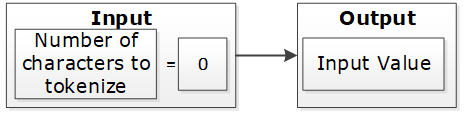
If the input value has at least one character and short data tokenization is enabled, then the source data can be tokenized. If short data tokenization is not enabled, then the source data will be returned as it is. Alternatively, an appropriate error will appear due to tokenization.
For more information on short data tokenization, refer to Short Data Tokenization.

If the input value contains more characters than the maximum for tokenization, then the value of tokenization is considered too long. The tokenization process provides an appropriate error message.

If the input value has a sufficient number of characters, the tokenization process is successful. This occurs when the character count falls between the minimum and maximum settings.

Table: Token Length Examples
| Token Properties | Input Value | Output Value | Comments |
|---|
Numeric Token
Left/Right undefined
Allow Short Data=Yes | ab1cd | ab6cd | Non-numeric values are considered as delimiters. Input is tokenized as short data is enabled and minimum length is 1
character. |
Numeric Token
Left=0
Right=0
Allow Short Data=No, generate error | ab1cd | Error. Input too short. | Non-numeric values are considered as delimiters. Input is short since short data is not enabled and the minimum number of characters to tokenize for this token type is 3 characters. |
Numeric Token
Left=0
Right=0
Allow Short Data= No, return input as it is | 12 | 12 | Input is returned as is as per the settings for short data. |
Numeric Token
Left=2Right=2 | 48ghdg83 | 48ghdg83 | The input value is left unchanged during tokenization. This is because it is an empty value for tokenization. In tokenization, both left and right settings remove all numeric characters during tokenization. |
Numeric Token
Left=2Right=2 | 4568 | 4568 | The input value is left unchanged by the tokenization since it is an empty value for tokenization. |
Numeric Token
Left=0
Right=0 | ab123cd | ab857cd | Input value has enough characters for tokenization, only supported by numeric token type values are tokenized. |
Alpha Numeric Token
Left=5Right=0
Allow Short Data=Yes | 345465 | 34546c | Input is evaluated first for left and right settings. Since left settings are set to 5, the first five digits are excluded and the sixth digit can be tokenized. As the Allow Short Data is set as yes, the sixth digit is tokenized. |
Alpha Numeric Token
Left=5Right=0
Allow Short Data=No, generate error | 345465 | error | Input is evaluated first for left and right settings. Since left settings are set to 5, the first five digits are excluded and the sixth digit can be tokenized. As the Allow Short Data is set as no, generate error and the length of data to be tokenized is less than 3, an Input too short error is generated. |
Alpha Numeric Token
Left=5Right=0
Allow Short Data=No, return input as it is | 345465 | 345465 | Input is evaluated first for left and right settings. Since left settings are set to 5, the first five digits are excluded and the sixth digit can be tokenized. As the Allow Short Data is set as No, return input as it is and the length of data to be tokenized is less than 3, the data is passed as is. |
Alpha Numeric Token
Left=5Right=0
Allow Short Data=Yes | 34546 | 34546 | Input is evaluated first for left and right settings. Since left settings are set to 5 and the input is five digits, no data exists to be tokenized. As no data exists, it is considered as a zero length token and the input is passed as is. |
Alpha Numeric Token
Left=5Right=0
Allow Short Data=No, generate error | 34546 | 34546 |
Alpha Numeric Token
Left=5Right=0
Allow Short Data=No, return input as it is | 34546 | 34546 |
Alpha Numeric Token
Left=5Right=0
Allow Short Data=Yes | 3454 | error | Input is evaluated first for left and right
settings. Since left settings are set to 5 and the input is four digits, the left and right settings condition is not met. This results in an Input too short error. |
Alpha Numeric Token
Left=5Right=0
Allow Short Data=No, generate error | 3454 | error |
Alpha Numeric Token
Left=5Right=0
Allow Short Data=No, return input as it is | 3454 | error |
Unicode Token (Cyrillic alphabet)
Left= 0Right=0
Allow Short Data=Yes | abдаcd | abшcd | Non-Cyrillic values are considered as delimiters. Input data is tokenized as as short data is enabled. |
Unicode Token (Cyrillic alphabet)
Left= 0Right=0
Allow Short Data=No | abдаcd | Error. Input too Short | Non-Cyrillic values are considered as delimiters. Input is too short since the word да (Cyrillic meaning yes - pronounced da) is only two codepoints. The minimum number of codepoints for this token type is 3 characters. |
6 - Length Preserving
The length preserving tokenization property provides an option to generate token values to preserve the length of input data.
With the Preserve Length flag enabled, the length of the input data and protected token value is the same.
For data elements with the Preserve Length flag available, you have an option to generate token values that are of the same length as the input data.
Note: The Unicode Gen2 token element is Code Point length preserving when this option is enabled. The length in bytes can vary depending on the alphabet selected during data element creation.
As an extension to this flag, the Allow Short Data flag provides multiple options to manage short input data handling. If the Preserve Length property is not set, then short input protected will not keep its original length. Generated tokens will at least have the minimum length defined for the token type.
For more information about short data tokenization, refer to Short Data Tokenization.
A check for maximum input length is performed regardless of the preservation setting. This check ensures that the input is within the allowed length limit.
If Preserve Length is not selected, then tokenized data may be longer than the input value up to +5%, or at least +1 symbol on a very small initial value (1-2 symbols). Here, symbol can represent a character or a code point.
If Preserve Length is not selected, then for applying protection in database columns, column length of the resulting protected table should be bigger than length of the column to tokenize in the initial table. This will allow inserting tokenized data during protection when tokenized data is longer than the input data.
7 - Short Data Tokenization
Data is considered short when the number of tokenizable characters is below the tokenizer’s limit. The behavior for short input data can be configured, as it generally produces weaker tokens.
When using tokenizers, such as, SLT_1_3, SLT_2_3, and SLT_X_1, the minimum input limit for tokenizable characters or bytes is three. When using tokenizers, such as, SLT_1_6 and SLT_2_6, the minimum input limit for tokenizable characters or bytes is six.
The possible flag values for short data tokenization are described in the following table.
Table: Short tokens flag values
| Short Token Flag Value | Action |
|---|
| No, generate error | Do not tokenize the short input but generate an error code and an audit log stating that the data is too short. |
| Yes | Tokenize the data if the input is short. |
| No, return input as it is | Do not tokenize the short input but return the input as it is. |
The following tokens support short data tokenization:
The following deprecated tokens support short data tokenization:
Important: Short input data tokenization can be at risk as a user can easily guess the lookup table and the original data by tokenizing some input data.
Consider carefully before using the short data tokenization. If possible, short data input must be avoided.
For more information about the maximum length setting for non-length-preserving token elements, refer to Minimum and Maximum Input Length by Token Types.
8 - Case-Preserving and Position-Preserving Tokenization
If you work with the Alpha-Numeric (0-9, a-z, A-Z) token type and SLT_2_3 tokenizer, you can specify additional tokenization options for case preservation and position preservation.
This section explains the Case-Preserving and Position-Preserving tokenization options.
- Case-Preserving and Position-Preserving tokenization was designed to support specific business requirements. However, this design comes with a trade-off, as it affects the cryptographic strength of the tokens.
- When preserving the case and position of Alpha-Numeric characters, some information may be leaked through the tokenized value.
- In addition, depending on the length of the Alpha and Numeric substrings, tokens may suffer the same weaknesses as Short Tokens, as described in the section Short Data Tokenization.
- It is recommended that this method should not be used for most use cases. Before using this method, contact Protegrity Support to ensure that the risks are fully understood.
8.1 - Case-Preserving Tokenization
The case-preserving tokenization secures sensitive data while preserving the original structure and layout of the input.
When working with data that is received from multiple sources, the data can contain different casing properties. The data processing stage makes the casing consistent prior to distributing the data to additional systems.
If tokenization is performed prior to the data processing stage, then it results in tokens that differ in its casing properties as per the non-processed data.
To preserve the casing of the non-processed data while tokenizing, an additional tokenization option is provided for the Alpha-Numeric (0-9, a-z, A-Z) token type. The casing of the alphabets in the tokenized value matches the casing of the alphabets in the input value.
Note:
You can specify the case-preserving tokenization option when using the SLT_2_3 tokenizer and Alpha-Numeric (0-9, a-z, A-Z) token type only.
If you select the Preserve Case property on the ESA Web UI, then the Preserve Position property is also selected, by default. Hence, the position of the alphabets and numbers is preserved along with the casing of the alphabets in the output tokenized value.
If you are selecting the Preserve Case or Preserve Position property on the ESA Web UI, then the following additional properties are set:
- The Preserve Length property is enabled and Allow Short Data property is set to Yes, by default. These two properties are not modifiable.
- The retention of characters or digits from the left and the right are disabled, by default. The From Left and From Right properties are both set to zero.
For more information about specifying the case-preserving tokenization option for the Alpha-Numeric (0-9, a-z, A-Z) token type, refer to Create Token Data Elements.
The following table provides some examples for the case-preserving tokenization option.
Table: Case-Preserving Tokenization Examples
| Input Value | Tokenized Value using the Case-Preserving Tokenization |
|---|
| Dan123 | Abc567 |
| DAn123 | ABc567 |
| daN123 | abC567 |
8.2 - Position-Preserving Tokenization
The position-preserving tokenization preserves the position of the alphabetic characters and numbers when tokenizing the alpha-numeric values.
The alphabetic and numeric positions in the position-preserving tokenized value matches the alphabetic and numeric positions in the input value.
You can specify the position-preserving tokenization option when using the SLT_2_3 tokenizer and Alpha-Numeric (0-9, a-z, A-Z) token type only.
If you are selecting the Preserve Case or Preserve Position property, then the following additional properties are set:
- The Preserve Length property is enabled and Allow Short Data property is set to Yes, by default. These two properties are not modifiable.
- The retention of characters or digits from the left and the right are disabled, by default. The From Left and From Right properties are both set to zero.
For more information about specifying the position-preserving tokenization option for the Alpha-Numeric (0-9, a-z, A-Z) token type, refer to Create Token Data Elements.
The following table provides some examples for the position-preserving tokenization option.
Table: Position-Preserving Tokenization Examples
| Input | Tokenized Value using the Position-Preserving Tokenization |
|---|
| Dan123 | pXz789 |
| DAn123 | Abp708 |
| daN123 | Axz642 |
9 - External Initialization Vector (EIV)
The External Initialization Vector (EIV) feature offers an additional level of security. It allows for different tokenized results across protectors for the same input data and token element. The tokenized results are based on the External IV setting on each protector.
9.1 - Tokenization Model with External IV
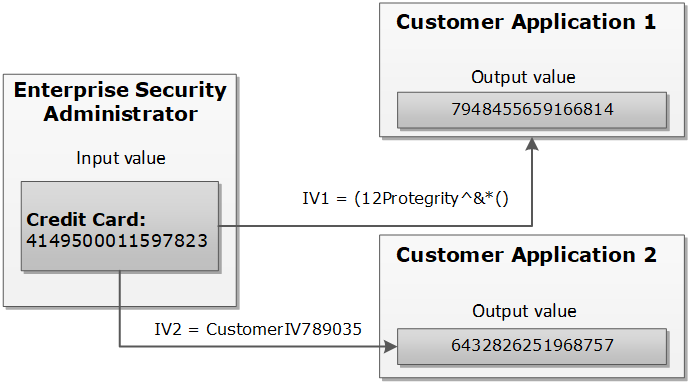
An example explains how the tokenization is performed with the External IV.
The External IV value is set as a new parameter when calling protect, unprotect or reprotect API from the client application.
The following example explains how the tokenization is performed with the External IV defined. As mentioned before, the main characteristic of the External IV feature is obtaining different outputs for the same input. To have different outputs, you need to specify different IVs.
Note: The External IV is used, prior to protection, as input to modify the data to protect. The External IV is ignored when using encryption.
9.2 - External IV Tokenization Properties
The External IV is supported by all token types, except Datetime and Decimal tokens.
The tokenization with the External IV is done only if the IV is specified during the protect operation through the end user API. When performing unprotect and re-protect operations, the same IV value used for protection must be identified.
If External IV is not provided in either a protect or unprotect function call, then the input is tokenized as-is without any IV.
The External IV value has the following properties:
- Supports ASCII and Unicode characters.
- Minimum 1 byte for the input.
- Maximum 256 bytes for the input.
- Empty and NULL strings are not supported as External IV values. These strings will be ignored during tokenization. The process will continue as if External IV was not used.
Here is an example of the tokenized input value with the External IV for a Numeric token:
Table: Example-External IV for a Numeric token
Input Value |
External IV |
Output Value |
Comments |
1234567890 |
None |
5108318538 |
External IV is not applied. |
1234567890 |
1234 |
0442985096 |
Output values differ because different external IVs were applied. |
12 |
1197578213 |
abc |
9423146024 |
10 - Truncating Whitespaces
Truncating Whitespaces ensures that only the actual data is considered during tokenization.
With fixed length fields or columns, input data may be shorter than the length of the field. When this happens, data may be appended with either, or both, trailing and leading whitespace. In those situations, the whitespace is considered during Tokenization. It will affect the tokenization results.
For instance, consider a scenario where the name “Hultgren Caylor” is stored in a Hive Char(30) column.
As the length of the data is less than 30 characters, trailing whitespaces are appended to it. In this case, assume that we need to protect this column with a data element that preserves the first and last character (L=1, R=1). Now with this setting, the expectation is to preserve character H at the start and the character r at the end, in the protected value output. However, the actual data has trailing whitespaces. This results in the output containing the character “H” at the start and a whitespace character " " at the end. The unnecessary trailing whitespaces cause the final protected output to generate a different token.
It is recommended to truncate trailing and leading whitespaces from the data. This applies before sending the data to Protect, Unprotect, or Reprotect UDFs. Truncating unnecessary whitespaces ensures that only the actual data is considered during tokenization. Any trailing and leading whitespaces are not taken into account.
In addition, it is important to follow a consistent approach for truncating the whitespaces across all operations, such as, Protect, Unprotect, Reprotect. For instance, if we have truncated unnecessary trailing whitespaces from the input before the Protect operation, then the same logic of truncating whitespaces from the input, during Unprotect and Reprotect operations needs to be followed.