Calculating Token Length
For a Numeric token type, non-numeric values are considered as delimiters. The unsupported characters will be treated as delimiters and left un-tokenized. This occurs when the input value does not contain tokenizable characters with the selected token type.
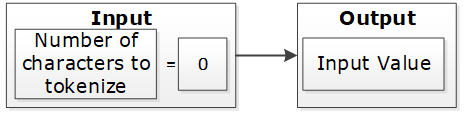
The number of characters to tokenize is calculated as described on the following image:

If the input value does not contain characters to tokenize, then it is considered a zero-length token. The tokenization of a zero-length input value will not produce an error during the tokenization, and input value will be returned as output.
If the input value has at least one character and short data tokenization is enabled, then the source data can be tokenized. If short data tokenization is not enabled, then the source data will be returned as it is. Alternatively, an appropriate error will appear due to tokenization.
For more information on short data tokenization, refer to Short Data Tokenization.

If the input value contains more characters than the maximum for tokenization, then the value of tokenization is considered too long. The tokenization process provides an appropriate error message.

If the input value has a sufficient number of characters, the tokenization process is successful. This occurs when the character count falls between the minimum and maximum settings.

Table: Token Length Examples
| Token Properties | Input Value | Output Value | Comments |
|---|---|---|---|
Numeric Token Left/Right undefined Allow Short Data=Yes | ab1cd | ab6cd | Non-numeric values are considered as delimiters. Input is tokenized as short data is enabled and minimum length is 1 character. |
Numeric Token Left=0 Right=0 Allow Short Data=No, generate error | ab1cd | Error. Input too short. | Non-numeric values are considered as delimiters. Input is short since short data is not enabled and the minimum number of characters to tokenize for this token type is 3 characters. |
Numeric Token Left=0 Right=0 Allow Short Data= No, return input as it is | 12 | 12 | Input is returned as is as per the settings for short data. |
Numeric Token Left=2Right=2 | 48ghdg83 | 48ghdg83 | The input value is left unchanged during tokenization. This is because it is an empty value for tokenization. In tokenization, both left and right settings remove all numeric characters during tokenization. |
Numeric Token Left=2Right=2 | 4568 | 4568 | The input value is left unchanged by the tokenization since it is an empty value for tokenization. |
Numeric Token Left=0 Right=0 | ab123cd | ab857cd | Input value has enough characters for tokenization, only supported by numeric token type values are tokenized. |
Alpha Numeric Token Left=5Right=0 Allow Short Data=Yes | 345465 | 34546c | Input is evaluated first for left and right settings. Since left settings are set to 5, the first five digits are excluded and the sixth digit can be tokenized. As the Allow Short Data is set as yes, the sixth digit is tokenized. |
Alpha Numeric Token Left=5Right=0 Allow Short Data=No, generate error | 345465 | error | Input is evaluated first for left and right settings. Since left settings are set to 5, the first five digits are excluded and the sixth digit can be tokenized. As the Allow Short Data is set as no, generate error and the length of data to be tokenized is less than 3, an Input too short error is generated. |
Alpha Numeric Token Left=5Right=0 Allow Short Data=No, return input as it is | 345465 | 345465 | Input is evaluated first for left and right settings. Since left settings are set to 5, the first five digits are excluded and the sixth digit can be tokenized. As the Allow Short Data is set as No, return input as it is and the length of data to be tokenized is less than 3, the data is passed as is. |
Alpha Numeric Token Left=5Right=0 Allow Short Data=Yes | 34546 | 34546 | Input is evaluated first for left and right settings. Since left settings are set to 5 and the input is five digits, no data exists to be tokenized. As no data exists, it is considered as a zero length token and the input is passed as is. |
Alpha Numeric Token Left=5Right=0 Allow Short Data=No, generate error | 34546 | 34546 | |
Alpha Numeric Token Left=5Right=0 Allow Short Data=No, return input as it is | 34546 | 34546 | |
Alpha Numeric Token Left=5Right=0 Allow Short Data=Yes | 3454 | error | Input is evaluated first for left and right settings. Since left settings are set to 5 and the input is four digits, the left and right settings condition is not met. This results in an Input too short error. |
Alpha Numeric Token Left=5Right=0 Allow Short Data=No, generate error | 3454 | error | |
Alpha Numeric Token Left=5Right=0 Allow Short Data=No, return input as it is | 3454 | error | |
Unicode Token (Cyrillic alphabet) Left= 0Right=0 Allow Short Data=Yes | abдаcd | abшcd | Non-Cyrillic values are considered as delimiters. Input data is tokenized as as short data is enabled. |
Unicode Token (Cyrillic alphabet) Left= 0Right=0 Allow Short Data=No | abдаcd | Error. Input too Short | Non-Cyrillic values are considered as delimiters. Input is too short since the word да (Cyrillic meaning yes - pronounced da) is only two codepoints. The minimum number of codepoints for this token type is 3 characters. |
Feedback
Was this page helpful?