Unicode Gen2
The Unicode Gen2 token type can be used to tokenize multi-byte code point character strings. The input Unicode data after protection returns a token value in the same Unicode character format. The Unicode Gen2 token type gives you the liberty to customize how the protected token value is returned. It allows you to leverage existing built-in alphabets or create custom alphabets by defining code points. The Unicode Gen2 token type preserves code point length. If the length preservation option is selected, the protected token length will be equal to the input data length in code points.
For instance, the respective lengths for UTF-8 and UTF-16 in bytes, is described in the following table. The input is protected with the Unicode Gen2 tokenizer. The example alphabet used is Basic Latin combined with Japanese characters. The code point length is preserved.
Table: Lengths for UTF-8 and UTF-16
| Input Value | Code Points | UTF-8 | UTF-16 | Output Value | UTF-8 | UTF-16 |
|---|---|---|---|---|---|---|
| データ保護 | 5 | 15 | 10 | 睯窯闒懻辶 | 15 | 10 |
| Protegrity | 10 | 10 | 20 | 鑹晓侐晊秦龡箳蕛矱蝠 | 30 | 20 |
| Protegrity_データ保護 | 16 | 26 | 32 | 门醆湏鞄眡莧閲楌蹬鑹_晓箳麻京眡 | 46 | 32 |
As the token type provides customizations through defining code points and creating custom token values, there are some considerations that must be taken before using such custom alphabets.
Note: For more information about the considerations, refer to Considerations while creating custom Unicode alphabets.
The performance benefits of this token type are higher compared to the other Unicode token types.
Table: Unicode Gen2 Tokenization Type properties
Tokenization Type Properties | Settings | |||||||||||||
|---|---|---|---|---|---|---|---|---|---|---|---|---|---|---|
Name | Unicode Gen2 | |||||||||||||
Token type and Format | Application Protectors support UTF-8, UTF-16LE and UTF-16BE encoding. Code points from U+0020 to U+3FFFF excluding D800-DFFF. Encoding supported by the Unicode Gen2 data element is UTF-8,UTF-16LE, and UTF-16BE. | |||||||||||||
Tokenizer | Length Preservation | Allow Short Data | Minimum Length | Maximum Length*1 | ||||||||||
SLT_1_3*2 SLT_X_1*3 | Yes | Yes | 1 Code Point | 4096 Code Points | ||||||||||
| No, return input as it is | 3 Code Points | |||||||||||||
| No, generate error | ||||||||||||||
Possibility to set Minimum/Maximum length | No | |||||||||||||
Left/Right settings | Yes | |||||||||||||
Internal IV | Yes | |||||||||||||
External IV | Yes | |||||||||||||
Return of Protected value | Yes | |||||||||||||
Token specific properties | Result is based on the alphabets selected while creating the token. | |||||||||||||
*1 – The maximum input length to safely tokenize and detokenize the data is 4096 code points, which is irrespective of the byte representation.
*2 - The SLT_1_3 tokenizer supports small alphabet size from 10-160 code points.
*3 - The SLT_X_1 tokenizer supports large alphabet size from 161-100k code points.
The following table shows examples of the way in which a value will be tokenized with the Unicode Gen2 token.
Table: Examples of Tokenization for Unicode Gen2 Values
| Input Values | Tokenized Values | Comments |
|---|---|---|
| даних | Ухбыш | Input value contains Cyrillic characters. Tokenization results include Cyrillic characters as the data element is created with the Cyrillic alphabet in its definition. The length of the tokenized value is equal to the length of the input data. |
| Protegrity | 93VbLvI12g | Input value contains English characters. Tokenization results include English characters as the data element is created with the Basic Latin Alpha Numeric alphabet in its definition. Algorithm is length preserving. Hence, the length of the tokenized value is equal to the length of the input data. |
| ЕЖ | ao | Input value contains Cyrillic characters. Tokenization results include Cyrillic characters as the data element is created with the Cyrillic alphabet in its definition. Allow Short Data=Yes Algorithm is length preserving. The length of the tokenized value is equal to the length of the input data. |
Considerations while creating custom Unicode alphabets
This section describes the important considerations to be aware of while working with Unicode. When creating a custom alphabet, a combination of existing alphabets, individual code points or ranges of code points can be used. The alphabet determines which code points are considered for tokenization. The code points not in the alphabet function as delimiters.
While this feature gives you the flexibility to generate token values in Unicode characters, the data element creation does not validate if the code point is defined or undefined. For example, consider that you create a data element that protects Greek and Coptic Unicode block. Though not recommended, a way you might consider to create the custom alphabet would be using the code point range option to include the whole Unicode block that ranges from U+0370 to U+03FF. As seen from the following image, this range includes both defined and undefined code points.
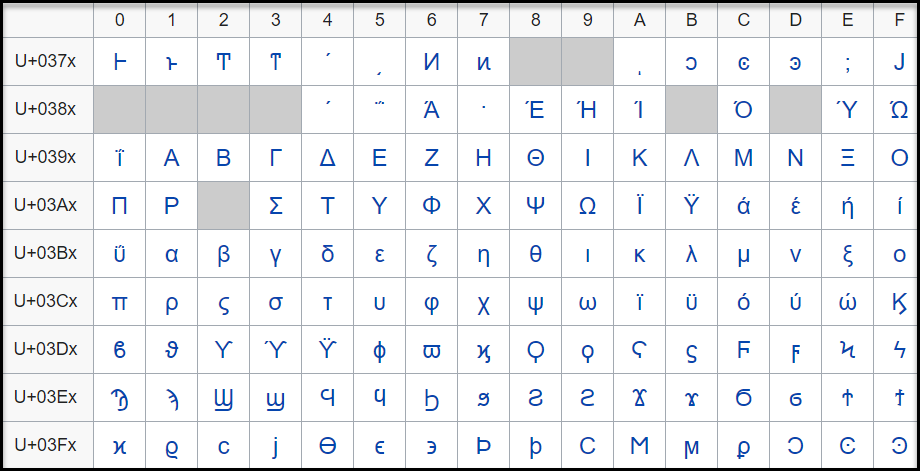
The code point, U+0378 in the defined Greek and Coptic code point range is an undefined code point. When any input data is protected, since the code point range includes both defined and undefined code points, it might result in a corrupted token value if the entire code point range is defined.
It is hence recommended that for Unicode code point ranges where both defined and undefined code points exist, you must create code points ranges excluding any undefined code points. So, in case of the Greek and Coptic characters, a recommended strategy to define alphabets would be to create multiple alphabet entries, such as a range to cover U+0371 to U+0377, another range to cover U+037A to U+037F, and so on, thus skipping undefined code points.
Note: Only the alphabet characters that are supported by the OS fonts are displayed on the Web UI.
Note: Ensure that code points in the alphabet are supported by the protectors using this alphabet.
Unicode Gen2 Tokenization Properties for different protectors
Application Protector
The following table shows supported input data types for Application protectors with the Unicode Gen2 token.
Note: The string as an input and byte as an output API is unsupported by Unicode Gen2 data elements for AP Java and AP Python.
Table: Supported input data types for Application protectors with Unicode Gen2 token
| Application Protectors*2 | AP Java*1 | AP Python |
|---|---|---|
| Supported input data types | BYTE[] CHAR[] STRING | BYTES STRING |
*1 - The API accepts and returns data in BYTE[] format. The customer application needs to convert the input into byte arrays before calling the API, and similarly, convert the output from byte arrays after receiving the response from the API.
*2 - The Protegrity Application Protectors only support bytes converted from the string data type. If int, short, or long format data is directly converted to bytes and passed as input to the Application Protector APIs that support byte as input and provide byte as output, then data corruption might occur.
For more information about Application protectors, refer to Application Protector.
Big Data Protector
Protegrity supports MapReduce, Hive, Pig, HBase, Spark, and Impala, which utilizes Hadoop Distributed File System (HDFS) or Ozone as the data storage layer. The data is protected from internal and external threats, and users and business processes can continue to utilize the secured data. Protegrity protects data inside the files using tokenization and strong encryption protection methods.
The following table shows supported input data types for Big Data protectors with the Unicode Gen2 token.
Table: Supported input data types for Big Data protectors with Unicode Gen2 token
| Big Data Protectors | MapReduce*2 | Hive | Pig | HBase*2 | Impala | Spark*2 | Spark SQL | Trino |
|---|---|---|---|---|---|---|---|---|
| Supported input data types*1 | BYTE[] | STRING | Not supported | BYTE[] | STRING | BYTE[] STRING | STRING | VARCHAR |
*1 – If the input and output types of the API are BYTE [], the customer application should convert the input to a byte array. Then, call the API and convert the output from the byte array.
*2 – The Protegrity MapReduce protector, HBase coprocessor, and Spark protector only support bytes converted from the string data type. Data types that are not bytes converted from the string data type might cause data corruption to occur when:
- Any other data type is directly converted to bytes and passed as input to the MapReduce or Spark API that supports byte as input and provides byte as output.
- Any other data type is directly converted to bytes and inserted in an HBase table. Where the HBase table is configured with the Protegrity HBase coprocessor.
For more information about Big Data protectors, refer to Big Data Protector.
Data Warehouse Protector
The Protegrity Data Warehouse Protector is an advanced security solution designed to protect sensitive data at the column level. This enables you to secure your data, while still permitting access to authorized users. Additionally, the Data Warehouse Protector integrates seamlessly with existing database systems using the User-Defined Functions for an enhanced security. Protegrity protects data inside the data warehouses using various tokenization and encryption methods.
The External IV is not supported in Data Warehouse Protector.
The following table shows the supported input data types for the Teradata protector with the Unicode Gen2 token.
Table: Supported input data types for Data Warehouse protectors with Unicode Gen2 token
| Data Warehouse Protectors | Teradata |
|---|---|
| Supported input data types | VARCHAR UNICODE |
For more information about Data Warehouse protectors, refer to Data Warehouse Protector.
Database Protectors
Oracle Database Protector
The following table shows supported input data types for Oracle Database protector with the Unicode Gen2 token.
Table: Supported input data types for Oracle Database protector with Unicode Gen2 token
| Protector | Oracle |
|---|---|
| Supported Input Data Types | VARCHAR2 and NVARCHAR2 |
The maximum input lengths supported for the Oracle database protector are as described by the following points:
Unicode Gen2 – Data type : VARCHAR2:
- If the tokenizer length preservation parameter is selected as Yes, then the maximum limit that can be safely tokenized and detokenized is 4000 bytes.
- If the tokenizer length preservation parameter is selected as No, then the maximum limit that can be safely tokenized and detokenized is 3000 bytes.
Unicode Gen2 – Data type : NVARCHAR2:
- If the tokenizer length preservation parameter is selected as Yes, then the maximum limit that can be safely tokenized and detokenized is 4000 bytes.
- If the tokenizer length preservation parameter is selected as No, then the maximum limit that can be safely tokenized and detokenized is 3000 bytes.
For more information about the Oracle Database protector, refer to Oracle Database Protector.
MSSQL Database Protector
The following table shows supported input data types for MSSQL Database protector with the Unicode Gen2 token.
Table: Supported input data types for MSSQL Database protector with Unicode Gen2 token
| Protector | MSSQL |
|---|---|
| Supported Input Data Types | NVARCHAR |
Unicode Gen2 - Tokenizers
- The Unicode Gen2 data element supports SLT_1_3 and SLT_X_1 tokenizers.
- The SLT_1_3 tokenizer supports small alphabet size from 10-160 code points.
- The SLT_X_1 tokenizer supports large alphabet size from 161-100K code points.
For more information about the MSSQL Database protector, refer to MSSQL Database Protector.
Feedback
Was this page helpful?