Understanding the Architecture
This page describes the architecture, the individual components, and the workflow of the Protegrity Application Protector (AP) solution.
Architecture and Workflow
The following figure illustrates the deployment architecture of the Application Protector (AP).
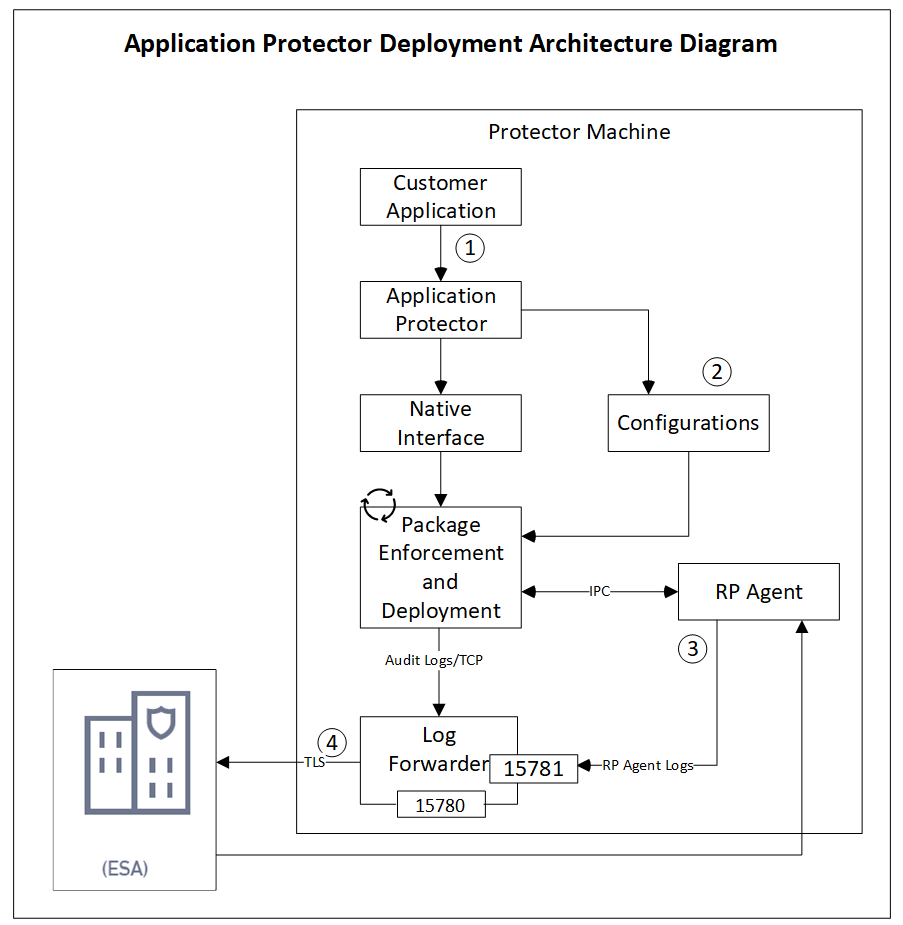
The following table describes the components of the AP deployment architecture.
| Component | Description |
|---|---|
| Customer Application | Provides built-in supported programming languages and integrates with AP for data protection. |
| Application Protector | Acts as the Core protection engine that enforces security policies and performs data protection operations. |
Configuration File (config.ini) | Stores initialization parameters that are passed to AP during startup. |
| Native Interface | Provides a native interface between AP and the C layer. Java: Java Native Interface (JNI) layer |
| Package Enforcement and Deployment | Retrieves policy packages from the RP Agent and executes protection operations, such as, protect, unprotect, and reprotect. |
| Log Forwarder | Collects logs from AP and forwards them to the Audit Store for centralized auditing. |
| Resilient Package (RP) Agent | Operates as a standalone process that retrieves policy packages from ESA and shares them with AP processes using shared memory IPC. |
The following steps describe the workflow of a sample AP deployment in the production environment.
The customer application initializes the SDK.
The required configuration parameters are passed to the protector using the
config.inifile.
The configurations can be set through environment variables. ENV overrides values in theconfig.inifile, except forcadenceandsession timeoutwhich must be set in the config file.For more information about environment variables configuration, refer to:
The RP Agent regularly syncs with the RP Proxy or ESA to check for policy updates. If a change is detected, the updated policy package is securely downloaded over a TLS channel and stored in shared memory.
The protector synchronizes with shared memory based on the
cadencevalue defined inconfig.inifile. If a new package is available, it is fetched into process memory. This updated package is then used to perform data protection operations such as, protect, unprotect, and reprotect.The audit logs generated during protection operations are forwarded to the Audit Store:
- Logs from the application are sent through the Log Forwarder.
- Logs from the RP Agent are also forwarded using the Log Forwarder.
Components of the Application Protector
The Protegrity Application Protector (AP) solution comprises several key components that work together to enforce data protection policies and ensure secure operations.
Application Protector
The core engine that integrates with customer applications to perform data protection operations:
- Protect
- Unprotect
- Reprotect
AP is available in multiple language-specific variants. One of which is:
- AP Java: For applications developed in Java
Resilient Package (RP) Agent
A standalone process responsible for policy synchronization:
- To sync with the RP Proxy or ESA at regular intervals of 60 seconds
- To detect policy changes and download updated packages over a secure TLS channel
- To store the packages in shared memory for use by the protector
Log Forwarder
A log processing tool that handles audit and protection logs:
- Collects logs generated by AP and RP Agent
- Forwards logs to the Audit Store within ESA
Ports used to transport the protection and audit logs to the ESA:
15780: Configurable15781: Non-configurable
Package Deployment
The different approaches for package deployment during the initialization process of the Application Protector are described in this section.
Dynamic Package Deployment
Use this approach when the protector needs to continuously check for policy updates after initialization.
- Set the
cadenceparameter to a non-zero value in theconfig.inifile. - This value defines the interval in seconds at which the protector synchronizes with the RP Agent.
- If a policy change is detected, the protector automatically fetches the updated package and applies it during protection operations.
Note: This method ensures that the protector always operates with the latest policy.
Immutable Package Deployment
Use this approach when the protector does not need to check for policy changes after initialization.
- Add the
[devops]parameter in theconfig.inifile before initializing the protector. - A REST API call is used to download an envelope-encrypted package from the ESA.
- The protector uses this static package for all operations without further synchronization.
For more information about the DevOps approach, refer to DevOps Approach for Application Protector.
Feedback
Was this page helpful?