The Protegrity Application Protector Java Container can be deployed using one of the following deployment methods:
- Using dynamic-based deployment
- Using static-based deployment
This is the multi-page printable view of this section. Click here to print.
The Protegrity Application Protector Java Container can be deployed using one of the following deployment methods:
Key features of a dynamic-based deployment include:
For more information about package deployment approaches, refer to Resilient Package Deployment.
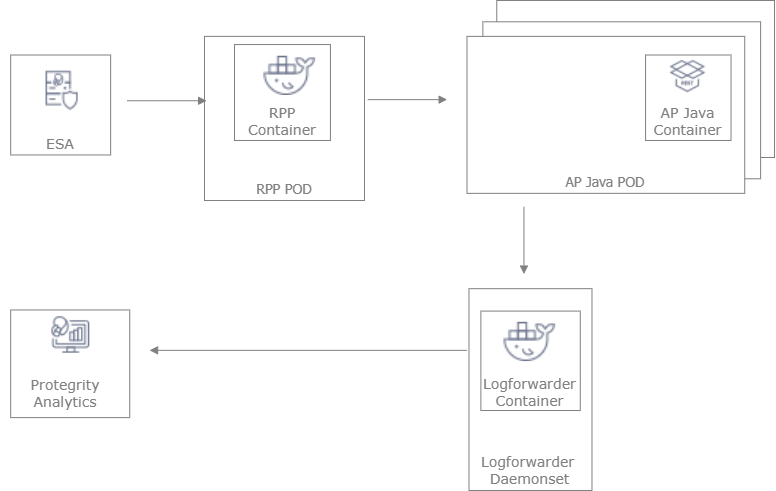
The following figure represents the architecture for deploying the Application Protector Java Container with RPP on a Kubernetes cluster.
Deployment Steps:
Create the ESA with the policy and datastore.
Deploy the Resilient Package Proxy (RPP) instances with mTLS certificates to communicate with the ESA and to host the proxy endpoint for protectors.
Deploy the Application Protector Java Container protector with mTLS certificates to communicate with the RPP. The communication between the RPP and the protector is secured using mTLS.
After the protector instance starts as part of the application POD, the protector sends a request to the RPP instance to retrieve the policy package.
At periodic intervals, the protector tries to pull the new policy package from RPP instance. If the package present on the RPP instance has expired due to cache invalidation policy, the RPP pulls the new package from an upstream RPP or the ESA.
Key features of a Static-based deployment include:
For more information about package deployment approaches, refer to Resilient Package Deployment.
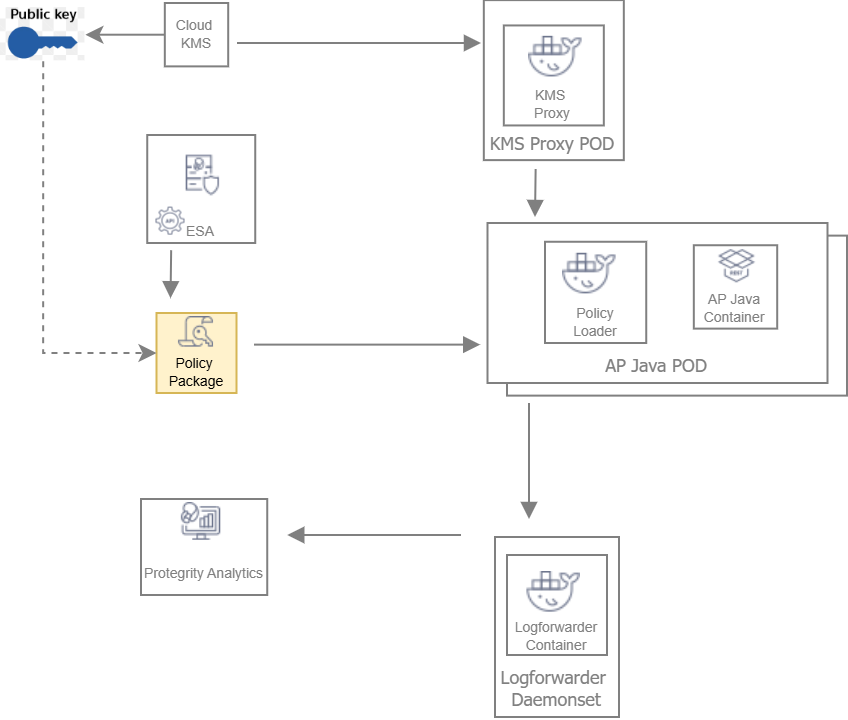
The following figure represents the architecture for deploying the Application Protector Java Container with static deployment on a Kubernetes cluster.
Deployment Steps:
The ESA administrator user pulls the policy package from the ESA and stores it to an Object Store or a Volume Mount.
The Policy Loader sidecar container reads the internal configmap for policy updates.
The sidecar container retrieves the policy package from the Object Store or Volume Mount.
The sidecar container then stores the policy package in the tmpfs directory.
The Application Protector Java Container protector reads the policy package from the tmpfs directory.
Based on the values specified in the internal config.ini file, the protector initiates the RP Callback.
The RP Callback decrypts the Data Encryption Key (DEK) using the KMS Proxy container.
The KMS Proxy container reads the decrypted DEK from the cache, if present.
If the DEK is not present in the cache, the KMS Proxy container uses the KMS Backend to retrieve the DEK from the Cloud KMS. The KMS Proxy container then stores the decrypted DEK in the cache.
The Protector decrypts the policy package using the DEK and initializes its internal library.