This is the multi-page printable view of this section. Click here to print.
Big Data Protector
- 1: CDP-PVC-Base
- 1.1: Understanding the architecture
- 1.2: System Requirements
- 1.3: Preparing the Environment
- 1.3.1: Extracting the installation package
- 1.3.2: Running the configurator script
- 1.3.3: Setting up the parcels
- 1.3.4: Distributing the parcels
- 1.3.5: Activating the parcels
- 1.4: Installing the Big Data Protector
- 1.5: Configuring the Big Data Protector
- 1.5.1: Registering the UDFs using Helper scripts
- 1.5.1.1: Registering and dropping the Hive UDFs
- 1.5.1.2: Registering the Spark UDFs
- 1.5.1.3: Registering and dropping the Impala UDFs
- 1.5.1.4: Installing the Impala UDFs
- 1.5.2: Updating the parcels
- 1.5.2.1: Updating the Certificates Parcel With a restart
- 1.5.2.2: Updating the Certificates Parcel Without a restart
- 1.5.2.3: Updating the log forwarder parcel
- 1.5.3: Updating the configuration parameters
- 1.6: Upgrading the Big Data Protector
- 1.6.1: Editing the Cluster Configuration File
- 1.6.2: Executing the Upgrade Script
- 1.6.3: Downgrading to an older version
- 1.7: Uninstalling the Big Data Protector
- 2: Amazon Elastic MapReduce Protector
- 2.1: Understanding the architecture
- 2.1.1: Bootstrap installer architecture
- 2.1.2: Static installer architecture
- 2.1.3: EMR Serverless architecture
- 2.2: Preparing the environment
- 2.2.1: Setting up for the Bootstrap Installer
- 2.2.1.1: Verifying the prerequisites
- 2.2.1.2: Extracting the Big Data Protector Package
- 2.2.1.3: Executing the Configurator Script
- 2.2.2: Setting up for the Static Installer
- 2.2.2.1: Verifying the prerequisites for Static Installer
- 2.2.2.2: Executing the Configurator Script
- 2.2.2.3: Extracting the Installation Package
- 2.2.2.4: Updating the BDP.Config File
- 2.2.3: Setting up for the EMR Serverless Installer
- 2.3: Installing the protector
- 2.3.1: Using the Bootstrap Installer
- 2.3.1.1: Creating a Cluster
- 2.3.1.2: Managing the Cluster Nodes
- 2.3.1.3: Verifying the Parameters
- 2.3.2: Using the Static Installer
- 2.3.2.1: Installing the Protector on all the Nodes
- 2.3.2.2: Installing the Protector on Specific Nodes
- 2.3.2.3: Verifying the Parameters
- 2.3.3: Using the EMR Serverless Installer
- 2.3.3.1: EMR Serverless Setup CLI
- 2.3.3.2: Setting up the Log Forwarder
- 2.3.3.3: Performing URP Operations
- 2.4: Configuring the protector
- 2.5: Working with Cluster Utilities
- 2.5.1: RPAgent Control Script
- 2.5.2: Log Forwarder Control Script
- 2.5.3: Sync Config.ini
- 2.5.4: Sync Log Forwarder Configuration
- 2.5.5: Sync RPAgent Configuration
- 2.6: Uninstalling the protector
- 3: User Defined Functions and APIs
- 3.1: MapReduce APIs
- 3.2: Hive UDFs
- 3.3: Pig UDFs
- 3.4: HBase Commands
- 3.5: Impala UDFs
- 3.6: Spark Java APIs
- 3.7: Spark SQL UDFs
- 3.8: PySpark - Scala Wrapper UDFs
- 3.9: Unity Catalog Batch Python UDFs
- 4: Additional Information
1 - CDP-PVC-Base
Features of the Big Data Protector on CDP-PVC-Base
The Protegrity Big Data Protector (Big Data Protector) uses vaultless tokenization and central policy control for access management and secures sensitive data at rest in the following areas:
- Data in HDFS and Ozone
- Data used during processing with MapReduce, Hive, Pig, HBase, Impala, and Spark
- Data traversing enterprise data systems
The data is protected from internal and external threats, and users and business processes can continue to utilize the secured data.
Data protection may be by encryption or tokenization. In tokenization, the data is converted to similar looking inert data known as tokens where the data format and type can be preserved. These tokens can be detokenized back to the original values whenever required.
Protegrity protects data inside the files using tokenization and strong encryption protection methods. Depending on the user access rights and the policies set using Policy management in ESA, this data is unprotected.
The Protegrity Hadoop Big Data Protector provides the following features:
- Provides fine grained field-level protection within the MapReduce, Hive, Pig, HBase, and Spark frameworks.
- Provides Protegrity Format Preserving Encryption (FPE) method for structured data. The following data types are supported:
- Numeric (0-9)
- Alpha (a-z, A-Z)
- Alpha-Numeric (0-9, a-z, A-Z)
- Credit Card (0-9)
- Unicode Basic Latin and Latin-1 Supplement Alpha
- Unicode Basic Latin and Latin-1 Supplement Alpha-Numeric
- Retains distributed processing capability as field-level protection is applied to the data.
- Protects data in the Hadoop cluster using role-based administration with a centralized security policy.
- Simplified installation, administration, and managem ent of Big Data Protector using the following components:
- Parcels: In Cloudera Manager, the Big Data Protector Parcel is a single consolidated file. This file contains all the required files for installing and using Big Data Protector on a cluster. It also contains the metadata used by Cloudera Manager.
- Custom Service Descriptors (CSDs): In Cloudera Manager, a CSD contains all the configurations required to describe and manage the Big Data Protector services. The CSDs are provided as Jar files.
- Easy monitoring of the Big Data Protector services, such as, BDP, using the Cloudera Manager UI instead of the CLI.
- Provides logging and viewing data access activities and real-time alerts with a centralized monitoring system.
- Ensures minimal overhead for processing secured data, with minimal consumption of resources, threads and processes, and network bandwidth.
- Provides transparent data protection with Protegrity HBase protectors.
Currently, Protegrity supports MapReduce, Hive, Pig, HBase, Spark, and Impala, which utilizes HDFS or Ozone as the data storage layer. The following points can be referred to as general guidelines:
- Beeline and Hue: Beeline and Hue are certified with the Hive protector.
- Ranger: Ranger is certified to work with the Hive protector.
- Sentry (CDH): Sentry is certified with the Hive and Impala protector only.
Overview of Hadoop Application Protection
The various levels of protection provided by Hadoop Application Protection are explained below.
Protection in MapReduce Jobs
A MapReduce job in the Hadoop cluster involves sensitive data. You can use Protegrity interfaces to protect data when it is saved or retrieved from a protected source. The output data written by the job can be encrypted or tokenized. The protected data can be subsequently used by other jobs in the cluster in a secured manner. Field level data can be secured and ingested into HDFS by independent Hadoop jobs or other ETL tools. For more information about secure ingestion of data in Hadoop, refer to section Ingesting Files Using Hive Staging. For more information on the list of available APIs, refer to section MapReduce APIs. If Hive queries are created to operate on sensitive data, then you can use Protegrity Hive UDFs for securing data. While inserting data to Hive tables, or retrieving data from protected Hive table columns, you can call Protegrity UDFs loaded into Hive during installation. The UDFs protect data based on the input parameters provided. Secure ingestion of data into HDFS to operate Hive queries can be achieved by independent Hadoop jobs or other ETL tools. For more information about securely ingesting data in Hadoop, refer Ingesting Data Securely.
Protection in Hive Queries
Protection in Hive queries is done by Protegrity Hive UDFs. These UDFs translate a HiveQL query into a MapReduce, Tez or Spark distributed job before sending it to the Hadoop cluster. For more information on the list of available UDFs, refer Hive UDFs.
Protection in Pig Jobs
Protection in Pig jobs is done by Protegrity Pig UDFs, which are similar in function to the Protegrity UDFs in Hive. For more information on the list of available UDFs, refer Pig UDFs.
Protection in HBase
HBase is a database which provides random read and write access to tables, consisting of rows and columns, in real-time. HBase is designed to run on commodity servers, to automatically scale as more servers are added, and is fault tolerant as data is divided across servers in the cluster. HBase tables are partitioned into multiple regions. Each region stores a range of rows in the table. Regions contain a datastore in memory and a persistent datastore(HFile). The Name node assigns multiple regions to a region server. The Name node manages the cluster and the region servers store portions of the HBase tables and perform the work on the data.
The Protegrity HBase protector extends the functionality of the data storage framework. It also provides a transparent data protection and unprotection using coprocessors. These coprocessors provide the functionality to run the code directly on region servers. The Protegrity coprocessor for HBase runs on the region servers and protects the data stored in the servers. All clients which work with HBase are supported. The data is transparently protected or unprotected, as required, utilizing the coprocessor framework.
Protection in Impala
Impala is an MPP SQL query engine for querying the data stored in a cluster. It provides the flexibility of the SQL format and is capable of running the queries on HDFS in HBase. The Protegrity Impala protector extends the functionality of the Impala query engine and provides UDFs which protect or unprotect the data as it is stored or retrieved. For more information about the Impala protector, refer Impala UDFs.
Protection in Spark
Spark is an execution engine that carries out batch processing of jobs in-memory and handles a wider range of computational workloads. In addition to processing a batch of stored data, Spark is capable of manipulating data in real time. You can also utilise Spark Streaming to process live data streams and store the processed data in Hadoop. The Protegrity Spark Java protector extends the functionality of the Spark engine and provides Java APIs that protect, unprotect, or reprotect the data as it is stored or retrieved. For more information about the Spark Java and SQL protectors, refer to section Spark. The Protegrity Spark Java protector extends the functionality of the Spark engine and provides Java APIs that protect, unprotect, or reprotect the data as it is stored or retrieved. The Protegrity Spark SQL protector provides native UDFs that can be utilized with Spark Scala to protect, unprotect, or reprotect the data as it is stored or retrieved. You can create and submit Spark jobs using the methods listed in the following table.
| Create and submit Spark jobs using | Reference Section |
|---|---|
| Spark Java APIs | Spark Java |
| Spark SQL UDFs | Spark SQL |
| PySpark Scala Wrapper UDFs | PySpark Scala Wrapper UDFs |
Ingesting Data Securely
The methods by which data can be secured and ingested by various jobs in Hadoop at a field or file level are explained below.
Ingesting Files Using Hive Staging
Semi-structured data files can be loaded into a Hive staging table for ingestion into a Hive table with Hive queries and Protegrity UDFs. After loading data in the table, the data will be stored in protected form.
Data Security Policy and Protection Methods
A data security policy establishes processes to ensure the security and confidentiality of sensitive information. In addition, the data security policy establishes administrative and technical safeguards against unauthorized access or use of the sensitive information. Depending on the requirements, the data security policy typically performs the following functions:
- Classifies the data that is sensitive for the organization.
- Defines the methods to protect sensitive data, such as encryption and tokenization.
- Defines the methods to present the sensitive data, such as masking the display of sensitive information.
- Defines the access privileges of the users that would be able to access the data.
- Defines the time frame for privileged users to access the sensitive data.
- Enforces the security policies at the location where sensitive data is stored.
- Provides a means of auditing authorized and unauthorized accesses to the sensitive data. In addition, it can also provide a means of auditing operations to protect and unprotect the sensitive data. The data security policy contains a number of components, such as, data elements, datastores, member sources, masks, and roles. The following list describes the functions of each of these entities:
- Data elements define the data protection properties for protecting sensitive data, consisting of the data securing method, data element type and its description. In addition, Data elements describe the tokenization or encryption properties, which can be associated with roles.
- Datastores consist of enterprise systems, which might contain the data that needs to be processed, where the policy is deployed and the data protection function is utilized.
- Member sources are the external sources from which users (or members) and groups of users are accessed. Examples are a file, database, LDAP, and Active Directory.
- Masks are a pattern of symbols and characters, that when imposed on a data field, obscures its actual value to the user. Masks effectively aid in hiding sensitive data.
- Roles define the levels of member access that are appropriate for various types of information. Combined with a data element, roles determine and define the unique data access privileges for each member.
For more information about creating a policy, refer Creating a Structured Policy.
1.1 - Understanding the architecture
The architecture for the CDP-PVC-Base distribution of the Big Data Protector is depicted in the image below.
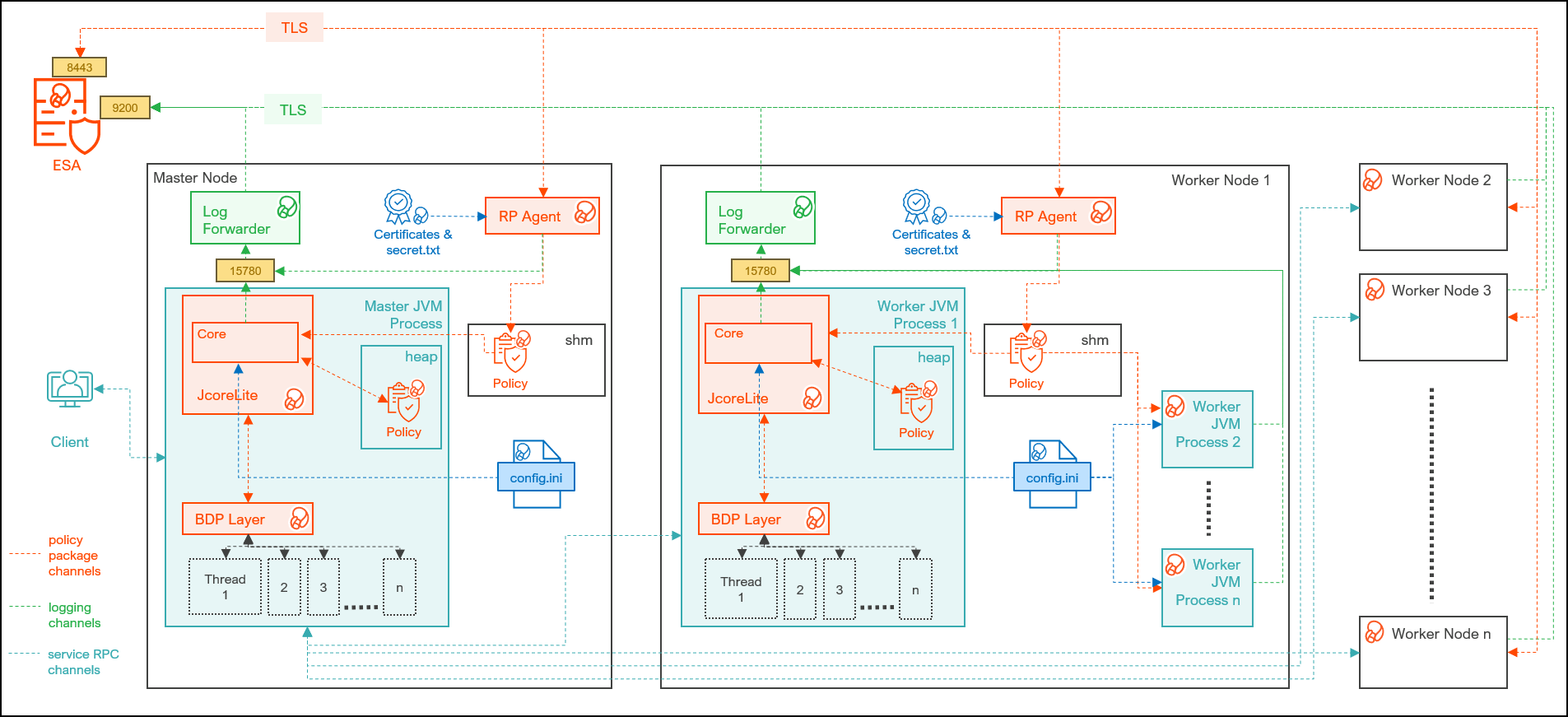
| Component | Description |
|---|---|
| RPAgent | A daemon running on each node that downloads the package from the ESA over a TLS channel using the installed Certificates. |
| Log Forwarder | A daemon running on each node that routes the audit logs and application logs to the ESA/Audit Store. |
| config.ini | A file on each node containing the set of configuration parameters to modify the protector behavior. |
| BDP Layer | Contains the Big Data Protector UDFs and APIs executing in CDP service processes. |
| JcoreLite | The JNI library that provides a Java API layer to the Core libraries. |
| Core | The set of various libraries that provide the Protegrity Core functionality. |
1.2 - System Requirements
Ensure that the following prerequisites are met, before installing the Big Data Protector from the Cloudera Manager:
- The Hadoop cluster is installed, configured, and running CDP-PVC-Base (Cloudera Runtime 7.1 and above and ClouderaManager (any compatible version) ).
- The ESA appliance, version v10.1.x, is installed, configured, and running.
- The ports that are configured on the ESA and the nodes in the cluster, which will run the Big Data Protector, are listed in the following table:
| Destination Port | Protocol | Source | Destination | Description |
|---|---|---|---|---|
| 8443 | TLS | RPAgent on the Big Data Protector cluster node | ESA | The RPAgent communicates with the ESA through port 8443 to download a policy. |
| 9200 | TLS | Log Forwarder on the Big Data Protector Cluster node | Protegrity Audit Store appliance | The Log Forwarder sends all the logs to the Protegrity Audit Appliance through port 9200. |
| 15780 | TCP | Protector on the Big Data Protector cluster node | Log Forwarder on the Big Data Protector cluster node. | The Big Data Protector writes Audit Logs to localhost through port 15780. The Application Logs are also written to localhost through port 15780. The Log Forwarder reads the logs from that socket. |
- The user, installing the Big Data Protector, has the requisite permissions to perform the following tasks:
- Copy the Big Data Protector parcels and CSDs to the Cloudera Manager repository directories
- Restart the Cloudera SCM Server
- If you are installing the Big Data Protector on a cluster, then ensure that it is installed on all the nodes in the cluster.
- The group
ptyitusrand the userptyitusr, responsible to manage the Big Data Protector-related services are managed by Cloudera Manager. The user and group are unavailable on the cluster nodes.
Note: This build supports both Spark 2 and Spark 3 on the cluster using a single pepspark jar.
For more information about installing Spark3 on CDP PVC Base cluster, refer https://docs.cloudera.com/cdp-private-cloud-base/latest/cds-3/topics/spark-install-spark-3-parcel.html#pnavId1
1.3 - Preparing the Environment
1.3.1 - Extracting the installation package
Extract the Big Data Protector package to access the Big Data Protector Configurator script. This script will generate the Big Data Protector parcels and CSDs to install the Big Data Protector on all the nodes in the cluster. The nodes in the cluster are managed by Cloudera Manager.
To extract the files from the installation package:
Log in to the CLI on the Master node that has connectivity to the ESA.
Copy the Big Data Protector package
BigDataProtector_Linux-ALL-64_x86-64_CDP-PVC-Base-7.1-64_<BDP_version>.tgzto any directory.For example,
/opt/bigdata/.To create a temporary directory under the specified directory, to extract the files, run the following command:
mkdir /opt/bigdata/extracted/To navigate to the directory where you have downloaded the installation package, run the following command:
cd /opt/bigdata/To extract the contents of the Big Data Protector installation package to a specific directory, run the following command:
tar –xvf BigDataProtector_Linux-ALL-64_x86-64_CDP-PVC-Base-7.1-64_<BDP_version>.tgz -C extracted/To navigate to the directory where you have extracted the files, run the following command:
cd /opt/bigdata/extracted/Press ENTER.
The command extracts the
BigDataProtector_Linux-ALL-64_x86-64_CDP-PVC-Base-7.1-64_<BDP_version>.tgzpackage and the GPG signature files from the installation package.BigDataProtector_Linux-ALL-64_x86-64_CDP-PVC-Base-7.1-64_<BDP_version>.tgz signatures/Note: Verify the authenticity of the build using the signatures folder. For more information, refer Verification of Signed Protector Build.
To extract the configurator script, run the following command:
tar –xvf BigDataProtector_Linux-ALL-64_x86-64_CDP-PVC-Base-7.1-64_<BDP_version>.tgzPress ENTER.
The command extracts the configurator script.
BDPConfigurator_CDP-PVC-Base-7.1_<BDP_version>.sh
1.3.2 - Running the configurator script
Execute the Big Data Protector configurator script to:
- Download certificates from the ESA.
- Create the parcels and CSDs to install the Big Data Protector.
To run the configurator script and generate the Big Data Protector Parcels and CSDs:
Log in to the CLI on the Master node that has connectivity to ESA.
To execute the configurator script, run the following command:
./BDPConfigurator_CDP-PVC-Base-7.1_<BDP_version>.shPress ENTER.
The prompt to continue the configuration of Big Data Protector appears.
*****************************************************************************
        Welcome to the Big Data Protector Configurator Wizard
*****************************************************************************
This will setup the Big Data Protector Installation Files for CDP PVC Base

Do you want to continue? [yes or no]:
To start the configuration of Big Data Protector, type yes.
Press ENTER.
The prompt to select the type of installation files appears.
Big Data Protector Configurator started...
Unpacking...
Extracting files...

Select the type of Installation files you want to generate.
[ 1: Create All ]      : Creates entire Big Data Protector CSDs and Parcels.
[ 2: Update PTY_CERT ] : Creates new PTY_CERT parcel with an incremented patch version.
                     Use this if you have updated the ESA certificates.
[ 3: Update PTY_LOGFORWARDER_CONF ]
                   : Creates new PTY_LOGFORWARDER_CONF parcel with an incremented patch version.
                     Use this if you want to set Custom LogForwarder configuration files to
                     forward logs to an External Audit Store.

[ 1, 2 or 3 ]:
Note: From v10.0.0, the
PTY_FLUENTBIT_CONFparcel is renamed toPTY_LOGFORWARDER_CONF.To create the Big Data Protector parcels and CSDs, type
1.To update the
PTY_CERTparcels with an incremented patch version, type2.For more information about updating the
PTY_CERTparcel, refer to section Updating the Certificates Parcel.To update the PTY_LOGFORWARDER_CONF parcel with an incremented patch version, type 3.
For more information about updating the PTY_LOGFORWARDER_CONF parcel, refer to section Updating the Log Forwarder Parcel.
Press ENTER.
The prompt to select the operating system for the Cloudera Manager parcel appears.
Select the OS version for Cloudera Manager Parcel.
This will be used as the OS Distro suffix in the Parcel name.

[ 1: el7 ]    :  RHEL 7 and clones (CentOS, Scientific Linux, etc)
[ 2: el8 ]    :  RHEL 8 and clones (CentOS, Scientific Linux, etc)
[ 3: el9 ]    :  RHEL 9 and clones (CentOS, Scientific Linux, etc)
[ 4: sles12 ] :  SuSE Linux Enterprise Server 12.x

Enter the no.:
Depending on the requirements, type
1,2,3, or4to select the operating system version for the Big Data Protector parcels.Press ENTER.
The prompt to enter the ESA hostname or IP address appears.
Enter the ESA Hostname or IP Address:Enter the ESA hostname or IP address.
Press ENTER.
The prompt to enter the ESA host listening port appears.
Enter ESA host listening port [8443]:If you want to use the default value of the ESA host listening port, which is
8443, then press ENTER.Press ENTER.
The prompt to enter the ESA JSON Web Token appears.
If you have an existing ESA JSON Web Token (JWT) with Export Certificates role, enter it otherwise enter 'no':Note: The script silently reads the user input. Therefore, the user will be unable to see the entered JWT or
no.Enter the JWT token.
a. If you do not have an existing ESA JSON Web Token (JWT), type
no.b. Press ENTER.
The prompt to enter the user name with Export Certificates permission appears.JWT was not provided. Script will now prompt for ESA username and password. Enter ESA Username with Export Certificates role: adminc. Enter the username that has permissions to export the certificates.
d. Press ENTER.
The prompt to enter the password appears.e. Enter the password.
f. Press ENTER.
The script retrieves the JWT from the ESA, validates it, and the prompt to package custom log forwarder configuration appears.Fetching JWT from ESA.... Fetching Certificates from ESA.... % Total % Received % Xferd Average Speed Time Time Time Current Dload Upload Total Spent Left Speed 100 11264 100 11264 0 0 164k 0 --:--:-- --:--:-- --:--:-- 166k ------------------------------------------------------------------------------- Do you want to package any custom LogForwarder configuration files for External Audit Store? [ yes ] : Create a PTY_LOGFORWARDER_CONF parcel containing configuration files to be used with External Audit Store. [ no ] : Skip this step. [ yes or no ]:To package the Log Forwarder configuration file(s) for an external Audit Store, type
yes.Press ENTER.
The prompt to enter the local directory path containing the Log Forwarder configuration files appears.
Do you want to package any custom LogForwarder configuration files for External Audit Store?
[ yes ] : Create a PTY_LOGFORWARDER_CONF parcel containing configuration files to be used with External Audit Store.
[ no ]  : Skip this step.

[ yes or no ]: yes

Creation of PTY_LOGFORWARDER_CONF parcel is enabled.

Enter the local directory path on this machine that stores the LogForwarder configuration files for External Audit Store:
The
PTY_LOGFORWARDER_CONFparcel is used to package any custom Log Forwarder configuration files that the user provides and can be distributed across the CDP nodes through the Cloudera Manager. Ensure that you name the custom Log Forwarder configuration files for the external Audit Store with the.confextension.Enter the local directory path that contains the Log Forwarder configuration files.
Press ENTER.
Enter the local directory path on this machine that stores the LogForwarder configuration files for External Audit Store: /root/log_forwarder/

Generating Installation files...

Big Data Protector parcels & CSDs are generated in ./Installation_Files/ directory.
NOTE:
Copy Big Data Protector CSDs (jars) to Cloudera Manager local csd repository.
Copy Big Data Protector parcels (*.parcel and *.sha files) to Cloudera Manager local parcel repository.

You can use the './Installation_Files/set_unset_bdp_config.sh' helper script for setting/unsetting BDP configs in Cloudera Manager.
Check the updated configurations on Cloudera Manager and Restart the required services.
The configurator script generates the following Big Data Protector parcels and CSDs in the
./Installation_Files/directory:BDP_PEP-<BDP_version>.jarPTY_BDP-<BDP_version>_CDP7.1.p0-<operating_system_version>.parcelPTY_BDP-<BDP_version>_CDP7.1.p0-<operating_system_version>.parcel.shaPTY_CERT-<BDP_version>_CDP7.1.p0-<operating_system_version>.parcelPTY_CERT-<BDP_version>_CDP7.1.p0-<operating_system_version>.parcel.shaPTY_LOGFORWARDER_CONF-<BDP_version>_CDP7.1.p0-<operating_system_version>.parcelPTY_LOGFORWARDER_CONF-<BDP_version>_CDP7.1.p0-<operating_system_version>.parcel.shaset_unset_bdp_config.sh
If you type
noat the prompt to create thePTY_LOGFORWARDER_CONFparcel, then the installer will skip the creation of the Log Forwarder parcel and proceed to generate the installation files.Do you want to package any custom LogForwarder configuration files for External Audit Store? [ yes ] : Create a PTY_LOGFORWARDER_CON parcel containing configuration files to be used with External Audit Store. [ no ] : Skip this step. [ yes or no ] : no Creation of PTY_LOGFORWARDER_CONF parcel is skipped. Generating Installation files... Big Data Protector parcels & CSDs are generated in ./Installation_Files/ directory. NOTE: Copy Big Data Protector CSDs (jars) to Cloudera Manager local csd repository. Copy Big Data Protector parcels (*.parcel and *.sha files) to Cloudera Manager local parcel repository. You can use the './Installation_Files/set_unset_bdp_config.sh' helper script for setting/unsetting BDP configs in Cloudera Manager. Check the updated configurations on Cloudera Manager and Restart the required services.
1.3.3 - Setting up the parcels
After the Big Data Protector parcels and CSDs are copied to the local Cloudera repository directories, restart the Cloudera SCM server. The restart ensures Cloudera Manager identifies the new CSD and parcel files. The restart also enables Cloudera Manager to display the Big Data Protector services in the Add Services section in Cloudera Manager.
To set up the Big Data Protector Parcels and CSDs:
Log in to the Master node.
Caution: Ensure to delete the older versions of the Big Data Protector parcels and
.jarfiles before installing the new parcels and.jarfiles to the local repository of the Cloudera Manager.Copy the following Big Data Protector parcels with the .parcel extension and their corresponding checksum files with the .sha extension to the local parcel repository of Cloudera Manager:
PTY_BDP-<BDP_version>_CDP7.1.p0-<operating_system_version>.parcelPTY_BDP-<BDP_version>_CDP7.1.p0-<operating_system_version>.parcel.shaPTY_CERT-<BDP_version>_CDP7.1.p0-<operating_system_version>.parcelPTY_CERT-<BDP_version>_CDP7.1.p0-<operating_system_version>.parcel.shaPTY_LOGFORWARDER_CONF-<BDP_version>_CDP7.1.p0-<operating_system_version>.parcelPTY_LOGFORWARDER_CONF-<BDP_version>_CDP7.1.p0-<operating_system_version>.parcel.sha
Note: The local parcels for the Cloudera Manager are stored in the
/opt/cloudera/parcel-repo/directory.Copy the following
.jarfiles file to the local CSD repository:BDP_PEP-<BDP_version>.jar
Note: The local CSD or
.jarfiles for Cloudera Manager are stored in the/opt/cloudera/csd/directory.Navigate to the local parcel repository directory.
Note: The local parcel files are available in the
/opt/cloudera/parcel-repo/directory.To assign the ownership permissions for the Cloudera SCM user to the Protegrity Big Data Protector parcels and checksum files, run the following command:
chown cloudera-scm:cloudera-scm PTY_*Press ENTER.
To assign
640permissions to the parcel files, run the following command.chmod 640 PTY_*Press ENTER.
The command assigns read and write permissions to the owner, read permissions to the group, and restricts access to all other users.
Navigate to the local CSD repository directory.
Note: The local CSD or
.jarfiles are available in the/opt/cloudera/csddirectory.To assign the ownership permissions for the Cloudera SCM user to the Big Data Protector CSD or
.jarfiles, run the following command:chown cloudera-scm:cloudera-scm *Press ENTER.
To assign
640permissions to the CSD or.jarfiles, run the following command.chmod 640 *Press ENTER.
The command assigns read and write permissions to the owner, read permissions to the group, and restricts access for all other users.
To restart the Cloudera SCM server and load the Big Data Protector CSDs in the Cloudera Manager, run the following command:
service cloudera-scm-server restartPress ENTER.
The Cloudera Manager detects the new parcels in the local parcel repository.
Note: Restart the Cloudera SCM server to ensure that the Big Data Protector services are listed on the Add Services page in Cloudera Manager.
1.3.4 - Distributing the parcels
Distribute the following Big Data Protector parcels to the nodes in the cluster before installing or activating them on the nodes:
- Big Data Protector parcel: PTY_BDP
- Certificates parcel: PTY_CERT
- Log Forwarder configuration parcel: PTY_LOGFORWARDER_CONF
Note: To distribute the Big Data Protector parcels to the nodes, Cluster Administrator privileges are required.
For more information about the required role, refer to https://docs.cloudera.com/cloudera-manager/7.1.1/managing-clusters/topics/cm-parcels.html.
To distribute the Big Data Protector Parcels to the Nodes in the Cluster:
Using a browser, navigate to the Cloudera Manager page.
Enter the Username.
Enter the Password.
Click Sign In.
The Cloudera Manager Home page appears.
Navigate to Administration > Settings.
The Settings page appears.
To view the settings related to parcels, from the Filters pane, under CATEGORY, click Parcels.
The options related to the parcels appear.
Ensure to select the following options:
- Create Users and Groups for Parcels
- Apply Permissions with respect to files installed by the parcels
From the left pane, click Parcels.
The Cloudera Manager Parcels page appears.
Note: The PTY_LOGFORWARDER_CONF parcel will be visible only when the location of the Log Forwarder configuration files is specified while generating the installation files.
Ensure that the following Protegrity parcels appear on the Parcels page:
- PTY_BDP: Big Data Protector parcel
- PTY_CERT: Certificates parcel
- PTY_LOGFORWARDER_CONF: Log Forwarder configuration parcel
To distribute the Big Data Protector parcel, besides the PTY_BDP parcel, click Distribute.
The distribution of the Big Data Protector parcel starts.
To distribute the Certificates parcel, besides the PTY_CERT parcel, click Distribute.
The distribution of the Certificates parcel starts.
To distribute the Log Forwarder configuration parcel, besides the PTY_LOGFORWARDER_CONF parcel, click Distribute.
The distribution of the Log Forwarder configuration parcel starts.
After the Protegrity parcels are distributed to the nodes, Cloudera Manager updates the status of the parcels. The status on the Parcels page is updated to Distributed, and the Activate button appears.
1.3.5 - Activating the parcels
After distributing the Big Data Protector parcels on the cluster nodes, activate the parcels to add and start the Big Data Protector-related services on the nodes in the cluster.
To activate the Big Data Protector Parcels on the Nodes:
Using a browser, navigate to the Cloudera Manager screen.
Enter the Username.
Enter the Password.
Click Sign In.
The Cloudera Manager Home page appears.
From the left pane, click Parcels.
The Cloudera Manager Parcels page appears.
Note: The PTY_LOGFORWARDER_CONF parcel will be visible only if the location of the Log Forwarder configuration files is specified while generating the installation files.
To activate the Big Data Protector parcel, besides the PTY_BDP parcel, click Activate.
A prompt to confirm the activation of the parcel appears.
To activate the Big Data Protector parcel, click OK.
Cloudera Manager activates the Big Data Protector parcel on all the nodes in the cluster.
To activate the Certificates parcel, besides the PTY_CERT parcel, click Activate.
A prompt to confirm the activation of the parcel appears.
To activate the Certificates parcel, click OK.
Cloudera Manager activates the Certificates parcel on all the nodes in the cluster.
To activate the Log Forwarder configuration parcel, besides the PTY_LOGFORWARDER_CONF parcel, click Activate.
A prompt to confirm the activation of the parcel appears.
To activate the PTY_LOGFORWARDER_CONF parcel, click OK.
After the Protegrity parcels are activated on the nodes, their status on the Parcels page is updated to Distributed, Activated. The Deactivate button appears.
Restart the Cloudera Management Service to re-deploy the service configuration for the stale configurations.
Note: After activating the PTY_BDP parcel, the CDP services will change to Stale configuration state and will require a restart. However, it is recommended to defer the restart of the services until you set all the required configurations for the Big Data Protector.
For more information about setting the configuration, refer Setting the Big Data Protector Configuration
1.4 - Installing the Big Data Protector
To use the Big Data Protector, start the Big Data Protector PEP service on all the nodes in the cluster.
Before starting the Big Data Protector PEP service, ensure the following Big Data Protector-related parcels are in the Activated state:
- Big Data Protector parcel: PTY_BDP
- Certificates parcel: PTY_CERT
- Log Forwarder configuration parcel: PTY_LOGFORWARDER_CONF
To start the Big Data Protector PEP Service on the Nodes:
Log in to the Cloudera Manager web interface.
Besides the cluster name, click the kebab menu icon.
The cluster drop-down list appears.
Select Add Service.
The cluster services wizard page appears.
From the Service Type list, select BDP Service.
When you select the service, Cloudera enables the Continue button.
Click Continue.
The Assign Roles page appears.
For each of the roles, click the highlighted text box.
The list of nodes in the cluster appear.
Select the required nodes in the list where you want to install the service.
Note: For more information about installing the
BDP Serviceservice, refer https://my.protegrity.com/knowledge/ka0Ul0000000KYDIA2/.Cloudera enables the OK button.
Note: The PTY RPAgent, PTY Log Forwarder, and the Gateway roles are installed on the selected node.
Click OK.
The Assign Roles page appears with the nodes in the cluster, which are selected for installing the service.
Click Continue.
The Review Changes page appears.
Depending on the Audit Store type, select any one of the following options:
Option Description Protegrity Audit Store To use the default setting select the Protegrity Audit Store option. If you select Protegrity Audit Store, then the default Log Forwarder configuration files are used and Log Forwarder will forward the logs to the Protegrity Audit Store. External Audit Store Enter the comma-separated IP/ports using the accurate syntax in the External Audit Store box. If you select External Audit Store, then enter NA in the Protegrity Audit Store List of Hostnames/IP Address and/or Ports box. Ensure that the PTY_LOGFORWARDER_CONF parcel is distributed and activated. If you select External Audit Store, then the default Log Forwarder configuration files used for Protegrity Audit Store (out.conf and upstream.cfg in the /opt/cloudera/parcels/PTY_BDP/logforwarder/data/config.d/directory) are renamed (out.conf.bkp and upstream.cfg.bkp) so that they will not be used by the Log Forwarder. Additionally, the custom Log Forwarder configuration files for the external Audit Store are copied to the/opt/cloudera/parcels/PTY_BDP/logforwarder/data/config.d/directory.Protegrity Audit Store + External Audit Store To use a combination of the default setting with an external Audit Store, select Protegrity Audit Store + External Audit Store. If you select Protegrity Audit Store + External Audit Store, then the default Log Forwarder configuration files used for the Protegrity Audit Store (out.conf and upstream.cfg in the /opt/cloudera/parcels/PTY_BDP/logforwarder/data/config.d/directory) are not renamed. However, the custom Log Forwarder configuration files for the external audit store are copied to the/opt/cloudera/parcels/PTY_BDP/logforwarder/data/config.d/directory.In the Protegrity Audit Store List of Hostnames/IP Address and/or Ports box, enter the IP address of the Protegrity Audit Store appliance(s) (can be ESA) in the suggested syntax.
In the RPA Sync Hostname/IP Address box, enter the IP address of the ESA, in the suggested syntax.
Cloudera Manager enables the Continue button.
Click Continue.
The Summary page appears.
Click Finish.
The Cloudera Manager Home page appears and the PTY_BDP service is added on all the nodes in the cluster.
Note: In the Cloudera Manager native installer, there is a caveat in the BDP Service service. This causes the PTY Log Forwarder and the RPAgent roles to start at the same time on a cluster node. Therefore, some of the initial RPAgent application logs will not be sent to the Log Forwarder. This will result in the logs not being forwarded to the Audit Store. After the Log Forwarder starts up, it will start forwarding the application logs.
By default, the BDP Service service is in the stopped state.
To start the BDP Service service, besides BDP Service, click the kebab menu icon.
The BDP Service Actions sub-menu appears.
From the sub-menu, select Start.
The prompt to confirm the action appears.
Click Start.
Cloudera Manager starts the
BDP Serviceservice on all the nodes in the cluster.Click Close.
The Cloudera Manager Home page appears.
Click BDP Service. The BDP Service page appears.
To generate the
config.inifile on the nodes where you have installed the Gateway Role, select Actions » Deploy Client Configuration.The prompt to confirm the action appears.
Click Deploy Client Configuration.
Cloudera Manager generates the
config.inifile to all the nodes where the Gateway role is installed.
1.5 - Configuring the Big Data Protector
1.5.1 - Registering the UDFs using Helper scripts
The Big Data Protector build provides helper scripts to register and drop the user-defined functions for the following components:
- Hive
- Spark
- Impala
1.5.1.1 - Registering and dropping the Hive UDFs
You can register the Hive protector UDFs in two ways:
- Permanent user-defined functions
- Temporary user-defined functions
Registering the Permanent Hive user-defined functions
Log in to the master node with a user account having permissions to create and drop UDFs.
To navigate to the directory that contains the helper script, run the following command:
cd /opt/cloudera/parcels/PTY_BDP/pephive/scriptsTo create the UDFs using the helper script, run the following command:
0: jdbc:hive2://master.localdomain.com:2181,n> source create_perm_hive_udfs.hql;Execute the command in beeline after establishing a connection.
Press ENTER.
The script creates all the permanent user-defined functions for Hive.
INFO  : Compiling command(queryId=hive_20240903111742_5f440820-56b8-4937-a368-93242e02f75e): CREATE FUNCTION ptyGetVersion AS 'com.protegrity.hive.udf.ptyGetVersion'
WARN  : permanent functions created without USING  clause will not be replicated.
INFO  : Semantic Analysis Completed (retrial = false)
INFO  : Created Hive schema: Schema(fieldSchemas:null, properties:null)
INFO  : Completed compiling command(queryId=hive_20240903111742_5f440820-56b8-4937-a368-93242e02f75e); Time taken: 0.044 seconds
INFO  : Executing command(queryId=hive_20240903111742_5f440820-56b8-4937-a368-93242e02f75e): CREATE FUNCTION ptyGetVersion AS 'com.protegrity.hive.udf.ptyGetVersion'
INFO  : Starting task [Stage-0:DDL] in serial mode
INFO  : Completed executing command(queryId=hive_20240903111742_5f440820-56b8-4937-a368-93242e02f75e); Time taken: 0.044 seconds
INFO  : OK
No rows affected (0.109 seconds)
INFO  : Compiling command(queryId=hive_20240903111742_f164d63c-af8d-4b76-bae1-d0d4607b79df): CREATE FUNCTION ptyGetVersionExtended AS 'com.protegrity.hive.udf.ptyGetVersionExtended'
WARN  : permanent functions created without USING  clause will not be replicated.
INFO  : Semantic Analysis Completed (retrial = false)
INFO  : Created Hive schema: Schema(fieldSchemas:null, properties:null)
INFO  : Completed compiling command(queryId=hive_20240903111742_f164d63c-af8d-4b76-bae1-d0d4607b79df); Time taken: 0.021 seconds
INFO  : Executing command(queryId=hive_20240903111742_f164d63c-af8d-4b76-bae1-d0d4607b79df): CREATE FUNCTION ptyGetVersionExtended AS 'com.protegrity.hive.udf.ptyGetVersionExtended'
INFO  : Starting task [Stage-0:DDL] in serial mode
INFO  : Completed executing command(queryId=hive_20240903111742_f164d63c-af8d-4b76-bae1-d0d4607b79df); Time taken: 0.009 seconds
INFO  : OK
No rows affected (0.048 seconds)
INFO  : Compiling command(queryId=hive_20240903111742_1c22cc0c-fa1d-4e6c-abd2-00e5859cfea5): CREATE FUNCTION ptyWhoAmI AS 'com.protegrity.hive.udf.ptyWhoAmI'
WARN  : permanent functions created without USING  clause will not be replicated.
INFO  : Semantic Analysis Completed (retrial = false)
INFO  : Created Hive schema: Schema(fieldSchemas:null, properties:null)
INFO  : Completed compiling command(queryId=hive_20240903111742_1c22cc0c-fa1d-4e6c-abd2-00e5859cfea5); Time taken: 0.012 seconds
INFO  : Executing command(queryId=hive_20240903111742_1c22cc0c-fa1d-4e6c-abd2-00e5859cfea5): CREATE FUNCTION ptyWhoAmI AS 'com.protegrity.hive.udf.ptyWhoAmI'
INFO  : Starting task [Stage-0:DDL] in serial mode
INFO  : Completed executing command(queryId=hive_20240903111742_1c22cc0c-fa1d-4e6c-abd2-00e5859cfea5); Time taken: 0.015 seconds
INFO  : OK
No rows affected (0.042 seconds)
INFO  : Compiling command(queryId=hive_20240903111742_084d1053-3fdc-41f0-8372-542439becfea): CREATE FUNCTION ptyProtectStr AS 'com.protegrity.hive.udf.ptyProtectStr'
WARN  : permanent functions created without USING  clause will not be replicated.
INFO  : Semantic Analysis Completed (retrial = false)
INFO  : Created Hive schema: Schema(fieldSchemas:null, properties:null)
INFO  : Completed compiling command(queryId=hive_20240903111742_084d1053-3fdc-41f0-8372-542439becfea); Time taken: 0.012 seconds
INFO  : Executing command(queryId=hive_20240903111742_084d1053-3fdc-41f0-8372-542439becfea): CREATE FUNCTION ptyProtectStr AS 'com.protegrity.hive.udf.ptyProtectStr'
INFO  : Starting task [Stage-0:DDL] in serial mode
INFO  : Completed executing command(queryId=hive_20240903111742_084d1053-3fdc-41f0-8372-542439becfea); Time taken: 0.013 seconds
INFO  : OK
No rows affected (0.048 seconds)
INFO  : Compiling command(queryId=hive_20240903111743_86ca369f-a9f3-4573-b974-35f5937d3448): CREATE FUNCTION ptyUnprotectStr AS 'com.protegrity.hive.udf.ptyUnprotectStr'
WARN  : permanent functions created without USING  clause will not be replicated.
INFO  : Semantic Analysis Completed (retrial = false)
INFO  : Created Hive schema: Schema(fieldSchemas:null, properties:null)
INFO  : Completed compiling command(queryId=hive_20240903111743_86ca369f-a9f3-4573-b974-35f5937d3448); Time taken: 0.016 seconds
INFO  : Executing command(queryId=hive_20240903111743_86ca369f-a9f3-4573-b974-35f5937d3448): CREATE FUNCTION ptyUnprotectStr AS 'com.protegrity.hive.udf.ptyUnprotectStr'
INFO  : Starting task [Stage-0:DDL] in serial mode
INFO  : Completed executing command(queryId=hive_20240903111743_86ca369f-a9f3-4573-b974-35f5937d3448); Time taken: 0.014 seconds
INFO  : OK
No rows affected (0.044 seconds)
INFO  : Compiling command(queryId=hive_20240903111743_12a5a1c4-5c36-449c-963c-0ffffa42a243): CREATE FUNCTION ptyReprotect AS 'com.protegrity.hive.udf.ptyReprotect'
WARN  : permanent functions created without USING  clause will not be replicated.
INFO  : Semantic Analysis Completed (retrial = false)
INFO  : Created Hive schema: Schema(fieldSchemas:null, properties:null)
INFO  : Completed compiling command(queryId=hive_20240903111743_12a5a1c4-5c36-449c-963c-0ffffa42a243); Time taken: 0.026 seconds
INFO  : Executing command(queryId=hive_20240903111743_12a5a1c4-5c36-449c-963c-0ffffa42a243): CREATE FUNCTION ptyReprotect AS 'com.protegrity.hive.udf.ptyReprotect'
INFO  : Starting task [Stage-0:DDL] in serial mode
INFO  : Completed executing command(queryId=hive_20240903111743_12a5a1c4-5c36-449c-963c-0ffffa42a243); Time taken: 0.015 seconds
INFO  : OK
No rows affected (0.061 seconds)
INFO  : Compiling command(queryId=hive_20240903111743_cc835a71-ba14-450b-8f90-a4e2ede83630): CREATE FUNCTION ptyProtectUnicode AS 'com.protegrity.hive.udf.ptyProtectUnicode'
WARN  : permanent functions created without USING  clause will not be replicated.
INFO  : Semantic Analysis Completed (retrial = false)
INFO  : Created Hive schema: Schema(fieldSchemas:null, properties:null)
INFO  : Completed compiling command(queryId=hive_20240903111743_cc835a71-ba14-450b-8f90-a4e2ede83630); Time taken: 0.023 seconds
INFO  : Executing command(queryId=hive_20240903111743_cc835a71-ba14-450b-8f90-a4e2ede83630): CREATE FUNCTION ptyProtectUnicode AS 'com.protegrity.hive.udf.ptyProtectUnicode'
INFO  : Starting task [Stage-0:DDL] in serial mode
INFO  : Completed executing command(queryId=hive_20240903111743_cc835a71-ba14-450b-8f90-a4e2ede83630); Time taken: 0.016 seconds
INFO  : OK
No rows affected (0.062 seconds)
INFO  : Compiling command(queryId=hive_20240903111743_1844eb3d-8e5f-4df4-99d0-62b5fa5c42e3): CREATE FUNCTION ptyUnprotectUnicode AS 'com.protegrity.hive.udf.ptyUnprotectUnicode'
WARN  : permanent functions created without USING  clause will not be replicated.
INFO  : Semantic Analysis Completed (retrial = false)
INFO  : Created Hive schema: Schema(fieldSchemas:null, properties:null)
INFO  : Completed compiling command(queryId=hive_20240903111743_1844eb3d-8e5f-4df4-99d0-62b5fa5c42e3); Time taken: 0.016 seconds
INFO  : Executing command(queryId=hive_20240903111743_1844eb3d-8e5f-4df4-99d0-62b5fa5c42e3): CREATE FUNCTION ptyUnprotectUnicode AS 'com.protegrity.hive.udf.ptyUnprotectUnicode'
INFO  : Starting task [Stage-0:DDL] in serial mode
INFO  : Completed executing command(queryId=hive_20240903111743_1844eb3d-8e5f-4df4-99d0-62b5fa5c42e3); Time taken: 0.017 seconds
INFO  : OK
No rows affected (0.056 seconds)
INFO  : Compiling command(queryId=hive_20240903111743_4e5e4b46-e506-4a95-a70c-34ca26597ec3): CREATE FUNCTION ptyReprotectUnicode AS 'com.protegrity.hive.udf.ptyReprotectUnicode'
WARN  : permanent functions created without USING  clause will not be replicated.
INFO  : Semantic Analysis Completed (retrial = false)
INFO  : Created Hive schema: Schema(fieldSchemas:null, properties:null)
INFO  : Completed compiling command(queryId=hive_20240903111743_4e5e4b46-e506-4a95-a70c-34ca26597ec3); Time taken: 0.016 seconds
INFO  : Executing command(queryId=hive_20240903111743_4e5e4b46-e506-4a95-a70c-34ca26597ec3): CREATE FUNCTION ptyReprotectUnicode AS 'com.protegrity.hive.udf.ptyReprotectUnicode'
INFO  : Starting task [Stage-0:DDL] in serial mode
INFO  : Completed executing command(queryId=hive_20240903111743_4e5e4b46-e506-4a95-a70c-34ca26597ec3); Time taken: 0.013 seconds
INFO  : OK
No rows affected (0.053 seconds)
INFO  : Compiling command(queryId=hive_20240903111743_7fea3ced-35ae-444b-b211-0746ebbc0efc): CREATE FUNCTION ptyProtectShort AS 'com.protegrity.hive.udf.ptyProtectShort'
WARN  : permanent functions created without USING  clause will not be replicated.
INFO  : Semantic Analysis Completed (retrial = false)
INFO  : Created Hive schema: Schema(fieldSchemas:null, properties:null)
INFO  : Completed compiling command(queryId=hive_20240903111743_7fea3ced-35ae-444b-b211-0746ebbc0efc); Time taken: 0.015 seconds
INFO  : Executing command(queryId=hive_20240903111743_7fea3ced-35ae-444b-b211-0746ebbc0efc): CREATE FUNCTION ptyProtectShort AS 'com.protegrity.hive.udf.ptyProtectShort'
INFO  : Starting task [Stage-0:DDL] in serial mode
INFO  : Completed executing command(queryId=hive_20240903111743_7fea3ced-35ae-444b-b211-0746ebbc0efc); Time taken: 0.013 seconds
INFO  : OK
No rows affected (0.06 seconds)
INFO  : Compiling command(queryId=hive_20240903111743_238059b4-d9e2-49c9-be17-3a281634b16c): CREATE FUNCTION ptyUnprotectShort AS 'com.protegrity.hive.udf.ptyUnprotectShort'
WARN  : permanent functions created without USING  clause will not be replicated.
INFO  : Semantic Analysis Completed (retrial = false)
INFO  : Created Hive schema: Schema(fieldSchemas:null, properties:null)
INFO  : Completed compiling command(queryId=hive_20240903111743_238059b4-d9e2-49c9-be17-3a281634b16c); Time taken: 0.023 seconds
INFO  : Executing command(queryId=hive_20240903111743_238059b4-d9e2-49c9-be17-3a281634b16c): CREATE FUNCTION ptyUnprotectShort AS 'com.protegrity.hive.udf.ptyUnprotectShort'
INFO  : Starting task [Stage-0:DDL] in serial mode
INFO  : Completed executing command(queryId=hive_20240903111743_238059b4-d9e2-49c9-be17-3a281634b16c); Time taken: 0.018 seconds
INFO  : OK
No rows affected (0.062 seconds)
INFO  : Compiling command(queryId=hive_20240903111743_f0702c03-03f6-4120-8a1d-d16ea0477e9d): CREATE FUNCTION ptyProtectInt AS 'com.protegrity.hive.udf.ptyProtectInt'
WARN  : permanent functions created without USING  clause will not be replicated.
INFO  : Semantic Analysis Completed (retrial = false)
INFO  : Created Hive schema: Schema(fieldSchemas:null, properties:null)
INFO  : Completed compiling command(queryId=hive_20240903111743_f0702c03-03f6-4120-8a1d-d16ea0477e9d); Time taken: 0.02 seconds
INFO  : Executing command(queryId=hive_20240903111743_f0702c03-03f6-4120-8a1d-d16ea0477e9d): CREATE FUNCTION ptyProtectInt AS 'com.protegrity.hive.udf.ptyProtectInt'
INFO  : Starting task [Stage-0:DDL] in serial mode
INFO  : Completed executing command(queryId=hive_20240903111743_f0702c03-03f6-4120-8a1d-d16ea0477e9d); Time taken: 0.014 seconds
INFO  : OK
No rows affected (0.05 seconds)
INFO  : Compiling command(queryId=hive_20240903111743_ae7f1dc6-6397-47c6-b917-722d17d9f87f): CREATE FUNCTION ptyUnprotectInt AS 'com.protegrity.hive.udf.ptyUnprotectInt'
WARN  : permanent functions created without USING  clause will not be replicated.
INFO  : Semantic Analysis Completed (retrial = false)
INFO  : Created Hive schema: Schema(fieldSchemas:null, properties:null)
INFO  : Completed compiling command(queryId=hive_20240903111743_ae7f1dc6-6397-47c6-b917-722d17d9f87f); Time taken: 0.013 seconds
INFO  : Executing command(queryId=hive_20240903111743_ae7f1dc6-6397-47c6-b917-722d17d9f87f): CREATE FUNCTION ptyUnprotectInt AS 'com.protegrity.hive.udf.ptyUnprotectInt'
INFO  : Starting task [Stage-0:DDL] in serial mode
INFO  : Completed executing command(queryId=hive_20240903111743_ae7f1dc6-6397-47c6-b917-722d17d9f87f); Time taken: 0.014 seconds
INFO  : OK
No rows affected (0.058 seconds)
INFO  : Compiling command(queryId=hive_20240903111743_2810a4eb-ccba-466f-bb65-1e646392773f): CREATE FUNCTION ptyProtectBigInt as 'com.protegrity.hive.udf.ptyProtectBigInt'
WARN  : permanent functions created without USING  clause will not be replicated.
INFO  : Semantic Analysis Completed (retrial = false)
INFO  : Created Hive schema: Schema(fieldSchemas:null, properties:null)
INFO  : Completed compiling command(queryId=hive_20240903111743_2810a4eb-ccba-466f-bb65-1e646392773f); Time taken: 0.014 seconds
INFO  : Executing command(queryId=hive_20240903111743_2810a4eb-ccba-466f-bb65-1e646392773f): CREATE FUNCTION ptyProtectBigInt as 'com.protegrity.hive.udf.ptyProtectBigInt'
INFO  : Starting task [Stage-0:DDL] in serial mode
INFO  : Completed executing command(queryId=hive_20240903111743_2810a4eb-ccba-466f-bb65-1e646392773f); Time taken: 0.012 seconds
INFO  : OK
No rows affected (0.049 seconds)
INFO  : Compiling command(queryId=hive_20240903111743_f5d8dc7e-e103-4f5c-a5ef-3eaf113ac8ee): CREATE FUNCTION ptyUnprotectBigInt as 'com.protegrity.hive.udf.ptyUnprotectBigInt'
WARN  : permanent functions created without USING  clause will not be replicated.
INFO  : Semantic Analysis Completed (retrial = false)
INFO  : Created Hive schema: Schema(fieldSchemas:null, properties:null)
INFO  : Completed compiling command(queryId=hive_20240903111743_f5d8dc7e-e103-4f5c-a5ef-3eaf113ac8ee); Time taken: 0.014 seconds
INFO  : Executing command(queryId=hive_20240903111743_f5d8dc7e-e103-4f5c-a5ef-3eaf113ac8ee): CREATE FUNCTION ptyUnprotectBigInt as 'com.protegrity.hive.udf.ptyUnprotectBigInt'
INFO  : Starting task [Stage-0:DDL] in serial mode
INFO  : Completed executing command(queryId=hive_20240903111743_f5d8dc7e-e103-4f5c-a5ef-3eaf113ac8ee); Time taken: 0.023 seconds
INFO  : OK
No rows affected (0.055 seconds)
INFO  : Compiling command(queryId=hive_20240903111743_95c6b6f2-f57a-4d9f-8a46-5b1dec8f17b1): CREATE FUNCTION ptyProtectFloat as 'com.protegrity.hive.udf.ptyProtectFloat'
WARN  : permanent functions created without USING  clause will not be replicated.
INFO  : Semantic Analysis Completed (retrial = false)
INFO  : Created Hive schema: Schema(fieldSchemas:null, properties:null)
INFO  : Completed compiling command(queryId=hive_20240903111743_95c6b6f2-f57a-4d9f-8a46-5b1dec8f17b1); Time taken: 0.013 seconds
INFO  : Executing command(queryId=hive_20240903111743_95c6b6f2-f57a-4d9f-8a46-5b1dec8f17b1): CREATE FUNCTION ptyProtectFloat as 'com.protegrity.hive.udf.ptyProtectFloat'
INFO  : Starting task [Stage-0:DDL] in serial mode
INFO  : Completed executing command(queryId=hive_20240903111743_95c6b6f2-f57a-4d9f-8a46-5b1dec8f17b1); Time taken: 0.015 seconds
INFO  : OK
No rows affected (0.043 seconds)
INFO  : Compiling command(queryId=hive_20240903111743_ea31fbed-1433-4cb9-b9d1-6005eef860a3): CREATE FUNCTION ptyUnprotectFloat as 'com.protegrity.hive.udf.ptyProtectFloat'
WARN  : permanent functions created without USING  clause will not be replicated.
INFO  : Semantic Analysis Completed (retrial = false)
INFO  : Created Hive schema: Schema(fieldSchemas:null, properties:null)
INFO  : Completed compiling command(queryId=hive_20240903111743_ea31fbed-1433-4cb9-b9d1-6005eef860a3); Time taken: 0.014 seconds
INFO  : Executing command(queryId=hive_20240903111743_ea31fbed-1433-4cb9-b9d1-6005eef860a3): CREATE FUNCTION ptyUnprotectFloat as 'com.protegrity.hive.udf.ptyProtectFloat'
INFO  : Starting task [Stage-0:DDL] in serial mode
INFO  : Completed executing command(queryId=hive_20240903111743_ea31fbed-1433-4cb9-b9d1-6005eef860a3); Time taken: 0.013 seconds
INFO  : OK
No rows affected (0.062 seconds)
INFO  : Compiling command(queryId=hive_20240903111743_2d353253-fa96-42ac-963e-75e7b7e773f4): CREATE FUNCTION ptyProtectDouble as 'com.protegrity.hive.udf.ptyProtectDouble'
WARN  : permanent functions created without USING  clause will not be replicated.
INFO  : Semantic Analysis Completed (retrial = false)
INFO  : Created Hive schema: Schema(fieldSchemas:null, properties:null)
INFO  : Completed compiling command(queryId=hive_20240903111743_2d353253-fa96-42ac-963e-75e7b7e773f4); Time taken: 0.026 seconds
INFO  : Executing command(queryId=hive_20240903111743_2d353253-fa96-42ac-963e-75e7b7e773f4): CREATE FUNCTION ptyProtectDouble as 'com.protegrity.hive.udf.ptyProtectDouble'
INFO  : Starting task [Stage-0:DDL] in serial mode
INFO  : Completed executing command(queryId=hive_20240903111743_2d353253-fa96-42ac-963e-75e7b7e773f4); Time taken: 0.014 seconds
INFO  : OK
No rows affected (0.066 seconds)
INFO  : Compiling command(queryId=hive_20240903111743_feeafa3b-4fb0-438b-b820-54abb3e207b5): CREATE FUNCTION ptyUnprotectDouble as 'com.protegrity.hive.udf.ptyUnprotectDouble'
WARN  : permanent functions created without USING  clause will not be replicated.
INFO  : Semantic Analysis Completed (retrial = false)
INFO  : Created Hive schema: Schema(fieldSchemas:null, properties:null)
INFO  : Completed compiling command(queryId=hive_20240903111743_feeafa3b-4fb0-438b-b820-54abb3e207b5); Time taken: 0.013 seconds
INFO  : Executing command(queryId=hive_20240903111743_feeafa3b-4fb0-438b-b820-54abb3e207b5): CREATE FUNCTION ptyUnprotectDouble as 'com.protegrity.hive.udf.ptyUnprotectDouble'
INFO  : Starting task [Stage-0:DDL] in serial mode
INFO  : Completed executing command(queryId=hive_20240903111743_feeafa3b-4fb0-438b-b820-54abb3e207b5); Time taken: 0.012 seconds
INFO  : OK
No rows affected (0.047 seconds)
INFO  : Compiling command(queryId=hive_20240903111743_1fa14590-0ce0-4511-9d4c-8a3fd8d7ec89): CREATE FUNCTION ptyProtectDec as 'com.protegrity.hive.udf.ptyProtectDec'
WARN  : permanent functions created without USING  clause will not be replicated.
INFO  : Semantic Analysis Completed (retrial = false)
INFO  : Created Hive schema: Schema(fieldSchemas:null, properties:null)
INFO  : Completed compiling command(queryId=hive_20240903111743_1fa14590-0ce0-4511-9d4c-8a3fd8d7ec89); Time taken: 0.011 seconds
INFO  : Executing command(queryId=hive_20240903111743_1fa14590-0ce0-4511-9d4c-8a3fd8d7ec89): CREATE FUNCTION ptyProtectDec as 'com.protegrity.hive.udf.ptyProtectDec'
INFO  : Starting task [Stage-0:DDL] in serial mode
INFO  : Completed executing command(queryId=hive_20240903111743_1fa14590-0ce0-4511-9d4c-8a3fd8d7ec89); Time taken: 0.019 seconds
INFO  : OK
No rows affected (0.052 seconds)
INFO  : Compiling command(queryId=hive_20240903111743_e510b9c4-95da-4d8e-94a7-6585b653a1af): CREATE FUNCTION ptyUnprotectDec as 'com.protegrity.hive.udf.ptyUnprotectDec'
WARN  : permanent functions created without USING  clause will not be replicated.
INFO  : Semantic Analysis Completed (retrial = false)
INFO  : Created Hive schema: Schema(fieldSchemas:null, properties:null)
INFO  : Completed compiling command(queryId=hive_20240903111743_e510b9c4-95da-4d8e-94a7-6585b653a1af); Time taken: 0.013 seconds
INFO  : Executing command(queryId=hive_20240903111743_e510b9c4-95da-4d8e-94a7-6585b653a1af): CREATE FUNCTION ptyUnprotectDec as 'com.protegrity.hive.udf.ptyUnprotectDec'
INFO  : Starting task [Stage-0:DDL] in serial mode
INFO  : Completed executing command(queryId=hive_20240903111743_e510b9c4-95da-4d8e-94a7-6585b653a1af); Time taken: 0.017 seconds
INFO  : OK
No rows affected (0.048 seconds)
INFO  : Compiling command(queryId=hive_20240903111744_e259b2c3-79fb-4074-8af5-28ea84ade779): CREATE FUNCTION ptyProtectHiveDecimal as 'com.protegrity.hive.udf.ptyProtectHiveDecimal'
WARN  : permanent functions created without USING  clause will not be replicated.
INFO  : Semantic Analysis Completed (retrial = false)
INFO  : Created Hive schema: Schema(fieldSchemas:null, properties:null)
INFO  : Completed compiling command(queryId=hive_20240903111744_e259b2c3-79fb-4074-8af5-28ea84ade779); Time taken: 0.019 seconds
INFO  : Executing command(queryId=hive_20240903111744_e259b2c3-79fb-4074-8af5-28ea84ade779): CREATE FUNCTION ptyProtectHiveDecimal as 'com.protegrity.hive.udf.ptyProtectHiveDecimal'
INFO  : Starting task [Stage-0:DDL] in serial mode
INFO  : Completed executing command(queryId=hive_20240903111744_e259b2c3-79fb-4074-8af5-28ea84ade779); Time taken: 0.01 seconds
INFO  : OK
No rows affected (0.048 seconds)
INFO  : Compiling command(queryId=hive_20240903111744_67a37abb-7f8c-4a95-917e-6020c60640ab): CREATE FUNCTION ptyUnprotectHiveDecimal as 'com.protegrity.hive.udf.ptyUnprotectHiveDecimal'
WARN  : permanent functions created without USING  clause will not be replicated.
INFO  : Semantic Analysis Completed (retrial = false)
INFO  : Created Hive schema: Schema(fieldSchemas:null, properties:null)
INFO  : Completed compiling command(queryId=hive_20240903111744_67a37abb-7f8c-4a95-917e-6020c60640ab); Time taken: 0.014 seconds
INFO  : Executing command(queryId=hive_20240903111744_67a37abb-7f8c-4a95-917e-6020c60640ab): CREATE FUNCTION ptyUnprotectHiveDecimal as 'com.protegrity.hive.udf.ptyUnprotectHiveDecimal'
INFO  : Starting task [Stage-0:DDL] in serial mode
INFO  : Completed executing command(queryId=hive_20240903111744_67a37abb-7f8c-4a95-917e-6020c60640ab); Time taken: 0.013 seconds
INFO  : OK
No rows affected (0.052 seconds)
INFO  : Compiling command(queryId=hive_20240903111744_c58bc4ac-052a-4a20-9f60-0d87967c8bf5): CREATE FUNCTION ptyProtectDate AS 'com.protegrity.hive.udf.ptyProtectDate'
WARN  : permanent functions created without USING  clause will not be replicated.
INFO  : Semantic Analysis Completed (retrial = false)
INFO  : Created Hive schema: Schema(fieldSchemas:null, properties:null)
INFO  : Completed compiling command(queryId=hive_20240903111744_c58bc4ac-052a-4a20-9f60-0d87967c8bf5); Time taken: 0.018 seconds
INFO  : Executing command(queryId=hive_20240903111744_c58bc4ac-052a-4a20-9f60-0d87967c8bf5): CREATE FUNCTION ptyProtectDate AS 'com.protegrity.hive.udf.ptyProtectDate'
INFO  : Starting task [Stage-0:DDL] in serial mode
INFO  : Completed executing command(queryId=hive_20240903111744_c58bc4ac-052a-4a20-9f60-0d87967c8bf5); Time taken: 0.017 seconds
INFO  : OK
No rows affected (0.059 seconds)
INFO  : Compiling command(queryId=hive_20240903111744_bf1c6978-ffd3-4195-ac23-2dca14b25da1): CREATE FUNCTION ptyUnprotectDate AS 'com.protegrity.hive.udf.ptyUnprotectDate'
WARN  : permanent functions created without USING  clause will not be replicated.
INFO  : Semantic Analysis Completed (retrial = false)
INFO  : Created Hive schema: Schema(fieldSchemas:null, properties:null)
INFO  : Completed compiling command(queryId=hive_20240903111744_bf1c6978-ffd3-4195-ac23-2dca14b25da1); Time taken: 0.015 seconds
INFO  : Executing command(queryId=hive_20240903111744_bf1c6978-ffd3-4195-ac23-2dca14b25da1): CREATE FUNCTION ptyUnprotectDate AS 'com.protegrity.hive.udf.ptyUnprotectDate'
INFO  : Starting task [Stage-0:DDL] in serial mode
INFO  : Completed executing command(queryId=hive_20240903111744_bf1c6978-ffd3-4195-ac23-2dca14b25da1); Time taken: 0.01 seconds
INFO  : OK
No rows affected (0.046 seconds)
INFO  : Compiling command(queryId=hive_20240903111744_6e6245b2-78b3-45d5-817e-9d9f0ba63c91): CREATE FUNCTION ptyProtectDateTime AS 'com.protegrity.hive.udf.ptyProtectDateTime'
WARN  : permanent functions created without USING  clause will not be replicated.
INFO  : Semantic Analysis Completed (retrial = false)
INFO  : Created Hive schema: Schema(fieldSchemas:null, properties:null)
INFO  : Completed compiling command(queryId=hive_20240903111744_6e6245b2-78b3-45d5-817e-9d9f0ba63c91); Time taken: 0.018 seconds
INFO  : Executing command(queryId=hive_20240903111744_6e6245b2-78b3-45d5-817e-9d9f0ba63c91): CREATE FUNCTION ptyProtectDateTime AS 'com.protegrity.hive.udf.ptyProtectDateTime'
INFO  : Starting task [Stage-0:DDL] in serial mode
INFO  : Completed executing command(queryId=hive_20240903111744_6e6245b2-78b3-45d5-817e-9d9f0ba63c91); Time taken: 0.029 seconds
INFO  : OK
No rows affected (0.07 seconds)
INFO  : Compiling command(queryId=hive_20240903111744_34ca86c7-e01f-4026-9ed3-7f1f18603f3f): CREATE FUNCTION ptyUnprotectDateTime AS 'com.protegrity.hive.udf.ptyUnprotectDateTime'
WARN  : permanent functions created without USING  clause will not be replicated.
INFO  : Semantic Analysis Completed (retrial = false)
INFO  : Created Hive schema: Schema(fieldSchemas:null, properties:null)
INFO  : Completed compiling command(queryId=hive_20240903111744_34ca86c7-e01f-4026-9ed3-7f1f18603f3f); Time taken: 0.018 seconds
INFO  : Executing command(queryId=hive_20240903111744_34ca86c7-e01f-4026-9ed3-7f1f18603f3f): CREATE FUNCTION ptyUnprotectDateTime AS 'com.protegrity.hive.udf.ptyUnprotectDateTime'
INFO  : Starting task [Stage-0:DDL] in serial mode
INFO  : Completed executing command(queryId=hive_20240903111744_34ca86c7-e01f-4026-9ed3-7f1f18603f3f); Time taken: 0.015 seconds
INFO  : OK
No rows affected (0.06 seconds)
INFO  : Compiling command(queryId=hive_20240903111744_9a8982fa-670c-4dce-9174-83dc33cd03b9): CREATE FUNCTION ptyProtectChar AS 'com.protegrity.hive.udf.ptyProtectChar'
WARN  : permanent functions created without USING  clause will not be replicated.
INFO  : Semantic Analysis Completed (retrial = false)
INFO  : Created Hive schema: Schema(fieldSchemas:null, properties:null)
INFO  : Completed compiling command(queryId=hive_20240903111744_9a8982fa-670c-4dce-9174-83dc33cd03b9); Time taken: 0.012 seconds
INFO  : Executing command(queryId=hive_20240903111744_9a8982fa-670c-4dce-9174-83dc33cd03b9): CREATE FUNCTION ptyProtectChar AS 'com.protegrity.hive.udf.ptyProtectChar'
INFO  : Starting task [Stage-0:DDL] in serial mode
INFO  : Completed executing command(queryId=hive_20240903111744_9a8982fa-670c-4dce-9174-83dc33cd03b9); Time taken: 0.01 seconds
INFO  : OK
No rows affected (0.046 seconds)
INFO  : Compiling command(queryId=hive_20240903111744_7eae812d-dbd8-41f6-a23e-cc43a5e0875a): CREATE FUNCTION ptyUnprotectChar AS 'com.protegrity.hive.udf.ptyUnprotectChar'
WARN  : permanent functions created without USING  clause will not be replicated.
INFO  : Semantic Analysis Completed (retrial = false)
INFO  : Created Hive schema: Schema(fieldSchemas:null, properties:null)
INFO  : Completed compiling command(queryId=hive_20240903111744_7eae812d-dbd8-41f6-a23e-cc43a5e0875a); Time taken: 0.019 seconds
INFO  : Executing command(queryId=hive_20240903111744_7eae812d-dbd8-41f6-a23e-cc43a5e0875a): CREATE FUNCTION ptyUnprotectChar AS 'com.protegrity.hive.udf.ptyUnprotectChar'
INFO  : Starting task [Stage-0:DDL] in serial mode
INFO  : Completed executing command(queryId=hive_20240903111744_7eae812d-dbd8-41f6-a23e-cc43a5e0875a); Time taken: 0.015 seconds
INFO  : OK
No rows affected (0.061 seconds)
INFO  : Compiling command(queryId=hive_20240903111744_f49a9580-4975-4ab3-9785-0b4b2fae414b): CREATE FUNCTION ptyStringEnc as 'com.protegrity.hive.udf.ptyStringEnc'
WARN  : permanent functions created without USING  clause will not be replicated.
INFO  : Semantic Analysis Completed (retrial = false)
INFO  : Created Hive schema: Schema(fieldSchemas:null, properties:null)
INFO  : Completed compiling command(queryId=hive_20240903111744_f49a9580-4975-4ab3-9785-0b4b2fae414b); Time taken: 0.026 seconds
INFO  : Executing command(queryId=hive_20240903111744_f49a9580-4975-4ab3-9785-0b4b2fae414b): CREATE FUNCTION ptyStringEnc as 'com.protegrity.hive.udf.ptyStringEnc'
INFO  : Starting task [Stage-0:DDL] in serial mode
INFO  : Completed executing command(queryId=hive_20240903111744_f49a9580-4975-4ab3-9785-0b4b2fae414b); Time taken: 0.023 seconds
INFO  : OK
No rows affected (0.084 seconds)
INFO  : Compiling command(queryId=hive_20240903111744_b3d167ac-430f-466a-95cf-05c660131b12): CREATE FUNCTION ptyStringDec as 'com.protegrity.hive.udf.ptyStringDec'
WARN  : permanent functions created without USING  clause will not be replicated.
INFO  : Semantic Analysis Completed (retrial = false)
INFO  : Created Hive schema: Schema(fieldSchemas:null, properties:null)
INFO  : Completed compiling command(queryId=hive_20240903111744_b3d167ac-430f-466a-95cf-05c660131b12); Time taken: 0.022 seconds
INFO  : Executing command(queryId=hive_20240903111744_b3d167ac-430f-466a-95cf-05c660131b12): CREATE FUNCTION ptyStringDec as 'com.protegrity.hive.udf.ptyStringDec'
INFO  : Starting task [Stage-0:DDL] in serial mode
INFO  : Completed executing command(queryId=hive_20240903111744_b3d167ac-430f-466a-95cf-05c660131b12); Time taken: 0.016 seconds
INFO  : OK
No rows affected (0.066 seconds)
INFO  : Compiling command(queryId=hive_20240903111744_38d564a0-5a3d-4b5d-9159-655bc0fd9006): CREATE FUNCTION ptyStringReEnc as 'com.protegrity.hive.udf.ptyStringReEnc'
WARN  : permanent functions created without USING  clause will not be replicated.
INFO  : Semantic Analysis Completed (retrial = false)
INFO  : Created Hive schema: Schema(fieldSchemas:null, properties:null)
INFO  : Completed compiling command(queryId=hive_20240903111744_38d564a0-5a3d-4b5d-9159-655bc0fd9006); Time taken: 0.02 seconds
INFO  : Executing command(queryId=hive_20240903111744_38d564a0-5a3d-4b5d-9159-655bc0fd9006): CREATE FUNCTION ptyStringReEnc as 'com.protegrity.hive.udf.ptyStringReEnc'
INFO  : Starting task [Stage-0:DDL] in serial mode
INFO  : Completed executing command(queryId=hive_20240903111744_38d564a0-5a3d-4b5d-9159-655bc0fd9006); Time taken: 0.012 seconds
INFO  : OK
No rows affected (0.064 seconds)
Dropping the Permanent Hive user-defined functions
Log in to the master node with a user account having permissions to create and drop UDFs.
To navigate to the directory that contains the helper script, run the following command:
cd /opt/cloudera/parcels/PTY_BDP/pephive/scriptsTo drop the UDFs using the helper script, run the following command:
0: jdbc:hive2://master.localdomain.com:2181,n> source drop_perm_hive_udfs.hql;Execute the command in beeline after establishing a connection.
Press ENTER.
The script drops all the permanent user-defined functions for Hive.
INFO  : Compiling command(queryId=hive_20240903111328_1f5113fc-9329-4394-b879-4baa86f47bed): DROP FUNCTION IF EXISTS ptyGetVersion
INFO  : Semantic Analysis Completed (retrial = false)
INFO  : Created Hive schema: Schema(fieldSchemas:null, properties:null)
INFO  : Completed compiling command(queryId=hive_20240903111328_1f5113fc-9329-4394-b879-4baa86f47bed); Time taken: 0.045 seconds
INFO  : Executing command(queryId=hive_20240903111328_1f5113fc-9329-4394-b879-4baa86f47bed): DROP FUNCTION IF EXISTS ptyGetVersion
INFO  : Starting task [Stage-0:DDL] in serial mode
INFO  : Completed executing command(queryId=hive_20240903111328_1f5113fc-9329-4394-b879-4baa86f47bed); Time taken: 0.024 seconds
INFO  : OK
No rows affected (0.087 seconds)
INFO  : Compiling command(queryId=hive_20240903111328_615623de-2081-43d0-ade2-3c91634767ac): DROP FUNCTION IF EXISTS ptyGetVersionExtended
INFO  : Semantic Analysis Completed (retrial = false)
INFO  : Created Hive schema: Schema(fieldSchemas:null, properties:null)
INFO  : Completed compiling command(queryId=hive_20240903111328_615623de-2081-43d0-ade2-3c91634767ac); Time taken: 0.027 seconds
INFO  : Executing command(queryId=hive_20240903111328_615623de-2081-43d0-ade2-3c91634767ac): DROP FUNCTION IF EXISTS ptyGetVersionExtended
INFO  : Starting task [Stage-0:DDL] in serial mode
INFO  : Completed executing command(queryId=hive_20240903111328_615623de-2081-43d0-ade2-3c91634767ac); Time taken: 0.011 seconds
INFO  : OK
No rows affected (0.062 seconds)
INFO  : Compiling command(queryId=hive_20240903111329_397e9588-371f-439b-83f5-d8694bf4eb05): DROP FUNCTION IF EXISTS ptyWhoAmI
INFO  : Semantic Analysis Completed (retrial = false)
INFO  : Created Hive schema: Schema(fieldSchemas:null, properties:null)
INFO  : Completed compiling command(queryId=hive_20240903111329_397e9588-371f-439b-83f5-d8694bf4eb05); Time taken: 0.018 seconds
INFO  : Executing command(queryId=hive_20240903111329_397e9588-371f-439b-83f5-d8694bf4eb05): DROP FUNCTION IF EXISTS ptyWhoAmI
INFO  : Starting task [Stage-0:DDL] in serial mode
INFO  : Completed executing command(queryId=hive_20240903111329_397e9588-371f-439b-83f5-d8694bf4eb05); Time taken: 0.012 seconds
INFO  : OK
No rows affected (0.056 seconds)
INFO  : Compiling command(queryId=hive_20240903111329_7d5b0c04-efd8-41ca-90be-c52482f878da): DROP FUNCTION IF EXISTS ptyProtectStr
INFO  : Semantic Analysis Completed (retrial = false)
INFO  : Created Hive schema: Schema(fieldSchemas:null, properties:null)
INFO  : Completed compiling command(queryId=hive_20240903111329_7d5b0c04-efd8-41ca-90be-c52482f878da); Time taken: 0.016 seconds
INFO  : Executing command(queryId=hive_20240903111329_7d5b0c04-efd8-41ca-90be-c52482f878da): DROP FUNCTION IF EXISTS ptyProtectStr
INFO  : Starting task [Stage-0:DDL] in serial mode
INFO  : Completed executing command(queryId=hive_20240903111329_7d5b0c04-efd8-41ca-90be-c52482f878da); Time taken: 0.013 seconds
INFO  : OK
No rows affected (0.045 seconds)
INFO  : Compiling command(queryId=hive_20240903111329_861d10c5-cb01-48be-a66e-9f69f09922a2): DROP FUNCTION IF EXISTS ptyUnprotectStr
INFO  : Semantic Analysis Completed (retrial = false)
INFO  : Created Hive schema: Schema(fieldSchemas:null, properties:null)
INFO  : Completed compiling command(queryId=hive_20240903111329_861d10c5-cb01-48be-a66e-9f69f09922a2); Time taken: 0.017 seconds
INFO  : Executing command(queryId=hive_20240903111329_861d10c5-cb01-48be-a66e-9f69f09922a2): DROP FUNCTION IF EXISTS ptyUnprotectStr
INFO  : Starting task [Stage-0:DDL] in serial mode
INFO  : Completed executing command(queryId=hive_20240903111329_861d10c5-cb01-48be-a66e-9f69f09922a2); Time taken: 0.017 seconds
INFO  : OK
No rows affected (0.054 seconds)
INFO  : Compiling command(queryId=hive_20240903111329_5b4be0a4-9010-49f0-8a30-2e8209aeeb56): DROP FUNCTION IF EXISTS ptyReprotect
INFO  : Semantic Analysis Completed (retrial = false)
INFO  : Created Hive schema: Schema(fieldSchemas:null, properties:null)
INFO  : Completed compiling command(queryId=hive_20240903111329_5b4be0a4-9010-49f0-8a30-2e8209aeeb56); Time taken: 0.013 seconds
INFO  : Executing command(queryId=hive_20240903111329_5b4be0a4-9010-49f0-8a30-2e8209aeeb56): DROP FUNCTION IF EXISTS ptyReprotect
INFO  : Starting task [Stage-0:DDL] in serial mode
INFO  : Completed executing command(queryId=hive_20240903111329_5b4be0a4-9010-49f0-8a30-2e8209aeeb56); Time taken: 0.011 seconds
INFO  : OK
No rows affected (0.042 seconds)
INFO  : Compiling command(queryId=hive_20240903111329_f5b47ddc-a6d1-493c-9450-9cbf144c5100): DROP FUNCTION IF EXISTS ptyProtectUnicode
INFO  : Semantic Analysis Completed (retrial = false)
INFO  : Created Hive schema: Schema(fieldSchemas:null, properties:null)
INFO  : Completed compiling command(queryId=hive_20240903111329_f5b47ddc-a6d1-493c-9450-9cbf144c5100); Time taken: 0.013 seconds
INFO  : Executing command(queryId=hive_20240903111329_f5b47ddc-a6d1-493c-9450-9cbf144c5100): DROP FUNCTION IF EXISTS ptyProtectUnicode
INFO  : Starting task [Stage-0:DDL] in serial mode
INFO  : Completed executing command(queryId=hive_20240903111329_f5b47ddc-a6d1-493c-9450-9cbf144c5100); Time taken: 0.014 seconds
INFO  : OK
No rows affected (0.05 seconds)
INFO  : Compiling command(queryId=hive_20240903111329_1dab917a-5e1b-4a20-bd41-aa4f13e756e8): DROP FUNCTION IF EXISTS ptyUnprotectUnicode
INFO  : Semantic Analysis Completed (retrial = false)
INFO  : Created Hive schema: Schema(fieldSchemas:null, properties:null)
INFO  : Completed compiling command(queryId=hive_20240903111329_1dab917a-5e1b-4a20-bd41-aa4f13e756e8); Time taken: 0.022 seconds
INFO  : Executing command(queryId=hive_20240903111329_1dab917a-5e1b-4a20-bd41-aa4f13e756e8): DROP FUNCTION IF EXISTS ptyUnprotectUnicode
INFO  : Starting task [Stage-0:DDL] in serial mode
INFO  : Completed executing command(queryId=hive_20240903111329_1dab917a-5e1b-4a20-bd41-aa4f13e756e8); Time taken: 0.014 seconds
INFO  : OK
No rows affected (0.052 seconds)
INFO  : Compiling command(queryId=hive_20240903111329_e17d65c5-53e1-4dd0-91d9-720e866deb59): DROP FUNCTION IF EXISTS ptyReprotectUnicode
INFO  : Semantic Analysis Completed (retrial = false)
INFO  : Created Hive schema: Schema(fieldSchemas:null, properties:null)
INFO  : Completed compiling command(queryId=hive_20240903111329_e17d65c5-53e1-4dd0-91d9-720e866deb59); Time taken: 0.023 seconds
INFO  : Executing command(queryId=hive_20240903111329_e17d65c5-53e1-4dd0-91d9-720e866deb59): DROP FUNCTION IF EXISTS ptyReprotectUnicode
INFO  : Starting task [Stage-0:DDL] in serial mode
INFO  : Completed executing command(queryId=hive_20240903111329_e17d65c5-53e1-4dd0-91d9-720e866deb59); Time taken: 0.011 seconds
INFO  : OK
No rows affected (0.064 seconds)
INFO  : Compiling command(queryId=hive_20240903111329_aeb923c8-1302-43b2-a3dc-6f5ad042543b): DROP FUNCTION IF EXISTS ptyProtectShort
INFO  : Semantic Analysis Completed (retrial = false)
INFO  : Created Hive schema: Schema(fieldSchemas:null, properties:null)
INFO  : Completed compiling command(queryId=hive_20240903111329_aeb923c8-1302-43b2-a3dc-6f5ad042543b); Time taken: 0.019 seconds
INFO  : Executing command(queryId=hive_20240903111329_aeb923c8-1302-43b2-a3dc-6f5ad042543b): DROP FUNCTION IF EXISTS ptyProtectShort
INFO  : Starting task [Stage-0:DDL] in serial mode
INFO  : Completed executing command(queryId=hive_20240903111329_aeb923c8-1302-43b2-a3dc-6f5ad042543b); Time taken: 0.016 seconds
INFO  : OK
No rows affected (0.061 seconds)
INFO  : Compiling command(queryId=hive_20240903111329_d192e194-99fc-4b5c-b92f-2bbcb9c04604): DROP FUNCTION IF EXISTS ptyUnprotectShort
INFO  : Semantic Analysis Completed (retrial = false)
INFO  : Created Hive schema: Schema(fieldSchemas:null, properties:null)
INFO  : Completed compiling command(queryId=hive_20240903111329_d192e194-99fc-4b5c-b92f-2bbcb9c04604); Time taken: 0.021 seconds
INFO  : Executing command(queryId=hive_20240903111329_d192e194-99fc-4b5c-b92f-2bbcb9c04604): DROP FUNCTION IF EXISTS ptyUnprotectShort
INFO  : Starting task [Stage-0:DDL] in serial mode
INFO  : Completed executing command(queryId=hive_20240903111329_d192e194-99fc-4b5c-b92f-2bbcb9c04604); Time taken: 0.013 seconds
INFO  : OK
No rows affected (0.081 seconds)
INFO  : Compiling command(queryId=hive_20240903111329_a2c3dc7a-7096-43a8-9146-a908bd1a1881): DROP FUNCTION IF EXISTS ptyProtectInt
INFO  : Semantic Analysis Completed (retrial = false)
INFO  : Created Hive schema: Schema(fieldSchemas:null, properties:null)
INFO  : Completed compiling command(queryId=hive_20240903111329_a2c3dc7a-7096-43a8-9146-a908bd1a1881); Time taken: 0.021 seconds
INFO  : Executing command(queryId=hive_20240903111329_a2c3dc7a-7096-43a8-9146-a908bd1a1881): DROP FUNCTION IF EXISTS ptyProtectInt
INFO  : Starting task [Stage-0:DDL] in serial mode
INFO  : Completed executing command(queryId=hive_20240903111329_a2c3dc7a-7096-43a8-9146-a908bd1a1881); Time taken: 0.016 seconds
INFO  : OK
No rows affected (0.062 seconds)
INFO  : Compiling command(queryId=hive_20240903111329_00b17519-3c00-4345-aa3a-521ce42dbc91): DROP FUNCTION IF EXISTS ptyUnprotectInt
INFO  : Semantic Analysis Completed (retrial = false)
INFO  : Created Hive schema: Schema(fieldSchemas:null, properties:null)
INFO  : Completed compiling command(queryId=hive_20240903111329_00b17519-3c00-4345-aa3a-521ce42dbc91); Time taken: 0.02 seconds
INFO  : Executing command(queryId=hive_20240903111329_00b17519-3c00-4345-aa3a-521ce42dbc91): DROP FUNCTION IF EXISTS ptyUnprotectInt
INFO  : Starting task [Stage-0:DDL] in serial mode
INFO  : Completed executing command(queryId=hive_20240903111329_00b17519-3c00-4345-aa3a-521ce42dbc91); Time taken: 0.01 seconds
INFO  : OK
No rows affected (0.053 seconds)
INFO  : Compiling command(queryId=hive_20240903111329_81896531-da3a-460e-a592-a8e035f3463f): DROP FUNCTION IF EXISTS ptyProtectBigInt
INFO  : Semantic Analysis Completed (retrial = false)
INFO  : Created Hive schema: Schema(fieldSchemas:null, properties:null)
INFO  : Completed compiling command(queryId=hive_20240903111329_81896531-da3a-460e-a592-a8e035f3463f); Time taken: 0.013 seconds
INFO  : Executing command(queryId=hive_20240903111329_81896531-da3a-460e-a592-a8e035f3463f): DROP FUNCTION IF EXISTS ptyProtectBigInt
INFO  : Starting task [Stage-0:DDL] in serial mode
INFO  : Completed executing command(queryId=hive_20240903111329_81896531-da3a-460e-a592-a8e035f3463f); Time taken: 0.011 seconds
INFO  : OK
No rows affected (0.048 seconds)
INFO  : Compiling command(queryId=hive_20240903111329_baecd861-5f61-4858-b5ca-9ec68a12068f): DROP FUNCTION IF EXISTS ptyUnprotectBigInt
INFO  : Semantic Analysis Completed (retrial = false)
INFO  : Created Hive schema: Schema(fieldSchemas:null, properties:null)
INFO  : Completed compiling command(queryId=hive_20240903111329_baecd861-5f61-4858-b5ca-9ec68a12068f); Time taken: 0.014 seconds
INFO  : Executing command(queryId=hive_20240903111329_baecd861-5f61-4858-b5ca-9ec68a12068f): DROP FUNCTION IF EXISTS ptyUnprotectBigInt
INFO  : Starting task [Stage-0:DDL] in serial mode
INFO  : Completed executing command(queryId=hive_20240903111329_baecd861-5f61-4858-b5ca-9ec68a12068f); Time taken: 0.012 seconds
INFO  : OK
No rows affected (0.048 seconds)
INFO  : Compiling command(queryId=hive_20240903111329_40583cce-ac0e-490b-a328-66f2c3065c21): DROP FUNCTION IF EXISTS ptyProtectFloat
INFO  : Semantic Analysis Completed (retrial = false)
INFO  : Created Hive schema: Schema(fieldSchemas:null, properties:null)
INFO  : Completed compiling command(queryId=hive_20240903111329_40583cce-ac0e-490b-a328-66f2c3065c21); Time taken: 0.019 seconds
INFO  : Executing command(queryId=hive_20240903111329_40583cce-ac0e-490b-a328-66f2c3065c21): DROP FUNCTION IF EXISTS ptyProtectFloat
INFO  : Starting task [Stage-0:DDL] in serial mode
INFO  : Completed executing command(queryId=hive_20240903111329_40583cce-ac0e-490b-a328-66f2c3065c21); Time taken: 0.016 seconds
INFO  : OK
No rows affected (0.061 seconds)
INFO  : Compiling command(queryId=hive_20240903111329_13fb9909-9320-4185-9057-2f1279ac2783): DROP FUNCTION IF EXISTS ptyUnprotectFloat
INFO  : Semantic Analysis Completed (retrial = false)
INFO  : Created Hive schema: Schema(fieldSchemas:null, properties:null)
INFO  : Completed compiling command(queryId=hive_20240903111329_13fb9909-9320-4185-9057-2f1279ac2783); Time taken: 0.017 seconds
INFO  : Executing command(queryId=hive_20240903111329_13fb9909-9320-4185-9057-2f1279ac2783): DROP FUNCTION IF EXISTS ptyUnprotectFloat
INFO  : Starting task [Stage-0:DDL] in serial mode
INFO  : Completed executing command(queryId=hive_20240903111329_13fb9909-9320-4185-9057-2f1279ac2783); Time taken: 0.01 seconds
INFO  : OK
No rows affected (0.051 seconds)
INFO  : Compiling command(queryId=hive_20240903111329_fbd0cb43-d3fd-4d9f-a449-0aebc3515f9a): DROP FUNCTION IF EXISTS ptyProtectDouble
INFO  : Semantic Analysis Completed (retrial = false)
INFO  : Created Hive schema: Schema(fieldSchemas:null, properties:null)
INFO  : Completed compiling command(queryId=hive_20240903111329_fbd0cb43-d3fd-4d9f-a449-0aebc3515f9a); Time taken: 0.015 seconds
INFO  : Executing command(queryId=hive_20240903111329_fbd0cb43-d3fd-4d9f-a449-0aebc3515f9a): DROP FUNCTION IF EXISTS ptyProtectDouble
INFO  : Starting task [Stage-0:DDL] in serial mode
INFO  : Completed executing command(queryId=hive_20240903111329_fbd0cb43-d3fd-4d9f-a449-0aebc3515f9a); Time taken: 0.012 seconds
INFO  : OK
No rows affected (0.054 seconds)
INFO  : Compiling command(queryId=hive_20240903111329_ca9962d3-3c30-4428-9246-f4b7e7b9b866): DROP FUNCTION IF EXISTS ptyUnprotectDouble
INFO  : Semantic Analysis Completed (retrial = false)
INFO  : Created Hive schema: Schema(fieldSchemas:null, properties:null)
INFO  : Completed compiling command(queryId=hive_20240903111329_ca9962d3-3c30-4428-9246-f4b7e7b9b866); Time taken: 0.017 seconds
INFO  : Executing command(queryId=hive_20240903111329_ca9962d3-3c30-4428-9246-f4b7e7b9b866): DROP FUNCTION IF EXISTS ptyUnprotectDouble
INFO  : Starting task [Stage-0:DDL] in serial mode
INFO  : Completed executing command(queryId=hive_20240903111329_ca9962d3-3c30-4428-9246-f4b7e7b9b866); Time taken: 0.015 seconds
INFO  : OK
No rows affected (0.054 seconds)
INFO  : Compiling command(queryId=hive_20240903111330_b83fd6fb-88db-4935-b9eb-684660f7152a): DROP FUNCTION IF EXISTS ptyProtectDec
INFO  : Semantic Analysis Completed (retrial = false)
INFO  : Created Hive schema: Schema(fieldSchemas:null, properties:null)
INFO  : Completed compiling command(queryId=hive_20240903111330_b83fd6fb-88db-4935-b9eb-684660f7152a); Time taken: 0.017 seconds
INFO  : Executing command(queryId=hive_20240903111330_b83fd6fb-88db-4935-b9eb-684660f7152a): DROP FUNCTION IF EXISTS ptyProtectDec
INFO  : Starting task [Stage-0:DDL] in serial mode
INFO  : Completed executing command(queryId=hive_20240903111330_b83fd6fb-88db-4935-b9eb-684660f7152a); Time taken: 0.014 seconds
INFO  : OK
No rows affected (0.053 seconds)
INFO  : Compiling command(queryId=hive_20240903111330_b4f7646a-9fcc-4f95-9bbf-5f24dafac2b6): DROP FUNCTION IF EXISTS ptyUnprotectDec
INFO  : Semantic Analysis Completed (retrial = false)
INFO  : Created Hive schema: Schema(fieldSchemas:null, properties:null)
INFO  : Completed compiling command(queryId=hive_20240903111330_b4f7646a-9fcc-4f95-9bbf-5f24dafac2b6); Time taken: 0.023 seconds
INFO  : Executing command(queryId=hive_20240903111330_b4f7646a-9fcc-4f95-9bbf-5f24dafac2b6): DROP FUNCTION IF EXISTS ptyUnprotectDec
INFO  : Starting task [Stage-0:DDL] in serial mode
INFO  : Completed executing command(queryId=hive_20240903111330_b4f7646a-9fcc-4f95-9bbf-5f24dafac2b6); Time taken: 0.013 seconds
INFO  : OK
No rows affected (0.056 seconds)
INFO  : Compiling command(queryId=hive_20240903111330_492c2d08-0794-43e2-837a-17e2ec24c860): DROP FUNCTION IF EXISTS ptyProtectHiveDecimal
INFO  : Semantic Analysis Completed (retrial = false)
INFO  : Created Hive schema: Schema(fieldSchemas:null, properties:null)
INFO  : Completed compiling command(queryId=hive_20240903111330_492c2d08-0794-43e2-837a-17e2ec24c860); Time taken: 0.017 seconds
INFO  : Executing command(queryId=hive_20240903111330_492c2d08-0794-43e2-837a-17e2ec24c860): DROP FUNCTION IF EXISTS ptyProtectHiveDecimal
INFO  : Starting task [Stage-0:DDL] in serial mode
INFO  : Completed executing command(queryId=hive_20240903111330_492c2d08-0794-43e2-837a-17e2ec24c860); Time taken: 0.018 seconds
INFO  : OK
No rows affected (0.056 seconds)
INFO  : Compiling command(queryId=hive_20240903111330_b2fc34e9-37fe-4a68-ba3f-858297985994): DROP FUNCTION IF EXISTS ptyUnprotectHiveDecimal
INFO  : Semantic Analysis Completed (retrial = false)
INFO  : Created Hive schema: Schema(fieldSchemas:null, properties:null)
INFO  : Completed compiling command(queryId=hive_20240903111330_b2fc34e9-37fe-4a68-ba3f-858297985994); Time taken: 0.016 seconds
INFO  : Executing command(queryId=hive_20240903111330_b2fc34e9-37fe-4a68-ba3f-858297985994): DROP FUNCTION IF EXISTS ptyUnprotectHiveDecimal
INFO  : Starting task [Stage-0:DDL] in serial mode
INFO  : Completed executing command(queryId=hive_20240903111330_b2fc34e9-37fe-4a68-ba3f-858297985994); Time taken: 0.011 seconds
INFO  : OK
No rows affected (0.045 seconds)
INFO  : Compiling command(queryId=hive_20240903111330_4c95d0c1-171b-4ca5-81e1-049d799a9390): DROP FUNCTION IF EXISTS ptyProtectDate
INFO  : Semantic Analysis Completed (retrial = false)
INFO  : Created Hive schema: Schema(fieldSchemas:null, properties:null)
INFO  : Completed compiling command(queryId=hive_20240903111330_4c95d0c1-171b-4ca5-81e1-049d799a9390); Time taken: 0.015 seconds
INFO  : Executing command(queryId=hive_20240903111330_4c95d0c1-171b-4ca5-81e1-049d799a9390): DROP FUNCTION IF EXISTS ptyProtectDate
INFO  : Starting task [Stage-0:DDL] in serial mode
INFO  : Completed executing command(queryId=hive_20240903111330_4c95d0c1-171b-4ca5-81e1-049d799a9390); Time taken: 0.01 seconds
INFO  : OK
No rows affected (0.041 seconds)
INFO  : Compiling command(queryId=hive_20240903111330_f01dfc3f-bcda-4470-a61f-fe4f499ad8c9): DROP FUNCTION IF EXISTS ptyUnprotectDate
INFO  : Semantic Analysis Completed (retrial = false)
INFO  : Created Hive schema: Schema(fieldSchemas:null, properties:null)
INFO  : Completed compiling command(queryId=hive_20240903111330_f01dfc3f-bcda-4470-a61f-fe4f499ad8c9); Time taken: 0.016 seconds
INFO  : Executing command(queryId=hive_20240903111330_f01dfc3f-bcda-4470-a61f-fe4f499ad8c9): DROP FUNCTION IF EXISTS ptyUnprotectDate
INFO  : Starting task [Stage-0:DDL] in serial mode
INFO  : Completed executing command(queryId=hive_20240903111330_f01dfc3f-bcda-4470-a61f-fe4f499ad8c9); Time taken: 0.015 seconds
INFO  : OK
No rows affected (0.052 seconds)
INFO  : Compiling command(queryId=hive_20240903111330_031d0971-770a-4b39-96da-d8d7ad44b726): DROP FUNCTION IF EXISTS ptyProtectDateTime
INFO  : Semantic Analysis Completed (retrial = false)
INFO  : Created Hive schema: Schema(fieldSchemas:null, properties:null)
INFO  : Completed compiling command(queryId=hive_20240903111330_031d0971-770a-4b39-96da-d8d7ad44b726); Time taken: 0.019 seconds
INFO  : Executing command(queryId=hive_20240903111330_031d0971-770a-4b39-96da-d8d7ad44b726): DROP FUNCTION IF EXISTS ptyProtectDateTime
INFO  : Starting task [Stage-0:DDL] in serial mode
INFO  : Completed executing command(queryId=hive_20240903111330_031d0971-770a-4b39-96da-d8d7ad44b726); Time taken: 0.014 seconds
INFO  : OK
No rows affected (0.052 seconds)
INFO  : Compiling command(queryId=hive_20240903111330_1f9ac40c-b5d7-4a3e-a8e7-fb473daf1ae1): DROP FUNCTION IF EXISTS ptyUnprotectDateTime
INFO  : Semantic Analysis Completed (retrial = false)
INFO  : Created Hive schema: Schema(fieldSchemas:null, properties:null)
INFO  : Completed compiling command(queryId=hive_20240903111330_1f9ac40c-b5d7-4a3e-a8e7-fb473daf1ae1); Time taken: 0.016 seconds
INFO  : Executing command(queryId=hive_20240903111330_1f9ac40c-b5d7-4a3e-a8e7-fb473daf1ae1): DROP FUNCTION IF EXISTS ptyUnprotectDateTime
INFO  : Starting task [Stage-0:DDL] in serial mode
INFO  : Completed executing command(queryId=hive_20240903111330_1f9ac40c-b5d7-4a3e-a8e7-fb473daf1ae1); Time taken: 0.014 seconds
INFO  : OK
No rows affected (0.05 seconds)
INFO  : Compiling command(queryId=hive_20240903111330_09bf8810-caf6-4abb-8e92-40a6f62845fe): DROP FUNCTION IF EXISTS ptyProtectChar
INFO  : Semantic Analysis Completed (retrial = false)
INFO  : Created Hive schema: Schema(fieldSchemas:null, properties:null)
INFO  : Completed compiling command(queryId=hive_20240903111330_09bf8810-caf6-4abb-8e92-40a6f62845fe); Time taken: 0.015 seconds
INFO  : Executing command(queryId=hive_20240903111330_09bf8810-caf6-4abb-8e92-40a6f62845fe): DROP FUNCTION IF EXISTS ptyProtectChar
INFO  : Starting task [Stage-0:DDL] in serial mode
INFO  : Completed executing command(queryId=hive_20240903111330_09bf8810-caf6-4abb-8e92-40a6f62845fe); Time taken: 0.012 seconds
INFO  : OK
No rows affected (0.059 seconds)
INFO  : Compiling command(queryId=hive_20240903111330_a301413c-901f-4f79-a98a-0a90ba5210db): DROP FUNCTION IF EXISTS ptyUnprotectChar
INFO  : Semantic Analysis Completed (retrial = false)
INFO  : Created Hive schema: Schema(fieldSchemas:null, properties:null)
INFO  : Completed compiling command(queryId=hive_20240903111330_a301413c-901f-4f79-a98a-0a90ba5210db); Time taken: 0.016 seconds
INFO  : Executing command(queryId=hive_20240903111330_a301413c-901f-4f79-a98a-0a90ba5210db): DROP FUNCTION IF EXISTS ptyUnprotectChar
INFO  : Starting task [Stage-0:DDL] in serial mode
INFO  : Completed executing command(queryId=hive_20240903111330_a301413c-901f-4f79-a98a-0a90ba5210db); Time taken: 0.015 seconds
INFO  : OK
No rows affected (0.051 seconds)
INFO  : Compiling command(queryId=hive_20240903111330_a8dcd36f-47db-4d6a-ab20-7ea173bc1b39): DROP FUNCTION IF EXISTS ptyStringEnc
INFO  : Semantic Analysis Completed (retrial = false)
INFO  : Created Hive schema: Schema(fieldSchemas:null, properties:null)
INFO  : Completed compiling command(queryId=hive_20240903111330_a8dcd36f-47db-4d6a-ab20-7ea173bc1b39); Time taken: 0.017 seconds
INFO  : Executing command(queryId=hive_20240903111330_a8dcd36f-47db-4d6a-ab20-7ea173bc1b39): DROP FUNCTION IF EXISTS ptyStringEnc
INFO  : Starting task [Stage-0:DDL] in serial mode
INFO  : Completed executing command(queryId=hive_20240903111330_a8dcd36f-47db-4d6a-ab20-7ea173bc1b39); Time taken: 0.014 seconds
INFO  : OK
No rows affected (0.054 seconds)
INFO  : Compiling command(queryId=hive_20240903111330_c61f969f-31c7-4503-976b-d4152dfa10f7): DROP FUNCTION IF EXISTS ptyStringDec
INFO  : Semantic Analysis Completed (retrial = false)
INFO  : Created Hive schema: Schema(fieldSchemas:null, properties:null)
INFO  : Completed compiling command(queryId=hive_20240903111330_c61f969f-31c7-4503-976b-d4152dfa10f7); Time taken: 0.037 seconds
INFO  : Executing command(queryId=hive_20240903111330_c61f969f-31c7-4503-976b-d4152dfa10f7): DROP FUNCTION IF EXISTS ptyStringDec
INFO  : Starting task [Stage-0:DDL] in serial mode
INFO  : Completed executing command(queryId=hive_20240903111330_c61f969f-31c7-4503-976b-d4152dfa10f7); Time taken: 0.016 seconds
INFO  : OK
No rows affected (0.075 seconds)
INFO  : Compiling command(queryId=hive_20240903111330_06ba2983-a469-414b-9215-4712f2197dd4): DROP FUNCTION IF EXISTS ptyStringReEnc
INFO  : Semantic Analysis Completed (retrial = false)
INFO  : Created Hive schema: Schema(fieldSchemas:null, properties:null)
INFO  : Completed compiling command(queryId=hive_20240903111330_06ba2983-a469-414b-9215-4712f2197dd4); Time taken: 0.023 seconds
INFO  : Executing command(queryId=hive_20240903111330_06ba2983-a469-414b-9215-4712f2197dd4): DROP FUNCTION IF EXISTS ptyStringReEnc
INFO  : Starting task [Stage-0:DDL] in serial mode
INFO  : Completed executing command(queryId=hive_20240903111330_06ba2983-a469-414b-9215-4712f2197dd4); Time taken: 0.017 seconds
INFO  : OK
No rows affected (0.067 seconds)
Registering the Temporary Hive user-defined functions
Log in to the master node with a user account having permissions to create and drop UDFs.
To navigate to the directory that contains the helper script, run the following command:
cd /opt/cloudera/parcels/PTY_BDP/pephive/scriptsTo create the UDFs using the helper script, run the following command:
0: jdbc:hive2://master.localdomain.com:2181,n> source create_temp_hive_udfs.hql;Execute the command in beeline after establishing a connection.
Press ENTER.
The script creates all the temporary user-defined functions for Hive.
INFO  : Compiling command(queryId=hive_20240903111055_8b6b5109-9a76-460a-b72b-568c7a5b738a): CREATE TEMPORARY FUNCTION ptyGetVersion AS 'com.protegrity.hive.udf.ptyGetVersion'
INFO  : Semantic Analysis Completed (retrial = false)
INFO  : Created Hive schema: Schema(fieldSchemas:null, properties:null)
INFO  : Completed compiling command(queryId=hive_20240903111055_8b6b5109-9a76-460a-b72b-568c7a5b738a); Time taken: 2.012 seconds
INFO  : Executing command(queryId=hive_20240903111055_8b6b5109-9a76-460a-b72b-568c7a5b738a): CREATE TEMPORARY FUNCTION ptyGetVersion AS 'com.protegrity.hive.udf.ptyGetVersion'
INFO  : Starting task [Stage-0:DDL] in serial mode
INFO  : Completed executing command(queryId=hive_20240903111055_8b6b5109-9a76-460a-b72b-568c7a5b738a); Time taken: 8.642 seconds
INFO  : OK
No rows affected (10.883 seconds)
INFO  : Compiling command(queryId=hive_20240903111106_3054fd0a-8ec1-47e0-963a-6ded115e7ec4): CREATE TEMPORARY FUNCTION ptyGetVersionExtended AS 'com.protegrity.hive.udf.ptyGetVersionExtended'
INFO  : Semantic Analysis Completed (retrial = false)
INFO  : Created Hive schema: Schema(fieldSchemas:null, properties:null)
INFO  : Completed compiling command(queryId=hive_20240903111106_3054fd0a-8ec1-47e0-963a-6ded115e7ec4); Time taken: 0.015 seconds
INFO  : Executing command(queryId=hive_20240903111106_3054fd0a-8ec1-47e0-963a-6ded115e7ec4): CREATE TEMPORARY FUNCTION ptyGetVersionExtended AS 'com.protegrity.hive.udf.ptyGetVersionExtended'
INFO  : Starting task [Stage-0:DDL] in serial mode
INFO  : Completed executing command(queryId=hive_20240903111106_3054fd0a-8ec1-47e0-963a-6ded115e7ec4); Time taken: 0.004 seconds
INFO  : OK
No rows affected (0.045 seconds)
INFO  : Compiling command(queryId=hive_20240903111106_ff542de8-301f-498d-a9da-c7a79cc7fd51): CREATE TEMPORARY FUNCTION ptyWhoAmI AS 'com.protegrity.hive.udf.ptyWhoAmI'
INFO  : Semantic Analysis Completed (retrial = false)
INFO  : Created Hive schema: Schema(fieldSchemas:null, properties:null)
INFO  : Completed compiling command(queryId=hive_20240903111106_ff542de8-301f-498d-a9da-c7a79cc7fd51); Time taken: 0.019 seconds
INFO  : Executing command(queryId=hive_20240903111106_ff542de8-301f-498d-a9da-c7a79cc7fd51): CREATE TEMPORARY FUNCTION ptyWhoAmI AS 'com.protegrity.hive.udf.ptyWhoAmI'
INFO  : Starting task [Stage-0:DDL] in serial mode
INFO  : Completed executing command(queryId=hive_20240903111106_ff542de8-301f-498d-a9da-c7a79cc7fd51); Time taken: 0.006 seconds
INFO  : OK
No rows affected (0.065 seconds)
INFO  : Compiling command(queryId=hive_20240903111106_46993da8-78ae-4eb4-a14f-fa328fa5a308): CREATE TEMPORARY FUNCTION ptyProtectStr AS 'com.protegrity.hive.udf.ptyProtectStr'
INFO  : Semantic Analysis Completed (retrial = false)
INFO  : Created Hive schema: Schema(fieldSchemas:null, properties:null)
INFO  : Completed compiling command(queryId=hive_20240903111106_46993da8-78ae-4eb4-a14f-fa328fa5a308); Time taken: 0.027 seconds
INFO  : Executing command(queryId=hive_20240903111106_46993da8-78ae-4eb4-a14f-fa328fa5a308): CREATE TEMPORARY FUNCTION ptyProtectStr AS 'com.protegrity.hive.udf.ptyProtectStr'
INFO  : Starting task [Stage-0:DDL] in serial mode
INFO  : Completed executing command(queryId=hive_20240903111106_46993da8-78ae-4eb4-a14f-fa328fa5a308); Time taken: 0.006 seconds
INFO  : OK
No rows affected (0.062 seconds)
INFO  : Compiling command(queryId=hive_20240903111106_da50ea75-1aa4-4eca-b941-fd6e13c9e122): CREATE TEMPORARY FUNCTION ptyUnprotectStr AS 'com.protegrity.hive.udf.ptyUnprotectStr'
INFO  : Semantic Analysis Completed (retrial = false)
INFO  : Created Hive schema: Schema(fieldSchemas:null, properties:null)
INFO  : Completed compiling command(queryId=hive_20240903111106_da50ea75-1aa4-4eca-b941-fd6e13c9e122); Time taken: 0.015 seconds
INFO  : Executing command(queryId=hive_20240903111106_da50ea75-1aa4-4eca-b941-fd6e13c9e122): CREATE TEMPORARY FUNCTION ptyUnprotectStr AS 'com.protegrity.hive.udf.ptyUnprotectStr'
INFO  : Starting task [Stage-0:DDL] in serial mode
INFO  : Completed executing command(queryId=hive_20240903111106_da50ea75-1aa4-4eca-b941-fd6e13c9e122); Time taken: 0.003 seconds
INFO  : OK
No rows affected (0.046 seconds)
INFO  : Compiling command(queryId=hive_20240903111106_52204f4a-e988-472c-9791-3c1ee8030963): CREATE TEMPORARY FUNCTION ptyReprotect AS 'com.protegrity.hive.udf.ptyReprotect'
INFO  : Semantic Analysis Completed (retrial = false)
INFO  : Created Hive schema: Schema(fieldSchemas:null, properties:null)
INFO  : Completed compiling command(queryId=hive_20240903111106_52204f4a-e988-472c-9791-3c1ee8030963); Time taken: 0.013 seconds
INFO  : Executing command(queryId=hive_20240903111106_52204f4a-e988-472c-9791-3c1ee8030963): CREATE TEMPORARY FUNCTION ptyReprotect AS 'com.protegrity.hive.udf.ptyReprotect'
INFO  : Starting task [Stage-0:DDL] in serial mode
INFO  : Completed executing command(queryId=hive_20240903111106_52204f4a-e988-472c-9791-3c1ee8030963); Time taken: 0.004 seconds
INFO  : OK
No rows affected (0.058 seconds)
INFO  : Compiling command(queryId=hive_20240903111107_cb8f9439-6009-47ec-9cf9-25fd8c42ea59): CREATE TEMPORARY FUNCTION ptyProtectUnicode AS 'com.protegrity.hive.udf.ptyProtectUnicode'
INFO  : Semantic Analysis Completed (retrial = false)
INFO  : Created Hive schema: Schema(fieldSchemas:null, properties:null)
INFO  : Completed compiling command(queryId=hive_20240903111107_cb8f9439-6009-47ec-9cf9-25fd8c42ea59); Time taken: 0.017 seconds
INFO  : Executing command(queryId=hive_20240903111107_cb8f9439-6009-47ec-9cf9-25fd8c42ea59): CREATE TEMPORARY FUNCTION ptyProtectUnicode AS 'com.protegrity.hive.udf.ptyProtectUnicode'
INFO  : Starting task [Stage-0:DDL] in serial mode
INFO  : Completed executing command(queryId=hive_20240903111107_cb8f9439-6009-47ec-9cf9-25fd8c42ea59); Time taken: 0.004 seconds
INFO  : OK
No rows affected (0.057 seconds)
INFO  : Compiling command(queryId=hive_20240903111107_6790604b-5121-4fb4-b7fb-05e688194e64): CREATE TEMPORARY FUNCTION ptyUnprotectUnicode AS 'com.protegrity.hive.udf.ptyUnprotectUnicode'
INFO  : Semantic Analysis Completed (retrial = false)
INFO  : Created Hive schema: Schema(fieldSchemas:null, properties:null)
INFO  : Completed compiling command(queryId=hive_20240903111107_6790604b-5121-4fb4-b7fb-05e688194e64); Time taken: 0.029 seconds
INFO  : Executing command(queryId=hive_20240903111107_6790604b-5121-4fb4-b7fb-05e688194e64): CREATE TEMPORARY FUNCTION ptyUnprotectUnicode AS 'com.protegrity.hive.udf.ptyUnprotectUnicode'
INFO  : Starting task [Stage-0:DDL] in serial mode
INFO  : Completed executing command(queryId=hive_20240903111107_6790604b-5121-4fb4-b7fb-05e688194e64); Time taken: 0.004 seconds
INFO  : OK
No rows affected (0.064 seconds)
INFO  : Compiling command(queryId=hive_20240903111107_f3e6db85-af7f-45a4-8232-f3a278b71b21): CREATE TEMPORARY FUNCTION ptyReprotectUnicode AS 'com.protegrity.hive.udf.ptyReprotectUnicode'
INFO  : Semantic Analysis Completed (retrial = false)
INFO  : Created Hive schema: Schema(fieldSchemas:null, properties:null)
INFO  : Completed compiling command(queryId=hive_20240903111107_f3e6db85-af7f-45a4-8232-f3a278b71b21); Time taken: 0.014 seconds
INFO  : Executing command(queryId=hive_20240903111107_f3e6db85-af7f-45a4-8232-f3a278b71b21): CREATE TEMPORARY FUNCTION ptyReprotectUnicode AS 'com.protegrity.hive.udf.ptyReprotectUnicode'
INFO  : Starting task [Stage-0:DDL] in serial mode
INFO  : Completed executing command(queryId=hive_20240903111107_f3e6db85-af7f-45a4-8232-f3a278b71b21); Time taken: 0.007 seconds
INFO  : OK
No rows affected (0.054 seconds)
INFO  : Compiling command(queryId=hive_20240903111107_d7e7209c-3b8b-4b94-bfd4-30aaa3580d02): CREATE TEMPORARY FUNCTION ptyProtectShort AS 'com.protegrity.hive.udf.ptyProtectShort'
INFO  : Semantic Analysis Completed (retrial = false)
INFO  : Created Hive schema: Schema(fieldSchemas:null, properties:null)
INFO  : Completed compiling command(queryId=hive_20240903111107_d7e7209c-3b8b-4b94-bfd4-30aaa3580d02); Time taken: 0.015 seconds
INFO  : Executing command(queryId=hive_20240903111107_d7e7209c-3b8b-4b94-bfd4-30aaa3580d02): CREATE TEMPORARY FUNCTION ptyProtectShort AS 'com.protegrity.hive.udf.ptyProtectShort'
INFO  : Starting task [Stage-0:DDL] in serial mode
INFO  : Completed executing command(queryId=hive_20240903111107_d7e7209c-3b8b-4b94-bfd4-30aaa3580d02); Time taken: 0.007 seconds
INFO  : OK
No rows affected (0.049 seconds)
INFO  : Compiling command(queryId=hive_20240903111107_72115414-678c-4937-813a-964b5abec33d): CREATE TEMPORARY FUNCTION ptyUnprotectShort AS 'com.protegrity.hive.udf.ptyUnprotectShort'
INFO  : Semantic Analysis Completed (retrial = false)
INFO  : Created Hive schema: Schema(fieldSchemas:null, properties:null)
INFO  : Completed compiling command(queryId=hive_20240903111107_72115414-678c-4937-813a-964b5abec33d); Time taken: 0.015 seconds
INFO  : Executing command(queryId=hive_20240903111107_72115414-678c-4937-813a-964b5abec33d): CREATE TEMPORARY FUNCTION ptyUnprotectShort AS 'com.protegrity.hive.udf.ptyUnprotectShort'
INFO  : Starting task [Stage-0:DDL] in serial mode
INFO  : Completed executing command(queryId=hive_20240903111107_72115414-678c-4937-813a-964b5abec33d); Time taken: 0.003 seconds
INFO  : OK
No rows affected (0.056 seconds)
INFO  : Compiling command(queryId=hive_20240903111107_610fd909-80db-4aa5-84b3-851bcd58e2e8): CREATE TEMPORARY FUNCTION ptyProtectInt AS 'com.protegrity.hive.udf.ptyProtectInt'
INFO  : Semantic Analysis Completed (retrial = false)
INFO  : Created Hive schema: Schema(fieldSchemas:null, properties:null)
INFO  : Completed compiling command(queryId=hive_20240903111107_610fd909-80db-4aa5-84b3-851bcd58e2e8); Time taken: 0.015 seconds
INFO  : Executing command(queryId=hive_20240903111107_610fd909-80db-4aa5-84b3-851bcd58e2e8): CREATE TEMPORARY FUNCTION ptyProtectInt AS 'com.protegrity.hive.udf.ptyProtectInt'
INFO  : Starting task [Stage-0:DDL] in serial mode
INFO  : Completed executing command(queryId=hive_20240903111107_610fd909-80db-4aa5-84b3-851bcd58e2e8); Time taken: 0.004 seconds
INFO  : OK
No rows affected (0.047 seconds)
INFO  : Compiling command(queryId=hive_20240903111107_8f5d95ed-8d4b-4509-933c-54d341c5cebb): CREATE TEMPORARY FUNCTION ptyUnprotectInt AS 'com.protegrity.hive.udf.ptyUnprotectInt'
INFO  : Semantic Analysis Completed (retrial = false)
INFO  : Created Hive schema: Schema(fieldSchemas:null, properties:null)
INFO  : Completed compiling command(queryId=hive_20240903111107_8f5d95ed-8d4b-4509-933c-54d341c5cebb); Time taken: 0.018 seconds
INFO  : Executing command(queryId=hive_20240903111107_8f5d95ed-8d4b-4509-933c-54d341c5cebb): CREATE TEMPORARY FUNCTION ptyUnprotectInt AS 'com.protegrity.hive.udf.ptyUnprotectInt'
INFO  : Starting task [Stage-0:DDL] in serial mode
INFO  : Completed executing command(queryId=hive_20240903111107_8f5d95ed-8d4b-4509-933c-54d341c5cebb); Time taken: 0.004 seconds
INFO  : OK
No rows affected (0.064 seconds)
INFO  : Compiling command(queryId=hive_20240903111107_cf10d06c-c238-4f87-8688-fb0899ca7084): CREATE TEMPORARY FUNCTION ptyProtectBigInt as 'com.protegrity.hive.udf.ptyProtectBigInt'
INFO  : Semantic Analysis Completed (retrial = false)
INFO  : Created Hive schema: Schema(fieldSchemas:null, properties:null)
INFO  : Completed compiling command(queryId=hive_20240903111107_cf10d06c-c238-4f87-8688-fb0899ca7084); Time taken: 0.019 seconds
INFO  : Executing command(queryId=hive_20240903111107_cf10d06c-c238-4f87-8688-fb0899ca7084): CREATE TEMPORARY FUNCTION ptyProtectBigInt as 'com.protegrity.hive.udf.ptyProtectBigInt'
INFO  : Starting task [Stage-0:DDL] in serial mode
INFO  : Completed executing command(queryId=hive_20240903111107_cf10d06c-c238-4f87-8688-fb0899ca7084); Time taken: 0.004 seconds
INFO  : OK
No rows affected (0.067 seconds)
INFO  : Compiling command(queryId=hive_20240903111107_b52e463f-8b6a-4de0-9484-6aac4d2e03d5): CREATE TEMPORARY FUNCTION ptyUnprotectBigInt as 'com.protegrity.hive.udf.ptyUnprotectBigInt'
INFO  : Semantic Analysis Completed (retrial = false)
INFO  : Created Hive schema: Schema(fieldSchemas:null, properties:null)
INFO  : Completed compiling command(queryId=hive_20240903111107_b52e463f-8b6a-4de0-9484-6aac4d2e03d5); Time taken: 0.016 seconds
INFO  : Executing command(queryId=hive_20240903111107_b52e463f-8b6a-4de0-9484-6aac4d2e03d5): CREATE TEMPORARY FUNCTION ptyUnprotectBigInt as 'com.protegrity.hive.udf.ptyUnprotectBigInt'
INFO  : Starting task [Stage-0:DDL] in serial mode
INFO  : Completed executing command(queryId=hive_20240903111107_b52e463f-8b6a-4de0-9484-6aac4d2e03d5); Time taken: 0.003 seconds
INFO  : OK
No rows affected (0.049 seconds)
INFO  : Compiling command(queryId=hive_20240903111107_bb311098-5258-4676-97a9-4faff87db845): CREATE TEMPORARY FUNCTION ptyProtectFloat as 'com.protegrity.hive.udf.ptyProtectFloat'
INFO  : Semantic Analysis Completed (retrial = false)
INFO  : Created Hive schema: Schema(fieldSchemas:null, properties:null)
INFO  : Completed compiling command(queryId=hive_20240903111107_bb311098-5258-4676-97a9-4faff87db845); Time taken: 0.014 seconds
INFO  : Executing command(queryId=hive_20240903111107_bb311098-5258-4676-97a9-4faff87db845): CREATE TEMPORARY FUNCTION ptyProtectFloat as 'com.protegrity.hive.udf.ptyProtectFloat'
INFO  : Starting task [Stage-0:DDL] in serial mode
INFO  : Completed executing command(queryId=hive_20240903111107_bb311098-5258-4676-97a9-4faff87db845); Time taken: 0.006 seconds
INFO  : OK
No rows affected (0.075 seconds)
INFO  : Compiling command(queryId=hive_20240903111107_eaee0e89-b25b-4bf4-bf25-6a0e13ee67bd): CREATE TEMPORARY FUNCTION ptyUnprotectFloat as 'com.protegrity.hive.udf.ptyProtectFloat'
INFO  : Semantic Analysis Completed (retrial = false)
INFO  : Created Hive schema: Schema(fieldSchemas:null, properties:null)
INFO  : Completed compiling command(queryId=hive_20240903111107_eaee0e89-b25b-4bf4-bf25-6a0e13ee67bd); Time taken: 0.02 seconds
INFO  : Executing command(queryId=hive_20240903111107_eaee0e89-b25b-4bf4-bf25-6a0e13ee67bd): CREATE TEMPORARY FUNCTION ptyUnprotectFloat as 'com.protegrity.hive.udf.ptyProtectFloat'
INFO  : Starting task [Stage-0:DDL] in serial mode
INFO  : Completed executing command(queryId=hive_20240903111107_eaee0e89-b25b-4bf4-bf25-6a0e13ee67bd); Time taken: 0.002 seconds
INFO  : OK
No rows affected (0.051 seconds)
INFO  : Compiling command(queryId=hive_20240903111107_975de679-d7b6-40e1-a34d-b22947e67ab9): CREATE TEMPORARY FUNCTION ptyProtectDouble as 'com.protegrity.hive.udf.ptyProtectDouble'
INFO  : Semantic Analysis Completed (retrial = false)
INFO  : Created Hive schema: Schema(fieldSchemas:null, properties:null)
INFO  : Completed compiling command(queryId=hive_20240903111107_975de679-d7b6-40e1-a34d-b22947e67ab9); Time taken: 0.013 seconds
INFO  : Executing command(queryId=hive_20240903111107_975de679-d7b6-40e1-a34d-b22947e67ab9): CREATE TEMPORARY FUNCTION ptyProtectDouble as 'com.protegrity.hive.udf.ptyProtectDouble'
INFO  : Starting task [Stage-0:DDL] in serial mode
INFO  : Completed executing command(queryId=hive_20240903111107_975de679-d7b6-40e1-a34d-b22947e67ab9); Time taken: 0.003 seconds
INFO  : OK
No rows affected (0.042 seconds)
INFO  : Compiling command(queryId=hive_20240903111107_0da998bf-ba5d-47f2-be21-06b234f37ab0): CREATE TEMPORARY FUNCTION ptyUnprotectDouble as 'com.protegrity.hive.udf.ptyUnprotectDouble'
INFO  : Semantic Analysis Completed (retrial = false)
INFO  : Created Hive schema: Schema(fieldSchemas:null, properties:null)
INFO  : Completed compiling command(queryId=hive_20240903111107_0da998bf-ba5d-47f2-be21-06b234f37ab0); Time taken: 0.011 seconds
INFO  : Executing command(queryId=hive_20240903111107_0da998bf-ba5d-47f2-be21-06b234f37ab0): CREATE TEMPORARY FUNCTION ptyUnprotectDouble as 'com.protegrity.hive.udf.ptyUnprotectDouble'
INFO  : Starting task [Stage-0:DDL] in serial mode
INFO  : Completed executing command(queryId=hive_20240903111107_0da998bf-ba5d-47f2-be21-06b234f37ab0); Time taken: 0.003 seconds
INFO  : OK
No rows affected (0.04 seconds)
INFO  : Compiling command(queryId=hive_20240903111107_f14d9eae-3090-4f34-a476-842bfa1946c5): CREATE TEMPORARY FUNCTION ptyProtectDec as 'com.protegrity.hive.udf.ptyProtectDec'
INFO  : Semantic Analysis Completed (retrial = false)
INFO  : Created Hive schema: Schema(fieldSchemas:null, properties:null)
INFO  : Completed compiling command(queryId=hive_20240903111107_f14d9eae-3090-4f34-a476-842bfa1946c5); Time taken: 0.012 seconds
INFO  : Executing command(queryId=hive_20240903111107_f14d9eae-3090-4f34-a476-842bfa1946c5): CREATE TEMPORARY FUNCTION ptyProtectDec as 'com.protegrity.hive.udf.ptyProtectDec'
INFO  : Starting task [Stage-0:DDL] in serial mode
INFO  : Completed executing command(queryId=hive_20240903111107_f14d9eae-3090-4f34-a476-842bfa1946c5); Time taken: 0.003 seconds
INFO  : OK
No rows affected (0.041 seconds)
INFO  : Compiling command(queryId=hive_20240903111107_f4621d7d-7daf-49e5-aa9f-1c55a7cb1b30): CREATE TEMPORARY FUNCTION ptyUnprotectDec as 'com.protegrity.hive.udf.ptyUnprotectDec'
INFO  : Semantic Analysis Completed (retrial = false)
INFO  : Created Hive schema: Schema(fieldSchemas:null, properties:null)
INFO  : Completed compiling command(queryId=hive_20240903111107_f4621d7d-7daf-49e5-aa9f-1c55a7cb1b30); Time taken: 0.023 seconds
INFO  : Executing command(queryId=hive_20240903111107_f4621d7d-7daf-49e5-aa9f-1c55a7cb1b30): CREATE TEMPORARY FUNCTION ptyUnprotectDec as 'com.protegrity.hive.udf.ptyUnprotectDec'
INFO  : Starting task [Stage-0:DDL] in serial mode
INFO  : Completed executing command(queryId=hive_20240903111107_f4621d7d-7daf-49e5-aa9f-1c55a7cb1b30); Time taken: 0.004 seconds
INFO  : OK
No rows affected (0.057 seconds)
INFO  : Compiling command(queryId=hive_20240903111107_fa5ce746-bea5-41e8-9d0f-0fedfbe9e885): CREATE TEMPORARY FUNCTION ptyProtectHiveDecimal as 'com.protegrity.hive.udf.ptyProtectHiveDecimal'
INFO  : Semantic Analysis Completed (retrial = false)
INFO  : Created Hive schema: Schema(fieldSchemas:null, properties:null)
INFO  : Completed compiling command(queryId=hive_20240903111107_fa5ce746-bea5-41e8-9d0f-0fedfbe9e885); Time taken: 0.016 seconds
INFO  : Executing command(queryId=hive_20240903111107_fa5ce746-bea5-41e8-9d0f-0fedfbe9e885): CREATE TEMPORARY FUNCTION ptyProtectHiveDecimal as 'com.protegrity.hive.udf.ptyProtectHiveDecimal'
INFO  : Starting task [Stage-0:DDL] in serial mode
INFO  : Completed executing command(queryId=hive_20240903111107_fa5ce746-bea5-41e8-9d0f-0fedfbe9e885); Time taken: 0.003 seconds
INFO  : OK
No rows affected (0.057 seconds)
INFO  : Compiling command(queryId=hive_20240903111107_ec5fc8ed-471f-4eed-bc5e-3e27aaef153e): CREATE TEMPORARY FUNCTION ptyUnprotectHiveDecimal as 'com.protegrity.hive.udf.ptyUnprotectHiveDecimal'
INFO  : Semantic Analysis Completed (retrial = false)
INFO  : Created Hive schema: Schema(fieldSchemas:null, properties:null)
INFO  : Completed compiling command(queryId=hive_20240903111107_ec5fc8ed-471f-4eed-bc5e-3e27aaef153e); Time taken: 0.017 seconds
INFO  : Executing command(queryId=hive_20240903111107_ec5fc8ed-471f-4eed-bc5e-3e27aaef153e): CREATE TEMPORARY FUNCTION ptyUnprotectHiveDecimal as 'com.protegrity.hive.udf.ptyUnprotectHiveDecimal'
INFO  : Starting task [Stage-0:DDL] in serial mode
INFO  : Completed executing command(queryId=hive_20240903111107_ec5fc8ed-471f-4eed-bc5e-3e27aaef153e); Time taken: 0.004 seconds
INFO  : OK
No rows affected (0.077 seconds)
INFO  : Compiling command(queryId=hive_20240903111108_f1333ce3-c1f4-4f82-b172-ee77173ece61): CREATE TEMPORARY FUNCTION ptyProtectDate AS 'com.protegrity.hive.udf.ptyProtectDate'
INFO  : Semantic Analysis Completed (retrial = false)
INFO  : Created Hive schema: Schema(fieldSchemas:null, properties:null)
INFO  : Completed compiling command(queryId=hive_20240903111108_f1333ce3-c1f4-4f82-b172-ee77173ece61); Time taken: 0.072 seconds
INFO  : Executing command(queryId=hive_20240903111108_f1333ce3-c1f4-4f82-b172-ee77173ece61): CREATE TEMPORARY FUNCTION ptyProtectDate AS 'com.protegrity.hive.udf.ptyProtectDate'
INFO  : Starting task [Stage-0:DDL] in serial mode
INFO  : Completed executing command(queryId=hive_20240903111108_f1333ce3-c1f4-4f82-b172-ee77173ece61); Time taken: 0.003 seconds
INFO  : OK
No rows affected (0.167 seconds)
INFO  : Compiling command(queryId=hive_20240903111108_1dd57664-b5b5-421a-90a9-ea0d1527ec05): CREATE TEMPORARY FUNCTION ptyUnprotectDate AS 'com.protegrity.hive.udf.ptyUnprotectDate'
INFO  : Semantic Analysis Completed (retrial = false)
INFO  : Created Hive schema: Schema(fieldSchemas:null, properties:null)
INFO  : Completed compiling command(queryId=hive_20240903111108_1dd57664-b5b5-421a-90a9-ea0d1527ec05); Time taken: 0.041 seconds
INFO  : Executing command(queryId=hive_20240903111108_1dd57664-b5b5-421a-90a9-ea0d1527ec05): CREATE TEMPORARY FUNCTION ptyUnprotectDate AS 'com.protegrity.hive.udf.ptyUnprotectDate'
INFO  : Starting task [Stage-0:DDL] in serial mode
INFO  : Completed executing command(queryId=hive_20240903111108_1dd57664-b5b5-421a-90a9-ea0d1527ec05); Time taken: 0.005 seconds
INFO  : OK
No rows affected (0.097 seconds)
INFO  : Compiling command(queryId=hive_20240903111108_c4dbbbed-3b86-4905-a2cb-e8ae85aeee7a): CREATE TEMPORARY FUNCTION ptyProtectDateTime AS 'com.protegrity.hive.udf.ptyProtectDateTime'
INFO  : Semantic Analysis Completed (retrial = false)
INFO  : Created Hive schema: Schema(fieldSchemas:null, properties:null)
INFO  : Completed compiling command(queryId=hive_20240903111108_c4dbbbed-3b86-4905-a2cb-e8ae85aeee7a); Time taken: 0.033 seconds
INFO  : Executing command(queryId=hive_20240903111108_c4dbbbed-3b86-4905-a2cb-e8ae85aeee7a): CREATE TEMPORARY FUNCTION ptyProtectDateTime AS 'com.protegrity.hive.udf.ptyProtectDateTime'
INFO  : Starting task [Stage-0:DDL] in serial mode
INFO  : Completed executing command(queryId=hive_20240903111108_c4dbbbed-3b86-4905-a2cb-e8ae85aeee7a); Time taken: 0.003 seconds
INFO  : OK
No rows affected (0.1 seconds)
INFO  : Compiling command(queryId=hive_20240903111108_a6664244-2109-40f0-aeed-b41aa89a2a39): CREATE TEMPORARY FUNCTION ptyUnprotectDateTime AS 'com.protegrity.hive.udf.ptyUnprotectDateTime'
INFO  : Semantic Analysis Completed (retrial = false)
INFO  : Created Hive schema: Schema(fieldSchemas:null, properties:null)
INFO  : Completed compiling command(queryId=hive_20240903111108_a6664244-2109-40f0-aeed-b41aa89a2a39); Time taken: 0.013 seconds
INFO  : Executing command(queryId=hive_20240903111108_a6664244-2109-40f0-aeed-b41aa89a2a39): CREATE TEMPORARY FUNCTION ptyUnprotectDateTime AS 'com.protegrity.hive.udf.ptyUnprotectDateTime'
INFO  : Starting task [Stage-0:DDL] in serial mode
INFO  : Completed executing command(queryId=hive_20240903111108_a6664244-2109-40f0-aeed-b41aa89a2a39); Time taken: 0.013 seconds
INFO  : OK
No rows affected (0.05 seconds)
INFO  : Compiling command(queryId=hive_20240903111108_4d88fee7-0fbc-41d8-9730-2f96decae088): CREATE TEMPORARY FUNCTION ptyProtectChar AS 'com.protegrity.hive.udf.ptyProtectChar'
INFO  : Semantic Analysis Completed (retrial = false)
INFO  : Created Hive schema: Schema(fieldSchemas:null, properties:null)
INFO  : Completed compiling command(queryId=hive_20240903111108_4d88fee7-0fbc-41d8-9730-2f96decae088); Time taken: 0.018 seconds
INFO  : Executing command(queryId=hive_20240903111108_4d88fee7-0fbc-41d8-9730-2f96decae088): CREATE TEMPORARY FUNCTION ptyProtectChar AS 'com.protegrity.hive.udf.ptyProtectChar'
INFO  : Starting task [Stage-0:DDL] in serial mode
INFO  : Completed executing command(queryId=hive_20240903111108_4d88fee7-0fbc-41d8-9730-2f96decae088); Time taken: 0.003 seconds
INFO  : OK
No rows affected (0.051 seconds)
INFO  : Compiling command(queryId=hive_20240903111108_b87a4d61-4eb1-4b18-bdb2-5ddd6e67f1fe): CREATE TEMPORARY FUNCTION ptyUnprotectChar AS 'com.protegrity.hive.udf.ptyUnprotectChar'
INFO  : Semantic Analysis Completed (retrial = false)
INFO  : Created Hive schema: Schema(fieldSchemas:null, properties:null)
INFO  : Completed compiling command(queryId=hive_20240903111108_b87a4d61-4eb1-4b18-bdb2-5ddd6e67f1fe); Time taken: 0.024 seconds
INFO  : Executing command(queryId=hive_20240903111108_b87a4d61-4eb1-4b18-bdb2-5ddd6e67f1fe): CREATE TEMPORARY FUNCTION ptyUnprotectChar AS 'com.protegrity.hive.udf.ptyUnprotectChar'
INFO  : Starting task [Stage-0:DDL] in serial mode
INFO  : Completed executing command(queryId=hive_20240903111108_b87a4d61-4eb1-4b18-bdb2-5ddd6e67f1fe); Time taken: 0.004 seconds
INFO  : OK
No rows affected (0.06 seconds)
INFO  : Compiling command(queryId=hive_20240903111108_030a49e5-aabe-47f3-8396-ee55b9c37832): CREATE TEMPORARY FUNCTION ptyStringEnc as 'com.protegrity.hive.udf.ptyStringEnc'
INFO  : Semantic Analysis Completed (retrial = false)
INFO  : Created Hive schema: Schema(fieldSchemas:null, properties:null)
INFO  : Completed compiling command(queryId=hive_20240903111108_030a49e5-aabe-47f3-8396-ee55b9c37832); Time taken: 0.025 seconds
INFO  : Executing command(queryId=hive_20240903111108_030a49e5-aabe-47f3-8396-ee55b9c37832): CREATE TEMPORARY FUNCTION ptyStringEnc as 'com.protegrity.hive.udf.ptyStringEnc'
INFO  : Starting task [Stage-0:DDL] in serial mode
INFO  : Completed executing command(queryId=hive_20240903111108_030a49e5-aabe-47f3-8396-ee55b9c37832); Time taken: 0.008 seconds
INFO  : OK
No rows affected (0.063 seconds)
INFO  : Compiling command(queryId=hive_20240903111108_554d5092-6a0b-4f26-a1ce-00c7f3b3adb1): CREATE TEMPORARY FUNCTION ptyStringDec as 'com.protegrity.hive.udf.ptyStringDec'
INFO  : Semantic Analysis Completed (retrial = false)
INFO  : Created Hive schema: Schema(fieldSchemas:null, properties:null)
INFO  : Completed compiling command(queryId=hive_20240903111108_554d5092-6a0b-4f26-a1ce-00c7f3b3adb1); Time taken: 0.026 seconds
INFO  : Executing command(queryId=hive_20240903111108_554d5092-6a0b-4f26-a1ce-00c7f3b3adb1): CREATE TEMPORARY FUNCTION ptyStringDec as 'com.protegrity.hive.udf.ptyStringDec'
INFO  : Starting task [Stage-0:DDL] in serial mode
INFO  : Completed executing command(queryId=hive_20240903111108_554d5092-6a0b-4f26-a1ce-00c7f3b3adb1); Time taken: 0.003 seconds
INFO  : OK
No rows affected (0.057 seconds)
INFO  : Compiling command(queryId=hive_20240903111108_312d30ce-6c7a-445f-9ca8-40a8ca981d8b): CREATE TEMPORARY FUNCTION ptyStringReEnc as 'com.protegrity.hive.udf.ptyStringReEnc'
INFO  : Semantic Analysis Completed (retrial = false)
INFO  : Created Hive schema: Schema(fieldSchemas:null, properties:null)
INFO  : Completed compiling command(queryId=hive_20240903111108_312d30ce-6c7a-445f-9ca8-40a8ca981d8b); Time taken: 0.01 seconds
INFO  : Executing command(queryId=hive_20240903111108_312d30ce-6c7a-445f-9ca8-40a8ca981d8b): CREATE TEMPORARY FUNCTION ptyStringReEnc as 'com.protegrity.hive.udf.ptyStringReEnc'
INFO  : Starting task [Stage-0:DDL] in serial mode
INFO  : Completed executing command(queryId=hive_20240903111108_312d30ce-6c7a-445f-9ca8-40a8ca981d8b); Time taken: 0.005 seconds
INFO  : OK
No rows affected (0.044 seconds)
Dropping the Temporary Hive user-defined functions
Log in to the master node with a user account having permissions to create and drop UDFs.
To navigate to the directory that contains the helper script, run the following command:
cd /opt/cloudera/parcels/PTY_BDP/pephive/scriptsTo create the UDFs using the helper script, run the following command:
0: jdbc:hive2://master.localdomain.com:2181,n> source drop_temp_hive_udfs.hql;Execute the command in beeline after establishing a connection.
Press ENTER.
The script drops all the temporary user-defined functions for Hive.
INFO  : Compiling command(queryId=hive_20240903111218_b026a769-0b28-4667-8f17-f2799da1ed45): DROP TEMPORARY FUNCTION IF EXISTS ptyGetVersion
INFO  : Semantic Analysis Completed (retrial = false)
INFO  : Created Hive schema: Schema(fieldSchemas:null, properties:null)
INFO  : Completed compiling command(queryId=hive_20240903111218_b026a769-0b28-4667-8f17-f2799da1ed45); Time taken: 0.022 seconds
INFO  : Executing command(queryId=hive_20240903111218_b026a769-0b28-4667-8f17-f2799da1ed45): DROP TEMPORARY FUNCTION IF EXISTS ptyGetVersion
INFO  : Starting task [Stage-0:DDL] in serial mode
INFO  : Completed executing command(queryId=hive_20240903111218_b026a769-0b28-4667-8f17-f2799da1ed45); Time taken: 0.002 seconds
INFO  : OK
No rows affected (0.043 seconds)
INFO  : Compiling command(queryId=hive_20240903111218_704176eb-7a63-4183-84ff-2a6596335a65): DROP TEMPORARY FUNCTION IF EXISTS ptyGetVersionExtended
INFO  : Semantic Analysis Completed (retrial = false)
INFO  : Created Hive schema: Schema(fieldSchemas:null, properties:null)
INFO  : Completed compiling command(queryId=hive_20240903111218_704176eb-7a63-4183-84ff-2a6596335a65); Time taken: 0.015 seconds
INFO  : Executing command(queryId=hive_20240903111218_704176eb-7a63-4183-84ff-2a6596335a65): DROP TEMPORARY FUNCTION IF EXISTS ptyGetVersionExtended
INFO  : Starting task [Stage-0:DDL] in serial mode
INFO  : Completed executing command(queryId=hive_20240903111218_704176eb-7a63-4183-84ff-2a6596335a65); Time taken: 0.001 seconds
INFO  : OK
No rows affected (0.038 seconds)
INFO  : Compiling command(queryId=hive_20240903111218_aef01b79-cba9-43be-b91f-eb91ac63f793): DROP TEMPORARY FUNCTION IF EXISTS ptyWhoAmI
INFO  : Semantic Analysis Completed (retrial = false)
INFO  : Created Hive schema: Schema(fieldSchemas:null, properties:null)
INFO  : Completed compiling command(queryId=hive_20240903111218_aef01b79-cba9-43be-b91f-eb91ac63f793); Time taken: 0.016 seconds
INFO  : Executing command(queryId=hive_20240903111218_aef01b79-cba9-43be-b91f-eb91ac63f793): DROP TEMPORARY FUNCTION IF EXISTS ptyWhoAmI
INFO  : Starting task [Stage-0:DDL] in serial mode
INFO  : Completed executing command(queryId=hive_20240903111218_aef01b79-cba9-43be-b91f-eb91ac63f793); Time taken: 0.002 seconds
INFO  : OK
No rows affected (0.044 seconds)
INFO  : Compiling command(queryId=hive_20240903111218_5315f076-fad1-40fb-b49a-5527c103f80c): DROP TEMPORARY FUNCTION IF EXISTS ptyProtectStr
INFO  : Semantic Analysis Completed (retrial = false)
INFO  : Created Hive schema: Schema(fieldSchemas:null, properties:null)
INFO  : Completed compiling command(queryId=hive_20240903111218_5315f076-fad1-40fb-b49a-5527c103f80c); Time taken: 0.014 seconds
INFO  : Executing command(queryId=hive_20240903111218_5315f076-fad1-40fb-b49a-5527c103f80c): DROP TEMPORARY FUNCTION IF EXISTS ptyProtectStr
INFO  : Starting task [Stage-0:DDL] in serial mode
INFO  : Completed executing command(queryId=hive_20240903111218_5315f076-fad1-40fb-b49a-5527c103f80c); Time taken: 0.007 seconds
INFO  : OK
No rows affected (0.066 seconds)
INFO  : Compiling command(queryId=hive_20240903111218_71431e3e-e1b3-4fad-99e5-b9fe668a953c): DROP TEMPORARY FUNCTION IF EXISTS ptyUnprotectStr
INFO  : Semantic Analysis Completed (retrial = false)
INFO  : Created Hive schema: Schema(fieldSchemas:null, properties:null)
INFO  : Completed compiling command(queryId=hive_20240903111218_71431e3e-e1b3-4fad-99e5-b9fe668a953c); Time taken: 0.022 seconds
INFO  : Executing command(queryId=hive_20240903111218_71431e3e-e1b3-4fad-99e5-b9fe668a953c): DROP TEMPORARY FUNCTION IF EXISTS ptyUnprotectStr
INFO  : Starting task [Stage-0:DDL] in serial mode
INFO  : Completed executing command(queryId=hive_20240903111218_71431e3e-e1b3-4fad-99e5-b9fe668a953c); Time taken: 0.002 seconds
INFO  : OK
No rows affected (0.061 seconds)
INFO  : Compiling command(queryId=hive_20240903111219_ab9796c4-97b8-4229-b060-c33c449a76db): DROP TEMPORARY FUNCTION IF EXISTS ptyReprotect
INFO  : Semantic Analysis Completed (retrial = false)
INFO  : Created Hive schema: Schema(fieldSchemas:null, properties:null)
INFO  : Completed compiling command(queryId=hive_20240903111219_ab9796c4-97b8-4229-b060-c33c449a76db); Time taken: 0.017 seconds
INFO  : Executing command(queryId=hive_20240903111219_ab9796c4-97b8-4229-b060-c33c449a76db): DROP TEMPORARY FUNCTION IF EXISTS ptyReprotect
INFO  : Starting task [Stage-0:DDL] in serial mode
INFO  : Completed executing command(queryId=hive_20240903111219_ab9796c4-97b8-4229-b060-c33c449a76db); Time taken: 0.002 seconds
INFO  : OK
No rows affected (0.052 seconds)
INFO  : Compiling command(queryId=hive_20240903111219_56cc8b55-d525-4e5e-af1d-3b6444675305): DROP TEMPORARY FUNCTION IF EXISTS ptyProtectUnicode
INFO  : Semantic Analysis Completed (retrial = false)
INFO  : Created Hive schema: Schema(fieldSchemas:null, properties:null)
INFO  : Completed compiling command(queryId=hive_20240903111219_56cc8b55-d525-4e5e-af1d-3b6444675305); Time taken: 0.012 seconds
INFO  : Executing command(queryId=hive_20240903111219_56cc8b55-d525-4e5e-af1d-3b6444675305): DROP TEMPORARY FUNCTION IF EXISTS ptyProtectUnicode
INFO  : Starting task [Stage-0:DDL] in serial mode
INFO  : Completed executing command(queryId=hive_20240903111219_56cc8b55-d525-4e5e-af1d-3b6444675305); Time taken: 0.003 seconds
INFO  : OK
No rows affected (0.047 seconds)
INFO  : Compiling command(queryId=hive_20240903111219_5a4a753d-487d-4414-bfeb-d659ae68adbd): DROP TEMPORARY FUNCTION IF EXISTS ptyUnprotectUnicode
INFO  : Semantic Analysis Completed (retrial = false)
INFO  : Created Hive schema: Schema(fieldSchemas:null, properties:null)
INFO  : Completed compiling command(queryId=hive_20240903111219_5a4a753d-487d-4414-bfeb-d659ae68adbd); Time taken: 0.024 seconds
INFO  : Executing command(queryId=hive_20240903111219_5a4a753d-487d-4414-bfeb-d659ae68adbd): DROP TEMPORARY FUNCTION IF EXISTS ptyUnprotectUnicode
INFO  : Starting task [Stage-0:DDL] in serial mode
INFO  : Completed executing command(queryId=hive_20240903111219_5a4a753d-487d-4414-bfeb-d659ae68adbd); Time taken: 0.004 seconds
INFO  : OK
No rows affected (0.051 seconds)
INFO  : Compiling command(queryId=hive_20240903111219_0f67c868-0870-4c8f-a003-b1c5d00b08e1): DROP TEMPORARY FUNCTION IF EXISTS ptyReprotectUnicode
INFO  : Semantic Analysis Completed (retrial = false)
INFO  : Created Hive schema: Schema(fieldSchemas:null, properties:null)
INFO  : Completed compiling command(queryId=hive_20240903111219_0f67c868-0870-4c8f-a003-b1c5d00b08e1); Time taken: 0.022 seconds
INFO  : Executing command(queryId=hive_20240903111219_0f67c868-0870-4c8f-a003-b1c5d00b08e1): DROP TEMPORARY FUNCTION IF EXISTS ptyReprotectUnicode
INFO  : Starting task [Stage-0:DDL] in serial mode
INFO  : Completed executing command(queryId=hive_20240903111219_0f67c868-0870-4c8f-a003-b1c5d00b08e1); Time taken: 0.002 seconds
INFO  : OK
No rows affected (0.049 seconds)
INFO  : Compiling command(queryId=hive_20240903111219_5e7798c5-7340-41ea-aa9e-5656f92fc1d1): DROP TEMPORARY FUNCTION IF EXISTS ptyProtectShort
INFO  : Semantic Analysis Completed (retrial = false)
INFO  : Created Hive schema: Schema(fieldSchemas:null, properties:null)
INFO  : Completed compiling command(queryId=hive_20240903111219_5e7798c5-7340-41ea-aa9e-5656f92fc1d1); Time taken: 0.013 seconds
INFO  : Executing command(queryId=hive_20240903111219_5e7798c5-7340-41ea-aa9e-5656f92fc1d1): DROP TEMPORARY FUNCTION IF EXISTS ptyProtectShort
INFO  : Starting task [Stage-0:DDL] in serial mode
INFO  : Completed executing command(queryId=hive_20240903111219_5e7798c5-7340-41ea-aa9e-5656f92fc1d1); Time taken: 0.002 seconds
INFO  : OK
No rows affected (0.056 seconds)
INFO  : Compiling command(queryId=hive_20240903111219_8879dbd3-6ce9-43cb-a7ec-dcaec8ff5231): DROP TEMPORARY FUNCTION IF EXISTS ptyUnprotectShort
INFO  : Semantic Analysis Completed (retrial = false)
INFO  : Created Hive schema: Schema(fieldSchemas:null, properties:null)
INFO  : Completed compiling command(queryId=hive_20240903111219_8879dbd3-6ce9-43cb-a7ec-dcaec8ff5231); Time taken: 0.015 seconds
INFO  : Executing command(queryId=hive_20240903111219_8879dbd3-6ce9-43cb-a7ec-dcaec8ff5231): DROP TEMPORARY FUNCTION IF EXISTS ptyUnprotectShort
INFO  : Starting task [Stage-0:DDL] in serial mode
INFO  : Completed executing command(queryId=hive_20240903111219_8879dbd3-6ce9-43cb-a7ec-dcaec8ff5231); Time taken: 0.002 seconds
INFO  : OK
No rows affected (0.04 seconds)
INFO  : Compiling command(queryId=hive_20240903111219_b15cdc9e-11a9-458a-bf69-d48ecbc6cdc0): DROP TEMPORARY FUNCTION IF EXISTS ptyProtectInt
INFO  : Semantic Analysis Completed (retrial = false)
INFO  : Created Hive schema: Schema(fieldSchemas:null, properties:null)
INFO  : Completed compiling command(queryId=hive_20240903111219_b15cdc9e-11a9-458a-bf69-d48ecbc6cdc0); Time taken: 0.012 seconds
INFO  : Executing command(queryId=hive_20240903111219_b15cdc9e-11a9-458a-bf69-d48ecbc6cdc0): DROP TEMPORARY FUNCTION IF EXISTS ptyProtectInt
INFO  : Starting task [Stage-0:DDL] in serial mode
INFO  : Completed executing command(queryId=hive_20240903111219_b15cdc9e-11a9-458a-bf69-d48ecbc6cdc0); Time taken: 0.001 seconds
INFO  : OK
No rows affected (0.035 seconds)
INFO  : Compiling command(queryId=hive_20240903111219_99e5eb87-8acb-4fab-810e-99c10392bd5b): DROP TEMPORARY FUNCTION IF EXISTS ptyUnprotectInt
INFO  : Semantic Analysis Completed (retrial = false)
INFO  : Created Hive schema: Schema(fieldSchemas:null, properties:null)
INFO  : Completed compiling command(queryId=hive_20240903111219_99e5eb87-8acb-4fab-810e-99c10392bd5b); Time taken: 0.012 seconds
INFO  : Executing command(queryId=hive_20240903111219_99e5eb87-8acb-4fab-810e-99c10392bd5b): DROP TEMPORARY FUNCTION IF EXISTS ptyUnprotectInt
INFO  : Starting task [Stage-0:DDL] in serial mode
INFO  : Completed executing command(queryId=hive_20240903111219_99e5eb87-8acb-4fab-810e-99c10392bd5b); Time taken: 0.001 seconds
INFO  : OK
No rows affected (0.038 seconds)
INFO  : Compiling command(queryId=hive_20240903111219_95014e56-33c8-4b2c-83ec-b954b6aa1dcc): DROP TEMPORARY FUNCTION IF EXISTS ptyProtectBigInt
INFO  : Semantic Analysis Completed (retrial = false)
INFO  : Created Hive schema: Schema(fieldSchemas:null, properties:null)
INFO  : Completed compiling command(queryId=hive_20240903111219_95014e56-33c8-4b2c-83ec-b954b6aa1dcc); Time taken: 0.012 seconds
INFO  : Executing command(queryId=hive_20240903111219_95014e56-33c8-4b2c-83ec-b954b6aa1dcc): DROP TEMPORARY FUNCTION IF EXISTS ptyProtectBigInt
INFO  : Starting task [Stage-0:DDL] in serial mode
INFO  : Completed executing command(queryId=hive_20240903111219_95014e56-33c8-4b2c-83ec-b954b6aa1dcc); Time taken: 0.002 seconds
INFO  : OK
No rows affected (0.033 seconds)
INFO  : Compiling command(queryId=hive_20240903111219_2c5806b2-ac82-4248-bcd5-a70f65f8a51f): DROP TEMPORARY FUNCTION IF EXISTS ptyUnprotectBigInt
INFO  : Semantic Analysis Completed (retrial = false)
INFO  : Created Hive schema: Schema(fieldSchemas:null, properties:null)
INFO  : Completed compiling command(queryId=hive_20240903111219_2c5806b2-ac82-4248-bcd5-a70f65f8a51f); Time taken: 0.018 seconds
INFO  : Executing command(queryId=hive_20240903111219_2c5806b2-ac82-4248-bcd5-a70f65f8a51f): DROP TEMPORARY FUNCTION IF EXISTS ptyUnprotectBigInt
INFO  : Starting task [Stage-0:DDL] in serial mode
INFO  : Completed executing command(queryId=hive_20240903111219_2c5806b2-ac82-4248-bcd5-a70f65f8a51f); Time taken: 0.001 seconds
INFO  : OK
No rows affected (0.054 seconds)
INFO  : Compiling command(queryId=hive_20240903111219_89d82d00-bb1e-4a6c-81b5-81d2e32dcf38): DROP TEMPORARY FUNCTION IF EXISTS ptyProtectFloat
INFO  : Semantic Analysis Completed (retrial = false)
INFO  : Created Hive schema: Schema(fieldSchemas:null, properties:null)
INFO  : Completed compiling command(queryId=hive_20240903111219_89d82d00-bb1e-4a6c-81b5-81d2e32dcf38); Time taken: 0.014 seconds
INFO  : Executing command(queryId=hive_20240903111219_89d82d00-bb1e-4a6c-81b5-81d2e32dcf38): DROP TEMPORARY FUNCTION IF EXISTS ptyProtectFloat
INFO  : Starting task [Stage-0:DDL] in serial mode
INFO  : Completed executing command(queryId=hive_20240903111219_89d82d00-bb1e-4a6c-81b5-81d2e32dcf38); Time taken: 0.001 seconds
INFO  : OK
No rows affected (0.037 seconds)
INFO  : Compiling command(queryId=hive_20240903111219_ebf878b1-a1be-4ec3-8db3-5e4191998f43): DROP TEMPORARY FUNCTION IF EXISTS ptyUnprotectFloat
INFO  : Semantic Analysis Completed (retrial = false)
INFO  : Created Hive schema: Schema(fieldSchemas:null, properties:null)
INFO  : Completed compiling command(queryId=hive_20240903111219_ebf878b1-a1be-4ec3-8db3-5e4191998f43); Time taken: 0.01 seconds
INFO  : Executing command(queryId=hive_20240903111219_ebf878b1-a1be-4ec3-8db3-5e4191998f43): DROP TEMPORARY FUNCTION IF EXISTS ptyUnprotectFloat
INFO  : Starting task [Stage-0:DDL] in serial mode
INFO  : Completed executing command(queryId=hive_20240903111219_ebf878b1-a1be-4ec3-8db3-5e4191998f43); Time taken: 0.001 seconds
INFO  : OK
No rows affected (0.035 seconds)
INFO  : Compiling command(queryId=hive_20240903111219_bde5d3d8-e6e7-4543-aded-65ed1dcf4d2a): DROP TEMPORARY FUNCTION IF EXISTS ptyProtectDouble
INFO  : Semantic Analysis Completed (retrial = false)
INFO  : Created Hive schema: Schema(fieldSchemas:null, properties:null)
INFO  : Completed compiling command(queryId=hive_20240903111219_bde5d3d8-e6e7-4543-aded-65ed1dcf4d2a); Time taken: 0.01 seconds
INFO  : Executing command(queryId=hive_20240903111219_bde5d3d8-e6e7-4543-aded-65ed1dcf4d2a): DROP TEMPORARY FUNCTION IF EXISTS ptyProtectDouble
INFO  : Starting task [Stage-0:DDL] in serial mode
INFO  : Completed executing command(queryId=hive_20240903111219_bde5d3d8-e6e7-4543-aded-65ed1dcf4d2a); Time taken: 0.001 seconds
INFO  : OK
No rows affected (0.032 seconds)
INFO  : Compiling command(queryId=hive_20240903111219_3d155400-b09d-4e5e-9c4e-f3d170926608): DROP TEMPORARY FUNCTION IF EXISTS ptyUnprotectDouble
INFO  : Semantic Analysis Completed (retrial = false)
INFO  : Created Hive schema: Schema(fieldSchemas:null, properties:null)
INFO  : Completed compiling command(queryId=hive_20240903111219_3d155400-b09d-4e5e-9c4e-f3d170926608); Time taken: 0.011 seconds
INFO  : Executing command(queryId=hive_20240903111219_3d155400-b09d-4e5e-9c4e-f3d170926608): DROP TEMPORARY FUNCTION IF EXISTS ptyUnprotectDouble
INFO  : Starting task [Stage-0:DDL] in serial mode
INFO  : Completed executing command(queryId=hive_20240903111219_3d155400-b09d-4e5e-9c4e-f3d170926608); Time taken: 0.002 seconds
INFO  : OK
No rows affected (0.032 seconds)
INFO  : Compiling command(queryId=hive_20240903111219_4a2872e3-1cb0-480b-a2b3-de5a701c703b): DROP TEMPORARY FUNCTION IF EXISTS ptyProtectDec
INFO  : Semantic Analysis Completed (retrial = false)
INFO  : Created Hive schema: Schema(fieldSchemas:null, properties:null)
INFO  : Completed compiling command(queryId=hive_20240903111219_4a2872e3-1cb0-480b-a2b3-de5a701c703b); Time taken: 0.011 seconds
INFO  : Executing command(queryId=hive_20240903111219_4a2872e3-1cb0-480b-a2b3-de5a701c703b): DROP TEMPORARY FUNCTION IF EXISTS ptyProtectDec
INFO  : Starting task [Stage-0:DDL] in serial mode
INFO  : Completed executing command(queryId=hive_20240903111219_4a2872e3-1cb0-480b-a2b3-de5a701c703b); Time taken: 0.001 seconds
INFO  : OK
No rows affected (0.038 seconds)
INFO  : Compiling command(queryId=hive_20240903111219_36f466a8-310b-4f25-818a-28b60821db7f): DROP TEMPORARY FUNCTION IF EXISTS ptyUnprotectDec
INFO  : Semantic Analysis Completed (retrial = false)
INFO  : Created Hive schema: Schema(fieldSchemas:null, properties:null)
INFO  : Completed compiling command(queryId=hive_20240903111219_36f466a8-310b-4f25-818a-28b60821db7f); Time taken: 0.009 seconds
INFO  : Executing command(queryId=hive_20240903111219_36f466a8-310b-4f25-818a-28b60821db7f): DROP TEMPORARY FUNCTION IF EXISTS ptyUnprotectDec
INFO  : Starting task [Stage-0:DDL] in serial mode
INFO  : Completed executing command(queryId=hive_20240903111219_36f466a8-310b-4f25-818a-28b60821db7f); Time taken: 0.001 seconds
INFO  : OK
No rows affected (0.028 seconds)
INFO  : Compiling command(queryId=hive_20240903111219_fddc9e49-099e-4292-aee0-24bfbfecacca): DROP TEMPORARY FUNCTION IF EXISTS ptyProtectHiveDecimal
INFO  : Semantic Analysis Completed (retrial = false)
INFO  : Created Hive schema: Schema(fieldSchemas:null, properties:null)
INFO  : Completed compiling command(queryId=hive_20240903111219_fddc9e49-099e-4292-aee0-24bfbfecacca); Time taken: 0.01 seconds
INFO  : Executing command(queryId=hive_20240903111219_fddc9e49-099e-4292-aee0-24bfbfecacca): DROP TEMPORARY FUNCTION IF EXISTS ptyProtectHiveDecimal
INFO  : Starting task [Stage-0:DDL] in serial mode
INFO  : Completed executing command(queryId=hive_20240903111219_fddc9e49-099e-4292-aee0-24bfbfecacca); Time taken: 0.001 seconds
INFO  : OK
No rows affected (0.03 seconds)
INFO  : Compiling command(queryId=hive_20240903111219_74d95d0f-7e76-425b-ae66-6dfd920ac557): DROP TEMPORARY FUNCTION IF EXISTS ptyUnprotectHiveDecimal
INFO  : Semantic Analysis Completed (retrial = false)
INFO  : Created Hive schema: Schema(fieldSchemas:null, properties:null)
INFO  : Completed compiling command(queryId=hive_20240903111219_74d95d0f-7e76-425b-ae66-6dfd920ac557); Time taken: 0.011 seconds
INFO  : Executing command(queryId=hive_20240903111219_74d95d0f-7e76-425b-ae66-6dfd920ac557): DROP TEMPORARY FUNCTION IF EXISTS ptyUnprotectHiveDecimal
INFO  : Starting task [Stage-0:DDL] in serial mode
INFO  : Completed executing command(queryId=hive_20240903111219_74d95d0f-7e76-425b-ae66-6dfd920ac557); Time taken: 0.003 seconds
INFO  : OK
No rows affected (0.033 seconds)
INFO  : Compiling command(queryId=hive_20240903111219_febafb87-20ea-4a02-8ab9-72ca0d2a0b77): DROP TEMPORARY FUNCTION IF EXISTS ptyProtectDate
INFO  : Semantic Analysis Completed (retrial = false)
INFO  : Created Hive schema: Schema(fieldSchemas:null, properties:null)
INFO  : Completed compiling command(queryId=hive_20240903111219_febafb87-20ea-4a02-8ab9-72ca0d2a0b77); Time taken: 0.015 seconds
INFO  : Executing command(queryId=hive_20240903111219_febafb87-20ea-4a02-8ab9-72ca0d2a0b77): DROP TEMPORARY FUNCTION IF EXISTS ptyProtectDate
INFO  : Starting task [Stage-0:DDL] in serial mode
INFO  : Completed executing command(queryId=hive_20240903111219_febafb87-20ea-4a02-8ab9-72ca0d2a0b77); Time taken: 0.001 seconds
INFO  : OK
No rows affected (0.035 seconds)
INFO  : Compiling command(queryId=hive_20240903111219_e8c294d8-f6fe-4658-997c-03a4777012db): DROP TEMPORARY FUNCTION IF EXISTS ptyUnprotectDate
INFO  : Semantic Analysis Completed (retrial = false)
INFO  : Created Hive schema: Schema(fieldSchemas:null, properties:null)
INFO  : Completed compiling command(queryId=hive_20240903111219_e8c294d8-f6fe-4658-997c-03a4777012db); Time taken: 0.012 seconds
INFO  : Executing command(queryId=hive_20240903111219_e8c294d8-f6fe-4658-997c-03a4777012db): DROP TEMPORARY FUNCTION IF EXISTS ptyUnprotectDate
INFO  : Starting task [Stage-0:DDL] in serial mode
INFO  : Completed executing command(queryId=hive_20240903111219_e8c294d8-f6fe-4658-997c-03a4777012db); Time taken: 0.001 seconds
INFO  : OK
No rows affected (0.034 seconds)
INFO  : Compiling command(queryId=hive_20240903111219_30494334-c4a3-4283-832c-f6b90cd71158): DROP TEMPORARY FUNCTION IF EXISTS ptyProtectDateTime
INFO  : Semantic Analysis Completed (retrial = false)
INFO  : Created Hive schema: Schema(fieldSchemas:null, properties:null)
INFO  : Completed compiling command(queryId=hive_20240903111219_30494334-c4a3-4283-832c-f6b90cd71158); Time taken: 0.012 seconds
INFO  : Executing command(queryId=hive_20240903111219_30494334-c4a3-4283-832c-f6b90cd71158): DROP TEMPORARY FUNCTION IF EXISTS ptyProtectDateTime
INFO  : Starting task [Stage-0:DDL] in serial mode
INFO  : Completed executing command(queryId=hive_20240903111219_30494334-c4a3-4283-832c-f6b90cd71158); Time taken: 0.003 seconds
INFO  : OK
No rows affected (0.038 seconds)
INFO  : Compiling command(queryId=hive_20240903111219_6122f7cb-fa9b-4ba2-914d-ba38dcde9637): DROP TEMPORARY FUNCTION IF EXISTS ptyUnprotectDateTime
INFO  : Semantic Analysis Completed (retrial = false)
INFO  : Created Hive schema: Schema(fieldSchemas:null, properties:null)
INFO  : Completed compiling command(queryId=hive_20240903111219_6122f7cb-fa9b-4ba2-914d-ba38dcde9637); Time taken: 0.009 seconds
INFO  : Executing command(queryId=hive_20240903111219_6122f7cb-fa9b-4ba2-914d-ba38dcde9637): DROP TEMPORARY FUNCTION IF EXISTS ptyUnprotectDateTime
INFO  : Starting task [Stage-0:DDL] in serial mode
INFO  : Completed executing command(queryId=hive_20240903111219_6122f7cb-fa9b-4ba2-914d-ba38dcde9637); Time taken: 0.003 seconds
INFO  : OK
No rows affected (0.038 seconds)
INFO  : Compiling command(queryId=hive_20240903111219_ccea3a08-1e38-496b-b7c5-3e02c2c8c1b8): DROP TEMPORARY FUNCTION IF EXISTS ptyProtectChar
INFO  : Semantic Analysis Completed (retrial = false)
INFO  : Created Hive schema: Schema(fieldSchemas:null, properties:null)
INFO  : Completed compiling command(queryId=hive_20240903111219_ccea3a08-1e38-496b-b7c5-3e02c2c8c1b8); Time taken: 0.014 seconds
INFO  : Executing command(queryId=hive_20240903111219_ccea3a08-1e38-496b-b7c5-3e02c2c8c1b8): DROP TEMPORARY FUNCTION IF EXISTS ptyProtectChar
INFO  : Starting task [Stage-0:DDL] in serial mode
INFO  : Completed executing command(queryId=hive_20240903111219_ccea3a08-1e38-496b-b7c5-3e02c2c8c1b8); Time taken: 0.003 seconds
INFO  : OK
No rows affected (0.043 seconds)
INFO  : Compiling command(queryId=hive_20240903111220_261a30df-1194-4a11-8ba8-f1c8bd2e5631): DROP TEMPORARY FUNCTION IF EXISTS ptyUnprotectChar
INFO  : Semantic Analysis Completed (retrial = false)
INFO  : Created Hive schema: Schema(fieldSchemas:null, properties:null)
INFO  : Completed compiling command(queryId=hive_20240903111220_261a30df-1194-4a11-8ba8-f1c8bd2e5631); Time taken: 0.016 seconds
INFO  : Executing command(queryId=hive_20240903111220_261a30df-1194-4a11-8ba8-f1c8bd2e5631): DROP TEMPORARY FUNCTION IF EXISTS ptyUnprotectChar
INFO  : Starting task [Stage-0:DDL] in serial mode
INFO  : Completed executing command(queryId=hive_20240903111220_261a30df-1194-4a11-8ba8-f1c8bd2e5631); Time taken: 0.002 seconds
INFO  : OK
No rows affected (0.047 seconds)
INFO  : Compiling command(queryId=hive_20240903111220_d6e8ce00-1eb0-461f-ac52-7e9af1910186): DROP TEMPORARY FUNCTION IF EXISTS ptyStringEnc
INFO  : Semantic Analysis Completed (retrial = false)
INFO  : Created Hive schema: Schema(fieldSchemas:null, properties:null)
INFO  : Completed compiling command(queryId=hive_20240903111220_d6e8ce00-1eb0-461f-ac52-7e9af1910186); Time taken: 0.013 seconds
INFO  : Executing command(queryId=hive_20240903111220_d6e8ce00-1eb0-461f-ac52-7e9af1910186): DROP TEMPORARY FUNCTION IF EXISTS ptyStringEnc
INFO  : Starting task [Stage-0:DDL] in serial mode
INFO  : Completed executing command(queryId=hive_20240903111220_d6e8ce00-1eb0-461f-ac52-7e9af1910186); Time taken: 0.004 seconds
INFO  : OK
No rows affected (0.037 seconds)
INFO  : Compiling command(queryId=hive_20240903111220_35720d17-47e4-4552-9780-461b282b6913): DROP TEMPORARY FUNCTION IF EXISTS ptyStringDec
INFO  : Semantic Analysis Completed (retrial = false)
INFO  : Created Hive schema: Schema(fieldSchemas:null, properties:null)
INFO  : Completed compiling command(queryId=hive_20240903111220_35720d17-47e4-4552-9780-461b282b6913); Time taken: 0.012 seconds
INFO  : Executing command(queryId=hive_20240903111220_35720d17-47e4-4552-9780-461b282b6913): DROP TEMPORARY FUNCTION IF EXISTS ptyStringDec
INFO  : Starting task [Stage-0:DDL] in serial mode
INFO  : Completed executing command(queryId=hive_20240903111220_35720d17-47e4-4552-9780-461b282b6913); Time taken: 0.001 seconds
INFO  : OK
No rows affected (0.033 seconds)
INFO  : Compiling command(queryId=hive_20240903111220_2bb57209-4ac3-4c29-b913-775f504671b6): DROP TEMPORARY FUNCTION IF EXISTS ptyStringReEnc
INFO  : Semantic Analysis Completed (retrial = false)
INFO  : Created Hive schema: Schema(fieldSchemas:null, properties:null)
INFO  : Completed compiling command(queryId=hive_20240903111220_2bb57209-4ac3-4c29-b913-775f504671b6); Time taken: 0.016 seconds
INFO  : Executing command(queryId=hive_20240903111220_2bb57209-4ac3-4c29-b913-775f504671b6): DROP TEMPORARY FUNCTION IF EXISTS ptyStringReEnc
INFO  : Starting task [Stage-0:DDL] in serial mode
INFO  : Completed executing command(queryId=hive_20240903111220_2bb57209-4ac3-4c29-b913-775f504671b6); Time taken: 0.002 seconds
INFO  : OK
No rows affected (0.056 seconds)
1.5.1.2 - Registering the Spark UDFs
Registering the SparkSQL user-defined functions
Log in to the master node with a user account having permissions to create and drop UDFs.
To navigate to the directory that contains the helper script, run the following command:
cd /opt/cloudera/parcels/PTY_BDP/pepspark/scriptsTo create the UDFs using the helper script, on the spark-shell, run the following command:
:load /opt/cloudera/parcels/PTY_BDP/pepspark/scripts/create_spark_sql_udfs.scalaPress ENTER.
The script creates all the required user-defined functions for SparkSQL in the current spark-shell session.
Loading /opt/cloudera/parcels/PTY_BDP/pepspark/scripts/create_spark_sql_udfs.scala...
res0: org.apache.spark.sql.expressions.UserDefinedFunction = SparkUserDefinedFunction($Lambda$2557/1214243533@e9f28,StringType,List(),Some(class[value[0]: string]),Some(ptyGetVersion),true,true)
res1: org.apache.spark.sql.expressions.UserDefinedFunction = SparkUserDefinedFunction($Lambda$2603/321785376@684ad81c,StringType,List(),Some(class[value[0]: string]),Some(ptyGetVersionExtended),true,true)
res2: org.apache.spark.sql.expressions.UserDefinedFunction = SparkUserDefinedFunction($Lambda$2604/289080194@594bedf5,StringType,List(),Some(class[value[0]: string]),Some(ptyWhoAmI),true,true)
res3: org.apache.spark.sql.expressions.UserDefinedFunction = SparkUserDefinedFunction($Lambda$2605/430442099@6ec6adcc,StringType,List(Some(class[value[0]: string]), Some(class[value[0]: string])),Some(class[value[0]: string]),Some(ptyProtectStr),true,true)
res4: org.apache.spark.sql.expressions.UserDefinedFunction = SparkUserDefinedFunction($Lambda$2612/1566019818@55b678dc,StringType,List(Some(class[value[0]: string]), Some(class[value[0]: string])),Some(class[value[0]: string]),Some(ptyUnprotectStr),true,true)
res5: org.apache.spark.sql.expressions.UserDefinedFunction = SparkUserDefinedFunction($Lambda$2613/1992744664@2dff4ef9,StringType,List(Some(class[value[0]: string]), Some(class[value[0]: string]), Some(class[value[0]: string])),Some(class[value[0]: string]),Some(ptyReprotectStr),true,true)
res6: org.apache.spark.sql.expressions.UserDefinedFunction = SparkUserDefinedFunction($Lambda$2621/2144907913@4d13970d,StringType,List(Some(class[value[0]: string]), Some(class[value[0]: string])),Some(class[value[0]: string]),Some(ptyProtectUnicode),true,true)
res7: org.apache.spark.sql.expressions.UserDefinedFunction = SparkUserDefinedFunction($Lambda$2622/567181258@7c8d4a94,StringType,List(Some(class[value[0]: string]), Some(class[value[0]: string])),Some(class[value[0]: string]),Some(ptyUnprotectUnicode),true,true)
res8: org.apache.spark.sql.expressions.UserDefinedFunction = SparkUserDefinedFunction($Lambda$2623/1248911890@590eb2c5,StringType,List(Some(class[value[0]: string]), Some(class[value[0]: string]), Some(class[value[0]: string])),Some(class[value[0]: string]),Some(ptyReprotectUnicode),true,true)
res9: org.apache.spark.sql.expressions.UserDefinedFunction = SparkUserDefinedFunction($Lambda$2639/1206966491@4e3617fe,ShortType,List(Some(class[value[0]: smallint]), Some(class[value[0]: string])),Some(class[value[0]: smallint]),Some(ptyProtectShort),false,true)
res10: org.apache.spark.sql.expressions.UserDefinedFunction = SparkUserDefinedFunction($Lambda$2643/1430577369@5056f8d7,ShortType,List(Some(class[value[0]: smallint]), Some(class[value[0]: string])),Some(class[value[0]: smallint]),Some(ptyUnprotectShort),false,true)
res11: org.apache.spark.sql.expressions.UserDefinedFunction = SparkUserDefinedFunction($Lambda$2644/1959246940@3e7d458a,ShortType,List(Some(class[value[0]: smallint]), Some(class[value[0]: string]), Some(class[value[0]: string])),Some(class[value[0]: smallint]),Some(ptyReprotectShort),false,true)
res12: org.apache.spark.sql.expressions.UserDefinedFunction = SparkUserDefinedFunction($Lambda$2646/468430240@6b874125,IntegerType,List(Some(class[value[0]: int]), Some(class[value[0]: string])),Some(class[value[0]: int]),Some(ptyProtectInt),false,true)
res13: org.apache.spark.sql.expressions.UserDefinedFunction = SparkUserDefinedFunction($Lambda$2648/1849024377@377b8c99,IntegerType,List(Some(class[value[0]: int]), Some(class[value[0]: string])),Some(class[value[0]: int]),Some(ptyUnprotectInt),false,true)
res14: org.apache.spark.sql.expressions.UserDefinedFunction = SparkUserDefinedFunction($Lambda$2649/1850050643@1ddbf1b0,IntegerType,List(Some(class[value[0]: int]), Some(class[value[0]: string]), Some(class[value[0]: string])),Some(class[value[0]: int]),Some(ptyReprotectInt),false,true)
res15: org.apache.spark.sql.expressions.UserDefinedFunction = SparkUserDefinedFunction($Lambda$2650/1751709974@65f23702,LongType,List(Some(class[value[0]: bigint]), Some(class[value[0]: string])),Some(class[value[0]: bigint]),Some(ptyProtectLong),false,true)
res16: org.apache.spark.sql.expressions.UserDefinedFunction = SparkUserDefinedFunction($Lambda$2652/1397163963@5d98ac30,LongType,List(Some(class[value[0]: bigint]), Some(class[value[0]: string])),Some(class[value[0]: bigint]),Some(ptyUnprotectLong),false,true)
res17: org.apache.spark.sql.expressions.UserDefinedFunction = SparkUserDefinedFunction($Lambda$2653/231449448@5ce648c7,LongType,List(Some(class[value[0]: bigint]), Some(class[value[0]: string]), Some(class[value[0]: string])),Some(class[value[0]: bigint]),Some(ptyReprotectLong),false,true)
res18: org.apache.spark.sql.expressions.UserDefinedFunction = SparkUserDefinedFunction($Lambda$2654/916221467@203dff48,FloatType,List(Some(class[value[0]: float]), Some(class[value[0]: string])),Some(class[value[0]: float]),Some(ptyProtectFloat),false,true)
res19: org.apache.spark.sql.expressions.UserDefinedFunction = SparkUserDefinedFunction($Lambda$2656/1642716671@2403ecd0,FloatType,List(Some(class[value[0]: float]), Some(class[value[0]: string])),Some(class[value[0]: float]),Some(ptyUnprotectFloat),false,true)
res20: org.apache.spark.sql.expressions.UserDefinedFunction = SparkUserDefinedFunction($Lambda$2657/449484397@780f6346,FloatType,List(Some(class[value[0]: float]), Some(class[value[0]: string]), Some(class[value[0]: string])),Some(class[value[0]: float]),Some(ptyReprotectFloat),false,true)
res21: org.apache.spark.sql.expressions.UserDefinedFunction = SparkUserDefinedFunction($Lambda$2658/311232024@4718da4b,DoubleType,List(Some(class[value[0]: double]), Some(class[value[0]: string])),Some(class[value[0]: double]),Some(ptyProtectDouble),false,true)
res22: org.apache.spark.sql.expressions.UserDefinedFunction = SparkUserDefinedFunction($Lambda$2660/1882823613@136e7e2c,DoubleType,List(Some(class[value[0]: double]), Some(class[value[0]: string])),Some(class[value[0]: double]),Some(ptyUnprotectDouble),false,true)
res23: org.apache.spark.sql.expressions.UserDefinedFunction = SparkUserDefinedFunction($Lambda$2661/1574577816@2f4f900d,DoubleType,List(Some(class[value[0]: double]), Some(class[value[0]: string]), Some(class[value[0]: string])),Some(class[value[0]: double]),Some(ptyReprotectDouble),false,true)
res24: org.apache.spark.sql.expressions.UserDefinedFunction = SparkUserDefinedFunction($Lambda$2662/701508258@404d6f2,DateType,List(Some(class[value[0]: date]), Some(class[value[0]: string])),Some(class[value[0]: date]),Some(ptyProtectDate),true,true)
res25: org.apache.spark.sql.expressions.UserDefinedFunction = SparkUserDefinedFunction($Lambda$2673/1441934479@512f3e71,DateType,List(Some(class[value[0]: date]), Some(class[value[0]: string])),Some(class[value[0]: date]),Some(ptyUnprotectDate),true,true)
res26: org.apache.spark.sql.expressions.UserDefinedFunction = SparkUserDefinedFunction($Lambda$2674/19354823@7bacb1b0,DateType,List(Some(class[value[0]: date]), Some(class[value[0]: string]), Some(class[value[0]: string])),Some(class[value[0]: date]),Some(ptyReprotectDate),true,true)
res27: org.apache.spark.sql.expressions.UserDefinedFunction = SparkUserDefinedFunction($Lambda$2675/1203531300@31fe39d3,TimestampType,List(Some(class[value[0]: timestamp]), Some(class[value[0]: string])),Some(class[value[0]: timestamp]),Some(ptyProtectDateTime),true,true)
res28: org.apache.spark.sql.expressions.UserDefinedFunction = SparkUserDefinedFunction($Lambda$2676/1395761147@5d81b1ef,TimestampType,List(Some(class[value[0]: timestamp]), Some(class[value[0]: string])),Some(class[value[0]: timestamp]),Some(ptyUnprotectDateTime),true,true)
res29: org.apache.spark.sql.expressions.UserDefinedFunction = SparkUserDefinedFunction($Lambda$2677/971152222@1af59a5e,TimestampType,List(Some(class[value[0]: timestamp]), Some(class[value[0]: string]), Some(class[value[0]: string])),Some(class[value[0]: timestamp]),Some(ptyReprotectDateTime),true,true)
res30: org.apache.spark.sql.expressions.UserDefinedFunction = SparkUserDefinedFunction($Lambda$2678/449445798@4f994c53,DecimalType(38,18),List(Some(class[value[0]: decimal(38,18)]), Some(class[value[0]: string]), Some(class[value[0]: string])),Some(class[value[0]: decimal(38,18)]),Some(ptyProtectDecimal),true,true)
res31: org.apache.spark.sql.expressions.UserDefinedFunction = SparkUserDefinedFunction($Lambda$2687/375594857@7f5ae905,DecimalType(38,18),List(Some(class[value[0]: decimal(38,18)]), Some(class[value[0]: string]), Some(class[value[0]: string])),Some(class[value[0]: decimal(38,18)]),Some(ptyUnprotectDecimal),true,true)
res32: org.apache.spark.sql.expressions.UserDefinedFunction = SparkUserDefinedFunction($Lambda$2688/2133807474@33f1f5a,DecimalType(38,18),List(Some(class[value[0]: decimal(38,18)]), Some(class[value[0]: string]), Some(class[value[0]: string])),Some(class[value[0]: decimal(38,18)]),Some(ptyReprotectDecimal),true,true)
res33: org.apache.spark.sql.expressions.UserDefinedFunction = SparkUserDefinedFunction($Lambda$2691/1933809761@d57894d,BinaryType,List(Some(class[value[0]: string]), Some(class[value[0]: string])),Some(class[value[0]: binary]),Some(ptyStringEnc),true,true)
res34: org.apache.spark.sql.expressions.UserDefinedFunction = SparkUserDefinedFunction($Lambda$2693/255369243@25ed9699,StringType,List(Some(class[value[0]: binary]), Some(class[value[0]: string])),Some(class[value[0]: string]),Some(ptyStringDec),true,true)
res35: org.apache.spark.sql.expressions.UserDefinedFunction = SparkUserDefinedFunction($Lambda$2694/542980564@7382cd26,BinaryType,List(Some(class[value[0]: binary]), Some(class[value[0]: string]), Some(class[value[0]: string])),Some(class[value[0]: binary]),Some(ptyStringReEnc),true,true)
Registering the PySpark Scala Wrapper user-defined functions
Log in to the master node with a user account having permissions to create and drop UDFs.
To navigate to the directory that contains the helper script, run the following command:
cd /opt/cloudera/parcels/PTY_BDP/pepspark/scriptsTo create the UDFs using the helper script, run the following command in the
pysparkshell:exec(open("/opt/cloudera/parcels/PTY_BDP/pepspark/scripts/create_scala_wrapper_udfs.py").read());Press ENTER.
The script creates all the required Scala Wrapper user-defined functions in the current pyspark session.
1.5.1.3 - Registering and dropping the Impala UDFs
Registering the Impala user-defined functions
Log in to the master node with a user account having permissions to create and drop UDFs.
To navigate to the directory that contains the helper script, run the following command:
cd /opt/cloudera/parcels/PTY_BDP/pepimpala/sqlscriptsTo create the UDFs using the helper script, run the following command:
impala-shell -i node1 -k -f createobjects.sqlPress ENTER.
The script creates all the required user-defined functions for Impala.
Starting Impala Shell with Kerberos authentication using Python 2.7.18
Using service name 'impala'
Warning: live_progress only applies to interactive shell sessions, and is being skipped for now.
Opened TCP connection to node1:21000
Connected to node1:21000
Server version: impalad version 4.0.0.7.1.8.0-801 RELEASE (build a3b56f90d9c31ebfa5ce3c266700284a420db28f)
Query: ---------------------------------------------------------------------
-- Protegrity DPS User Defined Functions.
-- Copyright (c) 2014 Protegrity USA, Inc. All rights reserved
--
-- This script must be run by user that has 'superuser' privilegies.
---------------------------------------------------------------------


CREATE FUNCTION pty_getversion() RETURNS STRING
LOCATION '/opt/protegrity/impala/udfs/pepimpala3_4_RHEL.so'
SYMBOL = 'pty_getversion'
+----------------------------+
| summary                    |
+----------------------------+
| Function has been created. |
+----------------------------+
Fetched 1 row(s) in 1.51s
Query: CREATE FUNCTION pty_getversionextended() RETURNS STRING
LOCATION '/opt/protegrity/impala/udfs/pepimpala3_4_RHEL.so'
SYMBOL = 'pty_getversionextended'
+----------------------------+
| summary                    |
+----------------------------+
| Function has been created. |
+----------------------------+
Fetched 1 row(s) in 0.22s
Query: CREATE FUNCTION pty_whoami() RETURNS STRING
LOCATION '/opt/protegrity/impala/udfs/pepimpala3_4_RHEL.so'
SYMBOL = 'pty_whoami'
+----------------------------+
| summary                    |
+----------------------------+
| Function has been created. |
+----------------------------+
Fetched 1 row(s) in 0.12s
Query: CREATE FUNCTION pty_stringenc(STRING, STRING) RETURNS STRING
LOCATION '/opt/protegrity/impala/udfs/pepimpala3_4_RHEL.so'
SYMBOL = 'pty_stringenc' prepare_fn='UdfPrepare' close_fn='UdfClose'
+----------------------------+
| summary                    |
+----------------------------+
| Function has been created. |
+----------------------------+
Fetched 1 row(s) in 0.12s
Query: CREATE FUNCTION pty_stringdec(STRING, STRING ) RETURNS STRING
LOCATION '/opt/protegrity/impala/udfs/pepimpala3_4_RHEL.so'
SYMBOL = 'pty_stringdec' prepare_fn='UdfPrepare' close_fn='UdfClose'
+----------------------------+
| summary                    |
+----------------------------+
| Function has been created. |
+----------------------------+
Fetched 1 row(s) in 0.23s
Query: CREATE FUNCTION pty_stringins(STRING,STRING ) RETURNS STRING
LOCATION '/opt/protegrity/impala/udfs/pepimpala3_4_RHEL.so'
SYMBOL = 'pty_stringins' prepare_fn='UdfPrepare' close_fn='UdfClose'
+----------------------------+
| summary                    |
+----------------------------+
| Function has been created. |
+----------------------------+
Fetched 1 row(s) in 0.19s
Query: CREATE FUNCTION pty_stringsel(STRING, STRING ) RETURNS STRING
LOCATION '/opt/protegrity/impala/udfs/pepimpala3_4_RHEL.so'
SYMBOL = 'pty_stringsel' prepare_fn='UdfPrepare' close_fn='UdfClose'
+----------------------------+
| summary                    |
+----------------------------+
| Function has been created. |
+----------------------------+
Fetched 1 row(s) in 0.13s
Query: CREATE FUNCTION pty_unicodestringins(STRING,STRING ) RETURNS STRING
LOCATION '/opt/protegrity/impala/udfs/pepimpala3_4_RHEL.so'
SYMBOL = 'pty_unicodestringins' prepare_fn='UdfPrepare' close_fn='UdfClose'
+----------------------------+
| summary                    |
+----------------------------+
| Function has been created. |
+----------------------------+
Fetched 1 row(s) in 0.14s
Query: CREATE FUNCTION pty_unicodestringsel(STRING,STRING ) RETURNS STRING
LOCATION '/opt/protegrity/impala/udfs/pepimpala3_4_RHEL.so'
SYMBOL = 'pty_unicodestringsel' prepare_fn='UdfPrepare' close_fn='UdfClose'
+----------------------------+
| summary                    |
+----------------------------+
| Function has been created. |
+----------------------------+
Fetched 1 row(s) in 0.12s
Query: CREATE FUNCTION pty_unicodestringfpeins(STRING,STRING ) RETURNS STRING
LOCATION '/opt/protegrity/impala/udfs/pepimpala3_4_RHEL.so'
SYMBOL = 'pty_unicodestringfpeins' prepare_fn='UdfPrepare' close_fn='UdfClose'
+----------------------------+
| summary                    |
+----------------------------+
| Function has been created. |
+----------------------------+
Fetched 1 row(s) in 0.14s
Query: CREATE FUNCTION pty_unicodestringfpesel(STRING,STRING ) RETURNS STRING
LOCATION '/opt/protegrity/impala/udfs/pepimpala3_4_RHEL.so'
SYMBOL = 'pty_unicodestringfpesel' prepare_fn='UdfPrepare' close_fn='UdfClose'
+----------------------------+
| summary                    |
+----------------------------+
| Function has been created. |
+----------------------------+
Fetched 1 row(s) in 0.12s
Query: CREATE FUNCTION pty_integerenc(INTEGER, STRING ) RETURNS STRING
LOCATION '/opt/protegrity/impala/udfs/pepimpala3_4_RHEL.so'
SYMBOL = 'pty_integerenc' prepare_fn='UdfPrepare' close_fn='UdfClose'
+----------------------------+
| summary                    |
+----------------------------+
| Function has been created. |
+----------------------------+
Fetched 1 row(s) in 0.23s
Query: CREATE FUNCTION pty_integerdec(STRING, STRING ) RETURNS INTEGER
LOCATION '/opt/protegrity/impala/udfs/pepimpala3_4_RHEL.so'
SYMBOL = 'pty_integerdec' prepare_fn='UdfPrepare' close_fn='UdfClose'
+----------------------------+
| summary                    |
+----------------------------+
| Function has been created. |
+----------------------------+
Fetched 1 row(s) in 0.13s
Query: CREATE FUNCTION pty_integerins(INTEGER, STRING ) RETURNS INTEGER
LOCATION '/opt/protegrity/impala/udfs/pepimpala3_4_RHEL.so'
SYMBOL = 'pty_integerins' prepare_fn='UdfPrepare' close_fn='UdfClose'
+----------------------------+
| summary                    |
+----------------------------+
| Function has been created. |
+----------------------------+
Fetched 1 row(s) in 0.15s
Query: CREATE FUNCTION pty_integersel(INTEGER, STRING ) RETURNS INTEGER
LOCATION '/opt/protegrity/impala/udfs/pepimpala3_4_RHEL.so'
SYMBOL = 'pty_integersel' prepare_fn='UdfPrepare' close_fn='UdfClose'
+----------------------------+
| summary                    |
+----------------------------+
| Function has been created. |
+----------------------------+
Fetched 1 row(s) in 0.13s
Query: CREATE FUNCTION pty_doubleenc(double, STRING ) RETURNS string
LOCATION '/opt/protegrity/impala/udfs/pepimpala3_4_RHEL.so'
SYMBOL = 'pty_doubleenc' prepare_fn='UdfPrepare' close_fn='UdfClose'
+----------------------------+
| summary                    |
+----------------------------+
| Function has been created. |
+----------------------------+
Fetched 1 row(s) in 0.15s
Query: CREATE FUNCTION pty_doubledec(STRING, STRING ) RETURNS double
LOCATION '/opt/protegrity/impala/udfs/pepimpala3_4_RHEL.so'
SYMBOL = 'pty_doubledec' prepare_fn='UdfPrepare' close_fn='UdfClose'
+----------------------------+
| summary                    |
+----------------------------+
| Function has been created. |
+----------------------------+
Fetched 1 row(s) in 0.14s
Query: CREATE FUNCTION pty_doubleins(double, STRING ) RETURNS double
LOCATION '/opt/protegrity/impala/udfs/pepimpala3_4_RHEL.so'
SYMBOL = 'pty_doubleins' prepare_fn='UdfPrepare' close_fn='UdfClose'
+----------------------------+
| summary                    |
+----------------------------+
| Function has been created. |
+----------------------------+
Fetched 1 row(s) in 0.13s
Query: CREATE FUNCTION pty_doublesel(DOUBLE, STRING ) RETURNS DOUBLE
LOCATION '/opt/protegrity/impala/udfs/pepimpala3_4_RHEL.so'
SYMBOL = 'pty_doublesel' prepare_fn='UdfPrepare' close_fn='UdfClose'
+----------------------------+
| summary                    |
+----------------------------+
| Function has been created. |
+----------------------------+
Fetched 1 row(s) in 0.14s
Query: CREATE FUNCTION pty_floatenc(float, STRING ) RETURNS string
LOCATION '/opt/protegrity/impala/udfs/pepimpala3_4_RHEL.so'
SYMBOL = 'pty_floatenc' prepare_fn='UdfPrepare' close_fn='UdfClose'
+----------------------------+
| summary                    |
+----------------------------+
| Function has been created. |
+----------------------------+
Fetched 1 row(s) in 0.12s
Query: CREATE FUNCTION pty_floatdec(STRING, STRING ) RETURNS float
LOCATION '/opt/protegrity/impala/udfs/pepimpala3_4_RHEL.so'
SYMBOL = 'pty_floatdec' prepare_fn='UdfPrepare' close_fn='UdfClose'
+----------------------------+
| summary                    |
+----------------------------+
| Function has been created. |
+----------------------------+
Fetched 1 row(s) in 0.13s
Query: CREATE FUNCTION pty_floatins(float, STRING ) RETURNS float
LOCATION '/opt/protegrity/impala/udfs/pepimpala3_4_RHEL.so'
SYMBOL = 'pty_floatins' prepare_fn='UdfPrepare' close_fn='UdfClose'
+----------------------------+
| summary                    |
+----------------------------+
| Function has been created. |
+----------------------------+
Fetched 1 row(s) in 0.13s
Query: CREATE FUNCTION pty_floatsel(float, STRING ) RETURNS float
LOCATION '/opt/protegrity/impala/udfs/pepimpala3_4_RHEL.so'
SYMBOL = 'pty_floatsel' prepare_fn='UdfPrepare' close_fn='UdfClose'
+----------------------------+
| summary                    |
+----------------------------+
| Function has been created. |
+----------------------------+
Fetched 1 row(s) in 0.13s
Query: CREATE FUNCTION pty_smallintenc(smallint, STRING ) RETURNS string
LOCATION '/opt/protegrity/impala/udfs/pepimpala3_4_RHEL.so'
SYMBOL = 'pty_smallintenc'  prepare_fn='UdfPrepare' close_fn='UdfClose'
+----------------------------+
| summary                    |
+----------------------------+
| Function has been created. |
+----------------------------+
Fetched 1 row(s) in 0.13s
Query: CREATE FUNCTION pty_smallintdec(STRING, STRING ) RETURNS smallint
LOCATION '/opt/protegrity/impala/udfs/pepimpala3_4_RHEL.so'
SYMBOL = 'pty_smallintdec' prepare_fn='UdfPrepare' close_fn='UdfClose'
+----------------------------+
| summary                    |
+----------------------------+
| Function has been created. |
+----------------------------+
Fetched 1 row(s) in 0.13s
Query: CREATE FUNCTION pty_smallintins(smallint, STRING ) RETURNS smallint
LOCATION '/opt/protegrity/impala/udfs/pepimpala3_4_RHEL.so'
SYMBOL = 'pty_smallintins' prepare_fn='UdfPrepare' close_fn='UdfClose'
+----------------------------+
| summary                    |
+----------------------------+
| Function has been created. |
+----------------------------+
Fetched 1 row(s) in 0.12s
Query: CREATE FUNCTION pty_smallintsel(smallint, STRING ) RETURNS smallint
LOCATION '/opt/protegrity/impala/udfs/pepimpala3_4_RHEL.so'
SYMBOL = 'pty_smallintsel' prepare_fn='UdfPrepare' close_fn='UdfClose'
+----------------------------+
| summary                    |
+----------------------------+
| Function has been created. |
+----------------------------+
Fetched 1 row(s) in 0.13s
Query: CREATE FUNCTION pty_bigintenc(bigint, STRING) RETURNS string
LOCATION '/opt/protegrity/impala/udfs/pepimpala3_4_RHEL.so'
SYMBOL = 'pty_bigintenc' prepare_fn='UdfPrepare' close_fn='UdfClose'
+----------------------------+
| summary                    |
+----------------------------+
| Function has been created. |
+----------------------------+
Fetched 1 row(s) in 0.13s
Query: CREATE FUNCTION pty_bigintdec(STRING, STRING) RETURNS bigint
LOCATION '/opt/protegrity/impala/udfs/pepimpala3_4_RHEL.so'
SYMBOL = 'pty_bigintdec' prepare_fn='UdfPrepare' close_fn='UdfClose'
+----------------------------+
| summary                    |
+----------------------------+
| Function has been created. |
+----------------------------+
Fetched 1 row(s) in 0.12s
Query: CREATE FUNCTION pty_bigintins(bigint, STRING) RETURNS bigint
LOCATION '/opt/protegrity/impala/udfs/pepimpala3_4_RHEL.so'
SYMBOL = 'pty_bigintins' prepare_fn='UdfPrepare' close_fn='UdfClose'
+----------------------------+
| summary                    |
+----------------------------+
| Function has been created. |
+----------------------------+
Fetched 1 row(s) in 0.12s
Query: CREATE FUNCTION pty_bigintsel(bigint, STRING) RETURNS bigint
LOCATION '/opt/protegrity/impala/udfs/pepimpala3_4_RHEL.so'
SYMBOL = 'pty_bigintsel' prepare_fn='UdfPrepare' close_fn='UdfClose'
+----------------------------+
| summary                    |
+----------------------------+
| Function has been created. |
+----------------------------+
Fetched 1 row(s) in 0.12s
Query: CREATE FUNCTION pty_dateenc(date, STRING ) RETURNS string
LOCATION '/opt/protegrity/impala/udfs/pepimpala3_4_RHEL.so'
SYMBOL = 'pty_dateenc' prepare_fn='UdfPrepare' close_fn='UdfClose'
+----------------------------+
| summary                    |
+----------------------------+
| Function has been created. |
+----------------------------+
Fetched 1 row(s) in 0.12s
Query: CREATE FUNCTION pty_datedec(STRING, STRING ) RETURNS date
LOCATION '/opt/protegrity/impala/udfs/pepimpala3_4_RHEL.so'
SYMBOL = 'pty_datedec' prepare_fn='UdfPrepare' close_fn='UdfClose'
+----------------------------+
| summary                    |
+----------------------------+
| Function has been created. |
+----------------------------+
Fetched 1 row(s) in 0.13s
Query: CREATE FUNCTION pty_dateins(date, STRING ) RETURNS date
LOCATION '/opt/protegrity/impala/udfs/pepimpala3_4_RHEL.so'
SYMBOL = 'pty_dateins' prepare_fn='UdfPrepare' close_fn='UdfClose'
+----------------------------+
| summary                    |
+----------------------------+
| Function has been created. |
+----------------------------+
Fetched 1 row(s) in 0.13s
Query: CREATE FUNCTION pty_datesel(date, STRING ) RETURNS date
LOCATION '/opt/protegrity/impala/udfs/pepimpala3_4_RHEL.so'
SYMBOL = 'pty_datesel' prepare_fn='UdfPrepare' close_fn='UdfClose'
+----------------------------+
| summary                    |
+----------------------------+
| Function has been created. |
+----------------------------+
Fetched 1 row(s) in 0.14s
1.5.1.4 - Installing the Impala UDFs
To use the Impala component, first install the UDFs. The UDFs for Impala are available in the pepimpala.so file. This file is available in the /opt/cloudera/parcels/PTY_BDP/pepimpala/ directory after installing the Big Data Protector. To install the Impala UDFs:
- Load the
pepimpala.sofile to HDFS. - Execute the
.sqlscripts to load the Impala UDFs.
To install the Impala UDFs:
Ensure that the cluster is installed, configured, and running.
To create the
/opt/protegrity/impala/udfs/directory in HDFS, run the following command:sudo -u hdfs hadoop fs -mkdir -p /opt/protegrity/impala/udfs/To assign Impala supergroup permissions to the
/opt/protegrity/impala/udfs/directory, run the following command:sudo -u hdfs hadoop fs -chown -R impala:supergroup /opt/protegrity/impala/udfs/To navigate to the
/opt/cloudera/parcels/PTY_BDP/pepimpala/directory, run the following command:cd /opt/cloudera/parcels/PTY_BDP/pepimpala/To load the
pepimpala.sofile to the/opt/Protegrity/impala/udfs/directory, run the following command:sudo -u hdfs hadoop fs -put pepimpala<version>.so /opt/protegrity/impala/udfsIn this case, the name of the shared objects file considered as
pepimpala.so. Typically, the name of the shared objects file ispepimpala<xx>RHEL.so, whereis the version of the file, which needs to be considered. Navigate to the
/opt/cloudera/parcels/PTY_BDP/pepimpala/sqlscripts/directory.Note: This directory contains the SQL scripts to install the Protegrity UDFs for the Impala protector.
If you are not using a Kerberos-enabled Hadoop cluster, then execute the
createobjects.sqlscript to install the Protegrity UDFs for the Impala protector.impala-shell -i <IP address of any Impala slave node> -f /opt/cloudera/parcels/PTY_BDP/pepimpala/sqlscripts/createobjects.sqlIf you are using a Kerberos-enabled Hadoop cluster, then execute the
createobjects.sqlscript to load the Protegrity UDFs for the Impala protector.impala-shell -i <IP address of any Impala slave node> -f /opt/cloudera/parcels/PTY_BDP/pepimpala/sqlscripts/createobjects.sql -kNote: For more information about registering the Impala UDFs using the helper script, refer Registering the Impala UDFs.
1.5.2 - Updating the parcels
1.5.2.1 - Updating the Certificates Parcel With a restart
If there are updated certificates in the ESA, with which the Big Data Protector is configured, then the Certificates parcel must be updated with the new certificates. The updated Certificates parcel must be utilized by all the nodes in the cluster.
To utilize the updated certificates:
Log in to the node, which contains the Big Data Protector configurator script.
Run the
BDPConfigurator_CDP-PVC-Base-7.1_<BDP_version>.shscript.The prompt to continue the configuration of the Big Data Protector appears.
*****************************************************************************
            Welcome to the Big Data Protector Configurator Wizard
*****************************************************************************
This will setup the Big Data Protector Installation Files for CDP PVC Base

Do you want to continue? [yes or no]:
To start configuration of the Big Data Protector, type
yes.Press ENTER.
The prompt to select the type of installation file appears.
Big Data Protector Configurator started...
Unpacking...
Extracting files...


Select the type of Installation files you want to generate.
[ 1: Create All ]      : Creates entire Big Data Protector CSDs and Parcels.
[ 2: Update PTY_CERT ] : Creates new PTY_CERT parcel with an incremented patch version.
                     Use this if you have updated the ESA certificates.
[ 3: Update PTY_LOGFORWARDER_CONF ]
                   : Creates new PTY_LOGFORWARDER_CONF parcel with an incremented patch version.
                     Use this if you want to set Custom LogForwarder configuration files to
                     forward logs to an External Audit Store.

[ 1, 2 or 3 ]:
To update the ESA certificates in the
PTY_CERTparcel, type2.Press ENTER.
The prompt to select the operating system for the parcel appears.
Select the OS version for Cloudera Manager Parcel.
This will be used as the OS Distro suffix in the Parcel name.

[ 1: el7 ]    :  RHEL 7 and clones (CentOS, Scientific Linux, etc)
[ 2: el8 ]    :  RHEL 8 and clones (CentOS, Scientific Linux, etc)
[ 3: el9 ]    :  RHEL 9 and clones (CentOS, Scientific Linux, etc)
[ 4: sles12 ] :  SuSE Linux Enterprise Server 12.x

Enter the no.:
Depending on the requirements, type
1,2,3, or4to select the operating system version for the Big Data Protector parcels.Press ENTER.
The prompt to enter the ESA hostname or IP address appears.
Enter ESA Hostname or IP Address:Enter the ESA hostname or IP address.
Press ENTER.
The prompt to enter the ESA host listening port appears.
Enter ESA host listening port [8443]:If you want to use the default value of the ESA host listening port, which is
8443, then press ENTER.If you have configured an external proxy having connectivity with the ESA to download the certificates and password binaries from the ESA, then enter the external Proxy listening port.
Press ENTER.
The prompt to enter the ESA JSON Web Token (JWT) appears.
If you have an existing ESA JSON Web Token (JWT) with Export Certificates role, enter it otherwise enter 'no':Note: The script silently reads the user input. Therefore, the user will be unable to see the entered JWT or
no.Enter the JWT token.
a. If you do not have an existing ESA JSON Web Token (JWT), type
no.b. Press ENTER.
The prompt to enter the ESA user name appears.JWT was not provided. Script will now prompt for ESA username and password. Enter ESA Username with Export Certificates role:c. Enter the ESA user name.
d. Press ENTER.
The prompt to enter the password for the ESA appears.Enter Password for username '<user_name>':e. Enter the ESA administrator password.
f. Press ENTER.
The script retrieves the JWT token from the ESA, downloads the certificates, and generates the installation files. The prompt to enter the activated version of thePTY_CERTparcel appears.Fetching JWT from ESA.... Fetching Certificates from ESA.... % Total % Received % Xferd Average Speed Time Time Time Current Dload Upload Total Spent Left Speed 100 11264 100 11264 0 0 147k 0 --:--:-- --:--:-- --:--:-- 148k ------------------------------------------------------------------------------- Generating Installation files... NOTE: You can verify the version of the activated PTY_CERT parcel from the parcel name, such as PTY_CERT-x.x.x.x_CDPx.x.p<version>-<os>.parcel, where the <version> parameter denotes the patch version of the PTY_CERT parcel. For Example: If the current activated PTY_CERT parcel is PTY_CERT-x.x.x.x_CDPx.x.p0-<os>.parcel, the patch version of the PTY_CERT parcel will be 0. Do NOT include 'p' while specifying the version. Enter the <version> of the current PTY_CERT Parcel as specified in the parcel name [0]:Press ENTER.
The script validates the JWT token from the ESA, downloads the certificates, and generates the installation files. The prompt to enter the activated version of the
PTY_CERTparcel appears.Fetching Certificates from ESA.... % Total % Received % Xferd Average Speed Time Time Time Current Dload Upload Total Spent Left Speed 100 11264 100 11264 0 0 147k 0 --:--:-- --:--:-- --:--:-- 148k ------------------------------------------------------------------------------- Generating Installation files... NOTE: You can verify the version of the activated PTY_CERT parcel from the parcel name, such as PTY_CERT-x.x.x.x_CDPx.x.p<version>-<os>.parcel, where the <version> parameter denotes the patch version of the PTY_CERT parcel. For Example: If the current activated PTY_CERT parcel is PTY_CERT-x.x.x.x_CDPx.x.p0-<os>.parcel, the patch version of the PTY_CERT parcel will be 0. Do NOT include 'p' while specifying the version. Enter the <version> of the current PTY_CERT Parcel as specified in the parcel name [0]:Enter the current activated patch version of the
PTY_CERTparcel.Press ENTER.
The script generates the updated certificates parcel in the
/Installation_Files/directory.The updated PTY_CERT parcel 'PTY_CERT-<BDP_version>_CDP7.1.p1-<operating_system_version>.parcel' is generated in ./Installation_Files/ directory. NOTE: Copy PTY_CERT-<BDP_version>_CDP7.1.p1-<operating_system_version>.parcel and .sha files to Cloudera Manager local parcel repository.Copy the new Certificate parcel to the local parcel repository of Cloudera Manager.
The default local parcel repository for Cloudera Manager is located in the
/opt/cloudera/parcel-repo/directory.Navigate to the local parcel repository directory.
In this case, the local parcel repository is stored in the
/opt/cloudera/parcel-repo/directory.To assign the ownership permissions for Cloudera SCM to the new Certificate parcel and checksum file, run the following command:
chown cloudera-scm:cloudera-scm PTY_*Press ENTER.
To set 640 permissions to the parcel files, run the following command.
chmod 640 PTY_*Press ENTER.
The command assigns read and write permissions to the owner, read permissions to the group, and restricts access to all other users.
Login to the Cloudera Manager web interface.
Navigate to the Parcels page.
The Parcels page appears.
To fetch the updated parcels, click Check for New Parcels.
Cloudera Manager fetches the updated PTY_CERT parcel.
Distribute the new Certificate parcel to the nodes.
Note: For more information about distributing the new Certificate parcel, refer to the section Distributing the Big Data Protector Parcels to the Nodes.
Activate the new Certificate parcel on the nodes.
Note: For more information about activating the new Certificate parcel, refer to the section Activating the Big Data Protector Parcels on the Nodes.
Restart the BDP Service.
1.5.2.2 - Updating the Certificates Parcel Without a restart
After updating the certificate parcel and distributing them to the nodes, a restart to the BDP service is required. This restart enables Cloudera Manager to ensure the state of BDP service is up to date and links itself with the latest activated PTY_CERT parcel. However, restarting results in a loss of production hours. Therefore, Protegrity has introduced a feature wherein you can update the certificate parcel without restarting the BDP service.
To update the certificates parcel without restarting the BDP service:
Update the certificates parcel as mentioned in the section Updating the certificate parcels
Using a browser, navigate to the Cloudera Manager screen.
Enter the Username.
Enter the Password.
Click Sign In.
The Cloudera Manager Home page appears.
From the left pane, click Parcels. The Cloudera Manager Parcels page appears.
To distribute the Certificates parcel, besides the PTY_CERT parcel, click Distribute. Cloudera Manager distributes the Certificates parcel to all the nodes and enables the Activate button.
To activate the certificates parcel without a restart, besides the PTY_CERT parcel, click Activate. The prompt to activate the certificates parcel appears.
Select Activate Only.
Click OK. Cloudera Manager deactivates the existing certificates parcel from all the nodes and activates the updated certificates parcel on all the nodes. After the activation is complete, Cloudera Manager enables the Deactivate option for the updated PTY_CERT parcel.
Navigate to the Cloudera Manager home page. The Cloudera Manager home page indicates a stale configuration in the BDP Service because we activated the updated certificates parcel without a restart.
Note: Ignore the stale configuration alert because the update certificate feature does not require a restart of the BDP Service.
To view the service page, click BDP Service. The BDP Service page appears.
To update the certificates parcel on all the nodes, select Actions > Rotate certificates for all RP Agents.
The prompt to confirm the action appears.
Click Rotate certificates for all RP Agents. Cloudera Manager executes the rotate certificate command and updates the certificates used by the RPAgents on all the nodes in the cluster.
Click Close.
The command extracts the certificates from the latest activated PTY_CERT parcel directory
/opt/cloudera/parcels/PTY_CERT/data/esacerts.tarto the default RPAgent directory/opt/cloudera/parcels/PTY_BDP/rpagent/data/on each node. The RPAgent will establish a TLS connection, download the policy, and fetch the certificates from therpagent/data/directory every time it polls the ESA. This eliminates the need to restart the service to fetch the updated certificates.Note: The BDP Service in Cloudera Manager will fetch the updated certificates (PTY_CERT) parcel on the new node whenever a new node is added to an existing cluster.
1.5.2.3 - Updating the log forwarder parcel
To use a newer set of custom Log Forwarder configuration files to send the logs to an External Audit Store, update, distribute, and activate the PTY_LOGFORWARDER_CONF parcel on all the nodes in the cluster.
To update the Log Forwarder parcel:
Log in to the host machine, which contains the Big Data Protector configurator script.
To execute the configurator script, run the following command:
BDPConfigurator_CDP-PVC-Base-7.1_<BDP_version>.shPress ENTER.
The prompt to continue the configuration of Big Data Protector appears.***************************************************************************** Welcome to the Big Data Protector Configurator Wizard ***************************************************************************** This will setup the Big Data Protector Installation Files for CDP PVC Base Do you want to continue? [yes or no]:To start configuration of the Big Data Protector, type
yes.Press ENTER.
The prompt to select the type of installation file appears.
Big Data Protector Configurator started...
Unpacking...
Extracting files...


Select the type of Installation files you want to generate.
[ 1: Create All ]      : Creates entire Big Data Protector CSDs and Parcels.
[ 2: Update PTY_CERT ] : Creates new PTY_CERT parcel with an incremented patch version.
                     Use this if you have updated the ESA certificates.
[ 3: Update PTY_LOGFORWARDER_CONF ]
                   : Creates new PTY_LOGFORWARDER_CONF parcel with an incremented patch version.
                     Use this if you want to set Custom LogForwarder configuration files to
                     forward logs to an External Audit Store.

[ 1, 2 or 3 ]:
To update the Log Forwarder parcel, type
3.Press ENTER.
The prompt to select the operating system version appears.
Select the OS version for Cloudera Manager Parcel.
This will be used as the OS Distro suffix in the Parcel name.

[ 1: el7 ]    :  RHEL 7 and clones (CentOS, Scientific Linux, etc)
[ 2: el8 ]    :  RHEL 8 and clones (CentOS, Scientific Linux, etc)
[ 3: el9 ]    :  RHEL 9 and clones (CentOS, Scientific Linux, etc)
[ 4: sles12 ] :  SuSE Linux Enterprise Server 12.x

Enter the no.:
Depending on the requirements, type
1,2,3, or4to select the operating system version for the Big Data Protector parcels.Press ENTER.
The prompt to enter the local directory path that stores the Log Forwarder configuration files appears.
Enter the local directory path on this machine that stores the LogForwarder configuration files for External Audit Store:Type the local directory path that stores the Log Forwarder configuration files.
Press ENTER.
The prompt to enter the current version of the Log Forwarder configuration parcel appears.
Generating Installation files...

NOTE:
You can verify the version of the activated PTY_LOGFORWARDER_CONF parcel from the parcel
name, such as PTY_LOGFORWARDER_CONF-x.x.x.x_CDPx.x.p<version>-<os>.parcel, where the
<version> parameter denotes the patch version of the PTY_LOGFORWARDER_CONF parcel.

For Example: If the current activated PTY_LOGFORWARDER_CONF parcel is
PTY_LOGFORWARDER_CONF-x.x.x.x_CDPx.x.p0-<os>.parcel, the patch version of the PTY_LOGFORWARDER_CONF
parcel will be 0. Do NOT include 'p' while specifying the version.

Enter the <version> of the current PTY_LOGFORWARDER_CONF Parcel as specified in the parcel name [0]:
Type the version of the Log Forwarder configuration parcel.
Press ENTER.
The installer generates the
PTY_LOGFORWARDER_CONFparcel in the./Installation_Files/directory.The updated PTY_LOGFORWARDER_CONF parcel 'PTY_LOGFORWARDER_CONF-<BDP_version>_CDP7.1.p1-<operating_system_version>.parcel' is generated in ./Installation_Files/ directory. NOTE: Copy PTY_LOGFORWARDER_CONF-<BDP_version>_CDP7.1.p1-<operating_system_version>.parcel and .sha files to Cloudera Manager local parcel repository.Copy the new
PTY_LOGFORWARDER_CONFparcel to the local parcel repository of Cloudera Manager.The default local parcel repository for Cloudera Manager is located in the
/opt/cloudera/parcel-repo/directory.Navigate to the local parcel repository directory.
To assign the ownership permissions for the Cloudera SCM to the new Log Forwarder configuration parcel and checksum file, run the following command:
chown cloudera-scm:cloudera-scm PTY_*Press ENTER.
To assign
640permissions to the parcel files, run the following command.chmod 640 PTY_*Press ENTER.
The command assigns read and write permissions to the owner, read permissions to the group, and restricts access to all other users.
Login to the Cloudera Manager web interface.
Navigate to the Parcels page.
The Parcels page appears.
To fetch the updated parcels, click Check for New Parcels.
The Cloudera Manager will fetch the updated
PTY_LOGFORWARDER_CONFparcel.Distribute the new
PTY_LOGFORWARDER_CONFparcel to the nodes.Note: For more information about distributing the new
PTY_LOGFORWARDER_CONFparcel, refer to the section Distributing the parcels.Activate the new
PTY_LOGFORWARDER_CONFparcel on the nodes.Note: For more information about activating the new
PTY_LOGFORWARDER_CONFparcel, refer to the section Activating the parcels.Restart the BDP Service.
1.5.3 - Updating the configuration parameters
Update the configuration parameters for the following roles in the BDP service:
- Gateway Role (corresponds to the
config.inifile) - PTY RPAgent Role
- PTY Log Forwarder Role
1.5.3.1 - Setting the Big Data Protector configuration
After you install the Big Data Protector, you must set the configuration parameters. These parameters will vary depending on the CDP-PVC-Base services that you will use. Protegrity now provides the set_unset_bdp_config.sh script to set the configuration parameters for the required services.
Important: Before uninstalling the Big Data Protector, ensure to roll back the configuration parameters, to their previous values, that were set after installing the Big Data Protector. For more information, refer Restoring the Big Data Protector configuration
To set the Big Data Protector configuration:
Log in to the master node of the cluster.
Navigate to the directory where you executed configurator script and generated the installation files.
To set the configurations using the helper script, run the following command:
./set_unset_bdp_config.shPress ENTER.
The prompt to enter the IP address of the Cloudera Manager server appears.
Enter Cloudera Manager Server Node's Hostname/IP Address:Enter the IP address of the master node.
Press ENTER.
The prompt to enter the name of the cluster appears.
Enter Cluster's Name:Enter the name of the cluster.
Press ENTER.
The prompt to enter the username to access Cloudera Manager appears.
Enter Cloudera Manager's Username:Enter the username.
Press ENTER.
The prompt to enter the password appears.
Enter Cloudera Manager's Password:Enter the password.
Press ENTER.
The script verifies the cluster details and the prompt to set or remove the configuration appears.
Cluster's existence verified.

Do you want to set or unset the BDP configs?
[ 1 ] : SET the BDP configs
[ 2 ] : UNSET the BDP configs
Enter the no.:
To set the configuration for the Big Data Protector, type 1.
Press ENTER.
The script updates the configuration for the Big Data Protector.
Checking existence of HBase service with name 'hbase'.

Service 'hbase' exists.

Setting HBase's config...

######################################################################################################################################################################### 100.0%
HBase's 'hbase_coprocessor_region_classes' config for Role Group 'hbase-REGIONSERVER-BASE' has been updated.

######################################################################################################################################################################### 100.0%
HBase's 'hbase_coprocessor_region_classes' config for Role Group 'hbase-REGIONSERVER-1' has been updated.

######################################################################################################################################################################### 100.0%
HBase's 'hbase_coprocessor_region_classes' config for Role Group 'hbase-REGIONSERVER-2' has been updated.

Checking existence of Hive on Tez service with name 'hive_on_tez'.

Warning: Unable to check existence of Hive on Tez service 'hive_on_tez'. Skipping this service...
{
    "message" : "Service 'hive_on_tez' not found in cluster <name_of_the_cluster>."
}

Checking existence of Tez service with name 'tez'.

Service 'tez' exists.

Setting Tez's config...

######################################################################################################################################################################### 100.0%
Tez Service wide config ('tez.cluster.additional.classpath.prefix') has been updated.

Checking existence of Impala service with name 'impala'.

Service 'impala' exists.

Setting Impala's config...

######################################################################################################################################################################### 100.0%
Impala's 'IMPALAD_role_env_safety_valve' config for Role Group 'impala-IMPALAD-BASE' has been updated.

######################################################################################################################################################################### 100.0%
Impala's 'IMPALAD_role_env_safety_valve' config for Role Group 'impala-IMPALAD-2' has been updated.

######################################################################################################################################################################### 100.0%
Impala's 'IMPALAD_role_env_safety_valve' config for Role Group 'impala-IMPALAD-1' has been updated.

Checking existence of Spark on Yarn service with name 'spark_on_yarn'.

Service 'spark_on_yarn' exists.

Setting Spark on Yarn's config...

######################################################################################################################################################################### 100.0%
Spark on Yarn Service wide config ('spark-conf/spark-env.sh_service_safety_valve') has been updated.

Checking existence of Spark3 on Yarn service with name 'spark3_on_yarn'.

Service 'spark3_on_yarn' exists.

Setting Spark3 on Yarn's config...

######################################################################################################################################################################### 100.0%
Spark3 on Yarn Service wide config ('spark3-conf/spark-env.sh_service_safety_valve') has been updated.
To manually set the configuration parameters for the Big Data Protector, refer to the following table:
Note: From v10.0.0 onwards, the BDP Service jar files will be installed under the
/opt/cloudera/parcels/PTY_BDP/bdp/lib/directory. In addition, the BDP version would be added to the.jarfile names.
| Service | BDP Configuration |
|---|---|
| Hive on Tez | In the Hive on Tez Service Environment Advanced Configuration Snippet (Safety Valve) and Gateway Client Environment Advanced Configuration Snippet (Safety Valve) for hive-env.sh and Gateway Client Environment Advanced Configuration Snippet (Safety Valve) for hive-env.sh:Key: HIVE_CLASSPATHValue: /opt/cloudera/parcels/PTY_BDP/bdp/lib/jcorelite.jar:/opt/cloudera/parcels/PTY_BDP/bdp/lib/pephive-<hive_version>_v<bdp_version>.jar:${HIVE_CLASSPATH}For example: /opt/cloudera/parcels/PTY_BDP/bdp/lib/jcorelite.jar:/opt/cloudera/parcels/PTY_BDP/bdp/lib/pephive-3.1.3000_v10.0.0+4.jar:${HIVE_CLASSPATH}In the Hive on Tez Service Advanced Configuration Snippet (Safety Valve) for hive-site.xml:Name: hive.exec.pre.hooks<br>Value: com.protegrity.hive.PtyHiveUserPreHook |
| Tez | Name: tez.cluster.additional.classpath.prefixValue: /opt/cloudera/parcels/PTY_BDP/bdp/lib/jcorelite.jar:/opt/cloudera/parcels/PTY_BDP/bdp/lib/pephive-<hive_version>_v<bdp_version>.jar |
| HBase | Name: hbase.coprocessor.region.classesValue: com.protegrity.hbase.PTYRegionObserver |
| Spark on Yarn | In Spark Service Advanced Configuration Snippet (Safety Valve) for spark-conf/spark-env.sh:SPARK_DIST_CLASSPATH=/opt/cloudera/parcels/PTY_BDP/bdp/lib/jcorelite.jar:/opt/cloudera/parcels/PTY_BDP/bdp/lib/pepspark-<spark_version>_v<bdp_version>.jar:/opt/cloudera/parcels/PTY_BDP/bdp/lib/pephive-<hive_version>_v<bdp_version>.jar:${SPARK_DIST_CLASSPATH} |
| Spark 3 on Yarn | In Spark 3 Service Advanced Configuration Snippet (Safety Valve) for spark3-conf/spark-env.sh:SPARK_DIST_CLASSPATH=/opt/cloudera/parcels/PTY_BDP/bdp/lib/jcorelite.jar:/opt/cloudera/parcels/PTY_BDP/bdp/lib/pepspark-<spark_version>_v<bdp_version>.jar:/opt/cloudera/parcels/PTY_BDP/bdp/lib/pephive-<hive_version>_v<bdp_version>.jar:${SPARK_DIST_CLASSPATH} |
| Impala | In the Impala Daemon Environment Advanced Configuration Snippet (Safety Valve):Key: PTY_CONFIGPATHValue: /opt/cloudera/parcels/PTY_BDP/bdp/data/config.ini |
Warning: Ensure that you do not override the BDP configurations at the client side. Overriding the configurations can result in the component failure.
Note: After seting the configurations either by using the helper script or setting them manually, restart the services that are in the Stale configuration state on Cloudera Manager. Ensure to Redeploy the client configuration.
1.5.3.2 - Upading Parameters in the config.ini file
To update the configuration parameters in the config.ini file:
- Using a browser, navigate to the Cloudera Manager web UI.
- Enter the Username.
- Enter the Password.
- Click Sign In.
The Cloudera Manager Home page appears. - Click BDP Service.
The BDP Service page appears. - Click the Configuration tab.
The Configuration tab appears. - In the Filters pane, under Scope, click Gateway.
The options related to theconfig.inifile appear. - Update the parameters, as per the descriptions, listed in the following table:
| Parameter | Description |
|---|---|
| Protector Cadence | Determines how often the protector’s sync thread will execute (in seconds). The default is 60 seconds. By default, every 60 seconds the protector attempts to fetch the policy updates. If the cadence is set to ‘0’, then the protector will get the policy only once (per process). The interval is reset when the previous sync is finished. Minimum Value = 0 sec Maximum Value = 86400 sec (i.e. 24 hours) |
| Log Output | Defines the output type for protections logs. Accepted values are: - tcp = (Default) Logs are sent to LogForwarder using tcp - stdout = Logs are sent to stdout. |
| Log Host | Specifies the LogForwarder Host/IP Address where logs will be forwarded from the protector. |
| Log Mode | Determines the approach to handle logs when the connection to the LogForwarder is lost. This setting is only for the protector logs and not application logs. - drop = (Default) Protector throws logs away if connection to the logforwarder is lost. - error = Protector returns error without protecting/unprotecting data if connection to the logforwarder is lost. |
| Deploy Directory | Specifies the directory where the client configs will be deployed. Note: The Gateway Role requires this parameter to stage the temporary files (like the config.ini.properties). The default value is set to /etc/protegrity-bdp/. |
| BDP Service Client Advanced Configuration Snippet (Safety Valve) for bdp-conf/config.ini.properties | For advanced use only, a string to be inserted into the client configuration for bdp-conf/config.ini.properties. |
| Log Port | Specifies the LogForwarder port where logs will be forwarded from the protector. |
Note: Restart all the dependent services to reload the configuration changes after adding or modifying any parameter in the
config.inifile.
1.5.3.3 - Upading Parameters for the RPAgent
To update the configuration parameters for the RPAgent:
Using a browser, navigate to the Cloudera Manager screen.
Enter the Username.
Enter the Password.
Click Sign In.
The Cloudera Manager Home page appears.Click BDP Service.
The BDP Service page appears.Click the Configuration tab.
The Configuration tab appears.In the Filters pane, under Scope, click PTY RP Agent.
The options related to the RPAgent appear.Update the parameters, as per the descriptions, listed in the following table:
| Option | Description |
|---|---|
| RPA Sync Interval (Seconds) | Specifies the frequency at which the RPAgent will fetch the policy from the ESA. The minimum value is 1 second and the maximum value is 86400 seconds. |
| RPA Sync Hostname/IP Address | Specifies the hostname/IP Address to the service that provides the resilient packages. |
| RPA Sync Port | Specifies the port to the service that provides the resilient packages. |
| RPA Sync CA Certificate Path | Specfies the path to the CA certificate to validate the server certificate. Note: Do not modify the value of this parameter. |
| RPA Sync Client Certificate Path | Specifies the path to the client certificate. Note: Do not modify the value of this parameter. |
| RPA Sync Client Certificate Key Path | Specifies the path to the client certificate key. Note: Do not modify the value of this parameter. |
| RPA Sync Client Certificate Key Secret File Path | Specifies the path to the secret file used to decrypt the client certificate key. Note: Do not modify the value of this parameter. |
| RPA Log Host | Specifies the LogForwarder Host/IP Address where logs will be forwarded from the RPA. |
| RPA Log Mode | In case that connection to LogForwarder is lost, set how logs are handled. drop = (Default) Protector throws logs away if connection to the logforwarder is lost error = Protector returns error without protecting/unprotecting data if connection to the logforwarder is lost. |
1.5.3.4 - Upading Parameters for the Log Forwarder
To update the configuration parameters for the Log Forwarder:
Using a browser, navigate to the Cloudera Manager screen.
Enter the Username.
Enter the Password.
Click Sign In.
The Cloudera Manager Home page appears.Click BDP Service.
The BDP Service page appears.Click the Configuration tab.
The Configuration tab appears.In the Filters pane, under Scope, click PTY Log Forwarder.
The options related to the Log Forwarder appear.Update the parameters, as per the descriptions, listed in the following table:
| Option | Description |
|---|---|
| Audit Store Type | Specifies the type of Audit Store(s) where PTY LogForwarder sends logs to. |
| Protegrity Audit Store List of Hostnames/IP Addresses and/or Ports | Is the comma-delimited List of Protegrity Audit Store appliances’ Hostnames/IP addresses and/or Ports where LogForwarder sends logs. Allowed Syntax: hostname[:port][,hostname[:port],hostname[:port]…] (By default 9200 is set for empty ports) Examples: auditstore-a:9200,auditstore-b:9201,auditstore-c:9202 hostname-a hostname-a,hostname-b,hostname-c hostname-a:9201,hostname-b,hostname-c,hostname-d When using only External Audit Store, set this to NA. |
| LogForwarder Log Level | Specifies the LogForwarder logging verbosity level. |
| Enable Generation of a Log File for Application Logs | Enables the /logforwarder/data/config.d/out_applog_file.conf file to create an Application Log file locally on the Nodes. |
| Application Log File Directory Path | Specifies the directory Path on the Nodes to store Application Log File. This is set as value of ‘Path’ in out_applog_file.conf when enable_applog_file is true. |
| Application Log File Name | Specifies the name of the Application Log File. This is set as value of ‘File’ in out_applog_file.conf when enable_applog_file is true. |
1.5.3.5 - Adding a new configuration parameter
To add a new configuration parameter in the config.ini file:
Using a browser, navigate to the Cloudera Manager screen.
Enter the Username.
Enter the Password.
Click Sign In.
The Cloudera Manager Home page appears.Click BDP Service.
The BDP Service page appears.Click the Configuration tab.
The Configuration tab appears.In the Filters pane, under Scope, click Gateway.
The options related to theconfig.inifile appear.To add a new parameter for the
config.inifile, perform the following steps:- Under the BDP Service Client Advanced Configuration Snippet (Safety Valve) for bdp-conf/config.ini.properties box, enter the required parameter and the corresponding value in the
group.key=valueformat. When you enter the parameter in thegroup.key=valueformat, Cloudera Manager appends the parameter in theconfig.inifile on all the nodes in the following format:[group] key = value - Click Save Changes (CTRL+S).
- Under the BDP Service Client Advanced Configuration Snippet (Safety Valve) for bdp-conf/config.ini.properties box, enter the required parameter and the corresponding value in the
To verify whether the parameter is added to the config.ini file, perform the following steps:
- Login to the Master Node.
- To navigate to the
/opt/cloudera/parcels/PTY_BDP/bdp/data/directory, run the following command:cd /opt/cloudera/parcels/PTY_BDP/bdp/data/ - Press ENTER.
The command changes the working directory to/opt/cloudera/parcels/PTY_BDP/bdp/data/. - To view the contents of the
config.inifile, run the following command:vim config.ini - Press ENTER.
The command displays the contents of theconfig.inifile.[log] host=localhost port=15780 output=tcp mode=drop [protector] cadence=60 [core] emptystring=empty
Using a browser, login to the Cloudera Manager home page.
Click BDP Service.
The BDP Service page appears.To generate the
config.inifile on the nodes where you have installed the Gateway Role, select Actions » Deploy Client Configuration. The prompt to confirm the action appears.Click Deploy Client Configuration.
Cloudera Manager generates theconfig.inifile to all the nodes where the Gateway role is installed.Note: Restart all the dependent services to reload the configuration changes after adding or modifying any parameter in the
config.inifile.
1.6 - Upgrading the Big Data Protector
Starting from version 10.1, the Big Data Protector provides a feature to seamlessly move to a newer version. This uprade mechanism leverages the Rolling Restart feature provided by Cloudera.
Rolling Restart in Cloudera is a feature that allows services and role instances in a cluster to be restarted sequentially, rather than all at once. This minimizes downtime and ensures high availability during configuration changes or upgrades. By restarting components in controlled batches, Cloudera helps maintain cluster stability and service continuity without disrupting critical workloads.
The overall process of upgrading the Big Data Protector, to a newer version, are listed below.
- Download the installation pacakge for the newer version of the Big Data Protector.
- Extract the contents of the installation package into a separate directory.
Note: For more information, refer Extracting the installation package.
- Execute the configurator script to generate the required parcels or installation files.
Note: For more information, refer Running the configurator script.
- Update the
cluster.configfile.Note: For more information, refer Editing the Cluster Configuration File.
- Execute the smooth upgrade script to switch to a newer version of the Big Data Protector.
Note: For more information, refer Executing the Upgrade Script.
1.6.1 - Editing the Cluster Configuration File
The cluster.config file contains critical parameters required to switch to another version of the Big Data Protector. This file is created after executing the configurator script. The cluster.config file is available in the /Installation_Files/ directory.
To edit the cluster.config file:
- Log in to the Master node.
- Navigate to the directory where the installation files for the new version of the Big Data Protector is extracted.
- To view the cluster_config file, using any compatible text editor, run the following command:
vim cluster.config - Press ENTER.
The command displays the contents of thecluster.configfile. The parameters in the file are categorized into mandatory and optional sections.CM_HOST= # Cloudera Manager server hostname or IP address (e.g., 192.168.123.25 or cm.example.com) CM_PORT= # Cloudera Manager server port (default: 7180 for HTTP, 7183 for HTTPS) CM_USER= # Cloudera Manager admin username (e.g., admin) CM_PASS= # Cloudera Manager admin password (e.g., admin) CLOUDERA_BASE= # Base directory for Cloudera installation (e.g., /opt/cloudera) CLUSTER_NAME= # Name of the cluster as shown in Cloudera Manager (e.g., Cluster1) PREV_INSTALL_FILES_DIR= # Path to previous install files directory (e.g., "/build/10.1.1/Installation_Files") # Rolling restart tuning (optional) ROLLING_BATCH_SIZE="1" # Number of nodes to restart in each batch. A value of 1 ensures strict sequential upgrade—only one node is offline at a time. Increasing this (e.g., to 2 or 5) allows parallel upgrades, which speeds up the process but increases risk and potential downtime. This value depends on cluster size and workload characteristics. Please consult your cluster administrator before modifying. ROLLING_SLEEP_SECONDS="300" # Pause duration (in seconds) between batches. This gives time for services to stabilize and avoids overwhelming cluster. Useful for large clusters or when workload is high. ROLLING_FAIL_COUNT_THRESHOLD="0" # Maximum number of node failures allowed before the rolling restart is aborted. 0 means no limit—restart continues regardless of failures. Set this to a small number (e.g., 2) to enforce safety and halt the process if too many nodes fail. ROLLING_STALE_CONFIGS_ONLY="true" # If true, only roles with stale configuration (i.e., config changes not yet applied) will be restarted. This avoids unnecessary restarts and speeds up the process. If false, all roles are restarted regardless of config state. ROLLING_UNUPGRADED_ONLY="true" # Controls whether the rolling restart targets all roles or only outdated ones. - false: Full rolling restart (all roles restarted, cleanup runs). - true: Retry mode (only outdated roles restarted, cleanup skipped). Useful for resuming interrupted upgrades. ROLLING_TIMEOUT_SECONDS="3600" # Total time (in seconds) allowed for the rolling restart to complete. If the process exceeds this duration, it will be considered failed. Default is 1 hour. This value should be tuned based on the number of nodes, batch size, and expected restart duration per node. Please check with your cluster administrator. ROLLING_EXCLUDE_SERVICES="impala" # Optional. Space-separated list of CM service names to exclude from the rolling restart. For example, excluding impala avoids restarting Impala daemons, which may be critical for ongoing queries. PARCEL_RECOGNITION_TIMEOUT=300 # Seconds to wait after uploading a parcel and restarting Cloudera Manager for it to detect the new parcel. This value depends on CM performance and cluster size. Please confirm with your administrator. STAGE_WAIT_TIMEOUT=900 # Time (in seconds) to wait for a parcel to reach a target stage (e.g., DISTRIBUTED, ACTIVATED). The final expected stage is ACTIVATED. This timeout should be adjusted based on network speed, disk I/O, and number of nodes. Please check with your cluster administrator. BDP_SSH_USER=root # SSH user used for remote commands and safety checks. Defaults to root, but can be changed if CM agents run under a different user. REMOVE_OLD_PARCELS_AFTER_RR=true # If true, old parcels (e.g., 10.1.x) will be removed after a successful rolling restart. Helps free up disk space and avoid confusion. If false, old parcels are retained for rollback. - Edit the parameters as required.
Note: If the password for Cloudera Manager is not provided in the
cluster.configfile, the script will prompt for the password during the upgrade.Enter CM_PASS (Cloudera Manager password): - Save the changes to the
cluster.configfile.
1.6.2 - Executing the Upgrade Script
After editing the cluster.config file, execute the smooth upgrade script to upgrade the protector. On all the nodes, the script will:
- Distribute the new parcels.
- Activate the new parcels.
- Removing the old configuration.
- Setting the new configuration.
- Starts the rolling restart to update the required services.
To excute the upgrade script:
- Log in to the Master node.
- Navigate to the directory where the installation files for the new version are extracted.
- To execute the script, run the following command:
./bdp_smooth_upgrade.sh - Press ENTER.
The script upgrades the protector to a newer version using the Rolling Restart feature provided by Cloudera.
'jq' is available.
Config loaded:
CM_SCHEME = http
CM_HOST   = <master_node_ip_address>
CM_PORT   = 7180
CLOUDERA_BASE = /opt/cloudera
CLUSTER_NAME  = <name_of_the_cluster>
BASE_URL  = http://<master_node_ip_address>:7180/api
CSD_DIR   = /opt/cloudera/csd
PARCEL_DIR= /opt/cloudera/parcel-repo
REMOVE_OLD_PARCELS_AFTER_RR = true
REMOVE_PARCEL_STRATEGY      = hosts_only
Detecting Cloudera Manager API version from http://<master_node_ip_address>:7180/api/version ...
Detected API version: v57
CM_URL set to: http://<master_node_ip_address>:7180/api/v57
Checking if cluster '<name_of_the_cluster>' exists in Cloudera Manager...
Cluster '<name_of_the_cluster>' exists and is accessible.
Checking if cluster-level Rolling Restart is available (non-intrusive)...
Rolling Restart appears available (HDFS HA detected: 2xNN, 2xZKFC, 3xJN).
Copying files from . to Cloudera directories...
Copying JAR files to /opt/cloudera/csd ...
Copying parcel files to /opt/cloudera/parcel-repo ...
Files copied and permissions set successfully.
Extracting parcel versions from ....
Detected versions:
PTY_BDP : <new_BDP_version>_CDP7.1.p0
PTY_CERT: <new_BDP_version>_CDP7.1.p0
PTY_LOGFORWARDER_CONF: <new_BDP_version>_CDP7.1.p0
Encoded versions:
PTY_BDP : <new_BDP_version>_CDP7.1.p0
PTY_CERT: <new_BDP_version>_CDP7.1.p0
PTY_LOGFORWARDER_CONF: <new_BDP_version>_CDP7.1.p0
Pre-upgrade ACTIVE versions from CM:
PTY_BDP             : <old_BDP_version>_CDP7.1.p0
PTY_CERT            : <old_BDP_version>_CDP7.1.p0
PTY_LOGFORWARDER_CONF: <old_BDP_version>_CDP7.1.p0
Restarting Cloudera Manager Server...
Cloudera Manager service restart initiated.
Waiting for Cloudera Manager API to become available...
Cloudera Manager is up and responding.
Waiting for PTY_CERT (<new_BDP_version>_CDP7.1.p0) to be recognized by CM ...
PTY_CERT recognized.
PTY_CERT current stage: ACTIVATED
PTY_CERT is already ACTIVATED. Skipping.
Waiting for PTY_LOGFORWARDER_CONF (<new_BDP_version>_CDP7.1.p0) to be recognized by CM ...
PTY_LOGFORWARDER_CONF recognized.
PTY_LOGFORWARDER_CONF current stage: ACTIVATED
PTY_LOGFORWARDER_CONF is already ACTIVATED. Skipping.
Waiting for PTY_BDP (<new_BDP_version>_CDP7.1.p0) to be recognized by CM ...
PTY_BDP recognized.
PTY_BDP current stage: ACTIVATED
PTY_BDP is already ACTIVATED. Skipping.
Running BDP config script (UNSET): /<old_version_dir>/Installation_Files/set_unset_bdp_config.sh
Args: --protocol=http:// --cm-server-ip=<master_node_ip_address> --cm-server-port=7180 --cluster-name='<name_of_the_cluster>' --username='<name_of_the_user>' --password=****** --user-choice=UNSET

Checking Cluster's existence...

Cluster's existence verified.

Checking existence of Tez service with name 'tez'.
##O=-#      #
Service 'tez' exists.

Unsetting Tez's config...
##################################################################################### 100.0%
Tez Service wide config ('tez.cluster.additional.classpath.prefix') has been updated.

Checking existence of Impala service with name 'impala'.

Service 'impala' exists.

Unsetting Impala's config...
##################################################################################### 100.0%
Impala's 'IMPALAD_role_env_safety_valve' config for Role Group 'impala-IMPALAD-2' has been updated.
##O=-#      #
##################################################################################### 100.0%
Impala's 'IMPALAD_role_env_safety_valve' config for Role Group 'impala-IMPALAD-1' has been updated.
##O=-#      #
##################################################################################### 100.0%
Impala's 'IMPALAD_role_env_safety_valve' config for Role Group 'impala-IMPALAD-BASE' has been updated.

Checking existence of Spark on Yarn service with name 'spark_on_yarn'.

Service 'spark_on_yarn' exists.

Unsetting Spark on Yarn's config...
##################################################################################### 100.0%
Spark on Yarn Service wide config ('spark-conf/spark-env.sh_service_safety_valve') has been updated.

Running BDP config script (SET): ./set_unset_bdp_config.sh
Args: --protocol=http:// --cm-server-ip=<master_node_ip_address> --cm-server-port=7180 --cluster-name='<name_of_the_cluster>' --username='<name_of_the_user>' --password=****** --user-choice=SET

Checking Cluster's existence...

Cluster's existence verified.

Checking existence of Tez service with name 'tez'.
##O=-#      #
Service 'tez' exists.

Setting Tez's config...
##O=-#      #
##################################################################################### 100.0%
Tez Service wide config ('tez.cluster.additional.classpath.prefix') has been updated.

Checking existence of Impala service with name 'impala'.

Service 'impala' exists.

Setting Impala's config...

##################################################################################### 100.0%
Impala's 'IMPALAD_role_env_safety_valve' config for Role Group 'impala-IMPALAD-2' has been updated.

##################################################################################### 100.0%
Impala's 'IMPALAD_role_env_safety_valve' config for Role Group 'impala-IMPALAD-1' has been updated.

##################################################################################### 100.0%
Impala's 'IMPALAD_role_env_safety_valve' config for Role Group 'impala-IMPALAD-BASE' has been updated.

Checking existence of Spark on Yarn service with name 'spark_on_yarn'.

Service 'spark_on_yarn' exists.

Setting Spark on Yarn's config...

##################################################################################### 100.0%
Spark on Yarn Service wide config ('spark-conf/spark-env.sh_service_safety_valve') has been updated.

ROLLING_EXCLUDE_SERVICES is set. Using restartServiceNames API to exclude: impala
Waiting for CM command id=<command_ID> to complete ...
- RollingRestart progress: 0%, active: ?, success: true
Command <command_ID> finished successfully.
Rolling restart finished successfully.
Evaluating convergence before parcel cleanup ...
Warning: Permanently added 'edge.localdomain.com' (ECDSA) to the list of known hosts.
Warning: Permanently added 'master.localdomain.com' (ECDSA) to the list of known hosts.
Warning: Permanently added 'node1.localdomain.com' (ECDSA) to the list of known hosts.
Warning: Permanently added 'node2.localdomain.com' (ECDSA) to the list of known hosts.
Warning: Permanently added 'node3.localdomain.com' (ECDSA) to the list of known hosts.
Cluster appears converged: all hosts use PTY_BDP <new_BDP_version>_CDP7.1.p0 and no old-parcel processes found.
Converged ? cleaning old parcels (REMOVE_OLD_PARCELS_AFTER_RR=true) ...
Selected PTY_CERT old version to clean: Discovering previous parcel versions in: <old_version_dir>/Installation_Files
Previous PTY_BDP version: <old_BDP_version>_CDP7.1.p0
Previous PTY_CERT version: <old_BDP_version>_CDP7.1.p0
<old_BDP_version>_CDP7.1.p0
Cleaning old parcel PTY_CERT (Discovering previous parcel versions in: <old_version_dir>/Installation_Files
Previous PTY_BDP version: <old_BDP_version>_CDP7.1.p0
Previous PTY_CERT version: <old_BDP_version>_CDP7.1.p0
<old_BDP_version>_CDP7.1.p0) ...
Current stage: DISTRIBUTED
Removing distribution of PTY_CERT Discovering previous parcel versions in: <old_version_dir>/Installation_Files
Previous PTY_BDP version: <old_BDP_version>_CDP7.1.p0
Previous PTY_CERT version: <old_BDP_version>_CDP7.1.p0
<old_BDP_version>_CDP7.1.p0 from hosts ...
Waiting for PTY_CERT to reach stage: DOWNLOADED
Current stage for PTY_CERT: UNDISTRIBUTING
Current stage for PTY_CERT: UNDISTRIBUTING
Current stage for PTY_CERT: DOWNLOADED
Done with PTY_CERT (Discovering previous parcel versions in: <old_version_dir>/Installation_Files
Previous PTY_BDP version: <old_BDP_version>_CDP7.1.p0
Previous PTY_CERT version: <old_BDP_version>_CDP7.1.p0
<old_BDP_version>_CDP7.1.p0).
Selected PTY_BDP old version to clean: Discovering previous parcel versions in: <old_version_dir>/Installation_Files
Previous PTY_BDP version: <old_BDP_version>_CDP7.1.p0
Previous PTY_CERT version: <old_BDP_version>_CDP7.1.p0
<old_BDP_version>_CDP7.1.p0
Cleaning old parcel PTY_BDP (Discovering previous parcel versions in: <old_version_dir>/Installation_Files
Previous PTY_BDP version: <old_BDP_version>_CDP7.1.p0
Previous PTY_CERT version: <old_BDP_version>_CDP7.1.p0
<old_BDP_version>_CDP7.1.p0) ...
Current stage: DISTRIBUTED
Removing distribution of PTY_BDP Discovering previous parcel versions in: <old_version_dir>/Installation_Files
Previous PTY_BDP version: <old_BDP_version>_CDP7.1.p0
Previous PTY_CERT version: <old_BDP_version>_CDP7.1.p0
<old_BDP_version>_CDP7.1.p0 from hosts ...
Waiting for PTY_BDP to reach stage: DOWNLOADED
Current stage for PTY_BDP: UNDISTRIBUTING
Current stage for PTY_BDP: UNDISTRIBUTING
Current stage for PTY_BDP: DOWNLOADED
Done with PTY_BDP (Discovering previous parcel versions in: <old_version_dir>/Installation_Files
Previous PTY_BDP version: <old_BDP_version>_CDP7.1.p0
Previous PTY_CERT version: <old_BDP_version>_CDP7.1.p0
<old_BDP_version>_CDP7.1.p0).
Old parcels cleanup completed.
1.6.3 - Downgrading to an older version
To downgrade the Big Data Protector to an older version:
- Edit the
cluster.configfile for the older version to update the following:- Set the value of the
PREV_INSTALL_FILES_DIRparameter to the newer version of the protector. - Set the value of the
ROLLING_STALE_CONFIGS_ONLYparameter toTrue. - Set the value of the
ROLLING_UNUPGRADED_ONLYparameter toTrue.
- Set the value of the
- Execute the
bdp_smooth_upgrade.shscript.
To execute the script:
- Log in to the Master node.
- Navigate to the directory where the installation files for the older version are extracted.
- To execute the script, run the following command:
./bdp_smooth_upgrade.sh - Press ENTER.
The script dowgrades the protector to an older version specified in the
cluster.configfile.
1.7 - Uninstalling the Big Data Protector
The process of uninstalling the Big Data Protector involves the following steps:
- Uninstalling the Impala UDFs
- Restoring the Big Data Protector-related configurations.
- Removing the Big Data Protector-related services from all the nodes in the cluster.
- Deactivating the Big Data Protector parcels from all the nodes in the cluster.
- Removing the Big Data Protector parcels from all the nodes in the cluster.
- Deleting the Big Data Protector parcels from the local repository of Cloudera Manager.
- Deleting the .jar files from the local repository of Cloudera Manager.
1.7.1 - Uninstalling the Impala UDFs
The process to remove the Impala UDFs involves the following steps:
- Drop the Impala UDFs using the helper script.
- Remove the
.sofile from HDFS.
To remove the .so file:
Login to the master node.
To delete the .so file from HDFS, run the following command:
sudo -u hdfs hadoop fs -rmr -skipTrash /opt/protegrity/impala/udfs/*
Dropping the Impala user-defined functions
Log in to the master node with a user account having permissions to create and drop UDFs.
To navigate to the directory that contains the helper script, run the following command:
cd /opt/cloudera/parcels/PTY_BDP/pepimpala/sqlscriptsTo create the UDFs using the helper script, run the following command:
impala-shell -i node1 -k -f dropobjects.sqlPress ENTER.
The script drops all the user-defined functions for Impala.
Starting Impala Shell with Kerberos authentication using Python 2.7.18
Using service name 'impala'
Warning: live_progress only applies to interactive shell sessions, and is being skipped for now.
Opened TCP connection to node1:21000
Connected to node1:21000
Server version: impalad version 4.0.0.7.1.8.0-801 RELEASE (build a3b56f90d9c31ebfa5ce3c266700284a420db28f)
Query: ---------------------------------------------------------------------
-- Protegrity DPS User Defined Functions.
-- Copyright (c) 2014 Protegrity USA, Inc. All rights reserved
--
---------------------------------------------------------------------

DROP FUNCTION pty_getversion()
+----------------------------+
| summary                    |
+----------------------------+
| Function has been dropped. |
+----------------------------+
Fetched 1 row(s) in 0.15s
Query: DROP FUNCTION pty_getversionextended()
+----------------------------+
| summary                    |
+----------------------------+
| Function has been dropped. |
+----------------------------+
Fetched 1 row(s) in 0.11s
Query: DROP FUNCTION pty_whoami()
+----------------------------+
| summary                    |
+----------------------------+
| Function has been dropped. |
+----------------------------+
Fetched 1 row(s) in 0.12s
Query: -- string UDFs ------
DROP FUNCTION pty_stringenc( STRING, STRING )
+----------------------------+
| summary                    |
+----------------------------+
| Function has been dropped. |
+----------------------------+
Fetched 1 row(s) in 0.12s
Query: DROP FUNCTION pty_stringdec( STRING, STRING )
+----------------------------+
| summary                    |
+----------------------------+
| Function has been dropped. |
+----------------------------+
Fetched 1 row(s) in 0.11s
Query: DROP FUNCTION pty_stringins( STRING, STRING )
+----------------------------+
| summary                    |
+----------------------------+
| Function has been dropped. |
+----------------------------+
Fetched 1 row(s) in 0.11s
Query: DROP FUNCTION pty_unicodestringins( STRING, STRING )
+----------------------------+
| summary                    |
+----------------------------+
| Function has been dropped. |
+----------------------------+
Fetched 1 row(s) in 0.11s
Query: DROP FUNCTION pty_unicodestringfpeins( STRING, STRING )
+----------------------------+
| summary                    |
+----------------------------+
| Function has been dropped. |
+----------------------------+
Fetched 1 row(s) in 0.12s
Query: DROP FUNCTION pty_stringsel( STRING, STRING )
+----------------------------+
| summary                    |
+----------------------------+
| Function has been dropped. |
+----------------------------+
Fetched 1 row(s) in 0.12s
Query: DROP FUNCTION pty_unicodestringsel( STRING, STRING )
+----------------------------+
| summary                    |
+----------------------------+
| Function has been dropped. |
+----------------------------+
Fetched 1 row(s) in 0.11s
Query: DROP FUNCTION pty_unicodestringfpesel( STRING, STRING )
+----------------------------+
| summary                    |
+----------------------------+
| Function has been dropped. |
+----------------------------+
Fetched 1 row(s) in 0.11s
Query: --- Integer Udfs -----------------------------
DROP FUNCTION pty_integerenc( INTEGER, STRING)
+----------------------------+
| summary                    |
+----------------------------+
| Function has been dropped. |
+----------------------------+
Fetched 1 row(s) in 0.13s
Query: DROP FUNCTION pty_integerdec( STRING, STRING)
+----------------------------+
| summary                    |
+----------------------------+
| Function has been dropped. |
+----------------------------+
Fetched 1 row(s) in 0.12s
Query: DROP FUNCTION pty_integerins( INTEGER, STRING)
+----------------------------+
| summary                    |
+----------------------------+
| Function has been dropped. |
+----------------------------+
Fetched 1 row(s) in 0.12s
Query: DROP FUNCTION pty_integersel( INTEGER, STRING)
+----------------------------+
| summary                    |
+----------------------------+
| Function has been dropped. |
+----------------------------+
Fetched 1 row(s) in 0.11s
Query: --------------double udfs ----------------------
DROP FUNCTION pty_doubleenc( double, string)
+----------------------------+
| summary                    |
+----------------------------+
| Function has been dropped. |
+----------------------------+
Fetched 1 row(s) in 0.11s
Query: DROP FUNCTION pty_doubledec( string, string)
+----------------------------+
| summary                    |
+----------------------------+
| Function has been dropped. |
+----------------------------+
Fetched 1 row(s) in 0.11s
Query: DROP FUNCTION pty_doubleins( double, string)
+----------------------------+
| summary                    |
+----------------------------+
| Function has been dropped. |
+----------------------------+
Fetched 1 row(s) in 0.12s
Query: DROP FUNCTION pty_doublesel( double, string)
+----------------------------+
| summary                    |
+----------------------------+
| Function has been dropped. |
+----------------------------+
Fetched 1 row(s) in 0.12s
Query: -------------float udfs -------------------------

DROP FUNCTION pty_floatenc( float, string)
+----------------------------+
| summary                    |
+----------------------------+
| Function has been dropped. |
+----------------------------+
Fetched 1 row(s) in 0.12s
Query: DROP FUNCTION pty_floatdec( string, string)
+----------------------------+
| summary                    |
+----------------------------+
| Function has been dropped. |
+----------------------------+
Fetched 1 row(s) in 0.11s
Query: DROP FUNCTION pty_floatins( float, string)
+----------------------------+
| summary                    |
+----------------------------+
| Function has been dropped. |
+----------------------------+
Fetched 1 row(s) in 0.11s
Query: DROP FUNCTION pty_floatsel( float, string)
+----------------------------+
| summary                    |
+----------------------------+
| Function has been dropped. |
+----------------------------+
Fetched 1 row(s) in 0.12s
Query: -------------bigint udfs ------------------------

DROP FUNCTION pty_bigintenc( bigint, string)
+----------------------------+
| summary                    |
+----------------------------+
| Function has been dropped. |
+----------------------------+
Fetched 1 row(s) in 0.12s
Query: DROP FUNCTION pty_bigintdec( string, string)
+----------------------------+
| summary                    |
+----------------------------+
| Function has been dropped. |
+----------------------------+
Fetched 1 row(s) in 0.12s
Query: DROP FUNCTION pty_bigintins( bigint, string)
+----------------------------+
| summary                    |
+----------------------------+
| Function has been dropped. |
+----------------------------+
Fetched 1 row(s) in 0.12s
Query: DROP FUNCTION pty_bigintsel( bigint, string)
+----------------------------+
| summary                    |
+----------------------------+
| Function has been dropped. |
+----------------------------+
Fetched 1 row(s) in 0.12s
Query: -------------date udfs --------------------------

DROP FUNCTION pty_dateenc( date, string)
+----------------------------+
| summary                    |
+----------------------------+
| Function has been dropped. |
+----------------------------+
Fetched 1 row(s) in 0.11s
Query: DROP FUNCTION pty_datedec( string, string)
+----------------------------+
| summary                    |
+----------------------------+
| Function has been dropped. |
+----------------------------+
Fetched 1 row(s) in 0.11s
Query: DROP FUNCTION pty_dateins( date, string)
+----------------------------+
| summary                    |
+----------------------------+
| Function has been dropped. |
+----------------------------+
Fetched 1 row(s) in 0.13s
Query: DROP FUNCTION pty_datesel( date, string)
+----------------------------+
| summary                    |
+----------------------------+
| Function has been dropped. |
+----------------------------+
Fetched 1 row(s) in 0.12s
Query: -------------smallint udfs ---------------------

DROP FUNCTION pty_smallintenc( smallint, string)
+----------------------------+
| summary                    |
+----------------------------+
| Function has been dropped. |
+----------------------------+
Fetched 1 row(s) in 0.11s
Query: DROP FUNCTION pty_smallintdec( string, string)
+----------------------------+
| summary                    |
+----------------------------+
| Function has been dropped. |
+----------------------------+
Fetched 1 row(s) in 0.11s
Query: DROP FUNCTION pty_smallintins( smallint, string)
+----------------------------+
| summary                    |
+----------------------------+
| Function has been dropped. |
+----------------------------+
Fetched 1 row(s) in 0.13s
Query: DROP FUNCTION pty_smallintsel( smallint, string)
+----------------------------+
| summary                    |
+----------------------------+
| Function has been dropped. |
+----------------------------+
Fetched 1 row(s) in 0.12s
1.7.2 - Restoring the Big Data Protector configuration
Before uninstalling the Big Data Protector from CDP PVC Base, restore the configuration parameters to their previous values. These parameters will vary depending on the CDP-PVC-Base services that were used. Protegrity provides the set_unset_bdp_config.sh script to restore the configuration parameters.
Note: For more information about manually restoring the configuration parameters, refer to the table in Setting the Big Data Protector configuration.
content/docs/bdp/cdp-pvc-base-10-1/bdp_cdp-pvc-base-10-1_config_prot/bdp_cdp-pvc-base-10-1_update_parameters/bdp_cdp-pvc-base-10-1-set-cdp-pvc-base-conf.md
To restore the Big Data Protector configuration using the helper script:
Log in to the master node of the cluster.
Navigate to the directory where you have installed the Big Data Protector.
To restore the configurations using the helper script, run the following command:
./set_unset_bdp_config.shPress ENTER.
The prompt to enter the IP address of the Cloudera Manager server appears.
Enter Cloudera Manager Server Node's Hostname/IP Address:Enter the IP address of the master node.
Press ENTER.
The prompt to enter the name of the cluster appears.
Enter Cluster's Name:Enter the name of the cluster.
Press ENTER.
The prompt to enter the username to access Cloudera Manager appears.
Enter Cloudera Manager's Username:Enter the username.
Press ENTER.
The prompt to enter the password appears.
Enter Cloudera Manager's Password:Enter the password.
Press ENTER.
The script verifies the cluster details and the prompt to set or remove the configuration appears.
Checking Cluster's existence...

Cluster's existence verified.

Do you want to set or unset the BDP configs?
[ 1 ] : SET the BDP configs
[ 2 ] : UNSET the BDP configs
Enter the no.:
To remove the configuration for the Big Data Protector, type 2.
Press ENTER.
The script removes the configuration for the Big Data Protector.
Checking existence of HBase service with name 'hbase'.

Service 'hbase' exists.

Unsetting HBase's config...

######################################################################################################################################################################### 100.0%
HBase's 'hbase_coprocessor_region_classes' config for Role Group 'hbase-REGIONSERVER-BASE' has been updated.

######################################################################################################################################################################### 100.0%
HBase's 'hbase_coprocessor_region_classes' config for Role Group 'hbase-REGIONSERVER-1' has been updated.

######################################################################################################################################################################### 100.0%
HBase's 'hbase_coprocessor_region_classes' config for Role Group 'hbase-REGIONSERVER-2' has been updated.

Checking existence of Hive on Tez service with name 'hive_on_tez'.

Warning: Unable to check existence of Hive on Tez service 'hive_on_tez'. Skipping this service...
{
    "message" : "Service 'hive_on_tez' not found in cluster 'Protegrity'."
}

Checking existence of Tez service with name 'tez'.

Service 'tez' exists.

Unsetting Tez's config...

######################################################################################################################################################################### 100.0%
Tez Service wide config ('tez.cluster.additional.classpath.prefix') has been updated.

Checking existence of Impala service with name 'impala'.

Service 'impala' exists.

Unsetting Impala's config...

######################################################################################################################################################################### 100.0%
Impala's 'IMPALAD_role_env_safety_valve' config for Role Group 'impala-IMPALAD-BASE' has been updated.

######################################################################################################################################################################### 100.0%
Impala's 'IMPALAD_role_env_safety_valve' config for Role Group 'impala-IMPALAD-2' has been updated.

######################################################################################################################################################################### 100.0%
Impala's 'IMPALAD_role_env_safety_valve' config for Role Group 'impala-IMPALAD-1' has been updated.

Checking existence of Spark on Yarn service with name 'spark_on_yarn'.

Service 'spark_on_yarn' exists.

Unsetting Spark on Yarn's config...

######################################################################################################################################################################### 100.0%
Spark on Yarn Service wide config ('spark-conf/spark-env.sh_service_safety_valve') has been updated.

Checking existence of Spark3 on Yarn service with name 'spark3_on_yarn'.

Service 'spark3_on_yarn' exists.

Unsetting Spark3 on Yarn's config...

######################################################################################################################################################################### 100.0%
Spark3 on Yarn Service wide config ('spark3-conf/spark-env.sh_service_safety_valve') has been updated.
1.7.3 - Removing the Big Data Protector Services
Before deactivating the Big Data Protector parcels from all the nodes in the cluster, stop and remove the Big Data Protector-related services from all the nodes.
To stop and remove the Big Data Protector related services from all the nodes in the cluster:
On the Cloudera Manager Home page, besides the BDP Service, click the kebab menu icon.
The BDP Service Actions drop-down menu appears.
Select Stop.
The prompt to confirm the termination of the BDP Service appears.
Click Stop.
The BDP Service is terminated.
Click Close.
The BDP Service is stopped and the status is updated on the Home page of the Cloudera Manager.
Besides the BDP Service, click the kebab menu icon.
The BDP Service Actions drop-down list appears.
Select Delete.
The prompt to confirm the deletion of the BDP Service appears.
Click Delete.
The BDP Service is removed from all the nodes in the cluster.
1.7.4 - Deactivating the parcels
After removing the Big Data Protector-related services from all the nodes in the cluster, deactivate the Big Data Protector parcels from all the nodes.
To deactivate the Big Data Protector Parcels from all Nodes in the Cluster:
On the Cloudera Manager home page, click Parcels.
The Parcels page appears.
The following Protegrity parcels appear on the Parcels page:
PTY_BDP: Big Data Protector parcelPTY_CERT: Certificates parcelPTY_LOGFORWARDER_CONF: Log Forwarder configuration parcel
Note: The
PTY_LOGFORWARDER_CONFconfiguration parcel will be visible only if you have selected it during installation.To deactivate the Log Forwarder configuration parcel, besides the
PTY_LOGFORWARDER_CONFparcel, click Deactivate.The prompt to confirm the deactivation of the parcel appears.
Click OK.
To deactivate the certificates parcel, besides the PTY_CERT parcel, click Deactivate.
The prompt to confirm the deactivation of the parcel appears.
Click OK.
To deactivate the Big Data Protector parcel, besides the PTY_BDP parcel, click Deactivate.
The prompt to confirm the deactivation of the parcel and restart of the dependent services appears.
To restart the services, which are dependent on the parcel that needs to be deactivated, select Restart.
Alternatively, to just deactivate the parcel, select Deactivate Only.
Note: You can restart the dependent services later also. However, it is recommended to restart the dependent services immediately. This will ensure that the dependent services do not utilize the parcel that is being deactivated.
To deactivate the Big Data Protector parcel, click OK.
Note: Alternatively, to terminate the deactivation, click Abort.
The deactivation of the Big Data Protector parcel starts.
To complete the deactivation of the Big Data Protector parcel, click Close.
After you deactivate the PTY_LOGFORWARDER_CONF, PTY_CERT, and PTY_BDP parcels, their status on the Parcels changes to Distributed, and the Activate button appears.
1.7.5 - Removing the parcels
After deactivating the Big Data Protector parcels from the Cloudera Manager, remove the following Big Data Protector parcels from all the nodes:
- PTY_BDP: Big Data Protector parcel
- PTY_CERT: Certificates parcel
- PTY_LOGFORWARDER_CONF: Log Forwarder configuration parcel
To remove the Big Data Protector Parcels from all the Nodes in the Cluster:
On the Cloudera Manager Parcels page, besides the Big Data Protector parcel, click the dropdown arrow.
The drop-down menu appears.
Select Remove From Hosts.
The prompt to confirm the removal of the Big Data Protector parcel appears.
Click OK.
The Big Data Protector parcel is removed from all the nodes in the cluster.
Besides the PTY_CERT parcel, click the dropdown arrow.
The drop-down menu appears.
Select Remove From Hosts.
The prompt to confirm the removal of the Certificates parcel appears.
Click OK.
The Certificate parcel is removed from all the nodes in the cluster.
Besides the PTY_LOGFORWARDER_CONF parcel, click the dropdown arrow.
The drop-down menu appears.
Select Remove From Hosts.
The prompt to confirm the removal of the Log Forwarder configuration parcel appears.
Click OK.
The Log Forwarder configuration parcel is removed from all the nodes in the cluster.
1.7.6 - Deleting the parcels from the local repository
After removing the Big Data Protector parcel from the nodes, delete the following Big Data Protector parcels from the local Cloudera Manager repository:
- PTY_BDP: Big Data Protector parcel
- PTY_CERT: Certificates parcel
- PTY_LOGFORWARDER_CONF: Log Forwarder configuration parcel
To delete the Big Data Protector Parcels from the Local Repository:
On the Cloudera Manager web interface, navigate to the Parcels page.
The Parcels page appears.
Besides the PTY_BDP parcel, click the dropdown arrow.
The drop-down menu appears.
Select Delete.
The prompt to confirm the deletion of the Big Data Protector parcel appears.
Click OK.
The Big Data Protector parcel is deleted from the local repository.
Besides the PTY_CERT parcel, click the dropdown arrow.
The drop-down menu appears.
Select Delete.
The prompt to confirm the deletion of the Certificates parcel appears.
Click OK.
The Certificates parcel is deleted from the local repository.
Besides the PTY_LOGFORWARDER_CONF parcel, click the dropdown arrow.
The drop-down menu appears.
Select Delete.
The prompt to confirm the deletion of the Log Forwarder configuration parcel appears.
Click OK.
The Log Forwarder configuration parcel is deleted from the local repository.
After all the Big Data Protector parcels are deleted from the repository, remove the Big Data Protector related configuration updates from the cluster.
Note: For more information about removing the Big Data Protector configuration updates from the cluster, refer to section Restoring the Big Data Protector Configuration.
1.7.7 - Deleting the CSD files
The last step in the uninstall process is to delete the BDP Service-<BDP_Version>.jar file from the local repository of the Cloudera Manager.
To delete the BDP Service.jar file from the local repository of the Cloudera Manager:
Login to the Master node.
Navigate to the
/opt/cloudera/csd/directory.Delete the
BDP_PEP-<BDP_Version>.jarfile.Restart the Cloudera Manager server.
After the Cloudera Manager server starts up, restart the Cloudera Management services on the Cloudera Manager web interface.
2 - Amazon Elastic MapReduce Protector
The Big Data Protector on Amazon Elastic MapReduce (EMR) is a cloud-based protector that allows users to process data efficiently. The EMR cluster is a collection of Amazon EC2 instances that collaborate to process data using popular Big Data frameworks, such as, Apache Hadoop, Apache Spark, Apache HBase, and others.
The Big Data Protector on EMR utilizes the following components to process and protect data:
- HBase
- Pig
- MapReduce
- Hive
- Spark
- SparkSQL
2.1 - Understanding the architecture
2.1.1 - Bootstrap installer architecture
The architecture for the EMR distribution of the Big Data Protector is depicted in the image below.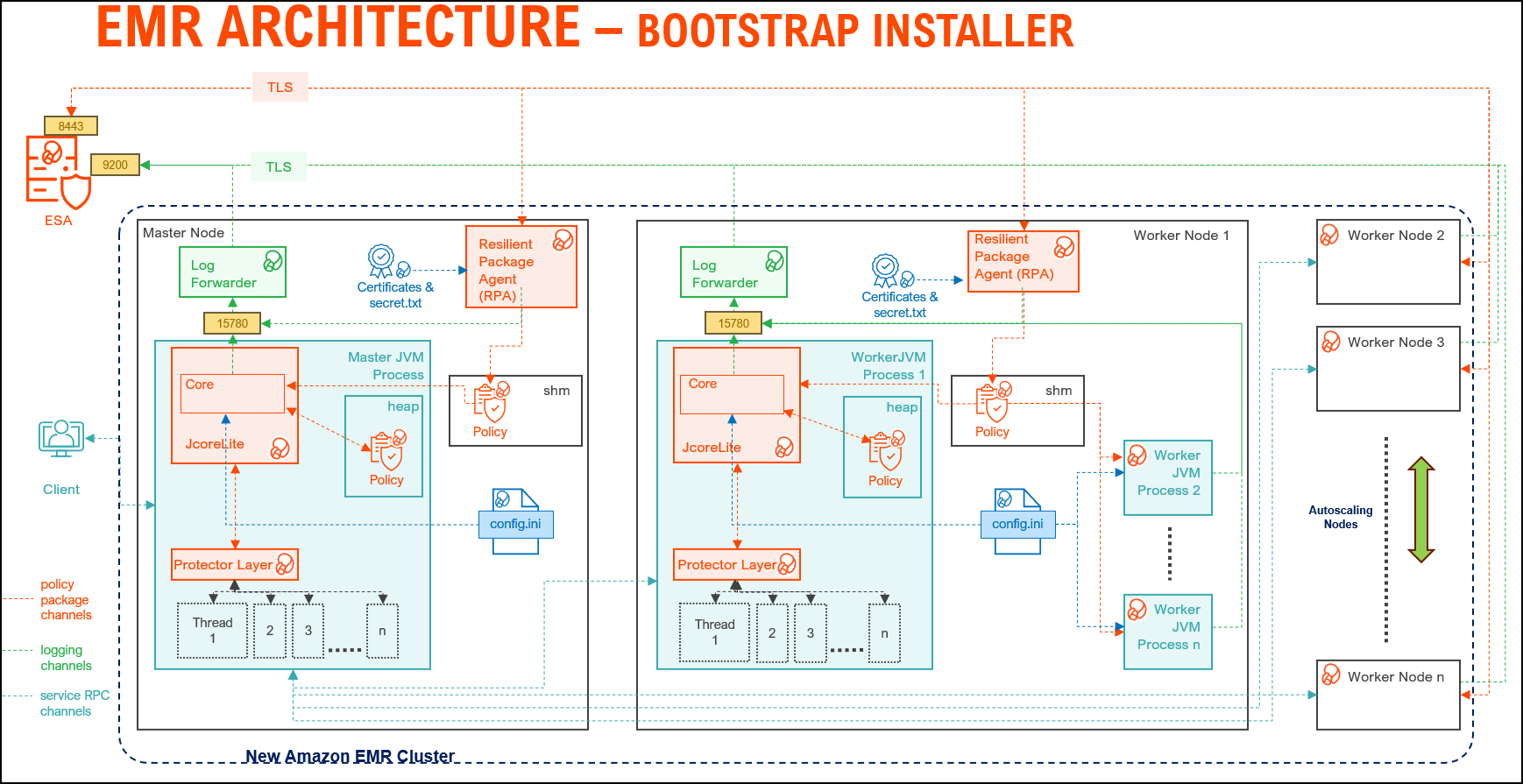
| Component | Description |
|---|---|
| RPAgent | A daemon running on each node that downloads the package from ESA/PPC over a TLS channel using the installed Certificates. |
| Log Forwarder | A daemon running on each node that routes the audit logs and application logs to ESA/Audit Store. |
| config.ini | A file on each node containing the set of configuration parameters to modify the protector behavior. |
| BDP Layer | Contains the Big Data Protector UDFs and APIs executing in CDP service processes. |
| JcoreLite | The JNI library that provides a Java API layer to the Core libraries. |
| Core | The set of various libraries that provide the Protegrity Core functionality. |
2.1.2 - Static installer architecture
The architecture for the EMR distribution of the Big Data Protector is depicted in the image below.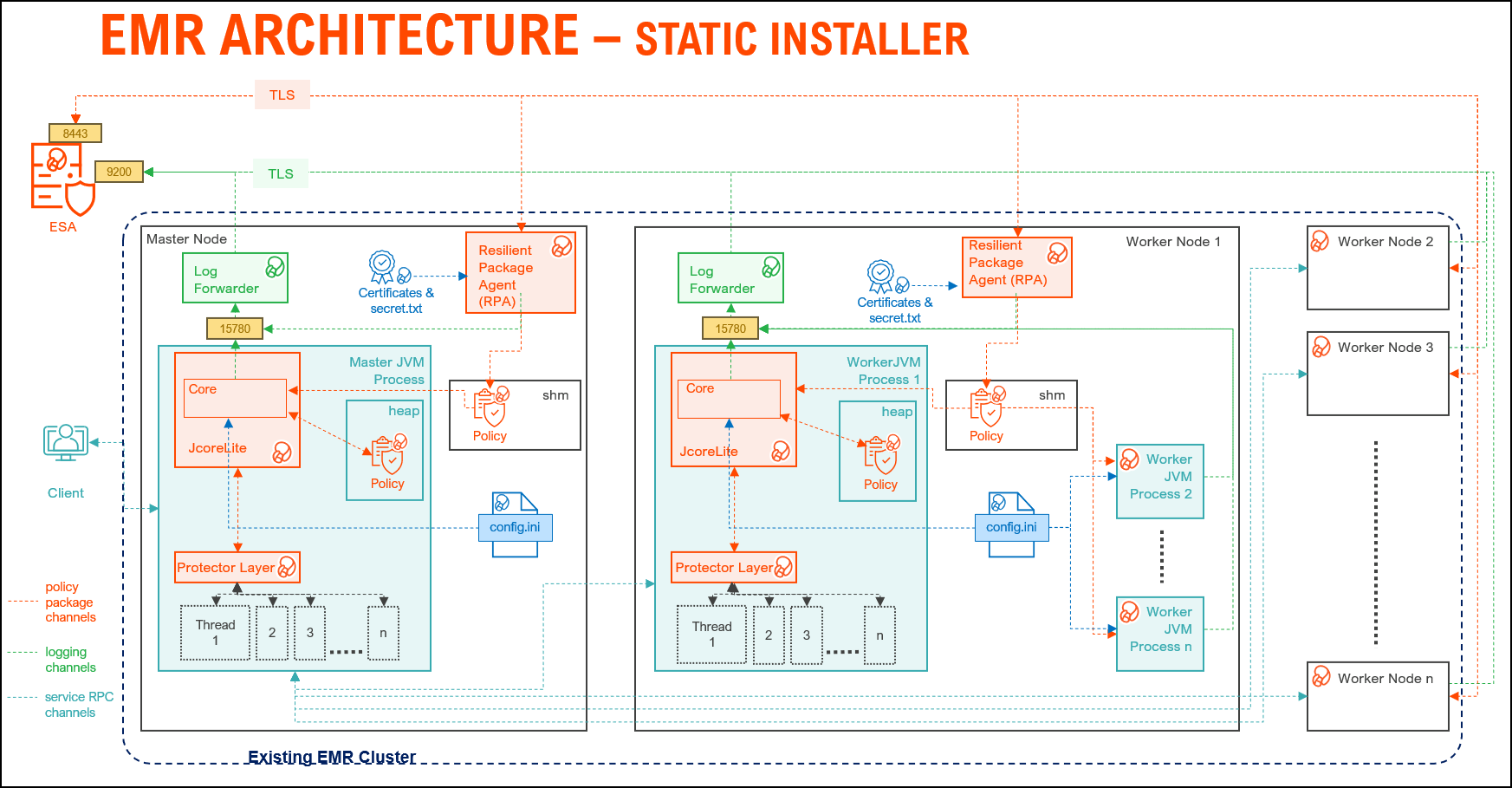
| Component | Description |
|---|---|
| RPAgent | A daemon running on each node that downloads the package from the ESA/PPC over a TLS channel using the installed Certificates. |
| Log Forwarder | A daemon running on each node that routes the audit logs and application logs to the ESA/Audit Store. |
| config.ini | A file on each node containing the set of configuration parameters to modify the protector behavior. |
| BDP Layer | Contains the Big Data Protector UDFs and APIs executing in CDP service processes. |
| JcoreLite | The JNI library that provides a Java API layer to the Core libraries. |
| Core | The set of various libraries that provide the Protegrity Core functionality. |
2.1.3 - EMR Serverless architecture
Amazon EMR Serverless is a modern, on-demand data processing architecture designed to eliminate the complexity of managing clusters for big data workloads. Unlike traditional EMR deployments, EMR Serverless dynamically provisions compute resources based on job requirements, enabling cost efficiency and scalability without manual intervention.
At its core, the architecture for EMR Serverless leverages containerized executors to run Spark or Hive applications in an isolated, secure environment. These containers are orchestrated by AWS, ensuring optimal resource utilization and fault tolerance. The design supports Protegrity data protection integration, making it suitable for enterprise-grade deployments where compliance and security are critical.
Key components include:
- Serverless Runtime: Supports Spark and Hive for analytics and ETL.
- Dynamic Scaling: Automatically adjusts resources to workload demands.
- Logging and Monitoring: Driver and executor logs are streamed to CloudWatch, with optional forwarding to external systems via Kinesis and Lambda for near real-time insights.
- Deployment Workflow: Applications are packaged as Docker images, stored in AWS ECR, and executed in EMR Serverless environments for consistent and reproducible runs.
The architecture for the EMR Serverless distribution of the Big Data Protector is depicted in the image below.
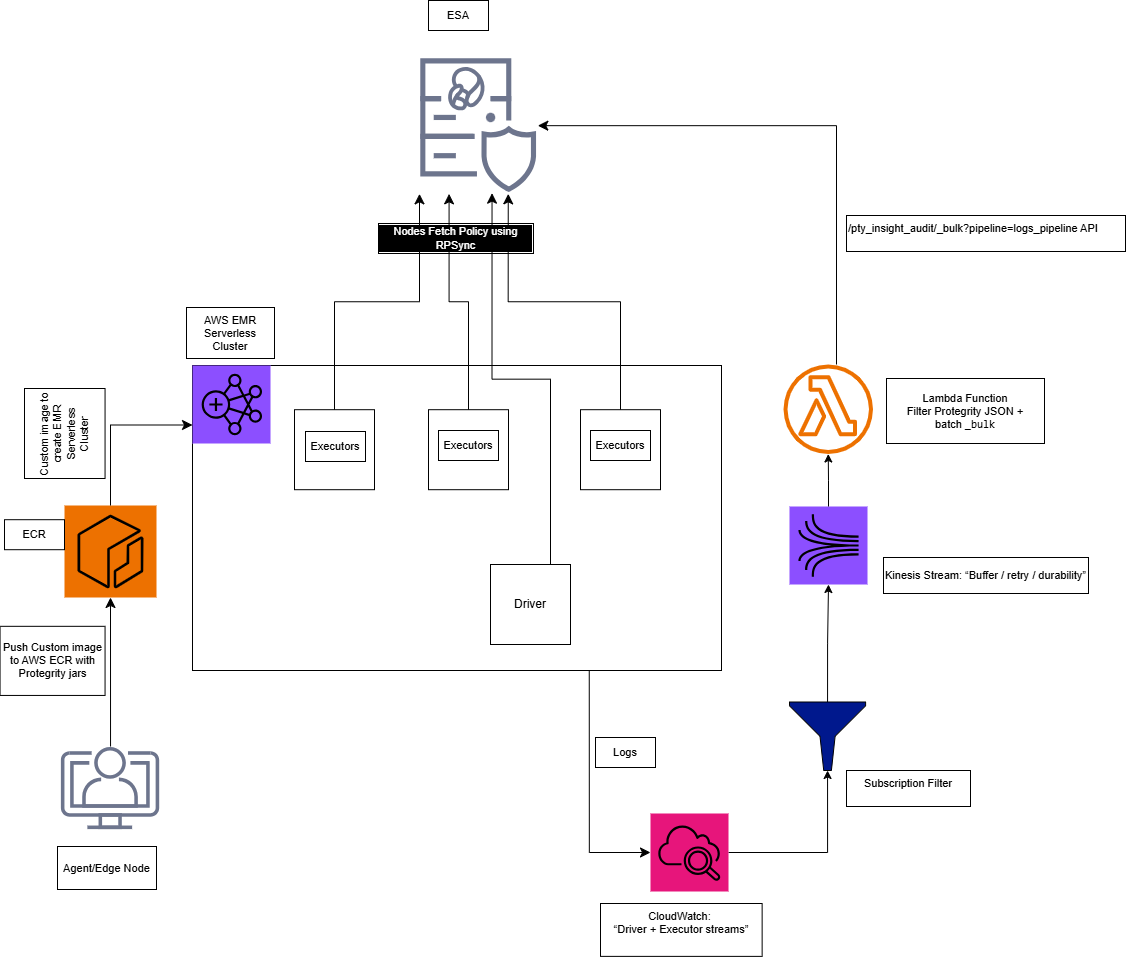
The overall process of installing the Big Data Protector in the EMR Serverless environment is outlined below.
Step 1: Executing the Configurator Script
- Interactive prompt collects all the configuration parameters.
- Input: ESA host/ports, AWS account/region, EMR Serverless application type, and ECR repository names.
- Output:
Installation_Files/directory withconfig.jsonand all the required files. - Files created:
config.json, copied JARs, scripts, and the certificate scripts.
Note: For more information, refer to Executing the Configurator Script.
Step 2: Deploying the BDP Image
python3 emr_serverless_setup_cli.py --config ../config.json deploy
Note: For more information, refer to EMR Serverless Setup CLI
Substep: Validating the Prerequisites
The script:
- Checks Docker, AWS CLI, credentials
- Verifies ECR repository exists
- Confirms all source files present
Substep: Preparing the Assets
The script:
- Reads
config.jsonandconfig.ini.template - Generates
config.iniwith:- [sync] section: ESA policy server connection (host:8443)
- [log] section: output=stdout
- Updates the
GetCertificates.shscript with ESA host/port
Note: After preparing the assets, if required, modify the
config.inifile as per requirements.
Substep: Generating the Dockerfile
The script:
- Generates the Dockerfile using the values from the
config.jsonfile.
Note: After generating the dockerfile, if needed, modify the dockerfile as per requirements.
Substep: Building the Docker Image
The script:
- Prompts for ESA credentials (username/password or JWT token)
- Downloads the certificates from ESA:8443
- Builds the Docker image
Step 3: Pushing the Image to ECR
The script:
- Logs in to ECR using AWS CLI
- Pushes image to ECR repository
The Big Data Protector build provides an automated script to execute the above-mentioned steps. For more information, refer EMR Serverless Setup CLI.
Understanding the Logging Architecture
- The driver/executor logs are written into the CloudWatch Log group.
- The CloudWatch Logs Subscription filter streams the matching log lines into Kinesis Data Streams.
- The Lambda function consumes the Kinesis batches, extracts only the Protegrity audit JSON lines, builds OpenSearch Bulk (_bulk) payload and invokes the ESA endpoint.
Note: For the CloudWatch subscription filter, provide a filter according to the type of logs that are generated.
Note: For more information, refer Setting up the Log Forwarder
2.2 - Preparing the environment
2.2.1 - Setting up for the Bootstrap Installer
The procedures mentioned in this section are applicable only for the Bootstrap installer approach to prepare the environment for the Big Data Protector.
2.2.1.1 - Verifying the prerequisites
The content mentioned in this section is applicable only for the Bootstrap approach to install the Big Data Protector.
Ensure that the following prerequisites are met, before installing the Big Data Protector on an Amazon EMR cluster:
- It is recommended to be familiar with the following parts:
- The Amazon EMR environment
- Storage bucket, used to store the Big Data Protector installation files
- Bootstrap Action, used to invoke the installation of Big Data Protector
- Amazon Virtual Private Cloud (VPC)
- A ESA appliance v10.x.x or PPC is installed and running.
- A host machine on the x86-64 architecture is available to execute the configurator script.
- A host machine on the ARM64 architecture is available to execute the configurator script.
Note: The host machine on the ARM64 architecture is required to install the build on ARM64 architecture.
- EMR instance types supporting the Graviton architecture are available for the master, core, and task nodes. For example, m6g, r6g, or c6g.
- An S3 bucket is available to copy the Big Data Protector installation files, which are created using the Configurator script.
Note: For more information about creating an S3 bucket, refer to Create your first S3 bucket.
- The following table depicts the list of ports that are configured on ESA/PPC and the nodes in the cluster, which will run the Big Data Protector:
| Destination Port | Protocol | Source | Destination | Description |
8443 | TCP | RPAgent on the Big Data Protector cluster node | ESA | The RPAgent communicates with ESA through port
8443 to download a Policy. |
9200 | Log Forwarder on the Big Data Protector cluster node | Protegrity Audit Store appliance | The Log Forwarder sends all the logs to the Protegrity
Audit Store appliance through port
9200. | |
15780 | Protector on the Big Data Protector cluster node | Log Forwarder on the Big Data Protector cluster node | The Big Data Protector writes Audit Logs to localhost
through port 15780. The RPAgent
Application Logs are also written to localhost through port
15780. The Log Forwarder reads the logs from
that socket. | |
25400 | Protector on the Big Data Protector cluster node | PPC | The RPAgent communicates with PPC through port
25400 to download a Policy. |
2.2.1.2 - Extracting the Big Data Protector Package
The steps mentioned in this section are applicable only for the Bootstrap approach to install the Big Data Protector.
After receiving the Big Data Protector installation package from Protegrity, copy it to any Amazon EC2 instance or any node that has connectivity to the ESA.
After downloading the Big Data Protector package, extract it to:
- Access the Configurator script and
- Install the Big Data Protector on all the nodes on an Amazon EMR cluster.
To extract the Configurator script from the installation package:
Log in to the CLI on a machine or an Amazon EC2 node that has connectivity to ESA/PPC.
Copy the Big Data Protector package to any directory.
For example,/opt/protegrity/.BigDataProtector_Linux-ALL-64_x86-64_EMR-<EMR_version>-64_<BDP_version>.tgzBigDataProtector_Linux-ALL-64_ARM64_EMR-<EMR_version>-64_<BDP_version>.tgzTo extract the contents of the package, run the following command:
tar -xvf BigDataProtector_Linux-ALL-64_x86-64_EMR-<EMR_version>-64_<BDP_version>.tgztar -xvf BigDataProtector_Linux-ALL-64_ARM64_EMR-<EMR_version>-64_<BDP_version>.tgzPress ENTER.
The command extracts the installer package and the signature files.BigDataProtector_Linux-ALL-64_x86-64_EMR-<EMR_version>-64_<BDP_version>.tgz signatures/ signatures/BigDataProtector_Linux-ALL-64_x86-64_EMR-<EMR_version>-64_<release_version>.tgz_<BDP_version>.sigBigDataProtector_Linux-ALL-64_ARM64_EMR-<EMR_version>-64_<BDP_version>.tgz signatures/ signatures/BigDataProtector_Linux-ALL-64_ARM64_EMR-<EMR_version>-64_<release_version>.tgz_<BDP_version>.sig
Note: Verify the authenticity of the build using the signatures folder. For more information, refer to Verification of Signed Protector Build.
To extract the configurator script, run the following command:
tar –xvf BigDataProtector_Linux-ALL-64_x86-64_EMR-<EMR_version>-64_<BDP_version>.tgztar –xvf BigDataProtector_Linux-ALL-64_ARM64_EMR-<EMR_version>-64_<BDP_version>.tgzPress ENTER.
The command extracts the configurator script.BDP_Configurator_EMR-<EMR_version>_<BDP_version>.sh
2.2.1.3 - Executing the Configurator Script
The steps mentioned in this section are applicable only for the Bootstrap approach to install the Big Data Protector.
Execute the configurator script to create the installation files for installing the Big Data Protector on an Amazon EMR cluster. You can install the Big Data Protector on an Amazon EMR cluster in any one of the following methods:
- New EMR cluster: The configurator script will:
- Download the certificates and key encryption files from ESA/PPC.
- Create the Big Data Protector installation files for a new EMR cluster.
- Create the bootstrap installer and classpath configurator script for a new EMR cluster.
- Copy the Big Data Protector installation files, bootstrap installer, and the classpath configurator script to the S3 bucket.
- Existing EMR cluster: The configurator script will generate the installation package to install the Big Data Protector on an existing EMR cluster.
Before you begin
- Log in to the PPC staging instance through SSH.
- To extract the CA certificate, run the following command:
kubectl -n api-gateway get secret ingress-certificate-secret -o jsonpath='{.data.ca\.crt}' | base64 -d > /tmp/ProtegrityCA.pem - Log in to the staging instance having connectivity to PPC.
- To create a folder inside the
/opt/directory, run the following command:mkdir /opt/esa - To create a folder inside the
/opt/esa/directory, run the following command:mkdir /opt/esa/certs - To copy the CA certificate, run the following command:
scp <ppc-staging_instance>:/tmp/ProtegrityCA.pem /opt/esa/certs/ProtegrityCA.pem - To validate the authenticity of the certificate, run the following command:
head -1 /opt/esa/certs/ProtegrityCA.pem - Press ENTER.
The output of the command appears.
Note: Ensure the output starts with
BEGIN CERTIFICATE, as listed below.-----BEGIN CERTIFICATE----- - To fetch the FQDN from the certificate’s SAN, run the following command:
openssl s_client -connect <ppc-ip>:<port> -servername <ppc-ip> </dev/null2> | openssl x509 -noout -ext subjectAltName - To map the IP address with the FQDN in the
/etc/hostsfile, run the following command:echo "<ppc-ip> <fqdn>" | sudo tee -a /etc/hosts - Open the
ProtegrityCA.pemfile. - Encode the
ProtegrityCA.pemwith base64 (single line) and store that value. - To set the environment variable, run the following command:
export SSL_CERT_FILE=/opt/esa/certs/ProtegrityCA.pem - To verify the changes, run the following command:
openssl s_client -connect <fqdn>:<port> -servername <fqdn> -CAfile "$SSL_CERT_FILE" </dev/null2> | grep "Verify return code"
Important:
- Use the
base64 -dencoded value for the certificate. Pasting the raw data returns theCertificate validation failederror message.- Extract the certificates only during installation. A stale certificate returns the
Verify return code: 21error message.- Ensure the output of the command to verify the changes returns
0 (ok).
Execute the Configurator Script
Log in to the staging environment having connectivity to ESA/PPC.
Navigate to the directory that contains the
BDP_Configurator_EMR-<EMR_version>_<BDP_version>.shscript.To execute the configurator script, run the following command:
./BDP_Configurator_EMR-<EMR_version>_<BDP_version>.shPress ENTER.
The prompt to continue the installation of the Big Data Protector appears.*********************************************************************** Welcome to the Big Data Protector Configurator Wizard *********************************************************************** This will create the Big Data Protector Installation files for AWS EMR. Do you want to continue? [yes or no]:To continue, type
yes.Press ENTER.
The prompt to create the Big Data Protector installation package, depending on the EMR cluster, appears.Protegrity Big Data Protector Configurator started... Enter the EMR cluster for which the Big Data Protector installation package needs to be created: [ 1 ] : New EMR Cluster [ 2 ] : Existing EMR cluster [ 1 or 2 ]:Depending on your requirement, select any one of the following options:
- To create the Big Data Protector installation package for a new EMR cluster, type
1. - To generate the Big Data Protector installation package, in a local directory, for an existing EMR cluster, type
2.
For more information about installing the Big Data Protector on an existing EMR cluster, refer Using the Static Installer.
- To create the Big Data Protector installation package for a new EMR cluster, type
To create the Big Data Protector installation package for a new EMR cluster, type
1.Press ENTER.
The prompt to enter the S3 URI to upload the Big Data Protector installation files appears.Generating Big Data Protector for a new EMR cluster...... Enter the S3 URI where the BDP Installation files are to be uploaded. (E.g. s3://examplebucket/folder):Type the path of the S3 storage bucket.
Note: Ensure that the path of the S3 storage bucket is in the following format:
s3://<bucket_name>/<folder_in_the_bucket>Where,
- <bucket_name> - specifies the name of the storage bucket.
- <folder_in_the_bucket> - specifies the directory within the bucket.
Press ENTER.
The prompt to either upload the installation files to the S3 bucket or generate them locally appears.Choose one option among the following for BDP Installation files: [1] -> Upload files to 's3://<bucket_name>/<folder_in_the_bucket>' S3 URI. [2] -> Generate files locally to current working directory. (You would have to manually upload the files to the specified S3 URI) [ 1 or 2 ]:To upload the installation files to the S3 storage bucket, type
1.Press ENTER.
The prompt to select the type of AWS access key appears.Choose the Type of AWS Access Keys from the following options: [1] -> IAM User Access Keys (Permanent access key id & secret access key) [2] -> Temporary Security Credentials (Temporary access key id, secret access key & session token) [ 1 or 2 ]:Depending on the type of AWS Access Keys you want to use, type
1or2. For example, to use the temporary security credentials, type2.Press ENTER.
The prompt to enter the access key ID appears.Enter the Access Key ID:Enter the access key ID.
Press ENTER.
The prompt to enter the secret access key appears.Enter the Secret Access Key:Enter the secret access key.
Press ENTER.
The prompt to enter the security session token appears.Enter the Security Session Token:Enter the Security Session Token.
Press ENTER.
The prompt to enter ESA hostname or IP address appears.Enter the ESA Hostname/IP Address:Enter ESA Hostname (FQDN, e.g. protegrity-esa.example.com):Enter the hostname or the IP address of ESA.
Press ENTER.
The prompt to enter the listening port for ESA appears.Enter ESA host listening port [8443]:Using ESA_IP from environment: <ESA_IP_Address> Enter ESA host listening port:Enter the listening port for ESA.
Alternatively, to use the default listening port, press ENTER.Press ENTER.
The prompt to enter the JWT token appears.If you have an existing ESA JSON Web Token (JWT) with Export Certificates role, enter it otherwise enter 'no':Enter the JWT token.
Press ENTER.
The prompt to select the audit store type appears.Select the Audit Store type where Log Forwarder(s) should send logs to. [ 1 ] : Protegrity Audit Store [ 2 ] : External Audit Store [ 3 ] : Protegrity Audit Store + External Audit Store Enter the no.:Depending on the Audit Store type, select any one of the following options:
Option Description 1To use the default setting using the Protegrity Audit Store appliance, type 1. If you enter1, then the default Fluent Bit configuration files are used, and Fluent Bit will forward the logs to the Protegrity Audit Store appliances.2To use an external audit store, type 2. If you enter2, then the default Fluent Bit configuration files used for the External Audit Store are renamed. Theout.confandupstream.cfgfiles in the/opt/protegrity/fluent-bit/data/config.d/directory are renamed toout.conf.bkpandupstream.cfg.bkprespectively. The renaming ensures these files will not be used by Fluent Bit. Additionally, the custom Fluent Bit configuration files for the external audit store are copied to the/opt/protegrity/fluent-bit/data/config.d/directory.3To use a combination of the default setting with an external audit store, type 3. If you enter3, then the default Fluent Bit configuration files used for the Protegrity Audit Store are not renamed. Theout.confandupstream.cfgfiles in the/opt/protegrity/fluent-bit/data/config.d/directory retain the original name. However, the custom Fluent Bit configuration files for the external audit store are copied to the/opt/protegrity/fluent-bit/data/config.d/directory.Press ENTER.
The prompt to enter the comma separated list of hostname or IP addresses appears.Enter comma-separated list of Hostnames/IP Addresses and/or Ports of Protegrity Audit Store. Allowed Syntax: hostname[:port][,hostname[:port],hostname[:port]...] (Default Value - <ESA_IP_Address>:9200) Enter the list:Enter the comma-separated IP addresses/ports in the correct syntax.
Press ENTER.
The prompt to enter the local directory path that stores the custom Fluent Bit configuration file appears.Enter the local directory path on this node that stores the custom Fluent-Bit configuration files for External Audit Store:Note: The configurator script will display this prompt only if you select option
2or3in step 28. When you select option2or3in step 28, the custom configuration files are copied to the/<installation_directory>/fluent-bit/data/config.d/directory during the execution of bootstrap script on the EMR nodes.Enter the local directory path that stores the custom Fluent Bit configuration files.
Press ENTER.
The prompt to generate the application logs for the RPAgent appears.Do you want RPAgent's log to be generated in a file? [yes or no]:To generate the logs in a file, type
yes.Press ENTER.
The script generates the installation files and uploads them to the specified S3 bucket.RPAgent's log will be generated in a file. ************************************************************************************ Welcome to the RPAgent Setup Wizard. ************************************************************************************ Unpacking................... Extracting files... Unpacked rpagent compressed file... Temporarily setting up rpagent directory structure on current node... Unpacking... Extracting files... Downloading certificates from <ESA_IP_Address>:8443... % Total % Received % Xferd Average Speed Time Time Time Current Dload Upload Total Spent Left Speed 100 11264 100 11264 0 0 163k 0 --:--:-- --:--:-- --:--:-- 164k Extracting certificates... Certificates successfully downloaded and stored in /<installation_dir>/rpagent/data Protegrity RPAgent installed in /<installation_dir>/rpagent. Retrieving the S3 bucket's AWS Region via AWS S3 REST API... Successfully retrieved S3 bucket's AWS region: <AWS_region_name> Started Uploading the generated installation files via AWS S3 REST API...... Uploading bdp_bootstrap_installer.sh to the S3 bucket. File uploaded to s3://<bucket_name>/<folder_in_the_bucket>/bdp_bootstrap_installer.sh Uploading bdp_classpath_configurator.py to the S3 bucket. File uploaded to s3://<bucket_name>/<folder_in_the_bucket>/bdp_classpath_configurator.py Uploading BigDataProtector_Linux-ALL-64_x86-64_EMR-7.9-64_<BDP_version>.tgz to the S3 bucket. File uploaded to s3://<bucket_name>/<folder_in_the_bucket>/BigDataProtector_Linux-ALL-64_x86-64_EMR-<EMR_version>-64_<BDP_version>.tgz Successfully Uploaded BigDataProtector_Linux-ALL-64_x86-64_EMR-<EMR_version>-64_<BDP_version>.tgz, bdp_bootstrap_installer.sh, bdp_classpath_configurator.py to S3 bucket 's3://<bucket_name>/<folder_in_the_bucket>' Successfully Generated installation files at ./Installation_Files/ directory. Successfully configured Big Data Protector for a new EMR cluster..RPAgent's log will be generated in a file. ************************************************************************************ Welcome to the RPAgent Setup Wizard. ************************************************************************************ Unpacking................... Extracting files... Unpacked rpagent compressed file... Temporarily setting up rpagent directory structure on current node... Unpacking... Extracting files... Certificate validation successful. Obtaining token from <ESA_FQDN>:8443... Downloading certificates from <ESA_FQDN>:8443... % Total % Received % Xferd Average Speed Time Time Time Current Dload Upload Total Spent Left Speed 100 11264 100 11264 0 0 163k 0 --:--:-- --:--:-- --:--:-- 164k Extracting certificates... Certificates successfully downloaded and stored in /<installation_dir>/rpagent/data Protegrity RPAgent installed in /<installation_dir>/rpagent. Retrieving the S3 bucket's AWS Region via AWS S3 REST API... Successfully retrieved S3 bucket's AWS region: <AWS_region_name> Started Uploading the generated installation files via AWS S3 REST API...... Uploading bdp_bootstrap_installer.sh to the S3 bucket. File uploaded to s3://<bucket_name>/<folder_in_the_bucket>/bdp_bootstrap_installer.sh Uploading bdp_classpath_configurator.py to the S3 bucket. File uploaded to s3://<bucket_name>/<folder_in_the_bucket>/bdp_classpath_configurator.py Uploading BigDataProtector_Linux-ALL-64_ARM64_EMR-<EMR_version>-64_<BDP_version>.tgz to the S3 bucket. File uploaded to s3://<bucket_name>/<folder_in_the_bucket>/BigDataProtector_Linux-ALL-64_ARM64_EMR-<EMR_version>-64_<BDP_version>.tgz Successfully Uploaded BigDataProtector_Linux-ALL-64_ARM64_EMR-<EMR_version>-64_<BDP_version>.tgz, bdp_bootstrap_installer.sh, bdp_classpath_configurator.py to S3 bucket 's3://<bucket_name>/<folder_in_the_bucket>' Successfully Generated installation files at ./Installation_Files/ directory. Successfully configured Big Data Protector for a new EMR cluster..
2.2.2 - Setting up for the Static Installer
The procedures mentioned in this section are applicable only for the Static installer approach to prepare the environment for the Big Data Protector.
2.2.2.1 - Verifying the prerequisites for Static Installer
The content mentioned in this section is applicable only for the Static installer approach to install the Big Data Protector.
Ensure that the following prerequisites are met, before installing the Big Data Protector:
The EMR cluster is installed, configured, and running.
A ESA appliance v10.x.x or PPC is installed and running.
A host machine on the x86-64 architecture is available to execute the configurator script.
A host machine on the ARM64 architecture is available to execute the configurator script.
Note: The host machine on the ARM64 architecture is required to install the build on ARM64 architecture.
EMR instance types supporting the Graviton architecture are available for the master, core, and task nodes. For example, m6g, r6g, or c6g.
The static installer for EMR uses utilities, such as, pssh (parallel ssh) and pscp (parallel scp). These utilities require Python to be installed on the Primary node. To verify whether Python is installed on the Primary node, run the following command:
/usr/bin/env python --versionThe command returns the version of Python installed on the system.
If you are unable to detect Python on the Primary node, then ensure that you have a compatible version of Python installed on the lead node (preferably Python 3.x). Ensure that the utilities are able to detect the version of Python using the following command:
/usr/bin/env pythonA
sudoeruser account with privileges to perform the following tasks:- Update the system by modifying the configuration, permissions, or ownership of directories and files.
- Perform third party configuration.
- Create directories and files.
- Modify the permissions and ownership for the created directories and files.
- Set the required permissions to the create directories and files for the Protegrity Service Account.
- Permissions for using the SSH service.
The following user accounts are present to perform the required tasks:
ADMINISTRATOR_USER: The sudoer user account that is responsible for installing and uninstalling the Big Data Protector. on the cluster. This user account must havesudoaccess to install the product.EXECUTOR_USER: A user that has ownership of all Protegrity files, directories, and services.OPERATOR_USER: Responsible for performing tasks, such as, starting or stopping tasks, monitoring services, updating the configuration, and maintaining the cluster while the Big Data Protector is installed. If you want to start, stop, or restart the Protegrity services, then you requiresudoerprivileges for this user to impersonate theEXECUTOR_USER.- Depending on the requirements, a single user on the system may perform multiple roles. If a single user is performing multiple roles, then ensure that the following conditions are met:
- The user has the required permissions and privileges to impersonate the other user accounts, for performing their roles, and perform tasks as the impersonated user.
- The user is assigned the highest set of privileges, from the required roles that it needs to perform, to execute the required tasks. For example, if a single user is performing tasks as
ADMINISTRATOR_USER,EXECUTOR_USER, andOPERATOR_USER, then ensure that the user is assigned the privileges of theADMINISTRATOR_USER.
A Private Key file (.pem file) is available for the
sudoeruser on the Master node. The file is used for enabling key-based authentication, and for communicating with all the nodes in the EMR cluster.Ensure that the
ADMINISTRATOR_USERorOPERATOR_USERhave the value of theNOPASSWDparameter set toALLin the sudoer’s file. This is required for installing and using Big Data Protector on the EMR cluster because a key-based authentication for thesudoeruser is provided.The management scripts provided by the installer in the
cluster_utilsdirectory should be run only by the user (OPERATOR_USER) having privileges to impersonate theEXECUTOR_USER.- If the value of
AUTOCREATE_PROTEGRITY_IT_USRis set toNo, ensure a service group containing a user for running Protegrity services on all the cluster nodes already exists. - If the Hadoop cluster is configured with AD or LDAP, ensure that the
AUTOCREATE_PROTEGRITY_IT_USRparameter, in theBDP.configfile, is set toNo. Ensure the required service account user is created on all the nodes in the cluster.
- If the value of
The table lists the ports required for the EMR cluster.
| Destination Port | Protocol | Source | Destination | Description |
8443 | TCP | RPAgent on the Big Data Protector cluster node | ESA | The RPAgent communicates with ESA through port
8443 to download a Policy. |
9200 | Log Forwarder on the Big Data Protector cluster node | Protegrity Audit Store appliance | The Log Forwarder sends all the logs to the Protegrity
Audit Store appliance through port
9200. | |
15780 | Protector on the Big Data Protector cluster node | Log Forwarder on the Big Data Protector cluster node | The Big Data Protector writes Audit Logs to localhost
through port 15780. The RPAgent
Application Logs are also written to localhost through port
15780. The Log Forwarder reads the logs from
that socket. | |
25400 | Protector on the Big Data Protector cluster node | PPC | The RPAgent communicates with PPC through port
25400 to download a Policy. |
2.2.2.2 - Executing the Configurator Script
Before you begin
- Log in to the PPC staging instance through SSH.
- To extract the CA certificate, run the following command:
kubectl -n api-gateway get secret ingress-certificate-secret -o jsonpath='{.data.ca\.crt}' | base64 -d > /tmp/ProtegrityCA.pem - Log in to the staging instance having connectivity to PPC.
- To create a folder inside the
/opt/directory, run the following command:mkdir /opt/esa - To create a folder inside the
/opt/esa/directory, run the following command:mkdir /opt/esa/certs - To copy the CA certificate, run the following command:
scp <ppc-staging_instance>:/tmp/ProtegrityCA.pem /opt/esa/certs/ProtegrityCA.pem - To validate the authenticity of the certificate, run the following command:
head -1 /opt/esa/certs/ProtegrityCA.pem - Press ENTER.
The output of the command appears.
Note: Ensure the output starts with
BEGIN CERTIFICATE, as listed below.-----BEGIN CERTIFICATE----- - To fetch the FQDN from the certificate’s SAN, run the following command:
openssl s_client -connect <ppc-ip>:<port> -servername <ppc-ip> </dev/null2> | openssl x509 -noout -ext subjectAltName
- To map the IP address with the FQDN in the
/etc/hostsfile, run the following command:
echo "<ppc-ip> <fqdn>" | sudo tee -a /etc/hosts
- Open the
ProtegrityCA.pemfile. - Encode the
ProtegrityCA.pemwith base64 (single line) and store that value. - To set the environment variable, run the following command:
export SSL_CERT_FILE=/opt/esa/certs/ProtegrityCA.pem - To verify the changes, run the following command:
openssl s_client -connect <fqdn>:<port> -servername <fqdn> -CAfile "$SSL_CERT_FILE" </dev/null2> | grep "Verify return code"
Important:
- Use the
base64 -dencoded value for the certificate. Pasting the raw data returns theCertificate validation failederror message.- Extract the certificates only during installation. A stale certificate returns the
Verify return code: 21error message.- Ensure the output of the command to verify the changes returns
0 (ok).
Execute the Configurator Script
Log in to the staging environment having connectivity to ESA/PPC.
Note: The instance to execute the configurator script must be on the ARM64 architecture.
Navigate to the directory that contains the
BDP_Configurator_EMR-<EMR_version>_<BDP_version>.shscript.To execute the configurator script, run the following command:
./BDP_Configurator_EMR-<EMR_version>_<BDP_version>.shPress ENTER.
The prompt to continue the installation of the Big Data Protector appears.*********************************************************************** Welcome to the Big Data Protector Configurator Wizard *********************************************************************** This will create the Big Data Protector Installation files for AWS EMR. Do you want to continue? [yes or no]:To continue, type
yes.Press ENTER.
The prompt to create the Big Data Protector installation package, depending on the EMR cluster, appears.Protegrity Big Data Protector Configurator started... Enter the EMR deployment type for Big Data Protector: [ 1 ] : New EMR Cluster (Bootstrap) [ 2 ] : Existing EMR Cluster (Static) [ 3 ] : EMR Serverless (Containerized) [ 1, 2, or 3 ]:To create the Big Data Protector installation package for an existing EMR cluster, type
2.Press ENTER.
The script generates the installation files to install the Big Data Protector on an existing EMR cluster.Generating Big Data Protector for an existing EMR cluster..... Successfully configured Big Data Protector for an existing EMR cluster.. Use the ./Installation_Files/BigDataProtector_Linux-ALL-64_x86-64_EMR-<EMR_version>-64_<BDP_version>.tgz file to continue the installation.Generating Big Data Protector for an existing EMR cluster..... Successfully configured Big Data Protector for an existing EMR cluster.. Use the ./Installation_Files/BigDataProtector_Linux-ALL-64_ARM64_EMR-<EMR_version>-64_<BDP_version>.tgz file to continue the installation.
2.2.2.3 - Extracting the Installation Package
The steps mentioned in this section are applicable only for the Static installer approach to install the Big Data Protector.
To extract the files from the installation package:
Ensure that the installation package
BigDataProtector_Linux-ALL-64_<Architecture>_EMR-<emr_version>-64_<BDP_version>.tgzis copied to the Master node on the EMR cluster in any temporary directory, such as/opt/protegrity/.To extract the files from the installation package, run the following command:
tar -xvf BigDataProtector_Linux-ALL-64_x86-64_EMR-<emr_version>-64_<BDP_version>.tgztar -xvf BigDataProtector_Linux-ALL-64_ARM64_EMR-<emr_version>-64_<BDP_version>.tgzPress ENTER.
The command extracts the following files:uninstall.sh ptyLogAnalyzer.sh ptyLog_Consolidator.sh PepHbaseProtector<HBase_version>Setup_Linux_emr-<emr_version>_<BDP_version>.sh bdp_classpath_deconfigurator.py PepSpark<Spark_version>Setup_Linux_emr-<emr_version>_<BDP_version>.sh JcoreLiteSetup_Linux_x64_<JcoreLite_version>.gadcc.release-<BDP_version>.sh PepPig<pig_version>Setup_Linux_emr-<emr_version>_<BDP_version>.sh bdp_common/ bdp_common/bdp.properties.template bdp_common/config.ini.template Logforwarder_Setup_Linux_x64_<core_version>.sh node_uninstall.sh bdp_classpath_configurator.py RPAgent_Setup_Linux_x64_<core_version>.sh PepMapreduce<MapReduce_version>Setup_Linux_emr-<emr_version>_<BDP_version>.sh PepHive<Hive_version>Setup_Linux_emr-<emr_version>_<BDP_version>.sh BDP.config BdpInstallx.x.x_Linux_<BDP_version>.shJcoreLiteSetup_Linux_arm64_<JcoreLite_version>.sh ptyLogAnalyzer.sh bdp_classpath_configurator.py RPAgent_Setup_Linux_arm64_<core_version>.sh PepMapreduce<MapReduce_version>Setup_Linux_emr-<emr_version>_<BDP_version>.sh uninstall.sh bdp_common/ bdp_common/bdp.properties.template bdp_common/config.ini.template Logforwarder_Setup_Linux_arm64_<core_version>.sh node_uninstall.sh ptyLog_Consolidator.sh BDP.config PepSpark<Spark_version>Setup_Linux_emr-<emr_version>_<BDP_version>.sh PepHive<Hive_version>Setup_Linux_emr-<emr_version>_<BDP_version>.sh bdp_classpath_deconfigurator.py PepHbaseProtector<HBase_version>Setup_Linux_emr-<emr_version>_<BDP_version>.sh PepPig<pig_version>Setup_Linux_emr-<emr_version>_<BDP_version>.sh BdpInstallx.x.x_Linux_<BDP_version>.sh
2.2.2.4 - Updating the BDP.Config File
BDP.Config File for the Static Installer.The steps mentioned in this section are applicable only for the Static Installer approach to install the Big Data Protector.
Note: Ensure that the
BDP.configfile is updated before the Big Data Protector is installed.
Do not update the BDP.config file when the installation of the Big Data Protector is in progress.
To update the BDP.config file:
Create a
hostsfile containing the IP addresses of all the nodes in the cluster, except the Lead node, and specify them in theBDP.configfile.The installation script uses this file to install the Big Data Protector on the nodes.
Open the
BDP.configfile in any text editor and modify the following parameter values:HADOOP_DIR– is the installation home directory for the Hadoop distribution.PROTEGRITY_DIR– is the directory where the Big Data Protector will be installed.The examples used in this document assume that the Big Data Protector is installed in the
/opt/protegrity/directory.CLUSTERLIST_FILE– This file contains the host name or IP addresses all the nodes in the cluster, except the Lead node, listing one host name and IP address per line.Ensure that you specify the file name with the complete path.
SPARK_PROTECTOR– Specifies one of the following values, as required:Yes– Specifies to install the Spark protector. Set the value of this parameter toYes, to run Hive UDFs with Spark SQL. Alternatively, use the Spark protector samples if theINSTALL_DEMOparameter is set toYes.No– Specifies to skip installing the Spark protector.
AUTOCREATE_PROTEGRITY_IT_USR– Determines the Protegrity service account. The service group and service username specified in thePROTEGRITY_IT_USR_GROUPandPROTEGRITY_IT_USRparameters respectively will be created if this parameter is set toYes. One of the following values can be specified, as required:Yes– Instructs the installer to create the service groupPROTEGRITY_IT_USR_GROUPcontaining the userPROTEGRITY_IT_USRfor executing the Protegrity services on all the nodes in the cluster.If the service group or service user are already present, then the installer exits.
If you uninstall the Big Data Protector, then the service group and the service user are deleted.
No– Instructs the installer to skip creating a service groupPROTEGRITY_IT_USR_GROUPwith the service userPROTEGRITY_IT_USRfor executing the Protegrity services on all the nodes in the cluster.
PROTEGRITY_IT_USR_GROUP– is the service group required for running the Protegrity services on all the nodes in the cluster. All the Protegrity installation directories are owned by this service group.PROTEGRITY_IT_USR– is the service account user required for running the Protegrity services on all the nodes in the cluster and is a part of the groupPROTEGRITY_IT_USR_GROUP. All the Protegrity installation directories are owned by this service user.
2.2.3 - Setting up for the EMR Serverless Installer
The procedures mentioned in this section are applicable only for the Serverless approach to prepare the environment for the Big Data Protector.
2.2.3.1 - Extracting the Big Data Protector Package
The steps mentioned in this section are applicable only for the Serverless approach to install the Big Data Protector.
After receiving the Big Data Protector installation package from Protegrity, copy it to any Amazon EC2 instance or any node that has connectivity to ESA.
To extract the Configurator script from the installation package:
Log in to the CLI on a machine or an Amazon EC2 node that has connectivity to ESA/PPC.
Copy the Big Data Protector package to any directory.
For example,/opt/protegrity/.BigDataProtector_Linux-ALL-64_x86-64_EMR-<EMR_version>-64_<BDP_version>.tgzBigDataProtector_Linux-ALL-64_ARM64_EMR-<EMR_version>-64_<BDP_version>.tgzTo extract the contents of the package, run the following command:
tar -xvf BigDataProtector_Linux-ALL-64_x86-64_EMR-<EMR_version>-64_<BDP_version>.tgztar -xvf BigDataProtector_Linux-ALL-64_ARM64_EMR-<EMR_version>-64_<BDP_version>.tgzPress ENTER.
The command extracts the installer package and the signature files.BigDataProtector_Linux-ALL-64_x86-64_EMR-<EMR_version>-64_<BDP_version>.tgz signatures/ signatures/BigDataProtector_Linux-ALL-64_x86-64_EMR-<EMR_version>-64_<release_version>.tgz_<BDP_version>.sigBigDataProtector_Linux-ALL-64_ARM64_EMR-<EMR_version>-64_<BDP_version>.tgz signatures/ signatures/BigDataProtector_Linux-ALL-64_ARM64_EMR-<EMR_version>-64_<release_version>.tgz_<BDP_version>.sigNote: Verify the authenticity of the build using the signatures folder. For more information, refer to Verification of Signed Protector Build.
To extract the configurator script, run the following command:
tar –xvf BigDataProtector_Linux-ALL-64_x86-64_EMR-<EMR_version>-64_<BDP_version>.tgztar –xvf BigDataProtector_Linux-ALL-64_ARM64_EMR-<EMR_version>-64_<BDP_version>.tgzPress ENTER.
The command extracts the configurator script.BDP_Configurator_EMR-<EMR_version>_<BDP_version>.sh
2.2.3.2 - Executing the Configurator Script
Before you begin
- Log in to the PPC staging instance through SSH.
- To extract the CA certificate, run the following command:
kubectl -n api-gateway get secret ingress-certificate-secret -o jsonpath='{.data.ca\.crt}' | base64 -d > /tmp/ProtegrityCA.pem - Log in to the staging instance having connectivity to PPC.
- To create a folder inside the
/opt/directory, run the following command:mkdir /opt/esa - To create a folder inside the
/opt/esa/directory, run the following command:mkdir /opt/esa/certs - To copy the CA certificate, run the following command:
scp <ppc-staging_instance>:/tmp/ProtegrityCA.pem /opt/esa/certs/ProtegrityCA.pem - To validate the authenticity of the certificate, run the following command:
head -1 /opt/esa/certs/ProtegrityCA.pem - Press ENTER.
The output of the command appears.
Note: Ensure the output starts with
BEGIN CERTIFICATE, as listed below.-----BEGIN CERTIFICATE----- - To fetch the FQDN from the certificate’s SAN, run the following command:
openssl s_client -connect <ppc-ip>:<port> -servername <ppc-ip> </dev/null2> | openssl x509 -noout -ext subjectAltName
- To map the IP address with the FQDN in the
/etc/hostsfile, run the following command:
echo "<ppc-ip> <fqdn>" | sudo tee -a /etc/hosts
- Open the
ProtegrityCA.pemfile. - Encode the
ProtegrityCA.pemwith base64 (single line) and store that value. - To set the environment variable, run the following command:
export SSL_CERT_FILE=/opt/esa/certs/ProtegrityCA.pem - To verify the changes, run the following command:
openssl s_client -connect <fqdn>:<port> -servername <fqdn> -CAfile "$SSL_CERT_FILE" </dev/null2> | grep "Verify return code"
Important:
- Use the
base64 -dencoded value for the certificate. Pasting the raw data returns theCertificate validation failederror message.- Extract the certificates only during installation. A stale certificate returns the
Verify return code: 21error message.- Ensure the output of the command to verify the changes returns
0 (ok).
Execute the Configurator Script
The steps mentioned in this section are applicable only for the Serverless approach to install the Big Data Protector.
The Big Data Protector configurator script:
- Generates the
config.jsonfile. - Generates the EMR Serverless deployment scripts.
- Provides the runtime artifacts and common utilities.
To execute the configurator script:
Log in to the CLI on a machine or an Amazon EC2 node that has connectivity to the ESA/PPC.
Navigate to the directory where the installation files are extracted.
To execute the script, run the following command:
./BDP_Configurator_EMR-<EMR_version>_<BDP_version>.shPress ENTER.
The Big Data Protector Configurator Wizard with the prompt to continue appears.*********************************************************************** Welcome to the Big Data Protector Configurator Wizard *********************************************************************** This will create the Big Data Protector Installation files for AWS EMR. Do you want to continue? [yes or no]:To continue, type
yes.Press ENTER.
The prompt to select the deployment type appears.Protegrity Big Data Protector Configurator started... Enter the EMR deployment type for Big Data Protector: [ 1 ] : New EMR Cluster (Bootstrap) [ 2 ] : Existing EMR Cluster (Static) [ 3 ] : EMR Serverless (Containerized) [ 1, 2, or 3 ]:To install the Big Data Protector using the Serverless approach, type
3.Press ENTER.
The prompt to select the configuration mode appears.Generating Big Data Protector for EMR Serverless...... ================================================================ EMR Serverless - Configuration Setup ================================================================ The EMR Serverless deployment requires configuration values to be stored in a config.json file. This file is used by Python scripts to: - Generate the Dockerfile with BDP components - Build and tag the Docker image - Push the image to AWS ECR - Configure certificate downloads from ESA You have two options to provide this configuration: ================================================================ OPTION 1: Interactive Mode (Recommended) ================================================================ - Guided prompts will collect all required information - Values are validated during input - config.json is automatically generated - Faster and less error-prone ================================================================ OPTION 2: Silent Mode ================================================================ - A template config.json file with placeholders is created - You manually edit the file and replace all placeholders - Useful if you prefer to script or automate configuration - Requires careful attention to JSON syntax ================================================================ Select configuration mode: [ 1 ] : Interactive Mode (Guided prompts) [ 2 ] : Silent Mode (Edit config.json template) Enter your choice [1 or 2]:To use the interactive configuration mode, type
1.Press ENTER.
The prompt to verify the prerequisites appears.[OK] Selected: Interactive Mode ================================================================ EMR Serverless - Prerequisites Checklist ================================================================ Before proceeding, please ensure you have the following information ready: [OK] ESA Configuration: - ESA Server Host/IP - ESA Port (default: 25400) - GetCertificates Port (default: 25400) - ESA Admin Username & Password (prompted during build) [OK] EMR Serverless Configuration: [1/6] EMR Release Label (e.g., emr-6.15.0, emr-7.0.0) [2/6] Runtime Selection (Spark or Hive) [3/6] AWS Account ID (12-digit number) [4/6] AWS Region (e.g., us-east-1, us-west-2) [5/6] ECR Repository Name (where Docker image will be stored) [6/6] Docker Image Tag (e.g., latest, v1.0.0) ================================================================ Do you have all the required information to proceed? [yes/no]:[OK] Selected: Interactive Mode ================================================================ EMR Serverless - Prerequisites Checklist ================================================================ Before proceeding, please ensure you have the following information ready: [OK] ESA Configuration: - ESA Server FQDN (matching cert CN; used to fetch certs on build host) - ESA Server private IP (used as runtime [sync] host inside the image) - ESA Port (default: 8443) - ESA Admin Username & Password (prompted during build) [OK] EMR Serverless Configuration: [1/6] EMR Release Label (e.g., emr-6.15.0, emr-7.0.0) [2/6] Runtime Selection (Spark or Hive) [3/6] AWS Account ID (12-digit number) [4/6] AWS Region (e.g., us-east-1, us-west-2) [5/6] ECR Repository Name (where Docker image will be stored) [6/6] Docker Image Tag (e.g., latest, v1.0.0) ================================================================ Do you have all the required information to proceed? [yes/no]:If all the prerequisites are available, type
yes.Press ENTER.
The prompt to enter the ESA hostname appears.[OK] Proceeding with interactive configuration... Enter the ESA Hostname/IP Address:[OK] Proceeding with interactive configuration... Enter ESA Hostname (FQDN, e.g. protegrity-esa.example.com):For x86-64 architecture, enter the ESA Hostname.
For ARM64 architecture, a prompt to enter ESA IP appears.
Enter the ESA private IP address (used as runtime [sync] host):For ARM64 architecture, enter ESA IP.
Press ENTER.
The prompt to enter the ESA listening port appears.Enter ESA host listening port [25400]:Enter ESA host listening port [8443]:Enter the listening port.
Press ENTER.
The prompt to enter the EMR release label appears.================================================================ EMR Serverless Configuration - Step by Step ================================================================ ESA Server: <ESA_IP_Address>:<ESA_Port> GetCertificates Port: <ESA_Port> [1/6] EMR Release Label ------------------------------------------------------ Specify the EMR release version you want to use. Note: Not all EMR versions have serverless images available. For available versions, visit AWS EMR Serverless documentation. Enter EMR Release Label (e.g., emr-7.12.0):================================================================ EMR Serverless Configuration - Step by Step ================================================================ ESA Server: <ESA_FQDN>:8443 (runtime IP: <ESA_IP_Address>) [1/6] EMR Release Label ------------------------------------------------------ Specify the EMR release version you want to use. Note: Not all EMR versions have serverless images available. For available versions, visit AWS EMR Serverless documentation. Enter EMR Release Label (e.g., emr-7.13.0):Enter the EMR version.
Press ENTER.
The prompt to select the processing engine appears.[2/6] Runtime Selection ------------------------------------------------------ Choose the processing engine for your EMR Serverless application. Spark: For data processing, ETL, and analytics Hive: For SQL queries on large datasets Select Runtime: [ 1 ] : Spark [ 2 ] : Hive Enter your choice [1 or 2]:Depending on the requirements, type
1or2.Press ENTER.
The prompt to enter the AWS Account ID appears.[3/6] AWS Account ID ------------------------------------------------------ Your 12-digit AWS Account ID is required to: • Access AWS ECR (Elastic Container Registry) • Identify your AWS resources Find it at: AWS Console > Account (top-right) > My Account Enter AWS Account ID (12 digits):Enter the AWS Account ID.
Press ENTER.
The prompt to enter the AWS region where the EMR Serverless resources will be deployed appears.[4/6] AWS Region ------------------------------------------------------ Specify the AWS region where your EMR Serverless resources will be deployed (e.g., us-east-1, us-west-2, eu-west-1). Note: • Your ECR repository and EMR Serverless application must be in same region. Enter AWS Region (e.g., us-east-1):Enter the region name.
Press ENTER.
The prompt to enter the ECR Repository Name appears.[5/6] ECR Repository Name ------------------------------------------------------ AWS ECR (Elastic Container Registry) repository where the BDP Docker image will be stored and pulled from. Repository naming rules: • Lowercase letters, numbers, hyphens, underscores, forward slashes • 2-256 characters long Enter ECR Repository Name:Enter the ECR repository name.
Press ENTER.
The prompt to enter the docker image tag appears.[6/6] Docker Image Tag ------------------------------------------------------ Tag for the Docker image in ECR. This helps identify different versions of your BDP image. Enter Docker Image Tag [default: latest]:Enter the docker image tag.
Press ENTER.
The script completes the EMR Serverless configuration.================================================================ [OK] EMR Serverless configuration completed successfully! ================================================================ Generated config.json file successfully at /bdp/build/BigDataProtector/BigDataProtector/Installation_Files/config.json ================================================================ [OK] Successfully configured Big Data Protector for EMR Serverless! ================================================================ Generated Files in ./Installation_Files/ directory: - config.json - EMR Serverless configuration - scripts/ - Python deployment CLIs +-- emr_serverless_setup_cli.py - Main deployment CLI +-- lambda_function.py - Lambda for ESA audit log forwarding - runtime/ - BDP JAR files (Spark/Hive) - common/ - JcoreLite, config.ini, GetCertificates.sh - BigDataProtector_Linux-ALL-64_x86-64_EMR-<EMR_version>-64_<BDP_version>.tgz - Complete package tarball ================================================================ Using emr_serverless_setup_cli.py - Main Deployment Tool ================================================================ This Python CLI provides commands to build and deploy BDP Docker images: AVAILABLE COMMANDS: validate - Check prerequisites (Docker, AWS CLI, config.json) prepare-assets - Update config.ini and GetCertificates.sh with ESA details generate-dockerfile - Create Dockerfile from config.json build - Build Docker image locally (preserves manual edits) push - Push existing image to AWS ECR deploy - Full pipeline: validate -> prepare -> generate -> build -> push USAGE: cd ./Installation_Files/scripts python3 emr_serverless_setup_cli.py --config ../config.json <COMMAND> TYPICAL WORKFLOW: # Option 1: Full automated deployment python3 emr_serverless_setup_cli.py --config ../config.json deploy # Option 2: Step-by-step with manual edits python3 emr_serverless_setup_cli.py --config ../config.json validate python3 emr_serverless_setup_cli.py --config ../config.json prepare-assets python3 emr_serverless_setup_cli.py --config ../config.json generate-dockerfile # Manually edit Dockerfile if needed python3 emr_serverless_setup_cli.py --config ../config.json build python3 emr_serverless_setup_cli.py --config ../config.json push NOTES: - During 'deploy' or 'build', you'll be prompted for ESA credentials - Credentials are used during build only, NOT stored in image layers - ECR authentication is handled automatically by AWS CLI - Use 'build' command to preserve manual Dockerfile edits ================================================================ Audit Logging Configuration ================================================================ IMPORTANT: EMR Serverless uses stdout for audit log output. - All audit logs are written to standard output (stdout) - Logs are automatically captured by AWS CloudWatch Logs - CloudWatch logs are stored in your configured S3 bucket To access audit logs: 1. Via CloudWatch: AWS Console -> CloudWatch -> Log Groups 2. Via S3 Bucket: Check your EMR Serverless application's S3 logs location ================================================================ lambda_function.py - ESA Audit Log Forwarder ================================================================ For centralized audit log forwarding to ESA Audit Store, use the provided lambda_function.py - a ready-to-deploy AWS Lambda function. LOG FLOW: EMR Serverless (stdout) → CloudWatch Logs → Subscription Filter → Kinesis Data Stream → Lambda Function → ESA OpenSearch Endpoint LAMBDA FUNCTION FEATURES: - Triggered by Kinesis Data Stream events - Decodes and parses CloudWatch log data from Kinesis records - Forwards logs to ESA using OpenSearch bulk API - TLS encryption with certificate-based authentication - Automatic batching, retries, and error recovery REQUIRED ENVIRONMENT VARIABLES: ESA_BULK_URL - Full OpenSearch bulk API endpoint Example: https://<ESA_IP_Address>:9200/pty_insight_audit/_bulk?pipeline=logs_pipeline ESA_CA_SECRET_ID - AWS Secrets Manager ARN for CA certificate ESA_CA_SECRET_JSON_KEY- JSON key name in secret (default: ca_pem) HTTP_TIMEOUT_SEC - HTTP timeout in seconds (default: 120) BULK_MAX_BYTES - Max bulk request size (default: 5242880) ONLY_MATCH_SUBSTRING - Filter logs by substring (e.g., "logtype") For detailed deployment steps, refer to the EMR Serverless documentation. ================================================================The directory structure of the artifacts, after executing the configurator script, is listed below.
Installation_Files/
├── config.json
├── scripts/
│   ├── emr_serverless_setup_cli.py
|   ├── lambda_function.py
├── runtime/
│   ├── pephive-3.1.3_v<BDP_version>.jar
│   └── pepspark-3.5.6_v<BDP_version>.jar
├── common/
│   ├── jcorelite.jar
│   ├── jcorelite.plm
│   ├── GetCertificates.sh
│   ├── config.ini.template
└── BigDataProtector_Linux-ALL-64_x86-64_EMR.Serverless-<EMR_version>-64_<BDP_version>.tgz
Installation_Files/ ├── config.json ├── scripts/ │ ├── emr_serverless_setup_cli.py | ├── lambda_function.py ├── runtime/ │ ├── pephive-3.1.3_v<BDP_version>.jar │ └── pepspark-3.5.6_v<BDP_version>.jar ├── common/ │ ├── jcorelite.jar │ ├── jcorelite.plm │ ├── GetCertificates.sh │ ├── config.ini.template └── BigDataProtector_Linux-ALL-64_ARM64_EMR.Serverless-<EMR_version>-64_<BDP_version>.tgzA sample output of the config.json file is listed for reference.
{
    "_comment": "EMR Serverless Big Data Protector Configuration - Generated by configurator.sh",
    "runtime": "spark",
    "region": "<region_name>",
    "registryHostname": "<AWS_Account_ID>.dkr.ecr.<region_name>.amazonaws.com",
    "defaults": {
        "syncHost": "<ESA_IP>",
        "syncPort": "25400",
        "syncProtocol": "https",
        "syncCAFile": "/opt/esacert/CA.pem",
        "syncCertFile": "/opt/esacert/cert.pem",
        "syncKeyFile": "/opt/esacert/cert.key",
        "syncSecretFile": "/opt/esacert/secret.txt",
        "syncRequestTimeout": 60,
        "certResource": "pty/v1/cert",
        "repositoryName": "protegrity-emr-rest",
        "imageTag": "sparkv66",
        "commonCopy": [
        {
            "source": "common/jcorelite.jar",
            "destSpark": "/usr/lib/spark/jars/jcorelite.jar",
            "destHive": "/usr/lib/hive/lib/jcorelite.jar"
        },
        {
            "source": "common/jcorelite.plm",
            "destSpark": "/usr/lib/spark/jars/jcorelite.plm",
            "destHive": "/usr/lib/hive/lib/jcorelite.plm"
        },
        {
            "source": "common/GetCertificates.sh",
            "destSpark": "/opt/esacert/GetCertificates",
            "destHive": "/opt/esacert/GetCertificates"
        },
        {
            "source": "common/config.ini",
            "destSpark": "/usr/lib/spark/data/config.ini",
            "destHive": "/usr/lib/hive/data/config.ini"
        }
        ]
    },
    "runtimes": {
        "spark": {
        "baseImage": "public.ecr.aws/emr-serverless/spark/emr-7.12.0:latest",
        "contextDir": ".",
        "yumPackages": ["curl", "vim", "wget", "tar", "gzip"],
        "copy": [
            {
            "source": "runtime/pepspark-*.jar",
            "dest": "/usr/lib/spark/jars/"
            }
        ],
        "chown": [
            "/usr/lib/spark/jars",
            "/usr/lib/spark/lib",
            "/usr/lib/spark/data",
            "/opt/esacert"
        ],
        "user": "hadoop:hadoop"
        },
        "hive": {
        "baseImage": "public.ecr.aws/emr-serverless/hive/emr-7.12.0:latest",
        "contextDir": ".",
        "yumPackages": ["curl", "vim", "wget", "tar", "gzip"],
        "copy": [
            {
            "source": "runtime/pephive-*.jar",
            "dest": "/usr/lib/hive/lib/"
            }
        ],
        "chown": [
            "/usr/lib/hive/lib",
            "/usr/lib/hive/data",
            "/opt/esacert"
        ],
        "user": "hadoop:hadoop"
        }
    }
}
For the ARM64 architecture, set the following environment variables:
export AWS_ACCESS_KEY_ID="<AWS_ACCESS_KEY_ID>"
export AWS_SECRET_ACCESS_KEY="<AWS_SECRET_ACCESS_KEY>"
export AWS_SESSION_TOKEN="<AWS_SESSION_TOKEN>"
2.3 - Installing the protector
2.3.1 - Using the Bootstrap Installer
The Big Data Protector on Amazon EMR enables cluster creation using a bootstrap action. This action enables:
- Configuration of cluster instances
- Installation of custom and additional software
- Setting up of the environment variables
Bootstrap actions are scripts that run on cluster instances after they are launched. These scripts installs the specified applications during cluster creation and before the cluster nodes start processing data. To create a bootstrap action, can specify the script when creating the cluster in any one of the following methods:
- Amazon EMR console - pass the location of the script in the Bootstrap actions section.
- AWS CLI - pass the location of the script to the
--bootstrap-actionsparameter. - API
In this method of cluster creation, the nodes are automatically scaled depending on the workload. In case of instances where the workloads are minimal for a node, Amazon decommissions the node to balance the workload optimally.
2.3.1.1 - Creating a Cluster
The procedures mentioned in this section are applicable only for the Bootstrap approach to install the Big Data Protector.
Perform the following steps to create an EMR cluster on AWS and install Big Data Protector on all the nodes in the EMR cluster.
To install Big Data Protector on a New EMR Cluster:
On the AWS services screen, click EMR under the Analytics section.
The Amazon EMR screen appears.Click Create cluster.
The Create Cluster - Quick Options screen appears.Type the name of the cluster in the Cluster name box.
Depending on the requirements, enter the sum of the master and core nodes in the Number of instances box.
Click Create cluster.
The Software and Steps tab on the Create Cluster - Advanced Options screen appears.Depending on the requirements, select the components under the Software Configuration section.
Click Next.
The Hardware tab on the Create Cluster - Advanced Options screen appears.On the Hardware tab, if required, add or reduce the number of instances of the Master, Core, and Task nodes.
Click Next.
The General Cluster Settings tab on the Create Cluster - Advanced Options screen appears.Type the name of the cluster in the Cluster name box.
Under the Bootstrap Actions area, in the Add bootstrap action drop-down list, click Custom action.
The Add Bootstrap Action dialog box appears.Enter the name of the bootstrap action in the Name box.
To select the location of the bootstrap script, click the icon besides the Script location box.
The Select S3 File dialog box appears.Enter the path of the S3 bucket in the URL box.
The contents of the S3 bucket appear.Select the
bdp_bootstrap_installer.shfile from the S3 bucket.Click Select.
The Big Data Protector bootstrap script file is selected, and the Add Bootstrap Action dialog box appears.To specify the installation directory on the nodes in the cluster, provide the directory path in the Optional arguments box.
If an installation directory for the Big Data Protector is not specified, then/opt/protegrity/is considered as the default directory.Click Add.
The General Cluster Settings tab on the Create Cluster - Advanced Options screen appears and the Bootstrap actions are updated.Click Next.
The Security tab on the Create Cluster - Advanced Options screen appears.Select the required EC2 key pair for the EMR cluster from the EC2 key pair drop-down list.
Click Create Cluster.
The EMR cluster is created, Big Data Protector is installed on all the nodes in the cluster, and the required Big Data Protector parameters are configured.Alternatively, create a new EMR cluster and install Big Data Protector on the nodes using the CLI:
aws emr create-cluster --auto-scaling-role EMR_AutoScaling_DefaultRole --termination-protected --applications Name=Hadoop Name=Hive Name=Pig Name=Hue Name=Spark Name=Tez Name=HBase --bootstrap-actions '[{"Path":"<S3_Path_For_BootstrapInstaller>","Name":"<Script_Name>"}]' --ec2-attributes '{"KeyName":"<KEY_NAME>","InstanceProfile":"EMR_EC2_DefaultRole","EmrManagedSlaveSecurityGroup":"sg-c8ef00de","EmrManagedMasterSecurityGroup":"sg-2deb043b"}' --service-role EMR_DefaultRole --enable-debugging --release-label emr-<EMR_Version> --log-uri 's3n://aws-logs-406396743807-<region_name>/elasticmapreduce/' --name '<Cluster_Name>' --instance-groups '[{"InstanceCount":2,"InstanceGroupType":"CORE","InstanceType":"m3.xlarge","Name":"Core - 2"},{"InstanceCount":1,"InstanceGroupType":"MASTER","InstanceType":"m3.xlarge","Name":"Master - 1"}]' –
scale-down-behavior TERMINATE_AT_INSTANCE_HOUR --region <region_name>
Where:
S3_Path_For_BootstrapInstaller: Specifies the S3 bucket path containing the Big Data Protector bootstrap installer script.Script_Name: Specifies the name of the Big Data Protector installation script.KEY_NAME: Specifies the Private Key file on the Master node in the EMR cluster, which is used to communicate with the other nodes in the cluster.Cluster_Name: Specifies the name of the new EMR cluster.
2.3.1.2 - Managing the Cluster Nodes
The steps mentioned in this section are applicable only for the Bootstrap approach to install the Big Data Protector.
Depending on the workload on the EMR cluster, you can add or remove the Big Data Protector nodes. You can either set the cluster to automatically scale or manually add or remove nodes in the EMR cluster. You can add or remove nodes in the EMR cluster either while you create the cluster or after you have created the cluster. Before you add or remove the nodes from the cluster, ensure that you save all your data to S3, as standard practice, to avoid any data loss.
This section covers the procedure to add or remove nodes from an Amazon EMR cluster after you have created it.
To add or remove nodes from an Amazon EMR cluster:
On the AWS management console, expand Services and click Analytics.
The sub-menu appears.
From the sub-menu, click EMR.
The Amazon EMR page appears.
Click the required cluster.
The Properties tab of the cluster appears.
Click the Instances tab.
To add an instance, perform the following steps:
- Under Instance groups, click Add task instance group. The Add task instance group page appears.
- In the Name box, enter the name to identify the node.
- From the Choose EC2 instance type list, select the required storage type.
- In the Instance group size box, enter the required number of instances.
- Click Add task instance group. The new instance is added to the node and appears on the Instances tab.
To resize an instance, perform the following steps:
- Under Instance groups, select the required instance that you want to resize.
- Click Resize instance group. The Resize page appears.
- In the Instance group size box, enter the required number of instances.
- Click Resize. The instance is resized as per the inputs and appears on the Instances tab.
2.3.1.3 - Verifying the Parameters
The content mentioned in this section is applicable only for the Bootstrap approach to install the Big Data Protector.
Before using Big Data Protector, configure the required Protegrity-related parameters in EMR. The Big Data Protector configuration parameters are set for the EMR cluster when it is installed on all the nodes in the cluster.
The following table provides the parameters that are set for the existing Amazon EMR cluster before using the Big Data Protector:
| Component | Configuration File | Updated Classpath Parameter |
|---|---|---|
| MapReduce | /etc/hadoop/conf/mapred-site.xml | mapreduce.application.classpath : /opt/protegrity/pepmapreduce/lib/* /opt/protegrity/pephive/lib/* /opt/protegrity/bdp_version/ mapreduce.admin.user.env : LD_LIBRARY_PATH=/opt/protegrity/jcorelite/lib |
| Hive | /etc/hive/conf/hive-site.xml /etc/tez/conf/tez-site.xml /etc/hive/conf/hive-env.sh | hive.exec.pre.hooks : com.protegrity.hive.PtyHiveUserPreHook tez.cluster.additional.classpath.prefix:/opt/protegrity/pephive/lib/:/opt/protegrity/bdp_version/ tez.am.launch.env: LD_LIBRARY_PATH=/opt/protegrity/jcorelite/lib/ export HIVE_CLASSPATH=${HIVE_CLASSPATH}:/opt/protegrity/pephive/lib/:/opt/protegrity/bdp_version/ export JAVA_LIBRARY_PATH=${JAVA_LIBRARY_PATH}:/opt/protegrity/jcorelite/lib/ |
| Pig | /etc/pig/conf/pig-env.sh | PIG_CLASSPATH="/opt/protegrity/peppig/lib/*:/opt/protegrity/bdp_version/" export JAVA_LIBRARY_PATH=${JAVA_LIBRARY_PATH}:/opt/protegrity/jcorelite/lib/ |
| HBase | /etc/hbase/conf/hbase-site.xml /etc/hbase/conf/hbase-env.sh | hbase.coprocessor.region.classes:com.protegrity.hbase.PTYRegionObserver export HBASE_CLASSPATH=${HBASE_CLASSPATH}:/opt/protegrity/pephbase/lib/*:/opt/protegrity/bdp_version/ export JAVA_LIBRARY_PATH=${JAVA_LIBRARY_PATH}:/opt/protegrity/jcorelite/lib/ |
| Spark | /etc/spark/conf/spark-defaults.conf | spark.driver.extraClassPath=/opt/protegrity/pephive/lib/:/opt/protegrity/pepspark/lib/:/opt/protegrity/bdp_version/ spark.executor.extraClassPath=/opt/protegrity/pephive/lib/:/opt/protegrity/pepspark/lib/:/opt/protegrity/bdp_version/ spark.executor.extraLibraryPath= /opt/protegrity/jcorelite/lib spark.driver.extraLibraryPath= /opt/protegrity/jcorelite/lib |
2.3.2 - Using the Static Installer
The static installer method of installation is applicable where the Big Data Protector must be installed on an existing EMR cluster. Using the Static Installer, users can enforce data protection policies at a granular level. This feature helps organizations to define specific rules for data protection based on sensitivity and usage.
The nodes in the cluster created using the static installer are do not have auto-scaling enabled. The nodes must be manually added or decommissioned depending upon the usage. The installation provides additional scripts to monitor and control the cluster behavior. These scripts are available in the <installation_directory>/cluster_utils/ directory after installation.
2.3.2.1 - Installing the Protector on all the Nodes
The steps mentioned in this section are applicable only for the Static Installer approach to install the Big Data Protector.
Log in to the Master or Lead node of the EMR cluster.
Navigate to the directory that contains the
BdpInstallx.x.x_Linux_<BDP_version>.shscript.To run the installer, execute the following script:
./BdpInstallx.x.x_Linux_<BDP_version>.shPress ENTER.
The prompt to continue the installation of the Big Data Protector appears.************************************************************************************ Welcome to the Hadoop Big Data Protector Setup Wizard ************************************************************************************ This will install the Hadoop Big Data Protector on your system. This installation requires a Private Key file for communicating with other nodes in the cluster. Do you want to continue? [yes or no]:To continue, type
yes.Press ENTER.
The prompt to enter path of the Private Key file (.pem file) appears.Big Data Protector installation started Enter the path of the Private Key (.PEM) file:Enter the path of the
.PEMfile.Press ENTER.
The prompt to enter the ESA hostname appears.libhadoop.so located in directory '/usr/lib/hadoop/lib/native' Unpacking... Extracting files... Preparing for cluster deploy, Wait... Enter ESA Hostname or IP Address:libhadoop.so located in directory '/usr/lib/hadoop/lib/native' Unpacking... Extracting files... Preparing for cluster deploy, Wait... Enter ESA Hostname (FQDN, e.g. protegrity-esa.example.com):If you have installed a proxy, then enter the IP address of the proxy node. Alternatively, enter the IP Address of ESA.
Press ENTER.
The prompt to enter the listening port for ESA appears.Enter ESA host listening port [8443]:Using ESA_IP from environment: <ESA_IP_Address> Enter ESA host listening port:Enter the port for ESA.
Press ENTER.
The prompt to enter the JWT token appears.If you have an existing ESA JSON Web Token (JWT) with Export Certificates role, enter it otherwise enter 'no':Enter the JWT token.
Press ENTER.
Note: In case of failure to provide a JWT token, the script will prompt to enter the username and password for ESA.
JWT was not provided. Script will now prompt for ESA username and password.

Enter ESA Username:
Enter the username for ESA.
Press ENTER.
The prompt to enter the password appears.
************************************************************************************
                Welcome to the RPAgent Setup Wizard.
************************************************************************************

Unpacking...................
Extracting files...
Unpacked rpagent compressed file...
RPAgent Installing in Lead Node...
Please enter the password for downloading certificates[]:
Enter the password.
Press ENTER.
The script retrieves the JWT token from ESA, installs the RPAgent, and the prompt to select the Audit Store type appears.
```
Unpacking...
Extracting files...
Obtaining token from <ESA_IP_Address>:8443...
Downloading certificates from <ESA_IP_Address>:8443...
  % Total    % Received % Xferd  Average Speed   Time    Time     Time  Current
                                Dload  Upload   Total   Spent    Left  Speed
100 11264  100 11264    0     0  12124      0 --:--:-- --:--:-- --:--:-- 12111

Extracting certificates...
Certificates successfully downloaded and stored in /opt/protegrity/rpagent/data

Protegrity RPAgent installed in /opt/protegrity/rpagent.


RPAgent installed on Lead node at location /opt/protegrity/rpagent.

Performing install on other nodes...

RPAgent installed on other nodes at location /opt/protegrity/rpagent.

Check the status in /opt/protegrity/logs/rpagent_setup.log


Select the Audit Store type where Log Forwarder(s) should send logs to.

[ 1 ] : Protegrity Audit Store
[ 2 ] : External Audit Store
[ 3 ] : Protegrity Audit Store + External Audit Store

Enter the no.:
```
Running RPAgent setup... Running RPAgentSetup against <ESA_FQDN>:8443 ... Unpacking... Extracting files... Certificate validation successful. Obtaining token from <ESA_FQDN>:8443... Downloading certificates from <ESA_FQDN>:8443... % Total % Received % Xferd Average Speed Time Time Time Current Dload Upload Total Spent Left Speed 100 11264 100 11264 0 0 230.4k 0 0 Extracting certificates... Certificates successfully downloaded and stored in /opt/protegrity/rpagent/data Protegrity RPAgent installed in /opt/protegrity/rpagent. ------------------------------------------------------------ RPAgent installed on Lead node at location /opt/protegrity/rpagent. Performing install on other nodes... RPAgent installed on other nodes at location /opt/protegrity/rpagent. Check the status in /opt/protegrity/logs/rpagent_setup.log Select the Audit Store type where Log Forwarder(s) should send logs to. [ 1 ] : Protegrity Audit Store [ 2 ] : External Audit Store [ 3 ] : Protegrity Audit Store + External Audit Store Enter the no.:Depending on the Audit Store type, select any one of the following options:
Option Description 1To use the default setting using the Protegrity Audit Store appliance, type 1. If you enter1, then the default Fluent Bit configuration files are used, and Fluent Bit will forward the logs to the Protegrity Audit Store appliances.2To use an external audit store, type 2. If you enter2, then the default Fluent Bit configuration files used for the External Audit Store are renamed. Theout.confandupstream.cfgfiles in the/opt/protegrity/fluent-bit/data/config.d/directory are renamed toout.conf.bkpandupstream.cfg.bkprespectively. The renaming ensures these files will not be used by Fluent Bit. Additionally, the custom Fluent Bit configuration files for the external audit store are copied to the/opt/protegrity/fluent-bit/data/config.d/directory.3To use a combination of the default setting with an external audit store, type 3. If you enter3, then the default Fluent Bit configuration files used for the Protegrity Audit Store are not renamed. Theout.confandupstream.cfgfiles in the/opt/protegrity/fluent-bit/data/config.d/directory retain the original name. However, the custom Fluent Bit configuration files for the external audit store are copied to the/opt/protegrity/fluent-bit/data/config.d/directory.Press ENTER.
The prompt to enter the comma separated list of hostnames/IP addresses appears.Enter comma-separated list of Hostnames/IP Addresses and/or Ports of Protegrity Audit Store. Allowed Syntax: hostname[:port][,hostname[:port],hostname[:port]...] (Default Value - <ESA_IP_Address>:9200) Enter the list:Enter comma-separated list of Hostnames/IP Addresses and/or Ports of Protegrity Audit Store. Allowed Syntax: hostname[:port][,hostname[:port],hostname[:port]...] (Default Value - <ESA_FQDN>:9200) Enter the list:To use the default value, press ENTER.
The prompt to enter the location of the Fluent Bit configuration file appears.
Enter the local directory path on this node that stores the custom Fluent-Bit configuration files for External Audit Store:Note: The script will display this prompt only if you select option
2in step19. When you select option2in step 19, the custom configuration files are copied to the/<Installation directory>/fluent-bit/data/config.d/directory on all the EMR nodes selected for installation.Enter the path that contains the Fluent Bit configuration file.
Press ENTER.
The prompt to save the RPAgent’s log in a file appears.
Do you want RPAgent's log to be generated in a file? [yes or no]:To generate the logs in a file, type
yes.Press ENTER.
The script installs the protector on all the nodes in the cluster.
RPAgent's log will be generated in a file.
************************************************************************************
                Welcome to the LogForwarder Setup Wizard.
************************************************************************************

Unpacking...................
Extracting files...
Unpacked logforwarder compressed file...
Logforwarder Installing in Lead Node...
Unpacking...
Extracting files...

Protegrity Log Forwarder installed in /opt/protegrity/logforwarder.


LogForwarder installed on Lead node at location /opt/protegrity/logforwarder.

Performing install on other nodes...

Logforwarder installed on other nodes at location /opt/protegrity/logforwarder.

Check the status in /opt/protegrity/logs/logforwarder_setup.log
************************************************************************************
                    Welcome to the JcoreLite Setup Wizard.
************************************************************************************

Unpacking...................
Extracting files...
Unpacked jcorelite compressed file...
Installing JcoreLite ....

JcoreLite installed on lead node at location /opt/protegrity/bdp/lib.

Performing install on other nodes...

JcoreLite installed on other nodes at location /opt/protegrity/bdp/lib.

Check the status in /opt/protegrity/logs/jcorelite_setup.log
************************************************************************************
                Welcome to the Hive Protector Setup Wizard.
************************************************************************************

Unpacking...................
Extracting files...
Unpacked pephive compressed file...

Hive Big Data Protector installed on lead node at location /opt/protegrity/bdp/lib/ and /opt/protegrity/pephive/scripts/.

Performing install on other nodes...

Hive Big Data Protector installed on other nodes at location /opt/protegrity/bdp/lib/ and /opt/protegrity/pephive/scripts/.

Check the status in /opt/protegrity/logs/pephive_setup.log
************************************************************************************
                    Welcome to the Pig Protector Setup Wizard.
************************************************************************************

Unpacking...................
Extracting files...
Unpacked peppig compressed file...

Pig Big Data Protector installed on lead node at location /opt/protegrity/bdp/lib/ and /opt/protegrity/peppig.

Performing install on other nodes...

Pig Big Data Protector installed on other nodes at location /opt/protegrity/bdp/lib/ and /opt/protegrity/peppig.

Check the status in /opt/protegrity/logs/peppig_setup.log
************************************************************************************
                Welcome to the MapReduce Protector Setup Wizard.
************************************************************************************

Unpacking...................
Extracting files...
Unpacked pepmapreduce compressed file...

Mapreduce Big Data Protector installed on lead node at location /opt/protegrity/bdp/lib/.

Performing install on other nodes...

Mapreduce Big Data Protector installed on other nodes at location /opt/protegrity/bdp/lib/.

Check the status in /opt/protegrity/logs/pepmapreduce_setup.log
************************************************************************************
                    Welcome to the Hbase Protector Setup Wizard.
************************************************************************************

Unpacking...................
Extracting files...
Unpacked pephbase compressed file...

Hbase Big Data Protector installed on lead node at location /opt/protegrity/bdp/lib/.

Performing install on other nodes...

Hbase Big Data Protector installed on other nodes at location /opt/protegrity/bdp/lib/.

Check the status in /opt/protegrity/logs/pephbase_setup.log
************************************************************************************
                Welcome to the Spark Protector Setup Wizard.
************************************************************************************

Unpacking...................
Extracting files...
Unpacked pepspark compressed file...

Spark Big Data Protector installed on lead node at location /opt/protegrity/bdp/lib/ and /opt/protegrity/pepspark/scripts/.

Performing install on other nodes...

Spark Big Data Protector installed on other nodes at location /opt/protegrity/bdp/lib/ and /opt/protegrity/pepspark/scripts/.

Check the status in /opt/protegrity/logs/pepspark_setup.log

Starting Logforwarder on lead node...

Starting Logforwarder on other nodes...

Starting RPAgent on lead node...

Starting RPAgent on other nodes...

Hadoop Big Data Protector installed in /opt/protegrity.

Generating Big Data Protector installation status report ...

Clearing previous logs files ...

Installation Status report generated in /opt/protegrity/cluster_utils/installation_report.txt
RPAgent's log will be generated in a file. ************************************************************************************ Welcome to the LogForwarder Setup Wizard. ************************************************************************************ Unpacking................... Extracting files... Unpacked logforwarder compressed file... Logforwarder Installing in Lead Node... Unpacking... Extracting files... Protegrity Log Forwarder installed in /opt/protegrity/logforwarder. LogForwarder installed on Lead node at location /opt/protegrity/logforwarder. Performing install on other nodes... Logforwarder installed on other nodes at location /opt/protegrity/logforwarder. Check the status in /opt/protegrity/logs/logforwarder_setup.log ************************************************************************************ Welcome to the JcoreLite Setup Wizard. ************************************************************************************ Unpacking................... Extracting files... Unpacked jcorelite compressed file... Installing JcoreLite .... JcoreLite installed on lead node at location /opt/protegrity/bdp/lib. Performing install on other nodes... JcoreLite installed on other nodes at location /opt/protegrity/bdp/lib. Check the status in /opt/protegrity/logs/jcorelite_setup.log ************************************************************************************ Welcome to the Hive Protector Setup Wizard. ************************************************************************************ Unpacking................... Extracting files... Unpacked pephive compressed file... Hive Big Data Protector installed on lead node at location /opt/protegrity/bdp/lib/ and /opt/protegrity/pephive/scripts/. Performing install on other nodes... Hive Big Data Protector installed on other nodes at location /opt/protegrity/bdp/lib/ and /opt/protegrity/pephive/scripts/. Check the status in /opt/protegrity/logs/pephive_setup.log ************************************************************************************ Welcome to the Pig Protector Setup Wizard. ************************************************************************************ Unpacking................... Extracting files... Unpacked peppig compressed file... Pig Big Data Protector installed on lead node at location /opt/protegrity/bdp/lib/ and /opt/protegrity/peppig. Performing install on other nodes... Pig Big Data Protector installed on other nodes at location /opt/protegrity/bdp/lib/ and /opt/protegrity/peppig. Check the status in /opt/protegrity/logs/peppig_setup.log ************************************************************************************ Welcome to the MapReduce Protector Setup Wizard. ************************************************************************************ Unpacking................... Extracting files... Unpacked pepmapreduce compressed file... Mapreduce Big Data Protector installed on lead node at location /opt/protegrity/bdp/lib/. Performing install on other nodes... Mapreduce Big Data Protector installed on other nodes at location /opt/protegrity/bdp/lib/. Check the status in /opt/protegrity/logs/pepmapreduce_setup.log ************************************************************************************ Welcome to the Hbase Protector Setup Wizard. ************************************************************************************ Unpacking................... Extracting files... Unpacked pephbase compressed file... Hbase Big Data Protector installed on lead node at location /opt/protegrity/bdp/lib/. Performing install on other nodes... Hbase Big Data Protector installed on other nodes at location /opt/protegrity/bdp/lib/. Check the status in /opt/protegrity/logs/pephbase_setup.log ************************************************************************************ Welcome to the Spark Protector Setup Wizard. ************************************************************************************ Unpacking................... Extracting files... Unpacked pepspark compressed file... Spark Big Data Protector installed on lead node at location /opt/protegrity/bdp/lib/ and /opt/protegrity/pepspark/scripts/. Performing install on other nodes... Spark Big Data Protector installed on other nodes at location /opt/protegrity/bdp/lib/ and /opt/protegrity/pepspark/scripts/. Check the status in /opt/protegrity/logs/pepspark_setup.log Starting Logforwarder on lead node... Starting Logforwarder on other nodes... Starting RPAgent on lead node... Seeding /etc/hosts with <ESA_IP_Address> <ESA_FQDN> on other nodes... Starting RPAgent on other nodes... Hadoop Big Data Protector installed in /opt/protegrity. Generating Big Data Protector installation status report ... Clearing previous logs files ... Installation Status report generated in /opt/protegrity/cluster_utils/installation_report.txt Restarting Hadoop services to apply 'ptyitusrgroup' group membership... Hadoop service restart completed successfully. Starting refreshed shell ('ptyitusrgroup' group active). Type 'exit' to return. EEEEEEEEEEEEEEEEEEEE MMMMMMMM MMMMMMMM RRRRRRRRRRRRRRR E::::::::::::::::::E M:::::::M M:::::::M R::::::::::::::R EE:::::EEEEEEEEE:::E M::::::::M M::::::::M R:::::RRRRRR:::::R E::::E EEEEE M:::::::::M M:::::::::M RR::::R R::::R E::::E M::::::M:::M M:::M::::::M R:::R R::::R E:::::EEEEEEEEEE M:::::M M:::M M:::M M:::::M R:::RRRRRR:::::R E::::::::::::::E M:::::M M:::M:::M M:::::M R:::::::::::RR E:::::EEEEEEEEEE M:::::M M:::::M M:::::M R:::RRRRRR::::R E::::E M:::::M M:::M M:::::M R:::R R::::R E::::E EEEEE M:::::M MMM M:::::M R:::R R::::R EE:::::EEEEEEEE::::E M:::::M M:::::M R:::R R::::R E::::::::::::::::::E M:::::M M:::::M RR::::R R::::R EEEEEEEEEEEEEEEEEEEE MMMMMMM MMMMMMM RRRRRRR RRRRRRRestart the Hadoop, Hive, and HBase service daemon processes to start using the updated configuration.
2.3.2.2 - Installing the Protector on Specific Nodes
The steps mentioned in this section are applicable only for the Static Installer approach to install the Big Data Protector.
Protegrity provides the BdpInstallx.x.x_Linux_<arch>_<BDP_version>.sh script to install the Big Data Protector on the new nodes that you add to an existing EMR cluster.
Note: Ensure to install the Big Data Protector from an account having full
sudoerprivileges.
- Log in to the Lead Node on the EMR cluster.
- Navigate to the
<PROTEGRITY_DIR>/cluster_utilsdirectory. - In the
NEW_HOSTS_FILEfile, add an additional entry for each new node in the EMR cluster, on which you want to install the Big Data Protector. The new nodes from theNEW_HOSTS_FILEfile will be appended to theCLUSTERLIST_FILE. - To install the Big Data Protector on the new nodes, run the following command:
./BdpInstallx.x.x_Linux_<arch>_<BDP_version>.sh –a <NEW_HOSTS_FILE> - Press ENTER.
The prompt to enter the path of the Private Key file (.pem file) appears. - Enter the path of the Private Key file.
- Press ENTER.
The script installs the Big Data Protector on the new nodes in the EMR cluster.
2.3.2.3 - Verifying the Parameters
The content in this section is applicable only for the Static installer approach to install the Big Data Protector.
Before using the Big Data Protector, configure the required Protegrity-related parameters in EMR. The Big Data Protector configuration parameters are set for the EMR cluster when it is installed on all the nodes in the cluster.
The following table provides the parameters that are set for the existing Amazon EMR cluster before using the Big Data Protector:
| Component | Configuration File | Updated Classpath Parameter |
|---|---|---|
| MapReduce | /etc/hadoop/conf/mapred-site.xml | mapreduce.application.classpath : /opt/protegrity/pepmapreduce/lib/* /opt/protegrity/pephive/lib/* /opt/protegrity/bdp_version/ mapreduce.admin.user.env : LD_LIBRARY_PATH=/opt/protegrity/jcorelite/lib |
| Hive | /etc/hive/conf/hive-site.xml /etc/tez/conf/tez-site.xml /etc/hive/conf/hive-env.sh | hive.exec.pre.hooks : com.protegrity.hive.PtyHiveUserPreHook tez.cluster.additional.classpath.prefix:/opt/protegrity/pephive/lib/:/opt/protegrity/bdp_version/ tez.am.launch.env: LD_LIBRARY_PATH=/opt/protegrity/jcorelite/lib/ export HIVE_CLASSPATH=${HIVE_CLASSPATH}:/opt/protegrity/pephive/lib/:/opt/protegrity/bdp_version/ export JAVA_LIBRARY_PATH=${JAVA_LIBRARY_PATH}:/opt/protegrity/jcorelite/lib/ |
| Pig | /etc/pig/conf/pig-env.sh | PIG_CLASSPATH="/opt/protegrity/peppig/lib/*:/opt/protegrity/bdp_version/" export JAVA_LIBRARY_PATH=${JAVA_LIBRARY_PATH}:/opt/protegrity/jcorelite/lib/ |
| HBase | /etc/hbase/conf/hbase-site.xml /etc/hbase/conf/hbase-env.sh | hbase.coprocessor.region.classes:com.protegrity.hbase.PTYRegionObserver export HBASE_CLASSPATH=${HBASE_CLASSPATH}:/opt/protegrity/pephbase/lib/*:/opt/protegrity/bdp_version/ export JAVA_LIBRARY_PATH=${JAVA_LIBRARY_PATH}:/opt/protegrity/jcorelite/lib/ |
| Spark | /etc/spark/conf/spark-defaults.conf | spark.driver.extraClassPath=/opt/protegrity/pephive/lib/:/opt/protegrity/pepspark/lib/:/opt/protegrity/bdp_version/ spark.executor.extraClassPath=/opt/protegrity/pephive/lib/:/opt/protegrity/pepspark/lib/:/opt/protegrity/bdp_version/ spark.executor.extraLibraryPath= /opt/protegrity/jcorelite/lib spark.driver.extraLibraryPath= /opt/protegrity/jcorelite/lib |
2.3.3 - Using the EMR Serverless Installer
The overall process of installing the Big Data Protector are explained in the following sections:
- Installing the EMR Serverless protector
- Setting up the Log Forwarder
2.3.3.1 - EMR Serverless Setup CLI
The instructions mentioned in the section are applicable only for the Serverless approach to install the Big Data Protector.
The EMR Serverless Setup CLI automates the complete Docker image build and deployment pipeline for the Big Data Protector. It validates the environment, prepares the configuration files, generates the Docker files, builds images with ESA/PPC certificate injection, and pushes the artifacts to AWS ECR.
To facilitate the installation, the configurator script generates a set of python3 scripts within the ./Installation_Files/ directory. The script and the arguments are listed below.
python3 scripts/emr_serverless_setup_cli.py <argument>
| Argument | Purpose |
|---|---|
validate | Verifies the working directory and config.json schema. Also validates AWS CLI connectivity and docker presence. |
prepare-assets | Updates the config.ini file and the GetCertificates.sh script with ESA/PPC details. |
prefetch-certs | Retrieve ESA/PPC certificates. This step is applicable only for the ARM64 architecture. |
generate-dockerfile | Creates the runtime-specific Dockerfile (Spark/Hive). |
build | Builds the Docker image with ESA/PPC certificate injection. |
push | Pushes the custom image to AWS ECR. |
deploy | Run the full pipeline together from validation to push in a single command, if required. |
Note: Execute the individual commands to accommodate custom modifications at any step.
Validating the Environment
In the Python script, the validate argument:
- Validates the
config.jsonschema and the required parameters. - Verifies the Docker installation and the daemon status.
- Verifies the AWS CLI configuration and credentials.
- Tests ECR repository connectivity.
- Validates the presence of BDP artifacts, such as,
.jarand configuration files. - Tests ESA connectivity on the configured port.
To validate the environment:
Log in to the CLI on a machine or an Amazon EC2 node that has connectivity to ESA/PPC.
Navigate to the directory where the installation files are extracted.
To execute the Python script, run the following command:
python3 scripts/emr_serverless_setup_cli.py validatePress ENTER.
The script performs the required validations, and the status of each step appears.[Validation] ============================================================ [OK] config.json schema valid + docker info + docker buildx version + aws sts get-caller-identity --output json + aws ecr describe-repositories --repository-names <repository_name> --region <region_name> Summary: [OK] Working directory [OK] Config schema [OK] Docker installed [OK] Docker daemon [OK] BuildKit support [OK] AWS CLI installed [OK] AWS credentials [OK] Assets prepared [OK] Dockerfile exists [OK] COPY sources exist [OK] ECR repo exists [VALIDATION PASSED][Validation] ============================================================ [OK] config.json schema valid + docker info + docker buildx version + aws sts get-caller-identity --output json + aws ecr describe-repositories --repository-names <repository_name> --region <region_name> Summary: [OK] Working directory [OK] Host architecture (ARM64) [OK] Config schema [OK] Docker installed [OK] Docker daemon [OK] BuildKit support [OK] AWS CLI installed [OK] AWS credentials [OK] Assets prepared [OK] Dockerfile exists [OK] COPY sources exist [OK] ECR repo exists [VALIDATION PASSED]
Preparing the Assets
In the Python script, the prepare-assets argument:
- Reads the
common/config.initemplate. - Appends the [sync] section in the
config.inifile with ESA/PPC connection settings from theconfig.jsonfile. - Appends the [log] section in the
config.inifile withoutput = stdout. - Updates the
/common/GetCertificates.shfile with the ESA/PPC host/port.
To prepare the assets:
Log in to the CLI on a machine or an Amazon EC2 node that has connectivity to the ESA/PPC.
Navigate to the directory where the installation files are extracted.
To execute the Python script, run the following command:
python3 scripts/emr_serverless_setup_cli.py prepare-assetsPress ENTER.
The script performs the required actions and a confirmation appears.[Phase 1: Prepare Assets] ============================================================ [INFO] Runtime: SPARK [INFO] Log Output: stdout (audit logs will be sent to stdout) [OK] inserted [sync] after [protector] and updated [log] section (output=stdout, mode=drop) -> ../common/config.ini [OK] updated GetCertificates.sh -> ../common/GetCertificates.sh generate-dockerfile console output[INFO] defaults.runtimeHost = 'ESA_IP_Address' [Phase 1: Prepare Assets] ============================================================ [INFO] Runtime: SPARK [INFO] Log Output: stdout (audit logs will be sent to stdout) [OK] updated jni.jcorelite.path in [protector] and inserted [sync] after [protector] and updated [log] section (output=stdout, mode=drop) -> ../common/config.ini [OK] updated GetCertificates.sh -> ../common/GetCertificates.sh
Retrieving the Certificates
In the Python script, the prefetch-certs argument:
- Executes the
GetCertificates.shscript on the build host. - Copies the certificates under the
/common/prefetched_certs/directory.
Note: The instructions to retrieve the certificates apply only for the ARM64 architecture.
To retrieve the certificates:
- Log in to the CLI on a machine or an Amazon EC2 node that has connectivity to ESA/PPC.
- Navigate to the directory where the installation files are extracted.
- To execute the Python script, run the following command:
python3 scripts/emr_serverless_setup_cli.py prefetch-certs - Press ENTER.
The prompt to select the authentication method appears.
============================================================ Pre-fetch ESA certificates on build host ============================================================ ============================================================ ESA Authentication Required ============================================================ Credentials needed to fetch certificates during Docker build. NOT stored in config files or image layers. Passed securely via Docker BuildKit secrets. Authentication Method: [1] Username/Password [2] JWT Token Select authentication method (1 or 2): - To use the credentials, type
1. - Press ENTER.
The prompt to enter username appears.
Enter ESA Username: - Enter the username.
- Press ENTER.
The prompt to enter the password appears.
Enter ESA Password: - Enter the password.
- Press ENTER.
The script downloads the certificates.[prefetch-certs] ESA FQDN : protegrity-esa464.ec2.internal [prefetch-certs] ESA port : 25400 [prefetch-certs] certResource : pty/v1/cert [prefetch-certs] dest dir : /tmp/arm64/Installation_Files/common/prefetched_certs [prefetch-certs] SSL_CERT_FILE: /tmp/arm64/certs/ProtegrityCA.pem [prefetch-certs] esaDeployment: ppc [prefetch-certs] running GetCertificates.sh (credentials redacted) ... + bash /tmp/arm64/Installation_Files/common/GetCertificates.sh -h protegrity-esa464.ec2.internal --port 25400 -r pty/v1/cert -d /tmp/arm64/Installation_Files/common/prefetched_certs -u admin -p *** Obtaining token from protegrity-esa464.ec2.internal:25400... Downloading certificates from protegrity-esa464.ec2.internal:25400... Extracting certificates... Certificates successfully downloaded and stored in /tmp/arm64/Installation_Files/common/prefetched_certs [OK] Pre-fetched certs staged at /tmp/arm64/Installation_Files/common/prefetched_certs (4 files) [NEXT] Run 'generate-dockerfile' / 'build' / 'push' (or 'deploy'). To remove the staged certs from this host: run 'clean-prefetched-certs'.
Generating the Dockerfile
In the Python script, the generate-dockerfile argument:
- Reads the runtime configuration from the
config.jsonfile for the spark or hive application. - Generates multi-stage Dockerfile optimized for EMR Serverless.
- Configures BuildKit secrets for secure ESA credential handling.
- Stores the
config.inifile in both Spark and Hive locations to ensure runtime interoperability. - Sets up certificate fetch during build time and not during runtime.
- Configures the required permissions for the
hadoop:hadoopuser.
To generate the DockerFile:
Log in to the CLI on a machine or an Amazon EC2 node that has connectivity to the ESA/PPC.
Navigate to the directory where the installation files are extracted.
To execute the Python script, run the following command:
python3 scripts/emr_serverless_setup_cli.py generate-dockerfilePress ENTER. The script performs the required actions and a confirmation appears.
[Phase 2: Generate Dockerfile]
============================================================
+ which docker 2>/dev/null
+ docker info 2>/dev/null | grep -i 'docker root dir' || true
[INFO] traditional Docker - using BuildKit secrets (secure)
[OK] Generated /home/ubuntu/serverless/final_build/spark/Installation_Files/Dockerfile
[Phase 2: Generate Dockerfile] ============================================================ [OK] Generated /tmp/arm64/Installation_Files/Dockerfile
Building the Docker Image
In the Python script, the build argument:
- Prompts for ESA credentials, such as, username and password.
- Executes the Docker build with BuildKit secrets.
- Cleans up the temporary credential files immediately after building the image.
To build the docker image:
Log in to the CLI on a machine or an Amazon EC2 node that has connectivity to the ESA/PPC.
Navigate to the directory where the installation files are extracted.
To execute the Python script, run the following command:
python3 scripts/emr_serverless_setup_cli.py buildPress ENTER. The script starts the build process and the prompt to select the authentication method appears.
============================================================ EMR Serverless BDP Image Builder (Build Only) ============================================================ Runtime: spark + docker info + docker buildx version [INFO] Using existing config.ini and Dockerfile [INFO] If you need to regenerate them, use 'prepare-assets' command first ============================================================ ESA Authentication Required ============================================================ Credentials needed to fetch certificates during Docker build. NOT stored in config files or image layers. Passed securely via Docker BuildKit secrets. Authentication Method: [1] Username/Password [2] JWT Token Select authentication method (1 or 2):[INFO] defaults.runtimeHost = 'ESA_IP_Address' ============================================================ EMR Serverless BDP Image Builder (Build Only) ============================================================ Runtime: spark + docker info + docker buildx version [INFO] Using existing config.ini and Dockerfile [INFO] If you need to regenerate them, use 'prepare-assets' command first [Phase 2.5] Staging ESA certs on the build host ... ============================================================ ESA Authentication Required ============================================================ Credentials needed to fetch certificates during Docker build. NOT stored in config files or image layers. Passed securely via Docker BuildKit secrets. Authentication Method: [1] Username/Password [2] JWT Token Select authentication method (1 or 2):To use the credentials, type
1.Press ENTER.
The prompt to enter the ESA username appears.Enter ESA Username:Enter the username.
Press ENTER. The prompt to enter the password appears.
Enter ESA Password:Enter the password.
Press ENTER. The script resumes and completes the build process.
[Phase 3: Build]
============================================================
+ aws ecr describe-repositories --repository-names <repository_name> --region <region_name>
+ aws ecr get-login-password --region <region_name> | docker login --username AWS --password-stdin <Account_ID>.dkr.ecr.<region_name>.amazonaws.com
+ which docker 2>/dev/null
+ docker info 2>/dev/null | grep -i 'docker root dir' || true
[BUILD] traditional Docker - using BuildKit secrets (secure)
+ cd /home/ubuntu/serverless/final_build/spark/Installation_Files && DOCKER_BUILDKIT=1 docker build --secret id=esa_user,src=/tmp/tmpoyvdsake.secret --secret id=esa_password,src=/tmp/tmpq6l9mn8v.secret -t <repository_name>:tag_spark -f Dockerfile .
[OK] Built local image <repository_name>:tag_spark for runtime 'spark'
============================================================
[SUCCESS] Image built locally
Use 'push' command to push to ECR
============================================================
[prefetch-certs] ESA FQDN : <ESA_FQDN>
[prefetch-certs] ESA port : 25400
[prefetch-certs] certResource : pty/v1/cert
[prefetch-certs] dest dir : /tmp/arm64/Installation_Files/common/prefetched_certs
[prefetch-certs] SSL_CERT_FILE: /tmp/arm64/certs/ProtegrityCA.pem
[prefetch-certs] esaDeployment: ppc
[prefetch-certs] running GetCertificates.sh (credentials redacted) ...
+ bash /tmp/arm64/Installation_Files/common/GetCertificates.sh -h <ESA_FQDN> --port 25400 -r pty/v1/cert -d /tmp/arm64/Installation_Files/common/prefetched_certs -u admin -p ***
Obtaining token from <ESA_FQDN>:25400...
Downloading certificates from <ESA_FQDN>:25400...
Extracting certificates...
Certificates successfully downloaded and stored in /tmp/arm64/Installation_Files/common/prefetched_certs
[OK] Pre-fetched certs staged at /tmp/arm64/Installation_Files/common/prefetched_certs (4 files)
[INFO] Re-generating Dockerfile so it picks up the staged certs ...
[Phase 2: Generate Dockerfile]
============================================================
[OK] Generated /tmp/arm64/Installation_Files/Dockerfile
[Phase 3: Build]
============================================================
+ aws ecr describe-repositories --repository-names <repository_name> --region <region_name>
+ aws ecr get-login-password --region <region_name> | docker login --username AWS --password-stdin <Account_ID>.dkr.ecr.<region_name>.amazonaws.com
+ which docker 2>/dev/null
+ docker info 2>/dev/null | grep -i 'docker root dir' || true
[BUILD] traditional Docker (no credentials passed -- certs are pre-fetched)
+ cd /tmp/arm64/Installation_Files && DOCKER_BUILDKIT=1 docker build --platform linux/arm64 -t <repository_name>:sparkarm64123455 -f Dockerfile .
[OK] Built local image <repository_name>:sparkarm64123455 for runtime 'spark'
============================================================
[SUCCESS] Image built locally
Use 'push' command to push to ECR
============================================================
Pushing the Image to ECR
In the Python script, the push argument:
- Authenticates with AWS ECR using aws ecr get-login-password.
- Tags the local image with full ECR URI.
- Pushes all image layers to ECR.
- Verifies the image exists in ECR after push.
To push the image to ECR:
Log in to the CLI on a machine or an Amazon EC2 node that has connectivity to the ESA/PPC.
Navigate to the directory where the installation files are extracted.
To execute the Python script, run the following command:
python3 scripts/emr_serverless_setup_cli.py pushPress ENTER. The script pushes the image to ECR and a confirmation appears.
[Push Image to ECR]
============================================================
+ aws sts get-caller-identity --output json
+ aws ecr describe-repositories --repository-names <repository_name> --region <region_name>
+ docker info
+ docker images --format '{{.Repository}}:{{.Tag}}'
+ aws ecr get-login-password --region <region_name> | docker login --username AWS --password-stdin <Account_ID>.dkr.ecr.<region_name>.amazonaws.com
[OK] Logged in to ECR: <Account_ID>.dkr.ecr.<region_name>.amazonaws.com
+ docker tag <repository_name>:tag_spark <Account_ID>.dkr.ecr.<region_name>.amazonaws.com/<repository_name>:tag_spark
[OK] Tagged image <repository_name>:tag_spark -> <Account_ID>.dkr.ecr.<region_name>.amazonaws.com/<repository_name>:tag_spark
+ docker push <Account_ID>.dkr.ecr.<region_name>.amazonaws.com/<repository_name>:tag_spark
[OK] Pushed image <Account_ID>.dkr.ecr.<region_name>.amazonaws.com/<repository_name>:tag_spark

[SUCCESS] Image pushed to ECR
[Push Image to ECR] ============================================================ + aws sts get-caller-identity --output json + aws ecr describe-repositories --repository-names <repository_name> --region <region_name> + docker info + docker images --format '{{.Repository}}:{{.Tag}}' + aws ecr get-login-password --region <region_name> | docker login --username AWS --password-stdin <Account_ID>.dkr.ecr.<region_name>.amazonaws.com [OK] Logged in to ECR: <Account_ID>.dkr.ecr.<region_name>.amazonaws.com + docker tag <repository_name>:sparkarm64123455 <Account_ID>.dkr.ecr.<region_name>.amazonaws.com/<repository_name>:sparkarm64123455 [OK] Tagged image <repository_name>:sparkarm64123455 -> <Account_ID>.dkr.ecr.<region_name>.amazonaws.com/<repository_name>:sparkarm64123455 + docker push <Account_ID>.dkr.ecr.<region_name>.amazonaws.com/<repository_name>:sparkarm64123455 [OK] Pushed image <Account_ID>.dkr.ecr.<region_name>.amazonaws.com/<repository_name>:sparkarm64123455 [SUCCESS] Image pushed to ECR
Deploying the Image
In the Python script, the deploy argument enables the execution of the complete pipeline starting from validation to deployment in a single command.
Note: This is an optional step.
To deploy the image:
Log in to the CLI on a machine or an Amazon EC2 node that has connectivity to ESA/PPC.
Navigate to the directory where the installation files are extracted.
To execute the Python script, run the following command:
python3 scripts/emr_serverless_setup_cli.py deployPress ENTER.
The script deploys the image and a confirmation appears. For deployment on the ARM64 architecture, the script prompts for the authentication method. Select either the JWT Token or username/password method. Depending on the selection, enter the details on the prompt to proceed with deployment.============================================================ EMR Serverless BDP Image Deployment (Full Pipeline) ============================================================ Runtime: spark + docker info + docker buildx version + aws sts get-caller-identity --output json + aws ecr describe-repositories --repository-names <repository_name> --region <region_name> [Phase 1/3] Preparing assets... [Phase 1: Prepare Assets] ============================================================ [INFO] Runtime: SPARK [INFO] Log Output: stdout (audit logs will be sent to stdout) [OK] replaced [sync] and updated [log] section (output=stdout, mode=drop) -> ../common/config.ini [OK] updated GetCertificates.sh -> ../common/GetCertificates.sh [Phase 2/3] Generating Dockerfile... [Phase 2: Generate Dockerfile] ============================================================ + which docker 2>/dev/null + docker info 2>/dev/null | grep -i 'docker root dir' || true [INFO] traditional Docker - using BuildKit secrets (secure) [OK] Generated /home/ubuntu/serverless/final_build/spark/Installation_Files/Dockerfile [Phase 3/3] Building and pushing image... ============================================================ ESA Authentication Required ============================================================ Credentials needed to fetch certificates during Docker build. NOT stored in config files or image layers. Passed securely via Docker BuildKit secrets. Authentication Method: [1] Username/Password [2] JWT Token Select authentication method (1 or 2): 1 Enter ESA Username: admin Enter ESA Password: [Phase 3: Build] ============================================================ + aws ecr describe-repositories --repository-names <repository_name> --region <region_name> + aws ecr get-login-password --region <region_name> | docker login --username AWS --password-stdin <Account_ID>.dkr.ecr.<region_name>.amazonaws.com + which docker 2>/dev/null + docker info 2>/dev/null | grep -i 'docker root dir' || true [BUILD] traditional Docker - using BuildKit secrets (secure) + cd /home/ubuntu/serverless/final_build/spark/Installation_Files && DOCKER_BUILDKIT=1 docker build --secret id=esa_user,src=/tmp/tmphax6dcg9.secret --secret id=esa_password,src=/tmp/tmpzgrig1jz.secret -t <repository_name>:tag_spark -f Dockerfile . [OK] Built local image <repository_name>:tag_spark for runtime 'spark' + docker tag <repository_name>:tag_spark <Account_ID>.dkr.ecr.<region_name>.amazonaws.com/<repository_name>:tag_spark + docker push <Account_ID>.dkr.ecr.<region_name>.amazonaws.com/<repository_name>:tag_spark [OK] Pushed <Account_ID>.dkr.ecr.<region_name>.amazonaws.com/<repository_name>:tag_spark ============================================================ [SUCCESS] All phases completed ============================================================[INFO] defaults.runtimeHost = '<ESA_IP_Address>' ============================================================ EMR Serverless BDP Image Deployment (Full Pipeline) ============================================================ Runtime: spark + docker info + docker buildx version + aws sts get-caller-identity --output json + aws ecr describe-repositories --repository-names <repository_name> --region <region_name> [Phase 1/3] Preparing assets... [Phase 1: Prepare Assets] ============================================================ [INFO] Runtime: SPARK [INFO] Log Output: stdout (audit logs will be sent to stdout) [OK] updated jni.jcorelite.path in [protector] and inserted [sync] after [protector] and updated [log] section (output=stdout, mode=drop) -> ../common/config.ini [OK] updated GetCertificates.sh -> ../common/GetCertificates.sh [Phase 1.5/3] Staging ESA certs on the build host ... ============================================================ ESA Authentication Required ============================================================ Credentials needed to fetch certificates during Docker build. NOT stored in config files or image layers. Passed securely via Docker BuildKit secrets. Authentication Method: [1] Username/Password [2] JWT Token Select authentication method (1 or 2): Enter ESA Username: Enter ESA Password: [prefetch-certs] ESA FQDN : <ESA_FQDN> [prefetch-certs] getCertPort : 8443 [prefetch-certs] certResource : pty/v1/cert [prefetch-certs] dest dir : /<install_dir>/Installation_Files/common/prefetched_certs [prefetch-certs] SSL_CERT_FILE: /<install_dir>/certs/ProtegrityCA.pem [prefetch-certs] running GetCertificates.sh (credentials redacted) ... + bash /<install_dir>/Installation_Files/common/GetCertificates.sh -h <ESA_FQDN> --port 8443 -r pty/v1/cert -d /<install_dir>/Installation_Files/common/prefetched_certs -u admin -p *** Obtaining token from <ESA_FQDN>:8443... Downloading certificates from <ESA_FQDN>:8443... Extracting certificates... Certificates successfully downloaded and stored in /<install_dir>/Installation_Files/common/prefetched_certs [OK] Pre-fetched certs staged at /<install_dir>/Installation_Files/common/prefetched_certs (4 files) [Phase 2/3] Generating Dockerfile... [Phase 2: Generate Dockerfile] ============================================================ [OK] Generated /<install_dir>/Installation_Files/Dockerfile [Phase 3/3] Building and pushing image... [Phase 3: Build] ============================================================ + aws ecr describe-repositories --repository-names <repository_name> --region <region_name> + aws ecr get-login-password --region <region_name> | docker login --username AWS --password-stdin <AWS_Account_ID>.dkr.ecr.<region_name>.amazonaws.com + which docker 2>/dev/null + docker info 2>/dev/null | grep -i 'docker root dir' || true [BUILD] traditional Docker (no credentials passed -- certs are pre-fetched) + cd /<install_dir>/Installation_Files && DOCKER_BUILDKIT=1 docker build --platform linux/arm64 -t <repository_name>:<image_name> -f Dockerfile . [OK] Built local image <repository_name>:<image_name> for runtime 'spark' + docker tag <repository_name>:<image_name> <AWS_Account_ID>.dkr.ecr.<region_name>.amazonaws.com/<repository_name>:<image_name> + docker push <AWS_Account_ID>.dkr.ecr.<region_name>.amazonaws.com/<repository_name>:<image_name> [OK] Pushed <AWS_Account_ID>.dkr.ecr.<region_name>.amazonaws.com/<repository_name>:<image_name> ============================================================ [SUCCESS] All phases completed ============================================================
2.3.3.2 - Setting up the Log Forwarder
The instructions mentioned in the section are applicable only for the Serverless approach to install the Big Data Protector.
In the native EMR setup, Protegrity processes could be managed directly within the cluster nodes. However, in the containerized EMR Serverless environment, this level of control is limited. As a result, logs must be redirected to either Amazon S3 or CloudWatch. Using a CloudWatch Logs subscription filter, relevant log entries are streamed into Amazon Kinesis Data Streams. A Lambda function then processes these Kinesis batches, extracts the Protegrity audit JSON lines, constructs an OpenSearch Bulk (_bulk) payload, and sends it to the ESA/PPC endpoint.
Note: CloudWatch log lines are not always “instant”. Some delay is observed. This is an expected behavior.
Important: The logging functionality will only work when the jobs are submitted using the AWS CLI with
aws emr-serverless start-job-runcommand. A sample command is listed below.
aws emr-serverless start-job-run \
  --region <region_name> \
  --application-id <application_id> \
  --execution-role-arn arn:aws:iam::<Account_ID>:role/EMR-Servlerless-Execution-Role \
  --job-driver '{
    "sparkSubmit": {
      "entryPoint": "s3://<script_path>/<script_name>.py"
    }
  }' \
  --configuration-overrides '{
    "monitoringConfiguration": {
      "cloudWatchLoggingConfiguration": {
        "enabled": true,
        "logGroupName": "<log_group_name>",
        "logStreamNamePrefix": "emrs",
        "logTypes": {
          "SPARK_DRIVER": ["STDOUT","STDERR"],
          "SPARK_EXECUTOR": ["STDOUT","STDERR"]
        }
      }
    }
  }'
Note: Only driver logs will be generated when a job is executed from the AWS Web UI. Therefore, execute the jobs only through the AWS CLI to generate both the driver and the executor logs in the CloudWatch Log group.
Prerequisites
The Lambda function is able to reach ESA/PPC
The ESA/PPC is configured in a private network. Therefore, the Lambda function must run in a VPC/subnet that have network route to that IP (VPN/TGW/peering/inside same network). Ensure the following:
- The Lambda function is attached to the VPC subnet that can route to the ESA/PPC IP address.
- The Security Group egress allows TCP 9200 to the ESA IP address.
- NACLs allow it.
- The TLS CA cert is available to the Lambda function.
The Lambda function is able to access the Kinesis Stream
The Lambda function reading from Kinesis must be able to reach the Kinesis API endpoints. If NAT is available, skip the endpoints.
The Kinesis Stream is able to retrieve the Logs from the CloudWatch Log group
The Kinesis Stream must be able to retrieve the Logs from the CloudWatch Log group.
EMR Serverless is able to send the logs to the CloudWatch Log group
The EMR Serverless cluster must be able to send the logs to the CloudWatch Log group.
Creating the Kinesis Data Stream
Log in to the AWS console.
Navigate to the Amazon Kinesis page.
Click Data streams.
Click Create Data stream.
In the Data stream name box, enter a name to identify the stream.
Under Capacity mode, select the required mode.
Note: In case of Provisioned mode, start with 1 shard. This can be increased later.
Click Create data stream.
After the data stream is created, open the data stream.
Note the ARN.
Note: The default retention period is 24 hours. To increase the retention period, set the required duration in the Retention period box under the Configuration tab.
Creating the IAM Role
CloudWatch requires permissions to write the logs into the Kinesis stream. Create an IAM role that grants the required permissions to CloudWatch for writing the logs into the Kinesis stream.
- To create the role, log in to the AWS console.
- Navigate to IAM > Roles > Create role.
- Set the Trusted entity as AWS service.
- Set the Use case as CloudWatch Events.
- Set a Name for the role.
- Include permissions for the policy. A sample is listed below.
{ "Version": "2012-10-17", "Statement": [ { "Sid": "AllowPutToKinesis", "Effect": "Allow", "Action": [ "kinesis:PutRecord", "kinesis:PutRecords" ], "Resource": "arn:aws:kinesis:<region_name>:<Account_ID>:stream/emr-protegrity-audit-stream" } ] } - Ensure the trust policy allows logs service.
{
"Version": "2012-10-17",
"Statement": [
 {
   "Effect": "Allow",
   "Principal": { "Service": "logs.<region_name>.amazonaws.com" },
   "Action": "sts:AssumeRole"
 }
]
}
Creating the CloudWatch Log group
- Log in to the AWS console.
- Navigate to the CloudWatch page.
- Navigate to Logs > Log management.
- Click Create log group.
- In the Log group name box, enter a name to identify the group in the following syntax:
/aws/<log_group_name> - From the Retention setting list, select the required option.
- From the Log class list, select the required option.
- Click Create.
Note: Ensure to assign the required IAM permissions to the Log group. The EMR Serverless application execution role must have permissions to access the above-created CloudWatch Log group.
Creating the CloudWatch Logs Subscription Filter
- Log in to the AWS console.
- Navigate to the CloudWatch page.
- Navigate to Logs > Log management.
- Select the CloudWatch log group name that is created.
- Select Actions > Create subscription filter.
- Select the required Destination account.
- Under Kinesis data stream, select the stream name that is created.
- Under IAM role, select the role that was created for the CloudWatch Log group.
- If the Protegrity JSON lines contain “logtype”, specify the filter pattern as logtype.
Note: If the JSON is embedded in other text, filter on a unique token, such as, correlationid or protection.
- Click Start streaming.
Note: CloudWatch Logs allows only a limited number of subscription filters per log group. The common limit is 2 subscription filters per log group.
Creating the Lambda Function
The Lambda function is responsible for sending the logs from the Kinesis stream to ESA/PPC.
- Log in to the AWS console.
- Navigate to the Lambda page.
- To create a function, click Create function.
- Select the Author from scratch option.
- In the Function name box, enter a name to identify the function.
- From the Runtime list, select the required language, such as Python.
- Under Execution role, select the Create a new role with basic Lambda permissions option.
- Click Create function.
Note: Ensure that the Lambda function must have access to the Kinesis stream, SQS access. The function must also have the
LambdaBasicExecutionRolepermissions andLambdaVPCAccessExecutionRolepermissions.
Attaching a VPC to the Lambda Function
- To edit the function and attach a VPC, on the Lambda page, click the function name.
- Click the Configuration tab.
- From the left pane, click VPC.
- To modify the configuration, click Edit.
- From the VPC list, select the required VPC.
- From the Subnets list, select the required subnet.
Note: Ensure the subnet can connect to the ESA/PPC IP address.
- From the Security groups list, select the group that allows egress to the ESA/PPC IP address.
- To persist the changes, click Save.
Note: Attaching a Lambda function to a VPC without any NAT or endpoints can result in the Lambda function being unable to call the AWS APIs including the Kinesis stream.
Adding a Trigger to the Kinesis Stream
- To add a trigger to the Kinesis stream, click the Triggers tab.
- Click Add trigger.
- From the Trigger configuration list, select the source as Kinesis.
- From the Kinesis stream list, select the required stream.
- In the Batch size box, enter 200.
- In the Batch window box, enter any value between 1 and 5.
- Click Add.
- To configure the retry behavior, navigate to the Lambda page.
- Click Event source mappings.
- Click the required Kinesis trigger.
- Click the Configuration tab.
- Enable the Bisect batch on function error feature.
- Set the Maximum retry attempts to 10 or more.
- Set the Maximum record age to a longer duration.
Providing the CA.pem File to the Lambda Function
The CA.pem file must be provided to the Lambda function. The Curl component requires these certificates for TLS verification. The optimal and secure approach is to store the CA.pem file in the Secrets Manager.
Downloading the CA.pem File
Log in to the ESA through a terminal having the required permissions.
Navigate to the
/etc/ksa/certificates/plug/directory.Download the
CA.pemfile from this directory.After certificate is downloaded, open the PEM file in any text editor.
Replace all new lines with escaped new line: \n.
To escape new lines from command line, use one of the following commands depending on the operating system:
For Linux:
awk 'NF {printf "%s\\n",$0;}' CA.pem > output.txtFor Windows PowerShell:
(Get-Content '.\CA.pem') -join '\n' | Set-Content 'output.txt'
Storing the Certificates
- Log in to the AWS console.
- Navigate to the Secrets Manager page.
- Click Store a new secret.
- Under Secret type, select Other type of secret.
- In the Key box, enter ca_pem.
- In the value box, enter the contents of the
CA.pemfile. - Click Next.
- Enter a name to identify the secret.
- Click Next.
- Click Store.
- Note the Secret ARN.
Setting up the Lambda Function
To set up the Lambda function:
- Log in to the AWS console.
- Navigate to the Lambda page.
- Click the required function.
- Click the Code tab.
- Click the
lambda_function.pyfunction. - Paste the code from the
lambda_function.pyfile that was generated after executing the configurator script. - Click Deploy.
- Click the Configuration tab.
- From the left pane, click Permissions.
- Click the Role name to open the Role page.
- From the Add permissions list, select Create inline policy.
- Under Policy editor, select JSON.
- Paste the following policy:
{ "Version": "2012-10-17", "Statement": [ { "Sid": "AllowGetSpecificSecret", "Effect": "Allow", "Action": [ "secretsmanager:GetSecretValue", "secretsmanager:DescribeSecret" ], "Resource": "arn:aws:secretsmanager:<region_name>:<Account_ID>:secret:<secret_name>" } ] } - Click Next.
- In the Policy name box, enter a name for the policy.
- Click Create.
- Navigate to the Lambda page.
- Click the required function.
- From the left pane, click Environment variables.
- Click Edit and add the following variables in the
key:valueformat:
ESA_BULK_URL = https://<ESA_IP_Address>:9200/pty_insight_audit/_bulk?pipeline=logs_pipeline
ESA_CA_SECRET_ID = <ARN_of_the_Secret_from_Secret_Manager>
ESA_CA_SECRET_JSON_KEY = ca_pem
ONLY_MATCH_SUBSTRING = "logtype" (optional extra filter)
BULK_MAX_BYTES = 5242880 (5MB)
HTTP_TIMEOUT_SEC = 120
- To persist the changes, click Save.
Troubleshooting
Validate each hop before moving to the next. Most issues are isolated to one hop.
Verify logs are reaching CloudWatch (EMR → CloudWatch)
Where to check:
- CloudWatch Logs → Log groups → /aws/<log_group_name>
- Open the latest log stream.
What to check:
- New log events should appear while the EMR Serverless job is running.
- If you do not see new events, the problem is upstream (EMR monitoring config or EMR execution role permissions).
If this fails:
- Confirm the EMR Serverless job run has CloudWatch logging enabled.
- Confirm the execution role attached to the job/application has permissions to write to the log group/streams.
Verify CloudWatch Subscription Filter is configured (CloudWatch → Kinesis)
Where to check:
- CloudWatch Logs → Log groups → /aws/<log_group_name> → Subscription filters
What to check:
- A subscription filter exists.
- Destination is the correct Kinesis Data Stream.
- The filter pattern matches your logs.
Recommended test:
- Temporarily set a permissive filter (for testing):
- Match all: ""
- Or minimal match: “logtype”
- Save and observe whether data begins flowing into Kinesis.
If this fails:
- Most common cause is IAM permissions for CloudWatch Logs to write records into Kinesis (destination access role / resource policy).
Verify Kinesis is receiving events (Kinesis ingestion)
Where to check:
- Kinesis → Data streams → → Monitoring
What to check:
- IncomingRecords should be greater than 0 during active logging.
- IncomingBytes should also increase.
If this fails:
- CloudWatch subscription filter is not delivering. Possible causes can include incorrect stream, incorrect filter pattern, or missing permissions.
Verify Lambda Function is triggered (Kinesis → Lambda)
Where to check:
- Lambda → → Configuration → Triggers
- Lambda → Monitor
What to check:
- Kinesis trigger exists and is Enabled.
- Monitor metrics:
- Invocations should increase.
- Errors should be 0 (or very low).
If this fails:
- Trigger/event source mapping may be disabled, misconfigured, or pointing to the wrong stream.
Validate Lambda processing and payload (Lambda internal validation)
Where to check:
- CloudWatch Logs → Log groups → /aws/lambda/
What to check:
- Confirm Lambda is actually parsing events:
- docs_seen= should be > 0
- bulk_calls= should be >= 1 when data exists
- Confirm outbound calls:
- Log should show ESA HTTP status=200
- ESA bulk response should not show errors:true
Common failure patterns:
- TLS/CA errors
- NO_CERTIFICATE - indicates the
CA.pemfile loaded from Secrets Manager is empty/malformed. - CERTIFICATE_VERIFY_FAILED - indicates incorrect CA chain or wrong certificate for the ESA endpoint.
- NO_CERTIFICATE - indicates the
- Filtering too strict
- If docs_seen=0, your ONLY_MATCH_SUBSTRING or JSON-line parsing is skipping everything.
Validate ESA ingestion (Lambda → ESA)
Where to check:
- Lambda log output for ESA bulk response.
- ESA/OpenSearch logs (if accessible).
- Index / pipeline configuration.
What to check:
- Bulk response should show:
- errors: false
- Successful item status (2xx)
- If errors: true, inspect first error item:
- Strict mapping exceptions indicate you are sending fields that are not allowed by index mapping.
- Pipeline errors indicate ingest pipeline expects different fields or types.
Quick Diagnosis Rules
- CloudWatch log streams have events, but Kinesis IncomingRecords=0 → Subscription filter / IAM permissions / wrong destination stream.
- Kinesis has IncomingRecords>0, but Lambda Invocations=0 → Kinesis trigger (event source mapping) disabled/misconfigured.
- Lambda invokes, but ESA is not receiving logs: → TLS/CA issue, ESA bulk endpoint issue, pipeline/mapping errors, or filter logic dropping events.
2.3.3.3 - Performing URP Operations
The instructions mentioned in the section are applicable only for the Serverless approach.
The Big Data Protector on the EMR Serverless architecture provides the following approaches to perform URP operations:
- AWS Web UI - operations using this approach returns only the driver logs.
- AWS CLI - operations using this approach returns both the driver and executor logs.
Creating the EMR Serverless Application for Spark
- Log in to the AWS console.
- Navigate to the EMR page.
- From the left pane, click EMR Serverless.
- Under Manage applications, select the required EMR studio.
- Click Manage applications.
- Click Create application.
- Under Application settings, specify a value for the following:
- Name
- Type
- Release version
- Under Application setup options, select the Use custom settings option.
- Under Custom image settings, select the Use the custom image with this application check box.
- Browse and select the required image from the Elastic Container Repository.
- Under Application logs and metrics, select the Deliver logs to Amazon CloudWatch check box.
- In the Log group name box, enter the name for the CloudWatch Log group. The name must be the same as that of the group created to fetch logs from the application.
- Under Interactive endpoint, select the Enable endpoint for EMR studio check box to analyze data in Jupyter notebooks on EMR Serverless. This is optional.
- Under Network connections, from the Virtual private cloud (VPC) list, select the required VPC.
- Select the required Subnets and the Security groups.
- Under Application behavior, set the required time to stop the application.
- Click Create and start application.
Submitting a Spark Job
- Create a Spark script using Protegrity functions.
- Upload the Spark script to the S3 bucket.
- Using the AWS CLI/CloudShell, submit the job.
A sample command is listed below.
aws emr-serverless start-job-run \
--region <region_name> \
--application-id <application_id> \
--execution-role-arn arn:aws:iam::<Account_ID>:role/EMR-Servlerless-Execution-Role \
--job-driver '{
    "sparkSubmit": {
    "entryPoint": "s3://<script_path>/<script_name>.py"
    }
}' \
--configuration-overrides '{
    "monitoringConfiguration": {
    "cloudWatchLoggingConfiguration": {
        "enabled": true,
        "logGroupName": "<log_group_name>",
        "logStreamNamePrefix": "emrs",
        "logTypes": {
        "SPARK_DRIVER": ["STDOUT","STDERR"],
        "SPARK_EXECUTOR": ["STDOUT","STDERR"]
        }
    }
    }
}'
2.4 - Configuring the protector
The Big Data Protector provides the following files that contain different parameters to control the protector behavior:
config.ini- provides parameters to control the protector behavior.rpagent.cfg- provides parameters to control the RPAgent behavior.
The procedure to access the configuration files and update the parameters is the same. However, the stage in which the modification is to be done differs between the bootstrap and the static installer.
- Bootstrap installer - modify the parameters after executing the configurator script and before uploading the files to the S3 bucket to create the cluster.
- Static installer - modify the parameters after installing the Big Data Protector.
Updating the parameters for the bootstrap installer
- Log in to the staging server.
- Navigate to the
/Installation_Files/directory, where the files are generated using the configurator script. - To create a directory to store the extracted files, run the following command:
mkdir extraction_dir/ - To extract the contents of the Big Data Protector archive, run the following command:
tar -xf BDP_Package_<version>_<tag>.tgz -C extraction_dir/ - Navigate to the directory that contains the
config.inifile. - Using an editor, open the
config.inifile. - Update the parameters as per requirements.
For more information about the parameters in the config.ini, refer here. - Save the changes to the
config.inifile. - Navigate to the directory that contains the
rpagent.cfgfile. - Using an editor, open the
rpagent.cfgfile. - Update the parameters as per requirements.
For more information about the parameters in the config.ini, refer here. - Save the changes to the
rpagent.cfgfile. - To recreate the Big Data Protector package, run the following command:
tar -zcf BDP_Package_<version>_<tag>.tgz -C extraction_dir/ $(ls extraction_dir) --owner=0 --group=0 - Manually upload the updated installation package to the S3 bucket. This location must be the same from where the cluster will retrieve the artifacts.
Updating the parameters in the config.ini file:
Log in to the master node.
Navigate to the
/opt/protegrity/bdp/datadirectory.To open the
config.inifile, run the following command:vi config.iniPress ENTER.
The command opens the
config.inifile.############################################################################### # Protector configuration ############################################################################### [protector] # Cadence determines how often the protector connects with ESA / proxy to fetch the policy updates in background. # Default is 60 seconds. So by default, every 60 seconds protector tries to fetch the policy updates. # If the cadence is set to "0", then the protector will get the policy only once. # # Default 60. cadence = 60 ############################################################################### # Log Provider Config ############################################################################### [log] # In case that connection to fluent-bit is lost, set how audits/logs are handled # # drop : (default) Protector throws logs away if connection to the fluentbit is lost # error : Protector returns error without protecting/unprotecting # data if connection to the fluentbit is lost mode = drop # Host/IP to fluent-bit where audits/logs will be forwarded from the protector # # Default localhost host = localhostUpdate the parameters, as per the description in the table.
Parameter Description cadenceSpecifies the frequency at which the protector connects to the ESA to fetch the policy. The default value is 60 seconds. If the cadence is set to “0”, then the protector will get the policy only once. modeSpecifies the approach of handling logs when the connection to the Log Forwarder is lost. Save the changes to the
config.inifile.For the static installer, use the
sync_config_ini.shscript to load the changes to the configuration files in all the cluster nodes.For more information about using the helper script, refer Sync Config.ini
Updating the parameters in the rpagent.cfg file:
Log in to the master node.
Navigate to the
/opt/protegrity/rpagent/datadirectory.To open the
rpagent.cfgfile, run the following command:vi rpagent.cfgPress ENTER.
The command opens the rpagent.cfg file.
###############################################################################
# Resilient Package Sync Config
###############################################################################
[sync]

# Protocol to use when communicating with the service providing Resilient Packages.
# Use 'https' for ESA or 'shmem' for local shared memory.
protocol = https

# Host/IP to the service providing Resilient Packages
host = <IP_address>
port = 8443

# Path to CA certificate
ca = /opt/protegrity/rpagent/data/CA.pem

# Path to client certificate
cert = /opt/protegrity/rpagent/data/cert.pem

# Path to client certificate key
key = /opt/protegrity/rpagent/data/cert.key

# Path to a secret file that is used to decrypt the client certificate key.
# When using a custom certificate bundle, the 'secretcommand' can instead be
# used to execute an external command that obtains the secret.
secretfile = /opt/protegrity/rpagent/data/secret.txt

###############################################################################
# Log Provider Config
###############################################################################
[log]

# In case that connection to fluent-bit is lost, set how audits/logs are handled
#
# drop  : (default) Protector throws logs away if connection to the fluentbit is lost
# error : Protector returns error without protecting/unprotecting
#         data if connection to the fluentbit is lost
mode = drop

# Host/IP to fluent-bit where audits/logs will be forwarded from the protector
#
# Default localhost
host = localhost
Update the parameters, as per the description in the table.
Parameter Description interval Specifies the frequency at which the RPAgent will fetch the policy from the ESA. The minimum value is 1 second and the maximum value is 86400 seconds. This is an optional parameter and must be included in the Syncsection of therpagent.cfgfile.protocol Specifies the protocol to use when communicating with the service providing Resilient Packages. host Specifies the hostname to the service providing the Resilient packages. port Specifies the port to the service providing the Resilient packages. ca Specifies the path to the CA certificate. cert Specifies the path to the client certificate. key Specifies the path to the client certificate key. secretfile Specifies the path to the secret file that is used to decrypt the client certificate key. mode Specifies the approach of handling logs when the connection to the Log Forwarder is lost. host Specifies the hostname or the IP address to where the Log Forwarder will forward the audit logs from the protector. Save the changes to the
rpagent.cfgfile.For the static installer, use the
sync_config_ini.shscript to load the changes to the configuration files in all the cluster nodes.For more information about using the helper script, refer Sync RPAgent Configuration.
2.5 - Working with Cluster Utilities
The Big Data Protector package provides utility scripts to perform different operations on the EMR cluster. The scripts and their usage is listed in the table.
| Script | Description |
|---|---|
| RPAgent Control | Manages the RPAgent service across the cluster. |
| Log Forwarder Control | Manages the Log Forwarder service across the cluster. |
| Sync Configuration | Updates the configuration from the config.ini file across the nodes in the cluster. |
| RPAgent Configuration | Updates the RPAgent configuration from the rpagent.cfg file across the nodes in the cluster. |
| Log Forwarder Configuration | Updates the Log Forwarder configuration across the nodes in the cluster. |
2.5.1 - RPAgent Control Script
The cluster_rpagentctrl.sh script, in the <installation_directory>/cluster_utils directory, manages the RPAgent services on all
the nodes in the cluster that are listed in the BDP hosts file.
The utility provides the following options:
- Start – Starts the RPAgent on all the nodes in the cluster.
- Stop – Stops the RPAgent on all the nodes in the cluster.
- Restart – Restarts the RPAgent on all the nodes in the cluster.
- Status – Reports the status of the RPAgent on all the nodes in the cluster.
Note: While executing the RPAgent Control utility, the script will prompt for the path of the SSH private key file to securely login into the cluster nodes.
Verifying the Status of RPAgent
To verify the status of the RPAgent on all the nodes in the cluster:
Log in to the lead or Primary node.
Navigate to the
<installation_directory>/cluster_utilsdirectory.Run the following command:
./cluster_rpagentctrl.shPress ENTER.
The prompt to enter the path of the private key file appears.
Enter the path of the Private Key (.PEM) file:Enter the location of the Private Key (.PEM) file.
Press ENTER.
The script verifies the connectivity on the cluster nodes and the options appear.
Checking connectivity of cluster nodes...

Select option:
    1) Start
    2) Stop
    3) Restart
    4) Status
Option(1-4):
To verify the status of the RPAgent on all the nodes, type
4.Press ENTER.
The script checks the status of the RPAgent on all the nodes and appends the event details to a log file.
Checking status of RPAgent on current node...

Checking status of RPAgent on all nodes...

The script's logs and operation results are logged in /opt/protegrity/logs/cluster_rpagentctrl.log
Starting the RPAgent
To start the RPAgent on all the nodes in the cluster:
Log in to the lead or Primary node.
Navigate to the
<installation_directory>/cluster_utilsdirectory.Run the following command:
./cluster_rpagentctrl.shPress ENTER.
The prompt to enter the path of the private key file appears.
Enter the path of the Private Key (.PEM) file:Enter the location of the Private Key (.PEM) file.
Press ENTER.
The script verifies the connectivity on the cluster nodes and the options appear.
Checking connectivity of cluster nodes...

Select option:
    1) Start
    2) Stop
    3) Restart
    4) Status
Option(1-4):
To start the RPAgent on all the nodes, type
1.Press ENTER.
The script starts the RPAgent on all the nodes and appends the event details to a log file.
Starting RPAgent on current node...

RPAgent started on current node

Starting RPAgent on all nodes...

RPAgent started on all nodes

The script's logs and operation results are logged in /opt/protegrity/logs/cluster_rpagentctrl.log
Stopping the RPAgent
To stop the RPAgent on all the nodes in the cluster:
Log in to the lead or Primary node.
Navigate to the
<installation_directory>/cluster_utilsdirectory.Run the following command:
./cluster_rpagentctrl.shPress ENTER.
The prompt to enter the path of the private key file appears.
Enter the path of the Private Key (.PEM) file:Enter the location of the Private Key (.PEM) file.
Press ENTER.
The script verifies the connectivity on the cluster nodes and the options appear.
Checking connectivity of cluster nodes...

Select option:
    1) Start
    2) Stop
    3) Restart
    4) Status
Option(1-4):
To stop the RPAgent on all the nodes, type
2.Press ENTER.
The script stops the RPAgent on all the nodes and appends the event details to a log file.
Stopping RPAgent on current node...

RPAgent stopped on current node

Stopping RPAgent on all nodes...

RPAgent stopped on all nodes


The script's logs and operation results are logged in /opt/protegrity/logs/cluster_rpagentctrl.log
Restarting the RPAgent
To restart the RPAgent on all the nodes in the cluster:
Log in to the lead or Primary node.
Navigate to the
<installation_directory>/cluster_utilsdirectory.Run the following command:
./cluster_rpagentctrl.shPress ENTER.
The prompt to enter the path of the private key file appears.
Enter the path of the Private Key (.PEM) file:Enter the location of the Private Key (.PEM) file.
Press ENTER.
The script verifies the connectivity on the cluster nodes and the options appear.
Checking connectivity of cluster nodes...

Select option:
    1) Start
    2) Stop
    3) Restart
    4) Status
Option(1-4):
To restart the RPAgent on all the nodes, type
3.Press ENTER.
The script restarts the RPAgent on all the nodes and appends the event details to a log file.
Stopping RPAgent on current node...

RPAgent stopped on current node

Starting RPAgent on current node...

RPAgent started on current node

Stopping RPAgent on all nodes...

RPAgent stopped on all nodes

Starting RPAgent on all nodes...

RPAgent started on all nodes

The script's logs and operation results are logged in /opt/protegrity/logs/cluster_rpagentctrl.log
2.5.2 - Log Forwarder Control Script
The cluster_logforwarderctrl.sh script, in the <installation_directory>/cluster_utils directory, manages the Log Forwarder services on all
the nodes in the cluster that are listed in the BDP hosts file.
The utility provides the following options:
- Start – Starts the Log Forwarder on all the nodes in the cluster.
- Stop – Stops the Log Forwarder on all the nodes in the cluster.
- Restart – Restarts the Log Forwarder on all the nodes in the cluster.
- Status – Reports the status of the Log Forwarder on all the nodes in the cluster.
Note: While executing the Log Forwarder Control utility, the script will prompt for the path of the SSH private key file to securely login into the cluster nodes.
Verifying the Status of Log Forwarder
To verify the status of the Log Forwarder on all the nodes in the cluster:
Log in to the lead or Primary node.
Navigate to the
<installation_directory>/cluster_utilsdirectory.Run the following command:
./cluster_logforwarderctrl.shPress ENTER.
The prompt to enter the path of the private key file appears.
Enter the path of the Private Key (.PEM) file:Enter the location of the Private Key (.PEM) file.
Press ENTER.
The script verifies the connectivity on the cluster nodes and the options appear.
Checking connectivity of cluster nodes...

Select option:
    1) Start
    2) Stop
    3) Restart
    4) Status
Option(1-4):
To verify the status of the Log Forwarder on all the nodes, type
4.Press ENTER.
The script checks the status of the Log Forwarder on all the nodes and appends the event details to a log file.
Checking status of Logforwarder on current node...

Checking status of Logforwarder on all nodes...

The script's logs and operation results are logged in /opt/protegrity/logs/cluster_logforwarderctrl.log
Starting the Log Forwarder
To start the Log Forwarder on all the nodes in the cluster:
Log in to the lead or Primary node.
Navigate to the
<installation_directory>/cluster_utilsdirectory.Run the following command:
./cluster_logforwarderctrl.shPress ENTER.
The prompt to enter the path of the private key file appears.
Enter the path of the Private Key (.PEM) file:Enter the location of the Private Key (.PEM) file.
Press ENTER.
The script verifies the connectivity on the cluster nodes and the options appear.
Checking connectivity of cluster nodes...

Select option:
    1) Start
    2) Stop
    3) Restart
    4) Status
Option(1-4):
To start the Log Forwarder on all the nodes, type
1.Press ENTER.
The script starts the Log Forwarder on all the nodes and appends the event details to a log file.
Starting Logforwarder on current node...

Logforwarder started on current node

Starting Logforwarder on all nodes...

Logforwarder started on all nodes

The script's logs and operation results are logged in /opt/protegrity/logs/cluster_logforwarderctrl.log
Stopping the Log Forwarder
To stop the Log Forwarder on all the nodes in the cluster:
Log in to the lead or Primary node.
Navigate to the
<installation_directory>/cluster_utilsdirectory.Run the following command:
./cluster_logforwarderctrl.shPress ENTER.
The prompt to enter the path of the private key file appears.
Enter the path of the Private Key (.PEM) file:Enter the location of the Private Key (.PEM) file.
Press ENTER.
The script verifies the connectivity on the cluster nodes and the options appear.
Checking connectivity of cluster nodes...

Select option:
    1) Start
    2) Stop
    3) Restart
    4) Status
Option(1-4):
To stop the Log Forwarder on all the nodes, type
2.Press ENTER.
The script stops the Log Forwarder on all the nodes and appends the event details to a log file.
Stopping Logforwarder on current node...

Logforwarder stopped on current node

Stopping Logforwarder on all nodes...

Logforwarder stopped on all nodes

The script's logs and operation results are logged in /opt/protegrity/logs/cluster_logforwarderctrl.log
Restarting the Log Forwarder
To restart the Log Forwarder on all the nodes in the cluster:
Log in to the lead or Primary node.
Navigate to the
<installation_directory>/cluster_utilsdirectory.Run the following command:
./cluster_logforwarderctrl.shPress ENTER.
The prompt to enter the path of the private key file appears.
Enter the path of the Private Key (.PEM) file:Enter the location of the Private Key (.PEM) file.
Press ENTER.
The script verifies the connectivity on the cluster nodes and the options appear.
Checking connectivity of cluster nodes...

Select option:
    1) Start
    2) Stop
    3) Restart
    4) Status
Option(1-4):
To restart the Log Forwarder on all the nodes, type
3.Press ENTER.
The script restarts the Log Forwarder on all the nodes and appends the event details to a log file.
Stopping Logforwarder on current node...

Logforwarder stopped on current node

Starting Logforwarder on current node...

Logforwarder started on current node

Stopping Logforwarder on all nodes...

Logforwarder stopped on all nodes

Starting Logforwarder on all nodes...

Logforwarder started on all nodes

The script's logs and operation results are logged in /opt/protegrity/logs/cluster_logforwarderctrl.log
2.5.3 - Sync Config.ini
The sync_config_ini.sh script in the <installation_directory>/cluster_utils/ directory, updates the config.ini parameters across all the nodes in the cluster.
For example, to make any changes to the config.ini file, make the changes on the Lead node. Use the sync_config_ini.sh script to propagate the change to all the nodes in the cluster.
Log in to the lead or the Primary node.
Navigate to the
<installation_directory>/cluster_utils/directory.To replicate the
config.inifile from the lead node to all the nodes, run the following command:./sync_config_ini.shPress ENTER.
The prompt to continue appears.
********************************************
Welcome to BDP Script for Cloning config.ini
********************************************

This will clone deployed config.ini from lead node to all other nodes.

Do you want to continue? [yes or no]:
To continue, type
yes.Press ENTER.
The prompt to enter the location of the Private Key file appears.
Big Data Protector config.ini cloning started
Enter the path of the Private Key (.PEM) file:
Enter the location of the Private Key file.
Press ENTER.
The script creates a backup, updates the configuration, and updates the file permissions on all the nodes.
Checking connectivity of cluster nodes...

Big Data Protector config.ini cloning started

Creating config.ini backup on all nodes...

Creating bdp/data_07-24-2025_07:44:54/ directory on all nodes...

Changing ownership of bdp/data_07-24-2025_07:44:54/ directory recursively on all nodes...

Changing permission of bdp/data_07-24-2025_07:44:54/ on all nodes...

Removing original config.ini from all nodes...
Removed config.ini from all nodes

Copying current node's config.ini to all other nodes...

Changing ownership of bdp/data_07-24-2025_07:44:54/config.ini...

Changing permission of bdp/data_07-24-2025_07:44:54/config.ini...

Moving bdp/data_07-24-2025_07:44:54/config.ini to bdp/data/...

Changing permission of bdp/data/config.ini...

Removing bdp/data_07-24-2025_07:44:54/ directory and config.ini backup file...

Successfully updated BDP config.ini across all cluster nodes. Please restart Hadoop Service daemons to reload new config.ini.

The script's logs and operation results are logged in /opt/protegrity/logs/sync_config_ini.log
2.5.4 - Sync Log Forwarder Configuration
The sync_logforwarder.sh script in the <installation_directory>/cluster_utils/ directory, updates the Log Forwarder configuration across the nodes in the cluster.
For example, to update the Log Forwarder configuration, change the configuration on the Lead node. Use the sync_logforwarder.sh script to propagate the change to all the nodes in the cluster.
Log in to the lead or the Primary node.
Navigate to the
<installation_directory>/cluster_utils/directory.To replicate the RPAgent configuration from the lead node to all the nodes, run the following command:
./sync_logforwarder.shPress ENTER.
The prompt to continue appears.
************************************************************
Welcome to BDP Script for Cloning Logforwarder Configuration
************************************************************

This will clone deployed Logforwarder configuration & files from lead node
to all other nodes.

Do you want to continue? [yes or no]:
To continue, type
yes.Press ENTER.
The prompt to enter the location of the Private Key file appears.
Big Data Protector Logforwarder Configuration cloning started
Enter the path of the Private Key (.PEM) file:
Enter the location of the Private Key file.
Press ENTER.
The script stops the Log Forwarder on all the nodes, creates a backup, updates the configuration, and restarts the Log Forwarder on all the nodes.
Checking connectivity of cluster nodes...

Big Data Protector Logforwarder Configuration cloning started

Stopping Logforwarder on current node...

Stopping Logforwarder on all nodes...

Creating logforwarder_old/data_07-24-2025_07:46:51/new_data directory on all nodes...

Changing ownership of logforwarder_old/ directory recursively on all nodes...

Changing permission of logforwarder_old/ on all nodes...

Removing Logforwarder Configuration from all nodes...
Removed /opt/protegrity/logforwarder/data/ from all nodes

Copying current node's logforwarder/data/ to all other nodes...

Changing ownership of logforwarder_old/data_07-24-2025_07:46:51/new_data/data.tgz...

Changing permission of logforwarder_old/data_07-24-2025_07:46:51/new_data/data.tgz...

Extracting logforwarder_old/data_07-24-2025_07:46:51/new_data/data.tgz to logforwarder/data/...

Changing permission of logforwarder/data/...

Removing backup directory logforwarder_old/...

Starting Logforwarder on current node...

Starting Logforwarder on all nodes...

Successfully updated Logforwarder Configuration across all cluster nodes

The script's logs and operation results are logged in /opt/protegrity/logs/sync_logforwarder.log
2.5.5 - Sync RPAgent Configuration
The sync_rpagent.sh script in the <installation_directory>/cluster_utils/ directory, updates the RPAgent configuration and the
certificates across the nodes in the cluster.
For example, to update the RPAgent configuration, change the configuration on the Lead node. Use the sync_rpagent.sh script to propagate the change to all the nodes in the cluster.
Log in to the lead or the Primary node.
Navigate to the
<installation_directory>/cluster_utils/directory.To replicate the RPAgent configuration from the lead node to all the nodes, run the following command:
./sync_rpagent.shPress ENTER.
The prompt to continue appears.
**********************************************************************
Welcome to BDP Script for Cloning RPAgent Configuration & Certificates
**********************************************************************

This will clone deployed RPAgent configuration & files from lead node
to all other nodes.

Do you want to continue? [yes or no]:
To continue, type
yes.Press ENTER.
The prompt to enter the location of the Private Key file appears.
Big Data Protector RPAgent Configuration & Certificates cloning started
Enter the path of the Private Key (.PEM) file:
Enter the location of the Private Key file.
Press ENTER.
The script stops the RPAgent on all the nodes, creates a backup, updates the configuration, and restarts the RPAgent on all the nodes.
Checking connectivity of cluster nodes...

Big Data Protector RPAgent Configuration & Certificates cloning started

Stopping RPAgent on current node...

Stopping RPAgent on all nodes...

Creating rpagent_old/data_07-24-2025_07:45:43/new_data directory on all nodes...

Changing ownership of rpagent_old/ directory recursively on all nodes...

Changing permission of rpagent_old/ on all nodes...

Removing RPAgent Configuration & Certificates from all nodes...
Removed /opt/protegrity/rpagent/data/ from all nodes

Copying current node's rpagent/data/ to all other nodes...

Changing ownership of rpagent_old/data_07-24-2025_07:45:43/new_data/data.tgz...

Changing permission of rpagent_old/data_07-24-2025_07:45:43/new_data/data.tgz...

Extracting rpagent_old/data_07-24-2025_07:45:43/new_data/data.tgz to rpagent/data/...

Changing permission of rpagent/data/...

Removing backup directory rpagent_old/...

Starting RPAgent on current node...

Starting RPAgent on all nodes...

Successfully updated RPAgent Configuration and Certificates across all cluster nodes

The script's logs and operation results are logged in /opt/protegrity/logs/sync_rpagent.log
2.6 - Uninstalling the protector
2.6.1 - Uninstalling the Big Data Protector when Bootstrap is used
Note: This section is applicable only for the Bootstrap installer.
When the Bootstrap installer is used, the cluster auto scales as per the requirement. When the nodes are not required, they are automatically reduced.
2.6.2 - Uninstalling the Big Data Protector when Static installer is used
Note: This section is applicable only for the Static installer.
The procedures to uninstall the Big Data Protector from the EMR cluster are listed below. Use any one of the following methods to remove the Big Data Protector from the EMR cluster:
- Uninstalling the Big Data Protector from all the Nodes on the EMR Cluster
- Uninstalling the Big Data Protector from Selective Nodes on the EMR Cluster
2.6.2.1 - From all the Nodes
- Log in to the Lead or Primary node as the
sudoeruser. - Navigate to the
<installation_directory>/cluster_utilsdirectory. - To remove the Big Data Protector from all the nodes in the cluster, execute the following script:
./uninstall.sh - Press ENTER.
The prompt to continue the uninstallation of the Big Data Protector appears.************************************************************************************ Welcome to the Hadoop Big Data Protector Uninstallation Wizard ************************************************************************************ This will uninstall the Hadoop Big Data Protector on your system. Do you want to continue? [yes or no]: - To continue with the uninstall, type
yes. - Press ENTER.
The prompt to enter the path of the private key file appears.Big Data Protector uninstallation started Enter the path of the Private Key (.PEM) file: - Enter the path of the Private Key (.PEM) file.
- Press ENTER.
The script starts and completes the uninstallation process.************************************************************************************ Welcome to the RPAgent Setup Wizard. ************************************************************************************ Uninstalling RPAgent... Stopping RPAgent. Please wait... RPAgent uninstalled on Lead node at location /opt/protegrity/rpagent. Performing uninstall on other nodes... RPAgent uninstalled on other nodes at location /opt/protegrity/rpagent. Check the status in /opt/protegrity/logs/rpagent_setup.log ************************************************************************************ Welcome to the LogForwarder Setup Wizard. ************************************************************************************ Uninstalling LogForwarder.... Stopping Logforwarder. Please wait... LogForwarder uninstalled on Lead node at location /opt/protegrity/logforwarder. Performing uninstall on other nodes... Logforwarder uninstalled on other nodes at location /opt/protegrity/logforwarder. Check the status in /opt/protegrity/logs/logforwarder_setup.log ************************************************************************************ Welcome to the JcoreLite Setup Wizard. ************************************************************************************ Uninstalling JcoreLite .... JcoreLite uninstalled on lead node at location /opt/protegrity/bdp/lib. Performing uninstall on other nodes... JcoreLite uninstalled on other nodes at location /opt/protegrity/bdp/lib. Check the status in /opt/protegrity/logs/jcorelite_setup.log ************************************************************************************ Welcome to the Hive Protector Setup Wizard. ************************************************************************************ Uninstalling PepHive .... Hive Big Data Protector uninstalled on lead node at location /opt/protegrity/bdp/lib/ and /opt/protegrity/pephive/scripts/. Performing uninstall on other nodes... Hive Big Data Protector uninstalled on other nodes at location /opt/protegrity/bdp/lib/ and /opt/protegrity/pephive/scripts/. Check the status in /opt/protegrity/logs/pephive_setup.log ************************************************************************************ Welcome to the Pig Protector Setup Wizard. ************************************************************************************ Uninstalling PepPig .... Pig Big Data Protector uninstalled on lead node at location /opt/protegrity/bdp/lib/ and /opt/protegrity/peppig. Performing uninstall on other nodes... Pig Big Data Protector uninstalled on other nodes at location /opt/protegrity/bdp/lib/ and /opt/protegrity/peppig. Check the status in /opt/protegrity/logs/peppig_setup.log ************************************************************************************ Welcome to the MapReduce Protector Setup Wizard. ************************************************************************************ Uninstalling PepMapreduce .... Mapreduce Big Data Protector uninstalled on lead node at location /opt/protegrity/bdp/lib/. Performing uninstall on other nodes... Mapreduce Big Data Protector uninstalled on other nodes at location /opt/protegrity/bdp/lib/. Check the status in /opt/protegrity/logs/pepmapreduce_setup.log ************************************************************************************ Welcome to the Hbase Protector Setup Wizard. ************************************************************************************ Uninstalling PepHbase.... Hbase Big Data Protector uninstalled on lead node at location /opt/protegrity/bdp/lib/. Performing uninstall on other nodes... Hbase Big Data Protector uninstalled on other nodes at location /opt/protegrity/bdp/lib/. Check the status in /opt/protegrity/logs/pephbase_setup.log ************************************************************************************ Welcome to the Spark Protector Setup Wizard. ************************************************************************************ Spark Big Data Protector uninstalled on lead node at location /opt/protegrity/bdp/lib/ and /opt/protegrity/pepspark/scripts/. Performing uninstall on other nodes... Spark Big Data Protector uninstalled on other nodes at location /opt/protegrity/bdp/lib/ and /opt/protegrity/pepspark/scripts/. Check the status in /opt/protegrity/logs/pepspark_setup.log Clearing previous log files ... Uninstallation Status report generated in /opt/protegrity/cluster_utils/uninstallation_report.txt Removing Protegrity service user from all nodes... Uninstallation process done.
2.6.2.2 - From Specific Nodes
To uninstall Big Data Protector from selective nodes in the EMR cluster, use the node_uninstall.sh script from the <installation_directory>/cluster_utils/ directory.
Note: Ensure to uninstall the Big Data Protector from an account having full
sudoerprivileges.
Login to the Lead node.
Navigate to the
<installation_directory>/cluster_utils/directory.Create a new hosts file.
For example,
NEW_HOSTS_FILE. TheNEW_HOSTS_FILEfile contains the required nodes in the EMR cluster from where the Big Data Protector must be uninstalled.Add the nodes on the EMR cluster, from which the Big Data Protector needs to be uninstalled in the
NEW_HOSTS_FILE.To remove the Big Data Protector from the nodes that are listed in the new hosts file, run the following command:
./node_uninstall.sh -c NEW_HOSTS_FILEPress ENTER.
The prompt to enter the path of the Private Key file (.pem file) appears.Type the path of the private key file.
Press ENTER.
The Big Data Protector is uninstalled from the nodes in the EMR cluster, which are listed in the new hosts file.Check whether the nodes from which the Big Data Protector is uninstalled in Step 5 are removed from the
CLUSTERLIST_FILEfile.
2.6.3 - Uninstalling the Big Data Protector when Serverless is used
The instructions mentioned in the section are applicable only for the EMR Serverless cluster.
To uninstall the Big Data Protector:
- Log in to the AWS console.
- Navigate to the Elastic Container Repository page.
- Click the required repository.
- From the Images page, select the check box against the required image.
- Click Delete.
A prompt to confirm the action appears.
Warning: Before proceeding to delete the image, ensure there are no dependencies linked to the image.
- Click Delete.
3 - User Defined Functions and APIs
3.1 - MapReduce APIs
This section describes the MapReduce APIs available for protection and unprotection in the Big Data Protector to build secure Big Data applications.
Warning: The Protegrity MapReduce protector only supports bytes converted from the string data type.
If any other data type is directly converted to bytes and passed as input to the API that supports byte as input and provides byte as output, then data corruption might occur.
Caution: If you are using the Protect, or Unprotect, or Reprotect API which accepts byte as input and provides byte as output, then ensure that you pass the charset argument in APIs with the charset used to encode the string input data type.
For example, if the input String was encoded using the UTF-16LE charset, then ensure to pass the “UTF-16LE” charset argument in the ByteIn or ByteOut APIs.
Note: If you perform a security operation on a single data item, then an exception appears in case of any error. Similarly, if you perform a security operation on bulk data, then an exception appears in case of any error except for the error codes 22, 23, and 44. Instead of an error message, the UDFs return an error list for the individual items in the bulk data. For more information about the API error return codes, refer Return Codes for the Big Data Protector.
If you are using the Bulk APIs for the MapReduce protector, then the following two modes for error handling and return codes are available:
Default mode: Starting with the Big Data Protector, version 6.6.4, the Bulk APIs in the MapReduce protector will return the detailed error and return codes instead of
0forfailureand1forsuccess. In addition, the MapReduce jobs involving Bulk APIs will provide error codes instead of throwing exceptions.
For more information about the return codes for the Big Data Protector, refer .Backward compatibility mode: If you need to continue using the error handling capabilities provided with Big Data Protector, version 6.6.3 or lower, that is
0forfailureand1forsuccess, then you can set this mode.
Sample Code Usage
The MapReduce sample program, described in this section, is an example on how to use the Protegrity MapReduce protector APIs. The sample program utilizes the following two Java classes:
ProtectData.java– is the main class that calls the Mapper job.ProtectDataMapper.java– is the Mapper class that contains the logic to fetch the input data and store the protected content as output.
Main Job Class – ProtectData.java
ProtectData.java
package com.protegrity.samples.mapreduce;

import org.apache.hadoop.conf.Configuration;
import org.apache.hadoop.conf.Configured;
import org.apache.hadoop.fs.Path;
import org.apache.hadoop.io.NullWritable;
import org.apache.hadoop.io.Text;
import org.apache.hadoop.mapreduce.Job;
import org.apache.hadoop.mapreduce.lib.input.FileInputFormat;
import org.apache.hadoop.mapreduce.lib.input.TextInputFormat;
import org.apache.hadoop.mapreduce.lib.output.FileOutputFormat;
import org.apache.hadoop.mapreduce.lib.output.TextOutputFormat;
import org.apache.hadoop.util.Tool;
import org.apache.hadoop.util.ToolRunner;

public class ProtectData extends Configured implements Tool {
  @Override
  public int run(String[] args) throws Exception {
    //Create the Job
    Job job = new Job(getConf(), "ProtectData");

    //Set the output key and value class
    job.setOutputKeyClass(NullWritable.class);
    job.setOutputValueClass(Text.class);

    //Set the output key and value class
    job.setMapOutputKeyClass(NullWritable.class);
    job.setMapOutputValueClass(Text.class);

    //Set the Mapper class which will perform the protect job
    job.setMapperClass(ProtectDataMapper.class);

    //Set number of reducer task
    job.setNumReduceTasks(0);

    //Set the input and output Format class
    job.setInputFormatClass(TextInputFormat.class);
    job.setOutputFormatClass(TextOutputFormat.class);

    //Set the jar class
    job.setJarByClass(ProtectData.class);

    //Store the input path and print the input path
    Path input = new Path(args[0]);
    System.out.println(input.getName());
    //Store the output path and print the output path
    Path output = new Path(args[1]);
    System.out.println(output.getName());

    //Add input and set output path
    FileInputFormat.addInputPath(job, new Path(args[0]));
    FileOutputFormat.setOutputPath(job, new Path(args[1]));

    //Call the job
    return job.waitForCompletion(true) ? 0 : 1;
  }

  public static void main(String args[]) throws Exception {
    System.exit(ToolRunner.run(new Configuration(), new ProtectData(), args));
  }
}
Mapper Class – ProtectDataMapper.java
ProtectDataMapper.java
package com.protegrity.samples.mapreduce;

import java.io.IOException;
import java.util.StringTokenizer;
import org.apache.hadoop.io.NullWritable;
import org.apache.hadoop.io.Text;
import org.apache.hadoop.mapreduce.Mapper;
//Need to import the ptyMapReduceProtector class to use the Protegrity MapReduce protector
import com.protegrity.hadoop.mapreduce.ptyMapReduceProtector;

//Create the Mapper class i.e. ProtectDataMapper which will extends the Mapper Class
public class ProtectDataMapper extends Mapper<Object, Text, NullWritable, Text> {

    //Declare the member variable for the ptyMapReduceProtector class
    private ptyMapReduceProtector mapReduceProtector;
    //Declare the Array of Data Elements which will be required to do the protection/unprotection
    private final String[] data_element_names = { "TOK_NAME", "TOK_PHONE", "TOK_CREDIT_CARD", "TOK_AMOUNT" };

    //Initialize the mapreduce protector i.e ptyMapReduceProtector in the default constructor
    public ProtectDataMapper() throws Exception {
        // Create the new object for the class ptyMapReduceProtector
        mapReduceProtector = new ptyMapReduceProtector();
        // Open the session using the method " openSession("0") "
        int openSessionStatus = mapReduceProtector.openSession("0");
    }

    //Override the map method to parse the text and process it line by line
    //Split the inputs separated by delimiter "," in the line
    //Apply the protect/unprotect operation
    //Create the output text which will have protected/unprotected outputs separated by delimiter ","
    //Write the output text to the context
    @Override
    public void map(Object key, Text value, Context context) throws IOException,
            InterruptedException
    {
        // Store the line in a variable strOneLine
        String strOneLine = value.toString();
        // Split the inputs separated by delimiter "," in the line
        StringTokenizer st = new StringTokenizer(strOneLine, ",");
        // Create the instance of StringBuilder to store the output
        StringBuilder sb = new StringBuilder();
        // Store the no of inputs in a line
        int noOfTokens = st.countTokens();
        if (mapReduceProtector != null) {
            //Iterate through the string token and apply the protect/unprotect operation
            for (int i = 0; st.hasMoreElements(); i++) {
                String data = (String)st.nextElement();
                if(i == 0) {
                    sb.append(new String(data));
                } else {
                    //To protect data, call the function protect method with parameters data element and input data in bytes
                    //mapReduceProtector.protect( <Data Element> , <Data in bytes> )
                    //Output will be returned in bytes
                    //To unprotect data, call the function unprotect method with parameters data element and input data in bytes
                    //mapReduceProtector.unprotect( <Data Element> , <Data in bytes> )
                    //Output will be returned in bytes
                    byte[] bResult =
                            mapReduceProtector.protect(data_element_names[i-1], data.trim().getBytes());
                    if (bResult != null) {
                        // Store the result in string and append it to the output sb
                        sb.append(new String(bResult));
                    }
                    else {
                        // If output will be null, then store the result as "cryptoError" and append it to the output sb
                        sb.append("cryptoError");
                    }
                }
                if(i < noOfTokens -1 ) {
                    // Append delimiter "," at the end of the processed result
                    sb.append(",");
                } } }
        // write the output text to context
        context.write(NullWritable.get(), new Text(sb.toString()));
    }
    //clean up the session and objects
    @Override
    protected void finalize() throws Throwable {
        //Close the session
        int closeSessionStatus = mapReduceProtector.closeSession();
        mapReduceProtector = null;
        super.finalize();
    }
}
openSession( )
This method opens a new user session for protect and unprotect operations. It is a good practice to create one session per user thread.
Warning: This API is redundant and will be removed in the future releases.
Signature:
public synchronized int openSession(String parameter)
Parameters:
parameter: An internal API requirement that should be set to 0.
Result:
1: The function returns1if the session is successfully created.
Example:
ptyMapReduceProtector mapReduceProtector = new ptyMapReduceProtector();
int openSessionStatus = mapReduceProtector.openSession("0");
Exception and Error Codes:
The function throws the ptyMapRedProtectorException exception if the session creation fails.
closeSession ()
This function closes the current open user session. Every instance of ptyMapReduceProtector opens only one session, and a session ID is not required to close it.
Warning: This API is redundant and will be removed in the future releases.
Signature:
public synchronized int closeSession()
Parameters:
- None
Result:
The function returns:
1- if the session is successfully closed.0- if the session closure is a failure.
Example
ptyMapReduceProtector mapReduceProtector = new ptyMapReduceProtector();
int openSessionStatus  = mapReduceProtector.openSession("0");
int closeSessionStatus = mapReduceProtector.closeSession();
Exception and Error Codes:
- None
getVersion()
The function returns the current version of the protector.
Signature:
public String getVersion()
Parameters:
- None
Result:
- The function returns the current version of the protector.
Example:
ptyMapReduceProtector mapReduceProtector = new ptyMapReduceProtector();
String version = mapReduceProtector.getVersion();
getVersionExtended()
The function returns the extended version information of the protector.
Signature:
public String getVersionExtended()
Parameters:
- None
Result:
The function returns a String in the following format:
"BDP: <1>; JcoreLite: <2>; CORE: <3>;"
where:
- 1 - Current version of Protector
- 2 - Jcorelite library version
- 3 - Core library version
Example:
ptyMapReduceProtector mapReduceProtector = new ptyMapReduceProtector();
String extendedVersion = mapReduceProtector.getVersionExtended();
checkAccess()
The function checks the access of the user for the specified data element(s).
Signature:
public boolean checkAccess(String dataElement, byte bAccessType, String... newDataElement)
Parameters:
dataElement: Specifies the name of the data element. (old data element when checking for reprotect access)bAccessType: Specifies the type of the access of the user for the data element(s).newDataElement: Specifies the name of the new data element when checking for reprotect access.The following are the different values for the bAccessType variable:
Access Value PROTECT 0x06 UNPROTECT 0x07 REPROTECT 0x08
Result:
- The function returns
trueif the user has access to the data element(s) for the specified operation. Else, the function returnsfalse.
Example:
ptyMapReduceProtector mapReduceProtector = new ptyMapReduceProtector();
byte bAccessType = 0x06;
boolean isAccess = mapReduceProtector.checkAccess("DE_PROTECT" , bAccessType );
checkAccess() with Permission enum argument
The function checks the access of the user for the specified data element(s).
Signature:
public boolean checkAccess(String dataElement, Permission permission, String... newDataElement)
Parameters:
dataElement: Specifies the name of the data element. (old data element when checking for reprotect access).permission: Specifies the type of the access using BDPProtector.Permission enum of the user for the data element(s).newDataElement: Specifies the name of the new data element when checking for reprotect access.The following are the different values for the permission variable:
Access Value PROTECT Permission.PROTECT UNPROTECT Permission.UNPROTECT REPROTECT Permission.REPROTECT
Result:
- The function returns
trueif the user has access to the data element(s) for the specified operation. Else, the function returnsfalse.
Example:
import com.protegrity.bdp.protector.BDPProtector.Permission;
String dataElement = "dataelement";

ptyMapReduceProtector protector = new ptyMapReduceProtector();

boolean accessProtectType = protector.checkAccess(dataElement, Permission.PROTECT);
boolean accessReprotectType = protector.checkAccess(dataElement, Permission.REPROTECT,dataElement);
boolean accessUnprotectType = protector.checkAccess(dataElement, Permission.UNPROTECT);
protect() - Byte array data
The function protects the data provided as a byte array. The type of protection applied is defined by the dataElement.
Note: For Date and Datetime type of data elements, the protect API returns an invalid input data error if the input value falls between the non-existent date range from 05-OCT-1582 to 14-OCT-1582 of the Gregorian Calendar.
For more information about the tokenization and de-tokenization of the cutover dates of the Proleptic Gregorian Calendar, refer the section Date and Datetime tokenization in Protection Method Reference.
Signature:
public byte[] protect(String dataElement, byte[] data, String... CharSet)
Parameters:
dataElement: Specifies the name of the data element to protect the data.data: Is the byte array of data to be protected.charset: Specifies the charset of the input data. The applicable charsets are UTF-8 (default), UTF-16LE, and UTF-16BE.
Warning: The Protegrity MapReduce protector only supports bytes converted from the string data type.
If any other data type is directly converted to bytes and passed as input to the API that supports byte as input and provides byte as output, then data corruption might occur.
Note: If you are using the Protect API which accepts byte as input and provides byte as output, then ensure that when unprotecting the data, the Unprotect API, with byte as input and byte as output is utilized. In addition, ensure that the byte data being provided as input to the Protect API has been converted from a string data type only.
Note: When the charset of input byte[] data is UTF-16LE or UTF-16BE, ensure to pass the charset argument.
Result:
- The function returns the byte array of protected data.
Exception:
- The function throws the
ptyMapRedProtectorExceptionin case of a failure to protect the data.
Example:
ptyMapReduceProtector mapReduceProtector = new ptyMapReduceProtector();
byte[] protectedResult = mapReduceProtector.protect("DE_PROTECT", "protegrity".getBytes(), "UTF-8");
Supported Protection Methods:
| Function Name | Tokenization | Encryption | FPE | No Encryption | Masking | Monitoring | HMAC |
| protect() - Byte array data |
|
| FPE (All) | Yes | Yes | Yes | Yes |
protect() - Int data
The function protects the data provided as an int. The type of protection applied is defined by the dataElement.
Signature:
public int protect(String dataElement, int data)
Parameters:
dataElement: Specifies the name of the data element to be protected.data: Specifies the data in theintegerformat to be protected.
Result:
- The function returns the protected
intdata.
Example:
ptyMapReduceProtector mapReduceProtector = new ptyMapReduceProtector();
int bResult = mapReduceProtector.protect("DE_PROTECT",1234);
Exception:
- The function throws the
ptyMapRedProtectorExceptionexception in case of failure to protect the data.
Supported Protection Methods:
| Function Name | Tokenization | Encryption | FPE | No Encryption | Masking | Monitoring |
|---|---|---|---|---|---|---|
| protect() - Int data | Integer (4 Bytes) | No | No | Yes | No | Yes |
protect() - Long data
This function protects the data provided as long. The type of protection applied is defined by dataElement.
Signature:
public long protect(String dataElement, long data)
Parameters:
dataElement: Specifies the name of the data element used to protect the data.data: Specifies the data in thelongformat to be protected.
Result:
- The function returns the protected data in the
longformat.
Example:
ptyMapReduceProtector mapReduceProtector = new ptyMapReduceProtector();
long bResult = mapReduceProtector.protect("DE_PROTECT",123412341234);
Exception:
- The function throws the
ptyMapRedProtectorExceptionexception in case of failure to protect the data.
Supported Protection Methods:
| Function Name | Tokenization | Encryption | FPE | No Encryption | Masking | Monitoring |
|---|---|---|---|---|---|---|
| protect() - Long data | Integer (8 Bytes) | No | No | Yes | No | Yes |
unprotect() - Byte array data
This function returns the data in its original form.
Note: For Date and Datetime type of data elements, the protect API returns an invalid input data error if the input value falls between the non-existent date range from 05-OCT-1582 to 14-OCT-1582 of the Gregorian Calendar.
For more information about the tokenization and de-tokenization of the cutover dates of the Proleptic Gregorian Calendar, refer the section Date and Datetime tokenization in Protection Method Reference.
Signature:
public byte[] unprotect(String dataElement, byte[] data, String... charset)
Parameters:
dataElement: Is the name of data element to be unprotected.data: Is anarrayof data to be unprotected.charset: Specifies the charset of the input data. The applicable charsets are UTF-8 (default), UTF-16LE, and UTF-16BE.
Note: When the charset of input byte[] data is UTF-16LE or UTF-16BE, ensure to pass the charset argument.
Note: The Protegrity MapReduce protector only supports bytes converted from the string data type.
If any other data type is directly converted to bytes and passed as input to the API that supports byte as input and provides byte as output, then data corruption might occur.
Result:
The function returns a byte array of unprotected data.
Example:
ptyMapReduceProtector mapReduceProtector = new ptyMapReduceProtector();
byte[] protectedResult   = mapReduceProtector.protect( "DE_PROTECT_UNPROTECT", "protegrity".getBytes(), "UTF-8" );
byte[] unprotectedResult = mapReduceProtector.unprotect( "DE_PROTECT_UNPROTECT", protectedResult, "UTF-8" );
Exception:
- The function throws the
ptyMapRedProtectorExceptionexception in case of a failure to unprotect the data.
Supported Protection Methods:
| Function Name | Tokenization | Encryption | FPE | No Encryption | Masking | Monitoring |
| unprotect() - Byte array data |
|
| FPE (All) | Yes | Yes | Yes |
unprotect() - Int data
This function returns the data in its original form.
Signature:
public int unprotect(String dataElement, int data)
Parameters:
dataElement: Specifies the name of data element to unprotect the data.data: Is the data in theintformat to unprotect.
Result:
- The function returns the unprotected
intdata.
Example:
ptyMapReduceProtector mapReduceProtector = new ptyMapReduceProtector();
int protectedResult = mapReduceProtector.protect( "DE_PROTECT_UNPROTECT",1234);
int unprotectedResult = mapReduceProtector.unprotect("DE_PROTECT_UNPROTECT", protectedResult);
Exception:
The function throws the ptyMapRedProtectorException exception in case of a failure to unprotect the data.
Supported Protection Methods:
| Function Name | Tokenization | Encryption | FPE | No Encryption | Masking | Monitoring |
|---|---|---|---|---|---|---|
| unprotect() - Int data | Integer (4 Bytes) | No | No | Yes | No | Yes |
unprotect() - Long data
This function returns the data in its original form.
Signature:
public long unprotect(String dataElement, long data)
Parameters:
dataElement: Specifies the name of data element to unprotect the data.data: Is the data in thelongformat to unprotect.
Result:
- The function returns the unprotected
longdata.
Example:
ptyMapReduceProtector mapReduceProtector = new ptyMapReduceProtector();
long protectedResult = mapReduceProtector.protect( "DE_PROTECT_UNPROTECT", 123412341234 );
long unprotectedResult = mapReduceProtector.unprotect("DE_PROTECT_UNPROTECT", protectedResult );
Exception:
The function throws the ptyMapRedProtectorException exception in case of a failure to unprotect the data.
Supported Protection Methods:
| Function Name | Tokenization | Encryption | FPE | No Encryption | Masking | Monitoring |
|---|---|---|---|---|---|---|
| unprotect() - Long data | Integer (8 Bytes) | No | No | Yes | No | Yes |
bulkProtect() - Byte array data
This is used when a set of data needs to be protected in a bulk operation. It helps to improve performance.
Note: For Date and Datetime type of data elements, the protect API returns an invalid input data error if the input value falls between the non-existent date range from 05-OCT-1582 to 14-OCT-1582 of the Gregorian Calendar.
For more information about the tokenization and de-tokenization of the cutover dates of the Proleptic Gregorian Calendar, refer the section Date and Datetime tokenization in the Protection Method Reference.
Signature:
public byte[][] bulkProtect(String dataElement, List<Integer> errorIndex, byte[][] inputDataItems, String... charset)
Parameters:
dataElement: Specifies the name of data element used to protect the data.errorIndex: Is a list used to store all the error indices encountered while protecting each data entry ininputDataItems.inputDataItems: Is a two-dimensionalarrayto store the bulk data for protection.charset: Specifies the charset of the input data. The applicable charsets are UTF-8 (default), UTF-16LE, and UTF-16BE.
Result:
- The function returns a two-dimensional byte array of protected data.
- If the Backward Compatibility mode is not set, then the appropriate error code appears. For more information about the return codes, refer
PEP Log Return CodesandPEP Result Codes. - If the Backward Compatibility mode is set, then the Error Index includes one of the following values, per entry in the bulk protect operation:
- 1: The protect operation for the entry is successful.
- 0: The protect operation for the entry is unsuccessful.
For more information about the failed entry, view the logs available in the ESA forensics. - Any other value or garbage return value: The protect operation for the entry is unsuccessful. For more information about the failed entry, view the logs available in ESA forensics.
Example:
 ptyMapReduceProtector mapReduceProtector = new ptyMapReduceProtector();
 List<Integer> errorIndex = new ArrayList<Integer>();

 byte[][] protectData     = {"protegrity".getBytes(), "protegrity".getBytes(), "protegrity".getBytes(), "protegrity".getBytes()};

 byte[][] protectedData = mapReduceProtector.bulkProtect( "DE_PROTECT", errorIndex, protectData, "UTF-8" );

 System.out.print("Protected Data: ");
 for(int i = 0; i < protectedData.length; i++)
     {
         //THIS WILL PRINT THE PROTECTED DATA
         System.out.print(protectedData[i] == null ? null : new String(protectedData[i]));
         if(i < protectedData.length - 1)
         {
         System.out.print(",");
         }
     }

 System.out.println("");
 System.out.print("Error Index: ");
 for(int i = 0; i < errorIndex.size(); i++)
 {
  System.out.print(errorIndex.get( i ));
  if(i < errorIndex.size() - 1)
  {
    System.out.print(",");
  }
 }
 //ABOVE CODE WILL PRINT THE ERROR INDEXES
Exception:
The function throws the ptyMapRedProtectorException if an error is encountered during bulk protection of the data.
Supported Protection Methods:
| Function Name | Tokenization | Encryption | FPE | No Encryption | Masking | Monitoring | HMAC |
| bulkProtect() - Byte array data |
|
| FPE (All) | Yes | Yes | Yes | Yes |
bulkProtect() - Int data
The function is used when a set of data needs to be protected in a bulk operation. It helps to improve performance.
Signature:
public int[] bulkProtect(String dataElement, List <Integer> errorIndex, int[] inputDataItems)
Parameters:
dataElement: Specifies the name of data element to protect the data..errorIndex: Is a list used to store all the error indices encountered while protecting each data entry in input Data Items.inputDataItems: Is anarrayto store the bulkintdata for protection.
Result:
The function returns the
intarray of protected data.If the Backward Compatibility mode is not set, then the appropriate error code appears. For more information about the return codes, refer PEP Log Return Codes and PEP Result Codes.
If the Backward Compatibility mode is set, then the Error Index includes one of the following values, per entry in the bulk protect operation:
- 1: The protect operation for the entry is successful.
- 0: The protect operation for the entry is unsuccessful.
For more information about the failed entry, view the logs available in the ESA forensics. - Any other value or garbage return value: The protect operation for the entry is unsuccessful.
For more information about the failed entry, view the logs available in ESA forensics.
Example:
 ptyMapReduceProtector mapReduceProtector = new ptyMapReduceProtector();
 List<Integer> errorIndex = new ArrayList<Integer>();

 int[] protectData     = {1234, 5678, 9012, 3456};

 int[] protectedData = mapReduceProtector.bulkProtect( "DE_PROTECT", errorIndex, protectData );

 //CHECK THE ERROR INDEXES FOR ERRORS
 System.out.print("Error Index: ");
 for(int i = 0; i < errorIndex.size(); i++)
 {
  System.out.print(errorIndex.get( i ));
  if(i < errorIndex.size() - 1)
     {
     System.out.print(",");
     }
 }
 //ABOVE CODE WILL ONLY PRINT THE ERROR INDEXES
Exception:
The function throws the ptyMapRedProtectorException exception if an error is encountered during bulk protection of the data.
Supported Protection Methods:
| Function Name | Tokenization | Encryption | FPE | No Encryption | Masking | Monitoring |
|---|---|---|---|---|---|---|
| bulkProtect() - Int data | Integer (4 Bytes) | No | No | Yes | No | Yes |
bulkProtect() - Long data
The function is used when a set of data needs to be protected in a bulk operation. It helps to improve performance.
Signature:
public long[] bulkProtect(String dataElement, List <Integer> errorIndex, long[] inputDataItems)
Parameters:
dataElement: Specifies the name of data element to protect the data.errorIndex: Is a list used to store all the error indices encountered while protecting each data entry in input Data Items.inputDataItems: Is the array to store the data for protection.
Result:
- The function returns the long array of protected data.
- If the Backward Compatibility mode is not set, then the appropriate error code appears. For more information about the return codes, refer.
- If the Backward Compatibility mode is set, then the Error Index includes one of the following values, per entry in the bulk protect operation:
- 1: The protect operation for the entry is successful.
- 0: The protect operation for the entry is unsuccessful.
For more information about the failed entry, view the logs available in the ESA forensics. - Any other value or garbage return value: The protect operation for the entry is unsuccessful.
For more information about the failed entry, view the logs available in the ESA forensics.
Example:
ptyMapReduceProtector mapReduceProtector = new ptyMapReduceProtector();
List<Integer> errorIndex = new ArrayList<Integer>();
long[] protectData = {123412341234, 567856785678, 901290129012, 345634563456};
long[] protectedData = mapReduceProtector.bulkProtect( "DE_PROTECT", errorIndex, protectData );
//CHECK THE ERROR INDEXES FOR ERRORS
System.out.print("Error Index: ");
for(int i = 0; i < errorIndex.size(); i++)
    {
    System.out.print(errorIndex.get( i ));
    if(i < errorIndex.size() - 1)
    {
    System.out.print(",");
    }
    }
//ABOVE CODE WILL ONLY PRINT THE ERROR INDEXES
Exception:
The function throws the ptyMapRedProtectorException exception if an error is encountered during bulk protection of the data.
Supported Protection Methods:
| Function Name | Tokenization | Encryption | FPE | No Encryption | Masking | Monitoring |
|---|---|---|---|---|---|---|
| bulkProtect() - Long data | Integer (8 Bytes) | No | No | Yes | No | Yes |
bulkUnprotect() - Byte array data
This method unprotects in bulk the inputDataItems with the required data element.
Note: For Date and Datetime type of data elements, the protect API returns an invalid input data error if the input value falls between the non-existent date range from 05-OCT-1582 to 14-OCT-1582 of the Gregorian Calendar. For more information about the tokenization and de-tokenization of the cutover dates of the Proleptic Gregorian Calendar, refer Date and Datetime tokenization.
Signature:
public byte[][] bulkUnprotect(String dataElement, List<Integer> errorIndex, byte[][] inputDataItems, String... charset)
Parameters:
dataElement: Specifies the name of data element to unprotect the data.errorIndex: Is a list of the error indices encountered while unprotecting each data entry ininputDataItems.inputDataItems: Is a two-dimensionalarrayto store the bulk data to unrpotect.charset: Specifies the charset of the input data. The applicable charsets are UTF-8 (default), UTF-16LE, and UTF-16BE.
Result:
The function returns the two-dimensional byte array of unprotected data.
- If the Backward Compatibility mode is not set, then the appropriate error code appears. For more information about the return codes, refer PEP Log Return Codes and PEP Result Codes.
- If the Backward Compatibility mode is set, then the Error Index includes one of the following values, per entry in the bulk unprotect operation:
- 1: The unprotect operation for the entry is successful.
- 0: The unprotect operation for the entry is unsuccessful.
For more information about the failed entry, view the logs available in ESA forensics. - Any other value or garbage return value: The unprotect operation for the entry is unsuccessful.
For more information about the failed entry, view the logs available in ESA forensics.
Example:
ptyMapReduceProtector mapReduceProtector = new ptyMapReduceProtector();
List<Integer> errorIndex = new ArrayList<Integer>();

byte[][] protectData     = {"protegrity".getBytes(), "protegrity".getBytes(), "protegrity".getBytes(), "protegrity".getBytes()};
byte[][] protectedData = mapReduceProtector.bulkProtect( "DE_PROTECT", errorIndex, protectData, "UTF-8" );

//THIS WILL PRINT THE PROTECTED DATA
System.out.print("Protected Data: ");
for(int i = 0; i < protectedData.length; i++)
{
    System.out.print(protectedData[i] == null ? null : new String(protectedData[i]));
    if(i < protectedData.length - 1)
    {
       System.out.print(",");
    }
}

//THIS WILL PRINT THE ERROR INDEX FOR PROTECT OPERATION
System.out.println("");
System.out.print("Error Index: ");
for(int i = 0; i < errorIndex.size(); i++)
{
     System.out.print(errorIndex.get( i ));
     if(i < errorIndex.size() - 1)
     {
       System.out.print(",");
     }
}

byte[][] unprotectedData = mapReduceProtector.bulkUnprotect( "DE_PROTECT", errorIndex, protectedData, "UTF-8" );

//THIS WILL PRINT THE UNPROTECTED DATA
System.out.print("UnProtected Data: ");
for(int i = 0; i < unprotectedData.length; i++)
{
    System.out.print(unprotectedData[i] == null ? null : new String(unprotectedData[i]));
    if(i < unprotectedData.length - 1)
    {
       System.out.print(",");
    }
}

//THIS WILL PRINT THE ERROR INDEX FOR UNPROTECT OPERATION
System.out.println("");
System.out.print("Error Index: ");
for(int i = 0; i < errorIndex.size(); i++)
{
     System.out.print(errorIndex.get( i ));
     if(i < errorIndex.size() - 1)
     {
       System.out.print(",");
     }
}
Exception:
The function throws the ptyMapRedProtectorException exception for errors when unprotecting the data.
Supported Protection Methods:
| MapReduce APIs | Tokenization | Encryption | FPE | No Encryption | Masking | Monitoring |
| bulkUnprotect() - Byte array data |
|
| FPE (All) | Yes | Yes | Yes |
bulkUnprotect() - Int data
This method unprotects in bulk the inputDataItems with the required data element.
Signature:
public int[] bulkUnprotect(String dataElement, List<Integer> errorIndex, int[] inputDataItems)
Parameters:
dataElement: Specifies the name of data element to unprotect the data.errorIndex: Is a list of the error indices encountered while unprotecting each data entry ininputDataItems.inputDataItems: Is theintarray that contains the data to be unprotected.
Result:
- The function returns the unprotected
intarray data. - If the Backward Compatibility mode is not set, then the appropriate error code appears.
For more information about the return codes, refer PEP Log Return Codes and PEP Result Codes. - If the Backward Compatibility mode is set, then the Error Index includes one of the following values, per entry in the bulk unprotect operation:
- 1: The unprotect operation for the entry is successful.
- 0: The unprotect operation for the entry is unsuccessful.
For more information about the failed entry, view the logs available in ESA forensics. - Any other value or garbage return value: The unprotect operation for the entry is unsuccessful. For more information about the failed entry, view the logs available in ESA forensics.
Example:
ptyMapReduceProtector mapReduceProtector = new ptyMapReduceProtector();
List<Integer> errorIndex = new ArrayList<Integer>();
int[] protectData = {1234, 5678,9012,3456 };
int[] protectedData = mapReduceProtector.bulkProtect( "DE_PROTECT", errorIndex, protectData );
//THIS WILL PRINT THE ERROR INDEX FOR PROTECT OPERATION
System.out.println("");
System.out.print("Error Index: ");
for(int i = 0; i < errorIndex.size(); i++)
{
System.out.print(errorIndex.get( i ));
if(i < errorIndex.size() - 1)
{
System.out.print(",");
}
}
int[] unprotectedData = mapReduceProtector.bulkUnprotect( "DE_PROTECT", errorIndex, protectedData );
//THIS WILL PRINT THE ERROR INDEX FOR UNPROTECT OPERATION
System.out.println("");
System.out.print("Error Index: ");
for(int i = 0; i < errorIndex.size(); i++)
{
System.out.print(errorIndex.get( i ));
if(i < errorIndex.size() - 1)
{
System.out.print(",");
}
}
Exception:
The function throws the ptyMapRedProtectorException exception for errors while unprotecting the data.
Supported Protection Methods:
| Function Name | Tokenization | Encryption | FPE | No Encryption | Masking | Monitoring |
|---|---|---|---|---|---|---|
| bulkUnprotect() - Int data | Integer (4 Bytes) | No | No | Yes | No | Yes |
bulkUnprotect() - Long data
This method unprotects in bulk the inputDataItems array with the required data element.
Signature:
public long[] bulkUnprotect(String dataElement, List<Integer> errorIndex, long[] inputDataItems)
Parameters:
dataElement: Specifies the name of data element to unprotect the data.errorIndex: Is a list of the error indices encountered while unprotecting each data entry ininputDataItemsinputDataItems: Is the longarraythat contains the data to unprotect.
Result:
- The function returns the unprotected
longarray data. - If the Backward Compatibility mode is not set, then the appropriate error code appears. For more information about the return codes, refer PEP Log Return Codes and PEP Result Codes.
- If the Backward Compatibility mode is set, then the Error Index includes one of the following values, per entry in the bulk unprotect operation:
- 1: The unprotect operation for the entry is successful.
- 0: The unprotect operation for the entry is unsuccessful.
For more information about the failed entry, view the logs available in the ESA forensics. - Any other value or garbage return value: The unprotect operation for the entry is unsuccessful. For more information about the failed entry, view the logs available in ESA forensics.
Example:
ptyMapReduceProtector mapReduceProtector = new ptyMapReduceProtector();
List<Integer> errorIndex = new ArrayList<Integer>();
long[] protectData = { 123412341234, 567856785678, 901290129012, 345634563456 };
long[] protectedData = mapReduceProtector.bulkProtect( "DE_PROTECT", errorIndex, protectData );
//THIS WILL PRINT THE ERROR INDEX FOR PROTECT OPERATION
System.out.println("");
System.out.print("Error Index: ");
for(int i = 0; i < errorIndex.size(); i++)
{
System.out.print(errorIndex.get( i ));
if(i < errorIndex.size() - 1)
{
System.out.print(",");
}
}
long[] unprotectedData = mapReduceProtector.bulkUnprotect( "DE_PROTECT", errorIndex, protectedData );
//THIS WILL PRINT THE ERROR INDEX FOR UNPROTECT OPERATION
System.out.println("");
System.out.print("Error Index: ");
for(int i = 0; i < errorIndex.size(); i++)
{
System.out.print(errorIndex.get( i ));
if(i < errorIndex.size() - 1)
{
System.out.print(",");
}
}
Exception:
- The function throws the
ptyMapRedProtectorExceptionfor errors when unprotecting data.
Supported Protection Methods:
| Function Name | Tokenization | Encryption | FPE | No Encryption | Masking | Monitoring |
|---|---|---|---|---|---|---|
| bulkUnprotect() - Long data | Integer (8 Bytes) | No | No | Yes | No | Yes |
reprotect() - Byte array data
The function is used to reprotect the data that is protected earlier with a separate data element.
Signature:
public byte[] reprotect(String oldDataElement, String newDataElement, byte[] data, String... charset)
Parameters:
oldDataElement: Specifies the name of data element to protect the data earlier.newDataElement: Specifies the name of new data element to protect the data.data: Is an array that contains the data to be protected.charset: Specifies the charset of the input data. The applicable charsets are UTF-8 (default), UTF-16LE, and UTF-16BE.
Note: If you are using Format Preserving Encryption (FPE) and Byte APIs, then ensure that the encoding, which is used to convert the string input data to bytes, matches the encoding that is selected in the Plaintext Encoding drop-down for the required FPE data element.
Result:
- The function returns the byte array of reprotected data.
Example:
ptyMapReduceProtector mapReduceProtector = new ptyMapReduceProtector();
byte[] protectedResult = mapReduceProtector.protect( "DE_PROTECT_1", "protegrity".getBytes(), "UTF-8" );
byte[] reprotectedResult = mapReduceProtector.reprotect( "DE_PROTECT_1", "DE_PROTECT_2", protectedResult, "UTF-8" );
Exception:
- The function throws the
ptyMapRedProtectorExceptionfor errors while reprotecting the data.
Supported Protection Methods:
| Function Name | Tokenization | Encryption | FPE | No Encryption | Masking | Monitoring |
| reprotect() - Byte array data |
|
| FPE (All) | Yes | Yes | Yes |
reprotect() - Int data
The function is used to protect the data again, that is protected earlier, with a new data element.
Signature:
public int reprotect(String oldDataElement, String newDataElement, int data)
Parameters:
oldDataElement: Specifies the name of data element to protect the data earlier.newDataElement: Specifies the name of new data element to protect the data.data: Is an array that contains the data to be protected.
Result:
- The function returns the reprotected int data.
Example:
ptyMapReduceProtector mapReduceProtector = new ptyMapReduceProtector();
int protectedResult = mapReduceProtector.protect( "DE_PROTECT_1", 1234 );
int reprotectedResult = mapReduceProtector.reprotect( "DE_PROTECT_1", "DE_PROTECT_2", protectedResult );
Exception:
- The function throws the
ptyMapRedProtectorExceptionfor errors while reprotecting the data.
Supported Protection Methods:
| Function Name | Tokenization | Encryption | FPE | No Encryption | Masking | Monitoring |
|---|---|---|---|---|---|---|
| reprotect() - Int data | Integer (4 Bytes) | No | No | Yes | No | Yes |
reprotect() - Long data
The function is used to re-protect the data that has been protected earlier with a separate data element.
Signature:
public long reprotect(String oldDataElement, String newDataElement, long data)
Parameters:
oldDataElement: Specifies the name of data element to protect the data earlier.newDataElement: Specifies the name of new data element to protect the data.data: Is an array that contains the data to be protected.
Result:
- The function returns the reprotected long data.
Example:
ptyMapReduceProtector mapReduceProtector = new ptyMapReduceProtector();
long protectedResult = mapReduceProtector.protect( "DE_PROTECT_1", 123412341234 );
long reprotectedResult = mapReduceProtector.reprotect( "DE_PROTECT_1", "DE_PROTECT_2", protectedResult );
Exception:
- The function throws the
ptyMapRedProtectorExceptionfor errors while reprotecting the data.
Supported Protection Methods:
| Function Name | Tokenization | Encryption | FPE | No Encryption | Masking | Monitoring |
|---|---|---|---|---|---|---|
| reprotect() - Long data | Integer (8 Bytes) | No | No | Yes | No | Yes |
hmac()
Warning: It is recommended to use the HMAC data element with the protect() and bulkProtect() Byte APIs for hashing byte array data, instead of using the hmac() API.
This method performs data hashing using the HMAC operation on a single data item with a data element, which is associated with hmac. It returns hmac value of the given data with the given data element.
Warning: This function is marked for deprecation and will be removed from the future releases.
Signature:
public byte[] hmac(String dataElement, byte[] data)
Parameters:
String dataElement: Specifies the name of the data element to hash the data.byte[] data: Is an array that contains the data to be hashed.
Result:
- The function returns the byte array of HMAC data.
Example:
ptyMapReduceProtector mapReduceProtector = new ptyMapReduceProtector();
byte[] protectedResult = mapReduceProtector.hmac( "HMAC_DE", "protegrity".getBytes() );
Exception:
- The function throws the
ptyMapRedProtectorExceptionif an error occurs while hashing the data.
Supported Protection Methods:
| Function Name | Tokenization | Encryption | FPE | No Encryption | Masking | Monitoring |
|---|---|---|---|---|---|---|
| hmac() | HMAC | No | No | Yes | No | Yes |
3.2 - Hive UDFs
Warning: If you are using Ranger or Sentry, then ensure that your policy provides create access permissions to the required UDFs.
This section lists the Hive UDFs available for protection and unprotection in the Big Data Protector.
ptyGetVersion()
This UDF returns the current version of the protector.
ptyGetVersion()
Parameters:
- None
Result:
- The UDF returns the current version of the protector.
Example:
create temporary function ptyGetVersion AS 'com.protegrity.hive.udf.ptyGetVersion';
select ptyGetVersion();
ptyGetVersionExtended()
This UDF returns the extended version information of the protector.
ptyGetVersionExtended();
Parameters:
- None
Result:
The UDF returns a String in the following format:
BDP: <1>; JcoreLite: <2>; CORE: <3>;
where:
- is the current version of the Protector
- is the Jcorelite library version
- is the Core library version
Example:
create temporary function ptyGetVersionExtended AS 'com.protegrity.hive.udf.ptyGetVersionExtended';
select ptyGetVersionExtended();
ptyWhoAmI()
This UDF returns the current logged in user.
ptyWhoAmI()
Parameters:
- None
Result:
- The UDF returns the current logged in user.
Example:
create temporary function ptyWhoAmI AS 'com.protegrity.hive.udf.ptyWhoAmI';
select ptyWhoAmI();
ptyProtectStr()
This UDF protects the string values.
Note: For Date and Datetime type of data elements, the protect API returns an invalid input data error if the input value falls between the non-existent date range from 05-OCT-1582 to 14-OCT-1582 of the Gregorian Calendar. For more information about the tokenization and de-tokenization of the cutover dates of the Proleptic Gregorian Calendar, refer Date and Datetime tokenization.
ptyProtectStr(String input, String dataElement)
Parameters:
String input: Specifies theStringvalue to protect.String dataElement: Is the name of the data element to protect the string value.
Result:
- The UDF returns the protected
stringvalue.
Example:
create temporary function ptyProtectStr AS 'com.protegrity.hive.udf.ptyProtectStr';
drop table if exists test_data_table;
drop table if exists temp_table;
create table temp_table(val string) row format delimited fields terminated by ',' stored as textfile;
create table test_data_table(val string) row format delimited fields terminated by ','stored as textfile;
LOAD DATA LOCAL INPATH 'test_data.csv' OVERWRITE INTO TABLE temp_table;
insert overwrite table test_data_table select (val) from temp_table;
select ptyProtectStr(val, 'Token_alpha') from test_data_table;
Supported Protection Methods:
| Function Name | Tokenization | Encryption | FPE | No Encryption | Masking | Monitoring |
| ptyProtectStr() |
| No | Yes | Yes | Yes | Yes |
ptyUnprotectStr()
The UDF unprotects the protected string value.
Note: For Date and Datetime type of data elements, the protect API returns an invalid input data error if the input value falls between the non-existent date range from 05-OCT-1582 to 14-OCT-1582 of the Gregorian Calendar. For more information about the tokenization and de-tokenization of the cutover dates of the Proleptic Gregorian Calendar, refer Date and Datetime tokenization.
ptyUnprotectStr(String input, String dataElement)
Parameters:
String input: Specifies the protectedStringvalue to uprotect.String dataElement: Is the name of the data element to unprotect the string value.
Result:
- The UDF returns the unprotected
stringvalue.
Example:
create temporary function ptyProtectStr AS 'com.protegrity.hive.udf.ptyProtectStr';
create temporary function ptyUnprotectStr AS 'com.protegrity.hive.udf.ptyUnprotectStr';
drop table if exists test_data_table;
drop table if exists temp_table;
drop table if exists protected_data_table;
create table temp_table(val string) row format delimited fields terminated by ',' stored as textfile;
create table test_data_table(val string) row format delimited fields terminated by ',' stored as textfile;
create table protected_data_table(protectedValue string) row format delimited fields terminated by ',' stored as textfile;
LOAD DATA LOCAL INPATH 'test_data.csv' OVERWRITE INTO TABLE temp_table;
insert overwrite table test_data_table select (val) from temp_table;
insert overwrite table protected_data_table select ptyProtectStr(val, 'Token_alpha') from test_data_table;
select ptyUnprotectStr(protectedValue, 'Token_alpha') from protected_data_table;
Supported Protection Methods:
| Function Name | Tokenization | Encryption | FPE | No Encryption | Masking | Monitoring |
| ptyUnprotectStr() |
| No | Yes | Yes | Yes | Yes |
ptyReprotect() - String Data
The UDF reprotects string format protected data, which was earlier protected using the ptyProtectStr UDF, with a different data element.
ptyReprotect(String input, String oldDataElement, String newDataElement)
Parameters:
String input: Specifies theStringvalue to reprotect.String oldDataElement: Specifies the name of the data element used to protect the data earlier.String newDataElement: Specifies the name of the new data element to reprotect the data.
Result:
- The UDF returns the protected string value.
Example:
create temporary function ptyProtectStr AS 'com.protegrity.hive.udf.ptyProtectStr';
create temporary function ptyReprotect AS 'com.protegrity.hive.udf.ptyReprotect';
drop table if exists test_data_table;
drop table if exists temp_table;
create table temp_table(val string) row format delimited fields terminated by ',' stored as textfile;
create table test_data_table(val string) row format delimited fields terminated by ',' stored as textfile;
create table test_protected_data_table(val string) row format delimited fields terminated by ',' stored as textfile;
LOAD DATA LOCAL INPATH 'test_data.csv' OVERWRITE INTO TABLE temp_table;
insert overwrite table test_data_table select (val) from temp_table;
insert overwrite table test_protected_data_table select ptyProtectStr(val,'Token_alpha') from test_data_table;
create table test_reprotected_data_table(val string) row format delimited fields terminated by ',' stored as textfile;
insert overwrite table test_reprotected_data_table select ptyReprotect(val, 'Token_alpha', 'new_Token_alpha') from test_protected_data_table;
Supported Protection Methods:
| Function Name | Tokenization | Encryption | FPE | No Encryption | Masking | Monitoring |
| ptyReprotect() |
| No | Yes | Yes | Yes | Yes |
ptyProtectUnicode()
The UDF protects string (Unicode) values.
Warning: This UDF should be used only if you want to tokenize the Unicode data in Hive, and migrate the tokenized data from Hive to a Teradata database and detokenize the data using the Protegrity Database Protector. Ensure that you use this UDF with a Unicode tokenization data element only.
Signature:
ptyProtectUnicode(String input, String dataElement)
Parameters:
String input: Specifies thestring (Unicode)value to protect.String dataElement: Specifies the name of the data element to protect thestring (Unicode)value.
Result:
- The UDF returns the protected
stringvalue.
Example:
create temporary function ptyProtectUnicode AS 'com.protegrity.hive.udf.ptyProtectUnicode';
drop table if exists temp_table;
create table temp_table(val string) row format delimited fields terminated by ',' stored as textfile;
LOAD DATA LOCAL INPATH 'test_data.csv' OVERWRITE INTO TABLE temp_table;
select ptyProtectUnicode(val, 'Token_unicode') from temp_table;
Supported Protection Methods:
| Function Name | Tokenization | Encryption | FPE | No Encryption | Masking | Monitoring |
|---|---|---|---|---|---|---|
| ptyProtectUnicode() | - Unicode (Legacy) - Unicode Base64 | No | No | Yes | No | Yes |
ptyUnprotectUnicode()
The UDF unprotects the protected string (Unicode) value.
ptyUnprotectUnicode(String input, String dataElement)
Parameters:
String input: Specifies thestring (Unicode)value to unprotect.String dataElement: Specifies the name of the data element to unprotect thestring (Unicode)value.
Warning: This UDF should be used only if you want to tokenize the Unicode data in Teradata using the Protegrity Database Protector, and migrate the tokenized data from a Teradata database to Hive and detokenize the data using the Protegrity Big Data Protector for Hive. Ensure that you use this UDF with a Unicode tokenization data element only.
Result:
- The UDF returns the unprotected
string (Unicode)value.
Example:
create temporary function ptyProtectUnicode AS 'com.protegrity.hive.udf.ptyProtectUnicode';
create temporary function ptyUnprotectUnicode AS 'com.protegrity.hive.udf.ptyUnprotectUnicode';
drop table if exists temp_table;
drop table if exists protected_data_table;
create table temp_table(val string) row format delimited fields terminated by ',' stored as textfile;
create table protected_data_table(protectedValue string) row format delimited fields terminated by ',' stored as textfile;
LOAD DATA LOCAL INPATH 'test_data.csv' OVERWRITE INTO TABLE temp_table;
insert overwrite table protected_data_table select ptyProtectUnicode(val, 'Token_unicode') from temp_table;
select ptyUnprotectUnicode(protectedValue, 'Token_unicode') from protected_data_table;
Supported Protection Methods:
| Function Name | Tokenization | Encryption | FPE | No Encryption | Masking | Monitoring |
|---|---|---|---|---|---|---|
| ptyUnprotectUnicode() | - Unicode (Legacy) - Unicode Base64 | No | No | Yes | No | Yes |
ptyReprotectUnicode()
The UDF reprotects the string format protected data, which was protected earlier using the ptyProtectUnicode UDF, with a different data element.
Warning: This UDF should be used only if you want to tokenize the Unicode data in Hive, and migrate the tokenized data from Hive to a Teradata database and detokenize the data using the Protegrity Database Protector. Ensure that you use this UDF with a Unicode tokenization data element only.
Signature:
ptyReprotectUnicode(String input, String oldDataElement, String newDataElement)
Parameters:
String input: Specifies theString(Unicode)value to reprotect.String oldDataElement: Specifies the name of the data element used to protect the data earlier.String newDataElement: Specifies the name of the new data element to reprotect the data.
Result:
- The UDF returns the protected
stringvalue.
Example:
create temporary function ptyProtectUnicode AS
'com.protegrity.hive.udf.ptyProtectUnicode';
create temporary function ptyReprotectUnicode AS
'com.protegrity.hive.udf.ptyReprotectUnicode';
drop table if exists test_data_table;
drop table if exists temp_table;
create table temp_table(val string) row format delimited fields terminated by ',' stored as textfile;
create table test_data_table(val string) row format delimited fields terminated by ','
stored as textfile;
create table test_protected_data_table(val string) row format delimited fields terminated by ',' stored as textfile;
LOAD DATA LOCAL INPATH 'test_data.csv' OVERWRITE INTO TABLE temp_table;
insert overwrite table test_data_table select cast(val) from temp_table;
insert overwrite table test_protected_data_table select ptyProtectUnicode(val, 'Unicode_Token') from test_data_table;
create table test_reprotected_data_table(val string) row format delimited fields terminated by ',' stored as textfile;
insert overwrite table test_reprotected_data_table select ptyReprotectUnicode(val, 'Unicode_Token','new_Unicode_Token') from test_data_table;
Supported Protection Methods:
| Function Name | Tokenization | Encryption | FPE | No Encryption | Masking | Monitoring |
|---|---|---|---|---|---|---|
| ptyReprotectUnicode() | - Unicode (Legacy) - Unicode Base64 | No | No | Yes | No | Yes |
ptyProtectShort()
The UDF protects the SmallInt (Short) values.
Signature:
ptyProtectShort(SmallInt input, String dataElement)
Parameters:
SmallInt input: Specifies theSmallIntvalue to protect.String dataElement: Specifies the name of the data element to protect theSmallIntvalue.
Result:
- The UDF returns the protected
SmallIntvalue.
Example:
create temporary function ptyProtectShort AS 'com.protegrity.hive.udf.ptyProtectShort';
drop table if exists test_data_table;
drop table if exists temp_table;
create table temp_table(val string) row format delimited fields terminated by ',' stored as textfile;
create table test_data_table(val smallint) row format delimited fields terminated by ',' stored as textfile;
LOAD DATA LOCAL INPATH 'test_data.csv' OVERWRITE INTO TABLE temp_table;
insert overwrite table test_data_table select cast(val) as smallint from temp_table;
select ptyProtectShort(val, 'Token_Integer_2') from test_data_table;
Supported Protection Methods:
| Function Name | Tokenization | Encryption | FPE | No Encryption | Masking | Monitoring |
|---|---|---|---|---|---|---|
| ptyProtectShort() | Integer 2 Bytes | No | No | Yes | No | Yes |
ptyUnprotectShort()
The UDF unprotects the protected SmallInt (Short) values.
Signature:
ptyUnprotectShort(SmallInt input, String dataElement)
Parameters:
SmallInt input: Specifies the protectedSmallIntvalue to unprotect.String dataElement: Specifies the name of the data element to unprotect theSmallIntvalue.
Result:
- The UDF returns the unprotected
SmallIntvalue.
Example:
create temporary function ptyProtectShort AS 'com.protegrity.hive.udf.ptyProtectShort';
create temporary function ptyUnprotectShort AS 'com.protegrity.hive.udf.ptyUnprotectShort';
drop table if exists test_data_table;
drop table if exists temp_table;
drop table if exists protected_data_table;
create table temp_table(val string) row format delimited fields terminated by ',' stored as textfile;
create table test_data_table(val smallint) row format delimited fields terminated by ',' stored as textfile;
create table protected_data_table(protectedValue smallint) row format delimited fields terminated by ',' stored as textfile;
LOAD DATA LOCAL INPATH 'test_data.csv' OVERWRITE INTO TABLE temp_table;
insert overwrite table test_data_table select cast(val) as smallint from temp_table;
insert overwrite table protected_data_table select ptyProtectShort(val, 'Token_Integer_2') from test_data_table;
select ptyUnprotectShort(protectedValue, 'Token_Integer_2') from protected_data_table;
Supported Protection Methods:
| Function Name | Tokenization | Encryption | FPE | No Encryption | Masking | Monitoring |
|---|---|---|---|---|---|---|
| ptyUnprotectShort() | Integer 2 Bytes | No | No | Yes | No | Yes |
ptyReprotect() - Short Data
The UDF reprotects the protected SmallInt (Short) data with a different data element.
Signature:
ptyReprotect(SmallInt input, String oldDataElement, String newDataElement)
Parameters:
SmallInt input: Specifies the SmallInt value to reprotect.String oldDataElement: Specifies the nName of the data element used to protect the data earlier.String newDataElement: Specifies the name of the new data element used to reprotect the data.
Result
The UDF returns the reprotected SmallInt value.
Example
create temporary function ptyProtectShort AS 'com.protegrity.hive.udf.ptyProtectShort';
create temporary function ptyReprotect AS 'com.protegrity.hive.udf.ptyReprotect';
drop table if exists test_data_table;
drop table if exists temp_table;
create table temp_table(val string) row format delimited fields terminated by ',' stored as textfile;
create table test_data_table(val smallint) row format delimited fields terminated by ',' stored as textfile;
create table test_protected_data_table(val smallint) row format delimited fields terminated by ',' stored as textfile;
LOAD DATA LOCAL INPATH 'test_data.csv' OVERWRITE INTO TABLE temp_table;
insert overwrite table test_data_table select cast(val) as smallint from temp_table;
insert overwrite table test_protected_data_table select ptyProtectShort(val, ' Token_Integer_2') from test_data_table;
create table test_reprotected_data_table(val smallint) row format delimited fields terminated by ',' stored as textfile;
insert overwrite table test_reprotected_data_table select ptyReprotect(val, 'Token_Integer_2', 'new_Token_Integer_2') from test_protected_data_table;
Supported Protection Methods:
| Function Name | Tokenization | Encryption | FPE | No Encryption | Masking | Monitoring |
|---|---|---|---|---|---|---|
| ptyReprotect() | Integer 2 Bytes | No | No | Yes | No | Yes |
ptyProtectInt()
The UDF protects integer values.
Signature:
ptyProtectInt(int input, String dataElement)
Parameters:
int input: Specifies theIntegervalue to protect.String dataElement: Specifies the name of the data element to protect theintegervalue.
Result:
- The UDF returns the protected
integervalue.
Example:
create temporary function ptyProtectInt AS 'com.protegrity.hive.udf.ptyProtectInt';
drop table if exists test_data_table;
drop table if exists temp_table;
create table temp_table(val string) row format delimited fields terminated by ',' stored as textfile;
create table test_data_table(val int) row format delimited fields terminated by ',' stored as textfile;
LOAD DATA LOCAL INPATH 'test_data.csv' OVERWRITE INTO TABLE temp_table;
insert overwrite table test_data_table select cast(val) as int from temp_table;
select ptyProtectInt(val, 'Token_numeric') from test_data_table;
Supported Protection Methods:
| Function Name | Tokenization | Encryption | FPE | No Encryption | Masking | Monitoring |
|---|---|---|---|---|---|---|
| ptyProtectInt() | Integer 4 Bytes | No | No | Yes | No | Yes |
ptyUnprotectInt()
The UDF unprotects the protected integer value.
Signature:
ptyUnprotectInt(int input, String dataElement)
Parameters:
int input: Specifies theIntegervalue to unprotect.String dataElement: Specifies the name of the data element to uprotect theintegervalue.
Result:
- The UDF returns the unprotected
integervalue.
Example:
create temporary function ptyProtectInt AS 'com.protegrity.hive.udf.ptyProtectInt';
create temporary function ptyUnprotectInt AS 'com.protegrity.hive.udf.ptyUnprotectInt';
drop table if exists test_data_table;
drop table if exists temp_table;
drop table if exists protected_data_table;
create table temp_table(val string) row format delimited fields terminated by ',' stored as textfile;
create table test_data_table(val int) row format delimited fields terminated by ',' stored as textfile;
create table protected_data_table(protectedValue int) row format delimited fields terminated by ',' stored as textfile;
LOAD DATA LOCAL INPATH 'test_data.csv' OVERWRITE INTO TABLE temp_table;
insert overwrite table test_data_table select cast(val) as int from temp_table;
insert overwrite table protected_data_table select ptyProtectInt(val, 'Token_numeric') from test_data_table;
select ptyUnprotectInt(protectedValue, 'Token_numeric') from protected_data_table;
Supported Protection Methods:
| Function Name | Tokenization | Encryption | FPE | No Encryption | Masking | Monitoring |
|---|---|---|---|---|---|---|
| ptyUnprotectInt() | Integer 4 Bytes | No | No | Yes | No | Yes |
ptyReprotect() - Int Data
The UDF reprotects the protected integer data with a different data element.
Signature:
ptyReprotect(int input, String oldDataElement, String newDataElement)
Parameters:
int input: Specifies theIntegervalue to unprotect.String olddataElement: Specifies the name of the data element used to protect theintegervalue earlier.String newdataElement: Specifies the name of the new data element to reprotect theintegervalue.
Result:
- The UDF returns the protected
integervalue.
Example:
create temporary function ptyProtectInt AS 'com.protegrity.hive.udf.ptyProtectInt';
create temporary function ptyReprotect AS 'com.protegrity.hive.udf.ptyReprotect';
drop table if exists test_data_table;
drop table if exists temp_table;
create table temp_table(val int) row format delimited fields terminated by ',' stored as textfile;
create table test_data_table(val int) row format delimited fields terminated by ',' stored as textfile;
create table test_protected_data_table(val int) row format delimited fields terminated by ',' stored as textfile;
LOAD DATA LOCAL INPATH 'test_data.csv' OVERWRITE INTO TABLE temp_table;
insert overwrite table test_data_table select cast(val) as int from temp_table;
insert overwrite table test_protected_data_table select ptyProtectInt(val, 'Token_Integer') from test_data_table;
create table test_reprotected_data_table(val int) row format delimited fields terminated by ',' stored as textfile;
insert overwrite table test_reprotected_data_table select ptyReprotect(val, 'Token_Integer', 'new_Token_Integer') from test_protected_data_table;
Supported Protection Methods:
| Function Name | Tokenization | Encryption | FPE | No Encryption | Masking | Monitoring |
|---|---|---|---|---|---|---|
| ptyReprotect() | Integer 4 Bytes | No | No | Yes | No | Yes |
ptyProtectBigInt()
The UDF protects the BigInt value.
Signature:
ptyProtectBigInt(BigInt input, String dataElement)
Parameters:
BigInt input: Specifies theBigIntvalue to protect.String dataElement: Specifies the name of the data element to protect theBigIntvalue.
Result:
- The UDF returns the protected
BigIntvalue.
Example:
create temporary function ptyProtectBigInt as 'com.protegrity.hive.udf.ptyProtectBigInt';
drop table if exists test_data_table;
drop table if exists temp_table;
create table temp_table(val bigint) row format delimited fields terminated by ',' stored as textfile;
create table test_data_table(val bigint) row format delimited fields terminated by ',' stored as textfile;
load data local inpath 'test_data.csv' overwrite into table temp_table;
insert overwrite table test_data_table select cast(val) as bigint from temp_table;
select ptyProtectBigInt(val, 'BIGINT_DE') from test_data_table;
Supported Protection Methods:
| Function Name | Tokenization | Encryption | FPE | No Encryption | Masking | Monitoring |
|---|---|---|---|---|---|---|
| ptyProtectBigInt() | Integer 8 Bytes | No | No | Yes | No | Yes |
ptyUnprotectBigInt()
The UDF unprotects the protected BigInt value.
Signature:
ptyUnprotectBigInt(BigInt input, String dataElement)
Parameters:
BigInt input: Specifies the protectedBigIntvalue to unprotect.String dataElement: Specifies the name of the data element to unprotect theBigIntvalue.
Result:
- The UDF returns the unprotected
BigIntegervalue.
Example:
create temporary function ptyProtectBigInt as 'com.protegrity.hive.udf.ptyProtectBigInt';
create temporary function ptyUnprotectBigInt as 'com.protegrity.hive.udf.ptyUnprotectBigInt';
drop table if exists test_data_table;
drop table if exists temp_table;
drop table if exists protected_data_table;
create table temp_table(val bigint) row format delimited fields terminated by ',' stored as textfile;
create table test_data_table(val bigint) row format delimited fields terminated by ',' stored as textfile;
create table protected_data_table(protectedValue bigint) row format delimited fields terminated by ',' stored as textfile;
load data local inpath 'test_data.csv' overwrite into table temp_table;
insert overwrite table test_data_table select cast(val) as bigint from temp_table;
insert overwrite table protected_data_table select ptyProtectBigInt(val, 'BIGINT_DE') from test_data_table;
select ptyUnprotectBigInt(protectedValue, 'BIGINT_DE') from protected_data_table;
Supported Protection Methods:
| Function Name | Tokenization | Encryption | FPE | No Encryption | Masking | Monitoring |
|---|---|---|---|---|---|---|
| ptyUnprotectBigInt() | Integer 8 Bytes | No | No | Yes | No | Yes |
ptyReprotect() - BigInt Data
The UDF reprotects the protected BigInt format data with a different data element.
Signature:
ptyReprotect(Bigint input, String oldDataElement, String newDataElement)
Parameters:
BigInt input: Specifies theBigIntvalue to unprotect.String olddataElement: Specifies the name of the data element used to protect theBigIntvalue earlier.String newdataElement: Specifies the name of the new data element to reprotect theBigIntvalue.
Result:
- The UDF returns the protected
BigIntvalue.
Example:
create temporary function ptyProtectBigInt AS 'com.protegrity.hive.udf.ptyProtectBigInt';
create temporary function ptyReprotect AS 'com.protegrity.hive.udf.ptyReprotect';
drop table if exists test_data_table;
drop table if exists temp_table;
create table temp_table(val bigint) row format delimited fields terminated by ',' stored as textfile;
create table test_data_table(val bigint) row format delimited fields terminated by ',' stored as textfile;
create table test_protected_data_table(val bigint) row format delimited fields terminated by ',' stored as textfile;
LOAD DATA LOCAL INPATH 'test_data.csv' OVERWRITE INTO TABLE temp_table;
insert overwrite table test_data_table select cast(val) as bigint from temp_table;
insert overwrite table test_protected_data_table select ptyProtectBigInt(val, 'Token_BigInteger') from test_data_table;
create table test_reprotected_data_table(val bigint) row format delimited fields terminated by ',' stored as textfile;
insert overwrite table test_reprotected_data_table select ptyReprotect(val, ' 'BIGINT_DE', 'new_BIGINT_DE') from test_protected_data_table;
Supported Protection Methods:
| Function Name | Tokenization | Encryption | FPE | No Encryption | Masking | Monitoring |
|---|---|---|---|---|---|---|
| ptyReprotect() | Integer 8 Bytes | No | No | Yes | No | Yes |
ptyProtectFloat()
The UDF protects the float value.
Signature:
ptyProtectFloat(Float input, String dataElement)
Parameters:
Float input: Specifies theFloatvalue to protect.String dataElement: Specifies the name of the data element to protect thefloatvalue.
Warning: Ensure that you use the data element with the No Encryption method only. Using any other data element might cause data corruption.
Result:
- The UDF returns the protected
floatvalue.
Example:
create temporary function ptyProtectFloat as 'com.protegrity.hive.udf.ptyProtectFloat';
drop table if exists test_data_table;
drop table if exists temp_table;
create table temp_table(val string) row format delimited fields terminated by ',' stored as textfile;
create table test_data_table(val float) row format delimited fields terminated by ',' stored as textfile;
load data local inpath 'test_data.csv' overwrite into table temp_table;
insert overwrite table test_data_table select cast(val) as float from temp_table;
select ptyProtectFloat(val, 'FLOAT_DE') from test_data_table;
Supported Protection Methods:
| Function Name | Tokenization | Encryption | FPE | No Encryption | Masking | Monitoring |
|---|---|---|---|---|---|---|
| ptyProtectFloat() | No | No | No | Yes | No | Yes |
ptyUnprotectFloat()
The UDF unprotects the protected float value.
Signature:
ptyUnprotectFloat(Float input, String dataElement)
Parameters:
Float input: Specifies theFloatvalue to unprotect.String dataElement: Specifies the name of the data element to unprotect thefloatvalue.
Warning: Ensure that you use the data element with the No Encryption method only. Using any other data element might cause data corruption.
Result:
- The UDF returns the unprotected
floatvalue.
Example:
create temporary function ptyProtectFloat as 'com.protegrity.hive.udf.ptyProtectFloat';
create temporary function ptyUnprotectFloat as 'com.protegrity.hive.udf.ptyUnprotectFloat';
drop table if exists test_data_table;
drop table if exists temp_table;
drop table if exists protected_data_table;
create table temp_table(val string) row format delimited fields terminated by ',' stored as textfile;
create table test_data_table(val float) row format delimited fields terminated by ',' stored as textfile;
create table protected_data_table(protectedValue float) row format delimited fields terminated by ',' stored as textfile;
load data local inpath 'test_data.csv' overwrite into table temp_table;
insert overwrite table test_data_table select cast(val) as float from temp_table;
insert overwrite table protected_data_table select ptyProtectFloat(val, 'FLOAT_DE') from test_data_table;
select ptyUnprotectFloat(protectedValue, 'FLOAT_DE') from protected_data_table;
Supported Protection Methods:
| Function Name | Tokenization | Encryption | FPE | No Encryption | Masking | Monitoring |
|---|---|---|---|---|---|---|
| ptyUnprotectFloat() | No | No | No | Yes | No | Yes |
ptyReprotect() - Float Data
The UDF reprotects the float format protected data with a different data element.
Signature:
ptyReprotect(Float input, String oldDataElement, String newDataElement)
Parameters:
Float input: Specifies theFloatvalue to unprotect.String olddataElement: Specifies the name of the data element used to protect theFloatvalue earlier.String newdataElement: Specifies the name of the new data element to reprotect theFloatvalue.
Warning: Ensure that you use the data element with the No Encryption method only. Using any other data element might cause data corruption.
Result:
- The UDF returns the protected
floatvalue.
Example:
create temporary function ptyProtectFloat AS 'com.protegrity.hive.udf.ptyProtectFloat';
create temporary function ptyReprotect AS 'com.protegrity.hive.udf.ptyReprotect';
drop table if exists test_data_table;
drop table if exists temp_table;
create table temp_table(val float) row format delimited fields terminated by ',' stored as textfile;
create table test_data_table(val float) row format delimited fields terminated by ',' stored as textfile;
create table test_protected_data_table(val float) row format delimited fields terminated by ',' stored as textfile;
LOAD DATA LOCAL INPATH 'test_data.csv' OVERWRITE INTO TABLE temp_table;
insert overwrite table test_data_table select cast(val) as float from temp_table;
insert overwrite table test_protected_data_table select ptyProtectFloat(val, 'NoEncryption') from test_data_table;
create table test_reprotected_data_table(val float) row format delimited fields terminated by ',' stored as textfile;
insert overwrite table test_reprotected_data_table select ptyReprotect(val, 'NoEncryption','NoEncryption') from test_protected_data_table;
Supported Protection Methods:
| Function Name | Tokenization | Encryption | FPE | No Encryption | Masking | Monitoring |
|---|---|---|---|---|---|---|
| ptyReprotect() | No | No | No | Yes | No | Yes |
ptyProtectDouble()
The UDF protects the double value.
Signature:
ptyProtectDouble(Double input, String dataElement)
Parameters:
Double input: Specifies theDoublevalue to protect.String dataElement: Specifies the name of the data element to protect thedoublevalue.
Warning: Ensure that you use the data element with the No Encryption method only. Using any other data element might cause data corruption.
Result:
- The UDF returns the protected
doublevalue.
Example:
create temporary function ptyProtectDouble as 'com.protegrity.hive.udf.ptyProtectDouble';
drop table if exists test_data_table;
drop table if exists temp_table;
create table temp_table(val string) row format delimited fields terminated by ',' stored as textfile;
create table test_data_table(val double) row format delimited fields terminated by ',' stored as textfile;
load data local inpath 'test_data.csv' overwrite into table temp_table;
insert overwrite table test_data_table select cast(val) as double from temp_table;
select ptyProtectDouble(val, 'DOUBLE_DE') from test_data_table;
Supported Protection Methods:
| Function Name | Tokenization | Encryption | FPE | No Encryption | Masking | Monitoring |
|---|---|---|---|---|---|---|
| ptyProtectDouble() | No | No | No | Yes | No | Yes |
ptyUnprotectDouble()
The UDF unprotects the protected double value.
Signature:
ptyUnprotectDouble(Double input, String dataElement)
Parameters:
Double input: Specifies theDoublevalue to uprotect.String dataElement: Specifies the name of the data element to uprotect thedoublevalue.
Warning: Ensure that you use the data element with the No Encryption method only. Using any other data element might cause data corruption.
Result:
- The UDF returns the unprotected
doublevalue.
Example:
create temporary function ptyProtectDouble as 'com.protegrity.hive.udf.ptyProtectDouble';
create temporary function ptyUnprotectDouble as 'com.protegrity.hive.udf.ptyUnprotectDouble';
drop table if exists test_data_table;
drop table if exists temp_table;
drop table if exists protected_data_table;
create table temp_table(val double) row format delimited fields terminated by ',' stored as textfile;
create table test_data_table(val double) row format delimited fields terminated by ',' stored as textfile;
create table protected_data_table(protectedValue double) row format delimited fields terminated by ',' stored as textfile;
load data local inpath 'test_data.csv' overwrite into table temp_table;
insert overwrite table test_data_table select cast(val) as double from temp_table;
insert overwrite table protected_data_table select ptyProtectDouble(val, 'DOUBLE_DE') from test_data_table;
select ptyUnprotectDouble(protectedValue, 'DOUBLE_DE') from protected_data_table;
Supported Protection Methods:
| Function Name | Tokenization | Encryption | FPE | No Encryption | Masking | Monitoring |
|---|---|---|---|---|---|---|
| ptyUnprotectDouble() | No | No | No | Yes | No | Yes |
ptyReprotect() - Double Data
The UDF reprotects the double format protected data with a different data element.
Signature:
ptyReprotect(Double input, String oldDataElement, String newDataElement)
Parameters:
Double input: Specifies thedoublevalue to reprotect.String oldDataElement: Specifies the name of the data element used to protect the data earlier.String newDataElement: Specifies the name of the new data element to reprotect the data.
Warning: Ensure that you use the data element with the No Encryption method only. Using any other data element might cause data corruption.
Result:
- The UDF returns the protected
doublevalue.
Example:
create temporary function ptyProtectDouble AS 'com.protegrity.hive.udf.ptyProtectDouble';
create temporary function ptyReprotect AS 'com.protegrity.hive.udf.ptyReprotect';
drop table if exists test_data_table;
drop table if exists temp_table;
create table temp_table(val double) row format delimited fields terminated by ',' stored as textfile;
create table test_data_table(val double) row format delimited fields terminated by ',' stored as textfile;
create table test_protected_data_table(val double) row format delimited fields terminated by ',' stored as textfile;
LOAD DATA LOCAL INPATH 'test_data.csv' OVERWRITE INTO TABLE temp_table;
insert overwrite table test_data_table select cast(val) as double from temp_table;
insert overwrite table test_protected_data_table select ptyProtectDouble(val,'NoEncryption') from test_data_table;
create table test_reprotected_data_table(val double) row format delimited fields terminated by ',' stored as textfile;
insert overwrite table test_reprotected_data_table select ptyReprotect(val, 'NoEncryption','NoEncryption') from test_protected_data_table;
Supported Protection Methods:
| Function Name | Tokenization | Encryption | FPE | No Encryption | Masking | Monitoring |
|---|---|---|---|---|---|---|
| ptyReprotect() | No | No | No | Yes | No | Yes |
ptyProtectDec()
The UDF protects the decimal value.
Note: This API works only with the CDH 4.3 distribution.
Signature:
ptyProtectDec(Decimal input, String dataElement)
Parameters:
Decimal input: Specifies thedecimalvalue to protect.String dataElement: Specifies the name of the data element to protect thedecimalvalue.
Warning: Ensure that you use the data element with the No Encryption method only. Using any other data element might cause data corruption.
Result:
- The UDF returns the protected
decimalvalue.
Example:
create temporary function ptyProtectDec as 'com.protegrity.hive.udf.ptyProtectDec';
drop table if exists test_data_table;
drop table if exists temp_table;
create table temp_table(val decimal) row format delimited fields terminated by ',' stored as textfile;
create table test_data_table(val decimal) row format delimited fields terminated by ',' stored as textfile;
load data local inpath 'test_data.csv' overwrite into table temp_table;
insert overwrite table test_data_table select cast(val) as decimal from temp_table;
select ptyProtectDec(val, 'BIGDECIMAL_DE') from test_data_table;
Supported Protection Methods:
| Function Name | Tokenization | Encryption | FPE | No Encryption | Masking | Monitoring |
|---|---|---|---|---|---|---|
| ptyProtectDec() | No | No | No | Yes | No | Yes |
ptyUnprotectDec()
The UDF unprotects the protected decimal value.
Note: This API works only with the CDH 4.3 distribution.
Signature:
ptyUnprotectDec(Decimal input, String dataElement)
Parameters:
Decimal input: Specifies thedecimalvalue to unprotect.String dataElement: Specifies the name of the data element to unprotect thedecimalvalue.
Result:
- The UDF returns the unprotected
decimalvalue.
Example:
create temporary function ptyProtectDec as 'com.protegrity.hive.udf.ptyProtectDec';
create temporary function ptyUnprotectDec as 'com.protegrity.hive.udf.ptyUnprotectDec';
drop table if exists test_data_table;
drop table if exists temp_table;
drop table if exists protected_data_table;
create table temp_table(val string) row format delimited fields terminated by ',' stored as textfile;
create table test_data_table(val decimal) row format delimited fields terminated by ',' stored as textfile;
create table protected_data_table(protectedValue decimal) row format delimited fields terminated by ',' stored as textfile;
load data local inpath 'test_data.csv' overwrite into table temp_table;
insert overwrite table test_data_table select cast(val) as decimal from temp_table;
insert overwrite table protected_data_table select ptyProtectDec(val, 'BIGDECIMAL_DE') from test_data_table;
select ptyUnprotectDec(protectedValue, 'BIGDECIMAL_DE') from protected_data_table;
Supported Protection Methods:
| Function Name | Tokenization | Encryption | FPE | No Encryption | Masking | Monitoring |
|---|---|---|---|---|---|---|
| ptyUnprotectDec() | No | No | No | Yes | No | Yes |
ptyProtectHiveDecimal()
The UDF protects the decimal value.
Note: This API works only for distributions which include Hive, Version 0.11 and later.
Signature:
ptyProtectHiveDecimal(Decimal input, String dataElement)
Parameters:
Decimal input: Specifies thedecimalvalue to protect.String dataElement: Specifies the name of the data element to protect thedecimalvalue.
Warning: Ensure that you use the data element with the No Encryption method only. Using any other data element might cause data corruption.
Caution: Before the ptyProtectHiveDecimal() UDF is called, Hive rounds off the decimal value in the table to 18 digits in scale, irrespective of the length of the data.
Result:
- The UDF returns the protected
decimalvalue.
Example:
create temporary function ptyProtectHiveDecimal as
'com.protegrity.hive.udf.ptyProtectHiveDecimal';
drop table if exists test_data_table;
drop table if exists temp_table;
create table temp_table(val string) row format delimited fields terminated by ',' stored as textfile;
create table test_data_table(val decimal) row format delimited fields terminated by ',' stored as textfile;
load data local inpath 'test_data.csv' overwrite into table temp_table;
insert overwrite table test_data_table select cast(val) as decimal from temp_table;
select ptyProtectHiveDecimal(val, 'BIGDECIMAL_DE') from test_data_table;
Supported Protection Methods:
| Function Name | Tokenization | Encryption | FPE | No Encryption | Masking | Monitoring |
|---|---|---|---|---|---|---|
| ptyProtectHiveDecimal() | No | No | No | Yes | No | Yes |
ptyUnprotectHiveDecimal()
The UDF unprotects the protected decimal value.
Note: This API works only for distributions which include Hive, Version 0.11 and later.
Signature:
ptyUnprotectHiveDecimal(Decimal input, String dataElement)
Parameters:
Decimal input: Specifies thedecimalvalue to unprotect.String dataElement: Specifies the name of the data element to unprotect thedecimalvalue.
Result:
- The UDF returns the unprotected
decimalvalue.
Example:
create temporary function ptyProtectHiveDecimal as 'com.protegrity.hive.udf.ptyProtectHiveDecimal';
create temporary function ptyUnprotectHiveDecimal as 'com.protegrity.hive.udf.ptyUnprotectHiveDecimal';
drop table if exists test_data_table;
drop table if exists temp_table;
drop table if exists protected_data_table;
create table temp_table(val string) row format delimited fields terminated by ',' stored as textfile;
create table test_data_table(val decimal) row format delimited fields terminated by ',' stored as textfile;
create table protected_data_table(protectedValue decimal) row format delimited fields terminated by ',' stored as textfile;
load data local inpath 'test_data.csv' overwrite into table temp_table;
insert overwrite table test_data_table select cast(val) as decimal from temp_table;
insert overwrite table protected_data_table select ptyProtectHiveDecimal(val,'BIGDECIMAL_DE') from test_data_table;
select ptyUnprotectHiveDecimal(protectedValue, 'BIGDECIMAL_DE') from protected_data_table;
Supported Protection Methods:
| Function Name | Tokenization | Encryption | FPE | No Encryption | Masking | Monitoring |
|---|---|---|---|---|---|---|
| ptyUnprotectHiveDecimal() | No | No | No | Yes | No | Yes |
ptyReprotect() - Decimal Data
The UDF reprotects the decimal format protected data with a different data element.
Note: This API works only for distributions which include Hive, Version 0.11 and later.
Signature:
ptyReprotect(Decimal input, String oldDataElement, String newDataElement)
Parameters:
Decimal input: Specifies thedecimalvalue to reprotect.String oldDataElement: Specifies the name of the data element used to protect the data earlier.String newDataElement: Specifies the name of the new data element to reprotect the data.
Warning: Ensure that you use the data element with the No Encryption method only. Using any other data element might cause data corruption.
Result:
- The UDF returns the protected
decimalvalue.
Example:
create temporary function ptyProtectHiveDecimal AS 'com.protegrity.hive.udf.ptyProtectHiveDecimal';
create temporary function ptyReprotect AS 'com.protegrity.hive.udf.ptyReprotect';
drop table if exists test_data_table;
drop table if exists temp_table;
create table temp_table(val decimal) row format delimited fields terminated by ',' stored as textfile;
create table test_data_table(val decimal) row format delimited fields terminated by ',' stored as textfile;
create table test_protected_data_table(val decimal) row format delimited fields terminated by ',' stored as textfile;
LOAD DATA LOCAL INPATH 'test_data.csv' OVERWRITE INTO TABLE temp_table;
insert overwrite table test_data_table select cast(val) as decimal from temp_table;
insert overwrite table test_protected_data_table select ptyProtectHiveDecimal(val, 'NoEncryption') from test_data_table;
create table test_reprotected_data_table(val decimal) row format delimited fields terminated by ',' stored as textfile;
insert overwrite table test_reprotected_data_table select ptyReprotect(val, 'NoEncryption','NoEncyption') from test_protected_data_table;
Supported Protection Methods:
| Function Name | Tokenization | Encryption | FPE | No Encryption | Masking | Monitoring |
|---|---|---|---|---|---|---|
| ptyReprotect() | No | No | No | Yes | No | Yes |
ptyProtectDate()
The UDF protects the date format data, which is provided as an input.
Signature:
ptyProtectDate(Date input, String dataElement)
Parameters:
Date input: Specifies thedateformat data to protect.String dataElement: Specifies the name of the data element protect thedateformat data.
Result:
- The UDF returns the protected
dateformat data.
Example:
create temporary function ptyProtectDate AS 'com.protegrity.hive.udf.ptyProtectDate';
drop table if exists test_data_table;
drop table if exists temp_table;
create table temp_table(val date) row format delimited fields terminated by ',' stored as textfile;
create table test_data_table(val date) row format delimited fields terminated by ',' stored as textfile;
LOAD DATA LOCAL INPATH 'test_data.csv' OVERWRITE INTO TABLE temp_table;
insert overwrite table test_data_table select cast(val) as date from temp_table;
select ptyProtectDate(val, 'Token_Date') from test_data_table;
Supported Protection Methods:
| Function Name | Tokenization | Encryption | FPE | No Encryption | Masking | Monitoring |
|---|---|---|---|---|---|---|
| ptyProtectDate() | Date | No | No | Yes | No | Yes |
ptyUnprotectDate()
The UDF unprotects the protected date format data, provided as an input.
Signature:
ptyUnprotectDate(Date input, String dataElement)
Parameters:
Date input: Specifies thedateformat data to unprotect.String dataElement: Specifies the name of the data element unprotect thedateformat data.
Result:
- The UDF returns the unprotected
dateformat data.
Example:
create temporary function ptyProtectDate AS 'com.protegrity.hive.udf.ptyProtectDate';
create temporary function ptyUnprotectDate AS 'com.protegrity.hive.udf.ptyUnprotectDate';
drop table if exists test_data_table;
drop table if exists temp_table;
drop table if exists protected_data_table;
create table temp_table(val date) row format delimited fields terminated by ',' stored as textfile;
create table test_data_table(val date) row format delimited fields terminated by ',' stored as textfile;
create table protected_data_table(protectedValue date) row format delimited fields terminated by ',' stored as textfile;
LOAD DATA LOCAL INPATH 'test_data.csv' OVERWRITE INTO TABLE temp_table;
insert overwrite table test_data_table select cast(val) as date from temp_table;
insert overwrite table protected_data_table select ptyProtectDate(val, 'Token_Date') from test_data_table;
select ptyUnprotectDate(protectedValue, 'Token_Date') from protected_data_table;
Supported Protection Methods:
| Function Name | Tokenization | Encryption | FPE | No Encryption | Masking | Monitoring |
|---|---|---|---|---|---|---|
| ptyUnprotectDate() | Date | No | No | Yes | No | Yes |
ptyReprotect() - Date Data
The UDF reprotects the date format protected data, which was earlier protected using the ptyProtectDate UDF, with a different data element.
Signature:
ptyReprotect(Date input, String oldDataElement, String newDataElement)
Parameters:
Date input: Specifies thedateformat data to reprotect.String oldDataElement: Specifies the name of the data element used to protect the data earlier.String newDataElement: Specifies the name of the new data element to reprotect the data.
Result:
- The UDF returns the protected
dateformat data.
Example:
create temporary function ptyProtectDate AS 'com.protegrity.hive.udf.ptyProtectDate';
create temporary function ptyReprotect AS 'com.protegrity.hive.udf.ptyReprotect';
drop table if exists test_data_table;
drop table if exists temp_table;
create table temp_table(val date) row format delimited fields terminated by ',' stored as textfile;
create table test_data_table(val date) row format delimited fields terminated by ',' stored as textfile;
create table test_protected_data_table(val date) row format delimited fields terminated by ',' stored as textfile;
LOAD DATA LOCAL INPATH 'test_data.csv' OVERWRITE INTO TABLE temp_table;
insert overwrite table test_data_table select cast(val) as date from temp_table;
insert overwrite table test_protected_data_table select ptyProtectDate(val,'Token_Date') from test_data_table;
create table test_reprotected_data_table(val date) row format delimited fields terminated by ',' stored as textfile;
insert overwrite table test_reprotected_data_table select ptyReprotect(val, 'Token_Date', 'new_Token_Date') from test_protected_data_table;
Supported Protection Methods:
| Function Name | Tokenization | Encryption | FPE | No Encryption | Masking | Monitoring |
|---|---|---|---|---|---|---|
| ptyReprotect() | Date | No | No | Yes | No | Yes |
ptyProtectDateTime()
The UDF protects the timestamp format data provided as an input.
Signature:
ptyProtectDateTime(Timestamp input, String dataElement)
Parameters:
Timestamp input: Specifies the data in thetimestampformat to be protect.String dataElement: Specifies the name of the data element to protect thetimestampformat data.
Result:
- The UDF returns the protected
timestampdata.
Example:
create temporary function ptyProtectDateTime AS 'com.protegrity.hive.udf.ptyProtectDateTime';
drop table if exists test_data_table;
drop table if exists temp_table;
create table temp_table(val timestamp) row format delimited fields terminated by ',' stored as textfile;
create table test_data_table(val timestamp) row format delimited fields terminated by ',' stored as textfile;
LOAD DATA LOCAL INPATH 'test_data.csv' OVERWRITE INTO TABLE temp_table;
insert overwrite table test_data_table select cast(val) as timestamp from temp_table;
select ptyProtectDateTime(val, 'Token_Timestamp') from test_data_table;
Supported Protection Methods:
| Function Name | Tokenization | Encryption | FPE | No Encryption | Masking | Monitoring |
|---|---|---|---|---|---|---|
| ptyProtectDateTime() | Datetime | No | No | Yes | No | Yes |
ptyUnprotectDateTime()
The UDF unprotects the protected timestamp format data provided as an input.
Signature:
ptyUnprotectDateTime(Timestamp input, String dataElement)
Parameters:
Timestamp input: Specifies thetimestampformat protected data to unprotect.String dataElement: Specifies the name of the data element to unprotect thetimestampformat data.
Result:
- The UDF returns the unprotected
timestampformat data.
Example:
create temporary function ptyProtectDateTime AS 'com.protegrity.hive.udf.ptyProtectDateTime';
create temporary function ptyUnprotectDateTime AS 'com.protegrity.hive.udf.ptyUnprotectDateTime';
drop table if exists test_data_table;
drop table if exists temp_table;
drop table if exists protected_data_table;
create table temp_table(val timestamp) row format delimited fields terminated by ',' stored as textfile;
create table test_data_table(val timestamp) row format delimited fields terminated by ',' stored as textfile;
create table protected_data_table(protectedValue timestamp) row format delimited fields terminated by ',' stored as textfile;
LOAD DATA LOCAL INPATH 'test_data.csv' OVERWRITE INTO TABLE temp_table;
insert overwrite table test_data_table select cast(val) as timestamp from temp_table;
insert overwrite table protected_data_table select ptyProtectDateTime(val, 'Token_Timestamp') from test_data_table;
select ptyUnprotectDateTime(protectedValue, 'Token_Timestamp') from protected_data_table;
Supported Protection Methods:
| Function Name | Tokenization | Encryption | FPE | No Encryption | Masking | Monitoring |
|---|---|---|---|---|---|---|
| ptyUnprotectDateTime() | Datetime | No | No | Yes | No | Yes |
ptyReprotect() - DateTime Data
The UDF reprotects the timestamp format protected data, which was earlier protected using the ptyProtectDateTime UDF, with a different data element.
Signature:
ptyReprotect(Timestamp input, String oldDataElement, String newDataElement)
Parameters:
Timestamp input: Specifies the data in thetimestampformat to reprotect.String oldDataElement: Specifies the name of the data element that was used to protect the data earlier.String newDataElement: Specifies the name of the new data element to reprotect the data.
Result:
- The UDF returns the protected
timestampformat data.
Example:
create temporary function ptyProtectDateTime AS 'com.protegrity.hive.udf.ptyProtectDateTime';
create temporary function ptyReprotect AS 'com.protegrity.hive.udf.ptyReprotect';
drop table if exists test_data_table;
drop table if exists temp_table;
create table temp_table(val timestamp) row format delimited fields terminated by ',' stored as textfile;
create table test_data_table(val timestamp) row format delimited fields terminated by ',' stored as textfile;
create table test_protected_data_table(val timestamp) row format delimited fields terminated by ',' stored as textfile;
LOAD DATA LOCAL INPATH 'test_data.csv' OVERWRITE INTO TABLE temp_table;
insert overwrite table test_data_table select cast(val) as timestamp from temp_table;
insert overwrite table test_protected_data_table select ptyProtectDateTime(val,‘Token_Timestamp’) from test_data_table;
create table test_reprotected_data_table(val timestamp) row format delimited fields terminated by ',' stored as textfile;
insert overwrite table test_reprotected_data_table select ptyReprotect(val,‘Token_Timestamp’, 'new_Token_Timestamp') from test_protected_data_table;
Supported Protection Methods:
| Function Name | Tokenization | Encryption | FPE | No Encryption | Masking | Monitoring |
|---|---|---|---|---|---|---|
| ptyReprotect() | Datetime | No | No | Yes | No | Yes |
ptyProtectChar()
The UDF protects the char value.
Note: It is recommended to use the String UDFs, such as,
ptyProtectStr(),ptyUnprotectStr(), orptyReprotect()instead of the respective Char UDFs, such as,ptyProtectChar(),ptyUnprotectChar(), orptyReprotect()unless it is required to use the char data type only.
Note: For Date and Datetime type of data elements, the protect API returns an invalid input data error if the input value falls between the non-existent date range from 05-OCT-1582 to 14-OCT-1582 of the Gregorian Calendar.
For more information about the tokenization and de-tokenization of the cutover dates of the Proleptic Gregorian Calendar, refer Date and Datetime tokenization.
Signature:
ptyProtectChar(Char input, String dataElement)
Parameters:
Char input: Specifies thecharvalue to protect.String DataElement: Specifies the name of the data element to protect thecharvalue.
Warning: If you have fixed length data fields and the input data is shorter than the length of the field, then
ensure that you truncate the trailing white spaces and leading white spaces, if applicable, before passing the input to the respective Protect and Unprotect UDFs. The truncation of the white spaces ensures that the results of the protection and unprotection
operations will result in consistent data output across the Protegrity products.
Ensure that the lengths of the Char column in the source and target Hive tables are the same to avoid data corruption, since as per Hive behaviour, characters that exceed the defined Char column size, are truncated.
The UDF only supports Numeric, Alpha, Alpha Numeric, Upper-case Alpha, Upper Alpha-Numeric, and
Email tokenization data elements, and with length preservation selected.
Using any other data elements with this UDF is not supported.
Using non-length preserving data elements with this UDF is not supported.
Result:
- The UDF returns the protected
charvalue.
Example:
create temporary function ptyProtectChar AS 'com.protegrity.hive.udf.ptyProtectChar';
drop table if exists temp_table;
create table temp_table(val char(10)) row format delimited fields terminated by ',' stored as textfile;
LOAD DATA LOCAL INPATH 'test_data.csv' OVERWRITE INTO TABLE temp_table;
select ptyProtectChar(val, 'TOKEN_ELEMENT') from temp_table;
Exception:
ptyHiveProtectorException: 21, Input or Output buffer too smallA non-length preserving data element is provided.
Supported Protection Methods:
| Function Name | Tokenization | Encryption | FPE | No Encryption | Masking | Monitoring |
|---|---|---|---|---|---|---|
| ptyProtectChar() | All length preserving tokens | No | No | Yes | No | Yes |
ptyUnprotectChar()
The UDF unprotects the char value.
Note: It is recommended to use the String UDFs, such as,
ptyProtectStr(),ptyUnprotectStr(), orptyReprotect()instead of the respective Char UDFs, such as,ptyProtectChar(),ptyUnprotectChar(), orptyReprotect()unless it is required to use the char data type only.
Note: For Date and Datetime type of data elements, the protect API returns an invalid input data error if the input value falls between the non-existent date range from 05-OCT-1582 to 14-OCT-1582 of the Gregorian Calendar.
For more information about the tokenization and de-tokenization of the cutover dates of the Proleptic Gregorian Calendar, refer Date and Datetime tokenization.
Signature:
ptyUnprotectChar(Char input, String dataElement)
Parameters:
Char input: Specifies the protectedcharvalue to unprotect.String DataElement: Specifies the name of the data element to unprotect thecharvalue.
Warning: If you have fixed length data fields and the input data is shorter than the length of the field, then
ensure that you truncate the trailing white spaces and leading white spaces, if applicable, before
passing the input to the respective Protect and Unprotect UDFs.
The truncation of the white spaces ensures that the results of the protection and unprotection
operations will result in consistent data output across the Protegrity products.
Ensure that the lengths of the Char column in the source and target Hive tables are the same to avoid
data corruption, since as per Hive behaviour, characters that exceed the defined Char column size, are
truncated.
The UDF only supports Numeric, Alpha, Alpha Numeric, Upper-case Alpha, Upper Alpha-Numeric, and
Email tokenization data elements, and with length preservation selected.
Using any other data elements with this UDF is not supported.
Using non-length preserving data elements with this UDF is not supported.
Result:
- The UDF returns the unprotected
charvalue.
Example:
create temporary function ptyProtectChar AS 'com.protegrity.hive.udf.ptyProtectChar';
create temporary function ptyUnprotectChar AS 'com.protegrity.hive.udf.ptyUnprotectChar';
drop table if exists test_data_table;
drop table if exists protected_data_table;
create table test_data_table(val char(10)) row format delimited fields terminated by ',' stored as textfile;
LOAD DATA LOCAL INPATH 'test_data.csv' OVERWRITE INTO TABLE test_data_table;
create table protected_data_table(protectedValue char(10)) row format delimited fields terminated by ',' stored as textfile;
insert overwrite table protected_data_table select ptyProtectChar(val, 'TOKEN_ELEMENT') from test_data_table;
select ptyUnprotectChar(protectedValue,'TOKEN_ELEMENT') FROM protected_data_table;
Exception:
ptyHiveProtectorException: 21, Input or Output buffer too smallA non-length preserving data element is provided.
Supported Protection Methods:
| Function Name | Tokenization | Encryption | FPE | No Encryption | Masking | Monitoring |
|---|---|---|---|---|---|---|
| ptyUnprotectChar() | All length preserving tokens | No | No | Yes | No | Yes |
ptyReprotect() - Char data
The UDF reprotects char format protected data with a different data element.
Note: It is recommended to use the String UDFs, such as,
ptyProtectStr(),ptyUnprotectStr(), orptyReprotect()instead of the respective Char UDFs, such as,ptyProtectChar(),ptyUnprotectChar(), orptyReprotect()unless it is required to use the char data type only.
Signature:
ptyReprotect(Char input, String oldDataElement, String newDataElement)
Parameters:
Char input: Specifies thecharvalue to reprotect.String oldDataElement: Specifies the name of the data element used to protect thecharvalue.String newDataElement: Specifies the name of the new data element to reprotect thecharvalue.
Warning: If you have fixed length data fields and the input data is shorter than the length of the field, then
ensure that you truncate the trailing white spaces and leading white spaces, if applicable, before
passing the input to the respective Protect and Unprotect UDFs.
The truncation of the white spaces ensures that the results of the protection and unprotection operations will result in consistent data output across the Protegrity products.
Ensure that the lengths of the Char column in the source and target Hive tables are the same to avoid data corruption, since as per Hive behaviour, characters that exceed the defined Char column size, are truncated.
The UDF only supports Numeric, Alpha, Alpha Numeric, Upper-case Alpha, Upper Alpha-Numeric, and Email tokenization data elements with length preservation selected.
Using any other data elements with this UDF is not supported.
Using non-length preserving data elements with this UDF is not supported.
Result:
- The UDF returns the protected
charvalue.
Example:
create temporary function ptyProtectChar AS 'com.protegrity.hive.udf.ptyProtectChar';
create temporary function ptyUnprotectChar AS 'com.protegrity.hive.udf.ptyUnprotectChar';
create temporary function ptyReprotect AS 'com.protegrity.hive.udf.ptyReprotect';
drop table if exists test_data_table;
drop table if exists protected_data_table;
drop table if exists unprotected_data_table;
drop table if exists reprotected_data_table;
create table test_data_table(val char(10)) row format delimited fields terminated by ',' stored as textfile;
LOAD DATA LOCAL INPATH 'test_data.csv' OVERWRITE INTO TABLE test_data_table;
create table protected_data_table(val char(10)) row format delimited fields terminated by ',' stored as textfile;
insert overwrite table protected_data_table select ptyProtectChar(val, 'TOKEN_ELEMENT') from test_data_table;
create table reprotected_data_table(val char(10)) row format delimited fields terminated by ',' stored as textfile;
insert overwrite table reprotected_data_table select ptyReprotect(val,'old_Token_alpha', 'new_Token_alpha') from protected_data_table;
create table unprotected_data_table(val char(10)) row format delimited fields terminated by ',' stored as textfile;
insert overwrite table unprotected_data_table select ptyUnprotectChar(val,'TOKEN_ELEMENT') from reprotected_data_table;
Exception:
ptyHiveProtectorException: 21, Input or Output buffer too smallA non-length preserving data element is provided.
Supported Protection Methods:
| Function Name | Tokenization | Encryption | FPE | No Encryption | Masking | Monitoring |
|---|---|---|---|---|---|---|
| ptyReprotect() - Char data | All length preserving tokens | No | No | Yes | No | Yes |
ptyStringEnc()
The UDF encrypts the string value.
Signature:
ptyStringEnc(String input, String DataElement)
Parameters:
String input: Specifies thestringvalue to encrypt.String DataElement: Specifies the name of the data element to encrypt thestringvalue.
Warning:
- The string encryption UDFs are limited to accept 2 GB data size at maximum as input.
- Ensure that the field size for the protected binary data post the required encoding does not exceed the 2 GB input limit.
- The field size to store the input data is dependent on the encryption algorithm selected, such as, AES-128, AES-256, 3DES, and CUSP, and the encoding type selected, such as No Encoding, Base64, and Hex.
- Ensure that you set the input data size based on the required encryption algorithm and encoding to avoid exceeding the 2 GB input limit.
Result:
- The UDF returns an encrypted
binaryvalue.
Example:
create temporary function ptyStringEnc as 'com.protegrity.hive.udf.ptyStringEnc';
DROP TABLE IF EXISTS stringenc_data;
DROP TABLE IF EXISTS stringenc_data_protect;
CREATE TABLE stringenc_data (stringdata String) row format delimited fields terminated by ',' stored as textfile;
LOAD DATA INPATH '/tmp/stringdata.csv' OVERWRITE INTO TABLE stringenc_data;
CREATE TABLE stringenc_data_protect (stringdata String) stored as textfile;
INSERT OVERWRITE TABLE stringenc_data_protect SELECT base64(ptyStringEnc(stringdata,'AES128')) FROM stringenc_data;
Exception:
ptyHiveProtectorException: INPUT-ERROR: Tokenization or Format Preserving Data Elements are not supported: A data element, which is unsupported, is provided.java.io.IOException: Too many bytes before newline: 2147483648: The length of the input needs to be less than the maximum limit of 2 GB.
Supported Protection Methods:
| Function Name | Tokenization | Encryption | FPE | No Encryption | Masking | Monitoring |
| ptyStringEnc() | No |
| No | Yes | No | Yes |
Guidelines for Estimating Field Size of Data
The encryption algorithm and the field sizes in bytes required by the features, such as, Key ID (KID), Initialization Vector (IV), and Integrity Check (CRC) is listed in the following table.
| Encryption Algorithm | KID (size in Bytes) | IV (size in Bytes) | CRC (size in Bytes) |
|---|---|---|---|
| AES | 16 | 16 | 4 |
| 3DES | 8 | 8 | 4 |
| CUSP_TRDES | 2 | N/A | 4 |
| CUSP_AES | 2 | N/A | 4 |
Note: The number of bytes considered for 1 GB and 2 GB are
1073741824and2147483648respectively.
The byte sizes required by the input file, encoding type selected, and the encryption algorithm with the features selected is listed in the following table:
| Encoding Type | Encryption Algorithm | |||
| AES | 3DES | CUSP_TRDES | CUSP_AES | |
| AES | (Input file size in Bytes) + (Bytes needed by Encryption Algorithm and Features) <= 2147483647 | (Input file size in Bytes) + (Bytes needed by Encryption Algorithm and Features) <= 2147483648 | ||
| 3DES | (Input file size in Bytes) + (Bytes needed by Encryption Algorithm and Features) <= 1073741823 | (Input file size in Bytes) + (Bytes needed by Encryption Algorithm and Features) <= 1073741824 | ||
| CUSP_TRDES | (Input file size in Bytes) + (Bytes needed by Encryption Algorithm and Features) <= 1610612735 | (Input file size in Bytes) + (Bytes needed by Encryption Algorithm and Features) <= 1610612736 | ||
ptyStringDec()
The UDF decrypts the binary value.
Signature:
ptyStringDec(Binary input, String DataElement)
Parameters:
Binary input: Specifies the protectedBinaryvalue to unprotect.String DataElement: Specifies the name of the data element that was used to encrypt thestringvalue, to decrypt thebinaryvalue.
Result:
- The UDF returns the decrypted
stringvalue
Example:
create temporary function ptyStringEnc as 'com.protegrity.hive.udf.ptyStringEnc';
create temporary function ptyStringDec as 'com.protegrity.hive.udf.ptyStringDec';
DROP TABLE IF EXISTS stringenc_data;
DROP TABLE IF EXISTS stringenc_data_protect;
DROP TABLE IF EXISTS stringenc_data_unprotect;
CREATE TABLE stringenc_data (stringdata String) row format delimited fields terminated by ',' stored as textfile;
LOAD DATA INPATH '/tmp/stringdata.csv' OVERWRITE INTO TABLE stringenc_data;
CREATE TABLE stringenc_data_protect (stringdata String) stored as textfile;
INSERT OVERWRITE TABLE stringenc_data_protect SELECT base64(ptyStringEnc(stringdata,'AES128')) FROM stringenc_data;
CREATE TABLE stringenc_data_unprotect (stringdata String) stored as textfile;
INSERT OVERWRITE TABLE stringenc_data_unprotect SELECT
ptyStringDec(unbase64(stringdata),'AES128') FROM stringenc_data_protect;
Exception:
ptyHiveProtectorException: INPUT-ERROR: First argument (Input Data to be unprotected) is not a valid Binary Datatype: The input data, which is not in binary format is provided.ptyHiveProtectorException: INPUT-ERROR: Tokenization or Format Preserving Data Elements are not supported: A data element, which is unsupported, is provided.
Supported Protection Methods:
| Function Name | Tokenization | Encryption | FPE | No Encryption | Masking | Monitoring |
| ptyStringDec() | No |
| No | Yes | No | Yes |
ptyStringReEnc()
The UDF re-encrypts the binary format encrypted data, with a different data element.
Signature:
ptyStringReEnc(Binary input, String oldDataElement, String newDataElement)
Parameters:
Binary input: Specifies thebinaryvalue to reencrypt.String oldDataElement: Specifies the name of the data element used to encrypt the data earlier.String newDataElement: Specifies the name of the new data element to reencrypt the data.
Result:
- The UDF returns the re-encrypted
binarydata.
Example:
create temporary function ptyStringEnc as 'com.protegrity.hive.udf.ptyStringEnc';
create temporary function ptyStringDec as 'com.protegrity.hive.udf.ptyStringDec';
create temporary function ptyStringReEnc as 'com.protegrity.hive.udf.ptyStringReEnc';
DROP TABLE IF EXISTS stringenc_data;
DROP TABLE IF EXISTS stringenc_data_protect;
DROP TABLE IF EXISTS stringenc_data_unprotect;
DROP TABLE IF EXISTS stringenc_data_reprotect;
DROP TABLE IF EXISTS stringenc_data_unprotect_after_reprotect;
CREATE TABLE stringenc_data (stringdata String) row format delimited fields terminated by ',' stored as textfile;
LOAD DATA INPATH '/tmp/stringdata.csv' OVERWRITE INTO TABLE stringenc_data;
CREATE TABLE stringenc_data_protect (stringdata String) stored as textfile;
INSERT OVERWRITE TABLE stringenc_data_protect SELECT base64(ptyStringEnc(stringdata,'AES128')) FROM stringenc_data;
CREATE TABLE stringenc_data_unprotect (stringdata String) stored as textfile;
INSERT OVERWRITE TABLE stringenc_data_unprotect SELECT ptyStringDec(unbase64(stringdata),'AES128') FROM stringenc_data_protect;
CREATE TABLE stringenc_data_reprotect (stringdata String) stored as textfile;
INSERT OVERWRITE TABLE stringenc_data_reprotect SELECT base64(ptyStringReEnc(unbase64(stringdata),'AES128','AES128_KID')) FROM
stringenc_data_protect;
CREATE TABLE stringenc_data_unprotect_after_reprotect (stringdata String) stored as textfile;
INSERT OVERWRITE TABLE stringenc_data_unprotect_after_reprotect SELECT ptyStringDec(unbase64(stringdata),'AES128_KID') FROM stringenc_data_reprotect;
Exception:
ptyHiveProtectorException: INPUT-ERROR: First argument (Input Data to be reprotected) is not a valid Binary Datatype: The input data, which is not in binary format is provided.java.io.IOException: Too many bytes before newline: 2147483648: The length of the input needs to be less than the maximum limit of 2 GB.com.protegrity.hive.udf.ptyHiveProtectorException: 26, Unsupported algorithm or unsupported action for the specific data element: The data element is not supported for this UDF.
Supported Protection Methods:
| Function Name | Tokenization | Encryption | FPE | No Encryption | Masking | Monitoring |
| ptyStringReEnc() | No |
| No | Yes | No | Yes |
3.3 - Pig UDFs
ptyGetVersion()
The function returns the current version of the protector.
Signature:
ptyGetVersion()
Parameters:
- None
Result:
- The function returns the version number in a chararray.
Example:
REGISTER </path/to/bdp/lib/>/peppig-<jar_version>.jar;
// register pep pig version
DEFINE ptyGetVersion com.protegrity.pig.udf.ptyGetVersion;
//define UDF
employees = LOAD ‘employee.csv’ using PigStorage(‘,’) AS (eid:chararray,name:chararray, ssn:chararray);
// load employee.csv from HDFS path
version = FOREACH employees GENERATE ptyGetVersion();
DUMP version;
ptyGetVersionExtended()
The function returns the extended version information of the protector.
Signature:
ptyGetVersionExtended()
Parameters:
- None
Result:
- The function returns a chararray in the following format:where,
BDP: <1>; JcoreLite: <2>; CORE: <3>;- is the current version of the Protector
- is the Jcorelite library version
- is the Core library version
Example:
REGISTER </path/to/bdp/lib/>/peppig-<jar_version>.jar;
// register pep pig version
DEFINE ptyGetVersionExtended com.protegrity.pig.udf.ptyGetVersionExtended;
//define UDF
employees = LOAD ‘employee.csv’ using PigStorage(‘,’) AS (eid:chararray,name:chararray, ssn:chararray);
// load employee.csv from HDFS path
version = FOREACH employees GENERATE ptyGetVersionExtended();
DUMP version;
ptyWhoAmI()
The function returns the current logged in user name.
ptyWhoAmI()
Parameters:
None
Result:
- The function returns the User name in a chararray.
Example:
REGISTER </path/to/bdp/lib/>/peppig-<jar_version>.jar;
DEFINE ptyWhoAmI com.protegrity.pig.udf.ptyWhoAmI;
employees = LOAD ‘employee.csv’ using PigStorage(‘,’) AS (eid:chararray, name:chararray, ssn:chararray);
username = FOREACH employees GENERATE ptyWhoAmI();
DUMP username;
ptyProtectInt()
The function returns the protected value for integer data.
ptyProtectInt (int data, chararray dataElement)
Parameters:
int data: Specifies the data to protect.chararray dataElement: Specifies the name of the data element to use for data protection.
Result:
- The function returns the protected value for the given numeric data.
Example:
REGISTER </path/to/bdp/lib/>/peppig-<jar_version>.jar;
DEFINE ptyProtectInt com.protegrity.pig.udf.ptyProtectInt;
employees = LOAD ‘employee.csv’ using PigStorage(‘,’) AS (eid:int, name:chararray, ssn:chararray);
data_p = FOREACH employees GENERATE ptyProtectInt(eid, ‘token_integer’);
DUMP data_p;
Supported Protection Methods:
| Function Name | Tokenization | Encryption | FPE | No Encryption | Masking | Monitoring |
|---|---|---|---|---|---|---|
| ptyProtectInt() | Integer 4 Bytes | No | No | Yes | No | Yes |
ptyUnprotectInt()
The function returns the unprotected value for protected data in the integer format.
ptyUnprotectInt (int data, chararray dataElement)
Parameters:
int data: Is the protected data.chararray dataElement: Specifies the name of the data element to unprotect the data.
Result:
The function returns the unprotected value for the specified protected integer data.
Example:
REGISTER </path/to/bdp/lib/>/peppig-<jar_version>.jar;
DEFINE ptyProtectInt com.protegrity.pig.udf.ptyProtectInt;
DEFINE ptyUnprotectInt com.protegrity.pig.udf.ptyUnProtectInt;
employees = LOAD ‘employee.csv’ using PigStorage(‘,’) AS (eid:int, name:chararray, ssn:chararray);
data_p = FOREACH employees GENERATE ptyProtectInt(eid, ‘token_integer’);
data_u = FOREACH data_p GENERATE ptyUnprotectInt(eid, ‘token_integer’);
DUMP data_u;
Supported Protection Methods:
| Function Name | Tokenization | Encryption | FPE | No Encryption | Masking | Monitoring |
|---|---|---|---|---|---|---|
| ptyUnprotectInt() | Integer 4 Bytes | No | No | Yes | No | Yes |
ptyProtectStr()
The function protects the string value.
Note: For Date and Datetime type of data elements, the protect API returns an invalid input data error if the
input value falls between the non-existent date range from 05-OCT-1582 to 14-OCT-1582 of the Gregorian
Calendar.
For more information about the tokenization and de-tokenization of the cutover dates of the Proleptic
Gregorian Calendar, refer Date and Datetime tokenization.
ptyProtectStr(chararray input, chararray dataElement)
Parameters:
chararray data: Specifies thestringvalue to protect.chararray dataElement: Specifies the name of the data element to protect the string value.
Result:
- The function returns the protected
stringvalue in a chararray.
Example:
REGISTER </path/to/bdp/lib/>/peppig-<jar_version>.jar;
DEFINE ptyProtectStr com.protegrity.pig.udf.ptyProtectStr;
employees = LOAD ‘employee.csv’ using PigStorage(‘,’) AS (eid:chararray, name:chararray, ssn:chararray);
data_p = FOREACH employees GENERATE ptyProtectIntStr(name, ‘token_alphanumeric’);
DUMP data_p
Supported Protection Methods:
| Function Name | Tokenization | Encryption | FPE | No Encryption | Masking | Monitoring |
| ptyProtectStr() |
| No | Yes | Yes | Yes | Yes |
ptyUnprotectStr()
The function unprotects the protected string value.
Note: For Date and Datetime type of data elements, the protect API returns an invalid input data error if the
input value falls between the non-existent date range from 05-OCT-1582 to 14-OCT-1582 of the Gregorian
Calendar.
For more information about the tokenization and de-tokenization of the cutover dates of the Proleptic
Gregorian Calendar, refer Date and Datetime tokenization.
ptyUnprotectStr (chararray input, chararray dataElement)
Parameters:
chararray input: Specifies the protectedstringvalue.chararray dataElement: Specifies the name of the data element to unprotect thestringvalue.
Result:
- The function returns the unprotected value in a chararray.
Example:
REGISTER </path/to/bdp/lib/>/peppig-<jar_version>.jar;
DEFINE ptyProtectInt com.protegrity.pig.udf.ptyProtectStr;
DEFINE ptyUnprotectInt com.protegrity.pig.udf.ptyUnProtectStr;
employees = LOAD ‘employee.csv’ using PigStorage(‘,’) AS (eid:chararray, name:chararray, ssn:chararray);
data_p = FOREACH employees
GENERATE ptyProtectStr(name, ‘token_alphanumeric’) as name:chararray
DUMP data_p;
data_u = FOREACH data_p GENERATE ptyUnprotectStr(ssn, ‘Token_alphanumeric’);
DUMP data_u;
Supported Protection Methods:
| Function Name | Tokenization | Encryption | FPE | No Encryption | Masking | Monitoring |
| ptyUnprotectStr() |
| No | Yes | Yes | Yes | Yes |
3.4 - HBase Commands
HBase is a database, which provides random read and write access to tables, consisting of rows and columns, in real-time. HBase is designed to run on commodity servers, to automatically scale as more servers are added, and is fault tolerant as data is divided across servers in the cluster. HBase tables are partitioned into multiple regions. Each region stores a range of rows in the table. Regions contain a datastore in memory and a persistent datastore (HFile). The Name node assigns multiple regions to a region server. The Name node manages the cluster and the region servers store portions of the HBase tables and perform the work on the data.
Overview of the HBase Protector
The Protegrity HBase protector extends the functionality of the data storage framework. It provides transparent data protection and unprotection using coprocessors. These coprocessors provide the functionality to run code directly on the region servers. The Protegrity coprocessor for HBase runs on the region servers and protects the data stored in the servers. All clients which work with HBase are supported. The data is transparently protected or unprotected, as required, utilizing the coprocessor framework.
HBase Protector Usage
The Protegrity HBase protector utilizes the get, put, and scan commands and calls the Protegrity coprocessor for the HBase protector. The Protegrity coprocessor for the HBase protector locates the metadata associated with the requested column qualifier and the current logged in user. If the data element is associated with the column qualifier and the current logged in user, then the HBase protector processes the data in a row based on the data elements defined by the security policy deployed in the Big Data Protector.
Warning: The Protegrity HBase coprocessor only supports bytes converted from the string data type. If any other data type is directly converted to bytes and inserted in an HBase table, which is configured with the Protegrity HBase coprocessor, then data corruption might occur.
Adding Data Elements and Column Qualifier Mappings to a New Table
In an HBase table, every column family of a table stores metadata for that family, which contain the column qualifier and data element mappings. Users need to add metadata to the column families for defining mappings between the data element and column qualifier, when a new HBase table is created. The following command creates a new HBase table with one column family.
create 'table', { NAME => 'column_family_1', METADATA => {'DATA_ELEMENT:credit_card'=>'CC_NUMBER','DATA_ELEMENT:name'=>'TOK_CUSTOMER_NAME' } }
Parameters:
table: Name of the table.column_family_1: Name of the column family.METADATA: Data associated with the column family.DATA_ELEMENT: Contains the column qualifier name. In the example, the column qualifier names credit_card and name, correspond to data elements CC_NUMBER and TOK_CUSTOMER_NAME respectively.
Adding Data Elements and Column Qualifier Mappings to an Existing Table
Users can add data elements and column qualifiers to an existing HBase table. Users need to alter the table to add metadata to the column families for defining mappings between the data element and column qualifier. The following command adds data elements and column qualifier mappings to a column in an existing HBase table.
alter 'table', { NAME => 'column_family_1', METADATA => { 'DATA_ELEMENT:credit_card'=>'CC_NUMBER', 'DATA_ELEMENT:name'=>'TOK_CUSTOMER_NAME' } }
Parameters:
table: Name of the table.column_family_1: Name of the column family.METADATA: Data associated with the column family.DATA_ELEMENT: Contains the column qualifier name. In the example, the column qualifier names credit_card and name, correspond to data elements CC_NUMBER and TOK_CUSTOMER_NAME respectively.
Inserting Protected Data into a Protected Table
Users can ingest protected data into a protected table in HBase using the BYPASS_COPROCESSOR flag. If the BYPASS_COPROCESSOR flag is set while inserting data in the HBase table, then the Protegrity coprocessor for HBase is bypassed. The following command bypasses the Protegrity coprocessor for HBase and ingests protected data into an HBase table.
put 'table', 'row_2', 'column_family:credit_card', '3603144224586181', {ATTRIBUTES => {'BYPASS_COPROCESSOR'=>'1'}}
Parameters:
table: Name of the table.column_family: Name of the column family.METADATA: Data associated with the column family.ATTRIBUTES: Additional parameters to consider when ingesting the protected data. In the example, the flag to bypass the Protegrity coprocessor for HBase is set.
Retrieving Protected Data from a Table
If users need to retrieve protected data from an HBase table, then they need to set the BYPASS_COPROCESSOR flag to retrieve the data. This is necessary to retain the protected data as is since HBase performs protects and unprotects the data transparently. The following command bypasses the Protegrity coprocessor for HBase and retrieves protected data from an HBase table.
scan 'table', { ATTRIBUTES => {'BYPASS_COPROCESSOR'=>'1'}}
Parameters
table: Name of the table.ATTRIBUTES: Additional parameters to consider when ingesting the protected data. In the example, the flag to bypass the Protegrity coprocessor for HBase is set.
Hadoop provides shell commands to ingest, extract, and display the data in an HBase table.
Warning: If you are using the HBase shell, it is not recommended to use Format Preserving Encryption (FPE). If you are using HBase Java API (Byte APIs), then ensure that the encoding, which is used to convert the string input data to bytes is set in the PTY_CHARSET operation attribute as shown in the following sections.
put
This command ingests the data provided by the user in protected form, using the configured data elements, into the required row and column of an HBase table. You can use this command to ingest data into all the columns for the required row of the HBase table.
For Date and Datetime type of data elements, the protect API returns an invalid input data error if the input value falls between the non-existent date range from 05-OCT-1582 to 14-OCT-1582 of the Gregorian Calendar. For more information about the tokenization and de-tokenization of the cutover dates of the Proleptic Gregorian Calendar, refer Date and Datetime tokenization.
put '<table_name>','<row_number>', '<column_family>:<column_name>', '<data>'
If the data bytes are not in UTF-8 encoding, then ensure to set the PTY_CHARSET attribute:
put '<table_name>','<row_number>', '<column_family>:<column_name>', '<data>', {ATTRIBUTES => {'PTY_CHARSET' => '<charset>'}}
The
charsetcan be UTF-8, UTF-16LE or UTF-16BE.
Put put = new Put(inputString.getBytes("<charset>"));
put.setAttribute("PTY_CHARSET", Bytes.toBytes("<charset>"));
// <charset> can be UTF-8, UTF-16LE or UTF-16BE
Parameters:
table_name: Specifies the name of the table.row_number: Specifies the number of the row in the HBase table.column_family: Specifies the name of the column family.
get
This command displays the protected data from the required row and column of an HBase table in the cleartext form. You can use this command to display the data contained in all the columns of the required row of the HBase table.
get '<table_name>','<row_number>', '<column_family>:<column_name>'
If the data bytes are not in the UTF-8 encoding, then ensure to set the PTY_CHARSET attribute:
get '<table_name>', '<row_number>', {COLUMN => '<column_family>:<column_name>', ATTRIBUTES => {'PTY_CHARSET' => '<charset>'}}
The
charsetcan be UTF-8, UTF-16LE or UTF-16BE.
Get get = new Get();
get.setAttribute("PTY_CHARSET", Bytes.toBytes("<charset>"));
// <charset> can be UTF-8, UTF-16LE or UTF-16BE
Parameters:
table_name: Specifies the name of the table.row_number: Specifies the number of the row in the HBase table.column_family: Specifies the name of the column family.
Ensure that the logged in user has the permissions to view the protected data in cleartext form. If the user does not have the permissions to view the protected data, then only the protected data appears.
scan
This command displays the data from the HBase table in the protected or unprotected form.
Scan scan = new Scan();
scan.setAttribute("PTY_CHARSET", Bytes.toBytes("<charset>"));
// <charset> can be UTF-8, UTF-16LE or UTF-16BE
You can use the following commands to view the data:
Protected Data:
scan '<table_name>', { ATTRIBUTES => {'BYPASS_COPROCESSOR'=>'1'}}Unprotected Data:
scan '<table_name>'If the data bytes are not in UTF-8 encoding, then ensure to set the PTY_CHARSET attribute:
scan '<table_name>', {ATTRIBUTES => {'PTY_CHARSET' => '<charset>'}}The
charsetcan be UTF-8, UTF-16LE or UTF-16BE.
Parameters:
table_name: Specifies the name of the table.ATTRIBUTES: Specifies the additional parameters to consider when displaying the protected or unprotected data.
Ensure that the logged in user has the permissions to unprotect the protected data. If the user does not have the permissions to unprotect the protected data, then only the protected data appears.
3.5 - Impala UDFs
This section explains the Impala protector, the UDFs provided, and the commands for protecting and unprotecting data in an Impala table.
Overview of the Impala Protector
Impala is an MPP SQL query engine for querying the data stored in a cluster. The Protegrity Impala protector extends the functionality of the Impala query engine and provides UDFs which protect or unprotect the data as it is stored or retrieved.
Impala Protector Usage
The Protegrity Impala protector provides UDFs for protecting data using encryption or tokenization, and unprotecting data by using decryption or detokenization.
Ensure that the /user/impala path exists in HDFS with the Impala supergroup permissions. To verify the path, use the following command:
# hadoop fs –ls /user
Creating the /user/impala path in Impala with Supergroup permissions
If the /user/impala path does not exist or does not have supergroup permissions, then perform the following steps.
To create the
/user/impaladirectory in HDFS, run the following command:# sudo –u hdfs hadoop –mkdir /user/impalaTo assign Impala supergroup permissions to the
/user/impalapath, run the following command:# sudo –u hdfs hadoop –chown –R impala:supergroup /user/impala
Inserting Data from a File into a Table
To insert data from a file into an Impala table, ensure that the required user permissions for the directory path in HDFS are assigned for the Impala table.
Preparing the environment for the basic_sample.csv file
- To assign permissions to the path where data from the
basic_sample.csvfile needs to be copied, run the following command:sudo -u hdfs hadoop fs -chown root:root /tmp/basic_sample/sample/ - To copy the
basic_sample.csvfile into HDFS, run the following command:hdfs dfs -put basic_sample.csv /tmp/basic_sample/sample/ - To verify the presence of the
basic_sample.csvfile in the HDFS path, run the following command:hdfs dfs -ls /tmp/basic_sample/sample/ - To assign permissions for Impala to the path where the
basic_sample.csvfile is located, run the following command:sudo -u hdfs hadoop fs -chown impala:supergroup /path/
Populating the table sample_table from the basic_sample_data.csv file
You can use the following command populate the basic_sample table with the data from the basic_sample_data.csv file:
create table sample_table(colname1 colname1_format, colname2 colname2_format, colname3 colname3_format) row format delimited fields terminated by ',';
LOAD DATA INPATH '/tmp/basic_sample/sample/basic_sample.csv' INTO TABLE sample_table;
Parameters:
sample_table: Name of the Impala table created to load the data from the input CSV file from the required path.colname1, colname2, colname3: Name of the columns.colname1_format, colname2_format, colname3_format: The data types contained in the respective columns. The data types can only be of typesSTRING,INT,DOUBLE, orFLOAT.ATTRIBUTES: Additional parameters to consider when ingesting the data. In the example, the row format is delimited using the ‘,’ character because the row format in the input file is comma separated. If the input file is tab separated, then the the row format is delimited using ‘\t’.
Protecting Existing Data
To protect existing data, you must define the mappings between the columns and their respective data elements in the data security policy. The following commands ingest cleartext data from the basic_sample table to the basic_sample_protected table in protected form using Impala UDFs.
create table basic_sample_protected (colname1 colname1_format, colname2 colname2_format, colname3 colname3_format);
insert into basic_sample_protected(colname1, colname2, colname3) select ID,pty_stringins(colname1, dataElement1),pty_stringins(colname2, dataElement2),pty_stringins(colname3, dataElement3) from basic_sample;
Parameters:
basic_sample_protected: Table to store protected data.colname1, colname2, colname3: Name of the columns.dataElement1, dataElement2, dataElement3: The data elements corresponding to the columns.basic_sample: Table containing the original data in cleartext form.
Unprotecting Protected Data
To unprotect the protected data, you must specify the name of the table which contains the protected data, the table which would store the unprotected data, and the columns and their respective data elements. Ensure that the user performing the task has permissions to unprotect the data as required in the data security policy. The following commands unprotect the protected data in a table and stores the data in cleartext form in to a different table, if the user has the required permissions.
create table table_unprotected (colname1 colname1_format, colname2 colname2_format, colname3 colname3_format);
insert into table_unprotected (colname1, colname2, colname3) select ID,pty_stringsel(colname1,dataElement1), pty_stringsel(colname2, dataElement2),pty_stringsel(colname3, dataElement3) from table_protected;
Parameters:
table_unprotected: Table to store unprotected data.colname1, colname2, colname3: Name of the columns.dataElement1, dataElement2, dataElement3: The data elements corresponding to the columns.table_protected: Table containing protected data.
Retrieving Data from a Table
To retrieve data from a table, you must have access to the table. The following command displays the data contained in the table.
select * from table;
Parameters:
table: Name of the table.
Impala UDFs
pty_GetVersion()
The UDF returns the PepImpala version.
Signature:
pty_getversion()
Parameters:
- None
Result:
- The UDF returns the PepImpala version.
Example:
select pty_GetVersion();
pty_GetVersionExtended()
The UDF returns the extended version information.
Signature:
pty_getversionextended();
Parameters:
- None
Result:
- The UDF returns a string in the following format:where,
Impala: <1>; CORE: <2>;- Is the PepImpala version
- Is the Core library version
Example:
select pty_getversionextended();
pty_WhoAmI()
The UDF returns the logged in user name.
Signature:
pty_WhoAmI()
Parameters:
- None
Result:
- The UDF returns the logged in user name.
Example:
select pty_WhoAmI();
pty_StringEnc()
The UDF returns the encrypted value for a column containing String format data.
Signature:
pty_StringEnc(data string, dataElement string)
Parameters:
data: Specifies the column name of the data to encrypt in the table.dataElement: Specifies the name of the data element to encrypt the string value.
Result:
- The UDF returns the
stringvalue.
Example:
select pty_StringEnc(column_name,'enc_3des') from table_name;
Supported Protection Methods:
| Function Name | Tokenization | Encryption | FPE | No Encryption | Masking | Monitoring |
| pty_StringEnc() | No |
| No | Yes | Yes | Yes |
pty_StringDec()
The UDF returns the decrypted value for a column containing String format data.
Signature:
pty_StringDec(data string, dataElement string)
Parameters:
data: Specifies the column name of the data to decrypt in the table.dataElement: Is the variable specifying the unprotection method.
Result:
- The UDF returns the
stringvalue.
Example:
select pty_StringDec(column_name,'enc_3des') from table_name;
Supported Protection Methods:
| Function Name | Tokenization | Encryption | FPE | No Encryption | Masking | Monitoring |
| pty_StringDec() | No |
| No | Yes | Yes | Yes |
pty_StringIns()
The UDF returns the tokenized value for a column containing String format data.
Note: For Date and Datetime type of data elements, the protect API returns an invalid input data error if the
input value falls between the non-existent date range from 05-OCT-1582 to 14-OCT-1582 of the Gregorian
Calendar.
For more information about the tokenization and de-tokenization of the cutover dates of the Proleptic
Gregorian Calendar, refer to the section Date and Datetime tokenization.
Signature:
pty_StringIns(data string, dataElement string)
Parameters:
data: Specifies the column name of the data to tokenize in the table.dataElement: Specifies the name of the data element to protect the string value.
Result:
- The UDF returns the tokenized
stringvalue.
Example:
select pty_StringIns(column_name, 'TOK_NAME') from table_name;
Supported Protection Methods:
| Function Name | Tokenization | Encryption | FPE | No Encryption | Masking | Monitoring |
| pty_StringIns() |
| No | Yes | Yes | Yes | Yes |
pty_StringSel()
The UDF returns the detokenized value for a column containing String format data.
Note: For Date and Datetime type of data elements, the protect API returns an invalid input data error if the
input value falls between the non-existent date range from 05-OCT-1582 to 14-OCT-1582 of the Gregorian
Calendar.
For more information about the tokenization and de-tokenization of the cutover dates of the Proleptic
Gregorian Calendar, refer Date and Datetime tokenization.
Signature:
pty_StringSel(data string, dataElement string)
Parameters:
data: Specifies the column name of the data to detokenize in the table.dataElement: Specifies the name of the data element to unprotect the string value.
Result:
- The UDF returns the detokenized
stringvalue.
Example:
select pty_StringSel(column_name, 'TOK_NAME') from table_name;
Supported Protection Methods:
| Function Name | Tokenization | Encryption | FPE | No Encryption | Masking | Monitoring |
| pty_StringSel() |
| No | Yes | Yes | Yes | Yes |
pty_UnicodeStringIns()
The UDF returns the tokenized value for a column containing String (Unicode) format data.
Signature:
pty_UnicodeStringIns(data string, dataElement string)
Parameters:
data: Specifies the column name of thestring (Unicode)format data to tokenize in the table.dataElement: Specifies the name of the data element to protect thestring (Unicode)value.
Warning: This UDF should be used only if you want to tokenize Unicode data in Impala, and migrate the tokenized data from Impala to a Teradata database and detokenize the data using the Protegrity Database Protector. Ensure that you use this UDF with a Unicode tokenization data element only.
Result:
- The UDF returns the protected
stringvalue.
Example:
select pty_UnicodeStringIns(column_name, 'Token_unicode') from temp_table;
Supported Protection Methods:
| Function Name | Tokenization | Encryption | FPE | No Encryption | Masking | Monitoring |
|---|---|---|---|---|---|---|
| pty_UnicodeStringIns() | - Unicode (Legacy) - Unicode (Base64) | No | No | Yes | No | Yes |
pty_UnicodeStringSel()
The UDF unprotects the existing protected String value.
Signature:
pty_UnicodeStringSel(data string, dataElement string)
Parameters:
data: Specifies the column name of the string format data to detokenize in the table.varchar dataElement: Specifies the name of data element to unprotect thestringvalue.
Warning: This UDF should be used only if you want to tokenize Unicode data in Teradata using the Protegrity Database Protector, and migrate the tokenized data from a Teradata database to Impala and detokenize the data using the Protegrity Big Data Protector for Impala. Ensure that you use this UDF with a Unicode tokenization data element only.
Result:
- The UDF returns the detokenized
string(Unicode) value.
Example:
select pty_UnicodeStringSel(column_name, 'Token_unicode') from temp_table;
Supported Protection Methods:
| Function Name | Tokenization | Encryption | FPE | No Encryption | Masking | Monitoring |
|---|---|---|---|---|---|---|
| pty_UnicodeStringSel() | - Unicode (Legacy) - Unicode (Base64) | No | No | Yes | No | Yes |
pty_UnicodeStringFPEIns()
The UDF returns the encrypted value for a column containing String (Unicode) format data with Format Preserving Encryption (FPE) as the protection method.
Note: Ensure that you use this UDF with an FPE data element only.
Warning: The pty_UnicodeStringFPEIns() UDF will be deprecated from the future releases. This UDF is retained in this build for backward compatibility purposes only.
Signature:
pty_UnicodeStringFPEIns(data string, dataElement string)
Parameters:
data: Specifies the column name of the data to encrypt in the table.dataElement: Specifies the name of the FPE data element to protect the string value.
Result:
- The UDF returns the
stringvalue.
Example:
SELECT pty_unicodestringfpeins(column_name,'<DataElement>') from table_name;
Supported Protection Methods:
| Function Name | Tokenization | Encryption | FPE | No Encryption | Masking | Monitoring |
|---|---|---|---|---|---|---|
| pty_UnicodeStringFPEIns() | No | No | FPE (All) | Yes | No | Yes |
pty_UnicodeStringFPESel()
The UDF unprotects the existing encrypted String value that was encrypted using the FPE enabled data element.
Note: Ensure that you use this UDF with an FPE data element only.
Warning: The pty_UnicodeStringFPESel() UDF will be deprecated from the future releases. This UDF is retained in this build for backward compatibility purposes only.
Signature:
pty_UnicodeStringFPESel(data string, dataElement string)
Parameters:
data: Specifies the column name of the data to decrypt in the table.varchar dataElement: Is the variable specifying the detokenization method. Note: Ensure that the FPE data element used to tokenize and detokenize the data is same.
Result:
- The UDF returns the decrypted
string(Unicode) value.
Example:
select pty_unicodestringfpesel(NAME,'<DataElement>') from table_name;
Supported Protection Methods:
| Function Name | Tokenization | Encryption | FPE | No Encryption | Masking | Monitoring |
|---|---|---|---|---|---|---|
| pty_UnicodeStringFPESel() | No | No | FPE (All) | Yes | No | Yes |
pty_IntegerEnc()
The UDF returns an encrypted value for a column containing Integer format data.
Signature:
pty_IntegerEnc(data integer, dataElement string)
Parameters:
data: Specifies the column name of the data to encrypt in the table.dataElement: Specifies the name of the data element to encrypt the integer value.
Result:
- The UDF returns a
stringvalue.
Example:
select pty_IntegerEnc(column_name,'enc_3des') from table_name;
Supported Protection Methods:
| Function Name | Tokenization | Encryption | FPE | No Encryption | Masking | Monitoring |
| pty_IntegerEnc() | No |
| No | Yes | No | Yes |
pty_IntegerDec()
The UDF returns the decrypted value for a column containing Integer format data.
Signature:
pty_IntegerDec(data string, dataElement string)
Parameters:
data: Specifies the column name of the data to decrypt in the table.dataElement: Specifies the name of the data element to decrypt the integer value.
Result:
- The UDF returns an
integervalue.
Example:
select pty_IntegerDec(column_name,'enc_3des') from table_name;
Supported Protection Methods:
| Function Name | Tokenization | Encryption | FPE | No Encryption | Masking | Monitoring |
| pty_IntegerDec() | No |
| No | Yes | No | Yes |
pty_IntegerIns()
The UDF returns the tokenized value for a column containing Integer format data.
Signature:
pty_IntegerIns(data integer, dataElement string)
Parameters:
data: Specifies the column name of the data to tokenize in the table.dataElement: Specifies the name of the data element to protect the integer value.
Result:
- The UDF returns the tokenized
integervalue.
Example:
select pty_IntegerIns(column_name,'integer_de') from table_name;
Supported Protection Methods:
| Function Name | Tokenization | Encryption | FPE | No Encryption | Masking | Monitoring |
|---|---|---|---|---|---|---|
| pty_IntegerIns() | Integer (4 Bytes) | No | No | Yes | No | Yes |
pty_IntegerSel()
The UDF returns the detokenized value for a column containing Integer format data.
Signature:
pty_IntegerSel(data integer, dataElement string)
Parameters:
data: Specifies the column name of the data to detokenize in the table.dataElement: Specifies the name of the data element to unprotect the integer value.
Result:
- The UDF returns the detokenized
integervalue.
Example:
select pty_IntegerSel(column_name,'integer_de') from table_name;
Supported Protection Methods:
| Function Name | Tokenization | Encryption | FPE | No Encryption | Masking | Monitoring |
|---|---|---|---|---|---|---|
| pty_IntegerSel() | Integer (4 Bytes) | No | No | Yes | No | Yes |
pty_FloatEnc()
The UDF returns the encrypted value for a column containing Float format data.
Signature:
pty_FloatEnc(data float, dataElement string)
Parameters:
data: Specifies the column name of the data to encrypt in the table.dataElement: Specifies the name of the data element to encrypt the float value.
Result:
- The UDF returns a
stringvalue.
Example:
select pty_FloatEnc(column_name,'enc_3des') from table_name;
Supported Protection Methods:
| Function Name | Tokenization | Encryption | FPE | No Encryption | Masking | Monitoring |
| pty_FloatEnc() | No |
| No | Yes | No | Yes |
pty_FloatDec()
The UDF returns the decrypted value for a column containing Float format data.
Signature:
pty_FloatDec(data string, dataElement string)
Parameters:
data: Specifies the column name of the data to decrypt in the table.dataElement: Specifies the name of the data element to decrypt the float value.
Result:
- The UDF returns a
stringvalue.
Example:
select pty_FloatDec(column_name,'enc_3des') from table_name;
Supported Protection Methods:
| Function Name | Tokenization | Encryption | FPE | No Encryption | Masking | Monitoring |
| pty_FloatDec() | No |
| No | Yes | No | Yes |
pty_FloatIns()
The UDF returns the tokenized value for a column containing Float format data.
Signature:
pty_FloatIns(data float, dataElement string)
Parameters:
data: Specifies the column name of the data to tokenize in the table.dataElement: Specifies the name of the data element to protect the float value.
Result:
- The UDF returns the tokenized
floatvalue.
Example:
select pty_FloatIns(cast(12.3 as float), 'no_enc');
Warning: Ensure that you use the data element with the No Encryption method only. Using any other data element would return an error mentioning that the operation is not supported for that data type. If you want to tokenize the Float column, then load the Float column into a String column and use the pty_StringIns() UDF to tokenize the column. For more information about pty_StringIns() UDF, refer section pty_StringIns().
Supported Protection Methods:
| Function Name | Tokenization | Encryption | FPE | No Encryption | Masking | Monitoring |
|---|---|---|---|---|---|---|
| pty_FloatIns() | No | No | No | Yes | No | Yes |
pty_FloatSel()
The UDF returns the detokenized value for a column containing Float format data.
Signature:
pty_FloatSel(data float, dataElement string)
Parameters:
data: Specifies the column name of the data to detokenize in the table.dataElement: Specifies the name of the data element to unprotect the float value.
Result:
- The UDF returns the detokenized
floatvalue.
Example:
select pty_FloatSel(tokenized_value, 'no_enc');
Warning: Ensure that you use the data element with the No Encryption method only. Using any other data element would return an error mentioning that the operation is not supported for that data type.
Supported Protection Methods:
| Function Name | Tokenization | Encryption | FPE | No Encryption | Masking | Monitoring |
|---|---|---|---|---|---|---|
| pty_FloatSel() | No | No | No | Yes | No | Yes |
pty_DoubleEnc()
The UDF returns the encrypted value for a column containing Double format data.
Signature:
pty_DoubleEnc(data double, dataElement string)
Parameters:
data: Specifies thedoubledata column to encrypt in the table.dataElement: Specifies the name of the data element to encrypt the double value.
Result:
- The UDF returns a
string.
Example:
select pty_DoubleEnc(column_name,'enc_3des') from table_name;
Supported Protection Methods:
| Function Name | Tokenization | Encryption | FPE | No Encryption | Masking | Monitoring |
| pty_DoubleEnc() | No |
| No | Yes | No | Yes |
pty_DoubleDec()
The UDF returns the decrypted value for a column containing Double format data.
Signature:
Pty_DoubleDec(data string, dataElement string)
Parameters:
data: Specifies thedoubledata column to decrypt in the table.dataElement: Specifies the name of the data element to decrypt thedoublevalue.
Result:
- The UDF returns a
doublevalue.
Example:
select pty_DoubleDec(column_name,'enc_3des') from table_name;
Supported Protection Methods:
| Function Name | Tokenization | Encryption | FPE | No Encryption | Masking | Monitoring |
| pty_DoubleDec() | No |
| No | Yes | No | Yes |
pty_DoubleIns()
The UDF returns the tokenized value for a column containing Double format data.
Signature:
pty_DoubleIns(data double, dataElement string)
Parameters:
data: Specifies the column name of the data to tokenize in the table.dataElement: Specifies the name of the data element to protect the double value.
Result:
- The UDF returns the
doublevalue.
Example:
select pty_DoubleIns(cast(1.2 as double), 'no_enc');
Warning: Ensure that you use the data element with the No Encryption method only. Using any other data element would return an error mentioning that the operation is not supported for that data type. If you want to tokenize the Double column, then load the Double column into a String column and use the pty_StringIns() UDF to tokenize the column. For more information about pty_StringIns() UDF, refer pty_StringIns().
Supported Protection Methods:
| Function Name | Tokenization | Encryption | FPE | No Encryption | Masking | Monitoring |
|---|---|---|---|---|---|---|
| pty_DoubleIns() | No | No | No | Yes | No | Yes |
pty_DoubleSel()
The UDF returns the detokenized value for a column containing Double format data.
Signature:
pty_DoubleSel(data double, dataElement string)
Parameters:
data: Specifies the column name of the data to detokenize in the table.dataElement: Specifies the name of the data element to unprotect the double value.
Result:
- The UDF Returns the detokenized
doublevalue.
Example:
select pty_DoubleSel(tokenized_value, 'no_enc');
Warning: Ensure that you use the data element with the No Encryption method only. Using any other data element would return an error mentioning that the operation is not supported for that data type.
Supported Protection Methods:
| Function Name | Tokenization | Encryption | FPE | No Encryption | Masking | Monitoring |
|---|---|---|---|---|---|---|
| pty_DoubleSel() | No | No | No | Yes | No | Yes |
pty_SmallIntEnc()
The UDF returns the encrypted value for a column containing SmallInt format data.
Signature:
pty_SmallIntEnc(data SmallInt, dataElement string)
Parameters:
data: Specifies the column name of the data to encrypt in the table.dataElement: Specifies the name of the data element to encrypt theSmallIntvalue.
Result:
- The UDF returns a
stringvalue.
Example:
select pty_SmallIntEnc(column_name,'enc_3des') from table_name;
Supported Protection Methods:
| Function Name | Tokenization | Encryption | FPE | No Encryption | Masking | Monitoring |
| pty_SmallIntEnc() | No |
| No | Yes | No | Yes |
pty_SmallIntDec()
The UDF returns the decrypted value for a column containing SmallInt format data.
Signature:
pty_SmallIntDec(data string, dataElement string)
Parameters:
data: Specifies the column name of the data, to decrypt, in the table.dataElement: Specifies the name of the data element to decrypt theSmallIntvalue.
Result:
- The UDF returns a
SmallIntvalue.
Example:
select pty_SmallIntDec(column_name,'enc_3des') from table_name;
Supported Protection Methods:
| Function Name | Tokenization | Encryption | FPE | No Encryption | Masking | Monitoring |
| pty_SmallIntDec() | No |
| No | Yes | No | Yes |
pty_SmallIntIns()
The UDF returns the tokenized value for a column containing SmallInt format data.
Signature:
pty_SmallIntIns(data SmallInt, dataElement string)
Parameters:
data: Specifies the column name of the data, to tokenize, in the table.dataElement: Specifies the name of the data element to protect theSmallIntvalue.
Result:
- The UDF returns the tokenized
SmallIntvalue.
Example:
select pty_SmallIntIns(column_name,'integer_de') from table_name;
Supported Protection Methods:
| Function Name | Tokenization | Encryption | FPE | No Encryption | Masking | Monitoring |
|---|---|---|---|---|---|---|
| pty_SmallIntIns() | Integer (2 Bytes) | No | No | Yes | No | Yes |
pty_SmallIntSel()
The UDF the detokenized value for a column containing SmallInt format data.
Signature:
pty_SmallIntSel(data SmallInt, dataElement string)
Parameters:
data: Specifies the column name of the data, to detokenize, in the table.dataElement: Specifies the name of the data element to unprotect theSmallIntvalue.
Result:
- The UDF returns the detokenized
SmallIntvalue.
Example:
select pty_SmallIntSel(column_name,'integer_de') from table_name;
Supported Protection Methods:
| Function Name | Tokenization | Encryption | FPE | No Encryption | Masking | Monitoring |
|---|---|---|---|---|---|---|
| pty_SmallIntSel() | Integer (2 Bytes) | No | No | Yes | No | Yes |
pty_BigIntEnc()
The UDF returns the encrypted value for a column containing BigInt format data.
Signature:
pty_BigIntEnc(data BigInt, dataElement string)
Parameters:
data: Specifies the column name of the data, to encrypt, in the table.dataElement: Specifies the name of the data element to encrypt theBigIntvalue.
Result:
- The UDF returns a
stringvalue.
Example:
select pty_BigIntEnc(column_name,'enc_3des') from table_name;
Supported Protection Methods:
| Function Name | Tokenization | Encryption | FPE | No Encryption | Masking | Monitoring |
| pty_BigIntEnc() | No |
| No | Yes | No | Yes |
pty_BigIntDec()
The UDF returns the decrypted value for a column containing BigInt format data.
Signature:
pty_BigIntDec(data string, dataElement string)
Parameters:
data: Specifies the column name of the data, to decrypt, in the table.dataElement: Specifies the name of the data element to decrypt theBigIntvalue.
Result:
- The UDF returns a
BigIntvalue.
Example:
select pty_BigIntDec(column_name,'enc_3des') from table_name;
Supported Protection Methods:
| Function Name | Tokenization | Encryption | FPE | No Encryption | Masking | Monitoring |
| pty_BigIntDec() | No |
| No | Yes | No | Yes |
pty_BigIntIns()
The UDF returns the tokenized value for a column containing BigInt format data.
Signature:
pty_BigIntIns(data BigInt, dataElement string)
Parameters:
data: Specifies the column name of the data, to tokenize, in the table.dataElement: Specifies the name of the data element to protect theBigIntvalue.
Result:
- The UDF returns the tokenized
BigIntvalue.
Example:
select pty_BigIntIns(column_name,'BigInt_de') from table_name;
Supported Protection Methods:
| Function Name | Tokenization | Encryption | FPE | No Encryption | Masking | Monitoring |
|---|---|---|---|---|---|---|
| pty_BigIntIns() | Integer (8 Bytes) | No | No | Yes | No | Yes |
pty_BigIntSel()
The UDF returns the detokenized value for a column containing BigInt format data.
Signature:
pty_BigIntSel(data BigInt, dataElement string)
Parameters:
data: Specifies the column name of the data, to detokenize, in the table.dataElement: Specifies the name of the data element to unprotect theBigIntvalue.
Result:
- The UDF returns the detokenized
BigIntvalue.
Example:
select pty_BigIntSel(column_name,'BigInt_de') from table_name;
Supported Protection Methods:
| Function Name | Tokenization | Encryption | FPE | No Encryption | Masking | Monitoring |
|---|---|---|---|---|---|---|
| pty_BigIntSel() | Integer (8 Bytes) | No | No | Yes | No | Yes |
pty_DateEnc()
The UDF returns the encrypted value for a column containing Date format data.
Signature:
pty_DateEnc(data Date, dataElement string)
Parameters:
data: Specifies the column name of the data, to encrypt, in the table.dataElement: Specifies the name of the data element to encypt thedatevalue.
Result:
- The UDF returns a
stringvalue.
Example:
select pty_DateEnc(column_name,'enc_3des') from table_name;
Note: For the Date UDFs:
- Impala supports the date range from
0001-01-01to9999-12-31. - Protegrity supports the date range from
0600-01-01to3337-11-27.
Supported Protection Methods:
| Function Name | Tokenization | Encryption | FPE | No Encryption | Masking | Monitoring |
| pty_DateEnc() | No |
| No | Yes | No | Yes |
pty_DateDec()
The UDF returns the decrypted value for a column containing Date format data.
Signature:
pty_DateDec(data string, dataElement string)
Parameters:
data: Specifies the column name of the data, to decrypt, in the table.dataElement: Specifies the name of the data element to decypt thedatevalue.
Result:
- The UDF returns the
Datevalue.
Example:
select pty_DateDec(column_name,'enc_3des') from table_name;
Note: For the Date UDFs:
- Impala supports the date range from
0001-01-01to9999-12-31. - Protegrity supports the date range from
0600-01-01to3337-11-27.
Supported Protection Methods:
| Function Name | Tokenization | Encryption | FPE | No Encryption | Masking | Monitoring |
| pty_DateDec() | No |
| No | Yes | No | Yes |
pty_DateIns()
The UDF returns the tokenized value for a column containing Date format data.
Signature:
pty_DateIns(data Date, dataElement string)
Parameters:
data: Specifies the column name of the data, to tokenize, in the table.dataElement: Specifies the name of the data element to protect thedatevalue.
Result:
- The UDF returns the tokenized
Datevalue
Example:
select pty_DateIns(column_name,'Date_de') from table_name;
Note: For the Date UDFs:
- Impala supports the date range from
0001-01-01to9999-12-31. - Protegrity supports the date range from
0600-01-01to3337-11-27.
Supported Protection Methods:
| Function Name | Tokenization | Encryption | FPE | No Encryption | Masking | Monitoring |
|---|---|---|---|---|---|---|
| pty_DateIns() | Date Data Elements | No | No | Yes | No | Yes |
pty_DateSel()
The UDF returns the detokenized value for a column containing Date format data.
Signature:
pty_DateSel(data Date, dataElement string)
Parameters:
data: Specifies the column name of the data, to detokenize, in the table.dataElement: Specifies the name of the data element to unprotect thedatevalue.
Result:
- The UDF returns the detokenized
Datevalue.
Example:
select pty_DateSel(column_name,'Date_de') from table_name;
Note: For the Date UDFs:
- Impala supports the date range from
0001-01-01to9999-12-31. - Protegrity supports the date range from
0600-01-01to3337-11-27.
Supported Protection Methods:
| Function Name | Tokenization | Encryption | FPE | No Encryption | Masking | Monitoring |
|---|---|---|---|---|---|---|
| pty_DateSel() | Date Data Elements | No | No | Yes | No | Yes |
3.6 - Spark Java APIs
All the Spark Java APIs that are available for protection and unprotection in Big Data Protector to build secure Big Data applications are listed here.
Spark is an execution engine that carries out batch processing of jobs in-memory and handles a wider range of computational workloads. In addition to processing a batch of stored data, Spark is capable of manipulating data in real time.
Spark leverages the physical memory of the Hadoop system. It utilizes the Resilient Distributed Datasets (RDDs) to store the data in-memory and lowers latency, if the data fits in the memory size. The data is saved on the hard drive only if required. RDDs being the basic units of abstraction and computation in Spark, you can use the Spark protection and unprotection APIs to perform transformation operations on an RDD.
If you want to use the Spark Protector API in a Spark Java job, then you must implement the function interface as per the Spark Java programming specifications. Subsequently, you can use it in the required transformation of an RDD to tokenize the data.
Overview of the Spark Protector
The Protegrity Spark protector extends the functionality of the Spark engine and provides APIs that protect or unprotect the data as it is stored or retrieved.
Spark Protector Usage
The Protegrity Spark protector provides APIs for protecting and reprotecting the data using encryption or tokenization, and unprotecting data by using decryption or detokenization. Note: Ensure that you configure the Spark protector after installing the Big Data Protector.
Spark Scala
The Protegrity Spark protector (Java) can be used with Scala to protect the data by using encryption or tokenization. You can also use it with Scala to unprotect the data using decryption or detokenization.
Sample Code Usage for Spark (Scala)
The Spark protector sample program, described in this section, is an example on how to use the Protegrity Spark protector APIs with Scala.
The sample program utilizes the following three Scala classes for protecting and unprotecting data:
ProtectData.scala– This main class creates the Spark context object and calls the DataLoader class for reading cleartext data.UnProtectData.scala- This main class creates the Spark Context object and calls the DataLoader class for reading protected data.DataLoader.scala- This loader class fetches the input from the input path, calls the ProtectFunction to protect the data, and stores the protected data as output in the output path. In addition, it fetches the input from the protected path, calls the UnProtectFunction to unprotect the data, and stores the cleartext content as output.
The following functions perform protection for every new line in the input or unprotection for every new line in the output.
ProtectFunction- This class calls the Spark protector for every new line specified in the input to protect data.UnProtectFunction- This class calls the Spark protector for every new line specified in the input to unprotect data.
Main Job Class for Protect Operation – ProtectData.scala
ProtectData.scala
package com.protegrity.samples.spark.scala
import org.apache.spark.SparkConf
import org.apache.spark.SparkContext
object ProtectData {
def main(args: Array[String]) {
// create a SparkContext object, which tells Spark how to access a cluster.
val sparkContext = new SparkContext(new SparkConf())
// create the new object for class DataLoader
val protector = new DataLoader(sparkContext)
// Call writeProtectedData method which read clear data from input Path i.e (args[0]) and
write data in output path after protect operation
protector.writeProtectedData(args(0), args(1), ",")
}
}
Main Job Class for Unprotect Operation – UnProtectData.scala
UnProtectData.scala
package com.protegrity.samples.spark.scala
import org.apache.spark.SparkConf
import org.apache.spark.SparkContext
object UnProtectData {
def main(args: Array[String]) {
val sparkContext = new SparkContext(new SparkConf())
val protector = new DataLoader(sparkContext)
protector.unprotectData(args(0), args(1), ",")
}
}
Utility to call Protect or Unprotect Function – DataLoader.scala
DataLoader.scala
package com.protegrity.samples.spark.scala
import org.apache.log4j.Logger
import org.apache.spark.SparkContext
object DataLoader {
private val logger = Logger.getLogger(classOf[DataLoader])
}
/**
* A Data loader utility for reading & writing protected and un-protected data
*/
class DataLoader(private var sparkContext: SparkContext) {
private var data_element_names: Array[String] = Array("TOK_NAME", "TOK_PHONE",
"TOK_CREDIT_CARD", "TOK_AMOUNT")
private var appid: String = sparkContext.getConf.getAppId
/**
* Writes protected data to the output path delimited by the input delimiter
*
* @param inputPath - path of the input employee info file
* @param outputPath - path where the output should be saved
* @param delim - denotes the delimiter between the fields in the file
*/
def writeProtectedData(inputPath: String, outputPath: String, delim: String) {
// read lines from the input path & create RDD
val rdd = sparkContext.textFile(inputPath)
//import ProtectFunction
import com.protegrity.samples.spark.scala.ProtectFunction._
//call ProtectFunction on rdd
rdd.ProtectFunction(delim, appid, data_element_names, outputPath)
}
/**
* Reads protected data from the input path delimited by the input delimiter
*
* @param protectedInputPath - path of the protected employee data
* @param unprotectedOutputPath - output path where unprotected data should be stored.
* @param delim
*/
def unprotectData(protectedInputPath: String, unprotectedOutputPath: String, delim: String)
{
// read lines from the protectedInputPath & create RDD
val protectedRdd = sparkContext.textFile(protectedInputPath)
//import UnProtectFunction
import com.protegrity.samples.spark.scala.UnProtectFunction._
//call UnprotectFunction on rdd
protectedRdd.UnprotectFunction(delim, appid, data_element_names, unprotectedOutputPath)
}
}
ProtectFunction.scala
package com.protegrity.samples.spark.scala
import java.util.ArrayList
import org.apache.spark.rdd.RDD
import com.protegrity.spark.Protector
import com.protegrity.spark.PtySparkProtector
object ProtectFunction {
/*Defining this class as implicit,so that we can add new functionality to an RDD on the fly.
implicits are lexically bounded i.e If we import this class, then only we can use it's
functions otherwise not*/
implicit class Protect(rdd: RDD[String]) {
def ProtectFunction(delim: String, appid: String, dataElement: Array[String],
protectoutputpath: String) =
{
val protectedRDD = rdd.map { line =>
// splits the input seperated by delimiter in the line
val splits = line.split(delim)
// store first split in protectedString as we are not going to protect first split.
var protectedString = splits(0)
// Initialize input size
val input = Array.ofDim[String](splits.length)
// Initialize output size
val output = Array.ofDim[String](splits.length)
// Initialize errorList
val errorList = new ArrayList[Integer]()
// create the new object for class ptySparkProtector
var protector: Protector = new PtySparkProtector(appid)
// Iterate through the splits and call protect operation
for (i <- 1 until splits.length) {
input(i) = splits(i)
// To protect data, call protect method with parameter dataElement, errorList,
input array and output array.output will be stored in output[]
protector.protect(dataElement(i - 1), errorList, input, output)
//Apppend output with protectedString
protectedString += delim + output(i)
}
protectedString
}
// Save protectedRDD into output path
protectedRDD.saveAsTextFile(protectoutputpath)
}
}
}
UnprotectFunction.scala
package com.protegrity.samples.spark.scala
import java.util.ArrayList
import org.apache.spark.rdd.RDD
import com.protegrity.spark.Protector
import com.protegrity.spark.PtySparkProtector
object UnProtectFunction {
/*Defining this class as implicit,so that we can add new functionality to an RDD on the fly.
implicits are lexically bounded i.e If we import this class, then only we can use it's functions otherwise not*/
implicit class Unprotect(protectedRDD: RDD[String]) {
def UnprotectFunction(delim: String, appid: String, dataElement: Array[String], unprotectoutputpath: String) =
{
val unprotectedRDD = protectedRDD.map { line =>
// splits the input seperated by delimiter in the line
val splits = line.split(delim)
// store first split in unprotectedString
var unprotectedString = splits(0)
// Initialize input size
val input = Array.ofDim[String](splits.length)
// Initialize output size
val output = Array.ofDim[String](splits.length)
// Initialize errorList
val errorList = new ArrayList[Integer]()
// create the object for class ptySparkProtector
var protector: Protector = new PtySparkProtector(appid)
// Iterate through the splits and call unprotect operation
for (i <- 1 until splits.length) {
input(i) = splits(i)
// To unprotect data, call unprotect method with parameter dataElement, errorList, input array and output array.output will be stored in output[]
protector.unprotect(dataElement(i - 1), errorList, input, output)
//Apppend output with protectedString
unprotectedString += delim + output(i)
}
unprotectedString
}
// Save unprotectedRDD into output path
unprotectedRDD.saveAsTextFile(unprotectoutputpath)
}
}
}
Spark APIs and supported protection methods
The following table lists the Spark APIs, the input and output data types, and the supported Protection Methods:
| Operation | Input | Output | Protection Method Supported |
|---|---|---|---|
| Protect | Byte | Byte | Tokenization, Encryption, No Encyption, CUSP |
| Protect | Short | Short | Tokenization, No Encyption |
| Protect | Short | Byte | Encryption, CUSP |
| Protect | Int | Int | Tokenization, No Encyption |
| Protect | Int | Byte | Encryption, CUSP |
| Protect | Long | Long | Tokenization, No Encyption |
| Protect | Long | Byte | Encryption, CUSP |
| Protect | Float | Float | Tokenization, No Encyption |
| Protect | Float | Byte | Encryption, CUSP |
| Protect | Double | Double | Tokenization, No Encyption |
| Protect | Double | Byte | Encryption, CUSP |
| Protect | String | String | Tokenization, No Encyption |
| Protect | String | Byte | Encryption, CUSP |
| Unprotect | Byte | Byte | Tokenization, Encryption, No Encyption, CUSP |
| Unprotect | Short | Short | Tokenization, NoEncyption |
| Unprotect | Byte | Short | Encryption, CUSP |
| Unprotect | Int | Int | Tokenization, No Encyption |
| Unprotect | Byte | Int | Encryption, CUSP |
| Unprotect | Long | Long | Tokenization, No Encyption |
| Unprotect | Byte | Long | Encryption, CUSP |
| Unprotect | Float | Float | Tokenization, No Encyption |
| Unprotect | Byte | Float | Encryption, CUSP |
| Unprotect | Double | Double | Tokenization, No Encyption |
| Unprotect | Byte | Double | Encryption, CUSP |
| Unprotect | String | String | Tokenization, No Encyption |
| Unprotect | Byte | String | Encryption, CUSP |
| Reprotect | Byte | Byte | Tokenization, Encryption, CUSP |
| Reprotect | Short | Short | Tokenization |
| Reprotect | Int | Int | Tokenization |
| Reprotect | Long | Long | Tokenization |
| Reprotect | Float | Float | Tokenization |
| Reprotect | Double | Double | Tokenization |
| Reprotect | String | String | Tokenization |
Note: If a protected value is generated using Byte as both Input and Output, then only Encryption/CUSP is supported.
Loading the Cleartext Data from a File to HDFS
You must first create a sample csv file that contains the cleartext data in comma separated value
format. For example, create the basic_sample_data.csv file with the contents listed below.
| ID | Name | Phone | Credit Card | Amount |
|---|---|---|---|---|
| 928724 | Hultgren Caylor | 9823750987 | 376235139103947 | 6959123 |
| 928725 | Bourne Jose | 9823350487 | 6226600538383292 | 42964354 |
| 928726 | Sorce Hatti | 9824757883 | 6226540862865375 | 7257656 |
| 928727 | Lorie Garvey | 9913730982 | 5464987835837424 | 85447788 |
| 928728 | Belva Beeson | 9948752198 | 5539455602750205 | 59040774 |
| 928729 | Hultgren Caylor | 9823750987 | 376235139103947 | 3245234 |
| 928730 | Bourne Jose | 9823350487 | 6226600538383292 | 2300567 |
| 928731 | Lorie Garvey | 9913730982 | 5464987835837424 | 85447788 |
| 928732 | Bourne Jose | 9823350487 | 6226600538383292 | 3096233 |
| 928733 | Hultgren Caylor | 9823750987 | 376235139103947 | 5167763 |
| 928734 | Lorie Garvey | 9913730982 | 5464987835837424 | 85447788 |
To load the cleartext data from the basic_sample_data.csv file to HDFS, run the following command:
hadoop fs -put <Local_Filesystem_Path>/basic_sample_data.csv <Path_of_Cleartext_data_file>
where,
basic_sample_data.csv: Specifies the name of the file containing cleartext data.<Local_Filesystem_Path>: Specifies the directory path on the local machine where the basic_sample_data.csv file is saved.<Path_of_Cleartext_data_file>: Specifies the HDFS directory path for the file with the cleartext data.
Note: Ensure that the user who is running the command has read and write access to this location.
Protecting the Existing Data
To protect cleartext data, you must specify the name of the file, which contains the cleartext data and the name of the location that contains the file which would store the protected data. The following command reads the cleartext data from the basic_sample_data.csv file and stores it in the basic_sample_protected directory in protected form using the Spark APIs.
./spark-submit --master yarn --class com.protegrity.spark.ProtectData <PROTEGRITY_DIR>/samples/spark/lib/spark_protector_demo.jar
<Path_of_Cleartext_data_file>/basic_sample_data.csv
<Path_of_Protected_data_file>/basic_sample_protected
Note: Ensure that the user performing the task has the permissions to protect the data, as required, in the data security policy.
com.protegrity.spark.ProtectData: Specifies the Spark protector class for protecting the data.spark_protector_demo.jar: Specifies the sample.jarfile utilizing the Spark protector API to protect the data in the.csvfile. You must create this sample.jarfile by compiling the scala class files.<Path_of_Cleartext_data_file>: Specifies the HDFS directory path for the file with cleartext data.<Path_of_Protected_data_file>: Specifies the HDFS directory path for the file with protected data.basic_sample_data: Specifies the name of the file to read cleartext data.
Unprotecting the Protected Data
To unprotect the protected data, you must specify the name of the location that contains the file, which stores the protected data and the name of the location that contains the file to store the unprotected data. To retrieve the protected data from the basic_sample_protected directory and save it in the basic_sample_unprotected directory in unprotected form, use the following command.
./spark-submit --master yarn --class com.protegrity.spark.UnProtectData <PROTEGRITY_DIR>/samples/spark/lib/spark_protector_demo.jar
<Path_of_Protected_data_file>/basic_sample_protected_data <Path_of_Unprotected_data_file>/basic_sample_unprotected_data
Note: Ensure that the user performing the task has the permissions to unprotect the data, as required, in the data security policy.
where,
com.protegrity.spark.UnProtectData: Specifies the Spark protector class for unprotecting the data.spark_protector_demo.jar: Specifies the sample.jarfile utilizing the Spark protector API to unprotect the data in the.csvfile. You must create the sample.jarfile by compiling the scala class files.<Path_of_Protected_data_file>/basic_sample_protected_data: Specifies the HDFS directory path for the file with protected data.<Path_of_Protected_data_file>: Specifies the HDFS directory path for the file with protected data.<Path_of_Unprotected_data_file>/basic_sample_unprotected_data: Specifies the HDFS directory path for the file to store the unprotected data.
Retrieving the Unprotected Data from a File
To retrieve data from a file containing protected data, you must have access to the file. To view the unprotected data contained in the file, use the following command.
hadoop fs -cat <Path_of_Unprotected_data_file> /basic_sample_unprotected_data/part*
where,
<Path_of_Unprotected_data_file>/basic_sample_unprotected_data: Specifies the HDFS directory path for the file that contains the unprotected data.
getVersion()
The function returns the current version of the protector.
Signature:
public String getVersion()
Parameters:
- None
Result:
- The function returns the current version of the protector.
Example:
String applicationId = sparkContext.getConf().getAppId();
Protector protector = new PtySparkProtector(applicationId);
String version = protector.getVersion();
Exception:
- The function throws the
PtySparkProtectorExceptionif it is unable to return the current version of the Spark protector.
getVersionExtended()
The function returns the extended version information of the protector.
Signature:
public String getVersionExtended()
Parameters:
- None
Result:
- The function returns a String in the following format:where,
"BDP: <1>; JcoreLite: <2>; CORE: <3>;"- Is the current version of the Protector
- Is the Jcorelite library version
- Is the Core library version
Example:
String applicationId = sparkContext.getConf().getAppId();
Protector protector = new PtySparkProtector(applicationId);
String version = protector.getVersionExtended();
Exception:
- The function throws the
PtySparkProtectorExceptionif it is unable to return the current version of the Spark protector.
checkAccess()
The function checks the access permissions of the user for the specified data element(s).
Signature:
public boolean checkAccess(String dataElement, Permission permission, String... newDataElement)
Parameters:
dataElement: Specifies the name of the data element. (old data element when checking for reprotect access).Permission: Specifies the type of the access of the user for the data element(s).newDataElement: Specifies the name of the new data element when checking for reprotect access.
Result:
- The function returns the following values:
true: If the user has access to the data element(s).false: If the user does not have access to the data element(s).
Example:
import com.protegrity.bdp.protector.BDPProtector.Permission;
String dataElement = "dataelement";
Protector protector = new PtySparkProtector("protectAppId");
boolean accessProtectType = protector.checkAccess(dataElement, Permission.PROTECT);
boolean accessReprotectType = protector.checkAccess(dataElement, Permission.REPROTECT, dataElement);
boolean accessUnprotectType = protector.checkAccess(dataElement, Permission.UNPROTECT);
Exception:
- The function throws the
PtySparkProtectorExceptionif it is unable to verify the access of the user for the data element(s).
hmac()
Warning: The function is marked for deprecation and will be removed from the future releases.
Warning: It is recommended to use the HMAC data element with the protect() Byte API for hashing byte array data, instead of using the hmac() API.
The function performs hashing of the data using the HMAC operation on a single data item with a data element, which is associated with HMAC. It returns the hmac value of the data with the data element.
Signature:
public byte[] hmac(String dataElement, byte[] input)
Parameters:
dataElement: Specifies the name of the data element for HMAC.data: Specifies the bytearrayof data for HMAC.
Result:
- The function returns the
Byte arrayof HMAC data.
Example:
String applicationId = sparkContext.getConf().getAppId()
Protector protector = new PtySparkProtector(applicationId);
byte[] output = protector.hmac("HMAC-SHA1", "test1".getBytes());
Exception:
- The function throws the
PtySparkProtectorExceptionif it is unable to protect the data.
Supported Protection Methods:
| Function Name | Tokenization | Encryption | FPE | No Encryption | Masking | Monitoring | HMAC |
|---|---|---|---|---|---|---|---|
| hmac() | No | No | No | Yes | No | Yes | Yes |
protect() - Byte array data
The function protects the data provided as an array of a byte array. The type of protection applied is defined by the data element.
Note: For Date and Datetime type of data elements, the protect API returns an invalid input data error if the
input value falls between the non-existent date range from 05-OCT-1582 to 14-OCT-1582 of the Gregorian
Calendar.
For more information about the tokenization and de-tokenization of the cutover dates of the Proleptic
Gregorian Calendar, refer Date and Datetime tokenization.
Signature:
public void protect(String dataElement, List<Integer> errorIndex, byte[][] input, byte[][] output, String... charset)
Parameters:
dataElement: Specifies the name of the data element used for protection.errorIndex: Specifies the list of the Error Index.input: Specifies an array of the byte array type that contains the data to protect.output: Specifies an array of the byte array type that contains the protected data.charset: Specifies the charset of the input data. The applicable charsets are UTF-8 (default), UTF-16LE, and UTF-16BE.
Note: The Protegrity Spark protector only supports bytes converted from the string data type. If any other data type is directly converted to bytes and passed as input to the API that supports byte as input and provides byte as output, then data corruption might occur.
Warning: If you are using the Protect API, which accepts byte as input and provides byte as output, then ensure that when unprotecting the data, the Unprotect API, with byte as input and byte as output is utilized. In addition, ensure that the byte data being provided as input to the Protect API has been converted from a string data type only.
Result:
- The
outputvariable in the method signature contains the protected data.
Example:
String applicationId = sparkContext.getConf().getAppId();
Protector protector = new PtySparkProtector (applicationId);
String dataElement=”Binary”;
byte[][] input = new byte[][]{“test1”.getbytes(),”test2”.getbytes()};
byte[][] output = new byte[input.length][];
List<Integer> errorIndexList = new ArrayList<Integer>();
protector.protect(dataElement, errorIndexList, input, output, "UTF-8");
Exception:
- The function throws the
PtySparkProtectorExceptionif it is unable to protect the data.
Supported Protection Methods:
| Function Name | Tokenization | Encryption | FPE | No Encryption | Masking | Monitoring | HMAC |
| protect() - Byte array data |
|
| FPE (All) | Yes | Yes | Yes | Yes |
protect() - Short array data
The function protects the short format data provided as a short array. The type of protection applied is defined by dataElement.
Signature:
public void protect(String dataElement, List<Integer> errorIndex, short[] input, short[] output)
Parameters:
dataElement: Specifies the name of the data element used for protection.errorIndex: List of the Error Indexinput: Specifies the short array type that contains the data to protect.output: Specifies the short array type that contains the protected data.
Result:
- The
outputvariable in the method signature contains the protected data.
Example:
String applicationId = sparkContext.getConf().getAppId();
Protector protector = new PtySparkProtector (applicationId);
String dataElement=”short”;
short[] input = new short[] {1234, 4545};
short[] output = new short[input.length];
List<Integer> errorIndexList = new ArrayList<Integer>();
protector.protect(dataElement, errorIndexList, input, output);
Exception:
- The function throws the
PtySparkProtectorExceptionif it is unable to protect the data.
Supported Protection Methods:
| Function Name | Tokenization | Encryption | FPE | No Encryption | Masking | Monitoring |
|---|---|---|---|---|---|---|
| protect() - Short array data | Integer (2 Bytes) | No | No | Yes | No | Yes |
protect() - Short array data for encryption
The function encrypts the short format data provided as a short array. The type of encryption applied is defined by dataElement.
Signature:
public void protect(String dataElement, List<Integer> errorIndex, short[] input, byte[][] output)
Parameters:
dataElement: Specifies the name of the data element used for encryption.errorIndex: List of the Error Index.input: Specifies a short array type that contains the data to be encrypted.output: Specifies an encrypted array of byte array that contains the encrypted data.
Result:
- The
outputvariable in the method signature contains the encrypted data.
Example:
String applicationId = sparkContext.getConf().getAppId();
Protector protector = new PtySparkProtector (applicationId);
String dataElement= "AES-256";
short[] input = new short[] {1234, 4545};
byte[][] output = new byte[input.length][];
List<Integer> errorIndexList = new ArrayList<Integer>();
protector.protect(dataElement, errorIndexList, input, output);
Exception:
- The function throws the
PtySparkProtectorExceptionif it is unable to encrypt the data.
Supported Protection Methods:
| Function Name | Tokenization | Encryption | FPE | No Encryption | Masking | Monitoring |
| protect() - Short array data for encryption | No |
| No | Yes | No | Yes |
protect() - Int array
The function protects the data provided as int array. The type of protection applied is defined by the dataElement.
Signature:
public void protect(String dataElement, List<Integer> errorIndex, int[] input, int[] output)
Parameters:
dataElement: Specifies the name of the data element to protect the data.errorIndex: Is the list of the Error Index.input: Is anintarray of data to be protected.output: Is anintarray containing the protected data.
Result:
- The output variable in the method signature contains the protected
intdata.
Example:
String applicationId = sparkContext.getConf().getAppId();
Protector protector = new PtySparkProtector (applicationId);
String dataElement = "int";
int[] input = new int[]{1234, 4545};
int[] output = new int[input.length];
List<Integer> errorIndexList = new ArrayList<Integer>();
protector.protect(dataElement, errorIndexList, input, output);
Supported Protection Methods:
| Function Name | Tokenization | Encryption | FPE | No Encryption | Masking | Monitoring |
|---|---|---|---|---|---|---|
| protect() - Int array | Integer (4 Bytes) | No | No | Yes | No | Yes |
protect() - Int array data for encryption
The function encrypts the data provided as int array. The type of encryption applied is defined by the dataElement.
Signature:
public void protect(String dataElement, List<Integer> errorIndex, int[] input, byte[][] output)
Parameters:
dataElement: Specifies the name of the data element to encrypt the data.errorIndex: Is the list of the Error Index.input: Is anintarray of data to be encrypted.output: Is an array of byte array containing the encrypted data.
Result:
- The output variable in the method signature contains the encrypted data.
Example:
String applicationId = sparkContext.getConf().getAppId();
Protector protector = new PtySparkProtector (applicationId);
String dataElement = "AES-256";
int[] input = new int[]{1234, 4545};
byte[][] output = new byte[input.length][];
List<Integer> errorIndexList = new ArrayList<Integer>();
protector.protect(dataElement, errorIndexList, input, output);
Exception:
- The function throws the
PtySparkProtectorExceptionif it is unable to encrypt the data.
Supported Protection Methods:
| Function Name | Tokenization | Encryption | FPE | No Encryption | Masking | Monitoring |
| protect() - Int array data for encryption | No |
| No | Yes | No | Yes |
protect() - Long array data
The function protects the data provided as long byte array. The type of protection applied is defined by the dataElement.
Signature:
public void protect(String dataElement, List<Integer> errorIndex, long[] input, long[] output)
Parameters:
dataElement: Specifies the name of the data element to protect the data.errorIndex: Is the list of the error index.input: Is thelongarray of data to be protected.output: Is thelongarray containing the protected data.
Result:
- The
outputvariable in the method signature contains the protected data
Example:
String applicationId = sparkContext.getConf().getAppId();
Protector protector = new PtySparkProtector (applicationId);
String dataElement = "long";
long[] input = new long[] {1234, 4545};
long[] output = new long[input.length];
List<Integer> errorIndexList = new ArrayList<Integer>();
protector.protect(dataElement, errorIndexList, input, output);
Exception:
- The function throws the
PtySparkProtectorExceptionif it is unable to protect the data.
Supported Protection Methods:
| Function Name | Tokenization | Encryption | FPE | No Encryption | Masking | Monitoring |
|---|---|---|---|---|---|---|
| protect() - Long array data | Integer (8 Bytes) | No | No | Yes | No | Yes |
protect() - Long array data for encryption
The function encrypts the data provided as long byte array. The type of protection applied is defined by the dataElement.
Signature:
public void protect(String dataElement, List<Integer> errorIndex, long[] input, byte[][] output)
Parameters:
dataElement: Specifies the name of the data element to encrypt the data.errorIndex: Is the list of the error index.input: Is thelongarray of data to be encrypted.output: Is an array of a byte array containing the encrypted data.
Result:
- The
outputvariable in the method signature contains the encrypted data.
Example:
String applicationId = sparkContext.getConf().getAppId();
Protector protector = new PtySparkProtector (applicationId);
String dataElement = "long";
long[] input = new long[] {1234, 4545};
long[] output = new long[input.length];
List<Integer> errorIndexList = new ArrayList<Integer>();
protector.protect(dataElement, errorIndexList, input, output);
Exception:
- The function throws the
PtySparkProtectorExceptionif it is unable to protect the data.
Supported Protection Methods:
| Function Name | Tokenization | Encryption | FPE | No Encryption | Masking | Monitoring |
| protect() - Long array data for encryption | No |
| No | Yes | No | Yes |
protect() - Float array data
The function protects the data provided as a float array. The type of protection applied is defined by the dataElement.
Signature:
public void protect(String dataElement, List<Integer> errorIndex, float[] input, float[] output)
Parameters:
dataElement: Specifies the name of the data element to protect the data.errorIndex: Is the list of the Error Index.input: Specifies thefloatarray of data to be protected.output: Specifies thefloatarray containing the protected data.
Result:
- The
outputvariable in the method signature contains the protectedfloatdata.
Example:
String applicationId = sparkContext.getConf().getAppId();
Protector protector = new PtySparkProtector (applicationId);
String dataElement = "float";
float[] input = new float[] {123.4f, 454.5f};
float[] output = new float[input.length];
List<Integer> errorIndexList = new ArrayList<Integer>();
protector.protect(dataElement, errorIndexList, input, output);
Exception:
- The function throws the
PtySparkProtectorExceptionif it fails to protect the data.
Supported Protection Methods:
| Function Name | Tokenization | Encryption | FPE | No Encryption | Masking | Monitoring |
|---|---|---|---|---|---|---|
| protect() - Float array data | No | No | No | Yes | No | Yes |
protect() - Float array data for encryption
The function encrypts the data provided as a float array. The type of protection applied is defined by the dataElement.
Signature:
public void protect(String dataElement, List<Integer> errorIndex, float[] input, byte[][] output)
Parameters:
dataElement: Specifies the name of the data element to encrypt the data.errorIndex: Is the list of the Error Index.input: Specifies thefloatarray of data to be encrypted.output: Specifies the array of byte array containing the encrypted data.
Result:
- The
outputvariable in the method signature contains the encrypted data.
Example:
String applicationId = sparkContext.getConf().getAppId();
Protector protector = new PtySparkProtector (applicationId);
String dataElement = "AES-256";
float[] input = new float[] {123.4f, 454.5f};
byte[][] output = new byte[input.length][];
List<Integer> errorIndexList = new ArrayList<Integer>();
protector.protect(dataElement, errorIndexList, input, output);
Exception:
- The function throws the
PtySparkProtectorExceptionif it fails to encrypt the data.
Supported Protection Methods:
| Function Name | Tokenization | Encryption | FPE | No Encryption | Masking | Monitoring |
| protect() - Float array data for encryption | No |
| No | Yes | No | Yes |
protect() - Double array data
The function protects the data provided as a double array. The type of protection applied is defined by the dataElement.
Signature:
public void protect(String dataElement, List<Integer> errorIndex, double[] input, double[] output)
Parameters:
dataElement: Specifies the name of the data element to protect the data.errorIndex: Is the list of the error index.input: Is thedoublearray of data to be protected.output: Is thedoublearray containing the protected data.
Warning: Ensure that you use the data element with the No Encryption method only. Using any other data element might cause corruption of data.
Result:
- The output variable in the method signature contains the protected
doubledata.
Example:
String applicationId = sparkContext.getConf().getAppId();
Protector protector = new PtySparkProtector (applicationId);
String dataElement = "double";
double[] input = new double[] {123.4, 454.5};
double[] output = new double[input.length];
List<Integer> errorIndexList = new ArrayList<Integer>();
protector.protect(dataElement, errorIndexList, input, output);
Exception:
- The function throws the
PtySparkProtectorExceptionif it fails to protect the data.
Supported Protection Methods:
| Function Name | Tokenization | Encryption | FPE | No Encryption | Masking | Monitoring |
|---|---|---|---|---|---|---|
| protect() - Double array data | No | No | No | Yes | No | Yes |
protect() - Double array data for encryption
The function encrypts the data provided as a double array. The type of protection applied is defined by the dataElement.
Signature:
public void protect(String dataElement, List<Integer> errorIndex, double[] input, byte[][] output)
Parameters:
dataElement: Specifies the name of the data element to encrypt the data.errorIndex: Is the list of the Error Index.input: Specifies thedoublearray of data to be encrypted.output: Specifies an array of byte array containing the encrypted data.
Result:
- The
outputvariable in the method signature contains the encrypted data.
Example:
String applicationId = sparkContext.getConf().getAppId();
Protector protector = new PtySparkProtector (applicationId);
String dataElement = "AES-256";
double[] input = new double[] {123.4, 454.5};
byte[][] output = new byte[input.length][];
List<Integer> errorIndexList = new ArrayList<Integer>();
protector.protect(dataElement, errorIndexList, input, output);
Exception:
- The function throws the
PtySparkProtectorExceptionif it fails to encrypt the data.
Supported Protection Methods:
| Function Name | Tokenization | Encryption | FPE | No Encryption | Masking | Monitoring |
| protect() - Double array data for encryption | No |
| No | Yes | No | Yes |
protect() - String array data
The function protects the data provided as a string array. The type of protection applied is defined by the dataElement.
Note: For Date and Datetime type of data elements, the protect API returns an invalid input data error if the input value falls between the non-existent date range from 05-OCT-1582 to 14-OCT-1582 of the Gregorian Calendar.
For more information about the tokenization and de-tokenization of the cutover dates of the Proleptic Gregorian Calendar, refer Date and Datetime tokenization.
Signature:
public void protect(String dataElement, List<Integer> errorIndex, String[] input, String[] output)
Parameters:
dataElement: Specifies the name of the data element to protect the data.errorIndex: Is the list of the error index.input: Is theStringarray of data to be protected.output: Is theStringarray containing the protected data.
Result:
- The output variable in the method signature contains the protected
Stringdata.
Example:
String applicationId = sparkContext.getConf().getAppId();
Protector protector = new PtySparkProtector (applicationId);
String dataElement = "AlphaNum";
String[] input = new String[] {"test1", "test2"};
String[] output = new String[input.length];
List<Integer> errorIndexList = new ArrayList<Integer>();
protector.protect(dataElement, errorIndexList, input, output);
Exception:
- The function throws the
PtySparkProtectorExceptionif it fails to protect the data.
Supported Protection Methods:
| Function Name | Tokenization | Encryption | FPE | No Encryption | Masking | Monitoring | HMAC |
| protect() - String array data |
| No | FPE (All) | Yes | Yes | Yes | Yes |
protect() - String array data for encryption
The function encrypts the data provided as a String array. The type of protection applied is defined by the dataElement.
Signature:
public void protect(String dataElement, List<Integer> errorIndex, String[] input, byte[][] output)
Parameters:
dataElement: Specifies the name of the data element to encrypt the data.errorIndex: Is the list of the Error Index.input: Specifies theStringarray of data to be encrypted.output: Specifies the array of byte array containing the encrypted data.
Result:
- The
outputvariable in the method signature contains the encrypted data.
Example:
String applicationId = sparkContext.getConf().getAppId();
Protector protector = new PtySparkProtector (applicationId);
String dataElement = "AES-256";
String[] input = new String[] {"test1", "test2"};
byte[][] output = new byte[input.length][];
List<Integer> errorIndexList = new ArrayList<Integer>();
protector.protect(dataElement, errorIndexList, input, output);
Exception:
- The function throws the
PtySparkProtectorExceptionif it fails to encrypt the data.
Supported Protection Methods:
| Function Name | Tokenization | Encryption | FPE | No Encryption | Masking | Monitoring |
| protect() - String array data for encryption | No |
| No | Yes | No | Yes |
unprotect() - Byte array data
The function unprotects the data provided as an array of a byte array. The type of unprotection applied is defined by the dataElement.
Note: For Date and Datetime type of data elements, the protect API returns an invalid input data error if the input value falls between the non-existent date range from 05-OCT-1582 to 14-OCT-1582 of the Gregorian Calendar.
For more information about the tokenization and de-tokenization of the cutover dates of the Proleptic Gregorian Calendar, refer Date and Datetime tokenization.
Signature:
public void unprotect(String dataElement, List<Integer> errorIndex, byte[][] inputDataItems, byte[][] output, String... charset)
Parameters:
dataElement: Specifies the name of the data element to unprotect the data.errorIndex: Specifies the list of the Error Index.input: Specifies an array of the byte array type that contains the data to unprotect.output: Specifies an array of the byte array type that contains the unprotected data.charset: Specifies the charset of the input data. The applicable charsets are UTF-8 (default), UTF-16LE, and UTF-16BE.
Warning: The Protegrity Spark protector only supports bytes converted from the string data type. If any other data type is directly converted to bytes and passed as input to the API that supports byte as input and provides byte as output, then data corruption might occur.
Result:
- The
outputvariable in the method signature contains the unprotected data.
Example:
String applicationId = sparkContext.getConf().getAppId();
Protector protector = new PtySparkProtector (applicationId);
String dataElement = "Binary";
byte[][] input = new byte[][] {“test1”.getbytes(), ”test2”.getbytes()};
byte[][] output = new byte[input.length][];
List<Integer> errorIndexList = new ArrayList<Integer>();
protector.unprotect(dataElement, errorIndexList, input, output, "UTF-8");
Exception:
- The function throws the
PtySparkProtectorExceptionif it is unable to unprotect the data.
Supported Protection Methods:
| Function Name | Tokenization | Encryption | FPE | No Encryption | Masking | Monitoring |
| unprotect() - Byte array data |
|
| FPE (All) | Yes | Yes | Yes |
unprotect() - Short array data
The function unprotects the short format data provided as a short array. The type of protection applied is defined by the dataElement.
Signature:
public void unprotect(String dataElement, List<Integer> errorIndex, short[] input, short[] output)
Parameters:
dataElement: Specifies the name of the data element used to unprotect the data.errorIndex: List of the Error Indexinput: Specifies the short array type that contains the data to unprotect.output: Specifies the short array type that contains the unprotected data.
Result:
- The
outputvariable in the method signature contains the unprotected data.
Example:
String applicationId = sparkContext.getConf().getAppId();
Protector protector = new PtySparkProtector (applicationId);
String dataElement = "short";
short[] input = new short[]{1234, 4545};
short[] output = new short[input.length];
List<Integer> errorIndexList = new ArrayList<Integer>();
protector.unprotect(dataElement, errorIndexList, input, output);
Exception:
- The function throws the
PtySparkProtectorExceptionif it is unable to unprotect the data.
Supported Protection Methods:
| Function Name | Tokenization | Encryption | FPE | No Encryption | Masking | Monitoring |
|---|---|---|---|---|---|---|
| unprotect() - Short array data | Integer (2 Bytes) | No | No | Yes | No | Yes |
unprotect() - Short array data for decryption
The function decrypts the array of byte array to get short array. The type of encryption applied is defined by the dataElement.
Signature:
public void unprotect(String dataElement, List<Integer> errorIndex, byte[][] input, short[] output)
Parameters:
dataElement: Specifies the name of the data element used to decrypt the data.errorIndex: Is the list of the Error Index.input: Specifies an array of the byte array type that contains the data to be decrypted.output: Specifies theshortarray that contains the decrypted data.
Result:
- The
outputvariable in the method signature contains the decrypted data.
Example:
String applicationId = sparkContext.getConf().getAppId();
Protector protector = new PtySparkProtector (applicationId);
String dataElement = "AES-256";
// here input is encrypted short array created using our below API
// public void protect(String dataElement, List<Integer> errorIndex, short[] input,
byte[][] output) throws PtySparkProtectorException;
byte[][] input = { <encrypted short array> }
short[] output = new short[input.length];
List<Integer> errorIndexList = new ArrayList<Integer>();
protector.unprotect(dataElement, errorIndexList, input, output);
Exception:
- The function throws the
PtySparkProtectorExceptionif it is unable to decrypt the data.
Supported Protection Methods:
| Function Name | Tokenization | Encryption | FPE | No Encryption | Masking | Monitoring |
| unprotect() - Short array data for decryption | No |
| No | Yes | No | Yes |
unprotect() - Int array data
The function unprotects the data provided as int array. The type of unprotection applied is defined by the dataElement.
Signature:
public void protect(String dataElement, List<Integer> errorIndex, int[] input, int[] output)
Parameters:
dataElement: Specifies the name of the data element to unprotect the data.errorIndex: Is the list of the Error Index.input: Is anintarray of data to be unprotected.output: Is anintarray containing the unprotected data.
Result:
- The output variable in the method signature contains the unprotected
intdata.
Example:
String applicationId = sparkContext.getConf().getAppId();
Protector protector = new PtySparkProtector (applicationId);
String dataElement = "int";
int[] input = new int[]{1234, 4545};
int[] output = new int[input.length];
List<Integer> errorIndexList = new ArrayList<Integer>();
protector.unprotect(dataElement, errorIndexList, input, output);
Supported Protection Methods:
| Function Name | Tokenization | Encryption | FPE | No Encryption | Masking | Monitoring |
|---|---|---|---|---|---|---|
| unprotect() - Int array | Integer (4 Bytes) | No | No | Yes | No | Yes |
unprotect() - Int array data for decryption
The function decrypts an array of byte array to get an int array. The type of decryption applied is defined by the dataElement.
Signature:
public void unprotect(String dataElement, List<Integer> errorIndex, byte[][] input, int[] output)
Parameters:
dataElement: Specifies the name of the data element to decrypt the data.errorIndex: Is the list of the Error Indexinput: Is an array of abytearray containing the encrypted data.output: Is anintarray containing the decrypted data.
Result:
- The output variable in the method signature contains the decrypted data.
Example:
String applicationId = sparkContext.getConf().getAppId();
Protector protector = new PtySparkProtector (applicationId);
String dataElement = "AES-256";
// here input is encrypted int array created using our below API
// public void protect(String dataElement, List<Integer> errorIndex, int[] input, byte[]
[] output) throws PtySparkProtectorException;
byte[][] input = {<encrypted int array>};
int[] output = new int[input.length];
List<Integer> errorIndexList = new ArrayList<Integer>();
protector.unprotect(dataElement, errorIndexList, input, output);
Exception:
- The function throws the
PtySparkProtectorExceptionif it is unable to decrypt the data.
Supported Protection Methods:
| Function Name | Tokenization | Encryption | FPE | No Encryption | Masking | Monitoring |
| unprotect() - Int array data for decryption | No |
| No | Yes | No | Yes |
unprotect() - Long array data
The function unprotects the data provided as long array. The type of unprotection applied is defined by the dataElement.
Signature:
public void unprotect(String dataElement, List<Integer> errorIndex, long[] input, long[] output)
Parameters:
dataElement: Specifies the name of the data element to unprotect the data.errorIndex: Is the list of the error index.input: Is thelongarray of data to be unprotected.output: Is thelongarray containing the unprotected data.
Result:
- The
outputvariable in the method signature contains the unprotected data.
Example:
String applicationId = sparkContext.getConf().getAppId();
Protector protector = new PtySparkProtector (applicationId);
String dataElement = "long";
long[] input = new long[] {1234, 4545};
long[] output = new long[input.length];
List<Integer> errorIndexList = new ArrayList<Integer>();
protector.unprotect(dataElement, errorIndexList, input, output);
Exception:
- The function throws the
PtySparkProtectorExceptionif it is unable to unprotect the data.
Supported Protection Methods:
| Function Name | Tokenization | Encryption | FPE | No Encryption | Masking | Monitoring |
|---|---|---|---|---|---|---|
| unprotect() - Long array data | Integer (8 Bytes) | No | No | Yes | No | Yes |
unprotect() - Long array data for decryption
The function decrypts an array of byte array to get a long array. The type of decryption applied is defined by the dataElement.
Signature:
public void unprotect(String dataElement, List<Integer> errorIndex, byte[][] input, long[] output)
Parameters:
dataElement: Specifies the name of the data element to decrypt the data.errorIndex: Is the list of the error index.input: Is an array of byte array of data to be decrypted.output: Is alongarray containing the decrypted data.
Result:
- The
outputvariable in the method signature contains the decrypted data.
Example:
String applicationId = sparkContext.getConf().getAppId();
Protector protector = new PtySparkProtector (applicationId);
String dataElement = "AES-256";
// here input is encrypted long array created using our below API
// public void protect(String dataElement, List<Integer> errorIndex, long[] input,
byte[][] output) throws PtySparkProtectorException;
byte[][] input = { <encrypted long array> };
long[] output = new long[input.length];
List<Integer> errorIndexList = new ArrayList<Integer>();
protector.unprotect(dataElement, errorIndexList, input, output);
Exception:
- The function throws the
PtySparkProtectorExceptionif it is unable to decrypt the data.
Supported Protection Methods:
| Function Name | Tokenization | Encryption | FPE | No Encryption | Masking | Monitoring |
| unprotect() - Long array data for decryption | No |
| No | Yes | No | Yes |
unprotect() - Float array data
The function unprotects the data provided as a float array. The type of unprotection applied is defined by the dataElement.
Signature:
public void unprotect(String dataElement, List<Integer> errorIndex, float[] input, float[] output)
Parameters:
dataElement: Specifies the name of the data element to unprotect the data.errorIndex: Is the list of the Error Index.input: Specifies thefloatarray of data to be unprotected.output: Specifies thefloatarray containing the unprotected data.
Result:
- The
outputvariable in the method signature contains the unprotectedfloatdata.
Warning: Ensure that you use the data element with the No Encryption method only. Using any other data element might cause data corruption.
Example:
String applicationId = sparkContext.getConf().getAppId();
Protector protector = new PtySparkProtector (applicationId);
String dataElement = "float";
float[] input = new float[] {123.4f, 454.5f};
float[] output = new float[input.length];
List<Integer> errorIndexList = new ArrayList<Integer>();
protector.unprotect(dataElement, errorIndexList, input, output);
Exception:
- The function throws the
PtySparkProtectorExceptionif it fails to unprotect the data.
Supported Protection Methods:
| Function Name | Tokenization | Encryption | FPE | No Encryption | Masking | Monitoring |
|---|---|---|---|---|---|---|
| unprotect() - Float array data | No | No | No | Yes | No | Yes |
unprotect() - Float array data for decryption
The function decrypts an array of byte array to get a float array. The type of decryption applied is defined by the dataElement.
Signature:
public void unprotect(String dataElement, List<Integer> errorIndex, byte[][] input, float[] output)
Parameters:
dataElement: Specifies the name of the data element to decrypt the data.errorIndex: Is the list of the Error Index.input: Is an array of abytearray containing the encrypted data.output: Specifies thefloatarray containing the decrypted data.
Warning: Ensure that you use the data element with either the No Encryption method or Encryption data element only. Using any other data element might cause data corruption.
Result:
- The
outputvariable in the method signature contains the decrypted data.
Example:
String applicationId = sparkContext.getConf().getAppId();
Protector protector = new PtySparkProtector (applicationId);
String dataElement = "AES-256";
// here input is encrypted float array created using our below API
// public void protect(String dataElement, List<Integer> errorIndex, float[] input,
byte[][] output) throws PtySparkProtectorException;
byte[][] input = { <encrypted float array> };
float[] output = new float[input.length][];
List<Integer> errorIndexList = new ArrayList<Integer>();
protector.unprotect(dataElement, errorIndexList, input, output);
Exception:
- The function throws the
PtySparkProtectorExceptionif it fails to decrypt the data.
Supported Protection Methods:
| Function Name | Tokenization | Encryption | FPE | No Encryption | Masking | Monitoring |
| unprotect() - Float array data for decryption | No |
| No | Yes | No | Yes |
unprotect() - Double array data
The function unprotects the data provided as a double array. The type of unprotection applied is defined by the dataElement.
Signature:
public void unprotect(String dataElement, List<Integer> errorIndex, double[] input, double[] output)
Parameters:
dataElement: Specifies the name of the data element to unprotect the data.errorIndex: Is the list of the error index.input: Is thedoublearray of data to be unprotected.output: Is thedoublearray containing the unprotected data.
Warning: Ensure that you use the data element with the No Encryption method only. Using any other data element might cause corruption of data.
Result:
- The output variable in the method signature contains the unprotected
doubledata.
Example:
String applicationId = sparkContext.getConf().getAppId();
Protector protector = new PtySparkProtector (applicationId);
String dataElement = "double";
double[] input = new double[] {123.4, 454.5};
double[] output = new double[input.length];
List<Integer> errorIndexList = new ArrayList<Integer>();
protector.unprotect(dataElement, errorIndexList, input, output);
Exception:
- The function throws the
PtySparkProtectorExceptionif it fails to unprotect the data.
Supported Protection Methods:
| Function Name | Tokenization | Encryption | FPE | No Encryption | Masking | Monitoring |
|---|---|---|---|---|---|---|
| unprotect() - Double array data | No | No | No | Yes | No | Yes |
unprotect() - Double array data for decryption
The function decrypts an array of byte array to get a double array. The type of decryption applied is defined by the dataElement.
Signature:
public void protect(String dataElement, List<Integer> errorIndex, byte[][] input, double[] output)
Parameters:
dataElement: Specifies the name of the data element to decrypt the data.errorIndex: Is the list of the Error Index.input: Specifies an array of a byte array containing the encrypted data.output: Specifies thedoublearray containing the decrypted data.
Warning: Ensure that you use the data element with either the No Encryption method or Encryption data element only. Using any other data element might cause data corruption.
Result:
- The
outputvariable in the method signature contains the decrypted data.
Example:
String applicationId = sparkContext.getConf().getAppId();
Protector protector = new PtySparkProtector (applicationId);
String dataElement = "AES-256";
// here input is encrypted double array created using our below API
// public void protect(String dataElement, List<Integer> errorIndex, double[] input,
byte[][] output) throws PtySparkProtectorException;
byte[][] input = { <encrypted double array> };
double[] output = new double[input.length];
List<Integer> errorIndexList = new ArrayList<Integer>();
protector.unprotect(dataElement, errorIndexList, input, output);
Exception:
- The function throws the
PtySparkProtectorExceptionif it fails to decrypt the data.
Supported Protection Methods:
| Function Name | Tokenization | Encryption | FPE | No Encryption | Masking | Monitoring |
| unprotect() - Double array data for decryption | No |
| No | Yes | No | Yes |
unprotect() - String array data
The function unprotects the data provided as a String array. The type of protection applied is defined by the dataElement.
Note: For Date and Datetime type of data elements, the protect API returns an invalid input data error if the input value falls between the non-existent date range from 05-OCT-1582 to 14-OCT-1582 of the Gregorian Calendar.
For more information about the tokenization and de-tokenization of the cutover dates of the Proleptic
Gregorian Calendar, refer Date and Datetime tokenization.
Signature:
public void unprotect(String dataElement, List<Integer> errorIndex, String[] input, String[] output)
Parameters:
dataElement: Specifies the name of the data element to unprotect the data.errorIndex: Is the list of the error index.input: Is theStringarray of data to be unprotected.output: Is theStringarray containing the unprotected data.
Result:
- The output variable in the method signature contains the unprotected data.
Example:
String applicationId = sparkContext.getConf().getAppId();
Protector protector = new PtySparkProtector (applicationId);
String dataElement = "AlphaNum";
String[] input = new String[] {"test1", "test2"};
String[] output = new String[input.length];
List<Integer> errorIndexList = new ArrayList<Integer>();
protector.unprotect(dataElement, errorIndexList, input, output);
Exception:
- The function throws the
PtySparkProtectorExceptionif it fails to unprotect the data.
Supported Protection Methods:
| Function Name | Tokenization | Encryption | FPE | No Encryption | Masking | Monitoring |
| unprotect() - String array data |
| No | FPE (All) | Yes | Yes | Yes |
unprotect() - String array data for decryption
The function decrypts an array of byte array to get a String array. The type of protection applied is defined by the dataElement.
Signature:
public void unprotect(String dataElement, List<Integer> errorIndex, byte[][] input, String[] output)
Parameters:
dataElement: Specifies the name of the data element to decrypt the data.errorIndex: Is the list of the Error Index.input: Specifies the array of byte array containing the encrypted data.output: Specifies theStringarray containing the decrypted data.
Result:
- The
outputvariable in the method signature contains the decrypted data.
Example:
String applicationId = sparkContext.getConf().getAppId();
Protector protector = new PtySparkProtector (applicationId);
String dataElement = "AES-256";
// here input is encrypted String array created using our below API
// public void protect(String dataElement, List<Integer> errorIndex, String[] input,
byte[][] output) throws PtySparkProtectorException;
byte[][] input = { <encrypted string array> };
String[] output = new String[input.length];
List<Integer> errorIndexList = new ArrayList<Integer>();
protector.unprotect(dataElement, errorIndexList, input, output);
Exception:
- The function throws the
PtySparkProtectorExceptionif it fails to encrypt the data.
Supported Protection Methods:
| Function Name | Tokenization | Encryption | FPE | No Encryption | Masking | Monitoring |
| unprotect() - String array data for decryption | No |
| No | Yes | No | Yes |
reprotect() - Byte array data
The function reprotects the array of byte array data, protected earlier, with a different data element.
Signature:
public void reprotect(String oldDataElement, String newDataElement, List<Integer> errorIndex, byte[][] input, byte[][] output, String... charset)
Parameters:
oldDataElement: Specifies the name of the data element with which data was protected earlier.newDataElement: Specifies the name of the new data element to reprotect the data.errorIndex: Specifies the list of the Error Indexinput: Is an array of a byte array that contains the data to be encrypted.output: Is an array of a byte array containing the reprotected data.charset: Specifies the charset of the input data. The applicable charsets are UTF-8 (default), UTF-16LE, and UTF-16BE.
Result:
- The
outputvariable in the method signature contains the reprotected data.
Example:
String applicationId = sparkContext.getConf().getAppId();
Protector protector = new PtySparkProtector (applicationId);
String oldDataElement = "Binary";
String newDataElement = "Binary_1";
byte[][] input = new byte[][] {"test1".getBytes(), "test2".getBytes()};
byte[][] output = new byte[input.length][];
List<Integer> errorIndexList = new ArrayList<Integer>();
protector.reprotect(oldDataElement, newDataElement, errorIndexList, input, output, "UTF-8");
Exception:
- The function throws the
PtySparkProtectorExceptionif it fails to reprotect the data.
Supported Protection Methods:
| Function Name | Tokenization | Encryption | FPE | No Encryption | Masking | Monitoring |
| reprotect() - Byte array data |
|
| FPE (All) | Yes | Yes | Yes |
reprotect() - Short array data
The function reprotects the short array data that was protected earlier with a different data element.
Signature:
public void reprotect(String oldDataElement, String newDataElement, List<Integer> errorIndex, short[] input, short[] output)
Parameters:
oldDataElement: Specifies the name of the data element with which data was protected earlier.newDataElement: Specifies the name of the new data element to reprotect the data.errorIndex: Specifies the list of the Error Indexinput: Specifies theshortarray of data to be reprotected.output: Specifies theshortarray containing the reprotected data.
Result:
- The
outputvariable in the method signature contains the reprotected data.
Example:
String applicationId = sparkContext.getConf().getAppId();
Protector protector = new PtySparkProtector (applicationId);
String oldDataElement = "short";
String newDataElement = "short_1";
short[] input = new short[] {135, 136};
short[] output = new short[input.length];
List<Integer> errorIndexList = new ArrayList<Integer>();
protector.reprotect(oldDataElement, newDataElement, errorIndexList, input, output);
Exception:
- The function throws the
PtySparkProtectorExceptionif it is unable to reprotect the data.
Supported Protection Methods:
| Function Name | Tokenization | Encryption | FPE | No Encryption | Masking | Monitoring |
|---|---|---|---|---|---|---|
| reprotect() - Short array data | Integer (2 Bytes) | No | No | Yes | No | Yes |
reprotect() - Int array data
The function reprotects the int array data that was protected earlier with a different data element.
Signature:
public void reprotect(String oldDataElement, String newDataElement, List<Integer> errorIndex, int[] input, int[] output)
Parameters:
oldDataElement: Specifies the name of the data element with which data was protected earlier.newDataElement: Specifies the name of the new data element to reprotect the data.errorIndex: Specifies the list of the Error Indexinput: Specifies theintarray of data to be reprotected.output: Specifies theintarray containing the reprotected data.
Result:
- The
outputvariable in the method signature contains the reprotected data.
Example:
String applicationId = sparkContext.getConf().getAppId();
Protector protector = new PtySparkProtector (applicationId);
String oldDataElement = "int";
String newDataElement = "int_1";
int[] input = new int[] {234,351};
int[] output = new int[input.length];
List<Integer> errorIndexList = new ArrayList<Integer>();
protector.reprotect(oldDataElement, newDataElement, errorIndexList, input, output);
Exception:
- The function throws the
PtySparkProtectorExceptionif it is unable to reprotect the data.
Supported Protection Methods:
| Function Name | Tokenization | Encryption | FPE | No Encryption | Masking | Monitoring |
|---|---|---|---|---|---|---|
| reprotect() - Int array data | Integer (4 Bytes) | No | No | Yes | No | Yes |
reprotect() - Long array data
The function reprotects the long array data that was protected earlier with a different data element.
Signature:
public void reprotect(String oldDataElement, String newDataElement, List<Integer> errorIndex, long[] input, long[] output)
Parameters:
oldDataElement: Specifies the name of the data element with which data was protected earlier.newDataElement: Specifies the name of the new data element to reprotect the data.errorIndex: Specifies the list of the Error Indexinput: Specifies thelongarray of data to be reprotected.output: Specifies thelongarray containing the reprotected data.
Result:
- The
outputvariable in the method signature contains the reprotected data.
Example:
String applicationId = sparkContext.getConf().getAppId();
Protector protector = new PtySparkProtector (applicationId);
String oldDataElement = "long";
String newDataElement = "long_1";
long[] input = new long[] {1234, 135};
long[] output = new long[input.length];
List<Integer> errorIndexList = new ArrayList<Integer>();
protector.reprotect(oldDataElement, newDataElement, errorIndexList, input, output);
Exception:
- The function throws the
PtySparkProtectorExceptionif it is unable to reprotect the data.
Supported Protection Methods:
| Function Name | Tokenization | Encryption | FPE | No Encryption | Masking | Monitoring |
|---|---|---|---|---|---|---|
| reprotect() - Long array data | Integer (8 Bytes) | No | No | Yes | No | Yes |
reprotect() - Float array data
The function reprotects the float array data that was protected earlier with a different data element.
Signature:
public void reprotect(String oldDataElement, String newDataElement, List<Integer> errorIndex, float[] input, float[] output)
Parameters:
oldDataElement: Specifies the name of the data element with which data was protected earlier.newDataElement: Specifies the name of the new data element to reprotect the data.errorIndex: Specifies the list of the Error Indexinput: Specifies thefloatarray of data to be reprotected.output: Specifies thefloatarray containing the reprotected data.
Warning: Ensure that you use the data element with the No Encryption method only. Using any other data element might cause data corruption.
Result:
- The
outputvariable in the method signature contains the reprotected data.
Example:
String applicationId = sparkContext.getConf().getAppId();
Protector protector = new PtySparkProtector (applicationId);
String oldDataElement = "NoEnc";
String newDataElement = "NoEnc_1";
float[] input = new float[] {23.56f, 26.43f}};
float[] output = new float[input.length];
List<Integer> errorIndexList = new ArrayList<Integer>();
protector.reprotect(oldDataElement, newDataElement, errorIndexList, input, output);
Exception:
- The function throws the
PtySparkProtectorExceptionif it is unable to reprotect the data.
Supported Protection Methods:
| Function Name | Tokenization | Encryption | FPE | No Encryption | Masking | Monitoring |
|---|---|---|---|---|---|---|
| reprotect() - Float array data | No | No | No | Yes | No | Yes |
reprotect() - Double array data
The function reprotects the double array data that was protected earlier with a different data element.
Signature:
public void reprotect(String oldDataElement, String newDataElement, List<Integer> errorIndex, double[] input, double[] output)
Parameters:
oldDataElement: Specifies the name of the data element with which data was protected earlier.newDataElement: Specifies the name of the new data element to reprotect the data.errorIndex: Specifies the list of the Error Indexinput: Specifies thedoublearray of data to be reprotected.output: Specifies thedoublearray containing the reprotected data.
Warning: Ensure that you use the data element with the No Encryption method only. Using any other data element might cause data corruption.
Result:
- The
outputvariable in the method signature contains the reprotected data.
Example:
String applicationId = sparkContext.getConf().getAppId();
Protector protector = new PtySparkProtector (applicationId);
String oldDataElement = "NoEnc";
String newDataElement = "NoEnc_1";
double[] input = new double[] {235.5, 1235.66};
double[] output = new double[input.length];
List<Integer> errorIndexList = new ArrayList<Integer>();
protector.reprotect(oldDataElement, newDataElement, errorIndexList, input, output);
Exception:
- The function throws the
PtySparkProtectorExceptionif it is unable to reprotect the data.
Supported Protection Methods:
| Function Name | Tokenization | Encryption | FPE | No Encryption | Masking | Monitoring |
|---|---|---|---|---|---|---|
| reprotect() - Double array data | No | No | No | Yes | No | Yes |
reprotect() - String array data
The function reprotects the String array data that was protected earlier with a different data element.
Signature:
public void reprotect(String oldDataElement, String newDataElement, List<Integer> errorIndex, String[] input, String[] output)
Parameters:
oldDataElement: Specifies the name of the data element with which data was protected earlier.newDataElement: Specifies the name of the new data element to reprotect the data.errorIndex: Specifies the list of the Error Indexinput: Specifies theStringarray of data to be reprotected.output: Specifies theStringarray containing the reprotected data.
Result:
- The
outputvariable in the method signature contains the reprotected data.
Example:
String applicationId = sparkContext.getConf().getAppId();
Protector protector = new PtySparkProtector (applicationId);
String oldDataElement = "AlphaNum";
String newDataElement = "AlphaNum_1";
String[] input = new String[] {"test1", "test2"};
String[] output = new String[input.length];
List<Integer> errorIndexList = new ArrayList<Integer>();
protector.reprotect(oldDataElement, newDataElement, errorIndexList, input, output);
Exception:
- The function throws the
PtySparkProtectorExceptionif it is unable to reprotect the data.
Supported Protection Methods:
| Function Name | Tokenization | Encryption | FPE | No Encryption | Masking | Monitoring |
| reprotect() - String array data |
| No | FPE (All) | Yes | Yes | Yes |
3.7 - Spark SQL UDFs
All the Spark SQL UDFs that are available for protection and unprotection in Big Data Protector to build secure Big Data applications are listed here.
Introduction
The Spark SQL module provides relational data processing capabilities to Spark. The module allows you to run SQL queries with Spark programs. It contains DataFrames, which is an RDD with an associated schema, that provide support for processing structured data in Hive tables.
Spark SQL enables structured data processing and programming of RDDs providing relational and procedural processing through a DataFrame API that integrates with Spark.
Note: The example code snippets provided in this section utilize SQL queries to invoke the UDFs, after they are registered, using the sqlContext.sql() method.
DataFrames
A DataFrame is a distributed collection of data, such as RDDs, with a corresponding schema. DataFrames can be created from a wide array of sources, such as Hive tables, external databases, structured data files, or existing RDDs. It can act as a distributed SQL query engine and is equivalent to a table in a relational database that can be manipulated, similar to RDDs. To optimize execution, DataFrames support relational operations and track their schema.
SQLContext
A SQLContext is a class that is used to initialize Spark SQL. It enables applications to run SQL queries, while running SQL functions, and provides the result as a DataFrame.
HiveContext extends the functionality of SQLContext and provides capabilities to use Hive UDFs, create Hive queries, and access and modify the data in Hive tables.
The Spark SQL CLI is used to run the Hive metastore service in local mode and execute queries. When we run Spark SQL (spark-sql), which is the client for running queries in Spark, it creates a SparkContext defined as sc and HiveContext defined as sqlContext.
Inserting Data from a File into a Table
The following commands create a class named Person with columns to store data.
scala> import sqlContext.implicits._
scala> case class Person(colname1: colname1_format, colname2: colname2_format, colname3: colname3_format)
The following command reads the local sample file basic_sample_data.csv:
scala> val input = sc.textFile("file:///opt/protegrity/samples/data/basic_sample_data.csv")
The following command creates a DataFrame by mapping the RDD to the RDD [Person] object.
scala> val df = input.map(x => x.split(",")).map(p => Person(p(0).toInt, p(1), p(2), p(3))).toDF()
The following command registers the temporary table sample_table.
scala> df.registerTempTable("sample_table")
The following commands save the table sample_table to a Parquet file.
scala> import org.apache.spark.sql.SaveMode
scala> df.write.mode(SaveMode.Ignore).save("sample_table.parquet")
where,
sample_table: Specifies the name of the table created to load the data from the input CSV file from the required path.colname1, colname2, colname3: Specifies the name of the columns.colname1_format, colname2_format, colname3_format: Specifies the data types contained in the respective columns.
Protecting Existing Data
This following command creates a Spark SQL table with the protected data.
"SELECT ID, " +
"ptyProtectStr(colname1, 'dataElement1') as colname1," +
"ptyProtectStr(colname1, 'dataElement2') as colname2," +
"ptyProtectStr(colname3, 'dataElement3') as colname3," + "FROM basic_sample".registerTempTable("basic_sample_protected")
Note: Ensure that the user performing the task has the permissions to protect the data, as required, in the data security policy.
where,
basic_sample_protected: Specifies the table to store the protected data.colname1, colname2, colname3: Specifies the name of the columns.dataElement1, dataElement2, dataElement3: Specifies the data elements corresponding to the columns.basic_sample: Specifies the table containing the original data in the cleartext format.basic_sample_protected: Specifies the table to store the protected data.
Unprotecting and Viewing the Protected Data
To unprotect and view the protected data, you need to specify the name of the table which contains the protected data, and the columns and their respective data elements.
Ensure that the user performing the task has permissions to unprotect the data as required in the data security policy. The following commands unprotect the protected data from the table table_protected.
scala> drop table if exists table_unprotected;
scala> create table table_unprotected (colname1 colname1_format, colname2 colname2_format,
colname3 colname3_format) distributed randomly;
scala> sqlContext.sql(
"SELECT ID," +
"ptyUnprotectStr(colname1, 'dataElement1') as colname1," +
"ptyUnprotectStr(colname2, 'dataElement2') as colname2," +
"ptyUnprotectStr(colname3, 'dataElement3') as colname3," +
"FROM table_protected"
).show(false)
where,
ptyUnprotectStr: Is the Protegrity Spark SQL UDF to unprotect theStringdata.colname1, colname2, colname3: Specifies the names of the columns.dataElement1, dataElement2, dataElement3: Specifies the data elements corresponding to the columns.table_protected: Specifies the table containing the protected data.
Retrieving Data from a Table
To retrieve data from a table, you must have access to the table.
The following command displays the data contained in the table.
scala> sqlContext.sql("SELECT * table").show()
where,
table: Specifies the name of the table.
Calling Spark SQL UDFs from Domain Specific Language (DSL)
You can utilize the functions of the Domain-Specific Langugage (DSL) and call Spark SQL UDFs to protect or unprotect data from the Dataframe APIs. The following sample snippet describes how to call the Spark SQL UDFs from a DSL:
package com.protegrity.spark.dsl
import com.protegrity.spark.PtySparkProtectorException
import org.apache.spark.sql.{Column, DataFrame, UserDefinedFunction}
/**
* DSL API for applying protection on DataFrames implicitly.
*
* e.g
* import sqlContext.implicits._
* import com.protegrity.spark.dsl.PtySparkDSL._
* val df = sc.parallelize(List("hello", "world")).toDF()
* df.protect("_1", "AlphaNum")
* .withColumnRenamed("_1", "protected")
* .show()
*/
object PtySparkDSL {
implicit class PtySparkDSL(dataFrame: DataFrame) {
import org.apache.spark.sql.functions._
private def applyUDFOnColumns(colname: String,
dataElement: String,
func: UserDefinedFunction): Seq[Column] = {
dataFrame.schema.map { field =>
val name = field.name
if (name.equals(colname)) {
func(col(colname), lit(dataElement)).as(colname)
} else {
column(name)
}
}
}
private def applyUDFOnColumns(colname: String, oldDataElement: String, newDataElement: String, func: UserDefinedFunction): Seq[Column] = {
dataFrame.schema.map { field =>
val name = field.name
if (name.equals(colname)) {
func(col(colname), lit(oldDataElement), lit(newDataElement)).as(colname)
} else {
column(name)
}
}
}
/**
* Returns data type of input field from DataFrame
* @param colname
* @return data type of the column
*/
private def getFieldType(colname: String): String = {
try {
dataFrame.schema(colname).dataType.typeName
} catch {
case e: IllegalArgumentException =>
throw new PtySparkProtectorException(e.getMessage)
}
}
def protect(colname: String, dataElement: String): DataFrame = {
val dataType = getFieldType(colname)
val function = dataType match {
case "short" => udf(com.protegrity.spark.udf.ptyProtectShort _)
case "integer" => udf(com.protegrity.spark.udf.ptyProtectInt _)
case "long" => udf(com.protegrity.spark.udf.ptyProtectLong _)
case "float" => udf(com.protegrity.spark.udf.ptyProtectFloat _)
case "double" => udf(com.protegrity.spark.udf.ptyProtectDouble _)
case "decimal(38,18)" =>
udf(com.protegrity.spark.udf.ptyProtectDecimal _)
case "string" => udf(com.protegrity.spark.udf.ptyProtectStr _)
case "date" => udf(com.protegrity.spark.udf.ptyProtectDate _)
case "timestamp" => udf(com.protegrity.spark.udf.ptyProtectDateTime _)
case _ =>
throw new PtySparkProtectorException(
"Error!! DSL API invoked on unsupported column type - " + dataType)
}
val columns = applyUDFOnColumns(colname, dataElement, function)
dataFrame.select(columns: _*)
}
def protectUnicode(colname: String, dataElement: String): DataFrame = {
val function = udf(com.protegrity.spark.udf.ptyProtectUnicode _)
val columns = applyUDFOnColumns(colname, dataElement, function)
dataFrame.select(columns: _*)
}
def unprotect(colname: String, dataElement: String): DataFrame = {
val dataType = getFieldType(colname)
val function = dataType match {
case "short" => udf(com.protegrity.spark.udf.ptyUnprotectShort _)
case "integer" => udf(com.protegrity.spark.udf.ptyUnprotectInt _)
case "long" => udf(com.protegrity.spark.udf.ptyUnprotectLong _)
case "float" => udf(com.protegrity.spark.udf.ptyUnprotectFloat _)
case "double" => udf(com.protegrity.spark.udf.ptyUnprotectDouble _)
case "decimal(38,18)" =>
udf(com.protegrity.spark.udf.ptyUnprotectDecimal _)
case "string" => udf(com.protegrity.spark.udf.ptyUnprotectStr _)
case "date" => udf(com.protegrity.spark.udf.ptyUnprotectDate _)
case "timestamp" =>
udf(com.protegrity.spark.udf.ptyUnprotectDateTime _)
case _ =>
throw new PtySparkProtectorException(
"Error!! DSL API invoked on unsupported column type - " + dataType)
}
val columns = applyUDFOnColumns(colname, dataElement, function)
dataFrame.select(columns: _*)
}
def unprotectUnicode(colname: String, dataElement: String): DataFrame = {
val function = udf(com.protegrity.spark.udf.ptyUnprotectUnicode _)
val columns = applyUDFOnColumns(colname, dataElement, function)
dataFrame.select(columns: _*)
}
def reprotect(colname: String, oldDataElement: String, newDataElement: String): DataFrame = {
val dataType = getFieldType(colname)
val function = dataType match {
case "short" => udf(com.protegrity.spark.udf.ptyReprotectShort _)
case "integer" => udf(com.protegrity.spark.udf.ptyReprotectInt _)
case "long" => udf(com.protegrity.spark.udf.ptyReprotectLong _)
case "float" => udf(com.protegrity.spark.udf.ptyReprotectFloat _)
case "double" => udf(com.protegrity.spark.udf.ptyReprotectDouble _)
case "decimal(38,18)" =>
udf(com.protegrity.spark.udf.ptyReprotectDecimal _)
case "string" => udf(com.protegrity.spark.udf.ptyReprotectStr _)
case "date" =>
udf(com.protegrity.spark.udf.ptyReprotectDate _)
case "timestamp" =>
udf(com.protegrity.spark.udf.ptyReprotectDateTime _)
case _ =>
throw new PtySparkProtectorException(
"Error!! DSL API invoked on unsupported column type - " + dataType)
}
val columns = applyUDFOnColumns(colname, oldDataElement, newDataElement, function)
dataFrame.select(columns: _*)
}
def reprotectUnicode(colname: String, oldDataElement: String, newDataElement: String): DataFrame = {
val function = udf(com.protegrity.spark.udf.ptyReprotectUnicode _)
val columns = applyUDFOnColumns(colname, oldDataElement, newDataElement, function)
dataFrame.select(columns: _*)
}
}
}
ptyGetVersion()
The UDF returns the current version of the protector.
Signature:
ptyGetVersion()
Parameters:
- None
Result:
- The UDF returns the current version of the protector.
Example:
sqlContext.udf.register("ptyGetVersion", com.protegrity.spark.udf.ptyGetVersion _)
sqlContext.sql("select ptyGetVersion()").show()
ptyGetVersionExtended()
The UDF returns the extended version information of the protector.
Signature:
ptyGetVersionExtended()
Parameters:
- None
Result:
The UDF returns a String in the following format:
"BDP: <1>; JcoreLite: <2>; CORE: <3>;"where,
- Is the current Protector version.
- Is the Jcorelite library version.
- Is the Core library version.
Example:
sqlContext.udf.register("ptyGetVersionExtended", com.protegrity.spark.udf.ptyGetVersionExtended _)
sqlContext.sql("select ptyGetVersionExtended()").show()
ptyWhoAmI()
The UDF returns the current logged in user.
Signature:
ptyWhoAmI()
Parameters:
- None
Result:
- The UDF returns the current logged in user.
Example:
sqlContext.udf.register("ptyWhoAmI", com.protegrity.spark.udf.ptyWhoAmI _)
sqlContext.sql("select ptyWhoAmI()").show()
ptyProtectStr()
The UDF protects the string format data that is provided as an input.
Note: For Date and Datetime type of data elements, the protect API returns an invalid input data error if the input value falls between the non-existent date range from 05-OCT-1582 to 14-OCT-1582 of the Gregorian Calendar.
For more information about the tokenization and de-tokenization of the cutover dates of the Proleptic Gregorian Calendar, refer to Date and Datetime tokenization.
Signature:
ptyProtectStr(String colName, String dataElement)
Parameters:
colName: Specifies the column that contains data in thestringformat to be protected.dataElement: Specifies the data element to protect thestringformat data.
Result:
- The UDF returns the protected
stringformat data.
Example:
import sqlContext.implicits._
val df = sc.parallelize(List("hello", "world")).toDF("string_col")
val protectStrUDF = sqlContext.udf
.register("ptyProtectStr", com.protegrity.spark.udf.ptyProtectStr _)
df.registerTempTable("string_test")
sqlContext
.sql( "select ptyProtectStr(string_col, 'Token_Alphanum') as protected from string_test")
.show(false)
Supported Protection Methods:
| Function Name | Tokenization | Encryption | FPE | No Encryption | Masking | Monitoring |
| ptyProtectStr() |
| No | Yes | Yes | Yes | Yes |
ptyProtectUnicode()
The UDF protects the string (Unicode) format data, which is provided as input.
Warning: This UDF should be used only if you want to tokenize the Unicode data in SparkSQL, and migrate the tokenized data from SparkSQL to a Teradata database and detokenize the data using the Protegrity Database Protector. Ensure that you use this UDF with a Unicode tokenization data element only.
Signature:
ptyProtectUnicode(String colName, String dataElement)
Parameters:
colName: Specifies the column that contains the data in theString(Unicode) format to be protected.dataElement: Specifies the data element to protect thestring(Unicode) format data.
Result:
- The UDF returns the protected
stringformat data.
Example:
import sqlContext.implicits._
val df = sc.parallelize(List("瀚聪Marylène", "瀚聪")).toDF("unicode_col")
val protectUnicodeUDF = sqlContext.udf.register(
"ptyProtectUnicode",
com.protegrity.spark.udf.ptyProtectUnicode _)
df.registerTempTable("unicode_test")
sqlContext
.sql(
"select ptyProtectUnicode(unicode_col, 'Token_Unicode') as protected from unicode_test")
.show(false)
Supported Protection Methods:
| Function Name | Tokenization | Encryption | FPE | No Encryption | Masking | Monitoring |
|---|---|---|---|---|---|---|
| ptyProtectUnicode() | - Unicode (Legacy) - Unicode (Base64) | No | No | Yes | No | Yes |
ptyProtectInt()
The UDF protects the integer format data, which is provided as input.
Signature:
ptyProtectInt(Int colName, String dataElement)
Parameters:
colName: Specifies the column that contains the data in theintegerformat to be protected.dataElement: Specifies the data element to protect theintegerformat data.
Result:
- The UDF returns the protected
integerformat data.
Example:
import sqlContext.implicits._
val df = sc.parallelize(List(1234, 2345)).toDF("int_col")
val protectIntUDF = sqlContext.udf.register("ptyProtectInt", com.protegrity.spark.udf.ptyProtectInt _)
df.registerTempTable("int_test")
sqlContext.sql("select ptyProtectInt(int_col, 'Token_Int') as protected from int_test")
.show(false)
Supported Protection Methods:
| Function Name | Tokenization | Encryption | FPE | No Encryption | Masking | Monitoring |
|---|---|---|---|---|---|---|
| ptyProtectInt() | Integer (4 Bytes) | No | No | Yes | No | Yes |
ptyProtectShort()
The UDF protects the short format data, which is provided as input.
Signature:
ptyProtectShort(Short colName, String dataElement)
Parameters:
colName: Specifies the column that contains the data in theshortformat to be protected.dataElement: Specifies the data element to protect theshortformat data.
Result:
- The UDF returns the protected
shortformat data.
Example:
import sqlContext.implicits._
val df = sc.parallelize(List(1234, 2345)).map{x =>
ShortClass(x.toShort)
}.toDF("short_col")
val protectShortUDF = sqlContext.udf.register("ptyProtectShort", com.protegrity.spark.udf.ptyProtectShort _)
df.registerTempTable("short_test")
sqlContext.sql("select ptyProtectShort(short_col, 'Token_Short') as protected from short_test")
.show(false)
Supported Protection Methods:
| Function Name | Tokenization | Encryption | FPE | No Encryption | Masking | Monitoring |
|---|---|---|---|---|---|---|
| ptyProtectShort() | Integer (2 Bytes) | No | No | Yes | No | Yes |
ptyProtectLong()
The UDF protects the long format data, which is provided as input.
Signature:
ptyProtectLong(Long colName, String dataElement)
Parameters:
colName: Specifies the column that contains the data in thelongformat to be protected.dataElement: Specifies the data element to protect thelongformat data.
Result:
- The UDF returns the protected
longformat data.
Example:
import sqlContext.implicits._
val df = sc.parallelize(List(1234l, 2345l)).toDF("long_col")
val protectLongUDF = sqlContext.udf
.register("ptyProtectLong", com.protegrity.spark.udf.ptyProtectLong _)
df.registerTempTable("long_test")
sqlContext
.sql("select ptyProtectLong(long_col, 'Token_Long') as protected from long_test")
.show(false)
Supported Protection Methods:
| Function Name | Tokenization | Encryption | FPE | No Encryption | Masking | Monitoring |
|---|---|---|---|---|---|---|
| ptyProtectLong() | Integer (8 Bytes) | No | No | Yes | No | Yes |
ptyProtectDate()
The UDF protects the date format data, which is provided as input.
Signature:
ptyProtectDate(Date colName, String dataElement)
Parameters:
colName: Specifies the column that contains the data in thedateformat to be protected.dataElement: Specifies the data element to protect thedateformat data.
Result:
- The UDF returns the protected
dateformat data.
Example:
import sqlContext.implicits._
val d1 = Date.valueOf("2016-12-28")
val d2 = Date.valueOf("2016-12-28")
val df = sc.parallelize(Seq((d1, d2))).toDF("date_col1","date_col2")
val protectDateUDF = sqlContext.udf
.register("ptyProtectDate", com.protegrity.spark.udf.ptyProtectDate _)
df.registerTempTable("date_test")
sqlContext
.sql("select ptyProtectDate(date_col1, 'Token_Date') as protected from date_test")
.show(false)
Supported Protection Methods:
| Function Name | Tokenization | Encryption | FPE | No Encryption | Masking | Monitoring |
|---|---|---|---|---|---|---|
| ptyProtectDate() | Date | No | No | Yes | No | Yes |
ptyProtectDateTime()
The UDF protects the timestamp format data, which is provided as input.
Signature:
ptyProtectDateTime(Timestamp colName, String dataElement)
Parameters:
colName: Specifies the column that contains the data in thetimestampformat to be protected.dataElement: Specifies the data element to protect thetimestampformat data.
Result:
- The UDF returns the protected
timestampformat data.
Example:
import sqlContext.implicits._
val d1 = Timestamp.valueOf("2016-12-28 13:09:38.104")
val d2 = Timestamp.valueOf("2016-12-29 12:09:38.104")
val df = sc.parallelize(Seq((d1, d2))).toDF("datetime_col1","datetime_col2")
val protectDateTimeUDF = sqlContext.udf.register(
"ptyProtectDateTime",com.protegrity.spark.udf.ptyProtectDateTime _)
df.registerTempTable("datetime_test")
sqlContext
.sql(
"select ptyProtectDateTime(datetime_col1, 'Token_Datetime') as protected from
datetime_test")
.show(false)
Supported Protection Methods:
| Function Name | Tokenization | Encryption | FPE | No Encryption | Masking | Monitoring |
|---|---|---|---|---|---|---|
| ptyProtectDateTime() | Datetime (YYYY-MM-DD HH:MM:SS) | No | No | Yes | No | Yes |
ptyProtectFloat()
The UDF protects the float format data, which is provided as input.
Signature:
ptyProtectFloat(Float colName, String dataElement)
Parameters:
colName: Specifies the column that contains the data in thefloatformat to be protected.dataElement: Specifies the data element to protect thefloatformat data.
Warning: Ensure that you use the No Encryption data element only. Using any other data element might cause corruption of data.
Result:
- The UDF returns the protected
floatformat data.
Example:
import sqlContext.implicits._
val input = Seq((1234.345f, 1343.3345f))
val df = sc.parallelize(input).toDF("float_col1","float_col2")
val protectFloatUDF = sqlContext.udf
.register("ptyProtectFloat", com.protegrity.spark.udf.ptyProtectFloat _)
df.registerTempTable("float_test")
sqlContext
.sql(
"select ptyProtectFloat(float_col1, 'Token_NoEncryption') as protected from float_test")
.show(false)
Supported Protection Methods:
| Function Name | Tokenization | Encryption | FPE | No Encryption | Masking | Monitoring |
|---|---|---|---|---|---|---|
| ptyProtectFloat() | No | No | No | Yes | No | Yes |
ptyProtectDouble()
The UDF protects the double format data, which is provided as input.
Signature:
ptyProtectDouble(Double colName, String dataElement)
Parameters:
colName: Specifies the column that contains the data in thedoubleformat to be protected.dataElement: Specifies the data element to protect thedoubleformat data.
Warning: Ensure that you use the No Encryption data element only. Using any other data element might cause corruption of data.
Result:
- The UDF returns the protected
doubleformat data.
Example:
import sqlContext.implicits._
val input = Seq((1234.345, 1343.3345))
val df = sc.parallelize(input).toDF("double_col1","double_col2")
val protectDoubleUDF = sqlContext.udf.register(
"ptyProtectDouble",com.protegrity.spark.udf.ptyProtectDouble _)
df.registerTempTable("double_test")
sqlContext.sql("select ptyProtectDouble(double_col1, 'Token_NoEncryption') as protected from double_test")
.show(false)
Supported Protection Methods:
| Function Name | Tokenization | Encryption | FPE | No Encryption | Masking | Monitoring |
|---|---|---|---|---|---|---|
| ptyProtectDouble() | No | No | No | Yes | No | Yes |
ptyProtectDecimal()
The UDF protects the decimal format data, which is provided as input.
Signature:
ptyProtectDecimal(Decimal colName, String dataElement)
Parameters:
colName: Specifies the column that contains the data in theDecimalformat to be protected.dataElement: Specifies the data element to protect theDecimalformat data.
Warning: Ensure that you use the No Encryption data element only. Using any other data element might cause corruption of data.
Result:
- The UDF returns the protected
Decimalformat data.
Example:
import sqlContext.implicits._
val input = Seq((math.BigDecimal.valueOf(1234.345), math.BigDecimal.valueOf(1343.3345)))
val df = sc.parallelize(input).toDF("decimal_col1","decimal_col2")
val protectDecimalUDF = sqlContext.udf.register("ptyProtectDecimal",com.protegrity.spark.udf.ptyProtectDecimal _)
df.registerTempTable("decimal_test")
sqlContext.sql("select ptyProtectDecimal(decimal_col1, 'Token_NoEncryption') as protected from decimal_test").show(false)
Supported Protection Methods:
| Function Name | Tokenization | Encryption | FPE | No Encryption | Masking | Monitoring |
|---|---|---|---|---|---|---|
| ptyProtectDecimal() | No | No | No | Yes | No | Yes |
ptyUnprotectStr()
The UDF unprotects the protected string format data.
Note: For Date and Datetime type of data elements, the protect API returns an invalid input data error if the input value falls between the non-existent date range from 05-OCT-1582 to 14-OCT-1582 of the Gregorian Calendar.
For more information about the tokenization and de-tokenization of the cutover dates of the Proleptic Gregorian Calendar, refer Date and Datetime tokenization.
Signature:
ptyUnprotectStr(String colName, String dataElement)
Parameters:
colName: Specifies the column that contains the data in thestringformat to unprotect.dataElement: Specifies the data element to unprotect thestringformat data.
Result:
- The UDF returns the unprotected
stringformat data.
Example:
import sqlContext.implicits._
val df = sc.parallelize(List("A2yae", "2LbRS")).toDF("string_col")
val unprotectStrUDF = sqlContext.udf
.register("ptyUnprotectStr", com.protegrity.spark.udf.ptyUnprotectStr _)
df.registerTempTable("string_test")
sqlContext
.sql(
"select ptyUnprotectStr(string_col, 'Token_Alphanum') as unprotected from string_test")
.show(false)
Supported Protection Methods:
| Function Name | Tokenization | Encryption | FPE | No Encryption | Masking | Monitoring |
| ptyUnprotectStr() |
| No | Yes | Yes | Yes | Yes |
ptyUnprotectUnicode()
The UDF unprotects the protected string format data.
Warning: This UDF should be used only if you want to tokenize the Unicode data in Teradata using the Protegrity Database Protector,and migrate the tokenized data from a Teradata database to SparkSQL and detokenize the data using the Protegrity Big Data Protector for SparkSQL. Ensure that you use this UDF with a Unicode tokenization data element only.
Signature:
ptyUnprotectUnicode(String colName, String dataElement)
Parameters:
colName: Specifies the column that contains the data in thestringformat to unprotect.dataElement: Specifies the data element to unprotect thestringformat data.
Result:
- The UDF returns the unprotected
string(Unicode) format data.
Example:
import sqlContext.implicits._
val df =
sc.parallelize(List("jmR6Dw4Tqzlw441n5qEMtMEUKsI", "Q1dwK")).toDF("unicode_col")
val unprotectUnicodeUDF = sqlContext.udf.register(
"ptyUnprotectUnicode",
com.protegrity.spark.udf.ptyUnprotectUnicode _)
df.registerTempTable("unicode_test")
sqlContext
.sql(
"select ptyUnprotectUnicode(unicode_col, 'Token_Unicode') as unprotected from
unicode_test")
.show(false)
Supported Protection Methods:
| Function Name | Tokenization | Encryption | FPE | No Encryption | Masking | Monitoring |
|---|---|---|---|---|---|---|
| ptyUnprotectUnicode() | - Unicode (Legacy) - Unicode (Base64) | No | No | Yes | No | Yes |
ptyUnprotectInt()
The UDF unprotects the integer format data, which is provided as input.
Signature:
ptyUnprotectInt(Int colName, String dataElement)
Parameters:
colName: Specifies the column that contains the data, in theintegerformat, to unprotect.dataElement: Specifies the data element to unprotect theintegerformat data.
Caution: If an unauthorized user, with no privileges to unprotect data in the security policy, and the output value set to NULL, attempts to unprotect the protected data of Numeric type data containing Short, Int, Float, Long, Double, and Decimal format values using the respective Spark SQL UDFs, then the output is 0.
Result:
- The UDF returns the unprotected
integerformat data.
Example:
import sqlContext.implicits._
val df = sc.parallelize(List(1234, 2345)).toDF("int_col")
val protectIntUDF = sqlContext.udf.register("ptyProtectInt", com.protegrity.spark.udf.ptyProtectInt _)
df.registerTempTable("int_test")
sqlContext.sql("select ptyProtectInt(int_col, 'Token_Int') as protected from int_test")
.show(false)
Supported Protection Methods:
| Function Name | Tokenization | Encryption | FPE | No Encryption | Masking | Monitoring |
|---|---|---|---|---|---|---|
| ptyUnprotectInt() | Integer (4 Bytes) | No | No | Yes | No | Yes |
ptyUnprotectShort()
The UDF unprotects the short format data, which is provided as input.
Signature:
ptyUnprotectShort(Short colName, String dataElement)
Parameters:
colName: Specifies the column that contains the data, in theshortformat, to unprotect.dataElement: Specifies the data element to unprotect theshortformat data.
Caution: If an unauthorized user, with no privileges to unprotect data in the security policy, and the output value set to NULL, attempts to unprotect the protected data of Numeric type data containing Short, Int, Float, Long, Double, and Decimal format values using the respective Spark SQL UDFs, then the output is 0.
Result:
- The UDF returns the unprotected
shortformat data.
Example:
import sqlContext.implicits._
val df = sc.parallelize(List(-24453, 1827)).map(x =>
ShortClass(x.toShort))toDF("short_col")
val unprotectShortUDF = sqlContext.udf.register("ptyUnprotectShort", com.protegrity.spark.udf.ptyUnprotectShort _)
df.registerTempTable("short_test")
sqlContext.sql("select ptyUnprotectShort(short_col, 'Token_Short') as unprotected from short_test")
.show(false)
Supported Protection Methods:
| Function Name | Tokenization | Encryption | FPE | No Encryption | Masking | Monitoring |
|---|---|---|---|---|---|---|
| ptyUnprotectShort() | Integer (2 Bytes) | No | No | Yes | No | Yes |
ptyUnprotectLong()
The UDF unprotects the long format data, which is provided as input.
Signature:
ptyUnprotectLong(Long colName, String dataElement)
Parameters:
colName: Specifies the column that contains the data, in thelongformat, to unprotect.dataElement: Specifies the data element to unprotect thelongformat data.
Caution: If an unauthorized user, with no privileges to unprotect data in the security policy, and the output value set to NULL, attempts to unprotect the protected data of Numeric type data containing Short, Int, Float, Long, Double, and Decimal format values using the respective Spark SQL UDFs, then the output is 0.
Result:
- The UDF returns the unprotected
longformat data.
Example:
import sqlContext.implicits._
val df = sc.parallelize(List(4960833108022315290l, -1854566784751726548l)).toDF("long_col")
val unprotectLongUDF = sqlContext.udf.register("ptyUnprotectLong", com.protegrity.spark.udf.ptyUnprotectLong _)
df.registerTempTable("long_test")
sqlContext.sql("select ptyUnprotectLong(long_col, 'Token_Long') as unprotected from long_test")
.show(false)
Supported Protection Methods:
| Function Name | Tokenization | Encryption | FPE | No Encryption | Masking | Monitoring |
|---|---|---|---|---|---|---|
| ptyUnprotectLong() | Integer (8 Bytes) | No | No | Yes | No | Yes |
ptyUnprotectDate()
The UDF unprotects the date format data, which is provided as input.
Signature:
ptyUnprotectDate(Date colName, String dataElement)
Parameters:
colName: Specifies the column that contains the data, in thedateformat, to unprotect.dataElement: Specifies the data element to unprotect thedateformat data.
Result:
- The UDF returns the unprotected
dateformat data.
Example:
import sqlContext.implicits._
val d1 = Date.valueOf("1881-04-07") //new Date(System.currentTimeMillis())
val d2 = Date.valueOf("2016-12-28") //new Date(System.currentTimeMillis())
val df = sc.parallelize(Seq((d1, d2))).toDF("date_col1", "date_col2")
val unprotectDateUDF = sqlContext.udf.register("ptyUnprotectDate", com.protegrity.spark.udf.ptyUnprotectDate _)
df.registerTempTable("date_test")
sqlContext.sql("select ptyUnprotectDate(date_col1, 'Token_Date') as unprotected from date_test")
.show(false)
Supported Protection Methods:
| Function Name | Tokenization | Encryption | FPE | No Encryption | Masking | Monitoring |
|---|---|---|---|---|---|---|
| ptyUnprotectDate() | Date | No | No | Yes | No | Yes |
ptyUnprotectDateTime()
The UDF unprotects the timestamp format data, which is provided as input.
Signature:
ptyUnprotectDateTime(Timestamp colName, String dataElement)
Parameters:
colName: Specifies the column that contains the data, in thetimestampformat, to unprotect.dataElement: Specifies the data element to unprotect thetimestampformat data.
Result:
- The UDF returns the unprotected
timestampformat data.
Example:
import sqlContext.implicits._
val d1 = Timestamp.valueOf("1197-02-10 13:09:38.104")
val d2 = Timestamp.valueOf("2016-12-29 12:09:38.104")
val df = sc.parallelize(Seq((d1, d2))).toDF("datetime_col1", "datetime_col2")
val unprotectDateTimeUDF = sqlContext.udf.register("ptyUnprotectDateTime", com.protegrity.spark.udf.ptyUnprotectDateTime _)
df.registerTempTable("datetime_test")
sqlContext.sql("select ptyUnprotectDateTime(datetime_col1, 'Token_Datetime') as unprotected from datetime_test")
.show(false)
Supported Protection Methods:
| Function Name | Tokenization | Encryption | FPE | No Encryption | Masking | Monitoring |
|---|---|---|---|---|---|---|
| ptyUnprotectDateTime() | Datetime (YYYY-MM-DD HH:MM:SS) | No | No | Yes | No | Yes |
ptyUnprotectFloat()
The UDF unprotects the float format data, which is provided as input.
Signature:
ptyUnprotectFloat(Float colName, String dataElement)
Parameters:
colName: Specifies the column that contains the data, in thefloatformat, to unprotect.dataElement: Specifies the data element to unprotect thefloatformat data.
Warning: Ensure that you use the No Encryption data element only. Using any other data element might cause corruption of data.
Caution: If an unauthorized user, with no privileges to unprotect data in the security policy, and the output value set to NULL, attempts to unprotect the protected data of Numeric type data containing Short, Int, Float, Long, Double, and Decimal format values using the respective Spark SQL UDFs, then the output is 0.
Result:
- The UDF returns the unprotected
floatformat data.
Example:
import sqlContext.implicits._
val input = Seq((1234.345f, 1343.3345f))
val df = sc.parallelize(input).toDF("float_col1","float_col2")
val unprotectFloatUDF = sqlContext.udf.register( "ptyUnprotectFloat", com.protegrity.spark.udf.ptyUnprotectFloat _)
df.registerTempTable("float_test")
sqlContext.sql("select ptyUnprotectFloat(float_col1, 'Token_NoEncryption') as unprotected from float_test")
.show(false)
Supported Protection Methods:
| Function Name | Tokenization | Encryption | FPE | No Encryption | Masking | Monitoring |
|---|---|---|---|---|---|---|
| ptyUnprotectFloat() | No | No | No | Yes | No | Yes |
ptyUnprotectDouble()
The UDF unprotects the double format data, which is provided as input.
Signature:
ptyUnprotectDouble(Double colName, String dataElement)
Parameters:
colName: Specifies the column that contains the data, in thedoubleformat, to unprotect.dataElement: Specifies the data element to unprotect thedoubleformat data.
Warning: Ensure that you use the No Encryption data element only. Using any other data element might cause corruption of data.
Caution: If an unauthorized user, with no privileges to unprotect data in the security policy, and the output value set to NULL, attempts to unprotect the protected data of Numeric type data containing Short, Int, Float, Long, Double, and Decimal format values using the respective Spark SQL UDFs, then the output is 0.
Result:
- The UDF returns the unprotected
doubleformat data.
Example:
import sqlContext.implicits._
val input = Seq((1234.345, 1343.3345))
val df = sc.parallelize(input).toDF("double_col1", "double_col2'")
val unprotectDoubleUDF = sqlContext.udf.register("ptyUnprotectDouble", com.protegrity.spark.udf.ptyUnprotectDouble _)
df.registerTempTable("double_test")
sqlContext.sql("select ptyUnprotectDouble(double_col1, 'Token_NoEncryption') as unprotected from double_test")
.show(false)
Supported Protection Methods:
| Function Name | Tokenization | Encryption | FPE | No Encryption | Masking | Monitoring |
|---|---|---|---|---|---|---|
| ptyUnprotectDouble() | No | No | No | Yes | No | Yes |
ptyUnprotectDecimal()
The UDF unprotects the decimal format data, which is provided as input.
Signature:
ptyUnprotectDecimal(Decimal colName, String dataElement)
Parameters:
colName: Specifies the column that contains the data, in theDecimalformat, to unprotect.dataElement: Specifies the data element to unprotect theDecimalformat data.
Warning: Ensure that you use the No Encryption data element only. Using any other data element might cause corruption of data.
Caution: Before the ptyUnprotectDecimal() UDF is called, Spark SQL rounds off the decimal value in the table to 18 digits in scale, irrespective of the length of the data.
Caution: If an unauthorized user, with no privileges to unprotect data in the security policy, and the output value set to NULL, attempts to unprotect the protected data of Numeric type data containing Short, Int, Float, Long, Double, and Decimal format values using the respective Spark SQL UDFs, then the output is 0.
Result:
- The UDF returns the unprotected
Decimalformat data.
Example:
import sqlContext.implicits._
val input = Seq((math.BigDecimal.valueOf(1234.345), math.BigDecimal.valueOf(1343.3345)))
val df = sc.parallelize(input).toDF("decimal_col1","decimal_col2")
val unprotectDecimalUDF = sqlContext.udf.register("ptyUnprotectDecimal",com.protegrity.spark.udf.ptyUnprotectDecimal _)
df.registerTempTable("decimal_test")
sqlContext.sql("select ptyUnprotectDecimal(decimal_col1, 'Token_NoEncryption') as unprotected from decimal_test").show(false)
Supported Protection Methods:
| Function Name | Tokenization | Encryption | FPE | No Encryption | Masking | Monitoring |
|---|---|---|---|---|---|---|
| ptyUnprotectDecimal() | No | No | No | Yes | No | Yes |
ptyReprotectStr()
The UDF reprotects the protected string format data, which was earlier protected using the ptyProtectStr UDF, with a different data element.
Signature:
ptyReprotectStr(String colName, String oldDataElement, String newDataElement)
Parameters:
colName: Specifies the column that contains thestringformat data to reprotect.oldDataElement: Specifies the data element that was used to protect the data earlier.newDataElement: Specifies the new data element that will be used to reprotect the data.
Result:
- The UDF returns the protected
stringformat data.
Example:
import sqlContext.implicits._
val df = sc.parallelize(List("hello", "world")).toDF("string_col")
val reprotectStrUDF = sqlContext.udf
.register("ptyReprotectStr", com.protegrity.spark.udf.ptyReprotectStr _)
df.registerTempTable("string_test")
sqlContext
.sql("select ptyReprotectStr(string_col, 'Token_Alphanum', ' Token_Alphanum_1') as reprotected from string_test")
.show(false)
Supported Protection Methods:
| Function Name | Tokenization | Encryption | FPE | No Encryption | Masking | Monitoring |
| ptyReprotectStr() |
| No | Yes | Yes | Yes | Yes |
ptyReprotectUnicode()
The UDF reprotects the protected string format data, which was earlier protected using the ptyProtectUnicode UDF, with a different data element.
Warning: This UDF should be used only if you want to tokenize the Unicode data in SparkSQL, and migrate the tokenized data from SparkSQL to a Teradata database and detokenize the data using the Protegrity Database Protector. Ensure that you use this UDF with a Unicode tokenization data element only.
Signature:
ptyReprotectUnicode(String colName, String oldDataElement, String newDataElement)
Parameters:
colName: Specifies the column that contains thestringformat data to reprotect.oldDataElement: Specifies the data element that was used to protect the data earlier.newDataElement: Specifies the new data element that will be used to reprotect the data.
Result:
- The UDF returns the protected
stringformat data.
Example:
import sqlContext.implicits._
val df = sc.parallelize(List("##Marylène", "##")).toDF("unicode_col")
val reprotectUnicodeUDF = sqlContext.udf.register( "ptyReprotectUnicode", com.protegrity.spark.udf.ptyReprotectUnicode _)
df.registerTempTable("unicode_test")
sqlContext
.sql("select ptyReprotectUnicode(unicode_col, 'Token_Unicode', 'Token_Unicode_1') as reprotected from unicode_test")
.show(false)
Supported Protection Methods:
| Function Name | Tokenization | Encryption | FPE | No Encryption | Masking | Monitoring |
|---|---|---|---|---|---|---|
| ptyReprotectUnicode() | - Unicode (Legacy) - Unicode (Base64) | No | No | Yes | No | Yes |
ptyReprotectInt()
The UDF reprotects the protected integer format data, which was earlier protected with a different data element.
Signature:
ptyReprotectInt(Int colName, String oldDataElement, String newDataElement)
Parameters:
colName: Specifies the column that contains theIntegerformat data to reprotect.oldDataElement: Specifies the data element that was used to protect the data earlier.newDataElement: Specifies the new data element that will be used to reprotect the data.
Result:
- The UDF returns the protected
Integerformat data.
Example:
import sqlContext.implicits._
val df = sc.parallelize(List(1234, 2345)).toDF("int_col")
val reprotectIntUDF = sqlContext.udf
.register("ptyReprotectInt", com.protegrity.spark.udf.ptyReprotectInt _)
df.registerTempTable("int_test")
sqlContext
.sql("select ptyReprotectInt(int_col, 'Token_Int', ' Token_Int_1') as reprotected from int_test")
.show(false)
Supported Protection Methods:
| Function Name | Tokenization | Encryption | FPE | No Encryption | Masking | Monitoring |
|---|---|---|---|---|---|---|
| ptyReprotectInt() | Integer 4 bytes | No | No | Yes | No | Yes |
ptyReprotectShort()
The UDF reprotects the protected short format data, which was earlier protected with a different data element.
Signature:
ptyReprotectShort(Short colName, String oldDataElement, String newDataElement)
Parameters:
colName: Specifies the column that contains theShortformat data to reprotect.oldDataElement: Specifies the data element that was used to protect the data earlier.newDataElement: Specifies the new data element that will be used to reprotect the data.
Result:
- The UDF returns the protected
Shortformat data.
Example:
import sqlContext.implicits._
val df = sc.parallelize(List(1234, 2345)).map(x =>
ShortClass(x.toShort)).toDF("short_col")
val reprotectShortUDF = sqlContext.udf.register("ptyReprotectShort", com.protegrity.spark.udf.ptyReprotectShort _)
df.registerTempTable("short_test")
sqlContext
.sql("select ptyReprotectShort(short_col, 'Token_Short', ' Token_Short_1') as reprotected from short_test")
.show(false)
Supported Protection Methods:
| Function Name | Tokenization | Encryption | FPE | No Encryption | Masking | Monitoring |
|---|---|---|---|---|---|---|
| ptyReprotectShort() | Integer 2 Bytes | No | No | Yes | No | Yes |
ptyReprotectLong()
The UDF reprotects the protected long format data, which was earlier protected with a different data element.
Signature:
ptyReprotectLong(Long colName, String oldDataElement, String newDataElement)
Parameters:
colName: Specifies the column that contains thelongformat data to reprotect.oldDataElement: Specifies the data element that was used to protect the data earlier.newDataElement: Specifies the new data element that will be used to reprotect the data.
Result:
- The UDF returns the protected
longformat data.
Example:
import sqlContext.implicits._
val df = sc.parallelize(List(1234l, 2345l)).toDF("long_col")
val reprotectLongUDF = sqlContext.udf.register("ptyReprotectLong", com.protegrity.spark.udf.ptyReprotectLong _)
df.registerTempTable("long_test")
sqlContext
.sql("select ptyReprotectLong(long_col, 'Token_Long', 'Token_Long_1') as reprotected from long_test")
.show(false)
Supported Protection Methods:
| Function Name | Tokenization | Encryption | FPE | No Encryption | Masking | Monitoring |
|---|---|---|---|---|---|---|
| ptyReprotectLong() | Integer 8 Bytes | No | No | Yes | No | Yes |
ptyReprotectDate()
The UDF reprotects the protected date format data, which was earlier protected with a different data element.
Signature:
ptyReprotectDate(Date colName, String oldDataElement, String newDataElement)
Parameters:
colName: Specifies the column that contains thedateformat data to reprotect.oldDataElement: Specifies the data element that was used to protect the data earlier.newDataElement: Specifies the new data element that will be used to reprotect the data.
Result:
- The UDF returns the protected
dateformat data.
Example:
import sqlContext.implicits._
val d1 = Date.valueOf("2016-12-28")
val d2 = Date.valueOf("2016-12-28")
val df = sc.parallelize(Seq((d1, d2))).toDF("date_col1", "date_col2")
val reprotectDateUDF = sqlContext.udf.register("ptyReprotectDate", com.protegrity.spark.udf.ptyReprotectDate _)
df.registerTempTable("date_test")
sqlContext.sql("select ptyReprotectDate(date_col1, 'Token_Date', 'Token_Date_1') as reprotected from date_test")
.show(false)
Supported Protection Methods:
| Function Name | Tokenization | Encryption | FPE | No Encryption | Masking | Monitoring |
|---|---|---|---|---|---|---|
| ptyReprotectDate() | Date | No | No | Yes | No | Yes |
ptyReprotectDateTime()
The UDF reprotects the protected timestamp format data, which was earlier protected with a different data element.
Signature:
ptyReprotectDateTime(Timestamp colName, String oldDataElement, String newDataElement)
Parameters:
colName: Specifies the column that contains thetimestampformat data to reprotect.oldDataElement: Specifies the data element that was used to protect the data earlier.newDataElement: Specifies the new data element that will be used to reprotect the data.
Result:
- The UDF returns the protected
timestampformat data.
Example:
import sqlContext.implicits._
val d1 = Timestamp.valueOf("2016-12-28 13:09:38.104")
val d2 = Timestamp.valueOf("2016-12-29 12:09:38.104")
val df = sc.parallelize(Seq((d1, d2))).toDF("datetime_col1", "datetime_col2")
val reprotectDateTimeUDF = sqlContext.udf.register( "ptyReprotectDateTime", com.protegrity.spark.udf.ptyReprotectDateTime _)
df.registerTempTable("datetime_test")
sqlContext
.sql("select ptyReprotectDateTime(datetime_col1, 'Token_Datetime', 'Token_Datetime_1') as reprotected from datetime_test")
.show(false)
Supported Protection Methods:
| Function Name | Tokenization | Encryption | FPE | No Encryption | Masking | Monitoring |
|---|---|---|---|---|---|---|
| ptyReprotectDateTime() | DateTime (YYYY-MM-DD HH:MM:SS) | No | No | Yes | No | Yes |
ptyReprotectFloat()
The UDF reprotects the protected float format data, which was earlier protected with a different data element.
Signature:
ptyReprotectFloat(Float colName, String oldDataElement, String newDataElement)
Parameters:
colName: Specifies the column that contains thefloatformat data to reprotect.oldDataElement: Specifies the data element that was used to protect the data earlier.newDataElement: Specifies the new data element that will be used to reprotect the data.
Warning: Ensure that you use the No Encryption data element only. Using any other data element might cause corruption of data.
Result:
- The UDF returns the protected
floatformat data.
Example:
import sqlContext.implicits._
val input = Seq((1234.345f, 1343.3345f))
val df = sc.parallelize(input).toDF("float_col1", "float_col2")
val reprotectFloatUDF = sqlContext.udf.register("ptyReprotectFloat", com.protegrity.spark.udf.ptyReprotectFloat _)
df.registerTempTable("float_test")
sqlContext
.sql("select ptyReprotectFloat(float_col1, 'Token_NoEncryption', 'Token_NoEncryption') as reprotected from float_test")
.show(false)
Supported Protection Methods:
| Function Name | Tokenization | Encryption | FPE | No Encryption | Masking | Monitoring |
|---|---|---|---|---|---|---|
| ptyReprotectFloat() | No | No | No | Yes | No | Yes |
ptyReprotectDouble()
The UDF reprotects the protected double format data, which was earlier protected with a different data element.
Signature:
ptyReprotectDouble(Double colName, String oldDataElement, String newDataElement)
Parameters:
colName: Specifies the column that contains thedoubleformat data to reprotect.oldDataElement: Specifies the data element that was used to protect the data earlier.newDataElement: Specifies the new data element that will be used to reprotect the data.
Warning: Ensure that you use the No Encryption data element only. Using any other data element might cause corruption of data.
Result:
- The UDF returns the protected
doubleformat data.
Example:
import sqlContext.implicits._
val input = Seq((1234.345, 1343.3345))
val df = sc.parallelize(input).toDF("double_col1", "double_col2")
val reprotectDoubleUDF = sqlContext.udf.register("ptyReprotectDouble", com.protegrity.spark.udf.ptyReprotectDouble _)
df.registerTempTable("double_test")
sqlContext
.sql("select ptyReprotectDouble(double_col1, 'Token_NoEncryption', 'Token_NoEncryption') as reprotected from double_test")
.show(false)
Supported Protection Methods:
| Function Name | Tokenization | Encryption | FPE | No Encryption | Masking | Monitoring |
|---|---|---|---|---|---|---|
| ptyReprotectDouble() | No | No | No | Yes | No | Yes |
ptyReprotectDecimal()
The UDF reprotects the protected decimal format data, which was earlier protected with a different data element.
Signature:
ptyReprotectDecimal(Decimal colName, String oldDataElement, String newDataElement)
Parameters:
colName: Specifies the column that contains theDecimalformat data to reprotect.oldDataElement: Specifies the data element that was used to protect the data earlier.newDataElement: Specifies the new data element that will be used to reprotect the data.
Warning: Ensure that you use the No Encryption data element only. Using any other data element might cause corruption of data.
Caution: Before the ptyReprotectDecimal() UDF is called, Spark SQL rounds off the decimal value in the table to 18 digits in scale, irrespective of the length of the data.
Result:
- The UDF returns the protected
Decimalformat data.
Example:
import sqlContext.implicits._
val input = Seq((math.BigDecimal.valueOf(1234.345), math.BigDecimal.valueOf(1343.3345)))
val df = sc.parallelize(input).toDF("decimal_col1", "decimal_col2")
val reprotectDecimalUDF = sqlContext.udf.register("ptyReprotectDecimal", com.protegrity.spark.udf.ptyReprotectDecimal _)
df.registerTempTable("decimal_test")
sqlContext
.sql("select ptyReprotectDecimal(decimal_col1, 'Token_NoEncryption', 'Token_NoEncryption') as reprotected from decimal_test")
.show(false)
Supported Protection Methods:
| Function Name | Tokenization | Encryption | FPE | No Encryption | Masking | Monitoring |
|---|---|---|---|---|---|---|
| ptyReprotectDecimal() | No | No | No | Yes | No | Yes |
ptyStringEnc()
The UDF encrypts a string value to get binary data.
Signature:
ptyStringEnc(String input, String DataElement)
Parameters:
String input: Specifies thestringvalue to encrypt.String DataElement: Specifies the name of the data element to encrypt thestringvalue.
Result:
- The UDF returns an encrypted
binaryvalue.
Note: To store the binary output of the ptyStringEnc UDF in a string column, use the built-in Base64 Spark SQL function to convert the output encrypted bytes into a Base64 encoded string.
Example:
import org.apache.spark.sql.SQLContext
val sqlContext = new SQLContext(sc)
import sqlContext.implicits._
val protectStrEncUDF = sqlContext.udf.register("ptyStringEnc",com.protegrity.spark.udf.ptyStringEnc _)
val pepTest = sc.parallelize(List("hello", "world")).toDF("col1")
pepTest.registerTempTable("spark_clear_table")
val encr_spark = sqlContext.sql("select base64(ptyStringEnc(col1,'AES128_CRC')) as col1
spark_clear_table").toDF()
encr_spark.show()
encr_spark.registerTempTable("encrypted_spark")
Exception:
java.lang.OutOfMemoryError: Requested array size exceeds VM limit: The length of the input needs to be less than the maximum limit of 512 MB.
Supported Protection Methods:
| Function Name | Tokenization | Encryption | FPE | No Encryption | Masking | Monitoring |
| ptyStringEnc | No |
| No | Yes | No | Yes |
Guidelines to estimate the field size of the data
The encryption algorithm and the field sizes (in bytes) required by the features, such as, Key ID (KID), Initialization Vector (IV), and Integrity Check (CRC) is listed in the following table:
| Encryption Algorithm | KID (size in Bytes) | IV (size in Bytes) | CRC (size in Bytes) |
|---|---|---|---|
| AES | 16 | 16 | 4 |
| 3DES | 8 | 8 | 4 |
| CUSP_TRDES | 2 | N/A | 4 |
| CUSP_AES | 2 | N/A | 4 |
The byte sizes required by the input file and the encryption algorithm with the features selected is listed in the following table:
| Encryption Algorithm | Maximum Input size in bytes eligible for Encryption | Maximum Input size in bytes eligible for Decryption and Re-Encryption |
|---|---|---|
| 3DES | Less than <= 535000000 Approximately 512 MB | Less than <= 715120000 Approximately 682 MB |
| AES-128 | ||
| AES-256 | ||
| CUSP 3DES | ||
| CUSP AES-128 | ||
| CUSP AES-256 |
ptyStringDec()
The UDF decrypts a binary value to get string data.
Signature:
ptyStringDec(Binary input, String DataElement)
Parameters:
Binary input: Specifies the protectedBinaryvalue to unprotect.String DataElement: Specifies the name of the data element that was used to encrypt the string value, to decrypt the binary value.
Result:
- The UDF returns the decrypted
stringvalue.
Note: If you have previously stored the encrypted bytes as a Base64-encoded string, then decode them using the unbase64 Spark SQL built-in function before passing to the ptyStringDec UDF.
Example:
import org.apache.spark.sql.SQLContext
val sqlContext = new SQLContext(sc)
import sqlContext.implicits._
val protectStrDecUDF = sqlContext.udf.register("ptyStringDec",com.protegrity.spark.udf.ptyStringDec _)
val decyrpt_spark = sqlContext.sql("select ptyStringDec(unbase64(col1),'AES128_CRC') as col1 from encrypted_spark").toDF()
decyrpt_spark.show()
Exception:
java.lang.OutOfMemoryError: Requested array size exceeds VM limit: The length of the input needs to be less than the maximum limit of 512 MB.
Supported Protection Methods:
| Function Name | Tokenization | Encryption | FPE | No Encryption | Masking | Monitoring |
| ptyStringDec() | No |
| No | Yes | No | Yes |
ptyStringReEnc()
The UDF re-encrypts the Binary format encrypted data with a different data element to get another binary data.
Signature:
ptyStringReEnc(Binary input, String oldDataElement, String newDataElement)
Parameters:
Binary input: Specifies thebinaryvalue to re-encrypt.String oldDataElement: Specifies the data element that was used to encrypt the data earlier.String newDataElementt: Specifies the new data element to re-encrypt the data.
Result:
- The UDF returns the re-encrypted
binaryformat data.
Note:
- If you have previously stored the encrypted bytes as a Base64 encoded string, then decode them using the unbase64 Spark SQL built-in function before passing to the
ptyStringReEncUDF. - To store the Binary output of the
ptyStringReEncUDF in a String column, use the Base64 Spark SQL built-in function to convert the output re-encrypted bytes into a Base64 encoded string.
Example:
import org.apache.spark.sql.SQLContext
val sqlContext = new SQLContext(sc)
import sqlContext.implicits._
val protectStrReEncUDF = sqlContext.udf.register("ptyStringReEnc",com.protegrity.spark.udf.ptyStringReEnc _)
val reencyrpt_spark = sqlContext.sql("select base64(ptyStringReEnc(unbase64(col1),'AES128_CRC','AES128_CRC')) as col1 from
encrypted_spark").toDF()
reencyrpt_spark.show()
Exception:
java.lang.OutOfMemoryError: Requested array size exceeds VM limit: The length of the input needs to be less than the maximum limit of 512 MB.
Supported Protection Methods:
| Function Name | Tokenization | Encryption | FPE | No Encryption | Masking | Monitoring |
| ptyStringReEnc() | No |
| No | Yes | No | Yes |
3.8 - PySpark - Scala Wrapper UDFs
All the Spark Scala Wrapper UDFs that are available for protection and unprotection in Big Data Protector to build secure Big Data applications are listed here.
For each of the Spark SQL UDF in Spark SQL UDFs, a Scala UDF wrapper class is created so that it can be registered in the PySpark and invoked using the spark.sql() method.
ptyGetVersionScalaWrapper()
The UDF returns the current version of the protector.
Signature:
ptyGetVersionScalaWrapper()
Parameters:
- None
Result:
- The UDF returns the current version of the protector.
Example:
spark.udf.registerJavaFunction("ptyGetVersionScalaWrapper", "com.protegrity.spark.wrapper.ptyGetVersion")
spark.sql("select ptyGetVersionScalaWrapper()").show(truncate = False)
ptyGetVersionExtendedScalaWrapper()
The UDF returns the extended version information of the protector.
Signature:
ptyGetVersionExtendedScalaWrapper()
Parameters:
- None
Result:
- The UDF returns a String in the following format:where,
"BDP: <1>; JcoreLite: <2>; CORE: <3>;"- Is the current version of the Protector.
- Is the Jcorelite library version.
- Is the Core library version
Example:
spark.udf.registerJavaFunction("ptyGetVersionExtendedScalaWrapper","com.protegrity.spark.wrapper.ptyGetVersionExtended")
spark.sql("select ptyGetVersionExtendedScalaWrapper()").show(truncate = False)
ptyWhoAmIScalaWrapper()
The UDF returns the current logged in user.
Signature:
ptyWhoAmIScalaWrapper()
Parameters:
- None
Result:
- The UDF returns the current logged in user.
Example:
spark.udf.registerJavaFunction("ptyWhoAmIScalaWrapper", "com.protegrity.spark.wrapper.ptyWhoAmI")
spark.sql("select ptyWhoAmIScalaWrapper()").show(truncate = False)
ptyProtectStrScalaWrapper()
The UDF protects the string format data that is provided as an input.
Note: For Date and Datetime type of data elements, the protect API returns an invalid input data error if the
input value falls between the non-existent date range from 05-OCT-1582 to 14-OCT-1582 of the Gregorian
Calendar.
For more information about the tokenization and de-tokenization of the cutover dates of the Proleptic
Gregorian Calendar, refer Date and Datetime tokenization.
Signature:
ptyProtectStrScalaWrapper(String colName, String dataElement)
Parameters:
colName: Specifies the column that contains the data in thestringformat to protect.dataElement: Specifies the data element to protect thestringformat data.
Result:
- The UDF returns the protected data in the
stringformat.
Example:
from pyspark.sql.types import *
spark.udf.registerJavaFunction("ptyProtectStrScalaWrapper", "com.protegrity.spark.wrapper.ptyProtectStr", StringType())
spark.sql("select ptyProtectStrScalaWrapper(column1, 'Data_Element') from table1;").show(truncate = False)
ptyProtectUnicodeScalaWrapper()
The UDF protects the string (Unicode) format data, which is provided as an input.
Warning: This UDF should be used only if you want to tokenize the Unicode data in PySpark, and migrate the tokenized data from Pyspark to a Teradata database and detokenize the data using the Protegrity Database Protector. Ensure that you use this UDF with a Unicode tokenization data element only.
Signature:
ptyProtectUnicodeScalaWrapper(String colName, String dataElement)
Parameters:
colName: Specifies the column that contains the data in thestring(Unicode) format to protect.dataElement: Specifies the data element to protect thestring(Unicode) format data.
Result:
- The UDF returns the protected data in the
stringformat.
Example:
from pyspark.sql.types import *
spark.udf.registerJavaFunction("ptyProtectUnicodeScalaWrapper", "com.protegrity.spark.wrapper.ptyProtectUnicode", StringType())
spark.sql("select ptyProtectUnicodeScalaWrapper(column1, 'Data_Element') from table1;").show(truncate = False)
ptyProtectIntScalaWrapper()
The UDF protects the integer format data, which is provided as an input.
Signature:
ptyProtectIntScalaWrapper(Int input, String dataElement)
Parameters:
colName: Specifies the column that contains the data in theintegerformat to protect.dataElement: Specifies the data element to protect theintegerformat data.
Result:
- The UDF returns the protected data in the
integerformat.
Example:
from pyspark.sql.types import *
spark.udf.registerJavaFunction("ptyProtectIntScalaWrapper", "com.protegrity.spark.wrapper.ptyProtectInt", IntegerType())
spark.sql("select ptyProtectIntScalaWrapper(column1, 'Data_Element') from table1;").show(truncate = False)
ptyProtectShortScalaWrapper()
The UDF protects the short format data, which is provided as an input.
Signature:
ptyProtectShortScalaWrapper(Short colName, String dataElement)
Parameters:
colName: Specifies the column that contains the data in theshortformat to protect.dataElement: Specifies the data element to protect theshortformat data.
Result:
- The UDF returns the protected data in the
shortformat.
Example:
from pyspark.sql.types import *
spark.udf.registerJavaFunction("ptyProtectShortScalaWrapper", "com.protegrity.spark.wrapper.ptyProtectShort", ShortType())
spark.sql("select ptyProtectShortScalaWrapper(column1, 'Data_Element') from table1;").show(truncate = False)
ptyProtectLongScalaWrapper()
The UDF protects the long format data, which is provided as an input.
Signature:
ptyProtectLongScalaWrapper(Long colName, String dataElement)
Parameters:
colName: Specifies the column that contains the data in thelongformat to protect.dataElement: Specifies the data element to protect thelongformat data.
Result:
- The UDF returns the protected data in the
longformat.
Example:
from pyspark.sql.types import *
spark.udf.registerJavaFunction("ptyProtectLongScalaWrapper", "com.protegrity.spark.wrapper.ptyProtectLong", LongType())
spark.sql("select ptyProtectLongScalaWrapper(column1, 'Data_Element') from table1;").show(truncate = False)
ptyProtectDateScalaWrapper()
The UDF protects the date format data, which is provided as an input.
Signature:
ptyProtectDateScalaWrapper(Date colName, String dataElement)
Parameters:
colName: Specifies the column that contains the data in thedateformat to protect.dataElement: Specifies the data element to protect thedateformat data.
Result:
- The UDF returns the protected data in the
dateformat.
Example:
from pyspark.sql.types import *
spark.udf.registerJavaFunction("ptyProtectDateScalaWrapper", "com.protegrity.spark.wrapper.ptyProtectDate", DateType())
spark.sql("select ptyProtectDateScalaWrapper(column1, 'Data_Element') from table1;").show(truncate = False)
ptyProtectDateTimeScalaWrapper()
The UDF protects the timestamp format data, which is provided as an input.
Signature:
ptyProtectDateTimeScalaWrapper(Timestamp colName, String dataElement)
Parameters:
colName: Specifies the column that contains the data in thetimestampformat to protect.dataElement: Specifies the data element to protect thetimestampformat data.
Result:
- The UDF returns the protected data in the
timestampformat.
Example:
from pyspark.sql.types import *
spark.udf.registerJavaFunction("ptyProtectDateTimeScalaWrapper", "com.protegrity.spark.wrapper.ptyProtectDateTime", TimestampType())
spark.sql("select ptyProtectDateTimeScalaWrapper(column1, 'Data_Element') from table1;").show(truncate = False)
ptyProtectFloatScalaWrapper()
The UDF protects the float format data, which is provided as an input.
Caution: The Float, Double, and Decimal UDFs will be deprecated in a future version of the Big Data Protector and should not be used.
It is recommended not to use the Float or Double or Decimal data type directly in the Float or Double or Decimal UDFs of Protegrity.
If you want to protect the Float data type, then convert the Float data to String data type and pass the Float converted String data type to the ptyProtectStrScalaWrapper() UDF with the Float tokenizer. Ensure that the right precision and scale of input data are maintained during conversion.
If there is a Float datatype UDF with the Float input, then convert the Float to string data type and pass the Float converted string data type to ptyProtectStrScalaWrapper() UDF with the Float tokenizer.
Warning: Protegrity will not be responsible for any type of data conversion error that might occur during conversion.
Signature:
ptyProtectFloatScalaWrapper(Float colName, String dataElement)
Parameters:
colName: Specifies the column that contains the data in thefloatformat to protect.dataElement: Specifies the data element to protect thefloatformat data.
Warning: Ensure that you use the No Encryption data element only. Using any other data element might cause corruption of data.
Result:
- The UDF returns the protected data in the
floatformat.
Example:
from pyspark.sql.types import *
spark.udf.registerJavaFunction("ptyProtectFloatScalaWrapper", "com.protegrity.spark.wrapper.ptyProtectFloat", FloatType())
spark.sql("select ptyProtectFloatScalaWrapper(column1, 'Data_Element') from table1;").show(truncate = False)
ptyProtectDoubleScalaWrapper()
The UDF protects the double format data, which is provided as an input.
Caution: The Float, Double, and Decimal UDFs will be deprecated in a future version of the Big Data Protector and should not be used.
It is recommended not to use the Float or Double or Decimal data type directly in the Float or Double or Decimal UDFs of Protegrity.
If you want to protect the Double data type, then convert the Double data to String data type and pass the Double converted String data type to the ptyProtectStrScalaWrapper() UDF with the Double tokenizer. Ensure that the right precision and scale of input data are maintained during conversion.
If there is a Double datatype UDF with the Double input, then convert the Double to string data type and pass the Double converted string data type to ptyProtectStrScalaWrapper() UDF with the Double tokenizer.
Warning: Protegrity will not be responsible for any type of data conversion error that might occur during conversion.
Signature:
ptyProtectDoubleScalaWrapper(Double colName, String dataElement)
Parameters:
colName: Specifies the column that contains the data in thedoubleformat to protect.dataElement: Specifies the data element to protect thedoubleformat data.
Warning: Ensure that you use the No Encryption data element only. Using any other data element might cause corruption of data.
Result:
- The UDF returns the protected data in the
doubleformat.
Example:
from pyspark.sql.types import *
spark.udf.registerJavaFunction("ptyProtectDoubleScalaWrapper", "com.protegrity.spark.wrapper.ptyProtectDouble", DoubleType())
spark.sql("select ptyProtectDoubleScalaWrapper(column1, 'Data_Element') from table1;").show(truncate = False)
ptyProtectDecimalScalaWrapper()
The UDF protects the decimal format data, which is provided as an input.
Caution: The Float, Double, and Decimal UDFs will be deprecated in a future version of the Big Data Protector and should not be used.
It is recommended not to use the Float or Double or Decimal data type directly in the Float or Double or Decimal UDFs of Protegrity.
If you want to protect the Decimal data type, then convert the Decimal data to String data type and pass the Decimal converted String data type to the ptyProtectStrScalaWrapper() UDF with the Decimal tokenizer. Ensure that the right precision and scale of input data are maintained during conversion.
If there is a Decimal datatype UDF with the Decimal input, then convert the Decimal to string data type and pass the Decimal converted string data type to ptyProtectStrScalaWrapper() UDF with the decimal tokenizer.
Warning: Protegrity will not be responsible for any type of data conversion error that might occur during conversion.
Signature:
ptyProtectDecimalScalaWrapper(Decimal colName, String dataElement)
Parameters:
colName: Specifies the column that contains the data in theDecimalformat to protect.dataElement: Specifies the data element to protect theDecimalformat data.
Warning: Ensure that you use the No Encryption data element only. Using any other data element might cause corruption of data.
Caution: Before the ptyProtectDecimalScalaWrapper() UDF is called, Spark SQL rounds off the decimal value in the table to 18 digits in scale, irrespective of the length of the data.
Result:
- The UDF returns the protected data in the
Decimalformat.
Example:
from pyspark.sql.types import *
spark.udf.registerJavaFunction("ptyProtectDecimalScalaWrapper", "com.protegrity.spark.wrapper.ptyProtectDecimal", DecimalType(precision=10, scale=4))
spark.sql("select ptyProtectDecimalScalaWrapper(column1, 'Data_Element') from table1;").show(truncate = False)
ptyUnprotectStrScalaWrapper()
The UDF unprotects the string format data, which is provided as an input.
Note: For Date and Datetime type of data elements, the protect API returns an invalid input data error if the input value falls between the non-existent date range from 05-OCT-1582 to 14-OCT-1582 of the Gregorian Calendar.
For more information about the tokenization and de-tokenization of the cutover dates of the Proleptic Gregorian Calendar, refer Date and Datetime tokenization.
Signature:
ptyUnprotectStrScalaWrapper(String colName, String dataElement)
Parameters:
colName: Specifies the column that contains the data in thestringformat to unprotect.dataElement: Specifies the data element to protect thestringformat data.
Warning: Ensure that you use the No Encryption data element only. Using any other data element might cause corruption of data.
Result:
- The UDF returns the unprotected data in the
stringformat.
Example:
from pyspark.sql.types import *
spark.udf.registerJavaFunction("ptyUnprotectStrScalaWrapper", "com.protegrity.spark.wrapper.ptyUnprotectStr", StringType())
spark.sql("select ptyUnprotectStrScalaWrapper(column1, 'Data_Element') from table1;").show(truncate = False)
ptyUnprotectUnicodeScalaWrapper()
The UDF unprotects the string (unicode) format data, which is provided as an input.
Warning: This UDF should be used only if you want to tokenize the Unicode data in Teradata using the Protegrity Database Protector, and migrate the tokenized data from a Teradata database to PySpark and detokenize the data using the Protegrity Big Data Protector for PySpark. Ensure that you use this UDF with a Unicode tokenization data element only.
Signature:
ptyUnprotectUnicodeScalaWrapper(String colName, String dataElement)
Parameters:
colName: Specifies the column that contains the data in thestring(unicode) format to unprotect.dataElement: Specifies the data element to protect thestring(unicode) format data.
Warning: Ensure that you use the No Encryption data element only. Using any other data element might cause corruption of data.
Result:
- The UDF returns the unprotected data in the
string(unicode) format.
Example:
from pyspark.sql.types import *
spark.udf.registerJavaFunction("ptyUnprotectUnicodeScalaWrapper", "com.protegrity.spark.wrapper.ptyUnprotectUnicode", StringType())
spark.sql("select ptyUnprotectUnicodeScalaWrapper(column1, 'Data_Element') from table1;").show(truncate = False)
ptyUnprotectIntScalaWrapper()
The UDF unprotects the integer format data, which is provided as an input.
Signature:
ptyUnprotectIntScalaWrapper(Int colName, String dataElement)
Parameters:
colName: Specifies the column that contains the data in theintegerformat to unprotect.dataElement: Specifies the data element to protect theintegerformat data.
Caution: If an unauthorized user, with no privileges to unprotect data in the security policy, and the output value set to NULL, attempts to unprotect the protected data of Numeric type data containing Short, Int, Float, Long, Double, and Decimal format values using the respective Spark SQL UDFs, then the output is 0.
Result:
- The UDF returns the unprotected data in the
integerformat.
Example:
from pyspark.sql.types import *
spark.udf.registerJavaFunction("ptyUnprotectIntScalaWrapper", "com.protegrity.spark.wrapper.ptyUnprotectInt", IntegerType())
spark.sql("select ptyUnprotectIntScalaWrapper(column1, 'Data_Element') from table1;").show(truncate = False)
ptyUnprotectShortScalaWrapper()
The UDF unprotects the short format data, which is provided as an input.
Signature:
ptyUnprotectShortScalaWrapper(Short colName, String dataElement)
Parameters:
colName: Specifies the column that contains the data in theshortformat to unprotect.dataElement: Specifies the data element to protect theshortformat data.
Caution: If an unauthorized user, with no privileges to unprotect data in the security policy, and the output value set to NULL, attempts to unprotect the protected data of Numeric type data containing Short, Int, Float, Long, Double, and Decimal format values using the respective Spark SQL UDFs, then the output is 0.
Result:
- The UDF returns the unprotected data in the
shortformat.
Example:
from pyspark.sql.types import *
spark.udf.registerJavaFunction("ptyUnprotectShortScalaWrapper", "com.protegrity.spark.wrapper.ptyUnprotectShort", ShortType())
spark.sql("select ptyUnprotectShortScalaWrapper(column1, 'Data_Element') from table1;").show(truncate = False)
ptyUnprotectLongScalaWrapper()
The UDF unprotects the long format data, which is provided as an input.
Signature:
ptyUnprotectLongScalaWrapper(Long colName, String dataElement)
Parameters:
colName: Specifies the column that contains the data in thelongformat to unprotect.dataElement: Specifies the data element to protect thelongformat data.
Caution: If an unauthorized user, with no privileges to unprotect data in the security policy, and the output value set to NULL, attempts to unprotect the protected data of Numeric type data containing Short, Int, Float, Long, Double, and Decimal format values using the respective Spark SQL UDFs, then the output is 0.
Result:
- The UDF returns the unprotected data in the
longformat.
Example:
from pyspark.sql.types import *
spark.udf.registerJavaFunction("ptyUnprotectLongScalaWrapper", "com.protegrity.spark.wrapper.ptyUnprotectLong", LongType())
spark.sql("select ptyUnprotectLongScalaWrapper(column1, 'Data_Element') from table1;").show(truncate = False)
ptyUnprotectDateScalaWrapper()
The UDF unprotects the date format data, which is provided as an input.
Signature:
ptyUnprotectDateScalaWrapper(Date colName, String dataElement)
Parameters:
colName: Specifies the column that contains the data in thedateformat to unprotect.dataElement: Specifies the data element to protect thedateformat data.
Result:
- The UDF returns the unprotected data in the
dateformat.
Example:
from pyspark.sql.types import *
spark.udf.registerJavaFunction("ptyUnprotectDateScalaWrapper", "com.protegrity.spark.wrapper.ptyUnprotectDate", DateType())
spark.sql("select ptyUnprotectDateScalaWrapper(column1, 'Data_Element') from table1;").show(truncate = False)
ptyUnprotectDateTimeScalaWrapper()
The UDF unprotects the timestamp format data, which is provided as an input.
Signature:
ptyUnprotectDateTimeScalaWrapper(Timestamp colName, String dataElement)
Parameters:
colName: Specifies the column that contains the data in thetimestampformat to unprotect.dataElement: Specifies the data element to protect thetimestampformat data.
Result:
- The UDF returns the unprotected data in the
timestampformat.
Example:
from pyspark.sql.types import *
spark.udf.registerJavaFunction("ptyUnprotectDateTimeScalaWrapper", "com.protegrity.spark.wrapper.ptyUnprotectDateTime", TimestampType())
spark.sql("select ptyUnprotectDateTimeScalaWrapper(column1, 'Data_Element') from table1;").show(truncate = False)
ptyUnprotectFloatScalaWrapper()
The UDF unprotects the float format data, which is provided as an input.
Caution: The Float, Double, and Decimal UDFs will be deprecated in a future version of the Big Data Protector and should not be used.
It is recommended not to use the Float or Double or Decimal data type directly in the Float or Double or Decimal UDFs of Protegrity.
If you want to protect the Float data type, then convert the Float data to String data type and pass the Float converted String data type to the ptyProtectStrScalaWrapper() UDF with the Float tokenizer. Ensure that the right precision and scale of input data are maintained during conversion.
If there is a Float datatype UDF with the Float input, then convert the Float to string data type and pass the Float converted string data type to ptyProtectStrScalaWrapper() UDF with the Float tokenizer.
Warning: Protegrity will not be responsible for any type of data conversion error that might occur during conversion.
Signature:
ptyUnprotectFloatScalaWrapper(Float colName, String dataElement)
Parameters:
colName: Specifies the column that contains the data in thefloatformat to unprotect.dataElement: Specifies the data element to unprotect thefloatformat data.
Warning: Ensure that you use the No Encryption data element only. Using any other data element might cause corruption of data.
Caution: If an unauthorized user, with no privileges to unprotect data in the security policy, and the output value set to NULL, attempts to unprotect the protected data of Numeric type data containing Short, Int, Float, Long, Double, and Decimal format values using the respective Spark SQL UDFs, then the output is 0.
Result:
- The UDF returns the unprotected data in the
floatformat.
Example:
from pyspark.sql.types import *
spark.udf.registerJavaFunction("ptyUnprotectFloatScalaWrapper", "com.protegrity.spark.wrapper.ptyUnprotectFloat", FloatType())
spark.sql("select ptyUnprotectFloatScalaWrapper(column1, 'Data_Element') from table1;").show(truncate = False)
ptyUnprotectDoubleScalaWrapper()
The UDF unprotects the double format data, which is provided as an input.
Caution: The Float, Double, and Decimal UDFs will be deprecated in a future version of the Big Data Protector and should not be used.
It is recommended not to use the Float or Double or Decimal data type directly in the Float or Double or Decimal UDFs of Protegrity.
If you want to protect the Double data type, then convert the Double data to String data type and pass the Double converted String data type to the ptyProtectStrScalaWrapper() UDF with the Double tokenizer. Ensure that the right precision and scale of input data are maintained during conversion.
If there is a Double datatype UDF with the Double input, then convert the Double to string data type and pass the Double converted string data type to ptyProtectStrScalaWrapper() UDF with the Double tokenizer.
Warning: Protegrity will not be responsible for any type of data conversion error that might occur during conversion.
Signature:
ptyUnprotectDoubleScalaWrapper(Double colName, String dataElement)
Parameters:
colName: Specifies the column that contains the data in thedoubleformat to unprotect.dataElement: Specifies the data element to unprotect thedoubleformat data.
Warning: Ensure that you use the No Encryption data element only. Using any other data element might cause corruption of data.
Result:
- The UDF returns the unprotected data in the
doubleformat.
Example:
from pyspark.sql.types import *
spark.udf.registerJavaFunction("ptyUnprotectDoubleScalaWrapper", "com.protegrity.spark.wrapper.ptyUnprotectDouble", DoubleType())
spark.sql("select ptyUnprotectDoubleScalaWrapper(column1, 'Data_Element') from table1;").show(truncate = False)
ptyUnprotectDecimalScalaWrapper()
The UDF unprotects the decimal format data, which is provided as an input.
Caution: The Float, Double, and Decimal UDFs will be deprecated in a future version of the Big Data Protector and should not be used.
It is recommended not to use the Float or Double or Decimal data type directly in the Float or Double or Decimal UDFs of Protegrity.
If you want to protect the Decimal data type, then convert the Decimal data to String data type and pass the Decimal converted String data type to the ptyProtectStrScalaWrapper() UDF with the Decimal tokenizer. Ensure that the right precision and scale of input data are maintained during conversion.
If there is a Decimal datatype UDF with the Decimal input, then convert the Decimal to string data type and pass the Decimal converted string data type to ptyProtectStrScalaWrapper() UDF with the decimal tokenizer.
Warning: Protegrity will not be responsible for any type of data conversion error that might occur during conversion.
Signature:
ptyUnprotectDecimalScalaWrapper(Decimal colName, String dataElement)
Parameters:
colName: Specifies the column that contains the data in theDecimalformat to unprotect.dataElement: Specifies the data element to unprotect theDecimalformat data.
Warning: Ensure that you use the No Encryption data element only. Using any other data element might cause corruption of data.
Caution: Before the ptyProtectDecimalScalaWrapper() UDF is called, Spark SQL rounds off the decimal value in the table to 18 digits in scale, irrespective of the length of the data.
Caution: If an unauthorized user, with no privileges to unprotect data in the security policy, and the output value set to NULL, attempts to unprotect the protected data of Numeric type data containing Short, Int, Float, Long, Double, and Decimal format values using the respective Spark SQL UDFs, then the output is 0.
Result:
- The UDF returns the unprotected data in the
Decimalformat.
Example:
from pyspark.sql.types import *
spark.udf.registerJavaFunction("ptyUnprotectDecimalScalaWrapper", "com.protegrity.spark.wrapper.ptyUnprotectDecimal", DecimalType(precision=10, scale=4))
spark.sql("select ptyUnprotectDecimalScalaWrapper(column1, 'Data_Element') from table1;").show(truncate = False)
ptyReprotectStrScalaWrapper()
The UDF reprotects the string format protected data that was earlier protected using the ptyProtectStrScalaWrapper UDF, with a different data element.
Signature:
ptyReprotectStrScalaWrapper(String colName, String oldDataElement, String newDataElement)
Parameters:
colName: Specifies the column that contains the data in thestringformat to be reprotected.oldDataElement: Specifies the data element that was used to protect the data earlier.newDataElement: Specifies the new data element that will be used to reprotect the data.
Result:
- The UDF returns the protected
stringformat data.
Example:
from pyspark.sql.types import *
spark.udf.registerJavaFunction("ptyReprotectStrScalaWrapper", "com.protegrity.spark.wrapper.ptyReprotectStr", StringType())
spark.sql("select ptyReprotectStrScalaWrapper(column1, 'Data_Element') from table1;").show(truncate = False)
ptyReprotectUnicodeScalaWrapper()
The UDF reprotects the string format protected data that was earlier protected using the ptyProtectUnicodeScalaWrapper UDF, with a different data element.
Warning: This UDF should be used only if you want to tokenize the Unicode data in PySpark, and migrate the tokenized data from Pyspark to a Teradata database and detokenize the data using the Protegrity Database Protector. Ensure that you use this UDF with a Unicode tokenization data element only.
Signature:
ptyReprotectUnicodeScalaWrapper(String colName, String oldDataElement, String newDataElement)
Parameters:
colName: Specifies the column that contains the data in thestringformat to be reprotected.oldDataElement: Specifies the data element that was used to protect the data earlier.newDataElement: Specifies the new data element that will be used to reprotect the data.
Result:
- The UDF returns the protected
stringformat data.
Example:
from pyspark.sql.types import *
spark.udf.registerJavaFunction("ptyReprotectUnicodeScalaWrapper", "com.protegrity.spark.wrapper.ptyReprotectUnicode", StringType())
spark.sql("select ptyReprotectUnicodeScalaWrapper(column1, 'Data_Element') from table1;").show(truncate = False)
ptyReprotectIntScalaWrapper()
The UDF reprotects the integer format protected data that was earlier protected with a different data element.
Signature:
ptyReprotectIntScalaWrapper(Int colName, String oldDataElement, String newDataElement)
Parameters:
colName: Specifies the column that contains the data in theintegerformat to be reprotected.oldDataElement: Specifies the data element that was used to protect the data earlier.newDataElement: Specifies the new data element that will be used to reprotect the data.
Result:
- The UDF returns the protected
integerformat data.
Example:
from pyspark.sql.types import *
spark.udf.registerJavaFunction("ptyReprotectIntScalaWrapper", "com.protegrity.spark.wrapper.ptyReprotectInt", IntegerType())
spark.sql("select ptyReprotectIntScalaWrapper(column1, 'Data_Element') from table1;").show(truncate = False)
ptyReprotectShortScalaWrapper()
The UDF reprotects the short format protected data that was earlier protected with a different data element.
Signature:
ptyReprotectShortScalaWrapper(Short colName, String oldDataElement, String newDataElement)
Parameters:
colName: Specifies the column that contains the data in theshortformat to be reprotected.oldDataElement: Specifies the data element that was used to protect the data earlier.newDataElement: Specifies the new data element that will be used to reprotect the data.
Result:
- The UDF returns the protected
shortformat data.
Example:
from pyspark.sql.types import *
spark.udf.registerJavaFunction("ptyReprotectShortScalaWrapper", "com.protegrity.spark.wrapper.ptyReprotectShort", ShortType())
spark.sql("select ptyReprotectShortScalaWrapper(column1, 'Data_Element') from table1;").show(truncate = False)
ptyReprotectLongScalaWrapper()
The UDF reprotects the long format protected data that was earlier protected with a different data element.
Signature:
ptyReprotectLongScalaWrapper(Long colName, String oldDataElement, String newDataElement)
Parameters:
colName: Specifies the column that contains the data in thelongformat to be reprotected.oldDataElement: Specifies the data element that was used to protect the data earlier.newDataElement: Specifies the new data element that will be used to reprotect the data.
Result:
- The UDF returns the protected
longformat data.
Example:
from pyspark.sql.types import *
spark.udf.registerJavaFunction("ptyReprotectLongScalaWrapper", "com.protegrity.spark.wrapper.ptyReprotectLong", LongType())
spark.sql("select ptyReprotectLongScalaWrapper(column1, 'Data_Element') from table1;").show(truncate = False)
ptyReprotectDateScalaWrapper()
The UDF reprotects the date format protected data that was earlier protected with a different data element.
Signature:
ptyReprotectDateScalaWrapper(Date colName, String oldDataElement, String newDataElement)
Parameters:
colName: Specifies the column that contains the data in thedateformat to be reprotected.oldDataElement: Specifies the data element that was used to protect the data earlier.newDataElement: Specifies the new data element that will be used to reprotect the data.
Result:
- The UDF returns the protected
dateformat data.
Example:
from pyspark.sql.types import *
spark.udf.registerJavaFunction("ptyReprotectDateScalaWrapper", "com.protegrity.spark.wrapper.ptyReprotectDate", DateType())
spark.sql("select ptyReprotectDateScalaWrapper(column1, 'Data_Element') from table1;").show(truncate = False)
ptyReprotectDateTimeScalaWrapper()
The UDF reprotects the timestamp format protected data that was earlier protected with a different data element.
Signature:
ptyReprotectDateTimeScalaWrapper(Timestamp colName, String oldDataElement, String newDataElement)
Parameters:
colName: Specifies the column that contains the data in thetimestampformat to be reprotected.oldDataElement: Specifies the data element that was used to protect the data earlier.newDataElement: Specifies the new data element that will be used to reprotect the data.
Result:
- The UDF returns the protected
timestampformat data.
Example:
from pyspark.sql.types import *
spark.udf.registerJavaFunction("ptyReprotectDateTimeScalaWrapper", "com.protegrity.spark.wrapper.ptyReprotectDateTime", TimestampType())
spark.sql("select ptyReprotectDateTimeScalaWrapper(column1, 'Data_Element') from table1;").show(truncate = False)
ptyReprotectFloatScalaWrapper()
The UDF reprotects the float format data, which is provided as an input.
Caution: The Float, Double, and Decimal UDFs will be deprecated in a future version of the Big Data Protector and should not be used.
It is recommended not to use the Float or Double or Decimal data type directly in the Float or Double or Decimal UDFs of Protegrity.
If you want to protect the Float data type, then convert the Float data to String data type and pass the Float converted String data type to the ptyProtectStrScalaWrapper() UDF with the Float tokenizer. Ensure that the right precision and scale of input data are maintained during conversion.
If there is a Float datatype UDF with the Float input, then convert the Float to string data type and pass the Float converted string data type to ptyProtectStrScalaWrapper() UDF with the Float tokenizer.
Warning: Protegrity will not be responsible for any type of data conversion error that might occur during conversion.
Signature:
ptyReprotectFloatScalaWrapper(Float colName, String oldDataElement, String newDataElement)
Parameters:
colName: Specifies the column that contains the data in thefloatformat to be reprotected.oldDataElement: Specifies the data element that was used to protect the data earlier.newDataElement: Specifies the new data element that will be used to reprotect the data.
Warning: Ensure that you use the No Encryption data element only. Using any other data element might cause corruption of data.
Result:
- The UDF returns the protected data in the
floatformat.
Example:
from pyspark.sql.types import *
spark.udf.registerJavaFunction("ptyReprotectFloatScalaWrapper", "com.protegrity.spark.wrapper.ptyReprotectFloat", FloatType())
spark.sql("select ptyReprotectFloatScalaWrapper(column1, 'Data_Element') from table1;").show(truncate = False)
ptyReprotectDoubleScalaWrapper()
The UDF reprotects the double format data, which is provided as an input.
Caution: The Float, Double, and Decimal UDFs will be deprecated in a future version of the Big Data Protector and should not be used.
It is recommended not to use the Float or Double or Decimal data type directly in the Float or Double or Decimal UDFs of Protegrity.
If you want to protect the Double data type, then convert the Double data to String data type and pass the Double converted String data type to the ptyProtectStr() UDF with the Double tokenizer. Ensure that the right precision and scale of input data are maintained during conversion.
If there is a Double datatype UDF with the Double input, then convert the Double to string data type and pass the Double converted string data type to ptyProtectStr() UDF with the Double tokenizer.
Warning: Protegrity will not be responsible for any type of data conversion error that might occur during conversion.
Signature:
ptyReprotectDoubleScalaWrapper(Double colName, String oldDataElement, String newDataElement)
Parameters:
colName: Specifies the column that contains the data in thedoubleformat to be reprotected.oldDataElement: Specifies the data element that was used to protect the data earlier.newDataElement: Specifies the new data element that will be used to reprotect the data.
Warning: Ensure that you use the No Encryption data element only. Using any other data element might cause corruption of data.
Result:
- The UDF returns the protected data in the
doubleformat.
Example:
from pyspark.sql.types import *
spark.udf.registerJavaFunction("ptyReprotectDoubleScalaWrapper", "com.protegrity.spark.wrapper.ptyReprotectDouble", DoubleType())
spark.sql("select ptyReprotectDoubleScalaWrapper(column1, 'Data_Element') from table1;").show(truncate = False)
ptyReprotectDecimalScalaWrapper()
The UDF reprotects the decimal format data, which is provided as an input.
Caution: The Float, Double, and Decimal UDFs will be deprecated in a future version of the Big Data Protector and should not be used.
It is recommended not to use the Float or Double or Decimal data type directly in the Float or Double or Decimal UDFs of Protegrity.
If you want to protect the Decimal data type, then convert the Decimal data to String data type and pass the Decimal converted String data type to the ptyProtectStrScalaWrapper() UDF with the Decimal tokenizer. Ensure that the right precision and scale of input data are maintained during conversion.
If there is a Decimal datatype UDF with the Decimal input, then convert the Decimal to string data type and pass the Decimal converted string data type to ptyProtectStrScalaWrapper() UDF with the decimal tokenizer.
Warning: Protegrity will not be responsible for any type of data conversion error that might occur during conversion.
Signature:
ptyReprotectDecimalScalaWrapper(Decimal colName, String oldDataElement, String newDataElement)
Parameters:
colName: Specifies the column that contains the data in theDecimalformat to be reprotected.oldDataElement: Specifies the data element that was used to protect the data earlier.newDataElement: Specifies the new data element that will be used to reprotect the data.
Warning: Ensure that you use the No Encryption data element only. Using any other data element might cause corruption of data.
Caution: Before the ptyReprotectDecimal() UDF is called, Spark SQL rounds off the decimal value in the table to 18 digits in scale, irrespective of the length of the data.
Result:
- The UDF returns the protected data in the
Decimalformat.
Example:
from pyspark.sql.types import *
spark.udf.registerJavaFunction("ptyReprotectDecimalScalaWrapper", "com.protegrity.spark.wrapper.ptyReprotectDecimal", DecimalType(precision=10, scale=4))
spark.sql("select ptyReprotectDecimalScalaWrapper(column1, 'Data_Element') from table1;").show(truncate = False)
ptyStringEncScalaWrapper()
The UDF encrypts the string value, provided as an input, to get binary data.
Signature:
ptyStringEncScalaWrapper(String colName, String dataElement)
Parameters:
colName: Specifies the column that contains data inStringformat to be encrypted.dataElement: The data element in theStringformat that will be used to encrypt the data.
Result:
- The UDF returns the encrypted binary format data.
Example:
from pyspark.sql.types import *
spark.udf.registerJavaFunction("ptyStringEncScalaWrapper", "com.protegrity.spark.wrapper.ptyStringEnc", BinaryType())
spark.sql("select ptyStringEncScalaWrapper (column1, 'Data_Element') from table1;").show(truncate = False)
ptyStringDecScalaWrapper()
The UDF decrypts the binary value, provided as an input, to get string data.
Signature:
ptyStringDecScalaWrapper(Binary colName, String dataElement)
Parameters:
colName: Specifies the column that contains data inbinrayformat to be decrypted.dataElement: The data element in theStringformat that will be used to decrypt the data.
Result:
- The UDF returns the decrypted
stringformat data.
Example:
from pyspark.sql.types import *
spark.udf.registerJavaFunction("ptyStringDecScalaWrapper", "com.protegrity.spark.wrapper.ptyStringDec", StringType())
spark.sql("select ptyStringDecScalaWrapper (column1, 'Data_Element') from table1;").show(truncate = False)
ptyStringReEncScalaWrapper()
The UDF re-encrypts the binary value, provided as an input, to get another binary data.
Signature:
ptyStringReEncScalaWrapper (Binary colName, String oldDataElement, String newDataElement)
Parameters:
colName: Specifies the column that contains data in theBinaryformat to be re-encrypted.oldDataElement: Specifies the data element name in theStringformat that was previously used to encrypt the data.newDataElement: Specifies the name of the new data element in theStringformat to re-encrypt the data.
Result:
- The UDF returns the re-encrypted
binaryformat data.
Example:
from pyspark.sql.types import *
spark.udf.registerJavaFunction("ptyStringReEncScalaWrapper", "com.protegrity.spark.wrapper.ptyStringReEnc", BinaryType())
spark.sql("select ptyStringReEncScalaWrapper (column1, 'Old_Data_Element', 'New_Data_Element' ) from table1;").show(truncate = False)
3.9 - Unity Catalog Batch Python UDFs
The UDFs in this section are applicable only to install and configure the Big Data Protector in the Databricks environment.
This version of the build only supports Unity Catalog Batch Python UDFs that use the Application Protector REST and Cloud Protect approaches. The Hive and Spark UDFs and APIs that provide native protection within the cluster nodes are not packaged in this build. To use those features, please use the 9.1.0.0 builds.
pty_who_am_i()
The UDF returns the current user.
Signature:
pty_who_am_i()
Parameters:
| Name | Data Type | Description |
|---|---|---|
input | STRING | Specifies any random string value to be passed to fetch the current user. |
Result:
- The UDF returns the current user.
pty_get_version()
The UDF returns the current version of the protector.
Signature:
pty_get_version()
Parameters:
| Name | Data Type | Description |
|---|---|---|
input | STRING | Specifies any random string value to be passed to fetch the current version. |
Result:
- The UDF returns the current version of the protector.
Example:
select pty_get_version();
pty_get_version_extended()
The UDF returns the extended version information of the protector.
Signature:
pty_get_version_extended();
Parameters:
| Name | Data Type | Description |
|---|---|---|
input | STRING | Specifies any random string value to be passed to fetch the extended version details. |
Result:
The UDF returns a String in the following format:
BDP: <bdp_version>, Application Protector REST: <aprest_version>, Jcore: <jcore_version>, Core: <core_version>;
where:
BDP: is the current version of the ProtectorApplication Protector REST: is the Application Protector REST versionJcore: is the Jcorelite versionCore: is the Core library version
Example:
select pty_get_version_extended();
pty_protect_binary()
The UDF protects the BINARY format data, which is provided as input.
Signature:
pty_protect_binary (input BINARY, data_element STRING)
Parameters:
| Name | Description |
|---|---|
input | Specifies the column that contains data in BINARY format, which needs to be protected. |
data_element | Specifies the data element used to protect the BINARY format data. |
Returns:
The UDF returns the BINARY format data, which is protected.
Example:
SELECT pty_protect_binary(<column_with_binary_data>, "<binary_data_element>");
pty_unprotect_binary()
The UDF unprotects the protected BINARY data, which is provided as an input.
Signature:
pty_unprotect_binary (input BINARY, data_element STRING)
Parameters:
| Name | Description |
|---|---|
input | Specifies the column that contains data in BINARY format, which needs to be unprotected. |
data_element | Specifies the data element used to unprotect the BINARY format data. |
Returns:
The UDF returns the BINARY format data, which is unprotected.
Example:
SELECT pty_unprotect_binary(<column_with_protected_binary_data>, "<binary_data_element>");
pty_protect_date()
The UDF protects the DATE format data, which is provided as input.
Signature:
pty_protect_date (input DATE, data_element STRING)
Note: The supported DATE format is YYYY-MM-DD.
Parameters:
| Name | Description |
|---|---|
input | Specifies the column that contains data in DATE format, which needs to be protected. |
data_element | Specifies the data element used to protect the DATE format data. |
Returns:
The UDF returns the DATE format data, which is protected.
Example:
SELECT pty_protect_date(<column_with_date_data>, "de_datetime");
pty_unprotect_date()
The UDF unprotects the protected DATE data, which is provided as an input.
Signature:
pty_unprotect_date (input DATE, data_element STRING)
Note: The supported DATE format is YYYY-MM-DD.
Parameters:
| Name | Description |
|---|---|
input | Specifies the column that contains data in DATE format, which needs to be unprotected. |
data_element | Specifies the data element used to unprotect the DATE format data. |
Returns:
The UDF returns the DATE format data, which is unprotected.
Example:
SELECT pty_unprotect_date(<column_with_protected_date_data>, "de_datetime");
pty_protect_smallint()
The UDF protects the SMALLINT format data, which is provided as input.
Signature:
pty_protect_smallint (input SMALLINT, data_element STRING)
Parameters:
| Name | Description |
|---|---|
input | Specifies the column that contains data in SMALLINT format, which needs to be protected. |
data_element | Specifies the data element used to protect the SMALLINT format data. |
Returns:
The UDF returns the SMALLINT format data, which is protected.
Example:
SELECT pty_protect_smallint(<column_with_smallint_data>, "de_int2");
pty_unprotect_smallint()
The UDF unprotects the protected SMALLINT data, which is provided as an input.
Signature:
pty_unprotect_smallint (input SMALLINT, data_element STRING)
Parameters:
| Name | Description |
|---|---|
input | Specifies the column that contains data in SMALLINT format, which needs to be unprotected. |
data_element | Specifies the data element used to unprotect the SMALLINT format data. |
Returns:
The UDF returns the SMALLINT format data, which is unprotected.
Example:
SELECT pty_unprotect_smallint(<column_with_protected_smallint_data>, "de_int2");
pty_protect_int()
The UDF protects the INT format data, which is provided as input.
Signature:
pty_protect_int (input INT, data_element STRING)
Parameters:
| Name | Description |
|---|---|
input | Specifies the column that contains data in INT format, which needs to be protected. |
data_element | Specifies the data element used to protect the INT format data. |
Returns:
The UDF returns the INT format data, which is protected.
Example:
SELECT pty_protect_int(<column_with_int_data>, "de_int4");
pty_unprotect_int()
The UDF unprotects the protected INT data, which is provided as an input.
Signature:
pty_unprotect_int (input INT, data_element STRING)
Parameters:
| Name | Description |
|---|---|
input | Specifies the column that contains data in INT format, which needs to be unprotected. |
data_element | Specifies the data element used to unprotect the INT format data. |
Returns:
The UDF returns the INT format data, which is unprotected.
Example:
SELECT pty_unprotect_int(<column_with_protected_int_data>, "de_int4");
pty_protect_string()
The UDF protects the STRING format data, which is provided as input.
For BIGINT, DATETIME, DECIMAL, DOUBLE, and FLOAT data types, it is recommended to use the pty_protect_string() UDF.
For example:
SELECT pty_protect_string(CAST(<column_with_input_data> AS STRING), "<data_element>");
It is recommended to use the following data elements corresponding to their input data type:
- For
BIGINTinput, use an integer data element.SELECT pty_protect_string(CAST(<column_with_bigint_data> AS STRING), "de_int8"); - For DATETIME input, use the datetime data element.
SELECT pty_protect_string(CAST(<column_with_datetime_data> AS STRING), "de_datetime"); - For
DECIMALinput, use a decimal data element.SELECT pty_protect_string(CAST(<column_with_decimal_data> AS STRING), "de_decimal"); - For
DOUBLEinput, either use a decimal, numeric, or a no encryption data element.SELECT pty_protect_string(CAST(<column_with_double_data> AS STRING), "de_decimal");SELECT pty_protect_string(CAST(<column_with_double_data> AS STRING), "de_numeric"); - For
FLOATinput, either use a decimal, numeric, or a no encryption data element.SELECT pty_protect_string(CAST(<column_with_float_data> AS STRING), "de_decimal");SELECT pty_protect_string(CAST(<column_with_float_data> AS STRING), "de_numeric");
Signature:
pty_protect_string (input STRING, data_element STRING)
Note: The UDF accepts a maximum input length of 4081 characters.
Parameters:
| Name | Description |
|---|---|
input | Specifies the column that contains data in STRING format, which needs to be protected. |
data_element | Specifies the data element used to protect the STRING format data. |
Returns:
The UDF returns the STRING format data, which is protected.
Example:
SELECT pty_protect_string(<column_with_string_data>, "de_alphanum");
pty_unprotect_string()
The UDF unprotects the STRING format data, which is provided as input.
For BIGINT, DATETIME, DECIMAL, DOUBLE, and FLOAT data types, it is recommended to use the pty_unprotect_string() UDF.
For example:
SELECT pty_unprotect_string(CAST(<column_with_protected_data> AS STRING), "<data_element>");
It is recommended to use the following data elements corresponding to their input data type:
- For
BIGINTinput, use an integer data element.SELECT pty_unprotect_string(CAST(<column_with_protected_bigint_data> AS STRING), "de_int8"); - For DATETIME input, use the datetime data element.
SELECT pty_unprotect_string(CAST(<column_with_protected_datetime_data> AS STRING), "de_datetime"); - For
DECIMALinput, use a decimal data element.SELECT pty_unprotect_string(CAST(<column_with_protected_decimal_data> AS STRING), "de_decimal"); - For
DOUBLEinput, either use a decimal, numeric, or a no encryption data element.SELECT pty_unprotect_string(CAST(<column_with_protected_double_data> AS STRING), "de_decimal");SELECT pty_unprotect_string(CAST(<column_with_protected_double_data> AS STRING), "de_numeric"); - For
FLOATinput, either use a decimal, numeric, or a no encryption data element.SELECT pty_unprotect_string(CAST(<column_with_protected_float_data> AS STRING), "de_decimal");SELECT pty_unprotect_string(CAST(<column_with_protected_float_data> AS STRING), "de_numeric");
Signature:
pty_unprotect_string (input STRING, data_element STRING)
Parameters:
| Name | Description |
|---|---|
input | Specifies the column that contains data in STRING format, which needs to be unprotected. |
data_element | Specifies the data element used to unprotect the STRING format data. |
Returns:
The UDF returns the STRING format data, which is unprotected.
Example:
SELECT pty_unprotect_string(<column_with_protected_string_data>, "de_alphanum");
pty_encrypt_string()
The UDF encrypts STRING format data, which is provided as input.
Signature:
pty_encrypt_string (input STRING, data_element STRING)
Parameters:
| Name | Description |
|---|---|
input | Specifies the column that contains data in STRING format, which needs to be encrypted. |
data_element | Specifies the data element used to encrypt the STRING format data. |
Returns:
The UDF returns the BINARY format data, which is encrypted.
Example:
SELECT pty_encrypt_string(<column_with_string_data>, "<encryption_data_element>");
pty_decrypt_string()
The UDF decrypts the encrypted BINARY data, which is provided as an input.
Signature:
pty_decrypt_string (input BINARY, data_element STRING)
Parameters:
| Name | Description |
|---|---|
input | Specifies the column that contains the data in the BINARY format, which needs to be decrypted. |
data_element | Specifies the data element used to decrypt the BINARY format data. |
Returns:
The UDF returns the STRING format data, which is decrypted.
Example:
SELECT pty_decrypt_string(<column_with_encrypted_string_data>, "<encryption_data_element>");
pty_protect_string_fpe()
The UDF protects the STRING format data, which is provided as input.
Note: The UDF is compatible only with the Application Protector REST approach.
Signature:
pty_protect_string_fpe (input STRING, data_element STRING, encoding STRING)
Note: The UDF accepts a maximum input length of 4081 characters.
Parameters:
| Name | Description |
|---|---|
input | Specifies the column that contains the data in the STRING format, which needs to be protected. |
data_element | Specifies the data element used to protect the STRING format data. |
encoding | Specifies the encoding to be used for data protection. |
Returns:
The UDF returns the STRING format data, which is protected.
Example:
SELECT pty_protect_string_fpe(<column_with_string_data>, "de_alphanum", "utf_8");
Note: For more information about the supported encoding formats, refer to Standard Encodings
pty_unprotect_string_fpe()
The UDF unprotects the protected STRING format data, which is provided as input.
Note: The UDF is compatible only with the Application Protector REST approach.
Signature:
pty_unprotect_string_fpe (input STRING, data_element STRING, encoding STRING)
Parameters:
| Name | Description |
|---|---|
input | Specifies the column that contains the data in the STRING format, which needs to be unprotected. |
data_element | Specifies the data element used to unprotect the STRING format data. |
encoding | Specifies the encoding to be used for data protection. |
Returns:
The UDF returns the STRING format data, which is unprotected.
Example:
SELECT pty_unprotect_string_fpe(<column_with_protected_string_data>, "de_alphanum", "utf_8");
Note: For more information about the supported encoding formats, refer Standard Encodings
4 - Additional Information
4.1 - Migrating Tokenized Unicode Data
The procedure to migrate tokenized Unicode data from and to a Teradata database are listed below.
This section is only applicable for Legacy Unicode and Base64 Unicode data element.
This section considers the Teradata database for reference.
In addition to the Teradata database, the Big Data Protector works with other databases, such as Netezza and Greenplum.
Migrating Tokenized Unicode Data from a Teradata Database
This section describes the task to unprotect the tokenized Unicode data in Hive, Impala, or Spark, which was tokenized in the Teradata database using the Protegrity Database Protector and then migrated to Hive, Impala, MapReduce, or Spark.
Ensure that the data elements used in the data security policy, deployed on the Teradata Database Protector and Big Data Protector machines are uniform.
From Teradata Database to Hive or Impala
To migrate Tokenized Unicode data from Teradata database to Hive or Impala and unprotect it using Hive or Impala protector:
- Tokenize the Unicode data in the Teradata database using Protegrity Database Protector.
- Migrate the tokenized Unicode data from the Teradata database to Hive or Impala.
- To unprotect the tokenized Unicode data on Hive or Impala, ensure that the following UDFs are used, as required:
- Hive:
ptyUnprotectUnicode() - Impala:
pty_UnicodeStringSel()
- Hive:
From Teradata database to Hadoop
To migrate Tokenized Unicode data from a Teradata database to Hadoop and unprotect it using MapReduce or Spark protector:
- Migrate the tokenized Unicode data to the Hadoop ecosystem using any data migration utilities.
- To unprotect the tokenized Unicode data using MapReduce or Spark, ensure that the following APIs are used, as required:
- MapReduce: public byte[] unprotect(String dataElement, byte[] data)
- Spark: void unprotect(String dataElement, List
errorIndex, byte[][] input, byte[][] output)
- Convert the protected tokens to bytes using UTF-8 encoding.
- Send the data as input to the Unprotect API in the MapReduce or Spark protector, as required.
- Convert the unprotected output in bytes to String using UTF-16LE encoding. The string data will display the data in cleartext format.
The following sample code snippet describes how to unprotect the Tokenized Unicode data, that is migrated from a Teradata database to Hadoop, using the MapReduce or Spark protector.
private Protector protector = null;
String[] unprotectinput= new String[SIZE] ;
byte[][] inputValueByte = new byte [unprotectinput.length][];
StringBuilder unprotectedString = new StringBuilder();
int x=0;
for (x=0; x< unprotectinput.length; x++)
inputValueByte[x]= unprotectinput[x].getBytes(StandardCharsets.UTF_8); // Point a implementation
protector.unprotect(DATAELEMENT_NAME, errorIndexList, inputValueByte, outputValueByte); //Point b implementation
unprotectedString.apprend(new String(outputValueByte[j],StandardCharsets.UTF_16LE))//Point c implementation
Migrating Tokenized Unicode Data to a Teradata Database
The steps to protect Unicode data in Hive, Impala, MapReduce, or Spark, migrate it to a Teradata database, and then unprotect the tokenized Unicode data using the Protegrity Database Protector are listed below.
Ensure that the data elements used in the data security policy, deployed on the Teradata Database Protector and Big Data Protector machines are uniform.
Migrating Tokenized Unicode data using Hive or Impala
To migrate Tokenized Unicode data using Hive or Impala protector to Teradata database:
- To protect the Unicode data on Hive or Impala, ensure that the following UDFs are used, as required:
- Hive:
ptyProtectUnicode() - Impala:
pty_UnicodeStringIns()
- Hive:
- Migrate the tokenized Unicode data from Hive or Impala to the Teradata database.
- To unprotect the tokenized Unicode data in the Teradata database, use the Protegrity Database Protector.
Migrating Unicode data using MapReduce or Spark protector
To protect Unicode data using MapReduce or Spark protector and migrate it to a Teradata database:
- Convert the cleartext format Unicode data to bytes using UTF-16LE encoding.
- To migrate the tokenized Unicode data using MapReduce or Spark to the Teradata database, ensure that the following APIs are used, as required:
- MapReduce:
public byte[] protect(String dataElement, byte[] data) - Spark:
void protect(String dataElement, List<Integer> errorIndex, byte[][] input, byte[][] output)
- MapReduce:
- Send the data as input to the Protect API in the MapReduce or Spark protector, as required.
- Convert the protected output in bytes to String using UTF-8 encoding. The output is protected tokenized data.
- Migrate the protected data to the Teradata database using any data migration utilities.
The following sample code snippet describes how to protect Unicode data using the MapReduce or Spark protector, and migrating it to a Teradata database.
private Protector protector = null;
String[] clear_data = new String[SIZE] ;
byte[][] inputValueByte = new byte [clear_data.length][];
StringBuilder protectedString = new StringBuilder();
inputValueByte= data.getBytes(StandardCharsets.UTF_16LE); //Point a implementation
protector.protect(DATAELEMENT_NAME, errorIndexList, inputValueByte, outputValueByte); //Point b implementation
int x=0;
for (x=0; x<outputValueByte.length; x++)
protectedString.append(new String(outputValueByte[x],StandardCharsets.UTF_8)); //Point c implementation
4.2 - Return Codes for the Big Data Protector
If you are using the Big Data Protector and any failures occur, then the protector throws an exception. The exception consists of an error code and error message. All the possible error codes and error messages are described below.
The following table lists all errors returned from the Core layer that are logged.
| Code | Error | Error Message |
|---|---|---|
| 0 | NONE | |
| 1 | USER_NOT_FOUND | The username could not be found in the policy. |
| 2 | DATA_ELEMENT_NOT_FOUND | The data element could not be found in the policy. |
| 3 | PERMISSION_DENIED | The user does not have the appropriate permissions to perform the requested operation. |
| 4 | TWEAK_NULL | Tweak is null. |
| 5 | INTEGRITY_CHECK_FAILED | Integrity check failed. |
| 6 | PROTECT_SUCCESS | Data protect operation was successful. |
| 7 | PROTECT_FAILED | Data protect operation failed. |
| 8 | UNPROTECT_SUCCESS | Data unprotect operation was successful. |
| 9 | UNPROTECT_FAILED | Data unprotect operation failed. |
| 10 | OK_ACCESS | The user has appropriate permissions to perform the requested operation but no data has been protected/unprotected. |
| 11 | INACTIVE_KEYID_USED | Data unprotect operation was successful with use of an inactive keyid. |
| 12 | INVALID_PARAM | Input is null or not within allowed limits. |
| 13 | INTERNAL_ERROR | Internal error occurring in a function call after the Core Provider has been opened. |
| 14 | LOAD_KEY_FAILED | Failed to load data encryption key. |
| 15 | TWEAK_INPUT_TOO_LONG | Tweak input is too long. |
| 17 | INIT_FAILED | Failed to initialize the CORE - This is a fatal error |
| 19 | UNSUPPORTED_TWEAK | Unsupported tweak action for the specified FPE data element. |
| 20 | OUT_OF_MEMORY | Failed to allocate memory. |
| 21 | BUFFER_TOO_SMALL | Input or output buffer is too small. |
| 22 | INPUT_TOO_SHORT | Data is too short to be protected/unprotected. |
| 23 | INPUT_TOO_LONG | Data is too long to be protected/unprotected. |
| 25 | USERNAME_TOO_LONG | Username too long. |
| 26 | UNSUPPORTED | Unsupported algorithm or unsupported action for the specific data element. |
| 27 | APPLICATION_AUTHORIZED | Application has been authorized. |
| 28 | APPLICATION_NOT_AUTHORIZED | Application has not been authorized. |
| 31 | EMPTY_POLICY | Policy not available. |
| 40 | LICENSE_EXPIRED | No valid license or current date is beyond the license expiration date. |
| 41 | METHOD_RESTRICTED | The use of the protection method is restricted by license. |
| 42 | LICENSE_INVALID | Invalid license or time is before licensestart. |
| 44 | INVALID_FORMAT | The content of the input data is not valid. |
| 49 | LOG_UNSUPPORTED_ENCODING | Unsupported input encoding for the specific data element. |
| 50 | REPROTECT_SUCCESS | Data reprotect operation was successful. |
| 51 | LOG_LOG_UNREACHABLE | Failed to send logs, connection refused. |
The following table lists all the error messages returned from the Core layer that are NOT logged.
| Code | Error | Error Message |
|---|---|---|
| 1 | SUCCESS | The operation was successful. |
| 0 | FAILED | The operation failed. |
| -1 | INVALID_PARAMETER | The parameter is invalid. |
| -2 | EOF | The end of file was reached. |
| -3 | BUSY | The operation is already in progress or object already locked. |
| -4 | TIMEOUT | Time-out waiting for response or operation took too long. |
| -5 | ALREADY_EXISTS | The object, such as file, already exists. |
| -6 | ACCESS_DENIED | The permission to access the object was denied. |
| -7 | PARSE_ERROR | Error when parsing contents, e.g. ini file, or user supplied data. |
| -8 | NOT_FOUND | The search operation was not successful. |
| -9 | NOT_SUPPORTED | The operation is not supported. |
| -10 | CONNECTION_REFUSED | The connection was refused. |
| -11 | DISCONNECTED | The connection was disconnected. |
| -12 | UNREACHABLE | The Internet link is down or the host is not reachable. |
| -13 | ADDRESS_IN_USE | The IP Address or port is already utilized. |
| -14 | OUT_OF_MEMORY | The operation to allocate memory failed. |
| -15 | CRC_ERROR | The CRC check failed. |
| -16 | BUFFER_TOO_SMALL | The buffer size is very small. |
| -17 | BAD_REQUEST | A malformed message request was received. |
| -18 | INVALID_STRING_LENGTH | The input string is too long. |
| -19 | INVALID_TYPE | The wrong type was used. |
| -20 | READONLY_OBJECT | Unable to write to read-only object. |
| -21 | SERVICE_FAILED | The service failed. |
| -22 | ALREADY_CONNECTED | The Administrator is already connected to the server. |
| -23 | INVALID_KEY | The key is invalid. |
| -24 | INTEGRITY_ERROR | The integrity check failed. |
| -25 | LOGIN_FAILED | The attempt to login failed. |
| -26 | NOT_AVAILABLE | The object is not available. |
| -27 | NOT_EXIST | The object does not exist. |
| -28 | SET_FAILED | The Set operation failed. |
| -29 | GET_FAILED | The Get operation failed. |
| -30 | READ_FAILED | The Read operation failed. |
| -31 | WRITE_FAILED | The Write operation failed. |
| -33 | REWRITE_FAILED | The Rewrite operation failed. |
| -34 | DELETE_FAILED | The Delete operation failed. |
| -35 | UPDATE_FAILED | The Update operation failed. |
| -36 | SIGN_FAILED | The Sign operation failed. |
| -37 | VERIFY_FAILED | The Verification failed. |
| -38 | ENCRYPT_FAILED | The Encrypt operation failed. |
| -39 | DECRYPT_FAILED | The Decrypt operation failed. |
| -40 | REENCRYPT_FAILED | The Reencrypt operation failed. |
| -41 | EXPIRED | The object has expired. |
| -42 | REVOKED | The object has been revoked. |
| -43 | INVALID_FORMAT | The format is invalid. |
| -44 | HASH_FAILED | The Hash operation failed. |
| -45 | NOT_DEFINED | The property or setting is not defined. |
| -46 | NOT_INITIALIZED | The service requested or function is performed on an object that is not initialized. |
| -47 | POLICY_LOCKED | The Policy is locked for some reason. |
| -48 | THROW_EXCEPTION | The error message is used to convey that an exception should be thrown during decryption. |
| -49 | USER_AUTHENTICATION_FAILED | The Authentication operation failed. |
| -54 | INVALID_CARD_TYPE | The credit card number provided does not confirm to the required credit card format. |
| -55 | LICENSE_AUDITONLY | The License provided is for the audit functionality and only No Encryption data elements are allowed. |
| -56 | NO_VALID_CIPHERS | No valid ciphers were found. |
| -57 | NO_VALID_PROTOCOLS | No valid protocols were found. |
| -61 | SEND_LOG_FAILED | Failed to send logs to logforwarder. |
| -201 | CRYPT_KEY_DATA_ILLEGAL | The key data specified is invalid. |
| -202 | CRYPT_INTEGRITY_ERROR | The integrity check for the data failed. |
| -203 | CRYPT_DATA_LEN_ILLEGAL | The data length specified is invalid. |
| -204 | CRYPT_LOGIN_FAILURE | The Crypto login failed. |
| -205 | CRYPT_CONTEXT_IN_USE | An attempt to close a key being used is made. |
| -206 | CRYPT_NO_TOKEN | The hardware token is available. |
| -207 | CRYPT_OBJECT_EXISTS | The object to be created already exists. |
| -208 | CRYPT_OBJECT_MISSING | A request for a non-existing object is made. |
| -221 | X509_SET_DATA | The operation to set data in the object failed. |
| -222 | X509_GET_DATA | The operation to get data from the object failed. |
| -223 | X509_SIGN_OBJECT | The operation to sign the object failed. |
| -224 | X509_VERIFY_OBJECT | The verification operation for the object failed. |
| -231 | SSL_CERT_EXPIRED | The certificate has expired. |
| -232 | SSL_CERT_REVOKED | The certificate has been revoked. |
| -233 | SSL_CERT_UNKNOWN | The Trusted certificate was not found. |
| -234 | SSL_CERT_VERIFY_FAILED | The certificate cound not be verified. |
| -235 | SSL_FAILED | A general SSL error occurs. |
| -241 | KEY_ID_FORMAT_ERROR | The format on the Key ID is invalid. |
| -242 | KEY_CLASS_FORMAT_ERROR | The format on the KeyClass is invalid. |
| -243 | KEY_EXPIRED | The key expired. |
| -250 | FIPS_MODE_FAILED | The FIPS mode failed. |