This is the multi-page printable view of this section. Click here to print.
Understanding the architecture
1 - Bootstrap installer architecture
The architecture for the EMR distribution of the Big Data Protector is depicted in the image below.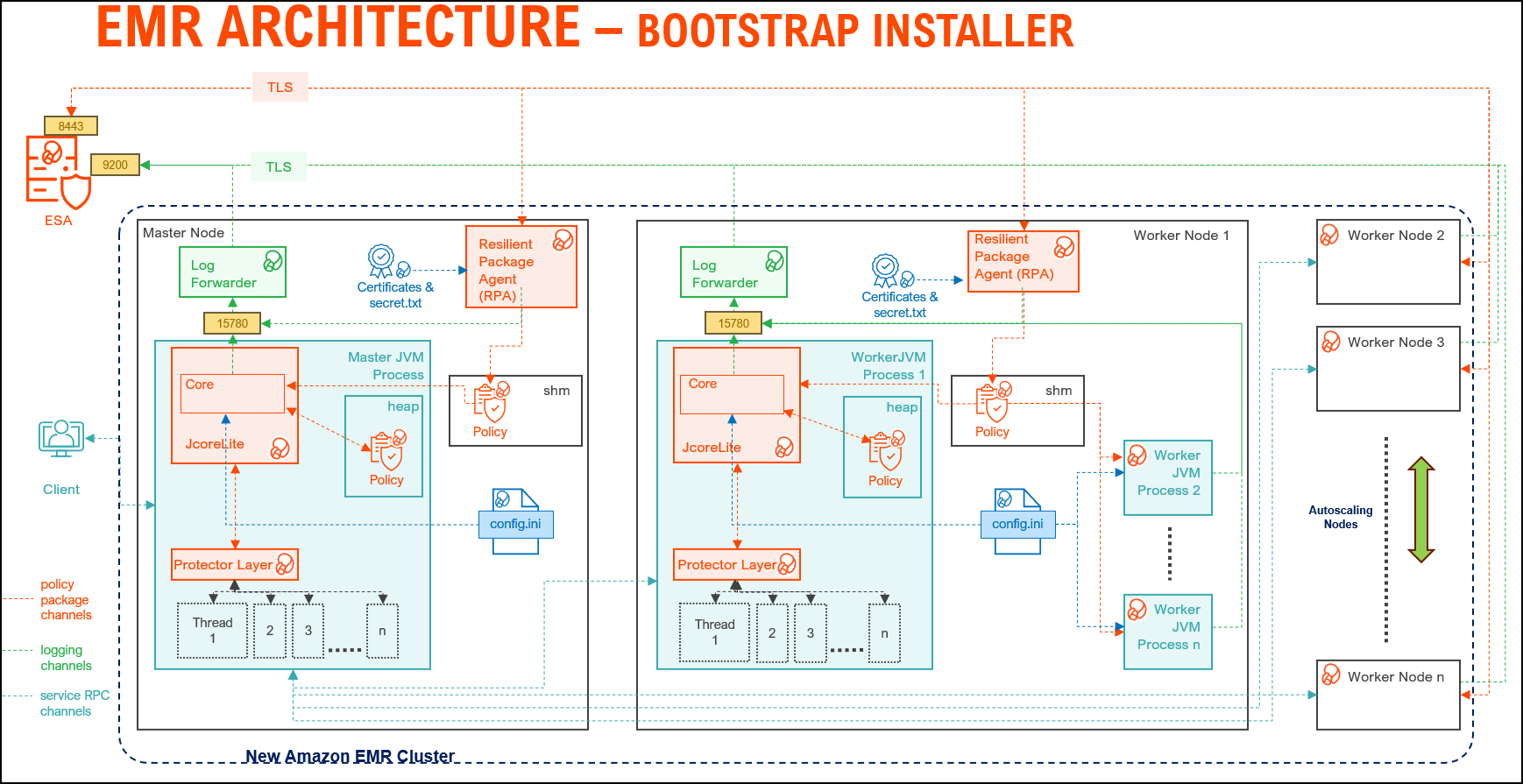
| Component | Description |
|---|---|
| RPAgent | A daemon running on each node that downloads the package from ESA/PPC over a TLS channel using the installed Certificates. |
| Log Forwarder | A daemon running on each node that routes the audit logs and application logs to ESA/Audit Store. |
| config.ini | A file on each node containing the set of configuration parameters to modify the protector behavior. |
| BDP Layer | Contains the Big Data Protector UDFs and APIs executing in CDP service processes. |
| JcoreLite | The JNI library that provides a Java API layer to the Core libraries. |
| Core | The set of various libraries that provide the Protegrity Core functionality. |
2 - Static installer architecture
The architecture for the EMR distribution of the Big Data Protector is depicted in the image below.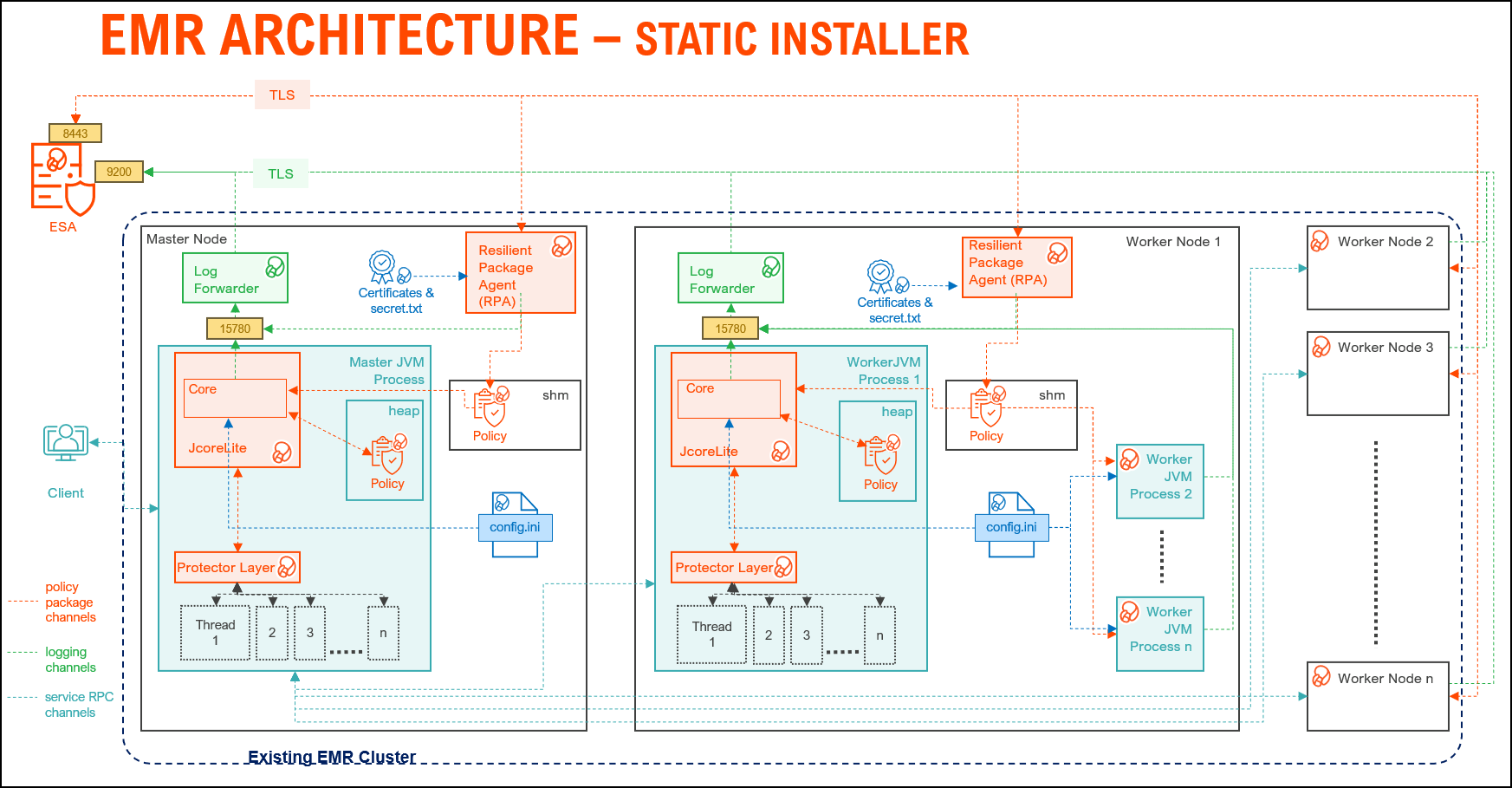
| Component | Description |
|---|---|
| RPAgent | A daemon running on each node that downloads the package from the ESA/PPC over a TLS channel using the installed Certificates. |
| Log Forwarder | A daemon running on each node that routes the audit logs and application logs to the ESA/Audit Store. |
| config.ini | A file on each node containing the set of configuration parameters to modify the protector behavior. |
| BDP Layer | Contains the Big Data Protector UDFs and APIs executing in CDP service processes. |
| JcoreLite | The JNI library that provides a Java API layer to the Core libraries. |
| Core | The set of various libraries that provide the Protegrity Core functionality. |
3 - EMR Serverless architecture
Amazon EMR Serverless is a modern, on-demand data processing architecture designed to eliminate the complexity of managing clusters for big data workloads. Unlike traditional EMR deployments, EMR Serverless dynamically provisions compute resources based on job requirements, enabling cost efficiency and scalability without manual intervention.
At its core, the architecture for EMR Serverless leverages containerized executors to run Spark or Hive applications in an isolated, secure environment. These containers are orchestrated by AWS, ensuring optimal resource utilization and fault tolerance. The design supports Protegrity data protection integration, making it suitable for enterprise-grade deployments where compliance and security are critical.
Key components include:
- Serverless Runtime: Supports Spark and Hive for analytics and ETL.
- Dynamic Scaling: Automatically adjusts resources to workload demands.
- Logging and Monitoring: Driver and executor logs are streamed to CloudWatch, with optional forwarding to external systems via Kinesis and Lambda for near real-time insights.
- Deployment Workflow: Applications are packaged as Docker images, stored in AWS ECR, and executed in EMR Serverless environments for consistent and reproducible runs.
The architecture for the EMR Serverless distribution of the Big Data Protector is depicted in the image below.
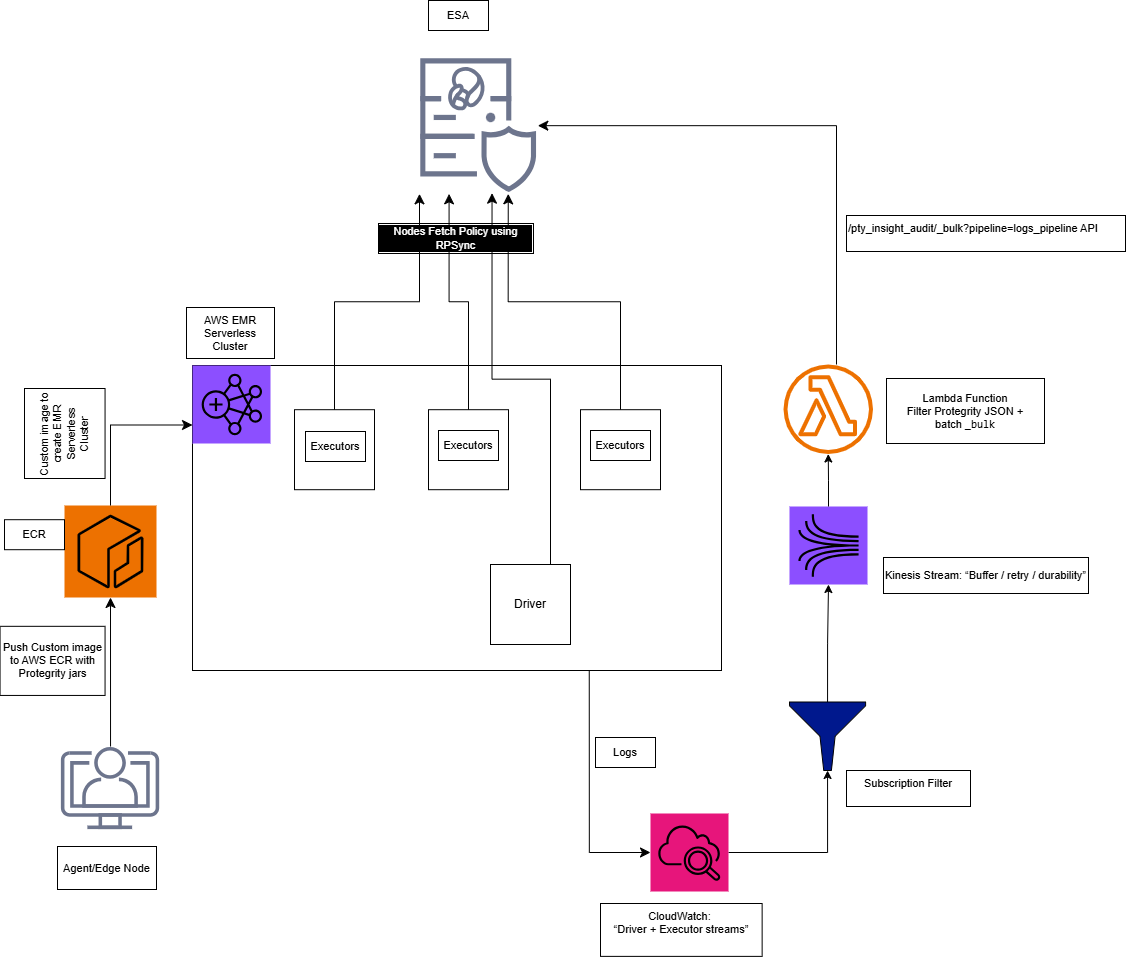
The overall process of installing the Big Data Protector in the EMR Serverless environment is outlined below.
Step 1: Executing the Configurator Script
- Interactive prompt collects all the configuration parameters.
- Input: ESA host/ports, AWS account/region, EMR Serverless application type, and ECR repository names.
- Output:
Installation_Files/directory withconfig.jsonand all the required files. - Files created:
config.json, copied JARs, scripts, and the certificate scripts.
Note: For more information, refer to Executing the Configurator Script.
Step 2: Deploying the BDP Image
python3 emr_serverless_setup_cli.py --config ../config.json deploy
Note: For more information, refer to EMR Serverless Setup CLI
Substep: Validating the Prerequisites
The script:
- Checks Docker, AWS CLI, credentials
- Verifies ECR repository exists
- Confirms all source files present
Substep: Preparing the Assets
The script:
- Reads
config.jsonandconfig.ini.template - Generates
config.iniwith:- [sync] section: ESA policy server connection (host:8443)
- [log] section: output=stdout
- Updates the
GetCertificates.shscript with ESA host/port
Note: After preparing the assets, if required, modify the
config.inifile as per requirements.
Substep: Generating the Dockerfile
The script:
- Generates the Dockerfile using the values from the
config.jsonfile.
Note: After generating the dockerfile, if needed, modify the dockerfile as per requirements.
Substep: Building the Docker Image
The script:
- Prompts for ESA credentials (username/password or JWT token)
- Downloads the certificates from ESA:8443
- Builds the Docker image
Step 3: Pushing the Image to ECR
The script:
- Logs in to ECR using AWS CLI
- Pushes image to ECR repository
The Big Data Protector build provides an automated script to execute the above-mentioned steps. For more information, refer EMR Serverless Setup CLI.
Understanding the Logging Architecture
- The driver/executor logs are written into the CloudWatch Log group.
- The CloudWatch Logs Subscription filter streams the matching log lines into Kinesis Data Streams.
- The Lambda function consumes the Kinesis batches, extracts only the Protegrity audit JSON lines, builds OpenSearch Bulk (_bulk) payload and invokes the ESA endpoint.
Note: For the CloudWatch subscription filter, provide a filter according to the type of logs that are generated.
Note: For more information, refer Setting up the Log Forwarder