This is the multi-page printable view of this section. Click here to print.

Return to the regular view of this page.

CDP-PVC-Base

Install the Big Data Protector using the CDP-PVC-Base Installer

Features of the Big Data Protector on CDP-PVC-Base

The Protegrity Big Data Protector (Big Data Protector) uses vaultless tokenization and central policy control for access management and secures sensitive data at rest in the following areas:

  • Data in HDFS and Ozone
  • Data used during processing with MapReduce, Hive, Pig, HBase, Impala, and Spark
  • Data traversing enterprise data systems

The data is protected from internal and external threats, and users and business processes can continue to utilize the secured data.

Data protection may be by encryption or tokenization. In tokenization, the data is converted to similar looking inert data known as tokens where the data format and type can be preserved. These tokens can be detokenized back to the original values whenever required.

Protegrity protects data inside the files using tokenization and strong encryption protection methods. Depending on the user access rights and the policies set using Policy management in ESA, this data is unprotected.

The Protegrity Hadoop Big Data Protector provides the following features:

  • Provides fine grained field-level protection within the MapReduce, Hive, Pig, HBase, and Spark frameworks.
  • Provides Protegrity Format Preserving Encryption (FPE) method for structured data. The following data types are supported:
    • Numeric (0-9)
    • Alpha (a-z, A-Z)
    • Alpha-Numeric (0-9, a-z, A-Z)
    • Credit Card (0-9)
    • Unicode Basic Latin and Latin-1 Supplement Alpha
    • Unicode Basic Latin and Latin-1 Supplement Alpha-Numeric
  • Retains distributed processing capability as field-level protection is applied to the data.
  • Protects data in the Hadoop cluster using role-based administration with a centralized security policy.
  • Simplified installation, administration, and managem ent of Big Data Protector using the following components:
    • Parcels: In Cloudera Manager, the Big Data Protector Parcel is a single consolidated file. This file contains all the required files for installing and using Big Data Protector on a cluster. It also contains the metadata used by Cloudera Manager.
    • Custom Service Descriptors (CSDs): In Cloudera Manager, a CSD contains all the configurations required to describe and manage the Big Data Protector services. The CSDs are provided as Jar files.
  • Easy monitoring of the Big Data Protector services, such as, BDP, using the Cloudera Manager UI instead of the CLI.
  • Provides logging and viewing data access activities and real-time alerts with a centralized monitoring system.
  • Ensures minimal overhead for processing secured data, with minimal consumption of resources, threads and processes, and network bandwidth.
  • Provides transparent data protection with Protegrity HBase protectors.

Currently, Protegrity supports MapReduce, Hive, Pig, HBase, Spark, and Impala, which utilizes HDFS or Ozone as the data storage layer. The following points can be referred to as general guidelines:

  • Beeline and Hue: Beeline and Hue are certified with the Hive protector.
  • Ranger: Ranger is certified to work with the Hive protector.
  • Sentry (CDH): Sentry is certified with the Hive and Impala protector only.

Overview of Hadoop Application Protection

The various levels of protection provided by Hadoop Application Protection are explained below.

Protection in MapReduce Jobs

A MapReduce job in the Hadoop cluster involves sensitive data. You can use Protegrity interfaces to protect data when it is saved or retrieved from a protected source. The output data written by the job can be encrypted or tokenized. The protected data can be subsequently used by other jobs in the cluster in a secured manner. Field level data can be secured and ingested into HDFS by independent Hadoop jobs or other ETL tools. For more information about secure ingestion of data in Hadoop, refer to section Ingesting Files Using Hive Staging. For more information on the list of available APIs, refer to section MapReduce APIs. If Hive queries are created to operate on sensitive data, then you can use Protegrity Hive UDFs for securing data. While inserting data to Hive tables, or retrieving data from protected Hive table columns, you can call Protegrity UDFs loaded into Hive during installation. The UDFs protect data based on the input parameters provided. Secure ingestion of data into HDFS to operate Hive queries can be achieved by independent Hadoop jobs or other ETL tools. For more information about securely ingesting data in Hadoop, refer Ingesting Data Securely.

Protection in Hive Queries

Protection in Hive queries is done by Protegrity Hive UDFs. These UDFs translate a HiveQL query into a MapReduce, Tez or Spark distributed job before sending it to the Hadoop cluster. For more information on the list of available UDFs, refer Hive UDFs.

Protection in Pig Jobs

Protection in Pig jobs is done by Protegrity Pig UDFs, which are similar in function to the Protegrity UDFs in Hive. For more information on the list of available UDFs, refer Pig UDFs.

Protection in HBase

HBase is a database which provides random read and write access to tables, consisting of rows and columns, in real-time. HBase is designed to run on commodity servers, to automatically scale as more servers are added, and is fault tolerant as data is divided across servers in the cluster. HBase tables are partitioned into multiple regions. Each region stores a range of rows in the table. Regions contain a datastore in memory and a persistent datastore(HFile). The Name node assigns multiple regions to a region server. The Name node manages the cluster and the region servers store portions of the HBase tables and perform the work on the data.

The Protegrity HBase protector extends the functionality of the data storage framework. It also provides a transparent data protection and unprotection using coprocessors. These coprocessors provide the functionality to run the code directly on region servers. The Protegrity coprocessor for HBase runs on the region servers and protects the data stored in the servers. All clients which work with HBase are supported. The data is transparently protected or unprotected, as required, utilizing the coprocessor framework.

Protection in Impala

Impala is an MPP SQL query engine for querying the data stored in a cluster. It provides the flexibility of the SQL format and is capable of running the queries on HDFS in HBase. The Protegrity Impala protector extends the functionality of the Impala query engine and provides UDFs which protect or unprotect the data as it is stored or retrieved. For more information about the Impala protector, refer Impala UDFs.

Protection in Spark

Spark is an execution engine that carries out batch processing of jobs in-memory and handles a wider range of computational workloads. In addition to processing a batch of stored data, Spark is capable of manipulating data in real time. You can also utilise Spark Streaming to process live data streams and store the processed data in Hadoop. The Protegrity Spark Java protector extends the functionality of the Spark engine and provides Java APIs that protect, unprotect, or reprotect the data as it is stored or retrieved. For more information about the Spark Java and SQL protectors, refer to section Spark. The Protegrity Spark Java protector extends the functionality of the Spark engine and provides Java APIs that protect, unprotect, or reprotect the data as it is stored or retrieved. The Protegrity Spark SQL protector provides native UDFs that can be utilized with Spark Scala to protect, unprotect, or reprotect the data as it is stored or retrieved. You can create and submit Spark jobs using the methods listed in the following table.

Create and submit Spark jobs usingReference Section
Spark Java APIsSpark Java
Spark SQL UDFsSpark SQL
PySpark Scala Wrapper UDFsPySpark Scala Wrapper UDFs

Ingesting Data Securely

The methods by which data can be secured and ingested by various jobs in Hadoop at a field or file level are explained below.

Ingesting Files Using Hive Staging

Semi-structured data files can be loaded into a Hive staging table for ingestion into a Hive table with Hive queries and Protegrity UDFs. After loading data in the table, the data will be stored in protected form.

Data Security Policy and Protection Methods

A data security policy establishes processes to ensure the security and confidentiality of sensitive information. In addition, the data security policy establishes administrative and technical safeguards against unauthorized access or use of the sensitive information. Depending on the requirements, the data security policy typically performs the following functions:

  • Classifies the data that is sensitive for the organization.
  • Defines the methods to protect sensitive data, such as encryption and tokenization.
  • Defines the methods to present the sensitive data, such as masking the display of sensitive information.
  • Defines the access privileges of the users that would be able to access the data.
  • Defines the time frame for privileged users to access the sensitive data.
  • Enforces the security policies at the location where sensitive data is stored.
  • Provides a means of auditing authorized and unauthorized accesses to the sensitive data. In addition, it can also provide a means of auditing operations to protect and unprotect the sensitive data. The data security policy contains a number of components, such as, data elements, datastores, member sources, masks, and roles. The following list describes the functions of each of these entities:
  • Data elements define the data protection properties for protecting sensitive data, consisting of the data securing method, data element type and its description. In addition, Data elements describe the tokenization or encryption properties, which can be associated with roles.
  • Datastores consist of enterprise systems, which might contain the data that needs to be processed, where the policy is deployed and the data protection function is utilized.
  • Member sources are the external sources from which users (or members) and groups of users are accessed. Examples are a file, database, LDAP, and Active Directory.
  • Masks are a pattern of symbols and characters, that when imposed on a data field, obscures its actual value to the user. Masks effectively aid in hiding sensitive data.
  • Roles define the levels of member access that are appropriate for various types of information. Combined with a data element, roles determine and define the unique data access privileges for each member.

For more information about creating a policy, refer Creating a Structured Policy.
1 - Understanding the architecture

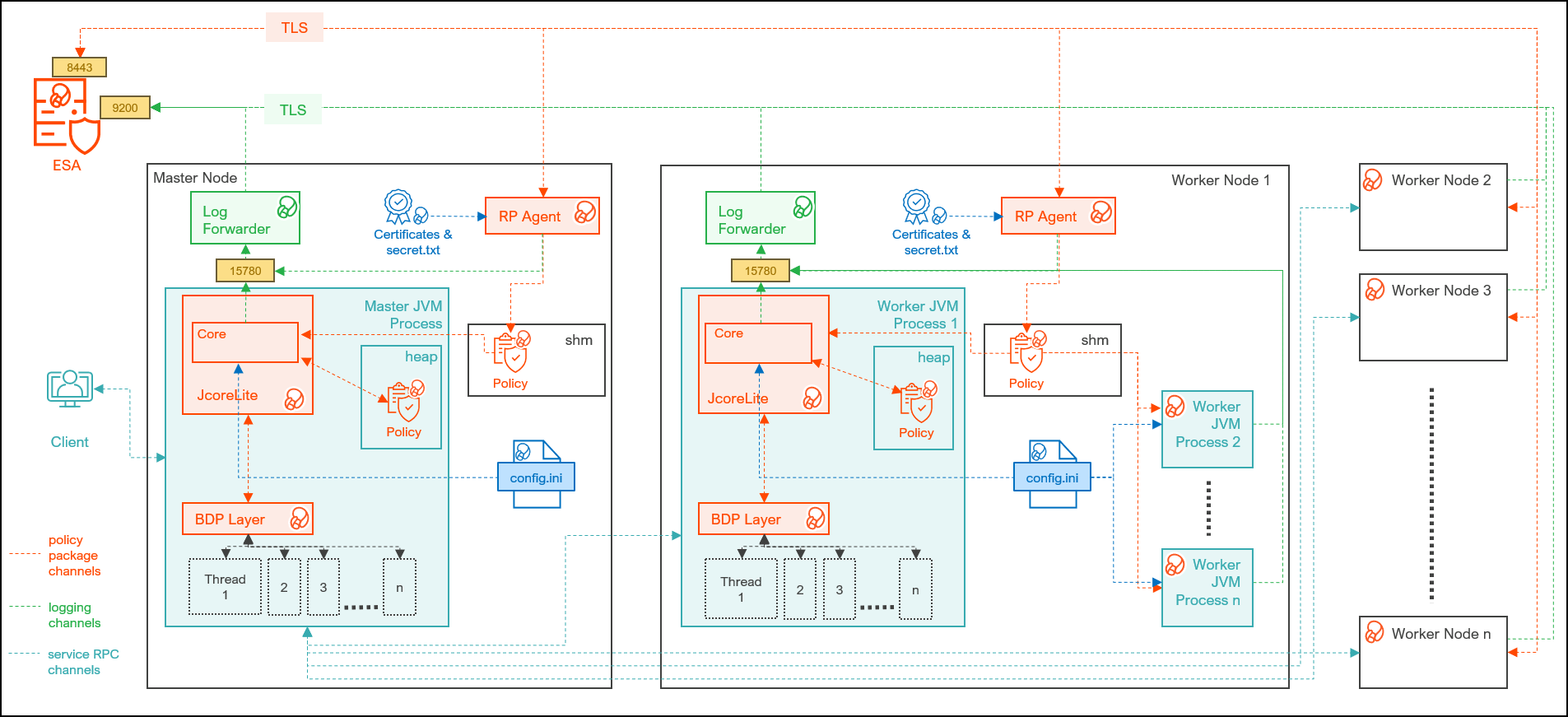
The architecture for the CDP-PVC-Base distribution of the Big Data Protector is depicted in the image below.

ComponentDescription
RPAgentA daemon running on each node that downloads the package from the ESA over a TLS channel using the installed Certificates.
Log ForwarderA daemon running on each node that routes the audit logs and application logs to the ESA/Audit Store.
config.iniA file on each node containing the set of configuration parameters to modify the protector behavior.
BDP LayerContains the Big Data Protector UDFs and APIs executing in CDP service processes.
JcoreLiteThe JNI library that provides a Java API layer to the Core libraries.
CoreThe set of various libraries that provide the Protegrity Core functionality.

2 - System Requirements

Ensure that the following prerequisites are met, before installing the Big Data Protector from the Cloudera Manager:

  • The Hadoop cluster is installed, configured, and running CDP-PVC-Base (Cloudera Runtime 7.1 and above and ClouderaManager (any compatible version) ).
  • The ESA appliance, version v10.1.x, is installed, configured, and running.
  • The ports that are configured on the ESA and the nodes in the cluster, which will run the Big Data Protector, are listed in the following table:
Destination PortProtocolSourceDestinationDescription
8443TLSRPAgent on the Big Data Protector cluster nodeESAThe RPAgent communicates with the ESA through port
8443 to download a policy.
9200TLSLog Forwarder on the Big Data Protector Cluster nodeProtegrity Audit
Store appliance
The Log Forwarder sends all the logs to
the Protegrity Audit Appliance through port 9200.
15780TCPProtector on the Big Data Protector
cluster node
Log Forwarder
on the Big Data
Protector cluster
node.
The Big Data Protector writes Audit Logs to
localhost through port 15780. The Application
Logs are also written to localhost through
port 15780. The Log Forwarder reads the logs from that
socket.
  • The user, installing the Big Data Protector, has the requisite permissions to perform the following tasks:
    • Copy the Big Data Protector parcels and CSDs to the Cloudera Manager repository directories
    • Restart the Cloudera SCM Server
  • If you are installing the Big Data Protector on a cluster, then ensure that it is installed on all the nodes in the cluster.
  • The group ptyitusr and the user ptyitusr, responsible to manage the Big Data Protector-related services are managed by Cloudera Manager. The user and group are unavailable on the cluster nodes.

Note: This build supports both Spark 2 and Spark 3 on the cluster using a single pepspark jar.
For more information about installing Spark3 on CDP PVC Base cluster, refer https://docs.cloudera.com/cdp-private-cloud-base/latest/cds-3/topics/spark-install-spark-3-parcel.html#pnavId1

3 - Preparing the Environment

3.1 - Extracting the installation package

Extract the Big Data Protector package to access the Big Data Protector Configurator script. This script will generate the Big Data Protector parcels and CSDs to install the Big Data Protector on all the nodes in the cluster. The nodes in the cluster are managed by Cloudera Manager.

To extract the files from the installation package:

  1. Log in to the CLI on the Master node that has connectivity to the ESA.

  2. Copy the Big Data Protector package BigDataProtector_Linux-ALL-64_x86-64_CDP-PVC-Base-7.1-64_<BDP_version>.tgz to any directory.

    For example, /opt/bigdata/.

  3. To create a temporary directory under the specified directory, to extract the files, run the following command:

    mkdir /opt/bigdata/extracted/
    
  4. To navigate to the directory where you have downloaded the installation package, run the following command:

    cd /opt/bigdata/
    
  5. To extract the contents of the Big Data Protector installation package to a specific directory, run the following command:

    tar –xvf BigDataProtector_Linux-ALL-64_x86-64_CDP-PVC-Base-7.1-64_<BDP_version>.tgz -C extracted/
    
  6. To navigate to the directory where you have extracted the files, run the following command:

    cd /opt/bigdata/extracted/
    
  7. Press ENTER.

    The command extracts the BigDataProtector_Linux-ALL-64_x86-64_CDP-PVC-Base-7.1-64_<BDP_version>.tgz package and the GPG signature files from the installation package.

    BigDataProtector_Linux-ALL-64_x86-64_CDP-PVC-Base-7.1-64_<BDP_version>.tgz
    signatures/
    

    Note: Verify the authenticity of the build using the signatures folder. For more information, refer Verification of Signed Protector Build.

  8. To extract the configurator script, run the following command:

    tar –xvf BigDataProtector_Linux-ALL-64_x86-64_CDP-PVC-Base-7.1-64_<BDP_version>.tgz
    
  9. Press ENTER.

    The command extracts the configurator script.

    BDPConfigurator_CDP-PVC-Base-7.1_<BDP_version>.sh
    

3.2 - Running the configurator script

Execute the Big Data Protector configurator script to:

  1. Download certificates from the ESA.
  2. Create the parcels and CSDs to install the Big Data Protector.

To run the configurator script and generate the Big Data Protector Parcels and CSDs:

  1. Log in to the CLI on the Master node that has connectivity to ESA.

  2. To execute the configurator script, run the following command:

    ./BDPConfigurator_CDP-PVC-Base-7.1_<BDP_version>.sh
    
  3. Press ENTER.

    The prompt to continue the configuration of Big Data Protector appears.

    
    *****************************************************************************
            Welcome to the Big Data Protector Configurator Wizard
    *****************************************************************************
    This will setup the Big Data Protector Installation Files for CDP PVC Base
    
    Do you want to continue? [yes or no]:
    
  4. To start the configuration of Big Data Protector, type yes.

  5. Press ENTER.

    The prompt to select the type of installation files appears.

    
    Big Data Protector Configurator started...
    Unpacking...
    Extracting files...
    
    Select the type of Installation files you want to generate.
    [ 1: Create All ]      : Creates entire Big Data Protector CSDs and Parcels.
    [ 2: Update PTY_CERT ] : Creates new PTY_CERT parcel with an incremented patch version.
                         Use this if you have updated the ESA certificates.
    [ 3: Update PTY_LOGFORWARDER_CONF ]
                       : Creates new PTY_LOGFORWARDER_CONF parcel with an incremented patch version.
                         Use this if you want to set Custom LogForwarder configuration files to
                         forward logs to an External Audit Store.
    
    [ 1, 2 or 3 ]:
    

    Note: From v10.0.0, the PTY_FLUENTBIT_CONF parcel is renamed to PTY_LOGFORWARDER_CONF.

  6. To create the Big Data Protector parcels and CSDs, type 1.

  7. To update the PTY_CERT parcels with an incremented patch version, type 2.

    For more information about updating the PTY_CERT parcel, refer to section Updating the Certificates Parcel.

  8. To update the PTY_LOGFORWARDER_CONF parcel with an incremented patch version, type 3.

    For more information about updating the PTY_LOGFORWARDER_CONF parcel, refer to section Updating the Log Forwarder Parcel.

  9. Press ENTER.

    The prompt to select the operating system for the Cloudera Manager parcel appears.

    
    Select the OS version for Cloudera Manager Parcel.
    This will be used as the OS Distro suffix in the Parcel name.
    
    [ 1: el7 ]    :  RHEL 7 and clones (CentOS, Scientific Linux, etc)
    [ 2: el8 ]    :  RHEL 8 and clones (CentOS, Scientific Linux, etc)
    [ 3: el9 ]    :  RHEL 9 and clones (CentOS, Scientific Linux, etc)
    [ 4: sles12 ] :  SuSE Linux Enterprise Server 12.x
    
    Enter the no.:
    
  10. Depending on the requirements, type 1, 2, 3, or 4 to select the operating system version for the Big Data Protector parcels.

  11. Press ENTER.

    The prompt to enter the ESA hostname or IP address appears.

     Enter the ESA Hostname or IP Address:
    
  12. Enter the ESA hostname or IP address.

  13. Press ENTER.

    The prompt to enter the ESA host listening port appears.

    Enter ESA host listening port [8443]:
    
  14. If you want to use the default value of the ESA host listening port, which is 8443, then press ENTER.

  15. Press ENTER.

    The prompt to enter the ESA JSON Web Token appears.

    If you have an existing ESA JSON Web Token (JWT) with Export Certificates role, enter it otherwise enter 'no':
    

    Note: The script silently reads the user input. Therefore, the user will be unable to see the entered JWT or no.

  16. Enter the JWT token.

    a. If you do not have an existing ESA JSON Web Token (JWT), type no.

    b. Press ENTER.
    The prompt to enter the user name with Export Certificates permission appears.

    JWT was not provided. Script will now prompt for ESA username and password.
    Enter ESA Username with Export Certificates role: admin
    

    c. Enter the username that has permissions to export the certificates.

    d. Press ENTER.

    The prompt to enter the password appears.
    

    e. Enter the password.

    f. Press ENTER.
    The script retrieves the JWT from the ESA, validates it, and the prompt to package custom log forwarder configuration appears.

    Fetching JWT from ESA....
    
    Fetching Certificates from ESA....
    
      % Total    % Received % Xferd  Average Speed   Time    Time     Time  Current
                                     Dload  Upload   Total   Spent    Left  Speed
    100 11264  100 11264    0     0   164k      0 --:--:-- --:--:-- --:--:--  166k
    
     -------------------------------------------------------------------------------
    
     Do you want to package any custom LogForwarder configuration files for External Audit Store?
     [ yes ] : Create a PTY_LOGFORWARDER_CONF parcel containing configuration files to be used with External Audit Store.
     [ no ]  : Skip this step.
    
     [ yes or no ]:
    
  17. To package the Log Forwarder configuration file(s) for an external Audit Store, type yes.

  18. Press ENTER.

    The prompt to enter the local directory path containing the Log Forwarder configuration files appears.

    Do you want to package any custom LogForwarder configuration files for External Audit Store?
    [ yes ] : Create a PTY_LOGFORWARDER_CONF parcel containing configuration files to be used with External Audit Store.
    [ no ]  : Skip this step.
    
    [ yes or no ]: yes
    
    Creation of PTY_LOGFORWARDER_CONF parcel is enabled.
    
    Enter the local directory path on this machine that stores the LogForwarder configuration files for External Audit Store:
    

    The PTY_LOGFORWARDER_CONF parcel is used to package any custom Log Forwarder configuration files that the user provides and can be distributed across the CDP nodes through the Cloudera Manager. Ensure that you name the custom Log Forwarder configuration files for the external Audit Store with the .conf extension.

  19. Enter the local directory path that contains the Log Forwarder configuration files.

  20. Press ENTER.

    Enter the local directory path on this machine that stores the LogForwarder configuration files for External Audit Store: /root/log_forwarder/
    
    Generating Installation files...
    
    Big Data Protector parcels & CSDs are generated in ./Installation_Files/ directory.
    NOTE:
    Copy Big Data Protector CSDs (jars) to Cloudera Manager local csd repository.
    Copy Big Data Protector parcels (*.parcel and *.sha files) to Cloudera Manager local parcel repository.
    
    You can use the './Installation_Files/set_unset_bdp_config.sh' helper script for setting/unsetting BDP configs in Cloudera Manager.
    Check the updated configurations on Cloudera Manager and Restart the required services.
    

    The configurator script generates the following Big Data Protector parcels and CSDs in the ./Installation_Files/ directory:

    • BDP_PEP-<BDP_version>.jar
    • PTY_BDP-<BDP_version>_CDP7.1.p0-<operating_system_version>.parcel
    • PTY_BDP-<BDP_version>_CDP7.1.p0-<operating_system_version>.parcel.sha
    • PTY_CERT-<BDP_version>_CDP7.1.p0-<operating_system_version>.parcel
    • PTY_CERT-<BDP_version>_CDP7.1.p0-<operating_system_version>.parcel.sha
    • PTY_LOGFORWARDER_CONF-<BDP_version>_CDP7.1.p0-<operating_system_version>.parcel
    • PTY_LOGFORWARDER_CONF-<BDP_version>_CDP7.1.p0-<operating_system_version>.parcel.sha
    • set_unset_bdp_config.sh

    If you type no at the prompt to create the PTY_LOGFORWARDER_CONF parcel, then the installer will skip the creation of the Log Forwarder parcel and proceed to generate the installation files.

    Do you want to package any custom LogForwarder configuration files for External Audit Store?
    
    [ yes ] : Create a PTY_LOGFORWARDER_CON parcel containing configuration files to be used with External Audit Store.
    [ no ]  : Skip this step. 
    
    [ yes or no ] : no 
    
    Creation of PTY_LOGFORWARDER_CONF parcel is skipped. 
    
    Generating Installation files...
    
    Big Data Protector parcels & CSDs are generated in ./Installation_Files/ directory.
    NOTE:
    Copy Big Data Protector CSDs (jars) to Cloudera Manager local csd repository.
    Copy Big Data Protector parcels (*.parcel and *.sha files) to Cloudera Manager local parcel repository.
    
    You can use the './Installation_Files/set_unset_bdp_config.sh' helper script for setting/unsetting BDP configs in Cloudera Manager.
    Check the updated configurations on Cloudera Manager and Restart the required services.
    

3.3 - Setting up the parcels

After the Big Data Protector parcels and CSDs are copied to the local Cloudera repository directories, restart the Cloudera SCM server. The restart ensures Cloudera Manager identifies the new CSD and parcel files. The restart also enables Cloudera Manager to display the Big Data Protector services in the Add Services section in Cloudera Manager.

To set up the Big Data Protector Parcels and CSDs:

  1. Log in to the Master node.

    Caution: Ensure to delete the older versions of the Big Data Protector parcels and .jar files before installing the new parcels and .jar files to the local repository of the Cloudera Manager.

  2. Copy the following Big Data Protector parcels with the .parcel extension and their corresponding checksum files with the .sha extension to the local parcel repository of Cloudera Manager:

    • PTY_BDP-<BDP_version>_CDP7.1.p0-<operating_system_version>.parcel
    • PTY_BDP-<BDP_version>_CDP7.1.p0-<operating_system_version>.parcel.sha
    • PTY_CERT-<BDP_version>_CDP7.1.p0-<operating_system_version>.parcel
    • PTY_CERT-<BDP_version>_CDP7.1.p0-<operating_system_version>.parcel.sha
    • PTY_LOGFORWARDER_CONF-<BDP_version>_CDP7.1.p0-<operating_system_version>.parcel
    • PTY_LOGFORWARDER_CONF-<BDP_version>_CDP7.1.p0-<operating_system_version>.parcel.sha

    Note: The local parcels for the Cloudera Manager are stored in the /opt/cloudera/parcel-repo/ directory.

  3. Copy the following .jar files file to the local CSD repository:

    • BDP_PEP-<BDP_version>.jar

    Note: The local CSD or .jar files for Cloudera Manager are stored in the /opt/cloudera/csd/ directory.

  4. Navigate to the local parcel repository directory.

    Note: The local parcel files are available in the /opt/cloudera/parcel-repo/ directory.

  5. To assign the ownership permissions for the Cloudera SCM user to the Protegrity Big Data Protector parcels and checksum files, run the following command:

    chown cloudera-scm:cloudera-scm PTY_*
    
  6. Press ENTER.

  7. To assign 640 permissions to the parcel files, run the following command.

    chmod 640 PTY_*
    
  8. Press ENTER.

    The command assigns read and write permissions to the owner, read permissions to the group, and restricts access to all other users.

  9. Navigate to the local CSD repository directory.

    Note: The local CSD or .jar files are available in the /opt/cloudera/csd directory.

  10. To assign the ownership permissions for the Cloudera SCM user to the Big Data Protector CSD or .jar files, run the following command:

    chown cloudera-scm:cloudera-scm *
    
  11. Press ENTER.

  12. To assign 640 permissions to the CSD or .jar files, run the following command.

    chmod 640 *
    
  13. Press ENTER.

    The command assigns read and write permissions to the owner, read permissions to the group, and restricts access for all other users.

  14. To restart the Cloudera SCM server and load the Big Data Protector CSDs in the Cloudera Manager, run the following command:

    service cloudera-scm-server restart
    
  15. Press ENTER.

    The Cloudera Manager detects the new parcels in the local parcel repository.

    Note: Restart the Cloudera SCM server to ensure that the Big Data Protector services are listed on the Add Services page in Cloudera Manager.

3.4 - Distributing the parcels

Distribute the following Big Data Protector parcels to the nodes in the cluster before installing or activating them on the nodes:

  • Big Data Protector parcel: PTY_BDP
  • Certificates parcel: PTY_CERT
  • Log Forwarder configuration parcel: PTY_LOGFORWARDER_CONF

Note: To distribute the Big Data Protector parcels to the nodes, Cluster Administrator privileges are required.

For more information about the required role, refer to https://docs.cloudera.com/cloudera-manager/7.1.1/managing-clusters/topics/cm-parcels.html.

To distribute the Big Data Protector Parcels to the Nodes in the Cluster:

  1. Using a browser, navigate to the Cloudera Manager page.

  2. Enter the Username.

  3. Enter the Password.

  4. Click Sign In.

    The Cloudera Manager Home page appears.

  5. Navigate to Administration > Settings.

    The Settings page appears.

  6. To view the settings related to parcels, from the Filters pane, under CATEGORY, click Parcels.

    The options related to the parcels appear.

  7. Ensure to select the following options:

    • Create Users and Groups for Parcels
    • Apply Permissions with respect to files installed by the parcels
  8. From the left pane, click Parcels.

    The Cloudera Manager Parcels page appears.

    Note: The PTY_LOGFORWARDER_CONF parcel will be visible only when the location of the Log Forwarder configuration files is specified while generating the installation files.

  9. Ensure that the following Protegrity parcels appear on the Parcels page:

    • PTY_BDP: Big Data Protector parcel
    • PTY_CERT: Certificates parcel
    • PTY_LOGFORWARDER_CONF: Log Forwarder configuration parcel
  10. To distribute the Big Data Protector parcel, besides the PTY_BDP parcel, click Distribute.

    The distribution of the Big Data Protector parcel starts.

  11. To distribute the Certificates parcel, besides the PTY_CERT parcel, click Distribute.

    The distribution of the Certificates parcel starts.

  12. To distribute the Log Forwarder configuration parcel, besides the PTY_LOGFORWARDER_CONF parcel, click Distribute.

    The distribution of the Log Forwarder configuration parcel starts.

    After the Protegrity parcels are distributed to the nodes, Cloudera Manager updates the status of the parcels. The status on the Parcels page is updated to Distributed, and the Activate button appears.

3.5 - Activating the parcels

After distributing the Big Data Protector parcels on the cluster nodes, activate the parcels to add and start the Big Data Protector-related services on the nodes in the cluster.

To activate the Big Data Protector Parcels on the Nodes:

  1. Using a browser, navigate to the Cloudera Manager screen.

  2. Enter the Username.

  3. Enter the Password.

  4. Click Sign In.

    The Cloudera Manager Home page appears.

  5. From the left pane, click Parcels.

    The Cloudera Manager Parcels page appears.

    Note: The PTY_LOGFORWARDER_CONF parcel will be visible only if the location of the Log Forwarder configuration files is specified while generating the installation files.

  6. To activate the Big Data Protector parcel, besides the PTY_BDP parcel, click Activate.

    A prompt to confirm the activation of the parcel appears.

  7. To activate the Big Data Protector parcel, click OK.

    Cloudera Manager activates the Big Data Protector parcel on all the nodes in the cluster.

  8. To activate the Certificates parcel, besides the PTY_CERT parcel, click Activate.

    A prompt to confirm the activation of the parcel appears.

  9. To activate the Certificates parcel, click OK.

    Cloudera Manager activates the Certificates parcel on all the nodes in the cluster.

  10. To activate the Log Forwarder configuration parcel, besides the PTY_LOGFORWARDER_CONF parcel, click Activate.

    A prompt to confirm the activation of the parcel appears.

  11. To activate the PTY_LOGFORWARDER_CONF parcel, click OK.

    After the Protegrity parcels are activated on the nodes, their status on the Parcels page is updated to Distributed, Activated. The Deactivate button appears.

  12. Restart the Cloudera Management Service to re-deploy the service configuration for the stale configurations.

Note: After activating the PTY_BDP parcel, the CDP services will change to Stale configuration state and will require a restart. However, it is recommended to defer the restart of the services until you set all the required configurations for the Big Data Protector.
For more information about setting the configuration, refer Setting the Big Data Protector Configuration

4 - Installing the Big Data Protector

To use the Big Data Protector, start the Big Data Protector PEP service on all the nodes in the cluster.

Before starting the Big Data Protector PEP service, ensure the following Big Data Protector-related parcels are in the Activated state:

  • Big Data Protector parcel: PTY_BDP
  • Certificates parcel: PTY_CERT
  • Log Forwarder configuration parcel: PTY_LOGFORWARDER_CONF

To start the Big Data Protector PEP Service on the Nodes:

  1. Log in to the Cloudera Manager web interface.

  2. Besides the cluster name, click the kebab menu icon.

    The cluster drop-down list appears.

  3. Select Add Service.

    The cluster services wizard page appears.

  4. From the Service Type list, select BDP Service.

    When you select the service, Cloudera enables the Continue button.

  5. Click Continue.

    The Assign Roles page appears.

  6. For each of the roles, click the highlighted text box.

    The list of nodes in the cluster appear.

  7. Select the required nodes in the list where you want to install the service.

    Note: For more information about installing the BDP Service service, refer https://my.protegrity.com/knowledge/ka0Ul0000000KYDIA2/.

    Cloudera enables the OK button.

    Note: The PTY RPAgent, PTY Log Forwarder, and the Gateway roles are installed on the selected node.

  8. Click OK.

    The Assign Roles page appears with the nodes in the cluster, which are selected for installing the service.

  9. Click Continue.

    The Review Changes page appears.

  10. Depending on the Audit Store type, select any one of the following options:

    OptionDescription
    Protegrity Audit StoreTo use the default setting select the Protegrity Audit Store option. If you select Protegrity Audit Store, then the default Log Forwarder configuration files are used and Log Forwarder will forward the logs to the Protegrity Audit Store.
    External Audit StoreEnter the comma-separated IP/ports using the accurate syntax in the External Audit Store box. If you select External Audit Store, then enter NA in the Protegrity Audit Store List of Hostnames/IP Address and/or Ports box. Ensure that the PTY_LOGFORWARDER_CONF parcel is distributed and activated. If you select External Audit Store, then the default Log Forwarder configuration files used for Protegrity Audit Store (out.conf and upstream.cfg in the /opt/cloudera/parcels/PTY_BDP/logforwarder/data/config.d/ directory) are renamed (out.conf.bkp and upstream.cfg.bkp) so that they will not be used by the Log Forwarder. Additionally, the custom Log Forwarder configuration files for the external Audit Store are copied to the /opt/cloudera/parcels/PTY_BDP/logforwarder/data/config.d/ directory.
    Protegrity Audit Store + External Audit StoreTo use a combination of the default setting with an external Audit Store, select Protegrity Audit Store + External Audit Store. If you select Protegrity Audit Store + External Audit Store, then the default Log Forwarder configuration files used for the Protegrity Audit Store (out.conf and upstream.cfg in the /opt/cloudera/parcels/PTY_BDP/logforwarder/data/config.d/ directory) are not renamed. However, the custom Log Forwarder configuration files for the external audit store are copied to the /opt/cloudera/parcels/PTY_BDP/logforwarder/data/config.d/ directory.
  11. In the Protegrity Audit Store List of Hostnames/IP Address and/or Ports box, enter the IP address of the Protegrity Audit Store appliance(s) (can be ESA) in the suggested syntax.

  12. In the RPA Sync Hostname/IP Address box, enter the IP address of the ESA, in the suggested syntax.

    Cloudera Manager enables the Continue button.

  13. Click Continue.

    The Summary page appears.

  14. Click Finish.

    The Cloudera Manager Home page appears and the PTY_BDP service is added on all the nodes in the cluster.

    Note: In the Cloudera Manager native installer, there is a caveat in the BDP Service service. This causes the PTY Log Forwarder and the RPAgent roles to start at the same time on a cluster node. Therefore, some of the initial RPAgent application logs will not be sent to the Log Forwarder. This will result in the logs not being forwarded to the Audit Store. After the Log Forwarder starts up, it will start forwarding the application logs.

    By default, the BDP Service service is in the stopped state.

  15. To start the BDP Service service, besides BDP Service, click the kebab menu icon.

    The BDP Service Actions sub-menu appears.

  16. From the sub-menu, select Start.

    The prompt to confirm the action appears.

  17. Click Start.

    Cloudera Manager starts the BDP Service service on all the nodes in the cluster.

  18. Click Close.

    The Cloudera Manager Home page appears.

  19. Click BDP Service. The BDP Service page appears.

  20. To generate the config.ini file on the nodes where you have installed the Gateway Role, select Actions » Deploy Client Configuration.

    The prompt to confirm the action appears.

  21. Click Deploy Client Configuration.

    Cloudera Manager generates the config.ini file to all the nodes where the Gateway role is installed.

5 - Configuring the Big Data Protector

5.1 - Registering the UDFs using Helper scripts

The Big Data Protector build provides helper scripts to register and drop the user-defined functions for the following components:

  • Hive
  • Spark
  • Impala

5.1.1 - Registering and dropping the Hive UDFs

You can register the Hive protector UDFs in two ways:

  • Permanent user-defined functions
  • Temporary user-defined functions

Registering the Permanent Hive user-defined functions

  1. Log in to the master node with a user account having permissions to create and drop UDFs.

  2. To navigate to the directory that contains the helper script, run the following command:

    cd /opt/cloudera/parcels/PTY_BDP/pephive/scripts
    
  3. To create the UDFs using the helper script, run the following command:

    0: jdbc:hive2://master.localdomain.com:2181,n> source create_perm_hive_udfs.hql;
    

    Execute the command in beeline after establishing a connection.

  4. Press ENTER.

    The script creates all the permanent user-defined functions for Hive.

    INFO  : Compiling command(queryId=hive_20240903111742_5f440820-56b8-4937-a368-93242e02f75e): CREATE FUNCTION ptyGetVersion AS 'com.protegrity.hive.udf.ptyGetVersion'
    WARN  : permanent functions created without USING  clause will not be replicated.
    INFO  : Semantic Analysis Completed (retrial = false)
    INFO  : Created Hive schema: Schema(fieldSchemas:null, properties:null)
    INFO  : Completed compiling command(queryId=hive_20240903111742_5f440820-56b8-4937-a368-93242e02f75e); Time taken: 0.044 seconds
    INFO  : Executing command(queryId=hive_20240903111742_5f440820-56b8-4937-a368-93242e02f75e): CREATE FUNCTION ptyGetVersion AS 'com.protegrity.hive.udf.ptyGetVersion'
    INFO  : Starting task [Stage-0:DDL] in serial mode
    INFO  : Completed executing command(queryId=hive_20240903111742_5f440820-56b8-4937-a368-93242e02f75e); Time taken: 0.044 seconds
    INFO  : OK
    No rows affected (0.109 seconds)
    INFO  : Compiling command(queryId=hive_20240903111742_f164d63c-af8d-4b76-bae1-d0d4607b79df): CREATE FUNCTION ptyGetVersionExtended AS 'com.protegrity.hive.udf.ptyGetVersionExtended'
    WARN  : permanent functions created without USING  clause will not be replicated.
    INFO  : Semantic Analysis Completed (retrial = false)
    INFO  : Created Hive schema: Schema(fieldSchemas:null, properties:null)
    INFO  : Completed compiling command(queryId=hive_20240903111742_f164d63c-af8d-4b76-bae1-d0d4607b79df); Time taken: 0.021 seconds
    INFO  : Executing command(queryId=hive_20240903111742_f164d63c-af8d-4b76-bae1-d0d4607b79df): CREATE FUNCTION ptyGetVersionExtended AS 'com.protegrity.hive.udf.ptyGetVersionExtended'
    INFO  : Starting task [Stage-0:DDL] in serial mode
    INFO  : Completed executing command(queryId=hive_20240903111742_f164d63c-af8d-4b76-bae1-d0d4607b79df); Time taken: 0.009 seconds
    INFO  : OK
    No rows affected (0.048 seconds)
    INFO  : Compiling command(queryId=hive_20240903111742_1c22cc0c-fa1d-4e6c-abd2-00e5859cfea5): CREATE FUNCTION ptyWhoAmI AS 'com.protegrity.hive.udf.ptyWhoAmI'
    WARN  : permanent functions created without USING  clause will not be replicated.
    INFO  : Semantic Analysis Completed (retrial = false)
    INFO  : Created Hive schema: Schema(fieldSchemas:null, properties:null)
    INFO  : Completed compiling command(queryId=hive_20240903111742_1c22cc0c-fa1d-4e6c-abd2-00e5859cfea5); Time taken: 0.012 seconds
    INFO  : Executing command(queryId=hive_20240903111742_1c22cc0c-fa1d-4e6c-abd2-00e5859cfea5): CREATE FUNCTION ptyWhoAmI AS 'com.protegrity.hive.udf.ptyWhoAmI'
    INFO  : Starting task [Stage-0:DDL] in serial mode
    INFO  : Completed executing command(queryId=hive_20240903111742_1c22cc0c-fa1d-4e6c-abd2-00e5859cfea5); Time taken: 0.015 seconds
    INFO  : OK
    No rows affected (0.042 seconds)
    INFO  : Compiling command(queryId=hive_20240903111742_084d1053-3fdc-41f0-8372-542439becfea): CREATE FUNCTION ptyProtectStr AS 'com.protegrity.hive.udf.ptyProtectStr'
    WARN  : permanent functions created without USING  clause will not be replicated.
    INFO  : Semantic Analysis Completed (retrial = false)
    INFO  : Created Hive schema: Schema(fieldSchemas:null, properties:null)
    INFO  : Completed compiling command(queryId=hive_20240903111742_084d1053-3fdc-41f0-8372-542439becfea); Time taken: 0.012 seconds
    INFO  : Executing command(queryId=hive_20240903111742_084d1053-3fdc-41f0-8372-542439becfea): CREATE FUNCTION ptyProtectStr AS 'com.protegrity.hive.udf.ptyProtectStr'
    INFO  : Starting task [Stage-0:DDL] in serial mode
    INFO  : Completed executing command(queryId=hive_20240903111742_084d1053-3fdc-41f0-8372-542439becfea); Time taken: 0.013 seconds
    INFO  : OK
    No rows affected (0.048 seconds)
    INFO  : Compiling command(queryId=hive_20240903111743_86ca369f-a9f3-4573-b974-35f5937d3448): CREATE FUNCTION ptyUnprotectStr AS 'com.protegrity.hive.udf.ptyUnprotectStr'
    WARN  : permanent functions created without USING  clause will not be replicated.
    INFO  : Semantic Analysis Completed (retrial = false)
    INFO  : Created Hive schema: Schema(fieldSchemas:null, properties:null)
    INFO  : Completed compiling command(queryId=hive_20240903111743_86ca369f-a9f3-4573-b974-35f5937d3448); Time taken: 0.016 seconds
    INFO  : Executing command(queryId=hive_20240903111743_86ca369f-a9f3-4573-b974-35f5937d3448): CREATE FUNCTION ptyUnprotectStr AS 'com.protegrity.hive.udf.ptyUnprotectStr'
    INFO  : Starting task [Stage-0:DDL] in serial mode
    INFO  : Completed executing command(queryId=hive_20240903111743_86ca369f-a9f3-4573-b974-35f5937d3448); Time taken: 0.014 seconds
    INFO  : OK
    No rows affected (0.044 seconds)
    INFO  : Compiling command(queryId=hive_20240903111743_12a5a1c4-5c36-449c-963c-0ffffa42a243): CREATE FUNCTION ptyReprotect AS 'com.protegrity.hive.udf.ptyReprotect'
    WARN  : permanent functions created without USING  clause will not be replicated.
    INFO  : Semantic Analysis Completed (retrial = false)
    INFO  : Created Hive schema: Schema(fieldSchemas:null, properties:null)
    INFO  : Completed compiling command(queryId=hive_20240903111743_12a5a1c4-5c36-449c-963c-0ffffa42a243); Time taken: 0.026 seconds
    INFO  : Executing command(queryId=hive_20240903111743_12a5a1c4-5c36-449c-963c-0ffffa42a243): CREATE FUNCTION ptyReprotect AS 'com.protegrity.hive.udf.ptyReprotect'
    INFO  : Starting task [Stage-0:DDL] in serial mode
    INFO  : Completed executing command(queryId=hive_20240903111743_12a5a1c4-5c36-449c-963c-0ffffa42a243); Time taken: 0.015 seconds
    INFO  : OK
    No rows affected (0.061 seconds)
    INFO  : Compiling command(queryId=hive_20240903111743_cc835a71-ba14-450b-8f90-a4e2ede83630): CREATE FUNCTION ptyProtectUnicode AS 'com.protegrity.hive.udf.ptyProtectUnicode'
    WARN  : permanent functions created without USING  clause will not be replicated.
    INFO  : Semantic Analysis Completed (retrial = false)
    INFO  : Created Hive schema: Schema(fieldSchemas:null, properties:null)
    INFO  : Completed compiling command(queryId=hive_20240903111743_cc835a71-ba14-450b-8f90-a4e2ede83630); Time taken: 0.023 seconds
    INFO  : Executing command(queryId=hive_20240903111743_cc835a71-ba14-450b-8f90-a4e2ede83630): CREATE FUNCTION ptyProtectUnicode AS 'com.protegrity.hive.udf.ptyProtectUnicode'
    INFO  : Starting task [Stage-0:DDL] in serial mode
    INFO  : Completed executing command(queryId=hive_20240903111743_cc835a71-ba14-450b-8f90-a4e2ede83630); Time taken: 0.016 seconds
    INFO  : OK
    No rows affected (0.062 seconds)
    INFO  : Compiling command(queryId=hive_20240903111743_1844eb3d-8e5f-4df4-99d0-62b5fa5c42e3): CREATE FUNCTION ptyUnprotectUnicode AS 'com.protegrity.hive.udf.ptyUnprotectUnicode'
    WARN  : permanent functions created without USING  clause will not be replicated.
    INFO  : Semantic Analysis Completed (retrial = false)
    INFO  : Created Hive schema: Schema(fieldSchemas:null, properties:null)
    INFO  : Completed compiling command(queryId=hive_20240903111743_1844eb3d-8e5f-4df4-99d0-62b5fa5c42e3); Time taken: 0.016 seconds
    INFO  : Executing command(queryId=hive_20240903111743_1844eb3d-8e5f-4df4-99d0-62b5fa5c42e3): CREATE FUNCTION ptyUnprotectUnicode AS 'com.protegrity.hive.udf.ptyUnprotectUnicode'
    INFO  : Starting task [Stage-0:DDL] in serial mode
    INFO  : Completed executing command(queryId=hive_20240903111743_1844eb3d-8e5f-4df4-99d0-62b5fa5c42e3); Time taken: 0.017 seconds
    INFO  : OK
    No rows affected (0.056 seconds)
    INFO  : Compiling command(queryId=hive_20240903111743_4e5e4b46-e506-4a95-a70c-34ca26597ec3): CREATE FUNCTION ptyReprotectUnicode AS 'com.protegrity.hive.udf.ptyReprotectUnicode'
    WARN  : permanent functions created without USING  clause will not be replicated.
    INFO  : Semantic Analysis Completed (retrial = false)
    INFO  : Created Hive schema: Schema(fieldSchemas:null, properties:null)
    INFO  : Completed compiling command(queryId=hive_20240903111743_4e5e4b46-e506-4a95-a70c-34ca26597ec3); Time taken: 0.016 seconds
    INFO  : Executing command(queryId=hive_20240903111743_4e5e4b46-e506-4a95-a70c-34ca26597ec3): CREATE FUNCTION ptyReprotectUnicode AS 'com.protegrity.hive.udf.ptyReprotectUnicode'
    INFO  : Starting task [Stage-0:DDL] in serial mode
    INFO  : Completed executing command(queryId=hive_20240903111743_4e5e4b46-e506-4a95-a70c-34ca26597ec3); Time taken: 0.013 seconds
    INFO  : OK
    No rows affected (0.053 seconds)
    INFO  : Compiling command(queryId=hive_20240903111743_7fea3ced-35ae-444b-b211-0746ebbc0efc): CREATE FUNCTION ptyProtectShort AS 'com.protegrity.hive.udf.ptyProtectShort'
    WARN  : permanent functions created without USING  clause will not be replicated.
    INFO  : Semantic Analysis Completed (retrial = false)
    INFO  : Created Hive schema: Schema(fieldSchemas:null, properties:null)
    INFO  : Completed compiling command(queryId=hive_20240903111743_7fea3ced-35ae-444b-b211-0746ebbc0efc); Time taken: 0.015 seconds
    INFO  : Executing command(queryId=hive_20240903111743_7fea3ced-35ae-444b-b211-0746ebbc0efc): CREATE FUNCTION ptyProtectShort AS 'com.protegrity.hive.udf.ptyProtectShort'
    INFO  : Starting task [Stage-0:DDL] in serial mode
    INFO  : Completed executing command(queryId=hive_20240903111743_7fea3ced-35ae-444b-b211-0746ebbc0efc); Time taken: 0.013 seconds
    INFO  : OK
    No rows affected (0.06 seconds)
    INFO  : Compiling command(queryId=hive_20240903111743_238059b4-d9e2-49c9-be17-3a281634b16c): CREATE FUNCTION ptyUnprotectShort AS 'com.protegrity.hive.udf.ptyUnprotectShort'
    WARN  : permanent functions created without USING  clause will not be replicated.
    INFO  : Semantic Analysis Completed (retrial = false)
    INFO  : Created Hive schema: Schema(fieldSchemas:null, properties:null)
    INFO  : Completed compiling command(queryId=hive_20240903111743_238059b4-d9e2-49c9-be17-3a281634b16c); Time taken: 0.023 seconds
    INFO  : Executing command(queryId=hive_20240903111743_238059b4-d9e2-49c9-be17-3a281634b16c): CREATE FUNCTION ptyUnprotectShort AS 'com.protegrity.hive.udf.ptyUnprotectShort'
    INFO  : Starting task [Stage-0:DDL] in serial mode
    INFO  : Completed executing command(queryId=hive_20240903111743_238059b4-d9e2-49c9-be17-3a281634b16c); Time taken: 0.018 seconds
    INFO  : OK
    No rows affected (0.062 seconds)
    INFO  : Compiling command(queryId=hive_20240903111743_f0702c03-03f6-4120-8a1d-d16ea0477e9d): CREATE FUNCTION ptyProtectInt AS 'com.protegrity.hive.udf.ptyProtectInt'
    WARN  : permanent functions created without USING  clause will not be replicated.
    INFO  : Semantic Analysis Completed (retrial = false)
    INFO  : Created Hive schema: Schema(fieldSchemas:null, properties:null)
    INFO  : Completed compiling command(queryId=hive_20240903111743_f0702c03-03f6-4120-8a1d-d16ea0477e9d); Time taken: 0.02 seconds
    INFO  : Executing command(queryId=hive_20240903111743_f0702c03-03f6-4120-8a1d-d16ea0477e9d): CREATE FUNCTION ptyProtectInt AS 'com.protegrity.hive.udf.ptyProtectInt'
    INFO  : Starting task [Stage-0:DDL] in serial mode
    INFO  : Completed executing command(queryId=hive_20240903111743_f0702c03-03f6-4120-8a1d-d16ea0477e9d); Time taken: 0.014 seconds
    INFO  : OK
    No rows affected (0.05 seconds)
    INFO  : Compiling command(queryId=hive_20240903111743_ae7f1dc6-6397-47c6-b917-722d17d9f87f): CREATE FUNCTION ptyUnprotectInt AS 'com.protegrity.hive.udf.ptyUnprotectInt'
    WARN  : permanent functions created without USING  clause will not be replicated.
    INFO  : Semantic Analysis Completed (retrial = false)
    INFO  : Created Hive schema: Schema(fieldSchemas:null, properties:null)
    INFO  : Completed compiling command(queryId=hive_20240903111743_ae7f1dc6-6397-47c6-b917-722d17d9f87f); Time taken: 0.013 seconds
    INFO  : Executing command(queryId=hive_20240903111743_ae7f1dc6-6397-47c6-b917-722d17d9f87f): CREATE FUNCTION ptyUnprotectInt AS 'com.protegrity.hive.udf.ptyUnprotectInt'
    INFO  : Starting task [Stage-0:DDL] in serial mode
    INFO  : Completed executing command(queryId=hive_20240903111743_ae7f1dc6-6397-47c6-b917-722d17d9f87f); Time taken: 0.014 seconds
    INFO  : OK
    No rows affected (0.058 seconds)
    INFO  : Compiling command(queryId=hive_20240903111743_2810a4eb-ccba-466f-bb65-1e646392773f): CREATE FUNCTION ptyProtectBigInt as 'com.protegrity.hive.udf.ptyProtectBigInt'
    WARN  : permanent functions created without USING  clause will not be replicated.
    INFO  : Semantic Analysis Completed (retrial = false)
    INFO  : Created Hive schema: Schema(fieldSchemas:null, properties:null)
    INFO  : Completed compiling command(queryId=hive_20240903111743_2810a4eb-ccba-466f-bb65-1e646392773f); Time taken: 0.014 seconds
    INFO  : Executing command(queryId=hive_20240903111743_2810a4eb-ccba-466f-bb65-1e646392773f): CREATE FUNCTION ptyProtectBigInt as 'com.protegrity.hive.udf.ptyProtectBigInt'
    INFO  : Starting task [Stage-0:DDL] in serial mode
    INFO  : Completed executing command(queryId=hive_20240903111743_2810a4eb-ccba-466f-bb65-1e646392773f); Time taken: 0.012 seconds
    INFO  : OK
    No rows affected (0.049 seconds)
    INFO  : Compiling command(queryId=hive_20240903111743_f5d8dc7e-e103-4f5c-a5ef-3eaf113ac8ee): CREATE FUNCTION ptyUnprotectBigInt as 'com.protegrity.hive.udf.ptyUnprotectBigInt'
    WARN  : permanent functions created without USING  clause will not be replicated.
    INFO  : Semantic Analysis Completed (retrial = false)
    INFO  : Created Hive schema: Schema(fieldSchemas:null, properties:null)
    INFO  : Completed compiling command(queryId=hive_20240903111743_f5d8dc7e-e103-4f5c-a5ef-3eaf113ac8ee); Time taken: 0.014 seconds
    INFO  : Executing command(queryId=hive_20240903111743_f5d8dc7e-e103-4f5c-a5ef-3eaf113ac8ee): CREATE FUNCTION ptyUnprotectBigInt as 'com.protegrity.hive.udf.ptyUnprotectBigInt'
    INFO  : Starting task [Stage-0:DDL] in serial mode
    INFO  : Completed executing command(queryId=hive_20240903111743_f5d8dc7e-e103-4f5c-a5ef-3eaf113ac8ee); Time taken: 0.023 seconds
    INFO  : OK
    No rows affected (0.055 seconds)
    INFO  : Compiling command(queryId=hive_20240903111743_95c6b6f2-f57a-4d9f-8a46-5b1dec8f17b1): CREATE FUNCTION ptyProtectFloat as 'com.protegrity.hive.udf.ptyProtectFloat'
    WARN  : permanent functions created without USING  clause will not be replicated.
    INFO  : Semantic Analysis Completed (retrial = false)
    INFO  : Created Hive schema: Schema(fieldSchemas:null, properties:null)
    INFO  : Completed compiling command(queryId=hive_20240903111743_95c6b6f2-f57a-4d9f-8a46-5b1dec8f17b1); Time taken: 0.013 seconds
    INFO  : Executing command(queryId=hive_20240903111743_95c6b6f2-f57a-4d9f-8a46-5b1dec8f17b1): CREATE FUNCTION ptyProtectFloat as 'com.protegrity.hive.udf.ptyProtectFloat'
    INFO  : Starting task [Stage-0:DDL] in serial mode
    INFO  : Completed executing command(queryId=hive_20240903111743_95c6b6f2-f57a-4d9f-8a46-5b1dec8f17b1); Time taken: 0.015 seconds
    INFO  : OK
    No rows affected (0.043 seconds)
    INFO  : Compiling command(queryId=hive_20240903111743_ea31fbed-1433-4cb9-b9d1-6005eef860a3): CREATE FUNCTION ptyUnprotectFloat as 'com.protegrity.hive.udf.ptyProtectFloat'
    WARN  : permanent functions created without USING  clause will not be replicated.
    INFO  : Semantic Analysis Completed (retrial = false)
    INFO  : Created Hive schema: Schema(fieldSchemas:null, properties:null)
    INFO  : Completed compiling command(queryId=hive_20240903111743_ea31fbed-1433-4cb9-b9d1-6005eef860a3); Time taken: 0.014 seconds
    INFO  : Executing command(queryId=hive_20240903111743_ea31fbed-1433-4cb9-b9d1-6005eef860a3): CREATE FUNCTION ptyUnprotectFloat as 'com.protegrity.hive.udf.ptyProtectFloat'
    INFO  : Starting task [Stage-0:DDL] in serial mode
    INFO  : Completed executing command(queryId=hive_20240903111743_ea31fbed-1433-4cb9-b9d1-6005eef860a3); Time taken: 0.013 seconds
    INFO  : OK
    No rows affected (0.062 seconds)
    INFO  : Compiling command(queryId=hive_20240903111743_2d353253-fa96-42ac-963e-75e7b7e773f4): CREATE FUNCTION ptyProtectDouble as 'com.protegrity.hive.udf.ptyProtectDouble'
    WARN  : permanent functions created without USING  clause will not be replicated.
    INFO  : Semantic Analysis Completed (retrial = false)
    INFO  : Created Hive schema: Schema(fieldSchemas:null, properties:null)
    INFO  : Completed compiling command(queryId=hive_20240903111743_2d353253-fa96-42ac-963e-75e7b7e773f4); Time taken: 0.026 seconds
    INFO  : Executing command(queryId=hive_20240903111743_2d353253-fa96-42ac-963e-75e7b7e773f4): CREATE FUNCTION ptyProtectDouble as 'com.protegrity.hive.udf.ptyProtectDouble'
    INFO  : Starting task [Stage-0:DDL] in serial mode
    INFO  : Completed executing command(queryId=hive_20240903111743_2d353253-fa96-42ac-963e-75e7b7e773f4); Time taken: 0.014 seconds
    INFO  : OK
    No rows affected (0.066 seconds)
    INFO  : Compiling command(queryId=hive_20240903111743_feeafa3b-4fb0-438b-b820-54abb3e207b5): CREATE FUNCTION ptyUnprotectDouble as 'com.protegrity.hive.udf.ptyUnprotectDouble'
    WARN  : permanent functions created without USING  clause will not be replicated.
    INFO  : Semantic Analysis Completed (retrial = false)
    INFO  : Created Hive schema: Schema(fieldSchemas:null, properties:null)
    INFO  : Completed compiling command(queryId=hive_20240903111743_feeafa3b-4fb0-438b-b820-54abb3e207b5); Time taken: 0.013 seconds
    INFO  : Executing command(queryId=hive_20240903111743_feeafa3b-4fb0-438b-b820-54abb3e207b5): CREATE FUNCTION ptyUnprotectDouble as 'com.protegrity.hive.udf.ptyUnprotectDouble'
    INFO  : Starting task [Stage-0:DDL] in serial mode
    INFO  : Completed executing command(queryId=hive_20240903111743_feeafa3b-4fb0-438b-b820-54abb3e207b5); Time taken: 0.012 seconds
    INFO  : OK
    No rows affected (0.047 seconds)
    INFO  : Compiling command(queryId=hive_20240903111743_1fa14590-0ce0-4511-9d4c-8a3fd8d7ec89): CREATE FUNCTION ptyProtectDec as 'com.protegrity.hive.udf.ptyProtectDec'
    WARN  : permanent functions created without USING  clause will not be replicated.
    INFO  : Semantic Analysis Completed (retrial = false)
    INFO  : Created Hive schema: Schema(fieldSchemas:null, properties:null)
    INFO  : Completed compiling command(queryId=hive_20240903111743_1fa14590-0ce0-4511-9d4c-8a3fd8d7ec89); Time taken: 0.011 seconds
    INFO  : Executing command(queryId=hive_20240903111743_1fa14590-0ce0-4511-9d4c-8a3fd8d7ec89): CREATE FUNCTION ptyProtectDec as 'com.protegrity.hive.udf.ptyProtectDec'
    INFO  : Starting task [Stage-0:DDL] in serial mode
    INFO  : Completed executing command(queryId=hive_20240903111743_1fa14590-0ce0-4511-9d4c-8a3fd8d7ec89); Time taken: 0.019 seconds
    INFO  : OK
    No rows affected (0.052 seconds)
    INFO  : Compiling command(queryId=hive_20240903111743_e510b9c4-95da-4d8e-94a7-6585b653a1af): CREATE FUNCTION ptyUnprotectDec as 'com.protegrity.hive.udf.ptyUnprotectDec'
    WARN  : permanent functions created without USING  clause will not be replicated.
    INFO  : Semantic Analysis Completed (retrial = false)
    INFO  : Created Hive schema: Schema(fieldSchemas:null, properties:null)
    INFO  : Completed compiling command(queryId=hive_20240903111743_e510b9c4-95da-4d8e-94a7-6585b653a1af); Time taken: 0.013 seconds
    INFO  : Executing command(queryId=hive_20240903111743_e510b9c4-95da-4d8e-94a7-6585b653a1af): CREATE FUNCTION ptyUnprotectDec as 'com.protegrity.hive.udf.ptyUnprotectDec'
    INFO  : Starting task [Stage-0:DDL] in serial mode
    INFO  : Completed executing command(queryId=hive_20240903111743_e510b9c4-95da-4d8e-94a7-6585b653a1af); Time taken: 0.017 seconds
    INFO  : OK
    No rows affected (0.048 seconds)
    INFO  : Compiling command(queryId=hive_20240903111744_e259b2c3-79fb-4074-8af5-28ea84ade779): CREATE FUNCTION ptyProtectHiveDecimal as 'com.protegrity.hive.udf.ptyProtectHiveDecimal'
    WARN  : permanent functions created without USING  clause will not be replicated.
    INFO  : Semantic Analysis Completed (retrial = false)
    INFO  : Created Hive schema: Schema(fieldSchemas:null, properties:null)
    INFO  : Completed compiling command(queryId=hive_20240903111744_e259b2c3-79fb-4074-8af5-28ea84ade779); Time taken: 0.019 seconds
    INFO  : Executing command(queryId=hive_20240903111744_e259b2c3-79fb-4074-8af5-28ea84ade779): CREATE FUNCTION ptyProtectHiveDecimal as 'com.protegrity.hive.udf.ptyProtectHiveDecimal'
    INFO  : Starting task [Stage-0:DDL] in serial mode
    INFO  : Completed executing command(queryId=hive_20240903111744_e259b2c3-79fb-4074-8af5-28ea84ade779); Time taken: 0.01 seconds
    INFO  : OK
    No rows affected (0.048 seconds)
    INFO  : Compiling command(queryId=hive_20240903111744_67a37abb-7f8c-4a95-917e-6020c60640ab): CREATE FUNCTION ptyUnprotectHiveDecimal as 'com.protegrity.hive.udf.ptyUnprotectHiveDecimal'
    WARN  : permanent functions created without USING  clause will not be replicated.
    INFO  : Semantic Analysis Completed (retrial = false)
    INFO  : Created Hive schema: Schema(fieldSchemas:null, properties:null)
    INFO  : Completed compiling command(queryId=hive_20240903111744_67a37abb-7f8c-4a95-917e-6020c60640ab); Time taken: 0.014 seconds
    INFO  : Executing command(queryId=hive_20240903111744_67a37abb-7f8c-4a95-917e-6020c60640ab): CREATE FUNCTION ptyUnprotectHiveDecimal as 'com.protegrity.hive.udf.ptyUnprotectHiveDecimal'
    INFO  : Starting task [Stage-0:DDL] in serial mode
    INFO  : Completed executing command(queryId=hive_20240903111744_67a37abb-7f8c-4a95-917e-6020c60640ab); Time taken: 0.013 seconds
    INFO  : OK
    No rows affected (0.052 seconds)
    INFO  : Compiling command(queryId=hive_20240903111744_c58bc4ac-052a-4a20-9f60-0d87967c8bf5): CREATE FUNCTION ptyProtectDate AS 'com.protegrity.hive.udf.ptyProtectDate'
    WARN  : permanent functions created without USING  clause will not be replicated.
    INFO  : Semantic Analysis Completed (retrial = false)
    INFO  : Created Hive schema: Schema(fieldSchemas:null, properties:null)
    INFO  : Completed compiling command(queryId=hive_20240903111744_c58bc4ac-052a-4a20-9f60-0d87967c8bf5); Time taken: 0.018 seconds
    INFO  : Executing command(queryId=hive_20240903111744_c58bc4ac-052a-4a20-9f60-0d87967c8bf5): CREATE FUNCTION ptyProtectDate AS 'com.protegrity.hive.udf.ptyProtectDate'
    INFO  : Starting task [Stage-0:DDL] in serial mode
    INFO  : Completed executing command(queryId=hive_20240903111744_c58bc4ac-052a-4a20-9f60-0d87967c8bf5); Time taken: 0.017 seconds
    INFO  : OK
    No rows affected (0.059 seconds)
    INFO  : Compiling command(queryId=hive_20240903111744_bf1c6978-ffd3-4195-ac23-2dca14b25da1): CREATE FUNCTION ptyUnprotectDate AS 'com.protegrity.hive.udf.ptyUnprotectDate'
    WARN  : permanent functions created without USING  clause will not be replicated.
    INFO  : Semantic Analysis Completed (retrial = false)
    INFO  : Created Hive schema: Schema(fieldSchemas:null, properties:null)
    INFO  : Completed compiling command(queryId=hive_20240903111744_bf1c6978-ffd3-4195-ac23-2dca14b25da1); Time taken: 0.015 seconds
    INFO  : Executing command(queryId=hive_20240903111744_bf1c6978-ffd3-4195-ac23-2dca14b25da1): CREATE FUNCTION ptyUnprotectDate AS 'com.protegrity.hive.udf.ptyUnprotectDate'
    INFO  : Starting task [Stage-0:DDL] in serial mode
    INFO  : Completed executing command(queryId=hive_20240903111744_bf1c6978-ffd3-4195-ac23-2dca14b25da1); Time taken: 0.01 seconds
    INFO  : OK
    No rows affected (0.046 seconds)
    INFO  : Compiling command(queryId=hive_20240903111744_6e6245b2-78b3-45d5-817e-9d9f0ba63c91): CREATE FUNCTION ptyProtectDateTime AS 'com.protegrity.hive.udf.ptyProtectDateTime'
    WARN  : permanent functions created without USING  clause will not be replicated.
    INFO  : Semantic Analysis Completed (retrial = false)
    INFO  : Created Hive schema: Schema(fieldSchemas:null, properties:null)
    INFO  : Completed compiling command(queryId=hive_20240903111744_6e6245b2-78b3-45d5-817e-9d9f0ba63c91); Time taken: 0.018 seconds
    INFO  : Executing command(queryId=hive_20240903111744_6e6245b2-78b3-45d5-817e-9d9f0ba63c91): CREATE FUNCTION ptyProtectDateTime AS 'com.protegrity.hive.udf.ptyProtectDateTime'
    INFO  : Starting task [Stage-0:DDL] in serial mode
    INFO  : Completed executing command(queryId=hive_20240903111744_6e6245b2-78b3-45d5-817e-9d9f0ba63c91); Time taken: 0.029 seconds
    INFO  : OK
    No rows affected (0.07 seconds)
    INFO  : Compiling command(queryId=hive_20240903111744_34ca86c7-e01f-4026-9ed3-7f1f18603f3f): CREATE FUNCTION ptyUnprotectDateTime AS 'com.protegrity.hive.udf.ptyUnprotectDateTime'
    WARN  : permanent functions created without USING  clause will not be replicated.
    INFO  : Semantic Analysis Completed (retrial = false)
    INFO  : Created Hive schema: Schema(fieldSchemas:null, properties:null)
    INFO  : Completed compiling command(queryId=hive_20240903111744_34ca86c7-e01f-4026-9ed3-7f1f18603f3f); Time taken: 0.018 seconds
    INFO  : Executing command(queryId=hive_20240903111744_34ca86c7-e01f-4026-9ed3-7f1f18603f3f): CREATE FUNCTION ptyUnprotectDateTime AS 'com.protegrity.hive.udf.ptyUnprotectDateTime'
    INFO  : Starting task [Stage-0:DDL] in serial mode
    INFO  : Completed executing command(queryId=hive_20240903111744_34ca86c7-e01f-4026-9ed3-7f1f18603f3f); Time taken: 0.015 seconds
    INFO  : OK
    No rows affected (0.06 seconds)
    INFO  : Compiling command(queryId=hive_20240903111744_9a8982fa-670c-4dce-9174-83dc33cd03b9): CREATE FUNCTION ptyProtectChar AS 'com.protegrity.hive.udf.ptyProtectChar'
    WARN  : permanent functions created without USING  clause will not be replicated.
    INFO  : Semantic Analysis Completed (retrial = false)
    INFO  : Created Hive schema: Schema(fieldSchemas:null, properties:null)
    INFO  : Completed compiling command(queryId=hive_20240903111744_9a8982fa-670c-4dce-9174-83dc33cd03b9); Time taken: 0.012 seconds
    INFO  : Executing command(queryId=hive_20240903111744_9a8982fa-670c-4dce-9174-83dc33cd03b9): CREATE FUNCTION ptyProtectChar AS 'com.protegrity.hive.udf.ptyProtectChar'
    INFO  : Starting task [Stage-0:DDL] in serial mode
    INFO  : Completed executing command(queryId=hive_20240903111744_9a8982fa-670c-4dce-9174-83dc33cd03b9); Time taken: 0.01 seconds
    INFO  : OK
    No rows affected (0.046 seconds)
    INFO  : Compiling command(queryId=hive_20240903111744_7eae812d-dbd8-41f6-a23e-cc43a5e0875a): CREATE FUNCTION ptyUnprotectChar AS 'com.protegrity.hive.udf.ptyUnprotectChar'
    WARN  : permanent functions created without USING  clause will not be replicated.
    INFO  : Semantic Analysis Completed (retrial = false)
    INFO  : Created Hive schema: Schema(fieldSchemas:null, properties:null)
    INFO  : Completed compiling command(queryId=hive_20240903111744_7eae812d-dbd8-41f6-a23e-cc43a5e0875a); Time taken: 0.019 seconds
    INFO  : Executing command(queryId=hive_20240903111744_7eae812d-dbd8-41f6-a23e-cc43a5e0875a): CREATE FUNCTION ptyUnprotectChar AS 'com.protegrity.hive.udf.ptyUnprotectChar'
    INFO  : Starting task [Stage-0:DDL] in serial mode
    INFO  : Completed executing command(queryId=hive_20240903111744_7eae812d-dbd8-41f6-a23e-cc43a5e0875a); Time taken: 0.015 seconds
    INFO  : OK
    No rows affected (0.061 seconds)
    INFO  : Compiling command(queryId=hive_20240903111744_f49a9580-4975-4ab3-9785-0b4b2fae414b): CREATE FUNCTION ptyStringEnc as 'com.protegrity.hive.udf.ptyStringEnc'
    WARN  : permanent functions created without USING  clause will not be replicated.
    INFO  : Semantic Analysis Completed (retrial = false)
    INFO  : Created Hive schema: Schema(fieldSchemas:null, properties:null)
    INFO  : Completed compiling command(queryId=hive_20240903111744_f49a9580-4975-4ab3-9785-0b4b2fae414b); Time taken: 0.026 seconds
    INFO  : Executing command(queryId=hive_20240903111744_f49a9580-4975-4ab3-9785-0b4b2fae414b): CREATE FUNCTION ptyStringEnc as 'com.protegrity.hive.udf.ptyStringEnc'
    INFO  : Starting task [Stage-0:DDL] in serial mode
    INFO  : Completed executing command(queryId=hive_20240903111744_f49a9580-4975-4ab3-9785-0b4b2fae414b); Time taken: 0.023 seconds
    INFO  : OK
    No rows affected (0.084 seconds)
    INFO  : Compiling command(queryId=hive_20240903111744_b3d167ac-430f-466a-95cf-05c660131b12): CREATE FUNCTION ptyStringDec as 'com.protegrity.hive.udf.ptyStringDec'
    WARN  : permanent functions created without USING  clause will not be replicated.
    INFO  : Semantic Analysis Completed (retrial = false)
    INFO  : Created Hive schema: Schema(fieldSchemas:null, properties:null)
    INFO  : Completed compiling command(queryId=hive_20240903111744_b3d167ac-430f-466a-95cf-05c660131b12); Time taken: 0.022 seconds
    INFO  : Executing command(queryId=hive_20240903111744_b3d167ac-430f-466a-95cf-05c660131b12): CREATE FUNCTION ptyStringDec as 'com.protegrity.hive.udf.ptyStringDec'
    INFO  : Starting task [Stage-0:DDL] in serial mode
    INFO  : Completed executing command(queryId=hive_20240903111744_b3d167ac-430f-466a-95cf-05c660131b12); Time taken: 0.016 seconds
    INFO  : OK
    No rows affected (0.066 seconds)
    INFO  : Compiling command(queryId=hive_20240903111744_38d564a0-5a3d-4b5d-9159-655bc0fd9006): CREATE FUNCTION ptyStringReEnc as 'com.protegrity.hive.udf.ptyStringReEnc'
    WARN  : permanent functions created without USING  clause will not be replicated.
    INFO  : Semantic Analysis Completed (retrial = false)
    INFO  : Created Hive schema: Schema(fieldSchemas:null, properties:null)
    INFO  : Completed compiling command(queryId=hive_20240903111744_38d564a0-5a3d-4b5d-9159-655bc0fd9006); Time taken: 0.02 seconds
    INFO  : Executing command(queryId=hive_20240903111744_38d564a0-5a3d-4b5d-9159-655bc0fd9006): CREATE FUNCTION ptyStringReEnc as 'com.protegrity.hive.udf.ptyStringReEnc'
    INFO  : Starting task [Stage-0:DDL] in serial mode
    INFO  : Completed executing command(queryId=hive_20240903111744_38d564a0-5a3d-4b5d-9159-655bc0fd9006); Time taken: 0.012 seconds
    INFO  : OK
    No rows affected (0.064 seconds)
    

Dropping the Permanent Hive user-defined functions

  1. Log in to the master node with a user account having permissions to create and drop UDFs.

  2. To navigate to the directory that contains the helper script, run the following command:

    cd /opt/cloudera/parcels/PTY_BDP/pephive/scripts
    
  3. To drop the UDFs using the helper script, run the following command:

    0: jdbc:hive2://master.localdomain.com:2181,n> source drop_perm_hive_udfs.hql;
    

    Execute the command in beeline after establishing a connection.

  4. Press ENTER.

    The script drops all the permanent user-defined functions for Hive.

    INFO  : Compiling command(queryId=hive_20240903111328_1f5113fc-9329-4394-b879-4baa86f47bed): DROP FUNCTION IF EXISTS ptyGetVersion
    INFO  : Semantic Analysis Completed (retrial = false)
    INFO  : Created Hive schema: Schema(fieldSchemas:null, properties:null)
    INFO  : Completed compiling command(queryId=hive_20240903111328_1f5113fc-9329-4394-b879-4baa86f47bed); Time taken: 0.045 seconds
    INFO  : Executing command(queryId=hive_20240903111328_1f5113fc-9329-4394-b879-4baa86f47bed): DROP FUNCTION IF EXISTS ptyGetVersion
    INFO  : Starting task [Stage-0:DDL] in serial mode
    INFO  : Completed executing command(queryId=hive_20240903111328_1f5113fc-9329-4394-b879-4baa86f47bed); Time taken: 0.024 seconds
    INFO  : OK
    No rows affected (0.087 seconds)
    INFO  : Compiling command(queryId=hive_20240903111328_615623de-2081-43d0-ade2-3c91634767ac): DROP FUNCTION IF EXISTS ptyGetVersionExtended
    INFO  : Semantic Analysis Completed (retrial = false)
    INFO  : Created Hive schema: Schema(fieldSchemas:null, properties:null)
    INFO  : Completed compiling command(queryId=hive_20240903111328_615623de-2081-43d0-ade2-3c91634767ac); Time taken: 0.027 seconds
    INFO  : Executing command(queryId=hive_20240903111328_615623de-2081-43d0-ade2-3c91634767ac): DROP FUNCTION IF EXISTS ptyGetVersionExtended
    INFO  : Starting task [Stage-0:DDL] in serial mode
    INFO  : Completed executing command(queryId=hive_20240903111328_615623de-2081-43d0-ade2-3c91634767ac); Time taken: 0.011 seconds
    INFO  : OK
    No rows affected (0.062 seconds)
    INFO  : Compiling command(queryId=hive_20240903111329_397e9588-371f-439b-83f5-d8694bf4eb05): DROP FUNCTION IF EXISTS ptyWhoAmI
    INFO  : Semantic Analysis Completed (retrial = false)
    INFO  : Created Hive schema: Schema(fieldSchemas:null, properties:null)
    INFO  : Completed compiling command(queryId=hive_20240903111329_397e9588-371f-439b-83f5-d8694bf4eb05); Time taken: 0.018 seconds
    INFO  : Executing command(queryId=hive_20240903111329_397e9588-371f-439b-83f5-d8694bf4eb05): DROP FUNCTION IF EXISTS ptyWhoAmI
    INFO  : Starting task [Stage-0:DDL] in serial mode
    INFO  : Completed executing command(queryId=hive_20240903111329_397e9588-371f-439b-83f5-d8694bf4eb05); Time taken: 0.012 seconds
    INFO  : OK
    No rows affected (0.056 seconds)
    INFO  : Compiling command(queryId=hive_20240903111329_7d5b0c04-efd8-41ca-90be-c52482f878da): DROP FUNCTION IF EXISTS ptyProtectStr
    INFO  : Semantic Analysis Completed (retrial = false)
    INFO  : Created Hive schema: Schema(fieldSchemas:null, properties:null)
    INFO  : Completed compiling command(queryId=hive_20240903111329_7d5b0c04-efd8-41ca-90be-c52482f878da); Time taken: 0.016 seconds
    INFO  : Executing command(queryId=hive_20240903111329_7d5b0c04-efd8-41ca-90be-c52482f878da): DROP FUNCTION IF EXISTS ptyProtectStr
    INFO  : Starting task [Stage-0:DDL] in serial mode
    INFO  : Completed executing command(queryId=hive_20240903111329_7d5b0c04-efd8-41ca-90be-c52482f878da); Time taken: 0.013 seconds
    INFO  : OK
    No rows affected (0.045 seconds)
    INFO  : Compiling command(queryId=hive_20240903111329_861d10c5-cb01-48be-a66e-9f69f09922a2): DROP FUNCTION IF EXISTS ptyUnprotectStr
    INFO  : Semantic Analysis Completed (retrial = false)
    INFO  : Created Hive schema: Schema(fieldSchemas:null, properties:null)
    INFO  : Completed compiling command(queryId=hive_20240903111329_861d10c5-cb01-48be-a66e-9f69f09922a2); Time taken: 0.017 seconds
    INFO  : Executing command(queryId=hive_20240903111329_861d10c5-cb01-48be-a66e-9f69f09922a2): DROP FUNCTION IF EXISTS ptyUnprotectStr
    INFO  : Starting task [Stage-0:DDL] in serial mode
    INFO  : Completed executing command(queryId=hive_20240903111329_861d10c5-cb01-48be-a66e-9f69f09922a2); Time taken: 0.017 seconds
    INFO  : OK
    No rows affected (0.054 seconds)
    INFO  : Compiling command(queryId=hive_20240903111329_5b4be0a4-9010-49f0-8a30-2e8209aeeb56): DROP FUNCTION IF EXISTS ptyReprotect
    INFO  : Semantic Analysis Completed (retrial = false)
    INFO  : Created Hive schema: Schema(fieldSchemas:null, properties:null)
    INFO  : Completed compiling command(queryId=hive_20240903111329_5b4be0a4-9010-49f0-8a30-2e8209aeeb56); Time taken: 0.013 seconds
    INFO  : Executing command(queryId=hive_20240903111329_5b4be0a4-9010-49f0-8a30-2e8209aeeb56): DROP FUNCTION IF EXISTS ptyReprotect
    INFO  : Starting task [Stage-0:DDL] in serial mode
    INFO  : Completed executing command(queryId=hive_20240903111329_5b4be0a4-9010-49f0-8a30-2e8209aeeb56); Time taken: 0.011 seconds
    INFO  : OK
    No rows affected (0.042 seconds)
    INFO  : Compiling command(queryId=hive_20240903111329_f5b47ddc-a6d1-493c-9450-9cbf144c5100): DROP FUNCTION IF EXISTS ptyProtectUnicode
    INFO  : Semantic Analysis Completed (retrial = false)
    INFO  : Created Hive schema: Schema(fieldSchemas:null, properties:null)
    INFO  : Completed compiling command(queryId=hive_20240903111329_f5b47ddc-a6d1-493c-9450-9cbf144c5100); Time taken: 0.013 seconds
    INFO  : Executing command(queryId=hive_20240903111329_f5b47ddc-a6d1-493c-9450-9cbf144c5100): DROP FUNCTION IF EXISTS ptyProtectUnicode
    INFO  : Starting task [Stage-0:DDL] in serial mode
    INFO  : Completed executing command(queryId=hive_20240903111329_f5b47ddc-a6d1-493c-9450-9cbf144c5100); Time taken: 0.014 seconds
    INFO  : OK
    No rows affected (0.05 seconds)
    INFO  : Compiling command(queryId=hive_20240903111329_1dab917a-5e1b-4a20-bd41-aa4f13e756e8): DROP FUNCTION IF EXISTS ptyUnprotectUnicode
    INFO  : Semantic Analysis Completed (retrial = false)
    INFO  : Created Hive schema: Schema(fieldSchemas:null, properties:null)
    INFO  : Completed compiling command(queryId=hive_20240903111329_1dab917a-5e1b-4a20-bd41-aa4f13e756e8); Time taken: 0.022 seconds
    INFO  : Executing command(queryId=hive_20240903111329_1dab917a-5e1b-4a20-bd41-aa4f13e756e8): DROP FUNCTION IF EXISTS ptyUnprotectUnicode
    INFO  : Starting task [Stage-0:DDL] in serial mode
    INFO  : Completed executing command(queryId=hive_20240903111329_1dab917a-5e1b-4a20-bd41-aa4f13e756e8); Time taken: 0.014 seconds
    INFO  : OK
    No rows affected (0.052 seconds)
    INFO  : Compiling command(queryId=hive_20240903111329_e17d65c5-53e1-4dd0-91d9-720e866deb59): DROP FUNCTION IF EXISTS ptyReprotectUnicode
    INFO  : Semantic Analysis Completed (retrial = false)
    INFO  : Created Hive schema: Schema(fieldSchemas:null, properties:null)
    INFO  : Completed compiling command(queryId=hive_20240903111329_e17d65c5-53e1-4dd0-91d9-720e866deb59); Time taken: 0.023 seconds
    INFO  : Executing command(queryId=hive_20240903111329_e17d65c5-53e1-4dd0-91d9-720e866deb59): DROP FUNCTION IF EXISTS ptyReprotectUnicode
    INFO  : Starting task [Stage-0:DDL] in serial mode
    INFO  : Completed executing command(queryId=hive_20240903111329_e17d65c5-53e1-4dd0-91d9-720e866deb59); Time taken: 0.011 seconds
    INFO  : OK
    No rows affected (0.064 seconds)
    INFO  : Compiling command(queryId=hive_20240903111329_aeb923c8-1302-43b2-a3dc-6f5ad042543b): DROP FUNCTION IF EXISTS ptyProtectShort
    INFO  : Semantic Analysis Completed (retrial = false)
    INFO  : Created Hive schema: Schema(fieldSchemas:null, properties:null)
    INFO  : Completed compiling command(queryId=hive_20240903111329_aeb923c8-1302-43b2-a3dc-6f5ad042543b); Time taken: 0.019 seconds
    INFO  : Executing command(queryId=hive_20240903111329_aeb923c8-1302-43b2-a3dc-6f5ad042543b): DROP FUNCTION IF EXISTS ptyProtectShort
    INFO  : Starting task [Stage-0:DDL] in serial mode
    INFO  : Completed executing command(queryId=hive_20240903111329_aeb923c8-1302-43b2-a3dc-6f5ad042543b); Time taken: 0.016 seconds
    INFO  : OK
    No rows affected (0.061 seconds)
    INFO  : Compiling command(queryId=hive_20240903111329_d192e194-99fc-4b5c-b92f-2bbcb9c04604): DROP FUNCTION IF EXISTS ptyUnprotectShort
    INFO  : Semantic Analysis Completed (retrial = false)
    INFO  : Created Hive schema: Schema(fieldSchemas:null, properties:null)
    INFO  : Completed compiling command(queryId=hive_20240903111329_d192e194-99fc-4b5c-b92f-2bbcb9c04604); Time taken: 0.021 seconds
    INFO  : Executing command(queryId=hive_20240903111329_d192e194-99fc-4b5c-b92f-2bbcb9c04604): DROP FUNCTION IF EXISTS ptyUnprotectShort
    INFO  : Starting task [Stage-0:DDL] in serial mode
    INFO  : Completed executing command(queryId=hive_20240903111329_d192e194-99fc-4b5c-b92f-2bbcb9c04604); Time taken: 0.013 seconds
    INFO  : OK
    No rows affected (0.081 seconds)
    INFO  : Compiling command(queryId=hive_20240903111329_a2c3dc7a-7096-43a8-9146-a908bd1a1881): DROP FUNCTION IF EXISTS ptyProtectInt
    INFO  : Semantic Analysis Completed (retrial = false)
    INFO  : Created Hive schema: Schema(fieldSchemas:null, properties:null)
    INFO  : Completed compiling command(queryId=hive_20240903111329_a2c3dc7a-7096-43a8-9146-a908bd1a1881); Time taken: 0.021 seconds
    INFO  : Executing command(queryId=hive_20240903111329_a2c3dc7a-7096-43a8-9146-a908bd1a1881): DROP FUNCTION IF EXISTS ptyProtectInt
    INFO  : Starting task [Stage-0:DDL] in serial mode
    INFO  : Completed executing command(queryId=hive_20240903111329_a2c3dc7a-7096-43a8-9146-a908bd1a1881); Time taken: 0.016 seconds
    INFO  : OK
    No rows affected (0.062 seconds)
    INFO  : Compiling command(queryId=hive_20240903111329_00b17519-3c00-4345-aa3a-521ce42dbc91): DROP FUNCTION IF EXISTS ptyUnprotectInt
    INFO  : Semantic Analysis Completed (retrial = false)
    INFO  : Created Hive schema: Schema(fieldSchemas:null, properties:null)
    INFO  : Completed compiling command(queryId=hive_20240903111329_00b17519-3c00-4345-aa3a-521ce42dbc91); Time taken: 0.02 seconds
    INFO  : Executing command(queryId=hive_20240903111329_00b17519-3c00-4345-aa3a-521ce42dbc91): DROP FUNCTION IF EXISTS ptyUnprotectInt
    INFO  : Starting task [Stage-0:DDL] in serial mode
    INFO  : Completed executing command(queryId=hive_20240903111329_00b17519-3c00-4345-aa3a-521ce42dbc91); Time taken: 0.01 seconds
    INFO  : OK
    No rows affected (0.053 seconds)
    INFO  : Compiling command(queryId=hive_20240903111329_81896531-da3a-460e-a592-a8e035f3463f): DROP FUNCTION IF EXISTS ptyProtectBigInt
    INFO  : Semantic Analysis Completed (retrial = false)
    INFO  : Created Hive schema: Schema(fieldSchemas:null, properties:null)
    INFO  : Completed compiling command(queryId=hive_20240903111329_81896531-da3a-460e-a592-a8e035f3463f); Time taken: 0.013 seconds
    INFO  : Executing command(queryId=hive_20240903111329_81896531-da3a-460e-a592-a8e035f3463f): DROP FUNCTION IF EXISTS ptyProtectBigInt
    INFO  : Starting task [Stage-0:DDL] in serial mode
    INFO  : Completed executing command(queryId=hive_20240903111329_81896531-da3a-460e-a592-a8e035f3463f); Time taken: 0.011 seconds
    INFO  : OK
    No rows affected (0.048 seconds)
    INFO  : Compiling command(queryId=hive_20240903111329_baecd861-5f61-4858-b5ca-9ec68a12068f): DROP FUNCTION IF EXISTS ptyUnprotectBigInt
    INFO  : Semantic Analysis Completed (retrial = false)
    INFO  : Created Hive schema: Schema(fieldSchemas:null, properties:null)
    INFO  : Completed compiling command(queryId=hive_20240903111329_baecd861-5f61-4858-b5ca-9ec68a12068f); Time taken: 0.014 seconds
    INFO  : Executing command(queryId=hive_20240903111329_baecd861-5f61-4858-b5ca-9ec68a12068f): DROP FUNCTION IF EXISTS ptyUnprotectBigInt
    INFO  : Starting task [Stage-0:DDL] in serial mode
    INFO  : Completed executing command(queryId=hive_20240903111329_baecd861-5f61-4858-b5ca-9ec68a12068f); Time taken: 0.012 seconds
    INFO  : OK
    No rows affected (0.048 seconds)
    INFO  : Compiling command(queryId=hive_20240903111329_40583cce-ac0e-490b-a328-66f2c3065c21): DROP FUNCTION IF EXISTS ptyProtectFloat
    INFO  : Semantic Analysis Completed (retrial = false)
    INFO  : Created Hive schema: Schema(fieldSchemas:null, properties:null)
    INFO  : Completed compiling command(queryId=hive_20240903111329_40583cce-ac0e-490b-a328-66f2c3065c21); Time taken: 0.019 seconds
    INFO  : Executing command(queryId=hive_20240903111329_40583cce-ac0e-490b-a328-66f2c3065c21): DROP FUNCTION IF EXISTS ptyProtectFloat
    INFO  : Starting task [Stage-0:DDL] in serial mode
    INFO  : Completed executing command(queryId=hive_20240903111329_40583cce-ac0e-490b-a328-66f2c3065c21); Time taken: 0.016 seconds
    INFO  : OK
    No rows affected (0.061 seconds)
    INFO  : Compiling command(queryId=hive_20240903111329_13fb9909-9320-4185-9057-2f1279ac2783): DROP FUNCTION IF EXISTS ptyUnprotectFloat
    INFO  : Semantic Analysis Completed (retrial = false)
    INFO  : Created Hive schema: Schema(fieldSchemas:null, properties:null)
    INFO  : Completed compiling command(queryId=hive_20240903111329_13fb9909-9320-4185-9057-2f1279ac2783); Time taken: 0.017 seconds
    INFO  : Executing command(queryId=hive_20240903111329_13fb9909-9320-4185-9057-2f1279ac2783): DROP FUNCTION IF EXISTS ptyUnprotectFloat
    INFO  : Starting task [Stage-0:DDL] in serial mode
    INFO  : Completed executing command(queryId=hive_20240903111329_13fb9909-9320-4185-9057-2f1279ac2783); Time taken: 0.01 seconds
    INFO  : OK
    No rows affected (0.051 seconds)
    INFO  : Compiling command(queryId=hive_20240903111329_fbd0cb43-d3fd-4d9f-a449-0aebc3515f9a): DROP FUNCTION IF EXISTS ptyProtectDouble
    INFO  : Semantic Analysis Completed (retrial = false)
    INFO  : Created Hive schema: Schema(fieldSchemas:null, properties:null)
    INFO  : Completed compiling command(queryId=hive_20240903111329_fbd0cb43-d3fd-4d9f-a449-0aebc3515f9a); Time taken: 0.015 seconds
    INFO  : Executing command(queryId=hive_20240903111329_fbd0cb43-d3fd-4d9f-a449-0aebc3515f9a): DROP FUNCTION IF EXISTS ptyProtectDouble
    INFO  : Starting task [Stage-0:DDL] in serial mode
    INFO  : Completed executing command(queryId=hive_20240903111329_fbd0cb43-d3fd-4d9f-a449-0aebc3515f9a); Time taken: 0.012 seconds
    INFO  : OK
    No rows affected (0.054 seconds)
    INFO  : Compiling command(queryId=hive_20240903111329_ca9962d3-3c30-4428-9246-f4b7e7b9b866): DROP FUNCTION IF EXISTS ptyUnprotectDouble
    INFO  : Semantic Analysis Completed (retrial = false)
    INFO  : Created Hive schema: Schema(fieldSchemas:null, properties:null)
    INFO  : Completed compiling command(queryId=hive_20240903111329_ca9962d3-3c30-4428-9246-f4b7e7b9b866); Time taken: 0.017 seconds
    INFO  : Executing command(queryId=hive_20240903111329_ca9962d3-3c30-4428-9246-f4b7e7b9b866): DROP FUNCTION IF EXISTS ptyUnprotectDouble
    INFO  : Starting task [Stage-0:DDL] in serial mode
    INFO  : Completed executing command(queryId=hive_20240903111329_ca9962d3-3c30-4428-9246-f4b7e7b9b866); Time taken: 0.015 seconds
    INFO  : OK
    No rows affected (0.054 seconds)
    INFO  : Compiling command(queryId=hive_20240903111330_b83fd6fb-88db-4935-b9eb-684660f7152a): DROP FUNCTION IF EXISTS ptyProtectDec
    INFO  : Semantic Analysis Completed (retrial = false)
    INFO  : Created Hive schema: Schema(fieldSchemas:null, properties:null)
    INFO  : Completed compiling command(queryId=hive_20240903111330_b83fd6fb-88db-4935-b9eb-684660f7152a); Time taken: 0.017 seconds
    INFO  : Executing command(queryId=hive_20240903111330_b83fd6fb-88db-4935-b9eb-684660f7152a): DROP FUNCTION IF EXISTS ptyProtectDec
    INFO  : Starting task [Stage-0:DDL] in serial mode
    INFO  : Completed executing command(queryId=hive_20240903111330_b83fd6fb-88db-4935-b9eb-684660f7152a); Time taken: 0.014 seconds
    INFO  : OK
    No rows affected (0.053 seconds)
    INFO  : Compiling command(queryId=hive_20240903111330_b4f7646a-9fcc-4f95-9bbf-5f24dafac2b6): DROP FUNCTION IF EXISTS ptyUnprotectDec
    INFO  : Semantic Analysis Completed (retrial = false)
    INFO  : Created Hive schema: Schema(fieldSchemas:null, properties:null)
    INFO  : Completed compiling command(queryId=hive_20240903111330_b4f7646a-9fcc-4f95-9bbf-5f24dafac2b6); Time taken: 0.023 seconds
    INFO  : Executing command(queryId=hive_20240903111330_b4f7646a-9fcc-4f95-9bbf-5f24dafac2b6): DROP FUNCTION IF EXISTS ptyUnprotectDec
    INFO  : Starting task [Stage-0:DDL] in serial mode
    INFO  : Completed executing command(queryId=hive_20240903111330_b4f7646a-9fcc-4f95-9bbf-5f24dafac2b6); Time taken: 0.013 seconds
    INFO  : OK
    No rows affected (0.056 seconds)
    INFO  : Compiling command(queryId=hive_20240903111330_492c2d08-0794-43e2-837a-17e2ec24c860): DROP FUNCTION IF EXISTS ptyProtectHiveDecimal
    INFO  : Semantic Analysis Completed (retrial = false)
    INFO  : Created Hive schema: Schema(fieldSchemas:null, properties:null)
    INFO  : Completed compiling command(queryId=hive_20240903111330_492c2d08-0794-43e2-837a-17e2ec24c860); Time taken: 0.017 seconds
    INFO  : Executing command(queryId=hive_20240903111330_492c2d08-0794-43e2-837a-17e2ec24c860): DROP FUNCTION IF EXISTS ptyProtectHiveDecimal
    INFO  : Starting task [Stage-0:DDL] in serial mode
    INFO  : Completed executing command(queryId=hive_20240903111330_492c2d08-0794-43e2-837a-17e2ec24c860); Time taken: 0.018 seconds
    INFO  : OK
    No rows affected (0.056 seconds)
    INFO  : Compiling command(queryId=hive_20240903111330_b2fc34e9-37fe-4a68-ba3f-858297985994): DROP FUNCTION IF EXISTS ptyUnprotectHiveDecimal
    INFO  : Semantic Analysis Completed (retrial = false)
    INFO  : Created Hive schema: Schema(fieldSchemas:null, properties:null)
    INFO  : Completed compiling command(queryId=hive_20240903111330_b2fc34e9-37fe-4a68-ba3f-858297985994); Time taken: 0.016 seconds
    INFO  : Executing command(queryId=hive_20240903111330_b2fc34e9-37fe-4a68-ba3f-858297985994): DROP FUNCTION IF EXISTS ptyUnprotectHiveDecimal
    INFO  : Starting task [Stage-0:DDL] in serial mode
    INFO  : Completed executing command(queryId=hive_20240903111330_b2fc34e9-37fe-4a68-ba3f-858297985994); Time taken: 0.011 seconds
    INFO  : OK
    No rows affected (0.045 seconds)
    INFO  : Compiling command(queryId=hive_20240903111330_4c95d0c1-171b-4ca5-81e1-049d799a9390): DROP FUNCTION IF EXISTS ptyProtectDate
    INFO  : Semantic Analysis Completed (retrial = false)
    INFO  : Created Hive schema: Schema(fieldSchemas:null, properties:null)
    INFO  : Completed compiling command(queryId=hive_20240903111330_4c95d0c1-171b-4ca5-81e1-049d799a9390); Time taken: 0.015 seconds
    INFO  : Executing command(queryId=hive_20240903111330_4c95d0c1-171b-4ca5-81e1-049d799a9390): DROP FUNCTION IF EXISTS ptyProtectDate
    INFO  : Starting task [Stage-0:DDL] in serial mode
    INFO  : Completed executing command(queryId=hive_20240903111330_4c95d0c1-171b-4ca5-81e1-049d799a9390); Time taken: 0.01 seconds
    INFO  : OK
    No rows affected (0.041 seconds)
    INFO  : Compiling command(queryId=hive_20240903111330_f01dfc3f-bcda-4470-a61f-fe4f499ad8c9): DROP FUNCTION IF EXISTS ptyUnprotectDate
    INFO  : Semantic Analysis Completed (retrial = false)
    INFO  : Created Hive schema: Schema(fieldSchemas:null, properties:null)
    INFO  : Completed compiling command(queryId=hive_20240903111330_f01dfc3f-bcda-4470-a61f-fe4f499ad8c9); Time taken: 0.016 seconds
    INFO  : Executing command(queryId=hive_20240903111330_f01dfc3f-bcda-4470-a61f-fe4f499ad8c9): DROP FUNCTION IF EXISTS ptyUnprotectDate
    INFO  : Starting task [Stage-0:DDL] in serial mode
    INFO  : Completed executing command(queryId=hive_20240903111330_f01dfc3f-bcda-4470-a61f-fe4f499ad8c9); Time taken: 0.015 seconds
    INFO  : OK
    No rows affected (0.052 seconds)
    INFO  : Compiling command(queryId=hive_20240903111330_031d0971-770a-4b39-96da-d8d7ad44b726): DROP FUNCTION IF EXISTS ptyProtectDateTime
    INFO  : Semantic Analysis Completed (retrial = false)
    INFO  : Created Hive schema: Schema(fieldSchemas:null, properties:null)
    INFO  : Completed compiling command(queryId=hive_20240903111330_031d0971-770a-4b39-96da-d8d7ad44b726); Time taken: 0.019 seconds
    INFO  : Executing command(queryId=hive_20240903111330_031d0971-770a-4b39-96da-d8d7ad44b726): DROP FUNCTION IF EXISTS ptyProtectDateTime
    INFO  : Starting task [Stage-0:DDL] in serial mode
    INFO  : Completed executing command(queryId=hive_20240903111330_031d0971-770a-4b39-96da-d8d7ad44b726); Time taken: 0.014 seconds
    INFO  : OK
    No rows affected (0.052 seconds)
    INFO  : Compiling command(queryId=hive_20240903111330_1f9ac40c-b5d7-4a3e-a8e7-fb473daf1ae1): DROP FUNCTION IF EXISTS ptyUnprotectDateTime
    INFO  : Semantic Analysis Completed (retrial = false)
    INFO  : Created Hive schema: Schema(fieldSchemas:null, properties:null)
    INFO  : Completed compiling command(queryId=hive_20240903111330_1f9ac40c-b5d7-4a3e-a8e7-fb473daf1ae1); Time taken: 0.016 seconds
    INFO  : Executing command(queryId=hive_20240903111330_1f9ac40c-b5d7-4a3e-a8e7-fb473daf1ae1): DROP FUNCTION IF EXISTS ptyUnprotectDateTime
    INFO  : Starting task [Stage-0:DDL] in serial mode
    INFO  : Completed executing command(queryId=hive_20240903111330_1f9ac40c-b5d7-4a3e-a8e7-fb473daf1ae1); Time taken: 0.014 seconds
    INFO  : OK
    No rows affected (0.05 seconds)
    INFO  : Compiling command(queryId=hive_20240903111330_09bf8810-caf6-4abb-8e92-40a6f62845fe): DROP FUNCTION IF EXISTS ptyProtectChar
    INFO  : Semantic Analysis Completed (retrial = false)
    INFO  : Created Hive schema: Schema(fieldSchemas:null, properties:null)
    INFO  : Completed compiling command(queryId=hive_20240903111330_09bf8810-caf6-4abb-8e92-40a6f62845fe); Time taken: 0.015 seconds
    INFO  : Executing command(queryId=hive_20240903111330_09bf8810-caf6-4abb-8e92-40a6f62845fe): DROP FUNCTION IF EXISTS ptyProtectChar
    INFO  : Starting task [Stage-0:DDL] in serial mode
    INFO  : Completed executing command(queryId=hive_20240903111330_09bf8810-caf6-4abb-8e92-40a6f62845fe); Time taken: 0.012 seconds
    INFO  : OK
    No rows affected (0.059 seconds)
    INFO  : Compiling command(queryId=hive_20240903111330_a301413c-901f-4f79-a98a-0a90ba5210db): DROP FUNCTION IF EXISTS ptyUnprotectChar
    INFO  : Semantic Analysis Completed (retrial = false)
    INFO  : Created Hive schema: Schema(fieldSchemas:null, properties:null)
    INFO  : Completed compiling command(queryId=hive_20240903111330_a301413c-901f-4f79-a98a-0a90ba5210db); Time taken: 0.016 seconds
    INFO  : Executing command(queryId=hive_20240903111330_a301413c-901f-4f79-a98a-0a90ba5210db): DROP FUNCTION IF EXISTS ptyUnprotectChar
    INFO  : Starting task [Stage-0:DDL] in serial mode
    INFO  : Completed executing command(queryId=hive_20240903111330_a301413c-901f-4f79-a98a-0a90ba5210db); Time taken: 0.015 seconds
    INFO  : OK
    No rows affected (0.051 seconds)
    INFO  : Compiling command(queryId=hive_20240903111330_a8dcd36f-47db-4d6a-ab20-7ea173bc1b39): DROP FUNCTION IF EXISTS ptyStringEnc
    INFO  : Semantic Analysis Completed (retrial = false)
    INFO  : Created Hive schema: Schema(fieldSchemas:null, properties:null)
    INFO  : Completed compiling command(queryId=hive_20240903111330_a8dcd36f-47db-4d6a-ab20-7ea173bc1b39); Time taken: 0.017 seconds
    INFO  : Executing command(queryId=hive_20240903111330_a8dcd36f-47db-4d6a-ab20-7ea173bc1b39): DROP FUNCTION IF EXISTS ptyStringEnc
    INFO  : Starting task [Stage-0:DDL] in serial mode
    INFO  : Completed executing command(queryId=hive_20240903111330_a8dcd36f-47db-4d6a-ab20-7ea173bc1b39); Time taken: 0.014 seconds
    INFO  : OK
    No rows affected (0.054 seconds)
    INFO  : Compiling command(queryId=hive_20240903111330_c61f969f-31c7-4503-976b-d4152dfa10f7): DROP FUNCTION IF EXISTS ptyStringDec
    INFO  : Semantic Analysis Completed (retrial = false)
    INFO  : Created Hive schema: Schema(fieldSchemas:null, properties:null)
    INFO  : Completed compiling command(queryId=hive_20240903111330_c61f969f-31c7-4503-976b-d4152dfa10f7); Time taken: 0.037 seconds
    INFO  : Executing command(queryId=hive_20240903111330_c61f969f-31c7-4503-976b-d4152dfa10f7): DROP FUNCTION IF EXISTS ptyStringDec
    INFO  : Starting task [Stage-0:DDL] in serial mode
    INFO  : Completed executing command(queryId=hive_20240903111330_c61f969f-31c7-4503-976b-d4152dfa10f7); Time taken: 0.016 seconds
    INFO  : OK
    No rows affected (0.075 seconds)
    INFO  : Compiling command(queryId=hive_20240903111330_06ba2983-a469-414b-9215-4712f2197dd4): DROP FUNCTION IF EXISTS ptyStringReEnc
    INFO  : Semantic Analysis Completed (retrial = false)
    INFO  : Created Hive schema: Schema(fieldSchemas:null, properties:null)
    INFO  : Completed compiling command(queryId=hive_20240903111330_06ba2983-a469-414b-9215-4712f2197dd4); Time taken: 0.023 seconds
    INFO  : Executing command(queryId=hive_20240903111330_06ba2983-a469-414b-9215-4712f2197dd4): DROP FUNCTION IF EXISTS ptyStringReEnc
    INFO  : Starting task [Stage-0:DDL] in serial mode
    INFO  : Completed executing command(queryId=hive_20240903111330_06ba2983-a469-414b-9215-4712f2197dd4); Time taken: 0.017 seconds
    INFO  : OK
    No rows affected (0.067 seconds)
    

Registering the Temporary Hive user-defined functions

  1. Log in to the master node with a user account having permissions to create and drop UDFs.

  2. To navigate to the directory that contains the helper script, run the following command:

    cd /opt/cloudera/parcels/PTY_BDP/pephive/scripts
    
  3. To create the UDFs using the helper script, run the following command:

    0: jdbc:hive2://master.localdomain.com:2181,n> source create_temp_hive_udfs.hql;
    

    Execute the command in beeline after establishing a connection.

  4. Press ENTER.

    The script creates all the temporary user-defined functions for Hive.

    INFO  : Compiling command(queryId=hive_20240903111055_8b6b5109-9a76-460a-b72b-568c7a5b738a): CREATE TEMPORARY FUNCTION ptyGetVersion AS 'com.protegrity.hive.udf.ptyGetVersion'
    INFO  : Semantic Analysis Completed (retrial = false)
    INFO  : Created Hive schema: Schema(fieldSchemas:null, properties:null)
    INFO  : Completed compiling command(queryId=hive_20240903111055_8b6b5109-9a76-460a-b72b-568c7a5b738a); Time taken: 2.012 seconds
    INFO  : Executing command(queryId=hive_20240903111055_8b6b5109-9a76-460a-b72b-568c7a5b738a): CREATE TEMPORARY FUNCTION ptyGetVersion AS 'com.protegrity.hive.udf.ptyGetVersion'
    INFO  : Starting task [Stage-0:DDL] in serial mode
    INFO  : Completed executing command(queryId=hive_20240903111055_8b6b5109-9a76-460a-b72b-568c7a5b738a); Time taken: 8.642 seconds
    INFO  : OK
    No rows affected (10.883 seconds)
    INFO  : Compiling command(queryId=hive_20240903111106_3054fd0a-8ec1-47e0-963a-6ded115e7ec4): CREATE TEMPORARY FUNCTION ptyGetVersionExtended AS 'com.protegrity.hive.udf.ptyGetVersionExtended'
    INFO  : Semantic Analysis Completed (retrial = false)
    INFO  : Created Hive schema: Schema(fieldSchemas:null, properties:null)
    INFO  : Completed compiling command(queryId=hive_20240903111106_3054fd0a-8ec1-47e0-963a-6ded115e7ec4); Time taken: 0.015 seconds
    INFO  : Executing command(queryId=hive_20240903111106_3054fd0a-8ec1-47e0-963a-6ded115e7ec4): CREATE TEMPORARY FUNCTION ptyGetVersionExtended AS 'com.protegrity.hive.udf.ptyGetVersionExtended'
    INFO  : Starting task [Stage-0:DDL] in serial mode
    INFO  : Completed executing command(queryId=hive_20240903111106_3054fd0a-8ec1-47e0-963a-6ded115e7ec4); Time taken: 0.004 seconds
    INFO  : OK
    No rows affected (0.045 seconds)
    INFO  : Compiling command(queryId=hive_20240903111106_ff542de8-301f-498d-a9da-c7a79cc7fd51): CREATE TEMPORARY FUNCTION ptyWhoAmI AS 'com.protegrity.hive.udf.ptyWhoAmI'
    INFO  : Semantic Analysis Completed (retrial = false)
    INFO  : Created Hive schema: Schema(fieldSchemas:null, properties:null)
    INFO  : Completed compiling command(queryId=hive_20240903111106_ff542de8-301f-498d-a9da-c7a79cc7fd51); Time taken: 0.019 seconds
    INFO  : Executing command(queryId=hive_20240903111106_ff542de8-301f-498d-a9da-c7a79cc7fd51): CREATE TEMPORARY FUNCTION ptyWhoAmI AS 'com.protegrity.hive.udf.ptyWhoAmI'
    INFO  : Starting task [Stage-0:DDL] in serial mode
    INFO  : Completed executing command(queryId=hive_20240903111106_ff542de8-301f-498d-a9da-c7a79cc7fd51); Time taken: 0.006 seconds
    INFO  : OK
    No rows affected (0.065 seconds)
    INFO  : Compiling command(queryId=hive_20240903111106_46993da8-78ae-4eb4-a14f-fa328fa5a308): CREATE TEMPORARY FUNCTION ptyProtectStr AS 'com.protegrity.hive.udf.ptyProtectStr'
    INFO  : Semantic Analysis Completed (retrial = false)
    INFO  : Created Hive schema: Schema(fieldSchemas:null, properties:null)
    INFO  : Completed compiling command(queryId=hive_20240903111106_46993da8-78ae-4eb4-a14f-fa328fa5a308); Time taken: 0.027 seconds
    INFO  : Executing command(queryId=hive_20240903111106_46993da8-78ae-4eb4-a14f-fa328fa5a308): CREATE TEMPORARY FUNCTION ptyProtectStr AS 'com.protegrity.hive.udf.ptyProtectStr'
    INFO  : Starting task [Stage-0:DDL] in serial mode
    INFO  : Completed executing command(queryId=hive_20240903111106_46993da8-78ae-4eb4-a14f-fa328fa5a308); Time taken: 0.006 seconds
    INFO  : OK
    No rows affected (0.062 seconds)
    INFO  : Compiling command(queryId=hive_20240903111106_da50ea75-1aa4-4eca-b941-fd6e13c9e122): CREATE TEMPORARY FUNCTION ptyUnprotectStr AS 'com.protegrity.hive.udf.ptyUnprotectStr'
    INFO  : Semantic Analysis Completed (retrial = false)
    INFO  : Created Hive schema: Schema(fieldSchemas:null, properties:null)
    INFO  : Completed compiling command(queryId=hive_20240903111106_da50ea75-1aa4-4eca-b941-fd6e13c9e122); Time taken: 0.015 seconds
    INFO  : Executing command(queryId=hive_20240903111106_da50ea75-1aa4-4eca-b941-fd6e13c9e122): CREATE TEMPORARY FUNCTION ptyUnprotectStr AS 'com.protegrity.hive.udf.ptyUnprotectStr'
    INFO  : Starting task [Stage-0:DDL] in serial mode
    INFO  : Completed executing command(queryId=hive_20240903111106_da50ea75-1aa4-4eca-b941-fd6e13c9e122); Time taken: 0.003 seconds
    INFO  : OK
    No rows affected (0.046 seconds)
    INFO  : Compiling command(queryId=hive_20240903111106_52204f4a-e988-472c-9791-3c1ee8030963): CREATE TEMPORARY FUNCTION ptyReprotect AS 'com.protegrity.hive.udf.ptyReprotect'
    INFO  : Semantic Analysis Completed (retrial = false)
    INFO  : Created Hive schema: Schema(fieldSchemas:null, properties:null)
    INFO  : Completed compiling command(queryId=hive_20240903111106_52204f4a-e988-472c-9791-3c1ee8030963); Time taken: 0.013 seconds
    INFO  : Executing command(queryId=hive_20240903111106_52204f4a-e988-472c-9791-3c1ee8030963): CREATE TEMPORARY FUNCTION ptyReprotect AS 'com.protegrity.hive.udf.ptyReprotect'
    INFO  : Starting task [Stage-0:DDL] in serial mode
    INFO  : Completed executing command(queryId=hive_20240903111106_52204f4a-e988-472c-9791-3c1ee8030963); Time taken: 0.004 seconds
    INFO  : OK
    No rows affected (0.058 seconds)
    INFO  : Compiling command(queryId=hive_20240903111107_cb8f9439-6009-47ec-9cf9-25fd8c42ea59): CREATE TEMPORARY FUNCTION ptyProtectUnicode AS 'com.protegrity.hive.udf.ptyProtectUnicode'
    INFO  : Semantic Analysis Completed (retrial = false)
    INFO  : Created Hive schema: Schema(fieldSchemas:null, properties:null)
    INFO  : Completed compiling command(queryId=hive_20240903111107_cb8f9439-6009-47ec-9cf9-25fd8c42ea59); Time taken: 0.017 seconds
    INFO  : Executing command(queryId=hive_20240903111107_cb8f9439-6009-47ec-9cf9-25fd8c42ea59): CREATE TEMPORARY FUNCTION ptyProtectUnicode AS 'com.protegrity.hive.udf.ptyProtectUnicode'
    INFO  : Starting task [Stage-0:DDL] in serial mode
    INFO  : Completed executing command(queryId=hive_20240903111107_cb8f9439-6009-47ec-9cf9-25fd8c42ea59); Time taken: 0.004 seconds
    INFO  : OK
    No rows affected (0.057 seconds)
    INFO  : Compiling command(queryId=hive_20240903111107_6790604b-5121-4fb4-b7fb-05e688194e64): CREATE TEMPORARY FUNCTION ptyUnprotectUnicode AS 'com.protegrity.hive.udf.ptyUnprotectUnicode'
    INFO  : Semantic Analysis Completed (retrial = false)
    INFO  : Created Hive schema: Schema(fieldSchemas:null, properties:null)
    INFO  : Completed compiling command(queryId=hive_20240903111107_6790604b-5121-4fb4-b7fb-05e688194e64); Time taken: 0.029 seconds
    INFO  : Executing command(queryId=hive_20240903111107_6790604b-5121-4fb4-b7fb-05e688194e64): CREATE TEMPORARY FUNCTION ptyUnprotectUnicode AS 'com.protegrity.hive.udf.ptyUnprotectUnicode'
    INFO  : Starting task [Stage-0:DDL] in serial mode
    INFO  : Completed executing command(queryId=hive_20240903111107_6790604b-5121-4fb4-b7fb-05e688194e64); Time taken: 0.004 seconds
    INFO  : OK
    No rows affected (0.064 seconds)
    INFO  : Compiling command(queryId=hive_20240903111107_f3e6db85-af7f-45a4-8232-f3a278b71b21): CREATE TEMPORARY FUNCTION ptyReprotectUnicode AS 'com.protegrity.hive.udf.ptyReprotectUnicode'
    INFO  : Semantic Analysis Completed (retrial = false)
    INFO  : Created Hive schema: Schema(fieldSchemas:null, properties:null)
    INFO  : Completed compiling command(queryId=hive_20240903111107_f3e6db85-af7f-45a4-8232-f3a278b71b21); Time taken: 0.014 seconds
    INFO  : Executing command(queryId=hive_20240903111107_f3e6db85-af7f-45a4-8232-f3a278b71b21): CREATE TEMPORARY FUNCTION ptyReprotectUnicode AS 'com.protegrity.hive.udf.ptyReprotectUnicode'
    INFO  : Starting task [Stage-0:DDL] in serial mode
    INFO  : Completed executing command(queryId=hive_20240903111107_f3e6db85-af7f-45a4-8232-f3a278b71b21); Time taken: 0.007 seconds
    INFO  : OK
    No rows affected (0.054 seconds)
    INFO  : Compiling command(queryId=hive_20240903111107_d7e7209c-3b8b-4b94-bfd4-30aaa3580d02): CREATE TEMPORARY FUNCTION ptyProtectShort AS 'com.protegrity.hive.udf.ptyProtectShort'
    INFO  : Semantic Analysis Completed (retrial = false)
    INFO  : Created Hive schema: Schema(fieldSchemas:null, properties:null)
    INFO  : Completed compiling command(queryId=hive_20240903111107_d7e7209c-3b8b-4b94-bfd4-30aaa3580d02); Time taken: 0.015 seconds
    INFO  : Executing command(queryId=hive_20240903111107_d7e7209c-3b8b-4b94-bfd4-30aaa3580d02): CREATE TEMPORARY FUNCTION ptyProtectShort AS 'com.protegrity.hive.udf.ptyProtectShort'
    INFO  : Starting task [Stage-0:DDL] in serial mode
    INFO  : Completed executing command(queryId=hive_20240903111107_d7e7209c-3b8b-4b94-bfd4-30aaa3580d02); Time taken: 0.007 seconds
    INFO  : OK
    No rows affected (0.049 seconds)
    INFO  : Compiling command(queryId=hive_20240903111107_72115414-678c-4937-813a-964b5abec33d): CREATE TEMPORARY FUNCTION ptyUnprotectShort AS 'com.protegrity.hive.udf.ptyUnprotectShort'
    INFO  : Semantic Analysis Completed (retrial = false)
    INFO  : Created Hive schema: Schema(fieldSchemas:null, properties:null)
    INFO  : Completed compiling command(queryId=hive_20240903111107_72115414-678c-4937-813a-964b5abec33d); Time taken: 0.015 seconds
    INFO  : Executing command(queryId=hive_20240903111107_72115414-678c-4937-813a-964b5abec33d): CREATE TEMPORARY FUNCTION ptyUnprotectShort AS 'com.protegrity.hive.udf.ptyUnprotectShort'
    INFO  : Starting task [Stage-0:DDL] in serial mode
    INFO  : Completed executing command(queryId=hive_20240903111107_72115414-678c-4937-813a-964b5abec33d); Time taken: 0.003 seconds
    INFO  : OK
    No rows affected (0.056 seconds)
    INFO  : Compiling command(queryId=hive_20240903111107_610fd909-80db-4aa5-84b3-851bcd58e2e8): CREATE TEMPORARY FUNCTION ptyProtectInt AS 'com.protegrity.hive.udf.ptyProtectInt'
    INFO  : Semantic Analysis Completed (retrial = false)
    INFO  : Created Hive schema: Schema(fieldSchemas:null, properties:null)
    INFO  : Completed compiling command(queryId=hive_20240903111107_610fd909-80db-4aa5-84b3-851bcd58e2e8); Time taken: 0.015 seconds
    INFO  : Executing command(queryId=hive_20240903111107_610fd909-80db-4aa5-84b3-851bcd58e2e8): CREATE TEMPORARY FUNCTION ptyProtectInt AS 'com.protegrity.hive.udf.ptyProtectInt'
    INFO  : Starting task [Stage-0:DDL] in serial mode
    INFO  : Completed executing command(queryId=hive_20240903111107_610fd909-80db-4aa5-84b3-851bcd58e2e8); Time taken: 0.004 seconds
    INFO  : OK
    No rows affected (0.047 seconds)
    INFO  : Compiling command(queryId=hive_20240903111107_8f5d95ed-8d4b-4509-933c-54d341c5cebb): CREATE TEMPORARY FUNCTION ptyUnprotectInt AS 'com.protegrity.hive.udf.ptyUnprotectInt'
    INFO  : Semantic Analysis Completed (retrial = false)
    INFO  : Created Hive schema: Schema(fieldSchemas:null, properties:null)
    INFO  : Completed compiling command(queryId=hive_20240903111107_8f5d95ed-8d4b-4509-933c-54d341c5cebb); Time taken: 0.018 seconds
    INFO  : Executing command(queryId=hive_20240903111107_8f5d95ed-8d4b-4509-933c-54d341c5cebb): CREATE TEMPORARY FUNCTION ptyUnprotectInt AS 'com.protegrity.hive.udf.ptyUnprotectInt'
    INFO  : Starting task [Stage-0:DDL] in serial mode
    INFO  : Completed executing command(queryId=hive_20240903111107_8f5d95ed-8d4b-4509-933c-54d341c5cebb); Time taken: 0.004 seconds
    INFO  : OK
    No rows affected (0.064 seconds)
    INFO  : Compiling command(queryId=hive_20240903111107_cf10d06c-c238-4f87-8688-fb0899ca7084): CREATE TEMPORARY FUNCTION ptyProtectBigInt as 'com.protegrity.hive.udf.ptyProtectBigInt'
    INFO  : Semantic Analysis Completed (retrial = false)
    INFO  : Created Hive schema: Schema(fieldSchemas:null, properties:null)
    INFO  : Completed compiling command(queryId=hive_20240903111107_cf10d06c-c238-4f87-8688-fb0899ca7084); Time taken: 0.019 seconds
    INFO  : Executing command(queryId=hive_20240903111107_cf10d06c-c238-4f87-8688-fb0899ca7084): CREATE TEMPORARY FUNCTION ptyProtectBigInt as 'com.protegrity.hive.udf.ptyProtectBigInt'
    INFO  : Starting task [Stage-0:DDL] in serial mode
    INFO  : Completed executing command(queryId=hive_20240903111107_cf10d06c-c238-4f87-8688-fb0899ca7084); Time taken: 0.004 seconds
    INFO  : OK
    No rows affected (0.067 seconds)
    INFO  : Compiling command(queryId=hive_20240903111107_b52e463f-8b6a-4de0-9484-6aac4d2e03d5): CREATE TEMPORARY FUNCTION ptyUnprotectBigInt as 'com.protegrity.hive.udf.ptyUnprotectBigInt'
    INFO  : Semantic Analysis Completed (retrial = false)
    INFO  : Created Hive schema: Schema(fieldSchemas:null, properties:null)
    INFO  : Completed compiling command(queryId=hive_20240903111107_b52e463f-8b6a-4de0-9484-6aac4d2e03d5); Time taken: 0.016 seconds
    INFO  : Executing command(queryId=hive_20240903111107_b52e463f-8b6a-4de0-9484-6aac4d2e03d5): CREATE TEMPORARY FUNCTION ptyUnprotectBigInt as 'com.protegrity.hive.udf.ptyUnprotectBigInt'
    INFO  : Starting task [Stage-0:DDL] in serial mode
    INFO  : Completed executing command(queryId=hive_20240903111107_b52e463f-8b6a-4de0-9484-6aac4d2e03d5); Time taken: 0.003 seconds
    INFO  : OK
    No rows affected (0.049 seconds)
    INFO  : Compiling command(queryId=hive_20240903111107_bb311098-5258-4676-97a9-4faff87db845): CREATE TEMPORARY FUNCTION ptyProtectFloat as 'com.protegrity.hive.udf.ptyProtectFloat'
    INFO  : Semantic Analysis Completed (retrial = false)
    INFO  : Created Hive schema: Schema(fieldSchemas:null, properties:null)
    INFO  : Completed compiling command(queryId=hive_20240903111107_bb311098-5258-4676-97a9-4faff87db845); Time taken: 0.014 seconds
    INFO  : Executing command(queryId=hive_20240903111107_bb311098-5258-4676-97a9-4faff87db845): CREATE TEMPORARY FUNCTION ptyProtectFloat as 'com.protegrity.hive.udf.ptyProtectFloat'
    INFO  : Starting task [Stage-0:DDL] in serial mode
    INFO  : Completed executing command(queryId=hive_20240903111107_bb311098-5258-4676-97a9-4faff87db845); Time taken: 0.006 seconds
    INFO  : OK
    No rows affected (0.075 seconds)
    INFO  : Compiling command(queryId=hive_20240903111107_eaee0e89-b25b-4bf4-bf25-6a0e13ee67bd): CREATE TEMPORARY FUNCTION ptyUnprotectFloat as 'com.protegrity.hive.udf.ptyProtectFloat'
    INFO  : Semantic Analysis Completed (retrial = false)
    INFO  : Created Hive schema: Schema(fieldSchemas:null, properties:null)
    INFO  : Completed compiling command(queryId=hive_20240903111107_eaee0e89-b25b-4bf4-bf25-6a0e13ee67bd); Time taken: 0.02 seconds
    INFO  : Executing command(queryId=hive_20240903111107_eaee0e89-b25b-4bf4-bf25-6a0e13ee67bd): CREATE TEMPORARY FUNCTION ptyUnprotectFloat as 'com.protegrity.hive.udf.ptyProtectFloat'
    INFO  : Starting task [Stage-0:DDL] in serial mode
    INFO  : Completed executing command(queryId=hive_20240903111107_eaee0e89-b25b-4bf4-bf25-6a0e13ee67bd); Time taken: 0.002 seconds
    INFO  : OK
    No rows affected (0.051 seconds)
    INFO  : Compiling command(queryId=hive_20240903111107_975de679-d7b6-40e1-a34d-b22947e67ab9): CREATE TEMPORARY FUNCTION ptyProtectDouble as 'com.protegrity.hive.udf.ptyProtectDouble'
    INFO  : Semantic Analysis Completed (retrial = false)
    INFO  : Created Hive schema: Schema(fieldSchemas:null, properties:null)
    INFO  : Completed compiling command(queryId=hive_20240903111107_975de679-d7b6-40e1-a34d-b22947e67ab9); Time taken: 0.013 seconds
    INFO  : Executing command(queryId=hive_20240903111107_975de679-d7b6-40e1-a34d-b22947e67ab9): CREATE TEMPORARY FUNCTION ptyProtectDouble as 'com.protegrity.hive.udf.ptyProtectDouble'
    INFO  : Starting task [Stage-0:DDL] in serial mode
    INFO  : Completed executing command(queryId=hive_20240903111107_975de679-d7b6-40e1-a34d-b22947e67ab9); Time taken: 0.003 seconds
    INFO  : OK
    No rows affected (0.042 seconds)
    INFO  : Compiling command(queryId=hive_20240903111107_0da998bf-ba5d-47f2-be21-06b234f37ab0): CREATE TEMPORARY FUNCTION ptyUnprotectDouble as 'com.protegrity.hive.udf.ptyUnprotectDouble'
    INFO  : Semantic Analysis Completed (retrial = false)
    INFO  : Created Hive schema: Schema(fieldSchemas:null, properties:null)
    INFO  : Completed compiling command(queryId=hive_20240903111107_0da998bf-ba5d-47f2-be21-06b234f37ab0); Time taken: 0.011 seconds
    INFO  : Executing command(queryId=hive_20240903111107_0da998bf-ba5d-47f2-be21-06b234f37ab0): CREATE TEMPORARY FUNCTION ptyUnprotectDouble as 'com.protegrity.hive.udf.ptyUnprotectDouble'
    INFO  : Starting task [Stage-0:DDL] in serial mode
    INFO  : Completed executing command(queryId=hive_20240903111107_0da998bf-ba5d-47f2-be21-06b234f37ab0); Time taken: 0.003 seconds
    INFO  : OK
    No rows affected (0.04 seconds)
    INFO  : Compiling command(queryId=hive_20240903111107_f14d9eae-3090-4f34-a476-842bfa1946c5): CREATE TEMPORARY FUNCTION ptyProtectDec as 'com.protegrity.hive.udf.ptyProtectDec'
    INFO  : Semantic Analysis Completed (retrial = false)
    INFO  : Created Hive schema: Schema(fieldSchemas:null, properties:null)
    INFO  : Completed compiling command(queryId=hive_20240903111107_f14d9eae-3090-4f34-a476-842bfa1946c5); Time taken: 0.012 seconds
    INFO  : Executing command(queryId=hive_20240903111107_f14d9eae-3090-4f34-a476-842bfa1946c5): CREATE TEMPORARY FUNCTION ptyProtectDec as 'com.protegrity.hive.udf.ptyProtectDec'
    INFO  : Starting task [Stage-0:DDL] in serial mode
    INFO  : Completed executing command(queryId=hive_20240903111107_f14d9eae-3090-4f34-a476-842bfa1946c5); Time taken: 0.003 seconds
    INFO  : OK
    No rows affected (0.041 seconds)
    INFO  : Compiling command(queryId=hive_20240903111107_f4621d7d-7daf-49e5-aa9f-1c55a7cb1b30): CREATE TEMPORARY FUNCTION ptyUnprotectDec as 'com.protegrity.hive.udf.ptyUnprotectDec'
    INFO  : Semantic Analysis Completed (retrial = false)
    INFO  : Created Hive schema: Schema(fieldSchemas:null, properties:null)
    INFO  : Completed compiling command(queryId=hive_20240903111107_f4621d7d-7daf-49e5-aa9f-1c55a7cb1b30); Time taken: 0.023 seconds
    INFO  : Executing command(queryId=hive_20240903111107_f4621d7d-7daf-49e5-aa9f-1c55a7cb1b30): CREATE TEMPORARY FUNCTION ptyUnprotectDec as 'com.protegrity.hive.udf.ptyUnprotectDec'
    INFO  : Starting task [Stage-0:DDL] in serial mode
    INFO  : Completed executing command(queryId=hive_20240903111107_f4621d7d-7daf-49e5-aa9f-1c55a7cb1b30); Time taken: 0.004 seconds
    INFO  : OK
    No rows affected (0.057 seconds)
    INFO  : Compiling command(queryId=hive_20240903111107_fa5ce746-bea5-41e8-9d0f-0fedfbe9e885): CREATE TEMPORARY FUNCTION ptyProtectHiveDecimal as 'com.protegrity.hive.udf.ptyProtectHiveDecimal'
    INFO  : Semantic Analysis Completed (retrial = false)
    INFO  : Created Hive schema: Schema(fieldSchemas:null, properties:null)
    INFO  : Completed compiling command(queryId=hive_20240903111107_fa5ce746-bea5-41e8-9d0f-0fedfbe9e885); Time taken: 0.016 seconds
    INFO  : Executing command(queryId=hive_20240903111107_fa5ce746-bea5-41e8-9d0f-0fedfbe9e885): CREATE TEMPORARY FUNCTION ptyProtectHiveDecimal as 'com.protegrity.hive.udf.ptyProtectHiveDecimal'
    INFO  : Starting task [Stage-0:DDL] in serial mode
    INFO  : Completed executing command(queryId=hive_20240903111107_fa5ce746-bea5-41e8-9d0f-0fedfbe9e885); Time taken: 0.003 seconds
    INFO  : OK
    No rows affected (0.057 seconds)
    INFO  : Compiling command(queryId=hive_20240903111107_ec5fc8ed-471f-4eed-bc5e-3e27aaef153e): CREATE TEMPORARY FUNCTION ptyUnprotectHiveDecimal as 'com.protegrity.hive.udf.ptyUnprotectHiveDecimal'
    INFO  : Semantic Analysis Completed (retrial = false)
    INFO  : Created Hive schema: Schema(fieldSchemas:null, properties:null)
    INFO  : Completed compiling command(queryId=hive_20240903111107_ec5fc8ed-471f-4eed-bc5e-3e27aaef153e); Time taken: 0.017 seconds
    INFO  : Executing command(queryId=hive_20240903111107_ec5fc8ed-471f-4eed-bc5e-3e27aaef153e): CREATE TEMPORARY FUNCTION ptyUnprotectHiveDecimal as 'com.protegrity.hive.udf.ptyUnprotectHiveDecimal'
    INFO  : Starting task [Stage-0:DDL] in serial mode
    INFO  : Completed executing command(queryId=hive_20240903111107_ec5fc8ed-471f-4eed-bc5e-3e27aaef153e); Time taken: 0.004 seconds
    INFO  : OK
    No rows affected (0.077 seconds)
    INFO  : Compiling command(queryId=hive_20240903111108_f1333ce3-c1f4-4f82-b172-ee77173ece61): CREATE TEMPORARY FUNCTION ptyProtectDate AS 'com.protegrity.hive.udf.ptyProtectDate'
    INFO  : Semantic Analysis Completed (retrial = false)
    INFO  : Created Hive schema: Schema(fieldSchemas:null, properties:null)
    INFO  : Completed compiling command(queryId=hive_20240903111108_f1333ce3-c1f4-4f82-b172-ee77173ece61); Time taken: 0.072 seconds
    INFO  : Executing command(queryId=hive_20240903111108_f1333ce3-c1f4-4f82-b172-ee77173ece61): CREATE TEMPORARY FUNCTION ptyProtectDate AS 'com.protegrity.hive.udf.ptyProtectDate'
    INFO  : Starting task [Stage-0:DDL] in serial mode
    INFO  : Completed executing command(queryId=hive_20240903111108_f1333ce3-c1f4-4f82-b172-ee77173ece61); Time taken: 0.003 seconds
    INFO  : OK
    No rows affected (0.167 seconds)
    INFO  : Compiling command(queryId=hive_20240903111108_1dd57664-b5b5-421a-90a9-ea0d1527ec05): CREATE TEMPORARY FUNCTION ptyUnprotectDate AS 'com.protegrity.hive.udf.ptyUnprotectDate'
    INFO  : Semantic Analysis Completed (retrial = false)
    INFO  : Created Hive schema: Schema(fieldSchemas:null, properties:null)
    INFO  : Completed compiling command(queryId=hive_20240903111108_1dd57664-b5b5-421a-90a9-ea0d1527ec05); Time taken: 0.041 seconds
    INFO  : Executing command(queryId=hive_20240903111108_1dd57664-b5b5-421a-90a9-ea0d1527ec05): CREATE TEMPORARY FUNCTION ptyUnprotectDate AS 'com.protegrity.hive.udf.ptyUnprotectDate'
    INFO  : Starting task [Stage-0:DDL] in serial mode
    INFO  : Completed executing command(queryId=hive_20240903111108_1dd57664-b5b5-421a-90a9-ea0d1527ec05); Time taken: 0.005 seconds
    INFO  : OK
    No rows affected (0.097 seconds)
    INFO  : Compiling command(queryId=hive_20240903111108_c4dbbbed-3b86-4905-a2cb-e8ae85aeee7a): CREATE TEMPORARY FUNCTION ptyProtectDateTime AS 'com.protegrity.hive.udf.ptyProtectDateTime'
    INFO  : Semantic Analysis Completed (retrial = false)
    INFO  : Created Hive schema: Schema(fieldSchemas:null, properties:null)
    INFO  : Completed compiling command(queryId=hive_20240903111108_c4dbbbed-3b86-4905-a2cb-e8ae85aeee7a); Time taken: 0.033 seconds
    INFO  : Executing command(queryId=hive_20240903111108_c4dbbbed-3b86-4905-a2cb-e8ae85aeee7a): CREATE TEMPORARY FUNCTION ptyProtectDateTime AS 'com.protegrity.hive.udf.ptyProtectDateTime'
    INFO  : Starting task [Stage-0:DDL] in serial mode
    INFO  : Completed executing command(queryId=hive_20240903111108_c4dbbbed-3b86-4905-a2cb-e8ae85aeee7a); Time taken: 0.003 seconds
    INFO  : OK
    No rows affected (0.1 seconds)
    INFO  : Compiling command(queryId=hive_20240903111108_a6664244-2109-40f0-aeed-b41aa89a2a39): CREATE TEMPORARY FUNCTION ptyUnprotectDateTime AS 'com.protegrity.hive.udf.ptyUnprotectDateTime'
    INFO  : Semantic Analysis Completed (retrial = false)
    INFO  : Created Hive schema: Schema(fieldSchemas:null, properties:null)
    INFO  : Completed compiling command(queryId=hive_20240903111108_a6664244-2109-40f0-aeed-b41aa89a2a39); Time taken: 0.013 seconds
    INFO  : Executing command(queryId=hive_20240903111108_a6664244-2109-40f0-aeed-b41aa89a2a39): CREATE TEMPORARY FUNCTION ptyUnprotectDateTime AS 'com.protegrity.hive.udf.ptyUnprotectDateTime'
    INFO  : Starting task [Stage-0:DDL] in serial mode
    INFO  : Completed executing command(queryId=hive_20240903111108_a6664244-2109-40f0-aeed-b41aa89a2a39); Time taken: 0.013 seconds
    INFO  : OK
    No rows affected (0.05 seconds)
    INFO  : Compiling command(queryId=hive_20240903111108_4d88fee7-0fbc-41d8-9730-2f96decae088): CREATE TEMPORARY FUNCTION ptyProtectChar AS 'com.protegrity.hive.udf.ptyProtectChar'
    INFO  : Semantic Analysis Completed (retrial = false)
    INFO  : Created Hive schema: Schema(fieldSchemas:null, properties:null)
    INFO  : Completed compiling command(queryId=hive_20240903111108_4d88fee7-0fbc-41d8-9730-2f96decae088); Time taken: 0.018 seconds
    INFO  : Executing command(queryId=hive_20240903111108_4d88fee7-0fbc-41d8-9730-2f96decae088): CREATE TEMPORARY FUNCTION ptyProtectChar AS 'com.protegrity.hive.udf.ptyProtectChar'
    INFO  : Starting task [Stage-0:DDL] in serial mode
    INFO  : Completed executing command(queryId=hive_20240903111108_4d88fee7-0fbc-41d8-9730-2f96decae088); Time taken: 0.003 seconds
    INFO  : OK
    No rows affected (0.051 seconds)
    INFO  : Compiling command(queryId=hive_20240903111108_b87a4d61-4eb1-4b18-bdb2-5ddd6e67f1fe): CREATE TEMPORARY FUNCTION ptyUnprotectChar AS 'com.protegrity.hive.udf.ptyUnprotectChar'
    INFO  : Semantic Analysis Completed (retrial = false)
    INFO  : Created Hive schema: Schema(fieldSchemas:null, properties:null)
    INFO  : Completed compiling command(queryId=hive_20240903111108_b87a4d61-4eb1-4b18-bdb2-5ddd6e67f1fe); Time taken: 0.024 seconds
    INFO  : Executing command(queryId=hive_20240903111108_b87a4d61-4eb1-4b18-bdb2-5ddd6e67f1fe): CREATE TEMPORARY FUNCTION ptyUnprotectChar AS 'com.protegrity.hive.udf.ptyUnprotectChar'
    INFO  : Starting task [Stage-0:DDL] in serial mode
    INFO  : Completed executing command(queryId=hive_20240903111108_b87a4d61-4eb1-4b18-bdb2-5ddd6e67f1fe); Time taken: 0.004 seconds
    INFO  : OK
    No rows affected (0.06 seconds)
    INFO  : Compiling command(queryId=hive_20240903111108_030a49e5-aabe-47f3-8396-ee55b9c37832): CREATE TEMPORARY FUNCTION ptyStringEnc as 'com.protegrity.hive.udf.ptyStringEnc'
    INFO  : Semantic Analysis Completed (retrial = false)
    INFO  : Created Hive schema: Schema(fieldSchemas:null, properties:null)
    INFO  : Completed compiling command(queryId=hive_20240903111108_030a49e5-aabe-47f3-8396-ee55b9c37832); Time taken: 0.025 seconds
    INFO  : Executing command(queryId=hive_20240903111108_030a49e5-aabe-47f3-8396-ee55b9c37832): CREATE TEMPORARY FUNCTION ptyStringEnc as 'com.protegrity.hive.udf.ptyStringEnc'
    INFO  : Starting task [Stage-0:DDL] in serial mode
    INFO  : Completed executing command(queryId=hive_20240903111108_030a49e5-aabe-47f3-8396-ee55b9c37832); Time taken: 0.008 seconds
    INFO  : OK
    No rows affected (0.063 seconds)
    INFO  : Compiling command(queryId=hive_20240903111108_554d5092-6a0b-4f26-a1ce-00c7f3b3adb1): CREATE TEMPORARY FUNCTION ptyStringDec as 'com.protegrity.hive.udf.ptyStringDec'
    INFO  : Semantic Analysis Completed (retrial = false)
    INFO  : Created Hive schema: Schema(fieldSchemas:null, properties:null)
    INFO  : Completed compiling command(queryId=hive_20240903111108_554d5092-6a0b-4f26-a1ce-00c7f3b3adb1); Time taken: 0.026 seconds
    INFO  : Executing command(queryId=hive_20240903111108_554d5092-6a0b-4f26-a1ce-00c7f3b3adb1): CREATE TEMPORARY FUNCTION ptyStringDec as 'com.protegrity.hive.udf.ptyStringDec'
    INFO  : Starting task [Stage-0:DDL] in serial mode
    INFO  : Completed executing command(queryId=hive_20240903111108_554d5092-6a0b-4f26-a1ce-00c7f3b3adb1); Time taken: 0.003 seconds
    INFO  : OK
    No rows affected (0.057 seconds)
    INFO  : Compiling command(queryId=hive_20240903111108_312d30ce-6c7a-445f-9ca8-40a8ca981d8b): CREATE TEMPORARY FUNCTION ptyStringReEnc as 'com.protegrity.hive.udf.ptyStringReEnc'
    INFO  : Semantic Analysis Completed (retrial = false)
    INFO  : Created Hive schema: Schema(fieldSchemas:null, properties:null)
    INFO  : Completed compiling command(queryId=hive_20240903111108_312d30ce-6c7a-445f-9ca8-40a8ca981d8b); Time taken: 0.01 seconds
    INFO  : Executing command(queryId=hive_20240903111108_312d30ce-6c7a-445f-9ca8-40a8ca981d8b): CREATE TEMPORARY FUNCTION ptyStringReEnc as 'com.protegrity.hive.udf.ptyStringReEnc'
    INFO  : Starting task [Stage-0:DDL] in serial mode
    INFO  : Completed executing command(queryId=hive_20240903111108_312d30ce-6c7a-445f-9ca8-40a8ca981d8b); Time taken: 0.005 seconds
    INFO  : OK
    No rows affected (0.044 seconds)
    

Dropping the Temporary Hive user-defined functions

  1. Log in to the master node with a user account having permissions to create and drop UDFs.

  2. To navigate to the directory that contains the helper script, run the following command:

    cd /opt/cloudera/parcels/PTY_BDP/pephive/scripts
    
  3. To create the UDFs using the helper script, run the following command:

    0: jdbc:hive2://master.localdomain.com:2181,n> source drop_temp_hive_udfs.hql;
    

    Execute the command in beeline after establishing a connection.

  4. Press ENTER.

    The script drops all the temporary user-defined functions for Hive.

    INFO  : Compiling command(queryId=hive_20240903111218_b026a769-0b28-4667-8f17-f2799da1ed45): DROP TEMPORARY FUNCTION IF EXISTS ptyGetVersion
    INFO  : Semantic Analysis Completed (retrial = false)
    INFO  : Created Hive schema: Schema(fieldSchemas:null, properties:null)
    INFO  : Completed compiling command(queryId=hive_20240903111218_b026a769-0b28-4667-8f17-f2799da1ed45); Time taken: 0.022 seconds
    INFO  : Executing command(queryId=hive_20240903111218_b026a769-0b28-4667-8f17-f2799da1ed45): DROP TEMPORARY FUNCTION IF EXISTS ptyGetVersion
    INFO  : Starting task [Stage-0:DDL] in serial mode
    INFO  : Completed executing command(queryId=hive_20240903111218_b026a769-0b28-4667-8f17-f2799da1ed45); Time taken: 0.002 seconds
    INFO  : OK
    No rows affected (0.043 seconds)
    INFO  : Compiling command(queryId=hive_20240903111218_704176eb-7a63-4183-84ff-2a6596335a65): DROP TEMPORARY FUNCTION IF EXISTS ptyGetVersionExtended
    INFO  : Semantic Analysis Completed (retrial = false)
    INFO  : Created Hive schema: Schema(fieldSchemas:null, properties:null)
    INFO  : Completed compiling command(queryId=hive_20240903111218_704176eb-7a63-4183-84ff-2a6596335a65); Time taken: 0.015 seconds
    INFO  : Executing command(queryId=hive_20240903111218_704176eb-7a63-4183-84ff-2a6596335a65): DROP TEMPORARY FUNCTION IF EXISTS ptyGetVersionExtended
    INFO  : Starting task [Stage-0:DDL] in serial mode
    INFO  : Completed executing command(queryId=hive_20240903111218_704176eb-7a63-4183-84ff-2a6596335a65); Time taken: 0.001 seconds
    INFO  : OK
    No rows affected (0.038 seconds)
    INFO  : Compiling command(queryId=hive_20240903111218_aef01b79-cba9-43be-b91f-eb91ac63f793): DROP TEMPORARY FUNCTION IF EXISTS ptyWhoAmI
    INFO  : Semantic Analysis Completed (retrial = false)
    INFO  : Created Hive schema: Schema(fieldSchemas:null, properties:null)
    INFO  : Completed compiling command(queryId=hive_20240903111218_aef01b79-cba9-43be-b91f-eb91ac63f793); Time taken: 0.016 seconds
    INFO  : Executing command(queryId=hive_20240903111218_aef01b79-cba9-43be-b91f-eb91ac63f793): DROP TEMPORARY FUNCTION IF EXISTS ptyWhoAmI
    INFO  : Starting task [Stage-0:DDL] in serial mode
    INFO  : Completed executing command(queryId=hive_20240903111218_aef01b79-cba9-43be-b91f-eb91ac63f793); Time taken: 0.002 seconds
    INFO  : OK
    No rows affected (0.044 seconds)
    INFO  : Compiling command(queryId=hive_20240903111218_5315f076-fad1-40fb-b49a-5527c103f80c): DROP TEMPORARY FUNCTION IF EXISTS ptyProtectStr
    INFO  : Semantic Analysis Completed (retrial = false)
    INFO  : Created Hive schema: Schema(fieldSchemas:null, properties:null)
    INFO  : Completed compiling command(queryId=hive_20240903111218_5315f076-fad1-40fb-b49a-5527c103f80c); Time taken: 0.014 seconds
    INFO  : Executing command(queryId=hive_20240903111218_5315f076-fad1-40fb-b49a-5527c103f80c): DROP TEMPORARY FUNCTION IF EXISTS ptyProtectStr
    INFO  : Starting task [Stage-0:DDL] in serial mode
    INFO  : Completed executing command(queryId=hive_20240903111218_5315f076-fad1-40fb-b49a-5527c103f80c); Time taken: 0.007 seconds
    INFO  : OK
    No rows affected (0.066 seconds)
    INFO  : Compiling command(queryId=hive_20240903111218_71431e3e-e1b3-4fad-99e5-b9fe668a953c): DROP TEMPORARY FUNCTION IF EXISTS ptyUnprotectStr
    INFO  : Semantic Analysis Completed (retrial = false)
    INFO  : Created Hive schema: Schema(fieldSchemas:null, properties:null)
    INFO  : Completed compiling command(queryId=hive_20240903111218_71431e3e-e1b3-4fad-99e5-b9fe668a953c); Time taken: 0.022 seconds
    INFO  : Executing command(queryId=hive_20240903111218_71431e3e-e1b3-4fad-99e5-b9fe668a953c): DROP TEMPORARY FUNCTION IF EXISTS ptyUnprotectStr
    INFO  : Starting task [Stage-0:DDL] in serial mode
    INFO  : Completed executing command(queryId=hive_20240903111218_71431e3e-e1b3-4fad-99e5-b9fe668a953c); Time taken: 0.002 seconds
    INFO  : OK
    No rows affected (0.061 seconds)
    INFO  : Compiling command(queryId=hive_20240903111219_ab9796c4-97b8-4229-b060-c33c449a76db): DROP TEMPORARY FUNCTION IF EXISTS ptyReprotect
    INFO  : Semantic Analysis Completed (retrial = false)
    INFO  : Created Hive schema: Schema(fieldSchemas:null, properties:null)
    INFO  : Completed compiling command(queryId=hive_20240903111219_ab9796c4-97b8-4229-b060-c33c449a76db); Time taken: 0.017 seconds
    INFO  : Executing command(queryId=hive_20240903111219_ab9796c4-97b8-4229-b060-c33c449a76db): DROP TEMPORARY FUNCTION IF EXISTS ptyReprotect
    INFO  : Starting task [Stage-0:DDL] in serial mode
    INFO  : Completed executing command(queryId=hive_20240903111219_ab9796c4-97b8-4229-b060-c33c449a76db); Time taken: 0.002 seconds
    INFO  : OK
    No rows affected (0.052 seconds)
    INFO  : Compiling command(queryId=hive_20240903111219_56cc8b55-d525-4e5e-af1d-3b6444675305): DROP TEMPORARY FUNCTION IF EXISTS ptyProtectUnicode
    INFO  : Semantic Analysis Completed (retrial = false)
    INFO  : Created Hive schema: Schema(fieldSchemas:null, properties:null)
    INFO  : Completed compiling command(queryId=hive_20240903111219_56cc8b55-d525-4e5e-af1d-3b6444675305); Time taken: 0.012 seconds
    INFO  : Executing command(queryId=hive_20240903111219_56cc8b55-d525-4e5e-af1d-3b6444675305): DROP TEMPORARY FUNCTION IF EXISTS ptyProtectUnicode
    INFO  : Starting task [Stage-0:DDL] in serial mode
    INFO  : Completed executing command(queryId=hive_20240903111219_56cc8b55-d525-4e5e-af1d-3b6444675305); Time taken: 0.003 seconds
    INFO  : OK
    No rows affected (0.047 seconds)
    INFO  : Compiling command(queryId=hive_20240903111219_5a4a753d-487d-4414-bfeb-d659ae68adbd): DROP TEMPORARY FUNCTION IF EXISTS ptyUnprotectUnicode
    INFO  : Semantic Analysis Completed (retrial = false)
    INFO  : Created Hive schema: Schema(fieldSchemas:null, properties:null)
    INFO  : Completed compiling command(queryId=hive_20240903111219_5a4a753d-487d-4414-bfeb-d659ae68adbd); Time taken: 0.024 seconds
    INFO  : Executing command(queryId=hive_20240903111219_5a4a753d-487d-4414-bfeb-d659ae68adbd): DROP TEMPORARY FUNCTION IF EXISTS ptyUnprotectUnicode
    INFO  : Starting task [Stage-0:DDL] in serial mode
    INFO  : Completed executing command(queryId=hive_20240903111219_5a4a753d-487d-4414-bfeb-d659ae68adbd); Time taken: 0.004 seconds
    INFO  : OK
    No rows affected (0.051 seconds)
    INFO  : Compiling command(queryId=hive_20240903111219_0f67c868-0870-4c8f-a003-b1c5d00b08e1): DROP TEMPORARY FUNCTION IF EXISTS ptyReprotectUnicode
    INFO  : Semantic Analysis Completed (retrial = false)
    INFO  : Created Hive schema: Schema(fieldSchemas:null, properties:null)
    INFO  : Completed compiling command(queryId=hive_20240903111219_0f67c868-0870-4c8f-a003-b1c5d00b08e1); Time taken: 0.022 seconds
    INFO  : Executing command(queryId=hive_20240903111219_0f67c868-0870-4c8f-a003-b1c5d00b08e1): DROP TEMPORARY FUNCTION IF EXISTS ptyReprotectUnicode
    INFO  : Starting task [Stage-0:DDL] in serial mode
    INFO  : Completed executing command(queryId=hive_20240903111219_0f67c868-0870-4c8f-a003-b1c5d00b08e1); Time taken: 0.002 seconds
    INFO  : OK
    No rows affected (0.049 seconds)
    INFO  : Compiling command(queryId=hive_20240903111219_5e7798c5-7340-41ea-aa9e-5656f92fc1d1): DROP TEMPORARY FUNCTION IF EXISTS ptyProtectShort
    INFO  : Semantic Analysis Completed (retrial = false)
    INFO  : Created Hive schema: Schema(fieldSchemas:null, properties:null)
    INFO  : Completed compiling command(queryId=hive_20240903111219_5e7798c5-7340-41ea-aa9e-5656f92fc1d1); Time taken: 0.013 seconds
    INFO  : Executing command(queryId=hive_20240903111219_5e7798c5-7340-41ea-aa9e-5656f92fc1d1): DROP TEMPORARY FUNCTION IF EXISTS ptyProtectShort
    INFO  : Starting task [Stage-0:DDL] in serial mode
    INFO  : Completed executing command(queryId=hive_20240903111219_5e7798c5-7340-41ea-aa9e-5656f92fc1d1); Time taken: 0.002 seconds
    INFO  : OK
    No rows affected (0.056 seconds)
    INFO  : Compiling command(queryId=hive_20240903111219_8879dbd3-6ce9-43cb-a7ec-dcaec8ff5231): DROP TEMPORARY FUNCTION IF EXISTS ptyUnprotectShort
    INFO  : Semantic Analysis Completed (retrial = false)
    INFO  : Created Hive schema: Schema(fieldSchemas:null, properties:null)
    INFO  : Completed compiling command(queryId=hive_20240903111219_8879dbd3-6ce9-43cb-a7ec-dcaec8ff5231); Time taken: 0.015 seconds
    INFO  : Executing command(queryId=hive_20240903111219_8879dbd3-6ce9-43cb-a7ec-dcaec8ff5231): DROP TEMPORARY FUNCTION IF EXISTS ptyUnprotectShort
    INFO  : Starting task [Stage-0:DDL] in serial mode
    INFO  : Completed executing command(queryId=hive_20240903111219_8879dbd3-6ce9-43cb-a7ec-dcaec8ff5231); Time taken: 0.002 seconds
    INFO  : OK
    No rows affected (0.04 seconds)
    INFO  : Compiling command(queryId=hive_20240903111219_b15cdc9e-11a9-458a-bf69-d48ecbc6cdc0): DROP TEMPORARY FUNCTION IF EXISTS ptyProtectInt
    INFO  : Semantic Analysis Completed (retrial = false)
    INFO  : Created Hive schema: Schema(fieldSchemas:null, properties:null)
    INFO  : Completed compiling command(queryId=hive_20240903111219_b15cdc9e-11a9-458a-bf69-d48ecbc6cdc0); Time taken: 0.012 seconds
    INFO  : Executing command(queryId=hive_20240903111219_b15cdc9e-11a9-458a-bf69-d48ecbc6cdc0): DROP TEMPORARY FUNCTION IF EXISTS ptyProtectInt
    INFO  : Starting task [Stage-0:DDL] in serial mode
    INFO  : Completed executing command(queryId=hive_20240903111219_b15cdc9e-11a9-458a-bf69-d48ecbc6cdc0); Time taken: 0.001 seconds
    INFO  : OK
    No rows affected (0.035 seconds)
    INFO  : Compiling command(queryId=hive_20240903111219_99e5eb87-8acb-4fab-810e-99c10392bd5b): DROP TEMPORARY FUNCTION IF EXISTS ptyUnprotectInt
    INFO  : Semantic Analysis Completed (retrial = false)
    INFO  : Created Hive schema: Schema(fieldSchemas:null, properties:null)
    INFO  : Completed compiling command(queryId=hive_20240903111219_99e5eb87-8acb-4fab-810e-99c10392bd5b); Time taken: 0.012 seconds
    INFO  : Executing command(queryId=hive_20240903111219_99e5eb87-8acb-4fab-810e-99c10392bd5b): DROP TEMPORARY FUNCTION IF EXISTS ptyUnprotectInt
    INFO  : Starting task [Stage-0:DDL] in serial mode
    INFO  : Completed executing command(queryId=hive_20240903111219_99e5eb87-8acb-4fab-810e-99c10392bd5b); Time taken: 0.001 seconds
    INFO  : OK
    No rows affected (0.038 seconds)
    INFO  : Compiling command(queryId=hive_20240903111219_95014e56-33c8-4b2c-83ec-b954b6aa1dcc): DROP TEMPORARY FUNCTION IF EXISTS ptyProtectBigInt
    INFO  : Semantic Analysis Completed (retrial = false)
    INFO  : Created Hive schema: Schema(fieldSchemas:null, properties:null)
    INFO  : Completed compiling command(queryId=hive_20240903111219_95014e56-33c8-4b2c-83ec-b954b6aa1dcc); Time taken: 0.012 seconds
    INFO  : Executing command(queryId=hive_20240903111219_95014e56-33c8-4b2c-83ec-b954b6aa1dcc): DROP TEMPORARY FUNCTION IF EXISTS ptyProtectBigInt
    INFO  : Starting task [Stage-0:DDL] in serial mode
    INFO  : Completed executing command(queryId=hive_20240903111219_95014e56-33c8-4b2c-83ec-b954b6aa1dcc); Time taken: 0.002 seconds
    INFO  : OK
    No rows affected (0.033 seconds)
    INFO  : Compiling command(queryId=hive_20240903111219_2c5806b2-ac82-4248-bcd5-a70f65f8a51f): DROP TEMPORARY FUNCTION IF EXISTS ptyUnprotectBigInt
    INFO  : Semantic Analysis Completed (retrial = false)
    INFO  : Created Hive schema: Schema(fieldSchemas:null, properties:null)
    INFO  : Completed compiling command(queryId=hive_20240903111219_2c5806b2-ac82-4248-bcd5-a70f65f8a51f); Time taken: 0.018 seconds
    INFO  : Executing command(queryId=hive_20240903111219_2c5806b2-ac82-4248-bcd5-a70f65f8a51f): DROP TEMPORARY FUNCTION IF EXISTS ptyUnprotectBigInt
    INFO  : Starting task [Stage-0:DDL] in serial mode
    INFO  : Completed executing command(queryId=hive_20240903111219_2c5806b2-ac82-4248-bcd5-a70f65f8a51f); Time taken: 0.001 seconds
    INFO  : OK
    No rows affected (0.054 seconds)
    INFO  : Compiling command(queryId=hive_20240903111219_89d82d00-bb1e-4a6c-81b5-81d2e32dcf38): DROP TEMPORARY FUNCTION IF EXISTS ptyProtectFloat
    INFO  : Semantic Analysis Completed (retrial = false)
    INFO  : Created Hive schema: Schema(fieldSchemas:null, properties:null)
    INFO  : Completed compiling command(queryId=hive_20240903111219_89d82d00-bb1e-4a6c-81b5-81d2e32dcf38); Time taken: 0.014 seconds
    INFO  : Executing command(queryId=hive_20240903111219_89d82d00-bb1e-4a6c-81b5-81d2e32dcf38): DROP TEMPORARY FUNCTION IF EXISTS ptyProtectFloat
    INFO  : Starting task [Stage-0:DDL] in serial mode
    INFO  : Completed executing command(queryId=hive_20240903111219_89d82d00-bb1e-4a6c-81b5-81d2e32dcf38); Time taken: 0.001 seconds
    INFO  : OK
    No rows affected (0.037 seconds)
    INFO  : Compiling command(queryId=hive_20240903111219_ebf878b1-a1be-4ec3-8db3-5e4191998f43): DROP TEMPORARY FUNCTION IF EXISTS ptyUnprotectFloat
    INFO  : Semantic Analysis Completed (retrial = false)
    INFO  : Created Hive schema: Schema(fieldSchemas:null, properties:null)
    INFO  : Completed compiling command(queryId=hive_20240903111219_ebf878b1-a1be-4ec3-8db3-5e4191998f43); Time taken: 0.01 seconds
    INFO  : Executing command(queryId=hive_20240903111219_ebf878b1-a1be-4ec3-8db3-5e4191998f43): DROP TEMPORARY FUNCTION IF EXISTS ptyUnprotectFloat
    INFO  : Starting task [Stage-0:DDL] in serial mode
    INFO  : Completed executing command(queryId=hive_20240903111219_ebf878b1-a1be-4ec3-8db3-5e4191998f43); Time taken: 0.001 seconds
    INFO  : OK
    No rows affected (0.035 seconds)
    INFO  : Compiling command(queryId=hive_20240903111219_bde5d3d8-e6e7-4543-aded-65ed1dcf4d2a): DROP TEMPORARY FUNCTION IF EXISTS ptyProtectDouble
    INFO  : Semantic Analysis Completed (retrial = false)
    INFO  : Created Hive schema: Schema(fieldSchemas:null, properties:null)
    INFO  : Completed compiling command(queryId=hive_20240903111219_bde5d3d8-e6e7-4543-aded-65ed1dcf4d2a); Time taken: 0.01 seconds
    INFO  : Executing command(queryId=hive_20240903111219_bde5d3d8-e6e7-4543-aded-65ed1dcf4d2a): DROP TEMPORARY FUNCTION IF EXISTS ptyProtectDouble
    INFO  : Starting task [Stage-0:DDL] in serial mode
    INFO  : Completed executing command(queryId=hive_20240903111219_bde5d3d8-e6e7-4543-aded-65ed1dcf4d2a); Time taken: 0.001 seconds
    INFO  : OK
    No rows affected (0.032 seconds)
    INFO  : Compiling command(queryId=hive_20240903111219_3d155400-b09d-4e5e-9c4e-f3d170926608): DROP TEMPORARY FUNCTION IF EXISTS ptyUnprotectDouble
    INFO  : Semantic Analysis Completed (retrial = false)
    INFO  : Created Hive schema: Schema(fieldSchemas:null, properties:null)
    INFO  : Completed compiling command(queryId=hive_20240903111219_3d155400-b09d-4e5e-9c4e-f3d170926608); Time taken: 0.011 seconds
    INFO  : Executing command(queryId=hive_20240903111219_3d155400-b09d-4e5e-9c4e-f3d170926608): DROP TEMPORARY FUNCTION IF EXISTS ptyUnprotectDouble
    INFO  : Starting task [Stage-0:DDL] in serial mode
    INFO  : Completed executing command(queryId=hive_20240903111219_3d155400-b09d-4e5e-9c4e-f3d170926608); Time taken: 0.002 seconds
    INFO  : OK
    No rows affected (0.032 seconds)
    INFO  : Compiling command(queryId=hive_20240903111219_4a2872e3-1cb0-480b-a2b3-de5a701c703b): DROP TEMPORARY FUNCTION IF EXISTS ptyProtectDec
    INFO  : Semantic Analysis Completed (retrial = false)
    INFO  : Created Hive schema: Schema(fieldSchemas:null, properties:null)
    INFO  : Completed compiling command(queryId=hive_20240903111219_4a2872e3-1cb0-480b-a2b3-de5a701c703b); Time taken: 0.011 seconds
    INFO  : Executing command(queryId=hive_20240903111219_4a2872e3-1cb0-480b-a2b3-de5a701c703b): DROP TEMPORARY FUNCTION IF EXISTS ptyProtectDec
    INFO  : Starting task [Stage-0:DDL] in serial mode
    INFO  : Completed executing command(queryId=hive_20240903111219_4a2872e3-1cb0-480b-a2b3-de5a701c703b); Time taken: 0.001 seconds
    INFO  : OK
    No rows affected (0.038 seconds)
    INFO  : Compiling command(queryId=hive_20240903111219_36f466a8-310b-4f25-818a-28b60821db7f): DROP TEMPORARY FUNCTION IF EXISTS ptyUnprotectDec
    INFO  : Semantic Analysis Completed (retrial = false)
    INFO  : Created Hive schema: Schema(fieldSchemas:null, properties:null)
    INFO  : Completed compiling command(queryId=hive_20240903111219_36f466a8-310b-4f25-818a-28b60821db7f); Time taken: 0.009 seconds
    INFO  : Executing command(queryId=hive_20240903111219_36f466a8-310b-4f25-818a-28b60821db7f): DROP TEMPORARY FUNCTION IF EXISTS ptyUnprotectDec
    INFO  : Starting task [Stage-0:DDL] in serial mode
    INFO  : Completed executing command(queryId=hive_20240903111219_36f466a8-310b-4f25-818a-28b60821db7f); Time taken: 0.001 seconds
    INFO  : OK
    No rows affected (0.028 seconds)
    INFO  : Compiling command(queryId=hive_20240903111219_fddc9e49-099e-4292-aee0-24bfbfecacca): DROP TEMPORARY FUNCTION IF EXISTS ptyProtectHiveDecimal
    INFO  : Semantic Analysis Completed (retrial = false)
    INFO  : Created Hive schema: Schema(fieldSchemas:null, properties:null)
    INFO  : Completed compiling command(queryId=hive_20240903111219_fddc9e49-099e-4292-aee0-24bfbfecacca); Time taken: 0.01 seconds
    INFO  : Executing command(queryId=hive_20240903111219_fddc9e49-099e-4292-aee0-24bfbfecacca): DROP TEMPORARY FUNCTION IF EXISTS ptyProtectHiveDecimal
    INFO  : Starting task [Stage-0:DDL] in serial mode
    INFO  : Completed executing command(queryId=hive_20240903111219_fddc9e49-099e-4292-aee0-24bfbfecacca); Time taken: 0.001 seconds
    INFO  : OK
    No rows affected (0.03 seconds)
    INFO  : Compiling command(queryId=hive_20240903111219_74d95d0f-7e76-425b-ae66-6dfd920ac557): DROP TEMPORARY FUNCTION IF EXISTS ptyUnprotectHiveDecimal
    INFO  : Semantic Analysis Completed (retrial = false)
    INFO  : Created Hive schema: Schema(fieldSchemas:null, properties:null)
    INFO  : Completed compiling command(queryId=hive_20240903111219_74d95d0f-7e76-425b-ae66-6dfd920ac557); Time taken: 0.011 seconds
    INFO  : Executing command(queryId=hive_20240903111219_74d95d0f-7e76-425b-ae66-6dfd920ac557): DROP TEMPORARY FUNCTION IF EXISTS ptyUnprotectHiveDecimal
    INFO  : Starting task [Stage-0:DDL] in serial mode
    INFO  : Completed executing command(queryId=hive_20240903111219_74d95d0f-7e76-425b-ae66-6dfd920ac557); Time taken: 0.003 seconds
    INFO  : OK
    No rows affected (0.033 seconds)
    INFO  : Compiling command(queryId=hive_20240903111219_febafb87-20ea-4a02-8ab9-72ca0d2a0b77): DROP TEMPORARY FUNCTION IF EXISTS ptyProtectDate
    INFO  : Semantic Analysis Completed (retrial = false)
    INFO  : Created Hive schema: Schema(fieldSchemas:null, properties:null)
    INFO  : Completed compiling command(queryId=hive_20240903111219_febafb87-20ea-4a02-8ab9-72ca0d2a0b77); Time taken: 0.015 seconds
    INFO  : Executing command(queryId=hive_20240903111219_febafb87-20ea-4a02-8ab9-72ca0d2a0b77): DROP TEMPORARY FUNCTION IF EXISTS ptyProtectDate
    INFO  : Starting task [Stage-0:DDL] in serial mode
    INFO  : Completed executing command(queryId=hive_20240903111219_febafb87-20ea-4a02-8ab9-72ca0d2a0b77); Time taken: 0.001 seconds
    INFO  : OK
    No rows affected (0.035 seconds)
    INFO  : Compiling command(queryId=hive_20240903111219_e8c294d8-f6fe-4658-997c-03a4777012db): DROP TEMPORARY FUNCTION IF EXISTS ptyUnprotectDate
    INFO  : Semantic Analysis Completed (retrial = false)
    INFO  : Created Hive schema: Schema(fieldSchemas:null, properties:null)
    INFO  : Completed compiling command(queryId=hive_20240903111219_e8c294d8-f6fe-4658-997c-03a4777012db); Time taken: 0.012 seconds
    INFO  : Executing command(queryId=hive_20240903111219_e8c294d8-f6fe-4658-997c-03a4777012db): DROP TEMPORARY FUNCTION IF EXISTS ptyUnprotectDate
    INFO  : Starting task [Stage-0:DDL] in serial mode
    INFO  : Completed executing command(queryId=hive_20240903111219_e8c294d8-f6fe-4658-997c-03a4777012db); Time taken: 0.001 seconds
    INFO  : OK
    No rows affected (0.034 seconds)
    INFO  : Compiling command(queryId=hive_20240903111219_30494334-c4a3-4283-832c-f6b90cd71158): DROP TEMPORARY FUNCTION IF EXISTS ptyProtectDateTime
    INFO  : Semantic Analysis Completed (retrial = false)
    INFO  : Created Hive schema: Schema(fieldSchemas:null, properties:null)
    INFO  : Completed compiling command(queryId=hive_20240903111219_30494334-c4a3-4283-832c-f6b90cd71158); Time taken: 0.012 seconds
    INFO  : Executing command(queryId=hive_20240903111219_30494334-c4a3-4283-832c-f6b90cd71158): DROP TEMPORARY FUNCTION IF EXISTS ptyProtectDateTime
    INFO  : Starting task [Stage-0:DDL] in serial mode
    INFO  : Completed executing command(queryId=hive_20240903111219_30494334-c4a3-4283-832c-f6b90cd71158); Time taken: 0.003 seconds
    INFO  : OK
    No rows affected (0.038 seconds)
    INFO  : Compiling command(queryId=hive_20240903111219_6122f7cb-fa9b-4ba2-914d-ba38dcde9637): DROP TEMPORARY FUNCTION IF EXISTS ptyUnprotectDateTime
    INFO  : Semantic Analysis Completed (retrial = false)
    INFO  : Created Hive schema: Schema(fieldSchemas:null, properties:null)
    INFO  : Completed compiling command(queryId=hive_20240903111219_6122f7cb-fa9b-4ba2-914d-ba38dcde9637); Time taken: 0.009 seconds
    INFO  : Executing command(queryId=hive_20240903111219_6122f7cb-fa9b-4ba2-914d-ba38dcde9637): DROP TEMPORARY FUNCTION IF EXISTS ptyUnprotectDateTime
    INFO  : Starting task [Stage-0:DDL] in serial mode
    INFO  : Completed executing command(queryId=hive_20240903111219_6122f7cb-fa9b-4ba2-914d-ba38dcde9637); Time taken: 0.003 seconds
    INFO  : OK
    No rows affected (0.038 seconds)
    INFO  : Compiling command(queryId=hive_20240903111219_ccea3a08-1e38-496b-b7c5-3e02c2c8c1b8): DROP TEMPORARY FUNCTION IF EXISTS ptyProtectChar
    INFO  : Semantic Analysis Completed (retrial = false)
    INFO  : Created Hive schema: Schema(fieldSchemas:null, properties:null)
    INFO  : Completed compiling command(queryId=hive_20240903111219_ccea3a08-1e38-496b-b7c5-3e02c2c8c1b8); Time taken: 0.014 seconds
    INFO  : Executing command(queryId=hive_20240903111219_ccea3a08-1e38-496b-b7c5-3e02c2c8c1b8): DROP TEMPORARY FUNCTION IF EXISTS ptyProtectChar
    INFO  : Starting task [Stage-0:DDL] in serial mode
    INFO  : Completed executing command(queryId=hive_20240903111219_ccea3a08-1e38-496b-b7c5-3e02c2c8c1b8); Time taken: 0.003 seconds
    INFO  : OK
    No rows affected (0.043 seconds)
    INFO  : Compiling command(queryId=hive_20240903111220_261a30df-1194-4a11-8ba8-f1c8bd2e5631): DROP TEMPORARY FUNCTION IF EXISTS ptyUnprotectChar
    INFO  : Semantic Analysis Completed (retrial = false)
    INFO  : Created Hive schema: Schema(fieldSchemas:null, properties:null)
    INFO  : Completed compiling command(queryId=hive_20240903111220_261a30df-1194-4a11-8ba8-f1c8bd2e5631); Time taken: 0.016 seconds
    INFO  : Executing command(queryId=hive_20240903111220_261a30df-1194-4a11-8ba8-f1c8bd2e5631): DROP TEMPORARY FUNCTION IF EXISTS ptyUnprotectChar
    INFO  : Starting task [Stage-0:DDL] in serial mode
    INFO  : Completed executing command(queryId=hive_20240903111220_261a30df-1194-4a11-8ba8-f1c8bd2e5631); Time taken: 0.002 seconds
    INFO  : OK
    No rows affected (0.047 seconds)
    INFO  : Compiling command(queryId=hive_20240903111220_d6e8ce00-1eb0-461f-ac52-7e9af1910186): DROP TEMPORARY FUNCTION IF EXISTS ptyStringEnc
    INFO  : Semantic Analysis Completed (retrial = false)
    INFO  : Created Hive schema: Schema(fieldSchemas:null, properties:null)
    INFO  : Completed compiling command(queryId=hive_20240903111220_d6e8ce00-1eb0-461f-ac52-7e9af1910186); Time taken: 0.013 seconds
    INFO  : Executing command(queryId=hive_20240903111220_d6e8ce00-1eb0-461f-ac52-7e9af1910186): DROP TEMPORARY FUNCTION IF EXISTS ptyStringEnc
    INFO  : Starting task [Stage-0:DDL] in serial mode
    INFO  : Completed executing command(queryId=hive_20240903111220_d6e8ce00-1eb0-461f-ac52-7e9af1910186); Time taken: 0.004 seconds
    INFO  : OK
    No rows affected (0.037 seconds)
    INFO  : Compiling command(queryId=hive_20240903111220_35720d17-47e4-4552-9780-461b282b6913): DROP TEMPORARY FUNCTION IF EXISTS ptyStringDec
    INFO  : Semantic Analysis Completed (retrial = false)
    INFO  : Created Hive schema: Schema(fieldSchemas:null, properties:null)
    INFO  : Completed compiling command(queryId=hive_20240903111220_35720d17-47e4-4552-9780-461b282b6913); Time taken: 0.012 seconds
    INFO  : Executing command(queryId=hive_20240903111220_35720d17-47e4-4552-9780-461b282b6913): DROP TEMPORARY FUNCTION IF EXISTS ptyStringDec
    INFO  : Starting task [Stage-0:DDL] in serial mode
    INFO  : Completed executing command(queryId=hive_20240903111220_35720d17-47e4-4552-9780-461b282b6913); Time taken: 0.001 seconds
    INFO  : OK
    No rows affected (0.033 seconds)
    INFO  : Compiling command(queryId=hive_20240903111220_2bb57209-4ac3-4c29-b913-775f504671b6): DROP TEMPORARY FUNCTION IF EXISTS ptyStringReEnc
    INFO  : Semantic Analysis Completed (retrial = false)
    INFO  : Created Hive schema: Schema(fieldSchemas:null, properties:null)
    INFO  : Completed compiling command(queryId=hive_20240903111220_2bb57209-4ac3-4c29-b913-775f504671b6); Time taken: 0.016 seconds
    INFO  : Executing command(queryId=hive_20240903111220_2bb57209-4ac3-4c29-b913-775f504671b6): DROP TEMPORARY FUNCTION IF EXISTS ptyStringReEnc
    INFO  : Starting task [Stage-0:DDL] in serial mode
    INFO  : Completed executing command(queryId=hive_20240903111220_2bb57209-4ac3-4c29-b913-775f504671b6); Time taken: 0.002 seconds
    INFO  : OK
    No rows affected (0.056 seconds)
    

5.1.2 - Registering the Spark UDFs

Registering the SparkSQL user-defined functions

  1. Log in to the master node with a user account having permissions to create and drop UDFs.

  2. To navigate to the directory that contains the helper script, run the following command:

    cd /opt/cloudera/parcels/PTY_BDP/pepspark/scripts
    
  3. To create the UDFs using the helper script, on the spark-shell, run the following command:

    :load /opt/cloudera/parcels/PTY_BDP/pepspark/scripts/create_spark_sql_udfs.scala
    
  4. Press ENTER.

    The script creates all the required user-defined functions for SparkSQL in the current spark-shell session.

    Loading /opt/cloudera/parcels/PTY_BDP/pepspark/scripts/create_spark_sql_udfs.scala...
    res0: org.apache.spark.sql.expressions.UserDefinedFunction = SparkUserDefinedFunction($Lambda$2557/1214243533@e9f28,StringType,List(),Some(class[value[0]: string]),Some(ptyGetVersion),true,true)
    res1: org.apache.spark.sql.expressions.UserDefinedFunction = SparkUserDefinedFunction($Lambda$2603/321785376@684ad81c,StringType,List(),Some(class[value[0]: string]),Some(ptyGetVersionExtended),true,true)
    res2: org.apache.spark.sql.expressions.UserDefinedFunction = SparkUserDefinedFunction($Lambda$2604/289080194@594bedf5,StringType,List(),Some(class[value[0]: string]),Some(ptyWhoAmI),true,true)
    res3: org.apache.spark.sql.expressions.UserDefinedFunction = SparkUserDefinedFunction($Lambda$2605/430442099@6ec6adcc,StringType,List(Some(class[value[0]: string]), Some(class[value[0]: string])),Some(class[value[0]: string]),Some(ptyProtectStr),true,true)
    res4: org.apache.spark.sql.expressions.UserDefinedFunction = SparkUserDefinedFunction($Lambda$2612/1566019818@55b678dc,StringType,List(Some(class[value[0]: string]), Some(class[value[0]: string])),Some(class[value[0]: string]),Some(ptyUnprotectStr),true,true)
    res5: org.apache.spark.sql.expressions.UserDefinedFunction = SparkUserDefinedFunction($Lambda$2613/1992744664@2dff4ef9,StringType,List(Some(class[value[0]: string]), Some(class[value[0]: string]), Some(class[value[0]: string])),Some(class[value[0]: string]),Some(ptyReprotectStr),true,true)
    res6: org.apache.spark.sql.expressions.UserDefinedFunction = SparkUserDefinedFunction($Lambda$2621/2144907913@4d13970d,StringType,List(Some(class[value[0]: string]), Some(class[value[0]: string])),Some(class[value[0]: string]),Some(ptyProtectUnicode),true,true)
    res7: org.apache.spark.sql.expressions.UserDefinedFunction = SparkUserDefinedFunction($Lambda$2622/567181258@7c8d4a94,StringType,List(Some(class[value[0]: string]), Some(class[value[0]: string])),Some(class[value[0]: string]),Some(ptyUnprotectUnicode),true,true)
    res8: org.apache.spark.sql.expressions.UserDefinedFunction = SparkUserDefinedFunction($Lambda$2623/1248911890@590eb2c5,StringType,List(Some(class[value[0]: string]), Some(class[value[0]: string]), Some(class[value[0]: string])),Some(class[value[0]: string]),Some(ptyReprotectUnicode),true,true)
    res9: org.apache.spark.sql.expressions.UserDefinedFunction = SparkUserDefinedFunction($Lambda$2639/1206966491@4e3617fe,ShortType,List(Some(class[value[0]: smallint]), Some(class[value[0]: string])),Some(class[value[0]: smallint]),Some(ptyProtectShort),false,true)
    res10: org.apache.spark.sql.expressions.UserDefinedFunction = SparkUserDefinedFunction($Lambda$2643/1430577369@5056f8d7,ShortType,List(Some(class[value[0]: smallint]), Some(class[value[0]: string])),Some(class[value[0]: smallint]),Some(ptyUnprotectShort),false,true)
    res11: org.apache.spark.sql.expressions.UserDefinedFunction = SparkUserDefinedFunction($Lambda$2644/1959246940@3e7d458a,ShortType,List(Some(class[value[0]: smallint]), Some(class[value[0]: string]), Some(class[value[0]: string])),Some(class[value[0]: smallint]),Some(ptyReprotectShort),false,true)
    res12: org.apache.spark.sql.expressions.UserDefinedFunction = SparkUserDefinedFunction($Lambda$2646/468430240@6b874125,IntegerType,List(Some(class[value[0]: int]), Some(class[value[0]: string])),Some(class[value[0]: int]),Some(ptyProtectInt),false,true)
    res13: org.apache.spark.sql.expressions.UserDefinedFunction = SparkUserDefinedFunction($Lambda$2648/1849024377@377b8c99,IntegerType,List(Some(class[value[0]: int]), Some(class[value[0]: string])),Some(class[value[0]: int]),Some(ptyUnprotectInt),false,true)
    res14: org.apache.spark.sql.expressions.UserDefinedFunction = SparkUserDefinedFunction($Lambda$2649/1850050643@1ddbf1b0,IntegerType,List(Some(class[value[0]: int]), Some(class[value[0]: string]), Some(class[value[0]: string])),Some(class[value[0]: int]),Some(ptyReprotectInt),false,true)
    res15: org.apache.spark.sql.expressions.UserDefinedFunction = SparkUserDefinedFunction($Lambda$2650/1751709974@65f23702,LongType,List(Some(class[value[0]: bigint]), Some(class[value[0]: string])),Some(class[value[0]: bigint]),Some(ptyProtectLong),false,true)
    res16: org.apache.spark.sql.expressions.UserDefinedFunction = SparkUserDefinedFunction($Lambda$2652/1397163963@5d98ac30,LongType,List(Some(class[value[0]: bigint]), Some(class[value[0]: string])),Some(class[value[0]: bigint]),Some(ptyUnprotectLong),false,true)
    res17: org.apache.spark.sql.expressions.UserDefinedFunction = SparkUserDefinedFunction($Lambda$2653/231449448@5ce648c7,LongType,List(Some(class[value[0]: bigint]), Some(class[value[0]: string]), Some(class[value[0]: string])),Some(class[value[0]: bigint]),Some(ptyReprotectLong),false,true)
    res18: org.apache.spark.sql.expressions.UserDefinedFunction = SparkUserDefinedFunction($Lambda$2654/916221467@203dff48,FloatType,List(Some(class[value[0]: float]), Some(class[value[0]: string])),Some(class[value[0]: float]),Some(ptyProtectFloat),false,true)
    res19: org.apache.spark.sql.expressions.UserDefinedFunction = SparkUserDefinedFunction($Lambda$2656/1642716671@2403ecd0,FloatType,List(Some(class[value[0]: float]), Some(class[value[0]: string])),Some(class[value[0]: float]),Some(ptyUnprotectFloat),false,true)
    res20: org.apache.spark.sql.expressions.UserDefinedFunction = SparkUserDefinedFunction($Lambda$2657/449484397@780f6346,FloatType,List(Some(class[value[0]: float]), Some(class[value[0]: string]), Some(class[value[0]: string])),Some(class[value[0]: float]),Some(ptyReprotectFloat),false,true)
    res21: org.apache.spark.sql.expressions.UserDefinedFunction = SparkUserDefinedFunction($Lambda$2658/311232024@4718da4b,DoubleType,List(Some(class[value[0]: double]), Some(class[value[0]: string])),Some(class[value[0]: double]),Some(ptyProtectDouble),false,true)
    res22: org.apache.spark.sql.expressions.UserDefinedFunction = SparkUserDefinedFunction($Lambda$2660/1882823613@136e7e2c,DoubleType,List(Some(class[value[0]: double]), Some(class[value[0]: string])),Some(class[value[0]: double]),Some(ptyUnprotectDouble),false,true)
    res23: org.apache.spark.sql.expressions.UserDefinedFunction = SparkUserDefinedFunction($Lambda$2661/1574577816@2f4f900d,DoubleType,List(Some(class[value[0]: double]), Some(class[value[0]: string]), Some(class[value[0]: string])),Some(class[value[0]: double]),Some(ptyReprotectDouble),false,true)
    res24: org.apache.spark.sql.expressions.UserDefinedFunction = SparkUserDefinedFunction($Lambda$2662/701508258@404d6f2,DateType,List(Some(class[value[0]: date]), Some(class[value[0]: string])),Some(class[value[0]: date]),Some(ptyProtectDate),true,true)
    res25: org.apache.spark.sql.expressions.UserDefinedFunction = SparkUserDefinedFunction($Lambda$2673/1441934479@512f3e71,DateType,List(Some(class[value[0]: date]), Some(class[value[0]: string])),Some(class[value[0]: date]),Some(ptyUnprotectDate),true,true)
    res26: org.apache.spark.sql.expressions.UserDefinedFunction = SparkUserDefinedFunction($Lambda$2674/19354823@7bacb1b0,DateType,List(Some(class[value[0]: date]), Some(class[value[0]: string]), Some(class[value[0]: string])),Some(class[value[0]: date]),Some(ptyReprotectDate),true,true)
    res27: org.apache.spark.sql.expressions.UserDefinedFunction = SparkUserDefinedFunction($Lambda$2675/1203531300@31fe39d3,TimestampType,List(Some(class[value[0]: timestamp]), Some(class[value[0]: string])),Some(class[value[0]: timestamp]),Some(ptyProtectDateTime),true,true)
    res28: org.apache.spark.sql.expressions.UserDefinedFunction = SparkUserDefinedFunction($Lambda$2676/1395761147@5d81b1ef,TimestampType,List(Some(class[value[0]: timestamp]), Some(class[value[0]: string])),Some(class[value[0]: timestamp]),Some(ptyUnprotectDateTime),true,true)
    res29: org.apache.spark.sql.expressions.UserDefinedFunction = SparkUserDefinedFunction($Lambda$2677/971152222@1af59a5e,TimestampType,List(Some(class[value[0]: timestamp]), Some(class[value[0]: string]), Some(class[value[0]: string])),Some(class[value[0]: timestamp]),Some(ptyReprotectDateTime),true,true)
    res30: org.apache.spark.sql.expressions.UserDefinedFunction = SparkUserDefinedFunction($Lambda$2678/449445798@4f994c53,DecimalType(38,18),List(Some(class[value[0]: decimal(38,18)]), Some(class[value[0]: string]), Some(class[value[0]: string])),Some(class[value[0]: decimal(38,18)]),Some(ptyProtectDecimal),true,true)
    res31: org.apache.spark.sql.expressions.UserDefinedFunction = SparkUserDefinedFunction($Lambda$2687/375594857@7f5ae905,DecimalType(38,18),List(Some(class[value[0]: decimal(38,18)]), Some(class[value[0]: string]), Some(class[value[0]: string])),Some(class[value[0]: decimal(38,18)]),Some(ptyUnprotectDecimal),true,true)
    res32: org.apache.spark.sql.expressions.UserDefinedFunction = SparkUserDefinedFunction($Lambda$2688/2133807474@33f1f5a,DecimalType(38,18),List(Some(class[value[0]: decimal(38,18)]), Some(class[value[0]: string]), Some(class[value[0]: string])),Some(class[value[0]: decimal(38,18)]),Some(ptyReprotectDecimal),true,true)
    res33: org.apache.spark.sql.expressions.UserDefinedFunction = SparkUserDefinedFunction($Lambda$2691/1933809761@d57894d,BinaryType,List(Some(class[value[0]: string]), Some(class[value[0]: string])),Some(class[value[0]: binary]),Some(ptyStringEnc),true,true)
    res34: org.apache.spark.sql.expressions.UserDefinedFunction = SparkUserDefinedFunction($Lambda$2693/255369243@25ed9699,StringType,List(Some(class[value[0]: binary]), Some(class[value[0]: string])),Some(class[value[0]: string]),Some(ptyStringDec),true,true)
    res35: org.apache.spark.sql.expressions.UserDefinedFunction = SparkUserDefinedFunction($Lambda$2694/542980564@7382cd26,BinaryType,List(Some(class[value[0]: binary]), Some(class[value[0]: string]), Some(class[value[0]: string])),Some(class[value[0]: binary]),Some(ptyStringReEnc),true,true)
    

Registering the PySpark Scala Wrapper user-defined functions

  1. Log in to the master node with a user account having permissions to create and drop UDFs.

  2. To navigate to the directory that contains the helper script, run the following command:

    cd /opt/cloudera/parcels/PTY_BDP/pepspark/scripts
    
  3. To create the UDFs using the helper script, run the following command in the pyspark shell:

    exec(open("/opt/cloudera/parcels/PTY_BDP/pepspark/scripts/create_scala_wrapper_udfs.py").read());
    
  4. Press ENTER.

    The script creates all the required Scala Wrapper user-defined functions in the current pyspark session.

5.1.3 - Registering and dropping the Impala UDFs

Registering the Impala user-defined functions

  1. Log in to the master node with a user account having permissions to create and drop UDFs.

  2. To navigate to the directory that contains the helper script, run the following command:

    cd /opt/cloudera/parcels/PTY_BDP/pepimpala/sqlscripts
    
  3. To create the UDFs using the helper script, run the following command:

    impala-shell -i node1 -k -f createobjects.sql
    
  4. Press ENTER.

    The script creates all the required user-defined functions for Impala.

    Starting Impala Shell with Kerberos authentication using Python 2.7.18
    Using service name 'impala'
    Warning: live_progress only applies to interactive shell sessions, and is being skipped for now.
    Opened TCP connection to node1:21000
    Connected to node1:21000
    Server version: impalad version 4.0.0.7.1.8.0-801 RELEASE (build a3b56f90d9c31ebfa5ce3c266700284a420db28f)
    Query: ---------------------------------------------------------------------
    -- Protegrity DPS User Defined Functions.
    -- Copyright (c) 2014 Protegrity USA, Inc. All rights reserved
    --
    -- This script must be run by user that has 'superuser' privilegies.
    ---------------------------------------------------------------------
    
    
    CREATE FUNCTION pty_getversion() RETURNS STRING
    LOCATION '/opt/protegrity/impala/udfs/pepimpala3_4_RHEL.so'
    SYMBOL = 'pty_getversion'
    +----------------------------+
    | summary                    |
    +----------------------------+
    | Function has been created. |
    +----------------------------+
    Fetched 1 row(s) in 1.51s
    Query: CREATE FUNCTION pty_getversionextended() RETURNS STRING
    LOCATION '/opt/protegrity/impala/udfs/pepimpala3_4_RHEL.so'
    SYMBOL = 'pty_getversionextended'
    +----------------------------+
    | summary                    |
    +----------------------------+
    | Function has been created. |
    +----------------------------+
    Fetched 1 row(s) in 0.22s
    Query: CREATE FUNCTION pty_whoami() RETURNS STRING
    LOCATION '/opt/protegrity/impala/udfs/pepimpala3_4_RHEL.so'
    SYMBOL = 'pty_whoami'
    +----------------------------+
    | summary                    |
    +----------------------------+
    | Function has been created. |
    +----------------------------+
    Fetched 1 row(s) in 0.12s
    Query: CREATE FUNCTION pty_stringenc(STRING, STRING) RETURNS STRING
    LOCATION '/opt/protegrity/impala/udfs/pepimpala3_4_RHEL.so'
    SYMBOL = 'pty_stringenc' prepare_fn='UdfPrepare' close_fn='UdfClose'
    +----------------------------+
    | summary                    |
    +----------------------------+
    | Function has been created. |
    +----------------------------+
    Fetched 1 row(s) in 0.12s
    Query: CREATE FUNCTION pty_stringdec(STRING, STRING ) RETURNS STRING
    LOCATION '/opt/protegrity/impala/udfs/pepimpala3_4_RHEL.so'
    SYMBOL = 'pty_stringdec' prepare_fn='UdfPrepare' close_fn='UdfClose'
    +----------------------------+
    | summary                    |
    +----------------------------+
    | Function has been created. |
    +----------------------------+
    Fetched 1 row(s) in 0.23s
    Query: CREATE FUNCTION pty_stringins(STRING,STRING ) RETURNS STRING
    LOCATION '/opt/protegrity/impala/udfs/pepimpala3_4_RHEL.so'
    SYMBOL = 'pty_stringins' prepare_fn='UdfPrepare' close_fn='UdfClose'
    +----------------------------+
    | summary                    |
    +----------------------------+
    | Function has been created. |
    +----------------------------+
    Fetched 1 row(s) in 0.19s
    Query: CREATE FUNCTION pty_stringsel(STRING, STRING ) RETURNS STRING
    LOCATION '/opt/protegrity/impala/udfs/pepimpala3_4_RHEL.so'
    SYMBOL = 'pty_stringsel' prepare_fn='UdfPrepare' close_fn='UdfClose'
    +----------------------------+
    | summary                    |
    +----------------------------+
    | Function has been created. |
    +----------------------------+
    Fetched 1 row(s) in 0.13s
    Query: CREATE FUNCTION pty_unicodestringins(STRING,STRING ) RETURNS STRING
    LOCATION '/opt/protegrity/impala/udfs/pepimpala3_4_RHEL.so'
    SYMBOL = 'pty_unicodestringins' prepare_fn='UdfPrepare' close_fn='UdfClose'
    +----------------------------+
    | summary                    |
    +----------------------------+
    | Function has been created. |
    +----------------------------+
    Fetched 1 row(s) in 0.14s
    Query: CREATE FUNCTION pty_unicodestringsel(STRING,STRING ) RETURNS STRING
    LOCATION '/opt/protegrity/impala/udfs/pepimpala3_4_RHEL.so'
    SYMBOL = 'pty_unicodestringsel' prepare_fn='UdfPrepare' close_fn='UdfClose'
    +----------------------------+
    | summary                    |
    +----------------------------+
    | Function has been created. |
    +----------------------------+
    Fetched 1 row(s) in 0.12s
    Query: CREATE FUNCTION pty_unicodestringfpeins(STRING,STRING ) RETURNS STRING
    LOCATION '/opt/protegrity/impala/udfs/pepimpala3_4_RHEL.so'
    SYMBOL = 'pty_unicodestringfpeins' prepare_fn='UdfPrepare' close_fn='UdfClose'
    +----------------------------+
    | summary                    |
    +----------------------------+
    | Function has been created. |
    +----------------------------+
    Fetched 1 row(s) in 0.14s
    Query: CREATE FUNCTION pty_unicodestringfpesel(STRING,STRING ) RETURNS STRING
    LOCATION '/opt/protegrity/impala/udfs/pepimpala3_4_RHEL.so'
    SYMBOL = 'pty_unicodestringfpesel' prepare_fn='UdfPrepare' close_fn='UdfClose'
    +----------------------------+
    | summary                    |
    +----------------------------+
    | Function has been created. |
    +----------------------------+
    Fetched 1 row(s) in 0.12s
    Query: CREATE FUNCTION pty_integerenc(INTEGER, STRING ) RETURNS STRING
    LOCATION '/opt/protegrity/impala/udfs/pepimpala3_4_RHEL.so'
    SYMBOL = 'pty_integerenc' prepare_fn='UdfPrepare' close_fn='UdfClose'
    +----------------------------+
    | summary                    |
    +----------------------------+
    | Function has been created. |
    +----------------------------+
    Fetched 1 row(s) in 0.23s
    Query: CREATE FUNCTION pty_integerdec(STRING, STRING ) RETURNS INTEGER
    LOCATION '/opt/protegrity/impala/udfs/pepimpala3_4_RHEL.so'
    SYMBOL = 'pty_integerdec' prepare_fn='UdfPrepare' close_fn='UdfClose'
    +----------------------------+
    | summary                    |
    +----------------------------+
    | Function has been created. |
    +----------------------------+
    Fetched 1 row(s) in 0.13s
    Query: CREATE FUNCTION pty_integerins(INTEGER, STRING ) RETURNS INTEGER
    LOCATION '/opt/protegrity/impala/udfs/pepimpala3_4_RHEL.so'
    SYMBOL = 'pty_integerins' prepare_fn='UdfPrepare' close_fn='UdfClose'
    +----------------------------+
    | summary                    |
    +----------------------------+
    | Function has been created. |
    +----------------------------+
    Fetched 1 row(s) in 0.15s
    Query: CREATE FUNCTION pty_integersel(INTEGER, STRING ) RETURNS INTEGER
    LOCATION '/opt/protegrity/impala/udfs/pepimpala3_4_RHEL.so'
    SYMBOL = 'pty_integersel' prepare_fn='UdfPrepare' close_fn='UdfClose'
    +----------------------------+
    | summary                    |
    +----------------------------+
    | Function has been created. |
    +----------------------------+
    Fetched 1 row(s) in 0.13s
    Query: CREATE FUNCTION pty_doubleenc(double, STRING ) RETURNS string
    LOCATION '/opt/protegrity/impala/udfs/pepimpala3_4_RHEL.so'
    SYMBOL = 'pty_doubleenc' prepare_fn='UdfPrepare' close_fn='UdfClose'
    +----------------------------+
    | summary                    |
    +----------------------------+
    | Function has been created. |
    +----------------------------+
    Fetched 1 row(s) in 0.15s
    Query: CREATE FUNCTION pty_doubledec(STRING, STRING ) RETURNS double
    LOCATION '/opt/protegrity/impala/udfs/pepimpala3_4_RHEL.so'
    SYMBOL = 'pty_doubledec' prepare_fn='UdfPrepare' close_fn='UdfClose'
    +----------------------------+
    | summary                    |
    +----------------------------+
    | Function has been created. |
    +----------------------------+
    Fetched 1 row(s) in 0.14s
    Query: CREATE FUNCTION pty_doubleins(double, STRING ) RETURNS double
    LOCATION '/opt/protegrity/impala/udfs/pepimpala3_4_RHEL.so'
    SYMBOL = 'pty_doubleins' prepare_fn='UdfPrepare' close_fn='UdfClose'
    +----------------------------+
    | summary                    |
    +----------------------------+
    | Function has been created. |
    +----------------------------+
    Fetched 1 row(s) in 0.13s
    Query: CREATE FUNCTION pty_doublesel(DOUBLE, STRING ) RETURNS DOUBLE
    LOCATION '/opt/protegrity/impala/udfs/pepimpala3_4_RHEL.so'
    SYMBOL = 'pty_doublesel' prepare_fn='UdfPrepare' close_fn='UdfClose'
    +----------------------------+
    | summary                    |
    +----------------------------+
    | Function has been created. |
    +----------------------------+
    Fetched 1 row(s) in 0.14s
    Query: CREATE FUNCTION pty_floatenc(float, STRING ) RETURNS string
    LOCATION '/opt/protegrity/impala/udfs/pepimpala3_4_RHEL.so'
    SYMBOL = 'pty_floatenc' prepare_fn='UdfPrepare' close_fn='UdfClose'
    +----------------------------+
    | summary                    |
    +----------------------------+
    | Function has been created. |
    +----------------------------+
    Fetched 1 row(s) in 0.12s
    Query: CREATE FUNCTION pty_floatdec(STRING, STRING ) RETURNS float
    LOCATION '/opt/protegrity/impala/udfs/pepimpala3_4_RHEL.so'
    SYMBOL = 'pty_floatdec' prepare_fn='UdfPrepare' close_fn='UdfClose'
    +----------------------------+
    | summary                    |
    +----------------------------+
    | Function has been created. |
    +----------------------------+
    Fetched 1 row(s) in 0.13s
    Query: CREATE FUNCTION pty_floatins(float, STRING ) RETURNS float
    LOCATION '/opt/protegrity/impala/udfs/pepimpala3_4_RHEL.so'
    SYMBOL = 'pty_floatins' prepare_fn='UdfPrepare' close_fn='UdfClose'
    +----------------------------+
    | summary                    |
    +----------------------------+
    | Function has been created. |
    +----------------------------+
    Fetched 1 row(s) in 0.13s
    Query: CREATE FUNCTION pty_floatsel(float, STRING ) RETURNS float
    LOCATION '/opt/protegrity/impala/udfs/pepimpala3_4_RHEL.so'
    SYMBOL = 'pty_floatsel' prepare_fn='UdfPrepare' close_fn='UdfClose'
    +----------------------------+
    | summary                    |
    +----------------------------+
    | Function has been created. |
    +----------------------------+
    Fetched 1 row(s) in 0.13s
    Query: CREATE FUNCTION pty_smallintenc(smallint, STRING ) RETURNS string
    LOCATION '/opt/protegrity/impala/udfs/pepimpala3_4_RHEL.so'
    SYMBOL = 'pty_smallintenc'  prepare_fn='UdfPrepare' close_fn='UdfClose'
    +----------------------------+
    | summary                    |
    +----------------------------+
    | Function has been created. |
    +----------------------------+
    Fetched 1 row(s) in 0.13s
    Query: CREATE FUNCTION pty_smallintdec(STRING, STRING ) RETURNS smallint
    LOCATION '/opt/protegrity/impala/udfs/pepimpala3_4_RHEL.so'
    SYMBOL = 'pty_smallintdec' prepare_fn='UdfPrepare' close_fn='UdfClose'
    +----------------------------+
    | summary                    |
    +----------------------------+
    | Function has been created. |
    +----------------------------+
    Fetched 1 row(s) in 0.13s
    Query: CREATE FUNCTION pty_smallintins(smallint, STRING ) RETURNS smallint
    LOCATION '/opt/protegrity/impala/udfs/pepimpala3_4_RHEL.so'
    SYMBOL = 'pty_smallintins' prepare_fn='UdfPrepare' close_fn='UdfClose'
    +----------------------------+
    | summary                    |
    +----------------------------+
    | Function has been created. |
    +----------------------------+
    Fetched 1 row(s) in 0.12s
    Query: CREATE FUNCTION pty_smallintsel(smallint, STRING ) RETURNS smallint
    LOCATION '/opt/protegrity/impala/udfs/pepimpala3_4_RHEL.so'
    SYMBOL = 'pty_smallintsel' prepare_fn='UdfPrepare' close_fn='UdfClose'
    +----------------------------+
    | summary                    |
    +----------------------------+
    | Function has been created. |
    +----------------------------+
    Fetched 1 row(s) in 0.13s
    Query: CREATE FUNCTION pty_bigintenc(bigint, STRING) RETURNS string
    LOCATION '/opt/protegrity/impala/udfs/pepimpala3_4_RHEL.so'
    SYMBOL = 'pty_bigintenc' prepare_fn='UdfPrepare' close_fn='UdfClose'
    +----------------------------+
    | summary                    |
    +----------------------------+
    | Function has been created. |
    +----------------------------+
    Fetched 1 row(s) in 0.13s
    Query: CREATE FUNCTION pty_bigintdec(STRING, STRING) RETURNS bigint
    LOCATION '/opt/protegrity/impala/udfs/pepimpala3_4_RHEL.so'
    SYMBOL = 'pty_bigintdec' prepare_fn='UdfPrepare' close_fn='UdfClose'
    +----------------------------+
    | summary                    |
    +----------------------------+
    | Function has been created. |
    +----------------------------+
    Fetched 1 row(s) in 0.12s
    Query: CREATE FUNCTION pty_bigintins(bigint, STRING) RETURNS bigint
    LOCATION '/opt/protegrity/impala/udfs/pepimpala3_4_RHEL.so'
    SYMBOL = 'pty_bigintins' prepare_fn='UdfPrepare' close_fn='UdfClose'
    +----------------------------+
    | summary                    |
    +----------------------------+
    | Function has been created. |
    +----------------------------+
    Fetched 1 row(s) in 0.12s
    Query: CREATE FUNCTION pty_bigintsel(bigint, STRING) RETURNS bigint
    LOCATION '/opt/protegrity/impala/udfs/pepimpala3_4_RHEL.so'
    SYMBOL = 'pty_bigintsel' prepare_fn='UdfPrepare' close_fn='UdfClose'
    +----------------------------+
    | summary                    |
    +----------------------------+
    | Function has been created. |
    +----------------------------+
    Fetched 1 row(s) in 0.12s
    Query: CREATE FUNCTION pty_dateenc(date, STRING ) RETURNS string
    LOCATION '/opt/protegrity/impala/udfs/pepimpala3_4_RHEL.so'
    SYMBOL = 'pty_dateenc' prepare_fn='UdfPrepare' close_fn='UdfClose'
    +----------------------------+
    | summary                    |
    +----------------------------+
    | Function has been created. |
    +----------------------------+
    Fetched 1 row(s) in 0.12s
    Query: CREATE FUNCTION pty_datedec(STRING, STRING ) RETURNS date
    LOCATION '/opt/protegrity/impala/udfs/pepimpala3_4_RHEL.so'
    SYMBOL = 'pty_datedec' prepare_fn='UdfPrepare' close_fn='UdfClose'
    +----------------------------+
    | summary                    |
    +----------------------------+
    | Function has been created. |
    +----------------------------+
    Fetched 1 row(s) in 0.13s
    Query: CREATE FUNCTION pty_dateins(date, STRING ) RETURNS date
    LOCATION '/opt/protegrity/impala/udfs/pepimpala3_4_RHEL.so'
    SYMBOL = 'pty_dateins' prepare_fn='UdfPrepare' close_fn='UdfClose'
    +----------------------------+
    | summary                    |
    +----------------------------+
    | Function has been created. |
    +----------------------------+
    Fetched 1 row(s) in 0.13s
    Query: CREATE FUNCTION pty_datesel(date, STRING ) RETURNS date
    LOCATION '/opt/protegrity/impala/udfs/pepimpala3_4_RHEL.so'
    SYMBOL = 'pty_datesel' prepare_fn='UdfPrepare' close_fn='UdfClose'
    +----------------------------+
    | summary                    |
    +----------------------------+
    | Function has been created. |
    +----------------------------+
    Fetched 1 row(s) in 0.14s
    

5.1.4 - Installing the Impala UDFs

To use the Impala component, first install the UDFs. The UDFs for Impala are available in the pepimpala.so file. This file is available in the /opt/cloudera/parcels/PTY_BDP/pepimpala/ directory after installing the Big Data Protector. To install the Impala UDFs:

  1. Load the pepimpala.so file to HDFS.
  2. Execute the .sql scripts to load the Impala UDFs.

To install the Impala UDFs:

  1. Ensure that the cluster is installed, configured, and running.

  2. To create the /opt/protegrity/impala/udfs/ directory in HDFS, run the following command:

    sudo -u hdfs hadoop fs -mkdir -p /opt/protegrity/impala/udfs/
    
  3. To assign Impala supergroup permissions to the /opt/protegrity/impala/udfs/ directory, run the following command:

    sudo -u hdfs hadoop fs -chown -R impala:supergroup /opt/protegrity/impala/udfs/
    
  4. To navigate to the /opt/cloudera/parcels/PTY_BDP/pepimpala/ directory, run the following command:

    cd /opt/cloudera/parcels/PTY_BDP/pepimpala/
    
  5. To load the pepimpala.so file to the /opt/Protegrity/impala/udfs/ directory, run the following command:

    sudo -u hdfs hadoop fs -put pepimpala<version>.so /opt/protegrity/impala/udfs
    

    In this case, the name of the shared objects file considered as pepimpala.so. Typically, the name of the shared objects file is pepimpala<xx>RHEL.so, where is the version of the file, which needs to be considered.

  6. Navigate to the /opt/cloudera/parcels/PTY_BDP/pepimpala/sqlscripts/ directory.

    Note: This directory contains the SQL scripts to install the Protegrity UDFs for the Impala protector.

  7. If you are not using a Kerberos-enabled Hadoop cluster, then execute the createobjects.sql script to install the Protegrity UDFs for the Impala protector.

    impala-shell -i <IP address of any Impala slave node> -f /opt/cloudera/parcels/PTY_BDP/pepimpala/sqlscripts/createobjects.sql
    
  8. If you are using a Kerberos-enabled Hadoop cluster, then execute the createobjects.sql script to load the Protegrity UDFs for the Impala protector.

    impala-shell -i <IP address of any Impala slave node> -f /opt/cloudera/parcels/PTY_BDP/pepimpala/sqlscripts/createobjects.sql -k
    

    Note: For more information about registering the Impala UDFs using the helper script, refer Registering the Impala UDFs.

5.2 - Updating the parcels

5.2.1 - Updating the Certificates Parcel With a restart

If there are updated certificates in the ESA, with which the Big Data Protector is configured, then the Certificates parcel must be updated with the new certificates. The updated Certificates parcel must be utilized by all the nodes in the cluster.

To utilize the updated certificates:

  1. Log in to the node, which contains the Big Data Protector configurator script.

  2. Run the BDPConfigurator_CDP-PVC-Base-7.1_<BDP_version>.sh script.

    The prompt to continue the configuration of the Big Data Protector appears.

    
    *****************************************************************************
                Welcome to the Big Data Protector Configurator Wizard
    *****************************************************************************
    This will setup the Big Data Protector Installation Files for CDP PVC Base
    
    Do you want to continue? [yes or no]:
    
  3. To start configuration of the Big Data Protector, type yes.

  4. Press ENTER.

    The prompt to select the type of installation file appears.

    
    Big Data Protector Configurator started...
    Unpacking...
    Extracting files...
    
    
    Select the type of Installation files you want to generate.
    [ 1: Create All ]      : Creates entire Big Data Protector CSDs and Parcels.
    [ 2: Update PTY_CERT ] : Creates new PTY_CERT parcel with an incremented patch version.
                         Use this if you have updated the ESA certificates.
    [ 3: Update PTY_LOGFORWARDER_CONF ]
                       : Creates new PTY_LOGFORWARDER_CONF parcel with an incremented patch version.
                         Use this if you want to set Custom LogForwarder configuration files to
                         forward logs to an External Audit Store.
    
    [ 1, 2 or 3 ]:
    
  5. To update the ESA certificates in the PTY_CERT parcel, type 2.

  6. Press ENTER.

    The prompt to select the operating system for the parcel appears.

    Select the OS version for Cloudera Manager Parcel.
    This will be used as the OS Distro suffix in the Parcel name.
    
    [ 1: el7 ]    :  RHEL 7 and clones (CentOS, Scientific Linux, etc)
    [ 2: el8 ]    :  RHEL 8 and clones (CentOS, Scientific Linux, etc)
    [ 3: el9 ]    :  RHEL 9 and clones (CentOS, Scientific Linux, etc)
    [ 4: sles12 ] :  SuSE Linux Enterprise Server 12.x
    
    Enter the no.:
    
  7. Depending on the requirements, type 1, 2, 3, or 4 to select the operating system version for the Big Data Protector parcels.

  8. Press ENTER.

    The prompt to enter the ESA hostname or IP address appears.

    Enter ESA Hostname or IP Address:
    
  9. Enter the ESA hostname or IP address.

  10. Press ENTER.

    The prompt to enter the ESA host listening port appears.

    Enter ESA host listening port [8443]:
    
  11. If you want to use the default value of the ESA host listening port, which is 8443, then press ENTER.

  12. If you have configured an external proxy having connectivity with the ESA to download the certificates and password binaries from the ESA, then enter the external Proxy listening port.

  13. Press ENTER.

    The prompt to enter the ESA JSON Web Token (JWT) appears.

    If you have an existing ESA JSON Web Token (JWT) with Export Certificates role, enter it otherwise enter 'no':
    

    Note: The script silently reads the user input. Therefore, the user will be unable to see the entered JWT or no.

  14. Enter the JWT token.

    a. If you do not have an existing ESA JSON Web Token (JWT), type no.

    b. Press ENTER.
    The prompt to enter the ESA user name appears.

    JWT was not provided. Script will now prompt for ESA username and password.
    Enter ESA Username with Export Certificates role:
    

    c. Enter the ESA user name.

    d. Press ENTER.
    The prompt to enter the password for the ESA appears.

     Enter Password for username '<user_name>':
    

    e. Enter the ESA administrator password.

    f. Press ENTER.
    The script retrieves the JWT token from the ESA, downloads the certificates, and generates the installation files. The prompt to enter the activated version of the PTY_CERT parcel appears.

            Fetching JWT from ESA....
    
            Fetching Certificates from ESA....
    
            % Total    % Received % Xferd  Average Speed   Time    Time     Time  Current
                                            Dload  Upload   Total   Spent    Left  Speed
            100 11264  100 11264    0     0   147k      0 --:--:-- --:--:-- --:--:--  148k
    
            -------------------------------------------------------------------------------
    
    
            Generating Installation files...


            NOTE:
            You can verify the version of the activated PTY_CERT parcel from the parcel
            name, such as PTY_CERT-x.x.x.x_CDPx.x.p<version>-<os>.parcel, where the
            <version> parameter denotes the patch version of the PTY_CERT parcel.
    
            For Example: If the current activated PTY_CERT parcel is
            PTY_CERT-x.x.x.x_CDPx.x.p0-<os>.parcel, the patch version of the PTY_CERT
            parcel will be 0. Do NOT include 'p' while specifying the version.
    
            Enter the <version> of the current PTY_CERT Parcel as specified in the parcel name [0]:
    
  15. Press ENTER.

    The script validates the JWT token from the ESA, downloads the certificates, and generates the installation files. The prompt to enter the activated version of the PTY_CERT parcel appears.

    Fetching Certificates from ESA....
    
          % Total    % Received % Xferd  Average Speed   Time    Time     Time  Current
                                         Dload  Upload   Total   Spent    Left  Speed
        100 11264  100 11264    0     0   147k      0 --:--:-- --:--:-- --:--:--  148k
    
        -------------------------------------------------------------------------------
    
    
        Generating Installation files...


        NOTE:
        You can verify the version of the activated PTY_CERT parcel from the parcel
        name, such as PTY_CERT-x.x.x.x_CDPx.x.p<version>-<os>.parcel, where the
        <version> parameter denotes the patch version of the PTY_CERT parcel.
    
        For Example: If the current activated PTY_CERT parcel is
        PTY_CERT-x.x.x.x_CDPx.x.p0-<os>.parcel, the patch version of the PTY_CERT
        parcel will be 0. Do NOT include 'p' while specifying the version.
    
        Enter the <version> of the current PTY_CERT Parcel as specified in the parcel name [0]:
    
  16. Enter the current activated patch version of the PTY_CERT parcel.

  17. Press ENTER.

    The script generates the updated certificates parcel in the /Installation_Files/ directory.

    The updated PTY_CERT parcel 'PTY_CERT-<BDP_version>_CDP7.1.p1-<operating_system_version>.parcel' is generated in ./Installation_Files/ directory.
    NOTE:
    Copy PTY_CERT-<BDP_version>_CDP7.1.p1-<operating_system_version>.parcel and .sha files to Cloudera Manager local parcel repository.
    
  18. Copy the new Certificate parcel to the local parcel repository of Cloudera Manager.

    The default local parcel repository for Cloudera Manager is located in the /opt/cloudera/parcel-repo/ directory.

  19. Navigate to the local parcel repository directory.

    In this case, the local parcel repository is stored in the /opt/cloudera/parcel-repo/ directory.

  20. To assign the ownership permissions for Cloudera SCM to the new Certificate parcel and checksum file, run the following command:

    chown cloudera-scm:cloudera-scm PTY_*
    
  21. Press ENTER.

  22. To set 640 permissions to the parcel files, run the following command.

    chmod 640 PTY_*
    
  23. Press ENTER.

    The command assigns read and write permissions to the owner, read permissions to the group, and restricts access to all other users.

  24. Login to the Cloudera Manager web interface.

  25. Navigate to the Parcels page.

    The Parcels page appears.

  26. To fetch the updated parcels, click Check for New Parcels.

    Cloudera Manager fetches the updated PTY_CERT parcel.

  27. Distribute the new Certificate parcel to the nodes.

    Note: For more information about distributing the new Certificate parcel, refer to the section Distributing the Big Data Protector Parcels to the Nodes.

  28. Activate the new Certificate parcel on the nodes.

    Note: For more information about activating the new Certificate parcel, refer to the section Activating the Big Data Protector Parcels on the Nodes.

  29. Restart the BDP Service.

5.2.2 - Updating the Certificates Parcel Without a restart

After updating the certificate parcel and distributing them to the nodes, a restart to the BDP service is required. This restart enables Cloudera Manager to ensure the state of BDP service is up to date and links itself with the latest activated PTY_CERT parcel. However, restarting results in a loss of production hours. Therefore, Protegrity has introduced a feature wherein you can update the certificate parcel without restarting the BDP service.

To update the certificates parcel without restarting the BDP service:

  1. Update the certificates parcel as mentioned in the section Updating the certificate parcels

  2. Using a browser, navigate to the Cloudera Manager screen.

  3. Enter the Username.

  4. Enter the Password.

  5. Click Sign In.

    The Cloudera Manager Home page appears.

  6. From the left pane, click Parcels. The Cloudera Manager Parcels page appears.

  7. To distribute the Certificates parcel, besides the PTY_CERT parcel, click Distribute. Cloudera Manager distributes the Certificates parcel to all the nodes and enables the Activate button.

  8. To activate the certificates parcel without a restart, besides the PTY_CERT parcel, click Activate. The prompt to activate the certificates parcel appears.

  9. Select Activate Only.

  10. Click OK. Cloudera Manager deactivates the existing certificates parcel from all the nodes and activates the updated certificates parcel on all the nodes. After the activation is complete, Cloudera Manager enables the Deactivate option for the updated PTY_CERT parcel.

  11. Navigate to the Cloudera Manager home page. The Cloudera Manager home page indicates a stale configuration in the BDP Service because we activated the updated certificates parcel without a restart.

    Note: Ignore the stale configuration alert because the update certificate feature does not require a restart of the BDP Service.

  12. To view the service page, click BDP Service. The BDP Service page appears.

  13. To update the certificates parcel on all the nodes, select Actions > Rotate certificates for all RP Agents.

    The prompt to confirm the action appears.

  14. Click Rotate certificates for all RP Agents. Cloudera Manager executes the rotate certificate command and updates the certificates used by the RPAgents on all the nodes in the cluster.

  15. Click Close.

    The command extracts the certificates from the latest activated PTY_CERT parcel directory /opt/cloudera/parcels/PTY_CERT/data/esacerts.tar to the default RPAgent directory /opt/cloudera/parcels/PTY_BDP/rpagent/data/ on each node. The RPAgent will establish a TLS connection, download the policy, and fetch the certificates from the rpagent/data/ directory every time it polls the ESA. This eliminates the need to restart the service to fetch the updated certificates.

    Note: The BDP Service in Cloudera Manager will fetch the updated certificates (PTY_CERT) parcel on the new node whenever a new node is added to an existing cluster.

5.2.3 - Updating the log forwarder parcel

To use a newer set of custom Log Forwarder configuration files to send the logs to an External Audit Store, update, distribute, and activate the PTY_LOGFORWARDER_CONF parcel on all the nodes in the cluster.

To update the Log Forwarder parcel:

  1. Log in to the host machine, which contains the Big Data Protector configurator script.

  2. To execute the configurator script, run the following command:

    BDPConfigurator_CDP-PVC-Base-7.1_<BDP_version>.sh
    
  3. Press ENTER.
    The prompt to continue the configuration of Big Data Protector appears.

    *****************************************************************************
            Welcome to the Big Data Protector Configurator Wizard
    *****************************************************************************
    This will setup the Big Data Protector Installation Files for CDP PVC Base
    
    Do you want to continue? [yes or no]:
    
  4. To start configuration of the Big Data Protector, type yes.

  5. Press ENTER.

    The prompt to select the type of installation file appears.

    Big Data Protector Configurator started...
    Unpacking...
    Extracting files...
    
    
    Select the type of Installation files you want to generate.
    [ 1: Create All ]      : Creates entire Big Data Protector CSDs and Parcels.
    [ 2: Update PTY_CERT ] : Creates new PTY_CERT parcel with an incremented patch version.
                         Use this if you have updated the ESA certificates.
    [ 3: Update PTY_LOGFORWARDER_CONF ]
                       : Creates new PTY_LOGFORWARDER_CONF parcel with an incremented patch version.
                         Use this if you want to set Custom LogForwarder configuration files to
                         forward logs to an External Audit Store.
    
    [ 1, 2 or 3 ]:
    
  6. To update the Log Forwarder parcel, type 3.

  7. Press ENTER.

    The prompt to select the operating system version appears.

    Select the OS version for Cloudera Manager Parcel.
    This will be used as the OS Distro suffix in the Parcel name.
    
    [ 1: el7 ]    :  RHEL 7 and clones (CentOS, Scientific Linux, etc)
    [ 2: el8 ]    :  RHEL 8 and clones (CentOS, Scientific Linux, etc)
    [ 3: el9 ]    :  RHEL 9 and clones (CentOS, Scientific Linux, etc)
    [ 4: sles12 ] :  SuSE Linux Enterprise Server 12.x
    
    Enter the no.:
    
  8. Depending on the requirements, type 1, 2, 3, or 4 to select the operating system version for the Big Data Protector parcels.

  9. Press ENTER.

    The prompt to enter the local directory path that stores the Log Forwarder configuration files appears.

    Enter the local directory path on this machine that stores the LogForwarder configuration files for External Audit Store:
    
  10. Type the local directory path that stores the Log Forwarder configuration files.

  11. Press ENTER.

    The prompt to enter the current version of the Log Forwarder configuration parcel appears.

    Generating Installation files...
    
    NOTE:
    You can verify the version of the activated PTY_LOGFORWARDER_CONF parcel from the parcel
    name, such as PTY_LOGFORWARDER_CONF-x.x.x.x_CDPx.x.p<version>-<os>.parcel, where the
    <version> parameter denotes the patch version of the PTY_LOGFORWARDER_CONF parcel.
    
    For Example: If the current activated PTY_LOGFORWARDER_CONF parcel is
    PTY_LOGFORWARDER_CONF-x.x.x.x_CDPx.x.p0-<os>.parcel, the patch version of the PTY_LOGFORWARDER_CONF
    parcel will be 0. Do NOT include 'p' while specifying the version.
    
    Enter the <version> of the current PTY_LOGFORWARDER_CONF Parcel as specified in the parcel name [0]:
    
  12. Type the version of the Log Forwarder configuration parcel.

  13. Press ENTER.

    The installer generates the PTY_LOGFORWARDER_CONF parcel in the ./Installation_Files/ directory.

    The updated PTY_LOGFORWARDER_CONF parcel 'PTY_LOGFORWARDER_CONF-<BDP_version>_CDP7.1.p1-<operating_system_version>.parcel' is generated in ./Installation_Files/ directory.
    NOTE:
    Copy PTY_LOGFORWARDER_CONF-<BDP_version>_CDP7.1.p1-<operating_system_version>.parcel and .sha files to Cloudera Manager local parcel repository.
    
  14. Copy the new PTY_LOGFORWARDER_CONF parcel to the local parcel repository of Cloudera Manager.

    The default local parcel repository for Cloudera Manager is located in the /opt/cloudera/parcel-repo/ directory.

  15. Navigate to the local parcel repository directory.

  16. To assign the ownership permissions for the Cloudera SCM to the new Log Forwarder configuration parcel and checksum file, run the following command:

    chown cloudera-scm:cloudera-scm PTY_*
    
  17. Press ENTER.

  18. To assign 640 permissions to the parcel files, run the following command.

    chmod 640 PTY_*
    
  19. Press ENTER.

    The command assigns read and write permissions to the owner, read permissions to the group, and restricts access to all other users.

  20. Login to the Cloudera Manager web interface.

  21. Navigate to the Parcels page.

    The Parcels page appears.

  22. To fetch the updated parcels, click Check for New Parcels.

    The Cloudera Manager will fetch the updated PTY_LOGFORWARDER_CONF parcel.

  23. Distribute the new PTY_LOGFORWARDER_CONF parcel to the nodes.

    Note: For more information about distributing the new PTY_LOGFORWARDER_CONF parcel, refer to the section Distributing the parcels.

  24. Activate the new PTY_LOGFORWARDER_CONF parcel on the nodes.

    Note: For more information about activating the new PTY_LOGFORWARDER_CONF parcel, refer to the section Activating the parcels.

  25. Restart the BDP Service.

5.3 - Updating the configuration parameters

Update the configuration parameters for the following roles in the BDP service:

  • Gateway Role (corresponds to the config.ini file)
  • PTY RPAgent Role
  • PTY Log Forwarder Role

5.3.1 - Setting the Big Data Protector configuration

After you install the Big Data Protector, you must set the configuration parameters. These parameters will vary depending on the CDP-PVC-Base services that you will use. Protegrity now provides the set_unset_bdp_config.sh script to set the configuration parameters for the required services.

Important: Before uninstalling the Big Data Protector, ensure to roll back the configuration parameters, to their previous values, that were set after installing the Big Data Protector. For more information, refer Restoring the Big Data Protector configuration

To set the Big Data Protector configuration:

  1. Log in to the master node of the cluster.

  2. Navigate to the directory where you executed configurator script and generated the installation files.

  3. To set the configurations using the helper script, run the following command:

    ./set_unset_bdp_config.sh
    
  4. Press ENTER.

    The prompt to enter the IP address of the Cloudera Manager server appears.

    Enter Cloudera Manager Server Node's Hostname/IP Address:
    
  5. Enter the IP address of the master node.

  6. Press ENTER.

    The prompt to enter the name of the cluster appears.

    Enter Cluster's Name:
    
  7. Enter the name of the cluster.

  8. Press ENTER.

    The prompt to enter the username to access Cloudera Manager appears.

    Enter Cloudera Manager's Username:
    
  9. Enter the username.

  10. Press ENTER.

    The prompt to enter the password appears.

    Enter Cloudera Manager's Password:
    
  11. Enter the password.

  12. Press ENTER.

    The script verifies the cluster details and the prompt to set or remove the configuration appears.

    Cluster's existence verified.
    
    Do you want to set or unset the BDP configs?
    [ 1 ] : SET the BDP configs
    [ 2 ] : UNSET the BDP configs
    Enter the no.:
    
  13. To set the configuration for the Big Data Protector, type 1.

  14. Press ENTER.

    The script updates the configuration for the Big Data Protector.

    Checking existence of HBase service with name 'hbase'.
    
    Service 'hbase' exists.
    
    Setting HBase's config...
    
    ######################################################################################################################################################################### 100.0%
    HBase's 'hbase_coprocessor_region_classes' config for Role Group 'hbase-REGIONSERVER-BASE' has been updated.
    
    ######################################################################################################################################################################### 100.0%
    HBase's 'hbase_coprocessor_region_classes' config for Role Group 'hbase-REGIONSERVER-1' has been updated.
    
    ######################################################################################################################################################################### 100.0%
    HBase's 'hbase_coprocessor_region_classes' config for Role Group 'hbase-REGIONSERVER-2' has been updated.
    
    Checking existence of Hive on Tez service with name 'hive_on_tez'.
    
    Warning: Unable to check existence of Hive on Tez service 'hive_on_tez'. Skipping this service...
    {   
        "message" : "Service 'hive_on_tez' not found in cluster <name_of_the_cluster>."
    }
    
    Checking existence of Tez service with name 'tez'.
    
    Service 'tez' exists.
    
    Setting Tez's config...
    
    ######################################################################################################################################################################### 100.0%
    Tez Service wide config ('tez.cluster.additional.classpath.prefix') has been updated.
    
    Checking existence of Impala service with name 'impala'.
    
    Service 'impala' exists.
    
    Setting Impala's config...
    
    ######################################################################################################################################################################### 100.0%
    Impala's 'IMPALAD_role_env_safety_valve' config for Role Group 'impala-IMPALAD-BASE' has been updated.
    
    ######################################################################################################################################################################### 100.0%
    Impala's 'IMPALAD_role_env_safety_valve' config for Role Group 'impala-IMPALAD-2' has been updated.
    
    ######################################################################################################################################################################### 100.0%
    Impala's 'IMPALAD_role_env_safety_valve' config for Role Group 'impala-IMPALAD-1' has been updated.
    
    Checking existence of Spark on Yarn service with name 'spark_on_yarn'.
    
    Service 'spark_on_yarn' exists.
    
    Setting Spark on Yarn's config...
    
    ######################################################################################################################################################################### 100.0%
    Spark on Yarn Service wide config ('spark-conf/spark-env.sh_service_safety_valve') has been updated.
    
    Checking existence of Spark3 on Yarn service with name 'spark3_on_yarn'.
    
    Service 'spark3_on_yarn' exists.
    
    Setting Spark3 on Yarn's config...
    
    ######################################################################################################################################################################### 100.0%
    Spark3 on Yarn Service wide config ('spark3-conf/spark-env.sh_service_safety_valve') has been updated.
    

To manually set the configuration parameters for the Big Data Protector, refer to the following table:

Note: From v10.0.0 onwards, the BDP Service jar files will be installed under the /opt/cloudera/parcels/PTY_BDP/bdp/lib/ directory. In addition, the BDP version would be added to the .jar file names.

ServiceBDP Configuration
Hive on TezIn the Hive on Tez Service Environment Advanced Configuration Snippet (Safety Valve) and Gateway Client Environment Advanced Configuration Snippet (Safety Valve) for hive-env.sh and Gateway Client Environment Advanced Configuration Snippet (Safety Valve) for hive-env.sh:
Key: HIVE_CLASSPATH
Value: /opt/cloudera/parcels/PTY_BDP/bdp/lib/jcorelite.jar:/opt/cloudera/parcels/PTY_BDP/bdp/lib/pephive-<hive_version>_v<bdp_version>.jar:${HIVE_CLASSPATH}

For example: /opt/cloudera/parcels/PTY_BDP/bdp/lib/jcorelite.jar:/opt/cloudera/parcels/PTY_BDP/bdp/lib/pephive-3.1.3000_v10.0.0+4.jar:${HIVE_CLASSPATH}

In the Hive on Tez Service Advanced Configuration Snippet (Safety Valve) for hive-site.xml:
Name: hive.exec.pre.hooks<br>Value: com.protegrity.hive.PtyHiveUserPreHook
TezName: tez.cluster.additional.classpath.prefix
Value: /opt/cloudera/parcels/PTY_BDP/bdp/lib/jcorelite.jar:/opt/cloudera/parcels/PTY_BDP/bdp/lib/pephive-<hive_version>_v<bdp_version>.jar
HBaseName: hbase.coprocessor.region.classes
Value: com.protegrity.hbase.PTYRegionObserver
Spark on YarnIn Spark Service Advanced Configuration Snippet (Safety Valve) for spark-conf/spark-env.sh:
SPARK_DIST_CLASSPATH=/opt/cloudera/parcels/PTY_BDP/bdp/lib/jcorelite.jar:/opt/cloudera/parcels/PTY_BDP/bdp/lib/pepspark-<spark_version>_v<bdp_version>.jar:/opt/cloudera/parcels/PTY_BDP/bdp/lib/pephive-<hive_version>_v<bdp_version>.jar:${SPARK_DIST_CLASSPATH}
Spark 3 on YarnIn Spark 3 Service Advanced Configuration Snippet (Safety Valve) for spark3-conf/spark-env.sh:
SPARK_DIST_CLASSPATH=/opt/cloudera/parcels/PTY_BDP/bdp/lib/jcorelite.jar:/opt/cloudera/parcels/PTY_BDP/bdp/lib/pepspark-<spark_version>_v<bdp_version>.jar:/opt/cloudera/parcels/PTY_BDP/bdp/lib/pephive-<hive_version>_v<bdp_version>.jar:${SPARK_DIST_CLASSPATH}
ImpalaIn the Impala Daemon Environment Advanced Configuration Snippet (Safety Valve):
Key: PTY_CONFIGPATH
Value: /opt/cloudera/parcels/PTY_BDP/bdp/data/config.ini

Warning: Ensure that you do not override the BDP configurations at the client side. Overriding the configurations can result in the component failure.

Note: After seting the configurations either by using the helper script or setting them manually, restart the services that are in the Stale configuration state on Cloudera Manager. Ensure to Redeploy the client configuration.

5.3.2 - Upading Parameters in the config.ini file

To update the configuration parameters in the config.ini file:

  1. Using a browser, navigate to the Cloudera Manager web UI.
  2. Enter the Username.
  3. Enter the Password.
  4. Click Sign In.
    The Cloudera Manager Home page appears.
  5. Click BDP Service.
    The BDP Service page appears.
  6. Click the Configuration tab.
    The Configuration tab appears.
  7. In the Filters pane, under Scope, click Gateway.
    The options related to the config.ini file appear.
  8. Update the parameters, as per the descriptions, listed in the following table:
ParameterDescription
Protector CadenceDetermines how often the protector’s sync thread will execute (in seconds). The default is 60 seconds. By default, every 60 seconds the protector attempts to fetch the policy updates. If the cadence is set to ‘0’, then the protector will get the policy only once (per process). The interval is reset when the previous sync is finished.
Minimum Value = 0 sec
Maximum Value = 86400 sec (i.e. 24 hours)
Log OutputDefines the output type for protections logs.
Accepted values are:
- tcp = (Default) Logs are sent to LogForwarder using tcp
- stdout = Logs are sent to stdout.
Log HostSpecifies the LogForwarder Host/IP Address where logs will be forwarded from the protector.
Log ModeDetermines the approach to handle logs when the connection to the LogForwarder is lost.
This setting is only for the protector logs and not application logs.
- drop = (Default) Protector throws logs away if connection to the logforwarder is lost.
- error = Protector returns error without protecting/unprotecting data if connection to the logforwarder is lost.
Deploy DirectorySpecifies the directory where the client configs will be deployed.
Note: The Gateway Role requires this parameter to stage the temporary files (like the config.ini.properties). The default value is set to /etc/protegrity-bdp/.
BDP Service Client Advanced Configuration Snippet (Safety Valve)
for bdp-conf/config.ini.properties
For advanced use only, a string to be inserted into the client configuration for bdp-conf/config.ini.properties.
Log PortSpecifies the LogForwarder port where logs will be forwarded from the protector.

Note: Restart all the dependent services to reload the configuration changes after adding or modifying any parameter in the config.ini file.

5.3.3 - Upading Parameters for the RPAgent

To update the configuration parameters for the RPAgent:

  1. Using a browser, navigate to the Cloudera Manager screen.

  2. Enter the Username.

  3. Enter the Password.

  4. Click Sign In.
    The Cloudera Manager Home page appears.

  5. Click BDP Service.
    The BDP Service page appears.

  6. Click the Configuration tab.
    The Configuration tab appears.

  7. In the Filters pane, under Scope, click PTY RP Agent.
    The options related to the RPAgent appear.

  8. Update the parameters, as per the descriptions, listed in the following table:

OptionDescription
RPA Sync Interval (Seconds)Specifies the frequency at which the RPAgent will fetch the policy from the ESA. The minimum value is 1 second and the maximum value is 86400 seconds.
RPA Sync Hostname/IP AddressSpecifies the hostname/IP Address to the service that provides the resilient packages.
RPA Sync PortSpecifies the port to the service that provides the resilient packages.
RPA Sync CA Certificate PathSpecfies the path to the CA certificate to validate the server certificate. Note: Do not modify the value of this parameter.
RPA Sync Client Certificate PathSpecifies the path to the client certificate. Note: Do not modify the value of this parameter.
RPA Sync Client Certificate Key PathSpecifies the path to the client certificate key. Note: Do not modify the value of this parameter.
RPA Sync Client Certificate Key Secret File PathSpecifies the path to the secret file used to decrypt the client certificate key. Note: Do not modify the value of this parameter.
RPA Log HostSpecifies the LogForwarder Host/IP Address where logs will be forwarded from the RPA.
RPA Log ModeIn case that connection to LogForwarder is lost, set how logs are handled.
drop = (Default) Protector throws logs away if connection to the logforwarder is lost
error = Protector returns error without protecting/unprotecting data if connection to the logforwarder is lost.

5.3.4 - Upading Parameters for the Log Forwarder

To update the configuration parameters for the Log Forwarder:

  1. Using a browser, navigate to the Cloudera Manager screen.

  2. Enter the Username.

  3. Enter the Password.

  4. Click Sign In.
    The Cloudera Manager Home page appears.

  5. Click BDP Service.
    The BDP Service page appears.

  6. Click the Configuration tab.
    The Configuration tab appears.

  7. In the Filters pane, under Scope, click PTY Log Forwarder.
    The options related to the Log Forwarder appear.

  8. Update the parameters, as per the descriptions, listed in the following table:

OptionDescription
Audit Store TypeSpecifies the type of Audit Store(s) where PTY LogForwarder sends logs to.
Protegrity Audit Store List of Hostnames/IP Addresses and/or PortsIs the comma-delimited List of Protegrity Audit Store appliances’ Hostnames/IP addresses and/or Ports where LogForwarder sends logs.

Allowed Syntax:
hostname[:port][,hostname[:port],hostname[:port]…]
(By default 9200 is set for empty ports)

Examples:
auditstore-a:9200,auditstore-b:9201,auditstore-c:9202
hostname-a
hostname-a,hostname-b,hostname-c
hostname-a:9201,hostname-b,hostname-c,hostname-d

When using only External Audit Store, set this to NA.
LogForwarder Log LevelSpecifies the LogForwarder logging verbosity level.
Enable Generation of a Log File for Application LogsEnables the /logforwarder/data/config.d/out_applog_file.conf file to create an Application Log file locally on the Nodes.
Application Log File Directory PathSpecifies the directory Path on the Nodes to store Application Log File. This is set as value of ‘Path’ in out_applog_file.conf when enable_applog_file is true.
Application Log File NameSpecifies the name of the Application Log File. This is set as value of ‘File’ in out_applog_file.conf when enable_applog_file is true.

5.3.5 - Adding a new configuration parameter

To add a new configuration parameter in the config.ini file:

  1. Using a browser, navigate to the Cloudera Manager screen.

  2. Enter the Username.

  3. Enter the Password.

  4. Click Sign In.
    The Cloudera Manager Home page appears.

  5. Click BDP Service.
    The BDP Service page appears.

  6. Click the Configuration tab.
    The Configuration tab appears.

  7. In the Filters pane, under Scope, click Gateway.
    The options related to the config.ini file appear.

  8. To add a new parameter for the config.ini file, perform the following steps:

    1. Under the BDP Service Client Advanced Configuration Snippet (Safety Valve) for bdp-conf/config.ini.properties box, enter the required parameter and the corresponding value in the group.key=value format. When you enter the parameter in the group.key=value format, Cloudera Manager appends the parameter in the config.ini file on all the nodes in the following format:
      [group]
      key = value
      
    2. Click Save Changes (CTRL+S).
  9. To verify whether the parameter is added to the config.ini file, perform the following steps:

    1. Login to the Master Node.
    2. To navigate to the /opt/cloudera/parcels/PTY_BDP/bdp/data/ directory, run the following command:
      cd /opt/cloudera/parcels/PTY_BDP/bdp/data/
      
    3. Press ENTER.
      The command changes the working directory to /opt/cloudera/parcels/PTY_BDP/bdp/data/.
    4. To view the contents of the config.ini file, run the following command:
      vim config.ini
      
    5. Press ENTER.
      The command displays the contents of the config.ini file.
      [log]
      host=localhost
      port=15780
      output=tcp
      mode=drop
      [protector]
      cadence=60
      [core]
      emptystring=empty
      
  10. Using a browser, login to the Cloudera Manager home page.

  11. Click BDP Service.
    The BDP Service page appears.

  12. To generate the config.ini file on the nodes where you have installed the Gateway Role, select Actions » Deploy Client Configuration. The prompt to confirm the action appears.

  13. Click Deploy Client Configuration.
    Cloudera Manager generates the config.ini file to all the nodes where the Gateway role is installed.

    Note: Restart all the dependent services to reload the configuration changes after adding or modifying any parameter in the config.ini file.

6 - Upgrading the Big Data Protector

Starting from version 10.1, the Big Data Protector provides a feature to seamlessly move to a newer version. This uprade mechanism leverages the Rolling Restart feature provided by Cloudera.

Rolling Restart in Cloudera is a feature that allows services and role instances in a cluster to be restarted sequentially, rather than all at once. This minimizes downtime and ensures high availability during configuration changes or upgrades. By restarting components in controlled batches, Cloudera helps maintain cluster stability and service continuity without disrupting critical workloads.

The overall process of upgrading the Big Data Protector, to a newer version, are listed below.

  1. Download the installation pacakge for the newer version of the Big Data Protector.
  2. Extract the contents of the installation package into a separate directory.

    Note: For more information, refer Extracting the installation package.

  3. Execute the configurator script to generate the required parcels or installation files.

    Note: For more information, refer Running the configurator script.

  4. Update the cluster.config file.

    Note: For more information, refer Editing the Cluster Configuration File.

  5. Execute the smooth upgrade script to switch to a newer version of the Big Data Protector.

    Note: For more information, refer Executing the Upgrade Script.

6.1 - Editing the Cluster Configuration File

The cluster.config file contains critical parameters required to switch to another version of the Big Data Protector. This file is created after executing the configurator script. The cluster.config file is available in the /Installation_Files/ directory.

To edit the cluster.config file:

  1. Log in to the Master node.
  2. Navigate to the directory where the installation files for the new version of the Big Data Protector is extracted.
  3. To view the cluster_config file, using any compatible text editor, run the following command:
    vim cluster.config
    
  4. Press ENTER.
    The command displays the contents of the cluster.config file. The parameters in the file are categorized into mandatory and optional sections.
     CM_HOST=                            # Cloudera Manager server hostname or IP address (e.g., 192.168.123.25 or cm.example.com)
     CM_PORT=                            # Cloudera Manager server port (default: 7180 for HTTP, 7183 for HTTPS)
     CM_USER=                            # Cloudera Manager admin username (e.g., admin)
     CM_PASS=                            # Cloudera Manager admin password (e.g., admin)
     CLOUDERA_BASE=                      # Base directory for Cloudera installation (e.g., /opt/cloudera)
     CLUSTER_NAME=                       # Name of the cluster as shown in Cloudera Manager (e.g., Cluster1)
     PREV_INSTALL_FILES_DIR=             # Path to previous install files directory (e.g., "/build/10.1.1/Installation_Files")
    
     # Rolling restart tuning (optional)
     ROLLING_BATCH_SIZE="1"              # Number of nodes to restart in each batch. A value of 1 ensures strict sequential upgrade—only one node is offline at a time. Increasing this (e.g., to 2 or 5) allows parallel upgrades, which speeds up the process but increases risk and potential downtime. This value depends on cluster size and workload characteristics. Please consult your cluster administrator before modifying.
     ROLLING_SLEEP_SECONDS="300"         # Pause duration (in seconds) between batches. This gives time for services to stabilize and avoids overwhelming cluster. Useful for large clusters or when workload is high.
     ROLLING_FAIL_COUNT_THRESHOLD="0"    # Maximum number of node failures allowed before the rolling restart is aborted. 0 means no limit—restart continues regardless of failures. Set this to a small number (e.g., 2) to enforce safety and halt the process if too many nodes fail.
     ROLLING_STALE_CONFIGS_ONLY="true"   # If true, only roles with stale configuration (i.e., config changes not yet applied) will be restarted. This avoids unnecessary restarts and speeds up the process. If false, all roles are restarted regardless of config state.
     ROLLING_UNUPGRADED_ONLY="true"      # Controls whether the rolling restart targets all roles or only outdated ones.  - false: Full rolling restart (all roles restarted, cleanup runs).  - true: Retry mode (only outdated roles restarted, cleanup skipped). Useful for resuming interrupted upgrades.
     ROLLING_TIMEOUT_SECONDS="3600"      # Total time (in seconds) allowed for the rolling restart to complete. If the process exceeds this duration, it will be considered failed. Default is 1 hour. This value should be tuned based on the number of nodes, batch size, and expected restart duration per node. Please check with your cluster administrator.
     ROLLING_EXCLUDE_SERVICES="impala"   # Optional. Space-separated list of CM service names to exclude from the rolling restart. For example, excluding impala avoids restarting Impala daemons, which may be critical for ongoing queries.
     PARCEL_RECOGNITION_TIMEOUT=300      # Seconds to wait after uploading a parcel and restarting Cloudera Manager for it to detect the new parcel. This value depends on CM performance and cluster size. Please confirm with your administrator.
     STAGE_WAIT_TIMEOUT=900              # Time (in seconds) to wait for a parcel to reach a target stage (e.g., DISTRIBUTED, ACTIVATED). The final expected stage is ACTIVATED. This timeout should be adjusted based on network speed, disk I/O, and number of nodes. Please check with your cluster administrator.
     BDP_SSH_USER=root                   # SSH user used for remote commands and safety checks. Defaults to root, but can be changed if CM agents run under a different user.
     REMOVE_OLD_PARCELS_AFTER_RR=true    # If true, old parcels (e.g., 10.1.x) will be removed after a successful rolling restart. Helps free up disk space and avoid confusion. If false, old parcels are retained for rollback.
    
  5. Edit the parameters as required.

    Note: If the password for Cloudera Manager is not provided in the cluster.config file, the script will prompt for the password during the upgrade.

    Enter CM_PASS (Cloudera Manager password):
    
  6. Save the changes to the cluster.config file.

6.2 - Executing the Upgrade Script

After editing the cluster.config file, execute the smooth upgrade script to upgrade the protector. On all the nodes, the script will:

  1. Distribute the new parcels.
  2. Activate the new parcels.
  3. Removing the old configuration.
  4. Setting the new configuration.
  5. Starts the rolling restart to update the required services.

To excute the upgrade script:

  1. Log in to the Master node.
  2. Navigate to the directory where the installation files for the new version are extracted.
  3. To execute the script, run the following command:
    ./bdp_smooth_upgrade.sh
    
  4. Press ENTER. The script upgrades the protector to a newer version using the Rolling Restart feature provided by Cloudera.
    'jq' is available.
    Config loaded:
    CM_SCHEME = http
    CM_HOST   = <master_node_ip_address>
    CM_PORT   = 7180
    CLOUDERA_BASE = /opt/cloudera
    CLUSTER_NAME  = <name_of_the_cluster>
    BASE_URL  = http://<master_node_ip_address>:7180/api
    CSD_DIR   = /opt/cloudera/csd
    PARCEL_DIR= /opt/cloudera/parcel-repo
    REMOVE_OLD_PARCELS_AFTER_RR = true
    REMOVE_PARCEL_STRATEGY      = hosts_only
    Detecting Cloudera Manager API version from http://<master_node_ip_address>:7180/api/version ...
    Detected API version: v57
    CM_URL set to: http://<master_node_ip_address>:7180/api/v57
    Checking if cluster '<name_of_the_cluster>' exists in Cloudera Manager...
    Cluster '<name_of_the_cluster>' exists and is accessible.
    Checking if cluster-level Rolling Restart is available (non-intrusive)...
    Rolling Restart appears available (HDFS HA detected: 2xNN, 2xZKFC, 3xJN).
    Copying files from . to Cloudera directories...
    Copying JAR files to /opt/cloudera/csd ...
    Copying parcel files to /opt/cloudera/parcel-repo ...
    Files copied and permissions set successfully.
    Extracting parcel versions from ....
    Detected versions:
    PTY_BDP : <new_BDP_version>_CDP7.1.p0
    PTY_CERT: <new_BDP_version>_CDP7.1.p0
    PTY_LOGFORWARDER_CONF: <new_BDP_version>_CDP7.1.p0
    Encoded versions:
    PTY_BDP : <new_BDP_version>_CDP7.1.p0
    PTY_CERT: <new_BDP_version>_CDP7.1.p0
    PTY_LOGFORWARDER_CONF: <new_BDP_version>_CDP7.1.p0
    Pre-upgrade ACTIVE versions from CM:
    PTY_BDP             : <old_BDP_version>_CDP7.1.p0
    PTY_CERT            : <old_BDP_version>_CDP7.1.p0
    PTY_LOGFORWARDER_CONF: <old_BDP_version>_CDP7.1.p0
    Restarting Cloudera Manager Server...
    Cloudera Manager service restart initiated.
    Waiting for Cloudera Manager API to become available...
    Cloudera Manager is up and responding.
    Waiting for PTY_CERT (<new_BDP_version>_CDP7.1.p0) to be recognized by CM ...
    PTY_CERT recognized.
    PTY_CERT current stage: ACTIVATED
    PTY_CERT is already ACTIVATED. Skipping.
    Waiting for PTY_LOGFORWARDER_CONF (<new_BDP_version>_CDP7.1.p0) to be recognized by CM ...
    PTY_LOGFORWARDER_CONF recognized.
    PTY_LOGFORWARDER_CONF current stage: ACTIVATED
    PTY_LOGFORWARDER_CONF is already ACTIVATED. Skipping.
    Waiting for PTY_BDP (<new_BDP_version>_CDP7.1.p0) to be recognized by CM ...
    PTY_BDP recognized.
    PTY_BDP current stage: ACTIVATED
    PTY_BDP is already ACTIVATED. Skipping.
    Running BDP config script (UNSET): /<old_version_dir>/Installation_Files/set_unset_bdp_config.sh
    Args: --protocol=http:// --cm-server-ip=<master_node_ip_address> --cm-server-port=7180 --cluster-name='<name_of_the_cluster>' --username='<name_of_the_user>' --password=****** --user-choice=UNSET
    
    Checking Cluster's existence...
    
    Cluster's existence verified.
    
    Checking existence of Tez service with name 'tez'.
    ##O=-#      #
    Service 'tez' exists.
    
    Unsetting Tez's config...
    ##################################################################################### 100.0%
    Tez Service wide config ('tez.cluster.additional.classpath.prefix') has been updated.
    
    Checking existence of Impala service with name 'impala'.
    
    Service 'impala' exists.
    
    Unsetting Impala's config...
    ##################################################################################### 100.0%
    Impala's 'IMPALAD_role_env_safety_valve' config for Role Group 'impala-IMPALAD-2' has been updated.
    ##O=-#      #
    ##################################################################################### 100.0%
    Impala's 'IMPALAD_role_env_safety_valve' config for Role Group 'impala-IMPALAD-1' has been updated.
    ##O=-#      #
    ##################################################################################### 100.0%
    Impala's 'IMPALAD_role_env_safety_valve' config for Role Group 'impala-IMPALAD-BASE' has been updated.
    
    Checking existence of Spark on Yarn service with name 'spark_on_yarn'.
    
    Service 'spark_on_yarn' exists.
    
    Unsetting Spark on Yarn's config...
    ##################################################################################### 100.0%
    Spark on Yarn Service wide config ('spark-conf/spark-env.sh_service_safety_valve') has been updated.
    
    Running BDP config script (SET): ./set_unset_bdp_config.sh
    Args: --protocol=http:// --cm-server-ip=<master_node_ip_address> --cm-server-port=7180 --cluster-name='<name_of_the_cluster>' --username='<name_of_the_user>' --password=****** --user-choice=SET
    
    Checking Cluster's existence...
    
    Cluster's existence verified.
    
    Checking existence of Tez service with name 'tez'.
    ##O=-#      #
    Service 'tez' exists.
    
    Setting Tez's config...
    ##O=-#      #
    ##################################################################################### 100.0%
    Tez Service wide config ('tez.cluster.additional.classpath.prefix') has been updated.
    
    Checking existence of Impala service with name 'impala'.
    
    Service 'impala' exists.
    
    Setting Impala's config...
    
    ##################################################################################### 100.0%
    Impala's 'IMPALAD_role_env_safety_valve' config for Role Group 'impala-IMPALAD-2' has been updated.
    
    ##################################################################################### 100.0%
    Impala's 'IMPALAD_role_env_safety_valve' config for Role Group 'impala-IMPALAD-1' has been updated.
    
    ##################################################################################### 100.0%
    Impala's 'IMPALAD_role_env_safety_valve' config for Role Group 'impala-IMPALAD-BASE' has been updated.
    
    Checking existence of Spark on Yarn service with name 'spark_on_yarn'.
    
    Service 'spark_on_yarn' exists.
    
    Setting Spark on Yarn's config...
    
    ##################################################################################### 100.0%
    Spark on Yarn Service wide config ('spark-conf/spark-env.sh_service_safety_valve') has been updated.
    
    ROLLING_EXCLUDE_SERVICES is set. Using restartServiceNames API to exclude: impala
    Waiting for CM command id=<command_ID> to complete ...
    - RollingRestart progress: 0%, active: ?, success: true
    Command <command_ID> finished successfully.
    Rolling restart finished successfully.
    Evaluating convergence before parcel cleanup ...
    Warning: Permanently added 'edge.localdomain.com' (ECDSA) to the list of known hosts.
    Warning: Permanently added 'master.localdomain.com' (ECDSA) to the list of known hosts.
    Warning: Permanently added 'node1.localdomain.com' (ECDSA) to the list of known hosts.
    Warning: Permanently added 'node2.localdomain.com' (ECDSA) to the list of known hosts.
    Warning: Permanently added 'node3.localdomain.com' (ECDSA) to the list of known hosts.
    Cluster appears converged: all hosts use PTY_BDP <new_BDP_version>_CDP7.1.p0 and no old-parcel processes found.
    Converged ? cleaning old parcels (REMOVE_OLD_PARCELS_AFTER_RR=true) ...
    Selected PTY_CERT old version to clean: Discovering previous parcel versions in: <old_version_dir>/Installation_Files
    Previous PTY_BDP version: <old_BDP_version>_CDP7.1.p0
    Previous PTY_CERT version: <old_BDP_version>_CDP7.1.p0
    <old_BDP_version>_CDP7.1.p0
    Cleaning old parcel PTY_CERT (Discovering previous parcel versions in: <old_version_dir>/Installation_Files
    Previous PTY_BDP version: <old_BDP_version>_CDP7.1.p0
    Previous PTY_CERT version: <old_BDP_version>_CDP7.1.p0
    <old_BDP_version>_CDP7.1.p0) ...
    Current stage: DISTRIBUTED
    Removing distribution of PTY_CERT Discovering previous parcel versions in: <old_version_dir>/Installation_Files
    Previous PTY_BDP version: <old_BDP_version>_CDP7.1.p0
    Previous PTY_CERT version: <old_BDP_version>_CDP7.1.p0
    <old_BDP_version>_CDP7.1.p0 from hosts ...
    Waiting for PTY_CERT to reach stage: DOWNLOADED
    Current stage for PTY_CERT: UNDISTRIBUTING
    Current stage for PTY_CERT: UNDISTRIBUTING
    Current stage for PTY_CERT: DOWNLOADED
    Done with PTY_CERT (Discovering previous parcel versions in: <old_version_dir>/Installation_Files
    Previous PTY_BDP version: <old_BDP_version>_CDP7.1.p0
    Previous PTY_CERT version: <old_BDP_version>_CDP7.1.p0
    <old_BDP_version>_CDP7.1.p0).
    Selected PTY_BDP old version to clean: Discovering previous parcel versions in: <old_version_dir>/Installation_Files
    Previous PTY_BDP version: <old_BDP_version>_CDP7.1.p0
    Previous PTY_CERT version: <old_BDP_version>_CDP7.1.p0
    <old_BDP_version>_CDP7.1.p0
    Cleaning old parcel PTY_BDP (Discovering previous parcel versions in: <old_version_dir>/Installation_Files
    Previous PTY_BDP version: <old_BDP_version>_CDP7.1.p0
    Previous PTY_CERT version: <old_BDP_version>_CDP7.1.p0
    <old_BDP_version>_CDP7.1.p0) ...
    Current stage: DISTRIBUTED
    Removing distribution of PTY_BDP Discovering previous parcel versions in: <old_version_dir>/Installation_Files
    Previous PTY_BDP version: <old_BDP_version>_CDP7.1.p0
    Previous PTY_CERT version: <old_BDP_version>_CDP7.1.p0
    <old_BDP_version>_CDP7.1.p0 from hosts ...
    Waiting for PTY_BDP to reach stage: DOWNLOADED
    Current stage for PTY_BDP: UNDISTRIBUTING
    Current stage for PTY_BDP: UNDISTRIBUTING
    Current stage for PTY_BDP: DOWNLOADED
    Done with PTY_BDP (Discovering previous parcel versions in: <old_version_dir>/Installation_Files
    Previous PTY_BDP version: <old_BDP_version>_CDP7.1.p0
    Previous PTY_CERT version: <old_BDP_version>_CDP7.1.p0
    <old_BDP_version>_CDP7.1.p0).
    Old parcels cleanup completed.
    

6.3 - Downgrading to an older version

To downgrade the Big Data Protector to an older version:

  1. Edit the cluster.config file for the older version to update the following:
    1. Set the value of the PREV_INSTALL_FILES_DIR parameter to the newer version of the protector.
    2. Set the value of the ROLLING_STALE_CONFIGS_ONLY parameter to True.
    3. Set the value of the ROLLING_UNUPGRADED_ONLY parameter to True.
  2. Execute the bdp_smooth_upgrade.sh script.

To execute the script:

  1. Log in to the Master node.
  2. Navigate to the directory where the installation files for the older version are extracted.
  3. To execute the script, run the following command:
    ./bdp_smooth_upgrade.sh
    
  4. Press ENTER. The script dowgrades the protector to an older version specified in the cluster.config file.

7.1 - Uninstalling the Impala UDFs

The process to remove the Impala UDFs involves the following steps:

  1. Drop the Impala UDFs using the helper script.
  2. Remove the .so file from HDFS.

To remove the .so file:

  1. Login to the master node.

  2. To delete the .so file from HDFS, run the following command:

    sudo -u hdfs hadoop fs -rmr -skipTrash /opt/protegrity/impala/udfs/*
    

Dropping the Impala user-defined functions

  1. Log in to the master node with a user account having permissions to create and drop UDFs.

  2. To navigate to the directory that contains the helper script, run the following command:

    cd /opt/cloudera/parcels/PTY_BDP/pepimpala/sqlscripts
    
  3. To create the UDFs using the helper script, run the following command:

    impala-shell -i node1 -k -f dropobjects.sql
    
  4. Press ENTER.

    The script drops all the user-defined functions for Impala.

    Starting Impala Shell with Kerberos authentication using Python 2.7.18
    Using service name 'impala'
    Warning: live_progress only applies to interactive shell sessions, and is being skipped for now.
    Opened TCP connection to node1:21000
    Connected to node1:21000
    Server version: impalad version 4.0.0.7.1.8.0-801 RELEASE (build a3b56f90d9c31ebfa5ce3c266700284a420db28f)
    Query: ---------------------------------------------------------------------
    -- Protegrity DPS User Defined Functions.
    -- Copyright (c) 2014 Protegrity USA, Inc. All rights reserved
    --
    ---------------------------------------------------------------------
    
    DROP FUNCTION pty_getversion()
    +----------------------------+
    | summary                    |
    +----------------------------+
    | Function has been dropped. |
    +----------------------------+
    Fetched 1 row(s) in 0.15s
    Query: DROP FUNCTION pty_getversionextended()
    +----------------------------+
    | summary                    |
    +----------------------------+
    | Function has been dropped. |
    +----------------------------+
    Fetched 1 row(s) in 0.11s
    Query: DROP FUNCTION pty_whoami()
    +----------------------------+
    | summary                    |
    +----------------------------+
    | Function has been dropped. |
    +----------------------------+
    Fetched 1 row(s) in 0.12s
    Query: -- string UDFs ------
    DROP FUNCTION pty_stringenc( STRING, STRING )
    +----------------------------+
    | summary                    |
    +----------------------------+
    | Function has been dropped. |
    +----------------------------+
    Fetched 1 row(s) in 0.12s
    Query: DROP FUNCTION pty_stringdec( STRING, STRING )
    +----------------------------+
    | summary                    |
    +----------------------------+
    | Function has been dropped. |
    +----------------------------+
    Fetched 1 row(s) in 0.11s
    Query: DROP FUNCTION pty_stringins( STRING, STRING )
    +----------------------------+
    | summary                    |
    +----------------------------+
    | Function has been dropped. |
    +----------------------------+
    Fetched 1 row(s) in 0.11s
    Query: DROP FUNCTION pty_unicodestringins( STRING, STRING )
    +----------------------------+
    | summary                    |
    +----------------------------+
    | Function has been dropped. |
    +----------------------------+
    Fetched 1 row(s) in 0.11s
    Query: DROP FUNCTION pty_unicodestringfpeins( STRING, STRING )
    +----------------------------+
    | summary                    |
    +----------------------------+
    | Function has been dropped. |
    +----------------------------+
    Fetched 1 row(s) in 0.12s
    Query: DROP FUNCTION pty_stringsel( STRING, STRING )
    +----------------------------+
    | summary                    |
    +----------------------------+
    | Function has been dropped. |
    +----------------------------+
    Fetched 1 row(s) in 0.12s
    Query: DROP FUNCTION pty_unicodestringsel( STRING, STRING )
    +----------------------------+
    | summary                    |
    +----------------------------+
    | Function has been dropped. |
    +----------------------------+
    Fetched 1 row(s) in 0.11s
    Query: DROP FUNCTION pty_unicodestringfpesel( STRING, STRING )
    +----------------------------+
    | summary                    |
    +----------------------------+
    | Function has been dropped. |
    +----------------------------+
    Fetched 1 row(s) in 0.11s
    Query: --- Integer Udfs -----------------------------
    DROP FUNCTION pty_integerenc( INTEGER, STRING)
    +----------------------------+
    | summary                    |
    +----------------------------+
    | Function has been dropped. |
    +----------------------------+
    Fetched 1 row(s) in 0.13s
    Query: DROP FUNCTION pty_integerdec( STRING, STRING)
    +----------------------------+
    | summary                    |
    +----------------------------+
    | Function has been dropped. |
    +----------------------------+
    Fetched 1 row(s) in 0.12s
    Query: DROP FUNCTION pty_integerins( INTEGER, STRING)
    +----------------------------+
    | summary                    |
    +----------------------------+
    | Function has been dropped. |
    +----------------------------+
    Fetched 1 row(s) in 0.12s
    Query: DROP FUNCTION pty_integersel( INTEGER, STRING)
    +----------------------------+
    | summary                    |
    +----------------------------+
    | Function has been dropped. |
    +----------------------------+
    Fetched 1 row(s) in 0.11s
    Query: --------------double udfs ----------------------
    DROP FUNCTION pty_doubleenc( double, string)
    +----------------------------+
    | summary                    |
    +----------------------------+
    | Function has been dropped. |
    +----------------------------+
    Fetched 1 row(s) in 0.11s
    Query: DROP FUNCTION pty_doubledec( string, string)
    +----------------------------+
    | summary                    |
    +----------------------------+
    | Function has been dropped. |
    +----------------------------+
    Fetched 1 row(s) in 0.11s
    Query: DROP FUNCTION pty_doubleins( double, string)
    +----------------------------+
    | summary                    |
    +----------------------------+
    | Function has been dropped. |
    +----------------------------+
    Fetched 1 row(s) in 0.12s
    Query: DROP FUNCTION pty_doublesel( double, string)
    +----------------------------+
    | summary                    |
    +----------------------------+
    | Function has been dropped. |
    +----------------------------+
    Fetched 1 row(s) in 0.12s
    Query: -------------float udfs -------------------------
    
    DROP FUNCTION pty_floatenc( float, string)
    +----------------------------+
    | summary                    |
    +----------------------------+
    | Function has been dropped. |
    +----------------------------+
    Fetched 1 row(s) in 0.12s
    Query: DROP FUNCTION pty_floatdec( string, string)
    +----------------------------+
    | summary                    |
    +----------------------------+
    | Function has been dropped. |
    +----------------------------+
    Fetched 1 row(s) in 0.11s
    Query: DROP FUNCTION pty_floatins( float, string)
    +----------------------------+
    | summary                    |
    +----------------------------+
    | Function has been dropped. |
    +----------------------------+
    Fetched 1 row(s) in 0.11s
    Query: DROP FUNCTION pty_floatsel( float, string)
    +----------------------------+
    | summary                    |
    +----------------------------+
    | Function has been dropped. |
    +----------------------------+
    Fetched 1 row(s) in 0.12s
    Query: -------------bigint udfs ------------------------
    
    DROP FUNCTION pty_bigintenc( bigint, string)
    +----------------------------+
    | summary                    |
    +----------------------------+
    | Function has been dropped. |
    +----------------------------+
    Fetched 1 row(s) in 0.12s
    Query: DROP FUNCTION pty_bigintdec( string, string)
    +----------------------------+
    | summary                    |
    +----------------------------+
    | Function has been dropped. |
    +----------------------------+
    Fetched 1 row(s) in 0.12s
    Query: DROP FUNCTION pty_bigintins( bigint, string)
    +----------------------------+
    | summary                    |
    +----------------------------+
    | Function has been dropped. |
    +----------------------------+
    Fetched 1 row(s) in 0.12s
    Query: DROP FUNCTION pty_bigintsel( bigint, string)
    +----------------------------+
    | summary                    |
    +----------------------------+
    | Function has been dropped. |
    +----------------------------+
    Fetched 1 row(s) in 0.12s
    Query: -------------date udfs --------------------------
    
    DROP FUNCTION pty_dateenc( date, string)
    +----------------------------+
    | summary                    |
    +----------------------------+
    | Function has been dropped. |
    +----------------------------+
    Fetched 1 row(s) in 0.11s
    Query: DROP FUNCTION pty_datedec( string, string)
    +----------------------------+
    | summary                    |
    +----------------------------+
    | Function has been dropped. |
    +----------------------------+
    Fetched 1 row(s) in 0.11s
    Query: DROP FUNCTION pty_dateins( date, string)
    +----------------------------+
    | summary                    |
    +----------------------------+
    | Function has been dropped. |
    +----------------------------+
    Fetched 1 row(s) in 0.13s
    Query: DROP FUNCTION pty_datesel( date, string)
    +----------------------------+
    | summary                    |
    +----------------------------+
    | Function has been dropped. |
    +----------------------------+
    Fetched 1 row(s) in 0.12s
    Query: -------------smallint udfs ---------------------
    
    DROP FUNCTION pty_smallintenc( smallint, string)
    +----------------------------+
    | summary                    |
    +----------------------------+
    | Function has been dropped. |
    +----------------------------+
    Fetched 1 row(s) in 0.11s
    Query: DROP FUNCTION pty_smallintdec( string, string)
    +----------------------------+
    | summary                    |
    +----------------------------+
    | Function has been dropped. |
    +----------------------------+
    Fetched 1 row(s) in 0.11s
    Query: DROP FUNCTION pty_smallintins( smallint, string)
    +----------------------------+
    | summary                    |
    +----------------------------+
    | Function has been dropped. |
    +----------------------------+
    Fetched 1 row(s) in 0.13s
    Query: DROP FUNCTION pty_smallintsel( smallint, string)
    +----------------------------+
    | summary                    |
    +----------------------------+
    | Function has been dropped. |
    +----------------------------+
    Fetched 1 row(s) in 0.12s
    

7.2 - Restoring the Big Data Protector configuration

Before uninstalling the Big Data Protector from CDP PVC Base, restore the configuration parameters to their previous values. These parameters will vary depending on the CDP-PVC-Base services that were used. Protegrity provides the set_unset_bdp_config.sh script to restore the configuration parameters.

Note: For more information about manually restoring the configuration parameters, refer to the table in Setting the Big Data Protector configuration.

content/docs/bdp/cdp-pvc-base-10-1/bdp_cdp-pvc-base-10-1_config_prot/bdp_cdp-pvc-base-10-1_update_parameters/bdp_cdp-pvc-base-10-1-set-cdp-pvc-base-conf.md

To restore the Big Data Protector configuration using the helper script:

  1. Log in to the master node of the cluster.

  2. Navigate to the directory where you have installed the Big Data Protector.

  3. To restore the configurations using the helper script, run the following command:

    ./set_unset_bdp_config.sh
    
  4. Press ENTER.

    The prompt to enter the IP address of the Cloudera Manager server appears.

    Enter Cloudera Manager Server Node's Hostname/IP Address:
    
  5. Enter the IP address of the master node.

  6. Press ENTER.

    The prompt to enter the name of the cluster appears.

    Enter Cluster's Name:
    
  7. Enter the name of the cluster.

  8. Press ENTER.

    The prompt to enter the username to access Cloudera Manager appears.

    Enter Cloudera Manager's Username:
    
  9. Enter the username.

  10. Press ENTER.

    The prompt to enter the password appears.

    Enter Cloudera Manager's Password:
    
  11. Enter the password.

  12. Press ENTER.

    The script verifies the cluster details and the prompt to set or remove the configuration appears.

    Checking Cluster's existence...
    
    Cluster's existence verified.
    
    Do you want to set or unset the BDP configs?
    [ 1 ] : SET the BDP configs
    [ 2 ] : UNSET the BDP configs
    Enter the no.:
    
  13. To remove the configuration for the Big Data Protector, type 2.

  14. Press ENTER.

    The script removes the configuration for the Big Data Protector.

    Checking existence of HBase service with name 'hbase'.
    
    Service 'hbase' exists.
    
    Unsetting HBase's config...    
    
    ######################################################################################################################################################################### 100.0%
    HBase's 'hbase_coprocessor_region_classes' config for Role Group 'hbase-REGIONSERVER-BASE' has been updated.
    
    ######################################################################################################################################################################### 100.0%
    HBase's 'hbase_coprocessor_region_classes' config for Role Group 'hbase-REGIONSERVER-1' has been updated.
    
    ######################################################################################################################################################################### 100.0%
    HBase's 'hbase_coprocessor_region_classes' config for Role Group 'hbase-REGIONSERVER-2' has been updated.
    
    Checking existence of Hive on Tez service with name 'hive_on_tez'.
    
    Warning: Unable to check existence of Hive on Tez service 'hive_on_tez'. Skipping this service...
    {
        "message" : "Service 'hive_on_tez' not found in cluster 'Protegrity'."
    }
    
    Checking existence of Tez service with name 'tez'.
    
    Service 'tez' exists.
    
    Unsetting Tez's config...
    
    ######################################################################################################################################################################### 100.0%
    Tez Service wide config ('tez.cluster.additional.classpath.prefix') has been updated.
    
    Checking existence of Impala service with name 'impala'.
    
    Service 'impala' exists.
    
    Unsetting Impala's config...
    
    ######################################################################################################################################################################### 100.0%
    Impala's 'IMPALAD_role_env_safety_valve' config for Role Group 'impala-IMPALAD-BASE' has been updated.
    
    ######################################################################################################################################################################### 100.0%
    Impala's 'IMPALAD_role_env_safety_valve' config for Role Group 'impala-IMPALAD-2' has been updated.
    
    ######################################################################################################################################################################### 100.0%
    Impala's 'IMPALAD_role_env_safety_valve' config for Role Group 'impala-IMPALAD-1' has been updated.
    
    Checking existence of Spark on Yarn service with name 'spark_on_yarn'.
    
    Service 'spark_on_yarn' exists.
    
    Unsetting Spark on Yarn's config...
    
    ######################################################################################################################################################################### 100.0%
    Spark on Yarn Service wide config ('spark-conf/spark-env.sh_service_safety_valve') has been updated.
    
    Checking existence of Spark3 on Yarn service with name 'spark3_on_yarn'.
    
    Service 'spark3_on_yarn' exists.
    
    Unsetting Spark3 on Yarn's config...
    
    ######################################################################################################################################################################### 100.0%
    Spark3 on Yarn Service wide config ('spark3-conf/spark-env.sh_service_safety_valve') has been updated.
    

7.3 - Removing the Big Data Protector Services

Before deactivating the Big Data Protector parcels from all the nodes in the cluster, stop and remove the Big Data Protector-related services from all the nodes.

To stop and remove the Big Data Protector related services from all the nodes in the cluster:

  1. On the Cloudera Manager Home page, besides the BDP Service, click the kebab menu icon.

    The BDP Service Actions drop-down menu appears.

  2. Select Stop.

    The prompt to confirm the termination of the BDP Service appears.

  3. Click Stop.

    The BDP Service is terminated.

  4. Click Close.

    The BDP Service is stopped and the status is updated on the Home page of the Cloudera Manager.

  5. Besides the BDP Service, click the kebab menu icon.

    The BDP Service Actions drop-down list appears.

  6. Select Delete.

    The prompt to confirm the deletion of the BDP Service appears.

  7. Click Delete.

    The BDP Service is removed from all the nodes in the cluster.

7.4 - Deactivating the parcels

After removing the Big Data Protector-related services from all the nodes in the cluster, deactivate the Big Data Protector parcels from all the nodes.

To deactivate the Big Data Protector Parcels from all Nodes in the Cluster:

  1. On the Cloudera Manager home page, click Parcels.

    The Parcels page appears.

    The following Protegrity parcels appear on the Parcels page:

    • PTY_BDP: Big Data Protector parcel
    • PTY_CERT: Certificates parcel
    • PTY_LOGFORWARDER_CONF: Log Forwarder configuration parcel

    Note: The PTY_LOGFORWARDER_CONF configuration parcel will be visible only if you have selected it during installation.

  2. To deactivate the Log Forwarder configuration parcel, besides the PTY_LOGFORWARDER_CONF parcel, click Deactivate.

    The prompt to confirm the deactivation of the parcel appears.

  3. Click OK.

  4. To deactivate the certificates parcel, besides the PTY_CERT parcel, click Deactivate.

    The prompt to confirm the deactivation of the parcel appears.

  5. Click OK.

  6. To deactivate the Big Data Protector parcel, besides the PTY_BDP parcel, click Deactivate.

    The prompt to confirm the deactivation of the parcel and restart of the dependent services appears.

  7. To restart the services, which are dependent on the parcel that needs to be deactivated, select Restart.

    Alternatively, to just deactivate the parcel, select Deactivate Only.

    Note: You can restart the dependent services later also. However, it is recommended to restart the dependent services immediately. This will ensure that the dependent services do not utilize the parcel that is being deactivated.

  8. To deactivate the Big Data Protector parcel, click OK.

    Note: Alternatively, to terminate the deactivation, click Abort.

    The deactivation of the Big Data Protector parcel starts.

  9. To complete the deactivation of the Big Data Protector parcel, click Close.

    After you deactivate the PTY_LOGFORWARDER_CONF, PTY_CERT, and PTY_BDP parcels, their status on the Parcels changes to Distributed, and the Activate button appears.

7.5 - Removing the parcels

After deactivating the Big Data Protector parcels from the Cloudera Manager, remove the following Big Data Protector parcels from all the nodes:

  • PTY_BDP: Big Data Protector parcel
  • PTY_CERT: Certificates parcel
  • PTY_LOGFORWARDER_CONF: Log Forwarder configuration parcel

To remove the Big Data Protector Parcels from all the Nodes in the Cluster:

  1. On the Cloudera Manager Parcels page, besides the Big Data Protector parcel, click the dropdown arrow.

    The drop-down menu appears.

  2. Select Remove From Hosts.

    The prompt to confirm the removal of the Big Data Protector parcel appears.

  3. Click OK.

    The Big Data Protector parcel is removed from all the nodes in the cluster.

  4. Besides the PTY_CERT parcel, click the dropdown arrow.

    The drop-down menu appears.

  5. Select Remove From Hosts.

    The prompt to confirm the removal of the Certificates parcel appears.

  6. Click OK.

    The Certificate parcel is removed from all the nodes in the cluster.

  7. Besides the PTY_LOGFORWARDER_CONF parcel, click the dropdown arrow.

    The drop-down menu appears.

  8. Select Remove From Hosts.

    The prompt to confirm the removal of the Log Forwarder configuration parcel appears.

  9. Click OK.

    The Log Forwarder configuration parcel is removed from all the nodes in the cluster.

7.6 - Deleting the parcels from the local repository

After removing the Big Data Protector parcel from the nodes, delete the following Big Data Protector parcels from the local Cloudera Manager repository:

  • PTY_BDP: Big Data Protector parcel
  • PTY_CERT: Certificates parcel
  • PTY_LOGFORWARDER_CONF: Log Forwarder configuration parcel

To delete the Big Data Protector Parcels from the Local Repository:

  1. On the Cloudera Manager web interface, navigate to the Parcels page.

    The Parcels page appears.

  2. Besides the PTY_BDP parcel, click the dropdown arrow.

    The drop-down menu appears.

  3. Select Delete.

    The prompt to confirm the deletion of the Big Data Protector parcel appears.

  4. Click OK.

    The Big Data Protector parcel is deleted from the local repository.

  5. Besides the PTY_CERT parcel, click the dropdown arrow.

    The drop-down menu appears.

  6. Select Delete.

    The prompt to confirm the deletion of the Certificates parcel appears.

  7. Click OK.

    The Certificates parcel is deleted from the local repository.

  8. Besides the PTY_LOGFORWARDER_CONF parcel, click the dropdown arrow.

    The drop-down menu appears.

  9. Select Delete.

    The prompt to confirm the deletion of the Log Forwarder configuration parcel appears.

  10. Click OK.

    The Log Forwarder configuration parcel is deleted from the local repository.

  11. After all the Big Data Protector parcels are deleted from the repository, remove the Big Data Protector related configuration updates from the cluster.

    Note: For more information about removing the Big Data Protector configuration updates from the cluster, refer to section Restoring the Big Data Protector Configuration.

7.7 - Deleting the CSD files

The last step in the uninstall process is to delete the BDP Service-<BDP_Version>.jar file from the local repository of the Cloudera Manager.

To delete the BDP Service.jar file from the local repository of the Cloudera Manager:

  1. Login to the Master node.

  2. Navigate to the /opt/cloudera/csd/ directory.

  3. Delete the BDP_PEP-<BDP_Version>.jar file.

  4. Restart the Cloudera Manager server.

  5. After the Cloudera Manager server starts up, restart the Cloudera Management services on the Cloudera Manager web interface.