This is the multi-page printable view of this section. Click here to print.
Database Protector
- 1: Oracle Database Protector
- 1.1: Understanding the Architecture
- 1.2: System Requirements
- 1.3: Preparing the Environment
- 1.3.1: Extracting the Installation Package
- 1.3.2: Installing the Log Forwarder
- 1.3.3: Installing the RPAgent
- 1.4: Installing Oracle Database Protector
- 1.4.1: Installing the Database Objects
- 1.4.2: Installing Oracle Database Protector on Standalone System
- 1.4.3: Installing the Oracle Database Protector on RAC (Multinode) system
- 1.4.4: Creating the User Defined Functions (UDFs)
- 1.5: Configuring the Oracle Database Protector
- 1.5.1: User Impersonation
- 1.5.2: Enterprise User Security (EUS) in the Oracle Database
- 1.5.3: Troubleshooting
- 1.6: Upgrading the Oracle Database Protector
- 1.6.1: Upgrading the Oracle Database Protector on Standalone system
- 1.6.2: Creating the UDFs after Upgrade
- 1.6.3: Upgrading the Oracle Database Protector on RAC system
- 1.7: Uninstalling the Oracle Database Protector
- 2: User Defined Functions and APIs
- 2.1: Oracle User Defined Functions and APIs
- 2.1.1: General UDFs
- 2.1.2: Access Check Procedures
- 2.1.3: Insert Encryption UDFs
- 2.1.4: Insert No-Encryption, Token, and FPE UDFs
- 2.1.5: Multiple Insert Encryption Procedures
- 2.1.6: Select Decryption UDFs
- 2.1.7: Select No-Encryption, Token, and FPE UDFs
- 2.1.8: Update Encryption UDFs
- 2.1.9: Update No-Encryption, Token, and FPE UDFs
- 2.1.10: Multiple Update Encryption Procedures
- 2.1.11: Hash UDFs
- 2.1.12: Blob UDFs
- 2.1.13: Clob UDFs
- 2.1.14: Bulk UDFs
- 2.1.15: Oracle Input Datatype to UDF Mapping
1 - Oracle Database Protector
The Oracle Database Protector can be installed by the user with sudoer permissions and the Oracle admin user. This section discusses the installation with a user having the sudoer permissions. Wherever possible, the oracle commands for Oracle admin user would be provided.
To use the Oracle Database Protector, update the environment variables in Oracle.
User Privileges
The Oracle Database Protector installation can be broadly divided into installing the RPAgent and installing the UDFs. The RPAgent installation establishes the connection between the ESA and the Database Protector, while the UDFs use the policies to enforce protection on the data.
User for retrieving users from Oracle Database
For policies to be defined in the ESA, users can be imported from any of the multiple sources such as Active Directory (AD), file, or an Oracle database. To pull users from an Oracle database, a membersource must be created. The following information applies if the users must be pulled from an Oracle database.
To retrieve users from the Member Source Server:
- Either create a functional database user with create session permissions
or
Use an existing user with create session permissions - Grant the following two specific grants:
- Grant select on sys.dba_roles to protegrity
- Grant select on sys.dba_role_privs to protegrity
Where, protegrity is the functional user created.
User for installing and dropping the UDFs
After the RPAgent is installed, the UDFs can be installed on the Oracle Database server. Create a functional database user with the following privilege rights:
- CREATE USER <user_name> IDENTIFIED BY <user_password>;
- GRANT UNLIMITED TABLESPACE to <user_name>;
- GRANT CREATE SESSION to <user_name>;
- GRANT SELECT ANY TABLE to <user_name>;
- GRANT CREATE LIBRARY to <user_name>;
- GRANT CREATE PROCEDURE to <user_name>;
- GRANT DROP PUBLIC SYNONYM to <user_name>;
- GRANT CREATE PUBLIC SYNONYM to <user_name>;
- GRANT CREATE TABLE to <user_name>;
- GRANT CREATE VIEW to <user_name>;
- GRANT CREATE TYPE TO <user_name>;
- GRANT DROP ANY VIEW TO <user_name>;
- GRANT DROP ANY PROCEDURE TO <user_name>;
- GRANT DROP ANY LIBRARY TO <user_name>;
- GRANT DROP ANY TYPE TO <user_name>;
- GRANT DROP PUBLIC SYNONYM TO <user_name>;
Where, <user_name> is the functional user created.
Important: Protegrity manages permissions that are configured within the Protegrity system. Any custom permissions outside of Protegrity’s configuration are not handled by the software.
1.1 - Understanding the Architecture
The architecture for the Oracle Database Protector is depicted in the image below.
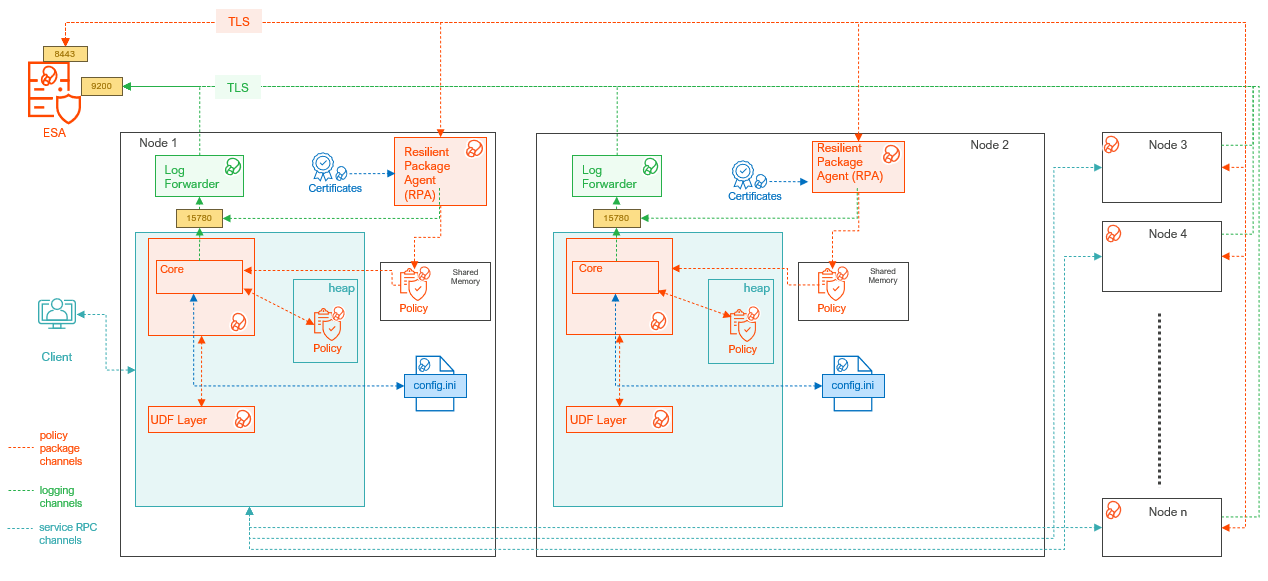
| Component | Description |
|---|---|
| RPAgent | A daemon running on each node that downloads the package from the ESA over a TLS channel using the installed Certificates. |
| Log Forwarder | A daemon running on each node that routes the audit logs and application logs to the ESA/Audit Store. |
| config.ini | A file on each node containing the set of configuration parameters to modify the protector behavior. |
| DBP Layer | Contains the Database Protector UDFs and APIs. |
| Core | The set of various libraries that provide the Protegrity Core functionality. |
1.2 - System Requirements
Ensure that the following prerequisites are met:
Note: The following basic requirements apply to both the step-by-step installation of Log Forwarder and RPAgent, as well as when using the master installation script.
- The Oracle Database is installed, configured, and running.
- Enterprise Security Administrator (ESA) version v10.1 is installed, configured, and running.
- The IP address or host name of the ESA is available.
- The Policy Management (PIM) is initialized on ESA (cryptographic keys and policy repository created).
- Download and save the Oracle Database Protector package:
DatabaseProtector_<operating_system>-<arch>_<Oracle_version>-64_<version>.tgz(provided by Protegrity). - The installation directory is granted
755permissions. - It is recommended to create a backup of the database where Oracle Database Protector and UDFs will be installed.
- A soft link is created for the Oracle 23c library. This issue is observed in Oracle 19c or 21c environments.
- Access to the server is available as:
- Oracle instance owner
- User created specifically for Protegrity.
- Access to the Oracle database is available as
sysdbasuperuser.
Additional Requirements
Note: These requirements apply only when performing installation or upgrade using the master installation script.
- For Standalone and RAC setup:
- Sudo privileges to run commands for Oracle directories.
- The
rsyncutility installed on all nodes. - Executable permissions (chmod +x) is available to the script.
- Adequate disk space for backups, temporary files, and upgrade process.
- The Oracle listener(s) and instance(s) must be running during the upgrade.
- Sudo permissions are available to the automation script to perform install, upgrade, or rollback operations across all the components, such as, Log Forwarder, RPAgent, and the Database Protector.
- For RAC setup:
- SSH access to all the RAC nodes from the local node.
- The
olsnodesutility is installed and available on the local node. - No third-party agent or antivirus interferes with file transfer or process execution.
Note: Before initiating the installation or upgrade, verify that all the components, SQL scripts, and the configuration files are consistent and synchronized across all the nodes. Ensure that all the components, such as, RPAgent, Log Forwarder, and the Database Protector are installed in the same location on all the nodes. Ensure that all the services are in the same state.
1.3 - Preparing the Environment
The following sub-sections explain how to install each Oracle Database Protector components, Log Forwarder and RPAgent individually. Installing components one by one ensures proper configuration and functionality.
Note: The steps mentioned in the Extracting the Installation Package section is required for both individual component installation and quick installation.
1.3.1 - Extracting the Installation Package
This section explains the procedure to extract the Oracle Database Protector installation package. It includes steps for saving the installation package, navigating to the appropriate directory, and extracting the required files. These instructions ensure that all components are ready for installation.
- Log in to the Oracle database server with an account having the required privileges.
- Save the Oracle database protector installation package,
DatabaseProtector_<operating_system>-<arch>_<Oracle_distribution>-x64_<version>.tgz, made available by Protegrity, in any sample directory. For example,/opt/protegrity/ - Navigate to the
/opt/Protegrity/directory. - To extract the contents, run the following command:
tar -xvf DatabaseProtector_Linux-ALL-64_x86-64_Oracle-ALL-64_<DBP_version>.tgz - Press ENTER.
The command extracts the package and the signature files.
DatabaseProtector_Linux-ALL-64_x86-64_Oracle-ALL-64_<DBP_version>.tgz signatures/ signatures/DatabaseProtector_Linux-ALL-64_x86-64_Oracle-ALL-64_<DBP_version>.tgz_<DBP_version>.sig - To extract the contents of the installation package, run the following command:
tar -xvf DatabaseProtector_Linux-ALL-64_x86-64_Oracle-ALL-64_<DBP_version>.tgz - Press ENTER.
The command extracts the files from the package.
LogforwarderSetup_Linux_x64_<DBP_version>.sh
RPAgentSetup_Linux_x64_<DBP_version>.sh
PepOracleSetup_Linux_x64_<DBP_version>.sh
Install_OracleProtector_<Operating System>_x64_<DBP_version>.sh
U.S.Patent.No.6,321,201.Legend.txt
Note: To automate the installation process, use the master installation script provided in the build:
Install_OracleProtector_Linux_x64_<DBP_version>.sh
For more information, refer the following sections:
1.3.2 - Installing the Log Forwarder
This section provides instructions to manually install the Log Forwarder on the Oracle database server.
Note: To automate the installation process, use the master installation script provided in the build:
Install_OracleProtector_Linux_x64_<DBP_version>.sh
For more information, refer the following sections:
- Log in to the database server as the user that has the permissions to install the Log Forwarder. Usually, this tends to be the instance owner.
- Navigate to the directory where the installation files are extracted.
- To install the Log Forwarder, run the following command:
./LogforwarderSetup_Linux_x64_<DBP_version>.sh - Press ENTER.
The prompt to enter the audit store endpoint appears.
Enter the audit store endpoint (host), alternative (host:port) to use another port than the default port 9200 : - Enter the IP address of the audit store.
- Press ENTER.
The prompt to enter additional endpoint appears.
Audit store endpoints: <Audit_store_IP_address>:9200 Do you want to add another audit store endpoint? [y/n]: - To skip adding additional endpoints, type
no. - Press ENTER.
The prompt to continue the installation appears.
These audit store endpoints will be added: <Audit_store_IP_address>:9200 Type 'y' to accept or 'n' to abort installation: - To continue the installation, type
yes. - Press ENTER.
The script extracts the files and installs the Log Forwarder.
Unpacking...
Extracting files...
Protegrity Log Forwarder installed in /opt/protegrity/logforwarder.
1.3.3 - Installing the RPAgent
This section provides instructions for manually installing the RPAgent on the Oracle database server.
Note: To automate the installation process, use the master installation script provided in the build:
Install_OracleProtector_Linux_x64_<DBP_version>.sh
For more information, refer the following sections:
- Log in to the database server as the user that has permissions to install the RPAgent.
- Navigate to the directory where the installation files are extracted.
- To install the RPAgent, run the following command:
./RPAgentSetup_Linux_x64_<DBP_version>.sh - Press ENTER.
The prompt to enter ESA host name or IP address appears.
Please enter upstream host name or IP address[]: - Enter the IP address of the ESA.
- Press ENTER.
The prompt to enter the username to download the certificates appears.
Please enter the user name for downloading certificates[]: - Enter the username to download the certificates from ESA.
- Press ENTER.
The prompt to enter the password to download the certificates appears.
Please enter the password for downloading certificates[]: - Enter the password.
- Press ENTER.
The script connects to the ESA, retrives the JWT token, extracts the certificates, and installs the RPAgent.
Unpacking...
Extracting files...
Obtaining token from <ESA_IP_Address>:25400...
Downloading certificates from <ESA_IP_Address>:25400...
% Total    % Received % Xferd  Average Speed   Time    Time     Time  Current
                                Dload  Upload   Total   Spent    Left  Speed
100 11264  100 11264    0     0   136k      0 --:--:-- --:--:-- --:--:--  137k

Extracting certificates...
Certificates successfully downloaded and stored in /opt/protegrity/rpagent/data

Protegrity RPAgent installed in /opt/protegrity/rpagent.
1.4 - Installing Oracle Database Protector
This section explains how to automate the installation using the Quick Installation Script included in the build:
Install_OracleProtector_Linux_x64_<DBP_version>.sh
Note: Steps for Installing the Policy Enforcement Point (PEP) and Creating User Defined Functions (UDFs) are applicable only for individual component installation, not for the quick installation process.
1.4.1 - Installing the Database Objects
This section provides instructions to install the Policy Enforcement Point for the Oracle Database Protector.
Note:
To automate the installation process, use the master installation script provided in the build:Install_OracleProtector_Linux_x64_<DBP_version>.sh
For more information, refer to the following sections:
- Log in to the node where the installation files are extracted.
- To install the Oracle objects, run the following command:
./PepOracleSetup_Linux_x64_<DBP_version>.sh - Press ENTER.
The prompt to continue appears.
***************************************************** Welcome to the Database Protector Setup Wizard ***************************************************** This will install the oracle objects on your computer Do you want to continue? [yes or no] - To continue, type
yes. - Press ENTER.
The prompt to enter the installation directory appears.
Enter installation directory. A new directory will be created in the installation directory. [/opt/protegrity]: - Enter the location to install the Oracle objects.
- Press ENTER.
The command extracts the files and installs the objects.
Unpacking...
Extracting files...
oracle objects installed in /opt/protegrity/databaseprotector/oracle.
1.4.2 - Installing Oracle Database Protector on Standalone System
The Oracle Database Protector build provides an automated script to manage the installation process on a standalone system. The master script internally calls the scripts to install the components. The master script installs the components in the following order:
- Log Forwarder
- RPAgent
- Policy Enforcement Point (Database Protector)
The installation can also be performed manually by executing the individual scripts to install the different components.
The master script is available in the directory where the installation files are extracted. It provides the following arguments:
install- installs the components in an interactive mode.upgrade- installs a newer version of the protector with minimal downtime.silent- installs the components in a non-interactive mode.install.ini- installs the components as per the parameters provided in the file.help- lists the arguments available for the script.
In addition, the master script will rollback the installation process if any errors are encountered. The script will revert the changes.
Viewing the Arguments for the Script
- Log in to the instance where the installation package is extracted.
- Navigate to the directory containing the installation scripts.
- To view the arguments, run the following command:
./Install_OracleProtector_Linux_x64_<DBP_version>.sh --help - Press ENTER.
The script lists the available arguments.
    Options:
 --install    Use this option when installing the solution for the first time on a machine/host.
             (i.e., there is no previous installation present)

 --upgrade    Use this option when upgrading an existing installation on the machine/host.

 --install-ini <file>    (Optional) Provide a path to an install.ini file for silent or pre-configured installations.
                         This option works with --install only.
                         It must not be used with --upgrade or --silent.
                         You can pass this either as:
                         --install-ini /path/to/install.ini
                         or
                         --install-ini=/path/to/install.ini
                         Refer to the product documentation for details about the configuration options available in install.ini.
                         The documentation describes all supported keys, required fields, and example configurations.
 --silent    (Optional) Runs the installation/upgrade in silent mode with minimum interactive prompts.

 --help, -h  Display this help message and exit.
Installing the Protector using the Interactive Mode
- Log in to the instance where the installation package is extracted.
- Navigate to the directory containing the installation scripts.
- To execute the script, run the following command:
./Install_OracleProtector_Linux_x64_<DBP_version>.sh --install - Press ENTER.
The prompt to select the silent mode of installation appears.
Do you want silent installation? (yes/no) [no]: - To install the components using the interactive mode, type
no. - Press ENTER.
The prompt to install the components in the same directory appears.
Do you want to install the new LogForwarder, RPAgent, and DatabaseProtector together in a single directory? (yes/no) [no]: - To install the components in different directories, type
no. - Press ENTER.
The prompt to enter the installation directory for the Log Forwarder appears.
Enter new LogForwarder installation directory [/opt/protegrity]: - Enter the location to install the Log Forwarder.
- Press ENTER.
The prompt to enter the installation directory for the RPAgent appears.
Enter new RPAgent installation directory [/opt/protegrity]: - Enter the location to install the RPAgent.
- Press ENTER.
The prompt to enter the installation directory for the Database Protector appears.
Enter new DatabaseProtector installation directory [/opt/protegrity]: - Enter the location to install the Database Protector.
Note: To use any directory for the Database Protector, ensure the directory is available. Otherwise, the installation will fail.
- Press ENTER.
The script configures the environment and the prompt to confirm the configuration appears.
2025-12-23 12:05:39 - [INFO] Discovering Grid Infrastructure home dynamically... 2025-12-23 12:05:39 - [INFO] No ASM instance found. This is a standalone system. 2025-12-23 12:05:39 - [INFO] No Grid home found. Treating it as a standalone Oracle. 2025-12-23 12:05:39 - [INFO] Going to configure environment for installation 2025-12-23 12:05:39 - [INFO] Discovered ORACLE_SID=orcl, ORACLE_HOME=/u01/app/oracle/product/19.0.0/dbhome_1 2025-12-23 12:05:39 - [INFO] Oracle environment set: 2025-12-23 12:05:39 - [INFO] ORACLE_HOME=/u01/app/oracle/product/19.0.0/dbhome_1 2025-12-23 12:05:39 - [INFO] ORACLE_SID=orcl 2025-12-23 12:05:39 - [INFO] LD_LIBRARY_PATH=/u01/app/oracle/product/19.0.0/dbhome_1/lib 2025-12-23 12:05:39 - [INFO] PATH=/usr/local/sbin:/usr/local/bin:/usr/sbin:/usr/bin:/root/bin:/u01/app/oracle/product/19.0.0/dbhome_1/bin 2025-12-23 12:05:39 - [INFO] Environment configured successfully... 2025-12-23 12:05:39 - [INFO] ************************************************************************** 2025-12-23 12:05:39 - [INFO] Installation will be done with following configuration: 2025-12-23 12:05:39 - [INFO] Oracle Instance ID: orcl 2025-12-23 12:05:39 - [INFO] Mode: install 2025-12-23 12:05:39 - [INFO] Logforwarder Installation Directory: /opt/protegrity1 2025-12-23 12:05:39 - [INFO] RPAgent Installation Directory: /opt/protegrity1 2025-12-23 12:05:39 - [INFO] DatabaseProtector Installation Directory: /opt/protegrity1 2025-12-23 12:05:39 - [INFO] This is a fresh install. 2025-12-23 12:05:39 - [INFO] Standalone setup detected 2025-12-23 12:05:39 - [INFO] ************************************************************************** 2025-12-23 12:05:39 - [INFO] Please verify the above configuration before proceeding. Do you want to continue? (yes/no) [no]: - To proceed with the configuration, type
yes. - Press ENTER.
The master script invokes the Log Forwarder installation script. The prompt to enter the Audit Store endpoint appears.
2025-12-23 12:05:41 - [INFO] Continuing with installation... 2025-12-23 12:05:41 - [INFO] Installing/Upgrading LOGFORWARDER... 2025-12-23 12:05:41 - [INFO] Executing ./LogforwarderSetup_Linux_x64_<DBP_version>.sh... Enter the audit store endpoint (host), alternative (host:port) to use another port than the default port 9200: - Enter the IP address for the Audit Store.
- Press ENTER.
The script lists the endpoint to be added. The prompt to add additional end point appears.
Audit store endpoints: <IP_Address>:9200 Do you want to add another audit store endpoint? [y/n]: - To provide an additional endpoint, type
yes. - Press ENTER.
The prompt to enter the Audit Store endpoint appears.
Enter the audit store endpoint (host), alternative (host:port) to use another port than the default port 9200: - Enter the IP address for the Audit Store.
- Press ENTER.
The script lists the endpoints that will be added. The prompt to continue the installation appears.
<IP_Address>:9200 <IP_Address>:9200 Type 'y' to accept or 'n' to abort installation: - To add the endpoints, type
yes. - Press ENTER.
The script unpacks the files and installs the Log Forwarder. The prompt to enter the upstream host name or IP address appears.
Unpacking... Extracting files... Protegrity Log Forwarder installed in /opt/protegrity1/logforwarder. 2025-12-23 12:05:59 - [INFO] ./LogforwarderSetup_Linux_x64_<DBP_version>.sh completed successfully. 2025-12-23 12:05:59 - [INFO] Installing/Upgrading RPAGENT... Please enter upstream host name or IP address, alternative (host:port) to use another port than the default port 25400: - Enter the upstream host name or IP address.
- Press ENTER.
The prompt to enter the ESA token appears.
Enter ESA token (leave blank to use username/password): - Enter the JWT token.
Note: To use the username and password, press ENTER.
- Press ENTER.
The script installs the RPAgent and triggers the script to install the Oracle objects. The script installs the objects and the prompt to create the UDFs appears.
2025-12-23 12:06:14 - [INFO] Executing ./RPAgentSetup_Linux_x64_<DBP_version>.sh... Unpacking... Extracting files... Downloading certificates from <IP_Address>:25400... % Total % Received % Xferd Average Speed Time Time Time Current Dload Upload Total Spent Left Speed 100 11264 100 11264 0 0 113k 0 --:--:-- --:--:-- --:--:-- 112k Extracting certificates... tar: CA.pem: time stamp 2025-12-23 12:06:15 is 0.531323771 s in the future tar: cert.pem: time stamp 2025-12-23 12:06:15 is 0.531192197 s in the future tar: cert.key: time stamp 2025-12-23 12:06:15 is 0.531134958 s in the future tar: secret.txt: time stamp 2025-12-23 12:06:15 is 0.531081244 s in the future Certificates successfully downloaded and stored in /opt/protegrity1/rpagent/data Protegrity RPAgent installed in /opt/protegrity1/rpagent. 2025-12-23 12:06:14 - [INFO] ./RPAgentSetup_Linux_x64_<DBP_version>.sh completed successfully. 2025-12-23 12:06:14 - [INFO] Installing/Upgrading DBP... 2025-12-23 12:06:14 - [INFO] Executing ./PepOracleSetup_Linux_x64_<DBP_version>.sh... ***************************************************** Welcome to the Database Protector Setup Wizard ***************************************************** This will install the oracle objects on your computer Do you want to continue? [yes or no]: Enter installation directory. A new directory will be created in the installation directory. [/opt/protegrity]: Unpacking... Extracting files... oracle objects installed in /opt/protegrity1/databaseprotector/oracle. 2025-12-23 12:06:14 - [INFO] ./PepOracleSetup_Linux_x64_<DBP_version>.sh completed successfully. 2025-12-23 12:06:14 - [INFO] Going to launch <DBP_version> version Logforwarder 2025-12-23 12:06:16 - [INFO] Successfully launched <DBP_version> version Logforwarder 2025-12-23 12:06:16 - [INFO] Going to launch <DBP_version> version RPAgent 2025-12-23 12:06:16 - [INFO] Successfully launched <DBP_version> version RPAgent 2025-12-23 12:06:16 - [INFO] Configuring extproc.ora 2025-12-23 12:06:16 - [INFO] Backed up existing /u01/app/oracle/product/19.0.0/dbhome_1/hs/admin/extproc.ora 2025-12-23 12:06:16 - [INFO] /opt/protegrity1/databaseprotector/oracle/lib/peporacle.plm already present in /u01/app/oracle/product/19.0.0/dbhome_1/hs/admin/extproc.ora 2025-12-23 12:06:16 - [INFO] Updated extproc.ora at /u01/app/oracle/product/19.0.0/dbhome_1/hs/admin/extproc.ora 2025-12-23 12:06:16 - [INFO] No separate runtime home detected or runtime home same as ORACLE_HOME; skipping sync. Do you want to continue and create UDFs? To create the UDFs, provide the database credentials (yes/no) [no]: - To create the UDFs, type
yes.Note: If you select
Noto create the UDFs, the script skips creating the UDFs. The installation will complete successfully. However, the database will not contain the required UDFs. To manually create the UDFs, refer to the section Creating the User Defined Functions (UDFs). - Press ENTER.
The prompt to enter the Oracle Database username appears.
Enter Oracle database username: - Enter the username.
- Press ENTER.
The prompt to enter the Oracle Database password appears.
Enter Oracle database user's password: - Enter the password.
- Press ENTER.
The script creates the UDFs and completes the installation.
2025-12-23 12:06:24 - [INFO] Going to create new types and UDFs.
2025-12-23 12:06:24 - [INFO] Using username '<user_name>' for database connection and creating new types and UDFs.
2025-12-23 12:06:24 - [INFO] Running SQL script: Create new types and UDFs (/opt/protegrity1/databaseprotector/oracle/sqlscripts/createobjects.sql)
2025-12-23 12:06:25 - [INFO] sqlplus output:
Library created.
Type created.
Type created.
Type created.
Type created.
Type created.
Type created.
Type created.
Type created.
Package created.
Package body created.
Grant succeeded.
Grant succeeded.
Synonym created.
Synonym created.
Grant succeeded.
Grant succeeded.
Grant succeeded.
Grant succeeded.
Grant succeeded.
Grant succeeded.
Grant succeeded.
Grant succeeded.
Grant succeeded.
Grant succeeded.
Grant succeeded.
Grant succeeded.
Grant succeeded.
Grant succeeded.
Grant succeeded.
Grant succeeded.
Synonym created.
Synonym created.
Synonym created.
Synonym created.
Synonym created.
Synonym created.
Synonym created.
Synonym created.
Synonym created.
Synonym created.
Synonym created.
Synonym created.
Synonym created.
Synonym created.
Synonym created.
Synonym created.
2025-12-23 12:06:25 - [INFO] Create new types and UDFs executed successfully.
2025-12-23 12:06:25 - [INFO] New types and UDFs created successfully.
2025-12-23 12:06:25 - [INFO] Testing UDFs installation...
2025-12-23 12:06:26 - [INFO] Test UDFs output: <DBP_version>
2025-12-23 12:06:26 - [INFO] UDFs installation tested successfully.
2025-12-23 12:06:26 - [INFO] Removing extproc.ora backup file /u01/app/oracle/product/19.0.0/dbhome_1/hs/admin/extproc.ora.bak_2025-12-23_12:06:16
2025-12-23 12:06:26 - [INFO] Closing SSH master connections...
2025-12-23 12:06:26 - [INFO] Installation successful.
2025-12-23 12:06:26 - [INFO] All components installed successfully.
Installing the Protector using the Silent Mode
- Log in to the instance where the installation package is extracted.
- Navigate to the directory containing the installation scripts.
- To execute the script, run the following command:
./Install_OracleProtector_Linux_x64_<DBP_version>.sh --install - Press ENTER.
The prompt to select the silent mode of installation appears.
Do you want silent installation? (yes/no) [no]: - To install the components using the silent mode, type
yes. - Press ENTER.
The script lists the configuration and a prompt to confirm the configuration appears.
2025-12-23 11:40:10 - [INFO] You have chosen silent mode. Therefore, /opt/protegrity is considered as base directory for new installation. 2025-12-23 11:40:10 - [INFO] Discovering Grid Infrastructure home dynamically... 2025-12-23 11:40:10 - [INFO] No ASM instance found. This is a standalone system. 2025-12-23 11:40:10 - [INFO] No Grid home found. Treating it as a standalone Oracle. 2025-12-23 11:40:10 - [INFO] Going to configure environment for installation 2025-12-23 11:40:10 - [INFO] Discovered ORACLE_SID=orcl, ORACLE_HOME=/u01/app/oracle/product/19.0.0/dbhome_1 2025-12-23 11:40:10 - [INFO] Oracle environment set: 2025-12-23 11:40:10 - [INFO] ORACLE_HOME=/u01/app/oracle/product/19.0.0/dbhome_1 2025-12-23 11:40:10 - [INFO] ORACLE_SID=orcl 2025-12-23 11:40:10 - [INFO] LD_LIBRARY_PATH=/u01/app/oracle/product/19.0.0/dbhome_1/lib 2025-12-23 11:40:10 - [INFO] PATH=/usr/local/sbin:/usr/local/bin:/usr/sbin:/usr/bin:/root/bin:/u01/app/oracle/product/19.0.0/dbhome_1/bin 2025-12-23 11:40:10 - [INFO] Environment configured successfully... 2025-12-23 11:40:10 - [INFO] ************************************************************************** 2025-12-23 11:40:10 - [INFO] Installation will be done with following configuration: 2025-12-23 11:40:10 - [INFO] Oracle Instance ID: orcl 2025-12-23 11:40:10 - [INFO] Mode: install 2025-12-23 11:40:10 - [INFO] Logforwarder Installation Directory: /opt/protegrity 2025-12-23 11:40:10 - [INFO] RPAgent Installation Directory: /opt/protegrity 2025-12-23 11:40:10 - [INFO] DatabaseProtector Installation Directory: /opt/protegrity 2025-12-23 11:40:10 - [INFO] This is a fresh install. 2025-12-23 11:40:10 - [INFO] Standalone setup detected 2025-12-23 11:40:10 - [INFO] ************************************************************************** 2025-12-23 11:40:10 - [INFO] Please verify the above configuration before proceeding. Do you want to continue? (yes/no) [no]: - To proceed with the configuration, type
yes. - Press ENTER.
The scripts starts the Log Forwarder installation and the prompt to enter the Audit Store endpoint appears.
Enter the audit store endpoint (host), alternative (host:port) to use another port than the default port 9200: - Enter the audit store endpoint.
- Press ENTER.
The prompt to enter additional endpoint appears.
Audit store endpoints: <IP_Address>:9200 Do you want to add another audit store endpoint? [y/n]: - To provide another audit store endpoint, type,
yes. - Press ENTER.
The script lists the audit store endpoints. The prompt to enter another endpoint appears.
<IP_Address>:9200 <IP_Address>:9200 Type 'y' to accept or 'n' to abort installation: - To continue, type
yes. - Press ENTER.
The script installs the Log Forwarder. The script starts the RPAgent installation. The prompt to enter the upstream IP address appears.
Unpacking... Extracting files... Protegrity Log Forwarder installed in /opt/protegrity/logforwarder. 2025-12-23 11:44:29 - [INFO] ./LogforwarderSetup_Linux_x64_<DBP_version>.sh completed successfully. 2025-12-23 11:44:29 - [INFO] Installing/Upgrading RPAGENT... Please enter upstream host name or IP address, alternative (host:port) to use another port than the default port 25400: - Enter the IP address.
- Press ENTER.
The prompt to enter the JWT token appears.
Enter ESA token (leave blank to use username/password): - To use the username and password combination, press ENTER.
The prompt to enter the username appears.
Enter ESA username: - Enter the username.
- Press ENTER.
The prompt to enter the password appears.
Enter ESA password: - Enter the password.
- Press ENTER.
The script retrieves the token from ESA, extracts the certificates, and installs the RPAgent. The script completes the installation of the objects and the prompt to create the UDF appears.
Unpacking... Extracting files... Obtaining token from <IP_address>:25400... Downloading certificates from <IP_address>:25400... % Total % Received % Xferd Average Speed Time Time Time Current Dload Upload Total Spent Left Speed 100 11264 100 11264 0 0 152k 0 --:--:-- --:--:-- --:--:-- 152k Extracting certificates... tar: CA.pem: time stamp 2025-12-23 11:50:29 is 0.471443292 s in the future tar: cert.pem: time stamp 2025-12-23 11:50:29 is 0.47131432 s in the future tar: cert.key: time stamp 2025-12-23 11:50:29 is 0.471256437 s in the future tar: secret.txt: time stamp 2025-12-23 11:50:29 is 0.471203322 s in the future Certificates successfully downloaded and stored in /opt/protegrity/rpagent/data Protegrity RPAgent installed in /opt/protegrity/rpagent. 2025-12-23 11:50:28 - [INFO] ./RPAgentSetup_Linux_x64_<DBP_version>.sh completed successfully. 2025-12-23 11:50:28 - [INFO] Installing/Upgrading DBP... 2025-12-23 11:50:28 - [INFO] Executing ./PepOracleSetup_Linux_x64_<DBP_version>.sh... ***************************************************** Welcome to the Database Protector Setup Wizard ***************************************************** This will install the oracle objects on your computer Do you want to continue? [yes or no]: Enter installation directory. A new directory will be created in the installation directory. [/opt/protegrity]: Unpacking... Extracting files... oracle objects installed in /opt/protegrity/databaseprotector/oracle. 2025-12-23 11:50:28 - [INFO] ./PepOracleSetup_Linux_x64_<DBP_version>.sh completed successfully. 2025-12-23 11:50:28 - [INFO] Going to launch <DBP_version> version Logforwarder 2025-12-23 11:50:30 - [INFO] Successfully launched <DBP_version> version Logforwarder 2025-12-23 11:50:30 - [INFO] Going to launch <DBP_version> version RPAgent 2025-12-23 11:50:30 - [INFO] Successfully launched <DBP_version> version RPAgent 2025-12-23 11:50:30 - [INFO] Configuring extproc.ora 2025-12-23 11:50:30 - [INFO] Backed up existing /u01/app/oracle/product/19.0.0/dbhome_1/hs/admin/extproc.ora 2025-12-23 11:50:30 - [INFO] /opt/protegrity/databaseprotector/oracle/lib/peporacle.plm already present in /u01/app/oracle/product/19.0.0/dbhome_1/hs/admin/extproc.ora 2025-12-23 11:50:30 - [INFO] Updated extproc.ora at /u01/app/oracle/product/19.0.0/dbhome_1/hs/admin/extproc.ora 2025-12-23 11:50:30 - [INFO] No separate runtime home detected or runtime home same as ORACLE_HOME; skipping sync. Do you want to continue and create UDFs? To create the UDFs, provide the database credentials (yes/no) [no]: - To create the UDFs, type
yes.Note: If you select
Noto create the UDFs, the script skips creating the UDFs. The installation will complete successfully. However, the database will not contain the required UDFs. To manually create the UDFs, refer to the section Creating the User Defined Functions (UDFs). - Press ENTER.
The prompt to enter the database username appears.
Enter Oracle database username: - Enter the username.
- Press ENTER.
The prompt to enter the database password appears.
Enter Oracle database user's password: - Enter the password.
- Press ENTER.
The script installs the UDFs and completes the installation process.
2025-12-23 11:50:39 - [INFO] Going to create new types and UDFs.
2025-12-23 11:50:39 - [INFO] Using username '<user_name>' for database connection and creating new types and UDFs.
2025-12-23 11:50:39 - [INFO] Running SQL script: Create new types and UDFs (/opt/protegrity/databaseprotector/oracle/sqlscripts/createobjects.sql)
2025-12-23 11:50:40 - [INFO] sqlplus output:
Library created.
Type created.
Type created.
Type created.
Type created.
Type created.
Type created.
Type created.
Type created.
Package created.
Package body created.
Grant succeeded.
Grant succeeded.
Synonym created.
Synonym created.
Grant succeeded.
Grant succeeded.
Grant succeeded.
Grant succeeded.
Grant succeeded.
Grant succeeded.
Grant succeeded.
Grant succeeded.
Grant succeeded.
Grant succeeded.
Grant succeeded.
Grant succeeded.
Grant succeeded.
Grant succeeded.
Grant succeeded.
Grant succeeded.
Synonym created.
Synonym created.
Synonym created.
Synonym created.
Synonym created.
Synonym created.
Synonym created.
Synonym created.
Synonym created.
Synonym created.
Synonym created.
Synonym created.
Synonym created.
Synonym created.
Synonym created.
Synonym created.
2025-12-23 11:50:40 - [INFO] Create new types and UDFs executed successfully.
2025-12-23 11:50:40 - [INFO] New types and UDFs created successfully.
2025-12-23 11:50:40 - [INFO] Testing UDFs installation...
2025-12-23 11:50:41 - [INFO] Test UDFs output: <DBP_version>
2025-12-23 11:50:41 - [INFO] UDFs installation tested successfully.
2025-12-23 11:50:41 - [INFO] Removing extproc.ora backup file /u01/app/oracle/product/19.0.0/dbhome_1/hs/admin/extproc.ora.bak_2025-12-23_11:50:30
2025-12-23 11:50:41 - [INFO] Closing SSH master connections...
2025-12-23 11:50:41 - [INFO] Installation successful.
2025-12-23 11:50:41 - [INFO] All components installed successfully.
Installing the Protector using the install.ini file
This argument requires the install.ini file to be present and updated with the required parameters. The install.ini files contains the installation directories for the components and the endpoints for the Log Forwarder and RPAgent.
A sample output of the install.ini file is listed below.
[Logforwarder]
INSTALLATION_DIR = </opt/protegrity1>
AUDIT_STORE_ENDPOINTS = <IP_address>:9200 <IP_address>:9200 <IP_address>:9200

[RPAgent]
INSTALLATION_DIR = </opt/protegrity1>
UPSTREAM_HOST_IP_ADDR_PORT = <IP_address>:25400

[DatabaseProtector]
INSTALLATION_DIR = </opt/protegrity1>
Note: To use any directory for the Database Protector, ensure the directory is available. Otherwise, the installation will fail. Note: The default port for the Audit Store endpoint is 9200. The default port for the RPAgent is 25400. To use any other port, replace the value.
To install the protector using the install.ini argument:
- Log in to the instance where the installation package is extracted.
- Navigate to the directory containing the installation scripts.
- To execute the script with the argument, run the following command:
./Install_OracleProtector_Linux_x64_<DBP_version>.sh --install --install-ini <path_to_install.ini_file> - Press ENTER.
The script detects the
install.inifile and the prompt to verify the configuration appears.2025-12-23 12:16:37 - [INFO] install.ini detected: <path_to_install.ini_file> 2025-12-23 12:16:37 - [INFO] Discovering Grid Infrastructure home dynamically... 2025-12-23 12:16:37 - [INFO] No ASM instance found. This is a standalone system. 2025-12-23 12:16:37 - [INFO] No Grid home found. Treating it as a standalone Oracle. 2025-12-23 12:16:37 - [INFO] Going to configure environment for installation 2025-12-23 12:16:37 - [INFO] Discovered ORACLE_SID=orcl, ORACLE_HOME=/u01/app/oracle/product/19.0.0/dbhome_1 2025-12-23 12:16:37 - [INFO] Oracle environment set: 2025-12-23 12:16:37 - [INFO] ORACLE_HOME=/u01/app/oracle/product/19.0.0/dbhome_1 2025-12-23 12:16:37 - [INFO] ORACLE_SID=orcl 2025-12-23 12:16:37 - [INFO] LD_LIBRARY_PATH=/u01/app/oracle/product/19.0.0/dbhome_1/lib 2025-12-23 12:16:37 - [INFO] PATH=/usr/local/sbin:/usr/local/bin:/usr/sbin:/usr/bin:/root/bin:/u01/app/oracle/product/19.0.0/dbhome_1/bin 2025-12-23 12:16:37 - [INFO] Environment configured successfully... 2025-12-23 12:16:37 - [INFO] ************************************************************************** 2025-12-23 12:16:37 - [INFO] Installation will be done with following configuration: 2025-12-23 12:16:37 - [INFO] Oracle Instance ID: orcl 2025-12-23 12:16:37 - [INFO] Mode: install 2025-12-23 12:16:37 - [INFO] Using configuration from install.ini: 2025-12-23 12:16:37 - [INFO] Logforwarder Installation Directory: /opt/protegrity1 2025-12-23 12:16:37 - [INFO] Audit Store Endpoints: <IP_Address>:9200 <IP_Address>:9200 <IP_Address>:9200 2025-12-23 12:16:37 - [INFO] RPAgent Installation Directory: /opt/protegrity1 2025-12-23 12:16:37 - [INFO] Upstream (ESA) IP Address for RPAgent: <IP_Address> 2025-12-23 12:16:37 - [INFO] Upstream (ESA) Port for RPAgent: 25400 2025-12-23 12:16:37 - [INFO] DatabaseProtector Installation Directory: /opt/protegrity1 2025-12-23 12:16:37 - [INFO] This is a fresh install. 2025-12-23 12:16:37 - [INFO] Standalone setup detected 2025-12-23 12:16:37 - [INFO] ************************************************************************** 2025-12-23 12:16:37 - [INFO] Please verify the above configuration before proceeding. Do you want to continue? (yes/no) [no]: - To proceed with the configuration, type
yes. - Press ENTER.
The script installs the Log Forwarder and the prompt to enter the JWT token appears.
2025-12-23 12:16:40 - [INFO] Continuing with installation... 2025-12-23 12:16:40 - [INFO] Installing/Upgrading LOGFORWARDER... 2025-12-23 12:16:40 - [INFO] Executing ./LogforwarderSetup_Linux_x64_<DBP_version>.sh... Unpacking... Extracting files... Protegrity Log Forwarder installed in /opt/protegrity1/logforwarder. 2025-12-23 12:16:40 - [INFO] ./LogforwarderSetup_Linux_x64_<DBP_version>.sh completed successfully. 2025-12-23 12:16:40 - [INFO] Installing/Upgrading RPAGENT... Enter ESA token (leave blank to use username/password): - To use the credentials, press ENTER.
The prompt to enter the ESA username appears.
Enter ESA username: - Enter the username.
- Press ENTER.
The prompt to enter the password appears.
Enter ESA password: - Enter the password.
- Press ENTER.
The script installs the RPAgent and the Oracle objects. The prompt to create the UDF appears.
2025-12-23 12:16:49 - [INFO] Executing ./RPAgentSetup_Linux_x64_<DBP_version>.sh... Unpacking... Extracting files... Obtaining token from <IP_Address>:25400... Downloading certificates from <IP_Address>:25400... % Total % Received % Xferd Average Speed Time Time Time Current Dload Upload Total Spent Left Speed 100 11264 100 11264 0 0 175k 0 --:--:-- --:--:-- --:--:-- 177k Extracting certificates... tar: CA.pem: time stamp 2025-12-23 12:16:51 is 0.430031962 s in the future tar: cert.pem: time stamp 2025-12-23 12:16:51 is 0.42988325 s in the future tar: cert.key: time stamp 2025-12-23 12:16:51 is 0.429822044 s in the future tar: secret.txt: time stamp 2025-12-23 12:16:51 is 0.429768891 s in the future Certificates successfully downloaded and stored in /opt/protegrity1/rpagent/data Protegrity RPAgent installed in /opt/protegrity1/rpagent. 2025-12-23 12:16:50 - [INFO] ./RPAgentSetup_Linux_x64_<DBP_version>.sh completed successfully. 2025-12-23 12:16:50 - [INFO] Installing/Upgrading DBP... 2025-12-23 12:16:50 - [INFO] Executing ./PepOracleSetup_Linux_x64_<DBP_version>.sh... ***************************************************** Welcome to the Database Protector Setup Wizard ***************************************************** This will install the oracle objects on your computer Do you want to continue? [yes or no] Enter installation directory. A new directory will be created in the installation directory. [/opt/protegrity]: Unpacking... Extracting files... oracle objects installed in /opt/protegrity1/databaseprotector/oracle. 2025-12-23 12:16:50 - [INFO] ./PepOracleSetup_Linux_x64_<DBP_version>.sh completed successfully. 2025-12-23 12:16:50 - [INFO] Going to launch <DBP_version> version Logforwarder 2025-12-23 12:16:52 - [INFO] Successfully launched <DBP_version> version Logforwarder 2025-12-23 12:16:52 - [INFO] Going to launch <DBP_version> version RPAgent 2025-12-23 12:16:52 - [INFO] Successfully launched <DBP_version> version RPAgent 2025-12-23 12:16:52 - [INFO] Configuring extproc.ora 2025-12-23 12:16:52 - [INFO] Backed up existing /u01/app/oracle/product/19.0.0/dbhome_1/hs/admin/extproc.ora 2025-12-23 12:16:52 - [INFO] /opt/protegrity1/databaseprotector/oracle/lib/peporacle.plm already present in /u01/app/oracle/product/19.0.0/dbhome_1/hs/admin/extproc.ora 2025-12-23 12:16:52 - [INFO] Updated extproc.ora at /u01/app/oracle/product/19.0.0/dbhome_1/hs/admin/extproc.ora 2025-12-23 12:16:52 - [INFO] No separate runtime home detected or runtime home same as ORACLE_HOME; skipping sync. Do you want to continue and create UDFs? To create the UDFs, provide the database credentials (yes/no) [no]: - To create the UDFs, type
yes.Note: If you select
Noto create the UDFs, the script skips creating the UDFs. The installation will complete successfully. However, the database will not contain the required UDFs. To manually create the UDFs, refer to the section Creating the User Defined Functions (UDFs). - Press ENTER.
The prompt to enter the database username appears.
Enter Oracle database username: - Enter the username.
- Press ENTER.
The prompt to enter the database password appears.
Enter Oracle database user's password: - Enter the password.
- Press ENTER.
The script creates the UDFs and completes the installation.
2025-12-23 12:19:33 - [INFO] Going to create new types and UDFs.
2025-12-23 12:19:33 - [INFO] Using username '<user_name>' for database connection and creating new types and UDFs.
2025-12-23 12:19:33 - [INFO] Running SQL script: Create new types and UDFs (/opt/protegrity1/databaseprotector/oracle/sqlscripts/createobjects.sql)
2025-12-23 12:19:34 - [INFO] sqlplus output:
Library created.
Type created.
Type created.
Type created.
Type created.
Type created.
Type created.
Type created.
Type created.
Package created.
Package body created.
Grant succeeded.
Grant succeeded.
Synonym created.
Synonym created.
Grant succeeded.
Grant succeeded.
Grant succeeded.
Grant succeeded.
Grant succeeded.
Grant succeeded.
Grant succeeded.
Grant succeeded.
Grant succeeded.
Grant succeeded.
Grant succeeded.
Grant succeeded.
Grant succeeded.
Grant succeeded.
Grant succeeded.
Grant succeeded.
Synonym created.
Synonym created.
Synonym created.
Synonym created.
Synonym created.
Synonym created.
Synonym created.
Synonym created.
Synonym created.
Synonym created.
Synonym created.
Synonym created.
Synonym created.
Synonym created.
Synonym created.
Synonym created.
2025-12-23 12:19:34 - [INFO] Create new types and UDFs executed successfully.
2025-12-23 12:19:34 - [INFO] New types and UDFs created successfully.
2025-12-23 12:19:34 - [INFO] Testing UDFs installation...
2025-12-23 12:19:35 - [INFO] Test UDFs output: <DBP_version>
2025-12-23 12:19:35 - [INFO] UDFs installation tested successfully.
2025-12-23 12:19:35 - [INFO] Removing extproc.ora backup file /u01/app/oracle/product/19.0.0/dbhome_1/hs/admin/extproc.ora.bak_2025-12-23_12:16:52
2025-12-23 12:19:35 - [INFO] Closing SSH master connections...
2025-12-23 12:19:35 - [INFO] Installation successful.
2025-12-23 12:19:35 - [INFO] All components installed successfully.
1.4.3 - Installing the Oracle Database Protector on RAC (Multinode) system
The Oracle Database Protector build provides an automated script to manage the installation process on a standalone system. The master script internally calls the scripts to install the components. The master script installs the components in the following order:
- Log Forwarder
- RPAgent
- Policy Enforcement Point (Database Protector)
The installation can also be performed manually by executing the individual scripts to install the different components.
The master script is available in the directory where the installation files are extracted. It provides the following arguments:
install- installs the components in an interactive mode.upgrade- installs a newer version of the protector with minimal downtime.silent- installs the components in a non-interactive mode.install.ini- installs the components as per the parameters provided in the file.help- lists the arguments available for the script.
In addition, the master script will rollback the installation process if any errors are encountered. The script will revert the changes.
Viewing the Arguments for the Script
- Log in to the instance where the installation package is extracted.
- Navigate to the directory containing the installation scripts.
- To view the arguments, run the following command:
./Install_OracleProtector_Linux_x64_<DBP_version>.sh --help - Press ENTER.
The script lists the available arguments.
    Options:
 --install    Use this option when installing the solution for the first time on a machine/host.
             (i.e., there is no previous installation present)

 --upgrade    Use this option when upgrading an existing installation on the machine/host.

 --install-ini <file>    (Optional) Provide a path to an install.ini file for silent or pre-configured installations.
                         This option works with --install only.
                         It must not be used with --upgrade or --silent.
                         You can pass this either as:
                         --install-ini /path/to/install.ini
                         or
                         --install-ini=/path/to/install.ini
                         Refer to the product documentation for details about the configuration options available in install.ini.
                         The documentation describes all supported keys, required fields, and example configurations.
 --silent    (Optional) Runs the installation/upgrade in silent mode with minimum interactive prompts.

 --help, -h  Display this help message and exit.
Installing the Protector using the Interactive Mode
- Log in to the instance where the installation package is extracted.
- Navigate to the directory containing the installation scripts.
- To execute the script, run the following command:
./Install_OracleProtector_Linux_x64_<DBP_version>.sh --install - Press ENTER.
The prompt to select the silent mode of installation appears.
Do you want silent installation? (yes/no) [no]: - To install the components using the interactive mode, type
no. - Press ENTER.
The prompt to install the components in the same directory appears.
Do you want to install the new LogForwarder, RPAgent, and DatabaseProtector together in a single directory? (yes/no) [no]: - To install the components in different directories, type
no. - Press ENTER.
The prompt to enter the installation directory for the Log Forwarder appears.
Enter new LogForwarder installation directory [/opt/protegrity]: - Enter the location to install the Log Forwarder.
- Press ENTER.
The prompt to enter the installation directory for the RPAgent appears.
Enter new RPAgent installation directory [/opt/protegrity]: - Enter the location to install the RPAgent.
- Press ENTER.
The prompt to enter the installation directory for the Database Protector appears.
Enter new DatabaseProtector installation directory [/opt/protegrity]: - Enter the location to install the Database Protector.
Note: To use any directory, ensure the directory is available. Otherwise, the installation will fail.
- Press ENTER.
The script configures the environment and the prompt to confirm the configuration appears.
2025-12-30 06:39:49 - [INFO] Discovering Grid Infrastructure home dynamically... 2025-12-30 06:39:50 - [INFO] Discovered GRID_HOME: /u01/app/21.3.0./grid 2025-12-30 06:39:50 - [INFO] Grid home found: /u01/app/21.3.0./grid 2025-12-30 06:39:50 - [INFO] RAC setup detected 2025-12-30 06:39:50 - [INFO] Current node: <node_name> (<node_name>.localdomain.com) 2025-12-30 06:39:50 - [INFO] Other nodes: <node_name> <node_name> 2025-12-30 06:39:50 - [INFO] Checking for required tools... 2025-12-30 06:39:50 - [INFO] All required tools are available 2025-12-30 06:39:50 - [INFO] Going to configure environment for installation 2025-12-30 06:39:50 - [INFO] Discovered ORACLE_SID=<oracle_system_identifier>, ORACLE_HOME=/u01/app/oracle/product/21.3.0/db_1 2025-12-30 06:39:50 - [INFO] Oracle environment set: 2025-12-30 06:39:50 - [INFO] ORACLE_HOME=/u01/app/oracle/product/21.3.0/db_1 2025-12-30 06:39:50 - [INFO] ORACLE_SID=<oracle_system_identifier> 2025-12-30 06:39:50 - [INFO] LD_LIBRARY_PATH=/u01/app/oracle/product/21.3.0/db_1/lib 2025-12-30 06:39:50 - [INFO] PATH=/u01/app/21.3.0./grid/bin:/sbin:/bin:/usr/sbin:/usr/bin:/u01/app/oracle/product/21.3.0/db_1/bin 2025-12-30 06:39:50 - [INFO] Environment configured successfully... 2025-12-30 06:39:50 - [INFO] ************************************************************************** 2025-12-30 06:39:50 - [INFO] Installation will be done with following configuration: 2025-12-30 06:39:50 - [INFO] Oracle Instance ID: <oracle_instance_ID> 2025-12-30 06:39:50 - [INFO] Mode: install 2025-12-30 06:39:50 - [INFO] Logforwarder Installation Directory: /opt/protegrity1 2025-12-30 06:39:50 - [INFO] RPAgent Installation Directory: /opt/protegrity1 2025-12-30 06:39:50 - [INFO] DatabaseProtector Installation Directory: /opt/protegrity1 2025-12-30 06:39:50 - [INFO] This is a fresh install. 2025-12-30 06:39:50 - [INFO] RAC setup detected with nodes: <node_name> <node_name> <node_name> 2025-12-30 06:39:50 - [INFO] ************************************************************************** 2025-12-30 06:39:50 - [INFO] Please verify the above configuration before proceeding. Do you want to continue? (yes/no) [no]: - To proceed with the configuration, type
yes. - Press ENTER.
The master script invokes the Log Forwarder installation script. The prompt to enter the Audit Store endpoint appears.
2025-12-30 06:40:10 - [INFO] Continuing with installation... 2025-12-30 06:40:10 - [INFO] Installing/Upgrading LOGFORWARDER... 2025-12-30 06:40:10 - [INFO] Executing ./LogforwarderSetup_Linux_x64_<DBP_version>.sh... Enter the audit store endpoint (host), alternative (host:port) to use another port than the default port 9200: - Enter the IP address for the Audit Store.
- Press ENTER.
The script lists the endpoint to be added. The prompt to add additional end point appears.
Audit store endpoints: <IP_Address>:9200 Do you want to add another audit store endpoint? [y/n]: - To provide an additional endpoint, type
yes. - Press ENTER.
The prompt to enter the Audit Store endpoint appears.
Enter the audit store endpoint (host), alternative (host:port) to use another port than the default port 9200: - Enter the IP address for the Audit Store.
- Press ENTER.
The script lists the endpoints that will be added. The prompt to continue the installation appears.
<IP_Address>:9200 <IP_Address>:9200 Type 'y' to accept or 'n' to abort installation: - To add the endpoints, type
yes. - Press ENTER.
The script unpacks the files and installs the Log Forwarder. The prompt to enter the upstream host name or IP address appears.
Unpacking... Extracting files... Protegrity Log Forwarder installed in /opt/protegrity1/logforwarder. 2025-12-30 06:40:10 - [INFO] ./LogforwarderSetup_Linux_x64_<DBP_version>.sh completed successfully. 2025-12-30 06:40:10 - [INFO] Installing/Upgrading RPAGENT... Please enter upstream host name or IP address, alternative (host:port) to use another port than the default port 25400: - Enter the upstream host name or IP address.
- Press ENTER.
The prompt to enter the ESA token appears.
Enter ESA token (leave blank to use username/password):Note: To use the username and password, press ENTER.
- Enter the JWT token.
- Press ENTER.
The script installs the RPAgent and triggers the script to install the Oracle objects. The script verifies the nodes and the prompt to confirm the username for the node appears.
2025-12-30 06:40:24 - [INFO] Executing ./RPAgentSetup_Linux_x64_<DBP_version>.sh... Unpacking... Extracting files... Downloading certificates from <IP_Address>:25400... % Total % Received % Xferd Average Speed Time Time Time Current Dload Upload Total Spent Left Speed 100 11264 100 11264 0 0 55457 0 --:--:-- --:--:-- --:--:-- 55487 Extracting certificates... tar: CA.pem: time stamp 2025-12-30 06:40:25 is 0.061687997 s in the future tar: cert.pem: time stamp 2025-12-30 06:40:25 is 0.061525058 s in the future tar: cert.key: time stamp 2025-12-30 06:40:25 is 0.061482332 s in the future tar: secret.txt: time stamp 2025-12-30 06:40:25 is 0.061448035 s in the future Certificates successfully downloaded and stored in /opt/protegrity1/rpagent/data Protegrity RPAgent installed in /opt/protegrity1/rpagent. 2025-12-30 06:40:24 - [INFO] ./RPAgentSetup_Linux_x64_<DBP_version>.sh completed successfully. 2025-12-30 06:40:24 - [INFO] Installing/Upgrading DBP... 2025-12-30 06:40:24 - [INFO] Executing ./PepOracleSetup_Linux_x64_<DBP_version>.sh... ***************************************************** Welcome to the Database Protector Setup Wizard ***************************************************** This will install the oracle objects on your computer Do you want to continue? [yes or no] Enter installation directory. A new directory will be created in the installation directory. [/opt/protegrity]: Unpacking... Extracting files... oracle objects installed in /opt/protegrity1/databaseprotector/oracle. 2025-12-30 06:40:24 - [INFO] ./PepOracleSetup_Linux_x64_<DBP_version>.sh completed successfully. 2025-12-30 06:40:24 - [INFO] Going to launch <DBP_version> version Logforwarder 2025-12-30 06:40:27 - [INFO] Successfully launched <DBP_version> version Logforwarder 2025-12-30 06:40:27 - [INFO] Going to launch <DBP_version> version RPAgent 2025-12-30 06:40:27 - [INFO] Successfully launched <DBP_version> version RPAgent 2025-12-30 06:40:27 - [INFO] Configuring extproc.ora 2025-12-30 06:40:27 - [INFO] Backed up existing /u01/app/oracle/product/21.3.0/db_1/hs/admin/extproc.ora 2025-12-30 06:40:27 - [INFO] Updated EXTPROC_DLLS in /u01/app/oracle/product/21.3.0/db_1/hs/admin/extproc.ora to only include /opt/protegrity1/databaseprotector/oracle/lib/peporacle.plm 2025-12-30 06:40:27 - [INFO] Updated extproc.ora at /u01/app/oracle/product/21.3.0/db_1/hs/admin/extproc.ora 2025-12-30 06:40:27 - [INFO] Detected separate runtime home: /u01/app/oracle/homes/OraDB21Home1 2025-12-30 06:40:27 - [INFO] Runtime extproc.ora symlink already points to canonical: /u01/app/oracle/homes/OraDB21Home1/hs/admin/extproc.ora -> /u01/app/oracle/product/21.3.0/db_1/hs/admin/extproc.ora 2025-12-30 06:40:27 - [INFO] Synchronized extproc.ora in runtime home /u01/app/oracle/homes/OraDB21Home1/hs/admin 2025-12-30 06:40:27 - [INFO] Configuring RAC nodes... 2025-12-30 06:40:27 - [INFO] Performing pre-check on all RAC nodes before making changes... Do you want to enter one remote username to be used for all nodes? (yes/no) [no]: - To use separate usernames, type
no. - Press ENTER.
The script prompts for the username to access a node.
Enter remote username for node <node_name> (must be in sudoers): - Enter the username to access the node.
- Press ENTER.
The script validates the username and the prompt to enter the password appears.
2025-12-30 06:40:35 - [INFO] Opening SSH connection to <node_name> for precheck... 2025-12-30 06:40:35 - [INFO] Opening SSH master connection to <node_name>... Warning: Permanently added '<node_name>,<node_IP>' (ECDSA) to the list of known hosts. <user_name>@<node_name>'s password: - Enter the password.
- Press ENTER.
The script validates the password. The prompt to enter the username for the next node appears.
2025-12-30 06:40:41 - [INFO] SSH master connection to <node_name> ready 2025-12-30 06:40:41 - [INFO] Checking sudo access for <node_name>... 2025-12-30 06:40:41 - [INFO] Precheck OK for <node_name> Enter remote username for node <node_name> (must be in sudoers): - Enter the username to access the node.
- Press ENTER.
The script validates the username and the prompt to enter the password appears.
2025-12-30 06:40:45 - [INFO] Opening SSH connection to <node_name> for precheck... 2025-12-30 06:40:45 - [INFO] Opening SSH master connection to <node_name>... Warning: Permanently added '<node_name>,<node_IP>' (ECDSA) to the list of known hosts. <user_name>@<node_name>'s password: - Enter the password.
- Press ENTER.
The script validates the password, completes the pre-check, and completes the RAC node configuration. The prompt to create the UDF appears.
2025-12-30 06:40:50 - [INFO] SSH master connection to <node_name> ready 2025-12-30 06:40:50 - [INFO] Checking sudo access for <node_name>... 2025-12-30 06:40:50 - [INFO] Precheck OK for <node_name> 2025-12-30 06:40:50 - [INFO] Precheck complete. Starting RAC node configuration... 2025-12-30 06:40:50 - [INFO] Syncing /opt/protegrity1/logforwarder to <node_name>... 2025-12-30 06:40:54 - [INFO] Starting new Logforwarder on <node_name> 2025-12-30 06:40:56 - [INFO] Syncing /opt/protegrity1/rpagent to <node_name>... 2025-12-30 06:40:57 - [INFO] Starting new RPAgent on <node_name> 2025-12-30 06:40:57 - [INFO] Syncing /opt/protegrity1/databaseprotector to <node_name>... 2025-12-30 06:40:58 - [INFO] Syncing /etc/protegrity to <node_name>... 2025-12-30 06:40:58 - [INFO] Updating extproc.ora on <node_name> 2025-12-30 06:40:58 - [INFO] Updating runtime extproc.ora symlink on <node_name> 2025-12-30 06:40:59 - [INFO] Node <node_name> configured successfully. 2025-12-30 06:40:59 - [INFO] Syncing /opt/protegrity1/logforwarder to <node_name>... 2025-12-30 06:41:02 - [INFO] Starting new Logforwarder on <node_name> 2025-12-30 06:41:04 - [INFO] Syncing /opt/protegrity1/rpagent to <node_name>... 2025-12-30 06:41:06 - [INFO] Starting new RPAgent on <node_name> 2025-12-30 06:41:06 - [INFO] Syncing /opt/protegrity1/databaseprotector to <node_name>... 2025-12-30 06:41:06 - [INFO] Syncing /etc/protegrity to <node_name>... 2025-12-30 06:41:07 - [INFO] Updating extproc.ora on <node_name> 2025-12-30 06:41:07 - [INFO] Updating runtime extproc.ora symlink on <node_name> 2025-12-30 06:41:07 - [INFO] Node <node_name> configured successfully. Do you want to continue and create UDFs? To create the UDFs, provide the database credentials (yes/no) [no]: - To create the UDFs, type
yes.Note: If you select
Noto create the UDFs, the script skips creating the UDFs. The installation will complete successfully. However, the database will not contain the required UDFs. To manually create the UDFs, refer to the section Creating the User Defined Functions (UDFs). - Press ENTER.
The prompt to enter the database username appears.
Enter Oracle database username: - Enter the username.
- Press ENTER.
The prompt to enter the database password appears.
Enter Oracle database user's password: - Enter the password.
- Press ENTER.
The script creates the UDFs and completes the installation.
2025-12-30 06:41:26 - [INFO] Going to create new types and UDFs.
2025-12-30 06:41:26 - [INFO] Using username '<user_name>' for database connection and creating new types and UDFs.
2025-12-30 06:41:26 - [INFO] Running SQL script: Create new types and UDFs (/opt/protegrity1/databaseprotector/oracle/sqlscripts/createobjects.sql)
2025-12-30 06:41:27 - [INFO] sqlplus output:
Library created.
Type created.
Type created.
Type created.
Type created.
Type created.
Type created.
Type created.
Type created.
Package created.
Package body created.
Grant succeeded.
Grant succeeded.
Synonym created.
Synonym created.
Grant succeeded.
Grant succeeded.
Grant succeeded.
Grant succeeded.
Grant succeeded.
Grant succeeded.
Grant succeeded.
Grant succeeded.
Grant succeeded.
Grant succeeded.
Grant succeeded.
Grant succeeded.
Grant succeeded.
Grant succeeded.
Grant succeeded.
Grant succeeded.
Synonym created.
Synonym created.
Synonym created.
Synonym created.
Synonym created.
Synonym created.
Synonym created.
Synonym created.
Synonym created.
Synonym created.
Synonym created.
Synonym created.
Synonym created.
Synonym created.
Synonym created.
Synonym created.
2025-12-30 06:41:27 - [INFO] Create new types and UDFs executed successfully.
2025-12-30 06:41:27 - [INFO] New types and UDFs created successfully.
2025-12-30 06:41:27 - [INFO] Testing UDFs installation...
2025-12-30 06:41:27 - [INFO] Test UDFs output: <DBP_version>
2025-12-30 06:41:27 - [INFO] UDFs installation tested successfully.
2025-12-30 06:41:27 - [INFO] Removing extproc.ora backup file /u01/app/oracle/product/21.3.0/db_1/hs/admin/extproc.ora.bak_2025-12-30_06:40:27
2025-12-30 06:41:27 - [INFO] Closing SSH master connections...
2025-12-30 06:41:27 - [INFO] Connection to <node_name> closed.
2025-12-30 06:41:27 - [INFO] Connection to <node_name> closed.
2025-12-30 06:41:27 - [INFO] Installation successful.
2025-12-30 06:41:27 - [INFO] All components installed successfully.
Installing the Protector using the Silent Mode
- Log in to the instance where the installation package is extracted.
- Navigate to the directory containing the installation scripts.
- To execute the script, run the following command:
./Install_OracleProtector_Linux_x64_<DBP_version>.sh --install - Press ENTER.
The prompt to select the silent mode of installation appears.
Do you want silent installation? (yes/no) [no]: - To install the components using the silent mode, type
yes. - Press ENTER.
The script lists the configuration and a prompt to confirm the configuration appears.
2025-12-30 06:31:27 - [INFO] You have chosen silent mode. Therefore, /opt/protegrity is considered as base directory for new installation. 2025-12-30 06:31:27 - [INFO] Discovering Grid Infrastructure home dynamically... 2025-12-30 06:31:27 - [INFO] Discovered GRID_HOME: /u01/app/21.3.0./grid 2025-12-30 06:31:27 - [INFO] Grid home found: /u01/app/21.3.0./grid 2025-12-30 06:31:27 - [INFO] RAC setup detected 2025-12-30 06:31:27 - [INFO] Current node: <node_name> (<node_name>.localdomain.com) 2025-12-30 06:31:27 - [INFO] Other nodes: <node_name> <node_name> 2025-12-30 06:31:27 - [INFO] Checking for required tools... 2025-12-30 06:31:27 - [INFO] All required tools are available 2025-12-30 06:31:27 - [INFO] Going to configure environment for installation 2025-12-30 06:31:28 - [INFO] Discovered ORACLE_SID=<oracle_system_identifier>, ORACLE_HOME=/u01/app/oracle/product/21.3.0/db_1 2025-12-30 06:31:28 - [INFO] Oracle environment set: 2025-12-30 06:31:28 - [INFO] ORACLE_HOME=/u01/app/oracle/product/21.3.0/db_1 2025-12-30 06:31:28 - [INFO] ORACLE_SID=<oracle_system_identifier> 2025-12-30 06:31:28 - [INFO] LD_LIBRARY_PATH=/u01/app/oracle/product/21.3.0/db_1/lib 2025-12-30 06:31:28 - [INFO] PATH=/u01/app/21.3.0./grid/bin:/sbin:/bin:/usr/sbin:/usr/bin:/u01/app/oracle/product/21.3.0/db_1/bin 2025-12-30 06:31:28 - [INFO] Environment configured successfully... 2025-12-30 06:31:28 - [INFO] ************************************************************************** 2025-12-30 06:31:28 - [INFO] Installation will be done with following configuration: 2025-12-30 06:31:28 - [INFO] Oracle Instance ID: <oracle_instance_ID> 2025-12-30 06:31:28 - [INFO] Mode: install 2025-12-30 06:31:28 - [INFO] Logforwarder Installation Directory: /opt/protegrity 2025-12-30 06:31:28 - [INFO] RPAgent Installation Directory: /opt/protegrity 2025-12-30 06:31:28 - [INFO] DatabaseProtector Installation Directory: /opt/protegrity 2025-12-30 06:31:28 - [INFO] This is a fresh install. 2025-12-30 06:31:28 - [INFO] RAC setup detected with nodes: <node_name> <node_name> <node_name> 2025-12-30 06:31:28 - [INFO] ************************************************************************** 2025-12-30 06:31:28 - [INFO] Please verify the above configuration before proceeding. Do you want to continue? (yes/no) [no]: - To proceed with the configuration, type
yes. - Press ENTER.
The scripts starts the Log Forwarder installation and the prompt to enter the Audit Store endpoint appears.
2025-12-30 06:31:30 - [INFO] Continuing with installation... 2025-12-30 06:31:30 - [INFO] Installing/Upgrading LOGFORWARDER... 2025-12-30 06:31:30 - [INFO] Executing ./LogforwarderSetup_Linux_x64_<DBP_version>.sh... Enter the audit store endpoint (host), alternative (host:port) to use another port than the default port 9200: - Enter the audit store endpoint.
- Press ENTER.
The prompt to enter additional endpoint appears.
Audit store endpoints: <IP_Address>:9200 Do you want to add another audit store endpoint? [y/n]: - To provide another audit store endpoint, type,
yes. - Press ENTER.
The script lists the audit store endpoints. The prompt to enter another endpoint appears.
<IP_Address>:9200 <IP_Address>:9200 Type 'y' to accept or 'n' to abort installation: - To continue, type
yes. - Press ENTER.
The script installs the Log Forwarder. The script starts the RPAgent installation. The prompt to enter the upstream IP address appears.
Unpacking... Extracting files... Protegrity Log Forwarder installed in /opt/protegrity/logforwarder. 2025-12-30 06:31:45 - [INFO] ./LogforwarderSetup_Linux_x64_<DBP_version>.sh completed successfully. 2025-12-30 06:31:45 - [INFO] Installing/Upgrading RPAGENT... Please enter upstream host name or IP address, alternative (host:port) to use another port than the default port 25400: - Enter the IP address.
- Press ENTER.
The prompt to enter the JWT token appears.
Enter ESA token (leave blank to use username/password): - To use the credentials, press ENTER.
The prompt to enter the username appears.
Enter ESA username: - Enter the username.
- Press ENTER.
The prompt to enter the password appears.
Enter ESA user's password: - Enter the password.
- Press ENTER.
The script installs the RPAgent and the Database Protector. The script starts the RAC node configuration. The prompt to enter the username for the node appears.
2025-12-30 06:31:54 - [INFO] Executing ./RPAgentSetup_Linux_x64_<DBP_version>.sh... Unpacking... Extracting files... Obtaining token from <IP_Address>:25400... Downloading certificates from <IP_Address>:25400... % Total % Received % Xferd Average Speed Time Time Time Current Dload Upload Total Spent Left Speed 100 11264 100 11264 0 0 55596 0 --:--:-- --:--:-- --:--:-- 55762 Extracting certificates... Certificates successfully downloaded and stored in /opt/protegrity/rpagent/data Protegrity RPAgent installed in /opt/protegrity/rpagent. 2025-12-30 06:31:55 - [INFO] ./RPAgentSetup_Linux_x64_<DBP_version>.sh completed successfully. 2025-12-30 06:31:55 - [INFO] Installing/Upgrading DBP... 2025-12-30 06:31:55 - [INFO] Executing ./PepOracleSetup_Linux_x64_<DBP_version>.sh... ***************************************************** Welcome to the Database Protector Setup Wizard ***************************************************** This will install the oracle objects on your computer Do you want to continue? [yes or no] Enter installation directory. A new directory will be created in the installation directory. [/opt/protegrity]: Unpacking... Extracting files... oracle objects installed in /opt/protegrity/databaseprotector/oracle. 2025-12-30 06:31:55 - [INFO] ./PepOracleSetup_Linux_x64_<DBP_version>.sh completed successfully. 2025-12-30 06:31:55 - [INFO] Going to launch <DBP_version> version Logforwarder 2025-12-30 06:31:57 - [INFO] Successfully launched <DBP_version> version Logforwarder 2025-12-30 06:31:57 - [INFO] Going to launch <DBP_version> version RPAgent 2025-12-30 06:31:58 - [INFO] Successfully launched <DBP_version> version RPAgent 2025-12-30 06:31:58 - [INFO] Configuring extproc.ora 2025-12-30 06:31:58 - [INFO] Backed up existing /u01/app/oracle/product/21.3.0/db_1/hs/admin/extproc.ora 2025-12-30 06:31:58 - [INFO] Updated EXTPROC_DLLS in /u01/app/oracle/product/21.3.0/db_1/hs/admin/extproc.ora to only include /opt/protegrity/databaseprotector/oracle/lib/peporacle.plm 2025-12-30 06:31:58 - [INFO] Updated extproc.ora at /u01/app/oracle/product/21.3.0/db_1/hs/admin/extproc.ora 2025-12-30 06:31:58 - [INFO] Detected separate runtime home: /u01/app/oracle/homes/OraDB21Home1 2025-12-30 06:31:58 - [INFO] Runtime extproc.ora symlink already points to canonical: /u01/app/oracle/homes/OraDB21Home1/hs/admin/extproc.ora -> /u01/app/oracle/product/21.3.0/db_1/hs/admin/extproc.ora 2025-12-30 06:31:58 - [INFO] Synchronized extproc.ora in runtime home /u01/app/oracle/homes/OraDB21Home1/hs/admin 2025-12-30 06:31:58 - [INFO] Configuring RAC nodes... 2025-12-30 06:31:58 - [INFO] Performing pre-check on all RAC nodes before making changes... Do you want to enter one remote username to be used for all nodes? (yes/no) [no]: - To use the same credentials for all the nodes, type
yes. - Press ENTER.
The prompt to enter the username appears.
Enter remote username for all nodes (must be in sudoers): - Enter the username to access all the nodes.
- Press ENTER.
The script validates the username. The prompt to enter the password appears.
2025-12-30 06:32:05 - [INFO] Opening SSH connection to <node_name> for precheck... 2025-12-30 06:32:05 - [INFO] Opening SSH master connection to <node_name>... Warning: Permanently added '<node_name>,<node_IP>' (ECDSA) to the list of known hosts. <user_name>@<node_name>'s password: - Enter the password.
- Press ENTER.
The script establishes a connection to the other nodes. The prompt to enter the password appears.
2025-12-30 06:32:10 - [INFO] SSH master connection to <node_name> ready 2025-12-30 06:32:10 - [INFO] Checking sudo access for <node_name>... 2025-12-30 06:32:11 - [INFO] Precheck OK for <node_name> 2025-12-30 06:32:11 - [INFO] Opening SSH connection to <node_name> for precheck... 2025-12-30 06:32:11 - [INFO] Opening SSH master connection to <node_name>... Warning: Permanently added '<node_name>,<node_IP>' (ECDSA) to the list of known hosts. <user_name>@<node_name>'s password: - Enter the password.
- Press ENTER.
The script starts the RAC node configuration. The prompt to create the UDF appears.
2025-12-30 06:32:15 - [INFO] SSH master connection to <node_name> ready 2025-12-30 06:32:15 - [INFO] Checking sudo access for <node_name>... 2025-12-30 06:32:16 - [INFO] Precheck OK for <node_name> 2025-12-30 06:32:16 - [INFO] Precheck complete. Starting RAC node configuration... 2025-12-30 06:32:16 - [INFO] Syncing /opt/protegrity/logforwarder to <node_name>... 2025-12-30 06:32:19 - [INFO] Starting new Logforwarder on <node_name> 2025-12-30 06:32:21 - [INFO] Syncing /opt/protegrity/rpagent to <node_name>... 2025-12-30 06:32:23 - [INFO] Starting new RPAgent on <node_name> 2025-12-30 06:32:23 - [INFO] Syncing /opt/protegrity/databaseprotector to <node_name>... 2025-12-30 06:32:24 - [INFO] Syncing /etc/protegrity to <node_name>... 2025-12-30 06:32:24 - [INFO] Updating extproc.ora on <node_name> 2025-12-30 06:32:24 - [INFO] Updating runtime extproc.ora symlink on <node_name> 2025-12-30 06:32:24 - [INFO] Node <node_name> configured successfully. 2025-12-30 06:32:24 - [INFO] Syncing /opt/protegrity/logforwarder to <node_name>... 2025-12-30 06:32:28 - [INFO] Starting new Logforwarder on <node_name> 2025-12-30 06:32:30 - [INFO] Syncing /opt/protegrity/rpagent to <node_name>... 2025-12-30 06:32:31 - [INFO] Starting new RPAgent on <node_name> 2025-12-30 06:32:31 - [INFO] Syncing /opt/protegrity/databaseprotector to <node_name>... 2025-12-30 06:32:32 - [INFO] Syncing /etc/protegrity to <node_name>... 2025-12-30 06:32:32 - [INFO] Updating extproc.ora on <node_name> 2025-12-30 06:32:33 - [INFO] Updating runtime extproc.ora symlink on <node_name> 2025-12-30 06:32:33 - [INFO] Node <node_name> configured successfully. Do you want to continue and create UDFs? To create the UDFs, provide the database credentials (yes/no) [no]: - To create the UDF, type
yes.Note: If you select
Noto create the UDFs, the script skips creating the UDFs. The installation will complete successfully. However, the database will not contain the required UDFs. To manually create the UDFs, refer to the section Creating the User Defined Functions (UDFs). - Press ENTER.
The prompt to enter the databse username appears.
Enter Oracle database username: - Enter the username.
- Press ENTER.
The prompt to enter the password appears.
Enter Oracle database user's password: - Enter the password.
- Press ENTER.
The script creates the UDFs and completes the installation.
2025-12-30 06:32:41 - [INFO] Going to create new types and UDFs.
2025-12-30 06:32:41 - [INFO] Using username '<user_name>' for database connection and creating new types and UDFs.
2025-12-30 06:32:41 - [INFO] Running SQL script: Create new types and UDFs (/opt/protegrity/databaseprotector/oracle/sqlscripts/createobjects.sql)
2025-12-30 06:32:42 - [INFO] sqlplus output:
Library created.
Type created.
Type created.
Type created.
Type created.
Type created.
Type created.
Type created.
Type created.
Package created.
Package body created.
Grant succeeded.
Grant succeeded.
Synonym created.
Synonym created.
Grant succeeded.
Grant succeeded.
Grant succeeded.
Grant succeeded.
Grant succeeded.
Grant succeeded.
Grant succeeded.
Grant succeeded.
Grant succeeded.
Grant succeeded.
Grant succeeded.
Grant succeeded.
Grant succeeded.
Grant succeeded.
Grant succeeded.
Grant succeeded.
Synonym created.
Synonym created.
Synonym created.
Synonym created.
Synonym created.
Synonym created.
Synonym created.
Synonym created.
Synonym created.
Synonym created.
Synonym created.
Synonym created.
Synonym created.
Synonym created.
Synonym created.
Synonym created.
2025-12-30 06:32:42 - [INFO] Create new types and UDFs executed successfully.
2025-12-30 06:32:42 - [INFO] New types and UDFs created successfully.
2025-12-30 06:32:42 - [INFO] Testing UDFs installation...
2025-12-30 06:32:42 - [INFO] Test UDFs output: <DBP_version>
2025-12-30 06:32:42 - [INFO] UDFs installation tested successfully.
2025-12-30 06:32:42 - [INFO] Removing extproc.ora backup file /u01/app/oracle/product/21.3.0/db_1/hs/admin/extproc.ora.bak_2025-12-30_06:31:58
2025-12-30 06:32:42 - [INFO] Closing SSH master connections...
2025-12-30 06:32:42 - [INFO] Connection to <node_name> closed.
2025-12-30 06:32:42 - [INFO] Connection to <node_name> closed.
2025-12-30 06:32:42 - [INFO] Installation successful.
2025-12-30 06:32:42 - [INFO] All components installed successfully.
Installing the Protector using the install.ini file
This argument requires the install.ini file to be present and updated with the required parameters. The install.ini files contains the installation directories for the components and the endpoints for the Log Forwarder and RPAgent.
Note: Ensure that the
install.inifile is available on the primary node.
A sample output of the install.ini file is listed below.
[Logforwarder]
INSTALLATION_DIR = </opt/protegrity1>
AUDIT_STORE_ENDPOINTS = <IP_address>:9200 <IP_address>:9200 <IP_address>:9200

[RPAgent]
INSTALLATION_DIR = </opt/protegrity1>
UPSTREAM_HOST_IP_ADDR_PORT = <IP_address>:25400

[DatabaseProtector]
INSTALLATION_DIR = </opt/protegrity1>
Note: To use any directory for the Database Protector, ensure the directory is available. Otherwise, the installation will fail. Note: The default port for the Audit Store endpoint is 9200. The default port for the RPAgent is 25400. To use any other port, replace the value.
To install the protector using the install.ini argument:
- Log in to the instance where the installation package is extracted.
- Navigate to the directory containing the installation scripts.
- To execute the script with the argument, run the following command:
./Install_OracleProtector_Linux_x64_<DBP_version>.sh --install --install-ini <path_to_install.ini_file> - Press ENTER.
The script detects the
install.inifile and the prompt to verify the configuration appears.2025-12-30 06:52:50 - [INFO] install.ini detected: <path_to_install.ini_file> 2025-12-30 06:52:51 - [INFO] Discovering Grid Infrastructure home dynamically... 2025-12-30 06:52:51 - [INFO] Discovered GRID_HOME: /u01/app/21.3.0./grid 2025-12-30 06:52:51 - [INFO] Grid home found: /u01/app/21.3.0./grid 2025-12-30 06:52:51 - [INFO] RAC setup detected 2025-12-30 06:52:51 - [INFO] Current node: <node_name> (<node_name>.localdomain.com) 2025-12-30 06:52:51 - [INFO] Other nodes: <node_name> <node_name> 2025-12-30 06:52:51 - [INFO] Checking for required tools... 2025-12-30 06:52:51 - [INFO] All required tools are available 2025-12-30 06:52:51 - [INFO] Going to configure environment for installation 2025-12-30 06:52:51 - [INFO] Discovered ORACLE_SID=<oracle_system_identifier>, ORACLE_HOME=/u01/app/oracle/product/21.3.0/db_1 2025-12-30 06:52:51 - [INFO] Oracle environment set: 2025-12-30 06:52:51 - [INFO] ORACLE_HOME=/u01/app/oracle/product/21.3.0/db_1 2025-12-30 06:52:51 - [INFO] ORACLE_SID=<oracle_system_identifier> 2025-12-30 06:52:51 - [INFO] LD_LIBRARY_PATH=/u01/app/oracle/product/21.3.0/db_1/lib 2025-12-30 06:52:51 - [INFO] PATH=/u01/app/21.3.0./grid/bin:/sbin:/bin:/usr/sbin:/usr/bin:/u01/app/oracle/product/21.3.0/db_1/bin 2025-12-30 06:52:51 - [INFO] Environment configured successfully... 2025-12-30 06:52:51 - [INFO] ************************************************************************** 2025-12-30 06:52:51 - [INFO] Installation will be done with following configuration: 2025-12-30 06:52:51 - [INFO] Oracle Instance ID: <oracle_instance_ID> 2025-12-30 06:52:51 - [INFO] Mode: install 2025-12-30 06:52:51 - [INFO] Using configuration from install.ini: 2025-12-30 06:52:51 - [INFO] Logforwarder Installation Directory: /opt/protegrity1 2025-12-30 06:52:51 - [INFO] Audit Store Endpoints: <IP_Address>:9200 <IP_Address>:9200 <IP_Address>:9200 2025-12-30 06:52:51 - [INFO] RPAgent Installation Directory: /opt/protegrity1 2025-12-30 06:52:51 - [INFO] Upstream (ESA) IP Address for RPAgent: <IP_Address> 2025-12-30 06:52:51 - [INFO] Upstream (ESA) Port for RPAgent: 25400 2025-12-30 06:52:51 - [INFO] DatabaseProtector Installation Directory: /opt/protegrity1 2025-12-30 06:52:51 - [INFO] This is a fresh install. 2025-12-30 06:52:51 - [INFO] RAC setup detected with nodes: <node_name> <node_name> <node_name> 2025-12-30 06:52:51 - [INFO] ************************************************************************** 2025-12-30 06:52:51 - [INFO] Please verify the above configuration before proceeding. Do you want to continue? (yes/no) [no]: - To proceed with the configuration, type
yes. - Press ENTER.
The script installs the Log Forwarder. The script starts in the RPAgent installation. The prompt to enter the JWT token appears.
2025-12-30 06:52:54 - [INFO] Continuing with installation... 2025-12-30 06:52:54 - [INFO] Installing/Upgrading LOGFORWARDER... 2025-12-30 06:52:54 - [INFO] Executing ./LogforwarderSetup_Linux_x64_<DBP_version>.sh... Unpacking... Extracting files... Protegrity Log Forwarder installed in /opt/protegrity1/logforwarder. 2025-12-30 06:52:54 - [INFO] ./LogforwarderSetup_Linux_x64_<DBP_version>.sh completed successfully. 2025-12-30 06:52:54 - [INFO] Installing/Upgrading RPAGENT... Enter ESA token (leave blank to use username/password): - Enter the JWT token.
Note: To use the username and password, press ENTER.
- Press ENTER.
The script downloads the certificates and completes the installation for the RPAgent and the Database Protector. The prompt to enter the username to access the node appears.
2025-12-30 06:53:06 - [INFO] Executing ./RPAgentSetup_Linux_x64_<DBP_version>.sh... Unpacking... Extracting files... Downloading certificates from <IP_Address>:25400... % Total % Received % Xferd Average Speed Time Time Time Current Dload Upload Total Spent Left Speed 100 11264 100 11264 0 0 55949 0 --:--:-- --:--:-- --:--:-- 56039 Extracting certificates... Certificates successfully downloaded and stored in /opt/protegrity1/rpagent/data Protegrity RPAgent installed in /opt/protegrity1/rpagent. 2025-12-30 06:53:06 - [INFO] ./RPAgentSetup_Linux_x64_<DBP_version>.sh completed successfully. 2025-12-30 06:53:06 - [INFO] Installing/Upgrading DBP... 2025-12-30 06:53:06 - [INFO] Executing ./PepOracleSetup_Linux_x64_<DBP_version>.sh... ***************************************************** Welcome to the Database Protector Setup Wizard ***************************************************** This will install the oracle objects on your computer Do you want to continue? [yes or no] Enter installation directory. A new directory will be created in the installation directory. [/opt/protegrity]: Unpacking... Extracting files... oracle objects installed in /opt/protegrity1/databaseprotector/oracle. 2025-12-30 06:53:06 - [INFO] ./PepOracleSetup_Linux_x64_<DBP_version>.sh completed successfully. 2025-12-30 06:53:06 - [INFO] Going to launch <DBP_version> version Logforwarder 2025-12-30 06:53:08 - [INFO] Successfully launched <DBP_version> version Logforwarder 2025-12-30 06:53:08 - [INFO] Going to launch <DBP_version> version RPAgent 2025-12-30 06:53:08 - [INFO] Successfully launched <DBP_version> version RPAgent 2025-12-30 06:53:08 - [INFO] Configuring extproc.ora 2025-12-30 06:53:08 - [INFO] Backed up existing /u01/app/oracle/product/21.3.0/db_1/hs/admin/extproc.ora 2025-12-30 06:53:08 - [INFO] Updated EXTPROC_DLLS in /u01/app/oracle/product/21.3.0/db_1/hs/admin/extproc.ora to only include /opt/protegrity1/databaseprotector/oracle/lib/peporacle.plm 2025-12-30 06:53:08 - [INFO] Updated extproc.ora at /u01/app/oracle/product/21.3.0/db_1/hs/admin/extproc.ora 2025-12-30 06:53:08 - [INFO] Detected separate runtime home: /u01/app/oracle/homes/OraDB21Home1 2025-12-30 06:53:08 - [INFO] Runtime extproc.ora symlink already points to canonical: /u01/app/oracle/homes/OraDB21Home1/hs/admin/extproc.ora -> /u01/app/oracle/product/21.3.0/db_1/hs/admin/extproc.ora 2025-12-30 06:53:08 - [INFO] Synchronized extproc.ora in runtime home /u01/app/oracle/homes/OraDB21Home1/hs/admin 2025-12-30 06:53:08 - [INFO] Configuring RAC nodes... 2025-12-30 06:53:08 - [INFO] Performing pre-check on all RAC nodes before making changes... Do you want to enter one remote username to be used for all nodes? (yes/no) [no]: - To proceed with the different usernames for the nodes, type
no. - Press ENTER.
The prompt to enter the username appears.
Enter remote username for node <node_name> (must be in sudoers): - Enter the username to connect to the node.
- Press ENTER.
The script validates the username. The prompt to enter the password appears.
2025-12-30 06:53:15 - [INFO] Opening SSH connection to <node_name> for precheck... 2025-12-30 06:53:15 - [INFO] Opening SSH master connection to <node_name>... Warning: Permanently added '<node_name>,<IP_Address>' (ECDSA) to the list of known hosts. <user_name>@<node_name>'s password: - Enter the password to access the node.
- Press ENTER.
The script validates the credentials. The prompt to enter the username for the next node appears.
2025-12-30 06:53:19 - [INFO] SSH master connection to <node_name> ready 2025-12-30 06:53:19 - [INFO] Checking sudo access for <node_name>... 2025-12-30 06:53:19 - [INFO] Precheck OK for <node_name> Enter remote username for node <node_name> (must be in sudoers): - Enter the username to connect to the node.
- Press ENTER.
The script validates the username. The prompt to enter the password appears.
2025-12-30 06:53:23 - [INFO] Opening SSH connection to <node_name> for precheck... 2025-12-30 06:53:23 - [INFO] Opening SSH master connection to <node_name>... Warning: Permanently added '<node_name>,<IP_Address>' (ECDSA) to the list of known hosts. <user_name>@<node_name>'s password: - Enter the password to access the node.
- Press ENTER.
The script validates the credentials, configures the nodes, and the prompt to create the UDF appears.
2025-12-30 06:53:27 - [INFO] SSH master connection to <node_name> ready 2025-12-30 06:53:27 - [INFO] Checking sudo access for <node_name>... 2025-12-30 06:53:27 - [INFO] Precheck OK for <node_name> 2025-12-30 06:53:27 - [INFO] Precheck complete. Starting RAC node configuration... 2025-12-30 06:53:27 - [INFO] Syncing /opt/protegrity1/logforwarder to <node_name>... 2025-12-30 06:53:30 - [INFO] Starting new Logforwarder on <node_name> 2025-12-30 06:53:33 - [INFO] Syncing /opt/protegrity1/rpagent to <node_name>... 2025-12-30 06:53:34 - [INFO] Starting new RPAgent on <node_name> 2025-12-30 06:53:34 - [INFO] Syncing /opt/protegrity1/databaseprotector to <node_name>... 2025-12-30 06:53:35 - [INFO] Syncing /etc/protegrity to <node_name>... 2025-12-30 06:53:35 - [INFO] Updating extproc.ora on <node_name> 2025-12-30 06:53:35 - [INFO] Updating runtime extproc.ora symlink on <node_name> 2025-12-30 06:53:36 - [INFO] Node <node_name> configured successfully. 2025-12-30 06:53:36 - [INFO] Syncing /opt/protegrity1/logforwarder to <node_name>... 2025-12-30 06:53:39 - [INFO] Starting new Logforwarder on <node_name> 2025-12-30 06:53:41 - [INFO] Syncing /opt/protegrity1/rpagent to <node_name>... 2025-12-30 06:53:42 - [INFO] Starting new RPAgent on <node_name> 2025-12-30 06:53:43 - [INFO] Syncing /opt/protegrity1/databaseprotector to <node_name>... 2025-12-30 06:53:43 - [INFO] Syncing /etc/protegrity to <node_name>... 2025-12-30 06:53:44 - [INFO] Updating extproc.ora on <node_name> 2025-12-30 06:53:44 - [INFO] Updating runtime extproc.ora symlink on <node_name> 2025-12-30 06:53:44 - [INFO] Node <node_name> configured successfully. Do you want to continue and create UDFs? To create the UDFs, provide the database credentials (yes/no) [no]: - To create the UDFs, type
yes.Note: If you select
Noto create the UDFs, the script skips creating the UDFs. The installation will complete successfully. However, the database will not contain the required UDFs. To manually create the UDFs, refer to the section Creating the User Defined Functions (UDFs). - Press ENTER.
The prompt to enter the database username appears.
Enter Oracle database username: - Enter the username to connect to the database.
- Press ENTER.
The prompt to enter the password appears.
Enter Oracle database user's password: - Enter the password to connect to the database.
- Press ENTER.
The script creates the UDFs and completes the installation.
2025-12-30 06:53:52 - [INFO] Going to create new types and UDFs.
2025-12-30 06:53:52 - [INFO] Using username '<user_name>' for database connection and creating new types and UDFs.
2025-12-30 06:53:52 - [INFO] Running SQL script: Create new types and UDFs (/opt/protegrity1/databaseprotector/oracle/sqlscripts/createobjects.sql)
2025-12-30 06:53:53 - [INFO] sqlplus output:
Library created.
Type created.
Type created.
Type created.
Type created.
Type created.
Type created.
Type created.
Type created.
Package created.
Package body created.
Grant succeeded.
Grant succeeded.
Synonym created.
Synonym created.
Grant succeeded.
Grant succeeded.
Grant succeeded.
Grant succeeded.
Grant succeeded.
Grant succeeded.
Grant succeeded.
Grant succeeded.
Grant succeeded.
Grant succeeded.
Grant succeeded.
Grant succeeded.
Grant succeeded.
Grant succeeded.
Grant succeeded.
Grant succeeded.
Synonym created.
Synonym created.
Synonym created.
Synonym created.
Synonym created.
Synonym created.
Synonym created.
Synonym created.
Synonym created.
Synonym created.
Synonym created.
Synonym created.
Synonym created.
Synonym created.
Synonym created.
Synonym created.
2025-12-30 06:53:53 - [INFO] Create new types and UDFs executed successfully.
2025-12-30 06:53:53 - [INFO] New types and UDFs created successfully.
2025-12-30 06:53:53 - [INFO] Testing UDFs installation...
2025-12-30 06:53:53 - [INFO] Test UDFs output: <DBP_version>
2025-12-30 06:53:53 - [INFO] UDFs installation tested successfully.
2025-12-30 06:53:53 - [INFO] Removing extproc.ora backup file /u01/app/oracle/product/21.3.0/db_1/hs/admin/extproc.ora.bak_2025-12-30_06:53:08
2025-12-30 06:53:53 - [INFO] Closing SSH master connections...
2025-12-30 06:53:53 - [INFO] Connection to <node_name> closed.
2025-12-30 06:53:53 - [INFO] Connection to <node_name> closed.
2025-12-30 06:53:53 - [INFO] Installation successful.
2025-12-30 06:53:53 - [INFO] All components installed successfully.
1.4.4 - Creating the User Defined Functions (UDFs)
The Oracle Database Protector provides the createobjects.sql script to create or install the UDFs. Before executing the createobjects.sql script, configure the listener.ora, tnsnames.ora, and the extproc.ora configuration files, depending on the version of the Oracle database.
Note:
To automate the installation process, use the quick installation script provided in the build:Install_OracleProtector_Linux_x64_<DBP_version>.sh
For more information, refer the following sections:
Note: This section outline the manual installation process for UDFs in an Oracle database environment.
To install UDFs for the Oracle Database Protector:
Connect to the database as the
oracleuser with the database owner credentials.Navigate to the
/opt/protegrity/databaseprotector/oracle/sqlscripts/directory.To install the UDFs, run the following command:
sqlplus User1/Password1 @createobjects.sqlwhere,
User1andPassword1are the credentials of the database owner. The symbol\is used for Windows and/for UNIX environments.To view the list of all the installed UDFs, run the following command:
select PROCEDURE_NAME from user_procedures order by 1;To verify the successful installation of the UDFs, execute any one of the following queries:
select pty.whoami() from dual;The function returns the name of the user that is logged in to the database.
select pty.getversion() from dual;The function returns the protector version.
1.5 - Configuring the Oracle Database Protector
The Oracle Database Protector provides the following files that contain different parameters to control the protector behavior:
config.ini- provides parameters to control the protector behavior.rpagent.cfg- provides parameters to control the RPAgent behavior.
Updating the parameters in the config.ini file:
Log in to the node.
Navigate to the
/opt/protegrity/databaseprotector/oracle/datadirectory.To open the
config.inifile, run the following command:vi config.iniPress ENTER.
The command opens the
config.inifile.############################################################################### # Protector configuration ############################################################################### [protector] # Cadence determines how often the protector connects with ESA / proxy to fetch the policy updates in background. # Default is 60 seconds. So by default, every 60 seconds protector tries to fetch the policy updates. # If the cadence is set to "0", then the protector will get the policy only once. # # Default 60. cadence = 60 ############################################################################### # Log Provider Config ############################################################################### [log] # In case that connection to fluent-bit is lost, set how audits/logs are handled # # drop : (default) Protector throws logs away if connection to the fluentbit is lost # error : Protector returns error without protecting/unprotecting # data if connection to the fluentbit is lost mode = drop # Host/IP to fluent-bit where audits/logs will be forwarded from the protector # # Default localhost host = localhostUpdate the parameters, as per the description in the table.
Parameter Description cadenceSpecifies the frequency at which the protector retrieves the policy. The default value is 60 seconds. If the cadence is set to “0”, then the protector will get the policy only once. modeSpecifies the approach of handling logs when the connection to the Log Forwarder is lost. Save the changes to the
config.inifile.
Updating the parameters in the rpagent.cfg file:
Log in to the required node.
Navigate to the
/opt/protegrity/rpagent/datadirectory.To open the
rpagent.cfgfile, run the following command:vi rpagent.cfgPress ENTER.
The command opens the rpagent.cfg file.
###############################################################################
# Resilient Package Sync Config
###############################################################################
[sync]

# Protocol to use when communicating with the service providing Resilient Packages.
# Use 'https' for ESA or 'shmem' for local shared memory.
protocol = https

# Host/IP to the service providing Resilient Packages
host = <IP_address>
port = 8443

# Path to CA certificate
ca = /opt/protegrity/rpagent/data/CA.pem

# Path to client certificate
cert = /opt/protegrity/rpagent/data/cert.pem

# Path to client certificate key
key = /opt/protegrity/rpagent/data/cert.key

# Path to a secret file that is used to decrypt the client certificate key.
# When using a custom certificate bundle, the 'secretcommand' can instead be
# used to execute an external command that obtains the secret.
secretfile = /opt/protegrity/rpagent/data/secret.txt

###############################################################################
# Log Provider Config
###############################################################################
[log]

# In case that connection to fluent-bit is lost, set how audits/logs are handled
#
# drop  : (default) Protector throws logs away if connection to the fluentbit is lost
# error : Protector returns error without protecting/unprotecting
#         data if connection to the fluentbit is lost
mode = drop

# Host/IP to fluent-bit where audits/logs will be forwarded from the protector
#
# Default localhost
host = localhost
Update the parameters, as per the description in the table.
Parameter Description interval Specifies the frequency at which the RPAgent retrieves the policy. The minimum value is 1 second and the maximum value is 86400 seconds. This is an optional parameter and must be included in the Sync section of the rpagent.cfgfile.protocol Specifies the protocol to use when communicating with the service providing Resilient Packages. host Specifies the hostname to the service providing the Resilient packages. port Specifies the port to the service providing the Resilient packages. ca Specifies the path to the CA certificate. cert Specifies the path to the client certificate. key Specifies the path to the client certificate key. secretfile Specifies the path to the secret file that is used to decrypt the client certificate key. mode Specifies the approach of handling logs when the connection to the Log Forwarder is lost. host Specifies the hostname or the IP address to where the Log Forwarder will forward the audit logs from the protector. Save the changes to the
rpagent.cfgfile.
1.5.1 - User Impersonation
This page describes how to impersonate a user in the Oracle database protector. The user impersonation feature enables you to perform operations and access resources on behalf of another user. Service users leverage this feature to impersonate individual users. However, to supply user context to execute a query, upper applications provide the CLIENT_IDENTIFIER. Set the impersonation parameter to YES in the config.ini file, to use the CLIENT_IDENTIFIER parameter of the inbuilt USERENV application context SYS_CONTEXT provided by the Oracle database.
To impersonate a user:
Log in to the node where the Oracle database is installed.
Navigate to the
/opt/protegrity/databaseprotector/oracle/data/directory.To open the
config.inifile, run the following command:vi config.iniPress ENTER.
The command opens the
config.inifile.############################################################################### # Protector configuration ############################################################################### [protector] # Cadence determines how often the protector connects with ESA / proxy to fetch the policy updates in background. # Default is 60 seconds. So by default, every 60 seconds protector tries to fetch the policy updates. # If the cadence is set to "0", then the protector will get the policy only once. # # Default 60. cadence = 60 ############################################################################### # Log Provider Config ############################################################################### [log] # In case that connection to fluent-bit is lost, set how audits/logs are handled # # drop : (default) Protector throws logs away if connection to the fluentbit is lost # error : Protector returns error without protecting/unprotecting # data if connection to the fluentbit is lost mode = drop # Host/IP to fluent-bit where audits/logs will be forwarded from the protector # # Default localhost host = localhostTo include the impersonation parameter and set the value to
YES, add the following code:[userimpersonation] impersonation = yes/no or YES/NONote: The default value of the impersonation parameter is set to
NOorno.Assign 644 permissions to the
config.inifile. This is required only tf the ownership of theconfig.inifile is not set to theoracleuser and theoinstallgroup.Connect to the database session using the service account. For example,
USER1.To set the
CLIENT_IDENTIFIER, execute the following query:EXEC DBMS_SESSION.SET_IDENTIFIER ('USER2');Press ENTER. The query returns the name of the user for whom you set the
CLIENT_IDENTIFIERparameter.USER2To verify the value that is set for the
CLIENT_IDENTIFIERparameter, execute the following query:SQL> select sys_context('USERENV','CLIENT_IDENTIFIER') from dual; SYS_CONTEXT('USERENV','CLIENT_IDENTIFIER')Press ENTER. The query returns the name of the user for whom you set the
CLIENT_IDENTIFIERparameter.USER2Warning: When you set the value of the
impersonationparameter toyes/YES, then set a value for the theCLIENT_IDENTIFIERparameter. The protect/unprotect UDFs will run only after the value for theCLIENT_IDENTIFIERparameter is set. If you set the value of theimpersonationparameter toyes/YES, and fail to set the value for theCLIENT_IDENTIFIERparameter, then the PTY.WHOAMI() UDF will return the username as <no_user>. This will cause the protect/unprotect operations to fail with theFailed to retrieve usererror message.To verify the user who is logged into the database session, execute the following query:
select pty.whoami() from dual;Press ENTER. The query returns the name of the user that is logged into the current database session.
USER2To clear the value set for the
CLIENT_IDENTIFIERparameter, execute the following query:EXEC DBMS_SESSION.CLEAR_IDENTIFIER;
1.5.2 - Enterprise User Security (EUS) in the Oracle Database
Enterprise User Security (EUS) is an important component of the Oracle database that allows you to centrally manage the database users across the enterprise. Enterprise users are the users that are defined and managed in a directory. Every enterprise user has a unique identity across the enterprise. The Enterprise User Security relies on the Oracle Identity Management infrastructure, which uses an LDAP-compliant directory service to centrally store and manage the users.
Protegrity supports the following authentication methods:
- Password-based authentication
- SSL-based authentication
- Kerberos-based authentication
In the following list, the type of user is followed by the value returned:
- Password-authenticated enterprise user: nickname (same as the login name)
- Password-authenticated database user: the database username (same as the schema name)
- SSL-authenticated enterprise user: the DN in the user’s PKI certificate
- SSL-authenticated external user: the DN in the user’s PKI certificate
- Kerberos-authenticated enterprise user: Kerberos principal name
- Kerberos-authenticated external user: Kerberos principal name, which is the same as the schema name
The Oracle database protector supports the retrieval of the user information using the AUTHENTICATED_IDENTITY parameter that returns the identity used for the authentication.
Using the EUS Feature
The instructions and examples provided in the section use Kerberos-based authentication.
Note:
- Ensure that the username in the ESA policy contains only the username and does not include the domain name. For example, USER1.
- Currently, only one domain name is supported.
To use the EUS feature:
- To create a Kerberos ticket for the enterprise user, run the following command:
okinit <username> - Press ENTER.
The command prompts for the password of the enterprise user.
[oracle@db ~]$ okinit USER1 Kerberos Utilities for Linux: Version 18.0.0.0.0 - Production on 15-DEC-2021 06:07:06 Copyright (c) 1996, 2017 Oracle. All rights reserved. Configuration file : /u01/app/oracle/product/18.0.0/dbhome_1/network/admin/kerberos/krb5.conf. Password for USER1@TESTLAB.COM: - Enter the password.
- Press ENTER.
- To verify whether the authentication ticket is generated successfully, run the following command:
oklist - Press ENTER.
The command displays the authentication ticket details.
[oracle@db ~]$ oklist Kerberos Utilities for Linux: Version 18.0.0.0.0 - Production on 15-DEC-2021 06:07:37 Copyright (c) 1996, 2017 Oracle. All rights reserved. Configuration file : /u01/app/oracle/product/18.0.0/dbhome_1/network/admin/kerberos/ krb5.conf. Ticket cache: FILE:/tmp/krb5cc_54321 Default principal: USER1@TESTLAB.COM Valid starting Expires Service principal 12/15/21 06:07:06 12/15/21 16:07:06 krbtgt/TESTLAB.COM@TESTLAB.COM renew until 12/16/21 06:07:06 [oracle@db ~]$ - To login to the Oracle database, run the following command:
sqlplus /@<database_name> - Press ENTER. The SQL prompt appears.
- To verify the authentication method, run the following command:
select sys_context('USERENV','AUTHENTICATION_METHOD') from dual; - Press ENTER.
The command displays the authentication method.
select sys_context('USERENV','AUTHENTICATION_METHOD') from dual; SYS_CONTEXT('USERENV','AUTHENTICATION_METHOD') -------------------------------------------------------------------------------- KERBEROS - To view the user, run the following command:
select user from dual; - Execute a sample protect operation.
SQL> select pty.ins_encrypt('AES128', 'Original data', 0) from dual; PTY.INS_ENCRYPT('AES128','ORIGINALDATA',0) -------------------------------------------------------------------------------- 3713D5C1E058701568115B28885707CA SQL> - Execute a sample unprotect operation.
SQL> select pty.sel_decrypt('AES128', pty.ins_encrypt('AES128', 'Protegrity', 0) , 0) from dual;
PTY.SEL_DECRYPT('AES128',PTY.INS_ENCRYPT('AES128','PROTEGRITY',0),0)
--------------------------------------------------------------------------------
Protegrity
SQL>
Retrieving User Information
This section describes how to use the AUTHENTICATED_IDENTITY parameter to retrieve the information of an enterprise user.
To fetch the information of an enterprise user, run the following query:
select sys_context( 'userenv', 'AUTHENTICATED_IDENTITY' ) from dual;
Note: The
AUTHENTICATED_IDENTITYparameter contains the information of the enterprise user and returns the identity that is used in the authentication.
1.5.3 - Troubleshooting
This section lists the general configuration steps and the common errors that occur during installation or upgrade.
Resolving the ORA-06520 Error
The following error indicate a missing symlink or an external library:
ORA-06520: PL/SQL: Error loading external library
ORA-06512: at "<user_name>.PTY", line 1022
ORA-06512: at "<user_name>.PTY", line 2633
[ERROR] Failed to test UDFs installation
[ERROR] sqlplus exit code: 1
[ERROR] Installation failed. Rolling back changes...
Note: This error typically occurs in Oracle versions 21 and earlier.
To address runtime/configuration issues, perform the following steps:
- Ensure
libclntsh.so.<version>symlinks tolibclntsh.soin the Oracle library directory. - Run
ln -s libclntsh.so libclntsh.so.23.1.
Configuring the Environment Variables
The Oracle DB Protector can be installed by the sudoer user and Oracle admin user. This section discusses the installation using the sudoer user. Wherever possible, the Oracle commands for the Oracle admin user would be provided as well. To use the Oracle DB Protector, configure environment variables as per the Oracle version being used.
Resolving the ORA-20113 Error
In case of the ORA-20113: Failed to Load configuration error message, ensure to grant 755 permissions to the following directories:
/etc/protegrity/<installaiton_directory>
Resolving the ORA-28575 Error
In the Oracle Database Protector on the AIX platform, if the external procedure fails with the ORA-28575: unable to open RPC connection to external procedure agent error message, then create a soft link for the extproc binary.
To create the soft link for the extproc binary:
- Log in to the Oracle Database server.
- To navigate to the directory that contains the binaries, run the following command:
cd $ORACLE_HOME/rdbms/lib - To create the soft link, run the following command:
make -f ins_rdbms.mk iextproc
Configuring the extproc.ora Environment Variable
The extproc.ora file is available in the $ORACLE_HOME directory.
- To identify the location of the
extproc.orafile, run the following command:find . -name extproc.ora 2>/dev/null - To use the Protegrity UDFs, add the following environment variable in the
extproc.orafile:SET EXTPROC_DLLS=ANY
Recovering a Failed Upgrade
There can be scenarios where an automatic rollback of the Oracle Database Protector UDF solution may complete with errors. This results in the system being in a potentially inconsistent state. In such instances, the installer retains the backup directories of the previously working installation. The system can be manually restored to the previous working installation.
Important:
- Execute the steps using the appropriate system user.
- Ensure the availability of appropriate operating system level and Oracle database privileges.
- Execute the steps in the specified order.
- Commands assume a Linux/Unix environment.
- Use extreme caution when running rsync commands with the
--deleteoption.
When a rollback operation fails, the installer retains the following backup directories (example with timestamp):
<path_to_previous_installation_dir>/logforwarder_<timestamp>
<path_to_previous_installation_dir>/rpagent_<timestamp>
<path_to_previous_installation_dir>/databaseprotector_<timestamp>
/etc/protegrity_<timestamp>
When a component is installed, it is placed under a component-specific subdirectory under the user-provided installation directory:
- Logforwarder →
<installation_dir>/logforwarder - RPAgent →
<installation_dir>/rpagent - Database Protector →
<installation_dir>/databaseprotector
The backup directories contain the contents of these component directories and must be restored into their corresponding target directories.
/etc/protegrity
Verifying the Log Forwarder Status
- To verify the status of the Log Forwarder, run the following command:
<installation_dir>/logforwarder/bin/logforwarderctrl status - Press ENTER. The script returns the status of the Log Forwarder.
- To stop the Log Forwarder, run the following command:
<installation_dir>/logforwarder/bin/logforwarderctrl stop - Press ENTER. The command stops the Log Forwarder.
- To check for any running instances of the Log Forwarder, run the following command:
ps -ef | grep logforwarderNote: This command is useful in scenarios where installation is corrupt and the control command fails to return a valid status.
- Press ENTER. The command lists all the running instances of the Log Forwarder along with the respective process ID.
- To stop the specific instance of the Log Forwarder, run the following command:
kill -9 <logforwarder_process_id> - Press ENTER. The command will stop the specific instance of the Log Forwarder.
Verifying the RPAgent Status
- To verify the status of the RPAgent, run the following command:
<installation_dir>/rpagent/bin/rpagentctrl status - Press ENTER. The script returns the status of the RPAgent.
- To stop the RPAgent, run the following command:
<installation_dir>/rpagent/bin/rpagentctrl stop - Press ENTER. The command stops the RPAgent.
- To check for any running instances of the RPAgent, run the following command:
ps -ef | grep rpagentNote: This command is useful in scenarios where installation is corrupt and the control command fails to return a valid status.
- Press ENTER. The command lists all the running instances of the RPAgent along with the respective process ID.
- To stop the specific instance of the RPAgent, run the following command:
kill -9 <rpagent_process_id> - Press ENTER. The command will stop the specific instance of the RPAgent.
Restoring the Component Directories and User Configuration
Restore the contents of all the Protegrity components and configuration directories using the retained backups.
For each component:
- Identify the installation directory.
- Replace its contents with the corresponding backup directory using a suitable tool such as
rsync,cp, ormv.
Note: The Logforwarder, RPAgent, and Database Protector components may be installed in the same directory or in separate directories, depending on the environment.
Important:
- Ensure all services are stopped before performing this step.
- Do not merge directories manually.
- Always fully replace the target directory contents with the backup contents.
Restoring the Log Forwarder
- To navigate to the backup directory, run the following command:
<path_to_previous_installation_dir>/logforwarder_<timestamp> - To navigate to the installation directory, run the following command:
<installation_dir>/logforwarder - To restore the Log Forwarder, run the following command:
rsync -a --delete <path_to_previous_installation_dir>/logforwarder_<timestamp>/ <installation_dir>/logforwarder/Warning rsync
--deleteoption permanently removes files from the target directory that are not present in the backup. Always verify that the target directory is the correct component directory before executing the command.
Restoring the RPAgent
- To navigate to the backup directory, run the following command:
<path_to_previous_installation_dir>/rpagent_<timestamp> - To navigate to the installation directory, run the following command:
<installation_dir>/rpagent - To restore the RPAgent, run the following command:
rsync -a --delete <path_to_previous_installation_dir>/rpagent_<timestamp>/ <installation_dir>/rpagent/Warning rsync
--deleteoption permanently removes files from the target directory that are not present in the backup. Always verify that the target directory is the correct component directory before executing the command.
Restoring the Database Protector
- To navigate to the backup directory, run the following command:
<path_to_previous_installation_dir>/databaseprotector_<timestamp> - To navigate to the installation directory, run the following command:
<installation_dir>/databaseprotector - To restore the Database Protector, run the following command:
rsync -a --delete <path_to_previous_installation_dir>/databaseprotector_<timestamp>/ <installation_dir>/databaseprotector/Warning rsync
--deleteoption permanently removes files from the target directory that are not present in the backup. Always verify that the target directory is the correct component directory before executing the command.
Restoring the User Configuration
- To navigate to the backup directory, run the following command:
/etc/protegrity - To restore the user configuration, run the following command:
rsync -a --delete /etc/protegrity_<timestamp>/ /etc/protegrity/Note: The
/etc/protegrity/directory location does not change across installations or upgrades. This step ensures that all previous configuration settings are fully restored.
Starting the Services
- To start the Log Forwarder, run the following command:
<installation_dir>/logforwarder/bin/logforwarderctrl start - To start the RPAgent, run the following command:
<installation_dir>/rpagent/bin/rpagentctrl start
Restoring the Oracle Database Protector
Due to the failed rollback, the Oracle Database Protector types and UDFs may be in an invalid or inconsistent state. If database functionality is not correct, re-create the database objects.
- To navigate to the directory containing the scripts, run the following command:
cd <installation_dir>/databaseprotector/oracle/sqlscripts - To drop the existing objects, run the following command, with an Oracle database user that owns the existing types and UDFs, or has sufficient privileges to drop them:
sqlplus <user_name>/<password> @dropobjects.sqlImportant:
- During upgrades, different database users may have been used to create the UDFs.
- If rollback failed part-way, ownership of existing database objects may be unclear.
- Use the database user that owns the existing objects or has sufficient privileges.
- Errors such as “object does not exist” may occur and can be safely ignored depending on the database state.
- To re-create the objects, run the following command, with a database user with the required permissions to create Oracle Database Protector types and UDFs:
sqlplus <user_name>/<password>@dcreateobjects.sql
Note: If issues persist after manual recovery, contact Protegrity Support and provide the installer log and details of the recovery steps performed.
Recovering a Partially Failed Installation
The Oracle Database Protector installation and upgrade processes involves creating and dropping a large number of Oracle database types and UDFs. In some scenarios, the SQL scripts may partially fail, resulting in an inconsistent database state.
The common scenarios include:
- Fresh installation scenario where creation of some types or UDF fails.
- Upgrade process where some new objects are created before a failure occurs.
- Rollback process where the
dropobjects.sqlscript encounters objects that were never created or were already dropped.
In such scenarios, the rollback process may log warnings similar to:
[WARN] IMPORTANT: One or more errors occurred while dropping new or restoring existing types and UDFs during rollback.
[WARN] This may indicate that some SQL script partially failed before and/or during the rollback.
[WARN] For example, you may see errors such as 'already exists' or 'not found'.
[WARN] Please review the current state of the database objects to ensure they match the expected configuration.
[WARN] Manual intervention may be required to fully restore the previous state.
These warnings are informational and do not automatically require action. However, a manual intervention is only required if the following instances are true:
- The installer or rollback logs report SQL-related warnings or errors and
- The current state of Oracle Database Protector types and UDFs is incorrect or inconsistent.
These errors occur because:
- SQL scripts may fail partially because of permission issues, transient database errors, or environmental errors.
- During rollback, the
dropobjects.sqlscript attempts to drop all known objects. - Objects that were never created or were already removed, will generate errors such as:
- object does not exist
- already exists
Such errors are expected in partial-failure scenarios and do not necessarily indicate a fatal problem.
Execute the following steps ONLY when verification indicates that database objects are missing, invalid, or corrupted.
Re-create Database Objects (Only If Required)
To navigate to the directory where the scripts are located, run the following command:
cd <installation_dir>/databaseprotector/oracle/sqlscriptsPress ENTER. The command navigates to the directory containing the scripts.
To drop the UDFs, run the following command as a database user that owns the existing types and UDFs or has sufficient privileges:
sqlplus <user_name>/<password>@dropobjects.sqlWhere:
<user_name>is the database user that owns the existing types and UDFs.- The user must have all required permissions listed in the product documentation.
Note: Errors such as
object does not existare expected in partial-failure scenarios and can be safely ignored.To create the new UDFs, run the following command as a database user having all the required permissions to create Oracle Database Protector types and UDFs:
sqlplus <user_name>/<password> @createobjects.sqlWhere:
<user_name>is the database user that owns the existing types and UDFs.- The user must have all required permissions listed in the product documentation.
Press ENTER. The script recreates the Oracle Database Protector types and UDFs. The database objects are restored to a clean and consistent state. The installation or rollback process is fully recovered from the SQL partial-failure scenario.
Note: If errors persist after re-creating the objects, review the SQL output and contact Protegrity Support with the installer and rollback logs.
1.6 - Upgrading the Oracle Database Protector
This section explains procedure to upgrade the Oracle Database Protector. The upgrade process leverages the master installation script Install_OracleProtector_Linux_x64_<DBP_version>.sh from the installation package.
1.6.1 - Upgrading the Oracle Database Protector on Standalone system
The Oracle Database Protector build provides an automated script to manage the upgrade process. The master script internally calls the scripts to install and upgrade the components. The master script installs and upgrades the components in the following order:
- Log Forwarder
- RPAgent
- Policy Enforcement Point (Database Protector)
The master script is available in the directory where the installation files are extracted. It provides the following arguments:
install- installs the components in an interactive mode.upgrade- installs a newer version of the protector with minimal downtime.silent- installs the components in a non-interactive mode.install.ini- installs the components as per the parameters provided in the file.help- lists the arguments available for the script.
During the upgrade process, the master script:
- Verifies the existing configuration.
- Creates a backup of the existing configuration.
- Stops the required services.
- Drops the existing UDFs.
- Installs the new version.
- Starts the required services.
- Creates the new UDFs and retains the existing configuration.
In addition, the master script will rollback the upgrade process if any errors are encountered. The script will revert the changes and restore the previous working version of the Oracle Database Protector.
Viewing the Arguments for the Script
- Log in to the instance where the installation package is extracted.
- Navigate to the directory containing the installation scripts.
- To view the arguments, run the following command:
./Install_OracleProtector_Linux_x64_<DBP_version>.sh --help - Press ENTER.
The script lists the available arguments.
    Options:
 --install    Use this option when installing the solution for the first time on a machine/host.
             (i.e., there is no previous installation present)

 --upgrade    Use this option when upgrading an existing installation on the machine/host.

 --install-ini <file>    (Optional) Provide a path to an install.ini file for silent or pre-configured installations.
                         This option works with --install only.
                         It must not be used with --upgrade or --silent.
                         You can pass this either as:
                         --install-ini /path/to/install.ini
                         or
                         --install-ini=/path/to/install.ini
                         Refer to the product documentation for details about the configuration options available in install.ini.
                         The documentation describes all supported keys, required fields, and example configurations.
 --silent    (Optional) Runs the installation/upgrade in silent mode with minimum interactive prompts.

 --help, -h  Display this help message and exit.
Upgrading the Protector using the Interactive Mode
- Log in to the instance where the installation package is extracted.
- Navigate to the directory containing the installation scripts.
- To execute the upgrade script, run the following command:
./Install_OracleProtector_Linux_x64_<DBP_version>.sh --upgrade - Press ENTER.
The prompt to select the silent mode of installation appears.
2025-12-23 12:21:23 - [INFO] If silent mode is selected, the default base directory (/opt/protegrity) will be used as the location of the existing installation for each component (Logforwarder, RPAgent and DatabaseProtector). Do you want silent installation? (yes/no) [no]: - To install the components using the interactive mode, type
no. - Press ENTER.
The prompt to enter the location of the existing installation appears.
Enter existing installation directories: Existing LogForwarder installation directory [/opt/protegrity]: - Enter the directory path where the existing version of the Log Forwarder is installed.
- Press ENTER.
The prompt to enter RPAgent installation directory appears.
Existing RPAgent installation directory [/opt/protegrity]: - Enter the directory path where the existing version of the RPAgent is installed.
- Press ENTER.
The prompt to enter the Database Protector installation directory appears.
Existing DatabaseProtector installation directory [/opt/protegrity]: - Enter the directory path where the existing version of the Database Protector is installed.
- Press ENTER.
The prompt to select a single installation directory for the components appears.
Do you want to install the new LogForwarder, RPAgent, and DatabaseProtector together in a single directory? (yes/no) [no]: - To install the new components in a single directory, type
yes. - Press ENTER.
The prompt to enter the installation directory for the new version appears.
Enter new installation directory [/opt/protegrity]: - Enter the location where the components must be installed.
- Press ENTER.
The script lists the configuration and a prompt to confirm appears.
2025-12-23 12:21:43 - [INFO] Verifying previous installation directories for all components... 2025-12-23 12:21:43 - [INFO] Existing LogForwarder directory: /opt/protegrity1/logforwarder 2025-12-23 12:21:43 - [INFO] Existing RPAgent directory: /opt/protegrity1/rpagent 2025-12-23 12:21:43 - [INFO] Existing DatabaseProtector directory: /opt/protegrity1/databaseprotector 2025-12-23 12:21:43 - [INFO] All existing component directories verified successfully. 2025-12-23 12:21:44 - [INFO] Discovering Grid Infrastructure home dynamically... 2025-12-23 12:21:44 - [INFO] No ASM instance found. This is a standalone system. 2025-12-23 12:21:44 - [INFO] No Grid home found. Treating it as a standalone Oracle. 2025-12-23 12:21:44 - [INFO] Going to configure environment for upgrade 2025-12-23 12:21:44 - [INFO] Discovered ORACLE_SID=orcl, ORACLE_HOME=/u01/app/oracle/product/19.0.0/dbhome_1 2025-12-23 12:21:44 - [INFO] Oracle environment set: 2025-12-23 12:21:44 - [INFO] ORACLE_HOME=/u01/app/oracle/product/19.0.0/dbhome_1 2025-12-23 12:21:44 - [INFO] ORACLE_SID=orcl 2025-12-23 12:21:44 - [INFO] LD_LIBRARY_PATH=/u01/app/oracle/product/19.0.0/dbhome_1/lib 2025-12-23 12:21:44 - [INFO] PATH=/usr/local/sbin:/usr/local/bin:/usr/sbin:/usr/bin:/root/bin:/u01/app/oracle/product/19.0.0/dbhome_1/bin 2025-12-23 12:21:44 - [INFO] Environment configured successfully... 2025-12-23 12:21:44 - [INFO] ************************************************************************** 2025-12-23 12:21:44 - [INFO] Upgrade will be done with following configuration: 2025-12-23 12:21:44 - [INFO] Oracle Instance ID: orcl 2025-12-23 12:21:44 - [INFO] Mode: upgrade 2025-12-23 12:21:44 - [INFO] Existing Logforwarder Installation Directory: /opt/protegrity1 2025-12-23 12:21:44 - [INFO] Existing RPAgent Installation Directory: /opt/protegrity1 2025-12-23 12:21:44 - [INFO] Existing DatabaseProtector Installation Directory: /opt/protegrity1 2025-12-23 12:21:44 - [INFO] New Logforwarder Installation Directory: /opt/protegrity 2025-12-23 12:21:44 - [INFO] New RPAgent Installation Directory: /opt/protegrity 2025-12-23 12:21:44 - [INFO] New DatabaseProtector Installation Directory: /opt/protegrity 2025-12-23 12:21:44 - [INFO] Audit Store Endpoints: <IP_Address>:9200 <IP_Address>:9200 <IP_Address>:9200 2025-12-23 12:21:44 - [INFO] Upstream (ESA) Hostname or IP Address for RPAgent: <IP_Address> 2025-12-23 12:21:44 - [INFO] Upstream (ESA) Port for RPAgent: 25400 (Default) 2025-12-23 12:21:44 - [INFO] This is an upgrade. 2025-12-23 12:21:44 - [INFO] Previous installations will be backed up before upgrade. 2025-12-23 12:21:44 - [INFO] Existing Logforwarder and RPAgent configurations will be retained 2025-12-23 12:21:44 - [INFO] Standalone setup detected 2025-12-23 12:21:44 - [INFO] ************************************************************************** 2025-12-23 12:21:44 - [WARN] ************************************************************************** 2025-12-23 12:21:44 - [WARN] IMPORTANT: Any queries currently running may be impacted during upgrade. 2025-12-23 12:21:44 - [WARN] It is recommended to perform the upgrade during a maintenance window. 2025-12-23 12:21:44 - [WARN] ************************************************************************** 2025-12-23 12:21:44 - [INFO] Please verify the above configuration before proceeding. Do you want to continue? (yes/no) [no]: - To proceed with the upgrade, type
yes. - Press ENTER.
The script creates a backup of the existing configuration, installs the Log Forwarder, RPAgent, and the Oracle objects. The prompt to create the UDF appears.
2025-12-23 12:21:48 - [INFO] Continuing with upgrade... 2025-12-23 12:21:48 - [INFO] Backing up /opt/protegrity1/logforwarder to /opt/protegrity1/logforwarder_backup_20251223122148... 2025-12-23 12:21:48 - [INFO] Backup of /opt/protegrity1/logforwarder completed Successfully... 2025-12-23 12:21:48 - [INFO] Backing up /opt/protegrity1/rpagent to /opt/protegrity1/rpagent_backup_20251223122148... 2025-12-23 12:21:48 - [INFO] Backup of /opt/protegrity1/rpagent completed Successfully... 2025-12-23 12:21:48 - [INFO] Backing up /opt/protegrity1/databaseprotector to /opt/protegrity1/databaseprotector_backup_20251223122148... 2025-12-23 12:21:49 - [INFO] Backup of /opt/protegrity1/databaseprotector completed Successfully... 2025-12-23 12:21:49 - [INFO] Backing up /etc/protegrity to /etc/protegrity_backup_20251223122148... 2025-12-23 12:21:49 - [INFO] Backup of /etc/protegrity completed Successfully... 2025-12-23 12:21:49 - [INFO] Existing Logforwarder is currently running. 2025-12-23 12:21:49 - [INFO] Existing RPAgent is currently running. 2025-12-23 12:21:49 - [INFO] Installing/Upgrading LOGFORWARDER... 2025-12-23 12:21:49 - [INFO] Executing ./LogforwarderSetup_Linux_x64_<DBP_version>.sh... Unpacking... Extracting files... Protegrity Log Forwarder installed in /opt/protegrity/logforwarder. 2025-12-23 12:21:49 - [INFO] Retaining existing Logforwarder configuration... 2025-12-23 12:21:49 - [INFO] Logforwarder configuration retained successfully. 2025-12-23 12:21:49 - [INFO] Updating configuration files in /opt/protegrity/logforwarder/data to use new installation directory. 2025-12-23 12:21:49 - [INFO] ./LogforwarderSetup_Linux_x64_<DBP_version>.sh completed successfully. 2025-12-23 12:21:49 - [INFO] Installing/Upgrading RPAGENT... 2025-12-23 12:21:49 - [INFO] Executing ./RPAgentSetup_Linux_x64_<DBP_version>.sh... Unpacking... Extracting files... Since --nocert was provided certificates are not downloaded automatically. Protegrity RPAgent installed in /opt/protegrity/rpagent. 2025-12-23 12:21:49 - [INFO] Retaining existing RPAgent configuration... 2025-12-23 12:21:49 - [INFO] RPAgent configuration retained successfully. 2025-12-23 12:21:49 - [INFO] Updating configuration files in /opt/protegrity/rpagent/data to use new installation directory. 2025-12-23 12:21:49 - [INFO] ./RPAgentSetup_Linux_x64_<DBP_version>.sh completed successfully. 2025-12-23 12:21:49 - [INFO] Installing/Upgrading DBP... 2025-12-23 12:21:49 - [INFO] Executing ./PepOracleSetup_Linux_x64_<DBP_version>.sh... ***************************************************** Welcome to the Database Protector Setup Wizard ***************************************************** This will install the oracle objects on your computer Do you want to continue? [yes or no] Enter installation directory. A new directory will be created in the installation directory. [/opt/protegrity]: Unpacking... Extracting files... oracle objects installed in /opt/protegrity/databaseprotector/oracle. 2025-12-23 12:21:49 - [INFO] Retaining existing Database Protector configuration... 2025-12-23 12:21:49 - [INFO] Database Protector configuration retained successfully. 2025-12-23 12:21:49 - [INFO] Updating configuration files in /opt/protegrity/databaseprotector/oracle/data to use new installation directory. 2025-12-23 12:21:49 - [INFO] ./PepOracleSetup_Linux_x64_<DBP_version>.sh completed successfully. 2025-12-23 12:21:49 - [INFO] Going to stop existing Logforwarder instance 2025-12-23 12:21:54 - [INFO] Existing Logforwarder successfully stopped 2025-12-23 12:21:54 - [INFO] Going to launch <DBP_version> version Logforwarder 2025-12-23 12:21:56 - [INFO] Successfully launched <DBP_version> version Logforwarder 2025-12-23 12:21:56 - [INFO] Going to stop existing RPAgent instance Stopping rpagent 2025-12-23 12:21:57 - [INFO] Existing RPAgent successfully stopped 2025-12-23 12:21:57 - [INFO] Going to launch <DBP_version> version RPAgent 2025-12-23 12:21:57 - [INFO] Successfully launched <DBP_version> version RPAgent 2025-12-23 12:21:57 - [INFO] Configuring extproc.ora 2025-12-23 12:21:57 - [INFO] Backed up existing /u01/app/oracle/product/19.0.0/dbhome_1/hs/admin/extproc.ora 2025-12-23 12:21:57 - [INFO] /opt/protegrity/databaseprotector/oracle/lib/peporacle.plm already present in /u01/app/oracle/product/19.0.0/dbhome_1/hs/admin/extproc.ora 2025-12-23 12:21:57 - [INFO] Updated extproc.ora at /u01/app/oracle/product/19.0.0/dbhome_1/hs/admin/extproc.ora 2025-12-23 12:21:57 - [INFO] No separate runtime home detected or runtime home same as ORACLE_HOME; skipping sync. Do you want to continue and create UDFs? To create the UDFs, provide the database credentials (yes/no) [no]: - To create the UDFs, type
yes. - Press ENTER.
The prompt to enter the database username appears.
Enter Oracle database username: - Enter the database username.
- Press ENTER.
The prompt to enter the database password appears.
Enter Oracle database user's password: - Enter the database password.
- Press ENTER.
The prompt to confirm the database user appears.
Was a different Oracle database user used for the previous installation's types and UDFs? (yes/no) [no]: - To continue with the existing database username, type
no. - Press ENTER.
The script drops the UDFs from the existing version and installs the UDFs from the new version. The script also performs a cleanup and completes the upgrade.
2025-12-23 12:24:20 - [INFO] Dropping existing types and UDFs
2025-12-23 12:24:20 - [INFO] Using username '' for database connection and dropping existing types and UDFs.
2025-12-23 12:24:20 - [INFO] Running SQL script: Drop existing types and UDFs (/opt/protegrity1/databaseprotector_backup_20251223122148/oracle/sqlscripts/dropobjects.sql)
2025-12-23 12:24:21 - [INFO] sqlplus output:
Type dropped.
Type dropped.
Type dropped.
Type dropped.
Type dropped.
Type dropped.
Type dropped.
Type dropped.
Package body dropped.
Package dropped.
Library dropped.
Synonym dropped.
Synonym dropped.
Synonym dropped.
Synonym dropped.
Synonym dropped.
Synonym dropped.
Synonym dropped.
Synonym dropped.
Synonym dropped.
2025-12-23 12:24:21 - [INFO] Drop existing types and UDFs executed successfully.
2025-12-23 12:24:21 - [INFO] Existing types and UDFs dropped successfully.
2025-12-23 12:24:21 - [INFO] Going to create new types and UDFs.
2025-12-23 12:24:21 - [INFO] Using username '<user_name>' for database connection and creating new types and UDFs.
2025-12-23 12:24:21 - [INFO] Running SQL script: Create new types and UDFs (/opt/protegrity/databaseprotector/oracle/sqlscripts/createobjects.sql)
2025-12-23 12:24:23 - [INFO] sqlplus output:
Library created.
Type created.
Type created.
Type created.
Type created.
Type created.
Type created.
Type created.
Type created.
Package created.
Package body created.
Grant succeeded.
Grant succeeded.
Synonym created.
Synonym created.
Grant succeeded.
Grant succeeded.
Grant succeeded.
Grant succeeded.
Grant succeeded.
Grant succeeded.
Grant succeeded.
Grant succeeded.
Grant succeeded.
Grant succeeded.
Grant succeeded.
Grant succeeded.
Grant succeeded.
Grant succeeded.
Grant succeeded.
Grant succeeded.
Synonym created.
Synonym created.
Synonym created.
Synonym created.
Synonym created.
Synonym created.
Synonym created.
Synonym created.
Synonym created.
Synonym created.
Synonym created.
Synonym created.
Synonym created.
Synonym created.
Synonym created.
Synonym created.
2025-12-23 12:24:23 - [INFO] Create new types and UDFs executed successfully.
2025-12-23 12:24:23 - [INFO] New types and UDFs created successfully.
2025-12-23 12:24:23 - [INFO] Testing UDFs installation...
2025-12-23 12:24:24 - [INFO] Test UDFs output: <DBP_version>
2025-12-23 12:24:24 - [INFO] UDFs installation tested successfully.
2025-12-23 12:24:24 - [INFO] Removing previous installation directories.
2025-12-23 12:24:24 - [INFO] Removing previous Logforwarder directory /opt/protegrity1/logforwarder
2025-12-23 12:24:24 - [INFO] Removing previous RPAgent directory /opt/protegrity1/rpagent
2025-12-23 12:24:24 - [INFO] Removing previous DatabaseProtector directory /opt/protegrity1/databaseprotector
2025-12-23 12:24:24 - [INFO] Removing backups...
2025-12-23 12:24:24 - [INFO] Removing Logforwarder backup directory /opt/protegrity1/logforwarder_backup_20251223122148
2025-12-23 12:24:24 - [INFO] Removing RPAgent backup directory /opt/protegrity1/rpagent_backup_20251223122148
2025-12-23 12:24:24 - [INFO] Removing Database Protector backup directory /opt/protegrity1/databaseprotector_backup_20251223122148
2025-12-23 12:24:24 - [INFO] Removing User configuration backup directory /etc/protegrity_backup_20251223122148
2025-12-23 12:24:24 - [INFO] Removing extproc.ora backup file /u01/app/oracle/product/19.0.0/dbhome_1/hs/admin/extproc.ora.bak_2025-12-23_12:21:57
2025-12-23 12:24:24 - [INFO] Closing SSH master connections...
2025-12-23 12:24:24 - [INFO] Upgrade successful.
2025-12-23 12:24:24 - [INFO] All components upgraded successfully.
Upgrading the Protector using the Silent Mode
- Log in to the instance where the installation package is extracted.
- Navigate to the directory containing the installation scripts.
- To execute the upgrade script, run the following command:
./Install_OracleProtector_Linux_x64_<DBP_version>.sh --upgrade - Press ENTER.
The prompt to select the silent mode of installation appears.
2025-12-23 12:21:23 - [INFO] If silent mode is selected, the default base directory (/opt/protegrity) will be used as the location of the existing installation for each component (Logforwarder, RPAgent and DatabaseProtector). Do you want silent installation? (yes/no) [no]: - To install the components using the silent mode, type
yes. - Press ENTER.
The script retrieves the current configuration and a prompt to confirm the configuration appears.
2025-12-23 12:51:34 - [INFO] You have chosen silent mode. Therefore, /opt/protegrity is considered as base directory for new installation. 2025-12-23 12:51:34 - [INFO] This is an upgrade and you have chosen silent mode. Therefore, /opt/protegrity is considered as base directory for existing installation. 2025-12-23 12:51:34 - [INFO] Verifying previous installation directories for all components... 2025-12-23 12:51:34 - [INFO] Existing LogForwarder directory: /opt/protegrity/logforwarder 2025-12-23 12:51:34 - [INFO] Existing RPAgent directory: /opt/protegrity/rpagent 2025-12-23 12:51:34 - [INFO] Existing DatabaseProtector directory: /opt/protegrity/databaseprotector 2025-12-23 12:51:34 - [INFO] All existing component directories verified successfully. 2025-12-23 12:51:34 - [INFO] Discovering Grid Infrastructure home dynamically... 2025-12-23 12:51:34 - [INFO] No ASM instance found. This is a standalone system. 2025-12-23 12:51:34 - [INFO] No Grid home found. Treating it as a standalone Oracle. 2025-12-23 12:51:34 - [INFO] Going to configure environment for upgrade 2025-12-23 12:51:34 - [INFO] Discovered ORACLE_SID=orcl, ORACLE_HOME=/u01/app/oracle/product/19.0.0/dbhome_1 2025-12-23 12:51:34 - [INFO] Oracle environment set: 2025-12-23 12:51:34 - [INFO] ORACLE_HOME=/u01/app/oracle/product/19.0.0/dbhome_1 2025-12-23 12:51:34 - [INFO] ORACLE_SID=orcl 2025-12-23 12:51:34 - [INFO] LD_LIBRARY_PATH=/u01/app/oracle/product/19.0.0/dbhome_1/lib 2025-12-23 12:51:34 - [INFO] PATH=/usr/local/sbin:/usr/local/bin:/usr/sbin:/usr/bin:/root/bin:/u01/app/oracle/product/19.0.0/dbhome_1/bin 2025-12-23 12:51:34 - [INFO] Environment configured successfully... 2025-12-23 12:51:34 - [INFO] ************************************************************************** 2025-12-23 12:51:34 - [INFO] Upgrade will be done with following configuration: 2025-12-23 12:51:34 - [INFO] Oracle Instance ID: orcl 2025-12-23 12:51:34 - [INFO] Mode: upgrade 2025-12-23 12:51:34 - [INFO] Existing Logforwarder Installation Directory: /opt/protegrity 2025-12-23 12:51:34 - [INFO] Existing RPAgent Installation Directory: /opt/protegrity 2025-12-23 12:51:34 - [INFO] Existing DatabaseProtector Installation Directory: /opt/protegrity 2025-12-23 12:51:34 - [INFO] New Logforwarder Installation Directory: /opt/protegrity 2025-12-23 12:51:34 - [INFO] New RPAgent Installation Directory: /opt/protegrity 2025-12-23 12:51:34 - [INFO] New DatabaseProtector Installation Directory: /opt/protegrity 2025-12-23 12:51:34 - [INFO] Audit Store Endpoints: <IP_Address>:9200 <IP_Address>:9200 <IP_Address>:9200 2025-12-23 12:51:34 - [INFO] Upstream (ESA) Hostname or IP Address for RPAgent: <IP_Address> 2025-12-23 12:51:34 - [INFO] Upstream (ESA) Port for RPAgent: 25400 (Default) 2025-12-23 12:51:34 - [INFO] This is an upgrade. 2025-12-23 12:51:34 - [INFO] Previous installations will be backed up before upgrade. 2025-12-23 12:51:34 - [INFO] Existing Logforwarder and RPAgent configurations will be retained 2025-12-23 12:51:34 - [INFO] Standalone setup detected 2025-12-23 12:51:34 - [INFO] ************************************************************************** 2025-12-23 12:51:34 - [WARN] ************************************************************************** 2025-12-23 12:51:34 - [WARN] IMPORTANT: Any queries currently running may be impacted during upgrade. 2025-12-23 12:51:34 - [WARN] It is recommended to perform the upgrade during a maintenance window. 2025-12-23 12:51:34 - [WARN] ************************************************************************** 2025-12-23 12:51:34 - [INFO] Please verify the above configuration before proceeding. Do you want to continue? (yes/no) [no]: - To proceed with the configuration, type
yes. - Press ENTER.
The script upgrades the Log Forwarder, RPAgent, and the Oracle objects. The prompt to create the UDF appears.
2025-12-23 12:51:42 - [INFO] Continuing with upgrade... 2025-12-23 12:51:42 - [INFO] Backing up /opt/protegrity/logforwarder to /opt/protegrity/logforwarder_backup_20251223125142... 2025-12-23 12:51:42 - [INFO] Backup of /opt/protegrity/logforwarder completed Successfully... 2025-12-23 12:51:42 - [INFO] Backing up /opt/protegrity/rpagent to /opt/protegrity/rpagent_backup_20251223125142... 2025-12-23 12:51:42 - [INFO] Backup of /opt/protegrity/rpagent completed Successfully... 2025-12-23 12:51:42 - [INFO] Backing up /opt/protegrity/databaseprotector to /opt/protegrity/databaseprotector_backup_20251223125142... 2025-12-23 12:51:42 - [INFO] Backup of /opt/protegrity/databaseprotector completed Successfully... 2025-12-23 12:51:42 - [INFO] Backing up /etc/protegrity to /etc/protegrity_backup_20251223125142... 2025-12-23 12:51:42 - [INFO] Backup of /etc/protegrity completed Successfully... 2025-12-23 12:51:42 - [INFO] Existing Logforwarder is currently running. 2025-12-23 12:51:42 - [INFO] Existing RPAgent is currently running. 2025-12-23 12:51:42 - [INFO] Installing/Upgrading LOGFORWARDER... 2025-12-23 12:51:42 - [INFO] Executing ./LogforwarderSetup_Linux_x64_<DBP_version>.sh... Unpacking... Extracting files... Protegrity Log Forwarder installed in /opt/protegrity/logforwarder. 2025-12-23 12:51:42 - [INFO] Retaining existing Logforwarder configuration... 2025-12-23 12:51:42 - [INFO] Logforwarder configuration retained successfully. 2025-12-23 12:51:42 - [INFO] ./LogforwarderSetup_Linux_x64_<DBP_version>.sh completed successfully. 2025-12-23 12:51:42 - [INFO] Installing/Upgrading RPAGENT... 2025-12-23 12:51:42 - [INFO] Executing ./RPAgentSetup_Linux_x64_<DBP_version>.sh... Unpacking... Extracting files... Since --nocert was provided certificates are not downloaded automatically. Protegrity RPAgent installed in /opt/protegrity/rpagent. 2025-12-23 12:51:42 - [INFO] Retaining existing RPAgent configuration... 2025-12-23 12:51:42 - [INFO] RPAgent configuration retained successfully. 2025-12-23 12:51:42 - [INFO] ./RPAgentSetup_Linux_x64_<DBP_version>.sh completed successfully. 2025-12-23 12:51:42 - [INFO] Installing/Upgrading DBP... 2025-12-23 12:51:42 - [INFO] Executing ./PepOracleSetup_Linux_x64_<DBP_version>.sh... ***************************************************** Welcome to the Database Protector Setup Wizard ***************************************************** This will install the oracle objects on your computer Do you want to continue? [yes or no] Enter installation directory. A new directory will be created in the installation directory. [/opt/protegrity]: Unpacking... Extracting files... oracle objects installed in /opt/protegrity/databaseprotector/oracle. 2025-12-23 12:51:42 - [INFO] Retaining existing Database Protector configuration... 2025-12-23 12:51:42 - [INFO] Database Protector configuration retained successfully. 2025-12-23 12:51:42 - [INFO] ./PepOracleSetup_Linux_x64_<DBP_version>.sh completed successfully. 2025-12-23 12:51:42 - [INFO] Going to stop existing Logforwarder instance 2025-12-23 12:51:47 - [INFO] Existing Logforwarder successfully stopped 2025-12-23 12:51:47 - [INFO] Going to launch <DBP_version> version Logforwarder 2025-12-23 12:51:49 - [INFO] Successfully launched <DBP_version> version Logforwarder 2025-12-23 12:51:49 - [INFO] Going to stop existing RPAgent instance Stopping rpagent 2025-12-23 12:51:50 - [INFO] Existing RPAgent successfully stopped 2025-12-23 12:51:50 - [INFO] Going to launch <DBP_version> version RPAgent 2025-12-23 12:51:50 - [INFO] Successfully launched <DBP_version> version RPAgent 2025-12-23 12:51:50 - [INFO] Configuring extproc.ora 2025-12-23 12:51:50 - [INFO] Backed up existing /u01/app/oracle/product/19.0.0/dbhome_1/hs/admin/extproc.ora 2025-12-23 12:51:50 - [INFO] /opt/protegrity/databaseprotector/oracle/lib/peporacle.plm already present in /u01/app/oracle/product/19.0.0/dbhome_1/hs/admin/extproc.ora 2025-12-23 12:51:50 - [INFO] Updated extproc.ora at /u01/app/oracle/product/19.0.0/dbhome_1/hs/admin/extproc.ora 2025-12-23 12:51:50 - [INFO] No separate runtime home detected or runtime home same as ORACLE_HOME; skipping sync. Do you want to continue and create UDFs? To create the UDFs, provide the database credentials (yes/no) [no]: - To create the UDFs, type
yes. - Press ENTER.
The prompt to enter the database username appears.
Enter Oracle database username: - Enter the database username.
- Press ENTER.
The prompt to enter the database password appears.
Enter Oracle database user's password: - Enter the database user’s password.
- Press ENTER.
The prompt to confirm the database user appears.
Was a different Oracle database user used for the previous installation's types and UDFs? (yes/no) [no]: - To provide the Oracle user for the previous installation, type
yes. - Press ENTER.
The prompt to enter the database username appears.
Enter previous Oracle database username (for dropping existing types and UDFs): - Enter the database username.
- Press ENTER.
The prompt to enter the database password appears.
Enter previous Oracle database user's password: - Enter the database user’s password.
- Press ENTER.
The script drops the older versions of the UDFs, creates a backup, installs the newer version of the UDFs, and performs a cleanup operation to complete the upgrade.
2025-12-23 12:52:18 - [INFO] Dropping existing types and UDFs
2025-12-23 12:52:18 - [INFO] Using username '<user_name>' for database connection and dropping existing types and UDFs.
2025-12-23 12:52:18 - [INFO] Running SQL script: Drop existing types and UDFs (/opt/protegrity/databaseprotector_backup_20251223125142/oracle/sqlscripts/dropobjects.sql)
2025-12-23 12:52:19 - [INFO] sqlplus output:
Type dropped.
Type dropped.
Type dropped.
Type dropped.
Type dropped.
Type dropped.
Type dropped.
Type dropped.
Package body dropped.
Package dropped.
Library dropped.
Synonym dropped.
Synonym dropped.
Synonym dropped.
Synonym dropped.
Synonym dropped.
Synonym dropped.
Synonym dropped.
Synonym dropped.
Synonym dropped.
2025-12-23 12:52:19 - [INFO] Drop existing types and UDFs executed successfully.
2025-12-23 12:52:19 - [INFO] Existing types and UDFs dropped successfully.
2025-12-23 12:52:19 - [INFO] Going to create new types and UDFs.
2025-12-23 12:52:19 - [INFO] Using username '<user_name>' for database connection and creating new types and UDFs.
2025-12-23 12:52:19 - [INFO] Running SQL script: Create new types and UDFs (/opt/protegrity/databaseprotector/oracle/sqlscripts/createobjects.sql)
2025-12-23 12:52:20 - [INFO] sqlplus output:
Library created.
Type created.
Type created.
Type created.
Type created.
Type created.
Type created.
Type created.
Type created.
Package created.
Package body created.
Grant succeeded.
Grant succeeded.
Synonym created.
Synonym created.
Grant succeeded.
Grant succeeded.
Grant succeeded.
Grant succeeded.
Grant succeeded.
Grant succeeded.
Grant succeeded.
Grant succeeded.
Grant succeeded.
Grant succeeded.
Grant succeeded.
Grant succeeded.
Grant succeeded.
Grant succeeded.
Grant succeeded.
Grant succeeded.
Synonym created.
Synonym created.
Synonym created.
Synonym created.
Synonym created.
Synonym created.
Synonym created.
Synonym created.
Synonym created.
Synonym created.
Synonym created.
Synonym created.
Synonym created.
Synonym created.
Synonym created.
Synonym created.
2025-12-23 12:52:20 - [INFO] Create new types and UDFs executed successfully.
2025-12-23 12:52:20 - [INFO] New types and UDFs created successfully.
2025-12-23 12:52:20 - [INFO] Testing UDFs installation...
2025-12-23 12:52:21 - [INFO] Test UDFs output: <DBP_version>
2025-12-23 12:52:21 - [INFO] UDFs installation tested successfully.
2025-12-23 12:52:21 - [INFO] Removing previous installation directories.
2025-12-23 12:52:21 - [INFO] Removing backups...
2025-12-23 12:52:21 - [INFO] Removing Logforwarder backup directory /opt/protegrity/logforwarder_backup_20251223125142
2025-12-23 12:52:21 - [INFO] Removing RPAgent backup directory /opt/protegrity/rpagent_backup_20251223125142
2025-12-23 12:52:21 - [INFO] Removing Database Protector backup directory /opt/protegrity/databaseprotector_backup_20251223125142
2025-12-23 12:52:21 - [INFO] Removing User configuration backup directory /etc/protegrity_backup_20251223125142
2025-12-23 12:52:21 - [INFO] Removing extproc.ora backup file /u01/app/oracle/product/19.0.0/dbhome_1/hs/admin/extproc.ora.bak_2025-12-23_12:51:50
2025-12-23 12:52:21 - [INFO] Closing SSH master connections...
2025-12-23 12:52:21 - [INFO] Upgrade successful.
2025-12-23 12:52:21 - [INFO] All components upgraded successfully.
1.6.2 - Creating the UDFs after Upgrade
During the upgrade process, the installer prompts whether to create the UDF or otherwise. If the no option is selected, the installer skips the UDF creation and proceeds to complete the upgrade. In such scenarios:
- The existing types and UDFs remain unchanged in the database.
- The new types and UDFs are not created.
- The previous Database Protector installation directory is retained as a backup.
- Manually intervention is required to drop the old types and UDFs and create the new UDFs.
The version of the SQL scripts to drop the Oracle Database Protector types and UDFs must be the same as the version that was used to create them. This is important because:
- The installer retains the previous Database Protector installation directory.
- The
dropobjects.sqlscript from this retained backup must be used to drop the existing database objects. - The
createobjects.sqlscript from the new installation must be used to create the new objects.
Prerequisites
- Administrator access to the Oracle database is available.
- Database credentials for:
- The user that owns the existing types and UDFs.
- The user that will create the new types and UDFs.
- Access to the retained backup directory (
<path_to_prev_installation_dir>/databaseprotector_<timestamp>–> example with timestamp) - Access to the new Database Protector installation directory is available.
Dropping the Existing UDFs
- To navigate to the directory containing the backup scripts, run the following command:
cd <path_to_prev_installation_dir>/oracle/sqlscripts/ - Press ENTER.
- To drop the existing UDFs, run the following command with the database user that owns the existing types and UDFs with the required permissions:where:
sqlplus <user_name>/<password> @dropobjects.sql<user_name>is the database user that owns the existing types and UDFs. The user must have all required privileges to drop the Oracle Database Protector objects.
Important: During upgrades, the existing types and UDFs may have been created by a different database user than the one you plan to use going forward. Ensure that the user used here owns the existing objects or has sufficient privileges.
Creating the New UDFs
- To navigate to the directory containing the scripts for the new installation, run the following command:
cd <installation_dir>/databaseprotector/oracle/sqlscripts - To create the new UDFs, run the following command with the database user that has all required permissions to create Oracle Database Protector types and UDFs:where:
sqlplus <user_name>/<password> @createobjects.sql<user_name>is the database user that owns the existing types and UDFs. The user account must comply with the requirements listed in the product documentation.
Conclusion
- The old Oracle Database Protector types and UDFs are removed.
- The new types and UDFs are created using the upgraded version.
- The upgrade process is considered complete from a database perspective.
Note: If any issues occur while dropping or creating database objects, review the SQL output and consult the product documentation. Alternatively, contact Protegrity Support.
1.6.3 - Upgrading the Oracle Database Protector on RAC system
The Oracle Database Protector build provides an automated script to manage the upgrade process in a multi-node environment. The master script internally calls the scripts to install and upgrade the components. The master script installs and upgrades the components in the following order:
- Log Forwarder
- RPAgent
- Policy Enforcement Point (Database Protector)
The master script is available in the directory where the installation files are extracted. It provides the following arguments:
install- installs the components in an interactive mode.upgrade- installs a newer version of the protector with minimal downtime.silent- installs the components in a non-interactive mode.install.ini- installs the components as per the parameters provided in the file.help- lists the arguments available for the script.
During the upgrade process, the master script:
- Verifies the existing configuration.
- Creates a backup of the existing configuration.
- Stops the required services.
- Drops the existing UDFs.
- Installs the new version.
- Starts the required services.
- Creates the new UDFs and retains the existing configuration.
In addition, the master script will rollback the upgrade process if any errors are encountered. The script will revert the changes and restore the previous working version of the Oracle Database Protector.
Viewing the Arguments for the Script
- Log in to the instance where the installation package is extracted.
- Navigate to the directory containing the installation scripts.
- To view the arguments, run the following command:
./Install_OracleProtector_Linux_x64_<DBP_version>.sh --help - Press ENTER.
The script lists the available arguments.
    Options:
 --install    Use this option when installing the solution for the first time on a machine/host.
             (i.e., there is no previous installation present)

 --upgrade    Use this option when upgrading an existing installation on the machine/host.

 --install-ini <file>    (Optional) Provide a path to an install.ini file for silent or pre-configured installations.
                         This option works with --install only.
                         It must not be used with --upgrade or --silent.
                         You can pass this either as:
                         --install-ini /path/to/install.ini
                         or
                         --install-ini=/path/to/install.ini
                         Refer to the product documentation for details about the configuration options available in install.ini.
                         The documentation describes all supported keys, required fields, and example configurations.
 --silent    (Optional) Runs the installation/upgrade in silent mode with minimum interactive prompts.

 --help, -h  Display this help message and exit.
Upgrading the Protector using the Interactive Mode
- Log in to the instance where the installation package is extracted.
- Navigate to the directory containing the installation scripts.
- To execute the upgrade script, run the following command:
./Install_OracleProtector_Linux_x64_<DBP_version>.sh --upgrade - Press ENTER.
The prompt to select the silent mode of installation appears.
2025-12-30 06:55:19 - [INFO] If silent mode is selected, the default base directory (/opt/protegrity) will be used as the location of the existing installation for each component (Logforwarder, RPAgent and DatabaseProtector). Do you want silent installation? (yes/no) [no]: - To use the interactive mode, type
no. - Press ENTER.
The prompt to enter the location of the existing installation appears.
Enter existing installation directories: Existing LogForwarder installation directory [/opt/protegrity]: - Enter the directory path where the existing version of the Log Forwarder is installed.
- Press ENTER.
The prompt to enter RPAgent installation directory appears.
Existing RPAgent installation directory [/opt/protegrity]: - Enter the directory path where the existing version of the RPAgent is installed.
- Press ENTER.
The prompt to enter the Database Protector installation directory appears.
Existing DatabaseProtector installation directory [/opt/protegrity]: - Enter the directory path where the existing version of the Database Protector is installed.
- Press ENTER.
The prompt to select a single installation directory for the components appears.
Do you want to install the new LogForwarder, RPAgent, and DatabaseProtector together in a single directory? (yes/no) [no]: - To install the new components in a single directory, type
yes. - Press ENTER.
The prompt to enter the installation directory for the new version appears.
Enter new installation directory [/opt/protegrity]: - Enter the location where the components must be installed.
- Press ENTER.
The script detects and lists the configuration and a prompt to confirm appears.
2025-12-30 06:55:48 - [INFO] Verifying previous installation directories for all components... 2025-12-30 06:55:48 - [INFO] Existing LogForwarder directory: /opt/protegrity1/logforwarder 2025-12-30 06:55:48 - [INFO] Existing RPAgent directory: /opt/protegrity1/rpagent 2025-12-30 06:55:48 - [INFO] Existing DatabaseProtector directory: /opt/protegrity1/databaseprotector 2025-12-30 06:55:48 - [INFO] All existing component directories verified successfully. 2025-12-30 06:55:48 - [INFO] Discovering Grid Infrastructure home dynamically... 2025-12-30 06:55:48 - [INFO] Discovered GRID_HOME: /u01/app/21.3.0./grid 2025-12-30 06:55:48 - [INFO] Grid home found: /u01/app/21.3.0./grid 2025-12-30 06:55:48 - [INFO] RAC setup detected 2025-12-30 06:55:48 - [INFO] Current node: <node_name> (<node_name>.localdomain.com) 2025-12-30 06:55:48 - [INFO] Other nodes: <node_name> <node_name> 2025-12-30 06:55:48 - [INFO] Checking for required tools... 2025-12-30 06:55:48 - [INFO] All required tools are available 2025-12-30 06:55:48 - [INFO] Going to configure environment for upgrade 2025-12-30 06:55:48 - [INFO] Discovered ORACLE_SID=orcl1, ORACLE_HOME=/u01/app/oracle/product/21.3.0/db_1 2025-12-30 06:55:48 - [INFO] Oracle environment set: 2025-12-30 06:55:48 - [INFO] ORACLE_HOME=/u01/app/oracle/product/21.3.0/db_1 2025-12-30 06:55:48 - [INFO] ORACLE_SID=orcl1 2025-12-30 06:55:48 - [INFO] LD_LIBRARY_PATH=/u01/app/oracle/product/21.3.0/db_1/lib 2025-12-30 06:55:48 - [INFO] PATH=/u01/app/21.3.0./grid/bin:/sbin:/bin:/usr/sbin:/usr/bin:/u01/app/oracle/product/21.3.0/db_1/bin 2025-12-30 06:55:48 - [INFO] Environment configured successfully... 2025-12-30 06:55:48 - [INFO] ************************************************************************** 2025-12-30 06:55:48 - [INFO] Upgrade will be done with following configuration: 2025-12-30 06:55:48 - [INFO] Oracle Instance ID: orcl1 2025-12-30 06:55:48 - [INFO] Mode: upgrade 2025-12-30 06:55:48 - [INFO] Existing Logforwarder Installation Directory: /opt/protegrity1 2025-12-30 06:55:48 - [INFO] Existing RPAgent Installation Directory: /opt/protegrity1 2025-12-30 06:55:48 - [INFO] Existing DatabaseProtector Installation Directory: /opt/protegrity1 2025-12-30 06:55:48 - [INFO] New Logforwarder Installation Directory: /opt/protegrity 2025-12-30 06:55:48 - [INFO] New RPAgent Installation Directory: /opt/protegrity 2025-12-30 06:55:48 - [INFO] New DatabaseProtector Installation Directory: /opt/protegrity 2025-12-30 06:55:48 - [INFO] Audit Store Endpoints: <IP_Address>:9200 <IP_Address>:9200 <IP_Address>:9200 2025-12-30 06:55:48 - [INFO] Upstream (ESA) Hostname or IP Address for RPAgent: <IP_Address> 2025-12-30 06:55:48 - [INFO] Upstream (ESA) Port for RPAgent: 25400 (Default) 2025-12-30 06:55:48 - [INFO] This is an upgrade. 2025-12-30 06:55:48 - [INFO] Previous installations will be backed up before upgrade. 2025-12-30 06:55:48 - [INFO] Existing Logforwarder and RPAgent configurations will be retained 2025-12-30 06:55:48 - [INFO] RAC setup detected with nodes: <node_name> <node_name> <node_name> 2025-12-30 06:55:48 - [INFO] ************************************************************************** 2025-12-30 06:55:48 - [WARN] ************************************************************************** 2025-12-30 06:55:48 - [WARN] IMPORTANT: Any queries currently running may be impacted during upgrade. 2025-12-30 06:55:48 - [WARN] It is recommended to perform the upgrade during a maintenance window. 2025-12-30 06:55:48 - [WARN] ************************************************************************** 2025-12-30 06:55:48 - [INFO] Please verify the above configuration before proceeding. Do you want to continue? (yes/no) [no]: - To proceed with the upgrade, type
yes. - Press ENTER.
The script creates a backup of the existing configuration, installs the Log Forwarder, RPAgent, and the Oracle objects. The prompt to select a common username for the node appears.
2025-12-30 06:55:50 - [INFO] Continuing with upgrade... 2025-12-30 06:55:50 - [INFO] Backing up /opt/protegrity1/logforwarder to /opt/protegrity1/logforwarder_backup_20251230065550... 2025-12-30 06:55:50 - [INFO] Backup of /opt/protegrity1/logforwarder completed Successfully... 2025-12-30 06:55:50 - [INFO] Backing up /opt/protegrity1/rpagent to /opt/protegrity1/rpagent_backup_20251230065550... 2025-12-30 06:55:50 - [INFO] Backup of /opt/protegrity1/rpagent completed Successfully... 2025-12-30 06:55:50 - [INFO] Backing up /opt/protegrity1/databaseprotector to /opt/protegrity1/databaseprotector_backup_20251230065550... 2025-12-30 06:55:50 - [INFO] Backup of /opt/protegrity1/databaseprotector completed Successfully... 2025-12-30 06:55:50 - [INFO] Backing up /etc/protegrity to /etc/protegrity_backup_20251230065550... 2025-12-30 06:55:50 - [INFO] Backup of /etc/protegrity completed Successfully... 2025-12-30 06:55:50 - [INFO] Existing Logforwarder is currently running. 2025-12-30 06:55:50 - [INFO] Existing RPAgent is currently running. 2025-12-30 06:55:50 - [INFO] Installing/Upgrading LOGFORWARDER... 2025-12-30 06:55:50 - [INFO] Executing ./LogforwarderSetup_Linux_x64_<DBP_version>.sh... Unpacking... Extracting files... Protegrity Log Forwarder installed in /opt/protegrity/logforwarder. 2025-12-30 06:55:51 - [INFO] Retaining existing Logforwarder configuration... 2025-12-30 06:55:51 - [INFO] Logforwarder configuration retained successfully. 2025-12-30 06:55:51 - [INFO] Updating configuration files in /opt/protegrity/logforwarder/data to use new installation directory. 2025-12-30 06:55:51 - [INFO] ./LogforwarderSetup_Linux_x64_<DBP_version>.sh completed successfully. 2025-12-30 06:55:51 - [INFO] Installing/Upgrading RPAGENT... 2025-12-30 06:55:51 - [INFO] Executing ./RPAgentSetup_Linux_x64_<DBP_version>.sh... Unpacking... Extracting files... Since --nocert was provided certificates are not downloaded automatically. Protegrity RPAgent installed in /opt/protegrity/rpagent. 2025-12-30 06:55:51 - [INFO] Retaining existing RPAgent configuration... 2025-12-30 06:55:51 - [INFO] RPAgent configuration retained successfully. 2025-12-30 06:55:51 - [INFO] Updating configuration files in /opt/protegrity/rpagent/data to use new installation directory. 2025-12-30 06:55:51 - [INFO] ./RPAgentSetup_Linux_x64_<DBP_version>.sh completed successfully. 2025-12-30 06:55:51 - [INFO] Installing/Upgrading DBP... 2025-12-30 06:55:51 - [INFO] Executing ./PepOracleSetup_Linux_x64_<DBP_version>.sh... ***************************************************** Welcome to the Database Protector Setup Wizard ***************************************************** This will install the oracle objects on your computer Do you want to continue? [yes or no] Enter installation directory. A new directory will be created in the installation directory. [/opt/protegrity]: Unpacking... Extracting files... oracle objects installed in /opt/protegrity/databaseprotector/oracle. 2025-12-30 06:55:51 - [INFO] Retaining existing Database Protector configuration... 2025-12-30 06:55:51 - [INFO] Database Protector configuration retained successfully. 2025-12-30 06:55:51 - [INFO] Updating configuration files in /opt/protegrity/databaseprotector/oracle/data to use new installation directory. 2025-12-30 06:55:51 - [INFO] ./PepOracleSetup_Linux_x64_<DBP_version>.sh completed successfully. 2025-12-30 06:55:51 - [INFO] Going to stop existing Logforwarder instance 2025-12-30 06:56:01 - [INFO] Existing Logforwarder successfully stopped 2025-12-30 06:56:01 - [INFO] Going to launch <DBP_version> version Logforwarder 2025-12-30 06:56:03 - [INFO] Successfully launched <DBP_version> version Logforwarder 2025-12-30 06:56:03 - [INFO] Going to stop existing RPAgent instance 2025-12-30 06:56:04 - [INFO] Existing RPAgent successfully stopped 2025-12-30 06:56:04 - [INFO] Going to launch <DBP_version> version RPAgent 2025-12-30 06:56:04 - [INFO] Successfully launched <DBP_version> version RPAgent 2025-12-30 06:56:04 - [INFO] Configuring extproc.ora 2025-12-30 06:56:04 - [INFO] Backed up existing /u01/app/oracle/product/21.3.0/db_1/hs/admin/extproc.ora 2025-12-30 06:56:04 - [INFO] Updated EXTPROC_DLLS in /u01/app/oracle/product/21.3.0/db_1/hs/admin/extproc.ora to only include /opt/protegrity/databaseprotector/oracle/lib/peporacle.plm 2025-12-30 06:56:04 - [INFO] Updated extproc.ora at /u01/app/oracle/product/21.3.0/db_1/hs/admin/extproc.ora 2025-12-30 06:56:04 - [INFO] Detected separate runtime home: /u01/app/oracle/homes/OraDB21Home1 2025-12-30 06:56:04 - [INFO] Runtime extproc.ora symlink already points to canonical: /u01/app/oracle/homes/OraDB21Home1/hs/admin/extproc.ora -> /u01/app/oracle/product/21.3.0/db_1/hs/admin/extproc.ora 2025-12-30 06:56:04 - [INFO] Synchronized extproc.ora in runtime home /u01/app/oracle/homes/OraDB21Home1/hs/admin 2025-12-30 06:56:04 - [INFO] Configuring RAC nodes... 2025-12-30 06:56:04 - [INFO] Performing pre-check on all RAC nodes before making changes... Do you want to enter one remote username to be used for all nodes? (yes/no) [no]: - To use the same username for all the nodes, type
yes. - Press ENTER.
The prompt to enter the username appears.
Enter remote username for all nodes (must be in sudoers): - Enter the username.
- Press ENTER.
The script establishes a connection to every node. The prompt to enter the password appears.
2025-12-30 06:56:09 - [INFO] Opening SSH connection to <node_name> for precheck... 2025-12-30 06:56:09 - [INFO] Opening SSH master connection to <node_name>... Warning: Permanently added '<node_name>,<IP_address>' (ECDSA) to the list of known hosts. <user_name>@<node_name>'s password: - Enter the password.
- Press ENTER.
The script validates the credentials. The prompt to enter the password for the next node appears.
2025-12-30 06:56:14 - [INFO] SSH master connection to <node_name> ready 2025-12-30 06:56:14 - [INFO] Checking sudo access for <node_name>... 2025-12-30 06:56:14 - [INFO] Precheck OK for <node_name> 2025-12-30 06:56:14 - [INFO] Opening SSH connection to <node_name> for precheck... 2025-12-30 06:56:14 - [INFO] Opening SSH master connection to <node_name>... Warning: Permanently added '<node_name>,<IP_address>' (ECDSA) to the list of known hosts. <user_name>@<node_name>'s password: - Enter the password.
- Press ENTER.
The script completes the configuration. The prompt to create the UDF appears.
2025-12-30 06:56:18 - [INFO] SSH master connection to <node_name> ready 2025-12-30 06:56:18 - [INFO] Checking sudo access for <node_name>... 2025-12-30 06:56:18 - [INFO] Precheck OK for <node_name> 2025-12-30 06:56:18 - [INFO] Precheck complete. Starting RAC node configuration... 2025-12-30 06:56:18 - [INFO] Stopping existing Logforwarder on <node_name> 2025-12-30 06:56:34 - [INFO] Syncing /opt/protegrity/logforwarder to <node_name>... 2025-12-30 06:56:37 - [INFO] Starting new Logforwarder on <node_name> 2025-12-30 06:56:39 - [INFO] Stopping existing RPAgent on <node_name> 2025-12-30 06:56:40 - [INFO] Syncing /opt/protegrity/rpagent to <node_name>... 2025-12-30 06:56:42 - [INFO] Starting new RPAgent on <node_name> 2025-12-30 06:56:42 - [INFO] Syncing /opt/protegrity/databaseprotector to <node_name>... 2025-12-30 06:56:43 - [INFO] Syncing /etc/protegrity to <node_name>... 2025-12-30 06:56:43 - [INFO] Updating extproc.ora on <node_name> 2025-12-30 06:56:43 - [INFO] Updating runtime extproc.ora symlink on <node_name> 2025-12-30 06:56:43 - [INFO] Node <node_name> configured successfully. 2025-12-30 06:56:43 - [INFO] Stopping existing Logforwarder on <node_name> 2025-12-30 06:56:59 - [INFO] Syncing /opt/protegrity/logforwarder to <node_name>... 2025-12-30 06:57:02 - [INFO] Starting new Logforwarder on <node_name> 2025-12-30 06:57:04 - [INFO] Stopping existing RPAgent on <node_name> 2025-12-30 06:57:06 - [INFO] Syncing /opt/protegrity/rpagent to <node_name>... 2025-12-30 06:57:07 - [INFO] Starting new RPAgent on <node_name> 2025-12-30 06:57:07 - [INFO] Syncing /opt/protegrity/databaseprotector to <node_name>... 2025-12-30 06:57:08 - [INFO] Syncing /etc/protegrity to <node_name>... 2025-12-30 06:57:08 - [INFO] Updating extproc.ora on <node_name> 2025-12-30 06:57:08 - [INFO] Updating runtime extproc.ora symlink on <node_name> 2025-12-30 06:57:08 - [INFO] Node <node_name> configured successfully. Do you want to continue and create UDFs? To create the UDFs, provide the database credentials (yes/no) [no]: - To create the UDFs, type
yes. - Press ENTER.
The prompt to enter the database username appears.
Enter Oracle database username: - Enter the username to connect to the database.
- Press ENTER.
The prompt to enter the database password appears.
Enter Oracle database user's password: - Enter the password.
- Press ENTER.
The prompt to confirm the username appears.
Was a different Oracle database user used for creation of existing UDFs? (yes/no) [no]: - To confirm whether a different user was used to create the existing UDFs, type
yes. - Press ENTER.
The prompt to enter the previous username appears.
Enter previous Oracle database username (for dropping existing UDFs): - Enter the database username that was used to create the existing UDFs.
- Press ENTER.
The prompt to enter the password for the previous username appears.
Enter previous Oracle database user's password: - Enter the password.
- Press ENTER.
The script drops the existing UDFs, creates the new UDFs, and completes the upgrade process.
2025-12-30 06:57:32 - [INFO] Dropping existing types and UDFs
2025-12-30 06:57:32 - [INFO] Using username '<user_name>' for database connection and dropping existing types and UDFs.
2025-12-30 06:57:32 - [INFO] Running SQL script: Drop existing types and UDFs (/opt/protegrity1/databaseprotector_backup_20251230065550/oracle/sqlscripts/dropobjects.sql)
2025-12-30 06:57:33 - [INFO] sqlplus output:
Type dropped.
Type dropped.
Type dropped.
Type dropped.
Type dropped.
Type dropped.
Type dropped.
Type dropped.
Package body dropped.
Package dropped.
Library dropped.
Synonym dropped.
Synonym dropped.
Synonym dropped.
Synonym dropped.
Synonym dropped.
Synonym dropped.
Synonym dropped.
Synonym dropped.
Synonym dropped.
2025-12-30 06:57:33 - [INFO] Drop existing types and UDFs executed successfully.
2025-12-30 06:57:33 - [INFO] Existing types and UDFs dropped successfully.
2025-12-30 06:57:33 - [INFO] Going to create new types and UDFs.
2025-12-30 06:57:33 - [INFO] Using username '<user_name>' for database connection and creating new types and UDFs.
2025-12-30 06:57:33 - [INFO] Running SQL script: Create new types and UDFs (/opt/protegrity/databaseprotector/oracle/sqlscripts/createobjects.sql)
2025-12-30 06:57:33 - [INFO] sqlplus output:
Library created.
Type created.
Type created.
Type created.
Type created.
Type created.
Type created.
Type created.
Type created.
Package created.
Package body created.
Grant succeeded.
Grant succeeded.
Synonym created.
Synonym created.
Grant succeeded.
Grant succeeded.
Grant succeeded.
Grant succeeded.
Grant succeeded.
Grant succeeded.
Grant succeeded.
Grant succeeded.
Grant succeeded.
Grant succeeded.
Grant succeeded.
Grant succeeded.
Grant succeeded.
Grant succeeded.
Grant succeeded.
Grant succeeded.
Synonym created.
Synonym created.
Synonym created.
Synonym created.
Synonym created.
Synonym created.
Synonym created.
Synonym created.
Synonym created.
Synonym created.
Synonym created.
Synonym created.
Synonym created.
Synonym created.
Synonym created.
Synonym created.
2025-12-30 06:57:33 - [INFO] Create new types and UDFs executed successfully.
2025-12-30 06:57:33 - [INFO] New types and UDFs created successfully.
2025-12-30 06:57:33 - [INFO] Testing UDFs installation...
2025-12-30 06:57:34 - [INFO] Test UDFs output: <DBP_version>
2025-12-30 06:57:34 - [INFO] UDFs installation tested successfully.
2025-12-30 06:57:34 - [INFO] Removing previous installation directories.
2025-12-30 06:57:34 - [INFO] Removing previous Logforwarder directory /opt/protegrity1/logforwarder
2025-12-30 06:57:34 - [INFO] Removing previous RPAgent directory /opt/protegrity1/rpagent
2025-12-30 06:57:34 - [INFO] Removing previous DatabaseProtector directory /opt/protegrity1/databaseprotector
2025-12-30 06:57:34 - [INFO] Removing previous installation directories on <node_name>.
2025-12-30 06:57:34 - [INFO] Removing previous Logforwarder directory /opt/protegrity1/logforwarder on <node_name>
2025-12-30 06:57:34 - [INFO] Removing previous RPAgent directory /opt/protegrity1/rpagent on <node_name>
2025-12-30 06:57:34 - [INFO] Removing previous DatabaseProtector directory /opt/protegrity1/databaseprotector on <node_name>
2025-12-30 06:57:34 - [INFO] Removing previous installation directories on <node_name>.
2025-12-30 06:57:34 - [INFO] Removing previous Logforwarder directory /opt/protegrity1/logforwarder on <node_name>
2025-12-30 06:57:34 - [INFO] Removing previous RPAgent directory /opt/protegrity1/rpagent on <node_name>
2025-12-30 06:57:34 - [INFO] Removing previous DatabaseProtector directory /opt/protegrity1/databaseprotector on <node_name>
2025-12-30 06:57:34 - [INFO] Removing backups...
2025-12-30 06:57:34 - [INFO] Removing Logforwarder backup directory /opt/protegrity1/logforwarder_backup_20251230065550
2025-12-30 06:57:34 - [INFO] Removing RPAgent backup directory /opt/protegrity1/rpagent_backup_20251230065550
2025-12-30 06:57:34 - [INFO] Removing Database Protector backup directory /opt/protegrity1/databaseprotector_backup_20251230065550
2025-12-30 06:57:34 - [INFO] Removing User configuration backup directory /etc/protegrity_backup_20251230065550
2025-12-30 06:57:34 - [INFO] Removing extproc.ora backup file /u01/app/oracle/product/21.3.0/db_1/hs/admin/extproc.ora.bak_2025-12-30_06:56:04
2025-12-30 06:57:34 - [INFO] Closing SSH master connections...
2025-12-30 06:57:34 - [INFO] Connection to <node_name> closed.
2025-12-30 06:57:34 - [INFO] Connection to <node_name> closed.
2025-12-30 06:57:34 - [INFO] Upgrade successful.
2025-12-30 06:57:34 - [INFO] All components upgraded successfully.
Upgrading the Protector using the Silent Mode
- Log in to the instance where the installation package is extracted.
- Navigate to the directory containing the installation scripts.
- To execute the upgrade script, run the following command:
./Install_OracleProtector_Linux_x64_<DBP_version>.sh --upgrade - Press ENTER.
The prompt to select the silent mode of installation appears.
2025-12-30 06:55:19 - [INFO] If silent mode is selected, the default base directory (/opt/protegrity) will be used as the location of the existing installation for each component (Logforwarder, RPAgent and DatabaseProtector). Do you want silent installation? (yes/no) [no]: - To use the silent mode, type
yes. - Press ENTER.
The script detects and lists the configuration and a prompt to confirm appears.
2025-12-30 06:59:12 - [INFO] You have chosen silent mode. Therefore, /opt/protegrity is considered as base directory for new installation. 2025-12-30 06:59:12 - [INFO] This is an upgrade and you have chosen silent mode. Therefore, /opt/protegrity is considered as base directory for existing installation. 2025-12-30 06:59:12 - [INFO] Verifying previous installation directories for all components... 2025-12-30 06:59:12 - [INFO] Existing LogForwarder directory: /opt/protegrity/logforwarder 2025-12-30 06:59:12 - [INFO] Existing RPAgent directory: /opt/protegrity/rpagent 2025-12-30 06:59:12 - [INFO] Existing DatabaseProtector directory: /opt/protegrity/databaseprotector 2025-12-30 06:59:12 - [INFO] All existing component directories verified successfully. 2025-12-30 06:59:12 - [INFO] Discovering Grid Infrastructure home dynamically... 2025-12-30 06:59:12 - [INFO] Discovered GRID_HOME: /u01/app/21.3.0./grid 2025-12-30 06:59:12 - [INFO] Grid home found: /u01/app/21.3.0./grid 2025-12-30 06:59:12 - [INFO] RAC setup detected 2025-12-30 06:59:12 - [INFO] Current node: <node_name> (<node_name>.localdomain.com) 2025-12-30 06:59:12 - [INFO] Other nodes: <node_name> <node_name> 2025-12-30 06:59:12 - [INFO] Checking for required tools... 2025-12-30 06:59:12 - [INFO] All required tools are available 2025-12-30 06:59:12 - [INFO] Going to configure environment for upgrade 2025-12-30 06:59:12 - [INFO] Discovered ORACLE_SID=orcl1, ORACLE_HOME=/u01/app/oracle/product/21.3.0/db_1 2025-12-30 06:59:12 - [INFO] Oracle environment set: 2025-12-30 06:59:12 - [INFO] ORACLE_HOME=/u01/app/oracle/product/21.3.0/db_1 2025-12-30 06:59:12 - [INFO] ORACLE_SID=orcl1 2025-12-30 06:59:12 - [INFO] LD_LIBRARY_PATH=/u01/app/oracle/product/21.3.0/db_1/lib 2025-12-30 06:59:12 - [INFO] PATH=/u01/app/21.3.0./grid/bin:/sbin:/bin:/usr/sbin:/usr/bin:/u01/app/oracle/product/21.3.0/db_1/bin 2025-12-30 06:59:12 - [INFO] Environment configured successfully... 2025-12-30 06:59:12 - [INFO] ************************************************************************** 2025-12-30 06:59:12 - [INFO] Upgrade will be done with following configuration: 2025-12-30 06:59:12 - [INFO] Oracle Instance ID: orcl1 2025-12-30 06:59:12 - [INFO] Mode: upgrade 2025-12-30 06:59:12 - [INFO] Existing Logforwarder Installation Directory: /opt/protegrity 2025-12-30 06:59:12 - [INFO] Existing RPAgent Installation Directory: /opt/protegrity 2025-12-30 06:59:12 - [INFO] Existing DatabaseProtector Installation Directory: /opt/protegrity 2025-12-30 06:59:12 - [INFO] New Logforwarder Installation Directory: /opt/protegrity 2025-12-30 06:59:12 - [INFO] New RPAgent Installation Directory: /opt/protegrity 2025-12-30 06:59:12 - [INFO] New DatabaseProtector Installation Directory: /opt/protegrity 2025-12-30 06:59:12 - [INFO] Audit Store Endpoints: <IP_Address>:9200 <IP_Address>:9200 <IP_Address>:9200 2025-12-30 06:59:12 - [INFO] Upstream (ESA) Hostname or IP Address for RPAgent: <IP_Address> 2025-12-30 06:59:12 - [INFO] Upstream (ESA) Port for RPAgent: 25400 (Default) 2025-12-30 06:59:12 - [INFO] This is an upgrade. 2025-12-30 06:59:12 - [INFO] Previous installations will be backed up before upgrade. 2025-12-30 06:59:12 - [INFO] Existing Logforwarder and RPAgent configurations will be retained 2025-12-30 06:59:12 - [INFO] RAC setup detected with nodes: <node_name> <node_name> <node_name> 2025-12-30 06:59:12 - [INFO] ************************************************************************** 2025-12-30 06:59:12 - [WARN] ************************************************************************** 2025-12-30 06:59:12 - [WARN] IMPORTANT: Any queries currently running may be impacted during upgrade. 2025-12-30 06:59:12 - [WARN] It is recommended to perform the upgrade during a maintenance window. 2025-12-30 06:59:12 - [WARN] ************************************************************************** 2025-12-30 06:59:12 - [INFO] Please verify the above configuration before proceeding. Do you want to continue? (yes/no) [no]: - To proceed with the configuration, type
yes. - Press ENTER.
The script installs the components. The prompt to enter the username to access the node appears.
2025-12-30 06:59:14 - [INFO] Continuing with upgrade... 2025-12-30 06:59:14 - [INFO] Backing up /opt/protegrity/logforwarder to /opt/protegrity/logforwarder_backup_20251230065914... 2025-12-30 06:59:14 - [INFO] Backup of /opt/protegrity/logforwarder completed Successfully... 2025-12-30 06:59:14 - [INFO] Backing up /opt/protegrity/rpagent to /opt/protegrity/rpagent_backup_20251230065914... 2025-12-30 06:59:14 - [INFO] Backup of /opt/protegrity/rpagent completed Successfully... 2025-12-30 06:59:14 - [INFO] Backing up /opt/protegrity/databaseprotector to /opt/protegrity/databaseprotector_backup_20251230065914... 2025-12-30 06:59:14 - [INFO] Backup of /opt/protegrity/databaseprotector completed Successfully... 2025-12-30 06:59:14 - [INFO] Backing up /etc/protegrity to /etc/protegrity_backup_20251230065914... 2025-12-30 06:59:14 - [INFO] Backup of /etc/protegrity completed Successfully... 2025-12-30 06:59:14 - [INFO] Existing Logforwarder is currently running. 2025-12-30 06:59:14 - [INFO] Existing RPAgent is currently running. 2025-12-30 06:59:14 - [INFO] Installing/Upgrading LOGFORWARDER... 2025-12-30 06:59:14 - [INFO] Executing ./LogforwarderSetup_Linux_x64_<DBP_version>.sh... Unpacking... Extracting files... Protegrity Log Forwarder installed in /opt/protegrity/logforwarder. 2025-12-30 06:59:14 - [INFO] Retaining existing Logforwarder configuration... 2025-12-30 06:59:14 - [INFO] Logforwarder configuration retained successfully. 2025-12-30 06:59:14 - [INFO] ./LogforwarderSetup_Linux_x64_<DBP_version>.sh completed successfully. 2025-12-30 06:59:14 - [INFO] Installing/Upgrading RPAGENT... 2025-12-30 06:59:14 - [INFO] Executing ./RPAgentSetup_Linux_x64_<DBP_version>.sh... Unpacking... Extracting files... Since --nocert was provided certificates are not downloaded automatically. Protegrity RPAgent installed in /opt/protegrity/rpagent. 2025-12-30 06:59:14 - [INFO] Retaining existing RPAgent configuration... 2025-12-30 06:59:14 - [INFO] RPAgent configuration retained successfully. 2025-12-30 06:59:14 - [INFO] ./RPAgentSetup_Linux_x64_<DBP_version>.sh completed successfully. 2025-12-30 06:59:14 - [INFO] Installing/Upgrading DBP... 2025-12-30 06:59:14 - [INFO] Executing ./PepOracleSetup_Linux_x64_<DBP_version>.sh... ***************************************************** Welcome to the Database Protector Setup Wizard ***************************************************** This will install the oracle objects on your computer Do you want to continue? [yes or no] Enter installation directory. A new directory will be created in the installation directory. [/opt/protegrity]: Unpacking... Extracting files... oracle objects installed in /opt/protegrity/databaseprotector/oracle. 2025-12-30 06:59:14 - [INFO] Retaining existing Database Protector configuration... 2025-12-30 06:59:14 - [INFO] Database Protector configuration retained successfully. 2025-12-30 06:59:14 - [INFO] ./PepOracleSetup_Linux_x64_<DBP_version>.sh completed successfully. 2025-12-30 06:59:14 - [INFO] Going to stop existing Logforwarder instance 2025-12-30 06:59:30 - [INFO] Existing Logforwarder successfully stopped 2025-12-30 06:59:30 - [INFO] Going to launch <DBP_version> version Logforwarder 2025-12-30 06:59:32 - [INFO] Successfully launched <DBP_version> version Logforwarder 2025-12-30 06:59:32 - [INFO] Going to stop existing RPAgent instance 2025-12-30 06:59:33 - [INFO] Existing RPAgent successfully stopped 2025-12-30 06:59:33 - [INFO] Going to launch <DBP_version> version RPAgent 2025-12-30 06:59:33 - [INFO] Successfully launched <DBP_version> version RPAgent 2025-12-30 06:59:33 - [INFO] Configuring extproc.ora 2025-12-30 06:59:33 - [INFO] Backed up existing /u01/app/oracle/product/21.3.0/db_1/hs/admin/extproc.ora 2025-12-30 06:59:33 - [INFO] Updated EXTPROC_DLLS in /u01/app/oracle/product/21.3.0/db_1/hs/admin/extproc.ora to only include /opt/protegrity/databaseprotector/oracle/lib/peporacle.plm 2025-12-30 06:59:33 - [INFO] Updated extproc.ora at /u01/app/oracle/product/21.3.0/db_1/hs/admin/extproc.ora 2025-12-30 06:59:33 - [INFO] Detected separate runtime home: /u01/app/oracle/homes/OraDB21Home1 2025-12-30 06:59:33 - [INFO] Runtime extproc.ora symlink already points to canonical: /u01/app/oracle/homes/OraDB21Home1/hs/admin/extproc.ora -> /u01/app/oracle/product/21.3.0/db_1/hs/admin/extproc.ora 2025-12-30 06:59:33 - [INFO] Synchronized extproc.ora in runtime home /u01/app/oracle/homes/OraDB21Home1/hs/admin 2025-12-30 06:59:33 - [INFO] Configuring RAC nodes... 2025-12-30 06:59:33 - [INFO] Performing pre-check on all RAC nodes before making changes... Do you want to enter one remote username to be used for all nodes? (yes/no) [no]: - To use different usernames for each of the nodes, type
no. - Press ENTER.
The prompt to enter the username for the node appears.
Enter remote username for node <node_name> (must be in sudoers): - Enter the username.
- Press ENTER.
The script validates the username and the prompt to enter the password appears.
2025-12-30 06:59:55 - [INFO] Opening SSH connection to <node_name> for precheck... 2025-12-30 06:59:55 - [INFO] Opening SSH master connection to <node_name>... Warning: Permanently added '<node_name>,<IP_Address>' (ECDSA) to the list of known hosts. root@<node_name>'s password: - Enter the password.
- Press ENTER.
The script validates the credentials and the prompt to enter the username for the next node appears.
2025-12-30 06:59:59 - [INFO] SSH master connection to <node_name> ready 2025-12-30 06:59:59 - [INFO] Checking sudo access for <node_name>... 2025-12-30 06:59:59 - [INFO] Precheck OK for <node_name> Enter remote username for node <node_name> (must be in sudoers): - Enter the username.
- Press ENTER.
The script validates the username and the prompt to enter the password appears.
2025-12-30 07:00:01 - [INFO] Opening SSH connection to <node_name> for precheck... 2025-12-30 07:00:01 - [INFO] Opening SSH master connection to <node_name>... Warning: Permanently added '<node_name>,<IP_Address>' (ECDSA) to the list of known hosts. root@<node_name>'s password: - Enter the password.
- Press ENTER.
The script validates the credentials, performs the required actions, and the prompt to create the UDF appears.
2025-12-30 07:00:05 - [INFO] SSH master connection to <node_name> ready 2025-12-30 07:00:05 - [INFO] Checking sudo access for <node_name>... 2025-12-30 07:00:05 - [INFO] Precheck OK for <node_name> 2025-12-30 07:00:05 - [INFO] Precheck complete. Starting RAC node configuration... 2025-12-30 07:00:05 - [INFO] Stopping existing Logforwarder on <node_name> 2025-12-30 07:00:15 - [INFO] Syncing /opt/protegrity/logforwarder to <node_name>... 2025-12-30 07:00:16 - [INFO] Starting new Logforwarder on <node_name> 2025-12-30 07:00:18 - [INFO] Stopping existing RPAgent on <node_name> 2025-12-30 07:00:19 - [INFO] Syncing /opt/protegrity/rpagent to <node_name>... 2025-12-30 07:00:19 - [INFO] Starting new RPAgent on <node_name> 2025-12-30 07:00:19 - [INFO] Syncing /opt/protegrity/databaseprotector to <node_name>... 2025-12-30 07:00:20 - [INFO] Syncing /etc/protegrity to <node_name>... 2025-12-30 07:00:20 - [INFO] Updating extproc.ora on <node_name> 2025-12-30 07:00:20 - [INFO] Updating runtime extproc.ora symlink on <node_name> 2025-12-30 07:00:20 - [INFO] Node <node_name> configured successfully. 2025-12-30 07:00:20 - [INFO] Stopping existing Logforwarder on <node_name> 2025-12-30 07:00:36 - [INFO] Syncing /opt/protegrity/logforwarder to <node_name>... 2025-12-30 07:00:36 - [INFO] Starting new Logforwarder on <node_name> 2025-12-30 07:00:38 - [INFO] Stopping existing RPAgent on <node_name> 2025-12-30 07:00:39 - [INFO] Syncing /opt/protegrity/rpagent to <node_name>... 2025-12-30 07:00:39 - [INFO] Starting new RPAgent on <node_name> 2025-12-30 07:00:40 - [INFO] Syncing /opt/protegrity/databaseprotector to <node_name>... 2025-12-30 07:00:40 - [INFO] Syncing /etc/protegrity to <node_name>... 2025-12-30 07:00:40 - [INFO] Updating extproc.ora on <node_name> 2025-12-30 07:00:40 - [INFO] Updating runtime extproc.ora symlink on <node_name> 2025-12-30 07:00:40 - [INFO] Node <node_name> configured successfully. Do you want to continue and create UDFs? To create the UDFs, provide the database credentials (yes/no) [no]: - To create the UDFs, type
yes. - Press ENTER.
The prompt to enter the database username appears.
Enter Oracle database username: - Enter the username.
- Press ENTER.
The prompt to enter the database password appears.
Enter Oracle database user's password: - Enter the password.
- Press ENTER.
The prompt to confirm the username appears.
Was a different Oracle database user used for creation of existing UDFs? (yes/no) [no]: - To confirm the usage of a different user, type
yes. - Press ENTER.
The prompt to enter the previous username appears.
Enter previous Oracle database username (for dropping existing UDFs): - Enter the username.
- Press ENTER.
The prompt to enter the password for the previous username appears.
Enter previous Oracle database user's password: - Enter the password.
- Press ENTER.
The script drops the existing UDFs, upgrades the protector, and completes the upgrade process.
2025-12-30 07:00:59 - [INFO] Dropping existing types and UDFs
2025-12-30 07:00:59 - [INFO] Using username '<user_name>' for database connection and dropping existing types and UDFs.
2025-12-30 07:00:59 - [INFO] Running SQL script: Drop existing types and UDFs (/opt/protegrity/databaseprotector_backup_20251230065914/oracle/sqlscripts/dropobjects.sql)
2025-12-30 07:01:00 - [INFO] sqlplus output:
Type dropped.
Type dropped.
Type dropped.
Type dropped.
Type dropped.
Type dropped.
Type dropped.
Type dropped.
Package body dropped.
Package dropped.
Library dropped.
Synonym dropped.
Synonym dropped.
Synonym dropped.
Synonym dropped.
Synonym dropped.
Synonym dropped.
Synonym dropped.
Synonym dropped.
Synonym dropped.
2025-12-30 07:01:00 - [INFO] Drop existing types and UDFs executed successfully.
2025-12-30 07:01:00 - [INFO] Existing types and UDFs dropped successfully.
2025-12-30 07:01:00 - [INFO] Going to create new types and UDFs.
2025-12-30 07:01:00 - [INFO] Using username '<user_name>' for database connection and creating new types and UDFs.
2025-12-30 07:01:00 - [INFO] Running SQL script: Create new types and UDFs (/opt/protegrity/databaseprotector/oracle/sqlscripts/createobjects.sql)
2025-12-30 07:01:01 - [INFO] sqlplus output:
Library created.
Type created.
Type created.
Type created.
Type created.
Type created.
Type created.
Type created.
Type created.
Package created.
Package body created.
Grant succeeded.
Grant succeeded.
Synonym created.
Synonym created.
Grant succeeded.
Grant succeeded.
Grant succeeded.
Grant succeeded.
Grant succeeded.
Grant succeeded.
Grant succeeded.
Grant succeeded.
Grant succeeded.
Grant succeeded.
Grant succeeded.
Grant succeeded.
Grant succeeded.
Grant succeeded.
Grant succeeded.
Grant succeeded.
Synonym created.
Synonym created.
Synonym created.
Synonym created.
Synonym created.
Synonym created.
Synonym created.
Synonym created.
Synonym created.
Synonym created.
Synonym created.
Synonym created.
Synonym created.
Synonym created.
Synonym created.
Synonym created.
2025-12-30 07:01:01 - [INFO] Create new types and UDFs executed successfully.
2025-12-30 07:01:01 - [INFO] New types and UDFs created successfully.
2025-12-30 07:01:01 - [INFO] Testing UDFs installation...
2025-12-30 07:01:01 - [INFO] Test UDFs output: <DBP_version>
2025-12-30 07:01:01 - [INFO] UDFs installation tested successfully.
2025-12-30 07:01:01 - [INFO] Removing previous installation directories.
2025-12-30 07:01:01 - [INFO] Removing previous installation directories on <node_name>.
2025-12-30 07:01:01 - [INFO] Removing previous installation directories on <node_name>.
2025-12-30 07:01:01 - [INFO] Removing backups...
2025-12-30 07:01:01 - [INFO] Removing Logforwarder backup directory /opt/protegrity/logforwarder_backup_20251230065914
2025-12-30 07:01:01 - [INFO] Removing RPAgent backup directory /opt/protegrity/rpagent_backup_20251230065914
2025-12-30 07:01:01 - [INFO] Removing Database Protector backup directory /opt/protegrity/databaseprotector_backup_20251230065914
2025-12-30 07:01:01 - [INFO] Removing User configuration backup directory /etc/protegrity_backup_20251230065914
2025-12-30 07:01:01 - [INFO] Removing extproc.ora backup file /u01/app/oracle/product/21.3.0/db_1/hs/admin/extproc.ora.bak_2025-12-30_06:59:33
2025-12-30 07:01:01 - [INFO] Closing SSH master connections...
2025-12-30 07:01:01 - [INFO] Connection to <node_name> closed.
2025-12-30 07:01:01 - [INFO] Connection to <node_name> closed.
2025-12-30 07:01:01 - [INFO] Upgrade successful.
2025-12-30 07:01:01 - [INFO] All components upgraded successfully.
1.7 - Uninstalling the Oracle Database Protector
The process to uninstall the Oracle Database Protector involves the following steps:
1.7.1 - Dropping User Defined Functions
Dropping the User Defined Functions
- Log in to the Oracle Database server using the same account used to create the UDFs.
- Navigate to the
/opt/protegrity/databaseprotector/oracle/sqlscripts/directory. - Run the following command using the database user with requirerd permission:
sqlplus <user_name>/<password> @dropobjects.sql
1.7.2 - Uninstalling the RPAgent
Uninstalling the RPAgent
Before uninstalling the RPAgent, Protegrity recommends creating a backup.
- Log in to the Oracle Database server.
- Navigate to the
/opt/protegrity/rpagent/bindirectory. - To stop the RPAgent, run the following command:
rpagentctrl stop - Delete the
rpagentdirectory.
1.7.3 - Uninstalling the Log Forwarder
Uninstalling the Log Forwarder
Before uninstalling the Log Forwarder, Protegrity recommends creating a backup.
- Log in to the Oracle Database server.
- Navigate to the
/opt/protegrity/logforwarder/bindirectory. - To stop the RPAgent, run the following command:
logforwarderctrl stop - Delete the
logforwarderdirectory.
2 - User Defined Functions and APIs
2.1 - Oracle User Defined Functions and APIs
2.1.1 - General UDFs
This section includes the general UDFs that can be used to retrieve the Oracle Protector version and the current user.
pty.whoami
The UDF returns the name of the user who is currently logged in to the database.
Signature:
pty.whoami()
Parameters:
None
Returns:
This UDF returns the name of the user as the VARCHAR2 string.
Exception:
None
Example:
select pty.whoami() ”Test of WhoAmI” from dual;
Test of WhoAmI
---
USER1
pty.getversion
This UDF returns the version of the protector.
Signature:
pty.getversion()
Parameters:
None
Returns:
This UDF returns the version of the protector as the VARCHAR2 string.
Example:
select pty.getversion() ”Test of GetVersion” from dual;

Test of GetVersion
---
x.x.x.x
2.1.2 - Access Check Procedures
The procedures listed here check whether the user is granted access permissions to the data element. The procedures will pass if the user has access. Otherwise, it casts an exception with the reason for failure.
The permissions for protect, unprotect, and reprotect are defined based on the roles assigned to the user. For more information about how to grant these permissions and assign roles, refer to Policy Management.
pty.ins_check
This procedure determines if the user has insert(protect) access to the data element.
Signature:
pty.ins_check(dataelement VARCHAR)
Parameters:
| Name | Type | Description |
|---|---|---|
dataelement | VARCHAR | Specifies the name of the data element. |
Returns:
The procedure returns the value as Success, if the user can insert data.
Example:
declare
begin
  dbms_output.put_line('Test of INSERT check procedure');
  dbms_output.put_line('------------------------------');
  pty.ins_check('DE_AES256');
end;
pty.sel_check
The procedure determines whether the user has select(unprotect) access to a data element.
Signature:
pty.sel_check(dataelement VARCHAR)
Parameters:
| Name | Type | Description |
|---|---|---|
dataelement | VARCHAR | Specifies the name of the data element. |
Returns:
The procedure returns the value as success, if the user has access.
Example:
declare
begin
  dbms_output.put_line('Test of SELECT check procedure');
  dbms_output.put_line('------------------------------');
  pty.sel_check('DE_AES256');
end;
pty.upd_check
This procedure determines if the user has update(reprotect) access to the data element.
Signature:
pty.upd_check(dataelement VARCHAR)
Parameters:
| Name | Type | Description |
|---|---|---|
dataelement | VARCHAR | Specifies the name of the data element. |
Returns:
The procedure returns the value as Success, if the user has update permissions.
Example:
declare
begin
  dbms_output.put_line('Test of UPDATE check procedure');
  dbms_output.put_line('------------------------------');
  pty.upd_check('DE_AES256');
end;
2.1.3 - Insert Encryption UDFs
These UDFs encrypt the data.
Note: The permissions for protect, unprotect, and reprotect are defined based on the roles assigned to the user. For more information about how to grant these permissions and assign roles, refer to Policy Management.
pty.ins_encrypt
This UDF encrypts data with a data element for encryption.
Signature:
pty.ins_encrypt (dataelement CHAR, inval CHAR, scid BINARY_INTEGER)
Parameters:
| Name | Type | Description |
|---|---|---|
dataelement | CHAR | Specifies the name of the data element. |
inval | CHAR | Specifies the input data. |
scid | BINARY_INTEGER | Specifies the security co-ordinate ID. Set the value of the parameter to zero. Note: This parameter is no longer used and is retained for compatibility purposes only. |
Returns:
This UDF returns the encrypted value as RAW data.
Exception:
If the user does not have protect access rights in the policy, then the UDF terminates with an error message explaining what went wrong.
Example:
select pty.ins_encrypt('DE_AES256', 'Original data', 0) "Test of INSERT encrypt func" from dual;
pty.ins_encrypt_char
This UDF encrypts the CHAR data with a data element for encryption.
Signature:
pty.ins_encrypt_char (dataelement CHAR, inval CHAR, scid BINARY_INTEGER)
Parameters:
| Name | Type | Description |
|---|---|---|
dataelement | CHAR | Specifies the name of the data element. |
inval | CHAR | Specifies the input data. |
scid | BINARY_INTEGER | Specifies the security co-ordinate ID. Set the value of the parameter to zero. Note: This parameter is no longer used and is retained for compatibility purposes only. |
Returns:
This UDF returns the encrypted value as RAW data.
Exception:
If the user does not have protect access rights in the policy, then the UDF terminates with an error message explaining what went wrong.
Example:
select pty.ins_encrypt_char('DE_AES256', 'Original data', 0) "Test of INSERT enc CHAR func" from dual;
pty.ins_encrypt_varchar2
This UDF encrypts the VARCHAR2 data with a data element for encryption.
Note:
- Maximum length supported is 3992 bytes.
- In Oracle,
LONG RAWsupports up to 2000 bytes in SQL expression and ~32 KB in PL/SQL. For data larger than 2000 bytes, execute the UDF within a PL/SQL block.
Signature:
pty.ins_encrypt_varchar2(dataelement CHAR, inval VARCHAR2, scid1 BINARY_INTEGER)
Parameters:
| Name | Type | Description |
|---|---|---|
dataelement | CHAR | Specifies the name of the data element. |
inval | VARCHAR2 | Specifies the input data. |
scid | BINARY_INTEGER | Specifies the security co-ordinate ID. Set the value of the parameter to zero. Note: This parameter is no longer used and is retained for compatibility purposes only. |
Returns:
This UDF returns the encrypted values as the LONG RAW data.
Exception:
If the user does not have protect access rights in the policy, then the UDF terminates with an error message explaining what went wrong.
Example:
select pty.ins_encrypt_varchar2('DE_AES256', 'Original data', 0) "Test INSERT enc VARCHAR2 func" from dual;
pty.ins_encrypt_date
This UDF encrypts the DATE data with a data element for encryption.
Note: To protect the Oracle input data type
DATE, use the UDFs as described in Oracle Input Data Type to UDF Mapping to identify the appropriate UDF as per requirements.
Signature:
pty.ins_encrypt_date(dataelement CHAR, inval DATE, scid BINARY_INTEGER)
Parameters:
| Name | Type | Description |
|---|---|---|
dataelement | CHAR | Specifies the name of the data element. |
inval | DATE | Specifies the input data. |
scid | BINARY_INTEGER | Specifies the security co-ordinate ID. Set the value of the parameter to zero. Note: This parameter is no longer used and is retained for compatibility purposes only. |
Returns:
This UDF returns the encrypted values as the RAW data.
Exception:
If the user does not have protect access rights in the policy, then the UDF terminates with an error message explaining what went wrong.
Example:
select pty.ins_encrypt_date('DE_AES256', '23-OCT-14', 0) "Test of INSERT enc DATE func" from dual;
pty.ins_encrypt_integer
This UDF encrypts the INTEGER data with a data element for encryption.
Signature:
pty.ins_encrypt_integer (dataelement CHAR, inval INTEGER, scid BINARY_INTEGER)
Parameters:
| Name | Type | Description |
|---|---|---|
dataelement | CHAR | Specifies the name of the data element. |
inval | INTEGER | Specifies the input data. |
scid | BINARY_INTEGER | Specifies the security co-ordinate ID. Set the value of the parameter to zero. Note: This parameter is no longer used and is retained for compatibility purposes only. |
Returns:
This UDF returns the encrypted values as the RAW data.
Exception:
If the user does not have protect access rights in the policy, then the UDF terminates with an error message explaining what went wrong.
Example:
select PTY.ins_encrypt_integer('DE_AES256', 12345, 0) "Test of INSERT enc INT func" from dual;
pty.ins_encrypt_real
This UDF encrypts the REAL data with a data element for encryption.
Signature:
pty.ins_encrypt_real (dataelement CHAR, inval REAL, scid BINARY_INTEGER)
Parameters:
| Name | Type | Description |
|---|---|---|
dataelement | CHAR | Specifies the name of the data element. |
inval | REAL | Specifies the input data. |
scid | BINARY_INTEGER | Specifies the security co-ordinate ID. Set the value of the parameter to zero. Note: This parameter is no longer used and is retained for compatibility purposes only. |
Returns:
This UDF returns the encrypted values as the RAW data.
Exception:
If the user does not have protect access rights in the policy, then the UDF terminates with an error message explaining what went wrong.
Example:
select pty.ins_encrypt_real('DE_AES256', 1234.1234, 0) "Test of INSERT enc REAL func" from dual;
pty.ins_encrypt_float
This UDF encrypts the FLOAT data with a data element for encryption.
Signature:
pty.ins_encrypt_float (dataelement CHAR, inval FLOAT, scid BINARY_INTEGER)
Parameters:
| Name | Type | Description |
|---|---|---|
dataelement | CHAR | Specifies the name of the data element. |
inval | FLOAT | Specifies the input data. |
scid | BINARY_INTEGER | Specifies the security co-ordinate ID. Set the value of the parameter to zero. Note: This parameter is no longer used and is retained for compatibility purposes only. |
Returns:
This UDF returns the encrypted values as the RAW data.
Exception:
If the user does not have protect access rights in the policy, then the UDF terminates with an error message explaining what went wrong.
Example:
select PTY.ins_encrypt_float('DE_AES256', 1234.1234, 0) "Test of INSERT enc FLOAT func" from dual;
pty.ins_encrypt_number
This UDF encrypts the NUMBER data with a data element for encryption.
Signature:
pty.ins_encrypt_number (dataelement CHAR, inval NUMBER, scid BINARY_INTEGER)
Parameters:
| Name | Type | Description |
|---|---|---|
dataelement | CHAR | Specifies the name of the data element. |
inval | NUMBER | Specifies the input data. |
scid | BINARY_INTEGER | Specifies the security co-ordinate ID. Set the value of the parameter to zero. Note: This parameter is no longer used and is retained for compatibility purposes only. |
Returns:
This UDF returns the encrypted values as the RAW data.
Exception:
If the user does not have protect access rights in the policy, then the UDF terminates with an error message explaining what went wrong.
Example:
select PTY.ins_encrypt_number('DE_AES256', 12345, 0) "Test of INSERT enc NUMBER func" from dual;
pty.ins_encrypt_raw
This UDF encrypts the RAW data, which is variable length binary data of maximum size 2000 bytes, with a data element for encryption.
Signature:
pty.ins_encrypt_raw(dataelement CHAR, inval RAW, scid BINARY_INTEGER)
Parameters:
| Name | Type | Description |
|---|---|---|
dataelement | CHAR | Specifies the name of the data element. |
inval | RAW | Specifies the input data. |
scid | BINARY_INTEGER | Specifies the security co-ordinate ID. Set the value of the parameter to zero. Note: This parameter is no longer used and is retained for compatibility purposes only. |
Returns:
This UDF returns the encrypted values as the RAW data.
Exception:
If the user does not have protect access rights in the policy, then the UDF terminates with an error message explaining what went wrong.
Example:
select PTY.ins_encrypt_raw('DE_AES256', 'FFDD12345', 0) "Test of INSERT enc RAW func" from dual;
2.1.4 - Insert No-Encryption, Token, and FPE UDFs
These UDFs are used with Tokenization, Format Preserving Encryption (FPE) and, No Encryption data elements.
pty.ins_char
This UDF protects the CHAR data with tokenization and No Encryption data elements.
Note: This UDF supports masking.
Signature:
pty.ins_char (dataelement CHAR, inval CHAR, scid BINARY_INTEGER)
Parameters:
| Name | Type | Description |
|---|---|---|
dataelement | CHAR | Specifies the name of the data element. |
inval | CHAR | Specifies the input data. |
scid | BINARY_INTEGER | Specifies the security co-ordinate ID. Set the value of the parameter to zero. Note: This parameter is no longer used and is retained for compatibility purposes only. |
Returns:
This UDF returns the protected value as the CHAR data type.
Exception:
If the user does not have protect access rights in the policy, then the UDF terminates with an error message explaining what went wrong.
Example:
select PTY.ins_char('DE_CHAR', 'Original data', 0) "Test of INSERT CHAR func" from dual;
pty.ins_varchar2
This UDF protects the VARCHAR data with tokenization and No Encryption data elements.
Note: This UDF supports masking.
CAUTION: For Date type of data elements, the
pty.ins_varchar2UDF returns an invalid date format error if the input value falls between the non-existent date range from 05-OCT-1582 to 14-OCT-1582 of the Gregorian Calendar. For more information about the tokenization and de-tokenization of the cutover dates of the Proleptic Gregorian Calendar, refer to the section Date Tokenization for cutover Dates of the Proleptic Gregorian Calendar in Protection Methods Reference.
Signature:
pty.ins_varchar2 (dataelement CHAR, inval VARCHAR2, scid BINARY_INTEGER)
Parameters:
| Name | Type | Description |
|---|---|---|
dataelement | CHAR | Specifies the name of the data element. |
inval | VARCHAR2 | Specifies the input data. |
scid | BINARY_INTEGER | Specifies the security co-ordinate ID. Set the value of the parameter to zero. Note: This parameter is no longer used and is retained for compatibility purposes only. |
Returns:
This UDF returns the protected value as the VARCHAR2 data type.
Exception:
If the user does not have protect access rights in the policy, then the UDF terminates with an error message explaining what went wrong.
Example:
select PTY.ins_varchar2('DE_VARCHAR2', 'Original data', 0) "Test of INSERT VARCHAR2 func" from dual;
pty.ins_unicodenvarchar2
This UDF encrypts data with a data element.
Note: This UDF does not support masking.
Signature:
pty.ins_unicodenvarchar2 (dataelement CHAR, inval CHAR, scid BINARY_INTEGER)
Parameters:
| Name | Type | Description |
|---|---|---|
dataelement | CHAR | Specifies the name of the data element. |
inval | CHAR | Specifies the input data. |
scid | BINARY_INTEGER | Specifies the security co-ordinate ID. Set the value of the parameter to zero. Note: This parameter is no longer used and is retained for compatibility purposes only. |
Returns:
This UDF returns the protected value as the NVARCHAR2 datatype.
Exception:
If the user does not have protect access rights in the policy, then the UDF terminates with an error message that explains what went wrong.
>Note: Ensure to use the supported data element only. Using an unsupported data element might result in successful protection without returning any error, but corruption of data can occur.
Example:
select pty.ins_unicodenvarchar2('fpe_unicode', 'Original data', 0) "Test of INSERT encrypt func" from dual;
pty.ins_unicodevarchar2_tok
This UDF protects the VARCHAR2 data with a Unicode Gen2 data element.
Note: This UDF does not support masking.
Signature:
pty.ins_unicodevarchar2_tok(dataelement IN CHAR, inval IN VARCHAR2, SCID IN BINARY_INTEGER)
Parameters:
| Name | Type | Description |
|---|---|---|
dataelement | CHAR | Specifies the name of the data element. |
inval | VARCHAR2 | Specifies the input data. |
scid | BINARY_INTEGER | Specifies the security co-ordinate ID. Set the value of the parameter to zero. Note: This parameter is no longer used and is retained for compatibility purposes only. |
Returns:
This UDF returns the protected value as the VARCHAR2 datatype.
Exception:
If the user does not have protect access rights in the policy, then the UDF terminates with an error message that explains what went wrong.
>Note: Ensure to use the supported data element only. Using an unsupported data element might result in successful protection without returning any error, but corruption of data can occur.
Example for Unicode Gen2:
```
select pty.ins_unicodevarchar2_tok('TE_UG2_UTF16LE_LL1AN_SLT13_L2R0_ASTYES',N'xyzÀÁÂÃÄÅÆÇÈÉÊ',0) from dual;
```

```
select pty.ins_unicodevarchar2_tok('TE_UG2_SLTX1_L2R2_N_IPA_Greek_Coptic_UTF16LE',N'ϠϡϢϣϥϦ',0) from dual;
```
pty.ins_unicodenvarchar2_tok
This UDF protects the NVARCHAR2 data with a Unicode Gen2 data element.
Note: This UDF does not support masking.
Signature:
pty.ins_unicodenvarchar2_tok(dataelement IN CHAR, inval IN NVARCHAR2, SCID IN BINARY_INTEGER)
Parameters:
| Name | Type | Description |
|---|---|---|
dataelement | CHAR | Specifies the name of the data element. |
inval | NVARCHAR2 | Specifies the input data. |
scid | BINARY_INTEGER | Specifies the security co-ordinate ID. Set the value of the parameter to zero. Note: This parameter is no longer used and is retained for compatibility purposes only. |
Returns:
This UDF returns the protected value as the NVARCHAR2 data type.
Exception:
If the user does not have protect access rights in the policy, then the UDF terminates with an error message that explains what went wrong.
>Note: Ensure to use the supported data element only. Using an unsupported data element might result in successful protection without returning any error, but corruption of data can occur.
Example for Unicode Gen2:select pty.ins_unicodenvarchar2_tok('TE_UG2_UTF16LE_LL1AN_SLT13_L2R0_ASTYES',N'xyzÀÁÂÃÄÅÆÇÈÉÊ',0) from dual;
```
select pty.ins_unicodenvarchar2_tok('TE_UG2_SLTX1_L2R2_N_IPA_Greek_Coptic_UTF16LE',N'ϠϡϢϣϥϦ',0) from dual;
```
pty.ins_date
This UDF protects the DATE data with a tokenization and No Encryption data element.
Signature:
pty.ins_date (dataelement CHAR, inval DATE, scid BINARY_INTEGER)
Parameters:
| Name | Type | Description |
|---|---|---|
dataelement | CHAR | Specifies the name of the data element. |
inval | DATE | Specifies the input data. |
scid | BINARY_INTEGER | Specifies the security co-ordinate ID. Set the value of the parameter to zero. Note: This parameter is no longer used and is retained for compatibility purposes only. |
Returns:
- This UDF returns the unprotected DATE value, when No Encryption data element is used.
- This UDF returns the protected DATE value, when a tokenization data element is used and if the data element date format and the
NLS_DATE_FORMATenvironment variable for an Oracle session is the same as mentioned in the note above.
Exception:
- No Encryption Date Element: If the user does not have protect access rights in the policy, then the UDF terminates with an error message explaining what went wrong.
- Tokenization Date Element: Tokenization fails and the UDF terminates with an error message explaining what went wrong.
Example for No Encryption:
select PTY.ins_date('DE_NoEnc', '10-23-2014', 0) "Test of INSERT DATE func" from dual;
Example for Tokenization:
select PTY.ins_date('DE_DATE', '10-23-2014', 0) "Test of INSERT DATE func" from dual;
pty.ins_integer
This UDF protects the INTEGER data with a tokenization and No Encryption data element.
Signature:
pty.ins_integer(dataelement CHAR, inval INTEGER, scid BINARY_INTEGER)
Parameters:
| Name | Type | Description |
|---|---|---|
dataelement | CHAR | Specifies the name of the data element. |
inval | INTEGER | Specifies the input data. |
scid | BINARY_INTEGER | Specifies the security co-ordinate ID. Set the value of the parameter to zero. Note: This parameter is no longer used and is retained for compatibility purposes only. |
Returns:
This UDF returns the protected value as the INTEGER datatype.
Exception:
If the user does not have protect access rights in the policy, then the UDF terminates with an error message explaining what went wrong.
Example:
select PTY.ins_integer('DE_Integer', 12345, 0) "Test of INSERT INT func" from dual;
pty.ins_real
This UDF protects the REAL data with a No Encryption data element.
Note: Data corruption occurs when the input length exceeds 10 decimal digits in the
REALdatatype.
Signature:
pty.ins_real(dataelement CHAR, inval REAL, scid BINARY_INTEGER)
Parameters:
| Name | Type | Description |
|---|---|---|
dataelement | CHAR | Specifies the name of the data element. |
inval | REAL | Specifies the input data. |
scid | BINARY_INTEGER | Specifies the security co-ordinate ID. Set the value of the parameter to zero. Note: This parameter is no longer used and is retained for compatibility purposes only. |
Returns:
This UDF returns the unprotected value as the REAL datatype.
Exception:
If the user does not have protect access rights in the policy, then the UDF terminates with an error message explaining what went wrong.
>Note: Ensure to use the supported data element only. If an unsupported data element is passed, then the UDF returns the following error:character to number conversion error
Example:
select PTY.ins_real('DE_NoEnc', 1234.1234, 0) "Test of INSERT REAL func" from dual;
pty.ins_float
This UDF protects the FLOAT data with a No Encryption data element.
Signature:
pty.ins_float (dataelement CHAR, inval FLOAT, scid BINARY_INTEGER)
Parameters:
| Name | Type | Description |
|---|---|---|
dataelement | CHAR | Specifies the name of the data element. |
inval | FLOAT | Specifies the input data. |
scid | BINARY_INTEGER | Specifies the security co-ordinate ID. Set the value of the parameter to zero. Note: This parameter is no longer used and is retained for compatibility purposes only. |
Returns:
This UDF returns the unprotected value as the FLOAT datatype.
Exception:
If the user does not have protect access rights in the policy, then the UDF terminates with an error message explaining what went wrong.
>Note: Ensure to use the supported data element only. If an unsupported data element is passed, then the UDF returns the following error:character to number conversion error
Example:
select PTY.ins_float('DE_NoEnc', 1234.1234, 0) "Test of INSERT FLOAT func" from dual;
pty.ins_number
This UDF protects the NUMBER data with tokenization and No Encryption data elements.
Note: Data corruption occurs when the input length exceeds 10 decimal digits in the
NUMBERdatatype.
Signature:
pty.ins_number (dataelement CHAR, inval NUMBER, scid BINARY_INTEGER)
Parameters:
| Name | Type | Description |
|---|---|---|
dataelement | CHAR | Specifies the name of the data element. |
inval | NUMBER | Specifies the input data. |
scid | BINARY_INTEGER | Specifies the security co-ordinate ID. Set the value of the parameter to zero. Note: This parameter is no longer used and is retained for compatibility purposes only. |
Returns:
This UDF returns the unprotected value as the NUMBER datatype.
Exception:
If the user does not have protect access rights in the policy, then the UDF terminates with an error message explaining what went wrong.
>Note: Ensure to use the supported data element only. If an unsupported data element is passed, then the UDF returns the following error:character to number conversion error
Example:
select PTY.ins_number('DE_Integer', 12345, 0) "Test of INSERT NUMBER func" from dual;
pty.ins_raw
This UDF protects the RAW data with a No Encryption data element.
Signature:
pty.ins_raw (dataelement CHAR, inval RAW, scid BINARY_INTEGER\)
Parameters:
| Name | Type | Description |
|---|---|---|
dataelement | CHAR | Specifies the name of the data element. |
inval | RAW | Specifies the input data. |
scid | BINARY_INTEGER | Specifies the security co-ordinate ID. Set the value of the parameter to zero. Note: This parameter is no longer used and is retained for compatibility purposes only. |
Returns:
This UDF returns the unprotected value as RAW data.
Exception:
If the user does not have protect access rights in the policy, then the UDF terminates with an error message explaining what went wrong.
>Note: Ensure to use the supported data element only. If an unsupported data element is passed, then the UDF returns the following error:character to number conversion error
Example:
select PTY.ins_raw('DE_NoEnc', 'FFDD12345', 0) "Test of INSERT RAW func" from dual;
2.1.5 - Multiple Insert Encryption Procedures
These procedures encrypt one to four values of data with one procedure call. The user must be granted Protect access for the data element that will be used to execute these procedures. You can use the ins_check procedure to check whether the user has Protect access.
Note: These UDFs are marked for deprecation and will be removed from the future releases. Protegrity recommends to use the standard Insert or Protect UDFs.
pty.encInsert
This procedure encrypts one value of VARCHAR2 data with one data element for encryption.
Signature:
pty.encInsert(dataelement VARCHAR2, cdata VARCHAR2, rdata RAW, scid BINARY_INTEGER)
Parameters:
| Name | Type | Description |
|---|---|---|
dataelement | VARCHAR2 | Specifies the name of the data element. |
cdata | VARCHAR2 | Specifies the input data |
rdata | RAW | Specifies the encrypted output data |
scid | BINARY_INTEGER | Specifies the security co-ordinate ID. Set the value of the parameter to zero. Note: This parameter is no longer used and is retained for compatibility purposes only. |
Returns:
This procedure returns the encrypted value as RAW data.
Exception:
If you configure an exception in the policy and the user does not have Protect access rights in the policy, then the procedure terminates with an error message explaining what went wrong.
Example:
declare
  raw_out raw(2000);
begin
  dbms_output.put_line('Test of INSERT multi encryption procedure for 1
    COLUMN');
  dbms_output.put_line('----------------------------------------------');
  pty.encInsert('DE_AES256', 'ASFGFGghg5577fFFyu', raw_out, 0);
  DBMS_OUTPUT.PUT_LINE('Encrypted data: ' || raw_out);
end;
pty.ins_encryptx2
This procedure encrypts two values of VARCHAR2 data with two data elements for encryption.
Signature:
pty.ins_encryptx2 (dataelement1 VARCHAR2, cdata1 VARCHAR2, rdata1 RAW, scid1 BINARY_INTEGER, dataelement2 VARCHAR2, cdata2 VARCHAR2, rdata2 RAW, scid2 BINARY_INTEGER)
Parameters:
| Name | Type | Description |
|---|---|---|
dataelement1 | VARCHAR2 | Speicifies the name of the data element. |
cdata1 | VARCHAR2 | Specifies the input data. |
rdata1 | RAW | Specifies the encrypted output data. |
scid1 | BINARY_INTEGER | Specifies the security co-ordinate ID. Set the value of the parameter to zero. Note: This parameter is no longer used and is retained for compatibility purposes only. |
dataelement2 | VARCHAR2 | Speicifies the name of the data element. |
cdata2 | VARCHAR2 | Specifies the input data. |
rdata2 | RAW | Specifies the encrypted output data. |
scid2 | BINARY_INTEGER | Specifies the security co-ordinate ID. Set the value of the parameter to zero. Note: This parameter is no longer used and is retained for compatibility purposes only. |
Returns:
This procedure returns the encrypted values as RAW data.
Exception:
If you configure an exception in the policy and the user does not have Protect access rights in the policy, then the procedure terminates with an error message explaining what went wrong.
Example:
Encrypted values are the output parameters
declare
  raw_out1 raw(2000);
  raw_out2 raw(2000);
begin
  dbms_output.put_line('Test of INSERT multi encryption procedure for 2
    COLUMNS');
  dbms_output.put_line('---------------------------------------------');
  pty.ins_encryptx2('DE_AES256', 'ASFGFGghg5577fFFyu', raw_out1, 0,
    'DE_AES256', 'IyutGGg76hg8h1', raw_out2, 0);
  DBMS_OUTPUT.PUT_LINE('Encrypted data1: ' || raw_out1);
  DBMS_OUTPUT.PUT_LINE('Encrypted data2: ' || raw_out2);
end;
pty.ins_encryptx3
This procedure encrypts three values of VARCHAR2 data with three data elements for encryption.
Signature:
pty.ins_encryptx3(dataelement1 VARCHAR2, cdata1 VARCHAR2, rdata1 RAW, scid1 BINARY_INTEGER, dataelement2 VARCHAR2, cdata2 VARCHAR2, rdata2 RAW, scid2 BINARY_INTEGER, dataelement3 VARCHAR2, cdata3 VARCHAR2, rdata3 RAW, scid3 BINARY_INTEGER)
Parameters:
| Name | Type | Description |
|---|---|---|
dataelement1 | VARCHAR2 | Specifies the name of the data element. |
cdata1 | VARCHAR2 | Specifies the input data |
rdata1 | RAW | Specifies the encrypted output data |
scid1 | BINARY_INTEGER | Specifies the security co-ordinate ID. Set the value of the parameter to zero. Note: This parameter is no longer used and is retained for compatibility purposes only. |
dataelement2 | VARCHAR2 | Specifies the name of the data element. |
cdata2 | VARCHAR2 | Specifies the input data |
rdata2 | RAW | Specifies the encrypted output data |
scid2 | BINARY_INTEGER | Specifies the security co-ordinate ID. Set the value of the parameter to zero. Note: This parameter is no longer used and is retained for compatibility purposes only. |
dataelement3 | VARCHAR3 | Specifies the name of the data element. |
cdata3 | VARCHAR3 | Specifies the input data |
rdata3 | RAW | Specifies the encrypted output data |
scid3 | BINARY_INTEGER | Specifies the security co-ordinate ID. Set the value of the parameter to zero. Note: This parameter is no longer used and is retained for compatibility purposes only. |
Returns:
This procedure returns the encrypted values as RAW data.
Exception:
If you configure an exception in the policy and the user does not have Protect access rights in the policy, then the procedure terminates with an error message explaining what went wrong.
Example:
declare
  raw_out1 raw(2000);
  raw_out2 raw(2000);
  raw_out3 raw(2000);
begin
  dbms_output.put_line('Test of INSERT multi encryption procedure for 3
    COLUMNS');
  dbms_output.put_line('---------------------------------------------');
  pty.ins_encryptx3('DE_AES256', 'ASFGFGghg5577fFFyu', raw_out1, 0,
    'DE_AES256', 'IyutGGg76hg8h1', raw_out2, 0, 'DE_AES256', 'AAaazzZZ1199',
    raw_out3, 0);
  DBMS_OUTPUT.PUT_LINE('Encrypted data1: ' || raw_out1);
  DBMS_OUTPUT.PUT_LINE('Encrypted data2: ' || raw_out2);
  DBMS_OUTPUT.PUT_LINE('Encrypted data3: ' || raw_out3);
end;
pty.ins_encryptx4
This procedure encrypts four values of VARCHAR2 data with four data elements for encryption.
Signature:
pty.ins_encryptx4(dataelement1 VARCHAR2, cdata1 VARCHAR2, rdata1 RAW, scid1 BINARY_INTEGER, dataelement2 VARCHAR2, cdata2 VARCHAR2, rdata2 RAW, scid2 BINARY_INTEGER, dataelement3 VARCHAR2, cdata3 VARCHAR2, rdata3 RAW, scid3 BINARY_INTEGER, dataelement4 VARCHAR2, cdata4 VARCHAR2, rdata4 RAW, scid4 BINARY_INTEGER)
Parameters:
| Name | Type | Description |
|---|---|---|
dataelement1 | VARCHAR2 | Specifies the name of the data element. |
cdata1 | VARCHAR2 | Specifies the input data |
rdata1 | RAW | Specifies the encrypted output data |
scid1 | BINARY_INTEGER | Specifies the security co-ordinate ID. Set the value of the parameter to zero. Note: This parameter is no longer used and is retained for compatibility purposes only. |
dataelement2 | VARCHAR2 | Specifies the name of the data element. |
cdata2 | VARCHAR2 | Specifies the input data |
rdata2 | RAW | Specifies the encrypted output data |
scid2 | BINARY_INTEGER | Specifies the security co-ordinate ID. Set the value of the parameter to zero. Note: This parameter is no longer used and is retained for compatibility purposes only. |
dataelement3 | VARCHAR3 | Specifies the name of the data element. |
cdata3 | VARCHAR3 | Specifies the input data |
rdata3 | RAW | Specifies the encrypted output data |
scid3 | BINARY_INTEGER | Specifies the security co-ordinate ID. Set the value of the parameter to zero. Note: This parameter is no longer used and is retained for compatibility purposes only. |
dataelement4 | VARCHAR2 | Specifies the name of the data element. |
cdata4 | VARCHAR2 | Specifies the input data. |
rdata4 | RAW | Specifies the encrypted output data. |
scid4 | BINARY_INTEGER | Specifies the security co-ordinate ID. Set the value of the parameter to zero. Note: This parameter is no longer used and is retained for compatibility purposes only. |
Returns:
This procedure returns the encrypted value as RAW data.
Exception:
If you configure an exception in the policy and the user does not have Protect access rights in the policy, then the procedure terminates with an error message explaining what went wrong.
Example:
declare
  raw_out1 raw(2000);
  raw_out2 raw(2000);
  raw_out3 raw(2000);
  raw_out4 raw(2000);
begin
  dbms_output.put_line('Test of INSERT multi encryption procedure for 4
    COLUMNS');
  dbms_output.put_line('---------------------------------------------');
  pty.ins_encryptx4('DE_AES256', 'ASFGFGghg5577fFFyu', raw_out1, 0,
    'DE_AES256', 'IyutGGg76hg8h1', raw_out2, 0, 'DE_AES256', 'AAaazzZZ1199',
    raw_out3, 0, 'DE_AES256', 'fhgdADGHSJddeg', raw_out4, 0);
  DBMS_OUTPUT.PUT_LINE('Encrypted data1: ' || raw_out1);
  DBMS_OUTPUT.PUT_LINE('Encrypted data2: ' || raw_out2);
  DBMS_OUTPUT.PUT_LINE('Encrypted data3: ' || raw_out3);
  DBMS_OUTPUT.PUT_LINE('Encrypted data3: ' || raw_out4);
end;
2.1.6 - Select Decryption UDFs
The UDFs in this section decrypt the encrypted data. Unprotect access is required to use these procedures.
pty.sel_decrypt
This UDF decrypts the RAW data with an encryption data element.
Signature:
pty.sel_decrypt(dataelement CHAR, inval RAW, scid BINARY_INTEGER)
Parameters:
| Name | Type | Description |
|---|---|---|
dataelement | CHAR | Specifies the name of the data element. |
inval | RAW | Specifies the input data. |
scid | BINARY_INTEGER | Specifies the security co-ordinate ID. Set the value of the parameter to zero. Note: This parameter is no longer used and is retained for compatibility purposes only. |
Returns:
- This UDF returns the unprotected value as the CHAR2 datatype.
- This UDF returns the unprotected value as the NULL, when the user has no access to data in the policy.
Exception:
If configured in policy and user does not have access, then the UDF terminates with an error message explaining what went wrong.
Example:
select PTY.sel_decrypt('DE_AES256', PTY.ins_encrypt('DE_AES256', 'Original data', 0),0) "Test of SELECT dec func" from dual;
pty.sel_decrypt_char
This UDF decrypts the CHAR data with an encryption data element.
Signature:
pty.sel_decrypt_char(dataelement CHAR, inval RAW, scid BINARY_INTEGER)
Parameters:
| Name | Type | Description |
|---|---|---|
dataelement | CHAR | Specifies the name of the data element. |
inval | RAW | Specifies the input data. |
scid | BINARY_INTEGER | Specifies the security co-ordinate ID. Set the value of the parameter to zero. Note: This parameter is no longer used and is retained for compatibility purposes only. |
Returns:
- This UDF returns the unprotected value as the CHAR2 datatype.
- This UDF returns the unprotected value as the NULL, when the user has no access to data in the policy.
Exception:
If configured in policy and user does not have access, then the UDF terminates with an error message explaining what went wrong.
Example:
select PTY.sel_decrypt_char('AES256', PTY.ins_encrypt_char('AES256', 'Original data', 0),0) "Test of SELECT dec CHAR func" from dual;
pty.sel_decrypt_varchar2
This UDF decrypts the VARCHAR2 data with an encryption data element.
Signature:
pty.sel_decrypt_varchar2(dataelement CHAR, inval LONG RAW, scid BINARY_INTEGER)
Parameters:
| Name | Type | Description |
|---|---|---|
dataelement | CHAR | Specifies the name of the data element. |
inval | LONG RAW | Specifies the input data. |
scid | BINARY_INTEGER | Specifies the security co-ordinate ID. Set the value of the parameter to zero. Note: This parameter is no longer used and is retained for compatibility purposes only. |
Returns:
- This UDF returns the unprotected value as the VARCHAR2 datatype.
- This UDF returns the unprotected value as the NULL, when the user has no access to data in the policy.
Exception:
If configured in policy and user does not have access, then the UDF terminates with an error message explaining what went wrong.
Example:
select PTY.sel_decrypt_varchar2('AES256', PTY.ins_encrypt_varchar2('AES256','Original data', 0),0) "Test of SELECT dec VARCHAR2 func" from dual;
pty.sel_decrypt_date
This UDF decrypts the DATE data with an encryption data element.
Signature:
pty.sel_decrypt_date(dataelement CHAR, inval RAW, scid BINARY_INTEGER)
Parameters:
| Name | Type | Description |
|---|---|---|
dataelement | CHAR | Specifies the name of the data element. |
inval | RAW | Specifies the input data. |
scid | BINARY_INTEGER | Specifies the security co-ordinate ID. Set the value of the parameter to zero. Note: This parameter is no longer used and is retained for compatibility purposes only. |
Returns:
- This UDF returns the unprotected value as the DATE datatype.
- This UDF returns the unprotected value as the NULL, when the user has no access to data in the policy.
Exception:
If configured in policy and user does not have access, then the UDF terminates with an error message explaining what went wrong.
Example:
select PTY.sel_decrypt_date('DE_AES256', PTY.ins_encrypt_date('DE_AES256', '23-OCT-14', 0),0) "Test of SELECT dec DATE func" from dual;
pty.sel_decrypt_integer
This UDF decrypts the INTEGER data with an encryption data element.
Signature:
pty.sel_decrypt_integer(dataelement CHAR, inval RAW, scid BINARY_INTEGER)
Parameters:
| Name | Type | Description |
|---|---|---|
dataelement | CHAR | Specifies the name of the data element. |
inval | RAW | Specifies the input data. |
scid | BINARY_INTEGER | Specifies the security co-ordinate ID. Set the value of the parameter to zero. Note: This parameter is no longer used and is retained for compatibility purposes only. |
Returns:
- This UDF returns the unprotected value as the INTEGER datatype.
- This UDF returns the unprotected value as the NULL, when the user has no access to data in the policy.
Exception:
If configured in policy and user does not have access, then the UDF terminates with an error message explaining what went wrong.
Example:
select PTY.sel_decrypt_integer('DE_AES256', PTY.ins_encrypt_integer('DE_AES256', 12345, 0),0) "Test of SELECT dec INT func" from dual;
pty.sel_decrypt_real
This UDF decrypts the REAL data with an encryption data element.
Signature:
pty.sel_decrypt_real(dataelement CHAR, inval RAW, scid BINARY_INTEGER)
Parameters:
| Name | Type | Description |
|---|---|---|
dataelement | CHAR | Specifies the name of the data element. |
inval | RAW | Specifies the input data. |
scid | BINARY_INTEGER | Specifies the security co-ordinate ID. Set the value of the parameter to zero. Note: This parameter is no longer used and is retained for compatibility purposes only. |
Returns:
- This UDF returns the unprotected value as the REAL datatype.
- This UDF returns the unprotected value as the NULL, when the user has no access to data in the policy.
Exception:
If configured in policy and user does not have access, then the UDF terminates with an error message explaining what went wrong.
Example:
select PTY.sel_decrypt_real('AES256', PTY.ins_encrypt_real('AES256',1234.1234,0),0) “Test of SELECT dec REAL func” from dual;
pty.sel_decrypt_float
This UDF decrypts the FLOAT data with an encryption data element.
Signature:
pty.sel_decrypt_float(dataelement CHAR, inval RAW, scid BINARY_INTEGER)
Parameters:
| Name | Type | Description |
|---|---|---|
dataelement | CHAR | Specifies the name of the data element. |
inval | RAW | Specifies the input data. |
scid | BINARY_INTEGER | Specifies the security co-ordinate ID. Set the value of the parameter to zero. Note: This parameter is no longer used and is retained for compatibility purposes only. |
Returns:
- This UDF returns the unprotected value as the FLOAT datatype.
- This UDF returns the unprotected value as the NULL, when the user has no access to data in the policy.
Exception:
If configured in policy and user does not have access, then the UDF terminates with an error message explaining what went wrong.
Example:
select PTY.sel_decrypt_float('DE_AES256', PTY.ins_encrypt_float('DE_AES256', 1234.1234, 0),0) "Test of SELECT dec FLOAT func" from dual;
pty.sel_decrypt_number
This UDF decrypts the NUMBER data with an encryption data element.
Signature:
pty.sel_decrypt_number(dataelement CHAR, inval RAW, scid BINARY_INTEGER)
Parameters:
| Name | Type | Description |
|---|---|---|
dataelement | CHAR | Specifies the name of the data element. |
inval | RAW | Specifies the input data. |
scid | BINARY_INTEGER | Specifies the security co-ordinate ID. Set the value of the parameter to zero. Note: This parameter is no longer used and is retained for compatibility purposes only. |
Returns:
- This UDF returns the unprotected value as the NUMBER datatype.
- This UDF returns the unprotected value as the NULL, when the user has no access to data in the policy.
Exception:
If configured in policy and user does not have access, then the UDF terminates with an error message explaining what went wrong.
Example:
select PTY.sel_decrypt_number('DE_AES256', PTY.ins_encrypt_number('DE_AES256', 12345, 0),0) "Test of SELECT dec NUMBER func" from dual;
pty.sel_decrypt_raw
This UDF decrypts the RAW data with an encryption data element.
Signature:
pty.sel_decrypt_raw(dataelement CHAR, inval RAW, scid BINARY_INTEGER)
Parameters:
| Name | Type | Description |
|---|---|---|
dataelement | CHAR | Specifies the name of the data element. |
inval | RAW | Specifies the input data. |
scid | BINARY_INTEGER | Specifies the security co-ordinate ID. Set the value of the parameter to zero. Note: This parameter is no longer used and is retained for compatibility purposes only. |
Returns:
- This UDF returns the unprotected value as the RAW data.
- This UDF returns the unprotected value as the NULL, when the user has no access to data in the policy.
Exception:
If configured in policy and user does not have access, then the UDF terminates with an error message explaining what went wrong.
Example:
select PTY.sel_decrypt_raw('AES256', PTY.ins_encrypt_raw('AES256', 'FFDD12345', 0),0) "Test of SELECT dec RAW func" from dual;
2.1.7 - Select No-Encryption, Token, and FPE UDFs
These UDFs unprotect the protected data. Unprotect access is required to use these UDFs.
pty.sel_char
This UDF unprotects the CHAR data with tokenization and No Encryption data elements.
Note: This UDF supports masking.
Signature:
pty.sel_char(dataelement CHAR, inval CHAR, scid BINARY_INTEGER)
Parameters:
| Name | Type | Description |
|---|---|---|
dataelement | CHAR | Specifies the name of the data element. |
inval | CHAR | Specifies the input data. |
scid | BINARY_INTEGER | Specifies the security co-ordinate ID. Set the value of the parameter to zero. Note: This parameter is no longer used and is retained for compatibility purposes only. |
Returns:
- This UDF returns the unprotected value as the CHAR datatype.
- This UDF returns the protected value, if this option is configured in the policy and user does not have access to data.
- This UDF returns the unprotected value as NULL, when the user has no access to data in the policy.
- This UDF returns the unprotected value as NULL, when the user is not specified in the policy.
Exception:
If configured in policy and user does not have unprotect access rights, then the UDF terminates with an error message explaining what went wrong.
Example:
select PTY.sel_char('DE_DTP2_AES256_AN', PTY.ins_char('DE_DTP2_AES256_AN', 'Original data', 0),0) "Test of SELECT CHAR func" from dual;
pty.sel_varchar2
This UDF unprotects the VARCHAR2 data with tokenization and No Encryption data elements.
Note: This UDF supports masking.
Signature:
pty.sel_varchar2(dataelement CHAR, inval VARCHAR2, scid BINARY_INTEGER)
Parameters:
| Name | Type | Description |
|---|---|---|
dataelement | CHAR | Specifies the name of the data element. |
inval | VARCHAR2 | Specifies the input data. |
scid | BINARY_INTEGER | Specifies the security co-ordinate ID. Set the value of the parameter to zero. Note: This parameter is no longer used and is retained for compatibility purposes only. |
Returns:
- This UDF returns the unprotected value as the VARCHAR2 datatype.
- This UDF returns the protected value, if this option is configured in the policy and user does not have access to data.
- This UDF returns the unprotected value as NULL, when the user has no access to data in the policy.
- This UDF returns the unprotected value as NULL, when the user is not specified in the policy.
Exception:
If configured in policy and user does not have unprotect access rights, then the UDF terminates with an error message explaining what went wrong.
Example:
select PTY.sel_varchar2('DE_DTP2_AES256_AN', PTY.ins_varchar2('DE_DTP2_AES256_AN', 'Original data', 0),0) "Test of SELECT VARCHAR2 func" from dual;
pty.sel_unicodenvarchar2
This UDF unprotects the protected NVARCHAR data.
Note: This UDF does not support masking.
Signature:
pty.sel_unicodenvarchar2(dataelement CHAR, inval NVARCHAR2, scid BINARY_INTEGER)
Parameters:
| Name | Type | Description |
|---|---|---|
dataelement | CHAR | Specifies the name of the data element. |
inval | NVARCHAR2 | Specifies the input data. |
scid | BINARY_INTEGER | Specifies the security co-ordinate ID. Set the value of the parameter to zero. Note: This parameter is no longer used and is retained for compatibility purposes only. |
Returns:
- This UDF returns the unprotected value as the NVARCHAR2 datatype.
- This UDF returns the protected value, if this option is configured in the policy and user does not have access to data.
- This UDF returns the unprotected value as NULL, when the user has no access to data in the policy.
- This UDF returns the unprotected value as NULL, when the user is not specified in the policy.
Exception:
If configured in policy and user does not have unprotect access rights, then the UDF terminates with an error message explaining what went wrong.
>Note: Ensure to use the supported data element only. Using an unsupported data element might result in successful unprotection without returning any error, but corruption of data can occur.
Example:
select pty.sel_unicodenvarchar2('fpe_unicode', PTY.ins_unicodenvarchar2('fpe_unicode', 'Original data', 0),0) "Test of SELECT NVARCHAR2 func" from dual;
pty.sel_unicodevarchar2_tok
This UDF unprotects the VARCHAR2 data protected by a Unicode Base64 and Unicode Gen2 data element.
Note: This UDF does not support masking.
Signature:
pty.sel_unicodevarchar2_tok(dataelement IN CHAR, inval IN VARCHAR2, SCID IN BINARY_INTEGER)
Parameters:
| Name | Type | Description |
|---|---|---|
dataelement | CHAR | Specifies the name of the data element. |
inval | VARCHAR2 | Specifies the input data. |
scid | BINARY_INTEGER | Specifies the security co-ordinate ID. Set the value of the parameter to zero. Note: This parameter is no longer used and is retained for compatibility purposes only. |
Returns:
This UDF returns the unprotected value as VARCHAR2.
Exception:
If configured in policy and user does not have unprotect access rights, then the UDF terminates with an error message explaining what went wrong.
>Note: Ensure to use the supported data element only. Using an unsupported data element might result in successful unprotection without returning any error, but corruption of data can occur.
Example for Unicode Base64:
select pty.sel_unicodevarchar2_tok('TE_UNICODE_BASE64_SLT13_ASTYES', pty.ins_unicodevarchar2_tok('TE_UNICODE_BASE64_SLT13_ASTYES', 'Protegrity123',0),0) from dual;
Example for Unicode Gen2:select pty.sel_unicodevarchar2_tok('TE_UG2_UTF16LE_LL1AN_SLT13_L2R0_ASTYES',pty.ins_unicodevarchar2_tok('TE_UG2_UTF16LE_LL1AN_SLT13_L2R0_ASTYES',N'xyzÀÁÂÃÄÅÆÇÈÉÊ',0),0) from dual;
select pty.sel_unicodevarchar2_tok('TE_UG2_SLTX1_L2R2_N_IPA_Greek_Coptic_UTF16LE',pty.ins_unicodevarchar2_tok('TE_UG2_SLTX1_L2R2_N_IPA_Greek_Coptic_UTF16LE',N'ϠϡϢϣϥϦ',0),0) from dual;
pty.sel_unicodenvarchar2_tok
This UDF unprotects the NVARCHAR2 data protected by a Unicode Gen2 data element.
Note: This UDF does not support masking.
Signature:
pty.sel_unicodenvarchar2_tok(dataelement IN CHAR, inval IN NVARCHAR2, SCID IN BINARY_INTEGER)
Parameters:
| Name | Type | Description |
|---|---|---|
dataelement | CHAR | Specifies the name of the data element. |
inval | NVARCHAR2 | Specifies the input data. |
scid | BINARY_INTEGER | Specifies the security co-ordinate ID. Set the value of the parameter to zero. Note: This parameter is no longer used and is retained for compatibility purposes only. |
Returns:
This UDF returns the unprotected value as NVARCHAR2.
Exception:
If configured in policy and user does not have unprotect access rights, then the UDF terminates with an error message explaining what went wrong.
>Note: Ensure to use the supported data element only. Using an unsupported data element might result in successful unprotection without returning any error, but corruption of data can occur.
Example for Unicode Gen2:select pty.sel_unicodenvarchar2_tok('TE_UG2_UTF16LE_LL1AN_SLT13_L2R0_ASTYES',pty.ins_unicodenvarchar2_tok('TE_UG2_UTF16LE_LL1AN_SLT13_L2R0_ASTYES',N'xyzÀÁÂÃÄÅÆÇÈÉÊ',0),0) from dual;
```
select
pty.sel_unicodenvarchar2_tok('TE_UG2_SLTX1_L2R2_N_IPA_Greek_Coptic_UTF16LE',pty.ins_unicodenvarchar2_tok('TE_UG2_SLTX1_L2R2_N_IPA_Greek_Coptic_UTF16LE',N'ϠϡϢϣϥϦ',0),0) from dual;
```
pty.sel_date
This UDF unprotects the DATE data with a No Encryption data element.
Signature:
pty.sel_date(dataelement CHAR, inval DATE, scid BINARY_INTEGER)
Parameters:
| Name | Type | Description |
|---|---|---|
dataelement | CHAR | Specifies the name of the data element. |
inval | DATE | Specifies the input data. |
scid | BINARY_INTEGER | Specifies the security co-ordinate ID. Set the value of the parameter to zero. Note: This parameter is no longer used and is retained for compatibility purposes only. |
Returns:
- This UDF returns the unprotected value as the DATE datatype.
- This UDF returns the unprotected value as NULL, when the user has no access to data in the policy.
- This UDF returns the unprotected value as NULL, when the user is not specified in the policy.
Exception:
If configured in policy and user does not have unprotect access rights, then the UDF terminates with an error message explaining what went wrong.
Example:
select PTY.sel_date('DE_NoEnc', PTY.ins_date('DE_NoEnc', '23-OCT-14', 0),0) "Test of SELECT DATE func" from dual;
pty.sel_integer
This UDF unprotects the INTEGER data with tokenization and No Encryption data elements.
Signature:
pty.sel_integer(dataelement CHAR, inval INTEGER, scid BINARY_INTEGER)
Parameters:
| Name | Type | Description |
|---|---|---|
dataelement | CHAR | Specifies the name of the data element. |
inval | INTEGER | Specifies the input data. |
scid | BINARY_INTEGER | Specifies the security co-ordinate ID. Set the value of the parameter to zero. Note: This parameter is no longer used and is retained for compatibility purposes only. |
Returns:
- This UDF returns the unprotected value as the INTEGER datatype.
- This UDF returns the protected value, if this option is configured in the policy and user does not have access to data.
- This UDF returns the unprotected value as NULL, when the user has no access to data in the policy.
- This UDF returns the unprotected value as NULL, when the user is not specified in the policy.
Exception:
If configured in policy and user does not have unprotect access rights, then the UDF terminates with an error message explaining what went wrong.
Example:
select PTY.sel_integer('Integer4',PTY.ins_integer('integer',12344567,0),0) “Test of SELECT INT func” from dual;
pty.sel_real
This UDF unprotects the REAL data with a No Encryption data element.
Signature:
pty.sel_real(dataelement CHAR, inval REAL, scid BINARY_INTEGER)
Parameters:
| Name | Type | Description |
|---|---|---|
dataelement | CHAR | Specifies the name of the data element. |
inval | REAL | Specifies the input data. |
scid | BINARY_INTEGER | Specifies the security co-ordinate ID. Set the value of the parameter to zero. Note: This parameter is no longer used and is retained for compatibility purposes only. |
Returns:
- This UDF returns the unprotected value as the REAL datatype.
- This UDF returns the unprotected value as NULL, when the user has no access to data in the policy.
- This UDF returns the unprotected value as NULL, when the user is not specified in the policy.
Exception:
If configured in policy and user does not have unprotect access rights, then the UDF terminates with an error message explaining what went wrong.
>Note: Ensure to use the supported data element only. If an unsupported data element is passed, the following error is returned: character to number conversion error.
Example:
select PTY.sel_real('DE_NoEnc', PTY.ins_real('DE_NoEnc', 1234.1234, 0),0) "Test of SELECT REAL func" from dual;
pty.sel_float
This UDF unprotects the FLOAT data with a No Encryption data element.
Signature:
pty.sel_float(dataelement CHAR, inval FLOAT, scid BINARY_INTEGER)
Parameters:
| Name | Type | Description |
|---|---|---|
dataelement | CHAR | Specifies the name of the data element. |
inval | FLOAT | Specifies the input data. |
scid | BINARY_INTEGER | Specifies the security co-ordinate ID. Set the value of the parameter to zero. Note: This parameter is no longer used and is retained for compatibility purposes only. |
Returns:
- This UDF returns the unprotected value as the FLOAT datatype.
- This UDF returns the unprotected value as NULL, when the user has no access to data in the policy.
- This UDF returns the unprotected value as NULL, when the user is not specified in the policy.
Exception:
If configured in policy and user does not have unprotect access rights, then the UDF terminates with an error message explaining what went wrong.
>Note: Ensure to use the supported data element only. If an unsupported data element is passed, the following error is returned: character to number conversion error.
Example:
select PTY.sel_float('DE_NoEnc', PTY.ins_float('DE_NoEnc', 1234.1234, 0),0) "Test of SELECT FLOAT func" from dual;
pty.sel_number
This UDF unprotects the NUMBER data with tokenization and No Encryption data elements.
Signature:
pty.sel_number(dataelement CHAR, inval NUMBER, scid BINARY_INTEGER)
Parameters:
| Name | Type | Description |
|---|---|---|
dataelement | CHAR | Specifies the name of the data element. |
inval | NUMBER | Specifies the input data. |
scid | BINARY_INTEGER | Specifies the security co-ordinate ID. Set the value of the parameter to zero. Note: This parameter is no longer used and is retained for compatibility purposes only. |
Returns:
- This UDF returns the unprotected value as the NUMBER datatype.
- This UDF returns the protected value, if this option is configured in the policy and user does not have access to data.
- This UDF returns the unprotected value as NULL, when the user has no access to data in the policy.
- This UDF returns the unprotected value as NULL, when the user is not specified in the policy.
Exception:
If configured in policy and user does not have unprotect access rights, then the UDF terminates with an error message explaining what went wrong.
>Note: Ensure to use the supported data element only. If an unsupported data element is passed, the following error is returned: character to number conversion error.
Example:
select PTY.sel_number('DE_Integer', PTY.ins_number('DE_Integer', 123455667, 0),0) "Test of SELECT NUMBER func" from dual;
pty.sel_raw
This UDF unprotects the RAW data with a No Encryption data element.
Signature:
pty.sel_raw(dataelement CHAR, inval RAW, scid BINARY_INTEGER)
Parameters:
| Name | Type | Description |
|---|---|---|
dataelement | CHAR | Specifies the name of the data element. |
inval | RAW | Specifies the input data. |
scid | BINARY_INTEGER | Specifies the security co-ordinate ID. Set the value of the parameter to zero. Note: This parameter is no longer used and is retained for compatibility purposes only. |
Returns:
- This UDF returns the unprotected value as the RAW data.
- This UDF returns the unprotected value as NULL, when the user has no access to data in the policy.
- This UDF returns the unprotected value as NULL, when the user is not specified in the policy.
Exception:
If configured in policy and user does not have unprotect access rights, then the UDF terminates with an error message explaining what went wrong.
>Note: Ensure to use the supported data element only. If an unsupported data element is passed, the following error is returned: character to number conversion error.
Example:
select PTY.sel_raw('DE_NoEnc', PTY.ins_raw('DE_NoEnc', 'FFDD12345', 0),0) "Test of SELECT RAW func" from dual;
2.1.8 - Update Encryption UDFs
These UDFs update the data. Protect access is required to use these functions.
Note: These UDFs are marked for deprecation and will be removed from the future releases. Protegrity recommends to use the standard Insert or Protect UDFs.
pty.encUpdate
This procedure updates and encrypts one value of the VARCHAR2 data with one data element for encryption.
Signature:
pty.encUpdate(dataelement VARCHAR2, cdata VARCHAR2, rdata RAW, scid INTEGER)
Parameters:
| Name | Type | Description |
|---|---|---|
dataelement | VARCHAR2 | Specifies the name of the data element. |
cdata | VARCHAR2 | Specifies the input data. |
rdata | RAW | Specifies the encrypted output data. |
scid | INTEGER | Specifies the security co-ordinate ID. Set the value of the parameter to zero. Note: This parameter is no longer used and is retained for compatibility purposes only. |
Returns:
This UDF returns the encrypted value as RAW data.
Exception:
If the user does not have reprotect access rights in the policy, then the procedure terminates with an error message explaining what went wrong.
Example:
declare
  raw_out raw(2000);
begin
  dbms_output.put_line('Test of UPDATE multi encryption procedure for 1
    COLUMN');
  dbms_output.put_line('------------------------------------------------
    ------');
  pty.encUpdate('DE_AES256', 'ASFGFGghg5577fFFyu', raw_out, 0);
  DBMS_OUTPUT.PUT_LINE('Encrypted data: ' || raw_out);
end;
pty.upd_encrypt_char
This UDF re-encrypts the CHAR protected data that has been updated, with a data element for encryption.
Signature:
pty.upd_encrypt_char(dataelement CHAR, inval CHAR, scid INTEGER)
Parameters:
| Name | Type | Description |
|---|---|---|
dataelement | CHAR | Specifies the name of the data element. |
inval | CHAR | Specifies the input data. |
scid | INTEGER | Specifies the security co-ordinate ID. Set the value of the parameter to zero. Note: This parameter is no longer used and is retained for compatibility purposes only. |
Returns:
This UDF returns the encrypted value as RAW data.
Exception:
If the user does not have reprotect access rights in the policy, then the UDF terminates with an error message explaining what went wrong.
Example:
select PTY.upd_encrypt_char('DE_AES256', 'Original data', 0) "Test of UPDATE enc CHAR func" from dual;
pty.upd_encrypt_varchar2
This UDF re-encrypts the VARCHAR2 data that has been updated, with a data element for encryption.
Signature:
pty.upd_encrypt_varchar2(dataelement CHAR, inval VARCHAR2, scid INTEGER)
Parameters:
| Name | Type | Description |
|---|---|---|
dataelement | CHAR | Specifies the name of the data element. |
inval | VARCHAR2 | Specifies the input data. |
scid | INTEGER | Specifies the security co-ordinate ID. Set the value of the parameter to zero. Note: This parameter is no longer used and is retained for compatibility purposes only. |
Returns:
This UDF returns the encrypted value as RAW data.
Exception:
If the user does not have reprotect access rights in the policy, then the UDF terminates with an error message explaining what went wrong.
Example:
select PTY.upd_encrypt_varchar2('DE_AES256', 'Original data', 0) "Test of UPDATE enc VARCHAR2 func" from dual;
pty.upd_encrypt_date
This UDF re-encrypts the DATE data that has been updated, with a data element for encryption.
Note: When you use the
pty.ins_encrypt_dateUDF to protect date, the data is not protected. If you want to protect the Oracle input data typeDATE, you must use the UDFs as described in Oracle Input Data Type to UDF Mapping to identify the appropriate UDF as per your requirement.
Signature:
pty.upd_encrypt_date(dataelement CHAR, inval DATE, scid INTEGER)
Parameters:
| Name | Type | Description |
|---|---|---|
dataelement | CHAR | Specifies the name of the data element. |
inval | DATE | Specifies the input data. |
scid | INTEGER | Specifies the security co-ordinate ID. Set the value of the parameter to zero. Note: This parameter is no longer used and is retained for compatibility purposes only. |
Returns:
This UDF returns the encrypted value as RAW data.
Exception:
If the user does not have reprotect access rights in the policy, then the UDF terminates with an error message explaining what went wrong.
Example:
select PTY.upd_encrypt_date('DE_AES256', '23-OCT-14', 0) "Test of UPDATE enc DATE func" from dual;
pty.upd_encrypt_integer
This UDF re-encrypts the INTEGER data that has been updated, with a data element for encryption.
Signature:
pty.upd_encrypt_integer(dataelement CHAR, inval INTEGER, scid INTEGER)
Parameters:
| Name | Type | Description |
|---|---|---|
dataelement | CHAR | Specifies the name of the data element. |
inval | INTEGER | Specifies the input data. |
scid | INTEGER | Specifies the security co-ordinate ID. Set the value of the parameter to zero. Note: This parameter is no longer used and is retained for compatibility purposes only. |
Returns:
This UDF returns the encrypted value as RAW data.
Exception:
If the user does not have reprotect access rights in the policy, then the UDF terminates with an error message explaining what went wrong.
Example:
select PTY.upd_encrypt_integer('DE_AES256', 12345, 0) "Test of UPDATE enc INT func" from dual;
pty.upd_encrypt_real
This UDF re-encrypts the REAL data that has been updated, with a data element for encryption.
Signature:
pty.upd_encrypt_real(dataelement CHAR, inval REAL, scid INTEGER)
Parameters:
| Name | Type | Description |
|---|---|---|
dataelement | CHAR | Specifies the name of the data element. |
inval | REAL | Specifies the input data. |
scid | INTEGER | Specifies the security co-ordinate ID. Set the value of the parameter to zero. Note: This parameter is no longer used and is retained for compatibility purposes only. |
Returns:
This UDF returns the encrypted value as RAW data.
Exception:
If the user does not have reprotect access rights in the policy, then the UDF terminates with an error message explaining what went wrong.
Example:
select PTY.upd_encrypt_real('DE_AES256', 1234.1234, 0) "Test of UPDATE enc REAL func" from dual;
pty.upd_encrypt_float
This UDF re-encrypts the FLOAT data that has been updated, with a data element for encryption.
Signature:
pty.upd_encrypt_float(dataelement CHAR, inval FLOAT, scid INTEGER)
Parameters:
| Name | Type | Description |
|---|---|---|
dataelement | CHAR | Specifies the name of the data element. |
inval | FLOAT | Specifies the input data. |
scid | INTEGER | Specifies the security co-ordinate ID. Set the value of the parameter to zero. Note: This parameter is no longer used and is retained for compatibility purposes only. |
Returns:
This UDF returns the encrypted value as RAW data.
Exception:
If the user does not have reprotect access rights in the policy, then the UDF terminates with an error message explaining what went wrong.
Example:
select PTY.upd_encrypt_float('DE_AES256', 1234.1234, 0) "Test of UPDATE enc FLOAT func" from dual;
pty.upd_encrypt_number
This UDF re-encrypts the NUMBER data that has been updated, with a data element in encryption.
Signature:
pty.upd_encrypt_number(dataelement CHAR, inval NUMBER, scid INTEGER)
Parameters:
| Name | Type | Description |
|---|---|---|
dataelement | CHAR | Specifies the name of the data element. |
inval | NUMBER | Specifies the input data. |
scid | INTEGER | Specifies the security co-ordinate ID. Set the value of the parameter to zero. Note: This parameter is no longer used and is retained for compatibility purposes only. |
Returns:
This UDF returns the encrypted value as RAW data.
Exception:
If the user does not have reprotect access rights in the policy, then the UDF terminates with an error message explaining what went wrong.
Example:
select PTY.upd_encrypt_number('DE_AES256', 12345, 0) "Test of UPDATE enc NUMBER func" from dual;
pty.upd_encrypt_raw
This UDF re-encrypts the RAW data that has been updated, with a data element for encryption.
Signature:
pty.upd_encrypt_raw(dataelement CHAR, inval RAW, scid INTEGER)
Parameters:
| Name | Type | Description |
|---|---|---|
dataelement | CHAR | Specifies the name of the data element. |
inval | RAW | Specifies the input data. |
scid | INTEGER | Specifies the security co-ordinate ID. Set the value of the parameter to zero. Note: This parameter is no longer used and is retained for compatibility purposes only. |
Returns:
This UDF returns the encrypted value as RAW data.
Exception:
If the user does not have reprotect access rights in the policy, then the UDF terminates with an error message explaining what went wrong.
Example:
select PTY.upd_encrypt_raw('DE_AES256', 'FFDD12345', 0) "Test of UPDATE enc RAW func" from dual;
2.1.9 - Update No-Encryption, Token, and FPE UDFs
These UDFs are used to update the data for tokenization and Format Preserving Encryption (FPE). The user must have Protect access to use these procedures.
Note: For reprotect operations, the Audit logs are generated as Protect Logs instead of Reprotect Logs.
Note: These UDFs are marked for deprecation and will be removed from the future releases. Protegrity recommends to use the standard Insert or Protect UDFs.
pty.upd_char
This UDF re-protects the CHAR data with tokenization and No Encryption data elements.
Signature:
pty.upd_char(dataelement CHAR, inval CHAR, scid BINARY_INTEGER)
Parameters:
| Name | Type | Description |
|---|---|---|
dataelement | CHAR | Specifies the name of the data element. |
inval | CHAR | Specifies the input data. |
scid | BINARY_INTEGER | Specifies the security co-ordinate ID. Set the value of the parameter to zero. Note: This parameter is no longer used and is retained for compatibility purposes only. |
Returns:
This UDF returns the output value as the CHAR datatype.
Exception:
If the user does not have reprotect access rights in the policy, then the UDF terminates with an error message explaining what went wrong.
Example:
select PTY.upd_char('DE_DTP2_AES256_AN', 'Original data', 0) "Test of UPDATE CHAR func" from dual;
pty.upd_varchar2
This UDF reprotects the VARCHAR2 data with tokenization and No Encryption data elements.
Signature:
pty.upd_varchar2(dataelement CHAR, inval VARCHAR2, scid BINARY_INTEGER)
Parameters:
| Name | Type | Description |
|---|---|---|
dataelement | CHAR | Specifies the name of the data element. |
inval | VARCHAR2 | Specifies the input data. |
scid | BINARY_INTEGER | Specifies the security co-ordinate ID. Set the value of the parameter to zero. Note: This parameter is no longer used and is retained for compatibility purposes only. |
Returns:
This UDF returns the output value as the VARCHAR2 datatype.
Exception:
If the user does not have reprotect access rights in the policy, then the UDF terminates with an error message explaining what went wrong.
Example:
select PTY.upd_varchar2('DE_DTP2_AES256_AN', 'Original data', 0) "Test of UPDATE VARCHAR2 func" from dual;
pty.upd_unicodenvarchar2
This UDF re-encrypts the NVARCHAR2 data that has been updated, with a data element.
Signature:
pty.upd_unicodenvarchar2(dataelement CHAR, inval NVARCHAR2, scid BINARY_INTEGER)
Parameters:
| Name | Type | Description |
|---|---|---|
dataelement | CHAR | Specifies the name of the data element. |
inval | NVARCHAR2 | Specifies the input data. |
scid | BINARY_INTEGER | Specifies the security co-ordinate ID. Set the value of the parameter to zero. Note: This parameter is no longer used and is retained for compatibility purposes only. |
Returns:
This UDF returns the encrypted value as the NVARCHAR2 data.
Exception:
If the user does not have reprotect access rights in the policy, then the UDF terminates with an error message explaining what went wrong.
>Note: Ensure to use the supported data element only. Using an unsupported data element might result in successful reprotection without returning any error, but corruption of data can occur.
Example:
select PTY.upd_unicodenvarchar2('fpe_unicode', 'Original data', 0) "Test of UPDATE encrypt NVARCHAR2 func" from dual;
pty.upd_unicodevarchar2_tok
This UDF re-encrypts the VARCHAR2 data that has been updated with a Unicode Base64 and Unicode Gen2 data element.
Signature:
pty.upd_unicodevarchar2_tok (dataelement IN CHAR, inval IN VARCHAR2, SCID IN BINARY_INTEGER)
Parameters:
| Name | Type | Description |
|---|---|---|
dataelement | CHAR | Specifies the name of the data element. |
inval | VARCHAR2 | Specifies the input data. |
scid | BINARY_INTEGER | Specifies the security co-ordinate ID. Set the value of the parameter to zero. Note: This parameter is no longer used and is retained for compatibility purposes only. |
Returns:
This UDF returns the encrypted value as VARCHAR2 data.
Exception:
If the user does not have reprotect access rights in the policy, then the UDF terminates with an error message explaining what went wrong.
>Note: Ensure to use the supported data element only. Using an unsupported data element might result in successful reprotection without returning any error, but corruption of data can occur.
Example:
select pty.upd_unicodevarchar2_tok('TE_UG2_S13_PL_N_BASCYR_AN_UTF8','защита данных',0) from dual;
pty.upd_unicodenvarchar2_tok
This UDF re-encrypts the NVARCHAR2 data that has been updated with a Unicode Base64 and Unicode Gen2 data element.
Signature:
pty.upd_unicodenvarchar2_tok(dataelement IN CHAR, inval IN NVARCHAR2, SCID IN BINARY_INTEGER)
Parameters:
| Name | Type | Description |
|---|---|---|
dataelement | CHAR | Specifies the name of the data element. |
inval | NVARCHAR2 | Specifies the input data. |
scid | BINARY_INTEGER | Specifies the security co-ordinate ID. Set the value of the parameter to zero. Note: This parameter is no longer used and is retained for compatibility purposes only. |
Returns:
This UDF returns an encrypted value as NVARCHAR2 data.
Exception:
If the user does not have reprotect access rights in the policy, then the UDF terminates with an error message explaining what went wrong.
>Note: Ensure to use the supported data element only. Using an unsupported data element might result in successful reprotection without returning any error, but corruption of data can occur.
Example:
select pty.upd_unicodenvarchar2_tok('TE_UG2_S13_PL_N_BASCYR_AN_UTF8','защита данных',0) from dual;
pty.upd_date
This UDF reprotects the DATE data with a No Encryption data element.
Note: When you use the
pty.ins_encrypt_dateUDF to protect date, the data is not protected. If you want to protect the Oracle input data typeDATE, you must use the UDFs as described in Oracle Input Data Type to UDF Mapping to identify the appropriate UDF as per your requirement.
Signature:
pty.upd_date (dataelement CHAR, inval DATE, scid BINARY_INTEGER)
Parameters:
| Name | Type | Description |
|---|---|---|
dataelement | CHAR | Specifies the name of the data element. |
inval | DATE | Specifies the input data. |
scid | BINARY_INTEGER | Specifies the security co-ordinate ID. Set the value of the parameter to zero. Note: This parameter is no longer used and is retained for compatibility purposes only. |
Returns:
The UDF returns the original value as DATE.
Exception:
If the user does not have reprotect access rights in the policy, then the UDF terminates with an error message explaining what went wrong.
Example:
select PTY.upd_date('DE_NoEnc', '23-OCT-14', 0) "Test of UPDATE DATE func" from dual;
pty.upd_integer
This UDF re-protects the INTEGER data with tokenization and No Encryption data elements.
Signature:
pty.upd_integer(dataelement CHAR, inval INTEGER, scid BINARY_INTEGER)
Parameters:
| Name | Type | Description |
|---|---|---|
dataelement | CHAR | Specifies the name of the data element. |
inval | INTEGER | Specifies the input data. |
scid | BINARY_INTEGER | Specifies the security co-ordinate ID. Set the value of the parameter to zero. Note: This parameter is no longer used and is retained for compatibility purposes only. |
Returns:
This UDF returns the original value as the INTEGER datatype.
Exception:
If the user does not have reprotect access rights in the policy, then the UDF terminates with an error message explaining what went wrong.
Example:
select PTY.upd_integer('DE_Integer', 12345, 0) "Test of UPDATE INT func" from dual;
pty.upd_real
This UDF reprotects the REAL data with a No Encryption data element.
Note: Data corruption occurs when the input length exceeds 10 decimal digits in the
REALdatatype.
Signature:
pty.upd_real(dataelement CHAR, inval REAL, scid BINARY_INTEGER)
Parameters:
| Name | Type | Description |
|---|---|---|
dataelement | CHAR | Specifies the name of the data element. |
inval | REAL | Specifies the input data. |
scid | BINARY_INTEGER | Specifies the security co-ordinate ID. Set the value of the parameter to zero. Note: This parameter is no longer used and is retained for compatibility purposes only. |
Returns:
This UDF returns the original value as the REAL datatype.
Exception:
If the user does not have reprotect access rights in the policy, then the UDF terminates with an error message explaining what went wrong.
>Note: Ensure to use the supported data element only. If an unsupported data element is passed, the following error is returned: character to number conversion error.
Example:
select PTY.upd_real('DE_NoEnc', 1234.1234, 0) "Test of UPDATE REAL func" from dual;
pty.upd_float
This UDF reprotects the FLOAT data with a No Encryption data element.
Signature:
pty.upd_float(dataelement CHAR, inval FLOAT, scid BINARY_INTEGER)
Parameters:
| Name | Type | Description |
|---|---|---|
dataelement | CHAR | Specifies the name of the data element. |
inval | FLOAT | Specifies the input data. |
scid | BINARY_INTEGER | Specifies the security co-ordinate ID. Set the value of the parameter to zero. Note: This parameter is no longer used and is retained for compatibility purposes only. |
Returns:
This UDF returns the original value as the FLOAT datatype.
Exception:
If the user does not have reprotect access rights in the policy, then the UDF terminates with an error message explaining what went wrong.
>Note: Ensure that you use the supported data element only. If an unsupported data element is passed, the following error is returned: character to number conversion error.
Example:
select PTY.upd_float('DE_NoEnc', 1234.1234, 0) "Test of UPDATE FLOAT func" from dual;
pty.upd_number
This UDF reprotects the NUMBER data with tokenization and No Encryption data elements.
Note: Data corruption occurs when the input length exceeds 10 decimal digits in the
NUMBERdatatype.
Signature:
pty.upd_number(dataelement CHAR, inval NUMBER, scid BINARY_INTEGER)
Parameters:
| Name | Type | Description |
|---|---|---|
dataelement | CHAR | Specifies the name of the data element. |
inval | NUMBER | Specifies the input data. |
scid | BINARY_INTEGER | Specifies the security co-ordinate ID. Set the value of the parameter to zero. Note: This parameter is no longer used and is retained for compatibility purposes only. |
Returns:
This UDF returns the original value as the NUMBER datatype.
Exception:
If the user does not have reprotect access rights in the policy, then the UDF terminates with an error message explaining what went wrong.
>Note: Ensure that you use the supported data element only. If an unsupported data element is passed, the following error is returned: character to number conversion error.
Example:
select PTY.upd_number('DE_Integer', 12345, 0) "Test of UPDATE NUMBER func" from dual;
pty.upd_raw
This UDF re-protects the RAW data with a No Encryption data element.
Signature:
pty.upd_raw(dataelement CHAR, inval RAW, scid BINARY_INTEGER)
Parameters:
| Name | Type | Description |
|---|---|---|
dataelement | CHAR | Specifies the name of the data element. |
inval | RAW | Specifies the input data. |
scid | BINARY_INTEGER | Specifies the security co-ordinate ID. Set the value of the parameter to zero. Note: This parameter is no longer used and is retained for compatibility purposes only. |
Returns:
This UDF returns the original value as the RAW data.
Exception:
If the user does not have reprotect access rights in the policy, then the UDF terminates with an error message explaining what went wrong.
>Note: Ensure to use the supported data element only. If an unsupported data element is passed, the following error is returned: character to number conversion error.
Example:
select PTY.upd_raw('DE_NoEnc', 'FFDD12345', 0) "Test of UPDATE RAW func" from dual;
2.1.10 - Multiple Update Encryption Procedures
These procedures encrypt one to four values of data with one procedure call. The user must be granted Protect access for the data element that will be used to execute these procedures. You can use the upd_check procedure to check whether the user has Protect access.
Note: These UDFs are marked for deprecation and will be removed from the future releases. Protegrity recommends to use the standard Insert or Protect UDFs.
pty.encUpdate
This procedure updates and encrypts one value of the VARCHAR2 data with one data element for encryption.
Signature:
pty.encUpdate (dataelement VARCHAR2, cdata VARCHAR2, rdata RAW, scid BINARY_INTEGER)
Parameters:
| Name | Type | Description |
|---|---|---|
dataelement | VARCHAR2 | Specifies the name of the data element. |
cdata | VARCHAR2 | Specifies the input data |
rdata | RAW | Specifies the encrypted output data |
scid | BINARY_INTEGER | Specifies the security co-ordinate ID. Set the value of the parameter to zero. Note: This parameter is no longer used and is retained for compatibility purposes only. |
Returns:
This procedure returns the encrypted value as RAW data.
Exception:
If you configure an exception in the policy and the user does not have Protect access rights in the policy, then the procedure terminates with an error message explaining what went wrong.
Example:
declare
  raw_out raw(2000);
begin
  dbms_output.put_line('Test of UPDATE multi encryption procedure for 1
    COLUMN');
  dbms_output.put_line('------------------------------------------------
    ------');
  pty.encUpdate('DE_AES256', 'ASFGFGghg5577fFFyu', raw_out, 0);
  DBMS_OUTPUT.PUT_LINE('Encrypted data: ' || raw_out);
end;
pty.upd_encryptx2
This procedure updates and encrypts two values of VARCHAR2 data with two data elements for encryption.
Signature:
pty.upd_encryptx2(dataelement1 VARCHAR2, cdata1 VARCHAR2, rdata1 RAW, scid1 BINARY_INTEGER, dataelement2 VARCHAR2, cdata2 VARCHAR2, rdata2 RAW, scid2 BINARY_INTEGER)
Parameters:
| Name | Type | Description |
|---|---|---|
dataelement | VARCHAR2 | Specifies the name of the data element. |
cdata | VARCHAR2 | Specifies the input data |
rdata | RAW | Specifies the encrypted output data |
scid | BINARY_INTEGER | Specifies the security co-ordinate ID. Set the value of the parameter to zero. Note: This parameter is no longer used and is retained for compatibility purposes only. |
dataelement2 | VARCHAR2 | Speicifies the name of the data element. |
cdata2 | VARCHAR2 | Specifies the input data. |
rdata2 | RAW | Specifies the encrypted output data. |
scid2 | BINARY_INTEGER | Specifies the security co-ordinate ID. Set the value of the parameter to zero. Note: This parameter is no longer used and is retained for compatibility purposes only. |
Returns:
This procedure returns the encrypted value as RAW data.
Exception:
If you configure an exception in the policy and the user does not have Protect access rights in the policy, then the procedure terminates with an error message explaining what went wrong.
Example:
begin
  dbms_output.put_line('Test of UPDATE multi encryption procedure for 2
    COLUMNS');
  dbms_output.put_line('------------------------------------------------
    -------');
  pty.upd_encryptx2('DE_AES256', 'ASFGFGghg5577fFFyu', raw_out1, 0,
    'DE_AES256', 'IyutGGg76hg8h1', raw_out2, 0);
  DBMS_OUTPUT.PUT_LINE('Encrypted data1: ' || raw_out1);
  DBMS_OUTPUT.PUT_LINE('Encrypted data2: ' || raw_out2);
end;
pty.upd_encryptx3
This procedure updates and encrypts three values of VARCHAR2 data with three data elements for encryption.
Signature:
pty.upd_encryptx3 (dataelement1 VARCHAR2, cdata1 VARCHAR2, rdata1 RAW, scid1 BINARY_INTEGER, dataelement2 VARCHAR2, cdata2 VARCHAR2, rdata2 RAW, scid2 BINARY_INTEGER, dataelement3 VARCHAR2, cdata3 VARCHAR2, rdata3 RAW, scid3 BINARY_INTEGER)
Parameters:
| Name | Type | Description |
|---|---|---|
dataelement1 | VARCHAR2 | Specifies the name of the data element. |
cdata1 | VARCHAR2 | Specifies the input data |
rdata1 | RAW | Specifies the encrypted output data |
scid1 | BINARY_INTEGER | Specifies the security co-ordinate ID. Set the value of the parameter to zero. Note: This parameter is no longer used and is retained for compatibility purposes only. |
dataelement2 | VARCHAR2 | Specifies the name of the data element. |
cdata2 | VARCHAR2 | Specifies the input data |
rdata2 | RAW | Specifies the encrypted output data |
scid2 | BINARY_INTEGER | Specifies the security co-ordinate ID. Set the value of the parameter to zero. Note: This parameter is no longer used and is retained for compatibility purposes only. |
dataelement3 | VARCHAR2 | Specifies the name of the data element. |
cdata3 | VARCHAR2 | Specifies the input data |
rdata3 | RAW | Specifies the encrypted output data |
scid3 | BINARY_INTEGER | Specifies the security co-ordinate ID. Set the value of the parameter to zero. Note: This parameter is no longer used and is retained for compatibility purposes only. |
Returns:
This procedure returns the encrypted value as RAW data.
Exception:
If you configure an exception in the policy and the user does not have Protect access rights in the policy, then the procedure terminates with an error message explaining what went wrong.
Example:
begin
  dbms_output.put_line('Test of UPDATE multi encryption procedure for 3
    COLUMNS');
  dbms_output.put_line('-----------------------------------------------
    --------');
  pty.upd_encryptx3('DE_AES256', 'ASFGFGghg5577fFFyu', raw_out1, 0,
    'DE_AES256', 'IyutGGg76hg8h1', raw_out2, 0, 'DE_AES256', 'AAaazzZZ1199',
    raw_out3, 0);
  DBMS_OUTPUT.PUT_LINE('Encrypted data1: ' || raw_out1);
  DBMS_OUTPUT.PUT_LINE('Encrypted data2: ' || raw_out2);
  DBMS_OUTPUT.PUT_LINE('Encrypted data3: ' || raw_out3);
end;
pty.upd_encryptx4
This procedure updates and encrypts four values of VARCHAR2 data with four data elements for encryption.
Signature:
pty.upd_encryptx4 (dataelement1 VARCHAR2, cdata1 VARCHAR2, rdata1 RAW, scid1 BINARY_INTEGER, dataelement2 VARCHAR2, cdata2 VARCHAR2, rdata2 RAW, scid2 BINARY_INTEGER, dataelement3 VARCHAR2, cdata3 VARCHAR2, rdata3 RAW, scid3 BINARY_INTEGER, dataelement4 VARCHAR2, cdata4 VARCHAR2, rdata4 RAW, scid4 BINARY_INTEGER)
Parameters:
| Name | Type | Description |
|---|---|---|
dataelement1 | VARCHAR2 | Specifies the name of the data element. |
cdata1 | VARCHAR2 | Specifies the input data |
rdata1 | RAW | Specifies the encrypted output data |
scid1 | BINARY_INTEGER | Specifies the security co-ordinate ID. Set the value of the parameter to zero. Note: This parameter is no longer used and is retained for compatibility purposes only. |
dataelement2 | VARCHAR2 | Specifies the name of the data element. |
cdata2 | VARCHAR2 | Specifies the input data |
rdata2 | RAW | Specifies the encrypted output data |
scid2 | BINARY_INTEGER | Specifies the security co-ordinate ID. Set the value of the parameter to zero. Note: This parameter is no longer used and is retained for compatibility purposes only. |
dataelement3 | VARCHAR2 | Specifies the name of the data element. |
cdata3 | VARCHAR2 | Specifies the input data |
rdata3 | RAW | Specifies the encrypted output data |
scid3 | BINARY_INTEGER | Specifies the security co-ordinate ID. Set the value of the parameter to zero. Note: This parameter is no longer used and is retained for compatibility purposes only. |
dataelement4 | VARCHAR2 | Specifies the name of the data element. |
cdata4 | VARCHAR2 | Specifies the input data. |
rdata4 | RAW | Specifies the encrypted output data. |
scid4 | BINARY_INTEGER | Specifies the security co-ordinate ID. Set the value of the parameter to zero. Note: This parameter is no longer used and is retained for compatibility purposes only. |
Returns:
This procedure returns the encrypted value as RAW data.
Exception:
If you configure an exception in the policy and the user does not have Protect access rights in the policy, then the procedure terminates with an error message explaining what went wrong.
Example:
begin
  dbms_output.put_line('Test of UPDATE multi encryption procedure for 4
    COLUMNS');
  dbms_output.put_line('------------------------------------------------
    -------');
  pty.upd_encryptx4('DE_AES256', 'ASFGFGghg5577fFFyu', raw_out1, 0,
    'DE_AES256', 'IyutGGg76hg8h1', raw_out2, 0, 'DE_AES256', 'AAaazzZZ1199',
    raw_out3, 0 , 'DE_AES256', ' ASFGFGghg5577fFFyu; AblnQEWsw0129NGku;
    BINKUcrc8749lLLnx; CAESYwiw0098mMMns; FEORLkjk2323kKKmn;
    LAENILmcm6677kBBop; MOIRNAzlz9876lMMyu;  MUBMIARAR6087kUUmn;
   NIASAlziz2398hTTuv; PATRHXuru9898hFFns; ROYNESgog7802gMMus;
   SIRSHAuna9049kKKjn; TOTALSlol7843mWWqa; TUSFAVopo8080tTTnx;
   TUHSRAknk8108mKKdw; VAENSAJJBJ6712fFFGH; VEPSIMdsd9898kSDnm;
   URDPLAghg7676LLyu; UNBAKERkik2233lLLmu; YANMRAlsl9090fFFyu;
   YASTURhom0123hHHmn; XAOILDghg0987fFFmn; ZABCDEmom5577bHHyy;
  ZOHRASghg5297nNNcd ', raw_out4, 0);
  DBMS_OUTPUT.PUT_LINE('Encrypted data1: ' || raw_out1);
  DBMS_OUTPUT.PUT_LINE('Encrypted data2: ' || raw_out2);
  DBMS_OUTPUT.PUT_LINE('Encrypted data3: ' || raw_out3);
  DBMS_OUTPUT.PUT_LINE('Encrypted data4: ' || raw_out4);
end;
2.1.11 - Hash UDFs
These UDFs protect the data as a hash value.
pty.ins_hash_varchar2
This UDF uses the hash function to protect the VARCHAR data with a data element for hashing to return a protected value.
Signature:
pty.ins_hash_varchar2(dataelement CHAR, cdata VARCHAR2, scid BINARY_INTEGER)
Parameters:
| Name | Type | Description |
|---|---|---|
dataelement | CHAR | Specifies the name of the data element. |
cdata | VARCHAR2 | Specifies the input data. |
scid | BINARY_INTEGER | Specifies the security co-ordinate ID. Set the value of the parameter to zero. Note: This parameter is no longer used and is retained for compatibility purposes only. |
Returns:
- This UDF returns the Hash value as the RAW data.
- This UDF returns the unprotected value as NULL, when the user has no access to data in the policy.
Exception:
If configured in policy and user does not have unprotect access rights, then the UDF terminates with an error message explaining what went wrong.
Example:
SELECT PTY.ins_hash_varchar2('DE_Hash', ' ASertcv2013; CUxdcs3675; ccNNddfF9084; hjMjCS0123',0) "Test of INSERT HASH function" from dual;
pty.upd_hash_varchar2
This UDF uses the hash function to protect the VARCHAR data with a data element for hashing to return a protected value.
Signature:
pty.upd_hash_varchar2(dataelement CHAR, inval VARCHAR2, scid BINARY_INTEGER)
Parameters:
| Name | Type | Description |
|---|---|---|
dataelement | CHAR | Specifies the name of the data element. |
cdata | VARCHAR2 | Specifies the input data. |
scid | BINARY_INTEGER | Specifies the security co-ordinate ID. Set the value of the parameter to zero. Note: This parameter is no longer used and is retained for compatibility purposes only. |
Returns:
- This UDF returns the Hash value as the RAW data.
- This UDF returns the unprotected value as NULL, when the user has no access to data in the policy.
Exception:
If configured in policy and user does not have unprotect access rights, then the UDF terminates with an error message explaining what went wrong.
Example:
SELECT PTY.upd_hash_varchar2('DE_Hash', 'ASertcv2013; CUxdcs3675; ccNNddfF9084; hjMjCS0123;',0) "Test of UPDATE HASH function" from dual;
2.1.12 - Blob UDFs
These UDFs can be used to encrypt and decrypt the data stored in the BLOB data type.
pty.ins_encrypt_blob
This function is used to encrypt the data stored in a BLOB with an encryption data element.
Signature:
pty.ins_encrypt_blob(dataelement CHAR, input_data BLOB , scid INTEGER)
Parameters:
| Name | Type | Description |
|---|---|---|
dataelement | CHAR | Specifies the name of the data element. |
input_data | BLOB | Specifies the input data. |
scid | BINARY_INTEGER | Specifies the security co-ordinate ID. Set the value of the parameter to zero. Note: This parameter is no longer used and is retained for compatibility purposes only. |
Returns:
This UDF returns the encrypted value as the BLOB data.
> Note: If you perform a protect operation with the input data as null or empty, then the output will be an empty_blob.
Exception:
If the user does not have protect privileges in the policy, then the UDF terminates with an error message explaining what went wrong.
Example:
select pty.ins_encrypt_blob('AES256',TO_BLOB('691F89CD2BCBF055EFD4F3B51470AEF6'),0) from dual;
Caution: A maximum of 1.5 GB of input data can be protected using the
pty.ins_encrypt_blobUDF. Thepty.ins_encrypt_blobUDF will return an unexpected behaviour if you exceed the maximum input data limit of 1.5 GB. For example:ORA-28579: network error during callback from external procedure agent.
pty.sel_decrypt_blob
This function is used to decrypt the encrypted data stored in a BLOB with an encryption data element.
Signature:
pty.sel_decrypt_blob (dataelement CHAR, input_data BLOB, scid INTEGER)
Parameters:
| Name | Type | Description |
|---|---|---|
dataelement | CHAR | Specifies the name of the data element. |
input_data | BLOB | Specifies the input data. |
scid | BINARY_INTEGER | Specifies the security co-ordinate ID. Set the value of the parameter to zero. Note: This parameter is no longer used and is retained for compatibility purposes only. |
Returns:
- This UDF returns the decrypted value as the BLOB data.
- This UDF returns the decrypted value as an EMPTY_BLOB, when the user has no access to the database.
Note: If you perform a protect operation with the input data as null or empty, then the output will be an
empty_blob.
Exception:
If the user does not have unprotect access rights in the policy, then the UDF terminates with an error message explaining what went wrong.
Example:
select pty.sel_decrypt_blob('AES256',pty.ins_encrypt_blob('AES256',TO_BLOB('691F89CD2BCBF055EFD4F3B51470AEF6'),0),0) from dual;
2.1.13 - Clob UDFs
These UDFs can be used to encrypt and decrypt the data stored in the CLOB data type.
pty.ins_encrypt_clob
This function is used to encrypt the data stored in a CLOB with an encryption data element.
Signature:
pty.ins_encrypt_clob(dataelement CHAR, input_data CLOB, scid INTEGER)
CAUTION: Ensure that the input data stored in the CLOB data type does not contain multibyte characters. If you pass data containing multibyte characters to the CLOB UDF, then an unexpected behaviour is observed.
For example: An error'ORA-28579: network error during callback from external procedure agent'is returned or the input data is corrupted. For more information about CLOB data type, refer to the Oracle Help Center.
Parameters:
| Name | Type | Description |
|---|---|---|
dataelement | CHAR | Specifies the name of the data element. |
input_data | CLOB | Specifies the input data. |
scid | INTEGER | Specifies the security co-ordinate ID. Set the value of the parameter to zero. Note: This parameter is no longer used and is retained for compatibility purposes only. |
Returns:
This UDF returns the encrypted value as the CLOB data.
>Note: If you perform a protect operation with the input data as null or empty, then the output will be an empty_blob.
Exception:
If the user does not have protect access rights in the policy, then the UDF terminates with an error message explaining what went wrong.
Example:
select pty.ins_encrypt_clob('AES256','John',0) from dual;
Note: A maximum of 500 MB of input data can be protected using the pty.ins_encrypt_clob UDF.
pty.sel_decrypt_clob
This function is used to decrypt the encrypted data stored in a BLOB with an encryption data element.
Signature:
pty.sel_decrypt_clob(dataelement CHAR, input_data BLOB, scid INTEGER)
Parameters:
| Name | Type | Description |
|---|---|---|
dataelement | CHAR | Specifies the name of the data element. |
input_data | BLOB | Specifies the input data. |
scid | INTEGER | Specifies the security co-ordinate ID. Set the value of the parameter to zero. Note: This parameter is no longer used and is retained for compatibility purposes only. |
Returns:
- This UDF returns the decrypted value as the
CLOBdata. - This UDF returns the decrypted value as an
EMPTY_CLOB, when the user has no access to the database.Note: If you perform a unprotect operation with the input data as null or empty, then the output will be an
EMPTY_CLOB.
Exception:
If the user does not have unprotect access rights in the policy, then the UDF terminates with an error message explaining what went wrong.
Example:
select pty.sel_decrypt_clob('AES256',pty.ins_encrypt_clob('AES256','John',0),0) from dual;
2.1.14 - Bulk UDFs
Bulk User-Defined Functions (UDFs) in Oracle are designed to process multiple rows in a single call, rather than operating on one row at a time like scalar UDFs. They are typically used for batch operations such as tokenization, encryption, or transformation of large datasets. In Oracle v10.0.0, bulk UDFs are implemented to improve efficiency when working with large tables or columns containing sensitive data.
The features of the bulk UDFs are listed below.
- Accept table name, source column(s), and data element name as arguments.
- Read multiple records, prepare batches, and process them collectively.
- Return results for all rows in one execution cycle.
The advantages of bulk UDFs over scalar UDFs are listed below.
| Feature | Bulk UDFs | Scalar UDFs |
|---|---|---|
| Processing | Batch processing (multiple rows at once) | Row-by-row |
| Performance | High throughput, reduced overhead | Slower for large datasets |
| Error Handling | Stops on first error | Returns an aggregated error list per batch |
| Maintainability | Centralized logic, easier to maintain | Repetitive calls, harder to audit |
| Network Overhead | Minimal due to fewer function calls | High due to multiple calls |
Note: When ‘NULL’ is passed as a column name, it will be treated a standard SQL term and be processed appropriately. For example, the following query will return
NULLunder the result column.
select * from pty.ins_varchar2_bulk('tbl_tok_varchar_bulk_positive','NULL','cid','TE_A_S13_L0R0_ASTYES',NULL,0);
Note: In case of an error in executing the bulk UDFs, it is observed that failed queries return the audit log count based on the internal batch size. The range for the batch size ranges from a minimum of 1 to a maximum of 1000 entries.
Note: The source and primary key column names in the tables will be processed and executed as per SQL’s standard behavior.
pty.ins_encrypt_varchar2_bulk
This function is used to encrypt a column of VARCHAR2 data in bulk, returning a table of results with the primary key and encrypted value.
Note: The
column_namedata must be in thevarcharformat.
Signature:
pty.ins_encrypt_varchar2_bulk(
    source_table_name IN VARCHAR2,
    column_name IN VARCHAR2,
    pk_column_name IN VARCHAR2,
    dataelement IN CHAR,
    where_clause IN VARCHAR2,
    SCID IN BINARY_INTEGER
)
Parameters:
| Name | Type | Description |
|---|---|---|
source_table_name | VARCHAR2 | Specifies the name of the source table containing the data to encrypt. Quoted identifiers with spaces are supported. |
column_name | VARCHAR2 | Specifies the name of the column to encrypt. Quoted identifiers with spaces are supported. |
pk_column_name | VARCHAR2 | Specifies the name of the primary key column. Quoted identifiers with spaces are supported. |
dataelement | CHAR | Specifies the name of the data element for encryption. |
where_clause | VARCHAR2 | Specifies the clause to filter rows. SQL injection is checked and unsafe clauses are blocked. Note: The WHERE clause is processed and executed as per SQL’s standard behavior. |
SCID | BINARY_INTEGER | Specifies the security co-ordinate ID. Set the value of the parameter to zero. Note: This parameter is no longer used and is retained for compatibility purposes only. |
Returns:
This UDF returns a pipelined table of type raw_4000_table, where each row contains the primary key and the encrypted value for the column. If the input data is null or empty, the output will be NULL.
Example:
SELECT * FROM TABLE(
  pty.ins_encrypt_varchar2_bulk(
    '<table_name>',
    '<input_column>',
    'ID',
    'AES256',
    'WHERE status = ''ACTIVE''',
    0
  )
);
pty.sel_decrypt_varchar2_bulk
This function is used to decrypt a column of RAW (encrypted VARCHAR2) data in bulk, returning a table of results with the primary key and decrypted value.
Note: The source column data must be in the
RAWformat.
Signature:
pty.sel_decrypt_varchar2_bulk(
    source_table_name IN VARCHAR2,
    column_name IN VARCHAR2,
    pk_column_name IN VARCHAR2,
    dataelement IN CHAR,
    where_clause IN VARCHAR2,
    SCID IN BINARY_INTEGER
)
Parameters:
| Name | Type | Description |
|---|---|---|
source_table_name | VARCHAR2 | Specifies the name of the source table containing the data to decrypt. Quoted identifiers with spaces are supported. |
column_name | VARCHAR2 | Specifies the name of the column to decrypt. Quoted identifiers with spaces are supported. |
pk_column_name | VARCHAR2 | Specifies the name of the primary key column. Quoted identifiers with spaces are supported. |
dataelement | CHAR | Specifies the name of the data element for decryption. |
where_clause | VARCHAR2 | Specifies the clause to filter rows. SQL injection is checked and unsafe clauses are blocked. Note: The WHERE clause is processed and executed as per SQL’s standard behavior. |
SCID | BINARY_INTEGER | Specifies the security co-ordinate ID. Set the value of the parameter to zero. Note: This parameter is no longer used and is retained for compatibility purposes only. |
Returns:
This UDF returns a pipelined table of type result_table_type, where each row contains the primary key and the decrypted value for the column. If the input data is null or empty, the output will be NULL.
Example:
SELECT * FROM TABLE(
  pty.sel_decrypt_varchar2_bulk(
    '<table_name>',
    '<input_column>',
    'ID',
    'AES256',
    'WHERE status = ''ACTIVE''',
    0
  )
);
pty.ins_varchar2_bulk
This function is used to tokenize (protect) a column of VARCHAR2 data in bulk, returning a table of results with primary key and tokenized value.
Note: The
column_namedata must be in thevarcharformat.
Signature:
pty.ins_varchar2_bulk(
    source_table_name IN VARCHAR2,
    column_name IN VARCHAR2,
    pk_column_name IN VARCHAR2,
    dataelement IN CHAR,
    where_clause IN VARCHAR2,
    SCID IN BINARY_INTEGER
)
Parameters:
| Name | Type | Description |
|---|---|---|
source_table_name | VARCHAR2 | Specifies the name of the source table containing the data to tokenize. Quoted identifiers with spaces are supported. |
column_name | VARCHAR2 | Specifies the name of the column to tokenize. Quoted identifiers with spaces are supported. |
pk_column_name | VARCHAR2 | Specifies the name of the primary key column. Quoted identifiers with spaces are supported. |
dataelement | CHAR | Specifies the name of the data element for encryption/tokenization. |
where_clause | VARCHAR2 | Specifies the clause to filter rows. SQL injection is checked and unsafe clauses are blocked. Note: The WHERE clause is processed and executed as per SQL’s standard behavior. |
SCID | BINARY_INTEGER | Specifies the security co-ordinate ID. Set the value of the parameter to zero. Note: This parameter is no longer used and is retained for compatibility purposes only. |
Returns:
This UDF returns a pipelined table of type result_table_type, where each row contains the primary key and the tokenized value for the column. If the input data is null or empty, the output will NULL.
Example:
SELECT * FROM TABLE(
  pty.ins_varchar2_bulk(
    '<table_name>',
    '<input_column>',
    'id',
    'TE_A_S13_L1R2_Y',
    'WHERE status = ''ACTIVE''',
    0
  )
);
Example of table to table insert with Bulk UDF:
insert into <target_table>(col1,col2,col3,col4,col5)
select p.pk_value,e.col2,e.col3,e.col4,p.result
from <source_table> e join table(pty.ins_varchar2_bulk('<source_table>','col5','col1','de_TokName',NULL,0))
on e.col1 = p.pk_value;
pty.sel_varchar2_bulk
This function is used to detokenize (unprotect) a column of VARCHAR2 data in bulk, returning a table of results with primary key and detokenized value.
Note: The
column_namedata must be in theVARCHAR2format.
Signature:
pty.sel_varchar2_bulk(
    source_table_name IN VARCHAR2,
    column_name IN VARCHAR2,
    pk_column_name IN VARCHAR2,
    dataelement IN CHAR,
    where_clause IN VARCHAR2,
    SCID IN BINARY_INTEGER
)
Parameters:
| Name | Type | Description |
|---|---|---|
source_table_name | VARCHAR2 | Specifies the name of the source table containing the data to detokenize. Quoted identifiers with spaces are supported. |
column_name | VARCHAR2 | Specifies the name of the column to detokenize. Quoted identifiers with spaces are supported. |
pk_column_name | VARCHAR2 | Specifies the name of the primary key column. Quoted identifiers with spaces are supported. |
dataelement | CHAR | Specifies the name of the data element for decryption/detokenization. |
where_clause | VARCHAR2 | Specifies the clause to filter rows. SQL injection is checked and unsafe clauses are blocked. Note: The WHERE clause is processed and executed as per SQL’s standard behavior. |
SCID | BINARY_INTEGER | Specifies the security co-ordinate ID. Set the value of the parameter to zero. Note: This parameter is no longer used and is retained for compatibility purposes only. |
Returns:
This UDF returns a pipelined table of type result_table_type, where each row contains the primary key and the detokenized value for the column. If the input data is null or empty, the output will NULL.
Example:
SELECT * FROM TABLE(
  pty.sel_varchar2_bulk(
    '<table_name>',
    '<input_column>',
    'id',
    'TE_A_S13_L1R2_Y',
    'WHERE status = ''ACTIVE''',
    0
  )
);
2.1.15 - Oracle Input Datatype to UDF Mapping
This section provides tables with the Oracle input data type to the appropriate UDF mapping. It also provides the data element information that must be considered when creating a policy.
CAUTION: Starting from version 10.0.0, the 3DES, CUSP 3DES, and HMAC-SHA1 protection methods have been deprecated based on NIST recommendations around weak ciphers. It is recommended to use the following protection methods instead of the deprecated methods:
| Deprecated Protection Methods | Recommended Protection Methods |
|---|---|
| 3DES | AES-128 and AES-256 |
| CUSP 3DES | CUSP AES-128 and CUSP AES-256 |
| HMAC-SHA1 | HMAC-SHA256 |
For assistance in switching to a different protection method, contact Protegrity.
CAUTION: Starting from version 10.0.0, the Date YYYY-MM-DD, Date DD/MM/YYYY, Date MM/DD/YYYY, Printable, Unicode, and Unicode Base64 tokenization types have been deprecated. It is recommended to use the following tokenization types instead of the deprecated tokenization types:
| Deprecated Tokenization Types | Recommended Tokenization Types |
|---|---|
| Date YYYY-MM-DD | Datetime (YYYY-MM-DD HH:MM:SS MMM) |
| Date DD/MM/YYYY | Datetime (YYYY-MM-DD HH:MM:SS MMM) |
| Date MM/DD/YYYY | Datetime (YYYY-MM-DD HH:MM:SS MMM) |
| Printable | Unicode Gen2 |
| Unicode | Unicode Gen2 |
| Unicode Base64 | Unicode Gen2 |
For assistance in switching to a different tokenization type, contact Protegrity.
| Oracle UDF - Insert | Oracle UDF - Update | Oracle Input Type | Output Type | Data Element Type |
|---|---|---|---|---|
| pty.ins_encrypt_char/pty.ins_encrypt | pty.upd_encrypt_char/pty.upd_encrypt | CHAR | RAW | 3DES, AES-128, AES-256 |
| pty.ins_encrypt | pty.upd_encrypt | CHAR | RAW | CUSP 3DES, CUSP AES 128, CUSP AES 156 |
| pty.ins_char | pty.upd_char | CHAR | CHAR | TOKENS-Numeric(0-9) |
| pty.ins_char | pty.upd_char | CHAR | CHAR | TOKENS-Alpha(a-z,A-Z) |
| pty.ins_char | pty.upd_char | CHAR | CHAR | TOKENS-Uppercase Alpha(A-Z) |
| pty.ins_char | pty.upd_char | CHAR | CHAR | TOKENS-Alpha(a-z,A-Z) |
| pty.ins_char | pty.upd_char | CHAR | CHAR | TOKENS-Alpha-Numeric (0-9,a-z,A-Z) |
| pty.ins_char | pty.upd_char | CHAR | CHAR | TOKENS-Uppercase Alpha-Numeric(0-9,A-Z) |
| pty.ins_char | pty.upd_char | CHAR | CHAR | TOKENS-Printable |
| pty.ins_char | pty.upd_char | CHAR | CHAR | TOKENS-Credit card(0-9) |
| pty.ins_char | pty.upd_char | CHAR | CHAR | TOKENS-Lower ASCII (lower part of ASCII table) |
| pty.ins_char | pty.upd_char | CHAR | CHAR | TOKENS-Email |
| pty.ins_varchar2 | pty.ins_varchar2 | VARCHAR2 | VARCHAR2 | No Encryption |
| pty.ins_encrypt_varchar2 | pty.upd_encrypt_varchar2 | VARCHAR2 | RAW | 3DES, AES-128, AES-256 |
| pty.ins_encrypt_varchar2 | pty.upd_encrypt_varchar2 | VARCHAR2 | RAW | CUSP 3DES, CUSP AES 128, CUSP AES 156 |
| pty.ins_varchar2 | pty.upd_varchar2 | VARCHAR2 | VARCHAR2 | TOKENS-Numeric(0-9) |
| pty.ins_varchar2 | pty.upd_varchar2 | VARCHAR2 | VARCHAR2 | TOKENS-Alpha(a-z,A-Z) |
| pty.ins_varchar2 | pty.upd_varchar2 | VARCHAR2 | VARCHAR2 | TOKENS-Uppercase Alpha(A-Z) |
| pty.ins_varchar2 | pty.upd_varchar2 | VARCHAR2 | VARCHAR2 | TOKENS-Alpha(a-z,A-Z) |
| pty.ins_varchar2 | pty.upd_varchar2 | VARCHAR2 | VARCHAR2 | TOKENS-Alpha-Numeric (0-9,a-z,A-Z) |
| pty.ins_varchar2 | pty.upd_varchar2 | VARCHAR2 | VARCHAR2 | TOKENS-Uppercase Alpha-Numeric(0-9,A-Z) |
| pty.ins_varchar2 | pty.upd_varchar2 | VARCHAR2 | VARCHAR2 | TOKENS-Printable |
| pty.ins_varchar2 | pty.upd_varchar2 | VARCHAR2 | VARCHAR2 | TOKENS-Credit card(0-9) |
| pty.ins_varchar2 | pty.upd_varchar2 | VARCHAR2 | VARCHAR2 | TOKENS-Lower ASCII (lower part of ASCII table) |
| pty.ins_varchar2 | pty.upd_varchar2 | VARCHAR2 | VARCHAR2 | TOKENS-Email |
| pty.ins_date | pty.upd_date | DATE | DATE | No Encryption |
| pty.ins_encrypt_date | pty.upd_encrypt_date | DATE | RAW | Encryption-AES-256 |
| pty.ins_varchar2 | pty.upd_varchar2 | DATE | DATE | TOKENS-Date(YYYY-MM-DD) |
| pty.ins_varchar2 | pty.upd_varchar2 | DATE | DATE | TOKENS-Date(DD/MM/YYYY) |
| pty.ins_varchar2 | pty.upd_varchar2 | DATE | DATE | TOKENS-Date(MM/DD/YYYY) |
| pty.ins_varchar2 | pty.upd_varchar2 | DATE | DATE | TOKENS-Datetime(YYYY-MM-DD HH:MM:SS MMM) |
| pty.ins_integer | pty.upd_integer | INTEGER | INTEGER | No Encryption |
| pty.ins_encrypt_integer | pty.upd_encrypt_integer | INTEGER | RAW | Encryption-AES-256 |
| pty.ins_integer | pty.upd_integer | INTEGER | INTEGER | TOKENS-INTEGER |
| pty.ins_number | pty.upd_number | NUMBER | NUMBER | No Encryption |
| pty.ins_encrypt_number | pty.upd_encrypt_number | NUMBER | RAW | Encryption-AES-256 |
| pty.ins_number | pty.upd_number | NUMBER | NUMBER | TOKENS-Decimal (numeric with decimal point and sign) |
| pty.ins_real | pty.upd_real | REAL | REAL | No Encryption |
| pty.ins_encrypt_real | pty.upd_encrypt_real | REAL | RAW | Encryption-AES-256 |
| pty.ins_float | pty.upd_float | FLOAT | FLOAT | No Encryption |
| pty.ins_encrypt_float | pty.upd_encrypt_float | FLOAT | RAW | Encryption-AES-256 |
| pty.ins_raw | pty.upd_raw | RAW | RAW | No Encryption |
| pty.ins_encrypt_raw | pty.upd_encrypt_raw | RAW | RAW | Encryption-AES-256 |
| BINARY | Tokenization is not supported for BINARY for ORACLE | |||
| UNICODE | Tokenization is not supported for UNICODE for ORACLE |
| Oracle UDF - Insert | Oracle UDF - Select | Oracle Input Type | Output Type | Data Element Type |
|---|---|---|---|---|
| pty.ins_encrypt_clob | pty.sel_decrypt_clob | CLOB | CLOB | 3DES, AES-128, AES-256 |