Teradata Data Warehouse Protector
The Protegrity Teradata Data Warehouse Protector has been optimized to work with the fast, parallel, and multi-node Teradata systems. This protector is the fastest protection point available on the market for Teradata databases.
The sections describe the Teradata Data Warehouse Protector architecture, components, and the protector usage in detail.
1 - Understanding the Teradata Architecture
The architecture for the Teradata distribution of the Data Warehouse Protector is depicted in the image below.
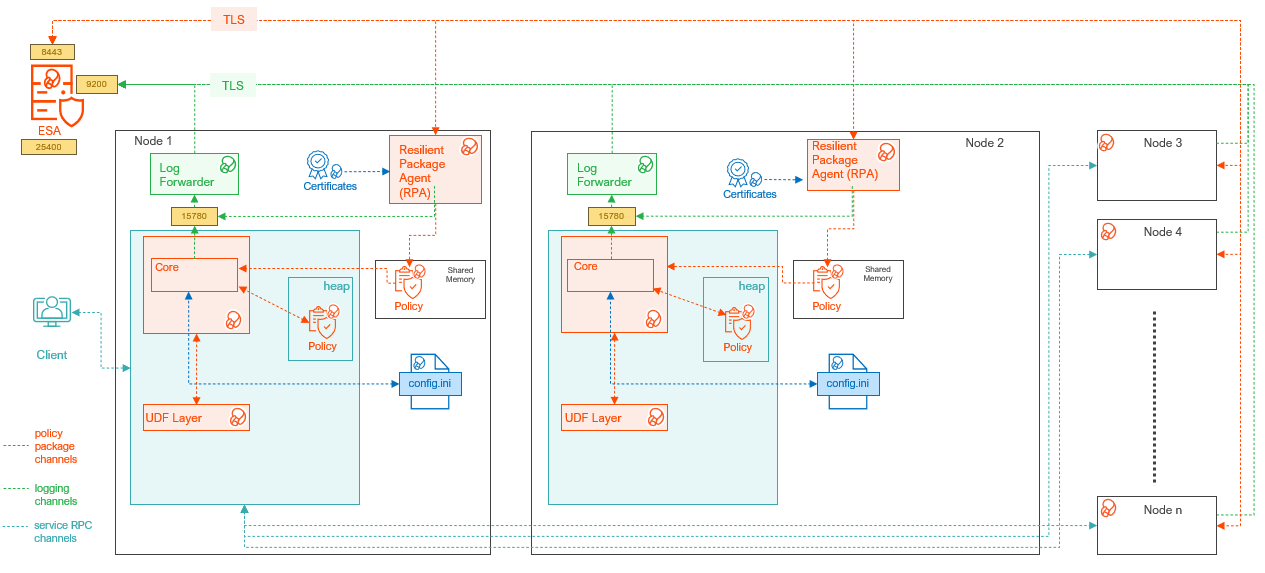
| Component Name | Description |
|---|
| Access Module Processor | Stores and retrieves all the protector data. It is also called as the Virtual Processor (vproc). |
| config.ini | Contains the set of configuration parameters to modify the protector behavior. |
| Core | Is the set of various libraries that provide the Protegrity Core functionality. |
| Log Forwarder | Forwards the protector logs to Insight. |
| Node | Serves as a central processing unit where the database operations are executed using a single operating system. |
| Resilient Package (RP) Agent | Is a daemon running on each node that downloads the Policy from the ESA over a TLS channel using the installed Certificates. |
| UDF Layer | Contains the Data Warehouse Protector UDFs and APIs executing in the Teradata service process. |
2 - System Requirements
Ensure that the following prerequisites are met, before installing the Teradata Data Warehouse Protector:
- The ESA appliance, v10.x or higher, is installed, configured, and running.
- The ports that are configured on the ESA and the nodes in the cluster, which will run the Data Warehouse Protector, are listed in the following table:
| Destination Port | Protocol | Source | Destination | Description |
|---|
| 25400 | TCP | RPAgent on the Data Warehouse Protector node | ESA | The RPAgent communicates with the ESA through this port to download a policy. |
| 9200 | TCP | Log Forwarder on the Data Warehouse Protector node | Protegrity Audit
Store appliance | The Log Forwarder sends all the logs to
the Protegrity Audit Appliance through port 9200. |
| 15780 and 15781 | TCP | Protector on the Data Warehouse Protector node | Log Forwarder on the Data Warehouse Protector node | The Data Warehouse Protector writes Audit Logs to localhost through this port. The Application Logs are also written to localhost through this port. The Log Forwarder reads the logs from that socket. |
- Additional requirements for each of the Teradata node:
- The pcl and rpsync utitlies are installed.
- Approximately 30% of free hard drive space is available.
- Network connectivity is available on every node.
- DBA rights on the Teradata database is available.
- Sudo access on the operating system is available.
- The Database Server is up and running.
- The C-compiler is installed. It is required to install the UDFs in the Teradata database.
Note: For more information about configuring access roles to execute the DBA queries, refer to Additional references for the Teradata Protector.
Note: If the Teradata Parallel Upgrade Tool (PUT) is unavailable, then the Data Warehouse Protector packages must be manually transferred and installed on each node.
Supported Data Warehouse Protectors Matrix
The below table lists the Data Warehouse protectors with the supported Data Warehouse version and platform details:
| Protector | Supported Data Warehouse Version | Supported Platforms |
|---|
| Teradata Data Warehouse Protector | Teradata 17.05 | SLES 12 |
| Teradata 17.10 | SLES 12 |
| Teradata 17.20 | SLES 12 |
| Teradata 20.00 | SLES 15 |
3 - Preparing the Environment
The following sub-sections explain how to install each of Teradata Data Warehouse Protector components, Log Forwarder, and the RPAgent individually. Installing components one by one ensures proper configuration and functionality.
3.1 - Extracting the Installation Package
Extract the installation package to access the scripts required to install the components and the protector.
To extract the files from the installation package:
Login to the database server as the user with the required permissions.
Navigate to the directory where the installation package is downloaded.
For example, /opt/protegrity/.
To extract the contents of the installation package, run the following command:
tar -xvf DatabaseProtector_SLES-ALL-64_x86-64_Teradata-ALL-64_<DBP_version>.tgz
Press ENTER.
The commands extracts the signature files from the package.
DatabaseProtector_SLES-ALL-64_x86-64_Teradata-ALL-64_<DBP_version>.tgz
signatures/DatabaseProtector_SLES-ALL-64_x86-64_Teradata-ALL-64_<DBP_version>.sig
Note: For more information about the steps to verify the signed Teradata Data Warehouse protector build, refer to Verification of Signed Protector Build.
To extract the contents of the installation package, run the following command:
tar -xvf DatabaseProtector_SLES-ALL-64_x86-64_Teradata-ALL-64_<DBP_version>.tgz
Press ENTER.
The commands extracts the following files:
Install_TeradataProtector_Linux_x64_<DBP_version>.sh
LogforwarderSetup_Linux_x64_<DBP_version>.sh
RPAgentSetup_Linux_x64_<DBP_version>.sh
PepTeradataSetup_Linux_x64_<DBP_version>.sh
PepTeradata_UDTSetup_Linux_x64_<DBP_version>.sh
U.S.Patent.No.6,321,201.Legend.txt
3.2 - Installing the Log Forwarder
This section provides instructions to manually install the Log Forwarder on the Teradata database server.
Note: To automate the installation process, use the master installation script provided in the build:
Install_TeradataProtector_Linux_x64_<DBP_version>.sh
For more information, refer to the following sections:
To install the Log Forwarder:
Log in to the server as the user with the required permissions.
Navigate to the directory where the installation files are extracted.
For example, /opt/protegrity/.
To install the Log Forwarder, run the following command:
./LogforwarderSetup_Linux_x64_<DBP_version>.sh
Press ENTER.
The prompt to enter the audit store endpoint appears.
Enter the audit store endpoint (host), alternative (host:port) to use another port than the default port 9200 :
Enter the IP address of the audit store.
Press ENTER.
The prompt to enter additional endpoint appears.
Audit store endpoints: <Audit_store_IP_address>:9200
Do you want to add another audit store endpoint? [y/n]:
To skip adding additional endpoints, type no.
Press ENTER.
The prompt to continue the installation appears.
These audit store endpoints will be added:
<Audit_store_IP_address>:9200

Type 'y' to accept or 'n' to abort installation:
To continue the installation, type yes.
Press ENTER.
The script extracts the files and installs the Log Forwarder.
Unpacking...
Extracting files...
Protegrity Log Forwarder installed in /opt/protegrity/logforwarder.
Note: For manual installation, the script will install the component under the specified directory only.
Navigate to the /opt/protegrity/logforwarder/bin/ directory.
To start the Log Forwarder, run the following command:
Press ENTER.
The command starts the Log Forwarder.
[ info] switching to background mode (PID=8329)
Logforwarder started, PID (<process_ID>) written to PID file /opt/protegrity/logforwarder/
bin/fluent-bit.pid
3.3 - Installing the Resilient Package Agent
This section provides instructions to manually install the RPAgent on the Teradata database server.
Note: To automate the installation process, use the master installation script provided in the build:
Install_TeradataProtector_Linux_x64_<DBP_version>.sh
For more information, refer to the following sections:
The Resilient Package (RP) Agent downloads the certificates. These certificates are further used to authenticate the login credentials, public or private keys, and certify the code reliability.
Prerequsites:
The core libraries integrated with the build uses the secure mode to validate and download the certificates from ESA. To enable the secure mode:
- Before proceeding with the RPA installation in secure mode, ensure that the required CA certificate is available and trusted on the system.
- Download the certificate from ESA.
Note: For more information about downloading certificates from ESA, refer to Manage Certificates.
- After obtaining the certificate, configure the environment variable
| Variable | Value |
|---|
SSL_CERT_FILE | Is the full path to the certificate file. |
- Ensure to include ESA hostname or IP address in ESA TLS certificate (CN or SAN).
- Ensure the ESA hostname or IP addres is resolvable from the RPAgent host.
To install the RPAgent:
Log in to the server as the user with the required permissions.
Navigate to the directory where the installation files are extracted.
For example, /opt/protegrity/.
To install the RP Agent, run the following command:
./RPAgentSetup_Linux_x64_<DBP_version>.sh
Press ENTER.
The prompt to enter the host name or the IP address of the ESA appears.
Please enter upstream host name or IP address[]:
Enter the hostname for ESA.
Note: Failure to specify the hostname will use the insecure mode to validate the certificates. Protegrity does not recommend using the insecure mode to validate and download the certificates from ESA.
Press ENTER.
The prompt to enter the username for downloading the certificate appears.
Please enter the user name for downloading certificates[]:
Enter the username to download the certificates.
Press ENTER.
The prompt to enter the password for downloading the certificate appears.
Please enter the password for downloading certificates []:
Enter the password to download the certificates.
Press ENTER.
The installer extracts the files and downloads the certificates.
Unpacking...
Extracting files...
Certificate validation successful.
Obtaining token from <ESA_Hostname>:25400...
Downloading certificates from <ESA_Hostname>:25400...
% Total    % Received % Xferd  Average Speed  Time    Time    Time   Current
                                Dload  Upload  Total   Spent   Left   Speed
100  11264 100  11264   0      0  51225      0                              0

Extracting certificates...
Certificates successfully downloaded and stored in /opt/protegrity/rpagent/data

Protegrity RPAgent installed in /opt/protegrity/rpagent.
Note: If the JWT token is not specified while downloading the certificates, the RPAgent automatically retrieves the token from ESA.
Note: For manual installation, the script will install the component under the specified directory only.
Navigate to the /opt/protegrity/rpagent/bin/ directory.
To start the RPAgent, run the following command:
Press ENTER.
The command starts the RPAgent successfully and a confirmation message appears.
To verify the status of the RPAgent, run the following command:
Press ENTER.
The status of the RPAgent service appears.
rpagent is running (pid=<process_ID>)
4 - Installing the Teradata Data Warehouse Protector
This section outlines the installation process for the Protegrity Teradata Data Warehouse Protector.
4.1 - Installing the Objects
Log in to the server as the user with the required permissions.
Navigate to the /opt/protegrity/ directory.
To install the Teradata objects, run the following command:
./PepTeradataSetup_Linux_x64_<DBP_version>.sh
Press ENTER.
The prompt to continue installing the Teradata objects appears.
*****************************************************
Welcome to the Database Protector Setup Wizard
*****************************************************
This will install the teradata objects on your computer
Do you want to continue? [yes or no]
To proceed with the installation of the Teradata objects, type yes.
Press ENTER.
The prompt to enter the name of the database to install the UDFs appears.
Enter name of database where the UDFs will be installed.
Enter the database name.
Press ENTER.
The prompt to mention the maximum size of the VARCHAR allocated by the UDFs appears.
Enter the maximum size of the VARCHAR to be allocated by the UDFs.
Note: The default value is 500 characters. Modify the default value in this step, as per requirements, for maximum character length. The mentioned VARCHAR size is the maximum value allocated by the UDFs for UNICODE character set.
Press ENTER.
The script installs the Teradata objects in the /opt/protegrity/databaseprotector/teradata/ directory.
[500]:
1000
***********BUFFER LENGTH INITIALIZATION**************
UDF VARCHAR MAX INPUT BUFFER LENGTH (TOKENIZATION) : 1000 Latin characters
UDF VARCHAR MAX OUTPUT BUFFER LENGTH (TOKENIZATION) : 1351 Latin characters
UDF VARCHAR MAX INPUT BUFFER LENGTH (ENCRYPTION) : 1000 Latin characters
UDF VARCHAR MAX OUTPUT BUFFER LENGTH (ENCRYPTION) : 1038 Bytes
UDF VARCHAR_UNICODE MAX INPUT BUFFER LENGTH (TOKENIZATION) : 1000 UNICODE characters
UDF VARCHAR_UNICODE MAX OUTPUT BUFFER LENGTH (TOKENIZATION) : 2706 UNICODE characters
UDF VARCHAR_UNICODE MAX INPUT BUFFER LENGTH (ENCRYPTION) : 1000 UNICODE characters
UDF VARCHAR_UNICODE MAX OUTPUT BUFFER LENGTH (ENCRYPTION) : 2038 Bytes
teradata objects installed in /opt/protegrity/databaseprotector/teradata.
Permission for /opt/protegrity/databaseprotector is successfully set.
Note: For manual installation, the script will install the database objects under the specified directory only.
Important: By default, all the configurations provided for the UDFs are stored in the dbpuserconf.ini file within the /etc/protegrity/ directory. The Teradata Data Warehouse Protector uses the dbpuserconf.ini file for internal purposes only.
4.2 - Installing the Protector on Single Node
The Teradata Data Warehouse Protector build provides an automated script to manage the installation process on a standalone system. The master script internally calls the scripts to install the components. The master script installs the components in the following order:
- Log Forwarder
- RPAgent
- Policy Enforcement Point (Database Protector)
The installation can also be performed manually by executing the individual scripts to install the different components.
The master script is available in the directory where the installation files are extracted. It provides the following arguments:
install - installs the components in an interactive mode.upgrade - installs a newer version of the protector with minimal downtime.silent - installs the components in a non-interactive mode.install.ini - installs the components as per the parameters provided in the file.help - lists the arguments available for the script.
In addition, the master script will rollback the installation process if any errors are encountered. The script will revert the changes.
Viewing the Arguments for the Script
- Log in to the server as the user with the required permissions.
- Navigate to the directory containing the extracted files and the installation scripts.
- To view the arguments, run the following command:
./Install_TeradataProtector_Linux_x64_<DBP_version>.sh --help
- Press ENTER.
The script lists the available arguments.
 Options:
 --install    Use this option when installing the solution for the first time on a machine/host.
             (i.e., there is no previous installation present)

 --upgrade    Use this option when upgrading an existing installation on the machine/host.

 --install-ini <file>    (Optional) Provide a path to an install.ini file for silent or pre-configured installations.
                         This option works with --install only.
                         It must not be used with --upgrade or --silent.
                         You can pass this either as:
                         --install-ini /path/to/install.ini
                         or
                         --install-ini=/path/to/install.ini
                         Refer to the product documentation for details about the configuration options available in install.ini.
                         The documentation describes all supported keys, required fields, and example configurations.
 --silent    (Optional) Runs the installation/upgrade in silent mode with minimum interactive prompts.

 --help, -h  Display this help message and exit.
Installing the Protector using the Interactive Mode
Note: For installation/upgrade using the automation script, the components will be installed within a <DBP_version> folder under the specified directory.
- Log in to the server as the user with the required permissions.
- Navigate to the directory containing the extracted files and the installation scripts.
- To execute the script, run the following command:
./Install_TeradataProtector_Linux_x64_<DBP_version>.sh --install
- Press ENTER.
The script executes pre-checks and the prompt to select the silent mode of installation appears.
 2026-04-30 08:32:43 - [INFO] ========================================================================
 2026-04-30 08:32:43 - [INFO] Starting environment pre-checks before installation/upgrade
 2026-04-30 08:32:43 - [INFO] ========================================================================

 2026-04-30 08:32:43 - [INFO] Prerequisites check passed: pcl and bteq commands are available on current/running node
 2026-04-30 08:32:43 - [INFO] Checking Teradata PDE state on running node...
 2026-04-30 08:32:43 - [INFO] PDE state check passed on running node: PDE state is RUN/STARTED
 2026-04-30 08:32:43 - [INFO] Checking accessibility of all Teradata nodes...
 2026-04-30 08:32:43 - [INFO] IMPORTANT: ALL nodes must be accessible - if even 1 node is down, installation will be aborted
 2026-04-30 08:32:43 - [INFO] ==========================================
 2026-04-30 08:32:43 - [INFO] Node accessibility check PASSED
 2026-04-30 08:32:43 - [INFO] All 1 node(s) have connected

 <---------------------  localhost  -------------------------------->
 td20sles15
 2026-04-30 08:32:43 - [INFO] ==========================================

 2026-04-30 08:32:43 - [INFO] ========================================================================
 2026-04-30 08:32:43 - [INFO] All environment pre-checks PASSED - proceeding with installation
 2026-04-30 08:32:43 - [INFO] ========================================================================

 Do you want silent installation? (yes/no) [no]:
- To proceed with interactive mode of installation, type
no. - Press ENTER.
The prompt to specify the installation directory for the components appears.Do you want to install the new LogForwarder, RPAgent, and DatabaseProtector together in a single directory? (yes/no) [no]:
- To install the components under a same directory, type
yes. - Press ENTER.
The prompt to enter the installation directory appears.Enter new installation directory [/opt/protegrity]:
- To use the default directory, press ENTER.
The prompt to provide credentials to create the UDFs appears.Do you want to continue and create UDFs?
To create the UDFs, provide the database credentials (yes/no) [no]:
- To create the UDFs, type
yes.Note: Skipping creation of the UDFs terminates the installation script.
- Press ENTER.
The prompt to enter the database user name appears.Enter Teradata database username:
- Enter the username to login to the database.
- Press ENTER.
The prompt to enter the database password appears.Enter Teradata database user's password:
- Enter the password.
- Press ENTER.
The prompt to specify the database to install the UDF appears.Enter name of database where the UDFs will be installed [PROTEGRITY]:
- Enter the database name to install the UDFs.
- Press ENTER.
The prompt to specify the maximum size of varchar to be allocated by the UDFs appears.Enter the maximum size of varchar to be allocated by the UDFs [500]:
- Enter the maximum size of varchar to be allocated by the UDFs.
- Press ENTER.
The script validates the database and the prompt to verify the configuration appears.2026-04-30 08:33:06 - [INFO] Validating database ...
2026-04-30 08:33:26 - [INFO] Database validated successfully
2026-04-30 08:33:26 - [INFO] **************************************************************************
2026-04-30 08:33:26 - [INFO] Installation will be done with following configuration:
2026-04-30 08:33:26 - [INFO] Mode: install
2026-04-30 08:33:26 - [INFO] Logforwarder Installation Directory: /opt/protegrity/<DBP_version>
2026-04-30 08:33:26 - [INFO] RPAgent Installation Directory: /opt/protegrity/<DBP_version>
2026-04-30 08:33:26 - [INFO] DatabaseProtector Installation Directory: /opt/protegrity/<DBP_version>
2026-04-30 08:33:26 - [INFO] This is a fresh install.
2026-04-30 08:33:26 - [INFO] **************************************************************************
2026-04-30 08:33:26 - [INFO] Please verify the above configuration before proceeding.
Do you want to continue? (yes/no) [no]:
- To continue, type
yes. - Press ENTER.
The script proceeds with the installation and triggers the Log Forwarder installation script. The prompt to enter the Audit Store endpoint appears.2026-04-30 08:33:31 - [INFO] Continuing with installation...
2026-04-30 08:33:31 - [INFO] Installing/Upgrading LOGFORWARDER...
2026-04-30 08:33:31 - [INFO] Executing ./LogforwarderSetup_Linux_x64_<DBP_version>.sh...
Enter the audit store endpoint (host), alternative (host:port) to use another port than the default port 9200:
- Enter the audit store endpoint.
- Press ENTER.
The prompt to enter additional audit store endpoint appears.Audit store endpoints: <ESA_IP_Address>:9200
Do you want to add another audit store endpoint? [y/n]:
- To specify additional endpoints, type
yes. - Press ENTER.
The prompt to enter the Audit Store endpoint appears.Enter the audit store endpoint (host), alternative (host:port) to use another port than the default port 9200:
- Enter the audit store endpoint.
- Press ENTER.
The script lists the endpoints that will be added. The prompt to accept and continue the installation appears.-------------------------------------------
These audit store endpoints will be added:
<ESA_IP_Address>:9200
<ESA_IP_Address>:9200
<ESA_IP_Address>:9200
Type 'y' to accept or 'n' to abort installation:
- To accept the endpoints and proceed, type
yes. - Press ENTER.
The script installs the log forwarder. The script then triggers the RPAgent installation script. The prompt to enter the upstream host name or IP address appears.Unpacking...
Extracting files...
Protegrity Log Forwarder installed in /opt/protegrity/<DBP_version>/logforwarder.
2026-04-30 08:33:58 - [INFO] ./LogforwarderSetup_Linux_x64_<DBP_version>.sh completed successfully.
2026-04-30 08:33:58 - [INFO] Installing/Upgrading RPAGENT...
Please enter upstream host name or IP address,
alternative (host:port) to use another port than the default port 25400:
- Enter the ESA hostname.
- Press ENTER.
The prompt to enter ESA token appears.Enter ESA token (leave blank to use username/password):
- To specify the username/password, press ENTER.
The prompt to enter ESA username appears.
- Enter the username to connect to ESA.
- Press ENTER.
The prompt to enter ESA password appears.Enter ESA user's password:
- Enter the password to connect to ESA.
- Press ENTER.
The script:- validates and downloads the certificates from ESA
- installs the RPAgent
- copies the Log Forwarder and RPAgent to all the nodes in the Teradata cluster
- creates installation directories
- starts the new Log Forwarder on all the nodes
- triggers the script to install the database objects
- installs the database objects
- copies the objects to all the nodes in the cluster
- starts the new RPAgent on all the nodes
- creates the new UDFs
The prompt to create the varcharunicode UDFs appears.
2026-04-30 08:34:16 - [INFO] Executing ./RPAgentSetup_Linux_x64_<DBP_version>.sh...
Unpacking...
Extracting files...
Certificate validation successful.
Obtaining token from <ESA_Hostname>:25400...
Downloading certificates from <ESA_Hostname>:25400...
% Total % Received % Xferd Average Speed Time Time Time Current
Dload Upload Total Spent Left Speed
100 11264 100 11264 0 0 63570 0 0
Extracting certificates...
Certificates successfully downloaded and stored in /opt/protegrity/<DBP_version>/rpagent/data
Protegrity RPAgent installed in /opt/protegrity/<DBP_version>/rpagent.
2026-04-30 08:34:18 - [INFO] ./RPAgentSetup_Linux_x64_<DBP_version>.sh completed successfully.
2026-04-30 08:34:18 - [INFO] Copying Logforwarder and RPAgent to all nodes in the Teradata cluster
2026-04-30 08:34:18 - [INFO] Copying Logforwarder and RPAgent components to all nodes
2026-04-30 08:34:18 - [INFO] Creating installation directories on all nodes if not present
All 1 node(s) have connected
All 1 node(s) have connected
All 1 node(s) have connected
All 1 node(s) have connected
2026-04-30 08:34:19 - [INFO] Copying Logforwarder directory /opt/protegrity/<DBP_version>/logforwarder to all nodes
All 1 node(s) have connected
localhost:1022: send completed: 57934195 bytes received (9 files/5 directories)
All 1 node(s) have connected
All 1 node(s) have connected
2026-04-30 08:34:20 - [INFO] Logforwarder successfully copied to all nodes
2026-04-30 08:34:20 - [INFO] Copying RPAgent directory /opt/protegrity/<DBP_version>/rpagent to all nodes
All 1 node(s) have connected
localhost:1022: send completed: 14787376 bytes received (9 files/3 directories)
All 1 node(s) have connected
All 1 node(s) have connected
2026-04-30 08:34:21 - [INFO] RPAgent successfully copied to all nodes
2026-04-30 08:34:21 - [INFO] Logforwarder and RPAgent successfully copied to all nodes
2026-04-30 08:34:21 - [INFO] Starting new Logforwarder on all nodes
All 1 node(s) have connected
<--------------------- localhost -------------------------------->
Fluent Bit v4.2.2-1.5.1+0.gdfa6.fb-4.2
* Copyright (C) 2015-2025 The Fluent Bit Authors
* Fluent Bit is a CNCF graduated project under the Fluent organization
* https://fluentbit.io
______ _ _ ______ _ _ ___ _____
| ___| | | | | ___ (_) | / | / __ \
| |_ | |_ _ ___ _ __ | |_ | |_/ /_| |_ __ __/ /| | `' / /'
| _| | | | | |/ _ \ '_ \| __| | ___ \ | __| \ \ / / /_| | / /
| | | | |_| | __/ | | | |_ | |_/ / | |_ \ V /\___ |_./ /___
\_| |_|\__,_|\___|_| |_|\__| \____/|_|\__| \_/ |_(_)_____/
Fluent Bit v4.2 Direct Routes Ahead
Celebrating 10 Years of Open, Fluent Innovation!
[2026/04/30 08:34:22.133493631] [ info] switching to background mode (PID=28685)
Log Forwarder was not started successfully
2026-04-30 08:34:24 - [INFO] Preparing Database Protector installation...
2026-04-30 08:34:24 - [INFO] Installing/Upgrading DBP...
2026-04-30 08:34:24 - [INFO] Executing ./PepTeradataSetup_Linux_x64_<DBP_version>.sh...
*****************************************************
Welcome to the Database Protector Setup Wizard
*****************************************************
This will install the teradata objects on your computer
Do you want to continue? [yes or no]
Enter installation directory.
A new directory will be created in the installation directory.
[/opt/protegrity]:
Unpacking...
Extracting files...
Enter name of database where the UDFs will be installed.
[PROTEGRITY]:
Enter maxmimum size of varchar to be allocated by the UDFs.
NOTE: This is the maximum varchar size allocated by the UDFs
for latin as well as unicode character set.
Larger size will affect the performance !!!
Some applications can also have issues with larger size,
such as BTEQ, SQL Assistant.
[500]:
***********BUFFER LENGTH INITIALIZATION**************
UDF VARCHAR MAX INPUT BUFFER LENGTH (TOKENIZATION) : 500 Latin characters
UDF VARCHAR MAX OUTPUT BUFFER LENGTH (TOKENIZATION) : 676 Latin characters
UDF VARCHAR MAX INPUT BUFFER LENGTH (ENCRYPTION) : 500 Latin characters
UDF VARCHAR MAX OUTPUT BUFFER LENGTH (ENCRYPTION) : 538 Bytes
UDF VARCHAR_UNICODE MAX INPUT BUFFER LENGTH (TOKENIZATION) : 500 UNICODE characters
UDF VARCHAR_UNICODE MAX OUTPUT BUFFER LENGTH (TOKENIZATION) : 1356 UNICODE characters
UDF VARCHAR_UNICODE MAX INPUT BUFFER LENGTH (ENCRYPTION) : 500 UNICODE characters
UDF VARCHAR_UNICODE MAX OUTPUT BUFFER LENGTH (ENCRYPTION) : 1038 Bytes
teradata objects installed in /opt/protegrity/<DBP_version>/databaseprotector/teradata.
2026-04-30 08:34:25 - [INFO] ./PepTeradataSetup_Linux_x64_<DBP_version>.sh completed successfully.
2026-04-30 08:34:25 - [INFO] Copying DatabaseProtector to all nodes
All 1 node(s) have connected
localhost:1022: send completed: 8926075 bytes received (16 files/5 directories)
All 1 node(s) have connected
All 1 node(s) have connected
2026-04-30 08:34:26 - [INFO] Setting DatabaseProtector ownership (tdatuser:tdtrusted) on all nodes
All 1 node(s) have connected
2026-04-30 08:34:26 - [INFO] DatabaseProtector successfully copied to all nodes
2026-04-30 08:34:26 - [INFO] Synchronizing /etc/protegrity to all nodes
All 1 node(s) have connected
All 1 node(s) have connected
localhost:1022: send completed: 1157 bytes received (1 files/1 directories)
All 1 node(s) have connected
All 1 node(s) have connected
All 1 node(s) have connected
2026-04-30 08:34:27 - [INFO] User configuration directory successfully synchronized to all nodes
2026-04-30 08:34:27 - [INFO] Starting new RPAgent on all nodes
Starting rpagent
2026-04-30 08:34:27 - [INFO] Successfully launched new RPAgent on all nodes
2026-04-30 08:34:27 - [INFO] Creating new UDFs (database operation on current node only - shared across all nodes)
BTEQ 20.00.00.05 (64-bit) Thu Apr 30 08:34:27 2026 PID: 30406
+---------+---------+---------+---------+---------+---------+---------+----
.SET EXITONDELAY ON MAXREQTIME 300 RC 12
+---------+---------+---------+---------+---------+---------+---------+----
.logon localhost/<database_user_name>,
*** Logon successfully completed.
*** Teradata Database Release is 20.00.22.31
*** Teradata Database Version is 20.00.22.31
*** Transaction Semantics are BTET.
*** Session Character Set Name is 'ASCII'.
*** Total elapsed time was 21 seconds.
+---------+---------+---------+---------+---------+---------+---------+----
database <database_name>;
*** New default database accepted.
*** Total elapsed time was 1 second.
+---------+---------+---------+---------+---------+---------+---------+----
.IF ERRORCODE <> 0 THEN .QUIT 12;
+---------+---------+---------+---------+---------+---------+---------+----
.run file /opt/protegrity/<DBP_version>/databaseprotector/teradata/sqlscripts/c
reateobjects.sql;
+---------+---------+---------+---------+---------+---------+---------+----
Do you want to create the varcharunicode UDFs? (yes/no) [no]:
- To create the varcharunicode UDFs, type
yes. - Press ENTER.
The script creates the varchar unicode UDFs and completes the installation.
2026-04-30 08:35:25 - [INFO] Creating varcharunicode UDFs
BTEQ 20.00.00.05 (64-bit) Thu Apr 30 08:35:25 2026 PID: 31403
+---------+---------+---------+---------+---------+---------+---------+----
.SET EXITONDELAY ON MAXREQTIME 300 RC 12
+---------+---------+---------+---------+---------+---------+---------+----
.logon localhost/<database_user_name>,
*** Logon successfully completed.
*** Teradata Database Release is 20.00.22.31
*** Teradata Database Version is 20.00.22.31
*** Transaction Semantics are BTET.
*** Session Character Set Name is 'ASCII'.
*** Total elapsed time was 20 seconds.
+---------+---------+---------+---------+---------+---------+---------+----
database <database_name>;
*** New default database accepted.
*** Total elapsed time was 1 second.
+---------+---------+---------+---------+---------+---------+---------+----
.IF ERRORCODE <> 0 THEN .QUIT 12;
+---------+---------+---------+---------+---------+---------+---------+----
.run file /opt/protegrity/<DBP_version>/databaseprotector/teradata/sqlscripts/c
reatevarcharunicode.sql;
+---------+---------+---------+---------+---------+---------+---------+----
2026-04-30 08:35:49 - [INFO] Varcharunicode UDFs created successfully
2026-04-30 08:35:49 - [INFO] Testing UDFs
BTEQ 20.00.00.05 (64-bit) Thu Apr 30 08:35:49 2026 PID: 31505
+---------+---------+---------+---------+---------+---------+---------+----
.SET EXITONDELAY ON MAXREQTIME 300 RC 12
+---------+---------+---------+---------+---------+---------+---------+----
.logon localhost/<database_user_name>,
*** Logon successfully completed.
*** Teradata Database Release is 20.00.22.31
*** Teradata Database Version is 20.00.22.31
*** Transaction Semantics are BTET.
*** Session Character Set Name is 'ASCII'.
*** Total elapsed time was 20 seconds.
+---------+---------+---------+---------+---------+---------+---------+----
database <database_name>;
*** New default database accepted.
*** Total elapsed time was 1 second.
+---------+---------+---------+---------+---------+---------+---------+----
.IF ERRORCODE <> 0 THEN .QUIT 12;
+---------+---------+---------+---------+---------+---------+---------+----
select pty_getversion();
*** Query completed. One row found. One column returned.
*** Total elapsed time was 1 second.
pty_getversion()
---------------------------------------------------------------------------
<DBP_version>
+---------+---------+---------+---------+---------+---------+---------+----
.logoff
*** You are now logged off from the <database_user_name>.
+---------+---------+---------+---------+---------+---------+---------+----
.quit
*** Exiting BTEQ...
*** RC (return code) = 0
2026-04-30 08:36:09 - [INFO] Installation successful.
2026-04-30 08:36:09 - [INFO] All components installed successfully.
2026-04-30 08:36:09 - [INFO] IMPORTANT: Protegrity UDT installation must be handled manually. Refer to product documentation.
2026-04-30 08:36:09 - [INFO] IMPORTANT: Protegrity Decimal UDF objects installation must be handled manually. Refer to product documentation.
Installing the Protector using the Silent Mode
Note: For installation/upgrade using the automation script, the components will be installed within a <DBP_version> folder under the specified directory.
- Log in to the server as the user with the required permissions.
- Navigate to the directory containing the extracted files and the installation scripts.
- To execute the script, run the following command:
./Install_TeradataProtector_Linux_x64_<DBP_version>.sh --install
- Press ENTER.
The script executes pre-checks and the prompt to select the silent mode of installation appears. 2026-04-30 08:32:43 - [INFO] ========================================================================
2026-04-30 08:32:43 - [INFO] Starting environment pre-checks before installation/upgrade
2026-04-30 08:32:43 - [INFO] ========================================================================
2026-04-30 08:32:43 - [INFO] Prerequisites check passed: pcl and bteq commands are available on current/running node
2026-04-30 08:32:43 - [INFO] Checking Teradata PDE state on running node...
2026-04-30 08:32:43 - [INFO] PDE state check passed on running node: PDE state is RUN/STARTED
2026-04-30 08:32:43 - [INFO] Checking accessibility of all Teradata nodes...
2026-04-30 08:32:43 - [INFO] IMPORTANT: ALL nodes must be accessible - if even 1 node is down, installation will be aborted
2026-04-30 08:32:43 - [INFO] ==========================================
2026-04-30 08:32:43 - [INFO] Node accessibility check PASSED
2026-04-30 08:32:43 - [INFO] All 1 node(s) have connected
<--------------------- localhost -------------------------------->
td20sles15
2026-04-30 08:32:43 - [INFO] ==========================================
2026-04-30 08:32:43 - [INFO] ========================================================================
2026-04-30 08:32:43 - [INFO] All environment pre-checks PASSED - proceeding with installation
2026-04-30 08:32:43 - [INFO] ========================================================================
Do you want silent installation? (yes/no) [no]:
- To proceed with silent mode of installation, type
yes. - Press ENTER.
The script uses the default installation directory, /opt/protegrity/, for silent installation. The prompt to create UDFs and provide database credentials appears. 2026-04-30 08:08:27 - [INFO] You have chosen silent mode. Therefore, /opt/protegrity is considered as base directory for new installation.
Do you want to continue and create UDFs?
To create the UDFs, provide the database credentials  (yes/no) [no]:
- To create the UDFs, type
yes.Note: Skipping creation of the UDFs terminates the installation script.
- Press ENTER.
The prompt to enter the database username appears.Enter Teradata database username:
- Enter the username.
- Press ENTER.
The prompt to enter the password appears.Enter Teradata database user's password:
- Enter the password.
- Press ENTER.
The prompt to enter the database name appears.Enter name of database where the UDFs will be installed [PROTEGRITY]:
- Enter the database name to install the UDFs.
- Press ENTER.
The prompt to specify the maximum size of varchar to be allocated by the UDFs appears.Enter the maximum size of varchar to be allocated by the UDFs [500]:
- Enter the maximum size of varchar to be allocated by the UDFs.
- Press ENTER.
The script validates the database. The script lists the configuration and the prompt to continue appears.2026-04-30 08:08:53 - [INFO] Validating database ...
2026-04-30 08:09:13 - [INFO] Database validated successfully
2026-04-30 08:09:13 - [INFO] **************************************************************************
2026-04-30 08:09:13 - [INFO] Installation will be done with following configuration:
2026-04-30 08:09:13 - [INFO] Mode: install
2026-04-30 08:09:13 - [INFO] Logforwarder Installation Directory: /opt/protegrity/<DBP_version>
2026-04-30 08:09:13 - [INFO] RPAgent Installation Directory: /opt/protegrity/<DBP_version>
2026-04-30 08:09:13 - [INFO] DatabaseProtector Installation Directory: /opt/protegrity/<DBP_version>
2026-04-30 08:09:13 - [INFO] This is a fresh install.
2026-04-30 08:09:13 - [INFO] **************************************************************************
2026-04-30 08:09:13 - [INFO] Please verify the above configuration before proceeding.
Do you want to continue? (yes/no) [no]:
- To proceed with the configuration, type
yes. - Press ENTER.
The script proceeds with the installation and triggers the Log Forwarder installation script. The prompt to enter the Audit Store endpoint appears.2026-04-30 08:33:31 - [INFO] Continuing with installation...
2026-04-30 08:33:31 - [INFO] Installing/Upgrading LOGFORWARDER...
2026-04-30 08:33:31 - [INFO] Executing ./LogforwarderSetup_Linux_x64_<DBP_version>.sh...
Enter the audit store endpoint (host), alternative (host:port) to use another port than the default port 9200:
- Enter the audit store endpoint.
- Press ENTER.
The prompt to enter additional audit store endpoint appears.Audit store endpoints: <ESA_IP_Address>:9200
Do you want to add another audit store endpoint? [y/n]:
- To specify additional endpoints, type
yes. - Press ENTER.
The prompt to enter the Audit Store endpoint appears.Enter the audit store endpoint (host), alternative (host:port) to use another port than the default port 9200:
- Enter the audit store endpoint.
- Press ENTER.
The script lists the endpoints that will be added. The prompt to accept and continue the installation appears.-------------------------------------------
These audit store endpoints will be added:
<ESA_IP_Address>:9200
<ESA_IP_Address>:9200
<ESA_IP_Address>:9200
Type 'y' to accept or 'n' to abort installation:
- To accept the endpoints and proceed, type
yes. - Press ENTER.
The script installs the log forwarder. The script then triggers the RPAgent installation script. The prompt to enter the upstream host name or IP address appears.Unpacking...
Extracting files...
Protegrity Log Forwarder installed in /opt/protegrity/<DBP_version>/logforwarder.
2026-04-30 08:33:58 - [INFO] ./LogforwarderSetup_Linux_x64_<DBP_version>.sh completed successfully.
2026-04-30 08:33:58 - [INFO] Installing/Upgrading RPAGENT...
Please enter upstream host name or IP address, alternative (host:port) to use another port than the default port 25400:
- Enter the ESA hostname.
- Press ENTER.
The prompt to enter ESA token appears.Enter ESA token (leave blank to use username/password):
- To specify the username/password, press ENTER.
The prompt to enter ESA username appears. - Enter the username to connect to ESA.
- Press ENTER.
The prompt to enter ESA password appears.Enter ESA user's password:
- Enter the password to connect to ESA.
- Press ENTER.
The script:- validates and downloads the certificates from ESA
- installs the RPAgent
- copies the Log Forwarder and RPAgent to all the nodes in the Teradata cluster
- creates installation directories
- starts the new Log Forwarder on all the nodes
- triggers the script to install the database objects
- installs the database objects
- copies the objects to all the nodes in the cluster
- starts the new RPAgent on all the nodes
- creates the new UDFs
The prompt to create the varcharunicode UDFs appears.
2026-04-30 08:34:16 - [INFO] Executing ./RPAgentSetup_Linux_x64_<DBP_version>.sh...
Unpacking...
Extracting files...
Certificate validation successful.
Obtaining token from <ESA_Hostname>:25400...
Downloading certificates from <ESA_Hostname>:25400...
% Total    % Received % Xferd  Average Speed  Time    Time    Time   Current
                                Dload  Upload  Total   Spent   Left   Speed
100  11264 100  11264   0      0  63570      0                              0

Extracting certificates...
Certificates successfully downloaded and stored in /opt/protegrity/<DBP_version>/rpagent/data

Protegrity RPAgent installed in /opt/protegrity/<DBP_version>/rpagent.

2026-04-30 08:34:18 - [INFO] ./RPAgentSetup_Linux_x64_<DBP_version>.sh completed successfully.
2026-04-30 08:34:18 - [INFO] Copying Logforwarder and RPAgent to all nodes in the Teradata cluster
2026-04-30 08:34:18 - [INFO] Copying Logforwarder and RPAgent components to all nodes
2026-04-30 08:34:18 - [INFO] Creating installation directories on all nodes if not present
All 1 node(s) have connected
All 1 node(s) have connected
All 1 node(s) have connected
All 1 node(s) have connected
2026-04-30 08:34:19 - [INFO] Copying Logforwarder directory /opt/protegrity/<DBP_version>/logforwarder to all nodes
All 1 node(s) have connected
localhost:1022: send completed: 57934195 bytes received (9 files/5 directories)
All 1 node(s) have connected
All 1 node(s) have connected
2026-04-30 08:34:20 - [INFO] Logforwarder successfully copied to all nodes
2026-04-30 08:34:20 - [INFO] Copying RPAgent directory /opt/protegrity/<DBP_version>/rpagent to all nodes
All 1 node(s) have connected
localhost:1022: send completed: 14787376 bytes received (9 files/3 directories)
All 1 node(s) have connected
All 1 node(s) have connected
2026-04-30 08:34:21 - [INFO] RPAgent successfully copied to all nodes
2026-04-30 08:34:21 - [INFO] Logforwarder and RPAgent successfully copied to all nodes
2026-04-30 08:34:21 - [INFO] Starting new Logforwarder on all nodes
All 1 node(s) have connected

<---------------------  localhost  -------------------------------->
Fluent Bit v4.2.2-1.5.1+0.gdfa6.fb-4.2
* Copyright (C) 2015-2025 The Fluent Bit Authors
* Fluent Bit is a CNCF graduated project under the Fluent organization
* https://fluentbit.io

______ _                  _    ______ _ _             ___   _____
|  ___| |                | |   | ___ (_) |           /   | / __  \
| |_  | |_   _  ___ _ __ | |_  | |_/ /_| |_  __   __/ /| | `' / /'
|  _| | | | | |/ _ \ '_ \| __| | ___ \ | __| \ \ / / /_| |   / /
| |   | | |_| |  __/ | | | |_  | |_/ / | |_   \ V /\___  |_./ /___
\_|   |_|\__,_|\___|_| |_|\__| \____/|_|\__|   \_/     |_(_)_____/

            Fluent Bit v4.2   Direct Routes Ahead
        Celebrating 10 Years of Open, Fluent Innovation!

[2026/04/30 08:34:22.133493631] [ info] switching to background mode (PID=28685)
Log Forwarder was not started successfully

2026-04-30 08:34:24 - [INFO] Preparing Database Protector installation...
2026-04-30 08:34:24 - [INFO] Installing/Upgrading DBP...
2026-04-30 08:34:24 - [INFO] Executing ./PepTeradataSetup_Linux_x64_<DBP_version>.sh...
*****************************************************
Welcome to the Database Protector Setup Wizard
*****************************************************

This will install the teradata objects on your computer
Do you want to continue? [yes or no]
Enter installation directory.
A new directory will be created in the installation directory.
[/opt/protegrity]:
Unpacking...
Extracting files...
Enter name of database where the UDFs will be installed.
[PROTEGRITY]:
Enter maxmimum size of varchar to be allocated by the UDFs.
NOTE: This is the maximum varchar size allocated by the UDFs
    for latin as well as unicode character set.
    Larger size will affect the performance !!!
    Some applications can also have issues with larger size,
    such as BTEQ, SQL Assistant.
[500]:

***********BUFFER LENGTH INITIALIZATION**************
UDF VARCHAR MAX INPUT BUFFER LENGTH (TOKENIZATION)  :  500  Latin characters
UDF VARCHAR MAX OUTPUT BUFFER LENGTH (TOKENIZATION) :  676  Latin characters
UDF VARCHAR MAX INPUT BUFFER LENGTH (ENCRYPTION)    :  500  Latin characters
UDF VARCHAR MAX OUTPUT BUFFER LENGTH (ENCRYPTION)   :  538  Bytes
UDF VARCHAR_UNICODE MAX INPUT BUFFER LENGTH (TOKENIZATION)  :  500  UNICODE characters
UDF VARCHAR_UNICODE MAX OUTPUT BUFFER LENGTH (TOKENIZATION) :  1356  UNICODE characters
UDF VARCHAR_UNICODE MAX INPUT BUFFER LENGTH (ENCRYPTION)    :  500  UNICODE characters
UDF VARCHAR_UNICODE MAX OUTPUT BUFFER LENGTH (ENCRYPTION)   :  1038  Bytes

teradata objects installed in /opt/protegrity/<DBP_version>/databaseprotector/teradata.

2026-04-30 08:34:25 - [INFO] ./PepTeradataSetup_Linux_x64_<DBP_version>.sh completed successfully.
2026-04-30 08:34:25 - [INFO] Copying DatabaseProtector to all nodes
All 1 node(s) have connected
localhost:1022: send completed: 8926075 bytes received (16 files/5 directories)
All 1 node(s) have connected
All 1 node(s) have connected
2026-04-30 08:34:26 - [INFO] Setting DatabaseProtector ownership (tdatuser:tdtrusted) on all nodes
All 1 node(s) have connected
2026-04-30 08:34:26 - [INFO] DatabaseProtector successfully copied to all nodes
2026-04-30 08:34:26 - [INFO] Synchronizing /etc/protegrity to all nodes
All 1 node(s) have connected
All 1 node(s) have connected
localhost:1022: send completed: 1157 bytes received (1 files/1 directories)
All 1 node(s) have connected
All 1 node(s) have connected
All 1 node(s) have connected
2026-04-30 08:34:27 - [INFO] User configuration directory successfully synchronized to all nodes
2026-04-30 08:34:27 - [INFO] Starting new RPAgent on all nodes
Starting rpagent
2026-04-30 08:34:27 - [INFO] Successfully launched new RPAgent on all nodes
2026-04-30 08:34:27 - [INFO] Creating new UDFs (database operation on current node only - shared across all nodes)
BTEQ 20.00.00.05 (64-bit) Thu Apr 30 08:34:27 2026 PID: 30406

+---------+---------+---------+---------+---------+---------+---------+----
.SET EXITONDELAY ON MAXREQTIME 300 RC 12
+---------+---------+---------+---------+---------+---------+---------+----
.logon localhost/<database_user_name>,

*** Logon successfully completed.
*** Teradata Database Release is 20.00.22.31
*** Teradata Database Version is 20.00.22.31
*** Transaction Semantics are BTET.
*** Session Character Set Name is 'ASCII'.

*** Total elapsed time was 21 seconds.

+---------+---------+---------+---------+---------+---------+---------+----
database <database_name>;

*** New default database accepted.
*** Total elapsed time was 1 second.


+---------+---------+---------+---------+---------+---------+---------+----
.IF ERRORCODE <> 0 THEN .QUIT 12;
+---------+---------+---------+---------+---------+---------+---------+----
.run file /opt/protegrity/<DBP_version>/databaseprotector/teradata/sqlscripts/c
reateobjects.sql;
+---------+---------+---------+---------+---------+---------+---------+----

Do you want to create the varcharunicode UDFs? (yes/no) [no]:
- To create the varcharunicode UDFs, type
yes. - Press ENTER.
The script creates the varcharunicode UDFs and completes the installation.2026-04-30 08:11:30 - [INFO] Creating varcharunicode UDFs
BTEQ 20.00.00.05 (64-bit) Thu Apr 30 08:11:31 2026 PID: 24930
+---------+---------+---------+---------+---------+---------+---------+----
.SET EXITONDELAY ON MAXREQTIME 300 RC 12
+---------+---------+---------+---------+---------+---------+---------+----
.logon localhost/<database_user_name>,
*** Logon successfully completed.
*** Teradata Database Release is 20.00.22.31
*** Teradata Database Version is 20.00.22.31
*** Transaction Semantics are BTET.
*** Session Character Set Name is 'ASCII'.
*** Total elapsed time was 20 seconds.
+---------+---------+---------+---------+---------+---------+---------+----
database <database_name>;
*** New default database accepted.
*** Total elapsed time was 1 second.
+---------+---------+---------+---------+---------+---------+---------+----
.IF ERRORCODE <> 0 THEN .QUIT 12;
+---------+---------+---------+---------+---------+---------+---------+----
.run file /opt/protegrity/<DBP_version>/databaseprotector/teradata/sqlscripts/c
reatevarcharunicode.sql;
+---------+---------+---------+---------+---------+---------+---------+----
2026-04-30 08:11:55 - [INFO] Varcharunicode UDFs created successfully
2026-04-30 08:11:55 - [INFO] Testing UDFs
BTEQ 20.00.00.05 (64-bit) Thu Apr 30 08:11:55 2026 PID: 25033
+---------+---------+---------+---------+---------+---------+---------+----
.SET EXITONDELAY ON MAXREQTIME 300 RC 12
+---------+---------+---------+---------+---------+---------+---------+----
.logon localhost/<database_user_name>,
*** Logon successfully completed.
*** Teradata Database Release is 20.00.22.31
*** Teradata Database Version is 20.00.22.31
*** Transaction Semantics are BTET.
*** Session Character Set Name is 'ASCII'.
*** Total elapsed time was 20 seconds.
+---------+---------+---------+---------+---------+---------+---------+----
database <database_name>;
*** New default database accepted.
*** Total elapsed time was 1 second.
+---------+---------+---------+---------+---------+---------+---------+----
.IF ERRORCODE <> 0 THEN .QUIT 12;
+---------+---------+---------+---------+---------+---------+---------+----
select pty_getversion();
*** Query completed. One row found. One column returned.
*** Total elapsed time was 1 second.
pty_getversion()
---------------------------------------------------------------------------
<DBP_version>
+---------+---------+---------+---------+---------+---------+---------+----
.logoff
*** You are now logged off from the <database_user_name>.
+---------+---------+---------+---------+---------+---------+---------+----
.quit
*** Exiting BTEQ...
*** RC (return code) = 0
2026-04-30 08:12:15 - [INFO] Installation successful.
2026-04-30 08:12:15 - [INFO] All components installed successfully.
2026-04-30 08:12:15 - [INFO] IMPORTANT: Protegrity UDT installation must be handled manually. Refer to product documentation.
2026-04-30 08:12:15 - [INFO] IMPORTANT: Protegrity Decimal UDF objects installation must be handled manually. Refer to product documentation.
Installing the Protector using the install.ini file
This argument requires the install.ini file to be present and updated with the required parameters. The install.ini files contains the installation directories for the components and the endpoints for the Log Forwarder and RPAgent.
A sample output of the install.ini file is listed below.
; =============================================================================
; install.ini - Sample configuration file for Database Protector installation
; =============================================================================
;
; Usage:
;   ./install_pep_teradata_v2.sh --install --install-ini /path/to/install.ini
;
; Notes:
;   - This file is only supported with --install mode (not --upgrade or --silent).
;   - Lines starting with ; or # are treated as comments.
;   - All fields listed below are REQUIRED unless noted otherwise.
;   - Section names and keys are case-insensitive during parsing.
;   - The installer will automatically append the component subdirectory
;     (e.g., /logforwarder, /rpagent, /databaseprotector) under each
;     INSTALLATION_DIR path.
;
; =============================================================================

[Logforwarder]
; Base directory where LogForwarder will be installed.
; The installer will create a "logforwarder" subdirectory under this path.
INSTALLATION_DIR = /opt/protegrity

; Space-separated list of audit store endpoint(s) in host:port format.
; Multiple endpoints can be specified for redundancy.
AUDIT_STORE_ENDPOINTS = <Audit_Store_Endpoint>:9200 <Audit_Store_Endpoint>:9200

[RPAgent]
; Base directory where RPAgent will be installed.
; The installer will create an "rpagent" subdirectory under this path.
INSTALLATION_DIR = /opt/protegrity

; Upstream ESA (Enterprise Security Administrator) host and port.
; Format: <ip_or_hostname>:<port>
; If the port is omitted, the default port 25400 is used.
UPSTREAM_HOST_IP_ADDR_PORT = <ESA_Hostname>:25400

[DatabaseProtector]
; Base directory where DatabaseProtector will be installed.
; The installer will create a "databaseprotector" subdirectory under this path.
INSTALLATION_DIR = /opt/protegrity

; Teradata database name used for creating UDF objects.
DATABASE_NAME = <Database_name_to_install_UDFs>

; Maximum size of VARCHAR to be allocated by the UDFs.
; Must be a positive integer.
MAX_VARCHAR_SIZE = 500
Note: To use any directory for the Database Protector, ensure the directory is available. Otherwise, the installation will fail.
Note: The default port for the Audit Store endpoint is 9200. The default port for the RPAgent is 25400. To use any other port, replace the value.
Note: For installation/upgrade using the automation script, the components will be installed within a <DBP_version> folder under the specified directory.
To install the protector using the install.ini argument:
- Log in to the server as the user with the required permissions.
- Navigate to the directory containing the extracted files and the installation scripts.
- To execute the script with the argument, run the following command:
./Install_TeradataProtector_Linux_x64_<DBP_version>.sh --install --install-ini <path_to_install.ini_file>
- Press ENTER.
The script performs a pre-check, detects the install.ini file and the prompt to create the UDF appears. 2026-05-04 03:41:36 - [INFO] ========================================================================
2026-05-04 03:41:36 - [INFO] Starting environment pre-checks before installation/upgrade
2026-05-04 03:41:36 - [INFO] ========================================================================
2026-05-04 03:41:36 - [INFO] Prerequisites check passed: pcl and bteq commands are available on current/running node
2026-05-04 03:41:36 - [INFO] Checking Teradata PDE state on running node...
2026-05-04 03:41:36 - [INFO] PDE state check passed on running node: PDE state is RUN/STARTED
2026-05-04 03:41:36 - [INFO] Checking accessibility of all Teradata nodes...
2026-05-04 03:41:36 - [INFO] IMPORTANT: ALL nodes must be accessible - if even 1 node is down, installation will be aborted
2026-05-04 03:41:36 - [INFO] ==========================================
2026-05-04 03:41:36 - [INFO] Node accessibility check PASSED
2026-05-04 03:41:36 - [INFO] All 1 node(s) have connected
<--------------------- localhost -------------------------------->
td20sles15
2026-05-04 03:41:36 - [INFO] ==========================================
2026-05-04 03:41:36 - [INFO] ========================================================================
2026-05-04 03:41:36 - [INFO] All environment pre-checks PASSED - proceeding with installation
2026-05-04 03:41:36 - [INFO] ========================================================================
2026-05-04 03:41:36 - [INFO] install.ini detected: /<path_to_install.ini_file>/install.ini
Do you want to continue and create UDFs?
To create the UDFs, provide the database credentials (yes/no) [no]:
- To create the UDFs, type
yes.Note: Skipping creation of the UDFs terminates the installation script.
- Press ENTER.
The prompt to enter the database username appears.Enter Teradata database username:
- Enter the username.
- Press ENTER.
The prompt to enter the database password appears.Enter Teradata database user's password:
- Enter the password.
- Press ENTER.
The script validates the database and lists the configuration. The prompt to verify the configuration appears.2026-05-04 03:41:43 - [INFO] Validating database ...
2026-05-04 03:42:04 - [INFO] Database validated successfully
2026-05-04 03:42:04 - [INFO] **************************************************************************
2026-05-04 03:42:04 - [INFO] Installation will be done with following configuration:
2026-05-04 03:42:04 - [INFO] Mode: install
2026-05-04 03:42:04 - [INFO] Using configuration from install.ini:
2026-05-04 03:42:04 - [INFO] Logforwarder Installation Directory: /opt/protegrity/<DBP_version>
2026-05-04 03:42:04 - [INFO] Audit Store Endpoints: <IP_Address>:9200 <IP_Address>:9200
2026-05-04 03:42:04 - [INFO] RPAgent Installation Directory: /opt/protegrity/<DBP_version>
2026-05-04 03:42:04 - [INFO] Upstream (ESA) IP Address for RPAgent: <ESA_Hostname>
2026-05-04 03:42:04 - [INFO] Upstream (ESA) Port for RPAgent: 25400
2026-05-04 03:42:04 - [INFO] DatabaseProtector Installation Directory: /opt/protegrity/<DBP_version>
2026-05-04 03:42:04 - [INFO] This is a fresh install.
2026-05-04 03:42:04 - [INFO] **************************************************************************
2026-05-04 03:42:04 - [INFO] Please verify the above configuration before proceeding.
Do you want to continue? (yes/no) [no]:
- To proceed with the configuration, type
yes. - Press ENTER.
The script installs the log forwarder. The script then triggers the RPAgent installation script. The prompt to enter ESA token appears.2026-05-04 03:42:08 - [INFO] Continuing with installation...
2026-05-04 03:42:08 - [INFO] Installing/Upgrading LOGFORWARDER...
2026-05-04 03:42:08 - [INFO] Executing ./LogforwarderSetup_Linux_x64_<DBP_version>.sh...
Unpacking...
Extracting files...
Protegrity Log Forwarder installed in /opt/protegrity/<DBP_version>/logforwarder.
2026-05-04 03:42:09 - [INFO] ./LogforwarderSetup_Linux_x64_<DBP_version>.sh completed successfully.
2026-05-04 03:42:09 - [INFO] Installing/Upgrading RPAGENT...
Enter ESA token (leave blank to use username/password):
- To use the credentials for ESA, press ENTER.
The prompt to enter the username appears.
- Enter the username.
- Press ENTER.
The prompt to enter the password appears.Enter ESA user's password:
- Enter the password.
- Press ENTER.
The script:- validates and downloads the certificates from ESA
- installs the RPAgent
- copies the Log Forwarder and RPAgent to all the nodes in the Teradata cluster
- creates installation directories
- starts the new Log Forwarder on all the nodes
- triggers the script to install the database objects
- installs the database objects
- copies the objects to all the nodes in the cluster
- starts the new RPAgent on all the nodes
- creates the new UDFs
The prompt to create the varcharunicode UDFs appears.
2026-05-04 03:42:16 - [INFO] Executing ./RPAgentSetup_Linux_x64_<DBP_version>.sh...
Unpacking...
Extracting files...
Certificate validation successful.
Obtaining token from <ESA_Hostname>:25400...
Downloading certificates from <ESA_Hostname>:25400...
% Total    % Received % Xferd  Average Speed  Time    Time    Time   Current
                                Dload  Upload  Total   Spent   Left   Speed
100  11264 100  11264   0      0  54891      0                              0

Extracting certificates...
Certificates successfully downloaded and stored in /opt/protegrity/<DBP_version>/rpagent/data

Protegrity RPAgent installed in /opt/protegrity/<DBP_version>/rpagent.

2026-05-04 03:42:18 - [INFO] ./RPAgentSetup_Linux_x64_<DBP_version>.sh completed successfully.
2026-05-04 03:42:18 - [INFO] Copying Logforwarder and RPAgent to all nodes in the Teradata cluster
2026-05-04 03:42:18 - [INFO] Copying Logforwarder and RPAgent components to all nodes
2026-05-04 03:42:18 - [INFO] Creating installation directories on all nodes if not present
All 1 node(s) have connected
All 1 node(s) have connected
All 1 node(s) have connected
All 1 node(s) have connected
2026-05-04 03:42:19 - [INFO] Copying Logforwarder directory /opt/protegrity/<DBP_version>/logforwarder to all nodes
All 1 node(s) have connected
localhost:1022: send completed: 57934052 bytes received (9 files/5 directories)
All 1 node(s) have connected
All 1 node(s) have connected
2026-05-04 03:42:21 - [INFO] Logforwarder successfully copied to all nodes
2026-05-04 03:42:21 - [INFO] Copying RPAgent directory /opt/protegrity/<DBP_version>/rpagent to all nodes
All 1 node(s) have connected
localhost:1022: send completed: 14787376 bytes received (9 files/3 directories)
All 1 node(s) have connected
All 1 node(s) have connected
2026-05-04 03:42:22 - [INFO] RPAgent successfully copied to all nodes
2026-05-04 03:42:22 - [INFO] Logforwarder and RPAgent successfully copied to all nodes
2026-05-04 03:42:22 - [INFO] Starting new Logforwarder on all nodes
All 1 node(s) have connected

<---------------------  localhost  -------------------------------->
Fluent Bit v4.2.2-1.5.1+0.gdfa6.fb-4.2
* Copyright (C) 2015-2025 The Fluent Bit Authors
* Fluent Bit is a CNCF graduated project under the Fluent organization
* https://fluentbit.io

______ _                  _    ______ _ _             ___   _____
|  ___| |                | |   | ___ (_) |           /   | / __  \
| |_  | |_   _  ___ _ __ | |_  | |_/ /_| |_  __   __/ /| | `' / /'
|  _| | | | | |/ _ \ '_ \| __| | ___ \ | __| \ \ / / /_| |   / /
| |   | | |_| |  __/ | | | |_  | |_/ / | |_   \ V /\___  |_./ /___
\_|   |_|\__,_|\___|_| |_|\__| \____/|_|\__|   \_/     |_(_)_____/

            Fluent Bit v4.2   Direct Routes Ahead
        Celebrating 10 Years of Open, Fluent Innovation!

[2026/05/04 03:42:22.850815473] [ info] switching to background mode (PID=2801)
Log Forwarder was not started successfully

2026-05-04 03:42:24 - [INFO] Preparing Database Protector installation...
2026-05-04 03:42:24 - [INFO] Installing/Upgrading DBP...
2026-05-04 03:42:24 - [INFO] Executing ./PepTeradataSetup_Linux_x64_<DBP_version>.sh...
*****************************************************
Welcome to the Database Protector Setup Wizard
*****************************************************

This will install the teradata objects on your computer
Do you want to continue? [yes or no]
Enter installation directory.
A new directory will be created in the installation directory.
[/opt/protegrity]:
Unpacking...
Extracting files...
Enter name of database where the UDFs will be installed.
[PROTEGRITY]:
Enter maxmimum size of varchar to be allocated by the UDFs.
NOTE: This is the maximum varchar size allocated by the UDFs
    for latin as well as unicode character set.
    Larger size will affect the performance !!!
    Some applications can also have issues with larger size,
    such as BTEQ, SQL Assistant.
[500]:

***********BUFFER LENGTH INITIALIZATION**************
UDF VARCHAR MAX INPUT BUFFER LENGTH (TOKENIZATION)  :  500  Latin characters
UDF VARCHAR MAX OUTPUT BUFFER LENGTH (TOKENIZATION) :  676  Latin characters
UDF VARCHAR MAX INPUT BUFFER LENGTH (ENCRYPTION)    :  500  Latin characters
UDF VARCHAR MAX OUTPUT BUFFER LENGTH (ENCRYPTION)   :  538  Bytes
UDF VARCHAR_UNICODE MAX INPUT BUFFER LENGTH (TOKENIZATION)  :  500  UNICODE characters
UDF VARCHAR_UNICODE MAX OUTPUT BUFFER LENGTH (TOKENIZATION) :  1356  UNICODE characters
UDF VARCHAR_UNICODE MAX INPUT BUFFER LENGTH (ENCRYPTION)    :  500  UNICODE characters
UDF VARCHAR_UNICODE MAX OUTPUT BUFFER LENGTH (ENCRYPTION)   :  1038  Bytes

teradata objects installed in /opt/protegrity/<DBP_version>/databaseprotector/teradata.

2026-05-04 03:42:26 - [INFO] ./PepTeradataSetup_Linux_x64_<DBP_version>.sh completed successfully.
2026-05-04 03:42:26 - [INFO] Copying DatabaseProtector to all nodes
All 1 node(s) have connected
localhost:1022: send completed: 8926075 bytes received (16 files/5 directories)
All 1 node(s) have connected
All 1 node(s) have connected
2026-05-04 03:42:27 - [INFO] Setting DatabaseProtector ownership (tdatuser:tdtrusted) on all nodes
All 1 node(s) have connected
2026-05-04 03:42:27 - [INFO] DatabaseProtector successfully copied to all nodes
2026-05-04 03:42:27 - [INFO] Synchronizing /etc/protegrity to all nodes
All 1 node(s) have connected
All 1 node(s) have connected
localhost:1022: send completed: 1157 bytes received (1 files/1 directories)
All 1 node(s) have connected
All 1 node(s) have connected
All 1 node(s) have connected
2026-05-04 03:42:28 - [INFO] User configuration directory successfully synchronized to all nodes
2026-05-04 03:42:28 - [INFO] Starting new RPAgent on all nodes
Starting rpagent
2026-05-04 03:42:28 - [INFO] Successfully launched new RPAgent on all nodes
2026-05-04 03:42:28 - [INFO] Creating new UDFs (database operation on current node only - shared across all nodes)
BTEQ 20.00.00.05 (64-bit) Mon May  4 03:42:28 2026 PID: 4564

+---------+---------+---------+---------+---------+---------+---------+----
.SET EXITONDELAY ON MAXREQTIME 300 RC 12
+---------+---------+---------+---------+---------+---------+---------+----
.logon localhost/<database_user_name>,

*** Logon successfully completed.
*** Teradata Database Release is 20.00.22.31
*** Teradata Database Version is 20.00.22.31
*** Transaction Semantics are BTET.
*** Session Character Set Name is 'ASCII'.

*** Total elapsed time was 20 seconds.

+---------+---------+---------+---------+---------+---------+---------+----
database <database_name>;

*** New default database accepted.
*** Total elapsed time was 1 second.


+---------+---------+---------+---------+---------+---------+---------+----
.IF ERRORCODE <> 0 THEN .QUIT 12;
+---------+---------+---------+---------+---------+---------+---------+----
.run file /opt/protegrity/<DBP_version>/databaseprotector/teradata/sqlscripts/c
reateobjects.sql;
+---------+---------+---------+---------+---------+---------+---------+----

Do you want to create the varcharunicode UDFs? (yes/no) [no]:
- To create the varcharunicode UDFs, type
yes. - Press ENTER.
The script creates the varcharunicode UDFs and completes the installation.2026-05-04 03:43:27 - [INFO] Creating varcharunicode UDFs
BTEQ 20.00.00.05 (64-bit) Mon May 4 03:43:27 2026 PID: 5313
+---------+---------+---------+---------+---------+---------+---------+----
.SET EXITONDELAY ON MAXREQTIME 300 RC 12
+---------+---------+---------+---------+---------+---------+---------+----
.logon localhost/<database_user_name>,
*** Logon successfully completed.
*** Teradata Database Release is 20.00.22.31
*** Teradata Database Version is 20.00.22.31
*** Transaction Semantics are BTET.
*** Session Character Set Name is 'ASCII'.
*** Total elapsed time was 20 seconds.
+---------+---------+---------+---------+---------+---------+---------+----
database <database_name>;
*** New default database accepted.
*** Total elapsed time was 1 second.
+---------+---------+---------+---------+---------+---------+---------+----
.IF ERRORCODE <> 0 THEN .QUIT 12;
+---------+---------+---------+---------+---------+---------+---------+----
.run file /opt/protegrity/<DBP_version>/databaseprotector/teradata/sqlscripts/c
reatevarcharunicode.sql;
+---------+---------+---------+---------+---------+---------+---------+----
2026-05-04 03:43:50 - [INFO] Varcharunicode UDFs created successfully
2026-05-04 03:43:50 - [INFO] Testing UDFs
BTEQ 20.00.00.05 (64-bit) Mon May 4 03:43:51 2026 PID: 5411
+---------+---------+---------+---------+---------+---------+---------+----
.SET EXITONDELAY ON MAXREQTIME 300 RC 12
+---------+---------+---------+---------+---------+---------+---------+----
.logon localhost/<database_user_name>,
*** Logon successfully completed.
*** Teradata Database Release is 20.00.22.31
*** Teradata Database Version is 20.00.22.31
*** Transaction Semantics are BTET.
*** Session Character Set Name is 'ASCII'.
*** Total elapsed time was 20 seconds.
+---------+---------+---------+---------+---------+---------+---------+----
database <database_name>;
*** New default database accepted.
*** Total elapsed time was 1 second.
+---------+---------+---------+---------+---------+---------+---------+----
.IF ERRORCODE <> 0 THEN .QUIT 12;
+---------+---------+---------+---------+---------+---------+---------+----
select pty_getversion();
*** Query completed. One row found. One column returned.
*** Total elapsed time was 1 second.
pty_getversion()
---------------------------------------------------------------------------
<DBP_version>
+---------+---------+---------+---------+---------+---------+---------+----
.logoff
*** You are now logged off from the <database_user_name>.
+---------+---------+---------+---------+---------+---------+---------+----
.quit
*** Exiting BTEQ...
*** RC (return code) = 0
2026-05-04 03:44:11 - [INFO] Installation successful.
2026-05-04 03:44:11 - [INFO] All components installed successfully.
2026-05-04 03:44:11 - [INFO] IMPORTANT: Protegrity UDT installation must be handled manually. Refer to product documentation.
2026-05-04 03:44:11 - [INFO] IMPORTANT: Protegrity Decimal UDF objects installation must be handled manually. Refer to product documentation.
4.3 - Installing the Protector on Multi Node
The Teradata Data Warehouse Protector build provides an automated script to manage the installation process on a standalone system. The master script internally calls the scripts to install the components. The master script installs the components in the following order:
- Log Forwarder
- RPAgent
- Policy Enforcement Point (Database Protector)
The installation can also be performed manually by executing the individual scripts to install the different components.
The master script is available in the directory where the installation files are extracted. It provides the following arguments:
install - installs the components in an interactive mode.upgrade - installs a newer version of the protector with minimal downtime.silent - installs the components in a non-interactive mode.install.ini - installs the components as per the parameters provided in the file.help - lists the arguments available for the script.
In addition, the master script will rollback the installation process if any errors are encountered. The script will revert the changes.
Viewing the Arguments for the Script
- Log in to the server as the user with the required permissions.
- Navigate to the directory containing the extracted files and the installation scripts.
- To view the arguments, run the following command:
./Install_TeradataProtector_Linux_x64_<DBP_version>.sh --help
- Press ENTER.
The script lists the available arguments.
 Options:
 --install    Use this option when installing the solution for the first time on a machine/host.
             (i.e., there is no previous installation present)

 --upgrade    Use this option when upgrading an existing installation on the machine/host.

 --install-ini <file>    (Optional) Provide a path to an install.ini file for silent or pre-configured installations.
                         This option works with --install only.
                         It must not be used with --upgrade or --silent.
                         You can pass this either as:
                         --install-ini /path/to/install.ini
                         or
                         --install-ini=/path/to/install.ini
                         Refer to the product documentation for details about the configuration options available in install.ini.
                         The documentation describes all supported keys, required fields, and example configurations.
 --silent    (Optional) Runs the installation/upgrade in silent mode with minimum interactive prompts.

 --help, -h  Display this help message and exit.
Installing the Protector using the Interactive Mode
- Log in to the server as the user with the required permissions.
- Navigate to the directory containing the extracted files and the installation scripts.
- To execute the script, run the following command:
./Install_TeradataProtector_Linux_x64_<DBP_version>.sh --install
- Press ENTER.
The script executes pre-checks and the prompt to select the silent mode of installation appears. 2026-05-04 03:43:56 - [INFO] ========================================================================
2026-05-04 03:43:56 - [INFO] Starting environment pre-checks before installation/upgrade
2026-05-04 03:43:56 - [INFO] ========================================================================
2026-05-04 03:43:56 - [INFO] Prerequisites check passed: pcl and bteq commands are available on current/running node
2026-05-04 03:43:56 - [INFO] Checking Teradata PDE state on running node...
2026-05-04 03:43:56 - [INFO] PDE state check passed on running node: PDE state is RUN/STARTED
2026-05-04 03:43:56 - [INFO] Checking accessibility of all Teradata nodes...
2026-05-04 03:43:56 - [INFO] IMPORTANT: ALL nodes must be accessible - if even 1 node is down, installation will be aborted
2026-05-04 03:43:56 - [INFO] ==========================================
2026-05-04 03:43:56 - [INFO] Node accessibility check PASSED
2026-05-04 03:43:56 - [INFO] All 4 node(s) have connected
<--------------------- <node_name> -------------------------------->
abyss2
<--------------------- <node_name> -------------------------------->
abyss4
<--------------------- <node_name> -------------------------------->
abyss3
<--------------------- <node_name> -------------------------------->
abyss1
2026-05-04 03:43:56 - [INFO] ==========================================
2026-05-04 03:43:57 - [INFO] ========================================================================
2026-05-04 03:43:57 - [INFO] All environment pre-checks PASSED - proceeding with installation
2026-05-04 03:43:57 - [INFO] ========================================================================
Do you want silent installation? (yes/no) [no]:
- To proceed with interactive mode of installation, type
no. - Press ENTER.
The prompt to specify the installation directory for the components appears.Do you want to install the new LogForwarder, RPAgent, and DatabaseProtector together in a single directory? (yes/no) [no]:
- To install the components under a same directory, type
yes. - Press ENTER.
The prompt to enter the installation directory appears.Enter new installation directory [/opt/protegrity]:
- To use the default directory, press ENTER.
The prompt to provide credentials to create the UDFs appears.
Do you want to continue and create UDFs?
To create the UDFs, provide the database credentials  (yes/no) [no]:
- To create the UDFs, type
yes.Note: Skipping creation of the UDFs terminates the upgrade script.
- Press ENTER.
The prompt to enter the database user name appears.Enter Teradata database username:
- Enter the username to login to the database.
- Press ENTER.
The prompt to enter the database password appears.Enter Teradata database user's password:
- Enter the password.
- Press ENTER.
The prompt to specify the database to install the UDF appears.Enter name of database where the UDFs will be installed [PROTEGRITY]:
- Enter the database name to install the UDFs.
- Press ENTER.
The prompt to specify the maximum size of varchar to be allocated by the UDFs appears.Enter the maximum size of varchar to be allocated by the UDFs [500]:
- Enter the maximum size of varchar to be allocated by the UDFs.
- Press ENTER.
The script validates the database and the prompt to verify the configuration appears.2026-05-04 03:43:56 - [INFO] Validating database ...
2026-05-04 03:43:56 - [INFO] Database validated successfully
2026-05-04 03:43:56 - [INFO] **************************************************************************
2026-05-04 03:43:56 - [INFO] Installation will be done with following configuration:
2026-05-04 03:43:56 - [INFO] Mode: install
2026-05-04 03:43:56 - [INFO] Logforwarder Installation Directory: /opt/protegrity/<DBP_version>
2026-05-04 03:43:56 - [INFO] RPAgent Installation Directory: /opt/protegrity/<DBP_version>
2026-05-04 03:43:56 - [INFO] DatabaseProtector Installation Directory: /opt/protegrity/<DBP_version>
2026-05-04 03:43:56 - [INFO] This is a fresh install.
2026-05-04 03:43:56 - [INFO] **************************************************************************
2026-05-04 03:43:56 - [INFO] Please verify the above configuration before proceeding.
Do you want to continue? (yes/no) [no]:
- To continue, type
yes. - Press ENTER.
The script proceeds with the installation and triggers the Log Forwarder installation script. The prompt to enter the Audit Store endpoint appears.2026-05-04 03:43:56 - [INFO] Continuing with installation...
2026-05-04 03:43:56 - [INFO] Installing/Upgrading LOGFORWARDER...
2026-05-04 03:43:56 - [INFO] Executing ./LogforwarderSetup_Linux_x64_<DBP_version>.sh...
Enter the audit store endpoint (host), alternative (host:port) to use another port than the default port 9200:
- Enter the audit store endpoint.
- Press ENTER.
The prompt to enter additional audit store endpoint appears.Audit store endpoints: <ESA_IP_Address>:9200
Do you want to add another audit store endpoint? [y/n]:
- To specify additional endpoints, type
yes. - Press ENTER.
The prompt to enter the Audit Store endpoint appears.Enter the audit store endpoint (host), alternative (host:port) to use another port than the default port 9200:
- Enter the audit store endpoint.
- Press ENTER.
The script lists the endpoints that will be added. The prompt to accept and continue the installation appears.-------------------------------------------
These audit store endpoints will be added:
<ESA_IP_Address>:9200
<ESA_IP_Address>:9200
<ESA_IP_Address>:9200
Type 'y' to accept or 'n' to abort installation:
- To accept the endpoints and proceed, type
yes. - Press ENTER.
The script installs the log forwarder. The script then triggers the RPAgent installation script. The prompt to enter the upstream host name or IP address appears.Unpacking...
Extracting files...
Protegrity Log Forwarder installed in /opt/protegrity/<DBP_version>/logforwarder.
2026-05-04 03:43:56 - [INFO] ./LogforwarderSetup_Linux_x64_<DBP_version>.sh completed successfully.
2026-05-04 03:43:56 - [INFO] Installing/Upgrading RPAGENT...
Please enter upstream host name or IP address, alternative (host:port) to use another port than the default port 25400:
- Enter the ESA host name.
- Press ENTER.
The prompt to enter ESA token appears.Enter ESA token (leave blank to use username/password):
- To specify the username/password, press ENTER.
The prompt to enter ESA username appears. - Enter the username to connect to ESA.
- Press ENTER.
The prompt to enter ESA password appears.Enter ESA user's password:
- Enter the password to connect to ESA.
- Press ENTER.
The script:- validates and downloads the certificates from ESA
- installs the RPAgent
- copies the Log Forwarder and RPAgent to all the nodes in the Teradata cluster
- creates installation directories
- starts the new Log Forwarder on all the nodes
- triggers the script to install the database objects
- creates the UDFs
The prompt to install the varcharunicode UDF appears.
2026-05-04 03:43:56 - [INFO] Executing ./RPAgentSetup_Linux_x64_<DBP_version>.sh...
Unpacking...
Extracting files...
Certificate validation successful.
Obtaining token from <ESA_Hostname>:25400...
Downloading certificates from <ESA_Hostname>:25400...
% Total    % Received % Xferd  Average Speed  Time    Time    Time   Current
                                Dload  Upload  Total   Spent   Left   Speed
100  11264 100  11264   0      0  63570      0                              0

Extracting certificates...
Certificates successfully downloaded and stored in /opt/protegrity/<DBP_version>/rpagent/data

Protegrity RPAgent installed in /opt/protegrity/<DBP_version>/rpagent.

2026-05-04 03:43:56 - [INFO] ./RPAgentSetup_Linux_x64_<DBP_version>.sh completed successfully.
2026-05-04 03:43:56 - [INFO] Copying Logforwarder and RPAgent to all nodes in the Teradata cluster
2026-05-04 03:43:56 - [INFO] Copying Logforwarder and RPAgent components to all nodes
2026-05-04 03:43:56 - [INFO] Creating installation directories on all nodes if not present
All 4 node(s) have connected
All 4 node(s) have connected
All 4 node(s) have connected
All 4 node(s) have connected
2026-05-04 03:43:56 - [INFO] Copying Logforwarder directory /opt/protegrity/<DBP_version>/logforwarder to all nodes
All 4 node(s) have connected
<node_name>: send completed: 57933910 bytes received (9 files/5 directories)
<node_name>: send completed: 57933910 bytes received (9 files/5 directories)
<node_name>: send completed: 57933910 bytes received (9 files/5 directories)
<node_name>: send completed: 57933910 bytes received (9 files/5 directories)
localhost:1022: send completed: 57934195 bytes received (9 files/5 directories)
All 4 node(s) have connected
All 4 node(s) have connected
2026-05-04 03:43:56 - [INFO] Logforwarder successfully copied to all nodes
2026-05-04 03:43:56 - [INFO] Copying RPAgent directory /opt/protegrity/<DBP_version>/rpagent to all nodes
All 4 node(s) have connected
<node_name>: send completed: 14787336 bytes received (9 files/3 directories)
<node_name>: send completed: 14787336 bytes received (9 files/3 directories)
<node_name>: send completed: 14787336 bytes received (9 files/3 directories)
<node_name>: send completed: 14787336 bytes received (9 files/3 directories)
All 4 node(s) have connected
All 4 node(s) have connected
2026-05-04 03:43:56 - [INFO] RPAgent successfully copied to all nodes
2026-05-04 03:43:56 - [INFO] Logforwarder and RPAgent successfully copied to all nodes
2026-05-04 03:43:56 - [INFO] Starting new Logforwarder on all nodes
2026-05-04 03:45:39 - [INFO] Preparing Database Protector installation...
2026-05-04 03:45:39 - [INFO] Installing/Upgrading DBP...
2026-05-04 03:45:39 - [INFO] Executing ./PepTeradataSetup_Linux_x64_<DBP_version>.sh...
2026-05-04 03:45:40 - [INFO] ./PepTeradataSetup_Linux_x64_<DBP_version>.sh completed successfully.
2026-05-04 03:45:40 - [INFO] Copying DatabaseProtector to all nodes
All 4 node(s) have connected
<node_name>: send completed: 8926081 bytes received (16 files/5 directories)
<node_name>: send completed: 8926081 bytes received (16 files/5 directories)
<node_name>: send completed: 8926081 bytes received (16 files/5 directories)
<node_name>: send completed: 8926081 bytes received (16 files/5 directories)
All 4 node(s) have connected
All 4 node(s) have connected
2026-05-04 03:45:41 - [INFO] Setting DatabaseProtector ownership (tdatuser:tdtrusted) on all nodes
All 4 node(s) have connected
2026-05-04 03:45:41 - [INFO] DatabaseProtector successfully copied to all nodes
2026-05-04 03:45:41 - [INFO] Synchronizing /etc/protegrity to all nodes
All 4 node(s) have connected
All 4 node(s) have connected
<node_name>: send completed: 1157 bytes received (1 files/1 directories)
<node_name>: send completed: 1157 bytes received (1 files/1 directories)
<node_name>: send completed: 1157 bytes received (1 files/1 directories)
<node_name>: send completed: 1157 bytes received (1 files/1 directories)
All 4 node(s) have connected
All 4 node(s) have connected
All 4 node(s) have connected
2026-05-04 03:45:42 - [INFO] User configuration directory successfully synchronized to all nodes
2026-05-04 03:45:42 - [INFO] Starting new RPAgent on all nodes
2026-05-04 03:45:42 - [INFO] Successfully launched new RPAgent on all nodes
2026-05-04 03:45:42 - [INFO] Creating new UDFs (database operation on current node only - shared across all nodes)
BTEQ 17.20.00.08 (64-bit) Mon May  4 03:45:42 2026 PID: 130808

+---------+---------+---------+---------+---------+---------+---------+----
.SET EXITONDELAY ON MAXREQTIME 300 RC 12
+---------+---------+---------+---------+---------+---------+---------+----
.logon localhost/<database_user_name>,

*** Logon successfully completed.
*** Teradata Database Release is 17.20.03.18
*** Teradata Database Version is 17.20.03.18
*** Transaction Semantics are BTET.
*** Session Character Set Name is 'ASCII'.

*** Total elapsed time was 1 second.

+---------+---------+---------+---------+---------+---------+---------+----
database <database_name>;

*** New default database accepted.
*** Total elapsed time was 1 second.


+---------+---------+---------+---------+---------+---------+---------+----
.IF ERRORCODE <> 0 THEN .QUIT 12;
+---------+---------+---------+---------+---------+---------+---------+----
.run file /opt/protegrity/<DBP_version>/databaseprotector/teradata/sqlscripts/c
reateobjects.sql;
+---------+---------+---------+---------+---------+---------+---------+----

Do you want to create the varcharunicode UDFs? (yes/no) [no]:
- To create the varcharunicode UDFs, type
yes. - Press ENTER.
The script creates the varcharunicode UDFs and completes the installation.2026-05-04 03:46:03 - [INFO] Creating varcharunicode UDFs
BTEQ 17.20.00.08 (64-bit) Mon May 4 03:46:03 2026 PID: 131563
+---------+---------+---------+---------+---------+---------+---------+----
.SET EXITONDELAY ON MAXREQTIME 300 RC 12
+---------+---------+---------+---------+---------+---------+---------+----
.logon localhost/<database_user_name>,
*** Logon successfully completed.
*** Teradata Database Release is 17.20.03.18
*** Teradata Database Version is 17.20.03.18
*** Transaction Semantics are BTET.
*** Session Character Set Name is 'ASCII'.
*** Total elapsed time was 1 second.
+---------+---------+---------+---------+---------+---------+---------+----
database <database_name>;
*** New default database accepted.
*** Total elapsed time was 1 second.
+---------+---------+---------+---------+---------+---------+---------+----
.IF ERRORCODE <> 0 THEN .QUIT 12;
+---------+---------+---------+---------+---------+---------+---------+----
.run file /opt/protegrity/<DBP_version>/databaseprotector/teradata/sqlscripts/c
reatevarcharunicode.sql;
+---------+---------+---------+---------+---------+---------+---------+----
2026-05-04 03:46:05 - [INFO] Varcharunicode UDFs created successfully
2026-05-04 03:46:05 - [INFO] Testing UDFs
BTEQ 17.20.00.08 (64-bit) Mon May 4 03:46:05 2026 PID: 131653
+---------+---------+---------+---------+---------+---------+---------+----
.SET EXITONDELAY ON MAXREQTIME 300 RC 12
+---------+---------+---------+---------+---------+---------+---------+----
.logon localhost/<database_user_name>,
*** Logon successfully completed.
*** Teradata Database Release is 17.20.03.18
*** Teradata Database Version is 17.20.03.18
*** Transaction Semantics are BTET.
*** Session Character Set Name is 'ASCII'.
*** Total elapsed time was 1 second.
+---------+---------+---------+---------+---------+---------+---------+----
database <database_name>;
*** New default database accepted.
*** Total elapsed time was 1 second.
+---------+---------+---------+---------+---------+---------+---------+----
.IF ERRORCODE <> 0 THEN .QUIT 12;
+---------+---------+---------+---------+---------+---------+---------+----
select pty_getversion();
*** Query completed. One row found. One column returned.
*** Total elapsed time was 1 second.
pty_getversion()
---------------------------------------------------------------------------
<DBP_version>
+---------+---------+---------+---------+---------+---------+---------+----
.logoff
*** You are now logged off from the <database_user_name>.
+---------+---------+---------+---------+---------+---------+---------+----
.quit
*** Exiting BTEQ...
*** RC (return code) = 0
2026-05-04 03:46:05 - [INFO] Installation successful.
2026-05-04 03:46:05 - [INFO] All components installed successfully.
2026-05-04 03:46:05 - [INFO] IMPORTANT: Protegrity UDT installation must be handled manually. Refer to product documentation.
2026-05-04 03:46:05 - [INFO] IMPORTANT: Protegrity Decimal UDF objects installation must be handled manually. Refer to product documentation.
Installing the Protector using the Silent Mode
- Log in to the server as the user with the required permissions.
- Navigate to the directory containing the extracted files and the installation scripts.
- To execute the script, run the following command:
./Install_TeradataProtector_Linux_x64_<DBP_version>.sh --install
- Press ENTER.
The script executes pre-checks and the prompt to select the silent mode of installation appears. 2026-05-04 03:54:36 - [INFO] ========================================================================
2026-05-04 03:54:36 - [INFO] Starting environment pre-checks before installation/upgrade
2026-05-04 03:54:36 - [INFO] ========================================================================
2026-05-04 03:54:36 - [INFO] Prerequisites check passed: pcl and bteq commands are available on current/running node
2026-05-04 03:54:36 - [INFO] Checking Teradata PDE state on running node...
2026-05-04 03:54:36 - [INFO] PDE state check passed on running node: PDE state is RUN/STARTED
2026-05-04 03:54:36 - [INFO] Checking accessibility of all Teradata nodes...
2026-05-04 03:54:36 - [INFO] IMPORTANT: ALL nodes must be accessible - if even 1 node is down, installation will be aborted
2026-05-04 03:54:36 - [INFO] ==========================================
2026-05-04 03:54:36 - [INFO] Node accessibility check PASSED
2026-05-04 03:54:36 - [INFO] All 4 node(s) have connected
<--------------------- <node_name> -------------------------------->
abyss4
<--------------------- <node_name> -------------------------------->
abyss2
<--------------------- <node_name> -------------------------------->
abyss3
<--------------------- <node_name> -------------------------------->
abyss1
2026-05-04 03:54:36 - [INFO] ==========================================
2026-05-04 03:54:36 - [INFO] ========================================================================
2026-05-04 03:54:36 - [INFO] All environment pre-checks PASSED - proceeding with installation
2026-05-04 03:54:36 - [INFO] ========================================================================
Do you want silent installation? (yes/no) [no]:
- To proceed with silent mode of installation, type
yes. - Press ENTER.
The script uses the default installation directory, /opt/protegrity/, for silent installation. The prompt to create UDFs and provide database credentials appears. 2026-05-04 03:54:39 - [INFO] You have chosen silent mode. Therefore, /opt/protegrity is considered as base directory for new installation.
Do you want to continue and create UDFs?
To create the UDFs, provide the database credentials (yes/no) [no]:
- To create the UDFs, type
yes.Note: Skipping creation of the UDFs terminates the upgrade script.
- Press ENTER.
The prompt to enter the database username appears.Enter Teradata database username:
- Enter the username.
- Press ENTER.
The prompt to enter the password appears.Enter Teradata database user's password:
- Enter the password.
- Press ENTER.
The prompt to enter the database name appears.Enter name of database where the UDFs will be installed [PROTEGRITY]:
- Enter the database name to install the UDFs.
- Press ENTER.
The prompt to specify the maximum size of varchar to be allocated by the UDFs appears.Enter the maximum size of varchar to be allocated by the UDFs [500]:
- Enter the maximum size of varchar to be allocated by the UDFs.
- Press ENTER.
The script validates the database. The script lists the configuration and the prompt to continue appears.2026-05-04 03:54:55 - [INFO] Validating database ...
2026-05-04 03:54:55 - [INFO] Database validated successfully
2026-05-04 03:54:55 - [INFO] **************************************************************************
2026-05-04 03:54:55 - [INFO] Installation will be done with following configuration:
2026-05-04 03:54:55 - [INFO] Mode: install
2026-05-04 03:54:55 - [INFO] Logforwarder Installation Directory: /opt/protegrity/<DBP_version>
2026-05-04 03:54:55 - [INFO] RPAgent Installation Directory: /opt/protegrity/<DBP_version>
2026-05-04 03:54:55 - [INFO] DatabaseProtector Installation Directory: /opt/protegrity/<DBP_version>
2026-05-04 03:54:55 - [INFO] This is a fresh install.
2026-05-04 03:54:55 - [INFO] **************************************************************************
2026-05-04 03:54:55 - [INFO] Please verify the above configuration before proceeding.
Do you want to continue? (yes/no) [no]:
- To proceed with the configuration, type
yes. - Press ENTER.
The script proceeds with the installation and completes the Log Forwarder installation. The prompt to enter the upstream host name or IP address appears.2026-05-04 03:55:03 - [INFO] Continuing with installation...
2026-05-04 03:55:03 - [INFO] Installing/Upgrading LOGFORWARDER...
2026-05-04 03:55:03 - [INFO] Executing ./LogforwarderSetup_Linux_x64_<DBP_version>.sh...
2026-05-04 03:55:23 - [INFO] ./LogforwarderSetup_Linux_x64_<DBP_version>.sh completed successfully.
2026-05-04 03:55:23 - [INFO] Installing/Upgrading RPAGENT...
Please enter upstream host name or IP address, alternative (host:port) to use another port than the default port 25400:
- Enter the ESA hostname.
- Press ENTER.
The prompt to enter ESA token appears.Enter ESA token (leave blank to use username/password):
- To specify the username/password, press ENTER.
The prompt to enter ESA username appears. - Enter the username to connect to ESA.
- Press ENTER.
The prompt to enter ESA password appears.Enter ESA user's password:
- Enter the password to connect to ESA.
- Press ENTER.
The script:- validates and downloads the certificates from ESA
- installs the RPAgent
- copies the Log Forwarder and RPAgent to all the nodes in the Teradata cluster
- creates installation directories
- starts the new Log Forwarder on all the nodes
- triggers the script to install the database objects
- installs the database objects
- copies the objects to all the nodes in the cluster
- starts the new RPAgent on all the nodes
- creates the new UDFs
The prompt to create the varcharunicode UDFs appears.
2026-05-04 03:55:43 - [INFO] Executing ./RPAgentSetup_Linux_x64_<DBP_version>.sh...
Unpacking...
Extracting files...
Certificate validation successful.
Obtaining token from <ESA_Hostname>:25400...
Downloading certificates from <ESA_Hostname>:25400...
% Total    % Received % Xferd  Average Speed  Time    Time    Time   Current
                                Dload  Upload  Total   Spent   Left   Speed
100  11264 100  11264   0      0  63570      0                              0

Extracting certificates...
Certificates successfully downloaded and stored in /opt/protegrity/<DBP_version>/rpagent/data

Protegrity RPAgent installed in /opt/protegrity/<DBP_version>/rpagent.

2026-05-04 03:55:51 - [INFO] ./RPAgentSetup_Linux_x64_<DBP_version>.sh completed successfully.
2026-05-04 03:55:51 - [INFO] Copying Logforwarder and RPAgent to all nodes in the Teradata cluster
2026-05-04 03:55:51 - [INFO] Copying Logforwarder and RPAgent components to all nodes
2026-05-04 03:55:51 - [INFO] Creating installation directories on all nodes if not present
All 4 node(s) have connected
All 4 node(s) have connected
All 4 node(s) have connected
All 4 node(s) have connected
2026-05-04 03:55:52 - [INFO] Copying Logforwarder directory /opt/protegrity/<DBP_version>/logforwarder to all nodes
All 4 node(s) have connected
<node_name>: send completed: 57933910 bytes received (9 files/5 directories)
<node_name>: send completed: 57933910 bytes received (9 files/5 directories)
<node_name>: send completed: 57933910 bytes received (9 files/5 directories)
<node_name>: send completed: 57933910 bytes received (9 files/5 directories)
All 4 node(s) have connected
All 4 node(s) have connected
2026-05-04 03:55:53 - [INFO] Logforwarder successfully copied to all nodes
2026-05-04 03:55:53 - [INFO] Copying RPAgent directory /opt/protegrity/<DBP_version>/rpagent to all nodes
All 4 node(s) have connected
<node_name>: send completed: 14787336 bytes received (9 files/3 directories)
<node_name>: send completed: 14787336 bytes received (9 files/3 directories)
<node_name>: send completed: 14787336 bytes received (9 files/3 directories)
<node_name>: send completed: 14787336 bytes received (9 files/3 directories)
All 4 node(s) have connected
All 4 node(s) have connected
2026-05-04 03:55:54 - [INFO] RPAgent successfully copied to all nodes
2026-05-04 03:55:54 - [INFO] Logforwarder and RPAgent successfully copied to all nodes
2026-05-04 03:55:54 - [INFO] Starting new Logforwarder on all nodes
2026-05-04 03:55:56 - [INFO] Preparing Database Protector installation...
2026-05-04 03:55:56 - [INFO] Installing/Upgrading DBP...
2026-05-04 03:55:56 - [INFO] Executing ./PepTeradataSetup_Linux_x64_<DBP_version>.sh...
2026-05-04 03:55:57 - [INFO] ./PepTeradataSetup_Linux_x64_<DBP_version>.sh completed successfully.
2026-05-04 03:55:57 - [INFO] Copying DatabaseProtector to all nodes
All 4 node(s) have connected
<node_name>: send completed: 8926081 bytes received (16 files/5 directories)
<node_name>: send completed: 8926081 bytes received (16 files/5 directories)
<node_name>: send completed: 8926081 bytes received (16 files/5 directories)
<node_name>: send completed: 8926081 bytes received (16 files/5 directories)
All 4 node(s) have connected
All 4 node(s) have connected
2026-05-04 03:55:57 - [INFO] Setting DatabaseProtector ownership (tdatuser:tdtrusted) on all nodes
All 4 node(s) have connected
2026-05-04 03:55:57 - [INFO] DatabaseProtector successfully copied to all nodes
2026-05-04 03:55:57 - [INFO] Synchronizing /etc/protegrity to all nodes
All 4 node(s) have connected
All 4 node(s) have connected
<node_name>: send completed: 1157 bytes received (1 files/1 directories)
<node_name>: send completed: 1157 bytes received (1 files/1 directories)
<node_name>: send completed: 1157 bytes received (1 files/1 directories)
<node_name>: send completed: 1157 bytes received (1 files/1 directories)
All 4 node(s) have connected
All 4 node(s) have connected
All 4 node(s) have connected
2026-05-04 03:55:58 - [INFO] User configuration directory successfully synchronized to all nodes
2026-05-04 03:55:58 - [INFO] Starting new RPAgent on all nodes
2026-05-04 03:55:58 - [INFO] Successfully launched new RPAgent on all nodes
2026-05-04 03:55:58 - [INFO] Creating new UDFs (database operation on current node only - shared across all nodes)
BTEQ 17.20.00.08 (64-bit) Mon May  4 03:55:58 2026 PID: 138943

+---------+---------+---------+---------+---------+---------+---------+----
.SET EXITONDELAY ON MAXREQTIME 300 RC 12
+---------+---------+---------+---------+---------+---------+---------+----
.logon localhost/<database_user_name>,

*** Logon successfully completed.
*** Teradata Database Release is 17.20.03.18
*** Teradata Database Version is 17.20.03.18
*** Transaction Semantics are BTET.
*** Session Character Set Name is 'ASCII'.

*** Total elapsed time was 1 second.

+---------+---------+---------+---------+---------+---------+---------+----
database <database_name>;

*** New default database accepted.
*** Total elapsed time was 1 second.


+---------+---------+---------+---------+---------+---------+---------+----
.IF ERRORCODE <> 0 THEN .QUIT 12;
+---------+---------+---------+---------+---------+---------+---------+----
.run file /opt/protegrity/<DBP_version>/databaseprotector/teradata/sqlscripts/c
reateobjects.sql;
+---------+---------+---------+---------+---------+---------+---------+----

Do you want to create the varcharunicode UDFs? (yes/no) [no]:
- To create the varcharunicode UDFs, type
yes. - Press ENTER.
The script installs the varcharunicode UDFs and completes the installation.2026-05-04 03:58:43 - [INFO] Creating varcharunicode UDFs
BTEQ 17.20.00.08 (64-bit) Mon May 4 03:58:43 2026 PID: 140061
+---------+---------+---------+---------+---------+---------+---------+----
.SET EXITONDELAY ON MAXREQTIME 300 RC 12
+---------+---------+---------+---------+---------+---------+---------+----
.logon localhost/<database_user_name>,
*** Logon successfully completed.
*** Teradata Database Release is 17.20.03.18
*** Teradata Database Version is 17.20.03.18
*** Transaction Semantics are BTET.
*** Session Character Set Name is 'ASCII'.
*** Total elapsed time was 1 second.
+---------+---------+---------+---------+---------+---------+---------+----
database <database_name>;
*** New default database accepted.
*** Total elapsed time was 1 second.
+---------+---------+---------+---------+---------+---------+---------+----
.IF ERRORCODE <> 0 THEN .QUIT 12;
+---------+---------+---------+---------+---------+---------+---------+----
.run file /opt/protegrity/<DBP_version>/databaseprotector/teradata/sqlscripts/c
reatevarcharunicode.sql;
+---------+---------+---------+---------+---------+---------+---------+----
2026-05-04 03:58:45 - [INFO] Varcharunicode UDFs created successfully
2026-05-04 03:58:45 - [INFO] Testing UDFs
BTEQ 17.20.00.08 (64-bit) Mon May 4 03:58:45 2026 PID: 140151
+---------+---------+---------+---------+---------+---------+---------+----
.SET EXITONDELAY ON MAXREQTIME 300 RC 12
+---------+---------+---------+---------+---------+---------+---------+----
.logon localhost/<database_user_name>,
*** Logon successfully completed.
*** Teradata Database Release is 17.20.03.18
*** Teradata Database Version is 17.20.03.18
*** Transaction Semantics are BTET.
*** Session Character Set Name is 'ASCII'.
*** Total elapsed time was 1 second.
+---------+---------+---------+---------+---------+---------+---------+----
database <database_name>;
*** New default database accepted.
*** Total elapsed time was 1 second.
+---------+---------+---------+---------+---------+---------+---------+----
.IF ERRORCODE <> 0 THEN .QUIT 12;
+---------+---------+---------+---------+---------+---------+---------+----
select pty_getversion();
*** Query completed. One row found. One column returned.
*** Total elapsed time was 1 second.
pty_getversion()
---------------------------------------------------------------------------
<DBP_version>
+---------+---------+---------+---------+---------+---------+---------+----
.logoff
*** You are now logged off from the <database_user_name>.
+---------+---------+---------+---------+---------+---------+---------+----
.quit
*** Exiting BTEQ...
*** RC (return code) = 0
2026-05-04 03:58:45 - [INFO] Installation successful.
2026-05-04 03:58:45 - [INFO] All components installed successfully.
2026-05-04 03:58:45 - [INFO] IMPORTANT: Protegrity UDT installation must be handled manually. Refer to product documentation.
2026-05-04 03:58:45 - [INFO] IMPORTANT: Protegrity Decimal UDF objects installation must be handled manually. Refer to product documentation.
Installing the Protector using the install.ini file
This argument requires the install.ini file to be present and updated with the required parameters. The install.ini files contains the installation directories for the components and the endpoints for the Log Forwarder and RPAgent.
A sample output of the install.ini file is listed below.
; =============================================================================
; install.ini - Sample configuration file for Database Protector installation
; =============================================================================
;
; Usage:
;   ./install_pep_teradata_v2.sh --install --install-ini /path/to/install.ini
;
; Notes:
;   - This file is only supported with --install mode (not --upgrade or --silent).
;   - Lines starting with ; or # are treated as comments.
;   - All fields listed below are REQUIRED unless noted otherwise.
;   - Section names and keys are case-insensitive during parsing.
;   - The installer will automatically append the component subdirectory
;     (e.g., /logforwarder, /rpagent, /databaseprotector) under each
;     INSTALLATION_DIR path.
;
; =============================================================================

[Logforwarder]
; Base directory where LogForwarder will be installed.
; The installer will create a "logforwarder" subdirectory under this path.
INSTALLATION_DIR = /opt/protegrity

; Space-separated list of audit store endpoint(s) in host:port format.
; Multiple endpoints can be specified for redundancy.
AUDIT_STORE_ENDPOINTS = <Audit_Store_Endpoint>:9200 <Audit_Store_Endpoint>:9200

[RPAgent]
; Base directory where RPAgent will be installed.
; The installer will create an "rpagent" subdirectory under this path.
INSTALLATION_DIR = /opt/protegrity

; Upstream ESA (Enterprise Security Administrator) host and port.
; Format: <ip_or_hostname>:<port>
; If the port is omitted, the default port 25400 is used.
UPSTREAM_HOST_IP_ADDR_PORT = <ESA_Hostname>:25400

[DatabaseProtector]
; Base directory where DatabaseProtector will be installed.
; The installer will create a "databaseprotector" subdirectory under this path.
INSTALLATION_DIR = /opt/protegrity

; Teradata database name used for creating UDF objects.
DATABASE_NAME = <Database_name_to_install_UDFs>

; Maximum size of VARCHAR to be allocated by the UDFs.
; Must be a positive integer.
MAX_VARCHAR_SIZE = 500
Note: To use any directory for the Database Protector, ensure the directory is available. Otherwise, the installation will fail.
Note: The default port for the Audit Store endpoint is 9200. The default port for the RPAgent is 25400. To use any other port, replace the value.
To install the protector using the install.ini argument:
- Log in to the server as the user with the required permissions.
- Navigate to the directory containing the extracted files and the installation scripts.
- To execute the script with the argument, run the following command:
./Install_TeradataProtector_Linux_x64_<DBP_version>.sh --install --install-ini <path_to_install.ini_file>
- Press ENTER.
The script performs a pre-check, detects the install.ini file and the prompt to create the UDF appears. 2026-05-04 04:11:01 - [INFO] ========================================================================
2026-05-04 04:11:01 - [INFO] Starting environment pre-checks before installation/upgrade
2026-05-04 04:11:01 - [INFO] ========================================================================
2026-05-04 04:11:01 - [INFO] Prerequisites check passed: pcl and bteq commands are available on current/running node
2026-05-04 04:11:01 - [INFO] Checking Teradata PDE state on running node...
2026-05-04 04:11:01 - [INFO] PDE state check passed on running node: PDE state is RUN/STARTED
2026-05-04 04:11:01 - [INFO] Checking accessibility of all Teradata nodes...
2026-05-04 04:11:01 - [INFO] IMPORTANT: ALL nodes must be accessible - if even 1 node is down, installation will be aborted
2026-05-04 04:11:01 - [INFO] ==========================================
2026-05-04 04:11:01 - [INFO] Node accessibility check PASSED
2026-05-04 04:11:01 - [INFO] All 4 node(s) have connected
<--------------------- <node_name> -------------------------------->
abyss4
<--------------------- <node_name> -------------------------------->
abyss3
<--------------------- <node_name> -------------------------------->
abyss2
<--------------------- <node_name> -------------------------------->
abyss1
2026-05-04 04:11:01 - [INFO] ==========================================
2026-05-04 04:11:01 - [INFO] ========================================================================
2026-05-04 04:11:01 - [INFO] All environment pre-checks PASSED - proceeding with installation
2026-05-04 04:11:01 - [INFO] ========================================================================
2026-05-04 04:11:01 - [INFO] install.ini detected: /<path_to_install.ini_file>/install.ini
Do you want to continue and create UDFs?
To create the UDFs, provide the database credentials (yes/no) [no]:
- To create the UDFs, type
yes. - Press ENTER.
The prompt to enter the database username appears.Enter Teradata database username:
- Enter the username.
- Press ENTER.
The prompt to enter the database password appears.Enter Teradata database user's password:
- Enter the password.
- Press ENTER.
The script validates the database and lists the configuration. The prompt to verify the configuration appears.2026-05-04 04:11:12 - [INFO] Validating database ...
2026-05-04 04:11:12 - [INFO] Database validated successfully
2026-05-04 04:11:12 - [INFO] **************************************************************************
2026-05-04 04:11:12 - [INFO] Installation will be done with following configuration:
2026-05-04 04:11:12 - [INFO] Mode: install
2026-05-04 04:11:12 - [INFO] Using configuration from install.ini:
2026-05-04 04:11:12 - [INFO] Logforwarder Installation Directory: /home/<DBP_version>
2026-05-04 04:11:12 - [INFO] Audit Store Endpoints: 10.25.61.133:9443 10.25.61.135:9443 10.25.61.136:9443
2026-05-04 04:11:12 - [INFO] RPAgent Installation Directory: /home/<DBP_version>
2026-05-04 04:11:12 - [INFO] Upstream (ESA) IP Address for RPAgent: 10.25.61.135
2026-05-04 04:11:12 - [INFO] Upstream (ESA) Port for RPAgent: 25400
2026-05-04 04:11:12 - [INFO] DatabaseProtector Installation Directory: /home/<DBP_version>
2026-05-04 04:11:12 - [INFO] This is a fresh install.
2026-05-04 04:11:12 - [INFO] **************************************************************************
2026-05-04 04:11:12 - [INFO] Please verify the above configuration before proceeding.
Do you want to continue? (yes/no) [no]:
- To proceed with the configuration, type
yes. - Press ENTER.
The script installs the log forwarder. The script then triggers the RPAgent installation script. The prompt to enter ESA token appears.2026-05-04 04:11:46 - [INFO] Continuing with installation...
2026-05-04 04:11:46 - [INFO] Installing/Upgrading LOGFORWARDER...
2026-05-04 04:11:46 - [INFO] Executing ./LogforwarderSetup_Linux_x64_<DBP_version>.sh...
2026-05-04 04:11:47 - [INFO] ./LogforwarderSetup_Linux_x64_<DBP_version>.sh completed successfully.
2026-05-04 04:11:47 - [INFO] Installing/Upgrading RPAGENT...
Enter ESA token (leave blank to use username/password):
- To use the credentials for ESA, press ENTER.
The prompt to enter the username appears. - Enter the username.
- Press ENTER.
The prompt to enter the password appears.Enter ESA user's password:
- Enter the password.
- Press ENTER.
The script:- validates and downloads the certificates from ESA
- installs the RPAgent
- copies the Log Forwarder and RPAgent to all the nodes in the Teradata cluster
- creates installation directories
- starts the new Log Forwarder on all the nodes
- triggers the script to install the database objects
- creates the UDFs
The prompt to install the varcharunicode UDF appears.
2026-05-04 04:12:08 - [INFO] Executing ./RPAgentSetup_Linux_x64_<DBP_version>.sh...
Unpacking...
Extracting files...
Certificate validation successful.
Obtaining token from <ESA_Hostname>:25400...
Downloading certificates from <ESA_Hostname>:25400...
% Total    % Received % Xferd  Average Speed  Time    Time    Time   Current
                                Dload  Upload  Total   Spent   Left   Speed
100  11264 100  11264   0      0  54891      0                              0

Extracting certificates...
Certificates successfully downloaded and stored in /opt/protegrity/<DBP_version>/rpagent/data

Protegrity RPAgent installed in /opt/protegrity/<DBP_version>/rpagent.

2026-05-04 04:12:14 - [INFO] ./RPAgentSetup_Linux_x64_<DBP_version>.sh completed successfully.
2026-05-04 04:12:14 - [INFO] Copying Logforwarder and RPAgent to all nodes in the Teradata cluster
2026-05-04 04:12:14 - [INFO] Copying Logforwarder and RPAgent components to all nodes
2026-05-04 04:12:14 - [INFO] Creating installation directories on all nodes if not present
All 4 node(s) have connected
All 4 node(s) have connected
All 4 node(s) have connected
All 4 node(s) have connected
2026-05-04 04:12:14 - [INFO] Copying Logforwarder directory /home/<DBP_version>/logforwarder to all nodes
All 4 node(s) have connected
<node_name>: send completed: 57934078 bytes received (9 files/5 directories)
<node_name>: send completed: 57934078 bytes received (9 files/5 directories)
<node_name>: send completed: 57934078 bytes received (9 files/5 directories)
<node_name>: send completed: 57934078 bytes received (9 files/5 directories)
All 4 node(s) have connected
All 4 node(s) have connected
2026-05-04 04:12:15 - [INFO] Logforwarder successfully copied to all nodes
2026-05-04 04:12:15 - [INFO] Copying RPAgent directory /opt/protegrity/<DBP_version>/rpagent to all nodes
All 4 node(s) have connected
<node_name>: send completed: 14787256 bytes received (9 files/3 directories)
<node_name>: send completed: 14787256 bytes received (9 files/3 directories)
<node_name>: send completed: 14787256 bytes received (9 files/3 directories)
<node_name>: send completed: 14787256 bytes received (9 files/3 directories)
All 4 node(s) have connected
All 4 node(s) have connected
2026-05-04 04:12:16 - [INFO] RPAgent successfully copied to all nodes
2026-05-04 04:12:16 - [INFO] Logforwarder and RPAgent successfully copied to all nodes
2026-05-04 04:12:16 - [INFO] Starting new Logforwarder on all nodes
2026-05-04 04:12:19 - [INFO] Preparing Database Protector installation...
2026-05-04 04:12:19 - [INFO] Installing/Upgrading DBP...
2026-05-04 04:12:19 - [INFO] Executing ./PepTeradataSetup_Linux_x64_<DBP_version>.sh...
2026-05-04 04:12:19 - [INFO] ./PepTeradataSetup_Linux_x64_<DBP_version>.sh completed successfully.
2026-05-04 04:12:19 - [INFO] Copying DatabaseProtector to all nodes
All 4 node(s) have connected
<node_name>: send completed: 8924920 bytes received (16 files/5 directories)
<node_name>: send completed: 8924920 bytes received (16 files/5 directories)
<node_name>: send completed: 8924920 bytes received (16 files/5 directories)
<node_name>: send completed: 8924920 bytes received (16 files/5 directories)
All 4 node(s) have connected
All 4 node(s) have connected
2026-05-04 04:12:20 - [INFO] Setting DatabaseProtector ownership (tdatuser:tdtrusted) on all nodes
All 4 node(s) have connected
2026-05-04 04:12:20 - [INFO] DatabaseProtector successfully copied to all nodes
2026-05-04 04:12:20 - [INFO] Synchronizing /etc/protegrity to all nodes
All 4 node(s) have connected
All 4 node(s) have connected
<node_name>: send completed: 1157 bytes received (1 files/1 directories)
<node_name>: send completed: 1157 bytes received (1 files/1 directories)
<node_name>: send completed: 1157 bytes received (1 files/1 directories)
<node_name>: send completed: 1157 bytes received (1 files/1 directories)
All 4 node(s) have connected
All 4 node(s) have connected
All 4 node(s) have connected
2026-05-04 04:12:21 - [INFO] User configuration directory successfully synchronized to all nodes
2026-05-04 04:12:21 - [INFO] Starting new RPAgent on all nodes
2026-05-04 04:12:21 - [INFO] Successfully launched new RPAgent on all nodes
2026-05-04 04:12:21 - [INFO] Creating new UDFs (database operation on current node only - shared across all nodes)
BTEQ 17.20.00.08 (64-bit) Mon May  4 04:12:21 2026 PID: 143569

+---------+---------+---------+---------+---------+---------+---------+----
.SET EXITONDELAY ON MAXREQTIME 300 RC 12
+---------+---------+---------+---------+---------+---------+---------+----
.logon localhost/<database_name>,

*** Logon successfully completed.
*** Teradata Database Release is 17.20.03.18
*** Teradata Database Version is 17.20.03.18
*** Transaction Semantics are BTET.
*** Session Character Set Name is 'ASCII'.

*** Total elapsed time was 1 second.

+---------+---------+---------+---------+---------+---------+---------+----
database testdb;

*** New default database accepted.
*** Total elapsed time was 1 second.


+---------+---------+---------+---------+---------+---------+---------+----
.IF ERRORCODE <> 0 THEN .QUIT 12;
+---------+---------+---------+---------+---------+---------+---------+----
.run file /home/<DBP_version>/databaseprotector/teradata/sqlscripts/createobjec
ts.sql;
+---------+---------+---------+---------+---------+---------+---------+----

Do you want to create the varcharunicode UDFs? (yes/no) [no]:
- To create the varcharunicode UDFs, type
yes. - Press ENTER.
The script creates the varcharunicode UDFs and completes the installation.2026-05-04 04:12:44 - [INFO] Creating varcharunicode UDFs
BTEQ 17.20.00.08 (64-bit) Mon May 4 04:12:44 2026 PID: 144325
+---------+---------+---------+---------+---------+---------+---------+----
.SET EXITONDELAY ON MAXREQTIME 300 RC 12
+---------+---------+---------+---------+---------+---------+---------+----
.logon localhost/<database_name>,
*** Logon successfully completed.
*** Teradata Database Release is 17.20.03.18
*** Teradata Database Version is 17.20.03.18
*** Transaction Semantics are BTET.
*** Session Character Set Name is 'ASCII'.
*** Total elapsed time was 1 second.
+---------+---------+---------+---------+---------+---------+---------+----
database testdb;
*** New default database accepted.
*** Total elapsed time was 1 second.
+---------+---------+---------+---------+---------+---------+---------+----
.IF ERRORCODE <> 0 THEN .QUIT 12;
+---------+---------+---------+---------+---------+---------+---------+----
.run file /home/<DBP_version>/databaseprotector/teradata/sqlscripts/createvarch
arunicode.sql;
+---------+---------+---------+---------+---------+---------+---------+----
2026-05-04 04:12:46 - [INFO] Varcharunicode UDFs created successfully
2026-05-04 04:12:46 - [INFO] Testing UDFs
BTEQ 17.20.00.08 (64-bit) Mon May 4 04:12:46 2026 PID: 144416
+---------+---------+---------+---------+---------+---------+---------+----
.SET EXITONDELAY ON MAXREQTIME 300 RC 12
+---------+---------+---------+---------+---------+---------+---------+----
.logon localhost/<database_name>,
*** Logon successfully completed.
*** Teradata Database Release is 17.20.03.18
*** Teradata Database Version is 17.20.03.18
*** Transaction Semantics are BTET.
*** Session Character Set Name is 'ASCII'.
*** Total elapsed time was 1 second.
+---------+---------+---------+---------+---------+---------+---------+----
database testdb;
*** New default database accepted.
*** Total elapsed time was 1 second.
+---------+---------+---------+---------+---------+---------+---------+----
.IF ERRORCODE <> 0 THEN .QUIT 12;
+---------+---------+---------+---------+---------+---------+---------+----
select pty_getversion();
*** Query completed. One row found. One column returned.
*** Total elapsed time was 1 second.
pty_getversion()
---------------------------------------------------------------------------
<DBP_version>
+---------+---------+---------+---------+---------+---------+---------+----
.logoff
*** You are now logged off from the <database_name>.
+---------+---------+---------+---------+---------+---------+---------+----
.quit
*** Exiting BTEQ...
*** RC (return code) = 0
2026-05-04 04:12:46 - [INFO] Installation successful.
2026-05-04 04:12:46 - [INFO] All components installed successfully.
2026-05-04 04:12:46 - [INFO] IMPORTANT: Protegrity UDT installation must be handled manually. Refer to product documentation.
2026-05-04 04:12:46 - [INFO] IMPORTANT: Protegrity Decimal UDF objects installation must be handled manually. Refer to product documentation.
4.4 - Creating the User Defined Functions
Before creating the UDFs, ensure that the following prerequisites are met:
The Teradata Data Warehouse Protector is installed on all the nodes.
When installing the Teradata objects, ensure to specify the maximum data size to be allocated by the UDFs. This value should not exceed 500 MB.
- While calculating the data size, ensure to consider the space for the overheads.
For example:- For the data that would be tokenized using non-length preserving tokens, add an overhead of approximately 6% to the original data size.
- For the AES-encrypted data, with the blocks of 16 bytes, add an overhead of an additional 16 bytes to include CRC or IV.
The database user that installs the UDFs must have the following privileges:
GRANT CREATE FUNCTION ON PROTEGRITY to USER1;
GRANT ALTER FUNCTION ON PROTEGRITY to USER1;
where,
- USER1 is the database user who install the UDFs.
- PROTEGRITY is the name of the database where the UDFs are installed.
- ROLE1 is the group to which the USER1 belongs.
Ensure that the database user who installs the UDFs is part of the ROLE1 group.
To grant privileges to a database user to perform database administration functions, run the following query:
GRANT EXECUTE, SELECT, INSERT, UPDATE, DELETE, STATISTICS, DUMP, RESTORE, CHECKPOINT, SHOW, EXECUTE PROCEDURE, ALTER PROCEDURE, EXECUTE FUNCTION, ALTER FUNCTION, ALTER EXTERNAL PROCEDURE, CREATE OWNER PROCEDURE, CREATE TABLE, CREATE VIEW, CREATE MACRO, CREATE TRIGGER, CREATE PROCEDURE, CREATE FUNCTION, DROP TABLE, DROP VIEW, DROP MACRO, DROP TRIGGER, DROP PROCEDURE, DROP FUNCTION ON TESTDB TO ROLE1;
To distribute the installation on all the nodes while installing the UDF in a multi-node environment, execute either of the following commands:
- UNIX commands:
psh mkdir /opt/protegrity/
- PUT utility:
pcl -send /opt/protegrity/* /opt/protegrity/
To create the UDFs for Teradata:
Log in to the database server as the user with the required permissions.
Navigate to the /opt/protegrity/databaseprotector/teradata/sqlscripts/ directory.
To view the .sql queries, run the following command:
/opt/protegrity/databaseprotector/teradata/sqlscripts/ # ls -ltr
Press ENTER.
The list of available queries in the .sql file format appears.
 total 164
 -rw-r----- 1 tdatuser tdtrusted 8939 createdecimalobjects.sql
 -rw-r----- 1 tdatuser tdtrusted 2560 dropobjects.sql
 -rw-r----- 1 tdatuser tdtrusted 781 dropvarcharunicode.sql
 -rw-r----- 1 tdatuser tdtrusted 67128 createobjects.sql
 -rw-r----- 1 tdatuser tdtrusted 10294 createvarcharunicode.sql
 -rw-r----- 1 tdatuser tdtrusted 8401 createdecimalobjects_a.sql
 -rw-r----- 1 tdatuser tdtrusted 793 dropvarcharunicode_a.sql
 -rw-r----- 1 tdatuser tdtrusted 1875 dropobjects_a.sql
 -rw-r----- 1 tdatuser tdtrusted 19643 createobjects_a.sql
 -rw-r----- 1 tdatuser tdtrusted 5078 createvarcharunicode_a.sql
 -rw-r----- 1 tdatuser tdtrusted 5300 testscript.sql
 -rw-r----- 1 tdatuser tdtrusted 3558 sample_tok.sql
 -rw-r----- 1 tdatuser tdtrusted 3324 sample_enc.sql
To start the bteq utility, run the following command:
/opt/protegrity/databaseprotector/teradata/sqlscripts/ # bteq
Press ENTER.
The prompt to log in to the database appears.
Enter your logon or BTEQ command:
To log in to the database, run the following command:
Press ENTER.
The prompt to enter the database password appears.
Enter the database password.
Press ENTER.
The connection to the Teradata database is established successfully.
*** Logon successfully completed.
To create the UDFs, execute the following query:
.run file=createobjects.sql
Press ENTER.
The script creates the UDFs and the following message for each of the created UDF appears.
*** Function has been created.
*** Warning: 5607 Check output for possible warnings encountered in compiling and/or linking UDF/XSP/UDM/UDT.
*** Total elapsed time was 1 second.
To create the Varchar Unicode UDFs, execute the following query:
.run file=createvarcharunicode.sql
Press ENTER.
The script creates the UDFs and the following message for each of the created UDF appears.
*** Function has been created.
*** Warning: 5607 Check output for possible warnings encountered in compiling and/or linking UDF/XSP/UDM/UDT.
*** Total elapsed time was 1 second.
To create the Decimal UDFs, execute the following query:
.run file=createdecimal.sql
Press ENTER.
The script creates the Decimal UDFs and the following message for each of the created UDF appears.
*** Function has been created.
*** Warning: 5607 Check output for possible warnings encountered in compiling and/or linking UDF/XSP/UDM/UDT.
*** Total elapsed time was 1 second.
Note: For more information about the User Defined Functions (UDFs) for Teradata, refer to User Defined Functions and API.
4.5 - User Defined Types
Installing the User Defined Types
The UDTs support the creation of data-types that can be used as pre-defined data-types.
To install the UDT for Teradata:
- Log in to the database server as the user with the required permissions.
- Navigate to the
/opt/protegrity/ directory. - To install the UDT for Teradata, run the following command:
./PepTeradata_UDTSetup_Linux_x64_<DBP_version>.sh
- Press ENTER.
The prompt to continue the installation appears.*****************************************************
Welcome to the Database Protector Setup Wizard
*****************************************************
This will install the teradata user defined types on your computer
Do you want to continue? [yes or no]
- To proceed, type
yes. - Press ENTER.
The script extracts the files and installs the data types in the default directory. The script also sets the permissions for the data types.
[/opt/protegrity]:
Unpacking...
To get started with UDTs, please run /opt/protegrity/databaseprotector/teradata
generate_udt_scripts.sh.
Teradata UDTs installed in /opt/protegrity/databaseprotector/teradata.
Permission for /opt/protegrity/databaseprotector/teradata is successfully set.
Creating the User Defined Types
The Teradata Data Warehouse Protector automatically creates the To-SQL and From-SQL transform, the ordering, and the necessary casts for a distinct UDT once the CREATE TYPE statement is issued.
On the Data Warehouse Protector installation, the /databaseprotector/teradata/udt/ directory is created with the following files:
generate_udt_scripts.sh is an executable file that generates UDT scriptspepteradataudt.plm is a library that contains protect and unprotect functions for UDT usage.
The generate_udt_scripts.sh script generates UDT scripts using the following command:
/opt/protegrity/databaseprotector/teradata/udt # ./generate_udt_scripts.sh --help

Protegrity Data Security Platform - Teradata UDT Scripts
Usage: generate_udt_scripts udtname dataelement scid dbtype
udtname    : UDT Name
dataelement: Data Element
scid       : Security Coordinate ID
dbtype     : Database data type, must be one of: bigint,date,float,integer,varchar
The following are some limitations for the UDT arguments:
- Udtname – any applicable name
- Dataelement – DE deployed
- Scid – applicable security coordinate (0 by default)
- Dbtype – one of the data types bigint, date, float, integer, varchar.
Important: The scid parameter is no longer used and is retained for compatibility purpose only.
To create the User Defined Types:
Log in to the server as the user with the required permissions.
Navigate to the /opt/protegrity/databaseprotector/teradata/udt/ directory.
To view the files and directories in the ../udt/ directory, run the following command:
/opt/protegrity/databaseprotector/udt # ls
Press ENTER.
The list of available content appears.
/opt/protegrity/databaseprotector/teradata/udt # ls
generate_udt_scripts.sh  pepteradataudt.plm  sqlscripts
To generate the UDT scripts required for creating the UDTs, run the following command:
./generate_udt_scripts.sh <udtname> <dataelement> <scid> <dbtype>
For example:
./generate_udt_scripts.sh UDT_VARCHAR AES128 0 varchar
Press ENTER.
The script generates the following .sql queries for the UDTs in the /opt/protegrity/databaseprotector/teradata/udt directory.
create_UDT_VARCHAR.sql
drop_UDT_VARCHAR.sql
Note: It is recommended to use the data element names in the upper-case.
Note: Modify the .sql queries using the bteq utility for error handling.
To start the bteq utility, run the following command:
/opt/protegrity/databaseprotector/teradata/sqlscripts # bteq
Press ENTER.
The prompt to log in to the database appears.
Enter your logon or BTEQ command:
To log in to the database, run the following command:
Press ENTER.
The prompt to enter the database password appears.
Enter the database password.
Press ENTER.
The connection to the Teradata Data Warehouse is established successfully.
*** Logon successfully completed.
To create the UDTs, run the following query:
.run file=create_UDT_VARCHAR.sql
Press ENTER.
The query creates the UDTs and the following message for each of the created UDT appears.
*** Function has been created.
*** Warning: 5607 Check output for possible warnings encountered in compiling and/or linking UDF/XSP/UDM/UDT.
*** Total elapsed time was 1 second.
Note: It is recommended to create only one UDT for each data type.
Creating an additional UDT, with a basic data type that is used by an existing UDT, results in a linked error.
To grant the access permissions to the UDTs, execute the following SQL statements using the bteq utility.
To provide the execute access to the UDTs, run the following command:
chmod 755 create_UDT_VARCHAR.sql
Press ENTER.
To provide the UDTUSAGE access for the UDTs to public with a GRANT option, run the following query:
GRANT UDTUSAGE ON SYSUDTLIB TO PUBLIC WITH GRANT OPTION;
Press ENTER.
To provide the execute function for all the UDTs to public with a GRANT option, run the following query:
GRANT ALL ON TYPE SYSUDTLIB.UDT_VARCHAR TO PUBLIC WITH GRANT OPTION;
The protect/unprotect operations for the UDTs must be executed using the bteq utility.
Press ENTER.
The script creates the UDTs and grants access permissions using the SQL statements.
5 - Configuring the Teradata Data Warehouse Protector
This section outlines the configuration process for the Protegrity Teradata Data Warehouse Protector.
5.1 - Updating the Config.ini File
Log in to the server as the user with the required permissions.
Navigate to the directory where you have downloaded the installation package.
To view the contents within the directory, run the following command:
/opt/protegrity/databaseprotector/teradata/data # ls -ltr
Press ENTER.
The list of available configurable files appears.
total 4
-rw-r----- 1 tdatuser tdtrusted 1058 Oct 14 01:27 config.ini
To open the config.ini file, run the following command:
/opt/protegrity/databaseprotector/teradata/data # vim config.ini
Press ENTER.
The contents of the config.ini file appears.
###############################################################################
# Log Provider Config
###############################################################################
[log]

# In case that connection to fluent-bit is lost, set how audits/logs are handled
#
# drop  : (default) Protector throws logs away if connection to the fluentbit is lost
# error : Protector returns error without protecting/unprotecting
#         data if connection to the fluentbit is lost
mode = drop

# Host/IP to fluent-bit where audits/logs will be forwarded from the protector
#
# Default localhost
host = localhost

###############################################################################
# Protector Config
###############################################################################
[protector]

# cadence is used to decide whether deployment is dynamic or immutable.
#
# '0' is used for immutable deployment.
# Non-negative values other than '0' is used as policy sync interval for dynamic deployment.
# default cadence value is '60'.
cadence = 60
Update the parameters as mentioned in the table.
The following table consists of the config.ini parameters along with the descriptions:
| Configuration Component | Parameter | Description |
|---|
| Log | mode | Specifies how the protector logs are handled by the Log Forwarder. If the connection to the Log Forwarder host is lost, you can set the connection mode to one of the following types:
- drop: Specifies the logs that the protector fails to record when the connection to the Log Forwarder is lost. By default, the Log Forwarder is configured to operate in the drop mode.
- error: Stops all the data security operations and throws an error when the connection to the Log Forwarder is lost.
Syntax: Parameter = Value
Example: mode = error |
| host | Specifies the Log Forwarder hostname or the IP address where the logs are forwarded from the protector. The default host for the Log Forwarder is localhost.
Syntax: Parameter = Value
Example: host = <Hostname or IP Address> |
| Protector | cadence | Specifies the time interval at which the protector synchronizes with the shared memory for fetching the policy package. The default value for the cadence parameter is 60 seconds. The minimum and maximum values that can be set for the cadence parameter are 0 seconds and 86400 seconds (24 hours) respectively.
Important: If the cadence parameter value is set to 0 seconds, then the policy is fetched only once at the time of initialization. After initialization, the protector does not fetch for the new policy changes as a result of immutable deployment.
Syntax: Parameter = Value
Example: cadence = <time interval in seconds> |
Save the changes to the config.ini file.
Important: Restart the Teradata Database to reflect any changes made to the config.ini file.
5.2 - Updating the Output Buffer
This page discusses the process to update the output buffer length for the Varchar Unicode UDFs.
By default, the value of the output buffer length is 500 characters. This value can be modified during the installation of the Teradata objects.
After completing the installation process, you may need to manually update the output buffer length values if necessary. For instance, if you need to protect strings longer than 500 bytes, adjust the buffer length to accommodate the largest string size. Be aware that a big buffer size slows the overall performance. Additionally, each protection method has a size limitations. For example, tokenization has a maximum size limit of 4096 bytes.
The output buffer sizes for all the UDFs are stored in both, the dbpuserconf.ini and createvarcharunicode.sql files.
Updating the createvarcharunicode.sql file
- Log in to the server as the user with the required permissions.
- Navigate to the
/opt/protegrity/databaseprotector/teradata/sqlscripts/ directory. - To update the output buffer length in the
createvarcharunicode.sql file, run the following command:vim createvarcharunicode.sql
- Press ENTER.
The contents of the createvarcharunicode.sql file appears.Ensure to update the value of the output buffer length for the PTY_VARCHARUNICODEINS, PTY_VARCHARUNICODESEL, and PTY_VARCHARUNICODESELEX UDFs as per requirements.
- Save the changes to the
createvarcharunicode.sql file:Important: To reflect any changes made to the createvarcharunicode file, restart the Teradata Database.
Updating the dbpuserconf.ini file
- Log in to the server as the user with the required permissions.
- Navigate to the directory where you have downloaded the
dbpuserconf.ini file.
For example, /etc/protegrity/ - To view the contents within the directory, run the following command:
/etc/protegrity/ # ls -ltr
- Press ENTER.
The list of available configurable files appears.total 4
-rw-r----- 1 tdatuser tdtrusted 1058 Jan 28 01:27 dbpuserconf.ini
- Open the
dbpuserconf.ini file in any text editor. ###############################################################################
# Config ini
###############################################################################
[config_ini]
# path points to database protector installation directory
path = /opt/protegrity/databaseprotector/teradata/data/config.ini
###############################################################################
# Protector Varchar Sizes (set by user during installation)
###############################################################################
[varchar_sizes]
UDF_VARCHAR_MAX = 500
UDF_VARCHAR_OVERHEADMAX = 500
VARCHAR_MAX_IN_BUF_LEN_TOKEN_LATIN = 500
VARCHAR_MAX_OUT_BUF_LEN_TOKEN_LATIN = 676
VARCHAR_MAX_IN_BUF_LEN_ENC_LATIN = 500
VARCHAR_MAX_OUT_BUF_LEN_ENC_BYTES = 538
VARCHAR_MAX_IN_BUF_LEN_TOKEN_UNICODE = 500
VARCHAR_MAX_OUT_BUF_LEN_TOKEN_UNICODE = 1356
VARCHAR_MAX_IN_BUF_LEN_ENC_UNICODE = 500
VARCHAR_UNICODE_MAX_OUT_BUF_LEN_ENC_BYTES = 1038
TdvmDev2:/etc/protegrity/ #
Important: Update the VARCHAR_MAX_OUT_BUF_LEN_TOKEN_UNICODE parameter with the required output buffer length.
- Update the parameters as per requirements.
- Save the changes to the
dbpuserconf.ini file.
5.3 - Troubleshooting
This section lists the general configuration steps and the common errors that occur during installation or upgrade.
Recovering a Failed Upgrade
There can be scenarios where an automatic rollback of the Teradata Data Warehouse Protector UDF solution may complete with errors. This results in the system being in a potentially inconsistent state. In such instances, the installer retains the backup directories of the previously working installation. The system can be manually restored to the previous working installation.
Important:
- Execute the steps using the appropriate system user.
- Ensure the availability of appropriate operating system level and Teradata database privileges.
- Execute the steps in the specified order.
- Commands assume a Linux/Unix environment.
- Use extreme caution when running rsync commands with the
--delete option.
When a rollback operation fails, the installer retains the following backup directories (example with timestamp):
<path_to_previous_installation_dir>/logforwarder_<timestamp>
<path_to_previous_installation_dir>/rpagent_<timestamp>
<path_to_previous_installation_dir>/databaseprotector_<timestamp>
/etc/protegrity_<timestamp>
When a component is installed by manually executing the script, it is installed under a component-specific subdirectory within the user-provided installation directory:
- Logforwarder →
<installation_dir>/logforwarder/ - RPAgent →
<installation_dir>/rpagent/ - Database Protector →
<installation_dir>/databaseprotector/
However, the automation script will install the components and the protector in version-specific directories under the installation directory. For example, the components will be installed in the following structure:
<installation_dir>/<DBP_version>/<logforwarder>
<installation_dir>/<DBP_version>/<rpagent>
<installation_dir>/<DBP_version>/<databaseprotector>
The backup directories will also follow the similar structure while upgrading from v10.1.x onwards. In this structure, the current timestamp will also be appended to the directory name. The backup directories include the installation files of these component directories and must be restored into their corresponding target directories.
Verifying the Log Forwarder Status
- To verify the status of the Log Forwarder, run the following command:
<installation_dir>/<DBP_version>/logforwarder/bin/logforwarderctrl status
- Press ENTER.
The script returns the status of the Log Forwarder.
- To stop the Log Forwarder, run the following command:
<installation_dir>/<DBP_version>/logforwarder/bin/logforwarderctrl stop
- Press ENTER.
The command stops the Log Forwarder.
- To check for any running instances of the Log Forwarder, run the following command:
ps -ef | grep logforwarder
Note: This command is useful in scenarios where installation is corrupt and the control command fails to return a valid status.
- Press ENTER.
The command lists all the running instances of the Log Forwarder along with the respective process ID.
- To stop the specific instance of the Log Forwarder, run the following command:
kill -9 <logforwarder_process_id>
- Press ENTER.
The command will stop the specific instance of the Log Forwarder.
Verifying the RPAgent Status
- To verify the status of the RPAgent, run the following command:
<installation_dir>/<DBP_version>/rpagent/bin/rpagentctrl status
- Press ENTER.
The script returns the status of the RPAgent.
- To stop the RPAgent, run the following command:
<installation_dir>/<DBP_version>/rpagent/bin/rpagentctrl stop
- Press ENTER.
The command stops the RPAgent.
- To check for any running instances of the RPAgent, run the following command:
Note: This command is useful in scenarios where installation is corrupt and the control command fails to return a valid status.
- Press ENTER.
The command lists all the running instances of the RPAgent along with the respective process ID.
- To stop the specific instance of the RPAgent, run the following command:
kill -9 <rpagent_process_id>
- Press ENTER.
The command will stop the specific instance of the RPAgent.
Due to the failed rollback, the UDFs and types may be present in the database. Remove them before proceeding with the restoration.
To remove the UDFs and the types:
- To navigate to the directory containing the scripts, run the following command:
cd <installation_dir>/<DBP_version>/databaseprotector/teradata/sqlscripts
- Log in to bteq.
- To drop the existing objects, run the following command, with a database user that owns the UDFs, or has sufficient privileges to drop them:
.run file dropobjects.sql
Important: Errors such as “object does not exist” or “Function does not exist” may occur and can be safely ignored depending on the database state.
- To drop the varcharunicode UDFs, run the following command as a database user that owns the existing types and UDFs or has sufficient privileges:
.run file dropvarcharunicode.sql
Important: Errors such as “object does not exist” or “Function does not exist” may occur and can be safely ignored depending on the database state.
Restoring the Component Directories and User Configuration
Restore the contents of all the Protegrity components and configuration directories using the retained backups.
For each component:
- Identify the installation directory.
- Replace its contents with the corresponding backup directory using a suitable tool such as
rsync, cp, or mv.
Note: The Logforwarder, RPAgent, and Database Protector components may be installed in the same directory or in separate directories, depending on the environment.
Important:
- Ensure all services are stopped before performing this step.
- Do not merge directories manually.
- Always fully replace the target directory contents with the backup contents.
Restoring the Log Forwarder for v10.0.x
- To navigate to the backup directory, run the following command:
<path_to_previous_installation_dir>/logforwarder_<timestamp>
- To navigate to the installation directory, run the following command:
<installation_dir>/logforwarder
- To restore the Log Forwarder, run the following command:
rsync -a --delete <path_to_previous_installation_dir>/logforwarder_<timestamp>/ <installation_dir>/logforwarder/
Warning
rsync --delete option permanently removes files from the target directory that are not present in the backup.
Always verify that the target directory is the correct component directory before executing the command.
Restoring the Log Forwarder for v10.1.x
- To navigate to the backup directory, run the following command:
<path_to_previous_installation_dir>/<DBP_version>/logforwarder_<timestamp>
- To navigate to the installation directory, run the following command:
<installation_dir>/<DBP_version>/logforwarder
- To restore the Log Forwarder, run the following command:
rsync -a --delete <path_to_previous_installation_dir>/<DBP_version>/logforwarder_<timestamp>/ <installation_dir>/logforwarder/
Warning
rsync --delete option permanently removes files from the target directory that are not present in the backup.
Always verify that the target directory is the correct component directory before executing the command.
Restoring the RPAgent for v10.0.x
- To navigate to the backup directory, run the following command:
<path_to_previous_installation_dir>/rpagent_<timestamp>
- To navigate to the installation directory, run the following command:
<installation_dir>/rpagent
- To restore the RPAgent, run the following command:
rsync -a --delete <path_to_previous_installation_dir>/rpagent_<timestamp>/ <installation_dir>/rpagent/
Warning
rsync --delete option permanently removes files from the target directory that are not present in the backup.
Always verify that the target directory is the correct component directory before executing the command.
Restoring the RPAgent for v10.1.x
- To navigate to the backup directory, run the following command:
<path_to_previous_installation_dir>/<DBP_version>/rpagent_<timestamp>
- To navigate to the installation directory, run the following command:
<installation_dir>/<DBP_version>/rpagent
- To restore the RPAgent, run the following command:
rsync -a --delete <path_to_previous_installation_dir>/<DBP_version>/rpagent_<timestamp>/ <installation_dir>/rpagent/
Warning
rsync --delete option permanently removes files from the target directory that are not present in the backup.
Always verify that the target directory is the correct component directory before executing the command.
Restoring the Teradata Data Warehouse Protector for v10.0.x
- To navigate to the backup directory, run the following command:
<path_to_previous_installation_dir>/databaseprotector_<timestamp>
- To navigate to the installation directory, run the following command:
<installation_dir>/databaseprotector
- To restore the Teradata Data Warehouse Protector, run the following command:
rsync -a --delete <path_to_previous_installation_dir>/databaseprotector_<timestamp>/ <installation_dir>/databaseprotector/
Warning
rsync --delete option permanently removes files from the target directory that are not present in the backup.
Verify that the target directory is the correct component directory before executing the command.
Restoring the Teradata Data Warehouse Protector for v10.1.x
- To navigate to the backup directory, run the following command:
<path_to_previous_installation_dir>/<DBP_version>/databaseprotector_<timestamp>
- To navigate to the installation directory, run the following command:
<installation_dir>/<DBP_version>/databaseprotector
- To restore the Teradata Data Warehouse Protector, run the following command:
rsync -a --delete <path_to_previous_installation_dir>/<DBP_version>/databaseprotector_<timestamp>/ <installation_dir>/databaseprotector/
Warning
rsync --delete option permanently removes files from the target directory that are not present in the backup.
Verify that the target directory is the correct component directory before executing the command.
Restoring the User Configuration
- To navigate to the backup directory, run the following command:
- To restore the user configuration, run the following command:
rsync -a --delete /etc/protegrity_<timestamp>/ /etc/protegrity/
Note:
The /etc/protegrity/ directory location does not change across installations or upgrades.
This step ensures that all previous configuration settings are fully restored.
Starting the Services for v10.0.x
- To start the Log Forwarder, run the following command:
<installation_dir>/logforwarder/bin/logforwarderctrl start
- To start the RPAgent, run the following command:
<installation_dir>/rpagent/bin/rpagentctrl start
Starting the Services for v10.1.x
- To start the Log Forwarder, run the following command:
<installation_dir>/<DBP_version>/logforwarder/bin/logforwarderctrl start
- To start the RPAgent, run the following command:
<installation_dir>/<DBP_version>/rpagent/bin/rpagentctrl start
Recreating the Database Objects for v10.0.x
Due to the failed rollback, the Teradata Data Warehouse Protector types and UDFs may be in an invalid or inconsistent state. If database functionality is not correct, re-create the database objects.
- To navigate to the directory containing the scripts, run the following command:
cd <installation_dir>/databaseprotector/teradata/sqlscripts
- Log in to bteq.
- To drop the existing objects, run the following command, with a Teradata database user that owns the UDFs, or has sufficient privileges to drop them:
.run file dropobjects.sql
Important: Errors such as “object does not exist” or “Function does not exist” may occur and can be safely ignored depending on the database state.
- To drop the varcharunicode UDFs, run the following command as a database user that owns the existing types and UDFs or has sufficient privileges:
.run file dropvarcharunicode.sql
Important: Errors such as “object does not exist” or “Function does not exist” may occur and can be safely ignored depending on the database state.
- To create the new UDFs, run the following command as a database user having all the required permissions to create the UDFs:
.run file=createobjects.sql
- To create the varcharunicode UDFs, run the following command as a database user having all the required permissions to create the UDFs:
.run file=createvarcharunicode.sql
These scripts recreate the Teradata Data Warehouse Protector types and UDFs. The database objects are restored to a clean and consistent state. The installation or rollback process is fully recovered from the SQL partial-failure scenario.
Note: If issues persist after manual recovery, contact Protegrity Support and provide the installer log and details of the recovery steps performed.
Recreating the Database Objects for v10.1.x
Due to the failed rollback, the Teradata Data Warehouse Protector types and UDFs may be in an invalid or inconsistent state. If database functionality is not correct, re-create the database objects.
- To navigate to the directory containing the scripts, run the following command:
cd <installation_dir>/<DBP_version>/databaseprotector/teradata/sqlscripts
- Log in to bteq.
- To drop the existing objects, run the following command, with a Teradata database user that owns the UDFs, or has sufficient privileges to drop them:
.run file dropobjects.sql
Important: Errors such as “object does not exist” or “Function does not exist” may occur and can be safely ignored depending on the database state.
- To drop the varcharunicode UDFs, run the following command as a database user that owns the existing types and UDFs or has sufficient privileges:
.run file dropvarcharunicode.sql
Important: Errors such as “object does not exist” or “Function does not exist” may occur and can be safely ignored depending on the database state.
- To create the new UDFs, run the following command as a database user having all the required permissions to create the UDFs:
.run file=createobjects.sql
- To create the varcharunicode UDFs, run the following command as a database user having all the required permissions to create the UDFs:
.run file=createvarcharunicode.sql
These scripts recreate the Teradata Data Warehouse Protector types and UDFs. The database objects are restored to a clean and consistent state. The installation or rollback process is fully recovered from the SQL partial-failure scenario.
Note: If issues persist after manual recovery, contact Protegrity Support and provide the installer log and details of the recovery steps performed.
Recovering a Partially Failed Installation
The Teradata Data Warehouse Protector installation and upgrade processes involves creating and dropping a large number of Teradata database types and UDFs. In some scenarios, the SQL scripts can partially fail and may result in an inconsistent database state.
The common scenarios include:
- Fresh installation scenario where creation of some types or UDF fails.
- Upgrade process where some new objects are created before a failure occurs.
- Rollback process where the
dropobjects.sql or dropvarcharunicode.sql script encounters objects that were never created or were already dropped.
In such scenarios, the rollback process may log warnings similar to:
[WARN] **************************************************************************
[WARN] IMPORTANT: One or more errors occurred while dropping new or restoring existing types and UDFs during rollback.
[WARN] The database may be in an inconsistent state with respect to UDFs.
[WARN] Manual DBA intervention is required to verify and restore UDF state.
[WARN]
[WARN] The new Database Protector directory has been PRESERVED for manual cleanup:
[WARN]     Location: <new_databaseprotector_dir> (preserved on master AND all nodes)
[WARN]     Backup of previous Database Protector: <backup_databaseprotector_dir>
[WARN] Refer to the product documentation for manual recovery steps.
[ERROR] IMPORTANT: Rollback completed with some errors. Please check the log <log_file_name> for details
[ERROR] Manual intervention may be required to complete the rollback.
[WARN] Previous installation may be in an inconsistent state.
[INFO] Backup directories have been retained for manual recovery:
[INFO] Logforwarder backup: <BACKUP_LOGFORWARDER_DIR>
[INFO] RPAgent backup: <BACKUP_RPAGENT_DIR>
[INFO] DatabaseProtector backup: <BACKUP_DBP_DIR>
[INFO] User configuration backup: <BACKUP_USER_CONF_DIR>
[INFO] You can use these backup directories to manually restore the previous working installation if needed.
[INFO] Refer to the product documentation for manual recovery steps using the backup directories.
These warnings are informational and do not automatically require action. However, a manual intervention is only required if the following instances are true:
- The installer or rollback logs report SQL-related warnings or errors and
- The current state of Teradata Data Warehouse Protector types and UDFs is incorrect or inconsistent.
These errors occur because:
- SQL scripts may fail partially because of permission issues, transient database errors, or environmental errors.
- During rollback, the
dropobjects.sql or dropvarcharunicode.sql script attempts to drop all known objects. - Objects that were never created or were already removed, will generate errors such as:
- object does not exist
- already exists
Such errors are expected in partial-failure scenarios and do not necessarily indicate a fatal problem.
Perform a restore operation ONLY in the following scenarios:
- when the verification indicates that database objects are missing, invalid, or corrupted
- when the verification indicates that components such as Log Forwarder and RPAgent are missing, invalid, or corrupted
To perform a restore operation, follow the instructions mentioned in Recovering a Failed Upgrade.
6 - Upgrading the Teradata Data Warehouse Protector
This section outlines the upgrade process for the Protegrity Teradata Data Warehouse Protector.
6.1 - Upgrading the Protector on Single Node
The Teradata Data Warehouse Protector build provides an automated script to manage the upgrade process. The master script internally calls the scripts to install and upgrade the components. The master script installs and upgrades the components in the following order:
- Log Forwarder
- RPAgent
- Policy Enforcement Point (Database Protector)
The master script is available in the directory where the installation files are extracted. It provides the following arguments:
install - installs the components in an interactive mode.upgrade - installs a newer version of the protector with minimal downtime.silent - installs the components in a non-interactive mode.install.ini - installs the components as per the parameters provided in the file.help - lists the arguments available for the script.
During the upgrade process, the master script:
- Verifies the existing configuration.
- Creates a backup of the existing configuration.
- Stops the required services.
- Drops the existing UDFs.
- Installs the new version.
- Starts the required services.
- Creates the new UDFs and retains the existing configuration.
In addition, the master script will rollback the upgrade process if any errors are encountered. The script will revert the changes and restore the previous working version of the Teradata Data Warehouse Protector.
Important: The automation script will be unable to handle the UDTs and Decimal objects. If UDTs and Decimal objects are present in the database, these must be handled manually.
Viewing the Arguments for the Script
- Log in to the server as the user with the required permissions.
- Navigate to the directory containing the extracted files and the installation scripts.
- To view the arguments, run the following command:
./Install_TeradataProtector_Linux_x64_<DBP_version>.sh --help
- Press ENTER.
The script lists the available arguments.
 Usage: ./Install_TeradataProtector_Linux_x64_<DBP_version>.sh [--install | --upgrade] [--silent] [--install-ini <file>] [--help]

 Options:
 --install    Use this option when installing the solution for the first time on a machine/host.
             (i.e., there is no previous installation present)

 --upgrade    Use this option when upgrading an existing installation on the machine/host.

 --install-ini <file>    (Optional) Provide a path to an install.ini file for silent or pre-configured installations.
                         This option works with --install only.
                         It must not be used with --upgrade or --silent.
                         You can pass this either as:
                         --install-ini /path/to/install.ini
                         or
                         --install-ini=/path/to/install.ini
                         Refer to the product documentation for details about the configuration options available in install.ini.
                         The documentation describes all supported keys, required fields, and example configurations.
 --silent    (Optional) Runs the installation/upgrade in silent mode with minimum interactive prompts.

 --help, -h  Display this help message and exit.
Upgrading the Protector using the Interactive Mode
Note: For installation/upgrade using the automation script, the component will be installed/upgraded within a <DBP_version> folder under the specified directory.
- Log in to the server as the user with the required permissions.
- Navigate to the directory containing the extracted files and the installation scripts.
- To upgrade the protector, run the following command:
./Install_TeradataProtector_Linux_x64_<DBP_version>.sh --upgrade
- Press ENTER.
The script performs pre-checks before starting the upgrade. The prompt to select the silent mode of installation appears.
 2026-05-04 03:45:05 - [INFO] ========================================================================
 2026-05-04 03:45:05 - [INFO] Starting environment pre-checks before installation/upgrade
 2026-05-04 03:45:05 - [INFO] ========================================================================

 2026-05-04 03:45:05 - [INFO] Prerequisites check passed: pcl and bteq commands are available on current/running node
 2026-05-04 03:45:05 - [INFO] Checking Teradata PDE state on running node...
 2026-05-04 03:45:05 - [INFO] PDE state check passed on running node: PDE state is RUN/STARTED
 2026-05-04 03:45:05 - [INFO] Checking accessibility of all Teradata nodes...
 2026-05-04 03:45:05 - [INFO] IMPORTANT: ALL nodes must be accessible - if even 1 node is down, installation will be aborted
 2026-05-04 03:45:05 - [INFO] ==========================================
 2026-05-04 03:45:05 - [INFO] Node accessibility check PASSED
 2026-05-04 03:45:05 - [INFO] All 1 node(s) have connected

 <---------------------  localhost  -------------------------------->
 td20sles15
 2026-05-04 03:45:05 - [INFO] ==========================================

 2026-05-04 03:45:05 - [INFO] ========================================================================
 2026-05-04 03:45:05 - [INFO] All environment pre-checks PASSED - proceeding with installation
 2026-05-04 03:45:05 - [INFO] ========================================================================

 2026-05-04 03:45:05 - [INFO] If silent mode is selected, the default base directory (/opt/protegrity) will be used as the location of the existing installation for each component (Logforwarder, RPAgent and DatabaseProtector).
 Do you want silent installation? (yes/no) [no]:
- To install the components using the interactive mode, type
no. - Press ENTER.
The prompt to enter the location of the existing installation appears.
Enter existing installation directories:

Existing LogForwarder installation directory [/opt/protegrity]:
- Enter the directory path where the existing version of the Log Forwarder is installed.
- Press ENTER.
The prompt to enter RPAgent installation directory appears.
Existing RPAgent installation directory [/opt/protegrity]:
- Enter the directory path where the existing version of the RPAgent is installed.
- Press ENTER.
The prompt to enter the Database Protector installation directory appears.
Existing DatabaseProtector installation directory [/opt/protegrity]:
- Enter the directory path where the existing version of the Database Protector is installed.
- Press ENTER.
The prompt to select a single installation directory for the components appears.
Do you want to install the new LogForwarder, RPAgent, and DatabaseProtector together in a single directory? (yes/no) [no]:
- To install the new components in a single directory, type
yes. - Press ENTER.
The prompt to enter the new installation directory appears.
Enter new installation directory [/opt/protegrity]:
- Enter the location to install the components.
- Press ENTER.
The prompt to confirm the presence of decimal UDFs appears.
2026-05-04 03:45:23 - [INFO] Verifying previous installation directories for all components...
2026-05-04 03:45:23 - [INFO] Existing LogForwarder directory: /opt/protegrity/<DBP_version>/logforwarder
2026-05-04 03:45:23 - [INFO] Existing RPAgent directory: /opt/protegrity/<DBP_version>/rpagent
2026-05-04 03:45:23 - [INFO] Existing DatabaseProtector directory: /opt/protegrity/<DBP_version>/databaseprotector
2026-05-04 03:45:23 - [INFO] All existing component directories verified successfully.

2026-05-04 03:45:40 - [INFO] Checking for Protegrity UDT in previous installation...
2026-05-04 03:45:40 - [INFO] No UDT PLM file found at expected path. Checking Teradata libraries...
2026-05-04 03:45:40 - [INFO] No Teradata library links to pepteradataudt. UDT not active.
2026-05-04 03:45:40 - [INFO] No active Protegrity UDT detected. Proceeding with upgrade.

2026-05-04 03:45:40 - [INFO] Protegrity Decimal UDF objects are not supported by this script
Have you created Protegrity Decimal UDF objects in your previous installation? (yes/no) [no]:
- To confirm that the previous installation does not contain any decimal UDF, type
no. - Press ENTER.
The script prompts to create the UDFs. The prompt to enter the database credentials appears.
2026-05-04 03:45:47 - [INFO] No Protegrity Decimal UDF objects present. Proceeding with upgrade.
Do you want to continue and create UDFs?
To create the UDFs, provide the database credentials  (yes/no) [no]:
- To create the UDFs, type
yes. - Press ENTER.
The prompt to enter the database username appears.
Enter Teradata database username:
- Enter the username.
- Press ENTER.
The prompt to enter the database password appears.
Enter Teradata database user's password:
- Enter the password.
- Press ENTER.
The prompt to enter the database name to install the UDF appears.
Enter name of database where the UDFs will be installed [PROTEGRITY]:
- Enter the database name to install the UDFs.
- Press ENTER.
The prompt to specify the maximum size of varchar to be allocated by the UDFs appears.
Enter the maximum size of varchar to be allocated by the UDFs [500]:
- Enter the maximum size of varchar to be allocated by the UDFs.
- Press ENTER.
The script validates the database and lists the configuration. The prompt to verify the configuration appears.
2026-05-04 03:46:02 - [INFO] Validating database ...
2026-05-04 03:46:23 - [INFO] Database validated successfully

2026-05-04 03:46:23 - [INFO] **************************************************************************
2026-05-04 03:46:23 - [INFO] Upgrade will be done with following configuration:
2026-05-04 03:46:23 - [INFO] Mode: upgrade
2026-05-04 03:46:23 - [INFO] Existing Logforwarder Installation Directory: /opt/protegrity/<DBP_version>
2026-05-04 03:46:23 - [INFO] Existing RPAgent Installation Directory: /opt/protegrity/<DBP_version>
2026-05-04 03:46:23 - [INFO] Existing DatabaseProtector Installation Directory: /opt/protegrity/<DBP_version>
2026-05-04 03:46:23 - [INFO] New Logforwarder Installation Directory: /opt/protegrity/<DBP_version>
2026-05-04 03:46:23 - [INFO] New RPAgent Installation Directory: /opt/protegrity/<DBP_version>
2026-05-04 03:46:23 - [INFO] New DatabaseProtector Installation Directory: /opt/protegrity/<DBP_version>
2026-05-04 03:46:23 - [INFO] Audit Store Endpoints: <IP_Address>:9200 <IP_Address>:9200
2026-05-04 03:46:23 - [INFO] Upstream (ESA) Hostname or IP Address for RPAgent: <ESA_Hostname>
2026-05-04 03:46:23 - [INFO] Upstream (ESA) Port for RPAgent: 25400 (Default)
2026-05-04 03:46:23 - [INFO] This is an upgrade.
2026-05-04 03:46:23 - [INFO] Previous installations will be backed up before upgrade.
2026-05-04 03:46:23 - [INFO] Existing Logforwarder and RPAgent configurations will be retained
2026-05-04 03:46:23 - [INFO] **************************************************************************
2026-05-04 03:46:23 - [WARN] **************************************************************************
2026-05-04 03:46:23 - [WARN] IMPORTANT: Any queries currently running may be impacted during upgrade.
2026-05-04 03:46:23 - [WARN] It is recommended to perform the upgrade during a maintenance window.
2026-05-04 03:46:23 - [WARN] **************************************************************************

2026-05-04 03:46:23 - [INFO] Please verify the above configuration before proceeding.
Do you want to continue? (yes/no) [no]:
- To proceed with the configuration, type
yes. - Press ENTER.
The script drops the existing UDFs, creates the new ones, and completes the upgrade.
2026-05-04 03:46:28 - [INFO] Continuing with upgrade...
2026-05-04 03:46:28 - [INFO] Backing up /opt/protegrity/<DBP_version>/logforwarder to /opt/protegrity/<DBP_version>/logforwarder_backup_<Timestamp>...
2026-05-04 03:46:29 - [INFO] Backup of /opt/protegrity/<DBP_version>/logforwarder completed successfully
2026-05-04 03:46:29 - [INFO] Backing up /opt/protegrity/<DBP_version>/rpagent to /opt/protegrity/<DBP_version>/rpagent_backup_<Timestamp>...
2026-05-04 03:46:29 - [INFO] Backup of /opt/protegrity/<DBP_version>/rpagent completed successfully
2026-05-04 03:46:29 - [INFO] Backing up /opt/protegrity/<DBP_version>/databaseprotector to /opt/protegrity/<DBP_version>/databaseprotector_backup_<Timestamp>...
2026-05-04 03:46:29 - [INFO] Backup of /opt/protegrity/<DBP_version>/databaseprotector completed successfully
2026-05-04 03:46:29 - [INFO] Backing up /etc/protegrity to /etc/protegrity_backup_<Timestamp>...
2026-05-04 03:46:29 - [INFO] Backup of /etc/protegrity completed successfully
2026-05-04 03:46:29 - [INFO] Installing/Upgrading LOGFORWARDER...
2026-05-04 03:46:29 - [INFO] Executing ./LogforwarderSetup_Linux_x64_<DBP_version>.sh...
Unpacking...
Extracting files...

Protegrity Log Forwarder installed in /opt/protegrity/<DBP_version>/logforwarder.

2026-05-04 03:46:30 - [INFO] Retaining existing Logforwarder configuration...
2026-05-04 03:46:30 - [INFO] Logforwarder configuration retained successfully.
2026-05-04 03:46:30 - [INFO] ./LogforwarderSetup_Linux_x64_<DBP_version>.sh completed successfully.
2026-05-04 03:46:30 - [INFO] Installing/Upgrading RPAGENT...
2026-05-04 03:46:30 - [INFO] Executing ./RPAgentSetup_Linux_x64_<DBP_version>.sh...
Unpacking...
Extracting files...

Since --nocert was provided certificates are not downloaded automatically.

Protegrity RPAgent installed in /opt/protegrity/<DBP_version>/rpagent.

2026-05-04 03:46:30 - [INFO] Retaining existing RPAgent configuration...
2026-05-04 03:46:30 - [INFO] RPAgent configuration retained successfully.
2026-05-04 03:46:30 - [INFO] ./RPAgentSetup_Linux_x64_<DBP_version>.sh completed successfully.
2026-05-04 03:46:30 - [INFO] Old Logforwarder port: 15780 ? New Logforwarder port: 15781
2026-05-04 03:46:30 - [INFO] Configuring new Logforwarder to listen on port 15781
2026-05-04 03:46:30 - [INFO] Logforwarder listen port updated to 15781 in /opt/protegrity/<DBP_version>/logforwarder/data/config.d/in_tcp.conf
2026-05-04 03:46:30 - [INFO] Configuring RPAgent to send logs to Logforwarder port 15781
2026-05-04 03:46:30 - [INFO] RPAgent rpagent.cfg updated to use Logforwarder port 15781
2026-05-04 03:46:30 - [INFO] Copying Logforwarder and RPAgent to all nodes in the Teradata cluster
2026-05-04 03:46:30 - [INFO] Copying Logforwarder and RPAgent components to all nodes
2026-05-04 03:46:30 - [INFO] Creating installation directories on all nodes if not present
All 1 node(s) have connected
All 1 node(s) have connected
All 1 node(s) have connected
All 1 node(s) have connected
2026-05-04 03:46:31 - [INFO] Copying Logforwarder directory /opt/protegrity/<DBP_version>/logforwarder to all nodes
All 1 node(s) have connected
localhost:1022: send completed: 57934861 bytes received (10 files/7 directories)
All 1 node(s) have connected
All 1 node(s) have connected
2026-05-04 03:46:34 - [INFO] Logforwarder successfully copied to all nodes
2026-05-04 03:46:34 - [INFO] Copying RPAgent directory /opt/protegrity/<DBP_version>/rpagent to all nodes
All 1 node(s) have connected
localhost:1022: send completed: 14787481 bytes received (10 files/3 directories)
All 1 node(s) have connected
All 1 node(s) have connected
2026-05-04 03:46:34 - [INFO] RPAgent successfully copied to all nodes
2026-05-04 03:46:34 - [INFO] Logforwarder and RPAgent successfully copied to all nodes
2026-05-04 03:46:34 - [INFO] Starting new Logforwarder on all nodes
All 1 node(s) have connected

<---------------------  localhost  -------------------------------->
Fluent Bit v4.2.2-1.5.1+0.gdfa6.fb-4.2
* Copyright (C) 2015-2025 The Fluent Bit Authors
* Fluent Bit is a CNCF graduated project under the Fluent organization
* https://fluentbit.io

______ _                  _    ______ _ _             ___   _____
|  ___| |                | |   | ___ (_) |           /   | / __  \
| |_  | |_   _  ___ _ __ | |_  | |_/ /_| |_  __   __/ /| | `' / /'
|  _| | | | | |/ _ \ '_ \| __| | ___ \ | __| \ \ / / /_| |   / /
| |   | | |_| |  __/ | | | |_  | |_/ / | |_   \ V /\___  |_./ /___
\_|   |_|\__,_|\___|_| |_|\__| \____/|_|\__|   \_/     |_(_)_____/

            Fluent Bit v4.2   Direct Routes Ahead
        Celebrating 10 Years of Open, Fluent Innovation!

[2026/05/04 03:46:35.331405405] [ info] switching to background mode (PID=6571)
Log Forwarder started, PID (6571) written to PID file /opt/protegrity/<DBP_version>/logforwarder/bin/fluent-bit.pid

2026-05-04 03:46:37 - [INFO] Preparing Database Protector installation...
2026-05-04 03:46:37 - [INFO] In-place upgrade detected - backup at /opt/protegrity/<DBP_version>/databaseprotector_backup_<Timestamp> will be used for SQL scripts if needed
2026-05-04 03:46:37 - [INFO] Installing/Upgrading DBP...
2026-05-04 03:46:37 - [INFO] Executing ./PepTeradataSetup_Linux_x64_<DBP_version>.sh...
*****************************************************
Welcome to the Database Protector Setup Wizard
*****************************************************

This will install the teradata objects on your computer
Do you want to continue? [yes or no]
Enter installation directory.
A new directory will be created in the installation directory.
[/opt/protegrity]:
Unpacking...
Extracting files...
Enter name of database where the UDFs will be installed.
[PROTEGRITY]:
Enter maxmimum size of varchar to be allocated by the UDFs.
NOTE: This is the maximum varchar size allocated by the UDFs
    for latin as well as unicode character set.
    Larger size will affect the performance !!!
    Some applications can also have issues with larger size,
    such as BTEQ, SQL Assistant.
[500]:
***********BUFFER LENGTH INITIALIZATION**************
UDF VARCHAR MAX INPUT BUFFER LENGTH (TOKENIZATION)  :  500  Latin characters
UDF VARCHAR MAX OUTPUT BUFFER LENGTH (TOKENIZATION) :  676  Latin characters
UDF VARCHAR MAX INPUT BUFFER LENGTH (ENCRYPTION)    :  500  Latin characters
UDF VARCHAR MAX OUTPUT BUFFER LENGTH (ENCRYPTION)   :  538  Bytes
UDF VARCHAR_UNICODE MAX INPUT BUFFER LENGTH (TOKENIZATION)  :  500  UNICODE characters
UDF VARCHAR_UNICODE MAX OUTPUT BUFFER LENGTH (TOKENIZATION) :  1356  UNICODE characters
UDF VARCHAR_UNICODE MAX INPUT BUFFER LENGTH (ENCRYPTION)    :  500  UNICODE characters
UDF VARCHAR_UNICODE MAX OUTPUT BUFFER LENGTH (ENCRYPTION)   :  1038  Bytes

teradata objects installed in /opt/protegrity/<DBP_version>/databaseprotector/teradata.

2026-05-04 03:46:38 - [INFO] Retaining existing Database Protector configuration...
2026-05-04 03:46:39 - [INFO] Database Protector configuration retained successfully.
2026-05-04 03:46:39 - [INFO] ./PepTeradataSetup_Linux_x64_<DBP_version>.sh completed successfully.
2026-05-04 03:46:39 - [INFO] Configuring DBP to send logs to Logforwarder port 15781
2026-05-04 03:46:39 - [INFO] DBP config.ini updated to use Logforwarder port 15781
2026-05-04 03:46:39 - [INFO] Copying DatabaseProtector to all nodes
All 1 node(s) have connected
localhost:1022: send completed: 8926088 bytes received (16 files/5 directories)
All 1 node(s) have connected
All 1 node(s) have connected
2026-05-04 03:46:40 - [INFO] Setting DatabaseProtector ownership (tdatuser:tdtrusted) on all nodes
All 1 node(s) have connected
2026-05-04 03:46:40 - [INFO] DatabaseProtector successfully copied to all nodes
2026-05-04 03:46:40 - [INFO] Synchronizing /etc/protegrity to all nodes
All 1 node(s) have connected
All 1 node(s) have connected
localhost:1022: send completed: 1157 bytes received (1 files/1 directories)
All 1 node(s) have connected
All 1 node(s) have connected
All 1 node(s) have connected
2026-05-04 03:46:41 - [INFO] User configuration directory successfully synchronized to all nodes
2026-05-04 03:46:41 - [INFO] Dropping existing UDFs (database operation on current node only - shared across all nodes)
2026-05-04 03:46:41 - [INFO] In-place upgrade: Using SQL scripts from backup: /opt/protegrity/<DBP_version>/databaseprotector_backup_<Timestamp>/teradata/sqlscripts
BTEQ 20.00.00.05 (64-bit) Mon May  4 03:47:02 2026 PID: 9325

+---------+---------+---------+---------+---------+---------+---------+----
.SET EXITONDELAY ON MAXREQTIME 300 RC 12
+---------+---------+---------+---------+---------+---------+---------+----
.logon localhost/<database_user_name>,

*** Logon successfully completed.
*** Teradata Database Release is 20.00.22.31
*** Teradata Database Version is 20.00.22.31
*** Transaction Semantics are BTET.
*** Session Character Set Name is 'ASCII'.

*** Total elapsed time was 20 seconds.

+---------+---------+---------+---------+---------+---------+---------+----
database <database_name>;

*** New default database accepted.
*** Total elapsed time was 1 second.


+---------+---------+---------+---------+---------+---------+---------+----
.IF ERRORCODE <> 0 THEN .QUIT 12;
+---------+---------+---------+---------+---------+---------+---------+----
.run file /opt/protegrity/<DBP_version>/databaseprotector_backup_<Timestamp>
/teradata/sqlscripts/dropobjects.sql;
+---------+---------+---------+---------+---------+---------+---------+----
2026-05-04 03:47:48 - [INFO] Main UDFs dropped successfully
BTEQ 20.00.00.05 (64-bit) Mon May  4 03:47:48 2026 PID: 9877

+---------+---------+---------+---------+---------+---------+---------+----
.SET EXITONDELAY ON MAXREQTIME 300 RC 12
+---------+---------+---------+---------+---------+---------+---------+----
.logon localhost/<database_user_name>,

*** Logon successfully completed.
*** Teradata Database Release is 20.00.22.31
*** Teradata Database Version is 20.00.22.31
*** Transaction Semantics are BTET.
*** Session Character Set Name is 'ASCII'.

*** Total elapsed time was 20 seconds.

+---------+---------+---------+---------+---------+---------+---------+----
database <database_name>;

*** New default database accepted.
*** Total elapsed time was 1 second.


+---------+---------+---------+---------+---------+---------+---------+----
.run file /opt/protegrity/<DBP_version>/databaseprotector_backup_<Timestamp>
/teradata/sqlscripts/dropvarcharunicode.sql;
+---------+---------+---------+---------+---------+---------+---------+----

2026-05-04 03:48:10 - [INFO] Varchar unicode UDFs dropped successfully
2026-05-04 03:48:11 - [INFO] Stopping existing RPAgent on all nodes
Stopping rpagent
2026-05-04 03:48:12 - [INFO] Starting new RPAgent on all nodes
Starting rpagent
2026-05-04 03:48:12 - [INFO] Successfully launched new RPAgent on all nodes
2026-05-04 03:48:12 - [INFO] Creating new UDFs (database operation on current node only - shared across all nodes)
BTEQ 20.00.00.05 (64-bit) Mon May  4 03:48:12 2026 PID: 9988

+---------+---------+---------+---------+---------+---------+---------+----
.SET EXITONDELAY ON MAXREQTIME 300 RC 12
+---------+---------+---------+---------+---------+---------+---------+----
.logon localhost/<database_user_name>,

*** Logon successfully completed.
*** Teradata Database Release is 20.00.22.31
*** Teradata Database Version is 20.00.22.31
*** Transaction Semantics are BTET.
*** Session Character Set Name is 'ASCII'.

*** Total elapsed time was 20 seconds.

+---------+---------+---------+---------+---------+---------+---------+----
database <database_name>;

*** New default database accepted.
*** Total elapsed time was 1 second.


+---------+---------+---------+---------+---------+---------+---------+----
.IF ERRORCODE <> 0 THEN .QUIT 12;
+---------+---------+---------+---------+---------+---------+---------+----
.run file /opt/protegrity/<DBP_version>/databaseprotector/teradata/sqlscripts/c
reateobjects.sql;
+---------+---------+---------+---------+---------+---------+---------+----

2026-05-04 03:49:04 - [INFO] Creating varcharunicode UDFs
BTEQ 20.00.00.05 (64-bit) Mon May  4 03:49:04 2026 PID: 10724
2026-05-04 03:49:28 - [INFO] Varcharunicode UDFs created successfully
2026-05-04 03:49:28 - [INFO] Testing UDFs
BTEQ 20.00.00.05 (64-bit) Mon May  4 03:49:28 2026 PID: 10805

+---------+---------+---------+---------+---------+---------+---------+----
.SET EXITONDELAY ON MAXREQTIME 300 RC 12
+---------+---------+---------+---------+---------+---------+---------+----
.logon localhost/<database_user_name>,

*** Logon successfully completed.
*** Teradata Database Release is 20.00.22.31
*** Teradata Database Version is 20.00.22.31
*** Transaction Semantics are BTET.
*** Session Character Set Name is 'ASCII'.

*** Total elapsed time was 20 seconds.

+---------+---------+---------+---------+---------+---------+---------+----
database <database_name>;

*** New default database accepted.
*** Total elapsed time was 1 second.


+---------+---------+---------+---------+---------+---------+---------+----
.IF ERRORCODE <> 0 THEN .QUIT 12;
+---------+---------+---------+---------+---------+---------+---------+----
select pty_getversion();

*** Query completed. One row found. One column returned.
*** Total elapsed time was 1 second.

pty_getversion()
---------------------------------------------------------------------------
<DBP_version>

+---------+---------+---------+---------+---------+---------+---------+----
.logoff
*** You are now logged off from the <database_user_name>.
+---------+---------+---------+---------+---------+---------+---------+----
.quit
*** Exiting BTEQ...
*** RC (return code) = 0
2026-05-04 03:49:49 - [INFO] Stopping existing Logforwarder on all nodes
All 1 node(s) have connected

<---------------------  localhost  -------------------------------->
Stopping Log Forwarder with PID: 6571
Please Wait

2026-05-04 03:49:54 - [INFO] Removing previous installation directories
2026-05-04 03:49:54 - [INFO] Pruning old Teradata library versions on all nodes
2026-05-04 03:49:54 - [WARN] Installed version directory not found: /opt/protegrity/<DBP_version>/databaseprotector/teradata/lib/<DBP_version>
2026-05-04 03:49:54 - [INFO] Synchronizing pruned Database Protector directory to all nodes
All 1 node(s) have connected
localhost:1022: send completed: 8926088 bytes received (16 files/5 directories)
All 1 node(s) have connected
All 1 node(s) have connected
2026-05-04 03:49:55 - [INFO] User configuration backup removed: /etc/protegrity_backup_<Timestamp>
2026-05-04 03:49:55 - [INFO] Upgrade successful.
2026-05-04 03:49:55 - [INFO] All components upgraded successfully.

2026-05-04 03:49:55 - [INFO] IMPORTANT: This script doesn't handle Protegrity UDT, it must be handled manually. Refer to product documentation.
2026-05-04 03:49:55 - [INFO] IMPORTANT: This script doesn't handle Protegrity Decimal UDF objects, it must be handled manually. Refer to product documentation.
Upgrading the Protector using the Silent Mode
Note: For installation/upgrade using the automation script, the component will be installed/upgraded within a <DBP_version> folder under the specified directory.
- Log in to the server as the user with the required permissions.
- Navigate to the directory containing the extracted files and the installation scripts.
- To upgrade the protector, run the following command:
./Install_TeradataProtector_Linux_x64_<DBP_version>.sh --upgrade
- Press ENTER.
The script performs pre-checks before starting the upgrade. The prompt to select the silent mode of installation appears.
 2026-05-04 05:09:26 - [INFO] ========================================================================
 2026-05-04 05:09:26 - [INFO] Starting environment pre-checks before installation/upgrade
 2026-05-04 05:09:26 - [INFO] ========================================================================

 2026-05-04 05:09:26 - [INFO] Prerequisites check passed: pcl and bteq commands are available on current/running node
 2026-05-04 05:09:26 - [INFO] Checking Teradata PDE state on running node...
 2026-05-04 05:09:26 - [INFO] PDE state check passed on running node: PDE state is RUN/STARTED
 2026-05-04 05:09:26 - [INFO] Checking accessibility of all Teradata nodes...
 2026-05-04 05:09:26 - [INFO] IMPORTANT: ALL nodes must be accessible - if even 1 node is down, installation will be aborted
 2026-05-04 05:09:26 - [INFO] ==========================================
 2026-05-04 05:09:26 - [INFO] Node accessibility check PASSED
 2026-05-04 05:09:26 - [INFO] All 1 node(s) have connected

 <---------------------  localhost  -------------------------------->
 td20sles15
 2026-05-04 05:09:26 - [INFO] ==========================================

 2026-05-04 05:09:27 - [INFO] ========================================================================
 2026-05-04 05:09:27 - [INFO] All environment pre-checks PASSED - proceeding with installation
 2026-05-04 05:09:27 - [INFO] ========================================================================

 2026-05-04 05:09:27 - [INFO] If silent mode is selected, the default base directory (/opt/protegrity) will be used as the location of the existing installation for each component (Logforwarder, RPAgent and DatabaseProtector).
 Do you want silent installation? (yes/no) [no]:
- To install the components using the silent mode, type
yes. - Press ENTER.
The prompt to confirm the presence of decimal UDF installation appears.
 2026-05-04 05:09:30 - [INFO] You have chosen silent mode. Therefore, /opt/protegrity is considered as base directory for new installation.
 2026-05-04 05:09:31 - [INFO] This is an upgrade and you have chosen silent mode. Therefore, /opt/protegrity is considered as base directory for existing installation.
 2026-05-04 05:09:31 - [INFO] Verifying previous installation directories for all components...
 2026-05-04 05:09:31 - [INFO] Existing LogForwarder directory: /opt/protegrity/<DBP_version>/logforwarder
 2026-05-04 05:09:31 - [INFO] Existing RPAgent directory: /opt/protegrity/<DBP_version>/rpagent
 2026-05-04 05:09:31 - [INFO] Existing DatabaseProtector directory: /opt/protegrity/<DBP_version>/databaseprotector
 2026-05-04 05:09:31 - [INFO] All existing component directories verified successfully.

 2026-05-04 05:09:31 - [INFO] Checking for Protegrity UDT in previous installation...
 2026-05-04 05:09:31 - [INFO] No UDT PLM file found at expected path. Checking Teradata libraries...
 2026-05-04 05:09:31 - [INFO] No Teradata library links to pepteradataudt. UDT not active.
 2026-05-04 05:09:31 - [INFO] No active Protegrity UDT detected. Proceeding with upgrade.

 2026-05-04 05:09:31 - [INFO] Protegrity Decimal UDF objects are not supported by this script
 Have you created Protegrity Decimal UDF objects in your previous installation? (yes/no) [no]:
- To confirm that the previous installation does not contain decimal UDFs, type
no. - Press ENTER.
The script prompts to create the UDFs. The prompt to enter the database credentials appears.
2026-05-04 05:09:35 - [INFO] No Protegrity Decimal UDF objects present. Proceeding with upgrade.
Do you want to continue and create UDFs?
To create the UDFs, provide the database credentials  (yes/no) [no]:
- To create the UDFs, type
yes. - Press ENTER.
The prompt to enter the database username appears.
Enter Teradata database username:
- Enter the username.
- Press ENTER.
The prompt to enter the database password appears.
Enter Teradata database user's password:
- Enter the password.
The script lists the current configuration and the prompt to proceed with the configuration appears.
2026-05-04 05:09:44 - [INFO] Silent upgrade: Using previous database name to install the UDFs: <database_name>
2026-05-04 05:09:44 - [INFO] Silent upgrade: Using previous maximum size of varchar to be allocated by the UDFs: 500
2026-05-04 05:09:44 - [INFO] Validating database ...
2026-05-04 05:10:04 - [INFO] Database validated successfully

2026-05-04 05:10:04 - [INFO] **************************************************************************
2026-05-04 05:10:04 - [INFO] Upgrade will be done with following configuration:
2026-05-04 05:10:04 - [INFO] Mode: upgrade
2026-05-04 05:10:04 - [INFO] Existing Logforwarder Installation Directory: /opt/protegrity/<DBP_version>
2026-05-04 05:10:04 - [INFO] Existing RPAgent Installation Directory: /opt/protegrity/<DBP_version>
2026-05-04 05:10:04 - [INFO] Existing DatabaseProtector Installation Directory: /opt/protegrity/<DBP_version>
2026-05-04 05:10:04 - [INFO] New Logforwarder Installation Directory: /opt/protegrity/<DBP_version>
2026-05-04 05:10:04 - [INFO] New RPAgent Installation Directory: /opt/protegrity/<DBP_version>
2026-05-04 05:10:04 - [INFO] New DatabaseProtector Installation Directory: /opt/protegrity/<DBP_version>
2026-05-04 05:10:04 - [INFO] Audit Store Endpoints: <IP_Address>:9200 <IP_Address>:9200
2026-05-04 05:10:04 - [INFO] Upstream (ESA) Hostname or IP Address for RPAgent: <ESA_Hostname>
2026-05-04 05:10:04 - [INFO] Upstream (ESA) Port for RPAgent: 25400 (Default)
2026-05-04 05:10:04 - [INFO] This is an upgrade.
2026-05-04 05:10:04 - [INFO] Previous installations will be backed up before upgrade.
2026-05-04 05:10:04 - [INFO] Existing Logforwarder and RPAgent configurations will be retained
2026-05-04 05:10:04 - [INFO] **************************************************************************
2026-05-04 05:10:04 - [WARN] **************************************************************************
2026-05-04 05:10:04 - [WARN] IMPORTANT: Any queries currently running may be impacted during upgrade.
2026-05-04 05:10:04 - [WARN] It is recommended to perform the upgrade during a maintenance window.
2026-05-04 05:10:04 - [WARN] **************************************************************************

2026-05-04 05:10:04 - [INFO] Please verify the above configuration before proceeding.
Do you want to continue? (yes/no) [no]:
- To upgrade the protector using the configuration, type
yes. - Press ENTER.
The script upgrades the Log Forwarder, RPAgent, the protector, and the UDFs and completes the installation.
2026-05-04 05:10:13 - [INFO] Continuing with upgrade...
2026-05-04 05:10:13 - [INFO] Backing up /opt/protegrity/<DBP_version>/logforwarder to /opt/protegrity/<DBP_version>/logforwarder_backup_<timestamp>...
2026-05-04 05:10:14 - [INFO] Backup of /opt/protegrity/<DBP_version>/logforwarder completed successfully
2026-05-04 05:10:14 - [INFO] Backing up /opt/protegrity/<DBP_version>/rpagent to /opt/protegrity/<DBP_version>/rpagent_backup_<timestamp>...
2026-05-04 05:10:14 - [INFO] Backup of /opt/protegrity/<DBP_version>/rpagent completed successfully
2026-05-04 05:10:14 - [INFO] Backing up /opt/protegrity/<DBP_version>/databaseprotector to /opt/protegrity/<DBP_version>/databaseprotector_backup_<timestamp>...
2026-05-04 05:10:14 - [INFO] Backup of /opt/protegrity/<DBP_version>/databaseprotector completed successfully
2026-05-04 05:10:14 - [INFO] Backing up /etc/protegrity to /etc/protegrity_backup_<timestamp>...
2026-05-04 05:10:14 - [INFO] Backup of /etc/protegrity completed successfully
2026-05-04 05:10:14 - [INFO] Installing/Upgrading LOGFORWARDER...
2026-05-04 05:10:14 - [INFO] Executing ./LogforwarderSetup_Linux_x64_<DBP_version>.sh...
Unpacking...
Extracting files...

Protegrity Log Forwarder installed in /opt/protegrity/<DBP_version>/logforwarder.

2026-05-04 05:10:15 - [INFO] Retaining existing Logforwarder configuration...
2026-05-04 05:10:15 - [INFO] Logforwarder configuration retained successfully.
2026-05-04 05:10:15 - [INFO] ./LogforwarderSetup_Linux_x64_<DBP_version>.sh completed successfully.
2026-05-04 05:10:15 - [INFO] Installing/Upgrading RPAGENT...
2026-05-04 05:10:15 - [INFO] Executing ./RPAgentSetup_Linux_x64_<DBP_version>.sh...
Unpacking...
Extracting files...

Since --nocert was provided certificates are not downloaded automatically.

Protegrity RPAgent installed in /opt/protegrity/<DBP_version>/rpagent.

2026-05-04 05:10:15 - [INFO] Retaining existing RPAgent configuration...
2026-05-04 05:10:15 - [INFO] RPAgent configuration retained successfully.
2026-05-04 05:10:15 - [INFO] ./RPAgentSetup_Linux_x64_<DBP_version>.sh completed successfully.
2026-05-04 05:10:15 - [INFO] Old Logforwarder port: 15780 ? New Logforwarder port: 15781
2026-05-04 05:10:15 - [INFO] Configuring new Logforwarder to listen on port 15781
2026-05-04 05:10:15 - [INFO] Logforwarder listen port updated to 15781 in /opt/protegrity/<DBP_version>/logforwarder/data/config.d/in_tcp.conf
2026-05-04 05:10:15 - [INFO] Configuring RPAgent to send logs to Logforwarder port 15781
2026-05-04 05:10:15 - [INFO] RPAgent rpagent.cfg updated to use Logforwarder port 15781
2026-05-04 05:10:15 - [INFO] Copying Logforwarder and RPAgent to all nodes in the Teradata cluster
2026-05-04 05:10:15 - [INFO] Copying Logforwarder and RPAgent components to all nodes
2026-05-04 05:10:15 - [INFO] Creating installation directories on all nodes if not present
All 1 node(s) have connected
All 1 node(s) have connected
All 1 node(s) have connected
All 1 node(s) have connected
2026-05-04 05:10:16 - [INFO] Copying Logforwarder directory /opt/protegrity/<DBP_version>/logforwarder to all nodes
All 1 node(s) have connected
localhost:1022: send completed: 57934861 bytes received (10 files/7 directories)
All 1 node(s) have connected
All 1 node(s) have connected
2026-05-04 05:10:18 - [INFO] Logforwarder successfully copied to all nodes
2026-05-04 05:10:18 - [INFO] Copying RPAgent directory /opt/protegrity/<DBP_version>/rpagent to all nodes
All 1 node(s) have connected
localhost:1022: send completed: 14787482 bytes received (10 files/3 directories)
All 1 node(s) have connected
All 1 node(s) have connected
2026-05-04 05:10:19 - [INFO] RPAgent successfully copied to all nodes
2026-05-04 05:10:19 - [INFO] Logforwarder and RPAgent successfully copied to all nodes
2026-05-04 05:10:19 - [INFO] Starting new Logforwarder on all nodes
All 1 node(s) have connected

<---------------------  localhost  -------------------------------->
Fluent Bit v4.2.2-1.5.1+0.gdfa6.fb-4.2
* Copyright (C) 2015-2025 The Fluent Bit Authors
* Fluent Bit is a CNCF graduated project under the Fluent organization
* https://fluentbit.io

______ _                  _    ______ _ _             ___   _____
|  ___| |                | |   | ___ (_) |           /   | / __  \
| |_  | |_   _  ___ _ __ | |_  | |_/ /_| |_  __   __/ /| | `' / /'
|  _| | | | | |/ _ \ '_ \| __| | ___ \ | __| \ \ / / /_| |   / /
| |   | | |_| |  __/ | | | |_  | |_/ / | |_   \ V /\___  |_./ /___
\_|   |_|\__,_|\___|_| |_|\__| \____/|_|\__|   \_/     |_(_)_____/

            Fluent Bit v4.2   Direct Routes Ahead
        Celebrating 10 Years of Open, Fluent Innovation!

[2026/05/04 05:10:19.748329868] [ info] switching to background mode (PID=23737)
Log Forwarder started, PID (23737) written to PID file /opt/protegrity/<DBP_version>/logforwarder/bin/fluent-bit.pid

2026-05-04 05:10:21 - [INFO] Preparing Database Protector installation...
2026-05-04 05:10:21 - [INFO] In-place upgrade detected - backup at /opt/protegrity/<DBP_version>/databaseprotector_backup_<timestamp> will be used for SQL scripts if needed
2026-05-04 05:10:21 - [INFO] Installing/Upgrading DBP...
2026-05-04 05:10:21 - [INFO] Executing ./PepTeradataSetup_Linux_x64_<DBP_version>.sh...
*****************************************************
Welcome to the Database Protector Setup Wizard
*****************************************************

This will install the teradata objects on your computer
Do you want to continue? [yes or no]
Enter installation directory.
A new directory will be created in the installation directory.
[/opt/protegrity]:
Unpacking...
Extracting files...
Enter name of database where the UDFs will be installed.
[PROTEGRITY]:
Enter maxmimum size of varchar to be allocated by the UDFs.
NOTE: This is the maximum varchar size allocated by the UDFs
    for latin as well as unicode character set.
    Larger size will affect the performance !!!
    Some applications can also have issues with larger size,
    such as BTEQ, SQL Assistant.
[500]:
***********BUFFER LENGTH INITIALIZATION**************
UDF VARCHAR MAX INPUT BUFFER LENGTH (TOKENIZATION)  :  500  Latin characters
UDF VARCHAR MAX OUTPUT BUFFER LENGTH (TOKENIZATION) :  676  Latin characters
UDF VARCHAR MAX INPUT BUFFER LENGTH (ENCRYPTION)    :  500  Latin characters
UDF VARCHAR MAX OUTPUT BUFFER LENGTH (ENCRYPTION)   :  538  Bytes
UDF VARCHAR_UNICODE MAX INPUT BUFFER LENGTH (TOKENIZATION)  :  500  UNICODE characters
UDF VARCHAR_UNICODE MAX OUTPUT BUFFER LENGTH (TOKENIZATION) :  1356  UNICODE characters
UDF VARCHAR_UNICODE MAX INPUT BUFFER LENGTH (ENCRYPTION)    :  500  UNICODE characters
UDF VARCHAR_UNICODE MAX OUTPUT BUFFER LENGTH (ENCRYPTION)   :  1038  Bytes

teradata objects installed in /opt/protegrity/<DBP_version>/databaseprotector/teradata.

2026-05-04 05:10:23 - [INFO] Retaining existing Database Protector configuration...
2026-05-04 05:10:23 - [INFO] Database Protector configuration retained successfully.
2026-05-04 05:10:23 - [INFO] ./PepTeradataSetup_Linux_x64_<DBP_version>.sh completed successfully.
2026-05-04 05:10:23 - [INFO] Configuring DBP to send logs to Logforwarder port 15781
2026-05-04 05:10:23 - [INFO] DBP config.ini updated to use Logforwarder port 15781
2026-05-04 05:10:23 - [INFO] Copying DatabaseProtector to all nodes
All 1 node(s) have connected
localhost:1022: send completed: 8926088 bytes received (16 files/5 directories)
All 1 node(s) have connected
All 1 node(s) have connected
2026-05-04 05:10:24 - [INFO] Setting DatabaseProtector ownership (tdatuser:tdtrusted) on all nodes
All 1 node(s) have connected
2026-05-04 05:10:24 - [INFO] DatabaseProtector successfully copied to all nodes
2026-05-04 05:10:24 - [INFO] Synchronizing /etc/protegrity to all nodes
All 1 node(s) have connected
All 1 node(s) have connected
localhost:1022: send completed: 1157 bytes received (1 files/1 directories)
All 1 node(s) have connected
All 1 node(s) have connected
All 1 node(s) have connected
2026-05-04 05:10:25 - [INFO] User configuration directory successfully synchronized to all nodes
2026-05-04 05:10:25 - [INFO] Dropping existing UDFs (database operation on current node only - shared across all nodes)
2026-05-04 05:10:25 - [INFO] In-place upgrade: Using SQL scripts from backup: /opt/protegrity/<DBP_version>/databaseprotector_backup_<timestamp>/teradata/sqlscripts
BTEQ 20.00.00.05 (64-bit) Mon May  4 05:10:46 2026 PID: 25486

+---------+---------+---------+---------+---------+---------+---------+----
.SET EXITONDELAY ON MAXREQTIME 300 RC 12
+---------+---------+---------+---------+---------+---------+---------+----
.logon localhost/<database_user_name>,

*** Logon successfully completed.
*** Teradata Database Release is 20.00.22.31
*** Teradata Database Version is 20.00.22.31
*** Transaction Semantics are BTET.
*** Session Character Set Name is 'ASCII'.

*** Total elapsed time was 20 seconds.

+---------+---------+---------+---------+---------+---------+---------+----
database <database_name>;

*** New default database accepted.
*** Total elapsed time was 1 second.


+---------+---------+---------+---------+---------+---------+---------+----
.IF ERRORCODE <> 0 THEN .QUIT 12;
+---------+---------+---------+---------+---------+---------+---------+----
.run file /opt/protegrity/<DBP_version>/databaseprotector_backup_<timestamp>
/teradata/sqlscripts/dropobjects.sql;
+---------+---------+---------+---------+---------+---------+---------+----

+---------+---------+---------+---------+---------+---------+---------+----
.run file /opt/protegrity/<DBP_version>/databaseprotector_backup_<timestamp>
/teradata/sqlscripts/dropvarcharunicode.sql;
+---------+---------+---------+---------+---------+---------+---------+----

+---------+---------+---------+---------+---------+---------+---------+----
.IF ERRORCODE <> 0 THEN .QUIT 12;
+---------+---------+---------+---------+---------+---------+---------+----
.run file /opt/protegrity/<DBP_version>/databaseprotector/teradata/sqlscripts/c
reateobjects.sql;
+---------+---------+---------+---------+---------+---------+---------+----
---------------------------------------------------------------------
-- Protegrity User Defined Functions.
-- Copyright (c) 2026 Protegrity USA, Inc. All rights reserved
--
-- This script should be run in BTEQ
---------------------------------------------------------------------
DATABASE <database_name>;

*** New default database accepted.
*** Total elapsed time was 1 second.


+---------+---------+---------+---------+---------+---------+---------+----
.IF ERRORCODE != 0 THEN .QUIT 99
+---------+---------+---------+---------+---------+---------+---------+----

---------------------------------------------------------------------
-- Create/replace Protegrity UDF functions
---------------------------------------------------------------------
-- Create/replace varchar latin encryption function.
--
-- * First parameter is the input string to be encrypted.
-- * Second parameter is the name of the data elements.
-- * Third parameter is the length of the result,
--   look at the RETURNS statement.
-- * Fourth parameter indicates which id of communication to use,
--   "0" is default.
--
-- Return value is the encrypted data.
--
-- See UDF manual for syntax when creating functions.
--
-- Notes: There is a possibility to expand the input up to 63962
--        and output up to 64000 which is maximum for varchar.
--        But the larger definition of input/output size,
--        the more it will affect performance !!!
--        Some applications can also have issues with UDF functions
--        with long varchar input, like BTEQ, SQL Assistant.
---------------------------------------------------------------------
BT;

*** Begin transaction accepted.
*** Total elapsed time was 1 second.

2026-05-04 05:12:51 - [INFO] Creating varcharunicode UDFs
BTEQ 20.00.00.05 (64-bit) Mon May  4 05:12:51 2026 PID: 26865

+---------+---------+---------+---------+---------+---------+---------+----
.SET EXITONDELAY ON MAXREQTIME 300 RC 12
+---------+---------+---------+---------+---------+---------+---------+----
.logon localhost/<database_user_name>,

*** Logon successfully completed.
*** Teradata Database Release is 20.00.22.31
*** Teradata Database Version is 20.00.22.31
*** Transaction Semantics are BTET.
*** Session Character Set Name is 'ASCII'.

*** Total elapsed time was 20 seconds.

+---------+---------+---------+---------+---------+---------+---------+----
database <database_name>;

*** New default database accepted.
*** Total elapsed time was 1 second.


+---------+---------+---------+---------+---------+---------+---------+----
.IF ERRORCODE <> 0 THEN .QUIT 12;
+---------+---------+---------+---------+---------+---------+---------+----
.run file /opt/protegrity/<DBP_version>/databaseprotector/teradata/sqlscripts/c
reatevarcharunicode.sql;
+---------+---------+---------+---------+---------+---------+---------+----

2026-05-04 05:13:15 - [INFO] Varcharunicode UDFs created successfully
2026-05-04 05:13:15 - [INFO] Testing UDFs
BTEQ 20.00.00.05 (64-bit) Mon May  4 05:13:15 2026 PID: 26951

+---------+---------+---------+---------+---------+---------+---------+----
.SET EXITONDELAY ON MAXREQTIME 300 RC 12
+---------+---------+---------+---------+---------+---------+---------+----
.logon localhost/<database_user_name>,

*** Logon successfully completed.
*** Teradata Database Release is 20.00.22.31
*** Teradata Database Version is 20.00.22.31
*** Transaction Semantics are BTET.
*** Session Character Set Name is 'ASCII'.

*** Total elapsed time was 20 seconds.

+---------+---------+---------+---------+---------+---------+---------+----
database <database_name>;

*** New default database accepted.
*** Total elapsed time was 1 second.


+---------+---------+---------+---------+---------+---------+---------+----
.IF ERRORCODE <> 0 THEN .QUIT 12;
+---------+---------+---------+---------+---------+---------+---------+----
select pty_getversion();

*** Query completed. One row found. One column returned.
*** Total elapsed time was 1 second.

pty_getversion()
---------------------------------------------------------------------------
<DBP_version>

+---------+---------+---------+---------+---------+---------+---------+----
.logoff
*** You are now logged off from the <database_user_name>.
+---------+---------+---------+---------+---------+---------+---------+----
.quit
*** Exiting BTEQ...
*** RC (return code) = 0
2026-05-04 05:13:36 - [INFO] Stopping existing Logforwarder on all nodes
All 1 node(s) have connected

<---------------------  localhost  -------------------------------->
Stopping Log Forwarder with PID: 23737
Please Wait

2026-05-04 05:13:41 - [INFO] Removing previous installation directories
2026-05-04 05:13:41 - [INFO] Pruning old Teradata library versions on all nodes
2026-05-04 05:13:41 - [WARN] Installed version directory not found: /opt/protegrity/<DBP_version>/databaseprotector/teradata/lib/<DBP_version>
2026-05-04 05:13:41 - [INFO] Synchronizing pruned Database Protector directory to all nodes
All 1 node(s) have connected
localhost:1022: send completed: 8926088 bytes received (16 files/5 directories)
All 1 node(s) have connected
All 1 node(s) have connected
2026-05-04 05:13:42 - [INFO] User configuration backup removed: /etc/protegrity_backup_<timestamp>
2026-05-04 05:13:42 - [INFO] Upgrade successful.
2026-05-04 05:13:42 - [INFO] All components upgraded successfully.

2026-05-04 05:13:42 - [INFO] IMPORTANT: This script doesn't handle Protegrity UDT, it must be handled manually. Refer to product documentation.
2026-05-04 05:13:42 - [INFO] IMPORTANT: This script doesn't handle Protegrity Decimal UDF objects, it must be handled manually. Refer to product documentation.
6.2 - Upgrading the Protector on Multi Node
The Teradata Data Warehouse Protector build provides an automated script to manage the upgrade process. The master script internally calls the scripts to install and upgrade the components. The master script installs and upgrades the components in the following order:
- Log Forwarder
- RPAgent
- Policy Enforcement Point (Database Protector)
The master script is available in the directory where the installation files are extracted. It provides the following arguments:
install - installs the components in an interactive mode.upgrade - installs a newer version of the protector with minimal downtime.silent - installs the components in a non-interactive mode.install.ini - installs the components as per the parameters provided in the file.help - lists the arguments available for the script.
During the upgrade process, the master script:
- Verifies the existing configuration.
- Creates a backup of the existing configuration.
- Stops the required services.
- Drops the existing UDFs.
- Installs the new version.
- Starts the required services.
- Creates the new UDFs and retains the existing configuration.
In addition, the master script will rollback the upgrade process if any errors are encountered. The script will revert the changes and restore the previous working version of the Teradata Data Warehouse Protector.
Important: The automation script will be unable to handle the UDTs and Decimal objects. If UDTs and Decimal objects are present in the database, these must be handled manually.
Viewing the Arguments for the Script
- Log in to the server as the user with the required permissions.
- Navigate to the directory containing the extracted files and the installation scripts.
- To view the arguments, run the following command:
./Install_TeradataProtector_Linux_x64_<DBP_version>.sh --help
- Press ENTER.
The script lists the available arguments.
 Usage: ./Install_TeradataProtector_Linux_x64_<DBP_version>.sh [--install | --upgrade] [--silent] [--install-ini <file>] [--help]

 Options:
 --install    Use this option when installing the solution for the first time on a machine/host.
             (i.e., there is no previous installation present)

 --upgrade    Use this option when upgrading an existing installation on the machine/host.

 --install-ini <file>    (Optional) Provide a path to an install.ini file for silent or pre-configured installations.
                         This option works with --install only.
                         It must not be used with --upgrade or --silent.
                         You can pass this either as:
                         --install-ini /path/to/install.ini
                         or
                         --install-ini=/path/to/install.ini
                         Refer to the product documentation for details about the configuration options available in install.ini.
                         The documentation describes all supported keys, required fields, and example configurations.
 --silent    (Optional) Runs the installation/upgrade in silent mode with minimum interactive prompts.

 --help, -h  Display this help message and exit.
Upgrading the Protector using the Interactive Mode
Note: For installation/upgrade using the automation script, the component will be installed/upgraded within a <DBP_version> folder under the specified directory.
- Log in to the server as the user with the required permissions.
- Navigate to the directory containing the extracted files and the installation scripts.
- To upgrade the protector, run the following command:
./Install_TeradataProtector_Linux_x64_<DBP_version>.sh --upgrade
- Press ENTER.
The script performs pre-checks before starting the upgrade. The prompt to select the silent mode of installation appears.
 2026-05-04 04:31:43 - [INFO] ========================================================================
 2026-05-04 04:31:43 - [INFO] Starting environment pre-checks before installation/upgrade
 2026-05-04 04:31:43 - [INFO] ========================================================================

 2026-05-04 04:31:43 - [INFO] Prerequisites check passed: pcl and bteq commands are available on current/running node
 2026-05-04 04:31:43 - [INFO] Checking Teradata PDE state on running node...
 2026-05-04 04:31:43 - [INFO] PDE state check passed on running node: PDE state is RUN/STARTED
 2026-05-04 04:31:43 - [INFO] Checking accessibility of all Teradata nodes...
 2026-05-04 04:31:43 - [INFO] IMPORTANT: ALL nodes must be accessible - if even 1 node is down, installation will be aborted
 2026-05-04 04:31:43 - [INFO] ==========================================
 2026-05-04 04:31:43 - [INFO] Node accessibility check PASSED
 2026-05-04 04:31:43 - [INFO] All 4 node(s) have connected

 <---------------------  <node_name>  -------------------------------->
 abyss4


 <---------------------  <node_name>  -------------------------------->
 abyss3


 <---------------------  <node_name>  -------------------------------->
 abyss2


 <---------------------  <node_name>  -------------------------------->
 abyss1
 2026-05-04 04:31:43 - [INFO] ==========================================

 2026-05-04 04:31:43 - [INFO] ========================================================================
 2026-05-04 04:31:43 - [INFO] All environment pre-checks PASSED - proceeding with installation
 2026-05-04 04:31:43 - [INFO] ========================================================================

 2026-05-04 04:31:43 - [INFO] If silent mode is selected, the default base directory (/opt/protegrity) will be used as the location of the existing installation for each component (Logforwarder, RPAgent and DatabaseProtector).
 Do you want silent installation? (yes/no) [no]:
- To install the components using the interactive mode, type
no. - Press ENTER.
The prompt to enter the location of the existing installation appears.
Enter existing installation directories:

Existing LogForwarder installation directory [/opt/protegrity]:
- Enter the directory path where the existing version of the Log Forwarder is installed.
- Press ENTER.
The prompt to enter RPAgent installation directory appears.
Existing RPAgent installation directory [/opt/protegrity]:
- Enter the directory path where the existing version of the RPAgent is installed.
- Press ENTER.
The prompt to enter the Database Protector installation directory appears.
Existing DatabaseProtector installation directory [/opt/protegrity]:
- Enter the directory path where the existing version of the Database Protector is installed.
- Press ENTER.
The prompt to select a single installation directory for the components appears.
Do you want to install the new LogForwarder, RPAgent, and DatabaseProtector together in a single directory? (yes/no) [no]:
- To install the new components in a single directory, type
yes. - Press ENTER.
The prompt to enter the new installation directory appears.
Enter new installation directory [/opt/protegrity]:
- Enter the location to install the components.
- Press ENTER.
The prompt to confirm the presence of decimal UDFs appears.
2026-05-04 04:32:12 - [INFO] Verifying previous installation directories for all components...
2026-05-04 04:32:12 - [INFO] Existing LogForwarder directory: /opt/protegrity/logforwarder
2026-05-04 04:32:12 - [INFO] Existing RPAgent directory: /opt/protegrity/rpagent
2026-05-04 04:32:12 - [INFO] Existing DatabaseProtector directory: /opt/protegrity/databaseprotector
2026-05-04 04:32:12 - [INFO] All existing component directories verified successfully.

2026-05-04 04:32:12 - [INFO] Checking for Protegrity UDT in previous installation...
2026-05-04 04:32:12 - [INFO] No UDT PLM file found at expected path. Checking Teradata libraries...
2026-05-04 04:32:14 - [INFO] No Teradata library links to pepteradataudt. UDT not active.
2026-05-04 04:32:14 - [INFO] No active Protegrity UDT detected. Proceeding with upgrade.

2026-05-04 04:32:14 - [INFO] Protegrity Decimal UDF objects are not supported by this script
Have you created Protegrity Decimal UDF objects in your previous installation? (yes/no) [no]:
- To confirm that the previous installation does not contain any decimal UDF, type
no. - Press ENTER.
The script prompts to create the UDFs. The prompt to enter the database credentials appears.
2026-05-04 04:32:32 - [INFO] No Protegrity Decimal UDF objects present. Proceeding with upgrade.
Do you want to continue and create UDFs?
To create the UDFs, provide the database credentials  (yes/no) [no]:
- To create the UDFs, type
yes. - Press ENTER.
The prompt to enter the database username appears.
Enter Teradata database username:
- Enter the username.
- Press ENTER.
The prompt to enter the database password appears.
Enter Teradata database user's password:
- Enter the password.
- Press ENTER.
The prompt to enter the database name to install the UDF appears.
Enter name of database where the UDFs will be installed [PROTEGRITY]:
- Enter the database name to install the UDFs.
- Press ENTER.
The prompt to specify the maximum size of varchar to be allocated by the UDFs appears.
Enter the maximum size of varchar to be allocated by the UDFs [500]:
- Enter the maximum size of varchar to be allocated by the UDFs.
- Press ENTER.
The script validates the database and lists the configuration. The prompt to verify the configuration appears.
2026-05-04 03:46:02 - [INFO] Validating database ...
2026-05-04 03:46:23 - [INFO] Database validated successfully

2026-05-04 03:46:23 - [INFO] **************************************************************************
2026-05-04 03:46:23 - [INFO] Upgrade will be done with following configuration:
2026-05-04 03:46:23 - [INFO] Mode: upgrade
2026-05-04 03:46:23 - [INFO] Existing Logforwarder Installation Directory: /opt/protegrity/<DBP_version>
2026-05-04 03:46:23 - [INFO] Existing RPAgent Installation Directory: /opt/protegrity/<DBP_version>
2026-05-04 03:46:23 - [INFO] Existing DatabaseProtector Installation Directory: /opt/protegrity/<DBP_version>
2026-05-04 03:46:23 - [INFO] New Logforwarder Installation Directory: /opt/protegrity/<DBP_version>
2026-05-04 03:46:23 - [INFO] New RPAgent Installation Directory: /opt/protegrity/<DBP_version>
2026-05-04 03:46:23 - [INFO] New DatabaseProtector Installation Directory: /opt/protegrity/<DBP_version>
2026-05-04 03:46:23 - [INFO] Audit Store Endpoints: <IP_Address>:9200 <IP_Address>:9200
2026-05-04 03:46:23 - [INFO] Upstream (ESA) Hostname or IP Address for RPAgent: <ESA_Hostname>
2026-05-04 03:46:23 - [INFO] Upstream (ESA) Port for RPAgent: 25400 (Default)
2026-05-04 03:46:23 - [INFO] This is an upgrade.
2026-05-04 03:46:23 - [INFO] Previous installations will be backed up before upgrade.
2026-05-04 03:46:23 - [INFO] Existing Logforwarder and RPAgent configurations will be retained
2026-05-04 03:46:23 - [INFO] **************************************************************************
2026-05-04 03:46:23 - [WARN] **************************************************************************
2026-05-04 03:46:23 - [WARN] IMPORTANT: Any queries currently running may be impacted during upgrade.
2026-05-04 03:46:23 - [WARN] It is recommended to perform the upgrade during a maintenance window.
2026-05-04 03:46:23 - [WARN] **************************************************************************

2026-05-04 03:46:23 - [INFO] Please verify the above configuration before proceeding.
Do you want to continue? (yes/no) [no]:
- To proceed with the configuration, type
yes. - Press ENTER.
The script drops the existing UDFs, creates the new ones, and completes the upgrade.
2026-05-04 04:32:56 - [INFO] Continuing with upgrade...
2026-05-04 04:32:56 - [INFO] Backing up /opt/protegrity/logforwarder to /opt/protegrity/logforwarder_backup_<Timestamp>...
2026-05-04 04:32:56 - [INFO] Backup of /opt/protegrity/logforwarder completed successfully
2026-05-04 04:32:56 - [INFO] Backing up /opt/protegrity/rpagent to /opt/protegrity/rpagent_backup_<Timestamp>...
2026-05-04 04:32:56 - [INFO] Backup of /opt/protegrity/rpagent completed successfully
2026-05-04 04:32:56 - [INFO] Backing up /opt/protegrity/databaseprotector to /opt/protegrity/databaseprotector_backup_<Timestamp>...
2026-05-04 04:32:56 - [INFO] Backup of /opt/protegrity/databaseprotector completed successfully
2026-05-04 04:32:56 - [INFO] Backing up /etc/protegrity to /etc/protegrity_backup_<Timestamp>...
2026-05-04 04:32:57 - [INFO] Backup of /etc/protegrity completed successfully
2026-05-04 04:32:57 - [INFO] Installing/Upgrading LOGFORWARDER...
2026-05-04 04:32:57 - [INFO] Executing ./LogforwarderSetup_Linux_x64_<DBP_version>.sh...
2026-05-04 04:32:57 - [INFO] Retaining existing Logforwarder configuration...
2026-05-04 04:32:57 - [INFO] Logforwarder configuration retained successfully.
2026-05-04 04:32:57 - [INFO] Updating configuration files in /opt/protegrity/<DBP_version>/logforwarder/data to use new installation directory.
2026-05-04 04:32:57 - [INFO] ./LogforwarderSetup_Linux_x64_<DBP_version>.sh completed successfully.
2026-05-04 04:32:57 - [INFO] Installing/Upgrading RPAGENT...
2026-05-04 04:32:57 - [INFO] Executing ./RPAgentSetup_Linux_x64_<DBP_version>.sh...
2026-05-04 04:32:57 - [INFO] Retaining existing RPAgent configuration...
2026-05-04 04:32:57 - [INFO] RPAgent configuration retained successfully.
2026-05-04 04:32:57 - [INFO] Updating configuration files in /opt/protegrity/<DBP_version>/rpagent/data to use new installation directory.
2026-05-04 04:32:57 - [INFO] ./RPAgentSetup_Linux_x64_<DBP_version>.sh completed successfully.
2026-05-04 04:32:57 - [INFO] Old Logforwarder port: 15780 → New Logforwarder port: 15781
2026-05-04 04:32:57 - [INFO] Configuring new Logforwarder to listen on port 15781
2026-05-04 04:32:57 - [INFO] Logforwarder listen port updated to 15781 in /opt/protegrity/<DBP_version>/logforwarder/data/config.d/in_tcp.conf
2026-05-04 04:32:57 - [INFO] Configuring RPAgent to send logs to Logforwarder port 15781
2026-05-04 04:32:57 - [INFO] RPAgent rpagent.cfg updated to use Logforwarder port 15781
2026-05-04 04:32:57 - [INFO] Copying Logforwarder and RPAgent to all nodes in the Teradata cluster
2026-05-04 04:32:57 - [INFO] Copying Logforwarder and RPAgent components to all nodes
2026-05-04 04:32:57 - [INFO] Creating installation directories on all nodes if not present
All 4 node(s) have connected
All 4 node(s) have connected
All 4 node(s) have connected
All 4 node(s) have connected
2026-05-04 04:32:57 - [INFO] Copying Logforwarder directory /opt/protegrity/<DBP_version>/logforwarder to all nodes
All 4 node(s) have connected
<node_name>:1023: send completed: 57942717 bytes received (10 files/7 directories)
<node_name>:1022: send completed: 57942717 bytes received (10 files/7 directories)
<node_name>:1023: send completed: 57942717 bytes received (10 files/7 directories)
<node_name>:1023: send completed: 57942717 bytes received (10 files/7 directories)
All 4 node(s) have connected
All 4 node(s) have connected
2026-05-04 04:32:59 - [INFO] Logforwarder successfully copied to all nodes
2026-05-04 04:32:59 - [INFO] Copying RPAgent directory /opt/protegrity/<DBP_version>/rpagent to all nodes
All 4 node(s) have connected
<node_name>:1022: send completed: 14787819 bytes received (9 files/3 directories)
<node_name>:1023: send completed: 14787819 bytes received (9 files/3 directories)
<node_name>:1023: send completed: 14787819 bytes received (9 files/3 directories)
<node_name>:1023: send completed: 14787819 bytes received (9 files/3 directories)
All 4 node(s) have connected
All 4 node(s) have connected
2026-05-04 04:33:00 - [INFO] RPAgent successfully copied to all nodes
2026-05-04 04:33:00 - [INFO] Logforwarder and RPAgent successfully copied to all nodes
2026-05-04 04:33:00 - [INFO] Starting new Logforwarder on all nodes
2026-05-04 04:33:02 - [INFO] Preparing Database Protector installation...
2026-05-04 04:33:02 - [INFO] Installing/Upgrading DBP...
2026-05-04 04:33:02 - [INFO] Executing ./PepTeradataSetup_Linux_x64_<DBP_version>.sh...
2026-05-04 04:33:03 - [INFO] Retaining existing Database Protector configuration...
2026-05-04 04:33:03 - [INFO] Database Protector configuration retained successfully.
2026-05-04 04:33:03 - [INFO] Updating configuration files in /opt/protegrity/<DBP_version>/databaseprotector/teradata/data to use new installation directory.
2026-05-04 04:33:03 - [INFO] ./PepTeradataSetup_Linux_x64_<DBP_version>.sh completed successfully.
2026-05-04 04:33:03 - [INFO] Configuring DBP to send logs to Logforwarder port 15781
2026-05-04 04:33:03 - [INFO] DBP config.ini updated to use Logforwarder port 15781
2026-05-04 04:33:03 - [INFO] Copying DatabaseProtector to all nodes
All 4 node(s) have connected
<node_name>:1023: send completed: 8926094 bytes received (16 files/5 directories)
<node_name>:1023: send completed: 8926094 bytes received (16 files/5 directories)
<node_name>:1023: send completed: 8926094 bytes received (16 files/5 directories)
<node_name>:1022: send completed: 8926094 bytes received (16 files/5 directories)
All 4 node(s) have connected
All 4 node(s) have connected
2026-05-04 04:33:04 - [INFO] Setting DatabaseProtector ownership (tdatuser:tdtrusted) on all nodes
All 4 node(s) have connected
2026-05-04 04:33:04 - [INFO] DatabaseProtector successfully copied to all nodes
2026-05-04 04:33:04 - [INFO] Synchronizing /etc/protegrity to all nodes
All 4 node(s) have connected
All 4 node(s) have connected
<node_name>:1022: send completed: 1157 bytes received (1 files/1 directories)
<node_name>:1023: send completed: 1157 bytes received (1 files/1 directories)
<node_name>:1023: send completed: 1157 bytes received (1 files/1 directories)
<node_name>:1023: send completed: 1157 bytes received (1 files/1 directories)
All 4 node(s) have connected
All 4 node(s) have connected
All 4 node(s) have connected
2026-05-04 04:33:04 - [INFO] User configuration directory successfully synchronized to all nodes
2026-05-04 04:33:04 - [INFO] Dropping existing UDFs (database operation on current node only - shared across all nodes)
2026-05-04 04:33:04 - [INFO] Side-by-side upgrade: Using SQL scripts from previous installation: /opt/protegrity/databaseprotector/teradata/sqlscripts
BTEQ 17.20.00.08 (64-bit) Mon May  4 04:33:05 2026 PID: 152827

+---------+---------+---------+---------+---------+---------+---------+----
.SET EXITONDELAY ON MAXREQTIME 300 RC 12
+---------+---------+---------+---------+---------+---------+---------+----
.logon localhost/dbc,

*** Logon successfully completed.
*** Teradata Database Release is 17.20.03.18
*** Teradata Database Version is 17.20.03.18
*** Transaction Semantics are BTET.
*** Session Character Set Name is 'ASCII'.

*** Total elapsed time was 1 second.

+---------+---------+---------+---------+---------+---------+---------+----
database <database_name>;

*** New default database accepted.
*** Total elapsed time was 1 second.


+---------+---------+---------+---------+---------+---------+---------+----
.IF ERRORCODE <> 0 THEN .QUIT 12;
+---------+---------+---------+---------+---------+---------+---------+----
.run file /opt/protegrity/databaseprotector/teradata/sqlscripts/dropobjects
.sql;
+---------+---------+---------+---------+---------+---------+---------+----

2026-05-04 04:33:18 - [INFO] Main UDFs dropped successfully
BTEQ 17.20.00.08 (64-bit) Mon May  4 04:33:19 2026 PID: 153405

+---------+---------+---------+---------+---------+---------+---------+----
.SET EXITONDELAY ON MAXREQTIME 300 RC 12
+---------+---------+---------+---------+---------+---------+---------+----
.logon localhost/dbc,

*** Logon successfully completed.
*** Teradata Database Release is 17.20.03.18
*** Teradata Database Version is 17.20.03.18
*** Transaction Semantics are BTET.
*** Session Character Set Name is 'ASCII'.

*** Total elapsed time was 1 second.

+---------+---------+---------+---------+---------+---------+---------+----
database <database_name>;

*** New default database accepted.
*** Total elapsed time was 1 second.


+---------+---------+---------+---------+---------+---------+---------+----
.run file /opt/protegrity/databaseprotector/teradata/sqlscripts/dropvarchar
unicode.sql;
+---------+---------+---------+---------+---------+---------+---------+----
2026-05-04 04:33:20 - [INFO] Varchar unicode UDFs dropped successfully
2026-05-04 04:33:20 - [INFO] Stopping existing RPAgent on all nodes
All 4 node(s) have connected

<---------------------  <node_name>  -------------------------------->
Stopping rpagent


<---------------------  <node_name>  -------------------------------->
Stopping rpagent


<---------------------  <node_name>  -------------------------------->
Stopping rpagent


<---------------------  <node_name>  -------------------------------->
Stopping rpagent

2026-05-04 04:33:21 - [INFO] Starting new RPAgent on all nodes
2026-05-04 04:33:21 - [INFO] Successfully launched new RPAgent on all nodes
2026-05-04 04:33:21 - [INFO] Creating new UDFs (database operation on current node only - shared across all nodes)
BTEQ 17.20.00.08 (64-bit) Mon May  4 04:33:21 2026 PID: 153511

+---------+---------+---------+---------+---------+---------+---------+----
.SET EXITONDELAY ON MAXREQTIME 300 RC 12
+---------+---------+---------+---------+---------+---------+---------+----
.logon localhost/dbc,

*** Logon successfully completed.
*** Teradata Database Release is 17.20.03.18
*** Teradata Database Version is 17.20.03.18
*** Transaction Semantics are BTET.
*** Session Character Set Name is 'ASCII'.

*** Total elapsed time was 1 second.

+---------+---------+---------+---------+---------+---------+---------+----
database <database_name>;

*** New default database accepted.
*** Total elapsed time was 1 second.


+---------+---------+---------+---------+---------+---------+---------+----
.IF ERRORCODE <> 0 THEN .QUIT 12;
+---------+---------+---------+---------+---------+---------+---------+----
.run file /opt/protegrity/<DBP_version>/databaseprotector/teradata/sqlscripts/c
reateobjects.sql;
+---------+---------+---------+---------+---------+---------+---------+----
2026-05-04 04:33:38 - [INFO] Creating varcharunicode UDFs
BTEQ 17.20.00.08 (64-bit) Mon May  4 04:33:38 2026 PID: 154263

+---------+---------+---------+---------+---------+---------+---------+----
.SET EXITONDELAY ON MAXREQTIME 300 RC 12
+---------+---------+---------+---------+---------+---------+---------+----
.logon localhost/dbc,

*** Logon successfully completed.
*** Teradata Database Release is 17.20.03.18
*** Teradata Database Version is 17.20.03.18
*** Transaction Semantics are BTET.
*** Session Character Set Name is 'ASCII'.

*** Total elapsed time was 1 second.

+---------+---------+---------+---------+---------+---------+---------+----
database <database_name>;

*** New default database accepted.
*** Total elapsed time was 1 second.


+---------+---------+---------+---------+---------+---------+---------+----
.IF ERRORCODE <> 0 THEN .QUIT 12;
+---------+---------+---------+---------+---------+---------+---------+----
.run file /opt/protegrity/<DBP_version>/databaseprotector/teradata/sqlscripts/c
reatevarcharunicode.sql;
+---------+---------+---------+---------+---------+---------+---------+----
2026-05-04 04:33:40 - [INFO] Varcharunicode UDFs created successfully
2026-05-04 04:33:40 - [INFO] Testing UDFs
BTEQ 17.20.00.08 (64-bit) Mon May  4 04:33:40 2026 PID: 154353

+---------+---------+---------+---------+---------+---------+---------+----
.SET EXITONDELAY ON MAXREQTIME 300 RC 12
+---------+---------+---------+---------+---------+---------+---------+----
.logon localhost/dbc,

*** Logon successfully completed.
*** Teradata Database Release is 17.20.03.18
*** Teradata Database Version is 17.20.03.18
*** Transaction Semantics are BTET.
*** Session Character Set Name is 'ASCII'.

*** Total elapsed time was 1 second.

+---------+---------+---------+---------+---------+---------+---------+----
database <database_name>;

*** New default database accepted.
*** Total elapsed time was 1 second.


+---------+---------+---------+---------+---------+---------+---------+----
.IF ERRORCODE <> 0 THEN .QUIT 12;
+---------+---------+---------+---------+---------+---------+---------+----
select pty_getversion();

*** Query completed. One row found. One column returned.
*** Total elapsed time was 1 second.

pty_getversion()
---------------------------------------------------------------------------
<DBP_version>

+---------+---------+---------+---------+---------+---------+---------+----
.logoff
*** You are now logged off from the DBC.
+---------+---------+---------+---------+---------+---------+---------+----
.quit
*** Exiting BTEQ...
*** RC (return code) = 0
2026-05-04 04:33:40 - [INFO] Stopping existing Logforwarder on all nodes
All 4 node(s) have connected

<---------------------  <node_name>  -------------------------------->
Stopping Log Forwarder with PID: 226940
Please Wait


<---------------------  <node_name>  -------------------------------->
Stopping Log Forwarder with PID: 146408
Please Wait


<---------------------  <node_name>  -------------------------------->
Stopping Log Forwarder with PID: 209497
Please Wait


<---------------------  <node_name>  -------------------------------->
Stopping Log Forwarder with PID: 85225
Please Wait

2026-05-04 04:33:45 - [INFO] Removing previous installation directories
2026-05-04 04:33:45 - [INFO] Removing previous Logforwarder directory from all nodes: /opt/protegrity/logforwarder
All 4 node(s) have connected
2026-05-04 04:33:46 - [INFO] Removing previous RPAgent directory from all nodes: /opt/protegrity/rpagent
All 4 node(s) have connected
2026-05-04 04:33:46 - [INFO] Removing previous DatabaseProtector directory from all nodes: /opt/protegrity/databaseprotector
All 4 node(s) have connected
2026-05-04 04:33:46 - [INFO] User configuration backup removed: /etc/protegrity_backup_<Timestamp>
2026-05-04 04:33:46 - [INFO] Upgrade successful.
2026-05-04 04:33:46 - [INFO] All components upgraded successfully.

2026-05-04 04:33:46 - [INFO] IMPORTANT: This script doesn't handle Protegrity UDT, it must be handled manually. Refer to product documentation.
2026-05-04 04:33:46 - [INFO] IMPORTANT: This script doesn't handle Protegrity Decimal UDF objects, it must be handled manually. Refer to product documentation.
Upgrading the Protector using the Silent Mode
Note: For installation/upgrade using the automation script, the component will be installed/upgraded within a <DBP_version> folder under the specified directory.
- Log in to the server as the user with the required permissions.
- Navigate to the directory containing the extracted files and the installation scripts.
- To upgrade the protector, run the following command:
./Install_TeradataProtector_Linux_x64_<DBP_version>.sh --upgrade
- Press ENTER.
The script performs pre-checks before starting the upgrade. The prompt to select the silent mode of installation appears.
 2026-05-04 04:40:50 - [INFO] ========================================================================
 2026-05-04 04:40:50 - [INFO] Starting environment pre-checks before installation/upgrade
 2026-05-04 04:40:50 - [INFO] ========================================================================

 2026-05-04 04:40:50 - [INFO] Prerequisites check passed: pcl and bteq commands are available on current/running node
 2026-05-04 04:40:50 - [INFO] Checking Teradata PDE state on running node...
 2026-05-04 04:40:50 - [INFO] PDE state check passed on running node: PDE state is RUN/STARTED
 2026-05-04 04:40:50 - [INFO] Checking accessibility of all Teradata nodes...
 2026-05-04 04:40:50 - [INFO] IMPORTANT: ALL nodes must be accessible - if even 1 node is down, installation will be aborted
 2026-05-04 04:40:50 - [INFO] ==========================================
 2026-05-04 04:40:50 - [INFO] Node accessibility check PASSED
 2026-05-04 04:40:50 - [INFO] All 4 node(s) have connected

 <---------------------  <node_name>  -------------------------------->
 abyss3


 <---------------------  <node_name>  -------------------------------->
 abyss4


 <---------------------  <node_name>  -------------------------------->
 abyss2


 <---------------------  <node_name>  -------------------------------->
 abyss1
 2026-05-04 04:40:50 - [INFO] ==========================================

 2026-05-04 04:40:50 - [INFO] ========================================================================
 2026-05-04 04:40:50 - [INFO] All environment pre-checks PASSED - proceeding with installation
 2026-05-04 04:40:50 - [INFO] ========================================================================

 2026-05-04 04:40:50 - [INFO] If silent mode is selected, the default base directory (/opt/protegrity) will be used as the location of the existing installation for each component (Logforwarder, RPAgent and DatabaseProtector).
 Do you want silent installation? (yes/no) [no]:
- To install the components using the silent mode, type
yes. - Press ENTER.
The prompt to confirm the presence of decimal UDF installation appears.
 2026-05-04 04:40:54 - [INFO] You have chosen silent mode. Therefore, /opt/protegrity is considered as base directory for new installation.
 2026-05-04 04:40:54 - [INFO] This is an upgrade and you have chosen silent mode. Therefore, /opt/protegrity is considered as base directory for existing installation.
 2026-05-04 04:40:54 - [INFO] Verifying previous installation directories for all components...
 2026-05-04 04:40:54 - [INFO] Existing LogForwarder directory: /opt/protegrity/logforwarder
 2026-05-04 04:40:54 - [INFO] Existing RPAgent directory: /opt/protegrity/rpagent
 2026-05-04 04:40:54 - [INFO] Existing DatabaseProtector directory: /opt/protegrity/databaseprotector
 2026-05-04 04:40:54 - [INFO] All existing component directories verified successfully.

 2026-05-04 04:40:54 - [INFO] Checking for Protegrity UDT in previous installation...
 2026-05-04 04:40:54 - [INFO] No UDT PLM file found at expected path. Checking Teradata libraries...
 2026-05-04 04:40:56 - [INFO] No Teradata library links to pepteradataudt. UDT not active.
 2026-05-04 04:40:56 - [INFO] No active Protegrity UDT detected. Proceeding with upgrade.

 2026-05-04 04:40:56 - [INFO] Protegrity Decimal UDF objects are not supported by this script
 Have you created Protegrity Decimal UDF objects in your previous installation? (yes/no) [no]:
- To confirm that the previous installation does not contain decimal UDFs, type
no. - Press ENTER.
The script prompts to create the UDFs. The prompt to enter the database credentials appears.
2026-05-04 04:41:01 - [INFO] No Protegrity Decimal UDF objects present. Proceeding with upgrade.
Do you want to continue and create UDFs?
To create the UDFs, provide the database credentials  (yes/no) [no]:
- To create the UDFs, type
yes. - Press ENTER.
The prompt to enter the database username appears.
Enter Teradata database username:
- Enter the username.
- Press ENTER.
The prompt to enter the database password appears.
Enter Teradata database user's password:
- Enter the password.
The script lists the current configuration and the prompt to proceed with the configuration appears.
2026-05-04 04:41:11 - [INFO] Silent upgrade: Using previous database name to install the UDFs: <database_name>
2026-05-04 04:41:12 - [INFO] Silent upgrade: Using previous maximum size of varchar to be allocated by the UDFs: 500
2026-05-04 04:41:12 - [INFO] Validating database ...
2026-05-04 04:41:12 - [INFO] Database validated successfully

2026-05-04 04:41:12 - [INFO] **************************************************************************
2026-05-04 04:41:12 - [INFO] Upgrade will be done with following configuration:
2026-05-04 04:41:12 - [INFO] Mode: upgrade
2026-05-04 04:41:12 - [INFO] Existing Logforwarder Installation Directory: /opt/protegrity
2026-05-04 04:41:12 - [INFO] Existing RPAgent Installation Directory: /opt/protegrity
2026-05-04 04:41:12 - [INFO] Existing DatabaseProtector Installation Directory: /opt/protegrity
2026-05-04 04:41:12 - [INFO] New Logforwarder Installation Directory: /opt/protegrity/<DBP_version>
2026-05-04 04:41:12 - [INFO] New RPAgent Installation Directory: /opt/protegrity/<DBP_version>
2026-05-04 04:41:12 - [INFO] New DatabaseProtector Installation Directory: /opt/protegrity/<DBP_version>
2026-05-04 04:41:12 - [INFO] Audit Store Endpoints: <Audit_Store_Endpoint>:9200
2026-05-04 04:41:12 - [INFO] Upstream (ESA) Hostname or IP Address for RPAgent: <ESA_Hostname>
2026-05-04 04:41:12 - [INFO] Upstream (ESA) Port for RPAgent: 25400 (Default)
2026-05-04 04:41:12 - [INFO] This is an upgrade.
2026-05-04 04:41:12 - [INFO] Previous installations will be backed up before upgrade.
2026-05-04 04:41:12 - [INFO] Existing Logforwarder and RPAgent configurations will be retained
2026-05-04 04:41:12 - [INFO] **************************************************************************
2026-05-04 04:41:12 - [WARN] **************************************************************************
2026-05-04 04:41:12 - [WARN] IMPORTANT: Any queries currently running may be impacted during upgrade.
2026-05-04 04:41:12 - [WARN] It is recommended to perform the upgrade during a maintenance window.
2026-05-04 04:41:12 - [WARN] **************************************************************************

2026-05-04 04:41:12 - [INFO] Please verify the above configuration before proceeding.
Do you want to continue? (yes/no) [no]:
- To upgrade the protector using the configuration, type
yes. - Press ENTER.
The script upgrades the Log Forwarder, RPAgent, the protector, and the UDFs and completes the installation.
2026-05-04 04:41:27 - [INFO] Continuing with upgrade...
2026-05-04 04:41:27 - [INFO] Backing up /opt/protegrity/logforwarder to /opt/protegrity/logforwarder_backup_<Timestamp>...
2026-05-04 04:41:27 - [INFO] Backup of /opt/protegrity/logforwarder completed successfully
2026-05-04 04:41:27 - [INFO] Backing up /opt/protegrity/rpagent to /opt/protegrity/rpagent_backup_<Timestamp>...
2026-05-04 04:41:27 - [INFO] Backup of /opt/protegrity/rpagent completed successfully
2026-05-04 04:41:27 - [INFO] Backing up /opt/protegrity/databaseprotector to /opt/protegrity/databaseprotector_backup_<Timestamp>...
2026-05-04 04:41:27 - [INFO] Backup of /opt/protegrity/databaseprotector completed successfully
2026-05-04 04:41:27 - [INFO] Backing up /etc/protegrity to /etc/protegrity_backup_<Timestamp>...
2026-05-04 04:41:28 - [INFO] Backup of /etc/protegrity completed successfully
2026-05-04 04:41:28 - [INFO] Installing/Upgrading LOGFORWARDER...
2026-05-04 04:41:28 - [INFO] Executing ./LogforwarderSetup_Linux_x64_<DBP_version>.sh...
2026-05-04 04:41:28 - [INFO] Retaining existing Logforwarder configuration...
2026-05-04 04:41:28 - [INFO] Logforwarder configuration retained successfully.
2026-05-04 04:41:28 - [INFO] Updating configuration files in /opt/protegrity/<DBP_version>/logforwarder/data to use new installation directory.
2026-05-04 04:41:28 - [INFO] ./LogforwarderSetup_Linux_x64_<DBP_version>.sh completed successfully.
2026-05-04 04:41:28 - [INFO] Installing/Upgrading RPAGENT...
2026-05-04 04:41:28 - [INFO] Executing ./RPAgentSetup_Linux_x64_<DBP_version>.sh...
2026-05-04 04:41:28 - [INFO] Retaining existing RPAgent configuration...
2026-05-04 04:41:28 - [INFO] RPAgent configuration retained successfully.
2026-05-04 04:41:28 - [INFO] Updating configuration files in /opt/protegrity/<DBP_version>/rpagent/data to use new installation directory.
2026-05-04 04:41:28 - [INFO] ./RPAgentSetup_Linux_x64_<DBP_version>.sh completed successfully.
2026-05-04 04:41:28 - [INFO] Old Logforwarder port: 15781 → New Logforwarder port: 15780
2026-05-04 04:41:28 - [INFO] Configuring new Logforwarder to listen on port 15780
2026-05-04 04:41:28 - [INFO] Logforwarder listen port updated to 15780 in /opt/protegrity/<DBP_version>/logforwarder/data/config.d/in_tcp.conf
2026-05-04 04:41:28 - [INFO] Configuring RPAgent to send logs to Logforwarder port 15780
2026-05-04 04:41:28 - [INFO] RPAgent rpagent.cfg updated to use Logforwarder port 15780
2026-05-04 04:41:28 - [INFO] Copying Logforwarder and RPAgent to all nodes in the Teradata cluster
2026-05-04 04:41:28 - [INFO] Copying Logforwarder and RPAgent components to all nodes
2026-05-04 04:41:28 - [INFO] Creating installation directories on all nodes if not present
All 4 node(s) have connected
All 4 node(s) have connected
All 4 node(s) have connected
All 4 node(s) have connected
2026-05-04 04:41:29 - [INFO] Copying Logforwarder directory /opt/protegrity/<DBP_version>/logforwarder to all nodes
All 4 node(s) have connected
<node_name>:1023: send completed: 57975783 bytes received (11 files/7 directories)
<node_name>:1023: send completed: 57975783 bytes received (11 files/7 directories)
<node_name>:1022: send completed: 57975783 bytes received (11 files/7 directories)
<node_name>:1023: send completed: 57975783 bytes received (11 files/7 directories)
All 4 node(s) have connected
All 4 node(s) have connected
2026-05-04 04:41:30 - [INFO] Logforwarder successfully copied to all nodes
2026-05-04 04:41:30 - [INFO] Copying RPAgent directory /opt/protegrity/<DBP_version>/rpagent to all nodes
All 4 node(s) have connected
<node_name>:1023: send completed: 14787819 bytes received (9 files/3 directories)
<node_name>:1023: send completed: 14787819 bytes received (9 files/3 directories)
<node_name>:1022: send completed: 14787819 bytes received (9 files/3 directories)
<node_name>:1023: send completed: 14787819 bytes received (9 files/3 directories)
All 4 node(s) have connected
All 4 node(s) have connected
2026-05-04 04:41:31 - [INFO] RPAgent successfully copied to all nodes
2026-05-04 04:41:31 - [INFO] Logforwarder and RPAgent successfully copied to all nodes
2026-05-04 04:41:31 - [INFO] Starting new Logforwarder on all nodes
2026-05-04 04:41:33 - [INFO] Preparing Database Protector installation...
2026-05-04 04:41:33 - [INFO] Installing/Upgrading DBP...
2026-05-04 04:41:33 - [INFO] Executing ./PepTeradataSetup_Linux_x64_<DBP_version>.sh...
2026-05-04 04:41:34 - [INFO] Retaining existing Database Protector configuration...
2026-05-04 04:41:34 - [INFO] Database Protector configuration retained successfully.
2026-05-04 04:41:34 - [INFO] Updating configuration files in /opt/protegrity/<DBP_version>/databaseprotector/teradata/data to use new installation directory.
2026-05-04 04:41:34 - [INFO] ./PepTeradataSetup_Linux_x64_<DBP_version>.sh completed successfully.
2026-05-04 04:41:34 - [INFO] Configuring DBP to send logs to Logforwarder port 15780
2026-05-04 04:41:34 - [INFO] DBP config.ini updated to use Logforwarder port 15780
2026-05-04 04:41:34 - [INFO] Copying DatabaseProtector to all nodes
All 4 node(s) have connected
<node_name>:1022: send completed: 8926094 bytes received (16 files/5 directories)
<node_name>:1023: send completed: 8926094 bytes received (16 files/5 directories)
<node_name>:1023: send completed: 8926094 bytes received (16 files/5 directories)
<node_name>:1023: send completed: 8926094 bytes received (16 files/5 directories)
All 4 node(s) have connected
All 4 node(s) have connected
2026-05-04 04:41:35 - [INFO] Setting DatabaseProtector ownership (tdatuser:tdtrusted) on all nodes
All 4 node(s) have connected
2026-05-04 04:41:35 - [INFO] DatabaseProtector successfully copied to all nodes
2026-05-04 04:41:35 - [INFO] Synchronizing /etc/protegrity to all nodes
All 4 node(s) have connected
All 4 node(s) have connected
<node_name>:1022: send completed: 1157 bytes received (1 files/1 directories)
<node_name>:1023: send completed: 1157 bytes received (1 files/1 directories)
<node_name>:1023: send completed: 1157 bytes received (1 files/1 directories)
<node_name>:1023: send completed: 1157 bytes received (1 files/1 directories)
All 4 node(s) have connected
All 4 node(s) have connected
All 4 node(s) have connected
2026-05-04 04:41:36 - [INFO] User configuration directory successfully synchronized to all nodes
2026-05-04 04:41:36 - [INFO] Dropping existing UDFs (database operation on current node only - shared across all nodes)
2026-05-04 04:41:36 - [INFO] Side-by-side upgrade: Using SQL scripts from previous installation: /opt/protegrity/databaseprotector/teradata/sqlscripts
BTEQ 17.20.00.08 (64-bit) Mon May  4 04:41:36 2026 PID: 162646

+---------+---------+---------+---------+---------+---------+---------+----
.SET EXITONDELAY ON MAXREQTIME 300 RC 12
+---------+---------+---------+---------+---------+---------+---------+----
.logon localhost/<database_user_name>,

*** Logon successfully completed.
*** Teradata Database Release is 17.20.03.18
*** Teradata Database Version is 17.20.03.18
*** Transaction Semantics are BTET.
*** Session Character Set Name is 'ASCII'.

*** Total elapsed time was 1 second.

+---------+---------+---------+---------+---------+---------+---------+----
database <database_name>;

*** New default database accepted.
*** Total elapsed time was 1 second.


+---------+---------+---------+---------+---------+---------+---------+----
.IF ERRORCODE <> 0 THEN .QUIT 12;
+---------+---------+---------+---------+---------+---------+---------+----
.run file /opt/protegrity/databaseprotector/teradata/sqlscripts/dropobjects
.sql;
+---------+---------+---------+---------+---------+---------+---------+----
2026-05-04 04:41:49 - [INFO] Main UDFs dropped successfully
BTEQ 17.20.00.08 (64-bit) Mon May  4 04:41:49 2026 PID: 163223

+---------+---------+---------+---------+---------+---------+---------+----
.SET EXITONDELAY ON MAXREQTIME 300 RC 12
+---------+---------+---------+---------+---------+---------+---------+----
.logon localhost/<database_user_name>,

*** Logon successfully completed.
*** Teradata Database Release is 17.20.03.18
*** Teradata Database Version is 17.20.03.18
*** Transaction Semantics are BTET.
*** Session Character Set Name is 'ASCII'.

*** Total elapsed time was 1 second.

+---------+---------+---------+---------+---------+---------+---------+----
database <database_name>;

*** New default database accepted.
*** Total elapsed time was 1 second.


+---------+---------+---------+---------+---------+---------+---------+----
.run file /opt/protegrity/databaseprotector/teradata/sqlscripts/dropvarchar
unicode.sql;
+---------+---------+---------+---------+---------+---------+---------+----
2026-05-04 04:41:51 - [INFO] Varchar unicode UDFs dropped successfully
2026-05-04 04:41:51 - [INFO] Stopping existing RPAgent on all nodes
All 4 node(s) have connected

<---------------------  <node_name>  -------------------------------->
Stopping rpagent


<---------------------  <node_name>  -------------------------------->
Stopping rpagent


<---------------------  <node_name>  -------------------------------->
Stopping rpagent


<---------------------  <node_name>  -------------------------------->
Stopping rpagent

2026-05-04 04:41:52 - [INFO] Starting new RPAgent on all nodes
2026-05-04 04:41:52 - [INFO] Successfully launched new RPAgent on all nodes
2026-05-04 04:41:52 - [INFO] Creating new UDFs (database operation on current node only - shared across all nodes)
BTEQ 17.20.00.08 (64-bit) Mon May  4 04:41:52 2026 PID: 163329

+---------+---------+---------+---------+---------+---------+---------+----
.SET EXITONDELAY ON MAXREQTIME 300 RC 12
+---------+---------+---------+---------+---------+---------+---------+----
.logon localhost/<database_user_name>,

*** Logon successfully completed.
*** Teradata Database Release is 17.20.03.18
*** Teradata Database Version is 17.20.03.18
*** Transaction Semantics are BTET.
*** Session Character Set Name is 'ASCII'.

*** Total elapsed time was 1 second.

+---------+---------+---------+---------+---------+---------+---------+----
database <database_name>;

*** New default database accepted.
*** Total elapsed time was 1 second.


+---------+---------+---------+---------+---------+---------+---------+----
.IF ERRORCODE <> 0 THEN .QUIT 12;
+---------+---------+---------+---------+---------+---------+---------+----
.run file /opt/protegrity/<DBP_version>/databaseprotector/teradata/sqlscripts/c
reateobjects.sql;
+---------+---------+---------+---------+---------+---------+---------+----

2026-05-04 04:42:09 - [INFO] Creating varcharunicode UDFs
BTEQ 17.20.00.08 (64-bit) Mon May  4 04:42:09 2026 PID: 164081

+---------+---------+---------+---------+---------+---------+---------+----
.SET EXITONDELAY ON MAXREQTIME 300 RC 12
+---------+---------+---------+---------+---------+---------+---------+----
.logon localhost/<database_user_name>,

*** Logon successfully completed.
*** Teradata Database Release is 17.20.03.18
*** Teradata Database Version is 17.20.03.18
*** Transaction Semantics are BTET.
*** Session Character Set Name is 'ASCII'.

*** Total elapsed time was 1 second.

+---------+---------+---------+---------+---------+---------+---------+----
database <database_name>;

*** New default database accepted.
*** Total elapsed time was 1 second.


+---------+---------+---------+---------+---------+---------+---------+----
.IF ERRORCODE <> 0 THEN .QUIT 12;
+---------+---------+---------+---------+---------+---------+---------+----
.run file /opt/protegrity/<DBP_version>/databaseprotector/teradata/sqlscripts/c
reatevarcharunicode.sql;
+---------+---------+---------+---------+---------+---------+---------+----

2026-05-04 04:42:11 - [INFO] Varcharunicode UDFs created successfully
2026-05-04 04:42:11 - [INFO] Testing UDFs
BTEQ 17.20.00.08 (64-bit) Mon May  4 04:42:11 2026 PID: 164171

+---------+---------+---------+---------+---------+---------+---------+----
.SET EXITONDELAY ON MAXREQTIME 300 RC 12
+---------+---------+---------+---------+---------+---------+---------+----
.logon localhost/<database_user_name>,

*** Logon successfully completed.
*** Teradata Database Release is 17.20.03.18
*** Teradata Database Version is 17.20.03.18
*** Transaction Semantics are BTET.
*** Session Character Set Name is 'ASCII'.

*** Total elapsed time was 1 second.

+---------+---------+---------+---------+---------+---------+---------+----
database <database_name>;

*** New default database accepted.
*** Total elapsed time was 1 second.


+---------+---------+---------+---------+---------+---------+---------+----
.IF ERRORCODE <> 0 THEN .QUIT 12;
+---------+---------+---------+---------+---------+---------+---------+----
select pty_getversion();

*** Query completed. One row found. One column returned.
*** Total elapsed time was 1 second.

pty_getversion()
---------------------------------------------------------------------------
<DBP_version>

+---------+---------+---------+---------+---------+---------+---------+----
.logoff
*** You are now logged off from the <database_user_name>.
+---------+---------+---------+---------+---------+---------+---------+----
.quit
*** Exiting BTEQ...
*** RC (return code) = 0
2026-05-04 04:42:11 - [INFO] Stopping existing Logforwarder on all nodes
All 4 node(s) have connected

<---------------------  <node_name>  -------------------------------->
Stopping Log Forwarder with PID: 227791
Please Wait


<---------------------  <node_name>  -------------------------------->
Stopping Log Forwarder with PID: 155218
Please Wait


<---------------------  <node_name>  -------------------------------->
Stopping Log Forwarder with PID: 210287
Please Wait


<---------------------  <node_name>  -------------------------------->
Stopping Log Forwarder with PID: 86042
Please Wait

2026-05-04 04:42:17 - [INFO] Removing previous installation directories
2026-05-04 04:42:17 - [INFO] Removing previous Logforwarder directory from all nodes: /opt/protegrity/logforwarder
All 4 node(s) have connected
2026-05-04 04:42:17 - [INFO] Removing previous RPAgent directory from all nodes: /opt/protegrity/rpagent
All 4 node(s) have connected
2026-05-04 04:42:17 - [INFO] Removing previous DatabaseProtector directory from all nodes: /opt/protegrity/databaseprotector
All 4 node(s) have connected
2026-05-04 04:42:17 - [INFO] User configuration backup removed: /etc/protegrity_backup_<Timestamp>
2026-05-04 04:42:17 - [INFO] Upgrade successful.
2026-05-04 04:42:17 - [INFO] All components upgraded successfully.

2026-05-04 04:42:17 - [INFO] IMPORTANT: This script doesn't handle Protegrity UDT, it must be handled manually. Refer to product documentation.
2026-05-04 04:42:17 - [INFO] IMPORTANT: This script doesn't handle Protegrity Decimal UDF objects, it must be handled manually. Refer to product documentation.
7 - Uninstalling the Teradata Data Warehouse Protector
This section outlines the uninstall process for the Protegrity Teradata Data Warehouse Protector.
7.1 - Uninstalling the Log Forwarder
Before uninstalling the Log Forwarder, Protegrity recommends creating a backup.
- Log in to the database server as the user with the required permissions.
- Navigate to the
/opt/protegrity/<DBP_version>/logforwarder/bin/ directory. - To stop the Log Forwarder, run the following command:
- Press ENTER.
The command stops the Log Forwarder.Stopping Logforwarder with PID: 20658
Please Wait
- To verify the status of Log Forwarder, run the following command:
./logforwarderctrl status
- Press ENTER.
The status of the Log Forwarder appears.Logforwarder is not running
- Navigate to the
/opt/protegrity directory. - To remove the
/<DBP_version>/logforwarder/ directory, run the following command.rmdir /<DBP_version>/logforwarder
- Press ENTER.
The command deletes the /logforwarder/ directory and completes the uninstallation for the Log Forwarder.
7.2 - Uninstalling the RPAgent
Before uninstalling the RPAgent, Protegrity recommends creating a backup.
- Log in to the server as the user with the required permissions.
- Navigate to the
/opt/protegrity/<DBP_version>/rpagent/bin/ directory. - To stop the RPAgent, run the following command:
- Press ENTER.
The command stops the RPAgent.Stopping RP Agent (PID: 10856)
Please Wait
- To verify the status of RPAgent, run the following command:
- Press ENTER.
The status of the RPAgent appears. - Navigate to the
/opt/protegrity/ directory. - To remove the
/<DBP_version>/rpagent/ directory, run the following command:rmdir /<DBP_version>/rpagent
- Press ENTER.
The command deletes the /<DBP_version>/rpagent/ directory and completes the uninstallation for the RPAgent.
7.3 - Dropping the User Defined Functions
Log in to the server as the user with the required permissions.
Navigate to the /opt/protegrity/<DBP_version>/databaseprotector/teradata/sqlscripts/ directory.
To start the bteq utility, run the following command:
/opt/protegrity/databaseprotector/teradata/sqlscripts/ # bteq
Press ENTER.
The prompt to log in to the database appears.
Enter your logon or BTEQ command:
To log in to the database, run the following command:
Press ENTER.
The prompt to enter the database password appears.
Enter the database password.
Press ENTER.
The connection to the Teradata database is established successfully.
*** Logon successfully completed.
To remove the installed UDFs from the database, run the following query:
.run file=dropobjects.sql
Press ENTER.
The script removes each of the UDFs and the following message for each of the removed UDF appears.
*** Function has been dropped.
*** Warning: 5607 Check output for possible warnings encountered in compiling and/or linking UDF/XSP/UDM/UDT.
*** Total elapsed time was 1 second.
To remove the Varchar Unicode UDFs from the database, run the following query:
.run file=dropvarcharunicode.sql
Press ENTER.
The script removes each of the UDFs and the following message for each of the removed UDF appears.
*** Function has been dropped.
*** Warning: 5607 Check output for possible warnings encountered in compiling and/or linking UDF/XSP/UDM/UDT.
*** Total elapsed time was 1 second.
To remove the Decimal UDFs from the database, run the following query:
.run file=dropdecimalobjects.sql
Press ENTER.
The script removes each of the UDFs and the following message for each of the removed UDF appears.
*** Function has been dropped.
*** Warning: 5607 Check output for possible warnings encountered in compiling and/or linking UDF/XSP/UDM/UDT.
*** Total elapsed time was 1 second.
7.4 - Removing the Installation Directory
Deleting the installation directory is the final stage in the process of uninstalling the Teradata Data Warehouse Protector.
To remove the installation directory:
- Log in to the database server as the user with the required permissions.
- Navigate to the
/opt/protegrity/ directory. - To delete the installation directory, run the following command:
rm -rf /<DBP_version>/databaseprotector/
- Press ENTER.
The command deletes the files and the sub-directories within the specified directory.
8 - Appendix
This page consists of the the additional references for the Teradata Data Warehouse Protector.
Teradata Query Bands and Trusted Sessions
When a middle-tier application is used together with the Teradata database, it typically logs on to the database as a permanent database user (application user) and establishes a connection pool. End-users that access the database through the middle-tier application are given all authorized database privileges and are audited based on that single application user.
For the sites that require users to be individually identified, authorized, and audited, the middle-tier application can be configured to offer trusted sessions. Application users that access the database through a trusted session must be set up as proxy users and assigned one or more database roles, which determine their access rights in the database. When a proxy user requests database access, the application forwards the user identity and applicable role information to the database.
For more information about Teradata trusted sessions, refer to https://docs.teradata.com/r/Enterprise_IntelliFlex_VMware/Security-Administration/Introduction-to-Security-Administration.
The system uses a proxy user if the query band contains the reserved name PROXYUSER. In order for the proxy user to access sensitive data, UDFs and UDTs need to know the requestor of the data. They obtain this information from the query band parameters.
For more information about query bands, refer to https://docs.teradata.com/r/Teradata-VantageCloud-Lake/SQL-Reference/SQL-Data-Definition-Language
If a proxy user is found among the query band parameters, then it is used in the authorization process instead of the regular data user (which could be a different user). This means that only the proxy user’s permissions apply. This is similar to how the Teradata permissions work for trusted sessions. The database permissions for the proxy user are used, and not the application user’s permissions.
Before such a user can access the database, a Grant Connect through Access right should be given by the database administrator to the user. The following example provides the query to ensure that the user ‘JSMITH’ can connect through.
The application My_App is confiured to connect to Teradata with a service account My_App_User that is not part of the Protegrity security policy. However, in case the app user JSMITH which does not exist in Teradata needs to see the data in the clear. Then, the database administrator must first Grant Connect access to the user, JSMITH.
GRANT CONNECT THROUGH My_App_User
TO JSMITH
WITH ROLE AppRole;
The user JSMITH can now access the database. However, since JSMITH does not exist in the database, Teradata needs to know what role it needs to inherit. This can be any role already configured within Teradata.
Then, every time JSMITH wants to run a SQL command through My_App, the following query band statement needs to be executed first:
SET QUERY_BAND=‘PROXYUSER=JSMITH;’ FOR SESSION;
The UDF getqueryband is provided by Teradata.
select getqueryband();
*** Query completed. One row found. One column returned.
*** Total elapsed time was 1 second.
getqueryband()
---------------------------------------------------------------------------
select pty_varcharlatinenc('abcd','AES',123,0,0);
*** Query completed. One row found. One column returned.
*** Total elapsed time was 1 second.
pty_varcharlatinenc('abcd','AES',123,0,0)
---------------------------------------------------------------------------
E3AE49B5C44E4CE64CC7AB3A20F82325
SET QUERY_BAND='PROXYUSER=JSMITH;' FOR SESSION;
*** Set QUERY_BAND accepted.
*** Total elapsed time was 1 second.
select getqueryband();
*** Query completed. One row found. One column returned.
*** Total elapsed time was 1 second.
getqueryband()
---------------------------------------------------------------------------
=S> PROXYUSER=JSMITH;
select pty_varcharlatinenc('abcd','AES',123,0,0);
*** Failure 7504 in UDF/XSP/UDM SYSLIB.pty_varcharlatinenc: SQLSTATE U0001:
No such user
Statement# 1, Info =0
*** Total elapsed time was 1 second.
AUDIT TRACE:
Thu Dec 30 01:21:53.530 2010 JSMITH AES 0 1 0 0 Insert, unknown user dbp 1
SET QUERY_BAND=NONE FOR SESSION;
*** Set QUERY_BAND accepted.
*** Total elapsed time was 1 second.
select pty_varcharlatinenc('abcd','AES',123,0,0);
*** Query completed. One row found. One column returned.
*** Total elapsed time was 1 second.
pty_varcharlatinenc('abcd','AES',123,0,0)
---------------------------------------------------------------------------
E3AE49B5C44E4CE64CC7AB3A20F82325
Important: The Data Warehouse Protector supports user names that are up to 255 characters in length. However, the Teradata platform supports user name lengths of 128 characters only. Hence, the user name is limited to the value supported by the Teradata platform.
Configuring access to execute queries
When configuring a Teradata Member Source in ESA, the following grants must be given to the user that will be connecting to the database. This is required in order to retrieve policy users and groups.
The following is a list of privilege rights that are required for the access configuration:
- Select access to DBC.DBASE
- Select access to DBC.ROLEINFO
- Select access to DBC.RoleMembers
The privilege rights must be granted in the member source configuration on the ESA when you are defining a database user with the roles.
There are three basic types of queries performed in Teradata:
Retrieving the database users
SELECT DBASE.DatabaseNameI FROM DBC.DBASE DBASE WHERE DBASE.ROWTYPE = 'U' ORDER BY 1;
Retrieving the database roles/groups
SELECT RoleName,UPPER(GRANTEE) FROM DBC.RoleMembers ORDER BY RoleName;
Retrieving the database users that are members of a role/group
SELECT UPPER(GRANTEE) FROM DBC.RoleMembers ORDER BY GRANTEE;
Return Codes for Data Warehouse Protectors
This section includes the list of return codes for the Data Warehouse Protectors.
| Return Code | Description |
|---|
| 1 | The username could not be found in the policy |
| 2 | The data element could not be found in the policy |
| 3 | The user does not have the appropriate permissions to perform the requested operation |
| 4 | Tweak is null |
| 5 | Integrity check failed |
| 6 | Data protect operation was successful |
| 7 | Data protect operation failed |
| 8 | Data unprotect operation was successful |
| 9 | Data unprotect operation failed |
| 10 | The user has appropriate permissions to perform the requested operation but no data has been protected/unprotected |
| 11 | Data unprotect operation was successful with use of an inactive keyid |
| 12 | Input is null or not within allowed limits |
| 13 | Internal error occurring in a function call after the provider has been opened |
| 14 | Failed to load data encryption key |
| 15 | Tweak input is too long |
| 19 | Unsupported tweak action for the specified fpe data element |
| 20 | Failed to allocate memory |
| 21 | Input or output buffer is too small |
| 22 | Data is too short to be protected/unprotected |
| 23 | Data is too long to be protected/unprotected |
| 26 | Unsupported algorithm or unsupported action for the specific data element |
| 31 | Policy not available |
| 44 | The content of the input data is not valid |
| 49 | Unsupported input encoding for the specific data element |
| 50 | Data reprotect operation was successful |
| 51 | Failed to send logs, connection refused |
8.1 - Additional references for the Protectors
This page consists of the the additional references for all the Data Warehouse Protectors v10.x.
8.1.1 - Additional references for the Teradata Protector
This page consists of the the additional references for the Teradata Data Warehouse Protector.
8.1.1.1 - Configuring access to execute queries
When configuring a Teradata Member Source in ESA, the following grants must be given to the user that will be connecting to the database. This is required in order to retrieve policy users and groups.
The following is a list of privilege rights that are required for the access configuration:
- Select access to DBC.DBASE
- Select access to DBC.ROLEINFO
- Select access to DBC.RoleMembers
The privilege rights must be granted in the member source configuration on the ESA when you are defining a database user with the roles.
There are three basic types of queries performed in Teradata:
Retrieving the database users
SELECT DBASE.DatabaseNameI FROM DBC.DBASE DBASE WHERE DBASE.ROWTYPE = 'U' ORDER BY 1;
For more information about fetching the users, refer to Additional References for Teradata.
Retrieving the database roles/groups
SELECT RoleName,UPPER(GRANTEE) FROM DBC.RoleMembers ORDER BY RoleName;
Retrieving the database users that are members of a role/group
SELECT UPPER(GRANTEE) FROM DBC.RoleMembers ORDER BY GRANTEE;
8.1.1.2 - Teradata Query Bands and Trusted Sessions
When a middle-tier application is used together with the Teradata database, it typically logs on to the database as a permanent database user (application user) and establishes a connection pool. End-users that access the database through the middle-tier application are given all authorized database privileges and are audited based on that single application user.
For the sites that require users to be individually identified, authorized, and audited, the middle-tier application can be configured to offer trusted sessions. Application users that access the database through a trusted session must be set up as proxy users and assigned one or more database roles, which determine their access rights in the database. When a proxy user requests database access, the application forwards the user identity and applicable role information to the database.
For more information about Teradata trusted sessions, refer to https://docs.teradata.com/r/Enterprise_IntelliFlex_VMware/Security-Administration/Introduction-to-Security-Administration.
The system uses a proxy user if the query band contains the reserved name PROXYUSER. In order for the proxy user to access sensitive data, UDFs and UDTs need to know the requestor of the data. They obtain this information from the query band parameters.
For more information about query bands, refer to https://docs.teradata.com/r/Teradata-VantageCloud-Lake/SQL-Reference/SQL-Data-Definition-Language
If a proxy user is found among the query band parameters, then it is used in the authorization process instead of the regular data user (which could be a different user). This means that only the proxy user’s permissions apply. This is similar to how the Teradata permissions work for trusted sessions. The database permissions for the proxy user are used, and not the application user’s permissions.
Before such a user can access the database, a Grant Connect through Access right should be given by the database administrator to the user. The following example provides the query to ensure that the user ‘JSMITH’ can connect through.
The application My_App is confiured to connect to Teradata with a service account My_App_User that is not part of the Protegrity security policy. However, in case the app user JSMITH which does not exist in Teradata needs to see the data in the clear. Then, the database administrator must first Grant Connect access to the user, JSMITH.
GRANT CONNECT THROUGH My_App_User
TO JSMITH
WITH ROLE AppRole;
The user JSMITH can now access the database. However, since JSMITH does not exist in the database, Teradata needs to know what role it needs to inherit. This can be any role already configured within Teradata.
Then, every time JSMITH wants to run a SQL command through My_App, the following query band statement needs to be executed first:
SET QUERY_BAND=‘PROXYUSER=JSMITH;’ FOR SESSION;
The UDF getqueryband is provided by Teradata.
select getqueryband();
*** Query completed. One row found. One column returned.
*** Total elapsed time was 1 second.
getqueryband()
---------------------------------------------------------------------------
select pty_varcharlatinenc('abcd','AES',123,0,0);
*** Query completed. One row found. One column returned.
*** Total elapsed time was 1 second.
pty_varcharlatinenc('abcd','AES',123,0,0)
---------------------------------------------------------------------------
E3AE49B5C44E4CE64CC7AB3A20F82325
SET QUERY_BAND='PROXYUSER=JSMITH;' FOR SESSION;
*** Set QUERY_BAND accepted.
*** Total elapsed time was 1 second.
select getqueryband();
*** Query completed. One row found. One column returned.
*** Total elapsed time was 1 second.
getqueryband()
---------------------------------------------------------------------------
=S> PROXYUSER=JSMITH;
select pty_varcharlatinenc('abcd','AES',123,0,0);
*** Failure 7504 in UDF/XSP/UDM SYSLIB.pty_varcharlatinenc: SQLSTATE U0001:
No such user
Statement# 1, Info =0
*** Total elapsed time was 1 second.
AUDIT TRACE:
Thu Dec 30 01:21:53.530 2010 JSMITH AES 0 1 0 0 Insert, unknown user dbp 1
SET QUERY_BAND=NONE FOR SESSION;
*** Set QUERY_BAND accepted.
*** Total elapsed time was 1 second.
select pty_varcharlatinenc('abcd','AES',123,0,0);
*** Query completed. One row found. One column returned.
*** Total elapsed time was 1 second.
pty_varcharlatinenc('abcd','AES',123,0,0)
---------------------------------------------------------------------------
E3AE49B5C44E4CE64CC7AB3A20F82325
Important: The Data Warehouse Protector supports user names that are up to 255 characters in length. However, the Teradata platform supports user name lengths of 128 characters only. Hence, the user name is limited to the value supported by the Teradata platform.
8.2 - Data Warehouse Sample Scripts
This page provides sample scripts for the operations performed using the Data Warehouse Protectors.
8.2.1 - Teradata Database Data Warehouse Sample Scripts
This page consists of the sample scripts for encryption and tokenization by the Teradata Data Warehouse Protector. It is recommended to view them and replace the values if required.
The following sample scripts are also included in the installation package.
Encryption sample script
---------------------------------------------------------------------
-- Protegrity User Defined Functions sample script.
--
-- NOTE: Please change the following 'tags' before executing the script:
--      - REPLACE_DATABASE- Specify the testdatabase.
--      - <data element1> - dataelement used for protecting varchar
--      - <data element2> - dataelement used for protecting integer
--      - <data element3> - dataelement used for protecting date
--
-- This script should be run in BTEQ.
--
-- Copyright (c) 2025 Protegrity USA, Inc. All rights reserved
--
---------------------------------------------------------------------
DATABASE REPLACE_DATABASE;
.IF ERRORCODE != 0 THEN .QUIT 99

BT;
  DROP TABLE SAMPLE1_BAK;
ET;

BT;
  DROP TABLE SAMPLE1_PTY;
ET;

DROP VIEW SAMPLE1;

-----------------------------------------------------------------------
--
-- SAMPLE1: Table with no protection. Contains sample data.
--
-----------------------------------------------------------------------
BT;
  CREATE MULTISET TABLE SAMPLE1 (
    CCN     VARCHAR(32)               NOT NULL,
    LNAM    VARCHAR(32)               NOT NULL,
    RATING  INTEGER                   NOT NULL,
    REFN    INTEGER                   NOT NULL,
    BIRT    DATE FORMAT 'YYYY/MM/DD'  NOT NULL,
    LUPD    DATE FORMAT 'YYYY/MM/DD'  NOT NULL
  );
ET;

BT;
  INSERT INTO SAMPLE1 ('4000567834561233', 'PTY_IVP_FPRTEST_LNAME', 123456789, 987654321, CAST( '2013/02/15' AS DATE ), CAST( '2013/02/15' AS DATE ));
ET;

BT;
RENAME TABLE SAMPLE1 to SAMPLE1_BAK;
ET;

-----------------------------------------------------------------------
--
-- SAMPLE1_PTY: This table is similar to SAMPLE1 will contain protected data.
--              The 'LNAM','REFN', and 'LUPD' columns now are of type VARBYTE.
--              Data is migrated from the 'SAMPLE1_BAK' table using UDF calls.
--
-----------------------------------------------------------------------
BT;
  CREATE MULTISET TABLE SAMPLE1_PTY (
    CCN     VARCHAR(32)               NOT NULL,
    LNAM    VARBYTE(48)               NOT NULL,
    RATING  INTEGER                   NOT NULL,
    REFN    VARBYTE(16)               NOT NULL,
    BIRT    DATE FORMAT 'YYYY/MM/DD'  NOT NULL,
    LUPD    VARBYTE(16)               NOT NULL
  );
ET;

BT;
  INSERT INTO SAMPLE1_PTY("CCN", "LNAM", "RATING", "REFN", "BIRT", "LUPD") SELECT
    "CCN",
    TESTDB.PTY_VARCHARLATINENC("LNAM",'<data element1>',50,0,0),
    "RATING",
    TESTDB.PTY_INTEGERENC("REFN",'<data element2>',34,0,0),
    "BIRT",
    TESTDB.PTY_DATEENC("LUPD",'<data element3>',34,0,0)
  FROM SAMPLE1_BAK;
ET;

-----------------------------------------------------------------------
--
--  SAMPLE1: This is a view that shows how data is unprotected using the UDFs.
--           Data is selected from the 'SAMPLE1_PTY' table.
--           The name of this view is the same as the original table
--
-----------------------------------------------------------------------
BT;
  CREATE VIEW SAMPLE1 ("CCN", "LNAM", "RATING", "REFN", "BIRT", "LUPD") AS SELECT
    "CCN",
    CAST(TESTDB.PTY_VARCHARLATINDEC("LNAM",'<data element1>',32,0,0) AS VARCHAR(32)),
    "RATING",
    CAST(TESTDB.PTY_INTEGERDEC("REFN",'<data element2>',0,0) AS INTEGER),
    "BIRT"
    ,
    CAST(TESTDB.PTY_DATEDEC("LUPD",'<data element3>',0,0) AS DATE)
  FROM SAMPLE1_PTY;
ET;
Tokenization sample script
---------------------------------------------------------------------
-- Protegrity User Defined Functions.
-- Copyright (c) 2025 Protegrity USA, Inc. All rights reserved
--
-- This script should be run in BTEQ
--
-- NOTE: Please change the following 'tags' before executing the script:
--      - TESTDB - database where the protegrity UDF's are installed
--      - REPLACEDB - Database where you have testdata
--      - <data element1> - dataelement used for protecting varchar
--      - <data element2> - dataelement used for protecting integer
--      - <data element3> - dataelement used for protecting date
--NOTE: Use datetime dataelement to protect and unprotect YMD date data
---------------------------------------------------------------------
DATABASE REPLACE_DATABASE;
.IF ERRORCODE != 0 THEN .QUIT 99

-----------------------------------------------------------------------
--
-- SAMPLE - Two tables and one view is created as follows:
--
-- Run the sample_tok.sql job to verify protect / unprotect of datatypes
-- VARCHAR, DATE and INTEGER.
--
-----------------------------------------------------------------------
BT;
  DROP TABLE SAMPLE1_BAK;
ET;

BT;
  DROP TABLE SAMPLE1_PTY;
ET;

DROP VIEW SAMPLE1;

-----------------------------------------------------------------------
--
-- SAMPLE1  Base table with no protection
--
-----------------------------------------------------------------------
BT;
  CREATE MULTISET TABLE SAMPLE1 (
    CCN     VARCHAR(32)               NOT NULL,
    LNAM    VARCHAR(32)               NOT NULL,
    RATING  INTEGER                   NOT NULL,
    REFN    INTEGER                   NOT NULL,
    BIRT    DATE FORMAT 'yyyy-mm-dd'  NOT NULL,
    LUPD    DATE FORMAT 'yyyy-mm-dd'  NOT NULL
  );
ET;

BT;
  INSERT INTO SAMPLE1 ('4000567834561233', 'PTY_IVP_FPRTEST_LNAME', 123456789, 987654321, CAST( '2013/02/15' AS DATE ), CAST( '2013/02/15' AS DATE ));
ET;

BT;
RENAME TABLE SAMPLE1 to SAMPLE1_BAK;
ET;

-----------------------------------------------------------------------
--
-- SAMPLE1_PTY Same as SAMPLE1 but with protection added fo
--             columns, which are encrypted / tokenized when the
--             table is loaded from SAMPLE1_BAK.
--
-----------------------------------------------------------------------
BT;
  CREATE MULTISET TABLE SAMPLE1_PTY (
    CCN     VARCHAR(32)               NOT NULL,
    LNAM    VARCHAR(32)               NOT NULL,
    RATING  INTEGER                   NOT NULL,
    REFN    INTEGER                   NOT NULL,
    BIRT    DATE FORMAT 'yyyy-mm-dd'  NOT NULL,
    LUPD    DATE FORMAT 'yyyy-mm-dd'  NOT NULL
  );
ET;

BT;
  INSERT INTO SAMPLE1_PTY("CCN", "LNAM", "RATING", "REFN", "BIRT", "LUPD") SELECT
    TESTDB.PTY_VARCHARLATININS("CCN",'<data element1>',32,0,0),
    "LNAM",
    TESTDB.PTY_INTEGERINS("RATING",'<data element2>',32,0,0),
    "REFN",
    CAST(TESTDB.PTY_VARCHARLATININS(CAST("BIRT" AS VARCHAR(32)),'<data element3>',32,0,0) AS DATE),
    "LUPD"
  FROM SAMPLE1_BAK;
ET;

-----------------------------------------------------------------------
--
--  SAMPLE1 Same as SAMPLE1_PTY. But data is decrypted /detokenized
--              when SAMPLE1 is loaded from SAMPLE1_PTY.
--
-----------------------------------------------------------------------
BT;
  CREATE VIEW SAMPLE1 ("CCN", "LNAM", "RATING", "REFN", "BIRT", "LUPD") AS SELECT
    TESTDB.PTY_VARCHARLATINSEL("CCN",'<data element1>',32,0,0),
    "LNAM",
    TESTDB.PTY_INTEGERSEL ("RATING",'<data element2>',0,0),
    "REFN",
    CAST(TESTDB.PTY_VARCHARLATINSEL(CAST("BIRT" AS VARCHAR(32)),'<data element3>',32,0,0) AS DATE),
    "LUPD"
  FROM SAMPLE1_PTY;
ET;