Protegrity Tokenization
Protegrity tokenization is a method for tokenizing data. It is optimized to meet the performance, scalability, and manageability requirements of large and complex environments.
Protegrity products can protect sensitive data with the following protection methods:
The following table describes the protection methods for structured and unstructured data security policy types.
Table: Protection Methods by Data Security Policy Type
| Protection Method | Description | Structured | Unstructured |
|---|---|---|---|
| Tokenization (all types) | Tokenization is the process of replacing sensitive data with tokens that has no worth to someone who gains unauthorized access to the data. | √ | |
| Format Preserving Encryption (FPE) | A data encryption technique that preserves the ciphertext format using FF1 mode of operation for AES-256 block cipher algorithm. | √ | |
| AES-128 | A block cipher with 128 bit encryption keys. | √ | √ |
| AES-256 | A block cipher with 256 bit encryption keys. | √ | √ |
| CUSP AES-128, CUSP AES-256 | A modified block algorithm mainly used in environments where an IBM mainframe is present. | √ | |
| No Encryption | It does not protect data but lets the sensitive data be stored in clear. Protection comes from access control, monitoring, and masking. | √ | |
| Monitoring | It does not protect data but is used for monitoring and auditing. | √ | |
| Masking | It does not protect the data but applies masking to the sensitive data. | √ | |
| Hashing (HMAC-SHA256) | A Keyed-Hash Message Authentication Code. It is used only for protection of data using hashing. Since hashing is a one-way function, the original data cannot be restored. | √ |
The following table describes the deprecated protection methods for structured and unstructured data security policy types.
Table: Deprecated Protection Methods by Data Security Policy Type
| Protection Method | Description | Structured | Unstructured |
|---|---|---|---|
| 3DES | A block cipher with 168 bit encryption keys. | √ | √ |
| CUSP 3DES | A modified block algorithm mainly used in environments where an IBM mainframe is present. | √ | |
| Hashing (HMAC-SHA1) | A Keyed-Hash Message Authentication Code. It is used only for protection of data using hashing. Since hashing is a one-way function, the original data cannot be restored. | √ |
Protegrity protection methods, including tokenization, encryption, monitoring, masking, and hashing, support various input formats. This enables you to protect sensitive data using these methods. Some examples of input formats are as follows:
The following table shows different types of sensitive data that can be protected using different protection methods. It demonstrates input values and their corresponding protected values.
Table: Examples of Protected Data
| # | Type of Data | Input | Protected Value | Comments on Protected Value |
|---|---|---|---|---|
| 1 | SSN delimiters | 075-67-2278 | 287-38-2567 | Numeric token, delimiters in input |
| 2 | Credit Card | 5511 3092 3993 4975 | 8278 2789 2990 2789 | Numeric token |
| 3 | Credit Card | 5511 3092 3993 4975 | 8278 2789 2990 4975 | Numeric token, last 4 digits in clear |
| 4 | Credit Card | 5511309239934975 | 551130########## | No Encryption with mask exposing the first 6 digits. A mask is applied by the data security policy when a user tries to unprotect the protected value. |
| 5 | Credit Card | 5511309239934975 | 1437623387940746 | Credit Card token with invalid Luhn digit property. Tokenized value has invalid Luhn checksum. |
| 6 | Credit Card | 5511309239934975 | 8313123036143103 | Credit Card token with invalid card type identification. The first digit in tokenized value is not a valid card type. |
| 7 | Credit Card | 5511309239934975 | 1854817J97347370 | Credit Card token with alphabetic indicator on the 8th position. |
| 8 | Phone/Fax number | 1 888 397 8192 | 9 853 888 8435 | Numeric token |
| 9 | Medical ID | 29M2009ID | iA6wx0Mw1 | Alpha-Numeric token |
| 10 | Date and Time | 2012.12.31 12:23:34 | 1816.07.22 14:31:51 | Datetime token, date and time parts are tokenized |
| 11 | Proper names | Alfred Hitchcock | uRLzbg cvofdBFJh | Alpha token |
| 12 | Short names | Al | kKX | Alpha token non-length preserving |
| 13 | Abbreviations | CXR | GTP | Upper-case Alpha token |
| 14 | License plates | 583-LBE | 44J-KLT | Upper Alpha-Numeric token |
| 15 | Addresses | 5 High Ridge Park, Stamford | 5 hcY2 k9rLp Z0uA, KunZYNEM | Alpha-Numeric token. Punctuation marks and spaces are treated as delimiters. |
| 16 | E-mail Address | Protegrity1234@gmail.com | tzJkXJDRwjcNLU@02ici.com | Alpha-Numeric token, delimiters in input, last 3 characters in clear |
| 17 | E-mail Address | Protegrity1234@gmail.com | UNfOxcZ51jWbXMq@gmail.com | Email token |
| 18 | Password | 2$trongPa$$ | ]tlÙÖëÍÈÃW | Unicode Gen2 token with alphabet: Printable (U+20-U+7E, U+A0-U+FF) |
| 19 | Fuzzy times | 1994-01-01_00.00.00 | wfÏÛöò·×ÚøÕuðÔt´þà8 | Unicode Gen2 token with alphabet: Printable (U+20-U+7E, U+A0-U+FF) |
| 20 | Unicode text | ýç"ö÷Ó | Ƕf$ùI | Unicode Gen2 token with alphabet: Printable (U+20-U+7E, U+A0-U+FF) |
| 21 | Unicode text | Протегрити | Чцдяайыбм | Unicode Gen2 token with alphabet: Cyrillic (U+410-U+44F) |
| 22 | Japanese text | データ保護 | 睯窯闒懻辶 | Unicode Gen2 token with alphabet: Numeric (U+0030-U+0039) Hiragana (U+3041-U+3096) Katakana (U+30A0-U+30FF) Kanji (U+4E00-U+9FFF) |
| 23 | Japanese address | 〒106-0044東京都港区東麻布1-8-1 東麻布ISビル4F | 〒门醆湏-鑹晓侐晊秦龡箳蕛矱蝠苲四猿-蠵-堻 鞄眡莧IS閲楌蹬F | Unicode Gen2 token with alphabet: Numeric (U+0030-U+0039) Hiragana (U+3041-U+3096) Katakana (U+30A0-U+30FF) Kanji (U+4E00-U+9FFF) |
| 24 | Financial data | -3015.039 | -4416.646 | Decimal token. Protected value will never contain any zeroes. |
| 25 | Photographic images, media files | Media stored as BLOB type | Encrypted BLOB | Encryption (AES-256, AES-128) or hashing (HMAC-SHA256) |
| 26 | Irreversible data to be destroyed | AnyDataTo Destroy | Q2LKa2UhIhMTiRsi0l8BUF5xVag= | Hashing (HMAC-SHA256), data cannot be decrypted |
You can combine Protegrity protection methods to obtain the required level of data access control within the enterprise.
For example, a Security Officer can use a data security policy to control what is delivered to different roles in the policy. The following figure shows how Social Security Number access can vary by different users and applications.
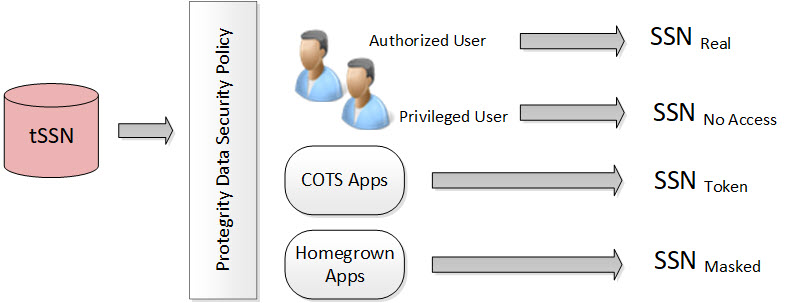
In the figure, the tokenized SSN is stored in the database. However, there are four roles defined in the policy:
Table: Different Roles in the Policy
| Users and Roles | Description |
|---|---|
| Authorized users - Real | It is the original or real value. A user with unprotect rights. |
| Privileged users - No Access | It is the default configuration. If the user does not have protect access rights, a null value is returned. |
| Commercial off-the-shelf (COTS) application users - Token | If the user does not have unprotect rights but the configuration is set as protect, then the configuration allows the output section to be protected. |
| Homegrown application users - Masked | It is how the masking data element is configured and the users are granted view access. For more information about masking, refer to Masking. |
Each role can receive a different form of the SSN based on its need. The Security Officer determines the SSN form by role.
Protegrity tokenization maintains a separation of duties by way of the data security policy.
The DBA, Developers, and System Administrators do not have direct access to the data. Everything goes through the data security policy, regardless of who manages the system.
For more information about data security policies, refer to Managing policies.
Protegrity tokenization is a method for tokenizing data. It is optimized to meet the performance, scalability, and manageability requirements of large and complex environments.
The Protegrity Format Preserving Encryption (FPE) encrypts input data of a specified format and generates output data, ciphertext, of the same format.
Encryption is the conversion of data into a ciphertext using an algorithmic scheme.
The No Encryption protection method uses the data security policy to access the clear data.
The Monitor protection method is generally used for auditing.
The Masking method is generally used where data output restrictions must be applied for users.
Hashing is an alternative method for protecting sensitive data.
ASCII is a 7-bit character set. It consists of 128 characters which includes numbers from 0-9, upper and lower case alphabets (A-Z, a-z), and special characters.
The section provides examples of Column Sized Calculation for AES and 3DES Encryption.
Empty strings can be protected by tokenization and encryption.
Hashing functions take the same parameters and return a hash value.
The Codebook Re-shuffling in DSG generates unique tokens for protected values for all the tokenization data elements.
Was this page helpful?