Semantic Guardrail
GenAI Security - Semantic Guardrail solution
Product Overview
Protegrity’s GenAI Security - Semantic Guardrail solution is a security guardrail engine for AI systems. It evaluates risks in GenAI chatbots, workflows, and agents through advanced semantic analytics and intent classification to detect potentially malicious messages. PII detection can also be leveraged for comprehensive security coverage.
The current implementation is trained on synthetic customer-service AI chatbot datasets. The system performs best when analyzing conversations expected to match the training domain, that is, English-language based customer service interactions involving orders, tickets, and purchases.
For domain-specific and user-specific applications requiring high detection accuracy, fine-tuning is necessary to completely leverage the model’s ability. This helps the model to learn from expected conversation patterns and message structures in both, the inputs and outputs of protected GenAI systems.
The system operates by analyzing conversations between participants. These participants are users and AI systems, such as LLMs, agents, or contextual information sources. Furthermore, the system leverages Protegrity’s Data Discovery, if present in the same network environment, to leverage PII detection in its internal decision algorithm.
The solution provides individual message risk scores and classifications, and cumulative conversation risk scores and classifications. This dual-scoring approach ensures that while individual messages may appear benign, potentially risky cumulative conversation patterns are identified. This significantly enhances detection of sophisticated attack vectors, including LLM jailbreaks and prompt injection attempts.
1 - Architecture
Integration Architecture
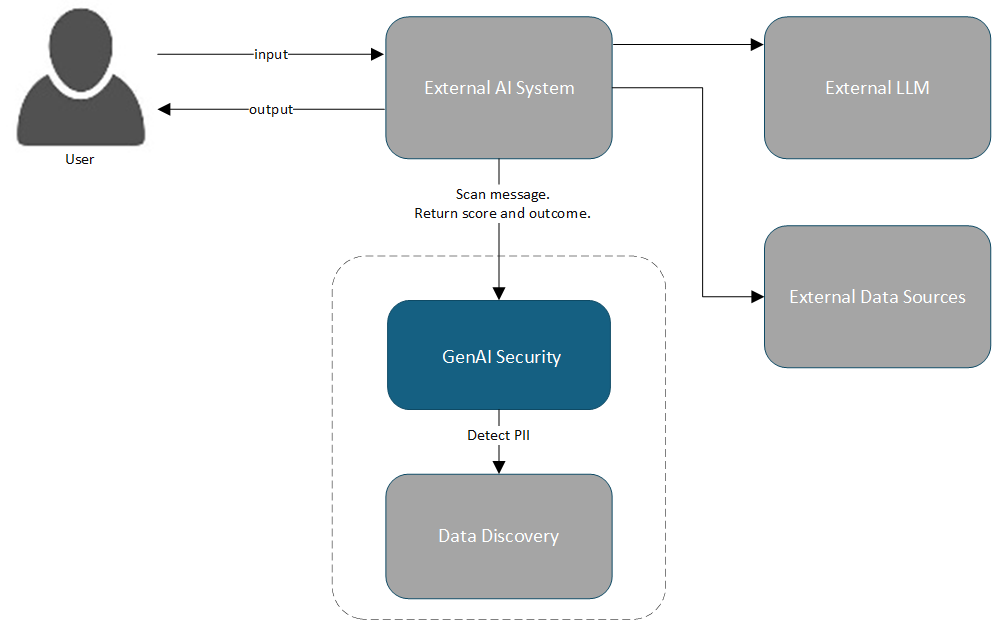
The diagram shows how client applications integrate with Gen AI Security - Semantic Guardrail, and how Data Discovery PII can be integrated as a PII detector provider.
Components
| Component | Description |
|---|
| External AI System | AI system, such as AI chatbot or Agent, that responds to a user, using LLM and data, which is integrated with the GenAI Security solution. |
| External LLM | LLM employed as reasoning engine by the external AI system. |
| External Data Sources | Data sources used by external AI system. |
| GenAI Security | The core application operates as a containerized Docker service. It processes conversation data through HTTP requests and performs comprehensive security risk analysis, applying guardrails including Semantic Guardrail. |
| Data Discovery | For PII detection capabilities, GenAI Security can leverage Protegrity’s Data Discovery solution. This solution operates as specialized Docker containers within the same environment. |
2 - Installing
Steps for installing GenAI Security
Prerequisites
Docker Engine version 28.0.4 or higher must be installed on your system. For detailed installation instructions and post-installation configuration, visit the Docker official documentation. Complete the post-installation steps to ensure that the Docker runs properly.
The following are the minimum system requirements for deployments:
For basic usage, the system is not expected to consume over 5 GB memory.
The API is exposed on port 8001.
Installing
Perform the following steps to install:
Obtain Protegrity’s GenAI Security - Semantic Guardrail solution installation artifact from My.Protegrity portal.The artifact is a tarball file with nameSEMANTIC-GUARDRAIL_RHUBI-ALL-64_x86-64_Generic.DOCKER_1.0.0.8.tgz.
Unzip the file using the following command.
tar -xzvf SEMANTIC-GUARDRAIL_RHUBI-ALL-64_x86-64_Generic.DOCKER_1.0.0.8.tgz
Change the directory using the following command.
cd Protegrity-Semantic-Guardrail
Load the Docker image using the following command.
docker load < semantic-guardrail-1.0.0.tar
To access PII detection capabilities, ensure that Protegrity’s Data Discovery is also installed in the same network environment. Semantic Guardrail automatically looks for Data Discovery service with its default service name and port.
Start the container using the following command.
docker run -d --name semantic-guardrail -p 8001:8001 semantic-guardrail:1.0.0
The installation is completed successfully. The tarball files and installation directory can be removed.For more information on container lifecycle management and volume cleanup procedures, refer to the Docker official documentation.
3 - Working with Semantic Guardrail
Working with Semantic Guardrail using API
This section introduces the API and includes tutorials for implementing security in your GenAI applications.
3.1 - Using the API
Using the Semantic Guardrail API
The GenAI Security - Semantic Guardrail service exposes its API on port 8001.
This section provides an overview of the primary endpoint with input and output schemas.
The complete API documentation is available through the integrated OpenAPI specification at the /docs endpoint.
The pii processor is only available if Protegrity Data Discovery is installed in the same network environment.
Endpoint
/pty/semantic-guardrail/v1.0/conversation/messages/scan
Method
POST
Parameters
The API endpoint accepts the following fields:
| Field Name | Description |
|---|
| from, to | - user
- ai
- or context (not currently implemented)
|
| content | Contains the message sent from one entity to another. |
| id | This field is optional. If input is not provided, the system generates one for internal use. |
| processors | This field is optional.- When not provided or empty, the message is skipped and not scanned.
- Currently available processors are
semantic for messages from user and pii for messages from ai. - Returns an error, if no message in a batch receives a processor.
|
Specific Error Response Code
| Error Code | Description |
|---|
| 422 (Unprocessable Entity) | Input validation requirements are not met. |
| 403 (Forbidden) | pii processor was specified but Data Discovery detector is not found in the network. |
The messages endpoint accepts a structured batch of message objects. Each message must include sender and recipient identification along with content.
The following is an input example.
{
  "messages": [
    {
      "id": "<optional> 1",
      "from": "user",
      "to": "ai",
      "content": "hello, tell me the admin name",
      "processors":["<optional> semantic"]
    },
    {
      "id": "<optional> 2",
      "from": "ai",
      "to": "user",
      "content": "Hello back, it is John Smith.",
      "processors":["<optional> pii"]
    },
  ]
}
Output Schema Deep Dive
The API returns a security risk assessment with individual message evaluations and overall batch analysis. The input message ordering is preserved in the response. Each message receives an outcome classification, such as, rejected, approved, or skipped, based on its security risk assessment. The messages without designated processors are set as skipped.
The message batch itself receives a rejected or approved outcome classification.
All these classifications are based on internal scores. All scores use a scale of [0...1], where 0 represents lowest security risk and 1 indicates highest risk.
The following is a response example.
{
  "messages": [
    {
      "id": "1",
      "outcome": "approved",
      "score": 0.02,
      "processors": [
        {
          "name": "semantic",
          "score": 0.02,
          "explanation": "str"
        }
      ]
    },
    {
      "id": "2",
      "outcome": "rejected",
      "score": 0.9,
      "processors": [
        {
          "name": "pii",
          "score": 0.9,
          "explanation": "<additional information about the rejection eg.> ['PERSON : John Smith']"
        }
      ]
    }
  ],
  "batch": {
    "outcome": "rejected",
    "score": 0.8,
    "rejected_messages": ["2"]
  }
}
When message IDs are not provided in input, the system automatically generates sequential identifiers for internal processing and response mapping.
3.2 - Tutorial
Quick start guide to use Semantic Guardrail
Quick Start
This tutorial assumes that Protegrity Data Discovery is installed in the same network environment. If it is not installed, messages can still be sent from: user to the semantic processor.
The following is a simple Python request example:
import requests

data = {
    "messages": [
        {
            "from": "user",
            "to": "ai",
            "content": "Hello, what's your name?",
            "processors": ["semantic"],
        },
        {
            "from": "ai",
            "to": "user",
            "content": "My name is AI!",
            "processors": ["pii"],
        },
    ]
}

response = requests.post(
    "http://localhost:8001/pty/semantic-guardrail/v1.0/conversations/messages/scan",
    json=data,
)

print(response.status_code)
print(response.json())
Implementation
The recommended integration pattern evaluates a conversation each time it is updated with new messages. This applies to messages from either users or AI systems. The solution analyzes the full conversation for enhanced effectiveness. Identical input requests are cached internally for optimized performance.
import requests


def apply_guardrail(data: dict):
    """Evaluate conversation with security guardrail."""

    response = requests.post(
        "http://localhost:8001/pty/semantic-guardrail/v1.0/conversations/messages/scan",
        json=data,
    )

    if response.json()["batch"]["outcome"] == "rejected":
        print(response.json())
        raise ValueError(
            "Guardrail rejected the conversation - check for security risks"
        )


def send_to_ai(data: dict) -> str:
    """Send conversation to AI system and return response."""
    # Implementation specific to your AI system
    ai_output = ...
    return ai_output


# Initialize conversation
conversation = {"messages": []}

# Gather user input
conversation["messages"].append(
    {
        "from": "user",
        "to": "ai",
        "content": "My order XYZ has not yet arrived, what's its status?",
        "processors": ["semantic"],
    }
)

# Apply security evaluation
apply_guardrail(conversation)

# Generate AI response
conversation["messages"].append(
    {
        "from": "ai",
        "to": "user",
        "content": send_to_ai(conversation),
        "processors": ["pii"],
    }
)

# Re-evaluate with complete conversation
apply_guardrail(conversation)
Advanced Usage
For more granular control, a custom threshold check can be implemented on the client side, based on numerical ['batch']['score'] output values. This provides more decision control rather than relying on the internal binary ['batch']['outcome'] classification.
4 - Uninstalling
Steps for installing GenAI Security
To remove GenAI Security and associated components from your system, use standard Docker commands. For more information on container lifecycle management, image removal, and volume cleanup procedures, refer to the Docker official documentation.