Protegrity’s Synthetic Data solution is a Synthetic Data generator which generates artificial data that is realistic, statistically accurate, and privacy-safe. This data unlocks the full potential of AI and analytics. By creating entirely new data that mirrors the patterns of your original datasets but contains no sensitive information you can train and test AI models without risk. You can also scale these models without exposure or compliance violations.
This is the multi-page printable view of this section. Click here to print.
About Protegrity Synthetic Data
Summary of the Protegrity Synthetic Data architecture, including its components, communication flow, access methods, and hosting options.
1 - Protegrity Synthetic Data Architecture
Communication between Protegrity Synthetic Data, the Dask Scheduler, and Dask Workers is detailed in this section.
An overview of the communication is shown in the following figure.
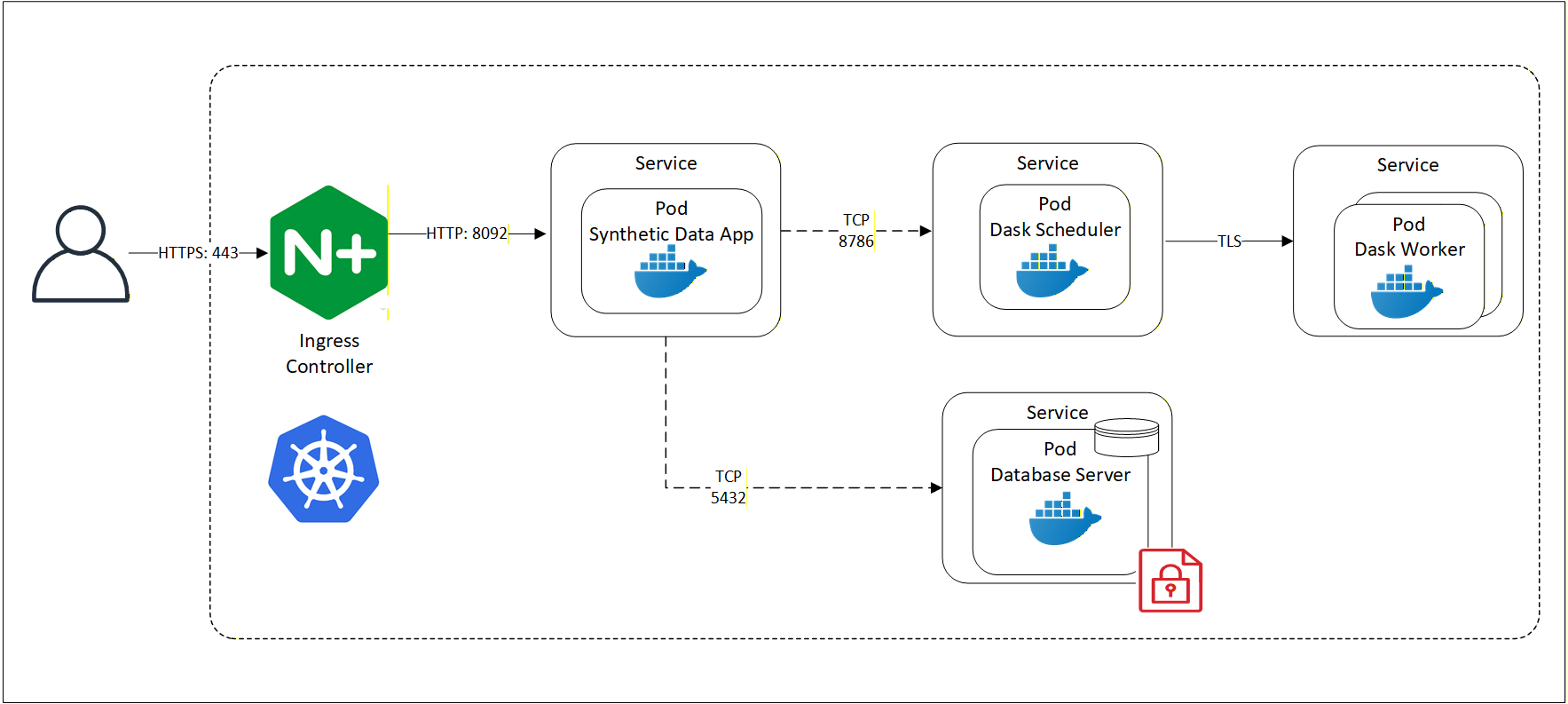
Protegrity Synthetic Data system includes the following core components:
Key Pods and Services
Synthetic Data App Pod
- Orchestrates Synthetic Data generation.
MLFlow Pod
- Captures model training and evaluation.
- Hosted in containers for scalability.
S3 bucket Pod
- Stores models, model artifacts, and generated reports.
- Used by both MLFlow and Synthetic Data App pods.
SQL Database Server Pod
- Provides storage for MLFlow experiments metadata.
Data Generation Interfaces
Protegrity Synthetic Data can be generated using:
- REST APIs
- Swagger UI
These interfaces allow developers and data scientists to interact with the system programmatically or visually.
Access and Networking
Users access the Protegrity Synthetic Data using HTTP over default port 8095 and other services using the following ports:
| Port | Communication Path |
|---|---|
| 5000 | MLFlow pod |
| 5432 | SQL Database Server |
| 8095 | Protegrity Synthetic Data Service |
| 9000 | S3 bucket |
Cloud Hosting Options
Like the Protegrity Anonymization API, the entire Protegrity Synthetic Data API can be hosted using any cloud-provided Kubernetes service, including:
- Amazon Elastic Kubernetes Service (EKS)
- Google Kubernetes Engine (GKE)
- Microsoft Azure Kubernetes Service (AKS)
- Red Hat OpenShift
- Other Kubernetes platforms
This flexibility allows organizations to scale Synthetic Data generation securely across environments.
2 - Supported Models
Describes multiple generative modeling techniques.
Models supported by Protegrity Synthetic Data 1.0.1
Protegrity Synthetic Data 1.0.1 supports tabular synthetic data generation using GAN‑based models, including TVAE and diffusion‑based techniques. These models are used to generate privacy-safe synthetic tabular data while preserving:
- Column types and schema compatibility
- Statistical distributions
- Relationships and correlations between variables
- Utility for analytics and ML workloads
The following are the modeling techniques:
Generative Adversarial Networks (GANs) – It is considered as a primary approach which is used to learn the structure and statistical properties of real tabular datasets and generate Synthetic Data.
Tabular Variational Autoencoders (TVAE) – It is explicitly listed as a supported technique for Synthetic Data generation.
Diffusion-based models – It is also explicitly mentioned as a supported Synthetic Data generation.
All three models learn from the structure and statistical properties of real datasets, but they differ in how they learn and generate data, and in the trade‑offs they offer. These models have some inherent limitations. They require sufficient input data to train reliably. They are slower than anonymization or pseudonymization techniques and cannot be used in scenarios that require re‑identification or record‑level traceability. Model training and maintenance introduce moderate cost and operational overhead, and data fidelity is statistical rather than exact, particularly for rare or highly constrained patterns.
Switching between the Protegrity Synthetic Data Models
Step 1: Decide the target model type
Protegrity Synthetic Data supports multiple generative model types, including:
- GAN‑based models
- Diffusion‑based models
Model selection is controlled using the request configuration, not by modifying an existing trained model.
Step 2: Update the request payload to specify the model type
When building a Protegrity Synthetic Data generation request, use the typeHint field to explicitly select the model.
Use the following to switch to a diffusion model:
"typeHint": {
  "model_type": "tabdiff"
}
Note: If
typeHintis not specified, the system may automatically determine the most appropriate model during training.
Step 3: Submit the updated request and trigger model training
Switching models requires a new training run. Protegrity Synthetic Data follows a structured pipeline that includes:
- Configuration validation
- Automatic preprocessing
- Training of the Protegrity Synthetic Data generator model
- Evaluation against real data
- Protegrity Synthetic Data generation
Note: Training is not instantaneous and can take from minutes to hours depending on configuration and data size.
Step 4: Review evaluation results for the new model
After switching models and generating data:
- Review evaluation and similarity metrics.
- Validate privacy protection and analytical utility.
Protegrity Synthetic Data explicitly evaluates generated data against the real dataset as part of the workflow.
Step 5: Version or archive models as needed
This is an optional step. Protegrity Synthetic Data provides model management capabilities to track and manage trained models. Each training run produces a separate model artifact, which can be reused or archived independently.